1
•
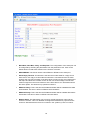
Baud Rate, Data Bits, Parity, and Stop Bits: The configuration of the serial port can
be configured by selecting the parameters from the pull-down menu. Click on the
Submit button to load these values into the Protocol converter.
•
RS232/RS485: This field is used to select RS232 or RS485 on the serial port
•
Serial Reply Timeout: This timeout is the time the module waits for a reply from a
slave device. If a reply is received then this timeout is cancelled and the converter
looks for the next TCP message. If the slave does not send a reply, then this timeout
will expire and allow the converter to look for the next TCP message. This timeout
must be longer than the turn-around time of the slave device or it will timeout before
the slave replies. This timeout only operates in Mode 0
•
RS485 on Delay: This is the time the RS485 transmitter will be enabled before data
is transmitted. This has no effect on RS232 communications
•
RS485 off Delay: This is the time the RS485 transmitter will be enabled after data is
transmitted. This has no effect on RS232 communications
•
Module Name: This field allows you to enter a module description name into the
Protocol converter. This is an identifier for diagnostic/maintenance purposes and is
chosen to best describe the Protocol converter in the system by name or number.
18