1
Network Security Firewall
User Manual
NetDefendOS
Ver. 2.27.08
Security
Security
Network Security Solution
http://www.dlink.com
User Manual
DFL-210/260/260E/800/860/860E
DFL-1600/1660/2500/2560/2560G
NetDefendOS Version 2.27.08
D-Link Corporation
No. 289, Sinhu 3rd Rd, Neihu District, Taipei City 114, Taiwan R.O.C.
http://www.DLink.com
Published 2014-01-08
Copyright © 2014
User Manual
DFL-210/260/260E/800/860/860E
DFL-1600/1660/2500/2560/2560G
NetDefendOS Version 2.27.08
Published 2014-01-08
Copyright © 2014
Copyright Notice
This publication, including all photographs, illustrations and software, is protected under
international copyright laws, with all rights reserved. Neither this manual, nor any of the material
contained herein, may be reproduced without the written consent of D-Link.
Disclaimer
The information in this document is subject to change without notice. D-Link makes no
representations or warranties with respect to the contents hereof and specifically disclaims any
implied warranties of merchantability or fitness for a particular purpose. D-Link reserves the right to
revise this publication and to make changes from time to time in the content hereof without any
obligation to notify any person or parties of such revision or changes.
Limitations of Liability
UNDER NO CIRCUMSTANCES SHALL D-LINK OR ITS SUPPLIERS BE LIABLE FOR
DAMAGES OF ANY CHARACTER (E.G. DAMAGES FOR LOSS OF PROFIT, SOFTWARE
RESTORATION, WORK STOPPAGE, LOSS OF SAVED DATA OR ANY OTHER
COMMERCIAL DAMAGES OR LOSSES) RESULTING FROM THE APPLICATION OR
IMPROPER USE OF THE D-LINK PRODUCT OR FAILURE OF THE PRODUCT, EVEN IF
D-LINK IS INFORMED OF THE POSSIBILITY OF SUCH DAMAGES. FURTHERMORE,
D-LINK WILL NOT BE LIABLE FOR THIRD-PARTY CLAIMS AGAINST CUSTOMER FOR
LOSSES OR DAMAGES. D-LINK WILL IN NO EVENT BE LIABLE FOR ANY DAMAGES IN
EXCESS OF THE AMOUNT D-LINK RECEIVED FROM THE END-USER FOR THE
PRODUCT.
Table of Contents
Preface ...............................................................................................................14
1. NetDefendOS Overview ....................................................................................16
1.1. Features ................................................................................................16
1.2. NetDefendOS Architecture ......................................................................19
1.2.1. State-based Architecture ...............................................................19
1.2.2. NetDefendOS Building Blocks .......................................................19
1.2.3. Basic Packet Flow ........................................................................20
1.3. NetDefendOS State Engine Packet Flow .....................................................23
2. Management and Maintenance ............................................................................28
2.1. Managing NetDefendOS ..........................................................................28
2.1.1. Overview ...................................................................................28
2.1.2. The Default Administrator Account .................................................29
2.1.3. The Web Interface .......................................................................29
2.1.4. The CLI .....................................................................................35
2.1.5. CLI Scripts .................................................................................43
2.1.6. Secure Copy ...............................................................................47
2.1.7. The Console Boot Menu ...............................................................49
2.1.8. Management Advanced Settings .....................................................50
2.1.9. Working with Configurations .........................................................51
2.2. Events and Logging ................................................................................57
2.2.1. Overview ...................................................................................57
2.2.2. Log Messages .............................................................................57
2.2.3. Creating Log Receivers .................................................................58
2.2.4. Logging to MemoryLogReceiver ....................................................58
2.2.5. Logging to Syslog Hosts ...............................................................58
2.2.6. SNMP Traps ...............................................................................60
2.2.7. Advanced Log Settings .................................................................61
2.3. RADIUS Accounting ..............................................................................62
2.3.1. Overview ...................................................................................62
2.3.2. RADIUS Accounting Messages ......................................................62
2.3.3. Interim Accounting Messages ........................................................64
2.3.4. Activating RADIUS Accounting .....................................................64
2.3.5. RADIUS Accounting Security ........................................................64
2.3.6. RADIUS Accounting and High Availability ......................................65
2.3.7. Handling Unresponsive Servers ......................................................65
2.3.8. Accounting and System Shutdowns .................................................65
2.3.9. Limitations with NAT ...................................................................65
2.3.10. RADIUS Advanced Settings ........................................................65
2.4. Hardware Monitoring ..............................................................................67
2.5. SNMP Monitoring ..................................................................................69
2.5.1. SNMP Advanced Settings .............................................................70
2.6. The pcapdump Command ........................................................................72
2.7. Maintenance ..........................................................................................75
2.7.1. Auto-Update Mechanism ...............................................................75
2.7.2. Backing Up Configurations ...........................................................75
2.7.3. Restore to Factory Defaults ............................................................77
3. Fundamentals ...................................................................................................80
3.1. The Address Book ..................................................................................80
3.1.1. Overview ...................................................................................80
3.1.2. IP Addresses ...............................................................................80
3.1.3. Ethernet Addresses .......................................................................82
3.1.4. Address Groups ...........................................................................83
3.1.5. Auto-Generated Address Objects ....................................................84
3.1.6. Address Book Folders ...................................................................84
3.2. Services ................................................................................................85
3.2.1. Overview ...................................................................................85
3.2.2. Creating Custom Services ..............................................................86
4
User Manual
3.2.3. ICMP Services ............................................................................89
3.2.4. Custom IP Protocol Services ..........................................................91
3.2.5. Service Groups ............................................................................91
3.2.6. Custom Service Timeouts ..............................................................92
3.3. Interfaces ..............................................................................................93
3.3.1. Overview ...................................................................................93
3.3.2. Ethernet Interfaces .......................................................................95
3.3.3. VLAN ..................................................................................... 101
3.3.4. PPPoE ..................................................................................... 105
3.3.5. GRE Tunnels ............................................................................ 107
3.3.6. Interface Groups ........................................................................ 111
3.4. ARP .................................................................................................. 113
3.4.1. Overview ................................................................................. 113
3.4.2. The NetDefendOS ARP Cache ..................................................... 113
3.4.3. Creating ARP Objects ................................................................. 115
3.4.4. Using ARP Advanced Settings ..................................................... 117
3.4.5. ARP Advanced Settings Summary ................................................ 118
3.5. IP Rule Sets ........................................................................................ 122
3.5.1. Security Policies ........................................................................ 122
3.5.2. IP Rule Evaluation ..................................................................... 125
3.5.3. IP Rule Actions ......................................................................... 126
3.5.4. Editing IP rule set Entries ............................................................ 127
3.5.5. IP Rule Set Folders .................................................................... 127
3.5.6. Configuration Object Groups ....................................................... 128
3.6. Schedules ........................................................................................... 132
3.7. Certificates ......................................................................................... 134
3.7.1. Overview ................................................................................. 134
3.7.2. Certificates in NetDefendOS ........................................................ 135
3.7.3. CA Certificate Requests .............................................................. 136
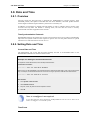
3.8. Date and Time ..................................................................................... 138
3.8.1. Overview ................................................................................. 138
3.8.2. Setting Date and Time ................................................................ 138
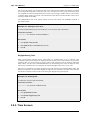
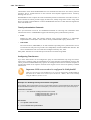
3.8.3. Time Servers ............................................................................ 139
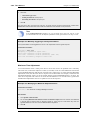
3.8.4. Settings Summary for Date and Time ............................................ 142
3.9. DNS .................................................................................................. 145
4. Routing ......................................................................................................... 148
4.1. Overview ............................................................................................ 148
4.2. Static Routing ...................................................................................... 149
4.2.1. The Principles of Routing ............................................................ 149
4.2.2. Static Routing ........................................................................... 153
4.2.3. Route Failover .......................................................................... 157
4.2.4. Host Monitoring for Route Failover ............................................... 160
4.2.5. Advanced Settings for Route Failover ............................................ 162
4.2.6. Proxy ARP ............................................................................... 163
4.3. Policy-based Routing ............................................................................ 166
4.3.1. Overview ................................................................................. 166
4.3.2. Policy-based Routing Tables ........................................................ 166
4.3.3. Policy-based Routing Rules ......................................................... 166
4.3.4. Routing Table Selection .............................................................. 167
4.3.5. The Ordering parameter .............................................................. 167
4.4. Route Load Balancing ........................................................................... 171
4.5. OSPF ................................................................................................. 177
4.5.1. Dynamic Routing ....................................................................... 177
4.5.2. OSPF Concepts ......................................................................... 180
4.5.3. OSPF Components ..................................................................... 185
4.5.4. Dynamic Routing Rules .............................................................. 191
4.5.5. Setting Up OSPF ....................................................................... 194
4.5.6. An OSPF Example ..................................................................... 198
4.6. Multicast Routing ................................................................................. 201
4.6.1. Overview ................................................................................. 201
4.6.2. Multicast Forwarding with SAT Multiplex Rules ............................. 202
4.6.3. IGMP Configuration .................................................................. 206
5
User Manual
4.6.4. Advanced IGMP Settings ............................................................ 211
4.7. Transparent Mode ................................................................................ 214
4.7.1. Overview ................................................................................. 214
4.7.2. Enabling Internet Access ............................................................. 219
4.7.3. Transparent Mode Scenarios ........................................................ 220
4.7.4. Spanning Tree BPDU Support ...................................................... 224
4.7.5. Advanced Settings for Transparent Mode ....................................... 225
5. DHCP Services .............................................................................................. 230
5.1. Overview ............................................................................................ 230
5.2. DHCP Servers ..................................................................................... 231
5.2.1. Static DHCP Hosts ..................................................................... 234
5.2.2. Custom Options ......................................................................... 235
5.3. DHCP Relaying ................................................................................... 237
5.3.1. DHCP Relay Advanced Settings ................................................... 238
5.4. IP Pools .............................................................................................. 240
6. Security Mechanisms ....................................................................................... 244
6.1. Access Rules ....................................................................................... 244
6.1.1. Overview ................................................................................. 244
6.1.2. IP Spoofing .............................................................................. 245
6.1.3. Access Rule Settings .................................................................. 245
6.2. ALGs ................................................................................................. 247
6.2.1. Overview ................................................................................. 247
6.2.2. The HTTP ALG ........................................................................ 248
6.2.3. The FTP ALG ........................................................................... 251
6.2.4. The TFTP ALG ......................................................................... 260
6.2.5. The SMTP ALG ........................................................................ 261
6.2.6. The POP3 ALG ......................................................................... 270
6.2.7. The PPTP ALG ......................................................................... 271
6.2.8. The SIP ALG ............................................................................ 272
6.2.9. The H.323 ALG ........................................................................ 283
6.2.10. The TLS ALG ......................................................................... 296
6.3. Web Content Filtering ........................................................................... 299
6.3.1. Overview ................................................................................. 299
6.3.2. Active Content Handling ............................................................. 299
6.3.3. Static Content Filtering ............................................................... 300
6.3.4. Dynamic Web Content Filtering ................................................... 302
6.4. Anti-Virus Scanning ............................................................................. 316
6.4.1. Overview ................................................................................. 316
6.4.2. Implementation ......................................................................... 316
6.4.3. Activating Anti-Virus Scanning .................................................... 317
6.4.4. The Signature Database .............................................................. 318
6.4.5. Subscribing to the D-Link Anti-Virus Service ................................. 318
6.4.6. Anti-Virus Options ..................................................................... 318
6.5. Intrusion Detection and Prevention .......................................................... 322
6.5.1. Overview ................................................................................. 322
6.5.2. IDP Availability for D-Link Models .............................................. 322
6.5.3. IDP Rules ................................................................................. 324
6.5.4. Insertion/Evasion Attack Prevention .............................................. 326
6.5.5. IDP Pattern Matching ................................................................. 327
6.5.6. IDP Signature Groups ................................................................. 328
6.5.7. IDP Actions .............................................................................. 329
6.5.8. SMTP Log Receiver for IDP Events .............................................. 330
6.6. Denial-of-Service Attack Prevention ........................................................ 334
6.6.1. Overview ................................................................................. 334
6.6.2. DoS Attack Mechanisms ............................................................. 334
6.6.3. Ping of Death and Jolt Attacks ..................................................... 334
6.6.4. Fragmentation overlap attacks: Teardrop, Bonk, Boink and Nestea ...... 335
6.6.5. The Land and LaTierra attacks ..................................................... 335
6.6.6. The WinNuke attack ................................................................... 335
6.6.7. Amplification attacks: Smurf, Papasmurf, Fraggle ........................... 336
6.6.8. TCP SYN Flood Attacks ............................................................. 337
6.6.9. The Jolt2 Attack ........................................................................ 337
6
User Manual
6.6.10. Distributed DoS Attacks ............................................................ 337
6.7. Blacklisting Hosts and Networks ............................................................. 339
7. Address Translation ........................................................................................ 342
7.1. Overview ............................................................................................ 342
7.2. NAT .................................................................................................. 343
7.3. NAT Pools .......................................................................................... 348
7.4. SAT ................................................................................................... 351
7.4.1. Translation of a Single IP Address (1:1) ......................................... 351
7.4.2. Translation of Multiple IP Addresses (M:N) .................................... 356
7.4.3. All-to-One Mappings (N:1) ......................................................... 358
7.4.4. Port Translation ......................................................................... 359
7.4.5. Protocols Handled by SAT .......................................................... 359
7.4.6. Multiple SAT Rule Matches ......................................................... 359
7.4.7. SAT and FwdFast Rules .............................................................. 360
8. User Authentication ........................................................................................ 363
8.1. Overview ............................................................................................ 363
8.2. Authentication Setup ............................................................................. 365
8.2.1. Setup Summary ......................................................................... 365
8.2.2. The Local Database .................................................................... 365
8.2.3. External RADIUS Servers ........................................................... 367
8.2.4. External LDAP Servers ............................................................... 367
8.2.5. Authentication Rules .................................................................. 374
8.2.6. Authentication Processing ........................................................... 376
8.2.7. A Group Usage Example ............................................................. 377
8.2.8. HTTP Authentication ................................................................. 377
8.3. Customizing HTML Pages ..................................................................... 381
9. VPN ............................................................................................................. 385
9.1. Overview ............................................................................................ 385
9.1.1. VPN Usage ............................................................................... 385
9.1.2. VPN Encryption ........................................................................ 386
9.1.3. VPN Planning ........................................................................... 386
9.1.4. Key Distribution ........................................................................ 387
9.1.5. The TLS Alternative for VPN ...................................................... 387
9.2. VPN Quick Start .................................................................................. 389
9.2.1. IPsec LAN to LAN with Pre-shared Keys ....................................... 390
9.2.2. IPsec LAN to LAN with Certificates ............................................. 391
9.2.3. IPsec Roaming Clients with Pre-shared Keys .................................. 392
9.2.4. IPsec Roaming Clients with Certificates ......................................... 394
9.2.5. L2TP Roaming Clients with Pre-Shared Keys ................................. 395
9.2.6. L2TP Roaming Clients with Certificates ........................................ 396
9.2.7. PPTP Roaming Clients ............................................................... 397
9.3. IPsec Components ................................................................................ 399
9.3.1. Overview ................................................................................. 399
9.3.2. Internet Key Exchange (IKE) ....................................................... 399
9.3.3. IKE Authentication .................................................................... 405
9.3.4. IPsec Protocols (ESP/AH) ........................................................... 406
9.3.5. NAT Traversal .......................................................................... 407
9.3.6. Algorithm Proposal Lists ............................................................. 409
9.3.7. Pre-shared Keys ........................................................................ 410
9.3.8. Identification Lists ..................................................................... 411
9.4. IPsec Tunnels ...................................................................................... 414
9.4.1. Overview ................................................................................. 414
9.4.2. LAN to LAN Tunnels with Pre-shared Keys ................................... 416
9.4.3. Roaming Clients ........................................................................ 416
9.4.4. Fetching CRLs from an alternate LDAP server ................................ 421
9.4.5. Troubleshooting with ikesnoop ..................................................... 422
9.4.6. IPsec Advanced Settings ............................................................. 429
9.5. PPTP/L2TP ......................................................................................... 433
9.5.1. PPTP Servers ............................................................................ 433
9.5.2. L2TP Servers ............................................................................ 434
9.5.3. L2TP/PPTP Server advanced settings ............................................ 438
9.5.4. PPTP/L2TP Clients .................................................................... 439
7
User Manual
9.6. CA Server Access ................................................................................ 442
9.7. VPN Troubleshooting ........................................................................... 445
9.7.1. General Troubleshooting ............................................................. 445
9.7.2. Troubleshooting Certificates ........................................................ 446
9.7.3. IPsec Troubleshooting Commands ................................................ 446
9.7.4. Management Interface Failure with VPN ........................................ 447
9.7.5. Specific Error Messages .............................................................. 447
9.7.6. Specific Symptoms .................................................................... 450
10. Traffic Management ...................................................................................... 453
10.1. Traffic Shaping .................................................................................. 453
10.1.1. Overview ................................................................................ 453
10.1.2. Traffic Shaping in NetDefendOS ................................................. 454
10.1.3. Simple Bandwidth Limiting ....................................................... 456
10.1.4. Limiting Bandwidth in Both Directions ........................................ 457
10.1.5. Creating Differentiated Limits Using Chains ................................. 458
10.1.6. Precedences ............................................................................ 459
10.1.7. Pipe Groups ............................................................................ 464
10.1.8. Traffic Shaping Recommendations .............................................. 467
10.1.9. A Summary of Traffic Shaping ................................................... 468
10.1.10. More Pipe Examples ............................................................... 469
10.2. IDP Traffic Shaping ............................................................................ 474
10.2.1. Overview ................................................................................ 474
10.2.2. Setting Up IDP Traffic Shaping .................................................. 474
10.2.3. Processing Flow ....................................................................... 475
10.2.4. The Importance of Specifying a Network ...................................... 475
10.2.5. A P2P Scenario ........................................................................ 476
10.2.6. Viewing Traffic Shaping Objects ................................................ 477
10.2.7. Guaranteeing Instead of Limiting Bandwidth ................................. 478
10.2.8. Logging ................................................................................. 478
10.3. Threshold Rules ................................................................................. 479
10.3.1. Overview ................................................................................ 479
10.3.2. Limiting the Connection Rate/Total Connections ........................... 479
10.3.3. Grouping ................................................................................ 480
10.3.4. Rule Actions ........................................................................... 480
10.3.5. Multiple Triggered Actions ........................................................ 480
10.3.6. Exempted Connections .............................................................. 480
10.3.7. Threshold Rules and ZoneDefense .............................................. 480
10.3.8. Threshold Rule Blacklisting ....................................................... 480
10.4. Server Load Balancing ........................................................................ 482
10.4.1. Overview ................................................................................ 482
10.4.2. SLB Distribution Algorithms ...................................................... 483
10.4.3. Selecting Stickiness .................................................................. 484
10.4.4. SLB Algorithms and Stickiness ................................................... 485
10.4.5. Server Health Monitoring .......................................................... 486
10.4.6. Setting Up SLB_SAT Rules ........................................................ 487
11. High Availability .......................................................................................... 491
11.1. Overview .......................................................................................... 491
11.2. HA Mechanisms ................................................................................. 493
11.3. Setting Up HA ................................................................................... 496
11.3.1. HA Hardware Setup ................................................................. 496
11.3.2. NetDefendOS Manual HA Setup ................................................. 497
11.3.3. Verifying the Cluster Functions .................................................. 498
11.3.4. Unique Shared Mac Addresses ................................................... 499
11.4. HA Issues ......................................................................................... 500
11.5. Upgrading an HA Cluster ..................................................................... 502
11.6. HA Advanced Settings ........................................................................ 504
12. ZoneDefense ................................................................................................ 506
12.1. Overview .......................................................................................... 506
12.2. ZoneDefense Switches ......................................................................... 507
12.3. ZoneDefense Operation ....................................................................... 508
12.3.1. SNMP .................................................................................... 508
12.3.2. Threshold Rules ....................................................................... 508
8
User Manual
12.3.3. Manual Blocking and Exclude Lists ............................................. 508
12.3.4. ZoneDefense with Anti-Virus Scanning ........................................ 510
12.3.5. Limitations ............................................................................. 510
13. Advanced Settings ......................................................................................... 513
13.1. IP Level Settings ................................................................................ 513
13.2. TCP Level Settings ............................................................................. 517
13.3. ICMP Level Settings ........................................................................... 522
13.4. State Settings ..................................................................................... 523
13.5. Connection Timeout Settings ................................................................ 525
13.6. Length Limit Settings .......................................................................... 527
13.7. Fragmentation Settings ........................................................................ 529
13.8. Local Fragment Reassembly Settings ..................................................... 533
13.9. Miscellaneous Settings ........................................................................ 534
A. Subscribing to Updates ................................................................................... 537
B. IDP Signature Groups ..................................................................................... 539
C. Verified MIME filetypes ................................................................................. 543
D. The OSI Framework ....................................................................................... 547
Alphabetical Index ............................................................................................. 548
9
List of Figures
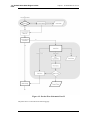
1.1. Packet Flow Schematic Part I ...........................................................................23
1.2. Packet Flow Schematic Part II ..........................................................................24
1.3. Packet Flow Schematic Part III .........................................................................25
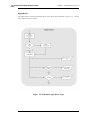
1.4. Expanded Apply Rules Logic ............................................................................26
3.1. VLAN Connections ...................................................................................... 103
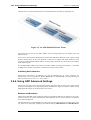
3.2. An ARP Publish Ethernet Frame ..................................................................... 117
3.3. Simplified NetDefendOS Traffic Flow ............................................................. 124
4.1. A Typical Routing Scenario ........................................................................... 150
4.2. Using Local IP Address with an Unbound Network ............................................ 152
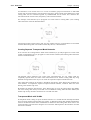
4.3. A Route Failover Scenario for ISP Access ......................................................... 158
4.4. A Proxy ARP Example .................................................................................. 164
4.5. The RLB Round Robin Algorithm ................................................................... 172
4.6. The RLB Spillover Algorithm ......................................................................... 173
4.7. A Route Load Balancing Scenario ................................................................... 175
4.8. A Simple OSPF Scenario ............................................................................... 178
4.9. OSPF Providing Route Redundancy ................................................................. 179
4.10. Virtual Links Connecting Areas .................................................................... 183
4.11. Virtual Links with Partitioned Backbone ......................................................... 184
4.12. NetDefendOS OSPF Objects ........................................................................ 185
4.13. Dynamic Routing Rule Objects ..................................................................... 192
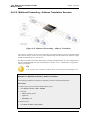
4.14. Multicast Forwarding - No Address Translation ................................................ 203
4.15. Multicast Forwarding - Address Translation .................................................... 205
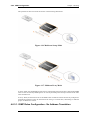
4.16. Multicast Snoop Mode ................................................................................. 207
4.17. Multicast Proxy Mode ................................................................................. 207
4.18. Non-transparent Mode Internet Access ........................................................... 219
4.19. Transparent Mode Internet Access ................................................................. 219
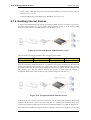
4.20. Transparent Mode Scenario 1 ........................................................................ 221
4.21. Transparent Mode Scenario 2 ........................................................................ 222
4.22. An Example BPDU Relaying Scenario ........................................................... 225
5.1. DHCP Server Objects ................................................................................... 234
6.1. Deploying an ALG ....................................................................................... 247
6.2. HTTP ALG Processing Order ......................................................................... 250
6.3. FTP ALG Hybrid Mode ................................................................................. 252
6.4. SMTP ALG Processing Order ......................................................................... 263
6.5. Anti-Spam Filtering ...................................................................................... 265
6.6. PPTP ALG Usage ........................................................................................ 271
6.7. TLS Termination .......................................................................................... 297
6.8. Dynamic Content Filtering Flow ..................................................................... 303
6.9. IDP Database Updating ................................................................................. 323
6.10. IDP Signature Selection ............................................................................... 325
7.1. NAT IP Address Translation .......................................................................... 343
7.2. A NAT Example .......................................................................................... 345
7.3. Anonymizing with NAT ................................................................................ 347
7.4. The Role of the DMZ .................................................................................... 352
8.1. Normal LDAP Authentication ........................................................................ 373
8.2. LDAP for PPP with CHAP, MS-CHAPv1 or MS-CHAPv2 .................................. 374
9.1. The AH protocol .......................................................................................... 407
9.2. The ESP protocol ......................................................................................... 407
9.3. PPTP Client Usage ....................................................................................... 441
9.4. Certificate Validation Components .................................................................. 443
10.1. Pipe Rules Determine Pipe Usage .................................................................. 455
10.2. FwdFast Rules Bypass Traffic Shaping ........................................................... 456
10.3. Differentiated Limits Using Chains ................................................................ 459
10.4. The Eight Pipe Precedences .......................................................................... 460
10.5. Minimum and Maximum Pipe Precedence ....................................................... 462
10.6. Traffic Grouped By IP Address ..................................................................... 466
10.7. A Basic Traffic Shaping Scenario .................................................................. 470
10.8. IDP Traffic Shaping P2P Scenario ................................................................. 476
10
User Manual
10.9. A Server Load Balancing Configuration .......................................................... 482
10.10. Connections from Three Clients ................................................................... 485
10.11. Stickiness and Round-Robin ....................................................................... 486
10.12. Stickiness and Connection-rate .................................................................... 486
D.1. The 7 Layers of the OSI Model ...................................................................... 547
11
List of Examples
1. Example Notation .............................................................................................14
2.1. Enabling remote management via HTTPS ...........................................................34
2.2. Enabling SSH Remote Access ..........................................................................40
2.3. Listing Configuration Objects ...........................................................................52
2.4. Displaying a Configuration Object .....................................................................52
2.5. Editing a Configuration Object .........................................................................53
2.6. Adding a Configuration Object .........................................................................54
2.7. Deleting a Configuration Object ........................................................................54
2.8. Undeleting a Configuration Object ....................................................................55
2.9. Listing Modified Configuration Objects ..............................................................55
2.10. Activating and Committing a Configuration .......................................................56
2.11. Enable Logging to a Syslog Host .....................................................................59
2.12. Sending SNMP Traps to an SNMP Trap Receiver ...............................................60
2.13. RADIUS Accounting Server Setup ..................................................................66
2.14. Enabling SNMP Monitoring ...........................................................................70
2.15. Performing a Complete System Backup ............................................................77
2.16. Complete Hardware Reset to Factory Defaults ...................................................77
3.1. Adding an IP Host ..........................................................................................81
3.2. Adding an IP Network .....................................................................................81
3.3. Adding an IP Range ........................................................................................81
3.4. Deleting an Address Object ..............................................................................82
3.5. Adding an Ethernet Address .............................................................................82
3.6. Listing the Available Services ...........................................................................85
3.7. Viewing a Specific Service ..............................................................................86
3.8. Creating a Custom TCP/UDP Service ................................................................89
3.9. Adding an IP Protocol Service ..........................................................................91
3.10. Defining a VLAN ....................................................................................... 104
3.11. Configuring a PPPoE Client ......................................................................... 107
3.12. Creating an Interface Group .......................................................................... 111
3.13. Displaying the ARP Cache ........................................................................... 114
3.14. Flushing the ARP Cache .............................................................................. 114
3.15. Defining a Static ARP Entry ......................................................................... 115
3.16. Adding an Allow IP Rule .............................................................................. 127
3.17. Setting up a Time-Scheduled Policy ............................................................... 133
3.18. Uploading a Certificate ................................................................................ 136
3.19. Associating Certificates with IPsec Tunnels ..................................................... 136
3.20. Setting the Current Date and Time ................................................................. 138
3.21. Setting the Time Zone ................................................................................. 139
3.22. Enabling DST ............................................................................................ 139
3.23. Enabling Time Synchronization using SNTP .................................................... 140
3.24. Manually Triggering a Time Synchronization .................................................. 141
3.25. Modifying the Maximum Adjustment Value .................................................... 141
3.26. Forcing Time Synchronization ...................................................................... 142
3.27. Enabling the D-Link NTP Server ................................................................... 142
3.28. Configuring DNS Servers ............................................................................. 145
4.1. Displaying the main Routing Table .................................................................. 155
4.2. Displaying the Core Routes ............................................................................ 157
4.3. Creating a Policy-based Routing Table ............................................................. 168
4.4. Creating the Route ........................................................................................ 168
4.5. Policy-based Routing Configuration ................................................................. 169
4.6. Setting Up RLB ........................................................................................... 175
4.7. Creating an OSPF Router Process ................................................................... 198
4.8. Add an OSPF Area ....................................................................................... 198
4.9. Add OSPF Interface Objects .......................................................................... 198
4.10. Import Routes from an OSPF AS into the Main Routing Table ............................ 199
4.11. Exporting the Default Route into an OSPF AS ................................................. 199
4.12. Forwarding of Multicast Traffic using the SAT Multiplex Rule ........................... 203
4.13. Multicast Forwarding - Address Translation .................................................... 205
12
User Manual
4.14. IGMP - No Address Translation .................................................................... 208
4.15. if1 Configuration ........................................................................................ 209
4.16. if2 Configuration - Group Translation ............................................................. 210
4.17. Setting up Transparent Mode for Scenario 1 .................................................... 221
4.18. Setting up Transparent Mode for Scenario 2 .................................................... 222
5.1. Setting up a DHCP server .............................................................................. 232
5.2. Checking DHCP Server Status ........................................................................ 233
5.3. Static DHCP Host Assignment ........................................................................ 235
5.4. Setting up a DHCP Relayer ............................................................................ 237
5.5. Creating an IP Pool ....................................................................................... 242
6.1. Setting up an Access Rule .............................................................................. 246
6.2. Protecting an FTP Server with an ALG ............................................................. 255
6.3. Protecting FTP Clients .................................................................................. 258
6.4. Protecting Phones Behind NetDefend Firewalls .................................................. 285
6.5. H.323 with private IP addresses ...................................................................... 286
6.6. Two Phones Behind Different NetDefend Firewalls ............................................ 287
6.7. Using Private IP Addresses ............................................................................ 289
6.8. H.323 with Gatekeeper .................................................................................. 290
6.9. H.323 with Gatekeeper and two NetDefend Firewalls .......................................... 291
6.10. Using the H.323 ALG in a Corporate Environment ........................................... 292
6.11. Configuring remote offices for H.323 ............................................................. 295
6.12. Allowing the H.323 Gateway to register with the Gatekeeper .............................. 295
6.13. Stripping ActiveX and Java applets ................................................................ 300
6.14. Setting up a white and blacklist ..................................................................... 301
6.15. Enabling Dynamic Web Content Filtering ....................................................... 304
6.16. Enabling Audit Mode .................................................................................. 306
6.17. Reclassifying a blocked site .......................................................................... 307
6.18. Editing Content Filtering HTTP Banner Files ................................................... 314
6.19. Activating Anti-Virus Scanning ..................................................................... 320
6.20. Configuring an SMTP Log Receiver .............................................................. 330
6.21. Setting up IDP for a Mail Server .................................................................... 331
6.22. Adding a Host to the Whitelist ...................................................................... 340
7.1. Adding a NAT Rule ...................................................................................... 345
7.2. Using NAT Pools ......................................................................................... 349
7.3. Enabling Traffic to a Protected Web Server in a DMZ ......................................... 352
7.4. Enabling Traffic to a Web Server on an Internal Network .................................... 354
7.5. Translating Traffic to Multiple Protected Web Servers ........................................ 356
8.1. Creating an Authentication User Group ............................................................ 379
8.2. User Authentication Setup for Web Access ....................................................... 379
8.3. Configuring a RADIUS Server ....................................................................... 380
8.4. Editing Content Filtering HTTP Banner Files .................................................... 382
9.1. Using an Algorithm Proposal List .................................................................... 409
9.2. Using a Pre-Shared key ................................................................................. 410
9.3. Using an Identity List .................................................................................... 412
9.4. Setting up a PSK based VPN tunnel for roaming clients ....................................... 417
9.5. Setting up a Self-signed Certificate based VPN tunnel for roaming clients ............... 417
9.6. Setting up CA Server Certificate based VPN tunnels for roaming clients ................. 419
9.7. Setting Up Config Mode ................................................................................ 421
9.8. Using Config Mode with IPsec Tunnels ............................................................ 421
9.9. Setting up an LDAP server ............................................................................. 422
9.10. Setting up a PPTP server .............................................................................. 434
9.11. Setting up an L2TP server ............................................................................ 435
9.12. Setting up an L2TP Tunnel Over IPsec ........................................................... 435
10.1. Applying a Simple Bandwidth Limit .............................................................. 456
10.2. Limiting Bandwidth in Both Directions ........................................................... 458
10.3. Setting up SLB ........................................................................................... 487
12.1. A simple ZoneDefense scenario .................................................................... 509
13
Preface
Intended Audience
The target audience for this reference guide is Administrators who are responsible for configuring
and managing NetDefend Firewalls which are running the NetDefendOS operating system. This
guide assumes that the reader has some basic knowledge of networks and network security.
Text Structure and Conventions
The text is broken down into chapters and sub-sections. Numbered sub-sections are shown in the
table of contents at the beginning. An index is included at the end of the document to aid with
alphabetical lookup of subjects.
Where a "See chapter/section" link (such as: see Chapter 9, VPN) is provided in the main text, this
can be clicked to take the reader directly to that reference.
Text that may appear in the user interface of the product is designated by being in bold case. Where
a term is being introduced for the first time or being stressed it may appear in italics.
Where console interaction is shown in the main text outside of an example, it will appear in a box
with a gray background.
Where a web address reference is shown in the text, clicking it will open the specified URL in a
browser in a new window (some systems may not allow this).
For example, http://www.dlink.com.
Screenshots
This guide contains a minimum of screenshots. This is deliberate and is done because the manual
deals specifically with NetDefendOS and administrators have a choice of management user
interfaces. It was decided that the manual would be less cluttered and easier to read if it concentrated
on describing how NetDefendOS functions rather than including large numbers of screenshots
showing how the various interfaces are used. Examples are given but these are largely textual
descriptions of management interface usage.
Examples
Examples in the text are denoted by the header Example and appear with a gray background as
shown below. They contain a CLI example and/or a Web Interface example as appropriate. (The
NetDefendOS CLI Reference Guide documents all CLI commands.)
Example 1. Example Notation
Information about what the example is trying to achieve is found here, sometimes with an explanatory image.
Command-Line Interface
The Command Line Interface example would appear here. It would start with the command prompt followed by
the command:
gw-world:/> somecommand someparameter=somevalue
Web Interface
14
Preface
The Web Interface actions for the example are shown here. They are also typically a numbered list showing what
items in the tree-view list at the left of the interface or in the menu bar or in a context menu need to be opened
followed by information about the data items that need to be entered:
1.
Go to Item X > Item Y > Item Z
2.
Now enter:
•
DataItem1: datavalue1
•
DataItem2: datavalue2
Highlighted Content
Sections of text which the reader should pay special attention to are indicated by icons on the left
hand side of the page followed by a short paragraph in italicized text. Such sections are of the
following types with the following purposes:
Note
This indicates some piece of information that is an addition to the preceding text. It
may concern something that is being emphasized, or something that is not obvious or
explicitly stated in the preceding text.
Tip
This indicates a piece of non-critical information that is useful to know in certain
situations but is not essential reading.
Caution
This indicates where the reader should be careful with their actions as an undesirable
situation may result if care is not exercised.
Important
This is an essential point that the reader should read and understand.
Warning
This is essential reading for the user as they should be aware that a serious situation
may result if certain actions are taken or not taken.
Trademarks
Certain names in this publication are the trademarks of their respective owners.
Windows, Windows XP, Windows Vista and Windows 7 are either registered trademarks or
trademarks of Microsoft Corporation in the United States and/or other countries.
15
Chapter 1. NetDefendOS Overview
This chapter outlines the key features of NetDefendOS.
• Features, page 16
• NetDefendOS Architecture, page 19
• NetDefendOS State Engine Packet Flow, page 23
1.1. Features
D-Link NetDefendOS is the base software engine that drives and controls the range of NetDefend
Firewall hardware products.
NetDefendOS as a Network Security Operating System
Designed as a network security operating system, NetDefendOS features high throughput
performance with high reliability plus super-granular control. In contrast to products built on top of
standard operating systems such as Unix or Microsoft Windows, NetDefendOS offers seamless
integration of all its subsystems, in-depth administrative control of all functionality, as well as a
minimal attack surface which helps to negate the risk from security attacks.
NetDefendOS Objects
From the administrator's perspective the conceptual approach of NetDefendOS is to visualize
operations through a set of logical building blocks or objects. These objects allow the configuration
of NetDefendOS in an almost limitless number of different ways. This granular control allows the
administrator to meet the requirements of the most demanding network security scenarios.
Key Features
NetDefendOS has an extensive feature set. The list below presents the key features of the product:
IP Routing
NetDefendOS provides a variety of options for IP routing
including static routing, dynamic routing, as well as multicast
routing capabilities. In addition, NetDefendOS supports
features such as Virtual LANs, Route Monitoring, Proxy ARP
and Transparency. For more information, please see
Chapter 4, Routing.
Firewalling Policies
NetDefendOS provides stateful inspection-based firewalling
for a wide range of protocols such as TCP, UDP and ICMP.
The administrator can define detailed firewalling policies
based on source/destination network/interface, protocol,
ports, user credentials, time-of-day and more. Section 3.5, “IP
Rule Sets”, describes how to set up these policies to
determine what traffic is allowed or rejected by
NetDefendOS.
Address Translation
For functionality as well as security reasons, NetDefendOS
supports policy-based address translation. Dynamic Address
Translation (NAT) as well as Static Address Translation
(SAT) is supported, and resolves most types of address
translation needs. This feature is covered in Chapter 7,
16
1.1. Features
Chapter 1. NetDefendOS Overview
Address Translation.
VPN
NetDefendOS supports a range of Virtual Private Network
(VPN) solutions. NetDefendOS supports IPsec, L2TP and
PPTP based VPNs concurrently, can act as either server or
client for all of the VPN types, and can provide individual
security policies for each VPN tunnel. The details for this can
be found in Chapter 9, VPN which includes a summary of
setup steps in Section 9.2, “VPN Quick Start”.
TLS Termination
NetDefendOS supports TLS termination so that the
NetDefend Firewall can act as the end point for connections
by HTTP web-browser clients (this feature is sometimes
called SSL termination). For detailed information, see
Section 6.2.10, “The TLS ALG”.
Anti-Virus Scanning
NetDefendOS features integrated anti-virus functionality.
Traffic passing through the NetDefend Firewall can be
subjected to in-depth scanning for viruses, and virus sending
hosts can be black-listed and blocked. For details of this
feature, seeSection 6.4, “Anti-Virus Scanning”.
Note
Anti-Virus scanning is only available on certain
D-Link NetDefend product models.
Intrusion Detection and
Prevention
To mitigate application-layer attacks towards vulnerabilities
in services and applications, NetDefendOS provides a
powerful Intrusion Detection and Prevention (IDP) engine.
The IDP engine is policy-based and is able to perform
high-performance scanning and detection of attacks and can
perform blocking and optional black-listing of attacking
hosts. More information about the IDP capabilities of
NetDefendOS can be found in Section 6.5, “Intrusion
Detection and Prevention”.
Note
Full IDP is available on all D-Link NetDefend
product models as a subscription service. On
some models, a simplified IDP subsystem is
provided as standard..
Web Content Filtering
NetDefendOS provides various mechanisms for filtering web
content that is deemed inappropriate according to a web usage
policy. With Web Content Filtering (WCF) web content can
be blocked based on category (Dynamic WCF), malicious
objects can be removed from web pages and web sites can be
whitelisted or blacklisted. More information about this topic
can be found in Section 6.3, “Web Content Filtering”.
Note
Dynamic WCF is only available on some D-Link
NetDefend product models.
Traffic Management
NetDefendOS provides broad traffic management capabilities
through Traffic Shaping, Threshold Rules (certain models
only) and Server Load Balancing.
Traffic Shaping enables limiting and balancing of bandwidth;
17
1.1. Features
Chapter 1. NetDefendOS Overview
Threshold Rules allow specification of thresholds for sending
alarms and/or limiting network traffic; Server Load Balancing
enables a device running NetDefendOS to distribute network
load to multiple hosts. These features are discussed in detail
in Chapter 10, Traffic Management.
Note
Threshold Rules are only available on certain
D-Link NetDefend product models.
Operations and Maintenance
Administrator management of NetDefendOS is possible
through either a Web-based User Interface (the WebUI) or via
a Command Line Interface (the CLI). NetDefendOS also
provides detailed event and logging capabilities plus support
for monitoring through SNMP. More detailed information
about this topic can be found in Chapter 2, Management and
Maintenance.
ZoneDefense
NetDefendOS can be used to control D-Link switches using
the ZoneDefense feature. This allows NetDefendOS to isolate
portions of a network that contain hosts that are the source of
undesirable network traffic.
Note
NetDefendOS ZoneDefense is only available on
certain D-Link NetDefend product models.
NetDefendOS Documentation
Reading through the available documentation carefully will ensure geting the most out of the
NetDefendOS product. In addition to this document, the reader should also be aware of the
companion reference guides:
•
The CLI Reference Guide which details all NetDefendOS CLI commands.
•
The NetDefendOS Log Reference Guide which details all NetDefendOS log event messages.
Together, these documents form the essential reference material for NetDefendOS operation.
18
1.2. NetDefendOS Architecture
Chapter 1. NetDefendOS Overview
1.2. NetDefendOS Architecture
1.2.1. State-based Architecture
The NetDefendOS architecture is centered around the concept of state-based connections.
Traditional IP routers or switches commonly inspect all packets and then perform forwarding
decisions based on information found in the packet headers. With this approach, packets are
forwarded without any sense of context which eliminates any possibility to detect and analyze
complex protocols and enforce corresponding security policies.
Stateful Inspection
NetDefendOS employs a technique called stateful inspection which means that it inspects and
forwards traffic on a per-connection basis. NetDefendOS detects when a new connection is being
established, and keeps a small piece of information or state in its state table for the lifetime of that
connection. By doing this, NetDefendOS is able to understand the context of the network traffic
which enables it to perform in-depth traffic scanning, apply bandwidth management and a variety of
other functions.
The stateful inspection approach additionally provides high throughput performance with the added
advantage of a design that is highly scalable. The NetDefendOS subsystem that implements stateful
inspection will sometimes be referred to in documentation as the NetDefendOS state-engine.
1.2.2. NetDefendOS Building Blocks
The basic building blocks in NetDefendOS are interfaces, logical objects and various types of rules
(or rule sets).
Interfaces
Interfaces are the doorways through which network traffic enters or leaves the NetDefend Firewall.
Without interfaces, a NetDefendOS system has no means for receiving or sending traffic.
The following types of interface are supported in NetDefendOS:
•
Physical interfaces - These correspond to the actual physical Ethernet interfaces.
•
Sub-interfaces - These include VLAN and PPPoE interfaces.
•
Tunnel interfaces - Used for receiving and sending traffic through VPN tunnels.
Interface Symmetry
The NetDefendOS interface design is symmetric, meaning that the interfaces of the device are not
fixed as being on the "insecure outside" or "secure inside" of a network topology. The notion of
what is inside and outside is totally for the administrator to define.
Logical Objects
Logical objects can be seen as predefined building blocks for use by the rule sets. The address book,
for instance, contains named objects representing host and network addresses.
Another example of logical objects are services which represent specific protocol and port
combinations. Also important are the Application Layer Gateway (ALG) objects which are used to
define additional parameters on specific protocols such as HTTP, FTP, SMTP and H.323.
19
1.2.3. Basic Packet Flow
Chapter 1. NetDefendOS Overview
NetDefendOS Rule Sets
Finally, rules which are defined by the administrator in the various rule sets are used for actually
implementing NetDefendOS security policies. The most fundamental set of rules are the IP Rules,
which are used to define the layer 3 IP filtering policy as well as carrying out address translation and
server load balancing. The Traffic Shaping Rules define the policy for bandwidth management, the
IDP Rules control the behavior of the intrusion prevention engine and so on.
1.2.3. Basic Packet Flow
This section outlines the basic flow in the state-engine for packets received and forwarded by
NetDefendOS. The following description is simplified and might not be fully applicable in all
scenarios, however, the basic principles will be valid for all NetDefendOS deployments.
1.
An Ethernet frame is received on one of the Ethernet interfaces in the system. Basic Ethernet
frame validation is performed and the packet is dropped if the frame is invalid.
2.
The packet is associated with a Source Interface. The source interface is determined as follows:
•
If the Ethernet frame contains a VLAN ID (Virtual LAN identifier), the system checks for a
configured VLAN interface with a corresponding VLAN ID. If one is found, that VLAN
interface becomes the source interface for the packet. If no matching interface is found, the
packet is dropped and the event is logged.
•
If the Ethernet frame contains a PPP payload, the system checks for a matching PPPoE
interface. If one is found, that interface becomes the source interface for the packet. If no
matching interface is found, the packet is dropped and the event is logged.
•
If none the above is true, the receiving Ethernet interface becomes the source interface for
the packet.
3.
The IP datagram within the packet is passed on to the NetDefendOS Consistency Checker. The
consistency checker performs a number of sanity checks on the packet, including validation of
checksums, protocol flags, packet length and so on. If the consistency checks fail, the packet
gets dropped and the event is logged.
4.
NetDefendOS now tries to lookup an existing connection by matching parameters from the
incoming packet. A number of parameters are used in the match attempt, including the source
interface, source and destination IP addresses and IP protocol.
If a match cannot be found, a connection establishment process starts which includes steps
from here to 9 below. If a match is found, the forwarding process continues at step 10 below.
5.
The Access Rules are evaluated to find out if the source IP address of the new connection is
allowed on the received interface. If no Access Rule matches then a reverse route lookup will
be done in the routing tables.
In other words, by default, an interface will only accept source IP addresses that belong to
networks routed over that interface. A reverse lookup means that we look in the routing tables
to confirm that there is a route where if this network is the destination then the same interface
could be used.
If the Access Rule lookup or the reverse route lookup determine that the source IP is invalid,
then the packet is dropped and the event is logged.
6.
A route lookup is being made using the appropriate routing table. The destination interface for
the connection has now been determined.
7.
The IP rules are now searched for a rule that matches the packet. The following parameters are
part of the matching process:
20
1.2.3. Basic Packet Flow
Chapter 1. NetDefendOS Overview
•
Source and destination interfaces
•
Source and destination network
•
IP protocol (for example TCP, UDP, ICMP)
•
TCP/UDP ports
•
ICMP types
•
Point in time in reference to a predefined schedule
If a match cannot be found, the packet is dropped.
If a rule is found that matches the new connection, the Action parameter of the rule decides
what NetDefendOS should do with the connection. If the action is Drop, the packet is dropped
and the event is logged according to the log settings for the rule.
If the action is Allow, the packet is allowed through the system. A corresponding state will be
added to the connection table for matching subsequent packets belonging to the same
connection. In addition, the service object which matched the IP protocol and ports might have
contained a reference to an Application Layer Gateway (ALG) object. This information is
recorded in the state so that NetDefendOS will know that application layer processing will have
to be performed on the connection.
Finally, the opening of the new connection will be logged according to the log settings of the
rule.
Note: Additional actions
There are actually a number of additional actions available such as address
translation and server load balancing. The basic concept of dropping and
allowing traffic is still the same.
8.
The Intrusion Detection and Prevention (IDP) Rules are now evaluated in a similar way to the
IP rules. If a match is found, the IDP data is recorded with the state. By doing this,
NetDefendOS will know that IDP scanning is supposed to be conducted on all packets
belonging to this connection.
9.
The Traffic Shaping and the Threshold Limit rule sets are now searched. If a match is found,
the corresponding information is recorded with the state. This will enable proper traffic
management on the connection.
10. From the information in the state, NetDefendOS now knows what to do with the incoming
packet:
•
If ALG information is present or if IDP scanning is to be performed, the payload of the
packet is taken care of by the TCP Pseudo-Reassembly subsystem, which in turn makes use
of the different Application Layer Gateways, layer 7 scanning engines and so on, to further
analyze or transform the traffic.
•
If the contents of the packet is encapsulated (such as with IPsec, PPTP/L2TP or some other
type of tunneled protocol), then the interface lists are checked for a matching interface. If
one is found, the packet is decapsulated and the payload (the plaintext) is sent into
NetDefendOS again, now with source interface being the matched tunnel interface. In other
words, the process continues at step 3 above.
•
If traffic management information is present, the packet might get queued or otherwise be
subjected to actions related to traffic management.
11. Eventually, the packet will be forwarded out on the destination interface according to the state.
21
1.2.3. Basic Packet Flow
Chapter 1. NetDefendOS Overview
If the destination interface is a tunnel interface or a physical sub-interface, additional
processing such as encryption or encapsulation might occur.
The next section provides a set of diagrams illustrating the flow of packets through NetDefendOS.
22
1.3. NetDefendOS State Engine Packet
Flow
Chapter 1. NetDefendOS Overview
1.3. NetDefendOS State Engine Packet Flow
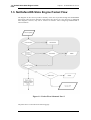
The diagrams in this section provide a summary of the flow of packets through the NetDefendOS
state-engine. There are three diagrams, each flowing into the next. It is not necessary to understand
these diagrams, however, they can be useful as a reference when configuring NetDefendOS in
certain situations.
Figure 1.1. Packet Flow Schematic Part I
The packet flow is continued on the following page.
23
1.3. NetDefendOS State Engine Packet
Flow
Chapter 1. NetDefendOS Overview
Figure 1.2. Packet Flow Schematic Part II
The packet flow is continued on the following page.
24
1.3. NetDefendOS State Engine Packet
Flow
Chapter 1. NetDefendOS Overview
Figure 1.3. Packet Flow Schematic Part III
25
1.3. NetDefendOS State Engine Packet
Flow
Chapter 1. NetDefendOS Overview
Apply Rules
The figure below presents the detailed logic of the Apply Rules function in Figure 1.2, “Packet
Flow Schematic Part II” above.
Figure 1.4. Expanded Apply Rules Logic
26
1.3. NetDefendOS State Engine Packet
Flow
Chapter 1. NetDefendOS Overview
27
Chapter 2. Management and Maintenance
This chapter describes the management, operations and maintenance related aspects of
NetDefendOS.
• Managing NetDefendOS, page 28
• Events and Logging, page 57
• RADIUS Accounting, page 62
• Hardware Monitoring, page 67
• SNMP Monitoring, page 69
• The pcapdump Command, page 72
• Maintenance, page 75
2.1. Managing NetDefendOS
2.1.1. Overview
NetDefendOS is designed to give both high performance and high reliability. Not only does it
provide an extensive feature set, it also enables the administrator to be in full control of almost every
detail of the system. This means the product can be deployed in the most challenging environments.
A good understanding on how NetDefendOS configuration is performed is crucial for proper usage
of the system. For this reason, this section provides an in-depth presentation of the configuration
subsystem as well as a description of how to work with the various management interfaces.
Management Interfaces
NetDefendOS provides the following management interfaces:
The Web Interface
The Web Interface (also known as the Web User Interface or WebUI) is
built into NetDefendOS and provides a user-friendly and intuitive
graphical management interface, accessible from a standard web
browser.
The browser connects to one of the hardware's Ethernet interfaces using
HTTP or HTTPS and the NetDefendOS responds like a web server,
allowing web pages to be used as the management interface.
This feature is fully described in Section 2.1.3, “The Web Interface”.
The CLI
The Command Line Interface (CLI), accessible locally via serial console
port or remotely using the Secure Shell (SSH) protocol, provides the
most fine-grained control over all parameters in NetDefendOS.
This feature is fully described in Section 2.1.4, “The CLI”.
Secure Copy
Secure Copy (SCP) is a widely used communication protocol for file
transfer. No specific SCP client is provided with NetDefendOS
distributions but there exists a wide selection of SCP clients available
for nearly all workstation platforms.
28
2.1.2. The Default Administrator
Account
Chapter 2. Management and Maintenance
SCP is a complement to CLI usage and provides a secure means of file
transfer between the administrator's workstation and the NetDefend
Firewall. Various files used by NetDefendOS can be both uploaded and
downloaded with SCP.
This feature is fully described in Section 2.1.6, “Secure Copy”.
Console Boot Menu
Before NetDefendOS starts running, a console connected directly to the
NetDefend Firewall's RS232 port can be used to do basic configuration
through the boot menu. This menu can be entered by pressing any
console key between power-up and NetDefendOS starting. It is the
D-Link firmware loader that is being accessed with the boot menu.
This feature is fully described in Section 2.1.7, “The Console Boot
Menu”.
Remote Management Policies
Access to remote management interfaces can be regulated by a remote management policy so the
administrator can restrict management access based on source network, source interface and
username/password credentials.
Access to the Web Interface can be permitted for administrative users on a certain network, while at
the same time allowing CLI access for a remote administrator connecting through a specific IPsec
tunnel.
By default, Web Interface access is enabled for users on the network connected via the LAN
interface of the D-Link firewall (on products where more than one LAN interface is available,
LAN1 is the default interface).
2.1.2. The Default Administrator Account
By default, NetDefendOS has a local user database, AdminUsers, that contains one predefined
administrator account. This account has the username admin with password admin. This account
has full administrative read/write privileges for NetDefendOS.
Important
For security reasons, it is recommended to change the default password of the default
account as soon as possible after connecting with the NetDefend Firewall.
Creating Additional Accounts
Extra user accounts can be created as required. Accounts can either belong to the Administrator
user group, in which case they have complete read/write administrative access. Alternatively, they
can belong to the Auditor user group, in which case they have read-only access.
Multiple Administration Logins
NetDefendOS does not allow more than one administrator account to be logged in at the same time.
If one administrator logs in, then a second or more will be allowed to login but they will only have
audit privileges. In other words the second or more administrators who login will only be able to
read configurations and will not be able to change them.
2.1.3. The Web Interface
29
2.1.3. The Web Interface
Chapter 2. Management and Maintenance
NetDefendOS provides an intuitive Web Interface (WebUI) for management of the system via an
Ethernet interface using a standard web browser. This allows the administrator to perform remote
management from anywhere on a private network or the public Internet using a standard computer
without having to install client software.
Note: Recommended web browsers
The recommended browsers to use with the Web Interface are as follows:
Microsoft Internet Explorer (version 7 and later)
Firefox (version 3 and later)
Safari (version 3 and later)
Chrome (version 4 and later)
Opera (version 10.5 and later)
Other browsers may function successfully.
Assignment of a Default IP Address
For a new D-Link NetDefend firewall with factory defaults, a default internal IP address is assigned
automatically by NetDefendOS to the hardware's LAN1 interface (or the LAN interface on models
wihout multiple LAN interfaces). The IP address assigned to the management interface differs
according to the NetDefend model as follows:
•
On the NetDefend DFL-210, 260, 800, 860, 1600 and 2500, the default management interface IP
address is 192.168.1.1.
•
On the NetDefend DFL-260E, 860E, 1660, 2560 and 2560G, the default management interface
IP address is 192.168.10.1.
Setting the Management Workstation IP
The default management Ethernet interface of the firewall and the external workstation computer's
Ethernet interface must be members of the same logical IP network for communication between
them to succeed. Therefore, the connecting Ethernet interface of the workstation must be manually
assigned the following static IP values:
DFL-210/260/800/860/1600/2500
DFL-260E/860E/1660/2560/2560G
IP Address: 192.168.1.30
IP Address: 192.168.10.30
Subnet Mask: 255.255.255.0
Subnet Mask: 255.255.255.0
Default Gateway: 192.168.1.1
Default Gateway: 192.168.10.1
Logging on to the Web Interface
To access the Web Interface using the factory default settings, launch a web browser on the external
workstation computer and point the browser at the IP address:
DFL-210/260/800/860/1600/2500
DFL-260E/860E/1660/2560/2560G
IP Address: 192.168.1.1
IP Address: 192.168.10.1
When performing initial connection to NetDefendOS, the administrator must use https:// as the
URL protocol in the browser (in other words, https://192.168.1.1 or https://192.168.10.1 according
to model ). Using HTTPS ensures that communication with NetDefendOS is secure.
If communication with the NetDefendOS is successfully established, a user authentication dialog
30
2.1.3. The Web Interface
Chapter 2. Management and Maintenance
similar to the one shown below will then be shown in the browser window.
Enter the username and password and click the Login button. The factory default username and
password is admin and admin . If the user credentials are correct, you will be transferred to the main
Web Interface page.
First Time Web Interface Logon and the Setup Wizard
When logging on for the first time, the default username is always admin and the password is
admin .
After successful login, the WebUI user interface will be presented in the browser window. If no
configuration changes have yet been uploaded to the NetDefend Firewall, the NetDefendOS Setup
Wizard will start automatically to take a new user through the essential steps for NetDefendOS setup
and establishing public Internet access.
Important: Switch off popup blocking
Popup blocking must be disabled in the web browser to allow the NetDefendOS Setup
Wizard to run since this appears in a popup window.
Multi-language Support
The Web Interface login dialog offers the option to select a language other than English for the
interface. Language support is provided by a set of separate resource files. These files can be
downloaded from the D-Link website.
It may occasionally be the case that a NetDefendOS upgrade can contain features that temporarily
lack a complete non-english translation because of time constraints. In this case the original english
will be used as a temporary solution in place of a translation to the selected language.
The Web Browser Interface
On the left hand side of the Web Interface is a tree which allows navigation to the various sets of
NetDefendOS objects. The central area of the Web Interface displays information about those
modules. Current performance information is shown by default.
31
2.1.3. The Web Interface
Chapter 2. Management and Maintenance
For information about the default user name and password, see Section 2.1.2, “The Default
Administrator Account” .
Note: Remote management access
Access to the Web Interface is regulated by the configured remote management policy.
By default, the system will only allow web access from the internal network.
Interface Layout
The main Web Interface page is divided into three major sections:
A. Menu bar
The menu bar located at the top of the Web Interface contains a number of
buttons and drop-down menus that are used to perform configuration tasks as
well as for navigation to various tools and status pages.
•
Home - Navigates to the first page of the Web Interface.
•
Configuration
i.
Save and Activate - Saves and activates the configuration.
ii.
Discard Changes - Discards any changes made to the configuration
during the current session.
iii. View Changes - List the changes made to the configuration since it
was last saved.
•
Tools - Contains a number of tools that are useful for maintaining the
system.
•
Status - Provides various status pages that can be used for system
diagnostics.
32
2.1.3. The Web Interface
Chapter 2. Management and Maintenance
•
Maintenance
i.
Update Center - Manually update or schedule updates of the intrusion
detection and antivirus signatures.
ii.
License - View license details or enter activation code.
iii. Backup - Make a backup of the configuration to a local computer or
restore a previously downloaded backup.
iv. Reset - Restart the firewall or reset to factory default.
v.
Upgrade - Upgrade the firewall's firmware.
vi. Technical support - This option provides the ability to download a file
from the firewall which can be studied locally or sent to a technical
support specialist for problem analysis. This can be very useful since
the information provided automatically includes important details
required for troubleshooting.
B. Navigator
C. Main Window
The navigator located on the left-hand side of the Web Interface contains a
tree representation of the system configuration. The tree is divided into a
number of sections corresponding to the major building blocks of the
configuration. The tree can be expanded to expose additional sections and the
selected set of objects are displayed in the Web Interface's central, main
window.
The main window contains configuration or status details corresponding to
the section selected in the navigator or the menu bar.
When displaying tables of information in the main window, right clicking a
line (for example, an IP rule) will bring up a context menu.
This context menu can be used to add a new object, delete the current,
change the ordering and other operations. The Clone function is used to
make a complete copy of the current object and then add it as the last
object in the table. Below is a typical example of the context menu.
33
2.1.3. The Web Interface
Chapter 2. Management and Maintenance
Controlling Access to the Web Interface
By default, the Web Interface is accessible only from the internal network. If it is required to have
access from other parts of the network, this can be done by modifying the remote management
policy.
Example 2.1. Enabling remote management via HTTPS
Command-Line Interface
gw-world:/> add RemoteManagement RemoteMgmtHTTP https
Network=all-nets Interface=any
LocalUserDatabase=AdminUsers HTTPS=Yes
Web Interface
1.
Go to System > Remote Management > Add > HTTP/HTTPS Management
2.
Enter a Name for the HTTP/HTTPS remote management policy, for example https
3.
Check the HTTPS checkbox
4.
Select the following from the dropdown lists:
5.
•
User Database: AdminUsers
•
Interface: any
•
Network: all-nets
Click OK
Caution: Don't expose the management interface
The above example is provided for informational purposes only. It is never
recommended to expose any management interface to any user on the Internet.
Logging out from the Web Interface
After finishing working with the Web Interface, it is advisable to always logout to prevent other
users with access to the workstation getting unauthorized access to NetDefendOS. Logout is
achieved by clicking on the Logout button at the right of the menu bar.
34
2.1.4. The CLI
Chapter 2. Management and Maintenance
Tip: Correctly routing management traffic
If there is a problem with the management interface when communicating alongside
VPN tunnels, check the main routing table and look for an all-nets route to the VPN
tunnel. Management traffic may be using this route.
If no specific route is set up for the management interface then all management traffic
coming from NetDefendOS will automatically be routed into the VPN tunnel. If this is
the case then a route should be added by the administrator to route management
traffic destined for the management network to the correct interface.
2.1.4. The CLI
NetDefendOS provides a Command Line Interface (CLI) for administrators who prefer or require a
command line approach to administration, or who need more granular control of system
configuration. The CLI is available either locally through the serial console port (connection to this
is described below), or remotely via an Ethernet interface using the Secure Shell (SSH) protocol
from an SSH client.
The CLI provides a comprehensive set of commands that allow the display and modification of
configuration data as well as allowing runtime data to be displayed and allowing system
maintenance tasks to be performed.
This section only provides a summary for using the CLI. For a complete reference for all CLI
commands, see the separate D-Link CLI Reference Guide.
The most often used CLI commands are:
•
add - Adds an object such as an IP address or a rule to a NetDefendOS configuration.
•
set - Sets some property of an object to a value. For example, this might be used to set the source
interface on an IP rule.
•
show - Displays the current categories or display the values of a particular object.
•
delete - Deletes a specific object.
CLI Command Structure
CLI commands usually begin with the structure: <command> <object_type> <object_name>. For
example, to display an IP address object called my_address, the command would be:
gw-world:/> show Address IP4Address my_address
The second part of the command specifies the object type and is necessary to identify what category
of object the object name refers to (consider that the same name might exist in two different
categories).
Note: Category and Context
The term category is sometimes referred to as the context of an object.
A command like add can also include object properties. To add a new IP4Address object with an IP
address of 10.49.02.01, the command would be:
gw-world:/> add IP4Address my_address Address=10.49.02.01
35
2.1.4. The CLI
Chapter 2. Management and Maintenance
The object type can be optionally preceded by the object category. A category groups together a set
of types and mainly used with tab completion which is described below.
Tip: Getting help about help
Typing the CLI command:
gw-world:/> help help
will give information about the help command itself.
The CLI Command History
Just like the console in many versions of Microsoft Windows™, the up and down arrow keys allow
the user to move through the list of commands in the CLI command history. For example, pressing
the up arrow key once will make the last command executed appear at the current CLI prompt. After
a command appears it can be re-executed in its original form or changed first before execution.
Tab Completion
Remembering all the commands and their options can be difficult. NetDefendOS provides a feature
called tab completion which means that pressing the tab key will cause automatically completion of
the current part of the command. If completion is not possible then pressing the tab key will
alternatively display the possible command options that are available.
Optional Parameters Are Tab Completed Last
Tab completion does not work with optional parameters until all the mandatory parameters have
been entered.
For example, when creating an IP rule for a particular IP rule set, the command line might begin:
add IPRule
If the tab key is now pressed, the mandatory parameters are displayed by NetDefendOS:
A value is required for the following properties:
Action
DestinationInterface
DestinationNetwork
Service
SourceInterface
SourceNetwork
The Name parameter is not in this list since it is not mandatory because rules can be referenced with
their index number. Similarly, the following might be entered:
add IPRule Na
If the tab key is now pressed, the letters Na will not be completed to be Name= because Name is
optional and all the mandatory parameters must be entered before tab completion works for optional
parameters.
For example, if the following command is typed:
add IPRule SourceInterface=if12 SourceNetwork=all-nets
DestinationInterface=if2 DestinationNetwork=all-nets
Action=Allow Service=all_services Na
If the tab key is now pressed, the letters Na will now be completed to be Name= because all the
36
2.1.4. The CLI
Chapter 2. Management and Maintenance
mandatory parameters have already been entered.
Note: Rule names are recommended
Even though it is optional, it is still recommended that a Name value is entered for
rules in order to make examining the configuration easier.
Specifying the Default Value
The period "." character before a tab can be used to automatically fill in the default value for an
object property. For example:
add LogReceiver LogReceiverSyslog log_example
Address=example_ip LogSeverity=. (tab)
Will fill in the default value for LogSeverity:
add LogReceiverSyslog example Address=example_ip
LogSeverity=Emergency,Alert,Critical,Error,Warning,Notice,Info
This severity list can then be edited with the back arrow and backspace keys. A default value is not
always available. For example, the Action of an IP rule has no default.
Another usage of the period character before a tab is to automatically fill in the current value of an
object property in a command line. For example, we may have typed the unfinished command:
set Address IPAddress If1_ip Address=
If we now type "." followed by a tab, NetDefendOS will display the current value for the Address
parameter. If that value is, for example, 10.6.58.10 then the unfinished command line will
automatically become:
set Address IPAddress If1_ip Address=10.6.58.10
NetDefendOS automatically inserts the current value of 10.6.58.10 and this can then be changed
with the backspace or back arrow keys before completing the command.
Object Categories
It has been mentioned that objects are grouped by type, such as IP4Address. Types themselves are
grouped by category. The type IP4Address belongs to the category Address. The main use of
categories is in tab completion when searching for the right object type to use.
If a command such as add is entered and then the tab key is pressed, NetDefendOS displays all the
available categories. By choosing a category and then pressing tab again all the object types for that
category is displayed. Using categories means that the user has a simple way to specify what kind of
object they are trying to specify and a manageable number of options are displayed after pressing
tab.
Not all object types belong in a category. The object type UserAuthRule is a type without a category
and will appear in the category list after pressing tab at the beginning of a command.
The category is sometimes also referred to as a context.
Selecting Object Categories
With some categories, it is necessary to first choose a member of that category with the cc (change
category) command before individual objects can be manipulated. This is the case, for example,
37
2.1.4. The CLI
Chapter 2. Management and Maintenance
with routes. There can be more than one routing table, so when adding or manipulating a route we
first have to use the cc command to identify which routing table we are interested in.
Suppose a route is to be added to the routing table main. The first command would be:
gw-world:/> cc RoutingTable main
gw-world:/main>
Notice that the command prompt changes to indicate the current category. We can now add the
route:
gw-world:/main> add Route Name=new_route1 Interface=lan Network=lannet
To deselect the category, the command is cc on its own:
gw-world:/main> cc
gw-world:/>
The categories that require an initial cc command before object manipulation have a "/" character
following their names when displayed by a show command. For example: RoutingTable/.
Specifying Multiple Property Values
Sometimes a command property may need multiple values. For example, some commands use the
property AccountingServers and more than one value can be specified for this property. When
specifying multiple values, they should be separated by a comma "," character. For example, if three
servers server1, server2, server3 need to be specified then the property assignment in the command
would be:
AccountingServers=server1,server2,server3
Inserting into Rule Lists
Rule lists such as the IP rule set have an ordering which is important. When adding using the CLI
add command, the default is to add a new rule to the end of a list. When placement at a particular
position is crucial, the add command can include the Index= parameter as an option. Inserting at the
first position in a list is specified with the parameter Index=1 in an add command, the second
position with the parameter Index=2 and so on.
Referencing by Name
The naming of some objects is optional and is done with the Name= parameter in an add command.
An object, such as a threshold rule, will always have an Index value which indicates its position in
the rule list but can optionally be allocated a name as well. Subsequent manipulation of such a rule
can be done either by referring to it by its index, that is to say its list position, or by alternatively
using the name assigned to it.
The CLI Reference Guide lists the parameter options available for each NetDefendOS object,
including the Name= and Index= options.
Using Unique Names
For convenience and clarity, it is recommended that a name is assigned to all objects so that it can
be used for reference if required. Reference by name is particularly useful when writing CLI scripts.
38
2.1.4. The CLI
Chapter 2. Management and Maintenance
For more on scripts see Section 2.1.5, “CLI Scripts”.
The CLI will enforce unique naming within an object type. For reasons of backward compatibility
to earlier NetDefendOS releases, an exception exists with IP rules which can have duplicate names,
however it is strongly recommended to avoid this. If a duplicate IP rule name is used in two IP rules
then only the Index value can uniquely identify each IP rule in subsequent CLI commands.
Referencing an IP rule with a duplicated name will fail and result in an error message.
Using Hostnames in the CLI
For certain CLI commands, IP addresses can optionally be specified as a textual hostname instead
an IP4Address object or raw IP address such as 192.168.1.10. When this is done, the hostname must
be prefixed with the letters dns: to indicate that a DNS lookup must be done to resolve the hostname
to an IP address. For example, the hostname host.company.com would be specified as
dns:host.company.com in the CLI.
The parameters where URNs might be used with the CLI are:
•
The Remote Endpoint for IPsec, L2TP and PPTP tunnels.
•
The Host for LDAP servers.
When DNS lookup needs to be done, at least one public DNS server must be configured in
NetDefendOS for hostnames to be translated to IP addresses.
Serial Console CLI Access
The serial console port is a local RS-232 port on the NetDefend Firewall that allows direct access to
the NetDefendOS CLI through a serial connection to a PC or dumb terminal. To locate the serial
console port on D-Link hardware, see the D-Link Quick Start Guide .
To use the console port, the following equipment is required:
•
A terminal or a computer with a serial port and the ability to emulate a terminal (such as using
the Hyper Terminal software included in some Microsoft Windows™ editions). The serial
console port uses the following default settings: 9600 bps, No parity, 8 data bits and 1 stop bit.
•
A RS-232 cable with appropriate connectors. An appliance package includes a RS-232
null-modem cable.
To now connect a terminal to the console port, follow these steps:
1.
Set the terminal protocol as described previously.
2.
Connect one of the connectors of the RS-232 cable directly to the console port on the
NetDefend Firewall system.
3.
Connect the other end of the cable to the terminal or the serial connector of the computer
running the communications software.
4.
Press the enter key on the terminal. The NetDefendOS login prompt should appear on the
terminal screen.
SSH (Secure Shell) CLI Access
The SSH (Secure Shell) protocol can be used to access the CLI over the network from a remote
host. SSH is a protocol primarily used for secure communication over insecure networks, providing
strong authentication and data integrity. SSH clients are freely available for almost all hardware
39
2.1.4. The CLI
Chapter 2. Management and Maintenance
platforms.
NetDefendOS supports version 1, 1.5 and 2 of the SSH protocol. SSH access is regulated by the
remote management policy in NetDefendOS, and is disabled by default.
Example 2.2. Enabling SSH Remote Access
This example shows how to enable remote SSH access from the lannet network through the lan interface by
adding a rule to the remote management policy.
Command-Line Interface
gw-world:/> add RemoteManagement RemoteMgmtSSH ssh Network=lannet
Interface=lan LocalUserDatabase=AdminUsers
Web Interface
1.
Go to System > Remote Management > Add > Secure Shell Management
2.
Enter a Name for the SSH remote management policy, for example ssh_policy
3.
Select the following from the dropdown lists:
4.
•
User Database: AdminUsers
•
Interface: lan
•
Network: lannet
Click OK
Logging on to the CLI
When access to the CLI has been established to NetDefendOS through the serial console or an SSH
client, the administrator will need to logon to the system before being able to execute any CLI
command. This authentication step is needed to ensure that only trusted users can access the system,
as well as providing user information for auditing.
When accessing the CLI remotely through SSH, NetDefendOS will respond with a login prompt.
Enter the username and press the Enter key, followed by the password and then Enter again.
After a successful logon, the CLI command prompt will appear:
gw-world:/>
If a welcome message has been set then it will be displayed directly after the logon. For security
reasons, it is advisable to either disable or anonymize the CLI welcome message.
Changing the admin User Password
It is recommended to change the default password of the admin account from admin to something
else as soon as possible after initial startup. User passwords can be any combination of characters
and cannot be greater than 256 characters in length. It is recommended to use only printable
characters.
To change the password to, for example, my-password the following CLI commands are used. First
we must change the current category to be the LocalUserDatabase called AdminUsers (which exists
by default):
gw-world:/> cc LocalUserDatabase AdminUsers
40
2.1.4. The CLI
Chapter 2. Management and Maintenance
We are now in AdminUsers and can change the password of the admin user:
gw-world:/AdminUsers> set User admin Password="my-password"
Finally, we return the current category to the top level:
gw-world:/AdminUsers> cc ..
Note: The console password is separate
The password that can be set to protect direct serial console access is a separate
password and should not be confused with the passwords related to user accounts. The
console password is described in Section 2.1.7, “The Console Boot Menu”.
Changing the CLI Prompt
The default CLI prompt is:
gw-world:/>
where Device is the model number of the NetDefend Firewall. This can be customized, for example,
to my-prompt:/>, by using the CLI command:
gw-world:/> set device name="my-prompt"
The CLI Reference Guide uses the command prompt gw-world:/> throughout.
Tip: The CLI prompt is the WebUI device name
When the command line prompt is changed to a new string value, this string also
appears as the new device name in the top level node of the WebUI tree-view.
Activating and Committing Changes
If any changes are made to the current configuration through the CLI, those changes will not be
uploaded to NetDefendOS until the command:
gw-world:/> activate
is issued. Immediately following the activate command, the command:
gw-world:/> commit
should be issued to make those changes permanent.
If a commit command is not issued within a default time period of 30 seconds then the changes are
automatically undone and the old configuration restored.
A possible side effect of committing changes though the CLI is that any Web Interface browser
session that is logged in at the time of the commit will require that the user logs in again. This is
because the Web Interface view of the configuration may no longer be valid.
Checking Configuration Integrity
After changing a NetDefendOS configuration and before issuing the activate and commit
41
2.1.4. The CLI
Chapter 2. Management and Maintenance
commands, it is possible to explicitly check for any problems in a configuration using the command:
gw-world:/> show -errors
This will cause NetDefendOS to scan the configuration about to be activated and list any problems.
A possible problem that might be found in this way is a reference to an IP object in the address book
that does not exist in a restored configuration backup.
Logging off from the CLI
After finishing working with the CLI, it is recommended to logout in order to avoid letting anyone
getting unauthorized access to the system. Log off by using the exit or the logout command.
Configuring Remote Management Access on an Interface
Remote management access may need to be configured through the CLI. Suppose management
access is to be through Ethernet interface if2 which has an IP address 10.8.1.34.
Firstly, we set the values for the IP address objects for if2 which already exist in the NetDefendOS
address book, starting with the interface IP:
gw-world:/> set Address IP4Address if2_ip Address=10.8.1.34
The network IP address for the interface must also be set to the appropriate value:
gw-world:/> set Address IP4Address if2_net Address=10.8.1.0/24
In this example, local IP addresses are used for illustration but these could be public IP addresses
instead.
Next, create a remote HTTP management access object, in this example called HTTP_if2:
gw-world:/> add RemoteManagement RemoteMgmtHTTP HTTP_if2
Interface=if2 Network=all-nets
LocalUserDatabase=AdminUsers
AccessLevel=Admin HTTP=Yes
If we now activate and commit the new configuration, remote management access via the IP address
10.8.1.34 is now possible using a web browser. If SSH management access is required then a
RemoteMgmtSSH object should be added.
The assumption made with the above commands is that an all-nets route exists to the ISP's gateway.
In other words, Internet access has been enabled for the NetDefend Firewall.
Managing Management Sessions with sessionmanager
The CLI provides a command called sessionmanager for managing management sessions
themselves. The command be used to manage all types of management sessions, including:
•
Secure Shell (SSH) CLI sessions.
•
Any CLI session through the serial console interface.
•
Secure Copy (SCP) sessions.
•
Web Interface sessions connected by HTTP or HTTPS.
42
2.1.5. CLI Scripts
Chapter 2. Management and Maintenance
The command without any options gives a summary of currently open sessions:
gw-world:/> sessionmanager
Session Manager status
---------------------Active connections
Maximum allowed connections
Local idle session timeout
NetCon idle session timeout
:
:
:
:
3
64
900
600
To see a list of all sessions use the -list option. Below is some typical output showing the local
console session:
gw-world:/> sessionmanager -list
User
Database
IP
-------- ---------------- --------local
(none)
0.0.0.0
Type
Mode
------- ------local
console
Access
-------admin
If the user has full administrator privileges, they can forcibly terminate another management session
using the -disconnect option of the sessionmanager command.
The sessionmanager command options are fully documented in the CLI Reference Guide.
2.1.5. CLI Scripts
To allow the administrator to easily store and execute sets of CLI commands, NetDefendOS
provides a feature called CLI scripting. A CLI script is a predefined sequence of CLI commands
which can be executed after they are saved to a file and the file is then uploaded to the NetDefend
Firewall.
The steps for creating a CLI script are as follows:
1.
Create a text file with a text editor containing a sequential list of CLI commands, one per line.
The D-Link recommended convention is for these files to use the file extension .sgs (Security
Gateway Script). The filename, including the extension, should not be more than 16 characters.
2.
Upload the file to the NetDefend Firewall using Secure Copy (SCP). Script files must be stored
in a directory under the root called /scripts. SCP uploading is discussed in detail in
Section 2.1.6, “Secure Copy”.
3.
Use the CLI command script -execute to run the script file.
The CLI script command is the tool used for script management and execution. The complete
syntax of the command is described in the CLI Reference Guide and specific examples of usage are
detailed in the following sections. See also Section 2.1.4, “The CLI” in this manual.
Only Four Commands are Allowed in Scripts
The commands allowed in a script file are limited to four and these are:
add
set
delete
cc
If any other command appears in a script file, it is ignored during execution and a warning message
43
2.1.5. CLI Scripts
Chapter 2. Management and Maintenance
is output. For example, the ping command will be ignored.
Executing Scripts
As mentioned above, the script -execute command launches a named script file that has been
previously uploaded to the NetDefend Firewall. For example, to execute the script file my_script.sgs
which has already been uploaded, the CLI command would be:
gw-world:/> script -execute -name=my_script.sgs
Script Variables
A script file can contain any number of script variables which are called:
$1, $2, $3, $4......$n
The values substituted for these variable names are specified as a list at the end of the script -execute
command line. The number n in the variable name indicates the variable value's position in this list.
$1 comes first, $2 comes second and so on.
Note: The symbol $0 is reserved
Notice that the name of the first variable is $1. The variable $0 is reserved and is
always replaced before execution by the name of the script file itself.
For example, a script called my_script.sgs is to be executed with IP address 126.12.11.01 replacing
all occurrences of $1 in the script file and the string If1 address replacing all occurrences of $2.
The file my_script.sgs contains the single CLI command line:
add IP4Address If1_ip Address=$1 Comments=$2
To run this script file after uploading, the CLI command would be:
> script -execute -name=my_script.sgs 126.12.11.01 "If1 address"
When the script file runs, the variable replacement would mean that the file becomes:
add IP4Address If1_ip Address=126.12.11.01 Comments="If1 address"
Script Validation and Command Ordering
CLI scripts are not, by default, validated. This means that the written ordering of the script does not
matter. There can be a reference to a configuration object at the beginning of a script which is only
created at the end of the script. Although this might seem illogical, it is done to improve the
readability of scripts. If something always has to be created before it is referred to then this can
result in a confused and disjointed script file and in large script files it is often preferable to group
together CLI commands which are similar.
Error Handling
If an executing CLI script file encounters an error condition, the default behavior is for the script to
terminate. This behavior can be overridden by using the -force option. To run a script file called
my_script2.sgs in this way, the CLI command is:
44
2.1.5. CLI Scripts
Chapter 2. Management and Maintenance
gw-world:/> script -execute -name=my_script2.sgs -force
If -force is used, the script will continue to execute even if errors are returned by a command in the
script file.
Script Output
Any output from script execution will appear at the CLI console. Normally this output only consists
of any error messages that occur during execution. To see the confirmation of each command
completing, the -verbose option should be used:
gw-world:/> script -execute -name=my_script2.sgs -verbose
Saving Scripts
When a script file is uploaded to the NetDefend Firewall, it is initially kept only in temporary RAM
memory. If NetDefendOS restarts then any uploaded scripts will be lost from this volatile memory
and must be uploaded again to run. To store a script between restarts, it must explicitly be moved to
non-volatile NetDefendOS disk memory by using the script -store command.
To move the example my_script.sgs to non-volatile memory the command would be:
gw-world:/> script -store -name=my_script.sgs
Alternatively, all scripts can be moved to non-volatile memory with the command:
gw-world:/> script -store -all
Removing Scripts
To remove a saved script. the script -remove command can be used.
To remove the example my_script.sgs script file, the command would be:
gw-world:/> script -remove -name=my_script.sgs
Listing Scripts
The script on its own, command without any parameters, lists all the scripts currently available and
indicates the size of each script as well as the type of memory where it resides (residence in
non-volatile memory is indicated by the word "Disk" in the Memory column).
gw-world:/> script
Name
-------------my_script.sgs
my_script2.sgs
Storage
-----------RAM
Disk
Size (bytes)
-------------8
10
To list the content of a specific uploaded script file, for example my_script.sgs the command would
be:
gw-world:/> script -show -name=my_script.sgs
45
2.1.5. CLI Scripts
Chapter 2. Management and Maintenance
Creating Scripts Automatically
When the same configuration objects needs to be copied between multiple NetDefend Firewalls,
then one way to do this with the CLI is to create a script file that creates the required objects and
then upload to and run the same script on each device.
If we already have a NetDefendOS installation that already has the objects configured that need to
be copied, then running the script -create command on that installation provides a way to
automatically create the required script file. This script file can then be downloaded to the local
management workstation and then uploaded to and executed on other NetDefend Firewalls to
duplicate the objects.
For example, suppose the requirement is to create the same set of IP4Address objects on several
NetDefend Firewalls that already exist on a single unit. The administrator would connect to the
single unit with the CLI and issue the command:
gw-world:/> script -create Address IP4Address -name new_script.sgs
This creates a script file called new_script_sgs which contains all the CLI commands necessary to
create all IP4Address address objects in that unit's configuration. The created file's contents might,
for example, be:
add
add
add
add
IP4Address
IP4Address
IP4Address
IP4Address
If1_ip Address=10.6.60.10
If1_net Address=10.6.60.0/24
If1_br Address=10.6.60.255
If1_dns1 Address=141.1.1.1
"
"
"
The file new_script_sgs can then be downloaded with SCP to the local management workstation and
then uploaded and executed on the other NetDefend Firewalls. The end result is that all units will
have the same IP4Address objects in their address book.
The name of the file created using the -create option cannot be greater than 16 characters in length
(including the extension) and the filetype should be .sgs.
Tip: Listing commands at the console
To list the created CLI commands on the console instead of saving them to a file, leave
out the option -name= in the script -create command.
Certain aspects of a configuration which are hardware dependent cannot have a script created using
the -create option. This is true when the CLI node type in the script -create command is one of:
COMPortDevice
Ethernet
EthernetDevice
Device
If one of these node types is used then the error message script file empty is returned by
NetDefendOS.
Commenting Script Files
Any line in a script file that begins with the # character is treated as a comment. For example:
# The following line defines the If1 IP address
add IP4Address If1_ip Address=10.6.60.10
46
2.1.6. Secure Copy
Chapter 2. Management and Maintenance
Scripts Running Other Scripts
It is possible for one script to run another script. For example, the script my_script.sgs could contain
the line:
"
"
script -execute -name my_script2.sgs
"
"
NetDefendOS allows the script file my_script2.sgs to execute another script file and so on. The
maximum depth of this script nesting is 5.
2.1.6. Secure Copy
To upload and download files to or from the NetDefend Firewall, the secure copy (SCP) protocol
can be used. SCP is based on the SSH protocol and many freely available SCP clients exist for
almost all platforms. The command line examples below are based on the most common command
format for SCP client software.
SCP Command Format
SCP command syntax is straightforward for most console based clients. The basic command used
here is scp followed by the source and destination for the file transfer.
Upload is performed with the command:
> scp <local_filename> <destination_firewall>
Download is done with the command:
> scp <source_firewall> <local_filename>
The source or destination NetDefend Firewall is of the form:
<user_name>@<firewall_ip_address>:<filepath>.
For example: [email protected]:config.bak. The <user_name> must be a defined NetDefendOS
user in the administrator user group.
Note: SCP examples do not show the password prompt
SCP will normally prompt for the user password after the command line but that
prompt is not shown in the examples given here.
The following table summarizes the operations that can be performed between an SCP client and
NetDefendOS:
File type
Upload possible
Download possible
Configuration Backup (config.bak)
Yes (also with WebUI)
Yes (also with WebUI)
System Backup (full.bak)
Yes (also with WebUI)
Yes (also with WebUI)
Firmware upgrades
Yes
No
Certificates
Yes
No
SSH public keys
Yes
No
Web auth banner files
Yes
Yes
47
2.1.6. Secure Copy
Chapter 2. Management and Maintenance
File type
Upload possible
Download possible
Web content filter banner files
Yes
Yes
NetDefendOS File organization
NetDefendOS maintains a simple 2 level directory structure which consists of the top level root and
a number of sub-directories. However, these "directories" such as sshlclientkey should be more
correctly thought of as object types. All the files stored in the NetDefendOS root as well as all the
object types can be displayed using the CLI command ls.
The resulting output is shown below:
gw-world:/> ls
HTTPALGBanners/
HTTPAuthBanners/
certificate/
config.bak
full.bak
script/
sshclientkey/
Apart from the individual files, the objects types listed are:
•
HTTPALGBanners/ - The banner files for user authentication HTML. Uploading these is
described further in Section 6.3.4.4, “Customizing HTML Pages”.
•
HTTPAuthBanner/ - The banner files for HTML ALG dynamic content filtering. Uploading
these is described further in Section 6.3.4.4, “Customizing HTML Pages”.
•
certificate/ - The object type for all digital certificates.
•
script/ - The object type for all CLI scripts. Scripts are described further in Section 2.1.5, “CLI
Scripts”.
•
sshclientkey/ - The SSH client key object type.
Examples of Uploading and Downloading
In some cases, a file is located in the NetDefendOS root. The license file (license.lic) falls into this
category, as well as backup files for configurations (config.bak) and the complete system (full.bak).
When uploading, these files contain a unique header which identifies what they are. NetDefendOS
checks this header and ensures the file is stored only in the root (all files do not have a header).
If an administrator username is admin1 and the IP address of the NetDefend Firewall is 10.5.62.11
then to upload a configuration backup, the SCP command would be:
> scp config.bak [email protected]:
To download a configuration backup to the current local directory, the command would be:
> scp [email protected]:config.bak ./
To upload a file to an object type under the root, the command is slightly different. If we have a
local CLI script file called my_script.sgs then the upload command would be:
48
2.1.7. The Console Boot Menu
Chapter 2. Management and Maintenance
> scp my_script.sgs [email protected]:script/
If we have the same CLI script file called my_scripts.sgs stored on the NetDefend Firewall then the
download command would be:
> scp [email protected]:script/my_script.sgs ./
Activating Uploads
Like all configuration changes, SCP uploads only become active after the CLI commands activate
have been issued and this must be followed by commit to make the change permanent.
Uploads of firmware upgrades (packaged in .upg files) or a full system backup (full.bak) are the
exception. Both of these file types will result in an automatic system reboot. The other exception is
for script uploads which do not affect the configuration.
2.1.7. The Console Boot Menu
The NetDefendOS loader is the base software on top of which NetDefendOS runs and the
administrator's direct interface to this is called the console boot menu (also known simply as the
boot menu). This section discusses the boot menu options.
Accessing the Console Boot Menu
The boot menu is only accessible through a console device attached directly to the serial console
located on the NetDefend Firewall. It can be accessed through the console after the NetDefend
Firewall is powered up and before NetDefendOS is fully started.
After powering up the NetDefend Firewall, there is a 3 second interval before NetDefendOS starts
up and in that time the message Press any key to abort and load boot menu is displayed as shown
below:
If any console key is pressed during these 3 seconds then NetDefendOS startup pauses and the
console boot menu is displayed.
Initial Boot Menu Options without a Password Set
When NetDefendOS is started for the first time with no console password set for console access
then the full set of boot menu options are displayed as shown below:
The options available in the boot menu are:
49
2.1.8. Management Advanced Settings
1.
Chapter 2. Management and Maintenance
Start firewall
This initiates the complete startup of the NetDefendOS software on the NetDefend Firewall.
2.
Reset unit to factory defaults
This option will restore the hardware to its initial factory state. The operations performed if this
option is selected are the following:
3.
•
Remove console security so there is no console password.
•
Restore default NetDefendOS executables along with the default configuration.
Revert to default configuration
This will only reset the configuration to be the original, default NetDefendOS configuration
file. Other options, such as console security, will not be affected.
4.
Set console password
Set a password for console access. Until a password is set, anyone can utilize the console so
selecting setting the password as soon as possible is recommended. After it is set, the console
will prompt for the password before access is allowed to either the boot menu or the command
line interface (CLI).
Initial Options with a Console Password Set
If a console password is set then the initial options that appear when NetDefendOS loading is
interrupted with a key press are shown below.
The 1. Start firewall option re-continues the interrupted NetDefendOS startup process. If the 2.
Login option is chosen, the console password must be entered and the full boot menu described
above is entered.
Removing the Console Password
Once the console password is set it can be removed by selecting the Set console password option in
the boot menu and entering nothing as the password and just pressing the Enter key to the prompt.
The Console Password is Only for the Console
The password set for the console is not connected to the management username/password
combinations used for administrator access through a web browser. It is valid only for console
access.
2.1.8. Management Advanced Settings
Under the Remote Management section of the Web Interface a number of advanced settings can be
found. These are:
50
2.1.9. Working with Configurations
Chapter 2. Management and Maintenance
SSH Before Rules
Enable SSH traffic to the firewall regardless of configured IP Rules.
Default: Enabled
WebUI Before Rules
Enable HTTP(S) traffic to the firewall regardless of configured IP Rules.
Default: Enabled
Local Console Timeout
Number of seconds of inactivity until the local console user is automatically logged out.
Default: 900
Validation Timeout
Specifies the amount of seconds to wait for the administrator to log in before reverting to the
previous configuration.
Default: 30
WebUI HTTP port
Specifies the HTTP port for the Web Interface.
Default: 80
WebUI HTTPS port
Specifies the HTTP(S) port for the Web Interface.
Default: 443
HTTPS Certificate
Specifies which certificate to use for HTTPS traffic. Only RSA certificates are supported.
Default: HTTPS
2.1.9. Working with Configurations
Configuration Objects
The system configuration is built up by Configuration Objects, where each object represents a
configurable item of any kind. Examples of configuration objects are routing table entries, address
book entries, service definitions, IP rules and so on. Each configuration object has a number of
properties that constitute the values of the object.
51
2.1.9. Working with Configurations
Chapter 2. Management and Maintenance
Object Types
A configuration object has a well-defined type. The type defines the properties that are available for
the configuration object, as well as the constraints for those properties. For instance, the IP4Address
type is used for all configuration objects representing a named IPv4 address.
Object Organization
In the Web Interface the configuration objects are organized into a tree-like structure based on the
type of the object.
In the CLI, similar configuration object types are grouped together in a category. These categories
are different from the structure used in the Web Interface to allow quick access to the configuration
objects in the CLI. The IP4Address, IP4Group and EthernetAddress types are, for instance, grouped
in a category named Address, as they all represent different addresses. Consequently, Ethernet and
VLAN objects are all grouped in a category named Interface, as they are all interface objects. The
categories have actually no impact on the system configuration; they are merely provided as means
to simplify administration.
The following examples show how to manipulate objects.
Example 2.3. Listing Configuration Objects
To find out what configuration objects exist, you can retrieve a listing of the objects. This example shows how to
list all service objects.
Command-Line Interface
gw-world:/> show Service
A list of all services will be displayed, grouped by their respective type.
Web Interface
1.
Go to Objects > Services
2.
A web page listing all services will be presented.
A list contains the following basic elements:
•
Add Button - Displays a dropdown menu when clicked. The menu will list all types of configuration items that
can be added to the list.
•
Header - The header row displays the titles of the columns in the list. The tiny arrow images next to each title
can be used for sorting the list according to that column.
•
Rows - Each row in the list corresponds to one configuration item. Most commonly, each row starts with the
name of the object (if the item has a name), followed by values for the columns in the list.
A single row in the list can be selected by clicking on the row on a spot where there is no hyperlink. The
background color of the row will turn dark blue. Right-clicking the row will display a menu which gives the option to
edit or delete the object as well as modify the order of the objects.
Example 2.4. Displaying a Configuration Object
The simplest operation on a configuration object is to show its contents, in other words the values of the object
properties. This example shows how to display the contents of a configuration object representing the telnet
service.
Command-Line Interface
52
2.1.9. Working with Configurations
Chapter 2. Management and Maintenance
gw-world:/> show Service ServiceTCPUDP telnet
Property
----------------Name:
DestinationPorts:
Type:
SourcePorts:
SYNRelay:
PassICMPReturn:
ALG:
MaxSessions:
Comments:
Value
------telnet
23
TCP
0-65535
No
No
(none)
1000
Telnet
The Property column lists the names of all properties in the ServiceTCPUDP class and the Value column lists the
corresponding property values.
Web Interface
1.
Go to Objects > Services
2.
Click on the telnet hyperlink in the list
3.
A web page displaying the telnet service will be presented
Note
When accessing object via the CLI you can omit the category name and just use the
type name. The CLI command in the above example, for instance, could be simplified
to:
gw-world:/> show ServiceTCPUDP telnet
Example 2.5. Editing a Configuration Object
When the behavior of NetDefendOS is changed, it is most likely necessary to modify one or several configuration
objects. This example shows how to edit the Comments property of the telnet service.
Command-Line Interface
gw-world:/> set Service ServiceTCPUDP telnet
Comments="Modified Comment"
Show the object again to verify the new property value:
gw-world:/> show Service ServiceTCPUDP telnet
Property
----------------Name:
DestinationPorts:
Type:
SourcePorts:
SYNRelay:
PassICMPReturn:
ALG:
MaxSessions:
Comments:
Value
------telnet
23
TCP
0-65535
No
No
(none)
1000
Modified Comment
Web Interface
1.
Go to Objects > Services
2.
Click on the telnet hyperlink in the list
53
2.1.9. Working with Configurations
Chapter 2. Management and Maintenance
3.
In the Comments textbox, a suitable comment
4.
Click OK
Verify that the new comment has been updated in the list.
Important: Configuration changes must be activated
Changes to a configuration object will not be applied to a running system until the new
NetDefendOS configuration is activated.
Example 2.6. Adding a Configuration Object
This example shows how to add a new IP4Address object, here creating the IP address 192.168.10.10, to the
address book.
Command-Line Interface
gw-world:/> add Address IP4Address myhost Address=192.168.10.10
Show the new object:
gw-world:/> show Address IP4Address myhost
Property
--------------------Name:
Address:
UserAuthGroups:
NoDefinedCredentials:
Comments:
Value
------------myhost
192.168.10.10
(none)
No
(none)
Web Interface
1.
Go to Objects > Address Book
2.
Click on the Add button
3.
In the dropdown menu displayed, select IP Address
4.
In the Name text box, enter myhost
5.
Enter 192.168.10.10 in the IP Address textbox
6.
Click OK
7.
Verify that the new IP4 address object has been added to the list
Example 2.7. Deleting a Configuration Object
This example shows how to delete the newly added IP4Address object.
Command-Line Interface
gw-world:/> delete Address IP4Address myhost
Web Interface
54
2.1.9. Working with Configurations
Chapter 2. Management and Maintenance
1.
Go to Objects > Address Book
2.
Right-click on the row containing the myhost object
3.
In the dropdown menu displayed, select Delete
The row will be rendered with a strike-through line indicating that the object is marked for deletion.
Example 2.8. Undeleting a Configuration Object
A deleted object can always be restored until the configuration has been activated and committed. This example
shows how to restore the deleted IP4Address object shown in the previous example.
Command-Line Interface
gw-world:/> undelete Address IP4Address myhost
Web Interface
1.
Go to Objects > Address Book
2.
Right-click on the row containing the myhost object
3.
In the dropdown menu displayed, select Undo Delete
Listing Modified Objects
After modifying several configuration objects, you might want to see a list of the objects that were
changed, added and removed since the last commit.
Example 2.9. Listing Modified Configuration Objects
This example shows how to list configuration objects that have been modified.
Command-Line Interface
gw-world:/> show -changes
*
Type
------------IP4Address
ServiceTCPUDP
Object
-----myhost
telnet
A "+" character in front of the row indicates that the object has been added. A "*" character indicates that the
object has been modified. A "-" character indicates that the object has been marked for deletion.
Web Interface
1.
Go to Configuration > View Changes in the menu bar
A list of changes is displayed
Activating and Committing a Configuration
After changes to a configuration have been made, the configuration has to be activated for those
changes to have an impact on the running system. During the activation process, the new proposed
configuration is validated and NetDefendOS will attempt to initialize affected subsystems with the
new configuration data.
55
2.1.9. Working with Configurations
Chapter 2. Management and Maintenance
Important: Committing IPsec Changes
The administrator should be aware that if any changes that affect the configurations of
live IPsec tunnels are committed, then those live tunnels connections will be
terminated and must be re-established.
If the new configuration is validated, NetDefendOS will wait for a short period (30 seconds by
default) during which a connection to the administrator must be re-established. As described
previously, if the configuration was activated via the CLI with the activate command then a commit
command must be issued within that period. If a lost connection could not be re-established or if the
commit command was not issued, then NetDefendOS will revert to using the previous configuration.
This is a fail-safe mechanism and, amongst others things, can help prevent a remote administrator
from locking themselves out.
Example 2.10. Activating and Committing a Configuration
This example shows how to activate and commit a new configuration.
Command-Line Interface
gw-world:/> activate
The system will validate and start using the new configuration. When the command prompt is shown again:
gw-world:/> commit
The new configuration is now committed.
Web Interface
1.
Go to Configuration > Save and Activate in the menu bar
2.
Click OK to confirm
The web browser will automatically try to connect back to the Web Interface after 10 seconds. If the connection
succeeds, this is interpreted by NetDefendOS as confirmation that remote management is still working. The new
configuration is then automatically committed.
Note: Changes must be committed
The configuration must be committed before changes are saved. All changes to a
configuration can be ignored simply by not committing a changed configuration.
56
2.2. Events and Logging
Chapter 2. Management and Maintenance
2.2. Events and Logging
2.2.1. Overview
The ability to log and analyze system activities is an essential feature of NetDefendOS. Logging
enables not only monitoring of system status and health, but also allows auditing of network usage
and assists in trouble-shooting.
Log Message Generation
NetDefendOS defines a large number of different log event messages, which are generated as a
result of corresponding system events. Examples of such events are the establishment and teardown
of connections, receipt of malformed packets as well as the dropping of traffic according to filtering
policies.
Whenever an event message is generated, it can be filtered and distributed to all configured Event
Receivers. Multiple event receivers can be configured by the administrator, with each event receiver
having its own customizable event filter.
2.2.2. Log Messages
Event Types
NetDefendOS defines several hundred events for which log messages can be generated. The events
range from high-level, customizable, user events down to low-level and mandatory system events.
The conn_open event, for example, is a typical high-level event that generates an event message
whenever a new connection is established, given that the matching security policy rule has defined
that event messages should be generated for that connection.
An example of a low-level event would be the startup_normal event, which generates a mandatory
event message as soon as the system starts up.
Message Format
All event messages have a common format, with attributes that include category, severity and
recommended actions. These attributes enable easy filtering of messages, either within
NetDefendOS prior to sending to an event receiver, or as part of the analysis after logging and
storing messages on an external log server.
A list of all event messages can be found in the NetDefendOS Log Reference Guide. That guide also
describes the design of event messages, the meaning of severity levels and the various attributes
available.
Event Severity
The severity of each event is predefined and it can be, in order of severity, one of:
Emergency
Alert
Critical
Error
Warning
Notice
Info
Debug
57
2.2.3. Creating Log Receivers
Chapter 2. Management and Maintenance
By default, NetDefendOS sends all messages of level Info and above to configured log servers. The
Debug category is intended for troubleshooting only and should only be turned on if required when
trying to solve a problem. All log messages of all severity levels are found listed in the
NetDefendOS Log Reference Guide.
2.2.3. Creating Log Receivers
To distribute and log the event messages generated by NetDefendOS, it is necessary to define one or
more event receivers that specify what events to capture, and where to send them.
NetDefendOS can distribute event messages to different types of receivers and these are enabled by
creating any of the following Log Receiver objects.
•
MemoryLogReceiver
NetDefendOS has a single built in logging mechanism also known as the MemLog. This retains
all event log messages in memory and allows direct viewing of recent log messages through the
Web Interface.
This is enabled by default but can be disabled.
This receiver type is
MemoryLogReceiver”.
•
discussed
further
below
in
Section
2.2.4,
“Logging
to
Syslog Receiver
Syslog is the de-facto standard for logging events from network devices. If other network
devices are already logging to Syslog servers, using syslog with NetDefendOS messages can
simplify overall administration.
This receiver type is discussed further below in Section 2.2.5, “Logging to Syslog Hosts”.
2.2.4. Logging to MemoryLogReceiver
The MemoryLogReceiver (also known as Memlog) is an optional NetDefendOS feature that allows
logging direct to memory in the NetDefend Firewall instead of sending messages to an external
server. These messages can be examined through the standard user interfaces.
Memory for Logging is Limited
Memlog memory available for new messages is limited to a fixed predetermined size. When the
allocated memory is filled up with log messages, the oldest messages are discarded to make room
for newer incoming messages. This means that MemLog holds a limited number of messages since
the last system initialization and once the buffer fills they will only be the most recent. This means
that when NetDefendOS is creating large numbers of messages in systems with, for example, large
numbers of VPN tunnels, the Memlog information becomes less meaningful since it reflects a
limited recent time period.
Disabling Memory Logging
The MemoryLogReceiver object exists by default in NetDefendOS. If this receiver is not required
then it can be deleted and this type of logging will be switched off.
2.2.5. Logging to Syslog Hosts
Overview
58
2.2.5. Logging to Syslog Hosts
Chapter 2. Management and Maintenance
Syslog is a standardized protocol for sending log data although there is no standardized format for
the log messages themselves. The format used by NetDefendOS is well suited to automated
processing, filtering and searching.
Although the exact format of each log entry depends on how a Syslog receiver works, most are very
much alike. The way in which logs are read is also dependent on how the syslog receiver works.
Syslog daemons on UNIX servers usually log to text files, line by line.
Message Format
Most Syslog recipients preface each log entry with a timestamp and the IP address of the machine
that sent the log data:
Feb 5 2000 09:45:23 firewall.ourcompany.com
This is followed by the text the sender has chosen to send.
Feb 5 2000 09:45:23 firewall.ourcompany.com EFW: DROP:
Subsequent text is dependent on the event that has occurred.
In order to facilitate automated processing of all messages, NetDefendOS writes all log data to a
single line of text. All data following the initial text is presented in the format name=value. This
enables automatic filters to easily find the values they are looking for without assuming that a
specific piece of data is in a specific location in the log entry.
The Prio and Severity fields
The Prio= field in SysLog messages contains the same information as the Severity field
for D-Link Logger messages. However, the ordering of the numbering is reversed.
Example 2.11. Enable Logging to a Syslog Host
To enable logging of all events with a severity greater than or equal to Notice to a Syslog server with IP address
195.11.22.55, follow the steps outlined below:
Command-Line Interface
gw-world:/> add LogReceiverSyslog my_syslog IPAddress=195.11.22.55
Web Interface
1.
Go to System > Log and Event Receivers > Add > Syslog Receiver
2.
Specify a suitable name for the event receiver, for example my_syslog
3.
Enter 195.11.22.55 as the IP Address
4.
Select an appropriate facility from the Facility list - the facility name is commonly used as a filter parameter in
most syslog daemons.
5.
Click OK
The system will now be logging all events with a severity greater than or equal to Notice to the syslog server at
195.11.22.55.
Note: Syslog server configuration
The syslog server may have to be configured to receive log messages from
NetDefendOS. Please see the documentation for specific Syslog servers in order to
59
2.2.6. SNMP Traps
Chapter 2. Management and Maintenance
correctly configure it.
2.2.6. SNMP Traps
The SNMP protocol
Simple Network Management Protocol (SNMP) is a means for communicating between a Network
Management System (NMS) and a managed device. SNMP defines 3 types of messages: a Read
command for an NMS to examine a managed device, a Write command to alter the state of a
managed device and a Trap which is used by managed devices to send messages asynchronously to
an NMS about a change of state.
SNMP Traps in NetDefendOS
NetDefendOS takes the concept of an SNMP Trap one step further by allowing any event message
to be sent as an SNMP trap. This means that the administrator can set up SNMP Trap notification of
events that are considered significant in the operation of a network.
The file DFLNNN-TRAP.MIB (where NNN indicates the model number of the firewall) is provided
by D-Link and defines the SNMP objects and data types that are used to describe an SNMP Trap
received from NetDefendOS.
Note
There is a different MIB file for each model of NetDefend Firewall. Make sure that the
correct file is used.
For each NetDefend Firewall model there is one generic trap object called DLNNNosGenericTrap,
that is used for all traps (where NNN indicates the model number). This object includes the
following parameters:
•
System - The system generating the trap
•
Severity - Severity of the message
•
Category - What NetDefendOS subsystem is reporting the problem
•
ID - Unique identification within the category
•
Description - A short textual description
•
Action - What action is NetDefendOS taking
This information can be cross-referenced to the Log Reference Guide.
Note: SNMP Trap standards
NetDefendOS sends SNMP Traps which are based on the SNMPv2c standard as
defined by RFC1901, RFC1905 and RFC1906.
Example 2.12. Sending SNMP Traps to an SNMP Trap Receiver
To enable generation of SNMP traps for all events with a severity greater than or equal to Alert to an SNMP trap
receiver with an IP address of 195.11.22.55, follow the steps outlined below:
60
2.2.7. Advanced Log Settings
Chapter 2. Management and Maintenance
Command-Line Interface
gw-world:/> add LogReceiver EventReceiverSNMP2c my_snmp
IPAddress=195.11.22.55
Web Interface
1.
Go to Log & Event Receivers > Add > SNMP2cEventReceiver
2.
Specify a name for the event receiver, for example my_snmp
3.
Enter 195.11.22.55 as the IP Address
4.
Enter an SNMP Community String if needed by the trap receiver
5.
Click OK
The system will now be sending SNMP traps for all events with a severity greater than or equal to Alert to an
SNMP trap receiver at 195.11.22.55.
2.2.7. Advanced Log Settings
The following advanced settings for NetDefendOS event logging are available to the administrator:
Send Limit
This setting specifies the maximum log messages that NetDefendOS will send per second. This
value should never be set too low as this may result in important events not being logged, nor should
it be set too high. When the maximum is exceeded, the excess messages are dropped and are not
buffered.
The administrator must make a case by case judgement about the message load that log servers can
deal with. This can often depend on the server hardware platform being used and if the resources of
the platform are being shared with other tasks.
Default: 2000
Alarm Repetition Interval
The delay in seconds between alarms when a continuous alarm is used. Minimum 0, Maximum
10,000.
Default: 60 (one minute)
61
2.3. RADIUS Accounting
Chapter 2. Management and Maintenance
2.3. RADIUS Accounting
2.3.1. Overview
Within a network environment containing large numbers of users, it is advantageous to have one or
a cluster of central servers that maintain user account information and are responsible for
authentication and authorization tasks. The central database residing on the dedicated server(s)
contains all user credentials as well as details of connections, significantly reducing administration
complexity. The Remote Authentication Dial-in User Service (RADIUS) is an Authentication,
Authorization and Accounting (AAA) protocol widely used to implement this approach and is used
by NetDefendOS to implement user accounting.
RADIUS Architecture
The RADIUS protocol is based on a client/server architecture. The NetDefend Firewall acts as the
client of the RADIUS server, creating and sending requests to a dedicated server(s). In RADIUS
terminology the firewall acts as the Network Access Server (NAS).
For user authentication, the RADIUS server receives the requests, verifies the user's information by
consulting its database, and returns either an "accept" or "reject" reply. decision to the requested
client. In RFC2866, RADIUS was extended to handle the delivery of accounting information and
this is the standard followed by NetDefendOS for user accounting. The benefits of having
centralized servers are thus extended to user connection accounting. (For details of the usage of
RADIUS for NetDefendOS authentication see Section 8.2, “Authentication Setup”).
2.3.2. RADIUS Accounting Messages
Statistics, such as number of bytes sent and received, and number of packets sent and received are
updated and stored throughout RADIUS sessions. All statistics are updated for an authenticated user
whenever a connection related to an authenticated user is closed.
When a new client session is started by a user establishing a new connection through the NetDefend
Firewall, NetDefendOS sends an AccountingRequest START message to a nominated RADIUS
server, to record the start of the new session. User account information is also delivered to the
RADIUS server. The server will send back an AccountingResponse message to NetDefendOS,
acknowledging that the message has been received.
When a user is no longer authenticated, for example, after the user logs out or the session time
expires, an AccountingRequest STOP message is sent by NetDefendOS containing the relevant
session statistics. The information included in these statistics is user configurable. The contents of
the START and STOP messages are described in detail below:
START Message Parameters
Parameters included in START messages sent by NetDefendOS are:
•
Type - Marks this AccountingRequest as signalling the beginning of the service (START).
•
ID - A unique identifier to enable matching of an AccountingRequest with Acct-Status-Type set
to STOP.
•
User Name - The user name of the authenticated user.
•
NAS IP Address - The IP address of the NetDefend Firewall.
•
NAS Port - The port of the NAS on which the user was authenticated (this is a physical
interface and not a TCP or UDP port).
62
2.3.2. RADIUS Accounting Messages
Chapter 2. Management and Maintenance
•
User IP Address - The IP address of the authenticated user. This is sent only if specified on the
authentication server.
•
How Authenticated - How the user was authenticated. This is set to either RADIUS if the user
was authenticated via RADIUS, or LOCAL if the user was authenticated via a local user
database.
•
Delay Time - The time delay (in seconds) since the AccountingRequest packet was sent and the
authentication acknowledgement was received. This can be subtracted from the time of arrival
on the server to find the approximate time of the event generating this AccountingRequest. Note
that this does not reflect network delays. The first attempt will have this parameter set to 0.
•
Timestamp - The number of seconds since 1st January, 1970. Used to set a timestamp when this
packet was sent from NetDefendOS.
STOP Message Parameters
Parameters included in STOP messages sent by NetDefendOS are:
•
Type - Marks this accounting request as signalling the end of a session (STOP).
•
ID - An identifier matching a previously sent AccountingRequest packet, with Acct-Status-Type
set to START.
•
User Name - The user name of the authenticated user.
•
NAS IP Address - The IP address of the NetDefend Firewall.
•
NAS Port - The port on the NAS on which the user was authenticated. (This is a physical
interface and not a TCP or UDP port).
•
User IP Address - The IP address of the authenticated user. This is sent only if specified on the
authentication server.
•
Input Bytes - The number of bytes received by the user. (*)
•
Output Bytes - The number of bytes sent by the user. (*)
•
Input Packets - The number of packets received by the user. (*)
•
Output Packets - The number of packets sent by the user. (*)
•
Session Time - The number of seconds this session lasted. (*)
•
Termination Cause - The reason why the session was terminated.
•
How Authenticated - How the user was authenticated. This is set to either RADIUS if the user
was authenticated via RADIUS, or LOCAL if the user was authenticated via a local user
database.
•
Delay Time - See the above comment about this parameter.
•
Timestamp - The number of seconds since 1970-01-01. Used to set a timestamp when this
packet was sent from the NetDefend Firewall.
In addition, two more attributes may be sent:
•
Input Gigawords - Indicates how many times the Input Bytes counter has wrapped. This is only
sent if Input Bytes has wrapped, and if the Input Bytes attribute is sent.
•
Output Gigawords - Indicates how many times the Output Bytes counter has wrapped. This is
63
2.3.3. Interim Accounting Messages
Chapter 2. Management and Maintenance
only sent if Output Bytes has wrapped, and if the Output Bytes attribute is sent.
Tip: The meaning of the asterisk after a list entry
The asterisk "*" symbol after an entry in the list above indicates that the sending of the
parameter is optional and is configurable.
2.3.3. Interim Accounting Messages
In addition to START and STOP messages NetDefendOS can optionally periodically send Interim
Accounting Messages to update the accounting server with the current status of an authenticated
user. An Interim Accounting Message can be seen as a snapshot of the network resources that an
authenticated user has used up until a given point. With this feature, the RADIUS server can track
how many bytes and packets an authenticated user has sent and received up until the point when the
last message was sent.
An Interim Accounting Message contains the current values of the statistics for an authenticated
user. It contains more or less the same parameters as found in an AccountingRequest Stop message,
except that the Acct-Terminate-Cause is not included (as the user has not disconnected yet).
The frequency of Interim Accounting Messages can be specified either on the authentication server,
or in NetDefendOS. Switching on the setting in NetDefendOS will override the setting on the
accounting server.
2.3.4. Activating RADIUS Accounting
In order to activate RADIUS accounting a number of steps must be followed:
•
The RADIUS accounting server must be specified.
•
A user authentication object must have a rule associated with it where a RADIUS server is
specified.
Some important points should be noted about activation:
•
RADIUS Accounting will not function where a connection is subject to a FwdFast rule in the IP
rule set.
•
The same RADIUS server does not need to handle both authentication and accounting; one
server can be responsible for authentication while another is responsible for accounting tasks.
•
Multiple RADIUS servers can be configured in NetDefendOS to deal with the event when the
primary server is unreachable.
2.3.5. RADIUS Accounting Security
Communication between NetDefendOS and any RADIUS accounting server is protected by the use
of a shared secret. This secret is never sent over the network but instead a 16 byte long
Authenticator code is calculated using a one way MD5 hash function and this is used to authenticate
accounting messages.
The shared secret is case sensitive, can contain up to 100 characters, and must be typed exactly the
same for NetDefendOS and for the RADIUS server.
Messages are sent using the UDP protocol and the default port number used is 1813 although this is
user configurable.
64
2.3.7. Handling Unresponsive Servers
Chapter 2. Management and Maintenance
2.3.6. RADIUS Accounting and High Availability
In an HA cluster, accounting information is synchronized between the active and passive NetDefend
Firewalls. This means that accounting information is automatically updated on both cluster members
whenever a connection is closed. Two special accounting events are also used by the active unit to
keep the passive unit synchronized:
•
An AccountingStart event is sent to the inactive member in an HA setup whenever a response
has been received from the accounting server. This specifies that accounting information should
be stored for a specific authenticated user.
•
A problem with accounting information synchronization could occur if an active unit has an
authenticated user for whom the associated connection times out before it is synchronized on the
inactive unit. To get around this problem, a special AccountingUpdate event is sent to the
passive unit on a timeout and this contains the most recent accounting information for
connections.
2.3.7. Handling Unresponsive Servers
A question arises in the case of a client that sends an AccountingRequest START packet which the
RADIUS server never replies to. NetDefendOS will re-send the request after the user-specified
number of seconds. This will however mean that a user will still have authenticated access while
NetDefendOS is trying to contact to the accounting server.
Only after NetDefendOS has made three attempts to reach the server will it conclude that the
accounting server is unreachable. The administrator can use the NetDefendOS advanced setting
Allow on error to determine how this situation is handled. If this setting is enabled then an already
authenticated user's session will be unaffected. If it is not enabled, any affected user will
automatically be logged out even if they have already been authenticated.
2.3.8. Accounting and System Shutdowns
In the case that the client for some reason fails to send a RADIUS AccountingRequest STOP packet,
the accounting server will never be able to update its user statistics, but will most likely believe that
the session is still active. This situation should be avoided.
In the case that the NetDefend Firewall administrator issues a shutdown command while
authenticated users are still online, the AccountingRequest STOP packet will potentially never be
sent. To avoid this, the advanced setting Logout at shutdown allows the administrator to explicitly
specify that NetDefendOS must first send a STOP message for any authenticated users to any
configured RADIUS servers before commencing with the shutdown.
2.3.9. Limitations with NAT
The User Authentication module in NetDefendOS is based on the user's IP address. Problems can
therefore occur with users who have the same IP address.
This can happen, for example, when several users are behind the same network using NAT to allow
network access through a single external IP address. This means that as soon as one user is
authenticated, traffic coming through that NAT IP address could be assumed to be coming from that
one authenticated user even though it may come from other users on the same network.
NetDefendOS RADIUS Accounting will therefore gather statistics for all the users on the network
together as though they were one user instead of individuals.
2.3.10. RADIUS Advanced Settings
The following advanced settings are available with RADIUS accounting:
65
2.3.10. RADIUS Advanced Settings
Chapter 2. Management and Maintenance
Allow on error
If there is no response from a configured RADIUS accounting server when sending accounting data
for a user that has already been authenticated, then enabling this setting means that the user will
continue to be logged in.
Disabling the setting will mean that the user will be logged out if the RADIUS accounting server
cannot be reached even though the user has been previously authenticated.
Default: Enabled
Logout at shutdown
If there is an orderly shutdown of the NetDefend Firewall by the administrator, then NetDefendOS
will delay the shutdown until it has sent RADIUS accounting STOP messages to any configured
RADIUS server.
If this option is not enabled, NetDefendOS will shutdown even though there may be RADIUS
accounting sessions that have not been correctly terminated. This could lead to the situation that the
RADIUS server will assume users are still logged in even though their sessions have been
terminated.
Default: Enabled
Maximum Radius Contexts
The maximum number of contexts allowed with RADIUS. This applies to RADIUS use with both
accounting and authentication.
Default: 1024
Example 2.13. RADIUS Accounting Server Setup
This example shows configuring of a local RADIUS server known as radius-accounting with IP address
123.04.03.01 using port 1813.
Web Interface
1.
Go to User Authentication > Accounting Servers > Add > Radius Server
2.
Now enter:
3.
•
Name: radius-accounting
•
IP Address: 123.04.03.01
•
Port: 1813
•
Retry Timeout: 2
•
Shared Secret:enter a password
•
Confirm Secret:re-enter the password
•
Routing Table: main
Click OK
66
2.4. Hardware Monitoring
Chapter 2. Management and Maintenance
2.4. Hardware Monitoring
Availability
Certain D-Link hardware models allow the administrator to use the CLI to query the current value of
various hardware operational parameters such as the current temperature inside the firewall. This
feature is referred to as Hardware Monitoring.
The D-Link NetDefend models that currently support hardware monitoring are the DFL-1600, 1660,
2560 and 2560G.
Configuring and performing hardware monitoring can be done either through the CLI or through the
Web Interface.
Enabling Hardware Monitoring
The System > Hardware Monitoring section of the Web Interface provides the administrator with
the following settings for enabling hardware monitoring when it is available:
Enable Sensors
Enable/disable all hardware monitoring functionality.
Default: Disabled
Poll Interval
Polling interval for the Hardware Monitor which is the delay in milliseconds between readings of
hardware monitor values.
Minimum value: 100
Maximum value: 10000
Default: 500
Using the hwm CLI Command
To get a list current values from all available sensors, the following command can be used:
gw-world:/> hwm -all
This can be abbreviated to:
gw-world:/> hwm -a
Some typical output from this command for two temperature sensors is shown below:
gw-world:/> hwm -a
Name
Current value (unit)
---------------------------------SYS Temp
=
44.000 (C)
(x)
CPU Temp
=
41.500 (C)
(x)
Note: The meaning of "(x)"
The "(x)" at the side of each the sensor listing indicates that the sensor is enabled.
67
2.4. Hardware Monitoring
Chapter 2. Management and Maintenance
The -verbose option displays the current values plus the configured ranges:
gw-world:/> hwm -a -v
2 sensors available
Poll interval time = 500ms
Name [type][number] = low_limit] current_value [high_limit (unit)
----------------------------------------------------------------SYS Temp
[TEMP ][ 0] =
44.000]
45.000 [ 0.000 (C)
CPU Temp
[TEMP ][ 1] =
42.000]
42.500 [ 0.000 (C)
Time to probe sensors: 2.980000e-05 seconds
Each physical attribute listed on the left is given a minimum and maximum range within which it
should operate. When the value returned after polling falls outside this range, NetDefendOS
optionally generates a log message that is sent to the configured log servers.
Note: Different hardware has different sensors and ranges
Each hardware model may have a different set of sensors and a different operating
range. The above output and its values are for illustration only.
Setting the Minimum and Maximum Range
The minimum and maximum values shown in the output from the hwm command are set through
the Web Interface by going to System > Hardware Monitoring > Add and selecting the hardware
parameter to monitor. The desired operating range can then be specified.
A sensor is identified in the Web Interface by specifying a unique combination of the following
parameters:
•
Type
This is the type of sensor shown in the CLI output above and is presented as a list of choices in
the Web Interface. For example, Temp.
•
Sensor
This is the number of the sensor as shown in the CLI output above. For example, the SYS Temp
number is 0.
•
Name
This is the Name of the sensor as shown in the CLI output above. For example, SYS Temp.
•
Enabled
An individual sensor can be enabled or disabled used this setting. When enabled, an "(x)" is
displayed next to the sensor in the output from the hwm command.
68
2.5. SNMP Monitoring
Chapter 2. Management and Maintenance
2.5. SNMP Monitoring
Overview
Simple Network Management Protocol (SNMP) is a standardized protocol for management of
network devices. An SNMP compliant client can connect to a network device which supports the
SNMP protocol to query and control it.
NetDefendOS supports SNMP version 1 and version 2. Connection can be made by any SNMP
compliant clients to devices running NetDefendOS. however only query operations are permitted for
security reasons. Specifically, NetDefendOS supports the following SNMP request operations by a
client:
•
The GET REQUEST operation
•
The GET NEXT REQUEST operation
•
The GET BULK REQUEST operation (SNMP Version 2c only)
The NetDefendOS MIB
The Management Information Base (MIB) is a database, usually in the form of a file, which defines
the parameters on a network device that an SNMP client can query or change. The MIB file for a
device running NetDefendOS is distributed with the standard NetDefendOS distribution pack as a
file with the name DFLNNN-TRAP.MIB (where NNN indicates the model number of the firewall)
and this should be transferred to the hard disk of the workstation that will run the SNMP client so it
can be imported by the client software. When the client runs, the MIB file is accessed to inform the
client of the values that can be queried on a NetDefendOS device.
Defining SNMP Access
SNMP access is defined through the definition of a NetDefendOS Remote object with a Mode value
of SNMP. The Remote object requires the entry of:
•
Interface - The NetDefendOS interface on which SNMP requests will arrive.
•
Network - The IP address or network from which SNMP requests will come.
•
Community - The community string which provides password security for the accesses.
The Community String
Security for SNMP Versions 1 and 2c is handled by the Community String which is the same as a
password for SNMP access. The Community String should be difficult to guess and therefore be
constructed in the same way that any other password, using combinations of upper and lower case
letters with digits.
Enabling an IP Rule for SNMP
The advanced setting SNMP Before Rules in the RemoteAdmin section controls if the IP rule set
checks all accesses by SNMP clients. This is by default disabled and the recommendation is to
always enable this setting.
The effect of enabling this setting is to add an invisible Allow rule at the top of the IP rule set which
69
2.5.1. SNMP Advanced Settings
Chapter 2. Management and Maintenance
automatically permits accesses on port 161 from the network and on the interface specified for
SNMP access. Port 161 is usually used for SNMP and NetDefendOS always expects SNMP traffic
on that port.
Remote Access Encryption
It should be noted that SNMP Version 1 or 2c access means that the community string will be sent
as plain text over a network. This is clearly insecure if a remote client is communicating over the
public Internet. It is therefore advisable to have remote access take place over an encrypted VPN
tunnel or similarly secure means of communication.
Preventing SNMP Overload
The advanced setting SNMP Request Limit restricts the number of SNMP requests allowed per
second. This can help prevent attacks through SNMP overload.
Example 2.14. Enabling SNMP Monitoring
This example enables SNMP access through the internal lan interface from the network mgmt-net using the
community string Mg1RQqR. (Since the management client is on the internal network it is not required to
implement a VPN tunnel for it.)
Command-Line Interface
gw-world:/> add RemoteManagement RemoteMgmtSNMP my_snmp Interface=lan
Network=mgmt-net SNMPGetCommunity=Mg1RQqR
Should it be necessary to enable SNMP Before Rules (which is enabled by default) then the command is:
gw-world:/> set Settings RemoteMgmtSettings SNMPBeforeRules=Yes
Web Interface
1.
Goto System > Remote Management > Add > SNMP management
2.
For Remote access type enter:
3.
4.
•
Name: a suitable name
•
Community: Mg1RQqR
For Access Filter enter:
•
Interface: lan
•
Network: mgmt-net
Click OK
Should it be necessary to enable SNMP Before Rules (which is enabled by default) then the setting can be found
in System > Remote Management > Advanced Settings.
2.5.1. SNMP Advanced Settings
The following SNMP advanced settings can be found under the Remote Management section in
the WebUI.
SNMP Before RulesLimit
70
2.5.1. SNMP Advanced Settings
Chapter 2. Management and Maintenance
Enable SNMP traffic to the firewall regardless of configured IP Rules.
Default: Enabled
SNMP Request Limit
Maximum number of SNMP requests that will be processed each second by NetDefendOS. Should
SNMP requests exceed this rate then the excess requests will be ignored by NetDefendOS.
Default: 100
System Contact
The contact person for the managed node.
Default: N/A
System Name
The name for the managed node.
Default: N/A
System Location
The physical location of the node.
Default: N/A
Interface Description (SNMP)
What to display in the SNMP MIB-II ifDescr variables.
Default: Name
Interface Alias
What to display in the SNMP ifMIB ifAlias variables.
Default: Hardware
71
2.6. The pcapdump Command
Chapter 2. Management and Maintenance
2.6. The pcapdump Command
A valuable diagnostic tool is the ability to examine the packets that enter and leave the interfaces of
a NetDefend Firewall. For this purpose, NetDefendOS provides the CLI command pcapdump which
not only allows the examination of packet streams entering and leaving interfaces but also allows
the filtering of these streams according to specified criteria.
The packets that are filtered out by pcapdump can then be saved in a file of type .cap which is the
defacto libpcap library file format standard for packet capture.
The complete syntax of the pcapdump command is described in the CLI Reference Guide.
A Simple Example
An example of pcapdump usage is the following sequence:
gw-world:/>
gw-world:/>
gw-world:/>
gw-world:/>
gw-world:/>
pcapdump
pcapdump
pcapdump
pcapdump
pcapdump
-size 1024 -start int
-stop int
-show
-write int -filename=cap_int.cap
-cleanup
Going through this line by line we have:
1. Recording is started for the int interface using a buffer size of 1024 Kbytes.
gw-world:/> pcapdump -size 1024 -start int
2. The recording is stopped for the int interface.
gw-world:/> pcapdump -stop int
3. The dump output is displayed on the console in a summarized form.
gw-world:/> pcapdump -show
4. The same information is written in its complete form to a file called cap_int.cap.
gw-world:/> pcapdump -write int -filename=cap_int.cap
At this point, the file cap_int.cap should be downloaded to the management workstation for
analysis.
5. A final cleanup is performed and all memory taken is released.
gw-world:/> pcapdump -cleanup
Re-using Capture Files
Since the only way to delete files from the NetDefend Firewall is through the serial console, the
recommendation is to always use the same filename when using the pcapdump -write option. Each
new write operation will then overwrite the old file.
Running on Multiple Interfaces
72
2.6. The pcapdump Command
Chapter 2. Management and Maintenance
It is possible to have multiple pcapdump executions being performed at the same time. The
following points describe this feature:
1.
All capture from all executions goes to the same memory buffer.
The command can be launched multiple times with different interfaces specified. In this case
the packet flow for the different executions will be grouped together in different sections of the
report.
If a clearer picture of packets flowing between interfaces is required in the output then it is best
to issue one pcapdump command with the interfaces of interest specified.
2.
If no interface is specified then the capture is done on all interfaces.
3.
The -stop option without an interface specified will halt capture on all interfaces.
4.
pcapdump prevents capture running more than once on the same interface by detecting
command duplication.
Filter Expressions
Seeing all packets passing through a particular interface often provides an excess of information to
be useful. To focus on particular types of traffic the pcapdump command has the option to add an
filter expression which has one of the following forms:
-eth=<macaddr> - Filter on source or destination MAC address.
-ethsrc=<macaddr> - Filter on source MAC address.
-ethdest=<macaddr> - Filter on destination MAC address.
-ip=<ipaddr> - Filter source or destination IP address.
-ipsrc=<ipaddr> - Filter on source IP address.
-ipdest=<ipaddr> - Filter on destination IP address.
-port=<portnum> - Filter on source or destination port number.
-srcport=<portnum> - Filter on source port number.
-destport=<portnum> - Filter on destination port number.
-proto=<id> - Filter on protocol where id is the decimal protocol id.
-<protocolname> - Instead of the protocol number, the protocol name alone can be specified and
can be one of -tcp, -udp or -icmp.
Downloading the Output File
As shown in one of the examples above, the -write option of pcapdump can save buffered packet
information to a file on the NetDefend Firewall.
These output files are placed into the NetDefendOS root directory and the file name is specified in
the pcapdump command line, usually with a filetype of .cap. The name of output files must follow
certain rules which are described below. Files can then be downloaded to the local workstation using
Secure Copy (SCP) (see Section 2.1.6, “Secure Copy”). A list of all files in the NetDefendOS root
directory can be viewed by issuing the ls CLI command.
The -cleanup option will erase any saved pcapdump files (including any left over from earlier uses
of the command) so cleanup should only be done after file download is complete.
Note: NetDefendOS keeps track of saved files
NetDefendOS keeps track of all files created by pcapdump. This is true even between
system restarts so the -cleanup option is always able to delete all files from the
firewall's memory.
73
2.6. The pcapdump Command
Chapter 2. Management and Maintenance
Output File Naming Restrictions
The name of the file used for pcapdump output must comply with the following rules:
•
Excluding the filename extension, the name may not exceed 8 characters in length.
•
The filename extension cannot exceed 3 characters in length.
•
The filename and extension can only contain the characters A-Z, 0-9, "-" and "_".
Combining Filters
It is possible to use several of these filter expressions together in order to further refine the packets
that are of interest. For example we might want to examine the packets going to a particular
destination port at a particular destination IP address.
Compatibility with Wireshark
The open source tool Wireshark (formerly called Ethereal) is an extremely useful analysis tool for
examining logs of captured packets. The industry standard .pcap file format used by pcapdump with
its -write option means that it is compatible with Wireshark.
For more complete information about this topic, see http://www.wireshark.org.
74
2.7. Maintenance
Chapter 2. Management and Maintenance
2.7. Maintenance
2.7.1. Auto-Update Mechanism
A number of the NetDefendOS security features rely on external servers for automatic updates and
content filtering. The Intrusion Prevention and Detection system and Anti-Virus modules require
access to updated signature databases in order to provide protection against the latest threats.
To facilitate the Auto-Update feature D-Link maintains a global infrastructure of servers providing
update services for NetDefend Firewalls. To ensure availability and low response times,
NetDefendOS employs a mechanism for automatically selecting the most appropriate server to
supply updates.
For more details on these features see the following sections:
•
Section 6.5, “Intrusion Detection and Prevention”
•
Section 6.4, “Anti-Virus Scanning”
•
Section 6.3, “Web Content Filtering”
2.7.2. Backing Up Configurations
The administrator has the ability to take a snapshot of a NetDefendOS system at a given point in
time and restore it when necessary. The snapshot can be of two types:
•
A Configuration Backup
This is the entire current NetDefendOS configuration saved into a single file. It does not include
the installed NetDefendOS version. This is useful when restoring only the configuration.
It is important to create, at the minimum, a configuration backup on a regular basis so that a
configuration can be easily recreated in the event of hardware replacement. The alternative is to
recreate a configuration by manually adding its contents, piece by piece.
•
A System Backup
This a complete backup of both the configuration and the installed NetDefendOS software saved
into a single file. This is useful if restoring. both the configuration and the NetDefendOS version
upgraded.
A complete system backup is a much larger file than a configuration backup and can be many
megabytes, it is therefore not recommended to perform this on a regular basis because of the
time involved. However, it is recommended to create this at least once when the NetDefend
Firewall is initially configured and goes live. This is because it a full system backup makes it
easier to restore the current configuration on new hardware.
Warning: Do not upload a system backup to dissimilar hardware
Do not try to upload a full system backup (configuration plus NetDefendOS) to
hardware that is not the same model as the original.
This will cause the configuration to be automatically activated and the hardware
restarted, with the possibility that NetDefendOS becomes unreachable. Upload of full
system backups must be done to similar hardware since there is no opportunity to
change the configuration before it is activated.
75
2.7.2. Backing Up Configurations
Chapter 2. Management and Maintenance
Version Compatability
Since a full system backup includes a NetDefendOS version, compatability is not an issue with
these types of backup.
With configuration only backups, the following should be noted:
•
A configuration backup created on a higher NetDefendOS version should never be uploaded to a
lower NetDefendOS version. For example, a backup created from a 9.15.02 version should
never be uploaded to a 9.10.02 version.
•
A configuration backup created on a lower version can be uploaded to a higher version, however
there can be compatability issues in certain cases which will be indicated by messages from
NetDefendOS when the uploaded configuration is activated. Such problems can result in a
NetDefendOS restart.
For this reason, a full system backup is useful when trying to transfer a saved configuration to
new hardware where the new hardware comes preloaded with a higher NetDefendOS version.
First, upload the full system backup to get a system with the right version and then upload the
latest configuration backup. If there is a requirement to move to a higher NetDefendOS version,
an NetDefendOS upgrade can then be performed.
The Management Interfaces Used
Both types of backup, configuration and system, can be performed either by downloading the file
directly from the NetDefend Firewall using SCP (Secure Copy) or alternatively using the WebUI.
Backup cannot be done using CLI commands.
Similarly, restoring a backup is done in the reverse fashion. Either by uploading the backup file
using SCP or alternatively through the WebUI. A restore cannot be done with CLI commands.
Operation Interruption
Backups can be created at any time without disturbing NetDefendOS operation. For restores,
however, it is not recommended to have live traffic flowing since the restored configuration may
significantly alter the security policies of the firewall.
After restoring a backup it is necessary to Activate the new configuration, as is done with a normal
configuration change.
A complete system restore will require that NetDefendOS reinitializes, with the loss of all existing
connections. Initialization may require some seconds to complete depending on the hardware type
and normal operation will not be possible during this time.
Backup and Restore using SCP
There are two files located in the NetDefendOS root directory:
•
config.bak - This is the backup of the current configuration.
•
full.bak - This is the backup of the complete system.
SCP can be used to download either of these files. When the download is complete the filename will
be altered to include the date. For example, full.bak might become full-20081121.bak to show it is a
snapshot of the state on November 21st, 2008.
To restore a backup file, the administrator should upload the file to the NetDefend Firewall. The
76
2.7.3. Restore to Factory Defaults
Chapter 2. Management and Maintenance
name of the file does not need to be changed in any way and can retain the date since NetDefendOS
will read a header in the file to determine what it is.
Backup and Restore using the WebUI
As an alternative to using SCP, the administrator can initiate a backup or restore of the configuration
or complete system directly through the WebUI. The example below illustrates how this is done.
Example 2.15. Performing a Complete System Backup
In this example we will backup the entire system on 12 December 2008.
Web Interface
1.
Go to Maintenance > Backup
2.
The Backup dialog will be shown
3.
Press the Backup configuration button
4.
A file dialog is shown - choose a directory for the created file
5.
Download of the backup file will then start
The same maintenance menu option can be used for restoring a previously created backup.
Note: Backups do not contain everything
Backups include only static information from the NetDefendOS configuration.
Dynamic information such as the DHCP server lease database or Anti-Virus/IDP
databases will not be backed up.
2.7.3. Restore to Factory Defaults
A restore to factory defaults can be applied so that it is possible to return to the original hardware
state that existed when the NetDefend Firewall was shipped by D-Link. When a restore is applied all
data such as the IDP and Anti-Virus databases are lost and must be reloaded.
Example 2.16. Complete Hardware Reset to Factory Defaults
Command-Line Interface
gw-world:/> reset -unit
Web Interface
1.
Go to Maintenance > Reset
2.
Select Restore the entire unit to factory defaults then confirm and wait for the restore to complete.
Important: Any upgrades will be lost after a factory reset
It should be understood that a reset to factory defaults is exactly that. Any
NetDefendOS upgrades performed since the unit left the factory will be lost.
77
2.7.3. Restore to Factory Defaults
Chapter 2. Management and Maintenance
Reset Procedure for the NetDefend DFL-210, 260, 260E, 800, 860 and 860E
To reset the NetDefend DFL-210, 260, 260E, 800, 860 and 860E models, hold down the reset button
located at the rear of the unit for 10-15 seconds while powering on the unit. After that, release the
reset button and the unit will continue to load and startup with its default factory settings.
The IP address 192.168.1.1 will be assigned to the LAN interface on the DFL-210, 260, 800 and
860 models. The IP address 192.168.10.1 is assigned to the LAN interface on the DFL-260E and
DFL-860E models.
Reset Procedure for the NetDefend DFL-1600, 1660, 2500, 2560 and 2560G
To reset the DFL-1600, 1660, 2500, 2560 and 2560G models, press any key on the keypad when the
Press keypad to Enter Setup message appears on the front display. Now, select the Reset firewall
option and confirm by selecting Yes. Then wait for the reset process to complete after which the unit
will startup with its default factory settings.
The IP address 192.168.1.1 will be assigned to the default management interface LAN1 on the
DFL-1600 and DFL-2500 models. The management interface IP address for the DFL-1660,
DFL-2560 and DFL-2560G models will default to 192.168.10.1.
The default IP address factory setting for the default management interface is discussed further in
Section 2.1.3, “The Web Interface”.
Warning: Do NOT abort a reset to defaults
If the process of resetting to factory defaults is aborted before it finishes, the
NetDefend Firewall can then cease to function properly with the complete loss of all
stored user data.
End of Life Procedures
The restore to factory defaults option should also be used as part of the end of life procedure when a
NetDefend Firewall is taken out of operation and will no longer be used. As part of the
decommissioning procedure, a restore to factory defaults should always be run in order to remove
all sensitive information such as VPN settings.
As a further precaution at the end of the product's life, it also recommended that the memory media
in a NetDefend Firewall is destroyed and certified as destroyed by a suitable provider of computer
disposal services.
78
2.7.3. Restore to Factory Defaults
Chapter 2. Management and Maintenance
79
Chapter 3. Fundamentals
This chapter describes the fundamental logical objects which make up a NetDefendOS
configuration. These objects include such items as IP addresses and IP rules. Some exist by default
and some must be defined by the administrator.
In addition, the chapter explains the different interface types and explains how security policies are
constructed the administrator.
• The Address Book, page 80
• Services, page 85
• Interfaces, page 93
• ARP, page 113
• IP Rule Sets, page 122
• Schedules, page 132
• Certificates, page 134
• Date and Time, page 138
• DNS, page 145
3.1. The Address Book
3.1.1. Overview
The NetDefendOS Address Book contains named objects representing various types of IP addresses,
including single IP addresses, networks as well as ranges of IP addresses.
Using address book objects has a number of important benefits:
•
It increases understanding of the configuration by using meaningful symbolic names.
•
Using address object names instead of entering numerical addresses reduces errors.
•
By defining an IP address object just once in the address book and then referencing this
definition, changing the definition automatically also changes all references to it.
3.1.2. IP Addresses
IP Address objects are used to define symbolic names for various types of IP addresses. Depending
on how the address is specified, an IP Address object can represent either a single IP address (a
specific host), a network or a range of IP addresses.
In addition, IP Address objects can be used for specifying the credentials used in user
authentication. For more information about this topic, see Chapter 8, User Authentication.
The following list presents the various types of addresses an IP Address object can hold, along with
what format that is used to represent that specific type:
Host
A single host is represented simply by its IP address.
For example, 192.168.0.14.
80
3.1.2. IP Addresses
IP Network
Chapter 3. Fundamentals
An IP Network is represented using Classless Inter Domain Routing (CIDR) form.
CIDR uses a forward slash and a digit (0-32) to denote the size of the network as a
postfix. This is also known as the netmask.
/24 corresponds to a class C net with 256 addresses (netmask 255.255.255.0), /27
corresponds to a 32 address net (netmask 255.255.255.224) and so on.
The numbers 0-32 correspond to the number of binary ones in the netmask. For
example: 192.168.0.0/24.
IP Range
A range of IP addresses is represented with the form a.b.c.d - e.f.g.h.
Note that ranges are not limited to netmask boundaries. They may include any
span of IP addresses. For example, 192.168.0.10-192.168.0.15 represents six hosts
in consecutive order.
Example 3.1. Adding an IP Host
This example adds the IP host www_srv1 with IP address 192.168.10.16 to the address book:
Command-Line Interface
gw-world:/> add Address IP4Address www_srv1 Address=192.168.10.16
Web Interface
1.
Go to Objects > Address Book > Add > IP address
2.
Specify a suitable name for the IP host, in this case wwww_srv1
3.
Enter 192.168.10.16 for the IP Address
4.
Click OK
Example 3.2. Adding an IP Network
This example adds an IP network named wwwsrvnet with address 192.168.10.0/24 to the address book:
Command-Line Interface
gw-world:/> add Address IP4Address wwwsrvnet Address=192.168.10.0/24
Web Interface
1.
Go to Objects > Address Book > Add > IP address
2.
Specify a suitable name for the IP network, for example wwwsrvnet
3.
Enter 192.168.10.0/24 as the IP Address
4.
Click OK
Example 3.3. Adding an IP Range
81
3.1.3. Ethernet Addresses
Chapter 3. Fundamentals
This example adds a range of IP addresses from 192.168.10.16 to 192.168.10.21 and names the range
wwwservers:
Command-Line Interface
gw-world:/> add Address IP4Address wwwservers
Address=192.168.10.16-192.168.10.21
Web Interface
1.
Go to Objects > Address Book > Add > IP address
2.
Specify a suitable name for the IP Range, for example wwwservers.
3.
Enter 192.168.10.16-192.168.10.21 as the IP Address
4.
Click OK
Example 3.4. Deleting an Address Object
To delete an object named wwwsrv1 in the address book, do the following:
Command-Line Interface
gw-world:/> delete Address IP4Address wwwsrv1
Web Interface
1.
Go to Objects > Address Book
2.
Select the address object wwwsrv1
3.
Choose Delete from the menu
4.
Click OK
Deleting In-use IP Objects
If an IP object is deleted that is in use by another object then NetDefendOS will not allow the
configuration to be deployed and will produce a warning message. In other words, it will appear that
the object has been successfully deleted but NetDefendOS will not allow the configuration to be
saved to the NetDefend Firewall.
3.1.3. Ethernet Addresses
Ethernet Address objects are used to define symbolic names for Ethernet addresses (also known as
MAC addresses). This is useful, for example, when populating the ARP table with static ARP
entries, or for other parts of the configuration where symbolic names are preferred over numerical
Ethernet addresses.
When specifying an Ethernet address the format aa-bb-cc-dd-ee-ff should be used. Ethernet
addresses are also displayed using this format.
Example 3.5. Adding an Ethernet Address
82
3.1.4. Address Groups
Chapter 3. Fundamentals
The following example adds an Ethernet Address object named wwwsrv1_mac with the numerical MAC address
08-a3-67-bc-2e-f2.
Command-Line Interface
gw-world:/> add Address EthernetAddress wwwsrv1_mac
Address=08-a3-67-bc-2e-f2
Web Interface
1.
Go to Objects > Address Book > Add > Ethernet Address
2.
Specify a suitable name for the Ethernet Address object, for example wwwsrv1_mac
3.
Enter 08-a3-67-bc-2e-f2 as the MAC Address
4.
Click OK
3.1.4. Address Groups
Groups Simplify Configuration
Address objects can be grouped in order to simplify configuration. Consider a number of public
servers that should be accessible from the Internet. The servers have IP addresses that are not in a
sequence, and can therefore not be referenced to as a single IP range. Consequently, individual IP
Address objects have to be created for each server.
Instead of having to cope with the burden of creating and maintaining separate filtering policies
allowing traffic to each server, an Address Group named, for example web-servers, could be created
with the web server hosts as group members. Now, a single policy can be used with this group,
thereby greatly reducing the administrative workload.
IP Addresses Can Be Excluded
When groups are created with the Web Interface, it is possible to not only add address objects to a
group but also to explicitly exclude addresses from the group. However, exclusion is not possible
when creating groups with the CLI.
For example, if a network object is the network 192.168.2.0/24 and this is added to a group, it is
possible to then explicitly exclude the IP address 192.168.2.1. This means that the group will then
contain the range 192.168.2.2 to 192.168.2.255.
Groups Can Contain Different Subtypes
Address Group objects are not restricted to contain members of the same subtype. IP host objects
can be teamed up with IP ranges, IP networks and so on. All addresses of all group members are
then combined by NetDefendOS, effectively resulting in the union of all the addresses.
For example, if a group contains the following two IP address ranges:
•
192.168.0.10 - 192.168.0.15
•
192.168.0.14 - 192.168.0.19
The result of combining these two will be a single address range containing 192.168.0.10 192.168.0.19.
83
3.1.6. Address Book Folders
Chapter 3. Fundamentals
3.1.5. Auto-Generated Address Objects
To simplify the configuration, a number of address objects in the address book are automatically
created by NetDefendOS when the system starts for the first time and these objects are used in
various parts of the initial configuration.
The following address objects are auto-generated:
Interface Addresses
For each Ethernet interface in the system, two IP Address
objects are predefined; one object for the IP address of the
actual interface, and one object representing the local network
for that interface.
Interface IP address objects are named <interface-name>_ip
and network objects are named <interface-name>_net. As an
example, an interface named lan will have an associated
interface IP object named lan_ip, and a network object named
lannet.
The Default Gateway Address
An IP Address object with the suffix "_gw" is also
auto-generated for the default interface used for connection to
the public Internet. For example, if the Internet connection is
assumed to be on interface wan then the default gateway
address gets the name wan_gw. This IP address represents the
external router which acts as the gateway to the Internet.
This address is used primarily by the routing table, but is also
used by the DHCP client subsystem to store gateway address
information acquired through DHCP. If a default gateway
address has been provided during the setup phase, the default
gateway object will contain that address. Otherwise, the
object will be left as 0.0.0.0/0.
all-nets
The all-nets IP address object is initialized to the IP address
0.0.0.0/0, which represents all possible IP addresses. The
all-nets IP object is used extensively in the configuration of
NetDefendOS and it is important to understand its
significance.
3.1.6. Address Book Folders
In order to help organise large numbers of entries in the address book, it is possible to create address
book folders. These folders are just like a folder in a computer's file system. They are created with a
given name and can then be used to contain all the IP address objects that are related together as a
group.
Using folders is simply a way for the administrator to conveniently divide up address book entries
and no special properties are given to entries in different folders. NetDefendOS continues to see all
entries as though they were in large table of IP address objects.
The folder concept is also used by NetDefendOS in other contexts such as IP rule sets, where related
IP rules can be grouped together in administrator created folders.
84
3.2. Services
Chapter 3. Fundamentals
3.2. Services
3.2.1. Overview
A Service object is a reference to a specific IP protocol with associated parameters. A service
definition is usually based on one of the major transport protocols such as TCP or UDP which is
associated with a specific source and/or destination port number(s). For example, the HTTP service
is defined as using the TCP protocol with the associated destination port 80 and any source port.
However, service objects are not restricted to just the TCP or UDP protocols. They can be used to
encompass ICMP messages as well as a user-definable IP protocol.
A Service is Passive
Services are passive NetDefendOS objects in that they do not themselves carry out any action in the
configuration. Instead, service objects must be associated with the security policies defined by
various NetDefendOS rule sets and then act as a filter to apply those rules only to a specific type of
traffic.
For example, an IP rule in a NetDefendOS IP rule set has a service object associated with it as a
filtering parameter to decide whether or not to allow a specific type of traffic to traverse the
NetDefend Firewall. Inclusion in IP rules is one the most important usage of service objects and it is
also how ALGs become associated with IP rules since an ALG is associated with a service and not
directly with an IP rule.
For more information on how service objects are used with IP rules, see Section 3.5, “IP Rule Sets”.
Predefined Services
A large number of service objects are predefined in NetDefendOS. These include common services
such as HTTP, FTP, Telnet and SSH.
Predefined services can be used and also modified just like custom, user defined services. However,
it is recommended to NOT make any changes to predefined services and instead create custom
services with the desired characteristics.
Custom service creation in detail later in Section 3.2.2, “Creating Custom Services”.
Example 3.6. Listing the Available Services
To produce a listing of the available services in the system:
Command-Line Interface
gw-world:/> show Service
The output will look similar to the following listing with the services grouped by type with the service groups
appearing first:
ServiceGroup
Name
-----------all_services
all_tcpudp
ipsec-suite
l2tp-ipsec
l2tp-raw
pptp-suite
Comments
-------------------------------------------------All ICMP, TCP and UDP services
All TCP and UDP services
The IPsec+IKE suite
L2TP using IPsec for encryption and authentication
L2TP control and transport, unencrypted
PPTP control and transport
ServiceICMP
85
3.2.2. Creating Custom Services
Name
-----------all_icmp
"
"
Chapter 3. Fundamentals
Comments
-------------------------------------------------All ICMP services
Web Interface
1.
Go to Objects > Services
Example 3.7. Viewing a Specific Service
To view a specific service in the system:
Command-Line Interface
gw-world:/> show Service ServiceTCPUDP echo
The output will look similar to the following listing:
Property
----------------Name:
DestinationPorts:
Type:
SourcePorts:
PassICMPReturn:
ALG:
MaxSessions:
Comments:
Value
---------------echo
7
TCPUDP (TCP/UDP)
0-65535
No
(none)
1000
Echo service
Web Interface
1.
Go to Objects > Services
2.
Select the specific service object in the table
3.
A listing all services will be presented
3.2.2. Creating Custom Services
If the list of predefined NetDefendOS service objects does not meet the requirements for certain
traffic then a new service can be created. Reading this section will explain not only how new
services are created but also provides an understanding of the properties of predefined services.
The Type of service created can be one of the following:
•
TCP/UDP Service - A service based on the UDP or TCP protocol or both. This type of service
is discussed further in this section.
•
ICMP Service - A service based on the ICMP protocol. This is discussed further in
Section 3.2.3, “ICMP Services”.
•
IP Protocol Service - A service based on a user defined protocol. This is discussed further in
Section 3.2.4, “Custom IP Protocol Services”.
•
Service Group - A service group consisting of a number of services. This is discussed further in
Section 3.2.5, “Service Groups”.
86
3.2.2. Creating Custom Services
Chapter 3. Fundamentals
Let us now take a closer look at TCP/UDP services.
TCP and UDP Based Services
Most applications use TCP and/or UDP as transport protocol for transferring data over IP networks.
Transmission Control Protocol (TCP) is a connection-oriented protocol that includes mechanisms
for reliable point to point transmission of data. TCP is used by many common applications where
error-free transfers are mandatory, such as HTTP, FTP and SMTP.
UDP Orientated Applications
For applications where data delivery speed is of greatest importance, for example with streaming
audio and video, the User Datagram Protocol (UDP) is the preferred protocol. UDP is
connectionless, provides minimal transmission error recovery, and has a much lower overhead when
compared with TCP. Due to the lower overhead, UDP is also used for some non-streaming services
and in those cases the applications themselves must provide any error recovery mechanisms.
TCP and UDP Service Definition
To define a TCP or UDP based protocol to NetDefendOS, a TCP/UDP service object is used. Apart
from a unique name describing the service, the object contains information about what protocol
(TCP, UDP or both) and what source and destination ports are applicable for the service.
Specifying Port Numbers
Port numbers are specified with all types of services and it is useful to understand how these can be
entered in user interfaces. They can be specified for both the Source Port and/or the Destination
Port of a service in the following ways:
Single Port
For many services, a single destination port is sufficient. For
example, HTTP usually uses destination port 80. The SMTP
protocol uses port 25 and so on. For these types of service,
the single port number is simply specified in the service
definition as a single number.
Port Ranges
Some services use a range of destination ports. As an
example, the NetBIOS protocol used by Microsoft
Windows™ uses destination ports 137 to 139.
To define a range of ports in a TCP/UDP service object, the
format mmm-nnn is used. A port range is inclusive, meaning
that a range specified as 137-139 covers ports 137, 138 and
139.
Multiple Ports and Port Ranges
Multiple ranges or individual ports may also be entered,
separated by commas. This provides the ability to cover a
wide range of ports using only a single TCP/UDP service
object.
For example, all Microsoft Windows networking can be
covered using a port definition specified as 135-139,445.
HTTP and HTTPS can be covered by specifying destination
ports 80,443.
87
3.2.2. Creating Custom Services
Chapter 3. Fundamentals
Tip: Specifying source ports
It is usual with many services that the source ports are left as their default value which
is the range 0-65535 (corresponding to all possible source ports).
With certain application, it can be useful to also specify the source port if this is
always within a limited range of values. Making the service definition as narrow as
possible is the recommended approach.
Other Service Properties
Apart from the basic protocol and port information, TCP/UDP service objects also have several
other properties:
•
SYN Flood Protection
This option allows a TCP based service to be configured with protection against SYN Flood
attacks. This option only exists for the TCP/IP service type.
For more details on how this feature works see Section 6.6.8, “TCP SYN Flood Attacks”.
•
Pass ICMP Errors
If an attempt to open a TCP connection is made by a user application behind the NetDefend
Firewall and the remote server is not in operation, an ICMP error message is returned as the
response. Such ICMP messages are interpreted by NetDefendOS as new connections and will be
dropped unless an IP rule explicitly allows them.
The Pass returned ICMP error messages from destination option allows such ICMP
messages to be automatically passed back to the requesting application. In some cases, it is
useful that the ICMP messages are not dropped. For example, if an ICMP quench message is
sent to reduce the rate of traffic flow. On the other hand, dropping ICMP messages increases
security by preventing them being used as a means of attack.
•
ALG
A TCP/UDP service can be linked to an Application Layer Gateway (ALG) to enable deeper
inspection of certain protocols. This is the way that an ALG is associated with an IP rule. First,
associate the ALG with a service and then associate the service with an IP rule.
For more information on this topic see Section 6.2, “ALGs”.
•
Max Sessions
An important parameter associated with a service is Max Sessions. This parameter is allocated a
default value when the service is associated with an ALG. The default value varies according to
the ALG it is associated with. If the default is, for example 100, this would mean that only 100
connections are allowed in total for this service across all interfaces.
For a service involving, for example, an HTTP ALG the default value can often be too low if
there are large numbers of clients connecting through the NetDefend Firewall. It is therefore
recommended to consider if a higher value is required for a particular scenario.
Specifying All Services
When setting up rules that filter by services it is possible to use the service object called all_services
88
3.2.3. ICMP Services
Chapter 3. Fundamentals
to refer to all protocols. However, using this is not recommended and specifying a narrower service
provides better security.
If, for example, the requirement is only to filter using the principal protocols of TCP, UDP and
ICMP then the service group all_tcpudpicmp can be used instead.
Tip: The http-all service does not include DNS
A common mistake is to assume that the predefined service http-all includes the DNS
protocol. It does not so the predefined service dns-all is usually also required for most
web surfing. This could be included in a group with http-all and then associated with
the IP rules that allow web surfing.
Restrict Services to the Minimum Necessary
When choosing a service object to construct a policy such as an IP rule, the protocols included in
that object should be as few as necessary to achieve the traffic filtering objective. Using the
all_services object may be convenient but removes any security benefits that a more specific service
object could provide.
The best approach is to narrow the service filter in a security policy so it allows only the protocols
that are absolutely necessary. The all_tcpudpicmp service object is often a first choice for general
traffic but even this may allow many more protocols than are normally necessary and the
administrator can often narrow the range of allowed protocols further.
Example 3.8. Creating a Custom TCP/UDP Service
This example shows how to add a TCP/UDP service, using destination port 3306, which is used by MySQL:
Command-Line Interface
gw-world:/> add Service ServiceTCPUDP MySQL
DestinationPorts=3306 Type=TCP
Web Interface
1.
Go to Objects > Services > Add > TCP/UDP service
2.
Specify a suitable name for the service, for example MySQL
3.
Now enter:
4.
•
Type: TCP
•
Source: 0-65535
•
Destination: 3306
Click OK
3.2.3. ICMP Services
Another type of custom service that can be created is an ICMP Service.
The Internet Control Message Protocol (ICMP) is a protocol that is integrated with IP for error
reporting and transmitting control information. For example, the ICMP Ping feature uses ICMP to
test Internet connectivity.
89
3.2.3. ICMP Services
Chapter 3. Fundamentals
ICMP Types and Codes
ICMP messages are delivered in IP packets, and includes a Message Type that specifies the format
of the ICMP message and a Code that is used to further qualify the message. For example, the
message type Destination Unreachable uses the Code parameter to specify the exact reason for the
error.
Either all ICMP message types can be accepted by a service (there are 256 possible types) or it is
possible to filter the types.
Specifying Codes
If a type is selected then the codes for that type can be specified in the same way that port numbers
are specified. For example, if the Destination Unreachable type is selected with the comma
deliminated code list 0,1,2,3 then this will filter Network unreachable, Host unreachable, Protocol
unreachable and Port unreachable.
When a message type is selected but no code values are given then all codes for that type is
assumed.
ICMP Message Types
The message types that can be selected are as follows:
Echo Request
Sent by PING to a destination in order to check connectivity.
Destination Unreachable
The source is told that a problem has occurred when delivering
a packet. There are codes from 0 to 5 for this type:
Redirect
•
Code 0: Net Unreachable
•
Code 1: Host Unreachable
•
Code 2: Protocol Unreachable
•
Code 3: Port Unreachable
•
Code 4: Cannot Fragment
•
Code 5: Source Route Failed
The source is told that there is a better route for a particular
packet. Codes assigned are as follows:
•
Code 0: Redirect datagrams for the network
•
Code 1: Redirect datagrams for the host
•
Code 2: Redirect datagrams for the Type of Service and the
network
•
Code 3: Redirect datagrams for the Type of Service and the
host
Parameter Problem
Identifies an incorrect parameter on the datagram.
Echo Reply
The reply from the destination which is sent as a result of the
Echo Request.
Source Quenching
The source is sending data too fast for the receiver, the buffer
90
3.2.4. Custom IP Protocol Services
Chapter 3. Fundamentals
has filled up.
Time Exceeded
The packet has been discarded as it has taken too long to be
delivered.
3.2.4. Custom IP Protocol Services
Services that run over IP and perform application/transport layer functions can be uniquely
identified by IP protocol numbers. IP can carry data for a number of different protocols. These
protocols are each identified by a unique IP protocol number specified in a field of the IP header.
For example, ICMP, IGMP and EGP have protocol numbers 1, 2 and 8 respectively.
Similar to the TCP/UDP port ranges described previously, a range of IP protocol numbers can be
used to specify multiple applications for one service. For example, specifying the range 1-4,7 will
match the protocols ICMP, IGMP, GGP, IP-in-IP and CBT.
IP protocol numbers
The currently assigned IP protocol numbers and references are published by the Internet Assigned
Numbers Authority (IANA) and can be found at:
http://www.iana.org/assignments/protocol-numbers
Example 3.9. Adding an IP Protocol Service
This example shows how to add an IP Protocol service, with the Virtual Router Redundancy Protocol.
Command-Line Interface
gw-world:/> add Service ServiceIPProto VRRP IPProto=112
Web Interface
1.
Go to Objects > Services > Add > IP protocol service
2.
Specify a suitable name for the service, for example VRRP
3.
Enter 112 in the IP Protocol control
4.
Optionally enter Virtual Router Redundancy Protocol in the Comments control
5.
Click OK
3.2.5. Service Groups
A Service Group is, exactly as the name suggests, a NetDefendOS object that consists of a
collection of services. Although the group concept is simple, it can be very useful when constructing
security policies since the group can be used instead of an individual service.
The Advantage of Groups
For example, there may be a need for a set of IP rules that are identical to each other except for the
service parameter. By defining a service group which contains all the service objects from all the
individual rules, we can replace all of them with just one IP rule that uses the group.
Suppose that we create a service group called email-services which combines the three services
objects for SMTP, POP3 and IMAP. Now only one IP rule needs to be defined that uses this group
91
3.2.6. Custom Service Timeouts
Chapter 3. Fundamentals
service to allow all email related traffic to flow.
Groups Can Contain Other Groups
When a group is defined then it can contain individual services and/or service groups. This ability to
have groups within groups should be used with caution since it can increase the complexity of a
configuration and decrease the ability to troubleshoot problems.
3.2.6. Custom Service Timeouts
Any service can have its custom timeouts set. These can also be set globally in NetDefendOS but it
is more usual to change these values individually in a custom service.
The timeout settings that can be customized are as follows:
•
Initial Timeout
This is the time allowed for a new connection to be open.
•
Establish (Idle) Timeout
If there is no activity on a connection for this amount of time then it is considered to be closed
and is removed from the NetDefendOS state table. The default setting for this time with
TCP/UDP connections is 3 days.
•
Closing Timeout
The is the time allowed for the connection to be closed.
The administrator must make a judgement as what the acceptable values should be for a particular
protocol. This may depend, for example, on the expected responsiveness of servers to which clients
connect.
92
3.3. Interfaces
Chapter 3. Fundamentals
3.3. Interfaces
3.3.1. Overview
An Interface is an important logical building block in NetDefendOS. All network traffic that transits
through, originates from or is terminated in the NetDefend Firewall, does so through one or more
interfaces.
Source and Destination Interfaces
An interface can be viewed as a doorway through which network traffic passes to or from
NetDefendOS. A NetDefendOS interface has one of two functions:
•
The Source Interface
When traffic arrives through an interface, that interface is referred to in NetDefendOS as the
source interface (also sometimes known as the receiving or incoming interface).
•
The Destination Interface
When traffic leaves after being checked against NetDefendOS's security policies, the interface
used to send the traffic is referred to in NetDefendOS as the destination interface (also
sometimes known as the sending interface).
All traffic passing through NetDefendOS has both a source and destination interface. As explained
in more depth later, the special logical interface core is used when NetDefendOS itself is the source
or destination for traffic.
Interface Types
NetDefendOS supports a number of interface types, which can be divided into the following four
major groups:
•
Ethernet Interfaces
Each Ethernet interface represents a physical Ethernet interface on a NetDefendOS-based
product. All network traffic that originates from or enters a NetDefend Firewall will pass
through one of the physical interfaces.
NetDefendOS currently supports Ethernet as the only physical interface type. For more
information about Ethernet interfaces, see Section 3.3.2, “Ethernet Interfaces”.
•
Sub-interfaces
Some interfaces require a binding to an underlying physical interface in order to transfer data.
This group of interfaces is called Physical Sub-Interfaces.
NetDefendOS has support for two types of sub-interfaces:
•
•
Virtual LAN (VLAN) interfaces as specified by IEEE 802.1Q. When routing IP packets over
a Virtual LAN interface, they will be encapsulated in VLAN-tagged Ethernet frames. For
more information about Virtual LAN interfaces, please see Section 3.3.3, “VLAN”.
•
PPPoE (PPP-over-Ethernet) interfaces for connections to PPPoE servers. More information
about this topic can be found in Section 3.3.4, “PPPoE”.
Tunnel Interfaces
93
3.3.1. Overview
Chapter 3. Fundamentals
Tunnel interfaces are used when network traffic is being tunneled between the system and
another tunnel end-point in the network, before it gets routed to its final destination. VPN
tunnels are often used to implement virtual private networks (VPNs) which can secure
communication between two firewalls.
To accomplish tunneling, additional headers are added to the traffic that is to be tunneled.
Furthermore, various transformations can be applied to the network traffic depending on the type
of tunnel interface. For example, when routing traffic over an IPsec interface, the payload is
usually encrypted to achieve confidentiality.
NetDefendOS supports the following tunnel interface types:
i.
IPsec interfaces are used as end-points for IPsec VPN tunnels. More information about this
topic can be found in Section 9.3, “IPsec Components”.
ii.
PPTP/L2TP interfaces are used as end-points for PPTP or L2TP tunnels. More information
about this topic can be found in Section 9.5, “PPTP/L2TP”.
iii. GRE interfaces are used to establish GRE tunnels. More information about this topic can be
found in Section 3.3.5, “GRE Tunnels”.
All Interfaces are Logically Equivalent
Even though the different types of interfaces may be very different in the way they function,
NetDefendOS treats all interfaces as logically equivalent. This is an important and powerful concept
and means that all types of interfaces can be used almost interchangeably in the various
NetDefendOS rule sets and other configuration objects. This results in a high degree of flexibility in
how traffic can be examined, controlled and routed.
Interfaces have Unique Names
Each interface in NetDefendOS is given a unique name to be able to identify and select it for use
with other NetDefendOS objects in a configuration. Some interface types, such as physical Ethernet
interfaces, are already provided by NetDefendOS with relevant default names that are possible to
modify if required. New interfaces defined by the administrator will always require a user-provided
name to be specified.
Warning
If an interface definition is removed from a NetDefendOS configuration, it is important
to first remove or change any references to that interface. For example, rules in the IP
rule set that refer to that interface should be removed or changed.
The any and core Interfaces
In addition, NetDefendOS provides two special logical interfaces which are named any and core.
The meaning of these are:
•
any represents all possible interfaces including the core interface.
•
core indicates that it is NetDefendOS itself that will deal with traffic to and from this interface.
Examples of the use of core are when the NetDefend Firewall acts as a PPTP or L2TP server or
responds to ICMP "Ping" requests. By specifying the Destination Interface of a route as core,
NetDefendOS will then know that it is itself that is the ultimate destination of the traffic.
94
3.3.2. Ethernet Interfaces
Chapter 3. Fundamentals
Disabling an Interface
Should it be desirable to disable an interface so that no traffic can flow through it, this can be done
with the CLI using the command:
gw-world:/> set Interface Ethernet <interface-name> -disable
Where <interface-name> is the interface to be disabled.
To re-enable an interface, the command is:
gw-world:/> set Interface Ethernet <interface-name> -enable
Disabling interfaces can also be done through the Web Interface.
3.3.2. Ethernet Interfaces
The IEEE 802.3 Ethernet standard allows various devices to be attached at arbitrary points or
"ports" to a physical transport mechanism such as a coaxial cable. Using the CSMA/CD protocol,
each Ethernet connected device "listens" to the network and sends data to another connected device
when no other is sending. If 2 devices broadcast simultaneously, algorithms allow them to re-send at
different times.
Note: Usage of the terms "interface" and "port"
The terms Ethernet interface and Ethernet port can be used interchangeably. In this
document, the term Ethernet interface is used throughout so it is not confused with the
port associated with IP communication.
Ethernet Frames
Devices broadcast data as Ethernet frames and other devices "listen" to determine if they are the
intended destination for any of these frames. A frame is a sequence of bits which specify the
originating device plus the destination device plus the data payload along with error checking bits.
A pause between the broadcasting of individual frames allows devices time to process each frame
before the next arrives and this pause is progressively smaller with the faster data transmission
speeds found in normal Ethernet, then Fast Ethernet and finally Gigabit Ethernet.
Physical Ethernet Interfaces
Each logical NetDefendOS Ethernet interface corresponds to a physical Ethernet interface in the
system. The number of interfaces, their link speed and the way the interfaces are realized, is
dependent on the hardware model.
Note: Interface sockets connected via a switch fabric
Some hardware platforms for NetDefendOS use an integrated layer 2 switch for
providing additional physical Ethernet interface sockets. Externally there can be
several separate sockets but these are joined via an internal switch fabric.
Such joined interfaces are seen as a single interface by NetDefendOS and the
NetDefendOS configuration uses a single logical interface name to refer to all of them.
The specifications that relate to different hardware models will indicate where this is
the case.
95
3.3.2. Ethernet Interfaces
Chapter 3. Fundamentals
Ethernet Interface Parameters
The following are the various parameters that can be set for an Ethernet interface:
•
Interface Name
The names of the Ethernet interfaces are predefined by the system, and are mapped to the names
of the physical interfaces.
The names of the Ethernet interfaces can be changed to better reflect their usage. For example, if
an interface named dmz is connected to a wireless LAN, it might be convenient to change the
interface name to radio. For maintenance and troubleshooting, it is recommended to tag the
corresponding physical interface with the new name.
Note: Interface enumeration
The startup process will enumerate all available Ethernet interfaces. Each
interface will be given a name of the form lanN, wanN and dmz, where N
represents the number of the interface if the NetDefend Firewall has more than one
of these interfaces. In most of the examples in this guide lan is used for LAN traffic
and wan is used for WAN traffic. If the NetDefend Firewall does not have these
interface names, please substitute the references with the actual names of the
interfaces.
•
IP Address
Each Ethernet interface is required to have an Interface IP Address, which can be either a static
address or an address provided by DHCP. The interface IP address is used as the primary
address for communicating with the system through the specific Ethernet interface.
NetDefendOS IP4 Address objects are usually used to define the IP addresses of Ethernet
interfaces. Those objects are normally auto-generated by the system. For more information,
please see Section 3.1.5, “Auto-Generated Address Objects”.
Tip: Specifying multiple IP addresses on an interface
Multiple IP addresses can be specified for an Ethernet interface by using the ARP
Publish feature. (For more information, see Section 3.4, “ARP”).
•
Network
In addition to the interface IP address, a Network address is also specified for an Ethernet
interface. The Network address provides information to NetDefendOS about what IP addresses
are directly reachable through the interface. In other words, those residing on the same LAN
segment as the interface itself. In the routing table associated with the interface, NetDefendOS
will automatically create a direct route to the specified network over the actual interface.
•
Default Gateway
A Default Gateway address can optionally be specified for an Ethernet interface. This is a
normally the address of a router and very often the router which acts as the gateway to the
Internet.
Normally, only one default all-nets route to the default gateway needs to exist in the routing
table.
96
3.3.2. Ethernet Interfaces
•
Chapter 3. Fundamentals
Enable DHCP Client
NetDefendOS includes a DHCP client feature for dynamic assignment of address information by
a connected DHCP server. This feature is often used for receiving external IP address
information from an ISP's DHCP server for public Internet connection.
The information that can be set using DHCP includes the IP address of the interface, the local
network that the interface is attached to, and the default gateway.
All addresses received from the DHCP server are assigned to corresponding IP4Address objects.
In this way, dynamically assigned addresses can be used throughout the configuration in the
same way as static addresses. By default, the objects in use are the same ones as defined in
Section 3.1.5, “Auto-Generated Address Objects”.
By default, DHCP is disabled on Ethernet interfaces. If the interface is being used for connection
to the public Internet via an ISP using fixed IP addresses then DHCP shouldn't be used.
DNS server addresses received through DHCP on an interface named <interface-name> will be
allocated to NetDefendOS address objects with the names <interface-name>_dns1 and
<interface-name>_dns2.
Note: A gateway IP cannot be deleted with DHCP enabled
If DHCP is enabled for a given Ethernet interface then any gateway IP address
that is defined for that interface cannot be deleted. To remove the gateway address,
the DHCP option must be first disabled.
If DHCP is enabled then there is a set of interface specific advanced settings:
i.
A preferred IP address can be requested.
ii.
A preferred lease time can be requested.
iii. Static routes can be sent from the DHCP server.
iv. Do not allow IP address collisions with static routes.
v.
Do not allow network collisions with static routes.
vi. Specify an allowed IP address for the DHCP lease.
vii. Specify an address range for DHCP servers from which leases will be accepted.
•
DHCP Hostname
In some, infrequent cases a DHCP server may require a hostname to be sent by the DHCP client.
•
Enable Transparent Mode
The recommended way to enable Transparent Mode is to add switch routes, as described in
Section 4.7, “Transparent Mode”. An alternative method is to enable transparent mode directly
on an interface with this option.
When enabled, default switch routes are automatically added to the routing table for the
interface and any corresponding non-switch routes are automatically removed.
•
Hardware Settings
In some circumstances it may be necessary to change hardware settings for an interface. The
available options are:
i.
The speed of the link can be set. Usually this is best left as Auto.
97
3.3.2. Ethernet Interfaces
ii.
•
Chapter 3. Fundamentals
The MAC address can be set if it needs to be different to the MAC address inbuilt into the
hardware. Some ISP connections might require this.
Virtual Routing
To implement virtual routing where the routes related to different interfaces are kept in separate
routing table, there are a number of options:
•
i.
Make the interface a member of all routing tables. This option is enabled by default and
means that traffic arriving on the interface will be routed according to the main routing
table. Routes for the interface IP will be inserted into all routing tables.
ii.
The alternative to the above is to insert the route for this interface into only a specific
routing table. The specified routing table will be used for all route lookups unless
overridden by a routing rule.
Automatic Route Creation
Routes can be automatically added for the interface. This addition can be of the following types:
•
i.
Add a route for this interface for the given network. This is enabled by default.
ii.
Add a default route for this interface using the given default gateway. This is enabled by
default.
MTU
This determines the maximum size of packets in bytes that can be sent on this interface. By
default, the interface uses the maximum size supported.
•
High Availability
There are two options which are specific to high availability clusters:
•
1.
A private IP address can be specified for this interface.
2.
An additional option is to disable the sending of HA cluster heartbeats from this interface.
Quality Of Service
The option exists to copy the IP DSCP precedence to the VLAN priority field for any VLAN
packets. This is disabled by default.
Changing the IP Address of an Ethernet Interface
To change the IP address on an interface, we can use one of two methods:
•
Change the IP address directly on the interface. For example, if we want to change the IP
address of the lan interface to 10.1.1.2, we could use the CLI command:
gw-world:/> set Interface Ethernet lan IP=10.1.1.2
As explained next, this way of changing the IP address is not recommended.
•
Instead, the ip_lan object in the NetDefendOS Address Book should be assigned the new
address since it is this object that is used by many other NetDefendOS objects such as IP rules.
The CLI command to do this would be:
gw-world:/> set Address IP4Address ip_lan Address=10.1.1.2
98
3.3.2. Ethernet Interfaces
Chapter 3. Fundamentals
This same operation could also be done through the Web Interface.
A summary of CLI commands that can be used with Ethernet interfaces can be found in
Section 3.3.2.1, “Useful CLI Commands for Ethernet Interfaces”.
The Difference Between Logical and Physical Ethernet Interfaces
The difference between logical and physical interfaces can sometimes be confusing. The logical
Ethernet interfaces are those which are referred to in a NetDefendOS configuration. When using the
Web Interface, only the logical interfaces are visible and can be managed.
When using the CLI, both the logical and physical interfaces can be managed. For example, to
change the name of the logical interface if1 to be lan, the CLI command is:
gw-world:/> set Interface Ethernet if1 Name=lan
This changes the logical name of the interface (and all references to it) but does not change the
underlying physical name. For example, the CLI command ifstat shows the names of only the
physical interfaces and this list is unaffected by the above name change.
In the CLI, a physical interface is represented by the object EthernetInterface. To display all the
characteristics of an interface, for example for interface if1, the CLI command is:
gw-world:/> show EthernetInterface if1
The output from this command shows details about the physical Ethernet card including the bus, slot
and port number of the card as well as the Ethernet driver being used. These details are not relevant
to the logical interface object associated with the physical interface.
3.3.2.1. Useful CLI Commands for Ethernet Interfaces
This section summarizes the CLI commands most commonly used for examining and manipulating
NetDefendOS Ethernet interfaces.
Ethernet interfaces can also be examined through the Web Interface but for some operations the CLI
must be used.
Showing Assigned Interfaces
To show the current interface assigned to the IP address wan_ip:
gw-world:/> show Address IP4Address InterfaceAddresses/wan_ip
Property Value
--------------------- --------------------------Name: wan_ip
Address: 0.0.0.0
UserAuthGroups: <empty>
NoDefinedCredentials: No
Comments: IP address of interface wan
To show the current interface assigned to the network wan_net:
gw-world:/> show Address IP4Address InterfaceAddresses/wan_net
Property
--------------------Name:
Address:
Value
-----------------------wan_net
0.0.0.0/0
99
3.3.2. Ethernet Interfaces
UserAuthGroups:
NoDefinedCredentials:
Comments:
Chapter 3. Fundamentals
<empty>
No
Network on interface wan
To show the current interface assigned to the gateway wan_gw:
gw-world:/> show Address IP4Address InterfaceAddresses/wan_gw
Property
--------------------Name:
Address:
UserAuthGroups:
NoDefinedCredentials:
Comments:
Value
--------------------------------wan_gw
0.0.0.0
<empty>
No
Default gateway for interface wan
By using the tab key at the end of a line, tab completion can be used to complete the command:
gw-world:/> show Address IP4Address InterfaceAddresses/wan_<tab>
[<Category>] [<Type> [<Identifier>]]:
InterfaceAddresses/wan_br
InterfaceAddresses/wan_dns1
InterfaceAddresses/wan_dns2
InterfaceAddresses/wan_gw
InterfaceAddresses/wan_ip
InterfaceAddresses/wan_net
Here, tab completion is used again at the end of the command line:
gw-world:/> set Address IP4Address<tab>
[<Category>] <Type> [<Identifier>]:
dnsserver1_ip
InterfaceAddresses/aux_ip
InterfaceAddresses/aux_net
InterfaceAddresses/dmz_ip
InterfaceAddresses/dmz_net
InterfaceAddresses/lan_ip
InterfaceAddresses/lan_net
InterfaceAddresses/wan_br timesyncsrv1_ip
InterfaceAddresses/wan_dns1
InterfaceAddresses/wan_dns2
InterfaceAddresses/wan_gw
InterfaceAddresses/wan_ip
InterfaceAddresses/wan_net
Server
Setting Interface Addresses
The CLI can be used to set the address of the interface:
gw-world:/> set Address IP4Address
InterfaceAddresses/wan_ip Address=172.16.5.1
Modified IP4Address InterfaceAddresses/wan_ip.
Enabling DHCP
The CLI can be used to enable DHCP on the interface:
gw-world:/> set Interface Ethernet wan DHCPEnabled=yes
Modified Ethernet wan.
Ethernet Device Commands
100
3.3.3. VLAN
Chapter 3. Fundamentals
Some interface settings provide direct management of the Ethernet settings themselves. These are
particularly useful if D-Link hardware has been replaced and Ethernet card settings are to be
changed, or if configuring the interfaces when running NetDefendOS on non-D-Link hardware.
For example, to display all Ethernet interface information use the command:
gw-world:/> show EthernetDevice
This command shows lists all Ethernet interfaces. Those defined as logical interfaces in the current
configuration are marked by a plus "+" symbol on the left of the listing.
Those interfaces that physically exist but are not part of the configuration are indicated with a minus
"-" symbol at the left. These will be deleted after the configuration is activated. If a deleted interface
in the interface list is to be restored, this can be done with the undelete command:
gw-world:/> undelete EthernetDevice <interface>
Individual interface details can be displayed, for example for the interface if1, with the command:
gw-world:/> show EthernetDevice if1
Property
--------------Name:
EthernetDriver:
PCIBus:
PCISlot:
PCIPort:
Value
---------------------if1
E1000EthernetPCIDriver
0
17
0
"
"
The set command can be used to control an Ethernet interface. For example, to disable an interface
lan, the following command can be used:
gw-world:/> set EthernetDevice lan -disable
To enable the interface lan:
gw-world:/> set EthernetDevice lan -enable
To set the driver on an Ethernet interface card the command is:
gw-world:/> set EthernetDevice lan EthernetDriver=<driver>
PCIBus=<X> PCISlot=<Y> PCIPort=<Z>
For example, if the driver name is IXP4NPEEthernetDriver for the bus, slot, port combination 0, 0,
2 on the wan interface, the set command would be:
gw-world:/> set EthernetDevice lan
EthernetDriver=IXP4NPEEthernetDriver
PCIBus=0 PCISlot=0 PCIPort=2
This command is useful when a restored configuration contains interface names that do not match
the interface names of new hardware. By assigning the values for bus, slot, port and driver of a
physical interface to a logical interface in the confguration, the logical interface is mapped to the
physical interface. However, this mapping must be done before the configuration is activated.
For a complete list of all CLI options see the CLI Reference Guide.
3.3.3. VLAN
101
3.3.3. VLAN
Chapter 3. Fundamentals
Overview
Virtual LAN (VLAN) support in NetDefendOS allows the definition of one or more Virtual LAN
interfaces which are associated with a particular physical interface. These are then considered to be
logical interfaces by NetDefendOS and can be treated like any other interfaces in NetDefendOS rule
sets and routing tables.
VLANs are useful in several different scenarios. A typical application is to allow one Ethernet
interface to appear as many separate interfaces. This means that the number of physical Ethernet
interfaces on a NetDefend Firewall need not limit how many totally separated external networks can
be connected.
Another typical usage of VLANs is to group together clients in an organisation so that the traffic
belonging to different groups is kept completely separate in different VLANs. Traffic can then only
flow between the different VLANs under the control of NetDefendOS and is filtered using the
security policies described by the NetDefendOS rule sets.
As explained in more detail below, VLAN configuration with NetDefendOS involves a combination
of VLAN trunks from the NetDefend Firewall to switches and these switches are configured with
port based VLANs on their interfaces. Any physical firewall interface can, at the same time, carry
both non-VLAN traffic as well VLAN trunk traffic for one or multiple VLANs.
VLAN Processing
NetDefendOS follows the IEEE 802.1Q specification. The specifies how VLAN functions by
adding a Virtual LAN Identifier (VLAN ID) to Ethernet frame headers which are part of a VLAN's
traffic.
The VLAN ID is a number between 0 and 4095 which is used to identify the specific Virtual LAN
to which each frame belongs. With this mechanism, Ethernet frames can belong to different Virtual
LANs but can still share the same physical Ethernet link.
The following principles underlie the NetDefendOS processing of VLAN tagged Ethernet frames at
a physical interface:
•
Ethernet frames received on a physical interface by NetDefendOS, are examined for a VLAN
ID. If a VLAN ID is found and a matching VLAN interface has been defined for that interface,
NetDefendOS will use the VLAN interface as the logical source interface for further rule set
processing.
•
If there is no VLAN ID attached to an Ethernet frame received on an interface then the source of
the frame is considered to be the physical interface and not a VLAN.
•
If VLAN tagged traffic is received on a physical interface and there is no VLAN defined for that
interface in the NetDefendOS configuration with a corresponding VLAN ID then that traffic is
dropped by NetDefendOS and an unknown_vlanid log message is generated.
•
The VLAN ID must be unique for a single NetDefendOS physical interface but the same VLAN
ID can be used on more than one physical interface. In other words, a same VLAN can span
many physical interfaces.
•
A physical interface does not need to be dedicated to VLANs and can carry a mixture of VLAN
and non-VLAN traffic.
Physical VLAN Connection with VLAN
The illustration below shows the connections for a typical NetDefendOS VLAN scenario.
102
3.3.3. VLAN
Chapter 3. Fundamentals
Figure 3.1. VLAN Connections
With NetDefendOS VLANs, the physical connections are as follows:
•
One of more VLANs are configured on a physical NetDefend Firewall interface and this is
connected directly to a switch. This link acts as a VLAN trunk. The switch used must support
port based VLANs. This means that each port on the switch can be configured with the ID of the
VLAN or VLANs that a port is connected to. The port on the switch that connects to the firewall
should be configured to accept the VLAN IDs that will flow through the trunk.
In the illustration above the connections between the interfaces if1 and if2 to the switches
Switch1 and Switch2 are VLAN trunks.
•
Other ports on the switch that connect to VLAN clients are configured with individual VLAN
IDs. Any device connected to one of these ports will then automatically become part of the
VLAN configured for that port. In Cisco switches this is called configuring a Static-access
VLAN.
On Switch1 in the illustration above, one interface is configured to be dedicated to VLAN1 and
two others are dedicated to VLAN2.
The switch could also forward trunk traffic from the firewall into another trunk if required.
•
More than one interface on the firewall can carry VLAN trunk traffic and these will connect to
separate switches. More than one trunk can be configured to carry traffic with the same VLAN
ID.
Note: 802.1ad is not supported
NetDefendOS does not support the IEEE 802.1ad (provider bridges) standard which
103
3.3.3. VLAN
Chapter 3. Fundamentals
allows VLANs to be run inside other VLANs.
License Limitations
The number of VLAN interfaces that can be defined for a NetDefendOS installation is limited by
the parameters of the license used. Different hardware models have different licenses and different
limits on VLANs.
Summary of VLAN Setup
Below are the key steps for setting up a VLAN interface.
1.
Assign a name to the VLAN interface.
2.
Select the physical interface for the VLAN.
3.
Assign a VLAN ID that is unique on the physical interface.
4.
Optionally specify an IP address for the VLAN.
5.
Optionally specify an IP broadcast address for the VLAN.
6.
Create the required route(s) for the VLAN in the appropriate routing table.
7.
Create rules in the IP rule set to allow traffic through on the VLAN interface.
It is important to understand that the administrator should treat a VLAN interface just like a physical
interface in that they require both appropriate IP rules and routes to exist in the NetDefendOS
configuration for traffic to flow through them. For example, if no IP rule with a particular VLAN
interface as the source interface is defined allowing traffic to flow then packets arriving on that
interface will be dropped.
VLAN advanced settings
There is a single advanced setting for VLAN:
Unknown VLAN Tags
What to do with VLAN packets tagged with an unknown ID.
Default: DropLog
Example 3.10. Defining a VLAN
This simple example defines a virtual LAN called VLAN10 with a VLAN ID of 10. The IP address of the VLAN is
assumed to be already defined in the adress book as the object vlan10_ip.
Command-Line Interface
gw-world:/> add Interface VLAN VLAN10 Ethernet=lan
IP=vlan10_ip Network=all-nets VLANID=10
104
3.3.4. PPPoE
Chapter 3. Fundamentals
Web Interface
1.
Go to Interfaces > VLAN > Add > VLAN
2.
Now enter:
3.
•
Name: Enter a name, for example VLAN10
•
Interface: lan
•
VLAN ID: 10
•
IP Address: vlan10_ip
•
Network: all-nets
Click OK
3.3.4. PPPoE
Point-to-Point Protocol over Ethernet (PPPoE) is a tunneling protocol used for connecting multiple
users on an Ethernet network to the Internet through a common serial interface, such as a single
DSL line, wireless device or cable modem. All the users on the Ethernet share a common
connection, while access control can be done on a per-user basis.
Internet server providers (ISPs) often require customers to connect through PPPoE to their
broadband service. Using PPPoE the ISP can:
•
Implement security and access-control using username/password authentication
•
Trace IP addresses to a specific user
•
Allocate IP address automatically for PC users (similar to DHCP). IP address provisioning can
be per user group
The PPP Protocol
Point-to-Point Protocol (PPP), is a protocol for communication between two computers using a
serial interface, such as the case of a personal computer connected through a switched telephone line
to an ISP.
In terms of the layered OSI model, PPP provides a layer 2 encapsulation mechanism to allow
packets of any protocol to travel through IP networks. PPP uses Link Control Protocol (LCP) for
link establishment, configuration and testing. Once the LCP is initialized, one or several Network
Control Protocols (NCPs) can be used to transport traffic for a particular protocol suite, so that
multiple protocols can interoperate on the same link, for example, both IP and IPX traffic can share
a PPP link.
PPP Authentication
PPP authentication is optional with PPP. Authentication protocols supported are Password
Authentication Protocol (PAP), Challenge Handshake Authentication Protocol (CHAP) and
Microsoft CHAP (version 1 and 2). If authentication is used, at least one of the peers has to
authenticate itself before the network layer protocol parameters can be negotiated using NCP.
During the LCP and NCP negotiation, optional parameters such as encryption, can be negotiated.
PPPoE Client Configuration
105
3.3.4. PPPoE
Chapter 3. Fundamentals
Since the PPPoE protocol allows PPP to operate over Ethernet, the firewall needs to use one of the
normal physical Ethernet interfaces to run PPPoE over.
Each PPPoE tunnel is interpreted as a logical interface by NetDefendOS, with the same routing and
configuration capabilities as regular interfaces and with IP rules being applied to all traffic. Network
traffic arriving at the firewall through the PPPoE tunnel will have the PPPoE tunnel interface as its
source interface. For outbound traffic, the PPPoE tunnel interface will be the destination interface.
As with any interface, one or more routes are defined so NetDefendOS knows what IP addresses it
should accept traffic from and which to send traffic to through the PPPoE tunnel. The PPPoE client
can be configured to use a service name to distinguish between different servers on the same
Ethernet network.
IP address information
PPPoE uses automatic IP address allocation which is similar to DHCP. When NetDefendOS
receives this IP address information from the ISP, it stores it in a network object and uses it as the IP
address of the interface.
User authentication
If user authentication is required by the ISP, the username and password can be setup in
NetDefendOS for automatic sending to the PPPoE server.
Dial-on-demand
If dial-on-demand is enabled, the PPPoE connection will only be up when there is traffic on the
PPPoE interface. It is possible to configure how the firewall should sense activity on the interface,
either on outgoing traffic, incoming traffic or both. Also configurable is the time to wait with no
activity before the tunnel is disconnected.
Unnumbered PPPoE
When NetDefendOS acts as a PPPoE client, support for unnumbered PPPoE is provided by default.
The additional option also exists to force unnumbered PPPoE to be used in PPPoE sessions.
Unnumbered PPPoE is typically used when ISPs want to allocate one or more preassigned IP
addresses to users. These IP addresses are then manually entered into client computers. The ISP
does not assign an IP address to the PPPoE client at the time it connects.
A further option with the unnumbered PPPoE feature in NetDefendOS is to allow the specification
of a single IP address which is used as the address of the PPPoE client interface. This address can
serve the following purposes:
•
The IP address specified will be sent to the PPPoE server as the "preferred IP". If unnumbered
PPPoE is not forced, the server may choose to not accept the preferred IP and instead assign
another IP address to the PPPoE client.
When the option to force unnumbered PPPoE is selected, the client (that is to say NetDefendOS)
will not accept assignment of another IP address by the server.
•
The IP address specified, or possibly the address assigned by the PPPoE server when
unnumbered PPPoE is not forced, will serve as the IP address of the PPPoE client interface. This
will be used as the local IP address for traffic leaving the interface when the traffic is originated
or NATed by the NetDefend Firewall.
106
3.3.5. GRE Tunnels
Chapter 3. Fundamentals
Note: PPPoE has a discovery protocol
To provide a point-to-point connection over Ethernet, each PPP session must learn the
Ethernet address of the remote peer, as well as establish a unique session identifier.
PPPoE includes a discovery protocol that provides this.
PPPoE cannot be used with HA
For reasons connected with the way IP addresses are shared in a NetDefendOS high availability
cluster, PPPoE will not operate correctly. It should there not be configured with HA.
Example 3.11. Configuring a PPPoE Client
This example shows how to configure a PPPoE client on the wan interface with traffic routed over PPPoE.
CLI
gw-world:/> add Interface PPPoETunnel PPPoEClient
EthernetInterface=wan Network=all-nets
Username=exampleuser Password=examplepw
Web Interface
1.
Go to Interfaces > PPPoE > Add > PPPoE Tunnel
2.
Then enter:
3.
•
Name: PPPoEClient
•
Physical Interface: wan
•
Remote Network: all-nets (as we will route all traffic into the tunnel)
•
Service Name: Service name provided by the service provider
•
Username: Username provided by the service provider
•
Password: Password provided by the service provider
•
Confirm Password: Retype the password
•
Under Authentication specify which authentication protocol to use
(the default settings will be used if not specified)
•
Disable the option Enable dial-on-demand
•
Under Advanced, if Add route for remote network is enabled then a new route will be added for the
interface
Click OK
3.3.5. GRE Tunnels
Overview
The Generic Router Encapsulation (GRE) protocol is a simple, encapsulating protocol that can be
used whenever there is a need to tunnel traffic across networks and/or through network devices.
GRE does not provide any security features but this means that its use has extremely low overhead.
Using GRE
107
3.3.5. GRE Tunnels
Chapter 3. Fundamentals
GRE is typically used to provide a method of connecting two networks together across a third
network such as the Internet. The two networks being connected together communicate with a
common protocol which is tunneled using GRE through the intervening network. Examples of GRE
usage are:
•
Traversing network equipment that blocks a particular protocol.
•
Tunneling IPv6 traffic across an IPv4 network.
•
Where a UDP data stream is to be multicast and it is necessary to transit through a network
device which does not support multicasting. GRE allows tunneling though the network device.
GRE Security and Performance
A GRE tunnel does not use any encryption for the communication and is therefore not, in itself,
secure. Any security must come from the protocol being tunneled. The advantage of GRE's lack of
encryption is the high performance which is achievable because of the low traffic processing
overhead.
The lack of encryption can be acceptable in some circumstances if the tunneling is done across an
internal network that is not public.
Setting Up GRE
Like other tunnels in NetDefendOS such as an IPsec tunnel, a GRE Tunnel is treated as a logical
interface by NetDefendOS, with the same filtering, traffic shaping and configuration capabilities as
a standard interface. The GRE options are:
•
IP Address
This is the IP address of the inside of the tunnel on the local side. This cannot be left blank and
must be given a value.
The specified IP address is then used for the following:
i.
An ICMP Ping can be sent to this tunnel endpoint.
ii.
Log messages related to the tunnel will be generated with this IP address as the source.
iii. If NAT is being used then it will not be necessary to set the source IP on the IP rule that
performs NAT on traffic going through the tunnel. This IP address will be used as the
source address for NAT.
•
Remote Network
The remote network which the GRE tunnel will connect with.
•
Remote Endpoint
This is the IP address of the remote device which the tunnel will connect with.
•
Use Session Key
A unique number can optionally be specified for the tunnel. This allows more than one GRE
tunnel to run between the same two endpoints. The Session Key value is used to distinguish
between them.
•
Additional Encapsulation Checksum
The GRE protocol allows for an additional checksum over and above the IPv4 checksum. This
provides an extra check of data integrity.
108
3.3.5. GRE Tunnels
Chapter 3. Fundamentals
The Advanced settings for a GRE interface are:
•
Automatically add route for remote network - This option would normally be checked in
order that the routing table is automatically updated. The alternative is to manually create the
required route.
•
Address to use as source IP - It is possible to specify a particular IP address as the source
interface IP for the GRE tunnel. The tunnel setup will appear to be initiated by this IP address
instead of the IP address of the interface that actually sets up the tunnel.
This might be done if, for example, if ARP publishing is being used and the tunnel is to be setup
using an ARP published IP address.
GRE and the IP Rule Set
An established GRE tunnel does not automatically mean that all traffic coming from or to that GRE
tunnel is trusted. On the contrary, network traffic coming from the GRE tunnel will be transferred to
the NetDefendOS IP rule set for evaluation. The source interface of the network traffic will be the
name of the associated GRE Tunnel.
The same is true for traffic in the opposite direction, that is, going into a GRE tunnel. Furthermore a
Route has to be defined so NetDefendOS knows what IP addresses should be accepted and sent
through the tunnel.
An Example GRE Scenario
The diagram above shows a typical GRE scenario, where two NetDefend Firewalls A and B must
communicate with each other through the intervening internal network 172.16.0.0/16.
Any traffic passing between A and B is tunneled through the intervening network using a GRE
tunnel and since the network is internal and not public there is no need for encryption.
Setup for NetDefend Firewall "A"
Assuming that the network 192.168.10.0/24 is lannet on the lan interface, the steps for setting up
NetDefendOS on A are:
1.
In the address book set up the following IP objects:
109
3.3.5. GRE Tunnels
2.
Chapter 3. Fundamentals
•
remote_net_B: 192.168.11.0/24
•
remote_gw: 172.16.1.1
•
ip_GRE: 192.168.0.1
Create a GRE Tunnel object called GRE_to_B with the following parameters:
•
IP Address: ip_GRE
•
Remote Network: remote_net_B
•
Remote Endpoint: remote_gw
•
Use Session Key: 1
•
Additional Encapulation Checksum: Enabled
3.
Define a route in the main routing table which routes all traffic to remote_net_B on the
GRE_to_B GRE interface. This is not necessary if the option Add route for remote network
is enabled in the Advanced tab, since this will add the route automatically.
4.
Create the following rules in the IP rule set that allow traffic to pass through the tunnel:
Name
Action
Src Int
Src Net
Dest Int
Dest Net
To_B
Allow
lan
lannet
GRE_to_B
remote_net_B
Service
All
From_B
Allow
GRE_to_B
remote_net_B
lan
lannet
All
Setup for NetDefend Firewall "B"
Assuming that the network 192.168.11.0/24 is lannet on the lan interface, the steps for setting up
NetDefendOS on B are as follows:
1.
2.
In the address book set up the following IP objects:
•
remote_net_A: 192.168.10.0/24
•
remote_gw: 172.16.0.1
•
ip_GRE: 192.168.0.2
Create a GRE Tunnel object called GRE_to_A with the following parameters:
•
IP Address: ip_GRE
•
Remote Network: remote_net_A
•
Remote Endpoint: remote_gw
•
Use Session Key: 1
•
Additional Encapulation Checksum: Enabled
3.
Define a route in the main routing table which routes all traffic to remote_net_A on the
GRE_to_A GRE interface. This is not necessary if the option Add route for remote network
is enabled in the Advanced tab, since this will add the route automatically.
4.
Create the following rules in the IP rule set that allow traffic to pass through the tunnel:
110
3.3.6. Interface Groups
Chapter 3. Fundamentals
Name
Action
Src Int
Src Net
Dest Int
Dest Net
To_A
Allow
lan
lannet
GRE_to_A
remote_net_A
Service
All
From_A
Allow
GRE_to_A
remote_net_A
lan
lannet
All
Checking GRE Tunnel Status
IPsec tunnels have a status of being either up or not up. With GRE tunnels in NetDefendOS this
does not really apply. The GRE tunnel is up if it exists in the configuration.
However, we can check on the what is going on with a GRE tunnel. For example, if the tunnel is
called gre_interface then we can use the ifstat CLI command:
gw-world:/> ifstat gre_interface
This will show us what is happening with the tunnel and the ifstat command options can provide
various details.
3.3.6. Interface Groups
Any set of NetDefendOS interfaces can be grouped together into an Interface Group. This then acts
as a single NetDefendOS configuration object which can be used in creating security policies in the
place of a single group. When a group is used, for example, as the source interface in an IP rule ,
any of the interfaces in the group could provide a match for the rule.
A group can consist of ordinary Ethernet interfaces or it could consist of other types such as VLAN
interfaces or VPN Tunnels. Also, the members of a group do not need to be of the same type. A
group might consist, for example, of a combination of two Ethernet interfaces and four VLAN
interfaces.
The Security/Transport Equivalent Option
When creating an interface group, the option Security/Transport Equivalent can be enabled (it is
disabled by default). Enabling the option means that the group can be used as the destination
interface in NetDefendOS rules where connections might need to be moved between two interfaces.
For example, the interface might change with route failover or OSPF.
If a connection is moved from one interface to another within a group and Security/Transport
Equivalent is enabled, NetDefendOS will not check the connection against the NetDefendOS rule
sets with the new interface.
With the option disabled, a connection cannot be moved to another interface in the group and is
instead dropped and must be reopened. This new connection is then checked against the
NetDefendOS rule sets. In some cases, such as an alternative interface that is much slower, it may
not be sensible to allow certain connections over the new interface.
Example 3.12. Creating an Interface Group
Command-Line Interface
gw-world:/> add Interface InterfaceGroup examplegroup
Members=exampleif1,exampleif2
Web Interface
1.
Go to Interfaces > Interface Groups > Add > InterfaceGroup
111
3.3.6. Interface Groups
2.
3.
Chapter 3. Fundamentals
Enter the following information to define the group:
•
Name: The name of the group to be used later
•
Security/Transport Equivalent: If enabled, the interface group can be used as a destination interface in
rules where connections might need to be moved between the interfaces.
•
Interfaces: Select the interfaces to be in the group
Click OK
112
3.4. ARP
Chapter 3. Fundamentals
3.4. ARP
3.4.1. Overview
Address Resolution Protocol (ARP) allows the mapping of a network layer protocol (OSI layer 3)
address to a data link layer hardware address (OSI layer 2). In data networks it is used to resolve an
IP address into its corresponding Ethernet address. ARP operates at the OSI layer 2, data link layer,
and is encapsulated by Ethernet headers for transmission.
Tip: OSI Layers
See Appendix D, The OSI Framework for an overview of the different OSI layers.
IP Addressing Over Ethernet
A host in an Ethernet network can communicate with another host only if it knows the Ethernet
address (MAC address) of that host. Higher level protocols such as IP make use of IP addresses
which are fundamentally different from a lower level hardware addressing scheme like the MAC
address. ARP is used to retrieve the Ethernet MAC address of a host by using its IP address.
When a host needs to resolve an IP address to the corresponding Ethernet address, it broadcasts an
ARP request packet. The ARP request packet contains the source MAC address, the source IP
address and the destination IP address. Each host in the local network receives this packet. The host
with the specified destination IP address, sends an ARP reply packet to the originating host with its
MAC address.
3.4.2. The NetDefendOS ARP Cache
The ARP Cache in network equipment, such as switches and firewalls, is an important component in
the implementation of ARP. It consists of a dynamic table that stores the mappings between IP
addresses and Ethernet MAC addresses.
NetDefendOS uses an ARP cache in exactly the same way as other network equipment. Initially, the
cache is empty at NetDefendOS startup and becomes populated with entries as traffic flows.
The typical contents of a minimal ARP Cache table might look similar to the following:
Type
IP Address
Ethernet Address
Dynamic
192.168.0.10
08:00:10:0f:bc:a5
Expires
45
Dynamic
193.13.66.77
0a:46:42:4f:ac:65
136
Publish
10.5.16.3
4a:32:12:6c:89:a4
-
The explanation for the table contents are as follows:
•
The first entry in this ARP Cache is a dynamic ARP entry which tells us that IP address
192.168.0.10 is mapped to an Ethernet address of 08:00:10:0f:bc:a5.
•
The second entry in the table dynamically maps the IP address 193.13.66.77 to Ethernet address
0a:46:42:4f:ac:65.
•
The third entry is a static ARP entry binding the IP address 10.5.16.3 to Ethernet address
4a:32:12:6c:89:a4.
The Expires Column
113
3.4.2. The NetDefendOS ARP Cache
Chapter 3. Fundamentals
The third column in the table, Expires, is used to indicate how much longer the ARP entry will be
valid for.
For example, the first entry has an expiry value of 45 which means that this entry will be rendered
invalid and removed from the ARP Cache in 45 seconds. If traffic is going to be sent to the
192.168.0.10 IP address after the expiration, NetDefendOS will issue a new ARP request.
The default expiration time for dynamic ARP entries is 900 seconds (15 minutes). This can be
changed by modifying the advanced setting ARP Expire.
The advanced setting ARP Expire Unknown specifies how long NetDefendOS will remember
addresses that cannot be reached. This limit is needed to ensure that NetDefendOS does not
continuously request such addresses. The default value for this setting is 3 seconds.
Example 3.13. Displaying the ARP Cache
The contents of the ARP Cache can be displayed from within the CLI.
Command-Line Interface
gw-world:/> arp -show
ARP cache of iface lan
Dynamic 10.4.0.1
Dynamic 10.4.0.165
= 1000:0000:4009
= 0002:a529:1f65
Expire=196
Expire=506
Flushing the ARP Cache
If a host in a network is replaced with new hardware and retains the same IP address then it will
probably have a new MAC address. If NetDefendOS has an old ARP entry for the host in its ARP
cache then that entry will become invalid because of the changed MAC address and this will cause
data to be sent to the host over Ethernet which will never reach its destination.
After the ARP entry expiration time, NetDefendOS will learn the new MAC address of the host but
sometimes it may be necessary to manually force the update. The easiest way to achieve this is by
flushing the ARP cache. This deletes all dynamic ARP entries from the cache and forces
NetDefendOS to issue new ARP queries to discover the MAC/IP address mappings for connected
hosts.
Flushing can be done with the CLI command arp -flush.
Example 3.14. Flushing the ARP Cache
This example shows how to flush the ARP Cache from within the CLI.
Command-Line Interface
gw-world:/> arp -flush
ARP cache of all interfaces flushed.
The Size of the ARP Cache
By default, the ARP Cache is able to hold 4096 ARP entries at the same time. This is adequate for
most scenarios but on rare occasions, such as when there are several very large LANs directly
114
3.4.3. Creating ARP Objects
Chapter 3. Fundamentals
connected to the firewall, it may be necessary to adjust this value upwards. This can be done by
modifying the ARP advanced setting ARP Cache Size.
Hash tables are used to rapidly look up entries in the ARP Cache. For maximum efficiency, a hash
table should be twice as large as the entries it is indexing, so if the largest directly connected LAN
contains 500 IP addresses, the size of the ARP entry hash table should be at least 1000. The
administrator can modify the ARP advanced setting ARP Hash Size to reflect specific network
requirements. The default value of this setting is 512.
The setting ARP Hash Size VLAN setting is similar to the ARP Hash Size setting, but affects the
hash size for VLAN interfaces only. The default value is 64.
3.4.3. Creating ARP Objects
To change the way NetDefendOS handles ARP on an interface, the administrator can create
NetDefendOS ARP objects, each of which has the following parameters:
Mode
The type of ARP object. This can be one of:
•
Static - Create a fixed mapping in the local ARP cache.
•
Publish - Publish an IP address on a particular MAC address (or this
interface).
•
XPublish - Publish an IP address on a particular MAC address and "lie" about
the sending MAC address of the Ethernet frame containing the ARP
response.
Interface
The local physical interface for the ARP object.
IP Address
The IP address for the MAC/IP mapping.
MAC Address
The MAC address for the MAC/IP mapping.
The three ARP modes of Static, Publish and XPublish are discussed next.
Static Mode ARP Objects
A Static ARP object inserts a particular MAC/IP address mapping into the NetDefendOS ARP
cache.
The most frequent use of static ARP objects is in situations where some external network device is
not responding to ARP requests correctly and is reporting an incorrect MAC address. Some network
devices, such as wireless modems, can have such problems.
It may also be used to lock an IP address to a specific MAC address for increasing security or to
avoid denial-of-service if there are rogue users in a network. However, such protection only applies
to packets being sent to that IP address. It does not apply to packets being sent from that IP address.
Example 3.15. Defining a Static ARP Entry
This example will create a static mapping between IP address 192.168.10.15 and Ethernet address
4b:86:f6:c5:a2:14 on the lan interface:
Command-Line Interface
gw-world:/> add ARP Interface=lan IP=192.168.10.15 Mode=Static
MACAddress=4b-86-f6-c5-a2-14
115
3.4.3. Creating ARP Objects
Chapter 3. Fundamentals
Web Interface
1.
Go to Interfaces > ARP > Add > ARP
2.
Select the following from the dropdown lists:
3.
4.
•
Mode: Static
•
Interface: lan
Enter the following:
•
IP Address: 192.168.10.15
•
MAC: 4b-86-f6-c5-a2-14
Click OK
Published ARP Objects
NetDefendOS supports publishing IP addresses on a particular interface, optionally along with a
specific MAC address instead of the interfaces MAC address. NetDefendOS will then send out these
as ARP replies for any ARP requests received on the interface related to the published IP addresses.
This can done for a number of reasons:
•
To give the impression that an interface in NetDefendOS has more than one IP address.
This is useful if there are several separate IP spans on a single LAN. The hosts on each IP span
may then use a gateway in their own span when these gateway addresses are published on the
corresponding NetDefendOS interface.
•
Another use is publishing multiple addresses on an external interface, enabling NetDefendOS to
statically address translate traffic to these addresses and send it onwards to internal servers with
private IP addresses.
•
A less common purpose is to aid nearby network equipment responding to ARP in an incorrect
manner.
Publishing Modes
There are two publishing modes available when publishing a MAC/IP address pair:
•
Publish
•
XPublish
In both cases, an IP address and an associated MAC address are specified. If the MAC address is not
specified (is all zeroes) then the MAC address of the sending physical interface is used.
To understand the difference between Publish and XPublish it is necessary to understand that when
NetDefendOS responds to an ARP query, there are two MAC addresses in the Ethernet frame sent
back with the ARP response:
1.
The MAC address in the Ethernet frame of the Ethernet interface sending the response.
2.
The MAC address in the ARP response which is contained within this frame. This is usually
the same as (1) the source MAC address in the Ethernet frame but does not have to be.
116
3.4.4. Using ARP Advanced Settings
Chapter 3. Fundamentals
These are shown in the illustration below of an Ethernet frame containing an ARP response:
Figure 3.2. An ARP Publish Ethernet Frame
The Publish option uses the real MAC address of the sending interface for the address (1) in the
Ethernet frame.
In rare cases, some network equipment will require that both MAC addresses in the response (1 and
2 above) are the same. In this case XPublish is used since it changes both MAC addresses in the
response to be the published MAC address. In other words, XPublish "lies" about the source address
of the ARP response.
If a published MAC address is the same as the MAC address of the physical interface, it will make
no difference if Publish or XPublish is selected, the result will be the same.
Publishing Entire Networks
When using ARP entries, IP addresses can only be published one at a time. However, the
administrator can use the alternative Proxy ARP feature in NetDefendOS to handle publishing of
entire networks (see Section 4.2.6, “Proxy ARP”).
3.4.4. Using ARP Advanced Settings
This section presents some of the advanced settings related to ARP. In most cases, these settings
need not to be changed, but in some deployments, modifications might be needed. A summary of all
ARP advanced settings can be found in the next section.
Multicast and Broadcast
ARP requests and ARP replies containing multicast or broadcast addresses are usually never correct,
with the exception of certain load balancing and redundancy devices, which make use of hardware
layer multicast addresses.
The default behavior of NetDefendOS is to drop and log such ARP requests and ARP replies. This
can, however, be changed by modifying the advanced settings ARP Multicast and ARP Broadcast.
117
3.4.5. ARP Advanced Settings
Summary
Chapter 3. Fundamentals
Unsolicited ARP Replies
It is possible for a host on a connected network to send an ARP reply to NetDefendOS even though
a corresponding ARP request was not issued. This is known as an unsolicited ARP reply.
According to the ARP specification, the recipient should accept these types of ARP replies.
However, because this could be a malicious attempt to hijack a connection, NetDefendOS will by
default drop and log unsolicited ARP replies.
This behavior can be changed by modifying the advanced setting Unsolicited ARP Replies.
ARP Requests
The ARP specification states that a host should update its ARP Cache with data from ARP requests
received from other hosts. However, as this procedure can facilitate hijacking of local connections,
NetDefendOS will normally not allow this.
To make the behavior compliant with the RFC 826 specification, the administrator can modify the
setting ARP Requests. Even if this is set to Drop (meaning that the packet is discarded without
being stored), NetDefendOS will reply to it provided that other rules approve the request.
Changes to the ARP Cache
A received ARP reply or ARP request can possibly alter an existing entry in the ARP cache.
Allowing this to take place may allow hijacking of local connections. However, not allowing this
may cause problems if, for example, a network adapter is replaced since NetDefendOS will not
accept the new address until the previous ARP cache entry has timed out.
The advanced setting Static ARP Changes can modify this behavior. The default behavior is that
NetDefendOS will allow changes to take place, but all such changes will be logged.
A similar issue occurs when information in ARP replies or ARP requests could collide with static
entries in the ARP cache. This should not be allowed to happen and changing the setting Static
ARP Changes allows the administrator to specify whether or not such situations are logged.
Sender IP 0.0.0.0
NetDefendOS can be configured for handling ARP queries that have a sender IP of 0.0.0.0. Such
sender IPs are never valid as responses, but network units that have not yet learned of their IP
address sometimes ask ARP questions with an "unspecified" sender IP. Normally, these ARP replies
are dropped and logged, but the behavior can be changed by modifying the setting ARP Query No
Sender.
Matching Ethernet Addresses
By default, NetDefendOS will require that the sender address at Ethernet level should comply with
the Ethernet address reported in the ARP data. If this is not the case, the reply will be dropped and
logged. The behavior can be changed by modifying the setting ARP Match Ethernet Sender.
3.4.5. ARP Advanced Settings Summary
The following advanced settings are available with ARP:
ARP Match Ethernet Sender
118
3.4.5. ARP Advanced Settings
Summary
Chapter 3. Fundamentals
Determines if NetDefendOS will require the sender address at Ethernet level to comply with the
hardware address reported in the ARP data.
Default: DropLog
ARP Query No Sender
Handles ARP queries that have a sender IP of 0.0.0.0. Such sender IPs are never valid in responses,
but network units that have not yet learned of their IP address sometimes ask ARP questions with an
"unspecified" sender IP.
Default: DropLog
ARP Sender IP
Determines if the IP sender address must comply with the rules in the Access section.
Default: Validate
Unsolicited ARP Replies
Determines how NetDefendOS will handle ARP replies that it has not asked for. According to the
ARP specification, the recipient should accept these. However, because this can facilitate hijacking
of local connections, it is not normally allowed.
Default: DropLog
ARP Requests
Determines if NetDefendOS will automatically add the data in ARP requests to its ARP table. The
ARP specification states that this should be done, but as this procedure can facilitate hijacking of
local connections, it is not normally allowed. Even if ARPRequests is set to "Drop", meaning that
the packet is discarded without being stored, NetDefendOS will, provided that other rules approve
the request, reply to it.
Default: Drop
ARP Changes
Determines how NetDefendOS will deal with situations where a received ARP reply or ARP request
would alter an existing item in the ARP table. Allowing this to take place may facilitate hijacking of
local connections. However, not allowing this may cause problems if, for example, a network
adapter is replaced, as NetDefendOS will not accept the new address until the previous ARP table
entry has timed out.
Default: AcceptLog
Static ARP Changes
Determines how NetDefendOS will handle situations where a received ARP reply or ARP request
would alter a static item in the ARP table. Of course, this is never allowed to happen. However, this
setting does allow the administrator to specify whether or not such situations are to be logged.
Default: DropLog
Log ARP Resolve Failure
119
3.4.5. ARP Advanced Settings
Summary
Chapter 3. Fundamentals
This determines whether NetDefendOS will log failed ARP resolve requests or not. Logging can be
used for monitoring purposes and can be helpful for troubleshooting network related problems.
However, disabling logging can prevent attempts to "spam" log receivers with failed resolve
requests.
Default: Enabled
ARP Expire
Specifies how long a normal dynamic item in the ARP table is to be retained before it is removed
from the table.
Default: 900 seconds (15 minutes)
ARP Expire Unknown
Specifies in seconds how long NetDefendOS is to remember addresses that cannot be reached. This
is done to ensure that NetDefendOS does not continuously request such addresses.
Default: 3
ARP Multicast
Determines how NetDefendOS is to deal with ARP requests and ARP replies that state that they are
multicast addresses. Such claims are usually never correct, with the exception of certain load
balancing and redundancy devices, which make use of hardware layer multicast addresses.
Default: DropLog
ARP Broadcast
Determines how NetDefendOS deals with ARP requests and ARP replies that state that they are
broadcast addresses. Such claims are usually never correct.
Default: DropLog
ARP cache size
How many ARP entries there can be in the cache in total.
Default: 4096
ARP Hash Size
Hashing is used to rapidly look up entries in a table. For maximum efficiency, the hash size should
be twice as large as the table it is indexing. If the largest directly-connected LAN contains 500 IP
addresses then the size of the ARP entry hash should be at least 1000 entries.
Default: 512
ARP Hash Size VLAN
Hashing is used to rapidly look up entries in a table. For maximum efficiency, the hash size should
be twice as large as the table it is indexing, so if the largest directly-connected VLAN contains 500
IP addresses, the size of the ARP entry hash should be at least 1000 entries.
120
3.4.5. ARP Advanced Settings
Summary
Chapter 3. Fundamentals
Default: 64
ARP IP Collision
Determines the behavior when receiving an ARP request with a sender IP address that collides with
one already used on the receive interface. Possible actions: Drop or Notify.
Default: Drop
121
3.5. IP Rule Sets
Chapter 3. Fundamentals
3.5. IP Rule Sets
3.5.1. Security Policies
Before examining IP rule sets in detail, we will first look at the generic concept of security polices
to which IP rule sets belong.
Security Policy Characteristics
NetDefendOS security policies are configured by the administrator to regulate the way in which
traffic can flow through the NetDefend Firewall. Such policies are described by the contents of
different NetDefendOS rule sets. These rule sets share a uniform means of specifying filtering
criteria which determine the type of traffic to which they will apply. The possible filtering criteria
consist of the following:
Source Interface
An Interface or Interface Group where the packet is received at
the NetDefend Firewall. This could also be a VPN tunnel.
Source Network
The network that contains the source IP address of the packet.
This might be a NetDefendOS IP object which could define a
single IP address or range of addresses.
Destination Interface
An Interface or an Interface Group from which the packet
would leave the NetDefend Firewall. This could also be a VPN
tunnel.
Destination Network
The network to which the destination IP address of the packet
belongs. This might be a NetDefendOS IP object which could
define a single IP address or range of addresses.
Service
The protocol type to which the packet belongs. Service objects
define a protocol/port type. Examples are HTTP and ICMP.
Service objects also define any ALG which is to be applied to the
traffic
NetDefendOS provides a large number of predefined service
objects but administrator defined custom services can also be
created. Existing service objects can also be collected together
into service groups.
See Section 3.2, “Services” for more information about this topic.
The NetDefendOS Security Policy Rule Sets
The principle NetDefendOS rule sets that define NetDefendOS security policies, and which use the
same filtering parameters described above (networks/interfaces/service), include:
•
IP Rules
These determine which traffic is permitted to pass through the NetDefend Firewall as well as
determining if the traffic is subject to address translation. They are described below.
•
Pipe Rules
These determine which traffic triggers traffic shaping to take place and are described in
Section 10.1, “Traffic Shaping”.
•
Policy-based Routing Rules
122
3.5.1. Security Policies
Chapter 3. Fundamentals
These rules determine the routing table to be used by traffic and are described in Section 4.3,
“Policy-based Routing”.
•
Authentication Rules
These determine which traffic triggers authentication to take place (source net/interface only)
and are described in Chapter 8, User Authentication.
IP Rules and the Default main IP Rule Set
IP rule sets are the most important of these security policy rule sets. They determine the critical
packet filtering function of NetDefendOS, regulating what is allowed or not allowed to pass through
the NetDefend Firewall, and if necessary, how address translations like NAT are applied. By
default, one NetDefendOS IP rule set always exist and this has the name main.
There are two possible approaches to how traffic traversing the NetDefend Firewall could be dealt
with:
•
Everything is denied unless specifically permitted.
•
Or everything is permitted unless specifically denied.
To provide the best security, the first of these approaches is adopted by NetDefendOS. This means
that when first installed and started, the NetDefendOS has no IP rules defined in the main IP rule set
and all traffic is therefore dropped. In order to permit any traffic to traverse the NetDefend Firewall
(as well as allowing NetDefendOS to respond to ICMP Ping requests), some IP rules must be
defined by the administrator.
Each IP rule that is added by the administrator will define the following basic filtering criteria:
•
From what interface to what interface traffic flows.
•
From what network to what network the traffic flows.
•
What kind of protocol is affected (the service).
•
What action the rule will take when a match on the filter triggers.
Specifying Any Interface or Network
When specifying the filtering criteria in any of the policy rule sets, there are several useful
predefined configuration objects that can be used:
•
For a Source or Destination Network, the all-nets option is equivalent to the IP address 0.0.0.0/0
which will mean that any IP address is acceptable.
•
For Source or Destination Interface, the any option can be used so that NetDefendOS will not
care about the interface which the traffic is going to or coming from.
•
The Destination Interface can be specified as core. This means that traffic, such as an ICMP
Ping, is destined for the NetDefend Firewall itself and NetDefendOS will respond to it.
New connections that are initiated by NetDefendOS itself do not need an explicit IP rule as they
are allowed by default. For this reason, the interface core is not used as the source interface.
Such connections include those needed to connect to the external databases needed for such
features as IDP.
123
3.5.1. Security Policies
•
Chapter 3. Fundamentals
The Service can be specified as all_services which includes all possible protocols.
Creating a Drop All Rule
Traffic that does not match any rule in the IP rule set is, by default, dropped by NetDefendOS. For
logging purposes it is nevertheless recommended that an explicit IP rule with an action of Drop for
all source/destination networks/interfaces, and with logging enabled, is placed as the last rule in the
IP rule set. This is often referred to as a drop all rule.
Tip: Include the rule set name in the drop all name
There may be several IP rule sets in use. It is recommended to include the IP rule set
name in the name of the drop all rule so it can be easily identified in log messages.
For example, the drop all rule for the main rule set should be called main_drop_all or
similar.
Traffic Flow Needs an IP Rule and a Route
As stated above, when NetDefendOS is started for the first time, the default IP rules drop all traffic
so at least one IP rule must be added to allow traffic to flow. In fact, two NetDefendOS components
need to be present:
•
A route must exist in a NetDefendOS routing table which specifies on which interface packets
should leave in order to reach their destination.
A second route must also exist that indicates the source of the traffic is found on the interface
where the packets enter.
•
An IP rule in a NetDefendOS IP rule set which specifies the security policy that allows the
packets from the source interface and network bound for the destination network to leave the
NetDefend Firewall on the interface decided by the route.
If the IP rule used is an Allow rule then this is bi-directional by default.
The ordering of these steps is important. The route lookup occurs first to determine the exiting
interface and then NetDefendOS looks for an IP rule that allows the traffic to leave on that interface.
If a rule does not exist then the traffic is dropped.
124
3.5.2. IP Rule Evaluation
Chapter 3. Fundamentals
Figure 3.3. Simplified NetDefendOS Traffic Flow
This description of traffic flow is an extremely simplified version of the full flow description found
in Section 1.3, “NetDefendOS State Engine Packet Flow”.
For example, before the route lookup is done, NetDefendOS first checks that traffic from the source
network should, in fact, be arriving on the interface where it was received. This is done by
NetDefendOS performing a reverse route lookup which means that the routing tables are searched
for a route that indicates the network should be found on that interface.
This second route should logically exist if a connection is bi-directional and it must have a pair of
routes associated with it, one for each direction.
3.5.2. IP Rule Evaluation
When a new connection, such as a TCP/IP connection, is being established through the NetDefend
Firewall, the list of IP rules are evaluated from top to bottom until a rule that matches the parameters
of the new connection is found. The first matching rule's Action is then performed.
If the action allows it then the establishment of the new connection will go ahead. A new entry or
state representing the new connection will then be added to the NetDefendOS internal state table
which allows monitoring of opened and active connections passing through the NetDefend Firewall.
If the action is Drop or Reject then the new connection is refused.
Tip: Rules in the wrong order sometimes cause problems
It is important to remember the principle that NetDefendOS searches the IP rules from
top to bottom, looking for the first matching rule.
If an IP rule seems to be ignored, check that some other rule above it is not being
triggered first.
Stateful Inspection
After initial rule evaluation of the opening connection, subsequent packets belonging to that
connection will not need to be evaluated individually against the rule set. Instead, a highly efficient
algorithm searches the state table for each packet to determine if it belongs to an established
connection.
This approach is known as stateful inspection and is applied not only to stateful protocols such as
TCP but also by means of "pseudo-connections" to stateless protocols such as UDP and ICMP. This
approach means that evaluation against the IP rule set is only done in the initial opening phase of a
connection. The size of the IP rule set consequently has negligible effect on overall throughput.
The First Matching Principle
If several rules match the same parameters, the first matching rule in a scan from top to bottom is
the one that decides how the connection will be handled.
The exception to this is SAT rules since these rely on a pairing with a second rule to function. After
encountering a matching SAT rule the search will therefore continue on looking for a matching
second rule. See Section 7.4, “SAT” for more information about this topic.
Non-matching Traffic
Incoming packets that do not match any rule in the rule set and that do not have an already opened
125
3.5.3. IP Rule Actions
Chapter 3. Fundamentals
matching connection in the state table, will automatically be subject to a Drop action. To have
control over non-matching traffic it is recommended to create an explicit rule called DropAll as the
final rule in the rule set with an action of Drop with Source/Destination Network all-nets and
Source/Destination Interface all. This allows logging to be turned on for traffic that matches no IP
rule.
3.5.3. IP Rule Actions
A rule consists of two parts: the filtering parameters and the action to take if there is a match with
those parameters. As described above, the parameters of any NetDefendOS rule, including IP rules
are:
•
Source Interface
•
Source Network
•
Destination Interface
•
Destination Network
•
Service
When an IP rule is triggered by a match then one of the following Actions can occur:
Allow
The packet is allowed to pass. As the rule is applied to only the opening of a
connection, an entry in the "state table" is made to record that a connection is open.
The remaining packets related to this connection will pass through the NetDefendOS
"stateful engine".
FwdFast
Let the packet pass through the NetDefend Firewall without setting up a state for it in
the state table. This means that the stateful inspection process is bypassed and is
therefore less secure than Allow or NAT rules. Packet processing time is also slower
than Allow rules since every packet is checked against the entire rule set.
NAT
This functions like an Allow rule, but with dynamic address translation (NAT) enabled
(see Section 7.2, “NAT” in Chapter 7, Address Translation for a detailed description).
SAT
This tells NetDefendOS to perform static address translation. A SAT rule always
requires a matching Allow, NAT or FwdFast IP rule further down the rule set (see
Section 7.4, “SAT” in Chapter 7, Address Translation for a detailed description).
Drop
This tells NetDefendOS to immediately discard the packet. This is an "impolite"
version of Reject in that no reply is sent back to the sender. It is often preferable since
it gives a potential attacker no clues about what happened to their packets.
Reject
This acts like Drop but will return a TCP RST or ICMP Unreachable message,
informing the sending computer that the packet was dropped. This is a "polite" version
of the Drop IP rule action.
Reject is useful where applications that send traffic wait for a timeout to occur before
realizing that the traffic was dropped. If an explicit reply is sent indicating that the
traffic was dropped, the application need not wait for the timeout.
Bi-directional Connections
A common mistake when setting up IP Rules is to define two rules, one rule for traffic in one
direction and another rule for traffic coming back in the other direction. In fact nearly all IP Rules
types allow bi-directional traffic flow once the initial connection is set up. The Source Network
and Source Interface in the rule means the source of the initial connection request. If a connection
is permitted and then becomes established, traffic can flow in either direction over it.
126
3.5.4. Editing IP rule set Entries
Chapter 3. Fundamentals
The exception to this bi-directional flow is FwdFast rules. If the FwdFast action is used, the rule
will not allow traffic to flow from the destination back to the source. If bi-directional flow is
required then two FwdFast rules are needed, one for either direction. This is also the case if a
FwdFast rule is used with a SAT rule.
Using Reject
In certain situations the Reject action is recommended instead of the Drop action because a "polite"
reply is required from NetDefendOS. An example of such a situation is when responding to the
IDENT user identification protocol. Some applications will pause for a timeout if Drop is used and
Reject can avoid such processing delays.
3.5.4. Editing IP rule set Entries
After adding various rules to the rule set editing any rule can be achieved in the Web Interface by
right clicking on that line.
A context menu will appear with the following options:
Edit
This allows the contents of the rule to be changed.
Delete
This will remove the rule permanently from the rule set.
Disable/Enable
This allows the rule to be disabled but left in the rule set. While disabled the
rule set line will not affect traffic flow and will appear grayed out in the user
interface. It can be re-enabled at any time.
Move options
The last section of the context menu allows the rule to be moved to a
different position in the rule set and therefore have a different precedence
3.5.5. IP Rule Set Folders
In order to help organise large numbers of entries in IP rule sets, it is possible to create IP rule set
folders. These folders are just like a folder in a computer's file system. They are created with a given
name and can then be used to contain all the IP rules that are related together as a group.
Using folders is simply a way for the administrator to conveniently divide up IP rule set entries and
no special properties are given to entries in different folders. NetDefendOS continues to see all
entries as though they were in a single set of IP rules.
The folder concept is also used by NetDefendOS in the address book, where related IP address
objects can be grouped together in administrator created folders.
Example 3.16. Adding an Allow IP Rule
This example shows how to create a simple Allow rule that will allow HTTP connections to be opened from the
lannet network on the lan interface to any network (all-nets) on the wan interface.
Command-Line Interface
First, change the current category to be the main IP rule set:
gw-world:/> cc IPRuleSet main
Now, create the IP rule:
gw-world:/main> add IPRule Action=Allow Service=http
SourceInterface=lan SourceNetwork=lannet
DestinationInterface=wan
127
3.5.6. Configuration Object Groups
Chapter 3. Fundamentals
DestinationNetwork=all-nets
Name=lan_http
Return to the top level:
gw-world:/main> cc
Configuration changes must be saved by then issuing an activate followed by a commit command.
Web Interface
1.
Go to Rules > IP Rules > Add > IPRule
2.
Specify a suitable name for the rule, for example LAN_HTTP
3.
Now enter:
4.
•
Name: A suitable name for the rule. For example lan_http
•
Action: Allow
•
Service: http
•
Source Interface: lan
•
Source Network: lannet
•
Destination Interface: wan
•
Destination Network: all-nets
Click OK
3.5.6. Configuration Object Groups
The concept of folders can be used to organise groups of NetDefendOS objects into related
collections. These work much like the folders concept found in a computer's file system. Folders are
described in relation to the address book in Section 3.1.6, “Address Book Folders” and can also be
used when organizing IP rules.
A compliment or alternative to folders for organizing different type of NetDefendOS object lists is
the configuration object groups feature. Object groups gather together configuration objects under a
specified title text for the purpose of organizing their display in graphical user interfaces. Unlike
folders, they do not require the folder to be opened for the individual objects to become visible.
Instead, all objects are already visible and they are displayed in a way that indicates how they are
grouped together.
Groups can be used in most cases where NetDefendOS objects are displayed as tables, where each
line in the table is an instance of an object. The most common usage will be for the NetDefendOS
Address Book to arrange IP addresses and in particular for organizing rules in IP rule sets which is
why they are introduced in this section.
Tip: Object groups help to document configurations
Object groups are a recommended way to document the contents of NetDefendOS
configurations.
This can be very useful for someone seeing a configuration for the first time, such as
technical support staff. In an IP rule set that contains hundreds of rules it can often
prove difficult to quickly identify those rules associated with a specific aspect of
NetDefendOS operation.
128
3.5.6. Configuration Object Groups
Chapter 3. Fundamentals
Object Groups and the CLI
The display function of object groups means they do not have relevance to the command line
interface (CLI). It is not possible to define or otherwise modify object groups with the CLI and they
will not be displayed in CLI output. Any group editing must be done through the Web Interface and
this is described next.
A Simple Example
As an example, consider the IP rule set main which contains just two rules to allow web surfing
from an internal network and a third Drop-all rule to catch any other traffic so that it can be logged:
Note
The screen images used in this example show just the first few columns of the object
properties.
We would like to create an object group for the two IP rules for web surfing. This is done with the
following steps:
•
Select the first object to be in the new group by right clicking it.
•
Select the New Group option from the context menu.
•
A group is now created with a title line and the IP rule as its only member. The default title of
"(new Group)" is used.
The entire group is also assigned a default color and the group member is also indented. The
object inside the group retains the same index number to indicate its position in the whole table.
The index is not affected by group membership. The group title line does not have or need an
index number since it is only a textual label.
Editing Group Properties
To change the properties of a group, right click the group title line and select the Edit option from
129
3.5.6. Configuration Object Groups
Chapter 3. Fundamentals
the context menu.
A Group editing dialog will be displayed which allows two functions:
•
Specify the Title
The title of the group can be any text that is required and can contain new lines as well as empty
lines. There is also no requirement that the group name is unique since it is used purely as a
label.
•
Change the Display Color
Any color can be chosen for the group. The color can be selected from the 16 predefined color
boxes or entered as a hexadecimal RGB value. In addition, when the hexadecimal value box is
selected, a full spectrum color palette appears which allows selection by clicking any color in the
box with the mouse.
In this example, we might change the name of the group to be Web surfing and also change the
group color to green. The resulting group display is shown below:
Adding Additional Objects
A new group will always contain just one object. Now, we must add more objects to the group. By
right clicking the object that immediately follows the group, we can select the Join Preceding
option to add it to the preceding group.
Once we do this for the second IP rule in our example then the result will be the following:
To add any object to the group we must first position it immediately following the group and then
select the Join Preceding option. This is explained in more detail next.
130
3.5.6. Configuration Object Groups
Chapter 3. Fundamentals
Adding Preceding Objects
If an object precedes a group or is in any position other than immediately following the group, then
this is done in a multi-step process:
i.
Right click the object and select the Move to option.
ii.
Enter the index of the position immediately following the target group.
iii. After the object has been moved to the new position, right click the object again and select the
Join Preceding option.
Moving Group Objects
Once an object, such as an IP rule, is within a group, the context of move operations becomes the
group. For example, right clicking a group object and selecting Move to Top will move the object
to the top of the group, not the top of the entire table.
Moving Groups
Groups can be moved in the same way as individual objects. By right clicking the group title line,
the context menu includes options to move the entire group. For example, the Move to Top option
moves the entire group to the top of the table.
Leaving a Group
If an object in a group is right clicked then the context menu contains the option Leave Group.
Selecting this removes the object from the group AND moves it down to a position immediately
following the group.
Removing a Group
By right clicking on a group title, the context menu includes the Ungroup option. This removes the
group, however the group's member objects remain. The group title line disappears and the
individual members appear unindented and in the normal ungrouped color. Individual object index
positions within the table are not affected.
Groups and Folders
It is important to distinguish between collecting together objects using a folder and collecting it
together using groups.
Either can be used to group objects but a folder is similar to the concept of a folder in a computer's
file system. However, a folder can not be part of a group. Groups collect together related basic
objects and a folder is not of this type. It is possible, on the other hand, to use groups within a folder.
It is up to the administrator how to best use these features to best arrange NetDefendOS objects.
131
3.6. Schedules
Chapter 3. Fundamentals
3.6. Schedules
In some scenarios, it might be useful to control not only what functionality is enabled, but also when
that functionality is being used.
For instance, the IT policy of an enterprise might stipulate that web traffic from a certain department
is only allowed access outside that department during normal office hours. Another example might
be that authentication using a specific VPN connection is only permitted on weekdays before noon.
Schedule Objects
NetDefendOS addresses this requirement by providing Schedule objects (often referred to as simply
schedules) that can be selected and used with various types of security policies to accomplish
time-based control.
Multiple Time Ranges
A Schedule object also offers the possibility to enter multiple time ranges for each day of the week.
Furthermore, a start and a stop date can be specified that will impose additional constraints on the
schedule. For instance, a schedule can be defined as Mondays and Tuesdays, 08:30 - 10:40 and
11:30 - 14:00, Fridays 14:30 - 17:00.
Schedule Parameters
Each schedule object consists of the following parameters:
Name
The name of the schedule. This is used in user interface display and as a
reference to the schedule from other objects.
Scheduled Times
These are the times during each week when the schedule is applied. Times
are specified as being to the nearest hour. A schedule is either active or
inactive during each hour of each day of a week.
Start Date
If this option is used, it is the date after which this schedule object becomes
active.
End Date
If this option is used, it is the date after which this schedule object is no
longer active.
Comment
Any descriptive text that should be associated with the object.
This functionality is not limited to IP Rules, but is valid for most types of policies, including Traffic
Shaping rules, Intrusion Detection and Prevention (IDP) rules and Virtual Routing rules. including
Traffic Shaping rules and Intrusion Detection and Prevention (IDP) rules. A Schedule object is, in
other words, a very powerful component that can allow detailed regulation of when functions in
NetDefendOS are enabled or disabled.
Important: Set the system date and time
As schedules depend on an accurate system date and time, it is very important that the
system date and time are set correctly. This is also important for some other features
such as certificate usage in VPN tunnels.
Preferably, time synchronization has also been enabled to ensure that scheduled
policies will be enabled and disabled at the right time. For more information, please
see Section 3.8, “Date and Time”.
132
3.6. Schedules
Chapter 3. Fundamentals
Example 3.17. Setting up a Time-Scheduled Policy
This example creates a schedule object for office hours on weekdays, and attaches the object to an IP Rule that
allows HTTP traffic.
Command-Line Interface
gw-world:/> add ScheduleProfile OfficeHours
Mon=8-17 Tue=8-17 Wed=8-17 Thu=8-17 Fri=8-17
Now create the IP rule that uses this schedule. First, change the current category to be the main IP rule set:
gw-world:/> cc IPRuleSet main
Now, create the IP rule:
gw-world:/main> add IPRule Action=NAT Service=http
SourceInterface=lan SourceNetwork=lannet
DestinationInterface=any
DestinationNetwork=all-nets
Schedule=OfficeHours name=AllowHTTP
Return to the top level:
gw-world:/main> cc
Configuration changes must be saved by then issuing an activate followed by a commit command.
Web Interface
1.
Go to Objects > Schedules > Add > Schedule
2.
Enter the following:
•
Name: OfficeHours
3.
Select 08-17, Monday to Friday in the grid
4.
Click OK
1.
Go to Rules > IP Rules > Add > IPRule
2.
Enter the following:
•
3.
4.
Name: AllowHTTP
Select the following from the dropdown lists:
•
Action: NAT
•
Service: http
•
Schedule: OfficeHours
•
SourceInterface: lan
•
SourceNetwork lannet
•
DestinationInterface: any
•
DestinationNetwork: all-nets
Click OK
133
3.7. Certificates
Chapter 3. Fundamentals
3.7. Certificates
3.7.1. Overview
X.509
NetDefendOS supports digital certificates that comply with the ITU-T X.509 standard. This
involves the use of an X.509 certificate hierarchy with public-key cryptography to accomplish key
distribution and entity authentication. References in this manual to a certificate means a X.509
certificate.
A certificate is a digital proof of identity. It links an identity to a public key in order to establish
whether a public key truly belongs to the supposed owner. By doing this, it prevents data transfer
interception by a malicious third-party who might post a fake key with the name and user ID of an
intended recipient.
Certificates with VPN Tunnels
The main usage of certificates in NetDefendOS is with VPN tunnels. The simplest and fastest way
to provide security between the ends of a tunnel is to use Pre-shared Keys (PSKs). As a VPN
network grows so does the complexity of using PSKs. Certificates provide a means to better manage
security in much larger networks.
Certificate Components
A certificate consists of the following:
•
A public key: The "identity" of the user, such as name and user ID.
•
Digital signatures: A statement that tells the information enclosed in the certificate has been
vouched for by a Certificate Authority.
By binding the above information together, a certificate is a public key with identification attached,
coupled with a stamp of approval by a trusted party.
Certificate Authorities
A certificate authority (CA) is a trusted entity that issues certificates to other entities. The CA
digitally signs all certificates it issues. A valid CA signature in a certificate verifies the identity of
the certificate holder, and guarantees that the certificate has not been tampered with by any third
party.
A CA is responsible for making sure that the information in every certificate it issues is correct. It
also has to make sure that the identity of the certificate matches the identity of the certificate holder.
A CA can also issue certificates to other CAs. This leads to a tree-like certificate hierarchy. The
highest CA is called the root CA. In this hierarchy, each CA is signed by the CA directly above it,
except for the root CA, which is typically signed by itself.
A certification path refers to the path of certificates from one certificate to another. When verifying
the validity of a user certificate, the entire path from the user certificate up to the trusted root
certificate has to be examined before establishing the validity of the user certificate.
The CA certificate is just like any other certificates, except that it allows the corresponding private
key to sign other certificates. Should the private key of the CA be compromised, the whole CA,
including every certificate it has signed, is also compromised.
134
3.7.2. Certificates in NetDefendOS
Chapter 3. Fundamentals
Validity Time
A certificate is not valid forever. Each certificate contains the dates between which the certificate is
valid. When this validity period expires, the certificate can no longer be used, and a new certificate
has to be issued.
Important
Make sure the NetDefendOS date and time are set correctly when using certificates.
Certificate Revocation Lists
A Certificate Revocation List (CRL) contains a list of all certificates that have been canceled before
their expiration date. They are normally held on an external server which is accessed to determine if
the certificate is still valid. The ability to validate a user certificate in this way is a key reason why
certificate security simplifies the administration of large user communities.
CRLs are published on servers that all certificate users can access, using either the LDAP or HTTP
protocols. Revocation can happen for several reasons. One reason could be that the keys of the
certificate have been compromised in some way, or perhaps that the owner of the certificate has lost
the rights to authenticate using that certificate, perhaps because they have left the company.
Whatever the reason, server CRLs can be updated to change the validity of one or many certificates.
Certificates often contain a CRL Distribution Point (CDP) field, which specifies the location from
where the CRL can be downloaded. In some cases, certificates do not contain this field. In those
cases the location of the CRL has to be configured manually.
A CA usually updates its CRL at a given interval. The length of this interval depends on how the
CA is configured. Typically, this is somewhere between an hour to several days.
Trusting Certificates
When using certificates, NetDefendOS trusts anyone whose certificate is signed by a given CA.
Before a certificate is accepted, the following steps are taken to verify the validity of the certificate:
•
Construct a certification path up to the trusted root CA.
•
Verify the signatures of all certificates in the certification path.
•
Fetch the CRL for each certificate to verify that none of the certificates have been revoked.
Identification Lists
In addition to verifying the signatures of certificates, NetDefendOS also employs identification lists.
An identification list is a list naming all the remote identities that are allowed access through a
specific VPN tunnel, provided the certificate validation procedure described above succeeded.
Reusing Root Certificates
In NetDefendOS, root certificates should be seen as global entities that can be reused between VPN
tunnels. Even though a root certificate is associated with one VPN tunnel in NetDefendOS, it can
still be reused with any number of other, different VPN tunnels.
3.7.2. Certificates in NetDefendOS
135
3.7.3. CA Certificate Requests
Chapter 3. Fundamentals
Certificates can be uploaded to NetDefendOS for use in IKE/IPsec authentication, Webauth, etc.
There are two types of certificates that can be uploaded: self-signed certificates and remote
certificates belonging to a remote peer or CA server. Self-signed certificates can be generated by
using one of a number of freely available utilities for doing this.
Example 3.18. Uploading a Certificate
The certificate may either be self-signed or belonging to a remote peer or CA server.
Web Interface
1.
Go to Objects > Authentication Objects > Add > Certificate
2.
Specify a suitable name for the certificate
3.
Now select one of the following:
4.
•
Upload self-signed X.509 Certificate
•
Upload a remote certificate
Click OK and follow the instructions
Example 3.19. Associating Certificates with IPsec Tunnels
To associate an imported certificate with an IPsec tunnel.
Web Interface
1.
Go to Interfaces > IPsec
2.
Display the properties of the IPsec tunnel
3.
Select the Authentication tab
4.
Select the X509 Certificate option
5.
Select the correct Gateway and Root certificates
6.
Click OK
3.7.3. CA Certificate Requests
To request certificates from a CA server or CA company, the best method is to send a CA
Certificate Request which is a file that contains a request for a certificate in a well known,
predefined format.
Manually Creating Windows CA Server Requests
The NetDefendOS Web Interface (WebUI) does not currently include the ability to generate
certificate requests that can be sent to a CA server for generation of the .cer and .key files required
by NetDefendOS.
It is possible, however, to manually create the required files for a Windows CA server using the
following stages.
•
Create a gateway certificate on the Windows CA server and export it as a file in the .pfx format.
136
3.7.3. CA Certificate Requests
Chapter 3. Fundamentals
•
Convert the .pfx file into the .pem format.
•
Take out the relevant parts of the .pem file to form the required .cer and .key files.
The detailed steps for the above stages are as follows:
1.
Create the gateway certificate on the Windows CA server and export it to a .pfx file on the
local NetDefendOS management workstation disk.
2.
Now convert the local .pfx file to a .pem file. This can be done with the OpenSSL utility using
the console command line:
> openssl pkcs12 -in gateway.pfx -out gateway.pem -nodes
In this command line example, the file exported from the CA server is assumed to be called
gateway.pfx and it is assumed to be in the same local directory as the OpenSSL executable.
The original gateway.pfx file contained 3 certificates: CA root certificate, a personal certificate
and a private key certificate. The gateway.pem file now contains these in format which can be
cut and pasted with a text editor.
Note
OpenSSL is being used here as a conversion utility and not in its normal role as a
communication utility.
3.
Create two blank text files with a text editor, such as Windows Notepad. Give the files the
same filename but use the extension .cer for one and .key for the other. For example,
gateway.cer and gateway.key might be the names.
4.
Start a text editor and open the downloaded .pem file and locate the line that begins:
-----BEGIN RSA PRIVATE KEY-----
5.
Mark and copy into the system clipboard that line and everything under it, up to and including
the line:
-----END RSA PRIVATE KEY-----
6.
Now paste the copied text into the .key file and save it.
7.
Back in the .pem file, locate the line that begins:
-----BEGIN CERTIFICATE----and copy into the system clipboard that line and everything under it, up to and including:
-----END CERTIFICATE-----
8.
Now paste this copied text into the .cer file and save it.
The saved .key and .cer files are now ready for upload into NetDefendOS.
137
3.8. Date and Time
Chapter 3. Fundamentals
3.8. Date and Time
3.8.1. Overview
Correctly setting the date and time is important for NetDefendOS to operate properly. Time
scheduled policies, auto-update of the IDP and Anti-Virus databases, and other product features
such as digital certificates require that the system clock is accurately set.
In addition, log messages are tagged with time-stamps in order to indicate when a specific event
occurred. Not only does this assume a working clock, but also that the clock is correctly
synchronized with other equipment in the network.
Time Synchronization Protocols
NetDefendOS supports the optional use of Time Synchronization Protocols in order to automatically
adjust the local system clock from the response to queries sent over the public Internet to special
external servers which are known as Time Servers.
3.8.2. Setting Date and Time
Current Date and Time
The administrator can set the date and time manually and this is recommended when a new
NetDefendOS installation is started for the first time.
Example 3.20. Setting the Current Date and Time
To adjust the current date and time, follow the steps outlined below:
Command-Line Interface
gw-world:/> time -set YYYY-mm-DD HH:MM:SS
Where YYYY-mm-DD HH:MM:SS is the new date and time. Note that the date order is year, then month and then
day. For example, to set the date and time to 9:25 in the morning on April 27th, 2008 the command would be:
gw-world:/> time -set 2008-04-27 09:25:00
Web Interface
1.
Go to System > Date and Time
2.
Click Set Date and Time
3.
Set year, month, day and time via the dropdown controls
4.
Click OK
Note: A reconfigure is not required
A new date and time will be applied by NetDefendOS as soon as it is set. There is no
need to reconfigure or restart the system.
Time Zones
138
3.8.3. Time Servers
Chapter 3. Fundamentals
The world is divided up into a number of time zones with Greenwich Mean Time (GMT) in London
at zero longitude being taken as the base time zone. All other time zones going east and west from
zero longitude are taken as being GMT plus or minus a given integer number of hours. All locations
counted as being inside a given time zone will then have the same local time and this will be one of
the integer offsets from GMT.
The NetDefendOS time zone setting reflects the time zone where the NetDefend Firewall is
physically located.
Example 3.21. Setting the Time Zone
To modify the NetDefendOS time zone to be GMT plus 1 hour, follow the steps outlined below:
Command-Line Interface
gw-world:/> set DateTime Timezone=GMTplus1
Web Interface
1.
Go to System > Date and Time
2.
Select (GMT+01:00) in the Timezone drop-down list
3.
Click OK
Daylight Saving Time
Many regions follow Daylight Saving Time (DST) (or "Summer-time" as it is called in some
countries) and this means clocks are advanced for the summer period. Unfortunately, the principles
regulating DST vary from country to country, and in some cases there can be variations within the
same country. For this reason, NetDefendOS does not automatically know when to adjust for DST.
Instead, this information has to be manually provided if daylight saving time is to be used.
There are two parameters governing daylight saving time; the DST period and the DST offset. The
DST period specifies on what dates daylight saving time starts and ends. The DST offset indicates
the number of minutes to advance the clock during the daylight saving time period.
Example 3.22. Enabling DST
To enable DST, follow the steps outlined below:
Command-Line Interface
gw-world:/> set DateTime DSTEnabled=Yes
Web Interface
1.
Go to System/Date and Time
2.
Check Enable daylight saving time
3.
Click OK
3.8.3. Time Servers
139
3.8.3. Time Servers
Chapter 3. Fundamentals
The hardware clock which NetDefendOS uses can sometimes become fast or slow after a period of
operation. This is normal behavior in most network and computer equipment and is solved by
utilizing Time Servers.
NetDefendOS is able to adjust the clock automatically based on information received from one or
more Time Servers which provide a highly accurate time, usually using atomic clocks. Using Time
Servers is highly recommended as it ensures NetDefendOS will have its date and time aligned with
other network devices.
Time Synchronization Protocols
Time Synchronization Protocols are standardized methods for retrieving time information from
external Time Servers. NetDefendOS supports the following time synchronization protocols:
•
SNTP
Defined by RFC 2030, The Simple Network Time Protocol (SNTP) is a lightweight
implementation of NTP (RFC 1305). This is used by NetDefendOS to query NTP servers.
•
UDP/TIME
The Time Protocol (UDP/TIME) is an older method of providing time synchronization service
over the Internet. The protocol provides a site-independent, machine-readable date and time. The
server sends back the time in seconds since midnight on January first, 1900.
Most public Time Servers run the NTP protocol and are accessible using SNTP.
Configuring Time Servers
Up to three Time Servers can be configured to query for time information. By using more than a
single server, situations where an unreachable server causes the time synchronization process to fail
can be prevented. NetDefendOS always queries all configured Time Servers and then computes an
average time based on all responses. Internet search engines can be used to list publicly available
Time Servers.
Important: DNS servers need to be configured in NetDefendOS
Make sure at least one external DNS server is correctly configured in NetDefendOS so
that Time Server URLs can be resolved (see Section 3.9, “DNS”). This is not needed if
using IP addresses for the servers.
Example 3.23. Enabling Time Synchronization using SNTP
In this example, time synchronization is set up to use the SNTP protocol to communicate with the NTP servers at
the Swedish National Laboratory for Time and Frequency. The NTP server URLs are ntp1.sp.se and ntp2.sp.se.
Command-Line Interface
gw-world:/> set DateTime TimeSynchronization=custom
TimeSyncServer1=dns:ntp1.sp.se
TimeSyncServer2=dns:ntp2.sp.se
TimeSyncInterval=86400
Web Interface
1.
Go to System > Date and Time
2.
Check the Enable time synchronization
140
3.8.3. Time Servers
3.
4.
Chapter 3. Fundamentals
Now enter:
•
Time Server Type: SNTP
•
Primary Time Server: dns:ntp1.sp.se
•
Secondary Time Server: dns:ntp2.sp.se
Click OK
The time server URLs must have the prefix dns: to specify that they should be resolved with a DNS server.
NetDefendOS must therefore also have a DNS server defined so this resolution can be performed.
Note
If the TimeSyncInterval parameter is not specified when using the CLI to set the
synchronization interval, the default of 86400 seconds (equivalent to one day) is used.
Example 3.24. Manually Triggering a Time Synchronization
Time synchronization can be triggered from the CLI. The output below shows a typical response.
Command-Line Interface
gw-world:/> time -sync
Attempting to synchronize system time...
Server time: 2008-02-27 12:21:52 (UTC+00:00)
Local time: 2008-02-27 12:24:30 (UTC+00:00) (diff: 158)
Local time successfully changed to server time.
Maximum Time Adjustment
To avoid situations where a faulty Time Server causes the clock to be updated with a extremely
inaccurate time, a Maximum Adjustment value (in seconds) can be set. If the difference between the
current NetDefendOS time and the time received from a Time Server is greater than this Maximum
Adjustment value, then the Time Server response will be discarded. For example, assume that the
maximum adjustment value is set to 60 seconds and the current NetDefendOS time is 16:42:35. If a
Time Server responds with a time of 16:43:38 then the difference is 63 seconds. This is greater than
the Maximum Adjustment value so no update occurs for this response.
Example 3.25. Modifying the Maximum Adjustment Value
Command-Line Interface
gw-world:/> set DateTime TimeSyncMaxAdjust=40000
Web Interface
1.
Go to System > Date and Time
2.
For the setting Maximum time drift that a server is allowed to adjust, enter the maximum time difference
in seconds that an external server is allowed to adjust for. There may be a valid reason why there is a
significant difference such as an incorrect NetDefendOS configuration.
3.
Click OK
141
3.8.4. Settings Summary for Date and
Time
Chapter 3. Fundamentals
Sometimes it might be necessary to override the maximum adjustment. For example, if time
synchronization has just been enabled and the initial time difference is greater than the maximum
adjust value. It is then possible to manually force a synchronization and disregard the maximum
adjustment parameter.
Example 3.26. Forcing Time Synchronization
This example demonstrates how to force time synchronization, overriding the maximum adjustment setting.
Command-Line Interface
gw-world:/> time -sync -force
Synchronization Intervals
The interval between each synchronization attempt can be adjusted if needed. By default, this value
is 86,400 seconds (1 day), meaning that the time synchronization process is executed once in a 24
hour period.
D-Link Time Servers
Using D-Link's own Time Servers is an option in NetDefendOS and this is the recommended way of
synchronizing the firewall clock. These servers communicate with NetDefendOS using the SNTP
protocol.
When the D-Link Server option is chosen, a predefined set of recommended default values for the
synchronization are used.
Example 3.27. Enabling the D-Link NTP Server
To enable the use of the D-Link NTP server:
Command-Line Interface
gw-world:/> set DateTime TimeSynchronization=D-Link
Web Interface
1.
Go to System > Date and Time
2.
Select the D-Link TimeSync Server radio button
3.
Click OK
As mentioned above, it is important to have an external DNS server configured so that the D-Link
Time Server URLs can be resolved during the access process.
3.8.4. Settings Summary for Date and Time
Below is a summary of the various settings for date and time:
Time Zone
142
3.8.4. Settings Summary for Date and
Time
Chapter 3. Fundamentals
Time zone offset in minutes.
Default: 0
DST Offset
Daylight saving time offset in minutes.
Default: 0
DST Start Date
What month and day DST starts, in the format MM-DD.
Default: none
DST End Date
What month and day DST ends, in the format MM-DD.
Default: none
Time Sync Server Type
Type of server for time synchronization, UDPTime or SNTP (Simple Network Time Protocol).
Default: SNTP
Primary Time Server
DNS hostname or IP Address of Timeserver 1.
Default: None
Secondary Time Server
DNS hostname or IP Address of Timeserver 2.
Default: None
teriary Time Server
DNS hostname or IP Address of Timeserver 3.
Default: None
Interval between synchronization
Seconds between each resynchronization.
Default: 86400
Max time drift
143
3.8.4. Settings Summary for Date and
Time
Chapter 3. Fundamentals
Maximum time drift in seconds that a server is allowed to adjust.
Default: 600
Group interval
Interval according to which server responses will be grouped.
Default: 10
144
3.9. DNS
Chapter 3. Fundamentals
3.9. DNS
Overview
A DNS server can resolve a Fully Qualified Domain Name (FQDN) into the corresponding numeric
IP address. FQDNs are unambiguous textual domain names which specify a node's unique position
in the Internet's DNS tree hierarchy. FQDN resolution allows the actual physical IP address to
change while the FQDN can stay the same.
A Uniform Resource Locator (URL) differs from an FQDN in that the URL includes the access
protocol along with the FQDN. For example the protocol might be specified http//: for world wide
web pages.
FQDNs are used in many aspects of a NetDefendOS configuration where IP addresses are unknown
or where it makes more sense to make use of DNS resolution instead of using static IP addresses.
DNS with NetDefendOS
To accomplish DNS resolution, NetDefendOS has a built-in DNS client that can be configured to
make use of up to three DNS servers. The are called the Primary Server, the Secondary Server and
the Tertiary Server. For DNS to function, at least the primary server must be configured. It is
recommended to have both a primary and secondary defined so that there is a backup should the
primary be unavailable.
Features Requiring DNS Resolution
Having at least one DNS server defined is vital for functioning of the following modules in
NetDefendOS:
•
Automatic time synchronization.
•
Access to an external certificate authority server for CA signed certificates.
•
UTM features that require access to external servers such as anti-virus and IDP.
Example 3.28. Configuring DNS Servers
In this example, the DNS client is configured to use one primary and one secondary DNS server, having IP
addresses 10.0.0.1 and 10.0.0.2 respectively.
Command-Line Interface
gw-world:/> set DNS DNSServer1=10.0.0.1 DNSServer2=10.0.0.2
Web Interface
1.
Go to System > DNS
2.
Enter the following:
3.
•
Primary Server: 10.0.0.1
•
Secondary Server: 10.0.0.2
Click OK
145
3.9. DNS
Chapter 3. Fundamentals
Dynamic DNS
A DNS feature offered by NetDefendOS is the ability to explicitly inform DNS servers when the
external IP address of the NetDefend Firewall has changed. This is sometimes referred to as
Dynamic DNS and is useful where the NetDefend Firewall has an external IP address that can
change.
Dynamic DNS can also be useful in VPN scenarios where both ends of the tunnel have dynamic IP
addresses. If only one side of the tunnel has a dynamic address then the NetDefendOS VPN keep
alive feature solves this problem.
Under System > Misc. Clients in the WebUI, several dynamic DNS services are defined. The
HTTP Poster client is a generic dynamic DNS client with which it is possible to define 3 different
DNS URLs plus an explicit value for Delay in seconds until all URLs are refetched (with a default
of 604800 seconds, equivalent to 7 days).
At the end of each time interval HTTP Poster will send an HTTP GET request to the defined URLs.
When NetDefendOS is reconfigured a request is NOT automatically sent. However, there is one
exception to this and that is after a reconfigure which is the result of getting a new local IP address
on the interface that connects to the DNS server.
The difference between HTTP Poster and the named DNS servers in the WebUI is that HTTP Poster
can be used to send any URL. The named services are a convenience that make it easy to correctly
format the URL needed for that service. For example, the http:// URL for the dyndns.org service
might be:
myuid:[email protected]/nic/update?hostname=mydns.dyndns.org
This could be sent as shown above by using HTTP Poster, or the URL could be automatically
formatted for the administrator by NetDefendOS through choosing the DynDNS menu option and
entering the information required for dyndns.org.
The CLI console command httpposter can be used to troubleshoot problems by seeing what
NetDefendOS is sending and what the servers are returning.
Note: A high rate of server queries can cause problems
Dynamic DNS services are often sensitive to repeated logon attempt over short periods
of time and may blacklist IP addresses that are sending excessive requests. It is
therefore not advisable to query these services too often otherwise they may cease to
respond.
HTTP Poster may be used for other purposes than dynamic DNS. Any need for NetDefendOS to
generate an HTTP GET request can be met by the feature.
146
3.9. DNS
Chapter 3. Fundamentals
147
Chapter 4. Routing
This chapter describes how to configure IP routing in NetDefendOS.
• Overview, page 148
• Static Routing, page 149
• Policy-based Routing, page 166
• Route Load Balancing, page 171
• OSPF, page 177
• Multicast Routing, page 201
• Transparent Mode, page 214
4.1. Overview
IP routing is one of the most fundamental functions of NetDefendOS. Any IP packet flowing
through a NetDefend Firewall will be subjected to at least one routing decision at some point in
time, and properly setting up routing is crucial for the system to function as expected.
NetDefendOS offers support for the following types of routing mechanisms:
•
Static routing
•
Dynamic routing
NetDefendOS additionally supports route monitoring to achieve route and link redundancy with
fail-over capability.
148
4.2. Static Routing
Chapter 4. Routing
4.2. Static Routing
The most basic form of routing is known as Static Routing. The word "static" refers to the fact that
entries in the routing table are manually added and are therefore permanent (or static) by nature.
Due to this manual approach, static routing is most appropriate to use in smaller network
deployments where addresses are fairly fixed and where the amount of connected networks are
limited to a few. However, for larger networks, or whenever the network topology is complex, the
work of manually maintaining static routing tables can be time-consuming and also problematic.
Dynamic routing should therefore be used in such cases.
For more information about the dynamic routing capabilities of NetDefendOS, please see
Section 4.5, “OSPF”. Note, however, that even if dynamic routing is chosen for a network,
understanding the principles of static routing and how it is implemented in NetDefendOS is still
required.
4.2.1. The Principles of Routing
IP routing is the mechanism used in TCP/IP based networks for delivering IP packets from their
source to their ultimate destination through a number of intermediary network devices. These
devices are most often referred to as routers since they are performing the task of routing packets to
their destination.
In each router, one or more routing tables contain a list of routes and these are consulted to find out
where to send a packet so it can reach its destination. The components of a single route are
discussed next.
The Components of a Route
When a route is defined it consists of the following parameters:
•
Interface
The interface to forward the packet on in order to reach the destination network. In other words,
the interface to which the destination IP range is connected, either directly or through a router.
The interface might be a physical interface of the firewall or it might be VPN tunnel (tunnels are
treated like physical interfaces by NetDefendOS).
•
Network
This is the destination network IP address range which this route will reach. The route chosen
from a routing table is the one that has a destination IP range which includes the IP address
being sought. If there is more than one such matching route, the route chosen is the one which
has the smallest IP address range.
The destination network all-nets is usually always used in the route for public Internet access via
an ISP.
•
Gateway
The IP address of the gateway which is the next router in the path to the destination network.
This is optional. If the destination network is connected directly to the interface, this is not
needed.
When a router lies between the NetDefend Firewall and the destination network, a gateway IP
must be specified. For example, if the route is for public Internet access via an ISP then the
public IP address of the ISP's gateway router would be specified.
•
Local IP address
149
4.2.1. The Principles of Routing
Chapter 4. Routing
This parameter usually does not need to be specified. If it is specified, NetDefendOS responds to
ARP queries sent to this address. A special section below explains this parameter in more depth.
Local IP Address and Gateway are mutually exclusive and either one or the other should be
specified.
•
Metric
This is a metric value assigned to the route and is used as a weight when performing
comparisons between alternate routes. If two routes are equivalent but have different metric
values then the route with the lowest metric value is taken.
The metric value is also used by Route Failover and Route Load Balancing.
For more information, see Section 4.4, “Route Load Balancing” and Section 4.2.3, “Route
Failover”.
A Typical Routing Scenario
The diagram below illustrates a typical NetDefend Firewall usage scenario.
Figure 4.1. A Typical Routing Scenario
In the above diagram, the LAN interface is connected to the network 192.168.0.0/24 and the DMZ
interface is connected to the network 10.4.0.0/16. The WAN interface is connected to the network
195.66.77.0/24 and the address of the ISP gateway to the public Internet is 195.66.77.4.
The associated routing table for this would be as follows:
Route #
Interface
Destination
1
lan
192.168.0.0/24
2
dmz
10.4.0.0/16
150
Gateway
4.2.1. The Principles of Routing
Chapter 4. Routing
Route #
Interface
Destination
3
wan
195.66.77.0/24
4
wan
all-nets
Gateway
195.66.77.4
The above routing table provides the following information:
•
Route #1
All packets going to hosts on the 192.168.0.0/24 network should be sent out on the lan interface.
As no gateway is specified for the route entry, the host is assumed to be located on the network
segment directly reachable from the lan interface.
•
Route #2
All packets going to hosts on the 10.4.0.0/16 network are to be sent out on the dmz interface.
Also for this route, no gateway is specified.
•
Route #3
All packets going to hosts on the 195.66.77.0/24 network will be sent out on the wan interface.
No gateway is required to reach the hosts.
•
Route #4
All packets going to any host (the all-nets network will match all hosts) will be sent out on the
wan interface and to the gateway with IP address 195.66.77.4. That gateway will then consult its
routing table to find out where to send the packets next.
A route with the destination all-nets is often referred to as the Default Route as it will match all
packets for which no specific route has been configured. This route usually specifies the
interface which is connected to the public internet.
The Narrowest Routing Table Match is Selected
When a routing table is evaluated, the ordering of the routes is not important. Instead, all routes in
the relevant routing table are evaluated and the most specific route is used. In other words, if two
routes have destination networks that overlap, the narrower network definition will be taken before
the wider one. This behavior is in contrast to IP rules where the first matching rule is used.
In the above example, a packet with a destination IP address of 192.168.0.4 will theoretically match
both the first route and the last one. However, the first route entry is a narrower, more specific
match so the evaluation will end there and the packet will be routed according to that entry.
Although routing table ordering is not important, it is still recommended for readability to try and
place narrower routes first and the default all-nets route last.
The Local IP Address Parameter
The correct usage of the Local IP Address parameter can be difficult to understand so additional
explanation can be helpful.
Normally, a physical interface such as lan is connected to a single network and the interface and
network are on the same network. We can say that the network is bound to a physical interface and
clients on the connected network can automatically find the NetDefend Firewall through ARP
queries. ARP works because the clients and the NetDefendOS interface are part of the same
network.
A second network might then be added to the same physical interface via a switch, but with a new
151
4.2.1. The Principles of Routing
Chapter 4. Routing
network range that does not include the physical interface's IP address. We would say that this
network is not bound to the physical interface. Clients on this second network won't then be able to
communicate with the NetDefend Firewall because ARP won't function between the clients and the
interface.
To solve this problem we would add a new route to NetDefendOS which would have the following
parameters:
•
Interface: The interface on which the second network is found.
•
Network: The IP address range of the second network.
•
Local IP Address: An address within the second network's IP range.
When the Default Gateway of the second network's clients is now set to the same value as the Local
IP Address of the above route, the clients will be able to communicate successfully with the
interface. The IP address chosen in the second network is not significant, as long as it is the same
value for the Default Gateway of the clients and the Local IP Address.
The effect of adding the route with the Local IP Address is that the NetDefendOS will act as a
gateway with the Local IP Address and respond to, as well as send out, ARP queries as though the
interface had that IP address.
The diagram below illustrates a scenario where this feature could be used. The network 10.1.1.0/24
is bound to a physical interface that has an IP address within the network of 10.1.1.1. If we now
attach a second network 10.2.2.0/24 to the interface via the switch, it is unbound since the interface's
IP address does not belong to it.
Figure 4.2. Using Local IP Address with an Unbound Network
By adding a NetDefendOS route for this second network with the Local IP Address specified as
10.2.2.1, the interface will then respond to ARP requests from the 10.2.2.0/24 network. The clients
in this second network must also have their Default Gateway set to 10.2.2.1 in order to reach the
NetDefend Firewall.
152
4.2.2. Static Routing
Chapter 4. Routing
This feature is normally used when an additional network is to be added to an interface but it is not
desirable to change the existing IP addresses of the network. From a security standpoint, doing this
can present significant risks since different networks will typically be joined together through a
switch which imposes no controls on traffic passing between those networks. Caution should
therefore be exercised before using this feature.
All Traffic Must have Two Associated Routes
Something that is not intuitive when trying to understand routing in NetDefendOS is the fact that all
traffic must have two routes associated with it. Not only must a route be defined for the destination
network of a connection but also for the source network.
The route that defines the source network simply says that the source network is found on a
particular interface. When a new connection is opened, NetDefendOS performs a check known as a
reverse route lookup which looks for this route. The source network route is not used to perform
routing but instead as a check that the source network should be found on the interface where it
arrived. If this check fails, NetDefendOS generates a Default Access Rule error log message.
Even traffic destined for Core (NetDefendOS itself), such as ICMP ping requests must follow this
rule of having two routes associated with it. In this case, the interface of one of the routes is
specified as Core.
4.2.2. Static Routing
This section describes how routing is implemented in NetDefendOS, and how to configure static
routing.
NetDefendOS supports multiple routing tables. A default table called main is predefined and is
always present in NetDefendOS. However, additional and completely separate routing tables can be
defined by the administrator to provide alternate routing.
These user-defined extra routing toubles can be used to implement Policy Based Routing which
means the administrator can set up rules in the IP rule set that decide which of the routing tables will
handle certain types of traffic. (see Section 4.3, “Policy-based Routing”).
The Route Lookup Mechanism
The NetDefendOS route lookup mechanism has some slight differences to how some other router
products work. In many routers, where the IP packets are forwarded without context (in other words,
the forwarding is stateless), the routing table is scanned for each and every IP packet received by the
router. In NetDefendOS, packets are forwarded with state-awareness, so the route lookup process is
tightly integrated into the NetDefendOS stateful inspection mechanism.
When an IP packet is received on any of the interfaces, the connection table is consulted to see if
there is an already open connection for which the received packet belongs. If an existing connection
is found, the connection table entry includes information on where to route the packet so there is no
need for lookups in the routing table. This is far more efficient than traditional routing table
lookups, and is one reason for the high forwarding performance of NetDefendOS.
If an established connection cannot be found, then the routing table is consulted. It is important to
understand that the route lookup is performed before any of the various policy rules get evaluated
(for example, IP rules). Consequently, the destination interface is known at the time NetDefendOS
decides if the connection should be allowed or dropped. This design allows for a more fine-grained
control in security policies.
NetDefendOS Route Notation
NetDefendOS uses a slightly different way of describing routes compared to most other systems but
153
4.2.2. Static Routing
Chapter 4. Routing
this way is easier to understand, making errors less likely.
Many other products do not use the specific interface in the routing table, but specify the IP address
of the interface instead. The routing table below is from a Microsoft Windows XP workstation:
====================================================================
Interface List
0x1 ........................... MS TCP Loopback interface
0x10003 ...00 13 d4 51 8d dd ...... Intel(R) PRO/1000 CT Network
0x20004 ...00 53 45 00 00 00 ...... WAN (PPP/SLIP) Interface
===================================================================
===================================================================
Active Routes:
Network Destination
Netmask
Gateway
Interface Metric
0.0.0.0
0.0.0.0 192.168.0.1 192.168.0.10
20
10.0.0.0
255.0.0.0
10.4.2.143
10.4.2.143
1
10.4.2.143 255.255.255.255
127.0.0.1
127.0.0.1
50
10.255.255.255 255.255.255.255
10.4.2.143
10.4.2.143
50
85.11.194.33 255.255.255.255 192.168.0.1 192.168.0.10
20
127.0.0.0
255.0.0.0
127.0.0.1
127.0.0.1
1
192.168.0.0
255.255.255.0 192.168.0.10 192.168.0.10
20
192.168.0.10 255.255.255.255
127.0.0.1
127.0.0.1
20
192.168.0.255 255.255.255.255 192.168.0.10 192.168.0.10
20
224.0.0.0
240.0.0.0
10.4.2.143
10.4.2.143
50
224.0.0.0
240.0.0.0 192.168.0.10 192.168.0.10
20
255.255.255.255 255.255.255.255
10.4.2.143
10.4.2.143
1
255.255.255.255 255.255.255.255 192.168.0.10 192.168.0.10
1
Default Gateway:
192.168.0.1
===================================================================
Persistent Routes:
None
The corresponding routing table in NetDefendOS will be similar to the following:
Flags Network
----- -----------------192.168.0.0/24
10.0.0.0/8
0.0.0.0/0
Iface
Gateway
Local IP
-------- -------------- --------lan
wan
wan
192.168.0.1
Metric
-----20
1
20
NetDefendOS Route Definition Advantages
The NetDefendOS method of defining routes makes the reading and understanding of routing
information easier.
A further advantage with the NetDefendOS approach is that the administrator can directly specify a
gateway for a particular route and the following is true:
•
A separate route does not need to be defined that includes the gateway IP address.
•
It does not matter even if there is a separate route which includes the gateway IP address and
that routes traffic to a different interface.
Composite Subnets can be Specified
Another advantage with the NetDefendOS approach to route definition is that it allows the
administrator to specify routes for destinations that are not aligned with traditional subnet masks.
154
4.2.2. Static Routing
Chapter 4. Routing
For example, it is perfectly legal to define one route for the destination IP address range 192.168.0.5
to 192.168.0.17 and another route for IP addresses 192.168.0.18 to 192.168.0.254. This is a feature
that makes NetDefendOS highly suitable for routing in highly complex network topologies.
Displaying Routing Tables
It is important to note that routing tables that are initially configured by the administrator can have
routes added, deleted and changed automatically during live operation and these changes will appear
when the routing table contents are displayed.
These routing table changes can take place for different reasons. For example, if dynamic routing
with OSPF has been enabled then routing tables will become populated with new routes learned
from communicating with other OSPF routers in an OSPF network. Other events such as route
fail-over can also cause routing table contents to change over time.
Example 4.1. Displaying the main Routing Table
This example illustrates how to display the contents of the default main routing table.
Command-Line Interface
To see the configured routing table:
gw-world:/> cc RoutingTable main
gw-world:/main> show
Route
#
1
2
3
Interface
--------wan
lan
wan
Network
-------all-nets
lannet
wannet
Gateway
------------213.124.165.1
(none)
(none)
Local IP
-------(none)
(none)
(none)
To see the active routing table enter:
gw-world:/> routes
Flags Network
----- -----------------192.168.0.0/24
213.124.165.0/24
0.0.0.0/0
Iface
Gateway
Local IP
------- --------------- -------lan
wan
wan
213.124.165.1
Metric
-----0
0
0
Web Interface
To see the configured routing table:
1.
Go to Routing > Routing Tables
2.
Select the main routing table
The main window will list the configured routes
To see the active routing table in the Web Interface, select the Routes item in the Status dropdown menu in the
menu bar - the main window will list the active routing table
Tip: The CLI cc command may be needed first
In the CLI example above, it was necessary to first select the name of a specific
routing table with the cc command (meaning change category or change context)
before manipulating individual routes. This is necessary for any category that could
contain more than one named group of objects.
155
4.2.2. Static Routing
Chapter 4. Routing
Default Static Routes are Added Automatically for Each Interface
When the NetDefend Firewall is started for the first time, NetDefendOS will automatically add a
route in the main routing table for each physical interface. These routes are assigned a default IP
address object in the address book and these IP objects must have their addresses changed to the
appropriate range for traffic to flow.
Note: The metric for default routes is 100
The metric assigned to the default routes automatically created for the physical
interfaces is always 100.
These automatically added routes cannot be removed manually by deleting them one at a time
from a routing table. Instead, the properties of the interface must be selected and the advanced
option Automatically add a route for this interface using the given network must be disabled.
This will remove any route that was added automatically at startup. This option has no other purpose
but to delete the automatically added routes.
The all-nets Route
The most important route that should be defined is the route to all-nets which usually corresponds to
an ISP that provides public Internet access. If using the NetDefendOS setup wizard, this route is also
added automatically.
However, the option also exists for any physical interface to indicate that it should be used for
connection to the Internet. In the Web Interface this is an advanced setting in the Ethernet interface
properties called:
Automatically add a default route for this interface using the given default gateway.
When this option is selected, the appropriate all-nets route is automatically added to the main
routing table for the interface.
Core Routes
NetDefendOS automatically populates the active routing table with Core Routes. These routes are
present for the system to understand where to route traffic that is destined for the system itself.
There is one route added for each interface in the system. In other words, two interfaces named lan
and wan, and with IP addresses 192.168.0.10 and 193.55.66.77, respectively, will result in the
following routes:
Route #
Interface
Destination
1
core
192.168.0.10
2
core
193.55.66.77
Gateway
When the system receives an IP packet whose destination address is one of the interface IPs, the
packet will be routed to the core interface. In other words, it is processed by NetDefendOS itself.
There is also a core route added for all multicast addresses:
Route #
Interface
Destination
1
core
224.0.0.0/4
Gateway
To include the core routes when the active routing table is displayed, it is necessary to explicitly
specify that all routes are to be displayed. This is shown in the example below.
156
4.2.3. Route Failover
Chapter 4. Routing
Example 4.2. Displaying the Core Routes
This example illustrates how to display the core routes in the active routing table.
Command-Line Interface
gw-world:/> routes -all
Flags Network
----- -----------------127.0.0.1
192.168.0.1
213.124.165.181
127.0.3.1
127.0.4.1
192.168.0.0/24
213.124.165.0/24
224.0.0.0/4
0.0.0.0/0
Iface
Gateway
Local IP Metric
---------- ------------- -------- -----core
(Shared IP)
0
core
(Iface IP)
0
core
(Iface IP)
0
core
(Iface IP)
0
core
(Iface IP)
0
lan
0
wan
0
core
(Iface IP)
0
wan
213.124.165.1
0
Web Interface
1.
Select the Routes item in the Status dropdown menu in the menu bar
2.
Check the Show all routes checkbox and click the Apply button
3.
The main window will list the active routing table, including the core routes
Tip: Understanding output from the routes command
For detailed information about the output of the CLI routes command. Please see the
CLI Reference Guide.
4.2.3. Route Failover
Overview
NetDefend Firewalls are often deployed in mission-critical locations where availability and
connectivity is crucial. For example, an enterprise relying heavily on access to the Internet could
have operations severely disrupted if a single connection to the external Internet via a single Internet
Service Provider (ISP) fails.
It is therefore not unusual to have backup Internet connectivity using a secondary ISP. The
connections to the two service providers often use different routes to avoid a single point of failure.
To allow for a situation with multiple ISPs, NetDefendOS provides a Route Failover capability so
that should one route fail, traffic can automatically failover to another, alternate route. NetDefendOS
implements route failover through the use of Route Monitoring in which NetDefendOS monitors the
availability of routes and then switches traffic to an alternate route should the primary, preferred
route fail.
157
4.2.3. Route Failover
Chapter 4. Routing
Figure 4.3. A Route Failover Scenario for ISP Access
Setting Up Route Failover
To set up route failover, Route Monitoring must be enabled and this is an option that is enabled on a
route by route basis. To enable route failover in a scenario with a preferred and a backup route, the
preferred route will have route monitoring enabled, however the backup route does not require this
since it will usually have no route to failover to. When route monitoring is enabled for a route, one
of the following monitoring methods must be chosen:
Interface Link Status
NetDefendOS will monitor the link status of the interface
specified in the route. As long as the interface is up, the route is
diagnosed as healthy. This method is appropriate for monitoring
that the interface is physically attached and that the cabling is
working as expected. As any changes to the link status are
instantly noticed, this method provides the fastest response to
failure.
Gateway Monitoring
If a specific gateway has been specified as the next hop for a
route, accessibility to that gateway can be monitored by sending
periodic ARP requests. As long as the gateway responds to these
requests, the route is considered to be functioning correctly.
Automatically Added Routes Need Redefining
It is important to note that the route monitoring cannot be enabled on automatically added routes.
For example, the routes that NetDefendOS creates at initial startup for physical interfaces are
automatically added routes. The reason why monitoring cannot be enabled for these routes is
because automatically created routes have a special status in an NetDefendOS configuration and are
treated differently.
If route monitoring is required on an automatically created route, the route should first be deleted
and then recreated manually as a new route. Monitoring can then be enabled on the new route.
Setting the Route Metric
When specifying routes, the administrator should manually set a route's Metric. The metric is a
positive integer that indicates how preferred the route is as a means to reach its destination. When
158
4.2.3. Route Failover
Chapter 4. Routing
two routes offer a means to reach the same destination, NetDefendOS will select the one with the
lowest metric value for sending data (if two routes have the same metric, the route found first in the
routing table will be chosen).
A primary, preferred route should have a lower metric (for example "10"), and a secondary, failover
route should have a higher metric value (for example "20").
Multiple Failover Routes
It is possible to specify more than one failover route. For instance, the primary route could have two
other routes as failover routes instead of just one. In this case the metric should be different for each
of the three routes: "10" for the primary route, "20" for the first failover route and "30" for the
second failover route. The first two routes would have route monitoring enabled in the routing table
but the last one (with the highest metric) would not since it has no route to failover to.
Failover Processing
Whenever monitoring determines that a route is not available, NetDefendOS will mark the route as
disabled and instigate route failover for existing and new connections. For already established
connections, a route lookup will be performed to find the next best matching route and the
connections will then switch to using the new route. For new connections, route lookup will ignore
disabled routes and the next best matching route will be used instead.
The table below defines two default routes, both having all-nets as the destination, but using two
different gateways. The first, primary route has the lowest metric and also has route monitoring
enabled. Route monitoring for the second, alternate route is not meaningful since it has no failover
route.
Route #
Interface
Destination
Gateway
Metric
Monitoring
1
wan
all-nets
195.66.77.1
10
On
2
wan
all-nets
193.54.68.1
20
Off
When a new connection is about to be established to a host on the Internet, a route lookup will result
in the route that has the lowest metric being chosen. If the primary WAN router should then fail, this
will be detected by NetDefendOS, and the first route will be disabled. As a consequence, a new
route lookup will be performed and the second route will be selected with the first one being marked
as disabled.
Re-enabling Routes
Even if a route has been disabled, NetDefendOS will continue to check the status of that route.
Should the route become available again, it will be re-enabled and existing connections will
automatically be transferred back to it.
Route Interface Grouping
When using route monitoring, it is important to check if a failover to another route will cause the
routing interface to be changed. If this could happen, it is necessary to take some precautionary steps
to ensure that policies and existing connections will be maintained.
To illustrate the problem, consider the following configuration:
Firstly, there is one IP rule that will NAT all HTTP traffic destined for the Internet through the wan
interface:
Action
Src Iface
Src Net
Dest Iface
Dest Net
Parameters
NAT
lan
lannet
wan
all-nets
http
159
4.2.4. Host Monitoring for Route
Failover
Chapter 4. Routing
The routing table consequently contains the following default route:
Interface
Destination
Gateway
Metric
Monitoring
wan
all-nets
195.66.77.1
10
Off
Now a secondary route is added over a backup DSL connection and Route Monitoring is enabled for
this. The updated routing table will look like this:
Route #
Interface
Destination
Gateway
Metric
1
wan
all-nets
195.66.77.1
10
Monitoring
On
2
dsl
all-nets
193.54.68.1
20
Off
Notice that Route Monitoring is enabled for the first route but not the backup, failover route.
As long as the preferred wan route is healthy, everything will work as expected. Route Monitoring
will also be functioning, so the secondary route will be enabled if the wan route should fail.
There are, however, some problems with this setup: if a route failover occurs, the default route will
then use the dsl interface. When a new HTTP connection is then established from the intnet
network, a route lookup will be made resulting in a destination interface of dsl. The IP rules will
then be evaluated, but the original NAT rule assumes the destination interface to be wan so the new
connection will be dropped by the rule set.
In addition, any existing connections matching the NAT rule will also be dropped as a result of the
change in the destination interface. Clearly, this is undesirable.
To overcome this issue, potential destination interfaces should be grouped together into an Interface
Group and the Security/Transport Equivalent flag should be enabled for the Group. The Interface
Group is then used as the Destination Interface when setting policies. For more information on
groups, see Section 3.3.6, “Interface Groups”.
Gratuitous ARP Generation
By default NetDefendOS generates a gratuitous ARP request when a route failover occurs. The
reason for this is to notify surrounding systems that there has been a route change. This behavior can
be controlled by the advanced setting Gratuitous ARP on Fail.
4.2.4. Host Monitoring for Route Failover
Overview
To provide a more flexible and configurable way to monitor the integrity of routes, NetDefendOS
provides the additional capability to perform Host Monitoring. This feature means that one or more
external host systems can be routinely polled to check that a particular route is available.
The advantages of Host Monitoring are twofold:
•
In a complex network topology it is more reliable to check accessibility to external hosts. Just
monitoring a link to a local switch may not indicate a problem in another part of the internal
network.
•
Host monitoring can be used to help in setting the acceptable Quality of Service level of Internet
response times. Internet access may be functioning but it may be desirable to instigate route
failover if response latency times become unacceptable using the existing route.
160
4.2.4. Host Monitoring for Route
Failover
Chapter 4. Routing
Enabling Host Monitoring
As part of Route Properties Host Monitoring can be enabled and a single route can have multiple
hosts associated with it for monitoring. Multiple hosts can provide a higher certainty that any
network problem resides in the local network rather than because one remote host itself is down.
In association with Host Monitoring there are two numerical parameters for a route:
Grace Period
This is the period of time after startup or after reconfiguration
of the NetDefend Firewall which NetDefendOS will wait
before starting Route Monitoring. This waiting period allows
time for all network links to initialize once the firewall comes
online.
Minimum Number of Hosts
Available
This is the minimum number of hosts that must be considered
to be accessible before the route is deemed to have failed. The
criteria for host accessibility are described below.
Specifying Hosts
For each host specified for host monitoring there are a number of property parameters that should be
set:
•
Method
The method by which the host is to be polled. This can be one of:
•
•
ICMP - ICMP "Ping" polling. An IP address must be specified for this.
•
TCP - A TCP connection is established to and then disconnected from the host. An IP
address must be specified for this.
•
HTTP - A normal HTTP server request using a URL. A URL must be specified for this as
well as a text string which is the beginning (or complete) text of a valid response. If no text
is specified, any response from the server will be valid.
IP Address
The IP address of the host when using the ICMP or TCP option.
•
Port Number
The port number for polling when using the TCP option.
•
Interval
The interval in milliseconds between polling attempts. The default setting is 10,000 and the
minimum value allowed is 100 ms.
•
Sample
The number of polling attempts used as a sample size for calculating the Percentage Loss and
the Average Latency. This value cannot be less than 1.
•
Maximum Failed Poll Attempts
The maximum permissible number of polling attempts that fail. If this number is exceeded then
the host is considered unreachable.
•
Max Average Latency
161
4.2.5. Advanced Settings for Route
Failover
Chapter 4. Routing
The maximum number of milliseconds allowable between a poll request and the response. If this
threshold is exceeded then the host is considered unreachable. Average Latency is calculated by
averaging the response times from the host. If a polling attempt receives no response then it is
not included in the averaging calculation.
The Reachability Required option
An important option that can be enabled for a host is the Reachability Required option. When this
is selected, the host must be determined as accessible in order for that route to be considered to be
functioning. Even if other hosts are accessible, this option says that the accessibility of a host with
this option set is mandatory.
Where multiple hosts are specified for host monitoring, more than one of them could have
Reachability Required enabled. If NetDefendOS determines that any host with this option enabled
is not reachable, Route Failover is initiated.
HTTP Parameters
If the HTTP polling method is selected then two further parameters can be entered:
•
Request URL
The URL which is to be requested.
•
Expected Response
The text that is expected back from querying the URL.
Testing for a specific response text provides the possibility of testing if an application is offline.
If, for example, a web page response from a server can indicate if a specific database is
operational with text such as "Database OK", then the absence of that response can indicate that
the server is operational but the application is offline.
A Known Issue When No External Route is Specified
With connections to an Internet ISP, an external network route should always be specified. This
external route specifies on which interface the network which exists between the NetDefend
Firewall and the ISP can be found. If only an all-nets route is specified to the ISP's gateway, route
failover may, depending on the connected equipment, not function as expected.
This issue rarely occurs but the reason why it occurs is that ARP queries arriving on a disabled route
will be ignored.
4.2.5. Advanced Settings for Route Failover
The following NetDefendOS advanced settings are available for route failover:
Iface poll interval
The time in milliseconds between polling for interface failure.
Default: 500
ARP poll interval
162
4.2.6. Proxy ARP
Chapter 4. Routing
The time in milliseconds between ARP-lookup of hosts. This may be overridden in individual
routes.
Default: 1000
Ping poll interval
The time in milliseconds between sending a Ping to hosts.
Default: 1000
Grace time
The length of time in seconds between startup or reconfigure and monitoring start.
Default: 30
Consecutive fails
The number of consecutive failures that occurs before a route is marked as being unavailable.
Default: 5
Consecutive success
The number of consecutive successes that must occur before a route is marked as being available.
Default: 5
Gratuitous ARP on fail
Send a gratuitous ARP on HA failover to alert hosts of the changes in interface Ethernet and IP
addresses.
Default: Enabled
4.2.6. Proxy ARP
Overview
As discussed previously in Section 3.4, “ARP”, the ARP protocol facilitates a mapping between an
IP address and the MAC address of a host on an Ethernet network.
However, situations may exist where a network running Ethernet is separated into two parts with a
routing device such as a NetDefend Firewall in between. In such a case, NetDefendOS itself can
respond to ARP requests directed to the network on the other side of the NetDefend Firewall using
the feature known as Proxy ARP.
The splitting of an Ethernet network into distinct parts so that traffic between them can be controlled
is a common usage of the proxy ARP feature. NetDefendOS rule sets can then be used to impose
security policies on the traffic passing between the different network parts.
A Typical Scenario
As an example of a typical proxy ARP scenario, consider a network split into two sub-networks
163
4.2.6. Proxy ARP
Chapter 4. Routing
with a NetDefend Firewall between the two.
Host A on one sub-network might send an ARP request to find out the MAC address for the IP
address of host B on the other sub-network. With the proxy ARP feature configured, NetDefendOS
responds to this ARP request instead of host B. NetDefendOS sends its own MAC address in reply,
pretending to be the target host. After receiving the reply, Host A then sends data directly to
NetDefendOS which forwards the data to host B. In the process NetDefendOS checks the traffic
against the configured rule sets.
Setting Up Proxy ARP
Setting up proxy ARP is done by specifying the option for a route in a routing table. Let us suppose
we have a network and it is divided into two parts which are called net_1 and net_2.
The network net_1 is connected to the interface if1 and the network net_2 is connected to the
interface if2. In NetDefendOS there will be a route configured that says net_1 can be found on if1.
This might be called route_1.
For route_1 it is possible to specify the option that this network should be proxy ARP'ed on
interface if2.. Now any ARP request issued by a net_2 host connected to if2 looking for an IP
address in net_1 will get a positive response from NetDefendOS. In other words, NetDefendOS will
pretend that the net_1 address is found on if2 and will forward data traffic to net_1.
In the same way, net_2 could be published on the interface if1 so that there is a mirroring of routes
and ARP proxy publishing.
Route #
Network
Interface
Proxy ARP Published
1
net_1
if1
if2
2
net_2
if2
if1
In this way there is complete separation of the sub-networks but the hosts are unaware of this. The
routes are a pair which are a mirror image of each other but there is no requirement that proxy ARP
is used in a pairing like this.
Keep in mind that if the host has an ARP request for an IP address outside of the local network then
this will be sent to the gateway configured for that host. The entire example is illustrated below.
Figure 4.4. A Proxy ARP Example
Transparent Mode as an Alternative
164
4.2.6. Proxy ARP
Chapter 4. Routing
Transparent Mode is an alternative and preferred way of splitting Ethernet networks. Setup is
simpler than using proxy ARP since only the appropriate switch routes need to be defined. Using
switch routes is fully explained in Section 4.7, “Transparent Mode”.
Proxy ARP depends on static routing where the location of networks on interfaces are known and
usually fixed. Transparent mode is more suited to networks whose interface location can change.
Proxy ARP and High Availability Clusters
In HA clusters, switch routes cannot be used and transparent mode is therefore not an option.
However, proxy ARP does function with HA and is consequently the only way to implement
transparent mode functionality with a cluster.
Not all interfaces can make use of Proxy ARP
It is only possible to have Proxy ARP functioning for Ethernet and VLAN interfaces.
Proxy ARP is not relevant for other types of NetDefendOS interfaces since ARP is not
involved.
Automatically Added Routes
Proxy ARP cannot be enabled for automatically added routes. For example, the routes that
NetDefendOS creates at initial startup for physical interfaces are automatically added routes. The
reason why Proxy ARP cannot be enabled for these routes is because automatically created routes
have a special status in the NetDefendOS configuration and are treated differently.
If Proxy ARP is required on an automatically created route, the route should first be deleted and
then manually recreated as a new route. Proxy ARP can then be enabled on the new route.
165
4.3. Policy-based Routing
Chapter 4. Routing
4.3. Policy-based Routing
4.3.1. Overview
Policy-based Routing (PBR) is an extension to the standard routing described previously. It offers
administrators significant flexibility in implementing routing decision policies by being able to
define rules so alternative routing tables are used.
Normal routing forwards packets according to destination IP address information derived from static
routes or from a dynamic routing protocol. For example, using OSPF, the route chosen for packets
will be the least-cost (shortest) path derived from an SPF calculation. Policy-based Routing means
that routes chosen for traffic can be based on specific traffic parameters.
Policy-based Routing can allow:
Source based routing
A different routing table may need to be chosen based on the
source of traffic. When more than one ISP is used to provide
Internet services, Policy-based Routing can route traffic
originating from different sets of users through different routes.
For example, traffic from one address range might be routed
through one ISP, whilst traffic from another address range might
be through a second ISP.
Service-based Routing
A different routing table might need to be chosen based on the
service. Policy-based Routing can route a given protocol such as
HTTP, through proxies such as Web caches. Specific services
might also be routed to a specific ISP so that one ISP handles all
HTTP traffic.
User based Routing
A different routing table might need to be chosen based on the
user identity or the group to which the user belongs. This is
particularly useful in provider-independent metropolitan area
networks where all users share a common active backbone, but
each can use different ISPs, subscribing to different providers.
Policy-based Routing implementation in NetDefendOS is based on two building blocks:
•
One or more user-defined alternate Policy-based Routing Tables in addition to the standard
default main routing table.
•
One or more Policy-based routing rules which determines which routing table to use for which
traffic.
4.3.2. Policy-based Routing Tables
NetDefendOS, as standard, has one default routing table called main. In addition to the main table,
it is possible to define one or more, additional alternate routing tables (this section will sometimes
refer to these Policy-based Routing Tables as alternate routing tables).
Alternate routing tables contain the same information for describing routes as main, except that
there is an extra parameter ordering defined for each of them. This parameter decides how route
lookup is done using alternate tables in conjunction with the main table. This is described further in
Section 4.3.5, “The Ordering parameter”.
4.3.3. Policy-based Routing Rules
A rule in the policy-based routing rule set can decide which routing table is selected. A Policy-based
Routing rule can be triggered by the type of service (HTTP for example) in combination with the
166
4.3.4. Routing Table Selection
Chapter 4. Routing
Source/Destination Interface and Source/Destination Network.
When looking up Policy-based Rules, it is the first matching rule found that is triggered.
4.3.4. Routing Table Selection
When a packet corresponding to a new connection first arrives, the processing steps are as follows
to determine which routing table is chosen:
1.
The Routing Rules must first be looked up but to do this the packet's destination interface must
be determined and this is always done by a lookup in the main routing table. It is therefore
important a match for the destination network is found or at least a default all-nets route exists
which can catch anything not explicitly matched.
2.
A search is now made for a Policy-based Routing Rule that matches the packet's
source/destination interface/network as well as service. If a matching rule is found then this
determines the routing table to use. If no Routing Rule is found then the main table will be
used.
3.
Once the correct routing table has been located, a check is made to make sure that the source IP
address in fact belongs on the receiving interface. The Access Rules are firstly examined to see
if they can provide this check (see Section 6.1, “Access Rules” for more details of this feature).
If there are no Access Rules or a match with the rules cannot be found, a reverse lookup in the
previously selected routing table is done using the source IP address. If the check fails then a
Default access rule log error message is generated.
4.
At this point, using the routing table selected, the actual route lookup is done to find the
packet's destination interface. At this point the ordering parameter is used to determine how the
actual lookup is done and the options for this are described in the next section. To implement
virtual systems, the Only ordering option should be used.
5.
The connection is then subject to the normal IP rule set. If a SAT rule is encountered, address
translation will be performed. The decision of which routing table to use is made before
carrying out address translation but the actual route lookup is performed on the altered address.
Note that the original route lookup to find the destination interface used for all rule look-ups
was done with the original, untranslated address.
6.
If allowed by the IP rule set, the new connection is opened in the NetDefendOS state table and
the packet forwarded through this connection.
4.3.5. The Ordering parameter
Once the routing table for a new connection is chosen and that table is an alternate routing table, the
Ordering parameter associated with the table is used to decide how the alternate table is combined
with the main table to lookup the appropriate route. The three available options are:
1.
Default - The default behavior is to first look up the route in the main table. If no matching
route is found, or the default route is found (the route with the destination all-nets - 0.0.0.0/0),
a lookup for a matching route in the alternate table is done. If no match is found in the alternate
table then the default route in the main table will be used.
2.
First - This behavior is to first look up the connection's route in the alternate table. If no
matching route is found there then the main table is used for the lookup. The default all-nets
route will be counted as a match in the alternate table if it exists there.
3.
Only - This option ignores the existence of any other table except the alternate table so the
alternate table is the only one used for the lookup. One application of this is to give the
administrator a way to dedicate a single routing table to one set of interfaces. Only is the
option to use when creating virtual systems since it can dedicate one routing table to a set of
interfaces.
167
4.3.5. The Ordering parameter
Chapter 4. Routing
The first two options can be regarded as combining the alternate table with the main table and
assigning one route if there is a match in both tables.
Important: Ensure all-nets appears in the main table
A common mistake with policy-based routing is the absence of the default route with a
destination interface of all-nets in the default main routing table.
If there is no route that is an exact match then the absence of a default all-nets route
will mean that the connection will be dropped.
Example 4.3. Creating a Policy-based Routing Table
In this example we create a Policy-based Routing table called TestPBRTable.
Web Interface
1.
Go to Routing > Routing Tables > Add > RoutingTable
2.
Now enter:
•
Name: TestPBRTable
•
For Ordering select one of:
•
First - the named routing table is consulted first of all. If this lookup fails, the lookup will continue in the
main routing table.
•
Default - the main routing table will be consulted first. If the only match is the default route (all-nets),
the named routing table will be consulted. If the lookup in the named routing table fails, the lookup as a
whole is considered to have failed.
•
Only - the named routing table is the only one consulted. If this lookup fails, the lookup will not
continue in the main routing table.
3.
If Remove Interface IP Routes is enabled, the default interface routes are removed, that is to say routes to
the core interface (which are routes to NetDefendOS itself).
4.
Click OK
Example 4.4. Creating the Route
After defining the routing table TestPBRTable, we add routes into the table.
Web Interface
1.
Go to Routing > Routing Tables > TestPBRTable > Add > Route
2.
Now enter:
3.
•
Interface: The interface to be routed
•
Network: The network to route
•
Gateway: The gateway to send routed packets to
•
Local IP Address: The IP address specified here will be automatically published on the corresponding
interface. This address will also be used as the sender address in ARP queries. If no address is specified,
the firewall's interface IP address will be used.
•
Metric: Specifies the metric for this route. (Mostly used in route fail-over scenarios)
Click OK
168
4.3.5. The Ordering parameter
Chapter 4. Routing
Example 4.5. Policy-based Routing Configuration
This example illustrates a multiple ISP scenario which is a common use of Policy-based Routing. The following is
assumed:
•
Each ISP will provide an IP network from its network range. A 2 ISP scenario is assumed in this case, with the
network 10.10.10.0/24 belonging to ISP A and 20.20.20.0/24 belonging to ISP B. The ISP provided gateways
are 10.10.10.1 and 20.20.20.1 respectively.
•
All addresses in this scenario are public addresses for the sake of simplicity.
•
This is a "drop-in" design, where there are no explicit routing subnets between the ISP gateways and the
NetDefend Firewall.
In a provider-independent network, clients will likely have a single IP address, belonging to one of the ISPs. In a
single-organization scenario, publicly accessible servers will be configured with two separate IP addresses: one
from each ISP. However, this difference does not matter for the policy routing setup itself.
Note that, for a single organization, Internet connectivity through multiple ISPs is normally best done with the BGP
protocol, which means not worrying about different IP spans or about policy routing. Unfortunately, this is not
always possible, and this is where Policy Based Routing becomes a necessity.
We will set up the main routing table to use ISP A and add a named routing table called r2 that uses the default
gateway of ISP B.
Interface
Network
lan1
10.10.10.0/24
Gateway
ProxyARP
wan1
lan1
20.20.20.0/24
wan2
wan1
10.10.10.1/32
lan1
wan2
20.20.20.1/32
wan1
all-nets
lan1
10.10.10.1
Contents of the named Policy-based Routing table r2:
Interface
Network
Gateway
wan2
all-nets
20.20.20.1
The table r2 has its Ordering parameter set to Default, which means that it will only be consulted if the main
routing table lookup matches the default route (all-nets).
Contents of the Policy-based Routing Policy:
Source
Interface
Source
Range
Destination
Interface
Destination
Range
Selected/
Service
Forward
VR table
Return
VR table
lan1
10.10.10.0/24
wan2
all-nets
wan2
all-nets
ALL
r2
r2
lan1
20.20.20.0/24
ALL
r2
r2
To configure this example scenario:
Web Interface
1.
Add the routes found in the list of routes in the main routing table, as shown earlier.
2.
Create a routing table called "r2" and make sure the ordering is set to "Default".
3.
Add the route found in the list of routes in the routing table "r2", as shown earlier.
4.
Add two VR policies according to the list of policies shown earlier.
•
Go to Routing > Routing Rules > Add > Routing Rule
•
Enter the information found in the list of policies displayed earlier
•
Repeat the above to add the second rule
169
4.3.5. The Ordering parameter
Chapter 4. Routing
Note
Rules in the above example are added for both inbound and outbound connections.
170
4.4. Route Load Balancing
Chapter 4. Routing
4.4. Route Load Balancing
Overview
NetDefendOS provides the option to perform Route Load Balancing (RLB). This is the ability to
distribute traffic over multiple alternate routes using one of a number of distribution algorithms.
The purpose of this feature is to provide the following:
•
Balancing of traffic between interfaces in a policy driven fashion.
•
To balance simultaneous utilization of multiple Internet links so networks are not dependent on
a single ISP.
•
To allow balancing of traffic across multiple VPN tunnels which might be setup over different
physical interfaces.
Enabling RLB
RLB is enabled on a routing table basis and this is done by creating an RLB Instance object. This
object specifies two parameters: a routing table and an RLB algorithm. A table may have only one
Instance object associated with it.
One of the algorithms from the following list can be specified in an RLB Instance object:
•
Round Robin
Matching routes are used equally often by successively going to the next matching route.
•
Destination
This is an algorithm that is similar to Round Robin but provides destination IP "stickiness" so
that the same destination IP address gets the same route.
•
Spillover
This uses the next route when specified interface traffic limits are exceeded continuously for a
given time.
Disabling RLB
Deleting a routing table's Instance object has the effect of switching off RLB for that table.
RLB Operation
When RLB is enabled for a routing table through an RLB Instance object, the sequence of
processing steps is as follows:
1.
Route lookup is done in the routing table and a list of all matching routes is assembled. The
routes in the list must cover the exact same IP address range (further explanation of this
requirement can be found below).
2.
If the route lookup finds only one matching route then that route is used and balancing does not
take place.
3.
If more than one matching route is found then RLB is used to choose which one to use. This is
171
4.4. Route Load Balancing
Chapter 4. Routing
done according to which algorithm is selected in the table's RLB Instance object:
•
Round Robin
Successive routes are chosen from the matching routes in a "round robin" fashion provided
that the metric of the routes is the same. This results in route lookups being spread evenly
across matching routes with same metric. If the matching routes have unequal metrics then
routes with lower metrics are selected more often and in proportion to the relative values of
all metrics (this is explained further below).
Figure 4.5. The RLB Round Robin Algorithm
•
Destination
This is similar to Round Robin but provides "stickiness" so that unique destination IP
addresses always get the same route from a lookup. The importance of this is that it means
that a particular destination application can see all traffic coming from the same source IP
address.
•
Spillover
Spillover is not similar to the previous algorithms. With spillover, the first matching route's
interface is repeatedly used until the Spillover Limits of that route's interface are
continuously exceeded for the Hold Timer number of seconds.
Once this happens, the next matching route is then chosen. The Spillover Limits for an
interface are set in the RLB Algorithm Settings along with the Hold Timer number of
seconds (the default is 30 seconds) for the interface.
When the traffic passing through the original route's interface falls below the Spillover
Limits continuously for the Hold Timer number of seconds, route lookups will then revert
back to the original route and its associated interface.
172
4.4. Route Load Balancing
Chapter 4. Routing
Figure 4.6. The RLB Spillover Algorithm
Spillover Limits are set separately for ingoing and outgoing traffic with only one of these
typically being specified. If both are specified then only one of them needs to be exceeded
continuously for Hold Timer seconds for the next matching route to be chosen. The units of
the limits, such as Mbps, can be selected to simplify specification of the values.
Using Route Metrics with Round Robin
An individual route has a metric associated with it, with the default metric value being zero.
With the Round Robin and the associated Destination algorithms, the metric value can be set
differently on matching routes to create a bias towards the routes with lower metrics. Routes with
lower metrics will be chosen more frequently than those with higher metrics and the proportion of
usage will be based on the relative differences between the metrics of matching routes.
In a scenario with two ISPs, if the requirement is that the bulk of traffic passes through one of the
ISPs then this can be achieved by enabling RLB and setting a low metric on the route to the
favoured ISP. A relatively higher metric is then set on the route to the other ISP.
Using Route Metrics with Spillover
When using the Spillover algorithm, a number of points should be noted regarding metrics and the
way alternative routes are chosen:
•
Route metrics should always be set.
With spillover, NetDefendOS always chooses the route in the matching routes list that has the
lowest metric. The algorithm is not intended to be used with routes having the same metric so
the administrator should set different metrics for all the routes to which spillover applies.
Metrics determine a clear ordering for which route should be chosen next after the interface
traffic limits for the chosen route have been exceeded.
•
There can be many alternative routes.
Several alternative routes can be set up, each with their own interface limits and each with a
different metric. The route with the lowest metric is chosen first and when that route's interface
limits are exceeded, the route with the next highest metric is then chosen.
173
4.4. Route Load Balancing
Chapter 4. Routing
When that new route's interface limits are also exceeded then the route with the next highest
metric is taken and so on. As soon as any route with a lower metric falls below its interface limit
for its Hold Timer number of seconds, then it reverts to being the chosen route.
•
If there is no alternative route, the route does not change.
If the spillover limit is reached but all alternative routes have also reached their limit then the
route will not change.
The Requirement for Matching IP Ranges
As explained above, when RLB is assembling a list of matching routes from a routing table, the
routes it selects must have the same range. Balancing between routes will not take place if their
ranges are not exactly the same.
For instance, if one matching route has an IP address range of 10.4.16.0/24 and there is a second
matching route with an address range 10.4.16.0/16 (which is a range that includes 10.4.16.0/24) then
RLB will not take place between these routes. The ranges are not exactly the same so RLB will treat
the routes as being different.
It should also be remembered that route lookup will select the route that has the narrowest range that
matches the destination IP address used in the lookup. In the above example, 10.4.16.0/24 may be
chosen over 10.4.16.0/16 because the range is narrower with 10.4.16.0/24 for an IP address they
both contain.
RLB Resets
There are two occasions when all RLB algorithms will reset to their initial state:
•
After NetDefendOS reconfiguration.
•
After a high availability failover.
In both these cases, the chosen route will revert to the one selected when the algorithms began
operation.
RLB Limitations
It should be noted that the selection of different alternate routes occurs only when the route lookup
is done and it is based on the algorithm being used with the routing table used for the lookup and the
algorithm's state.
RLB cannot know how much data traffic will be related to each lookup. The purpose of RLB is to
be able to spread route lookups across alternatives on the assumption that each lookup will relate to
a connection carrying some assumed amount of traffic.
An RLB Scenario
Below is an illustration which shows a typical scenario where RLB might be used. Here, there is a
group of clients on a network connected via the LAN interface of the NetDefend Firewall and these
will access the internet.
Internet access is available from either one of two ISPs, whose gateways GW1 GW2 are connected
to the firewall interfaces WAN1 and WAN2. RLB will be used to balance the connections between
the two ISPs.
174
4.4. Route Load Balancing
Chapter 4. Routing
Figure 4.7. A Route Load Balancing Scenario
We first need to define two routes to these two ISPs in the main routing table as shown below:
Route No.
Interface
Destination
Gateway
Metric
1
WAN1
all-nets
GW1
100
2
WAN2
all-nets
GW2
100
We will not use the spillover algorithm in this example so the routing metric for both routes should
be the same, in this case a value of 100 is selected.
By using the Destination RLB algorithm we can ensure that clients communicate with a particular
server using the same route and therefore the same source IP address. If NAT was being used for the
client communication, the IP address seen by the server would be WAN1 or WAN2.
In order to flow, any traffic requires both a route and an allowing IP rule. The following rules will
allow traffic to flow to either ISP and will NAT the traffic using the external IP addresses of
interfaces WAN1 and WAN2.
Rule No.
Action
Src Interface
Src Network
1
NAT
lan
lannet
Dest Interace Dest Network
WAN1
all-nets
Service
All
1
NAT
lan
lannet
WAN2
all-nets
All
The service All is used in the above IP rules but this should be further refined to a service or service
group that covers all the traffic that will be allowed to flow.
Example 4.6. Setting Up RLB
175
4.4. Route Load Balancing
Chapter 4. Routing
In this example, the details of the RLB scenario described above will be implemented. The assumption is made
that the various IP address book objects needed have already been defined.
The IP objects WAN1 and WAN2 represent the interfaces that connect to the two ISPs and the IP objects GW1
and GW2 represent the IP addresses of the gateway routers at the two ISPs.
Step 1. Set up the routes in the main routing table
Step 2. Create an RLB Instance object
A Route Load Balancing Instance object is now created which uses the Destination algorithm will be selected to
achieve stickiness so the server always sees the same source IP address (WAN1 or WAN2) from a single client.
Command-Line Interface
gw-world:/> add RouteBalancingInstance main Algorithm=Destination
Web Interface
1.
Go to Routing > Route Load Balancing > Instances > Add > Route Balancing Instance
2.
The route balancing instance dialog will appear. Now select:
•
Routing Table: main
•
Algorithm: Destination
•
Click OK
Step 3. Create IP rules to allow traffic to flow
Finally, IP rules needed to be added to an IP rule set to allow traffic to flow. The detailed steps for this are not
included here but the created rules would follow the pattern described above.
RLB with VPN
When using RLB with VPN, a number of issues need to be overcome.
If we were to try and use RLB to balance traffic between two IPsec tunnels, the problem that arises
is that the Remote Endpoint for any two IPsec tunnels in NetDefendOS must be different. The
solutions to this issue are as follows:
•
Use two ISPs, with one tunnel connecting through one ISP and the other tunnel connecting
through the other ISP. RLB can then be applied as normal with the two tunnels.
In order to get the second tunnel to function in this case, it is necessary to add a single host route
in the main routing table that points to the secondary ISPs interface and with the secondary ISPs
gateway.
This solution has the advantage of providing redundancy should one ISP link fail.
•
Use VPN with one tunnel that is IPsec based and another tunnel that is uses a different protocol.
If both tunnels must be, for example, IPsec connects, it is possible to wrap IPsec in a GRE
tunnel (in other words, the IPsec tunnel is carried by a GRE tunnel). GRE is a simple tunneling
protocol without encryption and therefore involves a minimum of extra overhead. See
Section 3.3.5, “GRE Tunnels” for more about this topic.
176
4.5. OSPF
Chapter 4. Routing
4.5. OSPF
The feature called Dynamic Routing is implemented with NetDefendOS using the OSPF
architecture.
This section begins by looking generally at what dynamic routing is and how it can be implemented.
It then goes on to look at how OSPF can provide dynamic routing followed by a description of how
a simple OSPF network can be set up.
4.5.1. Dynamic Routing
Before looking at OSPF in detail this section will discuss generally the concept of Dynamic routing
and what type of dynamic routing OSPF provides. It introduces important concepts in dynamic
routing and in OSPF.
Differences to Static Routing
Dynamic routing is different to static routing in that a routing network device, such as a NetDefend
Firewall, can adapt to changes of network topology automatically.
Dynamic routing involves first learning about all the directly connected networks and then getting
further routing information from other connected routers specifying which networks they are
connected to. All this routing information is then processed and the most suitable routes for both
locally connected and remotely connected destinations are added into local routing tables.
Dynamic routing responds to routing updates dynamically but has some disadvantages in that it can
be more susceptible to certain problems such as routing loops. One of two types of algorithms are
generally used to implement the dynamic routing mechanism:
•
A Distance Vector (DV) algorithm.
•
A Link State (LS) algorithm.
How a router decides the optimal or "best" route and shares updated information with other routers
depends on the type of algorithm used. The two algorithm types will be discussed next.
Distance Vector Algorithms
A Distance vector algorithm is a decentralized routing algorithm that computes the best path in a
distributed way.
Each router in a network computes the "costs" of its own attached links, and shares routing
information only with its neighboring routers. Each router determines the least-cost path to a
destination by iterative computation and also using information exchanged with its neighbors.
Routing Information Protocol (RIP) is a well-known DV algorithm for router information exchange
and operates by sending regular update messages and reflecting routing changes in routing tables.
Path determination is based on the "length" of the path which is the number of intermediate routers
(also known as "hops") to the destination.
After updating its own routing table, the router immediately begins transmitting its entire routing
table to neighboring routers to inform them of changes.
Link State Algorithms
In contrast to DV algorithms, Link State (LS) algorithms enable routers to keep routing tables that
reflect the topology of the entire network.
177
4.5.1. Dynamic Routing
Chapter 4. Routing
Each router broadcasts its attached links and link costs to all other routers in the network. When a
router receives these broadcasts it runs the LS algorithm and calculates its own set of least-cost
paths. Any change of the link state will be sent everywhere in the network, so that all routers keep
the same routing table information and have a consistent view of the network.
Advantages of Link State Algorithms
Due to the fact that the global link state information is maintained everywhere in a network, LS
algorithms, like that used in OSPF, offer a high degree of configuration control and scalability.
Changes result in broadcasts of just the updated information to other routers which means faster
convergence and less possibility of routing loops. OSPF can also function within a hierarchy,
whereas RIP has no knowledge of sub-network addressing.
The OSPF Solution
Open Shortest Path First (OSPF) is a widely used protocol based on an LS algorithm. Dynamic
routing is implemented in NetDefendOS using OSPF.
OSPF is not available on all D-Link NetDefend models
The OSPF feature is only available on the D-Link NetDefend DFL-800, 860, 860E,
1600, 1660 2500, 2560 and 2560G.
OSPF is not available on the DFL-210, 260 and 260E.
An OSPF enabled router first identifies the routers and sub-networks that are directly connected to it
and then broadcasts the information to all the other routers. Each router uses the information it
receives to add the OSPF learned routes to its routing table.
With this larger picture, each OSPF router can identify the networks and routers that lead to a given
destination IP and therefore the best route. Routers using OSPF then only broadcast updates to
inform others of any route changes instead of broadcasting the entire routing table.
OSPF depends on various metrics for path determination, including hops, bandwidth, load and
delay. OSPF can also provide a high level of control over the routing process since its parameters
can be finely tuned.
A Simple OSPF Scenario
The simple network topology illustrated below provides an excellent example of what OSPF can
achieve. Here we have two NetDefend Firewalls A and B connected together and configured to be
in the same OSPF area (the concept of area will be explained later).
Figure 4.8. A Simple OSPF Scenario
OSPF allows firewall A to know that to reach network Y, traffic needs to be sent to firewall B.
178
4.5.1. Dynamic Routing
Chapter 4. Routing
Instead of having to manually insert this routing information into the routing tables of A, OSPF
allows B's routing table information to be automatically shared with A.
In the same way, OSPF allows firewall B to automatically become aware that network X is attached
to firewall A.
Under OSPF, this exchange of routing information is completely automatic.
OSPF Provides Route Redundancy
If we now take the above scenario and add a third NetDefend Firewall called C then we have a
situation where all three firewalls are aware, through OSPF, of what networks are attached to the
other firewalls. This is illustrated below.
Figure 4.9. OSPF Providing Route Redundancy
In addition, we now have route redundancy between any two of the firewalls. For example, if the
direct link between A and C fails then OSPF allows both firewalls to know immediately that there is
an alternate route between them via firewall B.
For instance, traffic from network X which is destined for network Z will be routed automatically
through firewall B.
From the administrators point of view, only the routes for directly connected networks need to be
configured on each firewall. OSPF automatically provides the required routing information to find
networks connected to other firewalls, even if traffic needs to transit several other firewalls to reach
its destination.
Tip: Ring topologies always provide alternate routes
When designing the topology of a network that implements OSPF, arranging
NetDefend Firewalls in a circular ring means that any firewall always has two
possible routes to any other. Should any one inter-firewall connection fail, an
alternative path always exists.
A Look at Routing Metrics
In discussing dynamic routing and OSPF further, an understanding of Routing Metrics can be useful
179
4.5.2. OSPF Concepts
Chapter 4. Routing
and a brief explanation is given here.
Routing metrics are the criteria that a routing algorithm will use to compute the "best" route to a
destination. A routing protocol relies on one or several metrics to evaluate links across a network
and to determine the optimal path. The principal metrics used include:
Path length
The sum of the costs associated with each link. A commonly used value for
this metric is called "hop count" which is the number of routing devices a
packet must pass through when it travels from source to destination.
Item Bandwidth
The traffic capacity of a path, rated by "Mbps".
Load
The usage of a router. The usage can be evaluated by CPU utilization and
throughput.
Delay
The time it takes to move a packet from the source to the destination. The
time depends on various factors, including bandwidth, load, and the length
of the path.
4.5.2. OSPF Concepts
Overview
Open Shortest Path First (OSPF) is a routing protocol developed for IP networks by the Internet
Engineering Task Force (IETF). The NetDefendOS OSPF implementation is based upon RFC 2328,
with compatibility to RFC 1583.
OSPF is not available on all D-Link NetDefend models
The OSPF feature is only available on the NetDefend DFL-800, 860, 860E, 1600,
1660 2500, 2560 and 2560G.
OSPF is not available on the DFL-210, DFL-260 and DFL-260E.
OSPF functions by routing IP packets based only on the destination IP address found in the IP
packet header. IP packets are routed "as is", in other words they are not encapsulated in any further
protocol headers as they transit the Autonomous System (AS).
The Autonomous System
The term Autonomous System refers to a single network or group of networks with a single, clearly
defined routing policy controlled by a common administrator. It forms the top level of a tree
structure which describes the various OSPF components.
In NetDefendOS, an AS corresponds to a OSPF Router object. This must be defined first when
setting up OSPF. In most scenarios only one OSPF router is required to be defined and it must be
defined separately on each NetDefend Firewall involved in the OSPF network. This NetDefendOS
object is described further in Section 4.5.3.1, “OSPF Router Process”.
OSPF is a dynamic routing protocol as it quickly detects topological changes in the AS (such as
router interface failures) and calculates new loop-free routes to destinations.
Link-state Routing
OSPF is a form of link-state routing (LS) that sends Link-state Advertisements (LSAs) to all other
routers within the same area. Each router maintains a database, known as a Link-state Database,
which maps the topology of the autonomous system (AS). Using this database, each router
constructs a tree of shortest paths to other routers with itself as the root. This shortest-path tree
180
4.5.2. OSPF Concepts
Chapter 4. Routing
yields the best route to each destination in the AS.
Authentication.
All OSPF protocol exchanges can, if required, be authenticated. This means that only routers with
the correct authentication can join an AS. Different authentication schemes can be used and with
NetDefendOS the scheme can be either a passphrase or an MD5 digest.
It is possible to configure separate authentication methods for each AS.
OSPF Areas
An OSPF Area consists of networks and hosts within an AS that have been grouped together.
Routers that are only within an area are called internal routers. All interfaces on internal routers are
directly connected to networks within the area.
The topology of an area is hidden from the rest of the AS. This information hiding reduces the
amount of routing traffic exchanged. Also, routing within the area is determined only by the area's
own topology, lending the area protection from bad routing data. An area is a generalization of an IP
sub netted network.
In NetDefendOS, areas are defined by OSPF Area objects and are added to the AS which is itself
defined by an OSPF Router object. There can be more than one area within an AS so multiple OSPF
Area objects could be added to a single OSPF Router. In most cases, one is enough and it should be
defined separately on each NetDefend Firewall which will be part of the OSPF network.
This NetDefendOS object is described further in Section 4.5.3.2, “OSPF Area”.
OSPF Area Components
A summary of OSPF components related to an area is given below:
ABRs
Area Border Routers are routers that have interfaces connected to more than
one area. These maintain a separate topological database for each area to
which they have an interface.
ASBRs
Routers that exchange routing information with routers in other Autonomous
Systems are called Autonomous System Boundary Routers. They advertise
externally learned routes throughout the Autonomous System.
Backbone Areas
All OSPF networks need to have at least the Backbone Area which is the
OSPF area with an ID of 0. This is the area that other related areas should be
connected to. The backbone ensures routing information is distributed
between connected areas. When an area is not directly connected to the
backbone it needs a virtual link to it.
OSPF networks should be designed by beginning with the backbone.
Stub Areas
Stub areas are areas through which or into which AS external advertisements
are not flooded. When an area is configured as a stub area, the router will
automatically advertise a default route so that routers in the stub area can
reach destinations outside the area.
Transit Areas
Transit areas are used to pass traffic from an area that is not directly
connected to the backbone area.
The Designated Router
181
4.5.2. OSPF Concepts
Chapter 4. Routing
Each OSPF broadcast network has a single Designated Router (DR) and a single Backup Designated
Router. The routers use OSPF Hello messages to elect the DR and BDR for the network based on
the priorities advertised by all the routers. If there is already a DR on the network, the router will
accept that one, regardless of its own router priority.
With NetDefendOS, the DR and the BDR are automatically assigned.
Neighbors
Routers that are in the same area become neighbors in that area. Neighbors are elected by the use of
Hello messages. These are sent out periodically on each interface using IP multicast. Routers
become neighbors as soon as they see themselves listed in a neighbor's Hello message. In this way, a
two way communication is guaranteed.
The following Neighbor States are defined:
Down
This is the initial state of the neighbor relationship.
Init
When a Hello message is received from a neighbor, but does NOT include the Router
ID of the firewall in it, the neighbor will be placed in the Init state.
As soon as the neighbor in question receives a Hello message it will know the sending
router's Router ID and will send a Hello message with that included. The state of the
neighbors will change to the 2-way state.
2-Way
In this state the communication between the router and the neighbor is bi-directional.
On Point-to-Point and Point-to-Multipoint OSPF interfaces, the state will be changed
to Full. On Broadcast interfaces, only the DR/BDR will advance to the Full state with
their neighbors, all the remaining neighbors will remain in the 2-Way state.
ExStart
Preparing to build adjacency.
Exchange
Routers are exchanging Data Descriptors.
Loading
Routers are exchanging LSAs.
Full
This is the normal state of an adjacency between a router and the DR/BDR.
Aggregates
OSPF Aggregation is used to combine groups of routes with common addresses into a single entry
in the routing table. This is commonly used to minimize the routing table.
To set this feature up in NetDefendOS, see Section 4.5.3.5, “OSPF Aggregates”.
Virtual Links
Virtual links are used for the following scenarios:
A. Linking an area that does not have a direct connection to the backbone area.
B. Linking backbone areas when the backbone is partitioned.
The two uses are discussed next.
A. Linking areas without direct connection to the backbone
The backbone area always needs to be the center of all other areas. In some rare cases where it is
182
4.5.2. OSPF Concepts
Chapter 4. Routing
impossible to have an area physically connected to the backbone, a Virtual Link is used. Virtual
links can provide an area with a logical path to the backbone area.
This virtual link is established between two Area Border Routers (ABRs) that are on one common
area, with one of the ABRs connected to the backbone area. In the example below two routers are
connected to the same area (Area 1) but just one of them, fw1, is connected physically to the
backbone area.
Figure 4.10. Virtual Links Connecting Areas
In the above example, a Virtual Link is configured between fw1 and fw2 on Area 1 as it is used as
the transit area. In this configuration only the Router ID has to be configured. The diagram shows
that fw2 needs to have a Virtual Link to fw1 with Router ID 192.168.1.1 and vice versa. These
virtual links need to be configured in Area 1.
B. Linking a Partitioned Backbone
OSPF allows for linking a partitioned backbone using a virtual link. The virtual link should be
configured between two separate ABRs that touch the backbone from each side and have a common
area in between.
183
4.5.2. OSPF Concepts
Chapter 4. Routing
Figure 4.11. Virtual Links with Partitioned Backbone
The virtual link is configured between fw1 and fw2 on Area 1 as it is used as the transit area. In the
configuration, only the Router ID has to be configured, as in the example above show fw2 need to
have a virtual link to fw1 with the Router ID 192.168.1.1 and vice versa. These virtual links need to
be configured in Area 1.
To set this feature up in NetDefendOS, see Section 4.5.3.6, “OSPF VLinks”.
OSPF High Availability Support
There are some limitations in High Availability support for OSPF that should be noted:
Both the active and the inactive part of an HA cluster will run separate OSPF processes, although
the inactive part will make sure that it is not the preferred choice for routing. The HA master and
slave will not form adjacency with each other and are not allowed to become DR/BDR on broadcast
networks. This is done by forcing the router priority to 0.
For OSPF HA support to work correctly, the NetDefend Firewall needs to have a broadcast interface
with at least ONE neighbor for ALL areas that the firewall is attached to. In essence, the inactive
part of the cluster needs a neighbor to get the link state database from.
It should also be noted that is not possible to put an HA cluster on the same broadcast network
without any other neighbors (they will not form adjacency with each other because of the router
priority 0). However, it may be possible, depending on the scenario, to setup a point to point link
between them instead. Special care must also be taken when setting up a virtual link to an firewall in
an HA cluster. The endpoint setting up a link to the HA firewall must setup 3 separate links: one to
the shared, one to the master and one to the slave router id of the firewall.
Using OSPF with NetDefendOS
When using OSPF with NetDefendOS, the scenario will be that we have two or more NetDefend
Firewalls connected together in some way. OSPF allows any of these firewall to be able to correctly
route traffic to a destination network connected to another firewall without having a route in its
184
4.5.3. OSPF Components
Chapter 4. Routing
routing tables for the destination.
The key aspect of an OSPF setup is that connected NetDefend Firewalls share the information in
their routing tables so that traffic entering an interface on one of the firewalls can be automatically
routed so that it exits the interface on another gateway which is attached to the correct destination
network.
Another important aspect is that the firewalls monitor the connections between each other and route
traffic by an alternate connection if one is available. A network topology can therefore be designed
to be fault tolerant. If a connection between two firewalls fails then any alternate route that also
reaches the destination will be used.
4.5.3. OSPF Components
This section looks at the NetDefendOS objects that need to be configured for OSPF routing.
Defining these objects creates the OSPF network. The objects should be defined on each NetDefend
Firewall that is part of the OSPF network and should describe the same network.
An illustration of the relationship between NetDefendOS OSPF objects is shown below.
Figure 4.12. NetDefendOS OSPF Objects
4.5.3.1. OSPF Router Process
This object defines the autonomous system (AS) which is the top level of the OSPF network. A
similar Router Process object should be defined on each NetDefend Firewall which is part of the
OSPF network.
General Parameters
Name
Specifies a symbolic name for the OSPF AS.
Router ID
Specifies the IP address that is used to identify the router in a
AS. If no Router ID is configured, the firewall computes the
Router ID based on the highest IP address of any interface
participating in the OSPF AS.
185
4.5.3. OSPF Components
Private Router ID
Chapter 4. Routing
This is used in an HA cluster and is the ID for this firewall and
not the cluster.
Note
When running OSPF on a HA Cluster there is a
need for a private master and private slave Router
ID as well as the shared Router ID.
Reference Bandwidth
Set the reference bandwidth that is used when calculating the
default interface cost for routes.
If bandwidth is used instead of specifying a metric on an OSPF
Interface, the cost is calculated using the following formula:
cost = reference bandwidth / bandwidth
RFC 1583 Compatibility
Enable this if the NetDefend Firewall will be used in a
environment that consists of routers that only support RFC 1583.
Debug
Protocol debug provides a troubleshooting tool by logging OSPF protocol specific information to
the log.
•
Off - Nothing is logged.
•
Low - Logs all actions.
•
Medium - Logs all actions that Low logs but with more detail.
•
High - Logs everything with most detail.
Note
When using the High setting, the firewall will log a lot of information, even when just
connected to a small AS. Changing the advanced setting Log Send Per Sec Limit may
be required.
Authentication
OSPF supports the following authentication options:
No (null) authentication
No authentication is used for OSPF protocol exchanges.
Passphrase
A simple password is used to authenticate all the OSPF
protocol exchanges.
MD5 Digest
MD5 authentication consists of a key ID and 128-bit key.
When MD5 digest is used the specified key is used to produce
the 128-bit MD5 digest.
This does NOT mean that the OSPF packets are encrypted. If
the OSPF traffic needs to be encrypted then they must be sent
using a VPN. For example, using IPsec. Sending OSPF
packets through an IPsec tunnel is discussed further in
186
4.5.3. OSPF Components
Chapter 4. Routing
Section 4.5.5, “Setting Up OSPF”.
Note: Authentication must be the same on all routers
If a passphrase or MD5 authentication is configured for OSPF, the passphrase or
authentication key must be the same on all OSPF Routers in that Autonomous System.
In other words, the OSPF authentication method must be replicated on all NetDefend
Firewalls.
Advanced
Time Settings
SPF Hold Time
Specifies the minimum time, in seconds, between two SPF calculations.
The default time is 10 seconds. A value of 0 means that there is no delay.
Note however that SPF can potentially be a CPU demanding process, so
in a big network it might not be a good idea to run it to often.
SPF Delay Time
Specifies the delay time, in seconds, between when OSPF receives a
topology change and when it starts a SPF calculation. The default time is
5 seconds. A value of 0 means that there is no delay. Note however that
SPF can potentially be a CPU demanding process, so in a big network it
might not be a good idea to run it to often.
LSA Group Pacing
This specifies the time in seconds at which interval the OSPF LSAs are
collected into a group and refreshed. It is more optimal to group many
LSAs and process them at the same time, instead of running them one and
one.
Routes Hold Time
This specifies the time in seconds that the routing table will be kept
unchanged after a reconfiguration of OSPF entries or a HA failover.
Memory Settings
Memory Max Usage
Maximum amount in Kilobytes of RAM that the OSPF AS process are
allowed to use, if no value is specified the default is 1% of installed
RAM. Specifying 0 indicates that the OSPF AS process is allowed to use
all available ram in the firewall.
4.5.3.2. OSPF Area
The Autonomous System (AS) is divided into smaller parts called an Area, this section explains
how to configure areas. An area collects together OSPF interfaces, neighbors, aggregates and virtual
links.
An OSPF area is a child of the OSPF router process and there can be many area objects defined
under a single router process. In most simple networking scenarios, a single area is sufficient. Like
the router process object, a similar area object should be defined on all the NetDefend Firewalls
which will be part of the OSPF network.
General Parameters
Name
Specifies the name of the OSPF Area.
187
4.5.3. OSPF Components
Chapter 4. Routing
ID
Specifies the area id. If 0.0.0.0 is specified then this is the
backbone area.
There can only be one backbone area and it forms the central
portion of an AS. Routing information that is exchanged between
different area always transits the backbone area.
Is stub area
Enable this option if the area is a stub area.
Become Default Router
It is possible to configure if the firewall should become the default
router for the stub area, and with what metric.
Import Filter
The import filter is used to filter what can be imported in the OSPF AS from either external sources
(like the main routing table or a policy based routing table) or inside the OSPF area.
External
Specifies the network addresses allowed to be imported into this OSPF area from
external routing sources.
Interarea
Specifies the network addresses allowed to be imported from other routers inside the
OSPF area.
4.5.3.3. OSPF Interface
This section describes how to configure an OSPF Interface object. OSPF interface objects are
children of OSPF areas. Unlike areas, they are not similar on each NetDefend Firewall in the OSPF
network. The purpose of an OSPF interface object is to describe a specific interface which will be
part of an OSPF network.
Note: Different interface types can be used with OSPF interfaces
Note that an OSPF Interface does not always correspond to a physical interface
although this is the most common usage. Other types of interfaces, such as a VLAN,
could instead be associated with an OSPF Interface.
General Parameters
Interface
Specifies which interface on the firewall will be used for this OSPF
interface.
Network
Specifies the network address for this OSPF interface.
Interface Type
This can be one of the following:
•
Auto - Tries to automatically detect interface type. This can be used for
physical interfaces.
•
Broadcast - The Broadcast interface type is an interface that has native
Layer 2 broadcast/multicast capabilities. The typical example of a
broadcast/multicast network is an ordinary physical Ethernet interface.
When broadcast is used, OSPF will send OSPF Hello packets to the IP
multicast address 224.0.0.5. Those packets will be heard by all other the
OSPF routers on the network. For this reason, no configuration of OSPF
Neighbor objects is required for the discovery of neighboring routers.
•
Point-to-Point - Point-to-Point is used for direct links which involve
188
4.5.3. OSPF Components
Chapter 4. Routing
only two routers (in other words, two firewalls). A typical example of
this is a VPN tunnel which is used to transfer OSPF traffic between two
firewalls. The neighbor address of such a link is configured by defining
an OSPF Neighbour object.
Using VPN tunnels is discussed further in Section 4.5.5, “Setting Up
OSPF”.
•
Point-to-Multipoint - The Point-to-Multipoint interface type is a
collection of Point-to-Point networks, where there is more then one
router in a link that does not have OSI Layer 2 broadcast/multicast
capabilities.
Metric
Specifies the metric for this OSPF interface. This represents the "cost" of
sending packets over this interface. This cost is inversely proportional to the
bandwidth of the interface.
Bandwidth
If the metric is not specified, the bandwidth is specified instead. If the
bandwidth is known then this can be specified directly instead of the metric.
Authentication
All OSPF protocol exchanges can be authenticated using a simple password or MD5 cryptographic
hashes.
If Use Default for Router Process is enabled then the values configured in the router process
properties are used. If this is not enabled then the following options are available:
•
No authentication.
•
Passphrase.
•
MD5 Digest.
Advanced
Hello Interval
Specifies the number of seconds between Hello packets sent on the
interface.
Router Dead Interval
If not Hello packets are received from a neighbor within this
interval then that neighbor router will be considered to be out of
operation.
RXMT Interval
Specifies the number of seconds between retransmissions of LSAs
to neighbors on this interface.
InfTrans Delay
Specifies the estimated transmit delay for the interface. This value
represents the maximum time it takes to forward a LSA packet
trough the router.
Wait Interval
Specifies the number of seconds between the interface brought up
and the election of the DR and BDR. This value should be higher
than the hello interval.
Router Priority
Specifies the router priority, a higher number increases this routers
chance of becoming a DR or a BDR. If 0 is specified then this
router will not be eligible in the DR/BDR election.
189
4.5.3. OSPF Components
Chapter 4. Routing
Note
An HA cluster will always have 0 as router priority,
and can never be used as a DR or BDR.
Sometimes there is a need to include networks into the OSPF routing process, without running
OSPF on the interface connected to that network. This is done by enabling the option:
No OSPF routers connected to this interface ("Passive").
This is an alternative to using a Dynamic Routing Policy to import static routes into the OSPF
routing process.
If the Ignore received OSPF MTU restrictions is enabled, OSPF MTU mismatches will be
allowed.
4.5.3.4. OSPF Neighbors
In some scenarios the neighboring OSPF router to a firewall needs to be explicitly defined. For
example, when the connection is not between physical interfaces.
The most common situation for using this is when a VPN tunnel is used to connect two neighbors
and we need to tell NetDefendOS that the OSPF connection needs to be made through the tunnel.
This type of VPN usage with IPsec tunnels is described further in Section 4.5.5, “Setting Up
OSPF”.
NetDefendOS OSPF Neighbor objects are created within an OSPF Area and each object has the
following property parameters:
Interface
Specifies which OSPF interface the neighbor is located on.
IP Address
The IP Address of the neighbor. This is the IP Address of the neighbors OSPF
interface connecting to this router. For VPN tunnels this will be the IP address of
the tunnel's remote end.
Metric
Specifies the metric to this neighbor.
4.5.3.5. OSPF Aggregates
OSPF Aggregation is used to combine groups of routes with common addresses into a single entry
in the routing table. If advertised this will decreases the size of the routing table in the firewall, if
not advertised this will hide the networks.
NetDefendOS OSPF Aggregate objects are created within an OSPF Area and each object has the
following parameters:
Network
The network consisting of the smaller routers.
Advertise
If the aggregation should be advertised or not.
In most, simple OSPF scenarios, OSPF Aggregate objects will not be needed.
4.5.3.6. OSPF VLinks
All areas in an OSPF AS must be physically connected to the backbone area (the area with ID 0). In
some cases this is not possible and in that case a Virtual Link (VLink) can be used to connect to the
backbone through a non-backbone area.
190
4.5.4. Dynamic Routing Rules
Chapter 4. Routing
NetDefendOS OSPF VLink objects are created within an OSPF Area and each object has the
following parameters:
General Parameters
Name
Symbolic name of the virtual link.
Neighbor Router ID
The Router ID of the router on the other side of the virtual link.
Authentication
Use Default For AS
Use the values configured in the AS properties page.
Note: Linking partitioned backbones
If the backbone area is partitioned, a virtual link is used to connect the different parts.
In most, simple OSPF scenarios, OSPF VLink objects will not be needed.
4.5.4. Dynamic Routing Rules
This section looks at Dynamic Routing Rules which dictate which routes can be exported to an
OSPF AS from the local routing tables and which can be imported into the local routing tables from
the AS.
4.5.4.1. Overview
The Final OSPF Setup Step is Creating Dynamic Routing Rules
After the OSPF structure is created, the final step is always to create a Dynamic Routing Rule on
each NetDefend Firewall which allows the routing information that the OSPF AS delivers from
remote firewalls to be added to the local routing tables.
Dynamic routing rules are discussed here in the context of OSPF, but can also be used in other
contexts.
The Reasons for Dynamic Routing Rules
In a dynamic routing environment, it is important for routers to be able to regulate to what extent
they will participate in the routing exchange. It is not feasible to accept or trust all received routing
information, and it might be crucial to avoid parts of the routing database getting published to other
routers.
For this reason, Dynamic Routing Rules are used to regulate the flow of routing information.
These rules filter either statically configured or OSPF learned routes according to parameters like
the origin of the routes, destination, metric and so on. The matched routes can be controlled by
actions to be either exported to OSPF processes or to be added to one or more routing tables.
Usage with OSPF
Dynamic Routing Rules are used with OSPF to achieve the following:
•
Allowing the import of routes from the OSPF AS into local routing tables.
191
4.5.4. Dynamic Routing Rules
Chapter 4. Routing
•
Allowing the export of routes from a local routing tables to the OSPF AS.
•
Allowing the export of routes from one OSPF AS to another OSPF AS.
Note
The last usage of joining asynchronous systems together is rarely encountered except
in very large networks.
OSPF Requires at Least an Import Rule
By default, NetDefendOS will not import or export any routes. For OSPF to function, it is therefore
mandatory to define at least one dynamic routing rule which will be an Import rule.
This Import rule specifies the local OSPF Router Process object. This enables the external routes
made available in the OSPF AS to be imported into the local routing tables.
Specifying a Filter
Dynamic routing rules allow a filter to be specified which narrows the routes that are imported
based on the network reached. In most cases, the Or is within option should be specified as all-nets
so that no filter is applied.
When to Use Export Rules
Although an Import rule is needed to import routes from the OSPF AS, the opposite is not true. The
export of routes to networks that are part of OSPF Interface objects are automatic.
The one exception is for routes on interfaces that have a gateway defined for them. In other words,
where the destination is not directly connected to the physical interface and instead there is a hop to
another router on the way to the destination network. The all-nets route defined for Internet access
via an ISP is an example of such a route.
In this case, a dynamic routing export rule must be created to explicitly export the route to the OSPF
AS.
Dynamic Routing Rule Objects
The diagram below shows the relationship between the NetDefendOS dynamic routing rule objects.
Figure 4.13. Dynamic Routing Rule Objects
192
4.5.4. Dynamic Routing Rules
Chapter 4. Routing
4.5.4.2. Dynamic Routing Rule
This object defines a dynamic routing rule.
General Parameters
Name
Specifies a symbolic name for the rule.
From OSPF AS
Specifies the from which OSPF AS (in other words, an OSPF
Router Process) the route should be imported from into either a
routing table or another AS.
From Routing Table
Specifies from which routing table a route should be imported into
the OSPF AS or copied into another routing table.
Destination Interface
Specifies if the rule has to have a match to a certain destination
interface.
Destination Network
Exactly Matches
Specifies if the network needs to exactly match a specific network.
Or is within
Specifies if the network needs to be within a specific network.
More Parameters
Next Hop
Specifies what the next hop (in other words, router) needs to be for this rule
to be triggered.
Metric
Specifies an interval that the metric of the routers needs to be in between.
Router ID
Specifies if the rule should filter on Router ID.
OSPF Route Type
Specifies if the rule should filter on the OSPF Router Type.
OSPF Tag
Specifies an interval that the tag of the routers needs to be in between.
4.5.4.3. OSPF Action
This object defines an OSPF action.
General Parameters
Export to Process
Specifies into which OSPF AS the route change should be imported.
Forward
If needed, specifies the IP to route via.
Tag
Specifies a tag for this route. This tag can be used in other routers for
filtering.
Route Type
Specifies what the kind of external route type. Specify 1 if OSPF should
193
4.5.5. Setting Up OSPF
Chapter 4. Routing
regard external routes as type 1 OSPF routes. Type 2 is the most
significant cost of a route.
OffsetMetric
Increases the metric of an imported route by this value.
Limit Metric To
Limits the metrics for these routes to a minimum and maximum value.
If a route has a higher or lower value than specified then it will be set to
the specified value.
4.5.4.4. Routing Action
A Routing Action is used to manipulate and export routing changes to one or more local routing
tables.
Destination
Specifies into which routing table the route changes to the OSPF
AS should be imported.
Offset Metric
Increases the metric by this value.
Offset Metric Type 2
Increases the Type 2 router's metric by this value.
Limit Metric To
Limits the metrics for these routes to a minimum and maximum
value. If a route has a higher value than specified then it will be
set to the specified value.
Static Route Override
Allows the override of the static routes.
Default Route Override
Allows the override of the default route.
4.5.5. Setting Up OSPF
Setting up OSPF can seem complicated because of the large number of configuration possibilities
that OSPF offers. However, in many cases a simple OSPF solution using a minimum of
NetDefendOS objects is needed and setup can be straightforward.
Let us examine again the simple scenario described earlier with just two NetDefend Firewalls.
In this example we connect together the two NetDefend Firewalls with OSPF so they can share the
routes in their routing tables. Both will be inside a single OSPF area which will be part of a single
OSPF autonomous system (AS). If unfamiliar with these OSPF concepts, please refer to earlier
sections for further explanation.
Beginning with just one of these firewalls, the NetDefendOS setup steps are as follows:
1. Create an OSPF Router object
Create a NetDefendOS OSPF Router Process object. This will represent an OSPF Autonomous Area
(AS) which is the highest level in the OSPF hierarchy. Give the object an appropriate name. The
Router ID can be left blank since this will be assigned automatically by NetDefendOS.
2. Add an OSPF Area to the OSPF Router
Within the OSPF Router Process created in the previous step, add a new OSPF Area object. Assign
an appropriate name and use the value 0.0.0.0 for the Area ID.
An AS can have multiple areas but in many cases only one is needed. The ID 0.0.0.0 identifies this
area as the backbone area which forms the central portion of the AS.
3. Add OSPF Interfaces to the OSPF Area
Within the OSPF Area created in the previous step, add a new OSPF Interface for each physical
194
4.5.5. Setting Up OSPF
Chapter 4. Routing
interface that will be part of the area.
The OSPF Interface object needs the following parameters specified in its properties:
•
Interface - the physical interface which will be part of the OSPF area.
•
Network - the network on the interface that will be part of the area.
This does not need to be specified and if it is not, the network assigned to the physical interface
is used. For example if lan is the interface then lannet will be the default network.
•
Interface Type - this would normally be Auto so that the correct type is automatically selected.
•
The advanced option No OSPF routers connected to this interface must be enabled if the
physical interface does not connect directly to another OSPF Router (in other words, with
another NetDefend Firewall that acts as an OSPF router). For example, the interface may only
be connected to a network of clients, in which case the option would be enabled.
The option must be disabled if the physical interface is connected to another firewall which is set
up as an OSPF Router. In this example, the physical interface connected to the other firewall
would have this option disabled.
4. Add a Dynamic Routing Rule
Finally, a Dynamic Routing Rule needs to be defined to deploy the OSPF network. This involves
two steps:
i.
A Dynamic Routing Policy Rule object is added. This rule should be an Import rule that enables
the option From OSPF Process so that the previously defined OSPF Router Process object is
selected. What we are doing is saying that we want to import all routes from the OSPF AS.
In addition, the optional Or is within filter parameter for the destination network must be set to
be all-nets. We could use a narrower filter for the destination network but in this case we want
all networks.
ii.
Within the Dynamic Routing Policy Rule just added, we now add a Routing Action object. Here
we add the routing table into the Selected list which will receive the routing information from
OSPF.
In the typical case this will be the routing table called main.
There is no need to have a Dynamic Routing Policy Rule which exports the local routing table into
the AS since this is done automatically for OSPF Interface objects.
The exception to this is if a route involves a gateway (in other words, a router hop). In this case the
route MUST be explicitly exported. The most frequent case when this is necessary is for the all-nets
route to the external public Internet where the gateway is the ISP's router. Doing this is discussed in
the next step.
5. Add a Dynamic Routing Rule for all-nets
Optionally, a Dynamic Routing Rule needs to be defined if there is an all-nets route. For example, if
the firewall is connected to an ISP. This involves the following steps
i.
A Dynamic Routing Policy Rule object is added. This rule should be an Export rule that enables
the option From Routing Table with the main routing table moved to the Selected list.
In addition, the optional Or is within filter parameter for the destination network must be set to
be all-nets.
ii.
Within the Dynamic Routing Policy Rule just added, we now add an OSPF Action object. Here
set the Export to process option to be the OSPF Router Process which represents the OSPF
195
4.5.5. Setting Up OSPF
Chapter 4. Routing
AS.
6. Repeat these steps on the other firewall
Now repeat steps 1 to 5 for the other NetDefend Firewall that will be part of the OSPF AS and area.
The OSPF Router and OSPF Area objects will be identical on each. The OSPF Interface objects
will be different depending on which interfaces and networks will be included in the OSPF system.
If more than two firewalls will be part of the same OSPF area then all of them should be configured
similarly.
OSPF Routing Information Exchange Begins Automatically
As the new configurations are created in the above steps and then deployed, OSPF will
automatically start and begin exchanging routing information. Since OSPF is a dynamic and
distributed system, it does not matter in which order the configurations of the individual firewalls
are deployed.
When the physical link is plugged in between two interfaces on two different firewalls and those
interfaces are configured with OSPF Router Process objects, OSPF will begin exchanging routing
information.
Confirming OSPF Deployment
It is now possible to check that OSPF is operating and that routing information is exchanged.
We can do by listing the routing tables either with the CLI or using the Web Interface. In both cases,
routes that have been imported into the routing tables though OSPF are indicated with the letter "O"
to the left of the route description. For example, if we use the routes command, we might see the
following output:
gw-world:/> routes
Flags Network
----- --------------192.168.1.0/24
172.16.0.0/16
O
192.168.2.0/24
Iface
Gateway
Local IP
----------- --------------- ---------lan
wan
wan
172.16.2.1
Metric
-----0
0
1
Here, the route for 192.168.2.0/24 has been imported via OSPF and that network can be found on
the WAN interface with the gateway of 172.16.2.1. The gateway in this case is of course the
NetDefend Firewall to which the traffic should be sent. That firewall may or may not be attached to
the destination network but OSPF has determined that that is the optimum route to reach it.
The CLI command ospf can also be used to indicate OSPF status. The options for this command are
fully described in the CLI Reference Guide.
Sending OSPF Traffic Through a VPN Tunnel
In some cases, the link between two NetDefend Firewalls which are configured with OSPF Router
Process objects may be insecure. For example, over the public Internet.
In this case, we can secure the link by setting up a VPN tunnel between the two firewalls and telling
OSPF to use this tunnel for exchange of OSPF information. Next, we will look at how to set this up
and assume that IPsec will be the chosen method for implementing the tunnel.
To create this setup we need to perform the normal OSPF steps described above but with the
following additional steps:
196
4.5.5. Setting Up OSPF
Chapter 4. Routing
1. Set up an IPsec tunnel
First set up an IPsec tunnel in the normal way between the two firewalls A and B. The IPsec setup
options are explained in Section 9.2, “VPN Quick Start”.
This IPsec tunnel is now treated like any other interface when configuring OSPF in NetDefendOS.
2. Choose a random internal IP network
For each firewall we need to choose a random IP network using internal IP addresses. For example,
for firewall A we could use the network 192.168.55.0/24.
This network is used just as a convenience with OSPF setup and will never be associated with a real
physical network.
3. Define an OSPF Interface for the tunnel
Define an NetDefendOS OSPF Interface object which has the IPsec tunnel for the Interface
parameter. Specify the Type parameter to be point-to-point and the Network parameter to be the
network chosen in the previous step, 192.168.55.0/24.
This OSPF Interface tells NetDefendOS that any OPSF related connections to addresses within the
network 192.168.55.0/24 should be routed into the IPsec tunnel.
4. Define an OSPF Neighbor
Next, we must explicitly tell OSPF how to find the neighbouring OSPF router. Do this by defining a
NetDefendOS OSPF Neighbor object. This consists of a pairing of the IPsec tunnel (which is treated
like an interface) and the IP address of the router at the other end of the tunnel.
For the IP address of the router, we simply use any single IP address from the network
192.168.55.0/24. For example, 192.168.55.1.
When NetDefendOS sets up OSPF, it will look at this OSPF Neighbor object and will try to send
OSPF messages to the IP address 192.168.55.1. The OSPF Interface object defined in the previous
step tells NetDefendOS that OSPF related traffic to this IP address should be routed into the IPsec
tunnel.
5. Set the Local IP of the tunnel endpoint
To finish the setup for firewall A there needs to be two changes made to the IPsec tunnel setup on
firewall B. These are:
i.
In the IPsec tunnel properties, the Local Network for the tunnel needs to be set to all-nets.
This setting acts as a filter for what traffic is allowed into the tunnel and all-nets will allow all
traffic into the tunnel.
ii.
In the routing section of the IPsec properties, the Specify address manually option needs to be
enabled and the IP address in this example of 192.168.55.1 needs to be entered. This sets the
tunnel endpoint IP to be 192.168.55.1 so that all OSPF traffic will be sent to firewall A with
this source IP.
The result of doing this is to "core route" OSPF traffic coming from firewall A. In other words the
traffic is destined for NetDefendOS.
6. Repeat the steps for the other firewall
What we have done so far is allow OSPF traffic to flow from A to B. The steps above need to be
repeated as a mirror image for firewall B using the same IPsec tunnel but using a different random
internal IP network for OSPF setup.
197
4.5.6. An OSPF Example
Chapter 4. Routing
Tip: Non-OSPF traffic can also use the tunnel
A VPN tunnel can carry both OSPF traffic as well as other types of traffic. There is no
requirement to dedicate a tunnel to OSPF traffic.
4.5.6. An OSPF Example
This section shows the actual interface commands to implement the simple scenario described above
in Section 4.5.5, “Setting Up OSPF”. The VPN IPsec scenario is not included.
Example 4.7. Creating an OSPF Router Process
On the first firewall involved in the OSPF AS, create an OSPF Router Process.
Web Interface
1.
Go to Routing > OSPF > Add > OSPF Routing Process
2.
Specify a suitable name for the process, for example as_0
3.
Click OK
This should be repeated for all the NetDefend Firewalls that will be part of the OSPF AS.
Example 4.8. Add an OSPF Area
Now add an OSPF Area object to the OSPF Router Process object as_0. The area will be the backbone area and
will have the ID 0.0.0.0.
Web Interface
1.
Go to Routing > OSPF
2.
Select the routing process as_0
3.
Select Add > OSPF Area
4.
For the area properties:
5.
•
Enter a suitable name. For example, area_0
•
Specify the Area ID as 0.0.0.0
Click OK
This should be repeated for all the NetDefend Firewalls that will be part of the OSPF area.
Example 4.9. Add OSPF Interface Objects
Now add OSPF Interface objects for each physical interface that is to be part of the OSPF area area_0.
Web Interface
1.
Go to Routing > OSPF > as_0 > area_0 > OSPF Interfaces
2.
Select Add > OSPF Interface
198
4.5.6. An OSPF Example
3.
Select the Interface. For example, lan
4.
Click OK
Chapter 4. Routing
Just selecting the Interface means that the Network defaults to the network bound to that interface. In this case
lannet.
This should be repeated for all the interfaces on this NetDefend Firewall that will be part of the OSPF area and
then repeated for all the other firewalls.
Example 4.10. Import Routes from an OSPF AS into the Main Routing Table
Web Interface
1.
Go to Routing > Dynamic Routing Rules > Add > Dynamic Routing Policy Rule
2.
Specify a suitable name for the rule. For example, ImportOSPFRoutes.
3.
Select the option From OSPF Process
4.
Move as0 from Available to Selected
5.
Choose all-nets in the ...Or is within filter option
6.
Click OK
Now, create a Dynamic Routing Action that will do the actual importing of the routes into a routing table. Specify
the destination routing table that the routes should be added to, in this case main.
Web Interface
1.
Go to Routing > Dynamic Routing Rules
2.
Click on the newly created ImportOSPFRoutes
3.
Go to Routing Action > Add > DynamicRountingRuleAddRoute
4.
Move the routing table main from Available to Selected
5.
Click OK
Example 4.11. Exporting the Default Route into an OSPF AS
In this example, the default all-nets route from the main routing table will be exported into an OSPF AS named
as_0. This must be done explicitly because all-nets routes are not exported automatically.
First, add a new Dynamic Routing Policy Rule.
Web Interface
1.
Go to Routing > Dynamic Routing Rules > Add > Dynamic routing policy rule
2.
Specify a name for the rule. For example, ExportAllNets
3.
Select the option From Routing Table
4.
Move the routing table main to the Selected list
5.
Choose all-nets in the ...Or is within filter
6.
Click OK
199
4.5.6. An OSPF Example
Chapter 4. Routing
Next, create an OSPF Action that will export the filtered route to the specified OSPF AS:
Web Interface
1.
Go to Routing > Dynamic Routing Rules
2.
Click on the newly created ExportAllNets
3.
Go to OSPF Actions > Add > DynamicRoutingRuleExportOSPF
4.
For Export to process choose as0
5.
Click OK
200
4.6. Multicast Routing
Chapter 4. Routing
4.6. Multicast Routing
4.6.1. Overview
The Multicast Problem
Certain types of Internet interactions, such as conferencing and video broadcasts, require a single
client or host to send the same packet to multiple receivers. This could be achieved through the
sender duplicating the packet with different receiving IP addresses or by a broadcast of the packet
across the Internet. These solutions waste large amounts of sender resources or network bandwidth
and are therefore not satisfactory. An appropriate solution should also be able to scale to large
numbers of receivers.
The Multicast Routing Solution
Multicast Routing solves the problem by the network routers themselves, replicating and forwarding
packets via the optimum route to all members of a group.
The IETF standards that allow multicast routing are the following:
•
Class D of the IP address space which is reserved for multicast traffic. Each multicast IP address
represent an arbitrary group of recipients.
•
The Internet Group Membership Protocol (IGMP) allows a receiver to tell the network that it is
a member of a particular multicast group.
•
Protocol Independent Multicast (PIM) is a group of routing protocols for deciding the optimal
path for multicast packets.
Underlying Principles
Multicast routing functions on the principle that an interested receiver joins a group for a multicast
by using the IGMP protocol. PIM routers can then duplicate and forward packets to all members of
such a multicast group, thus creating a distribution tree for packet flow. Rather than acquiring new
network information, PIM uses the routing information from existing protocols, such as OSPF, to
decide the optimal path.
Reverse Path Forwarding
A key mechanism in the multicast routing process is Reverse Path Forwarding. For unicast traffic, a
router is concerned only with a packet's destination. With multicast, the router is also concerned
with a packets source since it forwards the packet on paths which are known to be downstream,
away from the packet's source. This approach is adopted to avoid loops in the distribution tree.
Routing to the Correct Interface
By default, multicast packets are routed by NetDefendOS to the core interface (in other words, to
NetDefendOS itself). SAT Multiplex rules are set up in the IP rule set in order to perform forwarding
to the correct interfaces. This is demonstrated in the examples described later.
Note: Interface multicast handling must be On or Auto
For multicast to function with an Ethernet interface on any NetDefend Firewall, that
interface must have multicast handling set to On or Auto. For further details on this
201
4.6.2. Multicast Forwarding with SAT
Multiplex Rules
Chapter 4. Routing
see Section 3.3.2, “Ethernet Interfaces”.
4.6.2. Multicast Forwarding with SAT Multiplex Rules
The SAT Multiplex rule is used to achieve duplication and forwarding of packets through more than
one interface. This feature implements multicast forwarding in NetDefendOS, where a multicast
packet is sent through several interfaces.
Note that since this rule overrides the normal routing tables, packets that should be duplicated by the
multiplex rule needs to be routed to the core interface.
By default, the multicast IP range 224.0.0.0/4 is always routed to core and does not have to be
manually added to the routing tables. Each specified output interface can individually be configured
with static address translation of the destination address. The Interface field in the Interface/Net
Tuple dialog may be left empty if the IPAddress field is set. In this case, the output interface will
be determined by a route lookup on the specified IP address.
The multiplex rule can operate in one of two modes:
•
Using IGMP
The traffic flow specified by the multiplex rule must have been requested by hosts using IGMP
before any multicast packets are forwarded through the specified interfaces. This is the default
behavior of NetDefendOS.
•
Not using IGMP
The traffic flow will be forwarded according to the specified interfaces directly without any
inference from IGMP.
Note: An Allow or NAT rule is also needed
Since the Multiplex rule is a SAT rule, an Allow or NAT rule also has to be specified
as well as the Multiplex rule.
4.6.2.1. Multicast Forwarding - No Address Translation
This scenario describes how to configure multicast forwarding together with IGMP. The multicast
sender is 192.168.10.1 and generates the multicast streams 239.192.10.0/24:1234. These multicast
streams should be forwarded from interface wan through the interfaces if1, if2 and if3. The streams
should only be forwarded if some host has requested the streams using the IGMP protocol.
The example below only covers the multicast forwarding part of the configuration. The IGMP
configuration can be found later in Section 4.6.3.1, “IGMP Rules Configuration - No Address
Translation”.
202
4.6.2. Multicast Forwarding with SAT
Multiplex Rules
Chapter 4. Routing
Figure 4.14. Multicast Forwarding - No Address Translation
Note: SAT Multiplex rules must have a matching Allow rule
Remember to add an Allow rule that matches the SAT Multiplex rule.
The matching rule could also be a NAT rule for source address translation (see
below) but cannot be a FwdFast or SAT rule.
Example 4.12. Forwarding of Multicast Traffic using the SAT Multiplex Rule
In this example, we will create a multiplex rule in order to forward the multicast groups 239.192.10.0/24:1234 to
the interfaces if1, if2 and if3. All groups have the same sender 192.168.10.1 which is located somewhere behind
the wan interface.
The multicast groups should only be forwarded to the out interfaces if clients behind those interfaces have
requested the groups using IGMP. The following steps need to be performed to configure the actual forwarding of
the multicast traffic. IGMP has to be configured separately.
Web Interface
A. Create a custom service for multicast called multicast_service:
1.
Go to Objects > Services > Add > TCP/UDP
2.
Now enter:
•
Name: multicast_service
•
Type: UDP
203
4.6.2. Multicast Forwarding with SAT
Multiplex Rules
•
Chapter 4. Routing
Destination: 1234
B. Create an IP rule:
1.
Go to Rules > IP Rules > Add > IP Rule
2.
Under General enter.
3.
•
Name: a name for the rule, for example Multicast_Multiplex
•
Action: Multiplex SAT
•
Service: multicast_service
Under Address Filter enter:
•
Source Interface: wan
•
Source Network: 192.168.10.1
•
Destination Interface: core
•
Destination Network: 239.192.10.0/24
4.
Click the Multiplex SAT tab and add the output interfaces if1, if2 and if3 one at a time. For each interface,
leave the IPAddress field blank since no destination address translation is wanted.
5.
Make sure the forwarded using IGMP checkbox is set
6.
Click OK
Creating Multiplex Rules with the CLI
Creating multiplex rules through the CLI requires some additional explanation.
First, the IPRuleset, in this example main, needs to be selected as the current category:
gw-world:/> cc IPRuleset main
The CLI command to create the multiplex rule is then:
gw-world:/main> add IPRule SourceNetwork=<srcnet> SourceInterface=<srcif>
DestinationInterface=<srcif> DestinationNetwork=<destnet>
Action=MultiplexSAT Service=<service>
MultiplexArgument={outif1;ip1},{outif2;ip2},{outif3;ip3}...
The two values {outif;ip} represent a combination of output interface and, if address translation of a
group is needed, an IP address.
If, for example, multiplexing of the multicast group 239.192.100.50 is required to the output
interfaces if2 and if3, then the command to create the rule would be:
gw-world:/main> add IPRule SourceNetwork=<srcnet> SourceInterface=<if1>
DestinationInterface=core DestinationNetwork=239.192.100.50
Action=MultiplexSAT Service=<service>
MultiplexArgument={if2;},{if3;}
The destination interface is core since 239.192.100.50 is a multicast group. No address translation
of 239.192.100.50 was added but if it is required for, say, if2 then the final argument would be:
MultiplexArgument={if2;<new_ip_address>},{if3;}
204
4.6.2. Multicast Forwarding with SAT
Multiplex Rules
Chapter 4. Routing
4.6.2.2. Multicast Forwarding - Address Translation Scenario
Figure 4.15. Multicast Forwarding - Address Translation
This scenario is based on the previous scenario but this time the multicast group is translated. When
the multicast streams 239.192.10.0/24 are forwarded through the if2 interface, the multicast groups
should be translated into 237.192.10.0/24.
No address translation should be made when forwarding through interface if1. The configuration of
the corresponding IGMP rules can be found below in Section 4.6.3.2, “IGMP Rules Configuration Address Translation”.
Tip
As previously noted, remember to add an Allow rule matching the SAT Multiplex rule.
Example 4.13. Multicast Forwarding - Address Translation
The following SAT Multiplex rule needs to be configured to match the scenario described above:
Web Interface
A. Create a custom service for multicast called multicast_service:
1.
Go to Objects > Services > Add > TCP/UDP
2.
Now enter:
•
Name: multicast_service
•
Type: UDP
•
Destination: 1234
B. Create an IP rule:
1.
Go to Rules > IP Rules > Add > IP Rule
205
4.6.3. IGMP Configuration
2.
3.
Chapter 4. Routing
Under General enter.
•
Name: a name for the rule, for example Multicast_Multiplex
•
Action: Multiplex SAT
•
Service: multicast_service
Under Address Filter enter:
•
Source Interface: wan
•
Source Network: 192.168.10.1
•
Destination Interface: core
•
Destination Network: 239.192.10.0/24
4.
Click the Multiplex SAT tab
5.
Add interface if1 but leave the IPAddress empty
6.
Add interface if2 but this time, enter 237.192.10.0 as the IPAddress
7.
Make sure the Forwarded using IGMP checkbox is enabled
8.
Click OK
Note: Replace Allow with NAT for source IP translation
If address translation of the source address is required, the Allow rule following the
SAT Multiplex rule should be replaced with a NAT rule.
4.6.3. IGMP Configuration
IGMP signalling between hosts and routers can be divided into two categories:
•
IGMP Reports
Reports are sent from hosts towards the router when a host wants to subscribe to new multicast
groups or change current multicast subscriptions.
•
IGMP Queries
Queries are IGMP messages sent from the router towards the hosts in order to make sure that it
will not close any stream that some host still wants to receive.
Normally, both types of rule have to be specified for IGMP to function but there are two exceptions:
1.
If the multicast source is located on a network directly connected to the router, no query rule is
needed.
2.
If a neighboring router is statically configured to deliver a multicast stream to the NetDefend
Firewall, an IGMP query would also not have to be specified.
NetDefendOS supports two IGMP modes of operation:
•
Snoop Mode
•
Proxy Mode
206
4.6.3. IGMP Configuration
Chapter 4. Routing
The operation of these two modes are shown in the following illustrations:
Figure 4.16. Multicast Snoop Mode
Figure 4.17. Multicast Proxy Mode
In Snoop Mode, the NetDefend Firewall will act transparently between the hosts and another IGMP
router. It will not send any IGMP Queries. It will only forward queries and reports between the other
router and the hosts.
In Proxy Mode, the firewall will act as an IGMP router towards the clients and actively send queries.
Towards the upstream router, the firewall will be acting as a normal host, subscribing to multicast
groups on behalf of its clients.
4.6.3.1. IGMP Rules Configuration - No Address Translation
207
4.6.3. IGMP Configuration
Chapter 4. Routing
This example describes the IGMP rules needed for configuring IGMP according to the No Address
Translation scenario described above. The router is required to act as a host towards the upstream
router and therefore IGMP must be configured to run in proxy mode.
Example 4.14. IGMP - No Address Translation
The following example requires a configured interface group IfGrpClients including interfaces if1, if2 and if3. The
ip address of the upstream IGMP router is known as UpstreamRouterIP.
Two rules are needed. The first one is a report rule that allows the clients behind interfaces if1, if2 and if3 to
subscribe for the multicast groups 239.192.10.0/24. The second rule, is a query rule that allows the upstream
router to query us for the multicast groups that the clients have requested.
The following steps need to be executed to create the two rules.
Web Interface
A. Create the first IGMP Rule:
1.
Go to Routing > IGMP > IGMP Rules > Add > IGMP Rule
2.
Under General enter:
3.
4.
•
Name: A suitable name for the rule, for example Reports
•
Type: Report
•
Action: Proxy
•
Output: wan (this is the relay interface)
Under Address Filter enter:
•
Source Interface: lfGrpClients
•
Source Network: if1net, if2net, if3net
•
Destination Interface: core
•
Destination Network: auto
•
Multicast Source: 192.168.10.1
•
Multicast Destination: 239.192.10.0/24
Click OK
B. Create the second IGMP Rule:
1.
Again go to Routing > IGMP > IGMP Rules > Add > IGMP Rule
2.
Under General enter:
3.
•
Name: A suitable name for the rule, for example Queries
•
Type: Query
•
Action: Proxy
•
Output: IfGrpClients (this is the relay interface)
Under Address Filter enter:
•
Source Interface: wan
•
Source Network: UpstreamRouterIp
•
Destination Interface: core
•
Destination Network: auto
•
Multicast Source: 192.168.10.1
208
4.6.3. IGMP Configuration
•
4.
Chapter 4. Routing
Multicast Group: 239.192.10.0/24
Click OK
4.6.3.2. IGMP Rules Configuration - Address Translation
The following examples illustrates the IGMP rules needed to configure IGMP according to the
Address Translation scenario described above in Section 4.6.2.2, “Multicast Forwarding - Address
Translation Scenario”. We need two IGMP report rules, one for each client interface. The interface
if1 uses no address translation and if2 translates the multicast group to 237.192.10.0/24. We also
need two query rules, one for the translated address and interface, and one for the original address
towards if1.
Two examples are provided, one for each pair of report and query rule. The upstream multicast
router uses IP UpstreamRouterIP.
Example 4.15. if1 Configuration
The following steps needs to be executed to create the report and query rule pair for if1 which uses no address
translation.
Web Interface
A. Create the first IGMP Rule:
1.
Go to Routing > IGMP > IGMP Rules > Add > IGMP Rule
2.
Under General enter:
3.
4.
•
Name: A suitable name for the rule, for example Reports_if1
•
Type: Report
•
Action: Proxy
•
Output: wan (this is the relay interface)
Under Address Filter enter:
•
Source Interface: if1
•
Source Network: if1net
•
Destination Interface: core
•
Destination Network: auto
•
Multicast Source: 192.168.10.1
•
Multicast Group: 239.192.10.0/24
Click OK
B. Create the second IGMP Rule:
1.
Again go to Routing > IGMP > IGMP Rules > Add > IGMP Rule
2.
Under General enter:
•
Name: A suitable name for the rule, for example Queries_if1
•
Type: Query
209
4.6.3. IGMP Configuration
3.
4.
•
Action: Proxy
•
Output: if1 (this is the relay interface)
Chapter 4. Routing
Under Address Filter enter:
•
Source Interface: wan
•
Source Network: UpstreamRouterIp
•
Destination Interface: core
•
Destination Network: auto
•
Multicast Source: 192.168.10.1
•
Multicast Group: 239.192.10.0/24
Click OK
Example 4.16. if2 Configuration - Group Translation
The following steps needs to be executed to create the report and query rule pair for if2 which translates the
multicast group. Note that the group translated therefore the IGMP reports include the translated IP addresses
and the queries will contain the original IP addresses
Web Interface
A. Create the first IGMP Rule:
1.
Go to Routing > IGMP > IGMP Rules > Add > IGMP Rule
2.
Under General enter:
3.
4.
•
Name: A suitable name for the rule, for example Reports_if2
•
Type: Report
•
Action: Proxy
•
Output: wan (this is the relay interface)
Under Address Filter enter:
•
Source Interface: if2
•
Source Network: if2net
•
Destination Interface: core
•
Destination Network: auto
•
Multicast Source: 192.168.10.1
•
Multicast Group: 239.192.10.0/24
Click OK
B. Create the second IGMP Rule:
1.
Again go to Routing > IGMP > IGMP Rules > Add > IGMP Rule
2.
Under General enter:
•
Name: A suitable name for the rule, for example Queries_if2
•
Type: Query
210
4.6.4. Advanced IGMP Settings
3.
4.
•
Action: Proxy
•
Output: if2 (this is the relay interface)
Chapter 4. Routing
Under Address Filter enter:
•
Source Interface: wan
•
Source Network: UpstreamRouterIp
•
Destination Interface: core
•
Destination Network: auto
•
Multicast Source: 192.168.10.1
•
Multicast Group: 239.192.10.0/24
Click OK
Advanced IGMP Settings
There are a number of IGMP advanced settings which are global and apply to all
interfaces which do not have IGMP settings explicitly specified for them.
4.6.4. Advanced IGMP Settings
Auto Add Multicast Core Route
This setting will automatically add core routes in all routing tables for the multicast IP address range
224.0.0.0/4. If the setting is disabled, multicast packets might be forwarded according to the default
route.
Default: Enabled
IGMP Before Rules
For IGMP traffic, by-pass the normal IP rule set and consult the IGMP rule set.
Default: Enabled
IGMP React To Own Queries
The firewall should always respond with IGMP Membership Reports, even to queries originating
from itself. Global setting on interfaces without an overriding IGMP Setting.
Default: Disabled
IGMP Lowest Compatible Version
IGMP messages with a version lower than this will be logged and ignored. Global setting on
interfaces without an overriding IGMP Setting.
Default: IGMPv1
211
4.6.4. Advanced IGMP Settings
Chapter 4. Routing
IGMP Router Version
The IGMP protocol version that will be globally used on interfaces without a configured IGMP
Setting. Multiple querying IGMP routers on the same network must use the same IGMP version.
Global setting on interfaces without an overriding IGMP Setting.
Default: IGMPv3
IGMP Last Member Query Interval
The maximum time in milliseconds until a host has to send an answer to a group or
group-and-source specific query. Global setting on interfaces without an overriding IGMP Setting.
Default: 5,000
IGMP Max Total Requests
The maximum global number of IGMP messages to process each second.
Default: 1000
IGMP Max Interface Requests
The maximum number of requests per interface and second. Global setting on interfaces without an
overriding IGMP Setting.
Default: 100
IGMP Query Interval
The interval in milliseconds between General Queries sent by the device to refresh its IGMP state.
Global setting on interfaces without an overriding IGMP Setting.
Default: 125,000
IGMP Query Response Interval
The maximum time in milliseconds until a host has to send a reply to a query. Global setting on
interfaces without an overriding IGMP Setting.
Default: 10,000
IGMP Robustness Variable
IGMP is robust to (IGMP Robustness Variable - 1) packet losses. Global setting on interfaces
without an overriding IGMP Setting.
Default: 2
IGMP Startup Query Count
The firewall will send IGMP Startup Query Count general queries with an interval of
IGMPStartupQueryInterval at startup. Global setting on interfaces without an overriding IGMP
Setting.
212
4.6.4. Advanced IGMP Settings
Chapter 4. Routing
Default: 2
IGMP Startup Query Interval
The interval of General Queries in milliseconds used during the startup phase. Global setting on
interfaces without an overriding IGMP Setting.
Default: 30,000
IGMP Unsolicated Report Interval
The time in milliseconds between repetitions of an initial membership report. Global setting on
interfaces without an overriding IGMP Setting.
Default: 1,000
213
4.7. Transparent Mode
Chapter 4. Routing
4.7. Transparent Mode
4.7.1. Overview
Transparent Mode Usage
The NetDefendOS Transparent Mode feature allows a NetDefend Firewall to be placed at a point in
a network without any reconfiguration of the network and without hosts being aware of its presence.
All NetDefendOS features can then be used to monitor and manage traffic flowing through that
point. NetDefendOS can allow or deny access to different types of services (for example HTTP) and
in specified directions. As long as users are accessing the services permitted, they will not be aware
of the NetDefend Firewall's presence.
Network security and control can therefore be significantly enhanced with deployment of a
NetDefend Firewall operating in Transparent Mode but while disturbance to existing users and hosts
is minimized.
Switch Routes
Transparent Mode is enabled by specifying a Switch Route instead of a standard Route in routing
tables. The switch route usually specifies that the network all-nets is found on a specific interface.
NetDefendOS then uses ARP message exchanges over the connected Ethernet network to identify
and keep track of which host IP addresses are located on that interface (this is explained further
below). There should not be a normal non-switch route for that same interface.
In certain, less usual circumstances, switch routes can have a network range specified instead of
all-nets. This is usually when a network is split between two interfaces but the administrator does
not know exactly which users are on which interface.
Usage Scenarios
Two examples of Transparent Mode usage are:
•
Implementing Security Between Users
In a corporate environment, there may be a need to protect the computing resources of different
departments from one another. The finance department might require access to only a restricted
set of services (HTTP for example) on the sales department's servers whilst the sales department
might require access to a similarly restricted set of applications on the finance department's
hosts. By deploying a single NetDefend Firewall between the two department's physical
networks, transparent but controlled access can be achieved.
•
Controlling Internet Access
An organization allows traffic between the external Internet and a range of public IP addresses
on an internal network. Transparent Mode can control what kind of service is permitted to these
IP addresses and in what direction. For instance the only services permitted in such a situation
may be HTTP access out to the Internet. This usage is dealt with in greater depth below in
Section 4.7.2, “Enabling Internet Access”.
Comparison with Routing Mode
The NetDefend Firewall can operate in two modes: Routing Mode using non-switch routes or
Transparent Mode using switch routes.
214
4.7.1. Overview
Chapter 4. Routing
With non-switch routes, the NetDefend Firewall acts as a router and routing operates at layer 3 of
the OSI model. If the firewall is placed into a network for the first time, or if network topology
changes, the routing configuration must therefore be checked and adjusted to ensure that the routing
table is consistent with the new layout. Reconfiguration of IP settings may be required for
pre-existing routers and protected servers. This works well when comprehensive control over
routing is desired.
With switch routes, the NetDefend Firewall operates in Transparent Mode and resembles a OSI
Layer 2 Switch in that it screens IP packets and forwards them transparently to the correct interface
without modifying any of the source or destination information at the IP or Ethernet levels. This is
achieved by NetDefendOS keeping track of the MAC addresses of the connected hosts and
NetDefendOS allows physical Ethernet networks on either side of the NetDefend Firewall to act as
though they were a single logical IP network. (See Appendix D, The OSI Framework for an
overview of the OSI layer model.)
Two benefits of Transparent Mode over conventional routing are:
•
A user can move from one interface to another in a "plug-n-play" fashion, without changing
their IP address (assuming their IP address is fixed). The user can still obtain the same services
as before (for example HTTP, FTP) without any need to change routes.
•
The same network address range can exist on several interfaces.
Note: Transparent and Routing Mode can be combined
Transparent Mode and Routing Mode can operate together on a single NetDefend
Firewall. Switch Routes can be defined alongside standard non-switch routes although
the two types cannot be combined for the same interface. An interface operates in one
mode or the other.
It is also possible to create a hybrid case by applying address translation on otherwise
transparent traffic.
How Transparent Mode Works
In Transparent Mode, NetDefendOS allows ARP transactions to pass through the NetDefend
Firewall, and determines from this ARP traffic the relationship between IP addresses, physical
addresses and interfaces. NetDefendOS remembers this address information in order to relay IP
packets to the correct receiver. During the ARP transactions, neither of the endpoints will be aware
of the NetDefend Firewall.
When beginning communication, a host will locate the target host's physical address by
broadcasting an ARP request. This request is intercepted by NetDefendOS and it sets up an internal
ARP Transaction State entry and broadcasts the ARP request to all the other switch-route interfaces
except the interface the ARP request was received on. If NetDefendOS receives an ARP reply from
the destination within a configurable timeout period, it will relay the reply back to the sender of the
request, using the information previously stored in the ARP Transaction State entry.
During the ARP transaction, NetDefendOS learns the source address information for both ends from
the request and reply. NetDefendOS maintains two tables to store this information: the Content
Addressable Memory (CAM) and Layer 3 Cache. The CAM table tracks the MAC addresses
available on a given interface and the Layer 3 cache maps an IP address to MAC address and
interface. As the Layer 3 Cache is only used for IP traffic, Layer 3 Cache entries are stored as single
host entries in the routing table.
For each IP packet that passes through the NetDefend Firewall, a route lookup for the destination is
done. If the route of the packet matches a Switch Route or a Layer 3 Cache entry in the routing
table, NetDefendOS knows that it should handle this packet in a transparent manner. If a destination
interface and MAC address is available in the route, NetDefendOS has the necessary information to
215
4.7.1. Overview
Chapter 4. Routing
forward the packet to the destination. If the route was a Switch Route, no specific information about
the destination is available and the firewall will have to discover where the destination is located in
the network.
Discovery is done by NetDefendOS sending out ARP as well as ICMP (ping) requests, acting as the
initiating sender of the original IP packet for the destination on the interfaces specified in the Switch
Route. If an ARP reply is received, NetDefendOS will update the CAM table and Layer 3 Cache
and forward the packet to the destination.
If the CAM table or the Layer 3 Cache is full, the tables are partially flushed automatically. Using
the discovery mechanism of sending ARP and ICMP requests, NetDefendOS will rediscover
destinations that may have been flushed.
Enabling Transparent Mode
The following steps are required to enable NetDefendOS Transparent Mode:
1.
The interfaces that are to be transparent should be first collected together into a single Interface
Group object. Interfaces in the group should be marked as Security transport equivalent if
hosts are to move freely between them.
2.
A Switch Route is now created in the appropriate routing table and the interface group
associated with it. Any existing non-switch routes for interfaces in the group should be
removed from the routing table.
For the Network parameter in the switch route, specify all-nets or alternatively, specify a
network or range of IP addresses that will be transparent between the interfaces (this latter
option is discussed further below).
3.
Create the appropriate IP rules in the IP rule set to allow the desired traffic to flow between the
interfaces operating in Transparent Mode.
If no restriction at all is to be initially placed on traffic flowing in transparent mode, the
following single IP rule could be added but more restrictive IP rules are recommended.
Action
Src Interface
Src Network
Dest Interface
Dest Network
Service
Allow
any
all-nets
any
all-nets
all
Restricting the Network Parameter
As NetDefendOS listens to ARP traffic, it continuously adds single host routes to the routing table
as it discovers on which interface IP addresses are located. As the name suggests, single hosts routes
give a route for a single IP address. The number of these routes can therefore become large as
connections are made to more and more hosts.
A key advantage of specifying a network or a range of IP addresses instead of all-nets for the
Network parameter is that the number of routes automatically generated by NetDefendOS will be
significantly smaller. A single host route will only be added if the IP address falls within the
network or address specified. Reducing the number of routes added will reduce the processing
overhead of route lookups.
Specifying a network or address range is, of course, only possible if the administrator has some
knowledge of the network topology and often this may not be the case.
Multiple Switch Routes are Connected Together
The setup steps listed above describe placing all the interfaces into a single interface group object
which is associated with a single switch route.
216
4.7.1. Overview
Chapter 4. Routing
An alternative to one switch route is to not use an interface group but instead use an individual
switch route for each interface. The end result is the same. All the switch routes defined in a single
routing table will be connected together by NetDefendOS and no matter how interfaces are
associated with the switch routes, transparency will exist between them.
For example, if the interfaces if1 to if6 appear in a switch routes in routing table A, the resulting
interconnections will be as illustrated below.
Connecting together switch routes in this way only applies, however, if all interfaces are associated
with the same routing table. The situation where they are not, is described next.
Creating Separate Transparent Mode Networks
If we now have two routing tables A and B so that interfaces if1, if2 and if3 appear in a switch route
in table A and interfaces if4, if5, if6 appear in a switch route in table B, the resulting interconnections
will be as illustrated below.
The diagram above illustrates how switch route interconnections for one routing table are
completely separate from the switch route interconnections for another routing table. By using
different routing tables in this way we can create two separate transparent mode networks.
The routing table used for an interface is decided by the Routing Table Membership parameter for
each interface. To implement separate Transparent Mode networks, interfaces must have their
Routing Table Membership reset.
By default, all interfaces have Routing Table Membership set to be all routing tables. By default,
one main routing table always exists and once an additional routing table has been defined, the
Membership for any interface can then be set to be that new table.
Transparent Mode with VLANs
If transparent mode is being set up for all hosts and users on a VLAN then the technique described
above of using multiple routing tables also applies. A dedicated routing table should be defined for
each VLAN ID and switch routes should then be defined in that routing table which refer to the
VLAN interfaces. The reason for doing this is to restrict the ARP requests to the interfaces on which
the VLAN is defined.
217
4.7.1. Overview
Chapter 4. Routing
To better explain this, let us consider a VLAN vlan5 which is defined on two physical interfaces
called if1 and if2. Both physical interfaces have switch routes defined so they operate in transparent
mode. Two VLAN interfaces with the same VLAN ID are defined on the two physical interfaces
and they are called vlan5_if1 and vlan5_if2.
For the VLAN to operate in transparent mode we create a routing table with the ordering set to only
and which contains the following 2 switch routes:
Network
Interface
all-nets
vlan5_if1
all-nets
vlan5_if2
Instead of creating individual entries, an interface group could be used in the above routing table.
No other non-switched routes should be in this routing table because traffic that follows such routes
will be tagged incorrectly with the VLAN ID.
Finally, we must associate this routing table with its VLAN interface by defining a Policy Based
Routing Rule.
Enabling Transparent Mode Directly on Interfaces
The recommended way to enable Transparent Mode is to add switch routes, as described above. An
alternative method is to enable transparent mode directly on an interface (a check box for this is
provided in the graphical user interfaces). When enabled in this way, default switch routes are
automatically added to the routing table for the interface and any corresponding non-switch routes
are automatically removed. This method is used in the detailed examples given later.
High Availability and Transparent Mode
Switch Routes cannot be used with High Availability and therefore true transparent mode cannot be
implemented with a NetDefendOS High Availability Cluster.
Instead of Switch Routes the solution in a High Availability setup is to use Proxy ARP to separate
two networks. This is described further in Section 4.2.6, “Proxy ARP”. The key disadvantage with
this approach is that firstly, clients will not be able to roam between NetDefendOS interfaces,
retaining the same IP address. Secondly, and more importantly, their network routes will need to be
manually configured for proxy ARP.
Transparent Mode with DHCP
In most Transparent Mode scenarios, the IP address of users is predefined and fixed and is not
dynamically fetched using DHCP. Indeed, the key advantage of Transparent Mode is that these
users can plug in anywhere and NetDefendOS can route their traffic correctly after determining their
whereabouts and IP address through ARP exchanges.
However, a DHCP server could be used to allocate user IP addresses in a Transparent Mode setup if
desired. With Internet connections, it may be the ISP's own DHCP server which will hand out public
IP addresses to users. In this case, NetDefendOS MUST be correctly configured as a DHCP Relayer
to forward DHCP traffic between users and the DHCP server.
It may be the case that the exact IP address of the DHCP server is unknown but what is known is the
Ethernet interface to which the DHCP server is connected. To enable DHCP requests to be relayed
through the firewall, the following steps are needed:
•
Define a static route which routes the IP address 255.255.255.255 to the interface on which the
DHCP server is found.
218
4.7.2. Enabling Internet Access
Chapter 4. Routing
•
Define a static ARP table entry which maps the MAC address FF-FF-FF-FF-FF-FF to the IP
address 255.255.255.255.
•
Configure DHCP relay to the DHCP server IP address 255.255.255.255.
4.7.2. Enabling Internet Access
A common misunderstanding when setting up Transparent Mode is how to correctly set up access to
the public Internet. Below is a typical scenario where a number of users on an IP network called
lannet access the Internet via an ISP's gateway with IP address gw-ip.
Figure 4.18. Non-transparent Mode Internet Access
The non-switch route usually needed to allow Internet access would be:
Route type
Interface
Destination
Gateway
Non-switch
if1
all-nets
gw-ip
Now lets suppose the NetDefend Firewall is to operate in transparent mode between the users and
the ISP. The illustration below shows how, using switch routes, the NetDefend Firewall is set up to
be transparent between the internal physical Ethernet network (pn2) and the Ethernet network to the
ISP's gateway (pn1). The two Ethernet networks are treated as a single logical IP network in
Transparent Mode with a common address range (in this example 192.168.10.0/24).
Figure 4.19. Transparent Mode Internet Access
In this situation, any "normal" non-switch all-nets routes in the routing table should be removed and
replaced with an all-nets switch route (not doing this is a common mistake during setup). This
switch route will allow traffic from the local users on Ethernet network pn2 to find the ISP gateway.
These same users should also configure the Internet gateway on their local computers to be the ISPs
219
4.7.3. Transparent Mode Scenarios
Chapter 4. Routing
gateway address. In non-transparent mode the user's gateway IP would be the NetDefend Firewall's
IP address but in transparent mode the ISP's gateway is on the same logical IP network as the users
and will therefore be gw-ip.
NetDefendOS May Also Need Internet Access
The NetDefend Firewall also needs to find the public Internet if it is to perform NetDefendOS
functions such as DNS lookup, Web Content Filtering or Anti-Virus and IDP updating. To allow
this, individual "normal" non-switch routes need to be set up in the routing table for each IP address
specifying the interface which leads to the ISP and the ISPs gateway IP address.
If the IP addresses that need to be reached by NetDefendOS are 85.12.184.39 and 194.142.215.15
then the complete routing table for the above example would be:
Route type
Interface
Destination
Switch
if1
all-nets
Gateway
Switch
if2
all-nets
Non-switch
if1
85.12.184.39
gw-ip
Non-switch
if1
194.142.215.15
gw-ip
The appropriate IP rules will also need to be added to the IP rule set to allow Internet access through
the NetDefend Firewall.
Grouping IP Addresses
It can be quicker when dealing with many IP addresses to group all the addresses into a single group
IP object and then use that object in a single defined route. In the above example, 85.12.184.39 and
194.142.215.15 could be grouped into a single object in this way.
Using NAT
NAT should not be enabled for NetDefendOS in Transparent Mode since, as explained previously,
the NetDefend Firewall is acting like a level 2 switch and address translation is done at the higher IP
OSI layer.
The other consequence of not using NAT is that IP addresses of users accessing the Internet usually
need to be public IP addresses.
If NATing needs to be performed in the example above to hide individual addresses from the
Internet, it would have to be done by a device (possibly another NetDefend Firewall) between the
192.168.10.0/24 network and the public Internet. In this case, internal IP addresses could be used by
the users on Ethernet network pn2.
4.7.3. Transparent Mode Scenarios
Scenario 1
The firewall in Transparent Mode is placed between an Internet access router and the internal
network. The router is used to share the Internet connection with a single public IP address. The
internal NATed network behind the firewall is in the 10.0.0.0/24 address space. Clients on the
internal network are allowed to access the Internet via the HTTP protocol.
220
4.7.3. Transparent Mode Scenarios
Chapter 4. Routing
Figure 4.20. Transparent Mode Scenario 1
Example 4.17. Setting up Transparent Mode for Scenario 1
Web Interface
Configure the interfaces:
1.
Go to Interfaces > Ethernet > Edit (wan)
2.
Now enter:
•
IP Address: 10.0.0.1
•
Network: 10.0.0.0/24
•
Default Gateway: 10.0.0.1
•
Transparent Mode: Enable
3.
Click OK
4.
Go to Interfaces > Ethernet > Edit (lan)
5.
Now enter:
6.
•
IP Address: 10.0.0.2
•
Network: 10.0.0.0/24
•
Transparent Mode: Enable
Click OK
Configure the rules:
1.
Go to Rules > IP Rules > Add > IPRule
2.
Now enter:
•
Name: HTTPAllow
•
Action: Allow
•
Service: http
221
4.7.3. Transparent Mode Scenarios
3.
Chapter 4. Routing
•
Source Interface: lan
•
Destination Interface: any
•
Source Network: 10.0.0.0/24
•
Destination Network: all-nets (0.0.0.0/0)
Click OK
Scenario 2
Here the NetDefend Firewall in Transparent Mode separates server resources from an internal
network by connecting them to a separate interface without the need for different address ranges.
All hosts connected to LAN and DMZ (the lan and dmz interfaces) share the 10.0.0.0/24 address
space. As this is configured using Transparent Mode any IP address can be used for the servers, and
there is no need for the hosts on the internal network to know if a resource is on the same network or
placed on the DMZ. The hosts on the internal network are allowed to communicate with an HTTP
server on DMZ while the HTTP server on the DMZ can be reached from the Internet. The
NetDefend Firewall is transparent between the DMZ and LAN but traffic is still controlled by the IP
rule set.
Figure 4.21. Transparent Mode Scenario 2
Example 4.18. Setting up Transparent Mode for Scenario 2
Configure a Switch Route over the LAN and DMZ interfaces for address range 10.0.0.0/24 (assume the WAN
interface is already configured).
Web Interface
Configure the interfaces:
222
4.7.3. Transparent Mode Scenarios
1.
Go to Interfaces > Ethernet > Edit (lan)
2.
Now enter:
•
IP Address: 10.0.0.1
•
Network: 10.0.0.0/24
•
Transparent Mode: Disable
•
Add route for interface network: Disable
3.
Click OK
4.
Go to Interfaces > Ethernet > Edit (dmz)
5.
Now enter:
6.
Chapter 4. Routing
•
IP Address: 10.0.0.2
•
Network: 10.0.0.0/24
•
Transparent Mode: Disable
•
Add route for interface network: Disable
Click OK
Configure the interface groups:
1.
Go to Interfaces > Interface Groups > Add > InterfaceGroup
2.
Now enter:
3.
•
Name: TransparentGroup
•
Security/Transport Equivalent: Disable
•
Interfaces: Select lan and dmz
Click OK
Configure the routing:
1.
Go to Routing > Main Routing Table > Add > SwitchRoute
2.
Now enter:
3.
•
Switched Interfaces: TransparentGroup
•
Network: 10.0.0.0/24
•
Metric: 0
Click OK
Configure the rules:
1.
Go to Rules > IP Rules > Add > IPRule
2.
Now enter:
•
Name: HTTP-LAN-to-DMZ
•
Action: Allow
•
Service: http
•
Source Interface: lan
•
Destination Interface: dmz
•
Source Network: 10.0.0.0/24
•
Destination Network: 10.1.4.10
223
4.7.4. Spanning Tree BPDU Support
3.
Click OK
4.
Go to Rules > IP Rules > Add > IPRule
5.
Now enter:
•
Name: HTTP-WAN-to-DMZ
•
Action: SAT
•
Service: http
•
Source Interface: wan
•
Destination Interface: dmz
•
Source Network: all-nets
•
Destination Network: wan_ip
•
Translate: Select Destination IP
•
New IP Address: 10.1.4.10
6.
Click OK
7.
Go to Rules > IP Rules > Add > IPRule
8.
Now enter:
9.
•
Name: HTTP-WAN-to-DMZ
•
Action: Allow
•
Service: http
•
Source Interface: wan
•
Destination Interface: dmz
•
Source Network: all-nets
•
Destination Network: wan_ip
Chapter 4. Routing
Click OK
4.7.4. Spanning Tree BPDU Support
NetDefendOS includes support for relaying the Bridge Protocol Data Units (BPDUs) across the
NetDefend Firewall. BPDU frames carry Spanning Tree Protocol (STP) messages between layer 2
switches in a network. STP allows the switches to understand the network topology and avoid the
occurrences of loops in the switching of packets.
The diagram below illustrates a situation where BPDU messages would occur if the administrator
enables the switches to run the STP protocol. Two NetDefend Firewalls are deployed in transparent
mode between the two sides of the network. The switches on either side of the firewall need to
communicate and require NetDefendOS to relay switch BPDU messages in order that packets do not
loop between the firewalls.
224
4.7.5. Advanced Settings for
Transparent Mode
Chapter 4. Routing
Figure 4.22. An Example BPDU Relaying Scenario
Implementing BPDU Relaying
The NetDefendOS BDPU relaying implementation only carries STP messages. These STP messages
can be of three types:
•
Normal Spanning Tree Protocol (STP)
•
Rapid Spanning Tree Protocol (RSTP)
•
Multiple Spanning Tree Protocol (MSTP)
•
Cisco proprietary PVST+ Protocol (Per VLAN Spanning Tree Plus)
NetDefendOS checks the contents of BDPU messages to make sure the content type is supported. If
it is not, the frame is dropped.
Enabling/Disabling BPDU Relaying
BPDU relaying is disabled by default and can be controlled through the advanced setting Relay
Spanning-tree BPDUs. Logging of BPDU messages can also be controlled through this setting.
When enabled, all incoming STP, RSTP and MSTP BPDU messages are relayed to all transparent
interfaces in the same routing table, except the incoming interface.
4.7.5. Advanced Settings for Transparent Mode
CAM To L3 Cache Dest Learning
Enable this if the firewall should be able to learn the destination for hosts by combining destination
address information and information found in the CAM table.
225
4.7.5. Advanced Settings for
Transparent Mode
Chapter 4. Routing
Default: Enabled
Decrement TTL
Enable this if the TTL should be decremented each time a packet traverses the firewall in
Transparent Mode.
Default: Disabled
Dynamic CAM Size
This setting can be used to manually configure the size of the CAM table. Normally Dynamic is the
preferred value to use.
Default: Dynamic
CAM Size
If the Dynamic CAM Size setting is not enabled then this is the maximum number of entries in each
CAM table.
Default: 8192
Dynamic L3C Size
Allocate the L3 Cache Size value dynamically.
Default: Enabled
L3 Cache Size
This setting is used to manually configure the size of the Layer 3 Cache. Enabling Dynamic L3C
Size is normally preferred.
Default: Dynamic
Transparency ATS Expire
Defines the lifetime of an unanswered ARP Transaction State (ATS) entry in seconds. Valid values
are 1-60 seconds.
Default: 3 seconds
Transparency ATS Size
Defines the maximum total number of ARP Transaction State (ATS) entries. Valid values are
128-65536 entries.
Default: 4096
Note: Optimal ATS handling
Both Transparency ATS Expire and Transparency ATS Size can be used to adjust the
ATS handling to be optimal in different environments.
226
4.7.5. Advanced Settings for
Transparent Mode
Chapter 4. Routing
Null Enet Sender
Defines what to do when receiving a packet that has the sender hardware (MAC) address in Ethernet
header set to null (0000:0000:0000). Options:
•
Drop - Drop packets
•
DropLog - Drop and log packets
Default: DropLog
Broadcast Enet Sender
Defines what to do when receiving a packet that has the sender hardware (MAC) address in Ethernet
header set to the broadcast Ethernet address (FFFF:FFFF:FFFF). Options:
•
Accept - Accept packet
•
AcceptLog - Accept packet and log
•
Rewrite - Rewrite to the MAC of the forwarding interface
•
RewriteLog - Rewrite to the MAC of the forwarding interface and log
•
Drop - Drop packets
•
DropLog - Drop and log packets
Default: DropLog
Multicast Enet Sender
Defines what to do when receiving a packet that has the sender hardware (MAC) address in Ethernet
header set to a multicast Ethernet address. Options:
•
Accept - Accept packet
•
AcceptLog - Accept packet and log
•
Rewrite - Rewrite to the MAC of the forwarding interface
•
RewriteLog - Rewrite to the MAC of the forwarding interface and log
•
Drop - Drop packets
•
DropLog - Drop and log packets
Default: DropLog
Relay Spanning-tree BPDUs
When set to Ignore all incoming STP, RSTP and MSTP BPDUs are relayed to all transparent
interfaces in the same routing table, except the incoming interface. Options:
•
Ignore - Let the packets pass but do not log
227
4.7.5. Advanced Settings for
Transparent Mode
Chapter 4. Routing
•
Log - Let the packets pass and log the event
•
Drop - Drop the packets
•
DropLog - Drop packets log the event
Default: Drop
Relay MPLS
When set to Ignore all incoming MPLS packets are relayed in transparent mode. Options:
•
Ignore - Let the packets pass but do not log
•
Log - Let the packets pass and log the event
•
Drop - Drop the packets
•
DropLog - Drop packets log the event
Default: Drop
228
4.7.5. Advanced Settings for
Transparent Mode
Chapter 4. Routing
229
Chapter 5. DHCP Services
This chapter describes DHCP services in NetDefendOS.
• Overview, page 230
• DHCP Servers, page 231
• DHCP Relaying, page 237
• IP Pools, page 240
5.1. Overview
Dynamic Host Configuration Protocol (DHCP) is a protocol that allows network administrators to
automatically assign IP numbers to computers on a network.
IP Address Assignment
A DHCP Server implements the task of assigning IP addresses to DHCP clients. These addresses
come from a predefined IP address pool which DHCP manages. When a DHCP server receives a
request from a DHCP client, it returns the configuration parameters (such as an IP address, a MAC
address, a domain name, and a lease for the IP address) to the client in a unicast message.
DHCP Leases
Compared to static assignment, where the client owns the address, dynamic addressing by a DHCP
server leases the address to each client for a predefined period of time. During the lifetime of a
lease, the client has permission to keep the assigned address and is guaranteed to have no address
collision with other clients.
Lease Expiration
Before the expiration of the lease, the client needs to renew the lease from the server so it can keep
using the assigned IP address. The client may also decide at any time that it no longer wishes to use
the IP address it was assigned, and may terminate the lease and release the IP address.
The lease time can be configured in a DHCP server by the administrator.
230
5.2. DHCP Servers
Chapter 5. DHCP Services
5.2. DHCP Servers
DHCP servers assign and manage the IP addresses taken from a specified address pool. In
NetDefendOS, DHCP servers are not limited to serving a single range of IP addresses but can use
any IP address range that can be specified by a NetDefendOS IP address object.
Multiple DHCP Servers
The administrator has the ability to set up one or more logical DHCP servers in NetDefendOS.
Filtering of DHCP client requests to different DHCP servers is based on a combination of:
•
Interface
Each NetDefendOS interface can have, at most, one single logical DHCP server associated with
it. In other words, NetDefendOS can provision DHCP clients using different address ranges
depending on what interface they are located on.
•
Relayer IP
The relayer IP address in the IP packet is also used to determine the server. The default value of
all-nets means that this all addresses are accepted and only the interface is considered in making
a DHCP server selection. The other options for this parameter are described further below.
Searching the Server List
Multiple DHCP servers form a list as they are defined, the last defined being at the top of the list.
When NetDefendOS searches for a DHCP server to service a request, it goes through the list from
top to bottom and chooses the first server with a matching combination of interface and relayer IP
filter value. If there is no match in the list then the request is ignored.
The DHCP server ordering in the list can, of course, be changed through one of the user interfaces.
Using Relayer IP Address Filtering
As explained above a DHCP server is selected based on a match of both interface and relayer IP
filter. Each DNS server must have a relayer IP filter value specified and the possible values are as
follows:
•
all-nets
The default value is all-nets (0.0.0.0/0). This means all DHCP requests will match this filter
value regardless if the DHCP requests comes from a client on the local network or has arrived
via a DHCP relayer.
•
A value of 0.0.0.0
The value 0.0.0.0 will match DHCP requests that come from a local client only. DHCP requests
that have been relayed by a DHCP relayer will be ignored.
•
A specific IP address.
This is the IP address of the DHCP relayer through which the DHCP request has come. Requests
from local clients or other DHCP relayers will be ignored.
DHCP Options
231
5.2. DHCP Servers
Chapter 5. DHCP Services
The following options can be configured for a DHCP server:
General Parameters
Name
A symbolic name for the server. Used as an interface reference but also
used as a reference in log messages.
Interface Filter
The source interface on which NetDefendOS will listen for DHCP
requests. This can be a single interface or a group of interfaces.
IP Address Pool
An IP range, group or network that the DHCP server will use as an IP
address pool for handing out DHCP leases.
Netmask
The netmask which will be sent to DHCP clients.
Optional Parameters
Default GW
This specifies what IP should be sent to the client for use as
the default gateway (the router to which the client connects).
Domain
The domain name used for DNS resolution. For example,
domain.com.
Lease Time
The time, in seconds, that a DHCP lease is provided. After
this time the DHCP client must renew the lease.
Primary/Secondary DNS
The IP of the primary and secondary DNS servers.
Primary/Secondary NBNS/WINS
IP of the Windows Internet Name Service (WINS) servers that
are used in Microsoft environments which uses the NetBIOS
Name Servers (NBNS) to assign IP addresses to NetBIOS
names.
Next Server
Specifies the IP address of the next server in the boot process.
This is usually a TFTP server.
DHCP Server Advanced Settings
There are two advanced settings which apply to all DHCP servers:
•
Auto Save Policy
The policy for saving the lease database to disk. The options are:
•
1.
Never - Never save the database.
2.
ReconfShut - Save the database on a reconfigure or a shutdown.
3.
ReconfShutTimer - Save the database on a reconfigure or a shutdown and also
periodically. The amount of time between periodic saves is specified by the next parameter,
Lease Store Interval.
Lease Store Interval
The number of seconds between auto saving the lease database to disk. The default value is
86400 seconds.
Example 5.1. Setting up a DHCP server
232
5.2. DHCP Servers
Chapter 5. DHCP Services
This example shows how to set up a DHCP server called DHCPServer1 which assigns and manages IP
addresses from an IP address pool called DHCPRange1.
This example assumes that an IP range for the DHCP Server has already been created.
Command-Line Interface
gw-world:/> add DHCPServer DHCPServer1 Interface=lan
IPAddressPool=DHCPRange1 Netmask=255.255.255.0
Web Interface
1.
Go to System > DHCP > DHCP Servers >Add > DHCPServer
2.
Now enter:
3.
•
Name: DHCPServer1
•
Interface Filter: lan
•
IP Address Pool: DHCPRange1
•
Netmask: 255.255.255.0
Click OK
Example 5.2. Checking DHCP Server Status
Command-Line Interface
To see the status of all servers:
gw-world:/> dhcpserver
To list all current leases:
gw-world:/> dhcpserver -show
Displaying IP to MAC Address Mappings
To display the mappings of IP addresses to MAC addresses that result from allocated DHCP leases,
the following command can be used. It is shown with some typical output:
gw-world:/> dhcpserver -show -mappings
DHCP server mappings:
Client IP
Client MAC
------------------------------10.4.13.240
00-1e-0b-a0-c6-5f
10.4.13.241
00-0c-29-04-f8-3c
10.4.13.242
00-1e-0b-aa-ae-11
10.4.13.243
00-1c-c4-36-6c-c4
10.4.13.244
00-00-00-00-02-14
10.4.13.254
00-00-00-00-02-54
10.4.13.1
00-12-79-3b-dd-45
10.4.13.2
00-12-79-c4-06-e7
10.4.13.3
*00-a0-f8-23-45-a3
10.4.13.4
*00-0e-7f-4b-e2-29
233
Mode
------------ACTIVE(STATIC)
ACTIVE(STATIC)
ACTIVE(STATIC)
INACTIVE(STATIC)
INACTIVE(STATIC)
INACTIVE(STATIC)
ACTIVE
ACTIVE
ACTIVE
ACTIVE
5.2.1. Static DHCP Hosts
Chapter 5. DHCP Services
The asterisk "*" before a MAC address means that the DHCP server does not track the client using
the MAC address but instead tracks the client through a client identifier which the client has given
to the server.
Tip: Lease database saving
DHCP leases are, by default, remembered by NetDefendOS between system restarts.
The DHCP advanced settings can be adjusted to control how often the lease database
is saved.
Additional Server Settings
A NetDefendOS DHCP server can have two other sets of objects associated with it:
•
Static Hosts.
•
Custom Options.
The illustration below shows the relationship between these objects.
Figure 5.1. DHCP Server Objects
The following sections discuss these two DHCP server options.
5.2.1. Static DHCP Hosts
Where the administrator requires a fixed relationship between a client and the assigned IP address,
NetDefendOS allows the assignment of a given IP to a specific MAC address. In other words, the
creation of a static host.
Static Host Parameters
Many such assignments can be created for a single DHCP server and each object has the following
parameters:
Host
This is the IP address that will be handed out to the client.
MAC Address
This is the MAC address of the client. Either the MAC address can be
used or the alternative Client Identified parameter can be used.
Client Identified
If the MAC address is not used for identifying the client then the client
can send an identifier in its DHCP request. The value of this identifier
234
5.2.2. Custom Options
Chapter 5. DHCP Services
can be specified as this parameter. The option exists to also specify if
the identifier will be sent as an ASCII or Hexadecimal value.
Example 5.3. Static DHCP Host Assignment
This example shows how to assign the IP address 192.168.1.1 to the MAC address 00-90-12-13-14-15. The
examples assumes that the DHCP server DHCPServer1 has already been defined.
Command-Line Interface
1.
First, change the category to the DHCPServer1 context:
gw-world:/> cc DHCPServer DHCPServer1
2.
Add the static DHCP assignment:
gw-world:/> add DHCPServerPoolStaticHost Host=192.168.1.1
MACAddress=00-90-12-13-14-15
3.
All static assignments can then be listed and each is listed with an index number:
gw-world:/> show
+
4.
#
1
Comments
------(none)
An individual static assignment can be shown using its index number:
gw-world:/> show DHCPServerPoolStaticHost 1
Property
----------Index:
Host:
MACAddress:
Comments:
5.
Value
----------------1
192.168.1.1
00-90-12-13-14-15
(none)
The assignment could be changed later to IP address 192.168.1.12 with the following command:
gw-world:/> set DHCPServerPoolStaticHost 1 Host=192.168.1.12
MACAddress=00-90-12-13-14-15
Web Interface
1.
Go to System > DHCP > DHCP Servers > DHCPServer1 > Static Hosts > Add > Static Host Entry
2.
Now enter:
3.
•
Host: 19.168.1.1
•
MAC: 00-90-12-13-14-15
Click OK
5.2.2. Custom Options
Adding a Custom Option to the DHCP server definition allows the administrator to send specific
pieces of information to DHCP clients in the DHCP leases that are sent out.
An example of this is certain switches that require the IP address of a TFTP server from which they
235
5.2.2. Custom Options
Chapter 5. DHCP Services
can get certain extra information.
Custom Option Parameters
The following parameters can be set for a custom option:
Code
This is the code that describes the type of information being sent to the client. A large list of
possible codes exists.
Type
This describes the type of data which will be sent. For example, if the type is String then the
data is a character string.
Data
This is the actual information that will be sent in the lease. This can be one value or a
comma separated list.
The meaning of the data is determined by the Code and Type. For example, if the code is set
to 66 (TFTP server name) then the Type could be String and the Data would then be a site
name such as tftp.mycompany.com.
There is a large number of custom options which can be associated with a single DHCP server and
these are described in:
RFC 2132 - DHCP Options and BOOTP Vendor Extensions
The code is entered according to the value specified in RFC 2132. The data associated with the code
is first specified in NetDefendOS as a Type followed by the Data.
236
5.3. DHCP Relaying
Chapter 5. DHCP Services
5.3. DHCP Relaying
The DHCP Problem
With DHCP, clients send requests to locate the DHCP server(s) using broadcast messages.
However, broadcasts are normally only propagated across the local network. This means that the
DHCP server and client always need to be on the same physical network. In a large Internet-like
network topology, this means there would have to be a different DHCP server on every network.
This problem is solved by the use of a DHCP relayer.
The DHCP Relayer Solution
A DHCP relayer takes the place of the DHCP server in the local network and acts as the link
between the client and a remote DHCP server. It intercepts requests coming from clients and relays
them to the DHCP server. The DHCP server then responds to the relayer, which forwards the
response back to the client. DHCP relayers use the TCP/IP Bootstrap Protocol (BOOTP) to
implement this relay functionality. For this reason DHCP relayers are sometimes referred to as
BOOTP relay agents.
The Source IP of Relayed DHCP Traffic
For relayed DHCP traffic, the option exists in NetDefendOS to use the interface on which it listens
as the source interface for forwarded traffic or alternatively the interface on which it sends out the
forwarded request.
Although all NetDefendOS interfaces are core routed (that is to say, a route exists by default that
routes interface IP addresses to Core) for relayed DHCP requests this core routing does not apply.
Instead, the interface is the source interface and not core.
Example 5.4. Setting up a DHCP Relayer
This example allows clients on NetDefendOS VLAN interfaces to obtain IP addresses from a DHCP server. It is
assumed the NetDefend Firewall is configured with VLAN interfaces vlan1 and vlan2 that use DHCP relaying, and
the DHCP server IP address is defined in the NetDefendOS address book as ip-dhcp. NetDefendOS will add a
route for the client when it has finalized the DHCP process and obtained an IP.
Command-Line Interface
1.
Add the VLAN interfaces vlan1 and vlan2 that should relay to an interface group called ipgrp-dhcp:
gw-world:/> add Interface InterfaceGroup ipgrp-dhcp
Members=vlan1,vlan2
2.
Add a DHCP relayer called vlan-to-dhcpserver:
gw-world:/> add DHCPRelay vlan-to-dhcpserver Action=Relay
TargetDHCPServer=ip-dhcp
SourceInterface=ipgrp-dhcp
AddRoute=Yes
ProxyARPInterfaces=ipgrp-dhcp
Web Interface
Adding VLAN interfaces vlan1 and vlan2 that should relay to an interface group named as ipgrp-dhcp:
1.
Go to Interface > Interface Groups > Add > InterfaceGroup
2.
Now enter:
237
5.3.1. DHCP Relay Advanced Settings
3.
Chapter 5. DHCP Services
•
Name: ipgrp-dhcp
•
Interfaces: select vlan1 and vlan2 from the Available list and put them into the Selected list.
Click OK
Adding a DHCP relayer called as vlan-to-dhcpserver:
1.
Go to System > DHCP > Add > DHCP Relay
2.
Now enter:
•
Name: vlan-to-dhcpserver
•
Action: Relay
•
Source Interface: ipgrp-dhcp
•
DHCP Server to relay to: ip-dhcp
•
Allowed IP offers from server: all-nets
3.
Under the Add Route tab, check Add dynamic routes for this relayed DHCP lease
4.
Click OK
5.3.1. DHCP Relay Advanced Settings
The following advanced settings are available with DHCP relaying.
Max Transactions
Maximum number of transactions at the same time.
Default: 32
Transaction Timeout
For how long a dhcp transaction can take place.
Default: 10 seconds
Max PPM
How many dhcp-packets a client can send to through NetDefendOS to the dhcp-server during one
minute.
Default: 500 packets
Max Hops
How many hops the dhcp-request can take between the client and the dhcp-server.
Default: 5
Max lease Time
238
5.3.1. DHCP Relay Advanced Settings
Chapter 5. DHCP Services
The maximum lease time allowed by NetDefendOS. If the DHCP server has a higher lease time, it
will be reduced down to this value.
Default: 10000 seconds
Max Auto Routes
How many relays that can be active at the same time.
Default: 256
Auto Save Policy
What policy should be used to save the relay list to the disk, possible settings are Disabled,
ReconfShut, or ReconfShutTimer.
Default: ReconfShut
Auto Save Interval
How often, in seconds, should the relay list be saved to disk if DHCPServer_SaveRelayPolicy is set
to ReconfShutTimer.
Default: 86400
239
5.4. IP Pools
Chapter 5. DHCP Services
5.4. IP Pools
Overview
An IP pool is used to offer other subsystems access to a cache of DHCP IP addresses. These
addresses are gathered into a pool by internally maintaining a series of DHCP clients (one DHCP
client per IP address). More than one DHCP server can be used by a pool and can either be external
or be local DHCP servers defined in NetDefendOS itself. Multiple IP Pools can be set up with
different identifying names.
External DHCP servers can be specified in one of two ways:
•
As the single DHCP server on a specific interface
•
One of more can be specified by a list of unique IP address.
IP Pools with Config Mode
A primary usage of IP Pools is with IKE Config Mode which is a feature used for allocating IP
addresses to remote clients connecting through IPsec tunnels. For more information on this see
Section 9.4.3, “Roaming Clients”.
Basic IP Pool Options
The basic options available for an IP Pool are:
DHCP Server behind interface
Indicates that the IP pool should use the DHCP server(s)
residing on the specified interface.
Specify DHCP Server Address
Specify DHCP server IP(s) in preferred ascending order to be
used. This option is used instead of the behind interface
option.
Using the IP loopback address 127.0.0.1 indicates that the
DHCP server is NetDefendOS itself.
Server filter
Optional setting used to specify which servers to use. If
unspecified any DHCP server on the interface will be used.
The order of the provided address or ranges (if multiple) will
be used to indicate the preferred servers.
Client IP filter
This is an optional setting used to specify which offered IPs
are acceptable. In most cases this will be set to the default of
all-nets so all addresses will be acceptable. Alternatively, a
set of acceptable IP ranges can be specified.
This filter option is used in the situation where there may be a
DHCP server response with an unacceptable IP address.
Advanced IP Pool Options
Advanced options available for IP Pool configuration are:
Routing Table
The routing table to be used for lookups when resolving the destination
interfaces for the configured DHCP servers.
240
5.4. IP Pools
Chapter 5. DHCP Services
Receive Interface
A "simulated" virtual DHCP server receiving interface. This setting is
used to simulate a receiving interface when an IP pool is obtaining IP
addresses from internal DHCP servers. This is needed since the filtering
criteria of a DHCP server includes a Receive Interface.
An internal DHCP server cannot receive requests from the IP pool
subsystem on an interface since both the server and the pool are internal
to NetDefendOS. This setting allows such requests from a pool to
appear as though they come from a particular interface so that the
relevant DHCP server will respond.
MAC Range
A range of MAC addresses that will be use to create "fake" DHCP
clients. Used when the DHCP server(s) map clients by the MAC
address. An indication of the need for MAC ranges is when the DHCP
server keeps giving out the same IP for each client.
Prefetch leases
Specifies the number of leases to keep prefetched. Prefetching will
improve performance since there will not be any wait time when a
system requests an IP (while there exists prefetched IPs).
Maximum free
The maximum number of "free" IPs to be kept. Must be equal to or
greater than the prefetch parameter. The pool will start releasing (giving
back IPs to the DHCP server) when the number of free clients exceeds
this value.
Maximum clients
Optional setting used to specify the maximum number of clients (IPs)
allowed in the pool.
Sender IP
This is the source IP to use when communicating with the DHCP server.
Memory Allocation for Prefetched Leases
As mentioned in the previous section, the Prefetched Leases option specifies the size of the cache of
leases which is maintained by NetDefendOS. This cache provides fast lease allocation and can
improve overall system performance. It should be noted however that the entire prefetched number
of leases is requested at system startup and if this number is too large then this can degrade initial
performance.
As leases in the prefetch cache are allocated, requests are made to DHCP servers so that the cache is
always full. The administrator therefore has to make a judgement as to the optimal initial size of the
prefetch cache.
Listing IP Pool Status
The CLI command ippools can be used to look at the current status of an IP pool. The simplest form
of the command is:
gw-world:/> ippool -show
This displays all the configured IP pools along with their status. The status information is divided
into four parts:
•
Zombies - The number of allocated but inactive addresses.
•
In progress - The number of addresses that in the process of being allocated.
•
Free maintained in pool - The number of addresses that are available for allocation.
•
Used by subsystems - The number of addresses that are allocated and active.
241
5.4. IP Pools
Chapter 5. DHCP Services
Other options in the ippool command allow the administrator to change the pool size and to free up
IP addresses. The complete list of command options can be found in the CLI Reference Guide.
Example 5.5. Creating an IP Pool
This example shows the creation of an IP Pool object that will use the DHCP server on IP address 28.10.14.1 with
10 prefetched leases. It is assumed that this IP address is already defined in the address book as an IP object
called ippool_dhcp
Command-Line Interface
gw-world:/> add IPPool ip_pool_1 DHCPServerType=ServerIP
ServerIP=ippool_dhcp PrefetchLeases=10
Web Interface
1.
Go to Objects > IP Pools > Add > IP Pool
2.
Now enter Name: ip_pool_1
3.
Select Specify DHCP Server Address
4.
Add ippool_dhcp to the Selected list
5.
Select the Advanced tab
6.
Set Prefetched Leases to 10
7.
Click OK
242
5.4. IP Pools
Chapter 5. DHCP Services
243
Chapter 6. Security Mechanisms
This chapter describes NetDefendOS security features.
• Access Rules, page 244
• ALGs, page 247
• Web Content Filtering, page 299
• Anti-Virus Scanning, page 316
• Intrusion Detection and Prevention, page 322
• Denial-of-Service Attack Prevention, page 334
• Blacklisting Hosts and Networks, page 339
6.1. Access Rules
6.1.1. Overview
One of the principal functions of NetDefendOS is to allow only authorized connections access to
protected data resources. Access control is primarily addressed by the NetDefendOS IP rule set in
which a range of protected LAN addresses are treated as trusted hosts, and traffic flow from
untrusted sources is restricted from entering trusted areas.
Before a new connection is checked against the IP rule set, NetDefendOS checks the connection
source against a set of Access Rules. Access Rules can be used specify what traffic source is
expected on a given interface and also to automatically drop traffic originating from specific
sources. AccessRules provide an efficient and targeted initial filter of new connection attempts.
The Default Access Rule
Even if the administrator does not explicitly specify any custom Access Rules, an access rule is
always in place which is known as the Default Access Rule.
This default rule is not really a true rule but operates by checking the validity of incoming traffic by
performing a reverse lookup in the NetDefendOS routing tables. This lookup validates that the
incoming traffic is coming from a source that the routing tables indicate is accessible via the
interface on which the traffic arrived. If this reverse lookup fails then the connection is dropped and
a Default Access Rule log message will be generated.
When troubleshooting dropped connections, the administrator should look out for Default Access
Rule messages in the logs. The solution to the problem is to create a route for the interface where the
connection arrives so that the route's destination network is the same as or contains the incoming
connection's source IP.
Custom Access Rules are Optional
For most configurations the Default Access Rule is sufficient and the administrator does not need to
explicitly specify other rules. The default rule can, for instance, protect against IP spoofing, which is
described in the next section. If Access Rules are explicitly specified, then the Default Access Rule
is still applied if a new connection does not match any of the custom Access Rules.
The recommendation is to initially configure NetDefendOS without any custom Access Rules and
244
6.1.2. IP Spoofing
Chapter 6. Security Mechanisms
add them if there is a requirement for stricter checking on new connections.
6.1.2. IP Spoofing
Traffic that pretends it comes from a trusted host can be sent by an attacker to try and get past a
firewall's security mechanisms. Such an attack is commonly known as Spoofing.
IP spoofing is one of the most common spoofing attacks. Trusted IP addresses are used to bypass
filtering. The header of an IP packet indicating the source address of the packet is modified by the
attacker to be a local host address. The firewall will believe the packet came from a trusted source.
Although the packet source cannot be responded to correctly, there is the potential for unnecessary
network congestion to be created and potentially a Denial of Service (DoS) condition could occur.
Even if the firewall is able to detect a DoS condition, it is hard to trace or stop because of its nature.
VPNs provide one means of avoiding spoofing but where a VPN is not an appropriate solution then
Access Rules can provide an anti-spoofing capability by providing an extra filter for source address
verification. An Access Rule can verify that packets arriving at a given interface do not have a
source address which is associated with a network of another interface. In other words:
•
Any incoming traffic with a source IP address belonging to a local trusted host is NOT allowed.
•
Any outgoing traffic with a source IP address belonging to an outside untrusted network is NOT
allowed.
The first point prevents an outsider from using a local host's address as its source address. The
second point prevents any local host from launching the spoof.
6.1.3. Access Rule Settings
The configuration of an access rule is similar to other types of rules. It contains Filtering Fields as
well as the Action to take. If there is a match, the rule is triggered, and NetDefendOS will carry out
the specified Action.
Access Rule Filtering Fields
The Access Rule filtering fields used to trigger a rule are:
•
Interface: The interface that the packet arrives on.
•
Network: The IP span that the sender address should belong to.
Access Rule Actions
The Access Rule actions that can be specified are:
•
Drop: Discard the packets that match the defined fields.
•
Accept: Accept the packets that match the defined fields for further inspection in the rule set.
•
Expect: If the sender address of the packet matches the Network specified by this rule, the
receiving interface is compared to the specified interface. If the interface matches, the packet is
accepted in the same way as an Accept action. If the interfaces do not match, the packet is
dropped in the same way as a Drop action.
Note: Enabling logging
Logging can be enabled as required for these actions.
245
6.1.3. Access Rule Settings
Chapter 6. Security Mechanisms
Turning Off Default Access Rule Messages
If, for some reason, the Default Access Rule log message is continuously being generated by some
source and needs to be turned off, then the way to do this is to specify an Access Rule for that
source with an action of Drop.
Troubleshooting Access Rule Related Problems
It should be noted that Access Rules are a first filter of traffic before any other NetDefendOS
modules can see it. Sometimes problems can appear, such as setting up VPN tunnels, precisely
because of this. It is always advisable to check Access Rules when troubleshooting puzzling
problems in case a rule is preventing some other function, such as VPN tunnel establishment, from
working properly.
Example 6.1. Setting up an Access Rule
A rule is to be defined that ensures no traffic with a source address not within the lannet network is received on
the lan interface.
Command-Line Interface
gw-world:/> add Access Name=lan_Access Interface=lan
Network=lannet Action=Expect
Web Interface
1.
Go to Rules > Access
2.
Select Access Rule in the Add menu
3.
Now enter:
4.
•
Name: lan_Access
•
Action: Expect
•
Interface: lan
•
Network: lannet
Click OK
246
6.2. ALGs
Chapter 6. Security Mechanisms
6.2. ALGs
6.2.1. Overview
To complement low-level packet filtering, which only inspects packet headers in protocols such as
IP, TCP, UDP, and ICMP, NetDefend Firewalls provide Application Layer Gateways (ALGs) which
provide filtering at the higher application OSI level.
An ALG object acts as a mediator in accessing commonly used Internet applications outside the
protected network, for example web access, file transfer and multimedia transfer. ALGs provide
higher security than packet filtering since they are capable of scrutinizing all traffic for a specific
protocol and perform checks at the higher levels of the TCP/IP stack.
ALGs exist for the following protocols in NetDefendOS:
•
HTTP
•
FTP
•
TFTP
•
SMTP
•
POP3
•
SIP
•
H.323
•
TLS
Deploying an ALG
Once a new ALG object is defined by the administrator, it is brought into use by first associating it
with a Service object and then associating that service with an IP rule in the NetDefendOS IP rule
set.
Figure 6.1. Deploying an ALG
247
6.2.2. The HTTP ALG
Chapter 6. Security Mechanisms
Maximum Connection Sessions
The service associated with an ALG has a configurable parameter associated with it called Max
Sessions and the default value varies according to the type of ALG. For instance, the default value
for the HTTP ALG is 1000. This means that a 1000 connections are allowed in total for the HTTP
service across all interfaces. The full list of default maximum session values are:
•
HTTP ALG - 1000 sessions.
•
FTP ALG - 200 sessions.
•
TFTP ALG - 200 sessions.
•
SMTP ALG - 200 sessions.
•
POP3 ALG - 200 sessions.
•
H.323 ALG - 100 sessions.
•
SIP ALG - 200 sessions.
Tip: Maximum sessions for HTTP can sometimes be too low
This default value of the maximum sessions can often be too low for HTTP if there are
large number of clients connecting through the NetDefend Firewall and it is therefore
recommended to consider using a higher value in such circumstances.
6.2.2. The HTTP ALG
Hyper Text Transfer Protocol (HTTP) is the primary protocol used to access the World Wide Web
(WWW). It is a connectionless, stateless, application layer protocol based on a request/response
architecture. A client, such as a Web browser, sends a request by establishing a TCP/IP connection
to a known port (usually port 80) on a remote server. The server answers with a response string,
followed by a message of its own. That message might be, for example, an HTML file to be shown
in the Web browser or an ActiveX component to be executed on the client, or perhaps an error
message.
The HTTP protocol has particular issues associated with it because of the wide variety of web sites
that exist and because of the range of file types that can be downloaded using the protocol.
HTTP ALG Features
The HTTP ALG is an extensive NetDefendOS subsystem consisting of the options described below:
•
Static Content Filtering - This deals with Blacklisting and Whitelisting of specific URLs.
1.
URL Blacklisting
Specific URLs can be blacklisted so that they are not accessible. Wildcarding can be used
when specifying URLs, as described below.
2.
URL Whitelisting
The opposite to blacklisting, this makes sure certain URLs are always allowed.
Wildcarding can also be used for these URLs, as described below.
It is important to note that whitelisting a URL means that it cannot be blacklisted and it also
248
6.2.2. The HTTP ALG
Chapter 6. Security Mechanisms
cannot be dropped by web content filtering (if that is enabled, although it will be logged).
Anti-Virus scanning, if it is enabled, is always applied to the HTTP traffic even if it is
whitelisted.
These features are described in depth in Section 6.3.3, “Static Content Filtering”.
•
Dynamic Content Filtering - Access to specific URLs can be allowed or blocked according to
policies for certain types of web content. Access to news sites might be allowed whereas access
to gaming sites might be blocked.
This feature is described in depth in Section 6.3.4, “Dynamic Web Content Filtering”.
•
Anti-Virus Scanning - The contents of HTTP file downloads can be scanned for viruses.
Suspect files can be dropped or just logged.
This feature is common to a number of ALGs and is described fully in Section 6.4, “Anti-Virus
Scanning”.
•
Verify File Integrity - This part of the ALG deals with checking the filetype of downloaded
files. There are two separate optional features with filetype verification: Verify MIME type and
Allow/Block Selected Types, and these are described below:
1.
Verify MIME type
This option enables checking that the filetype of a file download agrees with the contents of
the file (the term filetype here is also known as the filename extension).
All filetypes that are checked in this way by NetDefendOS are listed in Appendix C,
Verified MIME filetypes. When enabled, any file download that fails MIME verification, in
other words its filetype does not match its contents, is dropped by NetDefendOS on the
assumption that it can be a security threat.
2.
Allow/Block Selected Types
This option operates independently of the MIME verification option described above but is
based on the predefined filetypes listed in Appendix C, Verified MIME filetypes. When
enabled, the feature operates in either a Block Selected or an Allow Selected mode. These
two modes function as follows:
i. Block Selected
The filetypes marked in the list will be dropped as downloads. To make sure that this is not
circumvented by renaming a file, NetDefendOS looks at the file's contents (in a way similar
to MIME checking) to confirm the file is what it claims to be.
If, for example, .exe files are blocked and a file with a filetype of .jpg (which is not
blocked) is found to contain .exe data then it will be blocked. If blocking is selected but
nothing in the list is marked, no blocking is done.
ii. Allow Selected
Only those filetypes marked will be allowed in downloads and other will be dropped. As
with blocking, file contents are also examined to verify the file's contents. If, for example,
.jpg files are allowed and a file with a filetype of .jpg is found to contain .exe data then the
download will be dropped. If nothing is marked in this mode then no files can be
downloaded.
Additional filetypes not included by default can be added to the Allow/Block list however
these cannot be subject to content checking meaning that the file extension will be trusted
as being correct for the contents of the file.
249
6.2.2. The HTTP ALG
Chapter 6. Security Mechanisms
Note: Similarities with other NetDefendOS features
The Verify MIME type and Allow/Block Selected Types options work in the
same way for the FTP, POP3 and SMTP ALGs.
•
Download File Size Limit - A file size limit can additionally be specified for any single
download (this option is only available for HTTP and SMTP ALG downloads).
The Ordering for HTTP Filtering
HTTP filtering obeys the following processing order and is similar to the order followed by the
SMTP ALG:
1.
Whitelist.
2.
Blacklist.
3.
Web content filtering (if enabled).
4.
Anti-virus scanning (if enabled).
As described above, if a URL is found on the whitelist then it will not be blocked if it also found on
the blacklist. If it is enabled, Anti-virus scanning is always applied, even though a URL is
whitelisted.
If it is enabled, Web content filtering is still applied to whitelisted URLs but if instead of blocking,
flagged URLs are only logged. If it is enabled, Anti-virus scanning is always applied, even though a
URL is whitelisted.
Figure 6.2. HTTP ALG Processing Order
Using Wildcards in White and Blacklists
250
6.2.3. The FTP ALG
Chapter 6. Security Mechanisms
Entries made in the white and blacklists can make use of wildcarding to have a single entry be
equivalent to a large number of possible URLs. The wildcard character "*" can be used to represent
any sequence of characters.
For example, the entry *.some_domain.com will block all pages whose URLs end with
some_domain.com.
If we want to now explicitly allow one particular page then this can be done with an entry in the
whitelist of the form my_page.my_company.com and the blacklist will not prevent this page from
being reachable since the whitelist has precedence.
Deploying an HTTP ALG
As mentioned in the introduction, the HTTP ALG object is brought into use by first associating it
with a service object and then associating that service object with an IP rule in the IP rule set. A
number of predefined HTTP services could be used with the ALG. For example, the http service
might be selected for this purpose. As long as the associated service is associated with an IP rule
then the ALG will be applied to traffic targeted by that IP rule.
The https service (which is also included in the http-all service) cannot be used with an HTTP
ALG since HTTPS traffic is encrypted.
6.2.3. The FTP ALG
File Transfer Protocol (FTP) is a TCP/IP-based protocol for exchanging files between a client and a
server. The client initiates the connection by connecting to the FTP server. Normally the client
needs to authenticate itself by providing a predefined login and password. After granting access, the
server will provide the client with a file/directory listing from which it can download/upload files
(depending on access rights). The FTP ALG is used to manage FTP connections through the
NetDefend Firewall.
FTP Connections
FTP uses two communication channels, one for control commands and one for the actual files being
transferred. When an FTP session is opened, the FTP client establishes a TCP connection (the
control channel) to port 21 (by default) on the FTP server. What happens after this point depends on
the FTP mode being used.
FTP Connection Modes
FTP operates in two modes: active and passive. These determine the role of the server when opening
data channels between client and server.
•
Active Mode
In active mode, the FTP client sends a command to the FTP server indicating what IP address
and port the server should connect to. The FTP server establishes the data channel back to the
FTP client using the received address information.
•
Passive Mode
In passive mode, the data channel is opened by the FTP client to the FTP server, just like the
command channel. This is the often recommended default mode for FTP clients though some
advice may recommend the opposite.
A Discussion of FTP Security Issues
251
6.2.3. The FTP ALG
Chapter 6. Security Mechanisms
Both active and passive modes of FTP operation present problems for NetDefend Firewalls.
Consider a scenario where an FTP client on the internal network connects through the firewall to an
FTP server on the Internet. The IP rule is then configured to allow network traffic from the FTP
client to port 21 on the FTP server.
When active mode is used, NetDefendOS does not know that the FTP server will establish a new
connection back to the FTP client. Therefore, the incoming connection for the data channel will be
dropped. As the port number used for the data channel is dynamic, the only way to solve this is to
allow traffic from all ports on the FTP server to all ports on the FTP client. Obviously, this is not a
good solution.
When passive mode is used, the firewall does not need to allow connections from the FTP server.
On the other hand, NetDefendOS still does not know what port the FTP client will try to use for the
data channel. This means that it has to allow traffic from all ports on the FTP client to all ports on
the FTP server. Although this is not as insecure as in the active mode case, it still presents a
potential security threat. Furthermore, not all FTP clients are capable of using passive mode.
The NetDefendOS ALG Solution
The NetDefendOS FTP ALG deals with these issues by fully reassembling the TCP stream of the
FTP command channel and examining its contents. By doing this, the NetDefendOS knows what
port to open for the data channel. Furthermore, the FTP ALG also provides functionality to filter out
certain control commands and provide buffer overrun protection.
Hybrid Mode
An important feature of the NetDefendOS FTP ALG is its automatic ability to perform on-the-fly
conversion between active and passive mode so that FTP connection modes can be combined.
Passive mode can be used on one side of the firewall while active mode can be used on the other.
This type of FTP ALG usage is sometimes referred to as hybrid mode.
The advantage of hybrid mode can be summarized as follows:
•
The FTP client can be configured to use passive mode, which is the recommended mode for
clients.
•
The FTP server can be configured to use active mode, which is the safer mode for servers.
•
When an FTP session is established, the NetDefend Firewall will automatically and
transparently receive the passive data channel from the FTP client and the active data channel
from the server, and correctly tie them together.
This implementation results in both the FTP client and the FTP server working in their most secure
mode. The conversion also works the other way around, that is, with the FTP client using active
mode and the FTP server using passive mode. The illustration below shows the typical hybrid mode
scenario.
252
6.2.3. The FTP ALG
Chapter 6. Security Mechanisms
Figure 6.3. FTP ALG Hybrid Mode
Note: Hybrid conversion is automatic
Hybrid mode does not need to enabled. The conversion between modes occurs
automatically within the FTP ALG.
Connection Restriction Options
The FTP ALG has two options to restrict which type of mode the FTP client and the FTP server can
use:
•
Allow the client to use active mode.
If this is enabled, FTP clients are allowed to use both passive and active transfer modes. With
this option disabled, the client is limited to using passive mode. If the FTP server requires active
mode, the NetDefendOS FTP ALG will handle the conversion automatically to active mode.
A range of client data ports is specified with this option. The server will be allowed to connect to
any of these if the client is using active mode. The default range is 1024-65535.
•
Allow the server to use passive mode.
If this option is enabled, the FTP server is allowed to use both passive and active transfer modes.
With the option disabled, the server will never receive passive mode data channels.
NetDefendOS will handle the conversion automatically if clients use passive mode.
A range of server data ports is specified with this option. The client will be allowed to connect to
any of these if the server is using passive mode. The default range is 1024-65535.
These options can determine if hybrid mode is required to complete the connection. For example, if
the client connects with passive mode but this is not allowed to the server then hybrid mode is
automatically used and the FTP ALG performs the conversion between the two modes.
Predefined FTP ALGs
NetDefendOS provides four predefined FTP ALG definitions, each with a different combination of
the client/server mode restrictions described above.
•
ftp-inbound - Clients can use any mode but servers cannot use passive mode.
•
ftp-outbound - Clients cannot use active mode but servers can use any mode.
•
ftp-passthrough - Both the client and the server can use any mode.
•
ftp-internal - The client cannot use active mode and the server cannot use passive mode.
FTP ALG Command Restrictions
The FTP protocol consists of a set of standard commands that are sent between server and client. If
the NetDefendOS FTP ALG sees a command it does not recognize then the command is blocked.
This blocking must be explicitly lifted and the options for lifting blocking are:
•
Allow unknown FTP commands. These are commands the ALG does not consider part of the
253
6.2.3. The FTP ALG
Chapter 6. Security Mechanisms
standard set.
•
Allow the SITE EXEC command to be sent to an FTP server by a client.
•
Allow the RESUME command even if content scanning terminated the connection.
Note: Some commands are never allowed
Some commands, such as encryption instructions, are never allowed. Encryption
would mean that the FTP command channel could not be examined by the ALG and
the dynamic data channels could not be opened.
Control Channel Restrictions
The FTP ALG also allows restrictions to be placed on the FTP control channel which can improve
the security of FTP connections. These are:
•
Maximum line length in control channel
Creating very large control channel commands can be used as a form of attack against a server
by causing buffer overruns This restriction combats this threat. The default value is 256
If very long file or directory names on the server are used then this limit may need to be raised.
The shorter the limit, the better the security.
•
Maximum number of commands per second
To prevent automated attacks against FTP server, restricting the frequency of commands can be
useful. The default limit is 20 commands per second.
•
Allow 8-bit strings in control channel
The option determines if 8-bit characters are allowed in the control channel. Allowing 8-bit
characters enables support for filenames containing international characters. For example,
accented or umlauted characters.
Filetype Checking
The FTP ALG offers the same filetype verification for downloaded files that is found in the HTTP
ALG. This consists of two separate options:
•
MIME Type Verification
When enabled, NetDefendOS checks that a download's stated filetype matches the file's
contents. Mismatches result in the download being dropped.
•
Allow/Block Selected Types
If selected in blocking mode, specified filetypes are dropped when downloaded. If selected in
allow mode, only the specified filetypes are allowed as downloads.
NetDefendOS also performs a check to make sure the filetype matches the contents of the file.
New filetypes can be added to the predefined list of types.
The above two options for filetype checking are the same as those available in the HTTP ALG and
are more fully described in Section 6.2.2, “The HTTP ALG”.
254
6.2.3. The FTP ALG
Chapter 6. Security Mechanisms
Anti-Virus Scanning
The NetDefendOS Anti-Virus subsystem can be enabled to scan all FTP downloads searching for
malicious code. Suspect files can be de dropped or just logged.
This feature is common to a number of ALGs and is described fully in Section 6.4, “Anti-Virus
Scanning”.
FTP ALG with ZoneDefense
Used together with the FTP ALG, ZoneDefense can be configured to protect an internal network
from virus spreading servers and hosts. This is relevant to 2 scenarios:
•
A. Infected clients that need to be blocked.
•
B. Infected servers that need to be blocked.
A. Blocking infected clients.
The administrator configures the network range to include the local hosts of the network. If a local
client tries to upload a virus infected file to an FTP server, NetDefendOS notices that the client
belongs to the local network and will therefore upload blocking instructions to the local switches.
The host will be blocked from accessing the local network and can no longer do any harm.
Note: ZoneDefense won't block infected servers
If a client downloads an infected file from a remote FTP server on the Internet, the
server will not be blocked by ZoneDefense since it is outside of the configured network
range. The virus is, however, still blocked by the NetDefend Firewall.
B. Blocking infected servers.
Depending on the company policy, an administrator might want to take an infected FTP server
off-line to prevent local hosts and servers from being infected. In this scenario, the administrator
configures the address of the server to be within the range of the network to block. When a client
downloads an infected file, the server is isolated from the network.
The steps to setting up ZoneDefense with the FTP ALG are:
•
Configure the ZoneDefense switches to be used with ZoneDefense in the ZoneDefense section
of the Web Interface.
•
Set up the FTP ALG to use Anti-Virus scanning in enabled mode.
•
Choose the ZoneDefense network in the Anti-Virus configuration of the ALG that is to be
affected by ZoneDefense when a virus is detected.
For more information about this topic refer to Chapter 12, ZoneDefense.
Example 6.2. Protecting an FTP Server with an ALG
As shown, an FTP Server is connected to the NetDefend Firewall on a DMZ with private IP addresses, shown
below:
255
6.2.3. The FTP ALG
Chapter 6. Security Mechanisms
In this case, we will set the FTP ALG restrictions as follows.
•
Enable the Allow client to use active mode FTP ALG option so clients can use both active and passive
modes.
•
Disable the Allow server to use passive mode FTP ALG option. This is more secure for the server as it will
never receive passive mode data. The FTP ALG will handle all conversion if a client connects using passive
mode.
The configuration is performed as follows:
Web Interface
A. Define the ALG:
(The ALG ftp-inbound is already predefined by NetDefendOS but in this example we will show how it can be
created from scratch.)
1.
Go to Objects > ALG > Add > FTP ALG
2.
Enter Name: ftp-inbound
3.
Check Allow client to use active mode
4.
Uncheck Allow server to use passive mode
5.
Click OK
B. Define the Service:
1.
Go to Objects > Services > Add > TCP/UDP Service
2.
Enter the following:
•
Name: ftp-inbound-service
•
Type: select TCP from the list
256
6.2.3. The FTP ALG
3.
Chapter 6. Security Mechanisms
•
Destination: 21 (the port the FTP server resides on)
•
ALG: select ftp-inbound created above
Click OK
C. Define a rule to allow connections to the public IP on port 21 and forward that to the internal FTP server:
1.
Go to Rules > IP Rules > Add > IPRule
2.
Now enter:
3.
•
Name: SAT-ftp-inbound
•
Action: SAT
•
Service: ftp-inbound-service
For Address Filter enter:
•
Source Interface: any
•
Destination Interface: core
•
Source Network: all-nets
•
Destination Network: wan_ip (assuming the external interface has been defined as this)
4.
For SAT check Translate the Destination IP Address
5.
Enter To: New IP Address: ftp-internal (assume this internal IP address for FTP server has been defined in
the address book object)
6.
New Port: 21
7.
Click OK
D. Traffic from the internal interface needs to be NATed through a single public IP address:
1.
Go to Rules > IP Rules > Add > IPRule
2.
Now enter:
3.
•
Name: NAT-ftp
•
Action: NAT
•
Service: ftp-inbound-service
For Address Filter enter:
•
Source Interface: dmz
•
Destination Interface: core
•
Source Network: dmznet
•
Destination Network: wan_ip
4.
For NAT check Use Interface Address
5.
Click OK
E. Allow incoming connections (SAT requires an associated Allow rule):
1.
Go to Rules > IP Rules > Add > IPRule
2.
Now enter:
•
Name: Allow-ftp
•
Action: Allow
•
Service: ftp-inbound-service
257
6.2.3. The FTP ALG
3.
4.
Chapter 6. Security Mechanisms
For Address Filter enter:
•
Source Interface: any
•
Destination Interface: core
•
Source Network: all-nets
•
Destination Network: wan_ip
Click OK
Example 6.3. Protecting FTP Clients
In this scenario shown below the NetDefend Firewall is protecting a workstation that will connect to FTP servers
on the Internet.
In this case, we will set the FTP ALG restrictions as follows.
•
Disable the Allow client to use active mode FTP ALG option so clients can only use passive mode. This is
much safer for the client.
•
Enable the Allow server to use passive mode FTP ALG option. This allows clients on the inside to connect
to FTP servers that support active and passive mode across the Internet.
The configuration is performed as follows:
Web Interface
A. Create the FTP ALG
(The ALG ftp-outbound is already predefined by NetDefendOS but in this example we will show how it can be
created from scratch.)
258
6.2.3. The FTP ALG
1.
Go to Objects > ALG > Add > FTP ALG
2.
Enter Name: ftp-outbound
3.
Uncheck Allow client to use active mode
4.
Check Allow server to use passive mode
5.
Click OK
Chapter 6. Security Mechanisms
B. Create the Service
1.
Go to Objects > Services > Add > TCP/UDP Service
2.
Now enter:
3.
•
Name: ftp-outbound-service
•
Type: select TCP from the dropdown list
•
Destination: 21 (the port the ftp server resides on)
•
ALG: ftp-outbound
Click OK
C. Create IP Rules
IP rules need to be created to allow the FTP traffic to pass and these are different depending on if private or
public IP addresses are being used.
i. Using Public IPs
If using public IPs, make sure there are no rules disallowing or allowing the same kind of ports/traffic before these
rules. The service used here is the ftp-outbound-service which should be using the predefined ALG definition
ftp-outbound which is described earlier.
1.
Go to Rules > IP Rules > Add > IPRule
2.
Now enter:
3.
4.
•
Name: Allow-ftp-outbound
•
Action: Allow
•
Service: ftp-outbound-service
For Address Filter enter:
•
Source Interface: lan
•
Destination Interface: wan
•
Source Network: lannet
•
Destination Network: all-nets
Click OK
ii. Using Public IPs
If the firewall is using private IPs with a single external public IP, the following NAT rule need to be added instead:
1.
Go to Rules > IP Rules > Add > IPRule
2.
Now enter:
3.
•
Name: NAT-ftp-outbound
•
Action: NAT
•
Service: ftp-outbound-service
For Address Filter enter:
259
6.2.4. The TFTP ALG
•
Source Interface: lan
•
Destination Interface: wan
•
Source Network: lannet
•
Destination Network: all-nets
4.
Check Use Interface Address
5.
Click OK
Chapter 6. Security Mechanisms
Setting Up FTP Servers with Passive Mode
An important point about FTP server setup needs to be made if the FTP ALG is being used along
with passive mode.
Usually, the FTP server will be protected behind the NetDefend Firewall and NetDefendOS will
SAT-Allow connections to it from external clients that are connecting across the public Internet. If
FTP Passive mode is allowed and a client connects with this mode then the FTP server must return
an IP address and port to the client on which it can set up the data transfer connection.
This IP address is normally manually specified by the administrator in the FTP server software and
the natural choice is to specify the external IP address of the interface on the firewall that connects
to the Internet. This is, however, wrong if the FTP ALG is being used.
Instead, the local, internal IP address of the FTP server should be specified when setting up the FTP
server.
6.2.4. The TFTP ALG
Trivial File Transfer Protocol (TFTP) is a much simpler version of FTP with more limited
capabilities. Its purpose is to allow a client to upload files to or download files from a host system.
TFTP data transport is based on the UDP protocol and therefore it supplies its own transport and
session control protocols which are layered onto UDP.
TFTP is widely used in enterprise environments for updating software and backing up
configurations on network devices. TFTP is recognized as being an inherently insecure protocol and
its usage is often confined to internal networks. The NetDefendOS ALG provides an extra layer of
security to TFTP in being able to put restrictions on its use.
General TFTP Options
Allow/Disallow Read
The TFTP GET function can be disabled so that files cannot
be retrieved by a TFTP client. The default value is Allow.
Allow/Disallow Write
The TFTP PUT function can be disabled so that files cannot
be written by a TFTP client. The default value is Allow.
Remove Request Option
Specifies if options should be removed from request. The
default is False which means "do not remove".
Allow Unknown Options
If this option is not enabled then any option in a request other
than the blocksize, the timeout period and the file transfer size
is blocked. The setting is disabled by default.
260
6.2.5. The SMTP ALG
Chapter 6. Security Mechanisms
TFTP Request Options
As long as the Remove Request Option described above is set to false (options are not removed)
then the following request option settings can be applied:
Maximum Blocksize
The maximum blocksize allowed can be specified. The
allowed range is 0 to 65,464 bytes. The default value is
65,464 bytes.
Maximum File Size
The maximum size of a file transfer can be restricted. By
default this is the absolute maximum allowed which 999,999
Kbytes.
Block Directory Traversal
This option can disallow directory traversal through the use of
filenames containing consecutive periods ("..").
Allowing Request Timeouts
The NetDefendOS TFTP ALG blocks the repetition of an TFTP request coming from the same
source IP address and port within a fixed period of time. The reason for this is that some TFTP
clients might issue requests from the same source port without allowing an appropriate timeout
period.
6.2.5. The SMTP ALG
Simple Mail Transfer Protocol (SMTP) is a text based protocol used for transferring email between
mail servers over the Internet. Typically the local SMTP server will be located on a DMZ so that
mail sent by remote SMTP servers will traverse the NetDefend Firewall to reach the local server
(this setup is illustrated later in Section 6.2.5.1, “Anti-Spam Filtering”). Local users will then use
email client software to retrieve their email from the local SMTP server.
SMTP is also used when clients are sending email and the SMTP ALG can be used to monitor
SMTP traffic originating from both clients and servers.
SMTP ALG Options
Key features of the SMTP ALG are:
Email rate limiting
A maximum allowable rate of email messages can be
specified. This rate is calculated on a per source IP address
basis, in other words it is not the total rate that is of interest
but the rate from a certain email source.
This is a very useful feature to have since it is possible to put
in a block against either an infected client or an infected
server sending large amounts of malware generated emails.
Email size limiting
A maximum allowable size of email messages can be
specified. This feature counts the total amount of bytes sent
for a single email which is the header size plus body size plus
the size of any email attachments after they are encoded. It
should be kept in mind that an email with, for example, an
attachment of 100 Kbytes, will be larger than 100 Kbytes.
The transferred size might be 120 Kbytes or more since the
encoding which takes place automatically for attachments
may substantially increase the transferred attachment size.
261
6.2.5. The SMTP ALG
Chapter 6. Security Mechanisms
The administrator should therefore add a reasonable margin
above the anticipated email size when setting this limit.
Email address blacklisting
A blacklist of sender or recipient email addresses can be
specified so that mail from/to those addresses is blocked. The
blacklist is applied after the whitelist so that if an address
matches a whitelist entry it is not then checked against the
blacklist.
Email address whitelisting
A whitelist of email addresses can be specified so that any
mail from/to those addresses is allowed to pass through the
ALG regardless if the address is on the blacklist or that the
mail has been flagged as Spam.
Verify MIME type
The content of an attached file can be checked to see if it
agrees with its stated filetype. A list of all filetypes that are
verified in this way can be found in Appendix C, Verified
MIME filetypes. This same option is also available in the
HTTP ALG and a fuller description of how it works can be
found in Section 6.2.2, “The HTTP ALG”.
Block/Allow filetype
Filetypes from a predefined list can optionally be blocked or
allowed as mail attachments and new filetypes can be added
to the list. This same option is also available in the HTTP
ALG and a fuller description of how it works can be found in
Section 6.2.2, “The HTTP ALG”. This same option is also
available in the HTTP ALG and a fuller description of how it
works can be found in Section 6.2.2, “The HTTP ALG”.
Anti-Virus scanning
The NetDefendOS Anti-Virus subsystem can scan email
attachments searching for malicious code. Suspect files can
be dropped or just logged. This feature is common to a
number of ALGs and is described fully in Section 6.4,
“Anti-Virus Scanning”.
The Ordering for SMTP Filtering
SMTP filtering obeys the following processing order and is similar to the order followed by the
HTTP ALG except for the addition of Spam filtering:
1.
Whitelist.
2.
Blacklist.
3.
Spam filtering (if enabled).
4.
Anti-virus scanning (if enabled).
As described above, if an address is found on the whitelist then it will not be blocked if it also found
on the blacklist. Spam filtering, if it is enabled, is still applied to whitelisted addresses but emails
flagged as Spam will not be tagged nor dropped, only logged. Anti-virus scanning, if it is enabled, is
always applied, even though an email's address is whitelisted.
Notice that either an email's sender or receiver address can be the basis for blocking by one of the
first two filtering stages.
262
6.2.5. The SMTP ALG
Chapter 6. Security Mechanisms
Figure 6.4. SMTP ALG Processing Order
Using Wildcards in White and Blacklists
Entries made in the white and blacklists can make use of wildcarding to have a single entry cover a
large number of potential email addresses. The wildcard character "*" can be used to represent any
sequence of characters.
For instance, the address entry *@some_domain.com can be used to specify all possible email
addresses for some_domain.com.
If, for example, wildcarding is used in the blacklist to block all addresses for a certain company
called my_company then the blacklist address entry required could be *@my_company.com.
If we want to now explicitly allow mails for just one department called my_department in
my_company then this could be done with an entry in the whitelist of the form
my_department@my_company.com.
Enhanced SMTP and Extensions
Enhanced SMTP (ESMTP) is defined in RFC 1869 and allows a number extensions to the standard
SMTP protocol.
When an SMTP client opens a session with an SMTP server using ESMTP, the client first sends an
EHLO command. If the server supports ESMTP it will respond with a list of the extensions that it
supports. These extensions are defined by various separate RFCs. For example, RFC 2920 defines
the SMTP Pipelining extension. Another common extension is Chunking which is defined in RFC
3030.
The NetDefendOS SMTP ALG does not support all ESMTP extensions including Pipelining and
Chunking. The ALG therefore removes any unsupported extensions from the supported extension
list that is returned to the client by an SMTP server behind the NetDefend Firewall. When an
extension is removed, a log message is generated with the text:
unsupported_extension
capability_removed
The parameter "capa=" in the log message indicates which extension the ALG removed from the
263
6.2.5. The SMTP ALG
Chapter 6. Security Mechanisms
server response. For example, this parameter may appear in the log message as:
capa=PIPELINING
To indicate that the pipelining extension was removed from the SMTP server reply to an EHLO
client command.
Although ESMTP extensions may be removed by the ALG and related log messages generated, this
does not mean that any emails are dropped. Email transfers will take place as usual but without
making use of unsupported extensions removed by the ALG.
SMTP ALG with ZoneDefense
SMTP is used for both mail clients that want to send emails as well as mail servers that relay emails
to other mail servers. When using ZoneDefense together with the SMTP ALG, the only scenario of
interest is to block local clients that try to spread viruses in the outgoing emails.
Using ZoneDefense for blocking relayed emails to an incoming SMTP server would be inadvisable
since it would disallow all incoming emails from the blocked email server. For example, if a remote
user is sending an infected email using a well known free email company, blocking the sending
server using ZoneDefense would block all future emails from that same company to any local
receiver. Using ZoneDefense together with the SMTP ALG should therefore be used principally for
blocking local email clients.
To implement blocking, the administrator configures the ZoneDefense network range to include all
local SMTP clients. It is made sure that the SMTP-server is excluded from this range.
Tip: Exclusion can be manually configured
It is possible to manually configure certain hosts and servers to be excluded from
being blocked by adding them to the ZoneDefense Exclude List.
When a client tries to send an email infected with a virus, the virus is blocked and ZoneDefense
isolates the host from the rest of the network.
The steps to setting up ZoneDefense with the SMTP ALG are:
•
Configure the ZoneDefense switches to be used with ZoneDefense in the ZoneDefense section
of the Web Interface.
•
Set up the SMTP ALG to use Anti-Virus scanning in enabled mode.
•
Choose the ZoneDefense network in the Anti-Virus configuration of the ALG that is to be
affected by ZoneDefense when a virus is detected.
For more information about this topic refer to Chapter 12, ZoneDefense.
6.2.5.1. Anti-Spam Filtering
Unsolicited email, often referred to as Spam, has become both a major annoyance as well as a
security issue on the public Internet. Unsolicited email, sent out in massive quantities by groups
known as spammers, can waste resources, transport malware as well as try to direct the reader to
webpages which might exploit browser vulnerabilities.
Integral to the NetDefendOS SMTP ALG is a spam module that provides the ability to apply spam
filtering to incoming email as it passes through the NetDefend Firewall on its way to a local SMTP
email server. Filtering is done based on the email's origin. This approach can significantly reduce
the burden of such email in the mailboxes of users behind the NetDefend Firewall.
NetDefendOS offers two approaches to handling spam:
264
6.2.5. The SMTP ALG
Chapter 6. Security Mechanisms
•
Dropping email which has a very high probability of being spam.
•
Letting through but flagging email that has a moderate probability of being spam.
The NetDefendOS Anti-Spam Implementation
SMTP functions as a protocol for sending emails between servers. NetDefendOS applies Spam
filtering to emails as they pass through the NetDefend Firewall from an external remote SMTP
server to a local SMTP server (from which local clients will later download their emails). Typically,
the local, protected SMTP server will be set up on a DMZ network and there will usually be only
one "hop" between the sending server and the local, receiving server.
DNSBL Databases
A number of trusted organizations maintain publicly available databases of the origin IP address of
known spamming SMTP servers and these can be queried over the public Internet. These lists are
known as DNS Black List (DNSBL) databases and the information is accessible using a standardized
query method supported by NetDefendOS. The image below illustrates all the components involved:
DNSBL Server Queries
When the NetDefendOS Anto-Spam filtering function is configured, the IP address of the email's
sending server is sent to one or more DNSBL servers to find out if any DNSBL servers think the
email is from a spammer or not. NetDefendOS examines the IP packet headers to do this.
The reply sent back by a server is either a not listed response or a listed response. In the latter case
of being listed, the DSNBL server is indicating the email might be spam and it will usually also
provide information known as a TXT record which is a textual explanation for the listing.
Figure 6.5. Anti-Spam Filtering
Creating a DNSBL Consesus
The administrator can configure the NetDefendOS SMTP ALG to consult multiple DNSBL servers
265
6.2.5. The SMTP ALG
Chapter 6. Security Mechanisms
in order to form a consensus opinion on an email's origin address. For each new email, configured
servers are queried to assess the likelihood that the email is Spam, based on its origin address. The
NetDefendOS administrator assigns a weight greater than zero to each configured server so that a
weighted sum can then be calculated based on all responses. The administrator can configure one of
the following actions based on the weighted sum calculated:
1.
Dropped
If the sum is greater than or equal to a predefined Drop threshold then the email is considered
to be definitely Spam and is discarded or alternatively sent to a single, special mailbox.
If it is discarded then the administrator has the option that an error message is sent back to the
sending SMTP server (this error message is similar to the one used with blacklisting).
2.
Flagged as Spam
If the sum is greater than or equal to a predefined Spam threshold then the email is considered
as probably being Spam but forwarded to the recipient with notifying text inserted into it.
A Threshold Calculation Example
As an example, lets suppose that three DNSBL servers are configured: dnsbl1, dnsbl2 and dnsbl3.
Weights of 3, 2 and 2 are assigned to these respectively. The Spam threshold is then set to be 5.
If dnsbl1 and dnsbl2 say an email is Spam but dnsbl3 does not, then the total calculated will be
3+2+0=5. Since the total of 5 is equal to (or greater than) the threshold then the email will be treated
as Spam.
If the Drop threshold in this example is set at 7 then all three DNSBL servers would have to respond
in order for the calculated sum to cause the email to be dropped (3+2+2=7).
Alternative Actions for Dropped Spam
If the calculated sum is greater than or equal to the Drop threshold value then the email is not
forwarded to the intended recipient. Instead the administrator can choose one of two alternatives for
dropped email:
•
A special email address can be configured to receive all dropped email. If this is done then any
TXT messages sent by the DNSBL servers (described next) that identified the email as Spam can
be optionally inserted by NetDefendOS into the header of the forwarded email.
•
If no receiver email address is configured for dropped emails then they are discarded by
NetDefendOS. The administrator can specify that an error message is sent back to the sender
address along with the TXT messages from the DNSBL servers that failed the email.
Tagging Spam
If an email is considered to be probably Spam because the calculated sum is above the Spam
threshold but it is below the Drop threshold, then the Subject field of the email is changed and
pre-fixed with a message and the email is forwarded on to the intended recipient. The tag message
text is specified by the administrator but can be left blank (although that is not recommended).
An example of tagging might be if the original Subject field is:
Buy this stock today!
And if the tag text is defined to be "*** SPAM ***", then the modified email's Subject field will
become:
266
6.2.5. The SMTP ALG
Chapter 6. Security Mechanisms
*** SPAM *** Buy this stock today!
And this is what the email's recipient will see in the summary of their inbox contents. The individual
user could then decide to set up their own filters in the local client to deal with such tagged emails,
possibly sending it to a separate folder.
Adding X-Spam Information
If an email is determined to be Spam and a forwarding address is configured for dropped emails,
then the administrator has the option to Add TXT Records to the email. A TXT Record is the
information sent back from the DNSBL server when the server thinks the sender is a source of
Spam. This information can be inserted into the header of the email using the X-Spam tagging
convention before it is sent on. The X-Spam fields added are:
•
X-Spam-Flag - This value will always be Yes.
•
X-Spam-Checker-Version - The NetDefendOS version that tagged the email.
•
X-Spam-Status - This will always be DNSBL.
•
X-Spam-Report - A list of DNSBL servers that flagged the email as Spam.
•
X-Spam-TXT-Records - A list of TXT records sent by the DNSBL servers that identified the
email as Spam.
•
X-Spam_Sender-IP - IP address used by the email sender.
These fields can be referred to in filtering rules set up by the administrator in mail server software.
Allowing for Failed DNSBL Servers
If a query to a DNSBL server times out then NetDefendOS will consider that the query has failed
and the weight given to that server will be automatically subtracted from both the Spam and Drop
thresholds for the scoring calculation done for that email.
If enough DNSBL servers do not respond then this subtraction could mean that the threshold values
become negative. Since the scoring calculation will always produce a value of zero or greater
(servers cannot have negative weights) then all email will be allowed through if both the Spam and
Drop thresholds become negative.
A log message is generated whenever a configured DNSBL server does not respond within the
required time. This is done only once at the beginning of a consecutive sequence of response
failures from a single server to avoid unnecessarily repeating the message.
Verifying the Sender Email
As part of the Anti-Spam module, the option exists to check for a mismatch of the "From" address
in the SMTP protocol command with the actual email header "From" address. Spammers can
deliberately make these different to get email past filters so this feature provides an extra check on
email integrity.
If a mismatch is detected, one of two actions can be configured:
•
The email is dropped.
•
Allow the email to pass but tag it using the configured spam tag.
267
6.2.5. The SMTP ALG
Chapter 6. Security Mechanisms
When sender address verification is enabled, there is an additional option to only compare the
domain names in the "From" addresses.
Logging
There are three types of logging done by the Spam filtering module:
•
Logging of dropped or Spam tagged emails - These log messages include the source email
address and IP as well as its weighted points score and which DNSBLs caused the event.
•
DNSBLs not responding - DNSBL query timeouts are logged.
•
All defined DNBSLs stop responding - This is a high severity event since all email will be
allowed through if this happens.
Setup Summary
To set up DNSBL Spam filtering in the SMTP ALG, the following list summarizes the steps:
•
Specify the DNSBL servers that are to be used. There can be one or multiple. Multiple servers
can act both as backups to each other as well as confirmation of a sender's status.
•
Specify a weight for each server which will determine how important it is in deciding if email is
Spam or not in the calculation of a weighted sum.
•
Specify the thresholds for designating any email as Spam. If the weighted sum is equal or
greater than these then an email will be considered to be Spam. Two thresholds are specified:
i.
Spam Threshold - The threshold for tagging mail as spam.
ii. Drop Threshold - The threshold for dropping mail.
The Spam Threshold should be less than the Drop Threshold. If the two are equal then only the
Drop Threshold applies.
•
Specify a textual tag to prefix to the Subject field of email designated as Spam.
•
Optionally specify an email address to which dropped email will be sent (as an alternative to
simply discarding it). Optionally specify that the TXT messages sent by the DNSBL servers that
failed are inserted into the header of these emails.
Caching Addresses for Performance
To speed processing NetDefendOS maintains a cache of the most recently looked-up sender "From"
addresses in local memory. If the cache becomes full then the oldest entry is written over first. There
are two parameters which can be configured for the address cache:
•
Cache Size
This is the number of entries that the cache can contain. If set to zero, the cache is not used.
Increasing the cache size increases the amount of NetDefendOS memory required for
Anti-Spam.
•
Cache Timeout
The timeout determines how long any address will be valid for once it is saved in the cache.
After this period of time has expired, a new query for a cached sender address must be sent to
the DNSBL servers.
268
6.2.5. The SMTP ALG
Chapter 6. Security Mechanisms
The default value if 600 seconds.
The Anti-Spam address cache is emptied at startup or reconfiguration.
For the DNSBL subsystem overall:
•
Number of emails checked.
•
Number of emails Spam tagged.
•
Number of dropped emails.
For each DNSBL server accessed:
•
Number of positive (is Spam) responses from each configured DNSBL server.
•
Number of queries sent to each configured DNSBL server.
•
Number of failed queries (without replies) for each configured DNSBL server.
The dnsbl CLI Command
The dnsbl CLI command provides a means to control and monitor the operation of the Spam
filtering module. The dnsbl command on its own without options shows the overall status of all
ALGs. If the name of the SMTP ALG object on which DNSBL Spam filtering is enabled is
my_smtp_alg then the output would be:
gw-world:/> dnsbl
DNSBL Contexts:
Name
-----------------------my_smtp_alg
alt_smtp_alg
Status
Spam
Drop
Accept
-------- -------- -------- -------active
156
65
34299
inactive
0
0
0
The -show option provides a summary of the Spam filtering operation of a specific ALG. It is used
below to examine activity for my_smtp_alg although in this case, the ALG object has not yet
processed any emails.
gw-world:/> dnsbl my_smtp_alg -show
Drop Threshold
: 20
Spam Threshold
: 10
Use TXT records
: yes
IP Cache disabled
Configured BlackLists : 4
Disabled BlackLists
: 0
Current Sessions
: 0
Statistics:
Total number of mails checked : 0
Number of mails dropped
: 0
Number of mails spam tagged
: 0
Number of mails accepted
: 0
BlackList
Status
Value Total
Matches Failed
------------------------- -------- ----- -------- -------- -------zen.spamhaus.org
active
25
0
0
0
cbl.abuseat.org
active
20
0
0
0
dnsbl.sorbs.net
active
5
0
0
0
269
6.2.6. The POP3 ALG
Chapter 6. Security Mechanisms
asdf.egrhb.net
active
5
0
0
0
To examine the statistics for a particular DNSBL server, the following command can be used.
gw-world:/> dnsbl smtp_test zen.spamhaus.org -show
BlackList: zen.spamhaus.org
Status
: active
Weight value : 25
Number of mails checked
Number of matches in list
Number of failed checks (times disabled)
: 56
: 3
: 0
To clean out the dnsbl cache for my_smtp_alg and to reset all its statistical counters, the following
command option can be used:
gw-world:/> dnsbl my_smtp_alg -clean
Tip: DNSBL servers
A list of DNSBL servers can be found at:
http://en.wikipedia.org/wiki/Comparison_of_DNS_blacklists.
6.2.6. The POP3 ALG
POP3 is a mail transfer protocol that differs from SMTP in that the transfer of mail is directly from a
server to a user's client software.
POP3 ALG Options
Key features of the POP3 ALG are:
Block clients from sending USER
and PASS command
Block connections between client and server that send the
username/password combination as clear text which can be
easily read (some servers may not support other methods than
this).
Hide User
This option prevents the POP3 server from revealing that a
username does not exist. This prevents users from trying
different usernames until they find a valid one.
Allow Unknown Commands
Non-standard POP3 commands not recognized by the ALG
can be allowed or disallowed.
Fail Mode
When content scanning find bad file integrity then the file can
be allowed or disallowed.
Verify MIME type
The content of an attached file can be checked to see if it
agrees with its stated filetype. A list of all filetypes that are
verified in this way can be found in Appendix C, Verified
MIME filetypes. This same option is also available in the
HTTP ALG and a fuller description of how it works can be
found in Section 6.2.2, “The HTTP ALG”.
Block/Allow filetype
Filetypes from a predefined list can optionally be blocked or
270
6.2.7. The PPTP ALG
Chapter 6. Security Mechanisms
allowed as mail attachments and new filetypes can be added
to the list. This same option is also available in the HTTP
ALG and a fuller description of how it works can be found in
Section 6.2.2, “The HTTP ALG”.
Anti-Virus Scanning
The NetDefendOS Anti-Virus subsystem can optionally scan
email attachments searching for malicious code. Suspect files
can be dropped or just logged. This feature is common to a
number of ALGs and is described fully in Section 6.4,
“Anti-Virus Scanning”.
6.2.7. The PPTP ALG
Why the PPTP ALG is Needed
The PPTP ALG is provided to deal with a specific issue when PPTP tunnels are used with NAT.
Let us suppose we have two clients A and B on a protected inner network behind a NetDefend
Firewall. The firewall is connected to the external Internet and a NAT rule is defined to allow traffic
from the clients to flow to the Internet. Both clients will therefore appear to have from the same IP
address as they make connections to servers across the Internet.
One client A now establishes a PPTP tunnel to an external host C across the Internet. The tunnel
endpoints are the client and the external server. Because of the NAT IP rule, the tunnel connection
will appear to be coming from the external IP address on the firewall.
This first connection will be successful but when the second client B also tries to connect to the
same server C at the same endpoint IP address, the first connection for A will be lost. The reason is
that both clients are trying to establish a PPTP tunnel from the same external IP address to the same
endpoint.
Figure 6.6. PPTP ALG Usage
The PPTP ALG solves this problem. By using the ALG, the traffic from all the clients can be
multiplexed through a single PPTP tunnel between the firewall and the server.
PPTP ALG Setup
271
6.2.8. The SIP ALG
Chapter 6. Security Mechanisms
Setting up the PPTP ALG is similar to the set up of other ALG types. The ALG object must be
associated with the relevant service and the service is then associated with an IP rule. The full
sequence of steps for setup is as follows:
•
Define a new PPTP ALG object with an appropriate name, for example pptp_alg. The full list of
options for the ALG are listed towards the end of this section.
•
Associate the new ALG object with an appropriate Service object. The predefined service called
pptp-ctl can be used for this purpose.
Alternatively, a new custom service object can be defined, for example called pptp_service. The
service must have the following characteristics:
i.
Select the Type (the protocol) as TCP.
ii.
The Source port range can be the default of 0-65535.
iii. Set the Destination port to be 1723.
iv. Select the ALG to be the PPTP ALG object that was defined in the first step. In this case, it
was called pptp_alg.
•
Associate this service object with the NAT IP rule that permits the traffic to flow from clients to
the remote endpoint of the PPTP tunnel. This may be the rule that NATs the traffic out to the
Internet with a destination network of all-nets.
The single IP rule below shows how the custom service object called pptp_service is associated
with a typical NAT rule. The clients, which are the local end point of the PPTP tunnels, are
located behind the firewall on the network lannet which is connected to the lan interface. The
Internet is found on the wan interface which is the destination interface, with all-nets as the
destination network.
Action
Src Interface
Src Network
Dest Interface
Dest Network
Service
NAT
lan
lannet
wan
all-nets
pptp_service
PPTP ALG Settings
The following settings are available for the PPTP ALG:
Name
A descriptive name for the ALG.
Echo timeout
Idle timeout for Echo messages in the PPTP tunnel.
Idle timeout
Idle timeout for user traffic messages in the PPTP tunnel.
In most cases only the name needs to be defined and the other settings can be left at their defaults.
6.2.8. The SIP ALG
Overview
Session Initiation Protocol (SIP) is an ASCII (UTF-8) text based signalling protocol used to
establish sessions between clients in an IP network. It is a request-response protocol that resembles
HTTP and SMTP. The session which SIP sets up might consist of a Voice-Over-IP (VoIP)
telephone call or it could be a collaborative multi-media conference. Using SIP with VoIP means
that telephony can become another IP application which can integrate into other services.
272
6.2.8. The SIP ALG
Chapter 6. Security Mechanisms
SIP Sets Up Sessions
SIP does not know about the details of a session's content and is only responsible for initiating,
terminating and modifying sessions. Sessions set up by SIP are typically used for the streaming of
audio and video over the Internet using the RTP/RTCP protocol (which is based on UDP) but they
might also involve traffic based on the TCP protocol. An RTP/RTCP based sessions might also
involve TCP or TLS based traffic in the same session.
The SIP RFC
SIP is defined by IETF RFC 3261 and this is considered an important general standard for VoIP
communication. It is comparable to H.323, however, a design goal with SIP was to make SIP more
scalable than H.323. (For VoIP, see also Section 6.2.9, “The H.323 ALG”.)
Important: Third Party Equipment Compliance
NetDefendOS is based on the SIP implementation described in RFC 3261. However,
correct SIP message processing and media establishment cannot be guaranteed unless
local and remote clients as well as proxies are configured to follow RFC 3261.
Unfortunately, some third party SIP equipment may use techniques that lie outside
RFC 3261 and it may not be possible to configure the equipment to disable these. For
this reason, such equipment may not be able to operate successfully with the
NetDefendOS SIP ALG.
For example, analog to digital converters that do not work with the the SIP ALG may
come pre-configured by service providers with restricted configuration possibilities.
NAT traversal techniques like STUN also lie outside of RFC 3261 and need to be
disabled.
NetDefendOS Supports Three Scenarios
Before continuing to describe SIP in more depth, it is important to understand that NetDefendOS
supports SIP usage in three distinct scenarios:
•
Protecting Local Clients
In this scenario, the proxy is located somewhere on the public Internet.
•
Protecting Proxy and Local Clients
Here, the proxy is located on the same network as the clients. However, this case can be divided
into two scenarios:
i.
The clients and proxy are on an internal, trusted network.
ii.
The clients and proxy are on the DMZ network.
Traffic Shaping with SIP
Any traffic connections that trigger a NetDefendOS IP rule with an associated service object that
uses the SIP ALG cannot also be subject to traffic shaping.
SIP Components
273
6.2.8. The SIP ALG
Chapter 6. Security Mechanisms
The following components are the logical building blocks for SIP communication:
User Agents
These are the end points or clients that are involved in the client-to-client
communication. These would typically be the workstation or device used in an
IP telephony conversation. The term client will be used throughout this
section to describe a user agent.
Proxy Servers
These act as routers in the SIP protocol, performing both as client and server
when receiving client requests. They forward requests to a client's current
location as well as authenticating and authorizing access to services. They also
implement provider call-routing policies.
The proxy is often located on the external, unprotected side of the NetDefend
Firewall but can have other locations. All of these scenarios are supported by
NetDefendOS.
Registrars
A server that handles SIP REGISTER requests is given the special name of
Registrar. The Registrar server has the task of locating the host where the
other client is reachable.
The Registrar and Proxy Server are logical entities and may, in fact, reside on
the same physical server.
SIP Media-related Protocols
A SIP session makes use of a number of protocols. These are:
SDP
Session Description Protocol (RFC4566) is used for media session initialization.
RTP
Real-time Transport Protocol (RFC3550) is used as the underlying packet format for
delivering audio and video streaming via IP using the UDP protocol.
RTCP
Real-time Control Protocol (RFC3550) is used in conjunction with RTP to provide
out-of-band control flow management.
NetDefendOS SIP Setup
When configuring NetDefendOS to handle SIP sessions the following steps are needed:
•
Define a single Service object for SIP communication.
•
Define a SIP ALG object which is associated with the Service object.
•
Define the appropriate IP rules for SIP communications which use the defined Service object.
SIP ALG Options
The following options can be configured for a SIP ALG object:
Maximum Sessions per ID
The number of simultaneous sessions that a single client can
be involved with is restricted by this value. The default
number is 5.
Maximum Registration Time
The maximum time for registration with a SIP Registrar. The
default value is 3600 seconds.
SIP Signal Timeout
The maximum time allowed for SIP sessions. The default
274
6.2.8. The SIP ALG
Chapter 6. Security Mechanisms
value is 43200 seconds.
Data Channel Timeout
The maximum time allowed for periods with no traffic in a
SIP session. A timeout condition occurs if this value is
exceeded. The default value is 120 seconds.
Allow Media Bypass
If this option is enabled then data. such as RTP/RTCP
communication, may take place directly between two clients
without involving the NetDefend Firewall. This would only
happen if the two clients were behind the same interface and
belong to the same network. The default value is Disabled.
The SIP Proxy Record-Route Option
To understand how to set up SIP scenarios with NetDefendOS, it is important to first understand the
SIP proxy Record-Route option. SIP proxies have the Record-Route option either enabled or
disabled. When it is switched on, a proxy is known as a Stateful proxy. When Record-Route is
enabled, a proxy is saying it will be the intermediary for all SIP signalling that takes place between
two clients.
When a SIP session is being set up, the calling client sends an INVITE message to its outbound SIP
proxy server. The SIP proxy relays this message to the remote proxy server responsible for the
called, remote client's contact information. The remote proxy then relays the INVITE message to the
called client. Once the two clients have learnt of each other's IP addresses, they can communicate
directly with each other and remaining SIP messages can bypass the proxies. This facilitates scaling
since proxies are used only for the initial SIP message exchange.
The disadvantage of removing proxies from the session is that NetDefendOS IP rules must be set up
to allow all SIP messages through the NetDefend Firewall, and if the source network of the
messages is not known then a large number of potentially dangerous connections must be allowed
by the IP rule set. This problem does not occur if the local proxy is set up with the Record-Route
option enabled. In this mode, all SIP messages will only come from the proxy.
The different rules required when the Record-Route option is enabled and disabled can be seen in
the two different sets of IP rules listed below in the detailed description of Scenario 1
Protecting local clients - Proxy located on the Internet.
IP Rules for Media Data
When discussing SIP data flows there are two distinct types of exchanges involved:
•
The SIP session which sets up communication between two clients prior to the exchange of
media data.
•
The exchange of the media data itself, for example the coded voice data which constitute a VoIP
phone call.
In the SIP setups described below, IP rules need only be explicitly defined to deal with the first of
the above, the SIP exchanges needed for establishing client-to-client communications. No IP rules
or other objects need to be defined to handle the second of the above, the exchange of media data.
The SIP ALG automatically and invisibly takes care of creating the connections required
(sometimes described as SIP pinholes) for allowing the media data traffic to flow through the
NetDefend Firewall.
Tip
Make sure there are no preceding rules already in the IP rule set disallowing or
allowing the same kind of traffic.
275
6.2.8. The SIP ALG
Chapter 6. Security Mechanisms
SIP Usage Scenarios
NetDefendOS supports a variety of SIP usage scenarios. The following three scenarios cover nearly
all possible types of usage:
•
Scenario 1
Protecting local clients - Proxy located on the Internet
The SIP session is between a client on the local, protected side of the NetDefend Firewall and a
client which is on the external, unprotected side. The SIP proxy is located on the external,
unprotected side of the NetDefend Firewall. Communication typically takes place across the
public Internet with clients on the internal, protected side registering with a proxy on the public,
unprotected side.
•
Scenario 2
Protecting proxy and local clients - Proxy on the same network as clients
The SIP session is between a client on the local, protected side of the NetDefend Firewall and a
client which is on the external, unprotected side. The SIP proxy is located on the local, protected
side of the NetDefend Firewall and can handle registrations from both clients located on the
same local network as well as clients on the external, unprotected side. Communication can take
place across the public Internet or between clients on the local network.
•
Scenario 3
Protecting proxy and local clients - Proxy on a DMZ interface
The SIP session is between a client on the local, protected side of the NetDefend Firewall and a
client which is on the external, unprotected side. The SIP proxy is located on the DMZ interface
and is physically separated from the local client network as well as the remote client network
and proxy network.
All the above scenarios will also deal with the situation where two clients in a session reside on the
same network.
These scenarios will now be examined in detail.
Scenario 1
Protecting local clients - Proxy located on the Internet
The scenario assumed is an office with VoIP users on a private internal network where the network's
topology will be hidden using NAT. This is illustrated below.
276
6.2.8. The SIP ALG
Chapter 6. Security Mechanisms
The SIP proxy in the above diagram could alternatively be located remotely across the Internet. The
proxy should be configured with the Record-Route feature enabled to insure all SIP traffic to and
from the office clients will be sent through the SIP Proxy. This is recommended since the attack
surface is minimized by allowing only SIP signalling from the SIP Proxy to enter the local network.
This scenario can be implemented in two ways:
•
Using NAT to hide the network topology.
•
Without NAT so the network topology is exposed.
Note: NAT traversal should not be configured
SIP User Agents and SIP Proxies should not be configured to employ NAT Traversal
in any setup. For instance the Simple Traversal of UDP through NATs (STUN)
technique should not be used. The NetDefendOS SIP ALG will take care of all NAT
traversal issues in a SIP scenario.
The setup steps for this scenario are as follows:
1.
Define a SIP ALG object using the options described above.
2.
Define a Service object which is associated with the SIP ALG object. The service should have:
3.
•
Destination Port set to 5060 (the default SIP signalling port).
•
Type set to TCP/UDP.
Define two rules in the IP rule set:
•
A NAT rule for outbound traffic from clients on the internal network to the SIP Proxy
Server located externally. The SIP ALG will take care of all address translation needed by
the NAT rule. This translation will occur both on the IP level and the application level.
Neither the clients or the proxies need to be aware that the local users are being NATed.
•
An Allow rule for inbound SIP traffic from the SIP proxy to the IP of the NetDefend
Firewall. This rule will use core (in other words, NetDefendOS itself) as the destination
interface. The reason for this is due to the NAT rule above. When an incoming call is
received, NetDefendOS will automatically locate the local receiver, perform address
translation and forward SIP messages to the receiver. This will be executed based on the
ALGs internal state.
A SAT rule for translating incoming SIP messages is not needed since the ALG will
automatically redirect incoming SIP requests to the correct internal user. When a SIP client
behind a NATing NetDefend Firewall registers with an external SIP proxy, NetDefendOS
sends its own IP address as contact information to the SIP proxy. NetDefendOS registers the
client's local contact information and uses this to redirect incoming requests to the user. The
ALG takes care of the address translations needed.
4.
Ensure the clients are correctly configured. The SIP Proxy Server plays a key role in locating
the current location of the other client for the session. The proxy's IP address is not specified
directly in the ALG. Instead its location is either entered directly into the client software used
by the client or in some cases the client will have a way of retrieving the proxy's IP address
automatically such as through DHCP.
Note: NAT traversal should not be configured
SIP User Agents and SIP Proxies should not be configured to employ NAT Traversal
in any setup. For instance, the Simple Traversal of UDP through NATs (STUN)
technique should not be used. The NetDefendOS SIP ALG will take care of all
277
6.2.8. The SIP ALG
Chapter 6. Security Mechanisms
traversal issues with NAT in a SIP setup.
The IP rules with the Record-Route option enabled would be as shown below, the changes that
apply when NAT is used are shown in parentheses "(..)".
Action
Src Interface
Src Network
Dest Interface
Dest Network
Allow
(or NAT)
lan
lannet
wan
ip_proxy
Allow
wan
ip_proxy
lan
(or core)
lannet
(or wan_ip)
Without the Record-Route option enabled the IP rules would be as shown below, the changes that
apply when NAT is used are again shown in parentheses "(..)".
Action
Src Interface
Src Network
Dest Interface
Dest Network
Allow
(or NAT)
lan
lannet
wan
<All possible IPs>
Allow
wan
<All possible IPs>
lan
(or core)
lannet
(or ipwan)
The advantage of using Record-Route is clear since now the destination network for outgoing traffic
and the source network for incoming traffic have to include all IP addresses that are possible.
The Service object for IP rules
In this section, tables which list IP rules like those above, will omit the Service object
associated with the rule. The same, custom Service object is used for all SIP scenarios.
Scenario 2
Protecting proxy and local clients - Proxy on the same network as clients
In this scenario the goal is to protect the local clients as well as the SIP proxy. The proxy is located
on the same, local network as the clients, with SIP signalling and media data flowing across two
interfaces. This scenario is illustrated below.
This scenario can be implemented in two ways:
•
Using NAT to hide the network topology.
278
6.2.8. The SIP ALG
•
Chapter 6. Security Mechanisms
Without NAT so the network topology is exposed.
Solution A - Using NAT
Here, the proxy and the local clients are hidden behind the IP address of the NetDefend Firewall.
The setup steps are as follows:
1.
Define a single SIP ALG object using the options described above.
2.
Define a Service object which is associated with the SIP ALG object. The service should have:
3.
•
Destination Port set to 5060 (the default SIP signalling port)
•
Type set to TCP/UDP
Define three rules in the IP rule set:
•
A NAT rule for outbound traffic from the local proxy and the clients on the internal network
to the remote clients on, for example, the Internet. The SIP ALG will take care of all
address translation needed by the NAT rule. This translation will occur both on the IP level
and the application level. Neither the clients or the proxies need to be aware that the local
clients are being NATed.
If Record-Route is enabled on the SIP proxy, the source network of the NAT rule can
include only the SIP proxy, and not the local clients.
•
A SAT rule for redirecting inbound SIP traffic to the private IP address of the NATed local
proxy. This rule will have core as the destination interface (in other words NetDefendOS
itself) since inbound traffic will be sent to the private IP address of the SIP proxy.
•
An Allow rule which matches the same type of traffic as the SAT rule defined in the
previous step.
Action
Src Interface
Src Network
Dest Interface
Dest Network
OutboundFrom
ProxyUsers
NAT
lan
lannet
(ip_proxy)
wan
all-nets
InboundTo
ProxyAndClients
SAT
SETDEST
ip_proxy
wan
all-nets
core
wan_ip
InboundTo
ProxyAndClients
Allow
wan
all-nets
core
wan_ip
If Record-Route is enabled then the Source Network for outbound traffic from proxy users can be
further restricted in the above rules by using "ip_proxy" as indicated.
When an incoming call is received, the SIP ALG will follow the SAT rule and forward the SIP
request to the proxy server. The proxy will in turn, forward the request to its final destination which
is the client.
If Record-Route is disabled at the proxy server, and depending on the state of the SIP session, the
SIP ALG may forward inbound SIP messages directly to the client, bypassing the SIP proxy. This
will happen automatically without further configuration.
Solution B - Without NAT
Without NAT, the outbound NAT rule is replaced by an Allow rule. The inbound SAT and Allow
rules are replaced by a single Allow rule.
OutboundFrom
Proxy&Clients
Action
Src Interface
Src Network
Dest Interface
Dest Network
Allow
lan
lannet
(ip_proxy)
wan
all-nets
279
6.2.8. The SIP ALG
InboundTo
Proxy&Clients
Chapter 6. Security Mechanisms
Action
Src Interface
Src Network
Dest Interface
Dest Network
Allow
wan
all-nets
lan
lannet
(ip_proxy)
If Record-Route is enabled then the networks in the above rules can be further restricted by using
"(ip_proxy)" as indicated.
Scenario 3
Protecting proxy and local clients - Proxy on the DMZ interface
This scenario is similar to the previous but the major difference is the location of the local SIP proxy
server. The server is placed on a separate interface and network to the local clients. This setup adds
an extra layer of security since the initial SIP traffic is never exchanged directly between a remote
endpoint and the local, protected clients.
The complexity is increased in this scenario since SIP messages flow across three interfaces: the
receiving interface from the call initiator, the DMZ interface towards the proxy and the destination
interface towards the call terminator. This the initial messages exchanges that take place when a call
is setup in this scenario are illustrated below:
280
6.2.8. The SIP ALG
Chapter 6. Security Mechanisms
The exchanges illustrated are as follows:
•
1,2 - An initial INVITE is sent to the outbound local proxy server on the DMZ.
•
3,4 - The proxy server sends the SIP messages towards the destination on the Internet.
•
5,6 - A remote client or proxy server replies to the local proxy server.
•
7,8 - The local proxy forwards the reply to the local client.
This scenario can be implemented in a topology hiding setup with DMZ (Solution A below) as well
as a setup without NAT (Solution B below).
Solution A - Using NAT
The following should be noted about this setup:
•
The IP address of the SIP proxy must be a globally routable IP address. The NetDefend Firewall
does not support hiding of the proxy on the DMZ.
•
The IP address of the DMZ interface must be a globally routable IP address. This address can be
the same address as the one used on the external interface.
The setup steps are as follows:
1.
Define a single SIP ALG object using the options described above.
2.
Define a Service object which is associated with the SIP ALG object. The service should have:
3.
•
Destination Port set to 5060 (the default SIP signalling port)
•
Type set to TCP/UDP
Define four rules in the IP rule set:
•
A NAT rule for outbound traffic from the clients on the internal network to the proxy
located on the DMZ interface. The SIP ALG will take care of all address translation needed
by the NAT rule. This translation will occur both at the IP level and at the application level.
Note
Clients registering with the proxy on the DMZ will have the IP address of the
DMZ interface as the contact address.
•
An Allow rule for outbound traffic from the proxy behind the DMZ interface to the remote
clients on the Internet.
•
An Allow rule for inbound SIP traffic from the SIP proxy behind the DMZ interface to the
IP address of the NetDefend Firewall. This rule will have core (in other words,
NetDefendOS itself) as the destination interface.
The reason for this is because of the NAT rule above. When an incoming call is received,
NetDefendOS automatically locates the local receiver, performs address translation and
forwards SIP messages to the receiver. This is done based on the SIP ALG's internal state.
•
4.
An Allow rule for inbound traffic from, for example the Internet, to the proxy behind the
DMZ.
If Record-Route is not enabled at the proxy, direct exchange of SIP messages must also be
allowed between clients, bypassing the proxy. The following additional rules are therefore
281
6.2.8. The SIP ALG
Chapter 6. Security Mechanisms
needed when Record-Route is disabled:
•
A NAT rule for outbound traffic from the clients on the internal network to the external
clients and proxies on, for example, the Internet. The SIP ALG will take care of all address
translation needed by the NAT rule. The translation will occur both at the IP level and the
application level.
•
An Allow rule for inbound SIP traffic from, for example the Internet, to the IP address of
the DMZ interface. The reason for this is because local clients will be NATed using the IP
address of the DMZ interface when they register with the proxy located on the DMZ.
This rule has core as the destination interface (in other words, NetDefendOS itself). When
an incoming call is received, NetDefendOS uses the registration information of the local
receiver to automatically locate this receiver, perform address translation and forward SIP
messages to the receiver. This will be done based on the internal state of the SIP ALG.
The IP rules needed with Record-Route enabled are:
Action
Src Interface
Src Network
Dest Interface
Dest Network
OutboundToProxy
NAT
lan
lannet
dmz
ip_proxy
OutboundFromProxy
Allow
dmz
ip_proxy
wan
all-nets
InboundFromProxy
Allow
dmz
ip_proxy
core
dmz_ip
InboundToProxy
Allow
wan
all-nets
dmz
ip_proxy
With Record-Route disabled, the following IP rules must be added to those above:
Action
Src Interface
Src Network
Dest Interface
Dest Network
OutboundBypassProxy
NAT
lan
lannet
wan
all-nets
InboundBypassProxy
Allow
wan
all-nets
core
ipdmz
Solution B - Without NAT
The setup steps are as follows:
1.
Define a single SIP ALG object using the options described above.
2.
Define a Service object which is associated with the SIP ALG object. The service should have:
3.
4.
•
Destination Port set to 5060 (the default SIP signalling port)
•
Type set to TCP/UDP
Define four rules in the IP rule set:
•
An Allow rule for outbound traffic from the clients on the internal network to the proxy
located on the DMZ interface.
•
An Allow rule for outbound traffic from the proxy behind the DMZ interface to the remote
clients on the Internet.
•
An Allow rule for inbound SIP traffic from the SIP proxy behind the DMZ interface to the
clients located on the local, protected network.
•
An Allow rule for inbound SIP traffic from clients and proxies on the Internet to the proxy
behind the DMZ interface.
If Record-Route is not enabled at the proxy, direct exchange of SIP messages must also be
allowed between clients, bypassing the proxy. The following two additional rules are therefore
needed when Record-Route is disabled:
282
6.2.9. The H.323 ALG
Chapter 6. Security Mechanisms
•
An Allow rule for outbound traffic from the clients on the local network to the external
clients and proxies on the Internet.
•
An Allow rule for inbound SIP traffic from the Internet to clients on the local network.
The IP rules with Record-Route enabled are:
Action
Src Interface
Src Network
Dest Interface
Dest Network
OutboundToProxy
Allow
lan
lannet
dmz
ip_proxy
OutboundFromProxy
Allow
dmz
ip_proxy
lan
lannet
InboundFromProxy
Allow
dmz
ip_proxy
core
dmz_ip
InboundToProxy
Allow
wan
all-nets
dmz
ip_proxy
With Record-Route disabled, the following IP rules must be added to those above:
Action
Src Interface
Src Network
Dest Interface
Dest Network
OutboundBypassProxy
Allow
lan
lannet
wan
all-nets
InboundBypassProxy
Allow
wan
all-nets
lan
lannet
6.2.9. The H.323 ALG
H.323 is a standard approved by the International Telecommunication Union (ITU) to allow
compatibility in video conference transmissions over IP networks. It is used for real-time audio,
video and data communication over packet-based networks such as the Internet. It specifies the
components, protocols and procedures for providing such multimedia communication, including
Internet phone and voice-over-IP (VoIP).
H.323 Components
H.323 consists of four main components:
Terminals
Devices used for audio and optionally video or data
communication, such as phones, conferencing units, or
"software phones" such as the product "NetMeeting".
Gateways
An H.323 gateway connects two dissimilar networks and
translates traffic between them. It provides connectivity
between H.323 networks and non-H.323 networks such as
public switched telephone networks (PSTN), translating
protocols and converting media streams. A gateway is not
required for communication between two H.323 terminals.
Gatekeepers
The Gatekeeper is a component in the H.323 system which is
used for addressing, authorization and authentication of
terminals and gateways. It can also take care of bandwidth
management, accounting, billing and charging. The
gatekeeper may allow calls to be placed directly between
endpoints, or it may route the call signalling through itself to
perform functions such as follow-me/find-me, forward on
busy, etc. It is needed when there is more then one H.323
terminal behind a NATing device with only one public IP.
Multipoint Control Units
MCUs provide support for conferences of three or more
H.323 terminals. All H.323 terminals participating in the
conference call have to establish a connection with the MCU.
283
6.2.9. The H.323 ALG
Chapter 6. Security Mechanisms
The MCU then manages the calls, resources, video and audio
codecs used in the call.
H.323 Protocols
The different protocols used in implementing H.323 are:
H.225 RAS signalling and Call
Control (Setup) signalling
Used for call signalling. It is used to establish a connection
between two H.323 endpoints. This call signal channel is
opened between two H.323 endpoints or between a H.323
endpoint and a gatekeeper. For communication between two
H.323 endpoints, TCP 1720 is used. When connecting to a
gatekeeper, UDP port 1719 (H.225 RAS messages) are used.
H.245 Media Control and
Transport
Provides control of multimedia sessions established between
two H.323 endpoints. Its most important task is to negotiate
opening and closing of logical channels. A logical channel
could be, for example, an audio channel used for voice
communication. Video and T.120 channels are also called
logical channels during negotiation.
T.120
A suite of communication and application protocols.
Depending on the type of H.323 product, T.120 protocol can
be used for application sharing, file transfer as well as for
conferencing features such as whiteboards.
H.323 ALG features
The H.323 ALG is a flexible application layer gateway that allows H.323 devices such as H.323
phones and applications to make and receive calls between each other when connected via private
networks secured by NetDefend Firewalls.
The H.323 specification was not designed to handle NAT, as IP addresses and ports are sent in the
payload of H.323 messages. The H.323 ALG modifies and translates H.323 messages to make sure
that H.323 messages will be routed to the correct destination and allowed through the NetDefend
Firewall.
The H.323 ALG has the following features:
•
The H.323 ALG supports version 5 of the H.323 specification. This specification is built upon
H.225.0 v5 and H.245 v10.
•
In addition to support voice and video calls, the H.323 ALG supports application sharing over
the T.120 protocol. T.120 uses TCP to transport data while voice and video is transported over
UDP.
•
To support gatekeepers, the ALG monitors RAS traffic between H.323 endpoints and the
gatekeeper, in order to correctly configure the NetDefend Firewall to let calls through.
•
NAT and SAT rules are supported, allowing clients and gatekeepers to use private IP addresses
on a network behind the NetDefend Firewall.
H.323 ALG Configuration
The configuration of the standard H.323 ALG can be changed to suit different usage scenarios. The
configurable options are:
284
6.2.9. The H.323 ALG
Chapter 6. Security Mechanisms
•
Allow TCP Data Channels - This option allows TCP based data channels to be negotiated.
Data channels are used, for example, by the T.120 protocol.
•
Number of TCP Data Channels - The number of TCP data channels allowed can be specified.
•
Address Translation - For NATed traffic the Network can be specified, which is what is
allowed to be translated. The External IP for the Network is specified which is the IP address
to NAT with. If the External IP is set as Auto then the external IP is found automatically
through route lookup.
•
Translate Logical Channel Addresses - This would normally always be set. If not enabled then
no address translation will be done on logical channel addresses and the administrator needs to
be sure about IP addresses and routes used in a particular scenario.
•
Gatekeeper Registration Lifetime - The gatekeeper registration lifetime can be controlled in
order to force re-registration by clients within a certain time. A shorter time forces more frequent
registration by clients with the gatekeeper and less probability of a problem if the network
becomes unavailable and the client thinks it is still registered.
Presented below are some network scenarios where H.323 ALG use is applicable. For each scenario
a configuration example of both the ALG and the rules are presented. The three service definitions
used in these scenarios are:
•
Gatekeeper (UDP ALL > 1719)
•
H323 (H.323 ALG, TCP ALL > 1720)
•
H323-Gatekeeper (H.323 ALG, UDP > 1719)
Example 6.4. Protecting Phones Behind NetDefend Firewalls
In the first scenario a H.323 phone is connected to the NetDefend Firewall on a network (lannet) with public IP
addresses. To make it possible to place a call from this phone to another H.323 phone on the Internet, and to
allow H.323 phones on the Internet to call this phone, we need to configure rules. The following rules need to be
added to the rule set, make sure there are no rules disallowing or allowing the same kind of ports/traffic before
these rules.
Web Interface
285
6.2.9. The H.323 ALG
Chapter 6. Security Mechanisms
Outgoing Rule:
1.
Go to Rules > IP Rules > Add > IPRule
2.
Now enter:
3.
•
Name: H323AllowOut
•
Action: Allow
•
Service: H323
•
Source Interface: lan
•
Destination Interface: any
•
Source Network: lannet
•
Destination Network: 0.0.0.0/0 (all-nets)
•
Comment: Allow outgoing calls
Click OK
Incoming Rule:
1.
Go to Rules > IP Rules > Add > IPRule
2.
Now enter:
3.
•
Name: H323AllowIn
•
Action: Allow
•
Service: H323
•
Source Interface: any
•
Destination Interface: lan
•
Source Network: 0.0.0.0/0 (all-nets)
•
Destination Network: lannet
•
Comment: Allow incoming calls
Click OK
Example 6.5. H.323 with private IP addresses
In this scenario a H.323 phone is connected to the NetDefend Firewall on a network with private IP addresses. To
make it possible to place a call from this phone to another H.323 phone on the Internet, and to allow H.323
phones on the Internet to call this phone, we need to configure rules. The following rules need to be added to the
rule set, make sure there are no rules disallowing or allowing the same kind of ports/traffic before these rules. As
we are using private IPs on the phone incoming traffic need to be SATed as in the example below. The object
ip-phone below should be the internal IP of the H.323 phone.
Web Interface
Outgoing Rule:
1.
Go to Rules > IP Rules > Add > IPRule
2.
Now enter:
•
Name: H323Out
•
Action: NAT
•
Service: H323
286
6.2.9. The H.323 ALG
3.
Chapter 6. Security Mechanisms
•
Source Interface: lan
•
Destination Interface: any
•
Source Network: lannet
•
Destination Network: 0.0.0.0/0 (all-nets)
•
Comment: Allow outgoing calls
Click OK
Incoming Rules:
1.
Go to Rules > IP Rules > Add > IPRule
2.
Now enter:
•
Name: H323In
•
Action: SAT
•
Service: H323
•
Source Interface: any
•
Destination Interface: core
•
Source Network: 0.0.0.0/0 (all-nets)
•
Destination Network: wan_ip (external IP of the firewall)
•
Comment: Allow incoming calls to H.323 phone at ip-phone
3.
For SAT enter Translate Destination IP Address: To New IP Address: ip-phone (IP address of phone)
4.
Click OK
1.
Go to Rules > IP Rules > Add > IPRule
2.
Now enter:
3.
•
Name: H323In
•
Action: Allow
•
Service: H323
•
Source Interface: any
•
Destination Interface: core
•
Source Network: 0.0.0.0/0 (all-nets)
•
Destination Network: wan_ip (external IP of the firewall)
•
Comment: Allow incoming calls to H.323 phone at ip-phone
Click OK
To place a call to the phone behind the NetDefend Firewall, place a call to the external IP address on
the firewall. If multiple H.323 phones are placed behind the firewall, one SAT rule has to be
configured for each phone. This means that multiple external addresses have to be used. However, it
is preferred to use a H.323 gatekeeper as in the "H.323 with Gatekeeper" scenario, as this only
requires one external address.
Example 6.6. Two Phones Behind Different NetDefend Firewalls
287
6.2.9. The H.323 ALG
Chapter 6. Security Mechanisms
This scenario consists of two H.323 phones, each one connected behind the NetDefend Firewall on a network
with public IP addresses. In order to place calls on these phones over the Internet, the following rules need to be
added to the rule listings in both firewalls. Make sure there are no rules disallowing or allowing the same kind of
ports/traffic before these rules.
Web Interface
Outgoing Rule:
1.
Go to Rules > IP Rules > Add > IPRule
2.
Now enter:
3.
•
Name: H323AllowOut
•
Action: Allow
•
Service: H323
•
Source Interface: lan
•
Destination Interface: any
•
Source Network: lannet
•
Destination Network: 0.0.0.0/0 (all-nets)
•
Comment: Allow outgoing calls
Click OK
Incoming Rule:
1.
Go to Rules > IP Rules > Add > IPRule
2.
Now enter:
3.
•
Name: H323AllowIn
•
Action: Allow
•
Service: H323
•
Source Interface: any
•
Destination Interface: lan
•
Source Network: 0.0.0.0/0 (all-nets)
•
Destination Network: lannet
•
Comment: Allow incoming calls
Click OK
288
6.2.9. The H.323 ALG
Chapter 6. Security Mechanisms
Example 6.7. Using Private IP Addresses
This scenario consists of two H.323 phones, each one connected behind the NetDefend Firewall on a network
with private IP addresses. In order to place calls on these phones over the Internet, the following rules need to be
added to the rule set in the firewall. Make sure there are no rules disallowing or allowing the same kind of
ports/traffic before these rules. As we are using private IPs on the phones, incoming traffic need to be SATed as
in the example below. The object ip-phone below should be the internal IP of the H.323 phone behind each
firewall.
Web Interface
Outgoing Rule:
1.
Go to Rules > IP Rules > Add > IPRule
2.
Now enter:
3.
•
Name: H323Out
•
Action: NAT
•
Service: H323
•
Source Interface: lan
•
Destination Interface: any
•
Source Network: lannet
•
Destination Network: 0.0.0.0/0 (all-nets)
•
Comment: Allow outgoing calls
Click OK
Incoming Rules:
1.
Go to Rules > IP Rules > Add > IPRule
2.
Now enter:
•
Name: H323In
•
Action: SAT
•
Service: H323
•
Source Interface: any
•
Destination Interface: core
•
Source Network: 0.0.0.0/0 (all-nets)
•
Destination Network: wan_ip (external IP of the firewall)
•
Comment: Allow incoming calls to H.323 phone at ip-phone
3.
For SAT enter Translate Destination IP Address: To New IP Address: ip-phone (IP address of phone)
4.
Click OK
1.
Go to Rules > IP Rules > Add > IPRule
2.
Now enter:
•
Name: H323In
•
Action: Allow
•
Service: H323
•
Source Interface: any
289
6.2.9. The H.323 ALG
3.
Chapter 6. Security Mechanisms
•
Destination Interface: core
•
Source Network: 0.0.0.0/0 (all-nets)
•
Destination Network: wan_ip (external IP of the firewall)
•
Comment: Allow incoming calls to H.323 phone at ip-phone
Click OK
To place a call to the phone behind the NetDefend Firewall, place a call to the external IP address on
the firewall. If multiple H.323 phones are placed behind the firewall, one SAT rule has to be
configured for each phone. This means that multiple external addresses have to be used. However, it
is preferable to use an H.323 gatekeeper as this only requires one external address.
Example 6.8. H.323 with Gatekeeper
In this scenario, a H.323 gatekeeper is placed in the DMZ of the NetDefend Firewall. A rule is configured in the
firewall to allow traffic between the private network where the H.323 phones are connected on the internal
network and to the Gatekeeper on the DMZ. The Gatekeeper on the DMZ is configured with a private address.
The following rules need to be added to the rule listings in both firewalls, make sure there are no rules disallowing
or allowing the same kind of ports/traffic before these rules.
Web Interface
Incoming Gatekeeper Rules:
1.
Go to Rules > IP Rules > Add > IPRule
2.
Now enter:
•
Name: H323In
•
Action: SAT
•
Service: H323-Gatekeeper
•
Source Interface: any
•
Destination Interface: core
•
Source Network: 0.0.0.0/0 (all-nets)
•
Destination Network: wan_ip (external IP of the firewall)
290
6.2.9. The H.323 ALG
•
Chapter 6. Security Mechanisms
Comment: SAT rule for incoming communication with the Gatekeeper located at ip-gatekeeper
3.
For SAT enter Translate Destination IP Address: To New IP Address: ip-gatekeeper (IP address of
gatekeeper).
4.
Click OK
1.
Go to Rules > IP Rules > Add > IPRule
2.
Now enter:
•
Name: H323In
•
Action: Allow
•
Service: H323-Gatekeeper
•
Source Interface: any
•
Destination Interface: core
•
Source Network: 0.0.0.0/0 (all-nets)
•
Destination Network: wan_ip (external IP of the firewall)
•
Comment: Allow incoming communication with the Gatekeeper
3.
Click OK
1.
Go to Rules > IP Rules > Add > IPRule
2.
Now enter:
3.
•
Name: H323In
•
Action: Allow
•
Service: H323-Gatekeeper
•
Source Interface: lan
•
Destination Interface: dmz
•
Source Network: lannet
•
Destination Network: ip-gatekeeper (IP address of the gatekeeper)
•
Comment: Allow incoming communication with the Gatekeeper
Click OK
Note: Outgoing calls do not need a specific rule
There is no need to specify a specific rule for outgoing calls. NetDefendOS monitors
the communication between "external" phones and the Gatekeeper to make sure that it
is possible for internal phones to call the external phones that are registered with the
gatekeeper.
Example 6.9. H.323 with Gatekeeper and two NetDefend Firewalls
This scenario is quite similar to scenario 3, with the difference that the NetDefend Firewall is protecting the
"external" phones. The NetDefend Firewall with the Gatekeeper connected to the DMZ should be configured
exactly as in scenario 3. The other NetDefend Firewall should be configured as below. The rules need to be
added to the rule listings, and it should be make sure there are no rules disallowing or allowing the same kind of
ports/traffic before these rules.
291
6.2.9. The H.323 ALG
Chapter 6. Security Mechanisms
Web Interface
1.
Go to Rules > IP Rules > Add > IPRule
2.
Now enter:
3.
•
Name: H323Out
•
Action: NAT
•
Service: H323-Gatekeeper
•
Source Interface: lan
•
Destination Interface: any
•
Source Network: lannet
•
Destination Network: 0.0.0.0/0 (all-nets)
•
Comment: Allow outgoing communication with a gatekeeper
Click OK
Note: Outgoing calls do not need a specific rule
There is no need to specify a specific rule for outgoing calls. NetDefendOS monitors
the communication between "external" phones and the Gatekeeper to make sure that it
is possible for internal phones to call the external phones that are registered with the
gatekeeper.
Example 6.10. Using the H.323 ALG in a Corporate Environment
This scenario is an example of a more complex network that shows how the H.323 ALG can be deployed in a
corporate environment. At the head office DMZ a H.323 Gatekeeper is placed that can handle all H.323 clients in
the head-, branch- and remote offices. This will allow the whole corporation to use the network for both voice
communication and application sharing. It is assumed that the VPN tunnels are correctly configured and that all
offices use private IP-ranges on their local networks. All outside calls are done over the existing telephone
292
6.2.9. The H.323 ALG
Chapter 6. Security Mechanisms
network using the gateway (ip-gateway) connected to the ordinary telephone network.
The head office has placed a H.323 Gatekeeper in the DMZ of the corporate NetDefend Firewall. This firewall
should be configured as follows:
Web Interface
1.
Go to Rules > IP Rules > Add > IPRule
2.
Now enter:
•
Name: LanToGK
•
Action: Allow
•
Service: H323-Gatekeeper
•
Source Interface: lan
•
Destination Interface: dmz
•
Source Network: lannet
•
Destination Network: ip-gatekeeper
•
Comment: Allow H.323 entities on lannet to connect to the Gatekeeper
3.
Click OK
1.
Go to Rules > IP Rules > Add > IPRule
2.
Now enter:
•
Name: LanToGK
•
Action: Allow
293
6.2.9. The H.323 ALG
Chapter 6. Security Mechanisms
•
Service: H323-Gatekeeper
•
Source Interface: lan
•
Destination Interface: dmz
•
Source Network: lannet
•
Destination Network: ip-gateway
•
Comment: Allow H.323 entities on lannet to call phones connected to the H.323 Gateway on the DMZ
3.
Click OK
1.
Go to Rules > IP Rules > Add > IPRule
2.
Now enter:
•
Name: GWToLan
•
Action: Allow
•
Service: H323-Gatekeeper
•
Source Interface: dmz
•
Destination Interface: lan
•
Source Network: ip-gateway
•
Destination Network: lannet
•
Comment: Allow communication from the Gateway to H.323 phones on lannet
3.
Click OK
1.
Go to Rules > IP Rules > Add > IPRule
2.
Now enter:
•
Name: BranchToGW
•
Action: Allow
•
Service: H323-Gatekeeper
•
Source Interface: vpn-branch
•
Destination Interface: dmz
•
Source Network: branch-net
•
Destination Network: ip-gatekeeper, ip-gateway
•
Comment: Allow communication with the Gatekeeper on DMZ from the Branch network
3.
Click OK
1.
Go to Rules > IP Rules > Add > IPRule
2.
Now enter:
•
Name: BranchToGW
•
Action: Allow
•
Service: H323-Gatekeeper
•
Source Interface: vpn-remote
•
Destination Interface: dmz
•
Source Network: remote-net
294
6.2.9. The H.323 ALG
3.
Chapter 6. Security Mechanisms
•
Destination Network: ip-gatekeeper
•
Comment: Allow communication with the Gatekeeper on DMZ from the Remote network
Click OK
Example 6.11. Configuring remote offices for H.323
If the branch and remote office H.323 phones and applications are to be configured to use the H.323 Gatekeeper
at the head office, the NetDefend Firewalls in the remote and branch offices should be configured as follows: (this
rule should be in both the Branch and Remote Office firewalls).
Web Interface
1.
Go to Rules > IP Rules > Add > IPRule
2.
Now enter:
3.
•
Name: ToGK
•
Action: Allow
•
Service: H323-Gatekeeper
•
Source Interface: lan
•
Destination Interface: vpn-hq
•
Source Network: lannet
•
Destination Network: hq-net
•
Comment: Allow communication with the Gatekeeper connected to the Head Office DMZ
Click OK
Example 6.12. Allowing the H.323 Gateway to register with the Gatekeeper
The branch office NetDefend Firewall has a H.323 Gateway connected to its DMZ. In order to allow the Gateway
to register with the H.323 Gatekeeper at the Head Office, the following rule has to be configured:
Web Interface
1.
Go to Rules > IP Rules > Add > IPRule
2.
Now enter:
3.
•
Name: GWToGK
•
Action: Allow
•
Service: H323-Gatekeeper
•
Source Interface: dmz
•
Destination Interface: vpn-hq
•
Source Network: ip-branchgw
•
Destination Network: hq-net
•
Comment: Allow the Gateway to communicate with the Gatekeeper connected to the Head Office
Click OK
295
6.2.10. The TLS ALG
Chapter 6. Security Mechanisms
Note: Outgoing calls do not need a specific rule
There is no need to specify a specific rule for outgoing calls. NetDefendOS monitors
the communication between "external" phones and the Gatekeeper to make sure that it
is possible for internal phones to call the external phones that are registered with the
gatekeeper.
6.2.10. The TLS ALG
Overview
Transport Layer Security (TLS) is a protocol that provides secure communications over the public
Internet between two end points through the use of cryptography as well as providing endpoint
authentication.
Typically in a TLS client/server scenario, only the identity of the server is authenticated before
encrypted communication begins. TLS is very often encountered when a web browser connects with
a server that uses TLS such as when a customer accesses online banking facilities. This is
sometimes referred to as an HTTPS connection and is often indicated by a padlock icon appearing in
the browser's navigation bar.
TLS can provide a convenient and simple solution for secure access by clients to servers and avoids
many of the complexities of other types of VPN solutions such as using IPsec. Most web browsers
support TLS and users can therefore easily have secure server access without requiring additional
software.
The Relationship with SSL
TLS is a successor to the Secure Sockets Layer (SSL) but the differences are slight. Therefore, for
most purposes, TLS and SSL can be regarded as equivalent. In the context of the TLS ALG, we can
say that the NetDefend Firewall is providing SSL termination since it is acting as an SSL end-point.
Regarding the SSL and TLS standards supported, NetDefendOS provides termination support for
SSL 3.0 as well as TLS 1.0, with RFC 2246 defining the TLS 1.0 support (with NetDefendOS
supporting the server side part of RFC 2246).
TLS is Certificate Based
TLS security is based on the use of digital certificates which are present on the server side and sent
to a client at the beginning of a TLS session in order to establish the server's identity and then be the
basis for encryption. Certificates which are Certificate Authority (CA) signed can be used on the
server in which case a client's web browser will automatically recognize the validity of the
certificate.
Self-signed certificates can be used instead of CA signed certificates on the server. With self-signed
certificates, the client's web browser will alert the user that the certificate's authenticity is not
recognized and the user will have to explicitly tell the browser to accept the certificate and continue.
296
6.2.10. The TLS ALG
Chapter 6. Security Mechanisms
Figure 6.7. TLS Termination
Advantages of Using NetDefendOS for TLS Termination
TLS can be implemented directly in the server to which clients connect, however, if the servers are
protected behind a NetDefend Firewall, then NetDefendOS can take on the role of the TLS
endpoint. NetDefendOS then performs TLS authentication, encryption and unencryption of data
to/from clients and the transfer of unencrypted data to/from servers. The advantages of this approach
are:
•
TLS support can be centralized in the NetDefend Firewall instead of being set up on individual
servers.
•
Certificates can be managed centrally in the NetDefend Firewall instead of on individual servers.
Unique certificates (or one wildcard certificate) does not needed to be present on each server.
•
The encryption/decryption processing overhead required by TLS can be offloaded to the
NetDefend Firewall. This is be sometimes referred to as SSL acceleration. Any processing
advantages that can be achieved can, however, vary and will depend on the comparative
processing capabilities of the servers and the NetDefend Firewall.
•
Decrypted TLS traffic can be subject to other NetDefendOS features such as traffic shaping or
looking for server threats with IDP scanning.
•
TLS can be combined with NetDefendOS server load balancing to provide a means to spread
traffic across servers.
Enabling TLS
The steps to take to enable TLS in NetDefendOS are as follows:
1.
Upload the host and root certificates to be used with TLS to NetDefendOS if not done already.
2.
Define a new TLS ALG object and associate the appropriate host and root certificates with the
ALG. If the certificate is self-signed then the root and host certificate should both be set to the
same certificate.
3.
Create a new custom Service object based on the TCP protocol.
297
6.2.10. The TLS ALG
Chapter 6. Security Mechanisms
4.
Associate the TLS ALG object with the newly created service object.
5.
Create a NAT or Allow IP rule for the targeted traffic and associate the custom service object
with it.
6.
Optionally, a SAT rule can be created to change the destination port for the unencrypted traffic.
Alternatively an SLB_SAT rule can be used to do load balancing (the destination port can also
be changed through a custom service object).
URLs Delivered by Servers
It should be noted that using NetDefendOS for TLS termination will not change URLs in webpages
delivered by servers which lie behind the NetDefend Firewall.
What this means is that if a client connects to a webserver behind the NetDefend Firewall using the
https:// protocol then any web pages delivered back containing absolute URLs with the http://
protocol (perhaps to refer to other pages on the same site) will not have these URLs converted to
https:// by NetDefendOS. The solution to this issue is for the servers to use relative URLs instead of
absolute ones.
Cipher Suites Supported by NetDefendOS TLS
NetDefendOS TLS supports the following cipher suites:
1.
TLS_RSA_WITH_3DES_EDE_CBC_SHA.
2.
TLS_RSA_WITH_RC4_128_SHA.
3.
TLS_RSA_WITH_RC4_128_MD5.
4.
TLS_RSA_EXPORT_WITH_RC4_56_SHA (certificate key size up to 1024 bits).
5.
TLS_RSA_EXPORT_WITH_RC4_40_MD5 (certificate key size up to 1024 bits).
6.
TLS_RSA_EXPORT_WITH_RC2_CBC_40_MD5 (certificate key size up to 1024 bits).
7.
TLS_RSA_WITH_NULL_MD5.
8.
TLS_RSA_WITH_NULL_SHA.
NetDefendOS TLS Limitations
As discussed above, NetDefendOS TLS provides support for server side termination only. The other
limitations that should be noted.
•
Client authentication is not supported (where NetDefend Firewall authenticates the identity of
the client).
•
Renegotation is not supported.
•
Sending server key exchange messages is not supported which means the key in the certificate
must be sufficiently weak in order to use export ciphers.
•
The certificate chain used by NetDefendOS can contain at most 2 certificates.
298
6.3. Web Content Filtering
Chapter 6. Security Mechanisms
6.3. Web Content Filtering
6.3.1. Overview
Web traffic is one of the biggest sources for security issues and misuse of the Internet. Inappropriate
surfing habits can expose a network to many security threats as well as legal and regulatory
liabilities. Productivity and Internet bandwidth can also be impaired.
Filtering Mechanisms
Through the HTTP ALG, NetDefendOS provides the following mechanisms for filtering out web
content that is deemed inappropriate for an organization or group of users:
•
Active Content Handling can be used to "scrub" web pages of content that the administrator
considers a potential threat, such as ActiveX objects and Java Applets.
•
Static Content Filtering provides a means for manually classifying web sites as "good" or "bad".
This is also known as URL blacklisting and whitelisting.
•
Dynamic Content Filtering is a powerful feature that enables the administrator to allow or block
access to web sites depending on the category they have been classified into by an automatic
classification service. Dynamic content filtering requires a minimum of administration effort and
has very high accuracy.
Note: Enabling WCF
All Web Content Filtering is enabled via the HTTP ALG which is described in
Section 6.2.2, “The HTTP ALG”.
6.3.2. Active Content Handling
Some web content can contain malicious code designed to harm the workstation or the network
from where the user is surfing. Typically, such code is embedded into various types of objects or
files which are embedded into web pages.
NetDefendOS includes support for removing the following types of objects from web page content:
•
ActiveX objects (including Flash)
•
Java applets
•
Javascript/VBScript code
•
Cookies
•
Invalidly formatted UTF-8 Characters (invalid URL formatting can be used to attack
webservers)
The object types to be removed can be selected individually by configuring the corresponding HTTP
Application Layer Gateway accordingly.
Caution: Consider the consequences of removing objects
Careful consideration should be given before enabling removal any object types from
web content. Many web sites use Javascript and other types of client-side code and in
most cases, the code is non-malicious. Common examples of this is the scripting used
to implement drop-down menus as well as hiding and showing elements on web pages.
299
6.3.3. Static Content Filtering
Chapter 6. Security Mechanisms
Removing such legitimate code could, at best, cause the web site to look distorted, at
worst, cause it to not work in a browser at all. Active Content Handling should
therefore only be used when the consequences are well understood.
Example 6.13. Stripping ActiveX and Java applets
This example shows how to configure a HTTP Application Layer Gateway to strip ActiveX and Java applets. The
example will use the content_filtering ALG object and assumes one of the previous examples has been done.
Command-Line Interface
gw-world:/> set ALG ALG_HTTP content_filtering
RemoveActiveX=Yes RemoveApplets=Yes
Web Interface
1.
Go to Objects > ALG
2.
In the table, click on our HTTP ALG object, content_filtering
3.
Check the Strip ActiveX objects (including flash) control
4.
Check the Strip Java applets control
5.
Click OK
6.3.3. Static Content Filtering
Through the HTTP ALG, NetDefendOS can block or permit certain web pages based on configured
lists of URLs which are called blacklists and whitelists. This type of filtering is also known as Static
Content Filtering. The main benefit with Static Content Filtering is that it is an excellent tool to
target specific web sites, and make the decision as to whether they should be blocked or allowed.
Static and Dynamic Filter Ordering
Additionally, Static Content Filtering takes place before Dynamic Content Filtering (described
below), which allows the possibility of manually making exceptions from the automatic dynamic
classification process. In a scenario where goods have to be purchased from a particular on-line
store, Dynamic Content Filtering might be set to prevent access to shopping sites by blocking the
"Shopping" category. By entering the on-line store's URL into the HTTP Application Layer
Gateway's whitelist, access to that URL is always allowed, taking precedence over Dynamic
Content Filtering.
Wildcarding
Both the URL blacklist and URL whitelist support wildcard matching of URLs in order to be more
flexible. This wildcard matching is also applicable to the path following the URL hostname which
means that filtering can be controlled to a file and directory level.
Below are some good and bad blacklist example URLs used for blocking:
*.example.com/*
Good. This will block all hosts in the example.com domain and all web
pages served by those hosts.
www.example.com/*
Good. This will block the www.example.com website and all web pages
300
6.3.3. Static Content Filtering
Chapter 6. Security Mechanisms
served by that site.
*/*.gif
Good. This will block all files with .gif as the file name extension.
www.example.com
Bad. This will only block the first request to the web site. Surfing to
www.example.com/index.html, for example, will not be blocked.
*example.com/*
Bad. This will also cause www.myexample.com to be blocked since it
blocks all sites ending with example.com.
Note: The hosts and networks blacklist is separate
Web content filtering URL blacklisting is a separate concept from Section 6.7,
“Blacklisting Hosts and Networks”.
Example 6.14. Setting up a white and blacklist
This example shows the use of static content filtering where NetDefendOS can block or permit certain web pages
based on blacklists and whitelists. As the usability of static content filtering will be illustrated, dynamic content
filtering and active content handling will not be enabled in this example.
In this small scenario a general surfing policy prevents users from downloading .exe-files. However, the D-Link
website provides secure and necessary program files which should be allowed to download.
Command-Line Interface
Start by adding an HTTP ALG in order to filter HTTP traffic:
gw-world:/> add ALG ALG_HTTP content_filtering
Then create a HTTP ALG URL to set up a blacklist:
gw-world:/> cc ALG ALG_HTTP content_filtering
gw-world:/content_filtering> add ALG_HTTP_URL
URL=*/*.exe
Action=Blacklist
Finally, make an exception from the blacklist by creating a specific whitelist:
gw-world:/content_filtering> add ALG_HTTP_URL
URL=www.D-Link.com/*.exe
Action=Whitelist
Web Interface
Start by adding an HTTP ALG in order to filter HTTP traffic:
1.
Go to Objects > ALG > Add > HTTP ALG
2.
Enter a suitable name for the ALG, for example content_filtering
3.
Click OK
Then create a HTTP ALG URL to setup a blacklist:
1.
Go to Objects > ALG
2.
In the table, click on the recently created HTTP ALG to view its properties
3.
Click the HTTP URL tab
301
6.3.4. Dynamic Web Content Filtering
Chapter 6. Security Mechanisms
4.
Now click Add and select HTTP ALG URL from the menu
5.
Select Blacklist as the Action
6.
Enter */*.exe in the URL textbox
7.
Click OK
Finally, make an exception from the blacklist by creating a whitelist:
1.
Go to Objects > ALG
2.
In the table, click on the recently created HTTP ALG to view its properties
3.
Click the HTTP URL tab
4.
Now click Add and select HTTP ALG URL from the menu
5.
Select Whitelist as the Action
6.
In the URL textbox, enter www.D-Link.com/*.exe
7.
Click OK
Simply continue adding specific blacklists and whitelists until the filter satisfies the needs.
6.3.4. Dynamic Web Content Filtering
6.3.4.1. Overview
As part of the HTTP ALG, NetDefendOS supports Dynamic Web Content Filtering (WCF) of web
traffic, which enables an administrator to permit or block access to web pages based on the content
of those web pages.
Dynamic WCF Databases
NetDefendOS Dynamic WCF allows web page blocking to be automated so it is not necessary to
manually specify beforehand which URLs to block or to allow. Instead, D-Link maintains a global
infrastructure of databases containing huge numbers of current web site URL addresses which are
already classified and grouped into a variety of categories such as shopping, news, sport,
adult-oriented and so on.
The Dynamic WCF URL databases are updated almost hourly with new, categorized URLs while at
the same time older, invalid URLs are dropped. The scope of the URLs in the databases is global,
covering websites in many different languages and hosted on servers located in many different
countries.
Note: Dynamic WCF availability
Dynamic WCF is available on the D-Link NetDefend DFL-260, 260E, 860, 860E,
1660, 2560 and 2560G.
It is only available on the NetDefend DFL-210 and DFL-800 models with all 2.26 and
2.27 versions of NetDefendOS.
WCF Processing Flow
When a user of a web browser requests access to a web site, NetDefendOS queries the Dynamic
WCF databases in order to retrieve the category of the requested site. Access to the URL can then be
302
6.3.4. Dynamic Web Content Filtering
Chapter 6. Security Mechanisms
allowed or denied based on the filtering policy that the administrator has put in place for that
category.
If access is denied, a web page will be presented to the user explaining that the requested site has
been blocked. To make the lookup process as fast as possible NetDefendOS maintains a local cache
in memory of recently accessed URLs. Caching can be highly efficient since a given user
community, such as a group of university students, often surfs to a limited range of websites.
Figure 6.8. Dynamic Content Filtering Flow
If the requested web page URL is not present in the databases, then the webpage content at the URL
will automatically be downloaded to D-Link's central data warehouse and automatically analyzed
using a combination of software techniques. Once categorized, the URL is distributed to the global
databases and NetDefendOS receives the category for the URL. Dynamic WCF therefore requires a
minimum of administration effort.
Note: New URL submissions are done anonymously
New, uncategorized URLs sent to the D-Link network are treated as anonymous
submissions and no record of the source of new submissions is kept.
Categorizing Pages and Not Sites
NetDefendOS dynamic filtering categorizes web pages and not sites. In other words, a web site may
contain particular pages that should be blocked without blocking the entire site. NetDefendOS
provides blocking down to the page level so that users may still access parts of websites that are not
blocked by the filtering policy.
WCF and Whitelisting
If a particular URL is whitelisted then it will bypass the WCF subsystem. No classification will be
303
6.3.4. Dynamic Web Content Filtering
Chapter 6. Security Mechanisms
done on the URL and it will always be allowed. This applies if the URL has an exact match with an
entry on the whitelist or if it matches an entry that makes use of wildcarding.
6.3.4.2. Setting Up WCF
Activation
Dynamic Content Filtering is a feature that is enabled by taking out a separate subscription to the
service. This is an addition to the normal NetDefendOS license.
Once a subscription is taken out, an HTTP Application Layer Gateway (ALG) Object should be
defined with Dynamic Content Filtering enabled. This object is then associated with a service object
and the service object is then associated with a rule in the IP rule set to determine which traffic
should be subject to the filtering. This makes possible the setting up of a detailed filtering policy
based on the filtering parameters that are used for rules in the IP rule set.
Tip: Using a schedule
If the administrator would like the content filtering policy to vary depending on the
time of the day, they can make use of a Schedule object associated with the
corresponding IP rule. For more information, please see Section 3.6, “Schedules”.
Setting Fail Mode
The option exists to set the HTTP ALG fail mode in the same way that it can be set for some other
ALGs and it applies to WCF just as it does to functions such as Anti-Virus scanning. The fail mode
setting determines what happens when dynamic content filtering cannot function and, typically, this
is because NetDefendOS is unable to reach the external databases to perform URL lookup. Fail
mode can have one of two settings:
•
Deny - If WCF is unable to function then URLs are denied if external database access to verify
them is not possible. The user will see an "Access denied" web page.
•
Allow - If the external WCF database is not accessible, URLs are allowed even though they
might be disallowed if the WCF databases were accessible.
Example 6.15. Enabling Dynamic Web Content Filtering
This example shows how to setup a dynamic content filtering policy for HTTP traffic from intnet to all-nets. The
policy will be configured to block all search sites, and this example assumes that the system is using a single NAT
rule for HTTP traffic from intnet to all-nets.
Command-Line Interface
First, create an HTTP Application Layer Gateway (ALG) Object:
gw-world:/> add ALG ALG_HTTP content_filtering
WebContentFilteringMode=Enabled
FilteringCategories=SEARCH_SITES
Then, create a service object using the new HTTP ALG:
gw-world:/> add ServiceTCPUDP http_content_filtering Type=TCP
DestinationPorts=80
ALG=content_filtering
Finally, modify the NAT rule to use the new service. Assume rule is called NATHttp:
gw-world:/> set IPRule NATHttp Service=http_content_filtering
304
6.3.4. Dynamic Web Content Filtering
Chapter 6. Security Mechanisms
Web Interface
First, create an HTTP Application Layer Gateway (ALG) Object:
1.
Go to Objects > ALG > Add > HTTP ALG
2.
Specify a suitable name for the ALG, for example content_filtering
3.
Click the Web Content Filtering tab
4.
Select Enabled in the Mode list
5.
In the Blocked Categories list, select Search Sites and click the >> button.
6.
Click OK
Then, create a service object using the new HTTP ALG:
1.
Go to Local Objects > Services > Add > TCP/UDP service
2.
Specify a suitable name for the Service, for example http_content_filtering
3.
Select the TCP in the Type dropdown list
4.
Enter 80 in the Destination Port textbox
5.
Select the HTTP ALG just created in the ALG list
6.
Click OK
Finally, modify the NAT rule to use the new service:
1.
Go to Rules > IP Rules
2.
Select the NAT rule handling the HTTP traffic
3.
Select the Service tab
4.
Select the new service, http_content_filtering, in the predefined Service list
5.
Click OK
Dynamic content filtering is now activated for all web traffic from lannet to all-nets.
We can validate the functionality with the following steps:
1.
On a workstation on the lannet network, launch a standard web browser.
2.
Try to browse to a search site. For example, www.google.com.
3.
If everything is configured correctly, the web browser will present a web page that informs the user about that
the requested site is blocked.
Audit Mode
In Audit Mode, the system will classify and log all surfing according to the content filtering policy,
but restricted web sites will still be accessible to the users. This means the content filtering feature
of NetDefendOS can then be used as an analysis tool to analysis what categories of websites are
being accessed by a user community and how often.
After running in Audit Mode for some period of time, it is easier to then have a better understanding
of the surfing behavior of different user groups and also to better understand the potential impact of
turning on the WCF feature.
Introducing Blocking Gradually
305
6.3.4. Dynamic Web Content Filtering
Chapter 6. Security Mechanisms
Blocking websites can disturb users if it is introduced suddenly. It is therefore recommended that
the administrator gradually introduces the blocking of particular categories one at a time. This
allows individual users time to get used to the notion that blocking exists and could avoid any
adverse reaction that might occur if too much is blocked at once. Gradual introduction also makes it
easier to evaluate if the goals of site blocking are being met.
Example 6.16. Enabling Audit Mode
This example is based on the same scenario as the previous example, but now with audit mode enabled.
Command-Line Interface
First, create an HTTP Application Layer Gateway (ALG) Object:
gw-world:/> add ALG ALG_HTTP content_filtering
WebContentFilteringMode=Audit
FilteringCategories=SEARCH_SITES
Web Interface
First, create an HTTP Application Layer Gateway (ALG) Object:
1.
Go to Objects > ALG > Add > HTTP ALG
2.
Specify a suitable name for the ALG, for example content_filtering
3.
Click the Web Content Filtering tab
4.
Select Audit in the Mode list
5.
In the Blocked Categories list, select Search Sites and click the >> button
6.
Click OK
The steps to then create a service object using the new HTTP ALG and modifying the NAT rule to use the new
service, are described in the previous example.
Allowing Override
On some occasions, Active Content Filtering may prevent users carrying out legitimate tasks.
Consider a stock analyst who deals with on-line gaming companies. In his daily work, he might
need to browse gambling web sites to conduct company assessments. If the corporate policy blocks
gambling web-sites, he will not be able to do his job.
For this reason, NetDefendOS supports a feature called Allow Override. With this feature enabled,
the content filtering component will present a warning to the user that he is about to enter a web site
that is restricted according to the corporate policy, and that his visit to the web site will be logged.
This page is known as the restricted site notice. The user is then free to continue to the URL, or
abort the request to prevent being logged.
By enabling this functionality, only users that have a valid reason to visit inappropriate sites will
normally do so. Other will avoid those sites due to the obvious risk of exposing their surfing habits.
Caution: Overriding the restriction of a site
If a user overrides the restricted site notice page, they are allowed to surf to all pages
without any new restricted site message appearing again. The user is however still
being logged. When the user has become inactive for 5 minutes, the restricted site
page will reappear if they then try to access a restricted site.
306
6.3.4. Dynamic Web Content Filtering
Chapter 6. Security Mechanisms
Reclassification of Blocked Sites
As the process of classifying unknown web sites is automated, there is always a small risk that some
sites are given an incorrect classification. NetDefendOS provides a mechanism for allowing users to
manually propose a new classification of sites.
This mechanism can be enabled on a per-HTTP ALG level, which means that the administrator can
choose to enable this functionality for regular users or for a selected user group only.
If reclassification is enabled and a user requests a web site which is disallowed, the block web page
will include a dropdown list containing all available categories. If the user believes the requested
web site is wrongly classified, he can select a more appropriate category from the dropdown list and
submit that as a proposal.
The URL to the requested web site as well as the proposed category will then be sent to D-Link's
central data warehouse for manual inspection. That inspection may result in the web site being
reclassified, either according to the category proposed or to a category which is felt to be correct.
Example 6.17. Reclassifying a blocked site
This example shows how a user may propose a reclassification of a web site if he believes it is wrongly classified.
This mechanism is enabled on a per-HTTP ALG level basis.
Command-Line Interface
First, create an HTTP Application Layer Gateway (ALG) Object:
gw-world:/> add ALG ALG_HTTP content_filtering
WebContentFilteringMode=Enable
FilteringCategories=SEARCH_SITES
AllowReclassification=Yes
Then, continue setting up the service object and modifying the NAT rule as we have done in the previous
examples.
Web Interface
First, create an HTTP Application Layer Gateway (ALG) Object:
1.
Go to Objects > ALG > Add > HTTP ALG
2.
Specify a suitable name for the ALG, for example content_filtering
3.
Click the Web Content Filtering tab
4.
Select Enabled in the Mode list
5.
In the Blocked Categories list, select Search Sites and click the >> button
6.
Check the Allow Reclassification control
7.
Click OK
Then, continue setting up the service object and modifying the NAT rule as we have done in the previous
examples.
Dynamic content filtering is now activated for all web traffic from lannet to all-nets and the user is able to propose
reclassification of blocked sites. Validate the functionality by following these steps:
1.
On a workstation on the lannet network, launch a standard web browser.
2.
Try to browse to a search site, for example www.google.com.
3.
If everything is configured correctly, the web browser will present a block page where a dropdown list
containing all available categories is included.
4.
The user is now able to select a more proper category and propose a reclassification.
307
6.3.4. Dynamic Web Content Filtering
Chapter 6. Security Mechanisms
6.3.4.3. Content Filtering Categories
This section lists all the categories used with Dynamic Content Filtering and describes the purpose
of each category.
Category 1: Adult Content
A web site may be classified under the Adult Content category if its content includes the description
or depiction of erotic or sexual acts or sexually oriented material such as pornography. Exceptions to
this are web sites that contain information relating to sexuality and sexual health, which may be
classified under the Health Sites Category (21). Examples might be:
•
www.naughtychix.com
•
www.fullonxxx.com
Category 2: News
A web site may be classified under the News category if its content includes information articles on
recent events pertaining to topics surrounding a locality (for example, town, city or nation) or
culture, including weather forecasting information. Typically this would include most real-time
online news publications and technology or trade journals. This does not include financial quotes,
refer to the Investment Sites category (11), or sports, refer to the Sports category (16). Examples
might be:
•
www.newsunlimited.com
•
www.dailyscoop.com
Category 3: Job Search
A web site may be classified under the Job Search category if its content includes facilities to search
for or submit online employment applications. This also includes resume writing and posting and
interviews, as well as staff recruitment and training services. Examples might be:
•
www.allthejobs.com
•
www.yourcareer.com
Category 4: Gambling
A web site may be classified under the Gambling category if its content includes advertisement or
encouragement of, or facilities allowing for the partaking of any form of gambling; For money or
otherwise. This includes online gaming, bookmaker odds and lottery web sites. This does not
include traditional or computer based games; refer to the Games Sites category (10). Examples
might be:
•
www.blackjackspot.com
•
www.pickapony.net
Category 5: Travel / Tourism
308
6.3.4. Dynamic Web Content Filtering
Chapter 6. Security Mechanisms
A web site may be classified under the Travel / Tourism category if its content includes information
relating to travel activities including travelling for recreation and travel reservation facilities.
Examples might be:
•
www.flythere.nu
•
www.reallycheaptix.com.au
Category 6: Shopping
A web site may be classified under the Shopping category if its content includes any form of
advertisement of goods or services to be exchanged for money, and may also include the facilities to
perform that transaction online. Included in this category are market promotions, catalogue selling
and merchandising services. Examples might be:
•
www.megamall.com
•
www.buy-alcohol.se
Category 7: Entertainment
A web site may be classified under the Entertainment category if its content includes any general
form of entertainment that is not specifically covered by another category. Some examples of this
are music sites, movies, hobbies, special interest, and fan clubs. This category also includes personal
web pages such as those provided by ISPs. The following categories more specifically cover various
entertainment content types, Pornography / Sex (1), Gambling (4), Chatrooms (8), Game Sites (10),
Sports (16), Clubs and Societies (22) and Music Downloads (23). Examples might be:
•
www.celebnews.com
•
www.hollywoodlatest.com
Category 8: Chatrooms
A web site may be classified under the Chatrooms category if its content focuses on or includes
real-time on-line interactive discussion groups. This also includes bulletin boards, message boards,
online forums, discussion groups as well as URLs for downloading chat software. Examples might
be:
•
www.thetalkroom.org
•
chat.yazoo.com
Category 9: Dating Sites
A web site may be classified under the Dating Sites category if its content includes facilities to
submit and review personal advertisements, arrange romantic meetings with other people, mail order
bride / foreign spouse introductions and escort services. Examples might be:
•
adultmatefinder.com
•
www.marriagenow.com
309
6.3.4. Dynamic Web Content Filtering
Chapter 6. Security Mechanisms
Category 10: Game Sites
A web site may be classified under the Game Sites category if its content focuses on or includes the
review of games, traditional or computer based, or incorporates the facilities for downloading
computer game related software, or playing or participating in online games. Examples might be:
•
www.gamesunlimited.com
•
www.gameplace.com
Category 11: Investment Sites
A web site may be classified under the Investment Sites category if its content includes information,
services or facilities pertaining to personal investment. URLs in this category include contents such
as brokerage services, online portfolio setup, money management forums or stock quotes. This
category does not include electronic banking facilities; refer to the E-Banking category (12).
Examples might be:
•
www.loadsofmoney.com.au
•
www.putsandcalls.com
Category 12: E-Banking
A web site may be classified under the E-Banking category if its content includes electronic banking
information or services. This category does not include Investment related content; refer to the
Investment Sites category (11). Examples might be:
•
www.nateast.co.uk
•
www.borganfanley.com
Category 13: Crime / Terrorism
A web site may be classified under the Crime / Terrorism category if its content includes the
description, promotion or instruction in, criminal or terrorist activities, cultures or opinions.
Examples might be:
•
www.beatthecrook.com
Category 14: Personal Beliefs / Cults
A web site may be classified under the Personal Beliefs / Cults category if its content includes the
description or depiction of, or instruction in, systems of religious beliefs and practice. Examples
might be:
•
www.paganfed.demon.co.uk
•
www.cultdeadcrow.com
Category 15: Politics
310
6.3.4. Dynamic Web Content Filtering
Chapter 6. Security Mechanisms
A web site may be classified under the Politics category if its content includes information or
opinions of a political nature, electoral information and including political discussion groups.
Examples might be:
•
www.democrats.org.au
•
www.political.com
Category 16: Sports
A web site may be classified under the Sports category if its content includes information or
instructions relating to recreational or professional sports, or reviews on sporting events and sports
scores. Examples might be:
•
www.sportstoday.com
•
www.soccerball.com
Category 17: www-Email Sites
A web site may be classified under the www-Email Sites category if its content includes online,
web-based email facilities. Examples might be:
•
www.coldmail.com
•
mail.yazoo.com
Category 18: Violence / Undesirable
A web site may be classified under the Violence / Undesirable category if its contents are extremely
violent or horrific in nature. This includes the promotion, description or depiction of violent acts, as
well as web sites that have undesirable content and may not be classified elsewhere. Examples
might be:
•
www.itstinks.com
•
www.ratemywaste.com
Category 19: Malicious
A web site may be classified under the Malicious category if its content is capable of causing
damage to a computer or computer environment, including malicious consumption of network
bandwidth. This category also includes "Phishing" URLs which designed to capture secret user
authentication details by pretending to be a legitimate organization. Examples might be:
•
hastalavista.baby.nu
Category 20: Search Sites
A web site may be classified under the Search Sites category if its main focus is providing online
Internet search facilities. Refer to the section on unique categories at the start of this document.
Examples might be:
311
6.3.4. Dynamic Web Content Filtering
•
www.zoogle.com
•
www.yazoo.com
Chapter 6. Security Mechanisms
Category 21: Health Sites
A web site may be classified under the Health Sites category if its content includes health related
information or services, including sexuality and sexual health, as well as support groups, hospital
and surgical information and medical journals. Examples might be:
•
www.thehealthzone.com
•
www.safedrugs.com
Category 22: Clubs and Societies
A web site may be classified under the Clubs and Societies category if its content includes
information or services of relating to a club or society. This includes team or conference web sites.
Examples might be:
•
www.sierra.org
•
www.walkingclub.org
Category 23: Music Downloads
A web site may be classified under the Music Downloads category if it provides online music
downloading, uploading and sharing facilities as well as high bandwidth audio streaming. Examples
might be:
•
www.onlymp3s.com
•
www.mp3space.com
Category 24: Business Oriented
A web site may be classified under the Business Oriented category if its content is relevant to
general day-to-day business or proper functioning of the Internet, for example Web browser
updates. Access to web sites in this category would in most cases not be considered unproductive or
inappropriate.
Category 25: Government Blocking List
This category is populated by URLs specified by a government agency, and contains URLs that are
deemed unsuitable for viewing by the general public by way of their very extreme nature. Examples
might be:
•
www.verynastystuff.com
•
www.unpleasantvids.com
Category 26: Educational
312
6.3.4. Dynamic Web Content Filtering
Chapter 6. Security Mechanisms
A web site classified under the Educational category may belong to other categories but has content
that relates to educational services or has been deemed of educational value, or to be an educational
resource, by educational organizations. This category is populated by request or submission from
various educational organizations. Examples might be:
•
highschoolessays.org
•
www.learn-at-home.com
Category 27: Advertising
A web site may be classified under the Advertising category if its main focus includes providing
advertising related information or services. Examples might be:
•
www.admessages.com
•
www.tripleclick.com
Category 28: Drugs/Alcohol
A web site may be classified under the Drugs/Alcohol category if its content includes drug and
alcohol related information or services. Some URLs categorized under this category may also be
categorized under the Health category. Examples might be:
•
www.the-cocktail-guide.com
•
www.stiffdrinks.com
Category 29: Computing/IT
A web site may be classified under the Computing/IT category if its content includes computing
related information or services. Examples might be:
•
www.purplehat.com
•
www.gnu.org
Category 30: Swimsuit/Lingerie/Models
A web site may be categorized under the Swimsuit/Lingerie/Models category if its content includes
information pertaining to, or images of swimsuit, lingerie or general fashion models. Examples
might be:
•
www.vickys-secret.com
•
sportspictured.cnn.com/features/2002/swimsuit
Category 31: Spam
A web site may be classified under the Spam category if it is found to be contained in bulk or spam
emails. Examples might be:
•
kaqsovdij.gjibhgk.info
313
6.3.4. Dynamic Web Content Filtering
•
Chapter 6. Security Mechanisms
www.pleaseupdateyourdetails.com
Category 32: Non-Managed
Unclassified sites and sites that do not fit one of the other categories will be placed in this category.
It is unusual to block this category since this could result in most harmless URLs being blocked.
6.3.4.4. Customizing HTML Pages
Dynamic Web Content filtering make use of a set of HTML files to present information to the user
when certain conditions occur such as trying to access a blocked site. These web pages, sometimes
referred to as HTTP banner files, are stored within NetDefendOS but can be customized to suit a
particular installation's needs. The WebUI provides a simple way to download, edit and upload these
files. The available files are:
CompressionForbidden
ContentForbidden
URLForbidden
RestrictedSiteNotice
ReclassifyURL
To perform customization it is necessary to first create a new, named ALG Banner Files object.
This new object automatically contains a copy of all the files in the Default ALG Banner Files
object. These new files can then be edited and uploaded back to NetDefendOS. The original Default
object cannot be edited. The following example goes through the necessary steps.
Example 6.18. Editing Content Filtering HTTP Banner Files
This example shows how to modify the contents of the URL forbidden HTML page.
Web Interface
1.
Go to Objects > HTTP Banner files > Add > ALG Banner Files
2.
Enter a name such as new_forbidden and press OK
3.
The dialog for the new set of ALG banner files will appear
4.
Click the Edit & Preview tab
5.
Select URLForbidden from the Page list
6.
Now edit the HTML source that appears in the text box for the Forbidden URL page
7.
Use Preview to check the layout if required
8.
Press Save to save the changes
9.
Click OK to exit editing
10. Go to User Authentication > User Authentication Rules
11. Select the relevant HTML ALG and click the Agent Options tab
12. Set the HTTP Banners option to be new_forbidden
13. Click OK
14. Go to Configuration > Save & Activate to activate the new file
15. Press Save and then click OK
The new file will be uploaded to NetDefendOS
314
6.3.4. Dynamic Web Content Filtering
Chapter 6. Security Mechanisms
Tip: Saving changes
In the above example, more than one HTML file can be edited in a session but the
Save button should be pressed to save any edits before beginning editing on another
file.
Uploading with SCP
It is possible to upload new HTTP Banner files using SCP. The steps to do this are:
1.
Since SCP cannot be used to download the original default HTML, the source code must be
first copied from the WebUI and pasted into a local text file which is then edited using an
appropriate editor.
2.
A new ALG Banner Files object must exist which the edited file(s) is uploaded to. If the
object is called mytxt, the CLI command to create this object is:
gw-world:/> add HTTPALGBanners mytxt
This creates an object which contains a copy of all the Default content filtering banner files.
3.
The modified file is then uploaded using SCP. It is uploaded to the object type
HTTPALGBanner and the object mytxt with the property name URLForbidden. If the edited
URLForbidden local file is called my.html then using the Open SSH SCP client, the upload
command would be:
scp myhtml [email protected]:HTTPAuthBanners/mytxt/URLForbidden
The usage of SCP clients is explained further in Section 2.1.6, “Secure Copy”.
4.
Using the CLI, the relevant HTTP ALG should now be set to use the mytxt banner files. If the
ALG us called my_http_alg, the command would be:
set ALG_HTTP my_http_alg HTTPBanners=mytxt
5.
As usual, the activate followed by the commit CLI commands must be used to activate the
changes on the NetDefend Firewall.
HTML Page Parameters
The HTML pages contain a number of parameters that can be used as and where it is appropriate.
The parameters available are:
•
%URL% - The URL which was requested
•
%IPADDR% - The IP address which is being browsed from
•
%REASON% - The reason that access was denied
315
6.4. Anti-Virus Scanning
Chapter 6. Security Mechanisms
6.4. Anti-Virus Scanning
6.4.1. Overview
The NetDefendOS Anti-Virus module protects against malicious code carried in file downloads.
Files may be downloaded as part of a web-page in an HTTP transfer, in an FTP download, or
perhaps as an attachment to an email delivered through SMTP. Malicious code in such downloads
can have different intents ranging from programs that merely cause annoyance to more sinister aims
such as sending back passwords, credit card numbers and other sensitive information. The term
"Virus" can be used as a generic description for all forms of malicious code carried in files.
Combining with Client Anti-Virus Scanning
Unlike IDP, which is primarily directed at attacks against servers, Anti-Virus scanning is focused on
downloads by clients. NetDefendOS Anti-Virus is designed to be a complement to the standard
antivirus scanning normally carried out locally by specialized software installed on client
computers. IDP is not intended as a complete substitute for local scanning but rather as an extra
shield to boost client protection. Most importantly, it can act as a backup for when local client
antivirus scanning is not available.
Enabling Through ALGs
NetDefendOS Anti-Virus is enabled on a per ALG basis. It is available for file downloads
associated with the following ALGs and is enabled in the ALGs themselves:
•
The HTTP ALG
•
The FTP ALG
•
The POP3 ALG
•
The SMTP ALG
Note: Anti-Virus availability
Anti-Virus scanning is available on the D-Link NetDefend DFL-260, 260E, 860, 860E,
1660, 2560 and 2560G.
It is only available on the NetDefend DFL-210 and DFL-800 models with all 2.26 and
2.27 versions of NetDefendOS.
6.4.2. Implementation
Streaming
As a file transfer is streamed through the NetDefend Firewall, NetDefendOS will scan the data
stream for the presence of viruses if the Anti-Virus module is enabled. Since files are being
streamed and not being read completely into memory, a minimum amount of memory is required
and there is minimal effect on overall throughput.
Pattern Matching
The inspection process is based on pattern matching against a database of known virus patterns and
can determine, with a high degree of certainty, if a virus is in the process of being downloaded to a
316
6.4.3. Activating Anti-Virus Scanning
Chapter 6. Security Mechanisms
user behind the NetDefend Firewall. Once a virus is recognized in the contents of a file, the
download can be terminated before it completes.
Types of File Downloads Scanned
As described above, Anti-Virus scanning is enabled on a per ALG basis and can scan file downloads
associated with the HTTP, FTP, SMTP and POP3 ALGs. More specifically:
•
Any uncompressed file type transferred through these ALGs can be scanned.
•
If the download has been compressed, ZIP and GZIP file downloads can be scanned.
The administrator has the option to always drop specific files as well as the option to specify a size
limit on scanned files. If no size limit is specified then there is no default upper limit on file sizes.
Simultaneous Scans
There is no fixed limit on how many Anti-Virus scans can take place simultaneously in a single
NetDefend Firewall. However, the available free memory can place a limit on the number of
concurrent scans that can be initiated.
Protocol Specific behavior
Since Anti-Virus scanning is implemented through an Application Level Gateway (ALG), specific
protocol specific features are implemented in NetDefendOS. With FTP, for example, scanning is
aware of the dual control and data transfer channels that are opened and can send a request via the
control connection to stop a download if a virus in the download is detected.
Relationship with IDP
A question that is often posed is the "ordering" of Anti-virus scanning in relation to IDP scanning.
In fact, the concept of ordering is not relevant since the two scanning processes can occur
simultaneously and operate at different protocol levels.
If IDP is enabled, it scans all packets designated by a defined IDP rule and does not take notice of
higher level protocols, such as HTTP, that generate the packet streams. However, Anti-virus is
aware of the higher level protocol and only looks at the data involved in file transfers. Anti-virus
scanning is a function that therefore logically belongs in an ALG, whereas IDP does not belong
there.
6.4.3. Activating Anti-Virus Scanning
Association with an ALG
Activation of Anti-Virus scanning is achieved through an ALG associated with the targeted
protocol. An ALG object must first exist with the Anti-Virus option enabled. As always, an ALG
must then be associated with an appropriate service object for the protocol to be scanned. The
service object is then associated with a rule in the IP rule set which defines the origin and
destination of the traffic to which the ALG is to be applied.
Creating Anti-Virus Policies
Since IP rule set rules are the means by which the Anti-Virus feature is deployed, the deployment
can be policy based. IP rules can specify that the ALG and its associated Anti-Virus scanning can
apply to traffic going in a given direction and between specific source and destination IP addresses
and/or networks. Scheduling can also be applied to virus scanning so that it takes place only at
317
6.4.4. The Signature Database
Chapter 6. Security Mechanisms
specific times.
6.4.4. The Signature Database
SafeStream
NetDefendOS Anti-Virus scanning is implemented by D-Link using the "SafeStream" virus
signature database. The SafeStream database is created and maintained by Kaspersky, a company
which is a world leader in the field of virus detection. The database provides protection against
virtually all known virus threats including trojans, worms, backdoor exploits and others. The
database is also thoroughly tested to provide near zero false positives.
Database Updates
The SafeStream database is updated on a daily basis with new virus signatures. Older signatures are
seldom retired but instead are replaced with more generic signatures covering several viruses. The
local NetDefendOS copy of the SafeStream database should therefore be updated regularly and this
updating service is enabled as part of the subscription to the D-Link Anti-Virus subscription.
6.4.5. Subscribing to the D-Link Anti-Virus Service
The D-Link Anti-Virus feature is purchased as an additional component to the base D-Link license
and is bought in the form of a renewable subscription. An Anti-Virus subscription includes regular
updates of the Kaspersky SafeStream database during the subscription period with the signatures of
the latest virus threats.
6.4.6. Anti-Virus Options
When configuring Anti-Virus scanning in an ALG, the following parameters can be set:
1. General options
Mode
This must be one of:
i.
Disabled - Anti-Virus is switched off.
ii.
Audit - Scanning is active but logging is the only action.
iii. Protect - Anti-Virus is active. Suspect files are dropped and
logged.
Fail mode behavior
If a virus scan fails for any reason then the transfer can be dropped or
allowed, with the event being logged. If this option is set to Allow then
a condition such as the virus database not being available or the
current license not being valid will not cause files to be dropped.
Instead, they will be allowed through and a log message will be
generated to indicate a failure has occurred.
2. Scan Exclude Option
Certain filetypes may be explicitly excluded from virus-scanning if that is desirable. This can
increase overall throughput if an excluded filetype is a type which is commonly encountered in a
particular scenario, such as image files in HTTP downloads.
NetDefendOS performs MIME content checking on all the filetypes listed in Appendix C, Verified
318
6.4.6. Anti-Virus Options
Chapter 6. Security Mechanisms
MIME filetypes to establish the file's true filetype and then look for that filetype in the excluded list.
If the file's type cannot be established from its contents (and this may happen with filetypes not
specified in Appendix C, Verified MIME filetypes) then the filetype in the file's name is used when
the excluded list is checked.
3. Compression Ratio Limit
When scanning compressed files, NetDefendOS must apply decompression to examine the file's
contents. Some types of data can result in very high compression ratios where the compressed file is
a small fraction of the original uncompressed file size. This can mean that a comparatively small
compressed file attachment might need to be uncompressed into a much larger file which can place
an excessive load on NetDefendOS resources and noticeably slowdown throughput.
To prevent this situation, the administrator should specify a Compression Ratio limit. If the limit of
the ration is specified as 10 then this will mean that if the uncompressed file is 10 times larger than
the compressed file, the specified Action should be taken. The Action can be one of:
•
Allow - The file is allowed through without virus scanning
•
Scan - Scan the file for viruses as normal
•
Drop - Drop the file
In all three of the above cases the event is logged.
Verifying the MIME Type
The ALG File Integrity options can be utilized with Anti-Virus scanning to check that the file's
contents matches the MIME type it claims to be.
The MIME type identifies a file's type. For instance a file might be identified as being of type .gif
and therefore should contain image data of that type. Some viruses can try to hide inside files by
using a misleading file type. A file might pretend to be a .gif file but the file's data will not match
that type's data pattern because it is infected with a virus.
Enabling of this function is recommended to make sure this form of attack cannot allow a virus to
get through. The possible MIME types that can be checked are listed in Appendix C, Verified MIME
filetypes.
Setting the Correct System Time
It is important that a NetDefendOS has the correct system time set if the auto-update feature in the
Anti-Virus module can function correctly. An incorrect time can mean the auto-updating is disabled.
The console command
gw-world:/> updatecenter -status
will show the current status of the auto-update feature. This can also be done through the WebUI.
Updating in High Availability Clusters
Updating the Anti-Virus databases for both the NetDefend Firewalls in an HA Cluster is performed
automatically by NetDefendOS. In a cluster there is always an active unit and an inactive unit. Only
the active unit in the cluster will perform regular checking for new database updates. If a new
database update becomes available the sequence of events will be as follows:
1.
The active unit determines there is a new update and downloads the required files for the
319
6.4.6. Anti-Virus Options
Chapter 6. Security Mechanisms
update.
2.
The active unit performs an automatic reconfiguration to update its database.
3.
This reconfiguration causes a failover so the passive unit becomes the active unit.
4.
When the update is completed, the newly active unit also downloads the files for the update
and performs a reconfiguration.
5.
This second reconfiguration causes another failover so the passive unit reverts back to being
active again.
These steps result in both NetDefend Firewalls in a cluster having updated databases and with the
original active/passive roles. For more information about HA clusters refer to Chapter 11, High
Availability.
Anti-Virus with ZoneDefense
Anti-Virus triggered ZoneDefense is a feature for isolating virus infected hosts and servers on a
local network. While the virus scanning firewall takes care of blocking inbound infected files from
reaching the local network, ZoneDefense can be used for stopping viruses to spread from an already
infected local host to other local hosts. When the NetDefendOS virus scanning engine has detected a
virus, the NetDefend Firewall will upload blocking instructions to the local switches and instruct
them to block all traffic from the infected host or server.
Since ZoneDefense blocking state in the switches is a limited resource, the administrator has the
possibility to configure which hosts and servers that should be blocked at the switches when a virus
has been detected.
For example: A local client downloads an infected file from a remote FTP server over the Internet.
NetDefendOS detects this and stops the file transfer. At this point, NetDefendOS has blocked the
infected file from reaching the internal network. Hence, there would be no use in blocking the
remote FTP server at the local switches since NetDefendOS has already stopped the virus. Blocking
the server's IP address would only consume blocking entries in the switches.
For NetDefendOS to know which hosts and servers to block, the administrator has the ability to
specify a network range that should be affected by a ZoneDefense block. All hosts and servers that
are within this range will be blocked.
The feature is controlled through the Anti-Virus configuration in the ALGs. Depending on the
protocol used, there exist different scenarios of how the feature can be used.
For more information about this topic refer to Chapter 12, ZoneDefense.
Example 6.19. Activating Anti-Virus Scanning
This example shows how to setup an Anti-Virus scanning policy for HTTP traffic from lannet to all-nets. We will
assume there is already a NAT rule defined in the IP rule set to NAT this traffic.
Command-Line Interface
First, create an HTTP Application Layer Gateway (ALG) Object with Anti-Virus scanning enabled:
gw-world:/> set ALG ALG_HTTP anti_virus Antivirus=Protect
Next, create a Service object using the new HTTP ALG:
gw-world:/> add ServiceTCPUDP http_anti_virus Type=TCP
DestinationPorts=80
ALG=anti_virus
Finally, modify the NAT rule to use the new service:
320
6.4.6. Anti-Virus Options
Chapter 6. Security Mechanisms
gw-world:/> set IPRule NATHttp Service=http_anti_virus
Web Interface
A. First, create an HTTP ALG Object:
1.
Go to Objects > ALG > Add > HTTP ALG
2.
Specify a suitable name for the ALG, for instance anti_virus
3.
Click the Antivirus tab
4.
Select Protect in the Mode dropdown list
5.
Click OK
B. Then, create a Service object using the new HTTP ALG:
1.
Go to Local Objects > Services > Add > TCP/UDP service
2.
Specify a suitable name for the Service, for instance http_anti_virus
3.
Select the TCP in the Type dropdown list
4.
Enter 80 in the Destination Port textbox
5.
Select the HTTP ALG just created in the ALG dropdown list
6.
Click OK
C. Finally, modify the NAT rule (called NATHttp in this example) to use the new service:
1.
Go to Rules > IP Rules
2.
Select the NAT rule handling the traffic between lannet and all-nets
3.
Click the Service tab
4.
Select the new service, http_anti_virus, in the predefined Service dropdown list
5.
Click OK
Anti-Virus scanning is now activated for all web traffic from lannet to all-nets.
321
6.5. Intrusion Detection and
Prevention
Chapter 6. Security Mechanisms
6.5. Intrusion Detection and Prevention
6.5.1. Overview
Intrusion Definition
Computer servers can sometimes have vulnerabilities which leave them exposed to attacks carried
by network traffic. Worms, trojans and backdoor exploits are examples of such attacks which, if
successful, can potentially compromise or take control of a server. A generic term that can be used
to describe these server orientated threats are intrusions.
Intrusion Detection
Intrusions differ from viruses in that a virus is normally contained in a single file download and this
is normally downloaded to a client system. An intrusion manifests itself as a malicious pattern of
Internet data aimed at bypassing server security mechanisms. Intrusions are not uncommon and they
can constantly evolve as their creation can be automated by the attacker. NetDefendOS IDP
provides an important line of defense against these threats.
Intrusion Detection and Prevention (IDP) is a NetDefendOS subsystem that is designed to protect
against these intrusion attempts. It operates by monitoring network traffic as it passes through the
NetDefend Firewall, searching for patterns that indicate an intrusion is being attempted. Once
detected, NetDefendOS IDP allows steps to be taken to neutralize both the intrusion attempt as well
as its source.
IDP Issues
In order to have an effective and reliable IDP system, the following issues have to be addressed:
1.
What kinds of traffic should be analyzed?
2.
What should we search for in that traffic?
3.
What action should be carried out when an intrusion is detected?
NetDefendOS IDP Components
NetDefendOS IDP addresses the above issues with the following mechanisms:
1.
IDP Rules are defined up by the administrator to determine what traffic should be scanned.
2.
Pattern Matching is applied by NetDefendOS IDP to the traffic that matches an IDP Rule as it
streams through the firewall.
3.
If NetDefendOS IDP detects an intrusion then the Action specified for the triggering IDP Rule
is taken.
IDP Rules, Pattern Matching and IDP Rule Actions are described in the sections which follow.
6.5.2. IDP Availability for D-Link Models
Maintenance and Advanced IDP
322
6.5.2. IDP Availability for D-Link
Models
Chapter 6. Security Mechanisms
D-Link offers two types of IDP:
•
Maintenance IDP
Maintenance IDP is the base IDP system included as standard with the NetDefend DFL 210,
800, 1600 and 2500.
Maintenance IDP is a simplified IDP that gives basic protection against IDP attacks. It is
upgradeable to the higher level and more comprehensive Advanced IDP which is discussed next.
IDP does not come as standard with the DFL-260, 260E, 860, 860E, 1660, 2560 and 2560G and
a subscription to Advanced IDP must be purchased for these models.
•
Advanced IDP
Advanced IDP is a subscription based IDP system with a much broader range of database
signatures for more demanding installations. The standard subscription is for 12 months and
provides automatic IDP signature database updates.
This IDP option is available for all D-Link NetDefend models, including those that don't come
as standard with Maintenance IDP.
Maintenance IDP can be viewed as a restricted subset of Advanced IDP and the following
sections describe how the Advanced IDP option functions.
Subscribing to the D-Link Advanced IDP Service
Advanced IDP is purchased as an additional component to the base NetDefendOS license. It is a
subscription service and subscribing means that the IDP signature database can be downloaded to a
NetDefendOS installation and also that the database is regularly updated with the latest intrusion
threats.
Figure 6.9. IDP Database Updating
323
6.5.3. IDP Rules
Chapter 6. Security Mechanisms
A new, updated signature database is downloaded automatically by NetDefendOS system at a
configurable interval. This is done via an HTTP connection to the D-Link server network which
delivers the latest signature database updates. If the server's signature database has a newer version
than the current local database, the new database will be downloaded, replacing the older version.
The Terms IDP, IPS and IDS
The terms Intrusion Detection and Prevention (IDP), Intrusion Prevention System (IDP) and
Intrusion Detection System (IDS) are used interchangeably in D-Link literature. They all refer to the
same feature, which is IDP.
Setting the Correct System Time
It is important that a NetDefendOS has the correct system time set if the auto-update feature in the
IDP module can function correctly. An incorrect time can mean the auto-updating is disabled.
The console command
> updatecenter -status
will show the current status of the auto-update feature. This can also be done through the WebUI.
Updating in High Availability Clusters
Updating the IDP databases for both the NetDefend Firewalls in an HA Cluster is performed
automatically by NetDefendOS. In a cluster there is always an active unit and an inactive unit. Only
the active unit in the cluster will perform regular checking for new database updates. If a new
database update becomes available the sequence of events will be as follows:
1.
The active unit determines there is a new update and downloads the required files for the
update.
2.
The active unit performs an automatic reconfiguration to update its database.
3.
This reconfiguration causes a failover so the passive unit becomes the active unit.
4.
When the update is completed, the newly active unit also downloads the files for the update
and performs a reconfiguration.
5.
This second reconfiguration causes another failover so the passive unit reverts back to being
active again.
These steps result in both NetDefend Firewalls in a cluster having updated databases and with the
original active/passive roles. For more information about HA clusters refer to Chapter 11, High
Availability.
6.5.3. IDP Rules
Rule Components
An IDP Rule defines what kind of traffic, or service, should be analyzed. An IDP Rule is similar in
makeup to an IP Rule. IDP Rules are constructed like other security policies in NetDefendOS such
as IP Rules. An IDP Rule specifies a given combination source/destination interfaces/addresses as
well as being associated with a service object which defines the IDP rules that will be used during
traffic scanning. A time schedule can also be associated with an IDP Rule. Most importantly, an IDP
Rule specifies the Action to take on detecting an intrusion in the traffic targeted by the rule.
324
6.5.3. IDP Rules
Chapter 6. Security Mechanisms
IDP Signature Selection
When using the Web Interface, all IDP signatures in the local signature database are shown under
the heading IDP Signatures. This displays a two level tree of all signatures ordered by group.
However, its purpose is for reference only and it is not possible to add signatures through this tree.
In the Web Interface, associating signatures with an IDP rule is done by selecting the Action tab. A
screenshot of part of this tab in the Web Interface is shown below.
Figure 6.10. IDP Signature Selection
There is a choice of either entering signatures in the upper text box or selecting them through the
tree underneath which collects the signatures together into their respective groups. When collections
of signatures are selected in the tree, the equivalent wildcard definition will automatically appear in
the box above. Individual signatures cannot be selected through the tree and can only be entered in
the text box.
What appears in the upper text box is equivalent to the way signatures are specified when using the
CLI to define an IDP rule.
HTTP Normalization
Each IDP rule has a section of settings for HTTP normalization. This allows the administrator to
choose the actions that should be taken when IDP finds inconsistencies in the URIs embedded in
incoming HTTP requests. Some server attacks are based on creating URIs with sequences that can
exploit weaknesses in some HTTP server products.
The URI conditions which IDP can detect are:
•
Invalid UTF8
This looks for any invalid UTF8 characters in a URI.
•
Invalid hex encoding
A valid hex sequence is where a percentage sign is followed by two hexadecimal values to
represent a single byte of data. An invalid hex sequence would be percentage sign followed by
something which is not a valid hexadecimal value.
•
Double encoding
This looks for any hex sequence which itself is encoded using other hex escape sequences. An
example would be the original sequence %2526 where %25 is then might be decoded by the
HTTP server to '%' and results in the sequence '%26'. This is then finally decoded to '&'.
325
6.5.4. Insertion/Evasion Attack
Prevention
Chapter 6. Security Mechanisms
Initial Packet Processing
The initial order of packet processing with IDP is as follows:
1.
A packet arrives at the firewall and NetDefendOS performs normal verification. If the packet is
part of a new connection then it is checked against the IP rule set before being passed to the
IDP module. If the packet is part of an existing connection it is passed straight to the IDP
system. If the packet is not part of an existing connection or is rejected by the IP rule set then it
is dropped.
2.
The source and destination information of the packet is compared to the set of IDP Rules
defined by the administrator. If a match is found, it is passed on to the next level of IDP
processing which is pattern matching, described in step below. If there is no match against an
IDP rule then the packet is accepted and the IDP system takes no further actions although
further actions defined in the IP rule set are applied such as address translation and logging.
Checking Dropped Packets
The option exists in NetDefendOS IDP to look for intrusions in all traffic, even the packets that are
rejected by the IP rule set check for new connections, as well as packets that are not part of an
existing connection. This provides the firewall administrator with a way to detect any traffic that
appears to be an intrusion. With this option the only possible IDP Rule Action is logging. Caution
should of course be exercised with this option since the processing load can be much higher when
all data packets are checked.
6.5.4. Insertion/Evasion Attack Prevention
Overview
When defining an IDP Rule, the administrator can enable or disable the option Protect against
Insertion/Evasion attack. An Insertion/Evasion Attack is a form of attack which is specifically
aimed at evading IDP mechanisms. It exploits the fact that in a TCP/IP data transfer, the data stream
must often be reassembled from smaller pieces of data because the individual pieces either arrive in
the wrong order or are fragmented in some way. Insertions or Evasions are designed to exploit this
reassembly process.
Insertion Attacks
An Insertion attack consists of inserting data into a stream so that the resulting sequence of data
packets is accepted by the IDP subsystem but will be rejected by the targeted application. This
results is two different streams of data.
As an example, consider a data stream broken up into 4 packets: p1, p2, p3 and p4. The attacker
might first send packets p1 and p4 to the targeted application. These will be held by both the IDP
subsystem and the application until packets p2 and p3 arrive so that reassembly can be done. The
attacker now deliberately sends two packets, p2' and p3', which will be rejected by the application
but accepted by the IDP system. The IDP system is now able to complete reassembly of the packets
and believes it has the full data stream. The attacker now sends two further packets, p2 and p3,
which will be accepted by the application which can now complete reassembly but resulting in a
different data stream to that seen by the IDP subsystem.
Evasion Attacks
An evasion attack has a similar end-result to the Insertion Attack in that it also generates two
different data streams, one that the IDP subsystem sees and one that the target application sees, but
326
6.5.5. IDP Pattern Matching
Chapter 6. Security Mechanisms
it is achieved in the reverse way. It consists of sending data packets that are rejected by the IDP
subsystem but are acceptable to the target application.
Detection Action
If an Insertion/Evasion Attack is detected with the Insertion/Evasion Protect option enabled,
NetDefendOS automatically corrects the data stream by removing the extraneous data associated
with the attack.
Insertion/Evasion Log Events
The Insertion/Evasion Attack subsystem in NetDefendOS can generate two types of log message:
•
An Attack Detected log message, indicating an attack has been identified and prevented.
•
An Unable to Detect log message when NetDefendOS has been unable to identify potential
attacks when reassembling a TCP/IP stream although such an attack may have been present.
This condition is caused by infrequent and unusually complex patterns of data in the stream.
Recommended Configuration
By default, Insertion/Evasion protection is enabled for all IDP rules and this is the recommended
setting for most configurations. There are two motivations for disabling the option:
•
Increasing throughput - Where the highest throughout possible is desirable, then turning the
option off, can provide a slight increase in processing speed.
•
Excessive False Positives - If there is evidence of an unusually high level of Insertion/Evasion
false positives then disabling the option may be prudent while the false positive causes are
investigated.
6.5.5. IDP Pattern Matching
Signatures
In order for IDP to correctly identify an attack, it uses a profile of indicators, or pattern, associated
with different types of attack. These predefined patterns, also known as signatures, are stored in a
local NetDefendOS database and are used by the IDP module to analyze traffic for attack patterns.
Each IDP signature is designated by a unique number.
Consider the following simple attack example involving an exchange with an FTP server. A rogue
user might try to retrieve the password file "passwd" from an FTP server using the FTP command
RETR passwd. A signature looking for the ASCII text strings RETR and passwd would find a
match in this case, indicating a possible attack. In this example, the pattern is found in plaintext but
pattern matching is done in the same way on pure binary data.
Recognizing Unknown Threats
Attackers who build new intrusions often re-use older code. This means their new attacks can appear
"in the wild" quickly. To counter this, D-Link IDP uses an approach where the module scans for
these reusable components, with pattern matching looking for building blocks rather than the entire
complete code patterns. This means that "known" threats as well as new, recently released,
"unknown" threats, built with re-used software components, can be protected against.
327
6.5.6. IDP Signature Groups
Chapter 6. Security Mechanisms
Signature Advisories
An advisory is a explanatory textual description of a signature. Reading a signature's advisory will
explain to the administrator what the signature will search for. Due to the changing nature of the
signature database, advisories are not included in D-Link documentation but instead, are available
on the D-Link website at:
http://security.dlink.com.tw
Advisories can be found under the "NetDefend IDS" option in the "NetDefend Live" menu.
IDP Signature types
IDP offers three signature types which offer differing levels of certainty with regard to threats:
•
Intrusion Protection Signatures (IPS) - These are highly accurate and a match is almost
certainly an indicator of a threat. Using the Protect action is recommended. These signatures
can detect administrative actions and security scanners.
•
Intrusion Detection Signatures (IDS) - These can detect events that may be intrusions- They
have lower accuracy than IPS and may give some false positives so that's recommended that the
Audit action is initially used before deciding to use Protect.
•
Policy Signatures - These detect different types of application traffic. They can be used to block
certain applications such as file sharing applications and instant messaging.
6.5.6. IDP Signature Groups
Using Groups
Usually, several lines of attacks exist for a specific protocol, and it is best to search for all of them at
the same time when analyzing network traffic. To do this, signatures related to a particular protocol
are grouped together. For example, all signatures that refer to the FTP protocol form a group. It is
best to specify a group that relates to the traffic being searched than be concerned about individual
signatures. For performance purposes, the aim should be to have NetDefendOS search data using the
least possible number of signatures.
Specifying Signature Groups
IDP Signature Groups fall into a three level hierarchical structure. The top level of this hierarchy is
the signature Type, the second level the Category and the third level the Sub-Category. The
signature group called POLICY_DB_MSSQL illustrates this principle where Policy is the Type,
DB is the Category and MSSQL is the Sub-Category. These 3 signature components are explained
below:
1. Signature Group Type
The group type is one of the values IDS, IPS or Policy. These types are explained above.
2. Signature Group Category
This second level of naming describes the type of application or protocol. Examples are:
•
BACKUP
•
DB
328
6.5.7. IDP Actions
•
DNS
•
FTP
•
HTTP
Chapter 6. Security Mechanisms
3. Signature Group Sub-Category
The third level of naming further specifies the target of the group and often specifies the application,
for example MSSQL. The Sub-Category may not be necessary if the Type and Category are
sufficient to specify the group, for example APP_ITUNES.
Listing of IDP Groups
A listing of IDP groupings can be found in Appendix B, IDP Signature Groups. The listing shows
group names consisting of the Category followed by the Sub-Category, since the Type could be any
of IDS, IPS or POLICY.
Processing Multiple Actions
For any IDP rule, it is possible to specify multiple actions and an action type such as Protect can be
repeated. Each action will then have one or more signatures or groups associated with it. When
signature matching occurs it is done in a top-down fashion, with matching for the signatures for the
first action specified being done first.
IDP Signature Wildcarding
When selecting IDP signature groups, it is possible to use wildcarding to select more than one
group. The "?" character can be used to wildcard for a single character in a group name.
Alternatively, the "*" character can be used to wildcard for any set of characters of any length in a
group name.
Caution: Use the minimum IDP signatures necessary
Do not use the entire signature database and avoid using signatures and signature
groups unnecessarily. Instead, use only those signatures or groups applicable to the
type of traffic being protected.
For example, using only the IDP groups IDS_WEB*, IPS_WEB*, IDS_HTTP* and
IPS_HTTP* would be appropriate for protecting an HTTP server.
IDP traffic scanning creates an additional load on the hardware that, in most cases,
should not noticeably degrade performance. Using too many signatures during
scanning can make the load on the hardware unnecessarily high, adversely affecting
throughput.
6.5.7. IDP Actions
Action Options
After pattern matching recognizes an intrusion in traffic subject to an IDP Rule, the Action
associated with that Rule is taken. The administrator can associate one of three Action options with
an IDP Rule:
•
Ignore - Do nothing if an intrusion is detected and allow the connection to stay open.
329
6.5.8. SMTP Log Receiver for IDP
Events
Chapter 6. Security Mechanisms
•
Audit - Allow the connection to stay open but log the event.
•
Protect - This option drops the connection and logs the event (with the additional option to
blacklist the source of the connection or switching on ZoneDefense as described below).
IDP Blacklisting
The Protect option includes the option that the particular host or network that triggers the IDP Rule
can be added to a Blacklist of offending traffic sources. This means that all subsequent traffic
coming from a blacklisted source with be automatically dropped by NetDefendOS. For more details
of how blacklisting functions see Section 6.7, “Blacklisting Hosts and Networks”.
IDP ZoneDefense
The Protect action includes the option that the particular D-Link switch that triggers the IDP Rule
can be de-activated through the D-Link ZoneDefense feature. For more details on how ZoneDefense
functions see Chapter 12, ZoneDefense.
6.5.8. SMTP Log Receiver for IDP Events
In order to receive notifications via email of IDP events, a SMTP Log receiver can be configured.
This email will contain a summary of IDP events that have occurred in a user-configurable period of
time.
When an IDP event occurrs, the NetDefendOS will wait for Hold Time seconds before sending the
notification email. However, the email will only be sent if the number of events occurred in this
period of time is equal to, or bigger than the Log Threshold. When this email has been sent,
NetDefendOS will wait for Minimum Repeat Time seconds before sending a new email.
The IP Address of SMTP Log Receivers is Required
When specifying an SMTP log receiver, the IP address of the receiver must be specified. A domain
name such as dns:smtp.domain.com cannot be used.
Example 6.20. Configuring an SMTP Log Receiver
In this example, an IDP Rule is configured with an SMTP Log Receiver. Once an IDP event occurs, the Rule is
triggered. At least one new event occurs within the Hold Time of 120 seconds, thus reaching the log threshold
level (at least 2 events have occurred). This results in an email being sent containing a summary of the IDP
events. Several more IDP events may occur after this, but to prevent flooding the mail server, NetDefendOS will
wait 600 seconds (equivalent to 10 minutes) before sending a new email. An SMTP server is assumed to have
been configured in the address book with the name smtp-server.
Command-Line Interface
Adding an SMTP log receiver:
gw-world:/> add LogReceiver LogReceiverSMTP smt4IDP IPAddress=smtp-server
[email protected]
IDP Rules:
gw-world:/> cc IDPRule examplerule
gw-world:/examplerule> set IDPRuleAction 1 LogEnabled=Yes
330
6.5.8. SMTP Log Receiver for IDP
Events
Chapter 6. Security Mechanisms
Web Interface
Adding an SMTP log receiver:
1.
Go to System > Log and Event Receivers > Add > SMTP Event Receiver
2.
Now enter:
•
Name: smtp4IDP
•
SMTP Server: smtp-server
•
Server Port: 25
•
Specify alternative email addresses (up to 3)
•
Sender: hostmaster
•
Subject: Log event from NetDefendOS
•
Minimum Repeat Delay: 600
•
Hold Time: 120
•
Log Threshold: 2
•
Click OK
IDP Rules:
1.
Go to IDP > IDP Rules
2.
Select a rule and choose Edit
3.
Select the action you wish to log and choose Edit
4.
Check the Enable logging checkbox in the Log Settings tab
5.
Click OK
Example 6.21. Setting up IDP for a Mail Server
The following example details the steps needed to set up IDP for a simple scenario where a mail server is
exposed to the Internet on the DMZ network with a public IP address. The public Internet can be reached through
the firewall on the WAN interface as illustrated below.
331
6.5.8. SMTP Log Receiver for IDP
Events
Chapter 6. Security Mechanisms
An IDP rule called IDPMailSrvRule will be created, and the Service to use is the SMTP service. Source Interface
and Source Network defines where traffic is coming from, in this example the external network. The Destination
Interface and Destination Network define where traffic is directed to, in this case the mail server. Destination
Network should therefore be set to the object defining the mail server.
Command-Line Interface
Create an IDP Rule:
gw-world:/> add IDPRule Service=smtp SourceInterface=wan
SourceNetwork=wannet
DestinationInterface=dmz
DestinationNetwork=ip_mailserver
Name=IDPMailSrvRule
Specify the Rule Action:
gw-world:/> cc IDPRule IDPMailSrvRule
gw-world:/IDPMailSrvRule> add IDPRuleAction Action=Protect
IDPServity=All Signatures=IPS_MAIL_SMTP
Web Interface
Create an IDP Rule:
This IDP rule is called IDPMailSrvRule, and applies to the SMTP service. Source Interface and Source Network
define where traffic is coming from, in this example, the external network. The Destination Interface and
Destination Network define where traffic is directed to, in this case the mail server. Destination Network should
therefore be set to the object defining the mail server.
1.
Go to IDP > IDP Rules > Add > IDP Rule
2.
Now enter:
•
Name: IDPMailSrvRule
•
Service: smtp
•
Also inspect dropped packets: In case all traffic matching this rule should be scanned (this also means
traffic that the main rule set would drop), the Protect against insertion/evasion attacks checkbox
should be checked, which is the case in this example.
•
Source Interface: wan
•
Source Network: wannet
•
Destination Interface: dmz
•
Destination Network: ip_mailserver
•
Click OK
Specify the Action:
An action is now defined, specifying what signatures the IDP should use when scanning data matching the rule,
and what NetDefendOS should do when a possible intrusion is detected. In this example, intrusion attempts will
cause the connection to be dropped, so Action is set to Protect. The Signatures option is set to
IPS_MAIL_SMTP in order to use signatures that describe attacks from the external network that are based on the
SMTP protocol.
1.
Select the Rule Action tab for the IDP rule
2.
Now enter:
•
Action: Protect
•
Signatures: IPS_MAIL_SMTP
•
Click OK
If logging of intrusion attempts is desired, this can be configured by clicking in the Rule Actions tab when
creating an IDP rule and enabling logging. The Severity should be set to All in order to match all SMTP attacks.
332
6.5.8. SMTP Log Receiver for IDP
Events
Chapter 6. Security Mechanisms
In summary, the following will occur: If traffic from the external network to the mail server occurs, IDP will be
activated. If traffic matches any of the signatures in the IPS_MAIL_SMTP signature group, the connection will be
dropped, thus protecting the mail server.
Using Individual Signatures
The preceding example uses an entire IDP group name when enabling IDP. However, it is possible
to instead specify indvidual signatures or a list of signatures for an IDP rule. Individual signatures
are identified by their unique number ID and multiple signatures is specified as a comma seperated
list of these IDs.
For example, to specify signatures with the ID 68343, the CLI in the above example would become:
gw-world:/IDPMailSrvRule> add IDPRuleAction Action=Protect
IDPServity=All Signatures=68343
To specify a list which also includes signatures 68345 and 68349:
gw-world:/IDPMailSrvRule> add IDPRuleAction Action=Protect
IDPServity=All Signatures=68343,68345,68349
Individual signatures are entered in a similar way when using the Web Interface.
333
6.6. Denial-of-Service Attack
Prevention
Chapter 6. Security Mechanisms
6.6. Denial-of-Service Attack Prevention
6.6.1. Overview
By embracing the Internet, enterprises experience new business opportunities and growth. The
enterprise network and the applications that run over it are business critical. Not only can a company
reach a larger number of customers via the Internet, it can serve them faster and more efficiently. At
the same time, using a public IP network enables companies to reduce infrastructure related costs.
Unfortunately, the same advantages that the Internet brings to business also benefit the hackers who
use the same public infrastructure to mount attacks. Attack tools are readily available on the Internet
and development work on these tools is often split across groups of novice hackers - sometimes
referred to with names such as "script kiddies - spread around the world, providing a 24/7 evolution
of attack methods. Many newer attack techniques utilize the distributed topology of the Internet to
launch Denial of Service (DoS) attacks against organizations resulting in paralysed web servers that
can no longer respond to legitimate connection requests.
To be on the receiving end of a DoS attack is probably the last thing any network administrator
wants to experience. Attacks can appear out of thin air and the consequences can be devastating
with crashed servers, jammed Internet connections and business critical systems in overload.
This section deals with using NetDefend Firewalls to protect organizations against these attacks.
6.6.2. DoS Attack Mechanisms
A DoS attack can be perpetrated in a number of ways but there are three basic types of attack:
•
Consumption of computational resources, such as bandwidth, disk space, or CPU time.
•
Disruption of configuration information, such as routing information.
•
Disruption of physical network components.
One of the most commonly used method is the consumption of computational resources which
means that the DoS attack floods the network and ties up critical resources used to run business
critical applications. In some cases, vulnerabilities in the Unix and Windows operating systems are
exploited to intentionally crash the system, while in other cases large amounts of apparently valid
traffic are directed at sites until they become overloaded and crash.
Some of the most commonly used DoS attacks have been:
•
The Ping of Death / Jolt attacks
•
Fragmentation overlap attacks: Teardrop / Bonk / Boink / Nestea
•
The Land and LaTierra attacks
•
The WinNuke attack
•
Amplification attacks: Smurf, Papasmurf, Fraggle
•
TCP SYN Flood attack
•
The Jolt2 attack
6.6.3. Ping of Death and Jolt Attacks
The "ping of death" is one of the earliest layer 3/4 attacks. One of the simplest ways to execute it is
to run "ping -l 65510 1.2.3.4" on a Windows 95 system where 1.2.3.4 is the IP address of the
334
6.6.4. Fragmentation overlap attacks:
Teardrop, Bonk, Boink and Nestea
Chapter 6. Security Mechanisms
intended victim. "Jolt" is simply a purpose-written program for generating such packets on operating
systems whose ping commands refuse to generate oversized packets.
The triggering factor is that the last fragment makes the total packet size exceed 65535 bytes, which
is the highest number that a 16-bit integer can store. When the value overflows, it jumps back to a
very small number. What happens then is a function of how well the victim's IP stack is
implemented.
NetDefendOS will never allow fragments through that would result in the total size exceeding
65535 bytes. In addition to that, there are configurable limits for IP packet sizes in Advanced
Settings.
Ping of death will show up in NetDefendOS logs as drops with the rule name set to
"LogOversizedPackets". The sender IP address may be spoofed.
6.6.4. Fragmentation overlap attacks: Teardrop, Bonk,
Boink and Nestea
Teardrop and its followers are fragment overlap attacks. Many IP stacks have shown erratic
behavior (excessive resource exhaustion or crashes) when exposed to overlapping fragments.
NetDefendOS protects fully against fragmentation overlap attacks. Overlapping fragments are never
allowed to pass through the system.
Teardrop and its followers will show up in NetDefendOS logs as drops with the rule name set to
"IllegalFrags". The sender IP address may be spoofed.
6.6.5. The Land and LaTierra attacks
The Land and LaTierra attacks works by sending a packet to a victim and making the victim
respond back to itself, which in turn generates yet another response to itself, etc. This will either bog
the victim's machine down, or make it crash.
The attack is accomplished by using the victim's IP address in the source field of an IP packet as
well as in the destination field.
NetDefendOS protects against this attack by applying IP spoofing protection to all packets. In its
default configuration, it will simply compare arriving packets to the contents of the routing table; if
a packet arrives on an interface that is different from the interface where the system expects the
source to be, the packet will be dropped.
Land and LaTierra attacks will show up in NetDefendOS logs as drops with the rule name set to
"AutoAccess" by default, or if the configuration contains custom Access Rules, the name of the
Access rule that dropped the packet. The sender IP address is of no interest here since it is always
the same as the destination IP address.
6.6.6. The WinNuke attack
The WinNuke attack works by connecting to a TCP service that does not have handlers for
"out-of-band" data (TCP segments with the URG bit set), but still accepts such data. This will
usually put the service in a tight loop that consumes all available CPU time.
One such service was the NetBIOS over TCP/IP service on Windows machines, which gave the
attack its name.
NetDefendOS protects against this in two ways:
•
With a careful inbound policy, the attack surface is greatly reduced. Only exposed services could
possibly become victims to the attack, and public services tend to be more well-written than
services expected to only serve the local network.
335
6.6.7. Amplification attacks: Smurf,
Papasmurf, Fraggle
•
Chapter 6. Security Mechanisms
By stripping the URG bit by default from all TCP segments traversing the system (configurable
via Advanced Settings > TCP > TCPUrg).
WinNuke attacks will usually show up in NetDefendOS logs as normal drops with the name of the
IP rule that disallowed the connection attempt.
For connections allowed through the system, "TCP" or "DROP" category (depending on the
TCPUrg setting) entries will appear, with a rule name of "TCPUrg". The sender IP address is not
likely to be spoofed; a full three-way handshake must be completed before out-of-band segments
can be sent.
6.6.7. Amplification attacks: Smurf, Papasmurf, Fraggle
This category of attacks all make use of "amplifiers": poorly configured networks who amplify a
stream of packets and send it to the ultimate target. The goal is excessive bandwidth consumption consuming all of the victim's Internet connection capacity. An attacker with sufficient bandwidth
can forgo the entire amplification stage and simply stream enough bandwidth at the victim.
However, these attacks allows attackers with less bandwidth than the victim to amplify their data
stream to overwhelm the victim.
•
"Smurf" and "Papasmurf" send ICMP echo packets to the broadcast address of open networks
with many machines, faking the source IP address to be that of the victim. All machines on the
open network then "respond" to the victim.
•
"Fraggle" uses the same general idea, but instead using UDP echo (port 7) to accomplish the
task. Fraggle generally gets lower amplification factors since there are fewer hosts on the
Internet that have the UDP echo service enabled.
Smurf attacks will show up in NetDefendOS logs as masses of dropped ICMP Echo Reply packets.
The source IP addresses will be those of the amplifier networks used. Fraggle attacks will show up
in NetDefendOS logs as masses of dropped (or allowed, depending on policy) packets. The source
IP addresses will be those of the amplifier networks used.
Avoiding Becoming an Amplifier
Even though the brunt of the bandwidth stream is at the ultimate victim's side, being selected as an
amplifier network can also consume great resources. In its default configuration, NetDefendOS
explicitly drops packets sent to broadcast address of directly connected networks (configurable via
Advanced Settings > IP > DirectedBroadcasts). However, with a reasonable inbound policy, no
protected network should ever have to worry about becoming a smurf amplifier.
Protection on the Victim's Side
Smurf, and its followers, are resource exhaustion attacks in that they use up Internet connection
capacity. In the general case, the firewall is situated at the "wrong" side of the Internet connection
bottleneck to provide much protection against this class of attacks. The damage has already been
done by the time the packets reach the firewall.
However, NetDefendOS can help in keeping the load off of internal servers, making them available
for internal service, or perhaps service via a secondary Internet connection not targeted by the
attack.
•
Smurf and Papasmurf type floods will be seen as ICMP Echo Responses at the victim side.
Unless FwdFast rules are in use, such packets are never allowed to initiate new connections,
regardless of whether or not there are rules that allow the traffic.
•
Fraggle packets may arrive at any UDP destination port targeted by the attacker. Tightening the
inbound rule set may help.
336
6.6.8. TCP SYN Flood Attacks
Chapter 6. Security Mechanisms
The Traffic Shaping feature built into NetDefendOS also help absorb some of the flood before it
reaches protected servers.
6.6.8. TCP SYN Flood Attacks
TCP SYN flood attacks work by sending large amounts of TCP SYN packets to a given port and
then not responding to SYN ACKs sent in response. This will tie up local TCP stack resources on
the victim's web server so that it is unable to respond to more SYN packets until the existing
half-open connections have timed out.
NetDefendOS can protect against TCP SYN Flood attacks if the Syn Flood Protection option is
enabled in a service object associated with the rule in the IP rule set that triggers on the traffic. This
is also sometimes referred to as the SYN Relay option.
Flood protection is enabled automatically in the predefined services http-in, https-in, smtp-in, and
ssh-in. If a new custom service object is defined by the administrator then the flood protection
option can be enabled or disabled as desired.
The SYN Flood Defence Mechanism
Syn flood protection works by completing the 3-way handshake with the client before doing a
second handshake of its own with the target service. Overload situations have difficulty occurring in
NetDefendOS due to superior resource management and an absence of the restrictions normally
placed on other operating systems. While other operating systems can exhibit problems with as few
as 5 outstanding half-open connections, NetDefendOS can fill its entire state table before anything
out of the ordinary happens. When the state table fills up, old outstanding SYN connections will be
the first to be dropped to make room for new connections.
Spotting SYN Floods
TCP SYN flood attacks will show up in NetDefendOS logs as excessive amounts of new
connections (or drops, if the attack is targeted at a closed port). The sender IP address is almost
invariably spoofed.
ALGs Automatically Provide Flood Protection
It should be noted that SYN Flood Protection does not need to be explicitly enabled on a service
object that has an ALG associated with it. ALGs provide automatic SYN flood protection.
6.6.9. The Jolt2 Attack
The Jolt2 attack works by sending a steady stream of identical fragments at the victim machine. A
few hundred packets per second will freeze vulnerable machines completely until the stream is
ended.
NetDefendOS will protect completely against this attack. The first fragment will be queued, waiting
for earlier fragments to arrive so that they may be passed on in order, but this never happens, so not
even the first fragment gets through. Subsequent fragments will be thrown away as they are identical
to the first fragment.
If the attacker chooses a fragment offset higher than the limits imposed by the Advanced Settings >
LengthLim in NetDefendOS, the packets will not even get that far; they will be dropped
immediately. Jolt2 attacks may or may not show up in NetDefendOS logs. If the attacker chooses a
too-high fragment offset for the attack, they will show up as drops from the rule set to
"LogOversizedPackets". If the fragment offset is low enough, no logging will occur. The sender IP
address may be spoofed.
6.6.10. Distributed DoS Attacks
337
6.6.10. Distributed DoS Attacks
Chapter 6. Security Mechanisms
A more sophisticated form of DoS is the Distributed Denial of Service (DoS) attack. DDoS attacks
involve breaking into hundreds or thousands of machines all over the Internet to installs DDoS
software on them, allowing the hacker to control all these burgled machines to launch coordinated
attacks on victim sites. These attacks typically exhaust bandwidth, router processing capacity, or
network stack resources, breaking network connectivity to the victims.
Although recent DDoS attacks have been launched from both private corporate and public
institutional systems, hackers tend to often prefer university or institutional networks because of
their open, distributed nature. Tools used to launch DDoS attacks include Trin00, TribeFlood
Network (TFN), TFN2K and Stacheldraht.
338
6.7. Blacklisting Hosts and Networks
Chapter 6. Security Mechanisms
6.7. Blacklisting Hosts and Networks
Overview
NetDefendOS implements a Blacklist of host or network IP addresses which can be utilized to
protect against traffic coming from specific Internet sources.
Certain NetDefendOS subsystems have the ability to optionally blacklist a host or network when
certain conditions are encountered. These subsystems are:
•
Intrusion Detection and Prevention (IDP).
•
Threshold Rules. (Available on certain NetDefend models only - see Section 10.3, “Threshold
Rules” for details.)
Blacklisting Options
The automatic blacklisting of a host or network can be enabled in IDP and in threshold rules by
specifying the Protect action for when a rule is triggered. Once enabled there are three blacklisting
options:
Time to Block Host/Network in
seconds
The host or network which is the source of the traffic will
stay on the blacklist for the specified time and then be
removed. If the same source triggers another entry to the
blacklist then the blocking time is renewed to its original, full
value (in other words, it is not cumulative).
Block only this Service
By default Blacklisting blocks all services for the triggering
host.
Exempt already established
connections from Blacklisting
If there are established connections that have the same source
as this new Blacklist entry then they will not be dropped if
this option is set.
IP addresses or networks are added to the list then the traffic from these sources is then blocked for
the period of time specified.
Note: Restarts do not effect the blacklist
The contents of the blacklist is not lost if the NetDefend Firewall shuts down and
restarts.
Whitelisting
To ensure that Internet traffic coming from trusted sources, such as the management workstation,
are not blacklisted under any circumstances, a Whitelist is also maintained by NetDefendOS. Any IP
address object can be added to this whitelist
Tip: Important IP addresses should be whitelisted
It is recommended to add the NetDefend Firewall itself to the whitelist as well as the
IP address or network of the management workstation since blacklisting of either
could have serious consequences for network operations.
339
6.7. Blacklisting Hosts and Networks
Chapter 6. Security Mechanisms
It is also important to understand that although whitelisting prevents a particular source from being
blacklisted, it still does not prevent NetDefendOS mechanisms such as threshold rules from
dropping or denying connections from that source. What whitelisting does is prevent a source being
added to a blacklist if that is the action a rule has specified.
For further details on usage see Section 6.5.7, “IDP Actions”, Section 10.3.8, “Threshold Rule
Blacklisting” and Section 10.3, “Threshold Rules”.
Note: The content filtering blacklist is separate
Content filtering blacklisting is a separate subject and uses a separate logical list (see
Section 6.3, “Web Content Filtering”).
The CLI blacklist Command
The blacklist command can be used to look at as well as manipulate the current contents of the
blacklist and the whitelist. The current blacklist can be viewed with the command:
gw-world:/> blacklist -show -black
This blacklist command can be used to remove a host from the blacklist using the -unblock option.
Example 6.22. Adding a Host to the Whitelist
In this example we will add an IP address object called white_ip to the whitelist. This will mean this IP address can
never be blacklisted.
Command-Line Interface
gw-world:/> add BlacklistWhiteHost Addresses=white_ip Service=all_tcp
Web Interface
1.
Goto System > Whitelist > Add > Whitelist host
2.
Now select the IP address object white_ip so it is added to the whitelist
3.
Select the service all_tcp to be associated with this whitelist entry
4.
Click OK
340
6.7. Blacklisting Hosts and Networks
Chapter 6. Security Mechanisms
341
Chapter 7. Address Translation
This chapter describes NetDefendOS address translation capabilities.
• Overview, page 342
• NAT, page 343
• NAT Pools, page 348
• SAT, page 351
7.1. Overview
The ability of NetDefendOS to change the IP address of packets as they pass through the NetDefend
Firewall is known as address translation.
The ability to transform one IP address to another can have many benefits. Two of the most
important are:
•
Private IP addresses can be used on a protected network where protected hosts need to have
access to the public Internet. There may also be servers with private IP addresses that need to be
accessible from the public Internet.
•
Security is increased by making it more difficult for intruders to understand the topology of the
protected network. Address translation hides internal IP addresses which means that an attack
coming from the "outside" is much more difficult.
Types of Translation
NetDefendOS supports two types of translation:
•
Dynamic Network Address Translation (NAT).
•
Static Address Translation (SAT).
Application of both types of translation depend on the specified security policies, which means that
they are applied to specific traffic based on filtering rules that define combinations of
source/destination network/interface as well as service. Two types of NetDefendOS IP rules, NAT
rules and SAT rules are used to configure address translation.
This section describes and provides examples of configuring NAT and SAT rules.
342
7.2. NAT
Chapter 7. Address Translation
7.2. NAT
Dynamic Network Address Translation (NAT) provides a mechanism for translating original source
IP addresses to a different address. Outgoing packets then appear to come from a different IP
address and incoming packets back to that address have their IP address translated back to the
original IP address.
NAT can have two important benefits:
•
The IP addresses of individual clients and hosts can be "hidden" behind the firewall's IP address.
•
Only the firewall needs a public IP address for public Internet access. Hosts and networks
behind the firewall can be allocated private IP addresses but can still have access to the public
Internet through the public IP address.
NAT Provides many-to-one IP Address Translation
NAT provides many-to-one translation. This means that each NAT rule in the IP rule set will
translate between several source IP addresses and a single source IP address.
To maintain session state information, each connection from dynamically translated addresses uses a
unique port number and IP address combination as its sender. NetDefendOS performs automatic
translation of the source port number as well as the IP address. In other words, the source IP
addresses for connections are all translated to the same IP address and the connections are
distinguished from one another by the allocation of a unique port number to each connection.
The diagram below illustrates the concept of NAT.
Figure 7.1. NAT IP Address Translation
In the illustration above, three connections from IP addresses A, B and C are NATed through a
single source IP address N. The original port numbers are also changed.
The next source port number allocated for a new NAT connection will be the first free port selected
randomly by NetDefendOS. Ports are allocated randomly to increase security.
Limitations on the Number of Connections
There is a limitation of approximately 64,500 simultaneous NAT connections where each
connection consists of a unique pair of IP addresses. The term IP pair means one IP address on a
NetDefendOS interface and the IP address of some external host to which a connection is being
made. If two different IP addresses on an external host are being connected to from the same NAT
343
7.2. NAT
Chapter 7. Address Translation
address on the firewall then this will constitute two, unique IP pairs. The 64,500 figure is therefore
not a limitation for the entire NetDefend Firewall.
Tip: Use NAT pools to get around the connection limit
The connection maximum per unique IP pair is normally adequate for all but the most
extreme scenarios. However, to increase the number of NAT connections that can exist
between the NetDefend Firewall and a particular external host IP, the NetDefendOS
NAT pools feature can be used which can automatically make use of additional IP
addresses on the firewall.
See Section 7.3, “NAT Pools” for more information about this topic.
The Source IP Address Used for Translation
There are three options for how NetDefendOS determines the source IP address that will be used for
NAT:
•
Use the IP Address of the Interface
When a new connection is established, the routing table is consulted to resolve the outbound
interface for the connection. The IP address of that resolved interface is then used as the new
source IP address when NetDefendOS performs the address translation. This is the default way
that the IP address is determined.
•
Specify a Specific IP Address
A specific IP address can be specified as the new source IP address. The specified IP address
needs to have a matching ARP Publish entry configured for the outbound interface. Otherwise,
the return traffic will not be received by the NetDefend Firewall. This technique might be used
when the source IP is to differ based on the source of the traffic. For example, an ISP that is
using NAT, might use different IP addresses for different customers.
•
Use an IP Address from a NAT Pool
A NAT Pool, which is a set of IP addresses defined by the administrator, can be used. The next
available address from the pool can be used as the IP address used for NAT. There can be one or
many NAT pools and a single pool can be used in more than one NAT rule. This topic is
discussed further in Section 7.3, “NAT Pools”.
Applying NAT Translation
The following illustrates how NAT is applied in practice on a new connection:
1.
The sender, for example 192.168.1.5, sends a packet from a dynamically assigned port, for
instance, port 1038, to a server, for example 195.55.66.77 port 80.
192.168.1.5:1038 => 195.55.66.77:80
2.
In this example, the Use Interface Address option is used, and we will use 195.11.22.33 as the
interface address. In addition, the source port is changed to a random free port on the
NetDefend Firewall and which is above port 1024. In this example, we will assume port 32789
is chosen. The packet is then sent to its destination.
195.11.22.33:32789 => 195.55.66.77:80
3.
The recipient server then processes the packet and sends its response.
344
7.2. NAT
Chapter 7. Address Translation
195.55.66.77:80 => 195.11.22.33:32789
4.
NetDefendOS receives the packet and compares it to its list of open connections. Once it finds
the connection in question, it restores the original address and forwards the packet.
195.55.66.77:80 => 192.168.1.5:1038
5.
The original sender now receives the response.
The sequence of these events is illustrated further in the diagram below.
Figure 7.2. A NAT Example
Example 7.1. Adding a NAT Rule
To add a NAT rule that will perform address translation for all HTTP traffic originating from the internal network,
follow the steps outlined below:
Command-Line Interface
First, change the current category to be the main IP rule set:
gw-world:/> cc IPRuleSet main
Now, create the IP rule:
gw-world:/main> add IPRule Action=NAT Service=http
SourceInterface=lan
SourceNetwork=lannet
DestinationInterface=any
DestinationNetwork=all-nets
Name=NAT_HTTP
NATAction=UseInterfaceAddress
Return to the top level:
gw-world:/main> cc
345
7.2. NAT
Chapter 7. Address Translation
Web Interface
1.
Go to Rules > IP Rules > Add > IPRule
2.
Specify a suitable name for the rule, for example NAT_HTTP
3.
Now enter:
•
Action: NAT
•
Service: http
•
Source Interface: lan
•
Source Network: lannet
•
Destination Interface: any
•
Destination Network: all-nets
4.
Under the NAT tab, make sure that the Use Interface Address option is selected
5.
Click OK
Protocols Handled by NAT
Dynamic address translation is able to deal with the TCP, UDP and ICMP protocols with a good
level of functionality since the algorithm knows which values can be adjusted to become unique in
the three protocols. For other IP level protocols, unique connections are identified by their sender
addresses, destination addresses and protocol numbers.
This means that:
•
An internal machine can communicate with several external servers using the same IP protocol.
•
An internal machine can communicate with several external servers using different IP protocols.
•
Several internal machines can communicate with different external servers using the same IP
protocol.
•
Several internal machines can communicate with the same server using different IP protocols.
•
Several internal machines can not communicate with the same external server using the same IP
protocol.
Note: Restrictions only apply to IP level protocols
These restrictions apply only to IP level protocols other than TCP, UDP and ICMP,
such as OSPF and L2TP. They do not apply to the protocols transported by TCP, UDP
and ICMP such as telnet, FTP, HTTP and SMTP.
NetDefendOS can alter port number information in the TCP and UDP headers to
make each connection unique, even though such connections have had their sender
addresses translated to the same IP.
Some protocols, regardless of the method of transportation used, can cause problems during address
translation.
Anonymizing Internet Traffic with NAT
346
7.2. NAT
Chapter 7. Address Translation
A useful application of the NAT feature in NetDefendOS is for anonymizing service providers to
anonymize traffic between clients and servers across the public Internet so that the client's public IP
address is not present in any server access requests or peer to peer traffic.
We shall examine the typical case where the NetDefend Firewall acts as a PPTP server and
terminates the PPTP tunnel for PPTP clients. Clients that wish to be anonymous, communicate with
their local ISP using PPTP. The traffic is directed to the anonymizing service provider where a
NetDefend Firewall is installed to act as the PPTP server for the client, terminating the PPTP tunnel.
This arrangement is illustrated in the diagram below.
Figure 7.3. Anonymizing with NAT
NetDefendOS is set up with NAT rules in the IP rule set so it takes communication traffic coming
from the client and NATs it back out onto the Internet. Communication with the client is with the
PPTP protocol but the PPTP tunnel from the client terminates at the firewall. When this traffic is
relayed between the firewall and the Internet, it is no longer encapsulated by PPTP.
When an application, such as a web server, now receives requests from the client it appears as
though they are coming from the anonymizing service provider's external IP address and not the
client's IP. The application therefore sends its responses back to the firewall which relays the traffic
back to the client through the PPTP tunnel. The original IP address of the client is not revealed in
traffic as it is relayed beyond the termination of the PPTP tunnel at the NetDefendOS.
Typically, all traffic passes through the same physical interface and that interface has a single public
IP address. Multiple interfaces could be used if multiple public IP addresses are available. There is
clearly a small processing overhead involved with anonymizing traffic but this need not be an issue
if sufficient hardware resources are employed to perform the anonymizing.
This same technique can also be used with L2TP instead of PPTP connections. Both protocols are
discussed further in Section 9.5.4, “PPTP/L2TP Clients”.
347
7.3. NAT Pools
Chapter 7. Address Translation
7.3. NAT Pools
Overview
Network Address Translation (NAT) provides a way to have multiple internal clients and hosts with
unique private internal IP addresses communicate to remote hosts through a single external public
IP address (this is discussed in depth in Section 7.2, “NAT”). When multiple public external IP
addresses are available then a NAT Pool object can be used to allocate new connections across these
public IP addresses.
NAT Pools are usually employed when there is a requirement for huge numbers of unique port
connections. The NetDefendOS Port Manager has a limit of approximately 65,000 connections for a
unique combination of source and destination IP addresses. Where large number of internal clients
are using applications such as file sharing software, very large numbers of ports can be required for
each client. The situation can be similarly demanding if a large number of clients are accessing the
Internet through a proxy-server. The port number limitation is overcome by allocating extra external
IP addresses for Internet access and using NAT Pools to allocate new connections across them.
Types of NAT Pools
A NAT Pool can be one of the following three types with each allocating new connections in a
different way:
•
Stateful
•
Stateless
•
Fixed
The details of these three types are discussed next.
Stateful NAT Pools
When the Stateful option is selected, NetDefendOS allocates a new connection to the external IP
address that currently has the least number of connections routed through it with the assumption that
it is the least loaded. NetDefendOS keeps a record in memory of all such connections. Subsequent
connections involving the same internal client/host will then use the same external IP address.
The advantage of the stateful approach is that it can balance connections across several external ISP
links while ensuring that an external host will always communicate back to the same IP address
which will be essential with protocols such as HTTP when cookies are involved. The disadvantage
is the extra memory required by NetDefendOS to track the usage in its state table and the small
processing overhead involved in processing a new connection.
To make sure that the state table does not contain dead entries for communications that are no
longer active, a State Keepalive time can be specified. This time is the number of seconds of
inactivity that must occur before a state in the state table is removed. After this period NetDefendOS
assumes no more communication will originate from the associated internal host. Once the state is
removed then subsequent communication from the host will result in a new state table entry and
may be allocated to a different external IP address in the NAT Pool.
The state table itself takes up memory so it is possible to limit its size using the Max States value in
a NAT Pool object. The state table is not allocated all at once but is incremented in size as needed.
One entry in the state table tracks all the connections for a single host behind the NetDefend
Firewall no matter which external host the connection concerns. If Max States is reached then an
existing state with the longest idle time is replaced. If all states in the table is active then the new
connection is dropped. As a rule of thumb, the Max States value should be at least the number of
local hosts or clients that will connect to the Internet.
348
7.3. NAT Pools
Chapter 7. Address Translation
There is only one state table per NAT Pool so that if a single NAT Pool is re-used in multiple NAT
IP rules they share the same state table.
Stateless NAT Pools
The Stateless option means that no state table is maintained and the external IP address chosen for
each new connection is the one that has the least connections already allocated to it. This means two
connections between one internal host to the same external host may use two different external IP
addresses.
The advantage of a Stateless NAT Pool is that there is good spreading of new connections between
external IP addresses with no requirement for memory allocated to a state table and there is less
processing time involved in setting up each new connection. The disadvantage is that it is not
suitable for communication that requires a constant external IP address.
Fixed NAT Pools
The Fixed option means that each internal client or host is allocated one of the external IP addresses
through a hashing algorithm. Although the administrator has no control over which of the external
connections will be used, this scheme ensures that a particular internal client or host will always
communicate through the same external IP address.
The Fixed option has the advantage of not requiring memory for a state table and providing very fast
processing for new connection establishment. Although explicit load balancing is not part of this
option, there should be spreading of the load across the external connections due to the random
nature of the allocating algorithm.
IP Pool Usage
When allocating external IP addresses to a NAT Pool it is not necessary to explicitly state these.
Instead a NetDefendOS IP Pool object can be selected. IP Pools gather collections of IP addresses
automatically through DHCP and can therefore supply external IP addresses automatically to a NAT
Pool. See Section 5.4, “IP Pools” for more details about this topic.
Proxy ARP Usage
Where an external router sends ARP queries to the NetDefend Firewall to resolve external IP
addresses included in a NAT Pool, NetDefendOS will need to send the correct ARP replies for this
resolution to take place through its Proxy ARP mechanism so the external router can correctly build
its routing table.
By default, the administrator must specify in NAT Pool setup which interfaces will be used by NAT
pools. The option exists however to enable Proxy ARP for a NAT Pool on all interfaces but this can
cause problems sometimes by possibly creating routes to interfaces on which packets should not
arrive. It is therefore recommended that the interface(s) to be used for the NAT Pool Proxy ARP
mechanism are explicitly specified.
Using NAT Pools
NAT Pools are used in conjunction with a normal NAT IP rule. When defining a NAT rule, the
dialog includes the option to select a NAT Pool to use with the rule. This association brings the
NAT Pool into use.
Example 7.2. Using NAT Pools
349
7.3. NAT Pools
Chapter 7. Address Translation
This example creates a NAT pool with the external IP address range 10.6.13.10 to 10.16.13.15 which is then
used in a NAT IP rule for HTTP traffic on the wan interface.
Web Interface
A. First create an object in the address book for the address range:
1.
Go to Objects > Address Book > Add > IP address
2.
Specify a suitable name for the IP range nat_pool_range
3.
Enter 10.6.13.10-10.16.13.15 in the IP Address textbox
(a network such as 10.6.13.0/24 could be used here - the 0 and 255 addresses will be automatically
removed)
4.
Click OK
B. Next create a stateful NAT Pool object called stateful_natpool :
1.
Go to Objects > NAT Pools > Add > NAT Pool
2.
Now enter:
•
Name: stateful_natpool
•
Pool type: stateful
•
IP Range: nat_pool_range
3.
Select the Proxy ARP tab and add the WAN interface
4.
Click OK
C. Now define the NAT rule in the IP rule set
1.
Go to Rules > IP Rules > Add > IP Rule
2.
Under General enter:
3.
4.
5.
•
Name: Enter a suitable name such as nat_pool_rule
•
Action: NAT
Under Address filter enter:
•
Source Interface: int
•
Source Network: int-net
•
Destination Interface: wan
•
Destination Network: all-nets
•
Service: HTTP
Select the NAT tab and enter:
•
Check the Use NAT Pool option
•
Select stateful_natpool from the drop-down list
Click OK
350
7.4. SAT
Chapter 7. Address Translation
7.4. SAT
NetDefendOS can translate entire ranges of IP addresses and/or ports. Such translations are
transpositions, each address or port is mapped to a corresponding address or port in the new range,
rather than translating them all to the same address or port. In NetDefendOS this functionality is
known as Static Address Translation (SAT).
Note: Port forwarding
Some network equipment vendors use the term "port forwarding" when referring to
SAT. Both terms are referring to the same functionality.
SAT Requires Multiple IP Rules
Unlike NAT, SAT requires more than just a single IP rule to be defined. A SAT rule must first be
added to specify the address translation but NetDefendOS does not terminate the rule set lookup
upon finding a matching SAT rule. Instead, it continues to search for a matching Allow, NAT or
FwdFast rule. Only when it has found such a matching rule does NetDefendOS execute the original
SAT rule.
The SAT rule only defines the translation that is to take place. A second, associated rule, such as an
Allow rule, must exist to actually allow the traffic to pass through the firewall.
The Second Rule Must Trigger on the Untranslated Destination IP
An important principle to keep in mind when creating the IP rules for SAT is that the second rule,
for example an Allow rule, must trigger on the untranslated destination IP address. A common
mistake is to create a rule which triggers on the translated address given by the SAT rule.
For example, if a SAT rule translates the destination from 1.1.1.1 to 2.2.2.2 then the second
associated rule should allow traffic to pass to the destination 1.1.1.1 and not 2.2.2.2.
Only after the second rule triggers to allow the traffic, is the route lookup then done by
NetDefendOS on the translated address to work out which interface the packets should be sent from.
7.4.1. Translation of a Single IP Address (1:1)
The simplest form of SAT usage is translation of a single IP address. A very common scenario for
this is to enable external users to access a protected server in a DMZ that has a private address. This
scenario is also sometimes referred to as a Virtual IP or Virtual Server in some other manufacturer's
products.
The Role of the DMZ
At this point in the manual, it is relevant to discuss the concept and role of the network known as the
Demilitarized Zone (DMZ).
The DMZ's purpose is to have a network where the administrator can place those resources which
will be accessed by external, untrusted clients and typically this access takes place across the public
Internet. These servers will have the maximum exposure to external threats and therefore at most
risk of being compromised.
By isolating these servers in the DMZ, we are creating a distinct separation from the more sensitive
local, internal networks. This allows NetDefendOS to better control what traffic flows between the
DMZ and internal networks and to better isolate any security breaches that might occur in DMZ
servers.
351
7.4.1. Translation of a Single IP
Address (1:1)
Chapter 7. Address Translation
The illustration below shows a typical network arrangement with the NetDefend Firewall mediating
communications between the public Internet and servers in the DMZ, and between the DMZ and
local clients on a network called LAN.
Figure 7.4. The Role of the DMZ
Note: The DMZ port could be any port
On all models of D-Link NetDefend hardware, there is a specific Ethernet interface
which is marked as being for the DMZ network. Although this is the port's intended
use it could be used for other purposes and any Ethernet interface could also be used
instead for a DMZ.
Example 7.3. Enabling Traffic to a Protected Web Server in a DMZ
In this example, we will create a SAT policy that will translate and allow connections from the Internet to a web
server located in a DMZ. The NetDefend Firewall is connected to the Internet using the wan interface with
address object wan_ip (defined as 195.55.66.77) as IP address. The web server has the IP address 10.10.10.5
and is reachable through the dmz interface.
Command-Line Interface
First, change the current category to be the main IP rule set:
gw-world:/> cc IPRuleSet main
Next, create a SAT IP rule:
gw-world:/main> add IPRule Action=SAT Service=http
SourceInterface=any
SourceNetwork=all-nets
DestinationInterface=core
DestinationNetwork=wan_ip
SATTranslate=DestinationIP
SATTranslateToIP=10.10.10.5
352
7.4.1. Translation of a Single IP
Address (1:1)
Chapter 7. Address Translation
Name=SAT_HTTP_To_DMZ
Then create a corresponding Allow rule:
gw-world:/main> add IPRule action=Allow Service=http
SourceInterface=any
SourceNetwork=all-nets
DestinationInterface=core
DestinationNetwork=wan_ip
Name=Allow_HTTP_To_DMZ
Web Interface
First create a SAT rule:
1.
Go to Rules > IP Rules > Add > IPRule
2.
Specify a suitable name for the rule, for example SAT_HTTP_To_DMZ
3.
Now enter:
•
Action: SAT
•
Service: http
•
Source Interface: any
•
Source Network: all-nets
•
Destination Interface: core
•
Destination Network: wan_ip
4.
Under the SAT tab, make sure that the Destination IP Address option is selected
5.
In the New IP Address textbox, enter 10.10.10.5
6.
Click OK
Then create a corresponding Allow rule:
1.
Go to Rules > IP Rules > Add > IPRule
2.
Specify a suitable name for the rule, for example Allow_HTTP_To_DMZ
3.
Now enter:
•
Action: Allow
•
Service: http
•
Source Interface: any
•
Source Network: all-nets
•
Destination Interface: core
•
Destination Network: wan_ip
4.
Under the Service tab, select http in the Predefined list
5.
Click OK
The example results in the following two rules in the rule set:
#
Action
Src Iface
Src Net
Dest Iface
Dest Net
Parameters
1
SAT
any
all-nets
core
wan_ip
http SETDEST 10.10.10.5 80
2
Allow
any
all-nets
core
wan_ip
http
These two rules allow us to access the web server via the NetDefend Firewall's external IP address. Rule 1 states
that address translation can take place if the connection has been permitted, and rule 2 permits the connection.
353
7.4.1. Translation of a Single IP
Address (1:1)
Chapter 7. Address Translation
Of course, we also need a rule that allows internal machines to be dynamically address translated to the Internet.
In this example, we use a rule that permits everything from the internal network to access the Internet using a
NAT rule:
#
Action
Src Iface
Src Net
Dest Iface
Dest Net
Parameters
3
NAT
lan
lannet
wan
all-nets
All
Now, what is wrong with this rule set?
If we assume that we want to implement address translation for reasons of security as well as functionality, we
discover that this rule set makes our internal addresses visible to machines in the DMZ. When internal machines
connect to wan_ip port 80, they will be allowed to proceed by rule 2 as it matches that communication. From an
internal perspective, all machines in the DMZ should be regarded as any other Internet-connected servers; we do
not trust them, which is the reason for locating them in a DMZ in the first place.
There are two possible solutions:
1.
Rule 2 can be changed so that it only applies to external traffic.
2.
Rules 2 and 3 can be swapped so that the NAT rule is carried out for internal traffic before the Allow rule
matches.
Which of these two options is the best? For this configuration, it makes no difference. Both solutions work just as
well.
However, suppose that we use another interface, ext2, in the NetDefend Firewall and connect it to another
network, perhaps to that of a neighboring company so that they can communicate much faster with our servers.
If option 1 was selected, the rule set must be adjusted like this:
#
Action
Src Iface
Src Net
Dest Iface
Dest Net
Parameters
1
SAT
any
all-nets
core
wan_ip
http SETDEST 10.10.10.5 80
2
Allow
wan
all-nets
core
wan_ip
http
3
Allow
ext2
ext2net
core
wan_ip
http
4
NAT
lan
lannet
any
all-nets
All
This increases the number of rules for each interface allowed to communicate with the web server. However, the
rule ordering is unimportant, which may help avoid errors.
If option 2 was selected, the rule set must be adjusted like this:
#
Action
Src Iface
Src Net
Dest Iface
Dest Net
Parameters
1
SAT
any
all-nets
core
wan_ip
http SETDEST 10.10.10.5 80
2
NAT
lan
lannet
core
wan_ip
All
3
Allow
any
all-nets
core
wan_ip
http
This means that the number of rules does not need to be increased. This is good as long as all interfaces can be
trusted to communicate with the web server. If, however, at a later point we add an interface that cannot be
trusted to communicate with the web server, separate Drop rules would have to be placed before the rule granting
all machines access to the web server.
Determining the best course of action must be done on a case-by-case basis, taking all circumstances into
account.
Example 7.4. Enabling Traffic to a Web Server on an Internal Network
The example we have decided to use is that of a web server with a private address located on an internal
network. From a security standpoint, this approach is wrong, as web servers are very vulnerable to attack and
should therefore be located in a DMZ. However, due to its simplicity, we have chosen to use this model in our
example.
In order for external users to access the web server, they must be able to contact it using a public address. In this
354
7.4.1. Translation of a Single IP
Address (1:1)
Chapter 7. Address Translation
example, we have chosen to translate port 80 on the NetDefend Firewall's external address to port 80 on the web
server:
#
Action
Src Iface
Src Net
Dest Iface
Dest Net
Parameters
1
SAT
any
all-nets
core
wan_ip
http SETDEST wwwsrv 80
2
Allow
any
all-nets
core
wan_ip
http
These two rules allow us to access the web server via the NetDefend Firewall's external IP address. Rule 1 states
that address translation can take place if the connection has been permitted, and rule 2 permits the connection.
Of course, we also need a rule that allows internal machines to be dynamically address translated to the Internet.
In this example, we use a rule that permits everything from the internal network to access the Internet via NAT
hide:
#
Action
Src Iface
Src Net
Dest Iface
Dest Net
Parameters
3
NAT
lan
lannet
core
wan_ip
All
The problem with this rule set is that it will not work at all for traffic from the internal network.
In order to illustrate exactly what happens, we use the following IP addresses:
•
wan_ip (195.55.66.77): a public IP address
•
lan_ip (10.0.0.1): the NetDefend Firewall's private internal IP address
•
wwwsrv (10.0.0.2): the web servers private IP address
•
PC1 (10.0.0.3): a machine with a private IP address
The order of events is as follows:
•
PC1 sends a packet to wan_ip to reach www.ourcompany.com:
10.0.0.3:1038 => 195.55.66.77:80
•
NetDefendOS translates the address in accordance with rule 1 and forwards the packet in accordance with
rule 2:
10.0.0.3:1038 => 10.0.0.2:80
•
wwwsrv processes the packet and replies:
10.0.0.2:80 => 10.0.0.3:1038
This reply arrives directly to PC1 without passing through the NetDefend Firewall. This causes problems.
The reason this will not work is because PC1 expects a reply from 195.55.66.77:80 and not 10.0.0.2:80. The
unexpected reply is discarded and PC1 continues to wait for a response from 195.55.66.77:80 which will never
arrive.
Making a minor change to the rule set in the same way as described above, will solve the problem. In this
example, for no particular reason, we choose to use option 2:
•
#
Action
Src Iface
Src Net
Dest Iface
Dest Net
Parameters
1
SAT
any
all-nets
core
wan_ip
http SETDEST wwwsrv 80
2
NAT
lan
lannet
core
wan_ip
All
3
Allow
any
all-nets
core
wan_ip
http
PC1 sends a packet to wan_ip to reach "www.ourcompany.com":
10.0.0.3:1038 => 195.55.66.77:80
•
NetDefendOS address translates this statically in accordance with rule 1 and dynamically in accordance with
rule 2:
10.0.0.1:32789 => 10.0.0.2:80
•
wwwsrv processes the packet and replies:
10.0.0.2:80 => 10.0.0.1:32789
355
7.4.2. Translation of Multiple IP
Addresses (M:N)
•
Chapter 7. Address Translation
The reply arrives and both address translations are restored:
195.55.66.77:80 => 10.0.0.3:1038
In this way, the reply arrives at PC1 from the expected address.
Another possible solution to this problem is to allow internal clients to speak directly to 10.0.0.2 and this would
completely avoid all the problems associated with address translation. However, this is not always practical.
7.4.2. Translation of Multiple IP Addresses (M:N)
A single SAT rule can be used to translate an entire range of IP addresses. In this case, the result is a
transposition where the first original IP address will be translated to the first IP address in the
translation list and so on.
For instance, a SAT policy specifying that connections to the 194.1.2.16/29 network should be
translated to 192.168.0.50 will result in transpositions which are described in the table below:
Original Address
Translated Address
194.1.2.16
192.168.0.50
194.1.2.17
192.168.0.51
194.1.2.18
192.168.0.52
194.1.2.19
192.168.0.53
194.1.2.20
192.168.0.54
194.1.2.21
192.168.0.55
194.1.2.22
192.168.0.56
194.1.2.23
192.168.0.57
In other words:
•
Attempts to communicate with 194.1.2.16 will result in a connection to 192.168.0.50.
•
Attempts to communicate with 194.1.2.22 will result in a connection to 192.168.0.56.
An example of when this is useful is when having several protected servers in a DMZ, and where
each server should be accessible using a unique public IP address.
Example 7.5. Translating Traffic to Multiple Protected Web Servers
In this example, we will create a SAT policy that will translate and allow connections from the Internet to five web
servers located in a DMZ. The NetDefend Firewall is connected to the Internet using the wan interface, and the
public IP addresses to use are in the range of 195.55.66.77 to 195.55.66.81. The web servers have IP addresses
in the range 10.10.10.5 to 10.10.10.9, and they are reachable through the dmz interface.
To accomplish the task, the following steps need to be performed:
•
Define an address object containing the public IP addresses.
•
Define another address object for the base of the web server IP addresses.
•
Publish the public IP addresses on the wan interface using the ARP publish mechanism.
•
Create a SAT rule that will perform the translation.
•
Create an Allow rule that will permit the incoming HTTP connections.
Command-Line Interface
Create an address object for the public IP addresses:
356
7.4.2. Translation of Multiple IP
Addresses (M:N)
Chapter 7. Address Translation
gw-world:/> add Address IP4Address wwwsrv_pub
Address=195.55.66.77-195.55.66.81
Now, create another object for the base of the web server IP addresses:
gw-world:/> add Address IP4Address wwwsrv_priv_base
Address=10.10.10.5
Publish the public IP addresses on the wan interface using ARP publish. One ARP item is needed for every IP
address:
gw-world:/> add ARP Interface=wan IP=195.55.66.77 mode=Publish
Repeat this for all the five public IP addresses.
Next, change the current category to be the main IP rule set:
gw-world:/> cc IPRuleSet main
Next, create a SAT rule for the translation:
gw-world:/main> add IPRule Action=SAT Service=http
SourceInterface=any
SourceNetwork=all-nets
DestinationInterface=wan
DestinationNetwork=wwwsrv_pub
SATTranslateToIP=wwwsrv_priv_base
SATTranslate=DestinationIP
Finally, create an associated Allow Rule:
gw-world:/main> add IPRule Action=Allow Service=http
SourceInterface=any
SourceNetwork=all-nets
DestinationInterface=wan
DestinationNetwork=wwwsrv_pub
Web Interface
Create an address object for the public IP address:
1.
Go to Objects > Address Book > Add > IP address
2.
Specify a suitable name for the object, for example wwwsrv_pub
3.
Enter 195.55.66.77 - 195.55.66.77.81 as the IP Address
4.
Click OK
Now, create another address object for the base of the web server IP addresses:
1.
Go to Objects > Address Book > Add > IP address
2.
Specify a suitable name for the object, for example wwwsrv_priv_base
3.
Enter 10.10.10.5 as the IP Address
4.
Click OK
Publish the public addresses on the wan interface using ARP publish. One ARP item is needed for every IP
address:
1.
Go to Interfaces > ARP > Add > ARP
2.
Now enter:
•
Mode: Publish
•
Interface: wan
•
IP Address: 195.55.66.77
357
7.4.3. All-to-One Mappings (N:1)
3.
Chapter 7. Address Translation
Click OK and repeat for all 5 public IP addresses
Create a SAT rule for the translation:
1.
Go to Rules > IP Rules > Add > IPRule
2.
Specify a suitable name for the rule, for example SAT_HTTP_To_DMZ
3.
Now enter:
•
Action: SAT
•
Servce: http
•
Source Interface:any
•
Source Network: all-nets
•
Destination Interface: wan
•
Destination Network: wwwsrv_pub
4.
Switch to the SAT tab
5.
Make sure that the Destination IP Address option is selected
6.
In the New IP Address dropdown list, select wwwsrv_priv
7.
Click OK
Finally, create a corresponding Allow rule:
1.
Go to Rules > IP Rules > Add > IPRule
2.
Specify a suitable name for the rule, for example Allow_HTTP_To_DMZ
3.
Now enter:
4.
•
Action: Allow
•
Service: http
•
Source Interface:any
•
Source Network: all-nets
•
Destination Interface: wan
•
Destination Network: wwwsrv_pub
Click OK
7.4.3. All-to-One Mappings (N:1)
NetDefendOS can be used to translate ranges and/or groups into just one IP address.
#
Action
Src Iface
Src Net
Dest Iface
Dest Net
Parameters
1
SAT
any
all-nets
wan
194.1.2.16-194.1.2.20,
194.1.2.30
http SETDEST all-to-one
192.168.0.50 80
This rule produces a N:1 translation of all addresses in the group (the range 194.1.2.16 - 194.1.2.20
plus 194.1.2.30) to the IP 192.168.0.50.
•
Attempts to communicate with 194.1.2.16 - port 80, will result in a connection to 192.168.0.50.
•
Attempts to communicate with 194.1.2.30 - port 80, will result in a connection to 192.168.0.50.
358
7.4.4. Port Translation
Chapter 7. Address Translation
Note
When all-nets is the destination, All-to-One mapping is always done.
7.4.4. Port Translation
Port Translation (PAT) (also known as Port Address Translation) can be used to modify the source
or destination port.
#
Action
Src Iface
Src Net
Dest Iface
Dest Net
Parameters
1
SAT
any
all-nets
wan
wwwsrv_pub
TCP 80-85 SETDEST 192.168.0.50 1080
This rule produces a 1:1 translation of all ports in the range 80 - 85 to the range 1080 - 1085.
•
Attempts to communicate with the web servers public address - port 80, will result in a
connection to the web servers private address - port 1080.
•
Attempts to communicate with the web servers public address - port 84, will result in a
connection to the web servers private address - port 1084.
Note: A custom service is needed for port translation
In order to create a SAT rule that allows port translation, a Custom Service object
must be used with the rule.
7.4.5. Protocols Handled by SAT
Generally, static address translation can handle all protocols that allow address translation to take
place. However, there are protocols that can only be translated in special cases, and other protocols
that simply cannot be translated at all.
Protocols that are impossible to translate using SAT are most likely also impossible to translate
using NAT. Reasons for this include:
•
The protocol cryptographically requires that the addresses are unaltered; this applies to many
VPN protocols.
•
The protocol embeds its IP addresses inside the TCP or UDP level data, and subsequently
requires that, in some way or another, the addresses visible on IP level are the same as those
embedded in the data. Examples of this include FTP and logons to NT domains via NetBIOS.
•
Either party is attempting to open new dynamic connections to the addresses visible to that
party. In some cases, this can be resolved by modifying the application or the firewall
configuration.
There is no definitive list of what protocols that can or cannot be address translated. A general rule
is that VPN protocols cannot usually be translated. In addition, protocols that open secondary
connections in addition to the initial connection can be difficult to translate.
7.4.6. Multiple SAT Rule Matches
NetDefendOS does not terminate the rule set lookup upon finding a matching SAT rule. Instead, it
continues to search for a matching Allow, NAT or FwdFast rule. Only when it has found such a
matching rule does NetDefendOS execute the static address translation.
Despite this, the first matching SAT rule found for each address is the one that will be carried out.
359
7.4.7. SAT and FwdFast Rules
Chapter 7. Address Translation
The phrase "each address" above means that two SAT rules can be in effect at the same time on the
same connection, provided that one is translating the sender address whilst the other is translating
the destination address.
#
Action
Src Iface
Src Net
Dest Iface
Dest Net
Parameters
1
SAT
any
all-nets
core
wwwsrv_pub
TCP 80-85 SETDEST 192.168.0.50 1080
2
SAT
lan
lannet
all-nets
Standard
SETSRC pubnet
The two above rules may both be carried out concurrently on the same connection. In this instance,
internal sender addresses will be translated to addresses in pubnet in a 1:1 relationship. In addition,
if anyone tries to connect to the public address of the web server, the destination address will be
changed to its private address.
#
Action
Src Iface
Src Net
Dest Iface
Dest Net
Parameters
1
SAT
lan
lannet
wwwsrv_pub
TCP 80-85
SETDEST intrasrv 1080
2
SAT
any
all-nets
wwwsrv_pub
TCP 80-85
SETDEST wwwsrv-priv 1080
In this instance, both rules are set to translate the destination address, meaning that only one of them
will be carried out. If an attempt is made internally to communicate with the web servers public
address, it will instead be redirected to an intranet server. If any other attempt is made to
communicate with the web servers public address, it will be redirected to the private address of the
publicly accessible web server.
Again, note that the above rules require a matching Allow rule at a later point in the rule set in order
to work.
7.4.7. SAT and FwdFast Rules
It is possible to employ static address translation in conjunction with FwdFast rules, although return
traffic must be explicitly granted and translated.
The following rules make up a working example of static address translation using FwdFast rules to
a web server located on an internal network:
#
Action
Src Iface
Src Net
Dest Iface
Dest Net
Parameters
1
SAT
any
all-nets
core
wan_ip
http SETDEST wwwsrv 80
2
SAT
lan
wwwsrv
any
all-nets
80 -> All SETSRC wan_ip 80
3
FwdFast
any
all-nets
core
wan_ip
http
4
FwdFast
lan
wwwsrv
any
all-nets
80 -> All
We now add a NAT rule to allow connections from the internal network to the Internet:
#
Action
Src Iface
Src Net
Dest Iface
Dest Net
Parameters
5
NAT
lan
lannet
any
all-nets
All
What happens now is as follows:
•
External traffic to wan_ip:80 will match rules 1 and 3, and will be sent to wwwsrv. Correct.
•
Return traffic from wwwsrv:80 will match rules 2 and 4, and will appear to be sent from
wan_ip:80. Correct.
•
Internal traffic to wan_ip:80 will match rules 1 and 3, and will be sent to wwwsrv. This is almost
correct; the packets will arrive at wwwsrv, but:
•
Return traffic from wwwsrv:80 to internal machines will be sent directly to the machines
themselves. This will not work, as the packets will be interpreted as coming from the wrong
address.
360
7.4.7. SAT and FwdFast Rules
Chapter 7. Address Translation
We will now try moving the NAT rule between the SAT and FwdFast rules:
#
Action
Src Iface
Src Net
Dest Iface
Dest Net
Parameters
1
SAT
any
all-nets
core
wan_ip
http SETDEST wwwsrv 80
2
SAT
lan
wwwsrv
any
all-nets
80 -> All SETSRC wan_ip 80
3
NAT
lan
lannet
any
all-nets
All
4
FwdFast
any
all-nets
core
wan_ip
http
5
FwdFast
lan
wwwsrv
any
all-nets
80 -> All
What happens now?
•
External traffic to wan_ip:80 will match rules 1 and 4, and will be sent to wwwsrv. Correct.
•
Return traffic from wwwsrv:80 will match rules 2 and 3. The replies will therefore be
dynamically address translated. This changes the source port to a completely different port,
which will not work.
The problem can be solved using the following rule set:
#
Action
Src Iface
Src Net
Dest Iface
Dest Net
Parameters
1
SAT
any
all-nets
core
wan_ip
http SETDEST wwwsrv 80
2
SAT
lan
wwwsrv
any
all-nets
80 -> All SETSRC wan_ip 80
3
FwdFast
lan
wwwsrv
any
all-nets
80 -> All
4
NAT
lan
lannet
any
all-nets
All
5
FwdFast
lan
wwwsrv
any
all-nets
80 -> All
•
External traffic to wan_ip:80 will match rules 1 and 5 and will be sent to wwwsrv.
•
Return traffic from wwwsrv:80 will match rules 2 and 3.
•
Internal traffic to wan_ip:80 will match rules 1 and 4, and will be sent to wwwsrv. The sender
address will be the NetDefend Firewall's internal IP address, guaranteeing that return traffic
passes through the NetDefend Firewall.
•
Return traffic will automatically be handled by the NetDefend Firewall's stateful inspection
mechanism.
361
7.4.7. SAT and FwdFast Rules
Chapter 7. Address Translation
362
Chapter 8. User Authentication
This chapter describes how NetDefendOS implements user authentication.
• Overview, page 363
• Authentication Setup, page 365
• Customizing HTML Pages, page 381
8.1. Overview
In situations where individual users connect to protected resources through the NetDefend Firewall,
the administrator will often require that each user goes through a process of authentication before
access is allowed.
This chapter deals with setting up authentication for NetDefendOS but first the general issues
involved in authentication will be examined.
Proving Identity
The aim of authentication is to have the user prove their identity so that the network administrator
can allow or deny access to resources based on that identity. Possible types of proof could be:
A. Something the user is. Unique attributes that are different for every person, such as a fingerprint.
B. Something the user has, such a passcard, a X.509 Digital Certificate or Public and Private Keys.
C. Something the user knows such as a password.
Method A may require a special piece of equipment such as a biometric reader. Another problem
with A is that the special attribute often cannot be replaced if it is lost.
Methods B and C are therefore the most common means of identification in network security.
However, these have drawbacks: keys might be intercepted, passcards might be stolen, passwords
might be guessable, or people may simply be bad at keeping a secret. Methods B and C are therefore
sometimes combined, for example in a passcard that requires a password or pincode for use.
Making Use of Username/Password Combinations
This chapter deals specifically with user authentication performed with username/password
combinations that are manually entered by a user attempting to gain access to resources. Access to
the external public Internet through a NetDefend Firewall by internal clients using the HTTP
protocol is an example of this.
In using this approach, username/password pairs are often the subject of attacks using guesswork or
systematic automated attempts. To counter this, any password should be carefully chosen. Ideally it
should:
•
Be more than 8 characters with no repeats.
•
Use random character sequences not commonly found in phrases.
•
Contain both lower and upper case alphabetic characters.
•
Contain both digits and special characters.
363
8.1. Overview
Chapter 8. User Authentication
To remain secure, passwords should also:
•
Not be recorded anywhere in written form.
•
Never be revealed to anyone else.
•
Changed on a regular basis such as every three months.
364
8.2. Authentication Setup
Chapter 8. User Authentication
8.2. Authentication Setup
8.2.1. Setup Summary
The following list summarizes the steps for User Authentication setup with NetDefendOS:
•
Have an authentication source which consists of a database of users, each with a
username/password combination. Any of the following can be an authentication source:
i.
The local user database internal to NetDefendOS.
ii.
A RADIUS server which is external to the NetDefend Firewall.
iii. An LDAP Server which is also external to the NetDefend Firewall.
•
Define an Authentication Rule which describes which traffic passing through the firewall is to be
authenticated and which authentication source will be used to perform the authentication. These
are described further in Section 8.2.5, “Authentication Rules”.
•
If required, define an IP object for the IP addresses of the clients that will be authenticated. This
can be associated directly with an authentication rule as the originator IP or can be associated
with an Authentication Group.
•
Set up IP rules to allow the authentication to take place and also to allow access to resources by
the clients belonging to the IP object set up in the previous step.
The sections that follow describe the components of these steps in detail. These are:
•
Section 8.2.2, “The Local Database”
•
Section 8.2.3, “External RADIUS Servers”
•
Section 8.2.4, “External LDAP Servers”
•
Section 8.2.5, “Authentication Rules”
8.2.2. The Local Database
The Local User Database is a built-in registry inside NetDefendOS which contains the profiles of
authorized users and user groups. Usernames and passwords can be entered into this database
through the Web Interface or CLI, and users with the same privileges can be collected together into
groups to make administration easier.
Group Membership
Each user entered into the Local Database can optionally be specified to be a member of one or
more Authentication Groups. These groups are not predefined (with the exception of the
administrators and auditors group described below) but rather entered as text strings. These text
strings are case sensitive and must always be entered in exactly the same way. Authentication
Groups are not used with Authentication Rules but are instead associated with IP objects which are
then used in the IP rule set.
Using Groups with IP Rules
When specifying the Source Network for an IP rule, a user defined IP object can be used and an
Authentication Group can be associated with that IP object. This will mean that the IP rule will then
only apply to logged-in clients who also belong to the source network's associated group.
365
8.2.2. The Local Database
Chapter 8. User Authentication
The purpose of this is to restrict access to certain networks to a particular group by having IP rules
which will only apply to members of that group. To gain access to a resource there must be an IP
rule that allows it and the client must belong to the same group as the rule's Source Network group.
Granting Administration Privileges
When a user is defined, it can also be added to two default administration groups:
•
The administrators group
Members of this group can log into NetDefendOS through the Web Interface as well as through
the remote CLI interface and are allowed to edit the NetDefendOS configuration.
•
The auditors group
This is similar to the administrators group but members are only allowed to view the
configuration and cannot change it.
PPTP/L2TP Configuration
If a client is connecting to the NetDefend Firewall using PPTP/L2TP then the following three
options called also be specified for the local NetDefendOS user database:
•
Static Client IP Address
This is the IP address which the client must have if it is to be authenticated. If it is not specified
then the user can have any IP. This option offers extra security for users with fixed IP addresses.
•
Network behind user
If a network is specified for this user then when the user connects, a route is automatically added
to the NetDefendOS main routing table. This existence of this added route means that any traffic
destined for the specified network will be correctly routed through the user's PPTP/L2TP tunnel.
When the connection to the user ends, the route is automatically removed by NetDefendOS.
Caution: Use the network option with care
The administrator should think carefully what the consequences of using this
option will be. For example, setting this option to all-nets will possibly direct all
Internet traffic through the tunnel to this user.
•
Metric for Networks
If the Network behind user option is specified then this is the metric that will be used with the
route that is automatically added by NetDefendOS. If there are two routes which give a match
for the same network then this metric decides which should be used.
Note: Other authentication sources do not have the PPTP/L2TP
option
Specifying an SSH Public Key
With PPTP/L2TP clients, using a key is often an alternative to specifying a username and password.
A private key can be specified for a local database user by selecting a previously uploaded
366
8.2.3. External RADIUS Servers
Chapter 8. User Authentication
NetDefendOS SSH Client Key object.
When the user connects, there is an automatic checking of the keys used by the client to verify their
identity. Once verified, there is no need for the user to input their username and password.
To make use of this feature, the relevant SSH Client Key object or objects must first be defined
separately in NetDefendOS. Client keys are found as an object type within Authentication Objects in
the Web Interface. Definition requires the uploading of the public key file for the key pair used by
the client.
8.2.3. External RADIUS Servers
Reasons for Using External Servers
In a larger network topology with a larger administration workload, it is often preferable to have a
central authentication database on a dedicated server. When there is more than one NetDefend
Firewall in the network and thousands of users, maintaining separate authentication databases on
each device becomes problematic. Instead, an external authentication server can validate
username/password combinations by responding to requests from NetDefendOS. To provide this,
NetDefendOS supports the Remote Authentication Dial-in User Service (RADIUS) protocol.
RADIUS Usage with NetDefendOS
NetDefendOS can act as a RADIUS client, sending user credentials and connection parameter
information as a RADIUS message to a designated RADIUS server. The server processes the
requests and sends back a RADIUS message to accept or deny them. One or more external servers
can be defined in NetDefendOS.
RADIUS Security
To provide security, a common shared secret is configured on both the RADIUS client and the
server. This secret enables encryption of the messages sent from the RADIUS client to the server
and is commonly configured as a relatively long text string. The string can contain up to 100
characters and is case sensitive.
RADIUS uses PPP to transfer username/password requests between client and RADIUS server, as
well as using PPP authentication schemes such as PAP and CHAP. RADIUS messages are sent as
UDP messages via UDP port 1812.
Support for Groups
RADIUS authentication supports the specification of groups for a user. This means that a user can
also be specified as being in the administrators or auditors group.
The RADIUS Vendor ID
When configuring the RADIUS server itself to communicate with NetDefendOS, it is necessary to
enter a value for the Vendor ID (vid). This value should be specified as 5089.
8.2.4. External LDAP Servers
Lightweight Directory Access Protocol (LDAP) servers can also be used with NetDefendOS as an
authentication source. This is implemented by the NetDefend Firewall acting as a client to one or
more LDAP servers. Multiple servers can be configured to provide redundancy if any servers
become unreachable.
367
8.2.4. External LDAP Servers
Chapter 8. User Authentication
Setting Up LDAP Authentication
There are two steps for setting up user authentication with LDAP servers:
•
Define one or more user authentication LDAP server objects in NetDefendOS.
•
Specify one or a list of these LDAP server objects in a user authentication rule.
One or more LDAP servers can be associated as a list within a user authentication rule. The
ordering of the list determines the order in which server access is attempted.
The first server in the list has the highest precedence and will be used first. If authentication fails
or the server is unreachable then the second in the list is used and so on.
LDAP Issues
Unfortunately, setting up LDAP authentication may not be as simple as, for example, RADIUS
setup. Careful consideration of the parameters used in defining the LDAP server to NetDefendOS is
required. There are a number of issues that can cause problems:
•
LDAP servers differ in their implementation. NetDefendOS provides a flexible way of
configuring an LDAP server and some configuration options may have to be changed depending
on the LDAP server software.
•
Authentication of PPTP or L2TP clients may require some administrative changes to the LDAP
server and this is discussed later.
Microsoft Active Directory as the LDAP Server
A Microsoft Active Directory can be configured in NetDefendOS as an LDAP server. There is one
option in the NetDefendOS LDAP server setup which has special consideration with Active
Directory and that is the Name Attribute. This should be set to SAMAccountName.
Defining an LDAP Server
One or more named LDAP server objects can be defined in NetDefendOS. These objects tell
NetDefendOS which LDAP servers are available and how to access them.
Defining an LDAP server to NetDefendOS is sometimes not straightforward because some LDAP
server software may not follow the LDAP specifications exactly. It is also possible that an LDAP
administrator has modified the server LDAP schema so that an LDAP attribute has been renamed.
LDAP Attributes
To fully understand LDAP setup, it is important to note some setup values are attributes. These are:
•
The Name attribute.
•
The Membership attribute.
•
The Password attribute.
An LDAP attribute is a tuple (a pair of data values) consisting of an attribute name (in this manual
we will call this the attribute ID to avoid confusion) and an attribute value. An example might be a
368
8.2.4. External LDAP Servers
Chapter 8. User Authentication
tuple for a username attribute that has an ID of username and a value of Smith.
These attributes can be used in different ways and their meaning to the LDAP server is usually
defined by the server's database schema. The database schema can usually be changed by the server
administrator to alter the attributes.
General Settings
The following general parameters are used for configuration of each server:
•
Name
The name given to the server object for reference purposes in NetDefendOS. For example,
NetDefendOS authentication rules may be defined which reference this name.
This value has nothing to do with the Name Attribute described below. It is only for use by
NetDefendOS and not the LDAP server.
•
IP Address
The IP address of the LDAP server.
•
Port
The port number on the LDAP server which will receive the client request which is sent using
TCP/IP.
This port is by default 389.
•
Timeout
This is the timeout length for LDAP server user authentication attempts in seconds. If no
response to a request is received from the server after this time then the server will be considered
to be unreachable.
The default timeout setting is 5 seconds.
•
Name Attribute
The Name Attribute is the ID of the data field on the LDAP server that contains the username.
The NetDefendOS default value for this is uid which is correct for most UNIX based servers.
If using Microsoft Active Directory this should be set to SAMAccountName (which is NOT case
sensitive). When looking at the details of a user in Active Directory, the value for the user logon
name is defined in the SAMAccountName field under the Account tab.
Note: The LDAP server database determines the correct value
This is an attribute tuple and the LDAP server's database schema definitions
determines the correct ID to use.
•
Retrieve Group Membership
This option specifies if the groups that a user belongs to should be retrieved from the LDAP
server. The group name is often used when granting user access to a service after a successful
logon.
If the Retrieve Group Membership option is enabled then the Membership Attribute option,
described next can also be set.
•
Membership Attribute
369
8.2.4. External LDAP Servers
Chapter 8. User Authentication
The Membership Attribute defines which groups a user is a member of. This is similar to the
way a user belongs to either the admin or audit database group in NetDefendOS. This is another
tuple defined by the server's database schema and the default ID is MemberOf.
In Microsoft Active Directory, the groups a user belongs to can be found by looking at a users
details under the MemberOf tab.
•
Use Domain Name
Some servers require the domain name in combination with a username for performing
successful authentication. The domain name is the host name of the LDAP server, for example
myldapserver. The choices for this parameter are:
i.
None - This will not modify the username in any way. For example, testuser.
ii.
Username Prefix - When authenticating, this will put <domain name>\ in front of the
username. For example, myldapserver/testuser.
iii. Username Postfix - When authenticating, this will add @<domain name> after the
username. For example, testuser@myldapserver.
If the choice is other than None, the Domain Name parameter option described below should be
specified.
Different LDAP servers could handle the domain name differently so the server's requirements
should be checked. Most versions of Windows Active Directory require the Postfix option to be
used.
•
Routing Table
The NetDefendOS routing table where route lookup will be done to resolve the server's IP
address into a route. The default is the main routing table.
Database Settings
The Database Settings are as follows:
•
Base Object
Defines where in the LDAP server tree search for user accounts shall begin.
The users defined on an LDAP server database are organized into a tree structure. The Base
Object specifies where in this tree the relevant users are located. Specifying the Base Object has
the effect of speeding up the search of the LDAP tree since only users under the Base Object
will be examined.
Important: The Base Object must be specified correctly
If the Base Object is specified incorrectly then this can mean that a user will not be
found and authenticated if they are not in the part of the tree below the Base
Object. The recommended option is therefore to initially specify the Base Object as
the root of the tree.
The Base Object is specified as a common separated domainComponent (DC) set. If the full
domain name is myldapserver.local.eu.com and this is the Base Object then this is specified as:
DC=myldapserver,DC=local,DC=eu,DC=com
The username search will now begin at the root of the myldapserver tree.
370
8.2.4. External LDAP Servers
•
Chapter 8. User Authentication
Administrator Account
The LDAP server will require that the user establishing a connection to do a search has
administrator privileges. The Administration Account specifies the administrator username. This
username may be requested by the server in a special format in the same way as described
previously with Use Domain Name.
•
Password/Confirm Password
The password for the administrator account which was specified above.
•
Domain Name
The Domain Name is used when formatting usernames. This is the first part of the full domain
name. In our examples above, the Domain Name is myldapserver. The full domain name is a dot
separated set of labels, for example, myldapserver.local.eu.com.
This option is only available if the Server Type is NOT set to Other.
This option can be left empty but is required if the LDAP server requires the domain name when
performing a bind request.
Optional Settings
There is one optional setting:
•
Password Attribute
The password attribute specifies the ID of the tuple on the LDAP server that contains the user's
password. The default ID is userPassword.
This option should be left empty unless the LDAP server is being used to authenticate users
connecting via PPP with CHAP, MS-CHAPv1 or MS-CHAPv2.
When it is used, it determines the ID of the data field in the LDAP server database which
contains the user password in plain text. The LDAP server administrator must make sure that
this field actually does contain the password. This is explained in greater detail later.
Bind Request Authentication
LDAP server authentication is automatically configured to work using LDAP Bind Request
Authentication. This means that authentication succeeds if successful connection is made to the
LDAP server. Individual clients are not distinguished from one another.
LDAP server referrals should not occur with bind request authentication but if they do, the server
sending the referral will be regarded as not having responded.
LDAP Server Responses
When an LDAP server is queried by NetDefendOS with a user authentication request, the following
are the possible outcomes:
•
The server replies with a positive response and the user is authenticated.
Clients using PPP with CHAP, MS-CHAPv1 or MS-CHAPv2 is a special case and
authentication is actually done by NetDefendOS, as discussed later.
•
The server replies with a negative response and the user is not authenticated.
371
8.2.4. External LDAP Servers
•
Chapter 8. User Authentication
The server does not respond within the Timeout period specified for the server. If only one
server is specified then authentication will be considered to have failed. If there are alternate
servers defined for the user authentication rule then these are queried next.
Usernames may need the Domain
With certain LDAP servers, the domain name may need to be combined with the username when the
user is prompted for a username/password combination.
If the domain is mydomain.com then the username for myuser might need to be specified as
[email protected]. With some LDAP servers this might be myuser@domain
mydomain.com\myuser or even mydomain\myuser. The format depends entirely on the LDAP
server and what it expects.
Real-time Monitoring Statistics
The following statistics are available for real-time monitoring of LDAP server access for user
authentication:
•
Number of authentications per second.
•
Total number of authentication requests.
•
Total number of successful authentication requests.
•
Total number of failed authentication requests.
•
Total number of invalid usernames.
•
Total number of invalid password.
LDAP Authentication CLI Commands
The CLI objects that correspond to LDAP servers used for authentication are called LDAPDatabase
objects (LDAP servers used for certificate lookup are known as LDAPServer objects in the CLI).
A specific LDAP server that is defined in NetDefendOS for authentication can be shown with the
command:
gw-world:/> show LDAPDatabase <object_name>
The entire contents of the database can be displayed with the command:
gw-world:/> show LDAPDatabase
LDAP Authentication and PPP
When using a PPP based client for PPTP or L2TP access, special consideration has to be taken if
LDAP authentication is to succeed with CHAP, MS-CHAPv1 or MS-CHAPv2 encryption. The two
cases of (A) normal PPP authentication and (B) PPP with encryption are examined next.
A. Normal LDAP Authentication
Normal LDAP authentication for Webauth, XAuth, or PPP with PAP security is illustrated in the
diagram below. An authentication bind request with the username and password is sent to the LDAP
372
8.2.4. External LDAP Servers
Chapter 8. User Authentication
server which then performs the authentication and sends back a bind response with the result.
Figure 8.1. Normal LDAP Authentication
The processing is different if a group membership is being retrieved since a request is sent to the
LDAP server to search for memberships and any group memberships are then sent back in the
response.
B. PPP Authentication with CHAP, MS-CHAPv1 or MS-CHAPv2 Encryption
If PPP with CHAP, MS-CHAPv1 or MS-CHAPv2 is used for authentication, a digest of the user's
password will be sent to NetDefendOS by the client. NetDefendOS cannot just forward this digest
to the LDAP server since this won't be understood. The solution is for NetDefendOS to obtain the
password in plain-text from the LDAP server, create a digest itself, and then compare the created
digest with the digest from the client. If the two are the same, authentication is successful but it is
NetDefendOS that makes the authentication decision and not the LDAP server.
To retrieve the password from the LDAP server, two things are needed:
•
The Password Attribute parameter needs to be specified when defining the server to
NetDefendOS. This will be the ID of the field on the LDAP server that will contain the
password when it is sent back.
This ID must be different from the default password attribute (which is usually userPassword
for most LDAP servers). A suggestion is to use the description field in the LDAP database.
•
In order for the server to return the password in the database field with the ID specified, the
LDAP administrator must make sure that the plain text password is found there. LDAP servers
store passwords in encrypted digest form and do not provide automatic mechanisms for doing
this. It must therefore be done manually by the administrator as they add new users and change
existing users passwords.
This clearly involves some effort from the administrator, as well as leaving passwords
dangerously exposed in plain text form on the LDAP server. These are some of the reasons why
LDAP may not be viewed as a viable authentication solution for CHAP, MS-CHAPv1 or
MS-CHAPv2 encrypted PPP.
When NetDefendOS receives the password digest from the client, it initiates a Search Request to the
LDAP server. The server replies with a Search Response which will contains the user's password
and any group memberships. NetDefendOS is then able to compare digests. The diagram below
illustrates this process.
373
8.2.5. Authentication Rules
Chapter 8. User Authentication
Figure 8.2. LDAP for PPP with CHAP, MS-CHAPv1 or MS-CHAPv2
Important: The link to the LDAP server must be protected
Since the LDAP server is sending back passwords in plain text to NetDefendOS, the
link between the NetDefend Firewall and the server must be protected. A VPN link
should be used if the link between the two is not local.
Access to the LDAP server itself must also be restricted as passwords will be stored in
plain text.
8.2.5. Authentication Rules
An Authentication Rule should be defined when a client establishing a connection through a
NetDefend Firewall is to be prompted for a username/password login sequence.
Authentication Rules are set up in a way that is similar to other NetDefendOS security policies, by
specifying which traffic is to be subject to the rule. They differ from other policies in that the
connection's destination network/interface is not of interest but only the source network/interface.
Authentication Rule Parameters
An Authentication Rule has the following parameters:
•
Authentication Agent
The type of traffic being authenticated. This can be one of:
i.
HTTP
HTTP web connections to be authenticated via a predefined or custom web page (see the
detailed HTTP explanation below).
ii.
HTTPS
HTTPS web connections to be authenticated via a predefined or custom web page (also see
the detailed HTTP explanation below).
iii. XAUTH
374
8.2.5. Authentication Rules
Chapter 8. User Authentication
This is the IKE authentication method which is used as part of VPN tunnel establishment
with IPsec.
XAuth is an extension to the normal IKE exchange and provides an addition to normal
IPsec security which means that clients accessing a VPN must provide a login username
and password.
It should be noted that an interface value is not entered with an XAuth authentication rule
since one single rule with XAuth as the agent will be used for all IPsec tunnels. However,
this approach assumes that a single authentication source is used for all tunnels.
iv. PPP
This is used specifically for L2TP or PPTP authentication.
•
Authentication Source
This specifies that authentication is to be performed using one of the following:
i.
LDAP - Users are looked up in an external LDAP server database.
ii.
RADIUS - An external RADIUS server is used for lookup.
iii. Disallow - This option explicitly disallows all connections that trigger this rule. Such
connections will never be authenticated.
Any Disallow rules are best located at the end of the authentication rule set.
iv. Local - The local database defined within NetDefendOS is used for user lookup.
v.
•
Allow - This option allows all connections that trigger this rule. With this option, all
connections that trigger this rule will be authenticated. No authentication database lookup
occurs.
Interface
The source interface on which the connections to be authenticated will arrive. This must be
specified.
•
Originator IP
The source IP or network from which new connections will arrive. For XAuth and PPP, this is
the tunnel originator IP.
•
Terminator IP
The terminating IP with which new connections arrive. This is only specified where the
Authentication Agent is PPP.
Connection Timeouts
An Authentication Rule can specify the following timeouts related to a user session:
•
Idle Timeout
How long a connection is idle before being automatically terminated (1800 seconds by default).
•
Session Timeout
375
8.2.6. Authentication Processing
Chapter 8. User Authentication
The maximum time that a connection can exist (no value is specified by default).
If an authentication server is being used then the option to Use timeouts received from the
authentication server can be enabled to have these values set from the server.
Multiple Logins
An Authentication Rule can specify how multiple logins are handled where more than one user from
different source IP addresses try to login with the same username. The possible options are:
•
Allow multiple logins so that more than one client can use the same username/password
combination.
•
Allow only one login per username.
•
Allow one login per username and logout an existing user with the same name if they have been
idle for a specific length of time when the new login occurs.
8.2.6. Authentication Processing
The list below describes the processing flow through NetDefendOS for username/password
authentication:
1.
A user creates a new connection to the NetDefend Firewall.
2.
NetDefendOS sees the new user connection on an interface and checks the Authentication rule
set to see if there is a matching rule for traffic on this interface, coming from this network and
data which is one of the following types:
•
HTTP traffic
•
HTTPS traffic
•
IPsec tunnel traffic
•
L2TP tunnel traffic
•
PPTP tunnel traffic
3.
If no rule matches, the connection is allowed, provided the IP rule set permits it, and nothing
further happens in the authentication process.
4.
Based on the settings of the first matching authentication rule, NetDefendOS prompts the user
with an authentication request.
5.
The user replies by entering their identification information which is usually a
username/password pair.
6.
NetDefendOS validates the information against the Authentication Source specified in the
authentication rule. This will be either a local NetDefendOS database, an external RADIUS
database server or an external LDAP server.
7.
NetDefendOS then allows further traffic through this connection as long as authentication was
successful and the service requested is allowed by a rule in the IP rule set. That rule's Source
Network object has either the No Defined Credentials option enabled or alternatively it is
associated with a group and the user is also a member of that group.
8.
If a timeout restriction is specified in the authentication rule then the authenticated user will be
automatically logged out after that length of time without activity.
376
8.2.7. A Group Usage Example
Chapter 8. User Authentication
Any packets from an IP address that fails authentication are discarded.
8.2.7. A Group Usage Example
To illustrate Authentication Group usage, lets suppose that there are a set of users which will login
from a network 192.168.1.0/24 connected to the lan interface. The requirement is to restrict access
to a network called important_net on the int interface to one group of trusted users, while the other
less-trusted users can only access another network called regular_net on the dmz interface.
Assuming that we are using the internal database of users as the authentication source, we add the
users to this database with appropriate username/password pairs and a specific Group string. One
set of users would be assigned to the group with the name trusted and the other to the group with the
name untrusted.
We now define two IP objects for the same network 192.168.1.0/24. One IP object is called
untrusted_net and has its Group parameter set to the string untrusted. The other IP object is called
trusted_net and its Group parameter is set to the string untrusted.
The final step is to set up the rules in the IP rule set as shown below:
#
Action
Src Interface
1
Allow
lan
Src Network Dest Interface Dest Network
trusted_net
int
important_net
Service
All
2
Allow
lan
untrusted_net
dmz
regular_net
All
If we wanted to allow the trusted group users to also be able to access the regular network we could
add a third rule to permit this:
#
Action
Src Interface
1
Allow
lan
2
Allow
3
Allow
Src Network Dest Interface Dest Network
Service
trusted_net
int
important_net
All
lan
trusted_net
dmz
regular_net
All
int
untrusted_net
dmz
regular_net
All
8.2.8. HTTP Authentication
Where users are communicating through a web browser using the HTTP protocol then
authentication can be done by presenting the user with HTML pages to retrieve required user
information. This is sometimes referred to as WebAuth and the setup requires further considerations.
Changing the Management WebUI Port
HTTP authentication will collide with the WebUI's remote management service which also uses
TCP port 80. To avoid this, the WebUI port number should be changed before configuring
authentication. Do this by going to Remote Management > advanced settings in the WebUI and
changing the setting WebUI HTTP Port. Port number 81 could instead, be used for this setting.
Agent Options
For HTTP and HTTPS authentication there is a set of options in Authentication Rules called Agent
Options. These are:
•
Login Type - This can be one of:
i.
FORM - The user is presented with an HTML page for authentication which is filled in and
the data sent back to NetDefendOS with a POST.
ii.
BASICAUTH - This sends a 401 - Authentication Required message back to the browser
377
8.2.8. HTTP Authentication
Chapter 8. User Authentication
which will cause it to use its own inbuilt dialog to ask the user for a username/password
combination. A Realm String can optionally be specified which will appear in the
browser's dialog.
FORM is recommended over BASICAUTH because in some cases the browser might hold the
login data in its cache.
•
If the Agent is set to HTTPS then the Host Certificate and Root Certificate have to be chosen
from a list of certificates already loaded into NetDefendOS.
Setting Up IP Rules
HTTP authentication cannot operate unless a rule is added to the IP rule set to explicitly allow
authentication to take place. If we consider the example of a number of clients on the local network
lannet who would like access to the public Internet through the wan interface then the IP rule set
would contain the following rules:
#
Action
Src Interface
1
Allow
lan
Src Network Dest Interface Dest Network
lannet
core
lan_ip
Service
http-all
2
NAT
lan
trusted_users
wan
all-nets
http-all
3
NAT
lan
lannet
wan
all-nets
dns-all
The first rule allows the authentication process to take place and assumes the client is trying to
access the lan_ip IP address, which is the IP address of the interface on the NetDefend Firewall
where the local network connects.
The second rule allows normal surfing activity but we cannot just use lannet as the source network
since the rule would trigger for any unauthenticated client from that network. Instead, the source
network is an administrator defined IP object called trusted_users which is the same network as
lannet but has additionally either the Authentication option No Defined Credentials enabled or has
an Authentication Group assigned to it (which is the same group as that assigned to the users).
The third rule allows DNS lookup of URLs.
Forcing Users to a Login Page
With this setup, when users that are not authenticated try to surf to any IP except lan_ip they will
fall through the rules and their packets will be dropped. To always have these users come to the
authentication page we must add a SAT rule and its associated Allow rule. The rule set will now look
like this:
#
Action
Src Interface
1
Allow
lan
Src Network Dest Interface Dest Network
lannet
core
lan_ip
Service
http-all
2
NAT
lan
trusted_users
wan
all-nets
http-all
3
NAT
lan
lannet
wan
all-nets
dns-all
4
SAT
lan
lannet
wan
all-nets
all-to-one
127.0.0.1
http-all
5
Allow
lan
lannet
wan
all-nets
http-all
The SAT rule catches all unauthenticated requests and must be set up with an all-to-one address
mapping that directs them to the address 127.0.0.1 which corresponds to core (NetDefendOS itself).
378
8.2.8. HTTP Authentication
Chapter 8. User Authentication
Example 8.1. Creating an Authentication User Group
In the example of an authentication address object in the address book, a user group "users" is used to enable
user authentication on "lannet". This example shows how to configure the user group in the NetDefendOS
database.
Web Interface
Step A
1.
Go to User Authentication > Local User Databases > Add > LocalUserDatabase
2.
Now enter:
3.
•
Name: lannet_auth_users
•
Comments: folder for "lannet" authentication user group - "users"
Click OK
Step B
1.
Go to lannet_auth_users > Add > User
2.
Now enter:
•
Username: Enter the user's account name, for example user1
•
Password: Enter the user's password
•
Confirm Password: Repeat the password
•
Groups: One user can be specified into more than one group - enter the group names here separated by
a comma - users for this example
3.
Click OK
4.
Repeat Step B to add all the lannet users having the membership of users group into the lannet_auth_users
folder
Example 8.2. User Authentication Setup for Web Access
The configurations below shows how to enable HTTP user authentication for the user group users on lannet. Only
users that belong to the group users can get Web browsing service after authentication, as it is defined in the IP
rule.
We assume that lannet, users, lan_ip, local user database folder lannet_auth_users and the authentication
address object lannet_users have been defined.
Web Interface
A. Set up an IP rule to allow authentication.
1.
Go to Rules > IP Rules > Add > IP rule
2.
Now enter:
•
Name: http2fw
•
Action: Allow
•
Service: HTTP
•
Source Interface: lan
•
Source Network: lannet
379
8.2.8. HTTP Authentication
3.
•
Destination Interface core
•
Destination Network lan_ip
Chapter 8. User Authentication
Click OK
B. Set up the Authentication Rule
1.
Go to User Authentication > User Authentication Rules > Add > User Authentication Rule
2.
Now enter:
•
Name: HTTPLogin
•
Agent: HTTP
•
Authentication Source: Local
•
Interface: lan
•
Originator IP: lannet
3.
For Local User DB choose lannet_auth_users
4.
For Login Type choose HTMLForm
5.
Click OK
C. Set up an IP rule to allow authenticated users to browse the Web.
1.
Go to Rules > IP Rules > Add> IP rule
2.
Now enter:
3.
•
Name: Allow_http_auth
•
Action: NAT
•
Service: HTTP
•
Source Interface: lan
•
Source Network: lannet_users
•
Destination Interface any
•
Destination Network all-nets
Click OK
Example 8.3. Configuring a RADIUS Server
The following steps illustrate how a RADIUS server is typically configured.
Web Interface
1.
User Authentication > External User Databases> Add > External User Database
2.
Now enter:
a.
Name: Enter a name for the server, for example ex-users
b.
Type: Select RADIUS
c.
IP Address: Enter the IP address of the server, or enter the symbolic name if the server has been
defined in the Address Book
d.
Port: 1812 (RADIUS service uses UDP port 1812 by default)
380
8.3. Customizing HTML Pages
3.
Chapter 8. User Authentication
e.
Retry Timeout: 2 (NetDefendOS will resend the authentication request to the sever if there is no
response after the timeout, for example every 2 seconds. This will be retried a maximum of 3 times)
f.
Shared Secret: Enter a text string here for basic encryption of the RADIUS messages
g.
Confirm Secret: Retype the string to confirm the one typed above
Click OK
8.3. Customizing HTML Pages
User Authentication makes use of a set of HTML files to present information to the user during the
authentication process. The options available for HTTP authentication processing are as follows:
•
When a user attempts to use a browser to open a web page they are directed to a login page (the
FormLogin page). After successful login, the user is taken to the originally requested page.
•
After successful login, instead the user can be taken to a specified web page.
•
After successful login, the user is taken to a particular web page (the LoginSuccess page) before
being automatically redirected to the originally requested page.
HTTP Banner Files
The web page files, also referred to as HTTP banner files, are stored within NetDefendOS and exist
by default at startup. They can be customized to suit a particular installation's needs either by direct
editing in Web Interface or by downloading and re-uploading through an SCP client.
The files available for editing have the following names:
FormLogin
LoginSuccess
LoginFailure
LoginAlreadyDone
LoginChallenge
LoginChallengeTimeout
LoginSuccess
LoginSuccessBasicAuth
LoginFailure
FileNotFound
Editing the Banner Files
The WebUI provides a simple way to download and edit the files and then upload the edited HTML
back to NetDefendOS. The description of doing this that is given next and mirrors the procedure
described in Section 6.3.4.4, “Customizing HTML Pages”.
To perform customization it is necessary to first create a new Auth Banner Files object with a new
name. This new object automatically contains a copy of all the files in the Default Auth Banner
Files object. These new files can then be edited and uploaded back to NetDefendOS. The original
Default object cannot be edited. The example given below goes through the customization steps.
HTML Page Parameters
The HTML pages can contain a number of parameters that can be used where it is appropriate. The
381
8.3. Customizing HTML Pages
Chapter 8. User Authentication
parameters available are:
•
%URL% - The URL which was requested.
•
%IPADDR% - The IP address which is being browsed from.
•
%REASON% - The reason that access was denied.
•
- The web page URL for redirects.
The %REDIRURL% Parameter
In certain banner web pages, the parameter %REDIRURL% appears. This is a placeholder for the
original URL which was requested before the user login screen appeared for an unauthenticated
user. Following successful authentication, the user becomes redirected to the URL held by this
parameter.
Since %REDIRURL% only has this internal purpose, it should not be removed from web pages and
should appear in the FormLogin page if that is used.
Example 8.4. Editing Content Filtering HTTP Banner Files
This example shows how to modify the contents of the URL forbidden HTML page.
Web Interface
1.
Go to Objects > HTTP Banner files > Add > Auth Banner Files
2.
Enter a name such as new_forbidden and press OK
3.
The dialog for the new set of ALG banner files will appear
4.
Click the Edit & Preview tab
5.
Select FormLogin from the Page list
6.
Now edit the HTML source that appears in the text box for the Forbidden URL page
7.
Use Preview to check the layout if required
8.
Press Save to save the changes
9.
Click OK to exit editing
10. Go to Objects > ALG and select the relevant HTML ALG
11. Select new_forbidden as the HTML Banner
12. Click OK
13. Go to Configuration > Save & Activate to activate the new file
Tip: HTML file changes need to be saved
In the above example, more than one HTML file can be edited in a session but the
Save button should be pressed to save any edits before beginning editing on another
file.
Uploading with SCP
It is possible to upload new HTTP Banner files using SCP. The steps to do this are:
382
8.3. Customizing HTML Pages
Chapter 8. User Authentication
1.
Since SCP cannot be used to download the original default HTML, the source code must be
first copied from the WebUI and pasted into a local text file which is then edited using an
appropriate editor.
2.
A new Auth Banner Files object must exist which the edited file(s) is uploaded to. If the
object is called ua_html, the CLI command to create this object is:
gw-world:/> add HTTPAuthBanners ua_html
This creates an object which contains a copy of all the Default user auth banner files.
3.
The modified file is then uploaded using SCP. It is uploaded to the object type
HTTPAuthBanner and the object ua_html with property name FormLogin. If the edited
Formlogon local file is called my.html then using the Open SSH SCP client, the upload
command would be:
pscp my.html [email protected]:HTTPAuthBanners/ua_html/FormLogin
The usage of SCP clients is explained further in Section 2.1.6, “Secure Copy”.
4.
Using the CLI, the relevant user authentication rule should now be set to use the ua_html. If the
rule us called my_auth_rule, the command would be:
set UserAuthRule my_auth_rule HTTPBanners=ua_html
5.
As usual, use the activate followed by the commit CLI commands to activate the changes on
the NetDefend Firewall.
383
8.3. Customizing HTML Pages
Chapter 8. User Authentication
384
Chapter 9. VPN
This chapter describes the Virtual Private Network (VPN) functionality in NetDefendOS.
• Overview, page 385
• VPN Quick Start, page 389
• IPsec Components, page 399
• IPsec Tunnels, page 414
• PPTP/L2TP, page 433
• CA Server Access, page 442
• VPN Troubleshooting, page 445
9.1. Overview
9.1.1. VPN Usage
The Internet is increasingly used as a means to connect together computers since it offers efficient
and inexpensive communication. The requirement therefore exists for data to traverse the Internet to
its intended recipient without another party being able to read or alter it.
It is equally important that the recipient can verify that no one is falsifying data, in other words,
pretending to be someone else. Virtual Private Networks (VPNs) meet this need, providing a highly
cost effective means of establishing secure links between two co-operating computers so that data
can be exchanged in a secure manner.
VPN allows the setting up of a tunnel between two devices known as tunnel endpoints. All data
flowing through the tunnel is then secure. The mechanism that provides tunnel security is
encryption.
There are two common scenarios where VPN is used:
1.
LAN to LAN connection - Where two internal networks need to be connected together over
the Internet. In this case, each network is protected by an individual NetDefend Firewall and
the VPN tunnel is set up between them.
385
9.1.2. VPN Encryption
2.
Chapter 9. VPN
Client to LAN connection - Where many remote clients need to connect to an internal
network over the Internet. In this case, the internal network is protected by the NetDefend
Firewall to which the client connects and the VPN tunnel is set up between them.
9.1.2. VPN Encryption
Encryption of VPN traffic is done using the science of cryptography. Cryptography is an umbrella
expression covering 3 techniques and benefits:
Confidentiality
No one but the intended recipients is able to receive and
understand
the
communication.
Confidentiality
is
accomplished by encryption.
Authentication and Integrity
Proof for the recipient that the communication was actually
sent by the expected sender, and that the data has not been
modified in transit. This is accomplished by authentication,
and is often implemented through the use of cryptographic
keyed hashing.
Non-repudiation
Proof that the sender actually sent the data; the sender cannot
later deny having sent it. Non-repudiation is usually a
side-effect of authentication.
VPNs are normally only concerned with confidentiality and authentication. Non-repudiation is
normally not handled at the network level but rather is usually done at a higher, transaction level.
9.1.3. VPN Planning
An attacker targeting a VPN connection will typically not attempt to crack the VPN encryption
since this requires enormous effort. They will, instead, see VPN traffic as an indication that there is
something worth targeting at the other end of the connection. Typically, mobile clients and branch
offices are far more attractive targets than the main corporate network. Once inside those, getting to
the corporate network then becomes easier.
In designing a VPN there are many issues that need to be addressed which aren't always obvious.
These include:
386
9.1.4. Key Distribution
Chapter 9. VPN
•
Protecting mobile and home computers.
•
Restricting access through the VPN to needed services only, since mobile computers are
vulnerable.
•
Creating DMZs for services that need to be shared with other companies through VPNs.
•
Adapting VPN access policies for different groups of users.
•
Creating key distribution policies.
Endpoint Security
A common misconception is that VPN-connections are equivalents to the internal network from a
security standpoint and that they can be connected directly to it with no further precautions. It is
important to remember that although the VPN-connection itself may be secure, the total level of
security is only as high as the security of the tunnel endpoints.
It is becoming increasingly common for users on the move to connect directly to their company's
network via VPN from their laptops. However, the laptop itself is often not protected. In other
words, an intruder can gain access to the protected network through an unprotected laptop and
already-opened VPN connections.
Placement in a DMZ
A VPN connection should never be regarded as an integral part of a protected network. The VPN
firewall should instead be located in a special DMZ or outside a firewall dedicated to this task. By
doing this, the administrator can restrict which services can be accessed via the VPN and ensure that
these services are well protected against intruders.
In instances where the firewall features an integrated VPN feature, it is usually possible to dictate
the types of communication permitted and NetDefendOS VPN has this feature.
9.1.4. Key Distribution
Key distribution schemes are best planned in advance. Issues that need to be addressed include:
•
How will keys be distributed? Email is not a good solution. Phone conversations might be
secure enough.
•
How many different keys should be used? One key per user? One per group of users? One per
LAN-to-LAN connection? One key for all users and one key for all LAN-to-LAN connections?
It is probably better using more keys than is necessary today since it will be easier to adjust
access per user (group) in the future.
•
Should the keys be changed? If they are changed, how often? In cases where keys are shared by
multiple users, consider using overlapping schemes, so that the old keys work for a short period
of time when new keys have been issued.
•
What happens when an employee in possession of a key leaves the company? If several users are
using the same key, it should be changed.
•
In cases where the key is not directly programmed into a network unit, such as a VPN firewall,
how should the key be stored? On a floppy? As a pass phrase to memorize? On a smart card? If
it is a physical token, how should it be handled?
9.1.5. The TLS Alternative for VPN
If secure access by clients to web servers using HTTP is the scenario under consideration, then
387
9.1.5. The TLS Alternative for VPN
Chapter 9. VPN
using a NetDefend Firewall for TLS termination can offer an alternative "lightweight" VPN
approach that is quickly and easily implemented. This topic is described further in Section 6.2.10,
“The TLS ALG”.
388
9.2. VPN Quick Start
Chapter 9. VPN
9.2. VPN Quick Start
Overview
Later sections in this chapter will explore VPN components in detail. To help put those later
sections in context, this section is a quick start summary of the steps needed for VPN setup.
It outlines the individual steps in setting up VPNs for the most common scenarios. These are:
•
IPsec LAN to LAN with Pre-shared Keys
•
IPsec LAN to LAN with Certificates
•
IPsec Roaming Clients with Pre-shared Keys
•
IPsec Roaming Clients with Certificates
•
L2TP Roaming Clients with Pre-Shared Keys
•
L2TP Roaming Clients with Certificates
•
PPTP Roaming Clients
Common Tunnel Setup Requirements
Before looking at each of these scenarios separately, it is useful to summarize the common
NetDefendOS requirements when setting up any VPN tunnel, regardless of the type.
•
Define the Tunnel
Firstly we must define the tunnel itself. NetDefendOS has various tunnel object types which are
used to do this, such as an IPsec Tunnel object.
•
A Route Must Exist
Before any traffic can flow into the tunnel, a route must be defined in a NetDefendOS routing
table. This route tells NetDefendOS which network can be found at the other end of the tunnel
so it knows which traffic to send into the tunnel.
In most cases, this route is created automatically when the tunnel is defined and this can be
checked by examining the routing tables.
If a route is defined manually, the tunnel is treated exactly like a physical interface in the route
properties, as it is in other aspects of NetDefendOS. In other words, the route is saying to
NetDefendOS that a certain network is found at the other end of the tunnel.
•
Define an IP Rule to Allow VPN Traffic
An IP rule must be defined that explicitly allows traffic to flow between a network and the
tunnel. As with route definitions, the tunnel is treated exactly like a physical interface when
defining the IP rule.
IP rules are not created automatically after defining the tunnel object and if they do not exist
then no traffic can flow through the tunnel and will instead, be dropped.
The following sections will look at the detailed setup for each of the VPN scenarios listed earlier.
389
9.2.1. IPsec LAN to LAN with
Pre-shared Keys
Chapter 9. VPN
9.2.1. IPsec LAN to LAN with Pre-shared Keys
1.
Create a Pre-shared Key object.
2.
Optionally create a new IKE Algorithms object and/or an IPsec Algorithms object if the
default algorithm proposal lists do not provide a set of algorithms that are acceptable to the
tunnel remote end point. This will depend on the capabilities of the device at the other end of
the VPN tunnel.
3.
In the Address Book create IP objects for:
4.
•
The remote VPN gateway which is the IP address of the network device at the other end of
the tunnel (let's call this object remote_gw).
•
The remote network which lies behind the remote VPN gateway (let's call this object
remote_net).
•
The local network behind the NetDefend Firewall which will communicate across the
tunnel. Here we will assume that this is the predefined address lannet and this network is
attached to the NetDefendOS lan interface which has the IP address lan_ip.
Create an IPsec Tunnel object (let's call this object ipsec_tunnel). Specify the following tunnel
parameters:
•
Set Local Network to lannet.
•
Set Remote Network to remote_net.
•
Set Remote Endpoint to remote_gw.
•
Set Encapsulation mode to Tunnel.
•
Choose the IKE and IPsec algorithm proposal lists to be used.
•
For Authentication select the Pre-shared Key object defined in step (1) above.
The IPsec Tunnel object can be treated exactly like any NetDefendOS Interface object in later
steps.
5.
Set up two IP rules in the IP rule set for the tunnel:
•
An Allow rule for outbound traffic that has the previously defined ipsec_tunnel object as
the Destination Interface. The rule's Destination Network is the remote network
remote_net.
•
An Allow rule for inbound traffic that has the previously defined ipsec_tunnel object as the
Source Interface. The Source Network is remote_net.
390
9.2.2. IPsec LAN to LAN with
Certificates
Chapter 9. VPN
Action
Src Interface
Src Network
Dest Interface
Dest Network
Allow
lan
lannet
ipsec_tunnel
remote_net
Service
All
Allow
ipsec_tunnel
remote_net
lan
lannet
All
The Service used in these rules is All but it could be a predefined service.
6.
Define a new NetDefendOS Route which specifies that the VPN Tunnel ipsec_tunnel is the
Interface to use for routing packets bound for the remote network at the other end of the tunnel.
Interface
Network
Gateway
ipsec_tunnel
remote_net
<empty>
9.2.2. IPsec LAN to LAN with Certificates
LAN to LAN security is usually provided with pre-shared keys but sometimes it may be desirable to
use X.509 certificates instead. If this is the case, Certificate Authority (CA) signed certificates may
be used and these come from an internal CA server or from a commercial supplier of certificates.
Creating a LAN to LAN tunnel with certificates follows exactly the same procedures as the previous
section where a pre-shared key was used. The difference is that certificates now replace pre-shared
keys for authentication.
Two unique sets of two CA signed certificates (two for either end, a root certificate and a gateway
certificate) are required for a LAN to LAN tunnel authentication.
The setup steps are as follows:
1.
Open the WebUI management interface for the NetDefend Firewall at one end of the tunnel.
2.
Under Authentication Objects, add the Root Certificate and Host Certificate into
NetDefendOS. The root certificate needs to have 2 parts added: a certificate file and a private
key file. The gateway certificate needs just the certificate file added.
3.
Set up the IPsec Tunnel object as for pre-shared keys, but specify the certificates to use under
Authentication. Do this with the following steps:
4.
a.
Enable the X.509 Certificate option.
b.
Add the Root Certificate to use.
c.
Select the Gateway Certificate.
Open the WebUI management interface for the NetDefend Firewall at the other side of the
tunnel and repeat the above steps with a different set of certificates.
Note: The system time and date should be correct
The NetDefendOS date and time should be set correctly since certificates have an
expiry date and time.
Also review Section 9.6, “CA Server Access” below, which describes important considerations for
certificate validation.
Self-signed certificates instead of CA signed can be used for LAN to LAN tunnels but the Web
Interface and other interfaces do not have a feature to generate them. Instead, they must be
generated by another utility and imported into NetDefendOS. This means that they are not truly
391
9.2.3. IPsec Roaming Clients with
Pre-shared Keys
Chapter 9. VPN
self-signed since they are generated outside of NetDefendOS control and it should be remembered
that there is no guarantee that their private key is unique. However, the security provided can still be
considered adequate.
Two self-signed certificates are required and the same two are used at either end of the tunnel but
their usage is reversed. In other words: one certificate is used as the root certificate at one end, call
it Side A, and as the host certificate at the other end, call it Side B. The second certificate is used in
the opposite way: as the host certificate at Side A and the root certificate at Side B.
No CA server considerations are needed with self-signed certificates since CA server lookup does
not take occur.
9.2.3. IPsec Roaming Clients with Pre-shared Keys
This section details the setup with roaming clients connecting through an IPsec tunnel with
pre-shared keys. There are two types of roaming clients:
A. The IP addresses of the clients are already allocated.
B. The IP addresses of clients are not known beforehand and must be handed out by NetDefendOS
as the clients connect.
A. IP addresses already allocated
The IP addresses may be known beforehand and have been pre-allocated to the roaming clients
before they connect. The client's IP address will be manually input into the VPN client software.
1.
Set up user authentication. XAuth user authentication is not required with IPsec roaming clients
but is recommended (this step could initially be left out to simplify setup). The authentication
source can be one of the following:
•
A Local User DB object which is internal to NetDefendOS.
•
An external authentication server.
An internal user database is easier to set up and is assumed here. Changing this to an external
server is simple to do later.
To implement user authentication with an internal database:
•
Define a Local User DB object (let's call this object TrustedUsers).
392
9.2.3. IPsec Roaming Clients with
Pre-shared Keys
•
Chapter 9. VPN
Add individual users to TrustedUsers. This should consist of at least a username and
password combination.
The Group string for a user can be specified if its group's access is to be restricted to
certain source networks. Group can be specified (with the same text string) in the
Authentication section of an IP object. If that IP object is then used as the Source
Network of a rule in the IP rule set, that rule will only apply to a user if their Group string
matches the Group string of the IP object.
Note
Group has no meaning in Authentication Rules.
•
2.
Create a new User Authentication Rule with the Authentication Source set to
TrustedUsers. The other parameters for the rule are:
Agent
Auth Source
Src Network
Interface
Client Source IP
XAUTH
Local
all-nets
any
all-nets (0.0.0.0/0)
The IPsec Tunnel object ipsec_tunnel should have the following parameters:
•
Set Local Network to lannet.
•
Set Remote Network to all-nets
•
Set Remote Endpoint to all-nets.
•
Set Encapsulation mode to Tunnel.
•
Set the IKE and IPsec algorithm proposal lists to match the capabilities of the clients.
•
No routes can be predefined so the option Dynamically add route to the remote network
when tunnel established should be enabled for the tunnel object. If all-nets is the
destination network, the option Add route for remote network should be disabled.
Note
The option to dynamically add routes should not be enabled in LAN to LAN
tunnel scenarios.
•
3.
Enable the option Require IKE XAuth user authentication for inbound IPsec tunnels.
This will enable a search for the first matching XAUTH rule in the authentication rules.
The IP rule set should contain the single rule:
Action
Src Interface
Src Network
Dest Interface
Dest Network
Service
Allow
ipsec_tunnel
all-nets
lan
lannet
All
Once an Allow rule permits the connection to be set up, bidirectional traffic flow is allowed which is
why only one rule is used here. Instead of all-nets being used in the above, a more secure defined IP
object could be used which specifies the exact range of the pre-allocated IP addresses.
B. IP addresses handed out by NetDefendOS
If the client IP addresses are not known then they must be handed out by NetDefendOS. To do this
the above must be modified with the following:
393
9.2.4. IPsec Roaming Clients with
Certificates
1.
2.
Chapter 9. VPN
If a specific IP address range is to be used as a pool of available addresses then:
•
Create a Config Mode Pool object (there can only be one associated with a NetDefendOS
installation) and in it specify the address range.
•
Enable the IKE Config Mode Pool option in the IPsec Tunnel object ipsec_tunnel.
If client IP addresses are to be retrieved through DHCP:
•
Create an IP Pool object and in it specify the DHCP server to use. The DHCP server can be
specified as a simple IP address or alternatively as being accessible on a specific interface.
If an internal DHCP server is to be used then specify the loopback address 127.0.0.1 as the
DHCP server IP address.
•
Create a Config Mode Pool object (there can only be one associated with a NetDefendOS
installation) and associate with it the IP Pool object defined in the previous step.
•
Enable the IKE Config Mode Pool option in the IPsec Tunnel object ipsec_tunnel so the
created pool is selected.
Configuring IPsec Clients
In both cases (A) and (B) above, the IPsec client will need to be correctly configured. The client
configuration will require the following:
•
Define the URL or IP address of the NetDefend Firewall. The client needs to locate the tunnel
endpoint.
•
Define the pre-shared key that is used for IPsec security.
•
Define the IPsec algorithms that will be used and which are supported by NetDefendOS.
•
Specify if the client will use config mode.
There are a variety of IPsec client software products available from a number of suppliers and this
manual will not focus on any specific one. The network administrator should use the client that is
best suited to their budget and needs.
9.2.4. IPsec Roaming Clients with Certificates
If certificates are used with IPsec roaming clients instead of pre-shared keys then no Pre-shared
Key object is needed and the other differences in the setup described above are:
1.
Load a Root Certificate and a Gateway Certificate into NetDefendOS. The root certificate
needs to have 2 parts added: a certificate file and a private key file. The gateway certificate
needs just the certificate file added.
2.
When setting up the IPsec Tunnel object, specify the certificates to use under Authentication.
This is done by doing the following:
3.
a.
Enable the X.509 Certificate option.
b.
Select the Gateway Certificate.
c.
Add the Root Certificate to use.
The IPsec client software will need to be appropriately configured with the certificates and
remote IP addresses. As already mentioned above, many third party IPsec client products are
available and this manual will not discuss any particular client.
394
9.2.5. L2TP Roaming Clients with
Pre-Shared Keys
Chapter 9. VPN
The step to set up user authentication is optional since this is additional security to certificates.
Note: The system time and date should be correct
The NetDefendOS date and time should be set correctly since certificates have an
expiry date and time.
Also review Section 9.6, “CA Server Access”, which describes important considerations for
certificate validation.
9.2.5. L2TP Roaming Clients with Pre-Shared Keys
Due to the inbuilt L2TP client in Microsoft Windows, L2TP is a popular choice for roaming client
VPN scenarios. L2TP is usually encapsulated in IPsec to provide encryption with IPsec running in
transport mode instead of tunnel mode. The steps for L2TP over IPsec setup are:
1.
2.
Create an IP object (let's call it l2tp_pool) which defines the range of IP addresses which can be
handed out to clients. The range chosen could be of two types:
•
A range taken from the internal network to which clients will connect. If the internal
network is 192.168.0.0/24 then we might use the address range 192.168.0.10 to
192.168.0.20. The danger here is that an IP address might be accidentally used on the
internal network and handed out to a client.
•
Use a new address range that is totally different to any internal network. This prevents any
chance of an address in the range also being used on the internal network.
Define two other IP objects:
•
ip_ext which is the external public IP address through which clients connect (let's assume
this is on the ext interface).
•
ip_int which is the internal IP address of the interface to which the internal network is
connected (let's call this interface int).
3.
Define a Pre-shared Key for the IPsec tunnel.
4.
Define an IPsec Tunnel object (let's call this object ipsec_tunnel) with the following
parameters:
5.
•
Set Local Network to ip_ext (specify all-nets instead if NetDefendOS is behind a NATing
device).
•
Set Remote Network to all-nets.
•
Set Remote Endpoint to none.
•
For Authentication select the Pre-shared Key object defined in the first step.
•
Set Encapsulation Mode to Transport.
•
Select the IKE and IPsec algorithm proposal lists to be used.
•
Enable the IPsec tunnel routing option Dynamically add route to the remote network
when tunnel established.
•
When all-nets is the destination network, as is the case here, the advanced setting option
Add route for remote network must also be disabled. This setting is enabled by default.
Define an PPTP/L2TP Server object (let's call this object l2tp_tunnel) with the following
395
9.2.6. L2TP Roaming Clients with
Certificates
Chapter 9. VPN
parameters:
6.
•
Set Inner IP Address to ip_int.
•
Set Tunnel Protocol to L2TP.
•
Set Outer Interface Filter to ipsec_tunnel.
•
Set Outer Server IP to ip_ext.
•
Select the Microsoft Point-to-Point Encryption allowed. Since IPsec encryption is used
this can be set to be None only, otherwise double encryption will degrade throughput.
•
Set IP Pool to l2tp_pool.
•
Enable Proxy ARP on the int interface to which the internal network is connected.
•
Make the interface a member of a specific routing table so that routes are automatically
added to that table. Normally the main table is selected.
For user authentication:
•
Define a Local User DB object (let's call this object TrustedUsers).
•
Add individual users to TrustedUsers. This should consist of at least a username and
password combination.
The Group string for a user can also be specified. This is explained in the same step in the
IPsec Roaming Clients section above.
•
7.
Define a User Authentication Rule:
Agent
Auth Source
Src Network
Interface
Client Source IP
PPP
Local
all-nets
l2tp_tunnel
all-nets (0.0.0.0/0)
To allow traffic through the L2TP tunnel the following rules should be defined in the IP rule
set:
Action
Src Interface
Src Network
Dest Interface
Dest Network
Allow
l2tp_tunnel
l2tp_pool
any
int_net
Service
All
NAT
ipsec_tunnel
l2tp_pool
ext
all-nets
All
The second rule would be included to allow clients to surf the Internet via the ext interface on the
NetDefend Firewall. The client will be allocated a private internal IP address which must be NATed
if connections are then made out to the public Internet via the NetDefend Firewall.
8.
Set up the client. Assuming Windows XP, the Create new connection option in Network
Connections should be selected to start the New Connection Wizard. The key information to
enter in this wizard is: the resolvable URL of the NetDefend Firewall or alternatively its ip_ext
IP address.
Then choose Network > Properties. In the dialog that opens choose the L2TP Tunnel and
select Properties. In the new dialog that opens select the Networking tab and choose Force to
L2TP. Now go back to the L2TP Tunnel properties, select the Security tab and click on the
IPsec Settings button. Now enter the pre-shared key.
9.2.6. L2TP Roaming Clients with Certificates
396
9.2.7. PPTP Roaming Clients
Chapter 9. VPN
If certificates are used with L2TP roaming clients instead of pre-shared keys then the differences in
the setup described above are:
1.
The NetDefendOS date and time must be set correctly since certificates can expire.
2.
Load a Gateway Certificate and Root Certificate into NetDefendOS.
3.
When setting up the IPsec Tunnel object, specify the certificates to use under Authentication.
This is done by:
4.
a.
Enable the X.509 Certificate option.
b.
Select the Gateway Certificate.
c.
Add the Root Certificate to use.
If using the Windows XP L2TP client, the appropriate certificates need to be imported into
Windows before setting up the connection with the New Connection Wizard.
The step to set up user authentication is optional since this is additional security to certificates.
Also review Section 9.6, “CA Server Access”, which describes important considerations for
certificate validation.
9.2.7. PPTP Roaming Clients
PPTP is simpler to set up than L2TP since IPsec is not used and instead relies on its own, less
strong, encryption.
A major secondary disadvantage is not being able to NAT PPTP connections through a tunnel so
multiple clients can use a single connection to the NetDefend Firewall. If NATing is tried then only
the first client that tries to connect will succeed.
The steps for PPTP setup are as follows:
1.
2.
In the Address Book define the following IP objects:
•
A pptp_pool IP object which is the range of internal IP addresses that will be handed out
from an internal network.
•
An int_net object which is the internal network from which the addresses come.
•
An ip_int object which is the internal IP address of the interface connected to the internal
network. Let us assume that this interface is int.
•
An ip_ext object which is the external public address which clients will connect to (let's
assume this is on the ext interface).
Define a PPTP/L2TP object (let's call it pptp_tunnel) with the following parameters:
•
Set Inner IP Address to ip_net.
•
Set Tunnel Protocol to PPTP.
•
Set Outer Interface Filter to ext.
•
Set Outer server IP to ip_ext.
•
For Microsoft Point-to-Point Encryption it is recommended to disable all options except
128 bit encryption.
397
9.2.7. PPTP Roaming Clients
3.
4.
Chapter 9. VPN
•
Set IP Pool to pptp_pool.
•
Enable Proxy ARP on the int interface.
•
As in L2TP, enable the insertion of new routes automatically into the main routing table.
Define a User Authentication Rule, this is almost identical to L2TP:
Agent
Auth Source
Src Network
Interface
Client Source IP
PPP
Local
all-nets
pptp_tunnel
all-nets (0.0.0.0/0)
Now set up the IP rules in the IP rule set:
Action
Src Interface
Src Network
Dest Interface
Dest Network
Allow
pptp_tunnel
pptp_pool
any
int_net
Service
All
NAT
pptp_tunnel
pptp_pool
ext
all-nets
All
As described for L2TP, the NAT rule lets the clients access the public Internet via the NetDefend
Firewall.
5.
Set up the client. For Windows XP, the procedure is exactly as described for L2TP above but
without entering the pre-shared key.
398
9.3. IPsec Components
Chapter 9. VPN
9.3. IPsec Components
This section looks at the IPsec standards and describes in general terms the various components,
techniques and algorithms that are used in IPsec based VPNs.
9.3.1. Overview
Internet Protocol Security (IPsec) is a set of protocols defined by the Internet Engineering Task
Force (IETF) to provide IP security at the network layer. An IPsec based VPN is made up of two
parts:
•
Internet Key Exchange protocol (IKE)
•
IPsec protocols (AH/ESP/both)
The first part, IKE, is the initial negotiation phase, where the two VPN endpoints agree on which
methods will be used to provide security for the underlying IP traffic. Furthermore, IKE is used to
manage connections, by defining a set of Security Associations, SAs, for each connection. SAs are
unidirectional, so there are usually at least two for each IPsec connection.
The second part is the actual IP data being transferred, using the encryption and authentication
methods agreed upon in the IKE negotiation. This can be accomplished in a number of ways; by
using IPsec protocols ESP, AH, or a combination of both.
The flow of events can be briefly described as follows:
•
IKE negotiates how IKE should be protected
•
IKE negotiates how IPsec should be protected
•
IPsec moves data in the VPN
The following sections will describe each of these stages in detail.
9.3.2. Internet Key Exchange (IKE)
This section describes IKE, the Internet Key Exchange protocol, and the parameters that are used
with it.
Encrypting and authenticating data is fairly straightforward, the only things needed are encryption
and authentication algorithms, and the keys used with them. The Internet Key Exchange (IKE)
protocol, IKE, is used as a method of distributing these "session keys", as well as providing a way
for the VPN endpoints to agree on how the data should be protected.
IKE has three main tasks:
•
Provide a means for the endpoints to authenticate each other
•
Establish new IPsec connections (create SA pairs)
•
Manage existing connections
Security Associations (SAs)
IKE keeps track of connections by assigning a set of Security Associations, SAs, to each connection.
An SA describes all parameters associated with a particular connection, such as the IPsec protocol
used (ESP/AH/both) as well as the session keys used to encrypt/decrypt and/or authenticate/verify
the transmitted data.
399
9.3.2. Internet Key Exchange (IKE)
Chapter 9. VPN
An SA is unidirectional and relates to traffic flow in one direction only. For the bidirectional traffic
that is usually found in a VPN, there is therefore a need for more than one SA per connection. In
most cases, where only one of ESP or AH is used, two SAs will be created for each connection, one
describing the incoming traffic, and the other the outgoing. In cases where ESP and AH are used in
conjunction, four SAs will be created.
IKE Negotiation
The process of negotiating session parameters consists of a number of phases and modes. These are
described in detail in the below sections.
The flow of events can be summarized as follows:
IKE Phase-1
•
Negotiate how IKE should be protected
•
Negotiate how IPsec should be protected
•
Derive some fresh keying material from the key exchange in phase-1, to
provide session keys to be used in the encryption and authentication of the
VPN data flow
IKE Phase-2
IKE and IPsec Lifetimes
Both the IKE and the IPsec connections have limited lifetimes, described both in terms of time
(seconds), and data (kilobytes). These lifetimes prevent a connection from being used too long,
which is desirable from a crypto-analysis perspective.
The IPsec lifetime must be shorter than the IKE lifetime. The difference between the two must be a
minimum of 5 minutes. This allows for the IPsec connection to be re-keyed simply by performing
another phase-2 negotiation. There is no need to do another phase-1 negotiation until the IKE
lifetime has expired.
IKE Algorithm Proposals
An IKE algorithm proposal list is a suggestion of how to protect IPsec data flows. The VPN device
initiating an IPsec connection will send a list of the algorithms combinations it supports for
protecting the connection and it is then up to the device at the other end of the connection to say
which proposal is acceptable.
The responding VPN device, upon receiving the list of supported algorithms, will choose the
algorithm combination that best matches its own security policies, and reply by specifying which
member of the list it has chosen. If no mutually acceptable proposal can be found, the responder will
reply by saying that nothing on the list was acceptable, and possibly also provide a textual
explanation for diagnostic purposes.
This negotiation to find a mutually acceptable algorithm combination is done not just to find the
best way to protect the IPsec connection but also to find the best way to protect the IKE negotiation
itself.
Algorithm proposal lists contain not just the acceptable algorithm combinations for encrypting and
authenticating data but also other IKE related parameters. Further details of the IKE negotiation and
the other IKE parameters are described next.
IKE Phase-1 - IKE Security Negotiation
400
9.3.2. Internet Key Exchange (IKE)
Chapter 9. VPN
An IKE negotiation is performed in two phases. The first phase, phase 1, is used to authenticate the
two VPN firewalls or VPN Clients to each other, by confirming that the remote device has a
matching Pre-Shared Key.
However, since we do not want to publish to much of the negotiation in plaintext, we first agree
upon a way of protecting the rest of the IKE negotiation. This is done, as described in the previous
section, by the initiator sending a proposal-list to the responder. When this has been done, and the
responder accepted one of the proposals, we try to authenticate the other end of the VPN to make
sure it is who we think it is, as well as proving to the remote device that we are who we claim to be.
A technique known as a Diffie Hellman Key Exchange is used to initially agree a shared secret
between the two parties in the negotiation and to derive keys for encryption.
Authentication can be accomplished through Pre-Shared Keys, certificates or public key encryption.
Pre-Shared Keys is the most common authentication method today. PSK and certificates are
supported by the NetDefendOS VPN module.
IKE Phase-2 - IPsec Security Negotiation
In phase 2, another negotiation is performed, detailing the parameters for the IPsec connection.
During phase 2 we will also extract new keying material from the Diffie-Hellman key exchange in
phase 1 in order to provide session keys to use in protecting the VPN data flow.
If Perfect Forwarding Secrecy (PFS) is used, a new Diffie-Hellman exchange is performed for each
phase 2 negotiation. While this is slower, it makes sure that no keys are dependent on any other
previously used keys; no keys are extracted from the same initial keying material. This is to make
sure that, in the unlikely event that some key was compromised, no subsequent keys can be derived.
Once the phase 2 negotiation is finished, the VPN connection is established and ready for traffic to
pass through it.
IKE Parameters
There are a number of parameters used in the negotiation process.
Below is a summary of the configuration parameters needed to establish a VPN connection.
Understanding what these parameters do before attempting to configure the VPN endpoints is
strongly recommended, since it is of great importance that both endpoints are able to agree on all of
these parameters.
With two NetDefend Firewalls as VPN endpoints, the matching process is greatly simplified since
the default NetDefendOS configuration parameters will be the same at either end. However, it may
not be as straightforward when equipment from different vendors is involved in establishing the
VPN tunnel.
Endpoint Identification
The Local ID is a piece of data representing the identity of the
VPN tunnel endpoint. With Pre-Shared Keys this is a unique
piece of data uniquely identifying the endpoint.
Authentication using Pre-Shared Keys is based on the
Diffie-Hellman algorithm.
Local and Remote
Networks/Hosts
These are the subnets or hosts between which IP traffic will
be protected by the VPN. In a LAN-to-LAN connection, these
will be the network addresses of the respective LANs.
If roaming clients are used, the remote network will most
likely be set to all-nets, meaning that the roaming client may
connect from anywhere.
Tunnel / Transport Mode
IPsec can be used in two modes, tunnel or transport.
401
9.3.2. Internet Key Exchange (IKE)
Chapter 9. VPN
Tunnel mode indicates that the traffic will be tunneled to a
remote device, which will decrypt/authenticate the data,
extract it from its tunnel and pass it on to its final destination.
This way, an eavesdropper will only see encrypted traffic
going from one of VPN endpoint to another.
In transport mode, the traffic will not be tunneled, and is
hence not applicable to VPN tunnels. It can be used to secure
a connection from a VPN client directly to the NetDefend
Firewall, for example for IPsec protected remote
configuration.
This setting will typically be set to "tunnel" in most
configurations.
Remote Endpoint
The remote endpoint (sometimes also referred to as the
remote gateway) is the device that does the VPN
decryption/authentication and that passes the unencrypted
data on to its final destination. This field can also be set to
None, forcing the NetDefend Firewall to treat the remote
address as the remote endpoint. This is particularly useful in
cases of roaming access, where the IP addresses of the remote
VPN clients are not known beforehand. Setting this to "none"
will allow anyone coming from an IP address conforming to
the "remote network" address discussed above to open a VPN
connection, provided they can authenticate properly.
The remote endpoint can be specified as a URL string such as
vpn.company.com. If this is done, the prefix dns: must be
used. The string above should therefore be specified as
dns:vpn.company.com.
The remote endpoint is not used in transport mode.
Main/Aggressive Mode
The IKE negotiation has two modes of operation, main mode
and aggressive mode.
The difference between these two is that aggressive mode will
pass more information in fewer packets, with the benefit of
slightly faster connection establishment, at the cost of
transmitting the identities of the security firewalls in the clear.
When using aggressive mode, some configuration parameters,
such as Diffie-Hellman groups and PFS, cannot be negotiated
and this mean it is important to have "compatible"
configurations at both ends.
IPsec Protocols
The IPsec protocols describe how the data will be processed.
The two protocols to choose from are AH, Authentication
Header, and ESP, Encapsulating Security Payload.
ESP provides encryption, authentication, or both. However, it
is not recommended to use encryption only, since it will
dramatically decrease security.
Note that AH only provides authentication. The difference
from ESP with authentication only is that AH also
authenticates parts of the outer IP header, for instance source
and destination addresses, making certain that the packet
really came from who the IP header claims it is from.
402
9.3.2. Internet Key Exchange (IKE)
Chapter 9. VPN
Note
NetDefendOS does not support AH.
IKE Encryption
This specifies the encryption algorithm used in the IKE
negotiation, and depending on the algorithm, the size of the
encryption key used.
The algorithms supported by NetDefendOS IPsec are:
•
AES
•
Blowfish
•
Twofish
•
Cast128
•
3DES
•
DES
DES is only included to be interoperable with other older
VPN implementations. The use of DES should be avoided
whenever possible, since it is an older algorithm that is no
longer considered to be sufficiently secure.
IKE Authentication
This specifies the authentication algorithms used in the IKE
negotiation phase.
The algorithms supported by NetDefendOS IPsec are:
•
SHA1
•
MD5
IKE DH Group
This specifies the Diffie-Hellman group to use for the IKE
exchange. The available DH groups are discussed below.
IKE Lifetime
This is the lifetime of the IKE connection.
It is specified in time (seconds) as well as data amount
(kilobytes). Whenever one of these expires, a new phase-1
exchange will be performed. If no data was transmitted in the
last "incarnation" of the IKE connection, no new connection
will be made until someone wants to use the VPN connection
again. This value must be set greater than the IPsec SA
lifetime.
PFS
With Perfect Forwarding Secrecy (PFS) disabled, initial
keying material is "created" during the key exchange in
phase-1 of the IKE negotiation. In phase-2 of the IKE
negotiation, encryption and authentication session keys will
be extracted from this initial keying material. By using PFS,
completely new keying material will always be created upon
re-key. Should one key be compromised, no other key can be
derived using that information.
PFS can be used in two modes: the first is PFS on keys,
where a new key exchange will be performed in every
phase-2 negotiation. The other type is PFS on identities,
403
9.3.2. Internet Key Exchange (IKE)
Chapter 9. VPN
where the identities are also protected, by deleting the
phase-1 SA every time a phase-2 negotiation has been
finished, making sure no more than one phase-2 negotiation is
encrypted using the same key.
PFS is generally not needed, since it is very unlikely that any
encryption or authentication keys will be compromised.
PFS DH Group
This specifies the Diffie-Hellman group to use with PFS. The
available DH groups are discussed below.
IPsec DH Group
This specifies the Diffie-Hellman group to use for IPsec
communication. The available DH groups are discussed
below in the section titled Diffie-Hellman Groups.
IPsec Encryption
The encryption algorithm that will be used on the protected
IPsec traffic.
This is not needed when AH is used, or when ESP is used
without encryption.
The algorithms supported by NetDefend Firewall VPNs are:
IPsec Authentication
•
AES
•
Blowfish
•
Twofish
•
Cast128
•
3DES
•
DES
This specifies the authentication algorithm used on the
protected traffic.
This is not used when ESP is used without authentication,
although it is not recommended to use ESP without
authentication.
The algorithms supported by NetDefend Firewall VPNs are:
IPsec Lifetime
•
SHA1
•
MD5
This is the lifetime of the VPN connection. It is specified in
both time (seconds) and data amount (kilobytes). Whenever
either of these values is exceeded, a re-key will be initiated,
providing new IPsec encryption and authentication session
keys. If the VPN connection has not been used during the last
re-key period, the connection will be terminated, and
re-opened from scratch when the connection is needed again.
This value must be set lower than the IKE lifetime.
Diffie-Hellman Groups
404
9.3.3. IKE Authentication
Chapter 9. VPN
Diffie-Hellman (DH) is a cryptographic protocol that allows two parties that have no prior
knowledge of each other to establish a shared secret key over an insecure communications channel
through a series of plain text exchanges. Even though the exchanges between the parties might be
monitored by a third party, Diffie-Hellman makes it extremely difficult for the third party to
determine what the agreed shared secret key is and to decrypt data that is encrypted using the key.
Diffie-Hellman is used to establish the shared secret keys for IKE, IPsec and PFS.
The Diffie-Hellman group indicates the degree of security used for DH exchanges. The higher the
group number, the greater the security but also the processing overhead. The DH groups supported
by NetDefendOS are as follows:
•
DH group 1 (768-bit)
•
DH group 2 (1024-bit)
•
DH group 5 (1536-bit)
All these HA groups are available for use with IKE, IPsec and PFS.
9.3.3. IKE Authentication
Manual Keying
The "simplest" way of configuring a VPN is by using a method called manual keying. This is a
method where IKE is not used at all; the encryption and authentication keys as well as some other
parameters are directly configured on both sides of the VPN tunnel.
Note
NetDefendOS does not support manual keying.
Manual Keying Advantages
Since it is very straightforward it will be quite interoperable. Most interoperability problems
encountered today are in IKE. Manual keying completely bypasses IKE and sets up its own set of
IPsec SAs.
Manual Keying Disadvantages
It is an old method, which was used before IKE came into use, and is thus lacking all the
functionality of IKE. This method therefore has a number of limitations, such as having to use the
same encryption/authentication key always, no anti-replay services, and it is not very flexible. There
is also no way of assuring that the remote host/firewall really is the one it says it is.
This type of connection is also vulnerable for something called "replay attacks", meaning a
malicious entity which has access to the encrypted traffic can record some packets, store them, and
send them to its destination at a later time. The destination VPN endpoint will have no way of
telling if this packet is a "replayed" packet or not. Using IKE eliminates this vulnerability.
PSK
Using a Pre-shared Key (PSK) is a method where the endpoints of the VPN "share" a secret key.
This is a service provided by IKE, and thus has all the advantages that come with it, making it far
more flexible than manual keying.
405
9.3.4. IPsec Protocols (ESP/AH)
Chapter 9. VPN
PSK Advantages
Pre-Shared Keying has a lot of advantages over manual keying. These include endpoint
authentication, which is what the PSKs are really for. It also includes all the benefits of using IKE.
Instead of using a fixed set of encryption keys, session keys will be used for a limited period of
time, where after a new set of session keys are used.
PSK Disadvantages
One thing that has to be considered when using Pre-Shared Keys is key distribution. How are the
Pre-Shared Keys distributed to remote VPN clients and firewalls? This is a major issue, since the
security of a PSK system is based on the PSKs being secret. Should one PSK be compromised, the
configuration will need to be changed to use a new PSK.
Certificates
Each VPN firewall has its own certificate, and one or more trusted root certificates.
The authentication is based on several things:
•
That each endpoint has the private key corresponding to the public key found in its certificate,
and that nobody else has access to the private key.
•
That the certificate has been signed by someone that the remote endpoint trusts.
Advantages of Certificates
A principal advantage of certificates is added flexibility. Many VPN clients, for instance, can be
managed without having the same pre-shared key configured on all of them, which is often the case
when using pre-shared keys and roaming clients. Instead, should a client be compromised, the
client's certificate can simply be revoked. No need to reconfigure every client.
Disadvantages of Certificates
The principal disadvantage of certificates is the added complexity. Certificate-based authentication
may be used as part of a larger public key infrastructure, making all VPN clients and firewalls
dependent on third parties. In other words, there are more aspects that have to be configured, and
there is more that can go wrong.
9.3.4. IPsec Protocols (ESP/AH)
The IPsec protocols are the protocols used to protect the actual traffic being passed through the
VPN. The actual protocols used and the keys used with those protocols are negotiated by IKE.
There are two protocols associated with IPsec, AH and ESP. These are covered in the sections
below.
AH (Authentication Header)
AH is a protocol used for authenticating a data stream.
406
9.3.5. NAT Traversal
Chapter 9. VPN
Figure 9.1. The AH protocol
AH uses a cryptographic hash function to produce a MAC from the data in the IP packet. This MAC
is then transmitted with the packet, allowing the remote endpoint to verify the integrity of the
original IP packet, making sure the data has not been tampered with on its way through the Internet.
Apart from the IP packet data, AH also authenticates parts of the IP header.
The AH protocol inserts an AH header after the original IP header. In tunnel mode, the AH header is
inserted after the outer header, but before the original, inner IP header.
ESP (Encapsulating Security Payload)
The ESP protocol inserts an ESP header after the original IP header, in tunnel mode, the ESP header
is inserted after the outer header, but before the original, inner IP header.
All data after the ESP header is encrypted and/or authenticated. The difference from AH is that ESP
also provides encryption of the IP packet. The authentication phase also differs in that ESP only
authenticates the data after the ESP header; thus the outer IP header is left unprotected.
The ESP protocol is used for both encryption and authentication of the IP packet. It can also be used
to do either encryption only, or authentication only.
Figure 9.2. The ESP protocol
9.3.5. NAT Traversal
Both IKE and IPsec protocols present a problem in the functioning of NAT. Both protocols were not
designed to work through NATs and because of this, a technique called "NAT traversal" has
407
9.3.5. NAT Traversal
Chapter 9. VPN
evolved. NAT traversal is an add-on to the IKE and IPsec protocols that allows them to function
when being NATed. NetDefendOS supports the RFC3947 standard for NAT-Traversal with IKE.
NAT traversal is divided into two parts:
•
Additions to IKE that lets IPsec peers tell each other that they support NAT traversal, and the
specific versions supported. NetDefendOS supports the RFC3947 standard for NAT-Traversal
with IKE.
•
Changes to the ESP encapsulation. If NAT traversal is used, ESP is encapsulated in UDP, which
allows for more flexible NATing.
Below is a more detailed description of the changes made to the IKE and IPsec protocols.
NAT traversal is only used if both ends have support for it. For this purpose, NAT traversal aware
VPNs send out a special "vendor ID" to tell the other end of the tunnel that it understands NAT
traversal, and which specific versions of the draft it supports.
Achieving NAT Detection
To achieve NAT detection both IPsec peers send hashes of their own IP addresses along with the
source UDP port used in the IKE negotiations. This information is used to see whether the IP
address and source port each peer uses is the same as what the other peer sees. If the source address
and port have not changed, then the traffic has not been NATed along the way, and NAT traversal is
not necessary. If the source address and/or port has changed, then the traffic has been NATed, and
NAT traversal is used.
Changing Ports
Once the IPsec peers have decided that NAT traversal is necessary, the IKE negotiation is moved
away from UDP port 500 to port 4500. This is necessary since certain NAT devices treat UDP
packet on port 500 differently from other UDP packets in an effort to work around the NAT
problems with IKE. The problem is that this special handling of IKE packets may in fact break the
IKE negotiations, which is why the UDP port used by IKE has changed.
UDP Encapsulation
Another problem that NAT traversal resolves is that the ESP protocol is an IP protocol. There is no
port information as we have in TCP and UDP, which makes it impossible to have more than one
NATed client connected to the same remote gateway and at the same time. Because of this, ESP
packets are encapsulated in UDP. ESP-UDP traffic is sent on port 4500, the same port as IKE when
NAT traversal is used. Once the port has been changed, all following IKE communication is done
over port 4500. Keep-alive packets are also sent periodically to keep the NAT mapping alive.
NAT Traversal Configuration
Most NAT traversal functionality is completely automatic and in the initiating firewall no special
configuration is needed. However, for responding firewalls two points should be noted:
•
On responding firewalls, the Remote Endpoint field is used as a filter on the source IP of
received IKE packets. This should be set to allow the NATed IP address of the initiator.
•
When individual pre-shared keys are used with multiple tunnels connecting to one remote
firewall which are then NATed out through the same address, it is important to make sure the
Local ID is unique for every tunnel. The Local ID can be one of
•
Auto - The local ID is taken as the IP address of the outgoing interface. This is the
408
9.3.6. Algorithm Proposal Lists
Chapter 9. VPN
recommended setting unless the two firewalls have the same external IP address.
•
IP - An IP address can be manually entered
•
DNS - A DNS address can be manually entered
•
Email - An email address can be manually entered
9.3.6. Algorithm Proposal Lists
To agree on the VPN connection parameters, a negotiation process is performed. As a result of the
negotiations, the IKE and IPsec security associations (SAs) are established. A proposal list of
supported algorithms is the starting point for the negotiation. Each entry in the list defines
parameters for a supported algorithm that the VPN tunnel end point device is capable of supporting
(the shorter term tunnel endpoint will also be used in this manual). The initial negotiation attempts
to agree on a set of algorithms that the devices at either end of the tunnel can support.
There are two types of proposal lists, IKE proposal lists and IPsec proposal lists. IKE lists are used
during IKE Phase-1 (IKE Security Negotiation), while IPsec lists are using during IKE Phase-2
(IPsec Security Negotiation).
Several algorithm proposal lists are already defined by default in NetDefendOS for different VPN
scenarios and user defined lists can be added.
Two IKE algorithm lists and two IPsec lists are already defined by default:
•
High
This consists of a more restricted set of algorithms to give higher security. The complete list is
3DES, AES, Blowfish, MD5, SHA1.
•
Medium
This consists of a longer set of algorithms. The complete list is 3DES, AES, Blowfish, Twofish,
CAST128, MD5, SHA1.
Example 9.1. Using an Algorithm Proposal List
This example shows how to create and use an IPsec Algorithm Proposal List for use in the VPN tunnel. It will
propose 3DES and DES as encryption algorithms. The hash function SHA1 and MD5 will both be used in order to
check if the data packet is altered while being transmitted. Note that this example does not illustrate how to add
the specific IPsec tunnel object. It will also be used in a later example.
Command-Line Interface
First create a list of IPsec Algorithms:
gw-world:/> add IPsecAlgorithms esp-l2tptunnel
DESEnabled=Yes DES3Enabled=Yes
SHA1Enabled=Yes MD5Enabled=Yes
Then, apply the algorithm proposal list to the IPsec tunnel:
gw-world:/> set Interface IPsecTunnel MyIPsecTunnel
IPsecAlgorithms=esp-l2tptunnel
Web Interface
First create a list of IPsec Algorithms:
409
9.3.7. Pre-shared Keys
Chapter 9. VPN
1.
Go to Objects > VPN Objects > IPsec Algorithms > Add > IPsec Algorithms
2.
Enter a name for the list, for example esp-l2tptunnel
3.
Now check the following:
4.
•
DES
•
3DES
•
SHA1
•
MD5
Click OK
Then, apply the algorithm proposal list to the IPsec tunnel:
1.
Go to Interfaces > IPsec
2.
Select the target IPsec tunnel
3.
Select the recently created esp-l2tptunnel in the IPsec Algorithms control
4.
Click OK
9.3.7. Pre-shared Keys
Pre-Shared Keys are used to authenticate VPN tunnels. The keys are secrets that are shared by the
communicating parties before communication takes place. To communicate, both parties prove that
they know the secret. The security of a shared secret depends on how "good" a passphrase is.
Passphrases that are common words are extremely vulnerable to dictionary attacks.
Pre-shared Keys can be generated automatically through the WebUI but they can also be generated
through the CLI using the command pskgen (this command is fully documented in the CLI
Reference Guide).
Beware of Non-ASCII Characters in a PSK on Different Platforms!
If a PSK is specified as a passphrase and not a hexadecimal value, the different encodings on
different platforms can cause a problem with non-ASCII characters. Windows, for example, encodes
pre-shared keys containing non ASCII characters in UTF-16 while NetDefendOS uses UTF-8. Even
though they can seem the same at either end of the tunnel there will be a mismatch and this can
sometimes cause problems when setting up a Windows L2TP client that connects to NetDefendOS.
Example 9.2. Using a Pre-Shared key
This example shows how to create a Pre-shared Key and apply it to a VPN tunnel. Since regular words and
phrases are vulnerable to dictionary attacks, they should not be used as secrets. Here the pre-shared key is a
randomly generated hexadecimal key. Note that this example does not illustrate how to add the specific IPsec
tunnel object.
Command-Line Interface
First create a Pre-shared Key. To generate the key automatically with a 64 bit (the default) key, use:
gw-world:/> pskgen MyPSK
To have a longer, more secure 512 bit key the command would be:
gw-world:/> pskgen MyPSK -size=512
Or alternatively, to add the Pre-shared Key manually, use:
410
9.3.8. Identification Lists
Chapter 9. VPN
gw-world:/> add PSK MyPSK Type=HEX PSKHex=<enter the key here>
Now apply the Pre-shared Key to the IPsec tunnel:
gw-world:/> set Interface IPsecTunnel MyIPsecTunnel PSK=MyPSK
Web Interface
First create a Pre-shared Key:
1.
Go to Objects > Authentication Objects > Add > Pre-shared key
2.
Enter a name for the pre-shared key, for example MyPSK
3.
Choose Hexadecimal Key and click Generate Random Key to generate a key to the Passphrase textbox
4.
Click OK
Then, apply the pre-shared key to the IPsec tunnel:
1.
Go to Interfaces > IPsec
2.
Select the target IPsec tunnel object
3.
Under the Authentication tab, choose Pre-shared Key and select MyPSK
4.
Click OK
9.3.8. Identification Lists
When certificates are used as authentication method for IPsec tunnels, the NetDefend Firewall will
accept all remote devices or VPN clients that are capable of presenting a certificate signed by any of
the trusted Certificate Authorities. This can be a potential problem, especially when using roaming
clients.
A Typical Scenario
Consider the scenario of travelling employees being given access to the internal corporate networks
using VPN clients. The organization administers their own Certificate Authority, and certificates
have been issued to the employees. Different groups of employees are likely to have access to
different parts of the internal networks. For example, members of the sales force need access to
servers running the order system, while technical engineers need access to technical databases.
The Problem
Since the IP addresses of the travelling employees VPN clients cannot be known beforehand, the
incoming VPN connections from the clients cannot be differentiated. This means that the firewall is
unable to control the access to various parts of the internal networks.
The ID List Solution
The concept of Identification Lists presents a solution to this problem. An identification list contains
one or more identities (IDs), where each identity corresponds to the subject field in a certificate.
Identification lists can thus be used to regulate what certificates that are given access to what IPsec
tunnels.
411
9.3.8. Identification Lists
Chapter 9. VPN
Example 9.3. Using an Identity List
This example shows how to create and use an Identification List for use in the VPN tunnel. This Identification List
will contain one ID with the type DN, distinguished name, as the primary identifier. Note that this example does
not illustrate how to add the specific IPsec tunnel object.
Command-Line Interface
First create an Identification List:
gw-world:/> add IDList MyIDList
Then, create an ID:
gw-world:/> cc IDList MyIDList
gw-world:/MyIDList> add ID JohnDoe Type=DistinguishedName
CommonName="John Doe"
OrganizationName=D-Link
OrganizationalUnit=Support
Country=Sweden
[email protected]
gw-world:/MyIDList> cc
Finally, apply the Identification List to the IPsec tunnel:
gw-world:/> set Interface IPsecTunnel MyIPsecTunnel
AuthMethod=Certificate IDList=MyIDList
RootCertificates=AdminCert
GatewayCertificate=AdminCert
Web Interface
First create an Identification List:
1.
Go to Objects > VPN Objects > ID List > Add > ID List
2.
Enter a name for the list, for example MyIDList
3.
Click OK
Then, create an ID:
1.
Go to Objects > VPN Objects > IKE ID List > Add > ID List
2.
Select MyIDList
3.
Enter a name for the ID, for example JohnDoe
4.
Select Distinguished name in the Type control
5.
Now enter:
6.
•
Common Name: John Doe
•
Organization Name: D-Link
•
Organizational Unit: Support
•
Country: Sweden
•
Email Address: [email protected]
Click OK
Finally, apply the Identification List to the IPsec tunnel:
412
9.3.8. Identification Lists
Chapter 9. VPN
1.
Go to Interfaces > IPsec
2.
Select the IPsec tunnel object of interest
3.
Under the Authentication tab, choose X.509 Certificate
4.
Select the appropriate certificate in the Root Certificate(s) and Gateway Certificate controls
5.
Select MyIDList in the Identification List
6.
Click OK
413
9.4. IPsec Tunnels
Chapter 9. VPN
9.4. IPsec Tunnels
This section looks more closely at IPsec tunnels in NetDefendOS, their definition, options and
usage.
9.4.1. Overview
An IPsec Tunnel defines an endpoint of an encrypted tunnel. Each IPsec Tunnel is interpreted as a
logical interface by NetDefendOS, with the same filtering, traffic shaping and configuration
capabilities as regular interfaces.
Remote Initiation of Tunnel Establishment
When another NetDefend Firewall or another IPsec compliant networking product (also known as
the remote endpoint) tries to establish an IPsec VPN tunnel to a local NetDefend Firewall, the list of
currently defined IPsec tunnels in the NetDefendOS configuration is examined. If a matching tunnel
definition is found, that tunnel is opened. The associated IKE and IPsec negotiations then take place,
resulting in the tunnel becoming established to the remote endpoint.
Local Initiation of Tunnel Establishment
Alternatively, a user on a protected local network might try and access a resource which is located at
the end of an IPsec tunnel. In this case, NetDefendOS sees that the route for the IP address of the
resource is through a defined IPsec tunnel and establishment of the tunnel is then initiated from the
local NetDefend Firewall.
IP Rules Control Decrypted Traffic
Note that an established IPsec tunnel does not automatically mean that all the traffic flowing from
the tunnel is trusted. On the contrary, network traffic that has been decrypted will be checked
against the IP rule set. When doing this IP rule set check, the source interface of the traffic will be
the associated IPsec tunnel since tunnels are treated like interfaces in NetDefendOS.
In addition, a Route or an Access rule may have to be defined for roaming clients in order for
NetDefendOS to accept specific source IP addresses from the IPsec tunnel.
Returning Traffic
For network traffic going in the opposite direction, back into an IPsec tunnel, a reverse process takes
place. First, the unencrypted traffic is evaluated by the rule set. If a rule and route matches,
NetDefendOS tries to find an established IPsec tunnel that matches the criteria. If not found,
NetDefendOS will try to establish a new tunnel to the remote endpoint specified by a matching
IPsec tunnel definition.
No IP Rules Are Needed for the Enclosing IPsec Traffic
With IPsec tunnels, the administrator usually sets up IPsec rules that allow unencrypted traffic to
flow into the tunnel (the tunnel being treated as an NetDefendOS interface). However, it is normally
not necessary to set up IP rules that explicitly allow the packets that implement IPsec itself.
IKE and ESP packets are by default dealt with by the NetDefendOS's internal IPsec engine and the
IP rule set is not consulted.
This behavior can be changed in the IPsec advanced settings section with the IPsec Before Rules
setting. An example of why this might be done is if there are a high number of IPsec tunnel
414
9.4.1. Overview
Chapter 9. VPN
connection attempts coming from a particular IP address or group of addresses. This can degrade the
performance of the NetDefendOS IPsec engine and explicitly dropping such traffic with an IP rule is
an efficient way of preventing it reaching the engine. In other words, IP rules can be used to have
complete control over all traffic related to the tunnel.
Dead Peer Detection
Dead Peer Detection (DPD) can optionally be enabled for an IPsec tunnel. DPD monitors the
aliveness of the tunnel by looking for traffic coming from the peer at the other end of the tunnel. If
no message is seen within a length of time (specified by the the advanced setting DPD Metric) then
NetDefendOS sends DPD-R-U-THERE messages to the peer to determine if it is still reachable and
alive.
If the peer does not respond to these messages during a period of time (specified by the advanced
setting DPD Expire Time) then the peer is considered dead and the tunnel is taken down.
NetDefendOS will then automatically try to re-establish the tunnel after a period of time (specified
by the advanced setting DPD Keep Time).
The advanced settings for DPD are described further in Section 9.4.6, “IPsec Advanced Settings”.
DPD is enabled by default for NetDefendOS IPsec tunnels. Disabling does not disable to ability to
respond to DPD-R-U-THERE from another peer.
Keep-alive
The IPsec Keep-alive option ensures that the tunnel remains established at all possible times even if
no traffic flows. It does this by continuously sending ICMP Ping messages through the tunnel. If
replies to the ping messages are not received then the tunnel link is assumed to be broken and an
attempt is automatically made to re-establish the tunnel. This feature is only useful for LAN to LAN
tunnels.
Optionally, a specific source IP address and/or a destination IP address for the pings can be
specified. It is recommended to specify a destination IP of a host which is known to being able to
reliably respond to ICMP messages. If a destination IP is not specified, NetDefendOS will use the
first IP address on the remote network.
An important usage of keep-alive is if a LAN to LAN tunnel with infrequent data traffic can only be
established from one side but needs to be kept alive for hosts on the other peer. If the peer that
establishes the tunnel uses keep-alive to keep the tunnel established, any hosts on the other side can
use the tunnel even though the other peer cannot establish the tunnel when it is needed.
Comparing DPD and Keep-alive
DPD and Keep-alive can be considered to perform a similar function which is detecting if an IPsec
tunnel is down and re-establishing it. However, there are differences:
•
Keep-alive can only be used for LAN to LAN IPsec tunnels. It cannot be used with roaming
clients.
•
Keep-alive is much faster at detecting that a tunnel is down and re-establishing it. It is therefore
a preferred solution for LAN to LAN tunnels.
Having keep-alive and DPD enabled simultaneously for a LAN to LAN tunnel is not needed since
DPD will never trigger if keep-alive pings are being sent.
IPsec Tunnel Quick Start
This section covers IPsec tunnels in some detail. A quick start checklist of setup steps for these
protocols in typical scenarios can be found in the following sections:
415
9.4.2. LAN to LAN Tunnels with
Pre-shared Keys
Chapter 9. VPN
•
Section 9.2.1, “IPsec LAN to LAN with Pre-shared Keys”.
•
Section 9.2.2, “IPsec LAN to LAN with Certificates”.
•
Section 9.2.3, “IPsec Roaming Clients with Pre-shared Keys”.
•
Section 9.2.4, “IPsec Roaming Clients with Certificates”.
In addition to the quick start section, more explanation of tunnel setup is given below.
9.4.2. LAN to LAN Tunnels with Pre-shared Keys
A VPN can allow geographically distributed Local Area Networks (LANs) to communicate securely
over the public Internet. In a corporate context this means LANs at geographically separate sites can
communicate with a level of security comparable to that existing if they communicated through a
dedicated, private link.
Secure communication is achieved through the use of IPsec tunneling, with the tunnel extending
from the VPN gateway at one location to the VPN gateway at another location. The NetDefend
Firewall is therefore the implementer of the VPN, while at the same time applying normal security
surveillance of traffic passing through the tunnel. This section deals specifically with setting up
LAN to LAN tunnels created with a Pre-shared Key (PSK).
A number of steps are required to set up LAN to LAN tunnels with PSK:
•
Set up the VPN tunnel properties and include the Pre-Shared key.
•
Set up the VPN tunnel properties.
•
Set up the Route in the main routing table (or another table if an alternate is being used).
•
Set up the Rules (a 2-way tunnel requires 2 rules).
9.4.3. Roaming Clients
An employee who is on the move who needs to access a central corporate server from a notebook
computer from different locations is a typical example of a roaming client. Apart from the need for
secure VPN access, the other major issue with roaming clients is that the mobile user's IP address is
often not known beforehand. To handle the unknown IP address the NetDefendOS can dynamically
add routes to the routing table as tunnels are established.
Dealing with Unknown IP addresses
If the IP address of the client is not known before hand then the NetDefend Firewall needs to create
a route in its routing table dynamically as each client connects. In the example below this is the case
and the IPsec tunnel is configured to dynamically add routes.
If clients are to be allowed to roam in from everywhere, irrespective of their IP address, then the
Remote Network needs to be set to all-nets (IP address: 0.0.0.0/0) which will allow all existing
IPv4-addresses to connect through the tunnel.
When configuring VPN tunnels for roaming clients it is usually not necessary to add to or modify
the algorithm proposal lists that are pre-configured in NetDefendOS.
PSK based client tunnels
The following example shows how a PSK based tunnel can be set up.
416
9.4.3. Roaming Clients
Chapter 9. VPN
Example 9.4. Setting up a PSK based VPN tunnel for roaming clients
This example describes how to configure an IPsec tunnel at the head office NetDefend Firewall for roaming
clients that connect to the office to gain remote access. The head office network uses the 10.0.1.0/24 network
span with external firewall IP wan_ip.
Web Interface
A. Create a pre-shared key for IPsec authentication:
1.
Go to Objects > Authentication Objects > Add > Pre-Shared Key
2.
Now enter:
3.
•
Name: Enter a name for the key, for example SecretKey
•
Shared Secret: Enter a secret passphrase
•
Confirm Secret: Enter the secret passphrase again
Click OK
B. Configure the IPsec tunnel:
1.
Go to Interfaces > IPsec > Add > IPsec Tunnel
2.
Now enter:
3.
4.
•
Name: RoamingIPsecTunnel
•
Local Network: 10.0.1.0/24 (This is the local network that the roaming users will connect to)
•
Remote Network: all-nets
•
Remote Endpoint: (None)
•
Encapsulation Mode: Tunnel
For Algorithms enter:
•
IKE Algorithms: Medium or High
•
IPsec Algorithms: Medium or High
For Authentication enter:
•
5.
Under the Routing tab:
•
6.
Pre-Shared Key: Select the pre-shared key created earlier
Enable the option: Dynamically add route to the remote network when a tunnel is established.
Click OK
C. Finally configure the IP rule set to allow traffic inside the tunnel.
Self-signed Certificate based client tunnels
The following example shows how a certificate based tunnel can be set up.
Example 9.5. Setting up a Self-signed Certificate based VPN tunnel for roaming clients
This example describes how to configure an IPsec tunnel at the head office NetDefend Firewall for roaming
clients that connect to the office to gain remote access. The head office network uses the 10.0.1.0/24 network
417
9.4.3. Roaming Clients
Chapter 9. VPN
span with external firewall IP wan_ip.
Web Interface
A. Create a Self-signed Certificate for IPsec authentication:
The step to actually create self-signed certificates is performed outside the WebUI using a suitable software
product. The certificate should be in the PEM (Privacy Enhanced Mail) file format.
B. Upload all the client self-signed certificates:
1.
Go to Objects > Authentication Objects > Add > Certificate
2.
Enter a suitable name for the Certificate object
3.
Select the X.509 Certificate option
4.
Click OK
C. Create Identification Lists:
1.
Go to Objects > VPN Objects > ID List > Add > ID List
2.
Enter a suitable name, for example sales
3.
Click OK
4.
Go to Objects > VPN Objects > ID List > Sales > Add > ID
5.
Enter the name for the client
6.
Select Email as Type
7.
In the Email address field, enter the email address selected when the certificate was created on the client
8.
Create a new ID for every client that is to be granted access rights, according to the instructions above
D. Configure the IPsec tunnel:
1.
Go to Interfaces > IPsec > Add > IPsec Tunnel
2.
Now enter:
3.
4.
5.
•
Name: RoamingIPsecTunnel
•
Local Network: 10.0.1.0/24 (This is the local network that the roaming users will connect to)
•
Remote Network: all-nets
•
Remote Endpoint: (None)
•
Encapsulation Mode: Tunnel
For Algorithms enter:
•
IKE Algorithms: Medium or High
•
IPsec Algorithms: Medium or High
For Authentication enter:
•
Choose X.509 Certificate as authentication method
•
Root Certificate(s): Select all client certificates and add them to the Selected list
•
Gateway Certificate: Choose the newly created firewall certificate
•
Identification List: Select the ID List that is to be associated with the VPN Tunnel. In this case, it will be
sales
Under the Routing tab:
•
6.
Enable the option: Dynamically add route to the remote network when a tunnel is established.
Click OK
418
9.4.3. Roaming Clients
Chapter 9. VPN
E. Finally configure the IP rule set to allow traffic inside the tunnel.
Tunnels Based on CA Server Certificates
Setting up client tunnels using a CA issued certificate is largely the same as using Self-signed
certificates with the exception of a couple of steps.
It is the responsibility of the administrator to acquire the appropriate certificate from an issuing
authority for client tunnels. With some systems, such as Windows 2000 Server, there is built-in
access to a CA server (in Windows 2000 Server this is found in Certificate Services). For more
information on CA server issued certificates see Section 3.7, “Certificates”.
Example 9.6. Setting up CA Server Certificate based VPN tunnels for roaming clients
This example describes how to configure an IPsec tunnel at the head office NetDefend Firewall for roaming
clients that connect to the office to gain remote access. The head office network uses the 10.0.1.0/24 network
span with external firewall IP wan_ip.
Web Interface
A. Upload all the client certificates:
1.
Go to Objects > Authentication Objects > Add > Certificate
2.
Enter a suitable name for the Certificate object
3.
Select the X.509 Certificate option
4.
Click OK
B. Create Identification Lists:
1.
Go to Objects > VPN Objects > ID List > Add > ID List
2.
Enter a descriptive name, for example sales
3.
Click OK
4.
Go to Objects > VPN Objects > ID List > Sales > Add > ID
5.
Enter the name for the client
6.
Select Email as Type
7.
In the Email address field, enter the email address selected when the certificate was created on the client
8.
Create a new ID for every client that is to be granted access rights, according to the instructions above
C. Configure the IPsec tunnel:
1.
Go to Interfaces > IPsec > Add > IPsec Tunnel
2.
Now enter:
3.
•
Name: RoamingIPsecTunnel
•
Local Network: 10.0.1.0/24 (This is the local network that the roaming users will connect to)
•
Remote Network: all-nets
•
Remote Endpoint: (None)
•
Encapsulation Mode: Tunnel
For Algorithms enter:
419
9.4.3. Roaming Clients
4.
5.
•
IKE Algorithms: Medium or High
•
IPsec Algorithms: Medium or High
For Authentication enter:
•
Choose X.509 Certificates as the authentication method
•
Root Certificate(s): Select the CA server root certificate imported earlier and add it to the Selected list
•
Gateway Certificate: Choose the newly created firewall certificate
•
Identification List: Select the ID List that is to be associated with the VPN Tunnel. In this case, it will be
sales
Under the Routing tab:
•
6.
Chapter 9. VPN
Enable the option: Dynamically add route to the remote network when a tunnel is established
Click OK
D. Finally configure the IP rule set to allow traffic inside the tunnel.
Using Config Mode
IKE Configuration Mode (Config Mode) is an extension to IKE that allows NetDefendOS to
provide LAN configuration information to remote VPN clients. It is used to dynamically configure
IPsec clients with IP addresses and corresponding netmasks, and to exchange other types of
information associated with DHCP. The IP address provided to a client can be either be based on a
range of predefined static IP addresses defined for Config Mode or it can come from DHCP servers
associated with an IP Pool object.
An IP pool is a cache of IP addresses collected from DHCP servers and leases on these addresses are
automatically renewed when the lease time is about to expire. IP Pools also manage additional
information such as DNS and WINS/NBNS, just as an ordinary DHCP server would. (For detailed
information on pools see Section 5.4, “IP Pools”.)
Defining the Config Mode Object
Currently only one Config Mode object can be defined in NetDefendOS and this is referred to as the
Config Mode Pool object. The key parameters associated with it are as follows:
Use Predefined IP Pool Object
The IP Pool object that provides the IP addresses.
Use a Static Pool
As an alternative to using an IP Pool, a static set of IP
addresses can be defined.
DNS
The IP address of the DNS used for URL resolution (already
provided by an IP Pool).
NBNS/WINS
The IP address for NBNS/WINS resolution (already provided
by an IP Pool).
DHCP
Instructs the host to send any internal DHCP requests to this
address.
Subnets
A list of the subnets that the client can access.
420
9.4.4. Fetching CRLs from an alternate
LDAP server
Chapter 9. VPN
Example 9.7. Setting Up Config Mode
In this example, the Config Mode Pool object is enabled by associating with it an already configured IP Pool
object called ip_pool1.
Web Interface
1.
Go to Objects > VPN Objects > IKE Config Mode Pool
2.
The Config Mode Pool object properties web page now appears
3.
Select Use a predefined IPPool object
4.
Choose the ip_pool1 object from the IP Pool drop-down list
5.
Click OK
After defining the Config Mode object, the only remaining action is to enable Config Mode to be
used with the IPsec Tunnel.
Example 9.8. Using Config Mode with IPsec Tunnels
Assuming a predefined tunnel called vpn_tunnel1 this example shows how to enable Config Mode for that tunnel.
Web Interface
•
Go to Interfaces > IPsec
•
Select the tunnel vpn_tunnel1 for editing
•
Select the pool in the IKE Config Mode Pool drop down list
•
Click OK
IP Validation
NetDefendOS always checks if the source IP address of each packet inside an IPsec tunnel is the
same as the IP address assigned to the IPsec client with IKE config mode. If a mismatch is detected
the packet is always dropped and a log message generated with a severity level of Warning. This
message includes the two IP addresses as well as the client identity.
Optionally, the affected SA can be automatically deleted if validation fails by enabling the advanced
setting IPsecDeleteSAOnIPValidationFailure. The default value for this setting is Disabled.
9.4.4. Fetching CRLs from an alternate LDAP server
A Root Certificate usually includes the IP address or hostname of the Certificate Authority to
contact when certificates or CRLs need to be downloaded to the NetDefend Firewall. Lightweight
Directory Access Protocol (LDAP) is used for these downloads.
However, in some scenarios, this information is missing, or the administrator wishes to use another
LDAP server. The LDAP configuration section can then be used to manually specify alternate
LDAP servers.
421
9.4.5. Troubleshooting with ikesnoop
Chapter 9. VPN
Example 9.9. Setting up an LDAP server
This example shows how to manually setup and specify an LDAP server.
Command-Line Interface
gw-world:/> add LDAPServer Host=192.168.101.146 Username=myusername
Password=mypassword Port=389
Web Interface
1.
Go to Objects > VPN Objects > LDAP > Add > LDAP Server
2.
Now enter:
3.
•
IP Address: 192.168.101.146
•
Username: myusername
•
Password: mypassword
•
Confirm Password: mypassword
•
Port: 389
Click OK
9.4.5. Troubleshooting with ikesnoop
VPN Tunnel Negotiation
When setting up IPsec tunnels, problems can arise because the initial negotiation fails when the
devices at either end of a VPN tunnel try but fail to agree on which protocols and encryption
methods will be used. The ikesnoop console command with the verbose option is a tool that can be
used to identify the source of such problems by showing the details of this negotiation.
Using ikesnoop
The ikesnoop command can be entered via a CLI console or directly via the RS232 Console.
To begin monitoring the full command is:
gw-world:/> ikesnoop -on -verbose
This means that ikesnoop output will be sent to the console for every VPN tunnel IKE negotiation.
The output can be overwhelming so to limit the output to a single IP address, for example the IP
address 10.1.1.10, the command would be:
gw-world:/> ikesnoop -on 10.1.1.10 -verbose
The IP address used is the IP address of the VPN tunnel's remote endpoint (either the IP of the
remote endpoint or the client IP). To turn off monitoring, the command is:
gw-world:/> ikesnoop -off
The output from verbose option can be troublesome to interpret by an administrator seeing it for the
422
9.4.5. Troubleshooting with ikesnoop
Chapter 9. VPN
first time. Presented below is some typical ikesnoop output with annotations to explain it. The tunnel
negotiation considered is based on Pre-shared Keys. A negotiation based on certificates is not
discussed here but the principles are similar.
Complete ikesnoop command options can be found in the CLI Reference Guide.
The Client and the Server
The two parties involved in the tunnel negotiation are referred to in this section as the client and
server. In this context, the word "client" is used to refer to the device which is the initiator of the
negotiation and the server refers to the device which is the responder.
Step 1. Client Initiates Exchange by Sending a Supported Algorithm List
The verbose option output initially shows the proposed list of algorithms that the client first sends to
the server. This list details the protocols and encryption methods it can support. The purpose of the
algorithm list is that the client is trying to find a matching set of protocols/methods supported by the
server. The server examines the list and attempts to find a combination of the protocols/methods
sent by the client which it can support. This matching process is one of the key purposes of the IKE
exchange.
IkeSnoop: Received IKE packet from 192.168.0.10:500 Exchange type :
Identity Protection (main mode) ISAKMP Version : 1.0
Flags
:
Cookies
: 0x6098238b67d97ea6 -> 0x00000000
Message ID
: 0x00000000
Packet length : 324 bytes
# payloads
: 8
Payloads:
SA (Security Association)
Payload data length : 152 bytes
DOI : 1 (IPsec DOI)
Proposal 1/1
Protocol 1/1
Protocol ID
: ISAKMP
SPI Size
: 0
Transform 1/4
Transform ID
: IKE
Encryption algorithm
: Rijndael-cbc (aes)
Key length
: 128
Hash algorithm
: MD5
Authentication method
: Pre-Shared Key
Group description
: MODP 1024
Life type
: Seconds
Life duration
: 43200
Life type
: Kilobytes
Life duration
: 50000
Transform 2/4
Transform ID
: IKE
Encryption algorithm
: Rijndael-cbc (aes)
Key length
: 128
Hash algorithm
: SHA
Authentication method
: Pre-Shared Key
Group description
: MODP 1024
Life type
: Seconds
Life duration
: 43200
Life type
: Kilobytes
Life duration
: 50000
Transform 3/4
Transform ID
: IKE
Encryption algorithm
: 3DES-cbc
Hash algorithm
: MD5
423
9.4.5. Troubleshooting with ikesnoop
Chapter 9. VPN
Authentication method
: Pre-Shared Key
Group description
: MODP 1024
Life type
: Seconds
Life duration
: 43200
Life type
: Kilobytes
Life duration
: 50000
Transform 4/4
Transform ID
: IKE
Encryption algorithm
: 3DES-cbc
Hash algorithm
: SHA
Authentication method
: Pre-Shared Key
Group description
: MODP 1024
Life type
: Seconds
Life duration
: 43200
Life type
: Kilobytes
Life duration
: 50000
VID (Vendor ID)
Payload data length : 16 bytes
Vendor ID
: 8f 9c c9 4e 01 24 8e cd f1 47 59 4c 28 4b 21
Description : SSH Communications Security QuickSec 2.1.0
VID (Vendor ID)
Payload data length : 16 bytes
Vendor ID
: 27 ba b5 dc 01 ea 07 60 ea 4e 31 90 ac 27 c0
Description : draft-stenberg-ipsec-nat-traversal-01
VID (Vendor ID)
Payload data length : 16 bytes
Vendor ID
: 61 05 c4 22 e7 68 47 e4 3f 96 84 80 12 92 ae
Description : draft-stenberg-ipsec-nat-traversal-02
VID (Vendor ID)
Payload data length : 16 bytes
Vendor ID
: 44 85 15 2d 18 b6 bb cd 0b e8 a8 46 95 79 dd
Description : draft-ietf-ipsec-nat-t-ike-00
VID (Vendor ID)
Payload data length : 16 bytes
Vendor ID
: cd 60 46 43 35 df 21 f8 7c fd b2 fc 68 b6 a4
Description : draft-ietf-ipsec-nat-t-ike-02
VID (Vendor ID)
Payload data length : 16 bytes
Vendor ID
: 90 cb 80 91 3e bb 69 6e 08 63 81 b5 ec 42 7b
Description : draft-ietf-ipsec-nat-t-ike-02
VID (Vendor ID)
Payload data length : 16 bytes
Vendor ID
: 7d 94 19 a6 53 10 ca 6f 2c 17 9d 92 15 52 9d
Description : draft-ietf-ipsec-nat-t-ike-03
3b
d0
cd
cc
48
1f
56
Explanation of Values
Exchange type: Main mode or aggressive mode (IKEv1.0 only)
Cookies: A random number to identify the negotiation
Encryption algorithm: Cipher
Key length: Cipher key length
Hash algorithm: Hash
Authentication method: Pre-shared key or certificate
Group description: Diffie Hellman (DH) group
Life type: Seconds or kilobytes
Life duration: No of seconds or kilobytes
VID: The IPsec software vendor plus what standards are supported. For example, NAT-T
Step 2. Server Responds to Client
A typical response from the server is shown below. This must contain a proposal that is identical to
424
9.4.5. Troubleshooting with ikesnoop
Chapter 9. VPN
one of the choices from the client list above. If no match was found by the server then a "No
proposal chosen" message will be seen, tunnel setup will fail and the ikesnoop command output will
stop at this point.
IkeSnoop: Sending IKE packet to 192.168.0.10:500 Exchange type :
Identity Protection (main mode) ISAKMP Version : 1.0
Flags
:
Cookies
: 0x6098238b67d97ea6 -> 0x5e347cb76e95a
Message ID
: 0x00000000
Packet length : 224 bytes
# payloads
: 8
Payloads:
SA (Security Association)
Payload data length : 52 bytes
DOI : 1 (IPsec DOI)
Proposal 1/1
Protocol 1/1
Protocol ID
: ISAKMP
SPI Size
: 0
Transform 1/1
Transform ID
: IKE
Encryption algorithm
: Rijndael-cbc (aes)
Key length
: 128
Hash algorithm
: MD5
Authentication method
: Pre-Shared Key
Group description
: MODP 1024
Life type
: Seconds
Life duration
: 43200
VID (Vendor ID)
Payload data length : 16 bytes
Vendor ID
: 8f 9c c9 4e 01 24 8e cd f1 47 59 4c 28 4b 21
Description : SSH Communications Security QuickSec 2.1.0
VID (Vendor ID)
Payload data length : 16 bytes
Vendor ID
: 27 ba b5 dc 01 ea 07 60 ea 4e 31 90 ac 27 c0
Description : draft-stenberg-ipsec-nat-traversal-01
VID (Vendor ID)
Payload data length : 16 bytes
Vendor ID
: 61 05 c4 22 e7 68 47 e4 3f 96 84 80 12 92 ae
Description : draft-stenberg-ipsec-nat-traversal-02
VID (Vendor ID)
Payload data length : 16 bytes
Vendor ID
: 44 85 15 2d 18 b6 bb cd 0b e8 a8 46 95 79 dd
Description : draft-ietf-ipsec-nat-t-ike-00
VID (Vendor ID)
Payload data length : 16 bytes
Vendor ID
: cd 60 46 43 35 df 21 f8 7c fd b2 fc 68 b6 a4
Description : draft-ietf-ipsec-nat-t-ike-02
VID (Vendor ID)
Payload data length : 16 bytes
Vendor ID
: 90 cb 80 91 3e bb 69 6e 08 63 81 b5 ec 42 7b
Description : draft-ietf-ipsec-nat-t-ike-02
VID (Vendor ID)
Payload data length : 16 bytes
Vendor ID
: 7d 94 19 a6 53 10 ca 6f 2c 17 9d 92 15 52 9d
Description : draft-ietf-ipsec-nat-t-ike-03
3b
d0
cd
cc
48
1f
56
Step 3. Clients Begins Key Exchange
The server has accepted a proposal at this point and the client now begins a key exchange. In
addition, NAT detection payloads are sent to detect if NAT is being used.
425
9.4.5. Troubleshooting with ikesnoop
Chapter 9. VPN
IkeSnoop: Received IKE packet from 192.168.0.10:500 Exchange type :
Identity Protection (main mode) ISAKMP Version : 1.0
Flags
:
Cookies
: 0x6098238b67d97ea6 -> 0x5e347cb76e95a
Message ID
: 0x00000000
Packet length : 220 bytes
# payloads
: 4
Payloads:
KE (Key Exchange)
Payload data length : 128 bytes
NONCE (Nonce)
Payload data length : 16 bytes
NAT-D (NAT Detection)
Payload data length : 16 bytes
NAT-D (NAT Detection)
Payload data length : 16 bytes
Step 4. Server Sends Key Exchange Data
The Server now sends key exchange data back to the client.
IkeSnoop: Sending IKE packet to 192.168.0.10:500 Exchange type :
Identity Protection (main mode) ISAKMP Version : 1.0
Flags
:
Cookies
: 0x6098238b67d97ea6 -> 0x5e347cb76e95a
Message ID
: 0x00000000
Packet length : 220 bytes
# payloads
: 4
Payloads:
KE (Key Exchange)
Payload data length : 128 bytes
NONCE (Nonce)
Payload data length : 16 bytes
NAT-D (NAT Detection)
Payload data length : 16 bytes
NAT-D (NAT Detection)
Payload data length : 16 bytes
Step 5. Client Sends Identification
The initiator sends the identification which is normally an IP address or the Subject Alternative
Name if certificates are used.
IkeSnoop: Received IKE packet from 192.168.0.10:500 Exchange type :
Identity Protection (main mode) ISAKMP Version : 1.0
Flags
: E (encryption)
Cookies
: 0x6098238b67d97ea6 -> 0x5e347cb76e95a
Message ID
: 0x00000000
Packet length : 72 bytes
# payloads
: 3
Payloads:
ID (Identification)
Payload data length : 8 bytes
ID : ipv4(any:0,[0..3]=192.168.0.10)
HASH (Hash)
Payload data length : 16 bytes
N (Notification)
Payload data length : 8 bytes
426
9.4.5. Troubleshooting with ikesnoop
Chapter 9. VPN
Protocol ID : ISAKMP
Notification : Initial contact
Explanation of Above Values
Flags: E means encryption (it is the only flag used).
ID: Identification of the client
The Notification field is given as Initial Contact to indicate this is not a re-key.
Step 6. Server ID Response
The server now responds with its own ID.
IkeSnoop: Sending IKE packet to 192.168.0.10:500 Exchange type :
Identity Protection (main mode) ISAKMP Version : 1.0
Flags
: E (encryption)
Cookies
: 0x6098238b67d97ea6 -> 0x5e347cb76e95a
Message ID
: 0x00000000
Packet length : 60 bytes
# payloads
: 2
Payloads:
ID (Identification)
Payload data length : 8 bytes
ID : ipv4(any:0,[0..3]=192.168.10.20)
HASH (Hash)
Payload data length : 16 bytes
Step 7. Client Sends a List of Supported IPsec Algorithms
Now the client sends the list of supported IPsec algorithms to the server. It will also contain the
proposed host/networks that are allowed in the tunnel.
IkeSnoop: Received IKE packet from 192.168.0.10:500 Exchange type :
Quick mode ISAKMP Version : 1.0
Flags
: E (encryption)
Cookies
: 0x6098238b67d97ea6 -> 0x5e347cb76e95a
Message ID
: 0xaa71428f
Packet length : 264 bytes
# payloads
: 5
Payloads:
HASH (Hash)
Payload data length : 16 bytes
SA (Security Association)
Payload data length : 164 bytes
DOI : 1 (IPsec DOI)
Proposal 1/1
Protocol 1/1
Protocol ID
: ESP
SPI Size
: 4
SPI Value
: 0x4c83cad2
Transform 1/4
Transform ID
: Rijndael (aes)
Key length
: 128
Authentication algorithm : HMAC-MD5
SA life type
: Seconds
427
9.4.5. Troubleshooting with ikesnoop
Chapter 9. VPN
SA life duration
: 21600
SA life type
: Kilobytes
SA life duration
: 50000
Encapsulation mode
: Tunnel
Transform 2/4
Transform ID
: Rijndael (aes)
Key length
: 128
Authentication algorithm : HMAC-SHA-1
SA life type
: Seconds
SA life duration
: 21600
SA life type
: Kilobytes
SA life duration
: 50000
Encapsulation mode
: Tunnel
Transform 3/4
Transform ID
: Blowfish
Key length
: 128
Authentication algorithm : HMAC-MD5
SA life type
: Seconds
SA life duration
: 21600
SA life type
: Kilobytes
SA life duration
: 50000
Encapsulation mode
: Tunnel
Transform 4/4
Transform ID
: Blowfish
Key length
: 128
Authentication algorithm : HMAC-SHA-1
SA life type
: Seconds
SA life duration
: 21600
SA life type
: Kilobytes
SA life duration
: 50000
Encapsulation mode
: Tunnel
NONCE (Nonce)
Payload data length : 16 bytes
ID (Identification)
Payload data length : 8 bytes
ID : ipv4(any:0,[0..3]=10.4.2.6)
ID (Identification)
Payload data length : 12 bytes
ID : ipv4_subnet(any:0,[0..7]=10.4.0.0/16)
Explanation of Above Values
Transform ID: Cipher
Key length: Cipher key length
Authentication algorithm: HMAC (Hash)
Group description: PFS and PFS group
SA life type: Seconds or Kilobytes
SA life duration: Number seconds or kilobytes
Encapsulation mode: Could be transport, tunnel or UDP tunnel (NAT-T)
ID: ipv4(any:0,[0..3]=10.4.2.6)
Here the first ID is the local network of the tunnel from the client's point of view and the second ID
is the remote network. If it contains any netmask it is usually SA per net and otherwise it is SA per
host.
Step 8. Client Sends a List of Supported Algorithms
The server now responds with a matching IPsec proposal from the list sent by the client. As in step 2
above, if no match can be found by the server then a "No proposal chosen" message will be seen,
tunnel setup will fail and the ikesnoop command output will stop here.
428
9.4.6. IPsec Advanced Settings
Chapter 9. VPN
IkeSnoop: Sending IKE packet to 192.168.0.10:500 Exchange type :
Quick mode ISAKMP Version : 1.0
Flags
: E (encryption)
Cookies
: 0x6098238b67d97ea6 -> 0x5e347cb76e95a
Message ID
: 0xaa71428f
Packet length : 156 bytes
# payloads
: 5
Payloads:
HASH (Hash)
Payload data length : 16 bytes
SA (Security Association)
Payload data length : 56 bytes
DOI : 1 (IPsec DOI)
Proposal 1/1
Protocol 1/1
Protocol ID
: ESP
SPI Size
: 4
SPI Value
: 0xafba2d15
Transform 1/1
Transform ID
: Rijndael (aes)
Key length
: 128
Authentication algorithm : HMAC-MD5
SA life type
: Seconds
SA life duration
: 21600
SA life type
: Kilobytes
SA life duration
: 50000
Encapsulation mode
: Tunnel
NONCE (Nonce)
Payload data length : 16 bytes
ID (Identification)
Payload data length : 8 bytes
ID : ipv4(any:0,[0..3]=10.4.2.6)
ID (Identification)
Payload data length : 12 bytes
ID : ipv4_subnet(any:0,[0..7]=10.4.0.0/16)
Step 9. Client Confirms Tunnel Setup
This last message is a message from the client saying that the tunnel is up and running. All
client/server exchanges have been successful.
IkeSnoop: Received IKE packet from 192.168.0.10:500 Exchange type :
Quick mode ISAKMP Version : 1.0
Flags
: E (encryption)
Cookies
: 0x6098238b67d97ea6 -> 0x5e347cb76e95a
Message ID
: 0xaa71428f
Packet length : 48 bytes
# payloads
: 1
Payloads:
HASH (Hash)
Payload data length : 16 bytes
9.4.6. IPsec Advanced Settings
The following NetDefendOS advanced settings are available for configuring IPsec tunnels.
IPsec Max Rules
429
9.4.6. IPsec Advanced Settings
Chapter 9. VPN
This specifies the total number of IP rules that can be connected to IPsec tunnels. By default this is
initially approximately 4 times the licensed IPsecMaxTunnels and system memory for this is
allocated at startup. By reducing the number of rules, memory requirements can be reduced but
making this change is not recommended.
IPsec Max Rules will always be reset automatically to be approximately 4 times IPsec Max
Tunnels if the latter is changed. This linkage is broken once IPsec Max Rules is altered manually
so that subsequent changes to IPsec Max Tunnels will not cause an automatic change in IPsec Max
Rules.
Default: 4 times the license limit of IPsec Max Tunnels
IPsec Max Tunnels
Specifies the total number of IPsec tunnels allowed. This value is initially taken from the maximum
tunnels allowed by the license. The setting is used by NetDefendOS to allocate memory for IPsec. If
it is desirable to have less memory allocated for IPsec then this setting can be reduced. Increasing
the setting cannot override the license limit.
A warning log message is generated automatically when 90% of this setting's value is reached.
Default: The limit specified by the license
IKE Send Initial Contact
Determines whether or not IKE should send the "Initial Contact" notification message. This message
is sent to each remote endpoint when a connection is opened to it and there are no previous IPsec
SA using that gateway.
Default: Enabled
IKE Send CRLs
Dictates whether or not CRLs (Certificate Revocation Lists) should be sent as part of the IKE
exchange. Should typically be set to ENABLE except where the remote peer does not understand
CRL payloads.
Note that this setting requires a restart to take effect.
Default: Enabled
IPsec Before Rules
Pass IKE and IPsec (ESP/AH) traffic sent to NetDefendOS directly to the IPsec engine without
consulting the rule set.
Default: Enabled
IKE CRL Validity Time
A CRL contains a "next update" field that dictates the time and date when a new CRL will be
available for download from the CA. The time between CRL updates can be anything from a few
hours and upwards, depending on how the CA is configured. Most CA software allow the CA
administrator to issue new CRLs at any time, so even if the "next update" field says that a new CRL
is available in 12 hours, there may already be a new CRL for download.
This setting limits the time a CRL is considered valid. A new CRL is downloaded when
IKECRLVailityTime expires or when the "next update" time occurs. Whichever happens first.
430
9.4.6. IPsec Advanced Settings
Chapter 9. VPN
Default: 86400 seconds
IKE Max CA Path
When the signature of a user certificate is verified, NetDefendOS looks at the issuer name field in
the user certificate to find the CA certificate the certificate was signed by. The CA certificate may in
turn be signed by another CA, which may be signed by another CA, and so on. Each certificate will
be verified until one that has been marked as "trusted" is found, or until it is determined that none of
the certificates are trusted.
If there are more certificates in this path than what this setting specifies, the user certificate will be
considered invalid.
Default: 15
IPsec Cert Cache Max Certs
Maximum number of certificates/CRLs that can be held in the internal certificate cache. When the
certificate cache is full, entries will be removed according to an LRU (Least Recently Used)
algorithm.
Default: 1024
IPsec Gateway Name Cache Time
Length of time in milliseconds to keep an IPsec tunnel open when the remote DNS name fails to
resolve.
Default: 14400
DPD Metric
The amount of time in tens of seconds that the peer is considered to be alive (reachable) since the
last received IKE message. This means that no DPD messages for checking aliveness of the peer
will be sent during this time even though no packets from the peer have been received during this
time.
In other words, the amount of time in tens of seconds that a tunnel is without traffic or any other
sign of life before the peer is considered dead. If DPD is due to be triggered but other evidence of
life is seen (such as IKE packets from the other side of the tunnel) within the time frame, no
DPD-R-U-THERE messages will be sent.
For example, if the other side of the tunnel has not sent any ESP packets for a long period but at
least one IKE-packet has been seen within the last (10 x the configured value) seconds, then
NetDefendOS will not send more DPD-R-U-THERE messages to the other side.
Default: 3 (in other words, 3 x 10 = 30 seconds)
DPD Keep Time
The amount of time in tens of seconds that a peer is assumed to be dead after NetDefendOS has
detected it to be so. While the peer is considered dead, NetDefendOS will not try to re-negotiate the
tunnel or send DPD messages to the peer. However, the peer will not be considered dead any more
as soon as a packet from it is received.
A more detailed explanation for this setting is that it is the amount of time in tens of seconds that an
SA will remain in the dead cache after a delete. An SA is put in the dead cache when the other side
431
9.4.6. IPsec Advanced Settings
Chapter 9. VPN
of the tunnel has not responded to DPD-R-U-THERE messages for DPD Expire Time x 10 seconds
and there is no other evidence of life. When the SA is placed in the dead cache, NetDefendOS will
not try to re-negotiate the tunnel. If traffic that is associated with the SA that is in the dead cache is
received, the SA will be removed from the dead cache. DPD will not trigger if the SA is already
cached as dead.
This setting is used with IKEv1 only.
Default: 2 (in other words, 2 x 10 = 20 seconds)
DPD Expire Time
The length of time in seconds for which DPD messages will be sent to the peer. If the peer has not
responded to messages during this time it is considered to be dead.
In other words, this is the length of time in seconds for which DPD-R-U-THERE messages will be
sent. If the other side of the tunnel has not sent a response to any messages then it is considered to
be dead (not reachable). The SA will then be placed in the dead cache.
This setting is used with IKEv1 only.
Default: 15 seconds
432
9.5. PPTP/L2TP
Chapter 9. VPN
9.5. PPTP/L2TP
The access by a client using a modem link over dial-up public switched networks, possibly with an
unpredictable IP address, to protected networks via a VPN poses particular problems. Both the
PPTP and L2TP protocols provide two different means of achieving VPN access from remote
clients. The most commonly used feature that is relevant in this scenario is the ability of
NetDefendOS to act as either a PPTP or L2TP server and the first two sections below deal with this.
The third section deals with the further ability of NetDefendOS to act as a PPTP or L2TP client.
PPTP/L2TP Quick Start
This section covers L2TP and PPTP in some detail. A quick start checklist of setup steps for these
protocols in typical scenarios can be found in the following sections:
•
Section 9.2.5, “L2TP Roaming Clients with Pre-Shared Keys”.
•
Section 9.2.6, “L2TP Roaming Clients with Certificates”.
•
Section 9.2.7, “PPTP Roaming Clients”.
9.5.1. PPTP Servers
Overview
Point to Point Tunneling Protocol (PPTP) is designed by the PPTP Forum, a consortium of
companies that includes Microsoft. It is an OSI layer 2 "data-link" protocol (see Appendix D, The
OSI Framework) and is an extension of the older Point to Point Protocol (PPP), used for dial-up
Internet access. It was one of the first protocols designed to offer VPN access to remote servers via
dial-up networks and is still widely used.
Implementation
PPTP can be used in the VPN context to tunnel different protocols across the Internet. Tunneling is
achieved by encapsulating PPP packets in IP datagrams using Generic Routing Encapsulation (GRE
- IP protocol 47). The client first establishes a connection to an ISP in the normal way using the PPP
protocol and then establishes a TCP/IP connection across the Internet to the NetDefend Firewall,
which acts as the PPTP server (TCP port 1723 is used). The ISP is not aware of the VPN since the
tunnel extends from the PPTP server to the client. The PPTP standard does not define how data is
encrypted. Encryption is usually achieved using the Microsoft Point-to-Point Encryption (MPPE)
standard.
Deployment
PPTP offers a convenient solution to client access that is simple to deploy. PPTP does not require
the certificate infrastructure found in L2TP but instead relies on a username/password sequence to
establish trust between client and server. The level of security offered by a non-certificate based
solution is arguably one of PPTP's drawbacks. PPTP also presents some scalability issues with some
PPTP servers restricting the number of simultaneous PPTP clients. Since PPTP does not use IPsec,
PPTP connections can be NATed and NAT traversal is not required. PPTP has been bundled by
Microsoft in its operating systems since Windows95 and therefore has a large number of clients
with the software already installed.
Troubleshooting PPTP
433
9.5.2. L2TP Servers
Chapter 9. VPN
A common problem with setting up PPTP is that a router and/or switch in a network is blocking
TCP port 1723 and/or IP protocol 47 before the PPTP connection can be made to the NetDefend
Firewall. Examining the log can indicate if this problem occurred, with a log message of the
following form appearing:
Error PPP lcp_negotiation_stalled ppp_terminated
Example 9.10. Setting up a PPTP server
This example shows how to setup a PPTP Network Server. The example assumes that certain address objects in
the NetDefendOS address book have already been created.
It is necessary to specify in the address book, the IP address of the PPTP server interface, an outer IP address
(that the PPTP server should listen to) and an IP pool that the PPTP server will use to give out IP addresses to
the clients from.
Command-Line Interface
gw-world:/> add Interface L2TPServer MyPPTPServer
ServerIP=lan_ip Interface=any
IP=wan_ip IPPool=pp2p_Pool
TunnelProtocol=PPTP
AllowedRoutes=all-nets
Web Interface
1.
Go to Interfaces > PPTP/L2TP Servers > Add > PPTP/L2TP Server
2.
Enter a name for the PPTP Server, for example MyPPTPServer
3.
Now enter:
•
Inner IP Address: lan_ip
•
Tunnel Protocol: PPTP
•
Outer Interface Filter: any
•
Outer Server IP: wan_ip
4.
Under the PPP Parameters tab, select pptp_Pool in the IP Pool control
5.
Under the Add Route tab, select all_nets from Allowed Networks
6.
Click OK
Use User Authentication Rules is enabled as default. To be able to authenticate the users using the PPTP
tunnel it is required to configure NetDefendOS Authentication Rules but that will not be covered in this example.
9.5.2. L2TP Servers
Layer 2 Tunneling Protocol (L2TP) is an IETF open standard that overcomes many of the problems
of PPTP. Its design is a combination of Layer 2 Forwarding (L2F) protocol and PPTP, making use
of the best features of both. Since the L2TP standard does not implement encryption, it is usually
implemented with an IETF standard known as L2TP/IPsec, in which L2TP packets are encapsulated
by IPsec.
The client communicates with a Local Access Concentrator (LAC) and the LAC communicates
across the Internet with a L2TP Network Server (LNS). The NetDefend Firewall acts as the LNS.
The LAC tunnels data, such as a PPP session, using IPsec to the LNS across the Internet. In most
cases the client will itself act as the LAC.
L2TP is certificate based and therefore is simpler to administer with a large number of clients and
arguably offers better security than PPTP. Unlike PPTP, it is possible to set up multiple virtual
434
9.5.2. L2TP Servers
Chapter 9. VPN
networks across a single tunnel. Because it is IPsec based, L2TP requires NAT traversal (NAT-T) to
be implemented on the LNS side of the tunnel.
Example 9.11. Setting up an L2TP server
This example shows how to setup a L2TP Network Server. The example assumes that you have created some IP
address objects. You will have to specify the IP address of the L2TP server interface, an outer IP address (that
the L2TP server should listen to) and an IP pool that the L2TP server will use to give out IP addresses to the
clients from.
Command-Line Interface
gw-world:/> add Interface L2TPServer MyL2TPServer ServerIP=ip_l2tp
Interface=any IP=wan_ip
IPPool=L2TP_Pool TunnelProtocol=L2TP
AllowedRoutes=all-nets
Web Interface
1.
Go to Interfaces > L2TP Servers > Add > L2TPServer
2.
Enter a suitable name for the L2TP Server, for example MyL2TPServer
3.
Now enter:
•
Inner IP Address: ip_l2tp
•
Tunnel Protocol: L2TP
•
Outer Interface Filter: any
•
Outer Server IP: wan_ip
4.
Under the PPP Parameters tab, select L2TP_Pool in the IP Pool control.
5.
Under the Add Route tab, select all_nets in the Allowed Networks control.
6.
Click OK
Use User Authentication Rules is enabled as default. To be able to authenticate users using the PPTP tunnel, it
is necessary to configure NetDefendOS Authentication Rules but that is not covered in this example.
Example 9.12. Setting up an L2TP Tunnel Over IPsec
This example shows how to setup a fully working L2TP Tunnel based on IPsec encryption and will cover many
parts of basic VPN configuration.
Before starting, it is necessary to configure some address objects, for example the network that is going to be
assigned to the L2TP clients. Proposal lists and PSK are needed as well. Here we will use the objects created in
previous examples.
To be able to authenticate the users using the L2TP tunnel a local user database will be used.
A. Start by preparing a new Local User Database:
Command-Line Interface
gw-world:/> add LocalUserDatabase UserDB
gw-world:/> cc LocalUserDatabase UserDB
gw-world:/UserDB> add User testuser Password=mypassword
435
9.5.2. L2TP Servers
Chapter 9. VPN
Web Interface
1.
Go to User Authentication > Local User Databases > Add > Local User Database
2.
Enter a suitable name for the user database, for example UserDB
3.
Go to User Authentication > Local User Databases > UserDB > Add > User
4.
Now enter:
5.
•
Username: testuser
•
Password: mypassword
•
Confirm Password: mypassword
Click OK
Now we will setup the IPsec Tunnel, which will later be used in the L2TP section. As we are going to use L2TP,
the Local Network is the same IP as the IP that the L2TP tunnel will connect to, wan_ip. Furthermore, the IPsec
tunnel needs to be configured to dynamically add routes to the remote network when the tunnel is established.
B. Continue setting up the IPsec Tunnel:
Command-Line Interface
gw-world:/> add Interface IPsecTunnel l2tp_ipsec LocalNetwork=wan_ip
RemoteNetwork=all-nets IKEAlgorithms=Medium
IPsecAlgorithms=esp-l2tptunnel
PSK=MyPSK EncapsulationMode=Transport
DHCPOverIPsec=Yes AddRouteToRemoteNet=Yes
IPsecLifeTimeKilobytes=250000
IPsecLifeTimeSeconds=3600
Web Interface
1.
Go to Interfaces > IPsec > Add > IPsec Tunnel
2.
Enter a name for the IPsec tunnel, for example l2tp_ipsec
3.
Now enter:
a.
Local Network: wan_ip
b.
Remote Network: all-nets
c.
Remote Endpoint: none
d.
Encapsulation Mode: Transport
e.
IKE Algorithms: High
f.
IPsec Algorithms: esp-l2tptunnel
4.
Enter 3600 in the IPsec Life Time seconds control
5.
Enter 250000 in the IPsec Life Time kilobytes control
6.
Under the Authentication tab, select Pre-shared Key
7.
Select MyPSK in the Pre-shared Key control
8.
Under the Routing tab, check the following controls:
9.
•
Allow DHCP over IPsec from single-host clients
•
Dynamically add route to the remote network when a tunnel is established
Click OK
Now it is time to setup the L2TP Server. The inner IP address should be a part of the network which the clients
are assigned IP addresses from, in this lan_ip. The outer interface filter is the interface that the L2TP server will
accept connections on, this will be the earlier created l2tp_ipsec. ProxyARP also needs to be configured for the
IPs used by the L2TP Clients.
436
9.5.2. L2TP Servers
Chapter 9. VPN
C. Setup the L2TP Tunnel:
Command-Line Interface
gw-world:/> add Interface L2TPServer l2tp_tunnel IP=lan_ip
Interface=l2tp_ipsec ServerIP=wan_ip
IPPool=l2tp_pool TunnelProtocol=L2TP
AllowedRoutes=all-nets
ProxyARPInterfaces=lan
Web Interface
1.
Go to Interfaces > L2TP Servers > Add > L2TPServer
2.
Enter a name for the L2TP tunnel, for example l2tp_tunnel
3.
Now enter:
•
Inner IP Address: lan_ip
•
Tunnel Protocol: L2TP
•
Outer Interface Filter: l2tp_ipsec
•
Server IP: wan_ip
4.
Under the PPP Parameters tab, check the Use User Authentication Rules control
5.
Select l2tp_pool in the IP Pool control
6.
Under the Add Route tab, select all-nets in the Allowed Networks control
7.
In the ProxyARP control, select the lan interface
8.
Click OK
In order to authenticate the users using the L2TP tunnel, a user authentication rule needs to be configured.
D. Next will be setting up the authentication rules:
Command-Line Interface
gw-world:/> add UserAuthRule AuthSource=Local Interface=l2tp_tunnel
OriginatorIP=all-nets LocalUserDB=UserDB
agent=PPP TerminatorIP=wan_ip
name=L2TP_Auth
Web Interface
1.
Go to User Authentication > User Authentication Rules > Add > UserAuthRule
2.
Enter a suitable name for the rule, for example L2TP_Auth
3.
Now enter:
•
Agent: PPP
•
Authentication Source: Local
•
Interface: l2tp_tunnel
•
Originator IP: all-nets
•
Terminator IP: wan_ip
4.
Under the Authentication Options tab enter UserDB as the Local User DB
5.
Click OK
When the other parts are done, all that is left is the rules. To let traffic through from the tunnel, two IP rules should
be added.
437
9.5.3. L2TP/PPTP Server advanced
settings
Chapter 9. VPN
E. Finally, set up the rules:
Command-Line Interface
First, change the current category to be the main IP rule set:
gw-world:/> cc IPRuleSet main
Now, add the IP rules:
gw-world:/main> add IPRule action=Allow Service=all_services
SourceInterface=l2tp_tunnel
SourceNetwork=l2tp_pool
DestinationInterface=any
DestinationNetwork=all-nets
name=AllowL2TP
gw-world:/main> add IPRule action=NAT Service=all_services
SourceInterface=l2tp_tunnel
SourceNetwork=l2tp_pool
DestinationInterface=any
DestinationNetwork=all-nets
name=NATL2TP
Web Interface
1.
Go to Rules > IP Rules > Add > IPRule
2.
Enter a name for the rule, for example AllowL2TP
3.
Now enter:
•
Action: Allow
•
Service: all_services
•
Source Interface: l2tp_tunnel
•
Source Network: l2tp_pool
•
Destination Interface: any
•
Destination Network: all-nets
4.
Click OK
5.
Go to Rules > IP Rules > Add > IPRule
6.
Enter a name for the rule, for example NATL2TP
7.
Now enter:
8.
•
Action: NAT
•
Service: all_services
•
Source Interface: l2tp_tunnel
•
Source Network: l2tp_pool
•
Destination Interface: any
•
Destination Network: all-nets
Click OK
9.5.3. L2TP/PPTP Server advanced settings
The following L2TP/PPTP server advanced settings are available to the administrator:
438
9.5.4. PPTP/L2TP Clients
Chapter 9. VPN
L2TP Before Rules
Pass L2TP traffic sent to the NetDefend Firewall directly to the L2TP Server without consulting the
rule set.
Default: Enabled
PPTP Before Rules
Pass PPTP traffic sent to the NetDefend Firewall directly to the PPTP Server without consulting the
rule set.
Default: Enabled
Max PPP Resends
The maximum number of PPP layer resends.
Default: 10
9.5.4. PPTP/L2TP Clients
The PPTP and L2TP protocols are described in the previous section. In addition to being able to act
as a PPTP or L2TP server, NetDefendOS also offers the ability to act as a PPTP or L2TP clients.
This can be useful if PPTP or L2TP is preferred as the VPN protocol instead of IPsec. One
NetDefend Firewall can act as a client and connect to another unit which acts as the server.
Client Setup
PPTP and L2TP shares a common approach to client setup which involves the following settings:
General Parameters
•
Name - A symbolic name for the client.
•
Interface Type - Specifies if it is a PPTP or L2TP client.
•
Remote Endpoint - The IP address of the remote endpoint. Where this is specified as a URL,
the prefix dns: must be precede it.
Names of Assigned Addresses
Both PPTP and L2TP utilizes dynamic IP configuration using the PPP LCP protocol. When
NetDefendOS receives this information, it is stored in symbolic host/network names. The settings
for this are:
•
Inner IP Address - The host name that is used for storing the assigned IP address. If this
network object exists and has a value which is not 0.0.0.0 then the PPTP/L2TP client will try to
get that one from the PPTP/L2TP server as the preferred IP.
•
Automatically pick name - If this option is enabled then NetDefendOS will create a host name
based on the name of the PPTP/L2TP interface, for example ip_PPTPTunnel1.
•
Primary/Secondary DNS Name - This defines the DNS servers from a list of predefined
network objects.
439
9.5.4. PPTP/L2TP Clients
Chapter 9. VPN
Note: The default PPTP/L2TP route
A PPTP/L2TP server will not provide information such as gateway or broadcast
addresses, as this is not used with PPTP/L2TP tunnels. When using PPTP/L2TP, the
default route is normally routed directly across the PPTP/L2TP tunnel without a
specified gateway.
Authentication
•
Username - Specifies the username to use for this PPTP/L2TP interface.
•
Password - Specifies the password for the interface.
•
Authentication - Specifies which authentication protocol to use.
•
MPPE - Specifies if Microsoft Point-to-Point Encryption is used and which level to use.
If Dial On Demand is enabled then the PPTP/L2TP tunnel will not be set up until traffic is sent on
the interface. The parameters for this option are:
•
Activity Sense - Specifies if dial-on-demand should trigger on Send or Recv or both.
•
Idle Timeout - The time of inactivity in seconds to wait before disconnection.
Using the PPTP Client Feature
One usage of the PPTP client feature is shown in the scenario depicted below.
Here a number of clients are being NATed through NetDefendOS before being connected to a PPTP
server on the other side of the NetDefend Firewall. If more that one of the clients is acting as a
PPTP client which is trying to connect to the PPTP server then this will not work because of the
NATing.
The only way of achieving multiple PPTP clients being NATed like this, is for the NetDefend
Firewall to act as a PPTP client when it connects to the PPTP server. To summarize the setup:
•
A PPTP tunnel is defined between NetDefendOS and the server.
•
A route is added to the routing table in NetDefendOS which specifies that traffic for the server
should be routed through the PPTP tunnel.
440
9.5.4. PPTP/L2TP Clients
Chapter 9. VPN
Figure 9.3. PPTP Client Usage
441
9.6. CA Server Access
Chapter 9. VPN
9.6. CA Server Access
Overview
Where certificates are used, the two sides of a VPN tunnel exchange their certificates during the
tunnel setup negotiation and either may then try to validate the received certificate by accessing a
CA server. A certificate contains a URL (the CRL Distribution Point) which specifies the validating
CA server and server access is performed using an HTTP GET request with an HTTP reply. (This
URL is more correctly called an FQDN - Fully Qualified Domain Name.)
CA Server Types
CA servers are of two types:
•
A commercial CA server operated by one of the commercial certificate issuing companies.
These are accessible over the public Internet and their FQDNs are resolvable through the public
Internet DNS server system.
•
A private CA server operated by the same organization setting up the VPN tunnels. The IP
address of a private server will not be known to the public DNS system unless it is explicitly
registered. It also will not be known to an internal network unless it is registered on an internal
DNS server.
Access Considerations
The following considerations should be taken into account for CA server access to succeed:
•
Either side of a VPN tunnel may issue a validation request to a CA server.
•
For a certificate validation request to be issued, the FQDN of the certificate's CA server must
first be resolved into an IP address. The following scenarios are possible:
1.
The CA server is a private server behind the NetDefend Firewall and the tunnels are set up
over the public Internet but to clients that will not try to validate the certificate sent by
NetDefendOS.
In this case, the IP address of the private server needs only be registered on a private DNS
server so the FQDN can be resolved. This private DNS server will also have to be
configured in NetDefendOS so it can be found when NetDefendOS issues a validation
request. This will also be the procedure if the tunnels are being set up entirely internally
without using the public Internet.
2.
The CA server is a private server with tunnels set up over the public Internet and with
clients that will try to validate the certificate received from NetDefendOS. In this case the
following must be done:
a.
A private DNS server must be configured so that NetDefendOS can locate the private
CA server to validate the certificates coming from clients.
b.
The external IP address of the NetDefend Firewall needs to be registered in the public
DNS system so that the FQDN reference to the private CA server in certificates sent to
clients can be resolved. For example, NetDefendOS may send a certificate to a client
with an FQDN which is ca.company.com and this will need to be resolvable by the
client to a public external IP address of the NetDefend Firewall through the public
DNS system.
The same steps should be followed if the other side of the tunnel is another firewall instead
442
9.6. CA Server Access
Chapter 9. VPN
of being many clients.
3.
•
The CA server is a commercial server on the public Internet. In this, the simplest case,
public DNS servers will resolve the FQDN. The only requirement is that NetDefendOS will
need to have at least one public DNS server address configured to resolve the FQDNs in the
certificates it receives.
It must be also possible for an HTTP PUT request to pass from the validation request source
(either the NetDefend Firewall or a client) to the CA server and an HTTP reply to be received. If
the request is going to pass through the NetDefend Firewall, the appropriate rules in the
NetDefendOS IP rule set need to be defined to allow this traffic through.
Figure 9.4. Certificate Validation Components
CA Server Access by Clients
In a VPN tunnel with roaming clients connecting to the NetDefend Firewall, the VPN client
software may need to access the CA server. Not all VPN client software will need this access. In the
Microsoft clients prior to Vista, CA server requests are not sent at all. With Microsoft Vista
validation became the default with the option to disable it. Other non-Microsoft clients differ in the
way they work but the majority will attempt to validate the certificate.
Placement of Private CA Servers
The easiest solution for placement of a private CA server is to have it on the unprotected side of the
443
9.6. CA Server Access
Chapter 9. VPN
NetDefend Firewall. This however, is not recommended from a security viewpoint. It is better to
place it on the inside (or preferably in the DMZ if available) and to have NetDefendOS control
access to it.
As explained previously, the address of the private CA server must be resolvable through public
DNS servers for certificate validation requests coming from the public Internet. If the certificate
queries are coming only from the NetDefend Firewall and the CA server is on the internal side of
the firewall then the IP address of the internal DNS server must be configured in NetDefendOS so
that these requests can be resolved.
Turning Off FQDN Resolution
As explained in the troubleshooting section below, identifying problems with CA server access can
be done by turning off the requirement to validate certificates. Attempts to access CA servers by
NetDefendOS can be disabled with the Disable CRLs option for certificate objects. This means that
checking against the CA server's revocation list will be turned off and access to the server will not
be attempted.
444
9.7. VPN Troubleshooting
Chapter 9. VPN
9.7. VPN Troubleshooting
This section deals with how to troubleshoot the common problems that are found with VPN.
9.7.1. General Troubleshooting
In all types of VPNs some basic troubleshooting checks can be made:
•
Check that all IP addresses have been specified correctly.
•
Check that all pre-shared keys and usernames/passwords are correctly entered.
•
Use ICMP Ping to confirm that the tunnel is working. With roaming clients this is best done by
Pinging the internal IP address of the local network interface on the NetDefend Firewall from a
client (in LAN to LAN setups pinging could be done in any direction). If NetDefendOS is to
respond to a Ping then the following rule must exist in the IP rule set:
Action
Src Interface
Src Network
Dest Interface
Dest Network
Service
Allow
vpn_tunnel
all-nets
core
all-nets
ICMP
•
Ensure that another IPsec Tunnel definition is not preventing the correct definition being
reached. The tunnel list is scanned from top to bottom by NetDefendOS and a tunnel in a higher
position with the Remote Network set to all-nets and the Remote Endpoint set to none could
prevent the correct tunnel being reached. A symptom of this is often an Incorrect Pre-shared
Key message.
•
Try and avoid duplication of IP addresses between the remote network being accessed by a
client and the internal network to which a roaming client belongs.
If a roaming client becomes temporarily part of a network such as a Wi-Fi network at an airport,
the client will get an IP address from the Wi-Fi network's DHCP server. If that IP also belongs
to the network behind the NetDefend Firewall accessible through a tunnel, then Windows will
still continue to assume that the IP address is to be found on the client's local network. Windows
therefore will not correctly route packets bound for the remote network through the tunnel but
instead route them to the local network.
The solution to this problem of local/remote IP address duplication is to create a new route in the
client's Windows routing table that explicitly routes the IP address to the tunnel.
•
If roaming client user authentication is not asking the users for their username/password then
ensure that the following advanced settings are enabled:
•
IPsec Before Rules for pure IPsec roaming clients.
•
L2TP Before Rules for L2TP roaming clients.
•
PPTP Before Rules for PPTP roaming clients.
These settings should be enabled by default and they ensure that user authentication traffic
between NetDefendOS and the client can bypass the IP rule set. If the appropriate setting is not
enabled then an explicit rule needs to be added to the IP rule set to allow the authentication
traffic to pass between roaming clients and NetDefendOS. This rule will have a destination
interface of core (which means NetDefendOS itself).
•
If the remote endpoint is specified as a URL, make sure that the URL string is preceded by the
prefix dns:. If, for example, the tunnel remote endpoint is to be specified as vpn.company.com,
this should be specified as dns:vpn.company.com.
445
9.7.3. IPsec Troubleshooting
Commands
Chapter 9. VPN
9.7.2. Troubleshooting Certificates
If certificates have been used in a VPN solution then the following should be looked at as a source
of potential problems:
•
Check that the correct certificates have been used for the right purposes.
•
Check that the certificate .cer and .key files have the same filename. For example, my_cert.key
and my_cert.cer.
•
Check that the certificates have not expired. Certificates have a specific lifetime and when this
expires they cannot be used and new certificates must be issued.
•
Check that the NetDefendOS date and time is set correctly. If the system time and date is wrong
then certificates can appear as being expired when, in fact, they are not.
•
Consider time-zone issues with newly generated certificates. The NetDefend Firewall's time
zone may not be the same as the CA server's time zone and the certificate may not yet be valid
in the local zone.
•
Disable CRL (revocation list) checking to see if CA server access could be the problem. CA
Server issues are discussed further in Section 9.6, “CA Server Access”.
9.7.3. IPsec Troubleshooting Commands
A number of commands can be used to diagnose IPsec tunnels:
The ipsecstat console command
ipsecstat can be used to show that IPsec tunnels have correctly established. A representative
example of output is:
gw-world:/> ipsecstat
--- IPsec SAs:
Displaying one line per SA-bundle
IPsec Tunnel
-----------L2TP_IPSec
IPsec_Tun1
Local Net
-------------214.237.225.43
192.168.0.0/24
Remote Net
-----------84.13.193.179
172.16.1.0/24
Remote GW
------------84.13.193.179
82.242.91.203
To examine the first IKE negotiation phase of tunnel setup use:
gw-world:/> ipsecstat -ike
To get complete details of tunnel setup use:
gw-world:/> ipsecstat -u -v
Warning: Be careful using the -num=all option
When using any IPsec related commands, if there are large numbers of tunnels then
avoid using the -num=all option since this will generate correspondingly large
amounts of output.
For example, with a large number of tunnels avoid using:
446
9.7.4. Management Interface Failure
with VPN
Chapter 9. VPN
gw-world:/> ipsecstat -num=all
Another example of what to avoid with many tunnels is:
gw-world:/> ipsectunnels -num=all
In these circumstances, using the option with a small number, for example -num=10,
is recommended.
The ikesnoop console command
A common problem with setting up IPsec is a list of proposed algorithms that is unacceptable to the
device at the other end of the tunnel. The ikesnoop command is a useful tool for diagnosing
incompatible algorithm proposal lists by showing the details of negotiations during tunnel setup.
The basic form of this command is:
gw-world:/> ikesnoop -on -verbose
Once issued, an ICMP ping can then be sent to the NetDefend Firewall from the remote end of the
tunnel. This will cause ikesnoop to output details of the tunnel setup negotiation to the console and
any algorithm proposal list incompatibilities can be seen.
If there are multiple tunnels in a setup or multiple clients on a single tunnel then the output from
verbose option can be overwhelming. It is therefore better to specify that the output comes from a
single tunnel by specifying the IP address of the tunnel's endpoint (this is either the IP of the remote
endpoint or a client's IP address). The command takes the form:
gw-world:/> ikesnoop -on <ip-address> -verbose
Ikesnoop can be turned off with the command:
gw-world:/> ikesnoop -off
For a more detailed discussion of this topic, see Section 9.4.5, “Troubleshooting with ikesnoop”.
9.7.4. Management Interface Failure with VPN
If any VPN tunnel is set up and then the management interface no longer operates then it is likely to
be a problem with the management traffic being routed back through the VPN tunnel instead of the
correct interface.
This happens when a route is established in the main routing table which routes any traffic for
all-nets through the VPN tunnel. If the management interface is not reached by the VPN tunnel then
the administrator needs to create a specific route that routes management interface traffic leaving the
NetDefend Firewall back to the management sub-network.
When any VPN tunnel is defined, an all-nets route is automatically defined in the routing table so
the administrator should always set up a specific route for the management interface to be correctly
routed.
9.7.5. Specific Error Messages
This section will deal with specific error messages that can appear with VPN and what they indicate.
The messages discussed are:
1. Could not find acceptable proposal / no proposal chosen.
447
9.7.5. Specific Error Messages
Chapter 9. VPN
2. Incorrect pre-shared key.
3. Ike_invalid_payload, Ike_invalid_cookie.
4. Payload_Malformed.
5. No public key found.
1. Could not find acceptable proposal / no proposal chosen
This is the most common IPsec related error message. It means that depending on which side
initiates tunnel setup, the negotiations in either the IKE or the IPSec phase of setup failed since they
were unable to find a matching proposal that both sides could agree on.
Troubleshooting this error message can be involved since the reasons for this message can be
multiple depending on where in the negotiation it occurred.
•
If the negotiation fails during phase-1 – IKE
The IKE proposal list does not match. Double check that the IKE proposal list matches that of
the remote side. A good idea is to use the ikesnoop verbose CLI command and get the tunnel to
initiate the tunnel from the remote side. It can then be seen what proposals the remote side is
sending and then compare the results with the local IKE proposal list. At least ONE proposal has
to match in order for it to pass phase-1. Remember that the lifetimes are also important, as will
be mentioned in Problem symptom-1.
•
If the negotiation fails during phase-2 – IPsec
The IPsec proposal list does not match. Double check that the IPsec proposal list matches that of
the remote side. The same method described above of using ikesnoop can be used from when the
remote side initiates the tunnel and compare it against the local proposal list. What is "extra" in
the IPsec phase is that the networks are negotiated here, so even if the IPsec proposal list seem
to match, the problem may be with mismatching networks. The local network(s) on one side
need to be the remote network on the other side and vice versa. Remember that multiple
networks will generate multiple IPsec SA's, one SA per network (or host if that option is used).
The defined network size is also important in that it must be exactly the same size on both sides,
as will be mentioned again later in the symptoms section.
There are also some settings on the IPsec tunnel's IKE tab that can be involved in a no-proposal
chosen issue. For example, PFS (for IPsec phase) or DH Group (for the IKE phase).
2. Incorrect pre-shared key
A problem with the pre-shared key on either side has caused the tunnel negotiation to fail. This is
perhaps the easiest of all the error messages to troubleshoot since it can be only one thing, and that
is incorrect pre-shared key. Double-check that the pre-shared key is of the same type (Passphrase or
Hex-key) and correctly added on both sides of the tunnel.
Another reason for why NetDefendOS detects that the pre-shared key is incorrect could be because
the wrong tunnel is triggering during tunnel negotiations. IPsec tunnels are processed from the top
to the bottom of the NetDefendOS tunnel list and are initially matched against the remote gateway.
An example is if there is a roaming tunnel that uses all-nets as its remote gateway. This tunnel will
trigger before the intended tunnel if it is placed above it in the NetDefendOS tunnel list.
For example, consider the following IPsec tunnel definitions:
Name
Local Network
Remote Network
Remote Gateway
VPN-1
lannet
office1net
office1gw
VPN-2
lannet
office2net
office2gw
L2TP
ip_wan
all-nets
all-nets
VPN-3
lannet
office3net
office3gw
448
9.7.5. Specific Error Messages
Chapter 9. VPN
Since the tunnel L2TP in the above table is above the tunnel VPN-3, a match will trigger before
VPN-3 because of the all-nets remote gateway (all-nets will match any network). Since these two
tunnels use different pre-shared keys, NetDefendOS will generate an "Incorrect pre-shared key"
error message.
The problem is solved if we reorder the list and move VPN-3 above L2TP. The gateway office3gw
will be then matched correctly and VPN-3 will be the tunnel selected by NetDefendOS.
3. Ike_invalid_payload, Ike_invalid_cookie
In this case the IPsec engine in NetDefendOS receives an IPsec IKE packet but is unable to match it
against an existing IKE.
If a VPN tunnel is only established on one side, this can be the resulting error message when traffic
arrives from a tunnel that does not exist. An example would be if, for some reason, the tunnel has
only gone down from the initiator side but the terminator still sees it as up. It then tries to send
packets through the tunnel but when they arrive at the initiator it will drop them since no matching
tunnel can be found.
Simply remove the tunnel from the side that believes it is still up to solve the immediate problem.
An investigation as to why the tunnel only went down from one side is recommended. It could be
that DPD and/or Keep-Alive is only used on one side. Another possible cause could be that even
though it has received a DELETE packet, it has not deleted/removed the tunnel.
4. Payload_Malformed
This problem is very similar to the Incorrect pre-shared key problem described above. A possible
reason is that the PSK is of the wrong TYPE on either side (Passphrase or Hex key).
Verify that the same type is being used on both sides of the IPsec tunnel. If one side is using Hex
and the other Passphrase then this is most likely the error message that will be generated.
5. No public key found
This is a very common error message when dealing with tunnels that use certificates for
authentication.
Troubleshooting this error message can be very difficult as the possible cause of the problem can be
quite extensive. Also it is very important to keep in mind that when dealing with certificates there
may be a need to combine the ikesnoop output with normal log messages as ikesnoop does not give
that extensive information about certificates, whereas normal logs can provide important clues as to
what the problem could be.
A good suggestion before starting to troubleshoot certificate based tunnels is to first configure it as a
PSK tunnel and then verify that it can be successfully established. Then move on to using
certificates (unless the type of configuration prevents that).
The possible causes of certificate problems can be the following:
•
The certificate on either side is not signed by the same CA server.
•
A certificate's validity time has expired or it has not yet become valid. The latter can occur if the
clock is set incorrectly on either the CA server or the NetDefend Firewall or they are in different
time zones.
•
The NetDefend Firewall is unable to reach the Certificate Revocation List (CRL) on the CA
server in order to verify if the certificate is valid or not. Double-check that the CRL path is valid
in the certificate's properties. (Note that usage of the CRL feature can be turned off.)
449
9.7.6. Specific Symptoms
Chapter 9. VPN
Also make sure that there is a DNS client configured for NetDefendOS in order to be able to
correctly resolve the path to the CRL on the CA server.
Note: L2TP with Microsoft Vista
With L2TP, Microsoft Vista tries by default to contact and download the CRL list,
while Microsoft XP does not. This can be turned off in Vista.
•
If multiple similar or roaming tunnels exist and there is a need to separate them using ID lists, a
possible cause can be that none of the ID lists match the certificate properties of the connecting
user. Either the user is not authorized or the certificate properties are wrong on the client or the
ID list needs to be updated with this user/information.
•
With L2TP, the client certificate is imported into the wrong certificate store on the Windows
client. When the client connects, it is using the wrong certificate.
9.7.6. Specific Symptoms
There are two specific symptoms that will be discussed in this section:
1. The tunnel can only be initiated from one side.
2. The tunnel is unable to be set up and the ikesnoop command reports a config mode XAuth
problem even though XAuth is not used.
1. The tunnel can only be initiated from one side
This is a common problem and is due to a mismatch of the size in local or remote network and/or
the lifetime settings on the proposal list(s).
To troubleshoot this it is necessary to examine the settings for the local network, remote network,
IKE proposal list and IPsec proposal list on both sides to try to identify a miss-match.
For example, suppose the following IPsec settings are at either end of a tunnel:
•
Side A
Local Network = 192.168.10.0/24
Remote Network = 10.10.10.0/24
•
Side B
Local Network = 10.10.10.0/24
Remote Network = 192.168.10.0/16
In this scenario, it can be seen that the defined remote network on Side B is larger than that defined
for Side A's local network. This means that Side A can only initiate the tunnel successfully towards
Site B as its network is smaller.
When Side B tries to initiate the tunnel, Side A will reject it because the network is bigger than
what is defined. The reason it works the other way around is because a smaller network is
considered more secure and will be accepted. This principle also applies to the lifetimes in the
proposal lists.
2. Unable to set up with config mode and getting a spurious XAuth message
The reason for this message is basically "No proposal chosen". The case where this will appear is
450
9.7.6. Specific Symptoms
Chapter 9. VPN
when there is something that fails in terms of network size on either local network or remote
network. Since NetDefendOS has determined that it is a type of network size problem, it will try one
last attempt to get the correct network by sending a config mode request.
By using ikesnoop when both sides initiate the tunnel, it should be simple to compare the network
that both sides are sending in phase-2. With that information it should be possible to spot the
network problem. It can be the case that it is a network size mismatch or that it does not match at all.
451
9.7.6. Specific Symptoms
Chapter 9. VPN
452
Chapter 10. Traffic Management
This chapter describes how NetDefendOS can manage network traffic.
• Traffic Shaping, page 453
• IDP Traffic Shaping, page 474
• Threshold Rules, page 479
• Server Load Balancing, page 482
10.1. Traffic Shaping
10.1.1. Overview
QoS with TCP/IP
A weakness of TCP/IP is the lack of true Quality of Service (QoS) functionality. QoS is the ability
to guarantee and limit network bandwidth for certain services and users. Solutions such as the
Differentiated Services (Diffserv) architecture have been designed to try and deal with the QoS issue
in large networks by using information in packet headers to provide network devices with QoS
information.
NetDefendOS Diffserv Support
NetDefendOS supports the Diffserv architecture the following ways:
•
NetDefendOS forwards the 6 bits which make up the Diffserv Differentiated Services Code
Point (DSCP) as well as copying these bits from the data traffic inside VPN tunnels to the
encapsulating packets.
•
As described later in this chapter, DSCP bits can be used by the NetDefendOS traffic shaping
subsystem as a basis for prioritizing traffic passing through the NetDefend Firewall.
It is important to understand that NetDefendOS traffic shaping does not add new Diffserv
information as packets traverse a NetDefend Firewall. The NetDefendOS traffic shaping priorities
described later in this chapter are for traffic shaping within NetDefendOS only and are not translated
into Diffserv information that is then added to packets.
The Traffic Shaping Solution
Architectures like Diffserv however, fall short if applications themselves supply the network with
QoS information. In most networks it is rarely appropriate to let the applications, the users of the
network, decide the priority of their own traffic. If the users cannot be relied upon then the network
equipment must make the decisions concerning priorities and bandwidth allocation.
NetDefendOS provides QoS control by allowing the administrator to apply limits and guarantees to
the network traffic passing through the NetDefend Firewall. This approach is often referred to as
traffic shaping and is well suited to managing bandwidth for local area networks as well as to
managing the bottlenecks that might be found in larger wide area networks. It can be applied to any
traffic including that passing through VPN tunnels.
453
10.1.2. Traffic Shaping in
NetDefendOS
Chapter 10. Traffic Management
Traffic Shaping Objectives
Traffic shaping operates by measuring and queuing IP packets with respect to a number of
configurable parameters. The objectives are:
•
Applying bandwidth limits and queuing packets that exceed configured limits, then sending
them later when bandwidth demands are lower.
•
Dropping packets if packet buffers are full. The packets to be dropped should be chosen from
those that are responsible for the congestion.
•
Prioritizing traffic according to administrator decisions. If traffic with a high priority increases
while a communication line is full, traffic with a low priority can be temporarily limited to make
room for the higher priority traffic.
•
Providing bandwidth guarantees. This is typically accomplished by treating a certain amount of
traffic (the guaranteed amount) as high priority. The traffic that is in excess of the guarantee then
has the same priority as other traffic, competing with all the other non-prioritized traffic.
Traffic shaping does not typically work by queuing up immense amounts of data and then sorting
out the prioritized traffic to send before sending non-prioritized traffic. Instead, the amount of
prioritized traffic is measured and the non-prioritized traffic is limited dynamically so that it will not
interfere with the throughput of prioritized traffic.
Note: Traffic shaping will not work with the SIP ALG
Any traffic connections that trigger an IP rule with a service object that uses the SIP
ALG cannot be also subject to traffic shaping.
10.1.2. Traffic Shaping in NetDefendOS
NetDefendOS offers extensive traffic shaping capabilities for the packets passing through the
NetDefend Firewall. Different rate limits and traffic guarantees can be created as policies based on
the traffic's source, destination and protocol, similar to the way in which security policies are created
based on IP rules.
The two key components for traffic shaping in NetDefendOS are:
•
Pipes
•
Pipe Rules
Pipes
A Pipe is the fundamental object for traffic shaping and is a conceptual channel through which data
traffic can flow. It has various characteristics that define how traffic passing through it is handled.
As many pipes as are required can be defined by the administrator. None are defined by default.
Pipes are simplistic in that they do not care about the types of traffic that pass through them nor the
direction of that traffic. They simply measure the aggregate data that passes through them and then
apply the administrator configured limits for the pipe as a whole or for Precedences and/or Groups
(these concepts are explained later in Section 10.1.6, “Precedences”).
NetDefendOS is capable of handling hundreds of pipes simultaneously, but in reality most scenarios
require only a handful of pipes. It is possible that dozens of pipes might be needed in scenarios
where individual pipes are used for individual protocols. Large numbers of pipes might also be
needed in an ISP scenario where individual pipes are allocated to each client.
454
10.1.2. Traffic Shaping in
NetDefendOS
Chapter 10. Traffic Management
Pipe Rules
One or more Pipe Rules make up the NetDefendOS Pipe Rule set which determine what traffic will
flow through which pipes.
Each pipe rule is defined like other NetDefendOS secuirity policies: by specifying the
source/destination interface/network as well as the service to which the rule is to apply. Once a new
connection is permitted by the IP rule set, the pipe rule set is then checked for any matching pipe
rules.
Pipe rules are checked in the same way as IP rules, by going from top to bottom (first to last) in the
rule set. The first matching rule, if any, decides if the connection is subject to traffic shaping. Keep
in mind that any connection that does not trigger a pipe rule will not be subject to traffic shaping and
could potentially use as much bandwidth as it wants.
Note: No pipe rules are defined by default
The rule set for pipe rules is initially empty with no rules being defined by default. At
least one rule must be created for traffic shaping to begin to function.
Pipe Rule Chains
When a pipe rule is defined, the pipes to be used with that rule are also specified and they are placed
into one of two lists in the pipe rule. These lists are:
•
The Forward Chain
These are the pipe or pipes that will be used for outgoing (leaving) traffic from the NetDefend
Firewall. One, none or a series of pipes may be specified.
•
The Return Chain
These are the pipe or pipes that will be used for incoming (arriving) traffic. One, none or a series
of pipes may be specified.
Figure 10.1. Pipe Rules Determine Pipe Usage
The pipes that are to be used are specified in a pipe list. If only one pipe is specified then that is the
pipe whose characteristics will be applied to the traffic. If a series of pipes are specified then these
455
10.1.3. Simple Bandwidth Limiting
Chapter 10. Traffic Management
will form a Chain of pipes through which traffic will pass. A chain can be made up of a maximum
of 8 pipes.
Explicitly Excluding Traffic from Shaping
If no pipe is specified in a pipe rule list then traffic that triggers the rule will not flow through any
pipe. It also means that the triggering traffic will not be subject to any other matching pipe rules that
might be found later in the rule set.
This provides a means to explicitly exclude particular traffic from traffic shaping. Such rules are not
absolutely necessary but if placed at the beginning of the pipe rule set, they can guard against
accidental traffic shaping by later rules.
Pipes Will Not Work With FwdFast IP Rules
It is important to understand that traffic shaping will not work with traffic that is flows as a result of
triggering a FwdFast IP rule in the NetDefendOS IP rule sets.
The reason for this is that traffic shaping is implemented by using the NetDefendOS state engine
which is the subsystem that deals with the tracking of connections. FwdFast IP rules do not set up a
connection in the state engine. Instead, packets are considered not to be part of a connection and are
forwarded individually to their destination, bypassing the state engine.
Figure 10.2. FwdFast Rules Bypass Traffic Shaping
10.1.3. Simple Bandwidth Limiting
The simplest use of pipes is for bandwidth limiting. This is also a scenario that does not require
much planning. The example that follows applies a bandwidth limit to inbound traffic only. This is
the direction most likely to cause problems for Internet connections.
Example 10.1. Applying a Simple Bandwidth Limit
Begin with creating a simple pipe that limits all traffic that gets passed through it to 2 megabits per second,
regardless of what traffic it is.
Command-Line Interface
gw-world:/> add Pipe std-in LimitKbpsTotal=2000
456
10.1.4. Limiting Bandwidth in Both
Directions
Chapter 10. Traffic Management
Web Interface
1.
Go to Traffic Management > Traffic Shaping > Pipes > Add > Pipe
2.
Specify a suitable name for the pipe, for instance std-in
3.
Enter 2000 in the Total textbox under Pipe Limits
4.
Click OK
Traffic needs to be passed through the pipe and this is done by using the pipe in a Pipe Rule.
We will use the above pipe to limit inbound traffic. This limit will apply to the actual data packets, and not the
connections. In traffic shaping we're interested in the direction that data is being shuffled, not which computer
initiated the connection.
Create a simple rule that allows everything from the inside, going out. We add the pipe that we created to the
return chain. This means that the packets travelling in the return direction of this connection (outside-in) should
pass through the std-in pipe.
Command-Line Interface
gw-world:/> add PipeRule ReturnChain=std-in SourceInterface=lan
SourceNetwork=lannet DestinationInterface=wan
DestinationNetwork=all-nets Service=all_services name=Outbound
Web Interface
1.
Go to Traffic Management > Traffic Shaping > Add > Pipe Rule
2.
Specify a suitable name for the pipe, for instance outbound
3.
Now enter:
•
Service: all_services
•
Source Interface: lan
•
Source Network: lannet
•
Destination Interface: wan
•
Destination Network: all-nets
4.
Under the Traffic Shaping tab, make std-in selected in the Return Chain control
5.
Click OK
This setup limits all traffic from the outside (the Internet) to 2 megabits per second. No priorities are applied, nor
any dynamic balancing.
10.1.4. Limiting Bandwidth in Both Directions
Using a Single Pipe for Both Directions
A single pipe does not care in which direction the traffic through it is flowing when it calculates
total throughout. Using the same pipe for both outbound and inbound traffic is allowed by
NetDefendOS but this will not partition the pipe limit exactly in two between the two directions.
In the previous example only bandwidth in the inbound direction is limited. In most situations, this
is the direction that becomes full first. But what if the outbound traffic must be limited in the same
way?
Just inserting std-in in the forward chain will not work since we probably want the 2 Mbps limit for
outbound traffic to be separate from the 2 Mbps limit for inbound traffic. If 2 Mbps of outbound
457
10.1.5. Creating Differentiated Limits
Using Chains
Chapter 10. Traffic Management
traffic attempts to flow through the pipe in addition to 2 Mbps of inbound traffic, the total
attempting to flow is 4 Mbps. Since the pipe limit is 2 Mbps, the actual flow will be close to 1 Mbps
in each direction.
Raising the total pipe limit to 4 Mbps will not solve the problem since the single pipe will not know
that 2 Mbps of inbound and 2 Mbps of outbound are the intended limits. The result might be 3 Mbps
outbound and 1 Mbps inbound since this also adds up to 4 Mbps.
Using Two Separate Pipes Instead
The recommended way to control bandwidth in both directions is to use two separate pipes, one for
inbound and one for outbound traffic. In the scenario under discussion each pipe would have a 2
Mbps limit to achieve the desired result. The following example goes through the setup for this.
Example 10.2. Limiting Bandwidth in Both Directions
Create a second pipe for outbound traffic:
Command-Line Interface
gw-world:/> add Pipe std-out LimitKbpsTotal=2000
Web Interface
1.
Go to Traffic Management > Traffic Shaping > Pipes > Add > Pipe
2.
Specify a name for the pipe, for example std-out
3.
Enter 2000 in Total textbox
4.
Click OK
After creating a pipe for outbound bandwidth control, add it to the forward pipe chain of the rule created in the
previous example:
Command-Line Interface
gw-world:/> set PipeRule Outbound ForwardChain=std-out
Web Interface
1.
Go to Traffic Management > Traffic Shaping > Pipe Rules
2.
Right-click on the pipe rule that was created in the previous example and choose Edit
3.
Under the Traffic Shaping tab, select std-out in the Forward Chain list
4.
Click OK
This results in all outbound connections being limited to 2 Mbps in each direction.
10.1.5. Creating Differentiated Limits Using Chains
In the previous examples a static traffic limit for all outbound connections was applied. What if the
aim is to limit web surfing more than other traffic? Assume that the total bandwidth limit is 250
kbps and 125 kbps of that is to be allocated to web surfing inbound traffic.
The Incorrect Solution
458
10.1.6. Precedences
Chapter 10. Traffic Management
Two "surfing" pipes for inbound and outbound traffic could be set up. However, it is not usually
required to limit outbound traffic since most web surfing usually consists of short outbound server
requests followed by long inbound responses.
A surf-in pipe is therefore first created for inbound traffic with a 125 kbps limit. Next, a new Pipe
Rule is set up for surfing that uses the surf-in pipe and it is placed before the rule that directs
everything else through the std-in pipe. That way web surfing traffic goes through the surf-in pipe
and everything else is handled by the rule and pipe created earlier.
Unfortunately this will not achieve the desired effect, which is allocating a maximum of 125 kbps to
inbound surfing traffic as part of the 250 kbps total. Inbound traffic will pass through one of two
pipes: one that allows 250 kbps, and one that allows 125 kbps, giving a possible total of 375 kbps of
inbound traffic but this exceeds the real limit of 250 kbps.
The Correct Solution
To provide the solution, create a chain of the surf-in pipe followed by the std-in pipe in the pipe
rule for surfing traffic. Inbound surfing traffic will now first pass through surf-in and be limited to a
maximum of 125 kbps. Then, it will pass through the std-in pipe along with other inbound traffic,
which will apply the 250 kbps total limit.
Figure 10.3. Differentiated Limits Using Chains
If surfing uses the full limit of 125 kbps, those 125 kbps will occupy half of the std-in pipe leaving
125 kbps for the rest of the traffic. If no surfing is taking place then all of the 250 kbps allowed
through std-in will be available for other traffic.
This does not provide a bandwidth guarantee for web browsing but instead limits it to 125 kbps and
provides a 125 kbps guarantee for everything else. For web browsing the normal rules of first-come,
first-forwarded will apply when competing for the 125 kbps bandwidth. This may mean 125 kbps,
but it may also mean much slower speed if the connection is flooded.
Setting up pipes in this way only puts limits on the maximum values for certain traffic types. It does
not give priorities to different types of competing traffic.
10.1.6. Precedences
The Default Precedence is Zero
459
10.1.6. Precedences
Chapter 10. Traffic Management
All packets that pass through NetDefendOS traffic shaping pipes have a Precedence. In the
examples so far, precedences have not been explicitly set and so all packets have had the same
default precedence which is 0.
There are 8 Possible Precedence Levels
Eight precedences exist which are numbered from 0 to 7. Precedence 0 is the least important (lowest
priority) precedence and 7 is the most important (highest priority) precedence. A precedence can be
viewed as a separate traffic queue; traffic in precedence 2 will be forwarded before traffic in
precedence 0, precedence 4 forwarded before 2.
Figure 10.4. The Eight Pipe Precedences
Precedence Priority is Relative
The priority of a precedence comes from the fact that it is either higher or lower than another
precedence and not from the number itself. For example, if two precedences are used in a traffic
shaping scenario, choosing precedences 4 and 6 instead of 0 and 3 will makes no difference to the
end result.
Allocating Precedence to Traffic
The way precedence is assigned to traffic is specified in the triggering pipe rule and can be done in
one of three ways:
•
Use the precedence of the first pipe
Each pipe has a Default Precedence and packets take the default precedence of the first pipe
they pass through.
•
Use a fixed precedence
The triggering pipe rule explicitly allocates a fixed precedence.
•
Use the DSCP bits
Take the precedence from the DSCP bits in the packet. DSCP is a subset of the Diffserv
architecture where the Type of Service (ToS) bits are included in the IP packet header.
Specifying Precedences Within Pipes
When a pipe is configured, a Default Precedence, a Minimum Precedence and a Maximum
Precedence can be specified. The default precedences are:
460
10.1.6. Precedences
Chapter 10. Traffic Management
•
Minimum Precedence: 0
•
Default Precedence: 0
•
Maximum Precedence: 7
As described above, the Default Precedence is the precedence taken by a packet if it is not explicitly
assigned by a pipe rule.
The minimum and maximum precedences define the precedence range that the pipe will handle. If a
packet arrives with an already allocated precedence below the minimum then its precedence is
changed to the minimum. Similarly, if a packet arrives with an already allocated precedence above
the maximum, its precedence is changed to the maximum.
For each pipe, separate bandwidth limits may be optionally specified for each precedence level.
These limits can be specified in kilobits per second and/or packets per second (if both are specified
then the first limit reached will be the limit used).
Tip: Specifying bandwidth
Remember that when specifying network traffic bandwidths, the prefix Kilo means
1000 and NOT 1024. For example, 3 Kbps means 3000 bits per second.
Similarly, the prefix Mega means one million in a traffic bandwidth context.
Precedence Limits are also Guarantees
A precedence limit is both a limit and a guarantee. The bandwidth specified for precedence also
guarantees that the bandwidth will be available at the expense of lower precedences. If the specified
bandwidth is exceeded, the excess traffic falls to the lowest precedence. The lowest precedence has
a special meaning which is explained next.
The Lowest (Best Effort) Precedence
The precedence which is the minimum (lowest priority) pipe precedence has a special meaning: it
acts as the Best Effort Precedence. All packets processed at this precedence will always be
processed on a "first come, first forwarded" basis.
Packets with a higher precedence than best effort and that exceed the limit of their precedence will
automatically be transferred down into the lowest (best effort) precedence and they are treated the
same as other packets at the lowest precedence.
In the illustration below the minimum precedence is 2 and the maximum precedence is 6.
Precedence 2 is taken as the best effort precedence.
461
10.1.6. Precedences
Chapter 10. Traffic Management
Figure 10.5. Minimum and Maximum Pipe Precedence
Lowest Precedence Limits
It is usually is not needed to have a limit specified for the lowest (best effort) precedence since this
precedence simply uses any spare bandwidth not used by higher precedences. However, a limit
could be specified if there is a need to restrict the bandwidth used by the lowest precedence. This
might be the case if a particular traffic type always gets the lowest precedence bu needs to have
restricted bandwidth usage.
Precedences Only Apply When a Pipe is Full
Precedences have no effect until the total limit specified for a pipe is reached. This is true because
until the pipe limit is reached (it becomes "full") there is no competition between precedences.
When the pipe is full, traffic is prioritized by NetDefendOS according to precedence with higher
precedence packets that don't exceed the precedence limit being sent before lower precedence
packets. Lower precedence packets are buffered until they can be sent. If buffer space becomes
exhausted then they are dropped.
If a total limit for a pipe is not specified, it is the same as saying that the pipe has unlimited
bandwidth and consequently it can never become full so precedences have no meaning.
Applying Precedences
Continuing to use the previous traffic shaping example, let us add the requirement that SSH and
Telnet traffic is to have a higher priority than all other traffic. To do this we add a Pipe Rule
specifically for SSH and Telnet and set the priority in the rule to be a higher priority, say 2. We
specify the same pipes in this new rule as are used for other traffic.
The effect of doing this is that the SSH and Telnet rule sets the higher priority on packets related to
these services and these packets are sent through the same pipe as other traffic. The pipe then makes
sure that these higher priority packets are sent first when the total bandwidth limit specified in the
pipe's configuration is exceeded. Lower priority packets will be buffered and sent when higher
priority traffic uses less than the maximum specified for the pipe. The buffering process is
sometimes referred to as "throttling back" since it reduces the flow rate.
462
10.1.6. Precedences
Chapter 10. Traffic Management
The Need for Guarantees
A problem can occur however if prioritized traffic is a continuous stream such as real-time audio,
resulting in continuous use of all available bandwidth and resulting in unacceptably long queuing
times for other services such as surfing, DNS or FTP. A means is required to ensure that lower
priority traffic gets some portion of bandwidth and this is done with Bandwidth Guarantees.
Using Precedences as Guarantees
Specifying a limit for a precedence also guarantees that there is a minimum amount of bandwidth
available for that precedence. Traffic flowing through a pipe will get the guarantee specified for the
precedence it has, at the expense of traffic with lower precedences.
To change the prioritized SSH and Telnet traffic from the previous example to a 96 kbps guarantee,
the precedence 2 limit for the std-in pipe is set to be 96 kbps.
This does not mean that inbound SSH and Telnet traffic is limited to 96 kbps. Limits in precedences
above the best effort precedence will only limit how much of the traffic gets to pass in that specific
precedence.
If more than 96 kbps of precedence 2 traffic arrives, any excess traffic will be moved down to the
best effort precedence. All traffic at the best effort precedence is then forwarded on a first-come,
first-forwarded basis.
Note: A limit on the lowest precedence has no meaning
Setting a maximum limit for the lowest (best effort) precedence or any lower
precedences has no meaning and will be ignored by NetDefendOS.
Differentiated Guarantees
A problem arises if the aim is to give a specific 32 kbps guarantee to Telnet traffic, and a specific 64
kbps guarantee to SSH traffic. A 32 kbps limit could be set for precedence 2, a 64 kbps limit set for
precedence 4 and then pass the different types of traffic through each precedence. However, there
are two obvious problems with this approach:
•
Which traffic is more important? This question does not pose much of a problem here, but it
becomes more pronounced as the traffic shaping scenario becomes more complex.
•
The number of precedences is limited. This may not be sufficient in all cases, even without the
"which traffic is more important?" problem.
The solution is to create two new pipes: one for telnet traffic, and one for SSH traffic, much like the
"surf" pipe that was created earlier.
First, remove the 96 kbps limit from the std-in pipe, then create two new pipes: ssh-in and
telnet-in. Set the default precedence for both pipes to 2, and the precedence 2 limits to 32 and 64
kbps, respectively.
Then, split the previously defined rule covering ports 22 through 23 into two rules, covering 22 and
23, respectively:
Keep the forward chain of both rules as std-out only. Again, to simplify this example, we
concentrate only on inbound traffic, which is the direction that is the most likely to be the first one
to fill up in client-oriented setups.
Set the return chain of the port 22 rule to ssh-in followed by std-in.
463
10.1.7. Pipe Groups
Chapter 10. Traffic Management
Set the return chain of the port 23 rule to telnet-in followed by std-in.
Set the priority assignment for both rules to Use defaults from first pipe; the default precedence of
both the ssh-in and telnet-in pipes is 2.
Using this approach rather than hard-coding precedence 2 in the rule set, it is easy to change the
precedence of all SSH and Telnet traffic by changing the default precedence of the ssh-in and
telnet-in pipes.
Notice that we did not set a total limit for the ssh-in and telnet-in pipes. We do not need to since the
total limit will be enforced by the std-in pipe at the end of the respective chains.
The ssh-in and telnet-in pipes act as a "priority filter": they make sure that no more than the
reserved amount, 64 and 32 kbps, respectively, of precedence 2 traffic will reach std-in. SSH and
Telnet traffic exceeding their guarantees will reach std-in as precedence 0, the best-effort
precedence of the std-in and ssh-in pipes.
Note: The return chain ordering is important
Here, the ordering of the pipes in the return chain is important. Should std-in appear
before ssh-in and telnet-in, then traffic will reach std-in at the lowest precedence only
and hence compete for the 250 kbps of available bandwidth with other traffic.
10.1.7. Pipe Groups
NetDefendOS provides a further level of control within pipes through the ability to split pipe
bandwidth into individual resource users within a group and to apply a limit and guarantee to each
user.
Individual users can be distinguished according to one of the following:
•
Source IP
•
Destination IP
•
Source Network
•
Destination Network
•
Source Port (includes the IP)
•
Destination Port (includes the IP)
•
Source Interface
•
Destination Interface
This feature is enabled by enabling the Grouping option in a pipe. The individual users of a group
can then have a limit and/or guarantee specified for them in the pipe. For example, if grouping is
done by source IP then each user corresponds to each unique source IP address.
A Port Grouping Includes the IP Address
If a grouping by port is selected then this implicitly also includes the IP address. For example, port
1024 of host computer A is not the same as port 1024 of host computer B. It is the combination of
port and IP address that identifies a unique user in a group.
Grouping by Networks Requires the Size
If the grouping is by source or destination network then the network size must also be specified In
464
10.1.7. Pipe Groups
Chapter 10. Traffic Management
other words the netmask for the network must be specified for NetDefendOS.
Specifying Group Limits
Once the way the method of grouping is selected, the next step is to specify the Group Limits.
These limits can consist of one or both of the following:
•
Group Limit Total
This value specifies a limit for each user within the grouping. For example, if the grouping is by
source IP address and the total specified is 100 Kbps then this is saying that no one IP address
can take more than 100 Kbps of bandwidth.
•
Group Precedence Guarantees
In addition to, or as an alternative to the total group limit, individual precedences can have
values specified. These values are, in fact, guarantees (not limits) for each user in a group. For
example, precedence 3 might have the value 50 Kbps and this is saying that an individual user
(in other words, each source IP if that is the selected grouping) with that precedence will be
guaranteed 50 Kbps at the expense of lower precedences.
The precedences for each user must be allocated by different pipe rules that trigger on particular
users. For example, if grouping is by source IP then different pipe rules will trigger on different
IPs and send the traffic into the same pipe with the appropriate precedence.
The potential sum of the precedence values could clearly become greater than the capacity of the
pipe in some circumstances so it is important to specify the total pipe limit when using these
guarantees.
Combining the Group Total and Precedences
Use of group precedences and the group total can be combined. This means that:
•
The users in a group are first separated by pipe rules into precedences.
•
The users are then subject to the guarantees specified for their precedence.
•
The combined traffic is subject to the total group limit.
The illustration below shows this flow where the grouping has been selected to be according to
source IP.
465
10.1.7. Pipe Groups
Chapter 10. Traffic Management
Figure 10.6. Traffic Grouped By IP Address
Another Simple Groups Example
Consider another situation where the total bandwidth limit for a pipe is 400 bps. If the aim is to
allocate this bandwidth amongst many destination IP addresses so that no single IP address can take
more then 100 bps of bandwidth, the following steps are needed.
•
Set the pipe limit, as usual, to be 400 bps.
•
Set the Grouping option for the pipe to have the value Destination IP.
•
Set the total for the pipe's Group Limits to be 100 bps.
Bandwidth is now allocated on a "first come, first forwarded" basis but no single destination IP
address can ever take more than 100 bps. No matter how many connections are involved the
combined total bandwidth can still not exceed the pipe limit of 400 bps.
Combining Pipe and Group Limit Precedence Values
Let us suppose that grouping is enabled by one of the options such as source IP and some values for
precedences have been specified under Group Limits. How does these combine with values
specified for the corresponding precedences in Pipe Limits?
In this case, the Group Limits precedence value is a guarantee and the Pipe Limits value for the
same precedence is a limit. For example, if traffic is being grouped by source IP and the Group
Limits precedence 5 value is 5 Kbps and the Pipe Limits precedence 5 value is 20 Kbps, then after
the fourth unique source IP (4 x 5 = 20 Kbps) the precedence limit is reached and the guarantees
may no longer be met.
Dynamic Balancing
Instead of specifying a total for Group Limits, the alternative is to enable the Dynamic Balancing
option. This ensures that the available bandwidth is divided equally between all addresses regardless
466
10.1.8. Traffic Shaping
Recommendations
Chapter 10. Traffic Management
of how many there are. This is done up to the limit of the pipe.
If a total group limit of 100 bps is also specified with dynamic balancing, then this still means that
no single user may take more than that amount of bandwidth.
Precedences and Dynamic Balancing
As discussed, in addition to specifying a total limit for a grouping, limits can be specified for each
precedence within a grouping. If we specify a precedence 2 grouping limit of 30 bps then this means
that users assigned a precedence of 2 by a pipe rule will be guaranteed 30 bps no matter how many
users are using the pipe. Just as with normal pipe precedences, traffic in excess of 30 bps for users at
precedence 2 is moved down to the best effort precedence.
Continuing with the previous example, we could limit how much guaranteed bandwidth each inside
user gets for inbound SSH traffic. This prevents a single user from using up all available
high-priority bandwidth.
First we group the users of the ssh-in pipe so limits will apply to each user on the internal network.
Since the packets are inbound, we select the grouping for the ssh-in pipe to be Destination IP.
Now specify per-user limits by setting the precedence 2 limit to 16 kbps per user. This means that
each user will get no more than a 16 kbps guarantee for their SSH traffic. If desired, we could also
limit the group total bandwidth for each user to some value, such as 40 kbps.
There will be a problem if there are more than 5 users utilizing SSH simultaneously: 16 kbps times
5 is more than 64 kbps. The total limit for the pipe will still be in effect, and each user will have to
compete for the available precedence 2 bandwidth the same way they have to compete for the lowest
precedence bandwidth. Some users will still get their 16 kbps, some will not.
Dynamic balancing can be enabled to improve this situation by making sure all of the 5 users get the
same amount of limited bandwidth. When the 5th user begins to generate SSH traffic, balancing
lowers the limit per user to about 13 kbps (64 kbps divided by 5 users).
Dynamic Balancing takes place within each precedence of a pipe individually. This means that if
users are allotted a certain small amount of high priority traffic, and a larger chunk of best-effort
traffic, all users will get their share of the high-precedence traffic as well as their fair share of the
best-effort traffic.
10.1.8. Traffic Shaping Recommendations
The Importance of a Pipe Limit
Traffic shaping only comes into effect when a NetDefendOS pipe is full. That is to say, it is passing
as much traffic as the total limit allows. If a 500 kbps pipe is carrying 400 kbps of low priority
traffic and 90 kbps of high priority traffic then there is 10 kbps of bandwidth left and there is no
reason to throttle back anything. It is therefore important to specify a total limit for a pipe so that it
knows what its capacity is and the precedence mechanism is totally dependent on this.
VPN Pipe Limits
Traffic shaping measures the traffic inside VPN tunnels. This is the raw unencrypted data without
any protocol overhead so it will be less than the actual VPN traffic. VPN protocols such as IPsec
can add significant overhead to the data and for this reason it is recommended that the limits
specified in the traffic shaping pipes for VPN traffic are set at around 20% below the actual
available bandwidth.
Relying on the Group Limit
467
10.1.9. A Summary of Traffic Shaping
Chapter 10. Traffic Management
A special case when a total pipe limit is not specified is when a group limit is used instead. The
bandwidth limit is then placed on, for example, each user of a network where the users must share a
fixed bandwidth resource. An ISP might use this approach to limit individual user bandwidth by
specifying a "Per Destination IP" grouping. Knowing when the pipe is full is not important since the
only constraint is on each user. If precedences were used the pipe maximum would have to be used.
Limits should not be more than the Available Bandwidth
If pipe limits are set higher than the available bandwidth, the pipe will not know when the physical
connection has reached its capacity. If the connection is 500 kbps but the total pipe limit is set to
600 kbps, the pipe will believe that it is not full and it will not throttle lower precedences.
Limits should be less than Available Bandwidth
Pipe limits should be slightly below the network bandwidth. A recommended value is to make the
pipe limit 95% of the physical limit. The need for this difference becomes less with increasing
bandwidth since 5% represents an increasingly larger piece of the total.
The reason for the lower pipe limit is how NetDefendOS processes traffic. For outbound
connections where packets leave the NetDefend Firewall, there is always the possibility that
NetDefendOS might slightly overload the connection because of the software delays involved in
deciding to send packets and the packets actually being dispatched from buffers.
For inbound connections, there is less control over what is arriving and what has to be processed by
the traffic shaping subsystem and it is therefore more important to set pipe limits slightly below the
real connection limit to account for the time needed for NetDefendOS to adapt to changing
conditions.
Attacks on Bandwidth
Traffic shaping cannot protect against incoming resource exhaustion attacks, such as DoS attacks or
other flooding attacks. NetDefendOS will prevent these extraneous packets from reaching the hosts
behind the NetDefend Firewall, but cannot protect the connection becoming overloaded if an attack
floods it.
Watching for Leaks
When setting out to protect and shape a network bottleneck, make sure that all traffic passing
through that bottleneck passes through the defined NetDefendOS pipes.
If there is traffic going through the Internet connection that the pipes do not know about,
NetDefendOS cannot know when the Internet connection becomes full.
The problems resulting from leaks are exactly the same as in the cases described above. Traffic
"leaking" through without being measured by pipes will have the same effect as bandwidth
consumed by parties outside of administrator control but sharing the same connection.
Troubleshooting
For a better understanding of what is happening in a live setup, the console command:
gw-world:/> pipe -u <pipename>
can be used to display a list of currently active users in each pipe.
10.1.9. A Summary of Traffic Shaping
468
10.1.10. More Pipe Examples
Chapter 10. Traffic Management
NetDefendOS traffic shaping provides a sophisticated set of mechanisms for controlling and
prioritising network packets. The following points summarize its use:
•
Select the traffic to manage through Pipe Rules.
•
Pipe Rules send traffic through Pipes.
•
A pipe can have a limit which is the maximum amount of traffic allowed.
•
A pipe can only know when it is full if a total limit for the pipe is specified.
•
A single pipe should handle traffic in only one direction (although 2 way pipes are allowed).
•
Pipes can be chained so that one pipe's traffic feeds into another pipe.
•
Specific traffic types can be given a priority in a pipe.
•
Priorities can be given a maximum limit which is also a guarantee. Traffic that exceeds this will
be sent at the minimum precedence which is also called the Best Effort precedence.
•
At the best effort precedence all packets are treated on a "first come, first forwarded" basis.
•
Within a pipe, traffic can also be separated on a Group basis. For example, by source IP address.
Each user in a group (for example, each source IP address) can be given a maximum limit and
precedences within a group can be given a limit/guarantee.
•
A pipe limit need not be specified if group members have a maximum limit.
•
Dynamic Balancing can be used to specify that all users in a group get a fair and equal amount
of bandwidth.
10.1.10. More Pipe Examples
This section looks at some more scenarios and how traffic shaping can be used to solve particular
problems.
A Basic Scenario
The first scenario will examine the configuration shown in the image below, in which incoming and
outgoing traffic is to be limited to 1 megabit per second.
469
10.1.10. More Pipe Examples
Chapter 10. Traffic Management
Figure 10.7. A Basic Traffic Shaping Scenario
The reason for using 2 different pipes in this case, is that these are easier to match to the physical
link capacity. This is especially true with asynchronous links such as ADSL.
First, two pipes called in-pipe and out-pipe need to be created with the following parameters:
Pipe Name
Min Prec
Def Prec
Max Prec
Grouping
Net size
Pipe limit
in-pipe
0
0
7
PerDestIP
24
1000kb
out-pipe
0
0
7
PerSrcIP
24
1000kb
Dynamic Balancing should be enabled for both pipes. Instead of PerDestIP and PerSrcIP we could
have used PerDestNet and PerSrcNet if there were several networks on the inside.
The next step is to create the following Pipe Rule which will force traffic to flow through the pipes.
Rule
Name
Forward
Pipes
Return
Pipes
Source
Interface
Source
Network
all_1mbps
out-pipe
in-pipe
lan
lannet
Destination Destination
Interface
Network
wan
all-nets
Selected
Service
all
The rule will force all traffic to the default precedence level and the pipes will limit total traffic to
their 1 Mbps limit. Having Dynamic Balancing enabled on the pipes means that all users will be
allocated a fair share of this capacity.
Using Several Precedences
We now extend the above example by allocating priorities to different kinds of traffic accessing the
Internet from a headquarters office.
Lets assume we have a symmetric 2/2 Mbps link to the Internet. We will allocate descending
priorities and traffic requirements to the following users:
•
Priority 6 - VoIP (500 kpbs)
470
10.1.10. More Pipe Examples
Chapter 10. Traffic Management
•
Priority 4 - Citrix (250 kpbs)
•
Priority 2 - Other traffic (1000 kpbs)
•
Priority 0 - Web plus remaining from other levels
To implement this scheme, we can use the in-pipe and out-pipe. We first enter the Pipe Limits for
each pipe. These limits correspond to the list above and are:
•
Priority 6 - 500
•
Priority 4 - 250
•
Priority 2 - 1000
Now create the Pipe Rules:
Rule
Name
Forward
Pipes
Return
Pipes
Source
Interface
Source
Network
Dest
Interface
Dest
Network
Selected
Service
Prece
dence
web_surf
out-pipe
in-pipe
lan
lannet
wan
all-nets
http_all
0
voip
out-pipe
in-pipe
lan
lannet
wan
all-nets
H323
6
citrix
out-pipe
in-pipe
lan
lannet
wan
all-nets
citrix
4
other
out-pipe
in-pipe
lan
lannet
wan
all-nets
All
2
These rules are processed from top to bottom and force different kinds of traffic into precedences
based on the Service. Customized service objects may need to be first created in order to identify
particular types of traffic. The all service at the end, catches anything that falls through from earlier
rules since it is important that no traffic bypasses the pipe rule set otherwise using pipes will not
work.
Pipe Chaining
Suppose the requirement now is to limit the precedence 2 capacity (other traffic) to 1000 kbps so
that it does not spill over into precedence 0. This is done with pipe chaining where we create new
pipes called in-other and out-other both with a Pipe Limit of 1000. The other pipe rule is then
modified to use these:
Rule
Name
Forward
Pipes
Return
Pipes
Source
Interface
Source
Network
Dest
Interface
Dest
Network
Selected
Service
Prece
dence
other
out-other
out-pipe
in-other
in-pipe
lan
lannet
wan
all-nets
All
2
Note that in-other and out-other are first in the pipe chain in both directions. This is because we
want to limit the traffic immediately, before it enters the in-pipe and out-pipe and competes with
VoIP, Citrix and Web-surfing traffic.
A VPN Scenario
In the cases discussed so far, all traffic shaping is occurring inside a single NetDefend Firewall.
VPN is typically used for communication between a headquarters and branch offices in which case
pipes can control traffic flow in both directions. With VPN it is the tunnel which is the source and
destination interface for the pipe rules.
An important consideration which has been discussed previously, is allowance in the Pipe Total
values for the overhead used by VPN protocols. As a rule of thumb, a pipe total of 1700 bps is
471
10.1.10. More Pipe Examples
Chapter 10. Traffic Management
reasonable for a VPN tunnel where the underlying physical connection capacity is 2 Mbps.
It is also important to remember to insert into the pipe all non-VPN traffic using the same physical
link.
The pipe chaining can be used as a solution to the problem of VPN overhead. A limit which allows
for this overhead is placed on the VPN tunnel traffic and non-VPN traffic is inserted into a pipe that
matches the speed of the physical link.
To do this we first create separate pipes for the outgoing traffic and the incoming traffic. VoIP
traffic will be sent over a VPN tunnel that will have a high priority. All other traffic will be sent at
the best effort priority (see above for an explanation of this term). Again, we will assume a 2/2
Mbps symmetric link.
The pipes required will be:
•
vpn-in
•
Priority 6: VoIP 500 kpbs
•
Priority 0: Best effort
Total: 1700
•
vpn-out
•
Priority 6: VoIP 500 kpbs
•
Priority 0: Best effort
Total: 1700
•
in-pipe
•
Priority 6: VoIP 500 kpbs
Total: 2000
•
out-pipe
•
Priority 6: VoIP 500 kpbs
Total: 2000
The following pipe rules are then needed to force traffic into the correct pipes and precedence
levels:
Rule
Name
Forward
Pipes
Return
Pipes
Src
Int
Source
Network
Dest
Int
Destination
Network
Selected Prece
Service dence
vpn_voip_out
vpn-out
out-pipe
vpn-in
in-pipe
lan
lannet
vpn
vpn_remote_net
H323
6
vpn_out
vpn-out
out-pipe
vpn-in
in-pipe
lan
lannet
vpn
vpn_remote_net
All
0
vpn_voip_in
vpn-in
in-pipe
vpn-out
out-pipe
vpn
vpn_remote_net
lan
lannet
H323
6
vpn_in
vpn-in
in-pipe
vpn-out
out-pipe
vpn
vpn_remote_net
lan
lannet
All
0
out
out-pipe
in-pipe
lan
lannet
wan
all-nets
All
0
in
in-pipe
out-pipe wan
all-nets
lan
lannet
All
0
With this setup, all VPN traffic is limited to 1700 kbps, the total traffic is limited to 2000 kbps and
472
10.1.10. More Pipe Examples
Chapter 10. Traffic Management
VoIP to the remote site is guaranteed 500 kbps of capacity before it is forced to best effort.
SAT with Pipes
If SAT is being used, for example with a web server or ftp server, that traffic also needs to be forced
into pipes or it will escape traffic shaping and ruin the planned quality of service. In addition, server
traffic is initiated from the outside so the order of pipes needs to be reversed: the forward pipe is the
in-pipe and the return pipe is the out-pipe.
A simple solution is to put a "catch-all-inbound" rule at the bottom of the pipe rule. However, the
external interface (wan) should be the source interface to avoid putting into pipes traffic that is
coming from the inside and going to the external IP address. This last rule will therefore be:
Rule
Name
Forward
Pipes
Return
Pipes
Source
Interface
Source
Network
Dest
Interface
Dest
Network
Selected
Service
Prece
dence
all-in
in-pipe
out-pipe
wan
all-nets
core
all-nets
All
0
Note: SAT and ARPed IP Addresses
If the SAT is from an ARPed IP address, the wan interface needs to be the destination.
473
10.2. IDP Traffic Shaping
Chapter 10. Traffic Management
10.2. IDP Traffic Shaping
10.2.1. Overview
The IDP Traffic Shaping feature is traffic shaping that is performed based on information coming
from the NetDefendOS Intrusion Detection and Prevention (IDP) subsystem (for more information
on IDP see Section 6.5, “Intrusion Detection and Prevention”).
Application Related Bandwidth Usage
A typical problem that can be solved with IDP Traffic Shaping is dealing with the traffic
management issues caused by bandwidth hungry applications. A typical example of this is traffic
related to peer-to-peer (P2P) data transfer applications which include such things as Bit Torrent and
Direct Connect.
The high traffic loads created by P2P transfers can often have a negative impact on the quality of
service for other network users as bandwidth is quickly absorbed by such applications. An ISP or a
corporate network administrator may therefore need to identify and control the bandwidth consumed
by these applications and IDP Traffic Shaping can provide this ability.
Combining IDP and Traffic Shaping
One of the issues with controlling a traffic type such as P2P is to be able to distinguish it from other
traffic. The signature database of NetDefendOS IDP already provides a highly effective means to
perform this recognition and as an extension to this, NetDefendOS also provides the ability to apply
throttling through the NetDefendOS traffic shaping subsystem when the targeted traffic is
recognized.
IDP Traffic Shaping is a combination of these two features, where traffic flows identified by the
IDP subsystem automatically trigger the setting up of traffic shaping pipes to control those flows.
10.2.2. Setting Up IDP Traffic Shaping
The steps for IDP Traffic Shaping setup are as follows:
1.
Define an IDP rule that triggers on targeted traffic.
The IDP signature chosen determines which traffic is to be targeted and the signature usually
has the word "POLICY" in its name which indicates it relates to specific applications types.
2.
Select the rule's action to be the Pipe option.
This specifies that IDP Traffic Shaping is to be performed on the connection that triggers the
rule and on subsequent, related connections.
3.
Select a Bandwidth value for the rule.
This is the total bandwidth that will be allowed for the targeted traffic. The traffic measured is
the combination of the flow over the triggering connection plus the flow from any associated
connections, regardless of flow direction.
Connections opened before IDP triggered will not be subject to any restriction.
4.
Optionally enter a Time Window in seconds.
This will be the period of time after rule triggering during which traffic shaping is applied to
any associated connections that are opened.
474
10.2.3. Processing Flow
Chapter 10. Traffic Management
Typically, a P2P transfer starts with an initial connection to allow transfer of control
information followed by a number of data transfer connections to other hosts.
It is the initial connection that IDP detects and the Time Window specifies the expected period
afterwards when other connections will be opened and subject to traffic shaping. Connections
opened after the Time Window has expired will no longer be subject to traffic shaping.
A Time Window value of 0 means that only traffic flowing over the initial triggering connection
will be subject to traffic shaping. Any associated connections that do not trigger an IDP rule
will not be subject to traffic shaping.
5.
Optionally specify a Network
If the Time Window value is greater than zero, a Network can be specified. This IP address
range allows the administrator to further refine the subsequent connections associated with IDP
rule triggering that will be subject to traffic shaping. At least one side of associated connection
has to be in the IP range specified for it to be included in traffic shaping.
10.2.3. Processing Flow
To better understand how IDP Traffic Shaping is applied, the following are the processing steps that
occur:
1.
A new connection is opened by one host to another through the NetDefend Firewall and traffic
begins to flow. The source and destination IP address of the connection is noted by
NetDefendOS.
2.
The traffic flowing on the connection triggers an IDP rule. The IDP rule has Pipe as action so
the traffic on the connection is now subject to the pipe traffic shaping bandwidth specified in
the IDP rule.
3.
A new connection is then established that does not trigger an IDP rule but has a source or
destination IP that is the same as the connection that did trigger a rule. If the source or
destination is also a member of the IP range specified as the Network, then the connection's
traffic is included in the pipe performing traffic shaping for the original triggering connection.
If no Network is specified then this new connection is also included in the triggering
connection's pipe traffic if source or destination match.
10.2.4. The Importance of Specifying a Network
Either Side Can Trigger IDP
After reading through the processing flow description above, it can be better understood why
specifying a Network is important. The IDP subsystem cannot know which side of a connection is
causing a rule to trigger. Sometimes it is the initiating client side and sometimes the responding
server. If traffic flow on both sides becomes restricted, this may have the unintended consequence of
traffic shaping connections that should not be traffic shaped.
Unintended Consequences
To explain this unintended traffic shaping, consider a client A that connects to host X with P2P
traffic and triggers an IDP rule with the Pipe action so the connection becomes subject to traffic
shaping. Now, if another client B also connects to host X but this time with web surfing traffic, an
IDP rule is not triggered but the connection should not be traffic shaped along with client A's
475
10.2.5. A P2P Scenario
Chapter 10. Traffic Management
connection just because host X is involved.
Excluding Hosts
To avoid these unintended consequences, we specify the IP addresses of client A and client B in the
Network range but not host X. This tells NetDefendOS that host X is not relevant in making a
decision about including new non-IDP-triggering connections in traffic shaping.
It may seem counter-intuitive that client B is also included in the Network range but this is done on
the assumption that client B is a user whose traffic might also have to be traffic shaped if they
become involved in a P2P transfer.
If Network is not specified then any connection involving either client A or host X will be subject to
traffic shaping and this is probably not desirable.
10.2.5. A P2P Scenario
The schematic below illustrates a typical scenario involving P2P data transfer. The sequence of
events is:
•
The client with IP address 192.168.1.15 initiates a P2P file transfer through a connection (1) to
the tracking server at 81.150.0.10.
•
This connection triggers an IDP rule in NetDefendOS which is set up with an IDP signature that
targets the P2P application.
•
The Pipe action in the rule sets up a traffic shaping pipe with a specified capacity and the
connection is added to it.
•
A subsequent connection (2) to the file host at 92.92.92.92 occurs within the IDP rule's Time
Window and its traffic is therefore added to the pipe and is subject to shaping.
•
The client network to which 192.168.1.15 belongs, should ideally be included in the Network
address range for the IDP rule.
Figure 10.8. IDP Traffic Shaping P2P Scenario
476
10.2.6. Viewing Traffic Shaping
Objects
Chapter 10. Traffic Management
10.2.6. Viewing Traffic Shaping Objects
Viewing Hosts
IDP traffic shaping has a special CLI command associated with it called idppipes and this can
examine and manipulate the hosts which are currently subject to traffic shaping.
To display all hosts being traffic shaped by IDP Traffic Shaping, the command would be:
gw-world:/> idppipes -show
Host
kbps Tmout
----------- ---- ---192.168.1.1 100 58
A host, in this case with IP address 192.168.1.1, can be removed from traffic shaping using the
command:
gw-world:/> idppipes -unpipe -host=192.168.1.1
A full description of the idppipes command can be found in the separate CLI Reference Guide.
Viewing Pipes
IDP Traffic Shaping makes use of normal NetDefendOS pipe objects which are created
automatically. These pipes are always allocated the highest priority and use the Group feature to
throttle traffic.
The created pipes are, however, hidden from the administrator when examining the currently
defined traffic shaping objects with the Web Interface, but they can be examined and manipulated
using the normal CLI pipes command. For example, to show all currently defined pipes, the CLI
command is:
gw-world:/> pipes -show
The IDP Traffic Shaping pipes can be recognized by their distinctive naming convention which is
explained next.
Pipe Naming
NetDefendOS names the pipes it automatically creates in IDP Traffic Shaping using the pattern
IDPPipe_<bandwidth> for pipes with upstream (forward) flowing traffic and
IDPPipe_<bandwidth>R for pipes with downstream (return) flowing traffic. A number suffix is
appended if name duplication occurs.
For example, the first pipes created with a limit of 1000 kbps will be called IDPPipe_1000 for
upstream traffic and IDPPipe_1000R for downstream traffic. Duplicates with the same limit would
get the names IDPPipe_1000_(2) and IDPPipe_1000R_(2). If another set of duplicates occur, the
suffix (3) is used.
Pipes are Shared
There is not a 1 to 1 relationship between a configured IDP action and the pipes created. Two pipes
are created per configured bandwidth value, one for upstream (forward) traffic and one for
downstream (return) traffic. Multiple hosts use the same pipe for each direction with traffic in the
upstream pipe grouped using the "Per Source IP" feature and traffic in the downstream pipe grouped
477
10.2.7. Guaranteeing Instead of
Limiting Bandwidth
Chapter 10. Traffic Management
using the "Per Destination IP" feature.
10.2.7. Guaranteeing Instead of Limiting Bandwidth
If desired, IDP Traffic Shaping can be used to do the opposite of limiting bandwidth for certain
applications.
If the administrator wants to guarantee a bandwidth level, say 10 Megabits, for an application then
an IDP rule can be set up to trigger for that application with the Pipe action specifying the
bandwidth required. The traffic shaping pipes that are then automatically created get the highest
priority by default and are therefore guaranteed that bandwidth.
10.2.8. Logging
IDP Traffic Shaping generates log messages on the following events:
•
When an IDP rule with the Pipe option has triggered and either host or client is present in the
Network range.
•
When the subsystem adds a host that will have future connections blocked.
•
When a timer for piping news connections expires, a log message is generated indicating that
new connections to or from the host are no longer piped.
There are also some other log messages which indicate less common conditions. All log messages
are documented in the Log Reference Guide.
478
10.3. Threshold Rules
Chapter 10. Traffic Management
10.3. Threshold Rules
10.3.1. Overview
The objective of a Threshold Rule is to have a means of detecting abnormal connection activity as
well as reacting to it. An example of a cause for such abnormal activity might be an internal host
becoming infected with a virus that is making repeated connections to external IP addresses. It
might alternatively be some external source trying to open excessive numbers of connections. (A
"connection" in this context refers to all types of connections, such as TCP, UDP or ICMP, tracked
by the NetDefendOS state-engine).
Note: Threshold Rules are not available on all NetDefend models
The Threshold Roles feature is only available on the D-Link NetDefend DFL-800, 860,
860E, 1600, 1660, 2500, 2560 and 2560G.
Threshold Policies
A Threshold Rule is like other policy based rules found in NetDefendOS, a combination of
source/destination network/interface can be specified for a rule and a type of service such as HTTP
can be associated with it. Each rule can have associated with it one or more Actions which specify
how to handle different threshold conditions.
A Threshold Rule has the following parameters associated with it:
•
Action
This is the response of the rule when the limit is exceeded. Either the option Audit or Protect
can be selected.
•
Group By
The rule can be either Host or Network based.
•
Threshold
This is the numerical limit which must be exceeded for the action to be triggered.
•
Threshold Type
The rule can be specified to either limit the number of connections per second or limit the total
number of concurrent connections.
These parameters are described below:
10.3.2. Limiting the Connection Rate/Total Connections
Limiting the Connection Rate
Connection Rate Limiting allows an administrator to put a limit on the number of new connections
being opened to the NetDefend Firewall per second.
Limiting the Total Connections
Total Connection Limiting allows the administrator to put a limit on the total number of connections
opened to the NetDefend Firewall.
479
10.3.3. Grouping
Chapter 10. Traffic Management
This function is extremely useful when NAT pools are required due to the large number of
connections generated by P2P users.
10.3.3. Grouping
The two groupings are as follows:
•
Host Based - The threshold is applied separately to connections from different IP addresses.
•
Network Based - The threshold is applied to all connections matching the rules as a group.
10.3.4. Rule Actions
When a Threshold Rule is triggered one of two responses are possible:
•
Audit - Leave the connection intact but log the event.
•
Protect - Drop the triggering connection.
Logging would be the preferred option if the appropriate triggering value cannot be determined
beforehand. Multiple Actions for a given rule might consist of Audit for a given threshold while the
action might become Protect for a higher threshold.
10.3.5. Multiple Triggered Actions
When a rule is triggered then NetDefendOS will perform the associated rule Actions that match the
condition that has occurred. If more than one Action matches the condition then those matching
Actions are applied in the order they appear in the user interface.
If several Actions that have the same combination of Type and Grouping (see above for the
definition of these terms) are triggered at the same time, only the Action with the highest threshold
value will be logged.
10.3.6. Exempted Connections
It should be noted that some advanced settings, known as Before Rules settings, can exempt certain
types of connections for remote management from examination by the NetDefendOS IP rule set if
they are enabled. These Before Rules settings will also exempt the connections from Threshold
Rules if they are enabled.
10.3.7. Threshold Rules and ZoneDefense
Threshold Rules are used in the D-Link ZoneDefense feature to block the source of excessive
connection attmepts from internal hosts. For more information on this refer to Chapter 12,
ZoneDefense.
10.3.8. Threshold Rule Blacklisting
If the Protect option is used, Threshold Rules can be configured so that the source that triggered the
rule, is added automatically to a Blacklist of IP addresses or networks. If several Protect Actions
with blacklisting enabled are triggered at the same time, only the first triggered blacklisting Action
will be executed by NetDefendOS.
A host based Action with blacklisting enabled will blacklist a single host when triggered. A network
based action with blacklisting enabled will blacklist the source network associated with the rule. If
the Threshold Rule is linked to a service then it is possible to block only that service.
When Blacklisting is selected, the administrator can choose to leave pre-existing connections from
480
10.3.8. Threshold Rule Blacklisting
Chapter 10. Traffic Management
the triggering source unaffected, or can alternatively choose to have the connections dropped by
NetDefendOS.
The length of time, in seconds, for which the source is blacklisted can also be set.
This feature is discussed further in Section 6.7, “Blacklisting Hosts and Networks”.
481
10.4. Server Load Balancing
Chapter 10. Traffic Management
10.4. Server Load Balancing
10.4.1. Overview
The Server Load Balancing (SLB) feature allows the administrator to spread client application
requests over a number of servers through the use of IP rules with an Action of SLB_SAT.
SLB is a powerful tool that can improve the following aspects of network applications:
•
Performance
•
Scalability
•
Reliability
•
Ease of administration
The principle SLB benefit of sharing the load across multiple servers can improve not just the
performance of applications but also scalability by facilitating the implementation of a cluster of
servers (sometimes referred to as a server farm) that can handle many more requests than a single
server.
Note: SLB is not available on all D-Link NetDefend models
The SLB feature is only available on the D-Link NetDefend DFL-800, 860, 860E,
1600, 1660, 2500, 2560 and 2560G.
The illustration below shows a typical SLB scenario, with Internet access to internal server
applications by external clients being managed by a NetDefend Firewall.
482
10.4.2. SLB Distribution Algorithms
Chapter 10. Traffic Management
Figure 10.9. A Server Load Balancing Configuration
Additional Benefits of SLB
Besides improving performance and scalability, SLB provides other benefits:
•
SLB increases the reliability of network applications by actively monitoring the servers sharing
the load. NetDefendOS SLB can detect when a server fails or becomes congested and will not
direct any further requests to that server until it recovers or has less load.
•
SLB can allow network administrators to perform maintenance tasks on servers or applications
without disrupting services. Individual servers can be restarted, upgraded, removed, or replaced,
and new servers and applications can be added or moved without affecting the rest of a server
farm, or taking down applications.
•
The combination of network monitoring and distributed load sharing also provides an extra level
of protection against Denial Of Service (DoS) attacks.
SLB Deployment Considerations
The following issues should be considered when deploying SLB:
•
Across which servers is the load is to be balanced.
•
Which SLB algorithm will be used.
•
Will "stickiness" be used.
•
Which monitoring method will be used.
Each of these topics is discussed further in the sections that follow.
Identifying the Servers
An important first step in SLB deployment is to identify the servers across which the load is to be
balanced. This might be a server farm which is a cluster of servers set up to work as a single "virtual
server". The servers that are to be treated as a single virtual server by SLB must be specified.
10.4.2. SLB Distribution Algorithms
There are several ways to determine how a load is shared across a set of servers. NetDefendOS SLB
supports the following two algorithms for load distribution:
Round-robin
The algorithm distributes new incoming connections to a list of servers on
a rotating basis. For the first connection, the algorithm picks a server
randomly, and assigns the connection to it. For subsequent connections, the
algorithm cycles through the server list and redirects the load to servers in
order. Regardless of each server's capability and other aspects, for instance,
the number of existing connections on a server or its response time, all the
available servers take turns in being assigned the next connection.
This algorithm ensures that all servers receive an equal number of requests,
therefore it is most suited to server farms where all servers have an equal
capacity and the processing loads of all requests are likely to be similar.
Connection-rate
This algorithm considers the number of requests that each server has been
483
10.4.3. Selecting Stickiness
Chapter 10. Traffic Management
receiving over a certain time period. This time period is known as the
Window Time. SLB sends the next request to the server that has received
the least number of connections during the last Window Time number of
seconds.
The Window Time is a setting that the administrator can change. The
default value is 10 seconds.
10.4.3. Selecting Stickiness
In some scenarios, such as with SSL connections, it is important that the same server is used for a
series of connections from the same client. This is achieved by selecting the appropriate stickiness
option and this can be used with either the round-robin or connection-rate algorithms. The stickiness
options are as follows:
Per-state Distribution
This mode is the default and means that no stickiness is applied.
Every new connection is considered to be independent from
other connections even if they come from the same IP address or
network. Consecutive connections from the same client may
therefore be passed to different servers.
This may not be acceptable if the same server must be used for a
series of connections coming from the same client. If this is the
case then stickiness is required.
IP Address Stickiness
In this mode, a series of connections from a specific client will
be handled by the same server. This is particularly important for
TLS or SSL based services such as HTTPS, which require a
repeated connection to the same host.
Network Stickiness
This mode is similar to IP stickiness except that the stickiness
can be associated with a network instead of a single IP address.
The network is specified by stating its size as a parameter.
For example, if the network size is specified as 24 (the default)
then an IP address 10.01.01.02 will be assumed to belong to the
network 10.01.01.00/24 and this will be the network for which
stickiness is applied.
Stickiness Parameters
If either IP stickiness or network stickiness is enabled then the following stickiness parameters can
be adjusted:
•
Idle Timeout
When a connection is made, the source IP address for the connection is remembered in a table.
Each table entry is referred to as a slot. After it is create, the entry is only considered valid for
the number of seconds specified by the Idle Timeout. When new connection is made, the table is
searched for the same source IP, providing that the table entry has not exceeded its timeout.
When a match is found, then stickiness ensures that the new connection goes to the same server
as previous connections from the same source IP.
The default value for this setting is 10 seconds.
•
Max Slots
This parameter specifies how many slots exist in the stickiness table. When the table fills up
then the oldest entry is discarded to make way for a new entry even though it may be still valid
484
10.4.4. SLB Algorithms and Stickiness
Chapter 10. Traffic Management
(the Idle Timeout has not been exceeded).
The consequence of a full table can be that stickiness will be lost for any discarded source IP
addresses. The administrator should therefore try to ensure that the Max Slots parameter is set to
a value that can accommodate the expected number of connections that require stickiness.
The default value for this setting is 2048 slots in the table.
•
Net Size
The processing and memory resources required to match individual IP addresses when
implementing stickiness can be significant. By selecting the Network Stickiness option these
resource demands can be reduced.
When the Network Stickiness option is selected, the Net Size parameter specifies the size of the
network which should be associated with the source IP of new connections. A stickiness table
lookup does not then compare individual IP addresses but instead compares if the source IP
address belongs to the same network as a previous connection already in the table. If they belong
to the same network then stickiness to the same server will result.
The default value for this setting is a network size of 24.
10.4.4. SLB Algorithms and Stickiness
This section discusses further how stickiness functions with the different SLB algorithms.
An example scenario is illustrated in the figure below. In this example, the NetDefend Firewall is
responsible for balancing connections from 3 clients with different addresses to 2 servers. Stickiness
is enabled.
Figure 10.10. Connections from Three Clients
When the round-robin algorithm is used, the first arriving requests R1 and R2 from Client 1 are both
assigned to one sever, say Server 1, according to stickiness. The next request R3 from Client 2 is
then routed to Server 2. When R4 from Client 3 arrives, Server 1 gets back its turn again and will be
assigned with R4.
485
10.4.5. Server Health Monitoring
Chapter 10. Traffic Management
Figure 10.11. Stickiness and Round-Robin
If the connection-rate algorithm is applied instead, R1 and R2 will be sent to the same server
because of stickiness, but the subsequent requests R3 and R4 will be routed to another server since
the number of new connections on each server within the Window Time span is counted in for the
distribution.
Figure 10.12. Stickiness and Connection-rate
Regardless which algorithm is chosen, if a server goes down, traffic will be sent to other servers.
And when the server comes back online, it can automatically be placed back into the server farm
and start getting requests again.
10.4.5. Server Health Monitoring
SLB uses Server Health Monitoring to continuously check the condition of the servers in an SLB
configuration. SLB can monitor different OSI layers to check the condition of each server.
Regardless of the algorithms used, if a server is deemed to have failed, SLB will not open any more
connections to it until the server is restored to full functionality.
D-Link Server Load Balancing provides the following monitoring modes:
ICMP Ping
This works at OSI layer 3. SLB will ping the IP address of each individual
server in the server farm. This will detect any failed servers.
TCP Connection
This works at OSI layer 4. SLB attempts to connect to a specified port on
each server. For example, if a server is specified as running web services on
port 80, the SLB will send a TCP SYN request to that port. If SLB does not
receive a TCP SYN/ACK back, it will mark port 80 on that server as down.
SLB recognizes the conditions no response, normal response or closed port
response from servers.
486
10.4.6. Setting Up SLB_SAT Rules
Chapter 10. Traffic Management
10.4.6. Setting Up SLB_SAT Rules
The key component in setting up SLB are IP rules that have SLB_SAT as the action. The steps that
should be followed for setting up such rules are:
1.
Define an IP address object for each server for which SLB is to enabled.
2.
Define an IP address group object which includes all these individual objects.
3.
Define an SLB_SAT rule in the IP rule set which refers to this IP address group and where all
other SLB parameters are defined.
4.
Define a further rule that duplicates the source/destination interface/network of the SLB_SAT
rule that permits the traffic through. This could be one rule or a combination of rules using the
actions:
•
Allow
•
NAT
Note: FwdFast rules should not be used with SLB
In order to function, SLB requires that the NetDefendOS state engine keeps track of
connections. FwdFast IP rules should not be used with SLB since packets that are
forwarded by these rules are under state engine control.
The table below shows the rules that would be defined for a typical scenario of a set of webservers
behind the NetDefend Firewall for which the load is being balanced. The Allow rule allows external
clients to access the webservers.
Rule Name
Rule Type
Src Interface
Src Network
Dest Interface
Dest Network
WEB_SLB
SLB_SAT
any
all-nets
core
ip_ext
WEB_SLB_ALW
Allow
any
all-nets
core
ip_ext
If there are clients on the same network as the webservers that also need access to those webservers
then an NAT rule would also be used:
Rule Name
Rule Type
Src Interface
Src Network
Dest Interface
Dest Network
WEB_SLB
SLB_SAT
any
all-nets
core
ip_ext
WEB_SLB_NAT
NAT
lan
lannet
core
ip_ext
WEB_SLB_ALW
Allow
any
all-nets
core
ip_ext
Note that the destination interface is specified as core, meaning NetDefendOS itself deals with this.
The key advantage of having a separate Allow rule is that the webservers can log the exact IP
address that is generating external requests. Using only a NAT rule, which is possible, means that
webservers would see only the IP address of the NetDefend Firewall.
Example 10.3. Setting up SLB
In this example server load balancing is to be done between 2 HTTP webservers which are situated behind the
NetDefend Firewall. The 2 webservers have the private IP addresses 192.168.1.10 and 192.168.1.11
respectively. The default SLB values for monitoring, distribution method and stickiness are used.
A NAT rule is used in conjunction with the SLB_SAT rule so that clients behind the firewall can access the
webservers. An Allow rule is used to allow access by external clients.
487
10.4.6. Setting Up SLB_SAT Rules
Chapter 10. Traffic Management
Web Interface
A. Create an Object for each of the webservers:
1.
Go to Objects > Address Book > Add > IP Address
2.
Enter a suitable name, for example server1
3.
Enter the IP Address as 192.168.1.10
4.
Click OK
5.
Repeat the above to create an object called server2 for the 192.168.1.11 IP address
B. Create a Group which contains the 2 webserver objects:
1.
Go to Objects > Address Book > Add > IP4 Group
2.
Enter a suitable name, for example server_group
3.
Add server1 and server2 to the group
4.
Click OK
C. Specify the SLB_SAT IP rule:
1.
Go to Rules > IP Rule Sets > main > Add > IP Rule
2.
Enter:
•
Name: Web_SLB
•
Action: SLB_SAT
•
Service: HTTP
•
Source Interface: any
•
Source Network: all-nets
•
Destination Interface: core
•
Destination Network: ip_ext
3.
Select tab SAT SLB
4.
Under Server Addresses add server_group to Selected
5.
Click OK
D. Specify a matching NAT IP rule for internal clients:
1.
Go to Rules > IP Rule Sets > main > Add > IP Rule
2.
Enter:
3.
•
Name: Web_SLB_NAT
•
Action: NAT
•
Service: HTTP
•
Source Interface: lan
•
Source Network: lannet
•
Destination Interface: core
•
Destination Network: ip_ext
Click OK
E. Specify an Allow IP rule for the external clients:
488
10.4.6. Setting Up SLB_SAT Rules
Chapter 10. Traffic Management
1.
Go to Rules > IP Rule Sets > main > Add > IP Rule
2.
Enter:
3.
•
Name: Web_SLB_ALW
•
Action: Allow
•
Service: HTTP
•
Source Interface: any
•
Source Network: all-nets
•
Destination Interface: core
•
Destination Network: ip_ext
Click OK
489
10.4.6. Setting Up SLB_SAT Rules
Chapter 10. Traffic Management
490
Chapter 11. High Availability
This chapter describes the high availability fault-tolerance feature in NetDefend Firewalls.
• Overview, page 491
• HA Mechanisms, page 493
• Setting Up HA, page 496
• HA Issues, page 500
• Upgrading an HA Cluster, page 502
• HA Advanced Settings, page 504
11.1. Overview
HA Clusters
NetDefendOS High Availability (HA) provides a fault tolerant capability to NetDefend Firewall
installations. HA works by adding a back-up slave NetDefend Firewall to an existing master
firewall. The master and slave are connected together and make up a logical HA Cluster. One of the
units in a cluster will be active when the other unit is inactive and on standby.
Initially, the cluster slave will be inactive and will only monitor the activity of the master. If the
slave detects that the master has become inoperative, an HA failover takes place and the slave
becomes active, assuming processing responsibility for all traffic. If the master later becomes
operative again, the slave will continue to be active but the master will now monitor the slave with
failover only taking place if the slave fails. This is sometimes known as an active-passive
implementation of fault tolerance.
Note: High Availability is only available on some NetDefend
models
The HA feature is only available on the D-Link NetDefend DFL-1600, 1660, 2500,
2560 and 2560G.
The Master and Active Units
When reading this section on HA, it should be kept in mind that the master unit in a cluster is not
always the same as the active unit in a cluster.
The active unit is the NetDefend Firewall that is actually processing all traffic at a given point in
time. This could be the slave unit if a failover has occurred because the master is no longer
operational.
Interconnection of Cluster Units
In a cluster, the master and slave units must be directly connected to each other by a synchronization
connection which is known to NetDefendOS as the sync interface. One of the normal interfaces on
the master and the slave are dedicated for this purpose and are connected together with a crossover
cable.
491
11.1. Overview
Chapter 11. High Availability
Special packets, known as heartbeats, are continually sent by NetDefendOS across the sync
interface and all other interfaces from one unit to the other. These packets allow the health of both
units to be monitored. Heartbeat packets are sent in both directions so that the passive unit knows
about the health of the active unit and the active unit knows about the health of the passive.
The heartbeat mechanism is discussed below with more detail in Section 11.2, “HA Mechanisms”.
Cluster Management
When managing the individual hardware units in a cluster, they must be administered separately
using the Web Interface or the CLI. Configuration changes are not automatically duplicated between
the cluster peers.
Load-sharing
D-Link HA clusters do not provide load-sharing since only one unit will be active while the other is
inactive and only two NetDefend Firewalls, the master and the slave, can exist in a single cluster.
The only processing role that the inactive unit plays is to replicate the state of the active unit and to
take over all traffic processing if it detects the active unit is not responding.
Hardware Duplication
D-Link HA will only operate between two NetDefend Firewalls. As the internal operation of
different firewall manufacturer's software is completely dissimilar, there is no common method
available to communicating state information to a dissimilar device.
It is also strongly recommended that the NetDefend Firewalls used in cluster have identical
configurations. They must also have identical licenses which allow identical capabilities including
the ability to run in an HA cluster.
Extending Redundancy
Implementing an HA Cluster will eliminate one of the points of failure in a network. Routers,
switches and Internet connections can remain as potential points of failure and redundancy for these
should also be considered.
492
11.2. HA Mechanisms
Chapter 11. High Availability
11.2. HA Mechanisms
This section discusses in more depth the mechanisms NetDefendOS uses to implement the high
availability feature.
Basic Principles
D-Link HA provides a redundant, state-synchronized hardware configuration. The state of the active
unit, such as the connection table and other vital information, is continuously copied to the inactive
unit via the sync interface. When cluster failover occurs, the inactive unit knows which connections
are active, and traffic can continue to flow after the failover with negligible disruption.
The inactive system detects that the active system is no longer operational when it no longer detects
sufficient Cluster Heartbeats. Heartbeats are sent over the sync interface as well as all other
interfaces.
Heartbeat Frequency
NetDefendOS sends 5 heartbeats per second from the active system and when three heartbeats are
missed (that is to say, after 0.6 seconds) a failover will be initiated. By sending heartbeats over all
interfaces, the inactive unit gets an overall view of the active unit's health. Even if sync is
deliberately disconnected, failover may not result if the inactive unit receives enough heartbeats
from other interfaces via a shared switch, however the sync interface sends twice as many heartbeats
as any of the normal interfaces.
Heartbeats are not sent at smaller intervals because such delays may occur during normal operation.
An operation, for example opening a file, could result in delays long enough to cause the inactive
system to go active, even though the other is still active.
Disabling Heartbeat Sending on Interfaces
The administrator can manually disable heartbeat sending on any interface if that is desired. This is
not recommended since the fewer interfaces that send heartbeats, the higher the risk that not enough
heartbeats are received to correctly indicate system health.
The exception to this recommendation is if an interface is not used at all. In this case, it can be
advantageous to disable heartbeat sending on that interface. The reason for this is that NetDefendOS
would otherwise send heartbeats on the disabled interface and this can contribute to a false picture
of system health since these heartbeats are always lost. A "false" failover could therefore be the
result.
Heartbeat Characteristics
Cluster heartbeats have the following characteristics:
•
The source IP is the interface address of the sending firewall.
•
The destination IP is the broadcast address on the sending interface.
•
The IP TTL is always 255. If NetDefendOS receives a cluster heartbeat with any other TTL, it is
assumed that the packet has traversed a router and therefore cannot be trusted.
•
It is a UDP packet, sent from port 999, to port 999.
•
The destination MAC address is the Ethernet multicast address corresponding to the shared
hardware address and this has the form:
493
11.2. HA Mechanisms
Chapter 11. High Availability
10-00-00-00-nn-mm
Where nn is a bit mask made up of the interface bus, slot and port on the master and mm
represents the cluster ID,
Link-level multicasts are used over normal unicast packets for security: using unicast packets
would mean that a local attacker could fool switches to route heartbeats somewhere else so the
inactive system never receives them.
Failover Time
The time for failover is typically about one second which means that clients may experience a
failover as a slight burst of packet loss. In the case of TCP, the failover time is well within the range
of normal retransmit timeouts so TCP will retransmit the lost packets within a very short space of
time, and continue communication. UDP does not allow retransmission since it is inherently an
unreliable protocol.
Shared IP Addresses and ARP
Both master and slave know about the shared IP address. ARP queries for the shared IP address, or
any other IP address published via the ARP configuration section or through Proxy ARP, are
answered by the active system.
The hardware address of the shared IP address and other published addresses are not related to the
actual hardware addresses of the interfaces. Instead the MAC address is constructed by
NetDefendOS from the Cluster ID in the form 10-00-00-C1-4A-nn where nn is derived by
combining the Cluster ID configured in the Advanced Settings section with the hardware
bus/slot/port of the interface. The Cluster ID must be unique for each cluster in a network.
As the shared IP address always has the same hardware address, there will be no latency time in