1
■ Considerations to set location of base line
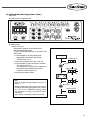
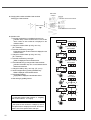
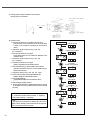
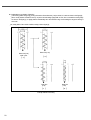
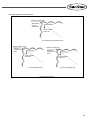
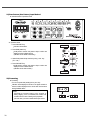
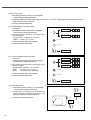
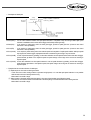
In the sewing pattern as figure [a], moving the location of base line 2mm (L-20) to the left, it is sewn as shown in the figure [b].
When moving location of base line 3mm (L-30) to the left and setting zigzag width of 4mm, due to exceeds the sewing range
as shown in the figure [c], so zigzag width is automatically set to the maximum range not exceeding the range and sewing is
done such.
Yet, setting width of 2mm in this condition, sewing is done s figure [d]
Base Line (r-00)
width : 4mm
[ a ]
Base Line (L-20)
[ b ]
Base Line
(L-30)
[ c ]
Example of Base Line Setting
20
Base Line
(L-30)
[ d ]
[ Fig. 3-1 ]