1
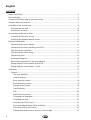
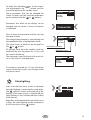
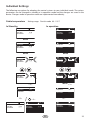
To adapt the individual values to the respective requirements, the MODE button must be
pressed briefly from the standby screen.
12:15
Temperatur
Feuchte
Auto-Stop
Vorwahlzeit
Those parameters that can be changed are
shown in black and the required parameters
can be selected with the
or
buttons.
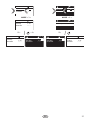
Parameters that blink on the display can be
changed and are shown in these instructions
as displayed.
30°C
5 : 59
--:--
Temperatur
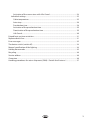
You can reach the parameter level by pressing
the MODE button.
12:15
Temperatur
Feuchte
Auto-Stop
Vorwahlzeit
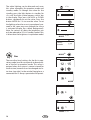
The name of the parameter is now blinking and
the modifiable value is highlighted in black.
The value shown in black can be changed via
or
button.
the
30°C
5 : 59
--:--
Modifiable parameter
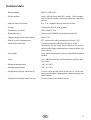
All settings made from the standby mode are
confirmed by pressing MODE for >3 secs and
are saved in the device.
Modifiable value
The parameter stops flashing and the new value is valid until it is changed again.
12:15
Temperatur
Feuchte
Auto-Stop
Vorwahlzeit
30°C
5 : 59
--:--
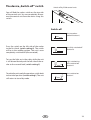
If no button is pressed for >15 secs, the device
returns to the basic screen. Any changes made
will not be saved
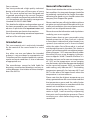
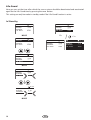
Cabin lighting
Every time that the sauna system is activated,
the cabin lighting is automatically switched on.
symbol is shown at the top left of the
The
display. If the sauna system is switched off, the
cabin lighting is also switched off after a delay
of 30 minutes.
12:15
Temperatur
Auto-Stop
Vorwahlzeit
30°C
5 : 59
--:--
Regardless of the operational state of the sauna
system, the cabin lighting can be switched on
button.
or off at any time via the
GB
19