1
Maintenance and Troubleshooting | 179
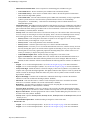
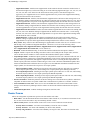
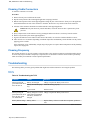
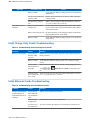
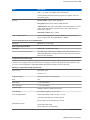
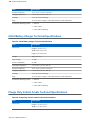
Symptom
TC75 battery is not
charging.
Spare battery is not
charging.
Possible Cause
Action
TC75 was removed from
Ensure cradle is receiving power. Ensure TC75 is seated
cradle or cradle was unplug- correctly. Confirm main battery is charging. The 4,620
ged from AC power too
mAh battery fully charges in less than six hours.
soon.
Battery is faulty.
Verify that other batteries charge properly. If so, replace the
faulty battery.
The TC75 is not fully seated in the cradle.
Remove and re-insert the TC75 into the cradle, ensuring it
is firmly seated.
Extreme battery temperature.
Battery does not charge if ambient temperature is below 0
°C (32 °F) or above 40 °C (104 °F).
Battery not fully seated in
charging slot.
Remove and re-insert the spare battery in the cradle, ensuring it is firmly seated. The 4,620 mAh battery fully charges
in less than six hours.
Battery inserted incorrectly. Re-insert the battery so the charging contacts on the battery
align with the contacts on the cradle.
Battery is faulty.
Verify that other batteries charge properly. If so, replace the
faulty battery.
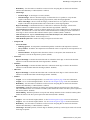
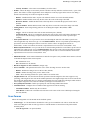
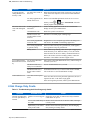
2-Slot USB/Ethernet Cradle
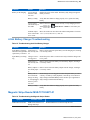
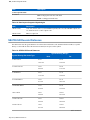
Table 12: Troubleshooting the 2-Slot USB/Ethernet Cradle
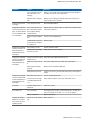
Symptom
Possible Cause
Action
During communication,
no data transmits, or
transmitted data was incomplete.
TC75 removed from cradle
during communications.
Replace TC75 in cradle and retransmit.
Incorrect cable configuration.
Ensure that the correct cable configuration.
TC75 has no active connec- An icon is visible in the status bar if a connection is curtion.
rently active.
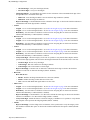
USB/Ethernet module
switch in not in the correct
position.
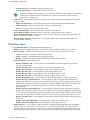
For Ethernet communication, slide the switch to the
position. For USB communication, slide the switch to the
position.
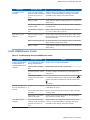
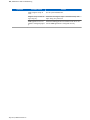
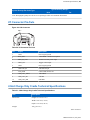
LEDs do not light when
TC75 or spare battery is
inserted.
Cradle is not receiving pow- Ensure the power cable is connected securely to both the
er.
cradle and to AC power.
TC75 is not seated firmly in Remove and re-insert the TC75 into the cradle, ensuring it
the cradle.
is firmly seated.
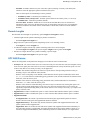
Spare battery is not seated
firmly in the cradle.
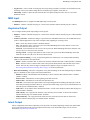
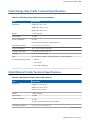
TC75 battery is not
charging.
Remove and re-insert the spare battery into the charging
slot, ensuring it is firmly seated.
TC75 was removed from
Ensure cradle is receiving power. Ensure TC75 is seated
cradle or cradle was unplug- correctly. Confirm main battery is charging. The 4,620
ged from AC power too
mAh battery fully charges in less than six hours.
soon.
Table continued…
MN001975A01-A | July 2015