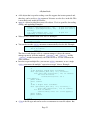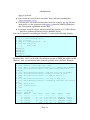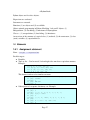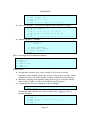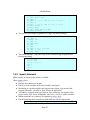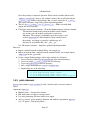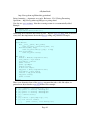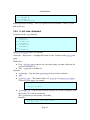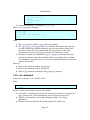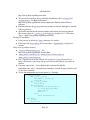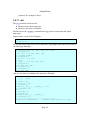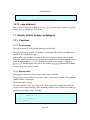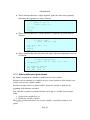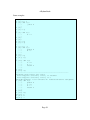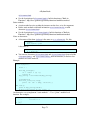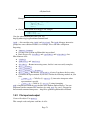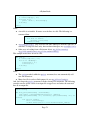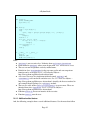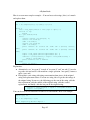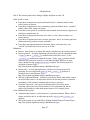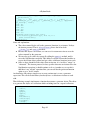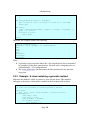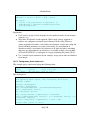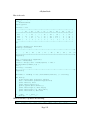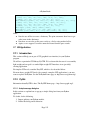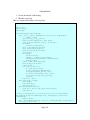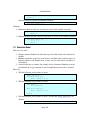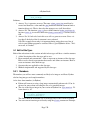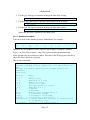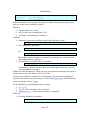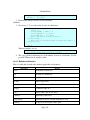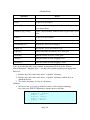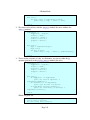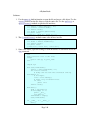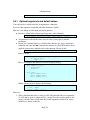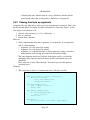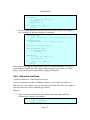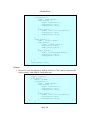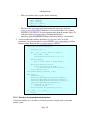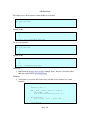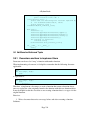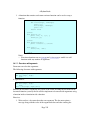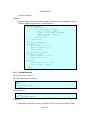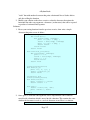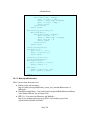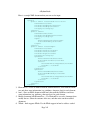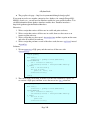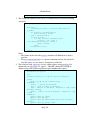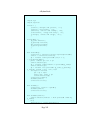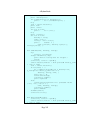
1
A Python Book A Python Book: Beginning Python, Advanced Python, and Python Exercises Author: Dave Kuhlman Contact: [email protected] Address: http://www.davekuhlman.org Page 1 A Python Book Revision 1.3a Date December 15, 2013 Copyright Copyright (c) 2009 Dave Kuhlman. All Rights Reserved. This document is subject to the provisions of the Open Source MIT License http://www.opensource.org/licenses/mitlicense.php. Abstract This document is a selflearning document for a course in Python programming. This course contains (1) a part for beginners, (2) a discussion of several advanced topics that are of interest to Python programmers, and (3) a Python workbook with lots of exercises. Page 2 A Python Book Contents 1 Part 1 Beginning Python...........................................................................................10 1.1 Introductions Etc...................................................................................................10 1.1.1 Resources.......................................................................................................11 1.1.2 A general description of Python....................................................................12 1.1.3 Interactive Python..........................................................................................15 1.2 Lexical matters......................................................................................................15 1.2.1 Lines..............................................................................................................15 1.2.2 Comments......................................................................................................16 1.2.3 Names and tokens..........................................................................................16 1.2.4 Blocks and indentation..................................................................................16 1.2.5 Doc strings.....................................................................................................17 1.2.6 Program structure..........................................................................................17 1.2.7 Operators.......................................................................................................18 1.2.8 Also see.........................................................................................................19 1.2.9 Code evaluation.............................................................................................19 1.3 Statements and inspection preliminaries...........................................................20 1.4 Builtin datatypes.................................................................................................21 1.4.1 Numeric types................................................................................................21 1.4.2 Tuples and lists..............................................................................................21 1.4.3 Strings............................................................................................................24 1.4.3.1 The new string.format method...............................................................26 1.4.3.2 Unicode strings......................................................................................27 1.4.4 Dictionaries....................................................................................................29 1.4.5 Files...............................................................................................................32 1.4.6 Other builtin types........................................................................................35 1.4.6.1 The None value/type..............................................................................35 1.4.6.2 Boolean values.......................................................................................36 1.4.6.3 Sets and frozensets.................................................................................36 1.5 Functions and Classes A Preview......................................................................36 1.6 Statements.............................................................................................................37 1.6.1 Assignment statement....................................................................................37 1.6.2 import statement............................................................................................39 1.6.3 print statement...............................................................................................41 1.6.4 if: elif: else: statement...................................................................................43 1.6.5 for: statement.................................................................................................44 1.6.6 while: statement.............................................................................................48 Page 3 A Python Book 1.6.7 continue and break statements.......................................................................48 1.6.8 try: except: statement.....................................................................................49 1.6.9 raise statement...............................................................................................51 1.6.10 with: statement.............................................................................................52 1.6.10.1 Writing a context manager...................................................................52 1.6.10.2 Using the with: statement....................................................................53 1.6.11 del................................................................................................................54 1.6.12 case statement..............................................................................................55 1.7 Functions, Modules, Packages, and Debugging....................................................55 1.7.1 Functions.......................................................................................................55 1.7.1.1 The def statement...................................................................................55 1.7.1.2 Returning values....................................................................................55 1.7.1.3 Parameters..............................................................................................56 1.7.1.4 Arguments..............................................................................................56 1.7.1.5 Local variables.......................................................................................57 1.7.1.6 Other things to know about functions....................................................57 1.7.1.7 Global variables and the global statement.............................................58 1.7.1.8 Doc strings for functions.......................................................................60 1.7.1.9 Decorators for functions........................................................................60 1.7.2 lambda...........................................................................................................61 1.7.3 Iterators and generators.................................................................................62 1.7.4 Modules.........................................................................................................67 1.7.4.1 Doc strings for modules.........................................................................68 1.7.5 Packages........................................................................................................68 1.8 Classes...................................................................................................................69 1.8.1 A simple class................................................................................................69 1.8.2 Defining methods..........................................................................................70 1.8.3 The constructor..............................................................................................70 1.8.4 Member variables..........................................................................................70 1.8.5 Calling methods.............................................................................................71 1.8.6 Adding inheritance........................................................................................71 1.8.7 Class variables...............................................................................................72 1.8.8 Class methods and static methods.................................................................72 1.8.9 Properties.......................................................................................................74 1.8.10 Interfaces.....................................................................................................75 1.8.11 Newstyle classes.........................................................................................75 1.8.12 Doc strings for classes.................................................................................77 1.8.13 Private members..........................................................................................77 1.9 Special Tasks.........................................................................................................77 1.9.1 Debugging tools.............................................................................................77 Page 4 A Python Book 1.9.2 File input and output......................................................................................78 1.9.3 Unit tests........................................................................................................80 1.9.3.1 A simple example..................................................................................80 1.9.3.2 Unit test suites........................................................................................81 1.9.3.3 Additional unittest features....................................................................83 1.9.3.4 Guidance on Unit Testing......................................................................85 1.9.4 doctest............................................................................................................85 1.9.5 The Python database API..............................................................................87 1.9.6 Installing Python packages............................................................................88 1.10 More Python Features and Exercises..................................................................89 2 Part 2 Advanced Python............................................................................................90 2.1 Introduction Python 201 (Slightly) Advanced Python Topics.......................90 2.2 Regular Expressions..............................................................................................90 2.2.1 Defining regular expressions.........................................................................90 2.2.2 Compiling regular expressions......................................................................91 2.2.3 Using regular expressions..............................................................................91 2.2.4 Using match objects to extract a value..........................................................92 2.2.5 Extracting multiple items..............................................................................93 2.2.6 Replacing multiple items...............................................................................94 2.3 Iterator Objects......................................................................................................96 2.3.1 Example A generator function....................................................................98 2.3.2 Example A class containing a generator method......................................100 2.3.3 Example An iterator class.........................................................................102 2.3.4 Example An iterator class that uses yield.................................................104 2.3.5 Example A list comprehension.................................................................105 2.3.6 Example A generator expression..............................................................105 2.4 Unit Tests............................................................................................................106 2.4.1 Defining unit tests........................................................................................106 2.4.1.1 Create a test class.................................................................................106 2.5 Extending and embedding Python......................................................................109 2.5.1 Introduction and concepts............................................................................109 2.5.2 Extension modules.......................................................................................110 2.5.3 SWIG...........................................................................................................112 2.5.4 Pyrex............................................................................................................115 2.5.5 SWIG vs. Pyrex...........................................................................................120 2.5.6 Cython.........................................................................................................120 2.5.7 Extension types............................................................................................122 2.5.8 Extension classes.........................................................................................122 2.6 Parsing.................................................................................................................122 2.6.1 Special purpose parsers...............................................................................123 Page 5 A Python Book 2.6.2 Writing a recursive descent parser by hand.................................................124 2.6.3 Creating a lexer/tokenizer with Plex...........................................................131 2.6.4 A survey of existing tools............................................................................141 2.6.5 Creating a parser with PLY.........................................................................141 2.6.6 Creating a parser with pyparsing.................................................................148 2.6.6.1 Parsing commadelimited lines............................................................148 2.6.6.2 Parsing functors...................................................................................149 2.6.6.3 Parsing names, phone numbers, etc.....................................................150 2.6.6.4 A more complex example....................................................................151 2.7 GUI Applications................................................................................................153 2.7.1 Introduction.................................................................................................153 2.7.2 PyGtk...........................................................................................................153 2.7.2.1 A simple message dialog box..............................................................153 2.7.2.2 A simple text input dialog box.............................................................156 2.7.2.3 A file selection dialog box...................................................................158 2.7.3 EasyGUI......................................................................................................160 2.7.3.1 A simple EasyGUI example................................................................161 2.7.3.2 An EasyGUI file open dialog example................................................161 2.8 Guidance on Packages and Modules...................................................................161 2.8.1 Introduction.................................................................................................161 2.8.2 Implementing Packages...............................................................................162 2.8.3 Using Packages............................................................................................162 2.8.4 Distributing and Installing Packages...........................................................162 2.9 End Matter...........................................................................................................164 2.9.1 Acknowledgements and Thanks..................................................................164 2.9.2 See Also.......................................................................................................164 3 Part 3 Python Workbook.........................................................................................165 3.1 Introduction.........................................................................................................165 3.2 Lexical Structures................................................................................................165 3.2.1 Variables and names....................................................................................165 3.2.2 Line structure...............................................................................................167 3.2.3 Indentation and program structure...............................................................168 3.3 Execution Model.................................................................................................169 3.4 Builtin Data Types.............................................................................................170 3.4.1 Numbers......................................................................................................170 3.4.1.1 Literal representations of numbers......................................................171 3.4.1.2 Operators for numbers.........................................................................173 3.4.1.3 Methods on numbers............................................................................175 3.4.2 Lists.............................................................................................................175 3.4.2.1 Literal representation of lists...............................................................176 Page 6 A Python Book 3.4.2.2 Operators on lists.................................................................................178 3.4.2.3 Methods on lists...................................................................................178 3.4.2.4 List comprehensions............................................................................180 3.4.3 Strings..........................................................................................................182 3.4.3.1 Characters............................................................................................183 3.4.3.2 Operators on strings.............................................................................184 3.4.3.3 Methods on strings...............................................................................185 3.4.3.4 Raw strings..........................................................................................187 3.4.3.5 Unicode strings....................................................................................188 3.4.4 Dictionaries..................................................................................................190 3.4.4.1 Literal representation of dictionaries...................................................190 3.4.4.2 Operators on dictionaries.....................................................................191 3.4.4.3 Methods on dictionaries.......................................................................192 3.4.5 Files.............................................................................................................195 3.4.6 A few miscellaneous data types..................................................................197 3.4.6.1 None.....................................................................................................197 3.4.6.2 The booleans True and False...............................................................197 3.5 Statements...........................................................................................................198 3.5.1 Assignment statement..................................................................................198 3.5.2 print statement.............................................................................................200 3.5.3 if: statement exercises..................................................................................201 3.5.4 for: statement exercises...............................................................................202 3.5.5 while: statement exercises...........................................................................205 3.5.6 break and continue statements.....................................................................206 3.5.7 Exceptions and the try:except: and raise statements...................................207 3.6 Functions.............................................................................................................210 3.6.1 Optional arguments and default values.......................................................211 3.6.2 Passing functions as arguments...................................................................213 3.6.3 Extra args and keyword args.......................................................................214 3.6.3.1 Order of arguments (positional, extra, and keyword args)..................216 3.6.4 Functions and ducktyping and polymorphism...........................................216 3.6.5 Recursive functions.....................................................................................217 3.6.6 Generators and iterators...............................................................................219 3.7 Objectoriented programming and classes..........................................................223 3.7.1 The constructor............................................................................................224 3.7.2 Inheritance Implementing a subclass.......................................................225 3.7.3 Classes and polymorphism..........................................................................227 3.7.4 Recursive calls to methods..........................................................................228 3.7.5 Class variables, class methods, and static methods.....................................230 3.7.5.1 Decorators for classmethod and staticmethod.....................................233 Page 7 A Python Book 3.8 Additional and Advanced Topics........................................................................234 3.8.1 Decorators and how to implement them......................................................234 3.8.1.1 Decorators with arguments..................................................................235 3.8.1.2 Stacked decorators...............................................................................236 3.8.1.3 More help with decorators...................................................................238 3.8.2 Iterables.......................................................................................................239 3.8.2.1 A few preliminaries on Iterables..........................................................239 3.8.2.2 More help with iterables......................................................................240 3.9 Applications and Recipes....................................................................................240 3.9.1 XML SAX, minidom, ElementTree, Lxml..............................................241 3.9.2 Relational database access...........................................................................249 3.9.3 CSV comma separated value files...........................................................255 3.9.4 YAML and PyYAML..................................................................................256 3.9.5 Json..............................................................................................................258 4 Part 4 Generating Python Bindings for XML.........................................................260 4.1 Introduction.........................................................................................................260 4.2 Generating the code.............................................................................................261 4.3 Using the generated code to parse and export an XML document.....................263 4.4 Some command line options you might want to know.......................................263 4.5 The graphical frontend.......................................................................................264 4.6 Adding applicationspecific behavior.................................................................265 4.6.1 Implementing custom subclasses................................................................265 4.6.2 Using the generated "API" from your application......................................266 4.6.3 A combined approach..................................................................................267 4.7 Special situations and uses..................................................................................269 4.7.1 Generic, typeindependent processing.........................................................269 4.7.1.1 Step 1 generate the bindings............................................................270 4.7.1.2 Step 2 add applicationspecific code................................................270 4.7.1.3 Step 3 write a test/driver harness.....................................................274 4.7.1.4 Step 4 run the test application..........................................................276 4.8 Some hints...........................................................................................................276 4.8.1 Children defined with maxOccurs greater than 1........................................276 4.8.2 Children defined with simple numeric types...............................................277 4.8.3 The type of an element's character content..................................................277 4.8.4 Constructors and their default values..........................................................277 Page 8 A Python Book Preface This book is a collection of materials that I've used when conducting Python training and also materials from my Web site that are intended for selfinstruction. You may prefer a machine readable copy of this book. You can find it in various formats here: HTML – http://www.davekuhlman.org/python_book_01.html ● PDF http://www.davekuhlman.org /python_book_01.pdf ● ODF/OpenOffice http://www.davekuhlman.org /python_book_01.odt And, let me thank the students in my Python classes. Their questions and suggestions were a great help in the preparation of these materials. ● Page 9 A Python Book 1 Part 1 Beginning Python 1.1 Introductions Etc Introductions Practical matters: restrooms, breakroom, lunch and break times, etc. Starting the Python interactive interpreter. Also, IPython and Idle. Running scripts Editors Choose an editor which you can configure so that it indents with 4 spaces, not tab characters. For a list of editors for Python, see: http://wiki.python.org/moin/PythonEditors. A few possible editors: SciTE http://www.scintilla.org/SciTE.html. MS Windows only (1) TextPad http://www.textpad.com; (2) UltraEdit http://www.ultraedit.com/. ● Jed See http://www.jedsoft.org/jed/. ● Emacs See http://www.gnu.org/software/emacs/ and http://www.xemacs.org/faq/xemacsfaq.html. ● jEdit Requires a bit of customization for Python See http://jedit.org. ● Vim http://www.vim.org/ ● Geany http://www.geany.org/ ● And many more. Interactive interpreters: ● ● python ipython ● Idle IDEs Also see http://en.wikipedia.org/wiki/List_of_integrated_development_environments_for_Python: ● ● ● ● ● ● ● ● PyWin MS Windows only. Available at: http://sourceforge.net/projects/pywin32/. WingIDE See http://wingware.com/wingide/. Eclipse http://eclipse.org/. There is a plugin that supports Python. Kdevelop Linux/KDE See http://www.kdevelop.org/. Eric Linux KDE? See http://ericide.pythonprojects.org/index.html Emacs and SciTE will evaluate a Python buffer within the editor. Page 10 A Python Book 1.1.1 Resources Where else to get help: Python home page http://www.python.org Python standard documentation http://www.python.org/doc/. You will also find links to tutorials there. ● FAQs http://www.python.org/doc/faq/. ● The Python Wiki http://wiki.python.org/ ● The Python Package Index Lots of Python packages https://pypi.python.org/pypi ● Special interest groups (SIGs) http://www.python.org/sigs/ ● Other python related mailing lists and lists for specific applications (for example, Zope, Twisted, etc). Try: http://dir.gmane.org/search.php?match=python. ● http://sourceforge.net Lots of projects. Search for "python". ● USENET comp.lang.python. Can also be accessed through Gmane: http://dir.gmane.org/gmane.comp.python.general. ● The Python tutor email list http://mail.python.org/mailman/listinfo/tutor Local documentation: ● ● ● ● ● ● ● On MS Windows, the Python documentation is installed with the standard installation. Install the standard Python documentation on your machine from http://www.python.org/doc/. pydoc. Example, on the command line, type: pydoc re. Import a module, then view its .__doc__ attribute. At the interactive prompt, use help(obj). You might need to import it first. Example: >>> import urllib >>> help(urllib) ● In IPython, the question mark operator gives help. Example: In [13]: open? Type: builtin_function_or_method Base Class: <type 'builtin_function_or_method'> String Form: <builtin function open> Namespace: Python builtin Docstring: open(name[, mode[, buffering]]) > file object Open a file using the file() type, returns a file object. Constructor Docstring: x.__init__(...) initializes x; see x.__class__.__doc__ for signature Page 11 A Python Book Callable: Yes Call def: Calling definition not available.Call docstring: x.__call__(...) <==> x(...) 1.1.2 A general description of Python Python is a highlevel general purpose programming language: Because code is automatically compiled to byte code and executed, Python is suitable for use as a scripting language, Web application implementation language, etc. ● Because Python can be extended in C and C++, Python can provide the speed needed for even compute intensive tasks. ● Because of its strong structuring constructs (nested code blocks, functions, classes, modules, and packages) and its consistent use of objects and objectoriented programming, Python enables us to write clear, logical applications for small and large tasks. Important features of Python: ● Builtin high level data types: strings, lists, dictionaries, etc. ● The usual control structures: if, ifelse, ifelifelse, while, plus a powerful collection iterator (for). ● Multiple levels of organizational structure: functions, classes, modules, and packages. These assist in organizing code. An excellent and large example is the Python standard library. ● Compile on the fly to byte code Source code is compiled to byte code without a separate compile step. Source code modules can also be "precompiled" to byte code files. ● Objectoriented Python provides a consistent way to use objects: everything is an object. And, in Python it is easy to implement new object types (called classes in objectoriented programming). ● Extensions in C and C++ Extension modules and extension types can be written by hand. There are also tools that help with this, for example, SWIG, sip, Pyrex. ● Jython is a version of Python that "plays well with" Java. See: The Jython Project http://www.jython.org/Project/. Some things you will need to know: ● ● Python uses indentation to show block structure. Indent one level to show the beginning of a block. Outdent one level to show the end of a block. As an example, the following Cstyle code: if (x) { Page 12 A Python Book if (y) { f1() } f2() } in Python would be: if x: if y: f1() f2() And, the convention is to use four spaces (and no hard tabs) for each level of indentation. Actually, it's more than a convention; it's practically a requirement. Following that "convention" will make it so much easier to merge your Python code with code from other sources. An overview of Python: ● ● ● ● ● ● ● ● ● ● A scripting language Python is suitable (1) for embedding, (2) for writing small unstructured scripts, (3) for "quick and dirty" programs. Not a scripting language (1) Python scales. (2) Python encourages us to write code that is clear and wellstructured. Interpreted, but also compiled to bytecode. Modules are automatically compiled (to .pyc) when imported, but may also be explicitly compiled. Provides an interactive command line and interpreter shell. In fact, there are several. Dynamic For example: ○ Types are bound to values, not to variables. ○ Function and method lookup is done at runtime. ○ Values are inspectable. ○ There is an interactive interpreter, more than one, in fact. ○ You can list the methods supported by any given object. Strongly typed at runtime, not compiletime. Objects (values) have a type, but variables do not. Reasonably high level High level builtin data types; high level control structures (for walking lists and iterators, for example). Objectoriented Almost everything is an object. Simple object definition. Data hiding by agreement. Multiple inheritance. Interfaces by convention. Polymorphism. Highly structured Statements, functions, classes, modules, and packages enable us to write large, wellstructured applications. Why structure? Readability, locateability, modifiability. Explicitness Page 13 A Python Book ● ● ● ● ● ● Firstclass objects: ○ Definition: Can (1) pass to function; (2) return from function; (3) stuff into a data structure. ○ Operators can be applied to values (not variables). Example: f(x)[3] Indented block structure "Python is pseudocode that runs." Embedding and extending Python Python provides a welldocumented and supported way (1) to embed the Python interpreter in C/C++ applications and (2) to extend Python with modules and objects implemented in C/C++. ○ In some cases, SWIG can generate wrappers for existing C/C++ code automatically. See http://www.swig.org/ ○ Cython enables us to generate C code from Python and to "easily" create wrappers for C/C++ functions. See http://www.cosc.canterbury.ac.nz/~greg/python/Pyrex/ ○ To embed and extend Python with Java, there is Jython. See http://www.jython.org/ Automatic garbage collection. (But, there is a gc module to allow explicit control of garbage collection.) Comparison with other languages: compiled languages (e.g. C/C++); Java; Perl, Tcl, and Ruby. Python excells at: development speed, execution speed, clarity and maintainability. Varieties of Python: ○ CPython Standard Python 2.x implemented in C. ○ Jython Python for the Java environment http://www.jython.org/ ○ PyPy Python with a JIT compiler and stackless mode http://pypy.org/ ○ Stackless Python with enhanced thread support and microthreads etc. http://www.stackless.com/ ○ IronPython Python for .NET and the CLR http://ironpython.net/ ○ Python 3 The new, new Python. This is intended as a replacement for Python 2.x. http://www.python.org/doc/. A few differences (from Python 2.x): ■ The print statement changed to the print function. ■ Strings are unicode by default. ■ Classes are all "new style" classes. ■ Changes to syntax for catching exceptions. ■ Changes to integers no long integer; integer division with automatic convert to float. ■ More pervasive use of iterables (rather than collections). ■ Etc. For a more information about differences between Python 2.x and Python 3.x, see the description of the various fixes that can be applied with the 2to3 tool: Page 14 A Python Book ● http://docs.python.org/3/library/2to3.html#fixers The migration tool, 2to3, eases the conversion of 2.x code to 3.x. Also see The Zen of Python http://www.python.org/peps/pep0020.html. Or, at the Python interactive prompt, type: >>> import this 1.1.3 Interactive Python If you execute Python from the command line with no script (no arguments), Python gives you an interactive prompt. This is an excellent facility for learning Python and for trying small snippets of code. Many of the examples that follow were developed using the Python interactive prompt. Start the Python interactive interpreter by typing python with no arguments at the command line. For example: $ python Python 2.6.1 (r261:67515, Jan 11 2009, 15:19:23) [GCC 4.3.2] on linux2 Type "help", "copyright", "credits" or "license" for more information. >>> print 'hello' hello >>> You may also want to consider using IDLE. IDLE is a graphical integrated development environment for Python; it contains a Python shell. It is likely that Idle was installed for you when you installed Python. You will find a script to start up IDLE in the Tools/scripts directory of your Python distribution. IDLE requires Tkinter. In addition, there are tools that will give you a more powerful and fancy Python interactive interpreter. One example is IPython, which is available at http://ipython.scipy.org/. 1.2 Lexical matters 1.2.1 Lines ● ● ● Python does what you want it to do most of the time so that you only have to add extra characters some of the time. Statement separator is a semicolon, but is only needed when there is more than one statement on a line. And, writing more than one statement on the same line is considered bad form. Continuation lines A backslash as last character of the line makes the Page 15 A Python Book following line a continuation of the current line. But, note that an opening "context" (parenthesis, square bracket, or curly bracket) makes the backslash unnecessary. 1.2.2 Comments Everything after "#" on a line is ignored. No block comments, but doc strings are a comment in quotes at the beginning of a module, class, method or function. Also, editors with support for Python often provide the ability to comment out selected blocks of code, usually with "##". 1.2.3 Names and tokens ● ● ● ● ● ● ● Allowed characters: az AZ 09 underscore, and must begin with a letter or underscore. Names and identifiers are case sensitive. Identifiers can be of unlimited length. Special names, customizing, etc. Usually begin and end in double underscores. Special name classes Single and double underscores. ○ Single leading single underscore Suggests a "private" method or variable name. Not imported by "from module import *". ○ Single trailing underscore Use it to avoid conflicts with Python keywords. ○ Double leading underscores Used in a class definition to cause name mangling (weak hiding). But, not often used. Naming conventions Not rigid, but: ○ Modules and packages all lower case. ○ Globals and constants Upper case. ○ Classes Bumpy caps with initial upper. ○ Methods and functions All lower case with words separated by underscores. ○ Local variables Lower case (with underscore between words) or bumpy caps with initial lower or your choice. ○ Good advice Follow the conventions used in the code on which you are working. Names/variables in Python do not have a type. Values have types. 1.2.4 Blocks and indentation Python represents block structure and nested block structure with indentation, not with begin and end brackets. The empty block Use the pass noop statement. Benefits of the use of indentation to indicate structure: Page 16 A Python Book Reduces the need for a coding standard. Only need to specify that indentation is 4 spaces and no hard tabs. ● Reduces inconsistency. Code from different sources follow the same indentation style. It has to. ● Reduces work. Only need to get the indentation correct, not both indentation and brackets. ● Reduces clutter. Eliminates all the curly brackets. ● If it looks correct, it is correct. Indentation cannot fool the reader. Editor considerations The standard is 4 spaces (no hard tabs) for each indentation level. You will need a text editor that helps you respect that. ● 1.2.5 Doc strings Doc strings are like comments, but they are carried with executing code. Doc strings can be viewed with several tools, e.g. help(), obj.__doc__, and, in IPython, a question mark (?) after a name will produce help. A doc string is written as a quoted string that is at the top of a module or the first lines after the header line of a function or class. We can use triplequoting to create doc strings that span multiple lines. There are also tools that extract and format doc strings, for example: pydoc Documentation generator and online help system http://docs.python.org/lib/modulepydoc.html. ● epydoc Epydoc: Automatic API Documentation Generation for Python http://epydoc.sourceforge.net/index.html ● Sphinx Can also extract documentation from Python doc strings. See http://sphinxdoc.org/index.html. See the following for suggestions and more information on doc strings: Docstring conventions http://www.python.org/dev/peps/pep0257/. ● 1.2.6 Program structure ● ● ● ● ● Execution def, class, etc are executable statements that add something to the current namespace. Modules can be both executable and importable. Statements, data structures, functions, classes, modules, packages. Functions Classes Modules correspond to files with a "*.py" extension. Packages correspond to a directory (or folder) in the file system; a package contains a file named "__init__.py". Both modules and packages can be imported (see section import Page 17 A Python Book ● statement). Packages A directory containing a file named "__init__.py". Can provide additional initialization when the package or a module in it is loaded (imported). 1.2.7 Operators ● See: http://docs.python.org/ref/operators.html. Python defines the following operators: + * ** / // % << >> & | ^ ~ < > <= >= == != <> ● The comparison operators <> and != are alternate spellings of the same operator. != is the preferred spelling; <> is obsolescent. Logical operators: and or is not in ● ● ● There are also (1) the dot operator, (2) the subscript operator [], and the function/method call operator (). For information on the precedences of operators, see the table at http://docs.python.org/2/reference/expressions.html#operatorprecedence, which is reproduced below. For information on what the different operators do, the section in the "Python Language Reference" titled "Special method names" may be of help: http://docs.python.org/2/reference/datamodel.html#specialmethodnames The following table summarizes the operator precedences in Python, from lowest precedence (least binding) to highest precedence (most binding). Operators on the same line have the same precedence. Unless the syntax is explicitly given, operators are binary. Operators on the same line group left to right (except for comparisons, including tests, which all have the same precedence and chain from left to right see section 5.9 and exponentiation, which groups from right to left): Operator Description ======================== ================== lambda Lambda expression or Boolean OR and Boolean AND not x Boolean NOT in, not in Membership tests is, is not Identity tests <, <=, >, >=, <>, !=, == Comparisons | Bitwise OR ^ Bitwise XOR & Bitwise AND <<, >> Shifts Page 18 A Python Book +, Addition and subtraction *, /, % Multiplication, division, remainder +x, x Positive, negative ~x Bitwise not ** Exponentiation x.attribute Attribute reference x[index] Subscription x[index:index] Slicing f(arguments...) Function call (expressions...) Binding or tuple display [expressions...] List display {key:datum...} Dictionary display `expressions...` String conversion ● Note that most operators result in calls to methods with special names, for example __add__, __sub__, __mul__, etc. See Special method names http://docs.python.org/2/reference/datamodel.html#specialmethodnames Later, we will see how these operators can be emulated in classes that you define yourself, through the use of these special names. 1.2.8 Also see For more on lexical matters and Python styles, see: ● ● ● Code Like a Pythonista: Idiomatic Python http://python.net/~goodger/projects/pycon/2007/idiomatic/handout.html. Style Guide for Python Code http://www.python.org/dev/peps/pep0008/ The flake8 style checking program. See https://pypi.python.org/pypi/flake8. Also see the pylint code checker: https://pypi.python.org/pypi/pylint. 1.2.9 Code evaluation Understanding the Python execution model How Python evaluates and executes your code. Evaluating expressions. Creating names/variables Binding The following all create names (variables) and bind values (objects) to them: (1) assignment, (2) function definition, (3) class definition, (4) function and method call, (5) importing a module, ... First class objects Almost all objects in Python are first class. Definition: An object is first class if: (1) we can put it in a structured object; (2) we can pass it to a function; (3) we can return it from a function. References Objects (or references to them) can be shared. What does this mean? ● The object(s) satisfy the identity test operator is. Page 19 A Python Book ● ● ● ● The builtin function id() returns the same value. The consequences for mutable objects are different from those for immutable objects. Changing (updating) a mutable object referenced through one variable or container also changes that object referenced through other variables or containers, because it is the same object. del() The builtin function del() removes a reference, not (necessarily) the object itself. 1.3 Statements and inspection preliminaries print Example: print obj print "one", "two", 'three' for: Example: stuff = ['aa', 'bb', 'cc'] for item in stuff: print item Learn what the type of an object is Example: type(obj) Learn what attributes an object has and what it's capabilities are Example: dir(obj) value = "a message" dir(value) Get help on a class or an object Example: help(str) help("") value = "abc" help(value) help(value.upper) In IPython (but not standard Python), you can also get help at the interactive prompt by typing "?" and "??" after an object. Example: In [48]: a = '' In [49]: a.upper? Type: builtin_function_or_method String Form:<builtin method upper of str object at 0x7f1c426e0508> Docstring: S.upper() > string Page 20 A Python Book Return a copy of the string S converted to uppercase. 1.4 Builtin datatypes For information on builtin data types, see section Builtin Types http://docs.python.org/lib/types.html in the Python standard documentation. 1.4.1 Numeric types The numeric types are: Plain integers Same precision as a C long, usually a 32bit binary number. ● Long integers Define with 100L. But, plain integers are automatically promoted when needed. ● Floats Implemented as a C double. Precision depends on your machine. See sys.float_info. ● Complex numbers Define with, for example, 3j or complex(3.0, 2.0). See 2.3.4 Numeric Types int, float, long, complex http://docs.python.org/lib/typesnumeric.html. ● Python does mixed arithmetic. Integer division truncates. This is changed in Python 3. Use float(n) to force coercion to a float. Example: In [8]: a = 4 In [9]: b = 5 In [10]: a / b Out[10]: 0 # possibly wrong? In [11]: float(a) / b Out[11]: 0.8 Applying the function call operator (parentheses) to a type or class creates an instance of that type or class. Scientific and heavily numeric programming High level Python is not very efficient for numerical programming. But, there are libraries that help Numpy and SciPy See: SciPy: Scientific Tools for Python http://scipy.org/ 1.4.2 Tuples and lists List A list is a dynamic array/sequence. It is ordered and indexable. A list is mutable. List constructors: [], list(). range() and xrange(): Page 21 A Python Book range(n) creates a list of n integers. Optional arguments are the starting integer and a stride. ● xrange is like range, except that it creates an iterator that produces the items in the list of integers instead of the list itself. Tuples A tuple is a sequence. A tuple is immutable. ● Tuple constructors: (), but really a comma; also tuple(). Tuples are like lists, but are not mutable. Python lists are (1) heterogeneous (2) indexable, and (3) dynamic. For example, we can add to a list and make it longer. Notes on sequence constructors: To construct a tuple with a single element, use (x,); a tuple with a single element requires a comma. ● You can spread elements across multiple lines (and no need for backslash continuation character "\"). ● A comma can follow the last element. The length of a tuple or list (or other container): len(mylist). ● Operators for lists: ● ● ● Try: list1 + list2, list1 * n, list1 += list2, etc. Comparison operators: <, ==, >=, etc. Test for membership with the in operator. Example: In [77]: a = [11, 22, 33] In [78]: a Out[78]: [11, 22, 33] In [79]: 22 in a Out[79]: True In [80]: 44 in a Out[80]: False Subscription: Indexing into a sequence ● Negative indexes Effectively, length of sequence plus (minus) index. ● Slicing Example: data[2:5]. Default values: beginning and end of list. ● Slicing with strides Example: data[::2]. Operations on tuples No operations that change the tuple, since tuples are immutable. We can do iteration and subscription. We can do "contains" (the in operator) and get the length (the len() operator). We can use certain boolean operators. ● Operations on lists Operations similar to tuples plus: ● Append mylist.append(newitem). Page 22 A Python Book Insert mylist.insert(index, newitem). Note on efficiency: The insert method is not as fast as the append method. If you find that you need to do a large number of mylist.insert(0, obj) (that is, inserting at the beginning of the list) consider using a deque instead. See: http://docs.python.org/2/library/collections.html#collections.deque. Or, use append and reverse. ● Extend mylist.extend(anotherlist). Also can use + and +=. ● Remove mylist.remove(item) and mylist.pop(). Note that append() together with pop() implements a stack. ● Delete del mylist[index]. ● Pop Get last (rightmost) item and remove from list mylist.pop(). List operators +, *, etc. ● For more operations and operators on sequences, see: http://docs.python.org/2/library/stdtypes.html#sequencetypesstrunicodelisttuplebyte arraybufferxrange. Exercises: ● Create an empty list. Append 4 strings to the list. Then pop one item off the end of the list. Solution: In [25]: a = [] In [26]: a.append('aaa') In [27]: a.append('bbb') In [28]: a.append('ccc') In [29]: a.append('ddd') In [30]: print a ['aaa', 'bbb', 'ccc', 'ddd'] In [31]: a.pop() Out[31]: 'ddd' ● Use the for statement to print the items in the list. Solution: In [32]: for item in a: ....: print item ....: aaa bbb ccc ● Use the string join operation to concatenate the items in the list. Solution: In [33]: '||'.join(a) Out[33]: 'aaa||bbb||ccc' ● Use lists containing three (3) elements to create and show a tree: In [37]: b = ['bb', None, None] In [38]: c = ['cc', None, None] In [39]: root = ['aa', b, c] Page 23 A Python Book In [40]: In [40]: In [40]: def show_tree(t): ....: if not t: ....: return ....: print t[0] ....: show_tree(t[1]) ....: show_tree(t[2]) ....: ....: In [41]: show_tree(root) aa bb cc Note that we will learn a better way to represent tree structures when we cover implementing classes in Python. 1.4.3 Strings Strings are sequences. They are immutable. They are indexable. They are iterable. For operations on strings, see http://docs.python.org/lib/stringmethods.html or use: >>> help(str) Or: >>> dir("abc") String operations (methods). String operators, e.g. +, <, <=, ==, etc.. Constructors/literals: Quotes: single and double. Escaping quotes and other special characters with a backslash. ● Triple quoting Use triple single quotes or double quotes to define multiline strings. ● str() The constructor and the name of the type/class. ● 'aSeparator'.join(aList) ● Many more. Escape characters in strings \t, \n, \\, etc. ● String formatting See: http://docs.python.org/2/library/stdtypes.html#stringformattingoperations Examples: In [18]: name = 'dave' Page 24 A Python Book In [19]: size = 25 In [20]: factor = 3.45 In [21]: print 'Name: %s Size: %d Factor: %3.4f' % (name, size, factor, ) Name: dave Size: 25 Factor: 3.4500 In [25]: print 'Name: %s Size: %d Factor: %08.4f' % (name, size, factor, ) Name: dave Size: 25 Factor: 003.4500 If the righthand argument to the formatting operator is a dictionary, then you can (actually, must) use the names of keys in the dictionary in your format strings. Examples: In [115]: values = {'vegetable': 'chard', 'fruit': 'nectarine'} In [116]: 'I love %(vegetable)s and I love %(fruit)s.' % values Out[116]: 'I love chard and I love nectarine.' Also consider using the right justify and left justify operations. Examples: mystring.rjust(20), mystring.ljust(20, ':'). In Python 3, the str.format method is preferred to the string formatting operator. This method is also available in Python 2.7. It has benefits and advantages over the string formatting operator. You can start learning about it here: http://docs.python.org/2/library/stdtypes.html#stringmethods Exercises: ● Use a literal to create a string containing (1) a single quote, (2) a double quote, (3) both a single and double quote. Solutions: "Some 'quoted' text." 'Some "quoted" text.' 'Some "quoted" \'extra\' text.' ● Write a string literal that spans multiple lines. Solution: """This string spans several lines because it is a little long. """ ● Use the string join operation to create a string that contains a colon as a separator. Solution: >>> content = [] >>> content.append('finch') >>> content.append('sparrow') >>> content.append('thrush') >>> content.append('jay') >>> contentstr = ':'.join(content) >>> print contentstr finch:sparrow:thrush:jay ● Use string formatting to produce a string containing your last and first names, Page 25 A Python Book separated by a comma. Solution: >>> first = 'Dave' >>> last = 'Kuhlman' >>> full = '%s, %s' % (last, first, ) >>> print full Kuhlman, Dave Incrementally building up large strings from lots of small strings the old way Since strings in Python are immutable, appending to a string requires a reallocation. So, it is faster to append to a list, then use join. Example: In [25]: strlist = [] In [26]: strlist.append('Line #1') In [27]: strlist.append('Line #2') In [28]: strlist.append('Line #3') In [29]: str = '\n'.join(strlist) In [30]: print str Line #1 Line #2 Line #3 Incrementally building up large strings from lots of small strings the new way The += operation on strings has been optimized. So, when you do this str1 += str2, even many times, it is efficient. The translate method enables us to map the characters in a string, replacing those in one table by those in another. And, the maketrans function in the string module, makes it easy to create the mapping table: import string def test(): a = 'axbycz' t = string.maketrans('abc', '123') print a print a.translate(t) test() 1.4.3.1 The new string.format method The new way to do string formatting (which is standard in Python 3 and perhaps preferred for new code in Python 2) is to use the string.format method. See here: http://docs.python.org/2/library/stdtypes.html#str.format ● http://docs.python.org/2/library/string.html#formatstringsyntax ● http://docs.python.org/2/library/string.html#formatspecificationminilanguage Some examples: ● Page 26 A Python Book In [1]: 'aaa {1} bbb {0} ccc {1} ddd'.format('xx', 'yy', ) Out[1]: 'aaa yy bbb xx ccc yy ddd' In [2]: 'number: {0:05d} ok'.format(25) Out[2]: 'number: 00025 ok' In [4]: 'n1: {num1} n2: {num2}'.format(num2=25, num1=100) Out[4]: 'n1: 100 n2: 25' In [5]: 'n1: {num1} n2: {num2} again: {num1}'.format(num2=25, num1=100) Out[5]: 'n1: 100 n2: 25 again: 100' In [6]: 'number: {:05d} ok'.format(25) Out[6]: 'number: 00025 ok' In [7]: values = {'name': 'dave', 'hobby': 'birding'} In [8]: 'user: {name} activity: {hobby}'.format(**values) Out[8]: 'user: dave activity: birding' 1.4.3.2 Unicode strings Representing unicode: In [96]: a = u'abcd' In [97]: a Out[97]: u'abcd' In [98]: b = unicode('efgh') In [99]: b Out[99]: u'efgh' Convert to unicode: a_string.decode(encoding). Examples: In [102]: 'abcd'.decode('utf8') Out[102]: u'abcd' In [103]: In [104]: 'abcd'.decode(sys.getdefaultencoding()) Out[104]: u'abcd' Convert out of unicode: a_unicode_string.encode(encoding). Examples: In [107]: a = u'abcd' In [108]: a.encode('utf8') Out[108]: 'abcd' In [109]: a.encode(sys.getdefaultencoding()) Out[109]: 'abcd' In [110]: b = u'Sel\xe7uk' In [111]: print b.encode('utf8') Selçuk Test for unicode type Example: In [122]: import types In [123]: a = u'abcd' In [124]: type(a) is types.UnicodeType Out[124]: True In [125]: Page 27 A Python Book In [126]: type(a) is type(u'') Out[126]: True Or better: In [127]: isinstance(a, unicode) Out[127]: True An example with a character "c" with a hachek: In [135]: name = 'Ivan Krsti\xc4\x87' In [136]: name.decode('utf8') Out[136]: u'Ivan Krsti\u0107' In [137]: In [138]: len(name) Out[138]: 12 In [139]: len(name.decode('utf8')) Out[139]: 11 You can also create a unicode character by using the unichr() builtin function: In [2]: a = 'aa' + unichr(170) + 'bb' In [3]: a Out[3]: u'aa\xaabb' In [6]: b = a.encode('utf8') In [7]: b Out[7]: 'aa\xc2\xaabb' In [8]: print b aaªbb Guidance for use of encodings and unicode If you are working with a multibyte character set: 1. Convert/decode from an external encoding to unicode early (my_string.decode(encoding)). 2. Do your work in unicode. 3. Convert/encode to an external encoding late (my_string.encode(encoding)). For more information, see: Unicode In Python, Completely Demystified http://farmdev.com/talks/unicode/ ● PEP 100: Python Unicode Integration http://www.python.org/dev/peps/pep0100/ ● In the Python standard library: ○ codecs Codec registry and base classes http://docs.python.org/2/library/codecs.html#modulecodecs ○ Standard Encodings http://docs.python.org/2/library/codecs.html#standardencodings If you are reading and writing multibyte character data from or to a file, then look at the ● Page 28 A Python Book codecs.open() in the codecs module http://docs.python.org/2/library/codecs.html#codecs.open. Handling multibyte character sets in Python 3 is easier, I think, but different. One hint is to use the encoding keyword parameter to the open builtin function. Here is an example: def test(): infile = open('infile1.txt', 'r', encoding='utf8') outfile = open('outfile1.txt', 'w', encoding='utf8') for line in infile: line = line.upper() outfile.write(line) infile.close() outfile.close() test() 1.4.4 Dictionaries A dictionary is a collection, whose values are accessible by key. It is a collection of namevalue pairs. The order of elements in a dictionary is undefined. But, we can iterate over (1) the keys, (2) the values, and (3) the items (keyvalue pairs) in a dictionary. We can set the value of a key and we can get the value associated with a key. Keys must be immutable objects: ints, strings, tuples, ... Literals for constructing dictionaries: d1 = {} d2 = {key1: value1, key2: value2, } Constructor for dictionaries dict() can be used to create instances of the class dict. Some examples: dict({'one': 2, 'two': 3}) dict({'one': 2, 'two': 3}.items()) dict({'one': 2, 'two': 3}.iteritems()) dict(zip(('one', 'two'), (2, 3))) dict([['two', 3], ['one', 2]]) dict(one=2, two=3) dict([(['one', 'two'][i2], i) for i in (2, 3)]) For operations on dictionaries, see http://docs.python.org/lib/typesmapping.html or use: >>> help({}) Or: Page 29 A Python Book >>> dir({}) Indexing Access or add items to a dictionary with the indexing operator [ ]. Example: In [102]: dict1 = {} In [103]: dict1['name'] = 'dave' In [104]: dict1['category'] = 38 In [105]: dict1 Out[105]: {'category': 38, 'name': 'dave'} Some of the operations produce the keys, the values, and the items (pairs) in a dictionary. Examples: In [43]: d = {'aa': 111, 'bb': 222} In [44]: d.keys() Out[44]: ['aa', 'bb'] In [45]: d.values() Out[45]: [111, 222] In [46]: d.items() Out[46]: [('aa', 111), ('bb', 222)] When iterating over large dictionaries, use methods iterkeys(), itervalues(), and iteritems(). Example: In [47]: In [47]: d = {'aa': 111, 'bb': 222} In [48]: for key in d.iterkeys(): ....: print key ....: ....: aa bb To test for the existence of a key in a dictionary, use the in operator or the mydict.has_key(k) method. The in operator is preferred. Example: >>> d = {'tomato': 101, 'cucumber': 102} >>> k = 'tomato' >>> k in d True >>> d.has_key(k) True You can often avoid the need for a test by using method get. Example: >>> d = {'tomato': 101, 'cucumber': 102} >>> d.get('tomato', 1) 101 >>> d.get('chard', 1) 1 >>> if d.get('eggplant') is None: ... print 'missing' Page 30 A Python Book ... missing Dictionary "view" objects provide dynamic (automatically updated) views of the keys or the values or the items in a dictionary. View objects also support set operations. Create views with mydict.viewkeys(), mydict.viewvalues(), and mydict.viewitems(). See: http://docs.python.org/2/library/stdtypes.html#dictionaryviewobjects. The dictionary setdefault method provides a way to get the value associated with a key from a dictionary and to set that value if the key is missing. Example: In [106]: a Out[106]: {} In [108]: a.setdefault('cc', 33) Out[108]: 33 In [109]: a Out[109]: {'cc': 33} In [110]: a.setdefault('cc', 44) Out[110]: 33 In [111]: a Out[111]: {'cc': 33} Exercises: ● Write a literal that defines a dictionary using both string literals and variables containing strings. Solution: >>> first = 'Dave' >>> last = 'Kuhlman' >>> name_dict = {first: last, 'Elvis': 'Presley'} >>> print name_dict {'Dave': 'Kuhlman', 'Elvis': 'Presley'} ● Write statements that iterate over (1) the keys, (2) the values, and (3) the items in a dictionary. (Note: Requires introduction of the for statement.) Solutions: >>> d = {'aa': 111, 'bb': 222, 'cc': 333} >>> for key in d.keys(): ... print key ... aa cc bb >>> for value in d.values(): ... print value ... 111 333 222 >>> for item in d.items(): ... print item Page 31 A Python Book ... ('aa', 111) ('cc', 333) ('bb', 222) >>> for key, value in d.items(): ... print key, '::', value ... aa :: 111 cc :: 333 bb :: 222 Additional notes on dictionaries: ● ● You can use iterkeys(), itervalues(), iteritems() to obtain iterators over keys, values, and items. A dictionary itself is iterable: it iterates over its keys. So, the following two lines are equivalent: for k in myDict: print k for k in myDict.iterkeys(): print k ● The in operator tests for a key in a dictionary. Example: In [52]: mydict = {'peach': 'sweet', 'lemon': 'tangy'} In [53]: key = 'peach' In [54]: if key in mydict: ....: print mydict[key] ....: sweet 1.4.5 Files Open a file with the open factory method. Example: In [28]: f = open('mylog.txt', 'w') In [29]: f.write('message #1\n') In [30]: f.write('message #2\n') In [31]: f.write('message #3\n') In [32]: f.close() In [33]: f = file('mylog.txt', 'r') In [34]: for line in f: ....: print line, ....: message #1 message #2 message #3 In [35]: f.close() Notes: ● Use the (builtin) open(path, mode) function to open a file and create a file object. You could also use file(), but open() is recommended. Page 32 A Python Book ● ● A file object that is open for reading a text file supports the iterator protocol and, therefore, can be used in a for statement. It iterates over the lines in the file. This is most likely only useful for text files. open is a factory method that creates file objects. Use it to open files for reading, writing, and appending. Examples: infile = open('myfile.txt', 'r') # open for reading outfile = open('myfile.txt', 'w') # open for (over) writing log = open('myfile.txt', 'a') # open for appending to existing content ● When you have finished with a file, close it. Examples: infile.close() outfile.close() ● You can also use the with: statement to automatically close the file. Example: with open('tmp01.txt', 'r') as infile: for x in infile: print x, ● The above works because a file is a context manager: it obeys the context manager protocol. A file has methods __enter__ and __exit__, and the __exit__ method automatically closes the file for us. See the section on the with: statement. In order to open multiple files, you can nest with: statements, or use a single with: statement with multiple "expression as target" clauses. Example: def test(): # # use multiple nested with: statements. with open('small_file.txt', 'r') as infile: with open('tmp_outfile.txt', 'w') as outfile: for line in infile: outfile.write('line: %s' % line.upper()) print infile print outfile # # use a single with: statement. with open('small_file.txt', 'r') as infile, \ open('tmp_outfile.txt', 'w') as outfile: for line in infile: outfile.write('line: %s' % line.upper()) print infile print outfile test() ● file is the file type and can be used as a constructor to create file objects. But, Page 33 A Python Book open is preferred. ● Lines read from a text file have a newline. Strip it off with something like: line.rstrip('\n'). ● For binary files you should add the binary mode, for example: rb, wb. For more about modes, see the description of the open() function at Builtin Functions http://docs.python.org/lib/builtinfuncs.html. ● Learn more about file objects and the methods they provide at: 2.3.9 File Objects http://docs.python.org/2/library/stdtypes.html#fileobjects. You can also append to an existing file. Note the "a" mode in the following example: In [39]: f = open('mylog.txt', 'a') In [40]: f.write('message #4\n') In [41]: f.close() In [42]: f = file('mylog.txt', 'r') In [43]: for line in f: ....: print line, ....: message #1 message #2 message #3 message #4 In [44]: f.close() For binary files, add "b" to the mode. Not strictly necessary on UNIX, but needed on MS Windows. And, you will want to make your code portable across platforms. Example: In [62]: import zipfile In [63]: outfile = open('tmp1.zip', 'wb') In [64]: zfile = zipfile.ZipFile(outfile, 'w', zipfile.ZIP_DEFLATED) In [65]: zfile.writestr('entry1', 'my heroes have always been cowboys') In [66]: zfile.writestr('entry2', 'and they still are it seems') In [67]: zfile.writestr('entry3', 'sadly in search of and') In [68]: zfile.writestr('entry4', 'on step in back of') In [69]: In [70]: zfile.writestr('entry4', 'one step in back of') In [71]: zfile.writestr('entry5', 'themselves and their slow moving ways') In [72]: zfile.close() In [73]: outfile.close() In [75]: $ $ unzip lv tmp1.zip Archive: tmp1.zip Length Method Size Ratio Date Time CRC32 Name 34 Defl:N 36 6% 052908 17:04 f6b7d921 entry1 27 Defl:N 29 7% 052908 17:07 10da8f3d entry2 22 Defl:N 24 9% 052908 17:07 3fd17fda entry3 18 Defl:N 20 11% 052908 17:08 d55182e6 entry4 Page 34 A Python Book 19 Defl:N 21 11% 052908 17:08 1a892acd entry4 37 Defl:N 39 5% 052908 17:09 e213708c entry5 157 169 8% 6 files Exercises: ● Read all of the lines of a file into a list. Print the 3rd and 5th lines in the file/list. Solution: In [55]: f = open('tmp1.txt', 'r') In [56]: lines = f.readlines() In [57]: f.close() In [58]: lines Out[58]: ['the\n', 'big\n', 'brown\n', 'dog\n', 'had\n', 'long\n', 'hair\n'] In [59]: print lines[2] brown In [61]: print lines[4] had More notes: ● ● ● Strip newlines (and other whitespace) from a string with methods strip(), lstrip(), and rstrip(). Get the current position within a file by using myfile.tell(). Set the current position within a file by using myfile.seek(). It may be helpful to use os.SEEK_CUR and os.SEEK_END. For example: ○ f.seek(2, os.SEEK_CUR) advances the position by two ○ f.seek(3, os.SEEK_END) sets the position to the third to last. ○ f.seek(25) sets the position relative to the beginning of the file. 1.4.6 Other builtin types Other builtin data types are described in section Builtin Types http://docs.python.org/lib/types.html in the Python standard documentation. 1.4.6.1 The None value/type The unique value None is used to indicate "no value", "nothing", "nonexistence", etc. There is only one None value; in other words, it's a singleton. Use is to test for None. Example: >>> flag = None >>> >>> if flag is None: ... print 'clear' Page 35 A Python Book ... clear >>> if flag is not None: ... print 'hello' ... >>> 1.4.6.2 Boolean values True and False are the boolean values. The following values also count as false, for example, in an if: statement: False, numeric zero, None, the empty string, an empty list, an empty dictionary, any empty container, etc. All other values, including True, act as true values. 1.4.6.3 Sets and frozensets A set is an unordered collection of immutable objects. A set does not contain duplicates. Sets support several set operations, for example: union, intersection, difference, ... A frozenset is like a set, except that a frozenset is immutable. Therefore, a frozenset is hashable and can be used as a key in a dictionary, and it can be added to a set. Create a set with the set constructor. Examples: >>> a = set() >>> a set([]) >>> a.add('aa') >>> a.add('bb') >>> a set(['aa', 'bb']) >>> b = set([11, 22]) >>> b set([11, 22]) >>> c = set([22, 33]) >>> b.union(c) set([33, 11, 22]) >>> b.intersection(c) set([22]) For more information on sets, see: Set Types set, frozenset http://docs.python.org/lib/typesset.html 1.5 Functions and Classes A Preview Structured code Python programs are made up of expressions, statements, functions, classes, modules, and packages. Page 36 A Python Book Python objects are firstclass objects. Expressions are evaluated. Statements are executed. Functions (1) are objects and (2) are callable. Objectoriented programming in Python. Modeling "real world" objects. (1) Encapsulation; (2) data hiding; (3) inheritance. Polymorphism. Classes (1) encapsulation; (2) data hiding; (3) inheritance. An overview of the structure of a typical class: (1) methods; (2) the constructor; (3) class (static) variables; (4) super/subclasses. 1.6 Statements 1.6.1 Assignment statement Form target = expression. Possible targets: ● ● Identifier Tuple or list Can be nested. Left and right sides must have equivalent structure. Example: >>> x, y, z = 11, 22, 33 >>> [x, y, z] = 111, 222, 333 >>> a, (b, c) = 11, (22, 33) >>> a, B = 11, (22, 33) This feature can be used to simulate an enum: In [22]: LITTLE, MEDIUM, LARGE = range(1, 4) In [23]: LITTLE Out[23]: 1 In [24]: MEDIUM Out[24]: 2 ● Subscription of a sequence, dictionary, etc. Example: In [10]: a = range(10) In [11]: a Out[11]: [0, 1, 2, 3, 4, 5, 6, 7, 8, 9] In [12]: a[3] = 'abc' In [13]: a Out[13]: [0, 1, 2, 'abc', 4, 5, 6, 7, 8, 9] In [14]: In [14]: b = {'aa': 11, 'bb': 22} In [15]: b Page 37 A Python Book Out[15]: {'aa': 11, 'bb': 22} In [16]: b['bb'] = 1000 In [17]: b['cc'] = 2000 In [18]: b Out[18]: {'aa': 11, 'bb': 1000, 'cc': 2000} ● A slice of a sequence Note that the sequence must be mutable. Example: In [1]: a = range(10) In [2]: a Out[2]: [0, 1, 2, 3, 4, 5, 6, 7, 8, 9] In [3]: a[2:5] = [11, 22, 33, 44, 55, 66] In [4]: a Out[4]: [0, 1, 11, 22, 33, 44, 55, 66, 5, 6, 7, 8, 9] ● Attribute reference Example: >>> class MyClass: ... pass ... >>> anObj = MyClass() >>> anObj.desc = 'pretty' >>> print anObj.desc pretty There is also augmented assignment. Examples: >>> index = 0 >>> index += 1 >>> index += 5 >>> index += f(x) >>> index = 1 >>> index *= 3 Things to note: ● ● ● Assignment to a name creates a new variable (if it does not exist in the namespace) and a binding. Specifically, it binds a value to the new name. Calling a function also does this to the (formal) parameters within the local namespace. In Python, a language with dynamic typing, the data type is associated with the value, not the variable, as is the case in statically typed languages. Assignment can also cause sharing of an object. Example: obj1 = A() obj2 = obj1 Check to determine that the same object is shared with id(obj) or the is operator. Example: In [23]: a = range(10) In [24]: a Out[24]: [0, 1, 2, 3, 4, 5, 6, 7, 8, 9] In [25]: b = a In [26]: b Page 38 A Python Book Out[26]: [0, 1, 2, 3, 4, 5, 6, 7, 8, 9] In [27]: b[3] = 333 In [28]: b Out[28]: [0, 1, 2, 333, 4, 5, 6, 7, 8, 9] In [29]: a Out[29]: [0, 1, 2, 333, 4, 5, 6, 7, 8, 9] In [30]: a is b Out[30]: True In [31]: print id(a), id(b) 31037920 31037920 ● You can also do multiple assignment in a single statement. Example: In [32]: a = b = 123 In [33]: a Out[33]: 123 In [34]: b Out[34]: 123 In [35]: In [35]: In [35]: a = b = [11, 22] In [36]: a is b Out[36]: True ● You can interchange (swap) the value of two variables using assignment and packing/unpacking: >>> a = 111 >>> b = 222 >>> a, b = b, a >>> a 222 >>> b 111 1.6.2 import statement Make module (or objects in the module) available. What import does: ● ● ● ● ● ● Evaluate the content of a module. Likely to create variables in the local (module) namespace. Evaluation of a specific module only happens once during a given run of the program. Therefore, a module is shared across an application. A module is evaluated from top to bottom. Later statements can replace values created earlier. This is true of functions and classes, as well as (other) variables. Which statements are evaluated? Assignment, class, def, ... Use the following idiom to make a module both runable and importable: if __name__ == '__main__': Page 39 A Python Book # import pdb; pdb.set_trace() main() # or "test()" or some other function defined in module Notes: ○ The above condition will be true only when the module is run as a script and will not be true when the module is imported. ○ The line containing pdb can be copied any place in your program and uncommented, and then the program will drop into the Python debugger when that location is reached. Where import looks for modules: ● ● ● ● sys.path shows where it looks. There are some standard places. Add additional directories by setting the environment variable PYTHONPATH. You can also add paths by modifying sys.path, for example: import sys sys.path.insert(0, '/path/to/my/module') ● ● Packages need a file named __init__.py. Extensions To determine what extensions import looks for, do: >>> import imp >>> imp.get_suffixes() [('.so', 'rb', 3), ('module.so', 'rb', 3), ('.py', 'U', 1), ('.pyc', 'rb', 2)] Forms of the import statement: import A Names in the local (module) namespace are accessible with the dot operator. ● import A as B Import the module A, but bind the module object to the variable B. ● import A1, A2 Not recommended ● from A import B ● from A import B1, B2 ● from A import B as C ● from A import * Not recommended: clutters and mixes namespaces. ● from A.B import C (1) Possibly import object C from module B in package A or (2) possibly import module C from subpackage B in package A. ● import A.B.C To reference attributes in C, must use fullyqualified name, for example use A.B.C.D to reference D inside of C. More notes on the import statement: ● ● The import statement and packages A file named __init__.py is required in a package. This file is evaluated the first time either the package is imported or a Page 40 A Python Book ● ● file in the package is imported. Question: What is made available when you do import aPackage? Answer: All variables (names) that are global inside the __init__.py module in that package. But, see notes on the use of __all__: The import statement http://docs.python.org/ref/import.html The use of if __name__ == "__main__": Makes a module both importable and executable. Using dots in the import statement From the Python language reference manual: "Hierarchical module names:when the module names contains one or more dots, the module search path is carried out differently. The sequence of identifiers up to the last dot is used to find a package; the final identifier is then searched inside the package. A package is generally a subdirectory of a directory on sys.path that has a file __init__.py." See: The import statement http://docs.python.org/ref/import.html Exercises: ● ● ● Import a module from the standard library, for example re. Import an element from a module from the standard library, for example import compile from the re module. Create a simple Python package with a single module in it. Solution: 1. Create a directory named simplepackage in the current directory. 2. Create an (empty) __init__.py in the new directory. 3. Create an simple.py in the new directory. 4. Add a simple function name test1 in simple.py. 5. Import using any of the following: >>> import simplepackage.simple >>> from simplepackage import simple >>> from simplepackage.simple import test1 >>> from simplepackage.simple import test1 as mytest 1.6.3 print statement print sends output to sys.stdout. It adds a newline, unless an extra comma is added. Arguments to print: ● ● ● ● Multiple items Separated by commas. End with comma to suppress carriage return. Use string formatting for more control over output. Also see various "prettyprinting" functions and methods, in particular, pprint. See 3.27 pprint Data pretty printer Page 41 A Python Book http://docs.python.org/lib/modulepprint.html. String formatting Arguments are a tuple. Reference: 2.3.6.2 String Formatting Operations http://docs.python.org/lib/typesseqstrings.html. Can also use sys.stdout. Note that a carriage return is not automatically added. Example: >>> import sys >>> sys.stdout.write('hello\n') Controlling the destination and format of print Replace sys.stdout with an instance of any class that implements the method write taking one parameter. Example: import sys class Writer: def __init__(self, file_name): self.out_file = file(file_name, 'a') def write(self, msg): self.out_file.write('[[%s]]' % msg) def close(self): self.out_file.close() def test(): writer = Writer('outputfile.txt') save_stdout = sys.stdout sys.stdout = writer print 'hello' print 'goodbye' writer.close() # Show the output. tmp_file = file('outputfile.txt') sys.stdout = save_stdout content = tmp_file.read() tmp_file.close() print content test() There is an alternative form of the print statement that takes a filelike object, in particular an object that has a write method. For example: In [1]: outfile = open('tmp.log', 'w') In [2]: print >> outfile, 'Message #1' In [3]: print >> outfile, 'Message #2' In [4]: print >> outfile, 'Message #3' In [5]: outfile.close() In [6]: In [6]: infile = open('tmp.log', 'r') In [7]: for line in infile: ...: print 'Line:', line.rstrip('\n') ...: Page 42 A Python Book Line: Message #1 Line: Message #2 Line: Message #3 In [8]: infile.close() Future deprecation warning There is no print statement in Python 3. There is a print builtin function. 1.6.4 if: elif: else: statement A template for the if: statement: if condition1: statements elif condition2: statements elif condition3: statements else: statements The elif and else clauses are optional. Conditions Expressions Anything that returns a value. Compare with eval() and exec. Truth values: False False, None, numeric zero, the empty string, an empty collection (list or tuple or dictionary or ...). ● True True and everything else. Operators: ● ● ● ● and and or Note that both and and or do short circuit evaluation. not is and is not The identical object. Cf. a is b and id(a) == id(b). Useful to test for None, for example: if x is None: ... if x is not None: ... ● in and not in Can be used to test for existence of a key in a dictionary or for the presence of a value in a collection. The in operator tests for equality, not identity. Example: >>> d = {'aa': 111, 'bb': 222} >>> 'aa' in d Page 43 A Python Book True >>> 'aa' not in d False >>> 'xx' in d False Comparison operators, for example ==, !=, <, <=, ... There is an if expression. Example: ● >>> a = 'aa' >>> b = 'bb' >>> x = 'yes' if a == b else 'no' >>> x 'no' Notes: The elif: clauses and the else: clause are optional. The if:, elif:, and else: clauses are all header lines in the sense that they are each followed by an indented block of code and each of these header lines ends with a colon. (To put an empty block after one of these, or any other, statement header line, use the pass statement. It's effectively a noop.) ● Parentheses around the condition in an if: or elif: are not required and are considered bad form, unless the condition extends over multiple lines, in which case parentheses are preferred over use of a line continuation character (backslash at the end of the line). Exercises: ● ● ● ● ● Write an if statement with an and operator. Write an if statement with an or operator. Write an if statement containing both and and or operators. 1.6.5 for: statement Iterate over a sequence or an "iterable" object. Form: for x in y: block Iterator Some notes on what it means to be iterable: ● ● ● An iterable is something that can be used in an iterator context, for example, in a for: statement, in a list comprehension, and in a generator expression. Sequences and containers are iterable. Examples: tuples, lists, strings, dictionaries. Instances of classes that obey the iterator protocol are iterable. See Page 44 A Python Book http://docs.python.org/lib/typeiter.html. ● We can create an iterator object with builtin functions such as iter() and enumerate(). See Builtin Functions http://docs.python.org/lib/builtinfuncs.html in the Python standard library reference. ● Functions that use the yield statement, produce an iterator, although it's actually called a generator. ● An iterable implements the iterator interface and satisfies the iterator protocol. The iterator protocol: __iter__() and next() methods. See 2.3.5 Iterator Types (http://docs.python.org/lib/typeiter.html). Testing for "iterability": If you can use an object in a for: statement, it's iterable. If the expresion iter(obj) does not produce a TypeError exception, it's iterable. Some ways to produce iterators: ● ● ● ● ● ● ● iter() and enumerate() See: http://docs.python.org/lib/builtinfuncs.html. some_dict.iterkeys(), some_dict.itervalues(), some_dict.iteritems(). Use a sequence in an iterator context, for example in a for statement. Lists, tuples, dictionaries, and strings can be used in an iterator context to produce an iterator. Generator expressions Latest Python only. Syntactically like list comprehensions, but (1) surrounded by parentheses instead of square brackets and (2) use lazy evaluation. A class that implements the iterator protocol Example: class A(object): def __init__(self): self.data = [11,22,33] self.idx = 0 def __iter__(self): return self def next(self): if self.idx < len(self.data): x = self.data[self.idx] self.idx +=1 return x else: raise StopIteration def test(): a = A() for x in a: Page 45 A Python Book print x test() Note that the iterator protocol changes in Python 3. A function containing a yield statement. See: ○ Yield expressions http://docs.python.org/2/reference/expressions.html#yieldexpressions ○ The yield statement http://docs.python.org/2/reference/simple_stmts.html#theyieldstatement ● Also see itertools module in the Python standard library for much more help with iterators: itertools — Functions creating iterators for efficient looping http://docs.python.org/2/library/itertools.html#moduleitertools The for: statement can also do unpacking. Example: ● In [25]: items = ['apple', 'banana', 'cherry', 'date'] In [26]: for idx, item in enumerate(items): ....: print '%d. %s' % (idx, item, ) ....: 0. apple 1. banana 2. cherry 3. date The for statement can also have an optional else: clause. The else: clause is executed if the for statement completes normally, that is if a break statement is not executed. Helpful functions with for: ● enumerate(iterable) Returns an iterable that produces pairs (tuples) containing count (index) and value. Example: >>> for idx, value in enumerate([11,22,33]): ... print idx, value ... 0 11 1 22 2 33 range([start,] stop[, step]) and xrange([start,] stop[, step]). List comprehensions Since list comprehensions create lists, they are useful in for statements, although, when the number of elements is large, you should consider using a generator expression instead. A list comprehension looks a bit like a for: statement, but is inside square brackets, and it is an expression, not a statement. Two forms (among others): ● ● [f(x) for x in iterable] Page 46 A Python Book [f(x) for x in iterable if t(x)] Generator expressions A generator expression looks similar to a list comprehension, except that it is surrounded by parentheses rather than square brackets. Example: ● In [28]: items = ['apple', 'banana', 'cherry', 'date'] In [29]: gen1 = (item.upper() for item in items) In [30]: for x in gen1: ....: print 'x:', x ....: x: APPLE x: BANANA x: CHERRY x: DATE Exercises: ● ● Write a list comprehension that returns all the keys in a dictionary whose associated values are greater than zero. ○ The dictionary: {'aa': 11, 'cc': 33, 'dd': 55, 'bb': 22} ○ Solution: [x[0] for x in my_dict.iteritems() if x[1] > 0] Write a list comprehension that produces even integers from 0 to 10. Use a for statement to iterate over those values. Solution: for x in [y for y in range(10) if y % 2 == 0]: print 'x: %s' % x ● Write a list comprehension that iterates over two lists and produces all the combinations of items from the lists. Solution: In [19]: a = range(4) In [20]: b = [11,22,33] In [21]: a Out[21]: [0, 1, 2, 3] In [22]: b Out[22]: [11, 22, 33] In [23]: c = [(x, y) for x in a for y in b] In [24]: print c [(0, 11), (0, 22), (0, 33), (1, 11), (1, 22), (1, 33), (2, 11), (2, 22), (2, 33), (3, 11), (3, 22), (3, 33)] But, note that in the previous exercise, a generator expression would often be better. A generator expression is like a list comprehension, except that, instead of creating the entire list, it produces a generator that can be used to produce each of the elements. The break and continue statements are often useful in a for statement. See continue and break statements The for statement can also have an optional else: clause. The else: clause is executed if the for statement completes normally, that is if a break statement is not executed. Example: Page 47 A Python Book for item in data1: if item > 100: value1 = item break else: value1 = 'not found' print 'value1:', value1 When run, it prints: value1: not found 1.6.6 while: statement Form: while condition: block The while: statement is not often used in Python because the for: statement is usually more convenient, more idiomatic, and more Pythonic. Exercises: ● Write a while statement that prints integers from zero to 5. Solution: count = 0 while count < 5: count += 1 print count The break and continue statements are often useful in a while statement. See continue and break statements The while statement can also have an optional else: clause. The else: clause is executed if the while statement completes normally, that is if a break statement is not executed. 1.6.7 continue and break statements The break statement exits from a loop. The continue statement causes execution to immediately continue at the start of the loop. Can be used in for: and while:. When the for: statement or the while: statement has an else: clause, the block in the else: clause is executed only if a break statement is not executed. Exercises: Page 48 A Python Book ● Using break, write a while statement that prints integers from zero to 5. Solution: count = 0 while True: count += 1 if count > 5: break print count ● Notes: ○ A for statement that uses range() or xrange() would be better than a while statement for this use. Using continue, write a while statement that processes only even integers from 0 to 10. Note: % is the modulo operator. Solution: count = 0 while count < 10: count += 1 if count % 2 == 0: continue print count 1.6.8 try: except: statement Exceptions are a systematic and consistent way of processing errors and "unusual" events in Python. Caught and uncaught exceptions Uncaught exceptions terminate a program. The try: statement catches an exception. Almost all errors in Python are exceptions. Evaluation (execution model) of the try statement When an exception occurs in the try block, even if inside a nested function call, execution of the try block ends and the except clauses are searched for a matching exception. Tracebacks Also see the traceback module: http://docs.python.org/lib/moduletraceback.html Exceptions are classes. Exception classes subclassing, args. An exception class in an except: clause catches instances of that exception class and all subclasses, but not superclasses. Builtin exception classes See: ● Module exceptions. Page 49 A Python Book Builtin exceptions http://docs.python.org/lib/moduleexceptions.html. User defined exception classes subclasses of Exception. ● Example: try: raise RuntimeError('this silly error') except RuntimeError, exp: print "[[[%s]]]" % exp Reference: http://docs.python.org/lib/moduleexceptions.html You can also get the arguments passed to the constructor of an exception object. In the above example, these would be: exp.args Why would you define your own exception class? One answer: You want a user of your code to catch your exception and no others. Catching an exception by exception class catches exceptions of that class and all its subclasses. So: except SomeExceptionClass, exp: matches and catches an exception if SomeExceptionClass is the exception class or a base class (superclass) of the exception class. The exception object (usually an instance of some exception class) is bound to exp. A more "modern" syntax is: except SomeExceptionClass as exp: So: class MyE(ValueError): pass try: raise MyE() except ValueError: print 'caught exception' will print "caught exception", because ValueError is a base class of MyE. Also see the entries for "EAFP" and "LBYL" in the Python glossary: http://docs.python.org/3/glossary.html. Exercises: ● Write a very simple, empty exception subclass. Solution: class MyE(Exception): Page 50 A Python Book pass ● Write a try:except: statement that raises your exception and also catches it. Solution: try: raise MyE('hello there dave') except MyE, e: print e 1.6.9 raise statement Throw or raise an exception. Forms: raise instance ● raise MyExceptionClass(value) preferred. ● raise MyExceptionClass, value The raise statement takes: ● An (instance of) a builtin exception class. ● An instance of class Exception or ● An instance of a builtin subclass of class Exception or ● An instance of a userdefined subclass of class Exception or ● One of the above classes and (optionally) a value (for example, a string or a tuple). See http://docs.python.org/ref/raise.html. ● For a list of builtin exceptions, see http://docs.python.org/lib/moduleexceptions.html. The following example defines an exception subclass and throws an instance of that subclass. It also shows how to pass and catch multiple arguments to the exception: class NotsobadError(Exception): pass def test(x): try: if x == 0: raise NotsobadError('a moderately bad error', 'not too bad') except NotsobadError, e: print 'Error args: %s' % (e.args, ) test(0) Which prints out the following: Error args: ('a moderately bad error', 'not too bad') Page 51 A Python Book Notes: In order to pass in multiple arguments with the exception, we use a tuple, or we pass multiple arguments to the constructor. The following example does a small amount of processing of the arguments: ● class NotsobadError(Exception): """An exception class. """ def get_args(self): return '::::'.join(self.args) def test(x): try: if x == 0: raise NotsobadError('a moderately bad error', 'not too bad') except NotsobadError, e: print 'Error args: {{{%s}}}' % (e.get_args(), ) test(0) 1.6.10 with: statement The with statement enables us to use a context manager (any object that satisfies the context manager protocol) to add code before (on entry to) and after (on exit from) a block of code. 1.6.10.1 Writing a context manager A context manager is an instance of a class that satisfies this interface: class Context01(object): def __enter__(self): pass def __exit__(self, exc_type, exc_value, traceback): pass Here is an example that uses the above context manager: class Context01(object): def __enter__(self): print 'in __enter__' return 'some value or other' # usually we want to return self def __exit__(self, exc_type, exc_value, traceback): print 'in __exit__' Notes: Page 52 A Python Book ● ● The __enter__ method is called before our block of code is entered. Usually, but not always, we will want the __enter__ method to return self, that is, the instance of our context manager class. We do this so that we can write: with MyContextManager() as obj: pass and then use the instance (obj in this case) in the nested block. The __exit__ method is called when our block of code is exited either normally or because of an exception. ● If an exception is supplied, and the method wishes to suppress the exception (i.e., prevent it from being propagated), it should return a true value. Otherwise, the exception will be processed normally upon exit from this method. ● If the block exits normally, the value of exc_type, exc_value, and traceback will be None. For more information on the with: statement, see Context Manager Types http://docs.python.org/2/library/stdtypes.html#contextmanagertypes. ● See module contextlib for strange ways of writing context managers: http://docs.python.org/2/library/contextlib.html#modulecontextlib 1.6.10.2 Using the with: statement Here are examples: # example 1 with Context01(): print 'in body' # example 2 with Context02() as a_value: print 'in body' print 'a_value: "%s"' % (a_value, ) a_value.some_method_in_Context02() # example 3 with open(infilename, 'r') as infile, open(outfilename, 'w') as outfile: for line in infile: line = line.rstrip() outfile.write('%s\n' % line.upper()) Notes: ● ● In the form with ... as val, the value returned by the __enter__ method is assigned to the variable (val in this case). In order to use more than one context manager, you can nest with: statements, or separate uses of of the context managers with commas, which is usually Page 53 A Python Book preferred. See example 3 above. 1.6.11 del The del statement can be used to: Remove names from namespace. ● Remove items from a collection. If name is listed in a global statement, then del removes name from the global namespace. ● Names can be a (nested) list. Examples: >>> del a >>> del a, b, c We can also delete items from a list or dictionary (and perhaps from other objects that we can subscript). Examples: In [9]:d = {'aa': 111, 'bb': 222, 'cc': 333} In [10]:print d {'aa': 111, 'cc': 333, 'bb': 222} In [11]:del d['bb'] In [12]:print d {'aa': 111, 'cc': 333} In [13]: In [13]:a = [111, 222, 333, 444] In [14]:print a [111, 222, 333, 444] In [15]:del a[1] In [16]:print a [111, 333, 444] And, we can delete an attribute from an instance. Example: In [17]:class A: ....: pass ....: In [18]:a = A() In [19]:a.x = 123 In [20]:dir(a) Out[20]:['__doc__', '__module__', 'x'] In [21]:print a.x 123 In [22]:del a.x In [23]:dir(a) Out[23]:['__doc__', '__module__'] In [24]:print a.x exceptions.AttributeError Traceback (most recent call last) Page 54 A Python Book /home/dkuhlman/a1/Python/Test/<console> AttributeError: A instance has no attribute 'x' 1.6.12 case statement There is no case statement in Python. Use the if: statement with a sequence of elif: clauses. Or, use a dictionary of functions. 1.7 Functions, Modules, Packages, and Debugging 1.7.1 Functions 1.7.1.1 The def statement The def statement is used to define functions and methods. The def statement is evaluated. It produces a function/method (object) and binds it to a variable in the current namespace. Although the def statement is evaluated, the code in its nested block is not executed. Therefore, many errors may not be detected until each and every path through that code is tested. Recommendations: (1) Use a Python code checker, for example flake8 or pylint; (2) Do thorough testing and use the Python unittest framework. Pythonic wisdom: If it's not tested, it's broken. 1.7.1.2 Returning values The return statement is used to return values from a function. The return statement takes zero or more values, separated by commas. Using commas actually returns a single tuple. The default value is None. To return multiple values, use a tuple or list. Don't forget that (assignment) unpacking can be used to capture multiple values. Returning multiple items separated by commas is equivalent to returning a tuple. Example: In [8]: def test(x, y): ...: return x * 3, y * 4 ...: In [9]: a, b = test(3, 4) In [10]: print a 9 Page 55 A Python Book In [11]: print b 16 1.7.1.3 Parameters Default values Example: In [53]: def t(max=5): ....: for val in range(max): ....: print val ....: ....: In [54]: t(3) 0 1 2 In [55]: t() 0 1 2 3 4 Giving a parameter a default value makes that parameter optional. Note: If a function has a parameter with a default value, then all "normal" arguments must proceed the parameters with default values. More completely, parameters must be given from left to right in the following order: 1. Normal arguments. 2. Arguments with default values. 3. Argument list (*args). 4. Keyword arguments (**kwargs). List parameters *args. It's a tuple. Keyword parameters **kwargs. It's a dictionary. 1.7.1.4 Arguments When calling a function, values may be passed to a function with positional arguments or keyword arguments. Positional arguments must placed before (to the left of) keyword arguments. Passing lists to a function as multiple arguments some_func(*aList). Effectively, this syntax causes Python to unroll the arguments. Example: def fn1(*args, **kwargs): fn2(*args, **kwargs) Page 56 A Python Book 1.7.1.5 Local variables Creating local variables Any binding operation creates a local variable. Examples are (1) parameters of a function; (2) assignment to a variable in a function; (3) the import statement; (4) etc. Contrast with accessing a variable. Variable lookup The LGB/LEGB rule The local, enclosing, global, builtin scopes are searched in that order. See: http://www.python.org/dev/peps/pep0227/ The global statement Inside a function, we must use global when we want to set the value of a global variable. Example: def fn(): global Some_global_variable, Another_global_variable Some_global_variable = 'hello' ... 1.7.1.6 Other things to know about functions ● ● Functions are firstclass You can store them in a structure, pass them to a function, and return them from a function. Function calls can take keyword arguments. Example: >>> test(size=25) ● Formal parameters to a function can have default values. Example: >>> def test(size=0): ... ● Do not use mutable objects as default values. You can "capture" remaining arguments with *args, and **kwargs. (Spelling is not significant.) Example: In [13]: def test(size, *args, **kwargs): ....: print size ....: print args ....: print kwargs ....: ....: In [14]: test(32, 'aa', 'bb', otherparam='xyz') 32 ('aa', 'bb') {'otherparam': 'xyz'} Normal arguments must come before default arguments which must come before keyword arguments. ● A function that does not explicitly return a value, returns None. ● In order to set the value of a global variable, declare the variable with global. Exercises: ● Page 57 A Python Book ● Write a function that takes a single argument, prints the value of the argument, and returns the argument as a string. Solution: >>> def t(x): ... print 'x: %s' % x ... return '[[%s]]' % x ... >>> t(3) x: 3 '[[3]]' ● Write a function that takes a variable number of arguments and prints them all. Solution: >>> def t(*args): ... for arg in args: ... print 'arg: %s' % arg ... >>> t('aa', 'bb', 'cc') arg: aa arg: bb arg: cc ● Write a function that prints the names and values of keyword arguments passed to it. Solution: >>> def t(**kwargs): ... for key in kwargs.keys(): ... print 'key: %s value: %s' % (key, kwargs[key], ) ... >>> t(arg1=11, arg2=22) key: arg1 value: 11 key: arg2 value: 22 1.7.1.7 Global variables and the global statement By default, assignment in a function or method creates local variables. Reference (not assignment) to a variable, accesses a local variable if it has already been created, else accesses a global variable. In order to assign a value to a global variable, declare the variable as global at the beginning of the function or method. If in a function or method, you both reference and assign to a variable, then you must either: 1. Assign to the variable first, or 2. Declare the variable as global. The global statement declares one or more variables, separated by commas, to be global. Page 58 A Python Book Some examples: In [1]: In [1]: X = 3 In [2]: def t(): ...: print X ...: In [3]: In [3]: t() 3 In [4]: def s(): ...: X = 4 ...: In [5]: In [5]: In [5]: s() In [6]: t() 3 In [7]: X = 1 In [8]: def u(): ...: global X ...: X = 5 ...: In [9]: In [9]: u() In [10]: t() 5 In [16]: def v(): ....: x = X ....: X = 6 ....: return x ....: In [17]: In [17]: v() Traceback (most recent call last): File "<ipython console>", line 1, in <module> File "<ipython console>", line 2, in v UnboundLocalError: local variable 'X' referenced before assignment In [18]: def w(): ....: global X ....: x = X ....: X = 7 ....: return x ....: In [19]: In [19]: w() Out[19]: 5 In [20]: X Out[20]: 7 Page 59 A Python Book 1.7.1.8 Doc strings for functions Add docstrings as a triplequoted string beginning with the first line of a function or method. See epydoc for a suggested format. 1.7.1.9 Decorators for functions A decorator performs a transformation on a function. Examples of decorators that are builtin functions are: @classmethod, @staticmethod, and @property. See: http://docs.python.org/2/library/functions.html#builtinfunctions A decorator is applied using the "@" character on a line immediately preceeding the function definition header. Examples: class SomeClass(object): @classmethod def HelloClass(cls, arg): pass ## HelloClass = classmethod(HelloClass) @staticmethod def HelloStatic(arg): pass ## HelloStatic = staticmethod(HelloStatic) # # Define/implement a decorator. def wrapper(fn): def inner_fn(*args, **kwargs): print '>>' result = fn(*args, **kwargs) print '<<' return result return inner_fn # # Apply a decorator. @wrapper def fn1(msg): pass ## fn1 = wrapper(fn1) Notes: ● ● ● The decorator form (with the "@" character) is equivalent to the form (commented out) that calls the decorator function explicitly. The use of classmethods and staticmethod will be explained later in the section on objectoriented programming. A decorator is implemented as a function. Therefore, to learn about some specific Page 60 A Python Book ● decorator, you should search for the documentation on or the implementation of that function. Remember that in order to use a function, it must be defined in the current module or imported by the current module or be a builtin. The form that explicitly calls the decorator function (commented out in the example above) is equivalent to the form using the "@" character. 1.7.2 lambda Use a lambda, as a convenience, when you need a function that both: is anonymous (does not need a name) and contains only an expression and no statements. Example: ● ● In [1]: fn = lambda x, y, z: (x ** 2) + (y * 2) + z In [2]: fn(4, 5, 6) Out[2]: 32 In [3]: In [3]: format = lambda obj, category: 'The "%s" is a "%s".' % (obj, category, ) In [4]: format('pine tree', 'conifer') Out[4]: 'The "pine tree" is a "conifer".' A lambda can take multiple arguments and can return (like a function) multiple values. Example: In [79]: a = lambda x, y: (x * 3, y * 4, (x, y)) In [80]: In [81]: a(3, 4) Out[81]: (9, 16, (3, 4)) Suggestion: In some cases, a lambda may be useful as an event handler. Example: class Test: def __init__(self, first='', last=''): self.first = first self.last = last def test(self, formatter): """ Test for lambdas. formatter is a function taking 2 arguments, first and last names. It should return the formatted name. """ msg = 'My name is %s' % (formatter(self.first, self.last),) print msg def test(): t = Test('Dave', 'Kuhlman') Page 61 A Python Book t.test(lambda first, last: '%s %s' % (first, last, )) t.test(lambda first, last: '%s, %s' % (last, first, )) test() A lambda enables us to define "functions" where we do not need names for those functions. Example: In [45]: a = [ ....: lambda x: x, ....: lambda x: x * 2, ....: ] In [46]: In [46]: a Out[46]: [<function __main__.<lambda>>, <function __main__.<lambda>>] In [47]: a[0](3) Out[47]: 3 In [48]: a[1](3) Out[48]: 6 Reference: http://docs.python.org/2/reference/expressions.html#lambda 1.7.3 Iterators and generators Concepts: iterator And iterator is something that satisfies the iterator protocol. Clue: If it's an iterator, you can use it in a for: statement. generator A generator is a class or function that implements an iterator, i.e. that implements the iterator protocol. the iterator protocol An object satisfies the iterator protocol if it does the following: ○ ○ ○ It implements a __iter__ method, which returns an iterator object. It implements a next function, which returns the next item from the collection, sequence, stream, etc of items to be iterated over It raises the StopIteration exception when the items are exhausted and the next() method is called. yield The yield statement enables us to write functions that are generators. Such functions may be similar to coroutines, since they may "yield" multiple times and are resumed. Page 62 A Python Book For more information on iterators, see the section on iterator types in the Python Library Reference http://docs.python.org/2/library/stdtypes.html#iteratortypes. For more on the yield statement, see: http://docs.python.org/2/reference/simple_stmts.html#theyieldstatement Actually, yield is an expression. For more on yield expressions and on the next() and send() generator methods, as well as others, see: Yield expression http://docs.python.org/2/reference/expressions.html#yieldexpressions in the Python language reference manual. A function or method containing a yield statement implements a generator. Adding the yield statement to a function or method turns that function or method into one which, when called, returns a generator, i.e. an object that implements the iterator protocol. A generator (a function containing yield) provides a convenient way to implement a filter. But, also consider: The filter() builtin function ● List comprehensions with an if clause Here are a few examples: ● def simplegenerator(): yield 'aaa' # Note 1 yield 'bbb' yield 'ccc' def list_tripler(somelist): for item in somelist: item *= 3 yield item def limit_iterator(somelist, max): for item in somelist: if item > max: return # Note 2 yield item def test(): print '1.', '' * 30 it = simplegenerator() for item in it: print item print '2.', '' * 30 alist = range(5) it = list_tripler(alist) for item in it: print item print '3.', '' * 30 alist = range(8) Page 63 A Python Book it = limit_iterator(alist, 4) for item in it: print item print '4.', '' * 30 it = simplegenerator() try: print it.next() # Note 3 print it.next() print it.next() print it.next() except StopIteration, exp: # Note 4 print 'reached end of sequence' if __name__ == '__main__': test() Notes: 1. The yield statement returns a value. When the next item is requested and the iterator is "resumed", execution continues immediately after the yield statement. 2. We can terminate the sequence generated by an iterator by using a return statement with no value. 3. To resume a generator, use the generator's next() or send() methods. send() is like next(), but provides a value to the yield expression. 4. We can alternatively obtain the items in a sequence by calling the iterator's next() method. Since an iterator is a firstclass object, we can save it in a data structure and can pass it around for use at different locations and times in our program. 1. When an iterator is exhausted or empty, it throws the StopIteration exception, which we can catch. And here is the output from running the above example: $ python test_iterator.py 1. aaa bbb ccc 2. 0 3 6 9 12 3. 0 1 2 3 Page 64 A Python Book 4 4. aaa bbb ccc reached end of sequence An instance of a class which implements the __iter__ method, returning an iterator, is iterable. For example, it can be used in a for statement or in a list comprehension, or in a generator expression, or as an argument to the iter() builtin method. But, notice that the class most likely implements a generator method which can be called directly. Examples The following code implements an iterator that produces all the objects in a tree of objects: class Node: def __init__(self, data, children=None): self.initlevel = 0 self.data = data if children is None: self.children = [] else: self.children = children def set_initlevel(self, initlevel): self.initlevel = initlevel def get_initlevel(self): return self.initlevel def addchild(self, child): self.children.append(child) def get_data(self): return self.data def get_children(self): return self.children def show_tree(self, level): self.show_level(level) print 'data: %s' % (self.data, ) for child in self.children: child.show_tree(level + 1) def show_level(self, level): print ' ' * level, # # Generator method #1 # This generator turns instances of this class into iterable objects. # def walk_tree(self, level): yield (level, self, ) for child in self.get_children(): for level1, tree1 in child.walk_tree(level+1): yield level1, tree1 def __iter__(self): return self.walk_tree(self.initlevel) Page 65 A Python Book # # Generator method #2 # This generator uses a support function (walk_list) which calls # this function to recursively walk the tree. # If effect, this iterates over the support function, which # iterates over this function. # def walk_tree(tree, level): yield (level, tree) for child in walk_list(tree.get_children(), level+1): yield child def walk_list(trees, level): for tree in trees: for tree in walk_tree(tree, level): yield tree # # Generator method #3 # This generator is like method #2, but calls itself (as an iterator), # rather than calling a support function. # def walk_tree_recur(tree, level): yield (level, tree,) for child in tree.get_children(): for level1, tree1 in walk_tree_recur(child, level+1): yield (level1, tree1, ) def show_level(level): print ' ' * level, def test(): a7 = Node('777') a6 = Node('666') a5 = Node('555') a4 = Node('444') a3 = Node('333', [a4, a5]) a2 = Node('222', [a6, a7]) a1 = Node('111', [a2, a3]) initLevel = 2 a1.show_tree(initLevel) print '=' * 40 for level, item in walk_tree(a1, initLevel): show_level(level) print 'item:', item.get_data() print '=' * 40 for level, item in walk_tree_recur(a1, initLevel): show_level(level) print 'item:', item.get_data() Page 66 A Python Book print '=' * 40 a1.set_initlevel(initLevel) for level, item in a1: show_level(level) print 'item:', item.get_data() iter1 = iter(a1) print iter1 print iter1.next() print iter1.next() print iter1.next() print iter1.next() print iter1.next() print iter1.next() print iter1.next() ## print iter1.next() return a1 if __name__ == '__main__': test() Notes: ● ● ● ● An instance of class Node is "iterable". It can be used directly in a for statement, a list comprehension, etc. So, for example, when an instance of Node is used in a for statement, it produces an iterator. We could also call the Node.walk_method directly to obtain an iterator. Method Node.walk_tree and functions walk_tree and walk_tree_recur are generators. When called, they return an iterator. They do this because they each contain a yield statement. These methods/functions are recursive. They call themselves. Since they are generators, they must call themselves in a context that uses an iterator, for example in a for statement. 1.7.4 Modules A module is a Python source code file. A module can be imported. When imported, the module is evaluated, and a module object is created. The module object has attributes. The following attributes are of special interest: __doc__ The doc string of the module. ● __name__ The name of the module when the module is imported, but the string "__main__" when the module is executed. ● Other names that are created (bound) in the module. A module can be run. ● To make a module both importable and runable, use the following idiom (at the end of Page 67 A Python Book the module): def main(): o o o if __name__ == '__main__': main() Where Python looks for modules: See sys.path. Standard places. ● Environment variable PYTHONPATH. Notes about modules and objects: ● ● ● ● ● A module is an object. A module (object) can be shared. A specific module is imported only once in a single run. This means that a single module object is shared by all the modules that import it. 1.7.4.1 Doc strings for modules Add docstrings as a triplequoted string at or near the top of the file. See epydoc for a suggested format. 1.7.5 Packages A package is a directory on the file system which contains a file named __init__.py. The __init__.py file: ● ● ● ● ● Why is it there? It makes modules in the directory "importable". Can __init__.py be empty? Yes. Or, just include a comment. When is it evaluated? It is evaluated the first time that an application imports anything from that directory/package. What can you do with it? Any code that should be executed exactly once and during import. For example: ○ Perform initialization needed by the package. ○ Make variables, functions, classes, etc available. For example, when the package is imported rather than modules in the package. You can also expose objects defined in modules contained in the package. Define a variable named __all__ to specify the list of names that will be imported by from my_package import *. For example, if the following is present in my_package/__init__.py: Page 68 A Python Book __all__ = ['func1', 'func2',] Then, from my_package import * will import func1 and func2, but not other names defined in my_package. Note that __all__ can be used at the module level, as well as at the package level. For more information, see the section on packages in the Python tutorial: http://docs.python.org/2/tutorial/modules.html#packages. Guidance and suggestions: ● ● "Flat is better" Use the __init__.py file to present a "flat" view of the API for your code. Enable your users to do import mypackage and then reference: ○ mypackage.item1 ○ mypackage.item2 ○ mypackage.item3 ○ Etc. Where item1, item2, etc compose the API you want your users to use, even though the implementation of these items may be buried deep in your code. Use the __init__.py module to present a "clean" API. Present only the items that you intend your users to use, and by doing so, "hide" items you do not intend them to use. 1.8 Classes Classes model the behavior of objects in the "real" world. Methods implement the behaviors of these types of objects. Member variables hold (current) state. Classes enable us to implement new data types in Python. The class: statement is used to define a class. The class: statement creates a class object and binds it to a name. 1.8.1 A simple class In [104]: class A: .....: pass .....: In [105]: a = A() To define a new style class (recommended), inherit from object or from another class that does. Example: In [21]: class A(object): ....: pass ....: Page 69 A Python Book In [22]: In [22]: a = A() In [23]: a Out[23]: <__main__.A object at 0x82fbfcc> 1.8.2 Defining methods A method is a function defined in class scope and with first parameter self: In [106]: class B(object): .....: def show(self): .....: print 'hello from B' .....: In [107]: b = B() In [108]: b.show() hello from B A method as we describe it here is more properly called an instance method, in order to distinguish it from class methods and static methods. 1.8.3 The constructor The constructor is a method named __init__. Exercise: Define a class with a member variable name and a show method. Use print to show the name. Solution: In [109]: class A(object): .....: def __init__(self, name): .....: self.name = name .....: def show(self): .....: print 'name: "%s"' % self.name .....: In [111]: a = A('dave') In [112]: a.show() name: "dave" Notes: ● ● The self variable is explicit. It references the current object, that is the object whose method is currently executing. The spelling ("self") is optional, but everyone spells it that way. 1.8.4 Member variables Defining member variables Member variables are created with assignment. Example: class A(object): def __init__(self, name): Page 70 A Python Book self.name = name A small gotcha Do this: In [28]: class A(object): ....: def __init__(self, items=None): ....: if items is None: ....: self.items = [] ....: else: ....: self.items = items Do not do this: In [29]: class B: ....: def __init__(self, items=[]): # wrong. list ctor evaluated only once. ....: self.items = items In the second example, the def statement and the list constructor are evaluated only once. Therefore, the item member variable of all instances of class B, will share the same value, which is most likely not what you want. 1.8.5 Calling methods ● ● Use the instance and the dot operator. Calling a method defined in the same class or a superclass: ○ From outside the class Use the instance: some_object.some_method() an_array_of_of_objects[1].another_method() ○ From within the same class Use self: self.a_method() ○ From with a subclass when the method is in the superclass and there is a method with the same name in the current class Use the class (name) or use super: SomeSuperClass.__init__(self, arg1, arg2) super(CurrentClass, self).__init__(arg1, arg2) ● Calling a method defined in a specific superclass Use the class (name). 1.8.6 Adding inheritance Referencing superclasses Use the builtin super or the explicit name of the superclass. Use of super is preferred. For example: In [39]: class B(A): Page 71 A Python Book ....: def __init__(self, name, size): ....: super(B, self).__init__(name) ....: # A.__init__(self, name) # an older alternative form ....: self.size = size The use of super() may solve problems searching for the base class when using multiple inheritance. A better solution is to not use multiple inheritance. You can also use multiple inheritance. But, it can cause confusion. For example, in the following, class C inherits from both A and B: class C(A, B): ... Python searches superclasses MRO (method resolution order). If only single inheritance is involved, there is little confusion. If multiple inheritance is being used, the search order of super classes can get complex see here: http://www.python.org/download/releases/2.3/mro For more information on inheritance, see the tutorial in the standard Python documentation set: 9.5 Inheritance and 9.5.1 Multiple Inheritance. Watch out for problems with inheriting from multiple classes that have a common base class. 1.8.7 Class variables ● ● ● Also called static data. A class variable is shared by instances of the class. Define at class level with assignment. Example: class A(object): size = 5 def get_size(self): return A.size ● ● Reference with classname.variable. Caution: self.variable = x creates a new member variable. 1.8.8 Class methods and static methods Instance (plain) methods: ● An instance method receives the instance as its first argument. Class methods: ● ● A class method receives the class as its first argument. Define class methods with builtin function classmethod() or with decorator Page 72 A Python Book @classmethod. ● See the description of classmethod() builtin function at "Builtin Functions": http://docs.python.org/2/library/functions.html#classmethod Static methods: A static method receives neither the instance nor the class as its first argument. ● Define static methods with builtin function staticmethod() or with decorator @staticmethod. ● See the description of staticmethod() builtin function at "Builtin Functions": http://docs.python.org/2/library/functions.html#staticmethod Notes on decorators: ● ● A decorator of the form @afunc is the same as m = afunc(m). So, this: @afunc def m(self): pass is the same as: def m(self): pass m = afunc(m) You can use decorators @classmethod and @staticmethod (instead of the classmethod() and staticmethod() builtin functions) to declare class methods and static methods. Example: ● class B(object): Count = 0 def dup_string(x): s1 = '%s%s' % (x, x,) return s1 dup_string = staticmethod(dup_string) @classmethod def show_count(cls, msg): print '%s %d' % (msg, cls.Count, ) def test(): print B.dup_string('abcd') B.show_count('here is the count: ') An alternative way to implement "static methods" Use a "plain", modulelevel function. For example: In [1]: def inc_count(): ...: A.count += 1 ...: In [2]: Page 73 A Python Book In [2]: def dec_count(): ...: A.count = 1 ...: In [3]: In [3]: class A: ...: count = 0 ...: def get_count(self): ...: return A.count ...: In [4]: In [4]: a = A() In [5]: a.get_count() Out[5]: 0 In [6]: In [6]: In [6]: inc_count() In [7]: inc_count() In [8]: a.get_count() Out[8]: 2 In [9]: In [9]: b = A() In [10]: b.get_count() Out[10]: 2 1.8.9 Properties The property builtin function enables us to write classes in a way that does not require a user of the class to use getters and setters. Example: class TestProperty(object): def __init__(self, description): self._description = description def _set_description(self, description): print 'setting description' self._description = description def _get_description(self): print 'getting description' return self._description description = property(_get_description, _set_description) The property builtin function is also a decorator. So, the following is equivalent to the above example: class TestProperty(object): def __init__(self, description): self._description = description @property def description(self): print 'getting description' return self._description Page 74 A Python Book @description.setter def description(self, description): print 'setting description' self._description = description Notes: We mark the instance variable as private by prefixing it with and underscore. ● The name of the instance variable and the name of the property must be different. If they are not, we get recursion and an error. For more information on properties, see Builtin Functions properties http://docs.python.org/2/library/functions.html#property ● 1.8.10 Interfaces In Python, to implement an interface is to implement a method with a specific name and a specific arguments. "Duck typing" If it walks like a duck and quacks like a duck ... One way to define an "interface" is to define a class containing methods that have a header and a doc string but no implementation. Additional notes on interfaces: ● ● Interfaces are not enforced. A class does not have to implement all of an interface. 1.8.11 Newstyle classes A newstyle class is one that subclasses object or a class that subclasses object (that is, another newstyle class). You can subclass Python's builtin datatypes. ● A simple example the following class extends the list datatype: class C(list): def get_len(self): return len(self) c = C((11,22,33)) c.get_len() c = C((11,22,33,44,55,66,77,88)) print c.get_len() # Prints "8". ● A slightly more complex example the following class extends the dictionary Page 75 A Python Book datatype: class D(dict): def __init__(self, data=None, name='no_name'): if data is None: data = {} dict.__init__(self, data) self.name = name def get_len(self): return len(self) def get_keys(self): content = [] for key in self: content.append(key) contentstr = ', '.join(content) return contentstr def get_name(self): return self.name def test(): d = D({'aa': 111, 'bb':222, 'cc':333}) # Prints "3" print d.get_len() # Prints "'aa, cc, bb'" print d.get_keys() # Prints "no_name" print d.get_name() Some things to remember about newstyle classes: In order to be newstyle, a class must inherit (directly or indirectly) from object. Note that if you inherit from a builtin type, you get this automatically. ● Newstyle classes unify types and classes. ● You can subclass (builtin) types such as dict, str, list, file, etc. ● The builtin types now provide factory functions: dict(), str(), int(), file(), etc. ● The builtin types are introspectable Use x.__class__, dir(x.__class__), isinstance(x, list), etc. ● Newstyle classes give you properties and descriptors. ● Newstyle classes enable you to define static methods. Actually, all classes enable you to do this. ● A newstyle class is a userdefined type. For an instance of a newstyle class x, type(x) is the same as x.__class__. For more on newstyle classes, see: http://www.python.org/doc/newstyle/ ● Exercises: ● Write a class and a subclass of this class. ○ Give the superclass one member variable, a name, which can be entered when Page 76 A Python Book an instance is constructed. ○ Give the subclass one member variable, a description; the subclass constructor should allow entry of both name and description. ○ Put a show() method in the superclass and override the show() method in the subclass. Solution: class A(object): def __init__(self, name): self.name = name def show(self): print 'name: %s' % (self.name, ) class B(A): def __init__(self, name, desc): A.__init__(self, name) self.desc = desc def show(self): A.show(self) print 'desc: %s' % (self.desc, ) 1.8.12 Doc strings for classes Add docstrings as a (triplequoted) string beginning with the first line of a class. See epydoc for a suggested format. 1.8.13 Private members Add an leading underscore to a member name (method or data variable) to "suggest" that the member is private. 1.9 Special Tasks 1.9.1 Debugging tools pdb The Python debugger: ● Start the debugger by running an expression: pdb.run('expression') Example: if __name__ == '__main__': import pdb pdb.run('main()') ● Start up the debugger at a specific location with the following: Page 77 A Python Book import pdb; pdb.set_trace() Example: if __name__ == '__main__': import pdb pdb.set_trace() main() ● Get help from within the debugger. For example: (Pdb) help (Pdb) help next Can also embed IPython into your code. See http://ipython.scipy.org/doc/manual/manual.html. ipdb Also consider using ipdb (and IPython). The ipdb debugger interactive prompt has some additional features, for example, it does tab name completion. Inspecting: import inspect ● See http://docs.python.org/lib/moduleinspect.html. ● Don't forget to try dir(obj) and type(obj) and help(obj), first. Miscellaneous tools: ● id(obj) globals() and locals(). ● dir(obj) Returns interesting names, but list is not necessarily complete. ● obj.__class__ ● cls.__bases__ ● obj.__class__.__bases__ ● obj.__doc__. But usually, help(obj) is better. It produces the doc string. ● Customize the representation of your class. Define the following methods in your class: ○ __repr__() Called by (1) repr(), (2) interactive interpreter when representation is needed. ○ __str__() Called by (1) str(), (2) string formatting. pdb is implemented with the cmd module in the Python standard library. You can implement similar command line interfaces by using cmd. See: cmd Support for lineoriented command interpreters http://docs.python.org/lib/modulecmd.html. ● ● 1.9.2 File input and output Create a file object. Use open(). This example reads and prints each line of a file: Page 78 A Python Book def test(): f = file('tmp.py', 'r') for line in f: print 'line:', line.rstrip() f.close() test() Notes: ● A text file is an iterable. It iterates over the lines in a file. The following is a common idiom: infile = file(filename, 'r') for line in infile: process_a_line(line) infile.close() string.rstrip() strips newline and other whitespace from the right side of each line. To strip newlines only, but not other whitespace, try rstrip('\n'). ● Other ways of reading from a file/stream object: my_file.read(), my_file.readline(), my_file.readlines(), This example writes lines of text to a file: ● def test(): f = file('tmp.txt', 'w') for ch in 'abcdefg': f.write(ch * 10) f.write('\n') f.close() test() Notes: The write method, unlike the print statement, does not automatically add newline characters. ● Must close file in order to flush output. Or, use my_file.flush(). And, don't forget the with: statement. It makes closing files automatic. The following example converts all the vowels in an input file to upper case and writes the converted lines to an output file: ● import string def show_file(infilename, outfilename): tran_table = string.maketrans('aeiou', 'AEIOU') with open(infilename, 'r') as infile, open(outfilename, 'w') as outfile: for line in infile: line = line.rstrip() outfile.write('%s\n' % line.translate(tran_table)) Page 79 A Python Book 1.9.3 Unit tests For more documentation on the unit test framework, see unittest Unit testing framework http://docs.python.org/2/library/unittest.html#moduleunittest For help and more information do the following at the Python interactive prompt: >>> import unittest >>> help(unittest) And, you can read the source: Lib/unittest.py in the Python standard library. 1.9.3.1 A simple example Here is a very simple example. You can find more information about this primitive way of structuring unit tests in the library documentation for the unittest module Basic example http://docs.python.org/lib/minimalexample.html import unittest class UnitTests02(unittest.TestCase): def testFoo(self): self.failUnless(False) class UnitTests01(unittest.TestCase): def testBar01(self): self.failUnless(False) def testBar02(self): self.failUnless(False) def main(): unittest.main() if __name__ == '__main__': main() Notes: ● ● ● ● The call to unittest.main() runs all tests in all test fixtures in the module. It actually creates an instance of class TestProgram in module Lib/unittest.py, which automatically runs tests. Test fixtures are classes that inherit from unittest.TestCase. Within a test fixture (a class), the tests are any methods whose names begin with the prefix "test". In any test, we check for success or failure with inherited methods such as failIf(), failUnless(), assertNotEqual(), etc. For more on these Page 80 A Python Book ● methods, see the library documentation for the unittest module TestCase Objects http://docs.python.org/lib/testcaseobjects.html. If you want to change (1) the test method prefix or (2) the function used to sort (the order of) execution of tests within a test fixture, then you can create your own instance of class unittest.TestLoader and customize it. For example: def main(): my_test_loader = unittest.TestLoader() my_test_loader.testMethodPrefix = 'check' my_test_loader.sortTestMethodsUsing = my_cmp_func unittest.main(testLoader=my_test_loader) if __name__ == '__main__': main() But, see the notes in section Additional unittest features for instructions on a (possibly) better way to do this. 1.9.3.2 Unit test suites Here is another, not quite so simple, example: #!/usr/bin/env python import sys, popen2 import getopt import unittest class GenTest(unittest.TestCase): def test_1_generate(self): cmd = 'python ../generateDS.py f o out2sup.py s out2sub.py people.xsd' outfile, infile = popen2.popen2(cmd) result = outfile.read() outfile.close() infile.close() self.failUnless(len(result) == 0) def test_2_compare_superclasses(self): cmd = 'diff out1sup.py out2sup.py' outfile, infile = popen2.popen2(cmd) outfile, infile = popen2.popen2(cmd) result = outfile.read() outfile.close() infile.close() #print 'len(result):', len(result) # Ignore the differing lines containing the date/time. #self.failUnless(len(result) < 130 and result.find('Generated') > 1) Page 81 A Python Book self.failUnless(check_result(result)) def test_3_compare_subclasses(self): cmd = 'diff out1sub.py out2sub.py' outfile, infile = popen2.popen2(cmd) outfile, infile = popen2.popen2(cmd) result = outfile.read() outfile.close() infile.close() # Ignore the differing lines containing the date/time. #self.failUnless(len(result) < 130 and result.find('Generated') > 1) self.failUnless(check_result(result)) def check_result(result): flag1 = 0 flag2 = 0 lines = result.split('\n') len1 = len(lines) if len1 <= 5: flag1 = 1 s1 = '\n'.join(lines[:4]) if s1.find('Generated') > 1: flag2 = 1 return flag1 and flag2 # Make the test suite. def suite(): # The following is obsolete. See Lib/unittest.py. #return unittest.makeSuite(GenTest) loader = unittest.TestLoader() # or alternatively # loader = unittest.defaultTestLoader testsuite = loader.loadTestsFromTestCase(GenTest) return testsuite # Make the test suite and run the tests. def test(): testsuite = suite() runner = unittest.TextTestRunner(sys.stdout, verbosity=2) runner.run(testsuite) USAGE_TEXT = """ Usage: python test.py [options] Options: h, help Display this help message. Example: python test.py Page 82 A Python Book """ def usage(): print USAGE_TEXT sys.exit(1) def main(): args = sys.argv[1:] try: opts, args = getopt.getopt(args, 'h', ['help']) except: usage() relink = 1 for opt, val in opts: if opt in ('h', 'help'): usage() if len(args) != 0: usage() test() if __name__ == '__main__': main() #import pdb #pdb.run('main()') Notes: ● ● ● ● ● ● ● ● GenTest is our test suite class. It inherits from unittest.TestCase. Each method in GenTest whose name begins with "test" will be run as a test. The tests are run in alphabetic order by method name. Defaults in class TestLoader for the test name prefix and sort comparison function can be overridden. See 5.3.8 TestLoader Objects http://docs.python.org/lib/testloaderobjects.html. A test case class may also implement methods named setUp() and tearDown() to be run before and after tests. See 5.3.5 TestCase Objects http://docs.python.org/lib/testcaseobjects.html. Actually, the first test method in our example should, perhaps, be a setUp() method. The tests use calls such as self.failUnless() to report errors. These are inherited from class TestCase. See 5.3.5 TestCase Objects http://docs.python.org/lib/testcaseobjects.html. Function suite() creates an instance of the test suite. Function test() runs the tests. 1.9.3.3 Additional unittest features And, the following example shows several additional features. See the notes that follow Page 83 A Python Book the code: import unittest class UnitTests02(unittest.TestCase): def testFoo(self): self.failUnless(False) def checkBar01(self): self.failUnless(False) class UnitTests01(unittest.TestCase): # Note 1 def setUp(self): print 'setting up UnitTests01' def tearDown(self): print 'tearing down UnitTests01' def testBar01(self): print 'testing testBar01' self.failUnless(False) def testBar02(self): print 'testing testBar02' self.failUnless(False) def function_test_1(): name = 'mona' assert not name.startswith('mo') def compare_names(name1, name2): if name1 < name2: return 1 elif name1 > name2: return 1 else: return 0 def make_suite(): suite = unittest.TestSuite() # Note 2 suite.addTest(unittest.makeSuite(UnitTests01, sortUsing=compare_names)) # Note 3 suite.addTest(unittest.makeSuite(UnitTests02, prefix='check')) # Note 4 suite.addTest(unittest.FunctionTestCase(function_test_1)) return suite def main(): suite = make_suite() runner = unittest.TextTestRunner() runner.run(suite) if __name__ == '__main__': Page 84 A Python Book main() Notes: 1. If you run this code, you will notice that the setUp and tearDown methods in class UnitTests01 are run before and after each test in that class. 2. We can control the order in which tests are run by passing a compare function to the makeSuite function. The default is the cmp builtin function. 3. We can control which methods in a test fixture are selected to be run by passing the optional argument prefix to the makeSuite function. 4. If we have an existing function that we want to "wrap" and run as a unit test, we can create a test case from a function with the FunctionTestCase function. If we do that, notice that we use the assert statement to test and possibly cause failure. 1.9.3.4 Guidance on Unit Testing Why should we use unit tests? Many reasons, including: Without unit tests, corner cases may not be checked. This is especially important, since Python does relatively little compile time error checking. ● Unit tests facilitate a frequent and short design and implement and release development cycle. See ONLamp.com Extreme Python http://www.onlamp.com/pub/a/python/2001/03/28/pythonnews.html and What is XP http://www.xprogramming.com/what_is_xp.htm. ● Designing the tests before writing the code is "a good idea". Additional notes: ● ● ● ● ● In a test class, instance methods setUp and tearDown are run automatically before each and after each individual test. In a test class, class methods setUpClass and tearDownClass are run automatically once before and after all the tests in a class. Module level functions setUpModule and tearDownModule are run before and after any tests in a module. In some cases you can also run tests directly from the command line. Do the following for help: $ python m unittest help 1.9.4 doctest For simple test harnesses, consider using doctest. With doctest you can (1) run a test at the Python interactive prompt, then (2) copy and paste that test into a doc string in your module, and then (3) run the tests automatically from within your module under Page 85 A Python Book doctest. There are examples and explanation in the standard Python documentation: 5.2 doctest Test interactive Python examples http://docs.python.org/lib/moduledoctest.html. A simple way to use doctest in your module: 1. Run several tests in the Python interactive interpreter. Note that because doctest looks for the interpreter's ">>>" prompt, you must use the standard interpreter, and not, for example, IPython. Also, make sure that you include a line with the ">>>" prompt after each set of results; this enables doctest to determine the extent of the test results. 2. Use copy and paste, to insert the tests and their results from your interactive session into the docstrings. 3. Add the following code at the bottom of your module: def _test(): import doctest doctest.testmod() if __name__ == "__main__": _test() Here is an example: def f(n): """ Print something funny. >>> f(1) 10 >>> f(2) 10 >>> f(3) 0 """ if n == 1: return 10 elif n == 2: return 10 else: return 0 def test(): import doctest, test_doctest doctest.testmod(test_doctest) if __name__ == '__main__': test() And, here is the output from running the above test with the v flag: Page 86 A Python Book $ python test_doctest.py v Running test_doctest.__doc__ 0 of 0 examples failed in test_doctest.__doc__ Running test_doctest.f.__doc__ Trying: f(1) Expecting: 10 ok Trying: f(2) Expecting: 10 ok Trying: f(3) Expecting: 0 ok 0 of 3 examples failed in test_doctest.f.__doc__ Running test_doctest.test.__doc__ 0 of 0 examples failed in test_doctest.test.__doc__ 2 items had no tests: test_doctest test_doctest.test 1 items passed all tests: 3 tests in test_doctest.f 3 tests in 3 items. 3 passed and 0 failed. Test passed. 1.9.5 The Python database API Python database API defines a standard interface for access to a relational database. In order to use this API you must install the database adapter (interface module) for your particular database, e.g. PostgreSQL, MySQL, Oracle, etc. You can learn more about the Python DBAPI here: http://www.python.org/dev/peps/pep0249/ The following simple example uses sqlite3 http://docs.python.org/2/library/sqlite3.html #!/usr/bin/env python """ Create a relational database and a table in it. Add some records. Read and display the records. """ import sys import sqlite3 def create_table(db_name): con = sqlite3.connect(db_name) cursor = con.cursor() cursor.execute('''CREATE TABLE plants Page 87 A Python Book (name text, desc text, cat int)''') cursor.execute( '''INSERT INTO plants VALUES ('tomato', 'red and juicy', 1)''') cursor.execute( '''INSERT INTO plants VALUES ('pepper', 'green and crunchy', 2)''') cursor.execute('''INSERT INTO plants VALUES ('pepper', 'purple', 2)''') con.commit() con.close() def retrieve(db_name): con = sqlite3.connect(db_name) cursor = con.cursor() cursor.execute('''select * from plants''') rows = cursor.fetchall() print rows print '' * 40 cursor.execute('''select * from plants''') for row in cursor: print row con.close() def test(): args = sys.argv[1:] if len(args) != 1: sys.stderr.write('\nusage: test_db.py <db_name>\n\n') sys.exit(1) db_name = args[0] create_table(db_name) retrieve(db_name) test() 1.9.6 Installing Python packages Simple: $ python setup.py build $ python setup.py install # as root More complex: ● ● Look for a README or INSTALL file at the root of the package. Type the following for help: $ python setup.py cmd help $ python setup.py helpcommands $ python setup.py help [cmd1 cmd2 ...] ● And, for even more details, see Installing Python Modules Page 88 A Python Book http://docs.python.org/inst/inst.html pip is becoming popular for installing and managing Python packages. See: https://pypi.python.org/pypi/pip Also, consider using virtualenv, especially if you suspect or worry that installing some new package will alter the behavior of a package currently installed on your machine. See: https://pypi.python.org/pypi/virtualenv. virtualenv creates a directory and sets up a Python environment into which you can install and use Python packages without changing your usual Python installation. 1.10 More Python Features and Exercises [As time permits, explain more features and do more exercises as requested by class members.] Thanks to David Goodger for the following list or references. His "Code Like a Pythonista: Idiomatic Python" (http://python.net/~goodger/projects/pycon/2007/idiomatic/) is worth a careful reading: ● ● ● ● ● ● ● ● ● ● ● "Python Objects", Fredrik Lundh, http://www.effbot.org/zone/pythonobjects.htm "How to think like a Pythonista", Mark Hammond, http://python.net/crew/mwh/hacks/objectthink.html "Python main() functions", Guido van Rossum, http://www.artima.com/weblogs/viewpost.jsp?thread=4829 "Python Idioms and Efficiency", http://jaynes.colorado.edu/PythonIdioms.html "Python track: python idioms", http://www.cs.caltech.edu/courses/cs11/material/python/misc/python_idioms.html "Be Pythonic", Shalabh Chaturvedi, http://shalabh.infogami.com/Be_Pythonic2 "Python Is Not Java", Phillip J. Eby, http://dirtsimple.org/2004/12/pythonisnotjava.html "What is Pythonic?", Martijn Faassen, http://faassen.ntree.net/blog/view/weblog/2005/08/06/0 "Sorting MiniHOWTO", Andrew Dalke, http://wiki.python.org/moin/HowTo/Sorting "Python Idioms", http://www.gungfu.de/facts/wiki/Main/PythonIdioms "Python FAQs", http://www.python.org/doc/faq/ Page 89 A Python Book 2 Part 2 Advanced Python 2.1 Introduction Python 201 (Slightly) Advanced Python Topics This document is intended as notes for a course on (slightly) advanced Python topics. 2.2 Regular Expressions For more help on regular expressions, see: ● ● re Regular expression operations http://docs.python.org/library/re.html Regular Expression HOWTO http://docs.python.org/howto/regex.html 2.2.1 Defining regular expressions A regular expression pattern is a sequence of characters that will match sequences of characters in a target. The patterns or regular expressions can be defined as follows: ● ● ● ● ● ● ● Literal characters must match exactly. For example, "a" matches "a". Concatenated patterns match concatenated targets. For example, "ab" ("a" followed by "b") matches "ab". Alternate patterns (separated by a vertical bar) match either of the alternative patterns. For example, "(aaa)|(bbb)" will match either "aaa" or "bbb". Repeating and optional items: ○ "abc*" matches "ab" followed by zero or more occurances of "c", for example, "ab", "abc", "abcc", etc. ○ "abc+" matches "ab" followed by one or more occurances of "c", for example, "abc", "abcc", etc, but not "ab". ○ "abc?" matches "ab" followed by zero or one occurances of "c", for example, "ab" or "abc". Sets of characters Characters and sequences of characters in square brackets form a set; a set matches any character in the set or range. For example, "[abc]" matches "a" or "b" or "c". And, for example, "[_az09]" matches an underscore or any lowercase letter or any digit. Groups Parentheses indicate a group with a pattern. For example, "ab(cd)*ef" is a pattern that matches "ab" followed by any number of occurances of "cd" followed by "ef", for example, "abef", "abcdef", "abcdcdef", etc. There are special names for some sets of characters, for example "\d" (any digit), Page 90 A Python Book "\w" (any alphanumeric character), "\W" (any nonalphanumeric character), etc. More more information, see Python Library Reference: Regular Expression Syntax http://docs.python.org/library/re.html#regularexpressionsyntax Because of the use of backslashes in patterns, you are usually better off defining regular expressions with raw strings, e.g. r"abc". 2.2.2 Compiling regular expressions When a regular expression is to be used more than once, you should consider compiling it. For example: import sys, re pat = re.compile('aa[bc]*dd') while 1: line = raw_input('Enter a line ("q" to quit):') if line == 'q': break if pat.search(line): print 'matched:', line else: print 'no match:', line Comments: ● ● We import module re in order to use regular expresions. re.compile() compiles a regular expression so that we can reuse the compiled regular expression without compiling it repeatedly. 2.2.3 Using regular expressions Use match() to match at the beginning of a string (or not at all). Use search() to search a string and match the first string from the left. Here are some examples: >>> import re >>> pat = re.compile('aa[09]*bb') >>> x = pat.match('aa1234bbccddee') >>> x <_sre.SRE_Match object at 0x401e9608> >>> x = pat.match('xxxxaa1234bbccddee') >>> x >>> type(x) <type 'NoneType'> >>> x = pat.search('xxxxaa1234bbccddee') >>> x Page 91 A Python Book <_sre.SRE_Match object at 0x401e9608> Notes: ● ● When a match or search is successful, it returns a match object. When it fails, it returns None. You can also call the corresponding functions match and search in the re module, e.g.: >>> x = re.search(pat, 'xxxxaa1234bbccddee') >>> x <_sre.SRE_Match object at 0x401e9560> For a list of functions in the re module, see Module Contents http://docs.python.org/library/re.html#modulecontents. 2.2.4 Using match objects to extract a value Match objects enable you to extract matched substrings after performing a match. A match object is returned by successful match. The part of the target available in the match object is the portion matched by groups in the pattern, that is the portion of the pattern inside parentheses. For example: In [69]: mo = re.search(r'height: (\d*) width: (\d*)', 'height: 123 width: 456') In [70]: mo.groups() Out[70]: ('123', '456') Here is another example: import sys, re Targets = [ 'There are <<25>> sparrows.', 'I see <<15>> finches.', 'There is nothing here.', ] def test(): pat = re.compile('<<([09]*)>>') for line in Targets: mo = pat.search(line) if mo: value = mo.group(1) print 'value: %s' % value else: print 'no match' test() When we run the above, it prints out the following: Page 92 A Python Book value: 25 value: 15 no match Explanation: In the regular expression, put parentheses around the portion of the regular expression that will match what you want to extract. Each pair of parentheses marks off a group. ● After the search, check to determine if there was a successful match by checking for a matching object. "pat.search(line)" returns None if the search fails. ● If you specify more than one group in your regular expression (more that one pair of parentheses), then you can use "value = mo.group(N)" to extract the value matched by the Nth group from the matching object. "value = mo.group(1)" returns the first extracted value; "value = mo.group(2)" returns the second; etc. An argument of 0 returns the string matched by the entire regular expression. In addition, you can: ● ● ● Use "values = mo.groups()" to get a tuple containing the strings matched by all groups. Use "mo.expand()" to interpolate the group values into a string. For example, "mo.expand(r'value1: \1 value2: \2')"inserts the values of the first and second group into a string. If the first group matched "aaa" and the second matched "bbb", then this example would produce "value1: aaa value2: bbb". For example: In [76]: mo = re.search(r'h: (\d*) w: (\d*)', 'h: 123 w: 456') In [77]: mo.expand(r'Height: \1 Width: \2') Out[77]: 'Height: 123 Width: 456' 2.2.5 Extracting multiple items You can extract multiple items with a single search. Here is an example: import sys, re pat = re.compile('aa([09]*)bb([09]*)cc') while 1: line = raw_input('Enter a line ("q" to quit):') if line == 'q': break mo = pat.search(line) if mo: value1, value2 = mo.group(1, 2) print 'value1: %s value2: %s' % (value1, value2) else: print 'no match' Page 93 A Python Book Comments: ● ● ● ● Use multiple parenthesized substrings in the regular expression to indicate the portions (groups) to be extracted. "mo.group(1, 2)" returns the values of the first and second group in the string matched. We could also have used "mo.groups()" to obtain a tuple that contains both values. Yet another alternative would have been to use the following: print mo.expand(r'value1: \1 value2: \2'). 2.2.6 Replacing multiple items A simple way to perform multiple replacements using a regular expression is to use the re.subn() function. Here is an example: In [81]: re.subn(r'\d+', '***', 'there are 203 birds sitting in 2 trees') Out[81]: ('there are *** birds sitting in *** trees', 2) For more complex replacements, use a function instead of a constant replacement string: import re def repl_func(mo): s1 = mo.group(1) s2 = '*' * len(s1) return s2 def test(): pat = r'(\d+)' in_str = 'there are 2034 birds in 21 trees' out_str, count = re.subn(pat, repl_func, in_str) print 'in: "%s"' % in_str print 'out: "%s"' % out_str print 'count: %d' % count test() And when we run the above, it produces: in: "there are 2034 birds in 21 trees" out: "there are **** birds in ** trees" count: 2 Notes: ● ● The replacement function receives one argument, a match object. The re.subn() function returns a tuple containing two values: (1) the string after replacements and (2) the number of replacements performed. Page 94 A Python Book Here is an even more complex example You can locate substrings (slices) of a match and replace them: import sys, re pat = re.compile('aa([09]*)bb([09]*)cc') while 1: line = raw_input('Enter a line ("q" to quit): ') if line == 'q': break mo = pat.search(line) if mo: value1, value2 = mo.group(1, 2) start1 = mo.start(1) end1 = mo.end(1) start2 = mo.start(2) end2 = mo.end(2) print 'value1: %s start1: %d end1: %d' % (value1, start1, end1) print 'value2: %s start2: %d end2: %d' % (value2, start2, end2) repl1 = raw_input('Enter replacement #1: ') repl2 = raw_input('Enter replacement #2: ') newline = (line[:start1] + repl1 + line[end1:start2] + repl2 + line[end2:]) print 'newline: %s' % newline else: print 'no match' Explanation: ● ● Alternatively, use "mo.span(1)" instead of "mo.start(1)" and "mo.end(1)" in order to get the start and end of a submatch in a single operation. "mo.span(1)"returns a tuple: (start, end). Put together a new string with string concatenation from pieces of the original string and replacement values. You can use string slices to get the substrings of the original string. In our case, the following gets the start of the string, adds the first replacement, adds the middle of the original string, adds the second replacement, and finally, adds the last part of the original string: newline = line[:start1] + repl1 + line[end1:start2] + repl2 + line[end2:] You can also use the sub function or method to do substitutions. Here is an example: import sys, re pat = re.compile('[09]+') print 'Replacing decimal digits.' Page 95 A Python Book while 1: target = raw_input('Enter a target line ("q" to quit): ') if target == 'q': break repl = raw_input('Enter a replacement: ') result = pat.sub(repl, target) print 'result: %s' % result Here is another example of the use of a function to insert calculated replacements. import sys, re, string pat = re.compile('[am]+') def replacer(mo): return string.upper(mo.group(0)) print 'Uppercasing am.' while 1: target = raw_input('Enter a target line ("q" to quit): ') if target == 'q': break result = pat.sub(replacer, target) print 'result: %s' % result Notes: If the replacement argument to sub is a function, that function must take one argument, a match object, and must return the modified (or replacement) value. The matched substring will be replaced by the value returned by this function. ● In our case, the function replacer converts the matched value to upper case. This is also a convenient use for a lambda instead of a named function, for example: ● import sys, re, string pat = re.compile('[am]+') print 'Uppercasing am.' while 1: target = raw_input('Enter a target line ("q" to quit): ') if target == 'q': break result = pat.sub( lambda mo: string.upper(mo.group(0)), target) print 'result: %s' % result 2.3 Iterator Objects Note 1: You will need a sufficiently recent version of Python in order to use iterators and generators. I believe that they were introduced in Python 2.2. Page 96 A Python Book Note 2: The iterator protocol has changed slightly in Python version 3.0. Goals for this section: Learn how to implement a generator function, that is, a function which, when called, returns an iterator. ● Learn how to implement a class containing a generator method, that is, a method which, when called, returns an iterator. ● Learn the iterator protocol, specifically what methods an iterator must support and what those methods must do. ● Learn how to implement an iterator class, that is, a class whose instances are iterator objects. ● Learn how to implement recursive iterator generators, that is, an iterator generator which recursively produces iterator generators. ● Learn that your implementation of an iterator object (an iterator class) can "refresh" itself and learn at least one way to do this. Definitions: ● Iterator And iterator is an object that satisfies (implements) the iterator protocol. ● Iterator protocol An object implements the iterator protocol if it implements both a next() and an __iter__() method which satisfy these rules: (1) the __iter__() method must return the iterator; (2) the next() method should return the next item to be iterated over and when finished (there are no more items) should raise the StopIteration exception. The iterator protocol is described at Iterator Types http://docs.python.org/library/stdtypes.html#iteratortypes. ● Iterator class A class that implements (satisfies) the iterator protocol. In particular, the class implements next() and __iter__() methods as described above and in Iterator Types http://docs.python.org/library/stdtypes.html#iteratortypes. ● (Iterator) generator function A function (or method) which, when called, returns an iterator object, that is, an object that satisfies the iterator protocol. A function containing a yield statement automatically becomes a generator. ● Generator expression An expression which produces an iterator object. Generator expressions have a form similar to a list comprehension, but are enclosed in parentheses rather than square brackets. See example below. A few additional basic points: ● ● ● A function that contains a yield statement is a generator function. When called, it returns an iterator, that is, an object that provides next() and __iter__() methods. The iterator protocol is described here: Python Standard Library: Iterator Types http://docs.python.org/library/stdtypes.html#iteratortypes. Page 97 A Python Book A class that defines both a next() method and a __iter__() method satisfies the iterator protocol. So, instances of such a class will be iterators. ● Python provides a variety of ways to produce (implement) iterators. This section describes a few of those ways. You should also look at the iter() builtin function, which is described in The Python Standard Library: Builtin Functions: iter() http://docs.python.org/library/functions.html#iter. ● An iterator can be used in an iterator context, for example in a for statement, in a list comprehension, and in a generator expression. When an iterator is used in an iterator context, the iterator produces its values. This section attempts to provide examples that illustrate the generator/iterator pattern. ● Why is this important? Once mastered, it is a simple, convenient, and powerful programming pattern. ● It has many and pervasive uses. ● It helps to lexically separate the producer code from the consumer code. Doing so makes it easier to locate problems and to modify or fix code in a way that is localized and does not have unwanted sideeffects. ● Implementing your own iterators (and generators) enables you to define your own abstract sequences, that is, sequences whose composition are defined by your computations rather than by their presence in a container. In fact, your iterator can calculate or retrieve values as each one is requested. Examples The remainder of this section provides a set of examples which implement and use iterators. ● 2.3.1 Example A generator function This function contains a yield statement. Therefore, when we call it, it produces an iterator: def generateItems(seq): for item in seq: yield 'item: %s' % item anIter = generateItems([]) print 'dir(anIter):', dir(anIter) anIter = generateItems([111,222,333]) for x in anIter: print x anIter = generateItems(['aaa', 'bbb', 'ccc']) print anIter.next() print anIter.next() print anIter.next() print anIter.next() Running this example produces the following output: Page 98 A Python Book dir(anIter): ['__class__', '__delattr__', '__doc__', '__getattribute__', '__hash__', '__init__', '__iter__', '__new__', '__reduce__', '__reduce_ex__', '__repr__', '__setattr__', '__str__', 'gi_frame', 'gi_running', 'next'] item: 111 item: 222 item: 333 item: aaa item: bbb item: ccc Traceback (most recent call last): File "iterator_generator.py", line 14, in ? print anIter.next() StopIteration Notes and explanation: The value returned by the call to the generator (function) is an iterator. It obeys the iterator protocol. That is, dir(anIter) shows that it has both __iter__() and next() methods. ● Because this object is an iterator, we can use a for statement to iterate over the values returned by the generator. ● We can also get its values by repeatedly calling the next() method, until it raises the StopIteration exception. This ability to call the next method enables us to pass the iterator object around and get values at different locations in our code. ● Once we have obtained all the values from an iterator, it is, in effect, "empty" or "exhausted". The iterator protocol, in fact, specifies that once an iterator raises the StopIteration exception, it should continue to do so. Another way to say this is that there is no "rewind" operation. But, you can call the the generator function again to get a "fresh" iterator. An alternative and perhaps simpler way to create an interator is to use a generator expression. This can be useful when you already have a collection or iterator to work with. ● Then following example implements a function that returns a generator object. The effect is to generate the objects in a collection which excluding items in a separte collection: DATA = [ 'lemon', 'lime', 'grape', 'apple', 'pear', 'watermelon', 'canteloupe', 'honeydew', 'orange', Page 99 A Python Book 'grapefruit', ] def make_producer(collection, excludes): gen = (item for item in collection if item not in excludes) return gen def test(): iter1 = make_producer(DATA, ('apple', 'orange', 'honeydew', )) print '%s' % iter1 for fruit in iter1: print fruit test() When run, this example produces the following: $ python workbook063.py <generator object <genexpr> at 0x7fb3d0f1bc80> lemon lime grape pear watermelon canteloupe grapefruit Notes: ● ● A generator expression looks almost like a list comprehension, but is surrounded by parentheses rather than square brackets. For more on list comprehensions see section Example A list comprehension. The make_producer function returns the object produced by the generator expression. 2.3.2 Example A class containing a generator method Each time this method is called, it produces a (new) iterator object. This method is analogous to the iterkeys and itervalues methods in the dictionary builtin object: # # A class that provides an iterator generator method. # class Node: def __init__(self, name='<noname>', value='<novalue>', children=None): self.name = name self.value = value self.children = children if children is None: self.children = [] Page 100 A Python Book else: self.children = children def set_name(self, name): self.name = name def get_name(self): return self.name def set_value(self, value): self.value = value def get_value(self): return self.value def iterchildren(self): for child in self.children: yield child # # Print information on this node and walk over all children and # grandchildren ... def walk(self, level=0): print '%sname: %s value: %s' % ( get_filler(level), self.get_name(), self.get_value(), ) for child in self.iterchildren(): child.walk(level + 1) # # An function that is the equivalent of the walk() method in # class Node. # def walk(node, level=0): print '%sname: %s value: %s' % ( get_filler(level), node.get_name(), node.get_value(), ) for child in node.iterchildren(): walk(child, level + 1) def get_filler(level): return ' ' * level def test(): a7 = Node('gilbert', '777') a6 = Node('fred', '666') a5 = Node('ellie', '555') a4 = Node('daniel', '444') a3 = Node('carl', '333', [a4, a5]) a2 = Node('bill', '222', [a6, a7]) a1 = Node('alice', '111', [a2, a3]) # Use the walk method to walk the entire tree. print 'Using the method:' a1.walk() print '=' * 30 # Use the walk function to walk the entire tree. print 'Using the function:' walk(a1) test() Running this example produces the following output: Using the method: name: alice value: 111 Page 101 A Python Book name: bill value: 222 name: fred value: 666 name: gilbert value: 777 name: carl value: 333 name: daniel value: 444 name: ellie value: 555 ============================== Using the function: name: alice value: 111 name: bill value: 222 name: fred value: 666 name: gilbert value: 777 name: carl value: 333 name: daniel value: 444 name: ellie value: 555 Notes and explanation: ● ● ● ● ● ● This class contains a method iterchildren which, when called, returns an iterator. The yield statement in the method iterchildren makes it into a generator. The yield statement returns one item each time it is reached. The next time the iterator object is "called" it resumes immediately after the yield statement. A function may have any number of yield statements. A for statement will iterate over all the items produced by an iterator object. This example shows two ways to use the generator, specifically: (1) the walk method in the class Node and (2) the walk function. Both call the generator iterchildren and both do pretty much the same thing. 2.3.3 Example An iterator class This class implements the iterator protocol. Therefore, instances of this class are iterators. The presence of the next() and __iter__() methods means that this class implements the iterator protocol and makes instances of this class iterators. Note that when an iterator is "exhausted" it, normally, cannot be reused to iterate over the sequence. However, in this example, we provide a refresh method which enables us to "rewind" and reuse the iterator instance: # # An iterator class that does *not* use ``yield``. # This iterator produces every other item in a sequence. # class IteratorExample: def __init__(self, seq): self.seq = seq self.idx = 0 def next(self): self.idx += 1 if self.idx >= len(self.seq): Page 102 A Python Book raise StopIteration value = self.seq[self.idx] self.idx += 1 return value def __iter__(self): return self def refresh(self): self.idx = 0 def test_iteratorexample(): a = IteratorExample('edcba') for x in a: print x print '' a.refresh() for x in a: print x print '=' * 30 a = IteratorExample('abcde') try: print a.next() print a.next() print a.next() print a.next() print a.next() print a.next() except StopIteration, e: print 'stopping', e test_iteratorexample() Running this example produces the following output: d b d b ============================== b d stopping Notes and explanation: ● ● The next method must keep track of where it is and what item it should produce next. Alert: The iterator protocol has changed slightly in Python 3.0. In particular, the next() method has been renamed to __next__(). See: Python Standard Library: Iterator Types http://docs.python.org/3.0/library/stdtypes.html#iteratortypes. Page 103 A Python Book 2.3.4 Example An iterator class that uses yield There may be times when the next method is easier and more straightforward to implement using yield. If so, then this class might serve as an model. If you do not feel the need to do this, then you should ignore this example: # # An iterator class that uses ``yield``. # This iterator produces every other item in a sequence. # class YieldIteratorExample: def __init__(self, seq): self.seq = seq self.iterator = self._next() self.next = self.iterator.next def _next(self): flag = 0 for x in self.seq: if flag: flag = 0 yield x else: flag = 1 def __iter__(self): return self.iterator def refresh(self): self.iterator = self._next() self.next = self.iterator.next def test_yielditeratorexample(): a = YieldIteratorExample('edcba') for x in a: print x print '' a.refresh() for x in a: print x print '=' * 30 a = YieldIteratorExample('abcde') try: print a.next() print a.next() print a.next() print a.next() print a.next() print a.next() except StopIteration, e: print 'stopping', e test_yielditeratorexample() Running this example produces the following output: Page 104 A Python Book d b d b ============================== b d stopping Notes and explanation: ● ● Because the _next method uses yield, calling it (actually, calling the iterator object it produces) in an iterator context causes it to be "resumed" immediately after the yield statement. This reduces bookkeeping a bit. However, with this style, we must explicitly produce an iterator. We do this by calling the _next method, which contains a yield statement, and is therefore a generator. The following code in our constructor (__init__) completes the setup of our class as an iterator class: self.iterator = self._next() self.next = self.iterator.next Remember that we need both __iter__() and next() methods in YieldIteratorExample to satisfy the iterator protocol. The __iter__() method is already there and the above code in the constructor creates the next() method. 2.3.5 Example A list comprehension A list comprehension looks a bit like an iterator, but it produces a list. See: The Python Language Reference: List displays http://docs.python.org/reference/expressions.html#listdisplays for more on list comprehensions. Here is an example: In [4]: def f(x): ...: return x * 3 ...: In [5]: list1 = [11, 22, 33] In [6]: list2 = [f(x) for x in list1] In [7]: print list2 [33, 66, 99] 2.3.6 Example A generator expression A generator expression looks quite similar to a list comprehension, but is enclosed in Page 105 A Python Book parentheses rather than square brackets. Unlike a list comprehension, a generator expression does not produce a list; it produces an generator object. A generator object is an iterator. For more on generator expressions, see The Python Language Reference: Generator expressions http://docs.python.org/reference/expressions.html#generatorexpressions. The following example uses a generator expression to produce an iterator: mylist = range(10) def f(x): return x*3 genexpr = (f(x) for x in mylist) for x in genexpr: print x Notes and explanation: ● ● The generator expression (f(x) for x in mylist) produces an iterator object. Notice that we can use the iterator object later in our code, can save it in a data structure, and can pass it to a function. 2.4 Unit Tests Unit test and the Python unit test framework provide a convenient way to define and run tests that ensure that a Python application produces specified results. This section, while it will not attempt to explain everything about the unit test framework, will provide examples of several straightforward ways to construct and run tests. Some assumptions: ● ● ● We are going to develop a software project incrementally. We will not implement and release all at once. Therefore, each time we add to our existing code base, we need a way to verify that our additions (and fixes) have not caused new problems in old code. Adding new code to existing code will cause problems. We need to be able to check/test for those problems at each step. As we add code, we need to be able to add tests for that new code, too. 2.4.1 Defining unit tests 2.4.1.1 Create a test class. In the test class, implement a number of methods to perform your tests. Name your test Page 106 A Python Book methods with the prefix "test". Here is an example: import unittest class MyTest(unittest.TestCase): def test_one(self): # some test code pass def test_two(self): # some test code pass Create a test harness. Here is an example: import unittest # make the test suite. def suite(): loader = unittest.TestLoader() testsuite = loader.loadTestsFromTestCase(MyTest) return testsuite # Make the test suite; run the tests. def test(): testsuite = suite() runner = unittest.TextTestRunner(sys.stdout, verbosity=2) result = runner.run(testsuite) Here is a more complete example: import sys, StringIO, string import unittest import webserv_example_heavy_sub # A comparison function for caseinsenstive sorting. def mycmpfunc(arg1, arg2): return cmp(string.lower(arg1), string.lower(arg2)) class XmlTest(unittest.TestCase): def test_import_export1(self): inFile = file('test1_in.xml', 'r') inContent = inFile.read() inFile.close() doc = webserv_example_heavy_sub.parseString(inContent) outFile = StringIO.StringIO() outFile.write('<?xml version="1.0" ?>\n') doc.export(outFile, 0) outContent = outFile.getvalue() outFile.close() self.failUnless(inContent == outContent) # make the test suite. def suite(): Page 107 A Python Book loader = unittest.TestLoader() # Change the test method prefix: test > trial. #loader.testMethodPrefix = 'trial' # Change the comparison function that determines the order of tests. #loader.sortTestMethodsUsing = mycmpfunc testsuite = loader.loadTestsFromTestCase(XmlTest) return testsuite # Make the test suite; run the tests. def test_main(): testsuite = suite() runner = unittest.TextTestRunner(sys.stdout, verbosity=2) result = runner.run(testsuite) if __name__ == "__main__": test_main() Running the above script produces the following output: test_import_export (__main__.XmlTest) ... ok Ran 1 test in 0.035s OK A few notes on this example: ● ● ● ● This example tests the ability to parse an xml document test1_in.xml and export that document back to XML. The test succeeds if the input XML document and the exported XML document are the same. The code which is being tested parses an XML document returned by a request to Amazon Web services. You can learn more about Amazon Web services at: http://www.amazon.com/webservices. This code was generated from an XML Schema document by generateDS.py. So we are in effect, testing generateDS.py. You can find generateDS.py at: http://http://www.davekuhlman.org/#generatedspy. Testing for success/failure and reporting failures Use the methods listed at http://www.python.org/doc/current/lib/testcaseobjects.html to test for and report success and failure. In our example, we used "self.failUnless(inContent == outContent)" to ensure that the content we parsed and the content that we exported were the same. Add additional tests by adding methods whose names have the prefix "test". If you prefer a different prefix for tests names, add something like the following to the above script: loader.testMethodPrefix = 'trial' Page 108 A Python Book ● By default, the tests are run in the order of their names sorted by the cmp function. So, if needed, you can control the order of execution of tests by selecting their names, for example, using names like test_1_checkderef, test_2_checkcalc, etc. Or, you can change the comparison function by adding something like the following to the above script: loader.sortTestMethodsUsing = mycmpfunc As a bit of motivation for creating and using unit tests, while developing this example, I discovered several errors (or maybe "special features") in generateDS.py. 2.5 Extending and embedding Python 2.5.1 Introduction and concepts Extending vs. embedding They are different but related: Extending Python means to implement an extension module or an extension type. An extension module creates a new Python module which is implemented in C/C++. From Python code, an extension module appears to be just like a module implemented in Python code. An extension type creates a new Python (builtin) type which is implemented in C/C++. From Python code, an extension type appears to be just like a builtin type. ● Embedding Python, by contrast, is to put the Python interpreter within an application (i.e. link it in) so that the application can run Python scripts. The scripts can be executed or triggered in a variety of ways, e.g. they can be bound to keys on the keyboard or to menu items, they can be triggered by external events, etc. Usually, in order to make the embedded Python interpreter useful, Python is also extended with functions from the embedding application, so that the scripts can call functions that are implemented by the embedding C/C++ application. Documentation The two important sources for information about extending and embedding are the following: ● Extending and Embedding the Python Interpreter http://www.python.org/doc/current/ext/ext.html ● Python/C API Reference Manual http://www.python.org/doc/current/api/api.html Types of extensions: ● ● ● ● Extension modules From the Python side, it appears to be a Python module. Usually it exports functions. Extension types Used to implement a new Python data type. Extension classes From the Python side, it appears to be a class. Page 109 A Python Book Tools There are several tools that support the development of Python extensions: ● ● ● SWIG Learn about SWIG at: http://www.swig.org Pyrex Learn about Pyrex at: http://www.cosc.canterbury.ac.nz/~greg/python/Pyrex/ There is also Cython, which seems to be an advanced version of, or at least an alternative to Pyrex. See: Cython C Extensions for Python http://www.cython.org/ 2.5.2 Extension modules Writing an extension module by hand What to do: Create the "init" function The name of this function must be "init" followed by the name of the module. Every extension module must have such a function. ● Create the function table This table maps function names (referenced from Python code) to function pointers (implemented in C/C++). ● Implement each wrapper function. Implementing a wrapper function What to do: ● 1. Capture the arguments with PyArg_ParseTuple. The format string specifies how arguments are to be converted and captured. See 1.7 Extracting Parameters in Extension Functions. Here are some of the most commonly used types: ○ Use "i", "s", "f", etc to convert and capture simple types such as integers, strings, floats, etc. ○ Use "O" to get a pointer to Python "complex" types such as lists, tuples, dictionaries, etc. ○ Use items in parentheses to capture and unpack sequences (e.g. lists and tuples) of fixed length. Example: if (!PyArg_ParseTuple(args, "(ii)(ii)", &x, &y, &width, &height)) { return NULL; } /* if */ A sample call might be: lowerLeft = (x1, y1) extent = (width1, height1) scan(lowerLeft, extent) ○ Use ":aName" (colon) at the end of the format string to provide a function name for error messages. Example: if (!PyArg_ParseTuple(args, "O:setContentHandler", &pythonInstance)) { Page 110 A Python Book return NULL; } /* if */ Use ";an error message" (semicolon) at the end of the format string to provide a string that replaces the default error message. ○ Docs are available at: http://www.python.org/doc/current/ext/parseTuple.html. 2. Write the logic. 3. Handle errors and exceptions You will need to understand how to (1) clearing errors and exceptions and (2) Raise errors (exceptions). ○ Many functions in the Python C API raise exceptions. You will need to check for and clear these exceptions. Here is an example: ○ char * message; int messageNo; message = NULL; messageNo = 1; /* Is the argument a string? */ if (! PyArg_ParseTuple(args, "s", &message)) { /* It's not a string. Clear the error. * Then try to get a message number (an integer). */ PyErr_Clear(); if (! PyArg_ParseTuple(args, "i", &messageNo)) { o o o ○ You can also raise exceptions in your C code that can be caught (in a "try:except:" block) back in the calling Python code. Here is an example: if (n == 0) { PyErr_SetString(PyExc_ValueError, "Value must not be zero"); return NULL; } ○ See Include/pyerrors.h in the Python source distribution for more exception/error types. And, you can test whether a function in the Python C API that you have called has raised an exception. For example: if (PyErr_Occurred()) { /* An exception was raised. * Do something about it. Page 111 A Python Book */ o o o For more documentation on errors and exceptions, see: http://www.python.org/doc/current/api/exceptionHandling.html. 4. Create and return a value: ○ For each builtin Python type there is a set of API functions to create and manipulate it. See the "Python/C API Reference Manual" for a description of these functions. For example, see: ■ http://www.python.org/doc/current/api/intObjects.html ■ http://www.python.org/doc/current/api/stringObjects.html ■ http://www.python.org/doc/current/api/tupleObjects.html ■ http://www.python.org/doc/current/api/listObjects.html ■ http://www.python.org/doc/current/api/dictObjects.html ■ Etc. ○ The reference count You will need to follow Python's rules for reference counting that Python uses to garbage collect objects. You can learn about these rules at http://www.python.org/doc/current/ext/refcounts.html. You will not want Python to garbage collect objects that you create too early or too late. With respect to Python objects created with the above functions, these new objects are owned and may be passed back to Python code. However, there are situations where your C/C++ code will not automatically own a reference, for example when you extract an object from a container (a list, tuple, dictionary, etc). In these cases you should increment the reference count with Py_INCREF. 2.5.3 SWIG Note: Our discussion and examples are for SWIG version 1.3 SWIG will often enable you to generate wrappers for functions in an existing C function library. SWIG does not understand everything in C header files. But it does a fairly impressive job. You should try it first before resorting to the hard work of writing wrappers by hand. More information on SWIG is at http://www.swig.org. Here are some steps that you can follow: 1. Create an interface file Even when you are wrapping functions defined in an existing header file, creating an interface file is a good idea. Include your existing header file into it, then add whatever else you need. Here is an extremely simple example of a SWIG interface file: Page 112 A Python Book %module MyLibrary %{ #include "MyLibrary.h" %} %include "MyLibrary.h" Comments: ○ The "%{" and "%}" brackets are directives to SWIG. They say: "Add the code between these brackets to the generated wrapper file without processing it. ○ The "%include" statement says: "Copy the file into the interface file here. In effect, you are asking SWIG to generate wrappers for all the functions in this header file. If you want wrappers for only some of the functions in a header file, then copy or reproduce function declarations for the desired functions here. An example: %module MyLibrary %{ #include "MyLibrary.h" %} int calcArea(int width, int height); int calcVolume(int radius); This example will generate wrappers for only two functions. You can find more information about the directives that are used in SWIG interface files in the SWIG User Manual, in particular at: ■ http://www.swig.org/Doc1.3/Preprocessor.html ■ http://www.swig.org/Doc1.3/Python.html 2. Generate the wrappers: ○ swig python MyLibrary.i 3. Compile and link the library. On Linux, you can use something like the following: gcc c MyLibrary.c gcc c I/usr/local/include/python2.3 MyLibrary_wrap.c gcc shared MyLibrary.o MyLibrary_wrap.o o _MyLibrary.so Note that we produce a shared library whose name is the module name prefixed with an underscore. SWIG also generates a .py file, without the leading underscore, which we will import from our Python code and which, in turn, imports the shared library. 4. Use the extension module in your python code: Python 2.3b1 (#1, Apr 25 2003, 20:36:09) [GCC 2.95.4 20011002 (Debian prerelease)] on linux2 Page 113 A Python Book Type "help", "copyright", "credits" or "license" for more information. >>> import MyLibrary >>> MyLibrary.calcArea(4.0, 5.0) 20.0 Here is a makefile that will execute swig to generate wrappers, then compile and link the extension. CFLAGS = I/usr/local/include/python2.3 all: _MyLibrary.so _MyLibrary.so: MyLibrary.o MyLibrary_wrap.o gcc shared MyLibrary.o MyLibrary_wrap.o o _MyLibrary.so MyLibrary.o: MyLibrary.c gcc c MyLibrary.c o MyLibrary.o MyLibrary_wrap.o: MyLibrary_wrap.c gcc c ${CFLAGS} MyLibrary_wrap.c o MyLibrary_wrap.o MyLibrary_wrap.c: MyLibrary.i swig python MyLibrary.i clean: rm f MyLibrary.py MyLibrary.o MyLibrary_wrap.c MyLibrary_wrap.o _MyLibrary.so Here is an example of running this makefile: $ make f MyLibrary_makefile clean rm f MyLibrary.py MyLibrary.o MyLibrary_wrap.c \ MyLibrary_wrap.o _MyLibrary.so $ make f MyLibrary_makefile gcc c MyLibrary.c o MyLibrary.o swig python MyLibrary.i gcc c I/usr/local/include/python2.3 MyLibrary_wrap.c o MyLibrary_wrap.o gcc shared MyLibrary.o MyLibrary_wrap.o o _MyLibrary.so And, here are C source files that can be used in our example. MyLibrary.h: /* MyLibrary.h */ Page 114 A Python Book float calcArea(float width, float height); float calcVolume(float radius); int getVersion(); int getMode(); MyLibrary.c: /* MyLibrary.c */ float calcArea(float width, float height) { return (width * height); } float calcVolume(float radius) { return (3.14 * radius * radius); } int getVersion() { return 123; } int getMode() { return 1; } 2.5.4 Pyrex Pyrex is a useful tool for writing Python extensions. Because the Pyrex language is similar to Python, writing extensions in Pyrex is easier than doing so in C. Cython appears to be the a newer version of Pyrex. More information is on Pyrex and Cython is at: Pyrex http://www.cosc.canterbury.ac.nz/~greg/python/Pyrex/ Cython C Extensions for Python http://www.cython.org/ Here is a simple function definition in Pyrex: ● ● # python_201_pyrex_string.pyx import string def formatString(object s1, object s2): s1 = string.strip(s1) s2 = string.strip(s2) Page 115 A Python Book s3 = '<<%s||%s>>' % (s1, s2) s4 = s3 * 4 return s4 And, here is a make file: CFLAGS = DNDEBUG O3 Wall Wstrictprototypes fPIC \ I/usr/local/include/python2.3 all: python_201_pyrex_string.so python_201_pyrex_string.so: python_201_pyrex_string.o gcc shared python_201_pyrex_string.o o python_201_pyrex_string.so python_201_pyrex_string.o: python_201_pyrex_string.c gcc c ${CFLAGS} python_201_pyrex_string.c o python_201_pyrex_string.o python_201_pyrex_string.c: python_201_pyrex_string.pyx pyrexc python_201_pyrex_string.pyx clean: rm f python_201_pyrex_string.so python_201_pyrex_string.o \ python_201_pyrex_string.c Here is another example. In this one, one function in the .pyx file calls another. Here is the implementation file: # python_201_pyrex_primes.pyx def showPrimes(int kmax): plist = primes(kmax) for p in plist: print 'prime: %d' % p cdef primes(int kmax): cdef int n, k, i cdef int p[1000] result = [] if kmax > 1000: kmax = 1000 k = 0 n = 2 while k < kmax: i = 0 while i < k and n % p[i] <> 0: i = i + 1 if i == k: p[k] = n k = k + 1 result.append(n) n = n + 1 Page 116 A Python Book return result And, here is a make file: #CFLAGS = DNDEBUG g O3 Wall Wstrictprototypes fPIC # I/usr/local/include/python2.3 CFLAGS = DNDEBUG I/usr/local/include/python2.3 all: python_201_pyrex_primes.so python_201_pyrex_primes.so: python_201_pyrex_primes.o gcc shared python_201_pyrex_primes.o o python_201_pyrex_primes.so python_201_pyrex_primes.o: python_201_pyrex_primes.c gcc c ${CFLAGS} python_201_pyrex_primes.c o python_201_pyrex_primes.o python_201_pyrex_primes.c: python_201_pyrex_primes.pyx pyrexc python_201_pyrex_primes.pyx clean: rm f python_201_pyrex_primes.so python_201_pyrex_primes.o python_201_pyrex_primes.c Here is the output from running the makefile: $ make f python_201_pyrex_makeprimes clean rm f python_201_pyrex_primes.so python_201_pyrex_primes.o \ python_201_pyrex_primes.c $ make f python_201_pyrex_makeprimes pyrexc python_201_pyrex_primes.pyx gcc c DNDEBUG I/usr/local/include/python2.3 python_201_pyrex_primes.c o python_201_pyrex_primes.o gcc shared python_201_pyrex_primes.o o python_201_pyrex_primes.so Here is an interactive example of its use: $ python Python 2.3b1 (#1, Apr 25 2003, 20:36:09) [GCC 2.95.4 20011002 (Debian prerelease)] on linux2 Type "help", "copyright", "credits" or "license" for more information. >>> import python_201_pyrex_primes >>> dir(python_201_pyrex_primes) ['__builtins__', '__doc__', '__file__', '__name__', 'showPrimes'] >>> python_201_pyrex_primes.showPrimes(5) prime: 2 prime: 3 prime: 5 prime: 7 Page 117 A Python Book prime: 11 This next example shows how to use Pyrex to implement a new extension type, that is a new Python builtin type. Notice that the class is declared with the cdef keyword, which tells Pyrex to generate the C implementation of a type instead of a class. Here is the implementation file: # python_201_pyrex_clsprimes.pyx """An implementation of primes handling class for a demonstration of Pyrex. """ cdef class Primes: """A class containing functions for handling primes. """ def showPrimes(self, int kmax): """Show a range of primes. Use the method primes() to generate the primes. """ plist = self.primes(kmax) for p in plist: print 'prime: %d' % p def primes(self, int kmax): """Generate the primes in the range 0 kmax. """ cdef int n, k, i cdef int p[1000] result = [] if kmax > 1000: kmax = 1000 k = 0 n = 2 while k < kmax: i = 0 while i < k and n % p[i] <> 0: i = i + 1 if i == k: p[k] = n k = k + 1 result.append(n) n = n + 1 return result And, here is a make file: CFLAGS = DNDEBUG I/usr/local/include/python2.3 all: python_201_pyrex_clsprimes.so Page 118 A Python Book python_201_pyrex_clsprimes.so: python_201_pyrex_clsprimes.o gcc shared python_201_pyrex_clsprimes.o o python_201_pyrex_clsprimes.so python_201_pyrex_clsprimes.o: python_201_pyrex_clsprimes.c gcc c ${CFLAGS} python_201_pyrex_clsprimes.c o python_201_pyrex_clsprimes.o python_201_pyrex_clsprimes.c: python_201_pyrex_clsprimes.pyx pyrexc python_201_pyrex_clsprimes.pyx clean: rm f python_201_pyrex_clsprimes.so python_201_pyrex_clsprimes.o \ python_201_pyrex_clsprimes.c Here is output from running the makefile: $ make f python_201_pyrex_makeclsprimes clean rm f python_201_pyrex_clsprimes.so python_201_pyrex_clsprimes.o \ python_201_pyrex_clsprimes.c $ make f python_201_pyrex_makeclsprimes pyrexc python_201_pyrex_clsprimes.pyx gcc c DNDEBUG I/usr/local/include/python2.3 python_201_pyrex_clsprimes.c o python_201_pyrex_clsprimes.o gcc shared python_201_pyrex_clsprimes.o o python_201_pyrex_clsprimes.so And here is an interactive example of its use: $ python Python 2.3b1 (#1, Apr 25 2003, 20:36:09) [GCC 2.95.4 20011002 (Debian prerelease)] on linux2 Type "help", "copyright", "credits" or "license" for more information. >>> import python_201_pyrex_clsprimes >>> dir(python_201_pyrex_clsprimes) ['Primes', '__builtins__', '__doc__', '__file__', '__name__'] >>> primes = python_201_pyrex_clsprimes.Primes() >>> dir(primes) ['__class__', '__delattr__', '__doc__', '__getattribute__', '__hash__', '__init__', '__new__', '__reduce__', '__reduce_ex__', '__repr__', '__setattr__', '__str__', 'primes', 'showPrimes'] >>> primes.showPrimes(4) prime: 2 prime: 3 prime: 5 prime: 7 Documentation Also notice that Pyrex preserves the documentation for the module, the class, and the methods in the class. You can show this documentation with pydoc, as Page 119 A Python Book follows: $ pydoc python_201_pyrex_clsprimes Or, in Python interactive mode, use: $ python Python 2.3b1 (#1, Apr 25 2003, 20:36:09) [GCC 2.95.4 20011002 (Debian prerelease)] on linux2 Type "help", "copyright", "credits" or "license" for more information. >>> import python_201_pyrex_clsprimes >>> help(python_201_pyrex_clsprimes) 2.5.5 SWIG vs. Pyrex Choose SWIG when: You already have an existing C or C++ implementation of the code you want to call from Python. In this case you want SWIG to generate the wrappers. But note that Cython promises to enable you to quickly wrap and call functions implemented in C. ● You want to write the implementation in C or C++ by hand. Perhaps, because you think you can do so quickly, for example, or because you believe that you can make it highly optimized. Then, you want to be able to generate the Python (extension) wrappers for it quickly. Choose Pyrex when: ● ● ● You do not have a C/C++ implementation and you want an easier way to write that C implementation. Writing Pyrex code, which is a lot like Python, is easier than writing C or C++ code by hand). You start to write the implementation in C, then find that it requires lots of calls to the Python C API, and you want to avoid having to learn how to do that. 2.5.6 Cython Here is a simple example that uses Cython to wrap a function implemented in C. First the C header file: /* test_c_lib.h */ int calculate(int width, int height); And, the C implementation file: /* test_c_lib.c */ Page 120 A Python Book #include "test_c_lib.h" int calculate(int width, int height) { int result; result = width * height * 3; return result; } Here is a Cython file that calls our C function: # test_c.pyx # Declare the external C function. cdef extern from "test_c_lib.h": int calculate(int width, int height) def test(w, h): # Call the external C function. result = calculate(w, h) print 'result from calculate: %d' % result We can compile our code using this script (on Linux): #!/bin/bash x cython test_c.pyx gcc c fPIC I/usr/local/include/python2.6 o test_c.o test_c.c gcc c fPIC I/usr/local/include/python2.6 o test_c_lib.o test_c_lib.c gcc shared fPIC I/usr/local/include/python2.6 o test_c.so test_c.o test_c_lib.o Here is a small Python file that uses the wrapper that we wrote in Cython: # run_test_c.py import test_c def test(): test_c.test(4, 5) test_c.test(12, 15) if __name__ == '__main__': test() And, when we run it, we see the following: $ python run_test_c.py result from calculate: 60 result from calculate: 540 Page 121 A Python Book 2.5.7 Extension types The goal A new builtin data type for Python. Existing examples Objects/listobject.c, Objects/stringobject.c, Objects/dictobject.c, etc in the Python source code distribution. In older versions of the Python source code distribution, a template for the C code was provided in Objects/xxobject.c. Objects/xxobject.c is no longer included in the Python source code distribution. However: The discussion and examples for creating extension types have been expanded. See: Extending and Embedding the Python Interpreter, 2. Defining New Types http://docs.python.org/extending/newtypes.html. ● In the Tools/framer directory of the Python source code distribution there is an application that will generate a skeleton for an extension type from a specification object written in Python. Run Tools/framer/example.py to see it in action. And, you can use Pyrex to generate a new builtin type. To do so, implement a Python/Pyrex class and declare the class with the Pyrex keyword cdef. In fact, you may want to use Pyrex to generate a minimal extension type, and then edit that generated code to insert and add functionality by hand. See the Pyrex section for an example. ● Pyrex also goes some way toward giving you access to (existing) C structs and functions from Python. 2.5.8 Extension classes Extension classes the easy way SWIG shadow classes. Start with an implementation of a C++ class and its header file. Use the following SWIG flags: swig c++ python mymodule.i More information is available with the SWIG documentation at: http://www.swig.org/Doc1.3/Python.html. Extension classes the Pyrex way An alternatie is to use Pyrex to compile a class definition that does not have the cdef keyword. Using cdef on the class tells Pyrex to generate an extension type instead of a class. You will have to determine whether you want an extension class or an extension type. 2.6 Parsing Python is an excellent language for text analysis. Page 122 A Python Book In some cases, simply splitting lines of text into words will be enough. In these cases use string.split(). In other cases, regular expressions may be able to do the parsing you need. If so, see the section on regular expressions in this document. However, in some cases, more complex analysis of input text is required. This section describes some of the ways that Python can help you with this complex parsing and analysis. 2.6.1 Special purpose parsers There are a number of special purpose parsers which you will find in the Python standard library: ConfigParser parser Configuration file parser http://docs.python.org/library/configparser.html ● getopt Parser for command line options http://docs.python.org/library/getopt.html ● optparse More powerful command line option parser http://docs.python.org/library/optparse.html ● urlparse Parse URLs into components http://docs.python.org/library/urlparse.html ● csv CSV (comma separated values) File Reading and Writing http://docs.python.org/library/csv.html#modulecsv ● os.path Common pathname manipulations http://docs.python.org/library/os.path.html XML parsers and XML tools There is lots of support for parsing and processing XML in Python. Here are a few places to look for support: ● ● ● ● ● ● The Python standard library Structured Markup Processing Tools http://docs.python.org/library/markup.html. In particular, you may be interested in xml.dom.minidom Lightweight DOM implementation http://docs.python.org/library/xml.dom.minidom.html. ElementTree You can think of ElementTree as an enhanced DOM (document object model). Many find it easier to use than minidom. ElementTree is in the Python standard library, and documentation is here: ElementTree Overview http://effbot.org/zone/elementindex.htm. Lxml mimics the ElementTree API, but has additional capabilities. Find out about Lxml at lxml http://codespeak.net/lxml/index.html Note that lxml also has support for XPath and XSLT. Dave's support for Python and XML http://www.rexx.com/~dkuhlman. Page 123 A Python Book 2.6.2 Writing a recursive descent parser by hand For simple grammars, this is not so hard. You will need to implement: A recognizer method or function for each production rule in your grammar. Each recognizer method begins looking at the current token, then consumes as many tokens as needed to recognize it's own production rule. It calls the recognizer functions for any nonterminals on its righthand side. ● A tokenizer Something that will enable each recognizer function to get tokens, one by one. There are a variety of ways to do this, e.g. (1) a function that produces a list of tokens from which recognizers can pop tokens; (2) a generator whose next method returns the next token; etc. As an example, we'll implement a recursive descent parser written in Python for the following grammer: ● Prog ::= Command | Command Prog Command ::= Func_call Func_call ::= Term '(' Func_call_list ')' Func_call_list ::= Func_call | Func_call ',' Func_call_list Term = <word> Here is an implementation of a recursive descent parser for the above grammar: #!/usr/bin/env python """ A recursive descent parser example. Usage: python rparser.py [options] <inputfile> Options: h, help Display this help message. Example: python rparser.py myfile.txt The grammar: Prog ::= Command | Command Prog Command ::= Func_call Func_call ::= Term '(' Func_call_list ')' Func_call_list ::= Func_call | Func_call ',' Func_call_list Term = <word> """ import sys import string import types import getopt Page 124 A Python Book # # To use the IPython interactive shell to inspect your running # application, uncomment the following lines: # ## from IPython.Shell import IPShellEmbed ## ipshell = IPShellEmbed((), ## banner = '>>>>>>>> Into IPython >>>>>>>>', ## exit_msg = '<<<<<<<< Out of IPython <<<<<<<<') # # Then add the following line at the point in your code where # you want to inspect runtime values: # # ipshell('some message to identify where we are') # # For more information see: http://ipython.scipy.org/moin/ # # # Constants # # AST node types NoneNodeType = 0 ProgNodeType = 1 CommandNodeType = 2 FuncCallNodeType = 3 FuncCallListNodeType = 4 TermNodeType = 5 # Token types NoneTokType = 0 LParTokType = 1 RParTokType = 2 WordTokType = 3 CommaTokType = 4 EOFTokType = 5 # Dictionary to map node type values to node type names NodeTypeDict = { NoneNodeType: 'NoneNodeType', ProgNodeType: 'ProgNodeType', CommandNodeType: 'CommandNodeType', FuncCallNodeType: 'FuncCallNodeType', FuncCallListNodeType: 'FuncCallListNodeType', TermNodeType: 'TermNodeType', } # # Representation of a node in the AST (abstract syntax tree). # class ASTNode: def __init__(self, nodeType, *args): self.nodeType = nodeType Page 125 A Python Book self.children = [] for item in args: self.children.append(item) def show(self, level): self.showLevel(level) print 'Node Type %s' % NodeTypeDict[self.nodeType] level += 1 for child in self.children: if isinstance(child, ASTNode): child.show(level) elif type(child) == types.ListType: for item in child: item.show(level) else: self.showLevel(level) print 'Child:', child def showLevel(self, level): for idx in range(level): print ' ', # # The recursive descent parser class. # Contains the "recognizer" methods, which implement the grammar # rules (above), one recognizer method for each production rule. # class ProgParser: def __init__(self): pass def parseFile(self, infileName): self.infileName = infileName self.tokens = None self.tokenType = NoneTokType self.token = '' self.lineNo = 1 self.infile = file(self.infileName, 'r') self.tokens = genTokens(self.infile) try: self.tokenType, self.token, self.lineNo = self.tokens.next() except StopIteration: raise RuntimeError, 'Empty file' result = self.prog_reco() self.infile.close() self.infile = None return result def parseStream(self, instream): self.tokens = genTokens(instream, '<instream>') try: self.tokenType, self.token, self.lineNo = self.tokens.next() except StopIteration: Page 126 A Python Book raise RuntimeError, 'Empty file' result = self.prog_reco() return result def prog_reco(self): commandList = [] while 1: result = self.command_reco() if not result: break commandList.append(result) return ASTNode(ProgNodeType, commandList) def command_reco(self): if self.tokenType == EOFTokType: return None result = self.func_call_reco() return ASTNode(CommandNodeType, result) def func_call_reco(self): if self.tokenType == WordTokType: term = ASTNode(TermNodeType, self.token) self.tokenType, self.token, self.lineNo = self.tokens.next() if self.tokenType == LParTokType: self.tokenType, self.token, self.lineNo = self.tokens.next() result = self.func_call_list_reco() if result: if self.tokenType == RParTokType: self.tokenType, self.token, self.lineNo = \ self.tokens.next() return ASTNode(FuncCallNodeType, term, result) else: raise ParseError(self.lineNo, 'missing right paren') else: raise ParseError(self.lineNo, 'bad func call list') else: raise ParseError(self.lineNo, 'missing left paren') else: return None def func_call_list_reco(self): terms = [] while 1: result = self.func_call_reco() if not result: break terms.append(result) if self.tokenType != CommaTokType: Page 127 A Python Book break self.tokenType, self.token, self.lineNo = self.tokens.next() return ASTNode(FuncCallListNodeType, terms) # # The parse error exception class. # class ParseError(Exception): def __init__(self, lineNo, msg): RuntimeError.__init__(self, msg) self.lineNo = lineNo self.msg = msg def getLineNo(self): return self.lineNo def getMsg(self): return self.msg def is_word(token): for letter in token: if letter not in string.ascii_letters: return None return 1 # # Generate the tokens. # Usage: # gen = genTokens(infile) # tokType, tok, lineNo = gen.next() # ... def genTokens(infile): lineNo = 0 while 1: lineNo += 1 try: line = infile.next() except: yield (EOFTokType, None, lineNo) toks = line.split() for tok in toks: if is_word(tok): tokType = WordTokType elif tok == '(': tokType = LParTokType elif tok == ')': tokType = RParTokType elif tok == ',': tokType = CommaTokType yield (tokType, tok, lineNo) def test(infileName): parser = ProgParser() #ipshell('(test) #1\nCtrlD to exit') Page 128 A Python Book result = None try: result = parser.parseFile(infileName) except ParseError, exp: sys.stderr.write('ParseError: (%d) %s\n' % \ (exp.getLineNo(), exp.getMsg())) if result: result.show(0) def usage(): print __doc__ sys.exit(1) def main(): args = sys.argv[1:] try: opts, args = getopt.getopt(args, 'h', ['help']) except: usage() relink = 1 for opt, val in opts: if opt in ('h', 'help'): usage() if len(args) != 1: usage() inputfile = args[0] test(inputfile) if __name__ == '__main__': #import pdb; pdb.set_trace() main() Comments and explanation: ● ● ● ● The tokenizer is a Python generator. It returns a Python generator that can produce "(tokType, tok, lineNo)" tuples. Our tokenizer is so simpleminded that we have to separate all of our tokens with whitespace. (A little later, we'll see how to use Plex to overcome this limitation.) The parser class (ProgParser) contains the recognizer methods that implement the production rules. Each of these methods recognizes a syntactic construct defined by a rule. In our example, these methods have names that end with "_reco". We could have, alternatively, implemented our recognizers as global functions, instead of as methods in a class. However, using a class gives us a place to "hang" the variables that are needed across methods and saves us from having to use ("evil") global variables. A recognizer method recognizes terminals (syntactic elements on the righthand side of the grammar rule for which there is no grammar rule) by (1) checking the token type and the token value, and then (2) calling the tokenizer to get the next token (because it has consumed a token). Page 129 A Python Book A recognizer method checks for and processes a nonterminal (syntactic elements on the righthand side for which there is a grammar rule) by calling the recognizer method that implements that nonterminal. ● If a recognizer method finds a syntax error, it raises an exception of class ParserError. ● Since our example recursive descent parser creates an AST (an abstract syntax tree), whenever a recognizer method successfully recognizes a syntactic construct, it creates an instance of class ASTNode to represent it and returns that instance to its caller. The instance of ASTNode has a node type and contains child nodes which were constructed by recognizer methods called by this one (i.e. that represent nonterminals on the righthand side of a grammar rule). ● Each time a recognizer method "consumes a token", it calls the tokenizer to get the next token (and token type and line number). ● The tokenizer returns a token type in addition to the token value. It also returns a line number for error reporting. ● The syntax tree is constructed from instances of class ASTNode. ● The ASTNode class has a show method, which walks the AST and produces output. You can imagine that a similar method could do code generation. And, you should consider the possibility of writing analogous tree walk methods that perform tasks such as optimization, annotation of the AST, etc. And, here is a sample of the data we can apply this parser to: ● aaa ( ) bbb ( ccc ( ) ) ddd ( eee ( ) , fff ( ggg ( ) , hhh ( ) , iii ( ) ) ) And, if we run the parser on the this input data, we see: $ python workbook045.py workbook045.data Node Type ProgNodeType Node Type CommandNodeType Node Type FuncCallNodeType Node Type TermNodeType Child: aaa Node Type FuncCallListNodeType Node Type CommandNodeType Node Type FuncCallNodeType Node Type TermNodeType Child: bbb Node Type FuncCallListNodeType Node Type FuncCallNodeType Node Type TermNodeType Child: ccc Node Type FuncCallListNodeType Node Type CommandNodeType Node Type FuncCallNodeType Node Type TermNodeType Page 130 A Python Book Child: ddd Node Type FuncCallListNodeType Node Type FuncCallNodeType Node Type TermNodeType Child: eee Node Type FuncCallListNodeType Node Type FuncCallNodeType Node Type TermNodeType Child: fff Node Type FuncCallListNodeType Node Type FuncCallNodeType Node Type TermNodeType Child: ggg Node Type FuncCallListNodeType Node Type FuncCallNodeType Node Type TermNodeType Child: hhh Node Type FuncCallListNodeType Node Type FuncCallNodeType Node Type TermNodeType Child: iii Node Type FuncCallListNodeType 2.6.3 Creating a lexer/tokenizer with Plex Lexical analysis The tokenizer in our recursive descent parser example was (for demonstration purposes) overly simple. You can always write more complex tokenizers by hand. However, for more complex (and real) tokenizers, you may want to use a tool to build your tokenizer. In this section we'll describe Plex and use it to produce a tokenizer for our recursive descent parser. You can obtain Plex at http://www.cosc.canterbury.ac.nz/~greg/python/Plex/. In order to use it, you may want to add Plex1.1.4/Plex to your PYTHONPATH. Here is a simple example from the Plex tutorial: #!/usr/bin/env python """ Sample Plex lexer Usage: python plex_example.py inputfile """ import sys import Plex Page 131 A Python Book def count_lines(scanner, text): scanner.line_count += 1 print '' * 60 def test(infileName): letter = Plex.Range("AZaz") digit = Plex.Range("09") name = letter + Plex.Rep(letter | digit) number = Plex.Rep1(digit) space = Plex.Any(" \t") endline = Plex.Str('\n') #comment = Plex.Str('"') + Plex.Rep( Plex.AnyBut('"')) + Plex.Str('"') resword = Plex.Str("if", "then", "else", "end") lexicon = Plex.Lexicon([ (endline, count_lines), (resword, 'keyword'), (name, 'ident'), (number, 'int'), ( Plex.Any("+*/=<>"), 'operator'), (space, Plex.IGNORE), #(comment, 'comment'), (Plex.Str('('), 'lpar'), (Plex.Str(')'), 'rpar'), # comments surrounded by (* and *) (Plex.Str("(*"), Plex.Begin('comment')), Plex.State('comment', [ (Plex.Str("*)"), Plex.Begin('')), (Plex.AnyChar, Plex.IGNORE), ]), ]) infile = open(infileName, "r") scanner = Plex.Scanner(lexicon, infile, infileName) scanner.line_count = 0 while True: token = scanner.read() if token[0] is None: break position = scanner.position() posstr = ('(%d, %d)' % (position[1], position[2], )).ljust(10) tokstr = '"%s"' % token[1] tokstr = tokstr.ljust(20) print '%s tok: %s tokType: %s' % (posstr, tokstr, token[0],) print 'line_count: %d' % scanner.line_count def usage(): print __doc__ sys.exit(1) def main(): args = sys.argv[1:] Page 132 A Python Book if len(args) != 1: usage() infileName = args[0] test(infileName) if __name__ == '__main__': #import pdb; pdb.set_trace() main() Here is a bit of data on which we can use the above lexer: mass = (height * (* some comment *) width * depth) / density totalmass = totalmass + mass And, when we apply the above test program to this data, here is what we see: $ python plex_example.py plex_example.data (1, 0) tok: "mass" tokType: ident (1, 5) tok: "=" tokType: operator (1, 7) tok: "(" tokType: lpar (1, 8) tok: "height" tokType: ident (1, 15) tok: "*" tokType: operator (1, 36) tok: "width" tokType: ident (1, 42) tok: "*" tokType: operator (1, 44) tok: "depth" tokType: ident (1, 49) tok: ")" tokType: rpar (1, 51) tok: "/" tokType: operator (1, 53) tok: "density" tokType: ident (2, 0) tok: "totalmass" tokType: ident (2, 10) tok: "=" tokType: operator (2, 12) tok: "totalmass" tokType: ident (2, 22) tok: "+" tokType: operator (2, 24) tok: "mass" tokType: ident line_count: 2 Comments and explanation: ● ● ● ● ● ● Create a lexicon from scanning patterns. See the Plex tutorial and reference (and below) for more information on how to construct the patterns that match various tokens. Create a scanner with a lexicon, an input file, and an input file name. The call "scanner.read()" gets the next token. It returns a tuple containing (1) the token value and (2) the token type. The call "scanner.position()" gets the position of the current token. It returns a tuple containing (1) the input file name, (2) the line number, and (3) the column number. We can execute a method when a given token is found by specifying the function as the token action. In our example, the function is count_lines. Maintaining a line Page 133 A Python Book count is actually unneeded, since the position gives us this information. However, notice how we are able to maintain a value (in our case line_count) as an attribute of the scanner. And, here are some comments on constructing the patterns used in a lexicon: Plex.Range constructs a pattern that matches any character in the range. ● Plex.Rep constructs a pattern that matches a sequence of zero or more items. ● Plex.Rep1 constructs a pattern that matches a sequence of one or more items. ● pat1 + pat2 constructs a pattern that matches a sequence containing pat1 followed by pat2. ● pat1 | pat2 constructs a pattern that matches either pat1 or pat2. ● Plex.Any constructs a pattern that matches any one character in its argument. Now let's revisit our recursive descent parser, this time with a tokenizer built with Plex. The tokenizer is trivial, but will serve as an example of how to hook it into a parser: ● #!/usr/bin/env python """ A recursive descent parser example using Plex. This example uses Plex to implement a tokenizer. Usage: python python_201_rparser_plex.py [options] <inputfile> Options: h, help Display this help message. Example: python python_201_rparser_plex.py myfile.txt The grammar: Prog ::= Command | Command Prog Command ::= Func_call Func_call ::= Term '(' Func_call_list ')' Func_call_list ::= Func_call | Func_call ',' Func_call_list Term = <word> """ import sys, string, types import getopt import Plex ## from IPython.Shell import IPShellEmbed ## ipshell = IPShellEmbed((), ## banner = '>>>>>>>> Into IPython >>>>>>>>', ## exit_msg = '<<<<<<<< Out of IPython <<<<<<<<') # # Constants # Page 134 A Python Book # AST node types NoneNodeType = 0 ProgNodeType = 1 CommandNodeType = 2 FuncCallNodeType = 3 FuncCallListNodeType = 4 TermNodeType = 5 # Token types NoneTokType = 0 LParTokType = 1 RParTokType = 2 WordTokType = 3 CommaTokType = 4 EOFTokType = 5 # Dictionary to map node type values to node type names NodeTypeDict = { NoneNodeType: 'NoneNodeType', ProgNodeType: 'ProgNodeType', CommandNodeType: 'CommandNodeType', FuncCallNodeType: 'FuncCallNodeType', FuncCallListNodeType: 'FuncCallListNodeType', TermNodeType: 'TermNodeType', } # # Representation of a node in the AST (abstract syntax tree). # class ASTNode: def __init__(self, nodeType, *args): self.nodeType = nodeType self.children = [] for item in args: self.children.append(item) def show(self, level): self.showLevel(level) print 'Node Type %s' % NodeTypeDict[self.nodeType] level += 1 for child in self.children: if isinstance(child, ASTNode): child.show(level) elif type(child) == types.ListType: for item in child: item.show(level) else: self.showLevel(level) print 'Child:', child def showLevel(self, level): for idx in range(level): print ' ', Page 135 A Python Book # # The recursive descent parser class. # Contains the "recognizer" methods, which implement the grammar # rules (above), one recognizer method for each production rule. # class ProgParser: def __init__(self): self.tokens = None self.tokenType = NoneTokType self.token = '' self.lineNo = 1 self.infile = None self.tokens = None def parseFile(self, infileName): self.tokens = None self.tokenType = NoneTokType self.token = '' self.lineNo = 1 self.infile = file(infileName, 'r') self.tokens = genTokens(self.infile, infileName) try: self.tokenType, self.token, self.lineNo = self.tokens.next() except StopIteration: raise RuntimeError, 'Empty file' result = self.prog_reco() self.infile.close() self.infile = None return result def parseStream(self, instream): self.tokens = None self.tokenType = NoneTokType self.token = '' self.lineNo = 1 self.tokens = genTokens(self.instream, '<stream>') try: self.tokenType, self.token, self.lineNo = self.tokens.next() except StopIteration: raise RuntimeError, 'Empty stream' result = self.prog_reco() self.infile.close() self.infile = None return result def prog_reco(self): commandList = [] while 1: result = self.command_reco() if not result: break Page 136 A Python Book commandList.append(result) return ASTNode(ProgNodeType, commandList) def command_reco(self): if self.tokenType == EOFTokType: return None result = self.func_call_reco() return ASTNode(CommandNodeType, result) def func_call_reco(self): if self.tokenType == WordTokType: term = ASTNode(TermNodeType, self.token) self.tokenType, self.token, self.lineNo = self.tokens.next() if self.tokenType == LParTokType: self.tokenType, self.token, self.lineNo = self.tokens.next() result = self.func_call_list_reco() if result: if self.tokenType == RParTokType: self.tokenType, self.token, self.lineNo = \ self.tokens.next() return ASTNode(FuncCallNodeType, term, result) else: raise ParseError(self.lineNo, 'missing right paren') else: raise ParseError(self.lineNo, 'bad func call list') else: raise ParseError(self.lineNo, 'missing left paren') else: return None def func_call_list_reco(self): terms = [] while 1: result = self.func_call_reco() if not result: break terms.append(result) if self.tokenType != CommaTokType: break self.tokenType, self.token, self.lineNo = self.tokens.next() return ASTNode(FuncCallListNodeType, terms) # # The parse error exception class. # class ParseError(Exception): def __init__(self, lineNo, msg): Page 137 A Python Book RuntimeError.__init__(self, msg) self.lineNo = lineNo self.msg = msg def getLineNo(self): return self.lineNo def getMsg(self): return self.msg # # Generate the tokens. # Usage example # gen = genTokens(infile) # tokType, tok, lineNo = gen.next() # ... def genTokens(infile, infileName): letter = Plex.Range("AZaz") digit = Plex.Range("09") name = letter + Plex.Rep(letter | digit) lpar = Plex.Str('(') rpar = Plex.Str(')') comma = Plex.Str(',') comment = Plex.Str("#") + Plex.Rep(Plex.AnyBut("\n")) space = Plex.Any(" \t\n") lexicon = Plex.Lexicon([ (name, 'word'), (lpar, 'lpar'), (rpar, 'rpar'), (comma, 'comma'), (comment, Plex.IGNORE), (space, Plex.IGNORE), ]) scanner = Plex.Scanner(lexicon, infile, infileName) while 1: tokenType, token = scanner.read() name, lineNo, columnNo = scanner.position() if tokenType == None: tokType = EOFTokType token = None elif tokenType == 'word': tokType = WordTokType elif tokenType == 'lpar': tokType = LParTokType elif tokenType == 'rpar': tokType = RParTokType elif tokenType == 'comma': tokType = CommaTokType else: tokType = NoneTokType tok = token yield (tokType, tok, lineNo) def test(infileName): parser = ProgParser() Page 138 A Python Book #ipshell('(test) #1\nCtrlD to exit') result = None try: result = parser.parseFile(infileName) except ParseError, exp: sys.stderr.write('ParseError: (%d) %s\n' % \ (exp.getLineNo(), exp.getMsg())) if result: result.show(0) def usage(): print __doc__ sys.exit(1) def main(): args = sys.argv[1:] try: opts, args = getopt.getopt(args, 'h', ['help']) except: usage() for opt, val in opts: if opt in ('h', 'help'): usage() if len(args) != 1: usage() infileName = args[0] test(infileName) if __name__ == '__main__': #import pdb; pdb.set_trace() main() And, here is a sample of the data we can apply this parser to: # Test for recursive descent parser and Plex. # Command #1 aaa() # Command #2 bbb (ccc()) # An end of line comment. # Command #3 ddd(eee(), fff(ggg(), hhh(), iii())) # End of test And, when we run our parser, it produces the following: $ python plex_recusive.py plex_recusive.data Node Type ProgNodeType Node Type CommandNodeType Node Type FuncCallNodeType Node Type TermNodeType Child: aaa Node Type FuncCallListNodeType Node Type CommandNodeType Page 139 A Python Book Node Type FuncCallNodeType Node Type TermNodeType Child: bbb Node Type FuncCallListNodeType Node Type FuncCallNodeType Node Type TermNodeType Child: ccc Node Type FuncCallListNodeType Node Type CommandNodeType Node Type FuncCallNodeType Node Type TermNodeType Child: ddd Node Type FuncCallListNodeType Node Type FuncCallNodeType Node Type TermNodeType Child: eee Node Type FuncCallListNodeType Node Type FuncCallNodeType Node Type TermNodeType Child: fff Node Type FuncCallListNodeType Node Type FuncCallNodeType Node Type TermNodeType Child: ggg Node Type FuncCallListNodeType Node Type FuncCallNodeType Node Type TermNodeType Child: hhh Node Type FuncCallListNodeType Node Type FuncCallNodeType Node Type TermNodeType Child: iii Node Type FuncCallListNodeType Comments: ● ● ● ● We can now put comments in our input, and they will be ignored. Comments begin with a "#" and continue to the end of line. See the definition of comment in function genTokens. This tokenizer does not require us to separate tokens with whitespace as did the simple tokenizer in the earlier version of our recursive descent parser. The changes we made over the earlier version were to: 1. Import Plex. 2. Replace the definition of the tokenizer function genTokens. 3. Change the call to genTokens so that the call passes in the file name, which is needed to create the scanner. Our new version of genTokens does the following: 1. Create patterns for scanning. 2. Create a lexicon (an instance of Plex.Lexicon), which uses the patterns. Page 140 A Python Book 3. Create a scanner (an instance of Plex.Scanner), which uses the lexicon. 4. Execute a loop that reads tokens (from the scanner) and "yields" each one. 2.6.4 A survey of existing tools For complex parsing tasks, you may want to consider the following tools: kwParsing A parser generator in Python http://gadfly.sourceforge.net/kwParsing.html ● PLY Python LexYacc http://systems.cs.uchicago.edu/ply/ ● PyLR Fast LR parsing in python http://starship.python.net/crew/scott/PyLR.html ● Yapps The Yapps Parser Generator System http://theory.stanford.edu/~amitp/Yapps/ And, for lexical analysis, you may also want to look here: ● Using Regular Expressions for Lexical Analysis http://effbot.org/zone/xmlscanner.htm ● Plex http://www.cosc.canterbury.ac.nz/~greg/python/Plex/. In the sections below, we give examples and notes about the use of PLY and pyparsing. ● 2.6.5 Creating a parser with PLY In this section we will show how to implement our parser example with PLY. First download PLY. It is available here: PLY (Python LexYacc) http://www.dabeaz.com/ply/ Then add the PLY directory to your PYTHONPATH. Learn how to construct lexers and parsers with PLY by reading doc/ply.html in the distribution of PLY and by looking at the examples in the distribution. For those of you who want a more complex example, see A Python Parser for the RELAX NG Compact Syntax, which is implemented with PLY. Now, here is our example parser. Comments and explanations are below: #!/usr/bin/env python """ A parser example. This example uses PLY to implement a lexer and parser. The grammar: Prog ::= Command* Command ::= Func_call Page 141 A Python Book Func_call ::= Term '(' Func_call_list ')' Func_call_list ::= Func_call* Term = <word> Here is a sample "program" to use as input: # Test for recursive descent parser and Plex. # Command #1 aaa() # Command #2 bbb (ccc()) # An end of line comment. # Command #3 ddd(eee(), fff(ggg(), hhh(), iii())) # End of test """ import sys import types import getopt import ply.lex as lex import ply.yacc as yacc # # Globals # startlinepos = 0 # # Constants # # AST node types NoneNodeType = 0 ProgNodeType = 1 CommandNodeType = 2 CommandListNodeType = 3 FuncCallNodeType = 4 FuncCallListNodeType = 5 TermNodeType = 6 # Dictionary to map node type values to node type names NodeTypeDict = { NoneNodeType: 'NoneNodeType', ProgNodeType: 'ProgNodeType', CommandNodeType: 'CommandNodeType', CommandListNodeType: 'CommandListNodeType', FuncCallNodeType: 'FuncCallNodeType', FuncCallListNodeType: 'FuncCallListNodeType', TermNodeType: 'TermNodeType', } # Page 142 A Python Book # Representation of a node in the AST (abstract syntax tree). # class ASTNode: def __init__(self, nodeType, *args): self.nodeType = nodeType self.children = [] for item in args: self.children.append(item) def append(self, item): self.children.append(item) def show(self, level): self.showLevel(level) print 'Node Type: %s' % NodeTypeDict[self.nodeType] level += 1 for child in self.children: if isinstance(child, ASTNode): child.show(level) elif type(child) == types.ListType: for item in child: item.show(level) else: self.showLevel(level) print 'Value:', child def showLevel(self, level): for idx in range(level): print ' ', # # Exception classes # class LexerError(Exception): def __init__(self, msg, lineno, columnno): self.msg = msg self.lineno = lineno self.columnno = columnno def show(self): sys.stderr.write('Lexer error (%d, %d) %s\n' % \ (self.lineno, self.columnno, self.msg)) class ParserError(Exception): def __init__(self, msg, lineno, columnno): self.msg = msg self.lineno = lineno self.columnno = columnno def show(self): sys.stderr.write('Parser error (%d, %d) %s\n' % \ (self.lineno, self.columnno, self.msg)) # # Lexer specification # tokens = ( 'NAME', Page 143 A Python Book 'LPAR','RPAR', 'COMMA', ) # Tokens t_LPAR = r'\(' t_RPAR = r'\)' t_COMMA = r'\,' t_NAME = r'[azAZ_][azAZ09_]*' # Ignore whitespace t_ignore = ' \t' # Ignore comments ('#' to end of line) def t_COMMENT(t): r'\#[^\n]*' pass def t_newline(t): r'\n+' global startlinepos startlinepos = t.lexer.lexpos 1 t.lineno += t.value.count("\n") def t_error(t): global startlinepos msg = "Illegal character '%s'" % (t.value[0]) columnno = t.lexer.lexpos startlinepos raise LexerError(msg, t.lineno, columnno) # # Parser specification # def p_prog(t): 'prog : command_list' t[0] = ASTNode(ProgNodeType, t[1]) def p_command_list_1(t): 'command_list : command' t[0] = ASTNode(CommandListNodeType, t[1]) def p_command_list_2(t): 'command_list : command_list command' t[1].append(t[2]) t[0] = t[1] def p_command(t): 'command : func_call' t[0] = ASTNode(CommandNodeType, t[1]) def p_func_call_1(t): 'func_call : term LPAR RPAR' Page 144 A Python Book t[0] = ASTNode(FuncCallNodeType, t[1]) def p_func_call_2(t): 'func_call : term LPAR func_call_list RPAR' t[0] = ASTNode(FuncCallNodeType, t[1], t[3]) def p_func_call_list_1(t): 'func_call_list : func_call' t[0] = ASTNode(FuncCallListNodeType, t[1]) def p_func_call_list_2(t): 'func_call_list : func_call_list COMMA func_call' t[1].append(t[3]) t[0] = t[1] def p_term(t): 'term : NAME' t[0] = ASTNode(TermNodeType, t[1]) def p_error(t): global startlinepos msg = "Syntax error at '%s'" % t.value columnno = t.lexer.lexpos startlinepos raise ParserError(msg, t.lineno, columnno) # # Parse the input and display the AST (abstract syntax tree) # def parse(infileName): startlinepos = 0 # Build the lexer lex.lex(debug=1) # Build the parser yacc.yacc() # Read the input infile = file(infileName, 'r') content = infile.read() infile.close() try: # Do the parse result = yacc.parse(content) # Display the AST result.show(0) except LexerError, exp: exp.show() except ParserError, exp: exp.show() USAGE_TEXT = __doc__ def usage(): print USAGE_TEXT sys.exit(1) Page 145 A Python Book def main(): args = sys.argv[1:] try: opts, args = getopt.getopt(args, 'h', ['help']) except: usage() relink = 1 for opt, val in opts: if opt in ('h', 'help'): usage() if len(args) != 1: usage() infileName = args[0] parse(infileName) if __name__ == '__main__': #import pdb; pdb.set_trace() main() Applying this parser to the following input: # Test for recursive descent parser and Plex. # Command #1 aaa() # Command #2 bbb (ccc()) # An end of line comment. # Command #3 ddd(eee(), fff(ggg(), hhh(), iii())) # End of test produces the following output: Node Type: ProgNodeType Node Type: CommandListNodeType Node Type: CommandNodeType Node Type: FuncCallNodeType Node Type: TermNodeType Value: aaa Node Type: CommandNodeType Node Type: FuncCallNodeType Node Type: TermNodeType Value: bbb Node Type: FuncCallListNodeType Node Type: FuncCallNodeType Node Type: TermNodeType Value: ccc Node Type: CommandNodeType Node Type: FuncCallNodeType Node Type: TermNodeType Value: ddd Node Type: FuncCallListNodeType Node Type: FuncCallNodeType Page 146 A Python Book Node Type: TermNodeType Value: eee Node Type: FuncCallNodeType Node Type: TermNodeType Value: fff Node Type: FuncCallListNodeType Node Type: FuncCallNodeType Node Type: TermNodeType Value: ggg Node Type: FuncCallNodeType Node Type: TermNodeType Value: hhh Node Type: FuncCallNodeType Node Type: TermNodeType Value: iii Comments and explanation: ● ● ● ● Creating the syntax tree Basically, each rule (1) recognizes a nonterminal, (2) creates a node (possibly using the values from the righthand side of the rule), and (3) returns the node by setting the value of t[0]. A deviation from this is the processing of sequences, discussed below. Sequences p_command_list_1 and p_command_list_1 show how to handle sequences of items. In this case: ○ p_command_list_1 recognizes a command and creates an instance of ASTNode with type CommandListNodeType and adds the command to it as a child, and ○ p_command_list_2 recognizes an additional command and adds it (as a child) to the instance of ASTNode that represents the list. Distinguishing between different forms of the same rule In order to process alternatives to the same production rule differently, we use different functions with different implementations. For example, we use: ○ p_func_call_1 to recognize and process "func_call : term LPAR RPAR" (a function call without arguments), and ○ p_func_call_2 to recognize and process "func_call : term LPAR func_call_list RPAR" (a function call with arguments). Reporting errors Our parser reports the first error and quits. We've done this by raising an exception when we find an error. We implement two exception classes: LexerError and ParserError. Implementing more than one exception class enables us to distinguish between different classes of errors (note the multiple except: clauses on the try: statement in function parse). And, we use an instance of the exception class as a container in order to "bubble up" information about the error (e.g. a message, a line number, and a column number). Page 147 A Python Book 2.6.6 Creating a parser with pyparsing pyparsing is a relatively new parsing package for Python. It was implemented and is supported by Paul McGuire and it shows promise. It appears especially easy to use and seems especially appropriate in particular for quick parsing tasks, although it has features that make some complex parsing tasks easy. It follows a very natural Python style for constructing parsers. Good documentation comes with the pyparsing distribution. See file HowToUseParsing.html. So, I won't try to repeat that here. What follows is an attempt to provide several quick examples to help you solve simple parsing tasks as quickly as possible. You will also want to look at the samples in the examples directory, which are very helpful. My examples below are fairly simple. You can see more of the ability of pyparsing to handle complex tasks in the examples. Where to get it You can find pyparsing at: Pyparsing Wiki Home http://pyparsing.wikispaces.com/ How to install it Put the pyparsing module somewhere on your PYTHONPATH. And now, here are a few examples. 2.6.6.1 Parsing commadelimited lines Note: This example is for demonstration purposes only. If you really to need to parse comma delimited fields, you can probably do so much more easily with the CSV (comma separated values) module in the Python standard library. Here is a simple grammar for lines containing fields separated by commas: import sys from pyparsing import alphanums, ZeroOrMore, Word fieldDef = Word(alphanums) lineDef = fieldDef + ZeroOrMore("," + fieldDef) def test(): args = sys.argv[1:] if len(args) != 1: print 'usage: python pyparsing_test1.py <datafile.txt>' sys.exit(1) infilename = sys.argv[1] infile = file(infilename, 'r') for line in infile: fields = lineDef.parseString(line) print fields Page 148 A Python Book test() Here is some sample data: abcd,defg 11111,22222,33333 And, when we run our parser on this data file, here is what we see: $ python comma_parser.py sample1.data ['abcd', ',', 'defg'] ['11111', ',', '22222', ',', '33333'] Notes and explanation: ● ● ● ● Note how the grammar is constructed from normal Python calls to function and object/class constructors. I've constructed the parser inline because my example is simple, but constructing the parser in a function or even a module might make sense for more complex grammars. pyparsing makes it easy to use these these different styles. Use "+" to specify a sequence. In our example, a lineDef is a fieldDef followed by .... Use ZeroOrMore to specify repetition. In our example, a lineDef is a fieldDef followed by zero or more occurances of comma and fieldDef. There is also OneOrMore when you want to require at least one occurance. Parsing comma delimited text happens so frequently that pyparsing provides a shortcut. Replace: lineDef = fieldDef + ZeroOrMore("," + fieldDef) with: lineDef = delimitedList(fieldDef) And note that delimitedList takes an optional argument delim used to specify the delimiter. The default is a comma. 2.6.6.2 Parsing functors This example parses expressions of the form func(arg1, arg2, arg3): from pyparsing import Word, alphas, alphanums, nums, ZeroOrMore, Literal lparen = Literal("(") rparen = Literal(")") identifier = Word(alphas, alphanums + "_") integer = Word( nums ) functor = identifier arg = identifier | integer Page 149 A Python Book args = arg + ZeroOrMore("," + arg) expression = functor + lparen + args + rparen def test(): content = raw_input("Enter an expression: ") parsedContent = expression.parseString(content) print parsedContent test() Explanation: ● ● ● Use Literal to specify a fixed string that is to be matched exactly. In our example, a lparen is a (. Word takes an optional second argument. With a single (string) argument, it matches any contiguous word made up of characters in the string. With two (string) arguments it matches a word whose first character is in the first string and whose remaining characters are in the second string. So, our definition of identifier matches a word whose first character is an alpha and whose remaining characters are alphanumerics or underscore. As another example, you can think of Word("0123456789") as analogous to a regexp containing the pattern "[09]+". Use a vertical bar for alternation. In our example, an arg can be either an identifier or an integer. 2.6.6.3 Parsing names, phone numbers, etc. This example parses expressions having the following form: Input format: [name] [phone] [city, state zip] Last, first 1112223333 city, ca 99999 Here is the parser: import sys from pyparsing import alphas, nums, ZeroOrMore, Word, Group, Suppress, Combine lastname = Word(alphas) firstname = Word(alphas) city = Group(Word(alphas) + ZeroOrMore(Word(alphas))) state = Word(alphas, exact=2) zip = Word(nums, exact=5) name = Group(lastname + Suppress(",") + firstname) phone = Combine(Word(nums, exact=3) + "" + Word(nums, exact=3) + "" + Word(nums, exact=4)) location = Group(city + Suppress(",") + state + zip) record = name + phone + location Page 150 A Python Book def test(): args = sys.argv[1:] if len(args) != 1: print 'usage: python pyparsing_test3.py <datafile.txt>' sys.exit(1) infilename = sys.argv[1] infile = file(infilename, 'r') for line in infile: line = line.strip() if line and line[0] != "#": fields = record.parseString(line) print fields test() And, here is some sample input: Jabberer, Jerry 1112223333 Bakersfield, CA 95111 Kackler, Kerry 1112223334 Fresno, CA 95112 Louderdale, Larry 1112223335 Los Angeles, CA 94001 Here is output from parsing the above input: [['Jabberer', 'Jerry'], '1112223333', [['Bakersfield'], 'CA', '95111']] [['Kackler', 'Kerry'], '1112223334', [['Fresno'], 'CA', '95112']] [['Louderdale', 'Larry'], '1112223335', [['Los', 'Angeles'], 'CA', '94001']] Comments: ● ● ● ● We use the len=n argument to the Word constructor to restict the parser to accepting a specific number of characters, for example in the zip code and phone number. Word also accepts min=n'' and ``max=n to enable you to restrict the length of a word to within a range. We use Group to group the parsed results into sublists, for example in the definition of city and name. Group enables us to organize the parse results into simple parse trees. We use Combine to join parsed results back into a single string. For example, in the phone number, we can require dashes and yet join the results back into a single string. We use Suppress to remove unneeded subelements from parsed results. For example, we do not need the comma between last and first name. 2.6.6.4 A more complex example This example (thanks to Paul McGuire) parses a more complex structure and produces a dictionary. Page 151 A Python Book Here is the code: from pyparsing import Literal, Word, Group, Dict, ZeroOrMore, alphas, nums,\ delimitedList import pprint testData = """ ++++++++++ | | A1 | B1 | C1 | D1 | A2 | B2 | C2 | D2 | +=======+======+======+======+======+======+======+======+======+ | min | 7 | 43 | 7 | 15 | 82 | 98 | 1 | 37 | | max | 11 | 52 | 10 | 17 | 85 | 112 | 4 | 39 | | ave | 9 | 47 | 8 | 16 | 84 | 106 | 3 | 38 | | sdev | 1 | 3 | 1 | 1 | 1 | 3 | 1 | 1 | ++++++++++ """ # Define grammar for datatable heading = (Literal( "++++++++++") + "| | A1 | B1 | C1 | D1 | A2 | B2 | C2 | D2 |" + "+=======+======+======+======+======+======+======+======+======+"). suppress() vert = Literal("|").suppress() number = Word(nums) rowData = Group( vert + Word(alphas) + vert + delimitedList(number,"|") + vert ) trailing = Literal( "++++++++++"). suppress() datatable = heading + Dict( ZeroOrMore(rowData) ) + trailing def main(): # Now parse data and print results data = datatable.parseString(testData) print "data:", data print "data.asList():", pprint.pprint(data.asList()) print "data keys:", data.keys() print "data['min']:", data['min'] print "data.max:", data.max if __name__ == '__main__': main() When we run this, it produces the following: data: [['min', '7', '43', '7', '15', '82', '98', '1', '37'], Page 152 A Python Book ['max', '11', '52', '10', '17', '85', '112', '4', '39'], ['ave', '9', '47', '8', '16', '84', '106', '3', '38'], ['sdev', '1', '3', '1', '1', '1', '3', '1', '1']] data.asList():[['min', '7', '43', '7', '15', '82', '98', '1', '37'], ['max', '11', '52', '10', '17', '85', '112', '4', '39'], ['ave', '9', '47', '8', '16', '84', '106', '3', '38'], ['sdev', '1', '3', '1', '1', '1', '3', '1', '1']] data keys: ['ave', 'min', 'sdev', 'max'] data['min']: ['7', '43', '7', '15', '82', '98', '1', '37'] data.max: ['11', '52', '10', '17', '85', '112', '4', '39'] Notes: ● ● ● Note the use of Dict to create a dictionary. The print statements show how to get at the items in the dictionary. Note how we can also get the parse results as a list by using method asList. Again, we use suppress to remove unneeded items from the parse results. 2.7 GUI Applications 2.7.1 Introduction This section will help you to put a GUI (graphical user interface) in your Python program. We will use a particular GUI library: PyGTK. We've chosen this because it is reasonably lightweight and our goal is to embed lightweight GUI interfaces in an (possibly) existing application. For simpler GUI needs, consider EasyGUI, which is also described below. For more heavyweight GUI needs (for example, complete GUI applications), you may want to explore WxPython. See the WxPython home page at: http://www.wxpython.org/ 2.7.2 PyGtk Information about PyGTK is here: The PyGTK home page http://www.pygtk.org//. 2.7.2.1 A simple message dialog box In this section we explain how to pop up a simple dialog box from your Python application. To do this, do the following: 1. Import gtk into your Python module. 2. Define the dialog and its behavior. Page 153 A Python Book 3. Create an instance of the dialog. 4. Run the event loop. Here is a sample that displays a message box: #!/usr/bin/env python import sys import getopt import gtk class MessageBox(gtk.Dialog): def __init__(self, message="", buttons=(), pixmap=None, modal= True): gtk.Dialog.__init__(self) self.connect("destroy", self.quit) self.connect("delete_event", self.quit) if modal: self.set_modal(True) hbox = gtk.HBox(spacing=5) hbox.set_border_width(5) self.vbox.pack_start(hbox) hbox.show() if pixmap: self.realize() pixmap = Pixmap(self, pixmap) hbox.pack_start(pixmap, expand=False) pixmap.show() label = gtk.Label(message) hbox.pack_start(label) label.show() for text in buttons: b = gtk.Button(text) b.set_flags(gtk.CAN_DEFAULT) b.set_data("user_data", text) b.connect("clicked", self.click) self.action_area.pack_start(b) b.show() self.ret = None def quit(self, *args): self.hide() self.destroy() gtk.main_quit() def click(self, button): self.ret = button.get_data("user_data") self.quit() # create a message box, and return which button was pressed def message_box(title="Message Box", message="", buttons=(), pixmap=None, modal= True): win = MessageBox(message, buttons, pixmap=pixmap, modal=modal) win.set_title(title) Page 154 A Python Book win.show() gtk.main() return win.ret def test(): result = message_box(title='Test #1', message='Here is your message', buttons=('Ok', 'Cancel')) print 'result:', result USAGE_TEXT = """ Usage: python simple_dialog.py [options] Options: h, help Display this help message. Example: python simple_dialog.py """ def usage(): print USAGE_TEXT sys.exit(1) def main(): args = sys.argv[1:] try: opts, args = getopt.getopt(args, 'h', ['help']) except: usage() relink = 1 for opt, val in opts: if opt in ('h', 'help'): usage() if len(args) != 0: usage() test() if __name__ == '__main__': #import pdb; pdb.set_trace() main() Some explanation: ● ● First, we import gtk Next we define a class MessageBox that implements a message box. Here are a few important things to know about that class: ○ It is a subclass of gtk.Dialog. ○ It creates a label and packs it into the dialog's client area. Note that a Dialog is a Window that contains a vbox at the top of and an action_area at the bottom of its client area. The intension is for us to pack miscellaneous widgets into the vbox and to put buttons such as "Ok", "Cancel", etc into the action_area. Page 155 A Python Book It creates one button for each button label passed to its constructor. The buttons are all connected to the click method. ○ The click method saves the value of the user_data for the button that was clicked. In our example, this value will be either "Ok" or "Cancel". And, we define a function (message_box) that (1) creates an instance of the MessageBox class, (2) sets its title, (3) shows it, (4) starts its event loop so that it can get and process events from the user, and (5) returns the result to the caller (in this case "Ok" or "Cancel"). Our testing function (test) calls function message_box and prints the result. This looks like quite a bit of code, until you notice that the class MessageBox and the function message_box could be put it a utility module and reused. ○ ● ● ● 2.7.2.2 A simple text input dialog box And, here is an example that displays an text input dialog: #!/usr/bin/env python import sys import getopt import gtk class EntryDialog( gtk.Dialog): def __init__(self, message="", default_text='', modal=True): gtk.Dialog.__init__(self) self.connect("destroy", self.quit) self.connect("delete_event", self.quit) if modal: self.set_modal(True) box = gtk.VBox(spacing=10) box.set_border_width(10) self.vbox.pack_start(box) box.show() if message: label = gtk.Label(message) box.pack_start(label) label.show() self.entry = gtk.Entry() self.entry.set_text(default_text) box.pack_start(self.entry) self.entry.show() self.entry.grab_focus() button = gtk.Button("OK") button.connect("clicked", self.click) button.set_flags(gtk.CAN_DEFAULT) self.action_area.pack_start(button) button.show() button.grab_default() button = gtk.Button("Cancel") Page 156 A Python Book button.connect("clicked", self.quit) button.set_flags(gtk.CAN_DEFAULT) self.action_area.pack_start(button) button.show() self.ret = None def quit(self, w=None, event=None): self.hide() self.destroy() gtk.main_quit() def click(self, button): self.ret = self.entry.get_text() self.quit() def input_box(title="Input Box", message="", default_text='', modal=True): win = EntryDialog(message, default_text, modal=modal) win.set_title(title) win.show() gtk.main() return win.ret def test(): result = input_box(title='Test #2', message='Enter a valuexxx:', default_text='a default value') if result is None: print 'Canceled' else: print 'result: "%s"' % result USAGE_TEXT = """ Usage: python simple_dialog.py [options] Options: h, help Display this help message. Example: python simple_dialog.py """ def usage(): print USAGE_TEXT sys.exit(1) def main(): args = sys.argv[1:] try: opts, args = getopt.getopt(args, 'h', ['help']) except: usage() relink = 1 for opt, val in opts: if opt in ('h', 'help'): usage() Page 157 A Python Book if len(args) != 0: usage() test() if __name__ == '__main__': #import pdb; pdb.set_trace() main() Most of the explanation for the message box example is relevant to this example, too. Here are some differences: ● ● ● Our EntryDialog class constructor creates instance of gtk.Entry, sets its default value, and packs it into the client area. The constructor also automatically creates two buttons: "OK" and "Cancel". The "OK" button is connect to the click method, which saves the value of the entry field. The "Cancel" button is connect to the quit method, which does not save the value. And, if class EntryDialog and function input_box look usable and useful, add them to your utility gui module. 2.7.2.3 A file selection dialog box This example shows a file selection dialog box: #!/usr/bin/env python import sys import getopt import gtk class FileChooser(gtk.FileSelection): def __init__(self, modal=True, multiple=True): gtk.FileSelection.__init__(self) self.multiple = multiple self.connect("destroy", self.quit) self.connect("delete_event", self.quit) if modal: self.set_modal(True) self.cancel_button.connect('clicked', self.quit) self.ok_button.connect('clicked', self.ok_cb) if multiple: self.set_select_multiple(True) self.ret = None def quit(self, *args): self.hide() self.destroy() gtk.main_quit() def ok_cb(self, b): if self.multiple: self.ret = self.get_selections() Page 158 A Python Book else: self.ret = self.get_filename() self.quit() def file_sel_box(title="Browse", modal=False, multiple=True): win = FileChooser(modal=modal, multiple=multiple) win.set_title(title) win.show() gtk.main() return win.ret def file_open_box(modal=True): return file_sel_box("Open", modal=modal, multiple=True) def file_save_box(modal=True): return file_sel_box("Save As", modal=modal, multiple=False) def test(): result = file_open_box() print 'open result:', result result = file_save_box() print 'save result:', result USAGE_TEXT = """ Usage: python simple_dialog.py [options] Options: h, help Display this help message. Example: python simple_dialog.py """ def usage(): print USAGE_TEXT sys.exit(1) def main(): args = sys.argv[1:] try: opts, args = getopt.getopt(args, 'h', ['help']) except: usage() relink = 1 for opt, val in opts: if opt in ('h', 'help'): usage() if len(args) != 0: usage() test() if __name__ == '__main__': main() #import pdb #pdb.run('main()') Page 159 A Python Book A little guidance: There is a predefined file selection dialog. We subclass it. This example displays the file selection dialog twice: once with a title "Open" and once with a title "Save As". ● Note how we can control whether the dialog allows multiple file selections. And, if we select the multiple selection mode, then we use get_selections instead of get_filename in order to get the selected file names. ● The dialog contains buttons that enable the user to (1) create a new folder, (2) delete a file, and (3) rename a file. If you do not want the user to perform these operations, then call hide_fileop_buttons. This call is commented out in our sample code. Note that there are also predefined dialogs for font selection (FontSelectionDialog) and color selection (ColorSelectionDialog) ● ● 2.7.3 EasyGUI If your GUI needs are minimalist (maybe a popup dialog or two) and your application is imperative rather than event driven, then you may want to consider EasyGUI. As the name suggests, it is extremely easy to use. How to know when you might be able to use EasyGUI: Your application does not need to run in a window containing menus and a menu bar. ● Your GUI needs amount to little more than displaying a dialog now and then to get responses from the user. ● You do not want to write an event driven application, that is, one in which your code sits and waits for the the user to initiate operation, for example, with menu items. EasyGUI plus documentation and examples are available at EasyGUI home page at SourceForge http://easygui.sourceforge.net/ ● EasyGUI provides functions for a variety of commonly needed dialog boxes, including: ● ● ● ● ● ● ● ● A message box displays a message. A yes/no message box displays "Yes" and "No" buttons. A continue/cancel message box displays "Continue" and "Cancel" buttons. A choice box displays a selection list. An enter box allows entry of a line of text. An integer box allows entry of an interger. A multiple entry box allows entry into multiple fields. Code and text boxes support the display of text in monospaced or porportional Page 160 A Python Book fonts. ● File and directory boxes enable the user to select a file or a directory. See the documentation at the EasyGUI Web site for more features. For a demonstration of EasyGUI's capabilities, run the easygui.py as a Python script: $ python easygui.py 2.7.3.1 A simple EasyGUI example Here is a simple example that prompts the user for an entry, then shows the response in a message box: import easygui def testeasygui(): response = easygui.enterbox(msg='Enter your name:', title='Name Entry') easygui.msgbox(msg=response, title='Your Response') testeasygui() 2.7.3.2 An EasyGUI file open dialog example This example presents a dialog to allow the user to select a file: import easygui def test(): response = easygui.fileopenbox(msg='Select a file') print 'file name: %s' % response test() 2.8 Guidance on Packages and Modules 2.8.1 Introduction Python has an excellent range of implementation organization structures. These range from statements and control structures (at a low level) through functions, methods, and classes (at an intermediate level) and modules and packages at an upper level. This section provides some guidance with the use of packages. In particular: ● ● ● How to construct and implement them. How to use them. How to distribute and install them. Page 161 A Python Book 2.8.2 Implementing Packages A Python package is a collection of Python modules in a disk directory. In order to be able to import individual modules from a directory, the directory must contain a file named __init__.py. (Note that requirement does not apply to directories that are listed in PYTHONPATH.) The __init__.py serves several purposes: ● ● ● The presence of the file __init__.py in a directory marks the directory as a Python package, which enables importing modules from the directory. The first time an application imports any module from the directory/package, the code in the module __init__ is evaluated. If the package itself is imported (as opposed to an individual module within the directory/package), then it is the __init__ that is imported (and evaluated). 2.8.3 Using Packages One simple way to enable the user to import and use a package is to instruct the use to import individual modules from the package. A second, slightly more advanced way to enable the user to import the package is to expose those features of the package in the __init__ module. Suppose that module mod1 contains functions fun1a and fun1b and suppose that module mod2 contains functions fun2a and fun2b. Then file __init__.py might contain the following: from mod1 import fun1a, fun1b from mod2 import fun2a, fun2b Then, if the following is evaluated in the user's code: import testpackages Then testpackages will contain fun1a, fun1b, fun2a, and fun2b. For example, here is an interactive session that demostrates importing the package: >>> import testpackages >>> print dir(testpackages) [`__builtins__', `__doc__', `__file__', `__name__', `__path__', `fun1a', `fun1b', `fun2a', `fun2b', `mod1', `mod2'] 2.8.4 Distributing and Installing Packages Distutils (Python Distribution Utilities) has special support for distrubuting and installing packages. Learn more here: Distributing Python Modules http://docs.python.org/distutils/index.html. Page 162 A Python Book As our example, imagine that we have a directory containing the following: Testpackages Testpackages/README Testpackages/MANIFEST.in Testpackages/setup.py Testpackages/testpackages/__init__.py Testpackages/testpackages/mod1.py Testpackages/testpackages/mod2.py Notice the subdirectory Testpackages/testpackages containing the file __init__.py. This is the Python package that we will install. We'll describe how to configure the above files so that they can be packaged as a single distribution file and so that the Python package they contain can be installed as a package by Distutils. The MANIFEST.in file lists the files that we want included in our distribution. Here is the contents of our MANIFEST.in file: include README MANIFEST MANIFEST.in include setup.py include testpackages/*.py The setup.py file describes to Distutils (1) how to package the distribution file and (2) how to install the distribution. Here is the contents of our sample setup.py: #!/usr/bin/env python from distutils.core import setup # [1] long_description = 'Tests for installing and distributing Python packages' setup(name = 'testpackages', # [2] version = '1.0a', description = 'Tests for Python packages', maintainer = 'Dave Kuhlman', maintainer_email = '[email protected]', url = 'http://www.rexx.com/~dkuhlman', long_description = long_description, packages = ['testpackages'] # [3] ) Explanation: 1. We import the necessary component from Distutils. 2. We describe the package and its developer/maintainer. 3. We specify the directory that is to be installed as a package. When the user installs our distribution, this directory and all the modules in it will be installed as a package. Page 163 A Python Book Now, to create a distribution file, we run the following: python setup.py sdist formats=gztar which will create a file testpackages1.0a.tar.gz under the directory dist. Then, you can give this distribution file to a potential user, who can install it by doing the following: $ tar xvzf testpackages1.0a.tar.gz $ cd testpackages1.0a $ python setup.py build $ python setup.py install # as root 2.9 End Matter 2.9.1 Acknowledgements and Thanks ● ● ● ● Thanks to the implementors of Python for producing an exceptionally usable and enjoyable programming language. Thanks to Dave Beazley and others for SWIG and PLY. Thanks to Greg Ewing for Pyrex and Plex. Thanks to James Henstridge for PyGTK. 2.9.2 See Also ● ● ● ● ● ● ● ● The main Python Web Site http://www.python.org for more information on Python. Python Documentation http://www.python.org/doc/ for lots of documentation on Python Dave's Web Site http://http://www.davekuhlman.org for more software and information on using Python for XML and the Web. The SWIG home page http://www.swig.org for more information on SWIG (Simplified Wrapper and Interface Generator). The Pyrex home page http://www.cosc.canterbury.ac.nz/~greg/python/Pyrex/ for more information on Pyrex. PLY (Python LexYacc) home page http://www.dabeaz.com/ply/ for more information on PLY. The Plex home page http://www.cosc.canterbury.ac.nz/greg.ewing/python/Plex/ for more information on Plex. Distributing Python Modules http://docs.python.org/distutils/index.html for information on the Python Distribution Utilities (Distutils). Page 164 A Python Book 3 Part 3 Python Workbook 3.1 Introduction This document takes a workbook and exercisewithsolutions approach to Python training. It is hoped that those who feel a need for less explanation and more practical exercises will find this useful. A few notes about the exercises: I've tried to include solutions for most of the exercises. Hopefully, you will be able to copy and paste these solutions into your text editor, then extend and experiment with them. ● I use two interactive Python interpreters (although they are the same Python underneath). When you see this prompt >>>, it's the standard Python interpreter. And, when you see this prompt In [1]:, it's IPython http://ipython.scipy.org/moin/. The latest version of this document is at my Web site (URL above). ● If you have comments or suggestions, please send them my way. 3.2 Lexical Structures 3.2.1 Variables and names A name is any combination of letters, digits, and the underscore, but the first character must be a letter or an underscore. Names may be of any length. Case is significant. Exercises: 1. Which of the following are valid names? 1. total 2. total_of_all_vegetables 3. bigtitle1 4. _inner_func 5. 1bigtitle 6. bigtitle1 2. Which or the following pairs are the same name: 1. the_last_item and the_last_item Page 165 A Python Book 2. the_last_item and The_Last_Item 3. itemi and itemj 4. item1 and iteml Solutions: 1. Items 1, 2, 4, and 6 are valid. Item 3 is not a single name, but is three items separated by the minus operator. Item 5 is not valid because it begins with a digit. 2. Python names are casesensitive, which means: 1. the_last_item and the_last_item are the same. 2. the_last_item and The_Last_Item are different The second name has an uppercase characters. 3. itemi and itemj are different. 4. item1 and iteml are different This one may be difficult to see, depending on the font you are viewing. One name ends with the digit one; the other ends with the alpha character "el". And this example provides a good reason to use "1" and "l" judiciously in names. The following are keywords in Python and should not be used as variable names: and del from not while as elif global or with assert else if pass yield break except import print class exec in raise continue finally is return def for lambda try Exercises: 1. Which of the following are valid names in Python? 1. _global 2. global 3. file Solutions: 1. Do not use keywords for variable names: 1. Valid 2. Not a valid name. "global" is a keyword. 3. Valid, however, "file" is the name of a builtin type, as you will learn later, so you are advised not to redefine it. Here are a few of the names of builtin types: "file", "int", "str", "float", "list", "dict", etc. See Builtin Types http://docs.python.org/lib/types.html for more builtin types.. The following are operators in Python and will separate names: + * ** / // % << >> & | ^ ~ Page 166 A Python Book < > <= >= == != <> and or is not in Also: () [] . (dot) But, note that the Python style guide suggests that you place blanks around binary operators. One exception to this rule is function arguments and parameters for functions: it is suggested that you not put blanks around the equal sign (=) used to specify keyword arguments and default parameters. Exercises: 1. Which of the following are single names and which are names separated by operators? 1. fruit_collection 2. fruitcollection Solutions: 1. Do not use a dash, or other operator, in the middle of a name: 1. fruit_collection is a single name 2. fruitcollection is two names separated by a dash. 3.2.2 Line structure In Python, normally we write one statement per line. In fact, Python assumes this. Therefore: Statement separators are not normally needed. But, if we want more than one statement on a line, we use a statement separator, specifically a semicolon. ● And, if we want to extend a statement to a second or third line and so on, we sometimes need to do a bit extra. Extending a Python statement to a subsequent line Follow these two rules: ● ● 1. If there is an open context, nothing special need be done to extend a statement across multiple lines. An open context is an open parenthesis, an open square bracket, or an open curly bracket. 2. We can always extend a statement on a following line by placing a back slash as the last character of the line. Exercises: 1. Extend the following statement to a second line using parentheses: total_count = tree_count + vegetable_count + fruit_count 2. Extend the following statement to a second line using the backslash line Page 167 A Python Book continuation character: total_count = tree_count + vegetable_count + fruit_count Solutions: 1. Parentheses create an open context that tells Python that a statement extends to the next line: total_count = (tree_count + vegetable_count + fruit_count) 2. A backslash as the last character on line tells Python that the current statement extends to the next line: total_count = tree_count + \ vegetable_count + fruit_count For extending a line on a subsequent line, which is better, parentheses or a backslash? Here is a quote: "The preferred way of wrapping long lines is by using Python's implied line continuation inside parentheses, brackets and braces. If necessary, you can add an extra pair of parentheses around an expression, but sometimes using a backslash looks better." PEP 8: Style Guide for Python Code http://www.python.org/dev/peps/pep0008/ 3.2.3 Indentation and program structure Python uses indentation to indicate program structure. That is to say, in order to nest a block of code inside a compound statement, you indent that nested code. This is different from many programming languages which use some sort of begin and end markers, for example curly brackets. The standard coding practice for Python is to use four spaces per indentation level and to not use hard tabs. (See the Style Guide for Python Code.) Because of this, you will want to use a text editor that you can configure so that it will use four spaces for indentation. See here for a list of Pythonfriendly text editors: PythonEditors. Exercises: 1. Given the following, nest the print statement inside the if statement: if x > 0: print x 2. Nest these two lines: Page 168 A Python Book z = x + y print z inside the following function definition statement: def show_sum(x, y): Solutions: 1. Indentation indicates that one statement is nested inside another statement: if x > 0: print x 2. Indentation indicates that a block of statements is nested inside another statement: def show_sum(x, y): z = x + y print z 3.3 Execution Model Here are a few rules: 1. Python evaluates Python code from the top of a module down to the bottom of a module. 2. Binding statements at top level create names (and bind values to those names) as Python evaluates code. Further more, a name is not created until it is bound to a value/object. 3. A nested reference to a name (for example, inside a function definition or in the nested block of an if statement) is not used until that nested code is evaluated. Exercises: 1. Will the following code produce an error? show_version() def show_version(): print 'Version 1.0a' 2. Will the following code produce an error? def test(): show_version() def show_version(): print 'Version 1.0a' test() 3. Will the following code produce an error? Assume that show_config is not defined: x = 3 Page 169 A Python Book if x > 5: show_config() Solutions: 1. Answer: Yes, it generates an error. The name show_version would not be created and bound to a value until the def function definition statement binds a function object to it. That is done after the attempt to use (call) that object. 2. Answer: No. The function test() does call the function show_version(), but since test() is not called until after show_version() is defined, that is OK. 3. Answer: No. It's bad code, but in this case will not generate an error. Since x is less than 5, the body of the if statement is not evaluated. N.B. This example shows why it is important during testing that every line of code in your Python program be evaluated. Here is good Pythonic advice: "If it's not tested, it's broken." 3.4 Builtin Data Types Each of the subsections in this section on builtin data types will have a similar structure: 1. A brief description of the data type and its uses. 2. Representation and construction How to represent an instance of the data type. How to code a literal representation that creates and defines an instance. How to create an instance of the builtin type. 3. Operators that are applicable to the data type. 4. Methods implemented and supported by the data type. 3.4.1 Numbers The numbers you will use most commonly are likely to be integers and floats. Python also has long integers and complex numbers. A few facts about numbers (in Python): ● ● Python will convert to using a long integer automatically when needed. You do not need to worry about exceeding the size of a (standard) integer. The size of the largest integer in your version of Python is in sys.maxint. To learn what it is, do: >>> import sys >>> print sys.maxint 9223372036854775807 ● The above show the maximum size of an integer on a 64bit version of Python. You can convert from integer to float by using the float constructor. Example: Page 170 A Python Book >>> x = 25 >>> y = float(x) >>> print y 25.0 ● Python does "mixed arithmetic". You can add, multiply, and divide integers and floats. When you do, Python "promotes" the result to a float. 3.4.1.1 Literal representations of numbers An integer is constructed with a series of digits or the integer constructor (int(x)). Be aware that a sequence of digits beginning with zero represents an octal value. Examples: >>> x1 = 1234 >>> x2 = int('1234') >>> x3 = 25 >>> x1 1234 >>> x2 1234 >>> x3 25 A float is constructed either with digits and a dot (example, 12.345) or with engineering/scientific notation or with the float constructor (float(x)). Examples: >>> x1 = 2.0e3 >>> x1 = 1.234 >>> x2 = 1.234 >>> x3 = float('1.234') >>> x4 = 2.0e3 >>> x5 = 2.0e3 >>> print x1, x2, x3, x4, x5 1.234 1.234 1.234 2000.0 0.002 Exercises: Construct these numeric values: 1. 2. 3. 4. 5. 6. 7. Integer zero Floating point zero Integer one hundred and one Floating point one thousand Floating point one thousand using scientific notation Create a positive integer, a negative integer, and zero. Assign them to variables Write several arithmetic expressions. Bind the values to variables. Use a variety of operators, e.g. +, , /, *, etc. Use parentheses to control operator scope. 8. Create several floats and assign them to variables. 9. Write several arithmetic expressions containing your float variables. Page 171 A Python Book 10. Write several expressions using mixed arithmetic (integers and floats). Obtain a float as a result of division of one integer by another; do so by explicitly converting one integer to a float. Solutions: 1. 2. 3. 4. 5. 6. 0 0.0, 0., or .0 101 1000.0 1e3 or 1.0e3 Asigning integer values to variables: In [7]: value1 = 23 In [8]: value2 = 14 In [9]: value3 = 0 In [10]: value1 Out[10]: 23 In [11]: value2 Out[11]: 14 In [12]: value3 Out[12]: 0 7. Assigning expression values to variables: value1 = 4 * (3 + 5) value2 = (value1 / 3.0) 2 8. Assigning floats to variables: value1 = 0.01 value2 = 3.0 value3 = 3e4 9. Assigning expressions containing varialbes: value4 = value1 * (value2 value3) value4 = value1 + value2 + value3 value4 10. Mixed arithmetic: x = 5 y = 8 z = float(x) / y You can also construct integers and floats using the class. Calling a class (using parentheses after a class name, for example) produces an instance of the class. Exercises: 1. Construct an integer from the string "123". 2. Construct a float from the integer 123. 3. Construct an integer from the float 12.345. Solutions: Page 172 A Python Book 1. Use the int data type to construct an integer instance from a string: int("123") 2. Use the float data type to construct a float instance from an integer: float(123) 3. Use the int data type to construct an integer instance from a float: int(12.345) # > 12 Notice that the result is truncated to the integer part. 3.4.1.2 Operators for numbers You can use most of the familiar operators with numbers, for example: + * ** / // % << >> & | ^ ~ < > <= >= == != <> Look here for an explanation of these operators when applied to numbers: Numeric Types int, float, long, complex http://docs.python.org/lib/typesnumeric.html. Some operators take precedence over others. The table in the Web page just referenced above also shows that order of priority. Here is a bit of that table: All numeric types (except complex) support the following operations, sorted by ascending priority (operations in the same box have the same priority; all numeric operations have a higher priority than comparison operations): Operation Result x + y sum of x and y x y difference of x and y x * y product of x and y x / y quotient of x and y x // y (floored) quotient of x and y x % y remainder of x / y x x negated +x x unchanged abs(x) absolute value or magnitude of x int(x) x converted to integer long(x) x converted to long integer float(x) x converted to floating point complex(re,im) a complex number with real part re, imaginary part im. im defaults to zero. c.conjugate() conjugate of the complex number c Page 173 A Python Book divmod(x, y) the pair (x // y, x % y) pow(x, y) x to the power y x ** y x to the power y Notice also that the same operator may perform a different function depending on the data type of the value to which it is applied. Exercises: 1. Add the numbers 3, 4, and 5. 2. Add 2 to the result of multiplying 3 by 4. 3. Add 2 plus 3 and multiply the result by 4. Solutions: 1. Arithmetic expressions are follow standard infix algebraic syntax: 3 + 4 + 5 2. Use another infix expression: 2 + 3 * 4 Or: 2 + (3 * 4) But, in this case the parentheses are not necessary because the * operator binds more tightly than the + operator. 3. Use parentheses to control order of evaluation: (2 + 3) * 4 Note that the * operator has precedence over (binds tighter than) the + operator, so the parentheses are needed. Python does mixed arithemetic. When you apply an operation to an integer and a float, it promotes the result to the "higher" data type, a float. If you need to perform an operation on several integers, but want use a floating point operation, first convert one of the integers to a float using float(x), which effectively creates an instance of class float. Try the following at your Python interactive prompt: 1. 1.0 + 2 2. 2 / 3 Notice that the result is truncated. 3. float(2) / 3 Notice that the result is not truncated. Exercises: 1. Given the following assignments: x = 20 y = 50 Page 174 A Python Book Divide x by y giving a float result. Solutions: 1. Promote one of the integers to float before performing the division: z = float(x) / y 3.4.1.3 Methods on numbers Most of the methods implemented by the data types (classes) int and float are special methods that are called through the use of operators. Special methods often have names that begin and end with a double underscore. To see a list of the special names and a bit of an indication of when each is called, do any of the following at the Python interactive prompt: >>> help(int) >>> help(32) >>> help(float) >>> help(1.23) >>> dir(1) >>> dir(1.2) 3.4.2 Lists Lists are a container data type that acts as a dynamic array. That is to say, a list is a sequence that can be indexed into and that can grow and shrink. A tuple is an indexable container, like a list, except that a tuple is immutable. A few characteristics of lists and tuples: ● ● ● ● A list has a (current) length Get the length of a list with len(mylist). A list has an order The items in a list are ordered, and you can think of that order as going from left to right. A list is heterogeneous You can insert different types of objects into the same list. Lists are mutable, but tuples are not. Thus, the following are true of lists, but not of tuples: ○ You can extended or add to a list. ○ You can shrink a list by deleting items from it. ○ You can insert items into the middle of a list or at the beginning of a list. You can add items to the end of a list. ○ You can change which item is at a given position in a list. Page 175 A Python Book 3.4.2.1 Literal representation of lists The literal representation of a list is square brackets containing zero or more items separated by commas. Examples: 1. Try these at the Python interactive prompt: >>> [11, 22, 33] >>> ['aa', 'bb', 'cc', ] >>> [100, 'apple', 200, 'banana', ] # The last comma is >>> optional. 2. A list can contain lists. In fact a list can contain any kind of object: >>> [1, [2, 3], 4, [5, 6, 7, ], 8] 3. Lists are heterogenous, that is, different kinds of objects can be in the same list. Here is a list that contains a number, a string, and another list: >>> [123, 'abc', [456, 789]] Exercises: 1. Create (define) the following tuples and lists using a literal: 1. A tuple of integers 2. A tuple of strings 3. A list of integers 4. A list of strings 5. A list of tuples or tuple of lists 6. A list of integers and strings and tuples 7. A tuple containing exactly one item 8. An empty tuple 2. Do each of the following: 1. Print the length of a list. 2. Print each item in the list Iterate over the items in one of your lists. Print each item. 3. Append an item to a list. 4. Insert an item at the beginning of a list. Insert an item in the middle of a list. 5. Add two lists together. Do so by using both the extend method and the plus (+) operator. What is the difference between extending a list and adding two lists? 6. Retrieve the 2nd item from one of your tuples or lists. 7. Retrieve the 2nd, 3rd, and 4th items (a slice) from one of your tuples or lists. 8. Retrieve the last (rightmost) item in one of your lists. 9. Replace an item in a list with a new item. Page 176 A Python Book 10. Pop one item off the end of your list. 11. Delete an item from a list. 12. Do the following list manipulations: 1. Write a function that takes two arguments, a list and an item, and that appends the item to the list. 2. Create an empty list, 3. Call your function several times to append items to the list. 4. Then, print out each item in the list. Solutions: 1. We can define list literals at the Python or IPython interactive prompt: 1. Create a tuple using commas, optionally with parentheses: In [1]: a1 = (11, 22, 33, ) In [2]: a1 Out[2]: (11, 22, 33) 2. Quoted characters separated by commas create a tuple of strings: In [3]: a2 = ('aaa', 'bbb', 'ccc') In [4]: a2 Out[4]: ('aaa', 'bbb', 'ccc') 3. Items separated by commas inside square brackets create a list: In [26]: a3 = [100, 200, 300, ] In [27]: a3 Out[27]: [100, 200, 300] 4. Strings separated by commas inside square brackets create a list of strings: In [5]: a3 = ['basil', 'parsley', 'coriander'] In [6]: a3 Out[6]: ['basil', 'parsley', 'coriander'] In [7]: 5. A tuple or a list can contain tuples and lists: In [8]: a5 = [(11, 22), (33, 44), (55,)] In [9]: a5 Out[9]: [(11, 22), (33, 44), (55,)] 6. A list or tuple can contain items of different types: In [10]: a6 = [101, 102, 'abc', "def", (201, 202), ('ghi', 'jkl')] In [11]: a6 Out[11]: [101, 102, 'abc', 'def', (201, 202), ('ghi', 'jkl')] 7. In order to create a tuple containing exactly one item, we must use a comma: In [13]: a7 = (6,) In [14]: a7 Page 177 A Python Book Out[14]: (6,) 8. In order to create an empty tuple, use the tuple class/type to create an instance of a empty tuple: In [21]: a = tuple() In [22]: a Out[22]: () In [23]: type(a) Out[23]: <type 'tuple'> 3.4.2.2 Operators on lists There are several operators that are applicable to lists. Here is how to find out about them: Do dir([]) or dir(any_list_instance). Some of the items with special names (leading and training double underscores) will give you clues about operators implemented by the list type. ● Do help([]) or help(list) at the Python interactive prompt. ● Do help(any_list_instance.some_method), where some_method is one of the items listed using dir(any_list_instance). ● See Sequence Types str, unicode, list, tuple, buffer, xrange http://docs.python.org/lib/typesseq.html Exercises: ● 1. Concatenate (add) two lists together. 2. Create a single list that contains the items in an initial list repeated 3 times. 3. Compare two lists. Solutions: 1. The plus operator, applied to two lists produces a new list that is a concatenation of two lists: >>> [11, 22] + ['aa', 'bb'] 2. Multiplying a list by an integer n creates a new list that repeats the original list n times: >>> [11, 'abc', 4.5] * 3 3. The comparison operators can be used to compare lists: >>> [11, 22] == [11, 22] >>> [11, 22] < [11, 33] 3.4.2.3 Methods on lists Again, use dir() and help() to learn about the methods supported by lists. Page 178 A Python Book Examples: 1. Create two (small) lists. Extend the first list with the items in the second. 2. Append several individual items to the end of a list. 3. (a) Insert a item at the beginning of a list. (b) Insert an item somewhere in the middle of a list. 4. Pop an item off the end of a list. Solutions: 1. The extend method adds elements from another list, or other iterable: >>> a = [11, 22, 33, 44, ] >>> b = [55, 66] >>> a.extend(b) >>> a [11, 22, 33, 44, 55, 66] 2. Use the append method on a list to add/append an item to the end of a list: >>> a = ['aa', 11] >>> a.append('bb') >>> a.append(22) >>> a ['aa', 11, 'bb', 22] 3. The insert method on a list enables us to insert items at a given position in a list: >>> a = [11, 22, 33, 44, ] >>> a.insert(0, 'aa') >>> a ['aa', 11, 22, 33, 44] >>> a.insert(2, 'bb') >>> a ['aa', 11, 'bb', 22, 33, 44] But, note that we use append to add items at the end of a list. 4. The pop method on a list returns the "rightmost" item from a list and removes that item from the list: >>> a = [11, 22, 33, 44, ] >>> >>> b = a.pop() >>> a [11, 22, 33] >>> b 44 >>> b = a.pop() >>> a [11, 22] >>> b 33 Page 179 A Python Book Note that the append and pop methods taken together can be used to implement a stack, that is a LIFO (last in first out) data structure. 3.4.2.4 List comprehensions A list comprehension is a convenient way to produce a list from an iterable (a sequence or other object that can be iterated over). In its simplest form, a list comprehension resembles the header line of a for statement inside square brackets. However, in a list comprehension, the for statement header is prefixed with an expression and surrounded by square brackets. Here is a template: [expr(x) for x in iterable] where: expr(x) is an expression, usually, but not always, containing x. iterable is some iterable. An iterable may be a sequence (for example, a list, a string, a tuple) or an unordered collection or an iterator (something over which we can iterate or apply a for statement to). Here is an example: ● ● >>> a = [11, 22, 33, 44] >>> b = [x * 2 for x in a] >>> b [22, 44, 66, 88] Exercises: 1. Given the following list of strings: names = ['alice', 'bertrand', 'charlene'] produce the following lists: (1) a list of all upper case names; (2) a list of capitalized (first letter upper case); 2. Given the following function which calculates the factorial of a number: def t(n): if n <= 1: return n else: return n * t(n 1) and the following list of numbers: numbers = [2, 3, 4, 5] create a list of the factorials of each of the numbers in the list. Solutions: 1. For our expression in a list comprehension, use the upper and capitalize Page 180 A Python Book methods: >>> names = ['alice', 'bertrand', 'charlene'] >>> [name.upper() for name in names] ['ALICE', 'BERTRAND', 'CHARLENE'] >>> [name.capitalize() for name in names] ['Alice', 'Bertrand', 'Charlene'] 2. The expression in our list comprehension calls the factorial function: def t(n): if n <= 1: return n else: return n * t(n 1) def test(): numbers = [2, 3, 4, 5] factorials = [t(n) for n in numbers] print 'factorials:', factorials if __name__ == '__main__': test() A list comprehension can also contain an if clause. Here is a template: [expr(x) for x in iterable if pred(x)] where: pred(x) is an expression that evaluates to a true/false value. Values that count as false are numeric zero, False, None, and any empty collection. All other values count as true. Only values for which the if clause evaluates to true are included in creating the resulting list. ● Examples: >>> a = [11, 22, 33, 44] >>> b = [x * 3 for x in a if x % 2 == 0] >>> b [66, 132] Exercises: 1. Given two lists, generate a list of all the strings in the first list that are not in the second list. Here are two sample lists: names1 = ['alice', 'bertrand', 'charlene', 'daniel'] names2 = ['bertrand', 'charlene'] Solutions: 1. The if clause of our list comprehension checks for containment in the list names2: Page 181 A Python Book def test(): names1 = ['alice', 'bertrand', 'charlene', 'daniel'] names2 = ['bertrand', 'charlene'] names3 = [name for name in names1 if name not in names2] print 'names3:', names3 if __name__ == '__main__': test() When run, this script prints out the following: names3: ['alice', 'daniel'] 3.4.3 Strings A string is an ordered sequence of characters. Here are a few characteristics of strings: A string has a length. Get the length with the len() builtin function. ● A string is indexable. Get a single character at a position in a string with the square bracket operator, for example mystring[5]. ● You can retrieve a slice (substring) of a string with a slice operation, for example mystring[5:8]. Create strings with single quotes or double quotes. You can put single quotes inside double quotes and you can put double quotes inside single quotes. You can also escape characters with a backslash. ● Exercises: 1. Create a string containing a single quote. 2. Create a string containing a double quote. 3. Create a string containing both a single quote a double quote. Solutions: 1. Create a string with double quotes to include single quotes inside the string: >>> str1 = "that is jerry's ball" 2. Create a string enclosed with single quotes in order to include double quotes inside the string: >>> str1 = 'say "goodbye", bullwinkle' 3. Take your choice. Escape either the single quotes or the double quotes with a backslash: >>> str1 = 'say "hello" to jerry\'s mom' >>> str2 = "say \"hello\" to jerry's mom" >>> str1 'say "hello" to jerry\'s mom' Page 182 A Python Book >>> str2 'say "hello" to jerry\'s mom' Triple quotes enable you to create a string that spans multiple lines. Use three single quotes or three double quotes to create a single quoted string. Examples: 1. Create a triple quoted string that contains single and double quotes. Solutions: 1. Use triple single quotes or triple double quotes to create multiline strings: String1 = '''This string extends across several lines. And, so it has endofline characters in it. ''' String2 = """ This string begins and ends with an endofline character. It can have both 'single' quotes and "double" quotes in it. """ def test(): print String1 print String2 if __name__ == '__main__': test() 3.4.3.1 Characters Python does not have a distinct character type. In Python, a character is a string of length 1. You can use the ord() and chr() builtin functions to convert from character to integer and back. Exercises: 1. Create a character "a". 2. Create a character, then obtain its integer representation. Solutions: 1. The character "a" is a plain string of length 1: >>> x = 'a' 2. The integer equivalent of the letter "A": >>> x = "A" >>> ord(x) 65 Page 183 A Python Book 3.4.3.2 Operators on strings You can concatenate strings with the "+" operator. You can create multiple concatenated copies of a string with the "*" operator. And, augmented assignment (+= and *=) also work. Examples: >>> 'cat' + ' and ' + 'dog' 'cat and dog' >>> '#' * 40 '########################################' >>> >>> s1 = 'flower' >>> s1 += 's' >>> s1 'flowers' Exercises: 1. Given these strings: >>> s1 = 'abcd' >>> s2 = 'efgh' create a new string composed of the first string followed by (concatenated with) the second. 2. Create a single string containing 5 copies of the string 'abc'. 3. Use the multiplication operator to create a "line" of 50 dashes. 4. Here are the components of a path to a file on the file system: "home", "myusername", "Workdir", "notes.txt". Concatenate these together separating them with the path separator to form a complete path to that file. (Note that if you use the backslash to separate components of the path, you will need to use a double backslash, because the backslash is the escape character in strings. Solutions: 1. The plus (+) operator applied to a string can be used to concatenate strings: >>> s3 = s1 + s2 >>> s3 'abcdefgh' 2. The multiplication operator (*) applied to a string creates a new string that concatenates a string with itself some number of times: >>> s1 = 'abc' * 5 >>> s1 'abcabcabcabcabc' 3. The multiplication operator (*) applied to a string can be used to create a Page 184 A Python Book "horizontal divider line": >>> s1 = '' * 50 >>> print s1 4. The sep member of the os module gives us a platform independent way to construct paths: >>> import os >>> >>> a = ["home", "myusername", "Workdir", "notes.txt"] >>> path = a[0] + os.sep + a[1] + os.sep + a[2] + os.sep + a[3] >>> path 'home/myusername/Workdir/notes.txt' And, a more concise solution: >>> import os >>> a = ["home", "myusername", "Workdir", "notes.txt"] >>> os.sep.join(a) 'home/myusername/Workdir/notes.txt' Notes: ○ Note that importing the os module and then using os.sep from that module gives us a platform independent solution. ○ If you do decide to code the path separator character explicitly and if you are on MS Windows where the path separator is the backslash, then you will need to use a double backslash, because that character is the escape character. 3.4.3.3 Methods on strings String support a variety of operations. You can obtain a list of these methods by using the dir() builtin function on any string: >>> dir("") ['__add__', '__class__', '__contains__', '__delattr__', '__doc__', '__eq__', '__ge__', '__getattribute__', '__getitem__', '__getnewargs__', '__getslice__', '__gt__', '__hash__', '__init__', '__le__', '__len__', '__lt__', '__mod__', '__mul__', '__ne__', '__new__', '__reduce__', '__reduce_ex__', '__repr__', '__rmod__', '__rmul__', '__setattr__', '__str__', 'capitalize', 'center', 'count', 'decode', 'encode', 'endswith', 'expandtabs', 'find', 'index', 'isalnum', 'isalpha', 'isdigit', 'islower', 'isspace', 'istitle', 'isupper', 'join', 'ljust', 'lower', 'lstrip', 'partition', 'replace', 'rfind', 'rindex', 'rjust', 'rpartition', 'rsplit', 'rstrip', 'split', 'splitlines', 'startswith', 'strip', 'swapcase', 'title', 'translate', 'upper', 'zfill'] And, you can get help on any specific method by using the help() builtin function. Here is an example: Page 185 A Python Book >>> help("".strip) Help on builtin function strip: strip(...) S.strip([chars]) > string or unicode Return a copy of the string S with leading and trailing whitespace removed. If chars is given and not None, remove characters in chars instead. If chars is unicode, S will be converted to unicode before stripping Exercises: 1. Strip all the whitespace characters off the right end of a string. 2. Center a short string within a longer string, that is, pad a short string with blank characters on both right and left to center it. 3. Convert a string to all upper case. 4. Split a string into a list of "words". 5. (a) Join the strings in a list of strings to form a single string. (b) Ditto, but put a newline character between each original string. Solutions: 1. The rstrip() method strips whitespace off the right side of a string: >>> s1 = 'some text \n' >>> s1 'some text \n' >>> s2 = s1.rstrip() >>> s2 'some text' 2. The center(n) method centers a string within a padded string of width n: >>> s1 = 'Dave' >>> s2 = s1.center(20) >>> s2 ' Dave ' 3. The upper() method produces a new string that converts all alpha characters in the original to upper case: >>> s1 = 'Banana' >>> s1 'Banana' >>> s2 = s1.upper() >>> s2 'BANANA' 4. The split(sep) method produces a list of strings that are separated by sep in the original string. If sep is omitted, whitespace is treated as the separator: Page 186 A Python Book >>> s1 = """how does it feel ... to be on your own ... no directions known ... like a rolling stone ... """ >>> words = s1.split() >>> words ['how', 'does', 'it', 'feel', 'to', 'be', 'on', 'your', 'own', 'no', 'directions', 'known', 'like', 'a', 'rolling', 'stone'] Note that the split() function in the re (regular expression) module is useful when the separator is more complex than whitespace or a single character. 5. The join() method concatenates strings from a list of strings to form a single string: >>> lines = [] >>> lines.append('how does it feel') >>> lines.append('to be on your own') >>> lines.append('no directions known') >>> lines.append('like a rolling stone') >>> lines ['how does it feel', 'to be on your own', 'no directions known', 'like a rolling stone'] >>> s1 = ''.join(lines) >>> s2 = ' '.join(lines) >>> s3 = '\n'.join(lines) >>> s1 'how does it feelto be on your ownno directions knownlike a rolling stone' >>> s2 'how does it feel to be on your own no directions known like a rolling stone' >>> s3 'how does it feel\nto be on your own\nno directions known\nlike a rolling stone' >>> print s3 how does it feel to be on your own no directions known like a rolling stone 3.4.3.4 Raw strings Raw strings give us a convenient way to include the backslash character in a string without escaping (with an additional backslash). Raw strings look like plain literal strings, but are prefixed with an "r" or "R". See String literals http://docs.python.org/reference/lexical_analysis.html#stringliterals Excercises: Page 187 A Python Book 1. Create a string that contains a backslash character using both plain literal string and a raw string. Solutions: 1. We use an "r" prefix to define a raw string: >>> print 'abc \\ def' abc \ def >>> print r'abc \ def' abc \ def 3.4.3.5 Unicode strings Unicode strings give us a consistent way to process character data from a variety of character encodings. Excercises: 1. Create several unicode strings. Use both the unicode prefix character ("u") and the unicode type (unicode(some_string)). 2. Convert a string (possibly from another nonascii encoding) to unicode. 3. Convert a unicode string to another encoding, for example, utf8. 4. Test a string to determine if it is unicode. 5. Create a string that contains a unicode character, that is, a character outside the ascii character set. Solutions: 1. We can represent unicode string with either the "u" prefix or with a call to the unicode type: def exercise1(): a = u'abcd' print a b = unicode('efgh') print b 2. We convert a string from another character encoding into unicode with the decode() string method: import sys def exercise2(): a = 'abcd'.decode('utf8') print a b = 'abcd'.decode(sys.getdefaultencoding()) print b 3. We can convert a unicode string to another character encoding with the encode() string method: import sys Page 188 A Python Book def exercise3(): a = u'abcd' print a.encode('utf8') print a.encode(sys.getdefaultencoding()) 4. Here are two ways to check the type of a string: import types def exercise4(): a = u'abcd' print type(a) is types.UnicodeType print type(a) is type(u'') 5. We can encode unicode characters in a string in several ways, for example, (1) by defining a utf8 string and converting it to unicode or (2) defining a string with an embedded unicode character or (3) concatenating a unicode characher into a string: def exercise5(): utf8_string = 'Ivan Krsti\xc4\x87' unicode_string = utf8_string.decode('utf8') print unicode_string.encode('utf8') print len(utf8_string) print len(unicode_string) unicode_string = u'aa\u0107bb' print unicode_string.encode('utf8') unicode_string = 'aa' + unichr(263) + 'bb' print unicode_string.encode('utf8') Guidance for use of encodings and unicode: 1. Convert/decode from an external encoding to unicode early: my_source_string.decode(encoding) 2. Do your work (Python processing) in unicode. 3. Convert/encode to an external encoding late (for example, just before saving to an external file): my_unicode_string.encode(encoding) For more information, see: ● ● ● ● ● Unicode In Python, Completely Demystified http://farmdev.com/talks/unicode/ Unicode Howto http://www.amk.ca/python/howto/unicode. PEP 100: Python Unicode Integration http://www.python.org/dev/peps/pep0100/ 4.8 codecs Codec registry and base classes http://docs.python.org/lib/modulecodecs.html 4.8.2 Encodings and Unicode Page 189 A Python Book ● ● http://docs.python.org/lib/encodingsoverview.html 4.8.3 Standard Encodings http://docs.python.org/lib/standardencodings.html Converting Unicode Strings to 8bit Strings http://effbot.org/zone/unicodeconvert.htm 3.4.4 Dictionaries A dictionary is an unordered collection of keyvalue pairs. A dictionary has a length, specifically the number of keyvalue pairs. A dictionary provides fast look up by key. The keys must be immutable object types. 3.4.4.1 Literal representation of dictionaries Curley brackets are used to represent a dictionary. Each pair in the dictionary is represented by a key and value separated by a colon. Multiple pairs are separated by comas. For example, here is an empty dictionary and several dictionaries containing key/value pairs: In [4]: d1 = {} In [5]: d2 = {'width': 8.5, 'height': 11} In [6]: d3 = {1: 'RED', 2: 'GREEN', 3: 'BLUE', } In [7]: d1 Out[7]: {} In [8]: d2 Out[8]: {'height': 11, 'width': 8.5} In [9]: d3 Out[9]: {1: 'RED', 2: 'GREEN', 3: 'BLUE'} Notes: A comma after the last pair is optional. See the REDGREENBLUE example above. ● Strings and integers work as keys, since they are immutable. You might also want to think about the use of tuples of integers as keys in a dictionary used to represent a sparse array. Exercises: ● 1. Define a dictionary that has the following keyvalue pairs: 2. Define a dictionary to represent the "enum" days of the week: Sunday, Monday, Tuesday, ... Solutions: 1. A dictionary whose keys and values are strings can be used to represent this table: Page 190 A Python Book vegetables = { 'Eggplant': 'Purple', 'Tomato': 'Red', 'Parsley': 'Green', 'Lemon': 'Yellow', 'Pepper': 'Green', } Note that the open curly bracket enables us to continue this statement across multiple lines without using a backslash. 2. We might use strings for the names of the days of the week as keys: DAYS = { 'Sunday': 1, 'Monday': 2, 'Tuesday': 3, 'Wednesday': 4, 'Thrusday': 5, 'Friday': 6, 'Saturday': 7, } 3.4.4.2 Operators on dictionaries Dictionaries support the following "operators": ● ● Length len(d) returns the number of pairs in a dictionary. Indexing You can both set and get the value associated with a key by using the indexing operator [ ]. Examples: In [12]: d3[2] Out[12]: 'GREEN' In [13]: d3[0] = 'WHITE' In [14]: d3[0] Out[14]: 'WHITE' ● Test for key The in operator tests for the existence of a key in a dictionary. Example: In [6]: trees = {'poplar': 'deciduous', 'cedar': 'evergreen'} In [7]: if 'cedar' in trees: ...: print 'The cedar is %s' % (trees['cedar'], ) ...: The cedar is evergreen Exercises: 1. Create an empty dictionary, then use the indexing operator [ ] to in sert the following namevalue pairs: "red" "255:0:0" Page 191 A Python Book "green" "0:255:0" "blue" "0:0:255" 2. Print out the number of items in your dictionary. Solutions: 1. We can use "[ ]" to set the value of a key in a dictionary: def test(): colors = {} colors["red"] = "255:0:0" colors["green"] = "0:255:0" colors["blue"] = "0:0:255" print 'The value of red is "%s"' % (colors['red'], ) print 'The colors dictionary contains %d items.' % (len(colors), ) test() When we run this, we see: The value of red is "255:0:0" The colors dictionary contains 3 items. 2. The len() builtin function gives us the number of items in a dictionary. See the previous solution for an example of this. 3.4.4.3 Methods on dictionaries Here is a table that describes the methods applicable to dictionarys: Operation Result len(a) the number of items in a a[k] the item of a with key k a[k] = v set a[k] to v del a[k] remove a[k] from a a.clear() remove all items from a a.copy() a (shallow) copy of a k in a True if a has a key k, else False k not in a equivalent to not k in a a.has_key(k) equivalent to k in a, use that form in new code a.items() a copy of a's list of (key, value) pair Page 192 A Python Book Operation Result a.keys() a copy of a's list of keys a.update([b]) updates a with key/value pairs from b, overwriting existing keys, returns None a.fromkeys(seq[, value]) creates a new dictionary with keys from seq and values set to value a.values() a copy of a's list of values a.get(k[, x]) a[k] if k in a, else x) a.setdefault(k[, x]) a[k] if k in a, else x (also setting it) a.pop(k[, x]) a[k] if k in a, else x (and remove k) (8) a.popitem() remove and return an arbitrary (key, value) pair a.iteritems() return an iterator over (key, value) pairs a.iterkeys() return an iterator over the mapping's keys a.itervalues() return an iterator over the mapping's values You can also find this table at the standard documentation Web site in the "Python Library Reference": Mapping Types dict http://docs.python.org/lib/typesmapping.html Exercises: 1. Print the keys and values in the above "vegetable" dictionary. 2. Print the keys and values in the above "vegetable" dictionary with the keys in alphabetical order. 3. Test for the occurance of a key in a dictionary. Solutions: 1. We can use the d.items() method to retrieve a list of tuples containing keyvalue pairs, then use unpacking to capture the key and value: Vegetables = { 'Eggplant': 'Purple', 'Tomato': 'Red', 'Parsley': 'Green', 'Lemon': 'Yellow', 'Pepper': 'Green', } Page 193 A Python Book def test(): for key, value in Vegetables.items(): print 'key:', key, ' value:', value test() 2. We retrieve a list of keys with the keys() method, the sort it with the list sort() method: Vegetables = { 'Eggplant': 'Purple', 'Tomato': 'Red', 'Parsley': 'Green', 'Lemon': 'Yellow', 'Pepper': 'Green', } def test(): keys = Vegetables.keys() keys.sort() for key in keys: print 'key:', key, ' value:', Vegetables[key] test() 3. To test for the existence of a key in a dictionary, we can use either the in operator (preferred) or the d.has_key() method (old style): Vegetables = { 'Eggplant': 'Purple', 'Tomato': 'Red', 'Parsley': 'Green', 'Lemon': 'Yellow', 'Pepper': 'Green', } def test(): if 'Eggplant' in Vegetables: print 'we have %s egplants' % Vegetables['Eggplant'] if 'Banana' not in Vegetables: print 'yes we have no bananas' if Vegetables.has_key('Parsley'): print 'we have leafy, %s parsley' % Vegetables['Parsley'] test() Which will print out: we have Purple egplants yes we have no bananas we have leafy, Green parsley Page 194 A Python Book 3.4.5 Files A Python file object represents a file on a file system. A file object open for reading a text file is iterable. When we iterate over it, it produces the lines in the file. A file may be opened in these modes: 'r' read mode. The file must exist. ● 'w' write mode. The file is created; an existing file is overwritten. ● 'a' append mode. An existing file is opened for writing (at the end of the file). A file is created if it does not exist. The open() builtin function is used to create a file object. For example, the following code (1) opens a file for writing, then (2) for reading, then (3) for appending, and finally (4) for reading again: ● def test(infilename): # 1. Open the file in write mode, which creates the file. outfile = open(infilename, 'w') outfile.write('line 1\n') outfile.write('line 2\n') outfile.write('line 3\n') outfile.close() # 2. Open the file for reading. infile = open(infilename, 'r') for line in infile: print 'Line:', line.rstrip() infile.close() # 3. Open the file in append mode, and add a line to the end of # the file. outfile = open(infilename, 'a') outfile.write('line 4\n') outfile.close() print '' * 40 # 4. Open the file in read mode once more. infile = open(infilename, 'r') for line in infile: print 'Line:', line.rstrip() infile.close() test('tmp.txt') Exercises: 1. Open a text file for reading, then read the entire file as a single string, and then split the content on newline characters. 2. Open a text file for reading, then read the entire file as a list of strings, where each string is one line in the file. 3. Open a text file for reading, then iterate of each line in the file and print it out. Page 195 A Python Book Solutions: 1. Use the open() builtin function to open the file and create a file object. Use the read() method on the file object to read the entire file. Use the split() or splitlines() methods to split the file into lines: >>> infile = open('tmp.txt', 'r') >>> content = infile.read() >>> infile.close() >>> lines = content.splitlines() >>> print lines ['line 1', 'line 2', 'line 3', ''] 2. The f.readlines() method returns a list of lines in a file: >>> infile = open('tmp.txt', 'r') >>> lines = infile.readlines() >>> infile.close() >>> print lines ['line 1\n', 'line 2\n', 'line 3\n'] 3. Since a file object (open for reading) is itself an iterator, we can iterate over it in a for statement: """ Test iteration over a text file. Usage: python test.py in_file_name """ import sys def test(infilename): infile = open(infilename, 'r') for line in infile: # Strip off the newline character and any whitespace on # the right. line = line.rstrip() # Print only nonblank lines. if line: print line infile.close() def main(): args = sys.argv[1:] if len(args) != 1: print __doc__ sys.exit(1) infilename = args[0] test(infilename) if __name__ == '__main__': main() Page 196 A Python Book Notes: ○ The last two lines of this solution check the __name__ attribute of the module itself so that the module will run as a script but will not run when the module is imported by another module. ○ The __doc__ attribute of the module gives us the module's docstring, which is the string defined at the top of the module. ○ sys.argv gives us the command line. And, sys.argv[1:] chops off the program name, leaving us with the comman line arguments. 3.4.6 A few miscellaneous data types 3.4.6.1 None None is a singleton. There is only one instance of None. Use this value to indicate the absence of any other "real" value. Test for None with the identity operator is. Exercises: 1. Create a list, some of whose elements are None. Then write a for loop that counts the number of occurances of None in the list. Solutions: 1. The identity operators is and is not can be used to test for None: >>> a = [11, None, 'abc', None, {}] >>> a [11, None, 'abc', None, {}] >>> count = 0 >>> for item in a: ... if item is None: ... count += 1 ... >>> >>> print count 2 3.4.6.2 The booleans True and False Python has the two boolean values True and False. Many comparison operators return True and False. Examples: 1. What value is returned by 3 > 2? Answer: The boolean value True. 2. Given these variable definitions: Page 197 A Python Book x = 3 y = 4 z = 5 What does the following print out: print y > x and z > y Answer Prints out "True" 3.5 Statements 3.5.1 Assignment statement The assignment statement uses the assignment operator =. The assignment statement is a binding statement: it binds a value to a name within a namespace. Exercises: 1. Bind the value "eggplant" to the variable vegetable. Solutions: 1. The = operator is an assignment statement that binds a value to a variable: >>> vegetable = "eggplant" There is also augmented assignment using the operators +=, =, *=, /=, etc. Exercises: 1. Use augmented assignment to increment the value of an integer. 2. Use augmented assignment to append characters to the end of a string. 3. Use augmented assignment to append the items in one list to another. 4. Use augmented assignment to decrement a variable containing an integer by 1. Solutions: 1. The += operator increments the value of an integer: >>> count = 0 >>> count += 1 >>> count 1 >>> count += 1 >>> count 2 2. The += operator appends characters to the end of a string: >>> buffer = 'abcde' >>> buffer += 'fgh' Page 198 A Python Book >>> buffer 'abcdefgh' 3. The += operator appends items in one list to another: In [20]: a = [11, 22, 33] In [21]: b = [44, 55] In [22]: a += b In [23]: a Out[23]: [11, 22, 33, 44, 55] 1. The = operator decrements the value of an integer: >>> count = 5 >>> count 5 >>> count = 1 >>> count 4 You can also assign a value to (1) an element of a list, (2) an item in a dictionary, (3) an attribute of an object, etc. Exercises: 1. Create a list of three items, then assign a new value to the 2nd element in the list. 2. Create a dictionary, then assign values to the keys "vegetable" and "fruit" in that dictionary. 3. Use the following code to create an instance of a class: class A(object): pass a = A() Then assign values to an attribue named category in that instance. Solutions: 1. Assignment with the indexing operator [] assigns a value to an element in a list: >>> trees = ['pine', 'oak', 'elm'] >>> trees ['pine', 'oak', 'elm'] >>> trees[1] = 'cedar' >>> trees ['pine', 'cedar', 'elm'] 2. Assignment with the indexing operator [] assigns a value to an item (a keyvalue pair) in a dictionary: >>> foods = {} >>> foods {} >>> foods['vegetable'] = 'green beans' >>> foods['fruit'] = 'nectarine' >>> foods Page 199 A Python Book {'vegetable': 'green beans', 'fruit': 'nectarine'} 3. Assignment along with the dereferencing operator . (dot) enables us to assign a value to an attribute of an object: >>> class A(object): ... pass ... >>> a = A() >>> a.category = 25 >>> a.__dict__ {'category': 25} >>> a.category 25 3.5.2 print statement Warning: Be aware that the print statement will go away in Python version 3.0. It will be replaced by the builtin print() function. The print statement sends output to standard output. It provides a somewhat more convenient way of producing output than using sys.stdout.write(). The print statement takes a series of zero or more objects separated by commas. Zero objects produces a blank line. The print statement normally adds a newline at the end of its output. To eliminate that, add a comma at the end. Exercises: 1. Print a single string. 2. Print three strings using a single print statement. 3. Given a variable name containing a string, print out the string My name is "xxxx"., where xxxx is replace by the value of name. Use the string formatting operator. Solutions: 1. We can print a literal string: >>> print 'Hello, there' Hello, there 2. We can print literals and the value of variables: >>> description = 'cute' >>> print 'I am a', description, 'kid.' I am a cute kid. 3. The string formatting operator gives more control over formatting output: >>> name = 'Alice' Page 200 A Python Book >>> print 'My name is "%s".' % (name, ) My name is "Alice". 3.5.3 if: statement exercises The if statement is a compound statement that enables us to conditionally execute blocks of code. The if statement also has optional elif: and else: clauses. The condition in an if: or elif: clause can be any Python expression, in other words, something that returns a value (even if that value is None). In the condition in an if: or elif: clause, the following values count as "false": False None ● Numeric zero ● An empty collection, for example an empty list or dictionary ● An empty string (a string of length zero) All other values count as true. ● ● Exercises: 1. Given the following list: >>> bananas = ['banana1', 'banana2', 'banana3',] Print one message if it is an empty list and another messge if it is not. 2. Here is one way of defining a Python equivalent of an "enum": NO_COLOR, RED, GREEN, BLUE = range(4) Write an if: statement which implements the effect of a "switch" statement in Python. Print out a unique message for each color. Solutions: 1. We can test for an empty or nonempty list: >>> bananas = ['banana1', 'banana2', 'banana3',] >>> if not bananas: ... print 'yes, we have no bananas' ... else: ... print 'yes, we have bananas' ... yes, we have bananas 2. We can simulate a "switch" statement using if:elif: ...: NO_COLOR, RED, GREEN, BLUE = range(4) def test(color): Page 201 A Python Book if color == RED: print "It's red." elif color == GREEN: print "It's green." elif color == BLUE: print "It's blue." def main(): color = BLUE test(color) if __name__ == '__main__': main() Which, when run prints out the following: It's blue. 3.5.4 for: statement exercises The for: statement is the Python way to iterate over and process the elements of a collection or other iterable. The basic form of the for: statement is the following: for X in Y: statement o o o where: X is something that can be assigned to. It is something to which Python can bind a value. ● Y is some collection or other iterable. Exercises: ● 1. Create a list of integers. Use a for: statement to print out each integer in the list. 2. Create a string. print out each character in the string. Solutions: 1. The for: statement can iterate over the items in a list: In [13]: a = [11, 22, 33, ] In [14]: for value in a: ....: print 'value: %d' % value ....: ....: value: 11 value: 22 value: 33 Page 202 A Python Book 2. The for: statement can iterate over the characters in a string: In [16]: b = 'chocolate' In [17]: for chr1 in b: ....: print 'character: %s' % chr1 ....: ....: character: c character: h character: o character: c character: o character: l character: a character: t character: e Notes: ○ In the solution, I used the variable name chr1 rather than chr so as not to overwrite the name of the builtin function chr(). When we need a sequential index, we can use the range() builtin function to create a list of integers. And, the xrange() builtin function produces an interator that produces a sequence of integers without creating the entire list. To iterate over a large sequence of integers, use xrange() instead of range(). Exercises: 1. Print out the integers from 0 to 5 in sequence. 2. Compute the sum of all the integers from 0 to 99999. 3. Given the following generator function: import urllib Urls = [ 'http://yahoo.com', 'http://python.org', 'http://gimp.org', # The GNU image manipulation program ] def walk(url_list): for url in url_list: f = urllib.urlopen(url) stuff = f.read() f.close() yield stuff Write a for: statement that uses this iterator generator to print the lengths of the content at each of the Web pages in that list. Solutions: 1. The range() builtin function gives us a sequence to iterate over: Page 203 A Python Book In [5]: for idx in range(6): ...: print 'idx: %d' % idx ...: ...: idx: 0 idx: 1 idx: 2 idx: 3 idx: 4 idx: 5 2. Since that sequence is a bit large, we'll use xrange() instead of range(): In [8]: count = 0 In [9]: for n in xrange(100000): ...: count += n ...: ...: In [10]: count Out[10]: 4999950000 3. The for: statement enables us to iterate over iterables as well as collections: import urllib Urls = [ 'http://yahoo.com', 'http://python.org', 'http://gimp.org', # The GNU image manipulation program ] def walk(url_list): for url in url_list: f = urllib.urlopen(url) stuff = f.read() f.close() yield stuff def test(): for url in walk(Urls): print 'length: %d' % (len(url), ) if __name__ == '__main__': test() When I ran this script, it prints the following: length: 9562 length: 16341 length: 12343 If you need an index while iterating over a sequence, consider using the enumerate() builtin function. Page 204 A Python Book Exercises: 1. Given the following two lists of integers of the same length: a = [1, 2, 3, 4, 5] b = [100, 200, 300, 400, 500] Add the values in the first list to the corresponding values in the second list. Solutions: 1. The enumerate() builtin function gives us an index and values from a sequence. Since enumerate() gives us an interator that produces a sequence of twotuples, we can unpack those tuples into index and value variables in the header line of the for statement: In [13]: a = [1, 2, 3, 4, 5] In [14]: b = [100, 200, 300, 400, 500] In [15]: In [16]: for idx, value in enumerate(a): ....: b[idx] += value ....: ....: In [17]: b Out[17]: [101, 202, 303, 404, 505] 3.5.5 while: statement exercises A while: statement executes a block of code repeatedly as long as a condition is true. Here is a template for the while: statement: while condition: statement o o o Where: condition is an expression. The expression is something that returns a value which can be interpreted as true or false. Exercises: ● 1. Write a while: loop that doubles all the values in a list of integers. Solutions: 1. A while: loop with an index variable can be used to modify each element of a list: def test_while(): numbers = [11, 22, 33, 44, ] print 'before: %s' % (numbers, ) Page 205 A Python Book idx = 0 while idx < len(numbers): numbers[idx] *= 2 idx += 1 print 'after: %s' % (numbers, ) But, notice that this task is easier using the for: statement and the builtin enumerate() function: def test_for(): numbers = [11, 22, 33, 44, ] print 'before: %s' % (numbers, ) for idx, item in enumerate(numbers): numbers[idx] *= 2 print 'after: %s' % (numbers, ) 3.5.6 break and continue statements The continue statement skips the remainder of the statements in the body of a loop and starts immediately at the top of the loop again. A break statement in the body of a loop terminates the loop. It exits from the immediately containing loop. break and continue can be used in both for: and while: statements. Exercises: 1. Write a for: loop that takes a list of integers and triples each integer that is even. Use the continue statement. 2. Write a loop that takes a list of integers and computes the sum of all the integers up until a zero is found in the list. Use the break statement. Solutions: 1. The continue statement enables us to "skip" items that satisfy a condition or test: def test(): numbers = [11, 22, 33, 44, 55, 66, ] print 'before: %s' % (numbers, ) for idx, item in enumerate(numbers): if item % 2 != 0: continue numbers[idx] *= 3 print 'after: %s' % (numbers, ) test() 2. The break statement enables us to exit from a loop when we find a zero: def test(): numbers = [11, 22, 33, 0, 44, 55, 66, ] Page 206 A Python Book print 'numbers: %s' % (numbers, ) sum = 0 for item in numbers: if item == 0: break sum += item print 'sum: %d' % (sum, ) test() 3.5.7 Exceptions and the try:except: and raise statements The try:except: statement enables us to catch an exception that is thrown from within a block of code, or from code called from any depth withing that block. The raise statement enables us to throw an exception. An exception is a class or an instance of an exception class. If an exception is not caught, it results in a traceback and termination of the program. There is a set of standard exceptions. You can learn about them here: Builtin Exceptions http://docs.python.org/lib/moduleexceptions.html. You can define your own exception classes. To do so, create an empty subclass of the class Exception. Defining your own exception will enable you (or others) to throw and then catch that specific exception type while ignore others exceptions. Exercises: 1. Write a try:except: statement that attempts to open a file for reading and catches the exception thrown when the file does not exist. Question: How do you find out the name of the exception that is thrown for an input/output error such as the failure to open a file? 2. Define an exception class. Then write a try:except: statement in which you throw and catch that specific exception. 3. Define an exception class and use it to implement a multilevel break from an inner loop, bypassing an outer loop. Solutions: 1. Use the Python interactive interpreter to learn the exception type thrown when a I/O error occurs. Example: >>> infile = open('xx_nothing__yy.txt', 'r') Traceback (most recent call last): File "<stdin>", line 1, in <module> IOError: [Errno 2] No such file or directory: 'xx_nothing__yy.txt' >>> Page 207 A Python Book In this case, the exception type is IOError. Now, write a try:except: block which catches that exception: def test(): infilename = 'nothing_noplace.txt' try: infile = open(infilename, 'r') for line in infile: print line except IOError, exp: print 'cannot open file "%s"' % infilename test() 2. We define a exception class as a subclass of class Exception, then throw it (with the raise statement) and catch it (with a try:except: statement): class SizeError(Exception): pass def test_exception(size): try: if size <= 0: raise SizeError, 'size must be greater than zero' # Produce a different error to show that it will not be caught. x = y except SizeError, exp: print '%s' % (exp, ) print 'goodbye' def test(): test_exception(1) print '' * 40 test_exception(1) test() When we run this script, it produces the following output: $ python workbook027.py size must be greater than zero goodbye Traceback (most recent call last): File "workbook027.py", line 20, in <module> test() File "workbook027.py", line 18, in test test_exception(1) File "workbook027.py", line 10, in test_exception x = y NameError: global name 'y' is not defined Page 208 A Python Book Notes: ○ Our except: clause caught the SizeError, but allowed the NameError to be uncaught. 3. We define a subclass of of class Exception, then raise it in an inner loop and catch it outside of an outer loop: class BreakException1(Exception): pass def test(): a = [11, 22, 33, 44, 55, 66, ] b = [111, 222, 333, 444, 555, 666, ] try: for x in a: print 'outer x: %d' % x for y in b: if x > 22 and y > 444: raise BreakException1('leaving inner loop') print 'inner y: %d' % y print 'outer after' print '' * 40 except BreakException1, exp: print 'out of loop exp: %s' % exp test() Here is what this prints out when run: outer x: 11 inner y: 111 inner y: 222 inner y: 333 inner y: 444 inner y: 555 inner y: 666 outer after outer x: 22 inner y: 111 inner y: 222 inner y: 333 inner y: 444 inner y: 555 inner y: 666 outer after outer x: 33 inner y: 111 inner y: 222 inner y: 333 inner y: 444 out of loop exp: leaving inner loop Page 209 A Python Book 3.6 Functions A function has these characteristics: It groups a block of code together so that we can call it by name. It enables us to pass values into the the function when we call it. ● It can returns a value (even if None). ● When a function is called, it has its own namespace. Variables in the function are local to the function (and disappear when the function exits). A function is defined with the def: statement. Here is a simple example/template: ● ● def function_name(arg1, arg2): local_var1 = arg1 + 1 local_var2 = arg2 * 2 return local_var1 + local_var2 And, here is an example of calling this function: result = function_name(1, 2) Here are a few notes of explanation: The above defines a function whose name is function_name. ● The function function_name has two arguments. That means that we can and must pass in exactly two values when we call it. ● This function has two local variables, local_var1 and local_var2. These variables are local in the sense that after we call this function, these two variables are not available in the location of the caller. ● When we call this function, it returns one value, specifically the sum of local_var1 and local_var2. Exercises: ● 1. Write a function that takes a list of integers as an argument, and returns the sum of the integers in that list. Solutions: 1. The return statement enables us to return a value from a function: def list_sum(values): sum = 0 for value in values: sum += value return sum def test(): a = [11, 22, 33, 44, ] print list_sum(a) if __name__ == '__main__': Page 210 A Python Book test() 3.6.1 Optional arguments and default values You can provide a default value for an argument to a function. If you do, that argument is optional (when the function is called). Here are a few things to learn about optional arguments: ● Provide a default value with an equal sign and a value. Example: def sample_func(arg1, arg2, arg3='empty', arg4=0): ● ● All parameters with default values must be after (to the right of) normal parameters. Do not use a mutable object as a default value. Because the def: statement is evaluated only once and not each time the function is called, the mutable object might be shared across multiple calls to the function. Do not do this: def sample_func(arg1, arg2=[]): Instead, do this: def sample_func(arg1, arg2=None): if arg2 is None: arg2 = [] Here is an example that illustrates how this might go wrong: def adder(a, b=[]): b.append(a) return b def test(): print adder('aaa') print adder('bbb') print adder('ccc') test() Which, when executed, displays the following: ['aaa'] ['aaa', 'bbb'] ['aaa', 'bbb', 'ccc'] Exercises: 1. Write a function that writes a string to a file. The function takes two arguments: (1) a file that is open for output and (2) a string. Give the second argument (the string) a default value so that when the second argument is omitted, an empty, blank line is written to the file. Page 211 A Python Book 2. Write a function that takes the following arguments: (1) a name, (2) a value, and (3) and optional dictionary. The function adds the value to the dictionary using the name as a key in the dictionary. Solutions: 1. We can pass a file as we would any other object. And, we can use a newline character as a default parameter value: import sys def writer(outfile, msg='\n'): outfile.write(msg) def test(): writer(sys.stdout, 'aaaaa\n') writer(sys.stdout) writer(sys.stdout, 'bbbbb\n') test() When run from the command line, this prints out the following: aaaaa bbbbb 2. In this solution we are careful not to use a mutable object as a default value: def add_to_dict(name, value, dic=None): if dic is None: dic = {} dic[name] = value return dic def test(): dic1 = {'albert': 'cute', } print add_to_dict('barry', 'funny', dic1) print add_to_dict('charlene', 'smart', dic1) print add_to_dict('darryl', 'outrageous') print add_to_dict('eddie', 'friendly') test() If we run this script, we see: {'barry': 'funny', 'albert': 'cute'} {'barry': 'funny', 'albert': 'cute', 'charlene': 'smart'} {'darryl': 'outrageous'} {'eddie': 'friendly'} Notes: ○ It's important that the default value for the dictionary is None rather than an empty dictionary, for example ({}). Remember that the def: statement is Page 212 A Python Book evaluated only once, which results in a single dictionary, which would be shared by all callers that do not provide a dictionary as an argument. 3.6.2 Passing functions as arguments A function, like any other object, can be passed as an argument to a function. This is due the the fact that almost all (maybe all) objects in Python are "first class objects". A first class object is one which we can: 1. Store in a data structure (e.g. a list, a dictionary, ...). 2. Pass to a function. 3. Return from a function. Exercises: 1. Write a function that takes three arguments: (1) an input file, (2) an output file, and (3) a filter function: ○ Argument 1 is a file opened for reading. ○ Argument 2 is a file opened for writing. ○ Argument 3 is a function that takes a single argument (a string), performs a transformation on that string, and returns the transformed string. The above function should read each line in the input text file, pass that line through the filter function, then write that (possibly) transformed line to the output file. Now, write one or more "filter functions" that can be passed to the function described above. Solutions: 1. This script adds or removes comment characters to the lines of a file: import sys def filter(infile, outfile, filterfunc): for line in infile: line = filterfunc(line) outfile.write(line) def add_comment(line): line = '## %s' % (line, ) return line def remove_comment(line): if line.startswith('## '): line = line[3:] return line def main(): filter(sys.stdin, sys.stdout, add_comment) Page 213 A Python Book if __name__ == '__main__': main() Running this might produce something like the following (note for MS Windows users: use type instead of cat): $ cat tmp.txt line 1 line 2 line 3 $ cat tmp.txt | python workbook005.py ## line 1 ## line 2 ## line 3 3.6.3 Extra args and keyword args Additional positional arguments passed to a function that are not specified in the function definition (the def: statement``), are collected in an argument preceded by a single asterisk. Keyword arguments passed to a function that are not specified in the function definition can be collected in a dictionary and passed to an argument preceded by a double asterisk. Examples: 1. Write a function that takes one positional argument, one argument with a default value, and also extra args and keyword args. 2. Write a function that passes all its arguments, no matter how many, to a call to another function. Solutions: 1. We use *args and **kwargs to collect extra arguments and extra keyword arguments: def show_args(x, y=1, *args, **kwargs): print '' * 40 print 'x:', x print 'y:', y print 'args:', args print 'kwargs:', kwargs def test(): show_args(1) show_args(x=2, y=3) show_args(y=5, x=4) show_args(4, 5, 6, 7, 8) show_args(11, y=44, a=55, b=66) test() Page 214 A Python Book Running this script produces the following: $ python workbook006.py x: 1 y: 1 args: () kwargs: {} x: 2 y: 3 args: () kwargs: {} x: 4 y: 5 args: () kwargs: {} x: 4 y: 5 args: (6, 7, 8) kwargs: {} x: 11 y: 44 args: () kwargs: {'a': 55, 'b': 66} Notes: ○ The spelling of args and kwargs is not fixed, but the 2. We use args and kwargs to catch and pass on all arguments: def func1(*args, **kwargs): print 'args: %s' % (args, ) print 'kwargs: %s' % (kwargs, ) def func2(*args, **kwargs): print 'before' func1(*args, **kwargs) print 'after' def test(): func2('aaa', 'bbb', 'ccc', arg1='ddd', arg2='eee') test() When we run this, it prints the following: before args: ('aaa', 'bbb', 'ccc') kwargs: {'arg1': 'ddd', 'arg2': 'eee'} after Page 215 A Python Book Notes: ○ In a function call, the * operator unrolls a list into individual positional arguments, and the ** operator unrolls a dictionary into individual keyword arguments. 3.6.3.1 Order of arguments (positional, extra, and keyword args) In a function definition, arguments must appear in the following order, from left to right: 1. Positional (normal, plain) arguments 2. Arguments with default values, if any 3. Extra arguments parameter (proceded by single asterisk), if present 4. Keyword arguments parameter (proceded by double asterisk), if present In a function call, arguments must appear in the following order, from left to right: 1. Positional (plain) arguments 2. Extra arguments, if present 3. Keyword arguments, if present 3.6.4 Functions and ducktyping and polymorphism If the arguments and return value of a function satisfy some description, then we can say that the function is polymorphic with respect to that description. If the some of the methods of an object satisfy some description, then we can say that the object is polymorphic with respect to that description. Basically, what this does is to enable us to use a function or an object anywhere that function satisfies the requirements given by a description. Exercises: 1. Implement a function that takes two arguments: a function and an object. It applies the function argument to the object. 2. Implement a function that takes two arguments: a list of functions and an object. It applies each function in the list to the argument. Solutions: 1. We can pass a function as an argument to a function: def fancy(obj): print 'fancy fancy %s fancy fancy' % (obj, ) def plain(obj): print 'plain %s plain' % (obj, ) def show(func, obj): func(obj) Page 216 A Python Book def main(): a = {'aa': 11, 'bb': 22, } show(fancy, a) show(plain, a) if __name__ == '__main__': main() 2. We can also put functions (function objects) in a data structure (for example, a list), and then pass that data structure to a function: def fancy(obj): print 'fancy fancy %s fancy fancy' % (obj, ) def plain(obj): print 'plain %s plain' % (obj, ) Func_list = [fancy, plain, ] def show(funcs, obj): for func in funcs: func(obj) def main(): a = {'aa': 11, 'bb': 22, } show(Func_list, a) if __name__ == '__main__': main() Notice that Python supports polymorphism (with or) without inheritance. This type of polymorphism is enabled by what is called ducktyping. For more on this see: Duck typing http://en.wikipedia.org/wiki/Duck_typing at Wikipedia. 3.6.5 Recursive functions A recursive function is a function that calls itself. A recursive function must have a limiting condition, or else it will loop endlessly. Each recursive call consumes space on the function call stack. Therefore, the number of recursions must have some reasonable upper bound. Exercises: 1. Write a recursive function that prints information about each node in the following treestructure data structure: Tree = { 'name': 'animals', 'left_branch': { Page 217 A Python Book 'name': 'birds', 'left_branch': { 'name': 'seed eaters', 'left_branch': { 'name': 'house finch', 'left_branch': None, 'right_branch': None, }, 'right_branch': { 'name': 'white crowned sparrow', 'left_branch': None, 'right_branch': None, }, }, 'right_branch': { 'name': 'insect eaters', 'left_branch': { 'name': 'hermit thrush', 'left_branch': None, 'right_branch': None, }, 'right_branch': { 'name': 'black headed phoebe', 'left_branch': None, 'right_branch': None, }, }, }, 'right_branch': None, } Solutions: 1. We write a recursive function to walk the whole tree. The recursive function calls itself to process each child of a node in the tree: Tree = { 'name': 'animals', 'left_branch': { 'name': 'birds', 'left_branch': { 'name': 'seed eaters', 'left_branch': { 'name': 'house finch', 'left_branch': None, 'right_branch': None, }, 'right_branch': { 'name': 'white crowned sparrow', 'left_branch': None, 'right_branch': None, }, }, Page 218 A Python Book 'right_branch': { 'name': 'insect eaters', 'left_branch': { 'name': 'hermit thrush', 'left_branch': None, 'right_branch': None, }, 'right_branch': { 'name': 'black headed phoebe', 'left_branch': None, 'right_branch': None, }, }, }, 'right_branch': None, } Indents = [' ' * idx for idx in range(10)] def walk_and_show(node, level=0): if node is None: return print '%sname: %s' % (Indents[level], node['name'], ) level += 1 walk_and_show(node['left_branch'], level) walk_and_show(node['right_branch'], level) def test(): walk_and_show(Tree) if __name__ == '__main__': test() Notes: ○ Later, you will learn how to create equivalent data structures using classes and OOP (objectoriented programming). For more on that see Recursive calls to methods in this document. 3.6.6 Generators and iterators The "iterator protocol" defines what an iterator object must do in order to be usable in an "iterator context" such as a for statement. The iterator protocol is described in the standard library reference: Iterator Types http://docs.python.org/lib/typeiter.html An easy way to define an object that obeys the iterator protocol is to write a generator function. A generator function is a function that contains one or more yield statements. If a function contains at least one yield statement, then that function when called, returns generator iterator, which is an object that obeys the iterator protocol, i.e. it's an iterator object. Page 219 A Python Book Note that in recent versions of Python, yield is an expression. This enables the consumer to communicate back with the producer (the generator iterator). For more on this, see PEP: 342 Coroutines via Enhanced Generators http://www.python.org/dev/peps/pep0342/. Exercises: 1. Implement a generator function The generator produced should yield all values from a list/iterable that satisfy a predicate. It should apply the transforms before return each value. The function takes these arguments: 1. values A list of values. Actually, it could be any iterable. 2. predicate A function that takes a single argument, performs a test on that value, and returns True or False. 3. transforms (optional) A list of functions. Apply each function in this list and returns the resulting value. So, for example, if the function is called like this: result = transforms([11, 22], p, [f, g]) then the resulting generator might return: g(f(11)) 2. Implement a generator function that takes a list of URLs as its argument and generates the contents of each Web page, one by one (that is, it produces a sequence of strings, the HTML page contents). Solutions: 1. Here is the implementation of a function which contains yield, and, therefore, produces a generator: #!/usr/bin/env python """ filter_and_transform filter_and_transform(content, test_func, transforms=None) Return a generator that returns items from content after applying the functions in transforms if the item satisfies test_func . Arguments: 1. ``values`` A list of values 2. ``predicate`` A function that takes a single argument, performs a test on that value, and returns True Page 220 A Python Book or False. 3. ``transforms`` (optional) A list of functions. Apply each function in this list and returns the resulting value. So, for example, if the function is called like this:: result = filter_and_transforms([11, 22], p, [f, g]) then the resulting generator might return:: g(f(11)) """ def filter_and_transform(content, test_func, transforms=None): for x in content: if test_func(x): if transforms is None: yield x elif isiterable(transforms): for func in transforms: x = func(x) yield x else: yield transforms(x) def isiterable(x): flag = True try: x = iter(x) except TypeError, exp: flag = False return flag def iseven(n): return n % 2 == 0 def f(n): return n * 2 def g(n): return n ** 2 def test(): data1 = [11, 22, 33, 44, 55, 66, 77, ] for val in filter_and_transform(data1, iseven, f): print 'val: %d' % (val, ) print '' * 40 for val in filter_and_transform(data1, iseven, [f, Page 221 A Python Book g]): print 'val: %d' % (val, ) print '' * 40 for val in filter_and_transform(data1, iseven): print 'val: %d' % (val, ) if __name__ == '__main__': test() Notes: ○ Because function filter_and_transform contains yield, when called, it returns an iterator object, which we can use in a for statement. ○ The second parameter of function filter_and_transform takes any function which takes a single argument and returns True or False. This is an example of polymorphism and "duck typing" (see Duck Typing http://en.wikipedia.org/wiki/Duck_typing). An analogous claim can be made about the third parameter. 2. The following function uses the urllib module and the yield function to generate the contents of a sequence of Web pages: import urllib Urls = [ 'http://yahoo.com', 'http://python.org', 'http://gimp.org', # The GNU image manipulation program ] def walk(url_list): for url in url_list: f = urllib.urlopen(url) stuff = f.read() f.close() yield stuff def test(): for x in walk(Urls): print 'length: %d' % (len(x), ) if __name__ == '__main__': test() When I run this, I see: $ python generator_example.py length: 9554 length: 16748 length: 11487 Page 222 A Python Book 3.7 Objectoriented programming and classes Classes provide Python's way to define new data types and to do OOP (objectoriented programming). If you have made it this far, you have already used lots of objects. You have been a "consumer" of objects and their services. Now, you will learn how to define and implement new kinds of objects. You will become a "producer" of objects. You will define new classes and you will implement the capabilities (methods) of each new class. A class is defined with the class statement. The first line of a class statement is a header (it has a colon at the end), and it specifies the name of the class being defined and an (optional) superclass. And that header introduces a compound statement: specifically, the body of the class statement which contains indented, nested statements, importantly, def statements that define the methods that can be called on instances of the objects implemented by this class. Exercises: 1. Define a class with one method show. That method should print out "Hello". Then, create an instance of your class, and call the show method. Solutions: 1. A simple instance method can have the self parameter and no others: class Demo(object): def show(self): print 'hello' def test(): a = Demo() a.show() test() Notes: ○ Notice that we use object as a superclass, because we want to define an "newstyle" class and because there is no other class that we want as a superclass. See the following for more information on newstyle classes: Newstyle Classes http://www.python.org/doc/newstyle/. ○ In Python, we create an instance of a class by calling the class, that is, we apply the function call operator (parentheses) to the class. 3.7.1 The constructor A class can define methods with special names. You have seem some of these before. These names begin and end with a double underscore. Page 223 A Python Book One important special name is __init__. It's the constructor for a class. It is called each time an instance of the class is created. Implementing this method in a class gives us a chance to initialize each instance of our class. Exercises: 1. Implement a class named Plant that has a constructor which initializes two instance variables: name and size. Also, in this class, implement a method named show that prints out the values of these instance variables. Create several instances of your class and "show" them. 2. Implement a class name Node that has two instance variables: data and children, where data is any, arbitrary object and children is a list of child Nodes. Also implement a method named show that recursively displays the nodes in a "tree". Create an instance of your class that contains several child instances of your class. Call the show method on the root (top most) object to show the tree. Solutions: 1. The constructor for a class is a method with the special name __init__: class Plant(object): def __init__(self, name, size): self.name = name self.size = size def show(self): print 'name: "%s" size: %d' % (self.name, self.size, ) def test(): p1 = Plant('Eggplant', 25) p2 = Plant('Tomato', 36) plants = [p1, p2, ] for plant in plants: plant.show() test() Notes: ○ Our constructor takes two arguments: name and size. It saves those two values as instance variables, that is in attributes of the instance. ○ The show() method prints out the value of those two instance variables. 2. It is a good idea to initialize all instance variables in the constructor. That enables someone reading our code to learn about all the instance variables of a class by looking in a single location: # simple_node.py Indents = [' ' * n for n in range(10)] Page 224 A Python Book class Node(object): def __init__(self, name=None, children=None): self.name = name if children is None: self.children = [] else: self.children = children def show_name(self, indent): print '%sname: "%s"' % (Indents[indent], self.name, ) def show(self, indent=0): self.show_name(indent) indent += 1 for child in self.children: child.show(indent) def test(): n1 = Node('N1') n2 = Node('N2') n3 = Node('N3') n4 = Node('N4') n5 = Node('N5', [n1, n2,]) n6 = Node('N6', [n3, n4,]) n7 = Node('N7', [n5, n6,]) n7.show() if __name__ == '__main__': test() Notes: ○ Notice that we do not use the constructor for a list ([]) as a default value for the children parameter of the constructor. A list is mutable and would be created only once (when the class statement is executed) and would be shared. 3.7.2 Inheritance Implementing a subclass A subclass extends or specializes a superclass by adding additional methods to the superclass and by overriding methods (with the same name) that already exist in the superclass. Exercises: 1. Extend your Node exercise above by adding two additional subclasses of the Node class, one named Plant and the other named Animal. The Plant class also has a height instance variable and the Animal class also has a color instance variable. Solutions: 1. We can import our previous Node script, then implement classes that have the Node class as a superclass: Page 225 A Python Book from simple_node import Node, Indents class Plant(Node): def __init__(self, name, height=1, children=None): Node.__init__(self, name, children) self.height = height def show(self, indent=0): self.show_name(indent) print '%sheight: %s' % (Indents[indent], self.height, ) indent += 1 for child in self.children: child.show(indent) class Animal(Node): def __init__(self, name, color='no color', children=None): Node.__init__(self, name, children) self.color = color def show(self, indent=0): self.show_name(indent) print '%scolor: "%s"' % (Indents[indent], self.color, ) indent += 1 for child in self.children: child.show(indent) def test(): n1 = Animal('scrubjay', 'gray blue') n2 = Animal('raven', 'black') n3 = Animal('american kestrel', 'brown') n4 = Animal('redshouldered hawk', 'brown and gray') n5 = Animal('corvid', 'none', [n1, n2,]) n6 = Animal('raptor', children=[n3, n4,]) n7a = Animal('bird', children=[n5, n6,]) n1 = Plant('valley oak', 50) n2 = Plant('canyon live oak', 40) n3 = Plant('jeffery pine', 120) n4 = Plant('ponderosa pine', 140) n5 = Plant('oak', children=[n1, n2,]) n6 = Plant('conifer', children=[n3, n4,]) n7b = Plant('tree', children=[n5, n6,]) n8 = Node('birds and trees', [n7a, n7b,]) n8.show() if __name__ == '__main__': test() Notes: ○ The show method in class Plant calls the show_name method in its superclass using self.show_name(...). Python searches up the Page 226 A Python Book ○ ○ inheritance tree to find the show_name method in class Node. The constructor (__init__) in classes Plant and Animal each call the constructor in the superclass by using the name of the superclass. Why the difference? Because, if (in the Plant class, for example) it used self.__init__(...) it would be calling the __init__ in the Plant class, itself. So, it bypasses itself by referencing the constructor in the superclass directly. This exercise also demonstrates "polymorphism" The show method is called a number of times, but which implementation executes depends on which instance it is called on. Calling on the show method on an instance of class Plant results in a call to Plant.show. Calling the show method on an instance of class Animal results in a call to Animal.show. And so on. It is important that each show method takes the correct number of arguments. 3.7.3 Classes and polymorphism Python also supports classbased polymorphism, which was, by the way, demonstrated in the previous example. Exercises: 1. Write three classes, each of which implement a show() method that takes one argument, a string. The show method should print out the name of the class and the message. Then create a list of instances and call the show() method on each object in the list. Solution: 1. We implement three simple classes and then create a list of instances of these classes: class A(object): def show(self, msg): print 'class A msg: "%s"' % (msg, ) class B(object): def show(self, msg): print 'class B msg: "%s"' % (msg, ) class C(object): def show(self, msg): print 'class C msg: "%s"' % (msg, ) def test(): objs = [A(), B(), C(), A(), ] for idx, obj in enumerate(objs): msg = 'message # %d' % (idx + 1, ) obj.show(msg) Page 227 A Python Book if __name__ == '__main__': test() Notes: ○ We can call the show() method in any object in the list objs as long as we pass in a single parameter, that is, as long as we obey the requirements of ducktyping. We can do this because all objects in that list implement a show() method. ○ In a statically typed language, that is a language where the type is (also) present in the variable, all the instances in example would have to descend from a common superclass and that superclass would have to implement a show() method. Python does not impose this restriction. And, because variables are not not typed in Python, perhaps that would not even possible. ○ Notice that this example of polymorphism works even though these three classes (A, B, and C) are not related (for example, in a class hierarchy). All that is required for polymorphism to work in Python is for the method names to be the same and the arguments to be compatible. 3.7.4 Recursive calls to methods A method in a class can recusively call itself. This is very similar to the way in which we implemented recursive functions see: Recursive functions. Exercises: 1. Reimplement the binary tree of animals and birds described in Recursive functions, but this time, use a class to represent each node in the tree. 2. Solve the same problem, but this time implement a tree in which each node can have any number of children (rather than exactly 2 children). Solutions: 1. We implement a class with three instance variables: (1) name, (2) left branch, and (3) right branch. Then, we implement a show() method that displays the name and calls itself to show the children in each subtree: Indents = [' ' * idx for idx in range(10)] class AnimalNode(object): def __init__(self, name, left_branch=None, right_branch=None): self.name = name self.left_branch = left_branch self.right_branch = right_branch def show(self, level=0): print '%sname: %s' % (Indents[level], Page 228 A Python Book self.name, ) level += 1 if self.left_branch is not None: self.left_branch.show(level) if self.right_branch is not None: self.right_branch.show(level) Tree = AnimalNode('animals', AnimalNode('birds', AnimalNode('seed eaters', AnimalNode('house finch'), AnimalNode('white crowned sparrow'), ), AnimalNode('insect eaters', AnimalNode('hermit thrush'), AnimalNode('black headed phoebe'), ), ), None, ) def test(): Tree.show() if __name__ == '__main__': test() 2. Instead of using a left branch and a right branch, in this solution we use a list to represent the children of a node: class AnimalNode(object): def __init__(self, data, children=None): self.data = data if children is None: self.children = [] else: self.children = children def show(self, level=''): print '%sdata: %s' % (level, self.data, ) level += ' ' for child in self.children: child.show(level) Tree = AnimalNode('animals', [ AnimalNode('birds', [ AnimalNode('seed eaters', [ AnimalNode('house finch'), AnimalNode('white crowned sparrow'), AnimalNode('lesser gold finch'), ]), AnimalNode('insect eaters', [ AnimalNode('hermit thrush'), Page 229 A Python Book AnimalNode('black headed phoebe'), ]), ]) ]) def test(): Tree.show() if __name__ == '__main__': test() Notes: ○ We represent the children of a node as a list. Each node "hasa" list of children. ○ Notice that because a list is mutable, we do not use a list constructor ([]) in the initializer of the method header. Instead, we use None, then construct an empty list in the body of the method if necessary. See section Optional arguments and default values for more on this. ○ We (recursively) call the show method for each node in the children list. Since a node which has no children (a leaf node) will have an empty children list, this provides a limit condition for our recursion. 3.7.5 Class variables, class methods, and static methods A class variable is one whose single value is shared by all instances of the class and, in fact, is shared by all who have access to the class (object). "Normal" methods are instance methods. An instance method receives the instance as its first argument. A instance method is defined by using the def statement in the body of a class statement. A class method receives the class as its first argument. A class method is defined by defining a normal/instance method, then using the classmethod builtin function. For example: class ASimpleClass(object): description = 'a simple class' def show_class(cls, msg): print '%s: %s' % (cls.description , msg, ) show_class = classmethod(show_class) A static method does not receive anything special as its first argument. A static method is defined by defining a normal/instance method, then using the staticmethod builtin function. For example: class ASimpleClass(object): description = 'a simple class' def show_class(msg): Page 230 A Python Book print '%s: %s' % (ASimpleClass.description , msg, ) show_class = staticmethod(show_class) In effect, both class methods and static methods are defined by creating a normal (instance) method, then creating a wrapper object (a class method or static method) using the classmethod or staticmethod builtin function. Exercises: 1. Implement a class that keeps a running total of the number of instances created. 2. Implement another solution to the same problem (a class that keeps a running total of the number of instances), but this time use a static method instead of a class method. Solutions: 1. We use a class variable named instance_count, rather than an instance variable, to keep a running total of instances. Then, we increment that variable each time an instance is created: class CountInstances(object): instance_count = 0 def __init__(self, name='no name'): self.name = name CountInstances.instance_count += 1 def show(self): print 'name: "%s"' % (self.name, ) def show_instance_count(cls): print 'instance count: %d' % (cls.instance_count, ) show_instance_count = classmethod(show_instance_count) def test(): instances = [] instances.append(CountInstances('apple')) instances.append(CountInstances('banana')) instances.append(CountInstances('cherry')) instances.append(CountInstances()) for instance in instances: instance.show() CountInstances.show_instance_count() if __name__ == '__main__': test() Notes: Page 231 A Python Book ○ When we run this script, it prints out the following: name: "apple" name: "banana" name: "cherry" name: "no name" instance count: 4 The call to the classmethod builtin function effectively wraps the show_instance_count method in a class method, that is, in a method that takes a class object as its first argument rather than an instance object. To read more about classmethod, go to Builtin Functions http://docs.python.org/lib/builtinfuncs.html and search for "classmethod". 2. A static method takes neither an instance (self) nor a class as its first paramenter. And, static method is created with the staticmethod() builtin function (rather than with the classmethod() builtin): ○ class CountInstances(object): instance_count = 0 def __init__(self, name='no name'): self.name = name CountInstances.instance_count += 1 def show(self): print 'name: "%s"' % (self.name, ) def show_instance_count(): print 'instance count: %d' % ( CountInstances.instance_count, ) show_instance_count = staticmethod(show_instance_count) def test(): instances = [] instances.append(CountInstances('apple')) instances.append(CountInstances('banana')) instances.append(CountInstances('cherry')) instances.append(CountInstances()) for instance in instances: instance.show() CountInstances.show_instance_count() if __name__ == '__main__': test() 3.7.5.1 Decorators for classmethod and staticmethod A decorator enables us to do what we did in the previous example with a somewhat simpler syntax. Page 232 A Python Book For simple cases, the decorator syntax enables us to do this: @functionwrapper def method1(self): o o o instead of this: def method1(self): o o o method1 = functionwrapper(method1) So, we can write this: @classmethod def method1(self): o o o instead of this: def method1(self): o o o method1 = classmethod(method1) Exercises: 1. Implement the CountInstances example above, but use a decorator rather than the explicit call to classmethod. Solutions: 1. A decorator is an easier and cleaner way to define a class method (or a static method): class CountInstances(object): instance_count = 0 def __init__(self, name='no name'): self.name = name CountInstances.instance_count += 1 def show(self): print 'name: "%s"' % (self.name, ) @classmethod Page 233 A Python Book def show_instance_count(cls): print 'instance count: %d' % (cls.instance_count, ) # Note that the following line has been replaced by # the classmethod decorator, above. # show_instance_count = classmethod(show_instance_count) def test(): instances = [] instances.append(CountInstances('apple')) instances.append(CountInstances('banana')) instances.append(CountInstances('cherry')) instances.append(CountInstances()) for instance in instances: instance.show() CountInstances.show_instance_count() if __name__ == '__main__': test() 3.8 Additional and Advanced Topics 3.8.1 Decorators and how to implement them Decorators can be used to "wrap" a function with another function. When implementing a decorator, it is helpful to remember that the following decorator application: @dec def func(arg1, arg2): pass is equivalent to: def func(arg1, arg2): pass func = dec(func) Therefore, to implement a decorator, we write a function that returns a function object, since we replace the value originally bound to the function with this new function object. It may be helpful to take the view that we are creating a function that is a wrapper for the original function. Exercises: 1. Write a decorator that writes a message before and after executing a function. Solutions: Page 234 A Python Book 1. A function that contains and returns an inner function can be used to wrap a function: def trace(func): def inner(*args, **kwargs): print '>>' func(*args, **kwargs) print '<<' return inner @trace def func1(x, y): print 'x:', x, 'y:', y func2((x, y)) @trace def func2(content): print 'content:', content def test(): func1('aa', 'bb') test() Notes: ○ Your inner function can use *args and **kwargs to enable it to call functions with any number of arguments. 3.8.1.1 Decorators with arguments Decorators can also take arguments. The following decorator with arguments: @dec(argA, argB) def func(arg1, arg2): pass is equivalent to: def func(arg1, arg2): pass func = dec(argA, argB)(func) Because the decorator's arguments are passed to the result of calling the decorator on the decorated function, you may find it useful to implement a decorator with arguments using a function inside a function inside a function. Exercises: 1. Write and test a decorator that takes one argument. The decorator prints a message along with the value of the argument before and after entering the Page 235 A Python Book decorated function. Solutions: 1. Implement this decorator that takes arguments with a function containing a nested function which in turn contains a nested function: def trace(msg): def inner1(func): def inner2(*args, **kwargs): print '>> [%s]' % (msg, ) retval = func(*args, **kwargs) print '<< [%s]' % (msg, ) return retval return inner2 return inner1 @trace('tracing func1') def func1(x, y): print 'x:', x, 'y:', y result = func2((x, y)) return result @trace('tracing func2') def func2(content): print 'content:', content return content * 3 def test(): result = func1('aa', 'bb') print 'result:', result test() 3.8.1.2 Stacked decorators Decorators can be "stacked". The following stacked decorators: @dec2 @dec1 def func(arg1, arg2, ...): pass are equivalent to: def func(arg1, arg2, ...): pass func = dec2(dec1(func)) Exercises: 1. Implement a decorator (as above) that traces calls to a decorated function. Then Page 236 A Python Book "stack" that with another decorator that prints a horizontal line of dashes before and after calling the function. 2. Modify your solution to the above exercise so that the decorator that prints the horizontal line takes one argument: a character (or characters) that can be repeated to produce a horizontal line/separator. Solutions: 1. Reuse your tracing function from the previous exercise, then write a simple decorator that prints a row of dashes: def trace(msg): def inner1(func): def inner2(*args, **kwargs): print '>> [%s]' % (msg, ) retval = func(*args, **kwargs) print '<< [%s]' % (msg, ) return retval return inner2 return inner1 def horizontal_line(func): def inner(*args, **kwargs): print '' * 50 retval = func(*args, **kwargs) print '' * 50 return retval return inner @trace('tracing func1') def func1(x, y): print 'x:', x, 'y:', y result = func2((x, y)) return result @horizontal_line @trace('tracing func2') def func2(content): print 'content:', content return content * 3 def test(): result = func1('aa', 'bb') print 'result:', result test() 2. Once again, a decorator with arguments can be implemented with a function nested inside a function which is nested inside a function. This remains the same whether the decorator is used as a stacked decorator or not. Here is a solution: def trace(msg): Page 237 A Python Book def inner1(func): def inner2(*args, **kwargs): print '>> [%s]' % (msg, ) retval = func(*args, **kwargs) print '<< [%s]' % (msg, ) return retval return inner2 return inner1 def horizontal_line(line_chr): def inner1(func): def inner2(*args, **kwargs): print line_chr * 15 retval = func(*args, **kwargs) print line_chr * 15 return retval return inner2 return inner1 @trace('tracing func1') def func1(x, y): print 'x:', x, 'y:', y result = func2((x, y)) return result @horizontal_line('<**>') @trace('tracing func2') def func2(content): print 'content:', content return content * 3 def test(): result = func1('aa', 'bb') print 'result:', result test() 3.8.1.3 More help with decorators There is more about decorators here: ● ● ● Python syntax and semantics http://en.wikipedia.org/wiki/Python_syntax_and_semantics#Decorators at Wikipedia. PythonDecoratorLibrary http://wiki.python.org/moin/PythonDecoratorLibrary at the Python Wiki has lots of sample code. PEP 318 Decorators for Functions and Methods http://www.python.org/dev/peps/pep0318/ is the formal proposal and specification for Python decorators. Page 238 A Python Book 3.8.2 Iterables 3.8.2.1 A few preliminaries on Iterables Definition: iterable (adjective) that which can be iterated over. A good test of whether something is iterable is whether it can be used in a for: statement. For example, if we can write for item in X:, then X is iterable. Here is another simple test: def isiterable(x): try: y = iter(x) except TypeError, exp: return False return True Some kinds of iterables: Containers We can iterate over lists, tuples, dictionaries, sets, strings, and other containers. ● Some builtin (noncontainer) types Examples: ○ A text file open in read mode is iterable: it iterates over the lines in the file. ○ The xrange type See XRange Type http://docs.python.org/lib/typesseqxrange.html. It's useful when you want a large sequence of integers to iterate over. ● Instances of classes that obey the iterator protocol. For a description of the iterator protocol, see Iterator Types http://docs.python.org/lib/typeiter.html. Hint: Type dir(obj) and look for "__iter__" and "next". ● Generators An object returned by any function or method that contains yield. Exercises: ● 1. Implement a class whose instances are interable. The constructor takes a list of URLs as its argument. An instance of this class, when iterated over, generates the content of the Web page at that address. Solutions: 1. We implement a class that has __iter__() and next() methods: import urllib class WebPages(object): def __init__(self, urls): self.urls = urls self.current_index = 0 def __iter__(self): self.current_index = 0 return self Page 239 A Python Book def next(self): if self.current_index >= len(self.urls): raise StopIteration url = self.urls[self.current_index] self.current_index += 1 f = urllib.urlopen(url) content = f.read() f.close() return content def test(): urls = [ 'http://www.python.org', 'http://en.wikipedia.org/', 'http://en.wikipedia.org/wiki/Python_(programming_langu age)', ] pages = WebPages(urls) for page in pages: print 'length: %d' % (len(page), ) pages = WebPages(urls) print '' * 50 page = pages.next() print 'length: %d' % (len(page), ) page = pages.next() print 'length: %d' % (len(page), ) page = pages.next() print 'length: %d' % (len(page), ) page = pages.next() print 'length: %d' % (len(page), ) test() 3.8.2.2 More help with iterables The itertools module in the Python standard library has helpers for iterators: http://docs.python.org/library/itertools.html#moduleitertools 3.9 Applications and Recipes 3.9.1 XML SAX, minidom, ElementTree, Lxml Exercises: 1. SAX Parse an XML document with SAX, then show some information (tag, attributes, character data) for each element. 2. Minidom Parse an XML document with minidom, then walk the DOM tree and show some information (tag, attributes, character data) for each element. Page 240 A Python Book Here is a sample XML document that you can use for input: <?xml version="1.0"?> <people> <person id="1" value="abcd" ratio="3.2"> <name>Alberta</name> <interest>gardening</interest> <interest>reading</interest> <category>5</category> </person> <person id="2"> <name>Bernardo</name> <interest>programming</interest> <category></category> <agent> <firstname>Darren</firstname> <lastname>Diddly</lastname> </agent> </person> <person id="3" value="efgh"> <name>Charlie</name> <interest>people</interest> <interest>cats</interest> <interest>dogs</interest> <category>8</category> <promoter> <firstname>David</firstname> <lastname>Donaldson</lastname> <client> <fullname>Arnold Applebee</fullname> <refid>10001</refid> </client> </promoter> <promoter> <firstname>Edward</firstname> <lastname>Eddleberry</lastname> <client> <fullname>Arnold Applebee</fullname> <refid>10001</refid> </client> </promoter> </person> </people> 3. ElementTree Parse an XML document with ElementTree, then walk the DOM tree and show some information (tag, attributes, character data) for each element. 4. lxml Parse an XML document with lxml, then walk the DOM tree and show some information (tag, attributes, character data) for each element. 5. Modify document with ElementTree Use ElementTree to read a document, then modify the tree. Show the contents of the tree, and then write out the modified document. 6. XPath lxml supports XPath. Use the XPath support in lxml to address each of Page 241 A Python Book the following in the above XML instance document: ○ The text in all the name elements ○ The values of all the id attributes Solutions: 1. We can use the SAX support in the Python standard library: #!/usr/bin/env python """ Parse and XML with SAX. Display info about each element. Usage: python test_sax.py infilename Examples: python test_sax.py people.xml """ import sys from xml.sax import make_parser, handler class TestHandler(handler.ContentHandler): def __init__(self): self.level = 0 def show_with_level(self, value): print '%s%s' % (' ' * self.level, value, ) def startDocument(self): self.show_with_level('Document start') self.level += 1 def endDocument(self): self.level = 1 self.show_with_level('Document end') def startElement(self, name, attrs): self.show_with_level('start element name: "%s"' % (name, )) self.level += 1 def endElement(self, name): self.level = 1 self.show_with_level('end element name: "%s"' % (name, )) def characters(self, content): content = content.strip() if content: self.show_with_level('characters: "%s"' % (content, )) Page 242 A Python Book def test(infilename): parser = make_parser() handler = TestHandler() parser.setContentHandler(handler) parser.parse(infilename) def usage(): print __doc__ sys.exit(1) def main(): args = sys.argv[1:] if len(args) != 1: usage() infilename = args[0] test(infilename) if __name__ == '__main__': main() 2. The minidom module contains a parse() function that enables us to read an XML document and create a DOM tree: #!/usr/bin/env python """Process an XML document with minidom. Show the document tree. Usage: python minidom_walk.py [options] infilename """ import sys from xml.dom import minidom def show_tree(doc): root = doc.documentElement show_node(root, 0) def show_node(node, level): count = 0 if node.nodeType == minidom.Node.ELEMENT_NODE: show_level(level) print 'tag: %s' % (node.nodeName, ) for key in node.attributes.keys(): attr = node.attributes.get(key) show_level(level + 1) print ' attribute name: %s value: "%s"' % (attr.name, attr.value, ) if (len(node.childNodes) == 1 and node.childNodes[0].nodeType == Page 243 A Python Book minidom.Node.TEXT_NODE): show_level(level + 1) print ' data: "%s"' % (node.childNodes[0].data, ) for child in node.childNodes: count += 1 show_node(child, level + 1) return count def show_level(level): for x in range(level): print ' ', def test(): args = sys.argv[1:] if len(args) != 1: print __doc__ sys.exit(1) docname = args[0] doc = minidom.parse(docname) show_tree(doc) if __name__ == '__main__': #import pdb; pdb.set_trace() test() 3. ElementTree enables us to parse an XML document and create a DOM tree: #!/usr/bin/env python """Process an XML document with elementtree. Show the document tree. Usage: python elementtree_walk.py [options] infilename """ import sys from xml.etree import ElementTree as etree def show_tree(doc): root = doc.getroot() show_node(root, 0) def show_node(node, level): show_level(level) print 'tag: %s' % (node.tag, ) for key, value in node.attrib.iteritems(): show_level(level + 1) print ' attribute name: %s value: "%s"' % (key, value, ) if node.text: text = node.text.strip() Page 244 A Python Book show_level(level + 1) print ' text: "%s"' % (node.text, ) if node.tail: tail = node.tail.strip() show_level(level + 1) print ' tail: "%s"' % (tail, ) for child in node.getchildren(): show_node(child, level + 1) def show_level(level): for x in range(level): print ' ', def test(): args = sys.argv[1:] if len(args) != 1: print __doc__ sys.exit(1) docname = args[0] doc = etree.parse(docname) show_tree(doc) if __name__ == '__main__': #import pdb; pdb.set_trace() test() 4. lxml enables us to parse an XML document and create a DOM tree. In fact, since lxml attempts to mimic the ElementTree API, our code is very similar to that in the solution to the ElementTree exercise: #!/usr/bin/env python """Process an XML document with elementtree. Show the document tree. Usage: python lxml_walk.py [options] infilename """ # # Imports: import sys from lxml import etree def show_tree(doc): root = doc.getroot() show_node(root, 0) def show_node(node, level): show_level(level) print 'tag: %s' % (node.tag, ) for key, value in node.attrib.iteritems(): Page 245 A Python Book show_level(level + 1) print ' attribute name: %s value: "%s"' % (key, value, ) if node.text: text = node.text.strip() show_level(level + 1) print ' text: "%s"' % (node.text, ) if node.tail: tail = node.tail.strip() show_level(level + 1) print ' tail: "%s"' % (tail, ) for child in node.getchildren(): show_node(child, level + 1) def show_level(level): for x in range(level): print ' ', def test(): args = sys.argv[1:] if len(args) != 1: print __doc__ sys.exit(1) docname = args[0] doc = etree.parse(docname) show_tree(doc) if __name__ == '__main__': #import pdb; pdb.set_trace() test() 5. We can modify the DOM tree and write it out to a new file: #!/usr/bin/env python """Process an XML document with elementtree. Show the document tree. Modify the document tree and then show it again. Write the modified XML tree to a new file. Usage: python elementtree_walk.py [options] infilename outfilename Options: h, help Display this help message. Example: python elementtree_walk.py myxmldoc.xml myotherxmldoc.xml """ import sys import os import getopt Page 246 A Python Book import time # Use ElementTree. from xml.etree import ElementTree as etree # Or uncomment to use Lxml. #from lxml import etree def show_tree(doc): root = doc.getroot() show_node(root, 0) def show_node(node, level): show_level(level) print 'tag: %s' % (node.tag, ) for key, value in node.attrib.iteritems(): show_level(level + 1) print ' attribute name: %s value: "%s"' % (key, value, ) if node.text: text = node.text.strip() show_level(level + 1) print ' text: "%s"' % (node.text, ) if node.tail: tail = node.tail.strip() show_level(level + 1) print ' tail: "%s"' % (tail, ) for child in node.getchildren(): show_node(child, level + 1) def show_level(level): for x in range(level): print ' ', def modify_tree(doc, tag, attrname, attrvalue): root = doc.getroot() modify_node(root, tag, attrname, attrvalue) def modify_node(node, tag, attrname, attrvalue): if node.tag == tag: node.attrib[attrname] = attrvalue for child in node.getchildren(): modify_node(child, tag, attrname, attrvalue) def test(indocname, outdocname): doc = etree.parse(indocname) show_tree(doc) print '' * 50 date = time.ctime() modify_tree(doc, 'person', 'date', date) show_tree(doc) write_output = False if os.path.exists(outdocname): response = raw_input('Output file (%s) exists. Page 247 A Python Book Overwrite? (y/n): ' % outdocname) if response == 'y': write_output = True else: write_output = True if write_output: doc.write(outdocname) print 'Wrote modified XML tree to %s' % outdocname else: print 'Did not write output file.' def usage(): print __doc__ sys.exit(1) def main(): args = sys.argv[1:] try: opts, args = getopt.getopt(args, 'h', ['help', ]) except: usage() for opt, val in opts: if opt in ('h', 'help'): usage() if len(args) != 2: usage() indocname = args[0] outdocname = args[1] test(indocname, outdocname) if __name__ == '__main__': #import pdb; pdb.set_trace() main() Notes: ○ The above solution contains an import statement for ElementTree and another for lxml. The one for lxml is commented out, but you could change that if you wish to use lxml instead of ElementTree. This solution will work the same way with either ElementTree or lxml. 6. When we parse and XML document with lxml, each element (node) has an xpath() method. # test_xpath.py from lxml import etree def test(): doc = etree.parse('people.xml') root = doc.getroot() Page 248 A Python Book print root.xpath("//name/text()") print root.xpath("//@id") test() And, when we run the above code, here is what we see: $ python test_xpath.py ['Alberta', 'Bernardo', 'Charlie'] ['1', '2', '3'] For more on XPath see: XML Path Language (XPath) http://www.w3.org/TR/xpath 3.9.2 Relational database access You can find information about database programming in Python here: Database Programming http://wiki.python.org/moin/DatabaseProgramming/. For database access we use the Python Database API. You can find information about it here: Python Database API Specification v2.0 http://www.python.org/dev/peps/pep0249/. To use the database API we do the following: 1. Use the database interface module to create a connection object. 2. Use the connection object to create a cursor object. 3. Use the cursor object to execute an SQL query. 4. Retrieve rows from the cursor object, if needed. 5. Optionally, commit results to the database. 6. Close the connection object. Our examples use the gadfly database, which is written in Python. If you want to use gadfly, you can find it here: http://gadfly.sourceforge.net/. gadfly is a reasonable choice if you want an easy to use database on your local machine. Another reasonable choice for a local database is sqlite3, which is in the Python standard library. Here is a descriptive quote from the SQLite Web site: "SQLite is a software library that implements a selfcontained, serverless, zeroconfiguration, transactional SQL database engine. SQLite is the most widely deployed SQL database engine in the world. The source code for SQLite is in the public domain." You can learn about it here: ● ● sqlite3 DBAPI 2.0 interface for SQLite databases http://docs.python.org/library/sqlite3.html SQLite home page http://www.sqlite.org/ Page 249 A Python Book The pysqlite web page http://oss.itsystementwicklung.de/trac/pysqlite/ If you want or need to use another, enterprise class database, for example PostgreSQL, MySQL, Oracle, etc., you will need an interface module for your specific database. You can find information about database interface modules here: Database interfaces http://wiki.python.org/moin/DatabaseInterfaces ● Excercises: 1. Write a script that retrieves all the rows in a table and prints each row. 2. Write a script that retrieves all the rows in a table, then uses the cursor as an iterator to print each row. 3. Write a script that uses the cursor's description attribute to print out the name and value of each field in each row. 4. Write a script that performs several of the above tasks, but uses sqlite3 instead of gadfly. Solutions: 1. We can execute a SQL query and then retrieve all the rows with fetchall(): import gadfly def test(): connection = gadfly.connect("dbtest1", "plantsdbdir") cur = connection.cursor() cur.execute('select * from plantsdb order by p_name') rows = cur.fetchall() for row in rows: print '2. row:', row connection.close() test() 2. The cursor itself is an iterator. It iterates over the rows returned by a query. So, we execute a SQL query and then we use the cursor in a for: statement: import gadfly def test(): connection = gadfly.connect("dbtest1", "plantsdbdir") cur = connection.cursor() cur.execute('select * from plantsdb order by p_name') for row in cur: print row connection.close() Page 250 A Python Book test() 3. The description attribute in the cursor is a container that has an item describing each field: import gadfly def test(): cur.execute('select * from plantsdb order by p_name') for field in cur.description: print 'field:', field rows = cur.fetchall() for row in rows: for idx, field in enumerate(row): content = '%s: "%s"' % (cur.description[idx][0], field, ) print content, print connection.close() test() Notes: ○ The comma at the end of the print statement tells Python not to print a newline. ○ The cur.description is a sequence containing an item for each field. After the query, we can extract a description of each field. 4. The solutions using sqlite3 are very similar to those using gadfly. For information on sqlite3, see: sqlite3 — DBAPI 2.0 interface for SQLite databases http://docs.python.org/library/sqlite3.html#modulesqlite3. #!/usr/bin/env python """ Perform operations on sqlite3 (plants) database. Usage: python py_db_api.py command [arg1, ... ] Commands: create create new database. show show contents of database. add add row to database. Requires 3 args (name, descrip, rating). delete remove row from database. Requires 1 arg (name). Examples: python test1.py create python test1.py show python test1.py add crenshaw "The most succulent melon" 10 python test1.py delete lemon Page 251 A Python Book """ import sys import sqlite3 Values = [ ('lemon', 'bright and yellow', '7'), ('peach', 'succulent', '9'), ('banana', 'smooth and creamy', '8'), ('nectarine', 'tangy and tasty', '9'), ('orange', 'sweet and tangy', '8'), ] Field_defs = [ 'p_name varchar', 'p_descrip varchar', #'p_rating integer', 'p_rating varchar', ] def createdb(): connection = sqlite3.connect('sqlite3plantsdb') cursor = connection.cursor() q1 = "create table plantsdb (%s)" % (', '.join(Field_defs)) print 'create q1: %s' % q1 cursor.execute(q1) q1 = "create index index1 on plantsdb(p_name)" cursor.execute(q1) q1 = "insert into plantsdb (p_name, p_descrip, p_rating) values ('%s', '%s', %s)" for spec in Values: q2 = q1 % spec print 'q2: "%s"' % q2 cursor.execute(q2) connection.commit() showdb1(cursor) connection.close() def showdb(): connection, cursor = opendb() showdb1(cursor) connection.close() def showdb1(cursor): cursor.execute("select * from plantsdb order by p_name") hr() description = cursor.description Page 252 A Python Book print description print 'description:' for rowdescription in description: print ' %s' % (rowdescription, ) hr() rows = cursor.fetchall() print rows print 'rows:' for row in rows: print ' %s' % (row, ) hr() print 'content:' for row in rows: descrip = row[1] name = row[0] rating = '%s' % row[2] print ' %s%s%s' % ( name.ljust(12), descrip.ljust(30), rating.rjust(4), ) def addtodb(name, descrip, rating): try: rating = int(rating) except ValueError, exp: print 'Error: rating must be integer.' return connection, cursor = opendb() cursor.execute("select * from plantsdb where p_name = '%s'" % name) rows = cursor.fetchall() if len(rows) > 0: ql = "update plantsdb set p_descrip='%s', p_rating='%s' where p_name='%s'" % ( descrip, rating, name, ) print 'ql:', ql cursor.execute(ql) connection.commit() print 'Updated' else: cursor.execute("insert into plantsdb values ('%s', '%s', '%s')" % ( name, descrip, rating)) connection.commit() print 'Added' showdb1(cursor) connection.close() def deletefromdb(name): connection, cursor = opendb() cursor.execute("select * from plantsdb where p_name = '%s'" % name) Page 253 A Python Book rows = cursor.fetchall() if len(rows) > 0: cursor.execute("delete from plantsdb where p_name='%s'" % name) connection.commit() print 'Plant (%s) deleted.' % name else: print 'Plant (%s) does not exist.' % name showdb1(cursor) connection.close() def opendb(): connection = sqlite3.connect("sqlite3plantsdb") cursor = connection.cursor() return connection, cursor def hr(): print '' * 60 def usage(): print __doc__ sys.exit(1) def main(): args = sys.argv[1:] if len(args) < 1: usage() cmd = args[0] if cmd == 'create': if len(args) != 1: usage() createdb() elif cmd == 'show': if len(args) != 1: usage() showdb() elif cmd == 'add': if len(args) < 4: usage() name = args[1] descrip = args[2] rating = args[3] addtodb(name, descrip, rating) elif cmd == 'delete': if len(args) < 2: usage() name = args[1] deletefromdb(name) else: Page 254 A Python Book usage() if __name__ == '__main__': main() 3.9.3 CSV comma separated value files There is support for parsing and generating CSV files in the Python standard library. See: csv — CSV File Reading and Writing http://docs.python.org/library/csv.html#modulecsv. Exercises: 1. Read a CSV file and print the fields in columns. Here is a sample file to use as input: # name description rating Lemon,Bright yellow and tart,5 Eggplant,Purple and shiny,6 Tangerine,Succulent,8 Solutions: 1. Use the CSV module in the Python standard library to read a CSV file: """ Read a CSV file and print the contents in columns. """ import csv def test(infilename): infile = open(infilename) reader = csv.reader(infile) print '==== =========== ======' print 'Name Description Rating' print '==== =========== ======' for fields in reader: if len(fields) == 3: line = '%s %s %s' % (fields[0].ljust(20), fields[1].ljust(40), fields[2].ljust(4)) print line infile.close() def main(): infilename = 'csv_report.csv' test(infilename) Page 255 A Python Book if __name__ == '__main__': main() And, when run, here is what it displays: ==== =========== ====== Name Description Rating ==== =========== ====== Lemon Bright yellow and tart 5 Eggplant Purple and shiny 6 Tangerine Succulent 8 3.9.4 YAML and PyYAML YAML is a structured text data representation format. It uses indentation to indicate nesting. Here is a description from the YAML Web site: "YAML: YAML Ain't Markup Language "What It Is: YAML is a human friendly data serialization standard for all programming languages." You can learn more about YAML and PyYAML here: The Official YAML Web Site http://yaml.org/ ● PyYAML.org the home of various YAML implementations for Python http://pyyaml.org/ ● The YAML 1.2 specification http://yaml.org/spec/1.2/ Exercises: ● 1. Read the following sample YAML document. Print out the information in it: american: Boston Red Sox Detroit Tigers New York Yankees national: New York Mets Chicago Cubs Atlanta Braves 2. Load the YAML data used in the previous exercise, then make a modification (for example, add "San Francisco Giants" to the National League), then dump the modified data to a new file. Solutions: Page 256 A Python Book 1. Printing out information from YAML is as "simple" as printing out a Python data structure. In this solution, we use the pretty printer from the Python standard library: import yaml import pprint def test(): infile = open('test1.yaml') data = yaml.load(infile) infile.close() pprint.pprint(data) test() We could, alternatively, read in and then "load" from a string: import yaml import pprint def test(): infile = open('test1.yaml') data_str = infile.read() infile.close() data = yaml.load(data_str) pprint.pprint(data) test() 2. The YAML dump() function enables us to dump data to a file: import yaml import pprint def test(): infile = open('test1.yaml', 'r') data = yaml.load(infile) infile.close() data['national'].append('San Francisco Giants') outfile = open('test1_new.yaml', 'w') yaml.dump(data, outfile) outfile.close() test() Notes: ○ If we want to produce the standard YAML "block" style rather than the "flow" format, then we could use: yaml.dump(data, outfile, default_flow_style=False) Page 257 A Python Book 3.9.5 Json Here is a quote from Wikipedia entry for Json: "JSON (pronounced 'Jason'), short for JavaScript Object Notation, is a lightweight computer data interchange format. It is a textbased, humanreadable format for representing simple data structures and associative arrays (called objects)." The Json text representation looks very similar to Python literal representation of Python builtin data types (for example, lists, dictionaries, numbers, and strings). Learn more about Json and Python support for Json here: Introducing JSON http://json.org/ ● Json at Wikipedia http://en.wikipedia.org/wiki/Json ● pythonjson http://pypi.python.org/pypi/pythonjson ● simplejson http://pypi.python.org/pypi/simplejson Excercises: ● 1. Write a Python script, using your favorite Python Json implementation (for example pythonjson or simplejson), that dumps the following data structure to a file: Data = { 'rock and roll': ['Elis', 'The Beatles', 'The Rolling Stones',], 'country': ['Willie Nelson', 'Hank Williams', ] } 2. Write a Python script that reads Json data from a file and loads it into Python data structures. Solutions: 1. This solution uses simplejson to store a Python data structure encoded as Json in a file: import simplejson as json Data = { 'rock and roll': ['Elis', 'The Beatles', 'The Rolling Stones',], 'country': ['Willie Nelson', 'Hank Williams', ] } def test(): fout = open('tmpdata.json', 'w') content = json.dumps(Data) fout.write(content) Page 258 A Python Book fout.write('\n') fout.close() test() 2. We can read the file into a string, then decode it from Json: import simplejson as json def test(): fin = open('tmpdata.json', 'r') content = fin.read() fin.close() data = json.loads(content) print data test() Note that you may want some control over indentation, character encoding, etc. For simplejson, you can learn about that here: simplejson JSON encoder and decoder http://simplejson.googlecode.com/svn/tags/simplejson2.0.1/docs/index.html. Page 259 A Python Book 4 Part 4 Generating Python Bindings for XML This section discusses a specific Python tool, specifically a Python code generator that generates Python bindings for XML files. Thus, this section will help you in the following ways: 1. It will help you learn to use a specific tool, namely generateDS.py, that generates Python code to be used to process XML instance documents of a particular document type. 2. It will help you gain more experience with reading, modifying and using Python code. 4.1 Introduction Additional information: ● If you plan to work through this tutorial, you may find it helpful to look at the sample code that accompanies this tutorial. You can find it in the distribution under: tutorial/ tutorial/Code/ ● You can find additional information about generateDS.py here: http://http://www.davekuhlman.org/#generatedspy That documentation is also included in the distribution. generateDS.py generates Python data structures (for example, class definitions) from an XML schema document. These data structures represent the elements in an XML document described by the XML schema. generateDS.py also generates parsers that load an XML document into those data structures. In addition, a separate file containing subclasses (stubs) is optionally generated. The user can add methods to the subclasses in order to process the contents of an XML document. The generated Python code contains: ● ● ● ● A class definition for each element defined in the XML schema document. A main and driver function that can be used to test the generated code. A parser that will read an XML document which satisfies the XML schema from which the parser was generated. The parser creates and populates a tree structure of instances of the generated Python classes. Methods in each class to export the instance back out to XML (method export) and to export the instance to a literal representing the Python data structure Page 260 A Python Book (method exportLiteral). Each generated class contains the following: A constructor method (__init__), with member variable initializers. ● Methods with names get_xyz and set_xyz for each member variable "xyz" or, if the member variable is defined with maxOccurs="unbounded", methods with names get_xyz, set_xyz, add_xyz, and insert_xyz. (Note: If you use the useoldgettersetter, then you will get methods with names like getXyz and setXyz.) ● A build method that can be used to populate an instance of the class from a node in an ElementTree or Lxml tree. ● An export method that will write the instance (and any nested subinstances) to a file object as XML text. ● An exportLiteral method that will write the instance (and any nested subinstances) to a file object as Python literals (text). The generated subclass file contains one (sub)class definition for each data representation class. If the subclass file is used, then the parser creates instances of the subclasses (instead of creating instances of the superclasses). This enables the user to extend the subclasses with "tree walk" methods, for example, that process the contents of the XML file. The user can also generate and extend multiple subclass files which use a single, common superclass file, thus implementing a number of different processes on the same XML document type. ● This document introduces the user to generateDS.py and walks the user through several examples that show how to generate Python code and how to use that generated code. 4.2 Generating the code Note: The sample files used below are under the tutorial/Code/ directory. Use the following to get help: $ generateDS.py help I'll assume that generateDS.py is in a directory on your path. If not, you should do whatever is necessary to make it accessible and executable. Here is a simple XML schema document: And, here is how you might generate classes and subclasses that provide data bindings (a Python API) for the definitions in that schema: $ generateDS.py o people_api.py s people_sub.py people.xsd Page 261 A Python Book And, if you want to automatically overwrite the generated Python files, use the f command line flag to force overwrite without asking: $ generateDS.py f o people_api.py s people_sub.py people.xsd And, to hardwire the subclass file so that it imports the API module, use the super command line file. Example: $ generateDS.py o people_api.py people.xsd $ generateDS.py s people_appl1.py super=people_api people.xsd Or, do both at the same time with the following: $ generateDS.py o people_api.py s people_appl1.py super=people_api people.xsd And, for your second application: $ generateDS.py s people_appl2.py super=people_api people.xsd If you take a look inside these two "application" files, you will see and import statement like the following: import ??? as supermod If you had not used the super command line option when generating the "application" files, then you could modify that statement yourself. The super command line option does this for you. You can also use the The graphical frontend to configure options and save them in a session file, then use that session file with generateDS.py to specify your command line options. For example: $ generateDS.py session=test01.session You can test the generated code by running it. Try something like the following: $ python people_api.py people.xml or: $ python people_appl1.py people.xml Why does this work? Why can we run the generated code as a Python script? If you look at the generated code, down near the end of the file you'll find a main() function that calls a function named parse(). The parse function does the following: 1. Parses your XML instance document. 2. Uses your generated API to build a tree of instances of the generated classes. 3. Uses the export() methods in that tree of instances to print out (export) XML Page 262 A Python Book that represents your generated tree of instances. Except for some indentation (ignorable whitespace), this exported XML should be the same as the original XML document. So, that gives you a reasonably thorough test of your generated code. And, the code in that parse() function gives you a hint of how you might build your own applicationspecific code that uses the generated API (those generated Python classes). 4.3 Using the generated code to parse and export an XML document Now that you have generated code for your data model, you can test it by running it as an application. Suppose that you have an XML instance document people1.xml that satisfies your schema. Then you can parse that instance document and export it (print it out) with something like the following: $ python people_api.py people1.xml And, if you have used the super command line option, as I have above, to connect your subclass file with the superclass (API) file, then you could use the following to do the same thing: $ python people_appl1.py people1.xml 4.4 Some command line options you might want to know You may want to merely skim this section for now, then later refer back to it when some of these options are are used later in this tutorial. Also, remember that you can get information about more command line options used by generateDS.py by typing: $ python generateDS.py help and by reading the document at http://www.davekuhlman.org/#generatedspy o Generate the superclass module. This is the module that contains the implementation of each class for each element type. So, you can think of this as the implementation of the "data bindings" or the API for XML documents of the type defined by your XML schema. s Generate the subclass module. You might or might not need these. If you intend to write some applicationspecific code, you might want to consider starting with these skeleton classes and add your application code there. Page 263 A Python Book super This option inserts the name of the superclass module into an import statement in the subclass file (generated with "s"). If you know the name of the superclass file in advance, you can use this option to enable the subclass file to import the superclass module automatically. If you do not use this option, you will need to edit the subclass module with your text editor and modify the import statement near the top. rootelement="elementname" Use this option to tell generateDS.py which of the elements defined in your XM schema is the "root" element. The root element is the outermost (toplevel) element in XML instance documents defined by this schema. In effect, this tells your generated modules which element to use as the root element when parsing and exporting documents. generateDS.py attempts to guess the root element, usually the first element defined in your XML schema. Use this option when that default is not what you want. memberspecs=list|dict Suppose you want to write some code that can be generically applied to elements of different kinds (element types implemented by several different generated classes. If so, it might be helpful to have a list or dictionary specifying information about each member data item in each class. This option does that by generating a list or a dictionary (with the member data item name as key) in each generated class. Take a look at the generated code to learn about it. In particular, look at the generated list or dictionary in a class for any element type and also at the definition of the class _MemberSpec generated near the top of the API module. version Ask generateDS.py to tell you what version it is. This is helpful when you want to ask about a problem, for example at the generatedsusers email list (https://lists.sourceforge.net/lists/listinfo/generatedsusers), and want to specify which version you are using. 4.5 The graphical frontend There is also a pointandclick way to run generateDS. It enables you to specify the options needed by generateDS.py through a graphical interface, then to run generateDS.py with those options. It also You can run it, if you have installed generateDS, by typing the following at a command line: Page 264 A Python Book $ generateds_gui.py After configuring options, you can save those options in a "session" file, which can be loaded later. Look under the File menu for save and load commands and also consider using the "session" command line option. Also note that generateDS.py itself supports a "session" command line option that enables you to run generateDS.py with the options that you specified and saved with the graphical frontend. 4.6 Adding applicationspecific behavior generateDS.py generates Python code which, with no modification, will parse and then export an XML document defined by your schema. However, you are likely to want to go beyond that. In many situations you will want to construct a custom application that processes your XML documents using the generated code. 4.6.1 Implementing custom subclasses One strategy is to generate a subclass file and to add your applicationspecific code to that. Generate the subclass file with the "s" command line flag: $ generateDS.py s myapp.py people.xsd Now add some applicationspecific code to myapp.py, for example, if you are using the included "people" sample files: class peopleTypeSub(supermod.people): def __init__(self, comments=None, person=None, programmer=None, python_programmer=None, java_programmer=None): supermod.people.__init__(self, comments, person, programmer, python_programmer, java_programmer) def fancyexport(self, outfile): outfile.write('Starting fancy export') for person in self.get_person(): person.fancyexport(outfile) supermod.people.subclass = peopleTypeSub # end class peopleTypeSub class personTypeSub(supermod.person): def __init__(self, vegetable=None, fruit=None, ratio=None, id=None, value=None, name=None, interest=None, category=None, agent=None, promoter=None, description=None): supermod.person.__init__(self, vegetable, fruit, ratio, id, value, Page 265 A Python Book name, interest, category, agent, promoter, description) def fancyexport(self, outfile): outfile.write('Fancy person export name: %s' % self.get_name(), ) supermod.person.subclass = personTypeSub # end class personTypeSub 4.6.2 Using the generated "API" from your application In this approach you might do things like the following: import your generated classes. ● Create instances of those classes. ● Link those instances, for example put "children" inside of a parent, or add one or more instances to a parent that can contain a list of objects (think "maxOccurs" greater than 1 in your schema) Get to know the generated export API by inspecting the generated code in the superclass file. That's the file generated with the "o" command line flag. ● What to look for: Look at the arguments to the constructor (__init__) to learn how to initialize an instance. ● Look at the "getters" and "setters" (methods name getxxx and setxxx, to learn how to modify member variables. ● Look for a method named addxxx for members that are lists. These correspond to members defined with maxOccurs="n", where n > 1. ● Look at the build methods: build, buildChildren, and buildAttributes. These will give you information about how to construct each of the members of a given element/class. Now, you can import your generated API module, and use it to construct and manipulate objects. Here is an example using code generated with the "people" schema: ● import sys import people_api as api def test(names): people = api.peopleType() for count, name in enumerate(names): id = '%d' % (count + 1, ) person = api.personType(name=name, id=id) people.add_person(person) people.export(sys.stdout, 0) test(['albert', 'betsy', 'charlie']) Run this and you might see something like the following: Page 266 A Python Book $ python tmp.py <people > <person id="1"> <name>albert</name> </person> <person id="2"> <name>betsy</name> </person> <person id="3"> <name>charlie</name> </person> </people> 4.6.3 A combined approach Note: You can find examples of the code in this section in these files: tutorial/Code/upcase_names.py tutorial/Code/upcase_names_appl.py Here are the relevant, modified subclasses (upcase_names_appl.py): import people_api as supermod class peopleTypeSub(supermod.peopleType): def __init__(self, comments=None, person=None, specialperson=None, programmer=None, python_programmer=None, java_programmer=None): super(peopleTypeSub, self).__init__(comments, person, specialperson, programmer, python_programmer, java_programmer, ) def upcase_names(self): for person in self.get_person(): person.upcase_names() supermod.peopleType.subclass = peopleTypeSub # end class peopleTypeSub class personTypeSub(supermod.personType): def __init__(self, vegetable=None, fruit=None, ratio=None, id=None, value=None, name=None, interest=None, category=None, agent=None, promoter=None, description=None, range_=None, extensiontype_=None): super(personTypeSub, self).__init__(vegetable, fruit, ratio, id, value, name, interest, category, agent, promoter, description, range_, extensiontype_, ) def upcase_names(self): self.set_name(self.get_name().upper()) supermod.personType.subclass = personTypeSub # end class personTypeSub Notes: ● These classes were generated with the "s" command line option. They are Page 267 A Python Book subclasses of classes in the module people_api, which was generated with the "o" command line option. ● The only modification to the skeleton subclasses is the addition of the two methods named upcase_names(). ● In the subclass peopleTypeSub, the method upcase_names() merely walk over its immediate children. ● In the subclass personTypeSub, the method upcase_names() just converts the value of its "name" member to upper case. Here is the application itself (upcase_names.py): import sys import upcase_names_appl as appl def create_people(names): people = appl.peopleTypeSub() for count, name in enumerate(names): id = '%d' % (count + 1, ) person = appl.personTypeSub(name=name, id=id) people.add_person(person) return people def main(): names = ['albert', 'betsy', 'charlie'] people = create_people(names) print 'Before:' people.export(sys.stdout, 1) people.upcase_names() print '' * 50 print 'After:' people.export(sys.stdout, 1) main() Notes: The create_people() function creates a peopleTypeSub instance with several personTypeSub instances inside it. And, when you run this miniapplication, here is what you might see: ● $ python upcase_names.py Before: <people > <person id="1"> <name>albert</name> </person> <person id="2"> <name>betsy</name> </person> <person id="3"> <name>charlie</name> Page 268 A Python Book </person> </people> After: <people > <person id="1"> <name>ALBERT</name> </person> <person id="2"> <name>BETSY</name> </person> <person id="3"> <name>CHARLIE</name> </person> </people> 4.7 Special situations and uses 4.7.1 Generic, typeindependent processing There are times when you would like to implement a function or method that can perform operations on a variety of members and that needs type information about each member. You can get help with this by generating your code with the "memberspecs" command line option. When you use this option, generateDS.py add a list or a dictionary containing an item for each member. If you want a list, then use "memberspecs=list", and if you want a dictionary, with member names as keys, then use "memberspecs=dict". Here is an example In this example, we walk the document/instance tree and convert all string simple types to upper case. Here is a schema (Code/member_specs.xsd): <?xml version="1.0"?> <xs:schema xmlns:xs="http://www.w3.org/2001/XMLSchema"> <xs:element name="contactlist" type="contactlistType" /> <xs:complexType name="contactlistType"> <xs:sequence> <xs:element name="description" type="xs:string" /> <xs:element name="contact" type="contactType" maxOccurs="unbounded" /> </xs:sequence> <xs:attribute name="locator" type="xs:string" /> </xs:complexType> <xs:complexType name="contactType"> Page 269 A Python Book <xs:sequence> <xs:element name="firstname" type="xs:string"/> <xs:element name="lastname" type="xs:string"/> <xs:element name="interest" type="xs:string" maxOccurs="unbounded" /> <xs:element name="category" type="xs:integer"/> </xs:sequence> <xs:attribute name="id" type="xs:integer" /> <xs:attribute name="priority" type="xs:float" /> <xs:attribute name="colorcode" type="xs:string" /> </xs:complexType> </xs:schema> 4.7.1.1 Step 1 generate the bindings We generate code with the following command line: $ generateDS.py f \ o member_specs_api.py \ s member_specs_upper.py \ super=member_specs_api \ memberspecs=list \ member_specs.xsd Notes: ● ● We generate the member specifications as a list with the command line option memberspecs=list. We generate an "application" module with the s command line option. We'll put our application specific code in member_specs_upper.py. 4.7.1.2 Step 2 add applicationspecific code And, here is the subclass file (member_specs_upper.py, generated with the "s" command line option), to which we have added a bit of code that converts any stringtype members to upper case. You can think of this module as a special "application" of the generated classes. #!/usr/bin/env python # # member_specs_upper.py # # # Generated Tue Nov 9 15:54:47 2010 by generateDS.py version 2.2a. # import sys Page 270 A Python Book import member_specs_api as supermod etree_ = None Verbose_import_ = False ( XMLParser_import_none, XMLParser_import_lxml, XMLParser_import_elementtree ) = range(3) XMLParser_import_library = None try: # lxml from lxml import etree as etree_ XMLParser_import_library = XMLParser_import_lxml if Verbose_import_: print("running with lxml.etree") except ImportError: try: # cElementTree from Python 2.5+ import xml.etree.cElementTree as etree_ XMLParser_import_library = XMLParser_import_elementtree if Verbose_import_: print("running with cElementTree on Python 2.5+") except ImportError: try: # ElementTree from Python 2.5+ import xml.etree.ElementTree as etree_ XMLParser_import_library = XMLParser_import_elementtree if Verbose_import_: print("running with ElementTree on Python 2.5+") except ImportError: try: # normal cElementTree install import cElementTree as etree_ XMLParser_import_library = XMLParser_import_elementtree if Verbose_import_: print("running with cElementTree") except ImportError: try: # normal ElementTree install import elementtree.ElementTree as etree_ XMLParser_import_library = XMLParser_import_elementtree if Verbose_import_: print("running with ElementTree") except ImportError: raise ImportError("Failed to import ElementTree from any known place") def parsexml_(*args, **kwargs): if (XMLParser_import_library == XMLParser_import_lxml and 'parser' not in kwargs): # Use the lxml ElementTree compatible parser so that, e.g., Page 271 A Python Book # we ignore comments. kwargs['parser'] = etree_.ETCompatXMLParser() doc = etree_.parse(*args, **kwargs) return doc # # Globals # ExternalEncoding = 'ascii' # # Utility funtions needed in each generated class. # def upper_elements(obj): for item in obj.member_data_items_: if item.get_data_type() == 'xs:string': name = remap(item.get_name()) val1 = getattr(obj, name) if isinstance(val1, list): for idx, val2 in enumerate(val1): val1[idx] = val2.upper() else: setattr(obj, name, val1.upper()) def remap(name): newname = name.replace('', '_') return newname # # Data representation classes # class contactlistTypeSub(supermod.contactlistType): def __init__(self, locator=None, description=None, contact=None): super(contactlistTypeSub, self).__init__(locator, description, contact, ) def upper(self): upper_elements(self) for child in self.get_contact(): child.upper() supermod.contactlistType.subclass = contactlistTypeSub # end class contactlistTypeSub class contactTypeSub(supermod.contactType): def __init__(self, priority=None, color_code=None, id=None, first_name=None, last_name=None, interest=None, category=None): super(contactTypeSub, self).__init__(priority, color_code, id, first_name, last_name, interest, category, ) def upper(self): Page 272 A Python Book upper_elements(self) supermod.contactType.subclass = contactTypeSub # end class contactTypeSub def get_root_tag(node): tag = supermod.Tag_pattern_.match(node.tag).groups()[1] rootClass = None if hasattr(supermod, tag): rootClass = getattr(supermod, tag) return tag, rootClass def parse(inFilename): doc = parsexml_(inFilename) rootNode = doc.getroot() rootTag, rootClass = get_root_tag(rootNode) if rootClass is None: rootTag = 'contactlist' rootClass = supermod.contactlistType rootObj = rootClass.factory() rootObj.build(rootNode) # Enable Python to collect the space used by the DOM. doc = None sys.stdout.write('<?xml version="1.0" ?>\n') rootObj.export(sys.stdout, 0, name_=rootTag, namespacedef_='') doc = None return rootObj def parseString(inString): from StringIO import StringIO doc = parsexml_(StringIO(inString)) rootNode = doc.getroot() rootTag, rootClass = get_root_tag(rootNode) if rootClass is None: rootTag = 'contactlist' rootClass = supermod.contactlistType rootObj = rootClass.factory() rootObj.build(rootNode) # Enable Python to collect the space used by the DOM. doc = None sys.stdout.write('<?xml version="1.0" ?>\n') rootObj.export(sys.stdout, 0, name_=rootTag, namespacedef_='') return rootObj def parseLiteral(inFilename): doc = parsexml_(inFilename) rootNode = doc.getroot() rootTag, rootClass = get_root_tag(rootNode) Page 273 A Python Book if rootClass is None: rootTag = 'contactlist' rootClass = supermod.contactlistType rootObj = rootClass.factory() rootObj.build(rootNode) # Enable Python to collect the space used by the DOM. doc = None sys.stdout.write('#from member_specs_api import *\n\n') sys.stdout.write('import member_specs_api as model_\n\n') sys.stdout.write('rootObj = model_.contact_list(\n') rootObj.exportLiteral(sys.stdout, 0, name_="contact_list") sys.stdout.write(')\n') return rootObj USAGE_TEXT = """ Usage: python ???.py <infilename> """ def usage(): print USAGE_TEXT sys.exit(1) def main(): args = sys.argv[1:] if len(args) != 1: usage() infilename = args[0] root = parse(infilename) if __name__ == '__main__': #import pdb; pdb.set_trace() main() Notes: ● ● ● We add the functions upper_elements and remap that we use in each generated class. Notice how the function upper_elements calls the function remap only on those members whose type is xs:string. In each generated (sub)class, we add the methods that walk the DOM tree and apply the method (upper) that transforms each xs:string value. 4.7.1.3 Step 3 write a test/driver harness Here is a test driver (member_specs_test.py) for our (mini) application: #!/usr/bin/env python Page 274 A Python Book # # member_specs_test.py # import sys import member_specs_api as supermod import member_specs_upper def process(inFilename): doc = supermod.parsexml_(inFilename) rootNode = doc.getroot() rootClass = member_specs_upper.contactlistTypeSub rootObj = rootClass.factory() rootObj.build(rootNode) # Enable Python to collect the space used by the DOM. doc = None sys.stdout.write('<?xml version="1.0" ?>\n') rootObj.export(sys.stdout, 0, name_="contactlist", namespacedef_='') rootObj.upper() sys.stdout.write('' * 60) sys.stdout.write('\n') rootObj.export(sys.stdout, 0, name_="contactlist", namespacedef_='') return rootObj USAGE_MSG = """\ Synopsis: Sample application using classes and subclasses generated by generateDS.py Usage: python member_specs_test.py infilename """ def usage(): print USAGE_MSG sys.exit(1) def main(): args = sys.argv[1:] if len(args) != 1: usage() infilename = args[0] process(infilename) if __name__ == '__main__': main() Notes: ● We copy the function parse() from our generated code to serve as a model for Page 275 A Python Book ● our function process(). After parsing and displaying the XML instance document, we call method upper() in the generated class contactlistTypeSub in order to walk the DOM tree and transform each xs:string to uppercase. 4.7.1.4 Step 4 run the test application We can use the following command line to run our application: $ python member_specs_test.py member_specs_data.xml When we run our application, here is the output: $ python member_specs_test.py member_specs_data.xml <?xml version="1.0" ?> <contactlist locator="http://www.rexx.com/~dkuhlman"> <description>My list of contacts</description> <contact priority="0.050000" colorcode="red" id="1"> <firstname>arlene</firstname> <lastname>Allen</lastname> <interest>traveling</interest> <category>2</category> </contact> </contactlist> <contactlist locator="HTTP://WWW.REXX.COM/~DKUHLMAN"> <description>MY LIST OF CONTACTS</description> <contact priority="0.050000" colorcode="RED" id="1"> <firstname>ARLENE</firstname> <lastname>ALLEN</lastname> <interest>TRAVELING</interest> <category>2</category> </contact> </contactlist> Notes: ● The output above shows both before and afterversion of exporting the parsed XML instance document. 4.8 Some hints The following hints are offered for convenience. You can discover them for yourself rather easily by inspecting the generated code. 4.8.1 Children defined with maxOccurs greater than 1 If a child element is defined in the XML schema with maxOccurs="unbounded" or a value of maxOccurs greater than 1, then access to the child is through a list. Page 276 A Python Book 4.8.2 Children defined with simple numeric types If a child element is defined as a numeric type such as xs:integer, xs:float, or xs:double or as a simple type that is (ultimately) based on a numeric type, then the value is stored (in the Python object) as a Python data type (int, float, etc). 4.8.3 The type of an element's character content But, when the element itself is defined as mixed="true" or the element a restriction of and has a simple (numeric) as a base, then the valueOf_ instance variable holds the character content and it is always a string, that is it is not converted. 4.8.4 Constructors and their default values All parameters to the constructors of generated classes have default parameters. Therefore, you can create an "empty" instance of any element by calling the constructor with no parameters. For example, suppose we have the following XML schema: <?xml version="1.0"?> <xs:schema xmlns:xs="http://www.w3.org/2001/XMLSchema"> <xs:element name="plantlist" type="PlantList" /> <xs:complexType name="PlantType"> <xs:sequence> <xs:element name="description" type="xs:string" /> <xs:element name="catagory" type="xs:integer" /> <xs:element name="fertilizer" type="FertilizerType" maxOccurs="unbounded" /> </xs:sequence> <xs:attribute name="identifier" type="xs:string" /> </xs:complexType> <xs:complexType name="FertilizerType"> <xs:sequence> <xs:element name="name" type="xs:string"/> <xs:element name="description" type="xs:string"/> </xs:sequence> <xs:attribute name="id" type="xs:integer" /> </xs:complexType> </xs:schema> And, suppose we generate a module with the following command line: $ ./generateDS.py o garden_api.py garden.xsd Page 277 A Python Book Then, for the element named PlantType in the generated module named garden_api.py, you can create an instance as follows: >>> import garden_api >>> plant = garden_api.PlantType() >>> import sys >>> plant.export(sys.stdout, 0) <PlantType/> Page 278