1
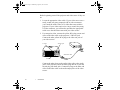
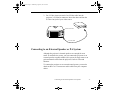
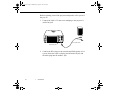
5500.book Page i Wednesday, August 4, 1999 4:41 PM
EPSON® PowerLite® 5500C/7500C User’s
Guide
5500.book Page ii Wednesday, August 4, 1999 4:41 PM
Copyright Notice
All rights reserved. No part of this publication may be reproduced, stored in a retrieval system, or transmitted
in any form or by any means, electronic, mechanical, photocopying, recording, or otherwise, without the prior
written permission of SEIKO EPSON CORPORATION. No patent liability is assumed with respect to the use
of the information contained herein. Neither is any liability assumed for damages resulting from the use of the
information contained herein.
Neither SEIKO EPSON CORPORATION nor its affiliates shall be liable to the purchaser of this product or
third parties for damages, losses, costs, or expenses incurred by purchaser or third parties as a result of:
accident, misuse, or abuse of this product or unauthorized modifications, repairs, or alterations to this product,
or (excluding the U.S.) failure to strictly comply with SEIKO EPSON CORPORATION’s operating and
maintenance instructions.
SEIKO EPSON CORPORATION shall not be liable against any damages or problems arising from the use of
any options or any consumable products other than those designated as Original EPSON Products or EPSON
Approved Products by SEIKO EPSON CORPORATION.
EPSON and PowerLite are registered trademarks of SEIKO EPSON CORPORATION.
SoundAdvice is a service mark and FaxAdvice is a trademark of Epson America, Inc.
General Notice: Other product names used herein are for identification purposes only and may be trademarks
of their respective owners. EPSON disclaims any and all rights in those marks.
Copyright © 1999 by Epson America, Inc.
Torrance, CA USA
ii
CPD-8045
7541446
1/99
5500.book Page iii Wednesday, August 4, 1999 4:41 PM
Important Information About Your
Projector
Important Safety Information
Warning: Never look into the projector lens when the lamp is turned on; the bright light can damage your
eyes. Never let children look into the lens when it is on. Never open any cover on the projector, except the
lamp and filter covers. Dangerous electrical voltages inside the projector can severely injure you. Except as
specifically explained in this User’s Guide, do not attempt to service this product yourself. Refer all servicing
to qualified service personnel.
Warning: The projector and its accessories come packaged in plastic bags. Keep plastic bags away from
small children to avoid any risk of suffocation.
Caution: When you replace the lamp, never touch the new lamp with your bare hands; the invisible residue
left by the oil on your hands may shorten the lamp life. Use a cloth or glove to handle the new lamp.
Remote Control Information
You can operate the projector by remote control via a line-of-sight infrared (IR) receiver at the front of the
projector. The projector may not respond to remote control commands under the following conditions:
❐
❐
❐
❐
❐
There is an object between the remote control IR emitter and the IR receiver on the projector.
Ambient light is too bright.
Certain types of fluorescent lighting are used.
A strong light source shines into the IR receiver.
Other equipment that emits infrared energy, such as a radiant room heater, is in the room.
These conditions commonly cause problems for most infrared-controlled equipment. Try the following
solutions:
❐
❐
❐
❐
The remote control unit’s batteries may be low on power; replace them.
Dim the ambient lighting and/or turn off any fluorescent lights.
Close any window coverings and/or move the projector out of direct sunlight.
Turn off other equipment that emits infrared energy.
iii
5500.book Page iv Wednesday, August 4, 1999 4:41 PM
If the remote control still does not work properly, remember you can always control your computer-based
presentation directly from the computer, even in an environment containing one of the conditions listed above.
FCC Compliance Statement For United States Users
This equipment has been tested and found to comply with the limits for a Class B digital device, pursuant to
Part 15 of the FCC Rules. These limits are designed to provide reasonable protection against harmful
interference in a residential installation. This equipment generates, uses, and can radiate radio frequency
energy and, if not installed and used in accordance with the instructions, may cause harmful interference to
radio or television reception. However, there is no guarantee that interference will not occur in a particular
installation. If this equipment does cause interference to radio and television reception, which can be
determined by turning the equipment off and on, the user is encouraged to try to correct the interference by
one or more of the following measures.
❐
❐
❐
❐
Reorient or relocate the receiving antenna.
Increase the separation between the equipment and receiver.
Connect the equipment into an outlet on a circuit different from that to which the receiver is connected.
Consult the dealer or an experienced radio/TV technician for help.
WARNING
The connection of a non-shielded equipment interface cable to this equipment will invalidate the FCC
Certification of this device and may cause interference levels which exceed the limits established by the FCC
for this equipment. It is the responsibility of the user to obtain and use a shielded equipment interface cable
with this device. If this equipment has more than one interface connector, do not leave cables connected to
unused interfaces. Changes or modifications not expressly approved by the manufacturer could void the user’s
authority to operate the equipment.
For Canadian Users
This Class B digital apparatus meets all requirements of the Canadian Interference-Causing Equipment
Regulations.
Cet appareil numérique de la classe B respecte toutes les exigences du Règlement sur le materiel brouilleur du
Canada.
iv
5500.book Page v Wednesday, August 4, 1999 4:41 PM
Contents
Introduction
1
Getting the Most Out of Your Projector . . . . . . . . . . . . . . . . . . . . . . . . . . . . . . . . 3
Remote Control . . . . . . . . . . . . . . . . . . . . . . . . . . . . . . . . . . . . . . . . . . . . . . . 3
Sleep Mode . . . . . . . . . . . . . . . . . . . . . . . . . . . . . . . . . . . . . . . . . . . . . . . . . . . 3
Control Panel . . . . . . . . . . . . . . . . . . . . . . . . . . . . . . . . . . . . . . . . . . . . . . . . . 3
Optional Accessories . . . . . . . . . . . . . . . . . . . . . . . . . . . . . . . . . . . . . . . . . . . . . . . 4
About This Manual . . . . . . . . . . . . . . . . . . . . . . . . . . . . . . . . . . . . . . . . . . . . . . . . 5
Safety Instructions . . . . . . . . . . . . . . . . . . . . . . . . . . . . . . . . . . . . . . . . . . . . . . . . . 6
Where to Get Help . . . . . . . . . . . . . . . . . . . . . . . . . . . . . . . . . . . . . . . . . . . . . . . . 8
Electronic Support Services . . . . . . . . . . . . . . . . . . . . . . . . . . . . . . . . . . . . . . 8
Automated Telephone Services . . . . . . . . . . . . . . . . . . . . . . . . . . . . . . . . . . . 9
1 Installation
11
Unpacking the Projector . . . . . . . . . . . . . . . . . . . . . . . . . . . . . . . . . . . . . . . . . . . 12
Additional Components . . . . . . . . . . . . . . . . . . . . . . . . . . . . . . . . . . . . . . . . . . . 14
Attaching the Hand Strap . . . . . . . . . . . . . . . . . . . . . . . . . . . . . . . . . . . . . . . . . . 15
v
5500.book Page vi Wednesday, August 4, 1999 4:41 PM
Installing the Remote Control Batteries . . . . . . . . . . . . . . . . . . . . . . . . . . . . . . .17
Before You Connect the Projector . . . . . . . . . . . . . . . . . . . . . . . . . . . . . . . . . . . .19
Connecting to a Computer . . . . . . . . . . . . . . . . . . . . . . . . . . . . . . . . . . . . . . . . . .20
Connecting to a PC Desktop Computer . . . . . . . . . . . . . . . . . . . . . . . . . . . .21
Connecting to a PC Laptop Computer . . . . . . . . . . . . . . . . . . . . . . . . . . . . .24
Connecting to a Desktop Macintosh . . . . . . . . . . . . . . . . . . . . . . . . . . . . . . .27
Connecting to a PowerBook . . . . . . . . . . . . . . . . . . . . . . . . . . . . . . . . . . . . .31
Connecting to a Video Source . . . . . . . . . . . . . . . . . . . . . . . . . . . . . . . . . . .35
Connecting to an External Speaker or PA System . . . . . . . . . . . . . . . . . . . . . . .37
2 Using the Projector
39
Turning the Equipment On and Off . . . . . . . . . . . . . . . . . . . . . . . . . . . . . . . . . . .41
Turning the Projector On and Off . . . . . . . . . . . . . . . . . . . . . . . . . . . . . . . . .41
Positioning the Projector . . . . . . . . . . . . . . . . . . . . . . . . . . . . . . . . . . . . . . . . . . .43
Calculating Image Size and Projection Distance . . . . . . . . . . . . . . . . . . . . .45
Focusing and Positioning the Screen Image . . . . . . . . . . . . . . . . . . . . . . . . . . . .47
Resize Button . . . . . . . . . . . . . . . . . . . . . . . . . . . . . . . . . . . . . . . . . . . . . . . .49
Controlling the Projector . . . . . . . . . . . . . . . . . . . . . . . . . . . . . . . . . . . . . . . . . . .50
Using the Remote Control . . . . . . . . . . . . . . . . . . . . . . . . . . . . . . . . . . . . . .51
Using the Control Panel . . . . . . . . . . . . . . . . . . . . . . . . . . . . . . . . . . . . . . . .54
Projector Status Lights . . . . . . . . . . . . . . . . . . . . . . . . . . . . . . . . . . . . . . . . . . . . .56
Power Light . . . . . . . . . . . . . . . . . . . . . . . . . . . . . . . . . . . . . . . . . . . . . . . . .56
Projection Lamp Light . . . . . . . . . . . . . . . . . . . . . . . . . . . . . . . . . . . . . . . . .57
Temperature Light . . . . . . . . . . . . . . . . . . . . . . . . . . . . . . . . . . . . . . . . . . . . .57
vi
5500.book Page vii Wednesday, August 4, 1999 4:41 PM
3 Using the Projector Menus
59
Accessing the Main Menu . . . . . . . . . . . . . . . . . . . . . . . . . . . . . . . . . . . . . . . . . . 60
Changing a Menu Setting . . . . . . . . . . . . . . . . . . . . . . . . . . . . . . . . . . . . . . . . . . 61
Video Menu (Image Source = Computer) . . . . . . . . . . . . . . . . . . . . . . . . . . . . . 63
Video Menu (Image Source = Video) . . . . . . . . . . . . . . . . . . . . . . . . . . . . . . . . 65
Audio Menu . . . . . . . . . . . . . . . . . . . . . . . . . . . . . . . . . . . . . . . . . . . . . . . . . . . . 66
Setting Menu . . . . . . . . . . . . . . . . . . . . . . . . . . . . . . . . . . . . . . . . . . . . . . . . . . . . 67
User’s Logo Menu . . . . . . . . . . . . . . . . . . . . . . . . . . . . . . . . . . . . . . . . . . . . . . . 69
Storing a User Logo . . . . . . . . . . . . . . . . . . . . . . . . . . . . . . . . . . . . . . . . . . . 69
Assigning the Logo to the AV/Mute Button . . . . . . . . . . . . . . . . . . . . . . . . 71
Effect Menu . . . . . . . . . . . . . . . . . . . . . . . . . . . . . . . . . . . . . . . . . . . . . . . . . . . . . 72
About Menu . . . . . . . . . . . . . . . . . . . . . . . . . . . . . . . . . . . . . . . . . . . . . . . . . . . . 73
Reset All Menu . . . . . . . . . . . . . . . . . . . . . . . . . . . . . . . . . . . . . . . . . . . . . . . . . . 74
4 Using the ELP Link III Software
75
Connecting the ELP Link III Cables . . . . . . . . . . . . . . . . . . . . . . . . . . . . . . . . . . 77
Connecting to a PC Desktop Computer . . . . . . . . . . . . . . . . . . . . . . . . . . . . 78
Connecting to a PC Laptop Computer . . . . . . . . . . . . . . . . . . . . . . . . . . . . . 80
Connecting to a Desktop Macintosh . . . . . . . . . . . . . . . . . . . . . . . . . . . . . . . 82
Connecting to a PowerBook . . . . . . . . . . . . . . . . . . . . . . . . . . . . . . . . . . . . 84
Installing the Software . . . . . . . . . . . . . . . . . . . . . . . . . . . . . . . . . . . . . . . . . . . . 85
Installing the Software for Windows . . . . . . . . . . . . . . . . . . . . . . . . . . . . . . 86
Installing the Software for a Macintosh . . . . . . . . . . . . . . . . . . . . . . . . . . . 87
Launching the Software . . . . . . . . . . . . . . . . . . . . . . . . . . . . . . . . . . . . . . . . . . . 88
Launching the Software from Windows . . . . . . . . . . . . . . . . . . . . . . . . . . . . 88
Launching the Software on a Macintosh . . . . . . . . . . . . . . . . . . . . . . . . . . . 90
vii
5500.book Page viii Wednesday, August 4, 1999 4:41 PM
Using the Software . . . . . . . . . . . . . . . . . . . . . . . . . . . . . . . . . . . . . . . . . . . . . . .91
Changing the COM Port Assignment . . . . . . . . . . . . . . . . . . . . . . . . . . . . . .91
Customizing the Remote Control Effects Buttons . . . . . . . . . . . . . . . . . . . .91
Controlling Projector Features . . . . . . . . . . . . . . . . . . . . . . . . . . . . . . . . . . .98
5 Maintenance
109
Cleaning the Lens . . . . . . . . . . . . . . . . . . . . . . . . . . . . . . . . . . . . . . . . . . . . . . .110
Cleaning the Projector Case . . . . . . . . . . . . . . . . . . . . . . . . . . . . . . . . . . . . . . . .110
Cleaning the Air Filter . . . . . . . . . . . . . . . . . . . . . . . . . . . . . . . . . . . . . . . . . . . .111
Replacing the Lamp . . . . . . . . . . . . . . . . . . . . . . . . . . . . . . . . . . . . . . . . . . . . . .112
Transporting the Projector . . . . . . . . . . . . . . . . . . . . . . . . . . . . . . . . . . . . . . . . .115
6 Troubleshooting
117
Using the Online Help Menu . . . . . . . . . . . . . . . . . . . . . . . . . . . . . . . . . . . . . . .118
Problems with the Projector . . . . . . . . . . . . . . . . . . . . . . . . . . . . . . . . . . . . . . . .119
Problems with the Remote Control . . . . . . . . . . . . . . . . . . . . . . . . . . . . . . . . . .122
Problems with the Image or Sound . . . . . . . . . . . . . . . . . . . . . . . . . . . . . . . . . .123
viii
7 Technical Specifications
127
Glossary
133
Index
137
5500.book Page 1 Wednesday, August 4, 1999 4:41 PM
Introduction
Your EPSON® PowerLite® projector is a compact, lightweight
projector that lets you project SVGA (PowerLite 5500C) or XGA
(PowerLite 7500C) full-color images and video onto a large screen
for presentations. You can connect it simultaneously to two image
sources: one PC or Apple® Macintosh® computer plus one video
source, such as a VCR or camcorder. You can also connect audio for
each image source.
Images are displayed in SVGA at a resolution of 800 × 600 pixels
(PowerLite 5500C) or XGA at a resolution of 1024 × 768 pixels
(PowerLite 7500C). Your projector produces bright images that can
be easily seen in rooms light enough to take notes.
The projector’s two speakers employ a built-in SRS 3D Sound
System for rich, powerful audio output. You can also connect an
external speaker when further amplification is required.
1
5500.book Page 2 Wednesday, August 4, 1999 4:41 PM
For your presentations, you can select front, rear, or ceiling
projection. This provides maximum flexibility in choosing the best
display method for each environment.
You can control your projector through a hand-held remote control
unit, with menus provided for image source switching and image
adjustment. The remote control can also act as a wireless mouse to
control operations on your computer screen during presentations.
Additionally, you can install the projector’s optional ELP Link III
software to control the projector’s settings from your computer and
reconfigure the projector’s special effects.
Your projector features a new patented SizeWize™ chip for
supporting a variety of computer output resolutions. For example, if
you have the PowerLite 5500C, the resize feature lets you display
VGA or XGA images at the projector’s SVGA resolution. On the
PowerLite 7500C, you can resize the image to display VGA, SVGA,
or SXGA images at the projector’s XGA resolution. No matter what
type of computer output is used, the result is a full-size video image
of outstanding clarity.
Your projector supports IBM® compatible PCs and laptops, as well
as Apple Macintosh, Power Macintosh™, and PowerBook™
computers. The video source can be NTSC, PAL, or SECAM. The
projector automatically senses the video format, which can be
composite video or S-Video. See Chapter 7 for details on supported
computers and video formats.
2
Introduction
5500.book Page 3 Wednesday, August 4, 1999 4:41 PM
Getting the Most Out of Your Projector
Your projector comes with a full set of features that allow you to
control the settings for the image display, video, and audio. Read
this section for a quick summary of the important features.
Remote Control
The buttons on the remote control let you turn the projector on and
off, and provide direct access to blank, freeze, volume, mute, and
image source switching. Use the remote control buttons to access
custom functions with the optional ELP Link III software and the
projector’s menu system. You can even use the remote control in
place of your computer’s mouse.
Sleep Mode
Sleep mode conserves electricity by automatically turning off the
lamp after the projector has not been used for 30 minutes. In sleep
mode, the projector remains on but the lamp is turned off,
conserving electricity, cooling the projector, and extending the life
of the lamp.
Control Panel
The control panel buttons on the projector duplicate the remote
control buttons and let you perform additional functions, such as
adjusting the tracking and sync for computer images.
Getting the Most Out of Your Projector
3
5500.book Page 4 Wednesday, August 4, 1999 4:41 PM
Optional Accessories
To enhance your use of the projector, EPSON provides the
following optional accessories:
●
●
●
●
●
●
●
●
Replacement lamp
and filter
ELPLP06
Soft travel case
for projector and laptop
ELPKS13
Hard travel case
ELPKS14
Computer cable
ELPKC02
ELP Link III set for PC
(includes ELP Link III software
and cables)
ELPSW03
ELP Link III set for Macintosh
(includes ELP Link III software
and cables)
ELPSW04
Mac adapter set
ELPAP01
Portable projection screen ELPSC06
You can purchase these accessories from your dealer or by calling
EPSON Accessories at (800) 873-7766; or visit our web site at
www.epsonsupplies.com (U.S. sales only). In Canada, please call
(800) 873-7766 for dealer referral.
4
Introduction
5500.book Page 5 Wednesday, August 4, 1999 4:41 PM
About This Manual
This manual describes how to install and use the EPSON
PowerLite 5500C and PowerLite 7500C projectors. Except where
noted, the instructions apply to both projectors.
Chapter 1, “Installation,” gives step-by-step instructions on how to
set up your projector and connect it to your computer or video
source. Read the installation procedures that apply to your
configuration.
Chapter 2, “Using the Projector,” describes how to turn on the
projector and control simple projector settings using the remote
control or the control panel.
Chapter 3, “Using the Projector Menus,” describes how to use the
menus to adjust the color and image settings, change the display of
the projected image, and modify audio settings such as bass and
treble.
Chapter 4, “Using the ELP Link III Software,” describes how to
connect the ELP Link III cables and use the optional ELP Link III
software to control the projector or configure special effects.
Chapter 5, “Maintenance,” describes how to clean your projector
and perform limited maintenance.
Chapter 6, “Troubleshooting,” describes how to interpret your
projector’s warning lights and gives helpful information for
avoiding errors, optimizing image quality, and solving problems.
About This Manual
5
5500.book Page 6 Wednesday, August 4, 1999 4:41 PM
Chapter 7, “Technical Specifications,” lists the technical
specifications for the projector.
A Glossary and Index are provided at the end of the manual.
6
Introduction
5500.book Page 7 Wednesday, August 4, 1999 4:41 PM
Safety Instructions
Follow these safety instructions when setting up and using the
projector:
1. Do not place the projector on an unstable cart, stand, or table.
2. Do not use the projector near water or sources of heat.
3. Use attachments only as recommended.
4. Use the type of power source indicated on the projector. If you
are not sure of the power available, consult your dealer or power
company.
5. Place the projector near a wall outlet where the plug can be
easily unplugged.
Placez l’imprimante près d’une prise de contacte où la fiche
peut être débranchée facilement.
6. Insert the projector’s three-wire grounding-type plug into a
properly grounded outlet. If you have a two-prong outlet,
contact an electrician to replace it. Do not hold the plug with
wet hands.
7. Take the following precautions for the plug. Failure to comply
with these precautions could result in sparks or fire.
Do not insert the plug into an outlet with dust present.
●
●
Insert the plug firmly into the outlet.
8. Do not overload wall outlets, extension cords, or integral
convenience receptacles. This can cause fire or electric shock.
Safety Instructions
7
5500.book Page 8 Wednesday, August 4, 1999 4:41 PM
9. Do not place the projector where the cord can be walked on. It
may result in fraying or damage to the plug.
10. Unplug the projector from the wall outlet before cleaning. Use a
damp cloth for cleaning. Do not use liquid or aerosol cleaners.
11. Do not block the slots and openings in the projector case. They
provide ventilation and prevent the projector from overheating.
Do not operate the projector on a sofa, rug, or other soft surface,
or in a closed-in cabinet unless proper ventilation is provided.
12. Never push objects of any kind through cabinet slots. Never
spill liquid of any kind into the projector.
13. Except as specifically explained in this User’s Guide, do not
attempt to service this product yourself. Refer all servicing to
qualified service personnel. Opening or removing covers may
expose you to dangerous voltages and other hazards.
14. Unplug the projector during lightning storms or when it will not
be used for extended periods.
15. Do not place the projector and remote control on top of
heat-producing equipment or in a heated place.
16. Unplug the projector from the wall outlet and refer servicing to
qualified service personnel under the following conditions:
●
●
8
Introduction
When the power cord or plug is damaged or frayed
If liquid has been spilled into the projector, or if it has been
exposed to rain or water
5500.book Page 9 Wednesday, August 4, 1999 4:41 PM
●
●
If it does not operate normally when you follow the operating
instructions, or if it exhibits a distinct change in performance,
indicating a need for service
If it has been dropped or the housing has been damaged.
Where to Get Help
If you are having trouble setting up or running your projector, see
the Help menu on the projector or read Chapter 6,
“Troubleshooting.” If you can’t resolve the problem, EPSON
provides technical assistance through electronic support services
and automated telephone services 24 hours a day, as listed in the
following tables:
Electronic Support Services
Service
Access
World Wide Web
From the Internet, you can reach EPSON’s Home Page at
http://www.epson.com.
EPSON Internet
FTP Site
If you have Internet FTP capability, use your Web browser (or
other software for FTP downloading) to log onto
ftp.epson.com with the user name anonymous and your
e-mail address as the password.
Where to Get Help
9
5500.book Page 10 Wednesday, August 4, 1999 4:41 PM
Service
Access
EPSON Forum on
CompuServe®
Members of CompuServe can type GO EPSON at the menu
prompt to reach the Epson America Forum. For a free
introductory CompuServe membership, call (800) 848-8199
and ask for representative #529.
Automated Telephone Services
Service
Access
EPSON SoundAdviceSM
For pre-recorded answers to commonly asked questions
about EPSON products 24 hours a day, seven days a week,
call (800) 922-8911.
EPSON FaxAdvice™
Access EPSON’s technical information library by calling
(800) 922-8911. You must provide a return fax number to
use this service.
EPSON Referral Service
For the location of your nearest Authorized
EPSON Reseller or Customer Care Center, call
(800) 922-8911.
When support is required, follow the calling instructions on the back
of the EPSON Private Line Technical Support card included with
the projector. Technical support is also available in the U.S. by
calling (310) 974-1202 between 6 AM and 6 PM, Pacific time,
Monday through Friday. In Canada, call (905) 709-3839. Toll or
long distance charges may apply.
Before you call, please have the following information ready:
10
Introduction
5500.book Page 11 Wednesday, August 4, 1999 4:41 PM
●
●
●
●
●
Product name
Product serial number
Personal identification number (PIN) for EPSON Private Line
Technical Support
Computer configuration
Description of the problem
You can purchase accessories from EPSON Accessories at
(800) 873-7766, or visit our web site at www.epsonsupplies.com
(U.S. sales only). In Canada, please call (800) 873-7766 for dealer
referral.
Where to Get Help
11
5500.book Page 11 Wednesday, August 4, 1999 4:41 PM
1
Installation
This chapter describes how to unpack and set up your projector,
and connect it to other equipment. The projector must be connected
to a computer or a video source such as a VCR, camcorder, or laser
disc player before it can project any images. You may also want to:
●
●
Connect the mouse cable to use the remote control as a wireless
mouse. Except for some laptops, this disables your computer’s
mouse. If you are also viewing the display on your monitor, the
remote control’s pointer controls the screen cursor.
Connect the projector to an audio source for one or both image
sources. The audio source can be the computer, video source, or
another device such as a stereo.
11
5500.book Page 12 Wednesday, August 4, 1999 4:41 PM
●
Connect the projector to an external speaker to amplify the
audio.
Unpacking the Projector
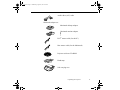
When you unpack the projector, make sure you have all these
components:
Projector
Remote control
2 AA batteries
Power cord
Projector video cable
Audio cable
12
1 • Installation
5500.book Page 13 Wednesday, August 4, 1999 4:41 PM
Audio/video (A/V) cable
Macintosh adapter set:
Macintosh desktop adapter
Macintosh monitor adapter
PS/2® mouse cable (for the PC)
Mac mouse cable (for the Macintosh)
Projector software CD-ROM
Hand strap
Soft carrying case
Unpacking the Projector
13
5500.book Page 14 Wednesday, August 4, 1999 4:41 PM
Depending on the configuration of your equipment, you may not
need all these components.
Save all packaging in case you need to ship the projector in the
future. Always transport the projector in its original packaging (or
the equivalent) or use a carrying case if you are carrying the
projector by hand. (See “Transporting the Projector” on page 115
for instructions.)
Additional Components
Depending on how you plan to use the projector, you may need
these additional components:
●
●
●
14
For complete control of the projector from your computer or to
program enhanced special effects on the remote control, you
need the optional ELP Link III set. You can purchase the set
from your dealer or by calling EPSON Accessories at (800)
873-7766 (U.S. sales only).
To receive an S-Video signal, you will need an S-Video cable.
(One is usually provided with your video device.) A separate
cable is required for each video source.
To connect the projector to a Macintosh PowerBook, you need a
video-out cable and an adapter. (One is provided by—or can be
purchased from—Apple for all new PowerBooks that have
video-out capability.) If your PowerBook does not include one,
see your Macintosh dealer.
1 • Installation
5500.book Page 15 Wednesday, August 4, 1999 4:41 PM
●
●
●
●
To connect the projector to an external sound system, you need
an RCA-to-3.5 mm stereo audio cable. You can obtain one from
your computer dealer.
To use the remote control when the projector is not in
line-of-sight of the remote, you need an optional infrared
repeater. For more information, call (800) 843-5465 or visit this
web address: www.xantech.com.
To connect a serial mouse cable to your computer, you may
require a special connector, cable, or other components. You
can obtain these items from your computer dealer.
To protect your projector, you can connect a Kensington
MicroSaver® anti-theft device in the hole on the right side of the
projector. Contact your local computer dealer.
Attaching the Hand Strap
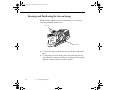
1. Place the projector on its right side.
✦
Caution: Do not hold or lift the projector by the lens. This can
damage the lens.
Attaching the Hand Strap
15
5500.book Page 16 Wednesday, August 4, 1999 4:41 PM
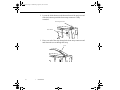
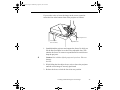
2. Locate the slider button on the bottom front of the projector and
slide the button up until the front strap connector is fully
extended.
front strap connector
slider button
3. Place one end of the strap through the front strap connector and
and fasten the screw through the strap.
screw
16
1 • Installation
5500.book Page 17 Wednesday, August 4, 1999 4:41 PM
4. Place the other end of the strap through the rear strap connector
and fasten the screw.
Note: There is no slider button for the rear strap connector.
rear strap
connector
Installing the Remote Control Batteries
You can use the remote control as a wireless mouse instead of your
computer’s mouse to control your presentation. With the optional
ELP Link III set, you can reconfigure the Effects buttons. Follow
these steps to install the batteries in the remote control:
1. Slide off the battery compartment cover.
Installing the Remote Control Batteries
17
5500.book Page 18 Wednesday, August 4, 1999 4:41 PM
2. Insert the two AA batteries included with the projector. Make
sure the polarity of the batteries is correct.
3. Replace the battery compartment cover.
When replacing batteries, take the following precautions:
●
●
●
18
Do not mix old and new batteries.
Replace batteries as soon as they run out. If the batteries leak,
wipe away battery fluid with a soft cloth. If fluid gets on your
hands, wash them immediately.
Remove the batteries if you won’t be using the projector for a
long period of time.
1 • Installation
5500.book Page 19 Wednesday, August 4, 1999 4:41 PM
Before You Connect the Projector
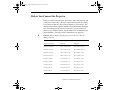
Before you begin, decide where you want to place the projector and
computer or video source. Be sure to place the projector on a sturdy,
level surface within five feet of the computer or video source. The
distance between the projector and the screen determines the image
size. Place the projector between 2.4 and 53.7 feet (0.8 and 16.4
meters) away from the screen; use the table below to determine the
proper distance. (For more precise calculations, see page 45.)
✦
Caution: Do not hold or lift the projector by the lens; this can
damage the lens.
Horizontal distance from projector to screen
Image size (diagonal)
Minimum
Maximum
300 inches (762 cm)
493.7 inches (12.6 m)
644.8 inches (16.4 m)
200 inches (508 cm)
328.1 inches (8.4 m)
428.8 inches (10.9 m)
100 inches (254 cm)
162.5 inches (4.2 m)
212.9 inches (5.4 m)
80 inches (203 cm)
129.4 inches (3.3 m)
169.7 inches (4.3 m)
60 inches (152 cm)
96.2 inches (2.5 m)
126.5 inches (3.2 m)
40 inches (102 cm)
63.1 inches (1.6 m)
83.3 inches (2.1 m)
30 inches (76 cm)
46.6 inches (1.2 m)
61.8 inches (1.6 m)
25 inches (64 cm)
38.3 inches (1.0 m)
51.0 inches (1.3 m)
19 inches (48 cm)
28.3 inches (0.8 m)
38.0 inches (1.0 m)
Before You Connect the Projector
19
5500.book Page 20 Wednesday, August 4, 1999 4:41 PM
Connecting to a Computer
You can connect the projector to a computer capable of XGA, VGA,
or SVGA output. The PowerLite 7500C is also capable of projecting
SXGA images. Resizing is supported by the projectors as follows:
●
●
PowerLite 5500C: VGA and XGA output
PowerLite 7500C: VGA, SVGA, and SXGA output.
The following types of computers are supported:
●
●
●
●
IBM compatible desktop PC
IBM compatible laptop PC
Apple Macintosh desktop computer, including Macintosh
Quadra,® Macintosh Centris,® and Power Macintosh
Any Apple PowerBook with video-out capability.
To connect the video and mouse cables (to use the wireless remote
as a mouse pointer), see the section in this chapter that applies to
your computer.
To connect the main, serial, and mouse cables to use the optional
ELP Link III software, see Chapter 4.
20
1 • Installation
5500.book Page 21 Wednesday, August 4, 1999 4:41 PM
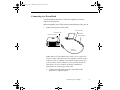
Connecting to a PC Desktop Computer
Before beginning, turn off the projector and computer if they are on.
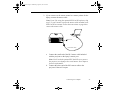
1. Connect the projector video cable and monitor cable.
Computer Out port
Computer In port
projector video cable
monitor cable
Note: Computer configurations vary. See your computer
manual for the location of the ports needed to connect your
projector.
a.
Connect either end of the projector video cable to the
projector’s Computer In port.
b.
Disconnect the computer monitor cable from the video port
on the back of the computer, and connect the other end of
the projector video cable to the computer’s video port.
Connecting to a Computer
21
5500.book Page 22 Wednesday, August 4, 1999 4:41 PM
c.
To also view the video on the computer monitor, connect
the monitor cable to the projector’s Computer Out port.
This is useful when you need to view the video output but
the projection screen is behind you.
d.
Tighten the screws on all connectors.
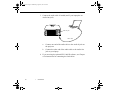
2. If you want to use the remote control as a mouse pointer for the
computer, connect the mouse cable.
Note: If you’ll be using the optional ELP Link III software, skip
step 2, as you’ll need to connect the mouse cable included in the
ELP Link III set instead. Follow the instructions on page 78 to
connect the mouse cable.
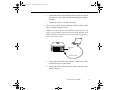
Mouse/Com
port
PS/2 mouse cable
a.
22
1 • Installation
Disconnect the computer’s PS/2 mouse cable from the
mouse port on the back of your computer and replace it with
the small end of the PS/2 mouse cable included with the
projector.
5500.book Page 23 Wednesday, August 4, 1999 4:41 PM
Note: You need the optional ELP Link III set to connect the
projector to a computer with a serial mouse. See Chapter 4
for more information.
b.
Connect the other end of the PS/2 mouse cable to the
projector’s Mouse/Com port.
3. Connect the audio cable if needed.
Audio In jack
audio cable
a.
Connect one end of the audio cable to the Audio In jack on
the projector.
b.
Connect the other end of the audio cable to the Audio Out
port on a sound card in the computer.
4. If you are using the optional ELP Link III software, see Chapter
4 for instructions for connecting the Link cables.
Connecting to a Computer
23
5500.book Page 24 Wednesday, August 4, 1999 4:41 PM
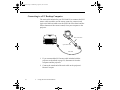
Connecting to a PC Laptop Computer
Before beginning, turn off the projector and computer if they are on.
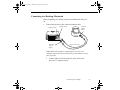
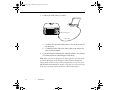
1. Connect the projector video cable.
Computer In port
projector video cable
Note: Laptop configurations vary. See your computer manual
for the location of the ports needed to connect your projector.
24
a.
Connect either end of the projector video cable to the
projector’s Computer In port.
b.
Connect the other end of the projector video cable to the
laptop’s video (monitor) port.
c.
Tighten the screws on both connectors.
1 • Installation
5500.book Page 25 Wednesday, August 4, 1999 4:41 PM
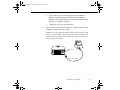
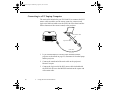
2. If you want to use the remote control as a mouse pointer for the
laptop, connect the mouse cable.
Note: If you’ll be using the optional ELP Link III software, skip
step 2, as you’ll need to connect the mouse cable included in the
ELP Link III set instead. Follow the instructions on page 80 to
connect the mouse cable.
Mouse/Com
port
PS/2 mouse cable
a.
Connect the small end of the PS/2 mouse cable included
with the projector to the laptop’s mouse port.
Note: You’ll need the optional ELP Link III set to connect
the projector to a laptop with a serial mouse. See Chapter 4
for more information.
b.
Connect the other end of the PS/2 mouse cable to the
projector’s Mouse/Com port.
Connecting to a Computer
25
5500.book Page 26 Wednesday, August 4, 1999 4:41 PM
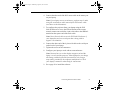
3. Connect the audio cable if needed (and if your laptop has an
Audio Out jack).
Audio In jack
audio cable
a.
Connect one end of the audio cable to the Audio In jack on
the projector.
b.
Connect the other end of the audio cable to the Audio Out
jack on your laptop.
4. If you are using the optional ELP Link III software, see Chapter
4 for instructions for connecting the Link cables.
26
1 • Installation
5500.book Page 27 Wednesday, August 4, 1999 4:41 PM
Connecting to a Desktop Macintosh
Before beginning, turn off the projector and Macintosh if they are
on.
1. Connect the projector video cable and monitor cable.
Computer Out port
Macintosh
monitor
adapter
Computer In port
Macintosh
desktop
adapter
projector video cable
Note: Macintosh computer configurations vary. See your
computer manual for the location of the ports needed to connect
your projector.
a.
Connect either end of the projector video cable to the
projector’s Computer In port.
Connecting to a Computer
27
5500.book Page 28 Wednesday, August 4, 1999 4:41 PM
28
b.
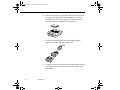
Remove the small cover (as shown below) and set the DIP
switches on the Macintosh desktop adapter to select the
resolutions you want to use (such as 16-inch mode). See
your Macintosh documentation for instructions.
c.
Disconnect the monitor cable from the video port on the
back of the Macintosh.
d.
Connect the small terminal of the Macintosh desktop
adapter to the other end of the projector video cable and
connect the projector video cable (with Macintosh desktop
adapter attached) to the video port.
1 • Installation
5500.book Page 29 Wednesday, August 4, 1999 4:41 PM
e.
If you wish to view or check images on the computer’s
monitor, attach the large end of the Macintosh monitor
adapter to the monitor cable and connect the monitor to the
projector’s Computer Out port.
f.
Tighten the screws on all connectors.
2. If you want to use the remote control as a mouse pointer for the
computer, connect the mouse cable.
Note: If you’ll be using the optional ELP Link III software, skip
step 2, as you’ll need to connect the mouse cable included in the
ELP Link III set instead. Follow the instructions on page 82 to
connect the mouse cable.
Mouse/Com
port
Mac mouse cable
Connecting to a Computer
29
5500.book Page 30 Wednesday, August 4, 1999 4:41 PM
a.
Disconnect your Macintosh’s mouse cable. Connect the
small end of the projector’s Mac mouse cable to the Mouse
port on your Macintosh.
b.
Connect the other end of the Mac mouse cable to the
projector’s Mouse/Com port.
3. Connect the audio cable if needed.
Audio In jack
audio cable
a.
Connect one end of the audio cable to the Audio In jack on
the projector.
b.
Connect the other end of the audio cable to the Audio Out
port on your computer.
4. If you are using the optional ELP Link III software, see Chapter
4 for instructions for connecting the Link cables.
30
1 • Installation
5500.book Page 31 Wednesday, August 4, 1999 4:41 PM
Connecting to a PowerBook
Your PowerBook must have a video-out capability in order to
connect to the projector.
Before beginning, turn off the projector and computer if they are on.
1. Connect the projector video cable.
Video-out cable
Computer In port
Macintosh
desktop adapter
Computer Out port
projector
video cable
Note: Some new PowerBooks may enable you to connect the
projector video cable directly to the computer without using a
video-out cable. In addition, PowerBook configurations vary,
so the location of your computer’s ports may not match the
illustration. See your computer manual for additional
information on connecting a video cable.
a.
Connect one end of the projector video cable to the
projector’s Computer In port.
Connecting to a Computer
31
5500.book Page 32 Wednesday, August 4, 1999 4:41 PM
32
b.
Remove the small cover (as shown below) and set the DIP
switches on the Macintosh desktop adapter to select the
resolutions you want to use (such as 16-inch mode). See
your Macintosh documentation for instructions.
c.
Connect the small terminal of the Macintosh desktop
adapter to the other end of the video cable.
d.
Connect one end of the video-out cable that came with your
PowerBook to the video-out connector on the back of the
PowerBook.
1 • Installation
5500.book Page 33 Wednesday, August 4, 1999 4:41 PM
e.
Connect the other end of the PowerBook video-out cable to
the projector video cable (with Macintosh desktop adapter
attached).
f.
Tighten the screws on all the connectors.
2. If you want to use the remote control as a mouse pointer for the
laptop, connect the mouse cable.
Note: If you’ll be using the optional ELP Link III software, skip
step 2, as you’ll need to connect the mouse cable included in the
ELP Link III set instead. Follow the instructions on page 84 to
connect the mouse cable.
Mouse/Com
port
Mac mouse cable
a.
Connect the small end of the projector’s Mac mouse cable
to the Mouse port on your laptop.
b.
Connect the other end of the mouse cable to the projector’s
Mouse/Com port.
Connecting to a Computer
33
5500.book Page 34 Wednesday, August 4, 1999 4:41 PM
3. Connect the audio cable, if needed.
Audio In jack
audio cable
a.
Connect one end of the audio cable to the Audio In jack on
the projector.
b.
Connect the other end of the audio cable to the Audio Out
port on your computer.
4. If you are using the optional ELP Link III software, see Chapter
4 for instructions for connecting the Link cables.
Note: After you turn on the projector and computer, you may need
to choose Mirroring in the Display Control Panel to display the
image on the LCD screen as well as the projector screen. See your
Macintosh documentation for details. (This step is not necessary on
some newer systems, which can detect a dual video signal.)
34
1 • Installation
5500.book Page 35 Wednesday, August 4, 1999 4:41 PM
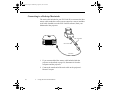
Connecting to a Video Source
You can connect a VCR, camcorder, DVD player, or any other
compatible video image source to your projector.
The projector can receive composite video or S-Video. Your
equipment has composite video if your video source has a one-pin
RCA video jack. Your equipment has S-Video if your video source
has a four-pin video jack.
The type of cable you use to connect the video source to the
projector depends on whether you have composite video or S-Video.
For composite video, use the audio/video (A/V) cable supplied with
the projector. For S-Video, use the S-Video cable supplied with
your video device or obtain one from your computer dealer.
Note: The projector is not compatible with a cable TV-style F
connector.
You can connect the projector to an S-Video source or a composite
video source. However, the projector automatically selects the
S-Video as the video source. To display composite video, first
disconnect the S-Video source.
The projector supports NTSC, PAL, and SECAM video formats,
and automatically detects and identifies the video format. However,
you can specify that a single broadcast format be detected (see
page 65). Note that the projector will then be able to detect only one
type of video format.
Connecting to a Computer
35
5500.book Page 36 Wednesday, August 4, 1999 4:41 PM
Before beginning, turn off the projector and video source if they are
on.
1. Locate the appropriate video cable. If your video source uses a
small, round, one-prong composite (RCA) video connector,
you’ll need the audio/video (A/V) cable that comes with the
projector. If your video source uses a large, round, four-prong
S-Video connector, you will need to purchase the appropriate
cable or use the cable that came with your video source.
2. For composite video, connect the yellow RCA plug on one end
of the audio/video cable to the projector’s Video In jack.
Connect the other yellow RCA plug to the video-out jack of
your video source.
L Audio
Video In port
audio/video cable
R Audio
Connect the other plugs on the audio/video cable to the Audio
jacks of the projector: insert the white plug into the L jack and
the red plug into the R jack. Connect the plugs at the other end
of the audio/video cable to the audio output jacks of the video
source.
36
1 • Installation
5500.book Page 37 Wednesday, August 4, 1999 4:41 PM
3. For S-Video, insert one end of an S-Video cable into the
projector’s S-Video In connector. Insert the other end into the
S-Video-Out jack of your video source.
S-Video connector
S-Video cable
Connecting to an External Speaker or PA System
Although the projector’s internal speakers are enough for most
small- or medium-size rooms, you can connect the projector to an
external speaker or public address (PA) system for large rooms or to
gain maximum benefit from the projector’s built-in 3D sound
function.
To connect the projector to an external sound system, you need to
obtain an RCA-to-3.5 mm stereo audio cable from your computer
dealer.
Connecting to an External Speaker or PA System
37
5500.book Page 38 Wednesday, August 4, 1999 4:41 PM
Before beginning, turn off the projector and speaker or PA system if
they are on.
1. Connect the cable’s 3.5 mm stereo miniplug to the projector’s
Audio Out jack.
stereo audio cable
Audio Out jack
2. Connect the RCA plugs to the external amplified speaker or PA
system. Insert the cable’s red plug into the Audio R jack, and
the white plug into the Audio L jack.
38
1 • Installation
5500.book Page 39 Wednesday, August 4, 1999 4:41 PM
2
Using the Projector
This chapter provides the following information about using your
projector:
●
●
●
●
●
Turning the equipment on and off
Positioning the projector relative to the screen
Focusing and positioning the screen image
Controlling the projector with the remote control and
the control panel
Monitoring the projector’s operating status
39
5500.book Page 40 Wednesday, August 4, 1999 4:41 PM
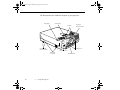
The illustration below identifies the parts of your projector.
status lights
control panel
projection
lens/focus/zoom
speakers
rear feet (left
foot not visible)
foot adjust levers
infrared receiver
hand strap
connectors
40
2 • Using the Projector
adjustable foot
5500.book Page 41 Wednesday, August 4, 1999 4:41 PM
Turning the Equipment On and Off
It’s best to turn on the projector and its attached equipment in the
following order:
1. Video source (such as a VCR), if your video source is not your
computer
2. Audio source (if different from computer or video source)
3. External amplified speaker or PA system (if necessary)
4. Computer
5. Projector (see instructions below)
When you are ready to turn off the equipment, do so in the reverse
order.
Turning the Projector On and Off
1. Remove the projector lens cap.
2. Connect one end of the power cord to the projector’s power
inlet, and connect the other end to a grounded electrical outlet.
3. Turn on the main power switch located at the rear of the
projector and wait until the power light remains orange.
4. Press the Power button on the remote control or control panel.
The power light flashes green as the projector warms up. When
the projector is fully warmed up, this light remains green.
Turning the Equipment On and Off
41
5500.book Page 42 Wednesday, August 4, 1999 4:41 PM
If computer or video equipment is attached, the computer or video
signal is projected. Allow about 30 seconds for full illumination.
✦
Warning: Never look into the lens when the lamp is on. This can
damage your eyes. It is especially important that children not look
into the lens.
When you want to stop projecting images, press the Power button
again. The fan remains on and the power light flashes orange for
about two minutes as the projector cools down.
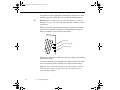
power light
projection lamp light
temperature light
When the projector has cooled down, the power light stops flashing
and remains orange.
To turn off the projector completely, turn off the main power switch
at the rear of the projector after the power light becomes orange.
Note: If you press the Power button to turn the projector back on
while the power light is orange, there may be a delay before a
projected image appears.
42
2 • Using the Projector
5500.book Page 43 Wednesday, August 4, 1999 4:41 PM
Sleep Mode
Sleep mode conserves electricity by automatically turning off the
lamp after the projector has not been used for 30 minutes. In sleep
mode, the projector’s power light is orange and only a minimum
amount of the projector’s circuitry remains on. This conserves
electricity, cools the projector, and extends the life of the lamp.
When the projector is in sleep mode, press the Power button to
resume projecting images, or unplug the projector’s power cord to
turn it off.
Positioning the Projector
Your projector supports front, rear, and ceiling projection, allowing
you to choose the best method for displaying your images.
If you use rear or ceiling projection, you need to select a special
mode in the projector’s Setting menu. See page 67 for more
information.
To get the best results, it’s important to position the projector at the
proper height and distance relative to the screen.
Positioning the Projector
43
5500.book Page 44 Wednesday, August 4, 1999 4:41 PM
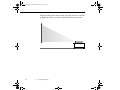
When projecting from a table or desk, place the projector so the lens
is aligned as closely as possible with the bottom of your screen:
44
2 • Using the Projector
5500.book Page 45 Wednesday, August 4, 1999 4:41 PM
When projecting from the ceiling, align the lens as closely as
possible with the top of your screen:
Calculating Image Size and Projection Distance
The distance between the projector and the screen determines the
actual image size. To determine the exact distance required for a
particular image size (or to determine the size of an image at a
particular distance), use the formulas given below. (Remember that
the size of the image can also be changed by rotating the zoom ring;
see page 47 for more information.)
Positioning the Projector
45
5500.book Page 46 Wednesday, August 4, 1999 4:41 PM
To determine the minimum and maximum diagonal size of an image
when you know the projection distance:
●
●
Inches:
Maximum diagonal size = (0.6038 × projection distance) +
1.8898
Minimum diagonal size = (0.4631 × projection distance) +
1.4000
Centimeters:
Maximum diagonal size = (0.6038 × projection distance) +
4.8001
Minimum diagonal size = (0.4631 × projection distance) +
3.5560
To determine the projection distance when you know the diagonal
size of the screen image:
●
●
46
Inches:
Maximum projection distance = (2.1593 × diagonal size) 3.0229
Minimum projection distance = (1.6562 × diagonal size) 3.1291
Centimeters:
Maximum projection distance = (2.1593 × diagonal size) 7.6782
Minimum projection distance = (1.6562 × diagonal size) 4.2068
2 • Using the Projector
5500.book Page 47 Wednesday, August 4, 1999 4:41 PM
For example, here are the measurements for three installations:
Horizontal distance from projector to screen
Image size (diagonal)
Minimum
Maximum
300 inches* (762 cm)
493.7 inches (12.6 m)
644.8 inches (16.4 m)
200 inches (508 cm)
328.1 inches (8.4 m)
428.8 inches (10.9 m)
100 inches (254 cm)
162.5 inches (4.2 m)
212.9 inches (5.4 m)
* For an image size of 300 inches, the projector may be up to 53.7 feet away from the
screen, depending on the setting of the zoom ring.
Positioning the Projector
47
5500.book Page 48 Wednesday, August 4, 1999 4:41 PM
Focusing and Positioning the Screen Image
When an image appears on screen, check that it is in focus and
correctly positioned on the screen.
zoom ring
focus ring
●
●
48
To focus the image, rotate the focus ring (the front ring on the
lens).
To adjust the size of the image, rotate the zoom ring (the rear
ring). Rotate the zoom ring clockwise to make the screen image
larger or counterclockwise to make it smaller.
2 • Using the Projector
5500.book Page 49 Wednesday, August 4, 1999 4:41 PM
If you need to raise or lower the image on the screen, extend or
retract the foot at the bottom front of the projector as follows:
foot adjust levers
rear feet (left
foot not visible)
adjustable foot
1. Stand behind the projector and support the front of it while you
lift the blue foot adjust levers above the adjustable foot. This
unlocks the foot so it can move up and down. Be careful not to
drop the projector.
✦
Caution: Don’t hold or lift the projector by its lens. This can
damage
the lens.
2. While lifting the foot adjust levers, raise or lower the projector
until the screen image is correctly positioned.
3. Release the levers to lock the foot in its new position.
Focusing and Positioning the Screen Image
49
5500.book Page 50 Wednesday, August 4, 1999 4:41 PM
4. If the projector is not on a level surface, level the projector by
turning one of its rear feet to adjust its height.
Resize Button
The Resize button lets you select the projection method for certain
types of image signals input from a computer.
PowerLite 7500C:
With images up to XGA size (1024 × 768), you can choose from two
projection methods. You can either display the image in the center
of the projection area or display the image full size. You can also
choose from two projection methods with images greater than XGA
size: either project a portion of the image or project the entire image
in a compressed format. The projector automatically reduces the
image size to the projector’s maximum resolution. The Resize
button cannot be used with images at XGA resolution.
PowerLite 5500C:
With images up to SVGA (800 × 600 pixels), you can either project
a portion of the image or project the entire image in a compressed
format. The projector automatically reduces the image size to the
projector’s maximum resolution. The Resize button cannot be used
with SVGA.
There is a Resize button on both the control panel and the remote
control. Press the Resize button to cycle between the choices
described above.
50
2 • Using the Projector
5500.book Page 51 Wednesday, August 4, 1999 4:41 PM
Controlling the Projector
You can use the control panel on top of the projector or the remote
control to perform the following actions:
●
●
●
●
●
●
●
●
●
●
Turn power on or off
Access the help function (image and sound)
Switch between input sources (video or computer)
Access the projector menus to adjust the image, audio, video,
and display settings
Control resizing
Control display freeze (remote control only)
Control A/V mute (cuts off the image and sound temporarily)
Adjust or mute audio output
Use custom functions (remote control only)
Use effects functions (for enhancing projected images on the
screen; remote control only)
Controlling the Projector
51
5500.book Page 52 Wednesday, August 4, 1999 4:41 PM
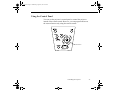
Using the Remote Control
pointer button
top multi-purpose
button
bottom multi-purpose
button
The remote control uses a line-of-sight infrared signal. To use the
remote control, point it towards the infrared receiver located at the
front of the projector (see page 40).
Note: To be able to use the remote control as a wireless mouse,
make sure you have connected the mouse cable to the projector and
your computer. (See Chapter 1 for instructions.)
You can use the remote control up to 32.8 feet (10 meters) from the
projector. (This distance may be shorter if the remote control
batteries are low.) You must also be within a ± 30° angle from the
front receiver.
52
2 • Using the Projector
5500.book Page 53 Wednesday, August 4, 1999 4:41 PM
Note: The projector may not respond to remote control commands
in these conditions: ambient light is too bright; a certain type of
fluorescent light is present; a strong light source (such as direct
sunlight) shines into the infrared receiver; or other equipment
emitting infrared energy is present (such as a radiant room heater).
Correct these conditions to use the remote control or control the
projector from a computer.
This table summarizes the functions on the remote control.
Button
Function
Source
Switches input source from computer to video or vice versa.
Menu
Displays or hides the menu.
Effects buttons
Use to display special effects that have been assigned in the Effect menu
or with the optional ELP Link III software.
Pointer button
Use to navigate the menus or use the remote as a mouse pointer when the
projector is connected to the computer with the included mouse cable or
the optional ELP Link III set cables.
Top
Acts as a right mouse click, registers a menu selection, and selects other
multi-purpose button custom functions.
Bottom
Acts as a left mouse click, registers a menu selection, and selects other
multi-purpose button custom functions.
AV/Mute
Turns off/on the audio/video output of the projector, clears all special
effects, and displays a black, blue, or user logo screen.
Resize
Resizes the image on the screen to match the resolution of your
computer display. See page 49 for details.
Controlling the Projector
53
5500.book Page 54 Wednesday, August 4, 1999 4:41 PM
54
Button
Function
Custom
Allows you to zoom the image using the top and bottom multi-purpose
buttons.
Freeze
Keeps the current computer or video image on the screen.
Help
Displays the Help menu. See“Using the Online Help Menu” on page 118
for details.
– Volume +
Adjusts the volume.
Power
Turns the projector lamp on or off.
2 • Using the Projector
5500.book Page 55 Wednesday, August 4, 1999 4:41 PM
Using the Control Panel
You can use the projector’s control panel to control the projector
instead of the remote control. However, you can program and access
the custom features only using the remote control.
Enter button
Controlling the Projector
55
5500.book Page 56 Wednesday, August 4, 1999 4:41 PM
The following table summarizes the functions on the control panel.
56
Button
Function
Power
Turns the projector lamp on or off.
Source
Switches input source from computer to video or vice versa.
Menu
Displays or hides the menu.
Up, down arrows
(Sync+/Sync-)
Synchronize the computer’s graphic signal.
Left, right arrows
(tracking-/
tracking+)
Match the projector’s internal clock to various computer graphic signals
(tracking adjustment).
Enter
Selects a menu option.
Resize
Resizes the image on the screen to match the resolution of your
computer display. See page 49 for details.
AV/Mute
Turns off/on the audio/video output of the projector, clears all special
effects, and displays a black, blue, or user logo screen.
– Volume +
Adjusts the volume.
Help
Displays the Help menu. See “Using the Online Help Menu” on
page 118 for details.
2 • Using the Projector
Use these buttons to adjust an overall image that is fuzzy or streaked, or
to select menu items during menu operations.
Use these buttons to adjust an image with vertical fuzzy lines, or to
change numeric settings during menu operations.
5500.book Page 57 Wednesday, August 4, 1999 4:41 PM
Projector Status Lights
The lights on top of the projector tell you its operating status.
power light
projection lamp light
temperature light
✦
Caution: A red light warns you if a serious problem occurs. See
Chapter 6, “Troubleshooting,” for what to do if a warning light
comes on.
Projector Status Lights
57
5500.book Page 58 Wednesday, August 4, 1999 4:41 PM
Power Light
58
Light status
Meaning
Steady orange
The projector is in sleep mode. (The projector is plugged in, but not
projecting.)
Steady green
Power and projection lamp are on.
Flashing green
The projector is warming up. Allow about 30 seconds.
Flashing orange
The projector is cooling down.
Off
There is an internal projector problem, or the power to the projector has
been cut off.
2 • Using the Projector
5500.book Page 59 Wednesday, August 4, 1999 4:41 PM
Projection Lamp Light
Light status
Meaning
Orange and red
flashing alternately
The lamp needs to be replaced. See “Replacing the Lamp” in Chapter 5
for instructions.
Steady red
Projection lamp has burned out. Replace it to project images. See
“Replacing the Lamp” in Chapter 5 for instructions.
Flashing red
There is a problem with the projection lamp, lamp power supply, lamp
fuse, or a circuit malfunctioned in the projector.
Off
Lamp is functioning normally.
Temperature Light
Light status
Meaning
Flashing orange
Projector is too hot.
Steady red
Projector has turned off automatically because of overheating.
Flashing red
There is a problem with the cooling fan or temperature sensor. Call a
service representative.
Off
The projector is functioning normally.
Projector Status Lights
59
5500.book Page 59 Wednesday, August 4, 1999 4:41 PM
3
Using the Projector Menus
The seven projector menus let you control these projector settings:
●
●
●
●
●
The Video menu controls the look and quality of the projected
image, whether the image source is a computer or a video
source (for example, a VCR).
The Audio menu controls audio features, such as the volume
level, tone setting, and SRS sound.
The Setting menu lets you select various projector options.
The User’s Logo menu lets you select special features such as
background color or a custom logo.
The Effect menu lets you define functions for the Effects
buttons on the remote control.
59
5500.book Page 60 Wednesday, August 4, 1999 4:41 PM
●
●
The About menu provides information about H/V
(Horizontal/Vertical) frequency, computer selection, and lamp
hours.
The Reset All menu returns all settings to their factory defaults.
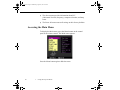
Accessing the Main Menu
To display the Main menu, press the Menu button on the control
panel or the remote control. The Main menu appears:
Press the Menu button again to hide the menu.
60
3 • Using the Projector Menus
5500.book Page 61 Wednesday, August 4, 1999 4:41 PM
Changing a Menu Setting
To change a menu setting:
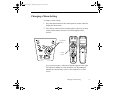
1. Press the Menu button on the control panel or remote control to
display the Main menu.
2. Press the up or down arrows (control panel) or press up or down
on the pointer button (remote) to scroll through the menu
choices.
up and down
buttons
pointer
button
As you select a menu, a submenu of options appears to the right.
The options available in some submenus vary, depending on
whether the current image source is the computer or a video
source.
Changing a Menu Setting
61
5500.book Page 62 Wednesday, August 4, 1999 4:41 PM
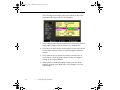
The following screen display shows the options for the Video
menu when the image source is the computer.
3. Press either the Enter button (control panel) or the top or bottom
multi-purpose button (remote) to move to a submenu list.
4. Press the up or down arrows (control panel) or press up or down
on the pointer button (remote) to scroll through the submenu
options.
5. Press either the left or right arrow buttons (control panel) or
press right or left on the pointer button (remote) to change a
setting on one of the submenus.
6. When you have finished changing settings, press the Menu
button to go back to the Main menu. Your changes are saved
automatically.
62
3 • Using the Projector Menus
5500.book Page 63 Wednesday, August 4, 1999 4:41 PM
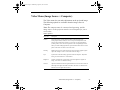
Video Menu (Image Source = Computer)
The Video menu lets you make adjustments to the projected image.
The following options are available when the image source is
Computer.
Note: The computer must be connected and operating, and the
image source on the projector must be set to Computer for you to
access these
menu options.
Menu item
Description
Position
Select this item by pressing the Enter button (control panel) or the
multi-purpose button (remote) to enter screen position adjustment mode.
Then use the pointer button (remote) or up, down, left, and right buttons
(control panel) to move the screen position in the corresponding direction.
When you finish making adjustments, press the Menu button on the control
panel or the remote to return to the Video menu.
Tracking
Matches the projector’s internal clock to various computer graphic signals.
Adjust this setting to remove vertical lines from the image.
Sync
Synchronizes with the tracking signal sent from the computer. Adjust this
setting to correct fuzziness or screen flicker.
Brightness
Lightens or darkens the overall image. Increase brightness to lighten an
image, or decrease it to darken the image.
Contrast
Adjusts the difference between light and dark areas. Increase the contrast to
make light areas lighter and dark areas darker. Decrease it to minimize the
difference between light and dark areas.
Video Menu (Image Source = Computer)
63
5500.book Page 64 Wednesday, August 4, 1999 4:41 PM
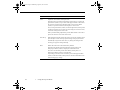
Menu item
Description
Color
Adjusts the color balance of the input source.
Select this item by pressing the Enter button (control panel) or right on the
pointer button (remote) (or press either multi-purpose button on the remote).
The projector will enter color adjustment mode. Use the pointer button
(remote) or up and down buttons (control panel) to select a color.
Next, use the pointer button (remote) or left and right buttons (control panel)
to adjust the selected color. Increase the color setting for more intense color,
or lower the setting for less intense color.
When you finish making adjustments, press the Menu button on the control
panel or the remote to return to the Video menu.
Auto Set Up
When enabled, this feature allows the projector to sense the computer signal
input and adjust it to the current projector settings. If the projector doesn’t
automatically recognize the video source, try turning this setting off and
choosing your projector settings manually.
Reset
Returns all menu items to their initial factory defaults.
Select this item and then press the Enter button (control panel) or the
multi-purpose button (remote) to display the confirmation screen.
Next, select Yes and then press the Enter button (control panel) or a
multi-purpose button (remote) to reset the menu.
If you change your mind, select No and then press a multi-purpose button
(remote) or the Enter button (control panel) to clear the confirmation screen
without changing any settings.
64
3 • Using the Projector Menus
5500.book Page 65 Wednesday, August 4, 1999 4:41 PM
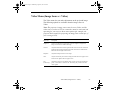
Video Menu (Image Source = Video)
The Video menu lets you make adjustments to the projected image.
The following options are available when the image source is
Video.
Note: The projector’s image source must be set to Video, and the
video source (such as a VCR or camcorder) must be connected and
operating for you to access these menu options (for example, the
projector must actually be projecting an image from a video tape, if
you’re using a VCR).
Menu item
Description
Brightness
Lightens or darkens the overall image. Increase brightness to lighten an
image, or decrease it to darken the image.
Contrast
Adjusts the difference between light and dark areas. Increase the contrast to
make light areas lighter and dark areas darker. Decrease it to minimize the
difference between light and dark areas.
Sharpness
Adjusts the sharpness of the screen image.
Color
Adjusts color density. Increase the setting for darker and more opaque colors.
Decrease it for lighter and less opaque colors.
Tint
(NTSC only)
Adjusts the red-green color balance of the screen. Increase tint to add more
green, or decrease it to add more red. This setting only works with NTSC
video signals.
Video Menu (Image Source = Video)
65
5500.book Page 66 Wednesday, August 4, 1999 4:41 PM
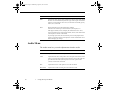
Menu item
Description
Mode
Specifies the video signal system. Normally this signal system setting should
be left at AUTO to automatically detect the type of video signal. If automatic
selection is not possible for some reason, use this menu to manually specify
NTSC, PAL, or SECAM.
Reset
Returns all menu items to their initial factory defaults.
Select this item and then press the Enter button (control panel) or a
multi-purpose button (remote) to display the confirmation screen. Next,
select Yes and then press a multi-purpose button (remote) or the Enter button
(control panel) to reset the Video Menu.
If you change your mind, select No and then press a multi-purpose button
(remote) or the Enter button (control panel) to clear the confirmation screen
without changing any settings.
Audio Menu
The Audio menu lets you make adjustments related to audio.
66
Menu item
Description
Volume
Adjusts the volume level for the speakers and audio-out terminal.
Treble
Adjusts the treble tone of the speakers. Press the right arrow button (control
panel) or press right on the pointer button (remote) to increase the treble tone;
press the left arrow button (control panel) or left on the pointer button
(remote) to decrease the treble tone.
Bass
Adjusts the bass tone of the speakers. See Treble for details.
SRS SPACE
Adjusts stereo sound. Increasing the value widens the sound.
3 • Using the Projector Menus
5500.book Page 67 Wednesday, August 4, 1999 4:41 PM
Menu item
Description
SRS CENTER Adjusts stereo sound. Changing the value balances the SRS sound.
Reset
Returns all menu items to their initial factory defaults.
Select this item and then press the Enter button (control panel) or a
multi-purpose button (remote) to display the confirmation screen. Next,
select Yes and then press a multi-purpose button (remote) or the Enter button
(control panel) to reset the Video menu.
If you change your mind, select No and then press a multi-purpose button
(remote) or the Enter button (control panel) to clear the confirmation screen
without changing any settings.
Setting Menu
The Setting menu enables you to adjust basic projector settings.
Menu item
Description
Prompt
Temporarily displays a message on the projector screen to identify which
source (computer or video) is providing the image.
Color
Temperature
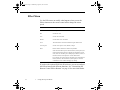
Adjusts the whiteness of the screen. Positive color temperature values
provide a cold white; negative values provide a warmer white. Press the
right arrow button (control panel) or press right on the pointer button
(remote) to increase the color temperature value; press the left arrow button
(control panel) or left on the pointer button (remote) to decrease the color
temperature value.
Ceiling
Flips the projected image so it looks correct when you’re hanging the
projector upside-down from the ceiling. Selecting ON turns this feature on,
while OFF turns it off (for a normal image).
Setting Menu
67
5500.book Page 68 Wednesday, August 4, 1999 4:41 PM
Menu item
Description
Rear Projection
Mirrors the projected image so it looks correct when you’re projecting
from behind onto a translucent screen. Selecting ON turns mirroring on,
while OFF turns it off (for a normal image).
Blank
Specifies whether a black screen, a blue screen, or a user logo displays
when the screen is blanked. See page 69 and page 106 for more
information about creating a user logo.
Video Signal
Specifies the input image signal mode. User can select from AUTO, NTSC,
NTSC 4.43, PAL, PAL N, PAL M, PAL 60 and SECAM.
Language
Selects the menu language: Japanese, English, French, German, Italian,
Spanish and Portuguese.
Reset
Returns all menu items to their initial factory defaults.
Select this item and then press the Enter button (control panel) or a
multi-purpose button (remote) to display the confirmation screen. Next,
select Yes and then press a multi-purpose button (remote) or the Enter
button (control panel) to reset the Setting menu.
If you change your mind, select No and then press a multi-purpose button
(remote) or the Enter button (control panel) to clear the confirmation screen
without changing any settings.
68
3 • Using the Projector Menus
5500.book Page 69 Wednesday, August 4, 1999 4:41 PM
User’s Logo Menu
The User’s Logo menu lets you display a custom logo on the screen.
Creating a user logo requires two steps:
●
●
Storing a user logo
Assigning the logo to the AV/Mute button
Storing a User Logo
Follow these steps to capture and store a logo:
1. Display the image (with the projector) you wish to use as a logo.
2. Press the Menu button to open the Menu window.
3. Select the User’s Logo menu option by pressing the down arrow
button on the control panel or the pointer button on the remote
control. Then press the Enter button to display the User’s Logo
Setting window.
4. The message, “Do you use this image as a user logo?” appears
on the screen. Choose Yes or No by pressing the left or right
arrow buttons on the control panel or pressing left or right on
the pointer on the remote control. Then press Enter.
5. A selection box will appear over the image. To select the
portion of the image you wish to use as the logo, use the arrow
buttons on the control panel or the pointer button on the remote
control. Once you have selected the desired area, press the Enter
button.
User’s Logo Menu
69
5500.book Page 70 Wednesday, August 4, 1999 4:41 PM
6. The message “Do you use this image?” appears on the screen.
Select Yes and press the Enter button. If you want to change the
position, select No.
7. Next, the Zoom rate setting window appears on the screen.
Select a rate using the arrow buttons or pointer, then press the
Enter button.
8. The message “Do you save this image?” appears on the screen.
Select Yes and press the Enter button. If you don’t want to save
the logo, select No.
Note: Saving the logo may take a moment. Do not use the
projector or other sources (computer, video, speaker, etc.)
while the logo is being saved.
9. When the message “Saving the user logo is completed” appears
on the screen, press the Menu or Enter button to display the
Main Menu.
70
3 • Using the Projector Menus
5500.book Page 71 Wednesday, August 4, 1999 4:41 PM
Assigning the Logo to the AV/Mute Button
Follow these steps to assign the logo to the AV/Mute button:
1. Press the Menu button to open the Menu window.
2. Select the Setting menu and press the Enter button.
3. Select the Blank (AV/Mute) option, then highlight Logo.
4. Press the Menu button twice.
Now you can press the AV/Mute button on the control panel or the
remote control to display the user logo.
User’s Logo Menu
71
5500.book Page 72 Wednesday, August 4, 1999 4:41 PM
Effect Menu
Use the Effect menu to modify what happens when you use the
Effects buttons on the remote control and to change the cursor
speed.
Item
Description
Pointer
Set the pointer icon and size.
Box
Set the box color.
Line
Set the color and width.
Marker
Set the marker color and width.
Clear
This effect button cannot be modified using the Effect menu.
Cursor Speed
Set the cursor speed to Low, Middle, or High.
Reset
Return all effect functions to their factory defaults.
Select this item and then press the Enter button (control panel) or a
multi-purpose button (remote) to display the confirmation screen.
Next, select Yes and then press a multi-purpose button (remote) or
the Enter button (control panel) to reset the Effect menu.
If you change your mind, select No and then press a multi-purpose
button (remote) or the Enter button (control panel) to clear the
confirmation screen without changing any settings.
If you have the optional ELP Link III software, you can reconfigure
the Effects button with different functions. See “Customizing the
Remote Control Effects Buttons” on page 91 for more information.
72
3 • Using the Projector Menus
5500.book Page 73 Wednesday, August 4, 1999 4:41 PM
About Menu
The About menu displays information about your projector.
When the image source is Computer:
Item
Description
Frequency
Displays the frequency of the computer.
Resolution
Displays the output resolution of the computer video output.
Refresh Rate
Displays the refresh rate of the computer video output.
Lamp
Displays the number of hours the current lamp has been used. The lamp
light turns red when the projector lamp is near the end of its normal life.
When this happens, replace the projector lamp with a new one as soon as
possible.
When the image source is Video:
Item
Description
Video Signal
Displays the video signal.
Lamp
Displays the number of hours the current lamp has been used. The lamp
light turns red when the projector lamp is near the end of its normal life.
When this happens, replace the lamp with a new one as soon as possible.
About Menu
73
5500.book Page 74 Wednesday, August 4, 1999 4:41 PM
Reset All Menu
Selecting the Reset All menu option resets the settings in all menus
to their factory defaults. It does not change or delete any user logo
you may have stored.
You will be prompted to confirm the reset action. Select Yes or No,
then press the top or bottom multi-purpose button (remote) or the
Enter button (control panel) to reset all the settings.
74
3 • Using the Projector Menus
5500.book Page 75 Wednesday, August 4, 1999 4:41 PM
4
Using the ELP Link III Software
The optional ELP Link III set contains the ELP Link III software
and cables used to control the projector from your computer or to
program special effects on the remote control. The set includes:
Main cable
9-pin serial cable (PC set)
75
5500.book Page 76 Wednesday, August 4, 1999 4:41 PM
PS/2 mouse cable (PC set)*
Serial mouse cable (PC set)
Serial cable (Mac set)
Mouse cable (Mac set)*
ELP Link III software on CD-ROM
(PC or Mac)
* Note that these mouse cables are different from the cables
included with
your projector.
76
4 • Using the ELP Link III Software
5500.book Page 77 Wednesday, August 4, 1999 4:41 PM
The ELP Link III software can be used with the following operating
systems:
●
●
●
●
●
Windows 3.x
Windows 95
Windows 98
Windows NT 4.0
Macintosh OS System 7.x and OS System 8.x
If you purchased the ELP Link III set, follow the instructions in this
chapter to connect the cables and install and use the software.
Connecting the ELP Link III Cables
Once you have connected the projector video cable, monitor cable
and audio cable (if needed) as described in Chapter 1, you need to
connect the ELP Link III main cable, mouse cable, and serial cable
as described in this section.
Connecting the ELP Link III Cables
77
5500.book Page 78 Wednesday, August 4, 1999 4:41 PM
Connecting to a PC Desktop Computer
The main cable included in your ELP Link III set connects the PS/2
mouse cable (needed to use the remote control as a mouse) and
9-pin serial cable (needed to use the ELP Link III software and the
Effects buttons on the remote control) from your computer to the
projector.
PS/2 mouse cable
Mouse/Com port
9-pin serial cable
main cable
1. If you connected the PS/2 mouse cable included with the
projector as described on page 22, disconnect it from the
computer and the projector.
2. Connect the round end of the main cable to the projector’s
Mouse/Com port.
78
4 • Using the ELP Link III Software
5500.book Page 79 Wednesday, August 4, 1999 4:41 PM
3. Connect the 9-pin end of the PS/2 mouse cable included with
the ELP Link III set to the MOUSE terminal on the square end
of the main cable.
4. If your computer’s mouse cable is still connected to your
computer, disconnect it. Then connect the other end of the PS/2
mouse cable included with the ELP Link III set to your
computer’s mouse port.
Note: If your system uses a serial mouse, perform steps 3 and 4
using the serial mouse cable instead of the PS/2 mouse cable
(not shown in the illustration).
5. To configure the projector from your PC using the ELP Link III
software or to use the Effects buttons on the remote control,
connect one end of the 9-pin serial cable to the SERIAL
terminal on the square end of the main cable.
Note: You will not be able to use the ELP Link III software if
your system has only one serial port that is being used to
support a serial mouse.
6. Connect the other end of the 9-pin serial cable to the serial port
on the back of your computer.
7. Tighten the screws on all connectors.
8. Go to page 85 to install the software.
Connecting the ELP Link III Cables
79
5500.book Page 80 Wednesday, August 4, 1999 4:41 PM
Connecting to a PC Laptop Computer
The main cable included in your ELP Link III set connects the PS/2
mouse cable (needed to use the remote control as a mouse) and
9-pin serial cable (needed to use the ELP Link III software and the
Effects buttons on the remote control) to the projector.
PS/2 mouse cable
9-pin serial cable
Mouse/Com port
main cable
1. If you connected the PS/2 mouse cable included with the
projector as described on page 25, disconnect it from the laptop
and the projector.
2. Connect the round end of the main cable to the projector’s
Mouse/Com port.
3. Connect the 9-pin end of the PS/2 mouse cable included with
the ELP Link III set to the MOUSE terminal on the square end
of the main cable.
80
4 • Using the ELP Link III Software
5500.book Page 81 Wednesday, August 4, 1999 4:41 PM
4. Connect the other end of the PS/2 mouse cable to the mouse port
on your laptop.
Note: If your laptop uses a serial mouse, perform steps 3 and 4
using the serial mouse cable instead of the PS/2 mouse cable
(not shown in the illustration).
5. To configure the projector from your laptop using the ELP
Link III software or to use the Effects buttons on the remote
control, connect one end of the 9-pin serial cable to the SERIAL
terminal on the square end of the main cable.
Note: You will not be able to use the ELP Link III software if
your laptop has only one serial port that is being used to
support a serial mouse.
6. Connect the other end of the 9-pin serial cable to the serial port
on the back of your laptop.
7. Tighten the screws on all connectors.
8. Configure your laptop to work with an external mouse.
Note: You may have to set the display to appear on both the
laptop’s screen and the projector. Some laptops let you change
this setting with the keyboard’s function keys or by using a
setup utility provided by the computer manufacturer. Check
your laptop’s manual or online help for instructions.
9. Go to page 85 to install the software.
Connecting the ELP Link III Cables
81
5500.book Page 82 Wednesday, August 4, 1999 4:41 PM
Connecting to a Desktop Macintosh
The main cable included in your ELP Link III set connects the Mac
mouse cable (needed to use the remote control as a mouse) and Mac
serial cable (needed to use the ELP Link III software) from your
Macintosh to the projector.
Mac serial cable
Mac mouse cable
Mouse/Com port
main cable
1. If you connected the Mac mouse cable included with the
projector as described on page 29, disconnect it from the
computer and the projector.
2. Connect the round end of the main cable to the projector’s
Mouse/Com port.
82
4 • Using the ELP Link III Software
5500.book Page 83 Wednesday, August 4, 1999 4:41 PM
3. Connect the Mac mouse cable included with the ELP Link III
set to the MOUSE terminal on the square end of the main cable.
4. If your computer’s mouse cable is still connected to the
computer, disconnect it. Then connect the other end of the Mac
mouse cable included with the ELP Link III kit to the Mouse
port on your Macintosh.
5. Connect either end of the Mac serial cable to the SERIAL
terminal on the square end of the main cable. Connect the other
end of the Mac serial cable to the
printer or
modem port
on the back of your Macintosh.
6. Go to page 85 to install the software.
Connecting the ELP Link III Cables
83
5500.book Page 84 Wednesday, August 4, 1999 4:41 PM
Connecting to a PowerBook
The main cable included in your ELP Link III set connects the Mac
mouse cable (needed to use the remote control as a mouse) and Mac
serial cable (needed to use the ELP Link III software) to the
projector.
Mac serial cable
Mac mouse cable
Mouse/Com port
main cable
1. If you connected the Mac mouse cable included with the
projector as described on page 33, disconnect it from the
PowerBook and the projector.
2. Connect the round end of the main cable to the projector’s
Mouse/Com port.
84
4 • Using the ELP Link III Software
5500.book Page 85 Wednesday, August 4, 1999 4:41 PM
3. Connect one end of the Mac mouse cable included with the ELP
Link III set to the MOUSE terminal on the square end of the
main cable.
4. Connect the other end of the Mac mouse cable to the mouse port
on the back of the PowerBook.
5. Connect either end of the Mac serial cable to the SERIAL
terminal on the square end of the main cable. Connect the other
end of the Mac serial cable to the
printer or
modem port
on the back of your PowerBook.
Note: After you turn on the projector and computer, you may
need to choose Mirroring in the Display Control Panel to
display the image on the LCD screen as well as the projector
screen. See your Macintosh documentation for details. (This
step is not necessary on some newer systems, which can detect a
dual video signal.)
6. Now install the software as described on page 87.
Installing the Software
ELP Link III software can be used with the following operating
systems:
●
●
●
●
Windows 3.x
Windows 95
Windows 98
Windows NT 4.0
Installing the Software
85
5500.book Page 86 Wednesday, August 4, 1999 4:41 PM
●
Macintosh OS System 7.x and OS System 8.x
Installing the Software for Windows
Follow these steps to install ELP Link III for Windows 3.x,
Windows 95 or 98, or Windows NT:
1. Turn on your computer and start Windows. Make sure all screen
savers are off.
2. Insert the Projector Software CD into your CD-ROM drive.
3. If you have Windows 95, 98, or NT, the installer program
should start up automatically. Go to step 4. If it doesn’t, click
Start and then Run.
If you have Windows 3.x, in Program Manager click on the File
menu, then on Run.
The Run dialog box appears. Type E:\SETUP (substitute the
correct drive letter for your CD-ROM drive if it is not E), then
click OK.
4. You see the ELP Link III welcome screen listing the languages
available for installation screens. Select the language you want
for running the software and click OK.
5. You see the ELP Link III main menu. Click Install ELP Link III
V2.0.
86
4 • Using the ELP Link III Software
5500.book Page 87 Wednesday, August 4, 1999 4:41 PM
6. You see a list of items to install. Make sure ELP Link III V2.0
and ELP Link User’s Guide are checked. If you don’t have
Adobe® Acrobat® Reader on your system, also check Acrobat
Reader to install the program so you can view your online
manual. Then click Install.
7. After a moment, you see the ELPLink3 Welcome screen. Click
Next.
8. You see the Software License Agreement screen. Read the
agreement and click Yes.
9. An Information screen warns you that leaving a screen saver on
may cause problems while running the software. Click Next.
(See “Launching the Software” on page 88 for more information
about turning off your screen saver.)
10. Follow the instructions on the screen to select a directory or a
folder for the software. Then the Installer copies the ELP Link
III files to your system.
11. When the installation is complete, click Finish.
12. If you selected to install the online User’s Guide and Acrobat
Reader, follow the on-screen instructions to install them.
13. When you return to the ELP Link III main menu, click QUIT.
Installing the Software for a Macintosh
Follow these steps to install the software for the Macintosh:
1. Insert the Projector Software CD into your CD-ROM drive.
Installing the Software
87
5500.book Page 88 Wednesday, August 4, 1999 4:41 PM
2. Open the CD-ROM drive folder, if necessary.
3. Double-click the Installer icon.
4. You see a dialog box asking you to select a language for the
software. Select a language and click OK.
5. You see the ELP Link III main menu. Click Install ELP Link III
V2.0.
6. You see the Software License Agreement screen. Read the
agreement and click Accept.
7. You see the Installer dialog box. Click Install. The installer
copies the program to your hard disk.
8. When the installation is finished, click Quit.
Launching the Software
Follow the steps in the appropriate section below to launch the
software. If you’re using the remote control as a mouse, use the
pointer button to position the cursor and the bottom multi-purpose
button to launch the software.
Note: Make sure you have disabled any screen savers on your
system before running the software.
Note: If you have a Macintosh, your screens may look slightly
different than the screens in this chapter.
88
4 • Using the ELP Link III Software
5500.book Page 89 Wednesday, August 4, 1999 4:41 PM
Launching the Software from Windows
If you have Windows 3.x, double-click the ELPLink3 program
group icon in the Program Manager. Then double-click the
ELPLink3 icon.
If you have Windows 95, 98, or NT, click Start, then select
Programs, ELPLink3, and then click the ELPLink3 program icon.
The ELP Link III program icon appears minimized on the taskbar.
Click the minimized icon.
Note: If you see a prompt asking you to select a port or open the
software with the projector disconnected, it may be because the
projector is disconnected or is connected to an incorrect COM port.
If you want to run the software without the projector connected,
select Unconnected and Execute. If it is connected, click Select a
port, and retry. Then select the COM port you’re using on the next
screen.
Launching the Software
89
5500.book Page 90 Wednesday, August 4, 1999 4:41 PM
The ELP Link III main dialog box appears.
90
4 • Using the ELP Link III Software
5500.book Page 91 Wednesday, August 4, 1999 4:41 PM
Launching the Software on a Macintosh
1. Open the ELPLink3 folder.
2. Double-click the ELP Link 3 icon.
ELP Link III launches and three menus—File, Option, and
Help—appear at the top of the screen. If you’re launching ELP Link
III for the first time, select COM Port from the Option menu, then
choose either the
printer or
modem port (whichever port you
connected the serial cable to). Then open the Option menu and
select Property Setting to display the ELP Link III main window.
Launching the Software
91
5500.book Page 92 Wednesday, August 4, 1999 4:41 PM
Using the Software
The ELP Link III software can be used to:
●
●
●
Change the COM port assignment
Customize the remote control Effects buttons
Control standard and special projector features
Note: If you ever select Unconnected and Execute from the Option
menu, always uncheck the setting before exiting ELP Link III so the
program starts correctly the next time you use it.
Changing the COM Port Assignment
If you did not select the correct COM (communication) port when
setting up the software, or if you have changed the COM port to
which the projector is connected, you can change the COM port
setting from the ELP Link III software.
1. Select Com Port from the Option menu.
2. Choose a COM port from the list that appears.
Customizing the Remote Control Effects Buttons
You can reconfigure the remote control Effects buttons to perform
special operations, such as drawing shapes on the projected image
or changing the cursor shape. You customize the Effects buttons
from the ELP Link III main dialog box.
92
4 • Using the ELP Link III Software
5500.book Page 93 Wednesday, August 4, 1999 4:41 PM
Assigning Functions
Each of the five Effects buttons is assigned a default function. If you
want to assign a different function to a button, click the list box that
corresponds to the button number and select a new function from the
list.
Function Description and Usage
To reassign a function to an Effects button on the remote control,
select the corresponding Effects button on the ELP Link III main
dialog box, then choose a function for it from the pull-down menu.
(See page 92 for more information.)
Using the Software
93
5500.book Page 94 Wednesday, August 4, 1999 4:41 PM
The table below describes these functions and how to use them.
Note: Once you have pressed an Effects button, you can size and
position the effect using either your mouse or your remote control
(if you’ve set up the remote control to function as a mouse).
Function
Line
Description and usage
Draws a straight line on the screen.
Press the Effects button assigned to this effect. Then press the bottom multi-purpose
button once to define the line start position. Move the cursor using the remote pointer
button. Then press the bottom multi-purpose button again to define the line end
position. To draw another line, move the cursor away from the line you just created
and press the bottom multi-purpose button again to define the new line start position.
Ellipse
Draws an ellipse (oval) on the screen.
Press the Effects button assigned to this effect. Then press the bottom multi-purpose
button once to define the start position of the ellipse. Move the cursor using the
remote pointer button. Then press the bottom multi-purpose button again to define the
end position of the ellipse. To draw another ellipse, move the cursor away from the
one you just created and press the bottom multi-purpose button again to define the
start position for the new ellipse.
Box
Draws a box on the screen.
Press the Effects button assigned to this effect. Then press the bottom multi-purpose
button once to define the position of one corner of the box. Move the cursor using the
remote pointer button. Then press the bottom multi-purpose button again to define the
position of the opposite corner of the box. To draw another box, move the cursor away
from the one you just created and press the bottom multi-purpose button again to
define the start position for the new box.
94
4 • Using the ELP Link III Software
5500.book Page 95 Wednesday, August 4, 1999 4:41 PM
Function
Description and usage
Bar
Creates a horizontal or vertical bar. You can use this function to highlight a portion of
the screen with a horizontal or vertical bar.
Press the Effects button assigned to this effect. Move the bar using the remote pointer
button. Press the bottom multi-purpose button to lock the bar in place. To draw
another bar, move the cursor to the new bar location and press the bottom
multi-purpose button again to lock the new bar in place.
Stamp
Leaves one or several copies of a pre-selected image on the screen.
Press the Effects button assigned to this effect. Use the pointer button to place the
cursor where you want the stamp to appear. Then press the assigned Effects button to
display the stamp. To display another stamp, move the cursor to the new stamp
location and press the bottom multi-purpose button again to lock the new stamp in
place.
Cursor
Change
Screen Clear
Changes the cursor shape.
Press the assigned Effects button to change the cursor shape.
Clears all Effects functions previously executed.
Press the assigned Effects button to clear the screen.
Key Macro
Types a pre-defined key sequence. This is useful when you often need to type a
sequence of characters into your computer.
Press the assigned Effects button to automatically type the key sequence.
Note: To cancel or end a function, double-click with your mouse or
press the bottom multi-purpose button twice (if you’re using the
remote control as a mouse).
Using the Software
95
5500.book Page 96 Wednesday, August 4, 1999 4:41 PM
Setting Effects Options
Once you have assigned functions to one or more Effects buttons,
you can specify detailed options for each function.
To set detailed options, click Detail Setting on the ELP Link III
main dialog box. A dialog box similar to the following appears.
(The options and tabs displayed depend on which functions are
currently assigned to the Effects buttons.)
Click the tab for the function you want to adjust, then make any
settings you wish.
To test each setting, click the Test button and use the effect as
described on page 92. To end the test, click the right mouse button.
(If you are using the remote control as a mouse pointer, use the
bottom and top multi-purpose buttons, respectively.)
To save the changes, click OK.
96
4 • Using the ELP Link III Software
5500.book Page 97 Wednesday, August 4, 1999 4:41 PM
The following table describes the available options for each
function.
Function
Line
Ellipse
Box
Bar
Options
Width
Specify the line width, from 1 to 32 points.
Grid
Specify whether to have the line “snap” to the corners of a
grid by entering the size of the sides of the box, in pixels
(dots).
Color
Choose a color for the line.
Transparent
Click this checkbox to make the background text or image
visible through the line.
Width
Specify the line width, from 1 to 32 points.
Color
Choose a color for the line.
Transparent
Click this checkbox to make the background text or image
visible through the ellipse.
Fill
Click this checkbox to fill the ellipse with color.
Width
Specify the line width, from 1 to 32 points.
Color
Choose a color for the line.
Transparent
Click this checkbox to make the background text or image
visible through the box.
Fill
Click this checkbox to fill the box with color.
Make oval
shape
Click this checkbox to round the corners of the box.
Width
Specify the line width, from 1 to 300 points.
Color
Choose a color for the bar.
Direction
Choose Horizontal or Vertical.
Transparent
Click this checkbox to make the background text or image
visible through the bar.
Using the Software
97
5500.book Page 98 Wednesday, August 4, 1999 4:41 PM
Function
Options
Stamp
Click on the stamp to be used.
Cursor Change
Click on the cursor shape to be used.
Screen Clear
No options available.
Key Macro
Enter up to 16 preset key commands, including combinations such as Ctrl +
A, in the Registration Key field. You can also enter the Backspace and Delete
keys as preset commands.
Click the Clear button to clear the current key assignment.
Note: Although you can save multiple sets of key assignments, only one key
set can be active at a time. Click the Registration button to save more than
one set of key assignments.
Saving and Recalling Effects Button Assignments
To save Effects button assignments, click Execute.
To save multiple sets of button assignments, click Registration and
specify a name for the current settings.
To recall a saved set of assignments, select its name from the Setting
menu.
To delete a set of assignments from the Setting menu, select its
name and then click Delete.
To exit without saving the settings, select Exit from the file menu.
98
4 • Using the ELP Link III Software
5500.book Page 99 Wednesday, August 4, 1999 4:41 PM
Controlling Projector Features
You can use the Projector Setting window to control the following
features:
●
●
●
●
Projector Controls
Test Pattern
Gamma Setting
User’s Logo
Displaying the Projector Setting Window
Follow these steps to display the Projector Setting window from
Windows:
1. Open the ELP Link III main dialog box. See page 88 for
instructions using Windows, or page 90 for Macintosh
instructions.
2. Click the Projector Setting icon at the bottom of the screen. The
Projector Setting window appears:
Using the Software
99
5500.book Page 100 Wednesday, August 4, 1999 4:41 PM
Using the Quick Change Toolbar
To quickly change some basic projector settings, click one of the
toolbar buttons described below:
Power On, Off
Volume Up, Down
Contrast Up, Down
Brightness Up, Down
Blank, Freeze
Auto, Resize
Video, Computer
Changing Projector Settings
1. Click Projector Control on the Projector Setting window. The
following window appears:
100
4 • Using the ELP Link III Software
5500.book Page 101 Wednesday, August 4, 1999 4:41 PM
2. Click the tab for the settings you want to adjust.
3. Change one or more of the following options.
Video Tab (Computer Input)
Option
Description
Brightness
Adjusts screen brightness.
Contrast
Adjusts screen contrast.
Sync
Adjusts the sync (synchronization) to remove screen flicker.
Tracking
Adjusts tracking to remove vertical lines.
Color
Adjusts the balance of red, green, and blue in the image.
Position
Adjusts the horizontal and vertical screen position.
Auto Set Up
Enables or disables automatic adjustment of the graphic signal being sent
from the computer to optimize it for the projector.
Pattern Display Enables or disables display of the test pattern currently selected.
Reset
Resets all fields to their default values.
Using the Software
101
5500.book Page 102 Wednesday, August 4, 1999 4:41 PM
Video Tab (Video Input)
Option
Description
Brightness
Adjusts screen brightness.
Contrast
Adjusts screen contrast.
Sharpness
Adjusts screen sharpness.
Color
Adjusts the color density.
Tint
Adjusts the color tint (NTSC only).
Mode
Selects the signal format. You can select AUTO, PAL, NTSC, or SECAM.
AUTO automatically adjusts the image to the signal received.
Pattern Display Enables or disables display of the test pattern currently selected.
Reset
102
Resets all fields to their default values.
4 • Using the ELP Link III Software
5500.book Page 103 Wednesday, August 4, 1999 4:41 PM
Audio Tab
Option
Description
Volume
Adjusts sound volume.
Treble
Adjusts the treble tone.
Bass
Adjusts the bass tone.
SRS SPACE
Adjusts stereo sound. Increasing the value increases the stereo sound
separation.
SRS CENTER Adjusts stereo sound. Changing the value balances the SRS sound.
Pattern Display Enables or disables display of the test pattern currently selected.
Reset
Resets all fields to their default values.
Using the Software
103
5500.book Page 104 Wednesday, August 4, 1999 4:41 PM
Setting Tab
Option
Blank
Description
Specifies blank screen states:
Logo
The user’s logo displays briefly.
Black
A black screen displays.
Blue
A blue screen displays.
Color Temp
Adjusts the whiteness of the screen. Positive color temperature values
provide a cold white; negative values provide a warmer white. Press the right
arrow button on the control panel or press right on the remote’s pointer
button to increase the color temperature value; press the control panel’s left
arrow button or left on the remote’s pointer button to decrease the color
temperature value.
Install
Specifies how the projector is being used:
Rear Proj.
Use this setting when projecting to the back of a screen so the
image is flipped left to right.
Ceiling
Use this setting when the projector is installed on the ceiling
so the image is flipped top to bottom.
Prompt
Temporarily displays a prompt on the projector screen identifying which
source (computer or video) is providing the image.
Mode
Specifies the input image signal mode. User can select from AUTO, NTSC,
NTSC 4.43, PAL, PAL N, PAL M, PAL 60 and SECAM.
Pattern Display Displays the test pattern currently selected.
Reset
104
Resets all fields to their default values.
4 • Using the ELP Link III Software
5500.book Page 105 Wednesday, August 4, 1999 4:41 PM
Changing the Test Pattern
1. Click Test Pattern on the Projector Setting window. The
following window appears:
2. You can display a test pattern to verify that the projector is
working properly. Choose one of the following:
Color Image
Gray Scale
Focus Pattern
User File (bmp)
Displays a color bar test pattern.
Displays a grayscale test pattern.
Displays a character-based focus pattern.
Displays a bitmap test pattern from the file
name specified. Either type the name or click
Ref... (refer) to browse the hard disk for the
file.
The bitmap should be 1024 × 768 pixels
(PowerLite 7500C) or 800 × 600 pixels
(PowerLite 5500C).
Using the Software
105
5500.book Page 106 Wednesday, August 4, 1999 4:41 PM
3. Click Pattern Display to display the test pattern selected. Then
click Close.
106
4 • Using the ELP Link III Software
5500.book Page 107 Wednesday, August 4, 1999 4:41 PM
Specifying an Image Gamma
1. Click Gamma on the Projector Setting window. The Gamma
Setting window appears.
2. Select the desired gamma:
Gamma 1
Gamma 2
Gamma 3
Provides a dynamic and contrastive image.
Provides an image between Gamma 1 and
Gamma 3.
Provides a natural image.
3. Click Pattern Display to display the test pattern selected. Then
click Close.
Using the Software
107
5500.book Page 108 Wednesday, August 4, 1999 4:41 PM
Creating a User Logo
You can create or edit a logo from the Projector Setting window,
then save it to a file on your hard disk or download it to the
projector.
1. Click User’s Logo on the Projector Setting window. The User’s
Logo Setting window appears.
108
4 • Using the ELP Link III Software
5500.book Page 109 Wednesday, August 4, 1999 4:41 PM
2. Click the Edit button. The following window appears.
3. Click the Open the File icon to locate and open a bitmap (or
TIFF, JPG, PSO) file. The selected image appears in the display
area.
4. To crop the image, click the Select Area button and position the
crop marks. Click OK to accept the changes. The User’s Logo
Setting window reappears.
5. To increase or decrease the size at which the logo displays,
select a zoom percentage from the Zoom list box.
Using the Software
109
5500.book Page 110 Wednesday, August 4, 1999 4:41 PM
6. Click the Save button to save your logo to your hard disk. The
Save As dialog box appears. Type a name for your logo, using
the .lgo extension, then click OK.
Note: You must save logo files with the extension .lgo.
7. To download a logo file to the projector, click the Download
button and follow the instructions on the screen.
8. Click Close to return to the Projector Setting window.
110
4 • Using the ELP Link III Software
5500.book Page 109 Wednesday, August 4, 1999 4:41 PM
5
Maintenance
Your projector needs little maintenance. You should, however, do
the following:
●
●
●
●
Clean the lens so dirt or smears do not appear on the screen.
Clean the projector case when needed.
Periodically clean the air filter at the bottom of the projector. A
clogged air filter can block ventilation needed to cool the
projector and keep it from overheating.
Replace the lamp and air filter as needed. (If any other part
needs replacing, contact your dealer or a qualified service
person.)
109
5500.book Page 110 Wednesday, August 4, 1999 4:41 PM
●
✦
When transporting the projector, take appropriate precaution to
avoid damaging the delicate internal components.
Warning: Before you clean any part of the projector, turn off the
projector and unplug the power cord. Never open any cover on the
projector, except the lamp and filter covers. Dangerous electrical
voltages in the projector can injure you severely. Do not try to
service this product yourself, except as specifically explained in this
User’s Guide. Refer all other servicing to qualified service
personnel.
Cleaning the Lens
Clean the lens whenever you notice dirt or dust on the surface.
Lightly wipe the lens surface with a soft, dry, lint-free cloth. To
remove dirt or smears on the lens, moisten a soft cloth with an
alcohol-based cleaner and gently wipe the lens surface.
Cleaning the Projector Case
To clean the projector case, first unplug the power cord. To remove
dirt or dust, wipe the case with a soft, dry, lint-free cloth. To remove
stubborn dirt or stains, moisten a soft cloth with water and a neutral
detergent. Then wipe the case.
Do not use alcohol, benzene, thinner, or other chemical detergents.
These can cause the case to warp.
110
5 • Maintenance
5500.book Page 111 Wednesday, August 4, 1999 4:41 PM
Cleaning the Air Filter
Clean the air filter at the bottom of the projector after every 100
hours of use. If it is not cleaned periodically, it can become clogged
with dust, preventing proper ventilation. This can cause overheating
and damage the projector. To clean the air filter, follow these steps:
1. Turn off the projector and unplug the power cord from the
electrical outlet.
2. Place the projector on its side with the handle at the top so that
the filter is easily accessible.
Note: Placing the projector in this position keeps dust from
getting inside the projector housing.
3. Lift up the tab securing the air filter and remove the filter.
air filter tab
2
1
Cleaning the Air Filter
111
5500.book Page 112 Wednesday, August 4, 1999 4:41 PM
4. The air filter is attached to the inside of the filter cover. It is
recommended that you use a small vacuum cleaner designed for
computers and other office equipment to clean the filter. If you
don’t have one, use a dry, lint-free cloth.
If the dirt is difficult to remove or if the filter is torn, replace the
air filter.
Note: An air filter comes with each replacement lamp. Contact
your dealer or call EPSON Accessories at (800) 873-7766 in
the U.S. to obtain a new one. Request part number ELPLP06. In
Canada, call (800) 873-7766 for dealer referral.
5. Place the air filter back inside the filter cover.
6. Plug the power cord back into the electrical outlet.
Replacing the Lamp
The projector lamp typically lasts for about 2000 hours of use. It is
time to replace the lamp when:
●
●
●
The projected image gets darker or starts to deteriorate.
The projection lamp light is red or is flashing orange and red
alternately.
The message LAMP REPLACE appears on the screen when
the projector lamp comes on.
To order a replacement lamp, contact your dealer or call EPSON
Accessories at (800) 873-7766 in the U.S. and ask for part number
ELPLP06. In Canada, call (800) 873-7766 for dealer referral.
112
5 • Maintenance
5500.book Page 113 Wednesday, August 4, 1999 4:41 PM
✦
Warning: Let the lamp cool before replacing it. Also, do not touch
the glass portion of the lamp assembly; this can cause premature
lamp failure.
1. Turn off the projector and unplug the power cord from the
electrical outlet and the projector. Wait at least 20 minutes for
the bulb to cool.
2. Place the projector on its side with the handle at the top so you
can easily access the lamp cover.
Note: Placing the projector in this position keeps dust from
getting inside the projector housing.
3. Use a screwdriver, coin, or similar object to loosen the retaining
screw on the lamp cover. When the screw is loose, lift off the
lamp cover. (You cannot remove this screw from the cover.)
2
1
Replacing the Lamp
113
5500.book Page 114 Wednesday, August 4, 1999 4:41 PM
4. Use a screwdriver, coin, or similar object to loosen the two
screws holding the lamp assembly in position. (You cannot
remove these screws.)
2
1
✦
Caution: Do not touch the glass portion of the lamp assembly;
this can cause premature lamp failure.
5. Lift up the handle and pull out the lamp assembly.
6. Gently insert the new lamp assembly by lowering it into
position. Make sure it’s inserted securely. Tighten the screws on
the new lamp assembly.
7. Replace the lamp cover and tighten the cover screw. (Make sure
the lamp cover is securely fastened. The projector will not run if
the lamp cover is open.)
114
5 • Maintenance
5500.book Page 115 Wednesday, August 4, 1999 4:41 PM
Transporting the Projector
The projector contains many glass parts and precision parts. If you
need to transport it, please follow these packing guidelines to
prevent damaging the projector:
●
●
●
When shipping the projector for repairs, place plenty of
cushioning around the projector.
When transporting the projector for business use, first put the
projector in a hard-shell carrying case (such as the optional
EPSON case), then pack it in a firm box, using cushioning
around the case.
When you are hand-carrying the projector, be sure to store it in a
hard-shell or soft carrying case (such as the optional cases
offered by EPSON).
Note: EPSON shall not be liable for any damages incurred during
transportation.
Transporting the Projector
115
5500.book Page 116 Wednesday, August 4, 1999 4:41 PM
116
5 • Maintenance
5500.book Page 117 Wednesday, August 4, 1999 4:41 PM
6
Troubleshooting
This chapter describes the problems indicated by the projector’s
lights and tells you how to solve problems with the projector. It is
divided into the following sections:
●
●
●
“Using the Online Help Menu” on page 118 describes how to
use the projector’s online help for image and sound problems.
“Problems with the Projector” on page 119 tells you what to do
if any of the projector’s warning lights come on.
“Problems with the Remote Control” on page 122 tells you what
to do if the projector is not responding to remote control
commands.
117
5500.book Page 118 Wednesday, August 4, 1999 4:41 PM
●
“Problems with the Image or Sound” on page 123 describes
what to do if you cannot project an image, if the screen image is
not good, or if there is no sound.
If you have a problem, check the appropriate section and follow all
suggestions that apply to your problem. If none of the suggestions
solve the problem, call your dealer or contact EPSON as described
on page 8.
Using the Online Help Menu
The online Help menu provides useful information that can resolve
some common image or sound problems. To open the online Help
menu, press the Help button on the control panel or the remote
control. Help for the following problems is available:
●
●
●
●
●
●
●
The image does not appear on the screen
The image is not in focus
The image is blurred
The image is not displayed fully on the screen
The colors of the image are not corrected
The image is too dark
There is no sound
In some of the submenus above, actual projector adjustments can be
performed within the Help menu to correct the particular problem.
118
6 • Troubleshooting
5500.book Page 119 Wednesday, August 4, 1999 4:41 PM
Note: Each Help menu displays navigation buttons and descriptions
at the bottom of the screen. Projector control functions are
displayed as an icon in the help text.
Problems with the Projector
If you have problems with the projector, first turn it off and unplug
it. Then plug the power cord back in and turn on the projector. If this
does not solve the problem, check the lights on top of the projector.
These lights alert you to problems with projector operation.
power light
projection lamp light
temperature light
Problems with the Projector
119
5500.book Page 120 Wednesday, August 4, 1999 4:41 PM
Light
Color
Meaning
Temperature
Flashing orange
The projector is too hot.
Red
The projector has turned off automatically because of
overheating.
Flashing red
There is a problem with the cooling fan or temperature
sensor. Call a service representative.
Red or
flashing orange and red
The lamp needs to be replaced. See “Replacing the
Lamp” in Chapter 5 for instructions.
Flashing red
There is a problem with the projection lamp or lamp
power supply, a lamp fuse, or a circuit malfunction in
the projector.
Flashing green
The projector is warming up. Allow about 30 seconds.
Flashing orange
The projector is cooling down.
Steady Green
Power and projector lamp are on.
Steady Orange
The projector is in sleep mode.
Off
There is an internal projector problem, or the power to
the projector has been cut off.
Projection
lamp
Power
See the following pages for information on what to do when you see
these warning lights or encounter other specific problems with the
projector.
◗
The power light is flashing orange and you cannot turn on the
projector.
The projector is cooling down. Wait until the light turns off and then
turn on the projector.
120
6 • Troubleshooting
5500.book Page 121 Wednesday, August 4, 1999 4:41 PM
If the Source button is pushed to switch video input sources and no
source is connected, the projector enters a cool-down mode
(flashing orange power light) and then goes into sleep mode (steady
orange power light). Connect a video source, then press the Power
button to resume.
◗
The power light does not come on.
Turn off the projector, check that the power cable is connected
securely both at the electrical outlet and the projector, and press the
Power button again.
◗
Projected images get darker or start to deteriorate, or the
projection lamp light is red.
Replace the projector lamp as described in Chapter 5.
◗
The temperature light is red.
The projector is overheating, which turns the lamp off
automatically. Let the projector cool for a few minutes, then turn it
back on. Make sure nothing is blocking the ventilation vents.
The air filter may be clogged. Clean it as described in Chapter 5 and
then let the projector cool for awhile.
If the projector continues to overheat after you clean the air filter,
the problem may be caused by damage to the cooling fan or internal
circuits. Contact a qualified service person.
✦
Warning: Except as specifically explained in this User’s Guide, do
not attempt to service this product yourself.
Problems with the Projector
121
5500.book Page 122 Wednesday, August 4, 1999 4:41 PM
Problems with the Remote Control
◗
The projector doesn’t respond to remote control commands.
The remote control may be too far from the projector, or at too wide
an angle to the infrared receiver. See page 52 for details.
The remote control’s batteries may be low on power. Replace them.
Make sure the projector’s mouse cable is securely connected to both
your computer’s mouse port and to the projector’s Mouse/COM port
(or the main cable if you are using the ELP Link III set). See
Chapter 1 or Chapter 4 for details.
Make sure you selected the correct COM (communication) port for
the mouse when you set up the optional ELP Link III software. If
necessary, you can change the COM port from the Option menu.
See page 92 (Windows) or page 91 (Macintosh) for more
information.
Light that is too strong, or certain types of fluorescent lighting may
affect the projector’s infrared receivers. Dim the ambient lighting
and turn off any fluorescent lighting. Move the projector out of
direct sunlight.
Turn off any nearby equipment that emits infrared energy, such as a
radiant room heater.
122
6 • Troubleshooting
5500.book Page 123 Wednesday, August 4, 1999 4:41 PM
Problems with the Image or Sound
◗
An image does not appear on the screen.
Check that the power light is on and the lens cover is off. Also make
sure the cables are securely connected, as described in Chapter 1.
The correct image source may not be selected. Press the Source
button on the remote control or the control panel to choose another
image source.
Some screen savers appear as a blank screen. Make sure any screen
savers on your computer are disabled while using the projector.
Note: If the Source button is pushed to switch video input sources
and no source is connected, the projector enters a cool-down mode
(flashing orange power light) and then goes into sleep mode (steady
orange power light). Connect a video source, then press the Power
button to resume.
◗
A screen saver appears on the screen and will not go away.
Press the ESC key, the right mouse button, or the top multi-purpose
button (if you are using the remote control as a mouse) to stop the
screen saver. This will also clear any effects you have on the
screen.You should disable any screen savers on your computer
before using the projector.
Problems with the Image or Sound
123
5500.book Page 124 Wednesday, August 4, 1999 4:41 PM
◗
Only part of the computer image is displayed.
If the computer’s output resolution setting is higher than 800 × 600
(PowerLite 5500C) or 1024 × 768 (PowerLite 7500C), the projector
resizes the image. If the computer output is not compatible with this
resizing, choose a different display setting on the computer.
In Windows 3.x, use Windows Setup in the Main program group. In
Windows 95/98, right-click on the desktop, select Properties, click
the Settings tab, and use the dialog box to select the resolution you
want.
For a Macintosh with Mac OS 8.0 or lower, choose Control Panels
under the Apple menu and then choose Monitors. In the Monitors
screen, choose Options and make sure Macintosh Hi-Res Display or
another 1024 × 768 display is selected. For a Macintosh with Mac
OS 8.1 or above, choose Control Panels under the Apple menu and
then choose Monitors & Sound. In the Monitors & Sound screen,
select a resolution from the Resolution box. For supported display
settings, see “Supported Computers and Monitor Displays” on
page 130.
You also may need to modify existing presentation files if you
created them for a different resolution. See your software manual
for specific information.
◗
The message NO SIGNAL is displayed.
An image source not connected to the projector is selected, the
signal is not being output from the computer, or the signal is not
reaching the projector. Make sure the connectors are securely
attached to both the projector and the image source. Then check that
124
6 • Troubleshooting
5500.book Page 125 Wednesday, August 4, 1999 4:41 PM
the image source is selected correctly. If your projector is attached
to a Macintosh, make sure that the DIP switches on your Macintosh
desktop adapter are set correctly. (See your Macintosh
documentation if you need instructions.) When NO SIGNAL is
displayed, you cannot access the Video menu.
◗
A blank screen is displayed.
The computer signal cannot be interpreted by the projector. Verify
the display format (see page 130). When you see a blank screen, you
cannot access the projector menus.
◗
The image or parts of the image are blurred or not in focus.
Adjust the Brightness and Contrast settings on the Video menu. If
you’re viewing a computer image, also try adjusting the Tracking
and Sync buttons on the projector’s control panel or remote control.
There may be dirt or smears on the lens. Clean the lens as described
on page 110.
◗
The colors of the image are not right.
The color balance may be incorrect. If you’re displaying a computer
image, use the Color option in the Video menu to adjust the balance
of red, green, and blue. If you’re displaying video, adjust the Color
and Tint (NTSC only) settings on the Video menu.
Check your monitor’s color balance if you’re displaying a computer
image.
Problems with the Image or Sound
125
5500.book Page 126 Wednesday, August 4, 1999 4:41 PM
◗
There is no sound.
First check that the volume setting is not turned all the way down
and that the audio/video cable is securely attached to both the
projector and the audio source. Also, make sure that the Mute button
is not enabled.
The wrong source may be selected. Press the Source button on the
remote control or control panel to select the proper source.
126
6 • Troubleshooting
5500.book Page 127 Wednesday, August 4, 1999 4:41 PM
7
Technical Specifications
General
Type of display
Poly-silicon Thin-Film Transistor
(TFT), active matrix
Size of liquid crystal panels
Diagonal: 0.9 inches (22.9 mm)
Lens
F=1.7–2.0, f=37–48 mm
Resolution
5500C: SVGA 800 × 600 pixels
7500C: XGA 1024 × 768 pixels
Color reproduction
24 bit, 16.7 million colors
Image brightness
5500C: 650 lumens (ANSI)
7500C: 800 lumens (ANSI)
Image size
19-300 inches
127
5500.book Page 128 Wednesday, August 4, 1999 4:41 PM
Projection distance
3.3–53.46 feet (1.1–16.3 meters)
Projection methods
Front, rear, upside-down (ceiling
mount)
Internal speaker system
2 × 1 W SRS 3D stereo output
Optical aspect ratio
4:3 (horizontal:vertical)
Zoom ratio
1:1.3
Tilt angle
0° to 12°
Supported video
interface standards
Projector
Lamp
Remote
Control
Type
UHE (Ultra High Efficiency)
Power consumption
120 W
Lamp life
2000 hours at 50% brightness
Part number
ELPLP06
Range
32.8 feet (10 meters)
Batteries
Alkaline AA (2)
Mouse
Compatibility
Repeater Interface
128
NTSC, NTSC 4.43, PAL, PAL N,
PAL M, PAL 60, SECAM
7 • Technical Specifications
Supports PS/2, serial, ADB
Supports Xantech® IR repeaters,
3.5 mm stereo mini-jack
5500.book Page 129 Wednesday, August 4, 1999 4:41 PM
Mechanical
Electrical
Environmental
Height
3.6 inches (93 mm)
Width
9.3 inches (236.2 mm)
Depth
13.6 inches (345.4 mm)
Weight
9.4 lb (4.2 kg)
Rated frequency
50/60 Hz
Power supply
100 to 120 VAC, 2.2 A, 50/60 Hz
200 to 240 VAC, 1.0 A, 50/60 Hz
Power consumption
Operating: 220 W
Standby: 30 W
Temperature
Operating: 41 to 95 °F (5 to 35 °C),
non-condensing
Storage: 14 to 140 °F (–10 to 60 °C),
non-condensing
Humidity
Operating: 20 to 80% RH,
non-condensing
Storage: 10 to 90% RH,
non-condensing
Safety
United States
FCC Part 15J Class B
UL1950 Rev. 3
Canada
DOC SOR/88-475
CSA C22.2 No. 950 Rev. 3
129
5500.book Page 130 Wednesday, August 4, 1999 4:41 PM
Supported Computers and Monitor Displays
The following table lists the display formats supported by the
projector.
Computer type
Formats
Resolutions
IBM PC and
IBM PC compatible
EGA, VGAEGA
VGACGA
VGA60, VESA
VGA Text
VGA Text
VESA72/75/85
640 × 350
640 × 400
640 × 480
720 × 350
720 × 400
640 × 480
SVGA 56/60/72/75/85
XGA 43i60/70/75/85
SXGA 70/75
SXGA (7500C Only)
SXGA (7500C Only)
800 × 600
1024 × 768
1152 × 864
1280 × 960
1280 × 1024
Apple Macintosh
Standard 8- and
13”
24-bit color monitor 16”
19”
21”
640 × 480
832 × 624
1024 × 768
1152 × 870
TV
NTSC
PAL, SECAM
640 × 480
768 × 567
Note: The frequencies of some computers may not allow the image
to be displayed correctly.
130
7 • Technical Specifications
5500.book Page 131 Wednesday, August 4, 1999 4:41 PM
Computer In and Computer Out connector pin assignments
The Computer In and Computer Out connectors are female video
RGB, 15-pin micro-D-style connectors. The pin assignments are:
Pin
Computer Out
connector signals
Computer In
connector signals
1
Red analog input
Red video
2
Green analog input
Green video
3
Blue analog input
Blue video
4
Reserved
Monitor (ID bit 2)
5
GND
GND
6
Red GND
Red video GND
7
Green GND
Green video GND
8
Blue GND
Blue video GND
9
Reserved
+5 V
10
Sync GND
Synchronous GND
11
Reserved
Monitor (ID bit 0)
12
Reserved
SDA
13
Horizontal sync/composite sync
Horizontal sync
14
Vertical sync
Vertical sync
15
Usync
(SLC)
131
5500.book Page 132 Wednesday, August 4, 1999 4:41 PM
132
7 • Technical Specifications
5500.book Page 133 Wednesday, August 4, 1999 4:41 PM
Glossary
Brightness
The balance of light and dark shades in an
image.
Composite video
A type of video signal that encodes picture,
luminance, and synchronization information so
it can be carried in one signal.
Contrast
A measure of the tonal differences between the
highlights and shadows of an image. In a
high-contrast image, light areas are very bright
and dark areas are very dark, with relatively few
levels of gray between white and black.
Contrast is decreased by adding grays.
NTSC
A 525-line video broadcast format developed
by the National Television Standards
Committee. NTSC is widely used in North
America, Mexico, and Japan.
133
5500.book Page 134 Wednesday, August 4, 1999 4:41 PM
134
PAL
(Phase Alternation by Line). A 625-line video
broadcast format used in Western Europe,
India, China, Australia, New Zealand, and parts
of Africa.
Point
A measurement of drawn or printed objects.
One point equals 1/72 inch.
Resolution
A measure of the amount of detail contained in
an image. Resolution can be measured in dots
per inch or in pixels. Image sharpness and
clarity improve as resolution increases.
RGB
A type of color scheme that defines color as
percentages of red, green, and blue.
S-Video
A type of video signal used in S-VHS videotape
formats. It transmits luminance and color
separately.
SECAM
(System Electronique pour Couleur Avec
Memoire). A 625-line TV system used in
France, Eastern Europe, Russia, and parts of
Africa.
Sleep mode
A power-saving feature in which the projector’s
lamp is turned off when the projector has not
been used for 30 minutes. In sleep mode, only a
minimum amount of the projector’s circuitry
remains on.
Super XGA
Super Extended Graphics Array. SXGA
provides higher resolution than XGA.
Glossary
5500.book Page 135 Wednesday, August 4, 1999 4:41 PM
VGA
Video Graphics Array. A high-resolution
display adapter that provides a variety of video
modes.
XGA
Extended Graphics Array. IBM’s next
generation display adapter, XGA provides
higher resolution than VGA.
135
5500.book Page 136 Wednesday, August 4, 1999 4:41 PM
136
Glossary
5500.book Page 137 Wednesday, August 4, 1999 4:41 PM
Index
A
About menu, 73
Accessories, 4, 10
Adjusting
bass, 66, 102
brightness, 63 to 65, 99 to 101
color balance, 64, 65, 100
color saturation, 65, 100, 101
contrast, 63 to 65, 99 to 101
position, 63
screen whiteness, 67, 103
sharpness, 65, 101
speaker tone, 66
speaker volume, 66
treble, 66
Air filter, cleaning, 111 to 112
Amplification, 37 to 38
Anti-theft device, 15
Audio
connecting, 23, 26, 30, 34
menu, 59, 66, 67
B
Bar function, 94, 96
Bass, 66, 102
Batteries, changing, 17 to 18
Blank menu option, 68
Box function, 93, 96
Brightness
ELP software setting, 99 to 101
menu option, 63 to 65
specification, 127
137
5500.book Page 138 Wednesday, August 4, 1999 4:41 PM
Buttons
control panel, 54 to 55, 61
Effects, see Effects buttons
remote control, see Remote Control
C
Camcorder, adjusting the projected image,
65, 66
Case, cleaning, 110
Ceiling, hanging the projector from, 67,
103
Changing
batteries, 17 to 18
menu language, 68
menu settings, 61 to 62
Cleaning
air filter, 111 to 112
case, 110
lens, 110
Color
adjusting screen whiteness, 67
balance, 64, 65, 100
menu option, 64, 65
saturation, 65, 100, 101
COM port, changing, 91
Compatibility, 2
CompuServe, 8
Computer In pin assignments, 131
138
Index
Computer Out pin assignments, 131
Computer, adjusting the projected image,
63 to 66
Connecting projector
to a desktop Macintosh, 27 to 30, 82 to
83
to a desktop PC, 21 to 23, 78 to 79
to a laptop PC, 24 to 26, 80 to 81
to a PA system, 37 to 38
to a PowerBook, 31 to 34, 84 to 85
to a video source, 35 to 37
to an external speaker, 37 to 38
Connecting to image sources, 1
Connector pin assignments, 131
Contents, package, 12
Contrast
ELP software setting, 99 to 101
menu option, 63 to 65
Control panel, 54 to 55, 61
Cursor, changing shape, 94, 97
Customizing the Effects buttons, 91 to 97
D
DIP switches, Macintosh, 28, 32
Display formats, supported, 130
Displaying
Main menu, 60
5500.book Page 139 Wednesday, August 4, 1999 4:41 PM
Distance from projector to screen, 43 to 45
Distance, calculating distance from projector to screen, 19
Drawing screen graphics, 93 to 97
Formats, supported display, 130
Freeze, 53
FTP site, EPSON, 8
E
Graphics, drawing screen, 93 to 97
Effect menu, 72
Effects buttons
assigning functions, 92
customizing, 91 to 97
function options, 96 to 97
functions list, 92 to 94
saving and recalling assignments, 97
Electrical specifications, 129
Ellipse, 93, 96
ELP Link III software
installing, 85 to 88
launching, 88 to 90
using, 91 to 108
Environmental specifications, 129
EPSON electronic support, 8 to 9
F
FaxAdvice, EPSON, 9
Focus ring, 47
Focusing, 47 to 48
Foot, raising or lowering image, 48 to 49
G
H
Hand strap, attaching, 15 to 17
Help, EPSON, 8 to 9
Humidity, requirements, 129
I
Image
adjusting image quality, 63 to 66
adjusting the position, 47 to 49, 63,
100
focusing, 47 to 49
leaving a copy on the screen, 94
problems, 123 to 126
resizing, 49, 55
size range, 127
Image Gamma, 105
Infrared receiver, location, 40
Installing the ELP Link III software, 85 to
88
Internet, 8
139
5500.book Page 140 Wednesday, August 4, 1999 4:41 PM
K
Key Macro function, 94, 97
L
Lamp
light, 57, 119 to 121
replacing, 112 to 114
specifications, 128
Language menu option, 68
Laptop, connecting to, 24 to 26, 80 to 81
Launching the ELP Link III software, 88
to 90
Lens, cleaning, 110
Lights, status, 56 to 57, 119 to 121
Line function, 93, 96
Link set (cables and software), 2, 75 to 108
Logo, creating, 106 to 108
Lumens, 127
M
Macintosh
connecting projector to, 27 to 34, 82 to
85
installing software, 87
Main menu, displaying and hiding, 60
Mechanical specifications, 129
Menus
About, 60, 73
accessing, 60
140
Index
Audio, 59, 66, 67
changing settings, 61 to 62
Effect, 59, 72
Reset All, 60, 74
User’s Logo, 59, 69 to 71
Video, 59, 63 to 66
Mode, video signal, 65
Monitors, supported, 130
Mute, 55
O
Optional accessories, 4
P
PA system, connecting projector to, 37 to
38
Package contents, 12
Pin assignments, connector, 131
Positioning the projector, 43 to 45
Positioning the screen image, 47 to 49, 63,
100
Power
button, 55
consumption, 129
light, 41 to 42, 56, 119 to 121
supply, 129
PowerBook, connecting projector to, 31 to
34, 84 to 85
Projection lamp light, 57, 119 to 121
5500.book Page 141 Wednesday, August 4, 1999 4:41 PM
Projector
calculating distance to screen, 19, 45
to 46
changing ELP Link III settings, 99 to
103
connecting, 20 to 38
focusing, 47 to 48
hanging from the ceiling, 45, 67, 103
lamp specifications, 128
parts identified, 40
positioning, 43 to 45
positioning the screen image, 47 to 49,
63, 100
problems, 119 to 121
setting up, 15 to 38
settings, changing, 61 to 62
status lights, 56 to 57, 119 to 121
turning on and off, 41 to 42
using the Quick Change Toolbar, 99
Projector case, cleaning, 110
Projector Control window, 99 to 103
Projector Setting window, 98 to 99
Prompt menu option, 67, 103
Q
Quick Change Toolbar, 99
R
Rear projection, 68, 103
Remote control
buttons, 51 to 53, 61
customizing the Effects buttons, 91 to
97
functions, 52 to 53
problems, 122
range, 51, 128
Replacing the lamp, 112 to 114
Reset All menu, 74
Resize button, 49, 55
Resolution, 134
S
Safety instructions, 6 to 8
Saturation, 65, 100, 101
Screen image, problems, 123 to 126
Screen saver, 88, 123
Screen, adjusting whiteness, 67, 103
Sharpness, 65, 101
Sleep mode, 3, 43, 134
Software
installing, 85 to 88
launching, 88 to 90
using, 91 to 108
Sound, 1
Sound problems, 126
141
5500.book Page 142 Wednesday, August 4, 1999 4:41 PM
Speakers
adjusting the tone, 66, 102
adjusting the volume, 53, 55, 66, 99,
102
connecting projector to, 37 to 38
Specifications
electrical, 129
environmental, 129
general, 127 to 128
lamp, 128
mechanical, 129
remote control, 128
safety, 129
Stamp function, 94, 96
Status lights, 56 to 57, 119 to 121
Super XGA, 134
Support, technical, 8 to 9
S-Video signal, 14, 35, 134
Switching image sources, 3, 52, 55
Sync, 63, 100
T
Temperature
light, 56, 57, 119 to 121
requirements, 129
Test pattern
changing, 104
displaying, 100 to 103
142
Index
Tint, 65, 101
Tone, adjusting, 66, 102
Toolbar, using, 99
Tracking, 63, 100
Treble, 66, 102
Troubleshooting
image and sound problems, 123 to 126
projector problems, 119 to 121
remote control problems, 122
Turning the projector on and off, 41 to 42
TV, supported display formats, 130
U
Unpacking, 12
User logo, creating, 106 to 108
User’s Logo menu, 69 to 71
V
VCR, adjusting the projected image, 65 to
66
VGA, 135
Video
jacks, 36
menus, 59, 63 to 66
signal mode, 65
Video source, connecting projector to, 35
to 37
Volume, 53, 55, 66, 99, 102
5500.book Page 143 Wednesday, August 4, 1999 4:41 PM
W
Z
Warning lights, 56 to 57, 119 to 121
World Wide Web, 8
Zoom ratio, 128
Zoom ring, 47 to 48
X
XGA, 49, 135
143
5500.book Page 144 Wednesday, August 4, 1999 4:41 PM
144
Index