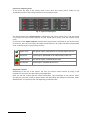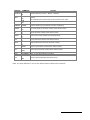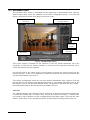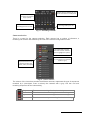
1
VS-DVR ENGLISH User manual INDEX DESCRIPTION OF THE REAR DIAGRAM ....................................................................................................... 2 DESCRIPTION OF THE FRONT DIAGRAM ..................................................................................................... 3 INPUTS AND OUTPUTS LAYOUT .................................................................................................................... 4 NETWORK INSTALLATION GUIDE ................................................................................................................. 5 1 RECOMMENDATIONS AND SECURITY WARNINGS ............................................................................ 6 1.1 SECURITY WARNINGS ............................................................................................................................... 6 1.2 LEGAL CONSIDERATIONS .......................................................................................................................... 6 1.3 ELECTROMAGNETIC COMPATIBILITY (EMC) ............................................................................................... 6 1.4 RESPONSIBILITIES .................................................................................................................................... 6 1.5 ADDITIONAL INFORMATION ........................................................................................................................ 6 2 INTRODUCTION........................................................................................................................................ 7 2.1 DESCRIPTION........................................................................................................................................... 7 2.2 FUNCTIONALITY ....................................................................................................................................... 7 3 INSTALLATION AND SET UP .................................................................................................................. 9 3.1 DIFFERENT VS-DVR MODELS ................................................................................................................... 9 3.2 UNIT PACKAGE CONTENTS ........................................................................................................................ 9 3.3 UNIT INSTALLATION .................................................................................................................................. 9 3.4 LOCAL START OF THE UNIT FROM THE SAME UNIT .....................................................................................10 3.5 REMOTE START OF THE UNIT FROM THE LOCAL NETWORK (LAN) ...............................................................11 4 LOCAL USE ............................................................................................................................................12 4.1 LOGIN SCREEN.......................................................................................................................................12 4.2 LIVE VIDEO SCREEN...............................................................................................................................13 4.3 RECORDED VIDEO ..................................................................................................................................20 4.4 RECORDED VIDEO EXPORT .....................................................................................................................25 4.5 LOGOUT ................................................................................................................................................27 5 REMOTE USE .........................................................................................................................................28 5.1 REMOTE OPERATOR POST REQUIREMENTS ..............................................................................................28 5.2 CONNECTION PROCESS ..........................................................................................................................28 5.3 LOGIN....................................................................................................................................................29 5.4 LIVE VIDEO ............................................................................................................................................30 5.5 RECORDED VIDEO ..................................................................................................................................35 5.6 RECORDED VIDEO EXPORT .....................................................................................................................38 5.7 STATUS .................................................................................................................................................40 5.8 LOGOUT ................................................................................................................................................42 6 CONFIGURATION ...................................................................................................................................43 6.1 GENERAL DATA CONFIGURATION .............................................................................................................43 6.2 NETWORK CONFIGURATION ....................................................................................................................44 6.3 FIXED CAMERA AND DOME CONFIGURATION .............................................................................................46 6.4 TIMETABLE CONFIGURATION ...................................................................................................................50 6.5 EVENT CONFIGURATION ..........................................................................................................................51 6.6 PROFILE CONFIGURATION .......................................................................................................................52 6.7 VS-DVR FACTORY SETTINGS .................................................................................................................53 APPENDIX 1 – TECHNICAL SPECIFICATIONS ............................................................................................54 User Manual - 1 DESCRIPTION OF THE REAR DIAGRAM 1 14 2 13 3 12 11 4 10 5 9 6 8 7 VS-DVR Rear view Rear view of the unit 1 Power supply 2 75 Ohms commuters 3 Video inputs 4 Alarm inputs 5 Relay outputs 6 Analogue video outputs: video-cycles and alarm images 7 USB ports 8 TCP/IP socket 9 VGA monitor socket 10 RS-232 port 11 Keyboard socket 12 Mouse socket 13 “Factory settings” button 14 “Images Under Custody” button User Manual - 2 . DESCRIPTION OF THE FRONT DIAGRAM 15 16 17 18 VS-DVR Front view 15 Power-on indicator 16 Hard disk activity led (idle / read-write) 17 USB ports 18 DVD/CD recording unit (in models with this device) Default access passwords: Operator Level: Supervisor Level: Administrator Level: operator supervisor administrator User Manual - 3 INPUTS AND OUTPUTS LAYOUT Installation Terminal connection Cont 1 Cont 2 SENSORS Cont 3 Cont 4 Cont 5 Cont 6 Cont 7 Cont 8 VS-DVR PIN ASSOCIATED SIGNALS 1 Alarm input 1 2 GND (1,2) 3 Alarm input 2 4 Alarm input 3 5 GND (3,4) 6 Alarm input 4 In 4 7 Alarm input 5 In 5 8 GND (5,6) 9 Alarm input 6 10 Alarm input 7 11 GND (7,8) 12 Alarm input 8 13 Relay output 1 NC 14 Relay output 1 common 15 Relay output 1 NO 16 Relay output 2 NC 17 Relay output 2 common 18 Relay output 2 NO 19 Relay output 3 NC 20 Relay output 3 common 21 Relay output 3 NO 22 Relay output 4 NC 23 Relay output 4 common 24 Relay output 4 NO 0V In 1 In 2 In 3 In 6 In 7 In 8 Act 1 ACTIVATORS Act 2 Act 3 Act 4 +24V 0V Alarm inputs and relay outputs pin layout User Manual - 4 Rel 1 Rel 2 Rel 3 Rel 4 NETWORK INSTALLATION GUIDE Quick Installation Guide VS-DVR Unit Use the VSFinder (contained in the CD) to configure the internal IP address, the gateway and the subnet mask. Consult the network administrator. Router Open the TCP ports 80 and 8554 and map the internal IP address of the unit to the external one of the router. Operator PC To connect to the unit from the operator PC use the router external IP address or the name „identity.dnsvideo.net‟*, identity being the serial number of the unit (SN followed by 14 digits) * Accessing the unit through its identity is needed when using dynamic IP address and it requires enabling the dynamic IP service (advanced configuration). For further information, please consult the technical note about Internet connection. Internet connection example VS-DVR Local IP: 192.168.1.100 Gateway: 192.168.1.1 Mask: 255.255.255.0 Operator PC Remote node Connection VS-DVR 2.2.2.1 / identity.dnsvideo.net Router Local IP: 192.168.1.100 External IP: 2.2.2.1 NAT Table Local IP External IP 192.168.1.100:80 2.2.2.1:80 192.168.1.100:8554 2.2.2.1:8554 User Manual - 5 1 Recommendations and Security warnings 1.1 Security warnings The electric power socket must be located close to the unit and must be easily reachable. Do not use the unit in an extreme environment with high temperatures or humidity. Use the unit at temperatures within +5ºC - +40ºC (41ºF – 104ºF) and humidity below 90%. CAUTION! The interior of the unit is a hazardous area. Do not attempt to disassemble the unit. To prevent electric shocks, do not remove screws or covers. There are no userserviceable components inside. Contact the qualified service personnel for maintenance. Handle the unit with care. Do not strike it or shake it, as this may damage it. Protect the unit from water or dust. Do not use it in wet environments. Prevent the unit from droppings and spattering, and do not locate recipients containing liquids, like glasses. Do take immediate action if the unit becomes wet. Turn the power off and refer servicing to the qualified service personnel. 1.2 Legal considerations The use of CCTV (Closed Circuit Television) may be legally limited. The law varies from country to country; check the law applicable in your country before you install the unit. 1.3 Electromagnetic compatibility (EMC) The CE mark is affixed to the enclosed product to confirm compliance with the following European Community Directives for a Class B digital device: EN55022/1994, related to radiated emission and EN50082-1/1997 related to residential, commercial, and light industry immunity. 1.4 Responsibilities This manual has been prepared with the maximum care. However, if you detect any inaccuracies or omissions, please inform us at the address that can be found in the warranty of this manual. Visual Tools cannot be held responsible for any technical or typographical errors and due we are improving our products constantly, reserves the right to make changes to the product and/or manuals without prior notice. Visual Tools makes no warranty of any kind with regard to the material contained within this document, including, but not limited to, the implied warranties of merchantability and fitness for a particular purpose. Visual Tools shall not be liable or responsible for incidental or consequential damages in connection with furnishing, performance or use of this material. 1.5 Additional information For more information about VS-DVR, please check the on-line technical notes located on the VideoSafe web site: http://www.videosafe.net HTU User Manual - 6 UH 2 Introduction 2.1 Description The VS-DVR is a digital video recorder-transmitter which works through diverse communication networks (LAN, WAN, Internet), offering optimized transmission frequencies and a great image quality. A VS-DVR unit has a local interface for its use in the place where it is located and an interface for its use in remote. Both are similar in appearance and functionality. Because it can be accessed and operated simultaneously in local or remotely, the VS-DVR is the ideal solution to carry out the observation, surveillance and security of one or multiple sites. 2.2 Functionality Local operation The unit is ready for its use in a local scenario. It only needs to be connected to the mouse (PS2) and to a VGA monitor. As an option it also can be connected to a keyboard and to two CCTV monitors. The local operation, excepting the VS204 unit that has local operation for maintenance, allows the unit to visualize live and recording video with the additional possibility to display them simultaneously, searching of recording video by VMD, digital inputs/outputs status, unit configuration, software upgrades and image export. Remote operation The unit can transmit live or recorded video images to one or several operator workstations simultaneously connected to the same network (LAN, WAN or Internet) using the TCP/IP protocol over Ethernet. The remote operation allows as well the live and recording video visualisation. It shows the digital input/output status, the unit configuration, software upgrades and image export. User Manual - 7 Images recording The unit can record simultaneously from all the cameras (not-synchronized cameras, colour or black and white, PAL format). Recording conditions and frequency (ips) may be defined individually for each camera depending on calendars or time lapse, and/or the activation of external events and video motion detectors. The time shifts allow the specification of different recording frequencies based on the opening hours for public places or shops. Devices connected to the digital input alarms of the unit, as presence detectors, door contactors, etc., generate the external events. A VS-DVR unit can record as many as 25/50/75/125 ips (according to the model) distributed between all the cameras. It has four quality image levels both live video and recording video. The images obtained from each camera are stored in the hard disk as independent video sequences. The unit has an automatic erasing tool to eliminate sequences no longer valid (out of the date defined by the user). Factory setting for this feature is 365 days. Image transmission The image compression system allows for the transmission of up to 25 images per second, depending on the available communications bandwidth. The unit allows simultaneous connection of several remote users –either by using Internet Explorer or/and the Supervisor VS reception and management software - to visualize, record and/or play back video sequences without affecting the recording or the local operation. Alarm sending The alarms that are generated both from external events, collected across the digital inputs, and internal events, from the detection movement programming, there can be sent to one or two Supervisors VS or via e-mail. Export The recording video images can be exported to external devices (CD, DVD, USB memories, etc) both from the local and remote operation. Security There are three user profiles with different kind of permissions to adjust them to each type of operation. It‟s available an IP filter that provides access to the unit, only allowing the authorized ones. The unit indicates automatically when the hard disk runs out of free space; in this case the unit works normally and when more space is needed the oldest sequences are deleted. Configuration The (remote/local) configuration interface shows and allows for the edition of the system general data, timetables, configuration of the cameras, recording schedules, automatic activation of the relay outputs, etc. User Manual - 8 3 Installation and set up 3.1 Different VS-DVR models You can find out what particular VS-DVR model you are using by reading the label on the front or the bottom of the unit. The available models are identified by the product code: VSnxxL-HDD-[/CDR] Being “n” is the model identifier, “x” the number of video inputs of the unit, “L” if it has local interface, HDD the hard disk size and /CDR indication that the model has internal CD/DVD recorder. 3.2 Unit package contents Open the box and check that the following items are included in it: Required model. PS-2 Mouse Power cable. RJ45 cable for TCP/IP communication. VS-DVR User Manual (this document) CD that contains the VSFinder application, necessary to configure the network information of any VS-DVR unit from the LAN. 3.3 Unit installation To install the unit follow the steps set below. It is recommended to have at sight the diagrams of the cover pages. 1. Unpack the contents of the box and put the unit onto its final installation location. Make sure that all the items enumerated above are present in the box. Tip: write down the unit serial number, it will be useful to identify it when using the configuration software VSFinder. 2. Connect the TCP/IP communications cable provided with the unit in the RJ45 socket (Ethernet network adapter 10/100Base T) . 3. Connect the alarm input/output cables to the screw terminal female connectors provided with the equipment, and these to the unit,. Check the pin layout included in the diagrams back page . The alarm inputs do not have galvanic isolation, so the activation / deactivation of the digital signals require voltage-free contacts, thus allowing the isolation of the sensor and the unit. The power consume when the digital input is activated through a contactor potential-free or an output open collector sensor is 0.5 mA. The relay outputs, that provide either normally open (NO) or normally closed (NC) contacts, can be used to verify when the hard disk is full or to distinguish between “working hours” or “non working hours” . Their electrical features are: Maximum switching voltage: 24V AC/DC Maximum switching current: 1 A 4. Connect the cameras to the BNC connectors of the unit using an appropriate 75 Ohms coax cable (not supplied with the unit). The unit is provided with video inputs for B&W or colour cameras, PAL format, not necessarily synchronized. Each camera has to be connected to the unit through a 75 Ohms coax cable with a male BNC connector at the unit end. Each connection or splice produces a slight change in the impedance, so all the cable used must be one-piece cable, without splices or derivations. User Manual - 9 5. Do not forget to adjust the 75 Ohms / load terminator (default setting = 75 Ohms) by shifting the switch to the high impedance position ( ) when connecting a camera signal to the unit and to another device already loaded with 75 Ohms (for instance, a TV monitor). Any error in the adaptation of impedance will produce unwanted or even unacceptable side effects on the image, like burnt image, ghosting or ringing on the image edges, or even loss of the image. 6. In case of domes you will have to connect the control cable to the unit serial port. In some cases you will need to use a RS-485 / 422 to RS-232 protocol converter. Refer to the technical notes. 7. The unit has two analogue video output , which provides video-cycles (3 seconds per camera), showing images of the cameras with signal connected to the unit. If you are going to connect a monitor to the output, do it now. The cable must have the same characteristics as the one used for the video inputs. 8. Verify that the voltage of the unit power adapter matches the voltage specifications of your power source. Use the cable provided in the package to connect the unit and plug it into the power supply. The power connector is located in the rear left part of the unit. 9. The unit starts working automatically when it is plugged into the power supply, or when power is recovered after a supply loss. Do not forget to unplug the unit off any time you need to connect or disconnect any of the external items. The unit has an informative led on its front side informing about the state of the machine (on / off). 10. ATTENTION: the unit is configured initially to record 2 IPS from all the cameras, please remember to disable the recording of the cameras that you are not going to use, to avoid the generation of video loss alarms. 3.4 Local start of the unit from the same unit The network configuration of the VS-DVR unit can be fulfilled in local by connecting to the unit a VGA monitor and the mouse supplied with the unit. A login screen will be displayed. Select the user level Administrator and type the default password for this level: “administrator”. To type the password you can use the virtual keyboard of the application, which icon can be found at the lower left side of the screen. Once in the application choose the option “Configuration” of the main menu and then the “Network” sub-menu. There fill in the data corresponding to the network information and save the changes. For the remainder configuration please refer to the corresponding chapter of this manual. User Manual - 10 3.5 Remote start of the unit from the local network (LAN) Although the user can be connected to the unit via TCP/IP, whether by using the local network or remotely through ADSL, THE INITIAL UNIT CONFIGURATION MUST BE ALWAYS PERFORMED BY USING THE SAME LOCAL NETWORK, so it will be necessarily to connect the unit and the computer to the same sub network or to use the crossover cable provided with the unit. Once the physical connections are established, start the VSFinder program contained in the installation CD. This program identifies all the units connected to the network. If several units appear in the list of units found, you can identify the one you are about to configure through serial number, which can be found in a label stuck to the unit and is also in the first column “id/model”. Select it by double clicking the corresponding line. Fig. 1 – VSFinder Then you will see a screen to enter the IP address, the gateway address and the network mask, values that should be provided by the network administrator. To modify the original connection data is necessary to enter the Administrator user password of the VS-DVR unit. In the last column are shown like information the http and video VS-DVR ports From that moment on you will be able to access de unit through its IP address, whether local or remotely (through ADSL). This configuration using the VSFinder only has to be done once. To access the unit through ADSL you must configure the NAT table of the router to define a correspondence between the router global IP and the unit local IP. For more information about this subject please check the technical note about Internet connection. User Manual - 11 4 Local use The local scenario of the VS-DVR presupposes a VS-DVR unit connected to a 1024x768 VGA monitor and to the supplied mouse and, as an option, also to two CCTV monitors, one for visualisation of the active camera or the sequence and the other for alarm monitoring. To work with the unit, the local user has an interface similar in appearance and functions to the remote interface, all the screens and functionality are described next. Attention: the VS204 units there only have available the maintenance, recording review and image exportation. 4.1 Login screen When connecting to a VS-DVR, you will see the login screen where the language wanted to use must be selected. Select your user level and enter the password whose validation will grant you access to the functionality associated to that user level. There are three user levels that supplies default access to the following characteristic that can be modified in the “Profile Configuration” section: Operator – access to the live video screen. U U Supervisor – Access to live and recorded video. U U Administrator – access to live video, recorded video and configuration screens U U Each level has a default password which is indicated in the beginning of this manual. You should always change the system passwords when you finish the installation process, to prevent unwanted access to your units, in the Configuration screen (Administrator user level). If you forget the passwords you can reset the default values by clicking the factory settings button. If you do not have a keyboard, the application has a virtual one, which is displayed when clicking on the keyboard icon placed at the lower left side of the login screen. User levels Password Virtual Keyboard Language selection Fig. 2 – Local access to the unit screen Main task bar Once the connection is established, the application interface will appear in the explorer window. The upper bar, common to all the screens, contains, besides the virtual keyboard access icon, the main available options: live video, recorded video, configuration and the icon to logout. User Manual - 12 To access any of them you only have to click on the corresponding button. The selected option appears highlighted. Fig. 3 - Main tasks bar of the local interface 4.2 Live Video Screen All users have access to this screen unless these levels are modified in the Profile Configuration section. Fig. 4 – Local interface live video screen It has a 768x576 pixels main viewer and different panels where the user can consult all information related to the unit (status, cameras, inputs and outputs) and control the visualisation of the sequence (type of screen, touring, dome control, monitors…) The different elements and their functionality are described next. Unit and disk information On the right upper side of the screen is displayed the name of the unit and the current date and time. Below this information there is a panel where the user can find an icon of the hard disk with indication of its occupancy and its free percentage. Fig. 5 – Unit disk information When the free percentage is below 5%, the text will be displayed in red to alert the operator. Likewise, the disk icon will vary if there is a disk failure or if it has been protected with the custody key. User Manual - 13 If more than one incidence happens at the same time, there will be shown in order of importance. Failure If the hard disk does not work, over the disk icon will appear an alarm icon; if the unit has two hard disks and one of them does not work, the alarm icon will appear on top of two disks. And. Anomaly If an error or anomaly is detected in the file system, an icon appears over the disk indicating that the disk requires maintenance. This icon will appear if an alarm for excessive temperature happens. Warning If the custody key is activated, over the icon of the disk will appear a padlock icon. (for further information about the custody key refer to the remote interface live video paragraph). If the unit detects a second disk but this has not been declared and therefore not watched over, a question mark will appear on top of the icon Monitor and camera control At the right side of the viewer there is the monitor and camera control panel. This panel contains information of the connected cameras and allows for the selection of those to be displayed in each monitor (VGA, MON1 and MON2). Monitor control. The one selected appears highlighted. The colour of the camera indicates its state. All cameras has an associated name. The name of the selected camera appears highlighted. Sequence selection Fig. 6 – Monitor and camera selector User Manual - 14 Touring selection Monitors VGA is the operation monitor. It allows for 1x1 2x2, 3x3, 4x4 camera visualisations and camera sequence in normal and in full screen mode. This monitor is available if the local video visualisation option it‟s enabled (by default) if not, the active monitor will be MON1. MON1 is the monitor for the visualisation of the sequence -previously defined by the user in the camera configuration screen of the application- or for the visualisation of any of the cameras selected by the operator from the camera panel for this monitor. MON2 is the monitor for the visualisation of the alarm sequences. It shows the camera that has generated an alarm and remains on it until the manual selection of other camera by the operator (attended alarm) or until a new alarm is generated. Cameras The camera panel allows for the selection of the camera or cameras to be shown in the selected monitor at that moment. The selection is manual and is made selecting the corresponding icon. If a camera with no signal is selected, the screen of the main viewer will turn blue. In normal screen visualisation, the camera information shows a reference number, a status icon and the name previously defined in the camera configuration screen of the application for each camera. In full screen visualisation only the reference number and the status icon are shown. The colour of the icons represents the different status of a camera, which can be the following: Green Camera connected and with signal. Pink Camera on time-lapse recording Bright red Camera on event recording Dark red Camera on alarm recording Yellow Camera configured for recording that has lost it signal. Crossed out Camera not connected and not configured for recording The titles and the reference numbers of the cameras also are displayed in different colours depending on their use: Yellow Selected camera. Blue Camera displayed in another quad. Grey Camera with no signal or uninstalled. The "Sequence" button allows setting the VGA or the #1 monitor in automatic sequence mode. The button turns yellow when the sequence is activated. With the manual selection of any camera the deactivation of the sequence is automatic. If a camera has been selected by the operator but a new alarm takes place, this will prevail over the manual selection and will be displayed on Monitor 2. User Manual - 15 Video controls At the right side of the viewer are the video image and visualisation controls and the button for the local recording fulfilment. Controls for the image brightness, contrast and colour adjustments and button to restore the default values. Controls for the full screen visualisation, 1x1 visualisation and 2x2, 3x3 and 4x4 multi-screen visualisation. Manual recordings The user has a button for the manual recording of the video sequences. The activation/deactivation is manual and when the local recording is activated the grey colour turns to yellow. ONLY THE IMAGES OF THE CAMERA SELECTED FOR THE VGA MONITOR ARE AVAILABLE FOR LOCAL RECORDINGS. If you are in multi-screen visualisation, make sure the images you want to record are in the active quad. Multi-screen and full screen visualisation On the VGA monitor images from different cameras can be visualized simultaneously by using the quads buttons. The user can select full screen, 2x2, 3x3 or 4x4 quads views, select which camera to display in each quad or even associate the sequence to one quad while the others display the images of other cameras of interest. There is always a selected quad. The active quad has a yellow frame instead of having a blue one like the others. The camera associated to the active quad will be the selected at that moment in the VGA monitor. User Manual - 16 Fig. 7 – Normal, full screen and multi-screen visualisations To select a camera in a determined quad, you have to select first the quad, which will change its frame to yellow, and then select the camera, which will also change the colour of its name to yellow. The association cameras-quads is memorized by the application so the next time the user select a visualisation mode, this will be displayed with the cameras that where associated in the last session. Dome control If the selected camera is a dome, the interface will display an additional panel with a series of controls for the operation with domes, including the movement in any direction and zoom, iris and focus adjustments. The control set may vary according to the dome model but the operation is similar in all cases. On Screen Control: In local mode and for the VGA monitor the dome can be controlled by using the mouse when being in quads or in single view. To activate it, click on the joystick or on the screen and the cursor of the mouse will change its appearance and will move to the centre of the image showing with arrows the dome motion. To deactivate the On Screen Control click on the screen with the mouse wheel and it will come back to the normal mode. Preset names: The first five dome presets can have a name assigned. When clicking on the “Preset” button a foldout menu appears and a name can be written for each preset. Click on the number and the dome will move to the programmed position. Configuration of a dome by OSD (On Screen Display): When the dome supports OSD configuration, besides the dome joystick a new button that activates/deactivates this configuration mode appears. The OSD running depends on each type of dome. (This function is not available for all domes) Dome movement controls Controls for the selection of the camera and presets Fig. 8 – Dome controls zoom, iris and focus adjustments User Manual - 17 Input and outputs panel At the lower left side of the screen there is the input and output panel, visible at any visualisation mode of the central viewer but for full screen mode. Fig. 9 – Input and output panel The logical status of the digital inputs is indicated by the colour of their icons. The inputs with a red circle are active inputs (alarms) and the inputs with a green circle are inactive inputs (rest) In the case of the digital outputs, besides their logical status, indicated as well by the colour of the icons, the user can see by the shape (circle/square) if an output has been programmed to be controlled by the user (manual control) Green circle Non active output, associated to an internal state of the unit. Red circle Active output, associated to an internal state of the unit. Green square Non active output, controlled by the user. Red square Active output, controlled by the user. Keyboard control Additionally to the use of the mouse, the user can control certain actions by using a real keyboard or the virtual one provided by the application. Next you will find a table with the control commands. The commands do not require “enter” and they are not case sensitive. Some actions can be fulfilled with different commands, When Substitute the “#” symbol for the corresponding numerical prefix. User Manual - 18 CONTROL COMMAND ACTION #M MONITOR Monitor selection (0-VGA, 1- MON1, 2- MON2) #/ 1-4V switches to 1,2x2,3x3 or 4x4 camera visualisation on the VGA #V monitor VIEW #* 0V commutes from normal screen to full screen and vice versa. #D DISPLAY Display selection (1-16). Only in VGA #+ #C CAMERA Camera selection (for the selected monitor and display). # enter #P PRESET Go to the preset (of the active camera of the active monitor) #U UP Up (of the active camera of the active monitor) DOWN LEFT RIGHT IN OUT ALARM STOP QUIT N H J I Home O End A / PgUp S / PgDown Q . Del Down (of the active camera of the active monitor) Left (of the active camera of the active monitor) Right (of the active camera of the active monitor) Zoom In (of the active camera of the active monitor) Zoom Out (of the active camera of the active monitor) Alarm: emergency recording (local) Stop: To stop the emergency recording Initiate command (Deletes the last entrance) Note: any letter different to one of the defined letters initiates the command. User Manual - 19 4.3 Recorded video The recorded video screen is accessible for the supervisor or administrator level users by default unless these levels are modified in the Profile configuration section. To access the screen, press the Recorded video button of the main menu. Sequence playback viewer and controls Unit data and calendar for the recordings selection Camera panel Recording video search by VMD Live and recorded video viewer Recorded sequences selection bar Fig. 10 – Recorded video screen This screen shows a calendar for the selection of the day whose sequences are to be visualized, a panel for the camera selection, a time bar for the sequence selection and a viewer with controls for their playback. On the right side of the viewer there are two buttons to access the export screen and the sequence eraser. There is the possibility to delete the sequence that is being visualized but only the administrator user can do it. This screen automatically saves the user last session adjustments: date, camera, time and paused video of the sequence that was played last time. If no session has taken place or the last session is nor in the hard disk (deleted video), the application will show the day, camera , time and paused video of the last sequence recorded in the unit. Calendar The calendar shows in grey the days with no recordings, in white the days with recordings and in yellow the selected day. To select a day, click on the number of the day. To change from one month or year to another use the corresponding left and right arrows. There are two extra buttons: “Start”/“End” for the automatic selection of the first/last recording made by the unit. User Manual - 20 Calendar with the selected year and month and buttons to modify them Days with recordings (in white) and selected day (in yellow) Direct access to the last recording made by the unit Direct access to the oldest recording stored in the unit Fig. 11 – Recordings calendar Camera selection There is a panel for the camera selection. Each camera has a number of reference, a recording icon and the title defined by the user in the camera configuration screen. The camera with recorded video that has been selected appears highlighted in yellow The colour of the icons represent if there is any recording and the type (alarm, event, time-lapse) The icon of the cameras with no recordings for the selected appears in grey Fig. 12 – Camera selector The colours of the icons that precede the different cameras, represents the type of sequences recorded by it (time-lapse, event or alarm) the cameras with a grey icon don not have recording sequences for the selected day. Grey There are no recordings for the selected day Dark red There is some alarm recording for the selected day Light red There is some event recording for the selected day Pink There is some time-lapse recording for the selected day User Manual - 21 To select a camera, click on the corresponding icon. The selected camera will appear highlighted in yellow. When placing the mouse on the different cameras, with no need of clicking on them, the time bar will show a preview of the recorded video that contain. Sequence searching At the lower side of the screen there is a time panel in which the recordings contained in the selected camera of the selected day are displayed. The panel shows for each camera three different strips corresponding to alarm, event and time-lapse recordings. Inside each strip there are coloured lines that indicate the periods with recorded sequences. Selected day and time where the cursor is placed Zoom for a more precise searching of the sequence Fig. 13 – Different daily time panels for alarm, event and time-lapse recording search The user can select the sequence scrolling the cursor to a certain time or by clicking on the colour lines, which indicate the existence of sequences. In both cases, the application will display in the viewer, in pause mode, the sequence that is closer to the chosen time independently of the type of recording that it is. The search can be more precise by using the Zoom tool, whose icon is placed at the upper right side of each panel. The zoom transforms the initial daily panel into another one with the closer values to the selected time. Sequence playback The central area contains the recorded video viewer where the sequences recorded by the unit are playback. Any change of the selection (camera, hour…) changes also the sequences of the viewer, which appear in pause mode. At the right of the viewer there are the image control adjustments and at the bottom there are the playback controls. Previous Key frame /Fast Backward/ Go backwards/ Play-Pause/ Go forward/ Fast forward/ Next Key frame Clicking on the fast forward button can increase the play back speed to 4x, 8x and 16x. The speed value is shown inside the button. Fig. 14 – Recorded video playback controls User Manual - 22 Besides the playback bar, at the lower left side of the viewer there is information about the type of the sequence (time-lapse, event or alarm) and the images per second it was recorded. Fig. 15 – Progress bar of the recorded sequence For the event/alarm video sequences there is an additional four button set that allows for moving quickly from one event to another. Go to the alarm instant of the previous event Go to the beginning of the sequence Go to the alarm instant of the next event Go to the alarm instant of the event Fig. 16 – Additional controls for the event recordings Smart searching of recording video by VMD. This searching can be applied to cameras with time lapse recording at least at 1 ips. When clicking on the button placed on the right of the screen, the motion detection option is activated. At the same time since the searching applies only for the camera that has been selected previously, the calendar and the camera selector will be disabled. VMD controls Eventplay back buttons Filtered sequence Fig. 17 – Recording video searching by VMD User Manual - 23 When clicking on the configuration button recording video that was played back a grid is displayed over the last image of the Over this grid, the user can select with the mouse the cells to be configured with motion detection and their sensitiveness. There are three types: low (L), medium (M) and high (H) a. These parameters delimit the type of searching to be done. Once the configuration is finished click on the button out. and the searching will be carried The results will be showed on the time panel in strips of different colour that the ones used for the time lapse recordings. During the play back the fast backward and fast forward buttons will change into buttons to go to the beginning of the former and following event respectively. Simultaneous live and recorded video visualisation On the right side frame of the viewer there is an icon to commute from the recorded video normal screen to a mixed viewer with one quad of recorded video (lower right quad) and three quads of live video. The presentation and operation of the recorded video is the same as in normal mode but for the size of the viewer. For the live video visualisation the operator has three quads that can be activated by setting the mouse on them. The active quad will change its yellow frame to a red one. The user can associate a camera to a quad by using the camera panel placed at the left side of the screen. To associate one camera to a quad, fist select the quad clicking on it and then click on the number of the desired camera. The camera associated to the active quad will change its colour to yellow while the cameras of the other quads (with blue frames) will appear in blue. The association cameras-quads will be automatically saved and will remain for the next session in live and recorded video visualisation mode. The association will also be retrieved after a change of screen. Live video quads and live video camera selection panel Recorded video camera selection panel and quad for the visualisation of the recorded video Fig. 18 – Live and recorded video simultaneous visualisation User Manual - 24 4.4 Recorded video export For the recorded video export, the application has a specific screen which is accessible by default only to the Administrator user, but can be modified in the Profiles Configuration section. To Access this window, click on the export icon, which is placed at the lower right side of the recorded video screen. Data summary and export progress bar Fig. 19 – Recorded video export screen To export, the external device, the camera or cameras to export from, and the time interval must be indicated. To export it is required the following information: Device: The accepted devices for the sequence export are the unit internal CD/DVD recorder ( in models with CD/DVD recorder) or any USB storage device (USB Mass Storage class)1 The rollover menu will contain the device connected to the unit at the moment of the export, the internal CD/DVD recorder or both. Once the appropriate device is selected, the data of the the free space and the maximum size in MegaBytes will be displayed. By default, the USB device is selected. To update the data of the menu, click on the refresh button. Cameras: Under the former panel there is a panel with the cameras of the unit to select those that contain the desired sequences. Reference date: the default reference date is the one selected in the recorded video screen when clicking on the export button. This date can be modified by using the calendar and the time panel of its right. Regarding the interval of video to be exported, there is a time interval selector to indicate if it must be centred, backward or forward according to the reference time. Total time to export: Once all the data have been filled in, you can choose between letting the application to calculate the maximum time to be stored, or setting the total time manually. 1 The device must fulfil the following requirements to be recognised by the unit: carry out USB Standard Mass Storage, and FAT file system formatted (please consult web technical note). User Manual - 25 RAW video: The recorded video can be exported in RAW format or native video. This format allows exporting further information in less time, when you use this option in the device is created a viewer to watch the exported sequences with the raw format. Summary: The summary of the selection is then displayed in the lower right panel of the screen. It shows the initial and final export dates, the number of the camera or cameras to export sequences from and the estimated export size and time. If this selection is correct, click on the Export button and a progress bar will appear. You can cancel the export process clicking on the Cancel button or click on the Back button to keep on working. Logs: In the lower part of the screen there is a button that provides access to the logs that the video exportation creates. In this logs the user, date and what has been exported is registered. These data is only available for the Administrator user. Fig. 20 – Successful export message If the export is successful, when getting into this screen again you will see the message shown in the next figure. If it fails , an error message will appear. Like when the remote export, the sequences will be stored as MPEG files in a folder with the name structure: DEVICE:\UnitName\yyyy\mmm\dd\cam Being: “UnitName” the name of the unit, “yyyy”: the year (four digits)“mm”: the month (three words) “dd”: the day (two digits) of the sequence and “cam” the camera number. The filename has the following format: cam_cameraname_hh-mm.ss-hhmm.ss.mpeg Being: “cam”: the camera number, “cameraname” the name of the camera and “hh.mm.ss : the hour, minute and second of the beginning and of the end of the sequence. Note: The export will be automatically canceled if the remote user changes the configuration or if the local user makes a change in the configuration that requires to restart the system. User Manual - 26 Fig. 21 – Format of the resultant files 4.5 Logout To end connection with the unit press the button placed on the upper bar. The session will be finished and the login screen will be displayed in order to start a new session. User Manual - 27 5 Remote use The basic scenario presupposes one or more VS-DVR units connected to the same communication network, LAN or Internet, and one or more operator posts (PCs with Internet Explorer) that contact via TCP/IP. To work with the unit, the user has a remote interface, whose screens and functionality are described next. Likewise is possible to connect the VS-DVR units, through the Supervisor VS software. 5.1 Remote operator post requirements To use a normal PC as a remote operator workstation, this must fulfil some minimum requirements: PC or laptop with Microsoft Windows XP with Service Pack 2 or Windows Vista. SVGA graphic card, 1.024x768 pixels, true colour. 15” Colour monitor (17” recommended) Ethernet 10/100 base T card. Mouse and keyboard. Microsoft Internet Explorer 6.0 or higher. Please make sure that the security options are set to medium (“Tools”/”Internet Options”/”Security”/”Default level”/”Medium”).If you are using a customized security level check that the following options are marked: Scripting - Active scripting -> Enable ActiveX controls and plug-ins U - Initialize and Script ActiveX controls marked as safe. -> Enable. - Download signed ActiveX controls.-> Enable / Promt. - Run ActiveX controls and plug-ins. -> Enable Downloads U - File download-> Enable Miscellaneous U U - Submit nonencrypted form data.-> Enable / Promt. - Allow meta refresh -> Enable 5.2 Connection process If the unit is on the same local network as you are, you will need to type in your Internet Explorer the local IP address of the unit. If on the other hand you want to connect to the unit trough the Internet (external connection) you will need to type the public IP of the unit (if this is a fixed IP address) or connect to identity.dnsvideo.net (if the unit has a dynamic IP address). The identity number, which you will find on a sticker at the bottom of the unit, is made up of the letters SN plus the internal serial number of the unit. As an example, if we have a VS-DVR unit with identity SN03060963151234 the connection address will be SN03060963151234.dnsvideo.net. To obtain more information about how the dynamic IP works please check the technical note “Internet Connection” available in www.videosafe.net User Manual - 28 Note: If you need to know the identity of a unit and do not have it at hand you can find it out running the VSFinder application from a PC within the same local network as the VS-DVR and that will give you the internal serial number of the unit. To obtain the identity you just need to add the letters SN in from of the internal S/N of the unit. When connecting for the first time to a unit, you will be asked to install in the explorer an ActiveX to properly visualize the VS-DVR interface. Click “Accept” when you see this window. If you are not prompted to install the ActiveX or you have problems to see video please check that the security options of your Internet Explorer are the ones mentioned in the former charter. Enter here the IP address or the DNS name of the unit Fig. 22 – Connecting to a VS-DVR unit Note: To improve the visualisation you may maximize the explorer window by pressing F11. To return to the normal view mode anytime press again F11. 5.3 Login When connecting to a VS-DVR, you will see the login screen, where you can select the language for the application interface. To start select your user level and enter the password, whose validation will grant you access to the functionality associated to that user level. There are three user levels that supplies default access to the following characteristic that can be modified in the Profile Configuration section: Operator – access to the live video screen. U U Supervisor – Access to live and recorded video. U U Administrator – access to live video, recorded video and configuration screens U U User level It informs if other users are currently connected to the unit Password Language selection Fig. 23 - Unit access dialog User Manual - 29 Each level has a default password which is indicated the beginning of this manual. You should always change the system passwords when you finish the installation process, to prevent unwanted access to your units, in the configuration screen (Administrator user level). If you forget the passwords you can reset the default values by clicking the factory settings button. Main tasks bar Once the connection is established, the application interface will appear in the explorer window. The upper bar, common to all the screens, contains the main available options: live video, recorded video, status, configuration and logout. To access any of them you only have to click on the corresponding button. The selected option appears highlighted. Fig. 24 - Main tasks bar of the VS-DVR 5.4 Live video In the central viewer of the live video screen, live video of the selected camera (by default appears the first camera with signal) with overlay text giving the current date and time and the current camera information is displayed. All the users have access to this screen unless these levels are modified in the Profile configuration section. Fig. 25 – Live video screen User Manual - 30 Informational Panel On the right part of the screen there is an informational panel containing the name of the unit, its current date and time, the IP address and a panel to capture and process video snapshots and generate reports. In this same area warning messages will be displayed in the following situations: If one of the disks is faulty, or has been detected that it was added after it was manufactured, an error message along with the icon of a flashing disk is displayed. If the “images under custody” switch is on, a warning message along with the icon of a padlock is displayed. If both situations happen at the same time only the most important one will be displayed. Unit name Unit date and time Unit IP address Images under custody Captured image Snapshots Report creation Fig. 26 - Unit general information Capturing video snapshots and generating reports A picture of the sequence displayed in the main viewer at that moment can be taken by clicking on the photo-camera icon. With this picture a report can be generated and saved on the hard disk just by clicking on the icon at its right. This report is a PDF file that contains the snapshot taken plus the names of the camera and the unit from which it was taken and, if they exist, also the comment generated by the operator when the report was created. Cameras and reference images The vertical bar on the left part of the screen contains information about all the cameras connected to the unit, with names and states, and a reference image of the camera from which live-video is being received. The reference image of a camera may be changed by double-clicking on the frame of that image, taken as the new reference image the one appearing at that instant in the main live video window. At first, only users with administrator level are allowed to change the reference image, unless the user levels are modified in the Profile configuration section. You can see the reference image of each camera moving the mouse pointer over the camera icons. User Manual - 31 Reference image of the camera All cameras have an associated name. The name of the selected camera appears highlighted. The colour of the camera indicates its state Fig. 27 – Cameras information The state of each camera is expressed through the following colour code: Green Camera connected with signal Pink Camera on time-lapse recording Bright red Camera on event recording Dark red Camera on alarm recording Yellow Camera configured for recording that has lost it signal. Crossed out Camera not connected and not configured for recording The titles and the reference numbers of the cameras also are displayed in different colours depending on their use: Yellow Selected camera. Blue Camera displayed in another quad. Grey Camera with no signal or uninstalled. To select the camera whose video you want to see in the main viewer, click on the camera icon. The central viewer will show video from that camera. If a camera without signal is selected, the viewer will show a blue screen. User Manual - 32 Image controls The image controls are on the right side of the central viewer: a led to indicate the recording of images locally, bright, contrast and colour adjustments, reset default values, full screen and quad visualisation, and one more button to start/stop the local recording of images. The received video can be stored in the local hard disk. Multi-screen visualisation Images from different cameras can be visualized simultaneously by using the quads button. User can select full screen, 2x2 3x3 or 4x4 quad views clicking on the corresponding buttons. Blue when receiving images Brightness, contrast and colour adjustments Reset default values Full screen visualization Quad visualization Local recording Start/stop In multi-screen mode the camera selected in the control panel (whose name appears in golden colour) will be displayed as well as the corresponding cameras in circular order until all quads are completed (whose name appears in blue colour). E.g. if camera 6 is selected with 2x2 multi-screen, camera 5 till 9 will be displayed. Fig. 28 – Remote multi-screen visualisations The selected camera will be displayed in the active quad marked out by the yellow frame instead of black one, all the actions (photo, report, adjusts, local recording,…) will be carried out on this camera. The camera is changed by clicking directly on the desired camera in the camera panel or by clicking on the quad button; this in turn will display the following “n” cameras. User Manual - 33 Working with Domes If the camera selected is a dome, the viewer will offer an additional set of controls to operate it, including camera movement, zoom, iris and focus adjustments. The set of controls may vary depending on the dome model, but the operation is basically the same in every case. Manual movement of the dome up / down, left / right. The inner/outer arrows Produce show/fast movements Fig. 29 – Dome controls To select a preset (programmed position) or camera press the desired number + the button “PRESET” or “CAMERA”. “CLEAR” erases the text box contents. “SAVE” saves the current parameters on the desired preset. These controls permit adjusting the zoom, iris and focus of the camera. Images Under Custody The “Images Under Custody” key allows you to freeze the stored sequences in the Hard Disk. If Images under custody mode is activated, new sequences cannot be recorded on the disk. This function is used to keep the recorded sequences of a situation beyond their configured maximum time. To activate the custody of images move the switch that you will find at the back of the unit to the upper position. The unit will automatically protect the stored sequences by blocking new recordings. Only live video sequences will be displayed. To set the unit again in the normal operation mode, move the switch to the initial position. The unit will restart automatically and will return to its normal functionality. You can check the status of the custody key in the informational panel placed at the right of the live and recorded video screens. User Manual - 34 5.5 Recorded video To access the recorded video screen click on the Recorded Video button on the main options bar. You will only be able to access this screen if your user level is Supervisor or Administrator. The interface is shown below. Calendar with the days with video sequences highlighted in blue Informational panel with the unit data Selected day Colour codes for the time-lapse, alarm and event recordings Fig. 30 - Recorded Video main screen To the left there is a calendar to choose the day whose sequences you want to visualize. By default, the current day is selected. The central area of the screen shows a matrix with the sequences distributed by camera and time interval. For each camera there are three bands, corresponding to time-lapse, event and alarm recording. The intervals with recorded sequences are highlighted, and you will only have to click on any of them to access to a second screen like the one showed in the next figure, in which the selected time interval is shown in detail. Alarm recorded Sequences Event recorded Sequences Button to go back to the previous screen Time-lapse recorded sequences Fig. 31 - Recorded Sequence selection This screen also shows the three bands, corresponding, bottom-up, to time-lapse, event and alarm recording. For each band, the intervals with sequences are highlighted. To access to a concrete moment, just click on the desired one. User Manual - 35 The recorded video reproduction screen will then appear: Information of the unit from where the sequences are received Camera and recording mode information Playback controls Fig. 32 - Recorded video reproduction screen The central area contains the recorded video viewer, where the images coming from the VSDVR unit are displayed. On its right side there are a series of control for image control adjustments (the same than in the live video viewer). On the right side of the viewer there are two buttons to access the export screen and the sequence eraser. There is the possibility to delete the sequence that is being visualized but only the administrator user can do it. At the bottom there are the playback controls, inspired in those of a conventional VCR. Back /fast backward/ previous frame/ plan-pause/ next frame/ fast forward/ Next Local recording Pre-alarm Alarm Fig. 33 - Recorded video playback controls Observe that for the event/alarm recording, there is a supplementary set of four buttons on the left of the bar. They are used to quickly browse events. Go to the alarm instant of the previous event Go to the beginning of the sequence Go to the alarm instant of the next event Go to the alarm instant of the event Fig. 34 - Event/alarm recordings reproduction controls User Manual - 36 On the left side of the screen, under the calendar, there is a panel with information about the selected sequence: date, camera, start and stop times, and number of images per second Fig. 35 - Recorded sequence information Local recording Both live and recorded video sequences can be saved to your local hard disk. For live video you just need to click on the local recording icon while viewing the sequence that you want to save. The live video sequence that you are viewing will be recorded to your local hard disk till you press the icon again. If you are viewing the sequence using a multi-screen format only the camera that is highlighted will be recorded. For recorded sequences click on the icon stored as MPEG files: in both cases the video sequences will be The video sequences are stored in different folders depending on the operative system that is being used. In Windows XP the route is the following one: C:\Documents and Settings\All users\vsvideo\VS-unit\aaaa-mm-dd\ In Windows Vista before you can make a recording, either live video or recorded video, you have to make a change in the operative system configuration to create the video files. Go to Control Panel, User Account and deactivate the User Account Control (UAC). The route where the video files are stored is the following: C:\Program data\vsvideo\VS-unit\aaaa-mm-dd\ In a folder with the name structure c:\vsvideo\VS-unit\yyyy\mm\dd\ Being: “unit”: the name of the VS-DVR from which the images come from.“yyyy”: the year (four digits)“mm”: the month (two digits) and “dd”: the day (two digits) of the sequence. The filename has the following format: cam_cameraname_hh-mm.ss-hhmm.ss.mpeg Being:“cam”: the camera number, “cameraname” the name of the camera and “hh.mm.ss : the hour, minute and second of the beginning and of the end of the sequence. Note: When you don’t have permission to deactivate the User Account Control, you have to add the VS-DVR web address as a trusted site. Open the Internet Explorer, inside Tools/Internet Options/ Security/Trusted Sites add the address. Don’t forget to remove the secure server checking (https). User Manual - 37 5.6 Recorded video export For the recorded video export, the application has a specific screen which is accessible by default only to the Administrator user, but can be modified in the “Profiles Configuration” section. To access this window, click on the export icon, which is placed at the lower right side of the recorded video screen. Fig. 36 – Recorded video export screen To export, the external device, the camera or cameras to export from, and the time interval must be indicated. To export it is required the following information: Device: The accepted devices for the sequence export are the unit internal CD/DVD recorder (in models with CD recorder) or any USB storage device (USB Mass Storage class)2 The rollover menu will contain the device connected to the unit at the moment of the export, the internal CD/DVD recorder or both. Once the appropriate device is selected, the data of the free space and the maximum size in MegaBytes will be displayed. By default, the USB device is selected. To update the data of the menu, click on the refresh button. Cameras: Under the former panel there is a panel with the cameras of the unit to select those that contain the desired sequences. Reference date: the default reference date is the one selected in the recorded video screen when clicking on the export button. This date can be modified by using the calendar and the time panel of its right. Regarding the interval of video to be exported, there is a time interval selector to indicate if it must be centred, backward or forward according to the reference time. Total time to export: Once the data have been filled in, you can choose between letting the application to calculate the maximum time to be stored or setting the total time manually. 2 The device must fulfil the following requirements to be recognised by the unit: carry out USB Standard Mass Storage, and FAT file system formatted (please consult web “Export to USB devices” technical note). User Manual - 38 RAW video: The recorded video can be exported in RAW format or native video. This format allows exporting further information in less time, when you use this option in the device is created a viewer to watch the exported sequences with the raw format. Summary: The summary of the selection is then displayed in the lower right panel of the screen. It shows the initial and final export dates, the number of the camera or cameras to export sequences from and the estimated export size and time. If this selection is correct, click on the Export button and a progress bar will appear. You can cancel the export process clicking on the Cancel button or click on the Back button to keep on working. Logs: In the lower part of the screen there is a button that provides access to the logs that the video exportation creates. In this logs the user, date and what has been exported is registered. These data is only available for the Administrator user. Fig. 37 – Successful export message If the export is successful, when getting into this screen again you will see the message shown in the next figure. If it fails , an error message will appear. Like when the remote export, the sequences will be stored as MPEG files in a folder with the name structure: DEVICE:\UnitName\yyyy\mmm\dd\cam Being: UnitName the name of the unit from which the images come from, “yyyy”, the year (four digits)“mmm”: the month (three letters) and “dd”: the day (two digits) of the sequence and “cam” the camera number. The filename has the following format: cam_cameraname_hh-mm.ss-hhmm.ss.mpeg Being:“cam”: the camera number, “cameraname” the name of the camera and “hh.mm.ss : the hour, minute and second of the beginning and of the end of the sequence. Note: The export will be automatically canceled if the remote user changes the configuration or if the local user makes a change in the configuration that requires to restart the system. User Manual - 39 Fig. 38 – Format of the resultant files 5.7 Status This screen is accessible for the Supervisor and Administrator user levels by default, unless the access to this window is modified in the Profile configuration section. To access the status screen, click on the Status button on the main options bar. The interface shown in next figure will appear. Fig. 39 - Status screen In this screen you will be able to monitor the state of the cameras, digital inputs, motion detectors, internal states associated to digital outputs (disk full, working time, communications, etc.) and the status, total size of the disk and its occupation percentage. User Manual - 40 The state of the digital inputs is expressed in two ways: With a switch symbol: physical state – open / closed. Open Open input Closed Closed input With a colour: logical state – active / inactive. Green Non active input Red Active input The state of the digital outputs is expressed by two symbols and two colours: Green circle Output not active, associated to an internal state of the unit. Red circle Output active, associated to an internal state of the unit. Green button Output not active, controlled by the user. Red button Output active, controlled by the user. The state of the motion detectors is expressed with a combination of symbol and colour that indicates its state -active / inactive / not enabled. Green Motion not detected Red Motion detected Grey Sensor Detector enabled not The hard disk status is shown by the following icons in order of importance: Indication of occupancy and free space percentage. Disk requires maintenance Custody key is activated Hard disk failure One hard disk failed Excessive temperature Non official hard disk detected User Manual - 41 5.8 Logout When you want to finish your session with the unit, you will be able to close the connection by clicking the button “Logout” on the main options bar Finally the same screen will appear as when you connected to the unit, where you are asked to introduce the user level and password. If you do not want to enter the system again, you can close now the Internet Explorer by clicking on the cross, located in the upper right corner of the application window. User Manual - 42 6 Configuration This screen is accessible in local or remotely for the Administrator level users. Press the “Configuration” tab on the main options bar and a second level bar will be displayed with the following options: General data Network Cameras Timetable Events Profiles To access any of these screens, click on the appropriate button. The currently selected option will appear highlighted Fig. 40 - Configuration buttons bar Note: For every text field in any of the configuration menus, you can use as part of a name all the characters (letter, number or any other sign) except single or double quotes. Do not forget to click on “Save” once you are done with the changes to update them in the unit. You will see a confirmation message when they are saved. 6.1 General data configuration The General data configuration screen is the default screen when you access the Configuration menu. Fig. 41 – Unit general data configuration screen User Manual - 43 Remote interface configuration screen On this section the user can see and modify the unit basic information: name, address, city, etc., and modify the passwords of the different user levels. Also the user can set the video quality for live and recorded video, being four image quality levels: very high, high, medium and low, with an average image size of 12, 9, 5 and 3 KB, respectively, the quality by default is high, finally the user can choose the default language for the unit. The Autologin option allows the unit to come back to live video after a power cut or a unit restart, by default is disabled. You can check the disks temperatures, if it‟s excessive it generates a warning. The user can update the unit with the latest software versions by using the Insert new upgrade option, which is available both in local and in remote. To obtain more information of the process to update a unit, refer to the technical note “Remote unit upgrade” Local interface configuration screen If the access to the configuration is local, instead of the former option you will see the option Keyboard, with which you will be able to set the virtual keyboard appearance according to the desired language. In local there is another option available. It is a Check button for the hard disk maintenance. By clicking on this button, the screen shows a table with the detected disk and the kind of checking that can be carried out and also offers the possibility of formatting any of the disks. There are two types of checking: The fast one, less exhaustive but faster and the normal one, slower and more complete. When the checking determines that the disk has an error, the process length will change depending on the correction that has to be carried out. The screen also shows two more buttons: the FACTORY SET button, that restores the factory settings (see the corresponding chapter) and the RESTART button, that restarts the unit. 6.2 Network configuration Fig. 42 –Network data configuration screen User Manual - 44 Network At this screen you can see the network settings previously configured from the local interface or from the VSFinder application (the DNS´s details are only necessary if the unit has a dynamic IP address). Please check if the data is correct by pressing the Check button, placed in the lower side of the screen, the system verifies the status of the communications (gateway, DNS servers, HTTP and RTSP ports) and provides a diagnosis of the network communications. Video alarms transmission Alarm notification: the remote unit can be configured to send an e-mail notification in case of alarm, for this purpose it is necessary to indicate the recipient‟s e-mail address as well as the SMTP server IP address. The subject of the alarm message will be "Alarm!!! Unit name..., Date..., Camera..." and the message will contain a text with the following information: date and time of the event, name of the unit, name of the camera, name of the event, internal serial number of the unit, IP address of the unit, City and URL with the logging address of the unit. The message attaches also four jpeg images. Being the first image the alarm image and the rest post alarm images separated 1 sec. of time each. Authentication of emails notifications: To avoid spam, some servers require identification to the users (authentication). The authentication can be SMTP (authentication in the outgoing server) that requires the name and password of the SMTP user or POP User (previous connection to the ingoing server, your Internet Service Provider's server) that requires the name and the password of the POP user and the IP address of the POP server. To know if you require authentication and the kind of it, ask your network administrator or your Internet Provider. Sending to supervisor: The alarm can be sent to one or two Supervisors workstations, by typing their corresponding IP addresses and ports. Advanced network configuration Bandwidth limit: We can limit separately the bandwidth consumption over our LAN or over the Internet. Limiting the bandwidth to transmit images prevents the unit from overloading the network when this is also used for other purposes. Configuring the video and HTTP ports: this option is useful when several units in the same local network are connected to the Internet using the same router and sharing the same global IP number, (for further details please refer to the technical note “Internet connection”). Is possible to fix the connection between the following values: http port (80-2048) and video port (8080-8594). Dynamic IP management: it must be activated when the unit is connected to the Internet without having a fixed IP address, otherwise it will not be possible to connect to it. If the unit works with a dynamic IP, it is necessary to specify at least a DNS server. For more information please refer to the technical notes on the web. Connection type: It is possible to fix the type of connection at Ethernet level. By default the value is auto, but it can be changed manually if the auto-detection does not work correctly. NTP Server: The application automatic and periodically synchronizes itself with an external time synchronization server. The server address by default is pool.ntp.org. This address can be changed when a local NTP server is used. IP Filter: It allows creating an IP address filter of authorized address that can connect to the unit. Press the Configuration button to open the IP address filtering window. When the list is empty all the connection are allowed. User Manual - 45 Fig. 43 –Network data configuration screen 6.3 Fixed camera and dome configuration The camera configuration screen allows to set the camera titles (maximum 10 characters), see and modify the recording configuration for time-lapse (green area) and event (blue area) recordings, select which cameras are to be considered as domes, what protocol they use and give name to their presets. Reference image and camera selector Camera number is a link, when pressed it shows in the upper part of the window, the factory reference image or the image previously captured from live video screen as reference one. The screen shows the table corresponding to the 8 first cameras. If the model has 16 cameras the panel can be commuted with the 9 till 16 cameras clicking on the button located on the bottom left corner of the window. VMD screen configuration access Delete and copy the camera configuration Link to reference image and 9-16 camera selectors Access to Dome Presets Activate/deactivate local live video Camera sequence definition Fig. 44 – Camera configuration screen User Manual - 46 Time-lapse recording Specify the cameras you want to record in time-lapse and their recording speed both in and out of the working hours. Timetables are defined in the Time Tables configuration screen. Event recording Specify the cameras you want to record by event, their recording speeds and the pre-alarm and post-alarm intervals. If the event triggering the recording is simple (an input or VMD) specify it on this screen in “Alarm condition”. If the condition of the alarm is a combination of events, use the events configuration screen to specify them. The resultant combination of events will be displayed on this screen. Alarm with a multiple condition Alarm with a simple condition Fig. 45 – Result of the conditions for the event recording Motion Detection Motion detected in one camera can be used to trigger the event recording; that is that the VMD works like a as a digital input (motion / not motion) so it can be used to activate the event recording in the associated or in other cameras. To access the VMD configuration screen click on the VMD button of the camera you want to configure. Fig. 46 – VMD configuration screen VMD Configuration: to the left of the screen you can see a panel with the motion detector number (there are as many detectors as cameras). This number will be also the number of the associated camera. Here you can define if the VMD is to be activated always or following a timetable and also if this generates a normal event or an alarm event. In this case, you can also set if it must be notified by e-mail. To adjust the VMD there is a main viewer that shows an image of the camera associated to the VMD that can be refresh as many times as needed. Over the image a grid with the cells in which the motion detection is to be indicated is displayed. The cells with activated detection User Manual - 47 will be shown with a circle. To turn a motion marked cell into a masked cell (and vice versa) , just click on it. In the panel placed at the right, the user can select or deselect the grid cells as detecting cells, show or hide the grid and also select the sensor sensibility (high, medium, low). Configuration test: The configuration of the VMD can be tested by using the test button placed at the lower left side of the screen. Before pressing the test button you have to save the configuration in order to avoid losing the configuration of a previous configured VMD sensor. Fig. 47 – Motion sensor configuration test The test screen shows a main viewer with the live video images and a panel at its right that represents the grid with the masked and the motion sensitive cells. In these the user can see at every moment if any movement has been detected and if this movement has generated or not an event. Configurations: Delete and Copy. Below the configuration table there are “Delete” and “Copy” buttons. The firsts delete every camera configuration and will only be effective if the confirmation dialogue it‟s accepted and the changes are stored. The second copies the configuration (recording frequencies and pre and post alarm intervals) of a selected camera to a different camera rank. Activation and deactivation of live video in local VGA monitor Some models has the possibility to activate/deactivate the local VGA live video visualisation, which adds/deducts 25 images per second to the recording capability of the units The number of images available it‟s automatically calculated when the option is activated/deactivated, this way if the local video is deactivated the images per second available will be increased and if activated will be decreased. Depending on the number of images per second previously configured to the activation/deactivation, a message will be displayed if the configuration is not possible. User Manual - 48 Camera access settings configuration It is possible to limit the camera access for the Operator and Supervisor users, both local and remote. Press the Configuration button to access to de camera access management screen. Each camera provides two check boxes, local and remote. To hide a camera, uncheck the corresponding box. Initially all the cameras are available both local and remote for all the users. Fig. 48 – Motion sensor configuration test Installation checking Clicking on the “Check” button the application will shows each camera signal level in per cent from 0 to 100. Depending on the signal value. Green = the camera has signal Yellow = the camera doesn‟t have signal Red = the signal is noisy or the level is below 40% Sequence configuration The “Touring” button gives access to the “Camera sequence definition” screen where the user can define the cameras to be visualized, in which order and the seconds they remain on screen. The screen shows two panels: one for the remote sequence definition and the other for the local touring. The local sequence can be displayed both in the VGA monitor and/or in the #1 monitor. User Manual - 49 Fig. 49 – Camera sequence definition 6.4 Timetable configuration In the timetable configuration screen the conditions for the working and non-working hours of the site where the system is installed can be consulted and modified. Fig. 50 – Timetable configuration screen The basic options of the timetable configuration are the following: Activity control associated to digital input 8: “Working hours” condition may be associated to the active or inactive state of input 8. Calendars definition: Up to five configurable time shifts, Monday to Sunday, are allowed. “Working hours” includes everything contained in these shifts the rest is considered “Non working hours”. Automatic deleting: settles the durability of the sequences on the hard disk. These will be automatically deleted when they are older than this value (or before that time if the disk is full). Click on the “Show Advance” button, and the screen will be enlarged to show the following options: User Manual - 50 Time and Time Zone: To define the date and time of the remote unit and the zone where it is placed. Note: Do not forget to click on “Save” once you are done with the changes to update them in the unit. You will see a confirmation message when they are saved. 6.5 Event configuration In the event configuration screen the programming associated to the digital inputs and motion detectors can be consulted and modified. Also the digital outputs can be visualized and their working mode can be changed. Fig. 51 –Configuration screen: events Digital inputs The alarm inputs panel has different columns with the following meaning: First column indicates the logical state of each signal (green active, red inactive). Remember that the logical state depends on the input value and on its definition as “normally closed” or “normally open” (configurable in the fourth column). Second column shows the physical state of each signal (open/closed). In the third column names of each input are showed/edited. In the fourth column the type of contact is defined for each input (as “normally open” (NO) or “normally closed” (NC). The fifth column allows specifying when the signal will be considered an event to trigger images recording (“always”, “never”, “working hours”, “non working hours”). The sixth column (which is actually a series of check-boxes, one for each camera) allows configuring from which cameras to record according to the activation of each input. When the camera is a dome, it can be moved to a fixed preset by using the activation of a digital input. In the column of the corresponding camera, the alarm input is associated to the number of the preset. When the input is activated the dome will move. The seventh column shows and allows determining the activation of each signal as alarm or not. According to this, in the recorded video screen, the sequences will be shown as eventrecorded or alarm-recorded sequences. User Manual - 51 The last column gives you the possibility to receive an e-mail notification with images of the event. Digital outputs The activation of the digital outputs can be manual or automatic. The options of the configuration for each output are the following: “Manual control”: in this case, the signal will have manual activation/ deactivation from the user interface. “95% capacity reached”: by this output (closed contact) the unit will let you know when the HDD reaches the 95%. This does not mean that the unit is not recording but that the number of days to be recorded may not be the expected one. “Working time”: This output will be activated when it is in any schedule predefined as working hours. “Event triggered”: this output will be activated whenever an event recording takes place. “Alarm triggered”: this output will be activated whenever an alarm recording takes place. “Autotest”: this output closes a contact when the unit has started properly, and when there is no disk failure and no video loss. “Video loss triggered”: This output will indicate when any of the cameras has lost the video signal. 6.6 Profile configuration In the profile configuration screen the programming associated to the users‟ permissions can be consulted and modified. Only the administrator user can manage the permissions, which can be activated or deactivated by clicking the different tick boxes. The following screen shows the default settings for the operator and supervisor users. Fig. 52 –Configuration screen: profiles User Manual - 52 6.7 VS-DVR factory settings The manufacturer delivers all the VS-DVR units with a default configuration. These values can be restored at anytime by clicking for three seconds the factory settings button (keep it pressed until you hear a beep) VS-DVR identification: the default name for all the units is “VideoServer” and the passwords for the three user levels are “operator”, “supervisor” and “administrator”. The system is case sensitive. Profiles: The operator user can only watch live video, the supervisor user can watch live video, search and play recorded video and operate relay outputs. Video quality: By default high quality. Default IP address:. The default IP address is 192.168.1.100; the subnet mask 255.255.255.0 and the gateway 192.168.1.1, once these values are configured are not affected by the factory settings application. The IP filter is disabled. Ports: Default values are 8554 for the video port and 80 for the HTTP port Domes: The names of the presets are not stored. Cameras and recording rates: 16 video inputs (cameras) are assumed connected to the unit, named “Camera n”, with „n‟ being a number between 1 and 16. The initial configuration is all cameras recording time-lapse at 2 IPS in working and in no working hours. All the cameras are accessible. Digital inputs: the unit admits 8 digital inputs connected, named “Input n”, with „n‟ being a number between 1 and 8. Digital outputs: the unit provides 4 digital outputs, named “Output n”, with „n‟ being a number between 1 and 4. Initial configuration = “manual control”. Sensors: no motion sensors are defined by default. Working hours/non-working hours programming control: the default schedule is from 0:00 to 24:00, all days. Event recording: No action is programmed for event recording. Local live video: Factory default units have local live video visualisation option activated. Automatic deletion: The maximum time images will be kept in the hard disk is set to 365 days. The unit has by default the GMT+01:00 time, with the daylight savings changed according to the European standard. User Manual - 53 Appendix 1 – Technical specifications MODELS: 4/8/16 camera digital video recorders and transmitters. USER INTERFACE: Local interface for a VGA monitor and up to 2 CCTV monitors. Except VS204 units. User levels password protected. WEB Interface for remote access from any PC with MS Internet Explorer or with the Supervisor VS reception and management software. Different user levels password-protected. Multiple user login. COMMUNICATION: Web server over TCP/IP with Ethernet 10/100 base T internal adapter and RJ45 connector. Automatic management for Internet connections with dynamic IP address. Automatic synchronization with a configurable NTP Server. VIDEO INPUTS: PAL video signals with BNC connectors and selectable 75 Ohms loads for each signal. Automatic gain control for each camera (Signal level: 0,5-2V pp). Online image setting controls and customizable camera titles from the configuration interface. ALARM INPUTS: 8 non-isolated inputs for dry contacts. 1 switchable screw terminal female connector. Customizable alarm input titles and polarity inversion from the configuration interface. RELAY OUTPUTS: 4 relay outputs with NO/NC contacts. 24V 1A switch power. 1 switchable screw terminal female connector. Manual activation by the operator or configurable to signal equipment states. Customizable relay output titles from the configuration interface. VIDEO OUTPUTS: 1 VGA video output for local interface use 2 CCTV video outputs for cyclic visualisation of the active cameras and alarm monitoring. Control of the monitors from the local interface except VS204 units. CAPTURE AND COMPRESSION: Local resolution: PAL 768 x 576 except VS204 units. Remote resolution: PAL 640 x 480. 4 configurable and independent quality levels for live and recorded video. MPEG standard compression. Compression size: 12 KB for very high quality, 9KB for high quality, 5 KB for medium quality and 3KB for low quality per image. VIDEO TRANSMISSION: Transmission of up to 25 ips depending on the available bandwidth and the recording configuration. Simultaneous transmission and recording. ALARM TRANSMISSION Sending of the alarm pictures via e-mail and/or alarm notification to up to 2 Supervisor VS posts. EXPORT: Video export (MPEG format) to external hard disk, flash memory or CD/DVD recorder for models with this unit. RECORDING: Hard disk recording. Different capacities. System performance according on model and its configuration. VS204L-HDD = 25 ips No local live video available. VS304L-HDD = 25 ips. Local live video always activated. VS3xxL-HDD-[/CDR] = 25 ips with local live video activated and 50 ips with local live video deactivated. VS4xxL-HDD-[/CDR] = 50 ips with local live video activated and 75 ips with local live video deactivated. VS6xxL-HDD-[/CDR] = 100 ips with local live video activated and 125 ips with local live video deactivated. Simultaneous recording from different cameras and simultaneous recording and playback. Automatic deletion of the images because of antiquity or hard disk occupation (maximum time for the preservation of the images = 1 year). Time-lapse or/and event recording (by means of an alarm input or a motion sensor). TIME LAPSE RECORDING: Configurable calendar and possibility of synchronization with external devices through an alarm input. EVENT RECORDING: Recording activated by means of the alarm inputs or motion sensors. Configurable recording of up to 30 minutes of pre-alarm and 10 minutes of post-alarm. E-mail alarm notification with user authentication. User Manual - 54 MOTION DETECTION: Motion sensors per camera with selectable activation (always/working hours/non working hours). Definition of different motion/no motion areas and 3 levels of sensitivity. Smart search of video sequences in local viewer with VMD filters on time-lapse recordings except VS204 units. TELEMETRY: Virtual panel for domes control and matrixes from multiple manufacturers (refer to our dome list in www.videosafe.net). On-Screen control for local video viewer except VS204 units. Go to a preset by an alarm input function. Configurable preset titles. CONFIGURATION: Password protected configuration menu. Remote or local software upgrades POWER SUPPLY: Internal power supply UL, CSA, FCC and CE marked. Voltage: 220 Vac. 4A, 50/60Hz. Nominal consumption: 100VA. PHYSICAL DATA: VS2xxL, VS3xxL/VS4xxL: Weigh: 6,700 g. Width x Height x Depth: 366 x 138 x 330 mm. VS6xxL: Weigh: 10,700 g. Width x Height x Depth: 438 x 140 x 392 mm. CERTIFICATES: CE. Note: There are no VS204 and VS304L models with internal CD/DVD recorder. User Manual - 55 ENGLISH VS-DVR User manual DOCVSDVRUM00EN_090209v300