1
Twido programmable
controllers
Software Reference Guide
TWD USE 10AE eng Version 3.2
2
Table of Contents
Safety Information . . . . . . . . . . . . . . . . . . . . . . . . . . . . . . . . . . . 11
About the Book . . . . . . . . . . . . . . . . . . . . . . . . . . . . . . . . . . . . . . 15
Part I Description of Twido Software . . . . . . . . . . . . . . . . . . . . 17
At a Glance . . . . . . . . . . . . . . . . . . . . . . . . . . . . . . . . . . . . . . . . . . . . . . . . . . . . . 17
Chapter 1
Introduction to Twido Software . . . . . . . . . . . . . . . . . . . . . . . . 19
At a Glance . . . . . . . . . . . . . . . . . . . . . . . . . . . . . . . . . . . . . . . . . . . . . . . . . . . . . 19
Introduction to TwidoSoft. . . . . . . . . . . . . . . . . . . . . . . . . . . . . . . . . . . . . . . . . . . 20
Introduction to Twido Languages . . . . . . . . . . . . . . . . . . . . . . . . . . . . . . . . . . . . 21
Chapter 2
Twido Language Objects . . . . . . . . . . . . . . . . . . . . . . . . . . . . . 25
At a Glance . . . . . . . . . . . . . . . . . . . . . . . . . . . . . . . . . . . . . . . . . . . . . . . . . . . . .
Language Object Validation . . . . . . . . . . . . . . . . . . . . . . . . . . . . . . . . . . . . . . . .
Bit Objects . . . . . . . . . . . . . . . . . . . . . . . . . . . . . . . . . . . . . . . . . . . . . . . . . . . . . .
Word Objects. . . . . . . . . . . . . . . . . . . . . . . . . . . . . . . . . . . . . . . . . . . . . . . . . . . .
Floating point and double word objects. . . . . . . . . . . . . . . . . . . . . . . . . . . . . . . .
Addressing Bit Objects . . . . . . . . . . . . . . . . . . . . . . . . . . . . . . . . . . . . . . . . . . . .
Addressing Word Objects . . . . . . . . . . . . . . . . . . . . . . . . . . . . . . . . . . . . . . . . . .
Addressing floating objects . . . . . . . . . . . . . . . . . . . . . . . . . . . . . . . . . . . . . . . . .
Addressing double word objects . . . . . . . . . . . . . . . . . . . . . . . . . . . . . . . . . . . . .
Addressing Inputs/Outputs . . . . . . . . . . . . . . . . . . . . . . . . . . . . . . . . . . . . . . . . .
Network Addressing . . . . . . . . . . . . . . . . . . . . . . . . . . . . . . . . . . . . . . . . . . . . . .
Function Block Objects . . . . . . . . . . . . . . . . . . . . . . . . . . . . . . . . . . . . . . . . . . . .
Structured Objects. . . . . . . . . . . . . . . . . . . . . . . . . . . . . . . . . . . . . . . . . . . . . . . .
Indexed objects . . . . . . . . . . . . . . . . . . . . . . . . . . . . . . . . . . . . . . . . . . . . . . . . . .
Symbolizing Objects . . . . . . . . . . . . . . . . . . . . . . . . . . . . . . . . . . . . . . . . . . . . . .
Chapter 3
25
26
27
29
32
36
37
38
39
40
42
43
45
48
50
User Memory . . . . . . . . . . . . . . . . . . . . . . . . . . . . . . . . . . . . . . . 51
At a Glance . . . . . . . . . . . . . . . . . . . . . . . . . . . . . . . . . . . . . . . . . . . . . . . . . . . . .
User Memory Structure . . . . . . . . . . . . . . . . . . . . . . . . . . . . . . . . . . . . . . . . . . . .
Backup and Restore without Backup Cartridge or Extended Memory . . . . . . . .
Backup and Restore with a 32K Backup Cartridge . . . . . . . . . . . . . . . . . . . . . . .
Using the 64K Extended Memory Cartridge . . . . . . . . . . . . . . . . . . . . . . . . . . . .
51
52
54
56
58
3
Chapter 4
Controller Operating Modes . . . . . . . . . . . . . . . . . . . . . . . . . . 61
At a Glance . . . . . . . . . . . . . . . . . . . . . . . . . . . . . . . . . . . . . . . . . . . . . . . . . . . . . 61
Cyclic Scan . . . . . . . . . . . . . . . . . . . . . . . . . . . . . . . . . . . . . . . . . . . . . . . . . . . . . 62
Periodic Scan. . . . . . . . . . . . . . . . . . . . . . . . . . . . . . . . . . . . . . . . . . . . . . . . . . . . 64
Checking Scan Time . . . . . . . . . . . . . . . . . . . . . . . . . . . . . . . . . . . . . . . . . . . . . . 67
Operating Modes . . . . . . . . . . . . . . . . . . . . . . . . . . . . . . . . . . . . . . . . . . . . . . . . . 68
Dealing with Power Cuts and Power Restoration . . . . . . . . . . . . . . . . . . . . . . . . 69
Dealing with a warm restart . . . . . . . . . . . . . . . . . . . . . . . . . . . . . . . . . . . . . . . . . 71
Dealing with a cold start. . . . . . . . . . . . . . . . . . . . . . . . . . . . . . . . . . . . . . . . . . . . 73
Initialization of objects . . . . . . . . . . . . . . . . . . . . . . . . . . . . . . . . . . . . . . . . . . . . . 75
Chapter 5
Event task management . . . . . . . . . . . . . . . . . . . . . . . . . . . . . . 77
In Brief.... . . . . . . . . . . . . . . . . . . . . . . . . . . . . . . . . . . . . . . . . . . . . . . . . . . . . . . . 77
Overview of event tasks. . . . . . . . . . . . . . . . . . . . . . . . . . . . . . . . . . . . . . . . . . . . 78
Description of different event sources . . . . . . . . . . . . . . . . . . . . . . . . . . . . . . . . . 79
Event management . . . . . . . . . . . . . . . . . . . . . . . . . . . . . . . . . . . . . . . . . . . . . . . 80
Part II Special Functions . . . . . . . . . . . . . . . . . . . . . . . . . . . . . . . 81
At a Glance . . . . . . . . . . . . . . . . . . . . . . . . . . . . . . . . . . . . . . . . . . . . . . . . . . . . . 81
Chapter 6
Communications . . . . . . . . . . . . . . . . . . . . . . . . . . . . . . . . . . . . 83
At a Glance . . . . . . . . . . . . . . . . . . . . . . . . . . . . . . . . . . . . . . . . . . . . . . . . . . . . . 83
Presentation of the different types of communication . . . . . . . . . . . . . . . . . . . . . 84
TwidoSoft to Controller communications . . . . . . . . . . . . . . . . . . . . . . . . . . . . . . . 86
Communication between TwidoSoft and a Modem . . . . . . . . . . . . . . . . . . . . . . . 92
Remote Link Communications . . . . . . . . . . . . . . . . . . . . . . . . . . . . . . . . . . . . . . 104
ASCII Communications . . . . . . . . . . . . . . . . . . . . . . . . . . . . . . . . . . . . . . . . . . . 115
Modbus Communications . . . . . . . . . . . . . . . . . . . . . . . . . . . . . . . . . . . . . . . . . 126
Standard Modbus Requests . . . . . . . . . . . . . . . . . . . . . . . . . . . . . . . . . . . . . . . 144
Transparent Ready Implementation Class (Twido Serial A05, Ethernet A15) . . 150
Ethernet TCP/IP Communications Overview . . . . . . . . . . . . . . . . . . . . . . . . . . . 151
Quick TCP/IP Setup Guide for PC-to-Controller Ethernet Communication . . . . 153
Connecting your Controller to the Network . . . . . . . . . . . . . . . . . . . . . . . . . . . . 159
IP Addressing. . . . . . . . . . . . . . . . . . . . . . . . . . . . . . . . . . . . . . . . . . . . . . . . . . . 160
Assigning IP Addresses. . . . . . . . . . . . . . . . . . . . . . . . . . . . . . . . . . . . . . . . . . . 161
TCP/IP Setup. . . . . . . . . . . . . . . . . . . . . . . . . . . . . . . . . . . . . . . . . . . . . . . . . . . 165
IP Address Configure Tab . . . . . . . . . . . . . . . . . . . . . . . . . . . . . . . . . . . . . . . . . 167
Marked IP Tab . . . . . . . . . . . . . . . . . . . . . . . . . . . . . . . . . . . . . . . . . . . . . . . . . . 169
Time out Tab . . . . . . . . . . . . . . . . . . . . . . . . . . . . . . . . . . . . . . . . . . . . . . . . . . . 171
Remote Devices Tab . . . . . . . . . . . . . . . . . . . . . . . . . . . . . . . . . . . . . . . . . . . . . 173
Viewing the Ethernet Configuration . . . . . . . . . . . . . . . . . . . . . . . . . . . . . . . . . . 175
Ethernet Connections Management . . . . . . . . . . . . . . . . . . . . . . . . . . . . . . . . . 176
Ethernet LED Indicators. . . . . . . . . . . . . . . . . . . . . . . . . . . . . . . . . . . . . . . . . . . 178
TCP Modbus Messaging . . . . . . . . . . . . . . . . . . . . . . . . . . . . . . . . . . . . . . . . . . 180
4
Chapter 7
Built-In Analog Functions . . . . . . . . . . . . . . . . . . . . . . . . . . . . 185
At a Glance . . . . . . . . . . . . . . . . . . . . . . . . . . . . . . . . . . . . . . . . . . . . . . . . . . . . 185
Analog potentiometer . . . . . . . . . . . . . . . . . . . . . . . . . . . . . . . . . . . . . . . . . . . . 186
Analog Channel. . . . . . . . . . . . . . . . . . . . . . . . . . . . . . . . . . . . . . . . . . . . . . . . . 188
Chapter 8
Managing Analog Modules . . . . . . . . . . . . . . . . . . . . . . . . . . . 189
At a Glance . . . . . . . . . . . . . . . . . . . . . . . . . . . . . . . . . . . . . . . . . . . . . . . . . . . .
Analog Module Overview . . . . . . . . . . . . . . . . . . . . . . . . . . . . . . . . . . . . . . . . .
Addressing Analog Inputs and Outputs. . . . . . . . . . . . . . . . . . . . . . . . . . . . . . .
Configuring Analog Inputs and Outputs . . . . . . . . . . . . . . . . . . . . . . . . . . . . . .
Analog Module Status Information . . . . . . . . . . . . . . . . . . . . . . . . . . . . . . . . . .
Example of Using Analog Modules . . . . . . . . . . . . . . . . . . . . . . . . . . . . . . . . . .
Chapter 9
Installing the AS-Interface V2 bus. . . . . . . . . . . . . . . . . . . . . . 201
At a Glance . . . . . . . . . . . . . . . . . . . . . . . . . . . . . . . . . . . . . . . . . . . . . . . . . . . .
Presentation of the AS-Interface V2 bus. . . . . . . . . . . . . . . . . . . . . . . . . . . . . .
General functional description. . . . . . . . . . . . . . . . . . . . . . . . . . . . . . . . . . . . . .
Software set up principles . . . . . . . . . . . . . . . . . . . . . . . . . . . . . . . . . . . . . . . . .
Description of the configuration screen for the AS-Interface bus . . . . . . . . . . .
Configuration of the AS-Interface bus . . . . . . . . . . . . . . . . . . . . . . . . . . . . . . . .
Description of the debug screen . . . . . . . . . . . . . . . . . . . . . . . . . . . . . . . . . . . .
Modification of Slave Address. . . . . . . . . . . . . . . . . . . . . . . . . . . . . . . . . . . . . .
Updating the AS-Interface bus configuration in online mode . . . . . . . . . . . . . .
Automatic addressing of an AS-Interface V2 slave . . . . . . . . . . . . . . . . . . . . . .
How to insert a slave device into an existing AS-Interface V2 configuration. . .
Automatic replacement of a faulty AS-Interface V2 slave . . . . . . . . . . . . . . . . .
Addressing I/Os associated with slave devices connected to the AS-Interface V2 bus .
Programming and diagnostics for the AS-Interface V2 bus . . . . . . . . . . . . . . .
AS-Interface V2 bus interface module operating mode: . . . . . . . . . . . . . . . . . .
Chapter 10
10.1
10.2
189
190
191
192
198
199
201
202
203
206
207
209
215
218
220
225
226
227
228
229
233
Installing and Configuring the CANopen Fieldbus . . . . . . . . 235
A a Glance. . . . . . . . . . . . . . . . . . . . . . . . . . . . . . . . . . . . . . . . . . . . . . . . . . . . .
CANopen Fieldbus Overview . . . . . . . . . . . . . . . . . . . . . . . . . . . . . . . . . . . . . .
At a Glance . . . . . . . . . . . . . . . . . . . . . . . . . . . . . . . . . . . . . . . . . . . . . . . . . . . .
CANopen Knowledge Base. . . . . . . . . . . . . . . . . . . . . . . . . . . . . . . . . . . . . . . .
About CANopen . . . . . . . . . . . . . . . . . . . . . . . . . . . . . . . . . . . . . . . . . . . . . . . .
CANOpen Boot-Up . . . . . . . . . . . . . . . . . . . . . . . . . . . . . . . . . . . . . . . . . . . . . .
Process Data Object (PDO) Transmission . . . . . . . . . . . . . . . . . . . . . . . . . . . .
Access to Data by Explicit Exchanges (SDO) . . . . . . . . . . . . . . . . . . . . . . . . . .
"Node Guarding" and "Life Guarding" . . . . . . . . . . . . . . . . . . . . . . . . . . . . . . . .
Internal Bus Management . . . . . . . . . . . . . . . . . . . . . . . . . . . . . . . . . . . . . . . . .
Implementing the CANopen Bus . . . . . . . . . . . . . . . . . . . . . . . . . . . . . . . . . . . .
Overview . . . . . . . . . . . . . . . . . . . . . . . . . . . . . . . . . . . . . . . . . . . . . . . . . . . . . .
Overview . . . . . . . . . . . . . . . . . . . . . . . . . . . . . . . . . . . . . . . . . . . . . . . . . . . . . .
Hardware Setup . . . . . . . . . . . . . . . . . . . . . . . . . . . . . . . . . . . . . . . . . . . . . . . .
235
237
237
238
239
242
245
247
248
250
251
251
252
253
5
Configuration Methodology . . . . . . . . . . . . . . . . . . . . . . . . . . . . . . . . . . . . . . . . 254
Declaration of CANopen Master . . . . . . . . . . . . . . . . . . . . . . . . . . . . . . . . . . . . 256
Network CANopen Slave Declaration . . . . . . . . . . . . . . . . . . . . . . . . . . . . . . . . 257
CANopen Objects Mapping . . . . . . . . . . . . . . . . . . . . . . . . . . . . . . . . . . . . . . . . 261
CANopen Objects Linking . . . . . . . . . . . . . . . . . . . . . . . . . . . . . . . . . . . . . . . . . 265
CANopen Objects Symbolization. . . . . . . . . . . . . . . . . . . . . . . . . . . . . . . . . . . . 267
Addressing PDOs of the CANopen master . . . . . . . . . . . . . . . . . . . . . . . . . . . . 269
Programming and diagnostics for the CANopen fieldbus . . . . . . . . . . . . . . . . . 270
Chapter 11
11.1
11.2
11.3
Chapter 12
Configuring the TwidoPort Ethernet Gateway . . . . . . . . . . . 277
At a Glance . . . . . . . . . . . . . . . . . . . . . . . . . . . . . . . . . . . . . . . . . . . . . . . . . . . . 277
Normal Configuration and Connection of TwidoPort . . . . . . . . . . . . . . . . . . . . . 279
At a Glance . . . . . . . . . . . . . . . . . . . . . . . . . . . . . . . . . . . . . . . . . . . . . . . . . . . . 279
Normal Configuration with TwidoSoft. . . . . . . . . . . . . . . . . . . . . . . . . . . . . . . . . 280
BootP Configuration. . . . . . . . . . . . . . . . . . . . . . . . . . . . . . . . . . . . . . . . . . . . . . 285
TwidoPort’s Telnet Configuration. . . . . . . . . . . . . . . . . . . . . . . . . . . . . . . . . . . . 286
At a Glance . . . . . . . . . . . . . . . . . . . . . . . . . . . . . . . . . . . . . . . . . . . . . . . . . . . . 286
Introducing Telnet Configuration . . . . . . . . . . . . . . . . . . . . . . . . . . . . . . . . . . . . 287
Telnet Main Menu . . . . . . . . . . . . . . . . . . . . . . . . . . . . . . . . . . . . . . . . . . . . . . . 288
IP/Ethernet Settings . . . . . . . . . . . . . . . . . . . . . . . . . . . . . . . . . . . . . . . . . . . . . . 289
Serial Parameter Configuration . . . . . . . . . . . . . . . . . . . . . . . . . . . . . . . . . . . . . 290
Configuring the Gateway . . . . . . . . . . . . . . . . . . . . . . . . . . . . . . . . . . . . . . . . . . 291
Security Configuration . . . . . . . . . . . . . . . . . . . . . . . . . . . . . . . . . . . . . . . . . . . . 292
Ethernet Statistics . . . . . . . . . . . . . . . . . . . . . . . . . . . . . . . . . . . . . . . . . . . . . . . 293
Serial Statistics . . . . . . . . . . . . . . . . . . . . . . . . . . . . . . . . . . . . . . . . . . . . . . . . . 294
Saving the Configuration . . . . . . . . . . . . . . . . . . . . . . . . . . . . . . . . . . . . . . . . . . 295
Restoring Default Settings . . . . . . . . . . . . . . . . . . . . . . . . . . . . . . . . . . . . . . . . . 296
Upgrading the TwidoPort Firmware . . . . . . . . . . . . . . . . . . . . . . . . . . . . . . . . . . 297
Forget Your Password and/or IP Configuration? . . . . . . . . . . . . . . . . . . . . . . . . 299
Communication Features. . . . . . . . . . . . . . . . . . . . . . . . . . . . . . . . . . . . . . . . . . 300
At a Glance . . . . . . . . . . . . . . . . . . . . . . . . . . . . . . . . . . . . . . . . . . . . . . . . . . . . 300
Ethernet Features . . . . . . . . . . . . . . . . . . . . . . . . . . . . . . . . . . . . . . . . . . . . . . . 301
Modbus/TCP Communications Protocol . . . . . . . . . . . . . . . . . . . . . . . . . . . . . . 302
Locally Supported Modbus Function Codes . . . . . . . . . . . . . . . . . . . . . . . . . . . 303
Operator Display Operation . . . . . . . . . . . . . . . . . . . . . . . . . . 305
At a Glance . . . . . . . . . . . . . . . . . . . . . . . . . . . . . . . . . . . . . . . . . . . . . . . . . . . . 305
Operator Display . . . . . . . . . . . . . . . . . . . . . . . . . . . . . . . . . . . . . . . . . . . . . . . . 306
Controller Identification and State Information. . . . . . . . . . . . . . . . . . . . . . . . . . 309
System Objects and Variables. . . . . . . . . . . . . . . . . . . . . . . . . . . . . . . . . . . . . . 311
Serial Port Settings . . . . . . . . . . . . . . . . . . . . . . . . . . . . . . . . . . . . . . . . . . . . . . 317
Time of Day Clock . . . . . . . . . . . . . . . . . . . . . . . . . . . . . . . . . . . . . . . . . . . . . . . 318
Real-Time Correction Factor . . . . . . . . . . . . . . . . . . . . . . . . . . . . . . . . . . . . . . . 319
6
Part III Description of Twido Languages . . . . . . . . . . . . . . . . . 321
At a Glance . . . . . . . . . . . . . . . . . . . . . . . . . . . . . . . . . . . . . . . . . . . . . . . . . . . . 321
Chapter 13
Ladder Language . . . . . . . . . . . . . . . . . . . . . . . . . . . . . . . . . . . 323
At a Glance . . . . . . . . . . . . . . . . . . . . . . . . . . . . . . . . . . . . . . . . . . . . . . . . . . . .
Introduction to Ladder Diagrams . . . . . . . . . . . . . . . . . . . . . . . . . . . . . . . . . . . .
Programming Principles for Ladder Diagrams . . . . . . . . . . . . . . . . . . . . . . . . .
Ladder Diagram Blocks . . . . . . . . . . . . . . . . . . . . . . . . . . . . . . . . . . . . . . . . . . .
Ladder Language Graphic Elements. . . . . . . . . . . . . . . . . . . . . . . . . . . . . . . . .
Special Ladder Instructions OPEN and SHORT . . . . . . . . . . . . . . . . . . . . . . . .
Programming Advice . . . . . . . . . . . . . . . . . . . . . . . . . . . . . . . . . . . . . . . . . . . . .
Ladder/List Reversibility . . . . . . . . . . . . . . . . . . . . . . . . . . . . . . . . . . . . . . . . . .
Guidelines for Ladder/List Reversibility . . . . . . . . . . . . . . . . . . . . . . . . . . . . . . .
Program Documentation . . . . . . . . . . . . . . . . . . . . . . . . . . . . . . . . . . . . . . . . . .
Chapter 14
Instruction List Language . . . . . . . . . . . . . . . . . . . . . . . . . . . . 343
At a Glance . . . . . . . . . . . . . . . . . . . . . . . . . . . . . . . . . . . . . . . . . . . . . . . . . . . .
Overview of List Programs . . . . . . . . . . . . . . . . . . . . . . . . . . . . . . . . . . . . . . . .
Operation of List Instructions. . . . . . . . . . . . . . . . . . . . . . . . . . . . . . . . . . . . . . .
List Language Instructions . . . . . . . . . . . . . . . . . . . . . . . . . . . . . . . . . . . . . . . .
Using Parentheses . . . . . . . . . . . . . . . . . . . . . . . . . . . . . . . . . . . . . . . . . . . . . .
Stack Instructions (MPS, MRD, MPP). . . . . . . . . . . . . . . . . . . . . . . . . . . . . . . .
Chapter 15
323
324
326
328
330
333
334
337
338
340
343
344
346
347
350
352
Grafcet . . . . . . . . . . . . . . . . . . . . . . . . . . . . . . . . . . . . . . . . . . . 355
At a Glance . . . . . . . . . . . . . . . . . . . . . . . . . . . . . . . . . . . . . . . . . . . . . . . . . . . .
Description of Grafcet Instructions . . . . . . . . . . . . . . . . . . . . . . . . . . . . . . . . . .
Description of Grafcet Program Structure . . . . . . . . . . . . . . . . . . . . . . . . . . . . .
Actions Associated with Grafcet Steps . . . . . . . . . . . . . . . . . . . . . . . . . . . . . . .
355
356
359
362
Part IV Description of Instructions and Functions . . . . . . . . . 365
At a Glance . . . . . . . . . . . . . . . . . . . . . . . . . . . . . . . . . . . . . . . . . . . . . . . . . . . . 365
Chapter 16
16.1
Basic Instructions . . . . . . . . . . . . . . . . . . . . . . . . . . . . . . . . . . 367
At a Glance . . . . . . . . . . . . . . . . . . . . . . . . . . . . . . . . . . . . . . . . . . . . . . . . . . . .
Boolean Processing . . . . . . . . . . . . . . . . . . . . . . . . . . . . . . . . . . . . . . . . . . . . .
At a Glance . . . . . . . . . . . . . . . . . . . . . . . . . . . . . . . . . . . . . . . . . . . . . . . . . . . .
Boolean Instructions . . . . . . . . . . . . . . . . . . . . . . . . . . . . . . . . . . . . . . . . . . . . .
Understanding the Format for Describing Boolean Instructions . . . . . . . . . . . .
Load Instructions (LD, LDN, LDR, LDF) . . . . . . . . . . . . . . . . . . . . . . . . . . . . . .
Assignment instructions (ST, STN, R, S) . . . . . . . . . . . . . . . . . . . . . . . . . . . . .
Logical AND Instructions (AND, ANDN, ANDR, ANDF) . . . . . . . . . . . . . . . . . .
Logical OR Instructions (OR, ORN, ORR, ORF). . . . . . . . . . . . . . . . . . . . . . . .
Exclusive OR, instructions (XOR, XORN, XORR, XORF). . . . . . . . . . . . . . . . .
NOT Instruction (N) . . . . . . . . . . . . . . . . . . . . . . . . . . . . . . . . . . . . . . . . . . . . . .
367
369
369
370
372
374
376
378
380
382
384
7
16.2
16.3
16.4
Chapter 17
17.1
8
Basic Function Blocks . . . . . . . . . . . . . . . . . . . . . . . . . . . . . . . . . . . . . . . . . . . . 385
At a Glance . . . . . . . . . . . . . . . . . . . . . . . . . . . . . . . . . . . . . . . . . . . . . . . . . . . . 385
Basic Function Blocks . . . . . . . . . . . . . . . . . . . . . . . . . . . . . . . . . . . . . . . . . . . . 386
Standard function blocks programming principles . . . . . . . . . . . . . . . . . . . . . . . 388
Timer Function Block (%TMi). . . . . . . . . . . . . . . . . . . . . . . . . . . . . . . . . . . . . . . 390
TOF Type of Timer. . . . . . . . . . . . . . . . . . . . . . . . . . . . . . . . . . . . . . . . . . . . . . . 392
TON Type of Timer . . . . . . . . . . . . . . . . . . . . . . . . . . . . . . . . . . . . . . . . . . . . . . 393
TP Type of Timer . . . . . . . . . . . . . . . . . . . . . . . . . . . . . . . . . . . . . . . . . . . . . . . . 394
Programming and Configuring Timers . . . . . . . . . . . . . . . . . . . . . . . . . . . . . . . . 395
Up/Down Counter Function Block (%Ci) . . . . . . . . . . . . . . . . . . . . . . . . . . . . . . 398
Programming and Configuring Counters . . . . . . . . . . . . . . . . . . . . . . . . . . . . . . 402
Shift Bit Register Function Block (%SBRi). . . . . . . . . . . . . . . . . . . . . . . . . . . . . 404
Step Counter Function Block (%SCi). . . . . . . . . . . . . . . . . . . . . . . . . . . . . . . . . 406
Numerical Processing . . . . . . . . . . . . . . . . . . . . . . . . . . . . . . . . . . . . . . . . . . . . 409
At a Glance . . . . . . . . . . . . . . . . . . . . . . . . . . . . . . . . . . . . . . . . . . . . . . . . . . . . 409
Introduction to Numerical Instructions . . . . . . . . . . . . . . . . . . . . . . . . . . . . . . . . 410
Assignment Instructions. . . . . . . . . . . . . . . . . . . . . . . . . . . . . . . . . . . . . . . . . . . 411
Comparison Instructions . . . . . . . . . . . . . . . . . . . . . . . . . . . . . . . . . . . . . . . . . . 416
Arithmetic Instructions on Integers. . . . . . . . . . . . . . . . . . . . . . . . . . . . . . . . . . . 418
Logic Instructions . . . . . . . . . . . . . . . . . . . . . . . . . . . . . . . . . . . . . . . . . . . . . . . . 422
Shift Instructions . . . . . . . . . . . . . . . . . . . . . . . . . . . . . . . . . . . . . . . . . . . . . . . . 423
Conversion Instructions . . . . . . . . . . . . . . . . . . . . . . . . . . . . . . . . . . . . . . . . . . . 425
Single/double word conversion instructions. . . . . . . . . . . . . . . . . . . . . . . . . . . . 427
Program Instructions . . . . . . . . . . . . . . . . . . . . . . . . . . . . . . . . . . . . . . . . . . . . . 428
At a Glance . . . . . . . . . . . . . . . . . . . . . . . . . . . . . . . . . . . . . . . . . . . . . . . . . . . . 428
END Instructions . . . . . . . . . . . . . . . . . . . . . . . . . . . . . . . . . . . . . . . . . . . . . . . . 429
NOP Instruction . . . . . . . . . . . . . . . . . . . . . . . . . . . . . . . . . . . . . . . . . . . . . . . . . 431
Jump Instructions. . . . . . . . . . . . . . . . . . . . . . . . . . . . . . . . . . . . . . . . . . . . . . . . 432
Subroutine Instructions . . . . . . . . . . . . . . . . . . . . . . . . . . . . . . . . . . . . . . . . . . . 433
Advanced Instructions . . . . . . . . . . . . . . . . . . . . . . . . . . . . . . 435
At a Glance . . . . . . . . . . . . . . . . . . . . . . . . . . . . . . . . . . . . . . . . . . . . . . . . . . . . 435
Advanced Function Blocks. . . . . . . . . . . . . . . . . . . . . . . . . . . . . . . . . . . . . . . . . 437
At a Glance . . . . . . . . . . . . . . . . . . . . . . . . . . . . . . . . . . . . . . . . . . . . . . . . . . . . 437
Bit and Word Objects Associated with Advanced Function Blocks . . . . . . . . . . 438
Programming Principles for Advanced Function Blocks . . . . . . . . . . . . . . . . . . 440
LIFO/FIFO Register Function Block (%Ri). . . . . . . . . . . . . . . . . . . . . . . . . . . . . 443
LIFO Operation . . . . . . . . . . . . . . . . . . . . . . . . . . . . . . . . . . . . . . . . . . . . . . . . . 444
FIFO,operation. . . . . . . . . . . . . . . . . . . . . . . . . . . . . . . . . . . . . . . . . . . . . . . . . . 445
Programming and Configuring Registers. . . . . . . . . . . . . . . . . . . . . . . . . . . . . . 446
Pulse Width Modulation Function Block (%PWM) . . . . . . . . . . . . . . . . . . . . . . . 448
Pulse Generator Output Function Block (%PLS) . . . . . . . . . . . . . . . . . . . . . . . . 451
Drum Controller Function Block (%DR) . . . . . . . . . . . . . . . . . . . . . . . . . . . . . . . 454
Drum Controller Function Block %DRi Operation . . . . . . . . . . . . . . . . . . . . . . . 455
Programming and Configuring Drum Controllers. . . . . . . . . . . . . . . . . . . . . . . . 457
17.2
17.3
17.4
17.5
Fast Counter Function Block (%FC) . . . . . . . . . . . . . . . . . . . . . . . . . . . . . . . . .
Very Fast Counter Function Block (%VFC). . . . . . . . . . . . . . . . . . . . . . . . . . . .
Transmitting/Receiving Messages - the Exchange Instruction (EXCH) . . . . . .
Exchange Control Function Block (%MSGx). . . . . . . . . . . . . . . . . . . . . . . . . . .
Clock Functions. . . . . . . . . . . . . . . . . . . . . . . . . . . . . . . . . . . . . . . . . . . . . . . . .
At a Glance . . . . . . . . . . . . . . . . . . . . . . . . . . . . . . . . . . . . . . . . . . . . . . . . . . . .
Clock Functions. . . . . . . . . . . . . . . . . . . . . . . . . . . . . . . . . . . . . . . . . . . . . . . . .
Schedule Blocks . . . . . . . . . . . . . . . . . . . . . . . . . . . . . . . . . . . . . . . . . . . . . . . .
Time/Date Stamping . . . . . . . . . . . . . . . . . . . . . . . . . . . . . . . . . . . . . . . . . . . . .
Setting the Date and Time. . . . . . . . . . . . . . . . . . . . . . . . . . . . . . . . . . . . . . . . .
Twido PID Quick Start Guide . . . . . . . . . . . . . . . . . . . . . . . . . . . . . . . . . . . . . .
At a Glance . . . . . . . . . . . . . . . . . . . . . . . . . . . . . . . . . . . . . . . . . . . . . . . . . . . .
Purpose of Document . . . . . . . . . . . . . . . . . . . . . . . . . . . . . . . . . . . . . . . . . . . .
Step 1 - Configuration of Analog Channels Used for Control . . . . . . . . . . . . . .
Step 2 - Prerequisites for PID Configuration . . . . . . . . . . . . . . . . . . . . . . . . . . .
Step 3 - Configuring the PID . . . . . . . . . . . . . . . . . . . . . . . . . . . . . . . . . . . . . . .
Step 4 - Initialization of Control Set-Up . . . . . . . . . . . . . . . . . . . . . . . . . . . . . . .
Step 5 - Control Set-Up AT + PID . . . . . . . . . . . . . . . . . . . . . . . . . . . . . . . . . . .
Step 6 - Debugging Adjustments. . . . . . . . . . . . . . . . . . . . . . . . . . . . . . . . . . . .
PID Function . . . . . . . . . . . . . . . . . . . . . . . . . . . . . . . . . . . . . . . . . . . . . . . . . . .
At a Glance . . . . . . . . . . . . . . . . . . . . . . . . . . . . . . . . . . . . . . . . . . . . . . . . . . . .
Overview . . . . . . . . . . . . . . . . . . . . . . . . . . . . . . . . . . . . . . . . . . . . . . . . . . . . . .
Principal of the Regulation Loop . . . . . . . . . . . . . . . . . . . . . . . . . . . . . . . . . . . .
Development Methodology of a Regulation Application . . . . . . . . . . . . . . . . . .
Compatibilities and Performances. . . . . . . . . . . . . . . . . . . . . . . . . . . . . . . . . . .
Detailed characteristics of the PID function. . . . . . . . . . . . . . . . . . . . . . . . . . . .
How to access the PID configuration . . . . . . . . . . . . . . . . . . . . . . . . . . . . . . . .
General tab of PID function . . . . . . . . . . . . . . . . . . . . . . . . . . . . . . . . . . . . . . . .
Input tab of the PID . . . . . . . . . . . . . . . . . . . . . . . . . . . . . . . . . . . . . . . . . . . . . .
PID tab of PID function . . . . . . . . . . . . . . . . . . . . . . . . . . . . . . . . . . . . . . . . . . .
AT tab of PID function . . . . . . . . . . . . . . . . . . . . . . . . . . . . . . . . . . . . . . . . . . . .
Output tab of the PID. . . . . . . . . . . . . . . . . . . . . . . . . . . . . . . . . . . . . . . . . . . . .
How to access PID debugging . . . . . . . . . . . . . . . . . . . . . . . . . . . . . . . . . . . . .
Animation tab of PID function . . . . . . . . . . . . . . . . . . . . . . . . . . . . . . . . . . . . . .
Trace tab of PID function. . . . . . . . . . . . . . . . . . . . . . . . . . . . . . . . . . . . . . . . . .
PID States and Errors Codes . . . . . . . . . . . . . . . . . . . . . . . . . . . . . . . . . . . . . .
PID Tuning With Auto-Tuning (AT) . . . . . . . . . . . . . . . . . . . . . . . . . . . . . . . . . .
PID parameter adjustment method . . . . . . . . . . . . . . . . . . . . . . . . . . . . . . . . . .
Role and influence of PID parameters . . . . . . . . . . . . . . . . . . . . . . . . . . . . . . .
Appendix 1: PID Theory Fundamentals . . . . . . . . . . . . . . . . . . . . . . . . . . . . . .
Appendix 2: First-Order With Time Delay Model. . . . . . . . . . . . . . . . . . . . . . . .
Floating point instructions . . . . . . . . . . . . . . . . . . . . . . . . . . . . . . . . . . . . . . . . .
At a Glance . . . . . . . . . . . . . . . . . . . . . . . . . . . . . . . . . . . . . . . . . . . . . . . . . . . .
Arithmetic instructions on floating point. . . . . . . . . . . . . . . . . . . . . . . . . . . . . . .
Trigonometric Instructions. . . . . . . . . . . . . . . . . . . . . . . . . . . . . . . . . . . . . . . . .
459
462
476
477
480
480
481
482
485
487
490
490
491
493
495
497
504
509
513
516
516
517
518
519
520
521
524
525
528
530
532
537
540
541
543
545
549
557
559
563
565
567
567
568
572
9
17.6
Chapter 18
Conversion instructions . . . . . . . . . . . . . . . . . . . . . . . . . . . . . . . . . . . . . . . . . . . 574
Integer Conversion Instructions <-> Floating . . . . . . . . . . . . . . . . . . . . . . . . . . . 575
Instructions on Object Tables . . . . . . . . . . . . . . . . . . . . . . . . . . . . . . . . . . . . . . 578
At a Glance . . . . . . . . . . . . . . . . . . . . . . . . . . . . . . . . . . . . . . . . . . . . . . . . . . . . 578
Table summing functions . . . . . . . . . . . . . . . . . . . . . . . . . . . . . . . . . . . . . . . . . . 579
Table comparison functions. . . . . . . . . . . . . . . . . . . . . . . . . . . . . . . . . . . . . . . . 580
Table search functions . . . . . . . . . . . . . . . . . . . . . . . . . . . . . . . . . . . . . . . . . . . 582
Table search functions for maxi and mini values . . . . . . . . . . . . . . . . . . . . . . . 584
Number of occurrences of a value in a table . . . . . . . . . . . . . . . . . . . . . . . . . . 585
Table rotate shift function . . . . . . . . . . . . . . . . . . . . . . . . . . . . . . . . . . . . . . . . . 586
Table sort function . . . . . . . . . . . . . . . . . . . . . . . . . . . . . . . . . . . . . . . . . . . . . . 588
Floating point table interpolation function . . . . . . . . . . . . . . . . . . . . . . . . . . . . . 589
Mean function of the values of a floating point table . . . . . . . . . . . . . . . . . . . . . 594
System Bits and System Words . . . . . . . . . . . . . . . . . . . . . . . 595
At a Glance . . . . . . . . . . . . . . . . . . . . . . . . . . . . . . . . . . . . . . . . . . . . . . . . . . . . 595
System Bits (%S) . . . . . . . . . . . . . . . . . . . . . . . . . . . . . . . . . . . . . . . . . . . . . . . . 596
System Words (%SW) . . . . . . . . . . . . . . . . . . . . . . . . . . . . . . . . . . . . . . . . . . . . 604
10
Glossary
. . . . . . . . . . . . . . . . . . . . . . . . . . . . . . . . . . . . . . . . . . . . . . 617
Index
. . . . . . . . . . . . . . . . . . . . . . . . . . . . . . . . . . . . . . . . . . . . . . 629
Safety Information
§
Important Information
NOTICE
Read these instructions carefully, and look at the equipment to become familiar with
the device before trying to install, operate, or maintain it. The following special
messages may appear throughout this documentation or on the equipment to warn
of potential hazards or to call attention to information that clarifies or simplifies a
procedure.
The addition of this symbol to a Danger or Warning safety label indicates
that an electrical hazard exists, which will result in personal injury if the
instructions are not followed.
This is the safety alert symbol. It is used to alert you to potential personal
injury hazards. Obey all safety messages that follow this symbol to avoid
possible injury or death.
DANGER
DANGER indicates a hazardous situation, which will result in death, serious injury
or equipment damage.
WARNING
WARNING indicates a situation presenting risks liable to provoke death, serious
injury or equipment damage.
CAUTION
CAUTION indicates a potentially hazardous situation, which, can result in
personal injury or equipment damage.
TWD USE 10AE
11
Safety Information
PLEASE NOTE
Electrical equipment should be serviced only by qualified personnel. No responsibility is assumed by Schneider Electric for any consequences arising out of the use
of this material. This document is not intended as an instruction manual for untrained
persons. Assembly and installation instructions are provided in the Twido Hardware
Reference Manual, TWD USE 10AE.
(c) 2002-2005 Schneider Electric
All Rights Reserved
Additional Safety
Information
Those responsible for the application, implementation or use of this product must
ensure that the necessary design considerations have been incorporated into each
application, completely adhering to applicable laws, performance and safety
requirements, regulations, codes and standards.
General
Warnings and
Cautions
DANGER
HAZARD OF ELECTRIC SHOCK, BURN OR EXPLOSION
Turn off all power before starting installation, removal, wiring, maintenance or
inspection of the smart relay system.
Failure to follow this instruction will result in death, serious injury, or
equipment damage.
WARNING
EXPLOSION HAZARD
z
z
Substitution of components may impair suitability for Class I, Div 2 compliance.
Do not disconnect equipment unless power has been switched off or the area
is known to be non-hazardous.
Failure to follow this instruction can result in death, serious injury, or
equipment damage.
12
TWD USE 10AE
Safety Information
WARNING
UNINTENDED EQUIPMENT OPERATION
z
z
z
z
z
z
z
Turn power off before installing, removing, wiring, or maintaining.
This product is not intended for use in safety critical machine functions. Where
personnel and or equipment hazards exist, use appropriate safety interlocks.
Do not disassemble, repair, or modify the modules.
This controller is designed for use within an enclosure.
Install the modules in the operating environment conditions described.
Use the sensor power supply only for supplying power to sensors connected to
the module.
For power line and output circuits, use a fuse designed to Type T standards per
IEC60127. The fuse must meet the circuit voltage and current requirements.
Recommended: Littelfuse® 218 Series, 5x20mm time lag (slow blow) fuses.
Failure to follow this instruction can result in death, serious injury, or
equipment damage.
Safe Battery
Disposal
The TWDLCA•40DRF compact bases use an optional external lithium battery for
longer duration of data backup. (Note: The lithium battery is not supplied with the
compact bases; you must purchase it separately.)
WARNING
EXPLOSION AND TOXIC HAZARD
z
z
z
z
Do not incinerate a lithium battery for it may explode and release toxic
substances.
Do not handle damaged or leaking lithium battery.
Dead batteries shall be disposed of properly, for improper disposal of unused
batteries can cause harm, as well as environmental damage.
In some areas, the disposal of lithium batteries with household or business trash
collection may be prohibited. In any case, it is your responsibility to always
conform to local regulations in your area, as regard to battery disposal.
Failure to follow this instruction can result in death, serious injury, or
equipment damage.
TWD USE 10AE
13
Safety Information
Reverse Polarity
Warning
Reverse-Polarity at Transistor Output is Not Allowed
The TWDLCA•40DRF compact bases transistor outputs cannot withstand any
reverse polarity.
CAUTION
RISK OF REVERSE-POLARITY DAMAGE AT TRANSISTOR OUTPUTS
z
z
Make sure to conform to the polarity markings on the transistor output terminals.
Use of a reverse polarity can permanently damage or destroy the output
circuits.
Failure to follow this instruction can result in injury or equipment damage.
14
TWD USE 10AE
About the Book
About the Book
At a Glance
Document Scope
This is the Software Reference manual for Twido programmable controllers and
consists of the following major parts:
z Description of the Twido programming software and an introduction to the
fundamentals needed to program Twido controllers.
z Description of communications, managing analog I/O, installing the AS-Interface
bus interface module, the CANopen fieldbus master module and other special
functions.
z Description of the software languages used to create Twido programs.
z Description of instructions and functions of Twido controllers.
Validity Note
The information in this manual is applicable only for Twido programmable
controllers.
Product Related
Warnings
Schneider Electric assumes no responsibility for any errors that appear in this
document. No part of this document may be reproduced in any form or means,
including electronic, without prior written permission of Schneider Electric.
User Comments
We welcome your comments about this document. You can reach us by e-mail at
[email protected]
TWD USE 10AE
15
About the Book
16
TWD USE 10AE
Description of Twido Software
I
At a Glance
Subject of this
Part
This part provides an introduction to the software languages and the basic
information required to create control programs for Twido programmable controllers.
What's in this
Part?
This part contains the following chapters:
TWD USE 10AE
Chapter
Chapter Name
Page
1
Introduction to Twido Software
19
2
Twido Language Objects
25
3
User Memory
51
4
Controller Operating Modes
61
5
Event task management
77
17
Twido Software
18
TWD USE 10AE
Introduction to Twido Software
1
At a Glance
Subject of this
Chapter
This chapter provides a brief introduction to TwidoSoft, the programming and
configuration software for Twido controllers, and to the List, Ladder, and Grafcet
programming languages.
What's in this
Chapter?
This chapter contains the following topics:
TWD USE 10AE
Topic
Page
Introduction to TwidoSoft
20
Introduction to Twido Languages
21
19
Twido Software Languages
Introduction to TwidoSoft
Introduction
TwidoSoft is a graphical development environment for creating, configuring, and
maintaining applications for Twido programmable controllers. TwidoSoft allows you
to create programs with different types of languages (See Twido Languages, p. 21),
and then transfer the application to run on a controller.
TwidoSoft
TwidoSoft is a 32-bit Windows-based program for a personal computer (PC) running
Microsoft Windows 98 Second Edition, Microsoft Windows 2000 Professional or
Microsoft Windows XP operating systems.
The main software features of TwidoSoft:
z Standard Windows user interface
z Program and configure Twido controllers
z Controller communication and control
Note: The Controller-PC link uses the TCP/IP protocol. It is essential for this
protocol to be installed on the PC.
Minimum
configuration
20
The minimum configuration for using TwidoSoft is:
z Pentium 300MHz,
z 128 Mb of RAM,
z 40 Mb of available space on the hard disk.
TWD USE 10AE
Twido Software Languages
Introduction to Twido Languages
Introduction
A programmable controller reads inputs, writes to outputs, and solves logic based
on a control program. Creating a control program for a Twido controller consists of
writing a series of instructions in one of the Twido programming languages.
Twido
Languages
The following languages can be used to create Twido control programs:
z Instruction List Language:
An Instruction List program is a series of logical expressions written as a
sequence of Boolean instructions.
z Ladder Diagrams:
A Ladder diagram is a graphical means of displaying a logical expression.
z Grafcet Language:
Grafcet language is made up of a series of steps and transitions. Twido supports
the use of Grafcet list instructions, but not graphical Grafcet.
You can use a personal computer (PC) to create and edit Twido control programs
using these programming languages.
A List/Ladder reversibility feature allows you to conveniently reverse a program from
Ladder to List and from List to Ladder.
Instruction List
Language
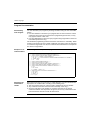
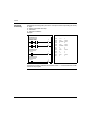
A program written in Instruction List language consists of a series of instructions
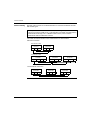
executed sequentially by the controller. The following is an example of a List
program.
0
1
2
3
4
5
6
7
8
9
10
TWD USE 10AE
BLK %C8
LDF %I0.1
R
LD
%I0.2
AND %M0
CU
OUT_BLK
LD
D
AND %M1
ST
%Q0.4
END_BLK
21
Twido Software Languages
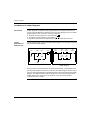
Ladder Diagrams
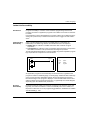
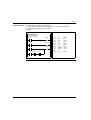
Ladder diagrams are similar to relay logic diagrams that represent relay control
circuits. Graphic elements such as coils, contacts, and blocks represent instructions.
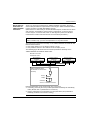
The following is an example of a Ladder diagram.
%I0.1
N
%I0.2
R
%M0
%C8
E
S ADJ Y
D
%C8.P 777
CU
F
%M1
%Q0.4
CD
22
TWD USE 10AE
Twido Software Languages
Grafcet
Language
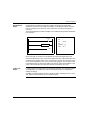
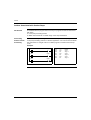
The Grafcet analytical method divides any sequential control system into a series of
steps, with which actions, transitions, and conditions are associated. The following
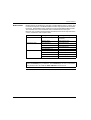
illustration shows examples of Grafcet instructions in List and Ladder programs
respectively.
0
-*-
3
1
LD
%M10
2
#
4
3
#
5
4
-*-
4
5
LD
%I0.7
6
#
6
7
-*-
5
8
LD
%M15
9
#
7
10
...
--*-- 3
%M10
4
#
5
#
--*-- 4
%I0.7
6
#
--*-- 5
%M15
7
#
TWD USE 10AE
23
Twido Software Languages
24
TWD USE 10AE
Twido Language Objects
2
At a Glance
Subject of this
Chapter
This chapter provides details about the language objects used for programming
Twido controllers.
What's in this
Chapter?
This chapter contains the following topics:
TWD USE 10AE
Topic
Page
Language Object Validation
26
Bit Objects
27
Word Objects
29
Floating point and double word objects
32
Addressing Bit Objects
36
Addressing Word Objects
37
Addressing floating objects
38
Addressing double word objects
39
Addressing Inputs/Outputs
40
Network Addressing
42
Function Block Objects
43
Structured Objects
45
Indexed objects
48
Symbolizing Objects
50
25
Twido Language Objects
Language Object Validation
Introduction
Word and bit objects are valid if they have been allocated memory space in the
controller. To do this, they must be used in the application before downloaded to the
controller.
Example
The range of valid objects is from zero to the maximum reference for that object type.
For example, if your application's maximum references for memory words is %MW9,
then %MW0 through %MW9 are allocated space. %MW10 in this example is not
valid and can not be accessed either internally or externally.
26
TWD USE 10AE
Twido Language Objects
Bit Objects
Introduction
Bit objects are bit-type software variables that can be used as operands and tested
by Boolean instructions. The following is a list of bit objects:
z I/O bits
z Internal bits (memory bits)
z System bits
z Step bits
z Bits extracted from words
List of Operand
Bits
The following table lists and describes all of the main bit objects that are used as
operands in Boolean instructions.
Type
Description
Address or value
Maximum number
Write access (1)
Immediate
values
0 or 1 (False or True)
0 or 1
-
-
Inputs
Outputs
These bits are the "logical images"
of the electrical states of the I/O.
They are stored in data memory
and updated during each scan of
the program logic.
%Ix.y.z (2)
%Qx.y.z (2)
Note (4)
No
Yes
AS-Interface
Inputs
Outputs
These bits are the "logical images"
of the electrical states of the I/O.
They are stored in data memory
and updated during each scan of
the program logic.
Internal
(Memory)
Internal bits are internal memory
areas used to store intermediary
values while a program is running.
Note: Unused I/O bits can not be
used as internal bits.
System
System bits %S0 to %S127 monitor %Si
the correct operation of the
controller and the correct running of
the application program.
Function
blocks
The function block bits correspond
to the outputs of the function
blocks.
These outputs may be either
directly connected or used as an
object.
TWD USE 10AE
Note (5)
No
Yes
%IAx.y.z
%QAx.y.z
%Mi
128
TWDLC•A10DRF,
TWDLC•A16DRF
256 All other
controllers
Yes
128
According to i
%TMi.Q, %Ci.P, and Note (4)
so on.
No (3)
27
Twido Language Objects
Type
Description
Reversible
function
blocks
Function blocks programmed using E, D, F, Q, TH0, TH1 Note (4)
reversible programming
instructions BLK, OUT_BLK, and
END_BLK.
Word extracts One of the 16 bits in some words
can be extracted as operand bits.
Address or value
Variable
%X21
Grafcet steps Bits %X1 to %Xi are associated
with Grafcet steps. Step bit Xi is set
to 1 when the corresponding step is
active, and set to 0 when the step is
deactivated.
Maximum number
Variable
Write access (1)
No
Variable
62 TWDLC•A10DRF, Yes
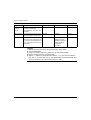
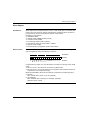
TWDLC•A16 DRF
96 TWDLC•A24DRF,
TWDLCA•40DRF
and Modular
controllers
Legends:
1. Written by the program or by using the Animation Tables Editor.
2. See I/O Addressing.
3. Except for %SBRi.j and %SCi.j, these bits can be read and written.
4. Number is determined by controller model.
5. Where, x = address of the expansion module (0..7); y = AS-Interface address
(0A..31B); z = channel number (0..3). (See Addressing I/Os associated with slave
devices connected to the AS-Interface V2 bus, p. 228.)
28
TWD USE 10AE
Twido Language Objects
Word Objects
Introduction
Word objects that are addressed in the form of 16-bit words that are stored in data
memory and can contain an integer value between -32768 and 32767 (except for
the fast counter function block which is between 0 and 65535).
Examples of word objects:
z Immediate values
z Internal words (%MWi) (memory words)
z Constant words (%KWi)
z I/O exchange words (%IWi, %QWi%)
z AS-Interface analog I/O words (IWAi, %QWAi)
z System words (%SWi)
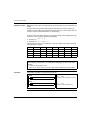
z Function blocks (configuration and/or runtime data)
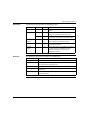
Word Formats
The contents of the words or values are stored in user memory in 16-bit binary code
(two's complement) using the following convention:
Bit position
0 1 0 1 0 0 1 0 0 1 0 0 1 1 0 1
Bit state
|+
16384
8192
4096
2048
1024
512
256
128
64
32
16
8
4
2
1
F E D C B A 9 8 7 6 5 4 3 2 1 0
Bit value
In signed binary notation, bit 15 is allocated by convention to the sign of the coded
value:
z Bit 15 is set to 0: the content of the word is a positive value.
z Bit 15 is set to 1: the content of the word is a negative value (negative values are
expressed in two's complement logic).
Words and immediate values can be entered or retrieved in the following format:
z Decimal
Min.: -32768, Max.: 32767 (1579, for example)
z Hexadecimal
Min.: 16#0000, Max.: 16#FFFF (for example, 16#A536)
Alternate syntax: #A536
TWD USE 10AE
29
Twido Language Objects
Descriptions of
Word Objects
The following table describes the word objects.
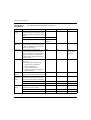
Words
Description
Immediate
values
These are integer values that are in the
same format as the 16-bit words, which
enables values to be assigned to these
words.
Address or value
Base 10
-32768 to 32767
Base 16
16#0000 to
16#FFFF
Maximum number Write access (1)
-
No
3000
Yes
Internal
(Memory)
Used as "working" words to store values %MWi
during operation in data memory. Words
%MW0 to %MW255 are read or written
directly by the program.
Constants
Store constants or alphanumeric
messages. Their content can only be
written or modified by using TwidoSoft
during configuration. Constant words
%KW0 through %KW63 are read-only
by the program.
%KWi
256
Yes,
only by using
TwidoSoft
System
These 16-bit words have several
functions:
z Provide access to data coming
directly from the controller by
reading %SWi words.)
z Perform operations on the
application (for example, adjusting
schedule blocks).
%SWi
128
According to i
Function
blocks
These words correspond to current
%TM2.P, %Ci.P,
parameters or values of function blocks. etc.
Network
exchange
words
Assigned to controllers connected as
Remote Links. These words are used
for communication between controllers:
Analog I/O
words
30
Yes
Network Input
%INWi.j
4 per remote link
No
Network Output
%QNWi.j
4 per remote link
Yes
Analog Inputs
%IWAx.y.z
Note (3)
No
Analog Outputs
%QWAx.y.z
Note (3)
Yes
Assigned to analog inputs and outputs
of AS-Interface slave modules.
TWD USE 10AE
Twido Language Objects
Words
Description
Extracted
bits
It is possible to extract one of the 16 bits
from the following words:
Internal
Address or value
Maximum number Write access (1)
%MWi:Xk
1500
Yes
System
%SWi:Xk
128
Depends on i
Constants
%KWi:Xk
64
No
Input
%IWi.j:Xk
Note (2)
No
Output
%QWi.j:Xk
Note (2)
Yes
AS-Interface Slave Input
%IWAx.y.z:Xk
Note (2)
No
AS-Interface Slave Output
%QWAx.y.z:Xk
Note (2)
Yes
Network Input
%INWi.j:Xk
Note (2)
No
Network Output
%QNWi.j:Xk
Note (2)
Yes
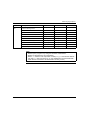
Note:
1. Written by the program or by using the Animation Tables Editor.
2. Number is determined by the configuration.
3. Where, x = address of the expansion module (0..7); y = AS-Interface address
(0A..31B); z = channel number (0..3). (See Addressing I/Os associated with
slave devices connected to the AS-Interface V2 bus, p. 228.)
TWD USE 10AE
31
Twido Language Objects
Floating point and double word objects
Introduction
TwidoSoft allows you to perform operations on floating point and double integer
word objects.
A floating point is a mathematical argument which has a decimal in its expression
(examples: 3.4E+38, 2.3 or 1.0).
A double integer word consists of 4 bytes stored in data memory and containing a
value between -2147483648 and +2147483647.
Floating Point
Format and
Value
The floating format used is the standard IEEE STD 734-1985 (equivalent IEC 559).
The length of the words is 32 bits, which corresponds to the single decimal point
floating numbers.
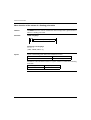
Table showing the format of a floating point value:
Bit 31
Bits {30...23}
Bits {22...0}
S
Exponent
Fractional part
The value as expressed in the above format is determined by the following equation:
S
( Exposant – 127 )
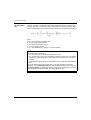
32-bit Floating Value = ( – 1 ) * 2
* 1.Fractional part
Floating values can be represented with or without an exponent; but they must
always have a decimal point (floating point).
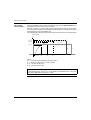
Floating values range from -3.402824e+38 and -1.175494e-38 to 1.175494e-38 and
3.402824e+38 (grayed out values on the diagram). They also have the value 0, written 0.0
.
-1.#INF
-1.#DN 1.#DN
1.#INF
-3.402824e+38
-1.175494e-38
0
+1.175494e-38
+3.402824e+38
When a calculation result is:
z Less than -3.402824e+38, the symbol -1.#INF (for -infinite) is displayed,
z Greater than +3.402824e+38, the symbol 1.#INF (for +infinite) is displayed,
z Between -1.175494e-38 and 1.175494e-38, it is rounded off to 0.0. A value within
these limits cannot be entered as a floating value.
z Indefinite (for example the square root of a negative number) the symbol 1.#NAN
or -1.#NAN is displayed.
Representation precision is 2-24. To display floating point numbers, it is
unnecessary to display more than 6 digits after the decimal point.
Note:
z the value "1285" is interpreted as a whole value; in order for it to be recognized
as a floating point value, it must be written thus: "1285.0"
32
TWD USE 10AE
Twido Language Objects
Limit range of
Arithmetic
Functions on
Floating Point
Hardware
compatibility
TWD USE 10AE
The following table describes the limit range of arithmetic functions on floating point
objects
Arithmetic Funtion
Limit range and invalid operations
Type
Syntax
#QNAN (Invalid)
#INF (Infinite)
Square root of an
operand
SQRT(x)
x<0
x > 1.7E38
Power of an integer
by a real
EXPT(%MF,%MW)
EXPT(y, x)
(where:
x^y = %MW^%MF)
x<0
y.ln(x) > 88
Base 10 logarithm
LOG(x)
x <= 0
x > 2.4E38
Natural logarithm
LN(x)
x <= 0
x > 1.65E38
Natural exponential
EXP(x)
x<0
x > 88.0
Floating point and double word operations are not supported by all Twido
controllers.
The following table shows hardware compatibility:
Twido controller
Double words
supported
Floating
points
supported
TWDLMDA40DUK
Yes
Yes
TWDLMDA40DTK
Yes
Yes
TWDLMDA20DUK
Yes
No
TWDLMDA20DTK
Yes
No
TWDLMDA20DRT
Yes
Yes
TWDLCA•40DRF
Yes
Yes
TWDLC•A24DRF
Yes
No
TWDLC•A16DRF
Yes
No
TWDLC•A10DRF
No
No
33
Twido Language Objects
Validity Check
When the result is not within the valid range, the system bit %S18 is set to 1.
The status word %SW17 bits indicate the cause of an error in a floating operation:
Different bits of the word %SW17:
%SW17:X0
Invalid operation, result is not a number (1.#NAN or -1.#NAN)
%SW17:X1
Reserved
%SW17:X2
Divided by 0, result is infinite (-1.#INF or 1.#INF)
%SW17:X3
Result greater in absolute value than +3.402824e+38, result is infinite (-1.#INF
or 1.#INF)
%SW17:X4
to X15
Reserved
This word is reset to 0 by the system on cold start, and also by the program for reusage purposes.
Description of
Floating Point
and Double Word
Objects
The following table describes floating point and double word objects:
Type of object
Description
Address Maximum
number
Write access
Indexed form
Immediate values
Integers or decimal numbers
with identical format to 32 bit
objects.
-
No
-
Internal floating point
Objects used to store values
during operation in data
memory.
%MFi
1500
Yes
%MFi[index]
Internal double word
%MDi
1500
Yes
%MDi[index]
Floating constant value
Used to store constants.
%KFi
128
Yes, only using
TwidoSoft
%KFi[index]
%KDi
128
Yes, only using
TwidoSoft
%KDi[index]
Double constant
34
[-]
TWD USE 10AE
Twido Language Objects
Possibility of
Overlap between
Objects
Single, double length and floating words are stored in the data space in one memory
zone. Thus, the floating word %MFi and the double word %MDi correspond to the
single length words %MWi and %MWi+1 (the word %MWi containing the least
significant bits and the word %MWi+1 the most significant bits of the word %MFi).
The following table shows how floating and double internal words overlap:
Floating and Double Odd address
Internal words
%MF0 / %MD0
%MW0
%MF1 / %MD1
%MF2 / %MD2
%MW1
%MW2
%MF3 / %MD3
%MF4 / %MD4
%MW3
%MW4
...
%MW5
%MFi / %MDi
%MWi
...
...
%MFi+1 / %MDi+1
%MWi+1
The following table shows how floating and double constants overlap:
Floating and Double Odd address
Internal words
%KF0 / %KD0
%KW0
%KF1 / %KD1
%KF2 / %KD2
%KF3 / %KD3
%KF4 / %KD4
%KW3
%KW4
...
...
%KW5
...
%kFi / %kDi
%KFi+1 / %KDi+1
%KW1
%KW2
%KWi
%KWi+1
Example:
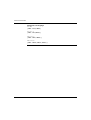
%MF0 corresponds to %MW0 and %MW1. %KF543 corresponds to %KW543 and
%KW544.
TWD USE 10AE
35
Twido Language Objects
Addressing Bit Objects
Syntax
Description
Use the following format to address internal, system, and step bit objects:
%
M, S, or X
Symbol
Object type
i
Number
The following table describes the elements in the addressing format.
Group
Item
Description
Symbol
%
The percent symbol always precedes a software variable.
Type of
object
M
Internal bits store intermediary values while a program is
running.
S
System bits provide status and control information for the
controller.
X
Step bits provide status of step activities.
i
The maximum number value depends on the number of objects
configured.
Number
Examples of bit object addressing:
z %M25 = internal bit number 25
z %S20 = system bit number 20
z %X6 = step bit number 6
Bit Objects
Extracted from
Words
TwidoSoft is used to extract one of the 16 bits from words. The address of the word
is then completed by the bit row extracted according to the following syntax:
WORD
:X
Word address
k
Position k = 0 - 15 bit
rank in the word address.
Examples:
z %MW5:X6 = bit number 6 of internal word %MW5
z %QW5.1:X10 = bit number 10 of output word %QW5.1
36
TWD USE 10AE
Twido Language Objects
Addressing Word Objects
Introduction
Addressing word objects, except for input/output addressing (see Addressing
Inputs/Outputs, p. 40) and function blocks (see Function Block Objects, p. 43),
follows the format described below.
Syntax
Use the following format to address internal, constant and system words:
Description
%
M, K or S
Symbol
Object type
W
i
Format
Number
The following table describes the elements in the addressing format.
Group
Item Description
Symbol
%
The percent symbol always precedes an internal address.
Type of object
M
Internal words store intermediary values while a program is running.
K
Constant words store constant values or alphanumeric messages.
Their content can only be written or modified by using TwidoSoft.
S
System words provide status and control information for the
controller.
Syntax
W
16-bit word.
Number
i
The maximum number value depends on the number of objects
configured.
Examples of word object addressing:
z %MW15 = internal word number 15
z %KW26 = constant word number 26
z %SW30 = system word number 30
TWD USE 10AE
37
Twido Language Objects
Addressing floating objects
Introduction
Addressing floating objects, except for input/output addressing (see Addressing
Inputs/Outputs, p. 40) and function blocks (see Function Block Objects, p. 43),
follows the format described below.
Syntax
Use the following format to address internal and constant floating objects:
%
M or K
Symbol
Description
Type of object
F
Syntax
i
Number
The following table describes the elements in the addressing format.
Group
Item Description
Symbol
%
The percent symbol always precedes an internal address.
Type of object
M
Internal floating objects store intermediary values while a program is
running.
K
Floating constants are used to store constant values. Their content
can only be written or modified by using TwidoSoft.
Syntax
F
32 bit object.
Number
i
The maximum number value depends on the number of objects
configured.
Examples of floating object addresses:
z %MF15 = internal floating object number 15
z %KF26 = constant floating object number 26
38
TWD USE 10AE
Twido Language Objects
Addressing double word objects
Introduction
Addressing double word objects, except for input/output addressing (see
Addressing Inputs/Outputs, p. 40) and function blocks (see Function Block Objects,
p. 43), follows the format described below.
Syntax
Use the following format to address internal and constant double words:
%
M or K
Symbol
Description
Type of object
D
Syntax
i
Number
The following table describes the elements in the addressing format.
Group
Item
Description
Symbol
%
The percent symbol always precedes an internal address.
Type of object
M
Internal double words are used to store intermediary values while a
program is running.
K
Constant double words store constant values or alphanumeric
messages. Their content can only be written or modified by using
TwidoSoft.
Syntax
D
32 bit double word.
Number
i
The maximum number value depends on the number of objects
configured.
Examples of double word object addressing:
z %MD15 = internal double word number 15
z %KD26 = constant double word number 26
TWD USE 10AE
39
Twido Language Objects
Addressing Inputs/Outputs
Introduction
Each input/output (I/O) point in a Twido configuration has a unique address: For
example, the address "%I0.0.4" is assigned to input 4 of a controller.
I/O addresses can be assigned for the following hardware:
z Controller configured as Remote Link Master
z Controller configured as Remote I/O
z Expansion I/O modules
The TWDNOI10M3 AS-Interface bus interface module and the TWDNCO1M
CANopen fieldbus module each uses its own special address system for addressing
the I/Os of slave devices connected to its bus:
z For TWDNOI10M3, see Addressing I/Os associated with slave devices
connected to the AS-Interface V2 bus, p. 228.
z For TWDNCO1M, see Addressing PDOs of the CANopen master, p. 269.
Multiple
References to an
Output or Coil
In a program, you can have multiple references to a single output or coil. Only the
result of the last one solved is updated on the hardware outputs. For example,
%Q0.0.0 can be used more than once in a program, and there will not be a warning
for multiple occurrences. So it is important to confirm only the equation that will give
the required status of the output.
CAUTION
UNINTENDED OPERATION
No duplicate output checking or warnings are provided. Review the use of the
outputs or coils before making changes to them in your application.
Failure to follow this instruction can result in injury or equipment damage.
Format
Use the following format to address inputs/outputs.
%
I, Q
Symbol
Object type
x
Controller
position
.
point
y
.
I/O type
z
point
Channel number
Use the following format to address inputs/output exchange words.
40
%
I, Q
Symbol
Object type
W
Format
x
Controller
position
.
point
y
I/O Type
TWD USE 10AE
Twido Language Objects
Description
Examples
TWD USE 10AE
The table below describes the I/O addressing format.
Group
Item
Value
Description
Symbol
%
-
The percent symbol always precedes an internal
address.
Object type
I
-
Input. The "logical image" of the electrical state of
a controller or expansion I/O module input.
Q
-
Output. The "logical image" of the electrical state
of a controller or expansion I/O module output.
Controller
position
x
0
1-7
Master controller (Remote Link master).
Remote controller (Remote Link slave).
I/O Type
y
0
1-7
Base I/O (local I/O on controller).
Expansion I/O modules.
Channel
Number
z
0 - 31
I/O channel number on controller or expansion I/
O module. Number of available I/O points
depends on controller model or type of
expansion I/O module.
The table below shows some examples of I/O addressing.
I/O object
Description
%I0.0.5
Input point number 5 on the base controller (local I/O).
%Q0.3.4
Output point number 4 on the expansion I/O module at address 3 for
the controller base (expansion I/O).
%I0.0.3
Input point number 3 on base controller.
%I3.0.1
Input point number 1 on remote I/O controller at address 3 of the
remote link.
%I0.3.2
Input point number 2 on the expansion I/O module at address 3 for
the controller base.
41
Twido Language Objects
Network Addressing
Introduction
Application data is exchanged between peer controllers and the master controller on
a Twido Remote Link network by using the network words %INW and %QNW. See
Communications , p. 83 for more details.
Format
Use the following format for network addressing.
Description of
Format
%
IN,QN
Symbol
Object type
42
x
Controller
position
.
point
j
Word
The table below describes the network addressing format.
Group
Element
Value
Description
Symbol
%
-
The percent symbol always precedes an internal address.
Object type IN
-
Network input word. Data transfer from master to peer.
-
Network output word. Data transfer from peer to master.
QN
Examples
W
Format
Format
W
-
A16-bit word.
Controller
position
x
0
1-7
Master controller (Remote Link master).
Remote controller (Remote Link slave).
Word
j
0-3
Each peer controller uses from one to four words to
exchange data with the master controller.
The table below shows some examples of networking addressing.
Network object
Description
%INW3.1
Network word number 1 of remote controller number 3.
%QNW0.3
Network word number 3 of the base controller.
TWD USE 10AE
Twido Language Objects
Function Block Objects
Introduction
Function blocks provide bit objects and specific words that can be accessed by the
program.
Example of a
Function Block
The following illustration shows a counter function block.
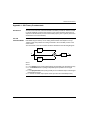
%Ci
R
S
CU
CD
E
ADJ Y
%Ci.P 9999
D
F
Up/down counter block
Bit Objects
Bit objects correspond to the block outputs. These bits can be accessed by Boolean
test instructions using either of the following methods:
z Directly (for example, LD E) if they are wired to the block in reversible
programming (see Standard function blocks programming principles, p. 388).
z By specifying the block type (for example, LD %Ci.E).
Inputs can be accessed in the form of instructions.
Word Objects
Word objects correspond to specified parameters and values as follows:
z Block configuration parameters: some parameters are accessible by the program
(for example, pre-selection parameters), and some are inaccessible by the
program (for example, time base).
z Current values: for example, %Ci.V, the current count value.
TWD USE 10AE
43
Twido Language Objects
Word Objects
Double word objects increase the computational capability of your Twido controller
while executing system functions, such as fast counters (%FC), very fast counters
(%VFC) and pulse generators (%PLS).
Addressing of 32-bit double word objects used with function blocks simply consists
in appending the original syntax of the standard word objects with the "D" character.
The following example, shows how to address the current value of a fast counter in
standard format and in double word format:
z %FCi.V is current value of the fast counter in standard format.
z %FCi.VD is the current value of the fast counter in double word format.
Note: Double word objects are not supported by all Twido controllers. Refer to
Hardware compatibility, p. 33 to find out if your Twido controller can accommodate
double words.
Objects
Accessible by
the Program
44
See the following appropriate sections for a list of objects that are accessible by the
program.
z For Basic Function Blocks, see Basic Function Blocks, p. 386.
z For Advanced Function Blocks, see Bit and Word Objects Associated with
Advanced Function Blocks, p. 438.
TWD USE 10AE
Twido Language Objects
Structured Objects
Introduction
Structured objects are combinations of adjacent objects. Twido supports the
following types of structured objects:
z Bit Strings
z Tables of words
z Tables of double words
z Tables of floating words
Bit Strings
Bit strings are a series of adjacent object bits of the same type and of a defined
length (L).
Example:Bit string %M8:6
%M8
%M9
%M10
%M11
%M12
%M13
Note: %M8:6 is acceptable (8 is a multiple of 8), while %M10:16 is unacceptable
(10 is not a multiple of 8).
Bit strings can be used with the Assignment instruction (see Assignment
Instructions, p. 411).
TWD USE 10AE
45
Twido Language Objects
Available Types
of Bits
Available types of bits for bit strings:
Type
Address
Maximum size
Write access
Discrete input bits
%I0.0:L or %I1.0:L (1)
0<L<17
No
Discrete output bits
%Q0.0:L or %Q1.0:L (1)
0<L<17
Yes
System bits
%Si:L
with i multiple of 8
0<L<17 and i+L≤ 128
Depending on i
Grafcet Step bits
%Xi:L
with i multiple of 8
0<L<17 and i+L≤ 95
(2)
Yes (by program)
Internal bits
%Mi:L
with i multiple of 8
0<L<17 and i+L≤ 256
(3)
Yes
Key:
1. Only I/O bits 0 to 16 can be read in bit string. For controllers with 24 inputs and
32 I/O modules, bits over 16 cannot be read in bit string.
2. Maximum of i+L for TWWDLCAA10DRF and TWDLCAA16DRF is 62
3. Maximum of i+L for TWWDLCAA10DRF and TWDLCAA16DRF is 128
Tables of words
Word tables are a series of adjacent words of the same type and of a defined length
(L).
Example:Word table %KW10:7
%KW10
16 bits
%KW16
Word tables can be used with the Assignment instruction (see Assignment
Instructions, p. 411).
Available Types
of Words
46
Available types of words for word tables:
Type
Address
Maximum size
Write access
Internal words
%MWi:L
0<L<256 and i+L< 3000
Yes
Constant words
%KWi:L
0<L<256 and i+L< 256
No
System Words
%SWi:L
0<L and i+L<128
Depending on i
TWD USE 10AE
Twido Language Objects
Tables of double
words
Double word tables are a series of adjacent words of the same type and of a defined
length (L).
Example:Double word table %KD10:7
%KD10
32 Bit
%KD22
Double word tables can be used with the Assignment instruction (see Assignment
Instructions, p. 411).
Available Types
of Double Words
Tables of floating
words
Available types of words for double word tables:
Type
Address
Maximum size
Write access
Internal words
%MDi:L
0<L<256 and i+L< 3000
Yes
Constant words
%KDi:L
0<L and i+L< 256
No
Floating word tables are a series of adjacent words of the same type and of a defined
length (L).
Example: Floating point table %KF10:7
%KF10
32 Bit
%KF22
Floating point tables can be used with the Assignment instruction (see Advanced
instructions).
Types of Floating
Words Available
TWD USE 10AE
Available types of words for floating word tables:
Type
Address
Maximum size
Write access
Internal words
%MFi:L
0<L<256 and i+L< 3000
Yes
Constant words
%KFi:L
0<L and i+L<256
No
47
Twido Language Objects
Indexed objects
Introduction
An indexed word is a single or double word or floating point with an indexed object
address. There are two types of object addressing:
z Direct addressing
z Indexed addressing
Direct
Addressing
A direct address of an object is set and defined when a program is written.
Example: %M26 is an internal bit with the direct address 26.
Indexed
Addressing
An indexed address of an object provides a method of modifying the address of an
object by adding an index to the direct address of an object. The content of the index
is added to the object’s direct address. The index is defined by an internal word
%MWi. The number of "index words" is unlimited.
Example: %MW108[%MW2] is a word with an address consisting of the direct
address 108 plus the contents of word %MW2.
If word %MW2 has a value of 12, writing to %MW108[%MW2] is equivalent to writing
to %MW120 (108 plus 12).
Objects
Available for
Indexed
Addressing
The following are the available types of objects for indexed addressing.
Type
Address
Maximum size
Write access
Internal words
%MWi[MWj]
0≤ i+%MWj<3000
Yes
Constant words
%KWi[%MWj]
0≤ i+%MWj<256
No
Internal double words %MDi[MWj]
0≤ i+%MWj<2999
Yes
Double constant
words
%KDi[%MWj]
0≤ i+%MWj<255
No
Internal floating
points
%MFi[MWj]
0≤ i+%MWj<2999
Yes
Constant floating
points
%KFi[%MWj]
0≤ i+%MWj<255
No
Indexed objects can be used with the assignment instructions (see Assignment
Instructions, p. 411 for single and double words) and in comparison instructions (see
Comparison Instructions, p. 416 for single and double words). This type of
addressing enables series of objects of the same type (such as internal words and
constants) to be scanned in succession, by modifying the content of the index object
via the program.
48
TWD USE 10AE
Twido Language Objects
Index Overflow
system bit %S20
An overflow of the index occurs when the address of an indexed object exceeds the
limits of the memory zone containing the same type of object. In summary:
z The object address plus the content of the index is less than 0.
z The object address plus the content of the index is greater than the largest word
directly referenced in the application. The maximum number is 2999 (for words
%MWi) or 255 (for words %KWi).
In the event of an index overflow, the system sets system bit %S20 to 1 and the
object is assigned an index value of 0.
Note: The user is responsible for monitoring any overflow. Bit %S20 must be read
by the user program for possible processing. The user must confirm that it is reset
to 0.
%S20 (initial status = 0):
z On index overflow: set to 1 by the system.
z Acknowledgment of overflow: set to 0 by the user, after modifying the index.
TWD USE 10AE
49
Twido Language Objects
Symbolizing Objects
Introduction
You can use Symbols to address Twido software language objects by name or
customized mnemonics. Using symbols allows for quick examination and analysis
of program logic, and greatly simplifies the development and testing of an
application.
Example
For example, WASH_END is a symbol that could be used to identify a timer function
block that represents the end of a wash cycle. Recalling the purpose of this name
should be easier than trying to remember the role of a program address such as
%TM3.
Guidelines for
Defining
Symbols
The following are guidelines for defining symbols:
z A maximum of 32 characters.
z Letters (A-Z), numbers (0 -9), or underscores (_).
z First character must be an alphabetical or accented character. You can not use
the percentile sign (%).
z Do not use spaces or special characters.
z Not case-sensitive. For example, Pump1 and PUMP1 are the same symbol and
can only be used once in an application.
Editing Symbols
Symbols are defined and associated with language objects in the Symbol Editor.
Symbols and their comments are stored with the application on the PC hard drive,
but are not stored on the controller. Therefore, they can not be transferred with the
application to the controller.
50
TWD USE 10AE
User Memory
3
At a Glance
Subject of this
Chapter
This chapter describes the structure and usage of Twido user memory.
What's in this
Chapter?
This chapter contains the following topics:
TWD USE 10AE
Topic
Page
User Memory Structure
52
Backup and Restore without Backup Cartridge or Extended Memory
54
Backup and Restore with a 32K Backup Cartridge
56
Using the 64K Extended Memory Cartridge
58
51
User Memory
User Memory Structure
Introduction
The controller memory accessible to your application is divided into two distinct sets:
z Bit values
z Word values (16-bit signed values) and double word values (32-bit signed values)
Bit Memory
The bit memory is located in the controller's built-in RAM. It contains the map of 128
bit objects.
Word Memory
The word memory (16 bits) supports:
z Dynamic words: runtime memory (stored in RAM only).
z Memory words (%MW) and double words (%MD): dynamic system data and
system data.
z Program: descriptors and executable code for tasks.
z Configuration data: constant words, initial values, and input/output
configuration.
Memory Storage
Types
The following are the different types of memory storage for Twido controllers.
z Random Access Memory.
Internal volatile memory: Contains dynamic words, memory words, program and
configuration data.
z EEPROM
An integrated 32KB EEPROM that provides internal program and data backup.
Protects program from corruption due to battery failure or a power outage lasting
longer than 30 days. Contains program and configuration data. Holds a maximum
of 512 memory words. Program is not backed up here If a 64K extended memory
cartridge is being used and Twido has been configured to accept the 64K
extended memory cartridge.
z Erase 32K backup cartridge
An optional external cartridge used to save a program and transfer that program
to other Twido controllers. Can be used to update the program in controller RAM.
Contains program and constants, but no memory words.
z 64K extended memory cartridge
An optional external cartridge that stores a program up to 64K. Must remain
plugged into the controller as long as that program is being used.
Saving Memory
Your controller’s program and memory words can be saved in the following:
z RAM (for up to 30 days with good battery)
z EEPROM (maximum of 32 KB)
Transferring the program from the EEPROM memory to the RAM memory is done
automatically when the program is lost in RAM (or if there is no battery).
Manual transfer can also be performed using TwidoSoft.
52
TWD USE 10AE
User Memory
Memory
Configurations
The following tables describe the types of memory configurations possible with
Twido compact and modulare controllers.
Compact Controllers
Memory Type
10DRF
16DRF
24DRF
40DRF
(32k)
40DRF**
(64k)
Internal RAM
Mem 1*
10KB
10KB
10KB
10KB
10KB
16KB
32KB
32KB
64KB
External RAM
Mem 2*
Internal EEPROM
8KB
16KB
32KB
32KB
32KB***
External EEPROM
32KB
32KB
32KB
32KB
64KB
Maximum program size 8KB
16KB
32KB
32KB
64KB
Maximum external
backup
16KB
32KB
32KB
64KB
8KB
Modular Controllers
Memory Type
20DUK
20DTK
20DRT
40DUK
40DTK (32k)
20DRT
40DUK
40DTK** (64k)
Internal RAM
Mem 1*
10KB
10KB
10KB
External RAM
Mem 2*
32KB
32KB
64KB
Internal EEPROM
32KB
32KB
32KB***
External EEPROM
32KB
32KB
64KB
Maximum program size 32KB
32KB
64KB
Maximum external
backup
32KB
64KB
32KB
(*) Mem 1 and Mem 2 in memory usage.
(**) in this case the 64KB cartridge must be installed on the Twido and declared in
the configuration, if it has not already been declared,
(***) reserved for backup of the first 512 %MW words or the first 256 %MD double
words.
TWD USE 10AE
53
User Memory
Backup and Restore without Backup Cartridge or Extended Memory
Introduction
The following information details backup and restore memory functions in modular
and compact controllers without a backup cartridge or extended memory plugged in.
At a Glance
Twido programs, memory words and configuration data can be backed up using the
controllers internal EEPROM. Because saving a program to the internal EEPROM
clears any previously backed up memory words, the program must be backed up
first, then the configured memory words. Dynamic data can be stored in memory
words then backed up to the EEPROM. If there is no program saved to the internal
EEPROM you cannot save memory words to it.
Memory
Structure
Here is a diagram of a controller’s memory structure. The arrows show what can be
backed up to the EEPROM from RAM:
Dynamic words
%MWs
RAM
Program
Configuration data
%MWs
EEPROM
Program
Configuration data
Program Backup
Here are the steps for backing up your program into EEPROM.
Step
54
Action
1
The following must be true:
There is a valid program in RAM.
2
From the Twido software window bring down the menu under ‘Controller’, scroll
down to ‘Backup’ and click on it.
TWD USE 10AE
User Memory
Program Restore
During power up there is one way the program will be restored to RAM from the
EEPROM (assuming there is no cartridge or extended memory in place):
z The RAM program is not valid
To restore a program manually from EEPROM do the following:
z From the Twido software window bring down the menu under ‘Controller’, scroll
down to ‘Restore’ and click on it.
Data (%MWs)
Backup
Here are the steps for backing up data (memory words) into the EEPROM:
Data (%MWs)
Restore
TWD USE 10AE
Step
Action
1
For this to work the following must be true:
A valid program in RAM (%SW96:X6=1).
The same valid program already backed up into the EEPROM.
Memory words configured in the program.
2
Set %SW97 to the length of the memory words to be saved.
Note: Length cannot exceed the configured memory word length, and it must be
greater than 0 but not greater than 512.
3
Set %SW96:X0 to 1.
Restore %MWs manually by setting system bit %S95 to 1.
For this to work the following must be true:
z A valid backup application is present in the EEPROM
z The application in RAM matches the backup application in EEPROM
z The backup memory words are valid
55
User Memory
Backup and Restore with a 32K Backup Cartridge
Introduction
The following information details backup and restore memory functions in modular
and compact controllers using a 32K backup cartridge.
At a Glance
The backup cartridge is used to save a program and transfer that program to other
Twido controllers. It should be removed from a controller and set aside once the
program has been installed or saved. Only program and configuration data can be
saved to the cartridge (%MWs cannot be saved to the 32K backup cartridge).
Dynamic data can be stored in memory words then backed up to the EEPROM.
When program installation is complete any %MWs that were backed up to the
internal EEPROM prior to installation will be lost.
Memory
Structure
Here is a diagram of a controller’s memory structure with the backup cartridge
attached. The arrows show what can be backed up to the EEPROM and cartridge
from RAM:
Dynamic words
%MWs
RAM
Program
Configuration data
%MWs
EEPROM
Program
Configuration data
Backup
cartridge
56
Program
Configuration data
TWD USE 10AE
User Memory
Program Backup
Here are the steps for backing up your program into the backup cartridge:
Step
1
Program Restore
Data (%MWs)
Restore
TWD USE 10AE
Power down the controller.
2
Plug in the backup cartridge.
3
Powerup the controller.
4
From the Twido software window bring down the menu under ‘Controller’, scroll
down to ‘Backup’ and click on it.
5
Power down the controller.
6
Remove backup cartridge from controller.
To load a program saved on a backup cartridge into a controller do the following:
Step
Data (%MWs)
Backup
Action
Action
1
Power down the controller.
2
Plug in the backup cartridge.
3
Powerup the controller.
(If Auto Start is configured you must power cycle again to get to run mode.)
4
Power down the controller.
5
Remove backup cartridge from controller.
Here are the steps for backing up data (memory words) into the EEPROM:
Step
Action
1
For this to work the following must be true:
A valid program in RAM.
The same valid program already backed up into the EEPROM.
Memory words configured in the program.
2
Set %SW97 to the length of the memory words to be saved.
Note Length cannot exceed the configured memory word length, and it must be
greater than 0 but not greater than 512.
3
Set %SW96:X0 to 1.
Restore %MWs manually by setting system bit %S95 to 1.
For this to work the following must be true:
z A valid backup application is present in the EEPROM
z The application in RAM matches the backup application in EEPROM
z The backup memory words are valid
57
User Memory
Using the 64K Extended Memory Cartridge
Introduction
The following information details using the memory functions in modular controllers
using a 64K extended memory cartridge.
At a Glance
The 64K extended memory cartridge is used to extend the program memory
capability of your Twido controller from 32K to 64K. It must remain plugged into the
controller as long as the extended program is being used. If the cartridge is removed
the controller will enter the stopped state. Memory words are still backed up into the
EEPROM in the controller. Dynamic data can be stored in memory words then
backed up to the EEPROM. The 64K extended memory cartridge has the same
power up behavior as the 32K backup cartridge.
Memory
Structure
Here is a diagram of a controller’s memory structure using an extended memory
cartridge. The arrows show what is backed up into the EEPROM and the 64K
extended memory cartridge from RAM:
Dynamic words
%MWs
RAM
Program (1st)
Configuration data
EEPROM
Extended
memory
cartridge
58
%MWs
Program (2nd)
TWD USE 10AE
User Memory
Configure
Software and
Install Extended
Memory
Before you begin writing your extended program, you must install the 64K extended
memory cartridge into your controller. The following four steps show you how:
Step
Action
1
Under the Hardware option menu on you Twido software window enter
‘TWDXCPMFK64’.
2
Power down the controller.
3
Plug in the 64K extended memory cartridge.
4
Powerup the controller.
Save your
program.
Once your 64K extended memory cartridge has been installed and your program
written:
z From the Twido software window bring down the menu under ‘Controller’, scroll
down to ‘Backup’ and click on it.
Data (%MWs)
Backup
Here are the steps for backing up data (memory words) into the EEPROM:
Data (%MWs)
Restore
TWD USE 10AE
Step
Action
1
For this to work the following must be true:
A valid program is present
Memory words are configured in the program.
2
Set %SW97 to the length of the memory words to be saved.
Note: Length cannot exceed the configured memory word length, and it must be
greater than 0 but not greater than 512.
3
Set %SW96:X0 to 1.
Restore %MWs manually by setting system bit %S95 to 1.
For this to work the following must be true:
z A valid program is present
z The backup memory words are valid
59
User Memory
60
TWD USE 10AE
Controller Operating Modes
4
At a Glance
Subject of this
Chapter
This chapter describes controller operating modes and cyclic and periodic program
execution. Included are details about power outages and restoration.
What's in this
Chapter?
This chapter contains the following topics:
TWD USE 10AE
Topic
Page
Cyclic Scan
62
Periodic Scan
64
Checking Scan Time
67
Operating Modes
68
Dealing with Power Cuts and Power Restoration
69
Dealing with a warm restart
71
Dealing with a cold start
73
Initialization of objects
75
61
Controller Operating Modes
Cyclic Scan
Introduction
Cyclic scanning involves linking controller cycles together one after the other. After
having effected the output update (third phase of the task cycle), the system
executes a certain number of its own tasks and immediately triggers another task
cycle.
Note: The scan time of the user program is monitored by the controller watchdog
timer and must not exceed 500 ms. Otherwise a fault appears causing the
controller to stop immediately in Halt mode. Outputs in this mode are forced to their
default fallback state.
Operation
The following drawing shows the running phases of the cyclical scan time.
Processing
the program
Processing the
program
I.P.
%I
%Q
I.P.
Scan n time
Description of
the phases of a
cycle
62
%I
%Q
Scan n+1 time
The following table describes the phases of a cycle.
Address
Phase
Description
I.P.
Internal
processing
The system implicitly monitors the controller (managing system
bits and words, updating current timer values, updating status
lights, detecting RUN/STOP switches, etc.) and processes
requests from TwidoSoft (modifications and animation).
%I, %IW
Acquisition of
input
Writing to the memory the status of discrete and application
specific module inputs.
-
Program
processing
Running the application program written by the user.
%Q,
%QW
Updating of
output
Writing output bits or words associated with discrete and
application specific modules.
TWD USE 10AE
Controller Operating Modes
Operating mode
Controller in RUN, the processor carries out:
z Internal processing
z Acquisition of input
z Processing the application program
z Updating of output
Controller in STOP, the processor carries out:
z Internal processing
z Acquisition of input
Illustration
The following illustration shows the operating cycles.
Internal Processing
Acquiring Inputs
RUN
STOP
Processing Program
Updating Outputs
Check Cycle
TWD USE 10AE
The check cycle is performed by watchdog.
63
Controller Operating Modes
Periodic Scan
Introduction
In this operating mode, acquiring inputs, processing the application program, and
updating outputs are done periodically according to the time defined at configuration
(from 2-150 ms).
At the beginning of the controller scan, a timer, the value of which is initialized at the
period defined at configuration, starts to count down. The controller scan must end
before the timer has finished and relaunches a new scan.
Operation
The following drawing shows the running phases of the periodic scan time.
Processing the
program
%I
Processing the
program
%Q
I.P.
Waiting
period
%I
Scan n time
%Q
I.P.
Waiting
period
Scan n+1 time
Period
Description of
Operating
Phases
64
The table below describes the operating phases.
Address Phase
Description
I.P.
The system implicitly monitors the controller (managing system
bits and words, updating current timer values, updating status
lights, detecting RUN/STOP switches, etc.) and processes
requests from TwidoSoft (modifications and animation).
Internal
processing
%I, %IW Acquisition of
input
Writing to the memory the status of discrete and application
specific module inputs.
-
Program
processing
Running the application program written by the user.
%Q,
%QW
Updating of
output
Writing output bits or words associated with discrete and
application specific modules.
TWD USE 10AE
Controller Operating Modes
Operating mode
TWD USE 10AE
Controller in RUN, the processor carries out:
z Internal processing
z Acquisition of input
z Processing the application program
z Updating of output
If the period has not finished, the processor completes its operating cycle until the
end of the internal processing period. If the operating time is longer than that
allocated to the period, the controller indicates that the period has been exceeded
by setting the system bit %S19 to 1. The process continues and is run completely.
However, it must not exceed the watchdog time limit. The following scan is linked in
after writing the outputs of the scan in progress implicitly.
Controller in STOP, the processor carries out:
z Internal processing
z Acquisition of input
65
Controller Operating Modes
Illustration
The following illustration shows the operating cycles.
Starting the
period
Internal processing
Acquiring inputs
RUN
STOP
Program processing
Updating outputs
Internal processing
End of period
Check Cycle
66
Two checks are carried out:
z Period overflow
z Watchdog
TWD USE 10AE
Controller Operating Modes
Checking Scan Time
General
The task cycle is monitored by a watchdog timer called Tmax (a maximal duration
of the task cycle). It permits the showing of application errors (infinite loops, and so
on.) and assures a maximal duration for output refreshing.
Software
WatchDog
(Periodic or
Cyclic
Operation)
In periodic or cyclic operation, the triggering of the watchdog causes a software
error. The application passes into a HALT state and sets system bit %S11 to 1. The
relaunching of the task necessitates a connection to Twido Soft in order to analyze
the cause of the error, modification of the application to correct the error, then reset
the program to RUN.
Note: The HALT state is when the application is stopped immediately because of
an application software error such as a scan overrun. The data retains the current
values, which allows for an analysis of the cause of the error. The program stops
on the instruction in progress. Communication with the controller is open.
Check on
Periodic
Operation
In periodic operation an additional check is used to detect the period being
exceeded:
z %S19 indicates that the period has been exceeded. It is set to:
z 1 by the system when the scan time is greater that the task period,
z 0 by the user.
z %SW0 contains the period value (0-150 ms). It is:
z Initialized when starting from a cold start by the value selected on the
configuration,
z Able to be modified by the user.
Using Master
Task Running
Time
The following system words are used for information on the controller scan cycle
time:
z %SW11 initializes to the maximum watchdog time (10 to 500 ms).
z %SW30 contains the execution time for the last controller scan cycle.
z %SW31 contains the execution time for the longest controller scan cycle since
the last cold start.
z %SW32 contains the execution time for the shortest controller scan cycle since
the last cold start.
Note: This different information can also be accessed from the configuration editor.
TWD USE 10AE
67
Controller Operating Modes
Operating Modes
Introduction
Twido Soft is used to take into account the three main operating mode groups:
z Checking
z Running or production
z Stopping
Starting through
Grafcet
These different operating modes can be obtained either starting from or using the
following Grafcet methods:
z Grafcet initialization
z Presetting of steps
z Maintaining a situation
z Freezing charts
Preliminary processing and use of system bits ensure effective operating mode
management without complicating and overburdening the user program.
Grafcet System
Bits
Use of bits %S21, %S22 and %S23 is reserved for preliminary processing only.
These bits are automatically reset by the system. They must be written by Set
Instruction S only.
The following table provides Grafcet-related system bits:
Bit
Function
Description
%S21 GRAFCET initialization Normally set to 0, it is set to 1 by:
z a cold-start, %S0=1;
z The user, in the pre-processing program part only, using
a Set Instruction S %S21 or a set coil -(S)- %S21.
Consequences:
z Deactivation of all active steps.
z Activation of all initial steps.
68
%S22 GRAFCET RESET
Normally set to 0, it can only be set to 1 by the program in
pre-processing.
Consequences:
z Deactivation of all active steps.
z Scanning of sequential processing stopped.
%S23 Preset and freeze
GRAFCET
Normally set to 0, it can only be set to 1 by the program in
pre-processing.
z Prepositioning by setting %S22 to 1.
z Preposition the steps to be activated by a series of S Xi
instructions.
z Enable prepositioning by setting %S23 to 1.
Freezing a situation:
z In initial situation: by maintaining %S21 at 1 by program.
z In an "empty" situation: by maintaining %S22 at 1 by
program.
z In a situation determined by maintaining %S23 at 1.
TWD USE 10AE
Controller Operating Modes
Dealing with Power Cuts and Power Restoration
Illustration
The following illustration shows the various power restarts detected by the system.
If the duration of the cut is less than the power supply filtering time (about 10 ms for
an alternating current supply or 1 ms for a direct current supply), this is not noticed
by the program which runs normally.
RUN
Run
Application
Power outage
Standby power
Power restoration
WAIT
Power cut
detected
Yes
Auto-test
No
Save
context OK
No
Yes
Memory card
identical
No
Yes
Normal execution of
program
Warm Start
Cold Start
Note: The context is saved in a battery backed-up RAM. At power up, the system
checks the state of the battery and the saved context to decide if a warm start can
occur.
TWD USE 10AE
69
Controller Operating Modes
Run/Stop Input
Bit Versus Auto
Run
The Run/Stop input bit has priority over the "Automatic Start in Run" option that is
available from the Scan Mode dialog box. If the Run/Stop bit is set, then the
controller will restart in the Run Mode when power is restored.
The mode of the controller is determined as follows:
Run/Stop Input Bit
Auto Start in Run
Resulting State
Zero
Zero
Stop
Zero
One
Stop
Rising edge
No effect
Run
One
No effect
Run
Not configured in software
Zero
Stop
Not configured in software
One
Run
Note: For all Compact type of controllers of software version V1.0, if the controller
was in Run mode when power was interrupted, and the "Automatic Start in Run"
flag was not set from the Scan Mode dialog box, the controller will restart in Stop
mode when power is restored. Otherwise will perform a cold restart.
Note: For all Modular and Compact type of controllers of software version V1.11,
if the battery in the controller is operating normally when power was interrupted, the
controller will startup in the mode that was in effect at the time the power was
interrupted. The "Automatic Start in Run" flag, that was selected from the Scan
Mode dialog, will have no effect on the mode when the power is restored.
Operation
The table below describes the processing phases for power cuts.
Phase
70
Description
1
In the event of a power cut the system stores the application context and the time
of the cut.
2
All outputs are set to fallback status (0).
3
When power is restored, the context saved is compared with the one in progress
which defines the type of start to run:
z If the application context has changed (loss of system context or new
application), the controller initializes the application: Cold restart (systematic for
compact).
z If the application context is the same, the controller restarts without initializing
data: warm restart.
TWD USE 10AE
Controller Operating Modes
Dealing with a warm restart
Cause of a Warm
Restart
A warm restart can occur:
z When power is restored without loss of application context,
z When bit %S1 is set to state 1 by the program,
z From the Operator Display when the controller is in STOP mode
Illustration
The drawing below describes a warm restart operation in RUN mode.
WAIT
RUN
Acquisition of inputs
Stop the processor
Save application
context
Execution of program
TOP
if bit %S1=1,
possible process with
warm restart
Restoration of power
Partial configuration
auto-tests
Detection of
power cut
>Micro power
cut
No
Yes
Set bit %S1 to 1
for only one cycle
BOT
Set bit %S1 to 0
Update outputs
TWD USE 10AE
71
Controller Operating Modes
Restart of the
Program
Execution
The table below describes the restart phases for running a program after a warm
restart.
Phase
Description
1
The program execution resumes from the same element where it was prior to
the power cut, without updating the outputs.
Note: Only the same element from the user code is restarted. The system code
(for example, the updating of outputs) is not restarted.
2
At the end of the restart cycle, the system:
z Unreserves the application if it was reserved (and provokes a STOP
application in case of debugging)
z Reinitializes the messages
3
The system carries out a restart cycle in which it:
z Relaunches the task with bits %S1 (warm-start indicator) and %S13 (first
cycle in RUN) set to 1
z Resets bits %S1 and %S13 to 0 at the end of the first task cycle
Processing of a
Warm-Start
In the event of a warm-start, if a particular application process is required, bit %S1
must be tested at the start of the task cycle, and the corresponding program called
up.
Outputs after
Power Failure
Once a power outage is detected, outputs are set to (default) fallback status (0).
When power is restored, outputs are at last state until they are updated again by the
task.
72
TWD USE 10AE
Controller Operating Modes
Dealing with a cold start
Cause of a Cold
Start
A cold-start can occur:
z When loading a new application into RAM
z When power is restored with loss of application context
z When system bit %S0 is set to state 1 by the program
z From the Operator Display when the controller is in STOP mode
Illustration
The drawing below describes a cold restart operation in RUN mode.
RUN
WAIT
Acquisition of inputs
Stop the processor
Save application
context
Execution of program
TOP
if bit %S0=1,
possible process with
cold restart
Restoration of power
AUTO-TESTS
Detection of
power cut
>Micro power
cut
No
Yes
Completion of
configuration auto-tests
Initialization of
application
BOT
Set bit %S0 to 1
Set bit %S0 to 0
Update outputs
TWD USE 10AE
73
Controller Operating Modes
Operation
The table below describes the restart phases for running a program after a cold
restart.
Phase
Description
1
At start up, the controller is in RUN.
At a cold restart after a stop due to an error, the system forces a cold restart.
The program execution restarts at the beginning of the cycle.
2
The system:
z Resets internal bits and words and the I/O images to 0
z Initializes system bits and words
z Initializes function blocks from configuration data
3
For this first restart cycle, the system:
z Relaunches the task with bits %S0 (cold-start indicator) and %S13 (first
cycle in RUN) set to 1
z Resets bits %S0 and %S13 to 0 at the end of this first task cycle
z Sets bits %S31 and %S38 (event control indicators) to their initial state 1.
z Resets bits %S39 (event control indicator) and word %SW48 (counts all
events executed except periodic events).
Processing of a
Cold-Start
In the event of a cold-start, if a particular application process is required, bit %S0
(which is at 1) must be tested during the first cycle of the task.
Outputs after
Power Failure
Once a power outage is detected, outputs are set to (default) fallback status (0).
When power is restored, outputs are at zero until they are updated again by the task.
74
TWD USE 10AE
Controller Operating Modes
Initialization of objects
Introduction
The controllers can be initialized by Twido Soft by setting system bits %S0 (a cold
restart) and %S1 (a warm restart).
Cold Start
Initialization
For a cold start initialization, system bit %S0 must be set to 1.
Initialization of
objects (identical
to cold start) on
power-up using
%S0 and %S1
To initialize objects on power-up, system bit %S1 and %S0 must be set to 1.
The following example shows how to program a warm restart object initialization
using system bits.
%S1
%S0
LD %S1 If %S1 = 1 (warm restart), set %S0 to 1 initialize the controller.
ST %S0 These two bits are reset to 0 by the system at the end of the
following scan.
Note: Do not set %S0 to 1 for more than one controller scan.
TWD USE 10AE
75
Controller Operating Modes
76
TWD USE 10AE
Event task management
5
In Brief...
At a Glance
This chapter describes event tasks and how they are executed in the controller.
Note: Event tasks are not managed by the 10 I/O Twido controller (TWDLCAA10DRF).
What's in this
Chapter?
This chapter contains the following topics:
Topic
Overview of event tasks
TWD USE 10AE
Page
78
Description of different event sources
79
Event management
80
77
Event task management
Overview of event tasks
Introduction
The previous chapter presented periodic (See Periodic Scan, p. 64) and cyclic (See
Cyclic Scan, p. 62) tasks in which objects are updated at the start and end of the
task. Event sources may cause a certain task to be stopped while higher priority
(event) tasks are executed to allow objects to be updated more quickly.
An event task:
z is a part of a program executed when a given condition is met (event source),
z has a higher priority than the main program,
z guarantees a rapid response time enabling the overall response time of the
system to be reduced.
Description of an
Event
An event is composed of:
z an event source which can be defined as a software or hardware interrupt
condition to interrupt the main program (See Description of different event
sources, p. 79),
z a section which is a independent programmed entity related to an event,
z an event queue which can be used to store a list of events until they are executed,
z a priority level which specifies the order of event execution.
78
TWD USE 10AE
Event task management
Description of different event sources
Overview of
Different Event
Sources
An event source needs to be managed by the software to make the sure the main
program is properly interrupted by the event, and to call the programming section
linked to the event. The application scan time has no effect on the execution of the
events.
The following 9 event sources are allowed:
z 4 conditions linked to the VFC function block thresholds (2 events per %VFC
instance),
z 4 conditions linked to the physical inputs of a controller base,
z 1 periodic condition.
An event source can only be attached to a single event, and must be immediately
detected by TwidoSoft. Once it is detected, the software executes the programming
section attached to the event: each event is attached to a subroutine labeled SRi:
defined on configuration of the event sources.
Physical Input
Events of a
Controller Base
Inputs %I0.2, %I0.3, %I0.4 and %I0.5 can be used as event sources, provided they
are not locked and that the events are allowed during configuration.
Event processing can be activated by inputs 2 to 5 of a controller base (position 0),
on a rising or falling edge.
For further details on configuring this event, refer to the section entitled "Hardware
Configuration -> Input Configuration" in the "TwidoSoft Operation Guide" on-line
help.
Output Event of a
%VFC Function
Block
Outputs TH0 and TH1 of the %VFC function block are event sources. Outputs TH0
and TH1 are respectively set:
z to 1 when the value is greater than threshold S0 and threshold S1,
z to 0 when the value is less than threshold S0 and threshold S1.
A rising or falling edge of these outputs can activate an event process.
For further details on configuring this event, refer to the section entitled "Software
Configuration -> Very Fast Counters" in the "TwidoSoft Operation Guide" on-line
help.
Periodic event
This event periodically executes a single programming section. This task has higher
priority than the main task (master).
However, this event source has lower priority than the other event sources.
The period of this task is set on configuration, from 5 to 255 ms. Only one periodic
event can be used.
For further details on configuring this event, refer to the section entitled "Configuring
Program Parameters -> Scan Mode" in the "TwidoSoft Operation Guide" on-line
help.
TWD USE 10AE
79
Event task management
Event management
Events queue
and priority
Events have 2 possible priorities: High and Low. But only one type of event (thus
only one event source) can have High priority. The other events therefore have Low
priority, and their order of execution depends on the order in which they are
detected.
To manage the execution order of the event tasks, there are two event queues:
z in one, up to 16 High priority events can be stored (from the same event source),
z in the other, up to 16 Low priority events can be stored (from other event
sources).
These queues are managed on a FIFO basis: the first event to be stored is the first
to be executed. But they can only hold 16 events, and all additional events are lost.
The Low priority queue is only executed once the High priority queue is empty.
Event Queue
Management
Each time an interrupt appears (linked to an event source), the following sequence
is launched:
Step
1
Description
Interrupt management:
z recognition of the physical interrupt,
z event stored in the suitable event queue,
z verification that no event of the same priority is pending (if so the event
stays pending in the queue).
2
Save context.
3
Execution of the programming section (subroutine labeled SRi:) linked to the
event.
4
Updating of output
5
Restore context
Before the context is re-established, all the events in the queue must be executed.
Event check
80
System bits and words are used to check the events (See System Bits and System
Words, p. 595):
z %S31: used to execute or delay an event,
z %S38: used to decide whether or not to place events in the events queue,
z %S39: used to find out if events are lost,
z %SW48: shows how many events have been executed since the last cold start
(counts all events except periodic events.)
The value of bit %S39 and word %SW48 is reset to zero and that of %S31 and %S38
is set to its initial state 1 on a cold restart or after an application is loaded, but
remains unchanged after a warm restart. In all cases, the events queue is reset.
TWD USE 10AE
Special Functions
II
At a Glance
Subject of this
Part
This part describes communications, built-in analog functions, managing analog I/O
modules, installing the AS-Interface V2 bus and the CANopen fieldbus for Twido
controllers.
What's in this
Part?
This part contains the following chapters:
TWD USE 10AE
Chapter
Chapter Name
Page
6
Communications
83
7
Built-In Analog Functions
185
8
Managing Analog Modules
189
9
Installing the AS-Interface V2 bus
201
10
Installing and Configuring the CANopen Fieldbus
235
11
Configuring the TwidoPort Ethernet Gateway
277
12
Operator Display Operation
305
81
Special Functions
82
TWD USE 10AE
Communications
6
At a Glance
Subject of this
Chapter
This chapter provides an overview of configuring, programming, and managing
communications available with Twido controllers.
What's in this
Chapter?
This chapter contains the following topics:
Topic
84
TwidoSoft to Controller communications
86
Communication between TwidoSoft and a Modem
TWD USE 10AE
Page
Presentation of the different types of communication
92
Remote Link Communications
104
ASCII Communications
115
Modbus Communications
126
Standard Modbus Requests
144
Transparent Ready Implementation Class (Twido Serial A05, Ethernet A15)
150
Ethernet TCP/IP Communications Overview
151
Quick TCP/IP Setup Guide for PC-to-Controller Ethernet Communication
153
Connecting your Controller to the Network
159
IP Addressing
160
Assigning IP Addresses
161
TCP/IP Setup
165
IP Address Configure Tab
167
Marked IP Tab
169
Time out Tab
171
Remote Devices Tab
173
Viewing the Ethernet Configuration
175
Ethernet Connections Management
176
Ethernet LED Indicators
178
TCP Modbus Messaging
180
83
Communications
Presentation of the different types of communication
At a Glance
Twido provides one or two serial communications ports used for communications to
remote I/O controllers, peer controllers, or general devices. Either port, if available,
can be used for any of the services, with the exception of communicating with Twido
Soft, which can only be performed using the first port. Three different base protocols
are supported on each Twido controller: Remote Link, ASCII, or Modbus (modbus
master or modbus slave).
Moreover, the TWDLCAE40DRF compact controller provides one RJ-45 Ethernet
communications port. It supports the Modbus TCP/IP client/server protocol for peerto-peer communications between controllers over the Ethernet network.
Remote Link
The remote link is a high-speed master/slave bus designed to communicate a small
amount of data between the master controller and up to seven remote (slave)
controllers. Application or I/O data is transferred, depending on the configuration of
the remote controllers. A mixture of remote controller types is possible, where some
can be remote I/O and some can be peers.
ASCII
The ASCII protocol is a simple half-duplex character mode protocol used to transmit
and/or receive a character string to/from a simple device (printer or terminal). This
protocol is supported only via the "EXCH" instruction.
Modbus
The Modbus protocol is a master/slave protocol that allows for one, and only one,
master to request responses from slaves, or to act based on the request. The master
can address individual slaves, or can initiate a broadcast message to all slaves.
Slaves return a message (response) to queries that are addressed to them
individually. Responses are not returned to broadcast queries from the master.
Modbus master - The modbus master mode allows the Twido controller to send a
modbus query to a slave and await its reply. The modbus master mode is supported
only via the "EXCH" instruction. Both Modbus ASCII and RTU are supported in
modbus master mode.
Modbus Slave - The modbus slave mode allows the Twido controller to respond to
modbus queries from a modbus master, and is the default communications mode if
no other type of communication is configured. The Twido controller supports the
standard modbus data and control functions and service extensions for object
access. Both Modbus ASCII and RTU are supported in modbus slave mode.
Note: 32 devices (without repeaters) can be installed on an RS-485 network (1
master and up to 31 slaves), the addresses of which can be between 1 and 247.
84
TWD USE 10AE
Communications
Modbus TCP/IP
Note: Modbus TCP/IP is solely supported by TWDLCAE40DRF series of compact
controllers with built-in Ethernet network interface.
The following information describes the Modbus Application Protocol (MBAP).
The Modbus Application Protocol (MBAP) is a layer-7 protocol providing peer-topeer communication between programmable logic controllers (PLCs) and other
nodes on a LAN.
The current Twido controller TWDLCAE40DRF implementation transports Modbus
Application Protocol over TCP/IP on the Ethernet network. Modbus protocol
transactions are typical request-response message pairs. A PLC can be both client
and server depending on whether it is querying or answering messages.
TWD USE 10AE
85
Communications
TwidoSoft to Controller communications
At a Glance
Each Twido controller has on its Port 1 a built-in EIA RS-485 terminal port. This has
its own internal power supply. Port 1 must be used to communicate with the
TwidoSoft programming software.
No optional cartridge or communication module can be used for this port. A modem,
however, can use this port.
There are several ways to connect the PC to the Twido controller RS-485 Port 1:
z By TSXPCX cable,
z By telephone line: Modem connection.
Moreover, the TWDLCAE40DRF compact controller has a built-in RJ-45 Ethernet
network connection port that can be used to communicate with the Ethernet-capable
PC running the TwidoSoft programming software.
There are two ways for the Ethernet-capable PC to communicate with the
TWDLCAE40DRF Twido controller RJ-45 port:
z By direct cable connection via a UTP Cat5 RJ45 Ethernet crossover cable (not
recommended),
z By connection to the Ethernet network via a SFTP Cat5 RJ45 Ethernet cable
available from the Schneider Electric catalog (cable reference: 490NTW000••).
CAUTION
EQUIPMENT DAMAGE
TwidoSoft may not sense the disconnection when physically moving the
TSXPCX1031, TSX PCX 3030 or Ethernet communication cable from a first
controller and quickly inserting it in a second controller. To avoid this condition, use
TwidoSoft to disconnect before moving the cable.
Failure to follow this instruction can result in injury or equipment damage.
86
TWD USE 10AE
Communications
TSXPCX Cable
Connection
The EIA RS-232C or USB port on your personal computer is connected to the
controller's Port 1 using the TSXPCX1031 or TSX PCX 3030 multi-function
communication cable. This cable converts signals between EIA RS-232 and EIA
RS-485 for the TSX PCX 1031 and between USB and EIA RS-485 for the TSX PCX
3030. This cable is equipped with a 4-position rotary switch to select different modes
of operation. The switch designates the four positions as "0-3", and the appropriate
setting for TwidoSoft to Twido controller is location 2.
This connection is illustrated in the diagram below.
Port 1
RS485
TSX PCX 1031
PC Serial Port
EIA RS-232
2
3
1
0
TSX PCX 3030
Port USB PC
Note: For this cable, the DPT signal on pin 5 is not tied to 0V. This indicates to the
controller that the current connection is a TwidoSoft connection. The signal is
pulled up internally, informing the firmware executive that this is a TwidoSoft
connection.
TWD USE 10AE
87
Communications
Pin outs of Male
and Female
Connectors
The following figure shows the pin outs of a male 8-pin miniDIN connector and of a
terminal:
Terminal block
Mini DIN
TWD NAC232D, TWD NAC485D
TWD NOZ485D, TWD NOZ232D
TWD NAC485T
TWD NOZ485T
A
Pin outs
1
2
3
4
5
6
7
8
Base RS485
D1 (A+)
D0 (B-)
NC
/DE
/DPT
NC
0V
5V
RS485 option
D1 (A+)
D0 (B-)
NC
NC
NC
NC
0V
5V
RS232-C
RTS
DTR
TXD
RXD
DSR
GND
GND
5V
Pin outs
A
B
SG
B
SG
RS485
D1 (A+)
D0 (B-)
0V
Note: Maximum total consumption for 5V
mode (pin 8): 180mA
The following figure shows the pin outs of a SubD female 9-pin connector for the
TSX PCX 1031.
88
1
6
5
9
Pin outs
1
2
3
4
5
6
7
8
9
RS232
DCD
RX
TX
DTR
SG
NC
RTS
CTS
NC
TWD USE 10AE
Communications
Telephone Line
Connection
A modem (See Communication between TwidoSoft and a Modem, p. 92)
connection enables programming of and communication with the controller using a
telephone line.
The modem associated with the controller is a receiving modem connected to port
1 of the controller. The modem associated with the PC can be internal, or external
and connected to a COM serial port.
This connection is illustrated in the diagram below.
PC Serial Port
EIA RS-232
Port 1
RS485
Modem
Telephone line
TSXPCX1031 position 2,
with Tx/Rx inversion
External
modem
SUB-D female
connector
Note: Only one modem can be connected to port 1 of the controller.
Note: Caution. Remember to install the software provided with the modem, as
TwidoSoft only takes into account the installed modems.
TWD USE 10AE
89
Communications
Ethernet
Network
Connection
Note: Although direct cable connection (using a Ethernet crossover cable) is
supported between the Twido TWDLCAE40DRF and the PC running the
TwidoSoft programming software, we do not recommend it. Therefore, you should
always favor a connection via a network Ethernet hub/switch.
The following figure shows a PC-to-Twido connection via a network Ethernet hub/
switch:
Twido TWDLCAE40DRF
RJ-45 Ethernet Port
Ethernet
Hub/Switch
PC Ethernet Network Port
RJ-45
SFTP Cat5 RJ45 Ethernet cable
RJ-45 male
connector
RJ-45 male
connector
Note: The PC running the TwidoSoft application must be Ethernet-capable.
The Twido TWDLCAE40DRF features a RJ-45 connector to connect to the 100
BASE-TX network Ethernet with auto negotiation. It can accomodate both 100Mbps
and 10 Mbps network speeds.
The following figure shows the RJ-45 connector of the Twido controller:
The eight pins of the RJ-45 connector are arranged vertically and numbered in order
from bottom to top. The pinout for the RJ-45 connector is described in the table
below:
90
Pinout
Function
8
NC
7
NC
6
RxD
5
NC
4
NC
3
RxD
Polarity
(-)
(+)
TWD USE 10AE
Communications
Pinout
Function
Polarity
2
TxD
(-)
1
TxD
(+)
Note:
z The same connector and pinout is used for both 10Base-T and 100Base-TX.
z When connecting the Twido controller to a 100Base-TX network, you should
use at least a category 5 Ethernet cable.
TWD USE 10AE
91
Communications
Communication between TwidoSoft and a Modem
General
A PC executing Twidosoft can be connected to a Twido controller for transferring
applications, animating objects and executing operator mode commands. It is also
possible to connect a Twido controller to other devices, such as another Twido
controller, for establishing communication with the application process.
Twido
TD
RD
RTSDTR
DCD
PWR
WESTERMO
TD-33
V24/RS-232-C
TEL.LINE
POWER
Installing the
Modem
92
All modems the user wishes to use with Twidosoft must be installed running
Windows from your PC.
To install your modems running Windows, follow the Windows documentation.
This installation is independent from Twidosoft.
TWD USE 10AE
Communications
Establishing
Connection
The default communication connection between Twidosoft and the Twido controller
is made by a serial communication port, using the TSX PCX 1031 cable and a
crossed adaptater (see Appendix 1, p. 101).
If a modem is used to connect the PC, this must be indicated in the Twidosoft
software.
To select a connection using Twidosoft, click "file", then "preferences".
Preferences
Default Program Editor
List/Ladder Animation
List
Hex
Ladder
Decimal
OK
Cancel
Help
Display Attributes
Ladder Information
1 line
Symbols
3 lines ( symbols AND addresses )
Addresses
3 lines ( symbols OR addresses )
Automatic save
Save message
Close Ladder viewer on Edit Rung
Connections management
Display Toolbars
Connection:
Auto Line Validate
COM1
Automatic validation of configuration editor
This screen allows you to select a connection or manage connections (creation,
modification, etc.).
To use an existing connection, select it from those displayed in the drop-down menu.
If you have to add, modify or delete a connection, click once on "Manage
connections"; a window opens displaying the list of connections and their properties.
Connections management
Name
Connection type
IP / Phone
P-Unit / Adress
Baudrate
Parity
Stop Bits
Timeout
Break timeout
COM1
TCPIP01
My Modem1
Serial
TCP/IP
MODEM: TOSHIBA
COM1
192.163.1.101
0231858445
@
Direct
19200
None
1
19200
None
1
5000
3000
5000
20
500
20
Add
TWD USE 10AE
Modify
Delete
Help
Help
OK
93
Communications
In this case, 2 serial ports are displayed (Com1 and Com4), as well as a modem
connection showing a TOSHIBA V.90 model configured to compose the number:
0231858445 (national call).
You can change the name of each connection for application maintenance purposes
(COM1 or COM4 cannot be changed).
This is how you define and select the connection you wish to use for connecting your
PC to a modem.
However, this is just part of the process for making an overall connection between
the computer and the Twido controller.
The next step involves the Twido controller. The remote Twido must be connected
to a modem.
All modems need to be initialized to establish a connection. The Twido controller
containing at least version V2.0 firmware is capable, on power-up, of sending an
adapted string to the modem, if the modem is configured in the application.
94
TWD USE 10AE
Communications
Configuring the
Modem
The procedure for configuring a modem in a Twido controller is as follows:
TwidoSoft - no heading
File Edit Display Tools Hardware Software Program PLC Window Help
Ladder viewer
No heading
ABC %
%
TWDLMDA40DUK
RUNG 0
END OF PROGRAM
Hardware
Port 1 : Remote Link, 1
Expansion
bus
Edit Controller
Comm Setup...
SoftwareAdd remote PLC...
Constants
Add a modem
D
F
12
3
Constants
(KD)
Delete...
Constants (KF)
Counters
Once the modem is configured on port 1, the properties must be defined. Right-click
on the modem to reveal the choice of "delete" or "properties". Clicking "properties"
lets you either select a known modem, create a new modem, or modify a modem.
No heading
TWDLMDA40DUK
Hardware
Port 1: Remote Link, 1
1: Modem
Delete
Expansion bus
Properties...
Software
Constants
D Constants (KD)
Note: The modem is completely managed by the Twido controller through port 1.
This means you can connect a modem to communication port 2, but in this case all
of the modem’s operating modes and its initialization sequence must be performed
manually, and cannot be performed in the same way as with communication port 1.
TWD USE 10AE
95
Communications
Next, select "properties", then:
Properties of the Modem
Modem
...
Generic Modem
Hayes initialization command
ATE0Q1
OK
Cancel
You can select a previously-defined modem, or create a new one by clicking "..." .
Add / Modify a Modem
Modem
Bourguébus
Hayes initialization command
ATE0Q1 xxxxxxxxxx
OK
Cancel
Then give the new profile a name and complete the Hayes initialization commands
as described in the modem documentation.
In the image, "xxxxxx" represents the initialization sequence you must enter to
prepare the modem for suitable communication, i.e. the baud rate, parity, stop bit,
and receive mode.
To complete the sequence, please refer to your modem documentation.
The maximum string length is: 127 characters.
When your application is complete, or at least when communication port 1 is fully
described, transfer the application using a "point to point connection".
The Twido controller is now ready to be connected to a PC executing Twidosoft via
modems.
96
TWD USE 10AE
Communications
Connection
Sequence
Step
Once Twidosoft and the Twido controller are prepared, establish connection as
follows:
Action
1
Power-up the Twido controller and modem.
2
Start your computer and run Twidosoft.
3
Select the "PLC" menu, then "Select a connection", and select "My modem" (or the name you have given to
your modem connection – see "creation of a connection":)
TwidoSoft - no heading
File Edit Display Tools Hardware Software Program PLC Window Help
Connect
Disconnect
Select a connection
Change modem configuration…
Check PLC
RUN
STOP
Ctrl+F5
Init
COM1
COM4
My modem
Transfer PC => Controller…
Protect the application
Memory Usage
Backup…
Restore
Erase…
Toggle Animation
4
Ctrl+F7
Connect TwidoSoft
Note: If you want to use your modem connection all the time, click "file",
"preferences", and select "my modem" (or the name you have given it). Twidosoft
will now memorize this preference.
Operating Modes
TWD USE 10AE
The Twido controller sends the initialization string to the connected, powered-up
modem. When a modem is configured in the Twido application, the controller first
sends an "FF" command to establish whether the modem is connected. If the
controller receives an answer, the initialization string is sent to the modem.
97
Communications
Internal, External
and International
Calls
If you are communicating with a Twido controller within your company premises, you
can use just the line extension needed to dial, such as: 8445
Connections management
Name
Connection type
IP / Phone
P-Unit / Adress
Baudrate
Parity
Stop Bits
Timeout
Break timeout
COM1
TCPIP01
My Modem1
Serial
TCP/IP
MODEM: TOSHIBA
COM1
192.163.1.101
8445
@
Direct
19200
None
1
19200
None
1
5000
3000
5000
20
500
20
Add
Modify
Help
Delete
OK
If you are using an internal switchboard to dial telephone numbers outside your
company and you have to first press "0" or "9" before the number, use this syntax:
0,0231858445 or 9,0231858445
Connections management
Name
Connection type
IP / Phone
P-Unit / Adress
Baudrate
Parity
Stop Bits
Timeout
Break timeout
COM1
TCPIP01
My Modem1
Serial
TCP/IP
MODEM: TOSHIBA
COM1
192.163.1.101
0,0231858445
@
Direct
19200
None
1
19200
None
1
5000
3000
5000
20
500
20
Add
Modify
Help
Delete
OK
For international calls, the syntax is: +19788699001, for example. And if you are
using a switchboard: 0,+ 19788699001
Connections management
Name
Connection type
IP / Phone
P-Unit / Adress
Baudrate
Parity
Stop Bits
Timeout
Break timeout
COM1
TCPIP01
My Modem1
Serial
TCP/IP
MODEM: TOSHIBA
COM1
192.163.1.101
0,+19788699001
@
Direct
19200
None
1
19200
None
1
5000
3000
5000
20
500
20
Add
98
Modify
Delete
Help
OK
TWD USE 10AE
Communications
Frequently
Asked Questions
When your communication has been established for a few minutes, you can
experience some communication errors. In this case, you must adjust the
communication parameters.
Twidosoft uses a modbus driver to communicate via serial ports or internal modems.
When communication starts, the modbus driver is visible in the toolbar. Double-click
on the modbus driver icon to open the window. You now have access to the modbus
driver parameters, and the "runtime" tab gives you information on the frames
exchanged with the remote controller.
If the "Number of timeouts" increases or is other than 0, change the value using
"Connection management", accessible using Twidosoft by clicking "File" then
"Preferences" and "Connection management". Click on the "timeout" field, then click
the modification button and enter a new, higher value. The default value is "5000",
in milliseconds.
Try again with a new connection. Adjust the value until your connection stabilizes.
MODBUS Driver - MODBUS01
Configuration
Runtime
Debug
About
Communication
Mode RTU
Connections
1
Frames Sent
17
Bytes Sent
158
Frames Received
17
Bytes Received
404
Number of Timeouts
0
Checksum Errors
0
Reset
Hide
TWD USE 10AE
99
Communications
Examples
z
Example 1: Twidosoft connected to a TWD LMDA 20DRT (Windows 98 SE).
z PC: Toshiba Portege 3490CT running Windows 98,
z Modem (internal on PC): Toshiba internal V.90 modem,
z Twido Controller: TWD LMDA 20DRT version 2.0,
z Modem (connected to Twido): Type Westermo TD-33 / V.90, reference SR1
MOD01, available from the new Twido catalog (September 03) (see Appendix
2, p. 102),
(North American customers only: The modem type that is available in your
area is TD-33/V.90 US),
z Cable: TSX PCX 1031, connected to Twido communication port 1, and an
adaptor: 9 pin male / 9 pin male, in order to cross Rx and Tx during connection
between the Westermo modem and the Twido controller (see Appendix 1,
p. 101). You can also use the TSX PCX 1130 cable (RS485/232 conversion
and Rx/Tx crossing).
Toshiba Portege
3490CT
Modem integrated
Cable:
TSX PCX 1031
Crossed
adaptor
TDRD
RTS
DTR
DCD
PWR
Westermo TD-33
SR1 MOD01
WESTERMO
TD-33
V24/RS-232-C
TEL.LINE
POWER
The first test involves using 2 analog telephone lines internal to the company, and
not using the entire number – just the extension (hence only 4 digits for the internal
Toshiba V.90 modem telephone number).
For this test, the connection parameters (Twidosoft menu "preferences" then
"Connection management") were established with their default value, with a timeout
of 5000 and break timeout of 20.
z
100
Example 2: Twidosoft connected to TWD LMDA 20DRT (windows XP Pro)
z PC: Compaq Pentium 4, 2.4GHz,
z Modem: Lucent Win modem, PCI bus,
z Twido Controller: TWD LMDA 20DRT version 2.0,
z Modem (connected to Twido): Type WESTERMO TD-33 / V.90, reference
SR1 MOD01, available from the new Twido catalog (September 03) (see
Appendix 2, p. 102),
(North American customers only: The modem type that is available in your
area is TD-33/V.90 US),
TWD USE 10AE
Communications
z
Cable: TSX PCX 1031, connected to Twido communication port 1, and an
adaptor: 9 pin male / 9 pin male, in order to cross Rx and Tx during connection
between the Westermo modem and the Twido controller (see Appendix 1,
p. 101). You can also use the TSX PCX 1130 cable (RS485/232 conversion
and Rx/Tx crossing).
Compaq 2.4 GHz
Lucent with modem
Cable:
TSX PCX 1031
Crossed
adaptor
TD
RD
RTSDTR
DCD
PWR
Westermo TD-33
SR1 MOD01
WESTERMO
TD-33
V24/RS-232-C
TEL.LINE
POWER
The first test involves using two analog telephone lines internal to the company, and
not using the entire number – just the extension (hence only 4 digits for the internal
Toshiba V.90 modem telephone number).
For this test, the connection parameters (Twidosoft menu "preferences" then
"Connection management") were established with their default value, with a timeout
of 5000 and break timeout of 20.
9
1
9
5
1
6
TWD USE 10AE
6
Crossed adaptor for cable TSX PCX 1031 and Westermo TD-33 modem:
5
Appendix 1
101
Communications
Appendix 2
Modem Westermo TD-33, Schneider reference number SR1 MOD01(1). This
modem manages four DIP switches, which must all be set to OFF:
Factory Settings
ON
Use stored configuration (speed & format etc)
Disable DTR Hotcall, Auto Band
1 2 3 4
Note:
1. Certain products may not be compatible and/or available in all areas. Please
contact your local Schneider representative for availability.
102
TWD USE 10AE
Communications
Appendix 3
Wavecom WMOD2B modem, Schneider reference number SR1 MOD02(1) double
band (900/1800Hz):
Note:
1. Certain products may not be compatible and/or available in all areas. Please
contact your local Schneider representative for availability.
Appendix 4
Reference numbers of the products used in this document:
z Twido product: TWD LMDA 20DRT,
z Twidosoft software: TWD SPU 1002 V10M,
z TSX PCX 1031 cable,
z TSX PCX 1130 cable,
(1)
z RTU modem: Westermo TD-33 / V90 SR1 MOD01 ,
(1)
z GSM modem: Wavecom WMOD2B SR1 MOD02 .
Note:
1. Certain products may not be compatible and/or available in all areas. Please
contact your local Schneider representative for availability.
TWD USE 10AE
103
Communications
Remote Link Communications
Introduction
The remote link is a high-speed master/slave bus designed to communicate a small
amount of data between the master controller and up to seven remote (slave)
controllers. Application or I/O data is transferred, depending on the configuration of
the remote controllers. A mixture of remote controller types is possible, where some
can be remote I/O and some can be peers.
Note: The master controller contains information regarding the address of a
remote I/O. It does not know which specific controller is at the address. Therefore,
the master cannot validate that all the remote inputs and outputs used in the user
application actually exist. Take care that these remote inputs or outputs actually
exist.
Note: The remote I/O bus and the protocol used is proprietary and no third party
devices are allowed on the network.
CAUTION
UNEXPECTED EQUIPMENT OPERATION
z
z
Be sure that there is only one master controller on a remote link and that each
slave has a unique address. Failure to observe this precaution may lead to
corrupted data or unexpected and ambiguous results.
Be sure that all slaves have unique addresses. No two slaves should have the
same address. Failure to observe this precaution may lead to corrupted data or
unexpected and ambiguous results.
Failure to follow this instruction can result in injury or equipment damage.
Note: The remote link requires an EIA RS-485 connection and can only run on one
communications port at a time.
104
TWD USE 10AE
Communications
Hardware
Configuration
A remote link must use a minimum 3-wire EIA RS-485 port. It can be configured to
use either the first or an optional second port if present.
Note: Only one communication port at time can be configured as a remote link.
The table below lists the devices that can be used:
Remote
Port Specifications
TWDLC•A10/16/24DRF,
TWDLCA•40DRF,
TWDLMDA20/40DUK,
TWDLMDA20/40DTK,
TWDLMDA20DRT
1
Base controller equipped with a 3-wire EIA RS-485 port
with a miniDIN connector.
TWDNOZ485D
2
Communication module equipped with a 3-wire EIA RS485 port with a miniDIN connector.
Note: This module is only available for the Modular
controllers. When the module is attached, the controller
cannot have an Operator Display expansion module.
TWDNOZ485T
2
Communication module equipped with a 3-wire EIA RS485 port with a terminal.
Note: This module is only available for the Modular
controllers. When the module is attached, the controller
cannot have an Operator Display expansion module.
TWDNAC485D
2
Communication adapter equipped with a 3-wire EIA RS485 port with a miniDIN connector.
Note: This adapter is only available for the Compact 16, 24
and 40 I/O controllers and the Operator Display expansion
module.
TWDNAC485T
2
Communication adapter equipped with a 3-wire EIA RS485 port with a terminal.
Note: This adapter is only available for the Compact 16, 24
and 40 I/O controllers and the Operator Display expansion
module.
TWDXCPODM
2
Operator Display expansion module equipped with a 3-wire
EIA RS-485 port with a miniDIN connector or a 3-wire
EIA RS-485 port with a terminal.
Note: This module is only available for the Modular
controllers. When the module is attached, the controller
cannot have a Communication expansion module.
Note: You can only check the presence and configuration (RS232 or RS485) of
port 2 at power-up or reset by the firmware executive program.
TWD USE 10AE
105
Communications
Cable
Connection to
Each Device
Note: The DPT signal on pin 5 must be tied to 0V on pin 7 in order to signify the
use of remote link communications. When this signal is not tied to ground, the
Twido controller as either the master or slave will default to a mode of attempting
to establish communications with TwidoSoft.
Note: The DPT to 0V connection is only necessary if you are connected to a base
controller on Port 1.
The cable connections made to each remote device are shown below.
Mini-DIN connection
Twido
controller
D1(A+) D0(B-) 0V DPT
1
2
7
Remote
Remote
peripheral
peripheral
...
D1(A+) D0(B-) 0V DPT
D1(A+) D0(B-) 0V DPT
5
Terminal block connection
Master
controller
A(+) B(-) 0V
A
Software
Configuration
B
SG
Remote
controller
A(+) B(-) 0V
Remote
controller
A(+) B(-) 0V
There must be only one master controller defined on the remote link. In addition,
each remote controller must maintain a unique slave address. Multiple masters or
slaves using identical addresses can either corrupt transmissions or create
ambiguity.
CAUTION
UNEXPECTED EQUIPMENT OPERATION
Be sure that there is only one master controller on a remote link and that each
slave has a unique address. Failure to observe this precaution may lead to
corrupted data or unexpected and ambiguous results.
Failure to follow this instruction can result in injury or equipment damage.
106
TWD USE 10AE
Communications
Master
Controller
Configuration
The master controller is configured using TwidoSoft to manage a remote link
network of up to seven remote controllers. These seven remote controllers can be
configured either as remote I/Os or as peer controllers. The address of the master
configured using TwidoSoft corresponds to address 0.
To configure a controller as a Master Controller, use TwidoSoft to configure port 1
or port 2 as remote links and select the address 0 (Master).
Then, from the "Add remote controller" window, you can specify the slave controllers
either as remote I/O, or as peer controllers, as well as their addresses.
Remote
Controller
Configuration
A remote controller is configured using TwidoSoft, by setting port 1 or 2 as a remote
link or by assigning the port an address from 1 to 7.
The table below summarizes the differences and constraints of each of these types
of remote controller configurations:
Type
Application Program
Data Access
Remote I/O
No
%I and %Q
Not even a simple "END"
statement
RUN mode is coupled to the
Master's.
Only the local I/O of the
controller is accessible (and
not its I/O extension).
Yes
%INW and %QNW
Run mode is independent of
the Master's.
A maximum of 4 input words
and 4 output words can be
transmitted to and from each
peer.
Peer controller
Remote
Controller Scan
Synchronization
TWD USE 10AE
The update cycle of the remote link is not synchronized with the master controller's
scan. The communications with the remote controllers is interrupt driven and
happens as a background task in parallel with the running of the master controller's
scan. At the end of the scan cycle, the most up to date values are read into the
application data to be used for the next program execution. This processing is the
same for remote I/O and peer controllers.
Any controller can check for general link activity using system bit %S111. But to
achieve synchronization, a master or peer will have to use system bit %S110. This
bit is set to 1 when a complete update cycle has taken place. The application
program is responsible for resetting this to 0.
The master can enable or disable the remote link using system bit %S112.
Controllers can check on the proper configuration and correct operation of the
remote link using %S113. The DPT signal on Port 1 (used to determine if TwidoSoft
is connected) is sensed and reported on %S100.
107
Communications
All these are summarized in the following table:
System Bit Status
Indication
%S100
0
master/slave: DPT not active (TwidoSoft cable NOT connected)
1
master/slave: DPT active (TwidoSoft cable connected)
%S110
0
master/slave: set to 0 by the application
1
master: all remote link exchanges completed (remote I/O only)
slave: exchange with master completed
0
master: single remote link exchange completed
slave: single remote link exchange detected
1
master: single remote link exchange in progress
slave: single remote link exchange detected
%S112
0
master: remote link disabled
1
master: remote link enabled
%S113
0
master/slave: remote link configuration/operation OK
1
master: remote link configuration/operation error
slave: remote link operation error
%S111
Master
Controller
Restart
If a master controller restarts, one of the following events happens:
z A cold start (%S0 = 1) forces a re-initialization of the communications.
z A warm start (%S1 = 1) forces a re-initialization of the communications.
z In Stop mode, the master continues communicating with the slaves.
Slave Controller
Restart
If a slave controller restarts, one of the following events happens:
z A cold start (%S0 = 1) forces a re-initialization of the communications.
z A warm start (%S1 = 1) forces a re-initialization of the communications.
z In Stop mode, the slave continues communicating with the master. If the master
indicates a Stop state:
z The remote I/Os apply a Stop state.
z A peer controller continues in its current state.
Master
Controller Stop
When the master controller enters Stop mode, all slave devices continue
communicating with the master. When the master indicates a Stop is requested,
then a remote I/O controller will Stop, but peer controllers will continue in their
current Run or Stop state.
108
TWD USE 10AE
Communications
Remote I/O Data
Access
The remote controller configured to be a remote I/O does not have or execute its
own application program. The remote controller's base digital inputs and outputs are
a simple extension of the master controller's. The application must only use the full
three digit addressing mechanism provided.
Note: The module number is always zero for remote I/O.
Illustration
Remote Controller Address
Modular Number
Channel Number
%Q2.0.2
%I7.0.4
To communicate with remote I/O, the master controller uses the standard input and
output notation of %I and %Q. To access the third output bit of the remote I/O
configured at address 2, instruction %Q2.0.2 is used. Similarly, to read the fifth input
bit of the remote I/O configured at location 7, instruction %I7.0.4 is used.
Note: The master is restricted to accessing only the digital I/O that is part of the
remote’s local I/O. No analog or expansion I/O can be transferred, unless you use
peer communications.
Illustration
Remote link
Master controller
Address 0
TWD USE 10AE
Remote I/O
Address 2
%I2.0.0
...
%I2.0.23
%I0.0.0
...
%I0.0.23
%Q2.0.0
...
%Q2.0.15
%Q0.0.0
...
%Q0.0.15
Remote I/O
Address 4
%I4.0.0
...
%I4.0.23
%I0.0.0
...
%I0.0.23
%Q4.0.0
...
%Q4.0.15
%Q0.0.0
...
%Q0.0.15
109
Communications
Peer Controller
Data Access
To communicate with peer controllers, the master uses network words %INW and
%QNW to exchange data. Each peer on the network is accessed by its remote
address "j" using words %INWj.k and %QNWj.k. Each peer controller on the network
uses %INW0.0 to %INW0.3 and %QNW0.0 to %QNW0.3 to access data on the
master. Network words are updated automatically when the controllers are in Run
or Stop mode.
The example below illustrates the exchange of a master with two configured peer
controllers.
Remote link
Master controller
Address 0
Peer controller
Address 1
%INW1.0
...
%INW1.3
%QNW0.0
...
%QNW0.3
%QNW1.0
...
%QNW1.3
%INW0.0
...
%IWN0.3
%INW3.0
...
%INW3.3
%QNW3.0
...
%QNW3.3
Peer controller
Address 3
%QNW0.0
...
%QNW0.3
%INW0.0
...
%INW0.3
There is no peer-to-peer messaging within the remote link. The master application
program can be used to manage the network words, in order to transfer information
between the remote controllers, in effect using the master as a bridge.
110
TWD USE 10AE
Communications
Status
Information
In addition to the system bits explained earlier, the master maintains the presence
and configuration status of remote controllers. This action is performed in system
words %SW111 and %SW113. Either the remote or the master can acquire the
value of the last error that occurred while communicating on the remote link in
system word %SW112.
System
Words
Use
%SW111
Remote link status: two bits for each remote controller (master only)
x0-6
0-Remote controller 1-7 not present
1-Remote controller 1-7 present
x8-14
0-Remote I/O detected at Remote controller 1-7
1-Peer controller detected at Remote controller 1-7
%SW112
Remote Link configuration/operation error code
0 - operations are successful
1 - timeout detected (slave)
2 - checksum error detected (slave)
3 - configuration mismatch (slave)
%SW113
Remote link configuration: two bits for each remote controller (master only)
x0-6
0-Remote controller 1-7 not configured
1-Remote controller 1-7 configured
x8-14
0-Remote I/O configured as remote controller 1-7
1-Peer controller configured as remote controller 1-7
TWD USE 10AE
111
Communications
Remote Link
Example
To configure a Remote Link, you must:
1. Configure the hardware.
2. Wire the controllers.
3. Connect the communications cable between the PC to the controllers.
4. Configure the software.
5. Write an application.
The diagrams below illustrate the use of the remote link with remote I/O and a peer
controller.
Step 1: Configure the Hardware:
I0.0
Remote I/O
Master controller
I0.1
Q0.0
Peer controller
Q0.1
The hardware configuration is three base controllers of any type. Port 1 is used for
two communication modes. One mode is to configure and transfer the application
program with TwidoSoft. The second mode is for the Remote Link network. If
available, an optional Port 2 on any of the controllers can be used, but a controller
only supports a single Remote Link.
Note: In this example, the two first inputs on the Remote I/O are hard wired to the
first two outputs.
Step 2: Wire the controllers
Mini-DIN connection
Master
controller
A(+) B(-) GND DPT
1
2
7
5
Remote controller
Peer controller
...
Address 1
Address 2
A(+) B(-) GND DPT
A(+) B(-) GND DPT
Terminal block connection
Master
controller
A(+) B(-) 0V
A
112
B
SG
Remote controller
...
Address 1
A(+) B(-) 0V
Peer controller
Address 2
A(+) B(-) 0V
TWD USE 10AE
Communications
Connect the A(+) and B(-) signal wires together. And at each controller, the DPT
signal is tied to ground. Although tying the signal to the ground is not required for
use with a remote link on Port 2 (optional cartridge or communication module), it is
good practice.
Step 3: Connect the Communications Cable between the PC and Controllers:
Master
controller
Remote I/O
Peer
controller
TSX PCX 1031
2
PC Serial Port
EIA RS-232
3
1
0
TSX PCX 3030
USB Port
The TSXPCX1031 or TSX PCX 3030 multi-function programming cable is used to
communicate with each of the three base controllers. Be sure that the cable is on
switch position 2. In order to program each of the controllers, a point-to-point
communication with each controller will need to be to established. To establish this
communication: connect to Port 1 of the first controller, transfer the configuration
and application data, and set the controller to the run state. Repeat this procedure
for each controller.
Note: The cable needs to be moved after each controller configuration and
application transfer.
Step 4: Configure the Software:
Each of the three controllers uses TwidoSoft to create a configuration, and if
appropriate, the application program.
For the master controller, edit the controller communication setup to set the protocol
to "Remote Link" and the Address to "0 (Master)".
Controller comm. settings
Type: Remote link
Address: 0 (Master)
Configure the remote controller on the master by adding a "Remote I/O" at address
"1" and a "Peer PLC" at address "2".
Add Remote Controllers
Controller Usage: Remote I/O
Remote Address: 1
Controller Usage: Peer controller
Remote Address: 2
TWD USE 10AE
113
Communications
For the controller configured as a remote I/O, verify that the controller
communication setup is set to "Remote Link" and the address is set to "1".
Controller comm. settings
Type: Remote link
Address: 1
For the controller configured as peer, verify that the controller communication setup
is set to "Remote Link" and the address is set to "2".
Controller comm. settings
Type: Remote link
Address: 2
Step 5: Write the applications:
For the Master controller, write the following application program:
LD 1
[%MW0 := %MW0 +1]
[%QNW2.0 := %MW0]
[%MW1 := %INW2.0]
LD %I0.0
ST %Q1.00.0
LD %I1.0.0
ST %Q0.0
LD %I0.1
ST %Q1.0.1
LD %I1.0.1
ST %Q0.1
For the controller configured as a remote I/O, do not write any application program.
For the controller configured as peer, write the following application:
LD 1
[%QNW0.0 := %INW0.0]
In this example, the master application increments an internal memory word and
communicates this to the peer controller using a single network word. The peer
controller takes the word received from the master and echoes it back. In the master,
a different memory word receives and stores this transmission.
For communication with the remote I/O controller, the master sends its local inputs
to the remote I/O's outputs. With the external I/O hard wiring of the remote I/O, the
signals are returned and retrieved by the master.
114
TWD USE 10AE
Communications
ASCII Communications
Introduction
TWD USE 10AE
ASCII protocol provides Twido controllers a simple half-duplex character mode
protocol to transmit and/or receive data with a simple device. This protocol is
supported using the EXCHx instruction and controlled using the %MSGx function
block.
Three types of communications are possible with the ASCII Protocol:
z Transmission Only
z Transmission/Reception
z Reception Only
The maximum size of frames transmitted and/or received using the EXCHx
instruction is 256 bytes.
115
Communications
Hardware
Configuration
An ASCII link (see system bits %S103 and %S104 (See System Bits (%S), p. 596))
can be established on either the EIA RS-232 or EIA RS-485 port and can run on as
many as two communications ports at a time.
The table below lists the devices that can be used:
Remote
Port Specifications
TWDLC•A10/16/24DRF,
TWDLCA•40DRF,
TWDLMDA20/40DTK,
TWDLMDA20DRT
1
Base controller equipped with a 3-wire EIA RS-485 port with a miniDIN connector.
TWDNOZ232D
2
Communication module equipped with a 3-wire EIA RS-232 port with a miniDIN
connector.
Note: This module is only available for the Modular controllers. When the module is
attached, the controller cannot have an Operator Display expansion module.
TWDNOZ485D
2
Communication module equipped with a 3-wire EIA RS-485 port with a miniDIN
connector.
Note: This module is only available for the Modular controllers. When the module is
attached, the controller cannot have an Operator Display expansion module.
TWDNOZ485T
2
Communication module equipped with a 3-wire EIA RS-485 port with a terminal.
Note: This module is only available for the Modular controllers. When the module is
attached, the controller cannot have an Operator Display expansion module.
TWDNAC232D
2
Communication adapter equipped with a 3-wire EIA RS-232 port with a miniDIN
connector.
Note: This adapter is only available for the Compact 16, 24 and 40 I/O controllers
and the Operator Display expansion module.
TWDNAC485D
2
Communication adapter equipped with a 3-wire EIA RS-485 port with a miniDIN
connector.
Note: This adapter is only available for the Compact 16, 24 and 40 I/O controllers
and the Operator Display expansion module.
TWDNAC485T
2
Communication adapter equipped with a 3-wire EIA RS-485 port with a terminal.
Note: This adapter is only available for the Compact 16, 24 and 40 I/O controllers
and the Operator Display expansion module.
TWDXCPODM
2
Operator Display expansion module equipped with a 3-wire EIA RS-232 port with a
miniDIN connector, a 3-wire EIA RS-485 port with a miniDIN connector and a 3-wire
EIA RS-485 port with a terminal.
Note: This module is only available for the Modular controllers. When the module is
attached, the controller cannot have a Communication expansion module.
Note: You can only check the presence and configuration (RS232 or RS485) of
port 2 at power-up or reset by the firmware executive program.
116
TWD USE 10AE
Communications
Nominal Cabling
Nominal cable connections are illustrated below for both the EIA RS-232 and the
EIA RS-485 types.
Note: If port 1 is used on the Twido controller, the DPT signal on pin 5 must be tied
to 0V on pin 7. This signifies to the Twido controller that the communications
through port 1 is ASCII and is not the protocol used to communicate with the
TwidoSoft software.
Cable connections to each device are illustrated below.
Mini-DIN connection
RS-232 EIA cable
Remote
peripheral
TXD RXD GND
Twido
controller
TXD RXD GND
3
4
7
RS-485 EIA cable
Twido (Master)
controller
D1(A+) D0(B-) GND DPT
1
2
7
5
Remote
peripheral
D1(A+) D0(B-) GND
...
Remote
peripheral
D1(A+) D0(B-) GND
Terminal block connection
Master
controller
A(+) B(-) 0V
A
Software
Configuration
SG
A(+) B(-) 0V
Remote
peripheral
A(+) B(-) 0V
To configure the controller to use a serial connection to send and receive characters
using the ASCII protocol, you must:
Step
TWD USE 10AE
B
Remote
peripheral
Description
1
Configure the serial port for ASCII using TwidoSoft.
2
Create in your application a transmission/reception table that will be used by the
EXCHx instruction.
117
Communications
Configuring the
Port
A Twido controller can use its primary port 1 or an optionally configured port 2 to use
the ASCII protocol. To configure a serial port for ASCII:
Step
Action
1
Define any additional communication adapters or modules configured to the base.
2
Right click the port in the Application browser and select Edit Controller Comm
Setup...
Result: The following window opens.
Controller Communications Setup
Port 1
Port 2
OK
Protocol
Type:
Cancel
ASCII
Help
Address:
Parameters
Baud Rate:
19200
Data Bits:
8
Parity:
None
Stop Bits:
1
Response Timeout:
1
Time between frames:
x 100 ms
ms
Advanced...
118
3
Select ASCII serial port type out of Protocol Type listbox.
4
Set the associated communication parameters.
5
Click Advanced button to set the advanced parameters.
TWD USE 10AE
Communications
Configuring the
Transmission/
Reception table
for ASCII mode
The maximum size of the transmitted and/or received frames is 256 bytes. The word
table associated with the EXCHx instruction is composed of the transmission and
reception control tables.
Most significant byte
Control table
Transmission table
Least significant byte
Command
Length (transmission/reception)
Reserved (0)
Reserved (0)
Transmitted Byte 1
...
Transmitted Byte 2
...
Transmitted Byte n
Transmitted Byte n+1
Reception table
Received Byte 1
...
Received Byte 2
...
Received Byte p
Received Byte p+1
Control table
TWD USE 10AE
The Length byte contains the length of the transmission table in bytes (250 max.),
which is overwritten by the number of characters received at the end of the
reception, if reception is requested.
The Command byte must contain one of the following:
z 0: Transmission only
z 1: Send/receive
z 2: Reception Only
119
Communications
Transmission/
reception tables
When in Transmit Only mode, the Control and Transmission tables are filled in prior
to executing the EXCHx instruction, and can be of type %KW or %MW. No space is
required for the reception of characters in Transmission only mode. Once all bytes
are transmitted, %MSGx.D is set to 1, and a new EXCHx instruction can be executed.
When in Transmit/Receive mode, the Control and Transmission tables are filled in prior to
executing the EXCHx instruction, and must be of type %MW. Space for up to 256 reception
bytes is required at the end of the Transmission table. Once all bytes are transmitted, the
Twido controller switches to reception mode and waits to receive any bytes.
When in Reception only mode, the Control table is filled in prior to executing the
EXCHx instruction, and must be of type %MW. Space for up to 256 reception bytes
is required at the end of the Control table. Twido controller immediately enters the
reception mode and waits to receive any bytes.
Reception ends when end of frame bytes used have been received, or the Reception
table is full. In this case, an error (receive table overflowed) appears in the word
%SW63 and %SW64. If a non-zero timeout is configured, reception ends when the
timeout is completed. If a zero timeout value is selected, there is no reception
timeout. Therefore to stop reception, %MSGx.R input must be activated.
Message
Exchange
The language offers two services for the communication:
z EXCHx instruction: to transmit/receive messages
z %MSGx Function Block: to control the message exchanges.
Twido controller uses the protocol configured for that port when processing an
EXCHx instruction.
Note: Each communications port can be configured for different protocols or the
same. The EXCHx instruction or %MSGx function block for each communications
port is accessed by appending the port number (1 or 2).
EXCHx
Instruction
The EXCHx instruction allows the Twido controller to send and/or receive information to/
from ASCII devices. The user defines a table of words (%MWi:L or %KWi:L) containing
control information and the data to be sent and/or received (up to 256 bytes in
transmission and/or reception). The format for the word table is described earlier.
A message exchange is performed using the EXCHx instruction:
Syntax: [EXCHx %MWi:L]
where: x = port number (1 or 2)
L = number of words in the control words and transmission and
reception tables
The Twido controller must finish the exchange from the first EXCHx instruction
before a second can be launched. The %MSGx function block must be used when
sending several messages.
The processing of the EXCHx list instruction occurs immediately, with any
transmissions started under interrupt control (reception of data is also under
interrupt control), which is considered background processing.
120
TWD USE 10AE
Communications
%MSGx Function
Block
Limitations
TWD USE 10AE
The use of the %MSGx function block is optional; it can be used to manage data
exchanges. The %MSGx function block has three purposes:
z Communications error checking
The error checking verifies that the parameter L (length of the Word table)
programmed with the EXCHx instruction is large enough to contain the length of
the message to be sent. This is compared with the length programmed in the
least significant byte of the first word of the word table.
z Coordination of multiple messages
To ensure the coordination when sending multiple messages, the %MSGx
function block provides the information required to determine when transmission
of a previous message is complete.
z Transmission of priority messages
The %MSGx function block allows current message transmissions to be stopped
in order to allow the immediate sending of an urgent message.
The %MSGx function block has one input and two outputs associated with it:
Input/Output
Definition
Description
R
Reset input
Set to 1: re-initializes communication or
resets block (%MSGx.E = 0 and %MSGx.D =
1).
%MSGx.D
Communication
complete
0: Request in progress.
1: communication done if end of
transmission, end character received, error,
or reset of block.
%MSGx.E
Error
0: message length OK and link OK.
1: if bad command, table incorrectly
configured, incorrect character received
(speed, parity, and so on.), or reception table
full.
It is important to note the following limitations:
z Port 2 availability and type (see %SW7) is checked only at power-up or reset
z Any message processing on Port 1 is aborted when the TwidoSoft is connected
z EXCHx or %MSG can not be processed on a port configured as Remote Link
z EXCHx aborts active Modbus Slave processing
z Processing of EXCHx instructions is not re-tried in the event of an error
z Reset input (R) can be used to abort EXCHx instruction reception processing
z EXCHx instructions can be configured with a time out to abort reception
z Multiple messages are controlled via %MSGx.D
121
Communications
Error and
Operating Mode
Conditions
Consequence of
Controller
Restart on the
Communication
122
If an error occurs when using the EXCHx instruction, bits %MSGx.D and %MSGx.E
are set to 1 and system word %SW63 contains the error code for Port 1, and
%SW64 contains the error code for Port 2.
System
Words
Use
%SW63
EXCH1 error code:
0 - operation was successful
1 – number of bytes to be transmitted is too great (> 250)
2 - transmission table too small
3 - word table too small
4 - receive table overflowed
5 - time-out elapsed
6 - transmission error
7 - bad command within table
8 - selected port not configured/available
9 - reception error
10 - cannot use %KW if receiving
11 - transmission offset larger than transmission table
12 - reception offset larger than reception table
13 - controller stopped EXCH processing
%SW64
EXCH2 error code: See %SW63.
If a controller restarts, one of the following events happens:
z A cold start (%S0 = 1) forces a re-initialization of the communications.
z A warm start (%S1 = 1) forces a re-initialization of the communications.
z In Stop, the controller stops all ASCII communications.
TWD USE 10AE
Communications
ASCII Link
Example
To configure an ASCII Link, you must:
1. Configure the hardware.
2. Connect the ASCII communications cable.
3. Configure the port.
4. Write an application.
5. Initialize the Animation Table Editor.
The diagram below illustrates the use of the ASCII communications with a Terminal
Emulator on a PC.
Step 1: Configure the Hardware:
RS-232 EIA Port 2
Twido
controller
Serial COM 2
The hardware configuration is two serial connections from the PC to a Twido
controller with an optional EIA RS-232 Port 2. On a Modular controller, the optional
Port 2 is a TWDNOZ232D or a TWDNAC232D in the TWDXCPODM. On the
Compact controller, the optional Port 2 is a TWDNAC232D.
To configure the controller, connect the TSXPCX1031 cable (not shown) to Port 1
of the Twido controller. Next, connect the cable to the COM 1 port of the PC. Be sure
that the switch is in position 2. Finally, connect the COM 2 port of the PC to the
optional EIA RS-232 Port 2 on the Twido controller. The wiring schematic is provided
in the next step.
Step 2: ASCII Communications Cable (EIA RS-232) Wiring Schematic:
Twido
controller
TXD RXD GND
3
4
7
Personal
computer
TXD RXD GND
3
2
5
The minimum number of wires used in an ASCII communications cable is 3. Cross
the transmit and receive signals.
Note: On the PC side of the cable, additional connections (such as Data Terminal
Ready and Data Set Ready) may be needed to satisfy the handshaking. No
additional connections are required to satisfy the Twido controller.
TWD USE 10AE
123
Communications
Step 3: Port Configuration:
Hardware -> Add Option
TWDNOZ232D
Serial Port 2
Protocol
ASCII
Address
Baud Rate
19200
Data Bits
8
Parity
None
Stop Bit
1
Response Timeout (x100ms) 100
Time between frames (ms)
Start character
1st end character
65
2nd end character
Stop on silence (ms)
Stop on the number of received bytes
Terminal Emulator on a PC
Port:
Baud Rate:
Data:
Parity:
Stop:
Flow control:
COM2
19200
8 Bit
None
1 Bit
None
Use a simple Terminal Emulator application on the PC to configure the COM2 port
and to ensure that there is no flow control.
Use TwidoSoft to configure the controller’s port. First, the hardware option is
configured. In this example, the TWDNOZ232D is added to the Modular base
controller.
Second, the Controller Communication Setup is initialized with all of the same
parameter settings as the Terminal Emulator on the PC. In this example, capital
letter "A" is chosen for "1st end character", in order to terminate character reception.
A 10 second timeout is chosen for "Response Timeout" parameter. Only one of
these two parameters will be invoked, depending on whichever happens first.
Step 4: Write the application:
LD 1
[%MW10 := 16#0104 ]
[%MW11 := 16#0000 ]
[%MW12 := 16#4F4B ]
[%MW13 := 16#0A0D ]
LD 1
AND %MSG2.D
[EXCH2 %MW10:8]
LD %MSG2.E
ST %Q0.0
END
124
TWD USE 10AE
Communications
Use TwidoSoft to create an application program with three primary parts. First,
initialize the Control and Transmission tables to use for the EXCH instruction. In this
example, a command is set up to both send and receive data. The amount of data
to send will be set to 4 bytes, as defined in the application, followed by the end of
frame character used (in this case, the first end character "A"). Start and end
characters do not display in the Animation table, where only data characters show
up. Anyway, those characters are automatically transmitted or checked at reception
(by %SW63 and %SW64), when used.
Next, check the status bit associated with %MSG2 and issue the EXCH2 instruction
only if the port is ready. For the EXCH2 instruction, a value of 8 words is specified.
There are 2 Control words (%MW10 and %MW11), 2 words to be used for transmit
information (%MW12 and %MW13), and 4 words to receive data (%MW14 through
%MW16).
Finally, the error status of the %MSG2 is sensed and stored on the first output bit on
the local base controller I/O. Additional error checking using %SW64 could also be
added to make this more accurate.
Step 5: Initialize the Animation Table Editor:
Address Current
1 %MW10 0104
2 %MW11 0000
3 %MW12 4F4B
4 %MW13 0A0D
5 %MW14 TW
6 %MW15 ID
7 %MW16 O
Retained Format
Hexadecimal
Hexadecimal
Hexadecimal
Hexadecimal
ASCII
ASCII
ASCII
The final step is to download this application controller and run it. Initialize an
Animation Table Editor to animate and display the %MW10 through %MW16 words.
On the Terminal Emulator, characters "O- K - CR - LF - A" can be displayed as many
times as the EXCH block response timeout has elapsed. On the Terminal Emulator,
type in "T - W - I - D - O - A". This information is exchanged with Twido controller and
displayed in the Animation Table Editor.
TWD USE 10AE
125
Communications
Modbus Communications
Introduction
The Modbus protocol is a master-slave protocol that allows for one, and only one,
master to request responses from slaves, or to act based on the request. The master
can address individual slaves, or can initiate a broadcast message to all slaves.
Slaves return a message (response) to queries that are addressed to them
individually. Responses are not returned to broadcast queries from the master.
CAUTION
UNEXPECTED EQUIPMENT OPERATION
z
z
Be sure that there is only one Modbus master controller on the bus and that
each Modbus slave has a unique address. Failure to observe this precaution
may lead to corrupted data or unexpected and ambiguous results.
Be sure that all Modbus slaves have unique addresses. No two slaves should
have the same address. Failure to observe this precaution may lead to
corrupted data or unexpected and ambiguous results.
Failure to follow this instruction can result in injury or equipment damage.
126
TWD USE 10AE
Communications
Hardware
Configuration
A Modbus link can be established on either the EIA RS-232 or EIA RS-485 port and
can run on as many as two communications ports at a time. Each of these ports can
be assigned its own Modbus address, using system bit %S101 and system words
%SW101 and %SW102 (See System Bits (%S), p. 596). . (See also System Words
(%SW), p. 604)
The table below lists the devices that can be used:
Remote
Port
Specifications
TWDLC•A10/16/24DRF,
TWDLCA•40DRF,
TWDLMDA20/40DTK,
TWDLMDA20DRT
1
Base controller supporting a 3-wire EIA RS-485 port with a miniDIN connector.
TWDNOZ232D
2
Communication module equipped with a 3-wire EIA RS-232 port with a miniDIN connector.
Note: This module is only available for the Modular controllers. When the module
is attached, the controller cannot have an Operator Display expansion module.
TWDNOZ485D
2
Communication module equipped with a 3-wire EIA RS-485 port with a miniDIN connector.
Note: This module is only available for the Modular controllers. When the module
is attached, the controller cannot have an Operator Display expansion module.
TWDNOZ485T
2
Communication module equipped with a 3-wire EIA RS-485 port with a terminal.
Note: This module is only available for the Modular controllers. When the module
is attached, the controller cannot have an Operator Display expansion module.
TWDNAC232D
2
Communication adapter equipped with a 3-wire EIA RS-232 port with a miniDIN connector.
Note: This adapter is only available for the Compact 16, 24 and 40 I/O controllers
and the Operator Display expansion module.
TWDNAC485D
2
Communication adapter equipped with a 3-wire EIA RS-485 port with a miniDIN connector.
Note: This adapter is only available for the Compact 16, 24 and 40 I/O controllers
and the Operator Display expansion module.
TWDNAC485T
2
Communication adapter equipped with a 3-wire EIA RS-485 port with a terminal connector.
Note: This adapter is only available for the Compact 16, 24 and 40 I/O controllers
and the Operator Display expansion module.
TWDXCPODM
2
Operator Display expansion module equipped with a 3-wire EIA RS-232 port with
a miniDIN connector, a 3-wire EIA RS-485 port with a miniDIN connector and a 3wire EIA RS-485 port with a terminal.
Note: This module is only available for the Modular controllers. When the module
is attached, the controller cannot have a Communication expansion module.
Note: The presence and configuration (RS232 or RS485) of Port 2 is checked at
power-up or at reset by the firmware executive program.
TWD USE 10AE
127
Communications
Nominal Cabling
Nominal cable connections are illustrated below for both the EIA RS-232 and the
EIA RS-485 types.
Note: If port 1 is used on the Twido controller, the DPT signal on pin 5 must be tied
to the circuit common (COM) on pin 7. This signifies to the Twido controller that the
communications through port 1 is Modbus and is not the protocol used to
communicate with the TwidoSoft software.
The cable connections made to each remote device are shown below.
Mini-DIN connection
RS-232 EIA cable
Remote
peripheral
TXD RXD COM
Twido
controller
TXD RXD COM
3
4
7
RS-485 EIA cable
Twido
controller
D1(A+) D0(B-) COM DPT
1
2
7
Remote
peripheral
D1(A+) D0(B-) COM
...
Remote
peripheral
D1(A+) D0(B-) COM
5
Terminal block connection
Remote
controller
A(+) B(-) 0V
A
128
B
SG
Master
controller
A(+) B(-) 0V
Remote
controller
A(+) B(-) 0V
TWD USE 10AE
Communications
EIA RS-485 Line
Polarization on
TWDLCA•40DRF
Controllers
There is no internal pre-polarization in TWDLCA•40DRF controllers. Therefore,
external line polarization is required when connecting the TWDLCA•40DRF Modbus
master controller to the EIA-485 Modbus network.
(When there is no data activity on an EIA-485 balanced pair, the lines are not driven
and, therefore, susceptible to external noise or interference. To ensure that its
receiver stays in a constant state, when no data signal is present, the Modbus
master device needs to bias the network via external line polarization.)
Note: EIA RS-485 external line polarization must be implemented on the Modbus
Master controller only; you must not implement it on any slave device.
The external line polarization assembly on the TWDLCA•40DRF mini-DIN RS-485
EIA line shall consist in:
z One pull-up resistor to a 5V voltage on D1(A+) circuit,
z One pull-down resistor to the common circuit on D0(B-) circuit.
The following figure illustrates the external line polarization assembly on the
TWDLCA•40DRF mini-DIN RS-485 EIA line:
Mini-DIN connection
RS-485 EIA cable
Twido (Master)
controller
D1(A+) D0(B-) COM DPT
1
2
7
5
Remote (Slave)
Remote (Slave)
peripheral
peripheral
...
D1(A+) D0(B-) COM
D1(A+) D0(B-) COM
+5 V
TWDLCA40•DRF Master
RS-485 EIA Line Polarization
Assembly
R
D1(A+)
D0(B-)
COM (0V)
R
where R = 600-650 Ω resistor
External polarization can be performed in any of two ways:
Connecting externally the user-provided polarization assembly via mini-DIN fly
cable. (Please refer to pin definition for connector.)
z Using a polarization tap (configured for 2-wire polarization) and polarization
assembly (available soon from the catalog).
z
TWD USE 10AE
129
Communications
Software
Configuration
To configure the controller to use a serial connection to send and receive characters
using the Modbus protocol, you must:
Step
Configuring the
Port
Description
1
Configure the serial port for Modbus using TwidoSoft.
2
Create in your application a transmission/reception table that will be used by the
EXCHx instruction.
A Twido controller can use its primary port 1 or an optionally configured port 2 to use
the Modbus protocol. To configure a serial port for Modbus:
Step
Action
1
Define any additional communication adapters or modules configured to the base.
2
Right-click on the port and click Edit Controller Comm Setup... and change serial port
type to "Modbus".
3 Set the associated communication parameters.
130
TWD USE 10AE
Communications
Modbus Master
Modbus master mode allows the controller to send a Modbus query to a slave, and
to wait for the response. The Modbus Master mode is only supported via the EXCHx
instruction. Both Modbus ASCII and RTU are supported in Modbus Master mode.
The maximum size of the transmitted and/or received frames is 250 bytes.
Moreover, the word table associated with the EXCHx instruction is composed of the
control, transmission and reception tables.
Most significant byte
Least significant byte
Control table
Command
Length (Transmission/
Reception)
Reception offset
Transmission offset
Transmission table
Transmitted Byte 1
Transmitted Byte 2
...
...
...
Transmitted Byte n
Transmitted Byte n+1
Reception table
Received Byte 1
Received Byte 2
...
...
...
Received Byte p
Received Byte p+1
Note: In addition to queries to invidual slaves, the Modbus master controller can
initiate a broadcast query to all slaves. The command byte in case of a boradcast
query must be set to 00, while the slave address must be set to 0.
TWD USE 10AE
131
Communications
Control table
132
The Length byte contains the length of the transmission table (maximum 250
bytes), which is overwritten by the number of characters received at the end of the
reception, if reception is requested.
This parameter is the length in bytes of the transmission table. If the Tx Offset
parameter is equal to 0, this parameter will be equal to the length of the transmission
frame. If the Tx Offset parameter is not equal to 0, one byte of the transmission table
(indicated by the offset value) will not be transmitted and this parameter is equal to
the frame length itself plus 1.
The Command byte in case of Modbus RTU request (except for broadcast) must
always equal to 1 (Tx and Rx).
The Tx Offset byte contains the rank (1 for the first byte, 2 for the second byte, and
so on) within the Transmission Table of the byte to ignore when transmitting the
bytes. This is used to handle the issues associated with byte/word values within the
Modbus protocol. For example, if this byte contains 3, the third byte would be
ignored, making the fourth byte in the table the third byte to be transmitted.
The Rx Offset byte contains the rank (1 for the first byte, 2 for the second byte, and
so on) within the Reception Table to add when transmitting the packet. This is used
to handle the issues associated with byte/word values within the Modbus protocol.
For example, if this byte contains 3, the third byte within the table would be filled with
a ZERO, and the third byte was actually received would be entered into the fourth
location in the table.
TWD USE 10AE
Communications
Transmission/
reception tables
When using either mode (Modbus ASCII or Modbus RTU), the Transmission table
is filled with the request prior to executing the EXCHx instruction. At execution time,
the controller determines what the Data Link Layer is, and performs all conversions
necessary to process the transmission and response. Start, end, and check
characters are not stored in the Transmission/Reception tables.
Once all bytes are transmitted, the controller switches to reception mode and waits
to receive any bytes.
Reception is completed in one of several ways:
z timeout on a character or frame has been detected,
z end of frame character(s) received in ASCII mode,
z the Reception table is full.
Transmitted byte X entries contain Modbus protocol (RTU encoding) data that is to
be transmitted. If the communications port is configured for Modbus ASCII, the
correct framing characters are appended to the transmission. The first byte contains
the device address (specific or broadcast), the second byte contains the function
code, and the rest contain the information associated with that function code.
Note: This is a typical application, but does not define all the possibilities. No
validation of the data being transmitted will be performed.
Received Bytes X contain Modbus protocol (RTU encoding) data that is to be
received. If the communications port is configured for Modbus ASCII, the correct
framing characters are removed from the response. The first byte contains the
device address, the second byte contains the function code (or response code), and
the rest contain the information associated with that function code.
Note: This is a typical application, but does not define all the possibilities. No
validation of the data being received will be performed, except for checksum
verification.
TWD USE 10AE
133
Communications
Modbus Slave
Modbus slave mode allows the controller to respond to standard Modbus queries
from a Modbus master.
When TSXPCX1031 cable is attached to the controller, TwidoSoft communications
are started at the port, temporarily disabling the communications mode that was
running prior to the cable being connected.
The Modbus protocol supports two Data Link Layer formats: ASCII and RTU. Each
is defined by the Physical Layer implementation, with ASCII using 7 data bits, and
RTU using 8 data bits.
When using Modbus ASCII mode, each byte in the message is sent as two ASCII
characters. The Modbus ASCII frame begins with a start character (':'), and can end
with two end characters (CR and LF). The end of frame character defaults to 0x0A
(line feed), and the user can modify the value of this byte during configuration. The
check value for the Modbus ASCII frame is a simple two's complement of the frame,
excluding the start and end characters.
Modbus RTU mode does not reformat the message prior to transmitting; however,
it uses a different checksum calculation mode, specified as a CRC.
The Modbus Data Link Layer has the following limitations:
z Address 1-247
z Bits: 128 bits on request
z Words: 125 words of 16 bits on request
Message
Exchange
The language offers two services for communication:
z EXCHx instruction: to transmit/receive messages
z %MSGx Function Block: to control the message exchanges.
The Twido controller uses the protocol configured for that port when processing an
EXCHx instruction.
Note: Each communications port can be configured for different protocols or the
same. The EXCHx instruction or %MSGx function block for each communications
port is accessed by appending the port number (1 or 2).
134
TWD USE 10AE
Communications
EXCHx
Instruction
The EXCHx instruction allows the Twido controller to send and/or receive
information to/from Modbus devices. The user defines a table of words (%MWi:L)
containing control information and the data to be sent and/or received (up to 250
bytes in transmission and/or reception). The format for the word table is described
earlier.
A message exchange is performed using the EXCHx instruction:
Syntax: [EXCHx %MWi:L]
where: x = port number (1 or 2)
L = number of words in the control words, transmission and reception tables
The Twido controller must finish the exchange from the first EXCHx instruction
before a second can be launched. The %MSGx function block must be used when
sending several messages.
The processing of the EXCHx list instruction occurs immediately, with any
transmissions started under interrupt control (reception of data is also under
interrupt control), which is considered background processing.
TWD USE 10AE
135
Communications
%MSGx Function
Block
Limitations
136
The use of the %MSGx function block is optional; it can be used to manage data
exchanges. The %MSGx function block has three purposes:
z Communications error checking
The error checking verifies that the parameter L (length of the Word table)
programmed with the EXCHx instruction is large enough to contain the length of
the message to be sent. This is compared with the length programmed in the
least significant byte of the first word of the word table.
z Coordination of multiple messages
To ensure the coordination when sending multiple messages, the %MSGx
function block provides the information required to determine when transmission
of a previous message is complete.
z Transmission of priority messages
The %MSGx function block allows current message transmissions to be stopped
in order to allow the immediate sending of an urgent message.
The %MSGx function block has one input and two outputs associated with it:
Input/Output
Definition
Description
R
Reset input
Set to 1: re-initializes communication or
resets block (%MSGx.E = 0 and %MSGx.D =
1).
%MSGx.D
Communication
complete
0: request in progress.
1: communication done if end of
transmission, end character received, error,
or reset of block.
%MSGx.E
Error
0: message length OK and link OK.
1: if bad command, table incorrectly
configured, incorrect character received
(speed, parity, and so on.), or reception table
full.
It is important to note the following limitations:
z Port 2 presence and configuration (RS232 or RS485) is checked at power-up or
reset
z Any message processing on Port 1 is aborted when the TwidoSoft is connected
z EXCHx or %MSG can not be processed on a port configured as Remote Link
z EXCHx aborts active Modbus Slave processing
z Processing of EXCHx instructions is not re-tried in the event of an error
z Reset input (R) can be used to abort EXCHx instruction reception processing
z EXCHx instructions can be configured with a time out to abort reception
z Multiple messages are controlled via %MSGx.D
TWD USE 10AE
Communications
Error and
Operating Mode
Conditions
Master
Controller
Restart
TWD USE 10AE
If an error occurs when using the EXCHx instruction, bits %MSGx.D and %MSGx.E
are set to 1 and system word %SW63 contains the error code for Port 1, and
%SW64 contains the error code for Port 2.
System
Words
Use
%SW63
EXCH1 error code:
0 - operation was successful
1 – number of bytes to be transmitted is too great (> 250)
2 - transmission table too small
3 - word table too small
4 - receive table overflowed
5 - time-out elapsed
6 - transmission
7 - bad command within table
8 - selected port not configured/available
9 - reception error
10 - can not use %KW if receiving
11 - transmission offset larger than transmission table
12 - reception offset larger than reception table
13 - controller stopped EXCH processing
%SW64
EXCH2 error code: See %SW63.
If a master/slave controller restarts, one of the following events happens:
z A cold start (%S0 = 1) forces a re-initialization of the communications.
z A warm start (%S1 = 1) forces a re-initialization of the communications.
z In Stop mode, the controller stops all Modbus communications.
137
Communications
Modbus Link
Example 1
To configure a Modbus Link, you must:
1. Configure the hardware.
2. Connect the Modbus communications cable.
3. Configure the port.
4. Write an application.
5. Initialize the Animation Table Editor.
The diagrams below illustrate the use of Modbus request code 3 to read a slave’s
output words. This example uses two Twido Controllers.
Step 1: Configure the Hardware:
1 Controller RS-485 EIA Port 1
Master
Module
RS-485 EIA Port 2
To serial COM 1
TSXPCX1031
2
1
3
0
2 Controller RS-485 EIA Port 1
Slave
Modbus RS-485 EIA Port 2
The hardware configuration is two Twido controllers. One will be configured as the
Modbus Master and the other as the Modbus Slave.
Note: In this example, each controller is configured to use EIA RS-485 on Port 1
and an optional EIA RS-485 Port 2. On a Modular controller, the optional Port 2 can
be either a TWDNOZ485D or a TWDNOZ485T, or if you use TWDXCPODM, it can
be either a TWDNAC485D or a TWDNAC485T. On a Compact controller, the
optional Port 2 can be either a TWDNAC485D or a TWDNAC485T.
To configure each controller, connect the TSXPCX1031 cable to Port 1 of the
controller.
Note: The TSXPCX1031 can only be connected to one controller at a time, on RS485 EIA port 1 only.
Next, connect the cable to the COM 1 port of the PC. Be sure that the cable is in
switch position 2. Download and monitor the application. Repeat procedure for
second controller.
138
TWD USE 10AE
Communications
Step 2: Connect the Modbus Communications Cable:
Mini-DIN connection
Twido
Modbus Master
D1(A+) D0(B-) COM
1
2
7
Twido
Modbus Slave
D1(A+) D0(B-) COM
Terminal block connection
Twido
Modbus Master
D1(A+) D0(B-) 0V
A
B
SG
Twido
Modbus Slave
D1(A+) D0(B-) 0V
The wiring in this example demonstrates a simple point to point connection. The
three signals D1(A+), D0(B-), and COM(0V) are wired according to the diagram.
If using Port 1 of the Twido controller, the DPT signal (pin 5) must be tied to circuit
common (pin 7). This conditioning of DPT determines if TwidoSoft is connected.
When tied to the ground, the controller will use the port configuration set in the
application to determine the type of communication.
Step 3: Port Configuration:
Hardware -> Add Option
TWDNOZ485-
Hardware -> Add Option
TWDNOZ485-
Hardware => Controller Comm. Setting
Hardware => Controller Comm. Setting
Serial Port 2
Protocol
Modbus
Address
1
Baud Rate
19200
Data Bits
8 (RTU)
Parity
None
Stop Bit
1
Response Timeout (x100ms) 10
Time between frames (ms) 10
Serial Port 2
Protocol
Modbus
Address
2
Baud Rate
19200
Data Bits
8 (RTU)
Parity
None
Stop Bit
1
Response Timeout (x100ms) 100
Time between frames (ms) 10
In both master and slave applications, the optional EIA RS-485 ports are configured.
Ensure that the controller's communication parameters are modified in Modbus
protocol and at different addresses.
In this example, the master is set to an address of 1 and the slave to 2. The number
of bits is set to 8, indicating that we will be using Modbus RTU mode. If this had been
set to 7, then we would be using Modbus-ASCII mode. The only other default
modified was to increase the response timeout to 1 second.
TWD USE 10AE
139
Communications
Note: Since Modbus RTU mode was selected, the "End of Frame" parameter was
ignored.
Step 4: Write the application:
LD 1
[%MW0 := 16#0106 ]
[%MW1 := 16#0300 ]
[%MW2 := 16#0203 ]
[%MW3 := 16#0000 ]
[%MW4 := 16#0004 ]
LD 1
AND %MSG2.D
[EXCH2 %MW0:11]
LD %MSG2.E
ST %Q0.0
END
LD 1
[%MW0 := 16#6566 ]
[%MW1 := 16#6768 ]
[%MW2 := 16#6970 ]
[%MW3 := 16#7172 ]
END
Using TwidoSoft, an application program is written for both the master and the slave.
For the slave, we simply write some memory words to a set of known values. In the
master, the word table of the EXCHx instruction is initialized to read 4 words from
the slave at Modbus address 2 starting at location %MW0.
Note: Notice the use of the RX offset set in %MW1 of the Modbus master. The
offset of three will add a byte (value = 0) at the third position in the reception area
of the table. This aligns the words in the master so that they fall correctly on word
boundaries. Without this offset, each word of data would be split between two
words in the exchange block. This offset is used for convenience.
Before executing the EXCH2 instruction, the application checks the communication
bit associated with %MSG2. Finally, the error status of the %MSG2 is sensed and
stored on the first output bit on the local base controller I/O. Additional error checking
using %SW64 could also be added to make this more accurate.
Step 5:Initialize the animation table editor in the master:
Address Current Retained Format
1 %MW5 0203 0000 Hexadecimal
2 %MW6 0008 0000 Hexadecimal
3 %MW7 6566 0000 Hexadecimal
4 %MW8 6768 0000 Hexadecimal
5 %MW9 6970 0000 Hexadecimal
6 %MW10 7172 0000 Hexadecimal
After downloading and setting each controller to run, open an animation table on the
master. Examine the response section of the table to check that the response code
is 3 and that the correct number of bytes was read. Also in this example, note that
the words read from the slave (beginning at %MW7) are aligned correctly with the
word boundaries in the master.
140
TWD USE 10AE
Communications
Modbus Link
Example 2
The diagram below illustrates the use of Modbus request 16 to write output words to
a slave. This example uses two Twido Controllers.
Step 1: Configure the Hardware:
1 Controller RS-485 EIA Port 1
Modbus
master
RS-485 EIA Port 2
To serial COM 1
TSXPCX1031
2
1
3
0
2 Controller RS-485 EIA Port 1
Modbus
RS-485 EIA Port 2
slave
The hardware configuration is identical to the previous example.
Step 2: Connect the Modbus Communications Cable (RS-485):
Mini-DIN connection
Twido
Modbus Master
D1(A+) D0(B-) COM
1
2
7
Twido
Modbus Slave
D1(A+) D0(B-) COM
Terminal block connection
Twido
Modbus Master
D1(A+) D0(B-) 0V
A
B
SG
Twido
Modbus Slave
D1(A+) D0(B-) 0V
The Modbus communications cabling is identical to the previous example.
TWD USE 10AE
141
Communications
Step 3: Port Configuration:
Hardware -> Add Option
TWDNOZ485-
Hardware -> Add Option
TWDNOZ485-
Hardware => Controller Comm. Setting
Hardware => Controller Comm. Setting
Serial Port 2
Protocol
Modbus
Address
1
Baud Rate
19200
Data Bits
8 (RTU)
Parity
None
Stop Bit
1
Response Timeout (x100ms) 10
Time between frames (ms) 10
Serial Port 2
Protocol
Modbus
Address
2
Baud Rate
19200
Data Bits
8 (RTU)
Parity
None
Stop Bit
1
Response Timeout (x100ms) 100
Time between frames (ms) 10
The port configurations are identical to those in the previous example.
Step 4: Write the application:
LD 1
[%MW0 := 16#010C ]
[%MW1 := 16#0007 ]
[%MW2 := 16#0210 ]
[%MW3 := 16#0010 ]
[%MW4 := 16#0002 ]
[%MW5 := 16#0004 ]
[%MW6 := 16#6566 ]
[%MW7 := 16#6768 ]
LD 1
AND %MSG2.D
[EXCH2 %MW0:11]
LD %MSG2.E
ST %Q0.0
END
LD 1
[%MW18 := 16#FFFF ]
END
Using TwidoSoft, an application program is created for both the master and the
slave. For the slave, write a single memory word %MW18. This will allocate space
on the slave for the memory addresses from %MW0 through %MW18. Without
allocating the space, the Modbus request would be trying to write to locations that
did not exist on the slave.
In the master, the word table of the EXCH2 instruction is initialized to read 4 bytes
to the slave at Modbus address 2 at the address %MW16 (10 hexadecimal).
Note: Notice the use of the TX offset set in %MW1 of the Modbus master
application. The offset of seven will suppress the high byte in the sixth word (the
value 00 hexadecimal in %MW5). This works to align the data values in the
transmission table of the word table so that they fall correctly on word boundaries.
142
TWD USE 10AE
Communications
Before executing the EXCH2 instruction, the application checks the communication
bit associated with %MSG2. Finally, the error status of the %MSG2 is sensed and
stored on the first output bit on the local base controller I/O. Additional error checking
using %SW64 could also be added to make this more accurate.
Step 5:Initialize the Animation Table Editor:
Create the following animation table on the master:
Address Current Retained Format
1 %MW0 010C 0000 Hexadecimal
2 %MW1 0007 0000 Hexadecimal
3 %MW2 0210 0000 Hexadecimal
4 %MW3 0010 0000 Hexadecimal
5 %MW4 0002 0000 Hexadecimal
6 %MW5 0004 0000 Hexadecimal
7 %MW6 6566 0000 Hexadecimal
8 %MW7 6768 0000 Hexadecimal
9 %MW8 0210 0000 Hexadecimal
10 %MW9 0010 0000 Hexadecimal
11 %MW10 0004 0000 Hexadecimal
Create the following animation table on the slave:
Address Current Retained Format
1 %MW16 6566 0000 Hexadecimal
2 %MW17 6768 0000 Hexadecimal
After downloading and setting each controller to run, open an animation table on the
slave controller. The two values in %MW16 and %MW17 are written to the slave. In
the master, the animation table can be used to examine the reception table portion
of the exchange data. This data displays the slave address, the response code, the
first word written, and the number of words written starting at %MW8 in the example
above.
TWD USE 10AE
143
Communications
Standard Modbus Requests
Introduction
These requests are used to exchange memory words or bits between remote
devices. The table format is the same for both RTU and ASCII modes.
Modbus Master:
Read N Bits
Format
Reference number
Bit
%Mi
Word
%MWi
The following table represents requests 01 and 02.
Table Index
Control table
Transmission table
Reception table (after
response)
Most significant byte
Least significant byte
0
01 (Transmission/reception)
06 (Transmission length) (*)
1
03 (Reception offset)
00 (Transmission offset)
2
Slave@(1..247)
01 or 02 (Request code)
3
Address of the first bit to read
4
N1 = Number of bits to read
5
Slave@(1..247)
6
00 (byte added by Rx Offset action)
01 or 02 (Response code)
N2
= Number of data bytes to read
= [1+(N1-1)/8],
where [] means integral part
7
Value of the
8
Value of the 3rd byte
(if N1>1)
1st
byte (value = 00 or 01)
Value of the 2nd byte (if N1>1)
...
(N2/2)+6 (if N2 is even)
(N2/2+1)+6 (if N2 is odd
Value of the N2th byte (if N1>1)
(*) This byte also receives the length of the string transmitted after response
144
TWD USE 10AE
Communications
Modbus Master:
Read N Words
The following table represents requests 03 and 04.
Table
Index
Control table
Transmission table
Reception table
(after response)
Most significant byte
Least significant byte
0
01 (Transmission/
reception)
06 (Transmission length) (*)
1
03 (Reception Offset)
00 (Transmission offset)
2
Slave@(1..247)
03 or 04 (Request code)
3
Address of the first word to read
4
N = Number of words to read
5
Slave@(1..247)
03 or 04 (Response code)
6
00 (byte added by Rx
Offset action)
2*N (number of bytes read)
7
First word read
8
Second word read (if N>1)
...
N+6
Word N read (if N>2)
(*) This byte also receives the length of the string transmitted after response
Note: The Rx offset of three will add a byte (value = 0) at the third position in the
reception table. This ensures a good positioning of the number of bytes read and
of the read words’ values in this table.
TWD USE 10AE
145
Communications
Modbus Master:
Write Bit
This table represents Request 05.
Table
Index
Control table
Transmission table
Reception table
(after response)
Most significant byte
Least significant byte
0
01 (Transmission/
reception)
06 (Transmission length) (*)
1
00 (Reception offset)
00 (Transmission offset)
2
Slave@(1..247)
05 (Request code)
3
Address of the bit to write
4
Bit value to write
5
Slave@(1..247)
6
Address of the bit written
7
Value written
05 (Response code)
(*) This byte also receives the length of the string transmitted after response
Note:
z This request does not need the use of offset.
z The response frame is the same as the request frame here (in a normal case).
z For a bit to write 1, the associated word in the transmission table must contain
the value FF00H, and 0 for the bit to write 0.
146
TWD USE 10AE
Communications
Modbus Master:
Write Word
This table represents Request 06.
Table
Index
Control table
Transmission table
Reception table
(after response)
Most significant byte
Least significant byte
0
01 (Transmission/
reception)
06 (Transmission length) (*)
1
00 (Reception offset)
00 (Transmission offset)
2
Slave@(1..247)
06 (Request code)
3
Address of the word to write
4
Word value to write
5
Slave@(1..247)
6
Address of the word written
7
Value written
06 (Response code)
(*) This byte also receives the length of the string transmitted after response
Note:
z This request does not need the use of offset.
z The response frame is the same as the request frame here (in a normal case).
TWD USE 10AE
147
Communications
Modbus Master:
Write of N Bits
This table represents Request 15.
Table Index
Control table
Transmission table
Most significant byte
Least significant byte
0
01 (Transmission/reception)
8 + number of bytes
(transmission)
1
00 (Reception Offset)
07 (Transmission offset)
2
Slave@(1..247)
15 (Request code)
3
Number of the first bit to write
4
N1 = Number of bits to write
5
00 (byte not sent, offset effect)
N2
= Number of data bytes to write
= [1+(N1-1)/8],
where [] means integral part
6
Value of the 1st byte
Value of the 2nd byte
7
Value of the 3rd byte
Value of the 4th byte
...
(N2/2)+5 (if N2 is even)
(N2/2+1)+5 (if N2 is odd
Reception table (after
response)
Value of the N2th byte
Slave@(1..247)
15 (Response code)
Address of the 1st bit written
Address of bits written (= N1)
Note:
z The Tx Offset=7 will suppress the 7th byte in the sent frame. This also allows a
good correspondence of words’ values in the transmission table.
148
TWD USE 10AE
Communications
Modbus Master:
Write of N Words
This table represents Request 16.
Table
Index
Control table
Transmission table
Most significant byte
Least significant byte
0
01 (Transmission/
reception)
8 + (2*N) (Transmission
length)
1
00 (Reception offset)
07 (Transmission offset)
2
Slave@(1..247)
16 (Request code)
3
Address of the first word to write
4
N = Number of words to write
5
00 (byte not sent, offset
effect)
6
First word value to write
7
Second value to write
2*N = Number of bytes to
write
...
Reception table
(after response)
N+5
N values to write
N+6
Slave@(1..247)
16 (Response code)
N+7
Address of the first word written
N+8
Address of words written (= N)
Note: The Tx Offset = 7 will suppress the 5th MMSB byte in the sent frame. This
also allows a good correspondence of words’ values in the transmission table.
TWD USE 10AE
149
Communications
Transparent Ready Implementation Class (Twido Serial A05, Ethernet A15)
Overview
The following Modbus Function codes are supported by both serial Modbus and
TCP/IP Modbus. For detailed information about Modbus protocol, please refer to
document Modbus Application Protocol which is available at http://www.modbusida.org
Twido Supported
Modbus
Function Codes
(MB FC)
The following table describes function codes supported by both Twido serial and
TCP/IP Modbus:
150
Supported
MB FC
Supported Sub-fc code Function
1
—
Read multiple internal bits %M
2
—
Read multiple internal bits %M
3
—
Read multiple internal registers %MW
4
—
Read multiple internal registers %MW
5
—
Force single internal bit %M
6
—
Write single internal register %MW
8
00 only
Echo diagnostics
15
—
Write multiple internal bits %M
16
—
Write multiple internal registers %MW
23
—
Read/write multiple internal registers %MW
43
14
Read device identification (regular service)
TWD USE 10AE
Communications
Ethernet TCP/IP Communications Overview
Ethernet
Features
The following information describes the Ethernet-capable features of the Twido
TWDLCAE40DRF base controller.
The TWDLCAE40DRF base controller is an Ethernet-capable device that
implements the Modbus Application Protocol (MBAP) over TCP/IP. Modbus TCP/IP
provides peer-to-peer communications over the network in a client/server topology.
Frame Format
The Twido TWDLCAE40DRF compact controller supports the Ethernet II frame
format only. It does not accommodate IEEE802.3 framing. Note that other PLCs
available from Schneider Electric, such as the Premium and Quantum series
support both Ethernet II and IEEE802.3 frame formats and are frame format
selectable. Therefore, if you are planning to team up your Twido controller with
Premium or Quantum PLCs, you should configure them as using Ethernet II frame
format to allow for optimum compatibility.
TCP
Connections
The TWDLCAE40DRF compact controller is a 4-simultaneous-channel device
capable of communicating over a 100Base-TX Ethernet network. It implements
100Base-TX auto-negotiation and can work on a 10Base-T network as well.
Moreover, it allows one marked IP connection, as configured in the TwidoSoft
application program (see Marked IP Tab, p. 169 for more details about Marked IP).
The maximum number of server transactions supported by the Twido controller is 1
per TCP connection.
IP Address
TWDLCAE40DRF controllers implement BootP client support to obtain an IP
address from a BootP server. For increased flexibility, you still have the ability to
specify a static IP address through TwidoSoft programming software, along with
defining the subnetwork and gateway IP addresses.
In addition, if the TWDLCAE40DRF controller fails to obtain a valid IP address from
the BootP server (or if it detects a duplicate IP address when you assign a static IP
address), the controller goes into fallback mode and uses the default IP address.
Each TWDLCAE40DRF controller is assigned a unique MAC physical address
(IEEE Global Address) permanently stored in the compact controller. The default IP
address is derived from the controller’s MAC address.
Note: When using the default IP address, BootP client service is closed.
TWD USE 10AE
151
Communications
Modbus TCP
Client/Server
152
A TWDLCAE40DRF controller can be both Modbus TCP/IP Client and Server
depending on whether it is querying or answering a remote device, respectively.
TCP messaging service is implemented via TCP port 502.
z The Modbus Server implements the Schneider Transparent Ready class
messaging TR A15 standard.
z Modbus Client is implemented via the EXCH3 instruction and %MSG3 function.
You may program several EXCH3 instructions, however one EXCH3 only can be
active at a time. The TCP connection is automatically negotiated by the compact
controller as soon as the
The Modbus Client implements the Schneider Transparent Ready class
messaging TR A10 standard.
TWD USE 10AE
Communications
Quick TCP/IP Setup Guide for PC-to-Controller Ethernet Communication
Scope
This Quick TCP/IP Setup Guide is intended to provide Ethernet connectivity
information and TCP/IP configuration information to rapidly setup communication
between your PC running the TwidoSoft application and the Twido Controller over a
stand-alone Ethernet network.
Checking the
Current IP
Settings of your
PC
The following procedure describes how to check the current IP settings of your PC
Also, this procedure is valid for all versions of the Windows operating system:
TWD USE 10AE
Step
Action
1
Select Run from the Windows Start menu.
2
Type "command" in the Open textbox of the Run dialog box.
Result: The C:\WINDOWS\system32\command.com prompt appears.
3
Type "ipconfig" at the command prompt.
4
The Windows IP Configuration appears, and displays the following
parameters:
IP Address..................:
Subnet Mask..............:
Default Gateway........:
Note: The above IP settings cannot be changed directly at the command
prompt. They are available for consultation only. If you plan to change the IP
configuration of your PC, please refer to the following section.
153
Communications
Configuring the
TCP/IP Settings
of your PC
The following information will help configure the TCP/IP settings of your PC running
the TwidoSoft application for programming and control of the Twido controller over
the network. The procedure outlined below is workable on a PC equipped with a
Windows XP operating system, and is intended as an example only. (Otherwise, for
other operating systems, please refer to TCP/IP setup instructions outlined in the
user's guide of the particular operating system installed on your PC.)
Step
Action
Note: If your PC is already installed and the Ethernet card is configured over the
existing stand-alone network, you will not need to change the IP address settings
(skip steps 1-6 and continue to the following section). Follow steps 1-6 of this
procedure only if you intend to change the PC’s TCP/IP settings.
154
1
Select Control Panel > Network Connections from the Windows Start menu.
2
Right click on the Local Area Connection (the stand-alone network) on which
you are planning to install the Twido controller, and select Properties.
3
Select TCP/IP from the list of network components installed, and click
Properties.
Note: If TCP/IP protocol is not among the list of installed components, please
refer to the user's manual of your operating system to find out how to install the
TCP/IP network component.
4
The TCP/IP Properties dialog box appears and displays the current TCP/IP
settings of your PC, including IP Address and Subnet Mask.
Note: On a stand-alone network, do not use the Obtain an IP address
automatically option. The Specify an IP address radio-button must be
selected, and the IP Address and Subnet Mask fields must contain valid IP
settings.
5
Enter a valid static IP Address in dotted decimal notation. Over a stand-alone
network, we suggest you to specify a Class-C network IP address (see IP
Addressing, p. 160.). For example, 192.168.1.198 is a Class-C IP address.
Note: The IP address you specify must be compatible with the network ID of
the existing network. For example, if the existing network supports
192.168.1.xxx IP addresses (where 192.168.1 is the network ID, and xxx
= 0-255 is the host ID), than you may specify 191.168.1.198 as a valid IP
address for your PC. (Make sure the host ID 198 is unique over the network).
6
Enter a valid Subnet Mask in dotted decimal notation. If subnetting is not used
on your Class-C network, we suggest you to specify a Class-C network default
subnet mask such as 255.255.255.0 .
TWD USE 10AE
Communications
Configuring the
TCP/IP Settings
of your Twido
Controller
Once you have configured the TCP/IP settings of your PC hosting the TwidoSoft
application, you will need to configure the TCP/P settings of the Twido controller you
wish TwidoSoft to communicate with over the network, as described below:
Step Action
1
Connect a serial cable (TSXPCX1031) from the PC running TwidoSoft to the Twido controller's RS-485 console port.
2
Launch the TwidoSoft application program on your PC.
3
Select a new Hardware from the TwisoSoft Application Brower and choose the TWDLCAE40DRF controller.
4
Select PLC > Select a connection from the TwidoSoft menu bar, and choose the COM1 port.
5
Double-click on the Ethernet Port icon in the TwisoSoft Application Browser (or select Hardware > Ethernet
from the menu bar) to call up the Ethernet Configuration dialog box, as shown below:
Ethernet Configuration
IP Address Configure
Marked IP
Time out
Remote Devices
From a Server
Configured
IP Address:
192
168
1
101
Subnetwork mask:
255
255
255
0
Gateway:
192
168
1
OK
6
Cancel
101
Help
From the IP Address Configure tab:
z Select From a Server radio-button, to use BootP client support in order to automatically obtain a dynamic
IP address from the server.
(Go directly to Step 10.)
Note: The TWDLCAE40DRF controller performs three, 200ms-interval retries to send BootP requests to
the server. If no valid response is received, the controller uses the fallback default IP address.
z Select Configured radio-button, and start configuring the static IP Address, Subnetwork mask and
Gateway address fields as explained in steps 7-9.
Note: At this stage, we are only dealing with the basic configuration of PC-to-controller communication over
the Ethernet network. Therefore, you will not need to configure the Marked IP, Time out and Remote
Devices tabs yet.
TWD USE 10AE
155
Communications
Step Action
7
Enter a valid static IP Address for the Twido controller in dotted decimal notation. This IP address must be
compatible with that of the PC's IP address that you have configured in the previous section.
Note: The IP addresses of the Twido controller and the PC must share the same network ID. However, the
Twido controller's host ID must be different from the PC's host ID, and unique over the network. For example,
if the PC's Class-C IP address is 192.168.1.198, then a valid address for the Twido controller is
192.168.1.xxx (where 192.168.1 is the network ID, and xxx = 0-197, 199-255 is the host ID).
8
Enter a valid Subnetwork mask in dotted decimal notation. The Twido controller and the PC running
TwidoSoft must be on the same network segment. Therefore, you must enter a subnet mask that is identical
to that specified for the PC.
Note: If subnetting is not used on your Class-C network, we suggest you to specify a Class-C network default
subnet mask, such as 255.255.255.0 .
9
Enter a valid Gateway address in dotted decimal notation.
Note: If there is no gateway device on your stand-alone network, enter the Twido controller's own IP Address
that you have just configured in step 6 in this field.
10
Click on OK to save the Ethernet configuration settings of your Twido controller.
156
TWD USE 10AE
Communications
Setting Up a New
TCP/IP
Connection in
TwidoSoft
You will now set up a new TCP/IP connection in the TwidoSoft application. The new
dedicated TCP/IP connection will allow the PC running TwidoSoft and the Twido
controller to communicate over the Ethernet network.
Select File → Preferences from TwidoSoft menu bar to call up Connexions
management dialog box:
Connections management
Name
Connection type
IP / Phone
P-Unit / Address
COM1
Serial
COM1
Punit
Add
Modify
Delete
Punit
@
1
2
3
4
5
Baudrate
Parity
Stop Bits
Timeout
Break timeout
5000
20
Help
OK
Step Action
1
Click the Add button in the Connections Management dialog box.
Result: A new connection line is added. The new line displays suggested default connection settings. You will
need to change these settings.
Note: To set a new value in a field, you have two options:
z Select the desired field, then click the Modify button.
z Double click the desired field.
2
In the Name field, enter a descriptive name for the new connection. A valid name may contain up to 32
alphnumeric characters.
3
In the Connection Type field, click to unfold the dropdown list that includes: TCP/IP, Serial, Modem (if any)
and USB (if any).
Select TCP/IP as you are setting up a new Ethernet connection between your PC and an Ethernet-capable
Twido controller.
4
In the IP / Phone field, enter a valid IP address which is the IP information of the Twido TWDLCAE40DRF
controller you wish to connect to.
IP Address: Enter the static IP address that you have specified for your Twido controller in a previous section.
TWD USE 10AE
157
Communications
Step Action
5
The Punit / Address field can be filled in when IP / Phone has been selected.
For a TCP/IP Type connection, default value is Direct. For a Serial Type connection, default value is Punit.
When any of those is selected, next three fields (Baudrate, Parity and Stop Bits) are disabled.
If you do not know the controller address, @ allows you to select it later, once the program has been
downloaded. (A window pops up before the first connection to let you choose the controller to which you
transfer, with a 1-247 range, and 1 as the default address value.)
6
Use the default settings in Timeout and Break timeout fields, unless you have specific timeout needs. (For
more details, please refer to Ethernet Connections Management, p. 176.)
7
Click the OK button to save the new connection settings and close the Connections management dialog box.
Result: The names of all newly-added connections are added to the dropdown list of connections in the File
→ Preferences dialog box or in the PLC → Select a connection menu.
158
TWD USE 10AE
Communications
Connecting your Controller to the Network
Overview
The following information describes how to install your TDWLCAE40DRF compact
controller on your Ethernet network.
Determining the
Appropriate IP
Address Set
Consult your network administrator to determine if you must configure a new set of
device IP, gateway and subnet mask addresses. If the administrator assigns new IP
address parameters, you will need to enter this information manually in the
TwidoSoft application. Follow the directions in the TCP/IP Setup, p. 165 section
hereafter.
Ethernet
Network
Connection
Note: Although direct cable connection (using a Ethernet crossover cable) is
supported between the Twido TWDLCAE40DRF and the PC running the
TwidoSoft programming software, we do not recommend it. Therefore, you should
always favor a connection via a network Ethernet hub/switch.
The following figure shows a Twido network connection via an Ethernet hub/switch:
Twido TWDLCAE40DRF
RJ-45 Ethernet Port
Ethernet
Hub/Switch
PC Ethernet Network Port
RJ-45
SFTP Cat5 RJ45 Ethernet cable
RJ-45 male
connector
RJ-45 male
connector
The Twido TWDLCAE40DRF features a RJ-45 connector to connect to the
100BASE-TX network Ethernet with auto negotiation. It can accommodate both
100Mbps and 10 Mbps network speeds.
Note: When connecting the Twido controller to a 100BASE-TX network, you
should use at least a category 5 Ethernet cable.
TWD USE 10AE
159
Communications
IP Addressing
Overview
This section provides you with information on IP Address notation, subnet and
gateway concepts as well.
IP Address
An IP address is a 32-bit quantity expressed in dotted decimal notation. It consists
of four groups of numbers ranging in value from 0 to 255 and separated from one
another by a dot. For example, 192.168.2.168 is an IP address in dotted decimal
notation (note that this is a reserved IP address provided as an example only).
On usual networks, IP addresses fall into three categories named Class A, B, and C
networks. Classes can be differentiated according to the value of their first number
which ranges as described in the following table:
First decimal group IP class
IP Subnet Mask
0-127
Class A
128-191
Class B
192-223
Class C
An IP address consists of two parts, the network ID and the host ID. The subnet
mask is used to split the network portion of the IP address to artificially create
subnetworks with a larger number of host IDs. Thus, subnetting is used as a means
of connecting multiple physical networks to logical networks. All devices on the
same subnetwork share the same network ID.
All devices on the same subnetwork share the same network ID.
Note: If you are part of a large organization, then there is a good chance that
subnetting is being implemented on your company's networks. Check with your
network administrator to obtain adequate subnetting information when you are
installing your new Twido controller on the existing network.
Gateway
Address
The Gateway is the networking device also called router that provides to your
network segment access to other network segments on your company's global
network, access to the Internet or to a remote Intranet.
The gateway address uses the same dotted decimal notation format as the IP
address described above.
Note: Check with your network administrator to obtain adequate gateway
information when you are installing your new Twido controller on the existing
network.
160
TWD USE 10AE
Communications
Assigning IP Addresses
Overview
This section provides you with information on how to determine which type of IP
address you can assign to the Twido TWDLCAE40DRF controller that you wish to
install on your network.
Installation on a
Stand-alone
Network
Your Twido TWDLCAE40DRF controller is intended for installation on a stand-alone
Ethernet network.
Note: A network is called stand-alone when it is not linked to the Internet or a
company's Intranet.
Obtaining an
Address via
BootP
BootP Served Address: If you choose From a Server in the IP Address
Configure tab, the Twido controller will try to obtain an IP address from BootP
server first.
BootP process expects a response from the BootP server. If no valid IP address is
received following the BootP request transmission, Twido assumes the default IP
configuration that is derived from a MAC address (see MAC Address and Default
IP Address of the Controller, p. 161 below.)
MAC Address
and Default IP
Address of the
Controller
MAC Address: Each Twido TWDLCAE40DRF controller has its own factory-set
MAC address that is a worldwide-unique 48-bit address assigned to each Ethernet
device.
Default IP Address: The default Ethernet interface IP address of the Twido
controller is derived from its unique MAC address.
The default IP address expressed in dotted decimal notation is defined as follows:
085.016.xxx.yyy, where:
085.016. is a set header shared by all IP addresses derived from MAC address,
xxx and yyy are last two numbers of the device MAC address.
For example, the IP address derived from MAC address 00.80.F4.81.01.11 is
085.016.001.17.
z
z
TWD USE 10AE
161
Communications
Checking the
MAC Address
and Current IP
Address of the
Controller
Step
To check out the MAC address and the current IP address of your Twido controller,
along with IP configuration settings (subnetwork mask and gateway addresses) and
Ethernet connection status, follows these instructions:
Action
1
In TwidoSoft application program, select PLC from the menu bar.
2
Select Check PLC from the menu items list.
Result: The Controller Operations dialogbox appears, displaying the Twido LEDs on a soft front-panel, as
shown in the figure below:
Controller Operations
Status
Switches
I/O Forced
Potentiometer 0:
1023
Scan Time (msec)
Longest:
2
RAM Executable
Potentiometer 1:
0
Current:
1
Shortest:
0
RAM Protected
Close
Run
Stop
Controller Real Time Clock
Date (dd/mm/yyyy):
Time (hh:mm:ss):
RTC Correction:
0
23
0
1
2
3
4
5
6
7
8
9
10 11 12 13 14 15 16 17 18 19 20 21 22 23
Init
Set Time...
Configure RTC
Ethernet
Advanced...
0
1
2
3
4
5
6
7
8
OUT
RUN
162
ERR STAT BATT
LAN
ACT
9
10 11 12 13 14 15
Help
LAN
ST
TWD USE 10AE
Communications
Step
3
Action
Click the Ethernet button located in the right portion of the screen to access the connection parameters.
Result: The Control Operations - Ethernet table appears, displaying MAC, current IP ,Subnet and Gateway
information, as well as Ethernet connection information, as shown in the following figure:
Controller Operations - Ethernet
Ethernet MAC Address
IP Address
Default Gateway
Sub Mask
CH1 status
CH2 status
CH3 status
CH4 status
Package Received
Package Sent
Error Package received
Package sent w/o
Ethernet STAT
Current Connection
00 80 F4 81 00 72
85.16.0.114
85.16.0.114
255.0.0.0
Idle server
Idle server
Idle server
Internal use
0
0
0
0
Waiting for served IP address
100M
Close
Help
Clear
4
Note that the unique MAC address of the Twido controller is showing on the first row of the Ethernet table.
5
The IP information displayed in this table varies depending on the user-settings in the IP Configure tab of the
Ethernet Configuration dialogbox (see IP Address Configure Tab, p. 167):
z if you selected From a Server in the IP Configure tab, the above table displays the default IP address
(derived from MAC address) of the Twido controller, the default subnet and gateway as well. Note that the
default IP address is used in fallback mode only, if no valid BootP served IP address can be obtained from
the server.
When one channel is used as UDP for BootP, the channel status shows Internal use.
z if you selected Configured from the IP Configure tab, the above table displays the current IP address,
subnet and gateway settings that you have previouly entered in the IP Configure tab.
Note: The remaining fields provide information about the current status of the Ethernet connection. To find out
more information, please refer to .
TWD USE 10AE
163
Communications
Private IP
Addresses
Assigning an IP
Address to your
Controller
If your network is stand-alone (isolated from the Internet), you may therefore assign
to your network node (Twido controller) any arbitrary IP address (as long as the IP
address conforms to the IANA notation rule and it doesn't conflict with the IP address
of another device already connected to the network).
Privates IP addresses meet the need for arbitrary IP addressing over a stand-alone
network. Note that addresses within this private address space will only be unique
within the enterprise.
The following table outlines the private IP address space:
Network
Valid range for private IP addresses
Class A
10.0.0.0 -> 10.255.255.255
Class B
172.16.0.0 -> 172.31.255.255
Class C
192.168.0.0 -> 192.168.255.255
Today’s networks are rarely either totally isolated from the Internet or from the rest
of the company's Ethernet network. Therefore, if you are installing and connecting
your Twido base controller to an existing network, do not assign an arbitrary IP
address without prior consulting with your network administrator. you should follow
the directions outlined below when assigning an IP address to your controller.
Note: It is good practice to use Class-C IP addresses on stand-alone networks.
164
TWD USE 10AE
Communications
TCP/IP Setup
Overview
The following are detailed instructions on how to set up the Ethernet TCPI/IP
configuration for your Twido TWDLCAE40DRF compact controller.
Note: TCP/IP setup can be performed when the TwidoSoft application program is
in offline mode only
CAUTION
UNINTENDED EQUIPMENT OPERATION
Having two devices with the same IP address can cause unpredictable operation
of your network.
z Ensure that this device will receive a unique IP address.
z Always obtain your IP address from your system administrator to avoid the
possibility of duplicate address.
Failure to follow this instruction can result in injury or equipment damage.
Calling up the
Ethernet
Configuration
Dialogbox
The following steps detail how to call up the Ethernet Configuration dialogbox:
Step Action
1
Open the Application Browser, as shown in the figure below.
Result:
No heading
TWDLCAE40DRF
Hardware
port 1: Remote Link, 1
Expansion Bus
RTC
TWDXCPRTC
ETH
Ethernet Port
Note: Make sure an Ethernet-capable device such as TWDLCAE40DRF is selected as the current hardware,
or otherwise the Ethernet Port hardware option will not appear.
TWD USE 10AE
165
Communications
Step Action
2
Double-click on the Ethernet Port icon to bring up the Ethernet Configuration dialogbox, as shown below.
Result:
Ethernet Configuration
IP Address Configure
Marked IP
Time out
Remote Devices
From a Server
Configured
IP Address:
192
168
1
101
Subnetwork mask:
255
255
255
0
Gateway:
192
168
1
OK
Cancel
101
Help
Note: There are two alternate ways to call up the Ethernet Configuration screen:
1. Right-click on the Ethernet Port icon and select Edit from the popup list.
2. Select Hardware > Ethernet from the TwidoSoft menu bar.
TCP/IP Setup
166
The following sections detail how to configure the Twido TWDLCAE40DRF TCP/IP
parameters by using the IP Address Configure, Marked IP, Time out and Remote
Devices tabs.
TWD USE 10AE
Communications
IP Address Configure Tab
Overview
The following information describes how to configure the IP Address Configure tab
of the Ethernet Configuration dialogbox.
Note: The IP address of the Twido controller can be configured when the
TwidoSoft application program is in offline mode only
IP Address
Configure tab
The following figure presents a sample screen of the IP Address Configure tab showing
examples of IP, Subnet and Gateway addresses configured manually by the user:
Ethernet Configuration
IP Address Configure
Marked IP
Time out
Remote Devices
From a Server
Configured
IP Address:
192
168
1
101
Subnetwork mask:
255
255
255
0
Gateway:
192
168
1
OK
TWD USE 10AE
Cancel
101
Help
167
Communications
Configuring the
IP Address tab
The following information describes how to configure the various fields in the IP
Address Configure tab:
Field
Configuring
From a
Server
Check this radio button if you do not wish to set the IP address of the Twido controller manually (the IP
Address, Subnetwork mask and Gateway textboxes are grayed out). The Twido controller (BootP
client) will then use the IP address automatically assigned by the server.
The Twido controller will choose to use the default IP address (fallback state), if it cannot obtain a valid
served IP address after the three retries at 200 ms intervals. (Note that the Twido controller periodically
sends requests to the server at 15s intervals until it obtains a valid IP address.) The default Ethernet
interface IP address is derived from its MAC address.
(Note that the default IP address will not be changed automatically when any channel (excluding the
channel for internal use) of PLC is active.)
Note: To find out more information about BootP and MAC address, please refer to Assigning IP
Addresses, p. 161.
Configured
Check this radio button to configure the IP, subnetwork and gateway addresses manually.
Note: Consult with your network or system administrator to obtain valid IP parameters for your network.
IP Address
Enter the static IP address of your Twido in dotted decimal notation.
Caution: For good device communication, the IP addresses of the PC running the TwidoSoft
application and the Twido controller must share the same network ID.
Note: To allow good communication over the network, each connected device must have a unique IP
address. When connected to the network, the Twido controller runs a check for duplicate IP address.
If a duplicate IP address is located over the network, the LAN ST LED of the Twido controller will emit
4 flashes periodically. You must then enter a new duplicate-free IP address in this field.
Subnetwork Enter the valid subnet mask assigned to your controller by your network administrator. Please note that
mask
you cannot leave this field blank; you must enter a value.
As default, the TwidoSoft application automatically computes and displays a default subnet mask
based on the class IP that you have provided in the IP Address field above. Default subnet mask
values, according to the category of the Twido network IP address, follow this rule:
Class A network -> Default subnet mask: 255.0.0.0
Class B network -> Default subnet mask: 255.255.0.0
Class C network -> Default subnet mask: 255.255.255.0
Caution: For good device communication, the subnet mask configured on the PC running the
TwidoSoft application and the Twido controller’s subnet mask must match.
Note: Unless your Twido controller has special need for subnetting, use the default subnet mask.
Gateway
168
Enter the IP address of the gateway. On the LAN, the gateway must be on the same segment as your
Twido controller. This information typically is provided to you by your network administrator. Please
note that no default value is provided by the application, and that you must enter a valid gateway
address in this field.
Note: If there is no gateway device on your network, simply enter your Twido controller's IP address in
the Gateway field.
TWD USE 10AE
Communications
Marked IP Tab
Overview
The following information describes how to configure the Marked IP tab of the
Ethernet Configuration dialogbox.
Note: The Marked IP can be configured when the TwidoSoft application program
is in offline mode only.
Definition of the
Marked IP
Function
This function allows you to reserve one of the four Ethernet TCP connection
channels supported by your Twido controller for a particular client host designated
as Marked IP.
Marked IP can ensure that one TCP channel is reserved and always available for
communication with the specified remote device, even if the idle timeout is disabled
(idle timeout is set to "0".)
Marked IP tab
The following figure presents a sample screen of the Marked IP tab showing an
example of marked IP address entered by the user:
Ethernet Configuration
IP Address Configure
Specify a marked
IP Address
Marked IP
Time out
Please specify one IP address for marked connection.
192
OK
TWD USE 10AE
Remote Devices
168
1
Cancel
50
Help
169
Communications
Configuring the
Marked IP tab
170
To configure the Marked IP tab, follow these steps:
Step
Action
1
Check the box labeled Specify a marked IP address to enable the Marked IP
function. Note that Marked IP is disabled, as default.
Result: The IP address box becomes active in the right portion of the frame,
as shown in the previous figure.
2
Enter the IP address of the client host you wish to mark the IP in the provided
IP address box.
Note: There is no default value in this field. You must provide the IP address
of the marked device, or otherwise uncheck the Specify a marked IP address
box to disable this function.
TWD USE 10AE
Communications
Time out Tab
Overview
The following information describes how to configure the Time out tab of the
Ethernet Configuration dialogbox.
Note: The Time out of the Twido controller can be configured when the TwidoSoft
application program is in offline mode only.
Definition of
Time out
Time out applies an idle timeout to all current Ethernet TCP connections of the
Twido controller. The idle timeout is the amount of time that any of the four Ethernet
TCP connection channels may remain idle before the remote client host connection
to this channel is dropped.
Note: The idle timer is reset whenever there is data traffic on the monitored
connection channel.
Time out tab
The following figure presents a sample screen of the Time out tab showing the 10
min default value of the idle timer:
Ethernet Configuration
IP Address Configure
Marked IP
Time out
Remote Devices
Please set the Maximum idle time of TCP connection.
10
min(s)
Default
Note: PCL will detect active passive TCP connection and close idle one if expire given time here. If
the maximum idle time is set as 0 minute, PCL will not do the detection.
OK
TWD USE 10AE
Cancel
Help
171
Communications
Configuring the
Time out tab
To set the Idle timer, enter directly the elapsed time in minutes in the min(s) textbox,
as shown in the previous figure.
Note:
1. The default elapsed time is 10 minutes. After you entering a value, to reset the
configured elapsed time to 10 minutes, click on the Default button.
2. To disable the Time out function, set the elapsed time to 0. The Twido controller
no longer performs idle checks. As a result, the TCP connections stay up
indefinitely.
3. The maximum idle time allowed to set is 255 minutes.
172
TWD USE 10AE
Communications
Remote Devices Tab
Overview
The following information describes how to configure the Remote Devices tab of the
Ethernet Configuration dialogbox when you intend to use the EXCH3 instruction for
the Twido controller to act as Modbus TCP/IP client.
Note: The Remote Devices tab of the Twido controller can be configured when the
TwidoSoft application program is in offline mode only.
What You Should
Know at First
You do not need to configure the Remote Devices on any controller other than the
controller that you want to use the Modbus TCP/IP client (legacy Modbus master)
instruction (EXCH3).
Remote Devices
Table
The Remote Devices table stores information about remote controllers (acting as
Modbus TCP/IP servers) over the Ethernet network that can be queried by the
Modbus TCP/IP client using the EXCH3 instruction. Therefore, you must configure
the Remote Devices table properly so that the Modbus TCP/IP client controller can
poll Modbus TCP/IP server controllers over the network.
Remote Devices
tab
The following figure presents a sample screen of the Remote Devices tab configured
on the Twido controller acting as Modbus TCP/IP client:
Ethernet Configuration
IP Address Configure
Marked IP
Time out
Remote Devices
Remote Devices
Index
1
2
3
4
5
6
Slave IP
Address
192.168.1.11
192.168.1.30
Unit ID
255
5
OK
TWD USE 10AE
Connection
Timeout
(100ms)
100
100
Cancel
Help
173
Communications
Configuring the
Remote Devices
tab
The following information describes how to configure the various fields in the
Remote Devices tab:
Field
Configuring
Index
This is a read-only field that contains the MBAP Index associated with the Ethernet network IP
address of the remote device (Modbus TPC/IP server specified in the Slave IP Address field).
The MBAP Index is called by the EXCH3 instruction as one of the function's arguments to identify
which remote controller specified in the table is being queried by the Modbus TCP/IP client.
Note: You may specify up to 16 different remote devices indexed from 1 to 16 in this table.
Slave IP Address
Enter the IP address of the remote device (Modbus TCP/IP server) controller in this field.
Note: You must configure the slave IP addresses starting at Index 1 and in growing index
number, in a consecutive manner. For example, configuring slave IPs of index 1 than 3 is not
allowed, for you must first configure the entry indexed 2 prior to index 3.
Unit ID
Enter the Modbus Unit ID (or Protocol Address) in this field. A valid Unit ID can range from 0 to
255. The default setting is 255.
A Unit ID (other than 255) makes communications with a remote device across a Modbus
bridge or gateway possible. If the target device is another Twido controller or a legacy Modbus
device installed on another bus - serial link address via a gateway, then you may set the Unit
ID of that remote device, accordingly.
In the field, you should set the Slave IP as the gateway or bridge IP address, and the Unit ID
as the Modbus serial link address of your target device.
Connection Timeout Specify the elapsed time in units of 100 ms that the Twido controller will keep trying to establish
(100 ms)
a TCP connection with the remote device. If the connection is still not established after Timeout,
the Twido controller will give up trying, until the next connection request by an EXCH3
instruction.
A valid timeout setting can range from 0 to 65535 (which translates to 0 to 6553.5 s). The
default setting is 100.
174
TWD USE 10AE
Communications
Viewing the Ethernet Configuration
Overview
You may use the TwidoSoft Configuration Editor to view the current Ethernet
configuration of the Twido controller.
Viewing the
Ethernet
Configuration
To view the current Ethernet configuration settings using the Configuration Editor,
follow these instructions:
Step Action
1
Select Program > Configuration Editor from the TwidoSoft menu bar.
2
Click on the shortcut labeled ETH in the Configuration Editor taskbar or double click on the Ethernet Port
shortcut in the Application Browser.
3
The Ethernet TCP/IP Configuration parameters appear in a table as shown in the figure below:
3
3
23
1
12
3
3
23
1
1
12
JUL
3
3
23
1
1
12
1
0
1
0
Ethernet Configuration
IP Address Configuration
4
IP address
192 . 168 . 1 . 101
Subnetwork mask
255 . 255 . 255 . 0
Gateway address
192 . 168 . 1 . 101
Marked IP
192 . 168 . 1 . 50
Remote Server
Slave IP address
Unit ID
192 . 168 . 1 . 11
255
100
192 . 168 . 1 . 30
5
100
192 . 168 . 1 . 50
255
1500
192 . 168 . 1 . 16
255
1500
192 . 168 . 1 . 20
255
100
Connection
Timeout
At this stage, if you have just made changes to your Twido's Ethernet TCP/IP configuration settings, you may
still decide to keep the changes or to discard them and restore the previous configuration, as explained below:
z Select Tools > Accept Changes from the TwidoSoft menu bar, to keep the changes you have made to the
TCP/IP Ethernet configuration.
z Select Tools > Cancel Changes to discard the changes and restore the previous TCP/IP Ethernet
configuration settings.
z Select Tools > Edit... to return to the Ethernet Configuration dialogbox and modify the TCP/IP configuration
settings.
z Select PLC > Transfer PC=>PLC... to download the complete PLC configuration file into the Twido
controller.
TWD USE 10AE
175
Communications
Ethernet Connections Management
Overview
The following information describes how to configure/add/delete/select a PC-tocontroller Ethernet TPC/IP connection.
Setting Up a New
TCP/IP
Connection
To set up an Ethernet TCP/IP connection between your PC running the TwidoSoft
application and a TWDLCAE40DRF controller installed on your network, follow
these instructions.
Select File → Preferences from TwidoSoft menu bar to call up Connexions
management dialog box:
Connections management
Name
Connection type
IP / Phone
P-Unit / Address
COM1
Serial
COM1
Punit
Add
Modify
Delete
Punit
@
1
2
3
4
5
Baudrate
Parity
Stop Bits
Timeout
Break timeout
5000
20
Help
Help
OK
Step Action
1
Click the Add button in the Connections Management dialog box.
Result: A new connection line is added. The new line displays suggested default connection settings. You will
need to change these settings.
Note: To set a new value in a field, you have two options:
z Select the desired field, then click the Modify button.
z Double click the desired field.
2
In the Name field, enter a descriptive name for the new connection. A valid name may contain up to 32
alphnumeric characters.
3
In the Connection Type field, click to unfold the dropdown list that includes: TCP/IP, Serial, Modem (if any)
and USB (if any).
Select TCP/IP as you are setting up a new Ethernet connection between your PC and an Ethernet-capable
Twido controller.
4
In the IP / Phone field, enter a valid IP address which is the IP information of the Twido TWDLCAE40DRF
controller you wish to connect to.
IP Address: Enter the static IP address that you have specified for your Twido controller in a previous section.
176
TWD USE 10AE
Communications
Step Action
5
The Punit / Address field can be filled in when IP / Phone has been selected.
For a TCP/IP Type connection, default value is Direct. For a Serial Type connection, default value is Punit.
When any of those is selected, next three fields (Baudrate, Parity and Stop Bits) are disabled .
If you do not know the controller address, @ allows you to select it later, once the program has been
downloaded. (A window pops up before the first connection to let you choose the controller where you transfer
to, with a 1-247 range, and 1 as the default address value.)
6
In the Timeout field, enter a timeout value in milliseconds (ms) for establishing a connection with the Twido
controller. After timeout has elapsed and the PC has failed to connect to the controller, the TwidoSoft
application will give up trying to establish a connection. To resume a new attempt for connection, select PLC
→ Select a connection from TwidoSoft menu bar.
Note: Default Timeout value is 500 ms. Maximum Timeout value is 65535 x 100 ms (6553.5 s).
7
The Break timeout value is the maximum elapsed time allowed between a Modbus TCP/IP query and the
reception of the response frame. If Break timeout is exceeded without receiving the requested response frame,
the TwidoSoft application breaks the connection between the PC and the controller.
Note: Default Break timeout value is 20 ms. You must set a non-zero value.
8
Click the OK button to save the new connection settings and close the Connections management dialog box.
Result: The names of all newly-added connections are added to the dropdown list of connections in the File
→ Preferences dialog box or in the PLC → Select a connection menu.
Modifying and
Deleting a TCP/IP
Connection
TWD USE 10AE
Existing Ethernet TCP/IP connections can be deleted or have their parameters
modified, as follows:
z To delete a connection from the Ethernet management dialog box, select a
connection Name, then click the Delete button. Note that, after deletion, all
connection parameters are permanently lost.
z To modify the parameters of an existing connection, select the desired field, and
click the Modify button. Then, you can enter a new value in the selected field.
177
Communications
Ethernet LED Indicators
Overview
Two Ethernet communications LED indicators are located on the LED panel, at the
front panel of the TWDLCAE40DRF controller and on the soft front-panel accessible
via the PLC > Check PLC path in the TwidoSoft application as well. They are label
as follows:·
z LAN ACT
z LAN ST
The Ethernet LEDs provide continuous monitoring of the Ethernet port connections
status and diagnostics.
LED Status
The following table describes the status of both LAN ACT and LAN ST Ethernet
LED indicators.
LED
State
Color
Description
LAN ACT
Off
-
No Ethernet signal on RJ-45 port.
Steady
Green
10BASE-TX link beat signal to indicate a 10 Mbps
connection.
Blinking
Steady
Blinking
178
Data packets sent or received over the 10BASE-TX
connection.
Amber
100BASE-TX link beat signal to indicate a 100 Mbps
connection.
Data packets sent or received over the 100BASE-TX
connection.
TWD USE 10AE
Communications
LED
State
Color
Description
LAN ST
Steady
Green
Base controller is powered on. Ethernet port is ready to
communicate over the network.
Fast
flashing
Ethernet initialization at power-up.
2 Flashes,
long off
No valid MAC address.
3 Flashes,
long off
Any of three possible causes:
z No link beat detected.
z Ethernet network cable is not plugged correctly or
faulty cable.
z Network device (hub/switch) is faulty or not properly
configured.
TWD USE 10AE
4 Flashes,
long off
Duplicate IP address detected over the network. (To
remedy this situation, try assigning a different IP
address to your Twido controller.)
6 Flashes,
long off
Using a valid converted default IP address; FDR safemode.
9 Flashes,
long off
Ethernet hardware failure.
179
Communications
TCP Modbus Messaging
Overview
You may use TCP Modbus messaging to allow the Modbus TCP Client (Master
controller) to send and receive Ethernet messages to and from the Modbus TCP
Server (Slave controller). As TCP Modbus is a peer-to-peer communications
protocol, a Twido Ethernet-capable controller can be both Client and Server
depending on whether it is querying or answering requests, respectively.
Message
Exchange over
the Ethernet
Network
Ethernet messaging is handled by the EXCH3 instruction and the %MSG3 function
block: Routing to an Ethernet host or via a gateway is supported by EXCH3, as well.
z EXCH3 instruction: to transmit/receive messages
z %MSG3 Function Block: to control the message exchanges.
EXCH3
Instruction
The EXCH3 instruction allows the Twido controller to send and/or receive
information to/from Ethernet network nodes. The user defines a table of words
(%MWi:L) containing control information and the data to be sent and/or received (up
to 128 bytes in transmission and/or reception). The format for the word table is
described in the following section.
A message exchange is performed using the EXCH3 instruction:
Syntax: [EXCH3 %MWi:L]
where: L = number of words in the control words, transmission and reception tables
The Twido controller must finish the exchange from the first EXCH3 instruction
before a second can be launched. The %MSG3 function block must be used when
sending several messages.
The processing of the EXCH3 list instruction occurs immediately, with any
transmissions started under interrupt control (reception of data is also under
interrupt control), which is considered background processing.
Note: Usage of the EXCH3 instruction is the same as EXCHx (where x = 1 or 2)
used with legacy Modbus. Instruction syntaxes are also identical. However, there
is one major difference in the information carried by Byte1 of the transmission and
reception tables. While Byte1 of the legacy Modbus conveys the serial link address
of the slave controller, Byte1 of the TCP Modbus carries the Index number of the
Modbus TCP client controller. The Index number is specified and stored in the
Remote Devices table of the TwidoSoft Ethernet Configuration (for more details
seeRemote Devices Tab, p. 173).
180
TWD USE 10AE
Communications
EXCH3 Word
Table
The maximum size of the transmitted and/or received frames is 128 bytes (note that
this limitation applies to the TCP Modbus client only, while the TCP Modbus server
supports the standard Modbus PDU length of 256 bytes). Moreover, the word table
associated with the EXCH3 instruction is composed of the control, transmission and
reception tables, as described below:
Control table
Transmission table
Most significant byte
Least significant byte
Command
Length (Transmission/
Reception)
Reception Offset
Transmission Offset
Transmitted Byte 1 (Index as
specified in the Remote Device
Table of the TwidoSoft Ethernet
Configuration dialogbox.)
Transmitted Byte 2 as Modbus
serial
...
Transmitted Byte n
Transmitted Byte n+1
Reception table
Received Byte 1 (Index as
specified in the Remote Device
Table of the TwidoSoft Ethernet
Configuration dialogbox.)
Received Byte 2 as Modbus
serial
...
Received Byte p
Received Byte p+1
TWD USE 10AE
181
Communications
%MSG3 Function
Block
182
The use of the %MSG3 function is identical to that of %MSGx used with legacy
Modbus. %MSG3 is used to manage data exchanges by providing:
z Communications error checking
z Coordination of multiple messages
z Transmission of priority messages
The %MSGx function block has one input and two outputs associated with it:
Input/Output
Definition
Description
R
Reset input
Set to 1: re-initializes communication or resets
block (%MSGx.E = 0 and %MSGx.D = 1).
%MSGx.D
Communication
complete
0: request in progress.
1: communication done if end of
transmission, end character received, error,
or reset of block.
%MSGx.E
Error
0: message length OK and link OK.
1: if bad command, table incorrectly configured,
incorrect character received (speed, parity, and
so on.), or reception table full.
TWD USE 10AE
Communications
EXCH3 Error
Code
When an error occurs with the EXCH3 instruction:
z bits %MSG3.D and %MSG3.E are set to 1, and
z the Ethernet communication error code is recorded into system word %SW65.
The following table presents the EXCH3 error code:
EXCH3 Error Code (recorded into System Word %SW65)
Standard error codes common to all EXCHx (x = 1, 2, 3):
0 - operation was successful
1 – number of bytes to be transmitted is too great (> 128)
2 - transmission table too small
3 - word table too small
4 - receive table overflowed
5 - time-out elapsed (Note that eror code 5 is void with the EXCH3 instruction and replaced
by the Ethernet-specific error codes 109 and 122 described below.)
6 - transmission
7 - bad command within table
8 - selected port not configured/available
9 - reception error
10 - can not use %KW if receiving
11 - transmission offset larger than transmission table
12 - reception offset larger than reception table
13 - controller stopped EXCH processing
Ethernet-specific error codes for EXCH3:
101 - no such IP address
102 - the TCP connection is broken
103 - no socket available (all connection channels are busy)
104 - network is down
105 - network cannot be reached
106 - network dropped connection on reset
107 - connection aborted by peer device
108 - connection reset by peer device
109 - connection time-out elapsed
110 - rejection on connection attempt
111 - host is down
120 - unknown index (remote device is not indexed in configuration table)
121 - fatal (MAC, Chip, Duplicated IP)122 - receiving timed-out elapsed after data was sent
123 - Ethernet initialization in progress
TWD USE 10AE
183
Communications
184
TWD USE 10AE
Built-In Analog Functions
7
At a Glance
Subject of this
Chapter
This chapter describes how to manage the built-in analog channel and
potentiometers.
What's in this
Chapter?
This chapter contains the following topics:
TWD USE 10AE
Topic
Page
Analog potentiometer
186
Analog Channel
188
185
Built-In Analog Functions
Analog potentiometer
Introduction
Twido controllers have:
z An analog potentiometer on TWDLC•A10DRF, TWDLC•A16DRF controllers and
on all modular controllers (TWDLMDA20DTK, TWDLMDA20DUK,
TWDLMDA20DRT, TWDLMDA40DTK and TWDLMDA40DUK,
z Two potentiometers on the TWDLC•A24DRF and TWDLCA•40DRFcontrollers.
Programming
The numerical values, from 0 to 1023 for analog potentiometer 1, and from 0 to 511
for analog potentiometer 2, corresponding to the analog values provided by these
potentiometers are contained in the following two input words:
z %IW0.0.0 for analog potentiometer 1 (on left)
z %IW0.0.1 for analog potentiometer 2 (on right)
These words can be used in arithmetic operations. They can be used for any type
of adjustment, for example, presetting a time-delay or a counter, adjusting the
frequency of the pulse generator or machine preheating time.
Example
Adjusting the duration of a time-delay from 5 to 10 s using analog potentiometer 1:
For this adjustment practically the entire
adjustment range of analog
potentiometer 1 from 0 to 1023 is used.
10s
5s
0
1023
The following parameters are selected at configuration for the time-delay block
%TM0:
z Type TON
z Timebase: 10 ms
The preset value of the time-delay is calculated from the adjustment value of the
potentiometer using the following equation %TM0.P := (%IW0.0.0/2)+500.
186
TWD USE 10AE
Built-In Analog Functions
Code for the above example:
%MW0:=%IW0.0.0/2
%TM0.P:=%MW0+500
%I0.0
%TM0
IN
TWD USE 10AE
%Q0.0
Q
LD
1
[%MW0:=%IW0.0.0/2]
[%TM0.P:=%MW0+500]
BLK %TM0
LD
%I0.0
IN
OUT_BLK
LD
Q
ST
%Q0.0
END_BLK
...................
187
Built-In Analog Functions
Analog Channel
Introduction
All Modular controllers (TWDLMDA20DTK, TWDLMDA20DUK, TWDLMDA20DRT,
TWDLMDA40DTK, and TWDLMDA40DUK) have a built-in analog channel. The
voltage input ranges from 0 to 10 V and the digitized signal from 0 to 511. The analog
channel takes advantage of a simple averaging scheme that takes place over eight
samples.
Principle
An analog to digital converter samples an input voltage from 0 to 10 V to a digital
value from 0 to 511. This value is stored in system word %IW0.0.1. The value is
linear through the entire range, so that each increment is approximately 20 mV (10
V/512). Once the system detects value 511, the channel is considered saturated.
Programming
Example
Controlling the temperature of an oven: The cooking temperature is set to 350°C.
A variation of +/- 2.5°C results in tripping of output %Q0.0 and %Q0.2, respectively.
Practically all of the possible setting ranges of the analog channel from 0 to 511 is
used in this example. Analog setting for the temperature set points are:
Temperature (°C)
Voltage
System Word %IW0.0.1
0
0
0
347.5
7.72
395
350
7.77
398
352.5
7.83
401
450
10
511
Code for the above example:
%Q0.0
%IW0.0.1 = 395
%Q0.1
%IW0.0.1 <= 398
LD
ST
[%IW0.0.1 = 395]
%Q0.0
LD
ST
[%IW0.0.1 <= 398]
%Q0.1
LD
ST
[%IW0.0.1 >= 401]
%Q0.2
%Q0.2
%IW0.0.1 >= 401
188
TWD USE 10AE
Managing Analog Modules
8
At a Glance
Subject of this
Chapter
This chapter provides an overview of managing analog modules for Twido
controllers.
What's in this
Chapter?
This chapter contains the following topics:
TWD USE 10AE
Topic
Page
Analog Module Overview
190
Addressing Analog Inputs and Outputs
191
Configuring Analog Inputs and Outputs
192
Analog Module Status Information
198
Example of Using Analog Modules
199
189
Managing Analog Modules
Analog Module Overview
Introduction
In addition to the built-in 10-bit potentiometer and 9-bit analog channel, all the Twido
controllers that support expansion I/O are also able to configure and communicate
analog I/O modules.
These analog modules are:
Name
Operating
Analog Modules
Points
Signal Range
Encoding
TWDAMI2HT
2 In
0 - 10 Volts or 4 - 20 mA
12 Bit
TWDAMO1HT
1 Out
0 - 10 Volts or 4 - 20 mA
12 Bit
TWDAMM3HT
2 In, 1 Out
0 - 10 Volts or 4 - 20 mA
12 Bit
TWDALM3LT
2 In, 1 Out
0 - 10 Volts, Inputs Th or PT100,
Outputs 4 - 20 mA
12 Bit
TWDAVO2HT
2 Out
+/- 10 Volts
11 Bit + sign
TWDAMI4LT
4 In
0 - 10 Volts, 0 - 20 mA, NI or PT 3wire sensors
12 Bit
TWDAMI8HT
8 In
0 - 10 Volts or 0 - 20 mA
10 Bit
TWDARI8HT
8 In
NTC or PTC sensors
10 Bit
Input and output words (%IW and %QW) are used to exchange data between the
user application and any of the analog channels. The updating of these words is
done synchronously with the controller scan during RUN mode.
CAUTION
UNEXPECTED START-UP OF DEVICES
When the controller is set to STOP, the analog output is set to its fall-back position.
As is the case with digital output, the default setpoint is zero.
Failure to follow this instruction can result in injury or equipment damage.
190
TWD USE 10AE
Managing Analog Modules
Addressing Analog Inputs and Outputs
Introduction
Addresses are assigned to the analog channels depending on their location on the
expansion bus.
Example of
Addressing
Analog I/O
In this example, a TWDLMDA40DUK has a built-in analog-adjusted 10-bit
potentiometer, a 9-bit built-in analog channel. On the expansion bus are the
following: a TWDAMM3HT analog module, a TWDDMM8DRT input/output digital
relay module, and a second TWDAMM3HT analog module are configured.
Base
Module 1
Module 2
Module 3
The table below details the addressing for each output.
Description
TWD USE 10AE
Base
Potentiometer 1
%IW0.0.0
Built-in analog channel
%IW0.0.1
Module 1
Module 2
Module 3
Analog input channel 1
%IW0.1.0
%IW0.3.0
Analog input channel 2
%IW0.1.1
%IW0.3.1
Analog output channel 1
%QW0.1.0
%QW0.3.0
Digital input channels
%I0.2.0 - %I0.2.3
Digital output channels
%Q0.2.0 -%Q0.2.3
191
Managing Analog Modules
Configuring Analog Inputs and Outputs
Introduction
This section provides information on configuring analog module’s inputs and
outputs.
Configuring
Analog I/O
The Configure Module dialog box is used to manage the parameters of the analog
modules.
You access it via the Application Browser or the Hardware menu.
In the Application Browser
In the Hardware menu
1. Select a module.
1. Select Configure a module.
2. Right-click Configure to directly open the
Configure Module - (Module ref. and
position) dialog box.
2. Choose a module from the Configure
Module - Choose Module dialog box
3. Adjust the parameters from the
Configure Module - (Module ref. and
position) dialog box that opens.
Note: You can only modify the parameters offline, when you are not connected to
a controller.
Title bar and
Contents
The Title bar displays the module reference and its position on the expansion bus.
The upper part of the dialog box shows a Description zone.
A table shows: Address, Symbol, Type, Range, Minimum, Maximum and Units
z In TWDAMI4LT and TWIDAMI8HT, the table is preceded by an Input type list
box.
z In TWDAVO2HT and TWDAMI8HT, the Type column is replaced by a Used
column with check boxes.
z In TWDARI8HT, each channel (0-7) is configured individually within a tab, in
which you can choose either the Chart or Formula configuration method. The
table can be seen in a Recap tab.
Description
The Description zone displays a short summary of the module.
192
TWD USE 10AE
Managing Analog Modules
Address
Symbol
TWD USE 10AE
Each row of the spreadsheet represents either an input or output channel of the
module.
The addresses of each of these are identified in the following table, where "i" is the
location of the module on the expansion bus.
Module Name
Address
TWDALM3LT
2 Inputs (%IWi.0, %IWi.1), 1 Output (%QWi.0)
TWDAMM3HT
2 Inputs (%IWi.0, %IWi.1), 1 Output (%QWi.0)
TWDAMI2HT
2 Inputs (%IWi.0, %IWi.1)
TWDAMO1HT
1 Output (%QWi.0)
TWDAVO2HT
2 Outputs (%QWi.0, %QWi.1)
TWDAMI4LT
4 Inputs (%IWi.0 to %IWi.3)
TWDAMI8HT
8 Inputs (%IWi.0 to %IWi.7)
TWDARI8HT
8 Inputs (%IWi.0 to %IWi.7)
This is a read-only display of a symbol, if assigned, for the address.
193
Managing Analog Modules
Input type and/or
Type
This identifies the mode of a channel. The choices depend on the channel and type
of module.
For the TWDAMO1HT, TWDAMM3HT and TWDALM3LT, you can configure the
single output channel type as:
Type
Not used
0 - 10 V
4 – 20 mA
For the TWDAMI2HT and TWDAMM3HT, you can configure the two input channel
types as:
Type
Not used
0 - 10 V
4 – 20 mA
For the TWDALM3LT, you can configure the two input channel types as:
Type
Not used
Thermocouple K
Thermocouple J
Thermocouple T
PT 100
For the TWDAVO2HT, there is no type to adjust.
For the TWDAMI4LT, you can configure the four input types as:
194
Input type
Type
Voltage
Not used
0-10 V
Current
Not used
0-20 mA
Temperature
Not used
PT 100
PT 1000
NI 100
NI 1000
TWD USE 10AE
Managing Analog Modules
For the TWDAMI8HT, you can configure the eight input types as:
Input type
0 - 10 V
0 - 20 mA
For the TWDARI8HT, you can configure each input channel (0-7) individually, from
the Operation field in the lower part of the window. Directly choose a Mode, and a
Range, if needed. You can then view a summary of all information in the Recap tab,
with a Type column showing:
Type
Not used
NTC / CTN
PTC / CTP
CAUTION
EQUIPMENT DAMAGE
If you have wired your input for a voltage measurement, and you configure
TwidoSoft for a current type of configuration, you may permanently damage the
analog module. Ensure that the wiring is in agreement with the TwidoSoft
configuration.
Failure to follow this instruction can result in injury or equipment damage.
Range
This identifies the range of values for a channel. The choices depend on the specific
type of channel and module.
Once the Type is configured, you can set the corresponding Range. A table shows
the Minimum and Maximum values accepted - either fixed or user-defined together with the Unit, if needed.
Range (NTC
sensors)
Minimum
0
Maximum
I/O Analog Modules
None
TWDALM3LT
TWDAMO1HT
TWDAMM3HT
TWDAMI2HT
TWDAMI4LT
4095
Normal
TWD USE 10AE
Units
-2048
2047
TWDAVO2HT
0
1023
TWDAMI8HT
TWDARI8HT
195
Managing Analog Modules
Range (NTC
sensors)
Custom
Celsius
Fahrenheit
Resistance
196
Minimum
Maximum
Units
I/O Analog Modules
User defined
with a min. of
-32768
User defined
with a max. of
32767
None
All I/O Analog Modules
-1000
5000
Dynamically updated by
TwidoSoft according to userdefined parameters
TWDALM3LT
TWDARI8HT
0.1°C
-2000
6000
TWDAMI4LT
(Pt sensor)
-500
1500
TWDAMI4LT
(Ni sensor)
-1480
9320
TWDALM3LT
Dynamically updated by
TwidoSoft according to userdefined parameters
TWDARI8HT
0.1°F
-3280
11120
TWDAMI4LT
(Pt sensor)
-580
3020
TWDAMI4LT
(Ni sensor)
100
10000
TWDARI8HT
74
199
TWDAMI4LT (Ni100)
742
1987
18
314
TWDAMI4LT (Pt100)
184
3138
TWDAMI4LT (Pt1000)
Ohm
TWDAMI4LT (Ni1000)
TWD USE 10AE
Managing Analog Modules
Chart or Formula
Method
In TWDARI8HT, each channel (0-7) is configured individually within a tab. Check the
Used box then choose between Chart and Formula configuration methods.
z Chart (graphical) method
(R1, T1) and (R2, T2) correspond to float format coordinates of two points
belonging to the curve.
R1(default 8700) and R2 (default 200) values are expressed in Ohms.
T1 (default 233.15) and T2 (default 398.15) values can have their unit set in the
Unit list box: Kelvin (default), Celsius or Farenheit.
Note: Changing the temperature unit after setting the T1 and T2 values will not
automatically recalculate T1 and T2 values with the new unit.
z Formula method
Provided you know Rref, Tref and B parameters, you can use this method to
define sensor characteristics.
Rref (default 330) is expressed in Ohms.
B is default 3569 (min. 1, max. 32767).
Tref (default 298.15) can have its unit set in the Unit list box: Kelvin (default),
Celsius or Farenheit.
Here is a table of corresponding min./max. Tref values between units:
Unit
Min. value
Max. value
Kevin
1
650
Celsius
-272
376
Farenheit
-457
710
In both Chart and Formula windows, you can import values from another channel in
the currently configured channel:
1. Select a channel number out of the Channel No box.
2. Press the Import values button.
Some error or warning messages can be associated with these windows.
Note: If you start setting values then decide to switch from Chart to Formula or from
Formula to Chart, a warning message pops up, explaining that it will revert to
default values and that any modified values will be lost.
TWD USE 10AE
197
Managing Analog Modules
Analog Module Status Information
Status Table
The following table has the information you need to monitor the status of Analog I/O
modules.
System
Word
Function
%SW80
Base I/O Status Bit [0] Channels in normal operation (for all its channels)
Bit [1] Module under initialization (or of initializing information of all channels)
Bit [2] Hardware failure (external power supply failure, common to all channels)
Bit [3] Module configuration fault
Bit [4] Converting data input channel 0 in progress
Bit [5] Converting data input channel 1 in progress
Bit [6] Input thermocouple channel 0 not configured
Bit [7] Input thermocouple channel 1 not configured
Bit [8] Not used
Bit [9] Unused
Bit [10] Analog input data channel 0 over range
Bit [11] Analog input data channel 1 over range
Bit [12] Incorrect wiring (analog input data channel 0 below current range, current loop
open)
Bit [13] Incorrect wiring (analog input data channel 1 below current range, current loop
open)
Bit [14] Unused
Bit [15] Output channel not available
%SW81
Expansion I/O Module 1 Status: Same definitions as %SW80
%SW82
Expansion I/O Module 2 Status: Same definitions as %SW80
%SW83
Expansion I/O Module 3 Status: Same definitions as %SW80
%SW84
Expansion I/O Module 4 Status: Same definitions as %SW80
%SW85
Expansion I/O Module 5 Status: Same definitions as %SW80
%SW86
Expansion I/O Module 6 Status: Same definitions as %SW80
%SW87
Expansion I/O Module 7 Status: Same definitions as %SW80
198
Description
TWD USE 10AE
Managing Analog Modules
Example of Using Analog Modules
Introduction
This section provides an example of using Analog modules available with Twido.
Example: analog
input
This example compares the analog input signal with five separate threshold values.
A comparison of the analog input is made and a bit is set on the base controller if it
is less than or equal to the threshold.
%Q0.0
LD [%IW1.0 < 16]
ST %Q0.0
%Q0.1
LD [%IW1.0 < 32]
ST %Q0.1
%IW1.0 < 16
%IW1.0 < 32
%Q0.2
LD [%IW1.0 < 64]
ST %Q0.2
LD [%IW1.0 < 128]
ST %Q0.3
%IW1.0 < 64
%Q0.3
LD [%IW1.0 < 256]
ST %Q0.4
%IW1.0 < 128
%Q0.4
%IW1.0 < 256
TWD USE 10AE
199
Managing Analog Modules
Example: analog
output
The following program uses an analog card in slot 1 and 2. The card used in slot 1
has a 10-volt output with a "normal" range:
LD 1
[%QW0.1.0:=4095
LD 1
[%QW0.2.0:=%MW0
%QW0.1.0:=4095
%QW0.2.0:=%MW0
Example of output values for %QW1.0=4095 (normal case):
The following table shows the output voltage value according to the maximum value
assigned to %QW1.0:
z
Minimum
numerical value
analog value (volt)
0
0
Maximum
4095
10
Value 1
100
0.244
Value 2
2460
6
Example of output values for a customized range (minimum = 0, maximum =
1000):
The following table shows the output voltage value according to the maximum value
assigned to %QW1.0:
z
200
numerical value
analog value (volt)
Minimum
0
0
Maximum
1000
10
Value 1
100
1
Value 2
600
6
TWD USE 10AE
Installing the AS-Interface V2 bus
9
At a Glance
Subject of this
Chapter
This chapter provides information on the software installation of the AS-Interface
Master module TWDNOI10M3 and its slaves.
What's in this
Chapter?
This chapter contains the following topics:
TWD USE 10AE
Topic
Page
Presentation of the AS-Interface V2 bus
202
General functional description
203
Software set up principles
206
Description of the configuration screen for the AS-Interface bus
207
Configuration of the AS-Interface bus
209
Description of the debug screen
215
Modification of Slave Address
218
Updating the AS-Interface bus configuration in online mode
220
Automatic addressing of an AS-Interface V2 slave
225
How to insert a slave device into an existing AS-Interface V2 configuration
226
Automatic replacement of a faulty AS-Interface V2 slave
227
Addressing I/Os associated with slave devices connected to the AS-Interface
V2 bus
228
Programming and diagnostics for the AS-Interface V2 bus
229
AS-Interface V2 bus interface module operating mode:
233
201
Installing the AS-Interface bus
Presentation of the AS-Interface V2 bus
Introduction
The AS-Interface Bus (Actuator Sensor-Interface) allows the interconnection on a
single cable of sensor devices/actuators at the lowest level of automation.
These sensors/actuators will be defined in the documentation as slave devices.
To implement the AS-Interface application you need to define the physical context
of the application into which it will integrated (expansion bus, supply, processor,
modules, AS-Interface slave devices connected to the bus) then ensure its software
implementation.
This second aspect will be carried out from the different TwidoSoft editors:
z either in local mode,
z or in online mode.
AS-Interface V2
Bus
202
The AS-interface Master module TWDNOI10M3 includes the following
functionalities:
z M3 profile: This profile includes all the functionalities defined by the AS-Interface
V2 standard, but does not support the S7-4 analog profiles
z One AS-Interface channel per module
z Automatic addressing for the slave with the address 0
z Management of profiles and parameters
z Protection from polarity reversion on the bus inputs
The AS-Interface bus then allows:
z Up to 31 standard address and 62 extended address slaves
z Up to 248 inputs and 186 outputs
z Up to 7 analog slaves (Max of four I/0 per slave)
z A cycle time of 10 ms maximum
A maximum of 2 AS-Interface Master modules can be connected to a Twido modular
controller, a TWDLC•A24DRF or a TWDLCA•40DRFcompact controller.
TWD USE 10AE
Installing the AS-Interface bus
General functional description
General
Introduction
TWD USE 10AE
For the AS-Interface configuration, TwidoSoft software allows the user to:
z Manually configure the bus (declaration of slaves and assignment of addresses
on the bus)
z Adapt the configuration according to what is present on the bus
z Acknowledge the slave parameters
z Control bus status
For this reason, all data coming from or going to the AS-Interface Master are stored
in specific objects (words and bits).
203
Installing the AS-Interface bus
AS-Interface
Master Structure
The AS-Interface module includes data fields that allow you to manage the lists of
slaves and the images of input / output data. This information is stored in volatile
memory.
The figure below shows TWDNOI10M3 module architecture.
TWDNOI10M3
1
I/O data
2
Parameters
current
3
Configuration /
Identification
4
LDS
5
LAS
6
LPS
7
LPF
AS-Interface bus
Key:
Address Item
204
Description
1
I/O data
(IDI, ODI)
Images of 248 inputs and 186 outputs of AS-Interface
V2 bus.
2
Current parameters
(PI, PP)
Image of the parameters of all the slaves.
3
Configuration/
Identification
(CDI, PCD)
This field contains all the I/O codes and the
identification codes for all the slaves detected.
4
LDS
List of all slaves detected on the bus.
5
LAS
List of slaves activated on the bus.
6
LPS
List of slaves provided on the bus and configured via
TwidoSoft.
7
LPF
List of slaves having a device fault.
TWD USE 10AE
Installing the AS-Interface bus
Structure of
Slave Devices
The standard address slaves each have:
z 4 input/output bits
z 4 parametering bits
The slaves with extended addresses each have:
z 4 input/output bits (the last bit is reserved for entry only)
z 3 parametering bits
Each slave has its own address, profile and sub-profile (defines variables
exchange).
The figure below shows the structure of an extended address slave:
AS-Interface slave
(D3)
1
I/O data
2
Parameters
3
Configuration/
Identification
4
Address
Input Bit Only
D0
P2
P0
AS-Interface bus
Key:
Address Item
Description
1
Input/output
data
Input data is stored by the slave and made available for the ASInterface master.
Output data is updated by the master module.
2
Parameters
The parameters are used to control and switch internal operating
modes to the sensor or the actuator.
3
Configuration/
Identification
This field contains:
z the code which corresponds to I/O configuration,
z the slave identification (ID) code,
z the slave identification codes (ID1 and ID2).
4
Address
Physical address of slave.
Note: The operating parameters, address, configuration and identification data are saved in
a non-volatile memory.
TWD USE 10AE
205
Installing the AS-Interface bus
Software set up principles
At a Glance
To respect the philosophy adopted in TwidoSoft, the user should adopt a step-bystep approach when creating an AS-Interface application.
Set up principle
The user must know how to functionally configure his AS-Interface bus (See How to
insert a slave device into an existing AS-Interface V2 configuration, p. 226).
The following table shows the different software implementation phases of the ASInterface bus.
Mode
Phase
Description
Local
Declaration of module
Choice of the slot for the AS-Interface Master module TWDNOI10M3 on
the expansion bus.
Configuration of the module Choice of "master" modes.
channel
Declaration of slave devices Selection for each device:
z of its slot number on the bus,
z of the type of standard or extended address slave.
Confirmation of
configuration parameters
Confirmation at slave level.
Global confirmation of the
application
Confirmation of application level.
Local or
connected
Symbolization (optional)
Symbolization of the variables associated with the slave devices.
Programming
Programming the AS-Interface V2 function.
Connected
Transfer
Transfer of the application to the PLC.
Debugging
Debugging the application with the help of:
z the debug screen, used on the one hand to display slaves (address,
parameters), and on the other, to assign them the desired addresses,
z diagnostic screens allowing identification of errors.
Note: The declaration and deletion of the AS-Interface Master module on the
expansion bus is the same as for another expansion module. However, once two
AS-Interface Master modules have been declared on the expansion bus,
TwidoSoft will not permit another one to be declared.
Precautions
Prior to
Connection
206
Before connecting (via the software) the PC to the controller and to avoid any
detection problem:
z Ensure that no slave is physically present on the bus with address 0
z Ensure that 2 slaves are not physically present with the same address.
TWD USE 10AE
Installing the AS-Interface bus
Description of the configuration screen for the AS-Interface bus
At a Glance
The configuration screen of the AS-Interface master module gives access to the
parameters associated with the module and the slave devices.
It can be used to display and modify parameters in offline mode.
Illustration of
Offline Mode
Illustration of the configuration screen in offline mode:
Configure Module - TWDNOI10M3
[Position 1]
Description
Master AS-Interface expansion module
Configuration
AS-interface configuration
Std/A Slaves
XVBC21A
/B Slaves
Slave 1A
Characteristics
IO
00
Profile:
01
Comment:
7
ID
f
ID1
f
ID2
f
XVB illuminated column base
02
03
ASI20MT4IE
Parameters
Bits
04
05
06
WXA36
07
INOUT24/12
Decimal
0
Blink e1
2
Blink e3
1
Blink e2
3
Blink e4
08
Inputs/Outputs
09
Inputs
Number
Outputs
Number
10
1
%IA1.1A.0
1
%QA1.1A.0
11
2
%IA1.1A.1
2
%QA1.1A.1
12
13
Master mode
14
Set data exchange active
15
Network down
16
Automatic addressing
OK
TWD USE 10AE
Cancel
Help
207
Installing the AS-Interface bus
Description of
the Screen in
Offline Mode
This screen groups all data making up the bus in three blocks of information:
Blocks
Description
AS-interface configuration
Bus image desired by the user: view of standard and extended
address setting slaves expected on the bus. Move the cursor
down the vertical bar to access the following addresses.
Grayed out addresses correspond to addresses not available
here for slave configuration. If, for example, a new standard
address setting slave is declared with the address 1A, the
address 1B is automatically grayed out.
Slave xxA/B
Configuration of the selected slave:
z Characteristics: IO code, ID code, ID1 and ID2 codes
(profiles), and comments on the slave,
z Parameters: list of parameters (modifiable), in binary (4
check boxes) or decimal (1 check box) form, at the discretion
of the user,
z Inputs/Outputs: list of available I/Os and their respective
addresses.
Master mode
Activation or deactivation is possible for the two functionalities
available for this AS-Interface module (for example, automatic
addressing).
"Network down" allows you to force the AS-Interface bus to
enter the offline mode.
"Automatic addressing" mode is checked by default.
Note: The "Data exchange activation" function is not yet
available.
The screen also includes 3 buttons:
Buttons
Description
OK
Used to save the AS-Interface Bus configuration visible on the
configuration screen
Then return to the main screen.
The configuration can then be transferred to the Twido
controller.
Cancel
Returns to the main screen without acknowledging the changes
in progress.
Help
Opens a Help window on-screen.
Note: Changes in the configuration screen can only be made in offline mode.
208
TWD USE 10AE
Installing the AS-Interface bus
Configuration of the AS-Interface bus
Introduction
TWD USE 10AE
AS-Interface bus configuration takes place in the configuration screen in local mode.
Once the AS-Interface Master and the master modes have been selected,
configuration of the AS-Interface bus consists of configuring the slave devices.
209
Installing the AS-Interface bus
Procedure for
Declaring and
Configuring a
Slave
Procedure for creating or modifying a slave on the AS-Interface V2 bus:
Step
1
Action
On the desired address cell (not grayed out) in the bus image:
z Double click: access to step 3
OR
z Right click:
Result:
Configure Module - TWDNOI10M3
[Position 1]
Description
Master AS-Interface expansion module
Configuration
AS-interface V2 configuration
Std/A Slaves
/B Slaves
00
01
XVBC21A
02
03
New…
Open…
Cut
WXA36
04
05
06
ASI20MT4IE
Ctrl+N
INOUT24/12
Ctrl+O
Ctrl+X
Copy
07
Ctrl+C
Paste
08
Ctrl+V
Clear
09
Del
Accept Conf
10
Ctrl+A
11
12
13
14
15
16
Note:
A shortcut menu appears. This is used to:
z Configure a new slave on the bus
z Modify the configuration of the desired slave
z Copy (or Ctrl+C), cut (or Ctrl+X), paste a slave (or Ctrl+V)
z Delete a slave (or Del)
210
TWD USE 10AE
Installing the AS-Interface bus
Step
2
Action
In the shortcut menu, select:
z "New" to create a new slave: A slave configuration screen is displayed; the
"Address" field shows the selected address, the "Profile" fields are set to F by
default and all other fields in the screen are blank.
z "Open" to create a new slave or to modify the configuration of the selected
slave. For a new slave, a new screen for configuring the slave is displayed,
the "Address" field shows the selected address, the "Profile" fields are set to
F by default and all other fields in the screen are blank. For a modification,
the slave configuration screen is displayed with fields containing the values
previously defined for the selected slave.
Illustration of a Configuration Screen for a New Slave:
Configuring an AS-Interface Slave
Slave 3A
Name
Address
3A
Permanent Characteristics
IO
Profile:
Comment:
F
ID
F
ID1
F
ID2
F
Comment
Permanent Parameters
Bits
Decimal
0
Parameter 1
2
Parameter 3
1
Parameter 2
3
Parameter 4
Inputs/Outputs
Inputs
Catalog…
3
TWD USE 10AE
Outputs
OK
Cancel
In the slave configuration screen that is then displayed, enter or modify:
z the name of the new profile (limited to 13 characters),
z a comment (optional).
Or click "Catalog..." and select a slave from the pre-configured AS-Interface
profile family.
211
Installing the AS-Interface bus
Step
4
Action
Enter:
z the IO code (corresponds to the input/output configuration),
z the ID code (identifier), (plus ID1 and for an extended type).
Note:
The "Inputs" and "Outputs" fields show the number of input and output channels.
They are automatically implemented when the IO code is entered.
5
For each parameter define:
z the system's acknowledgement (box checked in "Bits" view, or decimal value
between 0 and 15 in "Decimal" view),
z a name that is more meaningful than "Parameter X" (optional).
Note:
The selected parameters are the image of permanent parameters to be provided
to the AS-Interface Master.
6
If needed, modify "Address" (within the limit of available addresses on the bus),
by clicking the up/down arrows to the left of the address (access is then given to
authorized addresses) or by entering the address using the keyboard.
7
Confirm the slave configuration by clicking on the "OK" button.
The result is the check that:
z the IO and ID are authorized,
z the slave address is authorized (if keyboard entry is used) according to the
ID code ("bank" /B slaves are only available if the ID code is equal to A).
If an error occurs, an error message warns the user (for example: "The slave
cannot have this address") and the screen is displayed again with the initial
values (in the profile or address, depending on the error).
Note: The software limits the number of analog slave declarations to 7.
Note: About the Schneider AS-Interface catalog: when you click Catalog, you can
create and configure slaves in "Private family" (other than those in the Schneider
AS-Interface catalog.
212
TWD USE 10AE
Installing the AS-Interface bus
AS-Interface
Catalog
The Catalog button can be used to facilitate configuration of slaves on the bus.
When you use a slave from the Schneider family, use this button to simplify and
speed up configuration.
Clicking on "Catalog" in the window "Configure an AS-Interface slave" opens the
following window:
AS-Interface Catalog
Families of AS-Interface profiles:
6: Illuminated
columns
Up/Down
Counter
AS-Interface Catalog: Illuminated columns
Profile
AS-Interface Name
@
Comment
7.F.F.F
XVBC21A
std
XVB illuminated column base.
8.F.F.F
XVA-S102
std
XVA illuminated column base.
Details...
TWD USE 10AE
OK
Cancel
213
Installing the AS-Interface bus
The drop-down menu gives you access to all the families of the Schneider ASInterface catalog:
AS-Interface Catalog
Families of AS-Interface profiles:
5: Keyboards
Up/Down
Counter
5: Keyboards
6: Illuminated columns
7: Command and signaling
4: Motor-starters
11: Inductive sensors
9: Phototronic sensors
1: Private family
18: Compact IP20 interfaces
12: Telefast IP20 interfaces
Details...
OK
Cancel
When you have chosen your family, the list of corresponding slaves appears. Click
on the required slave and validate by clicking "OK"
Note: You can display the characteristics of a slave by clicking "Details".
Note: You can add and configure slaves that are not part of the Schneider catalog.
Simply select the private family and configure the new slave.
214
TWD USE 10AE
Installing the AS-Interface bus
Description of the debug screen
At a Glance
When the PC is connected to the controller (after uploading the application to the
controller), the "Debug" tab appears to the right of that of "Configuration"; it allows
the debug screen to be accessed.
The debug screen dynamically provides an image of the physical bus that includes
the:
z List of expected slaves (entered) during configuration with their name, and the list
of detected slaves (with unknown names, but otherwise expected),
z Status of the AS-Interface module and the slave devices,
z Image of the profile, parameters and input/output values of the selected slaves.
It also enables the user:
To obtain diagnostics of the slaves on which an error has occurred (See
Displaying Slave Status, p. 217),
z To modify the address of a slave in online mode (See Modification of Slave
Address, p. 218),
z To transmit the image of the slaves to the configuration screen (See Updating the
AS-Interface bus configuration in online mode, p. 220),
z To address all the slaves with the desired addresses (during the first debugging).
z
TWD USE 10AE
215
Installing the AS-Interface bus
Illustration of the
"Debug" Screen
The illustration of the debug screen (in online mode only) looks like this:
Configure Module - TWDNOI10M3
[Position 2]
Description
Master AS-Interface expansion module
Configuration
Debugging
AS-interface V2 configuration
Std/A Slaves
XVBC21A
Slave 1A
Characteristics
/B Slaves
00
Profile:
01
Comment:
IO
7
ID
f
ID1
f
ID2
f
XVB illuminated column base
02
03
Parameters
ASI20MT4IE
Bits
04
05
INOUT24/12
06
WXA36
07
08
Decimal
0
2
1
3
Inputs/Outputs
09
Inputs
Value
Outputs
Value
10
%IA1.1A.0
0
Dec
%QA1.1A.0
0
Dec
%IA1.1A.1
0
Dec
%QA1.1A.1
0
Dec
11
Unknown
Format
Format
12
Error on the network
13
14
15
16
AS-Interface Bus
Configuration OK
OFF
Auto addressing possible.
OFF
Slave at address 0 detected
OFF
Cut in power
OFF
Slaves OK
ON
Protected Mode
OFF
Auto addressing active
ON
Network down
OFF
OK
216
Cancel
Help
TWD USE 10AE
Installing the AS-Interface bus
Description of
the Debug
Screen
The "Debug" screen provides the same information as theconfiguration screen (See
Description of the Screen in Offline Mode, p. 208).
The differences are listed in the following table:
Schedule
Description
AS-interface V2
configuration
Image of the physical bus.
Includes slave status:
z Green indicator lamp: the slave with this address is active.
z Red indicator lamp: an error has occurred on the slave at this
address, and the message informs you of the error type in the
"Error on the network" window.
Slave xxA/B
Image of the configuration of the selected slave:
z Characteristics: image of the profile detected (grayed out, non-
modifiable),
z Parameters: image of the parameters detected. The user can
select only the parameter display format,
z Inputs/Outputs: the input/output values detected are displayed,
non-modifiable.
Error on the network
AS-Interface Bus
Informs you of the error type, if an error has occurred on the
selected slave.
Information resulting from an implicit "Read Status" command.
z Shows bus status: for example, "Configuration OK = OFF"
indicates that the configuration specified by the user does not
correspond to the physical configuration of the bus,
z Shows the authorized functionalities for the AS-Interface Master
module: for example, "Automatic addressing active = ON"
indicates that the automatic addressing Master mode is
authorized.
Displaying Slave
Status
TWD USE 10AE
When the indicator lamp associated with an address is red, there is an error on the
slave associated with this address. The "Error on the network" window then provides
the diagnostics of the selected slave.
Description of errors:
z The profile specified by the user by the configuration of a given address does not
correspond to the actual profile detected for this address on the bus (diagnostics:
"Profile error"),
z A new slave, not specified at configuration, is detected on the bus: a red indicator
lamp is then displayed for this address and the slave name displayed is
"Unknown" (diagnostics: "Slave not projected"),
z Peripheral fault, if the slave detected supports it (diagnostics: "Peripheral fault"),
z A configured profile is specified but no slave is detected for this address on the
bus (diagnostics: "Slave not detected").
217
Installing the AS-Interface bus
Modification of Slave Address
At a Glance
From the debug screen, the user can modify the address of a slave in online mode.
Modification of
Slave Address
The following table shows the procedure for modifying a slave address:
Step
Description
1
Access the "Debug" screen.
2
Select a slave in the "AS-interface V2 Configuration" zone.
3
Drag and drop the slave to the cell corresponding to the desired address.
Illustration: Dragging and dropping slave 3B to address 15B
Configuration
Debugging
AS-interface V2 configuration
Std/A Slaves
/B Slaves
00
XVBC21A
01
02
03
ASI20MT41E
04
05
INOUT24/12
06
WXA36
07
08
ASI20MT41E
09
10
11
Unknown
12
13
14
15
16
218
TWD USE 10AE
Installing the AS-Interface bus
Step
Description
Result:
All the slave parameters are automatically checked to see if the operation is possible.
Illustration of result:
Configuration
Debugging
AS-interface V2 configuration
Std/A Slaves
/B Slaves
00
XVBC21A
01
02
03
ASI20MT41E
04
05
INOUT24/12
06
WXA36
07
08
09
10
11
Unknown
12
13
14
15
Unknown
16
After performing this operation, the diagnostics for the slave at address 3B indicate "slave
not detected" meaning that the slave expected at this address is no longer there. By
selecting the address 15B, the profile and the parameters of the moved slave can be relocated, but the name of the slave remains unknown as it was not expected at this address.
Note: The profile and parameters of a slave are not associated with a name.
Several slaves with different names can have the same profiles and parameters.
TWD USE 10AE
219
Installing the AS-Interface bus
Updating the AS-Interface bus configuration in online mode
At a Glance
220
In online mode, no modification of the configuration screen is authorized and the
physical configuration and software configuration can be different. Any difference in
profile or parameters for a configured or non-configured slave can be taken into
account in the configuration screen; in fact, it is possible to transmit any modification
to the configuration screen before transferring the new application to the controller.
The procedure to follow in order to take the physical configuration into account is the
following:
Step
Description
1
Transfer of the desired slave configuration to the configuration screen.
2
Acceptance of the configuration in the configuration screen.
3
Confirmation of the new configuration.
4
Transfer of the application to the module.
TWD USE 10AE
Installing the AS-Interface bus
Transfer of a
Slave Image to
the
Configuration
Screen.
In the case when a slave that is not specified in the configuration is detected on the
bus, an "Unknown" slave appears in the "AS-interface V2 Configuration zone" of the
debug screen for the detected address.
The following table describes the procedure for transferring the image of the
"Unknown" slave to the configuration screen:
Step
Description
1
Access the "Debug" screen.
2
Select the desired slave in the "AS-interface V2 Configuration" zone.
3
Right click on the mouse to select "Transfer Conf".
Illustration:
Configuration
Debug
AS-interface V2 Configuration
Std /A Slaves
/B Slaves
00
XVBC21A
01
02
03
ASI20MT4IE
04
05
INOUT24/12
06
WXA36
07
08
09
10
11
12
Unkonwn
Transfer Conf
Ctrl+T
13
14
15
Unknown
16
Result:
The image of the selected slave (image of the profile and parameters) is then
transferred to the configuration screen.
4
TWD USE 10AE
Repeat the operation for each of the slaves whose image you would like to
transfer to the configuration screen.
221
Installing the AS-Interface bus
Return to the
Configuration
Screen
When the user returns to the configuration screen, all the new slaves (unexpected)
which have been transferred are visible.
Illustration of the configuration screen following the transfer of all slaves:
Configuration
Debug
AS-interface V2 Configuration
Std /A Slaves
/B Slaves
00
XVBC21A
01
02
03
ASI20MT4IE
04
05
INOUT24/12
06
WXA36
07
08
09
10
11
Unknown
12
13
14
15
Unknown
16
Key:
z The cross signifies that there are differences between the image of the profile of
the transferred slave, and the profile initially desired in the configuration screen.
z The exclamation mark signifies that a new profile was added to the configuration
screen.
Explanation:
The configuration screen always shows the permanent image of the desired
configuration (this is why the slave is still present as 3B in spite of the change of
address (See Modification of Slave Address, p. 218)), completed by the current
image of the bus.
The profiles and parameters of the expected slaves displayed correspond to those
which were expected. The profiles and parameters of the unknown slaves displayed
correspond to the images of those detected.
222
TWD USE 10AE
Installing the AS-Interface bus
Procedure for
Transferring the
Definitive
Application to
the Module
Before transferring a new application to the module, the user can, for each slave,
accept the detected profile and parameters (transferred to the configuration screen)
or modify the configuration "manually" (See Procedure for Declaring and
Configuring a Slave, p. 210).
The following table describes the steps to follow to confirm and transfer the definitive
configuration to the module:
Step
Action
1
Via the software, disconnect the PC from the module.
Note:
No modification can be carried out in the configuration screen if the PC is
connected to the module.
2
Right click on the desired slave.
3
2 choices:
z Select "Accept Conf" to accept the detected profile of the selected slave.
Illustration:
Configuration
AS-interface V2 Configuration
Std /A Slaves
/B Slaves
00
XVBC21A
01
02
03
ASI20MT4IE
04
WXA36
05
INOUT24/12
06
New ...
07
08
09
10
11
12
Open ...
Cut
Copy
Paste
Ctrl+N
Ctrl+O
Ctrl+X
Ctrl+C
Ctrl+V
Clear
Suppr
Accept Conf
Ctrl+A
Unknown
13
14
15
Unknown
16
For each of the slaves marked with a cross, a message will warn the user that
this operation will overwrite the initial profile (displayed on-screen) of the slave.
z Select the other choices in the right click menu to configure the selected
slave manually.
TWD USE 10AE
223
Installing the AS-Interface bus
Step
224
Action
4
Repeat the operation for each of the desired slaves in the configuration.
5
Press the "OK" button to confirm and create the new application.
Result: Automatic return to the main screen.
6
Transfer the application to the module.
TWD USE 10AE
Installing the AS-Interface bus
Automatic addressing of an AS-Interface V2 slave
At a Glance
Each slave on the AS-Interface bus must be assigned (via configuration) a unique
physical address. This must be the same as the one declared in TwidoSoft.
TwidoSoft software offers an automatic slave addressing utility so that an ASInterface console does not have to be used.
The automatic addressing utility is used for:
z replacing a faulty slave,
z inserting a new slave.
Procedure
The table below shows the procedure for setting the Automatic addressing
parameter.
Step Action
TWD USE 10AE
1
Access the AS-Interface V2 master module’s configuration screen.
2
Click on the Automatic addressing check box found in the Master mode zone.
Result: The Automatic addressing utility will be activated (box checked) or disabled
(box not checked.
Note: By default, the Automatic addressing parameter has been selected in the
configuration screen.
225
Installing the AS-Interface bus
How to insert a slave device into an existing AS-Interface V2 configuration
At a Glance
It is possible to insert a device into an existing AS-Interface V2 configuration without
having to use the pocket programmer.
This operation is possible once:
z the Automatic addressing utility of configuration mode is active (See Automatic
addressing of an AS-Interface V2 slave, p. 225),
z a single slave is absent in the physical configuration,
z the slave which is to be inserted is specified in the configuration screen,
z the slave has the profile expected by the configuration,
z the slave has the address 0 (A).
The AS-Interface V2 module will therefore automatically assign to the slave the
value predefined in the configuration.
Procedure
The following table shows the procedure for making the automatic insertion of a new
slave effective.
Step
Action
1
Add the new slave in the configuration screen in local mode.
2
Carry out a configuration transfer to the PLC in connected mode.
3
Physically link the new slave with address 0 (A) to the AS-Interface V2 bus.
Note: An application can be modified by carrying out the above manipulation as
many times as necessary.
226
TWD USE 10AE
Installing the AS-Interface bus
Automatic replacement of a faulty AS-Interface V2 slave
Principle
When a slave has been declared faulty, it can be automatically replaced with a slave
of the same type.
This happens without the AS-Interface V2 bus having to stop, and without requiring
any manipulation since the configuration mode's Automatic addressing utility is
active (See Automatic addressing of an AS-Interface V2 slave, p. 225).
Two options are available:
z The replacement slave is programmed with the same address using the pocket
programmer, and has the same profile and sub-profile as the faulty slave. It is
thus automatically inserted into the list of detected slaves (LDS) and into the list
of active slaves (LAS),
z The replacement slave is blank (address 0 (A), new slave) and has the same
profile as the faulty slave. It will automatically assume the address of the replaced
slave, and will then be inserted into the list of detected slaves (LDS) and the list
of active slaves (LAS).
TWD USE 10AE
227
Installing the AS-Interface bus
Addressing I/Os associated with slave devices connected to the AS-Interface V2 bus
At a Glance
This page presents the details relating to the addressing of digital or analog I/Os of
slave devices.
To avoid confusion with Remote I/Os, new symbols are available with an ASInterface syntax: %IA for example.
Illustration
Reminder of the principles of addressing:
%
Specific Values
Examples
Implicit
Exchanges
228
x
IA, QA, IWA, QWA
Symbol
.
Expansion
module
address
Type of object
n
.
i
slave
address
Channel
no.
The table below gives specific values to AS-Interface V2 slave objects:
Part
Values
Comment
IA
-
Image of the physical digital input of the slave.
QA
-
Image of the physical digital output of the slave.
IWA
-
Image of the physical analog input of the slave.
QWA
-
Image of the physical analog output of the slave.
x
1 to 7
Address of AS-Interface module on the expansion
bus.
n
0A to 31B
Slot 0 cannot be configured.
i
0 to 3
-
The table below shows some examples of I/O addressing:
I/O object
Description
%IWA4.1A.0
Analog input 0 of slave 1A of the AS-Interface module situated in
position 4 on the expansion bus.
%QA2.5B.1
Digital output 1 of slave 5B of the AS-Interface module situated in
position 2 on the expansion bus.
%IA1.12A.2
Digital input 2 of slave 12A of the AS-Interface module situated in
position 1 on the expansion bus.
The objects described below are exchanged implicitly, in other words they are
exchanged automatically on each PLC cycle.
TWD USE 10AE
Installing the AS-Interface bus
Programming and diagnostics for the AS-Interface V2 bus
Explicit
Exchanges
Objects (words and bits) associated with the AS-Interface bus contribute data (for
example: bus operation, slave status, etc.) and additional commands to carry out
advanced programming of the AS-Interface function.
These objects are exchanged explicitly between the Twido controller and the ASInterface Master by the expansion bus:
z At the request of the program user by way of the instruction: ASI_CMD (see
"Presentation of the ASI_CMD" instruction below)
z Via the debug screen or the animation table.
Reserved
Specific System
Words
System words reserved in the Twido controller for the AS-Interface Master modules
enable you to determine the status of the network: %SW73 is reserved for the first
AS-Interface expansion module, and %SW74 for the second. Only the first 5 bits of
these words are used; they are read-only.
The following table shows the bits used:
System Words
%SW73
and
%SW74
Bit
Description
0
system status ( = 1 if configuration OK, otherwise 0)
1
data exchange ( = 1 data exchange is enabled, 0 if in mode Data
Exchange Off (See AS-Interface V2 bus interface module
operating mode:, p. 233))
2
system stopped ( = 1 if the Offline (See Offline Mode, p. 233)
mode is enabled, otherwise 0)
3
ASI_CMD instruction terminated ( = 1 if terminated, 0 if in
progress)
4
ASI_CMD error instruction ( = 1 if there is an error in the
instruction, otherwise 0)
Example of use (for the first AS-Interface expansion module):
Before using an ASI_CMD instruction, the %SW73:X3 bit must be checked to see
whether an instruction is not in progress: check that %SW73:X3 = 1.
To ascertain whether the instruction has then correctly executed, check that the
%SW73:X4 bit equals 0.
TWD USE 10AE
229
Installing the AS-Interface bus
Presentation of
the ASI_CMD
Instruction
For each user program, the ASI_CMD instruction allows the user to program his
network and obtain the slave diagnostics. The instruction parameters are passed by
internal words (memory words) %MWx.
The syntax of the instruction is as follows:
ASI_CMDn %MWx:l
Legend:
Symbol
Using the
ASI_CMD
Instruction
n
Address of AS-Interface expansion module (1 to 7).
x
Number of the first internal word (memory word) passed in parameter (0 to
254).
l
Length of the instruction in number of words (2).
The following table describes the action of the ASI_CMD instruction according to the
value of the parameters %MW(x), and %MW(x+1) when necessary. For slave
diagnostics requests, the result is returned in %MW(x+1).
%MWx
230
Description
%MWx+1
Action
1
0
Exits Offline mode.
1
1
Switches to Offline mode.
2
0
Prohibits the exchange of data between the Master and its slaves
(enters Data Exchange Off mode).
2
1
Authorizes the exchange of data between the Master and its slaves
(exits Data Exchange Off mode).
3
Reserved
-
4
Result
Reads the list of active slaves (LAS table) with addresses from 0A to
15A (1 bit per slave).
5
Result
Reads the list of active slaves (LAS table) with addresses from 16A to
31A (1 bit per slave).
6
Result
Reads the list of active slaves (LAS table) with addresses from 0B to
15B (1 bit per slave).
7
Result
Reads the list of active slaves (LAS table) with addresses from 16B to
31B (1 bit per slave).
8
Result
Reads the list of detected slaves (LDS table) with addresses from 0A
to 15A (1 bit per slave).
9
Result
Reads the list of detected slaves (LDS table) with addresses from 16A
to 31A (1 bit per slave).
10
Result
Reads the list of detected slaves (LDS table) with addresses from 0B
to 15B (1 bit per slave).
11
Result
Reads the list of detected slaves (LDS table) with addresses from 16B
to 31B (1 bit per slave).
TWD USE 10AE
Installing the AS-Interface bus
%MWx
%MWx+1
Action
12
Result
Reads the list of peripheral faults on slaves (LPF table) with addresses
0A to 15A (1 bit per slave).
13
Result
Reads the list of peripheral faults on slaves (LPF table) with addresses
16A to 31A (1 bit per slave).
14
Result
Reads the list of peripheral faults on slaves (LPF table) with addresses
0B to 15B (1 bit per slave).
15
Result
Reads the list of peripheral faults on slaves (LPF table) with addresses
16B to 31B (1 bit per slave).
16
Result
Reads bus status.
See the results details in the next paragraph.
Note: Bus status is updated on each PLC scan.. But the result of the ASI_CMD bus
reading instruction is available only at the end if the following PLC scan.
Details of the
results of the
ASI_CMD
instruction to
read bus status
In the case when bus status is read by the ASI_CMD instruction (value of the %MWx
parameter is equal to 16), the format of the result in the %MWx+1 word is as follows:
%MWx+1
least significant
most significant
TWD USE 10AE
Designation (1=OK, 0=NOK)
bit 0
Configuration OK
bit 1
LDS.0 (slave present with address 0)
bit 2
Auto addressing active
bit 3
Auto addressing available
bit 4
Configuration Mode active
bit 5
Normal operation active
bit 6
APF (power supply problem)
bit 7
Offline ready
bit 0
Peripheral fault
bit 1
Data exchange active
bit 2
Offline Mode
bit 3
Normal mode (1)
bit 4
Communication fault with the AS-Interface Master
bit 5
ASI_CMD instruction in progress
bit 6
ASI_CMD instruction error
231
Installing the AS-Interface bus
Details of the
results of the
ASI_CMD
instruction to
read slave status
In the case of slave diagnostics by ASI_CMD instruction (%MWx value between 4
and 15), the slaves' status is returned in the bits (1=OK) of the %MWx+1 word. The
following table gives the detail of the results according to the value of the %MWx
word:
%MWx
%MWx+1
value
most significant byte
least significant byte
bit7
bit6
bit5
bit4
bit3
bit2
bit1
bit0
bit7
bit6
bit5
bit4
bit3
bit2
bit1
bit0
4, 8, 12
15A
14A
13A
12A
11A
10A
9A
8A
7A
6A
5A
4A
3A
2A
1A
0A
5, 9, 13
31A
30A
29A
28A
27A
26A
25A
24A
23A
22A
21A
20A
19A
18A
17A
16A
6, 10, 14
15B
14B
13B
12B
11B
10B
9B
8B
7B
6B
5B
4B
3B
2B
1B
0B
7, 11, 15
31B
30B
29B
28B
27B
26B
25B
24B
23B
22B
21B
20B
19B
18B
17B
16B
To read whether slave 20B is active, the ASI_CMD instruction must be executed
with the %MWx internal word having a value of 7. The result is returned in the
%MWx+1 internal word; the status of slave 20B is given by the value of bit 4 of the
least significant byte: If bit 4 is equal to 1, then slave 20B is active.
Programming
Examples for the
ASI_CMD
Instruction
To force the AS-Interface Master (positioned at 1 on the expansion bus) to switch to
Offline mode:
LD 1
[%MW0 := 16#0001 ]
[%MW1 := 16#0001 ]
LD %SW73:X3
//If no ASI_CMD instruction is in progress, then continue
[ASI_CMD1 %MW0:2]
//to force the switch to Offline mode
To read the table of slaves active for addresses 0A to 15A:
LD 1
[%MW0 := 16#0004 ]
[%MW1 := 16#0000
//optional]
LD %SW73:X3 //If no ASI_CMD instruction is in progress, then continue
[ASI_CMD1 %MW0:2]
//to read the LAS table for addresses 0A to 15A
232
TWD USE 10AE
Installing the AS-Interface bus
AS-Interface V2 bus interface module operating mode:
At a Glance
The AS-Interface bus interface module TWDNOI10M3 has three operating modes,
each of which responds to particular needs. These modes are:
z Protected mode,
z Offline mode,
z Data Exchange Off mode.
Using the ASI_CMD (See Presentation of the ASI_CMD Instruction, p. 230)
instruction in a user program allows you to enter or exit these modes.
Protected Mode
The protected operating mode is the mode generally used for an application which
is running. It assumes that the AS-Interface V2 module is configured in TwidoSoft.
This:
z continually checks that the list of detected slaves is the same as the list of
expected slaves,
z monitors the power supply.
In this mode, a slave will only be activated if it has been declared in the configuration
and been detected.
At power up or during the configuration phase, the Twido controller forces the ASInterface module into protected mode.
Offline Mode
When the module is put into Offline mode, it first resets all the slaves present to zero
and stops exchanges on the bus. When in Offline mode, the outputs are forced to
zero.
In addition to using the PB2 button on the TWDNOI10M3 AS-Interface module,
Offline mode can also be accessed via the software by using the ASI_CMD (See
Programming Examples for the ASI_CMD Instruction, p. 232) instruction, which also
allows you to exit the mode and return to protected mode.
Data Exchange
Off Mode
When the Data Exchange Off mode is engaged, exchanges on the bus continue to
function, but data is no longer refreshed.
This mode can only be accessed by using the ASI_CMD (See Using the ASI_CMD
Instruction, p. 230) instruction.
TWD USE 10AE
233
Installing the AS-Interface bus
234
TWD USE 10AE
Installing and Configuring the
CANopen Fieldbus
10
A a Glance
Subject of this
Chapter
This chapter describes how to install and configure the TWDNCO1M CANopen
master module and its slave devices on the CANopen fieldbus.
What's in this
Chapter?
This chapter contains the following sections:
TWD USE 10AE
Section
Topic
Page
10.1
CANopen Fieldbus Overview
237
10.2
Implementing the CANopen Bus
251
235
Installing and Configuring the CANopen Fieldbus
236
TWD USE 10AE
Installing and Configuring the CANopen Fieldbus
10.1
CANopen Fieldbus Overview
At a Glance
Subject of this
Section
This section is intended to provide you with general knowledge about the CANopen
fieldbus technology and to introduce CAN-specific terminology that will be used
throughout the remainder of this chapter.
What's in this
Section?
This section contains the following topics:
TWD USE 10AE
Topic
Page
CANopen Knowledge Base
238
About CANopen
239
CANOpen Boot-Up
242
Process Data Object (PDO) Transmission
245
Access to Data by Explicit Exchanges (SDO)
247
"Node Guarding" and "Life Guarding"
248
Internal Bus Management
250
237
Installing and Configuring the CANopen Fieldbus
CANopen Knowledge Base
Introduction
The following explanations of technical terms and acronyms are helpful for
understanding the basic knowledge of CANopen network communication.
EDS file
EDS (Electronic Data Sheet)
An EDS file describes the communication properties of a device on the CAN network
(baudrates, transmission types, I/O offer, ...). It is provided by the device
manufacturer. It is used in the configuration tool to configure a node (like a driver in
an operating system).
PDO
PDO (Process Data Object)
CANopen frame containing I/O data.
We distinguish between:
z Transmit-PDOs (TPDOs with data provided by a node) and
z Receive PDOs (RPDOs with data to be consumed by a node).
The transmission direction is always seen from a node's point of view. A PDO does
not necessarily contain the whole data image of a node (for both TPDO and RPDO).
Normally, analog input data and discrete input data are divided onto different
TPDOs. The same is true for outputs.
SDO
SDO (Service Data Object)
CANopen frames containing parameters.
SDOs are typically used to read parameters from or write parameters to drives while
the application is running.
COB-ID
COB-ID (Communication Object Identifier)
Each CANopen frame starts with a COB-ID working as the Identifier in the CAN
frame. During the configuration phase each node is receiving the COB-ID(s) for the
frame(s) he is the provider or the consumer.
238
TWD USE 10AE
Installing and Configuring the CANopen Fieldbus
About CANopen
Introduction
CANopen is a standard fieldbus protocol for industrial control systems. It is
particularly well suited to real-time PLCs, as it provides an effective, low-cost
solution for integrated and transportable industrial applications.
The CANopen
Protocol
The CANopen protocol was created as a subset of CAL. By defining profiles, it is
able to be even more specifically adapted to use with standard industrial
components. CANopen is a CiA (CAN in Automation) standard which was taken up
very rapidly as soon as it was made available on the market. In Europe, CANopen
is now recognized as the industry standard for industrial systems based on a CAN
design.
Physical Layer
CAN uses a differentially driven two-wire bus line (common return). A CAN signal is
the difference between the voltage levels of the CAN-high and CAN-low wires. (See
figure below.)
The following diagram shows the components of the physical layer of a two-wire
CAN bus:
1
CAN-high wire
2
CAN-low wire
3
potential difference between CAN-high/CAN-low signals
4
120Ω resistance jack
5
node
The bus wires can be routed in parallel, twisted or shielded form in accordance with
electromagnetic compatibility requirements. A single line structure minimizes
reflection.
TWD USE 10AE
239
Installing and Configuring the CANopen Fieldbus
CANopen
Profiles
The communication profile
The CANopen profile family is based on a "communication profile", which specifies
the main communication mechanisms and their description (DS301).
The device profile
The most important types of devices used in industrial automation are described in
the "Device profiles". They also define device functionalities.
Examples of the standard devices described are:
z digital and analog input/output modules (DS401),
z motors (DS402),
z control devices (DSP403),
z closed loop controllers (DSP404),
z PLCs (DS405),
z encoders (DS406).
Device
Configuration via
the CAN Bus
The possibility of configuring devices via the CAN bus is one of the basic principles
of the autonomy required by manufacturers (for each profile family).
General
Specifications
for CANopen
Profiles
CANopen is a set of profiles for CAN systems with the following specifications:
z open bus system,
z real-time data exchange without protocol overload,
z modular design with possibility of resizing,
z interoperability and interchangeability of devices,
z supported by a large number of international manufacturers,
z standardized network configuration,
z access to all device parameters,
z synchronization and circulation of cyclical process data and/or event-driven data
(possibility of short system response times).
CANopen
Product
Certification
All manufacturers offering CANopen-certified products on the market are members
of the CiA group. As an active member of the CiA group, Schneider Electric
Industries SAS develops its products in compliance with the standardization
recommendations set by this association.
CAN Standards
CANopen specifications are defined by the CiA group and can be accessed (subject
to some restrictions) on the group site at http://www.can-cia.com. The sourcecodes
for master and slave devices are available from the various suppliers.
Note: To find out more about CANopen standard specifications and mechanisms,
please visit CiA's home page (http://www.can-cia.de/).
240
TWD USE 10AE
Installing and Configuring the CANopen Fieldbus
Communication
on a CANopen
Network
TWD USE 10AE
The communication profile is based on CAL services and protocols.
It provides the user with access to two types of exchange: SDO and PDO.
On power up, the device enters an initialization phase then goes into pre-operational
state. At this stage, only SDO communication is authorized. After receiving a startup
command, the device switches to the operational state. PDO exchanges can then
be used, and SDO communication remains possible.
241
Installing and Configuring the CANopen Fieldbus
CANOpen Boot-Up
Boot-up
Procedure
The minimum device configuration specifies a shortened boot procedure. This
procedure is illustrated in the following diagram:
1
Initialization
Reset Application
Reset Communication
Init
2
7
Pre-operational
6
5
4
Stopped
4
3
6
3
5
7
Operational
6
Legend
242
Number
Description
1
Module power up
2
After initialization, the module automatically goes into PREOPERATIONAL state.
3
NMT service indication: START REMOTE NODE
4
NMT service indication: PRE-OPERATIONAL
5
NMT service indication: STOP REMOTE NODE
6
NMT service indication: RESET NODE
7
NMT service indication: RESET COMMUNICATION
TWD USE 10AE
Installing and Configuring the CANopen Fieldbus
Active CANopen
Objects
depending on
State Machine
The crosses in the table below indicate which CANopen objects are active for which
states of the state machine.
Initialization
Pre-operational Operational
PDO object
X
SDO object
X
Emergency
Boot-Up
NMT
Stopped
X
X
X
X
X
X
X
X
Reset
Application
The device goes into "Reset Application" state:
z after the device starts up,
z or by using the "Reset Node" Network management (NMT) service.
In this state, the device profile is initialized, and all the device profile information is
reset to default values. When initialization is complete, the device automatically
goes into the "Reset Communication" state.
Reset
Communication
The device goes into the "Reset Communication" state:
z after the "Reset Application" state,
z or by using the "Reset Communication" Network management (NMT) service.
In this state, all the parameters (standard value, depending on the device
configuration) of the supported communication objects (objects pertaining to device
identification such as device type, heartbeat, etc.: 1000H - 1FFFH) are saved in the
object directory. The device then automatically goes into the "Init" state.
Init
The device goes into "Init" mode after being in the "Reset Communication" state.
This state enables you to:
z define the required communication objects (SDO, PDO, Emergency),
z install the corresponding CAL services
z configure the CAN-Controller.
Initialization of the device is complete and the device automatically goes into the
"Pre-Operational" state.
Note: The TWDNCO1M CANopen master module does not support SYNC mode.
TWD USE 10AE
243
Installing and Configuring the CANopen Fieldbus
Pre-Operational
The device goes into "Pre-Operational" state:
z after the "Init" state,
z on receiving the "Enter Pre-Operational" NMT indication if it was in Operational
state.
When the device is in this state, its configuration can be modified. However, only
SDOs can be used to read or write device-related data.
When configuration is complete, the device goes into one of the following states on
receiving the corresponding indication:
z "Stopped" on receiving the "STOP REMOTE NODE" NMT indication,
z "Operational" on receiving the "START REMOTE NODE" NMT indication.
Stopped
The device goes into the "Stopped" state on receiving the "Node stop" indication
(NMT service) if it was in "Pre-Operational" or "Operational" state.
In this state, the device cannot be configured. No service is available to read and
write device-related data (SDO). Only the slave monitoring function ("Node
guarding") remains active.
Operational
The device goes into the "Operational" state if it was in the "Pre-Operational" state
on receiving the "Start Remote Node" indication.
When the CANopen network is started using the "Node start" NMT services in
"Operational" state, all device functionalities can be used. Communication can use
PDOs or SDOs.
Note: Modifications to the configuration in "Operational" mode may have
unexpected consequences and should therefore only be made in "PreOperational" mode.
244
TWD USE 10AE
Installing and Configuring the CANopen Fieldbus
Process Data Object (PDO) Transmission
Definition of PDO
PDOs are objects which provide the communication interface with process data and
enable them to be exchanged in real time. A CANOpen device's PDO set describes
the implicit exchanges between this device and its communication partners on the
network.
The exchange of PDOs is authorized when the device is in "Operational" mode.
Types of PDO
There are two types of PDO:
z PDOs transmitted by the device (often labeled:Transmit PDO or Tx-PDO or
TPDO),
z PDOs received by the device (often labeled:Receive PDO or Rx-PDO or RPDO).
PDO Producers
and Consumers
PDOs are based on a "Producer / Consumer" model. The device which sends out a
PDO is called the "producer" while one that receives it is known as the "consumer".
Thus, writing an output to the TWDNCO1M master module sends a TPDO
associated with the master, which contains the value of the output to be updated. In
this case, the master is the PDO "producer" (while the slave device is the PDO
"consumer".
In contrast, an input is updated by the transmission of a RPDO by the master module
which is then the "consumer".
PDO
Transmission
Mode
In addition to data to be transported, it is possible to configure the type of exchange
for each PDO.
PDO can be exchanged by the TWDNCO1M master module in the following
transmission mode:
Mode number
Mode type
Mode name
254 or 255
Asynchronous
Change of state
Change of state
producer
consumer(s)
TWD USE 10AE
245
Installing and Configuring the CANopen Fieldbus
Change of state
(Modes 254
and 255)
"Change of state" corresponds to the modification of an input value (event control).
Immediately after the change, the data are sent onto the bus. Event control makes
it possible to make optimal use of bus bandwidth, as only the modification is
transmitted, rather than the whole process image. This makes it possible to achieve
a very short response time, as when an input value is modified, it is not necessary
to await the next request from the master.
When selecting "change of state" PDO transmission, you should however bear in
mind that it is probable that a number of events may occur at the same time,
generating delays whilst waiting for a lower priority PDO to be transmitted to the bus.
You should also avoid a situation where continual modification of an input with a
high-priority PDO blocks the bus (this is known as a "babbling idiot").
Note: As a general rule, you should only choose to use PDO transmission with
analog input modules if the Delta mode (object 6426H) or the inhibit time (objects
1800H to 1804H, sub-index 3) are set to avoid a bus overload.
246
TWD USE 10AE
Installing and Configuring the CANopen Fieldbus
Access to Data by Explicit Exchanges (SDO)
What is an SDO?
Service Data Objects (SDO) allow a device's data to be accessed by using explicit
requests.
The SDO service is available when the device is in "Operational" or "PreOperational" state.
Types of SDO
There are two types of SDO:
z read SDOs (Download SDO),
z write SDOs (Upload SDO).
Client/Server
Model
The SDO protocol is based on a 'Client / Server' model.
For a Download SDO
The client sends a request indicating the object to be read.
The server return the data contained within the object.
For an Upload SDO
The client sends a request indicating the object to be written to and the desired
value.
After the object has been updated, the server returns a confirmation message.
For an unprocessed SDO
In both cases, if an SDO was not able to be processed, the server returns an error
code (abort code).
TWD USE 10AE
247
Installing and Configuring the CANopen Fieldbus
"Node Guarding" and "Life Guarding"
Definition of LifeTime
The "Life time" parameter is calculated as follows:
Life Time = Guard Time x Life Time Factor
The object 100CH contains the ''Guard Time'' parameter expressed in milliseconds.
The object 100DH contains the "Life Time Factor" parameter.
Activation of
Monitoring
If one of these two parameters is set to "0" (default configuration) the module does
not perform monitoring (no "Life Guarding").
To activate monitoring over time, you must at least enter the value 1 in the object
100DH and specify a time in ms in the object 100CH.
Guarantee of
Reliable
Operation
To guarantee reliable operation, it is advisable to enter a "Life time factor" of 2.
If not, should a delay occur (for example due to processing of messages of the
highest priority or internal processing on the "Node Guarding") master, the module
switches into "Pre-Operational" state without generating an error.
Importance of
Monitoring
These two monitoring mechanisms are particularly important to the CANopen
system, given that devices do not usually operate in event-controlled mode.
Slave Monitoring
Monitoring is performed in the following way:
Phase
248
Description
1
The master sets "Remote Frames" (remote transmit requests) on the
"Guarding COB-IDs" of the slaves to be monitored.
2
The slaves concerned respond by sending the "Guarding" message. It
contains the "Status Code" of the slave and the "Toggle Bit", which must
change after each message.
3
The master compares the "Status" and "Toggle Bit" information:
If they are not in the state expected by the NMT master or if no response is
received, the master considers that an error has occurred on the slave.
TWD USE 10AE
Installing and Configuring the CANopen Fieldbus
Master
Monitoring
If the master requests "Guarding" messages on a strictly cyclical basis, the slave
can detect a master failure.
If the slave does not receive a request from the master within the defined "Life Time"
interval (Guarding error), it considers the a master failure has occurred ("Watchdog"
function).
In this case, the corresponding outputs go into the error state and the slave switches
back into "Pre-Operational" mode.
Note: The "Remote" request from the master obtains a response, even if there are
no values entered in the "Guard Time" and "Life Time Factor" objects. Time
monitoring is only activated when the values in the two objects are greater than 0.
Typical values for the "Guard Time" parameter are between 250 ms and 2
seconds.
"Guarding"
Protocol
TWD USE 10AE
The value of the ''Toggle Bit'' (t) sent in the first ''Guarding'' message is ''0''.
Then, the bit changes (''toggles'') in each subsequent ''Guarding'' message, which
makes it possible to indicate if a message has been lost.
The bus head indicates its network state (s) in the seven remaining bits:
Network state
Response
Stopped
0x04 or 0x84
Pre-operational
0x7F or 0xFF
Operational
0x05 or 0x85
249
Installing and Configuring the CANopen Fieldbus
Internal Bus Management
Switching the
Internal Bus to
the "Stop" State
The internal bus automatically switches from the ''Stop'' to the ''Run'' state when the
communication module switches from the "Pre-operational" to the "Operational"
state.
When the internal bus switches to the "Stop" state all the expansion module outputs
are set to zero.
The communication module outputs are maintained in their current state.
Configuration of
Expansion
Modules
The internal bus is used to update the configuration of the discrete and analog
expansion module parameters.
The parameters are sent to the communication module when the bus is in the ''Stop''
state.
These new configuration parameters are acknowledged when the bus goes into the
''Run'' state.
250
TWD USE 10AE
Installing and Configuring the CANopen Fieldbus
10.2
Implementing the CANopen Bus
Overview
Introduction
This section describes how to implement the CANopen fieldbus on the Twido PLC
system, using the TWDNCO1M CANopen master module.
What's in this
Section?
This section contains the following topics:
TWD USE 10AE
Topic
Page
Overview
252
Hardware Setup
253
Configuration Methodology
254
Declaration of CANopen Master
256
Network CANopen Slave Declaration
257
CANopen Objects Mapping
261
CANopen Objects Linking
265
CANopen Objects Symbolization
267
Addressing PDOs of the CANopen master
269
Programming and diagnostics for the CANopen fieldbus
270
251
Installing and Configuring the CANopen Fieldbus
Overview
Hardware and
Software
Requirements
The following hardware and software is required to implement a CANopen bus on
your Twido PLC system:
Hardware
Requirements
Twido PLC compact or modular Compact base:
base controller
z TWDLC•24DRF
z TWDLCA•40DRF
Modular base:
z TWDLMDA20•••
z TWDLMDA40•••
CANopen master
1 CANopen master module: TWDNCO1M
CANopen slave devices
16 CANopen slaves maximum
CANopen connectors and
cables
Programming cable for the
Twido PLC
CANopen
Implementation
Procedure
Software
Requirements
Twido PLC configuration
software
TwidoSoft V3.0 or higher
The following procedure will guide you through the installation, configuration and
use of your CANopen network:
Step
Description
1
Hardware Setup
2
Configuration Methodology
3
Declaration of the CANopen Master
4
Network CANopen Slave Declaration
5
CANopen Objects Mapping
6
CANopen Objects Linking
7
CANopen Objects Symbolization
8
Network CANopen Diagnostics
The following sub-sections will provide a detailed description of each step of this
procedure.
252
TWD USE 10AE
Installing and Configuring the CANopen Fieldbus
Hardware Setup
Installing the
TWDNCO1M
Master Module
Install the TWDNCO1M master module on a Twido PLC system (DIN-rail or panel
mounting) and connect it to the Twido PLC internal bus (for more details, see
TwdoHW - Installing an expansion module). Follows these steps:
Step
TWD USE 10AE
Action
Description
1
Installation Preparation Consult the Twido Programmable Controllers Hardware
Reference Guide (TWD USE 10AE) for instructions on:
z correct mounting positions for Twido modules,
z adding and removing Twido components from a DIN rail,
z direct mounting on a panel surface,
z minimum clearances for modules in a control panel.
2
Mounting the
TWDNCO1M Module
Install the TWDNCO1M master module on a DIN rail or
panel. For more details, see TwdoHW - Installing an
expansion module.
3
Module Connection to
the Twido PLC’s Bus
Connect the CANopen master module to the Twido PLC
internal bus (for more details, see TwdoHW - Installing an
expansion module).
4
CANopen Wiring and
Connections
Follow the wiring and connections directions outlined in
CANopen Wiring and Connections to connect the CAN bus
power supply and signal lines.
253
Installing and Configuring the CANopen Fieldbus
Configuration Methodology
Overview
The CANopen configuration is performed via the CANopen Configuration tool
available on TwidoSoft V3.0 or higher.
Note:
1. CANopen network, master and slave configuration, as well as configuration of
communication parameters is performed only in Offline mode.
2. No change to the CANopen configuration is allowed in Online mode.
3. In Online mode, only certain parameters can be adjusted, such as %IWC and
%QWC PDO addressing parameters.
254
TWD USE 10AE
Installing and Configuring the CANopen Fieldbus
Configuration
Methodology
The following table describes the different software implementation phases of the
CANopen bus:
Mode
Phase
Description
Local
Declaration of the
TWDNCO1M module
Choose an available slot number to install the
TWDNCO1M master module on the Twido
expansion bus.
Configuration of the
CANopen network
Configure the CANopen network by:
z importing EDS files of all slave device to the
network catalog,
z adding the slave devices from the catalog to the
CANopen network.
PDO mapping
Perform the mapping of TPDOs and RPDOs objects
of each slave device declared on the network.
PDO Linking
Link each slave PDO to the corresponding master
module PDO.
Local or
connected
Symbolization (optional)
Symbolization of the variables associated with the
slave devices.
Programming
Programming the CANopen function.
Connected
Transfer
Transfer of the application to the PLC.
Debugging
Debugging the application with the help of:
z the debug screen, used on the one hand to
display slaves (address, parameters), and on the
other, to assign them the desired addresses,
z diagnostic screens allowing identification of
errors.
Note: The declaration and deletion of the TWDNCO1M CANopen master module
on the expansion bus is the same as for any other expansion module. However,
only one CANopen master module is allowed on the Twido expansion bus. The
TwidoSoft user interface program will not permit any other CANopen module to be
added.
Precautions
Prior to
Connection
TWD USE 10AE
Before connecting (via the software) the PC to the controller and to avoid any
detection problem:
z Ensure that no slave is physically present on the bus with address 127 (127 is a
reserved, factory-set address assigned to the TWDNCO1M master module).
z Ensure that there a no slaves installed on the CANopen bus with duplicate
addresses.
255
Installing and Configuring the CANopen Fieldbus
Declaration of CANopen Master
Procedure
The table below shows the different stages when declaring the master CANopen.
Step Action
1
Comment
From the TwidoSoft Application Browser,
right-click Expansion Bus →
Add a module...
untitled
TWDLCAA24DRF
Hardware
Port 1 : Remote Link, 1
Expansion Bus
Sofware
Add a module...
Constants
2
When the Add a module dialogbox
appears:
z Select TWDNCO1M.
z Click Add.
z At this stage, you may continue
adding any other expansion module
(up to 7) that you want to include into
your Twido system.
Note: Only one TWDNCO1M
CANopen master module is allowed.
z Click Done.
Only TWDC•A24DRF, TWDCA•40DRF, TWDLMDA20••• and
TWDLMDA40••• controllers are supported
Add Module
Module:
Expansion Address:
1
Add
TWDNC01M
Done
TWDNOI10M3
TWDDDI8DT
Help
TWDDAI8DT
TWDDRA8RT
TWDDDO8UT
TWDDDO8UT
Description:
CANopen Master expansion module (50mA)
3
An expansion bus structure similar to this
example appears.
Note: A TWDNCO1M master can be
inserted in any available expansion slot
numbered 1 to 7 on the Twido bus.
untitled
TWDLCAA24DRF
Hardware
Port 1 : Remote Link, 1
Expansion Bus
1:TWDDDI8DT
2:TWDDDI8DT
3:TWDNC01M
256
TWD USE 10AE
Installing and Configuring the CANopen Fieldbus
Network CANopen Slave Declaration
Overview
The network CANopen slave declaration is a three-stage process that consists in:
1. importing the CANopen slave devices’ EDS files into the Twido CANopen
configurator’s catalog,
2. building the CANopen network by adding up to 16 slave devices from the catalog
to the network,
3. configuring the network management parameters (network speed and error
control protocol parameters.)
CANopen
Configurator
From the TwidoSoft Application Browser, right-click on the master module name to
select Hardware → Expansion bus → TWDNCO1M → Configure
Result: The CANopen Configuration Tool appears on screen, as shown in the
following sub-section.
Network
Dialogbox
The network CANopen configuration and slave declaration is performed via the
TwidosSoft CANopen Configurator Network dialogbox, as shown below:
CANopen Configuration Tool
Network
Mapping
Linking
Symbol
Catalogue
Network
(DS-401) I/O Modules
MIDU 401 (V2.1)
(DS-403) Human Machine Interface
MIDU 403 (V2.0)
#
Slave
Type
Supervision
1
MIDU 4011
MIDU 401 (V2.1)
Guard Time
2
MIDU 4031
MIDU 403 (V2.0)
Guard Time
3
MIDU 4032
MIDU 403 (V2.0)
Guard Time
4
MIDU 4012
MIDU 401 (V2.1)
Guard Time
5
Heart Beat
6
None
7
8
9
10
11
12
Properties
Value
Vendor
CROUZET AUTOMATISMES 401
Description
Description 401
Author
Author 401
Creation
07-09-99
13
14
15
16
Baudrate
125
Kbit/s
OK
TWD USE 10AE
Supervision
Cancel
1000
ms
Apply
257
Installing and Configuring the CANopen Fieldbus
Importing Slave
Profiles
The table below describes how to import CANopen slaves profiles (.EDS files) into
the CANopen Configuration Tool catalog:
Step
Action
1
From the Catalog area in the Network dialog box, click the Import icon
Result: The operating system’s Open dialogbox appears.
.
2
Browse to the location of the folder containing the EDS files of CANopen slave devices
you want to add to the catalog.
Result: The name of available EDS files appears in the Open dialogbox:
3
Choose an EDS file ("filename".EDS) from the list and click Open.
Result: The CANopen Configuration Tool loads the object dictionary for the selected
device.
Note: This process may take several minutes, depending on the size of the selected
EDS file. A progress bar indicates the state of completion of the loading process, as
shown in the example below:
MIDU 401 (V2.1) - Object Dictionary Loading
55%
4
Wait till the loading process is complete, then repeat steps 2 to 3 for any new slave
profile you want to add to the catalog.
Note: You only need to perform this process once, for all device profiles and object
dictionaries listed in the loaded catalog are stored by TwidoSoft.
5
To display the device properties of a CANopen slave:
1. Click twice on the device type listed in the catalog.
Example:
Result:
(DS-401) I/O Modules
(DS-401) I/O Modules
MIDU 401 (V2.1)
.
.
2. Click once on the slave profile (for example, MIDU 401 V2.1).
Result: The device properties of the selected CANopen slave appear in lower half
of the Catalog area, showing:
z the vendor’s name (for example, Crouzet Automatismes 401),
z the slave profile (for example, Description 401),
z the author’s name (for example, Author 401),
z the creation date for that profile (for example, 07-09-99.)
258
TWD USE 10AE
Installing and Configuring the CANopen Fieldbus
Step
6
Action
To delete a slave profile from the Catalog, select the device name in the Catalog
window and click the Delete icon
.
Note: You may store in the Network CANopen Catalog more device profiles than you
actually need for your current CANopen bus configuration. Profiles that are already
loaded to the Catalog may be provisioned for future use.
7
Building the
CANopen
Network
Press the Apply button to confirm changes to the Catalog and save slave profiles to
the TwidoSoft project.
The table below describes how to declare slave devices on the Twido CANopen
network. (Note that you may only declare slaves which EDS profiles have been prior
added to or are already stored in the Catalog.)
Step
1
Action
From the Catalog area in the Network dialog box, select the slave profile from the list
of available devices already stored in the catalog.
Result: The Add icon
appears at the top right corner of the catalog frame.
2
Click the Add icon
once.
Result: The slave device is added to the network slaves table.
Notes:
z A maximum of 16 slaves can be declared on the Twido CANopen network.
z The newly declared slave device takes the node address with the lowest available
index. (For example, if slave devices are declared at node addresses 1, 2 and 4,
the a newly added slave device with take the available node address 3, as default.)
3
You may assign a slave device to any available node address (1 to 16). To move a
slave device to the desired node address, use the Move up/down arrow icons
/
.
4
Repeat steps 1 to 3 for any new slave device you want to declare on the CANopen
network.
5
To delete a slave device from the Network, select the device name in the slaves table
6
Press the Apply button to confirm changes and save the network configuration to the
TwidoSoft project.
and click the Delete icon
TWD USE 10AE
.
259
Installing and Configuring the CANopen Fieldbus
Configuring the
Network
Management
Parameters
The procedure below describes how to configure network management parameters
such as the Baudrate (network speed), life-time and error control protocol.)
Step Action
1
In the Network dialog box, select the Baudrate (network speed) from the dropdown list: 10, 20, 50, 100, 125 (default value), 250, 500, 800 or 1000 Kbit/s.
Note: Make sure that each slave device declared on the network is individually
configured so that its own Baudrate is strictly identical to the network speed
defined above, or otherwise the CANopen network communications will not
function properly.
2
Configure the Life-time period. This parameter defines the communications
cycle-time period that will be implemented in the supervision field of each slave
device, as explained in step 3 below.
Note: Do not enter 0 in this field.
3
Click once in the Supervision field to configure the error control protocol
options of each slave device declared in the network slaves table.
Result: The available surpervision options supported by the selected device
appear in a listbox as shown in the following example:
4
MIDU 4012
MIDU 401 (V2.1)
Guard Time
5
Heart Beat
6
None
7
260
4
Select the error control protocol you wish to use to manage communications
between the TWDNCO1M master module and the selected slave device:
z Guard Time
z Heartbeat
z None
5
If the surpervision option is set to None in the network slaves table, the outputs
will not return to their fallback values in the event of a break in connection (*)
between this slave and the TWDNCO1M master module.
(*) this disconnection can be caused by:
z disconnection of the expansion bus cable linking the TWDNCO1M
CANopen master module to the Twido PLC base controller,
z disconnection of this CANopen slave from the Twido CANopen bus,
z a faulty bus cable,
z a TwidoSoft "Reset" command (Online → Firmware / Reset),
z a TwidoSoft load configuration command (Online → Download),
z a command for firmware download to the TWDNCO1M master module via
TwidoSoft (Online → Firmware Download).
6
Press the Apply button to confirm changes and save the network configuration
to the TwidoSoft project.
TWD USE 10AE
Installing and Configuring the CANopen Fieldbus
CANopen Objects Mapping
Overview
The Mapping dialogbox of the CANopen Configuration Tool allows you configure
the PDOs of each slave device declared on the network.
Mapping
Dialogbox
From the TwidoSoft Application Browser, right-click on the master module name to
select Hardware → Expansion bus → TWDNCO1M → Configure, then select the
Mapping tab from the CANopen Configuration Tool.
Result: The CANopen Configuration Tool appears on screen, as shown in the
following figure:
CANopen Configuration Tool
Mapping
Network
Slaves
#
Linking
Symbol
Available Objects
Slave
2000 - Mots de données UES0
1
MIDU 4011
2001 - Mots de données UES1
2
MIDU 4031
3
MIDU 4032
4
MIDU 4012
PDO
Receive
Type
Name
2002 - Mots de données UES2
2003 - Mots de données UES3
2004 - Mots de données UES4
Index
COB-ID
1
PDO RX 1
1600
201
2
PDO RX 2
1601
301
2005 - Mots de données UES5
5
2006 - Mots de données UES6
6
2007 - Mots de données UES7
7
6300 - Write State 16 output Lines
Mapped Object
6414 - Read Input Manufacturer spec
8
9
64
#
10
11
21
13
14
15
16
Name
Index
Size
1
Write 16 Outputs UES0
6300sub01
8
2
Write 16 Outputs UES1
6300sub02
8
3
Write 16 Outputs UES2
6300sub02
8
4
Write 16 Outputs UES3
6300sub04
8
5
Write 16 Outputs UES4
6300sub05
8
6
Write 16 Outputs UES5
6300sub06
8
7
Write 16 Outputs UES6
6300sub07
8
8
Write 16 Outputs UES7
6300sub08
8
SDO
Memory space
0%
OK
TWD USE 10AE
Cancel
Apply
261
Installing and Configuring the CANopen Fieldbus
Objects Mapping
Step
To find out how to use the Mapping dialog box to configure the TPDOs and RPDOs
of each slave device, follow these guidelines:
Action
1
In the Slaves frame, click once on the device name to select the slave you wish to configure the PDOs.
2
Example: The DS-401 I/O module labeled MIDU 4011. Note that the slave names and node addresses
appear in this frame exactly as defined in the previous stage of network configuration (see Network CANopen
Slave Declaration, p. 257.)
Slaves
#
Slave
1
MIDU 4011
2
MIDU 4031
3
MIDU 4032
4
MIDU 4012
5
262
TWD USE 10AE
Installing and Configuring the CANopen Fieldbus
Step
3
Action
Results:
1. All of the CANopen objects supported by the selected slave are displayed in the Available Objects frame,
as shown in the example below:
Available Objects
2000 - Mots de données UES0
2001 - Mots de données UES1
2002 - Mots de données UES2
2003 - Mots de données UES3
2004 - Mots de données UES4
2005 - Mots de données UES5
2006 - Mots de données UES6
2007 - Mots de données UES7
6300 - Write State 16 output Lines
6414 - Read Input Manufacturer spec
2. The PDO frame is showing the predefined Transmit-PDOs (PDO TX) for the selected slave, as default. You
may use the Type toggle list to display the predefined Receive-PDOs (PDO RX) as well. In this example,
the MIDU 4011 DS-401 I/O module supports two Transmit-PDOs (PDO TX) and two Receive-PDOs (PDO
RX), as shown below:
PDO
Type
Name
Transmit
Index
COB-ID
1
PDO TX 1
1A00
181
2
PDO TX 2
1A01
281
PDO
Type
Name
Receive
Index
COB-ID
1
PDO RX 1
1600
201
2
PDO RX 2
1601
301
3. The predefined mapping of each selected PDO is showing in the Mapped Objects frame as well. :
Mapped Object
64
#
TWD USE 10AE
Name
Index
Size
1
Write 16 Outputs UES0
6300sub01
8
2
Write 16 Outputs UES1
6300sub02
8
3
Write 16 Outputs UES2
6300sub02
8
4
Write 16 Outputs UES3
6300sub04
8
5
Write 16 Outputs UES4
6300sub05
8
6
Write 16 Outputs UES5
6300sub06
8
7
Write 16 Outputs UES6
6300sub07
8
8
Write 16 Outputs UES7
6300sub08
8
263
Installing and Configuring the CANopen Fieldbus
Step
Action
4
You may choose to customize the PDO mapping, using the Mapped Objects frame.
A RPDO or TPDO is a 64-byte object that can contain up to eight 8-byte word objects or four 16-byte word
objects or any combination of those two types of word objects, not too exceed the overall 64-byte limit of the
PDO.
To customize PDO mapping, continue to step 5 and subsequent below, and follow these directions.
5
For the desired slave (see step 2), select the PDO you wish to modify the mapping from the PDO frame.
Example: Select the first Transmit-PDO (PDO TX 1).
Result: The predefined PDO mapping (or the current customized mapping) appears in the Mapped Object
frame.
6
To delete an unused word object from the PDO mapping structure, select the word object (indexed 1 to 8) and
7
From the Available Objects frame, select the word object in the object family that you wish to map, and click
click the Delete icon
the Add icon
.
to append the word object to the Mapped Objects structure.
Note: To restore the default mapping structure for the selected PDO, click the Default icon
8
.
To change a word object’s address within the mapped PDO structure, use the Move up/down arrow icons
/
.
9
Press the Apply button to confirm changes to the mapped PDO structure and save the PDO mapping to the
TwidoSoft project.
10
Repeat steps 5 through 9 for each PDO mapping you wish to configure.
11
Notes on memory usage:
z PDO memory usage:
Usage of PDO memory can be monitored via the memory status bar located in the upper right corner of
the Mapped Objects frame:
56
.
z SDO additional memory usage:
Predefined PDOs and word objects do not use any additional SDO memory.
However, both the removal and the addition of word objects to the PDO mapping structure require the use
of additional system memory. The current use of SDO memory is in the status bar located at the bottom
of the Mapping
dialogbox:
264
SDO
Memory space
5%
.
TWD USE 10AE
Installing and Configuring the CANopen Fieldbus
CANopen Objects Linking
Overview
The Linking dialogbox of the CANopen Configuration Tool is used to define the
physical link between the selected PDOs of the slave devices and the TWDNCO1M
CANopen master module PDOs.
Linking
Dialogbox
From the TwidoSoft Application Browser, right-click on the master module name to
select Hardware → Expansion bus → TWDNCO1M → Configure, then select the
Linking tab from the CANopen Configuration Tool.
Result: The CANopen Configuration Tool appears on screen, as shown in the
following figure:
CANopen Configuration Tool
Mapping
Network
Linking
Symbol
Master PDO
Slaves PDO
Type
Type
Receive
Slave
Name
COB-ID
MIDU 4031
PDO RX 2
302
MIDU 4032
PDO RX 1
203
MIDU 4032
PDO RX 2
303
MIDU 4012
PDO RX 1
204
MIDU 4012
PDO RX 2
304
#
Slave
Transmit
Name
COB-ID
1
MIDU 4011
PDO RX 1
201
2
MIDU 4011
PDO RX 2
301
3
MIDU 4031
PDO RX 1
202
4
5
6
7
8
9
10
11
12
13
14
15
16
OK
TWD USE 10AE
Cancel
Apply
265
Installing and Configuring the CANopen Fieldbus
Objects Linking
To find out how to use the Linking dialogbox to define the physical link between
slave device and master module PDOs, follow these guidelines:
Step Action
1
In the Slave PDOs frame, select the PDO Type: Receive or Transmit.
Result: All the PDO slaves of the selected type are displayed in the Slave PDOs
frame, as shown in the following example:
Slaves PDO
Type
Receive
Slave
Name
COB-ID
MIDU 4031
PDO RX 2
302
MIDU 4032
PDO RX 1
203
MIDU 4032
PDO RX 2
303
MIDU 4012
PDO RX 1
204
MIDU 4012
PDO RX 2
304
Note: Selecting Receive or Transmit in the Slave PDOs frame automatically toggles
the Master PDOs to the opposite type: Transmit or Receive, respectively.
2
From the Slave PDOs frame, select the PDO you wish to link to the TWDNCO1M
CANopen master and click the Add icon
to append the PDO to the Master PDOs
link list.
Note: The TWDNCO1M master supports a maximum of 16 TPDO links and 16 RPDO
links.
3
To change the address index of a PDO link within the Master PDOs frame, use the
4
To delete an unused PDO link within the Master PDOs frame, select the desired PDO
5
Press the Apply button to confirm changes to the mapped PDO structure and save the
PDO mapping to the TwidoSoft project.
6
Repeat steps 1 through 5 for each slave PDO you wish to link to the CANopen master.
Move up/down arrow icons
/
.
(indexed 1 to 16) and click the Delete icon
266
.
TWD USE 10AE
Installing and Configuring the CANopen Fieldbus
CANopen Objects Symbolization
Overview
The Symbol dialogbox allows you to define a symbolization of the variables
associated with the CANopen master.
Symbol
Dialogbox
From the TwidoSoft Application Browser, right-click on the master module name to
select Hardware → Expansion bus → TWDNCO1M → Configure, then select the
Symbol tab from the CANopen Configuration Tool.
Result: The CANopen Configuration Tool appears on screen, as shown in the
following figure:
CANopen Configuration Tool
Network
Mapping
Linking
Symbol
Symbol
Slave
I_O_MODULE1_WRITE16OUTPUTS_UES0
Object
Size
Write 16 Outputs UES0
8
%IWC1.0.0
MIDU 4011
1er mots UES 4
16
%IWC1.0.1
MIDU 4011
1er mots UES 4
16
%IWC1.0.2
MIDU 4011
1er mots UES 4
16
%IWC1.0.3
MIDU 4011
1er mots UES 4
16
%IWC1.0.4
MIDU 4011
Output 0 UES 0
16
%IWC1.1.0
MIDU 4011
Output 1 UES 0
16
%IWC1.1.1
MIDU 4011
Output 2 UES 0
16
%IWC1.1.2
MIDU 4011
Output 3 UES 0
16
%IWC1.1.3
MIDU 4031
Write 16 Outputs UES0
8
%IWC1.2.0
MIDU 4031
Write 16 Outputs UES1
8
%IWC1.2.1
MIDU 4031
Write 16 Outputs UES2
8
%IWC1.2.2
MIDU 4031
Write 16 Outputs UES3
8
%IWC1.2.3
MIDU 4031
Write 16 Outputs UES4
8
%IWC1.2.4
MIDU 4031
Write 16 Outputs UES5
8
%IWC1.2.5
MIDU 4031
Write 16 Outputs UES6
8
%IWC1.2.6
MIDU 4031
Write 16 Outputs UES7
8
%IWC1.2.7
OK
TWD USE 10AE
Access
MIDU 4011
Cancel
Apply
267
Installing and Configuring the CANopen Fieldbus
Objects
Symbolization
To find out how to use the Symbol dialogbox to define symbols for the CANopen
object variables, follow these guidelines:
Step
Action
1
In the Symbol field, double-click the symbol editing icon
on the same line you
wish to symbolize the variable.
Result: The symbol textbox is activated and the cursor is right-aligned inside this textbox.
268
2
Fill in a descriptive name.
A valid symbol can have up to 32 characters: only letters A-Z, numbers 0-9 and
underscore "_" are allowed (no "/", "%", space or any other special characters.)
Note: For more details about editing symbols, please refer to Symbolizing Objects,
p. 50.
3
Press the Apply button to confirm changes to the symbols table and save to the
TwidoSoft project.
4
Repeat steps 1 to 3 for each variable you wish to symbolize.
TWD USE 10AE
Installing and Configuring the CANopen Fieldbus
Addressing PDOs of the CANopen master
At a Glance
This sub-section describes addressing of PDO inputs and PDO outputs of the
CANopen master.
To avoid confusion with Remote I/Os, a new designation is implemented for
CANopen objects’ syntax: %IWC for example.
Illustration
Reminder of the addressing principles:
%
IWC, QWC, IWCD,
Symbol QWCD, IWCF, QWCF
Type of object
Specific Values
Example
Implicit
Exchanges
TWD USE 10AE
x
.
Expansion
module
address
n
.
PDO
number
i
Channel
number
The table below gives specific values to CANopen slave objects:
Part
Values
Comment
IWC
-
Image of the physical PDO input.
QWC
-
Image of the physical PDO output.
IWCD
-
Same usage as IWC, but in double-word format.
QWCD
-
Same usage as QWC, but in double-word format.
IWCF
-
Same usage as IWC, but in float format.
QWCF
-
Same usage as QWC, but in float format.
x
1 to 7
Address of TWDNCO1M CANopen master module on
the Twido expansion bus.
n
0 to 15
PDO number (according to PDO index.)
i
0 to 7
Channel number (according to PDO sub-index.)
The table below shows an example of PDO addressing:
I/O object
Description
%IWC4.1.0
PDO number 1, sub-index 0 input of the CANopen module located at
address 4 on the Twido expansion bus.
The objects described below are exchanged implicitly, in other words they are
exchanged automatically on each PLC cycle.
269
Installing and Configuring the CANopen Fieldbus
Programming and diagnostics for the CANopen fieldbus
Explicit
Exchanges
Objects (words and bits) associated with the CANopen fieldbus contribute data (for
example: bus operation, slave status, etc.) and additional commands to carry out
advanced programming of the CANopen function.
These objects are exchanged explicitly between the Twido controller and the
CANopen Master module via the expansion bus:
z at the request of the program user by way of the instruction: CAN_CMD (see
"Presentation of the CAN_CMD" instruction below)
z via the debug screen or the animation table.
CANopen Master
Reserved
Specific System
Words
System words reserved in the Twido controller for the CANopen Master module
enable you to determine the status of the network: %SW8x (x=1-7) is reserved for
the CANopen master moduled installed at expansion address x on the Twido bus.
Only the first 7 bits of these words are used; they are read-only.
The following table shows the bits used:
System Words Bit
%SW8x
(x=1-7)
Description
0
Configuration status of CANopen master ( = 1 if configuration OK,
otherwise 0)
1
Operational mode of CANopen master ( = 1 data exchange is
enabled, otherwise 0)
2
System stopped ( = 1 if the Offline mode is enabled, otherwise 0)
3
CAN_CMD instruction complete ( = 1 if command complete,
otherwise 0 when command is in progress)
4
CAN_CMD instruction error ( = 1 if there is an error in the instruction,
otherwise 0)
5
Initialization error ( = 1)
6
Loss of message, power supply error ( = 1)
Example of use (for the CANopen master module installed at expansion address 1
on the Twido bus):
Before using an CAN_CMD instruction, the %SW81:X3 bit must be checked to see
whether an instruction is not in progress: check that %SW81:X3 = 1.
To ascertain whether the instruction has then correctly executed, check that the
%SW81:X4 bit equals 0.
270
TWD USE 10AE
Installing and Configuring the CANopen Fieldbus
CANopen Slave
Reserved
Specific System
Words
%SW20 to %SW27 are reserved system words that allow you to know the current
state of the 16 CANopen slaves with node addresses ranging from 1 to 16. The
content of these memory words is read-only.
The following table describes system words %SW20 to %SW27:
System
words
TWD USE 10AE
Node address
(slave number)
Bit
[0-7]
Bit
[8-15]
%SW20
1
2
%SW21
3
4
%SW22
5
6
%SW23
7
8
%SW24
9
10
%SW25
11
12
%SW26
13
14
%SW27
15
16
Word content / Description
When %SW2x takes the following value:
z = 1 => Unexpected module was present on the network.
It has signalled itself as "not error free" before it was
removed from the network.
z = 2 => Node State Operational (module is in oerational
state):
- "error free".
z = 3 => Node State Operational (module is in operational
state):
- "not error free".
z = 4 => Node State Preoperational (module is in
preoperational state):
- expected modules only (those declared as expected in
the configuration table);
- module can be set to operational;
- "error free".
z = 5 => Node State Preoperational (module is in
preoperational state):
- expected modules only (those declared as expected in
the configuration table);
- module can be set to operational;
- "not error free".
271
Installing and Configuring the CANopen Fieldbus
System
words
Node address
(slave number)
Bit
[0-7]
Word content / Description
Bit
[8-15]
z = 6 => Node State Preoperational (module is in
z
z
z
z
z
z
272
preoperational state):
- expected modules only (those declared as expected in
the configuration table);
- module ispresent but its current state dpes not allow to
be set it to operational;
- "error free".
= 7 => Node State Preoperational (module is in
preoperational state):
- expected modules only (those declared as expected in
the configuration table);
- module ispresent but its current state dpes not allow to
be set it to operational;
- "not error free".
= 8 => Wrong module (a module was detected with
different device identity information):
- "error free".
= 9 => Wrong module (a module was detected with
different device identity information):
- "not error free".
= 10 => Slave configuration error (module has
answered SDO Write request of the SDO command
table with an error confirmation or has not followed the
rules of the SDO protocol):
- "error free".
= 11 => Slave configuration error:
- "not error free".
= 12 => Missing Module / Error Control Timeout / SDO
Timeout (a module that was configured is not available,
has disappeared during operation or does not answer
SDO access):
- "error free".
TWD USE 10AE
Installing and Configuring the CANopen Fieldbus
System
words
Node address
(slave number)
Bit
[0-7]
Bit
[8-15]
Word content / Description
z = 13 => Missing Module / Error Control Timeout / SDO
Timeout (a module that was configured is not available,
has disappeared during operation or does not answer
SDO access):
- "not error free".
z = 14 => Unexpected module (a module was detected
that is not in the configuration table):
- "error free".
z = 15 => Unexpected module (a module was detected
that is not in the configuration table):
- "not error free".
Presentation of
the CAN_CMD
Instruction
TWD USE 10AE
For each user program, the CAN_CMD instruction allows the user to program his
network and obtain the slave diagnostics. The instruction parameters are passed by
internal words (memory words) %MWx.
The syntax of the instruction is as follows:
CAN_CMDn %MWx:l
Legend:
Symbol
Description
n
Expansion address of CANopen master module on the Twido bus (1 to 7).
x
Number of the first internal word (memory word) passed in parameter (0 to 254).
l
Length of the instruction in number of words (2).
273
Installing and Configuring the CANopen Fieldbus
Using the
CAN_CMD
Instruction
%MWx
The CAN_CMD instruction allows you to program and manage the CANopen
network and to perform diagnostic checks of individual slave devices. Command
parameters are passed via memory words %MWx.
The following table describes the action of the CAN_CMD instruction according to
the value of the parameters %MW(x) to %MW(x+5) as needed:
%MWx+1
Bit
[0-7]
Bit
[8-15]
%MWx+2
Bit
[0-7]
Bit
[8-15]
%MWx+3
Bit
[0-7]
%MWx+4
Bit
[8-15]
Bit
[0-7]
Bit
[8-15]
%MWx+5
Bit
Bit
[0-7] [8-15]
Action
Reset CANopen
communication.
1
0
1
1
2
0
Switch from operational to
pre-operational mode.
2
1
Switch to operational mode.
Reset CANopen nodes.
—
3 => Start Read SDO
command.
4 => Start Write SDO
command.
3 or 4
Node = 1-16 => Node
address
Node
Index
PDO object index.
Len
Sub = 0-255 => Object subindex
Len = Length of data in byte
Sub
Payload according to the
length field (Len) value
Data 1
Data 2
Payload according to the
length field (Len) value
Note: Bus status is updated on each PLC scan. However, the result of the
CAN_CMD bus reading instruction is available only at the end if the following PLC
scan.
274
TWD USE 10AE
Installing and Configuring the CANopen Fieldbus
Programming
Examples for the
CAN_CMD
Instruction
Example 1:
To force the CANopen Master (located at address 1 on the Twido expansion bus) to
switch to Init mode:
LD 1
[%MW0 := 16#0001 ]
[%MW1 := 16#0001 ]
LD %SW81:X3
// If no CAN_CMD instruction is in progress, then continue
[CAN_CMD1 %MW0:2]
// To force the CANopen master to switch to Init mode
LD %SW81:X4
// (optional) To know if the CAN_CMD instruction has been
succesfully completed, before sending a new one.
Example 2:
To read the following variable: SDO_Slave:1_index:24576_sub-index:1_length:4
LD 1
[%MW6 := %MW4]
// Store the result of the last SDO command
[%MW7 := %MW5]
// Store the result of the last SDO command
LD %SW81:X3 // If there is no CAN_CMD instruction in progress, then continue
[%MW0 := 16#0003]
[%MW1 := 16#0001]
// SDO read to address node 1
[%MW2 := 16#6000]
// Access to index number 24576
[%MW3 := 16#0104]
// Access to sub-index number 1 and length value 4
[CAN_CMD1 %MW0:6] // Start SDO command
Example 3:
To write the following variable: SDO_Slave:1_index:24576_sub-index:1_length:4
LD 1
[%MW0 := 16#0004]
[%MW1 := 16#0001]
// SDO write to address node 1
[%MW2 := 16#6000]
// Access to index number 24576
[%MW3 := 16#0104]
// Access to sub-index number 1 and length value 4
[%MW4 := 16#1234]
// Data 1 value
[%MW5 := 16#1234]
// Data 2 value
LD %SW81:X3 // If there is no CAN_CMD instruction in progress, then continue
[CAN_CMD1 %MW0:6] // Start SDO command
TWD USE 10AE
275
Installing and Configuring the CANopen Fieldbus
276
TWD USE 10AE
Configuring the TwidoPort
Ethernet Gateway
11
At a Glance
Subject of this
Chapter
This chapter provides information on the software configuration of the ConneXium
TwidoPort Ethernet Gateway module.
What's in this
Chapter?
This chapter contains the following sections:
TWD USE 10AE
Section
Topic
Page
11.1
Normal Configuration and Connection of TwidoPort
279
11.2
TwidoPort’s Telnet Configuration
286
11.3
Communication Features
300
277
Configuring the TwidoPort Ethernet Gateway
278
TWD USE 10AE
Configuring the TwidoPort Ethernet Gateway
11.1
Normal Configuration and Connection of
TwidoPort
At a Glance
Subject of this
Section
This section provides information on how to perform a normal configuration of the
ConneXium TwidoPort module with the TwidoSoft application program, module
connectivity and BootP configuration information, as well.
What's in this
Section?
This section contains the following topics:
TWD USE 10AE
Topic
Page
Normal Configuration with TwidoSoft
280
BootP Configuration
285
279
Configuring the TwidoPort Ethernet Gateway
Normal Configuration with TwidoSoft
Foreword
If you have TwidoSoft (v. 3.0 or higher), configure TwidoPort with these instructions:
Note: Plug 'n play feature
When TwidoPort is configured with TwidoSoft, TwidoPort’s IP configuration is
stored in the Twido controller. Therefore, maintenance personnel can exchange
TwidoPorts without additional configuration.
To use the plug 'n play functionality, use TwidoSoft version 3.0 or higher and
upgrade the Twido firmware to 3.0 or higher. Use Telnet to manually configure
TwidoPort with older versions of TwidoSoft.
Installing the
499TWD01100
TwidoPort
Module
To install TwidoPort on a Twido PLC system (DIN-rail or panel mounting) and
connect it to the Twido PLC internal bus, follow these steps:
Step Description
Action
1
Installation Preparation
Consult the Twido Programmable Controllers Hardware Reference Guide (TWD
USE 10AE) for instructions on:
z correct mounting positions for Twido modules,
z adding and removing Twido components from a DIN rail,
z direct mounting on a panel surface,
z minimum clearances for modules in a control panel.
2
Mounting the
499TWD01100 TwidoPort
Module
Install the module on a DIN rail or panel. For more details, see .
3
Protective Earth (PE)
Grounding
Attach a grounded wire to the M3 screw terminal on the bottom of TwidoPort.
280
TWD USE 10AE
Configuring the TwidoPort Ethernet Gateway
Step Description
4
Action
Serial and Ethernet
Connections
Top plug:
from Twido (serial)
Connect the modular plug end of the (supplied) TwidoPort-to-Twido cable to
TwidoPort's serial port and connect the other end to the Twido PLC’s RS-485
serial port.
Connect the RJ-45 plug from a standard Ethernet network cable (not supplied)
into TwidoPort’s Ethernet port.
Bottom plug:
from Ethernet, either a
straight or crossover
cable
Declaring the
499TWD01100
TwidoPort
Module
Step
1
The table below shows the different stages when declaring the 499TWD01100
TwidoPort module.
Action
While using TwidoSoft (v. 3.0 or higher),
configure the Twido controller’s
communication options by performing a
right-click Port 1 : xxxxxx , 1 →
Edit Controller Comm Setup..., using
the TwidoSoft Application Browser.
(See note 1.)
Comment
untitled
TWDLMDA40DUK
Hardware
Port 1 : Remote Link, 1
Expansion
Bus
Edit Controller
Comm Setup...
Sofware Add remote PLC...
Constants
Add a modem
Delete...
Note 1 Any RS-485 Modbus port on Twido can be used.)
Note 2 For the fastest initial autobaud, choose 19200-8-N-1 with a Twido Modbus address of 1.
TWD USE 10AE
281
Configuring the TwidoPort Ethernet Gateway
Step
Action
Comment
2
From the Controller Communications Note that the 499TWD01100 TwidoPort module cannot be added
Setup dialog box, set the communication to the Twido hardware if the communication protocol is no set to
protocol to Modbus.
Modbus.
3
Configure the Modbus communication
parameters.
4
From the TwidoSoft Application Browser,
right-click Hardware → Add Option....
The Twido controller's RS-485 Modbus port must be configured
to 9600, 19200, or 38400 baud to support TwidoPort's autobaud
feature. (See notes 1 and 2.)
untitled
TWDLCAA24DRF
Hardware
Port
1 : Remote Link, 1
Add Option...
Expansion Bus
Sofware
Constants
5
When the Add an option dialog box
appears:
z Select 499TWD01100
z Click Add.
z At this stage, you may continue
adding any other optional module
supported by your Twido controller.
Note: Only one 499TWD01100
TwidoPort module is allowed.
z Click Done.
All Twido controllers are supported (with the exception of
TWDLCAE40DRF with built-in Ethernet.)
Add an Option
Hardware Option:
Add
TWDNOZ485T
BTC
64K
TWDXCPRTC
TWDXCPMFK64
Done
Help
TWDXCPODM
ETH
499TWD01100
Description:
Ethernet interface for Twido controllers.
Note 1 Any RS-485 Modbus port on Twido can be used.)
Note 2 For the fastest initial autobaud, choose 19200-8-N-1 with a Twido Modbus address of 1.
282
TWD USE 10AE
Configuring the TwidoPort Ethernet Gateway
Configuring the
499TWD01100
TwidoPort
Module
Note: The Ethernet parameters of TwidoPort can be configured when the
TwidoSoft application program is in offline mode only.
To configure TwidoPort’s Ethernet parameters, follow this procedure:
Step
Action
Comment
Foreword To find out more about IP parameters (IP address, subnet mask and gateway address), please refer to
IP Addressing, p. 160 and Private IP Addresses, p. 164.
1
Right click on TwidoPort Icon in the
application browser to configure
TwidoPort’s IP parameters.
Result: The Ethernet Configuration dialog box appears, as
shown in the example below.
TwidoPort Configuration
IP Address
192
168
2
100
Subnetwork mask
255
255
255
0
Gateway Address
192
168
2
1
OK
Cancel
Help
Caution: For good device communication, the IP addresses of
the PC running the TwidoSoft application and TwidoPort must
share the same network ID.
2
Enter TwidoPort’s static IP Address
in dotted decimal notation.
(See notes 1 and 2.)
Note 1
Consult with your network or system administrator to obtain valid IP parameters for your network.
Note 2
To allow good communication over the network, each connected device must have a unique IP
address. When connected to the network, TwidoPort runs a check for duplicate IP address. If a
duplicate IP address is located over the network, the STATUS LED will emit 4 flashes periodically.
You must then enter a new duplicate-free IP address in this field.
Note 3
Unless TwidoPort has special need for subnetting, use the default subnet mask.
Note 4
If there is no gateway device on your network, simply enter TwidoPort’s IP address in the Gateway
Address field.
TWD USE 10AE
283
Configuring the TwidoPort Ethernet Gateway
Step
Action
Comment
3
Enter the valid Subnetwork mask
assigned to TwidoPort by your
network administrator. Please note
that you cannot leave this field blank;
you must enter a value.
(See notes 1 and 3.)
Caution: For good device communication, the subnet mask
configured on the PC running the TwidoSoft application and
TwidoPort’s subnet mask must match.
As default, the TwidoSoft application automatically computes and
displays a default subnet mask based on the class IP that you
have provided in the IP Address field above. Default subnet mask
values, according to the category of the TwidoPort’s network IP
address, follow this rule:
Class A network -> Default subnet mask: 255.0.0.0
Class B network -> Default subnet mask: 255.255.0.0
Class C network -> Default subnet mask: 255.255.255.0
4
Enter the IP address of the Gateway. On the LAN, the gateway must be on the same segment as
(See notes 1 and 4.)
TwidoPort. This information typically is provided to you by your
network administrator. Please note that no default value is
provided by the application, and that you must enter a valid
gateway address in this field.
5
Validate the configuration and
download it to the Twido controller.
Note 1
Consult with your network or system administrator to obtain valid IP parameters for your network.
Note 2
To allow good communication over the network, each connected device must have a unique IP
address. When connected to the network, TwidoPort runs a check for duplicate IP address. If a
duplicate IP address is located over the network, the STATUS LED will emit 4 flashes periodically.
You must then enter a new duplicate-free IP address in this field.
Note 3
Unless TwidoPort has special need for subnetting, use the default subnet mask.
Note 4
If there is no gateway device on your network, simply enter TwidoPort’s IP address in the Gateway
Address field.
284
TWD USE 10AE
Configuring the TwidoPort Ethernet Gateway
BootP Configuration
BootP Process
TwidoPort expects a response from the BootP server within two minutes of its BootP
request transmission. Failing that, TwidoPort assumes the default IP configuration
that is constructed from a MAC address of this structure:
MAC Address
The MAC Address has the structure:
MAC[0] MAC[1] MAC[2] MAC[3] MAC[4] MAC[5].
For Example, if the MAC address is 0080F4012C71, the default IP address would
be 85.16.44.113.
TWD USE 10AE
285
Configuring the TwidoPort Ethernet Gateway
11.2
TwidoPort’s Telnet Configuration
At a Glance
Subject of this
Section
This section describes how to configure the ConneXium TwidoPort module with a
Tenet session.
What's in this
Section?
This section contains the following topics:
286
Topic
Page
Introducing Telnet Configuration
287
Telnet Main Menu
288
IP/Ethernet Settings
289
Serial Parameter Configuration
290
Configuring the Gateway
291
Security Configuration
292
Ethernet Statistics
293
Serial Statistics
294
Saving the Configuration
295
Restoring Default Settings
296
Upgrading the TwidoPort Firmware
297
Forget Your Password and/or IP Configuration?
299
TWD USE 10AE
Configuring the TwidoPort Ethernet Gateway
Introducing Telnet Configuration
Overview of
Telnet
Configuration
Preparation to
Telnet
Configuration
Configure TwidoPort with a Telnet session (using a VT100-compatible Telnet client)
for those cases in which a specific Twido configuration is not found or in which the
BootP request is not answered after two minutes (resulting in the implementation of
the default IP address).
Note: TwidoPort’s Telenet requirements
While configuring TwidoPort with Telnet, make sure:
z TwidoPort is supplied with power (from a Twido controller) through its serial
connection.
z Telnet’s local echo is set to off.
To use Telnet, add TwidoPort's default IP address (or TwidoPort’s configured IP
address) to the PC's routing table using the command:
C:\> route add 85.0.0.0 mask 255.0.0.0 local_IP_address_of_PC
Example:
If the IP address of the PC is 192.168.10.30 and the default IP address (or the
configured IP address) of TwidoPort is 85.16.44.113, the complete command
would be:
C:\> route add 85.0.0.0 mask 255.0.0.0 192.168.10.30
TWD USE 10AE
287
Configuring the TwidoPort Ethernet Gateway
Telnet Main Menu
Launching the
Telnet Main
Menu
288
When you start a Telnet session (e.g., by typing telnet 85.16.44.113 at a
command prompt or by using WindowsTM HyperterminalTM), the Telnet main menu
appears after your press Enter:
TWD USE 10AE
Configuring the TwidoPort Ethernet Gateway
IP/Ethernet Settings
Configuring the
IP/Ethernet
Settings
Step
Use the following instructions to change the IP/Ethernet settings:
Action
Comment
1
Start a Telnet session.
Use the instructions above to open the Telnet main
menu (See Telnet Main Menu, p. 288).
2
Select (type) 1 to change the IP source to STORED and press Enter. STORED may already be the IP source.
3
Set desired IP parameters manually. (See TwidoPort
Ethernet settings following this table.)
Other parameters include:
z IP Address
z Default Gateway
z Netmask
z Ethernet Frame Type
4
Select R and press Enter.
IP Source
The Telnet main menu appears. (You may have to
press Enter again to update the screen.)
The select IP Source option dictates the location from which the IP configuration
is obtained:
z STORED—from local flash memory.
z SERVED—from BootP server.
z TWIDO—from the Twido controller.
The default IP address (DEFAULT) is derived from the MAC address. (By definition,
the default is not selectable.)
Note: A valid IP configuration in the Twido controller overrides the user selection.
Example of
Ethernet
Settings
TWD USE 10AE
The following figure shows an example of TwidoPort’s Ethernet settings:
289
Configuring the TwidoPort Ethernet Gateway
Serial Parameter Configuration
Foreword
Note: Under normal circumstances, it is not necessary to configure TwidoPort’s
serial parameters because the module supports an autobaud algorithm that
eliminates the need for serial configuration.
Configuring the
Serial
Parameters
To configure TwidoPort’s serial parameters:
Step
Action
Comment
1
Start a Telnet session.
Use the instructions above to open the
Telnet main menu (See Telnet Main
Menu, p. 288).
2
Select (type) 2 to change the serial
settings.
See the following figure.
3
Verify or reset the settings.
Other parameters include:
z Baud Rate
z Data Bits
z Parity
z Stop Bits
z Protocol
4
Example of Serial
Settings
290
Select R and press Enter.
The Telnet main menu appears. (You
may have to press Enter again to
update the screen.)
The following figure shows an example of TwidoPort’s serial settings:
TWD USE 10AE
Configuring the TwidoPort Ethernet Gateway
Configuring the Gateway
Foreword
Note: Usually, it is not necessary to configure TwidoPort’s gateway parameters.
Configuring the
Gateway
Parameters
To configure the TwidoPort’s gateway:
Step Action
Comment
1
Start a Telnet session.
2
Select (type) 3 to change the gateway parameters. See the following figure.
3
The following gateway parameters are available:
(1) Slave Address Source
Use the instructions above to open the Telnet main menu
(See Telnet Main Menu, p. 288).
FIXED
If the slave address source is FIXED, set the
address to the value of the Twido controller’s
Modbus address. Valid addresses are in the
1 to 247 range.
UNIT_ID
The unit ID of the Modbus/TCP frame will be used.
(2) Gateway Mode
SLAVE
Only option for this version.
(3) MB broadcasts
DISABLED No broadcast messages are sent on
TwidoPort’s serial port.
ENABLED
4
Select R and press Enter.
Broadcast messages are sent from the Twido
controller’s serial port. (See note below.)
The Telnet main menu appears. (You may have to press
Enter again to update the screen.)
Note Twido does not support any broadcast Modbus messages.
Example of
Gateway
Settings
TWD USE 10AE
The following figure shows an example of TwidoPort’s gateway settings:
291
Configuring the TwidoPort Ethernet Gateway
Security Configuration
Configuring the
Security Settings
Use the following instructions to change the default password:
Step
Action
Comment
1
Start a Telnet session.
Use the instructions above to open the
Telnet main menu (See Telnet Main
Menu, p. 288).
2
Select (type) 4 and press Enter.
The Security Configuration Screen
appears.
3
Select C and press Enter.
4
Enter the old password.
Authorized users will know the old
password (default is USERUSER).
5
Enter a new password.
Retype the new password. (See note
below.)
6
Enter the new password again.
See the note below for acceptable
passwords.
7
Select R and press Enter.
The Telnet main menu appears. (You
may have to press Enter again to
update the screen.)
Note
Password details:
z minimum length: 4 characters
z maximum length: 10 characters
z allowed characters: 0 to 9, a to z, A to Z (no spaces)
292
TWD USE 10AE
Configuring the TwidoPort Ethernet Gateway
Ethernet Statistics
Viewing Ethernet
Statistics
The Ethernet
Module Statistics
Screen
TWD USE 10AE
To view TwidoPort’s Ethernet statistics:
Step
Action
Comment
1
Start a Telnet session.
Use the instructions above to open the
Telnet main menu (See Telnet Main Menu,
p. 288).
2
Select (type) 5 to display the Ethernet
Module Statistics screen.
See the figure that follows this table.
3
Press Enter to refresh the screen.
4
Press C to clear statistics and press
Enter.
All counters are reset to 0.
5
Select R and press Enter.
The Telnet main menu appears. (You may
have to press Enter again to update the
screen.)
TwidoPort’s Ethernet Module Statistics screen:
293
Configuring the TwidoPort Ethernet Gateway
Serial Statistics
Viewing Serial
Statistics
The Serial
Statistics Screen
294
To view TwidoPort’s serial statistics:
Step
Action
Comment
1
Start a Telnet session.
Use the instructions above to open the
Telnet main menu (See Telnet Main
Menu, p. 288).
2
Select (type) 6 to display the Serial
Statistics screen and press Enter.
See the figure that follows this table.
The serial statistics are updated.
3
Press C to clear statistics and press
Enter.
All counters are reset to 0.
4
Select R and press Enter.
The Telnet main menu appears. (You may
have to press Enter again to update the
screen.)
TwidoPort’s Serial Statistics screen:
TWD USE 10AE
Configuring the TwidoPort Ethernet Gateway
Saving the Configuration
Saving the
Configuration
To save the changes to the configuration, type the configuration password:
Step
Action
Comment
1
Start a Telnet session.
Use the instructions above to open the Telnet
main menu (See Telnet Main Menu, p. 288).
2
Select S and press Enter.
3
Enter the configuration password.
The default password is USERUSER).
(See note below.)
Note For more details on how to set a personalized security password, please refer
to Security Configuration, p. 292.
The Save
Configuration
Confirmation
Screen
TWD USE 10AE
TwidoPort’s Save Configuration confirmation screen:
295
Configuring the TwidoPort Ethernet Gateway
Restoring Default Settings
Restoring
Default Settings
The Default
Configuration
Screen
296
To restore TwidoPort’s default settings:
Step Action
Comment
1
Start a Telnet session.
Use the instructions above to open the Telnet main
menu (See Telnet Main Menu, p. 288).
2
Select D to display the Default
Configuration screen.
See the figure that follows this table.
3
Press Enter.
Press Enter. is required to display the main menu.
4
Save the default configuration.
See Saving the Configuration (See Saving the
Configuration, p. 295), above.
TwidoPort’s Default Configuration screen:
TWD USE 10AE
Configuring the TwidoPort Ethernet Gateway
Upgrading the TwidoPort Firmware
Foreword
Note:
1. Obtain a newer version of the TwidoPort firmware before attempting to upgrade
the firmware with these instructions.
2. Stop the process before upgrading the firmware.
3. Modbus communication will not be available during the firmware upgrade
procedure.
Upgrading the
Firmware
Step
To upgrade the current TwidoPort’s firmware with the latest firmware release you
have obtained, follow this procedure:
Action
Comment
1
Start a Telnet session.
Use the instructions above to open the Telnet main menu (See
Telnet Main Menu, p. 288).
2
Select (type) F to initiate the firmware
upgrade.
Five seconds after selecting F (firmware upgrade), TwidoPort
resets and the Telnet connection is lost.
3
At the command line, type: ftp and
TwidoPort’s IP address.
For example: ftp 85.16.44.113
4
Enter: ftptwd
At the login name prompt.
5
Enter: cd fw
This takes the user to the fw directory.
6
Enter: put App.out .
(See notes 1 and 2.)
A message indicates that the ftp was successful. (See note 3.)
Note 1
File names are case-sensitive.
Note 2
Make sure App.out is in the current working directory of the ftp client.
Note 3
A message indicates that TwidoPort will automatically reboot 5 seconds after a successful ftp.
TWD USE 10AE
297
Configuring the TwidoPort Ethernet Gateway
Firmware
Upgrade In
Progress
The following figure shows a typical Firmware Upgrade In-Progress screen:
Kernel Mode
In the absence of valid firmware, TwidoPort goes into Kernel mode. If you attempt
to use Telnet to connect to TwidoPort while it is in this mode, you will see:
298
TWD USE 10AE
Configuring the TwidoPort Ethernet Gateway
Forget Your Password and/or IP Configuration?
Connecting in
Backup Mode
Use these instructions to connect to TwidoPort in backup mode.
Step
Action
Comment
1
Connect pin 3 to pin 6 (ground) of the
serial connector.
Use the Schneider 170 XTS 04 100 RJ-45
T-connector. (See the following
illustration.)
2
Connect via ftp to TwidoPort. (See note.) TwidoPort uses the following default IP
configuration:
z IP address: 192.168.2.102
z Subnet mask: 255.255.0.0
z Gateway address: 192.168.2.102
z Frame type: Ethernet II
3
Get file fw/Conf.dat.
4
Open the Conf.dat file in a text editor.
Obtain the IP configuration and password
from the Conf.dat file.
Note No password is required.
FTP Connection
The following illustration shows how to connect to TwidoPort via ftp in backup mode:
green/white
green
TWD USE 10AE
299
Configuring the TwidoPort Ethernet Gateway
11.3
Communication Features
At a Glance
Subject of this
Section
This section describes the communications features supported by the ConneXium
TwidoPort Ethernet gateway.
What's in this
Section?
This section contains the following topics:
300
Topic
Page
Ethernet Features
301
Modbus/TCP Communications Protocol
302
Locally Supported Modbus Function Codes
303
TWD USE 10AE
Configuring the TwidoPort Ethernet Gateway
Ethernet Features
Introduction
The ConneXium TwidoPort adds Ethernet connectivity to Telemecanique's Twido
product line. It is the gateway between a single Twido Modbus/RTU (RS-485) device
and the physical layer of Modbus/TCP networks in slave mode. TwidoPort does not
require a separate power supply because it gets power from the Twido controller
through its serial port. This gateway module supports slave mode only.
Ethernet
Features
TwidoPort supports the following Ethernet features:
z Auto-negotiation
TwidoPort supports 10/100TX auto-negotiation. It communicates only in halfduplex mode.
z Auto-MDI/MDI-X
TwidoPort supports auto-switching of transmit and receive wire pairs to establish
communications with the end device (auto-MDI/MDI-X). TwidoPort, therefore,
transparently interconnects infrastructure or end devices with either straightthrough or crossover cables.
TWD USE 10AE
301
Configuring the TwidoPort Ethernet Gateway
Modbus/TCP Communications Protocol
About Modbus
The Modbus protocol is a master/slave protocol that allows one master to request
responses from slaves or to take action based on their requests. The master can
address individual slaves or can initiate a broadcast message to all slaves. Slaves
return a message (response) to queries that are addressed to them individually.
Responses are not returned to broadcast queries from the master.
About Modbus/
TCP
Communications
TwidoPort supports up to 8 simultaneous Modbus/TCP connections. Attempting to
use more than 8 connections results in a degradation of performance because
TwidoPort closes the connection with the longest idle time to accept a new
connection request.
Theory of
Operations
Modbus/TCP clients can communicate with Twido through TwidoPort, a bridge
between Twido devices (Modbus/RTU over RS-485 serial link) and Modbus/TCP
over Ethernet networks.
Note: When implementing TwidoPort on a network, the system design
requirements must account for the inherent limited bandwidth of serial
connections. Expect a peak performance of approximately 40 Modbus transactions
per second. Requesting multiple registers in a single request is more efficient than
placing a separate request for each register.
You cannot initiate read or write requests from the Twido controller through
TwidoPort.
302
TWD USE 10AE
Configuring the TwidoPort Ethernet Gateway
Locally Supported Modbus Function Codes
List Function
Codes
TwidoPort answers the following locally supported Modbus function codes only
when the unit ID is set to 254. (Locally supported function codes are those answered
directly by TwidoPort and not by the Twido controller.)
Modbus
Subfunction
Function Code Code
OPCODE
Description
8
0
N/A
return query data
8
10
N/A
clear counters
8
11
N/A
return bus message count
8
12
N/A
return bus comm. error count
8
13
N/A
return bus exception error count
8
14
N/A
return slave message count
8
15
N/A
return slave no response count
8
21
3
get Ethernet statistics
8
21
4
clear Ethernet statistics
43
14
N/A
read device ID (see note 1.)
Note 1
TwidoPort supports only the basic object IDs of the read device
identification function code with both stream and individual access.
Note: See the Modbus specification at www.modbus.org for details on message
formats and access classes.
TWD USE 10AE
303
Configuring the TwidoPort Ethernet Gateway
304
TWD USE 10AE
Operator Display Operation
12
At a Glance
Subject of this
Chapter
This chapter provides details for using the optional Twido Operator Display.
What's in this
Chapter?
This chapter contains the following topics:
TWD USE 10AE
Topic
Page
Operator Display
306
Controller Identification and State Information
309
System Objects and Variables
311
Serial Port Settings
317
Time of Day Clock
318
Real-Time Correction Factor
319
305
Operator Display Operation
Operator Display
Introduction
The Operator Display is a Twido option for displaying and controlling application
data and some controller functions such as operating state and the Real-Time Clock
(RTC). This option is available as a cartridge (TWDXCPODC) for the Compact
controllers or as an expansion module (TWDXCPODM) for the Modular controllers.
The Operator Display has two operating modes:
z Display Mode: only displays data.
z Edit mode: allows you to change data.
Note: The operator display is updated at a specific interval of the controller scan
cycle. This can cause confusion in interpreting the display of dedicated outputs for
%PLS or %PWM pulses. At the time these outputs are sampled, their value will
always be zero, and this value will be displayed.
Displays and
Functions
The Operator Display provides the following separate displays with the associated
functions you can perform for each display.
z Controller Identification and State Information: Operations Display
Display firmware revision and the controller state. Change the controller state
with the Run, Initial, and Stop commands.
z System Objects and Variables: Data Display
Select application data by the address: %I, %Q, and all other software objects
on the base controller. Monitor and change the value of a selected software data
object.
z Serial Port Settings: Communication Display
Display and modify communication port settings.
z Time of Day Clock: Time/Date Display
Display and configure the current date and time (if the RTC is installed).
z Real Time Correction: RTC Factor
Display and modify the RTC Correction value for the optional RTC.
Note:
1. The TWDLCA•40DRF series of compact controllers have RTC onboard.
2. On all other controllers, time of day clock and real-time correction are only
available if the Real-Time Clock (RTC) option cartridge (TWDXCPRTC) is
installed.
306
TWD USE 10AE
Operator Display Operation
Illustration
The following illustration shows a view of the Operator Display, which consists of a
display area (here in Normal mode) and four push-button input keys.
Display area
T
V
M
1 2 3
1 2 3 4
MOD/
ENTER
ESC
Input keys
Display area
The Operator Display provides an LCD display capable of displaying two lines of
characters:
z The first line of the display has three 13-segment characters and four 7-segment
characters.
z The second line has one 13-segment character, one 3-segment character (for a
plus/minus sign), and five 7-segment characters.
Note: If in Normal mode, the first line indicates an object name and the second line
displays its value. If in Data mode, the first line displays %SW68 value and the
second line displays %SW69 value.
TWD USE 10AE
307
Operator Display Operation
Input keys
The functions of the four input push-buttons depend on the Operator Display mode.
Key
In Display Mode
ESC
In Edit Mode
Discard changes and return to previous
display.
Go to the next value of an object being
edited.
MOD/
ENTER
Selecting and
Navigating the
Displays
308
Advance to next display.
Go to the next object type to edit.
Go to edit mode.
Accept changes and return to previous
display.
The initial display or screen of the Operator Display shows the controller identification and state information. Press the
push-button to sequence through each
of the displays. The screens for the Time of Day Clock or the Real-Time Correction
Factor are not displayed if the optional RTC cartridge (TWDXCPRTC) is not
detected on the controller.
As a shortcut, press the ESC key to return to the initial display screen. For most
screens, pressing the ESC key will return to the Controller Identification and State
Information screen. Only when editing System Objects and Variables that are not
the initial entry (%I0.0.0), will pressing ESC take you to the first or initial system
object entry.
To modify an object value, instead of pressing the
push-button to go to the first
value digit, press the MOD/ENTER key again.
TWD USE 10AE
Operator Display Operation
Controller Identification and State Information
Introduction
The initial display or screen of the Twido optional Operator Display shows the
Controller Identification and State Information.
Example
The firmware revision is displayed in the upper-right corner of the display area, and
the controller state is displayed in the upper-left corner of the display area, as seen
in the following:
R U N
Controller
state
TWD USE 10AE
1 0 0
Firmware
revision
309
Operator Display Operation
Controller States
Controller states include any of the following:
z NCF: Not Configured
The controller is in the NCF state until an application is loaded. No other state is
allowed until an application program is loaded. You can test the I/O by modifying
system bit S8 (see System Bits (%S), p. 596).
z STP: Stopped
Once an application is present in the controller, the state changes to the STP or
Stopped state. In this state, the application is not running. Inputs are updated and
data values are held at their last value. Outputs are not updated in this state.
z INI: Initial
You can choose to change the controller to the INI or initial state only from the
STP state. The application is not running. The controller's inputs are updated and
data values are set to their initial state. No outputs are updated from this state.
z RUN: Running
When in the RUN or running state the application is running. The controller's
inputs are updated and data values are set according to the application. This is
the only state where the outputs are updated.
z HLT: Halted (User Application Error)
If the controller has entered an ERR or error state, the application is halted. Inputs
are updated and data values are held at their last value. From this state, outputs
are not updated. In this mode, the error code is displayed in the lower-right portion
of the Operator Display as an unsigned decimal value.
z NEX: Not Executable (not executable)
An online modification was made to user logic. Consequences: The application
is no longer executable. It will not go back into this state until all causes for the
Non-Executable state have been resolved.
Displaying and
Changing
Controller States
Using the Operator Display, you can change to the INI state from the STP state, or
from STP to RUN, or from RUN to STP. Do the following to change the state of the
controller:
Step Action
310
1
Press the
key until the Operations Display is shown (or press ESC). The current
controller state is displayed in the upper-left corner of the display area.
2
Press the MOD/ENTER key to enter edit mode.
3
Press the
4
Press the MOD/ENTER key to accept the modified value, or press the ESC key to
discard any modifications made while in edit mode.
key to select a controller state.
TWD USE 10AE
Operator Display Operation
System Objects and Variables
Introduction
The optional Operator Display provides these features for monitoring and adjusting
application data:
z Select application data by address (such as %I or %Q).
z Monitor the value of a selected software object/variable.
z Change the value of the currently displayed data object (including forcing inputs
and outputs).
System Objects
and Variables
The following table lists the system objects and variables, in the order accessed, that
can be displayed and modified by the Operator Display.
Object
Variable/Attribute
Description
Access
Input
%Ix.y.z
Value
Read/Force
Output
%Qx.y.z
Value
Read/Write/Force
Timer
%TMX.V
%TMX.P
%TMX.Q
Current Value
Preset value
Done
Read/Write
Read/Write
Read
Counter
%Cx.V
%Cx.P
%Cx.D
%Cx.E
%Cx.F
Current Value
Preset value
Done
Empty
Full
Read/Write
Read/Write
Read
Read
Read
Memory Bit
%Mx
Value
Read/Write
Word Memory
%MWx
Value
Read/Write
Constant Word
%KWx
Value
Read
System Bit
%Sx
Value
Read/Write
System Word
%SWx
Value
Read/Write
Analog Input
%IWx.y.z
Value
Read
Analog output
%QWx.y.z
Value
Read/Write
Fast Counter
%FCx.V
%FCx.VD*
%FCx.P
%FCx.PD*
%FCx.D
Current Value
Current Value
Preset value
Preset value
Done
Read
Read
Read/Write
Read/Write
Read
TWD USE 10AE
311
Operator Display Operation
Object
Variable/Attribute
Description
Access
Very Fast Counter
%VFCx.V
%VFCx.VD*
%VFCx.P
%VFCx.PD*
%VFCx.U
%VFCx.C
%VFCx.CD*
%VFCx.S0
%VFCx.S0D*
%VFCx.S1
%VFCx.S1D*
%VFCx.F
%VFCx.T
%VFCx.R
%VFCx.S
Current Value
Current Value
Preset value
Preset value
Count Direction
Catch Value
Catch Value
Threshold 0 Value
Threshold 0 Value
Threshold Value1
Threshold Value1
Overflow
Timebase
Reflex Output Enable
Reflex Input Enable
Read
Read
Read/Write
Read/Write
Read
Read
Read
Read/Write
Read/Write
Read/Write
Read/Write
Read
Read/Write
Read/Write
Read/Write
Input Network Word
%INWx.z
Value
Read
Output Network Word
%QNWx.z
Value
Read/Write
Grafcet
%Xx
Step Bit
Read
Pulse Generator
%PLS.N
%PLS.ND*
%PLS.P
%PLS.D
%PLS.Q
Number of Pulses
Number of Pulses
Preset value
Done
Current Output
Read/Write
Read/Write
Read/Write
Read
Read
Pulse Width Modulator
%PWM.R
%PWM.P
Ratio
Preset value
Read/Write
Read/Write
Drum Controller
%DRx.S
%DRx.F
Current Step Number Full
Read
Read
Step counter
%SCx.n
Step Counter bit
Read/Write
Register
%Rx.I
%Rx.O
%Rx.E
%Rx.F
Input
Output
Empty
Full
Read/Write
Read/Write
Read
Read
Shift bit register
%SBR.x.yy
Register Bit
Read/Write
Message
%MSGx.D
%MSGx.E
Done
Error
Read
Read
AS-Interface slave input
%IAx.y.z
Value
Read/Force
AS-Interface analog slave input
%IWAx.y.z
Value
Read
AS-Interface slave output
%QAx.y.z
Value
Read/Write/Force
AS-Interface analog slave output %QWAx.y.z
Value
Read/Write
CANopen slave PDO input
%IWCx.y.z
Single-word value
Read
CANopen slave PDO output
%QWCx.y.z
Single-word value
Read/Write
312
TWD USE 10AE
Operator Display Operation
Notes:
1. (*) means a 32-bit double word variable. The double word option is available on
all controllers with the exception of the Twido TWDLC•A10DRF controllers.
2. Variables will not be displayed if they are not used in an application since Twido
uses dynamic memory allocation.
3. If the value of %MW is greater than +32767 or less than -32768, the operator
display will continue to blink.
4. If the value of %SW is greater than 65535, the operator display continues to blink,
except for %SW0 and %SW11. If a value is entered that is more than the limit,
the value will return to the configured value.
5. If a value is entered for %PLS.P that is more than the limit, the value written is the
saturation value.
Displaying and
Modifying
Objects and
Variables
TWD USE 10AE
Each type of system object is accessed by starting with the Input Object (%I),
sequencing through to the Message object (%MSG), and finally looping back to the
Input Object (%I).
To display a system object:
Step
Action
1
Press the
key until the Data Display screen is shown.
The Input object ("I") will be displayed in the upper left corner of the display area.
The letter " I " (or the name of the object previously viewed as data) is not blinking.
2
Press the MOD/ENTER key to enter edit mode.
The Input Object "I" character (or previous object name viewed as data) begins
blinking.
3
Press the
key to step sequentially through the list of objects.
4
Press the
key to step sequentially through the field of an object type and press
the
key to increment through the value of that field. You can use the
and
key to navigate and modify all fields of the displayed object.
key
5
Repeat steps 3 and 4 until editing is complete.
6
Press the MOD/ENTER key to accept the modified values.
Note: The object's name and address have to be validated before accepting any
modifications. That is, they must exist in the configuration of the controller prior to
using the operator display.
Press ESC to discard any changes made in edit mode.
313
Operator Display Operation
Data Values and
Display Formats
In general, the data value for an object or variable is shown as a signed or unsigned
integer in the lower-right of the display area. In addition, all fields suppress leading
zeros for displayed values. The address of each object is displayed on the Operator
Display in one of the following seven formats:
z I/O format
z AS-Interface slaves I/O format
z CANopen slaves I/O format
z Function Block Format
z Simple Format
z Network I/O format
z Step Counter Format
z Shift bit register format
Input/Output
Format
The input/output objects (%I, %Q, %IW and %QW) have three-part addresses (e.g.:
%IX.Y.Z) and are displayed as follows:
z Object type and controller address in the upper-left
z Expansion address in the upper-center
z I/O channel in the upper-right
In the case of a simple input (%I) and output (%Q), the lower-left portion of the
display will contain a character that is either "U" for unforced or "F" for a forced bit.
The force value is displayed in the lower-right of the screen.
The output object %Q0.3.11 appears in the display area as follows:
Q
0
3
F
AS-Interface
slaves I/O format
1
AS-Interface slave I/O objects (%IA, %QA, %IWA and %QWA) have four-part
addresses (e.g.: %IAx.y.z) and are displayed as follows:
z The object type in the upper-left
z AS-Interface master address on the expansion bus in the upper-left center
z Address of the slave on the AS-Interface bus in the upper-right center
z Slave I/O channel in the upper-right.
In the case of a simple input (%IA) and output (%QA), the lower-left portion of the
display will contain a character that is either "U" for unforced or "F" for a forced bit.
The force value is displayed in the lower-right of the screen.
The output object %QA1.3A.2 appears in the display area as follows:
QA
F
314
1 1
1
3A
2
1
TWD USE 10AE
Operator Display Operation
CANopen slaves
I/O format
CANopen slave PDO I/O objects (%IWC and %QWC) have four-part addresses
(e.g.: %IWCx.y.z) and are displayed as follows:
z The object type in the upper-left
z CANopen master address on the expansion bus in the upper-left center
z Address of the slave on the CANopen bus in the upper-right center
z Slave PDO I/O channel in the upper-right.
z Signed value for the object in the lower portion
In the following example, the PDO output object %QWC1.3.2 contains the signed
value +24680:
QWC 1
+
Function Block
Format
M
24680
1 2 3
V
1 2 3 4
A simple format is used for objects %M, %MW, %KW, %MD, %KD, %MF, %KF, %S,
%SW and %X as follows:
z Object number in the upper-right
z Signed value for the objects in the lower portion
In the following example, memory word number 67 contains the value +123.
M W
+
TWD USE 10AE
2
The function blocks (%TM, %C, %FC, %VFC, %PLS, %PWM, %DR, %R, and
%MSGj) have two-part addresses containing an object number and a variable or
attribute name. They are displayed as follows:
z Function block name in the upper-left
z Function block number (or instance) in the upper-right
z The variable or attribute in the lower-left
z Value for the attribute in the lower-right
In the following example, the current value for timer number 123 is set to 1,234.
T
Simple Format
3
6 7
1 2 3
315
Operator Display Operation
Network Input/
Output Format
The network input/output objects (%INW and %QNW) appear in the display area as
follows:
z Object type in the upper-left
z Controller address in the upper-center
z Object number in the upper-right
z Signed value for the object in the lower portion
In the following example, the first input network word of the remote controller
configured at remote address #2 is set to a value -4.
I
N W
2
-
Step Counter
Format
0
4
The step counter (%SC) format displays the object number and the step counter bit
as follows:
z Object name and number in the upper-left
z Step counter bit in the upper right
z The value of the step counter bit in the lower portion of the display
In the following example, bit number 129 of step counter number 3 is set to 1.
S C 3
1 2 9
1
Shift Bit Register
Format
The shift bit register (%SBR) appears in the display area as follows:
z Object name and number in the upper-left
z Register bit number in the upper-right
z Register bit value in the lower-right
The following example shows the display of shift bit register number 4.
S B R
4
9
1
316
TWD USE 10AE
Operator Display Operation
Serial Port Settings
Introduction
Displaying and
Modifying Serial
Port Settings
The operator display allows you to display the protocol settings and change the
addresses of all serial ports configured using TwidoSoft. The maximum number of
serial ports is two. In the example below, the first port is configured as Modbus
protocol with an address 123. The second serial port is configured as a remote link
with an address of 4.
M
1 2 3
R
4
Twido controllers can support up to two serial ports. To display the serial port
settings using the operator display:
Step
Action
1
Press the
key until the Communication Display is shown. The single letter of
the protocol setting of the first serial port ("M", "R", or "A") will be displayed in the
upper left corner of the operator display.
2
Press the MOD/ENTER key to enter the edit mode.
3
Press the
key until you are in the field that you wish to modify.
4
Press the
key to increment the value of that field.
5
Continue steps 3 and 4 until the address settings are complete.
6
Press the MOD/ENTER key to accept the modified values or ESC to discard any
modifications made while in edit mode.
Note: The address is part of the configuration data on the Controller. Changing its
value using the operator display means that you can no longer connect using
TwidoSoft as equal. TwidoSoft will require that you do a download to become equal
again.
TWD USE 10AE
317
Operator Display Operation
Time of Day Clock
Introduction
You can modify the date and time using the operator display if the RTC option
cartridge (TWDXCPRTC) is installed on your Twido controller. The Month is
displayed in the upper-left side of the HMI Display. Until a valid time has been
entered, the month field will contain the value "RTC". The day of the month is
displayed in the upper-right corner of the display. The time of day is in military
format. The hours and minutes are shown in the lower-right corner of the display and
are separated by the letter "h". The example below shows that the RTC is set to
March 28, at 2:22 PM.
2 8
M A R
1 4 h 2 2
Note:
1. The TWDLCA•40DRF series of compact controllers have RTC onboard.
2. On all other controllers, time of day clock and real-time correction are only
available if the Real-Time Clock (RTC) option cartridge (TWDXCPRTC) is
installed.
Displaying and
Modifying Time
of Day Clock
318
To display and modify the Time of Day Clock:
Step
Action
1
Press the
key until the Time/Date Display is shown. The month value ("JAN",
"FEB") will be displayed in the upper-left corner of the display area. The value "RTC"
will be displayed in the upper-left corner if no month has been initialized.
2
Press the MOD/ENTER key to enter the edit mode.
3
Press the
key until you are in the field that you wish to modify.
4
Press the
key increment the value of that field.
5
Continue steps 3 and 4 until the Time of Day value is complete.
6
Press the MOD/ENTER key to accept the modified values or ESC to discard any
modifications made while in edit mode.
TWD USE 10AE
Operator Display Operation
Real-Time Correction Factor
Introduction
You can display and modify the Real-Time Correction Factor using the operator
display. Each Real-Time Clock (RTC) Option module has a RTC Correction Factor
value that is used to correct for inaccuracies in the RTC module's crystal. The
correction factor is an unsigned 3-digit integer from 0 to 127 and is displayed in the
lower-right corner of the display.
The example below shows a correction factor of 127.
R T C
C o r r
1 2 7
Displaying and
Modifying RTC
Correction
TWD USE 10AE
To display and modify the Real-Time Correction Factor:
Step
Action
1
Press the
key until the RTC Factor Display is shown. "RTC Corr" will be
displayed in the upper line of the operator display.
2
Press the MOD/ENTER key to enter edit mode.
3
Press the
key until you are in the field that you wish to modify.
4
Press the
key to increment the value of that field.
5
Continue Steps 3 and 4 until the RTC correction value is complete.
6
Press the MOD/ENTER key to accept the modified values or ESC to discard any
modifications made while in edit mode.
319
Operator Display Operation
320
TWD USE 10AE
Description of Twido Languages
III
At a Glance
Subject of this
Part
This part provides instructions for using the Ladder, List, and Grafcet programming
languages to create control programs for Twido programmable controllers.
What's in this
Part?
This part contains the following chapters:
TWD USE 10AE
Chapter
Chapter Name
Page
13
Ladder Language
323
14
Instruction List Language
343
15
Grafcet
355
321
Twido Languages
322
TWD USE 10AE
Ladder Language
13
At a Glance
Subject of this
Chapter
This chapter describes programming using Ladder Language.
What's in this
Chapter?
This chapter contains the following topics:
TWD USE 10AE
Topic
Page
Introduction to Ladder Diagrams
324
Programming Principles for Ladder Diagrams
326
Ladder Diagram Blocks
328
Ladder Language Graphic Elements
330
Special Ladder Instructions OPEN and SHORT
333
Programming Advice
334
Ladder/List Reversibility
337
Guidelines for Ladder/List Reversibility
338
Program Documentation
340
323
Ladder Language
Introduction to Ladder Diagrams
Introduction
Ladder diagrams are similar to relay logic diagrams that represent relay control
circuits. The main differences between the two are the following features of Ladder
programming that are not found in relay logic diagrams:
z All inputs are represented by contact symbols (
).
z All outputs are represented by coil symbols (
).
z Numerical operations are included in the graphical Ladder instruction set.
Ladder
Equivalents to
Relay Circuits
The following illustration shows a simplified wiring diagram of a relay logic circuit and
the equivalent Ladder diagram.
LS1
PB1
CR1
LS2
SS1
Relay logic circuit
M1
LS1
%I0.0
PB1
%I0.2
CR1
%I0.4
LS2
%I0.1
SS1
%I0.7
M1
%Q0.4
Ladder diagram
Notice that in the above illustration, all inputs associated with a switching device in
the relay logic diagram are shown as contacts in the Ladder diagram. The M1 output
coil in the relay logic diagram is represented with an output coil symbol in the Ladder
diagram. The address numbers appearing above each contact/coil symbol in the
Ladder diagram are references to the locations of the external input/output
connections to the controller.
324
TWD USE 10AE
Ladder Language
Ladder Rungs
A program written in Ladder language is composed of rungs which are sets of
graphical instructions drawn between two vertical potential bars. The rungs are
executed sequentially by the controller.
The set of graphical instructions represent the following functions:
z Inputs/outputs of the controller (push buttons, sensors, relays, pilot lights, etc.)
z Functions of the controller (timers, counters, etc.)
z Math and logic operations (addition, division, AND, XOR, etc.)
z Comparison operators and other numerical operations (A<B, A=B, shift, rotate,
etc.)
z Internal variables in the controller (bits, words, etc.)
These graphical instructions are arranged with vertical and horizontal connections
leading eventually to one or several outputs and/or actions. A rung cannot support
more than one group of linked instructions.
Example of
Ladder Rungs
The following diagram is an example of a Ladder program composed of two rungs.
%I0.1
%M42
Example Rung 1
%I0.3
%M42
%Q1.2
Example Rung 2
%MW22:=%MW15+%KW1
TWD USE 10AE
325
Ladder Language
Programming Principles for Ladder Diagrams
Programming
Grid
Each Ladder rung consists of a grid of seven rows by eleven columns that are
organized into two zones as shown in the following illustration.
1
2
3
4
5
Columns
6
7
8
9
10
11
Rows
1
2
3
4
5
Grid
Cells
Potential
Bars
6
7
Test Zone
Action Zone
Grid Zones
326
The Ladder diagram programming grid is divided into two zones:
z Test Zone
Contains the conditions that are tested in order to perform actions. Consists of
columns 1 - 10, and contains contacts, function blocks, and comparison blocks.
z Action Zone
Contains the output or operation that will be performed according to the results of
the tests of the conditions in the Test Zone. Consists of columns 8 - 11, and
contains coils and operation blocks.
TWD USE 10AE
Ladder Language
Entering
Instructions in
the Grid
A Ladder rung provides a seven by eleven programming grid that starts in the first
cell in the upper left-hand corner of the grid. Programming consists of entering
instructions into the cells of the grid. Test instructions, comparisons, and functions
are entered in cells in the test zone and are left-justified. The test logic provides
continuity to the action zone where coils, numerical operations, and program flow
control instructions are entered and are right-justified.
The rung is solved or executed (tests made and outputs assigned) within the grid
from top to bottom and from left to right.
Rung Headers
In addition to the rung, a rung header appears directly above the rung. Use the rung
header to document the logical purpose of the rung. The rung header can contain
the following information:
z Rung number
z Labels (%Li)
z Subroutine declarations (SRi:)
z Rung title
z Rung comments
For more details about using the rung header to document your programs, see
Program Documentation, p. 340.
TWD USE 10AE
327
Ladder Language
Ladder Diagram Blocks
Introduction
Ladder diagrams consist of blocks representing program flow and functions such as
the following:
z Contacts
z Coils
z Program flow instructions
z Function blocks
z Comparison blocks
z Operate blocks
Contacts, Coils,
and Program
Flow
Contacts, coils, and program flow (jump and call) instructions occupy a single cell of
the ladder programming grid. Function blocks, comparison blocks, and operate
blocks occupy multiple cells.
The following are examples of a contact and a coil.
Contact
Function Blocks
Coil
Function blocks are placed in the test zone of the programming grid. The block must
appear in the first row; no ladder instructions or lines of continuity may appear above
or below the function block. Ladder test instructions lead to the function block’s input
side, and test instructions and/or action instructions lead from the block’s output side.
Function blocks are vertically oriented and occupy two columns by four rows of the
programming grid.
The following is an example of a counter function block.
%C0
R
E
S ADJ Y
%C0.P 9999
D
CU
F
CD
328
TWD USE 10AE
Ladder Language
Comparison
Blocks
Comparison blocks are placed in the test zone of the programming grid. The block
may appear in any row or column in the test zone as long as the entire length of the
instruction resides in the test zone.
Comparison blocks are horizontally oriented and occupy two columns by one row of
the programming grid.
See the following example of a comparison block.
%MW0=%SW50
Operate blocks
Operate blocks are placed in the action zone of the programming grid. The block
may appear in any row in the action zone. The instruction is right-justified; it appears
on the right and ends in the last column.
Operate blocks are horizontally oriented and occupy four columns by one row of the
programming grid.
The following is an example of an operate block.
%MW120 := SQRT (%MW15)
TWD USE 10AE
329
Ladder Language
Ladder Language Graphic Elements
Introduction
Instructions in Ladder diagrams consist of graphic elements.
Contacts
The contacts graphic elements are programmed in the test zone and take up one
cell (one row high by one column wide).
Name
Link Elements
Instruction
Function
Normally open contact
LD
Passing contact when the
controlling bit object is at state 1.
Normally closed
contact
LDN
Passing contact when the
controlling bit object is at state 0.
LDR
Rising edge: detecting the change
from 0 to 1 of the controlling bit
object.
LDF
Falling edge: detecting the change
from 1 to 0 of the controlling bit
object.
Contact for detecting a
rising edge
P
Contact for detecting a
falling edge
N
The graphic link elements are used to connect the test and action graphic elements.
Name
330
Graphic
element
Graphic
element
Function
Horizontal connection
Links in series the test and action graphic
elements between the two potential bars.
Vertical connection
Links the test and action graphic elements in
parallel.
TWD USE 10AE
Ladder Language
Coils
The coil graphic elements are programmed in the action zone and take up one cell
(one row high and one column wide).
Name
Instruction
Function
Direct coil
ST
The associated bit object takes the
value of the test zone result.
Inverse coil
STN
The associated bit object takes the
negated value of the test zone result.
S
The associated bit object is set to 1
when the result of the test zone is 1.
R
The associated bit object is set to 0
when the result of the test zone is 1.
JMP
SR
Connect to a labeled instruction,
upstream or downstream.
Set coil
Reset coil
Jump or Subroutine
call
Transition condition
coil
Return from a
subroutine
Graphic
element
S
R
->>%Li
->>%SRi
Grafcet language. Used when the
programming of the transition
conditions associated with the
transitions causes a changeover to the
next step.
#
RET
Placed at the end of subroutines to
return to the main program.
END
Defines the end of the program.
<RET>
Stop program
<END>
TWD USE 10AE
331
Ladder Language
Function blocks
The graphic elements of function blocks are programmed in the test zone and
require four rows by two columns of cells (except for very fast counters which require
five rows by two columns).
Name
Graphic
element
Timers, counters,
registers, and so on.
Operate and
Comparison
Blocks
332
Function
Each of the function blocks uses inputs and outputs
that enable links to the other graphic elements..
Note: Outputs of function blocks can not be
connected to each other (vertical shorts).
Comparison blocks are programmed in the test zone, and operate blocks are
programmed in the action zone.
Name
Graphic
element
Function
Comparison block
Compares two operands, the output changes to 1
when the result is checked.
Size: one row by two columns
Operation block
Performs arithmetic and logic operations.
Size: one row by four columns
TWD USE 10AE
Ladder Language
Special Ladder Instructions OPEN and SHORT
Introduction
The OPEN and SHORT instructions provide a convenient method for debugging
and troubleshooting Ladder programs. These special instructions alter the logic of a
rung by either shorting or opening the continuity of a rung as explained in the
following table.
Instruction
Description
List Instruction
OPEN
Creates a break in the continuity of a ladder
rung regardless of the results of the last
logical operation.
AND 0
SHORT
Allows the continuity to pass through the
rung regardless of the results of the last
logical operation.
OR 1
In List programming, the OR and AND instructions are used to create the OPEN and
SHORT instructions using immediate values of 0 and 1 respectively.
Examples
The following are examples of using the OPEN and SHORT instructions.
%I0.1
%M3
%Q0.1
OPEN
%Q1.5
%I0.9
%Q1.6
LD
OR
ANDN
AND
ST
LD
OR
ST
%I0.1
%Q1.5
%M3
0
%Q0.1
%I0.9
1
%Q1.6
SHORT
TWD USE 10AE
333
Ladder Language
Programming Advice
Handling
Program Jumps
Use program jumps with caution to avoid long loops that can increase scan time.
Avoid jumps to instructions that are located upstream. (An upstream instruction line
appears before a jump in a program. A downstream instruction line appears after a
jump in a program.).
Programming of
Outputs
Output bits, like internal bits, should only be modified once in the program. In the
case of output bits, only the last value scanned is taken into account when the
outputs are updated.
Using DirectlyWired
Emergency Stop
Sensors
Sensors used directly for emergency stops must not be processed by the controller.
They must be connected directly to the corresponding outputs.
Handling Power
Returns
Make power returns conditional on a manual operation. An automatic restart of the
installation could cause unexpected operation of equipment (use system bits %S0,
%S1 and %S9).
Time and
Schedule Block
Management
The state of system bit %S51, which indicates any RTC faults, should be checked.
Syntax and Error
Checking
When a program is entered, TwidoSoft checks the syntax of the instructions, the
operands, and their association.
334
TWD USE 10AE
Ladder Language
Additional Notes
on Using
Parentheses
Assignment operations should not be placed within parentheses:
%I0.0
%I0.1
%I0.2
%Q0.1
%I0.3
%Q0.0
LD
AND
OR(
ST
AND
)
ST
%I0.0
%I0.1
%I0.2
%Q0.0
%I0.3
%Q0.1
In order to perform the same function, the following equations must be programmed:
%I0.0
%I0.1
%I0.2
%Q0.1
%I0.3
%I0.2
%Q0.0
LD
MPS
AND(
OR(
AND
)
)
ST
MPP
%I0.0
%I0.1
%I0.2
%I0.3
%Q0.1
If several contacts are parellelized, they must be nested within each other or
completely separate:
%I0.0
%I0.0
TWD USE 10AE
%I0.1
%I0.5
%I0.2
%I0.3
%I0.6
%I0.7
%I0.1
%I0.5
%I0.2
%I0.4
%Q0.1
%Q0.1
335
Ladder Language
The following schematics cannot be programmed:
%I0.0
%I0.1
%I0.2
%Q0.1
%I0.3
%I0.4
%I0.0
%I0.1
%I0.2
%I0.5
%Q0.1
%I0.3
%I0.4
In order to execute schematics equivalent to those, they must be modified as follows:
%I0.0
%I0.2
%I0.4
%I0.0
%I0.3
%I0.3
%I0.1
%I0.2
%I0.2
336
%Q0.1
%I0.1
%I0.5
%I0.3
%I0.4
%Q0.1
LD
AND(
OR(
AND
)
)
OR(
AND
)
ST
%I0.0
%I0.1
%I0.2
%I0.3
LD
AND(
OR(
AND
)
AND
OR(
AND
)
)
ST
%I0.0
%I0.1
%I0.2
%I0.3
%I0.4
%I0.3
%Q0.1
%I0.5
%I0.2
%I0.4
%Q0.1
TWD USE 10AE
Ladder Language
Ladder/List Reversibility
Introduction
Program reversibility is a feature of the TwidoSoft programming software that
provides conversion of application programs from Ladder to List and from List back
to Ladder.
Use TwidoSoft to set the default display of programs: either List or Ladder format (by
setting user preferences). TwidoSoft can also be used to toggle List and Ladder
views.
Understanding
Reversibility
A key to understanding the program reversibility feature is examining the
relationship of a Ladder rung and the associated instruction List sequence:
z Ladder rung: A collection of Ladder instructions that constitute a logical
expression.
z List sequence: A collection of List programming instructions that correspond to
the Ladder instructions and represents the same logical expression.
The following illustration displays a common Ladder rung and its equivalent program
logic expressed as a sequence of List instructions.
%I0.5
%I0.4
%Q0.4
LD
OR
ST
%I0.5
%I0.4
%Q0.4
An application program is stored internally as List instructions, regardless if the
program is written in Ladder language or List language. TwidoSoft takes advantage
of the program structure similarities between the two languages and uses this
internal List image of the program to display it in the List and Ladder viewers and
editors as either a List program (its basic form), or graphically as a Ladder diagram,
depending upon the selected user preference.
Ensuring
Reversibility
TWD USE 10AE
Programs created in Ladder can always be reversed to List. However, some List
logic may not reverse to Ladder. To ensure reversibility from List to Ladder, it is
important to follow the set of List programming guidelines in Guidelines for Ladder/
List Reversibility, p. 338.
337
Ladder Language
Guidelines for Ladder/List Reversibility
Instructions
Required for
Reversibility
The structure of a reversible function block in List language requires the use of the
following instructions:
z BLK marks the block start, and defines the beginning of the rung and the start of
the input portion to the block.
z OUT_BLK marks the beginning of the output portion of the block.
z END_BLK marks the end of the block and the rung.
The use of the reversible function block instructions are not mandatory for a properly
functioning List program. For some instructions it is possible to program in List which
is not reversible. For a description of non-reversible List programming of standard
function blocks, see Standard function blocks programming principles, p. 388.
Non-Equivalent
Instructions to
Avoid
Avoid the use of certain List instructions, or certain combinations of instructions and
operands, which have no equivalents in Ladder diagrams. For example, the N
instruction (inverses the value in the Boolean accumulator) has no equivalent
Ladder instruction.
The following table identifies all List programming instructions that will not reverse
to Ladder.
338
List Instruction
Operand
Description
JMPCN
%Li
Jump Conditional Not
N
none
Negation (Not)
ENDCN
none
End Conditional Not
TWD USE 10AE
Ladder Language
Unconditional
Rungs
Programming unconditional rungs also requires following List programming
guidelines to ensure List-to-Ladder reversibility. Unconditional rungs do not have
tests or conditions. The outputs or action instructions are always energized or
executed.
The following diagram provides examples of unconditional rungs and the equivalent
List sequence.
%Q0.4
%MW5 := 0
LD
1
ST
%Q0.4
LD
1
[%MW5 := 0]
JMP %L6
>>%L6
Notice that each of the above unconditional List sequences begin with a load
instruction followed by a one, except for the JMP instruction. This combination sets
the Boolean accumulator value to one, and therefore sets the coil (store instruction)
to one and sets%MW5 to zero on every scan of the program. The exception is the
unconditional jump List instruction (JMP %L6) which is executed regardless of the
value of the accumulator and does not need the accumulator set to one.
Ladder List
Rungs
TWD USE 10AE
If a List program is reversed that is not completely reversible, the reversible portions
are displayed in the Ladder view and the irreversible portions are displayed in
Ladder List Rungs.
A Ladder List Rung functions just like a small List editor, allowing the user to view
and modify the irreversible parts of a Ladder program.
339
Ladder Language
Program Documentation
Documenting
Your Program
You can document your program by entering comments using the List and Ladder
editors:
z Use the List Editor to document your program with List Line Comments. These
comments may appear on the same line as programming instructions, or they
may appear on lines of their own.
z Use the Ladder Editor to document your program using rung headers. These are
found directly above the rung.
The TwidoSoft programming software uses these comments for reversibility. When
reversing a program from List to Ladder, TwidoSoft uses some of the List comments
to construct a rung header. For this, the comments inserted between List sequences
are used for rung headers.
Example of List
Line Comments
The following is an example of a List program with List Line Comments.
---- ( * THIS IS THE TITLE OF THE HEADER FOR RUNG 0 * )
---- ( * THIS IS THE FIRST HEADER COMMENT FOR RUNG 0 * )
---- ( * THIS IS THE SECOND HEADER COMMENT FOR RUNG 0 * )
0 LD % I0. 0 ( * THIS IS A LINE COMMENT *)
1 OR %I0. 1 ( * A LINE COMMENT IS IGNORED WHEN REVERSING TO LADDER * )
2 ANDM %M10
3 ST
M101
---- ( * THIS IS THE HEADER FOR RUNG 1 * )
---- ( * THIS RUNG CONTAINS A LABEL * )
---- ( * THIS IS THE SECOND HEADER COMMENT FOR RUNG 1 * )
---- ( * THIS IS THE THIRD HEADER COMMENT FOR RUNG 1 * )
---- ( * THIS IS THE FOURTH HEADER COMMENT FOR RUNG 1 * )
4 % L5:
5 LD %M101
6 [ %MW20 := %KW2 * 16 ]
---- ( * THIS RUNG ONLY CONTAINS A HEADER TITLE * )
7 LD %Q0. 5
8 OR %I0. 3
9 ORR I0. 13
10 ST %Q0.5
Reversing List
Comments to
Ladder
340
When List instructions are reversed to a Ladder diagram, List Line Comments are
displayed in the Ladder Editor according to the following rules:
z The first comment that is on a line by itself is assigned as the rung header.
z Any comments found after the first become the body of the rung.
z Once the body lines of the header are occupied, then the rest of the line
comments between List sequences are ignored, as are any comments that are
found on list lines that also contain list instructions.
TWD USE 10AE
Ladder Language
Example of Rung
Header
Comments
The following is an example of a Ladder program with rung header comments.
RUNG 0
%I0.0
THIS IS THE TITLE OF THE HEADER FOR RUNG 0.
THIS IS THE FIRST HEADER COMMENT FOR RUNG 0
M101
%M10
%I0.1
RUNG 1
%L5
THIS IS THE HEADER FILE FOR RUNG 1
THIS RUNG CONTAINS A LABEL
%MW20 :- %KW2*16
%M101
RUNG 2
%Q0.5
THIS RUNG CONTAINS ONLY A HEADER FILE
%Q0.5
%I0.3
Reversing
Ladder
Comments to
List
TWD USE 10AE
When a Ladder diagram is reversed to List instructions, rung header comments are
displayed in the List Editor according to the following rules:
z Any rung header comments are inserted between the associated List sequences.
z Any labels (%Li: ) or subroutine declarations (SRi:) are placed on the next line
following the header and immediately prior to the List sequence.
z If the List was reversed to Ladder, any comments that were ignored will reappear
in the List Editor.
341
Ladder Language
342
TWD USE 10AE
Instruction List Language
14
At a Glance
Subject of this
Chapter
This chapter describes programming using Instruction List Language.
What's in this
Chapter?
This chapter contains the following topics:
TWD USE 10AE
Topic
Page
Overview of List Programs
344
Operation of List Instructions
346
List Language Instructions
347
Using Parentheses
350
Stack Instructions (MPS, MRD, MPP)
352
343
Instruction List Language
Overview of List Programs
Introduction
A program written in List language consists of a series of instructions executed
sequentially by the controller. Each List instruction is represented by a single
program line and consists of three components:
z Line number
z Instruction code
z Operand(s)
Example of a List
Program
The following is an example of a List program.
0
1
2
3
4
5
6
7
LD
ST
LDN
ST
LDR
ST
LDF
ST
%I0.1
%Q0.3
%M0
%Q0.2
%I0.2
%Q0.4
%I0.3
%Q0.5
0
LD
%I0.1
Operand(s)
Instruction Code
Line Number
Line Number
Line numbers are generated automatically when you enter an instruction. Blank
lines and Comment lines do not have line numbers.
Instruction Code
The instruction code is a symbol for an operator that identifies the operation to be
performed using the operand(s). Typical operators specify Boolean and numerical
operations.
For example, in the sample program above, LD is the abbreviation for the instruction
code for a LOAD instruction. The LOAD instruction places (loads) the value of the
operand %I0.1 into an internal register called the accumulator.
There are basically two types of instructions:
z Test instructions
These setup or test for the necessary conditions to perform an action. For
example, LOAD (LD) and AND.
z Action instructions
These perform actions as a result of setup conditions. For example, assignment
instructions such as STORE (ST) and RESET (R).
344
TWD USE 10AE
Instruction List Language
Operand
TWD USE 10AE
An operand is a number, address, or symbol representing a value that a program
can manipulate in an instruction. For example, in the sample program above, the
operand %I0.1 is an address assigned the value of an input to the controller. An
instruction can have from zero to three operands depending on the type of
instruction code.
Operands can represent the following:
z Controller inputs and outputs such as sensors, push buttons, and relays.
z Predefined system functions such as timers and counters.
z Arithmetic, logical, comparison, and numerical operations.
z Controller internal variables such as bits and words.
345
Instruction List Language
Operation of List Instructions
Introduction
List instructions have only one explicit operand, the other operand is implied. The
implied operand is the value in the Boolean accumulator. For example, in the
instruction LD %I0.1, %I0.1 is the explicit operand. An implicit operand is stored in
the accumulator and will be written over by value of %I0.1.
Operation
A List instruction performs a specified operation on the contents of the accumulator
and the explicit operand, and replaces the contents of the accumulator with the
result. For example, the operation AND %I1.2 performs a logical AND between the
contents of the accumulator and the Input 1.2 and will replace the contents of the
accumulator with this result.
All Boolean instructions, except for Load, Store, and Not, operate on two operands.
The value of the two operands can be either True or False, and program execution
of the instructions produces a single value: either True or False. Load instructions
place the value of the operand in the accumulator, while Store instructions transfer
the value in the accumulator to the operand. The Not instruction has no explicit
operands and simply inverts the state of the accumulator.
Supported List
Instructions
The following table shows a selection of instructions in List Instruction language:
346
Type of Instruction
Example
Function
Bit instruction
LD %M10
Reads internal bit %M10
Block instruction
IN %TM0
Starts the timer %TM0
Word instruction
[%MW10 := %MW50+100]
Addition operation
Program instruction
SR5
Calls subroutine #5
Grafcet instruction
-*-8
Step #8
TWD USE 10AE
Instruction List Language
List Language Instructions
Introduction
List language consists of the following types of instructions:
z Test Instructions
z Action instructions
z Function block instructions
This section identifies and describes the Twido instructions for List programming.
Test Instructions
The following table describes test instructions in List language.
Name
Equivalent
graphic
element
LD
The Boolean result is the same as the status of the
operand.
LDN
The Boolean result is the same as the reverse status of the
operand.
LDR
LDF
P
The Boolean result changes to 1 on detection of the
operand (rising edge) changing from 0 to 1.
N
The Boolean result changes to 1 on detection of the
operand (falling edge) changing from 1 to 0.
AND
The Boolean result is equal to the AND logic between the
Boolean result of the previous instruction and the status of
the operand.
ANDN
The Boolean result is equal to the AND logic between the
Boolean result of the previous instruction and the reverse
status of the operand.
ANDR
P
The Boolean result is equal to the AND logic between the
Boolean result of the previous instruction and the detection
of the operand's rising edge (1 = rising edge).
N
The Boolean result is equal to the AND logic between the
Boolean result of the previous instruction and the detection
of the operand's falling edge (1 = falling edge).
ANDF
OR
TWD USE 10AE
Function
The Boolean result is equal to the OR logic between the
Boolean result of the previous instruction and the status of
the operand.
347
Instruction List Language
Name
Equivalent
graphic
element
Function
AND(
Logic AND (8 parenthesis levels)
OR(
Logic OR (8 parenthesis levels)
XOR, XORN,
XORR, XORF
XOR
Exclusive OR
XORN
XORR
XORF
Switching to the coils.
MPS
MRD
MPP
N
348
-
Negation (NOT)
TWD USE 10AE
Instruction List Language
Action
instructions
The following table describes action instructions in List language.
Name
Equivalent
graphic
element
Function
ST
The associated operand takes the value of the test zone
result.
STN
The associated operand takes the reverse value of the test
zone result.
S
S
R
The associated operand is set to 1 when the result of the
test zone is 1.
R
The associated operand is set to 0 when the result of the
test zone is 1.
->>%Li
Connect unconditionally to a labeled sequence, upstream
or downstream.
JMP
SRn
Connection at the beginning of a subroutine.
->>%SRi
RET
Return from a subroutine.
<RET>
END
End of program.
<END>
ENDC
End of the conditioned program at a Boolean result of 1.
<ENDC>
ENDCN
End of the conditioned program at a Boolean result of 0.
<ENDCN>
Function Block
Instructions
The following table describes function blocks in List language.
Name
Timers, counters,
registers, and so on.
TWD USE 10AE
Equivalent
graphic
element
Function
For each of the function blocks, there are
instructions for controlling the block.
A structured form is used to hardwire the block
inputs and outputs directly.
Note: Outputs of function blocks can not be
connected to each other (vertical shorts).
349
Instruction List Language
Using Parentheses
Introduction
In AND and OR logical instructions, parentheses are use to specify divergences in
Ladder Editors. Parentheses are associated with instructions, as follows:
z Opening the parentheses is associated with the AND or OR instruction.
z Closing the parentheses is an instruction which is required for each open
parentheses.
Example Using
an AND
Instruction
The following diagrams are examples of using a parentheses with an AND
instruction: AND(...).
%I0.0
%I0.1
%Q0.0
%I0.2
%I0.0 %I0.1
%Q0.1
%I0.2
Example Using
an OR
Instruction
%I0.0
%I0.1
%I0.2
%Q0.0
LD
AND(
OR
)
ST
%I0.0
%I0.1
%I0.2
%Q0.1
The following diagrams are examples of using parentheses with an OR instruction:
OR(...).
%I0.0 %I0.1
%I0.2 %I0.3
350
LD
AND
OR
ST
%Q0.0
LD
AND
OR(
AND
)
ST
%I0.0
%I0.1
%I0.2
%I0.3
%Q0.0
TWD USE 10AE
Instruction List Language
Modifiers
The following table lists modifiers that can be assigned to parentheses.
Modifier
Function
Example
N
Negation
AND(N or OR(N
F
Falling edge
AND(F or OR(F
R
Rising edge
AND(R or OR(R
[
Comparison
See Comparison Instructions, p. 416
Nesting
Parenthesis
It is possible to nest up to eight levels of parentheses.
Observe the following rules when nesting parentheses:
z Each open parentheses must have a corresponding closed parentheses.
z Labels (%Li:), subroutines (SRi:), jump instructions (JMP), and function block
instructions must not be placed in expressions between parentheses.
z Store instructions ST, STN, S, and R must not be programmed between
parentheses.
z Stack instructions MPS, MRD, and MPP cannot be used between parentheses.
Examples of
Nesting
Parentheses
The following diagrams provide examples of nesting parentheses.
%I0.0
%I0.1
%I0.2
%I0.1
%M3
%I0.2 %I0.3
%I0.5 %I0.6
%I0.7 %I0.8
TWD USE 10AE
%Q0.0
%I0.4
%Q0.0
LD
AND(
OR(N
AND
)
)
ST
%I0.0
%I0.1
%I0.2
%M3
LD
AND(
AND
OR(
AND
)
AND
OR(
AND
)
)
ST
%I0.1
%I0.2
%I0.3
%I0.5
%I0.6
%Q0.0
%I0.4
%I0.7
%I0.8
%Q0.0
351
Instruction List Language
Stack Instructions (MPS, MRD, MPP)
Introduction
The Stack instructions process routing to coils.The MPS, MRD, and MPP
instructions use a temporary storage area called the stack which can store up to
eight Boolean expressions.
Note: These instructions can not be used within an expression between
parentheses.
Operation of
Stack
Instructions
352
The following table describes the operation of the three stack instructions.
Instruction
Description
Function
MPS
Memory Push onto stack
Stores the result of the last logical instruction
(contents of the accumulator) onto the top of
stack (a push) and shifts the other values to the
bottom of the stack.
MRD
Memory Read from stack
Reads the top of stack into the accumulator.
MPP
Memory Pop from stack
Copies the value at the top of stack into the
accumulator (a pop) and shifts the other values
towards the top of the stack.
TWD USE 10AE
Instruction List Language
Examples of
Stack
Instructions
Examples of
Stack Operation
The following diagrams are examples of using stack instructions.
%I0.0
%I0.1
%Q0.0
MPS
%I0.2
%Q0.1
MRD
%I0.3
%Q0.2
MPP
%I0.4
%Q0.3
%M1
%I0.0
%M1
%I0.1
%Q0.0
%I0.2
%Q0.1
%I0.3
%Q0.2
%I0.4
%Q0.3
The following diagrams display how stack instructions operate.
%I0.0 %I0.1 %I0.3
%Q0.0
%M0
%M1
%I0.4
%M10
TWD USE 10AE
LD
AND
MPS
AND
ST
MRD
AND
ST
MRD
AND
ST
MPP
AND
ST
%Q0.1
%Q0.2
%Q0.3
LD
MPS
AND
MPS
AND(
OR
)
ST
MPP
ANDN
ST
MRD
AND
ST
MPP
AND
ST
%I0.0
%I0.1
%I0.3
%M0
%Q0.0
%M1
%Q0.1
%I0.4
%Q0.2
%M10
%Q0.3
353
Instruction List Language
354
TWD USE 10AE
Grafcet
15
At a Glance
Subject of this
Chapter
This chapter describes programming using Grafcet Language.
What's in this
Chapter?
This chapter contains the following topics:
TWD USE 10AE
Topic
Page
Description of Grafcet Instructions
356
Description of Grafcet Program Structure
359
Actions Associated with Grafcet Steps
362
355
Grafcet
Description of Grafcet Instructions
Introduction
Grafcet instructions in TwidoSoft offer a simple method of translating a control
sequence (Grafcet chart).
The maximum number of Grafcet steps depend on the type of Twido controller. The
number of steps active at any one time is limited only by the total number of steps.
For the TWDLCAA10DRF and the TWDLCAA16DRF, steps 1 through 62 are
available. Steps 0 and 63 are reserved for pre- and post-processing. For all other
controllers, steps 1 through 95 are available.
Grafcet
Instructions
The following table lists all instructions and objects required to program a Grafcet chart:
Graphic representation (1) Transcription in
TwidoSoft language
Function
Illustration:
Initial step
Transition
Step
Xi
Xi
=*= i
Start the initial step (2)
#i
Activate step i after deactivating the current step
-*- i
Start step i and validate the associated transition (2)
#
Deactivate the current step without activating any other steps
#Di
Deactivate step i and the current step
=*= POST
Start post-processing and end sequential processing
%Xi
Bit associated with step i, can be tested and written (maximum
number of steps depends on controller)
Test the activity of step i
LD %Xi, LDN %Xi
AND %Xi, ANDN %Xi,
OR %Xi, ORN %Xi
XOR %Xi, XORN %Xi
S %Xi
Activate step i
R %Xi
Deactivate step i
S
Xi
R
(1) The graphic representation is not taken into account.
(2) The first step =*=i or -*-i written indicates the start of sequential processing and
thus the end of preprocessing.
356
TWD USE 10AE
Grafcet
Grafcet
Examples
Linear sequence:
%I0.5
%S21
%I0.5
1
=*=1
%Q0.1
%I0.1
%I0.1
-*-2
%I0.2
2
%Q0.2
3
#
-*-2
%I0.3
%I0.2
3
2
#
1
#
%Q0.3
= * = POST
%I0.3
Not supported
%X1
%Q0.1
%X2
%Q0.2
%X3
%Q0.3
Twido Ladder
Language program
LD
%I0.5
ST
%S21
=*=
1
LD
%I0.1
#
2
-*2
LD
%I0.2
#
3
-*3
LD
%I0.3
#
1
=*= POST
LD
%X1
ST
%Q0.1
LD
%X2
ST
%Q0.2
LD
%X3
ST
%Q0.3
Twido Instruction
List program
Alternative sequence:
=* = 4
4
%I0.3
%I0.3
%I0.4
6
5
%I0.5
5
#
%I0.4
6
#
%I0.6
-*-5
%I0.5
7
#
7
-*-6
%I0.6
7
#
Not supported
TWD USE 10AE
Twido Ladder
Language program
=*=
LD
#
LD
#
4
%I0.3
5
%I0.4
6
-*LD
#
5
%I0.5
7
-*LD
#
6
%I0.6
7
Twido Instruction
List program
357
Grafcet
Simultaneous sequences:
8
-*-8
%I0.7
%I0.7
9
#
10
10
9
%I0.8
%I0.9
#
-*-9
%I0.8
11
11
12
%M0
#
- * - 10
%I0.9
8
%I0.7
9
10
-*LD
#
9
%I0.8
11
-*LD
#
10
%I0.9
12
-*LD
AND
#D
#
11
%M0
%X12
12
13
-*LD
AND
#D
#
12
%M0
%X11
11
13
12
13
#
- * - 11
%M0
-*LD
#
#
%X12
12
#D
13
#
- * - 12
%M0
%X11
11
#D
13
#
Not supported
Twido Ladder
Language program
Twido Instruction
List program
Note: For a Grafcet Chart to be operational, at least one active step must be
declared using the =*=i instruction (initial step) or the chart should be prepositioned during preprocessing using system bit %S23 and the instruction S %Xi.
358
TWD USE 10AE
Grafcet
Description of Grafcet Program Structure
Introduction
A TwidoSoft Grafcet program has three parts:
z Preprocessing
z Sequential processing
z Post-Processing
Preprocessing
Preprocessing consists of the following:
z Power returns
z Faults
z Changes of operating mode
z Pre-positioning Grafcet steps
z Input logic
The rising edge of input %I0.6 sets bit %S21 to 1. This disables the active steps and
enables the inactive steps.
%I0.6
%S22
/
S
%M0
%I0.6
%S21
P
S
000
001
002
003
004
LDN
S
ST
LDR
S
%I0.6
%S22
%M0
%I0.6
%S21
Preprocessing begins with the first line of the program and ends with the first
occurrence of a "= * =" or "- * -" instruction.
Three system bits are dedicated to Grafcet control: %S21, %S22 and %S23. Each
of these system bits are set to 1 (if needed) by the application, normally in
preprocessing. The associated function is performed by the system at the end of
preprocessing and the system bit is then reset to 0 by the system.
System Bit
Name
Description
%S21
Grafcet initialization
All active steps are deactivated and the initial steps are activated.
%S22
Grafcet re-initialization
All steps are deactivated.
%S23
Grafcet pre-positioning This bit must be set to 1 if %Xi objects are explicitly written by the application
in preprocessing. If this bit is maintained to 1 by the preprocessing without
any explicit change of the %Xi objects, Grafcet is frozen (no updates are
taken into account).
TWD USE 10AE
359
Grafcet
Sequential
Processing
Sequential processing takes place in the chart (instructions representing the chart):
z Steps
z Actions associated with steps
z Transitions
z Transition conditions
Example:
=*= 1
%I0.2
%I0.3
%I0.3
2
/
#
%I0.2
3
/
#
-*- 2
%I0.4
1
#
-*- 3
%I0.5
005
006
007
008
009
010
011
012
013
014
015
016
017
=*=
LD
ANDN
#
LD
ANDN
#
-*LD
#
-*LD
#
1
%I0.2
%I0.3
2
%I0.3
%I0.2
3
2
%I0.4
1
3
%I0.5
1
1
#
Sequential processing ends with the execution of the "= * = POST" instruction or with
the end of the program.
360
TWD USE 10AE
Grafcet
Post-Processing
Post-processing consists of the following:
z Commands from the sequential processing for controlling the outputs
z Safety interlocks specific to the outputs
Example:
=*= POST
%X1
%Q0.1
%X2
%Q0.2
%X3
%Q0.3
%M1
%I0.2
%I0.7
018
019
020
021
022
023
024
025
026
027
028
=*=
LD
ST
LD
ST
LD
OR(
ANDN
AND
)
ST
POST
%X1
%Q0.1
%X2
%Q0.2
%X3
%M1
%I0.2
%I0.7
%Q0.3
/
TWD USE 10AE
361
Grafcet
Actions Associated with Grafcet Steps
Introduction
A TwidoSoft Grafcet program offers two ways to program the actions associated
with steps:
z In the post-processing section
z Within List instructions or Ladder rungs of the steps themselves
Associating
Actions in PostProcessing
If there are security or running mode constraints, it is preferable to program actions
in the post-processing section of a Grafcet application. You can use Set and Reset
List instructions or energize coils in a Ladder program to activate Grafcet steps
(%Xi).
Example:
362
%X1
%Q0.1
%X2
%Q0.2
%X2
%Q0.3
018
019
020
021
022
023
024
=*=
LD
ST
LD
ST
LD
ST
POST
%X1
%Q0.1
%X2
%Q0.2
%X3
%Q0.3
TWD USE 10AE
Grafcet
Associating
Actions from an
Application
You can program the actions associated with steps within List instructions or Ladder
rungs. In this case, the List instruction or Ladder rung is not scanned unless the step
is active. This is the most efficient, readable, and maintainable way to use Grafcet.
Example:
-*- 3
%Q0.5
S
4
#
-*- 4
%Q0.5
020
021
022
023
024
025
026
027
028
029
-*LD
S
LD
#
-*LD
R
...
...
3
1
%Q0.5
%M10
4
4
1
%Q0.5
R
TWD USE 10AE
363
Grafcet
364
TWD USE 10AE
Description of Instructions and
Functions
IV
At a Glance
Subject of this
Part
This part provides detailed descriptions about basic and advanced instructions and
system bits and words for Twido languages.
What's in this
Part?
This part contains the following chapters:
TWD USE 10AE
Chapter
Chapter Name
Page
16
Basic Instructions
367
17
Advanced Instructions
435
18
System Bits and System Words
595
365
Instructions and Functions
366
TWD USE 10AE
Basic Instructions
16
At a Glance
Subject of this
Chapter
This chapter provides details about instructions and function blocks that are used to
create basic control programs for Twido controllers.
What's in this
Chapter?
This chapter contains the following sections:
TWD USE 10AE
Section
Topic
Page
16.1
Boolean Processing
369
16.2
Basic Function Blocks
385
16.3
Numerical Processing
409
16.4
Program Instructions
428
367
Basic Instructions
368
TWD USE 10AE
Basic Instructions
16.1
Boolean Processing
At a Glance
Aim of this
Section
This section provides an introduction to Boolean processing including descriptions
and programming guidelines for Boolean instructions.
What's in this
Section?
This section contains the following topics:
TWD USE 10AE
Topic
Page
Boolean Instructions
370
Understanding the Format for Describing Boolean Instructions
372
Load Instructions (LD, LDN, LDR, LDF)
374
Assignment instructions (ST, STN, R, S)
376
Logical AND Instructions (AND, ANDN, ANDR, ANDF)
378
Logical OR Instructions (OR, ORN, ORR, ORF)
380
Exclusive OR, instructions (XOR, XORN, XORR, XORF)
382
NOT Instruction (N)
384
369
Basic Instructions
Boolean Instructions
Introduction
Boolean instructions can be compared to Ladder language elements. These
instructions are summarized in the following table.
Item
Instruction
Example
Description
Test elements
The Load (LD)
instruction is equivalent
to an open contact.
LD %I0.0
Contact is closed when bit
%I0.0 is at state 1.
Action elements
The Store (ST)
instruction is equivalent
to a coil.
ST %Q0.0
The associated bit object
takes a logical value of the bit
accumulator (result of
previous logic).
The Boolean result of the test elements is applied to the action elements as shown
by the following instructions.
LD %I0.0
AND %I0.1
ST
%Q0.0
Testing
Controller Inputs
Boolean test instructions can be used to detect rising or falling edges on the
controller inputs. An edge is detected when the state of an input has changed
between "scan n-1" and the current "scan n". This edge remains detected during the
current scan.
Rising Edge
Detection
The LDR instruction (Load Rising Edge) is equivalent to a rising edge detection
contact. The rising edge detects a change of the input value from 0 to 1.
A positive transition sensing contact is used to detect a rising edge as seen in the
following diagram.
%I0.0
LDR %I0.0
370
P
P: Positive transition sensing contact
TWD USE 10AE
Basic Instructions
Falling Edge
Detection
The LDF instruction (Load Falling Edge) is equivalent to a falling edge detection
contact. The falling edge detects a change of the controlling input from 1 to 0.
A negative transition sensing contact is used to detect a falling edge as seen in the
following diagram.
%I0.0
LDF %I0.0
Edge Detection
N
N: Negative transition sensing contact
The following table summarizes the instructions and timing for detecting edges:
Edge
Test
Instruction
Rising edge
LDR %I0.0
Ladder
diagram
Timing diagram
Rising edge
%I0.0
P
time
%I0.2
T
Boolean
result
T=1 controller
scan
time
Falling edge LDF %I0.0
Falling edge
%I0.0
N
%I0.2
Boolean
result
time
T
T=1 controller
scan
time
Note: It is now possible to apply edge instructions to the %Mi internal bits.
TWD USE 10AE
371
Basic Instructions
Understanding the Format for Describing Boolean Instructions
Introduction
Each Boolean instruction in this section is described using the following information:
z Brief description
z Example of the instruction and the corresponding ladder diagram
z List of permitted operands
z Timing diagram
The following explanations provide more detail on how Boolean instructions are
described in this section.
Examples
The following illustration shows how examples are given for each instruction.
%I0.1
%Q0.3
%M0
%Q0.2
%I0.1
%Q0.4
P
%I0.3
%Q0.5
N
Ladder diagram equivalents
Permitted
Operands
372
LD
ST
LDN
ST
LDR
ST
LDF
ST
%I0.1
%Q0.3
%M0
%Q0.2
%I0.1
%Q0.4
%I0.3
%Q0.5
List instructions
The following table defines the types of permitted operands used for Boolean
instructions.
Operand
Description
0/1
Immediate value of 0 or 1
%I
Controller input %Ii.j
%Q
Controller output %Qi.j
%M
Internal bit %Mi
%S
System bit %Si
%X
Step bit %Xi
%BLK.x
Function block bit (for example, %TMi.Q)
%•:Xk
Word bit (for example, %MWi:Xk)
[
Comparison expression (for example, [%MWi<1000])
TWD USE 10AE
Basic Instructions
Timing Diagrams
The following illustration shows how timing diagrams are displayed for each
instruction.
LD
Input state
%I0.1
Output state
%Q0.3
Timing diagram for the
LD instruction
TWD USE 10AE
LD
LDN
LDR
LDF
%I0.1
%M0
%I0.2
%I0.3
%Q0.3
%Q0.2
%Q0.4
%Q0.5
Timing diagrams for the four types of
Load instructions are grouped together.
373
Basic Instructions
Load Instructions (LD, LDN, LDR, LDF)
Introduction
Load instructions LD, LDN, LDR, and LDF correspond respectively to the opened,
closed, rising edge, and falling edge contacts (LDR and LDF are used only with
controller inputs and internal words, and for AS-Interface and PDO CANopen slave
inputs).
Examples
The following diagrams are examples of Load instructions.
%I0.1
%Q0.3
%M0
%Q0.2
%I0.2
%Q0.4
P
%I0.3
%Q0.5
N
Permitted
Operands
LD
ST
LDN
ST
LDR
ST
LDF
ST
%I0.1
%Q0.3
%M0
%Q0.2
%I0.2
%Q0.4
%I0.3
%Q0.5
The following table lists the types of load instructions with Ladder equivalents and
permitted operands.
List Instruction Ladder Equivalent
Permitted Operands
LD
0/1, %I, %IA, %IWCx.y.z:Xk, %Q, %QA,
%M, %S, %X, %BLK.x, %•:Xk,[
LDN
0/1, %I, %IA, %IWCx.y.z:Xk, %Q, %QA,
%M, %S, %X, %BLK.x, %•:Xk,[
LDR
%I, %IA, %M
P
LDF
%I, %IA, %M
N
374
TWD USE 10AE
Basic Instructions
Timing diagram
TWD USE 10AE
The following diagram displays the timing for Load instructions.
LD
LDN
LDR
LDF
%I0.1
%M0
%I0.2
%I0.3
%Q0.3
%Q0.2
%Q0.4
%Q0.5
375
Basic Instructions
Assignment instructions (ST, STN, R, S)
Introduction
The assignment instructions ST, STN, S, and R correspond respectively to the
direct, inverse, set, and reset coils.
Examples
The following diagrams are examples of assignment instructions.
%I0.1
%Q0.3
LD
ST
%I0.1
%Q0.3
STN
S
%Q0.2
%Q0.4
LD
R
%I0.2
%Q0.4
%Q0.2
/
%Q0.4
S
%Q0.4
%I0.2
R
Permitted
Operands
The following table lists the types of assignment instructions with ladder equivalents
and permitted operands.
List Instruction Ladder Equivalent Permitted Operands
ST
%Q,%QA,%M,%S,%BLK.x,%•:Xk
STN
%Q,%QA%M,%S,%BLK.x,%•:Xk
S
%Q,%QA,%M,%S,%X,%BLK.x,%•:Xk
S
R
%Q,%QA,%M,%S,%X,%BLK.x,%•:Xk
R
376
TWD USE 10AE
Basic Instructions
Timing diagram
TWD USE 10AE
The following diagram displays the timing for assignment instructions.
ST
STN
S
R
%I0.1
%I0.1
%I0.1
%I0.2
%Q0.3
%Q0.2
%Q0.4
%Q0.4
377
Basic Instructions
Logical AND Instructions (AND, ANDN, ANDR, ANDF)
Introduction
The AND instructions perform a logical AND operation between the operand (or its
inverse, or its rising or falling edge) and the Boolean result of the preceding
instruction.
Examples
The following diagrams are examples of logic AND instructions.
%I0.1
%M1
%Q0.3
%M2
%I0.2
%Q0.2
%I0.3
%I0.4
%Q0.4
P
S
%I0.5
%Q0.5
N
S
%M3
Permitted
Operands
LD
AND
ST
LD
ANDN
ST
LD
ANDR
S
LD
ANDF
S
%I0.1
%M1
%Q0.3
%M2
%I0.2
%Q0.2
%I0.3
%I0.4
%Q0.4
%M3
%I0.5
%Q0.5
The following table lists the types of AND instructions with ladder equivalents and
permitted operands.
List Instruction Ladder Equivalent
Permitted Operands
AND
0/1, %I, %IA, %Q, %QA, %M, %S, %X,
%BLK.x, %•:Xk, [
ANDN
0/1, %I, %IA, %Q, %QA, %M, %S, %X,
%BLK.x, %•:Xk, [
ANDR
%I, %IA, %M
P
ANDF
%I, %IA, %M
N
378
TWD USE 10AE
Basic Instructions
Timing diagram
TWD USE 10AE
The following diagram displays the timing for the AND instructions.
AND
ANDN
ANDR
ANDF
%I0.1
%M2
%I0.3
%M3
%M1
%I0.2
%I0.4
%I0.5
%Q0.3
%Q0.2
%Q0.4
%Q0.5
379
Basic Instructions
Logical OR Instructions (OR, ORN, ORR, ORF)
Introduction
The OR instructions perform a logical OR operation between the operand (or its
inverse, or its rising or falling edge) and the Boolean result of the preceding
instruction.
Examples
The following diagrams are examples of logic OR instructions.
%I0.1
%Q0.3
%M1
%M2
%I0.4
P
%I0.6
N
380
LD
ORN
ST
%M2
%I0.2
%Q0.2
LD
ORR
S
%M3
%I0.4
%Q0.4
LDF
ORF
S
%I0.5
%I0.6
%Q0.5
%Q0.4
S
%I0.5
N
%I0.1
%M1
%Q0.3
%Q0.2
%I0.2
%M3
LD
OR
ST
%Q0.5
S
TWD USE 10AE
Basic Instructions
Permitted
Operands
The following table lists the types of OR instructions with Ladder equivalents and
permitted operands.
List Instruction
Ladder Equivalent Permitted Operands
OR
0/1, %I,%IA, %Q, %QA, %M, %S, %X, %BLK.x,
%•:Xk
ORN
0/1, %I,%IA, %Q, %QA, %M, %S, %X, %BLK.x,
%•:Xk
ORR
%I, %IA, %M
P
ORF
%I, %IA, %M
N
Timing diagram
TWD USE 10AE
The following diagram displays the timing for the OR instructions.
OR
ORN
ORR
ORF
%I0.1
%M2
%M3
%I0.5
%M1
%I0.2
%I0.4
%I0.6
%Q0.3
%Q0.2
%Q0.4
%Q0.5
381
Basic Instructions
Exclusive OR, instructions (XOR, XORN, XORR, XORF)
Introduction
The XOR instructions perform an exclusive OR operation between the operand (or
its inverse, or its rising or falling edge) and the Boolean result of the preceding
instruction.
Examples
The following example shows the use of XOR instructions.
Schematic using XOR instruction:
%M1
%I0.1
%Q0.3
XOR
LD
XOR
ST
%I0.1
%M1
%Q0.3
Schematic NOT using XOR instruction :
Permitted
Operands
382
%I0.1
%M1
%M1
%I0.1
%Q0.3
LD
ANDN
OR(
ANDN
)
ST
%I0.1
%M1
%M1
%I0.1
%Q0.3
The following table lists the types of XOR instructions and permitted operands.
List instruction
Permitted Operands
XOR
%I, %IA, %Q, %QA, %M, %S, %X,
%BLK.x, %•:Xk
XORN
%I, %IA, %Q, %QA, %M, %S, %X,
%BLK.x, %•:Xk
XORR
%I, %IA, %M
XORF
%I, %IA, %M
TWD USE 10AE
Basic Instructions
Timing Diagram
The following diagram displays the timing for the XOR instructions.
XOR
%I0.1
%M1
%Q0.3
Special Cases
The following are special precautions for using XOR instructions in Ladder
programs:
z Do not insert XOR contacts in the first position of a rung.
z Do not insert XOR contacts in parallel with other ladder elements (see the
following example.)
As shown in the following example, inserting an element in parallel with the XOR
contact will generate a validation error.
%M13
%I1.5
%Q1.10
XOR
%M10
TWD USE 10AE
383
Basic Instructions
NOT Instruction (N)
Introduction
The NOT (N) instruction negates the Boolean result of the preceding instruction.
Example
The following is an example of using the NOT instruction.
LD
OR
ST
N
AND
ST
%I0.1
%M2
%Q0.2
%M3
%Q0.3
Note: The NOT instruction is not reversible.
Permitted
Operands
Not applicable.
Timing Diagram
The following diagram displays the timing for the NOT instruction.
NOT
%I0.1
%M2
%Q0.2
%M3
%Q0.3
384
TWD USE 10AE
Basic Instructions
16.2
Basic Function Blocks
At a Glance
Aim of this
Section
This section provides descriptions and programming guidelines for using basic
function blocks.
What's in this
Section?
This section contains the following topics:
TWD USE 10AE
Topic
Page
Basic Function Blocks
386
Standard function blocks programming principles
388
Timer Function Block (%TMi)
390
TOF Type of Timer
392
TON Type of Timer
393
TP Type of Timer
394
Programming and Configuring Timers
395
Up/Down Counter Function Block (%Ci)
398
Programming and Configuring Counters
402
Shift Bit Register Function Block (%SBRi)
404
Step Counter Function Block (%SCi)
406
385
Basic Instructions
Basic Function Blocks
Introduction
Function blocks are the sources for bit objects and specific words that are used by
programs. Basic function blocks provide simple functions such as timers or up/down
counting.
Example of a
Function Block
The following illustration is an example of an up/down Counter function block.
%Ci
R
S
CU
CD
E
ADJ Y
%Ci.P 9999
D
F
Up/down counter block
Bit Objects
Bit objects correspond to the block outputs. These bits can be accessed by Boolean
test instructions using either of the following methods:
z Directly (for example, LD E) if they are wired to the block in reversible
programming (see Standard function blocks programming principles, p. 388).
z By specifying the block type (for example, LD %Ci.E).
Inputs can be accessed in the form of instructions.
Word Objects
Word objects correspond to specified parameters and values as follows:
z Block configuration parameters: Some parameters are accessible by the
program (for example, pre-selection parameters) and some are inaccessible by
the program (for example, time base).
z Current values: For example, %Ci.V, the current count value.
386
TWD USE 10AE
Basic Instructions
Accessible Bit
and Word
Objects
The following table describes the Basic function blocks bit and word objects that can
be accessed by the program.
Basic Function Block Symbol Range (i) Types of Objects Description
Address Write Access
Timer
Current Value
%TMi.V
no
Up/Down Counter
%TMi
%Ci
0 - 127
0 - 127
Word
Preset value
%TMi.P
yes
Bit
Timer output
%TMi.Q
no
Word
Current Value
%Ci.V
no
Preset value
%Ci.P
yes
Underflow output
(empty)
%Ci.E
no
Preset output
reached
%Ci.D
no
Overflow output (full) %Ci.F
no
Bit
TWD USE 10AE
387
Basic Instructions
Standard function blocks programming principles
Introduction
Use one of the following methods to program standard function blocks:
z Function block instructions (for example, BLK %TM2): This reversible method of
programming ladder language enables operations to be performed on the block
in a single place in the program.
z Specific instructions (for example, CU %Ci): This non-reversible method enables
operations to be performed on the block’s inputs in several places in the program
(for example, line 100 CU %C1, line 174 CD %C1, line 209 LD %C1.D).
Reversible
Programming
Use instructions BLK, OUT_BLK, and END_BLK for reversible programming:
z BLK: Indicates the beginning of the block.
z OUT_BLK: Is used to directly wire the block outputs.
z END_BLK: Indicates the end of the block.
Example with
Output Wiring
The following example shows reversible programming of a counter function block
with wired outputs.
%I1.1
N
R
%C8
E
%M1 %Q0.4
S
%I1.2 %M0
ADJ Y
D
CU %Ci.P 9999
CD
388
F
BLK %C8
LDF %I1.1
R
LD
%I1.2
AND %M0
CU
OUT_BLK
LD
D
AND %M1
ST
%Q0.4
END_BLK
Input
Processing
Output
Processing
TWD USE 10AE
Basic Instructions
Example without
Output Wiring
This example shows reversible programming of a counter function block without
wired outputs.
%I1.1
N
R
%C8
E
S
%I1.2
%M0
CU
CD
%C8.D %M1
ADJ Y
D
%Ci.P 9999
F
%Q0.4
BLK %C8
LDF %I1.1
R
LD
%I1.2
AND %M0
CU
END_BLK
LD
%C8.D
AND %M1
ST
%Q0.4
Input
Processing
Output
Processing
Note: Only test and input instructions on the relevant block can be placed between
the BLK and OUT_BLK instructions (or between BLK and END_BLK when
OUT_BLK is not programmed).
TWD USE 10AE
389
Basic Instructions
Timer Function Block (%TMi)
Introduction
There are three types of Timer function blocks:
z TON (Timer On-Delay): this type of timer is used to control on-delay actions.
z TOF (Timer Off-Delay): this type of timer is used to control off-delay actions.
z TP (Timer - Pulse): this type of timer is used to create a pulse of a precise
duration.
The delays or pulse periods are programmable and may be modified using the
TwidoSoft.
Illustration
The following is an illustration of the Timer function block.
%TMi
Q
IN
TYPE TON
TB 1min
ADJ Y
%TMi.P 9999
Timer function block
390
TWD USE 10AE
Basic Instructions
Parameters
The Timer function block has the following parameters:
Parameter
Label
Value
Timer number
%TMi
0 to 63: TWDLCAA10DRF and TWDLCAA16DRF
0 to 127 for all other controllers.
Type
TON
• Timer On-Delay (default)
TOF
• Timer Off-Delay
TP
• pulse (monostable)
Time base
TB
1 min (default), 1 s, 100 ms, 10 ms, 1 ms
Current Value
%TMi.V
Word which increments from 0 to %TMi.P when the timer is
running. May be read and tested, but not written by the
program. %TMi.V can be modified using the Animation
Tables Editor.
Preset value
%TMi.P
0 - 9999. Word which may be read, tested, and written by
the program. Default value is 9999. The period or delay
generated is %TMi.P x TB.
Animation Tables
Editor
Y/N
Y: Yes, the preset %TMi.P value can be modified using the
Animation Tables Editor.
N: No, the preset %TMi.P value cannot be modified.
Enable (or
instruction) input
IN
Starts the timer on rising edge (TON or TP types) or falling
edge (TOF type).
Timer output
Q
Associated bit %TMi.Q is set to 1 depending on the function
performed: TON, TOF, or TP
Note: The larger the preset value, the greater the timer accuracy.
TWD USE 10AE
391
Basic Instructions
TOF Type of Timer
Introduction
Use the TOF (Timer Off-Delay) type of timer to control off-delay actions. This delay
is programmable using TwidoSoft.
Timing Diagram
The following timing diagram illustrates the operation of the TOF type timer.
(1)
(1)
(3)
IN
(2)
(5)
Q
%TMi.P
(4)
%TMi.V
Operation
The following table describes the operation of the TOF type timer.
Phase
392
Description
1
The current value %TMi.V is set to 0 on a rising edge at input IN, even if the timer
is running.
2
The %TMi.Q output bit is set to 1 when a rising edge is detected at input N.
3
The timer starts on the falling edge of input IN.
4
The current value %TMi.V increases to %TMi.P in increments of one unit for
each pulse of the time base TB.
5
The %TMi.Q output bit is reset to 0 when the current value reaches %TMi.P.
TWD USE 10AE
Basic Instructions
TON Type of Timer
Introduction
The TON (Timer On-Delay) type of timer is used to control on-delay actions. This
delay is programmable using the TwidoSoft.
Timing Diagram
The following timing diagram illustrates the operation of the TON type timer.
(1)
IN
Q
(5)
(3)
(4)
%TMi.P
(2)
%TMi.V
Operation
The following table describes the operation of the TON type timer.
Phase
TWD USE 10AE
Description
1
The timer starts on the rising edge of the IN input.
2
The current value %TMi.V increases from 0 to %TMi.P in increments of one unit
for each pulse of the time base TB.
3
The %TMi.Q output bit is set to 1 when the current value has reached %TMi.P.
4
The %TMi.Q output bit remains at 1 while the IN input is at 1.
5
When a falling edge is detected at the IN input, the timer is stopped, even if the
timer has not reached %TMi.P, and %TMi.V is set to 0.
393
Basic Instructions
TP Type of Timer
Introduction
The TP (Timer - Pulse) type of timer is used to create pulses of a precise duration.
This delay is programmable using the TwidoSoft.
Timing Diagram
The following timing diagram illustrates the operation of the TP type timer.
(1)
IN
(2)
(6)
(4)
Q
%TMi.P
(3)
%TMi.V
Operation
The following table describes the operation of the TP type timer.
Phase
394
(5)
Description
1
The timer starts on the rising edge of the IN input. The current value %TMi.V is
set to 0 if the timer has not already started.
2
The %TMi.Q output bit is set to 1 when the timer starts.
3
The current value %TMi.V of the timer increases from 0 to %TMi.P in increments
of one unit per pulse of the time base TB.
4
The %TMi.Q output bit is set to 0 when the current value has reached %TMi.P.
5
The current value %TMi.V is set to 0 when %TMi.V equals %TMi.P and input IN
returns to 0.
6
This timer cannot be reset. Once %TMi.V equals %TMi.P, and input IN is 0, then
%TMi.V is set to 0.
TWD USE 10AE
Basic Instructions
Programming and Configuring Timers
Introduction
Timer function blocks (%TMi) are programmed in the same way regardless of how
they are to be used. The timer function (TON, TOF, or TP) is selected during
configuration.
Examples
The following illustration is a timer function block with examples of reversible and
non-reversible programming.
%I0.1
%Q0.3
%TMi
IN
Q
TYPE TON
TB 1min
ADJ Y
%TMi.P 9999
Reversible programming
BLK
%TM1
LD
%I0.1
IN
OUT_BLK
LD
Q
ST
%Q0.3
END_BLK
Configuration
TWD USE 10AE
Non-Reversible programming
LD
IN
LD
ST
%I0.1
%TM1
%TM1.Q
%Q0.3
The following parameters must be entered during configuration:
z Timer type: TON, TOF, or TP
z Timebase: 1 min, 1 s, 100 ms, 10 ms or 1 ms
z Preset value (%TMi.P): 0 to 9999
z Adjust: Checked or Not Checked
395
Basic Instructions
Special Cases
Timers with a 1
ms Time Base
396
The following table contains a list of special cases for programming the Timer
function block.
Special case
Description
Effect of a cold restart (%S0=1)
Forces the current value to 0. Sets output %TMi.Q
to 0. The preset value is reset to the value defined
during configuration.
Effect of a warm restart (%S1=1)
Has no effect on the current and preset values of
the timer. The current value does not change
during a power outage.
Effect of a controller stop
Stopping the controller does not freeze the current
value.
Effect of a program jump
Jumping over the timer block does not freeze the
timer. The timer will continue to increment until it
reaches the preset value (%TMi.P). At that point,
the Done bit (%TMi.Q) assigned to output Q of the
timer block changes state. However, the
associated output wired directly to the block
output is not activated and not scanned by the
controller.
Testing by bit %TMi.Q (done bit)
It is advisable to test bit %TMi.Q only once in the
program.
Effect of modifying the preset %TMi.P
Modifying the present value by using an
instruction or by adjusting the value only takes
effect on the next activation of the timer.
The 1 ms time base is only available with the first five timers. The four system words
%SW76, %SW77, %SW78, and SW79, can be used as "hourglasses." These four
words are decremented individually by the system every millisecond if they have a
positive value.
Multiple timing can be achieved by successive loading of one of these words or by
testing the intermediate values. If the value of one of these four words is less than
0, it will not be modified. A timer can be "frozen" by setting the corresponding bit 15
to 1, and then "unfrozen" by resetting it to 0.
TWD USE 10AE
Basic Instructions
Programming
Example
The following is an example of programming a timer function block.
LDR
%I0.1
[%SW76:=XXXX]
LD
%I0.2
ST
%SW76:X15
LD
[%SW76=0]
ST
%M0
..............
(Launching the timer on the rising edge of %I0.1)
(XXXX = required value)
(optional management of freeze, input I0.2 freezes)
(timer end test)
%I0.1
P
%SW76:=XXXX
%I0.2
%SW76:X15
%M0
%SW76=0
TWD USE 10AE
397
Basic Instructions
Up/Down Counter Function Block (%Ci)
Introduction
The Counter function block (%Ci) provides up and down counting of events. These
two operations can be done simultaneously.
Illustration
The following is an illustration of the up/down Counter function block.
R
S
CU
CD
%Ci
E
ADJ Y
%Ci.P 9999
D
F
Up/down counter function block
398
TWD USE 10AE
Basic Instructions
Parameters
The Counter function block has the following parameters:
Parameter
Label
Value
Counter number
%Ci
0 to 127
Current Value
%Ci.V
Word is incremented or decremented according to
inputs (or instructions) CU and CD. Can be read and
tested but not written by the program. Use the Data
Editor to modify %Ci.V.
Preset value
%Ci.P
0 ≤ %Ci.P ≤ 9999. Word can be read, tested, and
written (default value: 9999).
Edit using the
Animation Tables
Editor
ADJ
z Y: Yes, the preset value can be modified by using
Reset input (or
instruction)
R
At state 1: %Ci.V = 0.
Reset input (or
instruction)
S
At state 1: %Ci.V = %Ci.P.
Upcount input (or
instruction)
CU
Increments %Ci.V on a rising edge.
Downcount input (or
instruction)
CD
Decrements %Ci.V on a rising edge.
Downcount overflow
output
E (Empty)
The associated bit %Ci.E=1, when down counter
%Ci.V changes from 0 to 9999 (set to 1 when %Ci.V
reaches 9999, and reset to 0 if the counter continues to
count down).
the Animation Tables Editor.
z N: No, the preset value cannot be modified by using
the Animation Tables Editor.
TWD USE 10AE
Preset output reached D (Done)
The associated bit %Ci.D=1, when %Ci.V=%Ci.P.
Upcount overflow
output
The associated bit %Ci.F=1, when %Ci.V changes
from 9999 to 0 (set to 1 when %Ci.V reaches 0, and
reset to 0 if the counter continues to count up).
F (Full)
399
Basic Instructions
Operation
The following table describes the main stages of up/down counter operation.
Operation
Action
Result
Counting
A rising edge appears at the
upcounting input CU (or
instruction CU is activated).
The %Ci.V current value is
incremented by one unit.
The %Ci.V current value is equal The "preset reached" output bit %Ci.D
to the %Ci.P preset value.
switches to 1.
Downcount
400
The %Ci.V current value
changes from 9999 to 0.
The output bit %Ci.F (upcounting
overflow) switches to 1.
If the counter continues to count
up.
The output bit %Ci.F (upcounting
overflow) is reset to zero.
A rising edge appears at the
downcounting input CD (or
instruction CD is activated).
The current value %Ci.V is
decremented by one unit.
The current value %Ci.V
changes from 0 to 9999.
The output bit %Ci.E (downcounting
overflow) switches to 1.
If the counter continues to count
down.
The output bit %Ci.F (downcounting
overflow) is reset to zero.
Up/down count
To use both the upcount and downcount functions simultaneously (or to
activate both instructions CD and CU), the two corresponding inputs CU
and CD must be controlled simultaneously. These two inputs are then
scanned in succession. If they are both at 1, the current value remains
unchanged.
Reset
Input R is set to state 1(or the R
instruction is activated).
The current value %Ci.V is forced to 0.
Outputs %Ci.E, %Ci.D and %Ci.F are
at 0. The reset input has priority.
Preset
If input S is set to 1 (or the S
instruction is activated) and the
reset input is at 0 (or the R
instruction is inactive).
The current value %Ci.V takes the
%Ci.P value and the %Ci.D output is
set to 1.
TWD USE 10AE
Basic Instructions
Special Cases
The following table shows a list of special operating/configuration cases for
counters.
Special case
Description
Effect of a cold restart (%S0=1)
z The current value %Ci.V is set to 0.
z Output bits %Ci.E, %Ci.D, and %Ci.F are set to 0.
z The preset value is initialized with the value
defined during configuration.
TWD USE 10AE
Effect of a warm restart (%S1=1) of a
controller stop
Has no effect on the current value of the counter
(%Ci.V).
Effect of modifying the preset %Ci.P
Modifying the preset value via an instruction or by
adjusting it takes effect when the block is
processed by the application (activation of one of
the inputs).
401
Basic Instructions
Programming and Configuring Counters
Introduction
The following example is a counter that provides a count of up to 5000 items. Each
pulse on input %I1.2 (when internal bit %M0 is set to 1) increments the counter %C8
up to its final preset value (bit %C8.D=1). The counter is reset by input %I1.1.
Programming
Example
The following illustration is a counter function block with examples of reversible and
non-reversible programming.
%I1.1
R
%C8
E
S
%I1.2 %M0
ADJ Y
D
%Ci.P
9999
CU
CD
F
%C8.D
%Q0.0
Ladder diagram
BLK %C8
LD
%I1.1
R
LD
%I1.2
AND %M0
CU
END_BLK
LD
%C8.D
ST
%Q0.0
Reversible Programming
402
LD
R
LD
AND
CU
LD
ST
%I1.1
%C8
%I1.2
%M0
%C8
%C8.D
%Q0.0
Non-Reversible programming
TWD USE 10AE
Basic Instructions
Configuration
The following parameters must be entered during configuration:
z Preset value (%Ci.P): set to 5000 in this example
z Adjust: Yes
Example of an
Up/Down
Counter
The following illustration is an example of an Up/Down Counter function block.
%M0 %I0.0
%C1
R
E
%M0
R
D
%M0
S
S
CU
%M0
%I0.0
CD
F
Ladder diagram
In this example, if we take %C1.P 4, the current value of the %C1.V counter will be
incremented from 0 to 3, then decremented from 3 to 0. Whereas %I0.0=1 %C1.V
oscillates between 0 and 3.
TWD USE 10AE
403
Basic Instructions
Shift Bit Register Function Block (%SBRi)
Introduction
The Shift Bit Register function block (%SBRi) provides a left or right shift of binary
data bits (0 or 1).
Illustration
The following is an example of a Shift Register function block.
%SBRi
R
CU
CD
Parameters
404
The Shift Bit Register function block has the following parameters.
Parameter
Label
Value
Register number
%SBRi
0 to 7
Register bit
%SBRi.j
Bits 0 to 15 (j = 0 to 15) of the shift register can be
tested by a Test instruction and written using an
Assignment instruction.
Reset input (or
instruction)
R
When function parameter R is 1, this sets register
bits 0 to 15 %SBRi.j to 0.
Shift to left input (or
instruction)
CU
On a rising edge, shifts a register bit to the left.
Shift to right input (or
instruction)
CD
On a rising edge, shifts a register bit to the right.
TWD USE 10AE
Basic Instructions
Operation
The following illustration shows a bit pattern before and after a shift operation.
Operation
Initial state
1
1
0
0
0
0
0
0
1
1
0
1
1
1
0
Bit 15
0
Bit 0
CU %SBRi performs a
shift to the left
1
Bit 15 is lost
0
0
0
0
0
0
1
1
0
1
1
1
0
Bit 15
0
0
Bit 0
This is also true of a request to shift a bit to the right (Bit 15 to Bit 0) using the CD
instruction. Bit 0 is lost.
If a 16-bit register is not adequate, it is possible to use the program to cascade
several registers.
Programming
In the following example, a bit is shifted to the left every second while Bit 0 assumes
the opposite state to Bit 15.
Reversible
programming
%SBR0.15
%SBR0.0
LDN %SBR0.15
ST
%SBR0.0
BLK %SBR0
LD
%S6
CU
END_BLK
/
%SBR0
R
Non-Reversible
programming
%S6
CU
LDN
ST
LD
CU
CD
Special Cases
The following table contains a list of special cases for programming the Shift Bit
Register function block.
Special Case
TWD USE 10AE
%SBR0.15
%SBR0.0
%S6
%SBR0
Description
Effect of a cold restart (%S0=1)
Sets all the bits of the register word to 0.
Effect of a warm restart (%S1=1)
Has no effect on the bits of the register word.
405
Basic Instructions
Step Counter Function Block (%SCi)
Introduction
A Step Counter function block (%SCi) provides a series of steps to which actions
can be assigned. Moving from one step to another depends on external or internal
events. Each time a step is active, the associated bit is set to 1. Only one step of a
step counter can be active at a time.
Illustration
The following is an example of a Step Counter function block.
%SCi
R
CU
CD
Parameters
The step function block has the following parameters:
Parameter
406
Label
Value
Step counter number
%SCi
0-7
Step Counter bit
%SCi.j
Step counter bits 0 to 255 (j = 0 to 255) can be
tested by a Load logical operation and written by
an Assignment instruction.
Reset input (or
instruction)
R
When function parameter R is 1, this resets the
step counter.
Increment input (or
instruction)
CU
On a rising edge, increments the step counter by
one step.
Decrement input (or
instruction)
CD
On a rising edge, decrements the step counter
by one step.
TWD USE 10AE
Basic Instructions
Timing Diagram
The following timing diagram illustrates the operation of the step function block.
CU input
CD input
Active step
number
TWD USE 10AE
0
1
2
3
2
1
0
407
Basic Instructions
Programming
The following is an example of a Step Counter function block.
z Step Counter 0 is incremented by input %I0.2.
z Step Counter 0 is reset to 0 by input %I0.3 or when it arrives at step 3.
z Step 0 controls output %Q0.1, step 1 controls output %Q0.2, and step 2 controls
output %Q0.3.
The following illustration shows both reversible and non-reversible programming for
this example.
Reversible
programming
BLK %SC0
LD
%SC0.3
OR
%I0.3
R
LD
%I0.2
CU
END_BLK
LD
%SC0.0
ST
%Q0.1
LD
%SC0.1
ST
%Q0.2
LD
%SC0.2
ST
%Q0.3
%SC0.3
%SC0
%I0.3
R
%I0.2
CU
CD
%SC0.0
Special case
408
Non-reversible
programming
%Q0.1
%SC0.1
%Q0.2
%SC0.2
%Q0.3
LD
OR
R
LD
CU
LD
ST
LD
ST
LD
ST
%SC0.3
%I0.3
%SC0
%I0.2
%SC0
%SC0.0
%Q0.1
%SC0.1
%Q0.2
%SC0.2
%Q0.3
The following table contains a list of special cases for operating the Step Counter
function block.
Special case
Description
Effect of a cold restart (%S0=1)
Initializes the step counter.
Effect of a warm restart (%S1=1)
Has no effect on the step counter.
TWD USE 10AE
Basic Instructions
16.3
Numerical Processing
At a Glance
Aim of this
Section
This section provides an introduction to Numerical Processing including descriptions
and programming guidelines.
What's in this
Section?
This section contains the following topics:
TWD USE 10AE
Topic
Page
Introduction to Numerical Instructions
410
Assignment Instructions
411
Comparison Instructions
416
Arithmetic Instructions on Integers
418
Logic Instructions
422
Shift Instructions
423
Conversion Instructions
425
Single/double word conversion instructions
427
409
Basic Instructions
Introduction to Numerical Instructions
At a Glance
410
Numerical instructions generally apply to 16-bit words (see Word Objects, p. 29) and
to 32-bit double words (See Floating point and double word objects, p. 32). They are
written between square brackets. If the result of the preceding logical operation was
true (Boolean accumulator = 1), the numerical instruction is executed. If the result of
the preceding logical operation was false (Boolean accumulator = 0), the numerical
instruction is not executed and the operand remains unchanged.
TWD USE 10AE
Basic Instructions
Assignment Instructions
Introduction
Assignment instructions are used to load operand Op2 into operand Op1.
Assignment
Syntax for Assignment instructions.
[Op1:=Op2]
<=>
Op2 -> Op1
Assignment operations can be performed on:
z Bit strings
z Words
z Double words
z Floating word
z Word tables
z Double word tables
z Floating word tables
Assignment of
Bit Strings
TWD USE 10AE
Operations can be performed on the following bit strings (see Structured Objects,
p. 45):
z Bit string -> bit string (Example 1)
z Bit string -> word (Example 2) or double word (indexed)
z Word or double word (indexed) -> bit string (Example 3)
z Immediate value -> bit string
411
Basic Instructions
Examples
Examples of bit string assignments.
LD
1
[%Q0:8:=%M64:8]
(Ex. 1)
%MW100:=%I0:16
LD
%I0.2
[%MW100:=%I0:16]
(Ex. 2)
%M104:16:=%KW0
LDR %I0.3
[%M104:16:=%KW0]
(Ex. 3)
%Q0:8:=%M64:8
%I0.2
%I0.3
P
Usage rules:
z For bit string -> word assignment: The bits in the string are transferred to the word
starting on the right (first bit in the string to bit 0 in the word), and the word bits
which are not involved in the transfer (length ≤16) are set to 0.
z For word -> bit string assignment: The word bits are transferred from the right
(word bit 0 to the first bit in the string).
Bit String
Assignments
Syntax for bit string assignments.
Operator
Syntax
Operand 1 (Op1)
Operand 2 (Op2)
:=
[Op1: = Op2 ]
%MWi,%QWi,
%QWAi,%SWi
%MWi[%MWi], %MDi,
%MDi[%MWi]
%Mi:L, %Qi:L, %Si:L,
%Xi:L
Immediate value,
%MWi, %KWi,
%IW,%IWAi, %INWi,
%QWi, %QWAi
%QNWi, %SWi,
%BLK.x, %MWi[%MWi],
%KWi[%MWi],
%MDi[%MWi],
%KDi[%MWi],
%Mi:L,%Qi:L, %Si:L,
%Xi:L, %Ii:L
Operand 1 (Op1)
assumes the value of
operand 2 (Op2)
Note: The abbreviation %BLK.x (for example, %C0.P) is used to describe any
function block word.
412
TWD USE 10AE
Basic Instructions
Assignment of
Words
Assignment operations can be performed on the following words and double words:
z Word (indexed) -> word (2, for example) (indexed or not)
z Double word (indexed) -> double word (indexed or not)
z Immediate whole value -> word (Example 3) or double word (indexed or not)
z Bit string -> word or double word
z Floating point (indexed or not)-> floating point (indexed or not)
z Word or double word -> bit string
z Immediate floating point value -> floating point (indexed or not)
Examples
Examples of word assignments.
%SW112:=%MW100
%I0.2
%MW0[%MW10]:=%KW0[%MW20]
LD
1
[%SW112:=%MW100]
(Ex. 1)
LD
%I0.2
[%MW0[%MW10]:=
%KW0[%MW20]]
(Ex. 2)
%I0.3
P
TWD USE 10AE
%MW10:=100
LDR %I0.3
[%MW10:=100]
(Ex. 3)
413
Basic Instructions
Syntax
Syntax for word assignments.
Operator
Syntax
:=
[Op1: = Op2 ]
Operand 1 (Op1) assumes the value of operand 2 (Op2)
The following table gives details operands:
Type
Operand 1 (Op1)
Operand 2 (Op2)
word,
double
word, bit
string
%BLK.x, %MWi,
%QWi, %QWAi, %SWi
%MWi[MWi, %MDi,
%MDi[%MWj]],
%Mi:L, %Qi:L, %Si:L,
%Xi:L
Immediate value, %MWi,
%KWi, %IW, %IWAi,
%QWi, %QWAi, %SWi,
%MWi[MWi],
%KWi[MWi], %MDi,
%MDi[%MWj], %KDi,
%KDi[MWj] , %INW,
%Mi:L, %Qi:L, %QNW,
%Si:L, %Xi:L, %Ii:L
Floating
point
%MFi, %MFi[%MWj]
Immediate floating point
value, %MFi,
%MFi[%MWj], %KFi,
%KFi[%MWj]
Note: The abbreviation %BLK.x (for example, R3.I) is used to describe any
function block word. For bit strings %Mi:L, %Si:L, and %Xi:L, the base address of
the first of the bit string must be a multiple of 8 (0, 8, 16, ..., 96, ...).
Assignment of
Word, Double
Word and
Floating Point
Tables
414
Assignment operations can be performed on the following object tables (see Tables
of words, p. 46):
z Immediate whole value -> word table (Example 1) or double word table
z Word -> word table (Example 2)
z Word table -> word table (Example 3)
Table length (L) should be the same for both tables.
z Double word -> double word table
z Double word table -> double word table
Table length (L) should be the same for both tables.
z Immediate floating point value -> floating point table
z Floating point -> floating point table
z Floating point table-> floating point table
Table length (L) should be the same for both tables.
TWD USE 10AE
Basic Instructions
Examples
Examples of word table assignments:
%MW0:10:=100
%I0.2
%MW0:10:=%MW11
%I0.3
P
Syntax
%MW10:20:=%KW30:20
LD
1
[%MW0:10:=100]
(Ex. 1)
LD
%I0.2
[%MW0:10:=%MW11]
(Ex. 2)
LDR %I0.3
[%MW10:20:=%KW30:20]
(Ex. 3)
Syntax for word, double word and floating point table assignments
Operator
Syntax
:=
[Op1: = Op2 ]
Operand 1 (Op1) assumes the value of operand 2 (Op2)
The following table gives details operands:
Type
Operand 1 (Op1)
Operand 2 (Op2)
word table
%MWi:L, %SWi:L
%MWi:L, %SWi:L, Immediate whole
value, %MWi, %KWi, %IW, %QW,
%IWA, %QWA, %SWi, %BLK.x
Double word
tables
%MDi:L
Immediate whole value, %MDi,
%KDi,%MDi:L, %KDi:L
Floating word
tables
%MFi:L]
Immediate floating point value, %MFi,
%KFi, %MFi:L, %KFi:L
Note: The abbreviation %BLK.x (for example, R3.I) is used to describe any
function block word.
TWD USE 10AE
415
Basic Instructions
Comparison Instructions
Introduction
Structure
Comparison instructions are used to compare two operands.
The following table lists the types of Comparison instructions.
Instruction
Function
>
Test if operand 1 is greater than operand 2
>=
Test if operand 1 is greater than or equal to operand 2
<
Test if operand 1 is less than operand 2
<=
Test if operand 1 is less than or equal to operand 2
=
Test if operand 1 is equal than operand 2
<>
Test if operand 1 is different from operand 2
The comparison is executed inside square brackets following instructions LD, AND,
and OR. The result is 1 when the comparison requested is true.
Examples of Comparison instructions.
%Q0.3
LD
ST
%MW10>100
%M0
%Q0.2
LD %M0
AND [%MW20 < %KW35]
ST
%Q0.2
%Q0.4
LD
OR
ST
%MW20<%KW35
%I0.2
[%MW10 > 100]
%Q0.3
%I0.2
[%MF30>=%MF40]
%Q0.4
%MF30>=%MF40
416
TWD USE 10AE
Basic Instructions
Syntax
Syntax for Comparison instructions:
Operator
Syntax
>, >=, <, <=, =, <>
LD [Op1 Operator Op2]
AND [Op1 Operator Op2]
OR [Op1 Operator Op2]
Operands:
Type
Operand 1 (Op1)
Operand 2 (Op2)
Words
%MWi, %KWi, %INWi,
%IW, %IWAi, %QNWi,
%QWi, %QWAi,
%QNWi, %SWi,
%BLK.x
Immediate value, %MWi,
%KWi, %INWi, %IW,
%IWAi, %QNWi, %QW,
%QWAi, %SWi, %BLK.x,
%MWi [%MWi], %KWi
[%MWi]
Double
words
%MDi, %KDi
Immediate value, %MDi,
%KDi, %MDi [%MWi],
%KD [%MWi]
Floating
word
%MFi, %KFi
Immediate floating point
value, %MFi, %KFi,
%MFi [%MWi], %KFi
[%MWi]
Note: Comparison instructions can be used within parentheses.
An example of using Comparison instruction within parentheses:
LD
AND(
OR
)
ST
TWD USE 10AE
%M0
[%MF20 > 10.0]
%I0.0
%Q0.1
417
Basic Instructions
Arithmetic Instructions on Integers
Introduction
Structure
Arithmetic instructions are used to perform arithmetic operations between two
integer operands or on one integer operand.
The following table lists the types of Arithmetic instructions.
Instruction
Function
+
Add two operands
-
Subtract two operands
*
Multiply two operands
/
Divide two operands
REM
Remainder of division of the two operands
SQRT
Square root of an operand
INC
Increment an operand
DEC
Decrement an operand
ABS
Absolute value of an operand
Arithmetic operations are performed as follows:
%M0
%MW0:=%MW10+100
%I0.2
%MW0:=SQRT(%MW10)
%I0.3
P
418
INC %MW100
LD
%M0
[%MW0:=%MW10 + 100]
LD
%I0.2
[%MW0:=SQRT(%MW10)]
LDR %I0.3
[INC %MW100]
TWD USE 10AE
Basic Instructions
Syntax
The syntax depends on the operators used as shown in the table below.
Operator
Syntax
+,-,*,/,REM
[Op1: = Op 2 Operator Op3]
INC, DEC
[Operator Op1]
SQRT (1)
[Op1: = SQRT(Op2)]
ABS (1)
[Op1: = ABS(Op2)]
Operands:
Type
Operand 1 (Op1)
Operands 2 and 3
(Op2 & 3) (1)
Words
%MWi, %QWi,
%QWAi, %SWi
Immediate value,
%MWi, %KWi, %INW,
%IW, %IWAi, %QNW,
%QW, %QWAi,
%SWi, %BLK.x
Double words
%MDi
Immediate value,
%MDi, %KDi
Note: (1) With this operator, Op2 cannot be an immediate value.
The ABS function can only be used with double words (%MD and %KD) and
floating points (%MF and %KF). Consequently, OP1 and OP2 must be double
words or floating points.
TWD USE 10AE
419
Basic Instructions
Overflow and
Error Conditions
Addition
z Overflow during word operation
If the result exceeds the capacity of the result word, bit %S18 (overflow) is set to
1 and the result is not significant (see Example 1, next page). The user program
manages bit %S18.
Note:
For double words, the limits are -2147483648 and 21474836487.
Multiplication
z Overflow during operation
If the result exceeds the capacity of the result word, bit %S18 (overflow) is set to
1 and the result is not significant.
Division / remainder
z Division by 0
If the divider is 0, the division is impossible and system bit %S18 is set to 1. The
result is then incorrect.
z Overflow during operation
If the division quotient exceeds the capacity of the result word, bit %S18 is set to
1.
Square root extraction
z Overflow during operation
Square root extraction is only performed on positive values. Thus, the result is
always positive. If the square root operand is negative, system bit %S18 is set to
1 and the result is incorrect.
Note: The user program is responsible for managing system bits %S17 and %S18.
These are set to 1 by the controller and must be reset by the program so that they
can be reused (see previous page for example).
420
TWD USE 10AE
Basic Instructions
Examples
Example 1: overflow during addition.
%M0
LD
%M0
[%MW0:=%MW1 + %MW2]
%MW0:=%MW1+%MW2
%S18
/
LDN
%S18
[%MW10:=%MW0]
%MW10:=%MW0
%S18
LD
%S18
[%MW10:=32767]
R
%S18
%MW10:=32767
%S18
R
If %MW1 =23241 and %MW2=21853, the real result (45094) cannot be expressed
in one 16-bit word, bit %S18 is set to 1 and the result obtained (-20442) is incorrect.
In this example when the result is greater than 32767, its value is fixed at 32767.
TWD USE 10AE
421
Basic Instructions
Logic Instructions
Introduction
Structure
The Logic instructions are used to perform a logical operation between two word
operands or on one word operand.
The following table lists the types of Logic instructions.
Instruction
Function
AND
AND (bit-wise) between two operands
OR
Logic OR (bit-wise) between two operands
XOR
Exclusive OR (bit-wise) between two operands
NOT
Logic complement (bit-wise) of an operand
Logic operations are performed as follows:
%M0
LD
%M0
[%MW0:=%MW10 AND 16#FF00]
%MW0:=%MW10 AND 16#FF00
LD
1
[%MW0:=%KW5 OR %MW10]
[%MW0:=%KW5 OR %MW10]
%I0.3
LD
%I0.3
[%MW102:=NOT(%MW100)]
%MW102:=NOT (%MW100)
Syntax
The syntax depends on the operators used:
Operator
Syntax
Operand 1 (Op1)
Operands 2 and 3 (Op2 & 3)
AND, OR, XOR
[Op1: = Op2 Operator Op3]
NOT
[Op1:=NOT(Op2)]
%MWi, %QWi,
%QWAi, %SWi
Immediate value (1), %MWi, %KWi, %IW,
%IWAi, %QW, %QWAi, %SWi, %BLK.x
Note: (1) With NOT, Op2 cannot be an immediate value.
Example
422
The following is an example of a logical AND instruction:
[%MW15:=%MW32 AND %MW12]
TWD USE 10AE
Basic Instructions
Shift Instructions
Introduction
Shift instructions move bits of an operand a certain number of positions to the right
or to the left.
The following table lists the types of Shift instructions.
Instruction
Function
Logic shift
SHL(op2,i)
Logic shift of i positions to
the left.
F
0
%S17
SHR(op2,i)
Logic shift of i positions to
the right.
F
0
%S17
Rotate shift
ROR(op2,i)
ROL(op2,i)
Rotate shift of i positions
to the left.
Rotate shift of i positions
to the right.
F
0
%S17
F
0
%S17
Note: System bit %S17 (See System Bits (%S), p. 596) is used for capacity
overrun.
TWD USE 10AE
423
Basic Instructions
Structure
Shift operations are performed as follows:
%I0.1
P
%MW0:=SHL(%MW10, 5)
%I0.2
P
Syntax
%MW10:=ROR(%KW9, 8)
LDR %I0.1
[%MW0 :=SHL(%MW10, 5)]
LDR %I0.2
[%MW10 :=ROR(%KW9, 8)]
The syntax depends on the operators used as shown in the table below.
Operator
Syntax
SHL, SHR
[Op1: = Operator (Op2,i)]
ROL, ROR
Operands:
424
Types
Operand 1 (Op1)
Operand 2 (Op2)
Words
%MWi, %QWi,
%QWAi, %SWi
%MWi, %KWi, %IW,
%IWAi, %QW,
%QWAi, %SWi,
%BLK.x
Double word
%MDi
%MDi, %KDi
TWD USE 10AE
Basic Instructions
Conversion Instructions
Introduction
Review of BCD
Code
Conversion instructions perform conversion between different representations of
numbers.
The following table lists the types of Conversion instructions.
Instruction
Function
BTI
BCD --> Binary conversion
ITB
Binary --> BCD conversion
Binary Coded Decimal (BCD) represents a decimal digit (0 to 9) by coding four
binary bits. A 16-bit word object can thus contain a number expressed in four digits
(0000 - 9999), and a 32 bit double word object can therefore contain an eight-figure
number.
During conversion, system bit %S18 is set to 1 if the value is not BCD. This bit must
be tested and reset to 0 by the program.
BCD representation of decimal numbers:
Decimal
BCD
0
1
2
3
4
5
6
7
8
9
0000
0001
0010
0011
0100
0101
0110
0111
1000
1001
Examples:
z Word %MW5 expresses the BCD value "2450" which corresponds to the binary
value: 0010 0100 0101 0000
z Word %MW12 expresses the decimal value "2450" which corresponds to the
binary value: 0000 1001 1001 0010
Word %MW5 is converted to word %MW12 by using instruction BTI.
Word %MW12 is converted to word %MW5 by using instruction ITB.
Structure
Conversion operations are performed as follows:
%M0
%MW0:=BTI(%MW10)
%I0.2
%MW10:=ITB(%KW9)
TWD USE 10AE
LD
%M0
[%MW0 :=BTI(%MW10)]
LD %I0.2
[%MW10 :=ITB(%KW9)]
425
Basic Instructions
Syntax
The syntax depends on the operators used as shown in the table below.
Operator
Syntax
BTI, ITB
[Op1: = Operator (Op2)]
Operands:
Application
Example:
426
Type
Operand 1 (Op1)
Operand 2 (Op2)
Words
%MWi, %QWi,
%QWAi, %SWi
%MWi, %KWi, %IW,
%IWAi, %QW,
%QWAi, %SWi,
%BLK.x
Double word
%MDi
%MDi, %KDi
The BTI instruction is used to process a setpoint value at controller inputs via BCD
encoded thumb wheels.
The ITB instruction is used to display numerical values (for example, the result of a
calculation, the current value of a function block) on BCD coded displays.
TWD USE 10AE
Basic Instructions
Single/double word conversion instructions
Introduction
The following table describes instructions used to perform conversions between
single and double words:
Structure
Instruction
Function
LW
LSB of double word extracted to a word.
HW
MSB of double word extracted to a word.
CONCATW
Concatenates two words into a double word.
DWORD
Converts a 16 bit word into a 32 bit double word.
Conversion operations are performed as follows:
%M0
%MW0:=HW(%MD10)
%I0.2
%MD10:=DWORD(%KW9)
LD
%M0
[%MW0 :=HW(%MD10)]
LD %I0.2
[%MD10 :=DWORD(%KW9)]
%I0.3
%MD11:=CONCATW(%MW10, %MW5)
Syntax
The syntax depends on the operators used as shown in the following table: l
Operator
Syntax
LW, HW
CONCATW
DWORD
TWD USE 10AE
LD %I0.3
[%MD11:=CONCATW(%MW10,%MW5)]
Operand 1 (Op1)
Operand 2 (Op2)
Operand 3 (Op3)
Op1 = Operator (Op2)
%MWi
%MDi, %KDi
[-]
Op1 = Operator (Op2, Op3))
%MDi
%MWi, %KWi,
immediate value
%MWi, %KWi,
immediate value
Op1 = Operator (Op2)
%MDi
%MWi, %KWi
[-]
427
Basic Instructions
16.4
Program Instructions
At a Glance
Aim of this
Section
This section provides an introduction to Program Instructions.
What's in this
Section?
This section contains the following topics:
428
Topic
Page
END Instructions
429
NOP Instruction
431
Jump Instructions
432
Subroutine Instructions
433
TWD USE 10AE
Basic Instructions
END Instructions
Introduction
The End instructions define the end of the execution of a program scan.
END, ENDC, and
ENDCN
Three different end instructions are available:
z END: unconditional end of program
z ENDC: end of program if Boolean result of preceding test instruction is 1
z ENDCN: end of program if Boolean result of preceding test instruction is 0
By default (normal mode) when the end of program is activated, the outputs are
updated and the next scan is started.
If scanning is periodic, when the end of period is reached the outputs are updated
and the next scan is started.
Examples
Example of an unconditional END instruction.
%M1
%Q0.1
%M2
%Q0.2
LD
ST
LD
ST
%M1
%Q0.1
%M2
%Q0.2
...................
END
TWD USE 10AE
END
429
Basic Instructions
Example of a conditional END instruction.
%M1
%Q0.1
%M2
%Q0.2
LD
ST
LD
ST
%M1
%Q0.1
%M2
%Q0.2
...................
%I0.2
END
%M2
LD
%I0.2
ENDC
LD
%M2
ST
%Q0.2
%Q0.2
...................
END
430
If %I0.2 = 1, end of
program scanning
If %I0.2 = 0, continues
program scanning
until new END instruction
END
TWD USE 10AE
Basic Instructions
NOP Instruction
NOP
TWD USE 10AE
The NOP instruction does not perform any operation. Use it to "reserve" lines in a
program so that you can insert instructions later without modifying the line numbers.
431
Basic Instructions
Jump Instructions
Introduction
Jump instructions cause the execution of a program to be interrupted immediately
and to be continued from the line after the program line containing label %Li (i = 1
to 16 for a compact and 1 to 63 for the others).
JMP, JMPC and
JMPCN
Three different Jump instructions are available:
z JMP: unconditional program jump
z JMPC: program jump if Boolean result of preceding logic is 1
z JMPCN: program jump if Boolean result of preceding logic is 0
Examples
Examples of jump instructions.
000 LD
001 JMPC
002 LD
003 ST
004 JMP
005 %L8:
006 LD
007 AND
008 ST
009 JMPCN
010 OR
011 S
012 %L12:
013 LD
%M15
%L8
[%MW24>%MW12]
%M15
%L12
%M12
%M13
%M12
%L12
%M11
%Q0.0
Jump to label %L8 if %M15
is at 1
Unconditional jump to label
%L12:
Jump to label %L12 if
%M12 is at 0
%I0.0
...............
Guidelines
z
z
z
z
432
Jump instructions are not permitted between parentheses, and must not be
placed between the instructions AND(, OR( and a close parenthesis instruction
")".
The label can only be placed before a LD, LDN, LDR, LDF or BLK instruction.
The label number of label %Li must be defined only once in a program.
The program jump is performed to a line of programming which is downstream or
upstream. When the jump is upstream, attention must be paid to the program
scan time. Extended scan time can cause triggering of the watchdog.
TWD USE 10AE
Basic Instructions
Subroutine Instructions
Introduction
The Subroutine instructions cause a program to perform a subroutine and then
return to the main program.
SRn, SRn: and
RET.
The subroutines consist of three steps:
z The SRn instruction calls the subroutine referenced by label SRn, if the result of
the preceding Boolean instruction is 1.
z The subroutine is referenced by a label SRn:, with n = 0 to 15 for
TWDLCAA10DRF, TWDLCAA16DRF and 0 to 63 for all other controllers.
z The RET instruction placed at the end of the subroutine returns program flow to
the main program.
Example
Examples of subroutine instructions.
000
001
002
003
004
005
006
007
008
009
010
LD
AND
ST
LD
SR8
LD
AND
_
_
_
END
011
012
013
014
015
010
SR8:
LD
IN
LD
ST
RET
%M15
%M5
%Q0.0
[%MW24>%MW12]
Jump to subroutine SR8
%I0.4
M13
1
%TM0
%TM0.Q
%M15
Return to main subroutine
.....................
TWD USE 10AE
433
Basic Instructions
Guidelines
A subroutine should not call up another subroutine.
Subroutine instructions are not permitted between parentheses, and must not be
placed between the instructions AND(, OR( and a close parenthesis instruction
")".
z The label can only be placed before a LD or BLK instruction marking the start of
a Boolean equation (or rung).
z Calling the subroutine should not be followed by an assignment instruction. This
is because the subroutine may change the content of the boolean accumulator.
Therefore upon return, it could have a different value than before the call. See the
following example.
Example of programming a subroutine.
z
z
LD
SR0
ST
%I0.0
%I0.0
%Q0.0
>>%SR0
%Q0.0
434
LD
ST
SR0
%I0.0
%Q0.0
TWD USE 10AE
Advanced Instructions
17
At a Glance
Subject of this
Chapter
This chapter provides details about instructions and function blocks that are used to
create advanced control programs for Twido programmable controllers.
What's in this
Chapter?
This chapter contains the following sections:
TWD USE 10AE
Section
Topic
Page
17.1
Advanced Function Blocks
437
17.2
Clock Functions
480
17.3
Twido PID Quick Start Guide
490
17.4
PID Function
516
17.5
Floating point instructions
567
17.6
Instructions on Object Tables
578
435
Advanced Instructions
436
TWD USE 10AE
Advanced Instructions
17.1
Advanced Function Blocks
At a Glance
Aim of this
Section
This section provides an introduction to advanced function blocks including
programming examples.
What's in this
Section?
This section contains the following topics:
TWD USE 10AE
Topic
Page
Bit and Word Objects Associated with Advanced Function Blocks
438
Programming Principles for Advanced Function Blocks
440
LIFO/FIFO Register Function Block (%Ri)
443
LIFO Operation
444
FIFO,operation
445
Programming and Configuring Registers
446
Pulse Width Modulation Function Block (%PWM)
448
Pulse Generator Output Function Block (%PLS)
451
Drum Controller Function Block (%DR)
454
Drum Controller Function Block %DRi Operation
455
Programming and Configuring Drum Controllers
457
Fast Counter Function Block (%FC)
459
Very Fast Counter Function Block (%VFC)
462
Transmitting/Receiving Messages - the Exchange Instruction (EXCH)
476
Exchange Control Function Block (%MSGx)
477
437
Advanced Instructions
Bit and Word Objects Associated with Advanced Function Blocks
Introduction
Advanced function blocks use similar types of dedicated words and bits as the
standard function blocks. Advanced function blocks include:
z LIFO/FIFO registers (%R)
z Drum controllers (%DR)
z Fast counters (%FC)
z Very fast counters (%VFC)
z Pulse width modulation output (%PWM)
z Pulse generator output (%PLS)
z Shift Bit Register (%SBR)
z Step counter (%SC)
z Message control block (%MSG)
Objects
Accessible by
the Program
The table below contains an overview of the words and bits accessible by the
program that are associated with the various advanced function blocks. Please note
that write access in the table below depends on the "Adjustable" setting selected
during configuration. Setting this allows or denies access to the words or bits by
TwidoSoft or the operator interface.
Advanced Function Block Associated Words and Bits
Address
Write Access
%R
%Ri.I
Yes
Word
Register input
Word
Register output
%Ri.O
Yes
Bit
Register output full
%Ri.F
No
Bit
Register output empty
%Ri.E
No
%DR
Word
Current step number
%DRi.S
Yes
Bit
Last step equals current step
%DRi.F
No
%FC
Word
Current Value
%FCi.V
Yes
Word
Preset value
%FCi.P
Yes
Bit
Done
%FCi.D
No
438
TWD USE 10AE
Advanced Instructions
Advanced Function Block Associated Words and Bits
Address
Write Access
%VFC
%PWM
%PLS
Word
Current Value
%VFCi.V
No
Word
Preset value
%VFCi.P
Yes
Bit
Counting direction
%VFCi.U
No
Word
Capture Value
%VFCi.C
No
Word
Threshold 0 Value
%VFCi.S0
Yes
Word
Threshold Value1
%VFCi.S1
Yes
Bit
Overflow
%VFCi.F
No
Bit
Reflex Output 0 Enable
%VFCi.R
Yes
Bit
Reflex Output 1 Enable
%VFCi.S
Yes
Bit
Threshold Output 0
%VFCi.TH0
No
Bit
Threshold Output 1
%VFCi.TH1
No
Bit
Frequency Measure Time Base
%VFCi.T
Yes
Word
Percentage of pulse at 1 in relationship to
the total period.
%PWMi.R
Yes
Word
Preset period
%PWMi.P
Yes
Word
Number of pulses
%PLSi.N
Yes
Word
Preset value
%PLSi.P
Yes
Bit
Current output enabled
%PLSi.Q
No
Bit
Generation done
%PLSi.D
No
%SBR
Bit
Register Bit
%SBRi.J
No
%SC
Bit
Step counter Bit
%SCi.j
Yes
Bit
Done
%MSGi.D
No
Bit
Error
%MSGi.E
No
%MSG
TWD USE 10AE
439
Advanced Instructions
Programming Principles for Advanced Function Blocks
At a Glance
All Twido applications are stored in the form of List programs, even if written in the
Ladder Editor, and therefore, Twido controllers can be called List "machines." The
term "reversibility" refers to the ability of TwidoSoft to represent a List application as
Ladder and then back again. By default, all Ladder programs are reversible.
As with basic function blocks, advanced function blocks must also take into
consideration reversibility rules. The structure of reversible function blocks in List
language requires the use of the following instructions:
z BLK: Marks the block start and the input portion of the function block
z OUT_BLK: Marks the beginning of the output portion of the function block
z END_BLK: Marks the end of the function block
Note: The use of these reversible function block instructions is not mandatory for
a properly functioning List program. For some instructions it is possible to program
in List language without being reversible.
440
TWD USE 10AE
Advanced Instructions
Dedicated Inputs
and Outputs
The Fast Counter, Very Fast Counter, PLS, and PWM advanced functions use
dedicated inputs and outputs, but these bits are not reserved for exclusive use by
any single block. Rather, the use of these dedicated resources must be managed.
When using these advanced functions, you must manage how the dedicated inputs
and outputs are allocated. TwidoSoft assists in configuring these resources by
displaying input/output configuration details and warning if a dedicated input or
output is already used by a configured function block.
The following tables summarizes the dependencies of dedicated inputs and outputs
and specific functions.
When used with counting functions:
Inputs
Use
%I0.0.0
%VFC0: Up/Down management or Phase B
%I0.0.1
%VFC0: Pulse input or Phase A
%I0.0.2
%FC0: Pulse input or %VFC0 pre-set input
%I0.0.3
%FC1: Pulse input or %VFC0 capture input
%I0.0.4
%FC2: Pulse input or %VFC1 capture input
%I0.0.5
%VFC1 pre-set input
%I0.0.6
%VFC1: Up/Down management or Phase B
%I0.0.7
%VFC1: Pulse input or Phase A
When used with counting or special functions:
Outputs
Use
%Q0.0.0
%PLS0 or PWM0 output
%Q0.0.1
%PLS1 or PWM1 output
%Q0.0.2
Reflex outputs for %VFC0
%Q0.0.3
%Q0.0.4
Reflex outputs for %VFC1
%Q0.0.5
TWD USE 10AE
441
Advanced Instructions
Using Dedicated
Inputs and
Outputs
TwidoSoft enforces the following rules for using dedicated inputs and outputs.
z Each function block that uses dedicated I/O must be configured and then
referenced in the application. The dedicated I/O is only allocated when a function
block is configured and not when it is referenced in a program.
z After a function block is configured, its dedicated input and output cannot be used
by the application or by another function block.
For example, if you configure %PLS0, you can not use %Q0.0.0 in %DR0 (drum
controller) or in the application logic (that is, ST %Q0.0.0).
z If a dedicated input or output is needed by a function block that is already in use
by the application or another function block, this function block cannot be
configured.
For example, if you configure %FC0 as an up counter, you can not configure
%VFC0 to use %I0.0.2 as capture input.
Note: To change the use of dedicated I/O, unconfigure the function block by setting
the type of the object to "not used," and then remove references to the function
block in your application.
442
TWD USE 10AE
Advanced Instructions
LIFO/FIFO Register Function Block (%Ri)
Introduction
A register is a memory block which can store up to 16 words of 16 bits each in two
different ways:
z Queue (First In, First Out) known as FIFO.
z Stack (Last In, First Out) know as LIFO.
Illustration
The following is an illustration of the register function block.
%Ri
R
E
I
F
TYPE FIFO
O
Register function block
Parameters
The Counter function block has the following parameters:
Parameter
Label
Value
Register number
%Ri
0 to 3.
Type
FIFO or LIFO Queue or Stack.
Input word
%Ri.I
Register input word. Can be read, tested, and written.
Output word
%Ri.O
Register output word. Can be read, tested and written.
Storage Input (or instruction)
I (In)
On a rising edge, stores the contents of word %Ri.I in the register.
Retrieval Input (or instruction) O (Out)
On a rising edge, loads a data word of the register into word %Ri.O.
Reset input (or instruction)
R (Reset)
At state 1, initializes the register.
Empty Output
E (Empty)
The associated bit %Ri.E indicates that the register is empty. Can be
tested.
Full Output
F (Full)
The associated bit %Ri.F indicates that the register is full. Can be
tested.
TWD USE 10AE
443
Advanced Instructions
LIFO Operation
Introduction
In LIFO operation (Last In, First Out), the last data item entered is the first to be
retrieved.
Operation
The following table describes LIFO operation.
Step Description
1
When a storage request is received (rising
edge at input I or activation of instruction I),
the contents of input word %Ri.I (which has
already been loaded) are stored at the top
of the stack (Fig. a). When the stack is full
(output F=1), no further storage is possible.
Example
Storage of the contents of %Ri.I
at the top of the stack.
20
%Ri.I
(a)
2
3
444
When a retrieval request is received (rising
edge at input
O or activation of instruction O), the highest
data word (last word to be entered) is
loaded into word %Ri.0 (Fig. b). When the
register is empty (output E=1) no further
retrieval is possible. Output word %Ri.O
does not change and retains its value.
The stack can be reset at any time (state 1
at input R or activation of instruction R).
The element indicated by the pointer is then
the highest in the stack.
20
80
50
Retrieval of the data word highest in the stack.
20
80
50
%Ri.O
20
(b)
80
50
TWD USE 10AE
Advanced Instructions
FIFO,operation
Introduction
In FIFO operation (First In, First Out), the first data item entered is the first to be
retrieved.
Operation
The following table describes FIFO operation.
Step
1
2
3
TWD USE 10AE
Description
When a storage request is received (rising
edge at input I or activation of instruction I),
the contents of input word %Ri.I (which has
already been loaded) are stored at the top
of the queue (Fig. a). When the queue is
full (output F=1), no further storage is
possible.
When a retrieval request is received (rising
edge at input O or activation of instruction
O), the data word lowest in the queue is
loaded into output word %Ri.O and the
contents of the register are moved down
one place in the queue (Fig. b).
When the register is empty (output E=1) no
further retrieval is possible. Output word
%Ri.O does not change and retains its
value.
The queue can be reset at any time (state
1 at input R or activation of instruction R).
Example
Storage of the contents of %Ri.I
at the top of the queue.
20
%Ri.I
(a)
20
80
50
Retrieval of the first data item
which is then loaded into %Ri.O.
20
80
50
(b)
%Ri.O
50
20
80
445
Advanced Instructions
Programming and Configuring Registers
Introduction
The following programming example shows the content of a memory word
(%MW34) being loaded into a register (%R2.I) on reception of a storage request
(%I0.2), if register %R2 is not full (%R2.F = 0). The storage request in the register
is made by %M1. The retrieval request is made by input %I0.3, and %R2.O is loaded
into %MW20, if the register is not empty (%R2.E = 0).
Programming
Example
The following illustration is a register function block with examples of reversible and
non-reversible programming.
R
E
%R2
%M1
I
F
TYPE FIFO
%I0.3
O
%I0.3
%R2.E
%I0.2
%R2.F
%MW20:=%R2.O
%R2.I:=%MW34
%M1
Ladder diagram
446
BLK
%R2
LD
%M1
I
LD
%I0.3
O
END_BLK
LD
%I0.3
ANDN
%R2.E
[%MW20:=%R2.O]
LD
%I0.2
ANDN
%R2.F
[%R2.I:=%MW34]
LD
%M1
I
%R2
LD
%I0.3
O
%R2
ANDN
%R2.E
[%MW20:=%R2.O]
LD
%I0.2
ANDN
%R2.F
[%R2.I:=%MW34]
ST
%M1
Reversible program
Non-reversible program
TWD USE 10AE
Advanced Instructions
Configuration
The only parameter that must be entered during configuration is the type of register:
z FIFO (default), or
z LIFO
Special Cases
The following table contains a list of special cases for programming the Shift Bit
Register function block:
TWD USE 10AE
Special case
Description
Effect of a cold restart (%S0=1)
Initializes the contents of the register. The output
bit %Ri.E associated with the output E is set to 1.
Effect of a warm restart (%S1=1) of a
controller stop
Has no effect on the current value of the register,
nor on the state of its output bits.
447
Advanced Instructions
Pulse Width Modulation Function Block (%PWM)
Introduction
The Pulse Width Modulation (%PWM) function block generates a square wave
signal on dedicated output channels %Q0.0.0 or %Q0.0.1, with variable width and,
consequently, duty cycle. Controllers with relay outputs for these two channels do
not support this function due to a frequency limitation.
There are two %PWM blocks available. %PWM0 uses dedicated output %Q0.0.0
and %PMW1 uses dedicated output %Q0.0.1. The %PLS function blocks contend
to use these same dedicated outputs so you must choose between the two
functions.
Illustration
PWM block and timing diagram:
%PWM0
IN
programmable width
Tp
TB
%PWMi.P
configurable
fixed period
T
448
TWD USE 10AE
Advanced Instructions
Parameters
The following table lists parameters for the PWM function block.
Parameter
Label
Description
Timebase
TB
0.142 ms, 0.57 ms, 10 ms, 1 s (default value)
Preselection of
the period
%PWMi.P
0 < %PWMi.P <= 32767 with time base 10 ms or 1 s
0 < %PWMi.P <= 255 with time base 0.57 ms or 0.142 s
0 = Function not in use
Duty cycle
%PWMi.R
This value gives the percentage of the signal in state 1 in
a period. The width Tp is thus equal to:
Tp = T * (%PWMi.R/100). The user application writes the
value for %PWMi.R. It is this word which controls the duty
cycle of the period. For T definition, see "range of periods"
below.
The default value is 0 and values greater than 100 are
considered to be equal to 100.
Pulse
IN
generation input
At state 1, the pulse width modulation signal is generated
at the output channel. At state 0, the output channel is set
to 0.
Range of Periods
The preset value and the time base can be modified during configuration. They are
used to fix the signal period T=%PWMi.P * TB. The lower the ratios to be obtained,
the greater the selected %PWMi.P must be. The range of periods available:
z 0.142 ms to 36.5 ms in steps of 0.142 ms (27.4Hz to 7kHz)
z 0.57 ms to 146 ms in steps of 0.57 ms (6./84 Hz to 1.75 kHz)
z 10 ms to 5.45 mins in steps of 10 ms
z 1 sec to 9.1 hours in steps of 1 sec
Operation
The frequency of the output signal is set during configuration by selecting the time
base TB and the preset %PWMi.P. Modifying the % PWMi.R duty cycle in the
program modulates the width of the signal. Below is an illustration of a pulse diagram
for the PWM function block with varying duty cycles.
Input IN
80%
50%
Ratio
20%
Dedicated Output
TWD USE 10AE
449
Advanced Instructions
Programming
and
Configuration
In this example, the signal width is modified by the program according to the state
of controller inputs %I0.0.0 and %I0.0.1.
If %I0.0.1 and %I0.0.2 are set to 0, the %PWM0.R ratio is set at 20%, the duration
of the signal at state 1 is then: 20 % x 500 ms = 100 ms.
If %I0.0.0 is set to 0 and %I0.0.1 is set to 1, the %PWM0.R ratio is set at 50%
(duration 250 ms).
If %I0.0.0 and %I0.0.1 are set to 1, the %PWM0.R ratio is set at 80% (duration 400
ms).
Programming Example:
%I0.0
%I0.1
/
/
%I0.0
%I0.1
%PWM0.R:=20
%PWM0.R:=50
/
%I0.0
%I0.1
%PWM0.R:=80
%I0.2
%PWM0
IN
LDN
%I0.0
ANDN %I0.1
[%PWM0.R:=20]
LD
%I0.0
ANDN %I0.1
[%PWM0.R:=50]
LD
%I0.0
AND
%I0.1
[%PWM0.R:=80]
BLK
%PWM0
LD
%I0.2
IN
END_BLK
TB
%PWMi0.P
Special Cases
450
The following table shows a list of special operating of the PWM function block.
Special case
Description
Effect of a cold restart (%S0=1)
Sets the %PWMi.R ratio to 0. In addition, the value
for %PWMi.P is reset to the configured value, and
this will supersede any changes made with the
Animations Table Editor or the optional Operator
Display.
Effect of a warm restart (%S1=1)
Has no effect.
Effect due to the fact that outputs are
dedicated to the %PWM block
Forcing output %Q0.0.0 or %Q0.0.1 using a
programming device does not stop the signal
generation.
TWD USE 10AE
Advanced Instructions
Pulse Generator Output Function Block (%PLS)
Introduction
The %PLS function block is used to generate square wave signals. There are two
%PLS functions available on the dedicated output channels %Q0.0.0 or %Q0.0.1.
The %PLS function block allows only a single signal width, or duty cycle, of 50%.
You can choose to limit the number of pulses or the period when the pulse train is
executed. These can be determined at the time of configuration and/or updated by
the user application.
Note: Controllers with relay outputs for these two channels do not support %PLS
function.
Representation
An example of the pulse generator function block in single-word mode:
TON
%PLS0
IN
Q
TB
SINGLE
ADJ
%PLSi.P
R
z
z
TWD USE 10AE
T
Variable period
D
TON=T/2 for the 0.142ms and 0.57ms time bases
= (%PLSi.P*TB)/2
TON=[whole part(%PLSi.P)/2]*TB for the 10ms to 1s time bases.
451
Advanced Instructions
Specifications
The table below contains the characteristics of the PLS function block:
Function
Object
Description
Timebase
TB
0.142 ms, 0.57 ms, 10 ms, 1 sec
Preset period
%PLSi.P
Pulses on output %PLS1 are not stopped when %PLS1.N or %PLS1.ND* is
reached for time bases 0.142 ms and 0.57 ms.
z 1 < %PLSi.P <= 32767 for time base 10 ms or 1 s
z 0 < %PLSi.P <= 255 for time base 0.57 ms or 0.142 ms
z 0 = Function not in use.
To obtain a good level of precision from the duty cycle with time bases of 10ms
and 1s, you are recommended to have a %PLSi >= 100 if P is odd.
Number of pulses
%PLSi.N
The number of pulses to be generated in period T can be limited to the range
%PLSi.ND* 0 <= %PLSi.N <= 32767 in standard mode or 0 <= %PLSi.ND <= 4294967295
in double word mode . The default value is set to 0.
To produce an unlimited number of pulses, set %PLSi.N or %PLSi.ND to zero.
The number of pulses can always be changed irrespective of the Adjustable
setting.
Adjustable
Y/N
If set to Y, it is possible to modify the preset value %PLSi.P via the HMI or
Animation Tables Editor. Set to N means that there is no access to the preset.
Pulse generation input
IN
At state 1, the pulse generation is produced at the dedicated output channel.
At state 0, the output channel is set to 0.
Reset input
R
At state 1, outputs %PLSi.Q and %PLSi.D are set to 0.The number of pulses
generated in period T is set to 0.
Current pulse output
generation
%PLSi.Q
At state 1, indicates that the pulse signal is generated at the dedicated output
channel configured.
Pulse generation done
output
%PLSi.D
At state 1, signal generation is complete. The number of desired pulses has
been reached.
Note: (*) Means a double word variable.
452
TWD USE 10AE
Advanced Instructions
Range of Periods
The preset value and the time base can be modified during configuration. They are
used to fix the signal period T=%PLSi.P * TB. The range of periods available:
z 0.142 ms to 36.5 ms in steps of 0.142 ms (27.4Hz to 7kHz)
z 0.57 ms to 146 ms in steps of 0.57 ms (6.84 Hz to 1.75 kHz)
z 20 ms to 5.45 mins in steps of 10 ms
z 2 sec to 9.1 hours in steps of 1 sec
Operation
The following is an illustration of the %PLS function block.
Input IN
Number of pulses
Dedicated Output
%PLSi.Q
%PLSi.D
Special Cases
Special case
Description
Effect of cold restart (%S0=1) Sets the %PLSi.P to that defined during configuration
Effect of warm restart
(%S1=1)
Has no effect
Effect of modifying the preset
(%PLSi.P)
Takes effect immediately
Effect due to the fact that
outputs are dedicated to the
%PLS block
Forcing output %Q0.0.0 or %Q0.0.1 using a programming
device does not stop the signal generation.
Note: %PLSx.D is set when the number of desired pulses has been reached. It is
reset by either setting the IN or the R inputs to 1.
TWD USE 10AE
453
Advanced Instructions
Drum Controller Function Block (%DR)
Introduction
The drum controller operates on a principle similar to an electromechanical drum
controller which changes step according to external events. On each step, the high
point of a cam gives a command which is executed by the controller. In the case of
a drum controller, these high points are symbolized by state 1 for each step and are
assigned to output bits %Qi.j or internal bits %Mi, known as control bits.
Illustration
The following is an illustration of the drum controller function block.
%DRi
R
F
U
STEPS 8
Drum controller function block
Parameters
The drum controller function block has the following parameters:
Parameter
Label
Value
Number
%DRi
0 to 3 Compact Controller0 to 7 Modular Controllers
Current step number
%DRi.S
0<%DRi.S<7. Word which can be read and written. Written
value must be a decimal immediate value. When written, the
effect takes place on the next execution of the function block.
Number of steps
1 to 8 (default)
Input to return to step 0(or instruction) R (Reset)
At state 1, sets the drum controller to step 0.
Advance input (or instruction)
U (Upper)
On a rising edge, causes the drum controller to advance by one
step and updates the control bits.
Output
F (Full)
Indicates that the current step equals the last step defined. The
associated bit %DRi.F can be tested (for example, %DRi.F=1, if
%DRi.S= number of steps configured - 1).
Control bits
454
Outputs or internal bits associated with the step (16 control bits)
and defined in the Configuration Editor.
TWD USE 10AE
Advanced Instructions
Drum Controller Function Block %DRi Operation
Introduction
The drum controller consists of:
z A matrix of constant data (the cams) organized in eight steps (0 to 7) and 16 data
bits (state of the step) arranged in columns numbered 0 to F.
z A list of control bits is associated with a configured output (%Qi.j.k) or memory
word (%Mi). During the current step, the control bits take on the binary states
defined for this step.
The example in the following table summarizes the main characteristics of the drum
controller.
Column
0
1
2
D
O
F
Control bits
%Q0.1
%Q0.3
%Q1.5
%Q0.6
%Q0.5
%Q1.0
0 steps
0
0
1
1
1
0
1 steps
1
0
1
1
0
0
5 steps
1
1
1
0
0
0
6 steps
0
1
1
0
1
0
7 steps
1
1
1
1
0
0
Operation
In the above example, step 5 is the current step, control bits %Q0.1, %Q0.3, and
%Q1.5 are set to state 1; control bits %Q0.6, %Q0.5, and %Q1.0 are set to state 0.
The current step number is incremented on each rising edge at input U (or on
activation of instruction U). The current step can be modified by the program.
Timing Diagram
The following diagram illustrates the operation of the drum controller.
TWD USE 10AE
Input
U:
Input
R:
Step No.
%DRi.S
Output
%DRi.F
0
1
2
3
L-1
0
1
2
0
1
455
Advanced Instructions
Special Cases
456
The following table contains a list of special cases for drum controller operation.
Special case
Description
Effects of a cold restart
(%S0=1)
Resets the drum controller to step 0 (update of control bits).
Effect of a warm restart
(%S1=1)
Updates the control bits after the current step.
Effect of a program jump
The fact that the drum controller is no longer scanned means the
control bits are not reset.
Updating the control bits
Only occurs when there is a change of step or in the case of a
warm or cold restart.
TWD USE 10AE
Advanced Instructions
Programming and Configuring Drum Controllers
Introduction
The following is an example of programming and configuring a drum controller. The
first six outputs %Q0.0 to %Q0.5 are activated in succession each time input %I0.1
is set to 1. Input I0.0 resets the outputs to 0.
Programming
Example
The following illustration is a drum controller function block with examples of
reversible and non-reversible programming.
%I0.0
%Q0.8
%DR1
R
F
%I0.1
U
STEPS 6
Ladder diagram
BLK
%DR1
LD
%I0.0
R
LD
%I0.1
U
OUT_BLK
LD
F
ST
%Q0.8
END_BLK
TWD USE 10AE
457
Advanced Instructions
Configuration
The following information is defined during configuration:
z Number of steps: 6
z The output states (control bits) for each drum controller step.
1
2
3
4
5
6
7
8
9
10
11
12
13
14
15
Step 1:
0
0
0
0
0
0
0
0
0
0
0
0
0
0
0
Step 2:
1
0
0
0
0
0
0
0
0
0
0
0
0
0
0
Step 3:
0
1
0
0
0
0
0
0
0
0
0
0
0
0
0
Step 4:
0
0
1
0
0
0
0
0
0
0
0
0
0
0
0
Step 5:
0
0
0
1
0
0
0
0
0
0
0
0
0
0
0
Step 6:
0
0
0
0
1
0
0
0
0
0
0
0
0
0
0
z
458
Assignment of the control bits.
1:
%Q0.0
4:
%Q0.1
2:
%Q0.2
5:
%Q0.3
3:
%Q0.4
6:
%Q0.5
TWD USE 10AE
Advanced Instructions
Fast Counter Function Block (%FC)
Introduction
The Fast Counter function block (%FC) serves as either an up-counter or a downcounter. It can count the rising edge of digital inputs up to frequencies of 5kHz in
single word or double word computational mode. Because the Fast Counters are
managed by specific hardware interrupts, maintaining maximum frequency
sampling rates may vary depending on your specific application and hardware
configuration.
The TWDLCA•40DRF Compact controllers can accomodate up to four fast
counters, while all other series of Compact controllers can be configured to use a
maximum of three fast counters. Modular controllers can only use a maximum of
two. The Fast Counter function blocks %FC0, %FC1, %FC2, and %FC3 use
dedicated inputs %I0.0.2, %I0.0.3, %I0.0.4 and %I0.0.5 respectively. These bits are
not reserved for their exclusive use. Their allocation must be considered with the use
of other function blocks for these dedicated resources.
Illustration
The following is an example of a Fast Counter function block in single-word mode.
%FC0
IN
D
TYPE UP
SINGLE
ADJ
%FC0.P
R
TWD USE 10AE
459
Advanced Instructions
Parameters
The following table lists parameters for the Fast Counter function block.
Parameter
Label
Description
Function
TYPE
Set at configuration, this can be set to either up-count or downcount.
Preset value
%FCi.P
%FCi.PD
Adjustable
Special Note
460
Y/N
Initial value may be set:
->between 1 and 65635 in standard mode,
->between 1 and 4294967295 in double word mode,
If set to Y, it is possible to modify the preset value %FCi.P or
%FCi.PD and the current value %FCi.V or %FCi.VD with the
Operator Display or Animation Tables Editor. If set to N, there is
no access to the preset.
Current Value %FCi.V
%FCi.VD
The current value increments or decrements according the up or
down counting function selected. For up-counting, the current
counting value is updated and can reach 65535 in standard
mode (%FCi.V) and 4294967295 in double word mode
(%FCi.VD). For down-counting, the current value is the preset
value %FCi.P or %FCi.PD and can count down to zero.
Enter to
enable
IN
At state 1, the current value is updated according to the pulses
applied to the physical input. At state 0, the current value is held
at its last value.
Reset
%FCi.R
Used to initialize the block. At state 1, the current value is reset
to 0 if configured as an up-counter, or set to %FCi.P or %FCi.PD
if configured as a down-counter. The done bit %FCi.D is set
back to its default value.
Done
%FCi.D
This bit is set to 1 when %FCi.V or %FCi.VD reaches the %FCi.P
or %FCi.PD configured as an up-counter, or when %FCi.V or
%FCi.VD reaches zero when configured as a down-counter.
This read-only bit is reset only by the setting %FCi.R to 1.
If configured to be adjustable, then the application can change the preset value
%FCi.P or %FCi.PD and current value %FCi.V or %FCi.VD at any time. But, a new
value is taken into account only if the input reset is active or at the rising edge of
output %FCi.D. This allows for successive different counts without the loss of a
single pulse.
TWD USE 10AE
Advanced Instructions
Operation
If configured to up-count, when a rising edge appears at the dedicated input, the
current value is incremented by one. When the preset value %FCi.P or %FCi.PD is
reached, the Done output bit %FCi.D is set to 1.
If configured to down-count, when a rising edge appears at the dedicated input, the
current value is decreased by one. When the value is zero, the Done output bit
%FCi.D is set to 1 and the preset value is loaded into the current value %FCi.V or
%FCi.VD.
Configuration
and
Programming
In this example, the application counts a number of items up to 5000 while %I1.1 is
set to 1. The input for %FC0 is the dedicated input %I0.0.2. When the preset value
is reached, %FC0.D is set to 1 and retains the same value until %FC0.R is
commanded by the result of "AND" on %I1.2 and %M0.
%I1.1
%Q0.0
IN
I1.2
%M0
R
Special Cases
TWD USE 10AE
%FC0
D
TYPE UP
SINGLE
ADJY
%FC0.P 5000
BLK
%FC0
LD
%I1.1
IN
LD
%I1.2
AND
%M0
R
OUT_BLK
LD D
ST %Q0.0
END_BLK
The following table contains a list of special operating cases for the %FC function
block:
Special case
Description
Effect of cold restart (%S0=1)
Resets all the %FC attributes with the values
configured by the user or user application.
Effect of warm restart (%S1=1)
Has no effect.
Effect of Controller stop
The %FC continues to count with the parameter
settings enabled at the time the controller was stopped.
461
Advanced Instructions
Very Fast Counter Function Block (%VFC)
Introduction
462
The Very Fast Counter function block (%VFC) can be configured by TwidoSoft to
perform any one of the following functions:
z Up/down counter
z Up/down 2-phase counter
z Single Up Counter
z Single Down Counter
z Frequency Meter
The %VFC supports counting of digital input up to frequencies of 20kHz in single
word or double word computational mode. The TWDLCA•40DRF Compact
controllers can accomodate up to two very fast counters, while all other series of
Compact controllers can configure one very fast counter (%VFC). Modular
controllers can configure up to two very fast counters (%VFC).
TWD USE 10AE
Advanced Instructions
Dedicated I/O
Assignments
The Very Fast Counter function blocks (%VFC) use dedicated inputs and auxiliary
inputs and outputs. These inputs and outputs are not reserved for their exclusive
use. Their allocation must be considered with the use of other function blocks for
these dedicated resources. The following array summarizes these assignments:
Main inputs
Auxiliary inputs
Reflex outputs
IA input
IB input
IPres
Output 0
Up/down counter
%I0.0.1
%I0.0.0
%I0.0.2 (1) %I0.0.3 (1) %Q0.0.2 (1) %Q0.0.3 (1)
(UP=0/DO=1)
Up/Down 2-Phase
Counter
%I0.0.1
%I0.0.0
(Pulse)
%I0.0.2 (1) %I0.0.3 (1) %Q0.0.2 (1) %Q0.0.3 (1)
Single Up Counter
%I0.0.1
(2)
%I0.0.2 (1) %I0.0.3 (1) %Q0.0.2 (1) %Q0.0.3 (1)
Single Down Counter
%I0.0.1
(2)
%I0.0.2 (1) %I0.0.3 (1) %Q0.0.2 (1) %Q0.0.3 (1)
Frequency Meter
%I0.0.1
(2)
(2)
(2)
(2)
(2)
IPres
Ica
Output 0
Output 1
%VFC0 Selected Use
%VFC1 Selected Use
Ica
Output 1
IA input
Input IB)
Up/down counter
%I0.0.7
%I0.0.6
%I0.0.5 (1) %I0.0.4 (1) %Q0.0.4 (1) %Q0.0.5 (1)
(UP = 0/DO =
1)
Up/Down 2-Phase
Counter
%I0.0.7
%I0.0.6
(Pulse)
%I0.0.5 (1) %I0.0.4 (1) %Q0.0.4 (1) %Q0.0.5 (1)
Single Up Counter
%I0.0.7
(2)
%I0.0.5 (1) %I0.0.4 (1) %Q0.0.4 (1) %Q0.0.5 (1)
Single Down Counter
%I0.0.7
(2)
%I0.0.5 (1) %I0.0.4 (1) %Q0.0.4 (1) %Q0.0.5 (1)
Frequency Meter
%I0.0.7
(2)
(2)
(2)
(2)
(2)
Comments:
(1) = optional
Input IA = pulse input
(2) = not used
Input IB = pulses or UP/DO
Ipres = preset input
UP/DO = Up / Down counting
Ica= Catch input
When not used, the input or output remains a normal digital I/O available to be managed by the
application in the main cycle.
If %I0.0.2 is used %FC0 is not available.
If %I0.0.3 is used %FC2 is not available.
If %I0.0.4 is used %FC3 is not available.
TWD USE 10AE
463
Advanced Instructions
Illustration
Here is a block representation of the Very Fast Counter (%VFC) in single-word
mode:
%VFC0
IN
F
TYPE UP/DN
SINGLE
U
T_OUT0
T_OUT1
ADJ
TH0
%VFC0.P
TH1
S
464
TWD USE 10AE
Advanced Instructions
Specifications
The following table lists characteristics for the very fast counter (%VFC) function
block.
Function
Description
Values
%VFC
Use
Run-time
Access
Current Value
(%VFCi.V)
(%VFCi.VD*)
Current value that is increased or decreased according
to the physical inputs and the function selected. This
value can be preset or reset using the preset input
(%VFCi.S).
%VFCi.V: 0 ->
65535
%VFCi.VD: 0 ->
4294967295
CM
Read
Preset value
(%VFCi.P)
(%VFCi.PD*)
Only used by the up/down counting function and single
up or down counting.
%VFCi.P: 0 ->
65535
%VFCi.PD: 0 ->
4294967295
CM or FM Read and
Write (1)
Capture Value Only used by the up/down counting function and single
(%VFCi.C)
up or down counting.
(%VFCi.CD*)
%VFCi.C: 0 ->
65535
%VFCi.CD: 0 ->
4294967295
CM
Read
Counting
direction
(%VFCi.U)
Set by the system, this bit is used by the up/down
counting function to indicate to you the direction of
counting:
As a single phase up or down counter, %I0.0.0 decides
the direction for %VFC0 and %I0.0.6 for %VFC1.
For a two-phase up/down counter, it is the phase
difference between the two signals that determines the
direction.
For %VFC0, %I0.0 is dedicated to IB and %I0.1 to IA.
For %VFC1, %I0.6 is dedicated to IB and %I0.7 to IA.
0 (Down
counting)
1 (Up counting)
CM
Read
Enable Reflex
Output 0
(%VFCi.R)
Validate Reflex Output 0
0 (Disable)
1 (Enable)
CM
Read and
Write (2)
Enable Reflex
Output 1
(%VFCi.S)
Validate Reflex Output 1
0 (Disable)
1 (Enable)
CM
Read and
Write (2)
This word contains the value of threshold 0. The
Threshold
meaning is defined during configuration of the function
Value S0
block. Note: This value must be less than %VFCi.S1.
(%VFCi.S0)
(%VFCi.S0D*)
%VFCi.S0: 0 ->
65535
%VFCi.S0D: 0 > 4294967295
CM
Read and
Write (1)
This word contains the value of threshold 0. The
Threshold
meaning is defined during configuration of the function
Value S1
block. Note: This value must be greater than %VFCi.S0.
(%VFCi.S1)
(%VFCi.S1D*)
%VFCi.S1: 0 ->
65535
%VFCi.S1D: 0 > 4294967295
CM
Read and
Write (1)
TWD USE 10AE
465
Advanced Instructions
Function
Description
Values
%VFC
Use
Run-time
Access
Configuration item for 100 or 1000 millisecond time base. 1000 or 100
Frequency
Measure Time
Base
(%VFCi.T)
FM
Read and
Write (1)
Adjustable
(Y/N)
Configurable item that when selected, allows the user to
modify the preset, threshold, and frequency measure
time base values while running.
N (No)
Y (Yes)
CM or FM No
Enter to
enable
(IN)
Used to validate or inhibit the current function.
0 (No)
CM or FM Read and
Write (3)
Preset input
(S)
Depending on the configuration, at state 1:
0 or 1
z Up/Down or Down Counting: initializes the current
value with the preset value.
z Single Up Counting: resets the current value to zero.
In addition, this also initializes the operation of the
threshold outputs and takes into account any user
modifications to the threshold values set by the Operator
Display or user program.
CM or FM Read and
Write
Overflow
output
(F)
0 to 65535 or from 65535 to 0 in standard mode
0 to 4294967295 or from 4294967295 to 0 in double
word mode
0 or 1
CM
Read
Threshold
Bit 0
(%VFCi.TH0)
Set to 1 when the current value is greater than or equal
to the threshold value %VFCi.S0. It is advisable to test
this bit only once in the program because it is updated in
real time. The user application is responsible for the
validity of the value at its time of use.
0 or 1
CM
Read
Threshold
Bit 1
(%VFCi.TH1)
Set to 1 when the current value is greater than or equal
to the threshold value %VFCi.S1. It is advisable to test
this bit only once in the program because it is updated in
real time. The user application is responsible for the
validity of the value at its time of use.
0 or 1
CM
Read
(*)Means a 32-bit double word variable. The double word option is available on all
controllers with the exception of the Twido TWDLC•A10DRF controllers.
(1) Writable only if Adjust is set to one.
(2) Access available only if configured.
(3) Read and write access only through the application. Not the Operator Display or
Animation Tables Editor.
CM = Counting Mode
FM = Frequency Meter Mode
466
TWD USE 10AE
Advanced Instructions
Counting
Function
Description
Function
The very fast counting function (%VFC) works at a maximum frequency of 20 kHz,
with a range of 0 to 65535 in standard mode and 0 to 4294967295. The pulses to
be counted are applied in the following way:
Table:
Description
%VFC0
%VFC1
IA
IB
IA
IB
Up/Down Counter
The pulses are applied to the physical input, the
current operation (upcount/downcount) is given by
the state of the physical input IB.
%I0.0.1
%I0.0.0 %I0.0.7
%I0.0.6
Up/Down 2-Phase
Counter
The two phases of the encoder are applied to
physical inputs IA and IB.
%I0.0.1
%I0.0.0 %I0.0.7
%I0.0.6
Single Up Counter
The pulses are applied to the physical input IA. IB is
not used.
%I0.0.1
ND
%I0.0.7
ND
Single Down
Counter
The pulses are applied to the physical input IA. IB is
not used.
%I0.0.1
ND
%I0.0.7
ND
Notes on
Function Blocks
Upcount or downcount operations are made on the rising edge of pulses, and only
if the counting block is enabled.
There are two optional inputs used in counting mode: ICa and IPres. ICa is used to
capture the current value (%VFCi.V or %VFCi.VD) and stored it in %VFCi.C or
%VFCi.CD. The Ica inputs are specified as %I0.0.3 for %VFC0 and %I0.0.4 for
%VFC1 if available.
When IPres input is active, the current value is affected in the following ways:
z For up counting, %VFCi.V or %VFCi.VD is reset to 0
z For downcounting, %VFCi.V or %VFCi.VD is written with the content of %VFCi.P
or %VFCi.PD, respectively.
z For frequency counting, %VFCi.V or %VFCi.PD is set to 0
Warning: %VFCi.F is also set to 0. The IPres inputs are specified as %I0.0.2 for
%VFC0 and %I0.0.5 for %VFC1 if available.
Notes on
Function Block
Outputs
For all functions, the current value is compared to two thresholds (%VFCi.S0 or
%VFCi.S0D and % VFCi.S1 or %VFCi.S1D). According to the result of this
comparison two bit objects (%VFCi.TH0 and %VFCi.TH1) are set to 1 if the current
value is greater or equal to the corresponding threshold, or reset to 0 in the opposite
case. Reflex outputs (if configured) are set to 1 in accordance with these
comparisons. Note: None, 1 or 2 outputs can be configured.
%VFC.U is an output of the FB, it gives the direction of the associated counter
variation (1 for UP, 0 for DOWN).
TWD USE 10AE
467
Advanced Instructions
Counting
Function
Diagram
The following is a counting function diagram in standard mode (in double word
mode, you will use the double word function variables, accordingly):
IA = Up counter input
(Single signal or phase 1)
&
IN %VFCi
%VFCi.U
+
Direction of
counting
%VFC Counter
-
IB = (UP/DOWN flag or phase 2)
&
%VFCi.F
Overflow
output
%VFCi.P
IPres = (Preset Input)
%VFCi.V
>1
Current Value
Current
value
S %VFCi
%ICa = Catch input
VFCi.C
Catch
value
>1
Read %VFCi.V
instruction
%VFCi.S0
Threshold
Value 0
%VFCi.S1
Threshold
Value 1
%VFCi.R
or
%VFCi.S
Enable
%VFCi.TH0
Comparison
%VFCi.TH1
&
%Q0.0.x
Reflex
output 0
&
%Q0.0.y
Reflex
output 1
Note: Outputs are managed independently from the controller cycle time. The
response time is between 0 and 1ms.
468
TWD USE 10AE
Advanced Instructions
Single Up
Counter
Operation
The following is an example of using %VFC in a single up counter mode. The
following configuration elements have been set for this example:
%VFC0.P preset value is 17, while the %VFC0.S0 lower threshold value is 14, and
the %VFC0.S1 upper threshold is 20.
Reflex
Output
value < %VFC.S0 %VFC0.S0 <= value < %VFC0.S1
%Q0.0.2
value >= %VFC0.S1
X
%Q0.0.3
X
X
A timing chart follows:
%VFC0.P = 17
%VFC0.S0 = 14
%VFC0.S1 = 20
1
2
3
4
IN
S
65535
20
17
14
%VFC0.V 0
F
TH0
TH1
Reflex
output 0
Reflex
output 1
TWD USE 10AE
1
: %VFC0.U = 1 because %VFC is an up-counter
2
: change %VFC0.S1 to 17
3
: S input active makes threshold S1 new value to be granted in next count
4
: a catch of the current value is made, so %VFC0.C = 17
469
Advanced Instructions
Single Down
Counter
Operation
The following is an example of using %VFC in a single down counter mode. The
following configuration elements have been set for this example:
%VFC0.P preset value is 17, while the %VFC0.S0 lower threshold value is 14, and
the %VFC0.S1 upper threshold is 20.
Reflex
Output
%Q0.0.2
%Q0.0.3
470
value < %VFC.S0 %VFC0.S0 <= value < %VFC0.S1
X
value >= %VFC0.S1
X
X
TWD USE 10AE
Advanced Instructions
Example:
%VFC0.P = 17
%VFC0.S0 = 14
%VFC0.S1 = 20
1
2
3
4
5
IN
S
65535
20
17
14
%VFC0.V 0
F
TH0
TH1
Reflex
output 0
Reflex
output 1
TWD USE 10AE
1
: %VFC0.U = 0 because %VFC is a down-counter
2
: change %VFC0.P to 20
3
: change %VFC0.S1 to 17
4
: S input active makes threshold S1 new value to be granted in next count
5
: a catch of the current value is made, so %VFC0.C = 17
471
Advanced Instructions
Up-Down
Counter
Operation
The following is an example of using %VFC in an up-down counter mode. The
following configuration elements have been set for this example:
%VFC0.P preset value is 17, while the %VFC0.S0 lower threshold value is 14, and
the %VFC0.S1 upper threshold is 20.
Reflex
Output
value < %VFC.S0 %VFC0.S0 <= value < %VFC0.S1
%Q0.0.2
%Q0.0.3
472
value >= %VFC0.S1
X
X
X
TWD USE 10AE
Advanced Instructions
Example:
%VFC0.P = 17
%VFC0.S0 = 14
%VFC0.S1 = 20
1
2
3
4
5
IN
S
65535
20
17
14
%VFC0.V 0
F
U
TH0
TH1
Reflex
output 0
Reflex
output 1
TWD USE 10AE
1
: Input IN is set to 1 and input S set to 1
2
: change %VFC0.P to 20
3
: change %VFC0.S1 to 17
4
: S input active makes threshold S1 new value to be granted in next count
5
: a catch of the current value is made, so %VFC0.C = 17
473
Advanced Instructions
Frequency Meter
Function
Description
Frequency Meter
Function
Diagram
The frequency meter function of a %VFC is used to measure the frequency of a
periodic signal in Hz on input IA. The frequency range which can be measured is
from 10 to 20kHz. The user can choose between 2 time bases, the choice being
made by a new object %VFC.T (Time base). A value of 100 = time base of 100 ms
and a value of 1000 = time base of 1 second.
Time Base
Measurement range
Accuracy
Update
100 ms
100 Hz to 20 kHz
0.05 % for 20 kHz, 10 % for
100 Hz
10 times per second
1s
10 Hz to 20 kHz
0.005 % for 20 kHz, 10 % for
10 Hz
Once per second
The following is a frequency meter function diagram:
IA
Signal to be measured
+
&
%VFC Counter
IN %VFCi
%VFCi.F
Overflow
output
S %VFCi
Set
current
value to 0
Current
Value
current value
%VFCi.V
Frequency
measured
%VFCi.T
Select
time
base
474
1000 ms
100 ms
TWD USE 10AE
Advanced Instructions
Frequency Meter
Operation
The following is a timing diagram example of using %VFC in a frequency meter
mode.
1
2
3
4
IN
S
Timebase
%VFC0.V
Special Cases
TWD USE 10AE
f1
f2
0
f3
1
: The first frequency measurement starts here.
2
: The current frequency value is updated.
3
: Input IN is 1 and input S is 1
4
: Change %VFC0.T to 100 ms: this change cancels the current measurement
and starts another one.
0
f3
f4 f5
The following table shows a list of special operating of the %VFC function block.
Special case
Description
Effect of cold restart (%S0=1)
Resets all the %VFC attributes with the values
configured by the user or user application.
Effect of warm restart (%S1=1)
Has no effect
Effect of Controller stop
The %VFC stops its function and the outputs stay in
their current state.
475
Advanced Instructions
Transmitting/Receiving Messages - the Exchange Instruction (EXCH)
Introduction
A Twido controller can be configured to communicate with Modbus slave devices or
can send and/or receive messages in character mode (ASCII).
TwidoSoft provides the following functions for these communications:
z EXCH instruction to transmit/receive messages
z Exchange control function block (%MSG) to control the data exchanges
The Twido controller uses the protocol configured for the specified port when
processing an EXCH instruction. Each communication port can be assigned a
different protocol. The communication ports are accessed by appending the port
number to the EXCH or %MSG function (EXCH1, EXCH2, %MSG1, %MSG2).
In addition, TWDLCAE40DRF series controllers implement Modbus TCP
messaging over the Ethernet network by using the EXCH3 intruction and %MSG3
function.
EXCH
Instruction
The EXCH instruction allows a Twido controller to send and/or receive information
to/from ASCII devices. The user defines a table of words (%MWi:L) containing the
data to be sent and/or received (up to 250 data bytes in transmission and/or
reception). The format for the word table is described in the paragraphs about each
protocol. A message exchange is performed using the EXCH instruction.
Syntax
The following is the format for the EXCH instruction:
[EXCHx %MWi:L]
Where: x = serial port number (1 or 2); x = Ethernet port (3); L = total number of
words of the word table (maximum 121). Values of the internal word table %MWi:L
are such as i+L <= 255.
The Twido controller must finish the exchange from the first EXCHx instruction
before a second exchange instruction can be started. The %MSG function block
must be used when sending several messages.
Note: To find out more information about the Modbus TCP messaging instruction
EXCH3, please refer to TCP Modbus Messaging, p. 180.
476
TWD USE 10AE
Advanced Instructions
Exchange Control Function Block (%MSGx)
Introduction
Note: The "x" in %MSGx signifies the controller port: "x = 1 or 2"
z x = 1 or 2, signifies the serial port 1 or 2 of the controller, respectively;
z x = 3, signifies the Ethernet network port of the controller (on TWDLCAE40DRF
controllers only). For more information about the %MSG3 function, please refer
to TCP Modbus Messaging, p. 180.
The %MSGx function block manages data exchanges and has three functions:
z Communications error checking:
Error checking verifies that the block length (word table) programmed with the
EXCH instruction is large enough to contain the length of the message to be sent
(compare with length programmed in the least significant byte of the first word of
the word table).
z Coordination of multiple messages:
To ensure coordination when sending multiple messages, the %MSGx function
block provides the information required to determine when a previous message
is complete.
z Transmission of priority messages:
The %MSGx function block allows the current message transmission to be
stopped, in order to allow the immediate sending of an urgent message.
The programming of the %MSGx function block is optional.
Illustration
The following is an example of the %MSGx function block.
%MSG1
R
D
E
TWD USE 10AE
477
Advanced Instructions
Parameters
The following table lists parameters for the %MSGx function block.
Parameter
Label
Value
Reset input (or
instruction)
R
At state 1, reinitializes communication: %MSGx.E = 0 and
%MSGx.D = 1.
Comm. done
output
%MSGx.D
State 1, comm. done, if:
z End of transmission (if transmission)
z End of reception (end character received)
z Error
z Reset the block
State 0, request in progress.
Fault (Error)
output
%MSGx.E
State 1, comm. done, if:
z Bad command
z Table incorrectly configured
z Incorrect character received (speed, parity, etc.)
z Reception table full (not updated)
State 0, message length OK, link OK.
If an error occurs when using an EXCH instruction, bits %MSGx.D and %MSGx.E
are set to 1, and system word %SW63 contains the error code for Port 1, and
%SW64 contains the error code for Port 2. See System Words (%SW), p. 604.
Reset Input (R)
When Reset Input set to 1:
z Any messages that are being transmitted are stopped.
z The Fault (Error) output is reset to 0.
z The Done bit is set to 1.
A new message can now be sent.
Fault (Error)
Output
(%MSGx.E)
The error output is set to 1 either because of a communications programming error
or a message transmission error. The error output is set to 1 if the number of bytes
defined in the data block associated with the EXCH instruction (word 1, least
significant byte) is greater than 128 (+80 in hexadecimal by FA).
The error output is also set to 1if a problem exists in sending a Modbus message to
a Modbus device. In this case, the user should check wiring, and that the destination
device supports Modbus communication.
Communications
Done output
(%MSGx.D)
When the Done output is set to 1, the Twido controller is ready to send another
message. Use of the %MSGx.D bit is recommended when multiple messages are
sent. If it is not used, messages may be lost.
478
TWD USE 10AE
Advanced Instructions
Transmission of
Several
Successive
Messages
Execution of the EXCH instruction activates a message block in the application
program. The message is transmitted if the message block is not already active
(%MSGx.D = 1). If several messages are sent in the same cycle, only the first
message is transmitted. The user is responsible for managing the transmission of
several messages using the program.
Example of a transmission of two messages in succession on port 2:
%I0.0
%MSG2.D
EXCH2%MW2:4
P
%M0
S
%MSG.D
%M0
EXCH2%MW8:3
%M0
LDR
%I0.0
AND %MSG2.D
[EXCH2 %MW2:4]
S
%M0
LD
%MSG2.D
AND %M0
[EXCH2 %MW8:3]
R
%M0
R
Reinitializing
Exchanges
An exchange is cancelled by activating the input (or instruction) R. This input
initializes communication and resets output %MSGx.E to 0 and output %MSGx.D to
1. It is possible to reinitialize an exchange if a fault is detected.
Example of reinitializing an exchange:
%M0
BLK %MSG1
LD
%M0
R
END_BLK
%MSG1
R
D
E
Special Cases
TWD USE 10AE
The following table the special operating cases for the %MSGx function block.
Special Case
Description
Effect of a cold restart (%S0=1)
Forces a reinitialization of the communication.
Effect of a warm restart (%S1=1)
Has no effect.
Effect of a controller stop
If a message transmission is in progress, the
controller stops its transfer and reinitializes the
outputs %MSGx.D and %MSGx.E.
479
Advanced Instructions
17.2
Clock Functions
At a Glance
Aim of this
Section
This section describes the time management functions for Twido controllers.
What's in this
Section?
This section contains the following topics:
480
Topic
Page
Clock Functions
481
Schedule Blocks
482
Time/Date Stamping
485
Setting the Date and Time
487
TWD USE 10AE
Advanced Instructions
Clock Functions
Introduction
Twido controllers have a time-of-day clock function, which requires the Real-Time
Clock option (RTC) and provides the following:
z Schedule blocks are used to control actions at predefined or calculated times.
z Time/date stamping is used to assign time and dates to events and measure
event duration.
The Twido time-of-day clock can be accessed by selecting Schedule Blocks from
from the TwidoSoft Software menu. Additionally, the time-of-day clock can be set
by a program. Clock settings continue to operate for up to 30 days when the
controller is switched off, if the battery has been charged for at least six consecutive
hours before the controller is switched off.
The time-of-day clock has a 24-hour format and takes leap years into account.
RTC Correction
Value
The RTC Correction value is necessary for the correct operation of the RTC. Each
RTC unit has its own correction value written on the unit. This value is configurable
in TwidoSoft by using the Configure RTC option from the Controller Operations
dialog box.
TWD USE 10AE
481
Advanced Instructions
Schedule Blocks
Introduction
Schedule Blocks are used to control actions at a predefined month, day, and time.
A maximum of 16 schedule blocks can be used and do not require any program
entry.
Note: Check system bit %S51 and system word %SW118 to confirm that the RealTime Clock (RTC) option is installed see System Bits (%S), p. 596. The RTC option
is required for using schedule blocks.
Parameters
482
The following table lists parameters for a schedule block:
Parameter
Format
Function/Range
Schedule block
number
n
n = 0 to 15
Configured
Check box
Check this box to configure the selected schedule block
number.
Output bit
%Qx.y.z
Output assignment is activated by schedule block: %Mi
or %Qj.k.
This output is set to 1 when the current date and time
are between the setting of the start of the active period
and the setting of the end of the active period.
Start month
January to
December
The month to start the schedule block.
End month
January to
December
The month to end the schedule block.
Start date
1 - 31
The day in the month to start the schedule block.
End date
1 - 31
The day in the month to end the schedule block.
Start time
hh:mm
The time-of-day, hours (0 to 23) and minutes (0 to 59),
to start the schedule block.
Stop time
hh:mm
The time-of-day, hours (0 to 23) and minutes (0 to 59),
to end the schedule block.
Day of week
Monday Sunday
Check boxes that identify the day of the week for
activation of the schedule block.
TWD USE 10AE
Advanced Instructions
Enabling
Schedule Blocks
The bits of system word %SW114 enable (bit set to 1) or disable (bit set to 0) the
operation of each of the 16 schedule blocks.
Assignment of schedule blocks in %SW114:
%SW114
Schedule
block #15
Schedule
block #0
By default (or after a cold restart) all bits of this system word are set to 1. Use of
these bits by the program is optional.
Output of
Schedule Blocks
TWD USE 10AE
If the same output (%Mi or %Qj.k) is assigned by several blocks, it is the OR of the
results of each of the blocks which is finally assigned to this object (it is possible to
have several "operating ranges" for the same output).
483
Advanced Instructions
Example
The following table shows the parameters for a summer month spray program
example:
Parameter
Value
Description
Schedule block
6
Schedule block number 6
Output bit
%Q0.2
Activate output %Q0.2
Start month
June
Start activity in June
End month
September
Stop activity in September
Start date
21
Start activity on the 21st day of June
End date
21
Stop activity on the 21st day of September
Day of week
Monday, Wednesday,
Friday
Run activity on Monday, Wednesday and
Friday
Start time
21:00
Start activity at 21:00
Stop time
22:00
Stop activity at 22:00
Using the following program, the schedule block can be disabled through a switch
or a humidity detector wired to input %I0.1.
%I0.1
%SW114:X6
LD
ST
%I0.1
%SW114:X6
The following timing diagram shows the activation of output %Q0.2.
%I0.1
21 June
%Q0.2
M W F
Time Dating by
Program
484
M W F
M W F
Date and time are both available in system words %SW50 to %SW53 (see System
Words (%SW), p. 604). It is therefore possible to perform time and date stamping in
the controller program by making arithmetic comparisons between the current date
and time and the immediate values or words %MWi (or %KWi), which can contain
setpoints.
TWD USE 10AE
Advanced Instructions
Time/Date Stamping
Introduction
System words %SW49 to %SW53 contain the current date and time in BCD format
(see Review of BCD Code, p. 425, which is useful for display on or transmission to
a peripheral device. These system words can be used to store the time and date of
an event (see System Words (%SW), p. 604.
Note: Date and time and also be set by using the optional Operator Display (see
Time of Day Clock, p. 318).
Dating an Event
To date an event it is sufficient to use assignment operations, to transfer the
contents of system words to internal words, and then process these internal words
(for example, transmission to display unit by EXCH instruction).
Programming
Example
The following example shows how to date a rising edge on input %I0.1.
%I0.0
P
%MW11:5 := %SW49.5
LDR
%I0.0
[%MW11:5 := %SW49:5]
Once an event is detected, the word table contains:
Encoding
Most significant byte Least significant byte
%MW11
Day of the week1
%MW12
00
Second
%MW13
Hour
Minute
%MW14
Month
Day
%MW15
Century
Year
Note: (1) 1 = Monday, 2 = Tuesday, 3 = Wednesday, 4 = Thursday, 5 = Friday, 6
= Saturday, 7 = Sunday.
TWD USE 10AE
485
Advanced Instructions
Example of Word
Table
Date and time of
the last stop
486
Example data for 13:40:30 on Monday, 19 April, 2002:
Word
Value (hex)
Meaning
%MW11
0001
Monday
%MW12
0030
30 seconds
%MW13
1340
13 hours, 40 minutes
%MW14
0419
04 = April, 19th
%MW15
2002
2002
System words %SW54 to %SW57 contain the date and time of the last stop, and
word %SW58 contains the code showing the cause of the last stop, in BCD format
(see System Words (%SW), p. 604).
TWD USE 10AE
Advanced Instructions
Setting the Date and Time
Introduction
You can update the date and time settings by using one of the following methods:
z TwidoSoft
Use the Set Time dialog box. This dialog box is available from the Controller
Operations dialog box. This is displayed by selecting Controller Operations
from the Controller menu.
z System Words
Use system words %SW49 to %SW53 or system word %SW59.
The date and time settings can only be updated when the RTC option cartridge
(TWDXCPRTC) is installed on the controller. Note that the TWDLCA•40DRF series
of compact controllers have RTC onboard.
Using %SW49 to
%SW53
To use system words %SW49 to %SW53 to set the date and time, bit %S50 must
be set to 1. This results in the following:
z Cancels the update of words %SW49 to %SW53 via the internal clock.
z Transmits the values written in words %SW49 to %SW53 to the internal clock.
Programming Example:
%S50
%S50
R
LD
R
%S50
%S50
%I0.1
P
LDR
%I0.1
[%SW49 := %MW10]
[%SW50 := %MW11]
[%SW51 := %MW12]
[%SW52 := %MW13]
[%SW53 := %MW14]
S
%S50
%SW49 := %MW10
%SW50 := %MW11
%SW51 := %MW12
%SW52 := %MW13
%SW53 := %MW14
%S50
S
TWD USE 10AE
487
Advanced Instructions
Words %MW10 to %MW14 will contain the new date and time in BCD format (see
Review of BCD Code, p. 425) and will correspond to the coding of words %SW49 to
%SW53.
The word table must contain the new date and time:
Encoding
Most significant byte
Least significant byte
%MW10
Day of the week1
%MW11
Second
%MW12
Hour
Minute
%MW13
Month
Day
%MW14
Century
Year
Note: (1) 1 = Monday, 2 = Tuesday, 3 = Wednesday, 4 = Thursday, 5 = Friday, 6
= Saturday, 7 = Sunday.
Example data for Monday, 19 April, 2002:
Using %SW59
488
Word
Value (hex)
Meaning
%MW10
0001
Monday
%MW11
0030
30 seconds
%MW12
1340
13 hours, 40 minutes
%MW13
0419
04 = April, 19th
%MW14
2002
2002
Another method of updating the date and time is to use system bit %S59 and date
adjustment system word %SW59.
Setting bit %S59 to 1 enables adjustment of the current date and time by word
%SW59 (see System Words (%SW), p. 604). %SW59 increments or decrements
each of the date and time components on a rising edge.
TWD USE 10AE
Advanced Instructions
Application
Example
The following front panel is created to modify the hour, minutes, and seconds of the
internal clock.
Hour
Minute
Second
13
40
30
Hours
Minutes
+
-
Seconds
Description of the Commands:
z The Hours/Minutes/Seconds switch selects the time display to change using
inputs %I0.2, %I0.3, and %I0.4 respectively.
z Push button "+" increments the selected time display using input %I0.0.
z Push button "-" decrements the selected time display using input %I0.1.
The following program reads the inputs from the panel and sets the internal clock.
%S59
%M0
%I0.2
%I0.0
%SW59:X3
P
%I0.2
%I0.1
%SW59:X11
P
%I0.3
%I0.0
%SW59:X2
P
%I0.3
%I0.1
%SW59:X10
P
%I0.4
%I0.0
%SW59:X1
P
%I0.4
%I0.1
LD
ST
LD
ANDR
ST
LD
ANDR
ST
LD
ANDR
ST
LD
ANDR
ST
LD
ANDR
ST
LD
ANDR
ST
%M0
%S59
%I0.2
%I0.0
%SW59:X3
%I0.2
%I0.1
%SW59:X11
%I0.3
%I0.0
%SW59:X2
%I0.3
%I0.1
%SW59:X10
%I0.4
%I0.0
%SW59:X1
%I0.4
%I0.1
%SW59:X9
(Hour)
(Minute)
(Second)
%SW59:X9
P
TWD USE 10AE
489
Advanced Instructions
17.3
Twido PID Quick Start Guide
At a Glance
Overview
This section contains information for getting started with the PID control and AutoTuning functions available on Twido controllers.
What's in this
Section?
This section contains the following topics:
490
Topic
Page
Purpose of Document
491
Step 1 - Configuration of Analog Channels Used for Control
493
Step 2 - Prerequisites for PID Configuration
495
Step 3 - Configuring the PID
497
Step 4 - Initialization of Control Set-Up
504
Step 5 - Control Set-Up AT + PID
509
Step 6 - Debugging Adjustments
513
TWD USE 10AE
Advanced Instructions
Purpose of Document
Introduction
This quick start guide aims to guide you, by providing examples, through all the
steps required to correctly configure and set up your Twido controller's PID control
functions.
Note: Implementing the PID function on a Twido does not require any specific
knowledge but does demand a certain degree of rigor to ensure that you retain
optimum results in the shortest possible time.
This document
contains:
TWD USE 10AE
This document explains the following steps:
Step
Description
1
Configuration of analog channels used for control
2
Prerequisites for PID configuration
3
PID configuration
4
Initialization of control setup.
5
AT + PID control setup
6
Debugging and adjustments
491
Advanced Instructions
Concerning the
example used in
this guide
For this example, we have chosen a Type K ThermoCouple (0-200°).
We will use transistor control with the output therefore being a base controller output
controlled directly by the PID controller using PWM (see Step 3 - Configuring the
PID, p. 497.)
The diagram below shows the experimental setup used in the example:
TWDLMDA20DRT TWDALM3LT
1/L1
2/T1
4/A2- +3/A1
%Q0.1
Com(+)
-V
+24V
0V
IN0+
IN0-
+24V
Resistor
Green
White
To 0-200°
ThermoCouple
0V
230 VAC
492
TWD USE 10AE
Advanced Instructions
Step 1 - Configuration of Analog Channels Used for Control
Introduction
In general, a PID controller uses an analog feedback signal (known as the "process
value") to measure the value to be adjusted.
This value can be a level, a temperature, a distance, or another value for other
applications.
Example of an
Analog
Measurement
Signal
Let us take the example of a temperature measurement.
The sensor used sends an analog measurement which depends on the measured
value back to the controller. For temperature and with sensors like PT100s or
Thermocouples, the measured signal increases with an increase in current
temperature.
How to Add an
Analog Card
(Expansion
Module)
In offline mode, once you have selected the base controller, add the analog card as
a base extension. The numbering of the channels will depend on its configuration
slot.
How to Configure
Analog Input
Channels
The following table describes the procedure for configuring the analog channels of
the expansion module:
TWD USE 10AE
Step
Action
1
Right-click on Expansion Bus → Add Module.
2
Select the desired card from the list. For example, TWDALM3LT for measuring
temperature using a PT100 or Thermocouple.
3
Click on Add then Finish if the configuration is only for a single module.
4
Right-click on the card you have added then select Configure.
5
In the Type column, select the input type corresponding to the type of sensor
used (ThermoCouple K, if the sensor is of this type).
6
In the Range column, select the measurement unit for the sensor. For
temperature sensors it is easier to select Celsius, as this makes the number
of counts sent back by the analog card a direct factor of the real measurement.
7
Provide an address for the input symbol of the configured analog card. It will
be used to complete the PID fields (%IW1.0, for this example).
8
Do the same for an analog output if an output must be used to drive the control
system.
493
Advanced Instructions
Example of
Analog Channel
Configuration
Several types of configuration are possible depending on the type of measurement
used, as indicated below:
z For the application in the example used in this document, we have chosen a Type
K ThermoCouple (0-200°). The process value read will be directly
comprehensible (2000 counts = 200° as the unit factor is 0.1).
z For other types of measurement, you choose 0-10V or 4-20 mA in the Type
column, or Custom in the Range column. Then adjust the value scale (enter 0 in
the Minimum column and 10000 in the Maximum column) to be able to read the
process value directly (10 V = 10000 counts).
The example below shows a configuration for a ThermoCouple K analog channel:
Configure Module - TWDALM3LT [Position 1]
Description
OK
Expansion module with 2 Analog Inputs (RTD - Th) and 1 Output (0 - 10V, 4 - 20mA),
12 bits, removable screw terminal. K, J, T thermocouple and 3-wire PT100. (50mA)
Symbol
494
Type
Range
Cancel
Minimum
Maximum
Units
0.1 °C
%IW1.0
Thermocouple K
Celsius
0
%IW1.1
Not used
Normal
0
4095 None
%QW1.0
Not used
Normal
0
4095 None
13000
Reset
Help
TWD USE 10AE
Advanced Instructions
Step 2 - Prerequisites for PID Configuration
Introduction
Before configuring the PID, ensure that the following phases have been performed:
Phase
Enabling PID in
the Program
Description
1
PID enabled in the program.
2
Scan period configured
The PID controller must be enabled in the program by an instruction. This instruction
can be permanent or be a condition of an input or internal bit. In the following
example, the PID is enabled by the instruction %M0:
z In Ladder:
RUNG 0
PID 0
%M0
z
In Instruction List:
---0 LD
%M0
1 [ PID 0 ]
Note: Ensure that you use correct syntax:
Check that there is a space between "PID" and the PID number (e.g.
PID<space>0).
TWD USE 10AE
495
Advanced Instructions
Configuration of
Scan Period
When using PID controllers, you are strongly advised to configure the scan mode of
the PLC cycle to periodic. The table below describes the procedure for configuring
the scan mode.
Step Action
1
From the TwidoSoft menu bar, select Program → Edit Scan Mode.
2
Check the Periodic box.
3
Set the cycle time as shown in the screen below:
Scan Mode
?
Scan Mode
OK
Normal
Period: (2 - 150 ms):
Periodic
Watchdog (10 - 150 ms):
Operating Mode
Automatic start in Run
50
250
ms
ms
Cancel
Help
Periodic event
Not used
Period (5-255 ms)
5
Subprogram number
0
ms
Note: The cycle time should be adjusted to the size of the program and desired performance. (A time of 50ms
is a good compromise).
496
TWD USE 10AE
Advanced Instructions
Step3 – Configuring the PID
Introduction
For this example, we have chosen to implement the majority of the PID controller
functions for Twido. Some selections are not essential and can be simplified.
Auto-Tuning
(AT)
The PID controller has an Auto-Tuning function that simplifies the regulation loop
setting (this function is referred to as AT in the rest of the document).
Operating Modes
The Twido PLC PID controller offers four distinct operating modes, configurable in
the General tab in the PID dialog box:
z PID = Simple PID controller.
z AT + PID = The Auto-Tuning function is active when the PID starts up and
automatically enters the gain values Kp, Ti, Td (PID tab) and the type of PID
action (Output tab). At the end of the Auto-Tuning, sequence, the controller
switches to PID mode for the adjusted setpoint, and using the parameters set by
AT.
z AT = The Auto-Tuning function is active when the PID starts up and automatically
enters the gain values Kp, Ti, Td (PID tab) and the type of PID action (Output
tab). At the end of the sequence the PID stops and waits. The gain values Kp, Ti,
Td (PID tab) and the type of PID action (Output tab) are entered.
z Word address = The selection of PID operating mode can be controlled by the
program by assigning the desired value to the word address associated to this
selection:
z %MWxx=1: The controller operates in simple PID mode.
z %MWxx=2: The controller operates in AT + PID.
z %MWxx=3: The controller operates in AT mode only.
This type of configuration via the word address enables the user to manage the
PID controller operating mode via the application program, thus making it
possible to adapt to the final requirements.
TWD USE 10AE
497
Advanced Instructions
Launching the
PID Dialog Box
The table below shows the PID dialog box and the procedure for accessing the
different PID settings configuration tabs:
Step
1
Action
Double click on the PID item in the configuration browser in the left-hand side
of the TwidoSoft window as shown in the figure below:
Port 2: Modbus, 1
Expansion bus
1: TWDALM3LT
Software
Constants
1
D
Constants (KD)
F
Constants (KF)
3
2
Counters
Drum controllers
1
3
2
Fast Counters
LIFO/FIFO registers
%PLS/%PWM
Schedule blocks
77
Timers
1
2
3
PID
Very fast counters
PID
Program
Symbols
Animation tables
Documentation
498
TWD USE 10AE
Advanced Instructions
Step
2
Action
The PID dialog box appears in the foreground and is used to enter the different
controller settings as shown in the figure below. In offline mode, this displays
several tabs: General, Input, PID, AT, Output:
PID
?
PID number 0
General
Input
PID
AT
Operating mode:
Output
Animation
Trace
PID
Configured
PID States
Word address:
PID
Output
Setpoint
PID controller
D/I
Input
Mes
AT
PV
Limit
OK
AT
Cancel
Previous
Next
Help
Important: The tabs must be entered in the order in which they appear in the
PID dialog box: first General, Input, PID, AT then Output.
Note: In online mode, this screen displays two more tabs, Animation and
Trace, used respectively for the diagnostics and display of the controller
operation.
Dynamic
Modification of
Parameters
TWD USE 10AE
For the dynamic modification of the PID parameters (in operation and in online
mode), it is advised to enter the memory addresses in the associated fields, thus
avoiding switching to offline mode to make on-the-fly changes to values.
499
Advanced Instructions
General Tab
Setting
Input Tab Setting
The following table shows how to set the General tab in the PID dialog box:
Step
In the General tab, check theConfigured box to activate the PID and set the
following tabs.
2
In the Operating mode drop-down list, select the type of operation desired
(See Operating Modes, p. 497).
In the example: We will select the Memory address mode and enter the word
%MW17 in the associated field. The PID operating mode will then be linked to
the value in %MW17.
The following table shows how to set the Input tab in the PID dialog box:
Step
500
Action
1
Action
1
In the Input tab, enter the analog channel used as a measurement in the
associated field.
In the example: We have chosen %IW1.0 as this is used as a temperature
measurement.
2
Where necessary, set alarms on the low and high measurement thresholds by
checking the boxes and filling in the associated fields.
Note: The values entered may be fixed values (entered in the associated
fields) or modifiable values (by filling in the fields associated with the memory
addresses: %MWxx).
TWD USE 10AE
Advanced Instructions
PID Tab Setting
The following table shows how to set the PID tab in the PID dialog box:
Step
Tab Setting for
AT
TWD USE 10AE
Action
1
In the PID tab, enter the value to be used to set the controller setpoint. In
general, this value is a memory address or setpoint of an analog input.
In the example: We have entered %MW0, which will be used as a setpoint
word.
2
Set the Kp, Ti, Td parameters.
Important: If the AT or AT+PID mode is selected, it is essential that the Kp, Ti
and Td fields be completed with memory addresses, to enable the AutoTuning function to automatically fill in the values found.
In the example: We have entered %MW10 for Kp, %MW11 for Ti and %MW12
for Td.
Note: In principle, it is rather difficult to determine the optimal adjustment
values of Kp, Ti and Td for an application that has not yet been created.
Consequently, we strongly recommend you enter the memory words
addresses in these fields, in order to enter these values in online mode thus
avoiding switching to offline mode to make on-the-fly changes to values.
3
Enter the PID Sampling period. This value is used by the controller to acquire
measurements and update outputs.
In the example: We have set the PID sampling period to 100, or 1s. Given that
the adjusted system has a time constant of several minutes, this sampling
period value seems correct.
Important: We advise you set the sampling period to a multiple of the
controller scan period, and a value consistent with the adjusted system.
The following table shows how to set the AT tab in the PID dialog box:
Step
Action
1
In the AT tab, check the Authorize box if you want to use AT.
2
Enter the Measurement limit value. This is the limit value that the
measurement must not exceed during AT.
3
Enter the Output setpoint value which is the controller output value sent to
generate AT.
Special
Note
For further details about setting these values refer to the AT tab of PID
function, p. 532 section.
Advice
We strongly recommend you enter the memory words addresses in these
fields, in order to enter these values in online mode thus avoiding
switching to offline mode to make on-the-fly changes to values.
501
Advanced Instructions
Output Tab
Setting
The following table shows how to set the Output tab in the PID dialog box:
WARNING
RISK OF SYSTEM OVERLOAD
You are reminded that manual mode has a direct effect on the controller output.
Consequently, sending a manual setpoint (Output field) acts directly on the open
controlled system. You should therefore proceed with care in this operating mode.
Failure to follow this instruction can result in death, serious injury, or
equipment damage.
Step
502
Action
1
In the Output tab, enter the selection from the Action drop-down list.
This selection depends on the configured system:
z Direct action: the controller output decreases as the variation value
(setpoint - measurement) increases (cold controller).
z Inverse action: Direct action: the controller output decreases as the
variation value (setpoint - measurement) increases (hot controller).
Important: When using the AT function, this list automatically selects Bit
address. The operating mode is determined by the AT function, and in this
case entered in the bit associated with this field.
2
Where necessary, enter the threshold values of the controller output in the
Alarms field. This function may be necessary in certain applications for
managing process alarms where thresholds are exceeded.
3
Set the Manual mode operating mode.
The drop-down list offers several choices:
z Inhibit = no manual mode.
z Authorize = the controller operates in manual mode only.
z Bit address = the value of the bit is used to change the operation of manual
mode (bit set to 0 = automatic mode, bit set to 1 = manual mode).
In the example: Here we select %M2 to activate the choice, and %MW18 to
adjust the value of the manual setpoint.
4
Adjust the Digital output word. This word is used by the controller to send the
control setpoint. It can be sent directly to an analog output channel (%QW..) or
to a memory word (%MWxx) for additional processing.
Important: When using the PWM function, enter a memory address (%MWxx)
in this field.
TWD USE 10AE
Advanced Instructions
Step
PID
Configuration
Editor
Action
5
Set the PWM output if required by the system:
1. Check the Authorize box if you intend to control the system via a PWM
actuator.
2. Enter the PWM control Period in the associated field.
3. Enter the Output used to control the PWM actuator. We recommend you
use the base controller transistor outputs for this function (for example,
%Q0.0 or %Q0.1 for the TWDLMDA20DRT base controller).
6
Confirm the controller configuration by clicking OK in the bottom left of the
screen.
7
To configure several PID controllers, clickNext to increment the number of the
PID to be set.
Once you have confirmed the PID configuration, you must then confirm the PID
configuration editor, which summarizes all the parameters of each PID configured.
To confirm the configuration editor screen, click the Accept icon in the toolbar, as
shown below:
1
2
3
D
PID 0
F
1
2
3
:
configured
Operating mode :
%MW17
77
1
2
3
1
0
1
0
PID
?
E
GENERAL
INPUT
Measurement
Conversion
Alarms
Conversion
TWD USE 10AE
:
:
:
:
%IW1.0
Inhibit
Inhibit
Inhibit
Setpoint
:
Kp
:
Sampling period :
%MW0
%MW10
100
Mode AT
:
Authorize
Action
Limits
Manual mode
Digital output
PWM
:
:
:
:
:
%M1
Inhibit
%M2
%MW15
Authorize
Min
Low
High
PID
:
:
:
Ti
:
AT
Setpoint :
OUTPUT
Max
Output
Output
:
:
:
%MW11
Td
:
%MW12
%MW13
Output
:
%MW14
Max
:
Output
:
Min
Output
:
:
%MW18
Period
:
%MW16
%Q0.1
503
Advanced Instructions
Step 4 - Initialization of Control Set-Up
Prerequisites for
Set-Up
Before set-up, you must follow the steps below:
Step
Action
1
Connect the PC to the controller and transfer the application.
2
Switch the controller to RUN mode.
Note: Before switching the controller to RUN mode, check that the machine’s
operating conditions allow this for the rest of the application.
Procedure
The steps below must be followed to initialize control set-up:
Step Action
1
504
Create an animation table containing the main objects needed for diagnostics.
In the example:
z %MW0: loop controller setpoint,
z %IW1.0: measurement,
z %M0: enabling of loop controller,
z %M1: loop controller action type (set by the AT function),
z %M2: selection of Automatic or Manual mode,
z %MW10 to %MW12: PID loop controller coefficients,
z %MW13: measurement limit not to be exceeded in AT mode,
z %MW14: loop controller output setpoint in AT mode,
z %MW15: discrete output of the PID loop controller (entered by the controller),
z %MW16: setting of the PWM period,
z %MW17: operating mode selection for the PID controller,
z %MW18: manual setpoint associated with the %M2 bit selection.
TWD USE 10AE
Advanced Instructions
Step Action
2
Check the consistency of the value measured in the %IW1.0 field.
In the example:
1. A measurement of 248 counts is obtained when the system stable and cold.
2. This seems consistent, as we have a multiplication coefficient of 10 between the temperature and the value
read. We can also influence the measurement externally to make sure the reading is consistent (increase
the temperature around the probe to check the measurement also increases).
Note: This test is quite important, as the operation of the controller depends essentially on the accuracy of
the measurement.
3. If you have any doubt about the accuracy of the measurement, set the controller to STOP mode and check
the wiring to the inputs of the analog card (voltmeter or ammeter for inputs 0-10V / 4-20mA, ohmmeter for
the PT100 (100 ohms at 20°) or Thermocouple (a few tens of ohms):
z First disconnect the probe from the analog card terminals.
z Check there is no wiring reversal (the colors of the wires connected to the inputs, compensation cable
for the PT100).
Warning: IN0 and IN1 input channels have a shared potential at the terminals (-).
z Check that the analog card is powered by a 24 VDC supply to the first two terminals.
z Check that the 4-20 mA input sensors are supplied. The Twido analog input cards are not a source of
current.
3
To power up the loop controller, start by controlling the PID controller in Manual mode in order to increase the
limit values needed by the AT function.
To set the controller to Manual mode:
1. Switch the controller to RUN mode.
2. Enter the memory addresses with the following values in the animation table:
z %M2: Manual mode selection = 1,
(M2=1 => Manual Mode, M2=0 => Automatic Mode),
z %MW16: PWM period setting = 10,
z %MW17: Operating mode selection for the PID controller = 1 (PID only),
z %MW18: Manual setpoint associated with the %M2 bit selection = 1000.
This setpoint value can be selected several times, on condition that the system be left to return to its
initial state.
In the example: We have selected the value 1000, which corresponds to an average temperature
increase value (for information, 2000 counts = 200°). When cold, the system starts at a value of 250
counts.
4
Check that the controller is RUN mode.
(%M0: controller validation = 1, to be entered in the animation table.)
5
Double click on the PID item in the configuration browser.
TWD USE 10AE
505
Advanced Instructions
Step Action
2
Check the consistency of the value measured in the %IW1.0 field.
In the example:
1. A measurement of 248 counts is obtained when the system stable and cold.
2. This seems consistent, as we have a multiplication coefficient of 10 between the temperature and the value
read. We can also influence the measurement externally to make sure the reading is consistent (increase
the temperature around the probe to check the measurement also increases).
Note: This test is quite important, as the operation of the controller depends essentially on the accuracy of
the measurement.
3. If you have any doubt about the accuracy of the measurement, set the controller to STOP mode and check
the wiring to the inputs of the analog card (voltmeter or ammeter for inputs 0-10V / 4-20mA, ohmmeter for
the PT100 (100 ohms at 20°) or Thermocouple (a few tens of ohms):
z First disconnect the probe from the analog card terminals.
z Check there is no wiring reversal (the colors of the wires connected to the inputs, compensation cable
for the PT100).
Warning: IN0 and IN1 input channels have a shared potential at the terminals (-).
z Check that the analog card is powered by a 24 VDC supply to the first two terminals.
z Check that the 4-20 mA input sensors are supplied. The Twido analog input cards are not a source of
current.
3
To power up the loop controller, start by controlling the PID controller in Manual mode in order to increase the
limit values needed by the AT function.
To set the controller to Manual mode:
1. Switch the controller to RUN mode.
2. Enter the memory addresses with the following values in the animation table:
z %M2: Manual mode selection = 1,
(M2=1 => Manual Mode, M2=0 => Automatic Mode),
z %MW16: PWM period setting = 10,
z %MW17: Operating mode selection for the PID controller = 1 (PID only),
z %MW18: Manual setpoint associated with the %M2 bit selection = 1000.
This setpoint value can be selected several times, on condition that the system be left to return to its
initial state.
In the example: We have selected the value 1000, which corresponds to an average temperature
increase value (for information, 2000 counts = 200°). When cold, the system starts at a value of 250
counts.
4
Check that the controller is RUN mode.
(%M0: controller validation = 1, to be entered in the animation table.)
5
Double click on the PID item in the configuration browser.
506
TWD USE 10AE
Advanced Instructions
Step Action
6
Activate the Animation tab for the required PID number and check that the animation matches the screen
below:
PID
?
PID number
0
General
Input
PID
AT
Output
Operating mode
PID
Animation
Trace
List of PID states
11/04/2004 18:39 PID action in progress
PID
Output
Period
Ts
10
100
Setpoint
PID controller
Kp
100
0
Input
Ti
0
Td
0
Rev
1000
1000
Output
Mes
285
Note: The screens of the PID controller are only refreshed if the controller is enabled (and API set to RUN).
7
Activate the Trace tab for the required PID number, then:
1. Set the time elapse drop-down list to 15 min to see a trace of the measurement signal’s progress.
2. Check that the measurement value remains within the acceptable values for the system. The increase in
the measurement can be checked in the Trace tab. When this has stabilized, read the value corresponding
to the stabilization of the measurement graph (for example, 350 counts corresponding to 35°, or an
increase of 10° compared with the initial state).
8
Set the time elapse scroll list to 15min to see a trace of the measurement signal’s progress.
Check that the measurement value remains within the acceptable values for the system. We can view the
increase in the measurement from the Trace tab. When this has stabilized, read the value corresponding to
the stabilization of the measurement graph (for example, 350 counts corresponding to 35°, or an increase of
10° compared with the initial state).
TWD USE 10AE
507
Advanced Instructions
Step Action
9
If we see that the actuator is not controlled, check the output circuit:
z For an analog output, check the output voltage or current from the analog card.
z For a PWM output, check:
z the LED of the output concerned is lit (%Q0.1, in this example),
z the wiring of the supplies and 0V circuit for the TWDLMDA20DRT base outputs,
z the actuator power supply.
10
Close the PID display screen and stop the manual mode by entering the following values in the animation table:
z %M0: Enable loop controller = 0 (stop the loop controller)
z %M2: Selection of Automatic or Manual mode = 0 (stop manual mode)
z %MW17: Operating mode selection for the PID controller = 0
z %MW18: Manual setpoint associated with %M2 bit selection = 0.
508
TWD USE 10AE
Advanced Instructions
Step 5 - Control Set-Up AT + PID
Introduction
In this section, we will be looking at how to configure the controller to start operation
in AT+PID. mode. In this operating mode, the controller will automatically adjust the
controller to coefficients Kp, Ti, Td.
Note: During the sequence, the system should not be subject to any disturbance
due to external variations that would affect the final adjustments. Also, before
launching the AT sequence, make sure the system is stabilized.
Reminder of Kp,
Ti and Td
Settings
TWD USE 10AE
For operation in AT+PID mode to be possible, the following two conditions must be
met:
z The Kp, Ti, Td coefficients must be configured as memory addresses
(%MWxx).
z The Action type in the Output tab must be set to a memory bit address
(%Mxx).
509
Advanced Instructions
To set the controller to AT+PIDmode, proceed as follows:
Step
1
510
Action
Enter or check the memory addresses with the following values in the
animation table:
z %M2: selection of Automatic or Manual mode = 0,
z %MW0: loop controller setpoint = 600 (in this example, the setpoint is active
after the AT sequence and the controller maintains a temperature of 60°),
z %MW10 to %MW12: coefficients of the PID controller (leave at 0, the AT
sequence will fill them in),
z %MW13: measurement limit not to be exceeded in AT mode = 900 (in the
example, if 90° is exceeded an error will occur inAT),
z %MW14: controller output setpoint in AT mode = 2000 (from the test in
manual mode).
This is the step change value applied to the process. In AT mode, the output
setpoint is directly applied at the controller output.
This value can be an internal word (%MW0 to %MW2999), an internal
constant (%KW0 to %KW255) or a direct value. The value must therefore
be between 0 and 10,000.
Note: The output autotuning setpoint must always be greater than the last
output applied to the process.
z %MW15: discrete output of the PID loop controller (entered by the
controller),
z %MW16: PWM period setting (leave 10, as set previously),
z %MW17: operating mode selection for the PID controller = 2 (AT + PID),
z %MW18: manual setpoint associated with the %M2 bit selection = 0.
2
Configure the Twido controller so that it scans in Periodic mode.
3
Set the Time of the Twido controller scanning period so that the Sampling
period (Ts) value of the PID controller is an exact multiple.
Note: For further details on how to determine the sampling period, see AutoTuning Requirements, p. 549 and Methods for Determining the Sampling
Period (Ts), p. 550.
4
Check that the controller is RUN mode.
5
Enter the memory bit %M0.
%M0: controller validation = 1 in the animation table.
6
Double click on the PID item in the configuration browser.
TWD USE 10AE
Advanced Instructions
Step
7
Action
Activate the Animation tab for the required PID number and check that the
animation matches the screen below:
PID
?
PID number 0
General
Input
PID
AT
Operating mode
Output
Animation
Trace
List of PID states
11/04/2004 19:40 Phase 4 autotuning in progress
PID + AT
PID
Output
Ts
100
PID controller
Kp
Ti
Td
0
0
0
Slave
800
Period
10
D/I
0
Input
0
Output
Mes
259
AT
Output setpoint
PV
Limit
5000
AT
Create a file
animation table
900
Note: The screens of the PID controller are only refreshed if the controller is
enabled (and API set to RUN).
8
Click on the Trace tab and wait for the system to startAT.
PID
?
PID number 0
General
Input
Operating mode
PID + AT
PID
AT
Output
Animation
Trace
List of PID states
11/04/2004 20:09 Phase 4 autotuning in progress
Note: The waiting time may last for 10-20 minutes before the AT procedure
changes.
TWD USE 10AE
511
Advanced Instructions
Storage of
Calculated Kp, Ti
and Td
Coefficients
Once the Auto-Tuning sequence is complete, the memory words assigned to the Kp,
Ti and Td coefficients are completed with the calculated values. These values are
written to the RAM memory and saved in the controller as long as the application is
valid (power-down of less than 30 days) and no cold-start is performed (%S0).
Note: If the system is not influenced by outside fluctuations, the values may be
hard written in the settings of the PID controller and the controller switched to PID
mode only.
Repetition of AT
512
The Auto-Tuning sequence is repeated on every switch to RUN or cold start (%S0).
You should therefore test the diagnostics words using the program what to do in the
event of a restart.
TWD USE 10AE
Advanced Instructions
Step 6 - Debugging Adjustments
Accessing the
Animation Table
To make it easier to debug the system, the animation table can be accessed at any
time when the PID controller screens are in the foreground.
Note:
When viewing only the setpoint and process value graphs using the Detach button
in the Trace tab (see Trace tab window below), the animation table can then be
accessed via the menu Window → Animation Tables Editor - Animation...
PID
?
PID number
General
0
Input
PID
AT
Output
Animation
Trace
15 min
900
800
700
600
500
400
Init
300
200
Detach
100
0
15
0
Setpoint
OK
TWD USE 10AE
Cancel
Measurement
Previous
Next
Help
513
Advanced Instructions
Returning to PID
Screens
To return to the PID controller screens without losing the graph trace history,
proceed as follows:
Step
1
Action
Double click on the PID item in the browser in the left-hand part of the
TwidoSoft screen (see browser window shown below):
Port 2: Modbus, 1
Expansion bus
1: TWDALM3LT
Software
Constants
1
D
Constants (KD)
F
Constants (KF)
3
2
Counters
Drum controllers
1
3
2
Fast Counters
LIFO/FIFO registers
%PLS/%PWM
Schedule blocks
77
Timers
1
2
3
PID
Very fast counters
PID
Program
Symbols
Animation tables
Documentation
2
514
When the PID controller window appears, select the desired PID number in the
General tab.
TWD USE 10AE
Advanced Instructions
History of PID
States
In the Animation tab for the PID controllers, you can access the last 15 states of the
current controller by making your selection from the drop-down list as shown below:
PID
?
PID number
General
0
Input
PID
AT
Output
Operating mode
PID
PID
S t
i t
Animation
Trace
List of PID states
12/04/2004 17:35 The PID setpoint is reached
12/04/2004
17:29 PID
The setpoint
PID control
is in progress
12/04/2004 17:29
reached
12/04/2004 17:29 Autotuning process finished
12/04/2004 17:20 Phase 4 autotuning in progress
12/04/2004 17:15 Phase 3 autotuning
in progress
Output
12/04/2004
Ts17:10 Phase 2 autotuning in progress
12/04/2004 17:02 Phase 1 autotuning in progress
100
PID controller
Period
10
I
Note: The PID states are stored when the PC and TwidoSoft are in online mode.
TWD USE 10AE
515
Advanced Instructions
17.4
PID Function
At a Glance
Aim of this
Section
This section describes the behavior, functionalities and implementation of the PID
function.
Note: To find out quick setup information about your PID controller as well as the
PID autotuning, please refer to the Twido PID Quick Start Guide, p. 490.
What's in this
Section?
516
This section contains the following topics:
Topic
Page
Overview
517
Principal of the Regulation Loop
518
Development Methodology of a Regulation Application
519
Compatibilities and Performances
520
Detailed characteristics of the PID function
521
How to access the PID configuration
524
General tab of PID function
525
Input tab of the PID
528
PID tab of PID function
530
AT tab of PID function
532
Output tab of the PID
537
How to access PID debugging
540
Animation tab of PID function
541
Trace tab of PID function
543
PID States and Errors Codes
545
PID Tuning With Auto-Tuning (AT)
549
PID parameter adjustment method
557
Role and influence of PID parameters
559
Appendix 1: PID Theory Fundamentals
563
Appendix 2: First-Order With Time Delay Model
565
TWD USE 10AE
Advanced Instructions
Overview
General
The PID regulation function is a TwidoSoft programming language function.
It allows programming of PID regulation loops on controllers compatible with
TwidoSoft version 2.0 or higher.
This function is particularly adapted to:
z Answering the needs of the sequential process which need the auxiliary
adjustment functions (examples: plastic film packaging machine, finishing
treatment machine, presses, etc.)
z Responding to the needs of the simple adjustment process (examples: metal
furnaces, ceramic furnaces, small refrigerating groups, etc.)
It is very easy to install as it is carried out in the:
Configuration
z and Debug
screens associated with a program line (operation block in Ladder Language or by
simply calling the PID in Instruction List) indicating the number of the PID used.
Example of a program line in Ladder Language:
z
PID 0
Note: In any given Twido automation application, the maximum number of
configurable PID functions is 14.
Key Features
TWD USE 10AE
The key features are as follows:
z Analog input,
z Linear conversion of the configurable measurement,
z High or low configurable input alarm,
z Analog or PWM output,
z Cut off for the configurable output,
z Configurable direct or inverse action.
517
Advanced Instructions
Principal of the Regulation Loop
At a Glance
The working of a regulation loop has three distinct phases:
z The acquisition of data:
z Measurements from the process’ sensors (analog, encoders)
z Setpoint(s) generally from the controller's internal variables or from data from
a TwidoSoft animation table
z Execution of the PID regulation algorithm
z The sending of orders adapted to the characteristics of the actuators to be driven
via the discrete (PWM) or analog outputs
The PID algorithm generates the command signal from:
The measurement sampled by the input module
z The setpoint value fixed by either the operator or the program
z The values of the different corrector parameters
z
The signal from the corrector is either directly handled by a controller analog output
card linked to the actuator, or handled via a PWM adjustment on a discrete output
of the controller.
Illustration
The following diagram schematizes the principal of a regulation loop.
518
PLC
Process to order
ORDER
Adapter
OUTPUTS
Corrector
ACTUATORS
INPUTS
SENSORS
MEASURE
Animation Table Running
TwidoSoft
TWD USE 10AE
Advanced Instructions
Development Methodology of a Regulation Application
Diagram of the
Principal
The following diagram describes all of the tasks to be carried out during the creation
and debugging of a regulation application.
Note: The order defined depends upon your own work methods, and is provided as
an example.
PID Application /
Configuration
Configuration of
Application / Data
Input of constant and
mnemonic data, and
numerical values
Programming: Ladder, List
Regulation functions,
Operator dialogue
API /Connector
Transfer of the application
in the PLC
Animation tables
Variable table
File / Save
Storing the
application
Debugging
program
and adjustment
Operation
of control
loops
Debugging
PC
Operation of the
process via PC
Documentation
Application
folder
TWD USE 10AE
519
Advanced Instructions
Compatibilities and Performances
At a Glance
The Twido PID function is a function that is available for controllers compatible with
TwidoSoft version 2.0 or higher, which is why its installation is subject to a number
of hardware and software compatibilities described in the following paragraphs.
In addition, this function requires the resources presented in the Performances
paragraph.
Compatibility
The Twido PID function is available on Twido controllers version 2.0 or higher
software.
If you have Twidos with an earlier version of the software, you can update your
firmware in order to use this PID function.
Note: The version 1.0 analog input/output modules can be used as PID input/
output modules without needing to be updated.
In order to configure and program a PID on these different hardware versions, you
must have version 2.0 or higher of the TwidoSoft software.
Performance
520
The PID regulation loops have the following performances:
Description
Time
Loop execution time
0.4 ms
TWD USE 10AE
Advanced Instructions
Detailed characteristics of the PID function
General
The PID function completes a PID correction via an analog measurement and
setpoint in the default [0-10000] format and provides an analog command in the
same format or a Pulse Width Modulation (PWM) on a digital output.
All the PID parameters are explained in the windows used to configure them. Here,
we will simply summarize the functions available, indicate measurement values and
describe how they integrate into PID in a functional flow diagram.
Note: For use at full scale (optimum resolution), you can configure your analog
input connected to the PID's measurement branch in 0-10000 format. However, if
you use the default configuration (0-4095), the controller will function correctly.
Note: In order for regulation to operate correctly, it is essential that the Twido PLC
is in periodic mode. The PID function is then executed periodically on each cycle,
and the PID input data sampling complies with the period set in configuration (see
table below).
TWD USE 10AE
521
Advanced Instructions
Details of
Available
Functions
The following table indicates the different functions available and their scale:
Function
Scale and comment
Linear conversion of input
Allows you to convert a value in 0 to 10000 format (analog input module
resolution) to a value between -32768 and 32767
Proportional gain
Using a factor of 100, its value is between 1 and 10000. This corresponds to a
gain value varying between 0.01 and 100.
Note: If you enter an invalid value of gain (negative or null gain), TwidoSoft ignores
this user-setting and automatically assigns the default value of 100 to this factor.
Integral time
Using a timebase of 0.1 seconds, its value is between 0 and 20000. This
corresponds to an integral time of between 0 and 2000.0 seconds.
Derivative time
Using a timebase of 0.1 seconds, its value is between 0 and 10000. This
corresponds to a derivative time of between 0 and 1000.0 seconds.
Sampling period
Using a timebase of 0.01 seconds, its value is between 1 and 10000. This
corresponds to a sampling period of between 0.01 and 100 seconds.
PWM output
Using a timebase of 0.1 seconds, its value is between 1 and 500. This
corresponds to a modulation period of between 0.1 and 50 seconds.
Analog output
Value between 0 and +10000
High level alarm on process variable This alarm is set after conversion. It is set to a value between -32768 and 32767
if conversion is activated and to 0 and 10000 if it is not.
Low level alarm on process variable This alarm is set after conversion. It is set to a value between -32768 and 32767
if conversion is activated and to 0 and 10000 if it is not.
High limit value on output
This limit value is between 0 and 10000 for an analog output value. When PWM
is active, the limit corresponds to a percentage of the modulated period. 0% for
0 and 100% for 10000.
Low limit value on output
This limit value is between 0 and 10000 for an analog output value. When PWM
is active, the limit corresponds to a percentage of the modulated period. 0% for
0 and 100% for 10000.
Manual mode
When manual mode is active the output is assigned a fixed value set by the
user. This output value is between 0 and 10000 (0 to 100% for PWM output).
Direct or inverse action
Direct or inverse is available and acts directly on the output.
Auto-Tuning (AT)
This function provides automatic tuning of the Kp, Ti, Td and Direct/Reverse
Action parameters to achieve optimum convergence of the control process.
Note: For a more in-depth explanation of how each of the functions described in
the above table works, refer to the diagram below.
522
TWD USE 10AE
Advanced Instructions
Operating
Principles
The following diagram presents the operating principle of the PID function.
Sampling period
PID CORRECTOR
TI
SET POINT
The Setpoint branch
SET POINT
S.P
+
Integrate
Deviat
+
+
ε
-
KP
+
TD
d
dt
The Measurement branch
MEASURE
PROCESS
VALUE
P.V
Derived
High alarm
Conversion
Low alarm
The PID action
MEASUREMENT
USED
The PID operation modes
High limit
Limiter
Low limit
1
0
AUTO
Analog output
PWM
Manual
Modulation
period
OPERATOR DIALOGUE
Twido Soft PC
Note:The parameters used are described in the table on the page above and in the
configuration screens.
TWD USE 10AE
523
Advanced Instructions
How to access the PID configuration
At a Glance
The following paragraphs describe how to access the PID configuration screens on
TWIDO controllers.
Procedure
The following table describes the procedure for accessing the PID configuration
screens:
Step Action
1
Check that you are in offline mode.
2
Open the browser.
Result:
File
TwidoSoft - no heading
Edit Display Tools Hardware Software
no heading
TWDLMDA40DUK
Hardware
Port 1: Remote Link, 1
Expansion bus
Software
Constants
3
12
Counters
Drum controllers
3
12
Fast Counters
LIFO/FIFO registers
PLS/PWM
77 Schedule blocks
Timers
3
Very fast counters
12
PI PI
Programs
Symbols
Animation tables
Documentation
3
524
Double-click on PID.
Result: The PID configuration window opens and displays the General (See General
tab of PID function, p. 525) tab by default.
Note: You can also right-click on PID and select the Edit option or select Software
→ PID from the menu or use the Program → Configuration Editor → PID Icon
menu or, if using the latter method, select the PID and click on the Magnifying glass
icon to select a specific PID.
TWD USE 10AE
Advanced Instructions
General tab of PID function
At a Glance
When you open PID from the browser, you open the PID configuration window. This
window allows you to:
z configure each TWIDO PID,
z debug each TWIDO PID,
When you open this screen, if you are:
in offline mode: you will go to the General tab by default and will have access to
the configuration parameters,
z in online mode: you will go to the Animation tab and will have access to the
debugging and adjustment parameters.
z
Note: In some cases, the grayed-out tabs and fields may not be accessible for any
of the two reasons listed below: The "PID only" operating mode is selected, which
prevents access to the AT tab parameters that are no longer needed.
z The operating mode (offline or online) which is currently active does not allow
you to access these parameters.
z The "PID only" operating mode is selected, which prevents access to the AT tab
parameters that are no longer needed.
The following paragraphs describe the General tab.
TWD USE 10AE
525
Advanced Instructions
General Tab of
the PID Function
The screen below is used to enter the general PID parameters.
PID
?
PID number
0
General
Input
PID
AT
Operating mode:
Output
Animation
Trace
PID
Configured
PID States
Word address:
PID
Output
Setpoint
PID controller
D/I
Input
Mes
AT
PV
Limit
OK
526
AT
Cancel
Previous
Next
Help
TWD USE 10AE
Advanced Instructions
Description
TWD USE 10AE
The table below describes the settings that you may define.
Field
Description
PID number
Specify the PID number that you wish to configure here.
The value is between 0 and 13, 14 PID maximum per application.
Configured
To configure the PID, this box must be checked. Otherwise no action can
be performed in these screens and the PID, though it exists in the
application, cannot be used.
Operating mode
Specify the desired operating mode here. You may choose from three
operating modes and a word address, as follows:
z PID
z AT
z AT+PID
z Word address
Word address
You may provide an internal word in this text box (%MW0 to %MW2999)
that is used to programmatically set the operating mode. The internal
word can take three possible values depending on the operating mode
you wish to set:
z %MWx = 1 (to set PID only)
z %MWx = 2 (to set AT + PID)
z %MWx = 3 (to set AT only)
PID States
If you check to enable this option, you may provide a memory word in
this text box (%MW0 to %MW2999) that is used by the PID controller to
store the current PID state while running the PID controller and/or the
autotuning function (for more details, please refer to PID States and
Errors Codes, p. 545.)
Diagram
The diagram allows you to view the different possibilities available for
configuring your PID.
527
Advanced Instructions
Input tab of the PID
At a Glance
The tab is used to enter the PID input parameters.
Note: It is accessible in offline mode.
Input tab of the
PID Function
The screen below is used to enter the PID input parameters.
PID
?
PID number
General
Measure
0
Input
PID
AT
Conversion
Animation
Trace
Alarms
Authorize
Authorize
%IW1.0
Output
Min value:
Low:
Output:
Max value:
High:
Output:
PID
Output
Setpoint
PID controller
D/I
Input
Mes
OK
528
Cancel
Previous
Next
Help
TWD USE 10AE
Advanced Instructions
Description
TWD USE 10AE
The table below describes the settings that you may define.
Field
Description
PID number
Specify the PID number that you wish to configure here.
The value is between 0 and 13, 14 PID maximum per application.
Measurement
Specify the variable that will contain the process value to be controlled
here.
The default scale is 0 to 10000. You can enter either an internal word
(%MW0 to %MW2999) or an analog input (%IWx.0 to %IWx.1).
Conversion
Check this box if you wish to convert the process variable specified as a
PID input.
If this box is checked, both the Min value and Max value fields are
accessible.
The conversion is linear and converts a value between 0 and 10,000 into
a value for which the minimum and maximum are between -32768 and
+32767.
Min value
Max value
Specify the minimum and maximum of the conversion scale. The
process variable is then automatically rescaled within the [Min value to
Max value] interval.
Note: The Min value must always be less than the Max value.
Min value or Max value can be internal words (%MW0 to %MW2999),
internal constants (%KW0 to %KW255) or a value between -32768 and
+32767.
Alarms
Check this box if you wish to activate alarms on input variables.
Note: The alarm values should be determined relative to the process
variable obtained after the conversion phase. They must therefore be
between Min value and Max value when conversion is active.
Otherwise they will be between 0 and 10000.
Low
Output
Specify the high alarm value in the Low field.
This value can be an internal word (%MW0 to %MW2999), an internal
constant (%KW0 to %KW255) or a direct value.
Output must contain the address of the bit which will be set to 1 when
the lower limit is reached. Output can be either an internal bit (%M0 to
%M255) or an output (%Qx.0 to %Qx.32).
High
Output
Specify the low alarm value in the High field.
This value can be an internal word (%MW0 to %MW2999), an internal
constant (%KW0 to %KW255) or a direct value.
Output must contain the address of the bit which will be set to 1 when
the upper limit is reached. Output can be either an internal bit (%M0 to
%M255) or an output (%Qx.0 to %Qx.32).
Diagram
The diagram allows you to view the different possibilities available for
configuring your PID.
529
Advanced Instructions
PID tab of PID function
At a Glance
The tab is used to enter the internal PID parameters.
Note: It is accessible in offline mode.
PID tab of the PID
Function
The screen below is used to enter the internal PID parameters.
PID
?
PID number
General
0
Input
Setpoint
PID
AT
Output
Animation
Parameters
Trace
Sampling period
Kp (x 0.01)
(10 ms)
Ti (0.1 s)
500
Td (0.1 s)
PID
Output
Setpoint
PID controller
D/I
Input
Mes
OK
530
Cancel
Previous
Next
Help
TWD USE 10AE
Advanced Instructions
Description
The table below describes the settings that you may define.
Field
Description
PID number
Specify the PID number that you wish to configure here.
The value is between 0 and 13, 14 PID maximum per application.
Setpoint
Specify the PID setpoint value here. This value can be an internal word
(%MW0 to %MW2999), an internal constant (%KW0 to %KW255) or a
direct value.
This value must therefore be between 0 and 10000 when conversion is
inhibited. Otherwise it must be between the Min value and the
Max value for the conversion.
Kp * 100
Specify the PID proportional coefficient multiplied by 100 here.
This value can be an internal word (%MW0 to %MW2999), an internal
constant (%KW0 to %KW255) or a direct value.
The valid range for the Kp parameter is: 0 < Kp < 10000.
Note: If Kp is mistakenly set to 0 (Kp ≤ 0 is invalid), the default value
Kp=100 is automatically assigned by the PID function.
TI (0.1 sec)
Specify the integral action coefficient here for a timebase of 0.1 seconds.
This value can be an internal word (%MW0 to %MW2999), an internal
constant (%KW0 to %KW255) or a direct value.
It must be between 0 and 20000.
Note: To disable the integral action of the PID, set this coefficient to 0.
Td (0.1 sec)
Specify the derivative action coefficient here for a timebase of 0.1
seconds.
This value can be an internal word (%MW0 to %MW2999), an internal
constant (%KW0 to %KW255) or a direct value.
It must be between 0 and 10000.
Note: To disable the derivative action of the PID, set this coefficient to 0.
Sampling period
Specify the PID sampling period here for a timebase of 10-2 seconds (10 ms).
This value can be an internal word (%MW0 to %MW2999), an internal
constant (%KW0 to %KW255) or a direct value.
It must be between 1 (0.01 s) and 10000 (100 s).
Diagram
The diagram allows you to view the different possibilities available for
configuring your PID.
Note: When AT is enabled, Kp, Ti and Td parameters are no longer set by the user
for they are automatically and programmatically set by the AT algorithm. In this
case, you must enter in these fields an internal word only (%MW0 to %MW2999).
Caution: Do not enter an internal constant or a direct value when AT is enable, for
this will trigger an error when running your PID application.
TWD USE 10AE
531
Advanced Instructions
AT tab of PID function
At a Glance
The setting of correct PID parameters may be tedious, time-consuming and errorprone. All these make process control difficult to setup for the yet experienced, but
not necessarily process control professional user. Thus, optimum tuning may
sometimes be difficult to achieve.
The PID Auto-Tuning algorithm is designed to determine autmatically and
adequately the following four PID terms:
z Gain factor,
z Integral value,
z Derivative value, and
z Direct or Reverse action.
Thus, the AT function can provide rapid and optimum tuning for the process loop.
AT
Requirements
PID Auto-tuning is particularly suited for temperature control processes.
In a general manner, the processes that the AT function can be used to control must
meet the following requirements:
z the process is mostly linear over the entire operating range,
z the process response to a level change of the analog output follows a transient
asymptotic pattern, and
z there is little disturbance in process variables. (In the case of a temperature
control process, this implies there is no abnormally high rate of heat exchange
between the process and its environment.)
532
TWD USE 10AE
Advanced Instructions
AT Operating
Principle
The following diagram describes the operating principle of the AT function and how
it interacts with the PID loops:
SAMPLING
PERIOD
DIRECT/REVERSE
ACTION
Analog output
PID controller
Operation mode
CONTROL
PERIOD
Integral
TI
∫ dt
HIGH LIMIT
+
+
+
SETPOINT
-
KP
є
NUMERICAL
OUTPUT
OUTPUT
VARIABLE
LIMITER
Digital
output
+
AT SETPOINT
Operation mode
TD d
dt
LOW LIMIT
Derivative
Auto/manual
CONVERSION
Autotuning algorithm
External
measurement
MANUAL
OUTPUT
ALARM
LOW
ALARM HIGH
SAMPLING
PERIOD
TWD USE 10AE
533
Advanced Instructions
AT Tab of the PID
function
The screen below is used to enable/disable the AT function and enter the AT
parameters.
Note: It is accessible in offline mode only.
PID
?
PID number
General
0
Input
AT mode
PID
AT
Output
Animation
Process Variable (PV) Limit
Trace
AT Output Setpoint
Authorize
PID
Output
Setpoint
PID controller
D/I
Input
Mes
AT
PV
Limit
OK
534
AT
Cancel
Previous
Next
Help
TWD USE 10AE
Advanced Instructions
Description
WARNING
THE PROCESS VARIABLE (PV) LIMIT AND THE OUTPUT SETPOINT VALUES
MUST BE SET CAREFULLY.
PID Auto-Tuning is an open-loop process that is acting directly on the control
process without regulation or any limitation other than provided by the Process
Variable (PV) Limit and the Output Setpoint. Therefore, both values must be
carefully selected within the allowable range as specified by the process to prevent
potential process overload.
Failure to follow this instruction can result in death, serious injury, or
equipment damage.
The table below describes the settings that you may define.
TWD USE 10AE
Field
Description
Authorize
Check this box if you wish to enable the AT mode.
There are two ways to use this checkbox, depending on whether you set the
operating mode manually or via a word address in the General tab of the PID
function:
z If you set the Operating mode to PID+AT or AT from the General tab (see
General tab of PID function, p. 525), then the Authorize option is
automatically checked and grayed out (it cannot be unchecked).
z If you set the operating mode via a word address %MWx (%MWx = 2:
PID+AT; %MWx = 3: AT), then you must check the Authorize option
manually to allow configuring the AT parameters.
Result: In either of the above cases, all the fields in this AT tab configuration
screen become active and you must fill in the Setpoint and Output fields with
the appropriate values.
Process
Variable
(PV) Limit
Specify the limit that the measured process variable shall not exceed during the
AT process. This parameter provides safety to the control system, as AT is an
open loop process.
This value can be an internal word (%MW0 to a maximum of %MW2999,
depending on amount of system memory available), an internal constant
(%KW0 to %KW255) or a direct value.
This value must therefore be between 0 and 10000 when conversion is
inhibited. Otherwise it must be between the Min value and the Max value for
the conversion.
535
Advanced Instructions
Field
Description
AT Output
setpoint
Specify the AT output value here. This is the value of the step-change that is
applied to the process.
This value can be an internal word (%MW0 to %MW2999), an internal constant
(%KW0 to %KW255) or a direct value.
This value must therefore be between 0 and 10000.
Note: The AT Output Setpoint must always be larger than the output last
applied to the process.
Note: When the AT function is enabled, constants (%KWx) or direct values are no
longer allowed, only memory words are allowed in the following set of PID fields:
z Kp, Ti and Td parameters must be set as memory words (%MWx) in the PID
tab;
z Action field is automatically set to "Address bit" in the OUT tab;
z Bit box must be filled in with an adequate memory bit (%Mx) in the OUT tab.
Calculated Kp,
Ti, Td
Coefficients
536
Once tha AT process is complete, the calculated Kp, Ti and Td PID coefficients:
z are stored in their respective memory words (%MWx), and
z can be viewed in the Animation tab, in TwidoSoft online mode only.
TWD USE 10AE
Advanced Instructions
Output tab of the PID
At a Glance
The tab is used to enter the PID output parameters.
Note: It is accessible in offline mode.
Ouput Tab of the
PID Function
The screen below is used to enter the internal PID parameters.
PID
?
PID number
General
Action
Address bit
Bit
%I
0
Input
PID
AT
Limits
Animation
Manual Mode
Authorize
Bit
Output
Authorize
Min
%IW
Max
%IW
Bit
PID
Output
%IW
Trace
Output PWM
Output
analog
Authorize
Period
%IW
(0.1 s)
%IW
Output
%IW
Output
Setpoint
PID controller
D/I
Input
Mes
AT
Setpoint
AT
OK
TWD USE 10AE
AT
Cancel
Previous
Next
Help
537
Advanced Instructions
Description
538
The table below describes the settings that you may define.
Field
Description
PID number
Specify the PID number that you wish to configure here.
The value is between 0 and 13, 14 PID maximum per application.
Action
Specify the type of PID action on the process here. Three options are
available: Reverse, Direct or bit address.
If you have selected bit address, you can modify this type via the
program, by modifying the associated bit which is either an internal bit
(%M0 to %M255) or an input (%Ix.0 to %Ix.32).
Action is direct if the bit is set to 1 and reverse if it is not.
Note: When AT is enabled, the Auto-Tuning algorithm automatically
determines the correct type of action direct or reverse for the control
process. In this case, only one option is available from the Action
dropdown list: Address bit. You must then enter in the associated Bit
textbox an internal word (%MW0 to %MW2999). Do not attempt to
enter an internal constant or a direct value in the Bit textbox, for this will
trigger an execution error.
Limits
Bit
Specify here whether you want to place limits on the PID output. Three
options are available: Enable, Disable or bit address.
If you have selected bit address, you can enable (bit to 1) or disable (bit
to 0) limit management by the program, by modifying the associated bit
which is either an internal bit (%M0 to %M255) or an input (%Ix.0 to
%Ix.32).
Min.
Max.
Set the high and low limits for the PID output here.
Note: The Min. must always be less than the Max..
Min. or Max. can be internal words (%MW0 to %MW2999), internal
constants (%KW0 to %KW255) or a value between 1 and 10000.
Manual mode
Bit
Output
Specify here whether you want to change the PID to manual mode.
Three options are available: Enable, Disable or bit address.
If you have selected bit address, you can switch to manual mode (bit to
1) or switch to automatic mode (bit to 0) using the program, by modifying
the associated bit which is either an internal bit (%M0 to %M255) or an
input (%Ix.0 to %Ix.32).
The Output of manual mode must contain the value that you wish to
assign to the analog output when the PID is in manual mode.
This Output can be either a word (%MW0 to %MW2999) or a direct
value in the [0-10000] format.
Analog output
Specify the PID output in auto mode here.
This Analog output can be %MW-type (%MW0 to %MW2999) or
%QW-type (%QWx.0).
TWD USE 10AE
Advanced Instructions
Field
Description
PWM output
enabled
Period (0.1s)
Output
Check this box if you want to use the PWM function of PID.
Specify the modulation period in Period (0.1s). This period must be
between 1 and 500 and can be an internal word (%MW0 to %MW2999)
or an internal constant (%KW0 to %KW255).
Specify the PWM output bit as the value in Output. This can be either
an internal bit (%M0 to %M255) or an output (%Qx.0 to %Qx.32).
Diagram
The diagram allows you to view the different possibilities available for
configuring your PID.
Note: The term Reverse in the action field is used to
reach a high setpoint (e.g.: for heating)
°C
setpoint
t
The term Direct in the action field is used to reach a low
setpoint (e.g.: for cooling)
°C
setpoint
t
TWD USE 10AE
539
Advanced Instructions
How to access PID debugging
At a Glance
The following paragraphs describe how to access the PID debugging screens on
TWIDO controllers.
Procedure
The following table describes the procedure for accessing the PID debugging
screens:
Step
Action
1
Check that you are in online mode.
2
Open the browser.
Result:
File
TwidoSoft - no heading
Edit Display Tools Hardware Software
no heading
TWDLMDA40DUK
Hardware
Port 1: Remote Link, 1
Expansion bus
Software
Constants
3
12
Counters
Drum controllers
3
12
Fast Counters
LIFO/FIFO registers
PLS/PWM
77 Schedule blocks
Timers
3
12
Very fast counters
PI PI
Programs
Symbols
Animation tables
Documentation
3
540
Double-click on PID.
Result: The PID configuration window opens and displays the Animation (See
Animation tab of PID function, p. 541) tab by default.
Note: You can also right-click on PID and select the Edit option or select Software →
PID from the menu or use the Program → Configuration Editor → PID Icon menu
or, if using the latter method, select the PID and click on the Magnifying glass icon
to select a specific PID.
TWD USE 10AE
Advanced Instructions
Animation tab of PID function
At a Glance
The tab is used to debug the PID.
The diagram depends on the type of PID control that you have created. Only
configured elements are shown.
The display is dynamic. Active links are shown in red and inactive links are shown
in black.
Note: It is accessible in online mode.
Animation Tab of
PID Function
The screen below is used to view and debug the PID.
PID
?
PID number
General
0
Input
PID
AT
Output
Operating mode
Animation
Trace
List of PID states
22/03/04 14:35 Autotuning phase 4 in progress
PID
PID
Output
Ts
150
PID controller
Ti
Td
Kp
0
0
0
Setpoint
0
Period
20
D/I
0
Input
0
Output
Mes
236
AT
Output Setpoint
PV
Limit
10000
AT
1500
OK
TWD USE 10AE
Create animation
table file
Cancel
Previous
Next
Help
541
Advanced Instructions
Description
The following table describes the different zones of the window.
Field
Description
PID number
Specify the PID number that you wish to debug here.
The value is between 0 and 13, 14 PID maximum per application.
Operating mode
This field shows the current PID operating mode.
List of PID states This dropdown list allows you to view the last 15 PID states in real time.
This list is updated with each change of state indicating the date and time
of the change as well as the current state.
Create an
Animation Table
542
Click on Create an Animation Table, to create a file containing all the
variables shown in the diagram to enable you modify them online and
debug your PID.
TWD USE 10AE
Advanced Instructions
Trace tab of PID function
At a Glance
This tab allows you to view PID operation and to make adjustments to the way it
behaves.
The graphs begin to be traced as soon as the debug window is displayed.
Note: It is accessible in online mode.
Animation Tab of
PID Function
The screen below is used to view the PID control.
PID
?
PID number
General
0
Input
PID
AT
Output
Animation
Trace
1000
30 min
60 min
900
45 min
30 min
15 min
800
700
600
500
400
Initialize
300
200
Detach
100
0
30
Setpoint
OK
TWD USE 10AE
0
15
Cancel
Measure
Previous
Next
Help
543
Advanced Instructions
Description
544
The following table describes the different zones of the window.
Field
Description
PID number
Specify the PID number that you wish to view here.
The value is between 0 and 13, 14 PID maximum per application.
Chart
This zone displays the setpoint and process value graphs.
The scale on the horizontal axis (X) is determined using the menu to the
top right of the window.
The scale on the vertical axis is determined using the PID input
configuration values (with or without conversion). It is automatically
optimized so as to obtain the best view of the graphs.
Horizontal axis
scale menu
This menu allows you to modify the scale of the horizontal axis. You can
choose from 4 values: 15, 30, 45 or 60 minutes.
Initialize
This button clears the chart and restarts tracing the graphs.
TWD USE 10AE
Advanced Instructions
PID States and Errors Codes
At a Glance
In addition to the List of PID States available from the Animation dialog box (see
Animation tab of PID function, p. 541) that allows to view and switch back to one of
the 15 latest PID states, the Twido PID controller also has the ability to record the
current state of both the PID controller and the AT process to a user-defined memory
word.
To find out how to enable and configure the PID state memory word (%MWi) see
General tab of PID function, p. 525.
PID State
Memory Word
The PID state memory word can record any of three types of PID information, as
follows:
z Current state of the PID controller (PID State)
z Current state of the autotuning process (AT State)
z PID and AT error codes
Note: The PID state memory word is read-only.
PID State
Memory Word
TWD USE 10AE
The following is the PID controller state versus memory word hexadecimal coding
concordance table:
PID State hexadecimal notation
Description
0000h
PID control is not active
2000h
PID control in progress
4000h
PID setpoint has been reached
545
Advanced Instructions
Description of AT
State
The autotuning process is divided into 4 consecutive phases. Each phase of the
process must be fulfilled in order to bring the autotuning to a successful completion.
The following process response curve and table describe the 4 phases of the Twido
PID autotuning:
PID
?
PID number
0
General
Input
PID
AT
Output
Animation
1000
Trace
45
30 min
End of Autotuning
(Computing the AT
parameters)
900
800
700
600
500
400
Initialize
300
200
Detach
100
0
30
45
Phase 1:
Stabilization
Phase 2: First
Step-Response
Setpoint
OK
Cancel
15
Phase 3:
Relaxation
0
Phase 4: Second
Step-Response
Measure
Previous
Next
Help
The autotuning phases are described in the following table:
AT Phase
546
Description
1
Phase 1 is the stabilization phase. It starts at the time the user launches the
AT process. During this phase, the Twido autotuning performs checks to
ensure that the process variable is in steady state.
Note: The output last applied to the process before start of the autotuning is
used as both the starting point and the relaxation point for the autotuning
process.
2
Phase 2 applies the fist step-change to the process. It produces a process
step-response similar to the one shown in the above figure.
TWD USE 10AE
Advanced Instructions
AT Phase
AT State Memory
Word
TWD USE 10AE
Description
3
Phase 3 is the relaxation phase that starts when the first step-response has
stabilized.
Note: Relaxation occurs toward equilibrium that is determined as the output
last applied to the process before start of the autotuning.
4
Phase 4 applies the second step-change to the process in the same amount
and manner as in Phase 2 described above. The autotuning process ends and
the AT parameters are computed and stored in their respective memory words
upon completion of Phase 4.
Note: After this phase is complete, the process variable is restored to the
output level last applied to the process before start of the autotuning.
The following is the PID controller state versus memory word hexadecimal coding
concordance table:
AT State hexadecimal notation
Description
0100h
Autotuning phase 1 in progress
0200h
Autotuning phase 2 in progress
0400h
Autotuning phase 3 in progress
0800h
Autotuning phase 4 in progress
1000h
Autotuning process complete
547
Advanced Instructions
PID and AT Error
Codes
The following table describes the potential execution errors that may be
encountered during both PID control and autotuning processes:
PID/AT
Error code
Processes (hexadecimal)
Description
PID Error
8001h
Operating mode value out of range
8002h
Linear conversion min and max equal
8003h
Upper limit for digital output lower than lower limit
8004h
Process variable limit out of linear conversion range
8005h
Process variable limit less than 0 or greater than 10000
Autotuning
Error
548
8006h
Setpoint out of linear conversion range
8007h
Setpoint less than 0 or greater than 10000
8008h
Control action different from action determined at AT start
8009h
Autotuning error: the process variable (PV) limit has been
reached
800Ah
Autotuning error : due to either oversampling or output
setpoint too low
800Bh
Autotuning error: Kp is zero
800Ch
Autotuning error: the time constant is negative
800Dh
Autotuning error: delay is negative
800Eh
Autotuning error: error calculating Kp
800Fh
Autotuning error: time constant over delay ratio > 20
8010h
Autotuning error: time constant over delay ratio < 2
8011h
Autotuning error: the limit for Kp has been exceeded
8012h
Autotuning error: the limit for Ti has been exceeded
8013h
Autotuning error: the limit for Td has been exceeded
TWD USE 10AE
Advanced Instructions
PID Tuning With Auto-Tuning (AT)
Overview of PID
Tuning
The PID control function relies on the following three user-defined parameters: Kp,
Ti and Td. PID tuning aims at determining these process parameters accurately to
provide optimum control of the process.
Scope of the
Auto-Tuning
TheAT function of the Twido PLC is especially suited for automatic tuning of thermal
processes. As values of the PID parameters may vary greatly from one control
process to another, the auto-tuning function provided by the Twido PLC can help
you determine more accurate values than simply provided by best guesses, with
less effort.
Auto-Tuning
Requirements
When using the auto-tuning function, make sure the control process and the Twido
PLC meet all of the following four requirements:
z The control process must be an open-loop, stable system.
z At the start of the auto-tuning run, the control process must be in steady state with
a null process input (e.g.: an oven or a furnace shall be at ambient temperature.)
z During operation of the auto-tuning, make sure that no disturbances enter
through the process for either computed parameters will be erroneous or the
auto-tuning process will simply fail (e.g.: the door of the oven shall not be opened,
not even momentarily.)
z Configure the Twido PLC to scan in Periodic mode. Once you have determined
the correct sampling period (Ts) for the auto-tuning, the scan period must be
configured so that the sampling period (Ts) is an exact multiple of the Twido PLC
scan period.
Note: To ensure a correct run of the PID control and of the auto-tuning process, it
is essential that the Twido PLC be configured to execute scans in Periodic mode
(not Cyclic). In Periodic mode, each scan of the PLC starts at regular time intervals.
This way, the sampling rate is constant throughout the measurement duration
(unlike cyclic mode where a scan starts as soon as the previous one ends, which
makes the sampling period unbalanced from scan to scan.)
TWD USE 10AE
549
Advanced Instructions
AT Operating
Modes
The auto-tuning can be used either independently (AT mode) or in conjunction with
the PID control (AT + PID):
z AT mode: After convergence of the AT process and successful completion with
the determination of the PID control parameters Kp, Ti and Td (or after detection
of an error in the AT algorithm), the AT numerical output is set to 0 and the
following message appears in the List of PID States drop-down list: "Auto-tuning
complete."
z AT + PID mode: The AT is launched first. After successful completion of the AT,
the PID control loop starts (based on the Kp, TI and Td parameters computed by
the AT)."
Note on AT+PID: If the AT algorithm encounters an error:
z no PID parameter is computed;
z the AT numerical output is set to output last applied to the process before start
of the autotuning;
z an error message appears in the List of PID States drop-down list
z the PID control is cancelled.
Note: Bumpless transition
While in AT+PID mode, the transition from AT to PID is bumpless.
Methods for
Determining the
Sampling Period
(Ts)
As will be explained in the two following sections (see Appendix 1: PID Theory
Fundamentals, p. 563 and Appendix 2: First-Order With Time Delay Model, p. 565),
the sampling period (Ts) is a key parameter of the PID control. The sampling
period can be deduced from the AT time constant (τ).
There are two methods for evaluating the correct sampling period (Ts) by using the
auto-tuning:· They are described in the following sections.
z The process response curve method
z The trial-and-error method
Both methods are described in the two following subsections.
Introducing the
Process
Response Curve
Method
This method consists in setting a step change at the control process input and
recording the process output curve with time.
The process response curve method makes the following assumption:
z The control process can be adequately described as a first-order with time delay
model by the following transfer function:
Sk
– θp
--= --------------- ⋅ e
U
1 + τp
(For more details, see Appendix 2: First-Order With Time Delay Model)
550
TWD USE 10AE
Advanced Instructions
Using the
Process
Response Curve
Method
To determine the sampling period (Ts) using the process response curve method,
follow these steps:
Step
Action
1
It is assumed that you have already configured the various settings in the General,
Input, PID, AT and Output tabs of the PID.
2
Select the PID > Output tab from the Application Browser.
3
Select Authorize or Address bit from the Manual mode dropdown list to allow
manual output and set the Output field to a high level (in the [5000-10000] range).
4
Select PLC > Transfer PC => PLC... from menu bar to download the application
program to the Twido PLC.
5
Within the PID configuration window, switch to Trace mode.
6
Run the PID and check the response curve rise.
7
When the response curve has reached a steady state, stop the PID measurement.
Note: Keep the PID Trace window active.
8
Use the following graphical method to determine time constant (τ) of the control
process:
1. Compute the process variable output at 63% rise (S[63%]) by using the following
formula: S[63%] = S[initial] + (S[ending]-S[initial])x63%
2. Find out graphically the time abscissa (t[63%]) that corresponds to S(63%).
3. Find out graphically the initial time (t[initial]) that corresponds the start of the
process response rise.
4. Compute the time constant (τ) of the control process by using the following
relationship: τ = t[63%]-t[initial]
TWD USE 10AE
9
Compute the sampling period (Ts) based the value of (τ) that you have just
determined in the previous step, using the following rule: Ts = τ/75
Note: The base unit for the sampling period is 10ms. Therefore, you should round up/
down the value of Ts to the nearest 10ms.
10
Select Program > Scan mode edit and proceed as follows:
1. Set the Scan mode of the Twido PLC to Periodic.
2. Set the Scan Period so that the sampling period (Ts) is an exact multiple of the
scan period, using the following rule: Scan Period = Ts / n,
where "n" is a positive integer.
Note: You must choose "n" so that the resulting Scan Period is a positive integer in
the range [2 - 150 ms].
551
Advanced Instructions
Example of
Process
Response Curve
This example shows you how to measure the time constant (τ) of a simple thermal
process by using the process response curve method described in the previous
subsection.
The experimental setup for the time constant measurement is as follows:
z The control process consists in a forced air oven equipped with a heating lamp.
z Temperature measurements are gathered by the Twido PLC via a Pt100 probe,
and temperature data are recorded in °C.
z The Twido PLC drives a heating lamp via the PWM discrete output of the PID.
The experiment is carried out as follows:
Step
552
Action
1
The PID Output tab is selected from the PID configuration screen.
2
Manual mode is selected from the Output tab.
3
The manual mode Output is set to 10000.
4
The PID run is launched from the PID Trace tab.
5
The PID run is stopped when the oven's temperature has reached a steady state.
TWD USE 10AE
Advanced Instructions
Step
6
Action
The following information is obtained directly from the graphical analysis of the
response curve, as shown in the figure below:
PID
?
PID number
0
General
Input
PID
AT
Output
Animation
Trace
700
60 min
650
600
S[e]=660
550
500
S[63%]=512
450
400
Initialize
350
Detach
300
60
S[i]=260
OK
45
τ=570 s
30
Setpoint
Cancel
15
0
Measure
Previous
Next
Help
where
z S[i] = initial value of process variable = 260
z S[e] = ending value of process variable = 660
z S[63%] = process variable at 63% rise = S[i] + (S[i] - S[e]) x 63%
= 260+(660-260)x63%
= 512
z τ = time constant
= time elapsed from the start of the rise till S[63%] is reached
= 9 min 30 s = 570 s
TWD USE 10AE
7
The sampling period (Ts) is determined using the following relationship:
Ts = τ/75
= 570/75 = 7.6 s (7600 ms)
8
In the Program > Scan mode edit dialog box, the Scan Period must be set so that
the sampling period (Ts) is an exact multiple of the scan period, as in the following
example: Scan Period = Ts/76 = 7600/76 = 100 ms (which satisfies the condition: 2
ms ≤ Scan Period ≤ 150 ms.)
553
Advanced Instructions
Trial-and-Error
Method
The trial-and-error method consists in providing successive guesses of the sampling
period to the auto-tuning function until the auto-tuning algorithm converges
successfully towards Kp, Ti and Td that are deemed satisfactory by the user.
Note: Unlike the process response curve method, the trial-and-error method is not
based on any approximation law of the process response. However, it has the
advantage of converging towards a value of the sampling period that is in the same
order of magnitude as the actual value.
Top perform a trial-and-error estimation of the auto-tuning parameters, follow these
steps:
Step
554
Action
1
Select the AT tab from the PID configuration window.
2
Set the Output limitation of AT to 10000.
3
Select the PID tab from the PID configuration window.
4
Provide the first or nth guess in the Sampling Period field.
Note: If you do not have any first indication of the possible range for the
sampling period, set this value to the minimum possible: 1 (1 unit of 10 ms).
5
Select PLC > Transfer PC => PLC... from menu bar to download the
application program to the Twido PLC.
6
Launch Auto-Tuning.
7
Select the Animation tab from the PID configuration screen.
8
Wait till the auto-tuning process ends.
9
Two cases may occur:
z Auto-tuning completes successfully: You may continue to Step 9.
z Auto-tuning fails: This means the current guess for the sampling period
(Ts) is not correct. Try a new Ts guess and repeat steps 3 through 8, as
many times as required until the auto-tuning process eventually converges.
Follow these guidelines to provide a new Ts guess:
z AT ends with the error message "The computed time constant is
negative!": This means the sampling period Ts is too large. You
should decrease the value of Ts to provide as new guess.
z AT ends with the error message "Sampling error!": This means the
sampling period Ts is too small. You should increase the value of Ts to
provide as new guess.
10
You may now view the PID control parameters (Kp, Ti and Td) in Animation tab,
and adjust them in the PID tab of the PID configuration screen, as needed.
Note: If the PID regulation provided by this set of control parameters does not
provide results that are totally satisfactory, you may still refine the trial-anderror evaluation of the sampling period until you obtain the right set of Kp, Ti
and Td control parameters.
TWD USE 10AE
Advanced Instructions
Adjusting PID
Parameters
To refine the process regulation provided by the PID parameters (Kp, Ti, Td)
obtained from auto-tuning, you also have the ability to adjust those parameter values
manually, directly from the PID tab of the PID configuration screen or via the
corresponding memory words (%MW).
Limitations on
Using the Autotuning and the
PID Control
The auto-tuning is best suited for processes whose time constant (τ) and delaytime (θ) meet the following requirement: (τ + θ) < 2700 s (i.e.: 45 min)
The PID control is best suited for the regulation of processes that satisfy the
following condition: 2 < (τ/θ) < 20, where (τ) is the time constant of the process and
(θ) is the delay-time.
Note: Depending on the ratio (τ/θ):
z (τ/θ) < 2 : The PID regulation has reached its limitations; more advanced
regulation techniques are needed in this case.
z (τ/θ) > 20 : In this case, a simple on/off (or two-step) controller can be used in
place of the PID controller.
TWD USE 10AE
555
Advanced Instructions
Troubleshooting
Errors of the
Auto-tuning
Function
The following table records the auto-tuning error messages and describes possible
causes as well as troubleshooting actions:
Error Message
Possible Cause
Autotuning error: the
process variable (PV) limit
has been reached
The process variable is reaching This is a system safety.
the maximum value allowed.
As the AT is an open-loop process, the Process
Variable (PV) Limit works as an upper limit.
Explanation / Possible Solution
Autotuning error : due to
either oversampling or
output setpoint too low
Any of two possible causes:
Increase either the sampling period or the AT
z Sampling period is too small. Output Setpoint value.
z AT Output is set too low.
Autotuning error: the time
constant is negative
The sampling period may be too For more details, please check out PID Tuning With
large.
Auto-Tuning (AT), p. 549.
Autotuning error: error
calculating Kp
The AT algorithm has failed (no
convergence).
Check the PID and AT parameters and make
adjustments that can improve convergence.
Check also that there is no disturbance that could
affect the process variable.
Autotuning error: time
constant over delay ratio >
20
τ/θ > 20
PID regulation is no longer guaranteed.
For more details, please check out PID Tuning With
Auto-Tuning (AT), p. 549.
Autotuning error: time
τ/θ < 2
constant over delay ratio < 2
PID regulation is no longer guaranteed.
For more details, please check out PID Tuning With
Auto-Tuning (AT), p. 549.
Autotuning error: the limit for Computed value of static gain
Kp has been exceeded
(Kp) is greater than 10000.
Measurement sensitivity of some application
variables may be too low. The application's
measurement range must be rescaled within the [010000] interval.
Autotuning error: the limit for Computed value of integral time Computational limit is reached.
Ti has been exceeded
constant (Ti) is greater than
20000.
Autotuning error: the limit for Computed value of derivative
Td has been exceeded
time constant (Td) is greater
than 10000.
556
Computational limit is reached.
TWD USE 10AE
Advanced Instructions
PID parameter adjustment method
Introduction
Numerous methods to adjust the PID parameters exist, we suggest Ziegler and
Nichols which have two variants:
z closed loop adjustment,
z open loop adjustment.
Before implementing one of these methods, you must set the PID action direction:
z if an increase in the OUT output causes an increase in the PV measurement,
make the PID inverted (KP > 0),
z on the other hand, if this causes a PV reduction, make the PID direct (KP < 0).
Closed loop
adjustment
This principal consists of using a proportional command (Ti = 0, Td = 0 ) to start the
process by increasing production until it starts to oscillate again after having applied
a level to the PID corrector setpoint. All that is required is to raise the critical
production level (Kpc) which has caused the non damped oscillation and the
oscillation period (Tc) to reduce the values giving an optimal regulation of the
regulator.
Measure
Tc
time
According to the kind of (PID or PI) regulator, the adjustment of the coefficients is
executed with the following values:
-
Kp
Ti
Td
PID
Kpc/1,7
Tc/2
Tc/8
PI
Kpc/2,22
0,83 x Tc
-
where Kp = proportional production, Ti = integration time and TD = diversion time.
Note: This adjustment method provides a very dynamic command which can
express itself through unwanted overshootsduring the change of setpoint pulses.
In this case, lower the production value until you get the required behavior.
TWD USE 10AE
557
Advanced Instructions
Open loop
adjustment
As the regulator is in manual mode, you apply a level to the output and make the
procedure response start the same as an integrator with pure delay time.
Output
S
t
Measure
Integrator
Process response
M= S
Tu
Tg
t
The intersection point on the right hand side which is representative of the integrator
with the time axes, determines the time Tu. Next, Tg time is defined as the time
necessary for the controlled variable (measurement) to have the same variation size
(% of the scale) as the regulator output.
According to the kind of (PID or PI) regulator, the adjustment of the coefficients is
executed with the following values:
-
Kp
Ti
Td
PID
-1,2 Tg/Tu
2 x Tu
0,5 x Tu
PI
-0,9 Tg/Tu
3,3 x Tu
-
where Kp = proportional production, Ti = integration time and TD = diversion time.
Note: Attention to the units. If the adjustment is carried out in PL7, multiply the
value obtained for KP by 100.
This adjustment method also provides a very dynamic command, which can express
itself through unwanted overshoots during the change of setpoints’ pulses. In this
case, lower the production value until you get the required behavior. The method is
interesting because it does not require any assumptions about the nature and the
order of the procedure. You can apply it just as well to the stable procedures as to
real integrating procedures. It is really interesting in the case of slow procedures
(glass industry,…) because the user only requires the beginning of the response to
regulate the coefficients Kp, Ti and Td.
558
TWD USE 10AE
Advanced Instructions
Role and influence of PID parameters
Influence of
proportional
action
Proportional action is used to influence the process response speed. The higher the
gain, the faster the response, and the lower the static error (in direct proportion),
though the more stability deteriorates. A suitable compromise between speed and
stability must be found. The influence of integral action on process response to a
scale division is as follows:
Kp too high
Kp correct
°C
Static error
Kp too low
t
TWD USE 10AE
559
Advanced Instructions
Influence of
integral action
Integral action is used to cancel out static error (deviation between the process value
and the setpoint). The higher the level of integral action (low Ti), the faster the
response and the more stability deteriorates. It is also necessary to find a suitable
compromise between speed and stability. The influence of integral action on
process response to a scale division is as follows:
Ti too high
Ti correct
C
Ti too low
t
Note: A low Ti means a high level of integral action.
where Kp = proportional gain, Ti = integration time and Td = derivative time.
560
TWD USE 10AE
Advanced Instructions
Influence of
derivative action
Derivative action is anticipatory. In practice, it adds a term which takes account of
the speed of variation in the deviation, which makes it possible to anticipate changes
by accelerating process response times when the deviation increases and by
slowing them down when the deviation decreases. The higher the level of derivative
action (high Td), the faster the response. A suitable compromise between speed and
stability must be found. The influence of derivative action on process response to a
scale division is as follows:
Td too high
C
Td too low
Td correct
t
TWD USE 10AE
561
Advanced Instructions
Limits of the PID
control loop
If the process is assimilated to a pure delay first order with a transfer function:
( – τ )p
(e
)
( H ( p ) ) = K -------------------( 1 + θp )
where:
τ =model delay,
θ = model time constant,
100%
Measure = M0+DM
∆M
Measure = M0
τ
θ
t
τ
--The process control performance depends on the ratio θ
τ
--The suitable PID process control is attained in the following domain: 2- θ -20
τ
--For θ <2, in other words for fast control loops (low θ ) or for processes with a large
delay (high t) the PID process control is no longer suitable. In such cases more
complex algorithms should be used.
τ
--For θ >20, a process control using a threshold plus hysterisis is sufficient.
562
TWD USE 10AE
Advanced Instructions
Appendix 1: PID Theory Fundamentals
Introduction
The PID control function onboard all Twido controllers provides an efficient control
to simple industrial processes that consist of one system stimulus (referred to as
Setpoint in this document) and one measurable property of the system (referred to
as Measure or Process Variable).
The PID
Controller Model
The Twido PID controller implements a mixed (serial - parallel) PID correction (see
PID Model Diagram below) via an analog measurement and setpoint in the [010000] format and provides an analog command to the controlled process in the
same format.
The mixed form of the PID controller model is described in the following diagram:
I (Ti)
ε
+
+
P (Kp)
U
+
D (Td)
where
where:
z I = the integral action (acting independently and parallel to the derivative action),
z D = the derivative action (acting independently and parallel to the integral
action),
z P = the proportional action (acting serially on the combined output of the integral
and derivative actions,
z U = the PID controller output (later fed as input into the controlled process.)
TWD USE 10AE
563
Advanced Instructions
The PID Control
Law
The PID controller is comprised of the mixed combination (serial - parallel) of the
controller gain (Kp), and the integral (Ti) and derivative (Td) time constants. Thus,
the PID control law that is used by the Twido controller is of the following form (Eq.1):
i
⎧
⎫
Ts
Td
⎪
⎪
u ( i ) = K P ⋅ ⎨ ε ( i ) + ----- ∑ ε ( j ) + ------ [ ε ( i ) – ε ( i – 1 ) ] ⎬
Ti
Ts
⎪
⎪
j
=
1
⎩
⎭
where
z Kp = the controller proportional gain,
z Ti = the integral time constant,
z Td = the derivative time constant,
z Ts = the sampling period,
z ε(i) = the deviation (ε(i) = setpoint - process variable.)
Note: Two different computational algorithms are used, depending on the value of
the integral time constant (Ti):
z Ti ≠ 0: In this case, an incremental algortihm is used.
z Ti = 0: This is the case for non-integrating processes. In this case, a positional
algotrithm is used, along with a +5000 offset that is applied to the PID output
variable.
For a detailed description of Kp, Ti and Td please refer to PID tab of PID function,
p. 530.
As can be inferred from (equ.1) and (equ.1’), the key parameter for the PID
regulation is the sampling period (Ts). The sampling period depends closely on
the time constant (τ), a parameter intrinsic to the process the PID aims to control.
(See Appendix 2: First-Order With Time Delay Model, p. 565.)
564
TWD USE 10AE
Advanced Instructions
Appendix 2: First-Order With Time Delay Model
Introduction
This section presents the first-order with time delay model used to describe a variety
of simple but nonetheless important industrial processes, including thermal
processes.
First-Order With
Time Delay
Model
It is widely assumed that simple (one-stimulus) thermal processes can be
adequately approximated by a first-order with time delay model.
The transfer function of such first-order, open-loop process has the following form in
the Laplace domain (equ.2):
Sk
– θp
--= --------------- ⋅ e
U
1 + τp
where
z k = the static gain,
z τ = the time constant,
z θ = the delay-time,
z U = the process input (this is the output of the PID controller),
z S = the process output.
TWD USE 10AE
565
Advanced Instructions
The Process
Time Constant τ
The key parameter of the process response law (equ.2) is the time constant τ. It is
a parameter intrinsic to the process to control.
The time constant (τ) of a first-order system is defined as the time (in sec) it takes
the system output variable to reach 63% of the final output from the time the system
started reacting to the step stimulus u(t).
The following figure shows a typical first-order process response to a step stimulus:
Process output
s(t)
S
95% of S
86% of S
Step response s(t)
Setpoint u(t)
63% of S
∆s
θ : time delay
τ
+θ
2τ
+θ
3τ
+θ
∆U
time (t)
where
z k = the static gain computed as the ratio ∆S/∆U,
z τ = the time at 63% rise = the time constant,
z 2τ = the time at 86% rise,
z 3τ = the time at 95% rise.
Note: When auto-tuning is implemented, the sampling period (Ts) must be chosen
in the following range: [τ/125 <Ts < τ/25]. Ideally, you should use [Ts= τ/75]. (See
PID Tuning With Auto-Tuning (AT), p. 549.)
566
TWD USE 10AE
Advanced Instructions
17.5
Floating point instructions
At a Glance
Aim of this
Section
This section describes advanced floating point (See Floating point and double word
objects, p. 32) instructions in TwidoSoft language.
The Comparison and Assignment instructions are described in the Numerical
Processing, p. 409
What's in this
Section?
This section contains the following topics:
Topic
Arithmetic instructions on floating point
TWD USE 10AE
Page
568
Trigonometric Instructions
572
Conversion instructions
574
Integer Conversion Instructions <-> Floating
575
567
Advanced Instructions
Arithmetic instructions on floating point
General
These instructions are used to perform an arithmetic operation between two
operands or on one operand.
+
568
addition of two operands
SQRT
square root of an operand
-
subtraction of two operands
ABS
absolute value of an operand
*
multiplication of two operands
TRUNC
whole part of a floating point value
/
division of two operands
EXP
natural exponential
LOG
base 10 logarithm
EXPT
power of an integer by a real
LN
natural logarithm
TWD USE 10AE
Advanced Instructions
Structure
Ladder Language
%M0
%MF0:=%MF10+129.7
%I3.2
%MF1:=SQRT(%MF10)
%I3.3
P
%I3.5
P
%MF2:=ABS(%MF20)
%MF8:=TRUNC(%MF2)
Instruction List Language
LD %M0
[%MF0:=%MF10+129.7]
LD %I3.2
[%MF1:=SQRT(%MF10)]
LDR %I3.3
[%MF2:=ABS(%MF20)]
LDR %I3.5
[%MF8:=TRUNC(%MF2)]
Ladder Language
%M0
%MF0:=LOG(%MF10)
%I3.2
%MF2:=LN(%MF20)
%I3.3
P
%I3.4
P
TWD USE 10AE
%MF4:=EXP(%MF40)
%MF6:=EXPT(%MF50,%MW52)
569
Advanced Instructions
Instruction List Language
LD %M0
[%MF0:=LOG(%MF10]
LD %I3.2
[%MF2:=LN(%MF20)]
LDR %I3.3
[%MF4:=EXP(%MF40)]
LDR %I3.4
[%MF6:=EXPT(%MF50,%MW52)]
570
TWD USE 10AE
Advanced Instructions
Syntax
Operators and syntax of arithmetic instructions on floating point
Operators
Syntax
+, - *, /
Op1:=Op2 Operator Op3
SQRT, ABS, TRUNC, LOG, EXP, LN
Op1:=Operator(Op2)
EXPT
Op1:=Operator (Op2,Op3)
Note: When you perform an addition or subtraction between 2 floating point
numbers, the two operands must comply with the condition: Op1 > Op2 × 2 –24 ,
where Op1>Op2. If this condition is not respected, the result is equal to operand 1
(Op1). This phenomenon is of little consequence in the case of an isolated
– 24
operation, as the resulting error is very low ( 2 ), but it can have unforeseen
consequences where the calculation is repeated.
E.g. in the case where the instruction %MF2:= %MF2 + %MF0 is repeated
indefinitely. If the initial conditions are %MF0 = 1.0 and %MF2 = 0, the value %MF2
becomes blocked at 16777216.
We therefore recommend you take great care when programming repeated
calculations. If, however, you wish to program this type of calculation, it is up to the
client application to manage truncation errors.
Operands of arithmetic instructions on floating point:
Rules of use
Operators
Operand 1 (Op1)
Operand 2 (Op2)
Operand 3 (Op3)
+, - *, /
%MFi
%MFi, %KFi,
immediate value
%MFi, %KFi,
immediate value
SQRT, ABS, LOG,
EXP, LN
%MFi
%MFi, %KFi
[-]
TRUNC
%MFi
%MFi, %KFi
[-]
EXPT
%MFi
%MFi, %KFi
%MWi, %KWi,
immediate value
z
z
z
TWD USE 10AE
Operations on floating point and integer values can not be directly mixed.
Conversion operations (See Integer Conversion Instructions <-> Floating, p. 575)
convert into one or other of these formats.)
The system bit %S18 is managed in the same way as integer operations (See
Arithmetic Instructions on Integers, p. 418), the word %SW17 (See System
Words (%SW), p. 604) indicates the cause of the fault.
When the operand of the function is an invalid number (e.g.: logarithm of a
negative number), it produces an indeterminate or infinite result and changes bit
%S18 to 1, the word %SW17 indicates the cause of the error.
571
Advanced Instructions
Trigonometric Instructions
General
These instructions enable the user to perform trigonometric operations.
SIN
sine of an angle expressed in
radian,
ASIN
π
- ---
π--
arc sine (result within 2 and 2 )
COS cosine of an angle expressed in ACOS arc cosine (result within 0 and π )
radian,
TAN tangent of an angle expressed
in radian,
Structure
ATAN
π
- ---
π--
arc tangent (result within 2 and 2 )
Ladder language
%M0
%MF0:=SIN(%MF10)
%I3.2
%MF2:=TAN(%MF10)
%I3.3
P
%MF4:=ATAN(%MF20)
Instruction List Language
LD %M0
[%MF0:=SIN(%MF10)]
LD %I3.2
[%MF2:=TAN(%MF10)]
LDR %I3.3
[%MF4:=ATAN(%MF20)]
Structured text language
IF %M0 THEN
%MF0:=SIN(%MF10);
END_IF;
IF %I3.2 THEN
%MF2:=TAN(%MF10);
END_IF;
IF %I3.3 THEN
%MF4:=ATAN(%MF20);
END_IF;
572
TWD USE 10AE
Advanced Instructions
Syntax
Operators, operands and syntax of instructions for trigonometric operations
Operators
Syntax
SIN, COS, TAN, ASIN, Op1:=Operator(Op2)
ACOS, ATAN
Rules of use
z
z
Operand 1 (Op1)
Operand 2 (Op2)
%MFi
%MFi, %KFi
when the operand of the function is an invalid number (e.g.: arc cosine of a
number greater than 1), it produces an indeterminate or infinite result and
changes bit %S18 to 1, the word %SW17 (See System Words (%SW), p. 604)
indicates the cause of the error.
the functions SIN/COS/TAN allow as a parameter an angle between – 4096π
and 4096π but their precision decreases progressively for the angles outside the
period – 2 π and +2π because of the imprecision brought by the modulo 2π
carried out on the parameter before any operation.
TWD USE 10AE
573
Advanced Instructions
Conversion instructions
General
These instructions are used to carry out conversion operations.
DEG_TO_RAD
conversion of degrees into radian, the result is the value
of the angle between 0 and 2π
RAD_TO_DEG
Structure
conversion of an angle expressed in radian, the result is
the value of the angle between 0 and 360 degrees
Ladder language
%M0
%MF0:=DEG_TO_RAD(%MF10)
%M2
%MF2:=RAD_TO_DEG(%MF20)
Instruction List Language
LD %M0
[%MF0:=DEG_TO_RAD(%MF10)]
LD %M2
[%MF2:=RAD_TO_DEG(%MF20)]
Structured Text language
IF %M0 THEN
%MF0:=DEG_TO_RAD(%MF10);
END_IF;
IF %M2 THEN
%MF2:=RAD_TO_DEG(%MF20);
END_IF;
Syntax
Rules of use
574
Operators, operands and syntax of conversion instructions
Operators
Syntax
Operand 1 (Op1)
Operand 2 (Op2)
DEG_TO_RAD
RAD_TO_DEG
Op1:=Operator(Op2)
%MFi
%MFi, %KFi
The angle to be converted must be between -737280.0 and +737280.0 (for DEG_TO_RAD
conversions) or between – 4096π and 4096π (for RAD_TO_DEG conversions).
For values outside these ranges, the displayed result will be + 1.#NAN, the %S18
and %SW17:X0 bits being set at 1.
TWD USE 10AE
Advanced Instructions
Integer Conversion Instructions <-> Floating
General
Structure
Four conversion instructions are offered.
Integer conversion instructions list<-> floating:
INT_TO_REAL
conversion of an integer word --> floating
DINT_TO_REAL
conversion of a double word (integer) --> floating
REAL_TO_INT
conversation of a floating --> integer word (the result is the
nearest algebraic value)
REAL_TO_DINT
conversation of a floating --> double integer word (the result
is the nearest algebraic value)
Ladder language
%MF0:=INT_TO_REAL(%MW10)
%I1.8
%MD4:=REAL_TO_DINT(%MF9)
Instruction List Language
LD TRUE
[%MF0:=INT_TO_REAL(%MW10)]
LD I1.8
[%MD4:=REAL_TO_DINT(%MF9)]
Structured Text language
%MF0:=INT_TO_REAL(%MW10);
IF %I1.8 THEN
%MD4:=REAL_TO_DINT(%MF9);
END_IF;
TWD USE 10AE
575
Advanced Instructions
Syntax
Operators and syntax (conversion of an integer word --> floating):
Operators
Syntax
INT_TO_REAL
Op1=INT_TO_REAL(Op2)
Operands (conversion of an integer word --> floating):
Operand 1 (Op1)
Operand 2 (Op2)
%MFi
%MWi,%KWi
Example: integer word conversion --> floating: 147 --> 1.47e+02
Operators and syntax (double conversion of integer word --> floating):
Operators
Syntax
DINT_TO_REAL
Op1=DINT_TO_REAL(Op2)
Operands (double conversion of integer word --> floating):
Operand 1 (Op1)
Operand 2 (Op2)
%MFi
%MDi,%KDi
Example:integer double word conversion --> floating: 68905000 --> 6.8905e+07
Operators and syntax (floating conversion --> integer word or integer double word):
Operators
Syntax
REAL_TO_INT
Op1=Operator(Op2)
REAL_TO_DINT
Operators (floating conversion --> integer word or integer double word):
Type
Operand 1 (Op1)
Operand 2 (Op2)
Words
%MWi
%MFi, %KFi
Double words
%MDi
%MFi, %KFi
Example:
floating conversion --> integer word: 5978.6 --> 5979
floating conversion --> integer double word: -1235978.6 --> -1235979
Note: If during a real to integer (or real to integer double word) conversion the
floating value is outside the limits of the word (or double word),bit %S18 is set to 1.
576
TWD USE 10AE
Advanced Instructions
Precision of
Rounding
Standard IEEE 754 defines 4 rounding modes for floating operations.
The mode employed by the instructions above is the "rounded to the nearest" mode:
"if the nearest representable values are at an equal distance from the theoretical
result, the value given will be the value whose low significance bit is equal to 0".
In certain cases, the result of the rounding can thus take a default value or an excess
value.
For example:
Rounding of the value 10.5 -> 10
Rounding of the value 11.5 -> 12
TWD USE 10AE
577
Advanced Instructions
17.6
Instructions on Object Tables
At a Glance
Aim of this
Section
This section describes instructions specific to tables:
z of double words,
z of floating point objects.
Assignment instructions for tables are described in the chapter on "basic
instructions" (See Assignment of Word, Double Word and Floating Point Tables,
p. 414).
What's in this
Section?
This section contains the following topics:
578
Topic
Page
Table summing functions
579
Table comparison functions
580
Table search functions
582
Table search functions for maxi and mini values
584
Number of occurrences of a value in a table
585
Table rotate shift function
586
Table sort function
588
Floating point table interpolation function
589
Mean function of the values of a floating point table
594
TWD USE 10AE
Advanced Instructions
Table summing functions
General
The SUM_ARR function adds together all the elements of an object table:
z if the table is made up of double words, the result is given in the form of a double
word
z if the table is made up of floating words, the result is given in the form of a floating
word
Structure
Ladder language
%I3.2
%MD5:=SUM_ARR(%MD3:1)
%MD5:=SUM_ARR(%KD5:2)
%MF0:=SUM_ARR(%KF8:5)
Instruction List Language
LD %I3.2
[%MD5:=SUM_ARR(%MD3:1)]
%MD5:=SUM_ARR(%KD5:2)
%MF0:=SUM_ARR(%KF8:5)
Syntax
Syntax of table summing instruction:
Res:=SUM_ARR(Tab)
Parameters of table summing instruction
Type
Result (res)
Table (Tab)
Double word tables
%MDi
%MDi:L,%KDi:L
Floating word tables
%MFi
%MFi:L,%KFi:L
Note: When the result is not within the valid double word format range according
to the table operand, the system bit %S18 is set to 1.
Example
TWD USE 10AE
%MD5:=SUM(%MD30:4)
where %MD30=10, %MD31=20, %MD32=30, %MD33=40
%MD5=10+20+30+40=100
579
Advanced Instructions
Table comparison functions
General
The EQUAL _ARR function carries out a comparison of two tables, element by
element.
If a difference is shown, the rank of the first dissimilar elements is returned in the
form of a word, otherwise the returned value is equal to -1.
The comparison is carried out on the whole table.
Structure
Ladder language
%I3.2
%MW5:=EQUAL_ARR(%MD20:7,%KD0:7)
%MW0:=EQUAL_ARR(%MD20:7,%KF0:7)
%MW1:=EQUAL_ARR(%MF0:5,%KF0:5)
Instruction List Language
LD %I3.2
[%MW5:=EQUAL_ARR(%MD20:7,KD0:7)]
Structured Text language
%MW0:=EQUAL_ARR(%MD20:7,%KF0:7)
%MW1:=EQUAL_ARR(%MF0:5,%KF0:5)
580
TWD USE 10AE
Advanced Instructions
Syntax
Syntax of table comparison instruction:
Res:=EQUAL_ARR(Tab1,Tab2)
Parameters of table comparison instructions:
Type
Result (Res)
Tables (Tab1 and Tab2)
Double word tables
%MWi
%MDi:L,%KDi:L
Floating word tables
%MWi
%MFi:L,%KFi:L
Note:
z it is mandatory that the tables are of the same length and same type.
Example
%MW5:=EQUAL_ARR(%MD30:4,%KD0:4)
Comparison of 2 tables:
Rank
Word Table
Constant word tables
Difference
0
%MD30=10
%KD0=10
=
1
%MD31=20
%KD1=20
=
2
%MD32=30
%KD2=60
Different
3
%MD33=40
%KD3=40
=
The value of the word %MW5 is 2 (different first rank)
TWD USE 10AE
581
Advanced Instructions
Table search functions
General
There are 3 search functions:
FIND_EQR: searches for the position in a double or floating word table of the first
element which is equal to a given value
z FIND_GTR: searches for the position in a double or floating word table of the first
element which is greater than a given value
z FIND_LTR: searches for the position in a double or floating word table of the first
element which is less than a given value
The result of these instructions is equal to the rank of the first element which is found
or at -1 if the search is unsuccessful.
z
Structure
Ladder language
%I3.2
%MW5:=FIND_EQR(%MD20:7,%KD0)
%I1.2
%MW0:=FIND_GTR(%MD20:7,%KD0)
%MW1:=FIND_LTR(%MF40:5,%KF5)
Instruction List Language
LD %I3.2
[%MW5:=FIND_EQR(%MD20:7,KD0)]
LD %I1.2
[%MW0:=FIND_GTR(%MD20:7,%KD0)]
%MW1:=FIND_LTR(%MF40:5,%KF5)
582
TWD USE 10AE
Advanced Instructions
Syntax
Syntax of table search instructions:
Function
Syntax
FIND_EQR
Res:=Function(Tab,Val)
FIND_GTR
FIND_LTR
Parameters of floating word and double word table search instructions:
Example
TWD USE 10AE
Type
Result (Res)
Table (Tab)
Value (val)
Floating word tables
%MWi
%MFi:L,%KFi:L
%MFi,%KFi
Double word tables
%MWi
%MDi:L,%KDi:L
%MDi,%KDi
%MW5:=FIND_EQR(%MD30:4,%KD0)
Search for the position of the first double word =%KD0=30 in the table:
Rank
Word Table
Result
0
%MD30=10
-
1
%MD31=20
-
2
%MD32=30
Value (val), rank
3
%MD33=40
-
583
Advanced Instructions
Table search functions for maxi and mini values
General
There are 2 search functions:
MAX_ARR: search for the maximum value in a double word and floating word
table
z MIN_ARR: search for the minimum value in a double word and floating word table
The result of these instructions is equal to the maximum value (or minimum) found
in the table.
z
Structure
Ladder language
%I1.2
%MD0:=MIN_ARR(%MD20:7)
%MF8:=MIN_ARR(%MF40:5)
Instruction List Language
LD %I1.2
[%MD0:=MIN_ARR(%MD20:7)]
%MF8:=MIN_ARR(%MF40:5)
Syntax
Syntax of table search instructions for max and min values:
Function
Syntax
MAX_ARR
Res:=Function(Tab)
MIN_ARR
Parameters of table search instructions for max and min values:
584
Type
Result (Res)
Table (Tab)
Double word tables
%MDi
%MDi:L,%KDi:L
Floating word tables
%MFi
%MFi:L,%KFi:L
TWD USE 10AE
Advanced Instructions
Number of occurrences of a value in a table
General
This search function:
z OCCUR_ARR: searches in a double word or floating word table for a number of
elements equal to a given value
Structure
Ladder language
%I3.2
%MW5:=OCCUR_ARR(%MF20:7,%KF0)
%I1.2
%MW0:=OCCUR_ARR(%MD20:7,%MD1)
Instruction List Language
LD %I3.2
[%MW5:=OCCUR_ARR(%MF20:7,%KF0)]
LD %I1.2
[%MW0:=OCCUR_ARR(%MD20:7,%MD1)
Syntax
Syntax of table search instructions for max and min values:
Function
Syntax
OCCUR_ARR
Res:=Function(Tab,Val)
Parameters of table search instructions for max and min values:
Type
TWD USE 10AE
Result (Res)
Table (Tab)
Value (Val)
Double word tables
%MWi
%MDi:L,%KDi:L
%MDi,%KDi
Floating word tables
%MFi
%MFi:L,%KFi:L
%MFi,%KFi
585
Advanced Instructions
Table rotate shift function
General
There are 2 shift functions:
z
ROL_ARR: performs a rotate shift of n positions from top to bottom of the
elements in a floating word table
Illustration of the ROL_ARR functions
0
1
2
3
4
5
z
ROR_ARR: performs a rotate shift of n positions from bottom to top of the
elements in a floating word table
Illustration of the ROR_ARR functions
0
1
2
3
4
5
586
TWD USE 10AE
Advanced Instructions
Structure
Ladder language
%I3.2
P
ROL_ARR(%KW0,%MD20:7)
%I1.2
P
ROR_ARR(2,%MD20:7)
%I1.3
P
ROR_ARR(2,%MF40:5)
Instruction List Language
LDR %I3.2
[ROL_ARR(%KW0,%MD20:7)]
LDR %I1.2
[ROR_ARR(2,%MD20:7)]
LDR %I1.3
[ROR_ARR(2,%MF40:5)]
Syntax
Syntax of rotate shift instructions in floating word or double word tables ROL_ARR
and ROR_ARR
Function
Syntax
ROL_ARR
Function(n,Tab)
ROR_ARR
Parameters of rotate shift instructions for floating word tables: ROL_ARR and
ROR_ARR:
Type
Number of positions (n)
Table (Tab)
Floating word tables
%MWi, immediate value
%MFi:L
Double word tables
%MWi, immediate value
%MDi:L
Note: if the value of n is negative or null, no shift is performed.
TWD USE 10AE
587
Advanced Instructions
Table sort function
General
The sort function available is as follows:
z SORT_ARR: performs sorts in ascending or descending order of the elements
of a double word or floating word table and stores the result in the same table.
Structure
Ladder language
%I3.2
SORT_ARR(%MW0,%MF0:6)
%I1.2
SORT_ARR(-1,%MD20:6)
%I1.3
SORT_ARR(0,%MD40:8)
Instruction List Language
LD %I3.2
[SORT_ARR(%MW20,%MF0:6)]
LD %I1.2
[SORT_ARR(-1,%MD20:6)]
LD %I1.3
[SORT_ARR(0,%MF40:8)
Syntax
Syntax of table sort functions:
Function
Syntax
SORT_ARR
Function(direction,Tab)
the "direction" parameter gives the order of the sort: direction > 0 the sort is done
in ascending order; direction < 0, the sort is done in descending order, direction
= 0 no sort is performed.
z the result (sorted table) is returned in the Tab parameter (table to sort).
Parameters of table sort functions:
z
588
Type
Sort direction
Table (Tab)
Double word tables
%MWi, immediate value
%MDi:L
Floating word tables
%MWi, immediate value
%MFi:L
TWD USE 10AE
Advanced Instructions
Floating point table interpolation function
Overview
The LKUP function is used to interpolate a set of X versus Y floating point data for
a given X value.
Interpolation
Rule
The LKUP function makes use the linear interpolation rule, as defined in the
following equation:
( Yi + 1 – Yi )
Y = Y i + ----------------------------- ⋅ ( X – X i )
( Xi + 1 – Xi )
(equation 1:)
for X i ≤ X ≤ Xi + 1 , where i = 1… ( m – 1 ) ;
assuming Xi values are ranked in ascending order: X 1 ≤ X 2 ≤ …X… ≤ X m – 1 ≤ X m .
Note: If any of two consecutive Xi values are equal (Xi=Xi+1=X), equation (1) yields
an invalid exception. In this case, to cope with this exception the following algorithm
is used in place of equation (1):
( Yi + 1 – Yi )
Y = ----------------------------2
(equation 2:)
for X i = Xi + 1 = X , where i = 1… ( m – 1 ) .
TWD USE 10AE
589
Advanced Instructions
Graphical
Representation
of the Linear
Interpolation
Rule
The following graph illustrates the linear interpolation rule described above:
Y
Ym
Yi+1
Ym-1
Y
Yi
0
Syntax of the
LKUP Function
X
Xi+1
Xm-1 Xm
X
The LKUP function uses three operands, two of which are function attributes, as
described in the following table:
Syntax
[Op1: = LKUP(Op2,Op3)]
590
Xi
Operand 1 (Op1)
Output variable
%MWi
Operand 2 (Op2)
User-defined (X)
value
Operands 3 (Op3)
User-defined (Xi,Yi)
%MF0
Integer value, %MWi
or %KWi
variable array
TWD USE 10AE
Advanced Instructions
Definition of Op1
Op1 is the memory word that contains the output variable of the interpolation
function.
Depending on the value of Op1, the user can know whether the interpolation was
successful or failed, and what caused for the failure, as outlined in the following
table:
Op1 (%Mwi) Description
0
Successful interpolation
1
Interpolation error: Bad array, Xm < Xm-1
2
Interpolation error: Op2 out of range, X < X1
4
Interpolation error: Op2 out of range, X > Xm
8
Invalid size of data array:
z Op3 is set as odd number, or
z Op3 < 6.
Note: Op1 does not contain the computed interpolation value (Y). For a given (X)
value, the result of the interpolation (Y) is contained in %MF2 of the Op3 array (See
Definition of Op3 below).
Definition of Op2
Op2 is the floating point variable (%MF0 of the Op3 floating point array) that
contains the user-defined (X) value for which to compute the interpolated (Y) value:
z
TWD USE 10AE
Valid range for Op2 is as follows: X 1 ≤ Op2 ≤ X m .
591
Advanced Instructions
Definition of Op3
Op3 sets the size (Op3 / 2) of the floating-point array where the (Xi,Yi) data pairs are
stored.
Xi and Yi data are stored in floating point objects with even indexes, starting at
%MF4 (note that %MF0 and %MF2 floating point objects are reserved for the user
set-point X and the interpolated value Y, respectively).
Given an array of (m) data pairs (Xi,Yi), the upper index (u) of the floating point array
(%MFu) is set by using the following relationships:
·
Op3 = 2 ⋅ m ;
z (equation 3:)
·
u = 2 ⋅ ( Op3 – 1 ) .
z (equation 4:)
The floating point array Op3 (%MFi) has a structure similar to that of the following
example (where Op3=8):
(X)
(X1)
%MF0
(X2)
%MF4
(X3)
%MF8
%MF12
%MF2
%MF6
%MF10
%MF14
(Y)
(Y1)
(Y2)
(Y3)
(Op3=8)
Note: As a result of the above floating-point array's structure, Op3 must meet both
of the following requirements, or otherwise this will trigger an error of the LKUP
function:
z Op3 is an even number, and
z Op3 ≥ 6 (for there must be at least 2 data points to allow linear interpolation).
Structure
Interpolation operations are performed as follows:
%I3.2
%MF20:=LKUP(%MF0,%KW1)
LD
%I3.2
[%MF20:=LKUP(%MF0,%KW1)]
%I1.2
%MF22:=LKUP(%MF0,10)
592
LD
%I1.2
[%MF22:=LKUP(%MF0,10)]
TWD USE 10AE
Advanced Instructions
Example
TWD USE 10AE
The following is an example use of a LKUP interpolation function:
[%MW20:=LKUP(%MF0,10)]
In this example:
z %MW20 is Op1 (the output variable).
z %MF0 is the user-defined (X) value which corresponding (Y) value must be
computed by linear interpolation.
z %MF2 stores the computed value (Y) resulting from the linear interpolation.
z 10 is Op3 (as given by equation 3 above). It sets the size of the floating point
array. The highest ranking item %MFu, where u=18 is given by equation 4,
above.
There are 4 pairs of data points stored in Op3 array [%MF4..%MF18]:
z %MF4 contains X1,%MF6 contains Y1.
z %MF8 contains X2,%MF10 contains Y2.
z %MF12 contains X3,%MF14 contains Y3.
z %MF16 contains X4,%MF18 contains Y4.
593
Advanced Instructions
Mean function of the values of a floating point table
General
The MEAN function is used to calculate the mean average from a given number of
values in a floating point table.
Structure
Ladder Language
%I3.2
%MF0:=MEAN(%MF10:5)
Instruction List Language
LD %I3.2
[%MF0:=MEAN(%MF10:5)]
Syntax
Syntax of the floating point table mean calculation function:
Function
Syntax
MEAN
Result=Function(Op1)
Parameters of the calculation function for a given number L of values from a floating
point table:
594
Operand (Op1)
Result (Res)
%MFi:L, %KFi:L
%MFi
TWD USE 10AE
System Bits and System Words
18
At a Glance
Subject of this
Chapter
This chapter provides an overview of the system bits and system words that can be
used to create control programs for Twido controllers.
What's in this
Chapter?
This chapter contains the following topics:
TWD USE 10AE
Topic
Page
System Bits (%S)
596
System Words (%SW)
604
595
System Bits and Words
System Bits (%S)
Introduction
The following section provides detailed information about the function of system bits
and how they are controlled.
Detailed
Description
The following table provides an overview of the system bits and how they are
controlled:
System
Bit
Function
%S0
Cold Start
Description
Normally set to 0, it is set to 1 by:
Init
state
Control
0
S or U->S
0
S or U->S
-
S
z A power return with loss of data (battery fault),
z The user program or Animation Table Editor,
z Operations Display.
This bit is set to 1 during the first complete scan. It is
reset to 0 by the system before the next scan.
%S1
Warm Start
Normally set to 0, it is set to 1 by:
z A power return with data backup,
z The user program or Animation Table Editor,
z Operations Display.
It is reset to 0 by the system at the end of the complete
scan.
%S4
%S5
%S6
%S7
Time base: 10 ms
Time base: 100 ms
Time base: 1 s
Time base: 1 min
The rate of status changes is measured by an internal
clock. They are not synchronized with the controller
scan.
Example: %S4
5 ms 5 ms
%S8
Wiring test
Initially set to 1, this bit is used to test the wiring when
the controller is in "non-configured" state. To modify
the value of this bit, use the operations display keys to
make the required output status changes:
z Set to 1, output reset,
z Set to 0, wiring test authorized.
1
U
%S9
Reset outputs
Normally set to 0. It can be set to 1 by the program or
by the terminal (in the Animation Table Editor):
z At state 1, outputs are forced to 0 when the
controller is in RUN mode,
z At state 0, outputs are updated normally.
0
U
596
TWD USE 10AE
System Bits and Words
System
Bit
Function
Description
%S10
I/O fault
Normally set to 1. This bit can be set to 0 by the system
when an I/O fault is detected.
1
S
%S11
Watchdog overflow
Normally set to 0. This bit can be set to 1 by the system
when the program execution time (scan time) exceeds
the maximum scan time (software watchdog).
Watchdog overflow causes the controller to change to
HALT.
0
S
%S12
PLC in RUN mode
This bit reflects the running state of the controller. The
systems sets the bit to 1 when the controller is running.
Or to 0 for stop, init, or any other state.
0
S
%S13
First cycle in RUN
Normally at 0, this bit is set to 1 by the system during
the first scan after the controller has been changed to
RUN.
1
S
%S17
Capacity exceeded
Normally set to 0, it is set to 1 by the system:
z During a rotate or shift operation. The system
switches the bit output to 1. It must be tested by the
user program, after each operation where there is
a risk of an overflow, then reset to 0 by the user if
an overflow occurs.
0
S->U
%S18
Arithmetic overflow or
error
Normally set to 0. It is set to 1 in the case of an
overflow when a 16 bit operation is performed, that is:
z A result greater than + 32 767 or less than - 32 768,
in single length,
z A result greater than + 2 147 483 647 or less than
- 2 147 483 648, in double length,
z A result greater than + 3.402824E+38 or less than
- 3.402824E+38, in floating point,
z Division by 0,
z The square root of a negative number,
z BTI or ITB conversion not significant: BCD value
out of limits.
It must be tested by the user program, after each
operation where there is a risk of an overflow, then
reset to 0 by the user if an overflow occurs.
0
S->U
%S19
Scan period overrun
(periodic scan)
Normally at 0, this bit is set to 1 by the system in the
event of a scan period overrun (scan time greater than
the period defined by the user at configuration or
programmed in %SW0).
This bit is reset to 0 by the user.
0
S->U
TWD USE 10AE
Init
state
Control
597
System Bits and Words
System
Bit
Function
Description
Init
state
Control
%S20
Index overflow
Normally at 0, it is set to 1 when the address of the
indexed object becomes less than 0 or more than the
maximum size of an object.
It must be tested by the user program, after each
operation where there is a risk of overflow, then reset
to 0 if an overflow occurs.
0
S->U
%S21
GRAFCET initialization
Normally set to 0, it is set to 1 by:
z A cold restart, %S0=1,
z The user program, in the preprocessing program
part only, using a Set Instruction (S %S21) or a set
coil -(S)- %S21,
z The terminal.
At state 1, it causes GRAFCET initialization. Active
steps are deactivated and initial steps are activated.
It is reset to 0 by the system after GRAFCET
initialization.
0
U->S
%S22
GRAFCET reset
Normally set to 0, it can only be set to 1 by the program
in pre-processing.
At state 1 it causes the active steps of the entire
GRAFCET to be deactivated. It is reset to 0 by the
system at the start of the execution of the sequential
processing.
0
U->S
%S23
Preset and freeze
GRAFCET
Normally set to 0, it can only be set to 1 by the program
in the pre-processing program module.
Set to 1, it validates the pre-positioning of GRAFCET.
Maintaining this bit at 1 freezes the GRAFCET
(freezes the chart). It is reset to 0 by the system at the
start of the execution of the sequential processing to
ensure that the GRAFCET chart moves on from the
frozen situation.
0
U->S
%S24
Operations Display
Normally at 0, this bit can be set to 1 by the user.
0
U->S
z At state 0, the Operator Display is operating
normally,
z At state 1, the Operator Display is frozen, stays on
current display, blinking disabled, and input key
processing stopped.
598
TWD USE 10AE
System Bits and Words
System
Bit
Function
Description
Init
state
Control
%S25
Choosing a display
mode on the operator
display
You can choose between two display modes on the 2line operator display: data mode and normal mode.
z If %S25=0, then normal mode is enabled.
On the first line, you can write an object name (a
system word, a memory word, a system bit, etc.).
On the second line, you can read its value.
z If %S25=1, then data mode is enabled.
On the first line, you can display %SW68 value.
On the second line, you can display %SW69 value.
When %S25=1, the operator keyboard is disabled.
Note: Firmware version must be V3.0 or higher.
0
U
%S26
Choosing a signed or
unsigned value on the
operator display
You can choose between two value types: signed or
unsigned.
z If %S26=0, then signed value (-32768 to 32767)
display is enabled.
+/- signs appear at each start of line.
z If %S26=1, then unsigned value (0 to 65535)
display is enabled.
%S26 can only be used if %S25=1.
Note: Firmware version must be V3.0 or higher.
0
U
%S31
Event mask
Normally at 1.
1
U->S
z Set to 0, events cannot be executed and are
queued.
z Set to 1, events can be executed,
This bit can be set to its initial state 1 by the user and
the system (on cold re-start).
%S38
Permission for events to Normally at 1.
be placed in the events z Set to 0, events cannot be placed in the events
queue
queue.
z Set to 1, events are placed in the events queue as
soon as they are detected,
This bit can be set to its initial state 1 by the user and
the system (on cold re-start).
1
U->S
%S39
Saturation of the events
queue
0
U->S
Normally at 0.
z Set to 0, all events are reported,
z Set to 1, at least one event is lost.
This bit can be set to 0 by the user and the system (on
cold re-start).
TWD USE 10AE
599
System Bits and Words
System
Bit
Function
Description
%S50
Updating the date and
time using words
%SW49 to %SW53
Normally on 0, this bit can be set to 1 or 0 by the
program or the Operator Display.
z Set to 0, the date and time can be read,
z Set to 1, the date and time can be updated.
The controller’s internal RTC is updated on a falling
edge of %S50.
%S51
Init
state
Control
0
U->S
Time-of-day clock status Normally on 0, this bit can be set to 1 or 0 by the
program or the Operator Display.
z Set to 0, the date and time are consistent,
z Set to 1, the date and time must be initialized by the
user.
When this bit is set to 1, the time of day clock data is
not valid. The date and time may never have been
configured, the battery may be low, or the controller
correction constant may be invalid (never configured,
difference between the corrected clock value and the
saved value, or value out of range).
State 1 transitioning to state 0 forces a write of the
correction constant to the RTC.
0
U->S
%S52
RTC = error
This bit managed by the system indicates that the RTC
correction has not been entered, and the date and
time are false.
z Set to 0, the date and time are consistent,
z At state 1, the date and time must be initialized.
0
S
%S59
Updating the date and
Normally on 0, this bit can be set to 1 or 0 by the
time using word %SW59 program or the Operator Display.
z Set to 0, the system word %SW59 is not managed,
z Set to 1, the date and time are incremented or
decremented according to the rising edges on the
control bits set in %SW59.
0
U
%S66
BAT LED display
enable/disable
(only on controllers that
support an external
battery:
TWDLCA•40DRF
controllers.)
This system bit can be set by the user. It allows the
user to turn on/off the BAT LED:
z Set to 0, BAT LED is enabled (it is reset to 0 by the
system at power-up),
z Set to 1, BAT LED is disabled (LED remains off
even if there is a low external battery power or
there is no external battery in the compartment).
0
S or U->S
%S69
User STAT LED display
Set to 0, STAT LED is off.
Set to 1, STAT LED is on.
0
U
600
TWD USE 10AE
System Bits and Words
System
Bit
Function
Description
%S75
External battery status
(only on controllers that
support an external
battery:
TWDLCA•40DRF
controllers.)
This system bit is set by the system. It indicates the
external battery status and is readble by the user:
z Set to 0, external battery is operating normally,
z Set to 1, external battery power is low, or external
battery is absent from compartment.
0
S
%S95
Restore memory words
This bit can be set when memory words were
previously saved to the internal EEPROM. Upon
completion the system sets this bit back to 0 and the
number of memory words restored is set in %SW97
0
U
%S96
Backup program OK
This bit can be read at any time (either by the program
or while adjusting), in particular after a cold start or a
warm restart.
z Set to 0, the backup program is invalid.
z Set to 1, the backup program is valid.
0
S
%S97
Save %MW OK
This bit can be read at any time (either by the program
or while adjusting), in particular after a cold start or a
warm restart.
z Set to 0, save %MW is not OK.
z Set to 1, save %MW is OK.
0
S
%S100
TwidoSoft
communications cable
connection
Shows whether the TwidoSoft communication cable is
connected.
z Set to 1, TwidoSoft communications cable is either
not attached or TwidoSoft is connected.
z Set to 0, TwidoSoft Remote Link cable is
connected.
-
S
%S101
Changing a port address Used to change a port address using system words
(Modbus protocol)
%SW101 (port 1) and %SW102 (port 2). To do this,
%S101 must be set to 1.
z Set to 0, the address cannot be changed. The
value of %SW101 and %SW102 matches the
current port address,
z Set to 1, the address can be changed by changing
the values of %SW101 (port 1) and %SW102 (port
2). Having modified the values of the system
words, %S101 must be set back to 0.
0
U
TWD USE 10AE
Init
state
Control
601
System Bits and Words
System
Bit
Function
%S103
%S104
Using the ASCII protocol Enables the use of the ASCII protocol on Comm 1
(%S103) or Comm 2 (%S104). The ASCII protocol is
configured using system words %SW103 and
%SW105 for Comm 1, and %SW104 and %SW106 for
Comm 2.
z Set to 0, the protocol used is the one configured in
Twido Soft,
z Set to 1, the ASCII protocol is used on Comm 1
(%S103) or Comm 2 (%S104). In this case, the
system words %SW103 and %SW105 must be
previously configured for Comm 1, and %SW104
and %SW106 for Comm 2.
0
U
%S110
Remote link exchanges
This bit is reset to 0 by the program or by the terminal.
z Set to 1 for a master, all remote link exchanges
(remote I/O only) are completed.
z Set to 1 for a slave, exchange with master is
completed.
0
S->U
%S111
Single remote link
exchange
z Set to 0 for a master, a single remote link exchange
0
S
Remote link connection
z Set to 0 for a master, the remote link is activated.
0
U
0
S->U
%S112
Description
Init
state
Control
is completed.
z Set to 1 for a master, a single remote link exchange
is active.
z Set to 1 for a master, the remote link is deactivated.
Remote link
configuration/operation
z Set to 0 for a master or slave, the remote link
%S118
Remote I/O error
Normally set to 1. This bit can be set to 0 when an I/O
fault is detected on the remote link.
1
S
%S119
Local I/O error
Normally set to 1. This bit can be set to 0 when an I/O
fault is detected on the remote link. %SW118
determines the nature of the fault. Resets to 1 when
the fault disappears.
1
S
%S113
602
configuration/operation is OK.
z Set to 1 for a master, the remote link configuration/
operation has an error.
z Set to 1 for a slave, the remote link configuration/
operation has an error.
TWD USE 10AE
System Bits and Words
Table
Abbreviations
Described
TWD USE 10AE
Abbreviation table:
Abbreviation
Description
S
Controlled by the system
U
Controlled by the user
U->S
Set to 1 by the user, reset to 0 by the system
S->U
Set to 1 by the system, reset to 0 by the user
603
System Bits and Words
System Words (%SW)
Introduction
The following section provides detailed information about the function of the system
words and how they are controlled.
Detailed
Description
The following table provides detailed information about the function of the system
words and how they are controlled:
System
Words
Function
%SW0
Controller scan
Modifies controller scan period defined at configuration through the
period (periodic task) user program in the Animation Table Editor.
%SW1
Save the value of a
Periodic event
Modifies the cycle time [5-255 ms] of a Periodic event, without loosing U
the Period value saved in the Periodic event box of the Scan Mode
window.
Allows you to recover the Period value saved in the Periodic event
box:
z in case of a cold start, or
z if the value you write in %SW1 is outside [5-255] range.
%SW1 value can be modified at each end of a cycle, in the program
or in the Animation table, without having to stop the program. Cycle
times can be correctly observed while the program is running.
%SW6
Controller Status
Controller Status:
0 = NO CONFIG
2 = STOP
3 = RUN
4 = HALT
604
Description
Control
U
S
TWD USE 10AE
System Bits and Words
System
Words
Function
Description
Control
%SW7
Controller state
z Bit [0]: Backup/restore in progress:
S
Set to 1 if backup/restore in progress,
z Set to 0 if backup/restore complete or disabled.
Bit [1]: Controller's configuration OK:
z Set to 1 if configuration ok.
Bit [3..2] EEPROM status bits:
z 00 = No cartridge
z 01 = 32 Kb EEPROM cartridge
z 10 = 64 Kb EEPROM cartridge
z 11 = Reserved for future use
Bit [4]: Application in RAM different than EEPROM:
z Set to 1 if RAM application different to EEPROM.
Bit [5]: RAM application different to cartridge:
z Set to 1 if RAM application different to cartridge.
Bit [6] not used (status 0)
Bit [7]: Controller reserved:
z Set to 1 if reserved.
Bit [8]: Application in Write mode:
z Set to 1 if application is protected.
Bit [9] not used (status 0)
Bit [10]: Second serial port installed:
z Set to 1 if installed.
Bit [11]: Second serial port type: (0 = EIA RS-232, 1 = EIA RS485):
z Set to 0 = EIA RS-232
z Set to 1 = EIA RS-485
Bit [12]: application valid in internal memory:
z Set to 1 if application valid.
Bit [13] Valid application in cartridge:
z Set to 1 if application valid.
Bit [14] Valid application in RAM:
z Set to 1 if application valid.
Bit [15]: ready for execution:
z Set to 1 if ready for execution.
z
z
z
z
z
z
z
z
z
z
z
z
z
z
z
%SW11
Software watchdog
value
Contains the maximum value of the watchdog. The value (10 to 500
ms) is defined by the configuration.
U
%SW14
Commercial version,
Vxx.yy
For example, if %SW14=0232:
S
z 8 MSB=02 in hexadecimal, then xx=2 in decimal
z 8 LSB=32 in hexadecimal, then yy=50 in decimal
As a result, Commercial version is V2.50.
Note: Firmware version must be 2.5 or higher.
TWD USE 10AE
605
System Bits and Words
System
Words
Function
%SW15
Firmware patch, Pzz
Description
Control
For example, if %SW15=0005:
S
z 8 MSB is not used
z 8 LSB=05 in hexadecimal, then zz=5 in decimal
As a result, Firmware patch is P05.
Note: Firmware version must be 2.5 or higher.
%SW16
Firmware version,
Vxx.yy
For example, if %SW16=0232:
S
z 8 MSB=02 in hexadecimal, then xx=2 in decimal
z 8 LSB=32 in hexadecimal, then yy=50 in decimal
As a result, Firmware version is V2.50.
Note: Firmware version must be 2.5 or higher.
When a fault is detected in a floating arithmetic operation, bit %S18 is S and U
set to 1 and the default status of %SW17 is updated according to the
following coding:
z Bit [0]: Invalid operation, result is not a number (1.#NAN or 1.#NAN),
z Bit 1: Reserved,
z Bit 2: Divided by 0, result is infinite (-1.#INF or 1.#INF),
z Bit 3: Result greater in absolute value than +3.402824e+38, result
is infinite (-1.#INF or 1.#INF).
%SW17
Default status for
floating operation
%SW18%SW19
100 ms absolute
timer counter
%SW20 to
%SW27
Provides status for
CANopen slave
modules with node
address 1 to 16.
For more details, please refer to CANopen Slave Reserved Specific
System Words , p. 271.
%SW30
Last scan time
Shows execution time of the last controller scan cycle (in ms).
S
Note: This time corresponds to the time elapsed between the start
(acquisition of inputs) and the end (update of outputs) of a scan cycle.
The counter works using two words:
S and U
z %SW18 represents the least significant word,
z %SW19 represents the most significant word.
606
S
TWD USE 10AE
System Bits and Words
System
Words
Function
Description
Control
%SW31
Max scan time
Shows execution time of the longest controller scan cycle since the S
last cold start (in ms).
Notes:
z This time corresponds to the time elapsed between the start
(acquisition of inputs) and the end (update of outputs) of a scan
cycle.
z To allow proper detection of a pulse signal when the latching input
option is selected, the pulse width (TON) and the cyclic period
(Tpulse) must meet the following two requirements:
z
TON ≥ 1 ms
z
The input signal cyclic period must follow the Nyquist-Shannon
sampling rule stating that the cyclic period (Tpulse) of the input
signal must be at least twice the maximum program scan time
(%SW31):
Tpulse ≥ 2 x %SW31.
Note: If this condition is not fulfilled, some pulses may be
missed.
%SW32
Min. scan time
Shows execution time of shortest controller scan cycle since the last S
cold start (in ms).
Note: This time corresponds to the time elapsed between the start
(acquisition of inputs) and the end (update of outputs) of a scan cycle.
%SW48
Number of events
S
Shows how many events have been executed since the last cold
start. (Counts all events except periodic events.)
Note: Set to 0 (after application loading and cold start), increments on
each event execution.
TWD USE 10AE
607
System Bits and Words
System
Words
Function
Description
Control
%SW49
%SW50
%SW51
%SW52
%SW53
Real-Time Clock (RTC) RTC Functions: words containing current date and time values (in
BCD):
%SW49
xN Day of the week (N=1 for
Monday)
%SW50
00SS Seconds
%SW51
HHMM Hour and minute
%SW52
MMDD Month and day
%SW53
CCYY Century and year
S and U
These words are controlled by the system when bit %S50 is at 0.
These words can be written by the user program or by the terminal
when bit %S50 is set to 1. On a falling edge of %S50 the controller’s
internal RTC is updated from the values written in these words.
%SW54
%SW55
%SW56
%SW57
%SW58
608
Date and time of the
last stop
Code of last stop
System words containing the date and time of the last power failure
or controller stop (in BCD):
%SW54
SS Seconds
%SW55
HHMM Hour and minute
%SW56
MMDD Month and day
%SW57
CCYY Century and year
Displays code giving cause of last stop:
1=
Run/Stop input edge
2=
Stop at software fault (controller
scan overshoot)
3=
Stop command
4=
Power outage
5=
Stop at hardware fault
S
S
TWD USE 10AE
System Bits and Words
System
Word
Function
Description
Control
%SW59
Adjust current
date
Adjusts the current date.
Contains two sets of 8 bits to adjust current date.
The operation is always performed on rising edge of the bit. This word is
enabled by bit %S59.
U
Increment
Decrement
Parameter
bit 0
bit 8
Day of week
bit 1
bit 9
Seconds
bit 2
bit 10
Minutes
bit 3
bit 11
Hours
bit 4
bit 12
Days
bit 5
bit 13
Month
bit 6
bit 14
Years
bit 7
bit 15
Centuries
%SW60
RTC correction
RTC correction value
U
%SW63
EXCH1 block
error code
EXCH1 error code:
0 - operation was successful
1 – number of bytes to be transmitted is too great (> 250)
2 - transmission table too small
3 - word table too small
4 - receive table overflowed
5 - time-out elapsed
6 - transmission
7 - bad command within table
8 - selected port not configured/available
9 - reception error
10 - can not use %KW if receiving
11 - transmission offset larger than transmission table
12 - reception offset larger than reception table
13 - controller stopped EXCH processing
S
%SW64
EXCH2 block
error code
EXCH2 error code: See %SW63.
S
TWD USE 10AE
609
System Bits and Words
System
Word
Function
Description
Control
%SW65
EXCH3 block
error code
S
EXCH3 error code is implemented on Ethernet-capable
TWDLCAE40DRF Twido controllers only
1-4, 6-13: See %SW63. (Note that eror code 5 is invalid and replaced by
the Ethernet-specific error codes 109 and 122 described below.)
The following are Ethernet-specific error codes:
101 - no such IP address
102 - the TCP connection is broken
103 - no socket available (all connection channels are busy)
104 - network is down
105 - network cannot be reached
106 - network dropped connection on reset
107 - connection aborted by peer device
108 - connection reset by peer device
109 - connection time-out elapsed
110 - rejection on connection attempt
111 - host is down
120 - unknown index (remote device is not indexed in configuration table)
121 - fatal (MAC, Chip, Duplicated IP)122 - receiving timed-out elapsed
after data was sent
123 - Ethernet initialization in progress
%SW67
Function and
type of controller
Contains the following information:
S
z Controller type bits [0 -11]
z 8B0 = TWDLC•A10DRF
z 8B1 = TWDLC•A16DRF
z 8B2 = TWDLMDA20DUK/DTK
z 8B3 = TWDLC•A24DRF
z 8B4 = TWDLMDA40DUK/DTK
z 8B6 = TWDLMDA20DRT
z 8B8 = TWDLCAA40DRF
z 8B9 = TWDLCAE40DRF
z Bit 12,13,14,15 not used = 0
System
Words
Function
Description
Control
%SW68
and
%SW69
Elements to be
displayed
simultaneously
on the 2-line
operator display
If %S25=1, then data display mode is enabled. The operator keyboard is
disabled.
%SW68 and %SW69 can be displayed on the 2-line operator display:
z %SW68 value on the first line,
z %SW69 value on the second line.
Note: Firmware version must be V3.0 or higher.
U
610
TWD USE 10AE
System Bits and Words
System
Words
Function
Description
Control
%SW73
and
%SW74
AS-Interface
System State
z Bit [0]: Set to 1 if configuration OK.
S and U
z Bit [1]: Set to 1 if data exchange enabled.
z Bit [2]: Set to 1 if module in Offline mode.
z Bit [3]: Set to 1 if ASI_CMD instruction terminated.
z Bit [4]: Set to 1 error in ASI_CMD instruction in progress.
%SW76 to
%SW79
Down counters 1-4 These 4 words serve as 1 ms timers. They are decremented individually S and U
by the system every ms if they have a positive value. This gives 4 down
counters down counting in ms which is equal to an operating range of 1 ms
to 32767 ms. Setting bit 15 to 1 can stop decrementation.
%SW80
Base I/O Status
%SW81
z Expansion I/O Module 1 Status: Same definitions as %SW80
Bit [0] Channels in normal operation (for all its channels)
Bit [1] Module under initialization (or of initializing information of all
channels)
Bit [2] Hardware failure (external power supply failure, common to all
channels)
Bit [3] Module configuration fault
Bit [4] Converting data input channel 0 in progress
Bit [5] Converting data input channel 1 in progress
Bit [6] Input thermocouple channel 0 not configured
Bit [7] Input thermocouple channel 1 not configured
Bit [8] Not used
Bit [9] Unused
Bit [10] Analog input data channel 0 over range
Bit [11] Analog input data channel 1 over range
Bit [12] Incorrect wiring (analog input data channel 0 below current range,
current loop open)
Bit [13] Incorrect wiring (analog input data channel 1 below current range,
current loop open)
Bit [14] Unused
Bit [15] Output channel not available
S
S
z CANopen Master Module Status at Expansion Address 1:
z
%SW82
TWD USE 10AE
Bit [0] Configuration state (1 = configuration OK; 0 = configuration error)
Bit [1] Operational state (1 = PDO exchange ON; 0 = PDO exchange OFF)
Bit [2] Init state (1 = init state ON; 0 = init state OFF)
Bit [3] CAN_CMD instruction complete (1 = complete; 0 = in progress)
Bit [4] CAN_CMD instruction error (1 = error; 0 = OK)
Bit [5] Initialization error (1 = error; 0 = OK)
Bit [6] Loss of message, power supply error (1 = error; 0 = OK)
Expansion I/O Module 2 Status: Same definitions as %SW80
CANopen Master Module Status at Expansion Address 2: Same definitions as %SW81
S
611
System Bits and Words
System
Words
Function
%SW83
Expansion I/O Module 3 Status: Same definitions as %SW80
CANopen Master Module Status at Expansion Address 3: Same definitions as %SW81
S
%SW84
Expansion I/O Module 4 Status: Same definitions as %SW80
CANopen Master Module Status at Expansion Address 4: Same definitions as %SW81
S
%SW85
Expansion I/O Module 5 Status: Same definitions as %SW80
CANopen Master Module Status at Expansion Address 5: Same definitions as %SW81
S
%SW86
Expansion I/O Module 6 Status: Same definitions as %SW80
CANopen Master Module Status at Expansion Address 6: Same definitions as %SW81
S
%SW87
Expansion I/O Module 7 Status: Same definitions as %SW80
CANopen Master Module Status at Expansion Address 7: Same definitions as %SW81
S
%SW94
Application’s
signature
%SW96
Command and/or z Bit [0]: Indicates that the %MW memory words must be saved to
S and U
diagnostics for
EEPROM:
save/restore
z Set to 1 if a backup is required,
function of
z Set to 0 if the backup in progress is not complete.
application
z Bit [1]: This bit is set by the firmware to indicate when the save is
program and
complete:
%MW.
z Set to 1 if the backup is complete,
z Set to 0 if a new backup request is asked for.
z Bit [2]: Backup error, refer to bits 8, 9, 10 and 14 for further information:
z Set to 1 if an error appeared,
z Set to 0 if a new backup request is asked for.
z Bit [6]: Set to 1 if the controller contains an empty application.
z Bit [8]: Indicates that the number of %MWs specified in %SW97 is
greater than the number of %MWs configured in the application:
z Set to 1 if an error is detected,
z Bit [9]: Indicates that the number of %MWs specified in %SW97 is
greater than the maximum number of %MWs that can be defined by
any application in TwidoSoft.
z Set to 1 if an error is detected,
z Bit [10]: Difference between internal RAM and internal EEPROM (1 =
yes).
z Set to 1 if there is a difference.
z Bit [14]: Indicates if an EEPROM write fault has occurred:
z Set to 1 if an error is detected,
612
Description
Control
In case of an application change, in terms of configuration or programming S
data, the signature (sum of all checksums) changes consequently.
If %SW94=91F3 in hexadecimal, the application’s signature is 91F3 in
hexadecimal.
Note: Firmware version must be V2.5 or higher.
TWD USE 10AE
System Bits and Words
System
Words
Function
Description
Control
%SW97
Command or
diagnostics for
save/restore
function
When saving memory words, this value represents the physical number
S and U
%MW to be saved to internal EEPROM. When restoring memory words,
this value is updated with the number of memory words restored to RAM.
For the save operation, when this number is set to 0, memory words will not
be stored. The user must define the user logic program. Otherwise, this
program is set to 0 in the controller application, except in the following case:
On cold start, this word is set to -1 if the internal Flash EEPROM has no
saved memory word %MW file. In the case of a cold start where the
internal Flash EEPROM contains a memory word %MW list, the value of
the number of saved memory words in the file must be set in this system
word %SW97.
System
Words
Function
Description
%SW101
%SW102
Value of the port’s
Modbus address
When bit %S101 is set to 1, you can change the Modbus address of port S
1 or port 2. The address of port 1 is %SW101, and that of port 2 is
%SW102.
TWD USE 10AE
Control
613
System Bits and Words
Description
%SW103
%SW104
Configuration for use When bit %S103 (Comm 1) or %S104 (Comm 2) is set to 1, the ASCII S
of the ASCII protocol protocol is used. System word %SW103 (Comm 1) or %SW104 (Comm
2) must be set according to the elements below:
14
13
12
11
10
9
8
End of the character string
7
6
5
4
Parity
3
RTS /
CTS
15
Control
Stop bit
Function
Data
bit
System
Words
2
1
0
Baud rate
z Baud rate:
0: 1200 bauds,
1: 2400 bauds,
z 2: 4800 bauds,
z 3: 9600 bauds,
z 4: 19200 bauds,
z 5: 38400 bauds.
RTS/CTS:
z 0: disabled,
z 1: enabled.
Parity:
z 00: none,
z 10: odd,
z 11: even.
Stop bit:
z 0: 1 stop bit,
z 1: 2 stop bits.
Data bits:
z 0: 7 data bits,
z 1: 8 data bits.
z
z
z
z
z
z
%SW105
%SW106
Configuration for use When bit %S103 (Comm 1) or %S104 (Comm 2) is set to 1, the ASCII S
of the ASCII protocol protocol is used. System word %SW105 (Comm 1) or %SW106 (Comm
2) must be set according to the elements below:
15
14
13
12
11
10
Timeout frame in ms
%SW111
614
Remote link status
9
8
7
6
5
4
3
2
1
0
Timeout response
in multiple of 100 ms
Indication: Bit 0 corresponds to remote controller 1, bit 1 to remote
controller 2, etc.
Bit [0] to [6]:
z Set to 0 = remote controller 1-7 absent
z Set to 1 = remote controller 1-7 present
Bit [8] to bit [14]:
z Set to 0 = remote I/O detected on remote controller 1-7
z Set to 1 = extension controller detected on remote controller 1-7
S
TWD USE 10AE
System Bits and Words
System
Words
Function
%SW112
00: successful operations
Remote Link
01: timeout detected (slave)
configuration/
operation error code 02: checksum error detected (slave)
03: configuration mismatch (slave)
This is set to 1 by the system and must be reset by the user.
S
%SW113
Remote link
configuration
Indication: Bit 0 corresponds to remote controller 1, bit 1 to remote
controller 2, etc.
Bit [0] to [6]:
z Set to 0 = remote controller 1-7 not configured
z Set to 1 = remote controller 1-7 configured
Bit [8] to bit [14]:
z Set to 0 = remote I/O configured as remote controller 1-7
z Set to 1 = peer controller configured as remote controller 1-7
S
%SW114
Enable schedule
blocks
Enables or disables operation of schedule blocks by the user program
or operator display.
Bit 0: 1 = enables schedule block #0
...
Bit 15: 1 = enables schedule block #15
Initially all schedule blocks are enabled.
If schedule blocks are configured the default value is FFFF
If no schedule blocks are configured the default value is 0.
S and U
%SW118
Base controller
status word
Shows faults detected on master controller.
Bit 9: 0 = External fault or comm. Fault
Bit 12: 0 = RTC not installed
Bit 13: 0 = Configuration fault (I/O extension configured but absent or
faulty).
All the other bits of this word are set to 1 and are reserved. For a
controller which has no fault, the value of this word is FFFFh.
S
%SW120
Expansion I/O
module health
One bit per module.
Address 0 = Bit 0
1 = Unhealthy
0 = OK
S
Table
Abbreviations
Described
TWD USE 10AE
Description
Control
Abbreviation table:
Abbreviation
Description
S
Controlled by the system
U
Controlled by the user
615
System Bits and Words
616
TWD USE 10AE
Glossary
!
%
Prefix that identifies internal memory addresses in the controller that are used to
store the value of program variables, constants, I/O, and so on.
A
Addresses
Internal registers in the controller used to store values for program variables,
constants, I/O, and so on. Addresses are identified with a percentage symbol (%)
prefix. For example, %I0.1 specifies an address within the controller RAM memory
containing the value for input channel 1.
Analog
potentiometer
An applied voltage that can be adjusted and converted into a digital value for use by
an application.
Analyze program
A command that compiles a program and checks for program errors: syntax and
structure errors, symbols without corresponding addresses, resources used by the
program that are not available, and if the program does not fit in available controller
memory. Errors are displayed in the Program Errors Viewer.
Animation table
Table created within a language editor or an operating screen. When a PC is
connected to the controller, provides a view of controller variables and allows values to
be forced when debugging. Can be saved as a separate file with an extension of .tat.
Animation
Tables Editor
A specialized window in the TwidoSoft application for viewing and creating
Animation Tables.
TWD USE 10AE
617
Glossary
Application
A TwidoSoft application consists of a program, configuration data, symbols, and
documentation.
Application
browser
A specialized window in the TwidoSoft that displays a graphical tree-like view of an
application. Provides for convenient configuration and viewing of an application.
Application file
Twido applications are stored as file type .twd.
ASCII
(American Standard Code for Information Interchange) Communication protocol for
representing alphanumeric characters, notably letters, figures and certain graphic
and control characters.
Auto line validate
When inserting or modifying List instructions, this optional setting allows for program
lines to be validated as each is entered for errors and unresolved symbols. Each
element must be corrected before you can exit the line. Selected using the
Preferences dialog box.
Auto load
A feature that is always enabled and provides for the automatic transfer of an
application from a backup cartridge to the controller RAM in case of a lost or
corrupted application. At power up, the controller compares the application that is
presently in the controller RAM to the application in the optional backup memory
cartridge (if installed). If there is a difference, then the copy in the backup cartridge
is copied to the controller and the internal EEPROM. If the backup cartridge is not
installed, then the application in the internal EEPROM is copied to the controller.
B
Backup
A command that copies the application in controller RAM into both the controller
internal EEPROM and the optional backup memory cartridge (if installed).
BootP
A UDP/IP-based protocol (Bootstrap Protocol) which allows a booting host to
configure itself dynamically and without user supervision. BootP provides a means
to notify a host of its assigned IP address.
C
CAN
Controller Area Network: field bus originally developed for automobile applications
which is now used in many sectors, from industrial to tertiary.
CiA
CAN in Automation: international organization of users and manufacturers of CAN
products.
618
TWD USE 10AE
Glossary
Client
A computer process requesting service from other computer processes.
COB
Communication OBject: transport unit on CAN bus. A COB is identified by a
unique identifier, which is coded on 11 bits, [0, 2047]. A COB contains a maximum
of 8 data bytes. The priority of a COB transmission is shown by its identifier - the
weaker the identifier, the more priority the associated COB has.
Coil
A ladder diagram element representing an output from the controller.
Cold start or
restart
A start up by the controller with all data initialized to default values, and the program
started from the beginning with all variables cleared. All software and hardware
settings are initialized. A cold restart can be caused by loading a new application into
controller RAM. Any controller without battery backup always powers up in Cold
Start.
Comment lines
In List programs, comments can be entered on separate lines from instructions.
Comments lines do not have line numbers, and must be inserted within parenthesis
and asterisks such as: (*COMMENTS GO HERE*).
Comments
Comments are texts you enter to document the purpose of a program. For Ladder
programs, enter up to three lines of text in the Rung Header to describe the purpose
of the rung. Each line can consist of 1 to 64 characters. For List programs, enter text
on n unnumbered program line. Comments must be inserted within parenthesis and
asterisks such as: (*COMMENTS GO HERE*).
Compact
controller
Type of Twido controller that provides a simple, all-in-one configuration with limited
expansion. Modular is the other type of Twido controller.
Configuration
editor
Specialized TwidoSoft window used to manage hardware and software
configuration.
Constants
A configured value that cannot be modified by the program being executed.
Contact
A ladder diagram element representing an input to the controller.
Counter
A function block used to count events (up or down counting).
Cross references
Generation of a list of operands, symbols, line/rung numbers, and operators used in
an application to simplify creating and managing applications.
Cross
References
Viewer
A specialized window in the TwidoSoft application for viewing cross references.
TWD USE 10AE
619
Glossary
D
Data variable
See Variable.
Date/Clock
functions
Allow control of events by month, day of month, and time of day. See Schedule
Blocks.
Default gateway
The IP address of the network or host to which all packets addressed to an unknown
network or host are sent. The default gateway is typically a router or other device.
Drum controller
A function block that operates similar to an electromechanical drum controller with
step changes associated with external events.
E
EDS
Electronic Data Sheet: description file for each CAN device (provided by the
manufacturers).
EEPROM
Electrically Erasable Programmable Read-Only Memory. Twido has an internal
EEPROM and an optional external EEPROM memory cartridge.
Erase
This command deletes the application in the controller, and has two options:
z To delete the contents of the controller RAM, the controller internal EEPROM,
and the installed optional backup cartridge.
z To delete the contents of the installed optional backup cartridge only.
Executive loader
A 32-Bit Windows application used for downloading a new Firmware Executive
program to a Twido controller.
Expansion bus
Expansion I/O Modules connect to the base controller using this bus.
Expansion I/O
modules
Optional Expansion I/O Modules are available to add I/O points to a Twido controller.
(Not all controller models allow expansion).
620
TWD USE 10AE
Glossary
F
Fast counters
A function block that provides for faster up/down counting than available with the
Counters function block. A Fast Counter can count up to a rate of 5 KHz.
FIFO
First In, First Out. A function block used for queue operations.
Firmware
executive
The Firmware Executive is the operating system that executes your applications and
manages controller operation.
Forcing
Intentionally setting controller inputs and outputs to 0 or 1 values even if the actual
values are different. Used for debugging while animating a program.
Frame
A group of bits which form a discrete block of information. Frames contain network
control information or data. The size and composition of a frame is determined by
the network technology being used.
Framing types
Two common framing types are Ethernet II and IEEE 802.3.
Function block
A program unit of inputs and variables organized to calculate values for outputs
based on a defined function such as a timer or a counter.
G
Gateway
A device which connects networks with dissimilar network architectures and which
operates at the Application Layer. This term may refer to a router.
Grafcet
Grafcet is used to represent the functioning of a sequential operation in a structured
and graphic form.
This is an analytical method that divides any sequential control system into a series
of steps, with which actions, transitions, and conditions are associated.
H
Host
A node on a network.
Hub
A device which connects a series of flexible and centralized modules to create a
network.
TWD USE 10AE
621
Glossary
I
Init state
The operating state of TwidoSoft that is displayed on the Status Bar when TwidoSoft
is started or does not have an open application.
Initialize
A command that sets all data values to initial states. The controller must be in Stop
or Error mode.
Instance
A unique object in a program that belongs to a specific type of function block. For
example, in the timer format %TMi, i is a number representing the instance.
Instruction List
language
A program written in instruction list language (IL) is composed of a series of
instructions executed sequentially by the controller. Each instruction is composed of
a line number, an instruction code, and an operand.
Internet
The global interconnection of TCP/IP based computer communication networks.
IP
Internet Protocol. A common network layer protocol. IP is most often used with TCP.
IP Address
Internet Protocol Address. A 32-bit address assigned to hosts using TCP/IP.
L
Ladder editor
Specialized TwidoSoft window used to edit a Ladder program.
Ladder language
A program written in Ladder language is composed of graphical representation of
instructions of a controller program with symbols for contacts, coils, and blocks in a
series of rungs executed sequentially by a controller.
Ladder list rung
Displays parts of a List program that are not reversible to Ladder language.
Latching input
Incoming pulses are captured and recorded for later examination by the application.
LIFO
Last In, First Out. A function block used for stack operations.
List editor
Simple program editor used to create and edit a List program.
622
TWD USE 10AE
Glossary
M
MAC Address
Media Access Control address. The hardware address of a device. A MAC address
is assigned to an Ethernet TCP/IP module in the factory.
Master controller
A Twido controller configured to be the Master on a Remote Link network.
MBAP
Modbus Application Protocol
Memory
cartridge
Optional Backup Memory Cartridges that can be used to backup and restore an
application (program and configuration data). There are two sizes available: 32 and
64 Kb.
Memory usage
indicator
A portion of the Status Bar in the TwidoSoft main window that displays a percentage
of total controller memory used by an application. Provides a warning when memory
is low.
Modbus
A master-slave communications protocol that allows one single master to request
responses from slaves.
Modular
controller
Type of Twido controller that offers flexible configuration with expansion capabilities.
Compact is the other type of Twido controller.
Monitor state
The operating state of TwidoSoft that is displayed on the Status Bar when a PC is
connected to a controller in a non-write mode.
N
Network
Interconnected devices sharing a common data path and protocol for
communication.
Node
An addressable device on a communications network.
TWD USE 10AE
623
Glossary
O
Offline operation
An operation mode of TwidoSoft when a PC is not connected to the controller and
the application in PC memory is not the same as the application in controller
memory. You create and develop an application in Offline operation.
Offline state
The operating state of TwidoSoft that is displayed on the Status Bar when a PC is
not connected to a controller.
Online operation
An operation mode of TwidoSoft when a PC is connected to the controller and the
application in PC memory is the same as the application in controller memory.
Online operation can be used to debug an application.
Online state
The operating state of TwidoSoft that is displayed on the Status Bar when a PC is
connected to the controller.
Operand
A number, address, or symbol representing a value that a program can manipulate
in an instruction.
Operating states
Indicates the TwidoSoft state. Displayed in the status bar. There are four operating
states: Initial, Offline, Online, and Monitor.
Operator
A symbol or code specifying the operation to be performed by an instruction.
P
Packet
The unit of data sent across a network.
PC
Personal Computer.
Peer controller
A Twido controller configured as a slave on a Remote Link network. An application
can be executed in the Peer Controller memory and the program can access both
local and expansion I/O data, but I/O data can not be passed to the Master
Controller. The program running in the Peer Controller passes information to the
Master Controller by using network words (%INW and %QNW).
PLC
Twido programmable controller. There are two types of controllers: Compact and
Modular.
624
TWD USE 10AE
Glossary
PLS
Pulse Generation. A function block that generates a square wave with a 50% on and
50% off duty cycle.
Preferences
A dialog box with selectable options for setting up the List and Ladder program
editors.
Program errors
viewer
Specialized TwidoSoft window used to view program errors and warnings.
Programmable
controller
A Twido controller. There are two types of controllers: Compact and Modular.
Protection
Refers to two different types of application protection: password protection which
provides access control, and controller application protection which prevents all
reads and writes of the application program.
Protocol
Describes message formats and a set of rules used by two or more devices to
communicate using those formats.
PWM
Pulse Width Modulation. A function block that generates a rectangular wave with a
variable duty cycle that can be set by a program.
R
RAM
Random Access Memory. Twido applications are downloaded into internal volatile
RAM to be executed.
Real-time clock
An option that will keep the time even when the controller is not powered for a limited
amount of time.
Reflex output
In a counting mode, the very fast counter's current value (%VFC.V) is measured
against its configured thresholds to determine the state of these dedicated outputs.
Registers
Special registers internal to the controller dedicated to LIFO/FIFO function blocks.
Remote
controller
A Twido controller configured to communicate with a Master Controller on a Remote
Link network.
TWD USE 10AE
625
Glossary
Remote link
High-speed master/slave bus designed to communicate a small amount of data
between a Master Controller and up to seven Remote Controllers (slaves). There
are two types of Remote Controllers that can be configured to transfer data to a
Master Controller: a Peer Controller that can transfer application data, or a Remote
I/O Controller that can transfer I/O data. A Remote link network can consist of a
mixture of both types.
Resource
manager
A component of TwidoSoft that monitors the memory requirements of an application
during programming and configuring by tracking references to software objects
made by an application. An object is considered to be referenced by the application
if it is used as an operand in a list instruction or ladder rung. Displays status
information about the percentage of total memory used, and provides a warning if
memory is getting low. See Memory Usage Indicator.
Reversible
instructions
A method of programming that allows instructions to be viewed alternately as List
instructions or Ladder rungs.
Router
A device that connects two or more sections of a network and allows information to
flow between them. A router examines every packet it receives and decides whether
to block the packet from the rest of the network or transmit it. The router will attempt
to send the packet through the network by the most efficient path.
RTC
See Real-Time Clock.
RTU
Remote Terminal Unit. A protocol using eight bits that is used for communicating
between a controller and a PC.
Run
A command that causes the controller to run an application program.
Rung
A rung is located between two potential bars in a grid and is composed of a group
of graphical elements joined to each other by horizontal and vertical links. The
maximum dimensions of a rung are seven rows and eleven columns.
Rung header
A panel that appears directly over a Ladder rung and can be used to document the
purpose of the rung.
S
Scan
626
A controller scans a program and essentially performs three basic functions. First, it
reads inputs and places these values in memory. Next, it executes the application
program one instruction at a time and stores results in memory. Finally, it uses the
results to update outputs.
TWD USE 10AE
Glossary
Scan mode
Specifies how the controller scans a program. There are two types of scan modes:
Normal (Cyclic), the controller scans continuously, or Periodic, the controller scans
for a selected duration (range of 2 - 150 msec) before starting another scan.
Schedule blocks
A function block used to program Date and Time functions to control events.
Requires Real-Time Clock option.
Server
A computer process that provides services to clients. This term may also refer to the
computer process on which the service is based.
Step
A Grafcet step designates a state of sequential operation of automation.
Stop
A command that causes the controller to stop running an application program.
Subnet
A physical or logical network within an IP network, which shares a network address
with other portions of the network.
Subnet mask
A bit mask used to identify or determine which bits in an IP address correspond to
the network address and which bits correspond to the subnet portions of the
address. The subnet mask is the network address plus the bits reserved for
identifying the subnetwork.
Switch
A network device which connects two or more separate network segments and
allows traffic to be passed between them. A switch determines whether a frame
should be blocked or transmitted based on its destination address.
Symbol
A symbol is a string of a maximum of 32 alphanumeric characters, of which the first
character is alphabetic. It allows you to personalize a controller object to facilitate
the maintainability of the application.
Symbol table
A table of the symbols used in an application. Displayed in the Symbol Editor.
T
TCP
Transmission Control Protocol.
TCP/IP
A protocol suite consisting of the Transmission Control Protocol and the Internet
Protocol; the suite of communications protocols on which the Internet is based.
Threshold
outputs
Coils that are controlled directly by the very fast counter (%VFC) according to the
settings established during configuration.
TWD USE 10AE
627
Glossary
Timer
A function block used to select a time duration for controlling an event.
Twido
A line of Schneider Electric controllers consisting of two types of controllers
(Compact and Modular), Expansion Modules to add I/O points, and options such as
Real-Time Clock, communications, operator display, and backup memory
cartridges.
TwidoSoft
A 32-Bit Windows, graphical development software for configuring and
programming Twido controllers.
U
UDP
A communications protocol (User Datagram Protocol) that is the part of the TCP/IP
suite used by applications to transfer datagrams. UDP is also the part of TCP/IP
responsible for port addresses.
Unresolved
symbol
A symbol without a variable address.
V
Variable
Memory unit that can be addressed and modified by a program.
Very fast
counter:
A function block that provides for faster counting than available with Counters and
Fast Counters function blocks. A Very Fast Counter can count up to a rate of 20 KHz.
W
Warm restart
628
A power-up by the controller after a power loss without changing the application.
Controller returns to the state which existed before the power loss and completes
the scan which was in progress. All of the application data is preserved. This feature
is only available on modular controllers.
TWD USE 10AE
B
AC
Index
Symbols
-, 568
%Ci, 398
%DR, 454
%FC, 459
%INW, 42
%MSG, 477
%MSG3 function block
Instruction, 180
%PLS, 451
%PWM, 448
%QNW, 42
%S, 596
%S0, 596
%S1, 596
%S10, 597
%S100, 601
%S101, 601
%S103, 602
%S104, 602
%S11, 597
%S110, 602
%S111, 602
%S112, 602
%S113, 602
%S118, 602
%S119, 602
%S12, 597
%S13, 597
%S17, 597
%S18, 597
%S19, 597
TWD USE 10AE
%S20, 598
%S21, 68, 598
%S22, 68, 598
%S23, 68, 598
%S24, 598
%S25, 599
%S26, 599
%S31, 599
%S38, 599
%S39, 599
%S4, 596
%S5, 596
%S50, 600
%S51, 600
%S52, 600
%S59, 600
%S6, 596
%S66, 600
%S69, 600
%S7, 596
%S75, 601
%S8, 596
%S9, 596
%S95, 601
%S96, 601
%S97, 601
%SBR, 404
%SCi, 406
%SW, 604
%SW0, 604
%SW1, 604
%SW101, 613
629
Index
%SW102, 613
%SW103, 614
%SW104, 614
%SW105, 614
%SW106, 614
%SW11, 605
%SW111, 614
%SW112, 615
%SW113, 615
%SW114, 615
%SW118, 615
%SW120, 615
%SW14, 605
%SW15, 606
%SW16, 606
%SW17, 606
%SW18, 606
%SW19, 606
%SW20..%SW27, 271, 606
%SW30, 606
%SW31, 607
%SW32, 607
%SW48, 607
%SW49, 608
%SW50, 608
%SW51, 608
%SW52, 608
%SW53, 608
%SW54, 608
%SW55, 608
%SW56, 608
%SW57, 608
%SW58, 608
%SW59, 609
%SW6, 604
%SW60, 609
%SW63, 609
%SW64, 609
%SW65, 610
%SW67, 610
%SW68, 610
%SW69, 610
%SW7, 605
%SW73, 611
%SW74, 611
%SW76, 611
630
%SW77, 611
%SW78, 611
%SW79, 611
%SW80, 611
%SW81..%SW87, 270, 611
%SW94, 612
%SW96, 612
%SW97, 613
%TM, 395
%VFC, 462
*, 568
+, 568
/, 568
A
ABS, 568
Absolute value, 418
Accessing debugging
PID, 540
Accessing the configuration
PID, 524
Accumulator, 346
ACOS, 572
Action Zone, 326
Add, 418
Addressing analog I/O modules, 191
Addressing I/O, 40
Advanced function blocks
Bit and word objects, 438
Programming principles, 440
Analog Channel, 188
Analog Module
operating, 190
Analog module
Example, 199
Analog Modules
Configuring I/O, 192
Analog modules
addressing, 191
AND instructions, 378
Animation tab
PID, 541
Arithmetic Instructions, 418
TWD USE 10AE
Index
ASCII
Communication, 84
Communications, 115
Configuring the port, 118
Hardware configuration, 116
Software configuration, 117
ASCII Link
Example, 123
ASIN, 572
AS-Interface Bus V2
configuration screen, 207
AS-Interface V2 bus
accepting the new configuration, 223
Changing a slave address, 218
Debug screen, 215
Explicit exchanges, 229
Faulty slave, 227
general functional description, 203
I/O addressing, 228
Implicit exchanges, 228
Operating mode, 233
Presentation, 202
Programming and diagnostics for the ASInterface bus, 229
Slave diagnostics, 217
Slave insertion, 226
software configuration, 209
software set up principle, 206
transfer of a slave image, 221
Assignment instructions, 376
Numerical, 411
AT tab
PID, 532
ATAN, 572
B
Backup and restore
32K backup cartridge, 56
64K extended memory cartridge, 58
memory structure, 52
without cartridges, 54
Basic function blocks, 386
Bit objects, 438
Addressing, 36
Overview, 27
TWD USE 10AE
Bit strings, 45
BLK, 338
Blocks
in Ladder diagrams, 328
Boolean accumulator, 346
Boolean instructions, 370
Assignment, 376
OR, 380
Understanding the format used in this
manual, 372
BootP, 161
Boot-up, 242
Bus AS-Interface V2
automatic slave addressing, 225
Bus AS-Interface V2 bus
debugging the bus, 220
C
Calculation, 418
CAN bus line, 239
CAN_CMD, 273
CAN-high, 239
CAN-low, 239
CANopen
Description, 239
The protocol, 239
CANopen bus
configuration methodology, 254
CANopen fieldbus
Explicit exchanges, 270
Implicit exchanges, 269
Programming and diagnostics for the
CANopen fieldbus, 270
CANopen master
PDO addressing, 269
Checking scan time, 67
Clock functions
Overview, 481
Schedule blocks, 482
Setting date and time, 487
time and date stamping, 485
Closed loop adjustment, 557
Coils, 328
graphic elements, 331
Cold start, 73
631
Index
Communication by modem, 86
Communication overview, 84
Communications
ASCII, 115
Modbus, 126
Remote Link, 104
Communications cable connection, 86
Comparison block
graphic element, 332
Comparison blocks, 329
Comparison Instructions, 416
Configuration
PID, 524
Configuring
A port for ASCII, 118
Port for Modbus, 130
Transmission/Reception table for ASCII,
119
Connections management, 176
Contacts, 328
graphic element, 330
Control parameters
ASCII, 119
Control table
Modbus, 132
Conversion instructions, 425
COS, 572
Counters, 398
Programming and configuring, 402
D
Debugging
PID, 540
Decrement, 418
DEG_TO_RAD, 574
Derivative action, 561
DINT_TO_REAL, 575
Direct labeling, 48
Divide, 418
Documenting your program, 340
Double word objects, 44
Addressing, 39
Overview, 32
Drum controller function block, 454
632
Drum controllers
programming and configuring, 457
E
Edge detection
falling, 371
Rising, 370
END Instructions, 429
END_BLK, 338
EQUAL_ARR, 580
error, 420
Ethernet
Connections management, 176
Network connection, 159
TCP/IP setup, 165
Event tasks
Different event sources, 79
Event management, 80
Overview, 78
Example
Up/Down Counter, 403
EXCH, 476
EXCH instruction, 476
EXCH3, 180
Error code, 183
Exchange function block, 477
Exclusive OR, instructions, 382
EXP, 568
EXPT, 568
F
Fast counter function block, 459
FIFO
introduction, 443
operation, 445
FIND_, 582
Floating objects
Addressing, 38
Floating point objects
Overview, 32
Function Blocks
PWM, 448
TWD USE 10AE
Index
Function blocks
Counters, 398
Drum controller, 457
drum controller, 454
graphic element, 332
in programming grid, 328
Overview of basic function blocks, 386
programming standard function blocks,
388
registers, 443
Schedule blocks, 482
Shift Bit Register (%SBR), 404
Step counter (%SCi), 406
timers, 390, 395
G
Gateway address, 160
General tab
PID, 525
Grafcet
associated actions, 362
Examples, 357
Instructions, 356
preprocessing, 359
sequential processing, 360
Grafcet methods, 68
Graphic elements
Ladder diagrams, 330
I
I/O
Addressing, 40
Increment, 418
Index overflow, 49
Initialization of objects, 75
Input tab
PID, 528
TWD USE 10AE
Instructions
AND, 378
Arithmetic, 418
Comparison, 416
Conversion, 425
JMP, 432
Load, 374
logic, 422
NOT, 384
RET, 433
SR, 433
XOR, 382
instructions
END, 429
NOP, 431
INT_TO_REAL, 575
Integral action, 560
IP address, 160
BootP, 161
Default IP address, 161
J
JMP, 432
Jump Instructions, 432
L
Labeling
Indexed, 48
Ladder diagrams
blocks, 328
graphic elements, 330
introduction, 324
OPEN and SHORT, 333
programming principles, 326
Ladder List Rung, 339
Ladder program
reversing to List, 337
Ladder rungs, 325
LAN ACT, 178
LAN ST, 179
LD, 374
LDF, 371, 374
LDN, 374
LDR, 370, 374
633
Index
Life guarding, 248
Life time, 248
LIFO
introduction, 443
operation, 444
Link elements
graphic elements, 330
List instructions, 347
List Language
overview, 344
List Line Comments, 340
LKUP, 589
LN, 568
LOG, 568
logic instructions, 422
M
MAC address, 161
Marked IP, 169
MAX_ARR, 584
MEAN, 594
Memory
32K cartridge, 56
64K cartridge, 58
Structure, 52
without cartridge, 54
Memory bits, 27
Memory words, 29
MIN_ARR, 584
Modbus
Communication, 84
Communications, 126
Configuring the port, 130
Hardware configuration, 127
master, 84
Slave, 84
Software configuration, 130
Standard requests, 144
TCP Client/Server, 152
TCP Modbus messaging, 180
Modbus Link
Example 1, 138
Example 2, 141
Modbus TCP/IP
Remote devices, 173
634
Mode
Operational, 244
pre-operational, 244
MPP, 352
MPS, 352
MRD, 352
Multiply, 418
N
Network
Addressing, 42
Node guarding, 248
Non-reversible programming, 440
NOP, 431
NOP Instruction, 431
NOT instruction, 384
Numerical instructions
Assignment, 411
shift, 423
Numerical processing
Overview, 410
O
Object tables, 45
Object validation, 26
Objects
Bit objects, 27
Double word, 32
Floating point, 32
Function blocks, 43
Structured, 45
words, 29
OCCUR_ARR, 585
OPEN, 333
Open loop adjustment, 558
Operands, 346
Operate blocks, 329
graphic element, 332
Operating modes, 68
TWD USE 10AE
Index
Operator Display
Controller ID and states, 309
Overview, 306
Real-Time correction, 319
Serial port settings, 317
System objects and variables, 311
Time of day clock, 318
OR Instruction, 380
OUT_BLK, 338
Output tab
PID, 537
Overflow
Index, 49
overflow, 420
Overview
PID, 517
Potentiometer, 186
Power cut, 69
Power restoration, 69
Programming
documenting your program, 340
Programming advice, 334
Programming grid, 326
Programming languages
overview, 21
Programming Principles, 440
Proportional action, 559
Protocol
Modbus TCP/IP, 85
Protocols, 84
Pulse generation, 451
Pulse width modulation, 448
P
Q
Parameters, 391
Parentheses
modifiers, 351
nesting, 351
using in programs, 350
Physical layer, 239
CAN bus line, 239
PID
Animation tab, 541
AT tab, 532
Configuration, 524
Debugging, 540
General tab, 525
Input tab, 528
Output tab, 537
Overview, 517
PID tab, 530
Trace tab, 543
PID characteristics, 521
PID tab
PID, 530
Pin outs
Communications cable female
connector, 88
Communications cable male connector,
88
Polarization (external, 129
Queue, 443
TWD USE 10AE
R
RAD_TO_DEG, 574
REAL_TO_DINT, 575
REAL_TO_INT, 575
Real-Time correction factor, 319
Receiving messages, 476
Registers
FIFO, 445
LIFO, 444
programming and configuring, 446
Remainder, 418
Remote Link
Communications, 104
Example, 112
Hardware configuration, 105
Master controller configuration, 107
Remote controller configuration, 107
Remote controller scan synchronization,
107
Remote I/O data access, 109
Software configuration, 106
Remote link
Communication, 84
RET, 433
635
Index
Reversibility
guidelines, 338
introduction, 337
Reversible programming, 440
ROL_ARR, 586
ROR_ARR, 586
RS-485 EIA line), 129
RTC correction, 481
Run/Stop bit, 70
Rung Header, 327
comments, 341
Rungs
unconditional, 339
S
Scan time, 67
Scanning
Cyclic, 62
Periodic, 64
Shift bit register, 404
Shift instructions, 423
SHORT, 333
SIN, 572
Single/double word conversion instructions,
427
Software watchdog, 67
SORT_ARR, 588
SQRT, 568
Square root, 418
SR, 433
Stack, 443
Stack instructions, 352
Step counter, 406
Subnet mask, 160
Subroutine instructions, 433
Subtract, 418
SUM_ARR, 579
Symbolizing, 50
System bits, 596
System words, 604
T
TAN, 572
Task cycle, 67
636
TCP Client/Server, 152
TCP/IP
Protocol, 85
TCP/IP setup, 165
Test Zone, 326
Time out (Ethernet), 171
Timers, 391
introduction, 390
programming and configuring, 395
time base of 1 ms, 396
TOF type, 392
TON type, 393
TP type, 394
TOF timer, 392
TON timer, 393
TP type timer, 394
Trace tab
PID, 543
Transmitting messages, 476
TRUNC, 568
TwidoSoft
Introduction, 20
U
Unconditional rungs, 339
Unit ID, 174
V
Very fast counters function block (%VFC),
462
W
Warm restart, 71
Word Objects, 438
Word objects
Addressing, 37
Overview, 29
X
XOR, 382
TWD USE 10AE