1
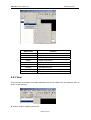
SH-300 User’s Manual
Contents
Contents
1
SH-300 Hardware part ......................................................................................... 3
1. 1
1. 2
1. 3
1. 4
1. 5
2
System General Introduction ......................................................................... 3
Specification Parameter ................................................................................ 3
Hardware Structure ...................................................................................... 4
Function Key List .......................................................................................... 7
Installation Dimensions and Guide ............................................................... 8
SH300 Software Part ......................................................................................... 11
2. 1 SH300 General Introduction ........................................................................ 11
2. 2 Process Chart.............................................................................................. 11
2. 3 Installation and Uninstallation of SH-300..................................................... 12
2.3.1 Installation of SH-300........................................................................... 12
2.3.2 Uninstallation of SH-300 .............................................................................................. 15
2. 4 Operation Interface...................................................................................... 16
2.4.1 File..................................................................................................... 18
2.4.2 Edit .................................................................................................... 18
2.4.3 View ................................................................................................... 19
2.4.4 Screen ............................................................................................... 20
2.4.5 Object ................................................................................................ 21
2.4.6 Connect ............................................................................................. 22
2.4.7 Tool .................................................................................................... 22
2.4.8 Help ................................................................................................... 23
2. 5 Operation Instruction ................................................................................... 24
2.5.1 Indicator ............................................................................................. 24
2.5.2 Function Key...................................................................................... 25
2.5.3 Static text ........................................................................................... 26
2.5.4 Dynamic text ...................................................................................... 27
2.5.5 Register ............................................................................................. 28
2.5.6 Bar Graph .......................................................................................... 31
2.5.7 Trend Graph ...................................................................................... 32
2.5.8 Bitmap ............................................................................................... 33
2.5.9 Message Display ............................................................................... 34
2.5.10 Alarm List ........................................................................................... 35
2.6 User-defined SH300 system information ................................................... 37
2.7 Multi Language Editor ................................................................................ 47
2.8 Operation Example ...................................................................................... 49
3
Manipulation....................................................................................................... 56
3. 1 Download Window .................................................................................... 56
3. 2 Communication ......................................................................................... 56
3. 3 Shifting the windows ................................................................................. 57
Page 1 of 99
SH-300 Text Panel
3. 4 System Password ..................................................................................... 57
3. 5 Data setting............................................................................................... 58
3. 6 State Monitoring........................................................................................ 59
4
Connection with PLC ......................................................................................... 61
4. 1
4. 2
4. 3
4. 4
4. 5
4. 6
4. 7
4. 8
4. 9
4.10
4.11
4.12
4.13
4.14
4.15
4.16
4.17
4.18
4.19
4.20
Mitsubishi FX Series.................................................................................... 61
Siemens S7-200 Series.............................................................................. 62
OMRON C Series ....................................................................................... 63
Delta DVP Series........................................................................................ 64
Panasonic FP Series .................................................................................. 65
Vigor VH Series .......................................................................................... 66
Koyo S Series............................................................................................. 67
ADC DL05 Series ....................................................................................... 68
FATEK FBs Series ..................................................................................... 70
Schneider NEZA/TWIDO Series................................................................. 71
AB (AB-DF1 Protocol) Series...................................................................... 72
THINGET XC Series................................................................................... 73
Emerson EC20 Series ................................................................................ 74
KDN-K3 Series ......................................................................................... 75
HITACHI MICRO-EH Series....................................................................... 76
MODBUS RTU/ASCII and RTU/ASCII EXTEND protocol ......................... 77
SH-300 Freedom Protocol ......................................................................................... 82
Array FAB Series PLC ............................................................................... 90
Array SR Series PLC................................................................................. 93
Array TC-Pro Series Digital Timer/Counter/Tachometer ............................ 95
Appendix : Note item ................................................................................................ 97
Page 2 of 99
SH-300 User’s Manual
SH-300
Hardware Part
Hardware
part
1
1.1 System General Introduction
SH-300 is a small Human-Machine interface, mainly being used to be connected with PLC or other
intelligent controllers with COM port communication function. It can monitor, setup and modify the
data of the register or the status of the relay inside the PLC; thereby manipulators can monitor
conveniently the PLC or the running status of the intelligent controllers with COM port
communication function.
[Function features]
▲ The project development software SH300, built on WINDOWS platform, with friendly
operation interface, easy to learn, being able to edit several monitoring screens and support
multi-format graph.
▲ The communication protocols will be downloaded into SH-300 Text Display together with
the project files. And it is unnecessary to edit the communication program in PLC
separately.
▲ SH-300 can be connected with many PLC. it supports Mitsubishi, Omron, Siemens,
Panasonic ,Delta , Koyo ,Vigor ,ADC Schneider, AB PLC series and so on. it contains
Modbus and freedom communication protocol
▲ With password protecting function
▲ With alarm list function, real-time displaying the alarm information line by line.
▲
Having 14 keys, which can be defined as function keys, being easily operated,
replacing some mechanical keys on the control cabinet, with the number key function.
▲ Supporting several kinds’ communication ports: RS232/RS422/RS485
▲ STN-LCD with back light display, displaying 24 characters X 4 rows
▲ With multi-language displaying function, with user-defined system prompting information,
being convenient for different demands.
▲ The front panel being up to IP65 Protection Level, waterproof, oil proof
1.2 Specification Parameter
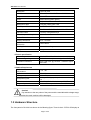
—Hardware specification
Display screen
4.3’’STN LCD
Page 3 of 99
SH-300 Text Panel
Resolution
192 x 64 pixel
LCM life
With 25±2
Brightness
60 cd/m2
Color
Monochrome(yellow-green)
Contrast
Adjustable resistor
Background light
Long life yellow-green LED
Memory
110KB Flash ROM
Communication Port
PC RS232& PLC RS485/422 & PLC RS232
Function button
14 freely configurable keys
Allowable power disruption
≤20ms
Frame Dimension
171.8 x 84.2 x 38.6mm
Display Dimension
97.0 x 34.5mm
Installation hole
Dimension
165 x 85mm
Cooling Method
Natural air cooling
Weight
260g
65±10% RH over 50000 hours
—Electric specification
Rated voltage
12 ~24VDC±10% <300mA
Withstanding voltage test
500V AC 1minute(between signal and GND)
Over 10M ohm @ DC500V between signal
and GND
Insulation resistance
—Ambient Requirement
Operation
ambient
temperature
Operation ambient moisture
Storage temperature
Anti-jamming test
Vibration resistance
Degree of protection
–10 ~60
20~90% no condensation
–20 ~70
Voltage 1500Vp-p,pulse period 1us continuing
1s
10~25Hz(2G for 30 min, in any of X,Y,Z axis)
IP65 the front panel
Caution!
Pay attention to the two polars of the power and the rated allowable voltage range,
otherwise the main machine will be damaged.
1.3 Hardware Structure
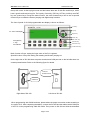
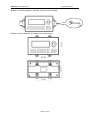
The front panel of SH-300 is as shown in the following figure. There is the 4.3’’STN LCD display at
Page 4 of 99
SH-300 User’s Manual
Hardware Part
the top left corner. At the top right corner and the bottom there are 20 thin-film switch keys, which
have a good handle and a long life. The Up Key, Down Key, ESC key, SET key, ALM key and ENT
key are system keys. Except the basic function, the other fourteen keys can be set as special
function keys to realize the Screen-jumping and digital setup functions.
The front of panel of SH-300 programmable text display is shown as follows:
Left key
Up key
4.3’’ STN LCD Display
Right key
Down key
0-9 digital key
ESC-ESC key
+/- sign
SET-Set key
CLR Deletion
ENT-enter key
ALM-alarm key
Basic function of keys: setting the input value of the PLC registers.
Special function of keys: Bit setting, Bit resetting and Screen jumping etc.
On the right side of SH-300 there are power terminal and COM port and on the left side there is a
contrast potentiometer. Refer to the following figure for details.
DC24V
Contrast
Potentiometer
COM Port
Right side of SH-300
Left side of SH-300
When programming with SH300 software, please select the proper connection mode according to
the type of PLC. After completing the edition, connect the SH-300 and the relative serial COM port
of the PC via the programming cable SH-Cable. Then power on SH-300 and click the download
Page 5 of 99
SH-300 Text Panel
icon to download the project file into SH-300.
When using if the contrast of the LCD isn’t fit, revolve the contrast potentiometer on the left side
with small sized screwdriver till the contract reach the desired degree
The display of SH-300 is with LED background light. Press any key, the background light will be
turned on automatically. The backlight will be turned off automatically if there is no operation in the
minutes .Users can modify the turnoff time of the background light in SH300 software and then
download into SH-300. And it will be OK.
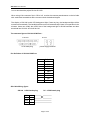
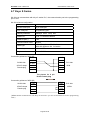
The structure figure of SH-300 COM Port :
COM Port
DC24V
9 PIN male plug
power supply terminal
Pin Definition of SH-300 COM Port
Pin
Definition
1
TD+
2
RXD
3
TXD
4
NC
5
GND
6
TD-
7
RTS
8
RD-
9
RD+
SH-Cable Wiring figure:
SH-300 9 PIN female plug
RXD
2
TXD
3
RTS
7
GND
5
PC 9 PIN female plug
Page 6 of 99
SH-300 User’s Manual
2
RXD
3
TXD
7
RTS Hardware Part
GND
5
Page 7 of 99
SH-300 User’s Manual
Hardware Part
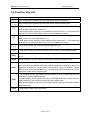
1.4 Function Key List
key
Function
[←]
When modifying the register data, the cursor will be moved one-digit left.
[→]
When modifying the register data, the cursor will be moved one-digit right.
[↑]
[↓]
To jump to the previous screen, whose number is set in the screen property option. (The
default value is the current number 1.)
In data-setting mode, pressing it, the modified number will be plus 1. The incremental
range is 0 to 9 (in decimal system) and 0 to F (in hexadecimal system).
To jump to the next screen, whose number is set in the screen property option. (The
default value is the current number plus 1.)
In data-setting mode, pressing it, the modified number will be minus 1. The incremental
range is 9 to 0 (in decimal system) and F to 0 (in hexadecimal system).
[ +/- ]
In data-setting mode, sign of the modified number will be set.
[0-9 ]
In data-setting mode, the modified number will be set as the corresponding number.
[ESC]
Exit from the current operation such as register set, password input, alarm display and
so on.
[ALM]
Pressing this key, you can enter the system-defined alarm information screen.
[SET]
Pressing this key, you can modify the register data. The current modified register will be
color-reversely displayed and the current modified digital will be flashing. If there is no
register set component in current screen, the operation is the non-operation. If press
SET key again before pressing ENT, the current operation will be canceled and you can
continue to modify the next register data
[ENT]
In the situation that the password protected function is used, pressing this key, the
password set screen will be displayed.
In register-setting mode, pressing this key the modified data will be written into the
register and then it will continue to modify the next register data.
When the last register in this screen is modified, pressing this key, it will exit the register
modification state.
[CLR]
In data-setting mode, clear the set data.
Page 9 of 99
SH-300 Text Panel
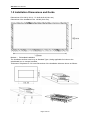
1.5 Installation Dimensions and Guide
Dimensions of SH-300 (L*W*H): 171.8×98.8×38.6 (Unit: mm)
Dimensions of the installation hole: 165×85 (Unit: mm)
Method 1 Embedded installation
The installment surface must be up to Standard Type 4, being applicable for indoor or the
switchboard box on coequal condition.
Thickness of Clapboard: 0.5-0.9 mm.Dimensions of the installation holes are shown as follows:
Page 10 of 99
SH-300 User’s Manual
Hardware Part
Method 2 DIN rail installation standard 35mm DIN rail installation
Method 3: Screw installation (To install on the motherboard)
Page 11 of 99
SH-300 Text Panel
Memo
—————————————————————————————
—————————————————————————————
—————————————————————————————
—————————————————————————————
—————————————————————————————
—————————————————————————————
—————————————————————————————
—————————————————————————————
—————————————————————————————
—————————————————————————————
—————————————————————————————
—————————————————————————————
—————————————————————————————
—————————————————————————————
—————————————————————————————
Page 12 of 99
SH-300 User’s Manual
Software Part
SH300
Software
Part
2
2.1 SH300 General Introduction
SH300 is the special development software of SH-300 Programmable Text Display, which is run
on the base of WINDOWS 98/2000/XP platform. SH300 software makes the best use of the
abundant graphic interface and the object-faced design of WINDOWS, which makes it convenient
for the users edit the required control screens and the alarm interfaces in a short time.
The essential of the project file is the Screen. Each screen is to perform some special functions
and different screens can be switched freely via design. The aggregate composed of all the
screens is the application project file.
After open the SH300 software, the user can create or open the screen. And in each screen static
text, dynamic text, indicator, register, function key, bit graph, bar graph, trend graph and so on
elements can be set. Different screens can be switched freely. Users can realize the data monitor,
parameter setup, switch control, alarm list monitor and so on functions by designing the contents of
the screen.2. 2 Process chart of using
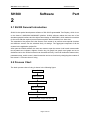
2.2 Process Chart
The basic process chart of using is shown in the following figure:
Setup SH300
Run SH300
Create or Open a Project
Edit the Screen
Save the Project
Download the Project into Sh-300
Page 13 of 99
SH-300 Text Panel
2.3 Installation and Uninstallation of SH300
2.3.1 Installation of SH300
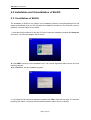
The installation of SH300 is very simple. In the installation process, a prompting dialogue box will
appear automatically and you will complete the installation smoothly on the computer under its
guidance. The main steps are as follows:
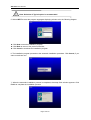
1. Insert the SH300 software CD into the CD Driver. Select the installation program file Setup.exe
and click it , the following diagram will be shown:
▲ Click NEXT to enter the next installation step. The License Agreement will be shown as in the
following diagram:
▲Click Cancel to exit the installation program.
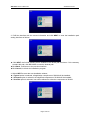
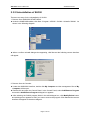
2. If you agree the above license agreement, please click YES to enter the next step. The interface
requiring User Name, Company Name and Serial Number will be shown as follows:
Page 14 of 99
SH-300 User’s Manual
Software Part
3. Fulfill the interface with the correct information and click NEXT to enter the installation path
setting interface as follows:
▲ Click NEXT, the SH300 software will be installed in the default path as shown. If it is necessary
to select the path, click BROWSE to reset the desired path.
▲Click Back, it will return to the previous interface.
▲Click Cancel, it will exit the installation program.
4. Select NEXT to enter the next installation window;
▲ If Typical option is selected, all application components of SH300 will be installed;
▲ If Compact option is selected, the simplified components of SH300 will be installed;
▲ If Custom option is selected, user will be allowed to select the components of SH300.
Page 15 of 99
SH-300 Text Panel
Note: Selection of Typical option is recommended.
5. Select NEXT to enter the program aggregate displaying window as in the following diagram:
▲ Click Next to start the installation program;
▲ Click Back to return to the previous interface;
▲ Click Cancel to terminate the installation program.
6. The installation program proceeds to the automatic installation procedure. Click Cancel, if you
want to terminate now.
7. When the automatic installation process is completed, the setup finish window appears. Click
Finish to complete the installation process.
Page 16 of 99
SH-300 User’s Manual
Software Part
2.3.2 Uninstallation of SH300
There are two ways for the uninstallation of SH300:
1. Remove from WINDOWS START MENU
▲ Under the WINDOWS taskbar, click Start→Program→ARRAY→SH300→Unistall of SH300 As
shown in the following diagram:
▲ When a confirm uninstall dialogue box appearing, click Yes and the following remove interface
will appear.
2. Remove from the Console:
▲ Under the WINDOWS interface, double click My Computer and the management files of My
Computer will be open.
▲ Double click and open the Control Panel. In the Control Panel, select Add/Remove Program
icon and the Add/Remove Program dialogue box appears.
▲ After selecting the SH300 program folder in the said dialogue box, click Modify/Delete button
and a dialogue box appears to ask if you want to remove the program. Click Yes and the remove
interface will appear as the above diagram.
Page 17 of 99
SH-300 Text Panel
2.4 Operation Interface
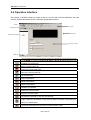
The window of SH300 software is mainly made up of menu bar, tool bar, distribution bar, edit
section, window description section, status bar and property section.
Menu
Tool bar
Distribution bar
Edit section
Window Description
Property section
Status bar
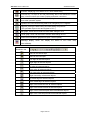
Tool bar
Create a new project file
Open a saved project file
Close the current project file
Save the current project file
Cut components
Copy components
Paste components
Delete components
Create a new screen
Delete the current screen
Copy the current screen
Set relative parameter of SH-300 Text Display
Login in alarm list information, each piece of alarm information correspond to a
status of a middle relay
Download the project into SH-300 via communication cable
Page 18 of 99
SH-300 User’s Manual
Software Part
Indicator: displaying on/off status of PLC inner middle relay
Function key: 14 keys on SH-300 panel being able to be defined as function
keys, whose functions are screen-jumping and switch control etc.
Static text, including Chinese characters, English characters and characters
from other operation system
Dynamic text, text content being able to be changed by PLC’s register.
Register, placing the data-setting and data-setting components
(The operated object is the data register in PLC.)
Bar graph, which can be used to monitor data change in PLC
Trend graph, which can be used to monitor data change in PLC
Insert the monochrome graphics file (Max. 192×64 pixels )
Message display, which can display the status of PLC inner relay
user-definedly.
Distribution bar
Place on the above layer
Place on the next layer
Left align all selected objects
Right align all selected objects
Up align all selected objects
Down align all selected objects
Left frame align all selected objects
Right frame align all selected objects
Up frame align all selected objects
Down frame align all selected objects
Align in the middle horizon all selected objects
Align in the middle vertical all selected objects
Align in the horizontal equal interval all selected objects
Align in the vertical equal interval all selected objects
Page 19 of 99
SH-300 Text Panel
2.4.1 File
This instruction is mainly used for project file management, including creating, opening, saving etc
Menu Name
Function
New project
Create a new project file
Open project
Open an old project file
Save project
Save the current project file
Save as
Close project
Exit
Save the current file to a new path
Close the current project file
Exit SH300 software
2.4.2 Edit
This instruction is mainly used for tool management, including cut, copy, paste, delete, select all,
control, position and so on. The pulldown menu is shown as the following:
Page 20 of 99
SH-300 User’s Manual
Software Part
Menu Name
Cut
Function
Cut components
Copy
Copy components
Paste
Paste components
Delete
Delete components
Select All
Select all components
Control
Change the arrangement
Position
Set alignment type
Save Screen Bitmap
Save the current screen as graph format
Show Back Dot (G)
Display
2.4.3 View
This instruction is to display the toolbar, distribution bar and the status bar. The pulldown menu is
shown as the following:
▲ Toolbar: Toolbar displaying instruction
Page 21 of 99
SH-300 Text Panel
▲ Positionbar: Distribution bar displaying instruction
▲ Statusbar: Status bar displaying instruction
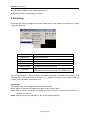
2.4.4 Screen
This instruction mainly includes new screen, delete screen, copy screen, set screen No., SH300
config and alarm list.
Menu Name
New screen
Function
Create a new screen
Delete screen
Delete the current screen
Copy screen
Copy the current screen
Set screen No.
Reset the screen number
SH300 Config
Set relative parameter of SH-300
Alarm list
Login the alarm list information; each piece of the
information corresponds to a status of a middle relay
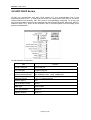
The “SH300 Config(S)…” option is used to set relative parameter of SH-300, such as set the boot
screen number (the default screen number is 1.), password protection (the password will be
number from 0 to 99999.) and screen save.
Screen Save
The duration time of the background light can be set freely.
When “Never” is selected, the background light will be on all the time;
When “After 3 minute ” is selected, the background light will be off 3 minutes later, if there is no
operation on the key.
Notes: Pressing on any key will wake up the screen background light.
Page 22 of 99
SH-300 User’s Manual
Software Part
Caution!
The maximal number of the screen is 256.
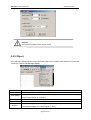
2.4.5 Object
The instruction mainly includes Lamp, Touch Key, Static Text, Dynamic Text, Numeric, Process Bar,
Trend Line, Picture and Message Display.
Menu Name
Lamp
Function
Displaying on/off status of PLC inner middle relay
Touch button
14 keys defined as function keys, which being used to realize the screen-jumping,
switch control and so on functions.
Static text
Including Chinese characters, English characters and characters from other system
Dynamic text
Numeric
Text contents can be controlled and changed by PLC register
Register, placing the data-setting and data-setting components
(The operated object is the data register in PLC.)
Page 23 of 99
SH-300 Text Panel
Progress Bar
Trend Line
Picture
Message
Display
Bar graph, which can be used to monitor data change in PLC
Trend graph, which can be used to monitor data change in PLC
Insert the monochrome graphics file (Max. 192×64 pixels )
Displays the status of PLC inner relay user-definedly.
2.4.6 Connect
The instruction is mainly used to Set PLC type, Set Communication Port and Download Data.
▲ Set PLC type: setting the linked PLC type and parameter
▲Comm Setting: selecting the communication port
▲ Download: download the project data file into SH-300
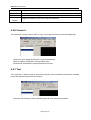
2.4.7 Tool
The instruction is mainly used for password protection and user-defined information including
protect file password and immanent resource
▲ Protect File Password: Set the SH300 project file to be password protected.
Page 24 of 99
SH-300 User’s Manual
Software Part
▲ User-defined Immanent resource: to re-define the relative information of each interface in
SH-300.
2.4.8 Help
The menu mainly includes SH300 software version No. and other information.
Page 25 of 99
SH-300 Text Panel
2.5 Operation Instruction (Mitsubishi FX Series as an
example)
2.5.1 Indicator
Click “Lamp” option under “Object” menu or click
in toolbar, there will be a dashed rectangular
frame following and moving together with the mouse. Move the mouse to the proper position in the
edit section and then click the left button of the mouse to confirm, and there will be one indicator in
the edit section.
▲ Position Property:
X Position: specifying the horizontal position of the component
Y Position: specifying the vertical position of the component
Note: The grid origin is at the top left corner of the screen.
▲ Data Setting:
The number, type and address correspond to the definition of PLC inner relay.
▲ Style: Double:
The displaying picture of the indicator will be double.
▲ Display:
There are two shapes of the indicator: round and square.
There are two modes of the logic: positive and negative
Logic Choice
State
Positive Logic
1
Page 26 of 99
Displaying
Picture
SH-300 User’s Manual
Software Part
Positive Logic
0
Negative Logic
1
Negative Logic
0
In positive logic, if the corresponding middle relay is ON, the indicator will be solid; and if the
corresponding middle relay is OFF, the indicator will be hollow.
In negative logic, if the corresponding middle relay is ON, the indicator will be hollow; and if the
corresponding middle relay is OFF, the indicator will be solid.
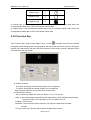
2.5.2 Function Key
Click “Function Key” option under “Object” menu, or click
in toolbar, there will be a dashed
rectangular frame following and moving together with the mouse. Move the mouse to the proper
position in the edit section and then click the left button of the mouse to confirm, and there will be
one indicator in the edit section.
▲ Position Property:
X Position: specifying the horizontal position of the component
Y Position: specifying the vertical position of the component
Note: The grid origin is at the top left corner of the screen.
▲ Function key Property
Key: to select any proper key from Left .Right.+/-.CLR. 0-9 14 keys
Hand: to add a hand shape symbol before the selected key, which indicates that pressing
the key will carry out an operation for the convenience of use.
Invisible: to hide the key
Password: The function key will be effective, only when the password is entered
correctly.
Coil Set: Action of the function key is defined as digit setup function.
Page 27 of 99
SH-300 Text Panel
Screen-Jumping: Action of the key is defined as screen-jumping function.
Register Set: Action of the key is defined as register parameter setup function.
▲Coil
The number, type and address correspond to the definition of PLC inner relay.
ON: to set the designated relay to be ON.
OFF: to set the designated relay to be OFF.
Reverse: Press this key, the value of the designated relay will be reversed.
▲ Style
Double: The displaying picture of the indicator will be double.
Reverse: The function and the background color will be reversely displayed.
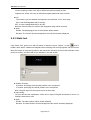
2.5.3 Static text
Click “Static Text” option once with left button of mouse of menu “Object”, or click
once in
toolbar, there will be a dashed rectangular frame following and moving together with the mouse.
Move the mouse to the proper position in the edit section and then click once the left button of the
mouse to confirm, and there will be one indicator in the edit section.
▲ Position Property:
X Position: specifying the horizontal position of the component
Y Position: specifying the vertical position of the component
Note: The grid origin is at the top left corner of the screen.
▲ Input String:
To input relevant text explanation, which can be input 24 English characters*4 rows or 12
Chinese characters*4 rows
▲ Style
Double: The static textbox will be double relatively.
Reverse: The static textbox and the background color will be reversely displayed.
Page 28 of 99
SH-300 User’s Manual
Software Part
2.5.4 Dynamic text
Click “Dynamic Text” option under “Object” menu, or click
in toolbar, there will be a dashed
rectangular frame following and moving together with the mouse. Move the mouse to the proper
position in the edit section and then click the left button of the mouse to confirm, and there will be
one indicator in the edit section.
▲ Position Property:
X Position: specifying the horizontal position of the component
Y Position: specifying the vertical position of the component
Note: The grid origin is at the top left corner of the screen.
▲ Style
Double: The static textbox will be double relatively.
Reverse: The static textbox and the background color will be reversely displayed.
▲ Register
To control the address and the type of the PLC register that switches the dynamic text state.
The “Data Type” is the corresponding PLC register type connected to the PLC. The
“Address” is the corresponding PLC address connected to the PLC. The “Mode” has 3
options, HEX/BCD, Decimal system and symbol, which is to control the data format of the
data register and will influence the displaying format of the value in the displaying text.
▲ Display Text
Text edit zone, to input the displaying text (up to 32 rows text)
Example: The register address of the related dynamic text is D100. In the first line, input “motor
speed is too rapid” and modify the value to 80. In the second line, input “motor speed is too
slow” and modify the value to 40. And in the third line, input “motor speed is normal” and
modify the value to 60. The dynamic text responds to the data of
D100.
If the value of D100 is the unset value, then the textbox will be no displaying.
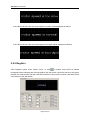
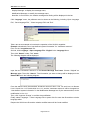
If the value of D100 is 40, the “motor speed is too slow” will be displayed as follows:
Page 29 of 99
SH-300 Text Panel
If the value of D100 is 60, the “motor speed is normal” will be displayed as follows:
If the value of D100 is 80, the “motor speed is too rapid” will be displayed as follows:
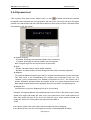
2.5.5 Register
Click “Register” option under “Object” menu, or click
in toolbar, there will be a dashed
rectangular frame following and moving together with the mouse. Move the mouse to the proper
position in the edit section and then click the left button of the mouse to confirm, and there will be
one indicator in the edit section.
Page 30 of 99
SH-300 User’s Manual
Software Part
▲ Position Property:
X Position: specifying the horizontal position of the component
Y Position: specifying the vertical position of the component
Note: The grid origin is at the top left corner of the screen.
▲ Style
Double: The register will be double relatively.
Reverse: The register and the background color will be reversely displayed.
▲ Format
Set the digits, decimal digits and the display mode of the register data. The display mode has
3 options, HEX/BCD, Decimal system and symbol.
▲ Register
To set the type and address of the related PLC register. The “Type” is the corresponding PLC
register type connected to the PLC. The “Address” is the corresponding PLC address
connected to the PLC. The “Mode” has 3 options, HEX/BCD, Decimal system and symbol,
which is to control the data format of the data register and will influence the displaying format
of the value in the displaying text.
SET
If cross the “Set” check box, the “Password” option will be displayed. When the “Password”
option is selected, if user wants to set the value via “SET” key on the SH-300 panel, it is
needed to press “ENT” key to enter the password interface and input the correct password.
Limit
To set the upper and lower limit, make the value beyond the limit invalid and avoid the input of
too large or too tiny value to endanger the system.
Example: If the set upper limit is 800, and the set lower limit is 100. Only when the set value is
between 100 and 800, the set value will be written into the PLC. Otherwise it will wait to
set the new valid value.
After “Limit” is selected, users can select “Original Data” or “Engineering Limits”.
Original data:
Original Data means the directly displaying register value without any operation. And the radix
point will be placed according to the decimal digits. If the decimal digits are 2 and
the register value is 24561, the displayed data will be 245.61.
Engineering Limits
The maximum and minimum of the project data
Project data
This option means that the data read from the register will be converted to project data before
being displayed. The conversion is done following the formula below:
The converted data=project Min + (original value- input Min) × (project Max- project Min) / (input
Max-input Min)
Example: the data value stored in the register is 1000, do the setting as follows:
Max Input: 4000
Min Input: 0
Max Project: 2000
Min Project: -2000
Then by conversion the project data =-2000 + 1000-0 × (2000+2000)/(4000-0)= -1000
Page 31 of 99
SH-300 Text Panel
Caution!
There may be some error in the conversion because of the limit of the operation precision
of the floating number.
For example: Design requirements: Screen 2 is two groups of the main property parameter of the
related PLC, the rotate speed of principal axis and the rotate speed of the countershaft. The left
column is the set value and the right column is the actual value. And the corresponding relationship
of the two groups of parameters and the PLC data register address is as the following table:
Designation
Address for preset value
Address for actual value
D100
D110
D200
D210
Primary Axis
Speed
Secondary Axis
Speed
The procedure of creating Screen 2 is as below:
Create Screen 2. Then set “Target”, ”Current”, ”Primary”, ”Secondary” in the proper position in the
screen as shown in the following:
Select “Register” option or click
in the tool bar; move the mouse to the proper position under
“Target” and click the left key of the mouse to confirm. Do the settings as below: register
address=D100, register number=1, digits=5, decimal=0, mode=Dec, the negative number will not
be displayed.
Select “Set” check box, and “Password” options is enabled , “Password” “Limit” can be set
according to the demands. Set D200 as above data set method.
Select “Register” option or click
in the tool bar; move the mouse to the proper position under
“Target” and click the left key of the mouse to confirm. Do the settings as below: register address
=D110, register number=1, digit=5, decimal=0, mode=Dec, the negative number will not be
displayed. And don’t select “Set” check box. Set D210 as above method.
After all parameters are set, the following diagram will be shown:
Page 32 of 99
SH-300 User’s Manual
Software Part
2.5.6 Bar Graph
Click “Bar Graph” option under Object” menu,click
in toolbar, there will be a dashed
rectangular frame following and moving together with the mouse. Move the mouse to the proper
position in the edit section and then click the left button of the mouse to confirm, and there will be
one indicator in the edit section.
▲ Position Property:
X Position: specifying the horizontal position of the component
Y Position: specifying the vertical position of the component
Note: The grid origin is at top left corner of the screen.
▲ Register
Set the address, number, type and mode (HEX/BCD, Decimal system and symbol) of the
related register.
▲ Size
Set the height and width of the bar graph.
▲ Display
Full amount: 100% bar graph will display the corresponding register value
Empty amount: 0% bar graph will display the corresponding register value
Direction: the direction of the bar graph includes four options: up, down, left and right.
Example: Create a bar graph about precipitation and the display range is 0-100mm. Put the
texts “mm”, “precipitation”, “0”, “100” in proper position as shown in the following
diagram:
Page 33 of 99
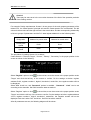
SH-300 Text Panel
This bar graph can be used to monitor the data in register D0. If the bar graph is fully displayed, it
means the value in register D0 is 100. And when the bar graph is 20% displayed, it means the
value in register D0 is 20.
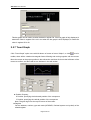
2.5.7 Trend Graph
Click “Trend Graph” option once with left button of mouse of menu “Object”, or click
once in
toolbar, there will be a dashed rectangular frame following and moving together with the mouse.
Move the mouse to the proper position in the edit section and then click once the left button of the
mouse to confirm, and there will be one indicator in the edit section.
▲ Position Property:
X Position: specifying the horizontal position of the component
Y Position: specifying the vertical position of the component
Note: The grid origin is at the top left corner of the screen.
▲ Register
Set the address, number, type and mode (HEX/BCD, Decimal system and symbol) of the
related register.
Page 34 of 99
SH-300 User’s Manual
Software Part
▲ Size
Set the height and width of the trend graph.
▲ Display
Full amount: 100% trend line will display the corresponding register value
Empty amount: 0% trend line will display the corresponding register value
Date dots: the total sample number in the whole trend line from left to right. The more the
number is, the trend line will be more fine and the time will be longer.
Sample interval: the interval between two neighboring sample dots.
Note: A trend line component can only display one line.
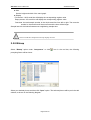
2.5.8 Bitmap
Select “Bitmap” option under “Component” or click
icon in the tool bar, the following
prompting frame will be shown:
Select your desired picture and then click “Open” option. The selected picture will be put in the edit
window, as shown in the following diagram:
Page 35 of 99
SH-300 Text Panel
▲ Position Property:
X Position: specifying the horizontal position of the component
Y Position: specifying the vertical position of the component
Note: The grid origin is at the top left corner of the screen.
▲ Size
To adjust the height and width of the bitmap
▲ Reverse
The color of the picture and the background will be reversely displayed.
Note: SH300 software can support many kinds of graphic files, such as *BMP, *ICO,
*JPG etc.
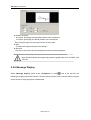
2.5.9 Message Display
Select “Message display” option under “Component” or click
icon in the tool bar, the
following prompting frame will be shown. Click the left key of the mouse to confirm after moving the
mouse cursor to the proper place of edited area.
Page 36 of 99
SH-300 User’s Manual
Software Part
▲ Position Property:
X Position: specifying the horizontal position of the component
Y Position: specifying the vertical position of the component
Note: The grid origin is at the top left corner of the screen.
▲ Coil Property
Station number, type and the address correspond to the type of PLC relay.
▲ Style
Font: the type and size of displayed message are changeable.
Reverse: the background color will be reversely displayed.
▲ Message
On Message: the content is editable, and will be displayed when the coil is ON.
Off Message: the content is editable, and will be displayed when the coil is OFF.
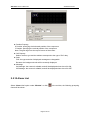
2.5.10 Alarm List
Select “Alarm List” option under “Window” or click
frame will be shown:
Page 37 of 99
in the tool bar, the following prompting
SH-300 Text Panel
Each project file of SH-300 can set a group of alarm list information. And each piece of information
corresponds to a relay. The definition numbers of all the relays are continuous. And the first
addresses of all the relays are set by the users according to the actual program. If any relay
changing from OFF to ON means the relative alarm is produced, and now the SH-300 will prompt
the alarm displaying screen automatically and the alarm information will be displayed in the first
row. If another relay is ON now, the new piece of alarm information will be displayed in the second
row. On the contrary, if any alarmed relay is OFF, the related alarm information will disappear
automatically.
Example: Create a group of alarm information about pump. Set Relay M100, M101, M102 and the
related alarm information contents are “over 5m for water level”, ”overload for pump”, ”error for
power”.
The operation procedures are as the following:
1. Set the first coil type as M, the initial as 100.
2. Input “Water level is over 5m” in the line of the alarm contents bar. Click “Add” button or press
“Enter” key to add the second line and input “Pump overload”. By the same method, add the third
line and input “ Power supply fault”.
Page 38 of 99
SH-300 User’s Manual
Software Part
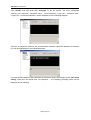
When SH-300 is working normally, if there is any failure alarm or M0 and M2 are ON, the flashing
alarm screen will prompt automatically on SH-300 as in the following:
If the alarm failure is not corrected, the failure alarm information will flash and be displayed on
SH-300. If the failure is corrected, the SH-300 will resume normal display. If the system is in
examination and repair, user can check the failure alarm records via the “ALM” key on the panel.
After the checking, press “ESC” key to return to the main interface.
2.6 User-defined SH300 system information
SH300 provides completely open system information menu structure, which provides user with
completely self-defined menu. You can use any language system to edit your information menu
and at the same time the coordinate position of the menu can be relatively changed according to
your demand.
After standard installation of SH300 software, the default information menu will be loaded
automatically when downloading data. The menu option lies in the submenu “Immanent
resource” of the menu “Tool”.
Click “Immanent resource“, then the following diagram will be shown:
Page 39 of 99
SH-300 Text Panel
Click “default” and then doubt click “message” on the left column. The seven information
submenu “No response”, “Password menu”, “Input Password”, “Login OK”, “Password error”,
“Logout OK”, “No alarm information” will be displayed as in the following diagram:
Click the “no response” submenu, the communication interface information between SH-300 and
PLC will be displayed as in the following diagram:
If the text and the position of the information in the screen need to be changed, cross “user menu
setting” check box and doubt click “No response…”, the following prompting frame will be
displayed as the following:
Page 40 of 99
SH-300 User’s Manual
Software Part
Modify the coordinate position
Modify the text
In this property frame, user can modify the X and Y coordinate position of the menu information (at
the top left corner, it is the original coordinate position (0, 0) of X and Y) and the contents of the text
information of the text frame (supporting multi language system). If “Default” is selected, which
means the default interface will be displayed when communication. The displayed text is “no
response…” and the coordinate position is X0 and Y0 as in the following diagram when SH-300 is
communicating with PLC.
Example: Modify the default text from “no response” into “transmit data” and preserve the
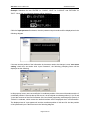
coordinate position. Click “OK” button to confirm. After the modification, when SH-300 is
communicating with PLC, the following diagram will be displayed.
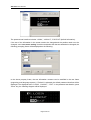
Click the “password menu” submenu, the password set interface will be displayed as in the
following diagram. The password is the same one as set under the submenu “SH-300 Config” of
the menu “Screen”.
Page 41 of 99
SH-300 Text Panel
The password set interface includes “LOGIN”, “LOGOUT”, “ESC EXIT” (default information).
If the text of the information in the screen need to be changed and the position need not to be
changed, cross “user menu setting” check box and doubt click the text needed to be changed, the
following prompting frame will be displayed as the following:
In the above property frame, the text information contents can be modified in the text frame
(supporting multi language system). If “Default” is selected, the default password interface will be
displayed. The displayed text is “LOGIN”, “LOGOUT”, “ EXIT”. In the password set situation, press
“Enter” key, the following diagram will be displayed:
Page 42 of 99
SH-300 User’s Manual
Software Part
Example: Substitute the text “ENTER” for “LOGIN”, “QUIT” for “LOGOUT” and “RETURN” for
“EXIT”. Click “OK”, the following diagram will be displayed.
Click the “Input password” submenu, then the password input interface will be displayed as in the
following diagram.
If the text and the position of the information in the screen need to be changed, cross “user menu
setting” check box and doubt click “Input Password”, the following prompting frame will be
displayed as the following:
In this property frame, user can modify the X coordinate position of the menu information and the Y
coordinate position is fixed (at the top left corner, it is the original coordinate position (0, 0) of X and
Y) and the contents of the text information of the text frame (supporting multi language system). If
“Default” is selected, which means the default interface will be displayed when communication.
The displayed text is “Input password” and the coordinate position is X40 and Y8. And the position
of the password input is also fixed as in the following diagram:
Page 43 of 99
SH-300 Text Panel
Example: substitute the text “password” for “Input password”, modify the position X to 0 and the
position Y is fixed. Click “OK”, the following diagram will be displayed:
Click the “Login OK” submenu, then the password being successfully input interface will be
displayed as in the following diagram:
In this interface, there are two lines of texts “Login Success”, “Press any key” (default information).
If the text and the position of the information in the screen need to be changed, cross “user menu
setting” check box and doubt click the modifying text(take “Login Success” for example) the
following prompting frame will be displayed as the following:
Page 44 of 99
SH-300 User’s Manual
Software Part
In this property frame, user can modify the X and Y coordinate position of the menu information (at
the top left corner, it is the original coordinate position (0, 0) of X and Y) and the contents of the text
information of the text frame (supporting multi language system). If “Default” is selected, which
means the default interface will be displayed when communication. The displayed text is “Login
Success” and the coordinate position is X38 and Y8 as in the following diagram:
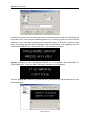
Example: Substitute the text “CORRECT PASSWORD” for “LOGIN SUCCESS” and “CONTINUE”
for “PRESS ANY KEY”. Then click “OK”. The following diagram will be displayed:
Click the “Password error” submenu, the password being error prompting interface will be
displayed as in the following diagram:
In this interface, there are two lines of texts “Password Error”, “Press any key” (default information).
If the text and the position of the information in the screen need to be changed, cross “user menu
setting” check box and doubt click the modifying text (take “PASSWORD ERROR” for example),
the following prompting frame will be displayed as the following:
Page 45 of 99
SH-300 Text Panel
In this property frame, user can modify the X and Y coordinate position of the menu information (at
the top left corner, it is the original coordinate position (0, 0) of X and Y) and the contents of the text
information of the text frame (supporting multi language system). If “Default” is selected, which
means the default interface will be displayed when communication. The displayed texts are
“PASSWORD ERROR” and “PRESS ANY KEY” as in the following diagram:
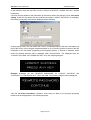
Example: Substitute the text “PASSWORD ERROR” for “IT IS WRONG” and “CONTINUE” for
“PRESS ANY KEY”. Then click “OK”. The following diagram will be displayed:
Click the “Logout OK” submenu, the password being closed interface will be displayed as in the
following diagram:
Page 46 of 99
SH-300 User’s Manual
Software Part
In this interface, there are two lines of texts “LOGOUT SUCCESS”, “PRESS ANY KEY” (default
information).
If the text and the position of the information in the screen need to be changed, cross “user menu
setting” check box and doubt click the modifying text (take “LOGOUT SUCCESS” for example),
the following prompting frame will be displayed as the following:
In this property frame, user can modify the X and Y coordinate position of the menu information (at
the top left corner, it is the original coordinate position (0, 0) of X and Y) and the contents of the text
information of the text frame (supporting multi language system). If “Default” is selected, which
means the default interface will be displayed when communication. The displayed texts are
“LOGOUT SUCCESS” and “PRESS ANY KEY” as in the following diagram:
Example: Substitute the text “REWRITE PASSWORD” for “LOGOUT SUCCESS” and
“CONTINUE” for “PRESS ANY KEY”. Then click “OK”. The following diagram will be displayed:
Click the “No alarm information” submenu, there being no alarm in the program prompting
interface will be displayed as in the following diagram:
Page 47 of 99
SH-300 Text Panel
If the text and the position of the information in the screen need to be changed, cross “user menu
setting” check box and double click the text frame “NO ALARM INFORMATION”, the following
prompting frame will be displayed as the following:
In this property frame, user can modify the X and Y coordinate position of the menu information (at
the top left corner, it is the original coordinate position (0, 0) of X and Y) and the contents of the text
information of the text frame (supporting multi language system). If “Default” is selected, which
means the default interface will be displayed when communication. The displayed text is “NO
ALARM INFORMATION” and the coordinate position is X16 and Y24 as in the following diagram:
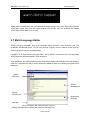
Example: Substitute the text “alarm didn’t happen ” for “NO ALARM INFORMATION”. Then click
“OK”. The following diagram will be displayed:
Under actual operation, if there is no alarm happens, press “ALM” key, the following diagram will
also be displayed:
Page 48 of 99
SH-300 User’s Manual
Software Part
Note: After the modification of the self-defined information menu, click “Save” button and close the
information frame, and write the edited program into SH-300, then the modified self-defined
information will be written into SH-300.
2.7 Multi Language Editor
SH300 provides completely open multi language menu structure, which provides user with
completely self-defined menu. You can use Chinese, English, French, German Czech and any
other language to edit your message menu.
LangEditor is a characteristic language editor, which makes it reality that the menu supported
SH300 software will be displayed in multi language.
After installation, the default English system menu will be loaded automatically in SH300 software.
Open the LangEditor.exe file in SH300 software installation folder, the following interface will be
displayed.
Default
Reference
Display
Message Bar
Display
Message bar
Modification
Message
Note Bar
Default reference bar: to display the default English menu bar;
Display Message Bar: to display the modifying message bar;
Page 49 of 99
SH-300 Text Panel
Display Message: to display the message menu;
Modification Message: to modify the message menu;
Note Bar: in find function, the relative message after finding will be displayed in the bar.
Click “language” menu, the pulldown menu is shown as the following, including “Open Language
File”, “Save language File’’, “Close Language File” and “Exit”.
Take a text as an example to introduce the operation of the SH300 Langeditor.
Example: substitute the text “user-defined system information” for “Immanent resource”.
First, run the “Langeditor,exe” file .
Second, click Language→Open Language File→English in the Language Menu.
Then click “Search” under “Tool” menu.
The following diagram will be displayed.
Input the text “Immanent resource” in the Search Message text frame. Choose “Original” as
Message type. Then click “Search”. The information you want to change will be displayed in the
Remark Bar as in the following diagram:
From the search result, the searched “Immanent resource” lies in Line 113 and Line 114. Browse
Line 113 and Line 114. Double click Line 113, and the “Immanent resource” will be changed into
“User-defined system information” in the Modification Message bar. By the same method, do the
modification in Line 114.
Then, click “Approve Change” to confirm the modification.
Finally, select Language → Save Language File or press Ctrl+S to save the file and then exit the
language editor.
Reopen the SH300.exe file and the relative modified menu will be found modified.
Page 50 of 99
SH-300 User’s Manual
Software Part
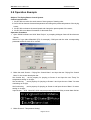
2.8 Operation Example
Subject: The Drying Boxes Control System
Control requirements:
1 Via SH-300 to monitor the work status of three groups of heating units;
2 Via SH-300 to observe the actual temperature and change the preset temperature of the drying
boxes;
3 Via SH-300 to observe the actual speed and change the preset speed of the motor;
4 Via SH-300 to set alarm information of abnormal work;
Operation Procedure:
1. Open SH300 software and click “New Project”, a prompting dialogue frame will be shown as
follows:
Select PLC type (take Mitsubishi (FX) for example), COM port and the other corresponding
parameter and then click OK to confirm.
2. Make the main Screen 1 “Drying Box Control Menu” and input the text “Drying Box Control
Menu” in the screen description bar.
Set function key , set its property for jumping to Screen 2 and input the text “Temp” for
temperature setting on its right;
Set function key , set its property for jumping to Screen 3 and input the text “State” for state
monitoring on its right;
Set function key , set its property for jumping to Screen 4 and input the text “Motor” for motor
setting on its right;
Input the text “ ALM Alarm list” which can prompt user to press ALM key to enter alarm list bar.
3. Make Screen 2 “Temperature Setting”
Page 51 of 99
SH-300 Text Panel
Click “New Screen” or
icon, the following dialogue frame will be displayed:
Correctly select “2” as the screen number, input the screen description “Temperature
Setting”,select “1” as the up-jumping screen number and select “3” as the down-jumping screen
number as in the following diagram:
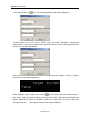
Press “OK” key to confirm and enter Screen 2. And place the text “Target”, “Current”, “Temp” in
proper place as the following diagram:
Select “Register” under “Object” menu or click
in the tool bar. Move the mouse to proper
place under “Target” and click the left key of the mouse to confirm. Then set the parameter of the
register, Address=D0, Digits=4, Decimal=2, Mode=Dec. Select “Set” and “Limit” check box.
Then place the text “ ” on its right as shown in the following diagram:
Page 52 of 99
SH-300 User’s Manual
Software Part
Select “Register” under “Object” menu or click
in the tool bar. Move the mouse to proper
place under “Current” and click the left key of the mouse to confirm. Then set the parameter of
the register, Address=D1, Digits=4, Decimal=2, Mode=Dec. Don’t select the “Set” check box.
Then place the text “ ” on its right as shown in the following diagram:
4. Make Screen 3 “State Monitoring”
As stated above, create the Screen 3. The input the text “Heating Unit 1”, “Heating Unit 2”,
“Heating Unit 3” in proper place in the screen as in the following diagram:
Page 53 of 99
SH-300 Text Panel
Select “Indicator” under “Object” menu or click
in the tool bar. Move the mouse to proper
place behind “Heating Unit 1” and click the left key of the mouse to confirm as in the following
diagram. And add two other indicators as the above.
Set the “Indicator” one by one.
The setting of the indicator for the heating unit 1 is listed as below: Address=M30,
Shape=Square, logic=positive;
The setting of the indicator for the heating unit 2 is listed as below: Address=M40,
Shape=Square, logic=positive;
The setting of the indicator for the heating unit 3 is listed as below: Address=M50,
Shape=Square, logic=positive.
5. Make Screen 4 “Motor Setting”
As stated above, create the Screen 4. The input the text “Target”, “Current”, “Motor”,
“Speed” in proper place in the screen as in the following diagram:
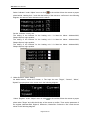
Select “Register” under “Object” menu or click
in the tool bar. Move the mouse to proper
place under “Target” and click the left key of the mouse to confirm. Then set the parameter of
the register, Address=D80, Digits=5, Decimal=1, Mode=Dec. Select the “Set” check box as
shown in the following diagram:
Page 54 of 99
SH-300 User’s Manual
Software Part
Select “Register” under “Object” menu or click
in the tool bar. Move the mouse to proper
place under “Current” and click the left key of the mouse to confirm. Then set the parameter of
the register, Address=D90, Digits=5, Decimal=1, Mode=Dec. Don’t select the “Set” check box
as shown in the following diagram:
6. Make Screen 5 “Alarm List”
Click
in the tool bar. A prompting dialogue frame as the following will be show. Set the
initial coil type as M88 first. And the alarming information for M88 is “Be abnormal for unit1”; the
alarming information for M89 is “Be abnormal for unit 2”; the alarming information for M90 is “Be
abnormal for unit 3”; as shown in the following diagram:
Page 55 of 99
SH-300 Text Panel
Click “OK” to confirm. Thus the whole control file of the drying box system is finished. Then click
“Save Project “
7. Download the drying box project data into SH-300.
Page 56 of 99
SH-300 User’s Manual
Software Part
Memo
—————————————————————————————
—————————————————————————————
—————————————————————————————
—————————————————————————————
—————————————————————————————
—————————————————————————————
—————————————————————————————
—————————————————————————————
—————————————————————————————
—————————————————————————————
—————————————————————————————
—————————————————————————————
—————————————————————————————
Page 57 of 99
SH-300Text Panel
Manipulation
3
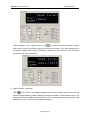
3.1 Download Window
1. Connect the operating unit interface to the configuration computer using a SH-PC cable.
2. Confirmed SH-300 has added on the DC24V power source.
3. Press
and start to download the date, the screen appears the downloading picture prompt
frame.
Note : Don’t cut off the power supply when SH-300 is receiving data from the
configuration computer.
3.2 Communication
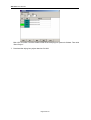
When you finished the downloading of the project data file, cut off the power supply and remove the
communication cable SH-PC. Connect SH-300 to PLC with a communication cable and check the
setting of PLC communication parameters. Meanwhile add the DC24V power to PLC and
SH-300.Then SH-300 will enters the normal operation condition.
Note: when SH-300 communicates with PLC, the initial window appears as shown above.
Please press “ ”key or “ ”key the system will be normal. If the system isn’t normal you
Page 58 of 99
SH-300 User’s Manual
Manipulation
should check the communication of SH-300 and PLC.
3.3 Shifting the windows
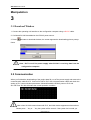
Take the project windows of the drying boxes as an example to introduce the manipulation of
SH-300.
SH-300 displays window No.1 at first (the initial window is No.1).
Window No.1 is a main menu window. Pressing
setting(No.2) that is shown as follows:
switch to the window of temperature
3.4 System Password
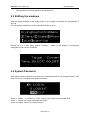
After setting system password, you must input the password before you change the data. Then
press “SET” key ,it will appear the picture as follows :
Select “1 ,LOGIN” “2.LOGOUT” or “EXIT” with Up, Down keys and then press “ENT”
Select “1 ,LOGIN” the window will display as follows:
(select 2 to logout, select 3 to exit the window.)
Page 59 of 99
SH-300Text Panel
Input the password (0-999999), which is shown as”*”. Press ENT. If password is correct, it will
show the window as follows:
If password is incorrect, it will show the window as follows:
Then press ENT,return to the password window.
Select “2 ,LOGOUT” and Press ENT it will show the window as follows:
3.5 Data setting
When SH-300 display NO.2 picture press SET key and the setpoint of work temperature is
flickering, you can change the cursor position by pressing “ ” and ” ”and change setpoint by
pressing “ ” and “ ”.
Press ENT to confirm the input data, the data has been written into PLC register D100, and the
data will be normally displayed and not flickering. Press ENT to enter the setting mode again
Page 60 of 99
SH-300 User’s Manual
Manipulation
3.6 State Monitoring
After finished the setting of register, press “ ” and return to the main menu ,SH-300 is shown as
follows:
Press
enter the window of state monitoring (No.3), which is shown as follows:
SH-300 will display the state monitoring window for three group heating units. When a heating unit
is running the indicator will be show as full state and operator can monitor the running state of the
heating units by the window.
Page 61 of 99
SH-300Text Panel
Memo
—————————————————————————————
—————————————————————————————
—————————————————————————————
—————————————————————————————
—————————————————————————————
—————————————————————————————
—————————————————————————————
—————————————————————————————
—————————————————————————————
—————————————————————————————
—————————————————————————————
—————————————————————————————
—————————————————————————————
Page 62 of 99
SH-300 User’s Manual
Connection with PLC
Connection
with
PLC
4
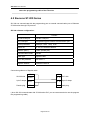
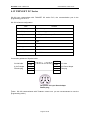
4.1 Mitsubishi FX Series
SH-300 can communicate with the programming port of all types of Mitsubishi FX series PLC or the
FX2N-422BD module of the FX2N series.
SH-300 software configuration:
Item
Content
SH-300 COM port
9 pin COM port
PLC COM port
Programming port/ FX2N-422BD
Default parameter
9600bps 7bits 1stop Even
Station No.
1(1 is fixed and can’t be changed)
Distance (Max.)
70m
Communication mode
RS422/ Programming port
Cable type
Special cable/SC09
PLC series
FX0S
FX0N
FX2N
Inner relay address
M000-M511
M000-M511
M0000-M3071
Register address
D00-D31
D000-D255
D0000-D7999
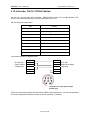
Connection guidance of Special cable
SH-300 side
2 RXD
2 RXD
PLC side
9 pin D shape
3 TXD
4 TXD
8pinRound shape
Female plug
5 GND
1 GND
male plug
7 GND
The picture for 8 pin Round shape
Female plug
\]
Note: In order to insure the normal communication you must use SC09 when you
Page 63 of 99
SH-300 Text Panel
select the programming cable of the FX series
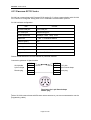
4.2 Siemens S7-200 Series
SH-300 can communicate with the programming port or external communication port of Siemens
S7-200 series through PPI protocol.
SH-300 software configuration:
Item
Content
SH-300 COM port
RS485 COM port
PLC COM port
Programming port/ external communication port
Default parameter
9600bps 8bits 1stop Even
Station No.
2-126 ,2 is Windows default
Distance (Max.)
100m (twisted-pair)
Communication mode
RS485
Cable type
Special cable
Inner relay address
M0.0-M31.7
Register address
VW0000-VW5118
Connection guidance of Special cable
1 TD+
SH-300 side
9 pin D shape
Female plug
9 RD+
3 A
6 TD-
8 B
8 RD-
PLC side
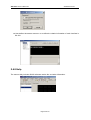
9 pin D shape
male plug
( when SH-300 communicates with S7-200 series PLC you are recommended to use the program
the programming cable )
Page 64 of 99
SH-300 User’s Manual
Connection with PLC
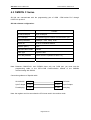
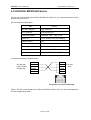
4.3 OMRON C Series
SH-300 can communicate with the programming port of CQM
HOST-Link protocol.
CPM series PLC through
SH-300 software configuration:
Item
Content
SH-300 COM port
9 pin COM port
PLC COM port
Programming port/ external communication port
Default parameter
9600bps 7bits 2stop Even
Station No.
0-99 ,0 is Windows default
Distance (Max.)
15m
Communication mode
RS232
Cable type
Special cable
Inner relay address
IR200.0-IR231.F(IR2000.0-IR231.15)
Register address
DM000-DM1024
Note: Because CQM-CPU11 and CAPM1A have only one COM port. you must use the
programming cable or the CIF01-CAB Communication module of the OMRON
communicating with SH300
Connection guidance of Special cable
SH-300 side
2 RXD
2 TXD
PLC side
9 pin D shape
3 TXD
3 RXD
9 pin D shape
Female plug
5 GND
9 GND
male plug
Note: the register won’t be set unless the CPU must work in the monitor mode
Page 65 of 99
SH-300 Text Panel
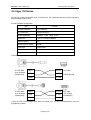
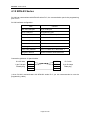
4.4 Delta DVP Series
SH-300 can communicate with the delta DVP series PLC, the communication port is the
programming port of PLC
SH-300 software configuration:
Item
Content
SH-300 COM port
9 pin COM port
PLC COM port
Programming port
Default parameter
9600bps 7bits 1stop Even
Station No.
1-254 ,1 is Windows default
Distance (Max.)
15m
Communication mode
RS232
Cable type
Special cable
Inner relay address
M0-M1270
Register address
D0-D1066
Connection guidance of Special cable:
SH-300 side
2 RXD
5 TXD
PLC side
9 pin D shape
3 TXD
4 RXD
9 pin D shape
Female plug
5 GND
8 GND
Male plug
( when SH-300 communicates with Delta DVP series PLC you are recommended to use the the
programming cable )
Page 66 of 99
SH-300 User’s Manual
Connection with PLC
4.5 Panasonic FP Series
SH-300 can communicate with Panasonic FP series PLC, the communication port is the
programming port of PLC or external communication port.
SH-300 software configuration:
Item
Content
SH-300 COM port
9 pin COM port
PLC COM port
Programming port
Default parameter
9600bps 8bits 1stop 0dd
Station No.
1-32 ,1 is Windows default
Distance (Max.)
15m
Communication mode
RS232
Cable type
Special cable
Inner relay address
R0000-R875F
Register address
DT0000-DT6134
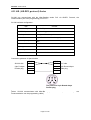
Connection guidance of SH-CAB-FP0 :
2 RXD
2 TXD
SH-300 side
3 TXD
3 RXD
PLC side
9 pin D shape
5 GND
7 GND
9 pin D shape
4
Male plug
Female plug
5
8
9
Connection guidance of SH-CAB-FP1 :
SH-300 side
2 RXD
2 TXD
PLC side
9 pin D shape
3 TXD
3 RXD
5 pin D shape
Female plug
5 GND
GND
The picture for
Female plug
Male plug
pin Round shape
( when SH-300 communicates with Panasonic FP series PLC you are recommended to use the the
programming cable )
Page 67 of 99
SH-300 User’s Manual
Connection with PLC
4.6 Vigor VH Series
SH-300 can communicate with Vigor VH series PLC, the communication port is the Programme
device assistant port of PLC
SH-300 software configuration:
Item
Content
SH-300 COM port
9 pin COM port
PLC COM port
Programming port
Default parameter
19200bps 7bits 1stop Even
Station No.
0-255 ,0 is Windows default
Distance (Max.)
15m
Communication mode
RS232
Cable type
special cable
Inner relay address
M0-M5119
Register address
D0-D8191
Connection guidance of special cable
SH-300 side
2 RXD
2 RXD
PLC side
9 pin D shape
Female plug
3 TXD
3 TXD
5 GND
4 GND
SH-300 side
2 RXD
2 RXD
PLC side
9 pin D shape
Female plug
3 TXD
3 TXD
JST 4P 4pin
Female plug
5 GND
4 GND
USB male plug
( when SH-300 communicates with Vigor VH series PLC you are recommended to use the
programming cable )
Page 68 of 99
SH-300 User’s Manual
Connection with PLC
4.7 Koyo S Series
SH-300 can communicate with Koyo S series PLC, the communication port is the programming
port of PLC
SH-300 software configuration:
Item
Content
SH-300 COM port
9 pin COM port
PLC COM port
Programming port
Default parameter
9600bps 8bits 1stop 0dd
Station No.
1-99 ,1 is Windows default
Distance (Max.)
15m
Communication mode
RS232
Cable type
MD2-SZ applies to SZ SH SH series
MD2-SG applies to SU SG series
Inner relay address
M000-M377
Register address
R2000-R7777
Connection guidance of MD2-SZ:
1 GND
2 RXD
SH300 side
3 TXD
9PIN D shape
3 RXD
PLC side
4 TXD
6PIN
Female plug
5 GND
6 GND
The picture for 6 pin
RJ126 Female plug
Connection guidance of MD2-SG:
2 RXD
SH300 side
3 TXD
2 TXD
3 RXD
9PIN D shape
Female plug
4 RTS
5 CTS
7 GND
5 GND
PLC side
25PIN
( when SH-300 communicates with Koyo S series PLC you are recommended to use the programming
cable )
Page 69 of 99
SH-300 Text Panel
4.8 ADC DL05 Series
SH-300 can communicate with ADC DL05 series PLC, the communication port is the
programming port of PLC., In order that the SH300 can communicate with ADC DL 05 series
communication Port2 normally, ADC PLC must be correspondingly configured. To do this, the
ADC Communication Protocol must be defined with the DirectSoft software, Select the “SETUP”
submenu under “PLC” option in the DirectSoft ,Set up Communication Ports according to the
picture indicated below.
SH-300 software configuration:
Item
Content
SH-300 COM port
9 pin COM port
PLC COM port
Programming port
Default parameter(port1)
Default parameter(port2)
Station No.(port1)
Station No.(port2)
9600bps(fixed) 8bits 1stop 0dd(fixed)
300-38400bps, 8bits 1stop 0dd(default)
1 (1 is fixed and can’t be changed)
1-99 ,1 is Windows default
Distance (Max.)
15m
Communication mode
RS232
Cable type
Special cable
Inner relay address
M0-M777
Register address
R0-R7777
Page 70 of 99
SH-300 User’s Manual
Connection with PLC
Connection guidance of port 1 special cable
SH-300 side
2 RXD
3 RXD
9 pin D shape
Female plug
3 TXD
4 TXD
PLC side
5 GND
1 GND
6PIN port1
( when SH-300 communicates with ADC DL05 series PLC you are recommended to use the the
programming cable )
Page 71 of 99
SH-300 Text Panel
4.9 FATEK FBs Series
SH-300 can communicate with FATEK FBs series PLC the communication port is the port 0 of
PLC
SH-300 software configuration:
Item
Content
SH-300 COM port
PLC COM port
9 pin COM port
Programming port
Default parameter
Station No.
9600bps 7bits 1stop Even
1-254 ,1 is Windows default
Distance (Max.)
15m
Communication mode
RS232
Cable type
Special cable
Inner relay address
M0000-M2001
Register address
R0000- R3839.R5000-R8071
Connection guidance of Special cable
SH-300 side
2 RXD
3 TXD
PLC side
9 pin D shape
3 TXD
1 RXD
4 pin round shape
Female plug
5 GND
2 GND
Male plug
(when SH-300 communicates with FATEK series PLC you are recommended to use the
programming cable )
Page 72 of 99
SH-300 User’s Manual
Connection with PLC
4.10 Schneider NEZA/TWIDO Series
SH-300 can communicate with Schneider NEZA/TWIDO Series PLC through Modbus RTU
protocol, the communication port is the programming port of PLC
SH-300 software configuration:
Item
Content
SH-300 COM port
RS485 COM port
PLC COM port
Programming port
Default parameter
19200bps 8bit 1stop Even
Station No.
1 247 1 is Windows default
Distance (Max.)
100m twisted-pair
Communication mode
RS485
Cable type
Special cable
Inner relay address
%M000-%M256
Register address
%MW0-%MW2999
Connection guidance of Special cable
SH-300 side
9 pin D shape
Female plug
5GND
1 TD+
9 RD+
6 TD-
5GND
1 A
2 B
8 RD-
PLC side
8pin Round shape
male plug
5
7
The picture for 8 pin Round shape
Female plug
(when SH-300 communicates with Schneider NEZA/TWIDO Series PLC you are recommended
to use the programming cable the switch on which is placed “3” position)
Page 73 of 99
SH-300 Text Panel
4.11 AB (AB-DF1 protocol) Series
SH-300 can communicate with the Allen-Bradley series PLC via AB-DF1 Protocol, the
communication port is the programming port of PLC
SH-300 software configuration:
Item
Content
SH-300 COM port
9 pin COM port
PLC COM port
Programming port
Default parameter
9600bps 8bits 1stop None
Station No.
1 (1 is fixed and can’t be changed)
Distance (Max.)
15m
Communication mode
RS232
Cable type
Special cable
Inner relay address
B3/9/10/11/12/13: 0-254
Register address
N7/9/10/11/12/13/14/15: 0-254
Connection guidance of Special cable
SH-300 side
2 RXD
4 RXD
3 TXD
7 TXD
PLC side
9 pin D shape
8pin Round shape
Female plug
male plug
5 GND
2 GND
The picture for 8 pin Round shape
Female plug
(when
SH-300 communicates with Allen-Bradley (AB-DF1 Protocol) series PLC you are
recommended to use the programming cable )
Page 74 of 99
SH-300 User’s Manual
Connection with PLC
4.12 THINGET XC Series
SH-300 can communicate with THINGET XC series PLC, the communication port is the
programming port of PLC
SH-300 software configuration:
Item
Content
SH-300 COM port
9 pin COM port
PLC COM port
Programming port
Default parameter
19200bps 8bits 1stop Even
Station No.
0 255 1 is Windows default
Distance (Max.)
15m
Communication mode
RS232
Cable type
Special cable
Inner relay address
M0-M7999
Register address
R0-R7999
Connection guidance of Special cable
SH-300 side
2 RXD
4 RXD
3 TXD
5 TXD
PLC side
9 pin D shape
8pin Round shape
Female plug
male plug
5 GND
8 GND
The picture for 8 pin Round shape
Female plug
(when
SH-300 communicates with THINGET series PLC you are recommended to use the
programming cable )
Page 75 of 99
SH-300 Text Panel
4.13 Emerson EC20 Series
SH-300 can communicate with Emerson EC20 series PLC, before communication with SH-300
PLC need to be configured .setup port0 of PLC as Modbus communication protocol.
SH-300 software configuration:
Item
Content
SH-300 COM port
9 pin COM port
PLC COM port
Programming port
Default parameter
19200bps 8bits 1stop Even
Station No.
0 255 1 is Windows default
Distance (Max.)
15m
Communication mode
RS232
Cable type
Special cable
Inner relay address
M0-M1999 Y0-Y377(O)
Register address
D0-D7999 T0-T255
Please consult Emerson PLC user manual for particular address
Connection guidance of Special cable
SH-300 side
2 RXD
4RXD
3 TXD
5TXD
PLC side
9 pin D shape
8pin Round shape
Female plug
male plug
5 GND
3 GND
The picture for 8 pin Round shape
Female plug
(when SH-300 communicates with Emerson EC20 series PLC you are recommended to use the
programming cable )
Page 76 of 99
SH-300 User’s Manual
Connection with PLC
4.14 HITACHI MICRO-EH Series
SH-300 can communicate with HITACHI MICRO-EH series PLC, the communication port is the
programming port of PLC
SH-300 software configuration:
Item
Content
SH-300 COM port
9 pin COM port
PLC COM port
Programming port
Default parameter
19200bps 7bits 1stop Even
Station No.
0 (0 is fixed and can’t be changed)
Distance (Max.)
15m
Communication mode
RS232
Cable type
Special cable
Inner relay address
R0-R7BF M0-M3FFF
Register address
WR0-WRFFF WM0-WM3FFF
Connection guidance of Special cable:
1 GND
SH-300 side
2 RXD
2
9 pin D shape
3 TXD
5 RXD
Female plug
5 GND
6 TXD
PLC side
6PIN
7
The picture for 6 pin Female plug
(when SH-300 communicates with HITACHI MICRO-EH series PLC you are recommended to
use the programming cable )
Page 77 of 99
SH-300 Text Panel
4.15 KDN-K3 Series
SH-300 can communicate with KDN-K3 series PLC, the communication port is the programming
port of PLC
SH-300 software configuration:
Item
Content
SH-300 COM port
9 pin COM port
PLC COM port
Programming port
Default parameter
9600bps 8bits 1stop None
Station No.
1 31 1 is Windows default
Distance (Max.)
15m
Communication mode
RS232
Cable type
Special cable
Inner relay address
I0.0-I7.7/ Q0.0-Q7.7/ M0.0-M31.7
Register address
AIW0-62/AQW0-62/AQW0-4094
Connection guidance of Special cable:
SH-300 side
2 RXD
2 RXD
PLC side
9 pin D shape
3 TXD
3 TXD
9 pin D shape
Female plug
Male plug
5 GND
5 GND
( when SH-300 communicates with KDN-K3 series PLC you are recommended to use the
programming cable )
Page 78 of 99
SH-300 User’s Manual
Connection with PLC
4.16 MODBUS RTU/ASCII and RTU/ASCII EXTEND protocol
1. Introducing Modbus Protocol
SH-300 communicates by using a master–slave technique, in which one SH-300(the master) can
send query message. one programmable controller(the slave) responds according to the
requested data supplied by SH-300. The Modbus protocol establishes the format for the master’s
query by placing into it the device address, a function code, any data to be sent, and
error–checking field. The slave’s response message is also constructed by using Modbus
protocol. It contains fields confirming the action taken, any data to be returned, and an
error–checking field. The returned data bytes contain the data collected by the slave, such as
register values or coil status. If error occurred in receipt of the message, or if the slave is unable to
perform the requested action, the slave will construct an error message and send it as its
response.
2. MODBUS RTU/ASCII and RTU/ASCII EXTEND communication parameter configuration:
Item
content
SH-300 COM port
9 pin COM port
Default parameter (RTU)
Consistent with PLC Port
Default parameter (ASCII)
Consistent with PLC Port
Station No.
1-247,1 is windows default
Protocol
MODBUS RTU/ASCII, RTU/ASCII EXTEND
Distance (Max.)
15m/100m (twisted-pair)
Communication mode
RS232/485/422
Cable type
MODBUS-RS232/485/422
Coil variable address type
0X
Discrete variable address type
1X
Register variable address type
3X/4X/5X/6X
3. Connection guidance of Special cable
MODBUS-RS232
SH-300 side
9 pin D shape
Female plug
2RXD
3 TXD
5GND
TXD
RXD
GND
1 TD+
RD+
TD+
RD-
slave device
side
MODBUS-RS485
SH-300 side
9 PIN D shape
Female plug
9 RD+
6 TD8 RD-
TD-
5 GND
GND
1 TD+
9 RD+
6 TD8 RD5GND
RD+
TD+
RDTDGND
Slave device
side
MODBUS-RS422
SH-300 side
9 pin D shape
Female plug
Page 79 of 99
slave device
side
SH-300 Text Panel
4. The list of corresponding relationship between address type of SH-300 and function
codes in Modbus RTU/ASCII Protocol
Object type
Address
Function
R/W
Description
type
code
0x
0x01
Read Read coils ON/OFF status
Indicator
1x
0x02
Read Read discrete input
Function Key
0x
0x05
Write Write coils ON/OFF status
3x
0x04
Read Read input register
Dynamic text
4x
0x03
Read Read holding register
3x
0x04
Read Read input register
0x03
Read Read holding register
Register
4x
0x06
Write Write single holding register
0x10
Write Write double holding register
3x
0x04
Read Read input register
Bar graph/
Trend graph
4x
0x03
Read
Read holding register
5. The list of corresponding relationship between address type of SH-300 and function
codes in Modbus RTU/ASCII EXTEND Protocol
Address Function R/W
Description
Object type
type
code
0x01
Read
Read coils ON/OFF status
0x
0x02
Read
Read discrete input
1x
Indicator
0x04
Read
Read one bit of input register value
3x_bit
0x03
Read
Read one bit of holding register value
4x_bit
0x05
Write
Write coils ON/OFF status
0x
Write
Write one bit of single holding register value
Function Key
0x06
4x_bit
Write
Write
one bit of double holding register
0x10
l input
l register
l
0x04
Read
Read
3x
Dynamic text
4x
5x
6x
3x
4x
Register
5x
6x
Bar
graph/
Trend graph
3x
4x
5x
6x
0x03
Read
Read holding register
0x04
0x03
0x06
0x10
0x03
0x06
0x10
0x03
0x06
0x04
Read
Read
Write
Write
Read
Write
Write
Read
Write
Read
Read input register
Read holding register
Write single holding register
Write double holding register
Read holding register
Write single holding register
Write double holding register
Read holding register
Write single holding register
Read input register
0x03
Read
Read holding register
Page 80 of 99
SH-300 User’s Manual
Connection with PLC
Note:
1. When selecting “3x” as register address type, single or double register only can be read, not to
be written.
2. When selecting “4x” as register address type to read or write double register. the first byte
contains the high order bit and the second contains the low order bit.
3. When selecting “5x” as register address type to read or write double register. The first byte
contains the low order bit and the second contains the high order bit.
4. When selecting “6x” as register address type, only single register can be read or written
5.”bit” expresses the bit address of Register value. It is in the range of”0~F”. The register value is
expressed as the data of sixteen bit binary. Each bit expresses one coil status. Status is indicated
as: 1 = ON, 0 = OFF.
6. when selecting “4x_bit” as address type of function key , one bit of register value can be set “0”
or “1’”. (single or double Register).
6. Parameter setting in the SH-300 software
6.1 Consult PLC user manual about setting communication port parameter in Modbus protocol.
Click “Set plc type” under “Connect” option, and set the SH-300 communication parameter. In
order to communicate with the PLC normally, the communication parameter of SH-300 must be
consistent with that of PLC.
6.2 Consult PLC user manual and work out the data address accurately. Different type PLC uses
different method of calculating data address. The following examples will introduce the
operation of some coils and registers with SH-300 software in MODBUS protocol.
6.2.1 Here is an example of setting coil M15 status
” to set coil M15 status. According to “the list of corresponding
Use the function key “
relationship between address type and function codes in Modbus Protocol” the address
type of setting coil status is “0X”. Inner coil(M) address is in the range of M0-M512(D). MODBUS
data address is in the range of 3072-3583. The corresponding MODBUS data address of M15 is
3087.
Page 81 of 99
SH-300 Text Panel
When SH-300 set coil 15 the data format to be send from SH-300 is shown as following.
Field Name
Query message
Example (Hex)
Device address
Function code
Coil address Hi
Coil address Lo
Set data Hi
Set data Lo
CRC Lo
CRC Hi
05
0C
0F
FF
00
-
The query message specifies the coil to be set. The requested ON/OFF state is specified by a
constant in the query data field. A value of FF 00 hex requests the coil to be ON. A value of 00 00
requests it to be OFF. All other values are illegal and will not affect the coil.
Response: The normal response is an echo of the query, returned after the coil state has been
set.
6.2.2 Here is an example of reading coils M15
” to indicate coil M15 status. According to “the list of corresponding
Use indicator ”
relationship between address type and Function Codes in Modbus Protocol” the address
type of reading coil status is “0X”. The corresponding MODBUS data address of M15 is 3087.
When SH-300 read coil M15 the data format to send from SH-300 and responded by PLC is
shown as following.
Query message
response message
Field Name
Device address
Function code
Coil starting address Hi
Coil starting address Lo
No. of Coil Hi
No. of Coil Lo
CRC Lo
CRC Hi
Example (Hex)
01
0C
0F
00
01
-
Field Name
Device address
Function code
The count of return bytes
Data (Coil M22-M15)
CRC Lo
CRC Hi
Example (Hex)
01
01
-
The coil status in the response message is packed as one coil per bit of the data field. Status is
indicated as: 1 = ON; 0 = OFF. The LSB of the data byte contains coil M15 addressed in the query.
The highest order end of this byte contains coil M22.
“1X” expresses reading discrete input .For example PLC input signal, inner special coil status etc.
Page 82 of 99
SH-300 User’s Manual
Connection with PLC
6.2.3. Here is an example of displaying and setting Register R1088
According to “the list of corresponding relationship between the address type and function
codes in Modbus Protocol” the address type of reading and writing holding register is “4X” ,The
holding register address is in the range of R0-R3839. Modbus address is in the range of 0-3839. the
corresponding Modbus data address of register R1088 is 1088.
When SH-300 read holding register the data format to be send from SH-300 and responded by
PLC is shown as following.
Query message
Response message
Field Name
Device address
Function code
Register starting address Hi
Register starting address Lo
No. of registers Hi
No. of registers Lo
CRC Lo
CRC Hi
Example(Hex)
04
04
40
00
01
-
Field Name
Device address
Function code
The count of return bytes
Data Hi (Register R1088)
Data Lo (Register R1088)
CRC Lo
CRC Hi
Example(Hex)
04
02
-
When SH-300 write holding register the data format to be send from SH-300 is shown as
following.
Query message
Field Name
Example (Hex)
Device address
11
Function code
06
Register address Hi
00
Register address Lo
01
Set data Hi
00
Set data Lo
03
CRC Lo
CRC Hi
Response :The normal response is an echo of the query, returned after the register contents have
been written.
Note:
1. If the communication parameter is not correct. SH-300 will not communicate with PLC normally.
2. If the data address you input is not in the range that is specified by user manual. SH-300 will not
communicate with PLC normally.
3. If PLC don’t support the address type you select (For example Delta PLC don’t support “3X”).
SH-300 will not communicate with PLC normally.
Page 83 of 99
SH-300 Text Panel
4.17 SH-300 Freedom Protocol
1. Communication configuration
SH-300 can communicate with some controllers via freedom protocol. When SH-300
communicates with controller via this protocol user need to define own controller freedom
communication format first. Here SH-300 is a master, controller is a slave. The request message
is sent from SH-300 and controller makes response message. Communication parameter is
shown as followIing:
Item
Content
SH-300 COM port
9 pin COM port
Controller COM port
Default parameter
Programming port
9600bps 8bits 1stop None
Station No.
1-254 ,1 is Windows default
Distance (Max.)
15m/100m twisted-pair
Communication mode
RS232/485/422
Cable type
FREE-RS232/FREE-RS485/FREE-422
The freedom communication protocol takes byte as least addressing unit. And the most
addressing is in the range of 0-FFFFFFFF. The value of Register is stored with byte value. For
each Register, the first byte contains the high order bits and the second byte contains the low
order bits. Simultaneously one byte can be expressed as an eight-bit binary value which shows
each status of the 8 coils respectively. For example the Register B0 contains eight coil
address(M0-M7). That’s to say if you change the status of coil M0 up to M7. the value of Register
has been changed too. and if you change the value of Register ,the status of coil M have been
changed too. Therefore when you use this protocol you need to distribute the address between
Register and coil.
If Registers are addressed starting at B0, W0, DW0. Allocation map of memory address is shown
as following:
Double
DW0
DW4
……
word
Register
……
word
W0
W2
W4
W6
address
byte
B0
M0
B1
M8
B2
M16
B3
M24
B4
M32
B5
M40
B6
M48
B7
M56
……
……
M7
M15
M23
M31
M39
M47
M55
M63
……
Coil address
Page 84 of 99
SH-300 User’s Manual
Connection with PLC
If Registers are addressed starting at B1, W1,DW1. Allocation map of memory address is shown
as following:
Double
DW1
DW3
……
word
Register
W7
……
word
W1
W3
W5
address
byte
B1
M8
B2
M16
B3
M24
B4
M32
B5
M40
B6
M48
B7
M56
B8
M64
……
……
M15
M23
M31
M39
M47
M55
M63
M71
……
Coil address
Example: Write the double word values of 075BCD15 into Register DW0, the value of per byte is
distributed as following:
DW0
The address of double word
W2
The address of word
The address of byte
set value
B3
07
B2
5B
W0
B1
CD
B0
15
The value of DW0 is 075BCD15 when Register is addressed as double word. The value of W0 is
CD15, W2 is 075B when Register is addressed as word. The value of B0 is 15, B1 is CD, B2 is 5B,
B3 is 07 when Register is addressed as byte.
2. Connection guidance of special cable
FREE-RS232
SH-300 side
2 RXD
TXD
9 PIN D shape
3 TXD
RXD
Female plug
5GND
GND
1 TD+
RD+
9 RD+
6 TD8 RD-
TD+
RDTD-
5 GND
GND
Slave device
side
FREE-RS485
SH-300 side
9 PIN D shape
Female plug
Slave device
side
FREE-RS422
1 TD+
RD+
SH-300 side
9 RD+
TD+
Slave device
(9PIND shape)
6 TD-
RD-
side
Female plug
8 RD-
TD-
5 GND
GND
Page 85 of 99
SH-300 Text Panel
3. The data format of query from SH-300 and response from PLC
When SH-300 communicates with controller via freedom protocol the Register data and the status
of inner coils can be set up by SH-300 and displayed on the SH-300 at real time. PC can be taken
as dummy controller to communicate with SH-300. Here PC displays not only the Register data
and the status of inner coils but also the data PC receives and sends during communicating with
SH-300. In order to validate the communication between SH-300 and PC in time. Take the
communication between SH-300 and PC as an example to introduce the data format of query from
SH-300 and response from controller in freedom communication protocol.
1. Read single Coil Status M (0x40)
Use this function code to read the status of single coil in controller. The query message specifies
coil address. Coil status is indicated as: 01 = ON; 00 = OFF in the response message
Here is an example of reading the status coil M25 (0X40)
a. Make the screen displayed as following, use function key
to set the status of coil M25
b. Connect SH-300 with PC by using a SH-PC cable, download the screen into SH-300
c. click “
”to enter simulation state use indicator to indicate the coil status
Page 86 of 99
SH-300 User’s Manual
Connection with PLC
When reading coil M25 status the data format of query message from SH-300 and response
message from controller is shown as following:
Byte
NO.
0
Query format (controller receive)
Example
Framing starting
55
Response format
send)
Framing starting
(controller
Example
1
Framing starting
55
Framing starting
55
2
Device address
01
Response status
FF
3
Function code
40
Device address
01
4
Address offset
00
The function code
40
5
Reserved byte
00
Addressing offset
00
6
Reserved byte
00
Reserved byte
00
7
Address high order bit (Hi byte)
00
Reserved byte
00
8
Address high order bit (Lo byte)
00
Address high order bit (Hi byte)
00
9
Address Low order bit (Hi byte)
00
Address high order bit (Lo byte)
00
10
Address Low order bit (Lo byte)
19
Address Low order bit (Hi byte)
00
11
Reserved byte
00
Address Low order bit (Lo byte)
19
12
Reserved byte
00
The status message of one coil
01/00
13
Reserved byte
00
Reserved byte
00
14
Reserved byte
00
Reserved byte
00
15
Reserved byte
00
Reserved byte
00
16
Verify value
04
Verify value
04/03
55
Description :
The value of Register and coil address is stored as byte value. According to the value of the
address first use address Low order bit, and then use address high order bit. For each address bit ,
The first byte contains the high order bits and the second byte contains the low order bits.
The framing of query and response message contains seventeen bytes which is fixed .
Framing starting [55][55] :the value is fixed.
Addressing offset [00]: If coils M0 is addressed as 0 the address offset is [00], If coils M1 is
addressed as 0 the address offset is [01],
Response status: 0x00 expresses error ,0xFF expresses right
Address low order bit: [00][19] expresses that the address of the coil to be read is 25 (D).
The response state [FF] expresses normal response, [00] expresses abnormal response.
Verify value: plus all bytes from framing starting byte to the penultimate byte, take the last byte of
the summation as verify value.
2. Write Single Coil M (0x41)
Use this function code to setup ON/OFF state of single coil in controller
The ON/OFF state of requested coil is specified by a constant in the query data field. A value of
FF 00 hex requests the coil to be ON. A value of 00 00 requests it to be OFF. Any other values are
illegal and will not affect the coil.
Here is an example of writing coil M25
use function key
to set the coil status and use indicator to indicate it.
Page 87 of 99
SH-300 Text Panel
When writing coil M25 status the data format of query message from SH-300 and response
message from controller is shown as following:
Byte Query format (controller receive)
Example Response format (controller Example
NO.
send)
0
Framing starting
55
Framing starting
55
1
Framing starting
55
Framing starting
55
2
Device address
01
Response status
FF
3
Function code
41
Device address
01
4
Address offset
00
Function code
41
5
Reserved byte
00
Address offset
00
6
Reserved byte
00
Reserved byte
00
7
Address high order bit (Hi)
00
Reserved byte
00
8
Address high order bit (Lo)
00
Address high order bit (Hi)
00
9
Address Low order bit (Hi)
00
Address high order bit (Lo)
00
10
00
Address Low order bit (Hi )
00
FF/00
Address Low order bit (Lo)
19
12
Address Low order bit (Lo)
Coil status value 0xFF express M
ON 0x00 express M OFF
Reserved byte
00
Reserved byte
00
13
Reserved byte
00
Reserved byte
00
14
Reserved byte
00
Reserved byte
00
15
Reserved byte
00
Reserved byte
00
11
16
Verify value
04/05
Verify value
04
3. Read single byte of Register B 0X42
Use this function code to read the value of single byte of Register in controller. The query message
specifies the Register address. Registers are addressed starting at zero: Register 0 is addressed
as 0.
4. Write single byte of Register B 0X43
Use this function code to write the value into the single byte of Register in controller .The query
message specifies the Register address and the value of single byte to be written. Registers are
addressed starting at zero: Register 0 is addressed as 0
5. Read single Register W 0X44
Use this function code to read the value of single Register in controller. The query message
specifies the Register address. Registers are addressed starting at zero: Register 0 is addressed
as 0. the Register data in the response message occupy two byte. the first byte contains the high
order bits and the second byte contains the low order bits.
6. Write single Register W 0X45
Use this function code to write the value into single Register in controller .The query message
specifies the Register address and the value of single Register to be written. Registers are
addressed starting at zero: Register 0 is addressed as 0
7. Read double Register DW 0X46
Page 88 of 99
SH-300 User’s Manual
Connection with PLC
Use this function code to read the value of double Registers in controller. The query message
specifies the Register starting address. Registers are addressed starting at zero: Register 0 is
addressed as 0. Each Register data in the response message occupy two byte. The first byte
contains the high order bits and the second contains the low order bits.
Here is an example reading the value of Register 35 36
a. Make the screen displayed as the following:
b. Connect SH-300 with PC, download the
screen into SH-300
c. Click“ ”to enter into simulation mode.
Display the set value of Register35 36.
When reading Register 35 36 the data format of query message from SH-300 and response
message from controller is shown as following:
Byte
Query format (controller receive) Example Response format (controller Example
NO.
send)
0
Framing starting
55
Framing starting
55
1
Framing starting
55
Framing starting
55
2
Device address
01
Response status
FF
3
Function code
46
Device address
01
4
Reserved byte
00
Function code
46
5
Reserved byte
00
Register 35 data Hi
C6
6
Address high order bit (Hi)
00
Register 35 data Lo
D8
7
Address high order bit (Lo)
00
Register 36 data Hi
A2
8
Address Low order bit (Hi)
00
Register 36 data Lo
B9
9
Address Low order bit (Lo)
23
Reserved byte
00
10
Reserved byte
00
Reserved byte
00
11
Reserved byte
00
Reserved byte
00
12
Reserved byte
00
Reserved byte
00
13
Reserved byte
00
Reserved byte
00
14
Reserved byte
00
Reserved byte
00
15
Reserved byte
00
Reserved byte
00
16
Verify value
14
Verify value
E9
8. Write double Register DW 0X47
Use this function code to write the value into two continuous Register in controller .The query
message specifies the Register starting address and the data of double Register to be written.
Registers are addressed starting at zero: register 0 are addressed as 0.
Here is an example of writing 2A6B8C9D hex into two Registers 58.59 in controller
Page 89 of 99
SH-300 Text Panel
a. Make the screen displayed as the following: b. Connect SH-300 with PC, download the
screen into SH-300.
c. click“ ”enter into simulation mode
write 2A6B8C9D hex into two registers 58.59
When write 2A6B8C9D hex into two Registers 58 59 in controller the data format of query
message from SH-300 and response message from controller is shown as following:
Byte Query format (controller receive)
Example Response format (controller Example
NO.
send)
0
Framing starting
55
Framing starting
55
1
Framing starting
55
Framing starting
55
2
Device address
01
Response status
FF
3
Function code
47
Device address
01
4
Reserved byte
00
Function code
47
5
Reserved byte
00
Reserved byte
00
6
Address high order bit (Hi)
00
Reserved byte
00
7
Address high order bit (Lo)
00
Address high order bit (Hi)
00
8
Address Low order bit (Hi)
00
Address high order bit (Lo)
00
9
Address Low order bit (Lo )
3A
Address Low order bit (Hi)
00
10
Register 58 data Hi
8C
Address Low order bit (Lo)
3A
11
Register 58 data Lo
9D
Reserved byte
00
12
Register 59 data Hi
2A
Reserved byte
00
13
Register 59 data Lo
6B
Reserved byte
00
14
Reserved byte
00
Reserved byte
00
15
Reserved byte
00
Reserved byte
00
16
Verify value
EA
Verify value
2B
9. Read a series of coils M 0X48
Use this function code to read a series of coil status in controller. The query message specifies
coil starting address .The quantity of coil status byte depends on the quantity of the coil to be read
and the coil starting address, N=(the coil number + the coil starting address)/8 if the remainder is
unequal to zero N=N+1, Coil status [Data 1]….. [Data N]: each bit of byte indicate one coil
status .In which bit of which byte the coil M status information is depends on the starting address
of M and the quantity of the coils to be read. The address of M is octal. If the returned coil quantity
is not a multiple of eight, the remaining bits in the final data byte will be padded with zeros (toward
the high order end of the byte).
Here is an example of reading alarm list coil M1-M8 status (M0 is the lowest coil)
a. Make the alarm list displayed as the following:
Page 90 of 99
SH-300 User’s Manual
Connection with PLC
b. Use function key to set coil M1.M2.M3.M8 ON and others OFF.
c. Connect SH-300 with PC
d. Click“
”enter into simulation mode
Description: The status messages of coil M1-M8: [0E][01]
Coil No.
M7 M6 M5 M4 M3 M2 M1
Coil status
0
0
0
0
1
1
1
data
0
E
Coil No.
Coil status
data
0
0
0
0
0
0
0
0
M0
0
M8
1
1
When read coil M1-M8 status in controller the data format of query message from SH-300 and
response message from controller is shown as following:
Byte Query format (controller receive) Example Response format (controller send)
Example
NO.
0
Framing starting
55
Framing starting
55
1
Framing starting
55
Framing starting
55
2
Device address
01
Response status
FF
3
Function code
48
Device address
01
4
Address offset
00
Function code
48
5
Reserved byte
00
Address offset
00
6
Reserved byte
00
Reserved byte
00
7
Address high order bit (Hi)
00
Reserved byte
00
8
Address high order bit (Lo)
00
Address high order bit (Hi)
00
9
Address Low order bit (Hi)
00
Address high order bit (Lo)
00
10
01
Address Low order bit (Hi)
00
08
Address Low order bit (Lo)
01
12
Address Low order bit (Lo)
The quantity of the coil to be
read
Reserved byte
00
The byte count occupied by coil status
02
13
Reserved byte
00
Coil status [data 1]
0E
14
Reserved byte
00
Coil status [data N]
01
15
Reserved byte
00
Verify value
04
16
Verify value
FC
11
Page 91 of 99
SH-300 Text Panel
4.18 Array FAB Series PLC
SH-300 can communicate with Array FAB series PLC, and the communication port is the
programming port of PLC.
SH-300 software configuration:
Item
SH-300 COM port
PLC COM port
Default parameter
Station No.
Distance (Max.)
Communication mode
Cable type
Content
9 pin COM port
Programming port
9600bps 8bits 1stop none
0-254, default value: 0
15m
RS232
AF-C232/AF-D232
Explanation: The station number of SH-300 must be the same one as the current address value in
FAB communication configuration, or the SH-300 can not communicate with FAB normally.
The description of address types used in SH300 software:
Object
type
Address
type
I
Q
Read/
Write
Read
Read
Description
The
number
of
the
corresponding auxiliary relays
in FAB program: (0~127)
1~8
Read
Read the output status of the
function block in FAB program.
Write
I
1~12
Read
B
The
number
of
the
corresponding function block in
SR program: (0~127)
1~12
The number of the
corresponding function block in
SR program: (0~127)
Read
Write the status of empty output
port (the output port that is not
programmed in FAB program.)
Read input analog value (DC
type PLC)
Read the parameter value of the
function block in FAB program.
Indicator
M
Function
key
Dynamic
text
Address range
1~12
1~8
Q
I
B
Register
B
The
number
of
the
corresponding function block in
SR program
Read
Read
Write
Read
Read input status
Read output status
Read input analog value
Read the parameter value of the
function block in FAB program.
Read the parameter value of the
function block in FAB program.
Read the parameter value of the
function block in FAB program.
Example 1: As the following FAB program shows, SH-300 can display the status of I1~I6, Q1~Q4,
and can control the ON/OFF status of Q2, Q3, Q4 through the function key, and can
read/write the function blocks B2, B3 as well.
Page 92 of 99
SH-300 User’s Manual
Connection with PLC
Example 2: The operation of reading the input/output and the output status of the function block in
FAB program.
Example3: The operation of writing the status of output port (Only the empty port is writable.)
Example4: Read the analog value and the parameter of the function block in FAB program.
Page 93 of 99
SH-300 Text Panel
FAB program is shown above. If there is a need to set and display the value of the function
block B1 through SH-300, the operation is shown as following graph:
Explanation: As the SH-300 can not identify second, minute and hour when it is displaying and
setting the time of function block, the static text can be used firstly to input the unit that
needs to be displayed (e.g. s m h). When SH-300 is setting the time parameter, the fixed
format is used: digits: 4, decimal digits: 2, in order to keep the same format as it displayed
in FAB program. And when it is setting the analog parameter, the fixed format is used: digits: 3,
decimal digits: 1.
Page 94 of 99
SH-300 User’s Manual
Connection with PLC
4.19 Array SR Series PLC
SH-300 can communicate with Array SR series PLC, and the communication port is the
programming port of PLC.
SH-300 software configuration:
Item
SH-300 COM port
PLC COM port
Default parameter
Distance (Max.)
Communication mode
Cable type
Content
9 pin COM port
Programming port
38400bps 8bits 1stop none
15m
RS232
SR-CP
The description of address types used in SH300 software:
Object
type
Address type
I
Indicator
Q
M
ON Delay TOND
Register
OFF Delay TOFD
Single pulse
generator PONS
Clock pulse
generator BLNK
Holding-ON-delay
relay MTOD
UP/DOWN
Address range
Read/Write
Description
IA0~IA7 0.0~0.7
IB0~IB7 1.0~1.7
IC0~IC7 2.0~2.7
ID0~ID7 3.0~3.7
etc.
Read
Read the input status.
QA0~QA7 0.0~0.7
QB0~QB7 1.0~1.7
QC0~QC7 2.0~2.7
QD0~QD7 3.0~3.7
etc.
The number of the
corresponding
auxiliary relays
in
SR program: (0~127)
The number of the
corresponding
function block in SR
program: (0~127)
The number of the
corresponding
function block in SR
program: (0~127)
The number of the
corresponding
function block in SR
program: (0~127)
The number of the
corresponding
function block in SR
program: (0~127)
The number of the
corresponding
function block in SR
program: (0~127)
The number of the
Read
Read the output status.
Read
Read the output status of the
function block in SR
program.
Read/Write
Select “Property Parameter”
to set the time for function
block.
Read/Write
Select “Property Parameter”
to set the time for function
block.
Read/Write
Select “Property Parameter”
to set the time for function
block.
Read/Write
Select “Property Parameter”
to set the time for function
block.
Read/Write
Select “Property Parameter”
to set the time for function
block.
Page 95 of 99
Select “Property Parameter”
SH-300 Text Panel
Counter
UDCT
analog comparator
CMPR
Input analog IN
ON Delay TOND
OFF Delay TOFD
Single pulse
generator PONS
Clock pulse
generator BLNK
Garph
bar
Holding-ON-delay
relay MTOD
UP/DOWN
Counter
UDCT
analog comparator
CMPR
Dynamic
text
Input analog IN
UP/DOWN
Counter UDCT
corresponding
function block in
program: (0~127)
The number of
corresponding
function block in
program: (0~127)
0~7
The number of
corresponding
function block in
program: (0~127)
The number of
corresponding
function block in
program: (0~127)
The number of
corresponding
function block in
program: (0~127)
The number of
corresponding
function block in
program: (0~127)
The number of
corresponding
function block in
program: (0~127)
The number of
corresponding
function block in
program: (0~127)
The number of
corresponding
function block in
program: (0~127)
0~7
The number of
corresponding
function block in
program: (0~127)
Read/Write
to set count value for function
block.
Read/Write
Select “Property Parameter”
to set comparison value for
function block.
Read
Read(*2)
Read analog input value
Display the current value of
function block.
Read(*2)
Display the current value of
function block.
Read(*2)
Display the current value of
function block.
Read(*2)
Display the current value of
function block.
Read(*2)
Display the current value of
function block.
SR
the
SR
the
SR
the
SR
the
SR
the
SR
the
SR
the
Read(*2)
Display the current value of
function block.
SR
the
Read(*2)
Display the current value of
function block.
Read(*2)
Read
Dsplay analog input value
Display the dynamic text
corresponding to count
value.
SR
the
SR
Note: *1 The text panel displays the time in the format of hour: minute: second-millisecond. If the
displayed time exceeds 1 hour, the millisecond will not be displayed.
*2
when the current value of TOND TOFD PONS BLNK MTOD function block is
displayed by graph bar ,the min and max limit of register = the current value *100
when the analog input value is displayed by graph bar ,the min and max limit of register =
the analog value *10
Page 96 of 99
SH-300 User’s Manual
Connection with PLC
4.20 Array TC-Pro Series Digital Timer/Counter/Tachometer
SH-300 can communicate with Array TC-Pro Series digital timer/counter/tachometer through
communication port.
SH-300 software configuration:
Item
SH-300 COM port
PLC COM port
Default parameter
Station No.
Distance (Max.)
Communication type
Cable type
Content
9 pin COM port
Programming port
9600bps 7bits 1stop Even
0-254, default value: 0
15m
RS232
CAB-090A232
The description of address types used in SH300 software:
Object
type
Indicator
Register
Dynamic
text
Bar
graph/
Trend
graph
Address
type
M
D
Address range
Refer to address list
for details
Refer to address list
for details
Read/
Write
Read
Read/
Write
Description
Read reset signal and output status of
timer/counter/tachometer
Read and write the register value of
timer/counter/tachometer
D
Refer to address list
for details
Read
Read the register value of
timer/counter/tachometer
D
Refer to address list
for details
Read
Read the register value of
timer/counter/tachometer
Note: TC-Pro Series digital timer/counter/tachometer use Hex addresses. the register value is
displayed in BCD.
Page 97 of 99
SH-300 Text Panel
Memo
—————————————————————————————
—————————————————————————————
—————————————————————————————
—————————————————————————————
—————————————————————————————
—————————————————————————————
—————————————————————————————
—————————————————————————————
—————————————————————————————
—————————————————————————————
—————————————————————————————
—————————————————————————————
—————————————————————————————
Page 98 of 99
SH-300 User’s Manual
Appendix
Appendix : Note item
z
z
z
z
z
z
z
All basic default function keys except ALM, SET, ESC, ENT, UP, DOWN key can be
redefined . If the default function conflict with the defined function, the basic function will
be out of action.
Setting register, press CLR key to enter desired digits. When only a single digit need to
Change, move the cursor to the digit with the direction key and then input the number your
need directly. If you want to input A-F in the Hex system, input 0 or 9 and press up/down
key .
If the actual digits of the register exceeds the maximum digits of the setting value the last
digit entered is overwritten. So user must set the likely Max. value by the register type
when programming.
When jumping window of screen protection, pressing any key will be invalid and only
returned to the original window.
If the lower limit value of register, bar graph and trend line exceeds its upper limit value
the program won’t be downloaded and you will receive an incorrect report. Please check
it before downloading the program
When set a new value of register use CLR key to delete the current set value and press
the digital key to improve input speed.
Under the precondition of reliable communication we should make the most of a higher
baud rate. Higher baud rate can greatly improve the window refresh rate and decrease
the response time for controlling button.
Page 99 of 99