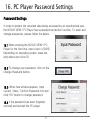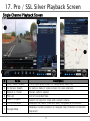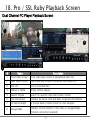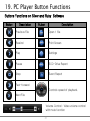
1
5. Quick Start Guide - Setting Up the Camera
Continued...
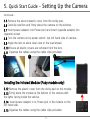
5.5 Remove the second plastic cover from the sticky pad.
5.6 Carefully position and firmly place the camera on the window.
5.7 Insert power adaptor into Power port and insert cigarette adaptor into
cigarette socket
5.8 Turn the camera on by power switch, top left hand side of camera.
5.9 Angle the lens to allow clear view of the road ahead.
5.10 Ensure all plastic covers are removed from the lens.
5.11 Organise the cables using the cable clips provided.
4
6
5
Installing the Infrared Module (Ruby models only)
5.12 Remove the plastic cover from the sticky pad on the module.
5.13 Firmly place the module at the bottom of the camera with
the lights facing inside the vehicle.
5.14 Insert power adaptor in to Power port in the module on the
left hand side.
5.15 Organise the cables using the cable clips provided.
10