1
MICROPHONE & REMOTE USE
Basic Remote Operation
for iPhone®, iPad®, iPod® and most Android™ devices:
Function
Answer incoming phone call
End phone call
Play media*
Operation
Press the remote button
Press the remote button
Press the remote button
Pause media
Skip to next track**
Press the remote button
Double-press the remote button
Restart the track/previous track** Triple-press the remote button
You may need to open the media player application for initial
playback to start.
Not all media players support this functionality.
*
**
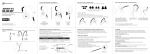
remote button
microphone
Additional remote functions are available
with many devices. Visit meelec.com/phone
for complete compatibility and functionality.