1
4
Section
2
THE LCD VIDEO MONITOR
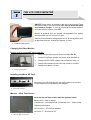
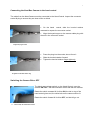
ON/OFF Power button is located on the top of the monitor. Press
the button briefly to turn the monitor ON. Do not switch ON while
connected to charger. To turn off, hold down the power button 3
seconds until the monitor turns OFF.
Monitor is powered from an internal, rechargeable LiOn battery
which provides up to 2 hours of run time.
Video monitor should be charged prior to use & recharged as soon
as practical after use; charge time approx. 3 hours.
2.
LCD Wireless Video Monitor
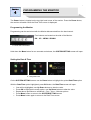
Charging the Video Monitor
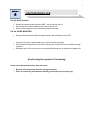
Monitor must be turned OFF before charging
Insert charger lead plug into socket marked “DC 5V”
Connect Plug Pack charger into power point & switch on
Charge until the “RED” charge light on Monitor goes out
Charge led located front left hand top corner on monitor
Charge time approx, 3 hours
3.
Charging the Monitor
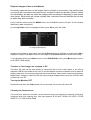
Installing the Micro SD Card
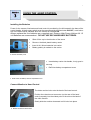
Insert the micro SD Card into the slot on the side of the monitor.
Correct alignment is indicated by the diagram.
4.
Micro SD Card slot
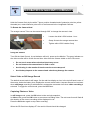
Monitor – Real Time Screen
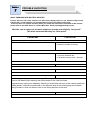
Icons on the real time screen indicate systems status.
Battery Icon - state of charge
Camera Icon - still image mode (Camcorder Icon – video mode)
Date time information
SD Card Icon – SD Card is installed
SD Card “F” – SD Card is full
5.
Monitor Real Time Screen