1
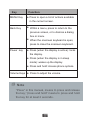
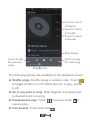
Go to next song: Touch once. Rewind: Touch & hold . Go to beginning of the song: Touch once. Playlists You can create as many playlists as you wish. The “Last added” playlist is a system playlist and cannot be deleted or renamed. Create a playlist on your phone 1. From the home screen, touch the application tab, and then touch Music. 2. Select a category. From the list that appears, navigate to the artist, album, or song that you want to add in the playlist. 3. Touch and hold the music files to open the context menu. 4. Touch Add to playlist. 5. In the Add to playlist menu that opens, select New playlists to create a new playlist, or one of the existing playlists. 6. Enter the name for your new playlist and then touch Save. Manage your playlists 65