1
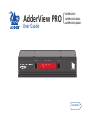
AdderView PRO {
User Guide
COMPUTER
KVM
SPK
USB1 USB2
AV4PRO-DVI
AV4PRO-DVI-DUAL
AV4PRO-DVI-QUAD
MODE
www.adder.com
Configuration
Using the configuration menu..................................................13
General configuration................................................................14
Changing hotkeys..................................................................14
Mouse switching....................................................................14
Miscellaneous functions........................................................14
Performing upgrades.................................................................15
Further information
Getting assistance.......................................................................21
Appendix 1 – Supported video modes......................................22
Appendix 2 – Cable pin-outs......................................................23
Warranty.....................................................................................24
Safety information.....................................................................24
Radio Frequency Energy............................................................25
Index
Mounting......................................................................................6
Connections..................................................................................7
User console.............................................................................7
Computer systems....................................................................8
Power in connection................................................................9
Optional RC4 remote control..................................................9
Switching control by computer.............................................10
Synchronising multiple units.................................................11
Managing EDID video display information..........................12
Installation
Selecting a computer.................................................................17
To select a computer using the front panel.........................17
To select a computer using hotkeys......................................18
To select a computer using the mouse buttons...................19
Autoscanning..............................................................................20
What is True Emulation?..............................................................3
AdderView PRO features - front and rear..................................4
What’s in the box.........................................................................5
What you may additionally need................................................5
Operation
Introduction
Contents
1
2
Multiscreen versions
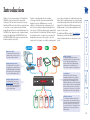
The AdderView PRO range includes
separate models to support one, two
or four video heads per channel.
Multiple switching
The attached peripheral devices can be
switched collectively to any computer system,
or can be linked to separate systems to
achieve multiple tasks in parallel. Multiple
switching can be controlled from the onscreen menu or using the front panel buttons.
Digital and analogue video
The AdderView PRO units use DVI-I
(Integrated) connectors throughout so
that DVI digital and/or VGA analogue
video may be used (the latter requires
the use of suitable adapter cables).
Intelligent display information
The AdderView PRO units use our
EDID Emulation feature to ensure
that all computers are supplied with
the correct information about each
connected video display.
COMPUTER
KVM
SPK
USB1 USB2
MODE
www.adder.com
True Emulation
Earlier USB KVM switches relied upon
standard keyboard and mouse templates
to inform each computer system how to
deal with the connected peripherals. The
AdderView PRO range succeeds in harvesting
the true identities of the connected keyboard
and mouse and presents those ‘real’ profiles
concurrently to every system. Thus, specialist
keyboards and mice can be fully supported.
USB Remote wakeup
The USB Remote Wakeup feature is fully
supported. Any connected computer can go
into sleep mode and be awakened (when its
channel is selected) as soon as you press a
key or move the mouse. The computer and
peripherals must support the USB Remote
Wakeup feature.
SPK
KVM
on one system, listening to a soundtrack from another
while a third is sending documents to your printer and
a fourth performing another task with a different USB
peripheral. The AdderView PRO front panels make it
straightforward to control which peripherals should
connect to each system.
The AdderView PRO units feature True Emulation
which ensures that the full characteristics of the
connected keyboard and mouse are passed to every
system.
Thanks to our high quality, efficient switching
technology, each video head can support dual link
digital video at up to 450Mpixels per second. In
addition to the impressive video performance, these
units offer more than just straight switching between
four systems. The KVM, speakers and two separate USB
devices attached to the AdderView PRO units can either
be switched in unison, as normal, or you can mix your
peripherals between any of the systems to suit your
current tasks. For instance, you could be creating emails
Thank you for choosing a member of the AdderView
PRO family of professional switches from Adder
Technology. There are three versions of the four-way
AdderView PRO, each of which allows a single operator
to control up to four computer systems and share
peripherals among them in a very flexible manner. The
AV4PRO-DVI can support one video head per channel,
whereas the slightly larger AV4PRO-DVI-DUAL and
AV4PRO-DVI-QUAD units support two and four video
heads per channel, respectively.
Introduction
Emulated USB switching
The issues with interpreting the complex USB data streams and recreating (or
Emulating) the identity of attached USB devices were eventually solved, leading
to the creation of the Emulated USB switch.
A neat side effect of the technique used is that each computer can be fooled
into thinking that the USB device is permanently connected to it, even when
the device is switched to another computer. This means that the enumeration
process for the USB device takes place only once, during the first power
on. After that, a computer merely sees a dormant version of the USB device
whenever the device is actually connected to a different computer.
However, it remains a complex task to dynamically assume the identity of a USB
device, distribute it among the connected computers and maintain all of the
necessary signals, states and processes. Therefore, manufacturers have previously
relied upon a fixed keyboard and mouse profile that is declared to each
computer, regardless of the actual connected devices. This precluded the use of
any special keyboard or mouse features over and above the standard layouts.
Enumerated USB switching
The earliest attempts to switch USB devices applied a relatively ‘hands off’
approach. Enumerated USB switches are the electronic equivalent of those old
mechanical KVM switches with a large knob on the front.
Enumerated switches are so called because a connected USB device will be
required to perform a full initiation (a process called Enumeration) every time it is
switched; just as if you had pulled out the plug and then reconnected it.
Enumerated switches simply pass all signals straight through between the USB
device and the computer, they do not attempt to interpret any data. For most
devices, this offers an advantage because the switch just leaves them to get on
with their jobs without any interference or any hit on performance. However, it
means that a USB keyboard or mouse cannot be used to control the switching
process - a quick and simple control method expected by most users. Reliability
of switching is also an issue that has plagued enumerated switches, especially
when used with certain USB devices and particular operating systems.
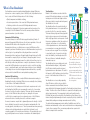
True Emulation
Mindful of the limitations associated with the
USB
USB
OTHER USB
DEVICE
previous USB switching techniques, we set about KEYBOARD MOUSE
creating a more effective and elegant solution.
After a great deal of research and development,
HOST
True Emulation is the result.
CONTROLLER
True Emulation allows the complete identity of
the keyboard and mouse to be copied and then
presented to all of the connected computers.
EMULATION
ENGINE
This means that any keyboard offering specialist
function keys or any mouse with extra features
will be fully supported at each computer. As with
the previous emulation method, the unselected
computers will continue to see the identities
USB
USB
USB
USB
HUB
HUB
HUB
HUB
of the keyboard and mouse, which means that
no enumeration is necessary when their link
becomes active once again. This not only helps
PC
PC
PC
PC
to speed up the rate of reconnection, but also
2
3
4
1
raises the reliability of switching because USB
links are at their most vulnerable during the
The emulated section of
enumeration process.
the switch is shown in
True Emulation relies upon a high speed circuit,
blue and handles only the
called an Emulation Engine, to fully emulate
keyboard and mouse. The
the USB device identities and also interpret
green enumerated section
keyboard and mouse data streams. The result is
full support for KVM switching control via hotkey of the switch handles other
presses or the third button/scroll wheel of a
USB devices and also uses
mouse.
the USB hubs to link with
True Emulation is not necessarily required by
the computers.
other USB devices, which is why you will also
find two enumerated circuits included (shown in
green within the block diagram) alongside the True Emulation feature (shown
in blue). This allows those other USB devices to operate at their highest speeds,
without any intervention. The enumerated circuits benefit greatly from the
USB Hubs that are jointly used with the True Emulation system. Because they
interface directly and permanently with each computer, they help to stabilise the
dormant links, making errors during enumeration much less likely.
The dual switching arrangement provides further flexibility because the True
Emulation and enumerated sections can be switched in unison or independently
of each other, as required. Thus, your various peripherals can operate with
different computers at the same time.
True Emulation represents a significant breakthrough in sharing USB devices
between two or more computer systems. Until this point, the problem has been
how to create a USB switch that provides all of the following:
• Quick, transparent and reliable switching,
• Accurate representation of the connected USB keyboard and mouse,
• Switching control via the connected USB keyboard and/or mouse.
The difficulty in achieving all of the above requirements has been due to the
complexity of the USB standard. This has led to various problems that have
spawned a number of possible solutions.
What is True Emulation?
AdderView PRO features - front and rear
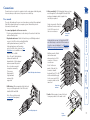
The AdderView PRO single screen and multiscreen units are housed within
durable, metallic enclosures with all connectors situated at the rear panel. The
smart front face features the control buttons and the operation indicators.
Multiscreen versions
M U L T I S C R E E N
MODE
COMPUTER
KVM
SPK
V1
V2
MODE
USB1 USB2
www.adder.com
COMPUTER button
Press to change to
the next computer
channel.
INDOOR USE ONLY
The seven segment numeric display indicates the computer
channel that is currently active.
V4
www.adder.com
MODE button
Press to determine
which peripherals
should be switched
to another computer
channel (will occur
when the COMPUTER
button is pressed.
Indicators
The four indicators (KVM, SPK, USB1, USB2) show which
peripherals are switched to the current computer channel OR
(as you begin pressing the MODE button) the peripherals that
will be switched during the next press(es) of the COMPUTER
button.
V3
Extra indicators
As well as the indicators shown on the single screen version,
the multiscreen units also include four indicators, labelled V1 to
V4, which show the video channels being switched.
V4
INDOOR
USE
ONLY
4
USER
CONSOLE
3
2
V3
1
USB 1
V2
5V
USB 2
2A
USB2.0
SWITCHED
OPTIONS
V1
4
USER
CONSOLE
3
2
1
USB 1
5V
Power input
The power supply
connects here.
User console
Connect DVI-I
video, USB
keyboard
and mouse
plus optional
speakers
to these
connectors.
Computer channels
Each computer connects to one
of these four channels via a DVI-I
video connector, a USB B-type
connector and an audio 3.5mm
jack input.
USB1 USB2
SPK
User console
Connect up to two
USB devices to these
connectors. These ports
are switched in an
enumerated manner
(see What is True
Emulation?)
USB 2
4A
OPTIONS
USB2.0
SWITCHED
Extra video channels
In addition to all of the ports described (left) for the single
screen version, the multiscreen versions provide additional DVI-I
connectors to allow multiple video streams from each computer
to be switched to (up to) four video monitors.
KVM
COMPUTER
The Dual and Quad video screen versions use a larger
casing and provide more connectors on the rear panel.
Options port
This 10p10c port can separately support the following functions:
• Remote control - allows a standard Adder RC4 four button remote
control unit to be used to switch channels (see Optional RC4
remote control for details).
• Upgrades - used to update the internal firmware when necessary
by connecting to a computer.
What’s in the box
AdderView PRO Multiscreen units
AV4PRO-DVI-DUAL or AV4PRO-DVI-QUAD
Power adapter (12.5W or 20W)
and country-specific power lead
CD-ROM
CO
COM
MPU
PU
TETE
R
R
KV
KMV
M
CO
MPU
TER
V1
V1
USB1
V2
V2
KUS
UB1S
V3
V3
M
BUS
1UB2
S
V4
V4
B2
MO
MDOE
D
U
L
T
I
S
C
R
E
E
E
N
USB2
MO
DE
Four self-adhesive
rubber feet
ww
ww
w.a
dder
.com
w.a
dd
er.c
om
Single link DVI-D to DVI-D video cable
Part number: VSCD1
Combined dual link DVI-D and USB (USB type A to B) cable
Part numbers:VSCD3 (2m length)
VSCD4 (5m length)
Audio cable 2m (3.5mm stereo jacks)
Part number: VSC22
DVI to VGA adaptor
Part number: VSA11
What you may additionally need
SPK
SPSK
P
KV
M
AdderView PRO unit
AV4PRO-DVI
AD
DE
R
4
3
Flash upgrade adapter
plus standard 3m patch lead
Part number: VSC40
Two 19” rackmount brackets
and four screws
Part number: RMK3
RC4 remote control
plus standard 3m patch lead
Part number: RC4-8P8C
2
1
om
der.c
w.ad
ww
There are two main mounting methods:
• The supplied four self-adhesive rubber feet
• Optional rack brackets (AV4PRO-DVI models only)
Rack brackets (AV4PRO-DVI models only)
Connections
The optional brackets (plus four screws), allow the
unit to be secured within a standard rack slot.
INDOOR USE ONLY
Note: Both the AdderView PRO unit and
its power supply generate heat when in
operation and will become warm to the
touch. Do not enclose them or place them
in locations where air cannot circulate
to cool the equipment. Do not operate
the equipment in ambient temperatures
exceeding 40 degrees Centigrade. Do
not place the products in contact with
equipment whose surface temperature
exceeds 40 degrees Centigrade.
Mounting
Installation
5V
US
E
CO R
NS
OL
E
14
OP
TIO
NS
US
U
SWSB2.0
ITC
HE
D
US
B1
B2
3
2A
Connections
The ports that make up the user console are where you attach the peripherals
that will be shared between the computer systems. Ensure that power is
disconnected from the unit.
To connect peripherals to the user console
1 Position your peripheral devices in the vicinity of the unit such that their
cables will easily reach.
2 Keyboard and mouse: Attach the leads from your USB keyboard and
mouse to the USB sockets specifically labelled
with keyboard and mouse symbols. The
keyboard and mouse will operate in
any of the USB sockets, however, True
Emulation is not available on sockets
labelled USB1 or USB2.
Note: These sockets provide
enumerated (transparent)
switching.
OP
T
US
E
CO R
NS
OL
E
From USB keyboard and mouse
4
3
5V
2
US
U
SWSB2.0
ITC
HE
D
US
B1
4A
US
E
CO R
NS
O
LE
1
From video
monitors
1
Multiscreen units: Attach
the lead from each
video monitor to a DVI-I
connector of the user
console area.
Note: On the rear
panel of the unit, the
connectors at each
horizontal level (V1 to V4)
will be switched through
to the user console DVI-I
connector which is at the
same level.
During initial power up, the AdderView PRO
unit will attempt to read the EDID information
from the connected display(s). See Managing
EDID video display information for details.
OP
TIO
NS
3 USB devices: Where required, attach the leads
from your USB peripherals to the USB sockets
labelled USB1 and USB2.
Single screen units: Attach the
lead from the video monitor
to the DVI-I connector of
the user console area.
US
E
CO R
NS
OL
E
5 Audio: Where required, connect the lead
from your speakers to the audio socket.
B2
OP
T
Note: The unit’s True Emulation
feature will read the full
characteristics of the keyboard
and mouse and will present
those to each connected
computer concurrently.
This ensures
that specialist
keyboards and
mice are fully
supported.
2A
From video
monitor
5V
2A
5V
User console
4 Video monitor(s): DVI-I (integrated) video ports are
used throughout to allow digital DVI and/or VGA
analogue (via adapter cables) signals to be
switched, as required.
5V
2A
Connections do not need to be carried out in the order given within this guide,
however, where possible connect the power in as a final step.
US
E
CO R
NS
OL
E
OP
T
From USB peripherals
From
speakers
Computer systems
From the USB port
on the computer
US
3
1
B1
2
B2
US
B1
U
SWSB2.0
ITC
HE
D
1
From the speaker port
on the computer
4 Single screen units: Use a DVI cable or a VGA to DVI-I adapter cable (if using
analogue signals) to link the video output of the computer’s graphic port to
the DVI-I port of the required channel on the rear of the unit.
Note: A combined DVI-D and USB (type
A to B) cable is also available for linking
computers to the AdderView PRO unit
2
(Part numbers: VSCD3 for a 2m cable and
VSCD4 for a 5m cable).
1
US
U
SWSB2.0
ITC
HE
D
US
V2
U
SWSB2.0
ITC
HE
D
V3
4
V1
US
B2
US
V4
Note: On the rear panel of the unit, connectors belonging to
the same channel are stacked vertically. The connectors at each
horizontal level (V1 to V4) will be switched through to the user
console DVI-I connector which is at the same level:
V4
INDOOR
USE
ONLY
V3
B1
B2
V2
V1
4
USER
CONSOLE
From the video port
on the computer
To connect a computer system
1 Ensure that power is disconnected from the AdderView PRO unit and the
system to be connected.
2 Use a USB cable (type-A to type-B) to link
a USB port on the computer system to the
USB port of the required channel on the
2
rear of the unit.
3 If required, use a stereo audio link cable
1
(3.5mm jacks at either end) to link the
speaker port on the computer
system to the audio port of
the required channel on
the rear of the unit.
Multiscreen units: Use DVI or VGA to DVI-I
adapter cables (if using analogue signals) to link
the video outputs of each computer to the DVI-I
ports on the rear of the unit (see
note below).
3
2
1
Each computer system is connected to the AdderView PRO unit using up to
three cables.
USB 1
5V
USB 2
4A
During initial power up, the AdderView PRO
unit will attempt to read the EDID information
from the connected display(s). See Managing
EDID video display information for details.
USB2.0
SWITCHED
OPTIONS
Channel 4
Channel 3
Channel 2
Channel 1
Power in connection
Optional RC4 remote control
The AdderView PRO unit is supplied with either a 12.5W (single screen version)
or 20W (Multiscreen versions) power adapter. There is no on/off switch on the
unit, so operation begins as soon as a power adapter is connected.
To connect the power supply
1 Attach the output lead from the power
adapter to the 5V socket on the rear panel
of the unit.
To connect the remote control
1 Connect either end of the supplied cable to the socket at the rear of the
RC4 remote control.
5V
US
E
CO R
NS
OL
E
2A
The optional RC4 remote control unit (full part number: RC4-8P8C) can be used
to provide direct push button access to any channel from your desktop. The
RC4 remote control is supplied with a 3 metre cable that is used to link with the
OPTIONS port on the rear panel of the unit.
OP
TIO
2 Connect the IEC connector of the supplied country-specific power lead to
the socket of the power adapter.
2 Connect the other end of the cable to the OPTIONS port on the rear panel of
the unit.
5V
2A
US
E
CO R
NS
OL
E
3 Connect the power lead to a nearby main supply socket.
Note: Both the unit and its power supply generate heat when in operation and
will become warm to the touch. Do not enclose them or place them in locations
where air cannot circulate to cool the equipment. Do not operate the equipment
in ambient temperatures exceeding 40 degrees Centigrade. Do not place the
products in contact with equipment whose surface temperature exceeds 40
degrees Centigrade.
4
OP
TIO
NS
Ensure that the chosen serial port is configured to the following:
• Baud rate: 1200
• Data bits: 8
• Stop bit: 1
• Parity:
None
Channel selection codes
5V
2A
US
E
CO R
NS
OL
E
4
OP
TIO
NS
2 Connect the other end of the cable to a vacant serial port on the computer.
•
•
•
•
Channel 1: Channel 2: Channel 3: Channel 4: ASCII
Character
Hex
Decimal
‘1’
‘2’
‘3’
‘4’
0x31
0x32
0x33
0x34
49
50
51
52
To connect a computer remote control
1 Insert the 8p8c connector of the cable to the OPTIONS port on the rear panel
of the unit.
Serial port parameter settings
The cable link from the computer needs to connect the transmit (TXD) line of
the computer to the receive (RXD) input of the AdderView PRO and also link the
ground terminals (GND) of the two devices. See Appendix 2 for details.
Connecting a computer for remote control
The OPTIONS port featured on every AdderView PRO allows an external serial
input, typically from a computer, to control the selection of the various channels.
For more details about the necessary cable, see Appendix 2.
Upon receipt of the correct code, the AdderView PRO will switch immediately to
the appropriate channel.
Switching control by computer
10
Slave AdderView PRO
4
USER
CONSOLE
3
2
1
USB 1
5V
USB 2
2A
USB2.0
SWITCHED
OPTIONS
4
USER
CONSOLE
3
2
1
USB 1
5V
OPTIONS
USB2.0
SWITCHED
Master
monitor
Computers fitted
with multiple
video heads
USB 2
2A
Master AdderView PRO
Slave
monitor
INDOOR USE ONLY
Serial
synchronisation
cable
INDOOR USE ONLY
AdderView PRO units can be connected together so that they
operate in a synchronised manner. Thus, two AV4PRO-DVI units
can be made to switch two video heads in a similar manner to an
AVPRO-DVI-DUAL. Additonally, two AVPRO-DVI-DUAL units could
be made to resemble an AVPRO-DVI-QUAD, while two AVPRO-DVIQUAD units could be combined in order to switch up to eight video
heads simultaneously.
Whenever an AdderView PRO channel is switched, it sends an
RS232 command out on its serial interface (marked OPTIONS on the
rear panel). An AdderView PRO will switch its channel if it receives
the same command on its serial interface. Consequently, by linking
the serial interfaces, a master unit may be made to automatically
switch one or more slave units as shown in the diagram.
It should be noted that the synchronisation cable deliberately does
not have the transmit pin of the Slave End connector linked to the
receive pin of the Master End connector. To do so would cause the
Slave unit to be able to switch the Master unit. This would setup
an endless cyclical switching sequence that would prevent the
AdderView PRO devices from operating correctly. For more details
about the serial synchronisation cables, see Appendix 2.
Synchronising multiple units
11
Managing EDID video display information
You can refresh the EDID information from the connected monitor(s) without
the need to power cycle the AdderView PRO.
To refresh EDID information during use
1 Enter the Configuration menu.
2 Press
to enter the Functions menu
and then
.
4 Press
and then
to exit the menu.
Display
4
V3
V2
Display
2
V1
4
USER
CONSOLE
3
2
1
V4
Display
3
USB 1
USB 2
4A
USB2.0
SWITCHED
OPTIONS
EDID
EDID
EDID
EDID
Computer 4
Computer 3
Computer 2
Computer 1
5V
Display
1
3 Press
Refreshing EDID information during use
Whenever a AdderView PRO unit is powered on (or when the option
is selected from the configuration menu), it will interrogate the connected
monitor(s) to determine whether EDID (Extended Display Identification Data)
information is available. If EDID information is available, it will be copied and
used; otherwise a default set of data, stored within the AdderView PRO, will be
substituted.
The AdderView PRO units use our EDID Emulation feature to ensure that the
collected EDID information (up to two pages) is correctly supplied to every
connected computer.
In the multiscreen AV4PRO-DVI-DUAL and AV4PRO-DVI-QUAD units, the EDID
Emulation and Hybrid DDC features ensure that separate EDID data from each
video display will be distributed through to the appropriate video adaptors
within each computer.
12
2 On the keyboard, press the letter key for the required menu section, e.g.
The display will show the pressed letter, e.g.
3 Press the number of the required setting, e.g.
The display will show the pressed number, e.g.
4 Press
to accept the setting and return to the main menu section.
The display will show:
5 You can now continue with your next configuration change (go to step 2),
or exit from the configuration menu (see below).
To exit the configuration menu and save changes
• Press
and then press
to exit and save changes.
To exit the configuration menu without saving
• Press either of the front panel buttons. You can press
at any point to exit
from an option and
return to the main
menu ( ) section.
Enter the Switch Mode menu
All
KVM + Speaker
KVM only
Speaker only
USB1 only
USB2 only
Enter the Autoscan Time Delay menu
Autoscan disabled
2 seconds
5 seconds
7 seconds
15 seconds
30 seconds
1 minute
5 minutes
Enter the User Preferences menu
Enable mouse switching
Disable mouse switching
Cycle all ports (when using ‘Hotkey + Tab’ or ‘Autoscan’)
Cycle only active ports (when using ‘Hotkey + Tab’ or ‘Autoscan’)
1 Press and hold the front panel COMPUTER button for roughly five seconds.
The display will show:
Enter the Hotkey menu
Ctrl + Alt
Ctrl + Shift
Alt + Shift
Right Alt
Alt
Left Ctrl + Alt
Right Ctrl + Alt
Hotkeys disabled
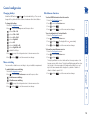
To use the configuration menu
During normal use, the seven segment display on the front panel shows the
number of the currently selected computer channel. From this condition, enter
configuration mode as follows:
The configuration mode allows you to determine numerous aspects of the
AdderView PRO unit capabilities.
Enter the Functions menu
Show current firmware version
Refresh EDID information from the connected video display
Reset configuration to factory defaults ( is displayed momentarily)
Using the configuration menu
Configuration
13
General configuration
4 Press
to accept the setting and return to the main menu section.
and then
to exit the menu and save changes.
Mouse switching
You can enable or disable mouse switching to suit your installation requirements.
To enable/disable mouse switching
1 Enter the Configuration menu.
2 Press
to enter the User Preferences menu and then press either:
to Enable mouse switching
to Disable mouse switching
3 Press
to accept the setting and return to the main menu section.
4 Press
and then
.
4 Press
and then
to exit the menu and save changes.
To reset configuration to factory defaults
1 Enter the Configuration menu.
2 Press
to enter the Functions menu
3 Press
and then
. The display will show
momentarily.
4 Press
and then
to exit the menu and save changes.
To show the current firmware version
1 Enter the Configuration menu.
2 Press
to enter the Functions menu
3 Press
and then
.
The display will blank for a short while and then the major number of the
firmware revision will be shown. The display will blank again and then show
the first digit of the minor number. Following another blank, the second
digit of the minor number will be displayed. e.g. <blank> 1 <blank> 0
<blank> 2 <blank> equals v1.02
4 Press
and then
to exit the menu and save changes.
and then
to exit the menu and save changes.
3 Press
3 Press
To change the hotkeys
1 Enter the Configuration menu.
2 Press
to enter the Hotkey menu and then press either:
to choose Ctrl + Alt
to choose Ctrl + Shift
to choose Alt + Shift
to choose Right Alt
to choose Alt
to choose Left Ctrl + Alt
to choose Right Ctrl + Alt
to disable the Hotkeys
To refresh EDID information from the monitor
1 Enter the Configuration menu.
2 Press
to enter the Functions menu
AdderView PRO units use
and
as their standard hotkeys. These can be
changed if they clash with other software or hardware within the installation.
Miscellaneous functions
Changing hotkeys
14
Performing upgrades
To use the KVM Firmware Uploader utility
1 - Obtain and run the KVM Firmware Uploader.
Download the latest AdderView PRO unit KVM Firmware Uploader from
the Adder Technology website and install it on a Windows-based upgrade
computer that will be connected to the AdderView PRO unit. The files
are supplied as a compressed ZIP file. Decompress the ZIP file with an
appropriate tool such as WinZip (www.winzip.com) and copy all contained
files to the same folder on the upgrade computer.
2 - Power off the AdderView PRO unit
Remove the power supply plug from the rear panel of the unit.
3 - Connect the upgrade computer to the AdderView PRO unit
Connect the serial port of the upgrade computer to the OPTIONS port on the
rear panel of the unit using the optional upgrade cable.
5V
2A
US
E
CO R
NS
OL
E
4
OP
TIO
NS
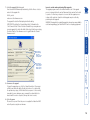
5 - Run the KVM Firmware Uploader utility
From that folder, select the KVMUploader icon to run the upgrade utility.
The KVM Firmware Uploader dialog will be displayed:
6 - Query the AdderView PRO unit
Click the Query Unit button to confirm that communication is possible with
the AdderView PRO unit and to establish its firmware details. If successful,
the ‘Unit connected’ field should show the name of the AdderView PRO unit
and the current firmware will also be listed.
If the application cannot contact the AdderView PRO unit, re-check the
connection cable and click the Advanced... button to check that the correct
serial port is being used. Change the serial port within the Advanced...
section, if necessary.
continued
Items required to perform an upgrade
• Optional upgrade cable (see Appendix 2 for pin-out specifications).
• A Windows-based upgrade computer with an RS232 serial port.
• The latest version of the KVM Firmware Uploader and firmware files for
the AdderView PRO unit - available from the Technical Support > Updates
section of the Adder Technology website (www.adder.com).
4 - Invoke upgrade mode
While powering on or when already powered: Press and hold the
COMPUTER and MODE buttons (for up to ten seconds) until the numeric
indicator shows ‘ ’.
The AdderView PRO unit is fully upgradeable via flash upgrade. Such upgrades
require a Windows-based computer system to be linked via the OPTIONS port.
There is no need to adjust the computer’s serial port
settings as the application will do this automatically.
15
8 - Commence the upgrade
To begin the upgrade process, click the Upload Now button. The progress
will be shown within the dialog. Should you decide not to continue with
the upload at any stage, click the Abort button; response to this is usually
immediate, however, during an erase command, the upload will not be
aborted until the erase is complete (this may take a few seconds).
9 - Cycle the power
Disconnect the power. When the power is re-applied the AdderView PRO
unit will operate using the new firmware.
Check also that
the ‘New firmware
version’ is greater
than the ‘Current
firmware version’.
Check that the
‘Intended Target
Units’ field
matches the ‘Unit
Connected’ field.
Issues to consider when performing flash upgrades
The upgrade program rewrites the internal firmware code. If the upgrade
process is interrupted then the unit will have invalid code and will not be able
to operate. It is therefore good practice to ensure that the upgrade process
is always fully completed. A partial or failed upgrade may be rectified by
performing another upgrade.
WARNING: Running faulty or partially upgraded code may have unpredictable
results and may damage your AdderView PRO unit or computing equipment.
7 - Select the upgrade file to be used
From the main KVM Firmware Uploader dialog, click the Browse... button
and select the upgrade file:
AV4Pro_xxx.txt
where xxx is the firmware version.
The upgrade file details will be displayed within the dialog.
IMPORTANT: Check that the ‘Intended Target Units’ field matches the
‘Unit Connected’ field. If these fields do not match then you may have an
incorrect upgrade file, check with Adder Technology Ltd before proceeding.
Check also that the ‘New firmware version’ is greater than the ‘Current
firmware version’.
16
Indicates the number
of the currently
selected computer
Use this button to
choose the next
required computer
COMPUTER
The KVM, SPK, USB1, and USB2 indicators show which
peripherals are switched to the current computer
channel OR (as you begin pressing the MODE button)
the peripherals that will be switched during the next
press(es) of the COMPUTER button.
KVM
SPK
V1
V2
USB1 USB2
V3
MODE
Use this button
to choose which
peripherals will
be switched
V4
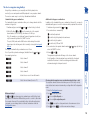
The front panel allows you to determine how the various peripherals are
switched to one or more computer channels.
1 Optional: If you need to selectively switch some of your peripherals, press
the MODE button repeatedly to change the switching mode:
KVM SPK USB1 USB2
MODE
Will switch all peripherals together
MODE
Will switch keyboard, video, mouse and speakers
MODE
Will switch only the keyboard, video and mouse
MODE
Will switch only the speakers
MODE
Will switch only USB peripheral 1
Multiscreen models only - The V1 to V4 indicators show which
video monitors are switched to the current computer channel.
There are three main ways to switch the common peripherals to specific
computer channels:
• Using the front panel controls
• Using hotkeys
• Using mouse button presses
To select a computer using the front panel
Will switch only USB peripheral 2
Note: If an indicator flashes, it signifies that the respective peripheral is
currently switched to another computer channel.
2 Press the COMPUTER button repeatedly to select the required computer
channel.
Selecting a computer
Operation
17
2 While still holding
and
, press the number key of the required
channel address (or the TAB key), then release all of the keys.
Note: The numbers on your keyboard’s numeric keypad are not valid, use
only the numeral keys above the QWERTY section.
The ports (KVM, audio and/or USB) that are switched using this method
depend upon the switching mode that is currently set using the front panel
buttons.
The range of standard hotkey combinations are as follows:
Note: If your hotkeys have been changed, substitute them for
the examples given here.
and
Selects channel 1
Selects channel 2
Selects channel 3
Selects channel 4
Isolates the user console from all channels
in
Selects the next channel (see note )
What are hotkeys?
The
and
keys when pressed in combination are called ‘hotkeys’ and
they signal to the AdderView PRO unit that you wish to control it, rather than
the computer. However, if these particular hotkeys clash with another device
or program, you can change them to a different combination within the
Configuration menu.
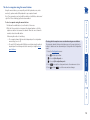
1 Simultaneously press and hold
and
2 Press and release a command key:
.
to switch all peripherals
to switch only the keyboard, video and mouse
to switch only the speakers
to switch only USB1 and USB2
3 Press and release the required channel number (
above the QWERTY section).
to
using only the keys
4 Release
and
.
The appropriate peripherals will change to the chosen channel.
Note: Regardless of which peripherals were switched, the front panel
indicators will continue to show the switching mode that was last
determined using the front panel controls.
Choosing which computers are accessed when using hot keys + tab
The computer channels that are visited when you use the hot keys + tab (or
mouse buttons/autoscan) are determined by a setting within the Configuration
menu:
1 Enter the Configuration menu.
2 Press
and then press either:
to choose Cycle all ports, or
to choose Cycle only active ports
3 Press
to accept the setting and return to the main menu section.
4 Press
and then
(or other hotkeys, if altered).
and
1 Simultaneously press and hold
Additional hotkey press combinations
In addition to the standard hotkey press combinations (shown left), you can also
add additional keypresses in order to determine which peripherals are switched:
Using hotkey combinations, you can quickly switch the keyboard, video
monitor(s), mouse and speakers and USB peripherals to any computer channel.
There are two mains ways to use hotkeys: Standard and Additional.
Standard hotkey press combinations
The standard hotkey press combinations allow you to change channels with the
minimum of keypresses:
To select a computer using hotkeys
to exit the menu and save changes.
18
To select a computer using the mouse buttons
to choose Cycle only active ports
3 Press
to accept the setting and return to the main menu section.
4 Press
and then
to exit the menu and save changes.
2 Press
and then press either:
to choose Cycle all ports, or
Choosing which computers are accessed when using mouse buttons
The computer channels that are visited when you use the mouse buttons (or
hotkeys + tab/autoscan) are determined by a setting within the Configuration
menu:
1 Enter the Configuration menu.
To select a computer using the mouse buttons
1 Hold down the middle button (or scroll wheel) of the mouse.
2 Click the left mouse button to increment the channel number or click the
right mouse button to decrement the channel. When the correct channel is
reached, release the middle button.
When using this method of switching:
• The computer channels that are visited depend upon the configuration
menu setting (see note ).
• The ports (KVM, audio and/or USB) that are switched using this method
depend upon the switching mode that is currently set using the front
panel buttons.
Using the mouse buttons, you can quickly switch the keyboard, mouse, video
monitor(s), speakers and/or USB peripherals to any computer channel.
Note: These procedures work only with three-button or IntelliMouse devices and
only if the ‘Mouse Switching’ option has been enabled.
19
Autoscanning
on the keyboard.
to accept the setting and return to the main menu section.
4 Press
and then
to exit the menu and save changes.
Note: The setting of this option also affects which computers are visited
when the channel is changed using the mouse buttons or hot key + tab.
To select an autoscan period
1 Enter the Configuration menu.
2 Press
and then press either:
to choose Autoscan disabled,
to choose 2 seconds,
3 Press
2 Press
and then press either:
•7 to choose Cycle all ports, or
•8 to choose Cycle only active ports
to choose 7 seconds,
to choose 15 seconds,
to choose 30 seconds,
to choose 1 minute, or
to choose 5 seconds,
to choose 5 minutes.
3 Press
4 Press
to accept the setting and return to the main menu section.
and then
to exit the menu and save changes.
To start autoscanning
• On the keyboard, press
.
Notes:
During autoscanning, mouse switching, hot key + tab and interactivity with the
computers are all disabled.
During autoscanning, only the KVM and speaker ports are switched to each
visited computer channel, the two USB device ports remain connected to their
currently selected channels.
To stop autoscanning
You can stop the autoscanning process in either of the following ways:
• Press the COMPUTER button on the front panel, or
• Select a specific channel using the hot keys + channel number.
To start autoscanning mode, press
To select an autoscan mode
1 Enter the Configuration menu.
When enabled, the autoscan mode switches between the connected computers
in sequence. This is useful to allow you to sample activity among the connected
computers.
Two scanning modes are available:
• Cycle all ports – This mode visits, in turn, to each connected computer. This
mode should be used with care due to the reasons given in the warning
below. To prepare for this autoscan mode, choose
within the
configuration menu (see right).
• Cycle only active ports – Only computer ports where an active computer
is detected will be viewed. This mode avoids blank screens from being
displayed and helps to prevent the viewing monitor from entering a powerdown state on every scan cycle.
Additionally, when this mode is selected, whenever you use either the
mouse buttons or hot keys + tab to change channels, only computers that
are active will be visited. To prepare for this autoscan mode, choose
within the configuration menu (see right).
WARNING: Many monitors are fitted with automatic power saving
relays that switch off after a few seconds when connected to an
inactive computer. If you are using such a monitor, do not use the
‘Cycle all ports’ mode. Continual switching on and off of the monitor’s
relay will eventually damage the monitor.
Seven autoscan periods are available (the time spent viewing each computer)
ranging from 2 seconds to 5 minutes. To prepare the autoscan period, choose
and then
to
within the configuration menu (see right).
20
Further information
• Fax
in the UK:
in the US:
01954 780081
+1 888 275 1117
• Phone
in the UK:
in the US:
01954 780044
+1 888 932 3337
• Email – [email protected]
• Adder Technology website – www.adder.com
Check the Support section of our website for the latest solutions and driver
files.
If you are still experiencing problems after checking the list of solutions in the
Troubleshooting section then we provide a number of other solutions:
Getting assistance
This chapter contains a variety of information, including the following:
• Getting assistance - see right
• Appendix 1 – Supported video modes
• Appendix 2 – Cable pin-outs
• Safety information
• Warranty
• Radio frequency energy statements
21
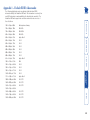
VESA STD
VESA STD
VESA STD
Native/preferred timing
IBM VGA
IBM XGA2
IBM VGA
Apple Mac II
VESA
VESA
VESA
VESA
VESA
VESA
Apple Mac II
IBM
VESA
VESA
VESA
VESA
Apple Mac II
VESA STD
VESA STD
VESA STD
1024 x 768p at 60Hz 720 x 400p at 70Hz
720 x 400p at 88Hz
640 x 480p at 60Hz
640 x 480p at 67Hz
640 x 480p at 72Hz
640 x 480p at 75Hz
800 x 600p at 56Hz
800 x 600p at 60Hz
800 x 600p at 72Hz
800 x 600p at 75Hz
832 x 624p at 75Hz
1024 x 768i at 87Hz
1024 x 768p at 60Hz
1024 x 768p at 70Hz
1024 x 768p at 75Hz
1280 x 1024p at 75Hz
1152 x 870p at 75Hz
1600 x 1200p at 60Hz
1680 x 1050p at 60Hz
1360 x 765p at 60Hz
1360 x 768p at 60Hz
1440 x 900p at 60Hz
1280 x 720p at 60Hz
1920 x 1080p at 60Hz
The following digital video modes are defined within the default EDID
information held by the AdderView PRO units. This information is used only if no
new EDID information is made available by the attached video monitor(s). The
AdderView PRO units support video resolutions and refresh rates in excess of
those listed here.
Appendix 1 – Default EDID video modes
22
Appendix 2 – Cable pin-outs
SLAVE end
8p8c connector
RXD
3
3
TXD
TXD
6
3
RXD
GND
2
5
GND
GND
2
2
GND
Serial remote control and flash upgrade cable (10p10c)
10p10c
connector
D-Type female
9 way
Multi-head synchronisation cable (10p10c)
MASTER end
10p10c connector
SLAVE end
10p10c connector
RXD
4
3
TXD
TXD
7
4
RXD
GND
3
5
GND
GND
3
3
GND
MASTER end
8p8c connector
D-Type female
9 way
8p8c
connector
Multi-head synchronisation cable (8p8c)
Serial remote control and flash upgrade cable (8p8c)
The OPTIONS port uses a 10p10c socket which can accommodate both 10p10c
connectors as well as the much more common 8p8c connectors, which are used
on Ethernet leads and patch cables. The pin-outs are listed in this section for
both types of connector.
23
• For use in dry, oil free indoor environments only.
• Both the AdderView PRO unit and its power supply generate heat when
in operation and will become warm to the touch. Do not enclose them or
place them locations where air cannot circulate to cool the equipment. Do
not operate the equipment in ambient temperatures exceeding 40 degrees
Centigrade. Do not place the products in contact with equipment whose
surface temperature exceeds 40 degrees Centigrade.
• Warning - live parts contained within power adapter.
• No user serviceable parts within power adapter - do not dismantle.
• Plug the power adapter into a socket outlet close to the module that it is
powering.
• Replace the power adapter with a manufacturer approved type only.
• Do not use the power adapter if the power adapter case becomes damaged,
cracked or broken or if you suspect that it is not operating properly.
• If you use a power extension cord with the AdderView PRO unit, make sure
the total ampere rating of the devices plugged into the extension cord does
not exceed the cord’s ampere rating. Also, make sure that the total ampere
rating of all the devices plugged into the wall outlet does not exceed the
wall outlet’s ampere rating.
• Do not attempt to service the AdderView PRO unit yourself.
Adder Technology Ltd warrants that this product shall be free from defects in
workmanship and materials for a period of two years from the date of original
purchase. If the product should fail to operate correctly in normal use during the
warranty period, Adder will replace or repair it free of charge. No liability can be
accepted for damage due to misuse or circumstances outside Adder’s control.
Also Adder will not be responsible for any loss, damage or injury arising directly
or indirectly from the use of this product. Adder’s total liability under the terms
of this warranty shall in all circumstances be limited to the replacement value of
this product.
If any difficulty is experienced in the installation or use of this product that you
are unable to resolve, please contact your supplier.
Safety information
Warranty
24
Radio Frequency Energy
This equipment does not exceed the class A limits for radio noise emissions from
digital apparatus set out in the radio interference regulations of the Canadian
Department of Communications.
Le présent appareil numérique n’émet pas de bruits radioélectriques dépassant
les limites applicables aux appareils numériques de la classe A prescrites dans
le règlement sur le brouillage radioélectriques publié par le ministère des
Communications du Canada.
Canadian Department of Communications RFI statement
This equipment generates, uses and can radiate radio frequency energy
and if not installed and used properly, that is, in strict accordance with the
manufacturer’s instructions, may cause interference to radio communication.
It has been tested and found to comply with the limits for a class A computing
device in accordance with the specifications in Subpart J of part 15 of FCC rules,
which are designed to provide reasonable protection against such interference
when the equipment is operated in a commercial environment. Operation of this
equipment in a residential area may cause interference, in which case the user at
his own expense will be required to take whatever measures may be necessary
to correct the interference. Changes or modifications not expressly approved by
the manufacturer could void the user’s authority to operate the equipment.
This equipment has been tested and found to comply with the limits for a class
A computing device in accordance with the specifications in the European
standard EN55022. These limits are designed to provide reasonable protection
against harmful interference. This equipment generates, uses and can radiate
radio frequency energy and if not installed and used in accordance with the
instructions may cause harmful interference to radio or television reception.
However, there is no guarantee that harmful interference will not occur in a
particular installation. If this equipment does cause interference to radio or
television reception, which can be determined by turning the equipment on
and off, the user is encouraged to correct the interference with one or more
of the following measures: (a) Reorient or relocate the receiving antenna. (b)
Increase the separation between the equipment and the receiver. (c) Connect
the equipment to an outlet on a circuit different from that to which the receiver
is connected. (d) Consult the supplier or an experienced radio/TV technician for
help.
FCC Compliance Statement (United States)
European EMC directive 89/336/EEC
All interface cables used with this equipment must be shielded in order to
maintain compliance with radio frequency energy emission regulations and
ensure a suitably high level of immunity to electromagnetic disturbances.
25
Adder Asia Pacific
6 New Industrial Road,
Hoe Huat Industrial Building
#07-01,
Singapore 536199
Tel: +65 6288 5767
Fax: +65 6284 1150
Adder Corporation,
350R Merrimac Street,
Newburyport,
MA 01950,
United States of America
Tel: +1-888-932-3337
Fax: +1-888-275-1117
Adder Technology Limited,
Technology House,
Trafalgar Way, Bar Hill,
Cambridge, CB23 8SQ,
United Kingdom
Tel: +44 (0)1954 780044
Fax: +44 (0)1954 780081
© 2009 Adder Technology Limited
All trademarks are acknowledged.
Release 1.0c
June 2009
Part No. MAN-AV4PRO-DVI
Documentation by:
www.ctxd.com
26
O
T
Assistance 21
Audio
connection 7
Autoscanning 20
Firmware
upgrade 15
Front panel
switching 17
Operation 17
Options port 4
Troubleshooting 21
True Emulation 2,3
P
U
B
H
Brackets
fitting 6
Host computer
connection 8
Hotkeys
changing 14
selecting computers 18
Parts
supplied and extra 5
Peripherals
connecting 7
Upgrade
firmware 15
USB device
connection 7
USB Remote wakeup 2
USB switching
emulation 3
enumeration 3
True Emulation 2,3
User console 4
E
EDID information 12
default video modes 22
Emulated switching 3
Enumerated switching 3
I
Indicators 4
K
Keyboard
connection 7
KVM 2
M
Mounting 6
Mouse
connection 7
Multiple units
synchronising 11
Multiple video head
connections 11
Rack mounting 6
Remote control
by computer 10
by RC4 unit 9
Remote wakeup 2
S
Safety information 24
Selecting computers
with front panel 17
with hotkeys 18
with mouse buttons 19
Serial port
settings for control 10
Speakers
connection 7
Supplied items 5
Switching 17
V
Video modes 22
Video port
connection 7
W
Warranty 24
Cable pin-outs 23
Channel selection codes 10
Computer
connection 8
ports 4
selecting 17
Configuration 13
Connections 7
computer system 8
multiple video heads 11
user console 7
R
C
F
A
Index
27