1
2.2 Product Installation
Electromagnetic Interference
Module Installation
IP Office for SOHO
PHONE
e
1
2
3
LINE
LAN4
LAN3
LAN2
LAN1
WAN
USB2
USB1
Turbo
4
PHONE
Electronic elements including capacitance and inductance on the
device can be affected by external interferences, such as conducted
emission by capacitance coupling, inductance coupling, and
impedance coupling. To decrease the interferences, please make
sure to take the following measures:
Use the power supply that can effectively filter interference from
the power grid.
Keep the devices far from high-frequency, strong-current devices,
such as radio transmitting station.
Use electromagnetic shielding when necessary.
LINE
LAN4
LAN3
LAN2
LAN1
USB2
WAN
USB1
UC520
Turbo
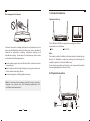
This IP Office for SOHO can support two analog ports, whose
combinations are as follows:
2FXO
1FXS+1FXO
Note:
The module is default installed in the device before releasing from
factory. It’s forbidden to open the housing box and change the
module by yourself; otherwise No Warranty.
Do not touch any module on the device, just to prevent the module
from being damaged by static electricity.
2.3 Physical Connection
Note: To avoid any device damage and bodily injury caused by
improper use, please obey the following requirements for
installation and maintenance.
PHONE
Phone
06
LINE
LAN4
PSTN
LAN3
LAN2
PC
07
LAN1
WAN
ITSP
USB2
USB1
Turbo
Power