1
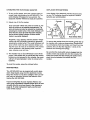
Install two "AA" batteries (not included) in the
Monitor (39). Alkaline batteries are recommended.
Be sure that the negative (-) ends of the batteries are touching the springs.
39
Plug the Reed Switch Wire (44) into the Monitor
(39).
• See the inset drawing. Insert any excess wire
into the Console (40). Snap the Monitor (39) into
the Console. Be careful not to pinch the wire
between the Monitor and •the Console.
.
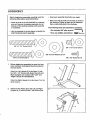
See the lower inset drawing. Attach a Pedal (28)
to the Right Leg (7) with four #8 x 1/2" Screws
(31),
See the upper inset drawing. Be sure that a
Plastic Sleeve (41) is firmly inserted into the
Right Leg (7). Insert the Right Handle (11) into
the Right Leg. Note:The Right and Left
Handles are marked with "Right" and "Left"
decals for identification. Be sure that you
have the Right Handle.
Slide a 3/8" Curved Washer (27) onto a 3/8" x 2"
Screw (25), Insert the Screw into the upper hole
in the Right Leg (7) and the Right Handle (11).
Slide a 3/8" Curved Washer (27) onto a 3/8" x
2 114"Screw (26). Insert the Screw into the lower
• hole in the Right Leg (7) and the Right Handle
(11). Note:The Screws must be Inserted from
the side shown.
°
Hold the Right Hub Cover (19) and the Right Leg
(7) against the Right Pivot Bracket (20). Tighten
the indicated 3/8" x 2" Screw (25) and 3/8" x
2 1/4" Screw (26) into the Right Pivot Bracket.
Repeat step 4 to assemble the Left Leg (6) and
the Left Handle (10).
Repeat step 5 to attach the Left Leg i6) and the
Left Hub Cover (22).
20
19
7