1
Chapter 2
Installing and Configuring the DAQCard-1200
3.
Visually verify the installation by making sure that the DAQCard-1200
is fully inserted into the slot.
4.
Attach the I/O cable. You can use either a 50-pin female or a 50-pin
male cable to plug into the DAQCard-1200. For more information on
these products, refer to the Optional Equipment section in Chapter 1,
Introduction. Notice that the cable is keyed so that you can insert it
only one way.
Be careful not to put strain on the I/O cable when inserting it into and removing it
from the DAQCard-1200. Always grasp the cable by the connector you are plugging or
unplugging. Never pull directly on the I/O cable to unplug it from the DAQCard-1200.
Note
5.
Plug in and power on the computer.
The DAQCard-1200 is now installed. You are now ready to configure the
hardware and software and to make the appropriate connections to the I/O
connector cable as described in Chapter 3, Connecting the Signals.
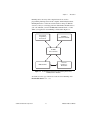
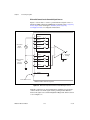
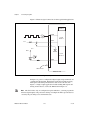
Figure 2-1 shows an example of a typical configuration.
Portable
Computer
PCMCIA Socket
I/O Cable
CB-50
®
I/O Signals
Figure 2-1. A Typical Configuration for the DAQCard-1200
DAQCard-1200 User Manual
2-2
ni.com






































![[Unlocked] SC-2042](http://vs1.manualzilla.com/store/data/005660029_1-1367986a5e7a7fe673239a9957384234-150x150.png)