1
OT.316G!tfsjft`4/bj!!!311905039!!!¥V¥É!1:;32;43
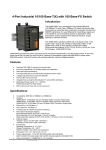
Unmanaged Ethernet Switches with Fiber Optics
Introduction
Redundant Power Inputs
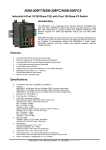
Introduction
LED Functions
3
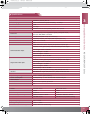
NSM-205F Series LED Indicator Functions
Unmanaged Ethernet Switches
Color
Red On
Red Off
Yellow On
Full for P0
Yellow Off
Green On
Link for P0
Green Off
Yellow On
Ethernet Port Yellow Off
Green On
(P1 ~ P4)
Green Off
LED
PWR_OK
Description
Core Power is OK
Core Power is Off
Full Duplex
Half Duplex
Link/Act
Not Networking
Link/Act
Not Networking
Link to 100 Mbps
Link to 10 Mbps
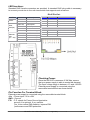
Green On Power is being supplied to power
input PWR2
Both power inputs can be connected simultaneously
to live DC power sources.
If one power source fails, the other live sourceacts
as a backup, and automatically supplies all of
NSM-205F Series power needs.
Green Off Power is not being supplied to
power input PWR2
Yellow On Power is being supplied to power
input PWR1
Yellow Off Power is not being supplied to
power input PWR1
PWR2
PWR1
FAULT
Red On
Power is not being supplied to
power input PWR1 and PWR2
Red Off
Power is being supplied to power
input PWR1 and PWR2
Introduction
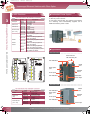
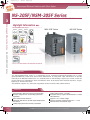
Appearance
NS-205F/NSM-205F Series
NSM-205F Series
Screw hole for
wall mounting kit
LED indicators
Metal
case
Fiber optics
port
RJ-45 ports
LED indicators
DIN-Rail
mount
Redundant
power input
NS-205F Series
NS-205F Series LED Indicator Functions
LED
Power
Fiber Port
(P0)
Ethernet Port
(P1 ~ P4)
3-?
Color
Red On
Red Off
Yellow On
Yellow Off
Green On
Green Off
Yellow On
Yellow Off
Green On
Green Off
Description
Power is On
Power is Off
Full Duplex Mode
Half Duplex Mode
Link/Act
Not Networking
Link/Act
Not Networking
Link to 100 Mbps
Link to 10 Mbps
LED indicators
Fiber optics
port
RJ-45 ports
Plastic
case
DIN-Rail
mount
LED indicators
ICP DAS Professional Provider of High Quality Industrial Data Acquisition and Control Products
Power input