1
EN
CONNECTIONS
Mains Connection (15)
The supply transformer has been designed for use on either 115V AC or 230 V AC, selected by a slide
switch on the bottom of the device. The amplifier is factory set at 230 V AC mains voltage.
Input Connection
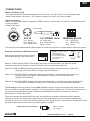
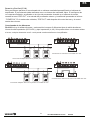
Inputs 1-4 feature both balanced standard COMBI socket (1/4” stereo jack, and XLR 3P) and terminal blocks
on the rear panel.
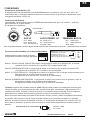
Wiring is as follows:
(Front view)
PUSH
1
2
3
SLEEVE RING TIP
XLR 3P
1/4” STEREO JACK
Pin1 : Screen
Pin2 : Signal (live)
Pin3 : Signal (return)
Tip : Signal (live)
Ring : Signal (Return)
Sleeve : Screen
+
- GND
TERMINAL BLOCK
Pin+ : Signal (live)
Pin- : Signal (return)
GND : Screen
Turn the front panel potentiometers (9) clockwise to increase the volume or anticlockwise to reduce the volume.
Selected Functions by Dip-Switch block
NOTE: To ensure a correct
understanding. the
white coloured square
is considered the switch
in all pictures in this
user manual
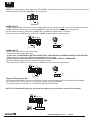
Each input incorporates several functions
configurable through a dip-switch block:
ON
1
OFF
Switch 1: AUDIO SOUCE SELECTION: Setting the switch to the ON position, the input will accept
microphone level audio. Setting it to the OFF position, the input will accept LINE level.
Switch 2: PHASE INVERSION: Setting the switch to the ON position, the signal will be inverted 180º.
Setting it to the OFF position, the signal will be unaffected.
Switch 3: HIGH PASS FILTER: Setting the switch to the ON position, the input will be processed by a
high pass filter with a 200Hz cutoff frequency. Setting it to the OFF position, the
signal will be unaffected.
Switch 4: PHANTOM POWER: Setting the switch to the ON position, + 48V phantom power will be applied
for condenser microphones. Setting it to the OFF position, this function will be disabled.
The PA 4100 provides two auxiliary inputs (AUX 1-2) which may be used for connecting other signal sources
such as a Radio Tuner, MP3 player, computer, CD or Cassette player (LINE level). Connect the audio source to
the rear connectors (19, 20).Turn their respective potentiometers clockwise to increase the volume or
anticlockwise to reduce the volume.
These input sockets are standard RCA phonos, two sockets are supplied and these are linked together
internally in parallel, this allows stereo signal source to be used without the need to obtain a special lead,
however you may wish to check with the manufacturer of the signal source to ensure that no damage will result if
the left and right output channels are connected together in parallel.
Sleeve - Screen
Pin - Signal
RCA Phono plug connections
SLEEVE
3
PIN
User Manual/Manual de Uso
PA 4100