1
Section 2 ACS-30 Program Integrator Utility
2.1 Basic Assumptions
This user guide assumes that the user is familiar with the Microsoft Windows
environment. This includes the knowledge of how to launch an application,
manipulate files, use menus and window boxes, and using a mouse or other
comparable pointing device.
2.2 Installing ACS-30 Program Integrator
1. Double-click Setup.exe to run the ACS-30 Program Integrator installation.
2. Follow the steps on the screen to complete installation.
2.3 Starting the ACS-30 Program Integrator
After installation, a shortcut will be created both on the desktop and in the Start
Menu. To start the program, either double-click the icon on the desktop or
click Start > Programs > Pentair Thermal Management > ACS-30 Program
Integrator > ACS-30 Program integrator.
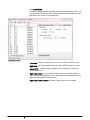
The program will launch with an empty database file. To open an existing
database, click File > Open. An ACS-30 database is stored as an Extensible
Markup Language (XML) file which consists of a list of circuits and all of their
parameters as seen on the ACS-UIT2.
THERMAL BUILDING SOLUTIONS
EN-Raychem ACS30programintegrator-AR-H58325
03/15
9/36