1
BenQ DC 5530 User’s Manual
English
5
TROUBLESHOOTING
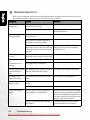
Refer to the symptoms and solutions listed below before shipping your camera for service. If
the problem persists, contact your local reseller or service center.
Symptom
Cause
The camera cannot be There is no battery or the battery is
powered up.
not inserted correctly.
The battery has no power.
The battery power is
draining quickly.
Solution
Insert the battery correctly.
Recharge your batteries or replace
with new batteries.
The external temperature is
extremely low.
—
Many shots are being captured in
dark places, requiring a flash.
—
The battery was not fully charged.
Fully charge the battery and disThe battery has not been used for an charge it for at least one complete
extended period of time after being cycle before use.
charged.
The battery or camera The camera or flash was used conis warm.
tinuously over a long period of time.
The flash does not
fire.
The flash does not
recharge.
The camera flash is turned off.
—
Set the flash to Auto Flash.
The light source is sufficient.
—
Even though the flash The distance to the subject is greater Get closer to the subject and shoot.
fired, the image is
than the flash’s effective range.
dark.
The image is too
bright or too dark.
The exposure is excessive or inadequate.
Reset exposure compensation.
I cannot format a
memory card.
The memory card is write-protected.
Remove the write protection.
I cannot download
images.
End of the memory card life.
Insert a new memory card.
The free space on the hard disk of
your computer is insufficient.
Ensure that the hard disk has enough
space for running Windows and that
the drive for loading image files has
free space equal to or greater than the
memory card in the camera.
There is no power being supplied to Recharge your batteries or replace
the camera.
with new batteries if necessary.
22
Troubleshooting
Downloaded from ManualsCamera.com Manuals