1
Reference: Remote Commands ~ Command Description
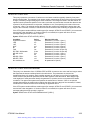
:SOURce:DATA:SPE:BACKground:STUFfing
This command controls the SPE fixed byte stuffing in non-active STS-1 channels. When enabled,
columns 30 and 59 of the background channels contain the fixed byte value zero and are not used for
payload. This command is applicable when the background channel structure is set to STS-1. When
disabled, columns 30 and 59 are part of the background payload. The query form returns the current
setting. <Slot> is an optional number that specifies the module slot containing the device that is the target
of the command; if omitted, it defaults to the lowest-numbered slot containing an applicable device.
If the OTS system contains different module types (for example, OTS91T2 and OTS93T1), this command
must include a slot designation. If the slot number is not included, the system will return an error
message stating that a slot number is required.
Syntax :SOURce<slot>:DATA:SPE:BACKground:STUFfing?
:SOURce<slot>:DATA:SPE:BACKground:STUFfing <Boolean>
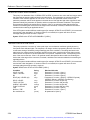
:SOURce:DATA:SPE:STUFfing
This command controls the SPE fixed byte stuffing. When enabled, columns 30 and 59 of the active
STS-1 channel contain the fixed byte value zero and are not used for payload. When disabled, columns
30 and 59 are part of the payload. This command is applicable when the active channel structure is set
to STS-1. The query form returns the current setting. <Slot> is an optional number that specifies the
module slot containing the device that is the target of the command; if omitted, it defaults to the lowestnumbered slot containing an applicable device.
If the OTS system contains different module types (for example, OTS91T2 and OTS93T1), this command
must include a slot designation. If the slot number is not included, the system will return an error
message stating that a slot number is required.
Syntax :SOURce<slot>:DATA:SPE:STUFfing?
:SOURce<slot>:DATA:SPE:STUFfing <Boolean>
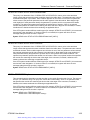
:SOURce:DATA:STRUcture
This command sets the structure of the signal generated by the transmitter. The query form returns the
current setting. <Slot> is an optional number that specifies the module slot containing the device that is
the target of the command; if omitted, it defaults to the lowest-numbered slot containing an applicable
device.
If the OTS system contains different module types (for example, OTS91T2 and OTS93T1), this command
must include a slot designation. If the slot number is not included, the system will return an error
message stating that a slot number is required.
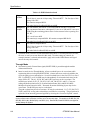
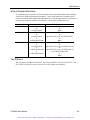
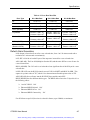
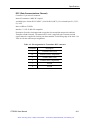
Syntax :SOURce<slot>:DATA:STRUcture?
:SOURce<slot>:DATA:STRUcture <Enum>
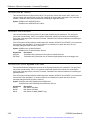
Parameter
G2P5C
M622C
M155C
M51A
Description
Bulk data at 2.5 Gb/s
Bulk data at 622 Mb/s
Bulk data at 155 Mb/s
Bulk data at 51 Mb/s (SONET only)
OTS9300 User Manual
Artisan Technology Group - Quality Instrumentation ... Guaranteed | (888) 88-SOURCE | www.artisantg.com
3-71