1
Installation and Operation, cont’d
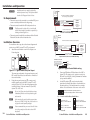
CM modules
a
b
Tx (transmit) LED — This LED lights whenever any control
module button, with a control signal associated with it, is
pressed.
Dial Pad and Function buttons — These buttons replicate
c
audio conference system controls (e.g. dial pad, on/dial, volume
controls, etc.).
1
Programmable buttons — You can program these buttons to
control any IR-controllable device, or you can have RS-232
codes or relays assigned to each button. Button labels for use
with the CM-xBLB modules are available with your controller
(MLC, System 5 IP, etc.). The metal on the CM-xBB modules can
be engraved.
N
The buttons on the CM-3BLB and CM-9BLB are back
lit, and can visually indicate operation as the button
is pressed and released and the stored command is
executed. Configuration is required, via Windows-based
Control Program or Global Configurator™ (GC2).
1
AUDIO CONFERENCE
Tx
1
2
3
ON/DIAL
4
5
6
HANG UP
7
8
9
FLASH
*
0
#
UNMUTE
VOLUME
CM-19AC
Front
MUTE
3
1
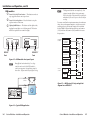
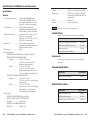
Figure 2-9 — CM-19AC module front panel layout
CM-5BB
Front
Setting Up the Buttons
(IRCM, RCM, and CM Modules Only)
Before the control module can control a device such as a VCR
or a DVD player, you must connect the module to an MLC or
System 5 IP, and then configure each button. Refer to the MLC,
System 5 IP, or Configuration software user’s manuals.
2
2
CM-20BB
Front
N
Once the MLC, or System 5 IP and control modules have
been set up, pressing a button on the control module
causes a command to be sent out, regardless of whether
the display/projector’s power is on or off. Also, it is not
possible to separately control two or more identical
devices out of a single IR port.
CM-3BLB
CM-3BLB
Front
Mounting the Control Module into an AAP Wall
Plate or Device Faceplate
2
CM-9BLB
2
2-8
CM-9BLB
Front
The control module and any adapter plates must be attached
to a device faceplate or AAP wall plate and cabled before it is
installed in a wall or furniture. The installation screws are built
into its front panel, so no additional screws are needed.
1.
Before attaching any cables, insert the module’s screws
into the holes in the device’s faceplate or AAP wall plate.
Secure the control module to the faceplate/wall plate with
the provided captive washers and #4-40 nuts.
2.
Follow the “Installation Overview” section of this chapter.
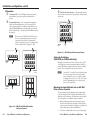
Figure 2-8 — CM-xBB and CM-x BLB modules
front panel layouts
Control Modules • Installation and Operation
Control Modules • Installation and Operation
2-9