Download EasyBuilder 8000 Release Note

Transcript
9. Parity of COM Port communication parameter now has SPACE option.
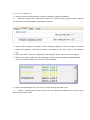
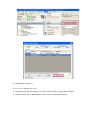
10. MACRO now has TRACE function, which can be used with EasyDiagnoser for viewing
executing results of TRACE. The illustration below shows when adding TRACE command
in MACRO, and executing Off-line or On-line simulation, right click and select “Run
EasyDiagnoser” will enable users to view current value in LW-0. The way to use TRACE
is illustrated in EasyBuilder 8000 User’s Manual “Chapter 18 Macro”.
11. Add LB9059 – disable MACRO TRACE function (when ON)
When set ON, the output message of TRACE won’t be sent to EasyDiagnoser.
12. Add AB Data Type Editor.exe for editing Structure typed data of AB. Please refer to
“Chapter 34 AB EtherNet IP Free Tag Names” for more detail.
13.
Project Manager can now directly execute EasyDiagnoser.exe, and select HMI to
monitor communication status. Please refer to “Chapter 33 Easy Diagnoser” for more detail.