1
The process is simple and outlined on the web page. It is possible to enter the 4-character
ICAO station ID directly or to search for a valid ID by selecting the “search” option on
the home page. Upon completion of the request, data should be sent within an hour.
The second way of retrieving data is to manually send an email to [email protected] with
a specific format. It is suggested to use the web interface explained in the previous
paragraph because a mistype in the e-mail may prevent the data from being sent.
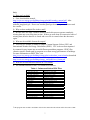
However, if it is chosen to use a manual e-mail, the format must be as follows:
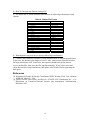
Table 1. Format for Manual E-mail
Format
Example
To: [email protected]
Subject: Weather Data
Body:
StationID=<Enter 4-character ICAO Station ID>
StartDate=<Enter Start Date in MM/DD/YYYY>
EndDate=<Enter End Date in MM/DD/YYYY>
OutputType=<1 for CSV, 2 for IWEC>
FillData=<0 for No, 1 for Yes>
To: [email protected]
Subject: Weather Data
Body:
StationID=KDEN
StartDate=08/24/2002
EndDate=10/15/2002
OutputType=1
FillData=1
The station ID must be on the first line of the body and appear exactly as above. Nor
should the greater than “>” or less than “<” signs appear in the text. The format of the
start date and end date are the same. If the dates entered in the StartDate and EndDate
fields are out of range of the actual data, then the program will converge on the valid
dates. If the e-mail is in the correct format and the return address is valid, then the user
should receive an e-mail with the data within an hour. If the entire period requested is
not available as a contiguous piece, the returned email will have several “files” attached
with appropriate identifications as to the data period (e.g., KDEN_20020212200205061.iwc, KDEN _20020509-200205241.iwc).
If no data are received within eight hours, the process should be repeated. Certain e-mail
clients do not allow for large attachments to be sent during peak hours. In this case, the
data may take longer to receive. Also, some e-mail clients do not allow for large
attachments at all. In this case, the requester should break up the dates to receive smaller
files, then piece the files together manually.
It is possible that no information is to be found for the station entered, and in this case, an
empty email will be returned to the user. If the data request occurs during the night or
during a weekend (MDT), the process may take longer because maintenance operations
are running during these hours.
Station Listings
It is possible to retrieve a listing of all the valid stations and the data range by selecting
“Retrieve a list of stations and data availability” on the web page or by sending an e-mail
to [email protected] with “Station Listings” in the subject (the body can be blank).
4