1
INTRODUCTION
External power supply
We advise you to read this quick guide to start using the
Scoopy+ in a very short time. For more detailed
information on each step, do not hesitate to consult the
full user manual on our web site:
You can use an external power DC. Scoopy+ needs 12V
DC but is able to work with a voltage from 8 to 15V / 2A
minimum.
The external DC supply is also used to charge the
batteries. Only NiMH batteries are supported by the
internal charger.
www.aeta-audio.com
Antenna (Wireless option)
In this guide, we assume most of the main basics are
known and that you already have a microphone and a
headphone connected.
The Scoopy+ has an optimal internal antenna. In place of
the internal antenna, Scoopy+ can use an external
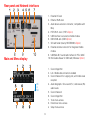
antenna connected on the rear panel [8].
SETTING UP
SIM card (Wireless option)
To establish a mobile communication, you should have a
SIM card from a telecom operator. Scoopy+ supports a
standard size SIM; use a card adaptor to support a micro
SIM Card (Contact your dealer for more details).
Powering
Before switching on the Scoopy+, you need to have 6
C/LR14 batteries inserted in the bottom compartment,
and/or an external DC power connected on the DC jack.
Switch OFF the unit to insert the SIM card in
the unit.
Battery
Scoopy+ works with non rechargeable or
NiMH batteries.
Remove the drawer [7] by pushing its small button,
insert the SIM card inside and put it in place.
Six 4500mAh NiMH batteries provide
autonomy for more than 4 hours.
Info: For a new SIM card, use a mobile phone to activate
your prepaid SIM card; to avoid undesired tones, disable
waiting call tone.
4