1
SCOOP 4+
Stereo audio codec for real time audio transmission
User manual
AETA AUDIO SYSTEMS
18-22, avenue Edouard Herriot - Kepler 4
92350 Le Plessis Robinson – FRANCE
Tél. +33 1 41 36 12 00 – Fax +33 1 41 36 12 69
http://www.aeta-audio.com
55 000 053 - C
Specifications subject to change – All rights reserved by AAS
SCOOP 4+ - User manual
November 2007
55_000_053-c_scoop4_en.doc
Table of contents
1.
General............................................................................................................................... 1
2.
Functions............................................................................................................................ 3
2.1. Conversion of audio signals ......................................................................................................... 3
2.2. Encoding and decoding ................................................................................................................ 4
2.3. Transmission interface ................................................................................................................. 6
2.4. Supervision and control interface................................................................................................. 7
2.5. Audio monitoring ......................................................................................................................... 8
2.6. Auxiliary functions....................................................................................................................... 9
3.
Operation ......................................................................................................................... 10
3.1. General principles....................................................................................................................... 10
3.2. Physical description of the equipment........................................................................................ 10
3.3. Equipment configuration parameters ......................................................................................... 17
3.4. Installation and set up................................................................................................................. 19
3.5. Initial setup of the Ethernet interface ......................................................................................... 20
3.6. First level maintenance............................................................................................................... 25
4.
Detailed operating mode – User interface .................................................................... 27
4.1. Main operation modes ................................................................................................................ 27
4.2. Equipment start-up ..................................................................................................................... 27
4.3. Description of the keyboard ....................................................................................................... 27
4.4. Description of the menus............................................................................................................ 28
4.5. Handling the configuration profiles............................................................................................ 33
4.6. Setting up a link in IP mode ....................................................................................................... 33
4.7. Setting up a link in ISDN mode ................................................................................................. 34
4.8. Erasing and resetting the configuration...................................................................................... 35
5.
Technical characteristics ................................................................................................ 36
5.1. Characteristics of interfaces ....................................................................................................... 36
5.2. Audio performance..................................................................................................................... 42
5.3. Power supply .............................................................................................................................. 43
5.4. Dimensions and weight .............................................................................................................. 43
5.5. Environmental characteristics .................................................................................................... 43
5.6. Versions - Options...................................................................................................................... 43
5.7. Accessories and related products ............................................................................................... 43
6.
Annexes ............................................................................................................................ 44
6.1. Complements on the algorithms and protocols used .................................................................. 44
6.2. Overview of the SIP protocol..................................................................................................... 45
6.3. Some methods to deal with NAT routers and firewalls.............................................................. 47
6.4. ISDN error causes ...................................................................................................................... 48
6.5. V35 interface adaptation ............................................................................................................ 50
55 000 053 - C
SCOOP 4+ - User manual
1. General
The SCOOP 4+ codec allows the bi-directional transmission of one or two audio signals with bit rate
reduction, over digital leased lines, ISDN lines or IP protocol networks. The codec is available with the
following main product versions:
•
SCOOP 4+ LL, with digital leased line interfaces and an Ethernet interface for IP transmission;
•
SCOOP 4+ ISDN 2B, with digital leased line interfaces, Ethernet interface and an ISDN
interface;
The following table shows the main features of the product. Functions marked with z in this table are
available as options. Functions marked with □ are only available in the version equipped with the ISDN
interface.
One outstanding feature of AAS codecs in ISDN mode is the 5A System®: on receiving an incoming
ISDN call, the unit can automatically detect the coding algorithm and parameters of the calling codec, and
then adjust itself in a compatible configuration so that the connection succeeds regardless of the initial
configuration and that of the remote unit.
In IP mode, the codec features the same ease of operation thanks to the use of the SIP protocol.
The standard operation mode is the “single codec” mode, where the unit can be connected to a remote
codec using any one of the listed coding algorithms.
In the dual 7 kHz codec mode (available for leased line transmission), the equipment is equivalent to two
independent mono codecs, each running G722 over a 64 kbit/s leased lines.
® 5AS = Aeta Audio Advanced Automatic Adjustment System
55 000 053 - C
SCOOP 4+ - User manual
1
Characteristics
Optional
Operation modes
Single wide band codec
Dual 7 kHz codec (LL mode only)
IP transmission interface
Ethernet interface, 10BaseT / 100BaseT; TCP/IP or UDP/IP protocol
SIP signalling protocol
Leased line transmission interfaces
Two X24/X21/V11/V35 interfaces;
64, 128, 192, 256 or 384 kbit/s over one line, or 2x64 kbit/s over two lines
ISDN transmission interface
One S0 interface (U interface available for North America)
5AS automatic setting for incoming calls
□
(audio modes)1
Audio coding algorithms
G711 (standard telephone)
Mono
G722 SRT, H221, H242
Mono
CELP 7 kHz (IP mode only)
Mono
MPEG Audio Layer II
M, DM, S, JS
4 sub-band ADPCM (low delay)
M, S
TDAC (ISDN mode only)
M
□z
Available bit rates (depending on coding algorithm):
Leased line transmission: 64, 128, 192, 256 or 384 kbit/s over one line, or 2x64 kbit/s
over two lines
IP transmission: 24 kbit/s to 384 kbit/s
ISDN: 64 to 128 kbit/s transmitted via 1 interface (1 or 2 B channels)
□
Audio interfaces
Two analogue inputs and two analogue outputs with adjustable level
Digital audio input and output, AES/EBU format
Auxiliary functions
Data channel, 300 to 9600 bauds
Relay transmission: 2 isolated inputs and outputs
z
Audio coordination channel
Control and supervision
Keyboard and LCD display on front panel
Remote control serial port
50 programmable set-up memories
Ethernet remote control interface and embedded html server
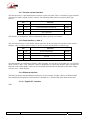
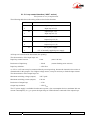
Table 1 – Main features of the SCOOP 4+
1 M = Mono, DM = Dual Mono, S = Stereo, JS = Joint Stereo
2
SCOOP 4+ - User manual
55 000 053 - C
2. Functions
The following synoptic diagram shows the basic functions of the equipment.
Figure 1 - Functional diagram of equipment
The audio signals to be transmitted are converted (when needed) to digital format, then the encoding
function reduces the bit rate, using a selectable algorithm; the resulting bit flow is sent to one of the
available transmission interfaces: permanent link data interfaces (X21/X24/V35), ISDN lines (S0 or U0),
or an Ethernet interface.
The transmission interface functional block also extracts compressed data coming from the network and
sends them to a decoding block that reproduces uncompressed audio data. Last, the audio signals are
output to both digital and analogue outputs.
2.1. Conversion of audio signals
The analogue inputs and outputs are balanced, and the input and output gains are adjustable. The
sampling frequency of the analogue ⇔ digital converters depend on the operating mode.
The equipment also provides digital audio inputs/outputs in AES/EBU format. The input to the encoder is
selectable between the digital audio input and the analogue stereo input. The output from the decoder is
sent both to the digital output and the analogue stereo output. The digital audio interfaces are usually
locked to the digital audio input (“genlock” mode), but alternatively they can be synchronised to the
internal clock reference of the codec.
Having the digital samples from the audio interfaces (analogue or digital), sample rate conversion is
fulfilled whenever needed to get audio data at the coding frequency Fc which is, depending on the coding
type, 16, 24, 32 or 48 kHz. The coding clock is also locked to the internal clock.
55 000 053 - C
SCOOP 4+ - User manual
3
2.2. Encoding and decoding
In the dual 7 kHz codec mode over leased lines, each codec uses the ITU-T G722 algorithm, running in
mono at a 64 kbit/s rate.
In the normal single codec mode, the codec readily includes a wide range of coding algorithms. First, one
can select among algorithms compliant with ISO and ITU-T recommendations:
•
G711 (IP or ISDN mode only);
•
ITU-T G722 (mono at 64 kbit/s);
•
MPEG Audio Layer II at 48, 32, 24 or 16 kHz, with programmable channel mode and bit rate ;
Besides, other algorithms are available, that are so-called “proprietary” because they do not comply with
enforced standards:
•
CELP, running in mono at a net 24 kbit/s bit rate, and providing a 7 kHz bandwidth (only used in
IP mode);
•
4SB ADPCM, running either in mono at a 128 kbit/s bit rate, or in stereo at 256 kbit/s ; the
bandwidth with this algorithm is 15 kHz.
•
TDAC mono, running at 64 kbit/s, with a 15 kHz bandwidth ; available as an option in ISDN
mode.
The following describes some important features of the various available algorithms and protocols.
2.2.1. Notes about G711
G711 is the standard coding used for voice transmission on public telephone networks. This algorithm is
typically used for links over IP networks with IP telephones or VoIP gateways. Via ISDN, G711 is used
for links with telephones or hybrid devices.
G711 is available only for IP or ISDN transmission, not over the leased line interfaces.
2.2.2. Notes about G722
With G722 coding, three synchronisation modes are available:
•
“Statistical recovery” byte synchronisation method (alias SRT) ;
•
H221 synchronisation; in this case, 1.6 kbit/s from the compressed data are used for this;
•
H221 synchronisation and H242 protocol. This is only available for the ISDN mode.
H221 synchronisation is highly recommended when possible, as it features higher reliability and faster
recovery time, while degradation (because of the bit rate used for framing) is minimal.
H242 protocol, the most flexible mode, is recommended by the ITU-T, and is included in J52. However,
the mode with H221 synchronisation but without H242 protocol can be useful for compatibility with old
generation codecs which did not use this protocol.
No specific synchronisation is needed for the IP mode.
4
SCOOP 4+ - User manual
55 000 053 - C
2.2.3. Notes about MPEG coding and J52
The ITU-T J52 recommendation was defined in order to allow the interoperability of multimedia
terminals over the ISDN1, using common coding standards. It includes the following features:
•
Framing as per ITU-T H221 recommendation, ensuring byte synchronisation and interchannel
synchronisation when more than one 64 kbit/s B channel is required for the desired bit rate ;
•
Interoperation procedures according to ITU-T H242 recommendation ;
•
In the case of MPEG encoding, optional protection against transmission errors (Reed-Solomon
error correction codes). Although J52 does not apply to leased line connections, this error
protection technique is also available for leased line transmission with the SCOOP 4+.
Details about MPEG and J52 can be found in the annexes (refer to 6.1, Complements on the algorithms
and protocols used).
It must be noted that, thanks to the interoperation protocol, J52 codecs, when setting up a link, can
negotiate automatically and agree on a configuration that is compatible with the capability of both units
(regarding bit rate, channel mode, etc.). In this way, when the units differ in their capability (or make), the
resulting configuration may be different from expected beforehand, but in most cases the link will work
and audio will be transmitted.
As another useful consequence, this also gives users more tolerance to mistakes when configuring the
units on the two sides of the transmission links, as the codecs will adapt automatically even with
differences in the initial settings of the two units.
2.2.4. MPEG coding for leased line or IP transmission
J52 is only applicable to ISDN transmission, and no inverse multiplexing is needed for leased line
transmission neither for IP transmission, because a single data stream is transmitted.
For these reasons, only one MPEG format is defined for non-ISDN transmission; there is no distinction in
these modes between J52-compliant or non compliant format.
2.2.5. Notes about TDAC
As an option, the codec can also include the TDAC algorithm. TDAC is for Time Domain Aliasing
Cancellation ; this is a transform coding based on an MDCT (Modified Discrete Cosine Transform),
encoding a 15 kHz bandwidth mono signal at a 64 kbit/s bit rate.
Some specific product versions also include “asymmetric” modes:
•
G722/TDAC : G722 encoding, TDAC decoding, running both in mono at 64 kbit/s ;
•
TDAC/G722 : TDAC encoding, G722 decoding (with SRT), running both in mono at 64 kbit/s ;
this mode is symmetric to the previous one.
2.2.6. Symmetric or asymmetric codec modes
The codec allows two communication modes:
Symmetric communication: in this mode, the encoder and decoder both use the same coding algorithm
with the same configuration (channel mode, etc.). In this case, the communication is strictly symmetric
full-duplex, with exactly the same coding configuration used in both directions (local to remote and
remote to local). This is usually required when using proprietary algorithms.
1 J52 is only relevant for ISDN connections
55 000 053 - C
SCOOP 4+ - User manual
5
Asymmetric communication: this mode is used for applications requiring different coding configurations
in the two directions. The J52 protocol allows such mode. To give some examples, it is possible to
transmit MPEG Layer II in one direction and G722 in the other one, or MPEG stereo in one direction and
MPEG mono in the other one, etc.
Specific product versions also allow asymmetric modes wherein one direction is G722 coded while the
other one is TDAC coded. Such mode is useful e.g. in order to get a low delay return path encoded in
G722 while the send path is encoded with higher quality but a higher delay.
2.2.7. 5A System®
Setting an ISDN connection is often difficult, at least because of the numerous coding parameters to be
set. Moreover, with most proprietary algorithms, it is mandatory for the two devices to have exactly the
same settings, otherwise the connection will fail, and sometimes it is not easy to find out the reason.
5A stands for Aeta Audio Advanced Automatic Adjustment. This system makes it easier to set an ISDN
connection, because the codec, on receiving a call, automatically adjusts itself, following the calling party
algorithm and parameters.
When the 5A System is enabled on the unit and a call is received, the unit first detects the coding
algorithm used by the calling codec, and also senses its parameters: audio mode (mono, stereo…),
sampling rate, bit rate, inverse multiplexing protocol, etc. Then the unit can decode the compressed audio
from the remote unit. In addition, the unit will use these same settings for encoding and sending audio to
the remote unit, so that the remote unit can also decode the outgoing audio programme. The whole
process just takes a few seconds. Of course, all compatible coding configurations can be detected
automatically by the 5A System.
Note that the 5A system is only active for ISDN connections.
2.2.8. SIP protocol and SDP
The SIP protocol is a signalling protocol, used for IP connections, which allows the SCOOP4+ to
interoperate with IP phones and other SIP compatible audio codecs, in a way similar to ISDN or POTS
connections. Details about the SIP protocols can be found in the annex (refer to 6.2, Overview of the SIP
protocol).
One significant advantage is the inclusion of SDP, a protocol which allows the connecting devices to
automatically negotiate and agree on the coding profile to use. Thanks to this system, it is not necessary
to set the units in the same way before setting up a connection. Moreover, the calling party need not know
how the remote unit is configured before initiating a link.
2.3. Transmission interface
The codec includes an Ethernet interface for IP protocol networks, interfaces for transmission over leased
lines, and an ISDN interface is available in some versions.
2.3.1. Ethernet interface
The IP interface is a 10BaseT/100BaseT Ethernet interface allowing transmission of the audio
programmes in a wide range of possible bit rates. The SCOOP 4+ implements the SIP protocol, which
allows it to interoperate with IP phones and other SIP compatible audio codecs, in a way similar to ISDN
or POTS connections. Links can be set up in two ways:
•
•
“Peer to peer” connection between two compatible units
Use of a SIP proxy server to set up the link
Details about the SIP protocols can be found in the annex (refer to 6.2, Overview of the SIP protocol).
6
SCOOP 4+ - User manual
55 000 053 - C
The audio coding algorithm can be selected depending on the required quality and the available network
bandwidth. The following algorithms are currently available:
Codec
Bit rate3
Audio
bandwidth
G711
64 kbit/s
3 kHz
Voice, telephony
Compatible with IP phones
CELP
24 kbit/s
7 kHz
Suitable for high quality speech
Low network bandwidth consumption
G722
64 kbit/s
7 kHz
High quality speech
MPEG Layer II
64 or 128
kbit/s
up to 20 kHz
Typical use, main features
Highest quality, suitable for speech and
music
In addition, the Ethernet interface can be used for remote controlling the unit via a TCP/IP connection
(TCP port 6000).
2.3.2. Leased line interfaces
For transmission over leased lines, the codec includes two X24/V11 ports which can run at 64 kbit/s,
128 kbit/s, 192 kbit/s, 256 kbit/s and 384 kbit/s bit rates.
With most coding modes, only one X24/V11 port is used. In the “2*64” dual mono G722 mode, the two
ports provide two independent interfaces; the equipment is similar to two mono codecs.
When transmitting in the “leased line” mode, the codec synchronises onto the network clock provided by
the X24/V11 interface. In the specific “2*64” mode where the two ports are used, the codec initially
synchronises on port #1, but it changes the synchronisation port in case of a fault.
If no valid clock is available on the X24/V11 interfaces, the system folds back to an internal clock.
2.3.3. ISDN Interface
On the ISDN side, the codec includes one BRI interface (S0 or U0 depending on equipment version),
allowing transmission over one or two 64 kbit/s B channels. Thus, the total available bit rate ranges from
64 to 128 kbit/s (1 to 2 B channels).
The codec synchronises itself onto the ISDN network clock when a link is active.
2.4. Supervision and control interface
These functional modules fulfil the control and supervision of the equipment (configuration,
communication management, status monitoring), thanks to a keyboard, an alphanumeric display, LED
indicators, and remote control interfaces.
The remote control is possible either via a serial data port or through the Ethernet interface with a TCP/IP
connection.
In order to allow easy and quick programming of the codec for specific operational configurations, the
equipment features configuration memories (or “profiles”). When recalling a profile, the codec is directly
reconfigured with parameters that were stored beforehand in this profile by the operator.
3 This is the “net” encoded audio bit rate; the actual network occupation is higher because of the protocol overhead
55 000 053 - C
SCOOP 4+ - User manual
7
Besides configuring the equipment operating mode, this module monitors its status (detection of alarm
conditions). On detecting operation or transmission faults, the equipment switches on indicators and relay
contacts. Two alarm classes are defined:
•
“Internal” alarm ; corresponds to a major fault internal to the equipment ;
•
“External” alarm ; corresponds to a fault whose origin is deemed external to the equipment (for
example, transmission fault);
For maintenance purposes, some test loops can be activated:
•
“Audio loop”: uncompressed audio data are looped from the input of the encoder to the input of
the output conversion functional block. This loop redirects the audio input to the audio outputs;
•
“Loop 3”, or “Codec” loop: compressed audio data are looped just before the network interface ;
•
“Loop 2”, or “Network” loop: this loop sends the received data back to the network ; for the
remote codec, the effect is the same as a loop 3 when the transmission works correctly ;
•
“Audio feedback” loop (audio output to audio input) ; this allows the codec to send back to the
remote codec the signal it receives, after decoding and re-encoding.
The following drawing schematically shows the test loops:
2.5. Audio monitoring
This function enables the monitoring of the audio input (before encoding) and the audio output (after
decoding the received signal), and provides:
•
A display of the signal level both at the encoder input and the decoder output ;
•
A test output on a stereo headphone jack, monitoring either the encoder or decoder audio signals.
) Note: as the audio output is monitored immediately after decoding, this monitoring position is
not sensitive to the possible activation of the audio test loop (see above diagram), contrarily to
the physical audio outputs (both analog and digital).
8
SCOOP 4+ - User manual
55 000 053 - C
2.6. Auxiliary functions
2.6.1. Data channel
This function is currently only available in leased line transmission mode.
In leased line mode, a bi-directional data channel can be transmitted along with the compressed audio
signals, by reserving a fraction of the transmitted bit rate. The equipment includes a serial asynchronous
port for this purpose. The data are transparently transmitted end-to-end; hardware signalling is not
available.
This function is only available when the main audio programme is MPEG or ADPCM encoded.
The interface speed is programmable at 300, 1200, 2400, 4800 or 9600 bauds. However, the actual
transmission capacity depends on the coding algorithm, as indicated by the table hereunder.
Coding type
Possible transmission rate (bit/s)
300
1200
2400
4800
9600
MPEG Audio
4SB ADPCM
Table 1 – Capacity of data channel depending on type of coding
2.6.2. Relay transmission
This function is currently only available in leased line transmission mode.
When this function is activated, the codec transmits to the remote unit the status of two isolated current
loops. The remote unit then opens or closes relay contacts according to the transmitted status. Conversely,
as the function is bi-directional, the codec activates its two relays (“dry” isolated contacts) depending on
the status of the two current loops on the remote unit.
This function is only available when the main audio programme is MPEG or ADPCM encoded.
A typical application is the transmission of an “on air” signal; the contact closure may be used for e.g.
switching on a lamp or starting other devices.
When using MPEG coding, relay transmission can be activated along with other auxiliary functions. For
ADPCM, relay transmission is activated in place of the data channel.
2.6.3. Coordination channel
This function is currently only available in leased line transmission mode.
This function is available as an option. It enables the transmission of an auxiliary audio channel (or
coordination or “order-wire” channel), along with the compressed audio, by reserving 8 kbit/s from the
transmitted bit rate. This channel uses a compression algorithm of CELP-HLTP type and provides a
“voice grade” channel (300-3400 Hz pass-band).
This function is only available when the main audio programme is MPEG or ADPCM encoded.
With ADPCM, the coordination channel cannot be used along with other auxiliary functions (i.e. data
channel or relay transmission).
When using MPEG coding, all three auxiliary functions can be activated at the same time. Note that relay
transmission and the coordination channel are only compatible with AAS products, as these functions are
not covered by independent standards.
55 000 053 - C
SCOOP 4+ - User manual
9
3. Operation
3.1. General principles
The equipment control and supervision (configuration, status monitoring) is possible in two ways:
•
“Local” mode: front panel keyboard and display, status indicators ;
•
“Remote control” mode, thanks to an asynchronous serial port or the Ethernet interface.
As a general rule, the configuration parameters are saved in non-volatile memory, and restored when the
unit is powered-on.
Local mode operation is described in detail in chapter 4 (Detailed operating mode).
Thanks to the remote control mode, the codec can be operated from a computer with supervision
software. The supervision station is a PC computer running Windows (95, 98, ME, NT, 2000, XP or
Vista), equipped with the TeleScoop™ configuration and monitoring software. This optional software
gives full access to the codec functions (configuration and status monitoring) with a graphical interface,
and several units can be controlled from the same computer.
Details about this supervision software can be found in the documentation and user manual of the
TeleScoop software.
In addition to this, some parameters related to the Ethernet/IP interface and transmission can be set by
using an embedded HTML server; these are described further in 3.5.2, “Use of the embedded html
server”.
The SCOOP 4+ can be remote controlled by third-party codec management software and systems. Please
consult us for more information on the available offer in this field.
3.2. Physical description of the equipment
The SCOOP 4+ codec is housed in a 19 inches chassis of 1U height (44 mm or 1.75”); it includes a
universal mains power supply.
3.2.1. Front panel
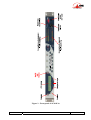
All the elements needed for local control are located on the front panel (see picture on page 13 below).
This panel can be roughly divided in three areas:
On the left-hand side, one can find an LCD and the basic navigation and dialling keys. The central area of
the panel includes several status LEDs and a keypad for the entry of dialling numbers and/or text data.
The right hand side groups audio monitoring elements.
) The “Esc” key is also used to power the unit on and off:
When the unit is in standby (the blue LED besides the Esc key is on), hold the key depressed for
at least 3 seconds to switch the unit on;
When the unit is in operation, press the key down for more than 3 seconds to switch it off.
In addition to this “soft” switch, the unit automatically switches on when AC power is applied to its
power socket.
10
SCOOP 4+ - User manual
55 000 053 - C
LCD and basic control keypad
This part is used for configuration and call set up; details cane be found in chapter 4, dealing with the
operating mode.
The 2x20 character alphanumeric display is surrounded by the following keys, (from left to right):
Key
Function
Release a link in IP or ISDN transmission mode
“Hang up”
Start a link or accept an incoming call (in IP or ISDN transmission
mode)
“Unhook”
Navigation keys
Menu-dependent keys; used to scroll options and/or select an option in a
menu. The bottom line on the LCD shows the function of each key.
“OK” key
Confirm a selection or enter data
“Esc” /
Short pressure: Escape to higher menu level;
key
Long pressure: Switch on or switch off the unit4
The blue LED besides the Esc/Power key is off in operation, but lights on when the unit is in standby.
Status LED indicators
The LEDs have the following meaning (from left to right):
Marking
Color
blue
Function
On when unit is in standby
Line 1
Green
On when interface n°1 is active / connected
Line 2
Green
On when interface n°2 is active / connected
Dec 1
Green
On when the decoder is synchronised on “line 1”
Dec 2
Green
On when the decoder is synchronised on “line 2”
INFO 1
Amber Displays the status of the received “relay info” n°1
INFO 2
Amber Displays the status of the received “relay info” n°2
Test
Red
On whenever a test loop is active
Alarm / Ext
Red
On in case of an external alarm
Alarm / Int
Red
On in case of an alarm with internal cause
4 Note: some specific versions of the product cannot be switched off; in such case a long pressure has no effect!
55 000 053 - C
SCOOP 4+ - User manual
11
Audio monitoring
Two pairs of LED bargraphs display the level of the audio signals, both on the transmission and reception
directions. The top bargraphs display the level of the audio channels on the transmitter (encoder), while
the bottom bargraphs display the level of the received channels (decoder side). The 0 dB mark is a
reference level that can be adjusted (relatively to digital full scale; the reference level can be set in the
menu, SETUP / Audio / Level Meter / HEADROOM). The “OVLD” LED at the right end of each bar
shows when the signal reaches maximum digital level (or clipping level), regardless of the reference level
setting.
) “OVLD” always reacts to absolute full scale level, while the bargraph level indication depends
on the reference level setting
The “HEADROOM” setting in the menu defines (in dB) the difference between the maximum level (or
digital full scale) and the reference level, for which 0 dB is displayed on the level meters. Here are some
examples:
•
If the headroom is set at 0 dB, then the maximum displayed level is 0 dB; note that OVLD will
light on whenever the signal reaches this level (or exceeds it on the analogue input).
•
If the headroom is set at 10 dB, then “0 dB” is displayed when the signal is 10 dB below
maximum level, or -10 dBFS. The display in such case can reach up to +5 dB. OVLD lights up
when the signal reaches maximum level (but not before!).
The audio signals can also be monitored with a headphone connected on the front panel (1/4” or 6.35 mm
stereo jack). The headphone volume is adjustable thanks to a potentiometer, and the source select key
toggles the listening between transmission (Tx indicator) or reception (Rx indicator).
Actions dealing with this area (connecting or disconnecting the jack, Tx/Rx selection, volume adjustment)
never affect the transmitted or received signals.
12
SCOOP 4+ - User manual
55 000 053 - C
Figure 2 - Front panel of SCOOP 4+
55 000 053 - C
SCOOP 4+ - User manual
13
3.2.2. Rear panel
All connections are done on the rear panel of the codec. The characteristics of the interfaces and layout of
the sockets are detailed in chapter 5.1. Characteristics of interfaces.
The following elements are available on the rear panel (refer to following Figure 3 - Rear panel):
Mains power socket
This is an IEC type power socket.
Audio inputs/outputs
•
Analog inputs/outputs: at the input, plug the audio cables into the female XLR sockets. At the
output, plug the audio cables into the male XLR sockets. In mono mode, only “A” channel is
used.
•
Digital inputs/outputs: a digital input (mono or stereo) in AES/EBU format (or SPDIF) can be
connected on the female XLR socket, and a digital output in AES/EBU format is available on a
male XLR socket.
•
It is possible to select which input (analog inputs or digital input) is fed to the encoder for
transmission. On the receiving side, the decoded signals are output both on the analog and digital
outputs.
X24/V11/V35 interfaces (labelled “X24/V11/V35” and “ALARM + X24/V11”)
These sockets are used for the connection to data transmission equipment in the “leased line” mode.
The connectors are 15-point male, Sub-D type. In the standard single codec mode, only one port is used.
This is normally the main port “X24/V11/V35”, but it is possible to select the other port.
In the dual codec mode, both ports must be used. In this mode, audio channel A is transmitted on the
main port “X24/V11/V35”, and audio channel B is transmitted on the additional port labelled
“ALARM + X24/V11”.
Alarm indicator and contacts
This “ALARM + X24/V11” port also includes two “form C” relays, providing isolated contacts, which
can signal alarm conditions:
•
Internal alarm contact;
•
External alarm contact;
A red LED indicator also indicates that an alarm relay is activated. In the factory setup, every alarm cause
sets the LED on, but by setting jumpers on the motherboard it is possible to program the indicator to react
to only one type (internal or external alarm).
The pin-out of the socket and the detailed characteristics of the alarm relays can be found in chapter 5.1.6:
“Alarm + X24/X21” interface (p. 37).
USB socket
This host USB port is currently not used.
14
SCOOP 4+ - User manual
55 000 053 - C
Figure 3 - Rear panel
55 000 053 - C
SCOOP 4+ - User manual
15
Remote control (Remote)
This 9-pin female sub-D socket is an asynchronous serial interface port, usable for remote controlling the
equipment thanks to a control and supervision PC.
Data
This 9-pin female sub-D socket is an asynchronous serial interface port, usable for transmission of a bidirectional data channel (refer above to 2.6.1, Data channel).
Ethernet interface
This socket is a 100BaseT/10BaseT port, used for audio transmission over IP and/or for remote
controlling the unit via a TCP/IP connection (TCP port: 6000). This RJ45 socket is devised for a normal
“straight” cable to an Ethernet hub or switch. The two integrated LEDs show the presence and activity of
the network (green LED) and the interface mode: half-duplex (yellow LED off) or full-duplex (yellow
LED on).
The configuration of the interface is described in 3.5.1, IP configuration (Ethernet interface).
“ISDN 1” and “ISDN 2” sockets
These RJ45 sockets allow the connection to the ISDN, for the product versions which include this
capability. Their layout is standard. The sockets must be used according to their number, i.e. #1 must be
used if one line only is needed, #1 and #2 if two lines are needed. Currently, the product can only be
equipped with one ISDN interface.
“Digital I/O” socket
Reserved for future use.
“AUX” socket
This 25-pin female sub-D socket groups the interfaces for the relay transmission function and the
(optional) coordination audio channel.
It also includes loop interfaces for the loop control function (to be described later), as well as a +5 V
power supply that can be used to provide current for the loop and relay interfaces.
16
SCOOP 4+ - User manual
55 000 053 - C
3.3. Equipment configuration parameters
The parameters may be divided into the following categories:
•
Coding configuration parameters, which include audio coding type, coding frequency Fc (and
subsequently the nominal bandwidth), audio channel mode and transmission bit rate. Besides, in
case of MPEG coding, it is possible to select the error protection mode.
•
Configuration of the audio interfaces, including: selection of analogue or digital format for the
audio input, maximum level for the analogue inputs and outputs, and synchronisation mode for
the AES/EBU interfaces.
•
Parameters of the auxiliary functions: possible activation of a data channel, bit rate of this,
possible activation of the relay transmission, possible activation of the auxiliary audio channel (if
this option is available).
•
Parameters of the network access: type of network interface (Ethernet/IP, leased line or ISDN),
interface parameters, etc.
•
Parameters of the keyboard/display interface (as an example, selection of the language for the
display messages).
Chapter 4 (Detailed operating mode) describes these two last categories.
The parameters dealing with the audio interfaces are programmable independently from the others. On the
other hand, the auxiliary functions depend on the current transmission mode and coding type.
The following table is a summary, for each coding type, of the allowed values for the various parameters
of the coding configuration and auxiliary functions.
Meaning of abbreviations in the table:
•
Channel mode : M = Mono, S = Stereo, JS = Joint stereo, DM = Dual Mono
•
Coding : H221 = H221 synchronisation, SRT = Statistical Recovery Timing
•
X / — = function available / not available with this type of coding
•
FEC : Forward Error Correction = Reed-Solomon error correction
Only MPEG can be configured with all three auxiliary functions (data, auxiliary audio, relays). For other
algorithms, each function, when available, can only be used alone. Auxiliary functions are only available
for codec 1 when in double codec configuration.
) The auxiliary functions are currently only available in leased line mode.
55 000 053 - C
SCOOP 4+ - User manual
17
Coding
Channel Coding
Bandwidth Bit rate FEC
Data
Aux. Relays
mode frequency
mode channel Audio
Fc
kHz
kHz
bit/s
bit/s
G7115
M
8
3.4
64k
—
—
—
—
CELP6
M
16
7
24k
—
—
—
—
G722 SRT
M
16
7
64k
—
—
—
—
G722 H221
M
16
7
64k
—
—
—
—
G722 H242
M
16
7
64k
—
—
—
—
MPEG Layer II
M
DM
S
JS
16
24
32
48
7 to 20
depending on
Fc
64k
128k
192k
256k
320k
384k
0 to 3
300 to
9600
X
X
4SB ADPCM
M
32
15
128k
—
300 to
4800
X
X
4SB ADPCM
S
32
15
256k
—
300 to
4800
X
X
Table 2 – Possible values for configuration parameters
5 This coding mode is not available in the leased line mode
6 This coding mode is available in IP mode only
18
SCOOP 4+ - User manual
55 000 053 - C
3.4. Installation and set up
3.4.1. Mounting and connections
Natural convection cools the equipment. Avoid obstructing the openings on the flanges.
To operate the codec, the minimum necessary connections to set up are (see details in the rear panel
description):
•
Power supply ;
•
Audio inputs and outputs (XLR sockets) ;
•
Network interface: depending on the networks used, Ethernet interface, ISDN line and/or
X24/V11/V35 interface(s) ;
Whenever needed, the “ALARM + X24/V11” socket must be connected to an external supervision
system (alarm relay contacts).
The pin out of the connectors is indicated in chapter 5.1: Characteristics of interfaces.
3.4.2. Initial set up
Before the first link, the equipment must be configured according to the desired operation mode (audio
input/output format, coding type and parameters, etc.) and the local conditions (network interface
parameters…).
For using the keyboard, a password may have to be entered. After factory setting or after total
configuration erasure, the password is blank (no password needed). Afterwards, a password can be
programmed by the user if one is needed.
For more details about the codec configuration, see chapter 3.3 (Equipment configuration parameters,
p. 17) and chapter 4 (Detailed operating mode). The setup of the Ethernet interface is described in 3.5
below (Initial setup of the Ethernet interface).
3.4.3. Notes about the use of AES/EBU interfaces
When using digital audio interfaces, it must be decided whether the codec is “master” or “slave”
regarding audio sampling clock synchronisation. In the first case, the codec derives the sampling clock
from the network clock or an internal source, and the device(s) connected to the codec must synchronise
to the same clock source.
The most common choice is rather the “slave” mode, to be used when it is not possible (or not desired) to
synchronise the external equipment onto the clock of the transmission link or the codec. In this case, the
AES/EBU interfaces should be set in the so-called “genlock” mode. When in this mode, the codec derives
the sampling clock of the digital audio interfaces from its AES input (in other terms is “gen-locked” onto
the incoming AES signal), and sampling rate conversion (SRC) is used for interfacing to the coding parts.
) It is mandatory in such situation to provide the codec input with an AES signal featuring the
same sampling frequency as the external equipment, even if the codec is used only as a
decoder.
If this requirement is ignored, the unit will actually fall back to “master” mode. In such situation, clicks in
the audio programme might be heard, especially when the resulting sampling rate is very different from
that of the external device.
55 000 053 - C
SCOOP 4+ - User manual
19
If, on the contrary, it is decided to synchronise the external equipment (at 32, 48 or 96 kHz) onto the
transmission clock of the leased line interface, the codec must be configured in “master” mode. In this
case, the output is locked onto this clock, and it can be used as a reference to synchronise the equipment
connected to the codec output. The digital audio signal at the codec input must then come from a device
synchronised by this way.
3.5. Initial setup of the Ethernet interface
The SCOOP 4+ includes a 100BaseT / 10BaseT Ethernet interface, and the audio transmission can take
place over an IP network through this interface. In addition, it is always possible to use the Ethernet
interface for remote controlling the unit via a TCP/IP connection (TCP port 6000).
For IP audio transmission, SCOOP 4+ uses the SIP protocol, which eases the setting up of a link. The
operation is similar to setting a call over the ISDN or PSTN. The transmission can be done in two modes:
• Direct “peer to peer” transmission between two compatible units.
• Use of a SIP proxy server for the call setup
3.5.1. IP configuration (Ethernet interface)
As a very first step, the Ethernet interface must be assigned an IP address, and related parameters. This
phase is very simple when a DHCP server is available in the network.
Before going further, connect the Ethernet interface to the network, using CAT5 wiring.
• Connection to 10BaseT or 100BaseT interfaces are both suitable, as the SCOOP 4+ automatically
switches to the right 10 Mbit/s or 100 Mbit/s mode.
• “Straightforward” patch cables should be used for a connection to a hub or a switch. Conversely,
a “crossed” cable might be needed for special configurations (e.g. a test connection to a PC).
As a very first step, the Ethernet interface must be assigned an IP address, and related parameters. This
phase is very simple when a DHCP server is available in the network. The menu to use is reached by
TOOLS / Maintenance / Ethernet Setup.
) When Ethernet/IP is the current interface for audio transmission, an alternate path in the menu
is SETUP / Net / Param / Network Setup.
DHCP server available
This is the simplest case, because the server will allocate a suitable IP address and give the unit the right
settings. Select “DHCP” in the menu (TOOLS / Maintenance / Ethernet Setup). The unit will then
automatically find the DHCP server and automatically set the parameters.
You can read the IP address (allocated to the unit by the DHCP server) in the “About” menu
(TOOLS / Maintenance / Ethernet Setup).
Note that, as an additional advantage with DHCP, you do not need to change this setting later, even if you
move the SCOOP 4+ to another network, as long as it is still connected to a DHCP server.
20
SCOOP 4+ - User manual
55 000 053 - C
“Static” IP configuration
When there is no DHCP server, you have to enter the settings manually, using the menu
(TOOLS / Maintenance / Ethernet Setup / Manual / etc.). The IP address must be “free”, i.e. not
already assigned to other equipment. Ask support from the network administrator(s) as needed. The
following has to be entered:
Parameter
Notes
IP address
Must be unique on the network
Network mask
A typical value is 255.255.255.0
IP Gateway
DNS
Domain Name Server
All addresses are in the form n.p.q.r. Examples: 192.168.0.12, 10.0.54.123.
) Note: in contrast to the configuration with DHCP, the “static” setting has to be reviewed each
time you move the unit to a new physical site/network, as the previous IP addressing is
probably not valid for the new location.
Checking the IP configuration
The above configuration is kept in the unit’s memory, and reloaded at each start. It is recommended to
restart the unit right after the initial setting, to ensure that everything is OK.
To check the setting, you can read the IP address in the “About” menu (TOOLS / Maintenance /
About).
You can then also check that the unit is seen on the network and at the right address: from a computer
connected to the same network, enter (in the command mode, or console mode depending on the OS)
“ping ipaddr”, where ipaddr is the IP address of the SCOOP 4+.
If the response is positive, then you can proceed with the rest.
55 000 053 - C
SCOOP 4+ - User manual
21
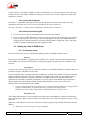
3.5.2. Use of the embedded html server
From a computer connected to the same network, open an html browser window and enter the IP address
of the SCOOP 4+ in the “address” or “URL” field. This gives access to the html server that is embedded
in the SCOOP 4+. The page typically looks like the following picture:
If you click “Network” on the left, you can get a display of the IP addressing data. It is possible to change
settings, and click the “SAVE” button7 to write them into the SCOOP 4+. “REFRESH” reloads the page
from the unit to update the display.
The network settings can be updated from this page, but:
• Obviously it is not usually possible to do the initial setting in this way!
• Be careful before changing these settings, as a wrong setting here can make you loose control
over the unit… (In such event, go back to 3.5.1 above)
7 Important notice : the SAVE button only uploads a section (enclosed between two bold horizontal lines), unlike the REFRESH
button, which refreshes the whole page.
22
SCOOP 4+ - User manual
55 000 053 - C
3.5.3. SIP registration and configuration data
You can access these parameters if you click the “SIP configuration” button on the embedded server html
page. This is the only way to configure these settings, and most cannot be set from the keypad (except
those mentioned in the following). The following is an example screen copy, and some comments about
the displayed data:
55 000 053 - C
SCOOP 4+ - User manual
23
Item
Notes
User, Display name,
Authentication user
Refer to the network administrator and/or the administrator of the SIP server;
Often these three parameters have the same value, as here, but they may be
different.
Authentication
password
Refer to the network administrator and/or the administrator of the SIP server
Registrar
IP address of the SIP registrar; a symbolic name (e.g. sipsrv.mycomp.com) is
accepted, if recognised by the DNS.
Can be also read from the menu (TOOLS / Maintenance / About)
Registration status
(read only data) Shows that the unit is (or is not) successfully registered on the
server.
Can be also read from the menu (TOOLS / Maintenance / About)
Outbound proxy
An outbound proxy is one way of getting access through a NAT router or a
firewall;
Refer to the network administrator and/or the administrator of the SIP server
for this setting
STUN server
A STUN server is also one means of getting access through a NAT router.
If such server is available, enter here its IP address or domain name.
STUN mode
Enable or disable the use of the STUN server. This allows to keep the address
of the STUN server even when the function is disabled.
This setting is available from the menu (SETUP / Net / Param / STUN Mode)
Make sure to click the “SAVE SIP” button located at the bottom of this section if you want to actually
write your changes into the SCOOP 4+.
In the “Coding” section, you can define the desired encoding for outgoing calls. However, this is usually
done from the keypad and LCD.
) Note that the unit adjusts automatically for incoming calls, so no preliminary codec setting is
needed for receiving calls.
The registration data do not have to be changed often in normal operation. In fact, they may be still valid
even after the unit moves to another location, even though its IP configuration changes.
3.5.4. Other information and settings
The html page includes various other settings. Many of these are reserved at the moment.
•
Do not change the following parameters from their initial settings: “Codec mode” (leave SIP
selected), “Multicast mode parameters” (not implemented yet).
•
The system information includes the Ethernet MAC address (unique and fixed for a given unit),
and the current IP address. Be careful with the security passwor!. This optional feature is left
blank in the initial factory setting.
24
SCOOP 4+ - User manual
55 000 053 - C
3.6. First level maintenance
3.6.1. Internal description
To be added later
3.6.2. Internal configuration
) All the configuration is done in the factory, and/or it can be changed by means of the
keyboard/display interface, without having to open the unit.
However, a jumper may be set to prevent one alarm type to light on the red alarm LED on the back of the
equipment.
Please consult us for such operation!
3.6.3. Analysis of malfunctions
The following table indicates the detected alarm conditions and their classification:
Alarm condition
Internal
Power or fuse fault
X
Bad start-up of a microprocessor, or
interface fault detected on start-up
X
External
Overload on an audio input
Minor8
X
Fault on AES/EBU audio input
X
Decoder synchronisation error
X
Network clock fault9
X
Table 3 - List and classification of alarm conditions
Excluding the case when an internal failure disables the management micro-controller, messages are
displayed to indicate the anomaly, or the fault can be searched using the menu.
The test loops accessible from the “TESTS” menu can help improve the analysis of a problem:
•
In order to check if the audio part functions correctly, use the “Audio” loop and check if the
audio is OK at the output.
•
To check if the coding part functions correctly, activate “Loop 3” and check if the alarm
disappears (and the decoding indicators come back to normal), and if the audio is present at the
output.
•
“Loop 2” sends back to the remote codec the compressed data received from the network (see the
description of test loops in 2.4, Supervision and control interface, page 8). This way, it is possible
to test the integrity of the transmitted data and/or check that the remote codec works properly.
The decoder out to encoder in loop (“Audio feedback” loop) can be used for overall functional check, and
also for aligning the overall chain.
8 Minor alarms are readable on the display, but do not trigger alarms (contacts and LEDs)
9 Fault of the network clock source currently used for synchronisation (X21/X24 main port or secondary port)
55 000 053 - C
SCOOP 4+ - User manual
25
In leased line mode, a clock fault is one typical cause of an external alarm. This can be due to:
•
complete loss of the X24/V11 interface, due to a failure of the transmission line;
•
a failure of the transmission device connected to the codec;
•
an incorrect clock frequency (i.e. incompatible with the codec configuration).
On the other hand, in case of a decoder alarm with no clock error, possible causes are :
•
lack of signal received from the X24/V11 interface, due to a failure of the transmission device
connected to the codec, or a transmission failure in the network ;
•
a fault in the remote codec, or else the remote codec has an incompatible configuration ;
•
transmission errors causing erratic alarms.
Errors such as “AES error” and “AES sync loss” can frequently be seen, even when the unit is configured
to use the analog inputs. This is because the AES output is always active, and by default “genlocked” to
the AES input. To avoid such undesired alarms:
) When not using digital audio interfaces, set the digital audio sync in “Master” mode
(SETUP / Audio / Digital / Synchro / Maste )
26
SCOOP 4+ - User manual
55 000 053 - C
4. Detailed operating mode – User interface
In local mode, the unit is operated thanks to a keyboard and display on the front panel. The display is an
alphanumeric backlit LCD with two 20-character lines.
Operating from the keyboard can be protected by a password (8 digits maximum). In such case, the
password must be entered to start a session and get access to the user menus. The password can be
changed or deleted by the user.
4.1. Main operation modes
There are two parameters which have a major impact on the operation of the unit and on the user
interface.
First, the unit features three transmission modes: transmission over Ethernet/IP, “leased line” mode, and
transmission over the ISDN.
In comparison with the permanent leased line connection, IP and ISDN modes are “dial up” modes and
bring a number of additional parameters to be controlled:
•
dial number and/or full SIP URI for the destination of a call;
•
call set up and control;
•
device SIP registration data, or local ISDN number and sub-address;
•
miscellaneous network operation parameters.
The status display is slightly different in order to recall the transmission mode currently in use.
Second, in the leased line mode the unit can be operated either as a normal “single codec”, or as a “dual
codec” capable to transmit two independent 7 kHz bandwidth audio channels. This aspect has a big
influence on the way the device is installed, set up and monitored.
In the following, the main operation modes are shortly designated as: “IP mode”, “ISDN mode” or “LL
mode” (for leased line mode), and “Single codec” or “Dual codec”.
4.2. Equipment start-up
During start-up, the unit displays temporary messages. This initialisation lasts around one minute. Then
the main menu is displayed.
At this stage, if the configuration includes a non-blank password, the keypad is locked and the password
must be entered in order to access the menus: just enter the password (1 to 8 numbers), and the unit is
unlocked as soon as the last digit is entered. On factory setting or after erasure of the unit memory, the
password is blank so this step is skipped.
4.3. Description of the keyboard
Please refer to the description in 3.2.1 above(Front panel, LCD and basic control keypad).
55 000 053 - C
SCOOP 4+ - User manual
27
4.4. Description of the menus
The unit features a tree-structured menu, and the three function keys on the bottom of the LCD are used
to navigate through the menus. The OK key is used to confirm some settings or enter data, and the “Esc”
key allows to go back to the upper menu level. Pressing this key several times makes sure you come back
to the main default menu.
From the top menu, you can directly enter one of the three main menus by hitting the function key just
beyond:
•
TOOLS:
•
DIR:
•
SETUP configuration of the codec
maintenance and housekeeping functions, and access to status information
access to the directory (IP mode only)
This “SETUP” menu is itself divided into three sub-menus:
•
Net
•
Audio configuration of audio interfaces and parameters
•
Cod
selection and configuration of network interface and parameters
selection and configuration of the coding algorithm
The following diagrams show the various sub-menus and accessible parameters.
Note that the “*” character in these diagrams shows the default and/or factory reset value for a given
parameter.
28
SCOOP 4+ - User manual
55 000 053 - C
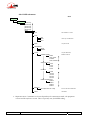
4.4.1. TOOLS menu
Notes
TOOLS
Status
<Alarm 1>
…
<Alarm n>
Maintenance
About
IP ADDRESS
VERSION
SOFTWARE NS
SIP REGISTRAR
REGISTRAR STATUS
displays IP address
displays version info
displays "software" serial number
displays SIP registrar's address, if any
displays status (OK or NOK)
Ethernet Setup
DHCP
Manual
IP Address
Mask
Gateway
DNS
switch Full ↔ Reduced mode
User Access
Confirm
Password
blank after "factory reset"
Enter new password
Confirm password
Tests
No test loop
Audio loop
Loop3-codec
Loop2-Network
Audio Feedback
*
Misc
General Reset
CONFIRM
Yes
No
Aux. Functions
DATA CHANNEL
Off
On
RELAYS
Off
On
COORD. CHANNEL
Off
On
*
*
*
LCD Backlight
Off
On
*
LED Brightness
Low
Medium
High
*
Language
ENGLISH
FRENCH
…
*
5A System
concerns ISDN mode only!
Off
On
55 000 053 - C
*
SCOOP 4+ - User manual
29
4.4.2. DIR menu
Notes
DIR
Remote
Load
Delete
Edit
New
Local
Load
Delete
Edit
New
This menu is not implemented for the moment.
30
SCOOP 4+ - User manual
55 000 053 - C
4.4.3. SETUP menu
SETUP
Net
Other [to select other network]
Param
[for Leased Line mode]
Interface
LL1
LL2
Selection of the active port in normal mode
*
Main port, labelled "X24/V11/V35"
Secondary port, labelled "ALARM + X24/V11"
Mode
Normal
DualCodec
Param
[for IP transmission mode]
Network Setup
DHCP
Manual
*
*
IP Address
Mask
Gateway
DNS
Network Quality
Selection of the preferred
Low
Middle
High
stability / latency compromise
*
STUN Mode
Activate/disable use of STUN
OFF
ON
Param
(see "Setting up a link in IP mode")
*
[for ISDN]
Protocol
Selection of local ISDN protocol
,,,
Euro ISDN
,,,
*
Address
Configuration of local line
Local Number 1
Sub-Address 1
(see "Setting up a link in ISDN mode")
Audio
Analog
Input Impedance
High
600 Ohm
*
Max Output lvl
Defines the maximum analog level
0 dBu
…
+16 dBu
…
+22 dBu
reached for a maximum level decoded signal
(0 dBFS )
*
Max Input lvl
Defines the analog input clipping level,
0 dBu
…
+16 dBu
…
+22 dBu
sending a maximum level signal to the encoder
(0 dBFS )
*
Digital
Synchro
Master
Genlock
*
Sampling
Note: valid for "Master" mode
32 kHz
48 kHz
96 kHz
("Genlock mode follows AES input)
*
Input Source
Analog
AES
Level Meter
Cod
55 000 053 - C
*
/HEADROOM
0 dB
…
12 dB
…
40 dB
Refer to "Audio monitoring" section
for this setting
*
Refer to "COD" sub-menu
SCOOP 4+ - User manual
31
4.4.4. COD sub-menu
Notes
SETUP
Cod
[Previous 1]
[Previous 2]
[Previous 3]
[Previous 4]
[Previous 5]
Other
G711
Not available in LL mode
G722
SRT
H242
H221
CELP
H242: only for ISDN mode
Only for IP mode
4SB ADPCM
MONO
STEREO
L2 J52
Only for ISDN mode,
CHANNEL MODE
MONO
DUAL MONO
STEREO
JOINT STEREO
SAMPLING RATE
16 kHz
24 kHz
32 kHz
48 kHz
BIT RATE
64 kb/s
128 kb/s
192 kb/s
256 kb/s
384 kb/s
ERROR CORRECTION
MODE 0
MODE 1
MODE 2
MODE 3
MPEG L2 with J52
[same parameters as L2 J52]
,,,
but max 128 kb/s in ISDN mode
MPEG L2
TDAC
OPTIONAL
) Important notice: limitations in bit rate depend on the transmission mode, the equipment
version and the software version. This is especially true for MPEG coding.
32
SCOOP 4+ - User manual
55 000 053 - C
4.5. Handling the configuration profiles
To be added later
4.6. Setting up a link in IP mode
A link is set up in a similar way as an ISDN link. The difference is mainly that instead of the telephone
number, we use either an IP address, or a SIP URI (Uniform Resource Identifier).
4.6.1. Directly call an IP address
This is the most basic way of setting the link. It is suitable only if:
• The other unit is “directly” reachable, i.e. there is no NAT Router or firewall blocking the
connectivity. The simplest case is when both units are on the same LAN.
• The IP address of the other unit is known.
To set the link, first set the desired encoding format (MENU / SETUP / Cod).
Then enter the IP address and press the “green phone” button.
) When operating in this way, it is preferable to leave blank the SIP registering data.
4.6.2. Calling via a SIP server
This is the technique when both units are registered on a SIP proxy server. In this case, each unit is
identified by its SIP URI, in the form username@sipservername, like an email address. There is no need
to know any IP address (and hence there is no problem if the IP address of a unit changes for whatever
reason).
To set the link, first set the desired encoding format (embedded server, or simply from the keypad
MENU / SETUP / Cod).
Then enter the SIP URI of the unit to call, and press the “green phone” button.
4.6.3. Receiving calls
This is very simple, in both cases (direct peer to peer link or SIP server). There is nothing to do…
When a call is received, the units negotiate automatically a commonly acceptable coding algorithm, and
set the link automatically. On the receiving side, the unit will “follow” the calling unit.
4.6.4. “Network quality” setting
Depending on the quality of service provided on the network, especially its jitter performance, it is
possible to change the stability/latency compromise used by the Scoop 4+. For this purpose, a setting is
available in the menu (SETUP / Param / Network Quality). Three choices are proposed:
• “HIGH”:
suitable for a good quality and low jitter network; latency is minimal, but the codec
will have little tolerance to possible jitter
• “MIDDLE”:
intermediate (and default) setting, suitable for a moderate transmission jitter
• “LOW”:
to be preferred when the network has low QoS, especially for residential ADSL
lines. This setting ensures a safer operation, at the cost of a high latency.
On a LAN and/or private network with a controlled quality, the “HIGH” quality setting is recommended,
as it yields minimum latency.
55 000 053 - C
SCOOP 4+ - User manual
33
On the contrary, it should be avoided for a link via the Internet, as it can only tolerate a low jitter. One
solution can be to start with a “MIDDLE” setting, and switch to the “LOW” setting if too much audio
disturbance is heard.
4.6.5. Links with IP phones
SCOOP 4+ is compatible with IP phones that use the SIP protocol (many on the market do). The
algorithm used in this case is G711, but a few IP phones can also accept G722.
Note that “IP phones” include software SIP phones implemented on computers.
4.6.6. Notes about the keypad
• Use the “up arrow” key to switch between low case and capital letters.
• Once a number or SIP URI has been called, it is easy to recall it without having to type it again:
press the “green phone” key, then you can scroll through the “history” (last dialled numbers)
using the arrows. Press the phone key when the desired number is displayed. This is especially
useful for quickly redialling the previous number or URI.
4.7. Setting up a link in ISDN mode
4.7.1. Preliminary setup
The network interface must be configured depending on the local ISDN line that is used.
Protocol
First, the protocol should be set appropriately (SETUP / Net / Param / Protocol). The default setting is
“Euro ISDN”, also known as ETSI protocol. Change this setting if another protocol is needed in your
location.
Local address
In some cases, it may be necessary to set the local address (or local ISDN number) of the line, and/or it is
possible to assign a sub-address to the codec.
The local number allows “multiple subscriber numbering” or MSN. This number is usually the number
remote equipment must dial to call your equipment. Configuring this number in the equipment is not
mandatory if the equipment is directly connected to the public network. On the other hand, if the
equipment is connected to a PABX, the number(s) are often required. The PABX may also impose a
unique number for each B channel within the same BRI interface. In such a case, refer to the
characteristics and configuration of the PABX.
) Proper configuration of the local numbers is essential, and many problems in setting up links
originate from mistakes or misunderstandings regarding this configuration.
In doubt, leave this number blank! This is usually appropriate for public lines.
Sub-address SA
This number differentiates several terminals connected to the same ISDN bus, which are allocated the
same call number(s). Thus it can be useful in case other devices are connected with the Scoop 4+ on the
same line.
Whenever a sub-address is set, the unit will only accept incoming calls specifically directed to this subaddress.
) Most often, the best setting is to leave this blank!
34
SCOOP 4+ - User manual
55 000 053 - C
4.7.2. Call an ISDN number
To set the link, first set the desired encoding format (MENU / SETUP / Cod).
Then enter the ISDN number of the destination and press the “green phone” button.
If a sub-address is needed, after the number enter the “*” character and the sub-address (4 digits max.).
The number then has the form nnnn*ssss, e.g. 0912345678*32.
When the selected encoder needs two B channels, the units asks for a second number. If the same number
is suitable, just press a second time the “green phone” button.
An error code is displayed in case of a failure of the link establishment. Refer to annex 6.4 (ISDN error
causes) to find the corresponding meaning.
4.7.3. Receiving calls
When the 5A System is active, receiving calls is simple. When a call is received, the codec automatically
“unhooks” and the units negotiate automatically a commonly acceptable coding algorithm, and finally set
the link automatically. On the receiving side, the unit will “follow” the calling unit.
When the 5A System is not active, you should first configure the codec for the desired coding algorithm
and configuration. When a call is received, the unit will synchronise with the calling device, but the link
will usually fail if the calling party has used another coding configuration than expected. However, if J52
is used by both parties, the link will succeed even without 5AS active.
4.7.4. Quick redialling
Once a number (or a couple of numbers) has been called, it is easy to recall it without having to type it
again: press the “green phone” key, then you can scroll through the “history” (last dialled numbers) using
the arrows. Press the phone key when the desired number is displayed. This is especially useful for
quickly redialling the previous number.
4.8. Erasing and resetting the configuration
In some cases like e.g. if the password is forgotten, it may be necessary to restart from the factory default
setting.
To erase the entire configuration and load the factory default settings, you should normally go to the
“General Reset” sub-menu (TOOLS / Misc / General Reset).
) In case the keyboard is locked and you have lost the password, hold the “hang up” key
pressed for 10 seconds; this forces the system directly to the “General reset” sub-menu. You
can then confirm that you really want to erase all the settings, including the password…
The factory default password is blank.
55 000 053 - C
SCOOP 4+ - User manual
35
5. Technical characteristics
5.1. Characteristics of interfaces
5.1.1. Analogue audio inputs
Audio characteristics are measured over a 20 to 20 000 Hz bandwidth except when differently stated.
The inputs are balanced type, using 3-pin female XLR sockets.
Maximum input level:
adjustable from 0 to +22 dBm ± 0.3 dB
Nominal input impedance:
600 Ω or 10 kΩ (menu setting,
SETUP / Audio / Analog / Input Impedance)
Impedance balance:
TBD
Common mode rejection ratio:
> TBD dB (measured with Z = 600 Ω)
5.1.2. Analogue audio outputs
Audio characteristics are measured over a 20 to 20 000 Hz bandwidth except when differently stated. The
outputs are balanced type, using 3-pin male XLR sockets.
Maximum output level:
adjustable from 0 to +22 dBm ± 0.3 dB.
Nominal load impedance:
600 Ω or 10 kΩ
Output impedance:
<50 Ω
Symmetry:
> TBD dB (ZL = 150 Ω)
5.1.3. Digital audio input and output
These interfaces comply with recommendation AES3-1992. They support a sampling rate from 28 to
96 kHz.
5.1.4. Headphone output (front panel)
This output (6.35 mm jack on front panel) is for the connection of a 32 Ω headphone. It is also possible to
plug a high impedance headphone; however, the maximum available power will be lower.
36
SCOOP 4+ - User manual
55 000 053 - C
5.1.5. Main X24/X21/V11/V35 interface
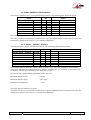
The X24/V11 interface uses a 15-pin male Sub-D connector. The following table shows the pinout.
Signal
Frame ground
Transmitted data
Pin
Ta
Received data
Indication
Received clock
Ra
Ia
Sa
Electrical ground
1
2
3
4
5
6
7
8
Signal
9
10
11
12
13
14
15
Tb
Transmitted data
Rb
Ib
Sb
Received data
Indication
Received clock
The codec does not transmit a C signal.
The codec can also be connected to V35 interfaces; a specific adaptation cable is needed in such case. The
connection is described in Annex 6.5, (V35 interface adaptation).
5.1.6. “Alarm + X24/X21” interface
This interface uses a 15-pin male Sub-D connector. The following table shows the pinout.
Signal
Internal alarm - Common
Transmitted data
Internal alarm - NC
Received data
Indication
Received clock
External alarm - NO
Electrical ground
Pin
IA-Com
Ta
IA-C
Ra
Ia
Sa
EA-O
1
2
3
4
5
6
7
8
Signal
9
10
11
12
13
14
15
Tb
IA-O
Rb
Ib
Sb
EA-C
EA-Com
Transmitted data
Internal alarm - NO
Received data
Indication
Received clock
External alarm - NC
External alarm - Common
The bold text refers to the alarm contacts. Both are form-C type. The “NO” terminal is open when the
alarm is set, otherwise it is connected to the “Common” terminal. The “NC” terminal is connected to the
“Common” terminal when the alarm is set, otherwise it is open.
The current and voltage handling capabilities of the relays are:
Maximum output current:
120 mA
Maximum output voltage:
350 V peak
Resistance of output loop:
< 35 Ω
The codec does not transmit a C signal.
The codec can also be connected to V35 interfaces; a specific adaptation cable is needed in such case. The
connection is described in Annex 6.5, (V35 interface adaptation).
55 000 053 - C
SCOOP 4+ - User manual
37
5.1.7. Remote control interface
This interface uses a 9-pin female Sub-D connector on the rear panel. This is a V24/RS-232 type interface
with only Tx and Rx signals (no flow control). The following table indicates its pinout (DCE type
pinout).
Pin
Function
2
Rx
V24 data to the PC
Output
3
Tx
V24 control data, from the PC
Input
5
Ground
Other
Not connected
The interface is configured as follows: 4800 bauds, 8 bits, no parity, one stop bit.
5.1.8. Data interface (« data »)
This V24 interface uses a 9-pin female Sub-D connector on the rear panel. Like for the remote control
interface, only Tx and Rx are used, there is no flow control, and the pinout is of DCE type.
Pin
Function
2
Rx
Received V24 data
Output
3
Tx
Transmitted V24 data
Input
5
Ground
Other
Not connected
The data interface is configured as follows: 8 bits, no parity, one stop bit. It is possible (see 4.4.1 TOOLS
menu, TOOLS / Misc / Aux. Functions / DATA CHANNEL) to activate the interface and to configure its
baud rate (300 to 9600 bauds). However, the maximum allowed baud rate depends on the audio coding
used (see 2.6.1 - Data channel).
5.1.9. Ethernet interface
This RJ45 socket has standard Ethernet pinout (for use of a normal “straight” cable to an Ethernet hub).
The installation and operation of this function is detailed in 3.5, Initial setup of the Ethernet interface.
5.1.10. “Digital I/O” interface
TBD
38
SCOOP 4+ - User manual
55 000 053 - C
5.1.11. Relay transmission interface (“AUX” socket)
The relay transmission interface (refer to 2.6.2, Relay transmission) is available on the 25 pin female
sub-D “AUX” Socket. It includes two isolated current loop inputs and two dry contact outputs.
The following table shows the pinout of the socket for this function:
Pin
Function
13
Output loop n°2 (b)
25
Output loop n°2 (a)
12
Output loop n°1 (b)
24
Output loop n°1 (a)
11
Input loop n°1 (b)
23
Input loop n°1 (a)
10
Input loop n°2 (b)
22
9
Input loop n°2 (a)
+5V of internally supplied power supply
21
0V of power supply
All loops are isolated and bi-directional (free polarity).
The characteristics of the input loops are:
Input loop control current:
6 mA
(max. 100 mA)
Resistance of input loop:
∼ 560 Ω
(current limiting series resistor)
Input loop isolation:
> 1500 VRMS
A +5V to +12V source may be connected directly on an input loop, because the internal series resistor is
dimensioned for this purpose. For a higher voltage source, it may be necessary to limit the input current.
The characteristics of the output loops are:
Maximum switching voltage (output):
350 V peak
Maximum switching current (output):
120 mA
Resistance of output loop:
< 35 Ω
Output loop isolation:
> 1500 VRMS
The 5V power supply is available from the unit to power a low-consumption device (maximum 300 mA
current consumption), or e.g. to power the input loops or LED indicators connected to the output loops.
55 000 053 - C
SCOOP 4+ - User manual
39
5.1.12. Coordination channel interface (“AUX” socket)
In addition to the loop control and relay transmission interfaces, the (optional) coordination channel input
and output are available on the 25-pin female sub-D connector (“AUX” Socket on the rear panel), with
pinout as indicated hereunder.
The input and output are balanced floating signals, transformer isolated.
Maximum level:
Impedance:
Nominal bandwidth:
40
9 dBm
600 Ω
300 – 3400 Hz
Pin
Function
1
Coordination channel output (-)
14
Coordination channel output (+)
2
Frame ground
15
Coordination channel input (+)
3
Coordination channel input (-)
16
Frame ground
SCOOP 4+ - User manual
55 000 053 - C
5.1.13. Loop control interface (“AUX” socket)
This function is not yet implemented
The following table shows the wiring of the socket for this function:
Pin
Function
17
Input loop n°2 (a)
5
Input loop n°2 (b)
18
Input loop n°1 (a)
6
Input loop n°1 (b)
19
Output loop n°2 (a)
7
Output loop n°2 (b)
20
Output loop n°1 (a)
8
Output loop n°1 (b)
21
9
0V of power supply
+5V of internally supplied power supply
All loops are isolated and bi-directional (free polarity).
The characteristics of the input loops are:
Input loop control current:
6 mA
(max. 100 mA)
Resistance of input loop:
∼ 560 Ω
(current limiting series resistor)
Input loop isolation:
> 1500 VRMS
A +5V to +12V source may be connected directly on an input loop, because the internal series resistor is
dimensioned for this purpose. For a higher voltage source, it may be necessary to limit the input current.
The characteristics of the output loops are:
Maximum switching voltage (output):
350 V peak
Maximum switching current (output):
120 mA
Resistance of output loop:
< 35 Ω
Output loop isolation:
> 1500 VRMS
The 5V power supply is available from the unit to power a low-consumption device (maximum 300 mA
current consumption), or e.g. to power the input loops or LED indicators connected to the output loops.
55 000 053 - C
SCOOP 4+ - User manual
41
5.2. Audio performance
The audio performance in this part applies to the system without coding/decoding, and excluding the
coordination channel. The additional effect of the audio encoding and decoding on audio performance
depends on the coding algorithm used and its parameters.
Except when differently stated, the following measurements are done at a +6 dBm input level and on the
AD/DA path, with maximum input and output level set at +16 dBu.
5.2.1. Transmission gain
The drift in time of the gain from the input to the output of the codec is less than ± 0.3 dB.
5.2.2. Amplitude-frequency response
All measurements are done with a +6 dBm input signal, and a reference frequency of 1020 Hz. The
measurements are done with a loopback before coding/decoding, so the possible effect of compression
has no influence.
To be detailed
5.2.3. Group delay distortion
Taking the minimum group delay as reference, the group delay distortion on the AD/DA path is always
less than 1 ms.
5.2.4. Idle channel noise
Background noise is measured with no audio modulation (idle channel), with maximum input and output
level set at +16 dBu, through the whole encoder-decoder chain (wide band coding, with 48 or 32 kHz
coding frequency).
Maximum noise level10:
(quasi-peak detection, CCIR weighting)
- 56 dBm
(or - 62 dBq0ps)
This result in a signal to noise ratio (SNR) of more than 72 dB.
When the maximum input and output level is set at another level, both the signal and noise levels are
shifted but the SNR remains in the same range.
5.2.5. Total distortion vs. frequency and level
Total distortion relative to maximum level (or THD + N) is less than –82 dB over the whole audio
bandwidth (20 – 20 000 Hz). This performance holds for audio signals from –80 dB to –1 dB relative to
the maximum level (+16 dBu).
5.2.6. Crosstalk
Crosstalk is less than -80 dB over the whole bandwidth.
10 Worst case for all types of algorithms; MPEG performs better than the others
42
SCOOP 4+ - User manual
55 000 053 - C
5.2.7. Gain and phase difference between channels
The gain difference between channels is less than ± 0.3 dB over the whole bandwidth, for any sampling
frequency.
The phase difference between channels is less than ± 3 degrees over the whole bandwidth, for any
sampling frequency.
5.3. Power supply
The codec operates from mains 85-263Vac, 47-63 Hz. Protection is provided by a resettable fuse. The
maximum power consumption is 15 W (without the coordination channel option).
5.4. Dimensions and weight
The unit is a 19 inches frame of 1U height (44 mm or 1.75”) and 252 mm depth (12.5”).
Its weight is about 3.2 kg.
5.5. Environmental characteristics
The equipment operates over a 0°C to 45°C ambient temperature range (32°F to 113°F), and a 5% to 90%
humidity ratio range.
The SCOOP 4+ complies with “CE” directives regarding safety and EMC.
•
Safety: compliance with EN60950
•
Susceptibility: compliance with EN50082-1
•
EMI: radiated emissions complying with EN55022 (class A); conducted emissions complying
with EN55022 (class B).
5.6. Versions - Options
The various versions available for the SCOOP 4+ are the following:
•
SCOOP 4+ with Ethernet/IP and leased line interfaces
•
SCOOP 4+ with Ethernet/IP, leased line interfaces and one ISDN interface
Besides, certain functions are available as options:
•
Audio coordination channel ;
5.7. Accessories and related products
The SCOOP 4+ is delivered with a mains cord and a CAT5 Ethernet cable.
Along with the coordination channel option, a specific cable is delivered, which provides XLR plugs for
the coordination channel input and output (input on a female plug, output on a male plug).
For remote controlling SCOOP 4+ units from a PC, the TeleScoop™ supervision software is available
separately.
55 000 053 - C
SCOOP 4+ - User manual
43
6. Annexes
6.1. Complements on the algorithms and protocols used
6.1.1. Auxiliary data in the MPEG frames
The auxiliary data are used for the following purposes:
•
Reed-Solomon error detection and correction (J52 standard)
•
Data channel
•
Other auxiliary information: relay transmission, and/or auxiliary audio channel.
The insertion of this auxiliary information is an extension (AAS proprietary format) to MPEG.
However, the frame structure remains compliant.
6.1.2. Reed-Solomon encoding
In order to cope with possible transmission errors in the network, Reed-Solomon error correction coding
can be added, compliant with J52 recommendation. Four correction modes are available in the
SCOOP 4+:
•
Mode 0 : no error correction, Reed-Solomon coding disabled
•
Mode 1 : protection of only the control information and scale factors in the MPEG frame, low
redundancy (so-called “unequal protection”)
•
Mode 2 : protection of the whole frame, moderate (2.5 %) redundancy (so-called “low equal
protection”)
•
Mode 3 : protection of the whole frame, high (10 %) redundancy (so-called “high equal
protection”)
Higher redundancy increases the protection against errors, but slightly degrades the audio quality, as
redundancy takes up part of the bit rate that could be allocated to audio coding.
Most often, for a normal quality transmission link, mode 1 is sufficient and it consumes little bit rate from
the compressed data, so it hardly impacts the audio quality. Although J52 does not apply to leased line
connections, this error protection technique is also implemented in the SCOOP 4+ in leased line mode.
6.1.3. H221 framing
H221 defines a framing structure that allows byte synchronisation recovery in leased lines, and the
transmission of control data along with the main data.
6.1.4. Proprietary coding algorithms
The “proprietary” coding algorithms are algorithms which are not standardised by the ITU-T but have
distinctive features that make them useful for some applications:
•
Low coding-decoding delay (4SB ADPCM);
•
Low bit rate wide band speech coding (CELP)
•
TDAC (Time Domain Aliasing Cancellation, MDCT-based algorithm)
44
SCOOP 4+ - User manual
55 000 053 - C
6.2. Overview of the SIP protocol
6.2.1. What is SIP?
SIP is for Session Initiation Protocol, a protocol specified by the IETF for establishing media
transmission sessions. SIP is considered the communication protocol of the future by most vendors, and
as such it has deep influence on the VoIP applications.
As a signalling protocol, SIP brings methods and techniques to solve the issues related to the establishing
of an audio link. Almost as important, it is a recognised standard, implemented on many network devices
and systems. Using SIP helps you build modular and really evolutive systems, not being tied to a single
vendor.
6.2.2. Setting a link with SIP
Let us look at an example (diagram below): a reporter on the move with a Scoopy11 wants to make a call
to a SIP compliant codec located in the main station. The reporter may be at home, or at another location,
not necessarily known in advance.
Once the Scoopy is on and connected to the network, it will register itself n to a SIP “registrar”. This
registrar can be located on the LAN of the radio house, but it may as well be elsewhere in the network.
Then the registrar “knows” where the Scoopy is, what its IP address is. On the radio house side, a similar
process takes place o.
To call the codec of the radio house (e.g. a SCOOP 4+), the reporter just needs to know its SIP address,
which can be like [email protected] (indeed very similar to an e-mail address). To call the unit,
the reporter has to select the preferred audio coding mode on the Scoopy (e.g. mono G722), then call the
remote unit, simply using this SIP address (SIP URI).
What happens then on the network: the Scoopy sends the request p (INVITE in SIP protocol) to a proxy
server (often the same device is also the registrar). To make things simple, this proxy then relays and
routes the request q to its destination. Resolving the SIP URI to a physical network and address uses
mechanisms similar to those used for resolving URLs. Several proxys may be involved in cascade to
finally reach the desired destination, but this does not have to be known or dealt with by the end devices.
The following is like the initiation of a phone call: the IP codec “rings”; if it accepts the call, this is
notified to the Scoopy.
At this stage, the proxy(s) provide the Scoopy and the IP codec with all the address data they need for the
link, then the actual audio streams can be exchanged r between both units. As a very important feature,
the end devices now can exchange data directly; the proxys do not have to be on the path, they are only
involved in the setting (and later the ending!) of the session. The codecs will automatically exchange their
coding capabilities, and agree on a coding mode, with no further user intervention.
Alternatively, the call can be done from the station to the reporter, in a way very similar to the above. In
contrast with ISDN links, the operators at the station do not even need to know where the reporter is
located! This is because the registrar deals with this issue.
Note that it is also possible to set a link with a SIP-compliant VoIP phone instead of another codec. This
is one of the numerous advantages of using a standard.
11 Scoopy is a portable audio codec from AETA AUDIO SYSTEMS; the description here applies to both Scoopy and the Scoop 4+,
as they are both SIP compliant and mutually compatible
55 000 053 - C
SCOOP 4+ - User manual
45
6.2.3. Supported communication protocols
The SCOOP 4+ IP supports and/or implements the following protocols:
• Ethernet (IEEE802.1)
• IP
• DHCP (client)
• HTTP (embedded html server)
• TCP/IP, UDP/IP transport protocols
• SIP (Session Initiation Protocol), SDP (Session Description Protocol)
• RTP, RTCP
46
SCOOP 4+ - User manual
55 000 053 - C
6.3. Some methods to deal with NAT routers and firewalls
This problem arises when the desired connection has to go through a NAT router, and/or a firewall, that
blocks a direct IP communication.
This is a very common issue, especially if one needs to set up a transfer via the Internet. It is impossible
here to describe in details the possible ways to deal with this problem, but the following just shortly
discusses some typical solutions. One should decide the most suitable solution depending on the specific
conditions. Most probably, a network administrator should be consulted for support, and for granting
adequate network authorisations and/or privileges.
6.3.1. DMZ
The SCOOP 4+ can be set in the “DMZ” of the router/firewall. In this way, it is possible to reach directly
the SCOOP 4+ from “outside” the router.
However, such a solution is not recommended for network security reasons, and it should only be used as
a temporary test configuration.
6.3.2. Port forwarding
This solution exposes less directly the unit to external attacks. However, it is more complicated, as a
number of dedicated ports have to be opened and routed.
6.3.3. Use of a SIP proxy
A SIP proxy often can deal with the issue. There are various options, e.g.:
• Proxy on the external “public” side: efficient when the router does not block outgoing traffic.
Such solution can be implemented e.g. by registering on public SIP servers.
• Proxy inside the LAN area: efficient if the proxy server is allowed to receive and send dedicated
traffic. This solution is compatible with restrictive firewalls. Port forwarding has to be set for the
proxy to be able to receive calls from outside the LAN.
6.3.4. STUN server
In many cases, a STUN server can be used instead of a dedicated proxy server. STUN is a network
protocol allowing a client behind a NAT router (or multiple NATs) to find out its public address, the type
of NAT it is behind and the internet side port associated by the NAT with a particular local port. This
information is used to set up UDP communication between two hosts that might be behind NAT routers.
If a STUN server is available, a SCOOP 4+ located behind a NAT router can use the server to complete
successfully its call setup with a remote unit outside the NAT router.
55 000 053 - C
SCOOP 4+ - User manual
47
6.4. ISDN error causes
The following table lists the call clearing causes. The error message is typically CLEARED: hh (dd),
where hh is an hexadecimal number and dd its decimal value. The message meaning is given for an ETSI
ISDN. Causes with values greater than 80 hex are generated internally.
Code
01 (1)
02 (2)
03 (3)
06 (6)
07 (8)
10 (16)
11 (17)
12 (18)
13 (19)
15 (21)
16 (22)
1A (26)
1B (27)
1C (28)
1D (29)
1E (30)
1F (31)
22 (34)
26 (38)
29 (41)
2A (42)
2B (43)
2C (44)
2F (47)
31 (49)
32 (50)
39 (57)
3A (58)
3F (63)
41 (65)
42 (66)
45 (69)
46 (70)
4F (79)
51 (81)
52 (82)
53 (83)
54 (84)
55 (85)
56 (86)
48
Meaning
unallocated (unassigned) number
no route to specified transit network
no route to destination
channel unacceptable
call awarded and being delivered in an established channel
normal call clearing
user busy
no user responding
no answer from user (user alerted)
call rejected
number changed
non-selected user clearing
destination out of order
invalid number format
facility rejected
response to STATUS ENQUIRY
normal, unspecified
no circuit/channel available
network out of order
temporary failure
switching equipment congestion
access information discarded
requested circuit/channel not available
resources unavailable, unspecified
quality of service unavailable
requested facility not subscribed
bearer capability not authorized
bearer capability not presently available
service or option not available, unspecified
bearer capability not implemented
channel type not implemented
requested facility not implemented
only restricted digital information bearer capability is available
service or option not implemented, unspecified
invalid call reference value
identified channel does not exist
a suspended call exists, but this call identity does not
call identity in use
no call suspended
call having the requested call identity has been cleared
SCOOP 4+ - User manual
55 000 053 - C
58 (88)
5B (91)
5F (95)
60 (96)
61 (97)
62 (98)
63 (99)
64 (100)
65 (101)
66 (102)
6F (111)
7F (127)
91 (145)
A2 (162)
FF (255)
55 000 053 - C
incompatible destination
invalid transit network selection
invalid message, unspecified
mandatory information element is missing
message type non-existent or not implemented
message not compatible with call state or message type non-existent or not
implemented
information element non-existent or not implemented
invalid information element contents
message not compatible with call state
recovery on timer expiry
protocol error, unspecified
interworking, unspecified
no signaling data link establishment
no line activation
call clearing, unspecified
SCOOP 4+ - User manual
49
6.5. V35 interface adaptation
This annex indicates the proper connections to use when interfacing the SCOOP 4+ codec to DCE
equipment using a V35 interface.
6.5.1. Connection table
The three leftmost columns show the pin allocation on the 15-pin connector of the codec.
The two columns on the right indicate the pinout on a 34-pin V35 connector or a 37-pin sub-D connector.
Consult the DCE documentation for other connector types.
Only the bold indicated signals need be connected; leave other pins unconnected. However, the frame
ground (pin 1) may be used for connecting the shield of the connection cord.
X24
Signal
Pin
signals
direction
G
8
Function
Signal ground
V35 signal
102
SG
Pin number
34-pin
37-pin
connector
connector
B
19
15
7
14
Sa
Sb
Ia
Ib
Ra
Rb
6
13
5
12
4
11
←
←
←
←
←
←
Data clock
Data clock
115a RETA
115b RETB
V
X
8
26
104a
104b
RDA
RDB
R
T
6
24
Transmitted data 103a
Transmitted data 103b
Frame ground
TDA
TDB
FG
P
S
A
4
22
1
Received data
Received data
3
10
Ta
Tb
2
9
1
50
→
→
SCOOP 4+ - User manual
55 000 053 - C