1
Resetting Settings
To return all settings to their factory defaults.
Please note that all settings will be deleted and will revert to the factory defaults when
the reset switch is pushed. To make new settings, please refer to "Default and Advanced
Settings" (pages 7-8).
Stored cards are also deleted from memory.
If you want to just reset all cards, refer to "All cards reset" on page 38.
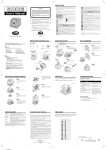
1 Push the reset switch with a pointed
Reset switch
(inside the small
round hole)
implement while pushing the
DATE/TIME and CHANGE button.
DATE/ TIME
CHANGE
2 At
that moment, the display will
change to AC "
".
And after a few seconds, the display
changes to date & time "1 12:00 a.m.".
DATE/ TIME
CHANGE
AM
DATE/ TIME
35
CHANGE
34