1
6-16
<6. Operation and Parameters>
6.6
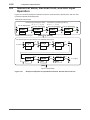
Numerical Value, Decimal Point, and Unit Input
Operation
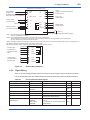
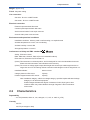
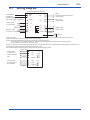
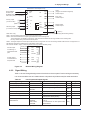
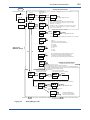
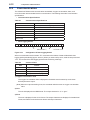
Figure 6.21 shows an example of operation to input a numerical value, decimal point, and unit. Italic
characters indicate the flashing state.
Numerical value input
Increment by pressing the ▲key.
(0→1→ • • • →9→0)
The 4th digit flashes. The 3rd digit flashes.
%
%
10.00
PPM
ZEro
10.00
PPM
ZEro
10.0 0
PPM
ZEro
[ENT]
Decimal point and unit input
Decrement by pressing the ▼ key.
(9→8→• • • →0→9)
The 2nd digit flashes. The 1st digit flashes.
%
%
10.00
PPM
ZEro
[MODE]
*The decimal point and the selected unit LED flash during input.
To 100%
10.00
%
PPM
ZEro
1.000
ZEro
100.0
%
PPM
ZEro
%
PPM
10.00
1000.
%
PPM
ZEro
%
PPM
ZEro
100.0
%
PPM
To 10 ppm
ZEro
[ENT]
Input is confirmed.
Figure 6.21
IM 11M10B01-01E
Example of Operation to Input Numerical Value, Decimal Point, and Unit