1
2.5 First Startup
When you start the device for the first time, the initial initialisation (longer start) is
performed and indicated by the following LED notification sequence: Blue > Red >
Green > Boot animation on the screen > Introductory system screen.
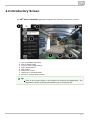
The introductory screen provides essential information for User Manual saving/reading.
You can deactivate this screen for later startups.
The table below shows the factory values of relevant device parameters:
Parameter
IP address
Value
will be assigned by the DHCP server
IP mask
will be assigned by the DHCP server
IP gateway
will be assigned by the DHCP server
Access password to configuration
2n
Time/weather location
Prague, CZ
Stand-by switching time
1 minute
Basic unlimited licence
SW licence
(or according to the Part No.)
Caution
Change the access password while configuring the device for the first time
to avoid unauthorised access to configuration!
System Licence
2N® Indoor Touch has a factory licence key, which can be time-limited (depending
on the Part No.). The licence expiry may cause a partial limitation of the device
functionality! Refer to 3.3 Launcher Configuration for the current licence state and
licence adding procedure if necessary.
16