1
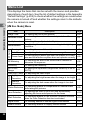
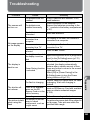
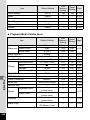
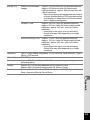
Problem
Cause
The subject is difficult
to focus on with
autofocus
The subject is not
in focus
The subject is not in
the focusing area
The flash is not
popped up
The flash mode is set
to a
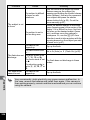
The flash does not The drive mode is set
to j, A, C or l
discharge
The focus mode is set
to s
The shooting mode is
set to n, S, c, C or
d
The flash mode
The flash is not
cannot be set
popped up
8
Appendix
204
Remedy
Lock the focus on an object the same
distance away as the subject (by
pressing and holding the shutter release
button halfway), then aim the camera at
your subject and press the shutter
release button fully (p.59). Or set the
focus manually (p.87).
Locate the desired subject in the focus
frame (focusing area) in the center of the
display. If it is difficult to do so, first lock
the focus on the desired subject (focus
lock), and then move the camera to
recompose. Or, use the J (AF Area
Selection) mode to take a picture with the
focusing area set on the subject you wish
to focus on in (p.87).
Pop up the flash.
Set to , (Auto) or b (Flash On) (p.82).
The flash does not discharge in these
modes.
Pop up the flash.
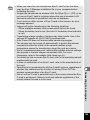
Very occasionally, static electricity may cause camera malfunction. In
this case, remove the batteies and install them again. If the camera is
then working properly, normal condition is restored and you can continue
using the camera.