1
The Service Webpages
a. Network− LAN/WAN
The following additional network LAN/WAN setup
procedure allows you to verify:
b. On the tree in the left hand pane under
LAN, select “mail.company.com” (see
Figure 4-34).
• IP Address, Subnet Mask and Gateway
• DNS server IP Address
4. Provide the name of the customer’s mail server in “Server Property Value” (see Figure
4-34).
• SMTP server
• E-mail account information
5. On the tree in the left hand pane of the page,
click Email (Default) and provide the required
information. Be sure to contact the customer’s
IT department to get the correct information
for Server Email Address and User Name and
Password, if required.
• Modem setup
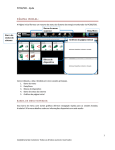
1. From the web page, choose Service (see
Figure 4-33).
2. You must long−in to the PowerCommand
iWatch 100. The default ID is ilon, and the default PW is ilon.
6. When you are finished, click Submit for all
changes to take effect. The requested information is displayed (see Figure 4-35).
3. Under setup choose:
FIGURE 4-34. LAN/WAN NETWORK SETUP
4-24