1
Programmer Reference
Manual
LabWindows/CVI Programmer Reference Manual
December 1999 Edition
Part Number 320685E-01
Worldwide Technical Support and Product Information
www.ni.com
National Instruments Corporate Headquarters
11500 North Mopac Expressway
Austin, Texas 78759-3504
USA Tel: 512 794 0100
Worldwide Offices
Australia 03 9879 5166, Austria 0662 45 79 90 0, Belgium 02 757 00 20, Brazil 011 284 5011,
Canada (Calgary) 403 274 9391, Canada (Ontario) 905 785 0085, Canada (Québec) 514 694 8521,
China 0755 3904939, Denmark 45 76 26 00, Finland 09 725 725 11, France 01 48 14 24 24,
Germany 089 741 31 30, Greece 30 1 42 96 427, Hong Kong 2645 3186, India 91805275406,
Israel 03 6120092, Italy 02 413091, Japan 03 5472 2970, Korea 02 596 7456, Mexico (D.F.) 5 280 7625,
Mexico (Monterrey) 8 357 7695, Netherlands 0348 433466, Norway 32 27 73 00, Poland 48 22 528 94 06,
Portugal 351 1 726 9011, Singapore 2265886, Spain 91 640 0085, Sweden 08 587 895 00,
Switzerland 056 200 51 51, Taiwan 02 2377 1200, United Kingdom 01635 523545
For further support information, see the Technical Support Resources appendix. To comment on the
documentation, send e-mail to [email protected].
© Copyright 1994, 1999 National Instruments Corporation. All rights reserved.
Important Information
Warranty
The media on which you receive National Instruments software are warranted not to fail to execute programming instructions, due
to defects in materials and workmanship, for a period of 90 days from date of shipment, as evidenced by receipts or other
documentation. National Instruments will, at its option, repair or replace software media that do not execute programming
instructions if National Instruments receives notice of such defects during the warranty period. National Instruments does not
warrant that the operation of the software shall be uninterrupted or error free.
A Return Material Authorization (RMA) number must be obtained from the factory and clearly marked on the outside of
the package before any equipment will be accepted for warranty work. National Instruments will pay the shipping costs of
returning to the owner parts which are covered by warranty.
National Instruments believes that the information in this document is accurate. The document has been carefully reviewed
for technical accuracy. In the event that technical or typographical errors exist, National Instruments reserves the right to
make changes to subsequent editions of this document without prior notice to holders of this edition. The reader should consult
National Instruments if errors are suspected. In no event shall National Instruments be liable for any damages arising out of
or related to this document or the information contained in it.
EXCEPT AS SPECIFIED HEREIN, NATIONAL INSTRUMENTS MAKES NO WARRANTIES, EXPRESS OR IMPLIED, AND SPECIFICALLY DISCLAIMS ANY
WARRANTY OF MERCHANTABILITY OR FITNESS FOR A PARTICULAR PURPOSE. CUSTOMER’S RIGHT TO RECOVER DAMAGES CAUSED BY FAULT OR
NEGLIGENCE ON THE PART OF NATIONAL INSTRUMENTS SHALL BE LIMITED TO THE AMOUNT THERETOFORE PAID BY THE CUSTOMER. NATIONAL
INSTRUMENTS WILL NOT BE LIABLE FOR DAMAGES RESULTING FROM LOSS OF DATA, PROFITS, USE OF PRODUCTS, OR INCIDENTAL OR
CONSEQUENTIAL DAMAGES, EVEN IF ADVISED OF THE POSSIBILITY THEREOF. This limitation of the liability of National Instruments will
apply regardless of the form of action, whether in contract or tort, including negligence. Any action against National Instruments
must be brought within one year after the cause of action accrues. National Instruments shall not be liable for any delay in
performance due to causes beyond its reasonable control. The warranty provided herein does not cover damages, defects,
malfunctions, or service failures caused by owner’s failure to follow the National Instruments installation, operation, or
maintenance instructions; owner’s modification of the product; owner’s abuse, misuse, or negligent acts; and power failure or
surges, fire, flood, accident, actions of third parties, or other events outside reasonable control.
Copyright
Under the copyright laws, this publication may not be reproduced or transmitted in any form, electronic or mechanical, including
photocopying, recording, storing in an information retrieval system, or translating, in whole or in part, without the prior written
consent of National Instruments Corporation.
Trademarks
CVI™, National Instruments™, and ni.com™ are trademarks of National Instruments Corporation.
Product and company names mentioned herein are trademarks or trade names of their respective companies.
WARNING REGARDING USE OF NATIONAL INSTRUMENTS PRODUCTS
(1) NATIONAL INSTRUMENTS PRODUCTS ARE NOT DESIGNED WITH COMPONENTS AND TESTING FOR A LEVEL
OF RELIABILITY SUITABLE FOR USE IN OR IN CONNECTION WITH SURGICAL IMPLANTS OR AS CRITICAL
COMPONENTS IN ANY LIFE SUPPORT SYSTEMS WHOSE FAILURE TO PERFORM CAN REASONABLY BE
EXPECTED TO CAUSE SIGNIFICANT INJURY TO A HUMAN.
(2) IN ANY APPLICATION, INCLUDING THE ABOVE, RELIABILITY OF OPERATION OF THE SOFTWARE PRODUCTS
CAN BE IMPAIRED BY ADVERSE FACTORS, INCLUDING BUT NOT LIMITED TO FLUCTUATIONS IN ELECTRICAL
POWER SUPPLY, COMPUTER HARDWARE MALFUNCTIONS, COMPUTER OPERATING SYSTEM SOFTWARE
FITNESS, FITNESS OF COMPILERS AND DEVELOPMENT SOFTWARE USED TO DEVELOP AN APPLICATION,
INSTALLATION ERRORS, SOFTWARE AND HARDWARE COMPATIBILITY PROBLEMS, MALFUNCTIONS OR
FAILURES OF ELECTRONIC MONITORING OR CONTROL DEVICES, TRANSIENT FAILURES OF ELECTRONIC
SYSTEMS (HARDWARE AND/OR SOFTWARE), UNANTICIPATED USES OR MISUSES, OR ERRORS ON THE PART OF
THE USER OR APPLICATIONS DESIGNER (ADVERSE FACTORS SUCH AS THESE ARE HEREAFTER
COLLECTIVELY TERMED “SYSTEM FAILURES”). ANY APPLICATION WHERE A SYSTEM FAILURE WOULD
CREATE A RISK OF HARM TO PROPERTY OR PERSONS (INCLUDING THE RISK OF BODILY INJURY AND DEATH)
SHOULD NOT BE RELIANT SOLELY UPON ONE FORM OF ELECTRONIC SYSTEM DUE TO THE RISK OF SYSTEM
FAILURE. TO AVOID DAMAGE, INJURY, OR DEATH, THE USER OR APPLICATION DESIGNER MUST TAKE
REASONABLY PRUDENT STEPS TO PROTECT AGAINST SYSTEM FAILURES, INCLUDING BUT NOT LIMITED TO
BACK-UP OR SHUT DOWN MECHANISMS. BECAUSE EACH END-USER SYSTEM IS CUSTOMIZED AND DIFFERS
FROM NATIONAL INSTRUMENTS' TESTING PLATFORMS AND BECAUSE A USER OR APPLICATION DESIGNER
MAY USE NATIONAL INSTRUMENTS PRODUCTS IN COMBINATION WITH OTHER PRODUCTS IN A MANNER NOT
EVALUATED OR CONTEMPLATED BY NATIONAL INSTRUMENTS, THE USER OR APPLICATION DESIGNER IS
ULTIMATELY RESPONSIBLE FOR VERIFYING AND VALIDATING THE SUITABILITY OF NATIONAL
INSTRUMENTS PRODUCTS WHENEVER NATIONAL INSTRUMENTS PRODUCTS ARE INCORPORATED IN A
SYSTEM OR APPLICATION, INCLUDING, WITHOUT LIMITATION, THE APPROPRIATE DESIGN, PROCESS AND
SAFETY LEVEL OF SUCH SYSTEM OR APPLICATION.
Contents
About This Manual
Conventions ...................................................................................................................xi
Related Documentation..................................................................................................xii
Chapter 1
LabWindows/CVI Compiler
Overview........................................................................................................................1-1
LabWindows/CVI Compiler Specifics ..........................................................................1-1
Compiler Limits...............................................................................................1-1
Compiler Options ............................................................................................1-2
Compiler Defines.............................................................................................1-2
C Language Non-Conformance .....................................................................................1-2
C Language Extensions .................................................................................................1-2
Calling Conventions ........................................................................................1-2
Import and Export Qualifiers...........................................................................1-3
C++ Comment Markers...................................................................................1-4
Duplicate Typedefs..........................................................................................1-4
Structure Packing Pragma ...............................................................................1-4
Program Entry Points ......................................................................................1-5
C Library Issues .............................................................................................................1-5
Using Low-Level I/O Functions......................................................................1-5
C Data Types and 32-Bit Compiler Issues.....................................................................1-5
Data Types.......................................................................................................1-5
Converting 16-Bit Source Code to 32-Bit Source Code .................................1-6
Debugging Levels ..........................................................................................................1-7
User Protection ..............................................................................................................1-7
Array Indexing and Pointer Protection Errors.................................................1-8
Pointer Arithmetic (Non-Fatal) .........................................................1-8
Pointer Assignment (Non-Fatal) .......................................................1-8
Pointer Dereference Errors (Fatal) ....................................................1-9
Pointer Comparison (Non-Fatal).......................................................1-9
Pointer Subtraction (Non-Fatal)........................................................1-9
Pointer Casting (Non-Fatal) ..............................................................1-10
Dynamic Memory Protection Errors ...............................................................1-10
Memory Deallocation (Non-Fatal)....................................................1-10
Memory Corruption (Fatal)...............................................................1-10
General Protection Errors ................................................................................1-10
Library Protection Errors.................................................................................1-11
Disabling User Protection................................................................................1-11
© National Instruments Corporation
v
LabWindows/CVI Programmer Reference Manual
Contents
Disabling Protection Errors at Run Time ......................................... 1-11
Disabling Library Errors at Run Time.............................................. 1-11
Disabling Protection for Individual Pointer...................................... 1-12
Disabling Library Protection Errors for Functions........................... 1-13
Details of User Protection ............................................................................... 1-13
Pointer Casting ................................................................................. 1-13
Dynamic Memory............................................................................. 1-14
Library Functions ............................................................................. 1-15
Unions............................................................................................... 1-16
Stack Size ..................................................................................................................... . 1-16
Include Paths ................................................................................................................. 1-16
Include Path Search Precedence ..................................................................... 1-16
Chapter 2
Using Loadable Compiled Modules
About Loadable Compiled Modules ............................................................................. 2-1
Advantages and Disadvantages of Using Loadable Compiled Modules
in LabWindows/CVI .................................................................................... 2-1
Using a Loadable Compiled Module as an Instrument Driver Program File . 2-2
Using a Loadable Compiled Module as a User Library.................................. 2-2
Using a Loadable Compiled Module in the Project List................................. 2-3
Using a Loadable Compiled Module as an External Module ......................... 2-3
Chapter 3
Compiler/Linker Issues
Loading 32-Bit DLLs .................................................................................................... 3-1
DLLs for Instrument Drivers and User Libraries............................................ 3-1
Using the LoadExternalModule Function....................................................... 3-2
DLL Path (.pth) Files Not Supported.............................................................. 3-2
16-Bit DLLs Not Supported............................................................................ 3-2
DllMain ........................................................................................................... 3-2
Releasing Resources when a DLL Unloads .................................................... 3-3
Generating an Import Library ......................................................................... 3-3
Compatibility with External Compilers......................................................................... 3-4
Choosing Your Compatible Compiler ............................................................ 3-4
Object Files, Library Files, and DLL Import Libraries................................... 3-4
Compatibility Issues in DLLs ......................................................................... 3-5
Structure Packing.............................................................................. 3-5
Bit Fields........................................................................................... 3-6
Returning Floats and Doubles .......................................................... 3-6
Returning Structures ......................................................................... 3-6
Enum Sizes ....................................................................................... 3-6
LabWindows/CVI Programmer Reference Manual
vi
www.ni.com
Contents
Long Doubles....................................................................................3-6
Differences between LabWindows/CVI and External Compilers...................3-6
External Compiler Versions Supported...........................................................3-7
Required Preprocessor Definitions..................................................................3-7
Multithreading and LabWindows/CVI Libraries...........................................................3-7
Using LabWindows/CVI Libraries in External Compilers............................................3-8
Include Files for ANSI C Library and LabWindows/CVI Libraries...............3-9
Standard Input/Output Window ......................................................................3-9
Resolving Callback References from .uir Files...............................................3-9
Linking to Callback Functions Not Exported from a DLL ...............3-10
Resolving References from Modules Loaded at Run Time ............................3-10
Resolving References to LabWindows/CVI Run-Time Engine .......3-11
Resolving References to Symbols Not in Run-Time Engine............3-11
Resolving Run-Time Module References to Symbols
Not Exported from a DLL..............................................................3-12
Calling InitCVIRTE and CloseCVIRTE .........................................................3-12
Watcom Stack-Based Calling Convention ......................................................3-13
Using Object and Library Files in External Compilers .................................................3-14
Default Library Directives...............................................................................3-14
Microsoft Visual C/C++ ...................................................................3-14
Borland C/C++ and C++ Builder......................................................3-14
Watcom C/C++ .................................................................................3-14
Symantec C/C++ ...............................................................................3-15
Borland Static versus Dynamic C Libraries ....................................................3-15
Borland C/C++ Incremental Linker ................................................................3-15
Watcom Pull-in References.............................................................................3-15
Creating Object and Library Files in External Compilers
for Use in LabWindows/CVI ......................................................................................3-16
Microsoft Visual C/C++..................................................................................3-16
Borland C/C++ and C++ Builder ....................................................................3-16
Watcom C/C++................................................................................................3-17
Symantec C/C++ .............................................................................................3-17
Creating Executables in LabWindows/CVI...................................................................3-18
Creating DLLs in LabWindows/CVI.............................................................................3-18
Customizing an Import Library .......................................................................3-19
Preparing Source Code for Use in a DLL .......................................................3-19
Calling Convention for Exported Functions .....................................3-20
Exporting DLL Functions and Variables ..........................................3-20
Include File Method ..........................................................................3-20
Export Qualifier Method ...................................................................3-21
Using Both Include File and Export Qualifier Methods ...................3-21
Marking Imported Symbols in Include File Distributed with DLL ..3-21
Recommendations.............................................................................3-22
Automatic Inclusion of Type Library Resource for Visual Basic...................3-23
© National Instruments Corporation
vii
LabWindows/CVI Programmer Reference Manual
Contents
Creating Static Libraries in LabWindows/CVI ............................................................. 3-23
Creating Object Files in LabWindows/CVI .................................................................. 3-24
Calling Windows SDK Functions in LabWindows/CVI............................................... 3-24
Windows SDK Include Files........................................................................... 3-24
Using Windows SDK Functions for User Interface Capabilities ................... 3-25
Automatic Loading of SDK Import Libraries................................................. 3-25
Setting Up Include Paths for LabWindows/CVI, ANSI C, and SDK Libraries............ 3-26
Compiling in LabWindows/CVI for Linking in LabWindows/CVI ............... 3-26
Compiling in LabWindows/CVI for Linking in an External Compiler .......... 3-26
Compiling in an External Compiler for Linking in an External Compiler ..... 3-26
Compiling in an External Compiler for Linking in LabWindows/CVI .......... 3-27
Handling Hardware Interrupts under Windows 2000/NT/98/95................................... 3-27
Chapter 4
Creating and Distributing Standalone Executables and DLLs
Introduction to the Run-Time Engine............................................................................ 4-1
Distributing Standalone Executables under Windows.................................... 4-1
Minimum System Requirements ...................................................... 4-1
No Math Coprocessor Required for Windows 2000/NT/98/95........ 4-2
Translating the Message File .......................................................................... 4-2
Configuring the Run-Time Engine................................................................................ 4-2
Configuration Option Descriptions................................................................. 4-2
cvidir ................................................................................................. 4-3
useDefaultTimer ............................................................................... 4-3
DSTRules.......................................................................................... 4-3
Necessary Files for Running Executable Programs ...................................................... 4-4
Necessary Files for Using DLLs ................................................................................... 4-5
Location of Files on the Target Machine for Running Executables and DLLs............. 4-5
LabWindows/CVI Run-Time Engine ............................................................. 4-6
Run-Time Library DLLs .................................................................. 4-6
Low-Level Support Driver ............................................................... 4-7
Message, Resource, and Font Files .................................................. 4-8
National Instruments Hardware I/O Libraries .................................. 4-8
Rules for Accessing .uir, Image, and Panel State Files................................... 4-8
Rules for Using DLL Files.............................................................................. 4-8
Rules for Loading Files Using LoadExternalModule ..................................... 4-9
Forcing Modules that External Modules Refer to
into Your Executable or DLL ........................................................ 4-9
Using LoadExternalModule on Files in the Project ......................... 4-10
Using LoadExternalModule on Library and Object Files
Not in the Project ........................................................................... 4-11
Using LoadExternalModule on DLL Files ....................................... 4-11
Using LoadExternalModule on Source Files (.c) ............................. 4-12
LabWindows/CVI Programmer Reference Manual
viii
www.ni.com
Contents
Rules for Accessing Other Files ......................................................................4-12
Error Checking in Your Standalone Executable or DLL ................................4-13
Chapter 5
Distributing Libraries and Function Panels
Distributing Libraries.....................................................................................................5-1
Adding Libraries to User’s Library Menu .....................................................................5-1
Specifying Library Dependencies..................................................................................5-2
Chapter 6
Checking for Errors in LabWindows/CVI
Error Checking...............................................................................................................6-2
Status Reporting by LabWindows/CVI Libraries and Instrument Drivers....................6-3
User Interface Library .....................................................................................6-3
Analysis and Advanced Analysis Libraries.....................................................6-3
Easy I/O for DAQ Library...............................................................................6-3
Data Acquisition Library.................................................................................6-4
VXI Library .....................................................................................................6-4
GPIB/GPIB 488.2 Library...............................................................................6-4
RS-232 Library................................................................................................6-5
VISA Library...................................................................................................6-5
IVI Library.......................................................................................................6-5
TCP Library.....................................................................................................6-5
DataSocket Library..........................................................................................6-6
DDE Library....................................................................................................6-6
ActiveX Automation Library ..........................................................................6-6
Formatting and I/O Library .............................................................................6-6
Utility Library..................................................................................................6-7
ANSI C Library ...............................................................................................6-7
LabWindows/CVI Instrument Drivers ............................................................6-7
Appendix A
Technical Support Resources
© National Instruments Corporation
ix
LabWindows/CVI Programmer Reference Manual
Contents
Glossary
Index
Figure
Figure 4-1.
Files Necessary to Run a LabWindows/CVI Executable
Program on a Target Machine............................................................... 4-4
Tables
Table 1-1.
Table 1-2.
LabWindows/CVI Compiler Limits ..................................................... 1-1
LabWindows/CVI Allowable Data Types ............................................ 1-5
Table 4-1.
Table 4-2.
Table 4-3.
LabWindows/CVI Run-Time Engine Files .......................................... 4-6
Windows NT Registry Entry Values for Low-Level Support Driver... 4-7
LoadExternalModule File Types .......................................................... 4-9
LabWindows/CVI Programmer Reference Manual
x
www.ni.com
About This Manual
The LabWindows/CVI Programmer Reference Manual contains
information to help you develop programs in LabWindows/CVI. This
manual is intended for use by LabWindows/CVI users who already have
completed the Getting Started with LabWindows/CVI manual. To use this
manual effectively, you should be familiar with Getting Started with
LabWindows/CVI manual, the LabWindows/CVI User Manual, DOS,
Windows, and the C programming language.
Conventions
The following conventions appear in this manual:
»
The » symbol leads you through nested menu items and dialog box options
to a final action. The sequence File»Page Setup»Options directs you to
pull down the File menu, select the Page Setup item, and select Options
from the last dialog box.
This icon denotes a note, which alerts you to important information.
This icon denotes a caution, which advises you of precautions to take to
avoid injury, data loss, or a system crash.
bold
Bold text denotes items that you must select or click on in the software,
such as menu items and dialog box options. Bold text also denotes
parameter names.
italic
Italic text denotes variables, emphasis, a cross reference, or an introduction
to a key concept. This font also denotes text that is a placeholder for a word
or value that you must supply.
monospace
Text in this font denotes text or characters that you should enter from the
keyboard, sections of code, programming examples, and syntax examples.
This font is also used for the proper names of disk drives, paths, directories,
programs, subprograms, subroutines, device names, functions, operations,
variables, filenames and extensions, and code excerpts.
monospace italic
Italic text in this font denotes text that is a placeholder for a word or value
that you must supply.
© National Instruments Corporation
xi
LabWindows/CVI Programmer Reference Manual
About This Manual
Related Documentation
You may find the following documentation helpful while programming in
LabWindows/CVI:
•
Microsoft Developer Network Online, Microsoft Corporation,
http://msdn.microsoft.com.
•
Programmer’s Guide to Microsoft Windows 95, Microsoft Press,
Redmond, WA, 1995
•
Harbison, Samuel P. and Guy L. Steele, Jr., C: A Reference Manual,
Englewood Cliffs, NJ: Prentice-Hall, Inc., 1995
LabWindows/CVI Programmer Reference Manual
xii
www.ni.com
LabWindows/CVI Compiler
1
This chapter describes LabWindows/CVI compiler specifics, C language extensions,
32-bit compiler issues, debugging levels, and user protection.
Overview
The LabWindows/CVI compiler is a 32-bit ANSI C compiler. The kernel of the
LabWindows/CVI compiler is the lcc ANSI C compiler (© Copyright 1990, 1998 David R.
Hanson). It does not generate optimized code but instead focuses on debugging and user
protection. Because the compiler is an integral part of the LabWindows/CVI environment and
features a limited set of straightforward options, it is also easy to use.
LabWindows/CVI Compiler Specifics
This section describes specific LabWindows/CVI compiler limits, options, defines, and
diversions from the ANSI C standard.
Compiler Limits
Table 1-1 shows the compiler limits for LabWindows/CVI.
Table 1-1. LabWindows/CVI Compiler Limits
Coding Attribute
Limit
Maximum nesting of #include
32
Maximum nesting of #if, #ifdef
16
Maximum number of macro parameters
32
Maximum number of function parameters
64
Maximum nesting of compound blocks
32
231
Maximum size of array/struct types
© National Instruments Corporation
1-1
LabWindows/CVI Programmer Reference Manual
Chapter 1
LabWindows/CVI Compiler
Compiler Options
You can set the LabWindows/CVI compiler options by selecting Options»Build Options
in the Project window. This command opens a dialog box that allows you to set
LabWindows/CVI compiler options. For a discussion of these options, refer to the
Build Options section in Chapter 3, Project Window, of the LabWindows/CVI User Manual.
Compiler Defines
The LabWindows/CVI compiler accepts compiler defines through the Compiler Defines
command in the Options menu of the Project window. For more information, refer to the
Compiler Defines section in Chapter 3, Project Window, of the LabWindows/CVI User
Manual.
C Language Non-Conformance
LabWindows/CVI accepts the #line preprocessor directive but ignores it.
C Language Extensions
The LabWindows/CVI compiler has several extensions to the C language. The purpose is to
make the LabWindows/CVI compiler compatible with the commonly used C extensions in
external compilers.
Calling Conventions
You can use the following calling convention qualifiers in function declarations.
cdecl
_cdecl
__cdecl (recommended)
_stdcall
__stdcall (recommended)
In Microsoft Visual C/C++, Borland C/C++, and Symantec C/C++, the calling convention
normally defaults to __cdecl if you do not use a calling convention qualifier. You can,
however, set options to cause the calling convention to default to __stdcall. The behavior
is the same in LabWindows/CVI. You can set the default calling convention to either
__cdecl or __stdcall using the Build Options command in the Options menu of the
Project window. When you create a new project, the default calling convention is __cdecl.
In Watcom C/C++, the default calling convention is not __cdecl or __stdcall. You must
use the -4s (80486 Stack-Based Calling) option when you compile a module in Watcom for
use in LabWindows/CVI. For more information, refer to the Compatibility with External
LabWindows/CVI Programmer Reference Manual
1-2
www.ni.com
Chapter 1
LabWindows/CVI Compiler
Compilers section in Chapter 3, Compiler/Linker Issues, of this manual. The -4s option
causes the stack-based calling convention to be the default. In LabWindows/CVI under
Watcom compatibility mode, the default calling convention is always the stack-based
convention. It cannot be changed. The LabWindows/CVI compiler accepts the __cdecl and
__stdcall conventions under Watcom, except that floating point and structure return values
do not work in the __cdecl calling convention. National Instruments recommends that you
avoid using __cdecl with Watcom.
In the __cdecl calling convention and the Watcom stack-based calling convention, the
calling function is responsible for cleaning up the stack. Functions can have a variable number
of arguments.
In the __stdcall calling convention, the called function is responsible for cleaning up
the stack. Functions with a variable number of arguments do not work in __stdcall.
If you use the __stdcall qualifier on a function with a variable number of arguments,
LabWindows/CVI does not honor the qualifier. All compilers pass parameters and return
values in the same way for __stdcall functions, except for floating point and structure
return values.
National Instruments recommends the __stdcall calling convention for all functions
exported from a DLL, except functions with a variable number of arguments. Visual Basic
and other non-C Windows programs expect DLL functions to be __stdcall.
Import and Export Qualifiers
You can use the following qualifiers in variable and function declarations.
__declspec(dllimport)
__declspec(dllexport)
__import
__export
_import
_export
At this time, not all of these qualifiers work in all external compilers. The LabWindows/CVI
cvidef.h include file defines the following macros, which are designed to work in each
external compiler.
DLLIMPORT
DLLEXPORT
An import qualifier informs the compiler that the symbol is defined in a DLL. Declarations
of variables imported from a DLL require import qualifiers, but function declarations do not.
© National Instruments Corporation
1-3
LabWindows/CVI Programmer Reference Manual
Chapter 1
LabWindows/CVI Compiler
An export qualifier is relevant only in a project for which the target type is Dynamic Link
Library. The qualifier can be on the declaration or definition of the symbol, or both. The
qualifier instructs the linker to include the symbol in the DLL import library.
C++ Comment Markers
You can use double slashes (//) to begin a comment. The comment continues until the end of
the line.
Duplicate Typedefs
The LabWindows/CVI compiler does not report an error on multiple definitions of the same
typedef identifier, as long as the definitions are identical.
Structure Packing Pragma
The pack pragma can be used within LabWindows/CVI to specify the maximum alignment
factor for elements within a structure. For example, assume the following structure definition:
struct t {
double d1;
char charVal;
short shortVal;
double d2;
};
If the maximum alignment is 1, the compiler can start the structure on any 1-byte boundary
and inserts no gaps between the structure elements.
If the maximum alignment is 8, the compiler must start the structure on an 8-byte boundary,
place shortVal on a 2-byte boundary, and place d2 on an 8-byte boundary.
You can set the maximum alignment as follows:
#pragma pack(4) /* sets maximum alignment to 4 bytes */
#pragma pack(8) /* sets maximum alignment to 8 bytes */
#pragma pack() /* resets to the default*/
The maximum alignment the compiler applies to a structure is based on the last
pack pragma statement it sees before the definition of the structure.
LabWindows/CVI Programmer Reference Manual
1-4
www.ni.com
Chapter 1
LabWindows/CVI Compiler
Program Entry Points
You can use WinMain instead of main as the entry-point function to your program. You might
want to do this if you plan to link your executable using an external compiler. You must
include windows.h for the data types that normally appear in the WinMain parameter list.
The following is the prototype for WinMain with the Windows data types reduced to intrinsic
C types.
int __stdcall WinMain(void * hInstance, void * hPrevInstance,
char * lpszCmdLine, int nCmdShow)
C Library Issues
This section discusses special considerations in LabWindows/CVI in the areas of low-level
I/O functions.
Using Low-Level I/O Functions
Many functions in the C compiler libraries are not ANSI C Standard Library functions. In
general, LabWindows/CVI implements the ANSI C Standard Library.
The low-level I/O functions open, close, read, write, lseek, and eof are not in the
ANSI C Standard Library. You can use these functions along with sopen and fdopen if you
include lowlvlio.h.
C Data Types and 32-Bit Compiler Issues
This section introduces the LabWindows/CVI compiler data types and discusses converting
16-bit source code to 32-bit source code.
Data Types
Table 1-2 shows the LabWindows/CVI allowable data types.
Table 1-2. LabWindows/CVI Allowable Data Types
Type
Size
Minimum
Maximum
char
8
–128
127
unsigned char
8
0
255
short
16
–32,768
32,767
unsigned short
16
0
65,535
int; long int
32
–231
2 –1
© National Instruments Corporation
1-5
31
LabWindows/CVI Programmer Reference Manual
Chapter 1
LabWindows/CVI Compiler
Table 1-2. LabWindows/CVI Allowable Data Types (Continued)
Type
Size
Minimum
Maximum
unsigned int
32
0
2 –1
unsigned long
32
0
2 –1
float
32
–3.40282E+38
3.40282E+38
double; long double
64
–1.79769E+308
1.79769E+308
pointers (void *)
32
N/A
N/A
enum
8, 16, or 32
–2
31
32
32
31
2 –1
The size of an enumeration type depends on the value of its enumeration constant.
In LabWindows/CVI, characters are signed, unless you explicitly declare them unsigned.
The types float and double conform to 4-byte and 8-byte IEEE standard formats.
Converting 16-Bit Source Code to 32-Bit Source Code
If you convert a LabWindows for DOS application to a LabWindows/CVI application, use this
section as a guide after you complete the steps in Chapter 12, Converting LabWindows for
DOS Applications, of the Getting Started with LabWindows/CVI manual.
In general, if you make few assumptions about the sizes of data types, little difference exists
between a 16-bit compiler and a 32-bit compiler, except for the larger capacity of integers and
the larger address space for arrays and pointers.
For example, the code
int x;
declares a 2-byte integer in a 16-bit compiler such as LabWindows for DOS. In contrast,
a 32-bit compiler such as LabWindows/CVI handles this code as a declaration of a 4-byte
integer. In most cases, this does not cause a problem, and the conversion is transparent
because functions that use 2-byte integers in LabWindows for DOS use 4-byte integers in
LabWindows/CVI. However, this conversion causes a problem when a program performs one
of the following actions:
•
Passes an array of 16-bit integers to a GPIB, VXI, or Data Acquisition (DAQ) function
If you use a 32-bit int array to receive a set of 16-bit integers from a device,
LabWindows/CVI packs two 16-bit values into each element of the 32-bit array. Any
attempt to access the array on an element-by-element basis does not work. Declare the
array as short instead and make sure any type specifiers that refer to it have the [b2]
modifier when you pass them as an argument to a Formatting and I/O Library function.
LabWindows/CVI Programmer Reference Manual
1-6
www.ni.com
Chapter 1
•
LabWindows/CVI Compiler
Uses an int variable in a way that requires it to be a 2-byte integer
For example, if you pass an int argument by address to a function in the Formatting and
I/O Library, such as a Scan source or a Scan/Fmt target, and it matches a %d[b2] or
%i[b2] specifier, it does not work correctly. Remove the [b2] modifier or declare the
variable as short.
Conversely, if you pass a short argument by address and it matches a %d or %i specifier
without the [b2] modifier, it does not work correctly. Add the [b2] modifier.
All pointers are 32-bit offsets.
Note The default for %d is 2 bytes on a 16-bit compiler and 4 bytes on a 32-bit compiler.
In the same way, the default for int is 2 bytes on a 16-bit compiler, and 4 bytes on a 32-bit
compiler. This is why you do not have to make any modifications if the specifier for a
variable of type int is %d without the [bn] modifier.
Debugging Levels
You can compile the source modules in your application to include debugging information. If
you do so, you can use breakpoints and view or modify variables and expressions while your
program is suspended. You set the debugging level by selecting Options»Build Options in
the Project window. Refer to the Build Options section in Chapter 3, Project Window, of the
LabWindows/CVI User Manual for information on debugging levels.
User Protection
User protection detects invalid program behavior that LabWindows/CVI cannot otherwise
detect during compilation. LabWindows/CVI reports such invalid program behavior as
user protection errors. When you set the debugging level to Standard or Extended,
LabWindows/CVI maintains extra information for arrays, structures, and pointers, and uses
the information at run time to determine the validity of addresses.
Two groups of user protection errors exist based upon two characteristics: severity level and
error category. In each case, the ANSI C standard states that programs with these errors have
undefined behavior. The two severity levels are as follows:
•
Non-Fatal errors include expressions that are likely to cause problems but do not directly
affect program execution. Examples include bad pointer arithmetic, attempts to free
pointers more than once, and comparisons of pointers to different array objects. The
expression is invalid and its behavior is undefined, but execution can continue.
•
Fatal errors include expressions that LabWindows/CVI cannot execute without causing
major problems, such as causing a general protection fault. For example, dereferencing
an invalid pointer value is a fatal error.
© National Instruments Corporation
1-7
LabWindows/CVI Programmer Reference Manual
Chapter 1
LabWindows/CVI Compiler
Error categories include pointer protection, dynamic memory protection, general protection
errors, and library protection. Each of these categories includes subgroups as described in the
following sections.
Array Indexing and Pointer Protection Errors
The pointer protection errors catch invalid operations with pointers and arrays. In this section,
these errors are grouped by the type of expression that causes the error or the type of invalid
pointer involved.
Pointer Arithmetic (Non-Fatal)
Pointer arithmetic expressions involve a pointer sub-expression and an integer
sub-expression. LabWindows/CVI generates an error when the pointer sub-expression is
invalid or when the arithmetic operation results in an invalid pointer expression. The
following user protection errors involve pointer arithmetic.
•
Pointer arithmetic involving uninitialized pointer
•
Pointer arithmetic involving null pointer
•
Out-of-bounds pointer arithmetic (calculation of an array address that results in a pointer
value either before the start or past the end of the array)
•
Pointer arithmetic involving pointer to freed memory
•
Pointer arithmetic involving invalid pointer
•
Pointer arithmetic involving address of non-array object
•
Pointer arithmetic involving pointer to function
•
Array index too large
•
Negative array index
Pointer Assignment (Non-Fatal)
LabWindows/CVI generates pointer assignment errors when you assign invalid values to
pointer variables. These warnings can help determine when a particular pointer becomes
invalid. The following user protection errors involve pointer assignment.
•
Assignment of uninitialized pointer value
•
Assignment of out-of-bounds pointer expression (assignment of an address before the
start or past the last element of an array)
•
Assignment of pointer to freed memory
•
Assignment of invalid pointer expression
LabWindows/CVI Programmer Reference Manual
1-8
www.ni.com
Chapter 1
LabWindows/CVI Compiler
Pointer Dereference Errors (Fatal)
Dereferencing of invalid pointer values is a fatal error because it can cause a memory fault or
other serious problem. The following user protection errors involve pointer dereferencing.
•
Dereference of uninitialized pointer
•
Dereference of null pointer
•
Dereference of out-of-bounds pointer (dereference using a pointer value before the start
or past the end of an array)
•
Dereference of pointer to freed memory
•
Dereference of invalid pointer expression
•
Dereference of data pointer for use as a function
•
Dereference of function pointer for use as data
•
Dereference of a pointer to an n-byte type where less than n bytes exist in the object
Pointer Comparison (Non-Fatal)
LabWindows/CVI generates pointer comparison errors for erroneous pointer comparison
expressions. The following user protection errors involve pointer comparison.
•
Comparison involving uninitialized pointer
•
Comparison involving null pointer
•
Comparison involving invalid pointer
•
Comparison of pointers to different objects
•
Pointer comparison involving address of non-array object
•
Comparison of pointers to freed memory
Pointer Subtraction (Non-Fatal)
LabWindows/CVI generates pointer subtraction errors for erroneous pointer subtraction
expressions. The following user protection errors involve pointer subtraction.
•
Subtraction involving uninitialized pointer
•
Subtraction involving null pointer
•
Subtraction involving invalid pointer
•
Subtraction of pointers to different objects
•
Pointer subtraction involving address of non-array object
•
Subtraction of pointers to freed memory
© National Instruments Corporation
1-9
LabWindows/CVI Programmer Reference Manual
Chapter 1
LabWindows/CVI Compiler
Pointer Casting (Non-Fatal)
LabWindows/CVI generates a pointer casting error when you cast a pointer expression to type
(AnyType *) and not enough space exists for an object of type AnyType at the location the
pointer expression specifies. This occurs only when casting a dynamically allocated object for
the first time, such as with the code (double *) malloc(1). In this example,
LabWindows/CVI reports the following error: Not enough space for casting
expression to 'pointer to double'.
Dynamic Memory Protection Errors
Dynamic memory protection errors report illegal operations with dynamic memory and
corrupted dynamic memory during allocation and deallocation.
Memory Deallocation (Non-Fatal)
LabWindows/CVI generates memory deallocation errors when the pointer is not the result of
a memory allocation. The following user protection errors involve memory deallocation.
•
Attempt to free uninitialized pointer
•
Attempt to free pointer to freed memory
•
Attempt to free invalid pointer expression
•
Attempt to free pointer not allocated with malloc or calloc
Memory Corruption (Fatal)
LabWindows/CVI generates memory corruption errors when a memory
allocation/deallocation detects corrupted memory. During each dynamic memory operation,
LabWindows/CVI verifies the integrity of the memory blocks it uses in the operation. When
you set the Debugging Level to Extended, LabWindows/CVI thoroughly checks all dynamic
memory on each memory operation. LabWindows/CVI generates the following error when it
discovers a problem: Dynamic memory is corrupt.
General Protection Errors
LabWindows/CVI also checks for stack overflow and missing return values. The following
error are general protection errors.
•
Stack overflow (fatal)
•
Missing return value (non-fatal)
The missing return value error means that a non-void function (one you do not declare with
void return type) returned but did not return a value.
LabWindows/CVI Programmer Reference Manual
1-10
www.ni.com
Chapter 1
LabWindows/CVI Compiler
Library Protection Errors
Library functions sometimes generate errors when they receive invalid arguments.
LabWindows/CVI error checking is sensitive to the requirements of each library function.
The following errors involve library protection.
•
Null pointer argument to library function
•
Uninitialized pointer argument to library function
•
Passing a pointer to freed memory to a library function
•
Array argument too small
•
Passing by reference a scalar argument to a library function that expects an array
•
Missing terminating null in string argument
•
Passing a string to a library function that expects a character reference parameter
LabWindows/CVI library functions return error codes in a variety of cases. If you enable
the Options»Run Options»Break on Library Errors option in the Project window,
LabWindows/CVI suspends execution after a library function returns one of these errors.
A message appears that displays the name of the function and either the return value or a
string that explains why the function failed.
Disabling User Protection
Occasionally, you might want to disable user protection to avoid run-time errors that do not
cause problems in your program.
Disabling Protection Errors at Run Time
You can use the SetBreakOnProtectionErrors function in the Utility Library to
programmatically control whether LabWindows/CVI suspends execution when it encounters
a protection error. This function does not affect the Break on Library Errors feature.
Disabling Library Errors at Run Time
The Options»Run Options»Break on Library Errors option in the Project window lets
you choose whether LabWindows/CVI suspends execution when a library function returns an
error code. The option takes effect when you start executing the project. You can override the
initial setting in your program by using the SetBreakOnLibraryErrors function in the
Utility Library. Use of this function does not affect the reporting of other types of library
protection errors.
© National Instruments Corporation
1-11
LabWindows/CVI Programmer Reference Manual
Chapter 1
LabWindows/CVI Compiler
Disabling Protection for Individual Pointer
You can disable pointer checking for a particular pointer by casting it first to an arithmetic
type and then back to its original type, as shown in the following macro:
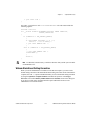
#define DISABLE_RUNTIME_CHECKING(ptr)((ptr) = (void *)\
((unsigned)(ptr)))
{
char *charPointer;
/* run-time checking is performed for charPointer before this
line */
DISABLE_RUNTIME_CHECKING(charPointer);
/* no run-time checking is performed for charPointer after this
line */
}
This macro could be useful in the following situation: LabWindows/CVI reports erroneous
run-time errors because you set a pointer to dynamic memory in a source module and then
you resize it in an object module. The following steps describe how this error occurs.
1.
You declare a pointer in a source module that you compile with debugging enabled.
You then assign to the pointer an address that malloc or calloc returns:
AnyType *ptr;
ptr = malloc(N);
2.
You reallocate the pointer in an object module so that it points to the same location in
memory as before. This might occur if you call the realloc function or free the pointer
and then reassign it to memory that you allocate with malloc:
ptr = realloc(ptr, M); /* M > N */
or
free(ptr);
ptr = malloc(M);
3.
You use the same pointer in a source module you compile with debugging enabled. At
this point, LabWindows/CVI still expects the pointer to point to a block of memory of the
original size (N).
*(ptr+(M-1))/* This generates a fatal run-time error, */
/* even though it is a legal expression. */
To prevent this error, use the DISABLE_RUNTIME_CHECKING macro to disable checking for
the pointer after you allocate memory for it in the source module:
ptr = malloc(N);
DISABLE_RUNTIME_CHECKING(ptr);
LabWindows/CVI Programmer Reference Manual
1-12
www.ni.com
Chapter 1
LabWindows/CVI Compiler
Disabling Library Protection Errors for Functions
You can disable or enable library protection errors by placing pragmas in the source code.
LabWindows/CVI ignores these pragmas when you compile without debugging information,
that is, if the active configuration is set to the release configuration. For example, the
following two pragmas enable and disable library checking for all the function declarations
that occur after the pragma within a header or source file. The pragmas affect only the
functions declared in the file in which the pragmas occur. These pragmas do not affect nested
include files.
#pragma EnableLibraryRuntimeChecking
#pragma DisableLibraryRuntimeChecking
The following pragmas enable and disable library checking for a particular function.
You must declare the function before the occurrence of the pragma.
#pragma EnableFunctionRuntimeChecking function
#pragma DisableFunctionRuntimeChecking function
These two pragmas enable and disable run-time checking for a particular library function
throughout the module in which they appear. You can use them to override the effects of the
EnableLibraryRuntimeChecking and DisableLibraryRuntimeChecking pragmas
for individual functions. If both of these pragmas occur in a module for the same function,
LabWindows/CVI uses only the last occurrence.
Note These pragmas affect all protection, including run-time checking of function
arguments, for all calls to a specific library function. To disable breaking on errors
for a particular call to a library function, use the Utility Library function
SetBreakOnLibraryErrors. To disable the run-time checking of argument
expressions for a particular call to a library function, use the Utility Library function
SetBreakOnProtectionErrors.
Note You cannot use pragmas to disable protection for the functions in the
statically linked libraries including User Interface, RS-232, TCP, DDE, Formatting
and I/O, Utility, X Property, and ANSI C libraries unless you place the
DisableLibraryRuntimeChecking pragma at the top of the library header file.
Details of User Protection
Pointer Casting
A cast expression consists of a left parenthesis, a type name, a right parenthesis, and an
operand expression. The cast causes the compiler to convert the operand value to the type that
appears within the parenthesis.
© National Instruments Corporation
1-13
LabWindows/CVI Programmer Reference Manual
Chapter 1
LabWindows/CVI Compiler
C programmers occasionally have to cast a pointer to one data type to a pointer to another data
type. Because LabWindows/CVI does not restructure the user protection information for each
cast expression, certain types of cast expressions implicitly disable run-time checking for the
pointer value. In particular, casting a pointer expression to the following types disables
run-time checking on the resulting value:
•
Pointer to a pointer:
(AnyType **) PointerExpression
•
Pointer to a structure:
(struct AnyStruct *) PointerExpression
•
Pointer to an array:
(AnyType (*)[]) PointerExpression
•
Any non-pointer type:
(unsigned) PointerExpression,
(int) PointerExpression, and so on
Note An exception exists. Casts that you apply implicitly or explicitly to the void *
values you obtain from malloc or calloc do not disable user protection.
Casting a pointer to one arithmetic type to a pointer to a different arithmetic type, such as
(int *), (unsigned *), (short *), and so on, does not affect run-time checking on the
resulting pointer nor does casting a pointer to a void pointer (void *).
Dynamic Memory
LabWindows/CVI provides run-time error checking for pointers and arrays in dynamically
allocated memory.
You can use the ANSI C library functions malloc or calloc to allocate dynamic memory.
These functions return void * values that you must cast to some other type before the
memory can be used. During program execution, LabWindows/CVI uses the first such cast
on the return value of each call to these functions to determine the type of the object that will
be stored in the dynamic memory. Subsequent casts to different types can disable checking on
the dynamic data, as explained in the Pointer Casting discussion in this section.
You can use the realloc function to resize dynamically allocated memory. This function
increases or decreases the size of the object associated with the dynamic memory.
LabWindows/CVI adjusts the user protection information accordingly.
Avoid Unassigned Dynamic Allocation in Function Parameters
The LabWindows/CVI run-time error checking mechanism dynamically allocates data to
keep track of pointers that you dynamically allocate in your program. When you no longer
use the pointers, LabWindows/CVI uses garbage collection to deallocate its corresponding
dynamic memory.
LabWindows/CVI Programmer Reference Manual
1-14
www.ni.com
Chapter 1
LabWindows/CVI Compiler
A case exists where the garbage collection fails to retrieve all the memory it allocated.
This occurs when the all of the following are true:
•
You pass the return value of one function to another function.
•
The return value is a pointer to dynamically allocated memory.
•
You do not assign the pointer to a variable in the argument expression.
The following is an example:
MyFunc (1, 2, malloc(7));
This call passes the return value from malloc to MyFunc but does not assign it to a variable.
If you make this call repeatedly in your program with run-time checking enabled, you lose a
small amount of memory each time.
Change the code as follows to avoid this problem.
void *p;
MyFunc (1, 2, p = malloc(7));
The following code also works and uses better programming style.
void *p;
p = malloc(7);
MyFunc (1, 2, p);
Library Functions
The LabWindows/CVI library functions that take pointer arguments or that return pointers
incorporate run-time checking for those arguments and return values. However, you must be
careful when passing arguments to library functions that have void * parameters, such as
GetCtrlAttribute and GetCtrlVal in the User Interface Library and memcpy and
memset in the ANSI C library. If you use a void * cast when you pass an argument to a
function that expects a variably typed argument, you disable run-time checking for that
argument. Some examples follow:
{
int value;
GetCtrlVal(panel, ctrl, &value);/* CORRECT */
GetCtrlVal(panel, ctrl, (void *)&value);/* INCORRECT */
}
{
char *names[N], *namesCopy[N];
memcpy(namesCopy, names, sizeof (names));/* CORRECT */
memcpy((void *)namesCopy, (void *)names, sizeof names);
/* INCORRECT */
}
© National Instruments Corporation
1-15
LabWindows/CVI Programmer Reference Manual
Chapter 1
LabWindows/CVI Compiler
Unions
LabWindows/CVI performs only minimal checks for union type variables. If a union
contains pointers, arrays, or structs, LabWindows/CVI does not maintain user protection
information for those objects.
Stack Size
Your program uses the stack for passing function parameters and storing automatic local
variables. You can set the maximum stack size by selecting the Options»Build Options in
the Project window. LabWindows/CVI supports the following stack size ranges:
•
Minimum = 100 KB
•
Default = 250 KB
•
Maximum = 1 MB
Include Paths
The Include Paths command in the Options menu of the Project window specifies the
directory search path for include files. The Include Paths dialog box has two lists, one for
include paths specific to the project and one for paths not specific to the project.
When you install VXIplug&play instrument drivers, the installation program places the
include files for the drivers in a specific VXIplug&play include directory. LabWindows/CVI
also searches that directory for include files.
Include Path Search Precedence
LabWindows/CVI searches for include files in the following locations and in the
following order:
1.
Project list
2.
Project-specific include paths
3.
Non-project-specific include paths
4.
The paths listed in the Instrument Directories dialog box
5.
The subdirectories under the cvi\toolslib directory
6.
The cvi\instr directory
7.
The cvi\include directory
8.
The cvi\include\ansi directory
9.
The VXIplug&play include directory
10. The cvi\sdk\include directory
LabWindows/CVI Programmer Reference Manual
1-16
www.ni.com
2
Using Loadable
Compiled Modules
This chapter describes the advantages and disadvantages of using compiled code modules
in your application. It also describes the kinds of compiled modules available in
LabWindows/CVI and includes programming guidelines for modules you generate with
external compilers.
Refer to Chapter 3, Compiler/Linker Issues in this manual for more information on
programming guidelines for modules that external compilers generate.
About Loadable Compiled Modules
Several methods exist for using compiled modules in LabWindows/CVI. You can load
compiled modules directly into the LabWindows/CVI environment as instrument driver
programs or as user libraries, so they are accessible to any project. You can list compiled
modules in your project so they are accessible only within that project. You can use compiled
modules dynamically in your program with LoadExternalModule, RunExternalModule,
and UnloadExternalModule. Any compiled module you use in LabWindows/CVI must be
in one of the following forms:
•
A .obj file that contains one object module
•
A .lib file that contains one or more object modules
•
A .dll file that contains a Windows DLL
You can create any of these compiled modules in LabWindows/CVI or in a compatible
external compiler.
Advantages and Disadvantages of Using Loadable Compiled Modules
in LabWindows/CVI
Using compiled modules in LabWindows/CVI has the following advantages:
•
Compiled modules run faster than source modules. Compiled modules do not contain the
debugging and user protection code LabWindows/CVI generates when it compiles
source modules. Compiled modules you generate in external compilers can run faster
because of optimization.
© National Instruments Corporation
2-1
LabWindows/CVI Programmer Reference Manual
Chapter 2
Using Loadable Compiled Modules
•
If an instrument driver program file is a source module and the source module is not in
the project, LabWindows/CVI recompiles it each time you load the instrument driver.
LabWindows/CVI does not recompile compiled modules when you load an instrument
driver.
•
In standalone executables, you can dynamically load compiled modules but not source
modules.
•
You can install compiled modules, but not source modules, into the Library menu.
•
You can provide libraries for other developers without giving them access to your source
code.
Using compiled modules in LabWindows/CVI has the following disadvantages:
•
You cannot debug compiled modules. Because compiled modules do not contain any
debugging information, you cannot set breakpoints or view variable values.
•
Compiled modules do not include run-time error checking or user protection.
Using a Loadable Compiled Module as an Instrument Driver
Program File
An instrument driver is a set of high-level functions with graphical function panels to make
programming easier. It encapsulates many low-level operations, such as data formatting and
GPIB, RS-232, and VXI communication, into intuitive, high-level functions. An instrument
driver usually controls a physical instrument, but it also can be a software utility. The Using
Instrument Drivers and Instrument Menu sections of Chapter 3, Project Window, of the
LabWindows/CVI User Manual describe how to use instrument drivers.
To develop and debug an instrument driver, load its program file into LabWindows/CVI as a
source file. After you finish debugging it, you can compile the program file into an object file
or a Windows DLL. The next time you load the instrument driver, LabWindows/CVI loads
the compiled module, which loads and runs faster that the source module.
Refer to the LabWindows/CVI Instrument Driver Developers Guide for information on how
to create an instrument driver.
If the instrument driver program file is a compiled module, it must adhere to the requirements
outlined in Chapter 3, Compiler/Linker Issues, of this manual.
Using a Loadable Compiled Module as a User Library
You can install your own libraries into the Library menu. A user library has the same form
as an instrument driver. You can load as a user library anything that you can load into the
Instrument menu, provided the program is in compiled form. Refer to the Using Instrument
Drivers and Instrument Menu sections of Chapter 3, Project Window, of the
LabWindows/CVI User Manual for more information. The main difference between modules
LabWindows/CVI Programmer Reference Manual
2-2
www.ni.com
Chapter 2
Using Loadable Compiled Modules
you load as instrument drivers and those you load as user libraries is that you can unload
instrument drivers using the Unload command in the Instrument menu, but you cannot
unload user libraries. You cannot edit and recompile user libraries while they are loaded.
Install user libraries by selecting Options»Library Options in the Project window. The next
time you run LabWindows/CVI, the libraries load automatically and appear at the bottom of
the Library menu.
You can develop a user library module to provide support functions for instrument drivers or
any other modules in your project. By installing a module through the Library Options
command, you ensure that the library is always available in the LabWindows/CVI
development environment. If you do not want to develop function panels for the library, create
a .fp file without any classes or functions. In that case, LabWindows/CVI loads the library
at startup but does not include the library name in the Library menu.
User libraries must adhere to the requirements outlined in Chapter 3, Compiler/Linker Issues.
Using a Loadable Compiled Module in the Project List
You can include compiled modules directly in the project list.
Note To use a DLL in your project, you must include the DLL import library (.lib) file
in the project list rather than the DLL.
Compiled modules must adhere to the requirements outlined in Chapter 3, Compiler/Linker
Issues.
Using a Loadable Compiled Module as an External Module
You can load a compiled module dynamically from your program. A module you load
dynamically is called an external module. You can load, execute, and unload this external
module programmatically using LoadExternalModule, GetExternalModuleAddr, and
UnloadExternalModule. Refer to the LabWindows/CVI Online Help for more information
on using these functions.
While you develop and debug the external module, you can list it in the project as a source
file. After you finish debugging the module, you can compile it into an object file or a
Windows DLL. External modules must adhere to the requirements outlined in Chapter 3,
Compiler/Linker Issues.
© National Instruments Corporation
2-3
LabWindows/CVI Programmer Reference Manual
3
Compiler/Linker Issues
This chapter describes the different kinds of compiled modules available under
LabWindows/CVI and includes programming guidelines for modules you generate with
external compilers.
The LabWindows/CVI compiler is compatible with five external 32-bit compilers: Microsoft
Visual C/C++, Borland C/C++, Borland C++ Builder, Watcom C/C++, and
Symantec C/C++. This manual refers to the five compilers as the compatible external
compilers.
In LabWindows/CVI, you can do the following:
•
Load 32-bit DLLs, through the standard import library mechanism
•
Create 32-bit DLLs and DLL import libraries
•
Create library files and object files
•
Call the LabWindows/CVI libraries from executables or DLLs created with any of the
five compatible external compilers
•
Create object files, library files, and DLL import libraries that the compatible external
compilers can use
•
Load object files, library files, and DLL import libraries created with any of the five
compatible external compilers
•
Call Windows Software Development Kit (SDK) functions
This chapter discusses these capabilities.
Loading 32-Bit DLLs
LabWindows/CVI can load 32-bit DLLs. LabWindows/CVI links to DLLs through the
standard 32-bit DLL import libraries that you generate when you create 32-bit DLLs with any
of the compilers. Because LabWindows/CVI links to DLLs in this way, you cannot specify a
DLL file directly in your project. You must specify the DLL import library file instead.
DLLs for Instrument Drivers and User Libraries
LabWindows/CVI does not directly associate DLLs with instrument drivers or user libraries.
However, LabWindows/CVI can associate instrument drivers and user libraries with DLL
import libraries. Each DLL must have a DLL import library (.lib) file. In general, if the
© National Instruments Corporation
3-1
LabWindows/CVI Programmer Reference Manual
Chapter 3
Compiler/Linker Issues
program for an instrument driver or user library is in the form of a DLL, you must place the
DLL import library in the same directory as the function panel (.fp) file. The DLL import
library specifies the name of the DLL that LabWindows/CVI searches for using the standard
Windows DLL search algorithm.
LabWindows/CVI makes an exception to facilitate using VXIplug&play instrument driver
DLLs. When you install a VXIplug&play instrument driver, the installation program does not
place the DLL import library in the same directory as the .fp file. If a .fp file is in
the VXIplug&play directory, LabWindows/CVI searches for an import library in the
VXIplug&play library directory before it looks for a program file in the directory of the
.fp file, unless you list the program file in the project.
Using the LoadExternalModule Function
When you use the LoadExternalModule function to load a DLL at run time, you must
specify the pathname of the DLL import library, not the name of the DLL.
DLL Path (.pth) Files Not Supported
The DLL import library contains the filename of the DLL. LabWindows/CVI uses the
standard Windows DLL search algorithm to find the DLL. Thus, DLL path (.pth) files
do not work under Windows 2000/NT/98/95.
16-Bit DLLs Not Supported
LabWindows/CVI for Windows 2000/NT/98/95 does not load 16-bit DLLs. If you want to
load 16-bit DLLs, you must obtain a 32-to-16-bit thunking DLL and a 32-bit DLL import
library.
DllMain
Each DLL can have a DllMain function, except that the Borland compiler uses
DllEntryPoint as the name. The operating system calls the DllMain function with various
messages. To generate the template for a DllMain function, use the Insert Constructs
command in the Edit menu of a Source window.
Use caution when inserting code in the PROCESS_ATTACH and PROCESS_DETACH cases. In
particular, avoid calling into other DLLs in these two cases. The order in which Windows
initializes DLLs at startup and unloads them at process termination is not well defined. Thus,
the DLLs you want to call might not be in memory when your DllMain receives the
PROCESS_ATTACH or PROCESS_DETACH message.
It is always safe to call into the LabWindows/CVI Run-time Engine in a DllMain function
as long as you do so before calling CloseCVIRTE.
LabWindows/CVI Programmer Reference Manual
3-2
www.ni.com
Chapter 3
Compiler/Linker Issues
Releasing Resources when a DLL Unloads
When a program terminates, the operating system disposes resources your DLL allocates.
If your DLL remains loaded throughout program execution, it does not need to dispose
resources explicitly when the system unloads it at program termination. However, if the
program unloads your DLL during program execution, it is a good idea for your DLL to
dispose of any resources it allocates. It can release resources in the DllMain function in
response to the PROCESS_DETACH message. Additionally, the DLL can release resources in a
function that it registers with the ANSI C atexit function. The system calls the function you
register when the DLL receives the PROCESS_DETACH message.
If your DLL calls into the LabWindows/CVI Run-time Engine DLL, it can allocate resources
such as user interface panels. If a program unloads your DLL during execution, you might
want to dispose these resources by calling functions such as DisposePanel in the
LabWindows/CVI Run-time Engine. On the other hand, as explained in the previous section,
it is generally unsafe to call into other DLLs in response to the PROCESS_DETACH message.
To solve this dilemma, you can use the CVIRTEHasBeenDetached function in the
Utility Library. It is always safe to call the CVIRTEHasBeenDetached function.
CVIRTEHasBeenDetached returns FALSE until the main Run-time Engine DLL,
cvirte.dll, receives the PROCESS_DETACH message. Consequently, if
CVIRTEHasBeenDetached returns FALSE, your DLL can safely call functions in
LabWindows/CVI Run-time Engine to release resources.
Note cvirte.dll contains the User Interface, Utility, Formatting and I/O, RS-232,
ANSI C, TCP, and DDE Libraries.
Generating an Import Library
If you do not have a DLL import library, you can generate an import library in
LabWindows/CVI. You must have an include file that contains the declarations of all the
functions and global variables you want to access from the DLL. The calling conventions
of the function declarations in the include file must match the calling convention of the
functions in the DLL. For example, if the DLL exports functions using the __stdcall
calling convention, the function declarations in the include file must contain the __stdcall
keyword. Load the include file into a Source window and select Options»Generate DLL
Import Library.
© National Instruments Corporation
3-3
LabWindows/CVI Programmer Reference Manual
Chapter 3
Compiler/Linker Issues
Compatibility with External Compilers
LabWindows/CVI can be compatible at the object code level with any of the five compatible
external compilers (Microsoft Visual C/C++, Borland C/C++, Borland C/C++ Builder
Watcom C/C++, and Symantec C/C++). Because these compilers are not compatible with
each other at the object code level, LabWindows/CVI can be compatible with only one
external compiler at a time. This manual refers to the compiler with which your copy of
LabWindows/CVI is currently compatible as the current compatible compiler.
Choosing Your Compatible Compiler
When installing LabWindows/CVI, you must choose your compatible compiler. If you want
to change your choice of compatible compiler later, you can run the installation program and
change to another compatible compiler.
You can see which compatible compiler is active in LabWindows/CVI by selecting
Options»Build Options in the Project window.
Object Files, Library Files, and DLL Import Libraries
If you create an object file, library file, or DLL import library in LabWindows/CVI, you
can use the file only in the current compatible compiler or in a copy of LabWindows/CVI
that you installed with the same compatibility choice. For detailed information on using
LabWindows/CVI-generated object and static library files in external compilers, refer to the
Using LabWindows/CVI Libraries in External Compilers section later in this chapter.
If you load an object file, library file, or DLL import library file in LabWindows/CVI,
you must have created the file in the current compatible compiler or in a copy of
LabWindows/CVI that you installed with the same compatibility choice. If you have a
DLL but you do not have a compatible DLL import library, LabWindows/CVI reports an error
when you attempt to link your project.
To create a compatible import library, you must have an include file that contains the
declarations of all the functions and global variables you want to access from the DLL.
Load the include file into a Source window and select Options»Generate DLL Import
Library.
Make sure the calling conventions of the function declarations in the include file match the
calling convention of the functions in the DLL. Whereas DLLs usually export functions with
the __stdcall calling convention, the __stdcall keyword is sometimes missing from the
function declarations in the associated include files. If you generate an import library from an
include file that does not agree with the calling convention the DLL uses, you can successfully
build a project that contains the import library, but LabWindows/CVI usually reports a general
protection fault when you run the project.
LabWindows/CVI Programmer Reference Manual
3-4
www.ni.com
Chapter 3
Compiler/Linker Issues
Compatibility Issues in DLLs
In general, you can use a DLL without regard to the compiler you used to create it. Only the
DLL import library must be created for the current compatible compiler. Some cases exist,
however, in which you cannot call a DLL that you created using one compiler from an
executable or DLL that you created using another compiler. If you want to create DLLs that
you can use in different compilers, design the Application Programming Interface (API) for
your DLL to avoid such problems. The following are areas in which the DLLs that external
compilers create are not fully compatible.
Structure Packing
The compilers differ in their default maximum alignment of elements within structures.
If your DLL API uses structures, you can guarantee compatibility among the different
compilers by using the pack pragma to specify a specific maximum alignment factor. Place
this pragma in the DLL include file, before the definitions of the structures. You can choose
any alignment factor. After the structure definitions, reset the maximum alignment factor back
to the default, as in the following example:
#pragma pack (4)
/* set maximum alignment to 4 */
typedef struct {
char a;
int b;
} MyStruct1;
typdef struct {
char a;
double b;
} MyStruct2;
#pragma pack ()
/* reset max alignment to default */
LabWindows/CVI predefines the __DEFALIGN macro to the default structure alignment of
the current compatible compiler.
© National Instruments Corporation
3-5
LabWindows/CVI Programmer Reference Manual
Chapter 3
Compiler/Linker Issues
Bit Fields
Borland C/C++ uses the smallest number of bytes necessary to hold the bit fields you specify
in a structure. The other compilers always use 4-byte elements. You can force compatibility
by adding a dummy bit field of the correct size to pad the set of contiguous bit fields so that
they fit exactly into a 4-byte element, as in the following example:
typedef struct {
int a:1;
int b:1;
int c:1;
int dummy:29;
} MyStruct;
/* pad to 32 bits */
Returning Floats and Doubles
The compilers return float and double scalar values using different mechanisms. This is
true of all calling conventions, including __stdcall. The only solution for this problem is
to change your DLL API so that it uses output parameters instead of return values for double
and float scalars.
Returning Structures
For functions you do not declare with the __stdcall calling convention, the compilers
return structures using different mechanisms. For functions you declare with __stdcall,
the compilers return structures in the same way, except for 8-byte structures.
National Instruments recommends that your DLL API use structure output parameters
instead of structure return values.
Enum Sizes
By default, Watcom uses the smallest integer size necessary to represent the largest enum
value: 1 byte, 2 bytes, or 4 bytes. The other compilers always use 4 bytes. Force compatibility
by using the -ei (Force Enums to Type Int) option with the Watcom compiler.
Long Doubles
In Borland C/C++ and Borland C++ Builder, long double values are 10 bytes. In the other
compilers, they are 8 bytes. In LabWindows/CVI, they are always 8 bytes. Avoid using long
double in your DLL API.
Differences between LabWindows/CVI and External Compilers
LabWindows/CVI does not work with all the non-ANSI extensions each external compiler
provides. Also, in cases where ANSI does not specify the exact implementation,
LabWindows/CVI does not always agree with the external compilers. Most of these
LabWindows/CVI Programmer Reference Manual
3-6
www.ni.com
Chapter 3
Compiler/Linker Issues
differences are obscure and rarely encountered. The following are the most important
differences you might encounter.
•
wchart_t is only 1 byte in LabWindows/CVI.
•
64-bit integers do not exist in LabWindows/CVI.
•
long double values are 10 bytes in Borland C/C++ but 8 bytes in LabWindows/CVI.
•
You cannot use structured exception handling in LabWindows/CVI.
•
You cannot use the Watcom C/C++ __cdecl calling convention in LabWindows/CVI for
functions that return float or double scalar values or structures. In Watcom, __cdecl
is not the default calling convention.
•
LabWindows/CVI does not define _MSC_VER, __BORLANDC__, __WATCOMC__, and
__SC__. The external compilers each define one of these macros. If you port code
originally developed under one of these external compilers to LabWindows/CVI,
you might have to manually define one of these macros.
External Compiler Versions Supported
The following versions of each external compiler work with LabWindows/CVI.
•
Microsoft Visual C/C++, version 2.2 or higher
•
Borland C/C++, version 4.51 or higher
•
C++ Builder 4.0 or higher
•
Watcom C/C++, version 10.5 or higher
•
Symantec C/C++, version 7.2 or higher
Required Preprocessor Definitions
When you use an external compiler to compile source code that includes any of the
LabWindows/CVI include files, add the following to your preprocessor definitions:
_NI_mswin32_
Multithreading and LabWindows/CVI Libraries
All the LabWindows/CVI libraries are multithreaded safe when used inside or outside of the
LabWindows/CVI development environment.
For detailed information on how to use the LabWindows/CVI User Interface Library in a
multithreaded program, refer to the LabWindows/CVI Online Help.
© National Instruments Corporation
3-7
LabWindows/CVI Programmer Reference Manual
Chapter 3
Compiler/Linker Issues
Using LabWindows/CVI Libraries in External Compilers
You can use the LabWindows/CVI libraries in any of the five compatible external compilers.
You can create executables and DLLs that call the LabWindows/CVI libraries.
LabWindows/CVI ships with the run-time DLLs that contain all the libraries. Executable files
you create in LabWindows/CVI also use these DLLs. The cvi\extlib directory contains
DLL import libraries and a startup library, all compatible with your external compiler. Never
use the .lib files in the cvi\bin directory in an external compiler.
You must always include the following two libraries in your external compiler project.
cvisupp.lib
cvirt.lib
/* startup library */
/* import library to DLL containing:*/
/*
User Interface Library
*/
/*
Formatting and I/O Library
*/
/*
RS-232 Library
*/
/*
DDE Library
*/
/*
TCP Library
*/
/*
Utility Library
*/
You can add the following static library file from cvi\extlib to your external compiler
project.
analysis.lib /* Analysis or Advanced Analysis Library */
You can add the following DLL import library files from cvi\extlib to your external
compiler project.
gpib.lib
dataacq.lib
easyio.lib
visa.lib
nivxi.lib
ivi.lib
cviauto.lib
/*
/*
/*
/*
/*
/*
/*
GPIB/GPIB 488.2 Library
*/
Data Acquisition Library */
Easy I/O for DAQ Library */
VISA Transition Library
*/
VXI Library
*/
IVI Library
*/
ActiveX Automation Library*/
If you use an instrument driver that makes references to both the GPIB and VXI libraries, you
can include both gpib.lib and nivxi.lib to resolve the references to symbols in those
libraries. If you do not have access to one of these files, you can replace it with one of
following files:
gpibstub.obj /* stub GPIB functions
vxistub.obj /* stub VXI functions
LabWindows/CVI Programmer Reference Manual
3-8
*/
*/
www.ni.com
Chapter 3
Compiler/Linker Issues
If you use an external compiler that requires a WinMain entry point, the following optional
library allows you to define only main in your program.
cviwmain.lib
/* contains a WinMain() function that
/* calls main()
*/
*/
Include Files for ANSI C Library and LabWindows/CVI Libraries
The cvirt.lib import library contains symbols for all the LabWindows/CVI libraries,
except the ANSI C standard library. When you create an executable or DLL in an external
compiler, you use the compiler’s own ANSI C standard library. Because of this, you must use
the external compiler’s include files for the ANSI C library when compiling source files.
Although the include files for the other LabWindows/CVI libraries are in the cvi\include
directory, the LabWindows/CVI ANSI C include files are in the cvi\include\ansi
directory. Thus, you can specify cvi\include as an include path in your external compiler
while at the same time using the external compiler’s version of the ANSI C include files.
Note Use the external compiler’s ANSI C include files only when you compile a source
file that you intend to link using the external compiler. If you intend to link the file in
LabWindows/CVI, use the LabWindows/CVI ANSI C include files. This is true regardless
of which compiler you use to compile the source file.
For more information, refer to the Setting Up Include Paths for LabWindows/CVI,
ANSI C, and SDK Libraries section later in this chapter.
Standard Input/Output Window
One effect of using the external compiler’s ANSI C standard library is that the printf and
scanf functions do not use the LabWindows/CVI Standard Input/Output window. If you
want to use printf and scanf, you must create a console application, which is called a
character-mode executable in Watcom.
You can continue to use the LabWindows/CVI Standard Input/Output Window by calling the
FmtOut and ScanIn functions in the Formatting and I/O library.
Resolving Callback References from .uir Files
When you link your program in LabWindows/CVI, LabWindows/CVI keeps a table of the
non-static functions that are in your project. When your program calls LoadPanel or
LoadMenuBar, the LabWindows/CVI User Interface Library uses this table to find the
callback functions associated with the objects you load from the user interface resource
(.uir) file. This is true whether you run your program in the LabWindows/CVI development
environment or as a standalone executable.
© National Instruments Corporation
3-9
LabWindows/CVI Programmer Reference Manual
Chapter 3
Compiler/Linker Issues
When you link your program in an external compiler, the external compiler does not make
such a table available to the User Interface Library. To resolve callback references, complete
the following steps to use LabWindows/CVI to generate a source file that contains the
necessary table.
1.
Create a LabWindows/CVI project that contains the .uir files your program uses, if you
do not already have one.
2.
Select Build»External Compiler Support in the Project window. A dialog box appears.
3.
Set the UIR Callbacks control to Source File and enter the pathname of the source file
you want to generate. When you click on the Create button, LabWindows/CVI generates
the source file with a table that contains the names of all the callback functions referenced
in all the .uir files in the project. When you modify and save any of these .uir files,
LabWindows/CVI regenerates the source file to reflect the changes.
4.
Include this source file in the external compiler project you use to create the executable.
5.
You must call InitCVIRTE at the beginning of your main or WinMain function. Refer
to the Calling InitCVIRTE and CloseCVIRTE section later in this chapter.
Linking to Callback Functions Not Exported from a DLL
Normally, the User Interface Library searches for callback functions only in the table of
functions in the executable. When you load a panel or menu bar from a DLL, you might want
to link to non-static callback functions that the DLL contains but does not export. You can do
this by calling LoadPanelEx and LoadMenuBarEx. When you pass the DLL module handle
to LoadPanelEx and LoadMenuBarEx, the User Interface Library searches the table of
callback functions the DLL contains before searching the table that the executable contains.
Refer to LabWindows/CVI Online Help for detailed information on LoadPanelEx and
LoadMenuBarEx.
If you create your DLL in LabWindows/CVI, LabWindows/CVI includes the table of
functions in the DLL automatically. If you create your DLL using an external compiler, you
must generate a source file that contains the necessary table as described in the previous
section, Resolving Callback References from .uir Files.
Resolving References from Modules Loaded at Run Time
Note This section does not apply unless you use LoadExternalModule or
LoadExternalModuleEx to load object or static library files.
Unlike DLLs, object and static library files can contain unresolved references. If you call
LoadExternalModule to load an object or static library file at run time, the Utility
Library must resolve those references using function and variable symbols from the
LabWindows/CVI Run-time Engine, from the executable, or from previously loaded run-time
modules. A table of these symbols must be available in the executable. When you link your
LabWindows/CVI Programmer Reference Manual
3-10
www.ni.com
Chapter 3
Compiler/Linker Issues
program in LabWindows/CVI, LabWindows/CVI automatically includes a symbol table. This
is true whether you run your program in the LabWindows/CVI development environment or
as a standalone executable.
When you link your program in an external compiler, the external compiler does not make
such a table available to the Utility Library. LabWindows/CVI provides ways to help you
create the symbol table easily.
Resolving References to LabWindows/CVI Run-Time Engine
LabWindows/CVI makes available two source files that contain symbol table information for
the LabWindows/CVI libraries that are in Run-time Engine DLLs:
•
Include cvi\extlib\refsym.c in your external compiler project if your run-time
modules refer to any symbols in the User Interface, Formatting and I/O, RS-232, DDE,
TCP, or Utility Library.
•
Include cvi\extlib\arefsym.c in your external compiler project if your run-time
modules refer to any symbols in the ANSI C library.
Resolving References to Symbols Not in Run-Time Engine
If your run-time modules refer to any other symbols from your executable, you must use
LabWindows/CVI to generate an object file that contains a table of those symbols. Create an
include file that contains complete declarations of all the symbols your run-time modules
reference from the executable. The include file can contain nested #include statements and
can contain executable symbols that your run-time modules do not refer to. If your run-time
module references any of the commonly used Windows SDK functions, you can use the
cvi\sdk\include\basicsdk.h file.
Select Build»External Compiler Support in the Project window. A dialog box appears.
Enable the Using LoadExternalModule to Load Object and Static Library Files option.
Enable the Other Symbols checkbox if it is not already enabled. Enter the pathname of the
include file in the Header File control. Enter the pathname of the object file to generate in the
Object File control. Click on the Create button to the right of the Object File control.
Include the object file in the external compiler project you use to create your executable. Also,
you must call InitCVIRTE at the beginning of your main or WinMain function. Refer to the
Calling InitCVIRTE and CloseCVIRTE section later in this chapter for more information.
© National Instruments Corporation
3-11
LabWindows/CVI Programmer Reference Manual
Chapter 3
Compiler/Linker Issues
Resolving Run-Time Module References to Symbols Not Exported
from a DLL
When you load an object or static library file from a DLL, you might want to resolve
references from that module using global symbols the DLL contains but does not export. You
can do this by calling LoadExternalModuleEx. When you pass the DLL module handle to
LoadExternalModuleEx, the Utility Library searches the symbol table the DLL contains
before searching the table that the executable contains. Refer to the LabWindows/CVI Online
Help for detailed information on LoadExternalModuleEx.
If you create your DLL in LabWindows/CVI, LabWindows/CVI includes the table of symbols
in the DLL automatically. If you create your DLL using an external compiler, the external
compiler does not make such a table available to the Utility Library. Thus, when you use an
external compiler, you must include in your DLL one or more object files that contain the
necessary symbol tables. You can do this using the technique that the previous section,
Resolving References to Symbols Not in Run-Time Engine, describes. You must call
InitCVIRTE and CloseCVIRTE in your DLLMain function. Refer to the following Calling
InitCVIRTE and CloseCVIRTE section for more information.
Calling InitCVIRTE and CloseCVIRTE
If you link an executable or DLL in an external compiler, you must call the InitCVIRTE
function at the beginning of your main, WinMain, or DLLMain function.
For an executable using main as the entry point, your code must include the following
segment:
#include <cvirte.h>
int main (argc, char *argv[])
{
if (InitCVIRTE(0, argv, 0) == 0)
return (-1);/* out of memory
/* your other code */
}
*/
For an executable using WinMain as the entry point, your code must include the following
segment:
#include <cvirte.h>
int __stdcall WinMain (HINSTANCE hInstance,
HINSTANCE hPrevInstance,
LPSTR lpszCmdLine, int nCmdShow)
{
if (InitCVIRTE(hInstance, 0, 0) == 0)
return (-1);/* out of memory
*/
LabWindows/CVI Programmer Reference Manual
3-12
www.ni.com
Chapter 3
Compiler/Linker Issues
/* your other code */
}
For a DLL, you also have to call CloseCVIRTE in DLLMain. The code must include the
following segment:
#include <cvirte.h>
int __stdcall DllMain (HINSTANCE hinstDLL, DWORD fdwReason,
LPVOID pvReserved)
{
if (fdwReason == DLL_PROCESS_ATTACH)
{
if (InitCVIRTE (hinstDLL, 0, 0) == 0)
return 0; /* out of memory */
/* your other ATTACH code */
}
else if (fdwReason == DLL_PROCESS_DETACH)
{
/* your other DETACH code */
CloseCVIRTE ();
}
return 1;
}
Note It is harmless, but unnecessary, to call these functions when you link your executable
in LabWindows/CVI.
Watcom Stack-Based Calling Convention
When you use the LabWindows/CVI libraries in the Watcom compiler, you must set the
default calling convention to the 80486 Stack-Based calling convention. In the command line
compiler, this is the -4s option. In the Watcom IDE, you can set the default calling convention
by using the Options»C Compiler Switches command. The option is in the Target
Processor section of the Memory Model and Processor Switches section of the dialog box.
If you do not set this option, the Watcom linker reports undefined references to the
LabWindows/CVI run-time libraries.
© National Instruments Corporation
3-13
LabWindows/CVI Programmer Reference Manual
Chapter 3
Compiler/Linker Issues
Using Object and Library Files in External Compilers
When you use an external compiler to link a project that contains object or static library files
created in LabWindows/CVI, keep the following points in mind.
Default Library Directives
Most compilers insert default library directives in the object and library files they generate.
A default library directive tells the linker to automatically include a named library in the link.
Normally, the directive refers to the name of C library files. If no files in the link contain a
default library directive and the linker does not explicitly include a C library in the link, the
linker reports unresolved function references in the object modules.
Object and static library files that LabWindows/CVI creates do not contain a default library
directive. This has different implications for each compiler.
Microsoft Visual C/C++
If you include in your project at least one object file that contains a default library directive,
the Visual C linker uses that library to resolve references in all object and library files, even
the files you create in LabWindows/CVI. Object files you create in Visual C usually contain
default library directives.
If you do not include in your project any object files or libraries you create in Visual C,
you can add the following Visual C libraries to the project to avoid link errors.
libc.lib
oldnames.lib
In the Visual C development environment, add these library names using the Input category
in the Link tab of the Project Settings dialog box.
Borland C/C++ and C++ Builder
No problems exist with the absence of default library directives when you use the Borland
compilers.
Watcom C/C++
Like Visual C, at least one object file must contain a default library directive to cause the
C library to be linked in. In addition, Watcom also requires a default library directive for
floating-point support.
LabWindows/CVI Programmer Reference Manual
3-14
www.ni.com
Chapter 3
Compiler/Linker Issues
If you do not include in your project any object files with the required directives, add the
following libraries, in the order shown, to the Libraries setting in the Windows Linking
Switches dialog box.
clib3s
math387
noemu387
Symantec C/C++
Each object file must have the default library directive for the C library. You must explicitly
add the Symantec C library to your project. The library filename is snn.lib, and it is in the
lib subdirectory under the Symantec installation directory.
Borland Static versus Dynamic C Libraries
When you link a Borland C/C++ or C++ Builder project that contains object or static library
files you create in LabWindows/CVI, it is a good idea to configure the Borland project to use
the static version of the Borland C libraries.
If you choose to use the dynamic C libraries, you must compile the LabWindows/CVI object
modules with the _RTLDLL macro. You must define the _RTLDLL macro in your source code
before including any of the Borland C header files.
Borland C/C++ Incremental Linker
You cannot use your LabWindows/CVI object or static library files in the Borland C compiler
if you choose to use the incremental linker. Turn off the Use Incremental Linker option in
the Borland C/C++ compiler.
Watcom Pull-in References
The Watcom linker does not automatically link the startup code into your application or DLL.
Instead, it requires the module that contains main, WinMain, or DllMain to reference a
special symbol that the appropriate startup code module resolves. The Watcom compiler
automatically generates a reference to the special symbol into any module that contains
main, WinMain, or DllMain. This symbol is __DLLstart_, _wstart2_, or _cstart_,
depending on whether the project is for a DLL, Windows application, or console application,
respectively. Object modules compiled in LabWindows/CVI do not contain such references.
LabWindows/CVI cannot generate the correct reference because it makes no distinction
between console and non-console applications.
You must include the symbol reference in your object file explicitly. For example, if your
module contains the main function, you can generate the correct symbol reference by adding
the following to the source code for the module.
extern int _cstart_;
void *dummy = &_cstart_;
© National Instruments Corporation
3-15
LabWindows/CVI Programmer Reference Manual
Chapter 3
Compiler/Linker Issues
Creating Object and Library Files in External Compilers
for Use in LabWindows/CVI
When you use a compatible external compiler to create an object or library file for use
in LabWindows/CVI, you must use the include files in the cvi\include and
cvi\include\ansi directories. Ensure that these directories have priority over the
default paths for the compiler’s C library include files.
You must choose the compiler options carefully. LabWindows/CVI tries to work with the
default options for each compiler as much as possible. In some cases, however, you have to
choose options that override the defaults. In other cases, you must accept the defaults.
Microsoft Visual C/C++
LabWindows/CVI is compatible with all the defaults.
You must not use the following options to override the default settings.
/J
(Unsigned Characters)
/Zp
(Struct Member Alignment)
/Ge
(Stack Probes)
/Gh
(Profiling)
/Gs
(Stack Probes)
Borland C/C++ and C++ Builder
LabWindows/CVI is compatible with all the defaults.
You must not use the following options to override the default settings.
-a
(Data Alignment)
-K
(Unsigned Characters)
-u-
(Turn Off Generation of Underscores)
-N
(Test Stack Overflow)
-p
(Pascal Calling Convention)
-pr
(Register Calling Convention)
-fp
(Correct Pentium FDIV Flaw)
LabWindows/CVI Programmer Reference Manual
3-16
www.ni.com
Chapter 3
Compiler/Linker Issues
Watcom C/C++
You must use the following options to override the default settings.
-ei
(Force Enums to Type Int)
-bt=nt
(Target Platform is Windows NT/95)
-mf
(Flat Memory Model)
-4s
(80486 Stack-Based Calling)
-s
(Disable Stack Depth Checking)
-j
(Change Char Default to Signed)
-fpi87
(Generate In-Line 80x87 Code)
-Zp1
(Set Structure Packing to 1)
If your external object calls LoadExternalModule or LoadExternalModuleEx, you must
also add the following compiler option:
-d__NO_MATH_OPS
Symantec C/C++
You must use the following options to override the default settings.
-mn
(Windows NT/95 Memory Model)
-f
(Generate In-Line 80x87 Code)
You must not use the following options to override the default settings.
-a
(Struct Alignment)
-P
(Use Pascal Calling Convention)
-s
(Check Stack Overflow)
Note Certain specialized options can generate symbol references that cause link errors in
LabWindows/CVI. If you encounter a link error on a symbol in a module you compiled in
an external compiler and you do not recognize the symbol, try changing your external
compiler options.
© National Instruments Corporation
3-17
LabWindows/CVI Programmer Reference Manual
Chapter 3
Compiler/Linker Issues
Creating Executables in LabWindows/CVI
You can create true 32-bit Windows executables in LabWindows/CVI. The LabWindows/CVI
run-time libraries come in DLL form. Standalone executables you create in
LabWindows/CVI and executables you create in external compilers use the same DLLs. If
you run more than one program at a time, Windows loads only one copy of the DLL.
To create a standalone executable suitable for distribution, you must first select Build»Target
Type»Standalone Executable in the Project window. Next, you must select
Build»Configuration»Release in the Project window. After you have done this, the Create
Release Executable command appears in the Build menu of the Project window. Use the
Create Release Executable command to create an executable suitable for distribution. You
can set the name of the executable as well as other options by selecting the Build»Target
Settings in the Project window. Executables created using the Create Release Executable
command do not contain any debugging information and therefore cannot be debugged.
To create an executable that you can debug, select Build»Configuration»Debug in the
Project window and then use the Build»Create Debuggable Executable command in the
Project window.
For more information on using the commands in the Build menu of the Project window, refer
to the Build Menu section in Chapter 3, Project Window, of the LabWindows/CVI User
Manual, for more information.
Creating DLLs in LabWindows/CVI
In LabWindows/CVI, you can create 32-bit DLLs. Along with each DLL, LabWindows/CVI
creates a DLL import library for your compatible compiler. You can choose to create DLL
import libraries compatible with all five external compilers.
You must have a separate project for each DLL you want to create. Select Build»Target
Type»Dynamic Link Library in the Project window. Next, you must select
Build»Configuration»Release in the Project window. After you have done this, the Create
Release Dynamic Link Library command appears in the Build menu of the Project window.
Use the Create Release Dynamic Link Library command to create a DLL suitable for
distribution. You can set the name of the DLL as well as other options by selecting the
Build»Target Settings in the Project window. DLLs created using the Create Release
Executable command do not contain any debugging information and therefore cannot be
debugged.
To create a DLL that you can debug, select Build»Configuration»Debug in the Project
window, and then use the Build»Create Debuggable Dynamic Link Library command in
the Project window.
LabWindows/CVI Programmer Reference Manual
3-18
www.ni.com
Chapter 3
Compiler/Linker Issues
For more information on using the commands in the Build menu of the Project window, refer
to the Build Menu section in Chapter 3, Project Window, of the LabWindows/CVI User
Manual, for more information.
Customizing an Import Library
If you have to perform special processing in your DLL import library, you can customize it.
Instead of generating a .lib file, you can generate a .c file that contains source code. If you
do this, however, you can export only functions from the DLL, not variables.
To customize an import library, you must have an include file that contains the declarations
of all the functions you want to export from the DLL. Load the include file into a Source
window and execute the Options»Generate DLL Import Source command.
After you have generated the import source, you can modify it, including making calls to
functions in other source files. Create a new project that contains the import source file and
any other files it refers to. Select Build»Target Type»Static Library in the Project window.
Execute the Create Static Library command.
Note This import source code does not operate in the same way as a normal DLL import
library. When you link a normal DLL import library into an executable, the operating
system attempts to load the DLL as soon as the program starts. The import source code
LabWindows/CVI generates does not load the DLL until you call one of the functions it
exports.
Preparing Source Code for Use in a DLL
When you create a DLL, you must address the following issues that can affect your source
code and include file.
•
The calling convention you use to declare the functions you want to export
•
How you specify which DLL functions and variables you want to export
•
Marking imported symbols in the DLL include file you distribute
This section discusses how you can address these issues when you create your DLL in
LabWindows/CVI. If you create your DLL in an external compiler, the approach is very
similar. The external compilers, however, do not agree in all aspects. This chapter also
discusses these differences.
Some of the information in this section is very technical and complex. Recommendations on
the best approaches to these issues are at the end of the section. These recommendations are
intended to make creating the DLL as simple as possible and to make it easy to use the same
source code in LabWindows/CVI and the external compilers.
© National Instruments Corporation
3-19
LabWindows/CVI Programmer Reference Manual
Chapter 3
Compiler/Linker Issues
Calling Convention for Exported Functions
If you intend for only C or C++ programs to use your DLL, you can use the __cdecl or
Watcom stack-based calling convention to declare the functions you want to export. If,
however, you want your DLL to be callable from environments such as Microsoft Visual
Basic, you must declare the functions you want to export with the __stdcall calling
convention.
You must do this by explicitly defining the functions with the __stdcall keyword. This is
true whether or not you choose to make __stdcall the default calling convention for your
project. You must use the __stdcall keyword in the declarations in the include file you
distribute with the DLL.
Other platforms, such as UNIX or Windows 3.1 do not recognize the __stdcall keyword.
If you work with source code that you might use on other platforms, you must use a macro in
place of __stdcall. The cvidef.h include file defines the DLLSTDCALL macro for this
purpose.
The following are examples of using the DLLSTDCALL macro.
int DLLSTDCALL MyIntFunc (void);
char * DLLSTDCALL MyStringFunc (void);
Note You cannot use the __stdcall calling convention on functions with a variable
number of arguments. Consequently, you cannot use such functions in Microsoft Visual
Basic.
Exporting DLL Functions and Variables
When a program uses a DLL, it can access only the functions or variables that the DLL
exports. The DLL can export only globally declared functions and variables. The DLL cannot
export functions and variables you declare as static.
If you create your DLL in LabWindows/CVI, you can indicate which functions and variables
to export in two ways: the include file method and the export qualifier method.
Include File Method
You can use include files to identify symbols to export. The include files must contain the
declarations of the symbols you want to export. The include files can contain nested
#include statements, but the DLL does not export the declarations in the nested include
files. In the Target Settings dialog box, you select from a list of all the include files in the
project.
The include file method does not work with other compilers. However, it is similar to the
.def method that the other compilers use.
LabWindows/CVI Programmer Reference Manual
3-20
www.ni.com
Chapter 3
Compiler/Linker Issues
Export Qualifier Method
You can mark each function and variable you want to export with an export qualifier.
Currently, not all compilers recognize the same export qualifier names. The most commonly
used qualifier is __declspec(dllexport). Some also recognize __export.
LabWindows/CVI recognizes both. The cvidef.h include file defines the DLLEXPORT
macro to resolve differences among compilers and platforms. The following are examples of
using the DLLEXPORT macro.
int DLLEXPORT DLLSTDCALL MyFunc (int parm) {}
int DLLEXPORT myVar = 0;
If the type of your variable or function requires an asterisk (*) in the syntax, put the qualifier
after the asterisk, as in the following example:
char * DLLEXPORT myVar = NULL;
Note Borland C/C++ version 4.5x, requires that you place the qualifier before the asterisk.
In Borland C/C++ 5.0 and Borland C++ Builder, you can place the qualifier on either side
of the asterisk.
When LabWindows/CVI creates a DLL, it exports all symbols for which export qualifiers
appear in either the definition or the declaration. If you use an export qualifier on the
definition and an import qualifier on the declaration, LabWindows/CVI exports the symbol.
The external compilers differ widely in their behavior on this point. Some require that the
declaration and definition agree.
Note If your DLL project includes an object or library file that defines exported symbols,
LabWindows/CVI cannot correctly create import libraries for each of the external
compilers. This problem does not arise if you use only source code files in your
DLL project.
Using Both Include File and Export Qualifier Methods
You can export symbols declared in a header, as well as symbols marked for export with an
export qualifier, by selecting the Include File and Marked Symbols option in the Target
Settings dialog box.
Marking Imported Symbols in Include File Distributed with DLL
If your DLL might be used in a C or C++ environment, you must distribute an include file
with your DLL. The include file must declare all the symbols the DLL exports. If any of these
symbols are variables, you must mark them with an import qualifier. Variable declarations
require import qualifiers so the compiler can generate the correct code for accessing the
variables.
© National Instruments Corporation
3-21
LabWindows/CVI Programmer Reference Manual
Chapter 3
Compiler/Linker Issues
You can use import qualifiers on function declarations, but they are not necessary. When you
use an import qualifier on a function declaration, external compilers can generate slightly
more efficient code for calling the function.
Using import qualifiers in the include file you distribute with your DLL can cause problems
if you use the same include file in the DLL source code.
•
If you mark variable declarations in the include file with import qualifiers and you use
the include file in a source file other than the one in which you define the variable,
LabWindows/CVI and the external compilers treat the variable as if it were imported
from another DLL and generate incorrect code as a result.
•
If you use export qualifiers in the definition of symbols and the include file contains
import qualifiers on the same symbols, some external compilers report an error.
You can solve these problems in several different ways.
•
You can avoid exporting variables from DLLs and thereby eliminate the need to use
import qualifiers. For each variable you want to export, you can create functions to
get and set its value or a function to return a pointer to the variable. You do not have
to use import qualifiers for functions. This is the simplest approach and works in
LabWindows/CVI. However, it does not work if you use an export qualifier in a function
definition and you create the DLL with an external compiler that requires the declaration
to use the same qualifier.
•
You can create a separate include file for distribution with the DLL.
•
You can use a special macro that resolves to either an import or export qualifier
depending on a conditional compilation flag. In LabWindows/CVI, you can set the flag
in your DLL project by using the Options»Compiler Defines command in the Project
window.
Recommendations
To make creating a DLL as simple as possible, adhere to the following recommendations:
•
Use the DLLSTDCALL macro in the declaration and definition of all functions you want
to export. Do not export functions with a variable number of arguments.
•
Identify the symbols you want to export using the include file method. Do not use export
qualifiers. If you use an external compiler, use the .def file method.
•
Do not export variables from the DLL. For each variable you want to export, create
functions to get and set its value or a function to return a pointer to the variable. Do not
use import qualifiers in the include file.
If you follow these recommendations, you gain the following benefits:
•
You can distribute with your DLL the same include file that you include in the source files
you use to make the DLL. This is especially useful when you create DLLs from
instrument drivers.
LabWindows/CVI Programmer Reference Manual
3-22
www.ni.com
Chapter 3
Compiler/Linker Issues
•
You can use the same source code to create the DLL in LabWindows/CVI and any of the
five compatible external compilers.
•
You can use your DLL in Microsoft Visual Basic or other non-C environments.
Automatic Inclusion of Type Library Resource for Visual Basic
The Target Settings command gives you the option to automatically create a Type Library
resource and include it in the DLL. When you use this option, Visual Basic users can call the
DLL without having to use a header file that contains Declare statements for the DLL
functions. The command requires that you have a function panel file for your DLL.
If your function panel file contains help text, you can generate a Microsoft Windows Help file
from it using the Options»Generate Windows Help command in the Function Tree Editor
window. The Target Settings command provides an option to include links into the Window
help file in the Type Library. These links allow Visual Basic users to access the help
information from the Type Library Browser.
Visual Basic has a more restricted set of types than C. Also, the Create Release Dynamic
Link Library and Create Debuggable Dynamic Link Library commands impose certain
requirements on the declaration of the DLL API. Use the following guidelines to ensure that
Visual Basic can use your DLL.
•
Always use typedefs for structure parameters and union parameters.
•
Do not use enum parameters.
•
Do not use structures that require forward references or that contain pointers.
•
Do not use pointer types except for reference parameters.
Creating Static Libraries in LabWindows/CVI
You can create static library (.lib) files in LabWindows/CVI. Static libraries are libraries in
the traditional sense—a collection of object files—as opposed to a dynamic link library or
an import library. You can use just one project to create static library files that work with all
five compatible external compilers, but only if you include no object or library files in the
project.
You must have a separate project for each static library you want to create. Select
Build»Target Type»Static Library in the Project window. Next, you must select
Build»Configuration»Release in the Project window. After you have done this, the Create
Static Library command appears in the Build menu of the Project window. Use the Create
Static Library command to create a static library. You can set the name of the static library,
as well as other options, by selecting Build»Target Settings in the Project window. Static
libraries created using the Create Static Library command do not contain any debugging
information and therefore cannot be debugged.
© National Instruments Corporation
3-23
LabWindows/CVI Programmer Reference Manual
Chapter 3
Compiler/Linker Issues
For more information on using the commands in the Build menu of the Project window, refer
to the Build Menu section in Chapter 3, Project Window, of the LabWindows/CVI User
Manual, for more information.
Note If you include a .lib file in a static library project, LabWindows/CVI includes all
object modules from the .lib in the static library it creates. When you create an executable
or DLL, LabWindows/CVI uses only the necessary modules from the .lib file.
Note Do not set the default calling convention to __stdcall if you want to create a static
library for all five compatible external compilers.
Creating Object Files in LabWindows/CVI
To create an object file in LabWindows/CVI, open a source (.c) file and select
Options»Create Object File command in the Source window.
In LabWindows/CVI, you can choose to create an object file for only the currently selected
compiler or to create object files for all five compatible external compilers.
Note Do not set the default calling convention to __stdcall if you want to create a static
object for all five compatible external compilers.
Note LabWindows/CVI automatically creates object files each time it compiles a source
file in the project. These object files have either a.niobj or .nidobj file extension,
depending on whether they are compiled with debugging. LabWindows/CVI uses these
files to speed up the building of executables, DLLs, and static libraries. They cannot be
added to a LabWindows/CVI project, used in an external compiler, or loaded using the
LoadExeternalModule function in the Utility Library.
Calling Windows SDK Functions in LabWindows/CVI
You can call Windows SDK Functions in LabWindows/CVI. If you install the
LabWindows/CVI full development system from CD-ROM, you can call all the Windows
SDK functions. Otherwise, you can call only a subset of the Windows SDK functions.
To view help for the SDK functions, select Help»Windows SDK in any LabWindows/CVI
window.
Windows SDK Include Files
You must include the SDK include files before the LabWindows/CVI include files. In this
way, you avoid problems that arise from function name and typedef conflicts between the
LabWindows/CVI Programmer Reference Manual
3-24
www.ni.com
Chapter 3
Compiler/Linker Issues
Windows SDK and the LabWindows/CVI libraries. The LabWindows/CVI include files
contain special macros and conditional compilation to adjust for declarations in the SDK
include files. Thus, LabWindows/CVI must process the SDK include files first, followed by
the LabWindows/CVI include files.
When you compile in LabWindows/CVI or when you use an external compiler to compile
your source files for linking in LabWindows/CVI, use the LabWindows/CVI SDK include
files. The LabWindows/CVI SDK include files are in the cvi\sdk\include directory. The
LabWindows/CVI compiler automatically searches the cvi\sdk\include directory. You do
not have to add it to your include paths.
When you use an external compiler to compile and link your source files, you must use the
SDK include files that come with the external compiler. If you use an external compiler to
compile your source files for linking in LabWindows/CVI, use the LabWindows/CVI SDK
include files. For more information, refer to the Setting Up Include Paths for
LabWindows/CVI, ANSI C, and SDK Libraries section later in this chapter.
The number of SDK include files is very large. Normally, you have to include only
windows.h because it includes many, but not all, of the other include files. The inclusion of
windows.h, along with its subsidiary include files, significantly increases compilation time
and memory usage. WIN32_LEAN_AND_MEAN is a macro from Microsoft that speeds
compiling by eliminating the less commonly used portions of windows.h and its subsidiary
include files. By default, LabWindows/CVI adds /DWIN32_LEAN_AND_MEAN as a
compile-time definition when you create a new project. You can alter this setting by using the
Options»Compiler Defines command in the Project window.
Using Windows SDK Functions for User Interface Capabilities
The LabWindows/CVI User Interface Library uses the Windows SDK. It is not designed to
be used in programs that attempt to build other user interface objects at the SDK level.
While no specific restrictions exist on using SDK functions in LabWindows/CVI,
National Instruments recommends that you base your user interface either entirely on the
LabWindows/CVI User Interface Library or entirely on another user interface development
system.
Automatic Loading of SDK Import Libraries
All the SDK functions are in DLLs. LabWindows/CVI and the five external compilers each
come with a number of DLL import libraries for the SDK functions. Most of the commonly
used SDK functions are in the following four import libraries:
kernel32.lib
gdi32.lib
user32.lib
advapi.lib
© National Instruments Corporation
3-25
LabWindows/CVI Programmer Reference Manual
Chapter 3
Compiler/Linker Issues
LabWindows/CVI automatically loads these four libraries when it starts up and searches them
to resolve references at link time. Thus, you do not have to include these libraries in your
project.
If the LabWindows/CVI linker reports SDK functions as unresolved references, you must add
import libraries to your project. Refer to the SDK help for a function to determine the import
library that you need to add to your project. The import libraries are in the cvi\sdk\lib
directory.
Setting Up Include Paths for LabWindows/CVI,
ANSI C, and SDK Libraries
The rules for using SDK include files are not the same as the rules for using ANSI C standard
library include files, which in turn are different than the rules for using the LabWindows/CVI
library include files. Refer to the Include Files for ANSI C Library and LabWindows/CVI
Libraries and Windows SDK Include Files sections earlier in this chapter.
You must set up your include paths differently depending on the environment in which you
compile and link. A discussion of each case follows.
Compiling in LabWindows/CVI for Linking in LabWindows/CVI
Use the LabWindows/CVI SDK and ANSI C include files. You do not have to set up any
special include paths. LabWindows/CVI finds the correct include files automatically.
Compiling in LabWindows/CVI for Linking in an External Compiler
Use the LabWindows/CVI SDK include files and the ANSI C include files from the external
compiler. Use the Options»Include Paths command in the Project window to add the
following as explicit include paths at the beginning of the project-specific list.
cvi\include
cvi\sdk\include
directory that contains the external compiler's ANSI C include paths
Compiling in an External Compiler for Linking in an External Compiler
Use the SDK and ANSI C include files from the external compiler. This happens
automatically. Specify the following directories as include paths in the external compiler for
the LabWindows/CVI library include files.
cvi\include
LabWindows/CVI Programmer Reference Manual
3-26
www.ni.com
Chapter 3
Compiler/Linker Issues
Compiling in an External Compiler for Linking in LabWindows/CVI
Use the LabWindows/CVI ANSI C include files. Specify the following directories as include
paths in the external compiler.
cvi\include
cvi\include\ansi
Handling Hardware Interrupts under
Windows 2000/NT/98/95
Under Windows 3.1, you can handle hardware interrupts in a DLL. Under Windows 98/95,
you must handle hardware interrupts in a VxD. Under Windows 2000/NT, you must handle
hardware interrupts in a kernel-mode driver. You cannot create VxDs and kernel-mode drivers
in LabWindows/CVI. Instead, you must create them in Microsoft Visual C/C++, and you also
must have the Microsoft Driver Developer Kit (DDK).
Under Windows 3.1, it is extremely difficult to call source code in LabWindows/CVI at
interrupt time. Making such a call is easier under Windows 2000/NT/98/95. Under
Windows 2000/NT/98/95, you can arrange for the VxD or kernel-mode driver to call a
function in your LabWindows/CVI source code after the interrupt service routine exits. You
do this by creating a separate thread for your interrupt callback function. The callback
function executes a loop that blocks its thread until the interrupt service routine signals it.
Each time the interrupt service routine executes, it unblocks the callback thread. The callback
thread then performs its processing and blocks again.
LabWindows/CVI includes source code template files for a VxD and a kernel-mode driver. It
also includes a sample main program to show you how to read and write registers on a board.
There is one set of files for Windows 98/95 and another for Windows 2000/NT.
The files are in cvi\vxd\win95 and cvi\vxd\winnt. The file template.doc in each
directory contains some basic information.
© National Instruments Corporation
3-27
LabWindows/CVI Programmer Reference Manual
4
Creating and
Distributing Standalone
Executables and DLLs
This chapter describes how the LabWindows/CVI Run-time Engine, DLLs, externally
compiled modules, and other files interact with your executable file. This chapter also
describes how to perform error checking in a standalone executable program. You can create
executable programs from any project that runs in the LabWindows/CVI environment.
Introduction to the Run-Time Engine
With your purchase of LabWindows/CVI, you received the Run-time Engine as part of your
distribution. The LabWindows/CVI Run-time Engine is necessary to run executables or use
DLLs you create with LabWindows/CVI, and it must be present on any target computer on
which you want to run your executable program. You can distribute the Run-time Engine
according to your license agreement.
Distributing Standalone Executables under Windows
Under Windows, you can bundle the LabWindows/CVI Run-time Engine with your
distribution kit using the Build»Create Distribution Kit command in the Project window,
or you can distribute it separately by making copies of the Run-time Engine.
Minimum System Requirements
To use a standalone executable or DLL that depends on the LabWindows/CVI Run-time
Engine, you must have the following:
•
Windows 2000, Windows NT version 4.0 Service Pack 3, Windows 98, or Windows 95
•
A personal computer with at least a 33 MHz 486 or higher microprocessor
•
A VGA resolution or higher video adapter
•
A minimum of 8 MB of memory
•
Free hard disk space equal to 4 MB, plus space to accommodate your executable or DLL
and any files the executable or DLL requires
© National Instruments Corporation
4-1
LabWindows/CVI Programmer Reference Manual
Chapter 4
Creating and Distributing Standalone Executables and DLLs
Note You will need additional hard drive space and memory if you used the DataSocket
library or NIReports instrument driver.
No Math Coprocessor Required for Windows 2000/NT/98/95
You do not have to have a math coprocessor or emulator to use the LabWindows/CVI
Run-time Engine under Windows 2000/NT/98/95.
Translating the Message File
The message file, called msgrtn.txt where n is the version number of the Run-time Engine,
is a text file that contains the error messages that the Run-time Engine displays. It resides in
the bin directory of the Run-time Engine installation directory. You can translate the message
file into other languages. To translate the message file, perform the following steps:
1.
Copy the file to another name so you have it as a backup.
2.
Use a text editor to modify msgrte.txt. Translate only the text that is inside quotation
marks. You must not add or delete any message numbers.
3.
Execute the countmsg.exe or countmsg utility on the file to encode it for use with the
Run-time Engine, as in the following example:
countmsg msgrte.txt msgrte.new
delete msgrte.txt
rename msgrte.new msgrte.txt
Configuring the Run-Time Engine
This section applies to you, the developer, and the user of your executable program. Feel free
to use the text in this section in the documentation for your executable program.
Configuration Option Descriptions
The Run-time Engine recognizes various configuration options. Under Windows platforms,
the installation program for the Run-time Engine automatically sets the required
configuration options for you.
Refer to the How to Set the Configuration Options discussion in Chapter 1, Configuring
LabWindows/CVI, of the LabWindows/CVI User Manual for detailed instructions on how to
manually set configuration options for the LabWindows/CVI development environment. You
set the Run-time Engine configuration options in a similar manner but with the following
differences:
•
Set the configuration options in the Registry under the following key:
HKEY_LOCAL_MACHINE\Software\National Instruments
\CVI Run-Time Engine\cvirte
LabWindows/CVI Programmer Reference Manual
4-2
www.ni.com
Chapter 4
Creating and Distributing Standalone Executables and DLLs
cvidir
cvidir specifies the location of the directory that contains the bin and fonts subdirectories
that the Run-time Engine requires. You need to enter this registry entry only if the Run-time
Engine bin and fonts directories are not under the Windows system directory and they are not
under your application’s directory.
useDefaultTimer
The LabWindows/CVI Run-time Engine recognizes the UseDefaultTimer option. It has
the same effect as in the LabWindows/CVI development environment. Refer to Chapter 1,
Configuring LabWindows/CVI, in the LabWindows/CVI User Manual, for more information
on useDefaultTimer.
DSTRules
The LabWindows/CVI Run-time Engine recognizes the DSTRules option. It has the same
effect as in the LabWindows/CVI development environment. Refer to Chapter 1, Configuring
LabWindows/CVI, in the LabWindows/CVI User Manual, for more information
on DSTRules.
© National Instruments Corporation
4-3
LabWindows/CVI Programmer Reference Manual
Chapter 4
Creating and Distributing Standalone Executables and DLLs
Necessary Files for Running Executable Programs
In order for your executable to run successfully on a target computer, all files the executable
requires must be accessible. Your final distribution kit must contain all the necessary files
to install your LabWindows/CVI executable program on a target machine as shown in
Figure 4-1.
Executable
LabWindows/CVI Run-Time Engine
Startup Code
Program
Execution
Support
Compiled
Source Code
Memory
Management
Instrument
Driver Code
Built-in
CVI Libraries
.obj Files
.lib Files
Application
Name & Icon
Resource
UIR,
Image,
& State
Files
DLLs
External
Files
External
Files
Other
Files
Figure 4-1. Files Necessary to Run a LabWindows/CVI Executable Program on a Target Machine
•
Executable—This file contains a precompiled, prelinked version of your
LabWindows/CVI project and any instrument driver program files that you link to
your project. It also contains the application name and icon resource to register to the
operating system. The executable has an associated icon on which you can double-click
to start the application. When the executable starts, it loads the Run-time Engine.
•
Run-time Engine—The Run-time Engine contains all the built-in LabWindows/CVI
libraries. The Run-time Engine consists of multiple files, including three DLLs and the
low-level support driver.
•
NI-Report Automation Server—This automation server implements the report
generation functionality provided by the NI-Report instrument driver. An installation
program, included in the cvi/redist/nireports directory of your CVI installation,
must be used to install this automation server on your target machines. The Create
LabWindows/CVI Programmer Reference Manual
4-4
www.ni.com
Chapter 4
Creating and Distributing Standalone Executables and DLLs
Distribution Kit feature in LabWindows/CVI allows you to include this installation in a
distribution kit.
•
DataSocket Automation Server and Utilities—This server and its associated utilities
are required if your program uses the functions in the CVI DataSocket Library. An
installation program, included in the cvi/redist/datasocket directory of your
CVI installation, must be used to install this automation server on your target machines.
The Create Distribution Kit feature in LabWindows/CVI allows you to include this
installation in a distribution kit. More information on this feature is available in the
Create Distribution Kit section of Chapter 3, Project Window, of the LabWindows/CVI
User Manual.
•
.uir files—The User Interface Resource files that your application program uses. Use
LoadPanel and LoadMenuBar to load these files.
•
Image files—The graphical image files that you programmatically load and display on
your user interface using DisplayImageFile.
•
State files—The user interface panel state files that you save using SavePanelState
and load using RecallPanelState.
•
DLL files—(Windows Only) the Windows Dynamic Link Library files that your
application program uses.
•
External .lib files—Compiled 32-bit .lib files that you load using
LoadExternalModule and that you have not listed in the project.
•
External .obj files—Compiled 32-bit .obj files that you load using
LoadExternalModule and that you have not listed in the project.
•
Other files—Files your executable opens using open, fopen, OpenFile, and so on.
Necessary Files for Using DLLs
You can distribute DLLs that use the LabWindows/CVI Run-time Engine. As in the case of
standalone executables, you must distribute them along with the LabWindows/CVI Run-time
Engine.
Location of Files on the Target Machine for Running
Executables and DLLs
To assure proper execution, it is critical that all files associated with your executable
program are in the proper directories on the target machine. On the PC, you specify these
files in a relative directory structure in the dialog box that appears when you select
Build»Create Distribution Kit from the Build menu of the Project window in
LabWindows/CVI. Refer to the Build Menu section of Chapter 3, Project Window, of the
© National Instruments Corporation
4-5
LabWindows/CVI Programmer Reference Manual
Chapter 4
Creating and Distributing Standalone Executables and DLLs
LabWindows/CVI User Manual for details. This section describes the proper location of each
of the files shown in Figure 4-1.
LabWindows/CVI Run-Time Engine
Table 4-1 shows the files that comprise the LabWindows/CVI Run-time Engine.
Table 4-1. LabWindows/CVI Run-Time Engine Files
Run-Time Engine File
Description
cvirte.dll
Contains most LabWindows/CVI libraries
cviauto.dll
Contains ActiveX Automation Library
cvi95vxd.vxd
Low-level support driver for Windows 98/95
cvintdrv.sys
Low-level support driver for Windows 2000/NT
msgrte.txt
Contains text messages
cvirte.rsc
Contains binary resources
ni7seg.ttf
Font description file
nisystem.ttf
Font description file
dataskt.dll
CVI support DLL for the DataSocket library
These files come in a separate directory in the CD-ROM. The LabWindows/CVI installation
program installs the files along with the development environment. Use the Build»Create
Distribution Kit command in the Project window to bundle the Run-time Engine DLLs and
drivers into your distribution kit. Also, you can make copies of this diskette or the CD-ROM
directory for separate distribution.
Run-Time Library DLLs
The LabWindows/CVI installation program, the Run-time Engine installation program and
the Create Distribution Kit installation programs place the Run-time Engine DLLs in the
Windows system directory under Windows 98/95 and the Windows system32 directory under
Windows 2000/NT.
LabWindows/CVI Programmer Reference Manual
4-6
www.ni.com
Chapter 4
Creating and Distributing Standalone Executables and DLLs
The Create Distribution Kit feature allows you to create an installation program that will
install the Run-time Engine DLLs in your application’s directory. If you choose to install the
Run-time Engine DLLs in your application directory, you must also install the message,
resource, and font files in subdirectories of your application directory. The applications
directory should follow the following structure:
UserAppDir/userapp.exe
/userapp.uir
/cvirte.dll
/cvirt.dll
/cvirte
/bin
/msgrte.txt
/cvirte.rsc
/fonts
/ni7seg.ttf
/nisystem.ttf
Low-Level Support Driver
The Run-time Engine loads the low-level support driver if it is present when you start your
standalone executable. Several functions in the Utility Library require the low-level support
driver. Refer to the function reference for CVILowLevelSupportDriverLoaded in the
LabWindows/CVI Online Help for more information on these functions.
The installation program installs the low-level support driver in the Windows system
directory under Windows 98/95 and the Windows system32\drivers directory under
Windows 2000/NT. Under Windows 2000/NT, the installation program also adds a registry
entry under the following key:
HKEY_LOCAL_MACHINE\SYSTEM\ControlSet001\Services\cvintdrv
Table 4-2 shows the values the installation program sets for the Windows NT registry entry
for the low-level support driver.
Table 4-2. Windows NT Registry Entry Values for Low-Level Support Driver
Type
Name
Value
DWORD
ErrorControl
00000001
String
Group
"Extended Base"
DWORD
Start
00000002
DWORD
Type
00000001
© National Instruments Corporation
4-7
LabWindows/CVI Programmer Reference Manual
Chapter 4
Creating and Distributing Standalone Executables and DLLs
Message, Resource, and Font Files
The installation program installs ni7seg.ttf and nisystem.ttf in the cvirte\fonts
subdirectory under the directory in which it installs the Run-time Engine DLLs. It installs the
msgrte.txt and cvirte.rsc in the cvirte\bin subdirectory under the directory inwhich it installs
the Run-time Engine DLLs.
If the Run-time Engine DLLs are installed in the Windows system or system32 directories,
you can subsequently change the location of the bin and fonts subdirectories, but you
mustalso set the cvidir registry option to the pathname of the directory that contains the two
subdirectories.
National Instruments Hardware I/O Libraries
The LabWindows/CVI Run-time Engine does not include the DLLs or drivers for
National Instruments hardware. Users can install the DLLs and drivers for their hardware
from the distribution disks that National Instruments supplies.
Rules for Accessing .uir, Image, and Panel State Files
The recommended method for accessing .uir, image, and panel state files in your executable
program is to place the files in the same directory as the executable and pass simple filenames
with no drive letters or directory names to LoadPanel, DisplayImageFile,
SavePanelState, and RecallPanelState.
If you do not want to store these files in the same directory as your executable, you
must pass pathnames to LoadPanel, DisplayImageFile, SavePanelState, and
RecallPanelState. These functions interpret relative pathnames as being relative to
the directory that contains the executable.
Rules for Using DLL Files
Your executable or DLL can link to a DLL only through an import library. This section refers
to a DLL that an executable or another DLL uses as a subsidiary DLL. You can link an import
library into your program in any of the following ways:
•
List it in your project
•
Associate it with the .fp file for an instrument driver or user library
•
Dynamically load it by a calling LoadExternalModule
If you list a DLL import library in the project or associate it with an instrument driver or user
library, LabWindows/CVI statically links the import library into your executable or DLL. On
the other hand, if you load the import library through a call to LoadExternalModule, you
must distribute it separately from your executable. Refer to the Rules for Loading Files Using
LoadExternalModule section later in this chapter for more information.
LabWindows/CVI Programmer Reference Manual
4-8
www.ni.com
Chapter 4
Creating and Distributing Standalone Executables and DLLs
Regardless of the method you use to link the import library, you must distribute the subsidiary
DLL separately. The import library always contains the name of the subsidiary DLL. When
your executable or DLL is loaded, the operating system finds the subsidiary DLL using the
standard DLL search algorithm, which the Windows SDK documentation for the
LoadLibrary function describes. The search precedence is as follows:
1.
The directory from which the user loads the application
2.
The current working directory
3.
Under Windows 98/95, the Windows system directory. Under Windows 2000/NT, the
Windows system32 and system directories
4.
The Windows directory
5.
The directories listed in the PATH environment variable
The Create Distribution Kit command automatically includes in your distribution kit the
DLLs that the import libraries in your project refer to. You must add to the distribution kit any
DLLs that you load through LoadExternalModule or that you load by calling the Windows
SDK LoadLibrary function.
Do not include DLLs for National Instruments hardware in your distribution kit. The user
must install these DLLs from the distribution disks that National Instruments supplies.
Rules for Loading Files Using LoadExternalModule
LoadExternalModule can load the following file types:
Table 4-3. LoadExternalModule File Types
File Type
File Extension
Library Files:
.lib
Object Modules:
.obj
DLL Import Library Files:
.lib
Source Files:
.c (linked into your executable or DLL)
Forcing Modules that External Modules Refer to
into Your Executable or DLL
LabWindows/CVI includes in the executable only modules that your project refers to directly.
If an external module refers to modules not included in the executable, calls to
RunExternalModule or GetExternalModuleAddr on that external module fail.
To avoid this problem, you must force any missing modules into your executable or DLL.
You can do this from the Target Settings dialog box by using the Add Files To Executable
© National Instruments Corporation
4-9
LabWindows/CVI Programmer Reference Manual
Chapter 4
Creating and Distributing Standalone Executables and DLLs
or Add Files To DLL button on the dialog box to display a list of project .lib, project .a,
Instrument, and Library files. Select the files you want to include in your executable or DLL.
If you select a .lib file, it is linked in its entirety.
Alternatively, you can link modules into your executable or DLL by including dummy
references to them in your program. For instance, if your external module references the
functions FuncX and FuncY, include the following statement in your program:
void *dummyRefs[] = {(void *)FuncX, (void *)FuncY};
Using LoadExternalModule on Files in the Project
You can call LoadExternalModule on files listed in the project. You must pass the simple
filename to LoadExternalModule. However, when you create an executable or DLL from
your project, you might have additional work to do.
•
If you link your executable or DLL in LabWindows/CVI, the following rules apply for
files listed in the project.
–
For .c or .obj files, everything works automatically.
–
For .lib files, by default, the following commands link in only the library modules
that you reference statically in the project: Create Debuggable Executable, Create
Release Executable, Create Debuggable Dynamic Link Library, or Create
Release Dynamic Link Library. Therefore, you must force into the executable the
modules that contain the functions you call using GetExternalModuleAddr.
To force these modules into the executable, include the library file in the project and
take one of the following actions:
•
If you want to force the entire library file into the executable, use the Add Files
to Executable button in the Create Standalone Executable File dialog box or the
Add Files to DLL button in the Target Settings dialog box.
•
If you want to force only specific modules from the library into the executable,
reference them statically in your program. For example, you could have an array
of void pointers and initialize them to the names of the necessary symbols.
Note Import libraries may contain functions that are not in the corresponding DLL. For
example, the Windows SDK import libraries contain some functions that are not present on
either Windows 2000, NT, 98, or 95. For this reason, your program may not run on one or
more of these platforms if you force a Windows SDK import library into your program
using Add Files to DLL or Add Files to Executable to execute or add files to DLL
buttons.
•
If you link in an external compiler, the LabWindows/CVI Utility library does not know
the location of symbols in the externally linked executable or DLL. Consequently,
without further action on your part, you cannot call GetExternalModuleAddr or
LabWindows/CVI Programmer Reference Manual
4-10
www.ni.com
Chapter 4
Creating and Distributing Standalone Executables and DLLs
RunExternalModule on modules that you link directly into your executable or DLL.
Your alternatives are as follows:
–
Remove the file from the project and distribute it as a separate .obj, .lib, or .dll.
–
Use the Other Symbols section of the External Compiler Support dialog box in the
Build menu of the Project window to create an object module that contains a table
of symbols you want GetExternalModuleAddr to find. If you use this method,
pass the empty string ("") to LoadExternalModule as the module pathname. The
empty string indicates that you linked the module directly into your executable or
DLL using an external compiler.
Using LoadExternalModule on Library and Object Files
Not in the Project
If you call LoadExternalModule on a library or object file not in the project, you must keep
the library or object file separate in your distribution.
When you keep an object or library file separate, you can manage memory more efficiently
and replace it without having to replace the executable. For this reason, if you call
LoadExternalModule on a library or object in the project, remove or exclude the file from
the project before you select Create Debuggable Executable, Create Release Executable,
Create Debuggable Dynamic Link Library, or Create Release Dynamic Link Library,
and then include it as a separate file when you use Create Distribution Kit.
However, remember that you cannot statically reference functions defined in a separate
library or object file from the executable or DLL. You must use LoadExternalModule and
GetExternalModuleAddr to make such references.
When you distribute the library or object file as a separate file, it is a good idea to place the
file in the same directory as the executable or DLL. If you place the file in the same directory,
you can pass a simple filename to LoadExternalModule. If you do not want the file to be in
the same directory as your executable, you must pass a pathname to LoadExternalModule.
LoadExternalModule interprets relative pathnames as being relative to the directory that
contains the executable or DLL.
Using LoadExternalModule on DLL Files
You cannot pass the pathname of a DLL directly into LoadExternalModule. Instead, you
must pass the pathname of a DLL import library. You can link the import library into your
executable or DLL or distribute it separately and load it dynamically. For import libraries that
you link into your executable or DLL, refer to the Using LoadExternalModule on Files in the
Project section earlier in this chapter. For import libraries that you load dynamically, refer to
the Using LoadExternalModule on Library and Object Files Not in the Project section earlier
in this chapter.
© National Instruments Corporation
4-11
LabWindows/CVI Programmer Reference Manual
Chapter 4
Creating and Distributing Standalone Executables and DLLs
You must always distribute DLLs as separate files. The operating system finds the DLL
associated with the loaded import library using the standard Windows DLL search algorithm.
The search precedence is as follows:
1.
The directory from which the application loads
2.
The current working directory
3.
Under Windows 98/95, the Windows system directory. Under Windows 2000/NT, the
Windows system32 and system directories
4.
The Windows directory
5.
The directories the PATH environment variable lists
Using LoadExternalModule on Source Files (.c)
If you pass the name of a source file to LoadExternalModule, the source file must be in
the project. LabWindows/CVI automatically compiles the source file and links it into the
executable when you select Create Debuggable Executable, Create Release Executable,
Create Debuggable Dynamic Link Library, or Create Release Dynamic Link Library.
For this reason you must pass a simple filename to LoadExternalModule. If you use an
external compiler, refer to the Using LoadExternalModule on Files in the Project section
earlier in this chapter.
If the source file is an instrument driver program that is not in the project and you link in
LabWindows/CVI, you have two alternatives:
•
Add the instrument driver .c source to the project.
•
Refer to one of the variables or functions it exports in one of your project files.
If the source file is an instrument program that is not in the project and you link in an external
compiler, you must create an object file and keep it separate from the executable.
Rules for Accessing Other Files
The functions for accessing files, such as fopen, OpenFile, SetFileAttrs, DeleteFile,
and so on, interpret relative pathnames as being relative to the current working directory. The
initial current working directory is normally the directory of the executable. However, if a
different directory exists in the Working Directory or Start In field of the Properties dialog
box for the executable, then it is the initial current working directory. You can create an
absolute path for a file in the executable directory by using GetProjectDir and
MakePathname.
LabWindows/CVI Programmer Reference Manual
4-12
www.ni.com
Chapter 4
Creating and Distributing Standalone Executables and DLLs
Error Checking in Your Standalone Executable or DLL
Usually, you enable debugging and the Break on Library Errors option while you develop
your application in LabWindows/CVI. With these features enabled, LabWindows/CVI checks
for programming errors in your source code. Consequently, you might have a tendency to
relax your own error checking.
When you create a standalone executable program or DLL, all your source modules are
compiled. Compiled modules always disable debugging and the Break on Library Errors
option, resulting in smaller and faster code. Thus, you must perform your own error checking
when you create a standalone executable program or DLL. Refer to Chapter 6, Checking for
Errors in LabWindows/CVI, for details about performing error checking in your code.
© National Instruments Corporation
4-13
LabWindows/CVI Programmer Reference Manual
5
Distributing Libraries
and Function Panels
This chapter describes how to distribute libraries, add libraries to a user’s Library menu,
and specify library dependencies.
Distributing Libraries
You can distribute libraries for other users to include in their Library menu. You must create
a function panel (.fp) for each library program file. If you do not want to develop function
panels for the library functions, create a .fp file without any classes or functions. In that case,
LabWindows/CVI loads the library at startup but does not include the library name in the
Library menu. This is useful when the library supports other libraries and contains no
user-callable functions.
Adding Libraries to User’s Library Menu
Normally, users must manually add libraries to the Library menu using the
Options»Library Options command in the Project window. However, you can insert your
libraries into the user’s Library menu by modifying the user’s Registry.
The modreg program is in the LabWindows/CVI bin subdirectory for this purpose. A
documentation file called modreg.doc and the source code are in the same directory.
Assume that you install function panels for two libraries in the following location:
c:\newlib\lib1.fp
c:\newlib\lib2.fp
To add the libraries to the user’s Library menu, your modreg command file must be:
setkey
[HKEY_CURRENT_USER\Software\National Instruments]
appendkey CVI\@latestVersion
add Libraries LibraryFPFile "c:\newlib\lib1.fp"
add Libraries LibraryFPFile "c:\newlib\lib2.fp"
© National Instruments Corporation
5-1
LabWindows/CVI Programmer Reference Manual
Chapter 5
Distributing Libraries and Function Panels
After the user installs the library files, the modreg program must be run on the user’s disk
using the command file.
LabWindows/CVI must not be running when you use the modreg program to
modify the Registry. If LabWindows/CVI is running while you use this program, you will
lose your changes.
Caution
Specifying Library Dependencies
When one library you distribute is dependent upon another library you distribute, you
can specify this dependency in the function panel file for the dependent library. When
LabWindows/CVI loads the dependent library, it attempts to load the libraries upon which it
depends. Use the Edit».FP Auto-Load List command in the Function Tree Editor window
of the dependent library to list the .fp files of the libraries upon which it depends. Refer to
Chapter 5, Function Tree Editor, of the LabWindows/CVI Instrument Driver Developers
Guide for details on this command.
LabWindows/CVI can find the required libraries most easily when they are all in the same
directory as the dependent library. When you cannot put them in the same directory, you must
add the directories in which the required libraries reside to the user’s Instrument Directories
list. The user can manually enter this information using the Options»Instrument Directories
command in the Project window. Also, you can add to the Instrument Directories list by
editing the Registry.
The modreg program is in the LabWindows/CVI bin subdirectory for this purpose. A
documentation file called modreg.doc and the source code are in the same directory.
Assume that you install two .fp files in the following locations:
c:\newlib\liba.fp
c:\genlib\libb.fp
If liba depends on libb, you must add the following path to the user’s Instrument
Directories list:
c:\genlib
For LabWindows/CVI to be able to find the dependent file, your modreg command file
must be:
setkey
[HKEY_CURRENT_USER\Software\National Instruments]
appendkey CVI\@latestVersion
add InstrumentDirectories InstrDir "c:\gewlib"
LabWindows/CVI Programmer Reference Manual
5-2
www.ni.com
Chapter 5
Distributing Libraries and Function Panels
After the user installs the library files, the modreg program must be run on the user’s disk
using the command file.
LabWindows/CVI must not be running when you use the modreg program to
modify the Registry. If LabWindows/CVI is running while you use this program, you will
lose your changes.
Caution
© National Instruments Corporation
5-3
LabWindows/CVI Programmer Reference Manual
6
Checking for Errors in
LabWindows/CVI
This chapter describes LabWindows/CVI error checking and how LabWindows/CVI reports
errors in LabWindows/CVI libraries and compiled external modules.
When you develop applications in LabWindows/CVI, you usually have debugging and the
Break on Library Errors option enabled. With these features enabled, LabWindows/CVI
identifies and reports programming errors in your source code. Therefore, you might have a
tendency to relax your own error checking. However, in compiled modules and standalone
executables, debugging and the Break on Library Errors option are disabled. This results
in smaller and faster code, but you must perform your own error checking. This fact is
important to remember because many problems can occur in compiled modules and
standalone executables, even if the program works inside the LabWindows/CVI environment.
It is important to check for errors that can occur because of external factors beyond the control
of your program. Examples include running out of memory or trying to read from a file that
does not exist. malloc, fopen, and LoadPanel are examples of functions that can encounter
such errors. You must provide your own error checking for these types of functions. Other
functions return errors only if your program is incorrect. The following function call returns
an error only if pnl or ctrl is invalid.
SetCtrlAttribute(pnl, ctrl, ATTR_DIMMED, FALSE);
The Break on Library Errors feature of LabWindows/CVI adequately checks for these
types of errors while you develop your program, and external factors do not affect this
function call. Therefore, it is generally not necessary to perform explicit error checking on
this type of function call.
One method of error checking is to check the status of function calls upon their completion.
Most functions in commercial libraries return errors when they encounter problems.
LabWindows/CVI libraries are no exception. All the functions in the LabWindows/CVI
libraries and in the instrument drivers available from National Instruments return a status code
to indicate the success or failure of execution. These codes help you determine the problem
when the program does not run as you expected it to. This chapter describes how
LabWindows/CVI reports these status codes and some techniques for checking them.
© National Instruments Corporation
6-1
LabWindows/CVI Programmer Reference Manual
Chapter 6
Checking for Errors in LabWindows/CVI
Note LabWindows/CVI libraries and National Instruments instrument drivers return
status codes that are integer values. These values are either common to an entire library of
functions or specific to one function. Each of these libraries contains a function you
can call to translate the integer value to an error string. When an error code is specific
to a function, you can find a description for it in the LabWindows/CVI Online Help.
Error Checking
LabWindows/CVI functions return status codes in one of two ways—either by a function
return value or by updating a global variable. In some cases, LabWindows/CVI uses both of
these methods. In either case, it is a good idea to monitor these values so that you can detect
an error and take appropriate action. A common technique for error checking is to monitor the
status of functions, and when a function reports an error, pause the program and report the
error to the user through a pop-up message. For example, LoadPanel returns a positive
integer when it successfully loads a user interface panel into memory. However, if a problem
occurs, the return value is negative. The following example shows an error message handler
for LoadPanel.
panelHandle = LoadPanel (0, "main.uir", PANEL);
if (panelHandle < 0) {
ErrorCheck ("Error Loading Main Panel", panelHandle,
GetUILErrorString (panelHandle));
}
When a function reports status through a separate function, as in the RS-232 Library, check
for errors in a similar way. In this case, the status function returns a negative value when the
original function fails.
bytesRead = ComRd (1, buffer, 10);
if (ReturnRS232Error() < 0) {
ErrorCheck ("Error Reading From ComPort #1", ReturnRS232Error(),
GetRS232ErrorString(ReturnRS232Error()));
}
Notice that the above function also returns the number of bytes read from the serial port. You
can compare the number of bytes read to the number you request, and if a discrepancy exists,
take the appropriate action. Notice that the error codes differ between the RS-232 Library and
the User Interface Library. The following Status Reporting by LabWindows/CVI Libraries
and Instrument Drivers section describes how each LabWindows/CVI library reports errors.
After your program detects an error, it must take some action to either correct the situation or
prompt the user to select a course of action. The following example shows a simple error
response function.
void ErrorCheck (char *errMsg, int errVal, char *errString)
LabWindows/CVI Programmer Reference Manual
6-2
www.ni.com
Chapter 6
Checking for Errors in LabWindows/CVI
{
char outputMsg[256];
int response;
Fmt (outputMsg, "%s (Error = %d).\n%s\nContinue? ",
errMsg,#errVal,#errString);
response = ConfirmPopup ("ErrorCheck", outputMsg);
if (response == 0)
exit (-1);
}
Status Reporting by LabWindows/CVI Libraries
and Instrument Drivers
This section describes how LabWindows/CVI libraries and instrument drivers report errors.
Notice that libraries that return their status code using global variables or separate functions
sometimes report additional status information through return values.
User Interface Library
The User Interface Library routines return a negative value when they detect an error. Some
functions, such as LoadPanel, return positive values for a successful completion. This
library uses a common set of error codes, which are listed in the LabWindows/CVI Online
Help and the function panel help. You can use the function GetUILErrorString to get the
error message associated with each User Interface Library error code.
Analysis and Advanced Analysis Libraries
The Analysis and Advanced Analysis Library functions return a negative value when
they detect an error. This library uses a common set of error codes, which are listed in the
LabWindows/CVI Online Help and the function panel help. You can use the function
GetAnalysisErrorString to get the error message associated with each Analysis
Library error code.
Easy I/O for DAQ Library
The Easy I/O for DAQ Library functions return a negative value when they detect an error.
They return a positive value as a warning when they are able to complete their task but not in
the way you might expect. This library uses a common set of error codes. The positive
warning codes are the same absolute values as the negative error codes. Refer to the function
panel help for a listing of the error codes and information on the individual functions. You can
use GetDAQErrorString to get the error message associated with each Easy I/O for DAQ
Library error or warning code.
© National Instruments Corporation
6-3
LabWindows/CVI Programmer Reference Manual
Chapter 6
Checking for Errors in LabWindows/CVI
Data Acquisition Library
The Data Acquisition Library functions return a negative value when they detect an error.
They return a positive value as a warning when they are able to complete their task but not
in the way you might expect. This library uses a common set of error codes. The positive
warning codes are the same absolute values as the negative error codes.
Refer to the NI-DAQ Function Reference Online Help or the function panel help for a listing
of the error codes. You can use GetNIDAQErrorString to get the error message associated
with each Data Acquisition Library error or warning code.
VXI Library
The VXI Library uses a variety of global variables and function return codes to report any
error that occurs. You must check each function description to determine what error checking
might be necessary. Refer to the specific VXI function reference manual or the on-line help
for a listing of the error codes.
GPIB/GPIB 488.2 Library
The GPIB libraries return status information through two global variables called ibsta
and iberr.
Note If your program uses multiple threads, use the ThreadIbsta and ThreadIberr
functions in place of the ibsta and iberr global variables.
Note The GPIB Library functions return the same value that they assign to ibsta. You
can choose to use either the return values, ibsta, or ThreadIbsta.
The ERR bit within ibsta indicates an error condition. If this bit is not set, iberr does not
contain meaningful information. If the ERR bit is set in ibsta, the error condition is stored
in iberr. After each GPIB call, your program should check whether the ERR bit is set to
determine if an error has occurred, as shown in the following code segment.
if (ibwrt(bd[instrID], buf, cnt) & ERR)
PREFIX_err = 230;
Refer to your NI-488.2 Function Reference and user manuals for detailed information on
GPIB global variables and listings of status and error codes. LabWindows/CVI function panel
help also has listings of status and error codes.
LabWindows/CVI Programmer Reference Manual
6-4
www.ni.com
Chapter 6
Checking for Errors in LabWindows/CVI
RS-232 Library
The RS-232 library returns status information through a global variable called rs232err. If
this variable is negative after the function returns, an error occurred. Notice that many of the
functions return a value in addition to setting the global variable. Usually, this value contains
information on the result of the function that also can be used to detect a problem. Each
function should be checked individually. Refer to the RS-232 section in the LabWindows/CVI
Online Help or the function panel help for a listing of the error codes and information on the
individual functions. You can use GetRS232ErrorString to get the error message
associated with each RS-232 Library error code.
Note If your program uses multiple threads, use the ReturnRS232Err function in place
of the rs232err global variable.
VISA Library
The VISA Library functions return a negative value when they detect an error. They return a
positive value as a warning when they can complete their task but not in the way you might
expect. This library uses a common set of error and warning codes, but the warning code
values are entirely separate from the error code values. The error codes always contain
0xBFFF in the upper two bytes. The warning codes always contain 0x3FFF in the upper
two bytes. Refer to the NI-VISA Programmer Reference Manual or the function panel help
for a listing of the error and warning codes and information on the individual functions.
You can use viStatusDesc to obtain the error message associated with each VISA Library
error code.
IVI Library
The IVI Library functions return a negative value when they detect an error. This library uses
a common set of error codes. Refer to the LabWindows/CVI Instrument Driver Developers
Guide or the function panel help for a listing of the error codes and information on the
individual functions. IVI Library functions sometimes also provide a secondary error code or
an elaboration string to give you additional information about an error condition. You can
use Ivi_GetErrorInfo to obtain the primary error code, secondary error code, and the
elaboration string. You can use Ivi_GetErrorMessage to obtain the error message
associated with each IVI Library error code.
TCP Library
The TCP Library functions return a negative value when they detect an error. This library
uses a common set of error codes. Refer to the LabWindows/CVI Online Help and the
function panel help for a listing of the error codes and information on the individual functions.
You can use GetTCPErrorString to get the error message associated with each TCP
Library error code.
© National Instruments Corporation
6-5
LabWindows/CVI Programmer Reference Manual
Chapter 6
Checking for Errors in LabWindows/CVI
DataSocket Library
The ActiveX Automation Library functions return a negative value when they detect an error.
This library uses a common set of error codes. Refer to the LabWindows/CVI Online Help or
the function panel help for a listing of the error codes and information on the individual
functions.
DDE Library
The DDE Library functions return a negative value when they detect an error. This library
uses a common set of error codes. Refer to the LabWindows/CVI Online Help and the
LabWindows/CVI function panel help for a listing of the error codes and information on the
individual functions. You can use the function GetDDEErrorString to get the error message
associated with each DDE Library error code.
ActiveX Automation Library
The ActiveX Automation Library functions return a negative value when they detect an error.
This library uses a common set of error codes. Refer to the LabWindows/CVI Online Help or
the function panel help for a listing of the error codes and information on the individual
functions. You can use CA_GetAutomationErrorString to get the error message
associated with each ActiveX Automation Library error code.
Formatting and I/O Library
This library contains the file I/O, string manipulation, and data formatting functions. All
functions return negative error codes when they detect an error. However, you must keep in
mind an important fact. When you enable debugging, the LabWindows/CVI environment
keeps track of the sizes of strings and arrays. If it detects any attempt to access a string
or array beyond its boundary, the environment halts the program and informs you. It is
important to remember that this feature works only when you execute source code in the
LabWindows/CVI development environment. The string functions can write beyond the end
of a string or array without detection, resulting in corruption of memory. Therefore, you must
use the Formatting and I/O functions on strings and arrays with caution.
In addition to the return codes, the GetFmtErrNdx and NumFmtdBytes functions
return information on how the last scanning and formatting function executed. The
GetFmtIOError function returns a code that contains specific error information on the last
Formatting and I/O Library function that performed file I/O. The GetFmtIOErrorString
function converts this code into an error string. Refer to the LabWindows/CVI Online Help for
more information.
LabWindows/CVI Programmer Reference Manual
6-6
www.ni.com
Chapter 6
Checking for Errors in LabWindows/CVI
Utility Library
Utility Library functions report error codes as return values. You can check each individual
function description in the LabWindows/CVI Online Help or in the function panel help to
determine the error conditions that can occur in each function.
ANSI C Library
Some of the ANSI C library functions report error codes as return values. Some functions also
set the global variable errno. Generally, the functions do not clear errno when they return
successfully. To learn more about these values, you can consult a publication such as
C: A Reference Manual cited in the Related Documentation section of About This Manual.
Also, you can use the LabWindows/CVI function panel help to determine the error conditions
that can occur in each function.
LabWindows/CVI Instrument Drivers
Instrument drivers from National Instruments use a standard status reporting scheme.
Functions report error codes as return values, and you can check each function individually
in the LabWindows/CVI function panel help to determine the error conditions that can occur
in each function.
Instrument drivers that comply with the VXIplug&play standard contain two error reporting
functions. Prefix_error_query, where Prefix is the instrument prefix, allows you to
query the error queue in the physical instrument. If the instrument does not have an error
queue, Prefix_error_query returns the VI_WARN_NSUP_ERROR_QUERY warning code
from the VISA Library. Prefix_error_message translates the error and warning codes
that the other instrument driver functions return into descriptive strings.
IVI instrument drivers are VXIplug&play compliant and contain the Prefix_error_query
and Prefix_error_message functions. In addition, IVI instrument driver functions
sometimes also provide a secondary error code or an elaboration string to give you additional
information about an error condition. You can use Prefix_GetErrorInfo to obtain the
primary error code, secondary error code, and the elaboration string for the first error that
occurred on a particular instrument session or in the current thread since you last called
Prefix_GetErrorInfo. You also can use the Prefix_GetAttribute function to obtain
each of these data items, individually, for the most recent function call on a particular
instrument session.
© National Instruments Corporation
6-7
LabWindows/CVI Programmer Reference Manual
Technical Support Resources
A
This appendix describes the comprehensive resources available to you in
the Technical Support section of the National Instruments Web site and
provides technical support telephone numbers for you to use if you have
trouble connecting to our Web site or if you do not have internet access.
NI Web Support
To provide you with immediate answers and solutions 24 hours a day,
365 days a year, National Instruments maintains extensive online technical
support resources. They are available to you at no cost, are updated daily,
and can be found in the Technical Support section of our Web site at
www.ni.com/support.
Online Problem-Solving and Diagnostic Resources
•
KnowledgeBase—A searchable database containing thousands of
frequently asked questions (FAQs) and their corresponding answers or
solutions, including special sections devoted to our newest products.
The database is updated daily in response to new customer experiences
and feedback.
•
Troubleshooting Wizards—Step-by-step guides lead you through
common problems and answer questions about our entire product line.
Wizards include screen shots that illustrate the steps being described
and provide detailed information ranging from simple getting started
instructions to advanced topics.
•
Product Manuals—A comprehensive, searchable library of the latest
editions of National Instruments hardware and software product
manuals.
•
Hardware Reference Database—A searchable database containing
brief hardware descriptions, mechanical drawings, and helpful images
of jumper settings and connector pinouts.
•
Application Notes—A library with more than 100 short papers
addressing specific topics such as creating and calling DLLs,
developing your own instrument driver software, and porting
applications between platforms and operating systems.
© National Instruments Corporation
A-1
LabWindows/CVI Programmer Reference Manual
Appendix A
Technical Support Resources
Software-Related Resources
•
Instrument Driver Network—A library with hundreds of instrument
drivers for control of standalone instruments via GPIB, VXI, or serial
interfaces. You also can submit a request for a particular instrument
driver if it does not already appear in the library.
•
Example Programs Database—A database with numerous,
non-shipping example programs for National Instruments
programming environments. You can use them to complement the
example programs that are already included with National Instruments
products.
•
Software Library—A library with updates and patches to application
software, links to the latest versions of driver software for National
Instruments hardware products, and utility routines.
Worldwide Support
National Instruments has offices located around the globe. Many branch
offices maintain a Web site to provide information on local services. You
can access these Web sites from www.ni.com/worldwide.
If you have trouble connecting to our Web site, please contact your local
National Instruments office or the source from which you purchased your
National Instruments product(s) to obtain support.
For telephone support in the United States, dial 512 795 8248. For
telephone support outside the United States, contact your local branch
office:
Australia 03 9879 5166, Austria 0662 45 79 90 0, Belgium 02 757 00 20,
Brazil 011 284 5011, Canada (Calgary) 403 274 9391,
Canada (Ontario) 905 785 0085, Canada (Québec) 514 694 8521,
China 0755 3904939, Denmark 45 76 26 00, Finland 09 725 725 11,
France 01 48 14 24 24, Germany 089 741 31 30, Greece 30 1 42 96 427,
Hong Kong 2645 3186, India 91805275406, Israel 03 6120092,
Italy 02 413091, Japan 03 5472 2970, Korea 02 596 7456,
Mexico (D.F.) 5 280 7625, Mexico (Monterrey) 8 357 7695,
Netherlands 0348 433466, Norway 32 27 73 00, Poland 48 22 528 94 06,
Portugal 351 1 726 9011, Singapore 2265886, Spain 91 640 0085,
Sweden 08 587 895 00, Switzerland 056 200 51 51,
Taiwan 02 2377 1200, United Kingdom 01635 523545
LabWindows/CVI Programmer Reference Manual
A-2
www.ni.com
Glossary
A
API
Application Programming Interface. A set of functions exported by
a library.
B
breakpoint
An interruption in the execution of a program.
C
cdecl
A function calling convention in which function calls pass arguments
from right to left and the caller restores the stack position after
the call.
checkbox
A dialog box item that allows you to toggle between two possible
options.
compatible external
compliers
The following compilers: Microsoft Visual C/C++, Borland C/C++,
Borland C++ Builder, Watcom C/C++, and Symantec C/C++
control
An input and output device that appears on a function panel for
specifying function parameters and displaying function results.
current compatible compiler
The compiler you selected when installing LabWindows/CVI.
D
DLL
Dynamic Link Library. A file that contains a collection of functions
that multiple applications (.exe files) can use.
E
external module
© National Instruments Corporation
An object, library, or source files that you load using
LoadExternalModule.
G-1
LabWindows/CVI Programmer Reference Manual
Glossary
F
.fp file
A file that contains information about the function tree and function
panels of an instrument module.
function panel
A screen-oriented user interface to the LabWindows/CVI libraries
in which you can interactively execute library functions and generate
code for inclusion in a program.
Function Panel
Editor window
The window in which you build a function panel.
function panel window
The window in which you can use function panels.
function tree
The hierarchical structure in which the functions in a library or
an instrument driver are grouped. The function tree simplifies access
to a library or instrument driver by presenting functions organized
according to the operation they perform, as opposed to a single linear
listing of all available functions.
Function Tree
Editor window
The window in which you build the skeleton of a function panel file.
It is described in Chapter 5, Function Tree Editor, of the
LabWindows/CVI Instrument Driver Developers Guide.
I
instrument driver
A set of high-level functions for controlling an instrument. It
encapsulates many low-level operations, such as data formatting and
GPIB, RS-232, and VXI communication, into intuitive, high-level
functions. An instrument driver can pertain to one particular
instrument or to a group of related instruments. An instrument driver
consists of a program and a set of function panels. The program
contains the code for the high-level functions. Associated with the
instrument program is an include file that declares the high-level
functions you can call, the global variables you can access, and the
defined constants you can use.
LabWindows/CVI Programmer Reference Manual
G-2
www.ni.com
Glossary
M
MB
Megabytes of memory.
P
Project window
A window that contains a list of files your application uses.
S
SDK
Windows Software Development Kit. An API in the Windows
operating system.
Source window
A LabWindows/CVI work area where you edit and execute
programs.
Standard Input/Output
window
A LabWindows/CVI work area in which textual output to and input
from the user take place.
standard libraries
The LabWindows/CVI User Interface, Analysis, Data Formatting
and I/O, GPIB, GPIB-488.2, DDE, TCP, RS-232, Utility, and
C system libraries.
stdcall
A Windows 2000/NT/98/95 calling convention in which function
calls pass arguments from right to left, and the function restores the
stack pointer before it returns.
V
Variables window
© National Instruments Corporation
A window that shows the values of the variables that are currently
active.
G-3
LabWindows/CVI Programmer Reference Manual
Index
A
C data types
allowable data types for compiler
(table), 1-5 to 1-6
converting 16-bit source code to 32-bit
source code, 1-6 to 1-7
C language extensions, 1-2 to 1-5
C++ comment markers, 1-4
calling conventions, 1-2 to 1-3
duplicate typedefs, 1-4
import and export qualifiers, 1-3 to 1-4
program entry points, 1-5
structure packing pragma, 1-4
C language non-conformance, 1-2
C library, using low-level I/O functions, 1-5
callback references, resolving
from .uir files, 3-9 to 3-10
linking to callback functions not
exported from DLL, 3-10
calling conventions
C language qualifiers, 1-2 to 1-3
for exported functions, 3-20
cdecl calling convention qualifier, 1-2
_cdecl calling convention qualifier, 1-2
__cdecl calling convention qualifier, 1-2 to 1-3
CloseCVIRTE function, calling, 3-12 to 3-13
comment markers, C++, 1-4
compiled modules. See loadable compiled
modules.
compiler. See also compiler/linker issues;
external compilers.
C data types
allowable data types (table), 1-5 to 1-6
converting 16-bit code to 32-bit
code, 1-6 to 1-7
ActiveX Automation Library, status reporting
by, 6-6
Add Files To DLL button, 4-10
Add Files To Executable button, 4-9 to 4-10
Advanced Analysis Library, status reporting
by, 6-3
Analysis Library, status reporting by, 6-3
ANSI C Library
include files for external compilers, 3-9
setting up include paths for SDK
libraries, 3-26 to 3-27
status reporting, 6-7
array indexing errors. See pointer protection
errors.
automation server file, required for standalone
executables, 4-4 to 4-5
B
bit fields, DLLs, 3-6
Borland C/C++
and C++ Builder
creating object and library files, 3-16
default library directives, 3-14
incremental linker not supported, 3-15
static versus dynamic C libraries, 3-15
Break on Library Errors option, 4-13, 6-1
C
C++ comment markers, 1-4
C Compiler Switches command, Options
menu, 3-13
© National Instruments Corporation
I-1
LabWindows/CVI Programmer Reference Manual
Index
exporting DLL functions and
variables, 3-20 to 3-21
export qualifier method, 3-21
include file method, 3-20
marking imported symbols in include
file distributed with DLL,
3-21 to 3-22
preparing source code, 3-19 to 3-23
recommendations, 3-22 to 3-23
creating executables, 3-18
creating object files, 3-24
creating static libraries, 3-23 to 3-24
hardware interrupts, 3-27
loading 32-bit DLLs, 3-1 to 3-3
16-bit DLLs not supported, 3-2
DLL path (.pth) files not
supported, 3-2
DllMain function, 3-2
DLLs for instrument drivers and user
libraries, 3-1 to 3-2
generating DLL import library, 3-3
releasing resources when DLL
unloads, 3-3
using LoadExternalModule
function, 3-2
setting up include paths, 3-26 to 3-27
configuring Run-Time Engine. See Run-Time
Engine.
converting 16-bit source code to 32-bit source
code, 1-6 to 1-7
Create Debuggable Dynamic Link Library
command, 3-23, 4-10 to 4-12
Create Debuggable Executable
command, 4-10 to 4-12
Create Distribution Kit command,
Build menu, 4-1, 4-9
Create Object File command, Options
menu, 3-24
Create Release Dynamic Link Library
command, 3-23, 4-10 to 4-12
Create Release Executable command,
4-10 to 4-12
C language extensions, 1-2 to 1-5
C++ comment markers, 1-4
calling conventions, 1-2 to 1-3
duplicate typedefs, 1-4
import and export qualifiers,
1-3 to 1-4
program entry points, 1-5
structure packing pragma, 1-4
C library issues, 1-5
compiler defines, 1-2
debugging levels, 1-7
include paths, 1-16
limits (table), 1-1
overview, 1-1
setting compiler options, 1-2
stack size, 1-16
user protection errors
general protection errors, 1-10
library protection errors, 1-11
memory corruption (fatal), 1-10
memory deallocation
(non-fatal), 1-10
pointer arithmetic (non-fatal), 1-8
pointer assignment (non-fatal), 1-8
pointer casting (non-fatal), 1-10
pointer comparison (non-fatal), 1-9
pointer dereference errors (fatal), 1-9
pointer subtraction (non-fatal), 1-9
compiler defines, 1-2
Compiler Defines command, Options
menu, 1-3, 3-22
compiler options, setting, 1-2
compiler/linker issues. See also external
compilers.
calling SDK functions, 3-24 to 3-26
creating DLLs, 3-18 to 3-23
automatic inclusion of Type Library
resource for Visual Basic, 3-23
calling conventions for exported
functions, 3-20
customizing import library, 3-19
LabWindows/CVI Programmer Reference Manual
I-2
www.ni.com
Index
DLLEXPORT macro, 1-3, 3-21
DLLIMPORT macro, 1-3
DllMain function, in DLLs, 3-2
DLLs
compatibility with external compilers
bit fields, 3-6
enum sizes, 3-6
long doubles, 3-6
overview, 3-5
returning floats and doubles, 3-6
returning structures, 3-6
structure packing, 3-5
creating in LabWindows/CVI,
3-18 to 3-23
automatic inclusion of Type Library
resource for Visual Basic, 3-23
calling conventions for exported
functions, 3-20
customizing import library, 3-19
exporting DLL functions and
variables, 3-20 to 3-21
export qualifier method, 3-21
include file method, 3-20
marking imported symbols in include
file distributed with DLL,
3-21 to 3-22
preparing source code, 3-19 to 3-23
recommendations, 3-22 to 3-23
error checking, 4-13
loading 32-bit DLLs
16-bit DLLs not supported, 3-2
DLL path (.pth) files not
supported, 3-2
DllMain function, 3-2
DLLs for instrument drivers and user
libraries, 3-1 to 3-2
generating DLL import library, 3-3
releasing resources when DLL
unloads, 3-3
using LoadExternalModule
function, 3-2
creating
DLLs. See DLLs.
loadable compiled modules. See loadable
compiled modules.
standalone executables. See standalone
executables, creating and distributing.
cvidir option, configuring Run-Time
Engine, 4-3
D
Data Acquisition Library, status reporting
by, 6-4
data types, C language
allowable data types for compiler
(table), 1-5 to 1-6
converting 16-bit source code to 32-bit
source code, 1-6 to 1-7
DataSocket Automation Server and
utilities, 4-5
DataSocket Library, status reporting by, 6-6
DDE Library, status reporting by, 6-6
debugging levels, 1-7
__declspec(dllexport) qualifier, 1-3, 3-21
__declspec(dllimport) qualifier, 1-3
default library directives. See library
directives, default.
diagnostic resources, online, A-1
disabling user protection
library errors at run time, 1-11
library protection errors for
functions, 1-13
protection errors at run time, 1-11
protection for individual pointer, 1-12
distributing libraries, 5-1 to 5-2
adding to user’s Library menu, 5-1 to 5-2
specifying library dependencies,
5-2 to 5-3
distributing standalone executables. See
standalone executables, creating and
distributing.
© National Instruments Corporation
I-3
LabWindows/CVI Programmer Reference Manual
Index
error checking, 6-1 to 6-7
Break on Library Errors option, 6-1
overview, 6-1 to 6-2
standalone executables, 4-13
status codes
checking function call status
codes, 6-1 to 6-2
returned by LabWindows/CVI
functions, 6-2 to 6-3
status reporting by libraries and
instrument drivers, 6-3 to 6-7
errors. See user protection errors.
executable file, required for standalone
executables, 4-4
executables. See standalone executables.
export qualifiers
_export, 1-3
__export, 1-3, 3-21
exporting DLL functions and
variables, 3-21
purpose and use, 1-3 to 1-4
external compilers
compatibility issues
choosing compatible compiler, 3-4
differences between
LabWindows/CVI and, 3-6 to 3-7
DLLs, 3-5 to 3-6
object files, library files, and DLL
import libraries, 3-4
required preprocessor
definitions, 3-7
versions supported, 3-7
creating object and library files,
3-16 to 3-17
Borland C/C++ and C++
Builder, 3-16
Microsoft Visual C/C++, 3-16
Symantec C/C++, 3-17
Watcom C/C++, 3-17
loading with LoadExternalModule,
4-11 to 4-12
location of files on target machine
LabWindows/CVI Run-Time Engine
(table), 4-6
low-level support driver, 4-7
message, resource, and font files, 4-8
National Instruments hardware I/O
libraries, 4-8
run-time library DLLs, 4-6 to 4-7
necessary files for using, 4-5
using in standalone
executables, 4-8 to 4-9
DLLSTDCALL macro, 3-20, 3-22
documentation
conventions used in manual, xi
related documentation, xii
doubles
long doubles, 3-6
returning, 3-6
DSTRules option, configuring Run-Time
Engine, 4-3
duplicate typedefs, 1-4
dynamic allocation, unassigned,
avoiding, 1-14 to 1-15
dynamic memory protection, 1-14 to 1-15
dynamic memory protection errors
memory corruption (fatal), 1-10
memory deallocation (non-fatal), 1-10
E
Easy I/O for DAQ Library, status
reporting by, 6-3
Edit menu
.FP Auto-Load List command, 5-2
Insert Constructs command, 3-2
entry points, 1-5
enum sizes, DLLs, 3-6
LabWindows/CVI Programmer Reference Manual
I-4
www.ni.com
Index
external modules. See also loadable compiled
modules.
definition, 2-3
using loadable compiled module as, 2-3
external .obj files, using with standalone
executables, 4-5
using LabWindows/CVI libraries,
3-8 to 3-12
calling InitCVIRTE and
CloseCVIRTE, 3-12 to 3-13
include files for ANSI C library and
LabWindows/CVI libraries, 3-9
linking to callback functions not
exported from DLL, 3-10
multithreading and
LabWindows/CVI libraries, 3-7
optional DLL import libraries, 3-8
required libraries, 3-8
resolving callback references from
.uir files, 3-9 to 3-10
resolving references from modules
loaded at run-time, 3-10 to 3-11
resolving references to Run-Time
Engine, 3-11
resolving references to symbols not
in Run-Time Engine, 3-11
resolving Run-Time module
references to symbols not exported
from DLL, 3-12
standard input/output windows, 3-9
using object and library files, 3-14 to 3-15
Borland CC++ incremental linker not
supported, 3-15
Borland static versus dynamic C
libraries, 3-15
default library directives,
3-14 to 3-15
Borland C/C++ and C++
Builder, 3-14
Microsoft Visual C/C++, 3-14
Symantec C/C++, 3-15
Watcom C/C++, 3-14 to 3-15
Watcom pull-in references, 3-15
external .lib files, using with standalone
executables, 4-5
© National Instruments Corporation
F
files for running standalone executables
accessing UIR, image, and panel state
files, 4-8
DLL files, 4-8 to 4-9
loading files using LoadExternal
Module, 4-9 to 4-12
DLL files, 4-11 to 4-12
forcing referenced modules into
executable or DLL, 4-9 to 4-10
library and object files not in
project, 4-11
project files, 4-10 to 4-11
source files, 4-12
location of files on target machine,
4-5 to 4-12
low-level support driver, 4-7
message, resource, and font files, 4-8
National Instruments hardware I/O
libraries, 4-8
relative pathnames for accessing
files, 4-12
required files, 4-4 to 4-5
Run-Time Engine, 4-6
Run-Time Library DLLs, 4-6 to 4-7
floats, returning, 3-6
font files, for Run-Time Engine, 4-8
Formatting and I/O Library, status
reporting by, 6-6
.FP Auto-Load List command, Edit menu, 5-2
I-5
LabWindows/CVI Programmer Reference Manual
Index
G
include files
ANSI C library and LabWindows/CVI
libraries, 3-9
DLLs
exporting DLL functions and
variables, 3-20
marking imported symbols in include
file, 3-21 to 3-22
Windows SDK functions, 3-24 to 3-25
include paths
search precedence, 1-16
setting up for LabWindows/CVI, ANSI C,
and SDK libraries, 3-26 to 3-27
specifying, 1-16
Include Paths command, Options menu, 3-26
InitCVIRTE function, calling, 3-12 to 3-13
Insert Constructs command, Edit menu, 3-2
Instrument Directories command, Options
menu, 5-2
instrument drivers
associating with DLL import
library, 3-1 to 3-2
definition, 2-2
status reporting, 6-7
using loadable compiled modules as
program files, 2-2
VXIplug&play drivers, 3-2
Instrument menu, Unload command, 2-3
interrupts, hardware, under
Windows 2000/NT/98/95, 3-27
IVI Library, status reporting by, 6-5
general protection errors, 1-10
Generate DLL Import Library command,
Options menu, 3-3, 3-4
Generate DLL Import Source command,
Options menu, 3-19
Generate Windows Help command, Options
menu, 3-23
GPIB/GPIB 488.2 Library, status
reporting by, 6-4
H
hardware interrupts, under
Windows 2000/NT/98/95, 3-27
hardware I/O libraries, 4-8
Help menu, Windows SDK command, 3-24
I
image files, using with standalone
executables, 4-5
import libraries
automatic loading of SDK import
libraries, 3-25 to 3-26
compatibility with external compilers, 3-4
customizing DLL import libraries, 3-19
generating DLL import library, 3-3
import qualifiers
_import, 1-3
__import, 1-3
marking imported symbols in include
file, 3-21 to 3-22
purpose and use, 1-3 to 1-4
L
LabWindows/CVI compiler. See compiler.
LabWindows/CVI Run-Time Engine. See
Run-Time Engine.
.lib files, using with standalone
executables, 4-5
LabWindows/CVI Programmer Reference Manual
I-6
www.ni.com
Index
Library menu, installing user
libraries, 5-1 to 5-2
Library Options command, Project Options
menu, 2-3, 5-1
library protection errors
disabling
for functions, 1-13
at run time, 1-11
errors involving library protection, 1-11
#line preprocessor directive, 1-2
loadable compiled modules
advantages and disadvantages, 2-1 to 2-2
as external module, 2-3
as instrument driver program file, 2-2
overview, 2-1
in project list, 2-3
requirements, 2-1
as user library, 2-2 to 2-3
loading 32-bit DLLs, 3-1 to 3-3
16-bit DLLs not supported, 3-2
DLL path (.pth) files not supported, 3-2
DllMain function, 3-2
DLLs for instrument drivers and user
libraries, 3-1 to 3-2
generating DLL import library, 3-3
releasing resources when DLL
unloads, 3-3
using LoadExternalModule function, 3-2
loading files using LoadExternal
Module, 4-9 to 4-12
DLL files, 3-2, 4-11 to 4-12
forcing referenced modules into
executable or DLL, 4-9 to 4-10
library and object files not in project, 4-11
project files, 4-10 to 4-11
source files, 4-12
long doubles, DLLs, 3-6
low-level I/O functions, 1-5
low-level support driver, 4-7 to 4-8
libraries
creating static libraries, 3-23 to 3-24
distributing, 5-1 to 5-2
adding to user’s Library menu,
5-1 to 5-2
specifying library dependencies,
5-2 to 5-3
using in external compilers, 3-8 to 3-12
calling InitCVIRTE and
CloseCVIRTE, 3-12 to 3-13
include files for ANSI C library and
LabWindows/CVI libraries, 3-9
linking to callback functions not
exported from DLL, 3-10
multithreading and
LabWindows/CVI libraries, 3-7
optional DLL import libraries, 3-8
required libraries, 3-8
resolving callback references from
.uir files, 3-9 to 3-10
resolving references from modules
loaded at run-time, 3-10 to 3-11
resolving references to Run-Time
Engine, 3-11
resolving references to symbols not
in Run-Time Engine, 3-11
resolving Run-Time module
references to symbols not exported
from DLL, 3-12
standard input/output windows, 3-9
using loadable compiled modules as user
libraries, 2-2 to 2-3
library directives, default, 3-14 to 3-15
Borland C/C++ and C++ Builder, 3-14
Microsoft Visual C/C++, 3-14
Symantec C/C++, 3-15
Watcom C/C++, 3-14 to 3-15
library files
compatibility with external compilers, 3-4
creating in external compilers for use in
LabWindows/CVI, 3-16 to 3-17
using in external compilers, 3-14 to 3-15
© National Instruments Corporation
I-7
LabWindows/CVI Programmer Reference Manual
Index
M
online problem-solving and diagnostic
resources, A-1
Options menu
C Compiler Switches command, 3-13
Function Tree Editor
Generate Windows Help
command, 3-23
Target Settings command, 3-23
Project window
Compiler Defines command, 1-3,
3-22
Include Paths command, 3-26
Instrument Directories
command, 5-2
Run Options command, 1-11
Source, Interactive Execution, and
Standard Input/Output windows
Create Object File command, 3-24
Generate DLL Import Library
command, 3-3, 3-4
macros
DLLEXPORT, 1-3, 3-21
DLLIMPORT, 1-3
DLLSTDCALL, 3-20, 3-22
manual. See documentation.
memory protection. See dynamic memory
protection; dynamic memory protection
errors.
message file
required for Run-Time Engine, 4-8
translating, 4-2
Microsoft Visual Basic, automatic inclusion of
Type Library resource for, 3-23
Microsoft Visual C/C++
creating object and library files, 3-16
default library directives, 3-14
minimum system requirements for standalone
executables, 4-1 to 4-2
modreg program, 5-1, 5-2
multithreading, using LabWindows/CVI
libraries, 3-7
P
pack pragma, 1-4, 3-5
panel state files
accessing from standalone
executables, 4-8
required for standalone executables, 4-5
path (.pth) files. See also include paths.
DLL path files not supported, 3-2
pathnames, relative, 4-12
pointer casting, 1-13 to 1-14
pointer protection errors, 1-8 to 1-10
disabling protection for individual
pointer, 1-12
dynamic memory protection errors, 1-10
pointer arithmetic (non-fatal), 1-8
pointer assignment (non-fatal), 1-8
pointer casting (non-fatal), 1-10
pointer comparison (non-fatal), 1-9
N
National Instruments hardware I/O
libraries, 4-8
National Instruments Web support, A-1 to A-2
NI-Report Automation Server file, 4-4 to 4-5
O
.obj files, using with standalone
executables, 4-5
object files
compatibility with external compilers, 3-4
creating
in external compilers for use in
LabWindows/CVI, 3-16 to 3-17
in LabWindows/CVI, 3-24
using in external compilers, 3-14 to 3-15
LabWindows/CVI Programmer Reference Manual
I-8
www.ni.com
Index
overview, 4-1
required files
DLLs, 4-6 to 4-7
LabWindows/CVI Run-Time Engine
files (table), 4-6
low-level support driver, 4-7
message, resource, and font files, 4-8
resolving references from external
compiler, 3-11 to 3-12
system requirements, 4-1 to 4-2
translating message file, 4-2
pointer dereference errors (fatal), 1-9
pointer subtraction (non-fatal), 1-9
pragmas, structure packing, 1-4, 3-5
preprocessor definitions required for external
compilers, 3-7
problem-solving and diagnostic resources,
online, A-1
program entry points, 1-5
projects
including loadable compiled modules in
project list, 2-3
loading files with LoadExternalModule
files in project, 4-10 to 4-11
files not in project, 4-11
protection. See user protection.
S
software-related resources, A-2
source code
converting 16-bit source code to 32-bit
source code, 1-6 to 1-7
loading with LoadExternalModule, 4-12
preparing for use in DLL, 3-19 to 3-23
calling conventions for exported
functions, 3-20
exporting DLL functions and
variables, 3-20 to 3-21
export qualifier method, 3-21
include file method, 3-20
marking imported symbols in include
file distributed with DLL,
3-21 to 3-22
recommendations, 3-22 to 3-23
stack size, 1-16
standalone executables, creating and
distributing
accessing files using relative
pathnames, 4-12
accessing .uir, image, and panel state
files, 4-8
compiler/linker issues, 3-18
configuring Run-Time Engine, 4-2 to 4-3
error checking, 4-13
R
resolving references
from modules loaded at run-time,
3-10 to 3-12
references to Run-Time Engine, 3-11
references to Run-Time module
references to symbols not exported
from DLL, 3-12
references to symbols not in
Run-Time Engine, 3-11
from .uir files, 3-9 to 3-10
linking to callback functions not
exported from DLL, 3-10
resource file, required for Run-Time
Engine, 4-8
resources, releasing when DLL unloads, 3-3
RS-232 Library, status reporting by, 6-5
Run-Time Engine. See also standalone
executables, creating and distributing.
configuring, 4-2 to 4-3
cvidir option, 4-3
DSTRules option, 4-3
useDefaultTimer option, 4-3
© National Instruments Corporation
I-9
LabWindows/CVI Programmer Reference Manual
Index
Data Acquisition Library, 6-4
DataSocket Library, 6-6
DDE Library, 6-6
Easy I/O for DAQ Library, 6-3
Formatting and I/O Library, 6-6
GPIB/GPIB 488.2 Library, 6-4
IVI Library, 6-5
LabWindows/CVI instrument drivers, 6-7
RS-232 Library, 6-5
TCP Library, 6-5
User Interface Library, 6-3
Utility Library, 6-7
VISA Library, 6-5
VXI Library, 6-4
_stdcall calling convention qualifier, 1-2
__stdcall calling convention qualifier, 1-2
creating static libraries (note), 3-24
creating static objects (note), 3-24
declaring functions for export, 3-20
structure packing pragma, 1-4, 3-5
structures, returning, 3-6
Symantec C/C++
creating object and library files, 3-17
default directives, 3-15
symbols
marking imported symbols in include file
for DLL, 3-21 to 3-22
resolving references
symbols not exported from
DLL, 3-12
symbols not in Run-Time
Engine, 3-11
system requirements for standalone
executables, 4-1 to 4-2
loading files using LoadExternal
Module, 4-9 to 4-12
DLL files, 4-11 to 4-12
forcing referenced modules into
executable or DLL, 4-9 to 4-10
library and object files not in
project, 4-11
project files, 4-10 to 4-11
source files, 4-12
location of files on target
machine, 4-5 to 4-12
LabWindows/CVI Run-Time
Engine, 4-6 to 4-8
low-level support driver, 4-7
message, resource, and font
files, 4-6 to 4-7
National Instruments hardware I/O
libraries, 4-8
Run-Time Library DLLs, 4-6 to 4-7
minimum system requirements, 4-1 to 4-2
necessary files, 4-4 to 4-5
run-time library DLLs, 4-6 to 4-7
translating message file, 4-2
using DLL files, 4-8 to 4-9
Windows 32-bit executables, 3-18
Standard Input/Output window, 3-9
state files. See panel state files.
static libraries, creating, 3-23 to 3-24
status codes
checking function call status
codes, 6-1 to 6-2
functions for translating integer
values (note), B-2
returned by LabWindows/CVI
functions, 6-2 to 6-3
status reporting by libraries and instrument
drivers, 6-3 to 6-7
ActiveX Automation Library, 6-6
Advanced Analysis Library, 6-3
Analysis Library, 6-3
ANSI C Library, 6-7
LabWindows/CVI Programmer Reference Manual
T
Target Settings command, Options menu, 3-23
TCP Library, status reporting by, 6-5
technical support resources, A-1 to A-2
I-10
www.ni.com
Index
pointer casting, 1-13 to 1-14
unions, 1-16
user protection errors
error category, 1-7
fatal, 1-7
general protection errors, 1-10
library protection errors, 1-11
memory corruption (fatal), 1-10
memory deallocation (non-fatal), 1-10
non-fatal, 1-7
pointer arithmetic (non-fatal), 1-8
pointer assignment (non-fatal), 1-8
pointer casting (non-fatal), 1-10
pointer comparison (non-fatal), 1-9
pointer dereference errors (fatal), 1-9
pointer subtraction (non-fatal), 1-9
severity level, 1-7
Utility Library, status reporting by, 6-7
Type Library resource for Visual Basic, 3-23
typedefs, duplicate, 1-4
U
.uir files. See user interface resource (.uir)
files.
unions, 1-16
Unload command, Instruments menu, 2-3
useDefaultTimer option, configuring
Run-Time Engine, 4-3
User Interface Library
status reporting by, 6-3
Windows SDK functions for user
interface capabilities, 3-25
user interface resource (.uir) files
accessing from standalone
executables, 4-8
required for running standalone
executables, 4-5
resolving callback references
from, 3-9 to 3-10
linking to callback functions not
exported from DLL, 3-10
user libraries. See also libraries.
associating with DLL import
library, 3-1 to 3-2
similarity with instrument driver, 2-2
using loadable compiled modules,
2-2 to 2-3
user protection
disabling
library errors at run time, 1-11
library protection errors for
functions, 1-13
protection errors at run time, 1-11
protection for individual
pointer, 1-12
dynamic memory, 1-14 to 1-15
library functions, 1-15
© National Instruments Corporation
V
VISA Library, status reporting by, 6-5
VXI Library, status reporting by, 6-4
VXIplug&play instrument driver , 3-2
W
Watcom C/C++
creating object and library files, 3-17
default directives, 3-14 to 3-15
pull-in references, 3-15
stack based calling convention, 3-15
Web support from National Instruments,
A-1 to A-2
online problem-solving and diagnostic
resources, A-1
software-related resources, A-2
Windows DLLs. See DLLs.
Windows SDK command, Help menu, 3-24
I-11
LabWindows/CVI Programmer Reference Manual
Index
include files, 3-24 to 3-25
setting up include paths for SDK
libraries, 3-26 to 3-27
user interface capabilities, 3-25
WinMain, using as entry point, 1-5
Worldwide technical support, A-2
Windows SDK functions, 3-24 to 3-26
automatic loading of SDK import
libraries, 3-25 to 3-26
calling in LabWindows/CVI, 3-24 to 3-26
automatic loading of SDK import
libraries, 3-25 to 3-26
SDK include files, 3-24 to 3-25
user interface capabilities, 3-25
LabWindows/CVI Programmer Reference Manual
I-12
www.ni.com