1
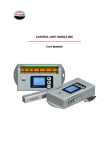
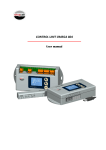
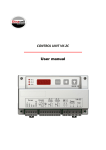
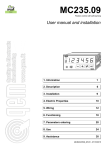
User manual Weighing Monitor MR User manual INDEX 1. 2. 3. 4. 5. 6. 7. Introduction ........................................................................................... 4 Physical features .................................................................................. 4 2.1 Front panel and dimensions ........................................................... 4 2.1.1 Buttons .......................................................................... 5 2.1.2 Indicators....................................................................... 5 2.2 Connections .................................................................................... 6 2.2.1 Low side connections ................................................... 6 Menu navigation.................................................................................... 7 Main menu ............................................................................................ 8 4.1 Access codes.................................................................................. 9 4.2 Display submenu ..........................................................................10 4.3 Adjustment submenu....................................................................11 4.4 Working mode selection ...............................................................15 4.5 Scale mode ...................................................................................16 4.5.1 Configuration menus in this mode ..............................16 4.6 Peak value mode ..........................................................................19 4.6.1 Configuration menus in this mode ..............................19 4.7 Pulse counter mode......................................................................21 4.7.1 Configuration menu in this mode................................ 21 Electrical specifications ......................................................................22 Glossary ..............................................................................................22 Error codes .........................................................................................23 3 / 24 Weighing Monitor MR 1. Introduction The MR1 weighing monitor is a multifunction equipment designed for a variety of applications in the industrial weighing field. It can monitor signals from load cells as well as control the industrial weighing operations without the use of a PLC nor personal computer. The equipment is provided with a special menu structure that it changes depending on the working mode selected. This feature avoids the showing of parameters of other modes not needed and so the system is easier to handle. Three working modes are available: Weighing scale Peak value reading Pulse counter for fluids measurements The unit can power up to 12 load cells of 350 Ohms. 2. Physical features 2.1 Front panel and dimensions Box specifications V0 fireproof IP-50 MR1 is made in a standard enclosure DIN43700 IEC 61554 model 445-163. Dimensions: 138 x 96 x 48 mm. 4 / 24 User manual 2.1.1 Buttons Three buttons provide access and navigation through the menu to program all necessary parameters of the unit. The function of the fourth button is to start process. Menu button / access to formulas. Keep pressed to enter into the main menu or exit from menus Press repeatedly to navigate through the submenus of the same level Enter button / peak value functions During menu navigation: Enter to modify a parameter. While modifying a parameter: Chose digit to change Increment button / tare function During menu navigation: Shows the stored value of the selected parameter. While modifying a parameter: Change the blinking digit incrementally or change the different options when the parameter is not numeric. During decimal point modification: change its position. Start process button In the mode Pulse counter for fluids measurements, this button starts, pauses and stops the process. 2.1.2 Indicators 6 digits display. LEDs from 1 to 5 show the state of relays/alarms. : Tare. Lights when a tare is done. Tx: Blinks when a USB communication is active. 5 / 24 Weighing Monitor MR 2.2 Connections All connectors are in the rear panel. 2.2.1 Low side connections Load cells connections Connector Function 4 wires load cell 6 wires load cell SHIELD -IN +IN -EXC +EXC Shield connection Negative signal Positive signal Negative supply Positive supply Shield White Green Black Red Shield White Green Black and Blue Red and Yellow USB: Type B USB. Communications with a personal computer. EXT-GND: Input for the reading of a external dry contact in the counter mode. Power supply: Grounded 230Vac. 6 / 24 User manual 3. Menu navigation Keep Press repeatedly to navigate through submenus and parameters of the same level. pressed to enter into main menu. The main menu is cyclic, at the end of the chain of all items, the symbol appears and the cycle starts again from the beginning. Press Once inside a parameter, it will can be modified with Press to enter into a submenu or parameter. and . twice to validate the data introduced. If this button is not pressed the second time before display blink ends (ten seconds), the changes will not be stored. This is the way for all submenu and parameters of the unit. When the programming process has been done, press seconds to exit. To check a parameter during navigation, keep pressed current value of the parameter selected. At the end of any menu or submenu will appear 7 / 24 . more than 2 , the unit will show the Weighing Monitor MR 4. Main menu Main screen (shows the weight) 2 Sec Codes (chapter 4.1) Display submenu (chapter 4.2) Working mode selection (chapter 4.4) Adjustments submenu (chapter 4.3) (*) Submenu of the working mode selected Notice: It will appear only the item selected in the parameter * Keep pressed more than 2 seconds to enter/exit of the menu. To enter in any submenu or parameter press . * It appears or not depending on the working mode selected. 8 / 24 User manual 4.1 Access codes [0:999999] This is a method to prevent the changing of parameters accidentally by enabling or not of critical functions of the unit. Code 123456 (Permit to modify weighing adjustment parameters). This code opens the access to modify the adjustment parameters of the load cell signal. Such parameters are shown starting with a dash . In case of enter into the menus without this code, the adjustment parameters can be checked pressing , but they can’t be modified. When the code is entered, display shows the message momentarily, as a acknowledge of open access. To abort the access, return to menu and enter the code 123456 again or exit of all menus and wait 10 minutes. When the operation aborts the unit shows in display always the message momentarily. Code 031025 (Restoring the factory settings) With this code, the unit initializes and all parameters will be set by default. When this code is entered, the unit shows momentarily, as a acknowledge. in display Some parameters are not affected by this operation, they are the following: o Formulas used for dosage. o Adjustment parameters of load cell signal ( ). o Working mode selected . 9 / 24 Weighing Monitor MR 4.2 Display submenu Move the decimal point to the desired position Rounding of the value shown in display End of submenu Decimal point: This choice allows to see the value in tons, grams or kilograms with resolution needed. Rounding: The weight shown can be rounded to prefix values: 1, 2, 5, 10, 20, 50, 100 y 200. Press to access the parameter and press 10 / 24 to modify it. User manual 4.3 Adjustment submenu Here can be done the adjustment regarding with the load cells and the analog input. Zero adjustment Sensitivity adjustment with a well known weight Sensitivity adjustment without a known weight [-199999 ÷ 999999]. Filter adjustment of the load cell signal [0 ÷ 12]. Factory calibration value (shown in the serial number label) [0 ÷ 10000]. Reading of the load cell signal in mV/V End of submenu Notice: The parameter must be set with the access code before to modify the parameters starting with a dash Process to adjust the load cells can be done in two ways: Zero and sensitivity adjustment with a well know weight Zero adjustment and adjust with the calibrated value of load cell 11 / 24 Weighing Monitor MR Zero adjustment [-199999 ÷ 999999] Usually, this adjustment is done without load, but also it can be done with a approximated known weight to avoid the emptying of tanks. 1. Select the option in the menu. 2. Check there’s no load in the scale and press display the zero value (by default: 000000). 3. In case of do this operation with a approximated known weight, enter the value of the weight in the scale using and . The unit will show in buttons. 4. Press to save. All digits will start to blink. 5. While display is blinking, press to confirm the operation. Then a 10 seconds countdown will start (it can be skipped pressing , in order to do the operation quicker). After this, the data is stored. 6. After, the display will show . Notice: If button is not pressed before the blinking ends, the operation is not validated. 12 / 24 User manual Sensitivity adjustment with a well known weight (for all kinds of load cells). [-199999 ÷ 999999] 1. Place over the scale a well known weight (it is recommended to place minimum a 50% of the full capacity). 2. Select the option 3. Enter the value of a well known weight using 4. Press 7. While display is blinking, press to confirm the operation. Then a 10 seconds countdown will start (it can be skipped pressing , in order to do the operation quicker). After this, the data is stored. 5. After, the display will show of the menu and press to access. buttons. to save. All digits will start to blink. . Notice: If button is not pressed before the blinking ends, the operation is not validated. Sensitivity adjustment with the calibrated value of load cell This method is less accurate because the system tolerances are unknown. 1. Select the option value. of the menu and press 2. Enter the value for slope of the load cells using to modify the .: To get this value, do the next operation: SLOPE = nominal load ÷ sensitivity (See the following examples 1 y 2) 3. Press to save. All digits will start to blink.. 4. While display is blinking, press 5. After, the display will show to confirm the operation. . Notice: If button is not pressed before the blinking ends, the operation is not validated. 13 / 24 Weighing Monitor MR EXAMPLE 1: One load cell: Nominal load Sensitivity = 1000 kg. = 2.000 mV/V. SLOPE in the unit = 1000 kg / 2.000 mV/V = 500. EXAMPLE 2: Specifications of three load cells connected in parallel: Load cell 1: Nominal load Sensitivity = 1000 kg. = 2.000 mV/V. Load cell 2: Nominal load Sensitivity = 1000 kg. = 2.002 mV/V. Load cell 3: Nominal load Sensitivity = 1000 kg. = 1.980 mV/V Calculate the SLOPE of all of them individually and then sum the three values: SLOPE 1 = 1000 kg / 2.002 mV/V = 499.5 SLOPE 2 = 1000 kg / 2.000 mV/V = 500.0 SLOPE 3 = 1000 kg / 1.980 mV/V = 505.0 SLOPE in the unit = 499.5+ 500.0+ 505.0 = 1505. NOTICE: The nominal load as well as sensitivity are parameters provided by the manufacturer of the load cells. 14 / 24 User manual Filter adjustment of the load cell signal [0 ÷ 12] Filters the input signal. The higher this value, the measure is more stable with a lower sample rate. It is recommended a value of 9. ADC tolerance adjustment: [0 ÷ 10000] This value is set by the manufacturer and shown in the serial number label. Display of the load cell signal [-3,9 ÷ 3,9] Read only parameter in mV/V. 4.4 Working mode selection Three working modes are available: Weighing scale. Peak value reading. Pulse counter for fluids measurements. Notice: Press to access the parameter and press 15 / 24 to modify it Weighing Monitor MR 4.5 Scale mode 4.5.1 Configuration menus in this mode Limit of weight Update time of Auto-zero Yes/no (tare function activation) Weight level alarm Weight level alarm Alarms hysteresis 16 / 24 User manual Auto-zero submenu: Parameter to set the zero when there is not load over the scale but it still has some residue on it. o Auto-zero limit: [0 ÷ 1000] This is the range of weight. For example, if is set to 10 kg. and the load over the scale is 100 kg., an auto-zero will be done when the load is between 90 and 110 kg. If o is set to 0, this function is not enabled. Auto-cero time: [0 ÷ 100] This is the minimum time between two auto-zero operations. If is set to 0, the operation can’t be done. Tare activation: [Yes ÷ No] Activates/deactivates the tare function. It it is activated, in weighing mode: o Press once o Press more than two seconds to eliminate the tare. The indicator will turn off. to take a tare value. The indicator 17 / 24 will light. Weighing Monitor MR Alarms submenu: The weighing scale mode provides five level alarms Parameter independently configurable, the parameter is common to all of them. is o Alarms 1 to 5: Level: [-199999 ÷ 999999] This is the weight alarm level. If the weight applied is higher than this value, the corresponding alarm will activate and its relay associated will change its state. If there’s no relays, only will activate the corresponding indicator. o Hysteresis: [0 ÷ 1000] Sets the hysteresis value for all alarms. Example: if the parameter of some alarm is set to 100 kg. and HISTERESIS value set to 10 kg., the alarm will be activated when the load overcomes 110 kg. After, during unloading, this alarm will not be deactivated until the load is less than 90 kg. 18 / 24 User manual 4.6 Peak value mode 4.6.1 Configuration menus in this mode Peak value mode selection Level to start a new reading of the peak value Peak level alarm Peak level alarm Configuration: [Pv_1 ÷ Pv_2] Pv_1: The peak value is shown continuously. Pv_2: The display shows the current weight. The peak value can be checked using the button. In both cases the peak value can be deleted pressing twice the button while such value is showing in display. Peak Start Level: [0 ÷ 999999] This is the start level of the peak value record. The peak value record is restarted every time the load go above this level upwards. If PLS set to 0 this function is disabled. 19 / 24 Weighing Monitor MR Peak alarm submenu: The unit provides two security alarms, o and . Level: [-199999 ÷ 999999] This is the level of the alarm. If the peak value is higher than this value, the corresponding alarm will be activated and the associated relay will change its state. 20 / 24 4.7 Pulse counter mode 4.7.1 Configuration menu in this mode Automatic unloading (Relay 1 activates the electrovalve) Number of pulses per material measurement units Time without pulses to set to 0 the display (0 seconds means that it never resets) Automatic unloading (No) Read-only parameter Automatic unloading is not available in this version of the unit (there are no output relays to do it). Pulses per display point: [0 ÷ 1000] Number of pulses necessary for increment the value that is shown in display. Inactivity time to set to 0 the display (in seconds) [0-100] This is the time with no pulses received by the unit to set the display to zero. If button. is set to 0, only is available the reset by pressing the Counting process This process counts pulses received in the external input (EXT and GND) of the rear panel of the unit. Weighing Monitor MR 5. Electrical specifications Nominal tension: 230 Vac / 50- 60Hz. Maximum current: 80 mA. Shortcircuitable power supply. 100 mA fuse. 6. Glossary ADJUSTMENTS PROCESS ERROR ALARMS LEVEL ALARM LEVEL ALARM 1 PEAK VALUE ALARM PEAK ALARM 1 AUTO ZERO AUTOMATIC ADJUSTMENT OF THE ADC CALIBRATION CODES CONFIGURATION COUNTER COUNTS PER POINT DECIMAL POINT DISPLAY ADC FILTER HYSTERESIS WEIGHT LEVEL LIMIT WEIGHT FOR THE LOAD ADJUSTMENT WORKING MODE EXTRA COUNT OVERLOAD PEAK START LEVEL PEAK VALUE 22 / 24 PEAK VALUE IN FIRST PLANE PEAK VALUE IN SECOND PLANE RESET ROUNDING SCALE LOAD CELL SIGNAL IN mV/V SLOPE OF THE LOAD CELL TARE TIME WEIGHT FOR THE ZERO ADJUSTMENT 7. Error codes Error description Action Load cell is not properly connected, it or its cable is damage. Check the load cell connection. Negative overflow. The load cell is giving a negative signal too high. Check the load cell connection because it should be no negative charge. Positive overflow. Load cell is holding a higher load than its nominal value. Polarity error. This happens when the unit adjusts the weight with the wrong load cell polarity, or the weight is not in the cabin during the adjustment. Change load cell by another with higher nominal load. Check the load cell connections. Adjust the zero and weight again. Two possibilities: Loss of data in memory. 1. Search the parameter lost and reprogram it. 2. Restoring the factory settings. Load cell with very low sensitivity. Adjust the zero and load again. Usually the unit is wrong adjusted. Weighing Monitor MR Dinacell Electrónica s.l. Pol. Ind. Santa Ana. C/ El torno, 8. 28522 Rivas Vaciamadrid Madrid (SPAIN) 24 / 24 124-6128-02 28/05/2012