1
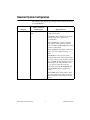
Platform
Media and System
Requirements
Important Notes
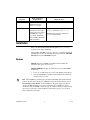
Sun
LabVIEW runs on
SPARCstations with
Solaris 2.5.1 or later.
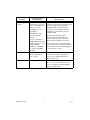
—
Linux
LabVIEW runs on Linux for
Intel x86 processors with
kernel version 2.0.x or later.
LabVIEW runs on most
major Linux distributions,
such as RedHat, Mandrake,
SuSE, and Debian.
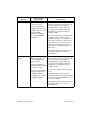
Requires GNU C Library Version 2.1.3
(glibc2, also known as libc.so.6).
RedHat Linux 5.0 or later includes the
glibc2 run-time library.
Installation
Refer to the National Instruments KnowledgeBase at ni.com if you
encounter errors during installation.
After installing LabVIEW, if you are a new user, you should complete the
LabVIEW Tutorial. Start the LabVIEW Tutorial by clicking the LabVIEW
Tutorial button in the LabVIEW dialog box.
Windows
(Windows) Insert the LabVIEW 6.1 installation CD and follow the
instructions that appear on your screen.
(Windows 2000/NT/XP) Complete the following steps to install LabVIEW
for Windows.
1.
Log on as an administrator or as a user with administrator privileges.
2.
Insert the LabVIEW 6.1 installation CD and follow the instructions
that appear on your screen.
Note The LabVIEW 6.1 installer program might install multiple National Instruments
products. Each product is listed in the Add/Remove Programs Control Panel located at
Start»Settings»Control Panel. Use the Add/Remove Programs applet to modify the
current LabVIEW installation or to remove it altogether. If you modify the current
installation, a list of LabVIEW components appears, similar to the list of components that
appeared if you selected a custom installation. In the list that appears, you can add or
remove individual components.
LabVIEW Release Notes
6
ni.com