1
The
Linux Users' Guide
c 1993, 1994, 1996 Larry Greeneld
Copyright All you need to know to start using Linux, a free Unix clone. This manual covers the basic Unix
commands, as well as the more specic Linux ones. This manual is intended for the beginning Unix
user, although it may be useful for more experienced users for reference purposes.
i
UNIX is a trademark of X/Open
MS-DOS and Microsoft Windows are trademarks of Microsoft Corporation
OS/2 and Operating System/2 are trademarks of IBM
X Window System is a trademark of X Consortium, Inc.
Motif is a trademark of the Open Software Foundation
Linux is not a trademark, and has no connection to UNIX, Unix System Labratories, or to X/Open.
Please bring all unacknowledged trademarks to the attention of the author.
c Larry Greeneld
Copyright 427 Harrison Avenue
Highland Park, NJ
08904
[email protected]
Permission is granted to make and distribute verbatim copes of this manual provided the copyright
notice and this permission notice are preserved on all copies.
Permission is granted to copy and distribute modied versions of this manual under the conditions for
verbatim copying, provided also that the sections that reprint \The GNU General Public License",
\The GNU Library General Public License", and other clearly marked sections held under seperate
copyright are reproduced under the conditions given within them, and provided that the entire
resulting derived work is distributed under the terms of a permission notice identical to this one.
Permission is granted to copy and distribute translations of this manual into another language under
the conditions for modied versions. \The GNU General Public License" and \The GNU Library
General Public License" may be included in a translation approved by the Free Software Foundation
instead of in the original English.
At your option, you may distribute verbatim and modied versions of this document under the
terms of the GNU General Public License, excepting the clearly marked sections held under seperate
copyright.
Exceptions to these rules may be granted for various purposes: Write to Larry Greeneld at
the above address or email [email protected], and ask. It is requested (but not required) that
you notify the author whenever commercially or large-scale printing this document. Royalties and
donations are accepted and will encourage further editions.
ii
These are some of the typographical conventions used in this book.
Bold
Used to mark new concepts, WARNINGS, and keywords in a language.
italics
Used for emphasis in text.
slanted
Used to mark meta-variables in the text, especially in representations of the
command line. For example, \ls -l foo" where foo would \stand for" a lename,
such as /bin/cp.
Typewriter
Used to represent screen interaction.
Also used for code examples, whether it is \C" code, a shell script, or something
else, and to display general les, such as conguration les. When necessary for
clarity's sake, these examples or gures will be enclosed in thin boxes.
Key
Represents a key to press. You will often see it in this form: \Press return to
continue."
3
A diamond in the margin, like a black diamond on a ski hill, marks \danger" or
\caution." Read paragraphs marked this way carefully.
This X in the margin indicates special instructions for users of the X Window
System.
SLOW
This indicates a paragraph that contains special information that should be read
carefully.
Acknowledgments
The author would like to thank the following people for their invaluable help either with Linux
itself, or in writing The Linux Users' Guide :
Linus Torvalds for providing something to write this manual about.
Karl Fogel has given me much help with writing my Linux documentation and wrote most of
Chapter 8 and Chapter 9. I cannot give him enough credit.
Maurizio Codogno wrote much of Chapter 11.
David Channon wrote the appendix on vi. (Appendix A)
Yggdrasil Computing, Inc. for their generous (and voluntary) support of this manual.
Red Hat Software for their (more recent and still voluntary!) support.
The fortune program for supplying me with many of the wonderful quotes that start each chapter. They cheer me up, if no one else.
iii
iv
Contents
1 Introduction
3
1.1 Who Should Read This Book . . . . . . . . . . . . . . . . . . . .
1.1.1 What You Should Have Done Before Reading This Book .
1.2 How to Avoid Reading This Book . . . . . . . . . . . . . . . . .
1.3 How to Read This Book . . . . . . . . . . . . . . . . . . . . . . .
1.4 Linux Documentation . . . . . . . . . . . . . . . . . . . . . . . .
1.4.1 Other Linux Books . . . . . . . . . . . . . . . . . . . . .
1.4.2 HOWTOs . . . . . . . . . . . . . . . . . . . . . . . . . . .
1.4.3 What's the Linux Documentation Project? . . . . . . . .
1.5 Operating Systems . . . . . . . . . . . . . . . . . . . . . . . . . .
.
.
.
.
.
.
.
.
.
.
.
.
.
.
.
.
.
.
.
.
.
.
.
.
.
.
.
.
.
.
.
.
.
.
.
.
.
.
.
.
.
.
.
.
.
.
.
.
.
.
.
.
.
.
.
.
.
.
.
.
.
.
.
.
.
.
.
.
.
.
.
.
.
.
.
.
.
.
.
.
.
.
.
.
.
.
.
.
.
.
.
.
.
.
.
.
.
.
.
2 What's Unix, anyway?
9
2.1 Unix History . . . . . . . . . . . . . .
2.2 Linux History . . . . . . . . . . . . .
2.2.1 Linux Now . . . . . . . . . . .
2.2.2 A Few Questions and Answers
2.2.3 Commercial Software in Linux
.
.
.
.
.
.
.
.
.
.
.
.
.
.
.
.
.
.
.
.
.
.
.
.
.
.
.
.
.
.
.
.
.
.
.
.
.
.
.
.
.
.
.
.
.
.
.
.
.
.
.
.
.
.
.
.
.
.
.
.
.
.
.
.
.
.
.
.
.
.
.
.
.
.
.
.
.
.
.
.
.
.
.
.
.
.
.
.
.
.
.
.
.
.
.
.
.
.
.
.
.
.
.
.
.
.
.
.
.
.
.
.
.
.
.
.
.
.
.
.
.
.
.
.
.
.
.
.
.
.
3 Getting Started
3.1 Power to the Computer . . . . . .
3.2 Linux Takes Over . . . . . . . . .
3.3 The User Acts . . . . . . . . . . .
3.3.1 Logging In . . . . . . . . .
3.3.2 Leaving the Computer . . .
3.3.3 Turning the Computer O .
3
3
4
4
5
5
5
6
6
9
10
11
11
12
13
.
.
.
.
.
.
.
.
.
.
.
.
.
.
.
.
.
.
v
.
.
.
.
.
.
.
.
.
.
.
.
.
.
.
.
.
.
.
.
.
.
.
.
.
.
.
.
.
.
.
.
.
.
.
.
.
.
.
.
.
.
.
.
.
.
.
.
.
.
.
.
.
.
.
.
.
.
.
.
.
.
.
.
.
.
.
.
.
.
.
.
.
.
.
.
.
.
.
.
.
.
.
.
.
.
.
.
.
.
.
.
.
.
.
.
.
.
.
.
.
.
.
.
.
.
.
.
.
.
.
.
.
.
.
.
.
.
.
.
.
.
.
.
.
.
.
.
.
.
.
.
.
.
.
.
.
.
.
.
.
.
.
.
.
.
.
.
.
.
13
14
16
16
17
17
vi
CONTENTS
3.4 Kernel Messages . . . . . . . . . . . . . . . . . . . . . . . . . . . . . . . . . . . . . .
4 The Unix Shell
4.1 Unix Commands . . . . . . . . . . . . . . .
4.1.1 A Typical Unix Command . . . . . .
4.2 Helping Yourself . . . . . . . . . . . . . . .
4.3 Storing Information . . . . . . . . . . . . .
4.3.1 Looking at Directories with ls . . .
4.3.2 The Current Directory and cd . . .
4.3.3 Creating and Removing Directories .
4.4 Moving Information . . . . . . . . . . . . .
4.4.1 cp Like a Monk . . . . . . . . . . . .
4.4.2 Pruning Back with rm . . . . . . . .
4.4.3 A Forklift Can Be Very Handy . . .
18
23
.
.
.
.
.
.
.
.
.
.
.
.
.
.
.
.
.
.
.
.
.
.
.
.
.
.
.
.
.
.
.
.
.
.
.
.
.
.
.
.
.
.
.
.
.
.
.
.
.
.
.
.
.
.
.
.
.
.
.
.
.
.
.
.
.
.
.
.
.
.
.
.
.
.
.
.
.
.
.
.
.
.
.
.
.
.
.
.
.
.
.
.
.
.
.
.
.
.
.
.
.
.
.
.
.
.
.
.
.
.
.
.
.
.
.
.
.
.
.
.
.
.
.
.
.
.
.
.
.
.
.
.
.
.
.
.
.
.
.
.
.
.
.
.
.
.
.
.
.
.
.
.
.
.
.
.
.
.
.
.
.
.
.
.
.
.
.
.
.
.
.
.
.
.
.
.
.
.
.
.
.
.
.
.
.
.
.
.
.
.
.
.
.
.
.
.
.
.
.
.
.
.
.
.
.
.
.
.
.
.
.
.
.
.
.
.
.
.
.
.
.
.
.
.
.
.
.
.
.
.
.
.
.
.
.
.
.
.
.
.
.
.
.
.
.
.
.
.
.
.
.
.
.
5 The X Window System
5.1 Starting and Stopping the X Window System
5.1.1 Starting X . . . . . . . . . . . . . . . .
5.1.2 Exiting X . . . . . . . . . . . . . . . .
5.2 What is The X Window System? . . . . . . .
5.3 What's This on my Screen? . . . . . . . . . .
5.3.1 XClock . . . . . . . . . . . . . . . . .
5.3.2 XTerm . . . . . . . . . . . . . . . . . .
5.4 Window Managers . . . . . . . . . . . . . . .
5.4.1 When New Windows are Created . . .
5.4.2 Focus . . . . . . . . . . . . . . . . . .
5.4.3 Moving Windows . . . . . . . . . . . .
5.4.4 Depth . . . . . . . . . . . . . . . . . .
5.4.5 Iconization . . . . . . . . . . . . . . .
5.4.6 Resizing . . . . . . . . . . . . . . . . .
5.4.7 Maximization . . . . . . . . . . . . . .
5.4.8 Menus . . . . . . . . . . . . . . . . . .
5.5 X Attributes . . . . . . . . . . . . . . . . . .
23
24
25
26
27
29
30
31
32
33
34
37
.
.
.
.
.
.
.
.
.
.
.
.
.
.
.
.
.
.
.
.
.
.
.
.
.
.
.
.
.
.
.
.
.
.
.
.
.
.
.
.
.
.
.
.
.
.
.
.
.
.
.
.
.
.
.
.
.
.
.
.
.
.
.
.
.
.
.
.
.
.
.
.
.
.
.
.
.
.
.
.
.
.
.
.
.
.
.
.
.
.
.
.
.
.
.
.
.
.
.
.
.
.
.
.
.
.
.
.
.
.
.
.
.
.
.
.
.
.
.
.
.
.
.
.
.
.
.
.
.
.
.
.
.
.
.
.
.
.
.
.
.
.
.
.
.
.
.
.
.
.
.
.
.
.
.
.
.
.
.
.
.
.
.
.
.
.
.
.
.
.
.
.
.
.
.
.
.
.
.
.
.
.
.
.
.
.
.
.
.
.
.
.
.
.
.
.
.
.
.
.
.
.
.
.
.
.
.
.
.
.
.
.
.
.
.
.
.
.
.
.
.
.
.
.
.
.
.
.
.
.
.
.
.
.
.
.
.
.
.
.
.
.
.
.
.
.
.
.
.
.
.
.
.
.
.
.
.
.
.
.
.
.
.
.
.
.
.
.
.
.
.
.
.
.
.
.
.
.
.
.
.
.
.
.
.
.
.
.
.
.
.
.
.
.
.
.
.
.
.
.
.
.
.
.
.
.
.
.
.
.
.
.
.
.
.
.
.
.
.
.
.
.
.
.
.
.
.
.
.
.
.
.
.
.
.
.
.
.
.
.
.
.
.
.
.
.
.
.
.
.
.
.
.
.
.
.
.
.
.
.
.
.
.
.
.
.
.
.
.
.
.
.
.
.
37
37
37
38
38
39
40
40
40
41
41
41
42
42
43
43
43
CONTENTS
5.5.1 Geometry .
5.5.2 Display . .
5.6 Common Features
5.6.1 Buttons . .
5.6.2 Menu Bars
5.6.3 Scroll Bars
vii
.
.
.
.
.
.
.
.
.
.
.
.
.
.
.
.
.
.
.
.
.
.
.
.
.
.
.
.
.
.
.
.
.
.
.
.
.
.
.
.
.
.
.
.
.
.
.
.
.
.
.
.
.
.
.
.
.
.
.
.
.
.
.
.
.
.
.
.
.
.
.
.
.
.
.
.
.
.
.
.
.
.
.
.
.
.
.
.
.
.
.
.
.
.
.
.
.
.
.
.
.
.
.
.
.
.
.
.
.
.
.
.
.
.
.
.
.
.
.
.
.
.
.
.
.
.
.
.
.
.
.
.
.
.
.
.
.
.
.
.
.
.
.
.
.
.
.
.
.
.
.
.
.
.
.
.
.
.
.
.
.
.
.
.
.
.
.
.
.
.
.
.
.
.
.
.
.
.
.
.
.
.
.
.
.
.
.
.
.
.
.
.
.
.
.
.
.
.
.
.
.
.
.
.
.
.
.
.
.
.
.
.
.
.
.
.
.
.
.
.
.
.
6 Working with Unix
49
6.1 Wildcards . . . . . . . . . . . . . . . . . . . . . .
6.1.1 What Really Happens? . . . . . . . . . .
6.1.2 The Question Mark . . . . . . . . . . . .
6.2 Time Saving with bash . . . . . . . . . . . . . .
6.2.1 Command-Line Editing . . . . . . . . . .
6.2.2 Command and File Completion . . . . . .
6.3 The Standard Input and The Standard Output .
6.3.1 Unix Concepts . . . . . . . . . . . . . . .
6.3.2 Output Redirection . . . . . . . . . . . .
6.3.3 Input Redirection . . . . . . . . . . . . . .
6.3.4 The Pipe . . . . . . . . . . . . . . . . . .
6.4 Multitasking . . . . . . . . . . . . . . . . . . . .
6.4.1 Using Job Control . . . . . . . . . . . . .
6.4.2 The Theory of Job Control . . . . . . . .
6.5 Virtual Consoles: Being in Many Places at Once
.
.
.
.
.
.
.
.
.
.
.
.
.
.
.
.
.
.
.
.
.
.
.
.
.
.
.
.
.
.
.
.
.
.
.
.
.
.
.
.
.
.
.
.
.
.
.
.
.
.
.
.
.
.
.
.
.
.
.
.
.
.
.
.
.
.
.
.
.
.
.
.
.
.
.
.
.
.
.
.
.
.
.
.
.
.
.
.
.
.
.
.
.
.
.
.
.
.
.
.
.
.
.
.
.
.
.
.
.
.
.
.
.
.
.
.
.
.
.
.
.
.
.
.
.
.
.
.
.
.
.
.
.
.
.
.
.
.
.
.
.
.
.
.
.
.
.
.
.
.
.
.
.
.
.
.
.
.
.
.
.
.
.
.
.
.
.
.
.
.
.
.
.
.
.
.
.
.
.
.
.
.
.
.
.
.
.
.
.
.
.
.
.
.
.
.
.
.
.
.
.
.
.
.
.
.
.
.
.
.
.
.
.
.
.
.
.
.
.
.
.
.
.
.
.
.
.
.
.
.
.
.
.
.
.
.
.
.
.
.
.
.
.
.
.
.
.
.
.
.
.
.
.
.
.
.
.
.
.
.
.
.
.
.
.
.
.
.
.
.
.
.
.
.
.
.
.
.
.
.
.
.
.
.
.
.
.
.
.
.
.
.
.
.
.
.
.
.
.
.
7 Powerful Little Programs
7.1
7.2
7.3
7.4
7.5
The Power of Unix . . .
Operating on Files . . .
System Statistics . . . .
What's in the File? . . .
Information Commands
8 Editing les with Emacs
43
44
44
45
45
46
49
50
50
51
51
51
52
52
52
53
53
54
54
58
60
61
.
.
.
.
.
.
.
.
.
.
.
.
.
.
.
.
.
.
.
.
.
.
.
.
.
.
.
.
.
.
.
.
.
.
.
.
.
.
.
.
.
.
.
.
.
.
.
.
.
.
.
.
.
.
.
.
.
.
.
.
.
.
.
.
.
.
.
.
.
.
.
.
.
.
.
.
.
.
.
.
.
.
.
.
.
.
.
.
.
.
.
.
.
.
.
.
.
.
.
.
.
.
.
.
.
.
.
.
.
.
.
.
.
.
.
.
.
.
.
.
.
.
.
.
.
.
.
.
.
.
.
.
.
.
.
.
.
.
.
.
.
.
.
.
.
.
.
.
.
.
.
.
.
.
.
.
.
.
.
.
.
.
.
.
.
.
.
.
.
.
8.1 What's Emacs? . . . . . . . . . . . . . . . . . . . . . . . . . . . . . . . . . . . . . . .
8.2 Getting Started Quickly in X . . . . . . . . . . . . . . . . . . . . . . . . . . . . . . .
61
62
63
65
66
71
71
73
viii
CONTENTS
8.3
8.4
8.5
8.6
8.7
8.8
8.9
8.10
8.11
Editing Many Files at Once . . . . . .
Ending an Editing Session . . . . . . .
The Meta Key . . . . . . . . . . . . .
Cutting, Pasting, Killing and Yanking
Searching and Replacing . . . . . . . .
What's Really Going On Here? . . . .
Asking Emacs for Help . . . . . . . . .
Specializing Buers: Modes . . . . . .
Programming Modes . . . . . . . . . .
8.11.1 C Mode . . . . . . . . . . . . .
8.11.2 Scheme Mode . . . . . . . . . .
8.11.3 Mail Mode . . . . . . . . . . .
8.12 Being Even More Ecient . . . . . . .
8.13 Customizing Emacs . . . . . . . . . . .
8.14 Finding Out More . . . . . . . . . . .
.
.
.
.
.
.
.
.
.
.
.
.
.
.
.
.
.
.
.
.
.
.
.
.
.
.
.
.
.
.
.
.
.
.
.
.
.
.
.
.
.
.
.
.
.
.
.
.
.
.
.
.
.
.
.
.
.
.
.
.
.
.
.
.
.
.
.
.
.
.
.
.
.
.
.
.
.
.
.
.
.
.
.
.
.
.
.
.
.
.
.
.
.
.
.
.
.
.
.
.
.
.
.
.
.
.
.
.
.
.
.
.
.
.
.
.
.
.
.
.
.
.
.
.
.
.
.
.
.
.
.
.
.
.
.
.
.
.
.
.
.
.
.
.
.
.
.
.
.
.
.
.
.
.
.
.
.
.
.
.
.
.
.
.
.
.
.
.
.
.
.
.
.
.
.
.
.
.
.
.
.
.
.
.
.
.
.
.
.
.
.
.
.
.
.
.
.
.
.
.
.
.
.
.
.
.
.
.
.
.
.
.
.
.
.
.
.
.
.
.
.
.
.
.
.
.
.
.
.
.
.
.
.
.
.
.
.
.
.
.
.
.
.
.
.
.
.
.
.
.
.
.
.
.
.
.
.
.
.
.
.
.
.
.
.
.
.
.
.
.
.
.
.
.
.
.
.
.
.
.
.
.
.
.
.
.
.
.
.
.
.
.
.
.
.
.
.
.
.
.
.
.
.
.
.
.
.
.
.
.
.
.
.
.
.
.
.
.
.
.
.
.
.
.
.
.
.
.
.
.
.
.
.
.
.
.
.
.
.
.
.
.
.
.
.
.
.
.
.
.
.
.
.
.
.
.
.
.
.
.
.
.
.
.
.
.
.
.
.
.
.
.
.
.
.
.
.
.
.
.
.
.
.
.
.
.
.
.
.
.
9 I Gotta Be Me!
9.1
Customization . . . . . . . . . . . . . . . . . . .
9.1.1 Shell Startup . . . . . . . . . . . . . . . . . . .
9.1.2 Startup Files . . . . . . . . . . . . . . . . . . .
9.1.3 Aliasing . . . . . . . . . . . . . . . . . . . . . .
9.1.4 Environment Variables . . . . . . . . . . . . . .
9.2 The X Window System Init Files . . . . . . . . . . . .
9.2.1 Twm Conguration . . . . . . . . . . . . . . .
9.2.2 Fvwm Conguration . . . . . . . . . . . . . . .
9.3 Other Init Files . . . . . . . . . . . . . . . . . . . . . .
9.3.1 The Emacs Init File . . . . . . . . . . . . . . .
9.3.2 FTP Defaults . . . . . . . . . . . . . . . . . . .
9.3.3 Allowing Easy Remote Access to Your Account
9.3.4 Mail Forwarding . . . . . . . . . . . . . . . . .
9.4 Seeing Some Examples . . . . . . . . . . . . . . . . . .
bash
74
75
75
76
77
78
79
79
80
80
81
82
82
83
87
89
.
.
.
.
.
.
.
.
.
.
.
.
.
.
.
.
.
.
.
.
.
.
.
.
.
.
.
.
.
.
.
.
.
.
.
.
.
.
.
.
.
.
.
.
.
.
.
.
.
.
.
.
.
.
.
.
.
.
.
.
.
.
.
.
.
.
.
.
.
.
.
.
.
.
.
.
.
.
.
.
.
.
.
.
.
.
.
.
.
.
.
.
.
.
.
.
.
.
.
.
.
.
.
.
.
.
.
.
.
.
.
.
.
.
.
.
.
.
.
.
.
.
.
.
.
.
.
.
.
.
.
.
.
.
.
.
.
.
.
.
.
.
.
.
.
.
.
.
.
.
.
.
.
.
.
.
.
.
.
.
.
.
.
.
.
.
.
.
.
.
.
.
.
.
.
.
.
.
.
.
.
.
.
.
.
.
.
.
.
.
.
.
.
.
.
.
.
.
.
.
.
.
.
.
.
.
.
.
.
.
.
.
.
.
.
.
.
.
.
.
.
.
.
.
.
.
.
.
.
.
.
.
.
.
.
.
.
.
89
89
90
90
91
97
99
104
105
105
105
106
107
107
CONTENTS
ix
10 Talking to Others
109
10.1 Electronic Mail . . . . . . . .
10.1.1 Sending Mail . . . . .
10.1.2 Reading Mail . . . . .
10.2 More than Enough News . . .
10.3 Searching for People . . . . .
10.3.1 The finger command
10.3.2 Plans and Projects . .
10.4 Using Systems by Remote . .
10.5 Exchanging Files . . . . . . .
10.6 Travelling the Web . . . . . .
.
.
.
.
.
.
.
.
.
.
.
.
.
.
.
.
.
.
.
.
.
.
.
.
.
.
.
.
.
.
.
.
.
.
.
.
.
.
.
.
.
.
.
.
.
.
.
.
.
.
.
.
.
.
.
.
.
.
.
.
.
.
.
.
.
.
.
.
.
.
.
.
.
.
.
.
.
.
.
.
.
.
.
.
.
.
.
.
.
.
.
.
.
.
.
.
.
.
.
.
.
.
.
.
.
.
.
.
.
.
.
.
.
.
.
.
.
.
.
.
.
.
.
.
.
.
.
.
.
.
.
.
.
.
.
.
.
.
.
.
.
.
.
.
.
.
.
.
.
.
.
.
.
.
.
.
.
.
.
.
.
.
.
.
.
.
.
.
.
.
.
.
.
.
.
.
.
.
.
.
.
.
.
.
.
.
.
.
.
.
.
.
.
.
.
.
.
.
.
.
.
.
.
.
.
.
.
.
.
.
.
.
.
.
.
.
.
.
.
.
.
.
.
.
.
.
.
.
.
.
.
.
.
.
.
.
.
.
.
.
.
.
.
.
.
.
.
.
.
.
.
.
.
.
.
.
.
.
.
.
.
.
.
.
.
.
.
.
.
.
.
.
.
.
.
.
.
.
.
.
.
.
.
.
.
.
.
.
.
.
.
.
.
.
.
.
.
.
.
.
.
.
.
.
.
.
.
.
.
.
11 Funny Commands
11.1
find,
the le searcher .
11.1.1 Generalities . . .
11.1.2 Expressions . . .
11.1.3 Options . . . . .
11.1.4 Tests . . . . . . .
11.1.5 Actions . . . . .
11.1.6 Operators . . . .
11.1.7 Examples . . . .
11.1.8 A last word . . .
11.2 tar, the tape archiver .
11.2.1 Introduction . .
11.2.2 Main options . .
11.2.3 Modiers . . . .
11.2.4 Examples . . . .
11.3 dd, the data duplicator .
11.3.1 Options . . . . .
11.3.2 Examples . . . .
11.4 sort, the data sorter . .
11.4.1 Introduction . .
11.4.2 Options . . . . .
109
109
110
111
111
111
112
112
113
114
115
.
.
.
.
.
.
.
.
.
.
.
.
.
.
.
.
.
.
.
.
.
.
.
.
.
.
.
.
.
.
.
.
.
.
.
.
.
.
.
.
.
.
.
.
.
.
.
.
.
.
.
.
.
.
.
.
.
.
.
.
.
.
.
.
.
.
.
.
.
.
.
.
.
.
.
.
.
.
.
.
.
.
.
.
.
.
.
.
.
.
.
.
.
.
.
.
.
.
.
.
.
.
.
.
.
.
.
.
.
.
.
.
.
.
.
.
.
.
.
.
.
.
.
.
.
.
.
.
.
.
.
.
.
.
.
.
.
.
.
.
.
.
.
.
.
.
.
.
.
.
.
.
.
.
.
.
.
.
.
.
.
.
.
.
.
.
.
.
.
.
.
.
.
.
.
.
.
.
.
.
.
.
.
.
.
.
.
.
.
.
.
.
.
.
.
.
.
.
.
.
.
.
.
.
.
.
.
.
.
.
.
.
.
.
.
.
.
.
.
.
.
.
.
.
.
.
.
.
.
.
.
.
.
.
.
.
.
.
.
.
.
.
.
.
.
.
.
.
.
.
.
.
.
.
.
.
.
.
.
.
.
.
.
.
.
.
.
.
.
.
.
.
.
.
.
.
.
.
.
.
.
.
.
.
.
.
.
.
.
.
.
.
.
.
.
.
.
.
.
.
.
.
.
.
.
.
.
.
.
.
.
.
.
.
.
.
.
.
.
.
.
.
.
.
.
.
.
.
.
.
.
.
.
.
.
.
.
.
.
.
.
.
.
.
.
.
.
.
.
.
.
.
.
.
.
.
.
.
.
.
.
.
.
.
.
.
.
.
.
.
.
.
.
.
.
.
.
.
.
.
.
.
.
.
.
.
.
.
.
.
.
.
.
.
.
.
.
.
.
.
.
.
.
.
.
.
.
.
.
.
.
.
.
.
.
.
.
.
.
.
.
.
.
.
.
.
.
.
.
.
.
.
.
.
.
.
.
.
.
.
.
.
.
.
.
.
.
.
.
.
.
.
.
.
.
.
.
.
.
.
.
.
.
.
.
.
.
.
.
.
.
.
.
.
.
.
.
.
.
.
.
.
.
.
.
.
.
.
.
.
.
.
.
.
.
.
.
.
.
.
.
.
.
.
.
.
.
.
.
.
.
.
.
.
.
.
.
.
.
.
.
.
.
.
.
.
.
.
.
.
.
.
.
.
.
.
.
.
.
.
.
.
.
.
.
.
.
.
.
.
.
.
.
.
.
.
.
.
.
.
.
.
.
.
.
.
.
.
.
.
.
.
.
.
.
.
.
.
.
.
.
.
.
.
.
.
.
.
.
.
.
.
.
.
.
.
.
.
.
.
.
.
.
.
.
.
.
.
.
.
.
.
.
.
.
.
.
.
.
.
.
.
.
.
.
.
.
.
.
.
.
.
.
.
.
.
.
.
.
.
.
.
.
.
.
.
.
.
.
.
.
.
.
.
.
.
.
.
.
.
.
.
.
.
.
.
.
.
.
.
.
.
.
.
.
.
.
.
.
.
115
115
116
116
117
119
119
120
121
122
122
122
122
122
122
122
123
124
124
124
CONTENTS
1
11.4.3 Examples . . . . . . . . . . . . . . . . . . . . . . . . . . . . . . . . . . . . . . 124
12 Errors, Mistakes, Bugs, and Other Unpleasantries
12.1 Avoiding Errors . . . . . . . . . . . . . . . .
12.2 What to do When Something Goes Wrong .
12.3 Not Your Fault . . . . . . . . . . . . . . . .
12.3.1 When Is There a Bug . . . . . . . .
12.3.2 Reporting a Bug . . . . . . . . . . .
.
.
.
.
.
.
.
.
.
.
.
.
.
.
.
.
.
.
.
.
.
.
.
.
.
.
.
.
.
.
.
.
.
.
.
.
.
.
.
.
.
.
.
.
.
.
.
.
.
.
.
.
.
.
.
.
.
.
.
.
.
.
.
.
.
.
.
.
.
.
.
.
.
.
.
.
.
.
.
.
.
.
.
.
.
.
.
.
.
.
.
.
.
.
.
.
.
.
.
.
.
.
.
.
.
.
.
.
.
.
.
.
.
.
.
A Introduction to Vi
A.1 A Quick History of Vi . . . . . . . . . . . .
A.2 Quick Ed Tutorial . . . . . . . . . . . . . .
A.2.1 Creating a le . . . . . . . . . . . .
A.2.2 editing a existing le . . . . . . . . .
A.2.3 Line numbers in detail . . . . . . . .
A.3 Quick Vi Tutorial . . . . . . . . . . . . . . .
A.3.1 Invoking vi . . . . . . . . . . . . . .
A.3.2 Cursor movement commands . . . .
A.3.3 Deleting text . . . . . . . . . . . . .
A.3.4 File saving . . . . . . . . . . . . . .
A.3.5 What's next . . . . . . . . . . . . . .
A.4 Advanced Vi Tutorial . . . . . . . . . . . .
A.4.1 Moving around . . . . . . . . . . . .
A.4.2 Moding Text . . . . . . . . . . . .
A.4.3 Copying and Moving sections of text
A.4.4 Searching and replacing text . . . .
125
125
126
126
126
127
129
.
.
.
.
.
.
.
.
.
.
.
.
.
.
.
.
.
.
.
.
.
.
.
.
.
.
.
.
.
.
.
.
.
.
.
.
.
.
.
.
.
.
.
.
.
.
.
.
.
.
.
.
.
.
.
.
.
.
.
.
.
.
.
.
.
.
.
.
.
.
.
.
.
.
.
.
.
.
.
.
.
.
.
.
.
.
.
.
.
.
.
.
.
.
.
.
.
.
.
.
.
.
.
.
.
.
.
.
.
.
.
.
.
.
.
.
.
.
.
.
.
.
.
.
.
.
.
.
.
.
.
.
.
.
.
.
.
.
.
.
.
.
.
.
.
.
.
.
.
.
.
.
.
.
.
.
.
.
.
.
.
.
.
.
.
.
.
.
.
.
.
.
.
.
.
.
.
.
.
.
.
.
.
.
.
.
.
.
.
.
.
.
.
.
.
.
.
.
.
.
.
.
.
.
.
.
.
.
.
.
.
.
.
.
.
.
.
.
.
.
.
.
.
.
.
.
.
.
.
.
.
.
.
.
.
.
.
.
.
.
.
.
.
.
.
.
.
.
.
.
.
.
.
.
.
.
.
.
.
.
.
.
.
.
.
.
.
.
.
.
.
.
.
.
.
.
.
.
.
.
.
.
.
.
.
.
.
.
.
.
.
.
.
.
.
.
.
.
.
.
.
.
.
.
.
.
.
.
.
.
.
.
.
.
.
.
.
.
.
.
.
.
.
.
.
.
.
.
.
.
.
.
.
.
.
.
.
.
.
.
.
.
.
.
.
.
.
.
.
.
.
.
.
.
.
.
.
.
.
.
.
.
.
.
.
.
.
.
129
130
130
131
131
133
133
133
134
134
134
134
135
136
138
140
B The GNU General Public License
143
C The GNU Library General Public License
151
2
CONTENTS
Chapter 1
Introduction
How much does it cost to entice a dope-smoking Unix system guru to Dayton?
Brian Boyle, Unix World's First Annual Salary Survey
1.1 Who Should Read This Book
Are you someone who should read this book? Let's answer by asking some other questions: Have
you just gotten Linux from somewhere, installed it, and want to know what to do next? Or are you
a non-Unix computer user who is considering Linux but wants to nd out what it can do for you?
If you have this book, the answer to these questions is probably \yes." Anyone who has Linux,
the free Unix clone written by Linus Torvalds, on their PC but doesn't know what to do next should
read this book. In this book, we'll cover most of the basic Unix commands, as well as some of the
more advanced ones. We'll also talk about GNU Emacs, a powerful editor, and several other large
Unix applications.
1.1.1 What You Should Have Done Before Reading This Book
This book assumes that you have access to a Unix system. (It's a bit hard to learn without getting
wet!) This Unix system is assumed to be an Intel PC running Linux. This requirement isn't
necessary, but when versions of Unix dier, I'll be talking about how Linux acts|nothing else.
Linux is available in many forms, called distributions. It is hoped that you've found a complete
distribution such as the Slackware, Redhat, or the MCC-Interim versions and have installed it.
There are dierences between the various distributions of Linux, but for the most part they're small
and unimportant. You may nd dierneces in the examples in this book. For the most part, these
should be fairly minor dierences and are nothing to worry about. If there is a severe dierence
between this book and your actual experience, please inform me, the author.
If you're the superuser (the maintainer, the installer) of the system, you also should have created
a normal user account for yourself. Please consult the installation manual(s) for this information.
3
4
CHAPTER 1. INTRODUCTION
If you aren't the superuser, you should have obtained an account from the superuser.
You should have time and patience. Learning Linux isn't easy|most people nd learning the
Macintosh Operating System is easier. Once you learn Linux things get a lot easier. Unix is a very
powerful system and it is very easy to do some complex tasks.
In addition, this book assumes that you are moderately familiar with some computer terms.
Although this requirement isn't necessary, it makes reading the book easier. You should know about
computer terms such as `program' and `execution'. If you don't, you might want to get someone's
help with learning Unix.
1.2 How to Avoid Reading This Book
The best way to learn about almost any computer program is at your computer. Most people nd
that reading a book without using the program isn't benecial. The best way to learn Unix and
Linux is by using them. Use Linux for everything you can. Experiment. Don't be afraid|it's
possible to mess things up, but you can always reinstall. Keep backups and have fun!
Unix isn't as intuitively obvious as some other operating systems. Thus, you will probably end
up reading at least Chapters 4, 5, and 6.
The number one way to avoid using this book is to use the on-line documentation that's available.
Learn how to use the man command|it's described in Section 4.2.
1.3 How to Read This Book
The suggested way of learning Unix is to read a little, then to play a little. Keep playing until you're
comfortable with the concepts, and then start skipping around in the book. You'll nd a variety of
topics are covered, some of which you might nd interesting and some of which you'll nd boring.
After a while, you should feel condent enough to start using commands without knowing exactly
what they should do. This is a good thing.
What most people regard as Unix is the Unix shell, a special program that interprets commands.
It is the program that controls the obvious \look and feel" of Unix. In practice, this is a ne way of
looking at things, but you should be aware that Unix really consists of many more things, or much
less. This book tells you about how to use the shell as well as some programs that Unix usually
comes with and some programs Unix doesn't always come with (but Linux usually does).
The current chapter is a meta-chapter|it discusses this book and how to apply this book to
getting work done. The other chapters contain:
Chapter 2 discusses where Unix and Linux came from, and where they might be going. It also
talks about the Free Software Foundation and the GNU Project.
Chapter 3 talks about how to start and stop using your computer, and what happens at these
times. Much of it deals with topics not needed for using Linux, but still quite useful and
interesting.
1.4. LINUX DOCUMENTATION
5
Chapter 4 introduces the Unix shell. This is where people actually do work, and run programs.
It talks about the basic programs and commands you must know to use Unix.
Chapter 5 covers the X Window System. X is the primary graphical front-end to Unix, and some
distributions set it up by default.
Chapter 6 covers some of the more advanced parts of the Unix shell. Learning techniques described
in this chapter will help make you more ecent.
Chapter 7 has short descriptions of many dierent Unix commands. The more tools a user knows
how to use, the quicker he will get his work done.
Chapter 8 describes the Emacs text editor. Emacs is a very large program that integrates many
of Unix's tools into one interface.
Chapter 9 talks about ways of customizing the Unix system to your personal tastes.
Chapter 10 investigates the ways a Unix user can talk to other machines around the world, including electronic mail and the World Wide Web.
Chapter 11 describes some of the larger, harder to use commands.
Chapter 12 talks about easy ways to avoid errors in Unix and Linux.
1.4
Linux
Documentation
This book, The Linux Users' Guide , is intended for the Unix beginner. Luckily, the Linux Documentation Project is also writing books for the more experienced users.
1.4.1 Other L
inux
Books
The other books include Installation and Getting Started , a guide on how to aquire and install
Linux, The Linux System Adminstrator's Guide , how to organize and maintain a Linux system,
and The Linux Kernel Hackers' Guide , a book about how to modify Linux. The Linux Network
Administration Guide talks about how to install, congure, and use a network connection.
1.4.2 HOWTOs
In additon to the books, the Linux Documentation Project has made a series of short documents
describing how to setup a particular aspect of Linux. For instance, the SCSI-HOWTO describes some
of the complications of using SCSI|a standard way of talking to devices|with Linux.
These HOWTOs are available in several forms: in a bound book such as The Linux Bible or
Dr. Linux ; in the newsgroup comp.os.linux.answers; or on various sites on the World Wide
Web. A central site for Linux information is http://www.linux.org.
6
CHAPTER 1. INTRODUCTION
1.4.3 What's the Linux Documentation Project?
Like almost everything associated with Linux, the Linux Documentation Project is a collection
of people working across the globe. Originally organized by Lars Wirzenius, the Project is now
coordinated by Matt Welsh with help from Michael K. Johnson.
It is hoped that the Linux Documentation Project will supply books that will meet all the
needs of documenting Linux at some point in time. Please tell us if we've suceeded or what we
should improve on. You can contact the author at [email protected] and/or Matt Welsh at
[email protected].
1.5 Operating Systems
An operating system's primary purpose is to support programs that actually do the work you're
interested in. For instance, you may be using an editor so you can create a document. This editor
could not do its work without help from the operating system|it needs this help for interacting
with your terminal, your les, and the rest of the computer.
If all the operating system does is support your applications, why do you need a whole book
just to talk about the operating system? There are lots of routine maintenance activities (apart
from your major programs) that you also need to do. In the case of Linux, the operating system
also contains a lot of \mini-applications" to help you do your work more ecently. Knowing the
operating system can be helpful when you're not working in one huge application.
Operating systems (frequently abbreviated as \OS") can be simple and minimalist, like DOS,
or big and complex, like OS/2 or VMS. Unix tries to be a middle ground. While it supplies more
resources and does more than early operating systems, it doesn't try to do everything. Unix was
originally designed as a simplication of an operating system named Multics.
The original design philosophy for Unix was to distribute functionality into small parts, the
programs.1 That way, you can easily achieve new functionality and new features by combining the
small parts (programs) in new ways. And if new utilities appear (and they do), you can integrate
them into your old toolbox. When I write this document, for example, I'm using these programs
actively; fvwm to manage my \windows", emacs to edit the text, LATEX to format it, xdvi to preview
it, dvips to prepare it for printing and then lpr to print it. If there was a dierent dvi previewer
available, I could use that instead of xdvi without changing my other programs. At the current time,
my system is running thirty eight programs simultaneously. (Most of these are system programs
that \sleep" until they have some specic work to do.)
When you're using an operating system, you want to minimize the amount of work you put into
getting your job done. Unix supplies many tools that can help you, but only if you know what these
tools do. Spending an hour trying to get something to work and then nally giving up isn't very
productive. This book will teach you what tools to use in what situations, and how to tie these
1 This was actually determined by the hardware Unix original ran on. For some strange reason, the resulting
operating system was very useful on other hardware. The basic design is good enough to still be used twenty ve
years later.
1.5. OPERATING SYSTEMS
7
various tools together.
The key part of an operating system is called the kernel. In many operating systems, like Unix,
OS/2, or VMS, the kernel supplies functions for running programs to use, and schedules them to be
run. It basically says program A can get so much time, program B can get this much time, and so
on. A kernel is always running: it is the rst program to start when the system is turned on, and
the last program to do anything when the system is halted.
8
CHAPTER 1. INTRODUCTION
Chapter 2
What's Unix, anyway?
Ken Thompson has an automobile which he helped design. Unlike most automobiles, it has
neither speedometer, nor gas gage, nor any of the numerous idiot lights which plague the
modern driver. Rather, if the driver makes any mistake, a giant \?" lights up in the center
of the dashboard. \The experienced driver," he says, \will usually know what's wrong."
2.1 Unix History
In 1965, Bell Telephone Laboratories (Bell Labs, a division of AT&T) was working with General
Electric and Project MAC of MIT to write an operating system called Multics. To make a long
story slightly shorter, Bell Labs decided the project wasn't going anywhere and broke out of the
group. This left Bell Labs without a good operating system.
Ken Thompson and Dennis Ritchie decided to sketch out an operating system that would meet
Bell Labs' needs. When Thompson needed a development environment (1970) to run on a PDP-7,
he implemented their ideas. As a pun on Multics, Brian Kernighan, another Bell Labs researcher,
gave the system the name Unix.
Later, Dennis Ritchie invented the \C" programming language. In 1973, Unix was rewritten in
C instead of the original assembly language.1 In 1977, Unix was moved to a new machine through
a process called porting away from the PDP machines it had run on previously. This was aided by
the fact Unix was written in C since much of the code could simply be recompiled and didn't have
to be rewritten.
In the late 1970's, AT&T was forbidden from competing in the computing industry, so it licensed
Unix to various colleges and universities very cheaply. It was slow to catch on outside of academic
institutions but was eventually popular with businesses as well. The Unix of today is dierent
from the Unix of 1970. It has two major variations: System V, from Unix System Laboratories
1 \Assembly language" is a very basic computer language that is tied to a particular type of computer. It is usually
considered a challenge to program in.
9
10
CHAPTER 2. WHAT'S UNIX, ANYWAY?
(USL), a subsiderary of Novell2 , and the Berkeley Software Distribution (BSD). The USL version
is now up to its forth release, or SVR43 , while BSD's latest version is 4.4. However, there are many
dierent versions of Unix besides these two. Most commercial versions of Unix derive from one of
the two groupings. The versions of Unix that are actually used usually incorporate features from
both variations.
Current commercial versions of Unix for Intel PCs cost between $500 and $2000.
2.2
Linux
History
The primary author of Linux is Linus Torvalds. Since his original versions, it has been improved by
countless numbers of people around the world. It is a clone, written entirely from scratch, of the Unix
operating system. Neither USL, nor the University of California, Berkeley, were involved in writing
Linux. One of the more interesting facts about Linux is that development occurs simulataneously
around the world. People from Austrialia to Finland contributed to Linuxand will hopefully continue
to do so.
Linux began with a project to explore the 386 chip. One of Linus's earlier projects was a program
that would switch between printing AAAA and BBBB. This later evolved to Linux.
Linux has been copyrighted under the terms of the GNU General Public License (GPL). This
is a license written by the Free Software Foundation (FSF) that is designed to prevent people from
restricting the distribution of software. In brief, it says that although you can charge as much as
you'd like for a copy, you can't prevent the person you sold it to from giving it away for free. It also
means that the source code4 must also be available. This is useful for programmers. Anybody can
modify Linux and even distributed his/her modications, provided that they keep the code under
the same copyright.
Linux supports most of popular Unix software, including the X Window System. The X Window
System was created at the Massachusetts Institute of Technology. It was written to allow Unix
systems to create graphical windows and easily interact with each other. Today, the X Window
System is used on every version of Unix available.
In addition to the two variations of Unix, System V and BSD, there is also a set of standardization
documents published by the IEEE entitled POSIX. Linux is rst and foremost compliant with the
POSIX-1 and POSIX-2 documents. Its look and feel is much like BSD in some places, and somewhat
like System V in others. It is a blend (and to most people, a good one) of all three standards.
Many of the utilities included with Linux distributions are from the Free Software Foundation
and are part of GNU Project. The GNU Project is an eort to write a portable, advanced operating
system that will look a lot like Unix. \Portable" means that it will run on a variety of machines,
not just Intel PCs, Macintoshes, or whatever. The GNU Project's operating system is called the
Hurd. The main dierence between Linux and GNU Hurd is not in the user interface but in the
It was recently sold to Novell. Previously, USL was owned by AT&T.
A cryptic way of saying \system ve, release four".
The source code of a program is what the programmer reads and writes. It is later translated into unreadable
machine code that the computer interprets.
2
3
4
2.2. LINUX HISTORY
11
programmer's interface|the Hurd is a modern operating system while Linux borrows more from
the original Unix design.
The above history of Linux is decient in mentioning anybody besides Linux Torvalds. For
instance, H. J. Lu has maintained gcc and the Linux C Library (two items needed for all the
programs on Linux) since very early in Linux's life. You can nd a list of people who deserve to
be recognized on every Linux system in the le /usr/src/linux/CREDITS.
2.2.1 L
inux
Now
The rst number in Linux's version number indicates truly huge revisions. These change very slowly
and as of this writing (February, 1996) only version \1" is available. The second number indicates
less major revisions. Even second numbers signify more stable, dependable versions of Linuxwhile
odd numbers are developing versions that are more prone to bugs. The nal version number is the
minor release number|every time a new version is released that may just x small problems or add
minor features, that number is increased by one. As of February, 1996, the latest stable version is
1.2.11 and the latest development version is 1.3.61.
Linux is a large system and unfortunately contains bugs which are found and then xed. Although some people still experience bugs regularly, it is normally because of non-standard or faulty
hardware; bugs that eect everyone are now few and far between.
Of course, those are just the kernel bugs. Bugs can be present in almost every facet of the system,
and inexperienced users have trouble seperating dierent programs from each other. For instance,
a problem might arise that all the characters are some type of gibberish|is it a bug or a \feature"?
Surprisingly, this is a feature|the gibberish is caused by certain control sequences that somehow
appeared. Hopefully, this book will help you to tell the dierent situations apart.
2.2.2 A Few Questions and Answers
Before we embark on our long voyage, let's get the ultra-important out of the way.
Question: Just how do you pronounce Linux?
Answer: According to Linus, it should be pronounced with a short ih sound, like prInt, mIn-
Imal, etc. Linux should rhyme with Minix, another Unix clone. It should not be pronounced like
(American pronounciation of) the \Peanuts" character, Linus, but rather LIH-nucks. And the u is
sharp as in rule, not soft as in ducks. Linux should almost rhyme with \cynics".
Question: Why work on Linux?
Answer: Why not? Linux is generally cheaper (or at least no more expensive) than other
operating systems and is frequently less problematic than many commercial systems. It might not
be the best system for your particular applications, but for someone who is interested in using Unix
applications available on Linux, it is a high-performance system.
12
CHAPTER 2. WHAT'S UNIX, ANYWAY?
2.2.3 Commercial Software in L
inux
There is a lot of commercial software available for Linux. Starting with Motif, a user interface for
the X Window System that vaguely resembles Microsoft Windows, Linux has been gaining more
and more commercial software. These days you can buy anything from Word Perfect (a popular
word processor) to Maple, a complex symbolic manipulation package, for Linux.
For any readers interested in the legalities of Linux, this is allowed by the Linux license. While
the GNU General Public License (reproduced in Appendix B) covers the Linux kernel and would
seemingly bar commercial software, the GNU Library General Public License (reproduced in Appendix C) covers most of the computer code applications depend on. This allows commercial software
providers to sell their applications and withhold the source code.
Please note that those two documents are copyright notices, and not licenses to use. They do
not regulate how you may use the software, merely under what circumstances you can copy it and
any derivative works. To the Free Software Foundation, this is an important distinction: Linux
doesn't involve any \shrink-wrap" licenses but is merely protected by the same law that keeps you
from photocopying a book.
Chapter 3
Getting Started
This login session: $13.99, but for you $11.88.
You may have previous experience with MS-DOS or other single user operating systems, such
as OS/2 or the Macintosh. In these operating systems, you didn't have to identify yourself to the
computer before using it; it was assumed that you were the only user of the system and could access
everything. Well, Unix is a multi-user operating system|not only can more than one person use it
at a time, dierent people are treated dierently.
To tell people apart, Unix needs a user to identify him or herself1 by a process called logging in.
When you rst turn on the computer a complex process takes place before the computer is ready
for someone to use it. Since this guide is geared towards Linux, I'll tell you what happens during
the Linux boot-up sequence.
If you're using Linux on some type of computer besides an Intel PC, some things in this chapter
won't apply to you. Mostly, they'll be in Section 3.1.
If you're just interested in using your computer, you can skip all the information in the chapter
except for Section 3.3.
3.1 Power to the Computer
The rst thing that happens when you turn an Intel PC on is that the BIOS executes. BIOS stands
for Basic Input/Output System. It's a program permenantly stored in the computer on read-only
chips. It performs some minimal tests, and then looks for a oppy disk in the rst disk drive. If it
nds one, it looks for a \boot sector" on that disk, and starts executing code from it, if any. If there
is a disk, but no boot sector, the BIOS will print a message like:
Non-system disk or disk error
1 From here on in this book, I shall be using the masculine pronouns to identify all people. This is the standard
English convention, and people shouldn't take it as a statement that only men can use computers.
13
14
CHAPTER 3. GETTING STARTED
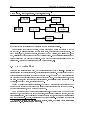
Figure 3.1 The path an Intel PC takes to get to a shell prompt. init may or may not start the X
Window System. If it does, xdm runs. Otherwise, getty runs.
the kernel
LILO
BIOS
Linux
login
init
getty
xdm
the X Window System
bash
the shell
Removing the disk and pressing a key will cause the boot process to continue.
If there isn't a oppy disk in the drive, the BIOS looks for a master boot record (MBR) on
the hard disk. It will start executing the code found there, which loads the operating system. On
Linux systems, LILO, the LInux LOader, can occupy the MBR position, and will load Linux. For
now, we'll assume that happens and that Linux starts to load. (Your particular distribution may
handle booting from the hard disk dierently. Check with the documentation included with the
distribution. Another good reference is the LILO documentation, [1].)
3.2
Linux
Takes Over
After the BIOS passes control to LILO, LILO passes control to the Linux kernel. A kernel is the
central program of the operating system, in control of all other programs. The rst thing that Linux
does once it starts executing is to change to protected mode. The 803862 CPU that controls your
computer has two modes called \real mode" and \protected mode". DOS runs in real mode, as does
the BIOS. However, for more advanced operating systems, it is necessary to run in protected mode.
Therefore, when Linux boots, it discardes the BIOS.
Other CPUs will get to this stage dierently. No other CPU needs to switch into protected mode
and few have to have such a heavy framework around the loading procedure as LILO and the BIOS.
Once the kernel starts up, Linux works much the same.
Linux then looks at the type of hardware it's running on. It wants to know what type of hard
disks you have, whether or not you have a bus mouse, whether or not you're on a network, and other
bits of trivia like that. Linux can't remember things between boots, so it has to ask these questions
each time it starts up. Luckily, it isn't asking you these questions|it is asking the hardware!
2 When I refer to the 80386, I am also talking about the 80486, Pentium, and Pentium Pro computers unless I
specically say so. Also, I'll be abbreviating 80386 as 386.
3.2. LINUX TAKES OVER
15
During boot-up, the Linux kernel will print variations on several messages. You can read about the
messages in Section 3.4. This query process can some cause problems with your system but if it was
going to, it probably would have when you rst installed Linux. If you're having problems, consult
your distribution's documentation.
The kernel merely manages other programs, so once it is satised everything is okay, it must
start another program to do anything useful. The program the kernel starts is called init . (Notice
the dierence in font. Things in this font are usually the names of programs, les, directories, or
other computer related items.) After the kernel starts init, it never starts another program. The
kernel becomes a manager and a provider, not an active program.
So to see what the computer is doing after the kernel boots up, we'll have to examine init. init
goes through a complicated startup sequence that isn't the same for all computers. Linux has many
dierent versions of init, and each does things its own way. It also matters whether your computer
is on a network and what distribution you used to install Linux. Some things that might happen
once init is started:
The le systems might be checked. What is a le system? A le system is the layout of les on
the hard disk. It let's Linux know which parts of the disk are already used, and which aren't.
(It's like an index to a rather large ling system or a card catalog to a library.) Unfortunately,
due to various factors such as power losses, what the le system information thinks is going
on in the rest of the disk and the actually layout of the rest of the disk are occasionally in
conict. A special program, called fsck, can nd these situations and hopefully correct them.
Special routing programs for networks are run. These programs tell your computer how it's
suppose to contact other computers.
Temporary les left by some programs may be deleted.
The system clock can be correctly updated. This is trickier then one might think, since Unix,
by default, wants the time in UCT (Universal Coordinated Time, also known as Greenwich
Mean Time) and your CMOS clock, a battery powered clock in your computer, is probably set
on local time. This means that some program must read the time from your hardware clock
and correct it to UCT.
After init is nished with its duties at boot-up, it goes on to its regularly scheduled activities.
init can be called the parent of all processes on a Unix system. A process is simply a running
program. Since one program can be running two or more times, there can be two or more processes
for any particular program.
In Unix, a process, an instance of a program, is created by a system call|a service provided by
the kernel|called fork. (It's called \fork" since one process splits o into two seperate ones.) init
forks a couple of processes, which in turn fork some of their own. On your Linux system, what init
runs are several instances of a program called getty. getty is the program that will allow a user to
login and eventually calls a program called login.
16
CHAPTER 3. GETTING STARTED
3.3 The User Acts
3.3.1 Logging In
The rst thing you have to do to use a Unix machine is to identify yourself. The login is Unix's way
of knowing that users are authorized to use the system. It asks for an account name and password.
An account name is normally similar to your regular name; you should have already received one
from your system administrator, or created your own if you are the system administrator. (Information on doing this should be available in Installation and Getting Started or The Linux System
Adminstrator's Guide .)
You should see, after all the boot-up procedures are done, something like the following (the rst
line is merely a greeting message|it might be a disclaimer or anything else):
Welcome to the mousehouse. Please, have some cheese.
mousehouse login:
However, it's possible that what the system presents you with does not look like this. Instead of
a boring text mode screen, it is graphical. However, it will still ask you to login, and will function
mostly the same way. If this is the case on your system, you are going to be using The X Window
System. This means that you will be presented with a windowing system. Chapter 5 will discuss
some of the dierences that you'll be facing. Logging in will be similar as will the basics to much of
Unix. If you are using X, look for a giant X is the margin.
This is, of course, your invitation to login. Throughout this manual, we'll be using the ctional
(or not so ctional, depending on your machine) user larry. Whenever you see larry, you should
be substituting your own account name. Account names are usually based on real names; bigger,
more serious Unix systems will have accounts using the user's last name, or some combination of
rst and last name, or even some numbers. Possible accounts for Larry Greeneld might be: larry,
greenfie, lgreenfi, lg19.
mousehouse is, by the way, the \name" of the machine I'm working on. It is possible that when
you installed Linux, you were prompted for some very witty name. It isn't very important, but
whenever it comes up, I'll be using mousehouse or, rarely, lionsden when I need to use a second
system for clarity or contrast.
After entering larry and pressing return , I'm faced with the following:
mousehouse login: larry
Password:
What Linux is asking for is your password. When you type in your password, you won't be
able to see what you type. Type carefully: it is possible to delete, but you won't be able to see
what you are editing. Don't type too slowly if people are watching|they'll be able to learn your
password. If you mistype, you'll be presented with another chance to login.
If you've typed your login name and password correctly, a short message will appear, called
the message of the day. This could say anything|the system adminstrator decides what it should
3.3. THE USER ACTS
17
be. After that, a prompt appears. A prompt is just that, something prompting you for the next
command to give the system. It should look something like this:
/home/larry#
If you've already determined you're using X, you'll probably see a prompt like the one above
in a \window" somewhere on the screen. (A \window" is a rectangular box.) To type into the
prompt, move the mouse cursor (it probably looks like a big \x" or an arrow) using the mouse into
the window.
3.3.2 Leaving the Computer
SLOW
Do not just turn o the computer! You risk losing valuable data!
Unlike most versions of DOS, it's a bad thing to just hit the power switch when you're done
using the computer. It is also bad to reboot the machine (with the reset button) without rst taking
proper precautions. Linux, in order to improve performance, has a disk cache. This means it
temporarily stores part of the computer's permanent storage in RAM.3 The idea of what Linux
thinks the disk should be and what the disk actually contains is syncronized every 30 seconds. In
order to turn o or reboot the computer, you'll have to go through a procedure telling it to stop
caching disk information.
If you're done with the computer, but are logged in (you've entered a username and password),
rst you must logout. To do so, enter the command logout. All commands are sent by pressing
return . Until you hit return nothing will happen and you can delete what you've done and start
over.
/home/larry# logout
Welcome to the mousehouse. Please, have some cheese.
mousehouse login:
Now another user can login.
3.3.3 Turning the Computer O
If this is a single user system, you might want to turn the computer o when you're done with it.4
To do so, you'll have to log into a special account called root. The root account is the system
adminstrator's account and can access any le on the system. If you're going to turn the computer
The dierence between \RAM" and a hard disk is like the dierence between short term memory and long term
memory. Shutting o the power is like giving the computer a knock on the head|it'll forget everything in short term
memory. But things saved in long term memory, the hard disk, will be okay. The disk is thousands of times slower
than RAM.
4 To avoid possibly weakening some hardware components, only turn o the computer when you're done for the
day. Turning the computer on and o once a day is probably the best compromise between energy and wear & tear
on the system.
3
18
CHAPTER 3. GETTING STARTED
o, get the password from the system adminstrator. (In a single user system, that's you ! Make sure
you know the root password.) Login as root:
mousehouse login: root
Password:
Linux version 1.3.55 (root@mousehouse) #1 Sun Jan 7 14:56:26 EST 1996
/# shutdown now
Why? end of the day
URGENT: message from the sysadmin:
System going down NOW
... end of the day ...
Now you can turn off the power...
The command shutdown now prepares the system to be reset or turned o. Wait for a message
saying it is safe to and then reset or turn o the system. (When the system asks you \Why?", it
is merely asking for a reason to tell other users. Since no one is using the system when you shut it
down, you can tell it anything you want or nothing at all.)
A quick message to the lazy: an alternative to the logout/login approach is to use the command
su. As a normal user, from your prompt, type su and press return . It should prompt you for
the root password, and then give you root privileges. Now you can shutdown the system with the
shutdown now command.
3.4 Kernel Messages
When you rst start your computer, a series of messages ash across the screen describing the
hardware that is attached to your computer. These messages are printed by the Linux kernel. In
this section, I'll attempt to describe and explain those messages.
Naturally, these messages dier from machine to machine. I'll describe the messages I get for
my machine. The following example contains all of the standard messages and some specic ones.
(In general, the machine I'm taking this from is a minimally congured one: you won't see a lot of
device specic conguration.) This was made with Linux version 1.3.55|one of the most recent as
of this writing.
1. The rst thing Linux does is decides what type of video card and screen you have, so it can
pick a good font size. (The smaller the font, the more that can t on the screen on any one
time.) Linux may ask you if you want a special font, or it might have had a choice compiled
in.5
Console: 16 point font, 400 scans
Console: colour VGA+ 80x25, 1 virtual console (max 63)
5 \Compiled" is the process by which a computer program that a human writes gets translated into something the
computer understands. A feature that has been \compiled in" has been included in the program.
3.4. KERNEL MESSAGES
19
In this example, the machine owner decided he wanted the standard, large font at compile time.
Also, note the misspelling of the word \color." Linus evidently learned the wrong version of
English.
2. The next thing the kernel will report is how fast your system is, as measured by \BogoMIPS".
A \MIP" stands for a million instructions per second, and a \BogoMIP" is a \bogus MIP": how
many times the computer can do absolutely nothing in one second. (Since this loop doesn't
actually do anything, the number is not actually a measure of how fast the system is.) Linux
uses this number when it needs to wait for a hardware device.
Calibrating delay loop.. ok - 33.28 BogoMIPS
3. The Linux kernel also tells you a little about memory usage:
Memory: 23180k/24576k available (544k kernel code, 384k reserved, 468k data)
This said that the machine had 24 megabytes of memory. Some of this memory was reserved
for the kernel. The rest of it can be used by programs. This is the temporary RAM that is
used only for short term storage. Your computer also has a permanent memory called a hard
disk. The hard disk's contents stay around even when power is turned o.
4. Throughout the bootup procedure, Linux tests dierent parts of the hardware and prints
messages about these tests.
This processor honours the WP bit even when in supervisor mode. Good.
5. Now Linux moves onto the network conguration. The following should be described in The
Linux Networking Guide , and is beyond the scope of this document.
Swansea University Computer Society NET3.033 for Linux 1.3.50
IP Protocols: ICMP, UDP, TCP
6. Linux supports a FPU, a oating point unit. This is a special chip (or part of a chip, in the
case of a 80486DX CPU) that performs arithmetic dealing with non-whole numbers. Some of
these chips are bad, and when Linux tries to identify these chips, the machine \crashes". The
machine stops functioning. If this happens, you'll see:
Checking 386/387 coupling...
Otherwise, you'll see:
Checking 386/387 coupling... Ok, fpu using exception 16 error reporting.
if you're using a 486DX. If you are using a 386 with a 387, you'll see:
Checking 386/387 coupling... Ok, fpu using irq13 error reporting.
7. It now runs another test on the \halt" instruction.
Checking 'hlt' instruction... Ok.
8. After that initial conguration, Linux prints a line identifying itself. It says what version it
is, what version of the GNU C Compiler compiled it, and when it was compiled.
Linux version 1.3.55 (root@mousehouse) (gcc version 2.7.0) #1 Sun Jan 7 14:56:26 EST 1996
20
CHAPTER 3. GETTING STARTED
9. The serial driver has started to ask questions about the hardware. A driver is a part of the
kernel that controls a device, usually a peripheral. It is responsible for the details of how
the CPU communicates with the device. This allows people who write user applications to
concentrate on the application: they don't have to worry about exactly how the computer
works.
Serial driver version 4.11 with no serial options enabled
tty00 at 0x03f8 (irq = 4) is a 16450
tty01 at 0x02f8 (irq = 3) is a 16450
tty02 at 0x03e8 (irq = 4) is a 16450
Here, it found 3 serial ports. A serial port is the equivalent of a DOS COM port, and is a device
normally used to communicate with modems and mice.
What it is trying to say is that serial port 0 (COM1) has an address of 0x03f8. When it
interrupts the kernel, usually to say that it has data, it uses IRQ 4. An IRQ is another means
of a peripheral talking to the software. Each serial port also has a controller chip. The usual
one for a port to have is a 16450; other values possible are 8250 and 16550.
10. Next comes the parallel port driver. A parallel port is normally connected to a printer, and
the names for the parallel ports (in Linux) start with lp. lp stands for Line Printer, although
in modern times it makes more sense for it to stand for Laser Printer. (However, Linux will
happily communicate with any sort of parallel printer: dot matrix, ink jet, or laser.)
lp0 at 0x03bc, (polling)
That message says it has found one parallel port, and is using the standard driver for it.
11. Linux next identies your hard disk drives. In the example system I'm showing you, mousehouse,
I've installed two IDE hard disk drives.
hda: WDC AC2340, 325MB w/127KB Cache, CHS=1010/12/55
hdb: WDC AC2850F, 814MB w/64KB Cache, LBA, CHS=827/32/63
12. The kernel now moves onto looking at your oppy drives. In this example, the machine has
two drives: drive \A" is a 5 1=4 inch drive, and drive \B" is a 3 1=2 inch drive. Linux calls
drive \A" fd0 and drive \B" fd1.
Floppy drive(s): fd0 is 1.44M, fd1 is 1.2M
floppy: FDC 0 is a National Semiconductor PC87306
13. The next driver to start on my example system is the SLIP driver. It prints out a message
about its conguration.
SLIP: version 0.8.3-NET3.019-NEWTTY (dynamic channels, max=256) (6 bit encapsulation enabled)
CSLIP: code copyright 1989 Regents of the University of California
14. The kernel also scans the hard disks it found. It will look for the dierent partitions on each
of them. A partition is a logical separation on a drive that is used to keep operating systems
from interfering with each other. In this example, the computer had two hard disks (hda, hdb)
with four partitions and one partition, respectively.
3.4. KERNEL MESSAGES
21
Partition check:
hda: hda1 hda2 hda3 hda4
hdb: hdb1
15. Finally, Linux mounts the root partition. The root partition is the disk partition where
the Linux operating system resides. When Linux \mounts" this partition, it is making the
partition available for use by the user.
VFS: Mounted root (ext2 filesystem) readonly.
22
CHAPTER 3. GETTING STARTED
Chapter 4
The Unix Shell
Making les is easy under the UNIX operating system. Therefore, users tend to create
numerous les using large amounts of le space. It has been said that the only standard
thing about all UNIX systems is the message-of-the-day telling users to clean up their les.
System V.2 administrator's guide
4.1 Unix Commands
When you rst log into a Unix system, you are presented with something that looks like the following:
/home/larry#
That \something" is called a prompt. As its name would suggest, it is prompting you to enter
a command. Every Unix command is a sequence of letters, numbers, and characters. There are no
spaces, however. Some valid Unix commands are mail, cat, and CMU is Number-5. Some characters
aren't allowed|we'll go into that later. Unix is also case-sensitive. This means that cat and Cat
are dierent commands.1
The prompt is displayed by a special program called the shell. Shells accept commands, and
run those commands. They can also be programmed in their own language, and programs written
in that language are called \shell scripts".
There are two major types of shells in Unix: Bourne shells and C shells. Bourne shells are named
after their inventor, Steven Bourne. Steven Bourne wrote the original Unix shell sh, and most shells
since then end in the letters sh to indicate they are extentions on the original idea. There are many
implementations of his shell, and all those specic shell programs are called Bourne shells. Another
class of shells, C shells (originally implemented by Bill Joy), are also common. Traditionally, Bourne
shells have been used for shell scripts and compatibility with the original sh while C shells have been
1 Case sensitivity is a very personal thing. Some operating systems, such as OS/2 or Windows NT are case
preserving, but not case sensitive. In practice, Unix rarely uses the dierent cases. It is unusual to have a situation
where cat and Cat are dierent commands.
23
24
CHAPTER 4. THE UNIX SHELL
used for interactive use. (C shells have had the advantages of having better interactive features but
somewhat harder programming features.)
Linux comes with a Bourne shell called bash, written by the Free Software Foundation. bash
stands for Bourne Again Shell, one of the many bad puns in Unix. It is an \advanced" Bourne
shell: it contains the standard programming features found in all Bourne shells with many interactive
features commonly found in C shells. bash is the default shell to use running Linux.
When you rst login, the prompt is displayed by bash, and you are running your rst Unix
program, the bash shell. As long as you are logged in, the bash shell will constantly be running.
4.1.1 A Typical Unix Command
The rst command to know is cat. To use it, type cat, and then return :
/home/larry# cat
If you now have a cursor on a line by itself, you've done the correct thing. There are several
variances you could have typed|some would work, some wouldn't.
If you misspelled cat, you would have seen
/home/larry# ct
ct: command not found
/home/larry#
Thus, the shell informs you that it couldn't nd a program named \ct" and gives you another
prompt to work with. Remember, Unix is case sensitive: CAT is a misspelling.
You could have also placed whitespace before the command, like this:2
/home/larry#
cat
This produces the correct result and runs the cat program.
You might also press return on a line by itself. Go right ahead|it does absolutely nothing.
I assume you are now in cat. Hopefully, you're wondering what it is doing. No, it is not a game.
cat is a useful utility that won't seem useful at rst. Type anything and hit return. What you
should have seen is:
/home/larry# cat
Help! I'm stuck in a Linux program!
Help!
2
I'm stuck in a Linux program!
The ` ' indicates that the user typed a space.
4.2. HELPING YOURSELF
25
(The slanted text indicates what I typed to cat.) What cat seems to do is echo the text right
back at yourself. This is useful at times, but isn't right now. So let's get out of this program and
move onto commands that have more obvious benets.
To end many Unix commands, type Ctrl-d 3 . Ctrl-d is the end-of-le character, or EOF for
short. Alternatively, it stands for end-of-text, depending on what book you read. I'll refer to it as
an end-of-le. It is a control character that tells Unix programs that you (or another program) is
done entering data. When cat sees you aren't typing anything else, it terminates.
For a similar idea, try the program sort. As its name indicates, it is a sorting program. If
you type a couple of lines, then press Ctrl-d , it will output those lines in a sorted order. These
types of programs are called lters, because they take in text, lter it, and output the text slightly
dierently. Both cat and sort are unusual lters. cat is unusual because it reads in text and
performs no changes on it. sort is unusual because it reads in lines and doesn't output anything
until after it's seen the EOF character. Many lters run on a line-by-line basis: they will read in a
line, perform some computations, and output a dierent line.
4.2 Helping Yourself
The man command displays reference pages for the command4 you specify. For example:
/home/larry# man cat
cat(1)
cat(1)
NAME
cat - Concatenates or displays files
SYNOPSIS
cat [-benstuvAET] [--number] [--number-nonblank] [--squeeze-blank]
[--show-nonprinting] [--show-ends] [--show-tabs] [--show-all]
[--help] [--version] [file...]
DESCRIPTION
This manual page documents the GNU version of cat ...
There's about one full page of information about cat. Try running man now. Don't expect to
understand the manpage given. Manpages usually assume quite a bit of Unix knowledge|knowledge
that you might not have yet. When you've read the page, there's probably a little black block at the
bottom of your screen similar to \--more--" or \Line 1". This is the more-prompt, and you'll
learn to love it.
Hold down the key labeled \Ctrl" and press \d", then let go of both.
will also display information on a system call, a subroutine, a le format, and more. In the original version
of Unix it showed the exact same information the printed documentation would. For now, you're probably only
interested in getting help on commands.
3
4 man
26
CHAPTER 4. THE UNIX SHELL
Instead of just letting the text scroll away, man stops at the end of each page, waiting for you
to decide what to do now. If you just want to go on, press Space and you'll advance a page. If
you want to exit (quit) the manual page you are reading, just press q . You'll be back at the shell
prompt, and it'll be waiting for you to enter a new command.
There's also a keyword function in man. For example, say you're interested in any commands
that deal with Postscript, the printer control language from Adobe. Type man -k ps or man -k
Postscript, you'll get a listing of all commands, system calls, and other documented parts of Unix
that have the word \ps" (or \Postscript") in their name or short description. This can be very useful
when you're looking for a tool to do something, but you don't know it's name|or if it even exists!
4.3 Storing Information
Filters are very useful once you are an experienced user, but they have one small problem. How do
you store the information? Surely you aren't expected to type everything in each time you are going
to use the program! Of course not. Unix provides les and directories.
A directory is like a folder: it contains pieces of paper, or les. A large folder can even hold
other folders|directories can be inside directories. In Unix, the collection of directories and les is
called the le system. Initially, the le system consists of one directory, called the \root" directory.
Inside this directory, there are more directories, and inside those directories are les and yet more
directories.5
Each le and each directory has a name. It has both a short name, which can be the same as
another le or directory somewhere else on the system, and a long name which is unique. A short
name for a le could be joe, while it's \full name" would be /home/larry/joe. The full name is
usually called the path. The path can be decode into a sequence of directories. For example, here
is how /home/larry/joe is read:
/home/larry/joe
The initial slash indicates the root directory.
This signies the directory called home. It is inside the root directory.
This is the directory larry, which is inside home.
joe is inside larry. A path could refer to either a directory or a lename,
so joe could be either. All the items before the short name must be directories.
An easy way of visualizing this is a tree diagram. To see a diagram of a typical Linux system,
look at Figure 4.1. Please note that this diagram isn't complete|a full Linux system has over 8000
les!|and shows only some of the standard directories. Thus, there may be some directories in
that diagram that aren't on your system, and your system almost certainly has directories not listed
there.
5 There may or may not be a limit to how \deep" the le system can go. (I've never reached it|one can easily
have directories 10 levels deep.)
4.3. STORING INFORMATION
27
Figure 4.1 A typical (abridged) Unix directory tree.
/
bin
dev
etc
home
lib
proc
tmp
usr
larry
sam
X11R6
bin
emacs
etc
g++-include
include
lib
local
bin
emacs
etc
lib
man
spool
src
linux
tmp
4.3.1 Looking at Directories with ls
Now that you know that les and directories exist, there must be some way of manipulating them.
Indeed there is. The command ls is one of the more important ones. It lists les. If you try ls as
a command, you'll see:
/home/larry# ls
/home/larry#
That's right, you'll see nothing. Unix is intensionally terse: it gives you nothing, not even \no
les" if there aren't any les. Thus, the lack of output was ls's way of saying it didn't nd any les.
But I just said there could be 8000 or more les lying around: where are they? You've run into
the concept of a \current" directory. You can see in your prompt that your current directory is
/home/larry, where you don't have any les. If you want a list of les of a more active directory,
try the root directory:
28
CHAPTER 4. THE UNIX SHELL
/home/larry# ls /
bin
etc
install
mnt
root
user
var
dev
home
lib
proc
tmp
usr
vmlinux
/home/larry#
In the above command, \ls /", the directory (\/") is a parameter. The rst word of the
command is the command name, and anything after it is a parameter. Parameters generally modify
what the program is acting on|for ls, the parameters say what directory you want a list for. Some
commands have special parameters called options or switches. To see this try:
/home/larry# ls -F /
bin/
etc/
install/
mnt/
root/
user/
var@
dev/
home/
lib/
proc/
tmp/
usr/
vmlinux
/home/larry#
The -F is an option. An option is a special kind of parameter that starts with a dash and
modies how the program runs, but not what the program runs on. For ls, -F is an option that
lets you see which ones are directories, which ones are special les, which are programs, and which
are normal les. Anything with a slash is a directory. We'll talk more about ls's features later. It's
a surprisingly complex program!
Now, there are two lessons to be learned here. First, you should learn what ls does. Try a few
other directories that are shown in Figure 4.1, and see what they contain. Naturally, some will be
empty, and some will have many, many les in them. I suggest you try ls both with and without
the -F option. For example, ls /usr/local looks like:
/home/larry# ls /usr/local
archives
bin
emacs
etc
ka9q
lib
tcl
/home/larry#
The second lesson is more general. Many Unix commands are like ls. They have options, which
are generally one character after a dash, and they have parameters. Unlike ls, some commands
require certain parameters and/or options. To show what commands generally look like, we'll use
the following form:
ls
[-aRF] [directory]
I'll generally use command templates like that before I introduce any command from now on.
The rst word is the command (in this case ls). Following the command are all the parameters.
Optional parameters are contained in brackets (\[" and \]"). Meta-variables are slanted|they're
words that take the place of actual parameters. (For example, above you see directory, which should
be replaced by the name of a real directory.)
Options are a special case. They're enclosed by brackets, but you can take any one of them
without using all of them. For instance, with just the three options given for ls you have eight
dierent ways of running the command: with or without each of the options. (Contrast ls -R with
ls -F.)
4.3. STORING INFORMATION
29
4.3.2 The Current Directory and cd
pwd
Using directories would be cumbersome if you had to type the full path each time you wanted
to access a directory. Instead, Unix shells have a feature called the \current" or \present" or
\working" directory. Your setup most likely displays your directory in your prompt: /home/larry.
If it doesn't, try the command pwd, for present working directory. (Sometimes the prompt will
display the machine name. This is only really useful in a networked environment with lots of
dierent machines.)
mousehouse>pwd
/home/larry
mousehouse>
cd
[directory]
As you can see, pwd tells you your current directory6|a very simple command. Most commands
act, by default, on the current directory. For instance, ls without any parameters displays the
contents of the current directory. We can change our current directory using cd. For instance, try:
/home/larry# cd /home
/home# ls -F
larry/
sam/
shutdown/
steve/
user1/
/home#
If you omit the optional parameter directory, you're returned to your home, or original, directory.
Otherwise, cd will change you to the specied directory. For instance:
/home# cd
/home/larry# cd /
/# cd home
/home# cd /usr
/usr# cd local/bin
/usr/local/bin#
As you can see, cd allows you to give either absolute or relative pathnames. An absolute path
starts with / and species all the directories before the one you wanted. A relative path is in
relation to your current directory. In the above example, when I was in /usr, I made a relative
move to local/bin|local is a directory under usr, and bin is a directory under local! (cd home
was also a relative directory change.)
6 You'll see all the terms in this book: present working directory, current directory, or working directory. I prefer
\current directory", although at times the other forms will be used for stylistic purposes.
30
CHAPTER 4. THE UNIX SHELL
There are two directories used only for relative pathnames: \." and \..". . The directory \."
refers to the current directory and \.." is the parent directory. These are \shortcut" directories.
They exist in every directory, but don't really t the \folder in a folder" concept. Even the root
directory has a parent directory|it's its own parent!
The le ./chapter-1 would be the le called chapter-1 in the current directory. Occasionally, you need to put the \./" for some commands to work, although this is rare. In most cases,
./chapter-1 and chapter-1 will be identical.
The directory \.." is most useful in \backing up":
/usr/local/bin# cd ..
/usr/local# ls -F
archives/
bin/
emacs@
etc/
ka9q/
lib/
tcl@
/usr/local# ls -F ../src
cweb/
linux/
xmris/
/usr/local#
In this example, I changed to the parent directory using cd .., and I listed the directory
/usr/src from /usr/local using ../src. Note that if I was in /home/larry, typing ls -F ../src
wouldn't do me any good!
The directory ~/ is an alias for your home directory:
/usr/local# ls -F ~/
/usr/local#
You can see at a glance that there isn't anything in your home directory!
useful as we learn more about how to manipulate les.
~/
will become more
4.3.3 Creating and Removing Directories
mkdir
directory1 [directory2 . . . directoryN]
Creating your own directories is extremely simple under Unix, and can be a useful organizational
tool. To create a new directory, use the command mkdir. Of course, mkdir stands for make
directory.
Let's do a small example to see how this works:
/home/larry# ls -F
/home/larry# mkdir report-1993
/home/larry# ls -F
report-1993/
/home/larry# cd report-1993
/home/larry/report-1993#
4.4. MOVING INFORMATION
31
mkdir can take more than one parameter, interpreting each parameter as another directory to
create. You can specify either the full pathname or a relative pathname; report-1993 in the above
example is a relative pathname.
/home/larry/report-1993# mkdir /home/larry/report-1993/chap1 ~/report-1993/chap2
/home/larry/report-1993# ls -F
chap1/
chap2/
/home/larry/report-1993#
rmdir
directory1 [directory2 . . . directoryN]
The opposite of mkdir is rmdir (remove directory).
An example of rmdir is:
rmdir
works exactly like mkdir.
/home/larry/report-1993# rmdir chap1 chap3
rmdir: chap3: No such file or directory
/home/larry/report-1993# ls -F
chap2/
/home/larry/report-1993# cd ..
/home/larry# rmdir report-1993
rmdir: report-1993: Directory not empty
/home/larry#
As you can see, rmdir will refuse to remove a non-existant directory, as well as a directory that
has anything in it. (Remember, report-1993 has a subdirectory, chap2, in it!) There is one more
interesting thing to think about rmdir: what happens if you try to remove your current directory?
Let's nd out:
/home/larry# cd report-1993
/home/larry/report-1993# ls -F
chap2/
/home/larry/report-1993# rmdir chap2
/home/larry/report-1993# rmdir .
rmdir: .: Operation not permitted
/home/larry/report-1993#
Another situation you might want to consider is what happens if you try to remove the parent of
your current directory. This turns out not to be a problem since the parent of your current directory
isn't empty, so it can't be removed!
4.4 Moving Information
All of these fancy directories are very nice, but they really don't help unless you have some place to
store you data. The Unix Gods saw this problem, and they xed it by giving the users les.
32
CHAPTER 4. THE UNIX SHELL
We will learn more about creating and editing les in the next few chapters.
The primary commands for manipulating les under Unix are cp, mv, and rm. They stand for
copy, move, and remove, respectively.
4.4.1
cp
Like a Monk
[-i] source destination
cp [-i] le1 le2 . . . leN destination-directory7
cp
is a very useful utility under Unix, and extremely powerful. It enables one person to copy
more information in a second than a fourteenth century monk could do in a year.
Be careful with cp if you don't have a lot of disk space. No one wants to see a \Disk full" message
when working on important les. cp can also overwrite existing les without warning|I'll talk more
about that danger later.
We'll rst talk about the rst line in the command template. The rst parameter to cp is the le
to copy|the second is where to copy it. You can copy to either a dierent lename, or a dierent
directory. Let's try some examples:
cp
SLOW
/home/larry# ls -F /etc/passwd
/etc/passwd
/home/larry# cp /etc/passwd .
/home/larry# ls -F
passwd
/home/larry# cp passwd frog
/home/larry# ls -F
frog
passwd
/home/larry#
The rst cp command I ran took the le /etc/passwd, which contains the names of all the
users on the Unix system and their (encrypted) passwords, and copied it to my home directory. cp
doesn't delete the source le, so I didn't do anything that could harm the system. So two copies of
/etc/passwd exist on my system now, both named passwd, but one is in the directory /etc and
one is in /home/larry.
Then I created a third copy of /etc/passwd when I typed cp passwd frog|the three copies
are now: /etc/passwd, /home/larry/passwd and /home/larry/frog. The contents of these three
les are the same, even if the names aren't.
cp can copy les between directories if the rst parameter is a le and the second parameter is
a directory. In this case, the short name of the le stays the same.
7 cp has two lines in its template because the meaning of the second parameter can be dierent depending on the
number of parameters.
4.4. MOVING INFORMATION
33
It can copy a le and change it's name if both parameters are le names. Here is one danger of
If I typed cp /etc/passwd /etc/group, cp would normally create a new le with the contents
identical to passwd and name it group. However, if /etc/group already existed, cp would destroy
the old le without giving you a chance to save it! (It won't even print out a message reminding
you that you're destroying a le by copying over it.)
Let's look at another example of cp:
cp.
/home/larry# ls -F
frog
passwd
/home/larry# mkdir passwd_version
/home/larry# cp frog passwd passwd_version
/home/larry# ls -F
frog
passwd
passwd_version/
/home/larry# ls -F passwd_version
frog
passwd
/home/larry#
SLOW
How did I just use cp? Evidentally, cp can take more than two parameters. (This is the second
line in the command template.) What the above command did is copied all the les listed (frog
and passwd) and placed them in the passwd version directory. In fact, cp can take any number of
parameters, and interprets the rst n , 1 parameters to be les to copy, and the nth parameter as
what directory to copy them too.
You cannot rename les when you copy more than one at a time|they always keep their short
name. This leads to an interesting question. What if I type cp frog passwd toad, where frog and
passwd exist and toad isn't a directory? Try it and see.
4.4.2 Pruning Back with rm
rm
[-i] le1 le2 . . . leN
Now that we've learned how to create millions of les with cp (and believe me, you'll nd new
ways to create more les soon), it may be useful to learn how to delete them. Actually, it's very
simple: the command you're looking for is rm, and it works just like you'd expect: any le that's a
parameter to rm gets deleted.
For example:
/home/larry# ls -F
frog
passwd
passwd_version/
/home/larry# rm frog toad passwd
rm: toad: No such file or directory
/home/larry# ls -F
passwd_version/
/home/larry#
34
CHAPTER 4. THE UNIX SHELL
As you can see, rm is extremely unfriendly. Not only does it not ask you for conrmation, but
it will also delete things even if the whole command line wasn't correct. This could actually be
dangerous. Consider the dierence between these two commands:
/home/larry# ls -F
toad
frog/
/home/larry# ls -F frog
toad
/home/larry# rm frog/toad
/home/larry#
and this
/home/larry# rm frog toad
rm: frog is a directory
/home/larry# ls -F
frog/
/home/larry#
SLOW
As you can see, the dierence of one character made a world of dierence in the outcome of the
command. It is vital that you check your command lines before hitting return !
4.4.3 A Forklift Can Be Very Handy
[-i] old-name new-name
mv [-i] le1 le2 . . . leN new-directory
mv
Finally, the other le command you should be aware of is mv. mv looks a lot like cp, except that
it deletes the original le after copying it. It's a lot like using cp and rm together. Let's take a look
at what we can do:
/home/larry# cp /etc/passwd .
/home/larry# ls -F
passwd
/home/larry# mv passwd frog
/home/larry# ls -F
frog
/home/larry# mkdir report
/home/larry# mv frog report
/home/larry# ls -F
report/
/home/larry# ls -F report
frog
/home/larry#
As you can see, mv will rename a le if the second parameter is a le. If the second parameter is
a directory, mv will move the le to the new directory, keeping it's shortname the same.
4.4. MOVING INFORMATION
SLOW
35
You should be very careful with mv|it doesn't check to see if the le already exists, and will
remove any old le in its way. For instance, if I had a le named frog already in my directory
report, the command mv frog report would delete the le ~/report/frog and replace it with
~/frog.
In fact, there is one way to make rm, cp and mv ask you before deleting les. All three of these
commands accept the -i option, which makes them query the user before removing any le. If you
use an alias, you can make the shell do rm -i automatically when you type rm. You'll learn more
about this later in Section 9.1.3 on page 90.
36
CHAPTER 4. THE UNIX SHELL
Chapter 5
The X Window System
The nice thing about standards is that there are so many of them to choose from.
Andrew S. Tanenbaum
This chapter only applies to those using the X Window System. If you encounter a screen with
multiply windows, colors, or a cursor that is only movable with your mouse, you are using X. (If
your screen consists of white characters on a black background, you are not currently using X. If
you want to start it up, take a look at Section 5.1.)
5.1 Starting and Stopping the X Window System
5.1.1 Starting X
Even if X doesn't start automatically when you login, it is possible to start it from the regular textmode shell prompt. There are two possible commands that will start X, either startx or xinit.
Try startx rst. If the shell complains that no such command is found, try using xinit and see if
X starts. If neither command works, you may not have X installed on your system|consult local
documentation for your distribution.
If the command runs but you are eventually returned to the black screen with the shell prompt,
X is installed but not congured. Consult the documentation that came with your distribution on
how to setup X.
5.1.2 Exiting X
Depending on how X is congured, there are two possible ways you might have to exit X. The rst
is if your window manager controls whether or not X is running. If it does, you'll have to exit X
using a menu (see Section 5.4.8 on page 43). To display a menu, click a button on the background.
37
38
CHAPTER 5. THE X WINDOW SYSTEM
The important menu entry should be \Exit Window Manager" or \Exit X" or some entry containing the word \Exit". Try to nd that entry (there could be more than one menu|try dierent
mouse buttons!) and choose it.
The other method would be for a special xterm to control X. If this is the case, there is probably
a window labeled \login" or \system xterm". To exit from X, move the mouse cursor into that
window and type \exit".
If X was automatically started when you logged in, one of these methods should log you out.
Simply login again to return. If you started X manually, these methods should return you to the
text mode prompt. (If you wish to logout, type logout at this prompt.)
5.2 What is The X Window System?
The X Window System is a distributed, graphical method of working developed primarily at the
Massachusetts Institute of Technology. It has since been passed to a consortium of vendors (aptly
named \The X Consortium") and is being maintained by them.
The X Window System (hereafter abbreviated as \X"1) has new versions every few years, called
releases. As of this writing, the latest revision is X11R6, or release six. The eleven in X11 is ocially
the version number but there hasn't been a new version in many years, and one is not currently
planned.
There are two terms when dealing with X that you should be familiar. The client is a X program.
For instance, xterm is the client that displays your shell when you log on. The server is a program
that provides services to the client program. For instance, the server draws the window for xterm
and communicates with the user.
Since the client and the server are two separate programs, it is possible to run the client and the
server on two physically separate machines . In addition to supplying a standard method of doing
graphics, you can run a program on a remote machine (across the country, if you like!) and have it
display on the workstation right in front of you.
A third term you should be familiar with is the window manager. The window manager is a
special client that tells the server where to position various windows and provides a way for the user
to move these windows around. The server, by itself, does nothing for the user. It is merely there
to provide a buer between the user and the client.
5.3 What's This on my Screen?
When you rst start X, several programs are started. First, the server is started. Then, several
clients are usually started. Unfortunately, this is not standardized across various distributions. It is
likely that among these clients are a window manager, either fvwm or twm, a prompt, xterm, and a
clock, xclock.
1 There are several acceptable ways to refer to The X Window System. A common though incorrect way of referring
to X is \X Windows".
5.3. WHAT'S THIS ON MY SCREEN?
39
Figure 5.1 An annotated example of a standard X screen. In this example, the user is running twm.
The standard clock has been replaced by a transparent clock called oclock.
icon manager
title bar
xeyes
oclock
xterm
menu bar
emacs
scrollbar
root menu
5.3.1 XClock
xclock
[-digital] [-analog] [-update seconds] [-hands color]
I'll explain the simpliest one rst: xclock functions exactly as you'd expect it would. It ticks o
the seconds, minutes and hours in a small window.
No amounts of clicking or typing in xclock's window will aect it|that's all it does. Or is it?
In fact, there are various dierent options you can give to the program to have it act in dierent
ways. For instance, xclock -digital will create a digital clock. xclock -update 1 will create a
second hand that moves every second, while -update 5 will create a second hand that moves every
5 seconds.
For more information on xclock's options, consult its manpage|man xclock. If you're going to
try running a few of your own xclocks, you should probably read Section 6.4 (Multitasking) to learn
40
CHAPTER 5. THE X WINDOW SYSTEM
how to run them in addition to your current programs. (If you run an xclock in the foreground|the
usual way of running a program|and want to get out of it, type ctrl-c .)
5.3.2 XTerm
The window with a prompt in it (something that probably looks like /home/larry#) is being controlled by a program called xterm. xterm is a deceptively complicated program. At rst glance,
it doesn't seem to do much, but it actually has to do a lot of work. xterm emulates a terminal so
that regular text-mode Unix applications work correctly. It also maintains a buer of information
so that you can refer back to old commands. (To see how to use this, look at Section 5.6.3.)
For much of this book, we're going to be learning about the Unix command-line, and you'll nd
that inside your xterm window. In order to type into xterm, you usually have to move your mouse
cursor (possibly shaped like an \X" or an arrow) into the xterm window. However, this behavior is
dependent on the window manager.
One way of starting more programs under X is through an xterm. Since X programs are standard
Unix programs, they can be run from normal command prompts such as xterms. Since running a
long term program from a xterm would tie up the xterm as long as the program was running, people
normally start X programs in the background. For more information about this, see Section 6.4.
5.4 Window Managers
On Linux, there are two dierent window managers that are commonly used. One of them, called
twm is short for \Tab Window Manager". It is larger than the other window manager usually used,
fvwm. (fvwm stands for \F(?) Virtual Window Manager"|the author neglected to tie down exactly
what the f stood for.) Both twm and fvwm are highly congurable, which means I can't tell you
exactly what keys do what in your particular setup.
To learn about twm's conguration, look at Section 9.2.1. fvwm's conguration is covered in
Section 9.2.2.
5.4.1 When New Windows are Created
There are three possible things a window manager will do when a new window is created. It is
possible to congure a window manager so that an outline of the new window is shown, and you are
allowed to position it on your screen. That is called manual placement. If you are presented with
the outline of a window, simply use the mouse to place it where you wish it to appear and click the
left mouse button.
It is also possible that the window manager will place the new window somewhere on the screen
by itself. This is known as random placement.
Finally, sometimes an application will ask for a specic spot on the screen, or the window manager
will be congured to display certain applications on the same place of the screen all the time. (For
5.4. WINDOW MANAGERS
41
instance, I specify that I want xclock to always appear in the upper right hand corner of the screen.)
5.4.2 Focus
The window manager controls some important things. The rst thing you'll be interested in is
focus. The focus of the server is which window will get what you type into the keyboard. Usually
in X the focus is determined by the position of the mouse cursor. If the mouse cursor is in one
xterm's window2 , that xterm will get your keypresses. This is dierent from many other windowing
systems, such as Microsoft Windows, OS/2, or the Macintosh, where you must click the mouse in
a window before that window gets focus. Usually under X, if your mouse cursor wanders from a
window, focus will be lost and you'll no longer be able to type there.
Note, however, that it is possible to congure both twm and fvwm so that you must click on or
in a window to gain focus, and click somewhere else to lose it, identical to the behavior of Microsoft
Windows. Either discover how your window manager is congured by trial and error, or consult
local documentation.
5.4.3 Moving Windows
Another very congurable thing in X is how to move windows around. In my personal conguration
of twm, there are three dierent ways of moving windows around. The most obvious method is to
move the mouse cursor onto the title bar and drag the window around the screen. Unfortunately,
this may be done with any of the left, right, or middle buttons3 . (To drag, move the cursor above
the title bar, and hold down on the button while moving the mouse.) Most likely, your conguration
is set to move windows using the left mouse buttons.
Another way of moving windows may be holding down a key while dragging the mouse. For
instance, in my conguration, if I hold down the Alt key, move the cursor above a window, I can
drag the window around using the left mouse button.
Again, you may be able to understand how the window manager is congured by trial and error,
or by seeing local documentation. Alternatively, if you want to try to interpret the window manager's
conguration le, see Section 9.2.1 for twm or Section 9.2.2 for fvwm.
5.4.4 Depth
Since windows are allowed to overlap in X, there is a concept of depth. Even though the windows and
the screen are both two dimensional, one window can be in front of another, partially or completely
obscuring the rear window.
There are several operations that deal with depth:
You can have more then one copy of xterm running at the same time!
Many PCs have only two button mice. If this is the case for you, you should be able to emulate a middle button
by using the left and right buttons simultaneously.
2
3
42
CHAPTER 5. THE X WINDOW SYSTEM
Raising the window, or bringing a window to the front. This is usually accomplished by
clicking on a window's title bar with one of the buttons. Depending on how the window
manager is congured, it could be any one of the buttons. (It is also possible that more then
one button will do the job.)
Lowering the window, or pushing the window to the back. This can generally be accomplished
by a dierent click in the title bar. It is also possible to congure some window managers so
that one click will bring the window foward if there is anything over it, while that same click
will lower it when it is in the front.
Cycling through windows is another operation many window managers allow. This brings
each window to the front in an orderly cycle.
5.4.5 Iconization
There are several other operations that can obscure windows or hide them completely. First is the
idea of \iconization". Depending on the window manager, this can be done in many dierent ways.
In twm, many people congure an icon manager. This is a special window that contains a list of
all the other windows on the screen. If you click on a name (depending on the setup, it could be
with any of the buttons!) the window disappears|it is iconied. The window is still active, but you
can't see it. Another click in the icon manager restores the window to the screen.
This is quite useful. For instance, you could have remote xterms to many dierent computers
that you occasionally use. However, since you rarely use all of them at a given time, you can keep
most of the xterm windows iconied while you work with a small subset. The only problem with
this is it becomes easy to \lose" windows. This causes you to create new windows that duplicate
the functionality of iconied windows.
Other window managers might create actual icons across the bottom of the screen, or might just
leave icons on the root window.
5.4.6 Resizing
There are several dierent methods to resize windows under X. Again, it is dependent on your
window manager and exactly how your window manager is congured. The method many Microsoft
Windows users are familiar with is to click on and drag the border of a window. If your window
manager creates large borders that change how the mouse cursor looks when it is moved over them,
that is probably the method used to resize windows.
Another method used is to create a \resizing" button on the titlebar. In Figure 5.3, a small
button is visible on the right of each titlebar. To resize windows, the mouse is moved onto the resize
button and the left mouse button is held down. You can then move the mouse outside the borders
of the window to resize it. The button is released when the desired size has been reached.
5.5. X ATTRIBUTES
43
5.4.7 Maximization
Most window managers support maximization. In twm, for instance, you can maximize the height,
the width, or both dimensions of a window. This is called \zooming" in twm's language although I
prefer the term maximization. Dierent applications respond dierently to changes in their window
size. (For instance, xterm won't make the font bigger but will give you a larger workspace.)
Unfortunately, it is extremely non-standard on how to maximize windows.
5.4.8 Menus
Another purpose for window managers is for them to provide menus for the user to quickly accomplish
tasks that are done over and over. For instance, I might make a menu choice that automatically
launches Emacs or an additional xterm for me. That way I don't need to type in an xterm|an
especially good thing if there aren't any running xterms that I need to type in to start a new
program!
In general, dierent menus can be accessed by clicking on the root window, which is an immovable
window behind all the other ones. By default, it is colored gray, but could look like anything.4 To
try to see a menu, click and hold down a button on the desktop. A menu should pop up. To make
a selection, move (without releasing the mouse button) the cursor over one of the items any then
release the mouse button.
5.5 X Attributes
There are many programs that take advantage of X. Some programs, like emacs, can be run either
as a text-mode program or as a program that creates its own X window. However, most X programs
can only be run under X.
5.5.1 Geometry
There are a few things common to all programs running under X. In X, the concept of geometry
is where and how large a window is. A window's geometry has four components:
The horizontal size, usually measured in pixels. (A pixel is the smallest unit that can be
colored. Many X setups on Intel PCs have 1024 pixels horizontally and 768 pixels vertically.)
Some applications, like xterm and emacs, measure their size in terms of number of characters
they can t in the window. (For instance, eighty characters across.)
The vertical size, also usually measured in pixels. It's possible for it to be measured in characters.
4
One fun program to try is called xfishtank. It places a small aquarium in the background for you.
44
CHAPTER 5. THE X WINDOW SYSTEM
The horizontal distance from one of the sides of the screen. For instance, +35 would mean
make the left edge of the window thirty-ve pixels from the left edge of the screen. On the
other hand, -50 would mean make the right edge of the window fty pixels from the right edge
of the screen. It's generally impossible to start the window o the screen, although a window
can be moved o the screen. (The main exception is when the window is very large.)
The vertical distance from either the top or the bottom. A positive vertical distance is measured
from the top of the screen; a negative vertical distance is measured from the bottom of the
screen.
All four components get put together into a geometry string that looks like: 503x73-78+0. (That
translates into a window 503 pixels long, 73 pixels high, put near the top right hand corner of the
screen.) Another way of stating it is hsize xvsize hplace vplace.
5.5.2 Display
Every X application has a display that it is associated with. The display is the name of the screen
that the X server controls. A display consists of three components:
The machine name that the server is running on. At stand-alone Linux installations the server
is always running on the same system as the clients. In such cases, the machine name can be
omitted.
The number of the server running on that machine. Since any one machine could have multiple
X servers running on it (unlikely for most Linux machines, but possible) each must have a
unique number.
The screen number. X supports a particular server controlling more than one screen at a
time. You can imagine that someone wants a lot of screen space, so they have two monitors
sitting next to each other. Since they don't want two X servers running on one machine for
performance reasons, they let one X server control both screens.
These three things are put together like so: machine:server-number.screen-number.
For instance, on mousehouse, all my applications have the display set to :0.0, which means the
rst screen of the rst server on the local display. However, if I am using a remote computer, the
display might be set to mousehouse:0.0.
By default, the display is taken from the environment variable (see Section 9.1.4) named DISPLAY,
and can be overridden with a command-line option (see Figure 5.2). To see how DISPLAY is set, try
the command echo $DISPLAY.
5.6 Common Features
While X is a graphical user interface, it is a very uneven graphical user interface. It's impossible
to say how any component of the system is going to work, because every component can easily be
5.6. COMMON FEATURES
45
Figure 5.2 Standard options for X programs.
Name
-geometry
-display
-fg
-bg
Followed by
Example
geometry of the window
xterm -geometry 80x24+0+90
display you want the program to appear xterm -display lionsden:0.0
the primary foreground color
xterm -fg yellow
the primary background color
xterm -bg blue
recongured, changed, and even replaced. This means it's hard to say exactly how to use various
parts of the interface. We've already encountered one cause of this: the dierent window managers
and how congurable each window manager is.
Another cause of this uneven interface is the fact that X applications are built using things
called \widget sets". Included with the standard X distribution are \Athena widgets" developed at
MIT. These are commonly used in free applications. They have the disadvantage that they are not
particularly good-looking and are somewhat harder to use than other widgets.
The other popular widget set is called \Motif". Motif is a commercial widget set similar to the
user interface used in Microsoft Windows. Many commercial applications use Motif widgets, as well
as some free applications. The popular World Wide Web Browser netscape uses Motif.
Let's try to go through some of the more usually things you'll encounter.
5.6.1 Buttons
Buttons are generally the easiest thing to use. A button is invoked by positioning the mouse cursor
over it and clicking (pressing and immediately releasing the mouse button) the left button. Athena
and Motif buttons are functionally the same although they have cosmetic dierences.
5.6.2 Menu Bars
A menu bar is a collection of commands accessible using the mouse. For instance, emacs's menu bar
is shown in Figure 5.3. Each word is a category heading of commands. File deals with commands
that bring up new les and save les. By convention, this is also the category that contains the
command to exit the program.
To access a command, move the mouse cursor over a particular category (such as File) and press
and hold down the left mouse button. This will display a variety of commands. To select one of
the commands, move the mouse cursor over that command and release the left mouse button. Some
menu bars let you click on a category|if this is the case, clicking on the category will display the
menu until you click on either a command, another menu, or outside the menu bar (indicating that
you are not interested in running a particular command).
46
CHAPTER 5. THE X WINDOW SYSTEM
Figure 5.3 emacs will change its menu bar depending on the type of le you're working on. Here
is one possible menu bar.
Figure 5.4 An Athena-type scroll bar is visible on the left of this xterm window. Next to it, a
Motif-type scroll bar is visible on the netscape window.
5.6.3 Scroll Bars
A scroll bar is a method to allow people to display only part of a document, while the rest is o
the screen. For instance, the xterm window is currently displaying the bottom third of the text
available in Figure 5.4. It's easy to see what part of the available text is current being displayed:
the darkened part of the scroll bar is relative to both the position and the amount of displayed text.
If the text displayed is all there is, the entire scroll bar is dark. If the middle half of the text is
displayed, the middle half of the scroll bar is darkened.
A vertical scroll bar may be to the left or right of the text and a horizontal one may be above or
below, depending the application.
Athena scroll bars
Athena scroll bars operate dierently from scroll bars in other windowing systems. Each of the three
buttons of the mouse operate dierently. To scroll upwards (that is, display material above what
is currently visible) you can click the rightmost mouse button anywhere in the scroll bar. To scroll
downwards, click the left mouse button anywhere in the scroll bar.
5.6. COMMON FEATURES
47
You can also jump to a particular location in the displayed material by clicking the middle mouse
button anywhere in the scroll bar. This causes the window to display material starting at that point
in the document.
Motif scroll bars
A Motif scroll bar acts much more like a Microsoft Windows or Macintosh scroll bar. An example of
one is on the right in Figure 5.4. Notice that in addition to the bar, it has arrows above and below
it. These are used for ne-tuning: clicking either the left or middle buttons on them will scroll a
small amount such as one line; the right button does nothing.
The behavior of clicking inside the scroll bar is widely dierent for Motif scroll bars than Athena
scroll bars. The right button has no eect. Clicking the left button above the current position scrolls
upward. Similarly, clicking below the current position scrolls downward. Clicking and holding the
left button on the current position allows one to move the bar at will. Releasing the left button
positions the window.
Clicking the middle button anywhere on the bar will immediately jump to that location, similar
to the behavior of the Athena middle button. However, instead of starting to display the data at
the position clicked, that position is taken to be the midpoint of the data to be displayed.
48
CHAPTER 5. THE X WINDOW SYSTEM
Chapter 6
Working with Unix
A UNIX saleslady, Lenore,
Enjoys work, but she likes the beach more.
She found a good way
To combine work and play:
She sells C shells by the seashore.
Unix is a powerful system for those who know how to harness its power. In this chapter, I'll try
to describe various ways to use Unix's shell, bash, more ecently.
6.1 Wildcards
In the previous chapter, you learned about the le maintence commands cp, mv, and rm. Occasionally,
you want to deal with more than one le at once|in fact, you might want to deal with many les at
once. For instance, you might want to copy all the les beginning with data into a directory called
~/backup. You could do this by either running many cp commands, or you could list every le on
one command line. Both of these methods would take a long time, however, and you have a large
chance of making an error.
A better way of doing that task is to type:
/home/larry/report# ls -F
1993-1
1994-1
data1
1993-2
data-new
data2
data5
/home/larry/report# mkdir ~/backup
/home/larry/report# cp data* ~/backup
/home/larry/report# ls -F ~/backup
data-new
data1
data2
data5
/home/larry/report#
As you can see, the asterix told cp to take all of the les beginning with data and copy them to
Can you guess what cp d*w ~/backup would have done?
~/backup.
49
50
CHAPTER 6. WORKING WITH UNIX
6.1.1 What Really Happens?
Good question. Actually, there are a couple of special characters intercepted by the shell, bash. The
character \*", an asterix, says \replace this word with all the les that will t this specication". So,
the command cp data* ~/backup, like the one above, gets changed to cp data-new data1 data2
data5 ~/backup before it gets run.
To illustrate this, let me introduce a new command, echo. echo is an extremely simple command;
it echoes back, or prints out, any parameters. Thus:
/home/larry# echo Hello!
Hello!
/home/larry# echo How are you?
How are you?
/home/larry# cd report
/home/larry/report# ls -F
1993-1
1994-1
data1
1993-2
data-new
data2
data5
/home/larry/report# echo 199*
1993-1 1993-2 1994-1
/home/larry/report# echo *4*
1994-1
/home/larry/report# echo *2*
1993-2 data2
/home/larry/report#
As you can see, the shell expands the wildcard and passes all of the les to the program you
tell it to run. This raises an interesting question: what happens if there are no les that meet the
wildcard specication? Try echo /rc/fr*og and bash passes the wildcard specication verbatim
to the program.
Other shells, like tcsh, will, instead of just passing the wildcard verbatim, will reply No match.
Here's the same command run under tcsh:
mousehouse>echo /rc/fr*og
echo: No match.
mousehouse>
The last question you might want to know is what if I wanted to have data* echoed back at me,
instead of the list of le names? Well, under both bash and tcsh, just include the string in quotes:
/home/larry/report# echo "data*"
data*
/home/larry/report#
OR
mousehouse>echo "data*"
data*
mousehouse>
6.1.2 The Question Mark
In addition to the asterix, the shell also interprets a question mark as a special character. A question
mark will match one, and only one character. For instance, ls /etc/?? will display all two letter
les in the the /etc directory.
6.2. TIME SAVING WITH BASH
51
6.2 Time Saving with bash
6.2.1 Command-Line Editing
Occasionally, you've typed a long command to bash and, before you hit return, notice that there
was a spelling mistake early in the line. You could just delete all the way back and retype everything
you need to, but that takes much too much eort! Instead, you can use the arrow keys to move back
there, delete the bad character or two, and type the correct information.
There are many special keys to help you edit your command line, most of them similar to the
commands used in GNU Emacs. For instance, C-t ips two adjacent characters.1 You'll be able
to nd most of the commands in the chapter on Emacs, Chapter 8.
6.2.2 Command and File Completion
Another feature of bash is automatic completion of your command lines. For instance, let's look at
the following example of a typical cp command:
/home/larry# ls -F
this-is-a-long-file
/home/larry# cp this-is-a-long-file shorter
/home/larry# ls -F
shorter
this-is-a-long-file
/home/larry#
It's a big pain to have to type every letter of this-is-a-long-file whenever you try to access
it. So, create this-is-a-long-file by copying /etc/passwd to it2 . Now, we're going to do the
above cp command very quickly and with a smaller chance of mistyping.
Instead of typing the whole lename, type cp th and press and release the Tab . Like magic,
the rest of the lename shows up on the command line, and you can type in shorter. Unfortunately,
bash cannot read your thoughts, and you'll have to type all of shorter.
When you type Tab , bash looks at what you've typed and looks for a le that starts like that.
For instance, if I type /usr/bin/ema and then hit Tab , bash will nd /usr/bin/emacs since that's
the only le that begins /usr/bin/ema on my system. However, if I type /usr/bin/ld and hit Tab ,
bash beeps at me. That's because three les, /usr/bin/ld, /usr/bin/ldd, and /usr/bin/ld86 all
start with /usr/bin/ld on my system.
If you try a completion and bash beeps, you can immediately hit Tab again to get a list of all
the les your start matches so far. That way, if you aren't sure of the exact spelling of your le, you
can start it and scan a much smaller list of les.
means hold down the key labeled \Ctrl", then press the \t" key. Then release the \Ctrl" key.
1 C-t
2 cp /etc/passwd this-is-a-long-file
52
CHAPTER 6. WORKING WITH UNIX
6.3 The Standard Input and The Standard Output
Let's try to tackle a simple problem: getting a listing of the /usr/bin directory. If all we do is ls
/usr/bin, some of the les scroll o the top of the screen. How can we see all of the les?
6.3.1 Unix Concepts
The Unix operating system makes it very easy for programs to use the terminal. When a program
writes something to your screen, it is using something called standard output. Standard output,
abbreviated as stdout, is how the program writes things to a user. The name for what you tell
a program is standard input (stdin). It's possible for a program to communicate with the user
without using standard input or output, but most of the commands I cover in this book use stdin
and stdout.
For example, the ls command prints the list of the directories to standard output, which is
normally \connected" to your terminal. An interactive command, such as your shell, bash, reads
your commands from standard input.
It is also possible for a program to write to standard error, since it is very easy to make
standard output point somewhere besides your terminal. Standard error (stderr) is almost always
connected to a terminal so an actual human will read the message.
In this section, we're going to examine three ways of ddling with the standard input and output:
input redirection, output redirection, and pipes.
6.3.2 Output Redirection
A very important feature of Unix is the ability to redirect output. This allows you, instead of
viewing the results of a command, to save it in a le or send it directly to a printer. For instance,
to redirect the output of the command ls /usr/bin, we place a > sign at the end of the line, and
say what le we want the output to be put in:
/home/larry# ls
/home/larry# ls -F /usr/bin > listing
/home/larry# ls
listing
/home/larry#
As you can see, instead of writing the names of all the les, the command created a totally new
le in your home directory. Let's try to take a look at this le using the command cat. If you think
back, you'll remember cat was a fairly useless command that copied what you typed (the standard
input) to the terminal (the standard output). cat can also print a le to the standard output if you
list the le as a parameter to cat:
/home/larry# cat listing
...
/home/larry#
6.3. THE STANDARD INPUT AND THE STANDARD OUTPUT
53
The exact output of the command ls /usr/bin appeared in the contents of listing. All well
and good, although it didn't solve the original problem.3
However, cat does do some interesting things when it's output is redirected. What does the
command cat listing > newfile do? Normally, the > newfile says \take all the output of the
command and put it in newfile." The output of the command cat listing is the le listing.
So we've invented a new (and not so ecient) method of copying les.
How about the command cat > fox? cat by itself reads in each line typed at the terminal
(standard input) and prints it right back out (standard output) until it reads Ctrl-d . In this case,
standard output has been redirected into the le fox. Now cat is serving as a rudimentary editor:
/home/larry# cat > fox
The quick brown fox jumps over the lazy dog.
press Ctrl-d
We've now created the le fox that contains the sentence \The quick brown fox jumps over the
lazy dog." One last use of the versitile cat command is to concatenate les together. cat will
print out every le it was given as a parameter, one after another. So the command cat listing
fox will print out the directory listing of /usr/bin, and then it will print out our silly sentence.
Thus, the command cat listing fox > listandfox will create a new le containing the contents
of both listing and fox.
6.3.3 Input Redirection
Like redirecting standard output, it is also possible to redirect standard input. Instead of a program
reading from your keyboard, it will read from a le. Since input redirection is related to output
redirection, it seems natural to make the special character for input redirection be <. It too, is used
after the command you wish to run.
This is generally useful if you have a data le and a command that expects input from standard
input. Most commands also let you specify a le to operate on, so < isn't used as much in day-to-day
operations as other techniques.
6.3.4 The Pipe
Many Unix commands produce a large amount of information. For instance, it is not uncommon
for a command like ls /usr/bin to produce more output than you can see on your screen. In order
for you to be able to see all of the information that a command like ls /usr/bin, it's necessary to
use another Unix command, called more.4 more will pause once every screenful of information. For
instance, more < /etc/rc will display the le /etc/rc just like cat /etc/rc would, except that
3 For impatient readers, the command you might want to try is more. However, there's still a bit more to talk about
before we get there.
4 more is named because that's the prompt it originally displayed: --more--. In many versions of L
the more
command is identical to a more advanced command that does all that more can do and more. Proving that computer
programmers make bad comedians, they named this new program less.
inux
54
CHAPTER 6. WORKING WITH UNIX
will let you read it. more also allows the command more /etc/rc, and that's the normal way
of invoking it.
However, that doesn't help the problem that ls /usr/bin displays more information than you
can see. more < ls /usr/bin won't work|input redirection only works with les, not commands!
You could do this:
more
/home/larry# ls /usr/bin > temp-ls
/home/larry# more temp-ls
...
/home/larry# rm temp-ls
However, Unix supplies a much cleaner way of doing that. You can just use the command ls
The character \|" indicates a pipe. Like a water pipe, a Unix pipe controls
ow. Instead of water, we're controlling the ow of information!
A useful tool with pipes are programs called lters. A lter is a program that reads the standard
input, changes it in some way, and outputs to standard output. more is a lter|it reads the data
that it gets from standard input and displays it to standard output one screen at a time, letting
you read the le. more isn't a great lter because its output isn't suitable for sending to another
program.
Other lters include the programs cat, sort, head, and tail. For instance, if you wanted to
read only the rst ten lines of the output from ls, you could use ls /usr/bin | head.
/usr/bin | more.
6.4 Multitasking
6.4.1 Using Job Control
Job control refers to the ability to put processes (another word for programs, essentially) in the
background and bring them to the foreground again. That is to say, you want to be able to make
something run while you go and do other things, but have it be there again when you want to tell
it something or stop it. In Unix, the main tool for job control is the shell|it will keep track of jobs
for you, if you learn how to speak its language.
The two most important words in that language are fg, for foreground, and bg, for background.
To nd out how they work, use the command yes at a prompt.
/home/larry# yes
This will have the startling eect of running a long column of y's down the left hand side of your
screen, faster than you can follow.5 To get them to stop, you'd normally type ctrl-c to kill it, but
instead you should type ctrl-z this time. It appears to have stopped, but there will be a message
before your prompt, looking more or less like this:
5 There are good reasons for this strange command to exist. Occasional commands ask for conrmation|a \yes"
answer to a question. The yes command allows a programmer to automate the response to these questions.
6.4. MULTITASKING
[1]+
Stopped
55
yes
It means that the process yes has been suspended in the background. You can get it running
again by typing fg at the prompt, which will put it into the foreground again. If you wish, you
can do other things rst, while it's suspended. Try a few ls's or something before you put it back
in the foreground.
Once it's returned to the foreground, the y's will start coming again, as fast as before. You do
not need to worry that while you had it suspended it was \storing up" more y's to send to the
screen: when a program is suspended the whole program doesn't run until you bring it back to life.
(Now type ctrl-c to kill it for good, once you've seen enough).
Let's pick apart that message we got from the shell:
[1]+
Stopped
yes
The number in brackets is the job number of this job, and will be used when we need to refer
to it specically. (Naturally, since job control is all about running multiple processes, we need some
way to tell one from another). The + following it tells us that this is the \current job" | that is,
the one most recently moved from the foreground to the background. If you were to type fg, you
would put the job with the + in the foreground again. (More on that later, when we discuss running
multiple jobs at once). The word Stopped means that the job is \stopped". The job isn't dead,
but it isn't running right now. Linux has saved it in a special suspended state, ready to jump back
into the action should anyone request it. Finally, the yes is the name of the process that has been
stopped.
Before we go on, let's kill this job and start it again in a dierent way. The command is named
kill and can be used in the following way:
/home/larry# kill %1
[1]+
Stopped
yes
/home/larry#
That message about it being \stopped" again is misleading. To nd out whether it's still alive
(that is, either running or frozen in a suspended state), type jobs:
/home/larry# jobs
[1]+
Terminated
yes
/home/larry#
There you have it|the job has been terminated! (It's possible that the jobs command showed
nothing at all, which just means that there are no jobs running in the background. If you just killed
a job, and typing jobs shows nothing, then you know the kill was successful. Usually it will tell you
the job was \terminated".)
Now, start yes running again, like this:
/home/larry# yes > /dev/null
56
CHAPTER 6. WORKING WITH UNIX
If you read the section about input and output redirection, you know that this is sending the
output of yes into the special le /dev/null. /dev/null is a black hole that eats any output sent
to it (you can imagine that stream of y's coming out the back of your computer and drilling a hole
in the wall, if that makes you happy).
After typing this, you will not get your prompt back, but you will not see that column of y's
either. Although output is being sent into /dev/null, the job is still running in the foreground. As
usual, you can suspend it by hitting ctrl-z . Do that now to get the prompt back.
/home/larry# yes > /dev/null
["yes" is running, and we just typed ctrl-z]
[1]+
Stopped
yes >/dev/null
/home/larry#
Hmm. . . is there any way to get it to actually run in the background, while still leaving us the
prompt for interactive work? The command to do that is bg:
/home/larry# bg
[1]+ yes >/dev/null
&
/home/larry#
Now, you'll have to trust me on this one: after you typed bg, yes > /dev/null began to run
again, but this time in the background. In fact, if you do things at the prompt, like ls and stu,
you might notice that your machine has been slowed down a little bit (endlessly generating and
discarding a steady stream of y's does take some work, after all!) Other than that, however, there
are no eects. You can do anything you want at the prompt, and yes will happily continue to
sending its output into the black hole.
There are now two dierent ways you can kill it: with the kill command you just learned, or
by putting the job in the foreground again and hitting it with an interrupt, ctrl-c . Let's try the
second way, just to understand the relationship between fg and bg a little better;
/home/larry# fg
yes >/dev/null
[now it's in the foreground again.
Imagine that I hit ctrl-c to terminate it]
/home/larry#
There, it's gone. Now, start up a few jobs running in simultaneously, like this:
/home/larry# yes
> /dev/null &
[1] 1024
/home/larry# yes | sort > /dev/null &
[2] 1026
/home/larry# yes | uniq > /dev/null
[and here, type ctrl-z to suspend it, please]
6.4. MULTITASKING
[3]+
Stopped
57
yes | uniq >/dev/null
/home/larry#
The rst thing you might notice about those commands is the trailing & at the end of the rst
two. Putting an & after a command tells the shell to start in running in the background right from
the very beginning. (It's just a way to avoid having to start the program, type ctrl-z , and then
type bg.) So, we started those two commands running in the background. The third is suspended
and inactive at the moment. You may notice that the machine has become slower now, as the two
running ones require some amount of CPU time.
Each one told you it's job number. The rst two also showed you their process identication
numbers, or PID's, immediately following the job number. The PID's are normally not something
you need to know, but occasionally come in handy.
Let's kill the second one, since I think it's making your machine slow. You could just type kill
%2, but that would be too easy. Instead, do this:
/home/larry# fg %2
yes | sort >/dev/null
[type ctrl-c to kill it]
/home/larry#
As this demonstrates, fg takes parameters beginning with % as well. In fact, you could just have
typed this:
/home/larry# %2
yes | sort >/dev/null
[type ctrl-c to kill it]
/home/larry#
This works because the shell automatically interprets a job number as a request to put that job
in the foreground. It can tell job numbers from other numbers by the preceding %. Now type jobs
to see which jobs are left running:
/home/larry# jobs
[1]-
Running
yes >/dev/null
&
[3]+
Stopped
yes | uniq >/dev/null
/home/larry#
The \-" means that job number 1 is second in line to be put in the foreground, if you just type
without giving it any parameters. The \+" means the specied job is rst in line|a fg without
parameters will bring job number 3 to the foreground. However, you can get to it by naming it, if
you wish:
fg
/home/larry# fg %1
yes >/dev/null
[now type ctrl-z to suspend it]
58
CHAPTER 6. WORKING WITH UNIX
[1]+
Stopped
yes >/dev/null
/home/larry#
Having changed to job number 1 and then suspending it has also changed the priorities of all
your jobs. You can see this with the jobs command:
/home/larry# jobs
[1]+
Stopped
yes >/dev/null
[3]-
Stopped
yes | uniq >/dev/null
/home/larry#
Now they are both stopped (because both were suspended with ctrl-z ), and number 1 is next
in line to come to the foreground by default. This is because you put it in the foreground manually,
and then suspended it. The \+" always refers to the most recent job that was suspended from the
foreground. You can start it running again:
/home/larry# bg
[1]+ yes >/dev/null
&
/home/larry# jobs
[1]-
Running
yes >/dev/null
[3]+
Stopped
yes | uniq >/dev/null
/home/larry#
Notice that now it is running, and the other job has moved back up in line and has the +. Now
let's kill them all so your system isn't permanently slowed by processes doing nothing.
/home/larry# kill %1 %3
[3]
Terminated
yes | uniq >/dev/null
/home/larry# jobs
[1]+
Terminated
yes >/dev/null
/home/larry#
You should see various messages about termination of jobs|nothing dies quietly, it seems. Figure 6.1 on the facing page shows a quick summary of what you should know for job control.
6.4.2 The Theory of Job Control
It is important to understand that job control is done by the shell. There is no program on the
system called fg; rather, fg, bg, &, jobs, and kill are all shell-builtins (actually, sometimes kill is
an independent program, but the bash shell used by Linux has it built in). This is a logical way to
do it: since each user wants their own job control space, and each user already has their own shell, it
is easiest to just have the shell keep track of the user's jobs. Therefore, each user's job numbers are
meaningful only to that user: my job number [1] and your job number [1] are probably two totally
dierent processes. In fact, if you are logged in more than once, each of your shells will have unique
job control data, so you as a user might have two dierent jobs with the same number running in
two dierent shells.
6.4. MULTITASKING
59
Figure 6.1 A summary of commands and keys used in job control.
fg
%job
When an & is added to the end of the command line, it tells the command to run in
the background automatically. This process is then subject to all the usual methods
of job control detailed here.
&
bg
This is a shell command that returns a job to the foreground. To nd out which
one this is by default, type jobs and look for the one with the +.
Parameters: Optional job number. The default is the process identied with +.
%job
kill
%job PID
jobs
This is a shell command that causes a suspended job to run in the background. To
nd out which one this is by default, type jobs and look for the one with the +.
Parameters: Optional job number. The default is the process identied with +.
This is a shell command that causes a background job, either suspended or running,
to terminate. You should always specify the job number or PID, and if you are using
job numbers, remember to precede them with a %.
Parameters: Either the job number (preceded by %) or PID (no % is necessary).
More than one process or job can be specied on one line.
This shell command just lists information about the jobs currently running or suspending. Sometimes it also tells you about ones that have just exited or been
terminated.
ctrl-c
This is the generic interrupt character. Usually, if you type it while a program is
running in the foreground, it will kill the program (sometimes it takes a few tries).
However, not all programs will respond to this method of termination.
ctrl-z
This key combination usually causes a program to suspend, although a few programs
ignore it. Once suspended, the job can be run in the background or killed.
The way to tell for sure is to use the Process ID numbers (PID's). These are system-wide | each
process has its own unique PID number. Two dierent users can refer to a process by its PID and
know that they are talking about the same process (assuming that they are logged into the same
machine!)
Let's take a look at one more command to understand what PIDs are. The ps command will list
all running processes, including your shell. Try it out. It also has a few options, the most important
of which (to many people) are a, u, and x. The a option will list processes belonging to any user, not
just your own. The x switch will list processes that don't have a terminal associated with them.6
Finally, the u switch will give additionally information about the process that is frequently useful.
To really get an idea of what your system is doing, put them all together: ps -aux. You can
then see the process that uses the more memory by looking at the %MEM column, and the most CPU
by looking at the %CPU column. (The TIME column lists the total amount of CPU time used.)
6
This only makes sense for certain system programs that don't have to talk to users through a keyboard.
60
CHAPTER 6. WORKING WITH UNIX
Another quick note about PIDs. kill, in addition to taking options of the form %job#, will
take options of raw PIDs. So, put a yes > /dev/null in the background, run ps, and look for yes.
Then type kill PID.7
If you start to program in C on your Linux system, you will soon learn that the shell's job control
is just an interactive version of the function calls fork and execl. This is too complex to go into
here, but may be helpful to remember later on when you are programming and want to run multiple
processes from a single program.
6.5 Virtual Consoles: Being in Many Places at Once
Linux supports virtual consoles. These are a way of making your single machine seem like multiple
terminals, all connected to one Linux kernel. Thankfully, using virtual consoles is one of the simplest
things about Linux: there are \hot keys" for switching among the consoles quickly. To try it, log in
to your Linux system, hold down the left Alt key, and press F2 (that is, the function key number
2).8
You should nd yourself at another login prompt. Don't panic: you are now on virtual console
(VC) number 2! Log in here and do some things | a few ls's or whatever | to conrm that this is
a real login shell. Now you can return to VC number 1, by holding down the left Alt and pressing
F1 . Or you can move on to a third VC, in the obvious way ( Alt - F3 ).
Linux systems generally come with four VC's enabled by default. You can increase this all the
way to eight; this should be covered in The Linux System Adminstrator's Guide . It involves editing
a le in /etc or two. However, four should be enough for most people.
Once you get used to them, VC's will probably become an indispensable tool for getting many
things done at once. For example, I typically run Emacs on VC 1 (and do most of my work there),
while having a communications program up on VC 3 (so I can be downloading or uploading les by
modem while I work, or running jobs on remote machines), and keep a shell up on VC 2 just in case
I want to run something else without tying up VC 1.
In general, it's easier to just kill the job number instead of using PIDs.
Make sure you are doing this from text consoles: if you are running X windows or some other graphical application,
it probably won't work, although rumor has it that X Windows will soon allow virtual console switching under Linux.
7
8
Chapter 7
Powerful Little Programs
better !pout !cry
better watchout
lpr why
santa claus <north pole >town
cat /etc/passwd >list
ncheck list
ncheck list
cat list | grep naughty >nogiftlist
cat list | grep nice >giftlist
santa claus <north pole > town
who | grep sleeping
who | grep awake
who | egrep 'bad|good'
for (goodness sake) {
be good
}
7.1 The Power of Unix
The power of Unix is hidden in small commands that don't seem too useful when used alone, but
when combined with other commands (either directly or indirectly) produce a system that's much
more powerful and exible than most other operating systems. The commands I'm going to talk
about in this chapter include sort, grep, more, cat, wc, spell, diff, head, and tail. Unfortunately,
it isn't totally intuitive what these names mean right now.
Let's cover what each of these utilities do seperately and then I'll give some examples of how to
use them together.1
1
Please note that the short summaries on commands in this chapter are not comprehensive. Please consult the
61
62
CHAPTER 7. POWERFUL LITTLE PROGRAMS
7.2 Operating on Files
In addition to the commands like cd, mv, and rm you learned in Chapter 4, there are other commands
that just operate on les but not the data in them. These include touch, chmod, du, and df. All
of these les don't care what is in the le|the merely change some of the things Unix remembers
about the le.
Some of the things these commands manipulate:
The time stamp. Each le has three dates associated with it.2 The three dates are the creation
time (when the le was created), the last modication time (when the le was last changed),
and the last access time (when the le was last read).
The owner. Every le in Unix is owned by one user or the other.
The group. Every le also has a group of users it is associated with. The most common group
for user les is called users, which is usually shared by all the user account on the system.
The permissions. Every le has permissions (sometimes called \privileges") associated with it
which tell Unix who can access what le, or change it, or, in the case of programs, execute it.
Each of these permissions can be toggled seperately for the owner, the group, and all other
users.
touch
le1 le2 . . . leN
will update the time stamps of the les listed on the command line to the current time.
If a le doesn't exist, touch will create it. It is also possible to specify the time that touch will set
les to|consult the the manpage for touch.
touch
chmod
[-Rfv] mode le1 le2 . . . leN
The command used to change the permissions on a le is called chmod, short for change mode.
Before I go into how to use the command, let's discuss what permissions are in Unix. Each le has a
group of permissions associated with it. These permissions tell Unix whether or not the le can be
read from, written to, or executed as a program. (In the next few paragraphs, I'll talk about users
doing these things. Any programs a user runs are allowed to do the same things a user is. This can
be a security problem if you don't know what a particular program does.)
Unix recognizes three dierent types of people: rst, the owner of the le (and the person allowed
to use chmod on that le). Second, the \group". The group of most of your les might be \users",
meaning the normal users of the system. (To nd out the group of a particular le, use ls -l le.)
command's manpage if you want to know every option.
2 Older lesystems in L
only stored one date, since they were derived from Minix. If you have one of these
lesystems, some of the information will merely be unavailable|operation will be mostly unchanged.
inux
7.3. SYSTEM STATISTICS
63
Then, there's everybody else who isn't the owner and isn't a member of the group, appropriately
called \other".
So, a le could have read and write permissions for the owner, read permissions for the group,
and no permissions for all others. Or, for some reason, a le could have read/write permissions for
the group and others, but no permissions for the owner!
Let's try using chmod to change a few permissions. First, create a new le using cat, emacs, or
any other program. By default, you'll be able to read and write this le. (The permissions given
other people will vary depending on how the system and your account is setup.) Make sure you can
read the le using cat. Now, let's take away your read privilege by using chmod u-r lename. (The
parameter u-r decodes to \user minus read".) Now if you try to read the le, you get a Permission
denied error! Add read privileges back by using chmod u+r lename.
Directory permissions use the same three ideas: read, write, and execute, but act slightly dierently. The read privilege allows the user (or group or others) to read the directory|list the names
of the les. The write permission allows the user (or group or others) to add or remove les. The
execute permission allows the user to access les in the directory or any subdirectories. (If a user
doesn't have execute permissions for a directory, they can't even cd to it!)
To use chmod, replace the mode with what to operate on, either user, group, other, or all, and
what to do with them. (That is, use a plus sign to indicate adding a privilege or a minus sign
to indicate taking one away. Or, an equals sign will specify the exact permissions.) The possible
permissions to add are read, write, and execute.
chmod's R ag will change a directory's permissions, and all les in that directory, and all subdirecties, all the way down the line. (The `R' stands for recursive.) The f ag forces chmod to attempt
to change permissions, even if the user isn't the owner of the le. (If chmod is given the f ag, it
won't print an error message when it fails to change a le's permissions.) The v ag makes chmod
verbose|it will report on what it's done.
7.3 System Statistics
Commands in this section will display statistics about the operating system, or a part of the operating
system.
du
[-abs] [path1 path2 . . . pathN]
stands for disk usage. It will count the amount of disk space a given directory and all its
subdirectories take up on the disk. du by itself will return a list of how much space every subdirectory
of the current directory consumes, and, at the very bottom, how much space the current directory
(plus all the previously counted subdirectories) use. If you give it a parameter or two, it will count
the amount of space used by those les or directories instead of the current one.
The a ag will display a count for les, as well as directories. An option of b will display, instead
of kilobytes (1024 characters), the total in bytes. One byte is the equivalent of one letter in a text
du
64
CHAPTER 7. POWERFUL LITTLE PROGRAMS
document. And the s ag will just display the directories mentioned on the command-line and not
their subdirectories.
df
df is short for \disk lling": it summarizes the amount of disk space in use. For each lesystem
(remember, dierent lesystems are either on dierent drives or partitions) it shows the total amount
of disk space, the amount used, the amount available, and the total capacity of the lesystem that's
used.
One odd thing you might encounter is that it's possible for the capacity to go over 100%, or the
used plus the available not to equal the total. This is because Unix reserves some space on each
lesystem for root. That way if a user accidentally lls the disk, the system will still have a little
room to keep on operating.
For most people, df doesn't have any useful options.
uptime
The uptime program does exactly what one would suspect. It prints the amount of time the
system has been \up"|the amount of time from the last Unix boot.
uptime also gives the current time and the load average. The load average is the average number
of jobs waiting to run in a certain time period. uptime displays the load average for the last minute,
ve minutes, and ten minutes. A load average near zero indicates the system has been relatively
idle. A load average near one indicates that the system has been almost fully utilized but nowhere
near overtaxed. High load averages are the result of several programs being run simultaneously.
Amazingly, uptime is one of the few Unix programs that have no options!
who
displays the current users of the system and when they logged in. If given the parameters
i (as in: who am i), it displays the current user.
who
am
w
[-f] [username]
The w program displays the current users of the system and what they're doing. (It basically
combines the functionality of uptime and who. The header of w is exactly the same as uptime, and
each line shows a user, when the logged on (and how long they've been idle). JCPU is the total
amount of CPU time used by that user, while PCPU the the total amount of CPU time used by their
present task.
7.4. WHAT'S IN THE FILE?
65
If w is given the option f, it shows the remote system they logged in from, if any. The optional
parameter restricts w to showing only the named user.
7.4 What's in the File?
There are two major commands used in Unix for listing les, cat and more. I've talked about both
of them in Chapter 6.
cat
[-nA] [le1 le2 . . . leN]
cat is not a user friendly command|it doesn't wait for you to read the le, and is mostly used in
conjuction with pipes. However, cat does have some useful command-line options. For instance, n
will number all the lines in the le, and A will show control characters as normal characters instead of
(possibly) doing strange things to your screen. (Remember, to see some of the stranger and perhaps
\less useful" options, use the man command: man cat.) cat will accept input from stdin if no les
are specied on the command-line.
more
[-l] [+linenumber] [le1 le2 . . . leN]
is much more useful, and is the command that you'll want to use when browsing ASCII
text les. The only interesting option is l, which will tell more that you aren't interested in treating
the character Ctrl-L as a \new page" character. more will start on a specied linenumber.
Since more is an interactive command, I've summarized the major interactive commands below:
more
Spacebar Moves to the next screen of text.
d This will scroll the screen by 11 lines, or about half a normal, 25-line, screen.
/ Searches for a regular expression. While a regular expression can be quite complicated, you can
just type in a text string to search for. For example, /toad return would search for the next
occurence of \toad" in your current le. A slash followed by a return will search for the next
occurence of what you last searched for.
n This will also search for the next occurence of your regular expression.
: n If you specied more than one le on the command line, this will move to the next le.
: p This will move the the previous le.
q Exits from more.
66
CHAPTER 7. POWERFUL LITTLE PROGRAMS
head
[-lines] [le1 le2 . . . leN]
head will display the rst ten lines in the listed les, or the rst ten lines of stdin if no les are
specied on the command line. Any numeric option will be taken as the number of lines to print,
so head -15 frog will print the rst fteen lines of the le frog.
tail
[-lines] [le1 le2 . . . leN]
Like head, tail will display only a fraction of the le. Naturally, tail will display the end of the
le, or the last ten lines that come through stdin. tail also accepts a option specifying the number
of lines.
file
[le1 le2 . . . leN]
The file command attempts to identify what format a particular le is written in. Since not all
les have extentions or other easy to identify marks, the file command performs some rudimentary
checks to try and gure out exactly what it contains.
Be careful, though, because it is quite possible for file to make a wrong identication.
7.5 Information Commands
This section discusses the commands that will alter a le, perform a certain operation on the le,
or display statistics on the le.
grep
[-nvwx] [-number] expression [le1 le2 . . . leN]
One of the most useful commands in Unix is grep, the generalized regular expression parser.
This is a fancy name for a utility which can only search a text le. The easiest way to use grep is
like this:
/home/larry# cat animals
Animals are very interesting creatures. One of my favorite animals is
the tiger, a fearsome beast with large teeth.
I also like the lion---it's really neat!
/home/larry# grep iger animals
the tiger, a fearsome beast with large teeth.
/home/larry#
One disadvantage of this is, although it shows you all the lines containing your word, it doesn't
7.5. INFORMATION COMMANDS
67
tell you where to look in the le|no line number. Depending on what you're doing, this might be
ne. For instance, if you're looking for errors from a programs output, you might try a.out | grep
error, where a.out is your program's name.
If you're interested in where the match(es) are, use the n switch to grep to tell it to print line
numbers. Use the v switch if you want to see all the lines that don't match the specied expression.
Another feature of grep is that it matches only parts of a word, like my example above where
iger matched tiger. To tell grep to only match whole words, use the w, and the x switch will tell
grep to only match whole lines.
If you don't specify any les, grep will examine stdin.
wc
[-clw] [le1 le2 . . . leN]
wc stands for word count. It simply counts the number of words, lines, and characters in the
le(s). If there aren't any les specied on the command line, it operates on stdin.
The three parameters, clw, stand for character, line, and word respectively, and tell wc which
of the three to count. Thus, wc -cw will count the number of characters and words, but not the
number of lines. wc defaults to counting everything|words, lines, and characters.
One nice use of wc is to nd how many les are in the present directory: ls | wc -w. If you
wanted to see how many les that ended with .c there are, try ls *.c | wc -w.
spell
[le1 le2 . . . leN]
is a very simple Unix spelling program, usually for American English.3 spell is a lter,
like most of the other programs we've talked about, which sucks in an ASCII text le and outputs
all the words it considers misspellings. spell operates on the les listed in the command line, or, if
there weren't any there, stdin.
A more sophisticated spelling program, ispell is probably also available on your machine.
ispell will oer possible correct spellings and a fancy menu interface if a lename is specied on
the command line or will run as a lter-like program if no les are specied.
While operation of ispell should be fairly obvious, consult the man page if you need more help.
spell
cmp
le1 [le2]
cmp compares two les. The rst must be listed on the command line, while the second is either
listed as the second parameter or is read in from standard input. cmp is very simple, and merely
tells you where the two les rst dier.
3 While there are versions of this for several other European languages, the copy on your L
likely for American English.
inux
machine is most
68
CHAPTER 7. POWERFUL LITTLE PROGRAMS
diff
le1 le2
One of the most complicated standard Unix commands is called diff. The GNU version of diff
has over twenty command line options! It is a much more powerful version of cmp and shows you
what the dierences are instead of merely telling you where the rst one is.
Since talking about even a good portion of diff is beyond the scope of this book, I'll just talk
about the basic operation of diff. In short, diff takes two parameters and displays the dierences
between them on a line-by-line basis. For instance:
/home/larry# cat frog
Animals are very interesting creatures. One of my favorite animals is
the tiger, a fearsome beast with large teeth.
I also like the lion---it's really neat!
/home/larry# cp frog toad
/home/larry# diff frog toad
/home/larry# cat dog
Animals are very nteresting creatures. One of my favorite animals is
the tiger, a fearsome beast with large teeth.
I also
like the lion---it's really neat!
/home/larry# diff frog dog
1c1,2
< Animals are very interesting creatures. One of my favorite animals is
--> Animals are very nteresting creatures. One of my favorite animals is
>
3c4
< I also like the lion---it's really neat!
--> I also
like the lion---it's really neat!
/home/larry#
As you can see, diff outputs nothing when the two les are identical. Then, when I compared
two dierent les, it had a section header, 1c1,2 saying it was comparing line 1 of the left le, frog,
to lines 1{2 of dog and what dierences it noticed. Then it compared line 3 of frog to line 4 of dog.
While it may seem strange at rst to compare dierent line numbers, it is much more ecent then
listing out every single line if there is an extra return early in one le.
[-v#] [le1 le2 . . . leN]
gunzip [-v] [le1 le2 . . . leN]
zcat [le1 le2 . . . leN]
gzip
These three programs are used to compress and decompress data.
gzip,
or GNU Zip, is the
7.5. INFORMATION COMMANDS
69
program that reads in the original le(s) and outputs les that are smaller. gzip deletes the les
specied on the command line and replaces them with les that have an identical name except that
they have \.gz" appended to them.
tr
string1 string2
The \translate characters" command operates on standard input|it doesn't accept a lename as
a parameter. Instead, it's two parameters are arbitrary strings. It replaces all occurences of string1
in the input with string2. In addition to relatively simple commands such as tr frog toad, tr
can accept more complicated commands. For instance, here's a quick way of converting lowercase
characters into uppercase ones:
/home/larry# tr [:lower:] [:upper:]
this is a WEIRD sentence.
THIS IS A WEIRD SENTENCE.
tr
is fairly complex and usually used in small shell programs.
70
CHAPTER 7. POWERFUL LITTLE PROGRAMS
Chapter 8
Editing les with Emacs
FUNNY SOMETHING OR OTHER
8.1 What's Emacs?
In order to get anything done on a computer, you need a way to put text into les, and a way to
change text that's already in les. An editor is a program for doing this. Emacs is one of the most
popular editors around|partly because it's very easy for a complete beginner to get actual work
done with it. (The classic Unix editor, vi, is covered in Appendix A.)
To learn emacs, you need to nd a le of plain text (letters, numbers, and the like), copy it to
your home directory1 (we don't want to modify the actual le, if it contains important information),
and invoke Emacs on the le:
/home/larry# emacs README
(Of course, if you decided to copy /etc/rc, /etc/inittab, or any other le, substitute that le
name for README. For instance, if you cp /etc/rc ~/rc, then emacs rc.)
\Invoking" Emacs can have dierent eects depending on where where you do it. From a plain
console displaying only text characters, Emacs will just take over the whole console. If you invoke
it from X, Emacs will actually bring up its own window. I will assume that you are doing it from a
text console, but everything carries over logically into the X Windows version|just substitute the
word \window" in the places I've written \screen". Also, remeber that you have to move the mouse
pointer into Emacs's window to type in it!
Your screen (or window, if you're using X) should now resemble Figure 8.1. Most of the screen
contains your text document, but the last two lines are especially interesting if you're trying to learn
Emacs. The second-to-last line (the one with the long string of dashes) is called the mode line.
1
For instance, cp
/usr/src/linux/README ./README
71
72
Figure 8.1 Emacs was just started with emacs
CHAPTER 8. EDITING FILES WITH EMACS
README
In my mode line, you see \Top". It might be \All" instead, and there may be other minor dierences. (Many people have the current time displayed in the mode line.) The line immediately below
the mode line is called the minibuer, or sometimes the echo area. Emacs uses the minibuer to
ash messages at you, and occasionally uses it to read input from you, when necessary. In fact, right
now Emacs is telling you \For information about the GNU Project and its goals, type C-h
C-p." Ignore it for now; we won't be making much use of the minibuer for a while.
Before you actually change any of the text in the le, you need to learn how to move around.
The cursor should be at the beginning of the le, in the upper-left corner of the screen. To move
forward, type C-f (that is, hold down the Control key while you press \f", for \forward"). It will
move you forward a character at a time, and if you hold both keys down, your system's automatic
key-repeat should take eect in a half-second or so. Notice how when you get to the end of the line,
the cursor automatically moves to the next line. C-b (for \backward") has the opposite behavior.
And, while we're at it, C-n and C-p take you to the next and previous lines, respectively.2
Using the control keys is usually the quickest way of moving around when you're editing. The
goal of Emacs is to keep your hands over the alpha-numeric keys of the keyboard, where most of
your work gets done. However, if you want to, the arrow keys should also work.
In fact, when you're using X, you should be able to position the mouse pointer and click with
the left button to move the cursor where you want. However, this is very slow|you have to move
your hand all the way to your mouse! Most people who use Emacs primarily use the keyboard for
getting around.
Use C-p and C-b to get all the way back to the upper-left corner. Now keep C-b held a little
longer. You should hear an annoying bell sound, and see the message \Beginning of buffer"
2 In case you hadn't noticed yet, many of Emacs's movement commands consist of combining
single mnemonic letter.
Control
with a
8.2. GETTING STARTED QUICKLY IN X
73
appear in the minibuer. At this point you might wonder, \But what is a buer?"
When Emacs works on a le, it doesn't actually work on the le itself. Instead, it copies the
contents of the le into a special Emacs work area called a buer, where you can modify it to your
heart's content. When you are done working, you tell Emacs to save the buer|in other words, to
write the buer's contents into the corresponding le. Until you do this, the le remains unchanged,
and the buer's contents exist only inside of Emacs.
With that in mind, prepare to insert your rst character into the buer. Until now, everything
we have done has been \non-destructive", so this is a big moment. You can choose any character
you like, but if you want to do this in style, I suggest using a nice, solid, capital \X". As you type
it, take a look at the beginning of the mode line at the bottom of the screen. When you change the
buer so that its contents are no longer the same as those of the le on disk, Emacs displays two
asterisks at the beginning of the mode line, to let you know that the buer has been modied:
--**-Emacs: some_file.txt
(Fundamental)--Top------------------------
These two asterisks are displayed as soon as you modify the buer, and remain visible until you
save the buer. You can save the buer multiple times during an editing session|the command
to do so is just C-x C-s (hold down Control and hit \x" and \s" while it's down. . . okay, so you
probably already gured that out!). It's deliberately easy to type, because saving your buers is
something best done early and often.
I'm going to list a few more commands now, along with the ones you've learned already, and
you can practice them however you like. I'd suggest becoming familiar with them before going any
further:
C-f
Move forward one character.
C-b
Move backward one character.
C-n
Go to next line.
C-p
Go to previous line.
C-a
Go to beginning of line.
C-e
Go to end of line.
C-v
Go to next page/screenful of text.
C-l
Redraw the screen, with current line in center.
C-d
Delete this character (practice this one).
C-k
Delete text from here to end of line.
C-x C-s
Save the buer in its corresponding le.
Backspace Delete preceding character (the one you just typed).
8.2 Getting Started Quickly in X
If all you're interesting in is editing a few les quickly, an X user doesn't have to go much further
beyond the menus at the top of the screen:
74
CHAPTER 8. EDITING FILES WITH EMACS
These menus are not available in text mode.
When you rst start Emacs, there will be four menus at the top of the screen: Buers, File, Edit,
and Help. To use a menu, simply move the mouse pointer over the name (like File, click and hold
down on the left button. Then, move the pointer to the action you want and release the mouse
button. If you change your mind, move the mouse pointer away from the menu and release the
button.
The Buers menu lists the dierent les you've been editing in this incarnation of Emacs.The
File menu shows a bunch of commands for loading and saving les|many of them will be described
later. The Edit menu displays some commands for editing one buer, and the Help menu should
hopefully give on-line documentation.
You'll notice keyboard equivalents are listed next to the choices in the menu. Since, in the long
run, they'll be quicker, you might want to learn them. Also, for better or for worse, most of Emacs's
functionality is only available through the keyboard|you might want to read the rest of this chapter.
8.3 Editing Many Files at Once
Emacs can work on more than one le at a time. In fact, the only limit on how many buers your
Emacs can contain is the actual amount of memory available on the machine. The command to
bring a new le into an Emacs buer is C-x C-f. When you type it, you will be prompted for a
lename in the minibuer:
Find file: ~/
The syntax here is the same one used to specify les from the shell prompt; slashes represent
subdirectories, ~means your home directory. You also get lename completion, meaning that if
you've typed enough of a lename at the prompt to identify the le uniquely, you can just hit Tab
to complete it (or to show possible completions, if there are more than one). Space also has a role
in lename completion in the minibuer, similar to Tab , but I'll let you experiment to nd out
how the two dier. Once you have the full lename in the minibuer, hit Return , and Emacs will
bring up a buer displaying that le. In Emacs, this process is known as nding a le. Go ahead
and nd some other unimportant text le now, and bring it into Emacs (do this from our original
buer some file.txt). Now you have a new buer; I'll pretend it's called another file.txt, since
I can't see your mode line.
Your original buer seems to have disappeared|you're probably wondering where it went. It's
still inside Emacs, and you can switch back to it with C-x b. When you type this, you will see that
the minibuer prompts you for a buer to switch to, and it names a default. The default is the
buer you'd get if you just hit Return at the prompt, without typing a buer name. The default
buer to switch to is always the one most recently left, so that when you are doing a lot of work
between two buers, C-x b always defaults to the \other" buer (which saves you from having to
type the buer name). Even if the default buer is the one you want, however, you should try typing
in its name anyway.
8.4. ENDING AN EDITING SESSION
75
Notice that you get the same sort of completion you got when nding a le: hitting Tab
completes as much of a buer name as it can, and so on. Whenever you are being prompted for
something in the minibuer, it's a good idea to see if Emacs is doing completion. Taking advantage
of completion whenever it's oered will save you a lot of typing. Emacs usually does completion
when you are choosing one item out of some predened list.
Everything you learned about moving around and editing text in the rst buer applies to the
new one. Go ahead and change some text in the new buer, but don't save it (i.e. don't type
C-x C-s). Let's assume that you want to discard your changes without saving them in the le. The
command for that is C-x k, which \kills" the buer. Type it now. First you will be asked which
buer to kill, but the default is the current buer, and that's almost always the one you want to
kill, so just hit Return . Then you will be asked if you really want to kill the buer|Emacs always
checks before killing a buer that has unsaved changes in it. Just type \yes" and hit Return , if
you want to kill it.
Go ahead and practice loading in les, modifying them, saving them, and killing their buers.
Make sure you don't modify any important system les in a way that will cause trouble3 , of course,
but do try to have at least ve buers open at once, so you can get the hang of switching between
them.
8.4 Ending an Editing Session
When you are done with your work in Emacs, make sure that all buers are saved that should be
saved, and exit Emacs with C-x C-c. Sometimes C-x C-c will ask you a question or two in the
minibuer before it lets you leave|don't be alarmed, just answer them in the obvious ways. If you
think that you might be returning to Emacs later, don't use C-x C-c at all; use C-z, which will
suspend Emacs. You can return to it with the shell command \fg" later. This is more ecient than
stopping and starting Emacs multiple times, especially if you have edit the same les again later.
Under X, hitting C-z will merely iconize the window. See the section on iconization in Chapter 5.
This gives you two ways of iconizing Emacs|the normal way your window manager oers, and C-z.
Remember, when you iconize, a simply fg won't bring the window back|you'll have to use your
window manager.
8.5 The Meta Key
You've already learned about one \modier key" in Emacs, the Control key. There is a second
one, called the Meta key, which is used almost as frequently. However, not all keyboards have their
Meta key in the same place, and some don't have one at all. The rst thing you need to do is nd
where your Meta key is located. Chances are, your keyboard's Alt keys are also Meta keys, if you
are using an IBM PC or other another keyboard that has an Alt key.
3 If you are not the \root" user on the machine, you shouldn't be able to hurt the system anyway, but be careful
just the same.
76
CHAPTER 8. EDITING FILES WITH EMACS
The way to test this is to hold down a key that you think might be a Meta key and type \x". If
you see a little prompt appear in the minibuer (like this: M-x) then you've found it. To get rid of
the prompt and go back to your Emacs buer, type C-g.
If you didn't get a prompt, then there is still one solution. You can use the Escape key as a
Meta key. But instead of holding it down while you type the next letter, you have to tap it and
release it quickly, and then type the letter. This method will work whether or not you have a real
Meta key, so it's the safest way to go. Try tapping Escape and then typing \x" now. You should
get that tiny prompt again. Just use C-g to make it go away. C-g is the general way in Emacs to
quit out of something you don't mean to be in. It usually beeps annoyingly at you to let you know
that you have interrupted something, but that's ne, since that's what you intended to do if you
typed C-g!4
The notation M-x is analogous to C-x (substitute any character for \x"). If you have found a
real Meta key, use that, otherwise just use the Escape key. I will simply write M-x and you'll have
to use your own Meta key.
8.6 Cutting, Pasting, Killing and Yanking
Emacs, like any good editor, allows you to cut and paste blocks of text. In order to do this, you need
a way to dene the start and end of the block. In Emacs, you do this by setting two locations in the
buer, known as mark and point. To set the mark, go to the place you want your block to begin
and type C-SPC (\SPC" means Space , of course). You should see the message \Mark set" appear
in the minibuer.5 The mark has now been set at that place. There will be no special highlighting
indicating that fact, but you know where you put it, and that's all that matters.
What about point? Well, it turns out that you've been setting point every time you move the
cursor, because \point" just refers to your current location in the buer. In formal terms, point
is the spot where text would be inserted if you were to type something. By setting the mark, and
then moving to the end of the block of text, you have actually dened a block of text. This block is
known as the region. The region always means the area between mark and point.
Merely dening the region does not make it available for pasting. You have to tell Emacs to
copy it in order to be able to paste it. To copy the region, make sure that mark and point are set
correctly, and type M-w. It has now been recorded by Emacs. In order to paste it somewhere else,
just go there and type C-y. This is known as yanking the text into the buer.
If you want to actually move the text of the region to somewhere else, type C-w instead of M-w.
This will kill the region|all the text inside it will disappear. In fact, it has been saved in the same
way as if you had used M-w. You can yank it back out with C-y, as always. The place Emacs saves
all this text is known as the kill-ring. Some editors call it the \clipboard" or the \paste buer".
There's another way to do cutting and pasting: whenever you use C-k to kill to the end of a line,
the killed text is saved in the kill-ring. If you kill more than one line in a row, they are all saved
Occasionally, even one C-g isn't enough to persuade Emacs that you really wanted to interrupt what you're doing.
Just keep at it, and Emacs will usually return to a saner mode.
5 On some terminals, C-SPC doesn't work. For these machines, you must use C-@.
4
8.7. SEARCHING AND REPLACING
77
in the kill-ring together, so that the next yank will paste in all the lines at once. Because of this
feature, it is often faster to use repeated C-k's to kill some text than it is to explicitly set mark and
point and use C-w. However, either way will work. It's really a matter of personal preference how
you do it.
8.7 Searching and Replacing
There are several ways to search for text in Emacs. Many of them are rather complex, and not
worth going into here. The easiest and most entertaining way is to use isearch. \Isearch" stands
for \incremental search". Suppose you want to search for the string \gady" in the following buer:
I was growing afraid that we would run out of gasoline, when my passenger exclaimed
``Gadzooks!
There's a gadfly in here!''.
You would move to the beginning of the buer, or at least to some point that you know is before
the rst occurence of the goal word, \gady", and type C-s. That puts you in isearch mode. Now
start typing the word you are searching for, \gady". But as soon as you type the \g", you see that
Emacs has jumped you to the rst occurence of \g" in the buer. If the above quote is the entire
contents of the buer, then that would be the rst \g" of the word \growing". Now type the \a"
of \gady", and Emacs leaps over to \gasoline", which contains the rst occurence of a \ga". The
\d" gets you to gadzooks, and nally, \f" gets you to \gady", without your having had to type the
entire word.
What you are doing in an isearch is dening a string to search for. Each time you add a character
to the end of the string, the number of matches is reduced, until eventually you have entered enough
to dene the string uniquely. Once you have found the match you are looking for, you can exit
the search with Return or any of the normal movement commands. If you think the string you're
looking for is behind you in the buer, then you should use C-r, which does an isearch backwards.
If you encounter a match, but it's not the one you were looking for, then hit C-s again while
still in the search. This will move you forward to the next complete match, each time you hit it. If
there is no next match, it will say that the search failed, but if you press C-s again at that point,
the search will wrap around from the beginning of the buer. The reverse holds true for C-r | it
wraps around the end of the buer.
Try bringing up a buer of plain English text and doing and isearch for the string \the". First
you'd type in as much as you wanted, then use repeated C-s's to go to all instances of it. Notice
that it will match words like \them" as well, since that also contains the substring \the". To search
only for \the", you'd have to do add a space to the end of your search string. You can add new
characters to the string at any point in the search, even after you've hit C-s repeatedly to nd the
next matches. You can also use Backspace or Delete to remove characters from the search string
at any point in the search, and hitting Return exits the search, leaving you at the last match.
Emacs also allows you to replace all instances of a string with some new string|this is known
as query-replace. To invoke it, type query-replace and hit Return . Completion is done on the
78
CHAPTER 8. EDITING FILES WITH EMACS
command name, so once you have typed \query-re", you can just hit Tab to nish it. Say you
wish to replace all instances of \gady" with \housey". At the \Query replace: " prompt,
type \gady", and hit Return . Then you will be prompted again, and you should enter \housey".
Emacs will then step through the buer, stopping at every instance of the word \gady", and asking
if you want to replace it. Just hit \y" or \n" at each instance, for \Yes" or \No", until it nishes.
If this doesn't make sense as you read it, then try it out.
8.8 What's Really Going On Here?
Actually, all these keybindings you have been learning are shortcuts to Emacs functions. For example, C-p is a short way of telling Emacs to execute the internal function previous-line. However,
all these internal functions can be called by name, using M-x. If you forgot that previous-line
is bound to C-p, you could just type M-x previous-line Return , and it would move you up one
line. Try this now, to understand how M-x previous-line and C-p are really the same thing.
The designer of Emacs started from the ground up, rst dening a whole lot of internal functions,
and then giving keybindings to the most commonly-used ones. Sometimes it's easier just to call a
function explicitly with M-x than to remember what key it's bound to. The function query-replace,
for example, is bound to M-% in some versions of Emacs. But who can remember such an odd
keybinding? Unless you use query-replace extremely often, it's easier just to call it with M-x.
Most of the keys you type are letters, meant to be inserted into the text of the buer. So each
of those keys is bound to the function self-insert-command, which does nothing but insert that
letter into the buer. Combinations that use the Control key with a letter are generally bound to
functions that do other things, like moving you around. For example, C-v is bound to a function
called scroll-up, which scrolls the buer up by one screenful (meaning that your position in the
buer moves down , of course).
If you ever actually wanted to insert a Control character into the buer, then, how would you do
it? After all, the Control characters are ASCII characters, although rarely used, and you might want
them in a le. There is a way to prevent Control characters from being interpreted as commands
by Emacs. The key C-q6 is bound to a special function named quoted-insert. All quoted-insert
does is read the next key and insert it literally into the buer, without trying to interpret it as a
command. This is how you can put Control characters into your les using Emacs. Naturally, the
way to insert a C-q is to press C-q twice!
Emacs also has many functions that are not bound to any key. For example, if you're typing
a long message, you don't want to have to hit return at the end of every line. You can have
Emacs do it for you (you can have Emacs do anything for you)|the command to do so is called
auto-fill-mode, but it's not bound to any keys by default. In order to invoke this command, you
would type \M-x auto-fill-mode". \M-x" is the key used to call functions by name. You could
even use it to call functions like next-line and previous-line, but that would be very inecient,
since they are already bound to C-n and C-p!
6
We call C-q a \key", even though it is produced by holding down
character.
ASCII
Control
and pressing \q", because it is a single
8.9. ASKING EMACS FOR HELP
79
By the way, if you look at your mode line after invoking auto-fill-mode, you will notice that
the word \Fill" has been added to the right side. As long as it's there, Emacs will ll (wrap) text
automatically. You can turn it o by typing \M-x auto-fill-mode" again|it's a toggle command.
The inconvenience of typing long function names in the minibuer is lessened because Emacs
does completion on function names the same way it does on le names. Therefore, you should rarely
nd yourself typing in the whole function name, letter by letter. If you're not sure whether or not
you can use completion, just hit Tab . It can't hurt: the worst thing that will happen is that you'll
just get a tab character, and if you're lucky, it'll turn out that you can use completion.
8.9 Asking Emacs for Help
Emacs has extensive help facilities|so extensive, in fact, that we can only touch on them here.
The most basic help features are accessed by typing C-h and then a single letter. For example,
C-h k gets help on a key (it prompts you to type a key, then tells you what that key does). C-h t
brings up a short Emacs tutorial. Most importantly, C-h C-h C-h gets you help on help, to tell you
what's available once you have typed C-h the rst time. If you know the name of an Emacs function
(save-buffer, for example), but can't remember what key sequence invokes it, then use C-h w, for
\where-is", and type in the name of the function. Or, if you want to know what a function does
in detail, use C-h f, which prompts for a function name.
Remember, since Emacs does completion on function names, you don't really have to be sure
what a function is called to ask for help on it. If you think you can guess the word it might start
with, type that and hit Tab to see if it completes to anything. If not, back up and try something
else. The same goes for le names: even if you can't remember quite what you named some le that
you haven't accessed for three months, you can guess and use completion to nd out if you're right.
Get used to using completion as means of asking questions, not just as a way of saving keystrokes.
There are other characters you can type after C-h, and each one gets you help in a dierent way.
The ones you will use most often are C-h k, C-h w, and C-h f. Once you are more familiar with
Emacs, another one to try is C-h a, which prompts you for a string and then tells you about all the
functions who have that string as part of their name (the \a" means for \apropos", or \about").
Another source of information is the Info documentation reader. Info is too complex a subject
to go into here, but if you are interested in exploring it on your own, type C-h i and read the
paragraph at the top of the screen. It will tell you how get more help.
8.10 Specializing Buers: Modes
Emacs buers have modes associated with them7 . The reason for this is that your needs when
writing a mail message are very dierent from your needs when, say, writing a program. Rather
than try to come up with an editor that would meet every single need all the time (which would be
7 To make matters worse, there are \Major Modes" and \Minor Modes", but you don't need to know about that
right now.
80
CHAPTER 8. EDITING FILES WITH EMACS
impossible), the designer of Emacs8 chose to have Emacs behave dierently depending on what you
are doing in each individual buer. Thus, buers have modes, each one designed for some specic
activity. The main features that distinguish one mode from another are the keybindings, but there
can be other dierences as well.
The most basic mode is fundamental mode, which doesn't really have any special commands at
all. In fact, here's what Emacs has to say about Fundamental Mode:
Fundamental Mode:
Major mode not specialized for anything in particular.
Other major modes are defined by comparison with this one.
I got that information like this: I typed C-x b, which is switch-to-buffer, and entered \foo"
when it prompted me for a buer name to switch to. Since there was previously no buer named
\foo", Emacs created one and switched me to it. It was in fundamental-mode by default, but it it
hadn't been, I could have typed \M-x fundamental-mode" to make it so. All mode names have a
command called <modename>-mode which puts the current buer into that mode. Then, to nd out
more information about that major mode, I typed C-h m, which gets you help on the current major
mode of the buer you're in.
There's a slightly more useful mode called text-mode, which has the special commands M-S, for
center-paragraph, and M-s, which invokes center-line. M-S, by the way, means exactly what
you think it does: hold down both the Meta and the Shift key, and press \S".
Don't just take my word for this|go make a new buer, put it into text-mode, and type C-h m.
You may not understand everything Emacs tells you when you do that, but you should be able to
get some useful information out of it.
Here is an introduction to some of the more commonly used modes. If you use them, make sure
that you type C-h m sometime in each one, to nd out more about each mode.
8.11 Programming Modes
8.11.1 C Mode
If you use Emacs for programming in the C language, you can get it to do all the indentation
for you automatically. Files whose names end in \.c " or \.h" are automatically brought up in
c-mode. This means that certain special editing commands, useful for writing C-programs, are
available. In C-mode, Tab is bound to c-indent-command. This means that hitting the Tab
key does not actually insert a tab character. Instead, if you hit Tab anywhere on a line, Emacs
automatically indents that line correctly for its location in the program. This implies that Emacs
knows something about C syntax, which it does (although nothing about semantics|it cannot insure
that your program has no errors!)
8
Richard Stallman, also sometimes referred to as \rms", because that's his login name.
8.11. PROGRAMMING MODES
81
In order to do this, it assumes that the previous lines are indented correctly. That means that if
the preceding line is missing a parenthesis, semicolon, curly brace, or whatever, Emacs will indent
the current line in a funny way. When you see it do that, you will know to look for a punctuation
mistake on the line above.
You can use this feature to check that you have punctuated your programs correctly|instead
of reading through the entire program looking for problems, just start indenting lines from the top
down with Tab , and when something indents oddly, check the lines just before it. In other words,
let Emacs do the work for you!
8.11.2 Scheme Mode
This is a major mode that won't do you any good unless you have a compiler or an interpreter for
the Scheme programming language on your system. Having one is not as normal as having, say, a
C compiler, but it's becoming more and more common, so I'll cover it too. Much of what is true for
Scheme mode is true for Lisp mode as well, if you prefer to write in Lisp.
Well, to make matters painful, Emacs comes with two dierent Scheme modes, because people
couldn't decide how they wanted it to work. The one I'm describing is called cmuscheme, and later
on, in the section on customizing Emacs, I'll talk about how there can be two dierent Scheme
modes and what to do about it. For now, don't worry about it if things in your Emacs don't quite
match up to what I say here. A customizable editor means an unpredictable editor, and there's no
way around that!
You can run an interactive Scheme process in Emacs, with the command M-x run-scheme. This
creates a buer named \*scheme*", which has the usual Scheme prompt in it. You can type in
Scheme expressions at the prompt, hit Return , and Scheme will evaluate them and display the
answer. Thus, in order to interact with the Scheme process, you could just type all your function
denitions and applications in at the prompt. Chances are you have previously-written Scheme
source code in a le somewhere, and it would be easier to do your work in that le and send the
denitions over to the Scheme process buer as necessary.
If that source le ends in \.ss" or \.scm", it will automatically be brought up in Scheme mode
when you nd it with C-x C-f. If for some reason, it doesn't come up in Scheme mode, you can do
it by hand with M-x scheme-mode. This scheme-mode is not the same thing as the buer running
the Scheme process; rather, the source code buer's being in scheme-mode means that it has special
commands for communicating with the process buer.
If you put yourself inside a function denition in the Scheme source code buer and type C-c C-e,
then that denition will be \sent" to the process buer | exactly as if you had typed it in yourself.
C-c M-e sends the denition and then brings you to the process buer to do some interactive work.
C-c C-l loads a le of Scheme code (this one works from either the process buer or the source
code buer). And like other programming language modes, hitting Tab anywhere on a line of code
correctly indents that line.
If you're at the prompt in the process buer, you can use M-p and M-n to move through your
previous commands (also known as the input history). So if you are debugging the function
82
CHAPTER 8. EDITING FILES WITH EMACS
`rotate',
and have already applied it to arguments in the process buer, like so:
> (rotate '(a b c d e))
then you can get that command back by typing M-p at the prompt later on. There should be no
need to retype long expressions at the Scheme prompt | get in the habit of using the input history
and you'll save a lot of time.
Emacs knows about quite a few programming languages: C, C++, Lisp, and Scheme are just
some. Generally, it knows how to indent them in intuitive ways.
8.11.3 Mail Mode
You can also edit and send mail in Emacs. To enter a mail buer, type C-x m. You need to ll in
the To: and Subject: elds, and then use C-n to get down below the separator line into the body
of the message (which is empty when you rst start out). Don't change or delete the separator line,
or else Emacs will not be able to send your mail|it uses that line to distinguish the mail's headers,
which tell it where to send the mail, from the actual contents of the message.
You can type whatever you want below the separator line. When you are ready to send the
message, just type C-c C-c, and Emacs will send it and then make the mail buer go away.
8.12 Being Even More Ecient
Experienced Emacs users are fanatical about eciency. In fact, they will often end up wasting a lot
of time searching for ways to be more ecient! While I don't want that to happen to you, there are
some easy things you can do to become a better Emacs user. Sometimes experienced users make
novices feel silly for not knowing all these tricks|for some reason, people become religious about
using Emacs \correctly". I'd condemn that sort of elitism more if I weren't about to be guilty of it
myself. Here we go:
When you're moving around, use the fastest means available. You know that C-f is forward-char|
can you guess that M-f is forward-word? C-b is backward-char. Guess what M-b does? That's
not all, though: you can move forward a sentence at a time with M-e, as long as you write your
sentences so that there are always two spaces following the nal period (otherwise Emacs can't tell
where one sentence ends and the next one begins). M-a is backward-sentence.
If you nd yourself using repeated C-f's to get to the end of the line, be ashamed, and make
sure that you use C-e instead, and C-a to go to the beginning of the line. If you use many C-n's to
move down screenfuls of text, be very ashamed, and use C-v forever after. If you are using repeated
C-p's to move up screenfuls, be embarrassed to show your face, and use M-v instead.
If you are nearing the end of a line and you realize that there's a mispelling or a word left out
somewhere earlier in the line, don't use Backspace or Delete to get back to that spot. That would
require retyping whole portions of perfectly good text. Instead, use combinations of M-b, C-b, and
C-f to move to the precise location of the error, x it, and then use C-e to move to the end of the
line again.
8.13. CUSTOMIZING EMACS
83
When you have to type in a lename, don't ever type in the whole name. Just type in enough
of it to identify it uniquely, and let Emacs's completion nish the job by hitting Tab or Space .
Why waste keystrokes when you can waste CPU cycles instead?
If you are typing some kind of plain text, and somehow your auto-lling (or auto-wrapping) has
gotten screwed up, use M-q, which is fill-paragraph in common text modes. This will \adjust"
the paragraph you're in as if it had been wrapped line by line, but without your having to go mess
around with it by hand. M-q will work from inside the paragraph, or from its very beginning or end.
Sometimes it's helpful to use C-x u, (undo), which will try to \undo" the last change(s) you
made. Emacs will guess at how much to undo; usually it guesses very intelligently. Calling it
repeatedly will undo more and more, until Emacs can no longer remember what changes were made.
8.13 Customizing Emacs
Emacs is so big, and so complex, that it actually has its own programming language! I'm not
kidding: to really customize Emacs to suit your needs, you have to write programs in this language.
It's called Emacs Lisp, and it's a dialect of Lisp, so if you have previous experience in Lisp, it will
seem quite friendly. If not, don't worry: I'm not going to go into a great deal of depth, because it's
denitely best learned by doing. To really learn about programming Emacs, you should consult the
Info pages on Emacs Lisp, and read a lot of Emacs Lisp source code.
Most of Emacs's functionality is dened in les of Emacs Lisp9 code. Most of these les
are distributed with Emacs and collectively are known as the \Emacs Lisp library". This library's location depends on how Emacs was installed on your system | common locations are
/usr/lib/emacs/lisp, /usr/lib/emacs/19.19/lisp/, etc. The \19.19" is the version number of
Emacs, and might be dierent on your system.
You don't need to poke around your lesystem looking for the lisp library, because Emacs has the
information stored internally, in a variable called load-path. To nd out the value of this variable,
it is necessary to evaluate it; that is, to have Emacs's lisp interpreter get its value. There is a special
mode for evaluating Lisp expressions in Emacs, called lisp-interaction-mode. Usually, there is a
buer called \*scratch*" that is already in this mode. If you can't nd one, create a new buer of
any name, and type M-x lisp-interaction-mode inside it.
Now you have a workspace for interacting with the Emacs Lisp interpreter. Type this:
load-path
and then press C-j at the end of it. In lisp-interaction-mode, C-j is bound to eval-print-last-sexp.
An \sexp" is an \s-expression", which means a balanced group of parentheses, including none.
Well, that's simplifying it a little, but you'll get a feel for what they are as you work with Emacs
Lisp. Anyway, evaluating load-path should get you something like this:
load-path
C-j
("/usr/lib/emacs/site-lisp/vm-5.35" "/home/kfogel/elithp"
9
Sometimes unocially called \Elisp".
84
CHAPTER 8. EDITING FILES WITH EMACS
"/usr/lib/emacs/site-lisp" "/usr/lib/emacs/19.19/lisp")
It won't look the same on every system, of course, since it is dependant on how Emacs was
installed. The above example comes from my 386 PC running Linux. As the above indicates,
load-path is a list of strings. Each string names a directory that might contain Emacs Lisp les.
When Emacs needs to load a le of Lisp code, it goes looking for it in each of these directories, in
order. If a directory is named but does not actually exist on the lesystem, Emacs just ignores it.
When Emacs starts up, it automatically tries to load the le .emacs in your home directory.
Therefore, if you want to make personal customizations to Emacs, you should put them in .emacs.
The most common customizations are keybindings, so here's how to do them:
(global-set-key "\C-cl" 'goto-line)
global-set-key is a function of two arguments: the key to be bound, and the function to bind
it to. The word \global" means that this keybinding will be in eect in all major modes (there is
another function, local-set-key, that binds a key in a single buer). Above, I have bound C-c l
to the function goto-line. The key is described using a string. The special syntax \\C-<char>"
means the Control key held down while the key <char> is pressed. Likewise, \\M-<char>" indicates
the Meta key.
All very well, but how did I know that the function's name was \goto-line"? I may know that
I want to bind C-c l to some function that prompts for a line number and then moves the cursor
to that line, but how did I nd out that function's name?
This is where Emacs's online help facilities come in. Once you have decided what kind of
function you are looking for, you can use Emacs to track down its exact name. Here's one quick
and dirty way to do it: since Emacs gives completion on function names, just type C-h f (which
is describe-function, remember), and then hit Tab without typing anything. This asks Emacs
to do completion on the empty string | in other words, the completion will match every single
function! It may take a moment to build the completion list, since Emacs has so many internal
functions, but it will display as much of it as ts on the screen when it's ready.
At that point, hit C-g to quit out of describe-function. There will be a buer called \*Completions*",
which contains the completion list you just generated. Switch to that buer. Now you can use C-s,
isearch, to search for likely functions. For example, it's a safe assumption that a function which
prompts for a line number and then goes to that line will contain the string \line" in its name.
Therefore, just start searching for the string \line", and you'll nd what you're looking for eventually.
If you want another method, you can use C-h a, command-apropos, to show all functions whose
names match the given string. The output of command-apropos is a little harder to sort through
than just searching a completion list, in my opinion, but you may nd that you feel dierently. Try
both methods and see what you think.
There is always the possibility that Emacs does not have any predened function to do what
you're looking for. In this situation, you have to write the function yourself. I'm not going to
talk about how to do that | you should look at the Emacs Lisp library for examples of function
denitions, and read the Info pages on Emacs Lisp. If you happen to know a local Emacs guru, ask
8.13. CUSTOMIZING EMACS
85
her how to do it. Dening your own Emacs functions is not a big deal | to give you an idea, I have
written 131 of them in the last year or so. It takes a little practice, but the learning curve is not
steep at all.
Another thing people often do in their .emacs is set certain variables to preferred values. For
example, put this in your .emacs and then start up a new Emacs:
(setq inhibit-startup-message t)
Emacs checks the value of the variable inhibit-startup-message to decide whether or not to
display certain information about version and lack of warranty when it starts up. The Lisp expression
above uses the command setq to set that variable to the value `t', which is a special Lisp value that
means true. The opposite of `t' is `nil', which is the designated false value in Emacs Lisp. Here
are two things that are in my .emacs that you might nd useful:
(setq case-fold-search nil) ; gives case-insensitivity in searching
;; make C programs indent the way I like them to:
(setq c-indent-level 2)
The rst expression causes searches (including isearch) to be case-insensitive; that is, the search
will match upper- or lower-case versions of a character even though the search string contains only
the lower-case version. The second expression sets the default indentation for C language statements
to be a little smaller than it is normally | this is just a personal preference; I nd that it makes C
code more readable.
The comment character in Lisp is \;". Emacs ignores anything following one, unless it appears
inside a literal string, like so:
;; these two lines are ignored by the Lisp interpreter, but the
;; s-expression following them will be evaluated in full:
(setq some-literal-string "An awkward pause; for no purpose.")
It's a good idea to comment your changes to Lisp les, because six months later you will have
no memory of what you were thinking when you modied them. If the comment appears on a line
by itself, precede it with two semicolons. This aids Emacs in indenting Lisp les correctly.
You can nd out about internal Emacs variables the same ways you nd out about functions. Use
C-h v, describe-variable to make a completion list, or use C-h C-a, apropos. Apropos diers
from C-h a, command-apropos, in that it shows functions and variables instead of just functions.
The default extension for Emacs Lisp les is \.el", as in \c-mode.el". However, to make Lisp
code run faster, Emacs allows it to be byte-compiled, and these les of compiled Lisp code end
in \.elc" instead of \.el". The exception to this is your .emacs le, which does not need the .el
extension because Emacs knows to search for it on startup.
To load a le of Lisp code interactively, use the command M-x load-file. It will prompt you
for the name of the le. To load Lisp les from inside other Lisp les, do this:
(load "c-mode") ; force Emacs to load the stuff in c-mode.el or .elc
86
CHAPTER 8. EDITING FILES WITH EMACS
Emacs will rst add the .elc extension to the lename and try to nd it somewhere in the
If it fails, it tries it with the .el extension; failing that, it uses the literal string as
passed to load. You can byte-compile a le with the command M-x byte-compile-file, but if
you modify the le often, it's probably not worth it. You should never byte-compile your .emacs,
though, nor even give it a .el extension.
After your .emacs has been loaded, Emacs searches for a le named default.el to load. Usually
it's located in a directory in load-path called site-lisp or local-elisp or something (see the
example load-path I gave a while ago). People who maintain Emacs on multi-user systems use
default.el to make changes that will aect everyone's Emacs, since everybody's Emacs loads it after
their personal .emacs. Default.el should not be byte-compiled either, since it tends to be modied
fairly often.
If a person's .emacs contains any errors, Emacs will not attempt to load default.el, but
instead will just stop, ashing a message saying \Error in init file." or something. If you see
this message, there's probably something wrong with your .emacs.
There is one more kind of expression that often goes in a .emacs. The Emacs Lisp library
sometimes oers multiple packages for doing the same thing in dierent ways. This means that you
have to specify which one you want to use (or you'll get the default package, which is not always the
best one for all purposes). One area in which this happens is Emacs's Scheme interaction features.
There are two dierent Scheme interfaces distributed with Emacs (in version 19 at least): xscheme
and cmuscheme.
load-path.
prompt> ls /usr/lib/emacs/19.19/lisp/*scheme*
/usr/lib/emacs/19.19/lisp/cmuscheme.el
/usr/lib/emacs/19.19/lisp/cmuscheme.elc
/usr/lib/emacs/19.19/lisp/scheme.el
/usr/lib/emacs/19.19/lisp/scheme.elc
/usr/lib/emacs/19.19/lisp/xscheme.el
/usr/lib/emacs/19.19/lisp/xscheme.elc
I happen to like the interface oered by cmuscheme much better than that oered by xscheme,
but the one Emacs will use by default is xscheme. How can I cause Emacs to act in accordance with
my preference? I put this in my .emacs:
;; notice how the expression can be broken across two lines.
Lisp
;; ignores whitespace, generally:
(autoload 'run-scheme "cmuscheme"
"Run an inferior Scheme, the way I like it." t)
The function autoload takes the name of a function (quoted with \'", for reasons having to do
with how Lisp works) and tells Emacs that this function is dened in a certain le. The le is the
second argument, a string (without the \.el" or \.elc" extension) indicating the name of the le
to search for in the load-path.
The remaining arguments are optional, but necessary in this case: the third argument is a
documentation string for the function, so that if you call describe-function on it, you get some
8.14. FINDING OUT MORE
87
useful information. The fourth argument tells Emacs that this autoloadable function can be called
interactively (that is, by using M-x). This is very important in this case, because one should be able
to type M-x run-scheme to start a scheme process running under Emacs.
Now that run-scheme has been dened as an autoloadable function, what happens when I type
M-x run-scheme? Emacs looks at the function run-scheme, sees that it's set to be autoloaded,
and loads the le named by the autoload (in this case, \cmuscheme"). The byte-compiled le
cmuscheme.elc exists, so Emacs will load that. That le must dene the function run-scheme, or
there will be an autoload error. Luckily, it does dene run-scheme, so everything goes smoothly,
and I get my preferred Scheme interface10.
An autoload is a like a promise to Emacs that, when the time comes, it can nd the specied
function in the le you tell it to look in. In return, you get some control over what gets loaded.
Also, autoloads help cut down on Emacs's size in memory, by not loading certain features until they
are asked for. Many commands are not really dened as functions when Emacs starts up. Rather,
they are simply set to autoload from a certain le. If you never invoke the command, it never gets
loaded. This space saving is actually vital to the functioning of Emacs: if it loaded every available
le in the Lisp library, Emacs would take twenty minutes just to start up, and once it was done, it
might occupy most of the available memory on your machine. Don't worry, you don't have to set
all these autoloads in your .emacs; they were taken care of when Emacs was built.
8.14 Finding Out More
I have not told you everything there is to know about Emacs. In fact, I don't think I have even told
you 1% of what there is to know about Emacs. While you know enough to get by, there are still lots
of time-saving tricks and conveniences that you ought to nd out about. The best way to do this is
to wait until you nd yourself needing something, and then look for a function that does it.
The importance of being comfortable with Emacs's online help facilities cannot be emphasized
enough. For example, suppose you want to be able to insert the contents of some le into a buer
that is already working on a dierent le, so that the buer contains both of them. Well, if you
were to guess that there is a command called insert-file, you'd be right. To check your educated
guess, type C-h f. At the prompt in the minibuer, enter the name of a function that you want
help on. Since you know that there is completion on function names, and you can guess that the
command you are looking for begins with \insert", you type insert and hit Tab . This shows you
all the function names that begin with \insert", and \insert-le" is one of them.
So you complete the function name and read about how it works, and then use M-x insert-file.
If you're wondering whether it's also bound to a key, you type C-h w insert-file Return , and
nd out. The more you know about Emacs's help facilities, the more easily you can ask Emacs
questions about itself. The ability to do so, combined with a spirit of exploration and a willingness
to learn new ways of doing things, can end up saving you a lot of keystrokes.
To order a copy of the Emacs user's manual and/or the Emacs Lisp Programming manual, write
10 By the way, cmuscheme was the interface I was talking about earlier, in the section on working with Scheme, so if
you want to use any of the stu from that tutorial, you need to make sure that you run cmuscheme.
88
CHAPTER 8. EDITING FILES WITH EMACS
to:
Free Software Foundation
675 Mass Ave
Cambridge, MA 02139
USA
Both of these manuals are distributed electronically with Emacs, in a form readable by using
the Info documentation reader (C-h i), but you may nd it easier to deal with treeware than with
the online versions. Also, their prices are quite reasonable, and the money goes to a good cause |
quality free software! At some point, you should type C-h C-c to read the copyright conditions for
Emacs. It's more interesting than you might think, and will help clarify the concept of free software.
If you think the term \free software" just means that the program doesn't cost anything, please do
read that copyright as soon as you have time!
Chapter 9
I Gotta Be Me!
If God had known we'd need foresight, she would have given it to us.
9.1
bash
Customization
One of the distinguishing things about the Unix philosophy is that the system's designers did not
attempt to predict every need that users might have; instead, they tried to make it easy for each
individual user to tailor the environment to their own particular needs. This is mainly done through
conguration les. These are also known as \init les", \rc les" (for \run control"), or even
\dot les", because the lenames often begin with \.". If you'll recall, lenames that start with \."
aren't normally displayed by ls.
The most important conguration les are the ones used by the shell. Linux's default shell is
bash, and that's the shell this chapter covers. Before we go into how to customize bash, we should
know what les bash looks at.
9.1.1 Shell Startup
There are several dierent ways bash can run. It can run as a login shell, which is how it runs
when you rst login. The login shell should be the rst shell you see.
Another way bash can run is as an interactive shell. This is any shell which presents a prompt
to a human and waits for input. A login shell is also an interactive shell. A way you can get a
non-login interactive shell is, say, a shell inside xterm. Any shell that was created by some other
way besides logging in is a non-login shell.
Finally, there are non-interactive shells. These shells are used for executing a le of commands,
much like MS-DOS's batch les|the les that end in .BAT. These shell scripts function like miniprograms. While they are usually much slower than a regular compiled program, it is often true
that they're easier to write.
89
90
CHAPTER 9. I GOTTA BE ME!
Depending on the type of shell, dierent les will be used at shell startup:
Type of Shell
Action
Interactive login The le .bash profile is read and executed
Interactive
The le .bashrc is read and executed
Non-interactive The shell script is read and executed
9.1.2 Startup Files
Since most users want to have largely the same environment no matter what type of interactive
shell they wind up with, whether or not it's a login shell, we'll start our conguration by putting
a very simple command into our .bash profile: \source ~/.bashrc". The source command
tells the shell to interprete the argument as a shell script. What it means for us is that everytime
.bash profile is run, .bashrc is also run.
Now, we'll just add commands to our .bashrc. If you ever want a command to only be run
when you login, add it to your .bash profile.
9.1.3 Aliasing
What are some of the things you might want to customize? Here's something that I think about
90% of Bash users have put in their .bashrc:
alias ll="ls -l"
That command dened a shell alias called ll that \expands" to the normal shell command
\ls -l" when invoked by the user. So, assuming that Bash has read that command in from your
.bashrc, you can just type ll to get the eect of \ls -l" in only half the keystrokes. What
happens is that when you type ll and hit Return , Bash intercepts it, because it's watching for
aliases, replaces it with \ls -l", and runs that instead. There is no actual program called ll on the
system, but the shell automatically translated the alias into a valid program.
Some sample aliases are in Figure 9.1.3. You could put them in your own .bashrc. One especially
interesting alias is the rst one. With that alias, whenever someone types ls, they automatically
have a -F ag tacked on. (The alias doesn't try to expand itself again.) This is a common way of
adding options that you use every time you call a program.
Notice the comments with the # character in Figure 9.1.3. Whenever a # appears, the shell
ignores the rest of the line.
You might have noticed a few odd things about them. First of all, I leave o the quotes in a few
of the aliases|like pu. Strictly speaking, quotes aren't necessary when you only have one word on
the right of the equal sign.
It never hurts to have quotes either, so don't let me get you into any bad habits. You should
certainly use them if you're going to be aliasing a command with options and/or arguments:
alias rf="refrobnicate -verbose -prolix -wordy -o foo.out"
9.1.
BASH
CUSTOMIZATION
91
Figure 9.1 Some sample aliases for bash.
alias ls="ls -F"
# give characters at the end of listing
alias ll="ls -l"
# special ls
alias la="ls -a"
alias ro="rm *~; rm .*~"
# this removes backup files created by Emacs
alias rd="rmdir"
# saves typing!
alias md="mkdir"
alias pu=pushd
# pushd, popd, and dirs weren't covered in this
alias po=popd
# manual---you might want to look them up
alias ds=dirs
# in the bash manpage
# these all are just keyboard shortcuts
alias to="telnet cs.oberlin.edu"
alias ta="telnet altair.mcs.anl.gov"
alias tg="telnet wombat.gnu.ai.mit.edu"
alias tko="tpalk [email protected]"
alias tjo="talk [email protected]"
alias mroe="more"
# spelling correction!
alias moer="more"
alias email="emacs -f rmail" # my mail reader
alias ed2="emacs -d floss:0 -fg \"grey95\" -bg \"grey50\""
# one way of invoking emacs
Also, the nal alias has some funky quoting going on:
alias ed2="emacs -d floss:0 -fg \"grey95\" -bg \"grey50\""
As you might have guessed, I wanted to pass double-quotes in the options themselves, so I had
to quote those with a backslash to prevent bash from thinking that they signaled the end of the
alias.
Finally, I have actually aliased two common typing mistakes, \mroe" and \moer", to the command I meant to type, more. Aliases do not interfere with your passing arguments to a program.
The following works just ne:
/home/larry# mroe hurd.txt
In fact, knowing how to make your own aliases is probably at least half of all the shell customization you'll ever do. Experiment a little, nd out what long commands you nd yourself typing
frequently, and make aliases for them. You'll nd that it makes working at a shell prompt a much
more pleasant experience.
9.1.4 Environment Variables
Another major thing one does in a .bashrc is set environment variables. And what are environment variables? Let's go at it from the other direction: suppose you are reading the documentation
for the program fruggle, and you run across these sentences:
92
CHAPTER 9. I GOTTA BE ME!
Fruggle normally looks for its conguration le, .frugglerc, in the user's home directory.
However, if the environment variable FRUGGLEPATH is set to a dierent lename, it will
look there instead.
Every program executes in an environment, and that environment is dened by the shell that
called the program1. The environment could be said to exist \within" the shell. Programmers
have a special routine for querying the environment, and the fruggle program makes use of this
routine. It checks the value of the environment variable FRUGGLEPATH. If that variable turns out
to be undened, then it will just use the le .frugglerc in your home directory. If it is dened,
however, fruggle will use the variable's value (which should be the name of a le that fruggle can
use) instead of the default .frugglerc.
Here's how you can change your environment in bash:
/home/larry# export PGPPATH=/home/larry/secrets/pgp
You may think of the export command as meaning \Please export this variable out to the
environment where I will be calling programs, so that its value is visible to them." There are
actually reasons to call it export, as you'll see later.
This particular variable is used by Phil Zimmerman's infamous public-key encryption program,
pgp. By default, pgp uses your home directory as a place to nd certain les that it needs (containing
encryption keys), and also as a place to store temporary les that it creates when it's running. By
setting variable PGPPATH to this value, I have told it to use the directory /home/larry/secrets/pgp
instead. I had to read the pgp manual to nd out the exact name of the variable and what it does,
but it is farily standard to use the name of the program in capital letters, prepended to the sux
\PATH".
It is also useful to be able to query the environment:
/home/larry# echo $PGPPATH
/home/larry/.pgp
/home/larry#
Notice the \$"; you prex an environment variable with a dollar sign in order to extract the
variable's value. Had you typed it without the dollar sign, echo would have simply echoed its
argument(s):
/home/larry# echo PGPPATH
PGPPATH
/home/larry#
The \$" is used to evaluate environment variables, but it only does so in the context of the
shell|that is, when the shell is interpreting. When is the shell interpreting? Well, when you are
1 Now you see why shells are so important. Imagine if you had to pass a whole environment by hand every time
you called a program!
9.1.
BASH
CUSTOMIZATION
93
Figure 9.2 Some important environment variables.
Variable name
HOME
TERM
SHELL
USER
PATH
Contains
Your home directory
Your terminal type
The path to your shell
Your login name
A list to search for programs
/home/larry
xterm, vt100,
Example
or console
/bin/bash
larry
/bin:/usr/bin:/usr/local/bin:/usr/bin/X11
typing commands at the prompt, or when bash is reading commands from a le like .bashrc, it can
be said to be \interpreting" the commands.
There's another command that's very useful for querying the environment: env. env will merely
list all the environment variables. It's possible, especially if you're using X, that the list will scroll
o the screen. If that happens, just pipe env through more: env | more.
A few of these variables can be fairly useful, so I'll cover them. Look at Figure 9.1.4. Those
four variables are dened automatically when you login: you don't set them in your .bashrc or
.bash login.
Let's take a closer look at the TERM variable. To understand that one, let's look back into the
history of Unix: The operating system needs to know certain facts about your console, in order
to perform basic functions like writing a character to the screen, moving the cursor to the next
line, etc. In the early days of computing, manufacturers were constantly adding new features to
their terminals: rst reverse-video, then maybe European character sets, eventually even primitive
drawing functions (remember, these were the days before windowing systems and mice). However,
all of these new functions represented a problem to programmers: how could they know what a
terminal supported and didn't support? And how could they support new features without making
old terminals worthless?
In Unix, the answer to these questions was /etc/termcap. /etc/termcap is a list of all of the
terminals that your system knows about, and how they control the cursor. If a system administrator
got a new terminal, all they'd have to do is add an entry for that terminal into /etc/termcap
instead of rebuilding all of Unix. Sometimes, it's even simplier. Along the way, Digital Equipment
Corporation's vt100 terminal became a pseudo-standard, and many new terminals were built so that
they could emulate it, or behave as if they were a vt100.
Under Linux, TERM's value is sometimes console, which is a vt100-like terminal with some extra
features.
Another variable, PATH, is also crucial to the proper functioning of the shell. Here's mine:
/home/larry# env | grep ^PATH
PATH=/home/larry/bin:/bin:/usr/bin:/usr/local/bin:/usr/bin/X11:/usr/TeX/bin
/home/larry#
Your PATH is a colon-separated list of the directories the shell should search for programs, when
you type the name of a program to run. When I type ls and hit Return , for example, the Bash
94
CHAPTER 9. I GOTTA BE ME!
rst looks in /home/larry/bin, a directory I made for storing programs that I wrote. However, I
didn't write ls (in fact, I think it might have been written before I was born!). Failing to nd it
in /home/larry/bin, Bash looks next in /bin|and there it has a hit! /bin/ls does exist and is
executable, so Bash stops searching for a program named ls and runs it. There might well have
been another ls sitting in the directory /usr/bin, but bash would never run it unless I asked for it
by specifying an explicit pathname:
/home/larry# /usr/bin/ls
The PATH variable exists so that we don't have to type in complete pathnames for every command.
When you type a command, Bash looks for it in the directories named in PATH, in order, and runs
it if it nds it. If it doesn't nd it, you get a rude error:
/home/larry# clubly
clubly: command not found
Notice that my PATH does not have the current directory, \.", in it. If it did, it might look like
this:
/home/larry# echo $PATH
.:/home/larry/bin:/bin:/usr/bin:/usr/local/bin:/usr/bin/X11:/usr/TeX/bin
/home/larry#
This is a matter of some debate in Unix-circles (which you are now a member of, whether you
like it or not). The problem is that having the current directory in your path can be a security hole.
Suppose that you cd into a directory where somebody has left a \Trojan Horse" program called ls,
and you do an ls, as would be natural on entering a new directory. Since the current directory, \.",
came rst in your PATH, the shell would have found this version of ls and executed it. Whatever
mischief they might have put into that program, you have just gone ahead and executed (and that
could be quite a lot of mischief indeed). The person did not need root privileges to do this; they
only needed write permission on the directory where the \false" ls was located. It might even have
been their home directory, if they knew that you would be poking around in there at some point.
On your own system, it's highly unlikely that people are leaving traps for each other. All the
users are probably friends or colleagues of yours. However, on a large multi-user system (like many
university computers), there could be plenty of unfriendly programmers whom you've never met.
Whether or not you want to take your chances by having \." in your path depends on your situation;
I'm not going to be dogmatic about it either way, I just want you to be aware of the risks involved2.
Multi-user systems really are communities, where people can do things to one another in all sorts of
unforseen ways.
The actual way that I set my PATH involves most of what you've learned so far about environment
variables. Here is what is actually in my .bashrc:
export PATH=${PATH}:.:${HOME}/bin:/bin:/usr/bin:/usr/local/bin:/usr/bin/X11:/usr/TeX/bin
2
Remember that you can always execute programs in the current directory by being explicit about it, i.e.: \./foo" .
9.1.
BASH
CUSTOMIZATION
95
Here, I am taking advantage of the fact that the HOME variable is set before Bash reads my
by using its value in setting my PATH. The curly braces (\f...g") are a further level of
quoting; they delimit the extent of what the \$" is to evaluate, so that the shell doesn't get confused
by the text immediately following it (\/bin" in this case). Here is another example of the eect
they have:
.bashrc,
/home/larry# echo ${HOME}foo
/home/larryfoo
/home/larry#
Without the curly braces, I would get nothing, since there is no environment variables named
HOMEfoo.
/home/larry# echo $HOMEfoo
/home/larry#
Let me clear one other thing up in that path: the meaning of \$PATH". What that does is includes
the value of any PATH variable previously set in my new PATH. Where would the old variable be set?
The le /etc/profile serves as a kind of global .bash profile that is common to all users. Having
one centralized le like that makes it easier for the system administrator to add a new directory to
everyone's PATH or something, without them all having to do it individually. If you include the old
path in your new path, you won't lose any directories that the system already setup for you.
You can also control what your prompt looks like. This is done by setting the value of the
environment variable PS1. Personally, I want a prompt that shows me the path to the current
working directory|here's how I do it in my .bashrc:
export PS1='$PWD# '
As you can see, there are actually two variables being used here. The one being set is PS1, and
it is being set to the value of PWD, which can be thought of as either \Print Working Directory"
or \Path to Working Directory". But the evaluation of PWD takes place inside single quotes. The
single quotes serve to evaluate the expression inside them, which itself evaluates the variable PWD.
If you just did export PS1=$PWD, your prompt would constantly display the path to the current
directory at the time that PS1 was set , instead of constantly updating it as you change directories.
Well, that's sort of confusing, and not really all that important. Just keep in mind that you need
the quotes if you want the current directory displayed in your prompt.
You might prefer export PS1='$PWD>', or even the name of your system: export PS1=`hostname`'>'.
Let me dissect that last example a little further.
That last example used a new type of quoting, the back quotes. These don't protect something|
in fact, you'll notice that \hostname" doesn't appear anywhere in the prompt when you run that.
What actually happens is that the command inside the backquotes gets evaluated, and the output
is put in place of the backquotes and the command name.
Try echo `ls` or wc `ls`. As you get more experienced using the shell, this technique gets
more and more powerful.
96
CHAPTER 9. I GOTTA BE ME!
There's a lot more to conguring your .bashrc, and not enough room to explain it here. You can
read the bash man page for more, or ask questions of experienced Bash users. Here is a complete
.bashrc for you to study; it's fairly standard, although the search path is a little long.
# some random stuff:
ulimit -c unlimited
export history_control=ignoredups
export PS1='$PWD>'
umask 022
# application-specific paths:
export MANPATH=/usr/local/man:/usr/man
export INFOPATH=/usr/local/info
export PGPPATH=${HOME}/.pgp
# make the main PATH:
homepath=${HOME}:~/bin
stdpath=/bin:/usr/bin:/usr/local/bin:/usr/ucb/:/etc:/usr/etc:/usr/games
pubpath=/usr/public/bin:/usr/gnusoft/bin:/usr/local/contribs/bin
softpath=/usr/bin/X11:/usr/local/bin/X11:/usr/TeX/bin
export PATH=.:${homepath}:${stdpath}:${pubpath}:${softpath}
# Technically, the curly braces were not necessary, because the colons
# were valid delimiters; nevertheless, the curly braces are a good
# habit to get into, and they can't hurt.
# aliases
alias ls="ls -CF"
alias fg1="fg %1"
alias fg2="fg %2"
alias tba="talk [email protected]"
alias tko="talk [email protected]"
alias tji="talk [email protected]"
alias mroe="more"
alias moer="more"
alias email="emacs -f vm"
alias pu=pushd
alias po=popd
alias b="~/.b"
alias ds=dirs
alias ro="rm *~; rm .*~"
alias rd="rmdir"
alias ll="ls -l"
alias la="ls -a"
alias rr="rm -r"
alias md="mkdir"
alias ed2="emacs -d floss:0 -fg \"grey95\" -bg \"grey50\""
function gco
9.2. THE X WINDOW SYSTEM INIT FILES
97
{
gcc -o $1 $1.c -g
}
9.2 The X Window System Init Files
Most people prefer to do their work inside a graphical environment, and for Unix machines, that
usually means using X. If you're accustomed to the Macintosh or to Microsoft Windows, the X
Window System may take a little getting used to, especially in how it is customized.
With the Macintosh or Microsoft Windows, you customize the environment from within the
environment: if you want to change your background, for example, you do by clicking on the new
color in some special graphical setup program. In X, system defaults are controlled by text les,
which you edit directly|in other words, you'd type the actual color name into a le in order to set
your background to that color.
There is no denying that this method just isn't as slick as some commercial windowing systems.
I think this tendency to remain text-based, even in a graphical environment, has to do with the fact
that X was created by a bunch of programmers who simply weren't trying to write software that
their grandparents could use. This tendency may change in future versions of X (at least I hope it
will), but for now, you just have to learn to deal with more text les. It does at least give you very
exible and precise control over your conguration.
Here are the most important les for conguring X:
.xinitrc A script run by X when it starts up.
.twmrc
Read by an X window manager, twm.
.fvwmrc
Read by an X window manager, fvwm.
All of these les should be located in your home directory, if they exist at all.
The .xinitrc is a simple shell script that gets run when X is invoked. It can do anything any
other shell script can do, but of course it makes the most sense to use it for starting up various X
programs and setting window system parameters. The last command in the .xinitrc is usually the
name of a window manager to run, for example /usr/bin/X11/twm.
What sort of thing might you want to put in a .xinitrc le? Perhaps some calls to the xsetroot
program, to make your root (background) window and mouse cursor look the way you want them
to look. Calls to xmodmap, which tells the server3 how to interpret the signals from your keyboard.
Any other programs you want started every time you run X (for example, xclock).
Here is some of my .xinitrc; yours will almost certainly look dierent, so this is meant only as
an example:
#!/bin/sh
# The first line tells the operating system which shell to use in
3 The \server" just means the main X process on your machine, the one with which all other X programs must
communicate in order to use the display. These other programs are known as \clients", and the whole deal is called
a \client-server" system.
98
CHAPTER 9. I GOTTA BE ME!
# interpreting this script.
The script itself ought to be marked as
# executable; you can make it so with "chmod +x ~/.xinitrc".
# xmodmap is a program for telling the X server how to interpret your
# keyboard's signals.
It is *definitely* worth learning about. You
# can do "man xmodmap", "xmodmap -help", "xmodmap -grammar", and more.
# I don't guarantee that the expressions below will mean anything on
# your system (I don't even guarantee that they mean anything on
# mine):
xmodmap -e 'clear Lock'
xmodmap -e 'keycode 176 = Control_R'
xmodmap -e 'add control = Control_R'
xmodmap -e 'clear Mod2'
xmodmap -e 'add Mod1 = Alt_L Alt_R'
# xset is a program for setting some other parameters of the X server:
xset m 3 2 &
# mouse parameters
xset s 600 5 &
# screen saver prefs
xset s noblank &
# ditto
xset fp+ /home/larry/x/fonts # for cxterm
# To find out more, do "xset -help".
# Tell the X server to superimpose fish.cursor over fish.mask, and use
# the resulting pattern as my mouse cursor:
xsetroot -cursor /home/lab/larry/x/fish.cursor /home/lab/larry/x/fish.mask &
# a pleasing background pattern and color:
xsetroot -bitmap /home/lab/larry/x/pyramid.xbm -bg tan
# todo: xrdb here?
What about .Xdefaults file?
# You should do "man xsetroot", or "xsetroot -help" for more
# information on the program used above.
# A client program, the imposing circular color-clock by Jim Blandy:
/usr/local/bin/circles &
# Maybe you'd like to have a clock on your screen at all times?
/usr/bin/X11/xclock -digital &
# Allow client X programs running at occs.cs.oberlin.edu to display
# themselves here, do the same thing for juju.mcs.anl.gov:
xhost occs.cs.oberlin.edu
xhost juju.mcs.anl.gov
# You could simply tell the X server to allow clients running on any
# other host (a host being a remote machine) to display here, but this
# is a security hole -- those clients might be run by someone else,
9.2. THE X WINDOW SYSTEM INIT FILES
99
# and watch your keystrokes as you type your password or something!
# However, if you wanted to do it anyway, you could use a "+" to stand
# for all possible hostnames, instead of a specific hostname, like
# this:
# xhost +
# And finally, run the window manager:
/usr/bin/X11/twm
# Some people prefer other window managers.
I use twm, but fvwm is
# often distributed with Linux too:
# /usr/bin/X11/fvwm
Notice that some commands are run in the background (i.e.: they are followed with a \&"), while
others aren't. The distinction is that some programs will start when you start X and keep going
until you exit|these get put in the background. Others execute once and then exit immediately.
xsetroot is one such; it just sets the root window or cursor or whatever, and then exits.
Once the window manager has started, it will read its own init le, which controls things like
how your menus are set up, which positions windows are brought up at, icon control, and other
earth-shakingly important issues. If you use twm, then this le is .twmrc in your home directory.
If you use fvwm, then it's .fvwmrc, etc. I'll deal with only those two, since they're the window
managers you'll be most likely to encounter with Linux.
9.2.1 Twm Conguration
The .twmrc is not a shell script|it's actually written in a language specially made for twm, believe
it or not!4 The main thing people like to play with in their .twmrc is window style (colors and such),
and making cool menus, so here's an example .twmrc that does that:
# Set colors for the various parts of windows.
This has a great
# impact on the "feel" of your environment.
Color
{
BorderColor "OrangeRed"
BorderTileForeground "Black"
BorderTileBackground "Black"
TitleForeground "black"
TitleBackground "gold"
MenuForeground "black"
MenuBackground "LightGrey"
MenuTitleForeground "LightGrey"
MenuTitleBackground "LightSlateGrey"
MenuShadowColor "black"
This is one of the harsh facts about init les: they generally each have their own idiosyncratic command language.
This means that users get very good at learning command languages quickly. I suppose that it would have been nice if
early Unix programmers had agreed on some standard init le format, so that we wouldn't have to learn new syntaxes
all the time, but to be fair it's hard to predict what kinds of information programs will need.
4
100
CHAPTER 9. I GOTTA BE ME!
IconForeground "DimGray"
IconBackground "Gold"
IconBorderColor "OrangeRed"
IconManagerForeground "black"
IconManagerBackground "honeydew"
}
# I hope you don't have a monochrome system, but if you do...
Monochrome
{
BorderColor "black"
BorderTileForeground "black"
BorderTileBackground "white"
TitleForeground "black"
TitleBackground "white"
}
# I created beifang.bmp with the program "bitmap".
Here I tell twm to
# use it as the default highlight pattern on windows' title bars:
Pixmaps
{
TitleHighlight "/home/larry/x/beifang.bmp"
}
# Don't worry about this stuff, it's only for power users :-)
BorderWidth
2
TitleFont
"-adobe-new century schoolbook-bold-r-normal--14-140-75-75-p-87-iso8859-1"
MenuFont
"6x13"
IconFont
"lucidasans-italic-14"
ResizeFont
"fixed"
Zoom 50
RandomPlacement
# These programs will not get a window titlebar by default:
NoTitle
{
"stamp"
"xload"
"xclock"
"xlogo"
"xbiff"
"xeyes"
"oclock"
"xoid"
}
# "AutoRaise" means that a window is brought to the front whenever the
# mouse pointer enters it.
I find this annoying, so I have it turned
9.2. THE X WINDOW SYSTEM INIT FILES
# off.
101
As you can see, I inherited my .twmrc from people who also did
# not like autoraise.
AutoRaise
{
"nothing"
# I don't like auto-raise
# Me either
# nor I
}
# Here is where the mouse button functions are defined.
Notice the
# pattern: a mouse button pressed on the root window, with no modifier
# key being pressed, always brings up a menu.
Other locations usually
# result in window manipulation of some kind, and modifier keys are
# used in conjunction with the mouse buttons to get at the more
# sophisticated window manipulations.
#
# You don't have to follow this pattern in your own .twmrc -- it's
# entirely up to you how you arrange your environment.
# Button = KEYS : CONTEXT : FUNCTION
# ---------------------------------Button1 =
: root
: f.menu "main"
Button1 =
: title
: f.raise
Button1 =
: frame
: f.raise
Button1 =
: icon
: f.iconify
Button1 = m
: window
: f.iconify
Button2 =
: root
: f.menu "stuff"
Button2 =
: icon
: f.move
Button2 = m
: window
: f.move
Button2 =
: title
: f.move
Button2 =
: frame
: f.move
Button2 = s
: frame
: f.zoom
Button2 = s
: window
: f.zoom
Button3 =
: root
: f.menu "x"
Button3 =
: title
: f.lower
Button3 =
: frame
: f.lower
Button3 =
: icon
: f.raiselower
# You can write your own functions; this one gets used in the menu
# "windowops" near the end of this file:
Function "raise-n-focus"
{
f.raise
f.focus
}
# Okay, below are the actual menus referred to in the mouse button
# section).
Note that many of these menu entries themselves call
102
CHAPTER 9. I GOTTA BE ME!
# sub-menus.
You can have as many levels of menus as you want, but be
# aware that recursive menus don't work.
I've tried it.
menu "main"
{
"Vanilla"
f.title
"Emacs"
f.menu "emacs"
"Logins"
f.menu "logins"
"Xlock"
f.menu "xlock"
"Misc"
f.menu "misc"
}
# This allows me to invoke emacs on several different machines.
See
# the section on .rhosts files for more information about how this
# works:
menu "emacs"
{
"Emacs"
f.title
"here"
!"/usr/bin/emacs &"
""
f.nop
"phylo"
!"rsh phylo \"emacs -d floss:0\" &"
"geta"
!"rsh geta \"emacs -d floss:0\" &"
"darwin"
!"rsh darwin \"emacs -d floss:0\" &"
"ninja"
!"rsh ninja \"emacs -d floss:0\" &"
"indy"
!"rsh indy \"emacs -d floss:0\" &"
"oberlin"
!"rsh cs.oberlin.edu \"emacs -d floss.life.uiuc.edu:0\" &"
"gnu"
!"rsh gate-1.gnu.ai.mit.edu \"emacs -d floss.life.uiuc.edu:0\" &"
}
# This allows me to invoke xterms on several different machines.
See
# the section on .rhosts files for more information about how this
# works:
menu "logins"
{
"Logins"
f.title
"here"
!"/usr/bin/X11/xterm -ls -T `hostname` -n `hostname` &"
"phylo"
!"rsh phylo \"xterm -ls -display floss:0 -T phylo\" &"
"geta"
!"rsh geta \"xterm -ls -display floss:0 -T geta\" &"
"darwin"
!"rsh darwin \"xterm -ls -display floss:0 -T darwin\" &"
"ninja"
!"rsh ninja \"xterm -ls -display floss:0 -T ninja\" &"
"indy"
!"rsh indy \"xterm -ls -display floss:0 -T indy\" &"
}
# The xlock screensaver, called with various options (each of which
# gives a different pretty picture):
menu "xlock"
{
"Hop"
!"xlock -mode hop &"
9.2. THE X WINDOW SYSTEM INIT FILES
"Qix"
!"xlock -mode qix &"
"Flame" !"xlock -mode flame &"
"Worm" !"xlock -mode worm &"
"Swarm" !"xlock -mode swarm &"
"Hop NL"
!"xlock -mode hop -nolock &"
"Qix NL"
!"xlock -mode qix -nolock &"
"Flame NL" !"xlock -mode flame -nolock &"
"Worm NL" !"xlock -mode worm -nolock &"
"Swarm NL" !"xlock -mode swarm -nolock &"
}
# Miscellaneous programs I run occasionally:
menu "misc"
{
"Xload"
!"/usr/bin/X11/xload &"
"XV"
!"/usr/bin/X11/xv &"
"Bitmap"
!"/usr/bin/X11/bitmap &"
"Tetris"
!"/usr/bin/X11/xtetris &"
"Hextris"
!"/usr/bin/X11/xhextris &"
"XRoach"
!"/usr/bin/X11/xroach &"
"Analog Clock"
!"/usr/bin/X11/xclock -analog &"
"Digital Clock" !"/usr/bin/X11/xclock -digital &"
}
# This is the one I bound to the middle mouse button:
menu "stuff"
{
"Chores"
f.title
"Sync"
!"/bin/sync"
"Who"
!"who | xmessage -file - -columns 80 -lines 24 &"
"Xhost +"
!"/usr/bin/X11/xhost + &"
"Rootclear"
!"/home/larry/bin/rootclear &"
}
# X functions that are sometimes convenient:
menu "x"
{
"X Stuff"
f.title
"Xhost +"
!"xhost + &"
"Refresh"
f.refresh
"Source .twmrc"
f.twmrc
"(De)Iconify"
f.iconify
"Move Window"
f.move
"Resize Window"
f.resize
"Destroy Window"
f.destroy
"Window Ops"
f.menu "windowops"
""
f.nop
"Kill twm"
f.quit
103
104
CHAPTER 9. I GOTTA BE ME!
}
# This is a submenu from above:
menu "windowops"
{
"Window Ops"
f.title
"Show Icon Mgr"
f.showiconmgr
"Hide Icon Mgr"
f.hideiconmgr
"Refresh"
f.refresh
"Refresh Window"
f.winrefresh
"twm version"
f.version
"Focus on Root"
f.unfocus
"Source .twmrc"
f.twmrc
"Cut File"
f.cutfile
"(De)Iconify"
f.iconify
"DeIconify"
f.deiconify
"Move Window"
f.move
"ForceMove Window"
f.forcemove
"Resize Window"
f.resize
"Raise Window"
f.raise
"Lower Window"
f.lower
"Raise or Lower"
f.raiselower
"Focus on Window"
f.focus
"Raise-n-Focus"
f.function "raise-n-focus"
"Destroy Window"
f.destroy
"Kill twm"
f.quit
}
Whew! Believe me, that's not even the most involved .twmrc I've ever seen. It's quite probable that some decent example .twmrc les came with your X. Take a look in the directory
/usr/lib/X11/twm/ or /usr/X11/lib/X11/twm and see what's there.
One bug to watch out for with .twmrc les is forgetting to put the & after a command on a
menu. If you notice that X just freezes when you run certain commands, chances are that this is
the cause. Break out of X with Control - Alt - Backspace , edit your .twmrc, and try again.
9.2.2 Fvwm Conguration
If you are using fvwm, the directory /usr/lib/X11/fvwm/ (or /usr/X11/lib/X11/fvwm/) has some
good example cong les in it, as well.
[Folks: I don't know anything about fvwm, although I might be able to grok something from
the example cong les. Then again, so could the reader :-). Also, given the decent but small
system.twmrc in the above-mentioned directory, I wonder if it's worth it for me to provide that
lengthy example with my own .twmrc. It's in for now, but I don't know whether we want to leave
it there or not. -Karl]
9.3. OTHER INIT FILES
105
9.3 Other Init Files
Some other initialization les of note are:
.emacs
Read by the Emacs text editor when it starts up.
.netrc
Gives default login names and passwords for ftp.
.rhosts
Makes your account remotely accessible.
.forward For automatic mail forwarding.
9.3.1 The Emacs Init File
If you use emacs as your primary editor, then the .emacs le is quite important. It is dealt with at
length in Chapter 8.
9.3.2 FTP Defaults
Your .netrc le allows you to have certain
sample .netrc:
ftp
defaults set before you run
ftp.
Here is a small
machine floss.life.uiuc.edu login larry password fishSticks
machine darwin.life.uiuc.edu login larry password fishSticks
machine geta.life.uiuc.edu login larry password fishSticks
machine phylo.life.uiuc.edu login larry password fishSticks
machine ninja.life.uiuc.edu login larry password fishSticks
machine indy.life.uiuc.edu login larry password fishSticks
machine clone.mcs.anl.gov login fogel password doorm@
machine osprey.mcs.anl.gov login fogel password doorm@
machine tern.mcs.anl.gov login fogel password doorm@
machine altair.mcs.anl.gov login fogel password doorm@
machine dalek.mcs.anl.gov login fogel password doorm@
machine juju.mcs.anl.gov login fogel password doorm@
machine sunsite.unc.edu login anonymous password [email protected]
Each line of your .netrc species a machine name, a login name to use by default for that
machine, and a password. This is a great convenience if you do a lot of ftp-ing and are tired of
constantly typing in your username and password at various sites. The ftp program will try to
log you in automatically using the information found in your .netrc le, if you ftp to one of the
machines listed in the le.
You can tell ftp to ignore your .netrc and not attempt auto-login by invoking it with the -n
option: \ftp -n".
You must make sure that your .netrc le is readable only by you. Use the chmod program to set
the le's read permissions. If other people can read it, that means they can nd out your password
106
CHAPTER 9. I GOTTA BE ME!
at various other sites. This is about as big a security hole as one can have; to encourage you to be
careful, ftp and other programs that look for the .netrc le will actually refuse to work if the read
permissions on the le are bad.
There's more to the .netrc le than what I've said; when you get a chance, do \man .netrc"
or \man ftp".
9.3.3 Allowing Easy Remote Access to Your Account
If you have an .rhosts le in your home directory, it will allow you to run programs on this machine
remotely. That is, you might be logged in on the machine cs.oberlin.edu, but with a correctly
congured .rhosts le on oss.life.uiuc.edu, you could run a program on floss.life.uiuc.edu
and have the output go to cs.oberlin.edu, without ever having to log in or type a password.
A .rhosts le looks like this:
frobnozz.cs.knowledge.edu jsmith
aphrodite.classics.hahvaahd.edu wphilps
frobbo.hoola.com trixie
The format is fairly straightforward: a machine name, followed by username. Suppose that that
example is in fact my .rhosts le on floss.life.uiuc.edu. That would mean that I could run
programs on oss, with output going to any of the machines listed, as long as I were also logged in
as the corresponding user given for that machine when I tried to do it.
The exact mechanism by which one runs a remote program is usually the rsh program. It stands
for \remote shell", and what it does is start up a shell on a remote machine and execute a specied
command. For example:
frobbo$ whoami
trixie
frobbo$ rsh floss.life.uiuc.edu "ls ~"
foo.txt
mbox
url.ps
snax.txt
frobbo$ rsh floss.life.uiuc.edu "more ~/snax.txt"
[snax.txt comes paging by here]
User trixie at oss.life.uiuc.edu, who had the example .rhosts shown previously, explicitly allows
trixie at frobbo.hoola.com to run programs as trixie from oss.
You don't have to have the same username on all machines to make a .rhosts work right. Use
the \-l" option to rsh, to tell the remote machine what username you'd like to use for logging in.
If that username exists on the remote machine, and has a .rhosts le with your current (i.e.: local)
machine and username in it, then your rsh will succeed.
frobbo$ whoami
trixie
frobbo$ rsh -l larry floss.life.uiuc.edu "ls ~"
[Insert a listing of my directory on floss here]
9.4. SEEING SOME EXAMPLES
107
This will work if user larry on floss.life.uiuc.edu has a .rhosts le which allows trixie
from frobbo.hoopla.com to run programs in his account. Whether or not they are the same person
is irrelevant: the only important things are the usernames, the machine names, and the entry in
larry's .rhosts le on oss. Note that trixie's .rhosts le on frobbo doesn't enter into it, only the
one on the remote machine matters.
There are other combinations that can go in a .rhosts le|for example, you can leave o the
username following a remote machine name, to allow any user from that machine to run programs as
you on the local machine! This is, of course, a security risk: someone could remotely run a program
that removes your les, just by virtue of having an account on a certain machine. If you're going to
do things like leave o the username, then you ought to make sure that your .rhosts le is readable
by you and no one else.
9.3.4 Mail Forwarding
You can also have a .forward le, which is not strictly speaking an \init le". If it contains an
email address, then all mail to you will be forwarded to that address instead. This is useful when
you have accounts on many dierent systems, but only want to read mail at one location.
There is a host of other possible initialization les. The exact number will vary from system to
system, and is dependent on the software installed on that system. One way to learn more is to look
at les in your home directory whose names begin with \.". These les are not all guaranteed to
be init les, but it's a good bet that most of them are.
9.4 Seeing Some Examples
The ultimate example I can give you is a running Linux system. So, if you have Internet access,
feel free to telnet to floss.life.uiuc.edu. Log in as \guest", password \explorer", and poke
around. Most of the example les given here can be found in /home/kfogel, but there are other
user directories as well. You are free to copy anything that you can read. Please be careful: oss is
not a terribly secure box, and you can almost certainly gain root access if you try hard enough. I
prefer to rely on trust, rather than constant vigilance, to maintain security.
108
CHAPTER 9. I GOTTA BE ME!
Chapter 10
Talking to Others
\One basic notion underlying Usenet is that it is a cooperative."
Having been on Usenet for going on ten years, I disagree with this. The basic notion
underlying Usenet is the ame.
Chuq Von Rospach
Modern Unix operating systems are very good at talking to other computers, or networking. Two
dierent Unix computers can exchange information in many, many dierent ways. This chapter is
going to try to talk about how you can take advantage of that strong network ability.
We'll try to cover electronic mail, Usenet news, and several basic Unix utilities used for communication.
10.1 Electronic Mail
One of the most popular standard features of Unix is electronic mail. With it, you are spared the
usual hassle of nding an envelope, a piece of paper, a pen, a stamp, and the postal service, and,
instead, given the hassle of negotiating with the computer.
10.1.1 Sending Mail
All you need to do is type mail username and type your message.
For instance, suppose I wanted to send mail to a user named sam:
/home/larry# mail sam
Subject: The user documentation
Just testing out the mail system.
EOT
/home/larry#
109
110
CHAPTER 10. TALKING TO OTHERS
The mail program is very simple. Like cat, it accepts input from standard input, one line at a
time, until it gets the end-of-text character on a line by itself: Ctrl-d . So, to send my message o
I had to hit return and then Ctrl-d .
mail is the quickest way to send mail, and is quite useful when used with pipes and redirection.
For instance, if I wanted to mail the le report1 to \Sam", I could mail sam < report1, or I could
have even run \sort report1 | mail sam".
However, the downside of using mail to send mail means a very crude editor. You can't change
a line once you've hit return! So, I recommend you send mail (when not using a pipe or redirection)
is with Emacs's mail mode. It's covered in Section 8.10.
10.1.2 Reading Mail
mail
[user]
The mail program oers a clumsy way of reading mail. If you type mail without any parameters,
you'll see the following:
/home/larry# mail
No mail for larry
/home/larry#
I'm going to send myself some mail so I can play around with the mailreader:
/home/larry# mail larry
Subject: Frogs!
and toads!
EOT
/home/larry# echo "snakes" | mail larry
/home/larry# mail
Mail version 5.5 6/1/90.
Type ? for help.
"/usr/spool/mail/larry": 2 messages 2 new
>N
1 larry
Tue Aug 30 18:11
10/211
N
2 larry
Tue Aug 30 18:12
9/191
"Frogs!"
&
The prompt inside the mail program is an ampersand (\&"). It allows a couple of simple commands, and will give a short help screen if you type ? and then return .
The basic commands for mail are:
t
message-list Show (or type) the messages on the screen.
d
message-list Delete the messages.
10.2. MORE THAN ENOUGH NEWS
s
r
111
message-list le
Save the messages into le.
message-list Reply to the messages|that is, start composing a new message to whoever sent
you the listed messages.
q
Quit and save any messages you didn't delete into a le called mbox in your home
directory.
What's a message-list? It consists of a list of integers seperated by spaces, or even a range,
such as 2-4 (which is identical to \2 3 4"). You can also enter the username of the sender, so the
command t sam would type all the mail from Sam. If a message list is omitted, it is assumed to be
the last message displayed (or typed).
There are several problems with the mail program's reading facilities. First of all, if a message
is longer than your screen, the mail program doesn't stop! You'll have to save it and use more on it
later. Second of all, it doesn't have a very good interface for old mail|if you wanted to save mail
and read it later.
Emacs also has a facility for reading mail, called rmail, but it is not covered in this book.
Additionally, most Linux systems have several other mailreaders available, such as elm or pine.
10.2 More than Enough News
10.3 Searching for People
10.3.1 The finger command
The finger command allows you to get information on other users on your system and across the
world. Undoubtably the finger command was named based on the AT&T advertisements exhorting
people to \reach out and touch someone". Since Unix has its roots in AT&T, this was probably
amusing to the author.
finger
[-slpm] [user][@machine]
The optional parameters to finger may be a little confusing. Actually, it isn't that bad. You
can ask for information on a local user (\sam"), information on another machine (\@lionsden"),
information on a remote user (\sam@lionsden"), and just information on the local machine (nothing).
Another nice feature is, if you ask for information about a user and there isn't an account name
that is exactly what you asked for, it will try and match the real name with what you specied.
That would mean that if I ran finger Greenfield, I would be told that the account sam exists for
Sam Greeneld.
112
CHAPTER 10. TALKING TO OTHERS
/home/larry# finger sam
Login: sam
Name: Sam Greenfield
Directory: /home/sam
Shell: /bin/tcsh
Last login Sun Dec 25 14:47 (EST) on tty2
No Plan.
/home/larry# finger [email protected]
[gauss.rutgers.edu]
Login name: greenfie
In real life: Greenfie
Directory: /gauss/u1/greenfie
Shell: /bin/tcsh
On since Dec 25 15:19:41 on ttyp0 from tiptop-slip-6439
13 minutes Idle Time
No unread mail
Project: You must be joking!
No Plan.
/home/larry# finger
Login
Name
Tty
Idle
Login Time
larry
larry
Larry Greenfield
1
3:51
Dec 25 12:50
Larry Greenfield
p0
Office
Office Phone
Dec 25 12:51
/home/larry#
The -s option tells finger to always display the short form (what you normally get when you
nger a machine), and the -l option tells it to always use the long form, even when you nger a
machine. The -p option tells finger that you don't want to see .forward, .plan, or .project les,
and -m tells finger that, if you asked for information about a user, only give information about an
account name|don't try to match the name with a real name.
10.3.2 Plans and Projects
Now, what's a .plan and a .project, anyway? They're les stored in a user's home directory that
are displayed whenever they're ngered. You can create your own .plan and .project les|the
only restriction is that only the rst line of a .project le is displayed.
Also, everybody must have execute privileges in your home directory (chmod a+x ~/) and everybody has to be able to read the .plan and .project les (chmod a+r ~/.plan ~/.project).
10.4 Using Systems by Remote
telnet
remote-system
The principal way of using a remote Unix system is through telnet.
simple program to use:
/home/larry# telnet lionsden
Trying 128.2.36.41...
telnet
is usually a fairly
10.5. EXCHANGING FILES
113
Connected to lionsden
Escape character is '^]'.
lionsden login:
As you can see, after I issue a telnet command, I'm presented with a login prompt for the
remote system. I can enter any username (as long as I know the password!) and then use that
remote system almost the same as if I was sitting there.
The normal way of exiting telnet is to logout on the remote system, but another way is to
type the escape character, which (as in the example above) is usually Ctrl-] . This presents me with
a new prompt titled telnet>. I can now type quit and return and the connection to the other
system will be closed and telnet will exit. (If you change your mind, simply hit return and you'll
be returned to the remote system.)
If you're using X, let's create a new xterm for the other system we're travelling to. Use the
command \xterm -title "lionsden" -e telnet lionsden &". This will create a new xterm
window that's automatically running telnet. (If you do something like that often, you might want
to create an alias or shell script for it.)
10.5 Exchanging Files
ftp
remote-system
The normal way of sending les between Unix systems is ftp, for the le transfer protocol.
After running the ftp command, you'll be asked to login to the remote system, much like telnet.
After doing so, you'll get a special prompt: an ftp prompt.
The cd command works as normal, but on the remote system: it changes your directory on the
other system. Likewise, the ls command will list your les on the remote system.
The two most important commands are get and put. get will transfer a le from the remote
system locally, and put will take a le on the local system and put in on the remote one. Both
commands work on the directory in which you started ftp locally and your current directory (which
you could have changed through cd) remotely.
One common problem with ftp is the distinction between text and binary les. ftp is a very
old protocol, and there use to be advantages to assuming that les being transferred are text les.
Some versions of ftp default to this behavior, which means any programs that get sent or received
will get corrupted. For safety, use the binary command before using get or put.
To exit ftp use the bye command.
114
CHAPTER 10. TALKING TO OTHERS
10.6 Travelling the Web
World Wide Web, or WWW, is a popular use of the Internet. It consists of pages, each associated with its own URL|uniform resource locator. URLs are the funny sequence of in the
form http://www.rutgers.edu/. Pages are generally written in HTML (hypertext markup language).
HTML allows the writer of a document to link certain words or phrases (or pictures) to other
documents anywhere else in the Web. When a user is reading one document, she can quickly move to
another by clicking on a key word or a button and been presented with another document|possibly
from thousands of miles away.
netscape
[url]
The most popular web browser on Linux is netscape, which is a commercial browser sold (and
given away) by Netscape Communications Corporation. netscape only runs under X.
netscape tries to be as easy to use as possible and uses the Motif widget set to display a very
Microsoft Windows-like appearance. The basic strategy for using netscape is that underlined blue
words are links, as are many pictures. (You can tell which pictures are links by clicking on them.)
By clicking on these words with your left mouse button, you'll be presented with a new page.
Linux supports many other browsers, including the original web browser lynx. lynx is a text
browser|it won't display any of the pictures that the Web is currently associated with|but it will
work without X.
lynx
[url]
It's somewhat harder to learn how to use lynx, but generally playing with the arrow keys will let
you get the hand of it. The up and down arrow keys move between links on a given page, which the
right arrow key follows the current (highlighted) link. The left arrow key will reload the previous
page. To quit lynx, type q . lynx has many other key commands|consult the manpage for more.
Chapter 11
Funny Commands
Well, most people who had to do with the UNIX commands exposed in this chapter will not agree
with this title. \What the heck! You have just shown me that the Linux interface is very standard,
and now we have a bunch of commands, each one working in a completely dierent way. I will never
remember all those options, and you are saying that they are funny ?" Yes, you have just seen an
example of hackers' humor. Besides, look at it from the bright side: there is no MS-DOS equivalent
of these commands. If you need them, you have to purchase them, and you never know how their
interface will be. Here they are a useful { and inexpensive { add-on, so enjoy!
The set of commands dwelled on in this chapter covers find, which lets the user search in the
directory tree for specied groups of les; tar, useful to create some archive to be shipped or just
saved; dd, the low-level copier; and sort, which . . . yes, sorts les. A last proviso: these commands
are by no means standardized, and while a core of common options could be found on all IX
systems, the (GNU) version which is explained below, and which you can nd in your Linux system,
has usually many more capabilities. So if you plan to use other UNIX-like operating systems, please
don't forget to check their man page in the target system to learn the maybe not-so-little dierences.
11.1
find,
the le searcher
11.1.1 Generalities
Among the various commands seen so far, there were some which let the user recursively go down
the directory tree in order to perform some action: the canonical examples are ls -R and rm -R.
Good. find is the recursive command. Whenever you are thinking \Well, I have to do so-and-so on
all those kind of les in my own partition", you have better think about using find. In a certain
sense the fact that find nds les is just a side eect: its real occupation is to evaluate.
The basic structure of the command is as follows:
find path
[. . . ]
expression
[. . . ]
115
116
CHAPTER 11. FUNNY COMMANDS
This at least on the GNU version; other version do not allow to specify more than one path, and
besides it is very uncommon the need to do such a thing. The rough explanation of the command
syntax is rather simple: you say from where you want to start the search (the path part; with GNU
nd you can omit this and it will be taken as default the current directory .), and which kind of
search you want to perform (the expression part).
The standard behavior of the command is a little tricky, so it's worth to note it. Let's suppose
that in your home directory there is a directory called garbage, containing a le foobar. You happily
type find . -name foobar (which as you can guess searches for les named foobar), and you obtain
. . . nothing else than the prompt again. The trouble lies in the fact that find is by default a silent
command; it just returns 0 if the search was completed (with or without nding anything) or a
non-zero value if there had been some problem. This does not happen with the version you can nd
on Linux, but it is useful to remember it anyway.
11.1.2 Expressions
The expression part can be divided itself in four dierent groups of keywords: options, tests, actions,
and operators. Each of them can return a true/false value, together with a side eect. The dierence
among the groups is shown below.
options aect the overall operation of nd, rather than the processing of a single le. An example
is -follow, which instructs find to follow symbolic links instead of just stating the inode. They
always return true.
tests are real tests (for example, -empty checks whether the le is empty), and can return true or
false.
actions have also a side eect the name of the considered le. They can return true or false too.
operators do not really return a value (they can conventionally be considered as true), and are
used to build compress expression. An example is -or, which takes the logical OR of the two
subexpressions on its side. Notice that when juxtaposing expression, a -and is implied.
Note that find relies upon the shell to have the command line parsed; it means that all keyword
must be embedded in white space and especially that a lot of nice characters have to be escaped,
otherwise they would be mangled by the shell itself. Each escaping way (backslash, single and double
quotes) is OK; in the examples the single character keywords will be usually quoted with backslash,
because it is the simplest way (at least in my opinion. But it's me who is writing these notes!)
11.1.3 Options
Here there is the list of all options known by GNU version of find. Remember that they always
return true.
11.1.
FIND,
THE FILE SEARCHER
117
-daystart measures elapsed time not from 24 hours ago but from last midnight. A true hacker
probably won't understand the utility of such an option, but a worker who programs from
eight to ve does appreciate it.
-depth processes each directory's contents before the directory itself. To say the truth, I don't
know many uses of this, apart for an emulation of rm
a directory before all les in it are deleted too . . .
-F command (of
course you cannot delete
-follow deferences (that is, follows) symbolic links. It implies option -noleaf; see below.
-noleaf turns o an optimization which says \A directory contains two fewer subdirectories
than their hard link count". If the world were perfect, all directories would be referenced by
each of their subdirectories (because of the .. option), as . inside itself, and by it's \real"
name from its parent directory.
That means that every directory must be referenced at least twice (once by itself, once by
its parent) and any additional references are by subdirectories. In practice however, symbolic
links and distributed lesystems1 can disrupt this. This option makes find run slightly slower,
but may give expected results.
-maxdepth levels , -mindepth levels , where levels is a non-negative integer, respectively say
that at most or at least levels levels of directories should be searched. A couple of examples is mandatory: -maxdepth 0 indicates that it the command should be performed just on
the arguments in the command line, i.e., without recursively going down the directory tree;
-mindepth 1 inhibits the processing of the command for the arguments in the command line,
while all other les down are considered.
-version just prints the current version of the program.
-xdev, which is a misleading name, instructs find not to cross device, i.e. changing lesystem.
It is very useful when you have to search for something in the root lesystem; in many machines
it is a rather small partition, but a find / would otherwise search the whole structure!
11.1.4 Tests
The rst two tests are very simple to understand: -false always return false, while -true always
return true. Other tests which do not need the specication of a value are -empty, which returns
true whether the le is empty, and the couple -nouser / -nogroup, which return true in the case
that no entry in /etc/passwd or /etc/group match the user/group id of the le owner. This is a
common thing which happens in a multiuser system; a user is deleted, but les owned by her remain
in the strangest part of the lesystems, and due to Murphy's laws take a lot of space.
Of course, it is possible to search for a specic user or group. The tests are -uid nn and -gid
nn. Unfortunately it is not possibile to give directly the user name, but it is necessary to use the
numeric id, nn.
1 Distributed lesystems allow les to appear like their local to a machine when they are actually located somewhere
else.
118
CHAPTER 11. FUNNY COMMANDS
allowed to use the forms +nn, which means \a value strictly greater than nn ", and ,nn, which
means \a value strictly less than nn ". This is rather silly in the case of UIDs, but it will turn handy
with other tests.
Another useful option is -type c , which returns true if the le is of type c . The mnemonics for the
possible choices are the same found in ls; so we have b when the le is a block special; c when the
le is character special; d for directories; p for named pipes; l for symbolic links, and s for sockets.
Regular les are indicated with f. A related test is -xtype, which is similar to -type except in the
case of symbolic links. If -follow has not been given, the le pointed at is checked, instead of the
link itself. Completely unrelated is the test -fstype type . In this case, the lesystem type is checked.
I think that the information is got from le /etc/mtab, the one stating the mounting lesystems; I
am certain that types nfs, tmp, msdos and ext2 are recognized.
Tests -inum nn and -links nn check whether the le has inode number nn , or nn links, while
-size nn is true if the le has nn 512-bytes blocks allocated. (well, not precisely: for sparse les
unallocated blocks are counted too). As nowadays the result of ls -s is not always measured in
512-bytes chunks (Linux for example uses 1k as the unit), it is possible to append to nn the character
b, which means to count in butes, or k , to count in kilobytes.
Permission bits are checked through the test -perm mode . If mode has no leading sign, then the
permission bits of the le must exactly match them. A leading , means that all permission bits
must be set, but makes no assumption for the other; a leading + is satised just if any of the bits
are set. Oops! I forgot saying that the mode is written in octal or symbolically, like you use them
in chmod.
Next group of tests is related to the time in which a le has been last used. This comes handy
when a user has lled his space, as usually there are many les he did not use since ages, and whose
meaning he has forgot. The trouble is to locate them, and find is the only hope in sight. -atime
nn is true if the le was last accessed nn days ago, -ctime nn if the le status was last changed nn
days ago { for example, with a chmod { and -mtime nn if the le was last modied nn days ago.
Sometimes you need a more precise timestamp; the test -newer le is satised if the le considered
has been modied later than le . So, you just have to use touch with the desidered date, and you're
done. GNU nd add the tests -anewer and -cnewer which behave similarly; and the tests -amin, -cmin
and -mmin which count time in minutes instead than 24-hours periods.
Last but not the least, the test I use more often. -name pattern is true if the le name exactly
matches pattern , which is more or less the one you would use in a standard ls. Why `more or less'?
Because of course you have to remember that all the parameters are processed by the shell, and
those lovely metacharacters are expanded. So, a test like -name foo* won't return what you want,
and you should either write -name foo or -name "foo*". This is probably one of the most common
mistakes made by careless users, so write it in BIG letters on your screen. Another problem is that,
like with ls, leading dots are not recognized. To cope with this, you can use test -path pattern which
does not worry about dot and slashes when comparing the path of the considered le with pattern .
11.1.
FIND,
THE FILE SEARCHER
119
11.1.5 Actions
I have said that actions are those which actually do something. Well, -prune rather does not do
something, i.e. descending the directory tree (unless -depth is given). It is usally nd together with
-fstype, to choose among the various lesystems which should be checked.
The other actions can be divided into two broad categories;
Actions which print something. The most obvious of these { and indeed, the default action
of find { is -print which just print the name of the le(s) matching the other conditions in
the command line, and returns true. A simple variants of -print is -fprint le , which uses le
instead of standard output, -ls lists the current le in the same format as ls -dils; -printf
format behaves more or less like C function printf(), so that you can specify how the output
should be formatted, and -fprintf le format does the same, but writing on le. These action
too return true.
Actions which execute something. Their syntax is a little odd and they are used widely, so
please look at them.
-exec command \; the command is executed, and the action returns true if its nal status is
0, that is regular execution of it. The reason for the \; is rather logical: find does not know
where the command ends, and the trick to put the exec action at the end of the command is not
applicable. Well, the best way to signal the end of the command is to use the character used to
do this by the shell itself, that is `;', but of course a semicolon all alone on the command line
would be eaten by the shell and never sent to find, so it has to be escaped. The second thing
to remember is how to specify the name of the current le within command, as probably you
did all the trouble to build the expression to do something, and not just to print date. This is
done by means of the string {}. Some old versions of find require that it must be embedded
in white space { not very handy if you needed for example the whole path and not just the
le name { but with GNU nd could be anywhere in the string composing command. And
shouldn't it be escaped or quoted, you surely are asking? Amazingly, I never had to do this
neither under tcsh nor under bash (sh does not consider { and } as special characters, so it is
not much of a problem). My idea is that the shells \know" that {} is not an option making
sense, so they do not try to expand them, luckily for find which can obtain it untouched.
-ok command \; behaves like -exec, with the dierence that for each selected le the user is
asked to conrm the command; if the answer starts with y or Y, it is executed, otherwise not,
and the action returns false.
11.1.6 Operators
There are a number of operators; here there is a list, in order of decreasing precedence.
n( expr n)
forces the precedence order. The parentheses must of course be quoted, as they are meaningful
for the shell too.
120
CHAPTER 11. FUNNY COMMANDS
! expr
-not expr
change the truth value of expression, that is if expr is true, it becomes false. The exclamation
mark needn't be escaped, because it is followed by a white space.
expr1 expr2
expr1 -a expr2
expr1 -and expr2
all correspond to the logical AND operation, which in the rst and most common case is implied.
expr2 is not evaluated, if expr1 is false.
expr1 -o expr2
expr1 -or expr2
correspond to the logical OR operation. expr2 is not evaluated, if expr1 is true.
expr1 , expr2
is the list statement; both expr1 and expr2 are evaluated (together with all side eects, of course!),
and the nal value of the expression is that of expr2 .
11.1.7 Examples
Yes, find has just too many options, I know. But there are a lot of cooked instances which are
worth to remember, because they are usen very often. Let's see some of them.
% find . -name foo\* -print
nds all le names starting with foo. If the string is embedded in the name, probably it is more
sensitive to write something like "*foo*", rather than foo.
% find /usr/include -xtype f -exec grep foobar \
/dev/null {} \;
is a grep executed recursively starting from directory /usr/include. In this case, we are interested
both in regular le and in symbolic links which point to regular les, hence the -xtype test. Many
times it is simpler to avoid specyng it, especially if we are rather sure no binary le contains the
wanted string. And why the /dev/null in the command? It's a trick to force grep to write the
le name where a match has been found. The command grep is applied to each le in a dierent
invocation, and so it doesn't think it is necessary to output the le name. But now there are two
les, i.e. the current one and /dev/null! Another possibility should be to pipe the command to
xargs and let it perform the grep. I just tried it, and completely smashed my lesystem (together
with these notes which I am tring to recover by hand :-( ).
% find /
-atime +1 -fstype ext2 -name core \
-exec rm {} \;
11.1.
FIND,
THE FILE SEARCHER
121
is a classical job for crontab. It deletes all le named core in lesystems of type ext2 which have not
been accessed in the last 24 hours. It is possible that someone wants to use the core le to perform
a post mortem dump, but nobody could remember what he was doing after 24 hours. . .
% find /home -xdev -size +500k -ls > piggies
is useful to see who has those les who clog the lesystem. Note the use of -xdev; as we are interested
in just one lesystem, it is not necessary to descend other lesystems mounted under /home.
11.1.8 A last word
Keep in mind that find is a very time consuming command, as it has to access each and every
inode of the system in order to perform its operation. It is therefore wise to combine how many
operations you need in a unique invocation of find, especially in the `housekeeping' jobs usually ran
via a crontab job. A enlightening example is the following: let's suppose that we want to delete les
ending in .BAK and change the protection of all directories to 771 and that of all les ending in .sh
to 755. And maybe we are mounting NFS lesystems on a dial-up link, and we'd like not to check
for les there. Why writing three dierent commands? The most eective way to accomplish the
task is this:
% find . \( -fstype nfs -prune \) -o \
\( -type d
-a -exec chmod 771 {} \; \) -o \
\( -name "*.BAK" -a -exec /bin/rm {}
\( -name "*.sh"
\; \) -o \
-a -exec chmod 755 {} \; \)
It seems ugly (and with much abuse of backslashes!), but looking closely at it reveals that the
underlying logic is rather straightforward. Remember that what is really performed is a true/false
evaluation; the embedded command is just a side eect. But this means that it is performed only if
find must evaluate the exec part of the expression, that is only if the left side of the subexpression
evaluates to true. So, if for example the le considered at the moment is a directory then the rst
exec is evaluated and the permission of the inode is changed to 771; otherwise it forgets all and
steps to the next subexpression. Probably it's easier to see it in practice than to writing it down;
but after a while, it will become a natural thing.
122
CHAPTER 11. FUNNY COMMANDS
11.2
tar,
the tape archiver
11.2.1 Introduction
11.2.2 Main options
11.2.3 Modiers
11.2.4 Examples
11.3
dd,
the data duplicator
Legend says that back in the mists of time, when the rst UNIX was created, its developers needed
a low level command to copy data between devices. As they were in a hurry, they decided to borrow
the syntax used by IBM-360 machines, and to develop later an interface consistent with that of the
other commands. Time passed, and all were so used with the odd way of using dd that it stuck. I
don't know whether it is true, but it is a nice story to tell.
11.3.1 Options
To say the truth, dd it's not completely unlike the other Unix command: it is indeed a lter, that
is it reads by default from the standard input and writes to the standard output. So if you just
type dd at the terminal it remains quiet, waiting for input, and a ctrl-C is the only sensitive thing
to type.
The syntax of the command is as follows:
dd
[if=le] [of=le] [ibs=bytes] [obs=bytes] [bs=bytes] [cbs=bytes] [skip=blocks]
[seek=blocks] [count=blocks] [conv=fascii, ebcdic, ibm, block, unblock,
lcase, ucase, swab, noerror, notrunc, syncg]
All options are of the form option=value. No space is allowed either before or after the equal
sign; this used to be annoying, because the shell did not expand a lename in this situation, but
the version of bash present in Linux is rather smart, so you don't have to worry about that. It is
important also to remember that all numbered values (bytes and blocks above) can be followed by
a multiplier. The possible choices are b for block, which multiplies by 512, k for kilobytes (1024),
w for word (2), and xm multiplies by m.
The meaning of options if explained below.
if=lein and of=leout instruct dd to respectively read from lein and write to leout . In the
latter case, the output le is truncated to the value given to seek, or if the keyword is not
11.3.
DD,
THE DATA DUPLICATOR
123
present, to 0 (that is deleted), before performing the operation. But look below at option
notrunc.
ibs=nn and obs=nn specify how much bytes should be read or write at a time. I think that
the default is 1 block, i.e. 512 bytes, but I am not very sure about it: certainly it works that
way with plain les. These parameters are very important when using special devices as input
or output; for example, reading from the net should set ibs at 10k, while a high density 3.5"
oppy has as its natural block size 18k. Failing to set these values could result not only in
longer time to perform the command, but even in timeout errors, so be careful.
bs=nn both reads and writes nn bytes at a time. It overrides ibs and obs keywords.
cbs=nn sets the conversion buers to nn bytes. This buer is used when translating from
ASCII to EBCDIC, or from an unblocked device to a blocked one. For example, les created
under VMS have often a block size of 512, so you have to set cbs to 1b when reading a foreign
VMS tape. Hope that you don't have to mess with these things!
skip=nbl and seek=nbl tell the program to skip nbl blocks respectively at the beginning of
input and at the beginning of output. Of course the latter case makes sense if conversion
notrunc is given, see below. Each block's size is the value of ibs (obs). Beware: if you did
not set ibs and write skip=1b you are actually skipping 512512 bytes, that is 256KB. It
was not precisely what you wanted, wasn't it?
count=nbl means to copy only nbl blocks from input, each of the size given by ibs. This
option, together with the previous, turns useful if for example you have a corrupted le and
you want to recover how much it is possible from it. You just skip the unreadable part and
get what remains.
conv=conversion,[conversion. . . ] convert the le as specied by its argument. Possible conversions are ascii, which converts from EBCDIC to ASCII; ebcdic and ibm, which both perform
an inverse conversion (yes, there is not a unique conversion from EBCDIC to ASCII! The
rst is the standard one, but the second works better when printing les on a IBM printer);
block, which pads newline-terminated records to the size of cbs, replacing newline with trailing
spaces; unblock, which performs the opposite (eliminates trailing spaces, and replaces them
with newline); lcase and ucase, to convert test to lowercase and uppercase; swab, which swaps
every pair of input bytes (for example, to use a le containing short integers written on a 680x0
machine in an Intel-based machine you need such a conversion); noerror, to continue processing
after read errors; sync, which pads input block to the size of ibs with trailing NULs.
11.3.2 Examples
The canonical example is the one you have probably bumped at when you tried to create the rst
Linux diskette: how to write to a oppy without a MS-DOS lesystem. The solution is simple:
% dd if=disk.img of=/dev/fd0 obs=18k count=80
124
CHAPTER 11. FUNNY COMMANDS
I decided not to use ibs because I don't know which is the better block size for a hard disk, but
in this case no harm would have been if instead of obs I use bs { it could even be a trie quicker.
Notice the explicitation of the number of sectors to write (18KB is the occupation of a sector, so
count is set to 80) and the use of the low-level name of the oppy device.
Another useful application of dd is related to the network backup. Let's suppose that we are on
machine alpha and that on machine beta there is the tape unit /dev/rst0 with a tar le we are
interested in getting. We have the same rights on both machines, but there is no space on beta to
dump the tar le. In this case, we could write
% rsh beta 'dd if=/dev/rst0 ibs=8k obs=20k' | tar xvBf -
to do in a single pass the whole operation. In this case, we have used the facilities of rsh to perform
the reading from the tape. Input and output sizes are set to the default for these operations, that is
8KB for reading from a tape and 20KB for writing to ethernet; from the point of view of the other
side of the tar, there is the same ow of bytes which could be got from the tape, except the fact
that it arrives in a rather erratic way, and the option B is necessary.
I forgot: I don't think at all that dd is an acronym for \data duplicator", but at least this is a
nice way to remember its meaning . . .
11.4
sort,
the data sorter
11.4.1 Introduction
11.4.2 Options
11.4.3 Examples
Chapter 12
Errors, Mistakes, Bugs, and Other
Unpleasantries
Unix was never designed to keep people from doing stupid things, because that policy
would also keep them from doing clever things.
Doug Gwyn
12.1 Avoiding Errors
Many users report frustration with the Unix operating system at one time or another, frequently
because of their own doing. A feature of the Unix operating system that many users' love when
they're working well and hate after a late-night session is how very few commands ask for conrmation. When a user is awake and functioning, they rarely think about this, and it is an assest since
it let's them work smoother.
However, there are some disadvantages. rm and mv never ask for conrmation and this frequently
leads to problems. Thus, let's go through a small list that might help you avoid total disaster:
Keep backups! This applies especially to the one user system|all system adminstrators should
make regular backups of their system! Once a week is good enough to salvage many les. See
the The Linux System Adminstrator's Guide for more information.
Individual user's should keep there own backups, if possible. If you use more than one system
regularly, try to keep updated copies of all your les on each of the systems. If you have access
to a oppy drive, you might want to make backups onto oppies of your critical material. At
worst, keep additional copies of your most important material lying around your account in a
seperate directory !
Think about commands, especially \destructive" ones like mv, rm, and cp before you act. You
also have to be careful with redirection (>)|it'll overwrite your les when you aren't paying
attention. Even the most harmless of commands can become sinister:
125
126
CHAPTER 12. ERRORS, MISTAKES, BUGS, AND OTHER UNPLEASANTRIES
/home/larry/report# cp report-1992 report-1993 backups
can easily become disaster:
/home/larry/report# cp report-1992 report-1993
The author also recommends, from his personal experience, not to do le maintanence late at
night. Does you directory structure look a little messy at 1:32am? Let it stay|a little mess
never hurt a computer.
Keep track of your present directory. Sometimes, the prompt you're using doesn't display
what directory you are working in, and danger strikes. It is a sad thing to read a post on
comp.unix.admin1 about a root user who was in / instead of /tmp! For example:
mousehouse> pwd
/etc
mousehouse> ls /tmp
passwd
mousehouse> rm passwd
The above series of commands would make the user very unhappy, seeing how they have just
removed the password le for their system. Without it, people can't login!
12.2 What to do When Something Goes Wrong
12.3 Not Your Fault
Unfortunately for the programmers of the world, not all problems are caused by user-error. Unix
and Linux are complicated systems, and all known versions have bugs. Sometimes these bugs are
hard to nd and only appear under certain circumstances.
First of all, what is a bug? An example of a bug is if you ask the computer to compute \5+3"
and it tells you \7". Although that's a trivial example of what can go wrong, most bugs in computer
programs involve arithmetic in some extremely strange way.
12.3.1 When Is There a Bug
If the computer gives a wrong answer (verify that the answer is wrong!) or crashes, it is a bug. If
any one program crashes or gives an operating system error message, it is a bug.
If a command never nishes running can be a bug, but you must make sure that you didn't tell
it to take a long time doing whatever you wanted it to do. Ask for assistance if you didn't know
what the command did.
Some messages will alert you of bugs. Some messages are not bugs. Check Section 3.4 and
any other documentation to make sure they aren't normal informational messages. For instance,
1
A international discussion group on Usenet, which talks about administring Unix computers.
12.3. NOT YOUR FAULT
127
messages like \disk full" or \lp0 on re" aren't software problems, but something wrong with your
hardware|not enough disk space, or a bad printer.
If you can't nd anything about a program, it is a bug in the documentation, and you should
contact the author of that program and oer to write it yourself. If something is incorrect in existing
documentation2 , it is a bug with that manual. If something appears incomplete or unclear in the
manual, that is a bug.
If you can't beat gnuchess at chess, it is a aw with your chess algorithm, but not necessarily a
bug with your brain.
12.3.2 Reporting a Bug
After you are sure you found a bug, it is important to make sure that your information gets to the
right place. Try to nd what program is causing the bug|if you can't nd it, perhaps you could
ask for help in comp.os.linux.help or comp.unix.misc. Once you nd the program, try to read
the manual page to see who wrote it.
The preferred method of sending bug reports in the Linux world is via electronic mail. If you
don't have access to electronic mail, you might want to contact whoever you got Linux from|
eventually, you're bound to encounter someone who either has electronic mail, or sells Linux commercially and therefore wants to remove as many bugs as possible. Remember, though, that no one
is under any obligation to x any bugs unless you have a contract!
When you send a bug report in, include all the information you can think of. This includes:
A description of what you think is incorrect. For instance, \I get 5 when I compute 2+2" or
\It says segmentation violation -- core dumped." It is important to say exactly what is
happening so the maintainer can x your bug!
Include any relevant environment variables.
The version of your kernel (see the le /proc/version) and your system libraries (see the
directory /lib|if you can't decipher it, send a listing of /lib).
How you ran the program in question, or, if it was a kernel bug, what you were doing at the
time.
All peripheral information. For instance, the command w may not be displaying the current
process for certain users. Don't just say, \w doesn't work when for a certain user". The bug
could occur because the user's name is eight characters long, or when he is logging in over the
network. Instead say, \w doesn't display the current process for user greenfie when he logs
in over the network."
And remember, be polite. Most people work on free software for the fun of it, and because
they have big hearts. Don't ruin it for them|the Linux community has already disillusioned
too many developers, and it's still early in Linux's life!
2
Especially this one!
128
CHAPTER 12. ERRORS, MISTAKES, BUGS, AND OTHER UNPLEASANTRIES
Appendix A
Introduction to Vi
(pronounced \vee eye") is really the only editor you can nd at almost every Unix installation.
It was originally written at the University of California at Berkeley and versions can be found it
almost every vendor's edition of Unix, including Linux. It is initially somewhat hard to get used
to, but it has many powerful features. In general, we suggest that a new user learn Emacs, which
is generally easier to use. However, people who will use more than one platform or nd they dislike
Emacs may want to try to learn vi.
A brief historical view of vi is necessary to understand how the key k can mean move cursor
up one line and why there are three dierent modes of use. If you are itchy to learn the editor, then
the two tutorials will guide you from being a raw beginner, through to having enough knowledge
of the command set you are ever likely to need. The chapter also incorporates a command guide,
which makes a useful reference to keep by the terminal.
Even if vi does not become your regular text editor, the knowledge of its use is not wasted. It is
almost certain that the Unix system you are using will have some variant of the vi editor. It may be
necessary to use vi while installing another editor, such as Emacs. Many Unix tools, applications
and games use a subset of the vi command set.
vi
A.1 A Quick History of Vi
Early text editors were line oriented and typically were used from dumb printing terminals. A typical
editor that operates in this mode is Ed. The editor is powerful and ecient, using a very small
amount of computer resources, and worked well with the display equipment of the time. vi oers
the user a visual alternative with a signicantly expanded command set compared with ed.
vi as we know it today started as the line editor ex. In fact ex is seen as a special editing mode
of vi, although actually the converse is true. The visual component of ex can be initiated from the
command line by using the vi command, or from within ex.
The ex/vi editor was developed at the University of California at Berkeley by William Joy. It
was originally supplied as an unsupported utility until its ocial inclusion in the release of AT&T
129
130
APPENDIX A. INTRODUCTION TO VI
System 5 Unix. It has steadily become more popular, even with the challenges of more modern full
screen editors.
Due to the popularity of vi there exists many clone variants and versions can be found for most
operation systems. It is not the intention of this chapter to include all the commands available
under vi or its variants. Many clones have expanded and changed the original behaviour of vi.
Most clones do not support all the original commands of vi.
If you have a good working knowledge of ed then vi oers a smaller learning curve to master.
Even if you have no intention of using vi as your regular editor, a basic knowledge of vi can only
be an asset.
A.2 Quick Ed Tutorial
The aim of this tutorial is to get you started using ed. ed is designed to be easy to use, and requires
little training to get started. The best way to learn is to practice, so follow the instructions and try
the editor before discounting its practical advantages.
A.2.1 Creating a le
is only capable of editing one le at a time. Follow the next example to create your rst text le
using ed.
ed
/home/larry# ed
a
This is my first text file using Ed.
This is really fun.
.
w firstone.txt
/home/larry# q
You can verify the le's contents using the Unix concatenate utility.
/home/larry# cat firstone.txt
The above example has illustrated a number of important points. When invoking ed as above
you will have an empty le. The key a is used to add text to the le. To end the text entering
session, a period . is used in the rst column of the text. To save the text to a le, the key q is
used in combination with the le's name and nally, the key q is used to exit the editor.
The most important observation is the two modes of operation. Initially the editor is in command
mode. A command is dened by characters, so to ascertain what the user's intention is, ed uses a
text mode, and a command mode.
A.2. QUICK ED TUTORIAL
131
A.2.2 editing a existing le
To add a line of text to an existing le follow the next example.
/home/larry# ed firstone.txt
a
This is a new line of text.
.
w
q
If you check the le with cat you'll see that a new line was inserted between the original rst
and second lines. How did ed know where to place the new line of text?
When ed reads in the le it keeps track of the current line. The command a will add the text
after the current line. ed can also place the text before the current line with the key command i .
The eect will be the insertion of the text before the current line.
Now it is easy to see that ed operates on the text, line by line. All commands can be applied to
a chosen line.
To add a line of text at the end of a le.
/home/larry# ed firstone.txt
$a
The last line of text.
.
w
q
The command modier $ tells ed to add the line after the last line. To add the line after the
rst line the modier would be 1 . The power is now available to select the line to either add a line
of text after the line number, or insert a line before the line number.
How do we know what is on the current line? The command key p will display the contents of
the current line. If you want to change the current line to line 2 and see the contents of that line
then do the following.
/home/larry# ed firstone.txt
2p
q
A.2.3 Line numbers in detail
You have seen how to display the contents of the current line, by the use of the p command. We
also know there are line number modiers for the commands. To print the contents of the second
line.
132
APPENDIX A. INTRODUCTION TO VI
2p
There are some special modiers that refer to positions that can change, in the lifetime of the
edit session. The $ is the last line of the text. To print the last line.
$p
The current line number uses the special modier symbol . . To display the current line using
a modier.
.p
This may appear to be unnecessary, although it is very useful in the context of line number
ranges.
To display the contents of the text from line 1 to line 2 the range needs to be supplied to ed.
1,2p
The rst number refers to the starting line, and the second refers to the nishing line. The
current line will subsequently be the second number of the command range.
If you want to display the contents of the le from the start to the current line.
1,.p
To display the contents from the current line to the end of the le.
.,$p
All that is left is to display the contents of the entire le which is left to you.
How can you delete the rst 2 lines of the le.
1,2d
The command key d deletes the text line by line. If you wanted to delete the entire contents
you would issue.
1,$d
If you have made to many changes and do not want to save the contents of the le, then the best
option is to quit the editor without writing the le beforehand.
Most users do not use ed as the main editor of choice. The more modern editors oer a full edit
screen and more exible command sets. Ed oers a good introduction to vi and helps explain where
its command set originates.
A.3. QUICK VI TUTORIAL
133
A.3 Quick Vi Tutorial
The aim of this tutorial is to get you started using the vi editor. This tutorial assumes no vi experience, so you will be exposed to the ten most basic vi commands. These fundamental commands
are enough to perform the bulk of your editing needs, and you can expand your vi vocabulary as
needed. It is recommended you have a machine to practice with, as you proceed through the tutorial.
A.3.1 Invoking vi
To invoke vi, simply type the letters vi followed by the name of the le you wish to create. You will
see a screen with a column of tildes (~) along the left side. vi is now in command mode. Anything
you type will be understood as a command, not as text to be input. In order to input text, you
must type a command. The two basic input commands are the following:
i
insert text to the left of the cursor
a
append text to the right of the cursor
Since you are at the beginning of an empty le, it doesn't matter which of these you type. Type
one of them, and then type in the following text (a poem by Augustus DeMorgan found in The Unix
Programming Environment by B.W. Kernighan and R. Pike):
Great fleas have little fleas<Enter>
upon their backs to bite 'em,<Enter>
And little fleas have lesser fleas<Enter>
and so ad infinitum.<Enter>
And the great fleas themselves, in turn,<Enter>
have greater fleas to go on;<Enter>
While these again have greater still,<Enter>
and greater still, and so on.<Enter>
<Esc>
Note that you press the Esc key to end insertion and return to command mode.
A.3.2 Cursor movement commands
h
move the cursor one space to the left
j
move the cursor one space down
k
move the cursor one space up
l
move the cursor one space to the right
These commands may be repeated by holding the key down. Try moving around in your text
now. If you attempt an impossible movement, e.g., pressing the letter k when the cursor is on the
top line, the screen will ash, or the terminal will beep. Don't worry, it won't bite, and your le will
not be harmed.
134
APPENDIX A. INTRODUCTION TO VI
A.3.3 Deleting text
x
delete the character at the cursor
dd
delete a line
Move the cursor to the second line and position it so that it is underneath the apostrophe in 'em.
Press the letter x , and the ' will disappear. Now press the letter i to move into insert mode and
type the letters th. Press Esc when you are nished.
A.3.4 File saving
:w
save (write to disk)
:q
exit
Make sure you are in command mode by pressing the Esc key. Now type :w. This will save
your work by writing it to a disk le.
The command for quitting vi is q . If you wish to combine saving and quitting, just type :wq.
There is also a convenient abbreviation for :wq | ZZ. Since much of your programming work will
consist of running a program, encountering a problem, calling up the program in the editor to make
a small change, and then exiting from the editor to run the program again, ZZ will be a command
you use often. (Actually, ZZ is not an exact synonym for :wq | if you have not made any changes
to the le you are editing since the last save, ZZ will just exit >from the editor whereas :wq will
(redundantly) save before exiting.)
If you have hopelessly messed things up and just want to start all over again, you can type :q!
(remember to press the Esc key rst). If you omit the !, vi will not allow you to quit without
saving.
A.3.5 What's next
The ten commands you have just learned should be enough for your work. However, you have just
scratched the surface of the vi editor. There are commands to copy material from one place in a le
to another, to move material from one place in a le to another, to move material from one le to
another, to ne tune the editor to your personal tastes, etc. In all, there about 150 commands.
A.4 Advanced Vi Tutorial
The advantage and power of vi is the ability to use it successfully with only knowing a small subset
of the commands. Most users of vi feel a bit awkward at the start, however after a small amount
of time they nd the need for more command knowledge.
The following tutorial is assuming the user has completed the quick tutorial (above) and hence
feels comfortable with vi. It will expose some of the more powerful features of ex/vi from copying
A.4. ADVANCED VI TUTORIAL
135
text to macro denitions. There is a section on ex and its settings which helps customize the editor.
This tutorial describes the commands, rather then taking you set by set through each of them. It is
recommended you spend the time trying the commands out on some example text, which you can
aord to destroy.
This tutorial does not expose all the commands of vi though all of the commonly used commands
and more are covered. Even if you choose to use an alternative text editor, it is hoped you will
appreciate vi and what it oers those who do choose to use it.
A.4.1 Moving around
The most basic functionality of an editor, is to move the cursor around in the text. Here are more
movement commands.
h
move the cursor one space to the left
j
move one line down
k
move one line up
l
move one line right
Some implementations also allow the arrows keys to move the cursor.
w
move to the start of the next word
e
move to the end of the next word
E
move to the end of the next word before a space
b
move to the start of the previous word
0
move to the start of the line
^
move to the first word of the current line
$
move to the end of the line
<CR>
move to the start of the next line
-
move to the start of the previous line
G
move to the end of the file
1G
move to the start of the file
nG
move to line number n
<Cntl> G
display the current line number
%
to the matching bracket
H
top line of the screen
M
middle line of the screen
L
bottom of the screen
n|
more cursor to column n
The screen will automatically scroll when the cursor reaches either the top or the bottom of the
screen. There are alternative commands which can control scrolling the text.
<Cntl> f
scroll forward a screen
<Cntl> b
scroll backward a screen
136
APPENDIX A. INTRODUCTION TO VI
<Cntl> d
scroll down half a screen
<Cntl> u
scroll down half a screen
The above commands control cursor movement. Some of the commands use a command modier
in the form of a number preciding the command. This feature will usually repeat the command that
number of times.
To move the cursor a number of positions left.
nl
move the cursor n positions left
If you wanted to enter a number or spaces in front of the some text you could use the command
modier to the insert command. Enter the repeat number then i followed by the space then press
ESC .
ni
insert some text and repeat the text n times.
The commands that deal with lines use the modier to refer to line numbers. The G is a good
example.
1G
Move the cursor to the first line.
has a large set of commands which can be used to move the cursor around the le. Single
character movement through to direct line placement of the cursor. vi can also place the cursor at
a selected line from the command line.
vi
vi +10 myfile.tex
This command opens the le called myle.tex and places the cursor 10 lines down from the start of
the le.
Try out some of the commands in this section. Very few people can remember all of them in one
session. Most users use only a subset of the above commands.
You can move around, so how do you change the text?
A.4.2 Moding Text
The aim is to change the contents of the le and vi oers a very large set of commands to help in
this process.
This section will focus on adding text, changing the existing text and deleting the text. At the
end of this section you will have the knowledge to create any text le desired. The remaining sections
focus on more desireable and convenient commands.
When entering text, multiple lines can be entered by using the return key. If a typing mistake
needs to be corrected and you are on the entering text on the line in question. You can use the
A.4. ADVANCED VI TUTORIAL
137
backspace key to move the cursor over the text. The dierent implementations of vi behave
dierently. Some just move the cursor back and the text can still be viewed and accepted. Others
will remove the text as you backspace. Some clones even allow the arrow keys to be used to move
the cursor when in input mode. This is not normal vi behaviour. If the text is visable and you use
the ESC key when on the line you have backspaced on the text after the cursor will be cleared.
Use your editor to become accustomed to its' behaviour.
a
Append some text from the current cursor postion
A
Append at the end of the line
i
Insert text to the Left of the cursor
I
Inserts text to the Left of the first non-white character
on current line
o
Open a new line and adds text Below current line
O
Open a new line and adds text Above the current line
We give it and we take it away. vi has a small set of delete commands which can be enhanced
with the use of command modiers.
x
Delete one character from under the cursor
dw
Delete from the current position to the end of the word
dd
Delete the current line.
D
Delete from the current position to the end of the line
The modiers can be used to add greater power to the commands. The following examples are
a subset of the posibilities.
nx
Delete n characters from under the cursor
ndd
Delete n lines
dnw
Deletes n words. (Same as ndw)
dG
Delete from the current position to the end of the file
d1G
Delete from the current postion to the start of the file
d$
Delete from current postion to the end of the line
(This is the same as D)
dn$
Delete from current line the end of the nth line
The above command list shows the delete operating can be very powerfull. This is evident when
applied in combination with the cursor movement commands. One command to note is D since it
ignores the modier directives.
On occasions you may need to undo the changes. The following commands restore the text after
changes.
u
Undo the last command
U
Undo the current line from all changes on that line
:e!
Edit again. Restores to the state of the last save
138
APPENDIX A. INTRODUCTION TO VI
vi not only allows you to undo changes, it can reverse the undo. Using the command 5dd delete
5 lines then restore the lines with u . The changes can be restored by the u again.
vi oers commands which allow changes to the text to be made without rst deleting then typing
in the new version.
rc
Replace the character under the cursor with c
(Moves cursor right if repeat modifier used eg 2rc)
R
Overwrites the text with the new text
cw
Changes the text of the current word
c$
Changes the text from current position to end of the line
cnw
Changes next n words.(same as ncw)
cn$
Changes to the end of the nth line
C
Changes to the end of the line (same as c$)
cc
Changes the current line
s
Substitutes text you type for the current character
ns
Substitutes text you type for the next n characters
The series of change commands which allow a string of characters to be entered are exited with
the ESC key.
The cw command started from the current location in the word to the end of the word. When
using a change command that species a distance the change will apply. vi will place a $ at the
last character position. The new text can overow or underow the original text length.
A.4.3 Copying and Moving sections of text
Moving text involves a number of commands all combined to achieve the end result. This section
will introduce named and unnamed buers along with the commands which cut and paste the text.
Coping text involves three main steps.
1. Yanking (copying) the text to a buer.
2. Moving the cursor to the destination location.
3. Pasting (putting) the text to the edit buer.
To Yank text to the unnamed use y command.
yy
Move a copy of the current line to the unnamed buffer.
Y
Move a copy of the current line to the unnamed buffer.
nyy
Move the next n lines to the unnamed buffer
nY
Move the next n lines to the unnamed buffer
yw
Move a word to the unnamed buffer.
ynw
Move n words to the unnamed buffer.
nyw
Move n words to the unnamed buffer.
y$
Move the current position to the end of the line.
A.4. ADVANCED VI TUTORIAL
139
The unnamed buer is a tempory buer that is easily currupted by other common commands.
On occations the text my be needed for a long period of time. In this case the named buers would
be used. vi has 26 named buers. The buers use the letters of the alphabet as the identication
name. To distinguish the dierence between a command or a named buer, vi uses the " character.
When using a named buer by the lowercase letter the contents are over written while the uppercase
version appends to the current contents.
"ayy
Move current line to named buffer a.
"aY
Move current line to named buffer a.
"byw
Move current word to named buffer b.
"Byw
Append the word the contents of the named buffer b.
"by3w
Move the next 3 words to named buffer b.
Use the p command to paste the contents of the cut buer to the edit buer.
p
Paste from the unnamed buffer to the RIGHT of the cursor
P
Paste from the unnamed buffer to the LEFT of the cursor
nP
Paste n copies of the unnamed buffer to the LEFT of the cursor
"ap
Paste from the named buffer a RIGHT of the cursor.
"b3P
Paste 3 copies from the named buffer b LEFT of the cursor.
When using vi within an xterm you have one more option for copying text. Highlight the section
of text you wish to copy by draging the mouse cursor over text. Holding down the left mouse button
and draging the mouse from the start to the nish will invert the text. This automatically places the
text into a buer reserved by the X server. To paste the text press the middle button. Remmember
the put vi into insert mode as the input could be interpreted as commands and the result will be
unknown. Using the same techinque a single word can be copied by double clicking the left mouse
button over the word. Just the single word will be copied. Pasting is the same as above. The buer
contents will only change when a new highlighted area is created.
Moving the text has three steps.
1. Delete text to a named or unnamed buer.
2. Moving the cursor the to destination location.
3. Pasting the named or unnamed buer.
The process is the same as copying with the change on step one to delete. When the command
dd is performed the line is deleted and placed into the unnamed buer. You can then paste the
contents just as you had when copying the text into the desired position.
"add
Delete the line and place it into named buffer a.
"a4dd
Delete 4 lines and place into named buffer a.
dw
Delete a word and place into unnamed buffer
140
APPENDIX A. INTRODUCTION TO VI
See the section on modifying text for more examples of deleting text.
On the event of a system crash the named and unnamed buer contents are lost but the edit
buers content can be recovered (See Usefull commands).
A.4.4 Searching and replacing text
has a number of search command. You can search for individual charaters through to regular
expressions.
The main two character based search commands are f and t .
vi
fc
Find the next character c. Moves RIGHT to the next.
Fc
Find the next character c. Moves LEFT to the preceding.
tc
Move RIGHT to character before the next c.
Tc
Move LEFT to the character following the preceding c.
(Some clones this is the same as Fc)
;
Repeats the last f,F,t,T command
,
Same as ; but reverses the direction to the orginal command.
If the character you were searching for was not found, vi will beep or give some other sort of
signal.
vi allows you to search for a string in the edit buer.
/str
Searches Right and Down for the next occurance of str.
?str
Searches Left and UP for the next occurance of str.
n
Repeat the last / or ? command
N
Repeats the last / or ? in the Reverse direction.
When using the / or ? commands a line will be cleared along the bottom of the screen. You
enter the search string followed by RETURN .
The string in the command / or ? can be a regular expression. A regular expression is
a description of a set of characters. The description is build using text intermixed with special
characters. The special characters in regular expressions are . * [] ^$.
.
Matches any single character except newline.
\
Escapes any special characters.
*
Matches 0 or More occurances of the preceding character.
[]
Matches exactly one of the enclosed characters.
^
Match of the next character must be at the begining of the line.
$
Matches characters preceding at the end of the line.
[^]
Matches anything not enclosed after the not character.
[-]
Matches a range of characters.
The only way to get use to the regular expression is to use them. Following is a series of examples.
A.4. ADVANCED VI TUTORIAL
141
c.pe
Matches cope, cape, caper etc
c\.pe
Matches c.pe, c.per etc
sto*p
Matches stp, stop, stoop etc
car.*n
Matches carton, cartoon, carmen etc
xyz.*
Matches xyz to the end of the line.
^The
Matches any line starting with The.
atime$
Matches any line ending with atime.
^Only$
Matches any line with Only as the only word in the line.
b[aou]rn
Matches barn, born, burn.
Ver[D-F]
Matches VerD, VerE, VerF.
Ver[^1-9]
Matches Ver followed by any non digit.
the[ir][re] Matches their,therr, there, theie.
[A-Za-z][A-Za-z]* Matches any word.
uses ex command mode to perform search and replace operations. All commands which start
with a colon are requests in ex mode.
The search and replace command allows regular expression to be used over a range of lines and
replace the matching string. The user can ask for conrmation before the substitution is performed.
It may be well worth a review of line number representation in the ed tutorial.
vi
:<start>,<finish>s/<find>/<replace>/g
General command
:1,$s/the/The/g
Search the entire file and replace the with The.
:%s/the/The/g
% means the complete file. (Same as above).
:.,5s/^.*//g
Delete the contents from the current to 5th line.
:%s/the/The/gc
Replace the with The but ask before substituting.
:%s/^....//g
Delete the first four characters on each line.
The search command is very powerfull when combined with the regular expression search strings.
If the g directive is not included then the change is performed only on the rst occurance of a
match on each line.
Sometimes you may want to use the original search string in the replacement result. You could
retype the command on the line but vi allows the replacement string to contain some special
characters.
:1,5s/help/&ing/g
Replaces help with helping on the first 5 lines.
:%s/ */&&/g
Double the number of spaces between the words.
Using the complete match string has its limits hence vi uses the escaped parentheses ( and )
to select the range of the substitution. Using an escaped digit 1 which identies the range in the
order of the denition the replacement can be build.
:s/^\(.*\):.*/\1/g
Delete everything after and including the colon.
:s/\(.*\):\(.*\)/\2:\1/g
Swap the words either side of the colon.
142
APPENDIX A. INTRODUCTION TO VI
You will most likely read the last series of gems again. vi oers powerfull commands that many
more modern editors do not or can not oer. The cost for this power is also the main argument
against vi. The commands can be dicult to learn and read. Though most good things can be
a little awkward at rst. With a little practice and time, the vi command set will become second
nature.
Appendix B
The GNU General Public License
GNU GENERAL PUBLIC LICENSE
Version 2, June 1991
c 1989, 1991 Free Software Foundation, Inc. 675 Mass Ave, Cambridge, MA 02139, USA
Copyright Everyone is permitted to copy and distribute verbatim copies of this license document, but
changing it is not allowed.
Preamble
The licenses for most software are designed to take away your freedom to share and change it. By
contrast, the GNU General Public License is intended to guarantee your freedom to share and change
free software|to make sure the software is free for all its users. This General Public License applies
to most of the Free Software Foundation's software and to any other program whose authors commit
to using it. (Some other Free Software Foundation software is covered by the GNU Library General
Public License instead.) You can apply it to your programs, too.
When we speak of free software, we are referring to freedom, not price. Our General Public
Licenses are designed to make sure that you have the freedom to distribute copies of free software
(and charge for this service if you wish), that you receive source code or can get it if you want it,
that you can change the software or use pieces of it in new free programs; and that you know you
can do these things.
To protect your rights, we need to make restrictions that forbid anyone to deny you these rights
or to ask you to surrender the rights. These restrictions translate to certain responsibilities for you
if you distribute copies of the software, or if you modify it.
For example, if you distribute copies of such a program, whether gratis or for a fee, you must
give the recipients all the rights that you have. You must make sure that they, too, receive or can
get the source code. And you must show them these terms so they know their rights.
We protect your rights with two steps: (1) copyright the software, and (2) oer you this license
143
144
APPENDIX B. THE GNU GENERAL PUBLIC LICENSE
which gives you legal permission to copy, distribute and/or modify the software.
Also, for each author's protection and ours, we want to make certain that everyone understands
that there is no warranty for this free software. If the software is modied by someone else and
passed on, we want its recipients to know that what they have is not the original, so that any
problems introduced by others will not reect on the original authors' reputations.
Finally, any free program is threatened constantly by software patents. We wish to avoid the
danger that redistributors of a free program will individually obtain patent licenses, in eect making
the program proprietary. To prevent this, we have made it clear that any patent must be licensed
for everyone's free use or not licensed at all.
The precise terms and conditions for copying, distribution and modication follow.
Terms and Conditions
0. This License applies to any program or other work which contains a notice placed by the
copyright holder saying it may be distributed under the terms of this General Public License.
The \Program", below, refers to any such program or work, and a \work based on the Program"
means either the Program or any derivative work under copyright law: that is to say, a
work containing the Program or a portion of it, either verbatim or with modications and/or
translated into another language. (Hereinafter, translation is included without limitation in
the term \modication".) Each licensee is addressed as \you".
Activities other than copying, distribution and modication are not covered by this License;
they are outside its scope. The act of running the Program is not restricted, and the output
from the Program is covered only if its contents constitute a work based on the Program
(independent of having been made by running the Program). Whether that is true depends
on what the Program does.
1. You may copy and distribute verbatim copies of the Program's source code as you receive
it, in any medium, provided that you conspicuously and appropriately publish on each copy
an appropriate copyright notice and disclaimer of warranty; keep intact all the notices that
refer to this License and to the absence of any warranty; and give any other recipients of the
Program a copy of this License along with the Program.
You may charge a fee for the physical act of transferring a copy, and you may at your option
oer warranty protection in exchange for a fee.
2. You may modify your copy or copies of the Program or any portion of it, thus forming a work
based on the Program, and copy and distribute such modications or work under the terms of
Section 1 above, provided that you also meet all of these conditions:
a. You must cause the modied les to carry prominent notices stating that you changed
the les and the date of any change.
b. You must cause any work that you distribute or publish, that in whole or in part contains
or is derived from the Program or any part thereof, to be licensed as a whole at no charge
to all third parties under the terms of this License.
145
c. If the modied program normally reads commands interactively when run, you must
cause it, when started running for such interactive use in the most ordinary way, to print
or display an announcement including an appropriate copyright notice and a notice that
there is no warranty (or else, saying that you provide a warranty) and that users may
redistribute the program under these conditions, and telling the user how to view a copy
of this License. (Exception: if the Program itself is interactive but does not normally
print such an announcement, your work based on the Program is not required to print an
announcement.)
These requirements apply to the modied work as a whole. If identiable sections of that
work are not derived from the Program, and can be reasonably considered independent and
separate works in themselves, then this License, and its terms, do not apply to those sections
when you distribute them as separate works. But when you distribute the same sections as
part of a whole which is a work based on the Program, the distribution of the whole must be
on the terms of this License, whose permissions for other licensees extend to the entire whole,
and thus to each and every part regardless of who wrote it.
Thus, it is not the intent of this section to claim rights or contest your rights to work written
entirely by you; rather, the intent is to exercise the right to control the distribution of derivative
or collective works based on the Program.
In addition, mere aggregation of another work not based on the Program with the Program
(or with a work based on the Program) on a volume of a storage or distribution medium does
not bring the other work under the scope of this License.
3. You may copy and distribute the Program (or a work based on it, under Section 2) in object
code or executable form under the terms of Sections 1 and 2 above provided that you also do
one of the following:
a. Accompany it with the complete corresponding machine-readable source code, which must
be distributed under the terms of Sections 1 and 2 above on a medium customarily used
for software interchange; or,
b. Accompany it with a written oer, valid for at least three years, to give any third party, for
a charge no more than your cost of physically performing source distribution, a complete
machine-readable copy of the corresponding source code, to be distributed under the
terms of Sections 1 and 2 above on a medium customarily used for software interchange;
or,
c. Accompany it with the information you received as to the oer to distribute corresponding
source code. (This alternative is allowed only for noncommercial distribution and only if
you received the program in object code or executable form with such an oer, in accord
with Subsection b above.)
The source code for a work means the preferred form of the work for making modications to
it. For an executable work, complete source code means all the source code for all modules
it contains, plus any associated interface denition les, plus the scripts used to control compilation and installation of the executable. However, as a special exception, the source code
distributed need not include anything that is normally distributed (in either source or binary
146
APPENDIX B. THE GNU GENERAL PUBLIC LICENSE
form) with the major components (compiler, kernel, and so on) of the operating system on
which the executable runs, unless that component itself accompanies the executable.
If distribution of executable or object code is made by oering access to copy from a designated
place, then oering equivalent access to copy the source code from the same place counts as
distribution of the source code, even though third parties are not compelled to copy the source
along with the object code.
4. You may not copy, modify, sublicense, or distribute the Program except as expressly provided
under this License. Any attempt otherwise to copy, modify, sublicense or distribute the Program is void, and will automatically terminate your rights under this License. However, parties
who have received copies, or rights, from you under this License will not have their licenses
terminated so long as such parties remain in full compliance.
5. You are not required to accept this License, since you have not signed it. However, nothing
else grants you permission to modify or distribute the Program or its derivative works. These
actions are prohibited by law if you do not accept this License. Therefore, by modifying or
distributing the Program (or any work based on the Program), you indicate your acceptance
of this License to do so, and all its terms and conditions for copying, distributing or modifying
the Program or works based on it.
6. Each time you redistribute the Program (or any work based on the Program), the recipient
automatically receives a license from the original licensor to copy, distribute or modify the
Program subject to these terms and conditions. You may not impose any further restrictions
on the recipients' exercise of the rights granted herein. You are not responsible for enforcing
compliance by third parties to this License.
7. If, as a consequence of a court judgment or allegation of patent infringement or for any other
reason (not limited to patent issues), conditions are imposed on you (whether by court order,
agreement or otherwise) that contradict the conditions of this License, they do not excuse you
from the conditions of this License. If you cannot distribute so as to satisfy simultaneously
your obligations under this License and any other pertinent obligations, then as a consequence
you may not distribute the Program at all. For example, if a patent license would not permit
royalty-free redistribution of the Program by all those who receive copies directly or indirectly
through you, then the only way you could satisfy both it and this License would be to refrain
entirely from distribution of the Program.
If any portion of this section is held invalid or unenforceable under any particular circumstance,
the balance of the section is intended to apply and the section as a whole is intended to apply
in other circumstances.
It is not the purpose of this section to induce you to infringe any patents or other property
right claims or to contest validity of any such claims; this section has the sole purpose of
protecting the integrity of the free software distribution system, which is implemented by
public license practices. Many people have made generous contributions to the wide range of
software distributed through that system in reliance on consistent application of that system;
it is up to the author/donor to decide if he or she is willing to distribute software through any
other system and a licensee cannot impose that choice.
147
This section is intended to make thoroughly clear what is believed to be a consequence of the
rest of this License.
8. If the distribution and/or use of the Program is restricted in certain countries either by patents
or by copyrighted interfaces, the original copyright holder who places the Program under this
License may add an explicit geographical distribution limitation excluding those countries, so
that distribution is permitted only in or among countries not thus excluded. In such case, this
License incorporates the limitation as if written in the body of this License.
9. The Free Software Foundation may publish revised and/or new versions of the General Public
License from time to time. Such new versions will be similar in spirit to the present version,
but may dier in detail to address new problems or concerns.
Each version is given a distinguishing version number. If the Program species a version
number of this License which applies to it and \any later version", you have the option of
following the terms and conditions either of that version or of any later version published
by the Free Software Foundation. If the Program does not specify a version number of this
License, you may choose any version ever published by the Free Software Foundation.
10. If you wish to incorporate parts of the Program into other free programs whose distribution
conditions are dierent, write to the author to ask for permission. For software which is
copyrighted by the Free Software Foundation, write to the Free Software Foundation; we
sometimes make exceptions for this. Our decision will be guided by the two goals of preserving
the free status of all derivatives of our free software and of promoting the sharing and reuse of
software generally.
NO WARRANTY
11. BECAUSE THE PROGRAM IS LICENSED FREE OF CHARGE, THERE IS NO WARRANTY FOR THE PROGRAM, TO THE EXTENT PERMITTED BY APPLICABLE LAW.
EXCEPT WHEN OTHERWISE STATED IN WRITING THE COPYRIGHT HOLDERS
AND/OR OTHER PARTIES PROVIDE THE PROGRAM \AS IS" WITHOUT WARRANTY
OF ANY KIND, EITHER EXPRESSED OR IMPLIED, INCLUDING, BUT NOT LIMITED
TO, THE IMPLIED WARRANTIES OF MERCHANTABILITY AND FITNESS FOR A
PARTICULAR PURPOSE. THE ENTIRE RISK AS TO THE QUALITY AND PERFORMANCE OF THE PROGRAM IS WITH YOU. SHOULD THE PROGRAM PROVE DEFECTIVE, YOU ASSUME THE COST OF ALL NECESSARY SERVICING, REPAIR OR
CORRECTION.
12. IN NO EVENT UNLESS REQUIRED BY APPLICABLE LAW OR AGREED TO IN WRITING WILL ANY COPYRIGHT HOLDER, OR ANY OTHER PARTY WHO MAY MODIFY
AND/OR REDISTRIBUTE THE PROGRAM AS PERMITTED ABOVE, BE LIABLE TO
YOU FOR DAMAGES, INCLUDING ANY GENERAL, SPECIAL, INCIDENTAL OR CONSEQUENTIAL DAMAGES ARISING OUT OF THE USE OR INABILITY TO USE THE
PROGRAM (INCLUDING BUT NOT LIMITED TO LOSS OF DATA OR DATA BEING
RENDERED INACCURATE OR LOSSES SUSTAINED BY YOU OR THIRD PARTIES
148
APPENDIX B. THE GNU GENERAL PUBLIC LICENSE
OR A FAILURE OF THE PROGRAM TO OPERATE WITH ANY OTHER PROGRAMS),
EVEN IF SUCH HOLDER OR OTHER PARTY HAS BEEN ADVISED OF THE POSSIBILITY OF SUCH DAMAGES.
How to Apply These Terms to Your New Programs
If you develop a new program, and you want it to be of the greatest possible use to the public,
the best way to achieve this is to make it free software which everyone can redistribute and change
under these terms.
To do so, attach the following notices to the program. It is safest to attach them to the start
of each source le to most eectively convey the exclusion of warranty; and each le should have at
least the \copyright" line and a pointer to where the full notice is found.
one line to give the program's name and an idea of what it does.
c 19yy name of author
Copyright This program is free software; you can redistribute it and/or modify it under the terms
of the GNU General Public License as published by the Free Software Foundation; either
version 2 of the License, or (at your option) any later version.
This program is distributed in the hope that it will be useful, but WITHOUT ANY
WARRANTY; without even the implied warranty of MERCHANTABILITY or FITNESS FOR A PARTICULAR PURPOSE. See the GNU General Public License for
more details.
You should have received a copy of the GNU General Public License along with this
program; if not, write to the Free Software Foundation, Inc., 675 Mass Ave, Cambridge,
MA 02139,
Also add information on how to contact you by electronic and paper mail.
If the program is interactive, make it output a short notice like this when it starts in an interactive
mode:
c 19yy name of author
Gnomovision version 69, Copyright Gnomovision comes with ABSOLUTELY NO WARRANTY; for details type `show w'.
This is free software, and you are welcome to redistribute it under certain conditions;
type `show c' for details.
The hypothetical commands `show w' and `show c' should show the appropriate parts of the
General Public License. Of course, the commands you use may be called something other than `show
w' and `show c'; they could even be mouse-clicks or menu items|whatever suits your program.
You should also get your employer (if you work as a programmer) or your school, if any, to sign
a \copyright disclaimer" for the program, if necessary. Here is a sample; alter the names:
149
Yoyodyne, Inc., hereby disclaims all copyright interest in the program `Gnomovision'
(which makes passes at compilers) written by James Hacker.
signature of Ty Coon, 1 April 1989
Ty Coon, President of Vice
This General Public License does not permit incorporating your program into proprietary programs. If your program is a subroutine library, you may consider it more useful to permit linking
proprietary applications with the library. If this is what you want to do, use the GNU Library
General Public License instead of this License.
150
APPENDIX B. THE GNU GENERAL PUBLIC LICENSE
Appendix C
The GNU Library General Public
License
GNU LIBRARY GENERAL PUBLIC LICENSE
Version 2, June 1991
c 1991 Free Software Foundation, Inc. 675 Mass Ave, Cambridge, MA 02139, USA
Copyright Everyone is permitted to copy and distribute verbatim copies of this license document, but
changing it is not allowed.
[This is the rst released version of the library GPL. It is numbered 2 because it goes with
version 2 of the ordinary GPL.]
Preamble
The licenses for most software are designed to take away your freedom to share and change it. By
contrast, the GNU General Public Licenses are intended to guarantee your freedom to share and
change free software{to make sure the software is free for all its users.
This license, the Library General Public License, applies to some specially designated Free Software Foundation software, and to any other libraries whose authors decide to use it. You can use it
for your libraries, too.
When we speak of free software, we are referring to freedom, not price. Our General Public
Licenses are designed to make sure that you have the freedom to distribute copies of free software
(and charge for this service if you wish), that you receive source code or can get it if you want it,
that you can change the software or use pieces of it in new free programs; and that you know you
can do these things.
To protect your rights, we need to make restrictions that forbid anyone to deny you these rights
or to ask you to surrender the rights. These restrictions translate to certain responsibilities for you
if you distribute copies of the library, or if you modify it.
151
152
APPENDIX C. THE GNU LIBRARY GENERAL PUBLIC LICENSE
For example, if you distribute copies of the library, whether gratis or for a fee, you must give the
recipients all the rights that we gave you. You must make sure that they, too, receive or can get
the source code. If you link a program with the library, you must provide complete object les to
the recipients so that they can relink them with the library, after making changes to the library and
recompiling it. And you must show them these terms so they know their rights.
Our method of protecting your rights has two steps: (1) copyright the library, and (2) oer you
this license which gives you legal permission to copy, distribute and/or modify the library.
Also, for each distributor's protection, we want to make certain that everyone understands that
there is no warranty for this free library. If the library is modied by someone else and passed on,
we want its recipients to know that what they have is not the original version, so that any problems
introduced by others will not reect on the original authors' reputations.
Finally, any free program is threatened constantly by software patents. We wish to avoid the
danger that companies distributing free software will individually obtain patent licenses, thus in
eect transforming the program into proprietary software. To prevent this, we have made it clear
that any patent must be licensed for everyone's free use or not licensed at all.
Most GNU software, including some libraries, is covered by the ordinary GNU General Public
License, which was designed for utility programs. This license, the GNU Library General Public
License, applies to certain designated libraries. This license is quite dierent from the ordinary one;
be sure to read it in full, and don't assume that anything in it is the same as in the ordinary license.
The reason we have a separate public license for some libraries is that they blur the distinction we
usually make between modifying or adding to a program and simply using it. Linking a program with
a library, without changing the library, is in some sense simply using the library, and is analogous to
running a utility program or application program. However, in a textual and legal sense, the linked
executable is a combined work, a derivative of the original library, and the ordinary General Public
License treats it as such.
Because of this blurred distinction, using the ordinary General Public License for libraries did
not eectively promote software sharing, because most developers did not use the libraries. We
concluded that weaker conditions might promote sharing better.
However, unrestricted linking of non-free programs would deprive the users of those programs
of all benet from the free status of the libraries themselves. This Library General Public License
is intended to permit developers of non-free programs to use free libraries, while preserving your
freedom as a user of such programs to change the free libraries that are incorporated in them. (We
have not seen how to achieve this as regards changes in header les, but we have achieved it as
regards changes in the actual functions of the Library.) The hope is that this will lead to faster
development of free libraries.
The precise terms and conditions for copying, distribution and modication follow. Pay close
attention to the dierence between a \work based on the library" and a \work that uses the library".
The former contains code derived from the library, while the latter only works together with the
library.
Note that it is possible for a library to be covered by the ordinary General Public License rather
than by this special one.
153
Terms and Conditions for Copying, Distribution and Modication
0. This License Agreement applies to any software library which contains a notice placed by the
copyright holder or other authorized party saying it may be distributed under the terms of
this Library General Public License (also called \this License"). Each licensee is addressed as
\you".
A \library" means a collection of software functions and/or data prepared so as to be conveniently linked with application programs (which use some of those functions and data) to form
executables.
The \Library", below, refers to any such software library or work which has been distributed
under these terms. A \work based on the Library" means either the Library or any derivative
work under copyright law: that is to say, a work containing the Library or a portion of it, either
verbatim or with modications and/or translated straightforwardly into another language.
(Hereinafter, translation is included without limitation in the term \modication".)
\Source code" for a work means the preferred form of the work for making modications to
it. For a library, complete source code means all the source code for all modules it contains,
plus any associated interface denition les, plus the scripts used to control compilation and
installation of the library.
Activities other than copying, distribution and modication are not covered by this License;
they are outside its scope. The act of running a program using the Library is not restricted,
and output from such a program is covered only if its contents constitute a work based on the
Library (independent of the use of the Library in a tool for writing it). Whether that is true
depends on what the Library does and what the program that uses the Library does.
1. You may copy and distribute verbatim copies of the Library's complete source code as you
receive it, in any medium, provided that you conspicuously and appropriately publish on each
copy an appropriate copyright notice and disclaimer of warranty; keep intact all the notices
that refer to this License and to the absence of any warranty; and distribute a copy of this
License along with the Library.
You may charge a fee for the physical act of transferring a copy, and you may at your option
oer warranty protection in exchange for a fee.
2. You may modify your copy or copies of the Library or any portion of it, thus forming a work
based on the Library, and copy and distribute such modications or work under the terms of
Section 1 above, provided that you also meet all of these conditions:
a. The modied work must itself be a software library.
b. You must cause the les modied to carry prominent notices stating that you changed
the les and the date of any change.
c. You must cause the whole of the work to be licensed at no charge to all third parties
under the terms of this License.
154
APPENDIX C. THE GNU LIBRARY GENERAL PUBLIC LICENSE
d. If a facility in the modied Library refers to a function or a table of data to be supplied
by an application program that uses the facility, other than as an argument passed when
the facility is invoked, then you must make a good faith eort to ensure that, in the
event an application does not supply such function or table, the facility still operates,
and performs whatever part of its purpose remains meaningful.
(For example, a function in a library to compute square roots has a purpose that is
entirely well-dened independent of the application. Therefore, Subsection 2d requires
that any application-supplied function or table used by this function must be optional:
if the application does not supply it, the square root function must still compute square
roots.)
These requirements apply to the modied work as a whole. If identiable sections of that work
are not derived from the Library, and can be reasonably considered independent and separate
works in themselves, then this License, and its terms, do not apply to those sections when
you distribute them as separate works. But when you distribute the same sections as part of
a whole which is a work based on the Library, the distribution of the whole must be on the
terms of this License, whose permissions for other licensees extend to the entire whole, and
thus to each and every part regardless of who wrote it.
Thus, it is not the intent of this section to claim rights or contest your rights to work written
entirely by you; rather, the intent is to exercise the right to control the distribution of derivative
or collective works based on the Library.
In addition, mere aggregation of another work not based on the Library with the Library (or
with a work based on the Library) on a volume of a storage or distribution medium does not
bring the other work under the scope of this License.
3. You may opt to apply the terms of the ordinary GNU General Public License instead of this
License to a given copy of the Library. To do this, you must alter all the notices that refer to
this License, so that they refer to the ordinary GNU General Public License, version 2, instead
of to this License. (If a newer version than version 2 of the ordinary GNU General Public
License has appeared, then you can specify that version instead if you wish.) Do not make
any other change in these notices.
Once this change is made in a given copy, it is irreversible for that copy, so the ordinary GNU
General Public License applies to all subsequent copies and derivative works made from that
copy.
This option is useful when you wish to copy part of the code of the Library into a program
that is not a library.
4. You may copy and distribute the Library (or a portion or derivative of it, under Section 2)
in object code or executable form under the terms of Sections 1 and 2 above provided that
you accompany it with the complete corresponding machine-readable source code, which must
be distributed under the terms of Sections 1 and 2 above on a medium customarily used for
software interchange.
If distribution of object code is made by oering access to copy from a designated place, then
oering equivalent access to copy the source code from the same place satises the requirement
155
to distribute the source code, even though third parties are not compelled to copy the source
along with the object code.
5. A program that contains no derivative of any portion of the Library, but is designed to work
with the Library by being compiled or linked with it, is called a \work that uses the Library".
Such a work, in isolation, is not a derivative work of the Library, and therefore falls outside
the scope of this License.
However, linking a \work that uses the Library" with the Library creates an executable that is
a derivative of the Library (because it contains portions of the Library), rather than a \work
that uses the library". The executable is therefore covered by this License. Section 6 states
terms for distribution of such executables.
When a \work that uses the Library" uses material from a header le that is part of the
Library, the object code for the work may be a derivative work of the Library even though
the source code is not. Whether this is true is especially signicant if the work can be linked
without the Library, or if the work is itself a library. The threshold for this to be true is not
precisely dened by law.
If such an object le uses only numerical parameters, data structure layouts and accessors,
and small macros and small inline functions (ten lines or less in length), then the use of the
object le is unrestricted, regardless of whether it is legally a derivative work. (Executables
containing this object code plus portions of the Library will still fall under Section 6.)
Otherwise, if the work is a derivative of the Library, you may distribute the object code for
the work under the terms of Section 6. Any executables containing that work also fall under
Section 6, whether or not they are linked directly with the Library itself.
6. As an exception to the Sections above, you may also compile or link a \work that uses the
Library" with the Library to produce a work containing portions of the Library, and distribute
that work under terms of your choice, provided that the terms permit modication of the work
for the customer's own use and reverse engineering for debugging such modications.
You must give prominent notice with each copy of the work that the Library is used in it
and that the Library and its use are covered by this License. You must supply a copy of
this License. If the work during execution displays copyright notices, you must include the
copyright notice for the Library among them, as well as a reference directing the user to the
copy of this License. Also, you must do one of these things:
a. Accompany the work with the complete corresponding machine-readable source code for
the Library including whatever changes were used in the work (which must be distributed
under Sections 1 and 2 above); and, if the work is an executable linked with the Library,
with the complete machine-readable "work that uses the Library", as object code and/or
source code, so that the user can modify the Library and then relink to produce a modied
executable containing the modied Library. (It is understood that the user who changes
the contents of denitions les in the Library will not necessarily be able to recompile the
application to use the modied denitions.)
b. Accompany the work with a written oer, valid for at least three years, to give the same
user the materials specied in Subsection 6a, above, for a charge no more than the cost
156
APPENDIX C. THE GNU LIBRARY GENERAL PUBLIC LICENSE
of performing this distribution.
c. If distribution of the work is made by oering access to copy from a designated place,
oer equivalent access to copy the above specied materials from the same place.
d. Verify that the user has already received a copy of these materials or that you have already
sent this user a copy.
For an executable, the required form of the "work that uses the Library" must include any
data and utility programs needed for reproducing the executable from it. However, as a special
exception, the source code distributed need not include anything that is normally distributed
(in either source or binary form) with the major components (compiler, kernel, and so on) of
the operating system on which the executable runs, unless that component itself accompanies
the executable.
It may happen that this requirement contradicts the license restrictions of other proprietary
libraries that do not normally accompany the operating system. Such a contradiction means
you cannot use both them and the Library together in an executable that you distribute.
7. You may place library facilities that are a work based on the Library side-by-side in a single
library together with other library facilities not covered by this License, and distribute such
a combined library, provided that the separate distribution of the work based on the Library
and of the other library facilities is otherwise permitted, and provided that you do these two
things:
a. Accompany the combined library with a copy of the same work based on the Library,
uncombined with any other library facilities. This must be distributed under the terms
of the Sections above.
b. Give prominent notice with the combined library of the fact that part of it is a work
based on the Library, and explaining where to nd the accompanying uncombined form
of the same work.
8. You may not copy, modify, sublicense, link with, or distribute the Library except as expressly
provided under this License. Any attempt otherwise to copy, modify, sublicense, link with, or
distribute the Library is void, and will automatically terminate your rights under this License.
However, parties who have received copies, or rights, from you under this License will not have
their licenses terminated so long as such parties remain in full compliance.
9. You are not required to accept this License, since you have not signed it. However, nothing
else grants you permission to modify or distribute the Library or its derivative works. These
actions are prohibited by law if you do not accept this License. Therefore, by modifying or
distributing the Library (or any work based on the Library), you indicate your acceptance of
this License to do so, and all its terms and conditions for copying, distributing or modifying
the Library or works based on it.
10. Each time you redistribute the Library (or any work based on the Library), the recipient
automatically receives a license from the original licensor to copy, distribute, link with or
modify the Library subject to these terms and conditions. You may not impose any further
157
restrictions on the recipients' exercise of the rights granted herein. You are not responsible for
enforcing compliance by third parties to this License.
11. If, as a consequence of a court judgment or allegation of patent infringement or for any other
reason (not limited to patent issues), conditions are imposed on you (whether by court order,
agreement or otherwise) that contradict the conditions of this License, they do not excuse you
from the conditions of this License. If you cannot distribute so as to satisfy simultaneously
your obligations under this License and any other pertinent obligations, then as a consequence
you may not distribute the Library at all. For example, if a patent license would not permit
royalty-free redistribution of the Library by all those who receive copies directly or indirectly
through you, then the only way you could satisfy both it and this License would be to refrain
entirely from distribution of the Library.
If any portion of this section is held invalid or unenforceable under any particular circumstance,
the balance of the section is intended to apply, and the section as a whole is intended to apply
in other circumstances.
It is not the purpose of this section to induce you to infringe any patents or other property
right claims or to contest validity of any such claims; this section has the sole purpose of
protecting the integrity of the free software distribution system which is implemented by public
license practices. Many people have made generous contributions to the wide range of software
distributed through that system in reliance on consistent application of that system; it is up
to the author/donor to decide if he or she is willing to distribute software through any other
system and a licensee cannot impose that choice.
This section is intended to make thoroughly clear what is believed to be a consequence of the
rest of this License.
12. If the distribution and/or use of the Library is restricted in certain countries either by patents
or by copyrighted interfaces, the original copyright holder who places the Library under this
License may add an explicit geographical distribution limitation excluding those countries, so
that distribution is permitted only in or among countries not thus excluded. In such case, this
License incorporates the limitation as if written in the body of this License.
13. The Free Software Foundation may publish revised and/or new versions of the Library General
Public License from time to time. Such new versions will be similar in spirit to the present
version, but may dier in detail to address new problems or concerns.
Each version is given a distinguishing version number. If the Library species a version number
of this License which applies to it and "any later version", you have the option of following
the terms and conditions either of that version or of any later version published by the Free
Software Foundation. If the Library does not specify a license version number, you may choose
any version ever published by the Free Software Foundation.
14. If you wish to incorporate parts of the Library into other free programs whose distribution
conditions are incompatible with these, write to the author to ask for permission. For software
which is copyrighted by the Free Software Foundation, write to the Free Software Foundation;
we sometimes make exceptions for this. Our decision will be guided by the two goals of
158
APPENDIX C. THE GNU LIBRARY GENERAL PUBLIC LICENSE
preserving the free status of all derivatives of our free software and of promoting the sharing
and reuse of software generally.
NO WARRANTY
11. BECAUSE THE LIBRARY IS LICENSED FREE OF CHARGE, THERE IS NO WARRANTY FOR THE LIBRARY, TO THE EXTENT PERMITTED BY APPLICABLE LAW.
EXCEPT WHEN OTHERWISE STATED IN WRITING THE COPYRIGHT HOLDERS
AND/OR OTHER PARTIES PROVIDE THE LIBRARY "AS IS" WITHOUT WARRANTY
OF ANY KIND, EITHER EXPRESSED OR IMPLIED, INCLUDING, BUT NOT LIMITED TO, THE IMPLIED WARRANTIES OF MERCHANTABILITY AND FITNESS FOR
A PARTICULAR PURPOSE. THE ENTIRE RISK AS TO THE QUALITY AND PERFORMANCE OF THE LIBRARY IS WITH YOU. SHOULD THE LIBRARY PROVE DEFECTIVE, YOU ASSUME THE COST OF ALL NECESSARY SERVICING, REPAIR OR
CORRECTION.
12. IN NO EVENT UNLESS REQUIRED BY APPLICABLE LAW OR AGREED TO IN WRITING WILL ANY COPYRIGHT HOLDER, OR ANY OTHER PARTY WHO MAY MODIFY
AND/OR REDISTRIBUTE THE LIBRARY AS PERMITTED ABOVE, BE LIABLE TO
YOU FOR DAMAGES, INCLUDING ANY GENERAL, SPECIAL, INCIDENTAL OR CONSEQUENTIAL DAMAGES ARISING OUT OF THE USE OR INABILITY TO USE THE
LIBRARY (INCLUDING BUT NOT LIMITED TO LOSS OF DATA OR DATA BEING RENDERED INACCURATE OR LOSSES SUSTAINED BY YOU OR THIRD PARTIES OR A
FAILURE OF THE LIBRARY TO OPERATE WITH ANY OTHER SOFTWARE), EVEN
IF SUCH HOLDER OR OTHER PARTY HAS BEEN ADVISED OF THE POSSIBILITY
OF SUCH DAMAGES.
How to Apply These Terms to Your New Libraries
If you develop a new library, and you want it to be of the greatest possible use to the public,
we recommend making it free software that everyone can redistribute and change. You can do so
by permitting redistribution under these terms (or, alternatively, under the terms of the ordinary
General Public License).
To apply these terms, attach the following notices to the library. It is safest to attach them to
the start of each source le to most eectively convey the exclusion of warranty; and each le should
have at least the \copyright" line and a pointer to where the full notice is found.
one line to give the library's name and a brief idea of what it does.
Copyright (C) year name of author
This library is free software; you can redistribute it and/or modify it under the terms of
the GNU Library General Public License as published by the Free Software Foundation;
159
either version 2 of the License, or (at your option) any later version.
This library is distributed in the hope that it will be useful, but WITHOUT ANY WARRANTY; without even the implied warranty of MERCHANTABILITY or FITNESS
FOR A PARTICULAR PURPOSE. See the GNU Library General Public License for
more details.
You should have received a copy of the GNU Library General Public License along
with this library; if not, write to the Free Software Foundation, Inc., 675 Mass Ave,
Cambridge, MA 02139, USA.
Also add information on how to contact you by electronic and paper mail.
You should also get your employer (if you work as a programmer) or your school, if any, to sign
a \copyright disclaimer" for the library, if necessary. Here is a sample; alter the names:
Yoyodyne, Inc., hereby disclaims all copyright interest in the library `Frob' (a library for
tweaking knobs) written by James Random Hacker.
signature of Ty Coon, 1 April 1990
Ty Coon, President of Vice
That's all there is to it!
160
APPENDIX C. THE GNU LIBRARY GENERAL PUBLIC LICENSE
Bibliography
[1] Almesberger, Werner. LILO: Generic Boot Loader for Linux. Available electronically:
tsx-11.mit.edu. July 3, 1993.
[2] Bach, Maurice J. The Design of the UNIX Operating System. Englewood Clis, New Jersey:
Prentice-Hall, Inc. 1986.
[3] Lamport, Leslie. LATEX: A Document Preparation System. Reading, Massachusetts: AddisonWesley Publishing Company. 1986.
[4] Stallman, Richard M. GNU Emacs Manual, eight edition. Cambridge, Massachusetts: Free Software Foundation. 1993.
161
Index
64
diff, 68
.bashrc,
90
.plan, 112
.project, 112
/etc/motd, 16
/etc/passwd, 32
/etc/termcap, 93
%, 57
&, 57
df,
Digital Equipment Corporation, 93
directory
creating, 30{31
current, 29, 30
home, 30
parent, 30
permissions, 63
present, 29
root, 26
working, 29
disk cache, 17
DOS, 6, 14, 17, 20
driver, 20
du, 63
absolute path, 29
account, 16
AT&T, 9, 10, 111
background, 54, 56
bash, 24, 49{52, 89, 92
bg, 54, 56
BIOS, 13, 14
BogoMIPS, 19
Bourne, Steve R., 23
Boyle, Brian, 3
BSD, 10
echo,
ed,
129{132
111
Emacs, 110
emacs, 71{88
interrupting, 76
kill, 76
mark, 76
point, 76
region, 76
searching, 77{78
yanking, 76
emacs, 43, 129
end-of-le, 25
end-of-text, 25
env, 93
environment, 92
environment variables, 91
error
bad 386/387 coupling, 19
elm,
C, 80
case-sensitive, 23
cat, 24, 54, 65
cd, 29
Channon, David, iii
chmod, 62
client, 38
cmp, 67
cmuscheme, 81
Codogno, Maurizio, iii
command line editing, see shell, editing
conguration les, 89
cp, 32{33
dd,
50
122
depth, 41
162
INDEX
163
ex,
129
ispell,
fg,
54, 55
job control, see shell, job control
jobs, see shell, jobs
Johnson, Michael K., 6
Joy, Bill, 23
Joy, William, 129
le
permissions, 62{63
privileges, see le, permissions
le system, 26
les, 31
lters, 54
find, 115
finger, 111
focus, 41
Fogel, Karl, iii
foreground, 54, 55
FPU, 19
Free Software Foundation, 4, 10, 24
ftp, 113
fvwm, 41, 97, 104
General Electric, 9
General Public License, 10, 12
getty, 15
GNU Emacs, 3, 51
GNU Hurd, 10
GNU Project, 4, 10, 68
gnuchess, 127
Gods
Unix, 31
grep, 66
gunzip, 68
gzip, 68
hard disk, 19
head, 54, 66
help
on-line, 25{26
HOWTOs, 5
icon manager, 42
IEEE, 10
init, 15
init les, 89
input redirection, 53
Intel, 3, 10, 13
interactive shell, 89
67
kernel, 7, 14
Kernighan, Brian, 9
kill, 55
less,
53
Library General Public License, 12
LILO, 14
linux kernel
Linux kernel
starting messages, 18
lisp, 81
load average, 64
logging in, 13
login, 16, 16
login, 15
login shell, 89
ls, 27, 52
Lu, H. J., 11
lynx, 114, 114
Macintosh, 4, 13, 97
mail, 82
mail, 109, 110, 110
man, 4, 25
manual placement, 40
Massachusetts Institute of Technology, 9, 10,
38
master boot record, 14
Microsoft Windows, 12, 97
mkdir, 30{31
more, 53, 65
more-prompt, 25
Motif, 12
mount, 21
MS-DOS, 13, 89
Multics, 9
mv, 34{35
164
netscape,
45, 114
non-interactive shell, 89
Novell, 10
option, 28
OS/2, 6, 7, 13, 23
output redirection, 52{53
parallel ports, 20
parameter, 28
partition
disk, 20
root, 21
password, 16, 16
Peanuts, 11
permissions, 62
pgp, 92
PID, 57
pine, 111
pipes, 53{54
porting, 9
POSIX, 10, 10
process, 15
forking, 15
process identication numbers, 57
prompt, 23
pronunciation, 11
pwd, 29
RAM, 19
random placement, 40
rc les, 89
relative path, 29
Ritchie, Dennis, 9
Ritchie, Dennis, 9
rm, 33{34
rmdir, 31
scheme, 81
security, see le, permissions
serial ports, 20
server, 38
sh, 23
shell, 23
alias, 90
INDEX
comments, 90
completion, 51
editing, 51
globbing, see shell, wildcards
job control, 54
concepts, 58
summary, 59
job number, 55
jobs, 55
programming, 23
prompt, 17
quoting, 95
script, 23
search path, 93{95
wildcards, 49{50
shell scripts, 89
sort, 25, 54
source, 90
source code, 10
spell, 67
Stallman, Richard, 80
standard error, 52
standard input, 52, 53
standard output, 52, 53
startx, 37
superuser, 3
suspended, 55
54, 66
tcsh, 50
telnet, 112
terminals, 93
termination, 55
Thompson, Ken, 9
title bar, 41
Torvalds, Linus, iii, 3, 10, 11
English usage, 19
touch, 62
tt, 69
twm, 40, 41, 97, 99{104
tail,
University of California, Berkeley, 10, 129
Unix System Laboratories, 10
Unix System Laboratories, 10
uptime, 64, 64
INDEX
URL, 114
VC, see virtual consoles
vi, 71, 129{142
virtual consoles, 60
VMS, 6, 7
vt100, 93
w,
64, 127
67
wc,
Welsh, Matt, 6
who, 64
wildcards, see shell, wildcards
window manager, 38
Windows NT, 23
Wirzenius, Lars, 6
X Window System, 16
Athena Widget Set, 45
X Window System, ii, 10, 12, 37{47
geometry, 43
Motif Widget Set, 45
scrollbar, 46
xclock, 39
xfishtank, 43
xinit, 37
xterm, 40, 89, 113
yes,
54
zcat,
68
Zimmerman, Paul, 92
165