1
3.6
Controlling the Build
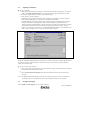
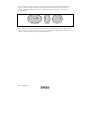
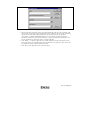
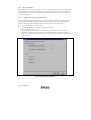
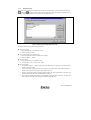
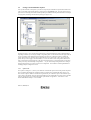
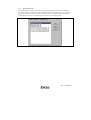
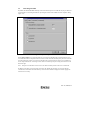
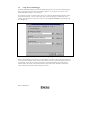
By default, the Hitachi Embedded Workshop will execute all of the phases in a build and only stop if a fatal error
is encountered. You can change this behavior by setting the controls on the “Build” tab of the “Options” dialog
(figure 3.18).
Figure 3.18: Options Dialog Build Tab
Select [Tools->Options…] to invoke the dialog. If you want to stop the build when a certain number of errors
are exceeded then set the “Stop build if the no. of errors exceed” check box and then specify the error count limit
in the edit field to the right. If you want to stop the build when a certain number of warnings are exceeded then
set the “Stop build if the no. of warnings exceed” check box and then specify the warning count limit in the edit
field to the right.
Note: Irrespective of what these controls are set to, the build will always halt if a fatal error is encountered.
In addition to specifying error and warning count limits, the “Build” tab also allows you to request that the
command line, environment and initial directory of each execution should be displayed. Check the appropriate
check boxes as necessary.
Rev. 2.0, 03/06/02, 53