1
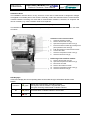
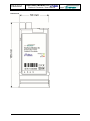
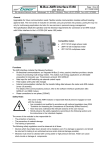
Page 2 from 12 E130005815092 Interface Module XC Protocol Converter / User Manual Bär Industrie-Elektronik GmbH Rathsbergstr. 23 D-90411 Nürnberg Phone +49 911 970590 Fax +49 911 9705950 Installation Hints The installation must be done in a way, that even in the case of cable break no dangerous voltages are applied to touchable parts of the module. Generally, meters are delivered with the communication modules installed. The fitting of a meter with a communication module is, therefore, an exception and can be necessary e.g. when a module needs to be replaced. Strictly observe the safety regulations! The interface module is exchangeable during the meter operation. Fit the interface module in the meter as follows: Installation of the interface module: 1. Check the interface module. 2. Remove the terminal cover [5]. 3. Open the transparent module cover [1]. 4. Insert the interface module [3] carefully at the place provided in the meter [2]. 5. Push the module in to the internal contacts. 6. Connect the cable. 7. Close the transparent module cover [1]. 8. Close the terminal cover [5]. Removing of the interface module: 9. 10. 11. 12. 13. 14. Remove the terminal cover [5]. Open the transparent module cover [1]. Disconnect the cable. Remove the interface module. Close the transparent module cover [1]. Close the terminal cover [5]. LED Displays Three LED’s display the current operating status of the module and give information about the data transfer. Power/Tx green Status and communication via M-Bus interface: LED signals, that the module is supplied with power LED goes off during transmit data via M-Bus interface Rx yellow Communication via M-Bus interface: receive data red Communication error (internal meter interface) Error