1
Artisan Technology Group is your source for quality
new and certified-used/pre-owned equipment
• FAST SHIPPING AND
DELIVERY
• TENS OF THOUSANDS OF
IN-STOCK ITEMS
• EQUIPMENT DEMOS
• HUNDREDS OF
MANUFACTURERS
SUPPORTED
• LEASING/MONTHLY
RENTALS
• ITAR CERTIFIED
SECURE ASSET SOLUTIONS
SERVICE CENTER REPAIRS
Experienced engineers and technicians on staff
at our full-service, in-house repair center
WE BUY USED EQUIPMENT
Sell your excess, underutilized, and idle used equipment
We also offer credit for buy-backs and trade-ins
www.artisantg.com/WeBuyEquipment
InstraView REMOTE INSPECTION
LOOKING FOR MORE INFORMATION?
Visit us on the web at www.artisantg.com for more
information on price quotations, drivers, technical
specifications, manuals, and documentation
SM
Remotely inspect equipment before purchasing with
our interactive website at www.instraview.com
Contact us: (888) 88-SOURCE | [email protected] | www.artisantg.com
Racal Instruments™
3152B
VXIbus Arbitrary Waveform Generator
User Manual
Also including the 3151B,
3100M, and 3100R
Publication No. 980935 Rev. A
EADS North America Test and Services
a division of EADS North America, Inc.
4 Goodyear, Irvine, CA 92618
Tel: (800) 722-2528, (949) 859-8999; Fax: (949) 859-7139
[email protected]
[email protected]
[email protected]
http://www.eads-nadefense.com
PUBLICATION DATE: 1/22/2009
Copyright 2009 by EADS North America Test and Services, a division of EADS North America, Inc. Printed in the United
States of America. All rights reserved. This book or parts thereof may not be reproduced in any form without written
permission of the publisher.
Artisan Technology Group - Quality Instrumentation ... Guaranteed | (888) 88-SOURCE | www.artisantg.com
THANK YOU FOR PURCHASING THIS
EADS NORTH AMERICA TEST AND SERVICES PRODUCT
For this product, or any other EADS North America Test and Services a division of EADS North America, Inc.
(“EADS North America Test and Services”) product that incorporates software drivers, you may access our
web site to verify and/or download the latest driver versions. The web address for driver downloads is:
http://www.eads-nadefense.com/downloads
If you have any questions about software driver downloads or our privacy policy, please contact us at:
[email protected]
WARRANTY STATEMENT
All EADS North America Test and Services products are designed and manufactured to exacting standards
and in full conformance to EADS ISO 9001:2000 processes.
This warranty does not apply to defects resulting from any modification(s) of any product or part without
EADS North America Test and Services express written consent, or misuse of any product or part. The
warranty also does not apply to fuses, software, non-rechargeable batteries, damage from battery leakage, or
problems arising from normal wear, such as mechanical relay life, or failure to follow instructions.
This warranty is in lieu of all other warranties, expressed or implied, including any implied warranty of
merchantability or fitness for a particular use. The remedies provided herein are buyer’s sole and exclusive
remedies.
For the specific terms of your standard warranty, or optional extended warranty or service agreement, contact
your EADS North America Test and Services customer service advisor. Please have the following
information available to facilitate service.
1. Product serial number
2. Product model number
3. Your company and contact information
You may contact your customer service advisor by:
E-Mail:
[email protected]
Telephone:
+1 800 722 3262
(USA)
Fax:
+1 949 859 7309
(USA)
Artisan Technology Group - Quality Instrumentation ... Guaranteed | (888) 88-SOURCE | www.artisantg.com
RETURN of PRODUCT
Authorization is required from EADS North America Test and Services before you send us your product for
service or calibration. Call or contact the Customer Support Department at 1-800-722-3262 or 1-949-8598999 or via fax at 1-949-859-7139. We can be reached at: [email protected].
PROPRIETARY NOTICE
This document and the technical data herein disclosed, are proprietary to EADS North America Test and
Services, and shall not, without express written permission of EADS North America Test and Services, be
used, in whole or in part to solicit quotations from a competitive source or used for manufacture by anyone
other than EADS North America Test and Services. The information herein has been developed at private
expense, and may only be used for operation and maintenance reference purposes or for purposes of
engineering evaluation and incorporation into technical specifications and other documents which specify
procurement of products from EADS North America Test and Services.
DISCLAIMER
Buyer acknowledges and agrees that it is responsible for the operation of the goods purchased and should
ensure that they are used properly and in accordance with this handbook and any other instructions provided
by Seller. EADS North America Test and Services products are not specifically designed, manufactured or
intended to be used as parts, assemblies or components in planning, construction, maintenance or operation
of a nuclear facility, or in life support or safety critical applications in which the failure of the EADS North
America Test and Services product could create a situation where personal injury or death could occur.
Should Buyer purchase EADS North America Test and Services product for such unintended application,
Buyer shall indemnify and hold EADS North America Test and Services, its officers, employees, subsidiaries,
affiliates and distributors harmless against all claims arising out of a claim for personal injury or death
associated with such unintended use.
Artisan Technology Group - Quality Instrumentation ... Guaranteed | (888) 88-SOURCE | www.artisantg.com
FOR YOUR SAFETY
Before undertaking any troubleshooting, maintenance or exploratory procedure, read carefully the
WARNINGS and CAUTION notices.
This equipment contains voltage hazardous to
human life and safety, and is capable of
inflicting personal injury.
If this instrument is to be powered from the AC line (mains) through an
autotransformer, ensure the common connector is connected to the neutral (earth
pole) of the power supply.
Before operating the unit, ensure the conductor (green wire) is connected to the
ground (earth) conductor of the power outlet. Do not use a two-conductor extension
cord or a three-prong/two-prong adapter. This will defeat the protective feature of the
third conductor in the power cord.
Maintenance and calibration procedures sometimes call for operation of the unit with
power applied and protective covers removed. Read the procedures and heed
warnings to avoid “live” circuit points.
Before operating this instrument:
1. Ensure the proper fuse is in place for the power source to operate.
2. Ensure all other devices connected to or in proximity to this instrument are properly grounded or
connected to the protective third-wire earth ground.
If the instrument:
-
fails to operate satisfactorily
shows visible damage
has been stored under unfavorable conditions
has sustained stress
Do not operate until performance is checked by qualified personnel.
Artisan Technology Group - Quality Instrumentation ... Guaranteed | (888) 88-SOURCE | www.artisantg.com
Artisan Technology Group - Quality Instrumentation ... Guaranteed | (888) 88-SOURCE | www.artisantg.com
EADS North America Test and Services
CE Declaration of Conformity
We
EADS North America Test and Services
4 Goodyear St.
Irvine, CA 92618
declare under sole responsibility that the
3152B Arbitrary Waveform Generator
PIN 408151-xxx, 408166-xxx,
4081 79-xxx, 408180-rn
conforms to the following Product Specifications:
EN6I000-6-3 :EN55022 Class B
EN6I000-6-1 :lmmunity tests (Am2)
EMC:
EN 61010-1
Safety:
:2007
:2007
Supplementary Information:
The above specifications are met when the product is installed in an EADS North
America Test and Services certified enclosure, with faceplates installed over all
unused slots, as applicable.
The product herewith complies with the requirements of EN61000-6-3: 2007 and
EN61000-6-1 :2007 (EN55024).
Irvine, CA, Janua 22, 2009
David Joh
n, Engine,’g Manager
This page was intentionally left blank.
Artisan Technology Group - Quality Instrumentation ... Guaranteed | (888) 88-SOURCE | www.artisantg.com
Publication No. 980935 Rev. A
3152B User Manual
Table of Contents
Chapter 1 Introduction.................................................................................................. 1-1
What’s in This Manual ................................................................................................................. 1-1
What’s in This Chapter ................................................................................................................ 1-2
Conventions Used in this Manual ................................................................................................ 1-2
Introduction.................................................................................................................................. 1-2
3152B Feature Highlights ............................................................................................................ 1-3
ArbConnection Feature Highlights .............................................................................................. 1-4
General Description..................................................................................................................... 1-6
Output Waveforms................................................................................................................... 1-6
Run Modes .............................................................................................................................. 1-7
Frequency Control and Accuracy ............................................................................................ 1-7
Phase-Lock Loop (PLL) ........................................................................................................... 1-7
Signal Integrity ......................................................................................................................... 1-8
Frequency Agility ..................................................................................................................... 1-8
Amplitude................................................................................................................................. 1-8
Remote Control........................................................................................................................ 1-8
Carrier Configuration (Different Model Numbers)........................................................................ 1-9
Specifications ............................................................................................................................ 1-10
Safety Considerations ............................................................................................................... 1-11
Options ...................................................................................................................................... 1-12
Supplied Accessories ................................................................................................................ 1-12
Front Panel Connectors ............................................................................................................ 1-12
OUTPUT (OUT) ..................................................................................................................... 1-13
SYNC OUT (SYNC) ............................................................................................................... 1-13
TRIG/PLL IN (TRG/PLL) ........................................................................................................ 1-13
EXT SCLK ............................................................................................................................. 1-14
EXT 10MHz ........................................................................................................................... 1-14
Output Waveforms..................................................................................................................... 1-14
Standard (FIXED) Waveforms ............................................................................................... 1-14
Arbitrary (User) Waveforms ................................................................................................... 1-15
Sequenced Waveforms ......................................................................................................... 1-15
Modulated Waveforms........................................................................................................... 1-17
Sweep ................................................................................................................................ 1-17
FM ...................................................................................................................................... 1-17
AM...................................................................................................................................... 1-18
Frequency Hopping............................................................................................................ 1-18
Amplitude Hopping............................................................................................................. 1-18
FSK .................................................................................................................................... 1-18
PSK .................................................................................................................................... 1-18
ASK .................................................................................................................................... 1-18
3D....................................................................................................................................... 1-19
EADS North America Test and Services
Artisan Technology Group - Quality Instrumentation ... Guaranteed | (888) 88-SOURCE | www.artisantg.com
i
3152B User Manual
Publication No. 980935 Rev. A
Digital Pulse Waveforms.........................................................................................................1-19
Half Cycle Waveforms ............................................................................................................1-19
Counter/Timer ............................................................................................................................1-19
General Run Modes ...................................................................................................................1-19
Continuous Mode ...................................................................................................................1-20
Triggered Mode ......................................................................................................................1-20
Gated Mode ............................................................................................................................1-20
Burst Mode .............................................................................................................................1-20
Trigger Sources..........................................................................................................................1-20
Modulation Run Modes ..............................................................................................................1-21
Synchronization of Multiple 3152B Modules ..............................................................................1-21
PLL Synchronization ..................................................................................................................1-21
Phase Modulation ...................................................................................................................1-22
Filters..........................................................................................................................................1-22
Output State ...............................................................................................................................1-22
Programming the 3152B ............................................................................................................1-23
Chapter 2 Installation ....................................................................................................2-1
Preparation for Use ......................................................................................................................2-1
Logical Address Selection ............................................................................................................2-1
Installation ....................................................................................................................................2-1
Controlling the Instrument from Remote ......................................................................................2-2
Installing Software Utilities ...........................................................................................................2-2
Connecting to a LAN Network ......................................................................................................2-2
LAN Configuration ....................................................................................................................2-3
Choosing a Static IP Address ...............................................................................................2-4
Connecting to the USB Port .........................................................................................................2-5
Chapter 3 Operation ......................................................................................................3-1
Overview ......................................................................................................................................3-1
Legacy to Modern Mode...............................................................................................................3-1
Output Termination.......................................................................................................................3-2
Input/Output Protection ................................................................................................................3-2
Power On/Reset Defaults.............................................................................................................3-2
Turning the Output On..................................................................................................................3-3
Turning the SYNC Output On.......................................................................................................3-3
Selecting the SYNC Source......................................................................................................3-3
Changing the SYNC Position and Width ..................................................................................3-4
Example: Generating a Simple Waveform ...................................................................................3-5
Amplitude-Offset Interaction.........................................................................................................3-5
Selecting an Output Function .......................................................................................................3-6
Selecting a Run Mode ..................................................................................................................3-6
Continuous Run Mode ..............................................................................................................3-7
Triggered Run Mode.................................................................................................................3-7
ii
EADS North America Test and Services
Artisan Technology Group - Quality Instrumentation ... Guaranteed | (888) 88-SOURCE | www.artisantg.com
Publication No. 980935 Rev. A
3152B User Manual
Re-Triggered Run Mode .......................................................................................................... 3-8
Gated Run Mode ..................................................................................................................... 3-8
Burst Run Mode....................................................................................................................... 3-9
Selecting the Trigger Source..................................................................................................... 3-10
Selecting the Trigger Level........................................................................................................ 3-11
Selecting the Trigger Slope ....................................................................................................... 3-11
Using Trigger Delay................................................................................................................... 3-12
Activating the Backplane TTLTrg Lines..................................................................................... 3-12
Example: Generating Standard Waveforms .............................................................................. 3-13
Using the Apply Command .................................................................................................... 3-13
Generating Standard Waveforms .............................................................................................. 3-14
Standard Waveform Parameters ........................................................................................... 3-16
Using the Apply Command .................................................................................................... 3-16
Generating Arbitrary Waveforms ............................................................................................... 3-17
What Are Arbitrary Waveforms? ............................................................................................ 3-18
Managing Arbitrary Waveform Memory ................................................................................ 3-18
Memory Management Commands......................................................................................... 3-19
Loading Arbitrary Waveforms ................................................................................................ 3-20
Selecting 12-bit or 16-bit Waveform Resolution .................................................................... 3-22
Selecting Code Compatibility with the Legacy 3152A ........................................................... 3-22
Changing the Sample Clock Frequency ................................................................................ 3-23
Using the External Sample Clock Input ................................................................................. 3-24
Generating Sequenced Waveforms .......................................................................................... 3-25
Sequence Commands ........................................................................................................... 3-26
Controlling the Sequence Advance Modes............................................................................ 3-28
Generating................................................................................................................................. 3-29
Modulated.................................................................................................................................. 3-29
Waveforms ................................................................................................................................ 3-29
Modulation Parameters.......................................................................................................... 3-30
Controlling the Carrier Frequency.......................................................................................... 3-31
Controlling the Carrier Base Line ....................................................................................... 3-31
Using the Digital Pulse Generator ......................................................................................... 3-31
Pulse Design Limitations.................................................................................................... 3-33
Generating Half Cycle Waveforms ............................................................................................ 3-33
Using the Counter/Timer........................................................................................................ 3-34
Counter/Timer Limitations .................................................................................................. 3-35
Chapter 4 ArbConnection............................................................................................. 4-1
What’s in This Chapter? .............................................................................................................. 4-1
What Is ArbConnection? ............................................................................................................. 4-1
System Requirements ................................................................................................................. 4-1
Installing ArbConnection ............................................................................................................. 4-1
Startup & Communication Options .............................................................................................. 4-2
ArbConnection Features ............................................................................................................. 4-2
EADS North America Test and Services
Artisan Technology Group - Quality Instrumentation ... Guaranteed | (888) 88-SOURCE | www.artisantg.com
iii
3152B User Manual
Publication No. 980935 Rev. A
Main Window................................................................................................................................4-3
Control Panels..............................................................................................................................4-3
The Operation Panels...............................................................................................................4-5
Output ...................................................................................................................................4-6
Run Mode..............................................................................................................................4-8
Standard ...............................................................................................................................4-9
Arbitrary/Sequence .............................................................................................................4-11
Using the Memory Partition Table.......................................................................................4-13
Using Waveform Studio ......................................................................................................4-15
Half Cycle............................................................................................................................4-19
The Modulation Panels ...........................................................................................................4-19
FM .......................................................................................................................................4-20
AM.......................................................................................................................................4-22
Sweep .................................................................................................................................4-23
FSK/PSK/ASK.....................................................................................................................4-24
Ampl/Freq Hop ....................................................................................................................4-27
Auxiliary Panels ......................................................................................................................4-29
Counter/Timer .....................................................................................................................4-29
Pulse Generator ..................................................................................................................4-30
X-Instrument Sync...............................................................................................................4-31
The System Panels.................................................................................................................4-36
General/Filters ....................................................................................................................4-36
Calibration ...........................................................................................................................4-38
The Composers Panels..............................................................................................................4-38
The Wave Composer..............................................................................................................4-39
The Wave Composer Menu Bar..........................................................................................4-39
File Menu ............................................................................................................................4-40
Edit Menu ............................................................................................................................4-41
View Commands .................................................................................................................4-42
Wave Menu .........................................................................................................................4-43
The Toolbar ............................................................................................................................4-45
The Waveform Screen............................................................................................................4-45
Generating Waveforms Using Equation Editor ...................................................................4-47
Writing Equations ................................................................................................................4-49
Equation Conventions .........................................................................................................4-49
Typing Equations ................................................................................................................4-50
Equation Examples .............................................................................................................4-51
Combining Waveforms........................................................................................................4-55
The Pulse Composer ..............................................................................................................4-57
The Pulse Composer Menu bar ..........................................................................................4-57
File Menu ............................................................................................................................4-57
Edit Menu ............................................................................................................................4-59
View Menu ..........................................................................................................................4-59
Tools Menu .........................................................................................................................4-61
The Pulse Composer Toolbar .............................................................................................4-61
iv
EADS North America Test and Services
Artisan Technology Group - Quality Instrumentation ... Guaranteed | (888) 88-SOURCE | www.artisantg.com
Publication No. 980935 Rev. A
3152B User Manual
Creating Pulses.................................................................................................................. 4-61
Setting the Pulse Editor Options ........................................................................................ 4-63
Using the Pulse Editor........................................................................................................ 4-64
Pulse Example, Section 1 .................................................................................................. 4-67
Pulse Example, Section 2 .................................................................................................. 4-68
Pulse Example, Section 3 .................................................................................................. 4-69
Pulse Example, Section 4 .................................................................................................. 4-70
Pulse Example, Section 5 .................................................................................................. 4-70
Downloading the Pulse Train ............................................................................................. 4-71
Interpreting the Download Summary.................................................................................. 4-72
The FM Composer................................................................................................................. 4-73
The Menu Bar .................................................................................................................... 4-73
File Menu ........................................................................................................................... 4-74
Wave Commands............................................................................................................... 4-74
The 3D Composer ................................................................................................................. 4-76
Shared Horizontal Controls ................................................................................................ 4-77
Vertical Controls................................................................................................................. 4-79
Graphical Screens.............................................................................................................. 4-80
Designing 3D profiles ......................................................................................................... 4-81
The Command Editor ................................................................................................................ 4-83
Logging SCPI Commands ......................................................................................................... 4-83
Chapter 5 Programming Reference ............................................................................. 5-1
What’s in This Chapter ................................................................................................................ 5-1
Introduction to SCPI .................................................................................................................... 5-1
Command Format.................................................................................................................... 5-2
Command Separator ............................................................................................................... 5-2
The MIN and MAX Parameters................................................................................................ 5-2
Querying Parameter Setting .................................................................................................... 5-3
Query Response Format ......................................................................................................... 5-3
SCPI Command Terminator .................................................................................................... 5-3
IEEE-STD-488.2 Common Commands ................................................................................... 5-3
SCPI Parameter Type.............................................................................................................. 5-3
Numeric Parameters ............................................................................................................ 5-3
Discrete Parameters ............................................................................................................ 5-4
Boolean Parameters ............................................................................................................ 5-4
Arbitrary Block Parameters .................................................................................................. 5-4
Binary Block Parameters...................................................................................................... 5-4
SCPI Syntax and Styles .............................................................................................................. 5-4
Alternative Command Set (HS Commands)............................................................................... 5-5
Invoking HS Command Mode .................................................................................................. 5-5
Rules for Using HS Command Mode....................................................................................... 5-6
Legacy vs. Modern Command Set .......................................................................................... 5-7
3152B Legacy Commands .......................................................................................................... 5-8
EADS North America Test and Services
Artisan Technology Group - Quality Instrumentation ... Guaranteed | (888) 88-SOURCE | www.artisantg.com
v
3152B User Manual
Publication No. 980935 Rev. A
3100R/M-3152B Commands......................................................................................................5-13
Instrument & Output Control Commands ...................................................................................5-23
Run Mode Commands ...............................................................................................................5-37
Standard Waveform Control Commands ...................................................................................5-43
Arbitrary Waveforms Control Commands...................................................................................5-50
The Apply Control Commands ...................................................................................................5-58
Using the Apply Commands.......................................................................................................5-58
Sequenced Waveforms Control Commands ..............................................................................5-65
Modulated Waveform Global Control Commands ......................................................................5-71
Modulation Control Commands ..............................................................................................5-73
AM Programming....................................................................................................................5-75
FM Modulation Programming..............................................................................................5-76
Sweep Programming ..............................................................................................................5-79
FSK Modulation Programming................................................................................................5-82
ASK Modulation Programming ...............................................................................................5-84
PSK Modulation Programming ...............................................................................................5-86
Frequency Hopping Modulation Programming .......................................................................5-88
Amplitude Hopping Modulation Programming ........................................................................5-90
3D Modulation Programming ..................................................................................................5-92
Digital Pulse Programming .....................................................................................................5-93
Half Cycle Control Commands ...............................................................................................5-98
Counter Control Commands.....................................................................................................5-100
Synchronization Commands.................................................................................................5-103
LXI System Configuration Commands..................................................................................5-107
System Commands ..............................................................................................................5-110
IEEE-STD-488.2 Common Commands and Queries ...............................................................5-113
The SCPI Status Registers...................................................................................................5-116
The Status Byte Register (STB) ...........................................................................................5-116
Reading the Status Byte Register ....................................................................................5-117
Clearing the Status Byte Register ....................................................................................5-117
Service Request Enable Register (SRE) .........................................................................5-117
Standard Event Status Register (ESR) .............................................................................5-120
Standard Event Status Enable Register (ESE) .................................................................5-121
Error Messages ........................................................................................................................5-121
Chapter 6 Performance Checks ...................................................................................6-1
What’s in This Chapter .................................................................................................................6-1
Performance Checks....................................................................................................................6-1
Environmental Conditions ............................................................................................................6-2
Warm-up Period........................................................................................................................6-2
Initial Instrument Setting ...........................................................................................................6-2
Recommended Test Equipment...................................................................................................6-2
Test Procedures ...........................................................................................................................6-2
Initial Instrument Setting ...........................................................................................................6-3
vi
EADS North America Test and Services
Artisan Technology Group - Quality Instrumentation ... Guaranteed | (888) 88-SOURCE | www.artisantg.com
Publication No. 980935 Rev. A
3152B User Manual
Frequency Accuracy ................................................................................................................ 6-3
Frequency Accuracy, Internal Reference............................................................................. 6-3
Frequency Accuracy, External 10MHz Reference ............................................................... 6-4
Amplitude Accuracy ................................................................................................................. 6-4
Amplitude Accuracy, DAC Output ........................................................................................ 6-4
Amplitude Accuracy, DDS Output ........................................................................................ 6-5
Offset Accuracy ....................................................................................................................... 6-5
Offset Accuracy, DAC Output .............................................................................................. 6-5
Offset Accuracy, DDS Output .............................................................................................. 6-6
Square Wave Characteristics .................................................................................................. 6-7
Square Wave Checks .......................................................................................................... 6-7
Sine Wave Characteristics....................................................................................................... 6-8
Sine Wave Distortion, DAC Output ...................................................................................... 6-8
Sine Wave Spectral Purity, DAC Output .............................................................................. 6-8
Sine Wave Spectral Purity, DDS Output .............................................................................. 6-9
Sine Wave Flatness, DAC Output...................................................................................... 6-10
Sine Wave Flatness, DDS Output...................................................................................... 6-11
Trigger Operational Characteristics ....................................................................................... 6-12
Trigger, Gate, and Burst Characteristics............................................................................ 6-12
Delayed Trigger Characteristics......................................................................................... 6-13
Re-trigger Characteristics .................................................................................................. 6-13
Trigger Slope...................................................................................................................... 6-14
Trigger Level ...................................................................................................................... 6-15
Backplane Trigger Source.................................................................................................. 6-15
Sequence operation............................................................................................................... 6-16
Automatic Advance ............................................................................................................ 6-16
Step Advance..................................................................................................................... 6-17
Single Advance .................................................................................................................. 6-18
SYNC Output Operation ........................................................................................................ 6-19
SYNC Output - Bit .............................................................................................................. 6-19
SYNC Output - LCOM ........................................................................................................ 6-19
SYNC Output - HCL ........................................................................................................... 6-20
SYNC Output - Pulse ......................................................................................................... 6-20
SYNC Output – Zero .......................................................................................................... 6-21
PLL Operation........................................................................................................................ 6-21
PLL Checks – Frequency Lock .......................................................................................... 6-21
PLL Checks – Phase Offset ............................................................................................... 6-22
PM Operation......................................................................................................................... 6-23
PM Checks......................................................................................................................... 6-23
Arbitrary Waveform Memory Operation ................................................................................. 6-24
Waveform Memory ............................................................................................................. 6-24
Modulated Waveform Operation............................................................................................ 6-24
FM - Standard Waveforms ................................................................................................. 6-25
Triggered FM - Standard Waveforms................................................................................. 6-25
FM Burst - Standard Waveforms........................................................................................ 6-26
EADS North America Test and Services
Artisan Technology Group - Quality Instrumentation ... Guaranteed | (888) 88-SOURCE | www.artisantg.com
vii
3152B User Manual
Publication No. 980935 Rev. A
Gated FM - Standard Waveforms .......................................................................................6-27
Re-triggered FM Bursts - Standard Waveforms..................................................................6-28
FM - Arbitrary Waveforms ...................................................................................................6-29
AM.......................................................................................................................................6-29
FSK .....................................................................................................................................6-30
PSK .....................................................................................................................................6-31
ASK .....................................................................................................................................6-31
Variable Dwell Time Frequency Hopping............................................................................6-32
Fix Dwell Time Frequency Hopping ....................................................................................6-33
Amplitude Hopping..............................................................................................................6-33
Sweep .................................................................................................................................6-34
Auxiliary Counter/Timer Operation .........................................................................................6-35
Frequency ...........................................................................................................................6-36
Period, Period Averaged .....................................................................................................6-36
Pulse Width .........................................................................................................................6-37
Totalize, Infinite...................................................................................................................6-37
Chapter 7 Adjustments and Firmware Update ............................................................7-1
What’s in This Chapter .................................................................................................................7-1
Performance Checks....................................................................................................................7-1
Environmental Conditions ............................................................................................................7-2
Warm-up Period........................................................................................................................7-2
Recommended Test Equipment...................................................................................................7-2
Adjustment Procedures ................................................................................................................7-3
VCO Adjustments.........................................................................................................................7-5
(Setup 1) ...................................................................................................................................7-5
(Setup 2) ...................................................................................................................................7-5
(Setup 3) ...................................................................................................................................7-6
(Setup 4) ...................................................................................................................................7-6
(Setup 5) ...................................................................................................................................7-6
(Setup 6) ...................................................................................................................................7-7
(Setup 7) ...................................................................................................................................7-7
(Setup 8) ...................................................................................................................................7-7
PLL Adjustments ..........................................................................................................................7-8
Setup 9 .....................................................................................................................................7-8
Setup 10 ...................................................................................................................................7-8
Setup 11 ...................................................................................................................................7-9
Oscillator Adjustments..................................................................................................................7-9
(Setup 50MHz)........................................................................................................................7-10
Setup TCXO ...........................................................................................................................7-10
Base Line Offset Adjustments ....................................................................................................7-11
Setup 12 .................................................................................................................................7-11
Setup 13 .................................................................................................................................7-11
Setup 14 .................................................................................................................................7-11
Setup 15 .................................................................................................................................7-12
viii
EADS North America Test and Services
Artisan Technology Group - Quality Instrumentation ... Guaranteed | (888) 88-SOURCE | www.artisantg.com
Publication No. 980935 Rev. A
3152B User Manual
Setup 16 ................................................................................................................................ 7-12
Setup 17 ................................................................................................................................ 7-13
Offset Adjustments .................................................................................................................... 7-13
Setup 18 ................................................................................................................................ 7-13
Setup 19 ................................................................................................................................ 7-13
Setup 20 ................................................................................................................................ 7-14
Setup 21 ................................................................................................................................ 7-14
Setup 22 ................................................................................................................................ 7-14
Setup 23 ................................................................................................................................ 7-15
Setup 24 ................................................................................................................................ 7-15
Setup 25 ................................................................................................................................ 7-15
Setup 26 ................................................................................................................................ 7-16
Setup 27 ................................................................................................................................ 7-16
Amplitude Adjustments.............................................................................................................. 7-17
Setup 28 ................................................................................................................................ 7-17
Setup 29 ................................................................................................................................ 7-17
Setup 30 ................................................................................................................................ 7-18
Setup 31 ................................................................................................................................ 7-18
Setup 32 ................................................................................................................................ 7-18
Setup 33 ................................................................................................................................ 7-19
Setup 34 ................................................................................................................................ 7-19
Setup 35 ................................................................................................................................ 7-19
Setup 36 ................................................................................................................................ 7-20
Setup 37 ................................................................................................................................ 7-20
Setup 38 ................................................................................................................................ 7-21
Setup 39 ................................................................................................................................ 7-21
Setup 40 ................................................................................................................................ 7-21
Setup 41 ................................................................................................................................ 7-22
Amplitude Adjustments (Modulation)......................................................................................... 7-23
Setup 42 ................................................................................................................................ 7-23
Setup 43 ................................................................................................................................ 7-23
Setup 44 ................................................................................................................................ 7-24
Setup 45 ................................................................................................................................ 7-24
Setup 46 ................................................................................................................................ 7-24
Setup 47 ................................................................................................................................ 7-25
Setup 48 ................................................................................................................................ 7-25
Setup 49 ................................................................................................................................ 7-26
Setup 50 ................................................................................................................................ 7-26
Setup 51 ................................................................................................................................ 7-26
Setup 52 ................................................................................................................................ 7-27
Setup 53 ................................................................................................................................ 7-27
Setup 54 ................................................................................................................................ 7-28
Setup 55 ................................................................................................................................ 7-28
Pulse Response Adjustments ................................................................................................... 7-29
(Setup 56) .............................................................................................................................. 7-29
EADS North America Test and Services
Artisan Technology Group - Quality Instrumentation ... Guaranteed | (888) 88-SOURCE | www.artisantg.com
ix
3152B User Manual
Publication No. 980935 Rev. A
(Setup 57) ...............................................................................................................................7-29
Updating the Firmware ...............................................................................................................7-30
Updating Registered-Based Firmware....................................................................................7-30
Updating Message-Based Firmware ......................................................................................7-32
Chapter 8 Product Support...........................................................................................8-1
Product Support ...........................................................................................................................8-1
Warranty.......................................................................................................................................8-1
Return of Product .........................................................................................................................8-1
Reshipment Instructions...............................................................................................................8-1
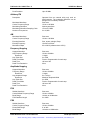
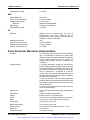
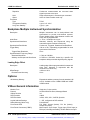
Appendix A 3152B Specifications ............................................................................... A-1
Outputs........................................................................................................................................ A-1
Main Output.......................................................................................................................... A-1
Square Wave, Pulse Performance....................................................................................... A-1
Sync Output ......................................................................................................................... A-1
Filters........................................................................................................................................... A-1
General Run Modes .................................................................................................................... A-2
Trigger Characteristics ................................................................................................................ A-2
Sources ................................................................................................................................ A-2
Frequency/Time Accuracy........................................................................................................... A-3
PLL Characteristics ..................................................................................................................... A-3
PM Characteristics ...................................................................................................................... A-3
Function Generator Characteristics............................................................................................. A-3
Sine ...................................................................................................................................... A-4
Sine Wave Performance ...................................................................................................... A-4
Triangle ................................................................................................................................ A-4
Square ................................................................................................................................. A-4
Pulse .................................................................................................................................... A-4
Ramp.................................................................................................................................... A-4
Gaussian Pulse .................................................................................................................... A-4
Sync Pulse ........................................................................................................................... A-4
Exponential Pulse ................................................................................................................ A-4
DC Output Function ............................................................................................................. A-4
Arbitrary Waveform Generator Characteristics ........................................................................... A-5
Sequenced Waveforms Generator Characteristics ..................................................................... A-5
Modulated Waveform Generator Characteristics ........................................................................ A-6
General ................................................................................................................................ A-6
Marker Output ...................................................................................................................... A-6
Sweep .................................................................................................................................. A-6
FM ........................................................................................................................................ A-6
Arbitrary FM ......................................................................................................................... A-7
AM........................................................................................................................................ A-7
Frequency Hopping.............................................................................................................. A-7
x
EADS North America Test and Services
Artisan Technology Group - Quality Instrumentation ... Guaranteed | (888) 88-SOURCE | www.artisantg.com
Publication No. 980935 Rev. A
3152B User Manual
Amplitude Hopping............................................................................................................... A-7
FSK ...................................................................................................................................... A-7
PSK ...................................................................................................................................... A-7
ASK ...................................................................................................................................... A-8
3D......................................................................................................................................... A-8
Pulse Generator Waveform Characteristics ................................................................................ A-8
Half-Cycle Waveform Generator Characteristics......................................................................... A-9
Counter/Timer Characteristics..................................................................................................... A-9
Frequency, Period Averaged ............................................................................................... A-9
Period, Pulse Width.............................................................................................................. A-9
Totalize................................................................................................................................. A-9
General ................................................................................................................................ A-9
Backplane Multiple Instrument Synchronization........................................................................ A-10
Leading Edge Offset .......................................................................................................... A-10
Options ...................................................................................................................................... A-10
VXlbus General Information ...................................................................................................... A-10
General...................................................................................................................................... A-11
Appendix B 3201A/3202A Module Specifications.......................................................B-1
Input Characteristics.................................................................................................................... B-1
Output Characteristics ................................................................................................................. B-1
General ................................................................................................................................ B-1
Square Wave Characteristics............................................................................................... B-1
Sine Wave Characteristics ................................................................................................... B-1
General........................................................................................................................................ B-2
Environmental ............................................................................................................................. B-2
EADS North America Test and Services
Artisan Technology Group - Quality Instrumentation ... Guaranteed | (888) 88-SOURCE | www.artisantg.com
xi
3152B User Manual
Publication No. 980935 Rev. A
This page was intentionally left blank.
xii
EADS North America Test and Services
Artisan Technology Group - Quality Instrumentation ... Guaranteed | (888) 88-SOURCE | www.artisantg.com
Publication No. 980935 Rev. A
3152B User Manual
List of Figures
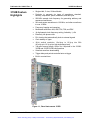
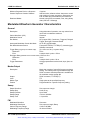
Figure 1-1, Racal Instruments 3152B ............................................................................................. 1-3
Figure 1-2, ArbConnection Control Panels ..................................................................................... 1-4
Figure 1-3, ArbConnection Wave Composer Example ................................................................... 1-5
Figure 1-4, ArbConnection Pulse Composer Example ................................................................... 1-5
Figure 1-5, ArbConnection Serial Data Composer Example .......................................................... 1-6
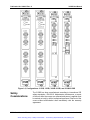
Figure 1-6, Configurations: 3151B, 3152B, 3100R-3152B, and 3100M-3152B............................ 1-11
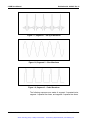
Figure 1-7, Segment 1 – Sine (x)/x Waveform.............................................................................. 1-16
Figure 1-8, Segment 2 – Sine Waveform...................................................................................... 1-16
Figure 1-9, Segment 3 – Pulse Waveform.................................................................................... 1-16
Figure 1-10, Sequenced Waveforms ............................................................................................ 1-17
Figure 2-1, Switch S1 (Set to Logical Address 2) ........................................................................... 2-1
Figure 3-1, ArbConnection Example of a Complex Waveform ..................................................... 3-19
Figure 3-2, Sequence Table Created in ArbConnection ............................................................... 3-26
Figure 4-1, Startup & Communication Options Dialog Box ............................................................. 4-2
Figure 4-2, ArbConnection Menu and Link Bar............................................................................... 4-3
Figure 4-3, Main Panels Toolbar..................................................................................................... 4-3
Figure 4-4, Operation Panel Selection............................................................................................ 4-5
Figure 4-5, Output Panel................................................................................................................. 4-6
Figure 4-6, Run Mode Control Panel .............................................................................................. 4-8
Figure 4-7, Standard Waveforms Panel........................................................................................ 4-10
Figure 4-8, Arbitrary & Sequence Panel ....................................................................................... 4-12
Figure 4-9, Memory Partition Table .............................................................................................. 4-14
Figure 4-10, Waveform Studio ...................................................................................................... 4-16
Figure 4-11, Sequence Table Example ........................................................................................ 4-17
Figure 4-12, Half Cycle Panel ....................................................................................................... 4-19
Figure 4-13, Modulation Panels .................................................................................................... 4-20
Figure 4-14, FM Panel .................................................................................................................. 4-21
Figure 4-15, AM Panel .................................................................................................................. 4-22
Figure 4-16, Sweep Modulation Panel.......................................................................................... 4-24
Figure 4-17, FSK/PSK/ASK Modulation Panel ............................................................................. 4-25
Figure 4-18, Amp/Freq Hop Panel ................................................................................................ 4-28
Figure 4-19, Auxiliary Panels ........................................................................................................ 4-29
Figure 4-20, Counter/Timer Panel ................................................................................................ 4-30
Figure 4-21, Digital Pulse Generator Panel .................................................................................. 4-31
Figure 4-22, X-Instrument Synchronization Pool List.................................................................... 4-32
Figure 4-23, Adjacent Synchronization between Two Instruments............................................... 4-34
Figure 4-24, LBUS Synchronization between Adjacent Slots ....................................................... 4-34
Figure 4-25, ECLT Synchronization Example............................................................................... 4-35
Figure 4-26, System Panels.......................................................................................................... 4-36
Figure 4-27, General/Filters Panel................................................................................................ 4-37
Figure 4-28, Calibration Panel ...................................................................................................... 4-38
Figure 4-29, Composers Panel ..................................................................................................... 4-39
Figure 4-30, Wave Composer Opening Screen............................................................................ 4-40
Figure 4-31, Open Waveform Dialog Box ..................................................................................... 4-41
Figure 4-32, Zooming In on Waveform Segments ........................................................................ 4-43
EADS North America Test and Services
Artisan Technology Group - Quality Instrumentation ... Guaranteed | (888) 88-SOURCE | www.artisantg.com
xiii
3152B User Manual
Publication No. 980935 Rev. A
Figure 4-33, Generating Distorted Sine Waves from the Built-in Library .......................................4-45
Figure 4-34, Toolbar Icons.............................................................................................................4-45
Figure 4-35, Waveform Screen......................................................................................................4-46
Figure 4-36, Equation Editor Dialog Box........................................................................................4-47
Figure 4-37, Equation Editor Example ...........................................................................................4-51
Figure 4-38, Using the Equation Editor to Modulate Sine Waveforms...........................................4-52
Figure 4-39, Using Equation Editor to Add Second Harmonic Distortion.......................................4-53
Figure 4-40, Using the Equation Editor to Generate Exponentially Decaying Sinewave...............4-54
Figure 4-41, Using Equation Editor to Build Amplitude Modulated Signal with Sidebands............4-55
Figure 4-42, Combining Waveforms into Equations ......................................................................4-56
Figure 4-43, Pulse Composer Screen............................................................................................4-58
Figure 4-44, Pulse Editor ...............................................................................................................4-60
Figure 4-45, Pulse Editor Options..................................................................................................4-60
Figure 4-46, Pulse Composer Toolbar...........................................................................................4-61
Figure 4-47, Complete Pulse Train Design....................................................................................4-62
Figure 4-48, Section 5 of the Pulse Train Design ..........................................................................4-62
Figure 4-49, Selecting Pulse Editor Options ..................................................................................4-63
Figure 4-50, Using the Pulse Editor ...............................................................................................4-65
Figure 4-51, Building Section 1 of the Pulse Example...................................................................4-67
Figure 4-52, Building Section 2 of the Pulse Example...................................................................4-68
Figure 4-53, Building Section 3 of the Pulse Example...................................................................4-69
Figure 4-54, Building Section 4 of the Pulse Example...................................................................4-70
Figure 4-55, Building Section 5 of the Pulse Example...................................................................4-71
Figure 4-56, Pulse Editor Download Summary..............................................................................4-72
Figure 4-57, FM Composer Opening Screen.................................................................................4-73
Figure 4-58, Generating Sine Modulation Using the FM Composer ..............................................4-75
Figure 4-59, 3D Composer Screen ................................................................................................4-77
Figure 4-60, Parameters Tab.........................................................................................................4-78
Figure 4-61, Expanded Parameters Options Dialog Box ...............................................................4-78
Figure 4-62, 3D Vertical Controls ..................................................................................................4-80
Figure 4-63, 3D Waveform Graphs................................................................................................4-81
Figure 4-64, 3D Chirp Design Example .........................................................................................4-82
Figure 4-65, Command Editor........................................................................................................4-83
Figure 4-66, Log File Example.......................................................................................................4-84
Figure 5-1, Definite Length Arbitrary Block Data Format ...............................................................5-53
Figure 5-2, 3152B 16-bit Waveform Data Point Representation....................................................5-54
Figure 5-3, 3152A 12-bit Waveform Data Point Representation....................................................5-54
Figure 5-4, Segment Address and Size Example ..........................................................................5-57
Figure 5-5, 64-bit Sequence Table Download Format ...................................................................5-67
Figure 5-7, The SCPI Status Model .............................................................................................5-119
Figure 7-1, Enter Password Dialog Box...........................................................................................7-3
Figure 7-2, Calibration Panel ...........................................................................................................7-4
Figure 7-3, Firmware Revision Screen ..........................................................................................7-31
Figure 7-4, Firmware Updater Opening Screen.............................................................................7-32
Figure 7-5, Browsing for a Resource .............................................................................................7-33
Figure 7-6, Ready to Click the Update Button ...............................................................................7-33
Figure 7-7, Download Process ......................................................................................................7-34
Figure 7-8, Successful Firmware Update ......................................................................................7-34
xiv
EADS North America Test and Services
Artisan Technology Group - Quality Instrumentation ... Guaranteed | (888) 88-SOURCE | www.artisantg.com
Publication No. 980935 Rev. A
3152B User Manual
List of Tables
Table 2-1, Valid and Invalid IP Addresses for Subnet Mask 255.255.255.0................................... 2-5
Table 5-1, 3152B SCPI Command Summary for 3152A Emulation................................................ 5-8
Table 5-2, 3152B SCPI Command Summary ............................................................................... 5-14
Table 5-3, Instrument & Output Control Commands Summary .................................................... 5-23
Table 5-4, Run Mode Commands ................................................................................................. 5-37
Table 5-5, Standard Waveforms Control Commands Summary................................................... 5-44
Table 5-6, Arbitrary Waveforms Commands Summary ................................................................ 5-51
Table 5-7, Apply Control Commands ............................................................................................ 5-59
Table 5-8, Sequence Control Commands..................................................................................... 5-66
Table 5-9, Modulated Waveforms Global Commands .................................................................. 5-71
Table 5-10, Modulated Waveform Control Commands................................................................. 5-73
Table 5-11, Digital Pulse Commands Summary ........................................................................... 5-94
Table 5-12, Half Cycle Commands Summary............................................................................... 5-98
Table 5-13, Counter Commands Summary ................................................................................ 5-100
Table 5-14, Synchronization Commands Summary.................................................................... 5-104
Table 5-15, System Commands Summary ................................................................................. 5-110
Table 5-16, Common Commands Summary............................................................................... 5-113
Table 6-1, Recommended Test Equipment .................................................................................... 6-2
Table 6-2, Frequency Accuracy ...................................................................................................... 6-3
Table 6-3, Frequency Accuracy Using External 10 MHz Reference............................................... 6-4
Table 6-4, Amplitude Accuracy, DAC output .................................................................................. 6-5
Table 6-5, Amplitude Accuracy, DDS output .................................................................................. 6-5
Table 6-6, Offset Accuracy, DAC Output – at 20 mV...................................................................... 6-6
Table 6-7, Offset Accuracy, DAC Output – at 6 V........................................................................... 6-6
Table 6-8, Offset Accuracy, DAC Output – at 1 V........................................................................... 6-6
Table 6-9, Offset Accuracy, DDS Output – at 6 V........................................................................... 6-7
Table 6-10, Offset Accuracy, DDS Output – at 1 V......................................................................... 6-7
Table 6-11, Square Wave Characteristics – at 6 V......................................................................... 6-8
Table 6-12, Sine Wave Distortion, DAC Output Tests .................................................................... 6-8
Table 6-13, Sine Wave Spectral Purity, DAC Output Test – at 5 V ................................................ 6-9
Table 6-14, Sine Wave Spectral Purity, DAC Output Test – at 10 V .............................................. 6-9
Table 6-15, Sine Wave Spectral Purity, DDS Output Tests – at 5 V ............................................ 6-10
Table 6-16, Sine Wave Spectral Purity, DDS Output Tests – at 10 V .......................................... 6-10
Table 6-17, Sine Wave Flatness, DAC Output Test – at 5 V ........................................................ 6-10
Table 6-18, Sine Wave Flatness, DAC Output Test – at 10 V ...................................................... 6-11
Table 6-19, Sine Wave Flatness Test, DDS Output – at 5 V ........................................................ 6-11
Table 6-20, Sine Wave Flatness Test, DDS Output – at 10 V ...................................................... 6-12
Table 6-21, Trigger, Gate, and Burst Characteristics ................................................................... 6-12
Table 6-22, Trigger Delay Tests ................................................................................................... 6-13
Table 6-23, Re-Trigger Delay Tests.............................................................................................. 6-14
Table 6-24, Trigger Source Tests ................................................................................................. 6-16
Table 6-25, PLL Tests – Frequency.............................................................................................. 6-22
Table 6-26, PLL Tests – Phase Offset.......................................................................................... 6-23
Table 6-27, PLL Tests – PM Phase Offset ................................................................................... 6-24
Table 6-28, Frequency Measurement Accuracy ........................................................................... 6-36
Table 6-29, Period Measurement Accuracy.................................................................................. 6-36
EADS North America Test and Services
Artisan Technology Group - Quality Instrumentation ... Guaranteed | (888) 88-SOURCE | www.artisantg.com
xv
3152B User Manual
Publication No. 980935 Rev. A
Table 6-30, Pulse Width Measurement Accuracy..........................................................................6-37
Table 7-1, Recommended Calibration for Adjustments ...................................................................7-2
xvi
EADS North America Test and Services
Artisan Technology Group - Quality Instrumentation ... Guaranteed | (888) 88-SOURCE | www.artisantg.com
Publication No. 980935 Rev. A
3152B User Manual
DOCUMENT CHANGE HISTORY
Revision
Date
Description of Change
A
1/22/09
Document Control Release
EADS North America Test and Services
Artisan Technology Group - Quality Instrumentation ... Guaranteed | (888) 88-SOURCE | www.artisantg.com
xvii
3152B User Manual
Publication No. 980935 Rev. A
This page was intentionally left blank.
xviii
EADS North America Test and Services
Artisan Technology Group - Quality Instrumentation ... Guaranteed | (888) 88-SOURCE | www.artisantg.com
Publication No. 980935 Rev. A
3152B User Manual
Chapter 1
Introduction
What’s in This
Manual
This manual contains information for operating and servicing the
Racal Instruments™ 3151B, 3152B, 3100M-3152B, and 3100R3152B VXIbus Arbitrary Waveform Generators. Generally, what is
applicable to the 3152B is the same for the other three models,
except where otherwise stated. Throughout this manual, we will
refer to all four units as the 3152B. When there are differences in
the specific models, the differences are described in detail.
More specific information on the four models is included in the
section, “Carrier Configuration (Different Model Numbers)” later in
this chapter.
Legacy mode information can be found in Chapters 3 and 5.
The manual is divided into functional chapters which guide you
through the various operations that are necessary to install and to
prepare the instrument for its intended operation. The following lists
the chapters that are included in this manual:
•
Chapter 1 provides general description of the instrument and
identifies key controls and features. It also describes briefly all
functions and features that are available for the user.
•
Chapter 2 describes hardware and software installation.
•
Chapter 3 provides descriptions of all functions, features, run
modes and operating modes. It also describes in detail how to
operate the instrument.
•
Chapter 4 demonstrates the capability of ArbConnection to
control the 3152B and to create and download waveforms and
control tables to the working memory.
•
Chapter 5 lists all of the commands that control the instrument.
It also has detailed descriptions of the limits and factory default
values of the programmable parameters.
•
Chapters 6 and 7 contain service information that allows you to
do performance tests and to calibrate the product.
Appendix A lists the 3152B product specifications.
•
•
Appendix B lists the specifications for the 3201A/3202A signal
amplifier modules which are optional and factory-installed.
EADS North America Test and Services
Introduction 1-1
Artisan Technology Group - Quality Instrumentation ... Guaranteed | (888) 88-SOURCE | www.artisantg.com
3152B User Manual
What’s in This
Chapter
Conventions
Used in this
Manual
Publication No. 980935 Rev. A
This chapter contains a general and functional description of the
Racal Instruments 3152B VXIbus Arbitrary Waveform Generator. It
also explains the front panel connectors, operational modes, and all
available features. However, some options available for the 3152B
may not be installed in your specific module. A complete listing of
the available options is included later in this chapter.
This manual uses the following conventions:
NOTE
A note contains information relating to the use of this product
CAUTION
A caution contains instructions to avoid damage to the instrument or the
equipment connected to it.
WARNING
A warning alerts you to a potential hazard. Failure to adhere to the
instructions in a warning could result in personal injury.
Introduction
The 3152B is a VXIbus Arbitrary Waveform Generator. It has a
single channel, and communicates using the VXI message-based
protocol. This high-performance waveform generator combines five
powerful instruments in a single C-size card:
•
Arbitrary Waveform Generator
•
Function Generator
•
Pulse Generator
•
Modulation Generator
•
Counter/Timer
The front panel has connectors and indicator lights, but no controls.
To control the 3152B, use instrument drivers or a soft front panel
from your computer.
Supplied with the 3152B is ArbConnection, a software application
that controls the 3152B. ArbConnection allows you to specify,
design, or edit waveforms and download them from your computer
to the 3152B.
The 3152B powers up in Legacy mode but easily converts between
Legacy and Modern modes. See Chapters 3 and 5 for more
information.
1-2 Introduction
EADS North America Test and Services
Artisan Technology Group - Quality Instrumentation ... Guaranteed | (888) 88-SOURCE | www.artisantg.com
Publication No. 980935 Rev. A
3152B Feature
Highlights
3152B User Manual
•
•
•
•
•
•
•
•
•
•
•
Single width, C-size, VXIbus Module
Provision to generate six types of waveforms: standard,
arbitrary, sequenced, pulse, modulated, and half-cycle
250 MS/s sample clock frequency for generating arbitrary and
sequenced waveforms
Sine and square waveforms to 100 MHz, and other waveforms
to over 10 MHz
Frequency hopping and sweeping
Modulated waveforms: AM, ASK, FM, FSK, and PSK
14-digit sample clock frequency setting, limited by 1 μS/s
Extremely low phase noise
PLL function that automatically locks to external signals
Clock stability of 1ppm
•
•
16-bit vertical resolution. 10 mVp-p to 16 Vp-p into 50Ω
(20 mVp-p to 16 Vp-p into high-impedance load)
1 M-point memory depth. Option for 4 M-points in the 3100M3152B and 3100R-3152B configurations
Ultra-fast waveform downloading
Trigger delay and period-controlled auto re-trigger
•
Built-in counter/timer
•
Figure 1-1, Racal Instruments 3152B
EADS North America Test and Services
Introduction 1-3
Artisan Technology Group - Quality Instrumentation ... Guaranteed | (888) 88-SOURCE | www.artisantg.com
3152B User Manual
ArbConnection
Feature
Highlights
Publication No. 980935 Rev. A
ArbConnection (provided with the 3152B) has the following features:
•
Virtual control panels
•
Arbitrary waveform composer
•
Complex pulse composer
•
Serial data and FM composers
•
Detailed virtual control panels for all functions and modes
•
Waveform, modulation, and pulse composers for designing,
editing, and downloading complex waveforms
•
Automatic detection of active instruments
•
Equation editor to generate waveforms from equations
•
SCPI command and response editor (simulates ATE operation)
•
Translation of waveform coordinates from ASCII and other file
formats
•
Simplified generation of complex waveform sequences
Figure 1-2, ArbConnection Control Panels
1-4 Introduction
EADS North America Test and Services
Artisan Technology Group - Quality Instrumentation ... Guaranteed | (888) 88-SOURCE | www.artisantg.com
Publication No. 980935 Rev. A
3152B User Manual
Figure 1-3, ArbConnection Wave Composer Example
Figure 1-4, ArbConnection Pulse Composer Example
EADS North America Test and Services
Introduction 1-5
Artisan Technology Group - Quality Instrumentation ... Guaranteed | (888) 88-SOURCE | www.artisantg.com
3152B User Manual
Publication No. 980935 Rev. A
Figure 1-5, ArbConnection Serial Data Composer Example
General
Description
Output
Waveforms
This section describes the 3152B general features and
performance, as well as output functions, run modes, and
functions.
The 3152B is a digital waveform generator that creates virtually any
type of waveform. Unlike conventional function and pulse
generators, the 3152B creates waveforms digitally and stores them
in memory. A clock generator then clocks the data from memory to
a digital to analog converter (DAC) to convert the digital data to an
output waveform. Since the waveform memory is volatile, its data is
lost when you turn off the instrument. However, you may create as
many waveforms as desired on the host computer, and quickly
download them to the 3152B memory as needed.
The memory size is large enough for most applications. However,
you may maximize the effective memory capacity by downloading
specific waveforms only when they are required. For example, if
one part of your ATE sequence requires a complex waveform that
consumes nearly all of the waveform memory, you may delete this
waveform after that portion of your sequence is completed, and
then quickly download a new waveform for the next part of the
sequence.
Depending upon your application, you may be able to change
waveform parameters even more quickly without downloading new
data. After you download a waveform, you may change the sample
clock frequency, amplitude, offset, and run modes without
disturbing the downloaded data.
The 3152B can divide its memory into smaller segments, and then
use these segments to create complex sequences of waveforms.
The 3152B can generate, and even measure, the following
functions:
1-6 Introduction
•
Standard waveforms. The 3152B computes these automatically
from its built-in equations for sine, square, triangle, and other
common waveforms.
•
Arbitrary waveforms. Download these to the instrument
EADS North America Test and Services
Artisan Technology Group - Quality Instrumentation ... Guaranteed | (888) 88-SOURCE | www.artisantg.com
Publication No. 980935 Rev. A
3152B User Manual
whenever you need to change from one arbitrary waveform to
another.
Run Modes
•
Waveform sequences. The 3152B builds sequenced waveforms
from memory segments that are loaded with the waveforms and
are referenced in the sequence table in advance.
•
Modulated signals. A direct digital synthesis (DDS) circuit
creates these signals without downloading a waveform.
•
Pulses. The ArbConnection controls for pulse waveforms have
the look and feel of a standard pulse generator. However, after
you use the controls to specify the pulse waveform, the 3152B
creates it digitally in the arbitrary waveform memory.
•
Half-cycle waveforms. Half-cycle waveforms are similar to
standard waveforms, but a programmed delay interval
separates the half cycles.
•
Phase-Lock Loop (PLL) mode. This special function allows
phase locking to an external signal regardless of the wave
shape and frequency of that signal. While locked to the external
signal, the 3152B can generate any of the above functions, with
the added control that is attributed to the external signal.
•
Counter/timer. The
measurements.
3152B
also
performs
counter/timer
The 3152B has two run modes that determine when it will output a
waveform. Continuous Run is the basic mode for generating a
waveform that does not stop. This mode is appropriate except
when the application requires synchronization to external events.
In Interrupted Run mode, the output is either triggered or gated by
external signals. The 3152B accepts a trigger event from the front
panel connector, a backplane trigger line, or a software command
from your computer.
The Run mode and triggering are discussed later in this chapter.
Frequency
Control and
Accuracy
Phase-Lock Loop
(PLL)
An internal reference determines the frequency accuracy of the
output waveform. The internal reference provides 1 PPM accuracy
and stability over time and temperature. For applications that
require better accuracy and stability, or just clock synchronization
to external devices, the 3152B can use the CLK10 VXIbus signal or
the front panel 10MHz REF IN signal (which is available only on the
3100M/R-3152B versions and on the 3151B).
By activating the Phase-Locked Loop (PLL) function, you may
generate any standard or arbitrary waveform while synchronizing
with an external signal, or even while tracking it as its frequency
changes. This feature is not available on the 3151B model.
EADS North America Test and Services
Introduction 1-7
Artisan Technology Group - Quality Instrumentation ... Guaranteed | (888) 88-SOURCE | www.artisantg.com
3152B User Manual
Signal Integrity
Publication No. 980935 Rev. A
As technology evolves and new devices are developed each day,
faster and more complex signals are needed to simulate and
stimulate these new devices. Using the latest technology, the
3152B has the highest bandwidth in its class, enabling it to
accurately duplicate and simulate high frequency test signals. With
its outstanding sample clock generator range, 16-bit vertical
resolution and its high output voltage amplifier that has an output
bandwidth of over 100 MHz, one can create mathematical profiles,
download the coordinates to the instrument and be assured that the
waveforms are generated without compromising signal fidelity or
system integrity.
The 3152B has two separate internal clock sources:
Frequency Agility
Amplitude
Remote Control
1-8 Introduction
•
Sample clock generator: The sample clock generator clocks the
standard, arbitrary, and sequenced waveforms
•
Direct digital synthesis (DDS) circuit: The DDS circuit generates
amplitude and frequency related modulation throughout the
entire amplitude and frequency ranges of the 3152B. This mode
is useful for wideband FM, sweep, FSK, PSK, ASK, AM, and
frequency hopping, as well as simultaneous sweeping of
frequency, amplitude, and phase (3D modulation).
The output level is programmable from 20 mVp-p to 32 Vp-p into an
open circuit, or 10 mVp-p to 16 Vp-p into a 50Ω load. A
programmable offset shifts the output in either the positive or
negative direction.
As with any other VXIbus instrument, the 3152B must be used with
a host computer. All of its functions, modes, and parameters are
fully programmable using one of the following three ways:
•
Low-level programming. Use SCPI commands to program each
individual parameter.
•
ArbConnection. Use the ArbConnection virtual front panel on
the computer screen, which simulates a mechanical front panel.
It has push-buttons, displays, and dials to simulate the look and
feel of a bench-top instrument.
•
Instrument drivers. Use a high-level driver, such as,
VXIplug&play, IVI or LabVIEW, with your own program to
control the 3152B.
EADS North America Test and Services
Artisan Technology Group - Quality Instrumentation ... Guaranteed | (888) 88-SOURCE | www.artisantg.com
Publication No. 980935 Rev. A
Carrier
Configuration
(Different Model
Numbers)
3152B User Manual
Carrier configuration specifies how the instrument is mechanically
constructed and the model number of the final instrument. Figure
1-6 shows the front panels of the various configurations. The
following are available:
•
3151B – Front panel compatible with the legacy 3151, 3151A
and 3151A+, this model is exactly the same as the 3152B, with
the following exceptions:
o
The Phase Modulation Input BNC is replaced by a 10
MHz Reference Input BNC.
The PLL ON LED is not installed
o
*idn? response with “3151B” in instrument field
o
•
3152B – Used to replace or add legacy 3152A-type instruments
to your system having to modify existing code. The 3152B is a
message-based product that is fully compatible with 3152A
legacy behavior.
•
3100R-3152B – Use this version to specify a register-based
interface. This version is highly recommended for new users
that seek higher speed of command parsing and execution.
This version can be expanded to 3100R-3152B-3152B for a
dual-channel configuration where two instruments can be used
either independently or synchronized in a master-slave
configuration. The 3100R carrier can accept other instruments
although these are not described here.
•
3100M-3152B – Use this version to specify a message-based
interface including USB and LAN. This version is recommended
for users that seek flexibility in communication with the 3152B.
You may communicate with the instrument through the normal
VXI controller but take control via the LAN port to completely
bypass the backplane interface and control instrument functions
and parameters from a web page using LXI capabilities. The
USB port is used for memory stick I/O where waveform data
can be loaded directly to arbitrary waveform memory. This
feature was specifically designed for security reasons where
breach of secret waveform data can endanger national security
if it falls to the wrong hands. This way, the data is erased
immediately as soon as the instrument is turned off but can be
restored by a person holding a memory stick with data. This
version can be expanded to a 3100M-3152B-3152B for dual
channel configuration where two instruments can be used
independently of each other or synchronized for master-slave
operation. The 3100M carrier can accept other instruments as
well although these are not described here.
•
3100M-3152B-3201A – This version includes the 3152B
waveform generator combined with the 3201A Signal Amplifier
module. By connecting the output of the 3152B to the input of
the 3201A, higher drive capability is available at the output of
EADS North America Test and Services
Introduction 1-9
Artisan Technology Group - Quality Instrumentation ... Guaranteed | (888) 88-SOURCE | www.artisantg.com
3152B User Manual
Publication No. 980935 Rev. A
the 3201A.
•
3100M-3152B-3202A – This version includes the 3152B
waveform generator combined with the dual-channel 3202A
Signal Amplifier module.
The description in this manual ignores specific configurations and
provides details of the 3152B only. The configuration chosen can
have a significant impact on the way that one programs the
instrument. Register based commands are parsed and executed
using an external dll (3100R) but message-based commands are
parsed and executed by the internal CPU (3100M). The supplied
drivers provide access to all functions for both versions.
Specifications
1-10 Introduction
Appendix A lists the instrument specifications. Specifications apply
under the following conditions:
•
Output terminated into 50Ω
•
30-minute warm up period
•
Ambient temperature range of 20°C to 30°C.
•
For temperatures outside the above temperature range,
specifications degrade by 0.1 % per °C.
EADS North America Test and Services
Artisan Technology Group - Quality Instrumentation ... Guaranteed | (888) 88-SOURCE | www.artisantg.com
Publication No. 980935 Rev. A
3152B User Manual
Figure 1-6, Configurations: 3151B, 3152B, 3100R-3152B, and 3100M-3152B
Safety
Considerations
The 3152B has been manufactured according to international CE
safety standards – EN-61010. Adjustments, maintenance, or repair
of the unit while the covers are removed and power is applied must
be carried out only by skilled, authorized personnel. Removal of the
covers without authorization shall immediately void the warranty
agreement.
EADS North America Test and Services
Introduction 1-11
Artisan Technology Group - Quality Instrumentation ... Guaranteed | (888) 88-SOURCE | www.artisantg.com
3152B User Manual
Publication No. 980935 Rev. A
The 3100M-3152B and 3100R-3152B are available in two memory
configurations. Compare the option number printed on the
instrument to verify which option was installed at the factory.
Contact your nearest EADS North America Test and Services
representative if the number printed on the case does not reflect
the version ordered. The list of options is given below:
Options
-001 - 3152B - basic instrument, with 1MB RAM. This designates
the standard memory size supplied with the 3152B.
-004 - 3152B - basic instrument, with 4MB RAM. This designates
memory expansion to 4 meg waveform data points.
Supplied
Accessories
The instrument is supplied with a CD containing the instruction
manual, ArbConnection for Windows 2000/XP/NT, and VXI plug &
play soft front panel and drivers.
Front Panel
Connectors
The 3151B has five BNC connectors on its front panel, marked as
follows:
•
OUTPUT: The main output signal
•
SYNC OUT: A digital signal in sync with the main output
•
TRIG/PLL IN: Trigger input
•
•
CLOCK IN: An ECL level external sample clock input
REF IN: TTL level 10 MHz reference input
The 3152B has five BNC connectors on its front panel, marked as
follows:
•
OUTPUT: The main output signal
•
SYNC OUT: A digital signal in sync with the main output
•
TRIG/PLL IN: Trigger input; also used to lock the 3152B to an
external signal
•
CLOCK IN: An ECL level external sample clock input
•
PM IN: Phase control input for use in PLL mode
The 3100R-3152B has three BNC and two SMB connectors on its
front panel, marked as follows:
1-12 Introduction
•
OUT (BNC): The main output signal
•
SYNC (BNC): A digital signal in sync with the main output
•
TRIG/PLL (BNC): Trigger input; also used to lock to an external
signal
•
EXT SCLK: An ECL level external sample clock input
EADS North America Test and Services
Artisan Technology Group - Quality Instrumentation ... Guaranteed | (888) 88-SOURCE | www.artisantg.com
Publication No. 980935 Rev. A
3152B User Manual
•
EXT 10MHz: A TTL level external 10 MHz reference OR a
phase control input for use in PLL mode (software selectable)
The 3100M-3152B has the same pattern as described above for
the 3100R-3152B but has the following additional functions:
OUTPUT (OUT)
•
LAN (RJ-45): LAN connection for software control
•
USB 2.0 (Type A): Memory stick device port for firmware
upgrade or for loading external data into memory
The OUTPUT connector is the main output, and is used for fixed
(pre-defined) or modulated waveforms up to 100 MHz, and for
arbitrary or sequenced waveforms with up to 300 MS/s.
Output impedance is 50Ω, and the amplitude accuracy is calibrated
for a connection to a 50Ω load. The amplitude is doubled for highimpedance loads (greater than 100 kΩ).
SYNC OUT
(SYNC)
TRIG/PLL IN
(TRG/PLL)
The SYNC OUT connector outputs a single TTL-level pulse for
synchronizing other instruments, such as an oscilloscope, to the
output waveform. The SYNC signal always appears at a fixed point
relative to the waveform. The location of the SYNC signal relative
to the waveform is programmable, as is the pulse width. When the
sweep or any other modulation function is enabled, the SYNC
connector is also useful as a marker output.
The TRIG/PLL IN connector accepts signals that stimulate the
generation of output waveforms. The 3152B ignores this input
when operating in Continuous mode. When placed in Trigger,
Gated, or Burst mode, the trigger input is active, and the 3152B
waits for the proper condition to trigger the instrument. In Trigger
and Burst modes, the TRIG/PLL input is edge-sensitive, so that a
signal transition will trigger the 3152B. The direction of the
transition is programmable. In gated mode, the TRIG/PLL signal is
level sensitive. The output waveform is enabled when the
TRIG/PLL signal voltage is beyond a threshold voltage. The
threshold voltage and direction are programmable within the range
of -10 V to +10 V.
When the PLL function is selected, this input feeds the reference
signal to the PLL circuit. The PLL input must be stable and
repeatedly cross the trigger level threshold setting. Signals having
a low slew rate may cause jitter because of noise. Therefore, make
sure that the transition time is fast enough to minimize jitter.
The TRG/PLL IN input is also used in FSK, ASK, and PSK modes,
where the output shifts between two frequencies, amplitudes, or
phases. The output signal has the nominal frequency, amplitude,
EADS North America Test and Services
Introduction 1-13
Artisan Technology Group - Quality Instrumentation ... Guaranteed | (888) 88-SOURCE | www.artisantg.com
3152B User Manual
Publication No. 980935 Rev. A
and phase when the TRG/PLL IN level is at logic 0, and a shifted
frequency, amplitude, or phase when the TRG/PLL IN level is at
logic 1.
EXT SCLK
EXT 10MHz
The EXT SCLK connector accepts sample clock signals from an
external source. It accommodates frequencies from DC to 300 MHz
with a PECL (positive ECL) amplitude level. This signal replaces
the internal clock generator, either for low-noise applications or for
synchronization purposes. The sample clock input is active only
after selecting the External Sample Clock Source option.
This input accepts a 10MHz reference signal and is labeled as PM
IN on the 3152B but can be programmed as either function. At the
factory, this input is configured for TTL logic levels. It may be
changed to 0 dBm, but only by qualified service personnel.
The EXT 10MHz input is available for applications requiring a more
accurate, stable reference than can be attained by the 1 ppm
TCXO reference built into the 3152B. The reference input is active
only after selecting the External 10MHz Reference Source option.
Output Waveforms
Standard (FIXED)
Waveforms
The 3152B can generate six types of waveforms:
•
Standard (Fixed)
•
Arbitrary
•
Sequenced
•
Modulated
•
Digital Pulse
•
Half-cycle
The 3152B must pre-load its memory before it can generate
standard waveforms. On power-up, the waveform memory contains
no specific data. The sine waveform, which is the default, is
computed and loaded into the waveform memory as part of the
reset procedure. Later, if you select another standard waveform,
the 3152B computes the waveform points and loads them into the
waveform memory.
Every time the user selects a new waveform, there is some delay
for the processor to compute the data and download it to memory.
The delay interval depends on the complexity of the waveform and
the number of points the processor has to calculate. It is good
practice to add sufficient delay to a test program to allow for this
delay. The delay could range from a few milliseconds to a few
seconds, and there are no special rules beside trial and error to
determine the necessary delay time.
1-14 Introduction
EADS North America Test and Services
Artisan Technology Group - Quality Instrumentation ... Guaranteed | (888) 88-SOURCE | www.artisantg.com
Publication No. 980935 Rev. A
3152B User Manual
Nine standard waveform shapes are available:
•
Sine
•
Triangle
•
Square
•
Pulse/Ramp
•
Sine(x)/x
•
Pulse
•
Gaussian Pulse
•
Rising/decaying Exponential Pulse
•
Noise
•
DC
Each waveform has parameters for modifying it to suit your
requirements.
Arbitrary (User)
Waveforms
The waveform memory can store one or more arbitrary, or userdefined, waveforms. The regular 3152B configuration is supplied
with 1 mega-sample (M-sample). A 4 M-sample waveform memory
option is available on the 3100M/R-3152B models.
You may allocate the entire memory for a single waveform or you
may divide the memory into smaller segments and load each
segment with a different waveform. By dividing the memory into
multiple segments, you may program the instrument to output the
waveform one segment at a time, using a simple command each
time you want to select a different memory segment. There are no
limitations on the shape of the arbitrary waveform as long as it
meets certain criteria such as minimum and maximum lengths and
does not exceed the dynamic range of the DAC (65,535 counts).
Sequenced
Waveforms
The sequence generator lets you link and loop segments in any
order. For a simple example of a sequenced waveform, see
Figures 1-7 through 1-10. The waveforms in figures 1-7 through 1-9
are placed in memory segments 1, 2, and 3, respectively. The
sequence generator links and loops these waveforms in a
predefined order to generate the waveform shown in Figure 1-10.
The sequence circuit is useful for generating long waveforms with
repeated sections. Although the waveform only needs to be
programmed once, the sequencer loops on this segment as many
times as selected. When in sequenced mode, there is no time
delay between linked or looped segments.
EADS North America Test and Services
Introduction 1-15
Artisan Technology Group - Quality Instrumentation ... Guaranteed | (888) 88-SOURCE | www.artisantg.com
3152B User Manual
Publication No. 980935 Rev. A
Figure 1-7, Segment 1 – Sin (x)/x Waveform
Figure 1-8, Segment 2 – Sine Waveform
Figure 1-9, Segment 3 – Pulse Waveform
The following sequence was made of segment 2 repeated twice,
segment 1 repeated four times, and segment 3 repeated two times.
1-16 Introduction
EADS North America Test and Services
Artisan Technology Group - Quality Instrumentation ... Guaranteed | (888) 88-SOURCE | www.artisantg.com
Publication No. 980935 Rev. A
3152B User Manual
Figure 1-10, Sequenced Waveforms
Modulated
Waveforms
Sweep
The use of direct digital synthesis (DDS) technology makes the
3152B is agile. During operations such as sweep, FSK, FM, and
other modulation modes, the 3152B quickly synthesizes the
modulated waveform using the DDS circuit. The variety of
modulated waveforms are described below.
The 3152B can sweep the output frequency between minimum and
maximum values that you specify. You may sweep up or down
using linear or logarithmic increments. Sweep frequency is
programmable from 10 Hz to 100 MHz, and sweep times can range
from 1.4 μs to 40 seconds. Sweep mode is compatible with
Continuous, Triggered, and Gated modes.
Sweep modes with triangle and square waveforms are computed
and placed in memory as complete waveforms. This adds delay
before the initial output is available while the software computes the
waveform. All sine swaps use the DDS circuit, thus no computation
time is required.
FM
The FM function modulates the frequency of the 3152B output
waveform. You can modulate the output using built-in standard or
arbitrary waveforms. FM is available in Continuous, Triggered, and
Gated modes.
The 3152B generates two types of frequency modulation: standard
and arbitrary. For standard modulation, the modulation waveform is
selected from a built-in library of four standard waveforms: sine,
triangle, square, and ramp. For arbitrary modulation, complex
modulation signals are loaded into modulation waveform memory.
There are 10,000 points allocated specifically for modulation
waveform memory.
EADS North America Test and Services
Introduction 1-17
Artisan Technology Group - Quality Instrumentation ... Guaranteed | (888) 88-SOURCE | www.artisantg.com
3152B User Manual
Publication No. 980935 Rev. A
AM
The AM function modulates the amplitude of the 3152B output
waveform. Four standard modulating waveforms are available:
sine, triangle, square, and ramp. AM can be used in Continuous,
Triggered, and Gated modes. Modulation depth is programmable
from 0% to 100% and up to 200% in some cases.
Frequency Hopping
The Frequency Hopping function causes the output frequency to
hop through a sequence of frequencies. The amount of time the
3152B dwells on each frequency is programmable. You may opt to
set the dwell time uniformly over the entire hop list.
The frequency hop table can contain up to 1,000 frequency values
ranging from 10 Hz to 100 MHz.
Amplitude Hopping
The amplitude hopping function causes the output amplitude to hop
through an amplitude list. The amount of time the 3152B dwells on
an amplitude level is programmable for each hop. You may also set
the dwell time uniformly over the entire hop list.
The amplitude hop table contains up to 5,000 different amplitude
values ranging from 0 V to 16 V.
FSK
FSK (frequency shift keying) shifts the output between two
frequencies. The logic level of the TRIG/PLL input determines the
instantaneous frequency value. When the trigger slope is set to
positive and the TRIG/PLL is false, the output is at the base
frequency. When TRIG/PLL is true, the output frequency is shifted
by an offset. To reverse the trigger polarity, select the negative
trigger slope.
PSK
PSK (phase shift keying) shifts the phase of the output between 0°
and 180°. The logic level of the TRIG/PLL determines the phase
value. When the trigger slope is set to positive and the TRIG/PLL is
false, the phase shift is 0°. When TRIG/PLL is true, the phase shift
is 180°. To reverse the trigger polarity, select the negative trigger
slope.
ASK
ASK (amplitude shift keying) shifts the output between two
amplitudes. The logic level of the TRIG/PLL input determines the
instantaneous amplitude value. When the trigger slope is set to
positive and the TRIG/PLL is false, the output is at the base
amplitude. When TRIG/PLL is true, the output amplitude is shifted
by an offset. To reverse the trigger polarity, select the negative
trigger slope.
1-18 Introduction
EADS North America Test and Services
Artisan Technology Group - Quality Instrumentation ... Guaranteed | (888) 88-SOURCE | www.artisantg.com
Publication No. 980935 Rev. A
3152B User Manual
The 3D function allows you to sweep the output in three
dimensions at the same time: frequency, amplitude, and phase.
You may operate the 3D function only from the ArbConnection
utility.
3D
Digital Pulse
Waveforms
The waveform memory of the 3152B can be programmed as if it
were a pulse generator. All pulse parameters are adjustable,
including period, pulse width, delay, rise time, and fall time, as well
as double pulse parameters. The pulse structure is limited only by
the resolution of the sample clock and the number of waveform
points required to create the pulse shape.
Just as with a bench-top pulse generator, pulses are limited to one
or two per pulse period, and amplitude is fixed from one pulse
period to another. For applications that require pulse sequences
with variable amplitude profiles, use the Pulse Composer that is
available in ArbConnection.
Half Cycle
Waveforms
The 3152B generates three types of half-cycle waveforms: sine,
triangle, and square. The frequency range is 10 mHz to 1 MHz, and
the delay between half cycles is programmable from 100 ns to 20
seconds in increments of 20 ns. You may also program the starting
phase of the waveforms from 0.1° to 359.9°.
Counter/Timer
The 3152B can operate as a counter/timer to measure frequency,
period, averaged period, and pulse width, and to count events. As a
counter/timer, it measures frequency to over 100 MHz with gate
times of 100 μs to 1 s. When using a gate period of one second, it
provides seven digits of resolution with an initial accuracy of 1 ppm.
General Run
Modes
The 3152B may operate in one of four run modes: Continuous,
Triggered, Gated, and Burst. These modes are described below.
Note that the 3152B behaves differently when it generates
modulated waveforms. The description below applies to standard,
arbitrary, and sequenced waveforms. The Modulation mode is
described later.
The 3152B responds to a variety of trigger sources: front panel
triggers, the TRIG/PLL connector, VXIbus backplane trigger lines
(TTLTrg0-7), and software triggers from the computer. There are
also two built-in trigger generators. One repeats itself at preprogrammed intervals from 100 ns to 20 seconds. The other has a
programmable delay. The re-trigger delay is measured from the
end of a signal to the start of the next signal. You may program the
re-trigger delay from 100 ns to 20 seconds, in increments of 20 ns.
EADS North America Test and Services
Introduction 1-19
Artisan Technology Group - Quality Instrumentation ... Guaranteed | (888) 88-SOURCE | www.artisantg.com
3152B User Manual
Continuous Mode
Triggered Mode
Publication No. 980935 Rev. A
In Continuous mode, the 3152B generates the selected waveform
continuously at the selected frequency, amplitude, and offset. The
generator will begin waveform generation as soon as the waveform
and its parameters have been programmed, and will stop only
when turned off or placed in one of the interrupted run modes.
In Triggered mode, you may program the trigger circuit to respond
to positive or negative transitions of the trigger input signal. When
triggered, the generator outputs one waveform cycle, and then
remains idle at an amplitude level equal to the voltage of the first
point of the waveform. You may set the instrument to receive
triggers from the front panel connector, backplane, or the trigger
command in your software.
A Re-trigger circuit requires only one trigger event, after which it
automatically generates a series of triggers. In this case, the retrigger delay parameter determines the time between waveform
cycles.
The trigger signal, whether it comes from the front panel, VXIbus
trigger line, or a software command, has to pass through electrical
circuits. These circuits cause a small delay known as system delay.
This delay determines the amount of time it will take from a valid
trigger edge to the moment that the output reacts. System delay
cannot be eliminated completely, and must be accounted for when
using a trigger signal.
Gated Mode
Burst Mode
Trigger Sources
1-20 Introduction
In Gated mode, the 3152B circuits will generate an output
waveform as long as a gating signal is present. The instrument can
be programmed to gate on two different signal types. The normal
mode is level sensitive, where the output is enabled only while the
trigger signal is above the trigger level threshold voltage. The
second mode is transition (edge) sensitive, where the gate opens
on the first transition and closes on a subsequent transition.
Regardless of the selected gating mode, the generator always
completes the waveform at the end of the gate and then idles at a
DC level.
The Burst mode is an extension of the Triggered mode where the
generator is programmed to output a pre-determined number of
waveforms. The sources to trigger a burst are the same as for the
Triggered mode.
The 3152B responds to a variety of trigger sources such as the
TRIG/PLL connector, backplane trigger lines (TTLTrg0-7), and a
software trigger. There are also two built-in, self generating trigger
generators. One repeats itself at pre-programmed intervals from
100 μs to 20 seconds. The other has a programmable delay time.
The re-trigger delay is measured from the end of the signal to the
EADS North America Test and Services
Artisan Technology Group - Quality Instrumentation ... Guaranteed | (888) 88-SOURCE | www.artisantg.com
Publication No. 980935 Rev. A
3152B User Manual
start of the next signal and programmed from 100 ns to 20 seconds
with a resolution of 20 ns.
Modulation Run
Modes
As previously mentioned, the 3152B has four run modes:
Continuous, Triggered, Gated, and Burst. However, the 3152B
behaves differently when generating modulated waveforms.
While the modulated and non-modulated run modes are similar, the
modulated run mode offers two start options for the output signal
during idle. Idle is the period of time before the output is triggered
or gated to generate a modulated waveform.
The first option is where the 3152B, before receiving a trigger
event, outputs continuous, non-modulated waveforms. When the
trigger or gate occurs, the 3152B outputs the modulated waveform.
When that waveform has completed, the instrument resumes
outputting non-modulated waveforms.
The second option is where the 3152B, before receiving a trigger or
gate, outputs a DC level. When triggered or gated, the 3152B
outputs the modulated waveform. When that waveform has
completed, the instrument resumes outputting a DC level.
Synchronization of
Multiple 3152B
Modules
A single or dual waveform generator in a single slot, no matter how
advanced, may become a limiting factor for applications requiring
multiple simultaneous waveforms.
Various techniques exist to synchronize the outputs of multiple
waveform generators, but none are simple because real
synchronization requires sharing of the reference and sample
clocks, as well as signals that control the starting phase of the
waveform. The 3152B uses the VXIbus Local Bus (LBUS0-7) to
synchronize adjacent modules. The Local Bus lines are short and
can tolerate high-frequency signals, but modules must be placed in
the VXIbus chassis in a fixed master/slave configuration.
Alternatively, the ECLTrg0 and ECLTrg1 lines may be used to
synchronize multiple modules if position independence or legacy
3152A compatibility is required.
In either case, the slave instrument(s) are locked to the frequency
and starting phase of the master module. After lock has been
achieved, the starting phase of the slave modules may be shifted
with respect to the master module to create a multi-phase system.
The starting phase is programmable from 0° to 360°.
PLL
Synchronization
PLL synchronization is another technique for synchronizing multiple
waveform generators. In this case, synchronization is not between
pairs of 3152B modules, but between the 3152B and an external
device, which could be anything that generates signals stable
enough to satisfy the PLL input requirements. When placed in this
mode, the 3152B measures the profile of the input signal and
EADS North America Test and Services
Introduction 1-21
Artisan Technology Group - Quality Instrumentation ... Guaranteed | (888) 88-SOURCE | www.artisantg.com
3152B User Manual
Publication No. 980935 Rev. A
determine whether or not it is valid. Then, the built-in counter/timer
circuit measures the frequency of the signal and centers its lock-in
range on this frequency. The 3152B thus locks automatically onto
the frequency of the external signal. Note that there is no need for
manual initiation or operator intervention for the PLL function to find
and lock onto an external reference. The PLL range is 500 Hz to
10 MHz.
After phase locking has been established, the start phase of the
3152B waveform can be shifted with respect to the start phase of
the external reference within the range of -180° to +180°, with
phase increments as low as 0.01° (fine phase control). The
reference signal is applied to the front-panel TRIG/PLL connector.
In this way, the same reference can be applied to multiple modules
to generate multi-phase signal patterns. The TRIG/PLL input has a
programmable trigger level and programmable slope.
Phase
Modulation
When the 3152B is placed in PLL mode, there are two ways to
control the phase offset. The first way is to modify the phase offset
setting using SCPI commands. This method is quite accurate, and
allows phase offset adjustments in increments of 0.01°.
The second way is to apply a voltage to the EXT 10MHz input (or
the PM IN port if it is a 3152B with legacy-compatible pinout). This
changes the start phase of the synthesizer, proportional to the
voltage level at the phase modulation input. An input voltage of 1 V
modifies the phase by 20°. The phase changes between -180° and
180° as the applied voltage goes from -9 V to 9 V. The instrument
responds to AC changes or the EXT 10MHz port (or PM IN port)
throughout the frequency range of DC to 10 kHz, but the time to
lock depends on the lock frequency and the number of waveform
samples.
The 3152B has two elliptic filters (60 MHz and 120 MHz) and two
Bessel filters (25 MHz and 50 MHz). You may switch these filters in
to reduce harmonics or high frequency spurs.
Filters
Access to the elliptic filters is disabled while the 3152B is
generating standard sine waveforms because these filters are used
automatically to construct optimal sine waveforms.
Output State
For safety reasons, the 3152B powers up with its output turned off.
In fact, the output circuit is disconnected from the output connector
using a mechanical relay, which eliminates erroneous and
uncontrolled transitions that may occur during power-up. This
protects equipment that remains connected to the output when the
mains power fails or the system is powered down.
Mechanical relays have a settling time of about 2 ms. Therefore,
when writing software, allow enough time for the relay to close
1-22 Introduction
EADS North America Test and Services
Artisan Technology Group - Quality Instrumentation ... Guaranteed | (888) 88-SOURCE | www.artisantg.com
Publication No. 980935 Rev. A
3152B User Manual
before using the signal at the output connector.
Programming the
3152B
The 3152B has no front panel control; therefore, you must use a
computer to communicate with the instrument. There are a number
of ways to do this including the use of an appropriate software
driver on the host computer. The specifics of communication are
discussed in later chapters.
An alternative to a driver is to use the SCPI (Standard Commands
for Programmable Instruments) language. Chapter 5 explains the
details of SCPI programming.
The ArbConnection software application is supplied with the 3152B.
ArbConnection provides a user interface that allows you to control
the 3152B interactively. Chapter 4 provides detailed instructions for
using ArbConnection.
EADS North America Test and Services
Introduction 1-23
Artisan Technology Group - Quality Instrumentation ... Guaranteed | (888) 88-SOURCE | www.artisantg.com
3152B User Manual
Publication No. 980935 Rev. A
This page intentionally left blank.
1-24 Introduction
EADS North America Test and Services
Artisan Technology Group - Quality Instrumentation ... Guaranteed | (888) 88-SOURCE | www.artisantg.com
Publication No. 980935 Rev. A
3152B User Manual
Chapter 2
Installation
Preparation for use includes selecting the required logical address
and installing the module in a VXIbus chassis.
Preparation for
Use
Logical Address
Selection
The VXIbus Chassis Resource Manager identifies a module in the
system by the module’s address. VXIbus logical addresses can range
from 0 to 255. However, logical address 0 is reserved for the
Resource Manager. Addresses 1 to 254 are reserved for VXIbus
modules. Logical address 255 permits the Resource Manager to
dynamically configure the module logical address.
To change the 3152B logical address, use the 8-segment DIP switch
(S1) accessible from the side of the module near the rear of the case.
Figure 2-1 shows the logical address switch. The switch segments are
marked with numbers 1 to 8. Each switch segment represents a
binary digit of the 8-bit binary logical address. The segment marked
“1” represents the least-significant digit. A switch is active (equal to 1)
when it is moved downward to the “ON” position.
EADS North America Test and Services ships the 3152B with the
logical address set to 2 as shown in Figure 2-1.
7
6
5
4
3
2
1
ON
Figure 2-1, Switch S1 (Set to Logical Address 2)
Installation
The 3152B may be installed into any slot of the VXIbus mainframe
except slot 0. When inserting the instrument into the mainframe,
gently rock it back and forth to seat the connectors into the backplane
receptacle. The ejectors will be at right angles to the front panel when
the instrument is properly seated into the backplane. Use the captive
screws above and below the card ejector handles to secure the
instrument into the chassis.
EADS North America Test and Services
Inatallation 2-1
Artisan Technology Group - Quality Instrumentation ... Guaranteed | (888) 88-SOURCE | www.artisantg.com
3152B User Manual
Controlling the
Instrument from
Remote
Publication No. 980935 Rev. A
In general, the 3152B is controlled from a remote device using the
VXIbus slot 0 controller. In addition, when configured in a 3100M
carrier, there is an additional front panel LAN connector that allows
communication with a web page (LXI specification) and USB port.
This allows you to transfer data directly to the waveform memory.
To communicate with the 3152B you may either write your own
software or use one of the soft front panel programs that allows
access to all instrument modes, functions, and parameters. If you
wish to use ArbConnection, insert the supplied CD and follow the
instructions on the screen to install the program. You may also use
the soft panels that are supplied with the VXIplug&play drivers on the
same CD. 3100M-3152B users that intend to control the instrument
from a web page must program the LAN parameters before it can be
used on the network. Information on how to program the LAN
parameters is given below. Note that as long as the instrument is
powered on, the LAN parameters will not change. For a new LAN
setting to take effect, turn the power off and then back on.
Installing
Software Utilities
The 3152B is supplied with a CD containing ArbConnection and the
VXIplug&play driver, and possibly an IVI compatible driver for use with
the Ethernet interface. It also includes the user manual. You should
store the CD in a safe place in case you need to restore damaged
files or load the software onto different computers. The latest User
Manual, drivers, and firmware are available for download from the
EADS North America Test and Services web site: www.ts.eadsna.com.
ArbConnection lets you control instrument functions and features from
a remote computer. It also lets you generate and edit arbitrary
waveforms, sequence tables, and modulated signals, and then
download these to the 3152B.
You may use ArbConnection to control the 3152B without writing
software. However, for maximum flexibility, you may control the
3152B at a low level using SCPI commands in your own software.
Note that for register-based models, SCPI commands need to be
directed to a DLL instead of to the VISA library. In either case, you
may use SCPI commands through ArbConnection’s command editor
without programming.
Chapter 4 provides installation and operating instructions for
ArbConnection.
Connecting to a
LAN Network
The 3100M-3152B has a front panel connector that allows connection
to a local area network system. This LAN port has three purposes:
•
Download waveform data directly from an external computer
without using the VXIbus controller.
• Control the 3152B in a system that does not have a VXIbus slot 0
controller.
2-2 Installation
EADS North America Test and Services
Artisan Technology Group - Quality Instrumentation ... Guaranteed | (888) 88-SOURCE | www.artisantg.com
Publication No. 980935 Rev. A
3152B User Manual
• Use Ethernet to control VXIbus modules adjacent to the 3152B
using VXIbus local bus lines (for modules designed to interface
with the 3152B in this way).
The programming section of this manual lists the default settings.
Additional descriptions of LAN settings are given below.
Direct connection between a single host computer and a single device
is also possible, but you must use a special cable that has its transmit
and receive lines crossed. If your site is already wired, connect the
3152B via twisted pair Ethernet cable. Take care that you use twisted
pair wires designed for 10/100 BaseT network use (phone cables will
not work). Refer interconnection issues to your network administrator.
After you connect the 3152B to the LAN port, proceed to the LAN
Configuration section in this chapter for instructions how to set up
LAN parameters.
LAN
Configuration
There are several parameters that you may have to set to establish
network communications with a LAN interface. Primarily you’ll need to
establish an IP address. You may need to contact your network
administrator for help in establishing communications with the LAN
interface. To change LAN configuration, you’ll need to use some LAN
commands that are listed in the programming reference. The
programmed parameters will be updated with the new setting only
after you turn the VXI chassis off and on once.
Note there are some LAN parameters cannot be accessed or
modified; These are: Physical Address and Host Name. These
parameters are set in the factory and are unique for this product. The
only parameters that can be modified are the IP Address, the Subnet
mask and the Default gateway. Correct setting of these parameters is
essential for correct interfacing with the LAN network.
Description of the LAN settings is given in the following. Information
how to modify the LAN setting is given in the programming section of
this manual.
Note
Configuring your LAN setting does not automatically
select the LAN as your active remote interface.
There are three LAN parameters that can be modified and adjusted
specifically to match your network setting; These are described below.
Consult your network administrator for the setting that will best suit
your application.
•
IP address - The unique, computer-readable address of a device
on your network. An IP address typically is represented as four
decimal numbers separated by periods (for example,
192.160.0.233). Refer to the next section - Choosing a Static IP
Address.
EADS North America Test and Services
Inatallation 2-3
Artisan Technology Group - Quality Instrumentation ... Guaranteed | (888) 88-SOURCE | www.artisantg.com
3152B User Manual
Choosing a Static
IP Address
Publication No. 980935 Rev. A
•
Subnet mask - A code that helps the network device determine
whether another device is on the same network or a different
network.
•
Gateway IP - The IP address of a device that acts as a gateway,
which is a connection between two networks. If your network
does not have a gateway, set this parameter to 0.0.0.0.
For a Network Administered by a Network Administrator
If you are adding the Ethernet device to an existing Ethernet network,
you must choose IP addresses carefully. Contact your network
administrator to obtain an appropriate static IP address for your
Ethernet device. Also have the network administrator assign the
proper subnet mask and gateway IP.
For a Network without a Network Administrator
If you are assembling your own small Ethernet network, you can
choose your own IP addresses. The format of the IP addresses is
determined by the subnet mask. You should use the same subnet
mask as the computer you are using with your Ethernet device. If your
subnet mask is 255.255.255.0, the first three numbers in every IP
address on the network must be the same. If your subnet mask is
255.255.0.0, only the first two numbers in the IP addresses on the
network must match.
For either subnet mask, numbers between 1 and 254 are valid
choices for the last number of the IP address. Numbers between 0
and 255 are valid for the third number of the IP address, but this
number must be the same as other devices on your network if your
subnet mask is 255.255.255.0.
Table 2-1 shows examples of valid and invalid IP addresses
for a network using subnet mask 255.255.255.0. All valid IP
addresses contain the same first three numbers. The IP
addresses in this table are for example purposes only. If you
are setting up your own network, you probably do not have a
gateway, so you should set these values to 0.0.0.0.
2-4 Installation
EADS North America Test and Services
Artisan Technology Group - Quality Instrumentation ... Guaranteed | (888) 88-SOURCE | www.artisantg.com
Publication No. 980935 Rev. A
3152B User Manual
Table 2-1, Valid and Invalid IP Addresses for Subnet Mask 255.255.255.0
IP Address
Comment
123.234.45.211
Valid.
123.234.45.213
Valid. The first three numbers match the previous IP address. The fourth number
must be a unique number in the range of 1 to 254.
123.202.45.214
Invalid. Second number does not match the previous IP addresses. The first
three numbers must match on all IP addresses with subnet mask 255.255.255.0.
123.234.45.0
Invalid. The first three numbers are valid but the fourth number cannot be 0.
123.234.45.255
Invalid. The first three numbers are valid but the fourth number cannot be 255.
TIP
To find out the network settings for your computer, perform
the following steps:
•
For Windows 98/Me/2000/XP
1. Open a DOS prompt.
2. Type IPCONFIG.
3. Press <Enter>.
If you need more information, you can run ipconfig with the
/all option by typing IPCONFIG /all at the DOS prompt. This
shows you all of the settings for the computer. Make sure you
use the settings for the LAN adapter you are using to
communicate with the LAN device.
•
For Windows 95
1. Open a DOS prompt.
2. Type WINIPCFG.
3. Press <Enter>.
Select the Ethernet adapters you are using to communicate
with the Ethernet device from the drop-down list.
Connecting to the
USB Port
The 3100M-3152B has a front panel USB connector that allows
connection to a USB memory device. This USB port has only one
purpose, to allow the downloading of waveform data directly from a
USB memory device without going through the VXI controller. The
waveform data has to be stored on the USB memory device in a
special format. The negotiation between the USB memory device and
the instrument is automatic. The application program can then select
the loaded memory segment for use in an application.
EADS North America Test and Services
Inatallation 2-5
Artisan Technology Group - Quality Instrumentation ... Guaranteed | (888) 88-SOURCE | www.artisantg.com
3152B User Manual
Publication No. 980935 Rev. A
This page was intentionally left blank.
2-6 Installation
EADS North America Test and Services
Artisan Technology Group - Quality Instrumentation ... Guaranteed | (888) 88-SOURCE | www.artisantg.com
Publication No. 980935 Rev. A
3152B User Manual
Chapter 3
Operation
Overview
This chapter explains how to operate the 3152B. Unlike a bench-top
instrument, the 3152B requires a computer to turn on functions,
change parameters, and configure various operating modes. Two
software applications are available to control the instrument:
VXIplug&play soft front panels (SFPs) and ArbConnection. For the
experienced programmer, VXIplug&play drivers and a set of SCPI
commands are available.
Legacy to
Modern Mode
When operation is converted from Legacy to Modern mode (and
vice-versa), the instrument automatically issues an internal
hardware reset command which modifies its settings to factory
defaults. The power-on and reset defaults for Legacy Mode are as
follows:
Model
Default
3151B
Legacy
3152B
Legacy
3100M-3152B
Modern
3100R-3152B
Modern
Using the Reset command to restore factory defaults, however, has
no effect on the selection of Legacy or Modern mode. If you
switched to one mode or another, the only way to restore the
original default is either by using an appropriate command or by
cycling power.
Example 1, Model 3152B, default instrument format is Legacy
•
•
•
form:inst mod modifies the commands set from Legacy to
Modern, *rst is automatically forced and the 3152B parameters
are modified to accept the defaults of the Modern mode.
*rst restores factory defaults for Modern operation.
After shut-down, the 3152B powers up again in Legacy
EADS North America Test and Services
Operation 3-1
Artisan Technology Group - Quality Instrumentation ... Guaranteed | (888) 88-SOURCE | www.artisantg.com
3152B User Manual
Publication No. 980935 Rev. A
configuration.
Example 2, Model 3100M/R-3152B, default instrument format is
Modern
•
•
•
Output
Termination
form:inst leg modifies the commands set from Modern to
Legacy, *rst is automatically forced and the 3152B parameters
are modified to accept the defaults of the Legacy mode.
*rst restores factory defaults for Legacy operation.
After shut-down, the 3152B powers up again in Modern
configuration.
Output signals must be properly terminated to minimize signal
reflection or power loss due to an impedance mismatch. Proper
termination is also required for an accurate amplitude level at the
main output connector. Use 50 Ω cables and terminate the main
and SYNC cables with terminating resistors. Use a 50 Ω termination
at the far end of the cable if needed to improve impedance
matching.
The accuracy of the amplitude setting depends upon the load
impedance. The amplitude of the output signal will not match the
amplitude setting for loads that differ from 50 Ω. To correct for this
error, program the actual load impedance and let the 3152B
automatically correct its signal amplitude. Use the following
command:
outp:load <value>
where <value> is the load impedance in ohms.
Input/Output
Protection
The 3152B provides protection for its internal circuitry at the input
and output connectors. Appendix A specifies the level of protection
for each input or output connector.
Power On/Reset
Defaults
At power-up or as a result of a software reset, the 3152B changes
all settings to their default values. Chapter 4 lists all settings and
their default values, as well as their maximum and minimum
allowable values.
It is good practice to reset the instrument between sequence events
to make sure that parameters that were programmed for previous
tests will not accidently interfere with future tests. Use the following
common command to reset the instrument to its default state:
*rst
3-2 Operation
EADS North America Test and Services
Artisan Technology Group - Quality Instrumentation ... Guaranteed | (888) 88-SOURCE | www.artisantg.com
Publication No. 980935 Rev. A
Turning the
Output On
3152B User Manual
For safety, the “OUTPUT” connector of the 3152B defaults to the
“Off” state when the unit is first powered up or receives a software
reset. To avoid the production of random signals at the output
connector, keep the output in the “Off” state while setting up the
instrument.
The output signal is connected to the “OUTPUT” connector through
a mechanical relay. When writing software to control the 3152B,
provide a 2 ms delay to make sure that the signal output is stable
before you proceed with the next step of the test. Use the following
commands to turn the output on and off.
outp 1
outp 0
Turns the output on
Turns the output off
The 3152B defaults to a 1 MHz, 5 Vp-p sine wave when you apply
power or reset the unit. If you turn the output on before changing
any settings, the output defaults to a sine wave signal.
Turning the SYNC
Output On
For safety, the “SYNC OUT” connector of the 3152B defaults to the
“Off” state when the unit is first powered up or receives a software
reset. To avoid the production of random signals at the output
connector, keep the SYNC output in the “Off” state while setting up
the instrument.
The SYNC output signal is hard-wired to the output connector and,
therefore, the output impedance remains low regardless of whether
the output is on or off. Use the following command to turn the SYNC
output on and off:
outp 1
outp 0
Turns the SYNC output on
Turns the SYNC output off
When you apply power or reset the 3152B, the SYNC output
defaults to a single pulse that has a fixed width of four sample clock
periods.
Selecting the
SYNC Source
The main purpose of the SYNC output is to produce a pulse that
other devices may synchronize with. The width of the “SYNC” signal
might be too narrow for slower devices. The pulse width, and
several other parameters, may be programmed using the following
commands:
outp:sync:sour bit
EADS North America Test and Services
Provides a signal that is synchronized with
an external trigger event when the 3152B
is placed in one of its interrupted modes.
Generates a narrow sync signal every
time the segment is generated. The sync
Operation 3-3
Artisan Technology Group - Quality Instrumentation ... Guaranteed | (888) 88-SOURCE | www.artisantg.com
3152B User Manual
Publication No. 980935 Rev. A
outp:sync:sour lcom
outp:sync:sour ssyn
outp:sync:sour hcl
outp:sync:sour puls
outp:sync:sour zero
Changing the
SYNC Position
and Width
position along
the waveform can be
programmed using the OUTP:SYNC:POS
command. OUTP:SYNC:POS is used to
set both the TRIGger point and the SYNC
point. The BIT signal is recommended for
use in continuous mode.
Generates a sync signal in SEQuence
mode only once when the selected
segment appears for the first time in the
sequence. The identity of the segment can
be programmed using the TRAC:SEL
command. The sync position along the
selected waveform can be programmed
using the OUTP:SYNC:POS command.
The LCOM signal is recommended for use
in Sequenced mode.
Generates a sync signal at intervals that
are synchronized with the internal clock
generator. This option is useful to
minimize jitter when using an oscilloscope.
The SSYNc signal is recommended for
use in Triggered mode.
Generates a trigger signal at intervals
equal to half of the period of the sample
clock. This option is useful for
synchronizing two-point waveforms on an
oscilloscope (sine and square waveforms
above 10 MHz).
Generates a pulse each time a segment
waveform is generated. The pulse width is
specified
in
points
using
the
OUTP:SYNC:WIDTh
command.
This
command is a useful alternative to the BIT
sync source, especially when the bit pulse
is too narrow. It is also helpful when using
the 3152B to emulate the sync pulse of
another instrument that it is replacing in a
test system.
Generates a SYNC signal which remains
low when the main output level is below 0
V and shifts to high when the output signal
becomes greater than 0 V.
The “SYNC” signal must be wide enough for other devices to
detect, but not so wide that it adversely affects timing in faster
applications. To accommodate a wide variety of situations, the
SYNC pulse width is programmable.
The programmed start point for the SYNC signal is in effect for all of
3-4 Operation
EADS North America Test and Services
Artisan Technology Group - Quality Instrumentation ... Guaranteed | (888) 88-SOURCE | www.artisantg.com
Publication No. 980935 Rev. A
3152B User Manual
the SYNC types except ZERO and HCL. The SYNC width
parameter is in effect only when the pulse type is selected. Use the
following procedure to program SYNC position and width.
Selects pulse as the sync source. In this
mode, you may also program the position
of the sync pulse.
outp:sync:pos<value> Sets the position of the sync pulse relative
to the active segment. The position is
programmed in units of waveform points.
outp:sync:wid<value> Sets the width of the sync pulse. The
width is in units of waveform points. Note
that the position (in points) plus the width
(in points) shall not exceed the number of
points in the segment.
outp:sync:sour puls
Example:
Generating a
Simple Waveform
This example assumes that you have set up the chassis and run
the Resource Manager.
Connect two cables, one from the OUTPUT connector and the
other from the “SYNC” connector, to an oscilloscope. Set up the
oscilloscope to trigger from the SYNC signal. Use the following
sequence of commands to set up the 3152B:
*rst
outp 1
volt <value>
volt:offs <value>
Restore factory defaults (Table 5-1
provides a complete listing of defaults)
Enable output relay to turn output on
Set up the amplitude level
Set up the offset level
Set up your oscilloscope to observe that the 3152B generates a
sine waveform with the following properties:
• Frequency: 1 MHz
• Offset: 0 V
• Amplitude: 5 V
The output of the 3152B is calibrated for signals applied to a 50 Ω
load. If your amplitude is twice as high as expected, then the 3152B
output may not be properly terminated. In this case, either add a
50 Ω termination to the cabling or change your oscilloscope settings
so that its input uses the built-in 50 Ω input termination. Also, note
the interaction between amplitude and the offset as described
below.
Amplitude-Offset
Interaction
Amplitude and offset may be programmed freely as long as the
following relationship is observed:
EADS North America Test and Services
Operation 3-5
Artisan Technology Group - Quality Instrumentation ... Guaranteed | (888) 88-SOURCE | www.artisantg.com
3152B User Manual
Publication No. 980935 Rev. A
Amplitude
+ Offset ≤ 16Vp − p (-8V to +8V peaks)
2
Amplitude-offset combinations outside the above limits will generate
"settings conflict" errors.
Selecting an
Output Function
The 3152B has four basic output function types. Use the following
commands to select the waveform type:
func:mode fix
func:mode user
func:mode seq
The 3152B outputs the standard
waveform currently selected by the
FUNC:SHAP command (default sine, 1
MHz, 5Vp-p).
The 3152B outputs the arbitrary waveform
currently selected by the TRAC:SEL
command (default trace is 1).
Selects
the
Sequenced
Waveform
function. Waveform segments must be
downloaded to the instrument before it
can sequenced generate waveforms. In
addition, the SEQ:DEF command must be
used to define the sequence.
When programming a waveform function, you must consider the run
mode, since combinations of waveform types that are legal in one
mode may not be legal in a different mode. For example, arbitrary
and sequenced waveforms that do not conflict in Continuous mode
may conflict in Burst mode.
Selecting a Run
Mode
The 3152B offers five run modes:
•
•
•
•
•
Continuous
Triggered
Re-triggered
Gated
Burst
In Continuous mode, the 3152B repeats the selected waveform
continuously. The other four modes are known as interrupted, that
is, the output does not generate waveforms until an event initiates a
single- or multiple-output cycle.
Interrupted modes require a single trigger or multiple triggers to
initiate output cycles. Trigger events come from various inputs, such
as VXIbus backplane trigger lines or the front-panel connector.
Information on selecting a run mode and trigger source is given in
3-6 Operation
EADS North America Test and Services
Artisan Technology Group - Quality Instrumentation ... Guaranteed | (888) 88-SOURCE | www.artisantg.com
Publication No. 980935 Rev. A
3152B User Manual
the following paragraphs.
Use the following commands to select run modes:
init:cont on
init:cont off
Selects Continuous mode. This is the
default state of the instrument. Use this
command to return to Continuous run
mode from any other interrupted mode.
De-selects Continuous mode. If you did
not previously select a specific interrupted
mode, the generator will automatically be
placed in Triggered mode.
Continuous Run
Mode
Upon power-up, the 3152B defaults to Continuous mode and
automatically starts generating waveforms which appear at the
output connector as the output relay is turned on. Use “init:cont on”
to return to Continuous mode from any interrupted mode.
Triggered Run
Mode
In Triggered mode, the output remains at a specific DC level until a
trigger event initiates a single output cycle (see “Selecting the
Trigger Source” for details about trigger parameters).
Each time a transition occurs at the trigger input, the 3152B
generates one complete output cycle. At the end of the waveform
cycle, the output assumes a DC level that is equal to the amplitude
of the first point of the waveform.
If you have not invoked any interrupted modes since applying
power to the 3152B, you may use the following command to turn off
Continuous mode and default to Triggered mode:
init:cont off
Turns off Continuous mode, changing to
an interrupted mode. If you have not
selected a specific interrupted run mode
since power-up, the generator will default
to Triggered mode.
If you have used other interrupted modes since power-up, then
send the following command sequence to guarantee a change to
Triggered mode:
init:cont off
trig:retr off
trig:gated off
trig:burs off
EADS North America Test and Services
Turns Continuous mode off in case this
was the most recent run mode.
Turns Retriggered mode off in case this
was the most recent interrupted run mode.
Turns Gated mode off in case this was the
most recent interrupted run mode.
Turns Burst mode off in case this was the
most recent interrupted run mode.
Operation 3-7
Artisan Technology Group - Quality Instrumentation ... Guaranteed | (888) 88-SOURCE | www.artisantg.com
3152B User Manual
Re-Triggered Run
Mode
Publication No. 980935 Rev. A
Re-triggered mode is a special case of Triggered mode where, after
a valid trigger event, the generator automatically self-issues triggers
separated by a programmable delay. The delay interval is
measured from the end point of the waveform to the start point of
the next waveform cycle. Use the following commands to place the
instrument in re-triggered mode and to program the delay between
events:
init:cont off
trig:retr 1
trig:retr:del <value>
<trigger event>
Turns Continuous mode off, changing to
an interrupted mode. If you have not
selected a specific interrupted run mode
since power-up, the generator will
automatically be placed in Triggered
mode.
Turns on Re-triggered mode.
Sets the re-trigger delay time. The retrigger delay is measured from the last
point of the waveform cycle to the first
point of the next waveform cycle.
Starts the re-trigger generator. You may
select the source of trigger events from a
number of inputs, such as software trigger,
front-panel input, or VXIbus backplane
trigger lines.
The waveform will continue to re-trigger unless you change the run
mode or turn off power. Use the following commands to restore
continuous run mode:
trig:retr 0
init:cont on
Gated Run Mode
This turns off Re-triggered mode. The
generator will revert to the Triggered run
mode.
This removes the 3152B from interrupted
run mode and reverts to Continuous
mode.
In Gated mode, the output remains at a specific DC level until a
valid event opens the gate. Only triggers from hardware sources
can open and close the gate. Use VXIbus backplane trigger lines or
the front-panel trigger input as the gating control.
You may set the edge sensitivity of the trigger signal for either the
rising or falling edge of the signal. At the end of the last output
cycle, the output assumes a DC level equal to the amplitude of the
last point of the waveform.
There are two selectable conditions for opening the gate:
• Two transitions in the same direction toggle the gate on and
3-8 Operation
EADS North America Test and Services
Artisan Technology Group - Quality Instrumentation ... Guaranteed | (888) 88-SOURCE | www.artisantg.com
Publication No. 980935 Rev. A
3152B User Manual
off.
• The gate remains closed as long as the trigger signal is below
the trigger level setting, and opens when the trigger signal
exceeds the trigger level setting.
Use the following commands to turn the gate function on and to
select the condition that will open the gate:
init:cont off
trig:gate 1
trig:gate lev
trig:gate tran
<gate event>
Selects the interrupted run mode. If you
did not select a specific interrupted run
mode since power-up, the generator will
automatically be placed in Triggered
mode.
Turns the Gated mode on.
This option makes the gate level-sensitive.
The gate opens when the gating signal
amplitude exceeds the value of the
programmed trigger level. This is the
default for Gated mode.
This option makes the input transitionsensitive. The gate opens on the first
transition, and closes on the next
transition.
This event controls Gated mode. You may
select the source of the gate events from a
number of inputs, including the front-panel
or VXIbus backplane trigger line.
The gating sequence continues unless you change the run mode or
turn off power. Use the following commands to restore Continuous
mode:
trig:gate 0
init:cont on
Burst Run Mode
Turns off the Gated mode. The generator
reverts to Triggered mode.
Places the 3152B into Continuous mode.
Burst mode is similar to Triggered mode except that only one trigger
signal is needed to generate a counted number of output cycles. In
Burst mode, the output remains at a specific DC level until a valid
trigger event initiates a burst of output waveforms. Any trigger
source can initiate a burst. If a hardware trigger source is selected,
the edge sensitivity can be programmed for either the rising or
falling edge of the input signal.
Each time a transition at the trigger input occurs, the 3152B
generates a counted burst of output waveforms. At the end of the
burst, the output assumes a DC level equal to the amplitude of the
first point of the waveform. The burst counter is programmable from
1 to 1 M counts.
The 3152B can also operate in conjunction with Re-triggered mode,
EADS North America Test and Services
Operation 3-9
Artisan Technology Group - Quality Instrumentation ... Guaranteed | (888) 88-SOURCE | www.artisantg.com
3152B User Manual
Publication No. 980935 Rev. A
creating a continuous sequence of delayed burst cycles. Use the
following commands to place the instrument in Burst mode and to
program the burst counter:
Selects the interrupted run mode. If you
have not selected a specific interrupted
run mode since power-up, the generator
will automatically be placed in triggered
run mode.
trig:burs 1
Turns the Burst mode on.
trig:burs:coun <value> Sets the burst counter. After a legal trigger
event, the instrument will generate the
counted number of waveforms, and then
resume idling at a DC level.
<burst event>
This starts the burst generator. You may
select the source of the burst event from a
number of inputs including software
trigger, front-panel input, or VXIbus
backplane trigger line.
init:cont off
The counted burst sequence will continue as long as legal trigger
events are present at the trigger input. Use the following commands
to restore Continuous mode:
trig:burs 0
init:cont on
Selecting the
Trigger Source
This turns off Burst mode. The generator
reverts to Triggered run mode.
This removes the 3152B from an
interrupted run mode and reverts to
Continuous run mode.
Interrupted run modes require trigger signals, of which there are
three types:
• External trigger. For synchronizing with external events,
connect the external trigger signal to one of the trigger inputs.
• Internal trigger generator. For applications not requiring
synchronization to external signals, the 3152B has an internal
trigger generator with a free-running clock. This clock is
asynchronous to the sample clock generator.
• Software trigger. Your software may generate an interrupt
condition by executing a trigger command.
You may select (arm) only one trigger source at a time. The 3152B
responds only to the selected trigger source, and ignores other
sources. Use one of the following commands to select a trigger
source:
trig:sour ext
trig:sour int
3-10 Operation
This selects the front-panel TRIG IN
connector as the active source for trigger
events.
This selects the internal trigger generator
EADS North America Test and Services
Artisan Technology Group - Quality Instrumentation ... Guaranteed | (888) 88-SOURCE | www.artisantg.com
Publication No. 980935 Rev. A
3152B User Manual
trig:tim <value>
trig:sour ttlt<n,1>
trig:sour bus
Selecting the
Trigger Level
as the active source for trigger events.
This sets the period of the built-in trigger
generator. Unlike the Re-trigger run mode,
the internal trigger period defines actual
trigger events. Therefore, the period of the
internal trigger generator must be larger
than the period of the waveform.
This selects and activates one or more of
the VXIbus backplane triggers (TTLTrg0
through TTLTrg7) as the active source for
trigger events. If more than one input is
activated, the instrument will accept trigger
events from all active trigger lines. Note
that if one of the lines is designated as an
output, it cannot be used as an active
source at the same time.
This selects the software trigger as the
active source for trigger events.
The Trigger Level command sets the threshold level for the trigger
input connector only. The trigger level is adjustable from -10 V to
+10 V using the following command:
Trig:lev <value>
This programs the trigger level threshold
for signals that are applied to the frontpanel TRIG IN connector.
The default value is 1.6 V which is appropriate for TTL signals.
Selecting the
Trigger Slope
The Trigger Slope command selects between positive- and
negative-edge triggering. The inputs that will be affected by this
command are: Front-panel TRIG IN connector, TTLTrg lines 0
through 7, and ECLTrg line 0. Use the following command to select
slope sensitivity for trigger events:
trig:slop pos
trig:slop neg
EADS North America Test and Services
This sets the 3152B to respond to positive
going transitions only. Positive transitions
must cross the trigger level threshold to
trigger a response.
This sets the 3152B to respond to
negative going transitions only. Negative
transitions must cross the trigger level
threshold to trigger a response.
Operation 3-11
Artisan Technology Group - Quality Instrumentation ... Guaranteed | (888) 88-SOURCE | www.artisantg.com
3152B User Manual
Using Trigger
Delay
Publication No. 980935 Rev. A
The trigger delay value designates the time that will elapse from a
trigger event to the start of the waveform at the output connector.
The trigger delay adds to the system delay time (see the definition
of System Delay in Appendix A). Therefore, when delaying the
trigger, always consider the added factor of the system delay.
Use the following command to turn on trigger delay and to program
the delay time value:
trig:del <value>
trig:del:stat 1
trig:de:stat 0
trig:del:tim <value>
Activating the
Backplane
TTLTrg Lines
This
command
is
available
for
compatibility with legacy 3152A code. A
value of 0 provides no trigger delay, and
values in the range of 10 to 2M set delays
in units of sample clock periods.
This command turns on the trigger delay
function. When turned on, the minimum
delay time is 100 ns plus system delay.
This command turns off the trigger delay
function. When turned off, the minimum
delay time is equal to the system delay.
This sets the delay in units of time (an
alternative to the legacy compatible
method above which uses units of sample
clock points). You may set the delay time
in the range of 100 ns to 20 seconds in
increments of 20 ns.
The 3152B is programmable to drive or receive triggers on the
VXIbus backplane trigger lines (TTLTrg0 through TTLTrg7). It is
important to manage the trigger lines so that only one VXI
instrument drives any given line.
The signals through the TTLTrg lines are always TTL.
Use the following commands to program the backplane trigger
lines.
outp:ttlt<n> 1
outp:ttlt<n> 0
3-12 Operation
This command defines a specific TTLTrg
line as an output. The SYNC signal is then
applied to the active TTLTrg output and
the front-panel SYNC OUT connector. The
argument <n> designates the required
TTLTrg line, and can take values from 0
through 7.
This command removes the output
definition from a specific TTLTrg line and
permits re-definition of this line as an
input.
EADS North America Test and Services
Artisan Technology Group - Quality Instrumentation ... Guaranteed | (888) 88-SOURCE | www.artisantg.com
Publication No. 980935 Rev. A
Example:
Generating
Standard
Waveforms
3152B User Manual
Previous paragraphs provided sinusoidal waveform examples,
showing how to set amplitude and offset. This section expands on
that capability, covering all nine standard waveforms in the 3152B
internal library: sine, triangle, square, pulse, ramp, Gaussian
pulses, exponential pulses, DC, and noise.
The following command sequence example demonstrates how to
select a standard ramp waveform with an amplitude of 1Vp-p, an
offset of zero, a rise time of 10% of the ramp period, and a fall time
of 10% of the ramp period:
*rst
outp 1
func:mode fix
func:shap ramp
ramp:tran 10
ramp:tran:tra 10
volt 1
volt:offs 0
Restores factory defaults.
Activates the hardware connection to
the front panel OUTPUT connector
and turns the output on.
Selects the built-in library of standard
waveforms.
Selects the ramp from the built-in
library as the active waveform.
Programs the ramp leading edge rise
time in units of percent (referenced to
the ramp period).
Programs the ramp trailing edge fall
time in units of percent (referenced to
the ramp period).
Sets the amplitude level to 1Vp-p.
Sets the offset level to zero.
Similar sequences could select different standard waveforms and
program their parameters. See Chapter 5 for programming
references for the complete range of standard waveforms.
Using the Apply
Command
The Apply command provides shortcuts for setting up a waveform
and its parameters without programming each parameter
individually. This also selects the waveform as the active signal at
the output connector. It does not, however, eliminate the need for
turning on the output. You may use the Apply command on a
waveform from the built-in library or on waveform segments that are
pre-loaded to the waveform memory. Sequenced and modulated
waveforms do not use the Apply command.
The following example uses the Apply command to specify a
square wave at the end of the programming sequence:
*rst
appl:squ 10.7e6,2,1,30
EADS North America Test and Services
Restores factory defaults.
Selects the standard square wave as
the active function, and simultaneously
Operation 3-13
Artisan Technology Group - Quality Instrumentation ... Guaranteed | (888) 88-SOURCE | www.artisantg.com
3152B User Manual
Publication No. 980935 Rev. A
outp 1
sets the frequency to 10.7 MHz
(10.7e6), amplitude to 2 V, offset to
1 V, and duty cycle to 30%.
Turns on the output.
The above is an example of a full utilization of the Apply command,
including the frequency, amplitude, offset, and duty cycle
parameters for a standard square wave. You may use the Apply
command in a similar manner for other standard or arbitrary
waveforms.
You may use the Apply command on a partial set of the available
parameters of a waveform. To leave out a parameter, place no
characters between the corresponding comma separators. For
example, you may specify the frequency and duty cycle of a square
wave while leaving the amplitude and offset at the default values,
as follows:
*rst
appl:squ 12.7e6,,,45
outp 1
Restores factory defaults.
Selects the standard square wave as
the active function, and simultaneously
sets the frequency to 12.7 MHz, leaves
the amplitude at the default value,
leaves offset at the default value, and
sets the duty cycle to 45%.
Turns on the output.
In a similar manner, you may use the Apply command with other
standard waveforms to set some parameters while leaving others at
their default values.
Generating
Standard
Waveforms
Each standard waveform is built into the 3152B in a lookup table or
equation. Ten standard function shapes are available:
•
•
•
•
•
•
•
•
•
•
Sine
Triangle
Square
Pulse
Ramp
Sinc
Exponential Decaying Pulse
Gaussian Pulse
Noise
DC
Every time you select a standard function, the 3152B retrieves the
data points from a lookup table or calculates them from equations,
and then places them into waveform memory.
Use the following commands to select one of the standard
3-14 Operation
EADS North America Test and Services
Artisan Technology Group - Quality Instrumentation ... Guaranteed | (888) 88-SOURCE | www.artisantg.com
Publication No. 980935 Rev. A
3152B User Manual
waveform shapes:
func:shap sin
func:shap tri
func:shap squ
func:shap puls
func:shap ramp
func:shap sinc
func:shap gaus
func:shap exp
func:shap nois
func:shap dc
Selects the sine waveform
Selects the triangle waveform
Selects the square waveform
Selects the pulse waveform
Selects the ramp waveform
Selects the sinc waveform
Selects the Gaussian waveform
Selects the exponential waveform
Selects the noise waveform
Selects the DC waveform
After you select a waveform shape, you may specify the waveform
parameters. Chapter 5 explains the commands available for
specifying parameters of standard waveforms.
Note
The number of points used for defining a standard
waveform depends upon the programmed frequency.
Therefore, some parameter changes may not have any
effect on the waveform because the number of points do
not provide enough resolution to show the difference.
The number of waveform points varies, depending upon the output
frequency. The reason for this variation is that even standard
waveforms are in a manner similar to that of arbitrary waveforms,
except that the 3152B stores standard waveforms in a permanent
internal library for immediate use. At low frequencies, the number of
points for each standard waveform is 1,000. Therefore, waveform
modifications are possible in increments of 1/1,000 of the total
waveform. For example, if you want to modify the duty cycle of a
square waveform, the resolution for the duty cycle is 0.1%.
At higher frequencies, the number of points used for generating
waveforms decreases according to the following relationship:
Output Frequency = Sample Clock Frequency / Waveform Points
Since the maximum sample clock frequency is 250 MS/s, the only
way to increase frequency is by reducing the number of waveform
points (when the standard waveform frequency is > 250 kHz). The
reduced number of points available at higher frequencies decreases
timing resolution for the standard waveforms. For example, for a
25 MHz square wave, only ten points per period are available.
Therefore, duty cycle resolution is decreased to 10% increments.
EADS North America Test and Services
Operation 3-15
Artisan Technology Group - Quality Instrumentation ... Guaranteed | (888) 88-SOURCE | www.artisantg.com
3152B User Manual
Standard
Waveform
Parameters
Publication No. 980935 Rev. A
The built-in library of standard waveforms provides basic waveform
shapes. First select the basic shape, and then specify the waveform
parameters to create the finished waveform to fit your requirements.
For each standard waveform shape, you may adjust the frequency,
amplitude, and offset. Some wave shapes have additional
parameters available. For example, you may set the starting phase
for a sine wave, or the rise and fall time for a ramp waveform.
The following example demonstrates how to select a standard pulse
waveform and set its parameters:
*rst
func:mode fix
func:shap puls
puls:del 0
puls:wid 20
puls:tran 3
puls:tran:tra 5
freq 5e3
outp 1
Restores factory defaults.
Sets the output function to the
standard built-in library of waveforms.
This is also the default function mode
so if you are using the reset command,
there is no need to re-select this
function.
Selects the pulse waveform
Sets the delay value to 0 s
Sets the pulse width to 10%,
expressed as a percentage of the
waveform period.
Sets the rise time (leading edge) to
3%, expressed as a percentage of the
waveform period.
Sets the fall time (trailing edge) to 5%,
expressed as a percentage of the
waveform period.
Sets the frequency of the pulse
waveform to 5 kHz (5e3 Hz).
Turns the output on.
You may use similar command sequences to program other
waveforms and their parameters. Table 5-1 lists the complete set of
commands for setting waveform parameters.
Using the Apply
Command
3-16 Operation
The Apply command is a shortcut for setting up standard
waveforms and their parameters without having to program each
parameter individually. This also selects the waveform as the active
signal at the output connector. It does not, however, eliminate the
need for turning on the output. You may use the Apply command on
a waveform from the built-in library or on waveform segments that
are pre-loaded with arbitrary waveforms. Sequenced and
modulated waveforms are not supported by the Apply command.
EADS North America Test and Services
Artisan Technology Group - Quality Instrumentation ... Guaranteed | (888) 88-SOURCE | www.artisantg.com
Publication No. 980935 Rev. A
3152B User Manual
The following example uses the Apply command to specify a
square wave at the end of the programming sequence:
*rst
appl:squ 10.7e6,2,1,30
outp 1
Restores factory defaults.
Selects the standard square wave as
the active function, and simultaneously
sets the frequency to 10.7 MHz
(10.7e6), amplitude to 2 V, offset to
1 V, and duty cycle to 30%.
Turns on the output.
The above is an example of a full utilization of the Apply command,
including the frequency, amplitude, offset, and duty cycle
parameters for a standard square wave. You may use the Apply
command in a similar manner for other standard or arbitrary
waveforms.
You may use the Apply command on a partial set of the available
parameters of a waveform. To leave out a parameter, place no
characters between the corresponding comma separators. For
example, you may specify the frequency and duty cycle of a square
wave while leaving the amplitude and offset at the default values,
as follows:
*rst
appl:squ 12.7e6,,,45
outp 1
Restores factory defaults.
Selects the standard square wave as
the active function, and simultaneously
sets the frequency to 12.7 MHz, leaves
the amplitude at the default value,
leaves offset at the default value, and
sets the duty cycle to 45%.
Turns on the output.
In a similar manner, you may use the Apply command with other
standard waveforms to set some parameters while leaving others at
their default values.
Generating
Arbitrary
Waveforms
Before the 3152B can generate arbitrary waveforms, you must first
download them to its waveform memory. This section describes the
arbitrary waveform function and explains how to download
waveforms.
EADS North America Test and Services
Operation 3-17
Artisan Technology Group - Quality Instrumentation ... Guaranteed | (888) 88-SOURCE | www.artisantg.com
3152B User Manual
What Are
Arbitrary
Waveforms?
Publication No. 980935 Rev. A
Arbitrary waveforms are generated from digital data points which
are stored in memory. Each data point (waveform sample) has a
vertical resolution of 16 bits (65,536 levels). Another way to express
this is that each sample has an amplitude resolution of one part in
65,536. For legacy emulation, 12 bit waveform data is converted
into 16 bit data with a four position shift.
The standard 3152B has a waveform memory capacity of 1 M
points (4 M is available as an option in some configurations). Each
point has a unique address. The address of the first point is zero,
and the address of the last point depends upon the waveform
memory size. If a waveform does not require the entire waveform
memory, then you may divide the memory into smaller segments,
each of which may store a separate waveform.
When the instrument is set to output arbitrary waveforms, the clock
samples the data points one at a time, starting with address 0 and
continuing to the last data point of the waveform. The rate at which
each sample is retrieved is defined as the sample clock rate.
The 3152B provides programmable sample clock rates from 100
mS/s to 250 MS/s.
Unlike waveforms contained in the built-in library, arbitrary
waveforms must first be downloaded into waveform memory. One
of the easiest ways to calculate the waveform samples is to use
ArbConnection. It provides an on-screen editor, called Wave
Composer, for creating and editing waveforms. Figure 3 -1 shows a
complex waveform from the Wave Composer editor. Chapter 4
provides instructions for using ArbConnection and its Wave
Composer editor.
Managing
Arbitrary
Waveform
Memory
3-18 Operation
You may divide the 3152B waveform memory into segments, and
use each segment to contain a separate waveform. This is useful in
applications that require multiple waveforms and can benefit from
changing quickly from one waveform to another.
The memory can be partitioned into as many as 16k segments (with
up to 16,384 different waveforms), but the higher the number of
segments, the smaller the number of sample points that are
available to each.
EADS North America Test and Services
Artisan Technology Group - Quality Instrumentation ... Guaranteed | (888) 88-SOURCE | www.artisantg.com
Publication No. 980935 Rev. A
3152B User Manual
Figure 3-1, ArbConnection Example of a Complex Waveform
Memory
Management
Commands
Creating Memory Segments
Segments are defined using the following command:
trac:def 1,2000
Defines segment #1 as having 2,000
sample
points.
Any
waveform
downloaded to this segment must
have exactly 2,000 data points.
This command has two variables: segment number and segment
size. Note that numbers, not names, are assigned to segments.
Segment numbers range from 1 through 16,384. You may define
the segments in any order. For example, you may define segment
#3, then segment #1, and then later define segment #2. You may
not change the size of a segment once you have defined it.
You cannot query the segment definition parameters, so make sure
you keep track of them if you intend to partition the memory into
many segments.
EADS North America Test and Services
Operation 3-19
Artisan Technology Group - Quality Instrumentation ... Guaranteed | (888) 88-SOURCE | www.artisantg.com
3152B User Manual
Publication No. 980935 Rev. A
You may use the above command to create as many segments as
required. However, if you have many segments, it is more efficient
to combine all segments into a single waveform, and then create a
memory partition table for the individual waveform segments. To do
this, use the following command:
segm <array>
Downloads the entire memory partition
table to the instrument in one
operation.
Chapter 5 provides details on the use of this command.
Deleting Memory Segments
To delete a waveform memory segment, use the following
command:
trac:del <value>
Deletes a segment (specified by
<value>) from the available segment
list but does not erase the contents of
the segment.
Note that if you delete a segment, the memory portion that
belonged to this segment is no longer accessible. The next
segment defined is placed at the end of the partition table. If you
delete the last segment that you defined, then the next downloaded
data will overwrite the memory of the deleted segment. If you delete
segments often, large portions of the memory will become
inaccessible. Therefore, it is suggested that you periodically clear
the entire memory and reload the waveforms that you intend to use.
To delete the entire memory partition table use the following
command:
trac:del:all
Removes the entire partition table,
allowing definition of a new segment
table.
Tip
The trac:del:all command deletes the partition table but
leaves the data in the arbitrary memory intact. Therefore,
if you made a mistake and want to restore the segments,
just re-load the partition table. The waveform memory is
overwritten. Every time you download new waveform
data, the waveform memory data for that segment is
overwritten.
Loading Arbitrary
3-20 Operation
The easiest way to download waveforms to the 3152B is with
ArbConnection. Using this application, you may define, create, and
EADS North America Test and Services
Artisan Technology Group - Quality Instrumentation ... Guaranteed | (888) 88-SOURCE | www.artisantg.com
Publication No. 980935 Rev. A
Waveforms
3152B User Manual
download memory segments to the 3152B.
For maximum flexibility, you may download waveforms to the
3152B from your own program. The following example shows how
to clear the partition table and set up three memory segments of
4,000, 1,000, and 64 sample points:
First, clear the entire memory partition table to eliminate any
fragmented segments. Use the delete command as follows:
trac:del:all
Removes the entire partition table and
allows you to define new segments.
Next, define the waveform memory segments by specifying each
segment number and its length:
trac:def 1,4000
trac:def 2,1000
trac:def 3,64
Defines the length of segment #1 to be
4,000 sample points. Waveforms
downloaded to this segment must
have exactly 4,000 sample points.
Defines the length of segment #2 to be
1,000. Waveforms downloaded to this
segment must have exactly 1,000
sample points.
Defines the length of segment #3 to be
64. Waveforms downloaded to this
segment must have exactly 1,000
sample points.
This completes the setup for the three memory segments.
Alternatively, you may use the following command to create the
entire partition table at once:
segm <array>
Downloads the entire memory partition
table to the instrument in one
operation.
Once you have defined the waveform memory segments, the next
step is to specify the active segment. This sets up the following
conditions:
1) The next time you download data to the 3152B, it will go to the
active segment (the 3152B will accept downloaded data only if a
segment is designated as active).
2) The waveform contained in the active segment will appear at
the output the next time you turn on the output.
3) The SYNC output is associated with the active segment. This is
not important in arbitrary mode, but in sequenced mode, the
segments may be arranged in any order. Therefore, the location
of the sync signal is important because it may appear at the
middle of the sequence and not with the first segment.
EADS North America Test and Services
Operation 3-21
Artisan Technology Group - Quality Instrumentation ... Guaranteed | (888) 88-SOURCE | www.artisantg.com
3152B User Manual
Publication No. 980935 Rev. A
Use the following command to select an active segment:
trac:sel <n>
Selects the active segment <n>.
Waveform data is downloaded only to
this active segment. If you plan to
partition the entire table with the
“segm <array>”
command,
select
segment #1 as the active segment.
The next step transfers waveform data to the active segment. Use
the following command:
trac# <data_array>
Selecting 12-bit or
16-bit Waveform
Resolution
Downloads waveform sample data to
the active segment. If you condensed
all waveforms to a single waveform,
then you may use the “segm <array>”
command to partition the memory into
segments in one operation. See
Chapter 5 for information on preparing
and downloading waveform sample
data.
The 3152B handles waveform data in 16-bit words. In most cases
this high resolution is an advantage because it minimizes
quantization noise and enhances signal integrity. However, some
applications, such as those using the older 3152A instrument, use
only 12-bit data. For compatibility, The 3152B automatically
converts 12-bit data from legacy applications without the need to rewrite the application program or data files.
The default data resolution for the 3151B and 3152B is 12 bits.
Other configurations, such as 3100M-3152B and 3100R-3152B,
default to 16 bits. Regardless of the model number, you may set the
waveform resolution to either 12 bits or 16 bits using the following
commands:
form:wave:res 12bit
form:wave:res 16bit
Selecting Code
Compatibility with
the Legacy 3152A
12 bits.
the 12-bit
16 bits.
the 16-bit
For applications written for the legacy 3152A, you may use The
3152B in Legacy Compatibility mode. Legacy Compatibility mode,
when enabled, affects the performance specifications in the
following ways:
•
3-22 Operation
Sets the resolution to
Instructions for preparing
data are given in Chapter 5.
Sets the resolution to
Instructions for preparing
data are given in Chapter 5.
Maximum sample clock frequency is reduced to 100 MS/s
[3152B can reach 250 MS/s].
EADS North America Test and Services
Artisan Technology Group - Quality Instrumentation ... Guaranteed | (888) 88-SOURCE | www.artisantg.com
Publication No. 980935 Rev. A
3152B User Manual
•
Waveform interlace is changed to 2 (waveform size must divide
by 2)
•
Vertical resolution of arbitrary waveforms is 12 bits (3152B has
16-bit resolution).
The 3152B has Legacy Compatibility mode enabled by default. For
Models 3100M and 3100R, Legacy Compatibility mode is disabled
by default (the full 3152B specifications apply).
For any of the above products, you may enable or disable Legacy
Compatibility mode by using the following commands:
form:inst leg
form:inst mod
Changing the
Sample Clock
Frequency
Enables Legacy Compatibility mode by
downgrading specific specifications to
approximate those of Model 3152A.
Disables Legacy Compatibility mode. The full
3152B performance specifications apply.
Users should be careful not to confuse waveform frequency with
sample clock frequency. For the 3152B, the term “waveform
frequency” is valid for standard waveforms only, and controls the
waveform frequency at the output connector. Waveform frequency
is measured in units of Hertz (Hz).
On the other hand, the term “sample clock frequency” is associated
with arbitrary and sequenced waveforms only, and defines the
frequency at which the clock generator accesses the waveform
sample points. Sample clock frequency is measured in units of
samples per second (S/s).
The following equation computes the frequency of an arbitrary
waveform at the output connector:
Frequency = (Sample Clock Freq.) / (Number of Data Points)
For example, using a sample clock frequency of 80 MS/s with a
1,000-point waveform will generate an 80kHz waveform at the
output connector.
The following command sets the sample clock frequency for
arbitrary and sequenced waveforms:
freq:rast <value>
Set sample clock frequency in units of
samples per second
Sampling clock frequency can be in
300 MS/s.
the range of 100 mS/s to
The number of points in the waveform must be an integer multiple
of four. For example, you may use a waveform length of 25,804
EADS North America Test and Services
Operation 3-23
Artisan Technology Group - Quality Instrumentation ... Guaranteed | (888) 88-SOURCE | www.artisantg.com
3152B User Manual
Publication No. 980935 Rev. A
throughout the entire range, but if you increase the number of
points by two, then the 3152B will generate an error.
Note that for compatibility with older code that was used with
Model 3152A, you may select the Legacy Format mode, where the
limits for the sample clock change to 100 MS/s, but the waveform
size can be an integer multiple of two.
Using the
External Sample
Clock Input
The internal sample clock generator has a wide dynamic range that
allows the creation of an infinite number of waveforms and
frequencies. With its top frequency reaching frequencies close to
300 MHz, it must use dividers to create lower frequencies. Such
dividers can increase phase noise and jitter. Some applications
require better stability and phase noise, making a single-tone
sample clock source the most desired source.
The 3152B does not have a single-tone sample clock source, but it
provides a front-panel input, SCLK IN, that can accept a clock from
an external source. When this input is in use, the internal clock
generator is disabled, and the 3152B waveforms are clocked at a
rate defined by the external signal. Using an external clock source
can improve phase noise and jitter to approximately 20 dB/Hz at
10 kHz offset from the carrier.
Apply the external sample clock signal to the front panel SCLK IN
connector. Make sure your signal level is within the levels specified
in Appendix A. The following commands select the source of the
sample clock input:
This is the default selection, where the
3152B self-generates its sample clock signal.
All other inputs are disabled.
freq:rast:sour ext This selects the front panel SCLK IN
connector as the source of the sample clock
signal. Observe the signal range and levels
as specified in Appendix A.
freq:rast:sour eclt0 This selects the backplane ECLTrg0 line as
the sample clock source. This is a special
mode that allows synchronization between
adjacent 3152B modules. Note that the VXI
specifications limit the ECLTrg0 frequency to
62.5 MHz. Backplane synchronization is
covered in a separate section.
freq:rast:sour int
3-24 Operation
EADS North America Test and Services
Artisan Technology Group - Quality Instrumentation ... Guaranteed | (888) 88-SOURCE | www.artisantg.com
Publication No. 980935 Rev. A
Generating
Sequenced
Waveforms
3152B User Manual
Sequences are comprised of waveform segments that reside in the
waveform memory. The sequence generator lets you link and loop
segments in a user-defined order. To avoid unexpected results, it is
essential that waveform segments are pre-loaded into waveform
memory before a sequence table is used.
To create a waveform sequence, you will create a sequence table
that provides instructions to the sequencer for assembling the
waveform from the segments in the waveform memory. Figure 3-2
shows an example of a sequence table created using
ArbConnection. The sequence table has five fields for each step:
Link – This defines the step number. The sequence will advance
through the links in the same order in which they are entered. There
are no pauses or transitions between links.
Seg – This defines the waveform segment number that will be
linked to form the next part of the sequence. The order of waveform
segments in waveform memory is irrelevent. You may link them in
any order.
Loops – This defines the number of times the segment will repeat
itself before advancing to the next link, or step. The number of loops
may range from 1 through 1,048,576.
Adv – Defines the advance bit, which tells the generator whether to
move to the next link immediately or to hold and wait for a trigger
event before moving to the next link. The various advance modes
are discussed in more detail in another section.
Sync – This specifies the link on which you want to place a
synchronization bit. The SYNC output must be switched to the Bit
source option to enable the use of this feature. The Normal SYNC
output is LCOM, where the output goes high at the beginning of the
sequence and returns to low at the end of the sequence.
The following paragraphs describe the commands that create,
delete, update, and modify sequence tables.
EADS North America Test and Services
Operation 3-25
Artisan Technology Group - Quality Instrumentation ... Guaranteed | (888) 88-SOURCE | www.artisantg.com
3152B User Manual
Publication No. 980935 Rev. A
Figure 3-2, Sequence Table Created in ArbConnection
Sequence
Commands
The following is an overview of how to define and program a
sequence of arbitrary waveforms.
A sequence is made of a series of links. A link can stand on its own
or link to another step. It is possible to have only one link in a
sequence, but the output will be a continuous waveform. If only one
link is specified and the 3152B is placed in Triggered advance
mode, then the output will behave as it would in Burst mode, where
the repeat number replaces the burst count parameter.
The easiest way to create a sequence table is with ArbConnection.
Using this application you can define, create, and download
waveform segments to the waveform memory without using low
level commands. You may also use Waveform Studio to develop
sequences.
Use the following commands to write sequence tables:
The 3152B can store ten separate
sequences, and this command selects the
active sequence. Once selected, the active
sequence is generated at the output
connector. Note that by selecting an active
sequence, you do not automatically change
the output to sequenced mode.
seq:def 1,1,10,0,1 This command defines a link. The
parameters are (from left to right) link
seq:sel <1..10>
3-26 Operation
EADS North America Test and Services
Artisan Technology Group - Quality Instrumentation ... Guaranteed | (888) 88-SOURCE | www.artisantg.com
Publication No. 980935 Rev. A
3152B User Manual
number, segment number, loop counter,
advance flag, and sync flag. These
parameters are explained in the Generating
Sequenced Waveforms section.
Using the Sequence Define command repetitively, you may
program a complete definition of your sequence. When entering a
large number of links, efficiency can be improved by using an
alternate syntax which allows a table of sequence definitions to be
downloaded directly.
Use the following command to program a complete table from an
array:
seq:data#<array>
This will program the entire sequence table
without programming individual links.
The sequence generator steps through the link list in descending
order. In Continuous Run mode, the sequence repeats
automatically after the last step has been completed. When the
generator is in Triggered mode, the output stops at the last point of
the last waveform in the sequence. In Gated mode, the sequence
always completes after the gate stop signal.
To remove a link from the sequence table, use the following
command:
seq:del <n>
This deletes a link from a sequence table,
where <n> is the step number to be
removed.
To delete the entire sequence table, use the following command:
seq:del:all
This deletes the entire sequence table.
CAUTION
The seq:del:all command erases the entire sequence
table. There is no undo operation available for this
command.
EADS North America Test and Services
Operation 3-27
Artisan Technology Group - Quality Instrumentation ... Guaranteed | (888) 88-SOURCE | www.artisantg.com
3152B User Manual
Controlling the
Sequence
Advance Modes
Publication No. 980935 Rev. A
Use the following commands to control how the sequence
advances through the sequence links:
seq:adv auto
seq:adv trig
seq:adv step
seq:adv mix
3-28 Operation
This specifies continuous advance, where the
generator steps continuously to the end of the
sequence table and then repeats the sequence
from the beginning. For example, if a sequence
is made of three segments, 1, 2, and 3, and
AUTO mode is used, the sequence will proceed:
1, 2, 3, 1, 2, 3, 1, 2, 3…, with the duration of the
loop depending upon the loop counter specified
in the sequence table.
This specifies that the 3152B idles between links
until it senses a valid trigger event. This mode is
available only when the 3152B is in Triggered
Run mode. An attempt to select this mode when
the 3152B is in Continuous Run mode will
generate a settings conflict error. After a trigger,
the generator output resumes until it is once
again between links. Then, the output level idles
at a DC level equal to the last point of the last
generated waveform. If loops (repeats) were
programmed, the segment is repeated n times
automatically before it begins idling. After
execution of all of the programmed loops, the
sequencer steps to the next segment in the
sequence upon receipt of the next valid trigger
event.
This Stepped Advance mode specifies that the
sequence advances to the next link only when a
valid trigger event has been received. In this
mode, the 3152B generates the first segment
continuously until a trigger signal advances the
sequence to the next segment. If repeats are
specified in the sequence table, they are ignored
in Stepped Advance mode. Note that this mode
requires that the run mode be set to Continuous.
In this mode, advancing to the next link is
controlled by the Advance bit in the link
definition. “0” will cause the link to advance
automatically to the next link. “1” will cause the
link to repeat itself continuously until a valid
trigger event has been received, and then the
generator will begin executing the next link. Note
that this mode requires that the run mode be set
to Continuous.
EADS North America Test and Services
Artisan Technology Group - Quality Instrumentation ... Guaranteed | (888) 88-SOURCE | www.artisantg.com
Publication No. 980935 Rev. A
Generating
Modulated
Waveforms
3152B User Manual
The modulation generator is a separate instrument within the
3152B. Based on DDS technology, it has a wide dynamic range and
high linearity throughout the modulation range.
The 3152B can modulate in the frequency, amplitude, and phase
domains. When the modulation output is selected but modulation is
turned off, the instrument generates a continuous wave (CW)
signal, or steady-state sine wave. The following commands control
the modulation of the carrier wave:
mod:type off
mod:type am
mod:type fm
mod:type swe
mod:type fsk
mod:type ask
mod:type psk
EADS North America Test and Services
This disables modulation so that the output
generates a CW signal. CW is the sine waveform
that is being modulated. When placed in
Modulation Off, the sine waveform is
continuously generated from the main output. In
this mode, sine waveforms can be generated
from 100 μHz to 100 MHz. Modulation off
operates in Continuous Mode only. The CW
settings do not automatically change when you
switch from one modulation function to another.
This selects amplitude modulation (AM). The
modulating signal is internal, and the following
parameters control the AM scheme: modulation
shape, modulation frequency, and modulation
depth.
This selects frequency modulation (FM). The
modulating signal is internal, and the following
parameters control the FM scheme: modulation
shape, modulation frequency, and marker
placement.
This selects sweep modulation. The modulating
signal is internal, and the following parameters
control the sweep: start and stop frequency,
sweep time and direction, sweep spacing, and
marker placement.
This selects frequency shift keying (FSK). The
shift sequence is created in a data table that can
hold up to 4,000 frequency shift steps. The
following parameters control FSK modulation:
shifted frequency, baud, shift data array, and
marker placement.
This selects amplitude shift keying (ASK)
modulation. The shift sequence is created in a
data table that can hold up to 1,000 amplitudeshift steps. The following parameters control
ASK modulation: shifted amplitude, baud, shift
data array, and marker placement.
This selects the phase shift keying (PSK). The
shift sequence is created in a data table that can
hold up to 4,000 shift steps. The following
Operation 3-29
Artisan Technology Group - Quality Instrumentation ... Guaranteed | (888) 88-SOURCE | www.artisantg.com
3152B User Manual
Publication No. 980935 Rev. A
parameters control PSK modulation: shifted
phase, baud, shift data array, and marker
placement.
mod:type fhop This selects the frequency hop modulation. The
frequency hop sequence is created in a data
table that can hold up to 5,000 frequency hops.
The following parameters control frequency hop
modulation: dwell mode, dwell time, frequency
data list, and marker placement.
mod:type ahop This selects the amplitude hop modulation. The
amplitude hop sequence is created in a data
table that can hold up to 5,000 amplitude hops.
The following parameters control amplitude hop
modulation: dwell mode, dwell time, amplitude
data list, and marker placement.
mod:type 3d
This selects 3D modulation. This is a special
mode that modulates frequency, amplitude, and
phase simultaneously. You may set the
modulation profile externally through applications
such as ArbConnection.
Modulation
Parameters
The previous section details the modulation schemes and lists the
parameters that control the modulating signals. A complete listing of
the modulation control parameters is given in the Programming
Reference in this manual.
To program the sweep parameters, use the following commands:
swe:star <value> Set the starting frequency for the sweep.
swe:stop <value> Set the ending frequency for the sweep.
swe:time <value> Set the amount of time that will elapse from
the start to the end of the sweep.
swe:dir up
Set the sweep direction to “up” (from the start
frequency to the stop frequency).
swe:dir down
Set the sweep direction to “down” (from the
stop frequency to the start frequency).
swe:spac lin
Select linear sweep steps, where the
generator steps the frequency through the
sweep range in linear increments.
swe:spac log
Select logarithmic sweep steps, where the
generator steps the frequency through the
sweep range in logarithmic increments.
swe:mark <value> Define marker position. The marker will
generate a pulse at the SYNC output when
the marker frequency setting is crossed.
3-30 Operation
EADS North America Test and Services
Artisan Technology Group - Quality Instrumentation ... Guaranteed | (888) 88-SOURCE | www.artisantg.com
Publication No. 980935 Rev. A
Controlling the
Carrier Frequency
3152B User Manual
In general, when you select a modulation scheme, the waveform
being modulated (the carrier) is always a sine wave. When you
select the modulation function but set the modulation type to “Off”,
the output generates an un-modulated, continuous waveform (CW)
signal. The frequency setting of the carrier in modulation mode is
not the same as for standard waveform mode and must be
programmed separately. Use the following command to program
the carrier frequency:
mod:carr <value> Set the CW frequency in units of Hz. The
same value will be used for all modulation
functions.
Controlling the
Carrier Base Line
As explained above, the Advanced Trigger mode allows the 3152B
output to “idle” when it has finished a waveform segment and is
waiting for the next trigger event. The output signal during this time
is called the baseline.
The 3152B offers two options for the base line:
1) Carrier (un-modulated, CW carrier)
2) DC Level
Use the following command to control the carrier base line:
mod:carr:bas carr Selects continuous wave (CW) when the
modulated function idles between trigger
events.
mod:carr:bas dc Selects continuous DC level when the
modulated function idles between trigger
events.
Using the Digital
Pulse Generator
The digital pulse generator function provides a way to set up pulse
trains and associated parameters in units of time.
The pulse train is built in the same memory that stores arbitrary
waveforms. Therefore, changing from arbitrary to digital pulse
mode, and vise-versa, may overwrite arbitrary waveforms that were
previously downloaded. Use the command below to select the
digital pulse function:
func:mod dpul
Selects the digital pulse function. If you have
not changed parameters, then the output will
generate a single pulse with the following
default settings: 10 ms period, 0-5 V
amplitude, 10 ms high time, 1 ms rise time,
and 1 ms fall time.
From this point, you may change one or more of the pulse
parameters while the signal is being output. Since the pulse is
EADS North America Test and Services
Operation 3-31
Artisan Technology Group - Quality Instrumentation ... Guaranteed | (888) 88-SOURCE | www.artisantg.com
3152B User Manual
Publication No. 980935 Rev. A
generated digitally, the pulse shape will be computed again each
time you change a parameter. This may be visible as a glitch on the
pulse train as the new waveform is loaded into the waveform
memory.
You can adjust the pulse characteristics only if all of its parameters
can be adjusted both in the time and amplitude domain. The 3152B
provides the necessary controls to do that. However, note that the
pulse is generated digitally, and therefore has some limitations to
observe. These limitations are discussed later in this chapter.
Below is a list of commands that control pulse parameters.
Defines the repetition rate of the pulse. The
period is programmable, starting at 80 ns.
dpul:high <value>
Sets the high time, which is defined as the
amount of time the signal is at the high
point. This is not the same as pulse width
which is measured at 50% of the amplitude
level. The high time is measured at the top
of the pulse.
dpul:del <value>
Sets the delay time. The delay defines the
time the pulse is delayed from its starting
point to the first transition. The delay time is
computed as part of the pulse period.
Therefore, if you do not plan to have a
delayed pulse, set the delay value to 0 s.
dpul:rise <value>
Sets the rise time, defined as the time it
takes for the pulse to transition from its low
level to its high level. This should not be
confused with the common measure of rise
time from 10% to 90% of amplitude. Rise
time, as set by this command, is computed
as part of the pulse period and therefore, if
you do not plan to have linear transitions,
change its value to 0 s.
dpul:fall <value>
Sets the fall time, defined as the time it
takes for the pulse to transition from its
high level to its low level. This should not
be confused with the common measure of
fall time from 90% to 10% of amplitude. Fall
time, as set by this command, is computed
as part of the pulse period and therefore, if
you do not plan to have linear transitions,
change its value to 0 s.
dpu:lev:high <value> Sets the high amplitude level, which is the
top amplitude level of the pulse. The value
must be at least 16 mV larger than the low
level setting and must not exceed +16 V.
dpu:lev:low <value> Sets the low amplitude level, which is the
bottom amplitude level of the pulse. The
dpul:per <value>
3-32 Operation
EADS North America Test and Services
Artisan Technology Group - Quality Instrumentation ... Guaranteed | (888) 88-SOURCE | www.artisantg.com
Publication No. 980935 Rev. A
3152B User Manual
value must be at least 16 mV smaller than
the low level setting and must not be below
-16 V.
There are other parameters that control double pulses, pulse
polarity, and others. Refer to the programming section of this
manual for a complete listing of the digital pulse commands.
Pulse Design
Limitations
Since the 3152B creates pulses digitally, there are inherent
limitations to these pulses:
1. Step size determines resolution and period.
The 3152B creates pulses digitally using a sample clock generator
that clocks memory points. The rate of the sample clock defines the
incremental resolution. For example, suppose you wish to generate
pulses at a 100 ms pulse rate with 1 ms high time and the rest of
the period low. In this case, you could select a 1 kS/s or 10 kS/s
clock rate because this is fast enough to generate a high signal of
1 ms using just 100 to 1,000 memory points. However, if you
wanted to define much smaller pulse widths at larger pulse rates,
then the number of required points would increase as a function of
the period. The limitation is set by the availability of waveform
memory.
2. Sum of pulse parameters cannot exceed the period.
The 3152B will automatically check to determine whether the sum
of all timing components exceeds the period. Always start your
pulse design by assigning the correct pulse period, and then work
your way down the parameters list.
3. Only single-pulse and double-pulse trains can be designed.
The 3152B allows generation of single or double pulse patterns
having fixed high and low amplitude values. If you need to design
complex trains of pulse waveforms, you may do so using the Pulse
Composer in ArbConnection. The pulse composer allows creation
of complex pulse trains with varying amplitude, shape, and number
of pulses.
Generating Half
Cycle Waveforms
The Half-Cycle function is a special case of standard waveforms,
except that the waveforms are generated a half cycle at a time and
displaced by a programmable delay time. In continuous mode, the
half cycles are generated continuously. In triggered mode, one half
at a time is generated only after a valid trigger event is received.
There are three half-cycle waveforms that can be generated: Sine,
Triangle, and Square. Use the commands below to select the halfcycle function and program the parameters.
func:mod half
EADS North America Test and Services
Selects the half-cycle function. If you have not
changed parameters, then the output will
Operation 3-33
Artisan Technology Group - Quality Instrumentation ... Guaranteed | (888) 88-SOURCE | www.artisantg.com
3152B User Manual
Publication No. 980935 Rev. A
generate half-cycle sine waveforms where the
halves are separated by 1 μs delay intervals.
From this point you can change one or more of the half cycle
parameters just as they would be programmed for the standard
waveform generator. Use the following commands to select one of
the half cycle waveforms:
half:shap sin
half:shap tri
half:shap squ
Selects the sine waveform to be generated
using the half cycle function.
Selects the triangular waveform to be
generated using the half cycle function.
Selects the square waveform to be generated
using the half cycle function.
After you select the function and waveform, you may program other
parameters to adjust the waveform specifically for your application.
You may adjust the start phase for the sine and triangular
waveforms, or the duty cycle for the square waveform, and you may
program the amount of delay between the half cycles.
Chapter 5 contains programming references that will allow you to
program all of the half cycle parameters.
Using the
Counter/Timer
You may use the 3152B as a counter/timer instrument. When using
this function, you may select the measurement function, gate time,
and trigger level, and then hold the measurement until you require a
reading. The reading is then taken and passed to the host computer
for processing.
The 3152B cannot perform as a counter/timer and generate
waveforms at the same time. When placed in counter/timer mode,
all waveform patterns are purged from the waveform memory, and
the 3152B can be used only for measurements.
The counter/timer function provides a means of measuring
frequency and timing characteristics of external signals. Use the
commands given below to select the counter/timer mode and set up
a measurement function.
func:mod coun
Selects the Counter/Timer allowing frequency
and time measurements on external signals.
Once you have selected the Counter/Timer mode, you may select
the specific measurement function. Available functions include:
3-34 Operation
•
Frequency
•
Period
•
Period averaged
EADS North America Test and Services
Artisan Technology Group - Quality Instrumentation ... Guaranteed | (888) 88-SOURCE | www.artisantg.com
Publication No. 980935 Rev. A
3152B User Manual
•
Pulse Width
•
Totalize (counts the number of trigger events)
Use one of the following commands to select the measurement
function:
coun:func freq
coun:func per
coun:func aper
coun:func puls
coun:func tot
Selects the frequency measurement function.
The 3152B takes readings continuously and
places them in the output queue, waiting for a
read operation to clear the queue for the next
reading.
Selects the period measurement function.
Selects the averaged period measurement
function.
Selects the pulse width measurement
function.
Selects the totalize function. The counter will
detect and count all trigger events from the
trigger input.
You may adjust the gate time and display mode. If you want to take
continuous counter readings, use the default display mode as
follows:
coun:disp:mod norm
coun:disp:mod hold
coun:res
Enables continuous measurements and
read cycles.
Stops the measurement cycle and
performs a single measurement when
triggered by a read operation. The next
measurement cycle may be performed
after you clear the counter buffer using the
following command:
Resets the counter, clears the output
queue, and arms the counter for its next
measurement event.
Chapter 5 contains programming references that will allow you to
program all of the counter/timer parameters.
Counter/Timer
Limitations
A summary of counter/timer limitations is given below.
1. Measurement speed
The rate at which the counter performs its measurements depends
upon the display mode setting. The Normal setting simulates the
display of a bench-top instrument, where the user sees the result of
each measurement as it completes. The display time is roughly
300 ms, allowing enough time to check the result after each gate
time cycle. The maximum rate is three measurements per second
when using low-period gate times. The Hold display mode allows
one reading at a time. The reading starts when the input senses a
EADS North America Test and Services
Operation 3-35
Artisan Technology Group - Quality Instrumentation ... Guaranteed | (888) 88-SOURCE | www.artisantg.com
3152B User Manual
Publication No. 980935 Rev. A
valid trigger signal, and ends after the gate has closed. Processing
time for the reading and the display is roughly 100 ms. In this mode,
the counter can take a maximum of ten readings per second.
2. Gate time period must be higher than the signal period
The gate must open for an interval that allows enough transitions to
pass through the counter gate. If the gate time is too short to
measure a signal, the gate will open, but no results can be
obtained.
3. Auxiliary functions disable waveform generation
When the Counter/Timer mode is selected, all operations of the
waveform generator are stopped, and the waveform memory is
purged.
3-36 Operation
EADS North America Test and Services
Artisan Technology Group - Quality Instrumentation ... Guaranteed | (888) 88-SOURCE | www.artisantg.com
Publication No. 980935 Rev. A
3152B User Manual
Chapter 4
ArbConnection
What’s in This
Chapter?
This chapter explains how to install, invoke, and use the
ArbConnection application. It provides instructions for programming
instrument controls and parameters, creating waveforms, and
downloading waveforms to the 3152B.
What Is
ArbConnection?
ArbConnection is a utility program that aids in controlling the 3152B
from a remote computer. It provides three types of functions:
• Front panel control. Through a simulated front panel, you can
control the 3152B in much the same manner as a bench-top
instrument.
• Waveform generation and editing. Using drawing tools and
equations, you may define and edit arbitrary waveforms.
• Downloading. After you define a waveform, you may
download it to the waveform memory on the 3152B.
System
Requirements
To use ArbConnection, you need the following:
1. Computer, Pentium III or better
2. Windows 2000/XP/Vista, or higher
3. Screen resolution of at least 1024 x 768 pixels
4. Pointing device, mouse, or trackball
5. National Instruments VISA, version 2.6 or higher, or equivalent
Installing
ArbConnection
Before you install ArbConnection, make sure that there is at least
10 megabytes of available space on your hard disk.
Installation of ArbConnection requires the visa32.dll runtime engine.
You may download the latest version of this file from National
Instruments’ web site, www.ni.com.
After downloading this file, move it to your Windows system folder.
Then run the “setup.exe” file on the ArbConnection installation CD.
The installation program installs ArbConnection on a logical drive of
your choice (the default is drive C:). It automatically creates a new
EADS North America Test and Services
ArbConnection 4-1
Artisan Technology Group - Quality Instrumentation ... Guaranteed | (888) 88-SOURCE | www.artisantg.com
3152B User Manual
Publication No. 980935 Rev. A
folder and copies the files that are required to run the program.
Then it creates a workgroup and icons to start ArbConnection.
Startup &
Communication
Options
Invoke ArbConnection by double-clicking the icon on the desktop. If
you cannot find the icon on your desktop, click on Start -> Programs
-> ArbConnection. The “Startup & Communication Options” dialog
box displays as shown in Figure 4-1.
Figure 4-1, Startup & Communication Options Dialog Box
If desired, you may check the “Store mode and don’t show…” box
to prevent this dialog box from displaying every time you invoke
ArbConnection.
The purpose of this dialog box is to configure the program to
communicate properly with the 3152B. For example, if you are
using a GPIB device that has address 4, you may click “Specify an
Address” and then enter the required address. Then,
ArbConnection will automatically use the specified address each
time it starts up.
If you choose not to have this dialog box displayed automatically at
startup, you may still access and change the options from the
System command, at the top of the ArbConnection window.
Make your selection and then click “Communicate.” The “Startup &
Communication Options” dialog box will close, and the main window
displays.
ArbConnection
Features
4-2 ArbConnection
ArbConnection provides complete control over all features of the
3152B. Using ArbConnection, you may set up the 3152B to
generate waveforms from sources such as the built-in library of
standard waveforms, arbitrary waveforms from user-downloaded
coordinates, modulated waveforms, and digital patterns. You may
also access these features through software utilities such as
VXIPlug&Play drivers and soft front panels.
EADS North America Test and Services
Artisan Technology Group - Quality Instrumentation ... Guaranteed | (888) 88-SOURCE | www.artisantg.com
Publication No. 980935 Rev. A
Main Window
3152B User Manual
The main window includes a standard Windows menu bar at the top
(Figure 4-2). It provides access to operations such as loading and
saving files, setting viewing options, and configuring the 3152B.
The Link bar is immediately below the menu bar. The Link bar
provides direct access to instruments that are active on the
interface bus. ArbConnection can control a number of instruments,
such as the Model 3152B, simultaneously. If you connect an
instrument while ArbConnection is running, ArbConnection
automatically detects the instrument and adds its name and
associated address to the drop-down list in the Link bar. If you run
ArbConnection in offline mode, the Link bar will show “3152B,
Offline.”
The Panels toolbar is shown in Figure 4-3. By clicking the buttons
on the Panels toolbar, you may access the corresponding virtual
control panels (detailed later in this chapter). When you launch
ArbConnection, the Output panel is initially open.
Figure 4-2, ArbConnection Menu and Link Bar
Figure 4-3, Main Panels Toolbar
Control Panels
Each control panel replicates the look and feel of a bench-top
instrument’s front panel. Refer to the Output panel in Figure 4-4.
Other panels are similar, so the following description of the Output
panel serves as guide for controlling the rest of the panels.
Looking at Figure 4-5, identify the following controls and indicators:
• Pushbuttons
• LEDs
• Radio buttons
• Dial
EADS North America Test and Services
ArbConnection 4-3
Artisan Technology Group - Quality Instrumentation ... Guaranteed | (888) 88-SOURCE | www.artisantg.com
3152B User Manual
Publication No. 980935 Rev. A
• Digital display
The functions of these are as follows:
Pushbuttons – Clicking the mouse on a pushbutton toggles an
option on and off. For example, clicking the State button in the
Output section turns the 3152B output on. To help indicate this, the
button then appears as though pushed in, and a red bar at the
center of the button appears to be illuminated. Clicking the Output
button a second time turns off the output, and then the button no
longer appears pushed in or illuminated.
LEDs –LEDs indicate which of the parameters are displayed on the
digital display. A red LED indicates that the parameter name next to
this LED is selected. Only one LED can be “on” at a time.
HINT
To turn on an LED, click on the LED or on the text next
to it. The selected parameter is then indicated by a
darker LED shade.
Radio Buttons – Radio buttons are used for changing operating
modes, or selecting between mode options. One of the radio
buttons is always “on”, with a red dot in its center to indicate its
state. These are referred to as “radio buttons” because only one
can be on at a time, as with a radio that has preset buttons.
Dial – The dial is a tool for adjusting a number in the display area.
To use the dial, point to it with the mouse and then press and hold
the left mouse button. While holding the mouse button down, move
the mouse in a clockwise circle to increase the displayed number,
or counterclockwise to decrease the number. The dial modifies
digits at the cursor position, and allows modification within the legal
range of the displayed parameter. Once you have reached the end
of the range, further dial movement has no effect on the display.
You may also change the display reading without the dial by using
the [↑], or [↓] keys, or by simply typing the desired number using the
computer keyboard.
NOTE
After you change the displayed number, the 3152B will
be updated with the new parameter only after you click
on the Modify/Execute knob.
Digital Display – The digital display is a tool for displaying various
3152B parameters, just as on a physical control panel.
Note
The normal color of a displayed number is dark blue. If
4-4 ArbConnection
EADS North America Test and Services
Artisan Technology Group - Quality Instrumentation ... Guaranteed | (888) 88-SOURCE | www.artisantg.com
Publication No. 980935 Rev. A
3152B User Manual
you modify the number, its color changes to a lighter
shade of blue, indicating that the 3152B has not been
updated yet with the new value. Clicking on the
Modify/Execute knob will update the instrument and
restore the color of the digital readout to dark blue,
indicating that the actual 3152B setting now matches the
displayed number.
Also note that the digital readout has an auto-detect
mechanism for high and low limits. You cannot exceed
the limits when using the dial, but you may if you use the
keypad. If you enter a number that exceeds the limits,
ArbConnection will not let you update the instrument
with the setting until you correct it.
Figure 4-4, Operation Panel Selection
The Operation
Panels
The Operation panels provide control over the basic operation of
the 3152B. From these panels, you may select the output function
and run mode, turn the output on and off, and adjust parameters for
various functions. There are five panels in this group:
• Output
• Run Mode
• Standard
• Arbitrary/Sequence
• Half Cycle
The Output panel is always visible because this is the panel that
controls operating functions, run modes and sets the outputs on
and off. You may hide or show other panels by clicking the
appropriate item under “Operation” (Figure 4-4).
EADS North America Test and Services
ArbConnection 4-5
Artisan Technology Group - Quality Instrumentation ... Guaranteed | (888) 88-SOURCE | www.artisantg.com
3152B User Manual
Publication No. 980935 Rev. A
The Operation panels are detailed in the next section.
ArbConnection displays the Output panel, shown in Figure 4-5,
automatically. The buttons and LEDs are arranged in the following
groups:
Output
• General Parameters. These controls adjust amplitude and
offset.
• Wave Mode. This group lets you select the waveform mode.
• Run Mode. These controls are for selecting the Continuous
mode or one of the interrupted modes (Trigger, Gated, or
Burst).
• PLL. These controls enable and disable phase locking, and
select the source signal.
• Sync Output. This group enables and disables the sync
signals on the VXIbus backplane and front panel, selects the
sync qualifier, and allows you to adjust the sync pulse
position and width relative to the waveform.
• Output. These controls are for turning the output signal on
and off, and for selecting the load impedance.
Dial
Digital Display
Pushbuttons
Radio
Buttons
LEDs
Figure 4-5, Output Panel
When you click on a button, the 3152B responds immediately.
When you change a numeric parameter on the display, the 3152B
does not respond until you click on the Modify/Execute knob to
update the instrument.
Some controls in this panel also appear in other panels. When you
change a parameter in this panel, the other panels are updated
4-6 ArbConnection
EADS North America Test and Services
Artisan Technology Group - Quality Instrumentation ... Guaranteed | (888) 88-SOURCE | www.artisantg.com
Publication No. 980935 Rev. A
3152B User Manual
automatically.
The functional groups listed above are explained in detail below.
General Parameters
The General Parameters group contains two parameters: Amplitude
and Offset.
To access a parameter, click on its name. The LED next to the
parameter then changes to “on” and the display shows the current
value. You may use the dial, keyboard, or [↑] and [↓] keys to adjust
the value. After you change the value, click on the Modify/Execute
knob to update the 3152B.
Wave Mode
The Wave Mode group is used for selecting which of the available
waveforms will be generated at the output connector. The 3152B
provides five types of waveforms: Standard, Arbitrary, Sequenced,
Modulated, and Half Cycle. Click one of these buttons to select the
waveform type. The default function type is Standard. If you want to
change the Standard waveform parameters, you may select
Standard from the Panels bar.
Run Mode
Using the controls in the Run Mode group, you may select
Continuous mode or one of the interrupted modes (Triggered,
Gated, or Burst). There is no additional panel for Continuous mode,
but if you click one of the other run mode options, then you may
adjust the trigger parameters from the Trigger panel.
PLL
The PLL group is used for turning the PLL function on, selecting the
reference source, and for adjusting the PLL offset.
SYNC Output
SYNC Output group has buttons that control the state of the SYNC
output and the position and width of the sync pulse relative to the
waveform. It also has buttons to control the VXIbus backplane
TTLTrg0-7 and ECLTrg1 outputs and the sync validation source.
Click on the State buttons to toggle the outputs on and off.
The operation of the SYNC output is explained in Chapter 3. Note
that the position parameter affects the output only when placed in
BIT, LCOM, or Pulse mode, and the width affects the output only
when Pulse mode is selected.
Output
The Output Control group controls the state of the main output only.
Click on the State buttons to toggle the outputs on and off.
The load impedance button allows you to calibrate the output
amplitude to compensate for the actual load impedance value. The
default impedance is 50 Ω, and the output level is adjusted in
reference to this value. If the actual load impedance is higher than
50 Ω, make sure the impedance setting matches the actual load
impedance.
EADS North America Test and Services
ArbConnection 4-7
Artisan Technology Group - Quality Instrumentation ... Guaranteed | (888) 88-SOURCE | www.artisantg.com
3152B User Manual
Run Mode
Publication No. 980935 Rev. A
To work with the Run Mode Control Panel (Figure 4-6), click on the
Run Mode button on the Panels toolbar. Note that when you invoke
the Run Mode Control Panel, the trigger mode does not change. To
change the run mode, use the Output panel. The trigger parameters
and settings in the Run Mode Control Panel take effect only if you
have selected an appropriate run mode.
The Run Mode Control Panel has its controls divided into the
following groups:
Trigger Modifier
The Trigger Modifier group provides control over the retrigger
interval and delay time.
To change the trigger delay or the re-trigger interval, click on one of
these parameters. The digital display then shows the current value,
which you may adjust using the dial, keyboard, or the [↑] and [↓]
keys. After you adjust the value, click on the Modify/Execute knob
to update the 3152B.
Figure 4-6, Run Mode Control Panel
Trigger Source
The 3152B accepts triggers from a number of sources: Bus, VXI
Backplane (TTL Trigger 0 through 7 and ECL Trigger 1), External,
and Internal. The VXI backplane trigger lines can synchronize
operation with other devices residing in the VXIbus chassis.
The various trigger source options are:
Bus – Disables all trigger inputs and allows software triggers only.
External – Enables the front panel trigger input and disables all
other sources.
Internal – Enables an internal, non-synchronized trigger generator,
4-8 ArbConnection
EADS North America Test and Services
Artisan Technology Group - Quality Instrumentation ... Guaranteed | (888) 88-SOURCE | www.artisantg.com
Publication No. 980935 Rev. A
3152B User Manual
but will not allow triggers from any other sources.
TTLT0-7 – Enables one or more backplane trigger lines. Note that
the 3152B can receive triggers from more than one TTLTrg line, but
will not accept triggers from bus, external, or internal trigger
sources.
ECLT1 – Enables the ECLTrg1 input and will allow trigger events
from this backplane line.
Trigger Parameters
Gated Mode: There are two modes that define how the 3152B will
gate. The standard mode is Level, in which a trigger signal below
the threshold level disables the output, and a trigger signal above
the threshold level enables the output. The other mode is
Transition, in which each transition toggles the gate on or off. The
transition direction is programmable using the Slope options.
Slope: If you click on “Pos”, the instrument triggers on the positivegoing (rising) edge of the trigger signal. Similarly, if you click on
“Neg”, the instrument will trigger on the negative-going (falling)
edge of the trigger signal. Note that this affects only the signals that
are accepted from the front panel trigger input.
Burst: Programs the burst counter for burst mode. Once triggered,
the 3152B outputs a series of output waveforms that ends when the
burst counter reaches the specified count.
Timer: The Timer button lets you set the trigger period of the freerunning internal trigger generator. The internal trigger timer is
programmed in units of seconds. Note that the internal trigger
generator function is available in Pulse mode only. Other output
functions use the re-trigger generator, which has a meaning
different from that of the internal trigger period. Information on the
Re-trigger mode is given in Chapter 3.
Trigger Level: Programs the trigger level parameter. Depending on
the slope setting, the 3152B will be triggered to output waveforms
when the trigger level threshold has been crossed.
Manual Trigger
The TRIG button operates only in conjunction with the BUS mode.
Press the TRIG button to trigger the instrument as if an external
trigger has been applied.
Standard
The Standard Waveforms Panel (Figure 4-7), is accessible after
you click on the Standard button in the Panels bar. The Standard
Waveform Panel groups allow adjustment of channel control,
parameters, 10 MHz reference, and waveforms. The functional
groups in the Standard Waveforms panel are described below.
General Parameters
The General Parameters group has controls for Amplitude and
Offset. The values you set in this panel may be duplicated on other
panels, so whenever you change amplitude and offset in the
EADS North America Test and Services
ArbConnection 4-9
Artisan Technology Group - Quality Instrumentation ... Guaranteed | (888) 88-SOURCE | www.artisantg.com
3152B User Manual
Publication No. 980935 Rev. A
Parameters group, the other panels update automatically.
To access the required parameter, click on the parameter name.
The indicator next to the required parameter highlights. The digital
display then shows the value associated with the highlighted
indicator. Use the dial, keyboard, or the [↑] [↓} keys to adjust the
reading to the required setting. After you modify the reading, click
on the Modify/Execute knob to update the 3152B with the new
reading.
Figure 4-7, Standard Waveforms Panel
Waveforms
The Waveforms group provides access to a library of built-in
standard waveforms. The library includes Sine, Triangle, Square,
Pulse Ramp, Sinc, Exponential, Gaussian, and DC waveforms.
Each waveform has one or more parameters to adjust the required
characteristics of the output. For example, phase start can be
adjusted for the sine and triangle waveforms, and duty-cycle can be
adjusted for the square waveform. For the pulse waveform, you
may adjust the rise and fall time, as well as the width and delay.
Parameters associated with each waveform are automatically
displayed when you select the waveform.
Note that by clicking a button in this group, you immediately update
the 3152B output with this waveform shape.
Parameters
The parameters group contains buttons that control the output
frequency and the 10 MHz reference source.
The Frequency control lets you set the output frequency of the
selected waveform shape. When this control is selected and
highlighted, you may modify it using the dial, keyboard, or [↑] [↓}
keys to adjust the readout to the required setting. After you modify
the reading, click on the Modify/Execute knob to update the 3152B
with the new value.
4-10 ArbConnection
EADS North America Test and Services
Artisan Technology Group - Quality Instrumentation ... Guaranteed | (888) 88-SOURCE | www.artisantg.com
Publication No. 980935 Rev. A
3152B User Manual
10 MHz Ref – The 10 MHz group contains buttons that control the
source of the 10 MHz reference for standard waveforms. The
10 MHz clock is the reference that feeds the sample clock and the
DDS clock, and therefore determines accuracy and stability. The
internal 10 MHz source has 1 PPM stability over the operating
temperature range, and a time stability of 1 PPM per year). The
accuracy of the internal source is adjustable, but will shift with time
and temperature.
When better accuracy or stability is required, or when clock
synchronization to other devices is necessary, you may select
another source. The 10 MHz source options are:
• Internal: from the built in source
• External: applied to the front panel 10 MHz input connector
• CLK10: Available on the VXI backplane. The CLK10 source
has the least accuracy and stability of the three options, but
is useful for synchronization with other VXI modules.
Arbitrary/Sequence
The Arbitrary/Sequence panel (Figure 4-8), is invoked by clicking
the Arbitrary/Sequence button on the Panels bar. Note that if you
invoke the Arbitrary/Sequence Panel from the Panels menu, the
3152B will not change its output type. On the other hand, if you
select the Arbitrary or Sequenced option from the Main Panel, the
3152B will immediately change its output to the selected waveform
type. The functional groups in the Arbitrary Waveforms Panel are
described below.
General Parameters
The General Parameters group contains two parameters: Amplitude
and Offset. The values in this group may be duplicated on other
panels. When you change amplitude or offset in the Parameters
group, the other panels are updated automatically.
SCLK
The SCLK (Sample Clock) controls let you select the source of the
sample clock and set the sample clock frequency. The sample clock
setting affects the 3152B in Arbitrary mode only. It is programmed
in units of samples per second (S/s), and will affect the instrument
only when it is programmed to output arbitrary or sequenced
waveforms. The SCLK parameter has no effect on the frequency of
standard waveforms.
The three switches in the SCLK group set the sample clock input to
Internal, External, or ECLT0. The default is Internal. When you
select External, make sure an appropriate signal is connected to the
external sample clock connector on the rear panel. The ECLT0
source is a backplane signal that allows ECL level signals to travel
to all VXI modules.
Click on the SCLK button to access the SCLK parameter. The value
that is associated with the highlighted indicator appears on the
EADS North America Test and Services
ArbConnection 4-11
Artisan Technology Group - Quality Instrumentation ... Guaranteed | (888) 88-SOURCE | www.artisantg.com
3152B User Manual
Publication No. 980935 Rev. A
digital display. You can use the dial, keyboard, or the [↑] [↓} keys to
adjust the SCLK setting. After you modify the setting, click on the
Modify/Execute knob to update the 3152B with the new reading.
Parameters
The Parameters group contains three parameters: Amplitude,
Offset, and Segment. The amplitude and offset values displayed in
this group are the same as in the Main Panel. Whenever you
change amplitude or offset in the Parameters group, the Main panel
is updated automatically. The Segment parameter provides access
to the active segment for each channel.
To access the required parameter, click on the parameter name.
The indicator next to the required parameter is then highlighted.
The digital display shows the value associated with the highlighted
indicator. You may use the dial, keyboard, or the [↑] [↓} keys to
adjust the setting. After you modify the setting, click on the
Modify/Execute knob to update the 3152B with the new setting.
Figure 4-8, Arbitrary & Sequence Panel
10MHz Ref
The 10 MHz group contains buttons that select the source of the
10 MHz reference for standard waveform. The 10 MHz clock is the
reference that feeds the sample clock and the DDS clock, and
therefore determines accuracy and stability. The internal 10 MHz
source has 1 PPM stability over the operating temperature range,
and time stability of 1 PPM per year. The accuracy of the internal
source is adjustable, but will shift with time and ambient
temperature.
When better accuracy or stability is required, or when clock
synchronization to other devices is necessary, you may select
another source. The 10 MHz source options are:
• Internal: from the built in source
4-12 ArbConnection
EADS North America Test and Services
Artisan Technology Group - Quality Instrumentation ... Guaranteed | (888) 88-SOURCE | www.artisantg.com
Publication No. 980935 Rev. A
3152B User Manual
• External: applied to the front panel 10 MHz input connector
• CLK10: Available on the VXI backplane. The CLK10 source
has the least accuracy and stability of the three options, but
is useful for synchronization with other VXI modules.
Sequence
The Sequence Advance Mode group provides control over
advanced modes for the sequence generator. Advanced options
include Auto, Stepped, Single, and Mixed. Refer to Chapter 3 for
details about these advanced modes.
Memory Management
The Memory Management group provides access to the Memory
Partition and Waveform Studio Screens. The Waveform Partition
button opens a screen as shown in Figure 4-9. The Waveform
Studio button opens the screen shown in Figure 4-10. Instructions
for using these screens are given in the following paragraphs.
Using the Memory
Partition Table
Refer to Chapter 3 for more information about waveform memory
and segment control. In general, the 3152B generates arbitrary
waveforms, but they must first be downloaded from the host
computer to the 3152B waveform memory.
You do not have to use the entire memory when you download a
waveform. Model 3152B allows memory segmentation, so that up to
16 k smaller waveforms may be stored in this memory.
There are two ways to divide the waveform memory into segments:
• Define a segment and load it with waveform data, define the
next segment and load with data, etc.
• In ArbConnection, make up one long waveform that contains
many smaller segments, download it to the instrument in one
operation, and then download a memory partition table that
splits the entire waveform memory into the required segment
sizes.
To use ArbConnection to download one long waveform and then
segment it into smaller sections, follow this procedure:
• Click Memory Partition. The dialog box shown in Figure 4-9
appears.
EADS North America Test and Services
ArbConnection 4-13
Artisan Technology Group - Quality Instrumentation ... Guaranteed | (888) 88-SOURCE | www.artisantg.com
3152B User Manual
Publication No. 980935 Rev. A
Figure 4-9, Memory Partition Table
The two main fields in the segment table are “Segm No.” (segment
number) and “Segment Size”. “Segm No.” is an index field that can
have values from 1 to 16 k. The segment size is always associated
with the segment number. You may program any segment size from
16 (10 in legacy mode) to the capacity of the memory.
Click on the Append button to add a segment at the end of the
segment list. If you click a segment, it will highlight, and the Append
button becomes an Insert button. Use the Insert button to insert a
segment before the highlighted segment. Use Delete button to
delete the highlighted segment.
The Clear All button removes all segments from the table and lets
you start a new segment table.
Click on the Close button discard of the contents of the dialog box
without saving your last actions, and to remove the Segment Table
from the screen.
The Save button saves the current session so that you may
continue to configure the Memory Partition table from the same
point later on. The Download button updates the 3152B with the
present segment table settings.
TIP
The Memory Partition table does not download
waveforms. Use the memory partition table only if you
have merged multiple waveforms into one. The purpose
of the partition table is to divides the memory contents
into separate segments, each containing a waveform. If
you download waveforms using Waveform Studio, then
the memory is already segmented for the waveforms,
and there is no need to use the memory partition table.
4-14 ArbConnection
EADS North America Test and Services
Artisan Technology Group - Quality Instrumentation ... Guaranteed | (888) 88-SOURCE | www.artisantg.com
Publication No. 980935 Rev. A
Using Waveform
Studio
3152B User Manual
Waveform Studio (Figure 4-10), provides access to waveforms that
are already stored as files in the host computer. You may download
waveforms from such files to various segments in the 3152B
waveform memory, and later use them as individual waveforms or
combine them into complex sequences.
Waveform Studio has a Segment Table section and a Sequence
Table section, as described below.
Segment Table
Using the segment table, you may list and download waveform files
that are stored on the host computer. For each waveform, the table
shows the segment number, associated file name, length, and
download status. You may also download waveforms to memory
segments using Wave Composer or individual function calls, but
Waveform Studio makes the process easy by combining multiple
and complex commands into one simple dialog box.
To access the segment table, click anywhere in the Segment Table
area. It will then turn white.
The Segment Table area is divided into three parts: the table area,
the waveform shape area, and control buttons. When you click one
of the waveforms, the Waveform Shape window displays it.
The Segment Table has four fields:
The “Seg” field contains numbers from 1 through 2,048, designating
the programmed memory segment. Note that memory segments
are numbered from 1 to 16 k.
The State field shows the current status of the memory segment. It
can be Free, if no file has yet been assigned to this segment
number, or Mapped, if file name has been assigned to the segment
but the Download button has not been used yet to move the file to
the 3152B memory, or Loaded, if the process has been completed
by pressing either the Download button or the All (download all)
button.
The File field is an edit field that lets you browse and select file
names to be applied to a specific memory segment. To change or
add file name, point and click on the File name field and either type
your path or browse to the file location and let Windows find the
right path.
The Length field displays the length of the selected memory
segment. Memory segments size may be programmed from 16 to
the maximum size of your installed memory. Note that the length
field is not accessible and shown for reference purpose only.
EADS North America Test and Services
ArbConnection 4-15
Artisan Technology Group - Quality Instrumentation ... Guaranteed | (888) 88-SOURCE | www.artisantg.com
3152B User Manual
Publication No. 980935 Rev. A
Figure 4-10, Waveform Studio
TIP
Point and click on one of the segments to show its
shape in the Waveform Shape window.
Description of the various buttons in the Segment Table is given
below.
Append – adds segment number at the end of the table
Insert – adds a segment above a highlighted segment line
Delete – removes a highlighted segment
(Download) Selection – downloads a highlighted segment only to
the 3152B memory
(Download) All – downloads the complete table to the 3152B
memory
Export – This allows exportation of Waveform Studio settings to
another session
Import – This allows importation of Waveform Studio settings from
another session
Save – saves current table settings
Clear Mem – wipes out the entire memory and clears the table for
fresh settings
Close – removes the Waveform Studio from the screen. If you have
not saved your work, the table setting will be lost.
4-16 ArbConnection
EADS North America Test and Services
Artisan Technology Group - Quality Instrumentation ... Guaranteed | (888) 88-SOURCE | www.artisantg.com
Publication No. 980935 Rev. A
3152B User Manual
Sequence Table
As was explained in the above, the waveform memory can be
divided into smaller segments and up to 16 k segments can be
defined and used as individual arbitrary waveforms. Having a
limited size of waveform memory can, for some applications, pose a
limitation however, if sections of the waveform are repetitive, one
may use the sequence generator to take these segments and
replay them as part of the complete waveform without losing
valuable memory space and without scarifying waveform coherence
and integrity. The tool for combining repetitive and multiple
segments in one long waveform is called Sequence Generator and
ArbConnection has a special dialog box where sequences are
designed. This tool is called – Sequence Table.
Using the Sequence table you can use waveforms that you already
downloaded to the 3152B from the Segment table, link and loop in
random order to create one long and complex waveform that
combines the individual memory segments.
Figure 4-11, Sequence Table Example
The Sequence Table is highlighted in Figure 4-11. To access the
Sequence table, click anywhere on the Sequence Table area. If it
was not yet, it will turn white as opposed to the Segment Table area
that turns gray.
There are five major elements that you should consider while
programming a sequence table. They are: Link, Seg, Loops, Adv
and Sync. These terms are explained below.
Link - This parameter defines an index array for the sequence
EADS North America Test and Services
ArbConnection 4-17
Artisan Technology Group - Quality Instrumentation ... Guaranteed | (888) 88-SOURCE | www.artisantg.com
3152B User Manual
Publication No. 980935 Rev. A
generator. When generating sequences, the instrument steps
though the links in descending order therefore, make sure that you
enter your waveform segments in exactly the order you would like
them at the output.
Seg - This parameter associates waveform segments with links.
You can use different segments for different links or you can use
the same segment for a number of links. There are no limitations to
how you associate links to segments except that you cannot
program assign segments to the sequence table that were not
defined previously.
Loops – This parameter define how many times the segment will
loop for the selected link. For example, if you program 2, the
waveform will cycle twice through the same segment before
transitioning to the next link.
Adv – This parameter flags the advance mode for the a
givensegment. This flag is active when the advance mode is
Stepped. When set to 0, the sequence will advance through the list
automatically until a segment that is flagged 1 is encountered.
When 1 is encountered, the generator will idle on this segment until
an external trigger is applied. Learn more about the sequence
advance modes in Chapter 3.
Figure 4-11 shows an example of a 4-step sequence of which the
first waveform is made of segment 2, which will loop 50 times;
segment 3, looping once; segment 1, looping 1200 times and
segment 4, looping once. The Adv bits on links 2 and 4 are set to 1
and therefore, external triggers are required for the sequencer to
step through these links.
Sync – This parameter flags if a bit marker will occur on the
selected segment. Normal sync output is LCOM for the sequence
mode however, if you want to use shortened and/or multiple sync
pulses, change the sync output selection in the Arbitrary/Sequence
Panel to BIT and the output will generate a pulse every time the
sequence steps through a segment that has been flagged.
The control buttons on the left of the Sequence Table have the
same functionality as for the Segment Table.
Use the Append key to add a step at the end of the sequence list.
Use the Insert key to insert a step at the cursor location. The
Delete key is used for deleting a step at the cursor position.
Click on the Close to discard of the contents of the dialog box
without saving your last actions and to remove the sequence Table
from the screen but click on the Save key if you want just to save
your work before you close the dialog box.
The Download key has double action, it will download the
sequence table to the instrument and will save the contents of your
table so the next time you open this table, it will have the same
contents as you saved in your previous session.
4-18 ArbConnection
EADS North America Test and Services
Artisan Technology Group - Quality Instrumentation ... Guaranteed | (888) 88-SOURCE | www.artisantg.com
Publication No. 980935 Rev. A
Half Cycle
3152B User Manual
The Half Cycle panel contains controls that select the half cycle
functions and adjust the half cycle parameters. The half cycle
functions are generated with variable and controllable delay
between the halves. If triggered mode, one half at a time is
generated as a result of a trigger signal regardless of the
programmed delay value. The half cycle functions have different
limitations compared to the standard functions; these are listed in
Appendix A. The half cycle panel and the various parameters that
control these functions are described below.
Figure 4-12, Half Cycle Panel
State
The State button turns on and off the half cycle waveforms function.
The half cycle function can also be selected from the Output panel.
Shape
The Shape group has controls that select the shape of the half
cycle function.
Parameters
The Parameters group has controls for programming the amplitude,
offset, start phase and duty cycle. Each channel can have an
independent set of these parameters.
The Modulation
Panels
The Modulation functions were designed over seven separate
panels, as shown in Figures 4-13 through 4-18. The panels are
invoked by pressing the Modulation header and then one of the
modulation panels that appear below it. These panels provide
access to all modulation functions and their respective parameters.
The modulation functions that are available on these panels are:
FM (frequency modulation), AM (amplitude modulation), Sweep,
ASK (amplitude shift keying), FSK (frequency shift keying) and PSK
(phase shift keying) and Amplitude and Frequency Hopping.
When modulation run modes other than continuous are selected,
there are two options that control the idle state between triggers: 1)
Carrier baseline and 2) DC baseline. When the first option is
EADS North America Test and Services
ArbConnection 4-19
Artisan Technology Group - Quality Instrumentation ... Guaranteed | (888) 88-SOURCE | www.artisantg.com
3152B User Manual
Publication No. 980935 Rev. A
selected, the instrument generates the unmodulated carrier
frequency (CW) until a valid signal is applied. When the second
option is selected, the instrument generates a DC level signal until
stimulated to generate a modulation cycle. The modulation options,
their associated parameters, and the various run mode options are
described separately for each of the panels below.
Figure 4-13, Modulation Panels
The FM panel (Figure 4-14) contains parameters for controlling the
amplitude modulation function. To turn the FM function on and off,
click on the FM button in the State group. The various groups in the
FM panel are described below.
FM
State
The State button turns on and off the FM function.
FM Parameters
This group contains parameters that allow complete control over the
FM function. These are:
CW Frequency – The CW Frequency is the frequency of the premodulation carrier waveform. In case the modulating waveform is
one of the built-in standard waveforms, the modulation will be
symmetrical about the CW frequency setting.
Baseline – The Baseline parameter affects the output
characteristics in one of the interrupted run modes (i.e., triggered,
burst). In this case this parameter defines where the signal idles
between triggers. There are two options: CW and DC. The DC
option will set the idle state to a DC level, meaning that in between
triggers, the output resides on a DC level and generates modulation
when a trigger is accepted. The CW is similar except the signal
idles on the pre-trigger CW frequency setting, executes the
modulation upon receipt of a legal trigger signal and returns to
continuous CW frequency output.
4-20 ArbConnection
EADS North America Test and Services
Artisan Technology Group - Quality Instrumentation ... Guaranteed | (888) 88-SOURCE | www.artisantg.com
Publication No. 980935 Rev. A
3152B User Manual
Figure 4-14, FM Panel
Standard FM Parameters - These parameters are active only
when one of the built-in waveforms is selected as the modulating
signal. These are: Sine, Triangle, Square, or Ramp. The modulation
frequency, deviation and marker frequency control the standard FM
modulation scheme.
Modulating Wave - Defines the shape of the modulating waveform.
There are two basic options: Standard (built-in) waveforms and
Arbitrary waveforms. If you do not need exotic waveforms, you can
use one of the built-in standard wave shapes: Sine, Triangle,
Square, or Ramp. These waveforms can be adjusted for their
frequency and deviation range. On the other hand, you can select
the arbitrary modulating wave option where you can use any shape,
although you must load the modulating waveform from an external
application, such as the FM composer in ArbConnection.
Information on the standard and arbitrary FM functions is given in
Chapter 3. Click on the button next to the required modulating
waveform shape to select it.
Arbitrary FM Parameters – Allow adjustment of the sample clock
of the modulating waveform. These parameters are active only
when arbitrary modulating waveform option is selected. The
modulating waveform must be downloaded from an external utility
such as ArbConnection and the sample clock is programmed from
this location.
To access the required parameter, click on the parameter’s name
and observe that the LED next to the required parameter turns on.
The value that is associated with the lit LED is displayed on the
digital display. You can use the dial, keyboard, or the [↑] [↓} keys to
adjust the readout to the required setting. After you modify the
reading, click on the Modify/Execute knob to update the 3152B with
the new setting.
EADS North America Test and Services
ArbConnection 4-21
Artisan Technology Group - Quality Instrumentation ... Guaranteed | (888) 88-SOURCE | www.artisantg.com
3152B User Manual
Publication No. 980935 Rev. A
The AM panel (Figure 4-15) contains parameters for controlling the
amplitude modulation function. To turn the AM function on and off,
click on the AM button in the State group. The various groups in the
AM panel are described below.
AM
State
The State button turns on and off the AM function.
AM Parameters
This group contains parameters that allow complete control over the
AM function. These are:
CW Frequency –The CW Frequency is the frequency of the carrier
waveform.
Baseline – The Baseline parameter affects the output
characteristics in one of the interrupted run modes (i.e., triggered,
burst). In this case this parameter defines where the signal idles
between triggers. There are two options: CW and DC. The DC
option will set the idle state to a DC level, meaning that in between
triggers, the output resides on a DC level and generates modulation
when a trigger is accepted. The CW is similar except the signal
idles on the pre-trigger CW frequency setting, executes the
modulation upon receipt of a legal trigger signal and returns to
continuous CW frequency output.
Figure 4-15, AM Panel
Modulating Wave – Defines the shape of the modulating
waveform. There are four built-in standard wave shapes: Sine,
Triangle, Square, or Ramp. These waveforms can be adjusted for
their frequency and deviation range. Click on the button next to the
required modulating waveform shape to select it. The modulating
waveform can be selected independently for each channel
Freq – Programs the frequency of the modulating waveform. Note
that the frequency setting must be smaller than the CW frequency
4-22 ArbConnection
EADS North America Test and Services
Artisan Technology Group - Quality Instrumentation ... Guaranteed | (888) 88-SOURCE | www.artisantg.com
Publication No. 980935 Rev. A
3152B User Manual
for the AM function to operate correctly. Note that the modulating
frequency setting is common to both channels.
Depth – The Depth parameter programs the modulation depth, or
index in percent of the un-modulated CW amplitude. The depth is
symmetrical about the center of the CW amplitude. Each channel
can have a unique setting of the modulation depth.
To access the required parameter, click on the parameter name
and observe that the LED next to the required parameter turns on.
The value that is associated with the lit LED is displayed on the
digital display. You can use the dial, keyboard, or the [↑] [↓} keys to
adjust the readout to the required setting. After you modify the
reading, click on the Modify/Execute knob to update the 3152B with
the new setting.
Sweep
The Sweep Modulation panel (Figure 4-16) contains parameters for
controlling the sweep function. To turn the sweep function on and
off, click on the Sweep button in the State group. The various
groups in the sweep panel are described below.
State
The State button turns on and off the Sweep function.
Sweep Parameters
This group contains parameters that allow complete control over the
sweep function. These are:
Baseline – The Baseline parameter affects the output
characteristics in one of the interrupted run modes (i.e., triggered,
burst). In this case this parameter defines where the signal idles
between triggers. There are two options: CW and DC. The DC
option will set the idle state to a DC level, meaning that in between
triggers, the output resides on a DC level and generates modulation
when a trigger is accepted. The CW is similar except the signal
idles on the pre-trigger CW frequency setting, executes the
modulation upon receipt of a legal trigger signal and returns to
continuous CW frequency output. Note that in sweep modulation,
the Start parameter replaces the CW value.
Function – The Function buttons select which of the waveforms will
be swept. The sine wave is the default waveform and it is swept
using the DDS circuit. The other two waveforms, triangle and
square, are computed and the swept coordinates placed in the
arbitrary memory. The calculation of the sine and triangle
waveforms takes a long time (any time between seconds to
minutes, depending on the complexity of the sweep) so should only
be used when absolutely necessary in the application.
EADS North America Test and Services
ArbConnection 4-23
Artisan Technology Group - Quality Instrumentation ... Guaranteed | (888) 88-SOURCE | www.artisantg.com
3152B User Manual
Publication No. 980935 Rev. A
Figure 4-16, Sweep Modulation Panel
Step
Use these keys to select sweep step from two increment options:
linear, or logarithmic.
Direction
Use these keys to program the sweep direction. Up selects a sweep
from the Start to Stop sample clock setting and Down selects
sweep from the Stop to Start sample clock setting. Refer to Chapter
3 of this manual to learn more about sweep operation.
Parameters
These allow the adjustment of the Sweep Start (CW), Stop and
Sweep Time. You can also place a marker at a position
programmed by the Marker parameter. To access the required
parameter, click on the parameter’s name and observe that the LED
next to the required parameter turns on. The value that is
associated with the lit LED is displayed on the digital display. You
can use the dial, keyboard, or the [↑] [↓] keys to adjust the readout
to the required setting. After you modify the reading, click on the
Modify/Execute knob to update the 3152B with the new setting.
FSK/PSK/ASK
The FSK/PSK/ASK panel (Figure 4-17) contains parameters for
controlling the shift keying modulation functions. To turn one of the
functions on and off, click on the appropriate button in the State
group. The various groups in this panel are described below.
State
The State buttons enable or disable the shift keying functions.
General
The General group contains parameters that are common to all of
the shift keying functions. These are CW frequency and baseline.
CW Frequency – The CW Frequency is the frequency of the premodulation carrier waveform.
4-24 ArbConnection
EADS North America Test and Services
Artisan Technology Group - Quality Instrumentation ... Guaranteed | (888) 88-SOURCE | www.artisantg.com
Publication No. 980935 Rev. A
3152B User Manual
Baseline – The Baseline parameter affects the output
characteristics in one of the interrupted run modes (i.e., triggered,
burst). In this case this parameter defines where the signal idles
between triggers. There are two options: CW and DC. The DC
option will set the idle state to a DC level, meaning that in between
triggers, the output resides on a DC level and generates modulation
when a trigger is accepted. The CW is similar except the signal
idles on the pre-trigger CW frequency setting, executes the
modulation upon receipt of a legal trigger signal and returns to
continuous CW frequency output.
FSK
The FSK group contains parameters that control the frequency shift
keying function. These parameters are: control data, “0” and “1”
frequencies, baud rate, and marker position.
Control Data – The Control Data button in the FSK group provides
access to the data string that controls the sequence of base
frequency and shifted frequency. It contains the list of “0” and “1”
values that the output will repeatedly follow for its frequency shift
keying sequence advance as programmed.
Figure 4-17, FSK/PSK/ASK Modulation Panel
“0/1” Frequency – In FSK, the carrier waveform (CW) has two
frequencies: an initial frequency level which is set by the “0”
frequency parameter and shifted frequency which is set by the “1”
frequency. The control data table has a list of “0” and “1” values that
flag when the frequency shifts from base to shifted frequency.
Baud – The baud parameter sets the rate at which the generator
steps through the sequence of the FSK Control Data bits.
Marker Index – The marker index programs a step in the control
data string to output a pulse at the SYNC output connector. The
SYNC State button must be turned on to generate the FSK marker
output.
EADS North America Test and Services
ArbConnection 4-25
Artisan Technology Group - Quality Instrumentation ... Guaranteed | (888) 88-SOURCE | www.artisantg.com
3152B User Manual
Publication No. 980935 Rev. A
PSK
The PSK group contains parameters that control the phase shift
keying function. These are: control data, “0” and “1” frequencies,
baud rate, and marker position.
Control Data – The Control Data button in the PSK group provides
access to the data string that controls the sequence of base phase
and shifted phase. It contains the list of “0” and “1” values that the
output will repeatedly follow for its phase shift keying sequence
advance as programmed.
“0/1” Phase – In PSK, the carrier waveform (CW) has two phase
settings: an initial phase which is set by the “0” Phase parameter
and shifted phase which is set by the “1” Phase. The control data
table has a list of “0” and “1” values that flag when the phase shifts
from base to shifted phase.
Baud – The baud parameter sets the rate at which the generator
steps through the sequence of the PSK Control Data bits.
Marker Index – The marker index programs a step in the control
data string to output a pulse at the SYNC output connector. The
SYNC State button must be turned on to generate the PSK marker
output.
To access the required parameter, click on the button below
parameters sub-group until the LED next to the required parameter
turns on. The value that is associated with the lit LED is displayed
on the digital display. You can use the dial, keyboard, or the [↑] [↓}
keys to adjust the readout to the required setting. After you modify
the reading, click on the Modify/Execute knob to update the 3152B
with the new reading.
ASK
The ASK group contains parameters that control the amplitude shift
keying function. These are: control data, non-modulated and shifted
phases, and baud and marker position.
Control Data – The Control Data button in the ASK group provides
access to the data string that controls the sequence of base
amplitude and shifted amplitude. It contains the list of “0” and “1”
values that the output will repeatedly follow for its amplitude shift
keying sequence advance as programmed.
“0/1” Amplitude – In ASK, the carrier waveform (CW) has two
amplitudes: an initial amplitude level which is set by the “0”
Amplitude parameter and shifted amplitude which is set by the “1”
Amplitude. The control data table has a list of “0” and “1” values that
flag when the amplitude shifts from base to shifted amplitudes.
Baud – The baud parameter sets the rate at which the generator
steps through the sequence of the ASK Control Data bits.
Marker Index – The marker setting programs a step (index) in the
control data string to output a pulse at the SYNC output connector.
The SYNC State button must be turned on to generate the ASK
4-26 ArbConnection
EADS North America Test and Services
Artisan Technology Group - Quality Instrumentation ... Guaranteed | (888) 88-SOURCE | www.artisantg.com
Publication No. 980935 Rev. A
3152B User Manual
marker output.
Ampl/Freq Hop
The Ampl/Freq Hop panel (Figure 4-18), contains parameters for
controlling the hop modulation function. To turn one of the
functions on and off, click on the appropriate button in the State
group. The output has two hop options: Fixed and Variable. In
Fixed mode, the output steps through the pre-assigned hop values
at a constant rate, as programmed using the dwell time parameter.
In Variable mode, the output dwells on each step for a period of
time that is programmed in the Dwell Time field in the hop data
table that is programmed when using the Variable Hold option.
The various groups in this panel are described below.
State
The State buttons enable or disable the hop functions.
General
The General group contains parameters that are common to all of
the hop functions. These are CW frequency and baseline.
CW Frequency – The CW Frequency is the frequency of the premodulation carrier waveform.
Baseline – The Baseline parameter affects the output
characteristics in one of the interrupted run modes (i.e., triggered,
burst). In this case this parameter defines where the signal idles
between triggers. There are two options: CW and DC. The DC
option will set the idle state to a DC level, meaning that in between
triggers, the output resides on a DC level and generates modulation
when a trigger is accepted. The CW is similar except the signal
idles on the pre-trigger CW frequency setting, executes the
modulation upon receipt of a legal trigger signal and returns to
continuous CW frequency output.
Amplitude Hop
The Amplitude Hop group contains parameters that control the
amplitude hop function. These are: hop data, dwell control, dwell
time and marker position.
Hop Data – The Hop Data button in the Ampl Hop group provides
access to the data string that controls the sequence of amplitude
hops. The hop data table contains a list of amplitude levels that the
output steps through the amplitude levels of as programmed in the
hop data table.
Fixed Hold – The hold parameter determines how long each step
of amplitude dwells on this setting before it will step to the next
amplitude setting. By selecting Fixed Hold, the hold time remains
constant throughout the entire hop table.
EADS North America Test and Services
ArbConnection 4-27
Artisan Technology Group - Quality Instrumentation ... Guaranteed | (888) 88-SOURCE | www.artisantg.com
3152B User Manual
Publication No. 980935 Rev. A
Figure 4-18, Amp/Freq Hop Panel
Variable Hold – The Variable Hold parameter determines how long
each step of amplitude dwells before stepping to the next amplitude
setting. By selecting Variable Hold, the hold time changes
automatically from one step to the next depending on the hold time
value that is affixed to the hop step. The values can be
programmed in the HOP Data table.
Dwell Time –The Dwell Time parameter programs the period of
time that must elapse before the output amplitude hops to the next
amplitude setting. Dwell Time is associated with the Fixed Dwell
option only.
Marker Index – The marker index programs a step in the hop data
string to output a pulse at the SYNC output connector. The SYNC
State button must be turned on to generate the hop marker output.
Frequency Hop
The Frequency Hop group contains parameters that control the
frequency hop function. These are: hop data, dwell control, dwell
time and marker position.
Hop Data – The hop data button in the frequency hop group
provides access to the data string that controls the sequence of
frequency hops. The hop data table contains a list of frequencies
and the output will step from one frequency level to another in the
same order as programmed in the hop data table.
To access the required parameter, click on the button below the
parameters sub-group until the LED next to the required parameter
turns on. The value that is associated with the lit LED is displayed
on the digital display. You can use the dial, keyboard, or the [↑] [↓}
keys to adjust the readout to the required setting. After you modify
the reading, click on the Modify/Execute knob to update the 3152B
with the new setting.
4-28 ArbConnection
EADS North America Test and Services
Artisan Technology Group - Quality Instrumentation ... Guaranteed | (888) 88-SOURCE | www.artisantg.com
Publication No. 980935 Rev. A
Auxiliary Panels
3152B User Manual
The Auxiliary tab provides access to a group of panels that control
some auxiliary functions (Figure 4-19).
There are three panels in this group: Counter/Timer, which provides
access to the auxiliary Counter/Timer function; Pulse Generator,
which provides access to the digital pulse generator function; and
X-Instrument Sync for multi instrument synchronization control.
Figure 4-19, Auxiliary Panels
Counter/Timer
The Counter/Timer panel (Figure 4-20) contains controls that
select the measurement function and adjust the counter/timer
parameters for measuring external signals. The counter/timer
measures signals that are connected to the TRIG IN input. The
various parameters that control the counter/timer features are
described below.
State
The State Group has controls to enable or disable the counter. And
to reset the counter and arm it for the next measurement cycle.
Note that when the counter function is turned on, all other waveform
generation features of the 3152B are purged.
Measurement Function
The measurement function group has control to select the
measurement function for the counter/timer operation. The 3152B
can measure the following function: Frequency, Period, Period
Averaged, Pulse Width, and Totalize. The totalize function has two
options. If Totalize Infinite function is selected the input will count
every legal pulse at the counter input, for an indefinite period of
time, and displays the total number of pulses until the counter has
been reset. If Totalize Gated function is selected, the input will
count every legal pulse at the trigger input for a period of time that
is defined with the Gate Time parameter.
EADS North America Test and Services
ArbConnection 4-29
Artisan Technology Group - Quality Instrumentation ... Guaranteed | (888) 88-SOURCE | www.artisantg.com
3152B User Manual
Publication No. 980935 Rev. A
Figure 4-20, Counter/Timer Panel
Display
The Display Group has controls to select the display mode and to
select if the display shows measurement or gate time readings.
In normal mode, the counter is armed to receive signal at the trigger
input. When signal is sensed, the gate to the counter opens for
duration as programmed with the Gate Time parameter, processes
the result, displays the reading and continues with the same
process as long as the signal is available at the input.
In hold mode, the counter is armed to receive signal at the trigger
input. When signal is sensed, the gate to the counter opens for
duration as programmed with the Gate Time parameter processes
the result, displays and holds the reading until the next Reset/Arm
command.
To display and modify the gate time parameter, click on the Gate
Time LED and modify the gate time per your requirements. Gate
time rage is from 100 μs to 1 s. Normal counter/timer readings are
displayed when the Reading LED is selected.
Pulse Generator
4-30 ArbConnection
The Pulse Generator panel (Figure 4-21) contains controls that
select the pulse function and adjusts the pulse parameters. The
pulses are generated digitally suing the arbitrary waveform
memory and digital computation and therefore, there are some
limitations to the minimum to maximum range that must be
observed. The pulse design limitations are given in Appendix A.
The various parameters that control the digital pulse generator
features are described below.
EADS North America Test and Services
Artisan Technology Group - Quality Instrumentation ... Guaranteed | (888) 88-SOURCE | www.artisantg.com
Publication No. 980935 Rev. A
3152B User Manual
Figure 4-21, Digital Pulse Generator Panel
State
The State Group has a control to enable or disable the pulse
generator function. Note that when the pulse generator function is
enabled, all other waveform generation features of the 3152B are
disabled.
Pulse Mode
The Pulse Mode group has controls to toggle between single and
double pulse modes.
Polarity
The Polarity group has controls to select the pulse polarity from one
of the Normal, Complemented and Inverted options.
Pulse Parameters
All parameters that control the pulse timing are available in the
Pulse Parameters group. These include: Period, Rise, High and Fall
Times, High and Low levels and single or double pulse Delays.
To display and modify parameters, click on the LED next to the
required parameter change and modify the time as required. The
range of each parameter is specified in Appendix A.
X-Instrument Sync
The X-Instruments Synchronization table provides a fast and easy
method of synchronizing modules that reside within a single VXI
mainframe. ArbConnection finds 3152Bs which may be
synchronized and allows the selection of groups and
synchronization paths and allows the setting of phase offsets
between modules.
Figure 4-22 shows a list of modules that were detected by
ArbConnection and listed in the Instruments Pool. This list can now
be manipulated to form one or more groups of synchronized
EADS North America Test and Services
ArbConnection 4-31
Artisan Technology Group - Quality Instrumentation ... Guaranteed | (888) 88-SOURCE | www.artisantg.com
3152B User Manual
Publication No. 980935 Rev. A
instruments. Use the procedure below to set up groups and to
activate the synchronization.
First, notice the variety of instruments that are listed in the
Instruments Pool. Actually, they all are the same 3152B units
except they are mounted on different platforms for various
applications. The 3100-3152B is comprised of a single 3152B and
the 3100-3152B-3152B has two 3152B embedded in the same
module. The 3152B is the standard, single-slot instrument that has
the ability to replace a 3152A module in legacy systems.
Information on the various 3152B configurations is given in
Chapter 1.
Note
The X-Instruments utility does not allow mixing of
registered based instruments, such as the 3100R-3152B
with message based instruments, such 3152B and
3100M-3152B. Therefore, if you want to synchronize
modules, make sure that they all of the same kind.
Information how to set up synchronization groups along with a
description of the various buttons that control the multi-instruments
synchronization function is given below.
Figure 4-22, X-Instrument Synchronization Pool List
Group – is an edit field which is used for grouping one or more
instruments into a set of instruments that share synchronization
properties.
State – identifies the master or servant property of an instrument.
Note that the first instrument in the group list is always set
automatically as the master. If you want it as servant, you can use
the Move Up and Move Down buttons to move the module higher
or lower in the synchronization hierarchy.
4-32 ArbConnection
EADS North America Test and Services
Artisan Technology Group - Quality Instrumentation ... Guaranteed | (888) 88-SOURCE | www.artisantg.com
Publication No. 980935 Rev. A
3152B User Manual
Model – shows all instruments from the 3152B family that
ArbConnection detected in the chassis. Leave the group field blank
if you do not wish to synchronize a particular module.
Address – shows the logical address associated with the listed
module. The address is set using a DIP switch which can be
accessed when the module is removed from the chassis.
Chan (Channel) – this field is relevant for the 3100-3152B-3152B
model which has two 3152B units installed in a single VXI slot. In
this case, each instrument operates as a stand-alone generator but
also can be configured as a dual-channel instrument. The example
in Figure 4-22 shows this instrument with address 13 installed in
slot 3. Channel 1 is always the top instrument and channel 2 is
installed below and if selected as a group, by default, channel 1
becomes the master module. There is no way to exchange channel
designation but if you move channel 2 up, its state is re-configured
to master and channel 1 to servant.
Slot – shows the slot number where ArbConnection found a
specific module. The location of the module is extremely important
because it defines how it may be synchronized, as explained in the
Path description below.
Path – defines the connection between synchronized modules.
This field has three options: ADJ, LBUS and ECLT.
ADJ – defines a connection between two adjacent 3152B in
a single 3100 carrier. Notice Figure 4-23; it shows the model
3100-3152B-3152B in slot 3. After grouping in group 1, the
two instruments are automatically assigned the ADJ path.
This can not be changed because of the nature of
synchronization of two instruments in a single slot. Also note
that Channel 1 is now master and channel 2 is the servant.
LBUS – defines a connection between adjacent slots using
the VXI backplane local bus lines. In this case, the master is
always on the left and the servant units are adjacent to the
master on the right side. It is not allowed to break the chain
of instruments because local bus lines connect instruments in
a daisy-chained link. Note in Figure 4-24 that slots 7, 8 and 9
are daisy-chained through the local bus. The instrument in
slot 7 is the master unit and the others are servants.
ECLT – defines a connection between any slot using the VXI
backplane ECLTrg lines. In this case, the master can be
assigned to any instrument in the chassis regardless if it is on
the left, right or mixed with other instruments in the chassis.
The example in Figure 4-25 shows how to form two groups in
a single chassis where group one synchronizes two channels
and group 2 synchronizes three different instruments in a
specific master-servant configuration. Note that slot 9 was
moved up and assigned master while slots 7 and 8 became
servants.
Ph. Offs (Phase Offset) – defines an offset between the master
EADS North America Test and Services
ArbConnection 4-33
Artisan Technology Group - Quality Instrumentation ... Guaranteed | (888) 88-SOURCE | www.artisantg.com
3152B User Manual
Publication No. 980935 Rev. A
module and its servants. Note that the master instrument can also
be set with an offset but then the final offset between modules will
be the difference between the offset settings of the salves to the
master.
Figure 4-23, Adjacent Synchronization between Two Instruments
Figure 4-24, LBUS Synchronization between Adjacent Slots
4-34 ArbConnection
EADS North America Test and Services
Artisan Technology Group - Quality Instrumentation ... Guaranteed | (888) 88-SOURCE | www.artisantg.com
Publication No. 980935 Rev. A
3152B User Manual
Figure 4-25, ECLT Synchronization Example
So far, the X-Instruments Synchronization fields were discussed
and described. The following describes the functions of the
buttons.
Clear All Assignments – used to completely reset the table. Note
that only editable fields are affected by this action. Once pressed,
the table will look as shown in Figure 4-22.
Move Up – used to change the position of a module to place it
toward the top of the group and master status. Note that this
operation affects the line that is currently highlighted.
Move Down – used to change the position of a module so it is
placed below its current position in the group and can be used to
demote a master to a servant. Note that this operation affects a
line that is currently highlighted.
Path (LBUS/ECLT) – is used for selecting the connection path.
LBUS specifies a VXI local bus connection and requires that the
master is plugged into the leftmost position and all servants are
plugged into adjacent slots to the right to the master module. ECLT
specifies the VXI backplane ECLTrg line synchronization mode.
For this mode, the location of the master and servant units in the
chassis is not crucial because the trigger lines run across the
backplane through all slots.
Apply – used to prepare the instruments for the synchronization
sequence. This button must precede the activation of the
synchronization process.
Activate –Once this button is pressed, the instruments will
synchronize in the selected groups and the master will control the
timing of the servant modules.
Close – terminates the current session but does not change the
synchronization status.
EADS North America Test and Services
ArbConnection 4-35
Artisan Technology Group - Quality Instrumentation ... Guaranteed | (888) 88-SOURCE | www.artisantg.com
3152B User Manual
The System Panels
Publication No. 980935 Rev. A
The System tab (Figure 4-26) provides access to a group of panels
that control some general system parameters and provides access
to calibration. There are two panels in this group: General/System,
which provides access to some system commands, utilities and
filters; and Calibration, which provides access to the remote
calibration utility. Note however, that access to the calibration panel
is permitted to qualified service personnel and requires a user name
and password. Information on how to access the calibration panel is
given in Chapter 7.
Figure 4-26, System Panels
General/Filters
4-36 ArbConnection
The General/Filters panel (Figure 4-27) provides access to some
general system common commands, allows read back of
information stored in the flash and provides a means to add filter(s)
in series with the output path. The General/Filters panel and the
various parameters that control its functions are described below.
EADS North America Test and Services
Artisan Technology Group - Quality Instrumentation ... Guaranteed | (888) 88-SOURCE | www.artisantg.com
Publication No. 980935 Rev. A
3152B User Manual
Figure 4-27, General/Filters Panel
System
The System group has three buttons that are normally associated
with system control. These are:
Reset – generates a soft reset to the instrument controls and dialog
boxes and modifies all parameters to factory default. A list of factory
defaults is given in Chapter 5.
Query Error – queries the 3152B for programming errors. This
command is normally not necessary because ArbConnection won’t
generate settings conflicts or syntax erorrs. But, when sending
SCPI commands to the instrument using the Command Editor,
errors can be generated. An error query allows these errors to be
monitored.
Clear Queue – clears the error queue. The error queue can buffer
up to 35 errors and then generate a queue overflow message while
ignoring new errors. This command clears the error queue and
allows fresh errors to be captured.
General Information
This general information group of buttons is used for displaying or
monitoring parameters stored in flash memory. These are:
Instrument serial number, Last calibration data, 3152B installed
options, and the installed firmware revision.
Filters
The Filters group has a set of selectors that select the filter
characteristics. Filters can be turned on and off freely as long as
you are not generating a standard sine waveform. The following
filter options are available:
All Off – no filter is applied to the output path
20MHz – a Bessel type filter that has a 20 MHz cutoff frequency.
25MHz – a Bessel type filter that has a 25 MHz cutoff frequency.
50MHz – a Bessel type filter that has a 50 MHz cutoff frequency.
60MHz – an Elliptic type filter that has a 60 MHz cutoff frequency.
120MHz – an Elliptic type filter that has a 120 MHz cutoff frequency.
EADS North America Test and Services
ArbConnection 4-37
Artisan Technology Group - Quality Instrumentation ... Guaranteed | (888) 88-SOURCE | www.artisantg.com
3152B User Manual
Calibration
Publication No. 980935 Rev. A
The Calibration panel (Figure 4-28) provides access to remote
calibration. To access the remote calibration panel, you will need to
have a valid User Name and Password. Proper training is required
to perform calibration. Information on how to access the calibration
panel and how to perform the calibration is provided in Chapter 7.
The picture below is just for reference.
Figure 4-28, Calibration Panel
The Composers
Panels
The Composers tab provides access to a group of composers that
allow the generation and modification of arbitrary waveforms, pulse
shapes, arbitrary frequency modulation, and 3D profiling.
There are four waveform composers built into ArbConnection:
Wave – for generating arbitrary waveforms. Arbitrary waveforms
can be generated from standard libraries, from an equation editor,
or imported into the composer from external utilities such as
MatLABTM. The waveforms can be edited and stored to disk for
future use.
Pulse – for generating complex pulse trains. Unlike a standard
pulse generator, you can design and edit multiple pulse trains with
linear transitions and variable amplitudes.
FM – for generating arbitrary frequency modulation profiles without
being limited by the standard sine, triangle and square modulating
shapes, and
3D – for generating chirps and simultaneous variations of
amplitude, frequency and phase on each channel, separately.
4-38 ArbConnection
EADS North America Test and Services
Artisan Technology Group - Quality Instrumentation ... Guaranteed | (888) 88-SOURCE | www.artisantg.com
Publication No. 980935 Rev. A
3152B User Manual
Figure 4-29, Composers Panel
The Wave
Composer
Because the 3152B is an arbitrary waveform generator, it has to be
loaded with waveform data before it can start generating
waveforms. The waveform generation and editing utility is part of
ArbConnection and is called the Wave Composer. This program
gives you tools for the definition of arbitrary waveforms. It can also
convert waveform data from other products such as oscilloscopes,
and use the data directly as waveforms. The program is loaded with
many features and options so use the following paragraphs to learn
how to create, edit, and download waveforms to the 3152B using
the Wave Composer.
To launch the Wave Composer, point and click on the Wave tab in
the Composers section of the Panels bar. Figure 4-30 shows an
example of the wave composer. The Wave Composer has three
main sections: the Menu bar, Toolbar, and Waveform graph. Refer
to Figure 4-30 throughout the description of these sections.
The Wave Composer
Menu Bar
The Wave Composer menu bar provides access to standard
Windows operations such as File, Edit, and View. In addition, there
are ArbConnection-specific operations such as Wave and System.
In general, clicking on one of the menus pulls down a list of
commands. Clicking on a listed command may then either open a
dialog box or generate an immediate action. For example, clicking
on File and then Exit will cause the immediate termination of the
Wave Composer. On the other hand, clicking on Wave and then on
Sine, will open a Sine Wave dialog box that lets you program and
edit sine wave parameters. The various commands in the menu bar
are listed and described below.
EADS North America Test and Services
ArbConnection 4-39
Artisan Technology Group - Quality Instrumentation ... Guaranteed | (888) 88-SOURCE | www.artisantg.com
3152B User Manual
Publication No. 980935 Rev. A
Figure 4-30, Wave Composer Opening Screen
The File menu has four selections that control waveform file
operations. This menu also can be used to print the active
waveform or to exit from Wave Composer. Descriptions of the menu
selections from the File pull-down menu are given below.
File Menu
New Waveform
The New Waveform (Ctrl+N) menu item removes the current
waveform from the graph window. Changes made to the waveform
graph should be saved before using the New Waveform menu
command because this function is destructive to the displayed
waveform.
Open Waveform…
The Open Waveform… (Ctrl+O) menu item lets you choose a
previously saved waveform file and load it to the waveform graph.
This function can also import waveform files of various types to the
Wave Composer. The Open Waveform… menu function can import
ASCII, *.CSV (comma delimited text), *.PRN (space delimited text),
*.0* (LeCroy binary) format, and others. The Open dialog box in
Figure 4-31 shows the various file extensions that can be opened
into the Wave Composer environment. The file that is opened is
automatically converted to the binary *.wav format.
Save Waveform
The Save Waveform (Ctrl+S) menu item lets you store the active
waveform as a binary file with a *.wav extension. If this is the first
time you save your waveform, the Save Waveform As… command
will be invoked automatically, letting you select the name, location,
and format for the waveform file.
Save Waveform As…
Use the Save Waveform As… menu item the first time you save
4-40 ArbConnection
EADS North America Test and Services
Artisan Technology Group - Quality Instrumentation ... Guaranteed | (888) 88-SOURCE | www.artisantg.com
Publication No. 980935 Rev. A
3152B User Manual
your waveform. It will let you select a name, location and format for
your waveform file.
Print
Lets you print the active waveform graph The standard printer
dialog box will appear and will let you setup the printer and print the
waveform graph.
Figure 4-31, Open Waveform Dialog Box
Exit
Ends the current Wave Composer session and takes you back to
the Panels screen. If you made changes to your waveform since it
was last saved, Wave Composer will prompt you to Save or
Abandon these changes.
Edit Menu
The Edit menu is used for manipulating the waveform that is drawn
on the graph. The edit operations are explained below.
Autoline
Autoline mode lets you draw one or more connected line segments.
To draw a line in Autoline mode, click the left mouse button at the
start point. Click again at the next point to complete the line
segment, repeating this way until finished creating connected line
segments. Click on the right mouse button to terminate Autoline
mode.
Sketch
Sketch mode lets you draw freehand segments. To draw in sketch
mode, on the waveform graph, drag the cursor using the left mouse
button. Release the mouse button when you want to stop. Use the
right mouse button to terminate Sketch mode.
EADS North America Test and Services
ArbConnection 4-41
Artisan Technology Group - Quality Instrumentation ... Guaranteed | (888) 88-SOURCE | www.artisantg.com
3152B User Manual
Publication No. 980935 Rev. A
Filter
The Filter operation is calculated using a moving average. This is
done by recalculating each point as an average of a number of
symmetrical points adjacent to each point. You can filter the entire
waveform, or you may chose to filter a segment of the waveform by
placing the anchors as boundaries on the left and right of the
segment.
Smooth
The Smooth operation lets you smooth out rough transitions in your
waveform. This is done mathematically by multiplying the waveform
by the nonlinear portion of a cubic curve.
The Smooth operation is done on segments of the waveform graph
that are bounded by anchors. Anchor operations are described later
in this chapter. Place the anchors to the left and right of the
waveform segment to be smoothed and select the Smooth
operation. The waveform will change its shape immediately to
follow the mathematical pattern of a cubic curve.
Note that small segments with fast transitions, when combined with
cubic functions, tend to generate even larger transitions. Therefore,
be sure to omit such sections of the waveform when you use the
Smooth operation.
Invert
The Invert operation lets you invert the entire waveform or a
selected segment of a waveform. The waveform is inverted about
the 0-point on the vertical axis.
Trim Left
The trim left command lets you trim waveforms to the left of the
anchor point. This command is grayed out if the left anchor was not
moved from its original left position. The waveform is trimmed and
the point at the left anchor becomes the first point of the waveform.
Trim Right
The trim right command lets you trim waveforms to the right of the
anchor point. This command is grayed out if the right anchor was
not moved from its original right position. The waveform is trimmed
and the point at the right anchor becomes the last point of the
waveform.
Unmark
The Unmark operation removes the anchors from the waveform
screen and resets anchor positions to point 0 and to the last
waveform point.
Undo
The Undo command undoes the last editing operation.
View Commands
4-42 ArbConnection
The View menu includes operations that let you view various
sections of the waveform graph. View operations include: Zoom In,
Zoom Out, Hide/Show Toolbars, and Channel selection (for dual
channel units only). Descriptions of the view operations are given
EADS North America Test and Services
Artisan Technology Group - Quality Instrumentation ... Guaranteed | (888) 88-SOURCE | www.artisantg.com
Publication No. 980935 Rev. A
3152B User Manual
below.
Zoom In
The Zoom In operation operates between anchors. Anchors are
shown as left pointing and right pointing triangles. The default
position of the anchors is the start and the end of the waveform. To
move an anchor to a new location, drag the anchor to the left or
right as required. If you move the left anchor to the right and the
right anchor to the left, the area between the anchors will fill the
entire graph when the Zoom In operation is used.
Figure 4-32, Zooming In on Waveform Segments
Looking at the Waveform Map in Figure 4-32, note that the white
portion is the zoomed in area. Drag the white area with your cursor
to peruse a zoomed in view of any portion of the waveform.
While zoomed in, you can invoke Autoline or Sketch mode.
Zoom Out
The zoom out operation restores the graph to display the complete
waveform.
Wave Menu
The Wave menu let you draw standard waveform functions on the
graph. The Wave command has a library of 8 standard waveforms:
Sine, Triangle, Square, Sinc, Gaussian, Exponent, Pulse, Noise,
and DC. It lets you specify a cardiac ECG waveform or a Pulse
Width Modulated (PWM) waveform. It also lets you create
waveforms using the Equation Editor. Information on how to create
waveforms using the Wave menu is given below.
Creating Waveforms From the Built-in Library
You can create any waveform from the built-in library using the
Wave menu by clicking on one of the standard wave options to
EADS North America Test and Services
ArbConnection 4-43
Artisan Technology Group - Quality Instrumentation ... Guaranteed | (888) 88-SOURCE | www.artisantg.com
3152B User Manual
Publication No. 980935 Rev. A
open a dialog box. An example of the Sine waveform dialog box is
shown in Figure 4-33. This dialog box is similar to the rest of the
waveforms, so the other waveform dialog boxes will not be
described here.
Creating Sine Waveforms
Use the following procedure to create sine waveforms from the
built-in library. Click on Wave, then sine… and the dialog box as
shown in Figure 4-33 appears. You can now start programming
parameters that are available in this box.
Start Point – Defines the first point where the created wave will
start. Note that if you change the start point the left anchor will
automatically adjust itself to the selected start point. The example
shows start point set at point 0.
End Point – Defines where the created waveform will end. Note that
as you change the end point the right anchor will automatically
adjust itself to the selected end point. The example shows end point
set at point 499.
Cycles – The Cycles parameter defines how many sine cycles will
be created within the specified start and end points. The example
below shows five sine cycles.
Amplitude – 12-bit resolution waveforms have 4096 levels and 16bit resolution waveforms have 65,536 levels. The Amplitude
parameter defines how many of these steps are used for generating
the sine. The example is showing a sine waveform with maximum
peak-to-peak amplitude for a 12-bit waveform. Any number range
below the maximum and minimum values generates a sine with
reduced dynamic range.
Start Phase – The start phase parameter defines the angle at which
the sine will start. The example shows start phase of 90°.
Power – The example shows sine cubed. Sine to the power of 1 will
generate a perfect sine. Power range is from 1 through 9.
4-44 ArbConnection
EADS North America Test and Services
Artisan Technology Group - Quality Instrumentation ... Guaranteed | (888) 88-SOURCE | www.artisantg.com
Publication No. 980935 Rev. A
3152B User Manual
Figure 4-33, Generating Distorted Sine Waves from the Built-in Library
The Toolbar
The toolbar contains icons for editing the waveform screen, icons
for saving and loading waveforms, fields for selecting an active
channel and for adjusting segment length and more. The Toolbar is
shown in Figure 4-34. For the individual icons, refer to the
descriptions above of the Wave Composer Menus.
Figure 4-34, Toolbar Icons
The Waveform
Screen
Waveforms are created and edited on the waveform screen. Figure
4-35 shows an example of a waveform created using the equation
editor and the anchors to limit generation of the waveform to
between points 100 and 900. The various elements of the waveform
graph are described below.
The waveform graph has two axes – vertical and horizontal. Both
axes are divided into points.
The vertical axis represents 12-bits (4k levels) of resolution with
3152B legacy mode selected or 16-bits (64k levels) of vertical
resolution when modern mode operation is selected.
The horizontal axis, by default has 1024 points (from point 0 to
1023). This number can be changed using the Wave Length field in
the Toolbar. The maximum length depends on the memory installed
EADS North America Test and Services
ArbConnection 4-45
Artisan Technology Group - Quality Instrumentation ... Guaranteed | (888) 88-SOURCE | www.artisantg.com
3152B User Manual
Publication No. 980935 Rev. A
in your instrument. The wave composer will let you define the
horizontal axis to a maximum of 1 Meg words with standard 1MB
memory and 4 Meg words with the 4MB memory expansion option
(where available).
Figure 4-35, Waveform Screen
Notice that on the left top and right top there are two triangles
pointing to the center of the screen. These are the anchors. The
anchors are used as the start and end pointers for waveform
creation. For example, if you want to create a sine waveform
between point 100 and point 500, you place the left anchor at point
100 and the right at point 500 and then generate the sine from the
built-in library.
There are two ways to control anchor placements.
1) Drag the left anchor triangle to the desired left position. Do the
same for the right anchor. Notice that the anchor coordinates
appear at the top of the waveform screen and that they change
to correspond with your anchor placements.
2) You can also place your anchors in a more precise manner from
the waveform library by programming the start and end points
for the waveform. An example of anchor placement using the
sine dialog box is shown in Figure 4-33.
Finally, when you are done creating and editing your waveform, you
can save your work to a directory of your choice. The name of the
4-46 ArbConnection
EADS North America Test and Services
Artisan Technology Group - Quality Instrumentation ... Guaranteed | (888) 88-SOURCE | www.artisantg.com
Publication No. 980935 Rev. A
3152B User Manual
waveform file will be displayed in Wave Composer’s title bar,
including the path.
Generating
Waveforms Using
Equation Editor
A more general purpose way to create waveforms using
ArbConnection is to use Equation Editor. Equation Editor let you
write equations for the desired waveform and lets ArbConnection
calculate the values and display them on the graph. Equation Editor
detects syntax errors and can auto-scale your waveforms so that no
dynamic range is lost.
When you invoke Equation Editor, the dialog box shown in Figure 436 appears. The following paragraphs describe how to use the
features of Equation Editor..
Figure 4-36, Equation Editor Dialog Box
There are four sub-group parameters in the equation editor plus
control buttons and the equation field. These parts are described
below.
Anchor
The anchors define start and end point at which the equation will be
generated. By default the anchors are placed at the start and the
end of the horizontal (time) scale however, the equation can be
limited to a specific time scale by moving the anchor points from
their default locations.
Start – defines the first point where the created wave will start. Note
that if you change the start point the left anchor will automatically
adjust itself to the selected start point.
End – defines where the created waveform will end. Note that as
you change the end point the right anchor will automatically adjust
itself to the selected end point.
Waveform Amplitude
The vertical axis of the Wave Composer represents 16-bits of
vertical resolution. That means that the equation is computed,
resolved and generated with 1/65,536 increments and accuracy.
The Waveform Amplitude fields in the Equation Editor are used in
two cases: 1) when the “amp” parameter is used in the equation or
2 if the Level Adjuster is set to Auto. Information on these two
EADS North America Test and Services
ArbConnection 4-47
Artisan Technology Group - Quality Instrumentation ... Guaranteed | (888) 88-SOURCE | www.artisantg.com
3152B User Manual
Publication No. 980935 Rev. A
operations is given later.
Max – defines the positive peak of the vertical axis
Min – defines the negative peak of the vertical axis
Cycles
The Cycles parameter defines how many waveform cycles will be
created within the specified start and end anchor points.
Level Adjuster
The Level Adjuster is a convenient tool that helps you adjust the
amplitude and offset without modifying your equation. The Level
Adjuster mode does not interfere with your calculations and
displays the waveform as computed from your equation. The only
difference is that your final calculations are stretched or shrunk or
offset on the vertical scale to fit the new amplitude and offset
boundaries.
If you change the Max and Min setting in the Waveform Amplitude
fields and press the Adjust key, your waveform will offset
immediately without changing the equation. The same way, you can
also change amplitude only or both amplitude and offset. If you
check the Manual option, you’ll have to click on the Adjust button for
the Waveform Amplitude parameters to take effect. The Adjust
button name will change to Restore and back to Adjust if you click
on it again. If you check the Auto option, your waveform will be
created automatically with the new Amplitude setting.
Equation
The Equation group has four buttons and the equation field. You will
be using the Equation field for writing your equations. Equation
syntax and conventions are discussed in the following paragraphs.
The Remove button clears the equation field so you can start typing
a new equation. Click on the Store button to store your equation if
you intend to use it again. The Browse button provides access to
waveform pre-stored files in your computer for combining them in
new equations. The Operands button expands the bottom of the
dialog box to show the operands you can use with your equation.
While you type and store equations, they are collected in a history
file and can be used again by expanding the history log from the
equation field.
Control Buttons
There are four control buttons at the right corner of the dialog box.
Use the Preview button to preview an image of your equation, or
use the OK button to place your waveform on the waveform screen
and to leave the dialog box on the screen. The Default button
restores the parameters in the equation editor to their original
factory default values. The Cancel button will remove the dialog box
from the screen and will discard of any waveforms that you
previewed with your Equation Editor.
4-48 ArbConnection
EADS North America Test and Services
Artisan Technology Group - Quality Instrumentation ... Guaranteed | (888) 88-SOURCE | www.artisantg.com
Publication No. 980935 Rev. A
Writing Equations
3152B User Manual
The Equation Editor lets you process mathematical expressions
and convert them into waveform coordinates. As you probably
already know, waveforms are made of vertical samples. The
number of samples on your waveform is determined by the
wavelength parameter. For example, if you have 1024 horizontal
points, your equation will be computed along 1024 points as a
function of the vertical scale. Each vertical sample is computed
separately and placed along the horizontal axis. The points are
graphically connected to form a uniform and continuous waveform
shape however, if you zoom in on a waveform line, you’ll see that
the points are connected like a staircase. In reality, the 3152B
generates its waveforms exactly as shown on the screen but, if the
waveform has many horizontal points, the steps get smaller and
harder to see without magnification.
Equations are always computed as a function of the vertical
(Amplitude) axis therefore the left side of your equation will always
look as Amplitude(p) =, where “p” is the equation variables in units
of waveform points. You can write equations with up to 256
characters. If the equation is too long to fit in the visible field, parts
to the left or right will scroll off the ends.
Equation
Conventions
Equations are written in conventional mathematical notation. You
may only enter the right part of the equation. The only limitation is
that the equation must be of a single variable that is directly related
to the current horizontal axis setting. Case is not important and
spaces are ignored. Numbers are entered in scientific notation. All
calculations are done with double precision. For trigonometric
functions, all angles are expressed in radians.
A number of constants are provided: e, which is the base of the
natural logarithm; pi, which is the circumference of a unit-diameter
circle; per, which equals the programmed horizontal range; f, which
equals 1 /per; omg, which equals 2 * pi * f, and numbers in the
range of -1E^20 to 1E^20.
There are three classes of precedence: ^ (raise to power) has the
highest precedence; * (multiply) and / (divide) come second; + and have the lowest precedence. Parentheses may be used to change
the order of precedence. The following table summarizes the
mathematical expressions and their respective abbreviated
commands that can be used with Equation Editor.
Equation Editor Operands
^
*
/
+
()
e
EADS North America Test and Services
Raise to the power
Multiply
Divide
Add
Subtract
Parentheses
Base of natural Logarithm
ArbConnection 4-49
Artisan Technology Group - Quality Instrumentation ... Guaranteed | (888) 88-SOURCE | www.artisantg.com
3152B User Manual
Publication No. 980935 Rev. A
pi (π)
Circumference of unit-diameter circle
per
Horizontal wavelength in points
f
I/per
omg (ω)
2*π*f
amp
Amplitude in units of points or Hertz
sin(x)
The sine of x*
cos(x)
The cosine of x*
tan(x)
The tangent of x*
ctn(x)
The cotangent of x*
log(x)
The base IO logarithm of x*
In(x)
The natural (base e) logarithm of x*
abs(x)
The absolute value of x*
-1E^20<>1E^20
Numerals, equation constants
*substitute your mathematical expression for x
After you get familiar with the operands and conventions, you can
try a few simple equations and see how they create waveforms.
Typing Equations
Recall that a straight line is defined by Y as a function of X as in the
equation Y = mX + b. You can use this to generate a straight line
using Equation Editor. Assuming first that p = 0, try this:
Amplitude(p)=1000
Press [Preview] and see what you get. Of course, you get an
uninteresting line that runs parallel to the X-axis. Now, lets give the
line some angle by typing:
Amplitude(p)=-2*p+2000
Press [Preview] and see that the line slopes down. It may still be
not very interesting however, pay close attention to the convention
that is used in this equation. You cannot type: Amplitude(p)=2p+1000, like you would normally do in your notebook; You must
use the * (multiply) sign, otherwise you'll get a syntax error. Now
we'll try to generate a simple sine waveform. Try this:
Amplitude(p)=sin(10)
Press [Preview] and… sorry, you still get nothing on the screen.
The Wave Composer did not make a mistake! The sine of 10 in
radians is exactly what it shows. You are unable to see the result
because the line on your screen running across the 0 vertical point.
REMEMBER
The equation must be a function of a single variable and
that variable must be directly related to the Horizontal
axis Scale setting.
Now try this:
Amplitude(p)=sin(omg*p)
Still no good, but now press the [Adjust] button and here is your
4-50 ArbConnection
EADS North America Test and Services
Artisan Technology Group - Quality Instrumentation ... Guaranteed | (888) 88-SOURCE | www.artisantg.com
Publication No. 980935 Rev. A
3152B User Manual
sinewave. So what's wrong? Well, if you'll give it a little amplitude it
might help so, do it now exactly as follows:
Amplitude(p)=8000*sin(omg*p)
There you go. You should now see a perfect sine waveform with a
period of 1000 points. This is because you have asked the Equation
Editor to compute the sine along p points (“p” is the equation
variable, remember?). If you want to create 10 sine waveforms, you
should multiply p by 10. Try this:
Amplitude(p)=8000*sin(omg*p*10)
Equation Examples
So far, you have learned how to create two simple waveforms:
straight lines and trigonometric functions. Let’s see if we can
combine these waveforms to something more interesting. Take the
straight line equation and add it to the sinewave equation:
Amplitude(p)=12000*sin(omg*p*l0)-8*p+4000
Press [Preview]. Your screen should look like Figure 4-37.
Now let’s try to modulate two sine waves with different periods and
different start phase. Type this:
Amplitude(p)= 12000*sin(omg*p)*cos(omg*p*30)
Press [Preview]. Your screen should look like Figure 4-38.
Figure 4-37, Equation Editor Example
EADS North America Test and Services
ArbConnection 4-51
Artisan Technology Group - Quality Instrumentation ... Guaranteed | (888) 88-SOURCE | www.artisantg.com
3152B User Manual
Publication No. 980935 Rev. A
Figure 4-38, Using the Equation Editor to Modulate Sine Waveforms.
In the following example, 20% second harmonic distortion has been
added to a standard sinewave. The original waveform had a peakto-peak value of 24000 points so 19% second harmonic is
equivalent to 4500 points. The frequency of the second harmonic is
obviously double that of the fundamental, so term
+4500*sin(2*omg*p) is added to the original sine wave equation.
Use the following equation:
Amplitude(p)=24000*sin(omg*p)+4500*sine(2*omg*p)
Press [Preview]. Your screen should look like Figure 4-39.
4-52 ArbConnection
EADS North America Test and Services
Artisan Technology Group - Quality Instrumentation ... Guaranteed | (888) 88-SOURCE | www.artisantg.com
Publication No. 980935 Rev. A
3152B User Manual
Figure 4-39, Using Equation Editor to Add Second Harmonic Distortion.
In Figure 4-40 we created 10 cycles of sinewave made to decay
exponentially. The original expression for a standard sinewave is
multiplied by the term e^(p/-250). Increasing the value of the divisor
(200 in this case) will slow down the rate of decay.
Use the following equation:
Amplitude(p)=12000*sin(omg*p*10)*e^(p/-250)
Press [Preview] and [Accept] and the waveform graph should look
like Figure 4-40.
EADS North America Test and Services
ArbConnection 4-53
Artisan Technology Group - Quality Instrumentation ... Guaranteed | (888) 88-SOURCE | www.artisantg.com
3152B User Manual
Publication No. 980935 Rev. A
Figure 4-40, Using the Equation Editor to Generate Exponentially Decaying Sinewave
The last example as shown in Figure 4-41 is the most complex to
be discussed here. Here, 100 cycles of a sine wave are amplitude
modulated with 10 cycles of sine wave with a modulation depth of
20%. To achieve this, the upper and lower sidebands are defined
separately and added to the fundamental or carrier. The upper
sideband is produced by the expression 100*cos(110*omg*p) and
the lower sideband by the term 100*cos(90*omg*p).
Use the following equation:
Ampl(p)=6000*sin(100*omg*p)+1200*cos(110*omg*p)-1200*cos(90*omg*p)
Press [Preview] and [Accept] and the waveform graph should look
like Figure 4-41.
4-54 ArbConnection
EADS North America Test and Services
Artisan Technology Group - Quality Instrumentation ... Guaranteed | (888) 88-SOURCE | www.artisantg.com
Publication No. 980935 Rev. A
3152B User Manual
Figure 4-41, Using Equation Editor to Build Amplitude Modulated Signal
with Sidebands
Combining
Waveforms
The last feature to be described here allows you to combine
waveforms which were previously stored in a file. You can write
mathematical expressions that contain waveforms, simple
operands, and trigonometric functions similar to the example given
below. If you want to use stored waveforms in your equations, you
must first generate these and store them in files. If you have stored
files named Sine.wav and Noise.wav in the Wav12bit folder, you
can enter them into your equation as shown.
Amplitude(p)= Sine.wav*sin(omg*p*10)+Noise.wav/1000
The above equation generates an amplitude modulated waveform
with added noise. Note: You can also browse for .wav files stored in
any folder using the Insert Wave button in the Equation Editor
dialog box.
The following steps demonstrate how to create, store and combine
waveforms using this example.
Step 1 – Create and store Sine.wav. Invoke the Wave command
and generate a sine waveform. Press OK and then select the Save
Waveform As… from the File command. Save this file into the
default folder using the name Sine.wav in the default folder.
Step 2 – Create and store Noise.wav. From the Wave command
select Noise. Click OK and watch your waveform screen draw a
EADS North America Test and Services
ArbConnection 4-55
Artisan Technology Group - Quality Instrumentation ... Guaranteed | (888) 88-SOURCE | www.artisantg.com
3152B User Manual
Publication No. 980935 Rev. A
noise signal. From the File menu select Save Waveform As… and
save this waveform into the default folder using the name
Noise.wav.
Step 3 – Write and compute the original equation:
Amplitude(p)= Sine.wav*sin(omg*p*5)+Noise.wav/10
Press [Preview] and [Accept] and the waveform graph should look
like Figure 4-42.
Figure 4-42, Combining Waveforms into Equations
4-56 ArbConnection
EADS North America Test and Services
Artisan Technology Group - Quality Instrumentation ... Guaranteed | (888) 88-SOURCE | www.artisantg.com
Publication No. 980935 Rev. A
The Pulse
Composer
3152B User Manual
The Pulse Composer is a tool for creating and editing pulses
without the need to think about sample clock, number of points and
complex equations. Pulses are created on the screen, simply and
efficiently in a special dialog box by typing in the width and level, or
by using the “rubber band” method to place straight line segments
with the exact amplitude and time duration. The Pulse Composer
can also multiply pulse sections to create pulse duplication along
lengthy time intervals.
When you finally have your pulse design on the screen the program
determines if the pulse design will fit in one memory segment or use
multiple segments and employ the sequence generator for
repeatable segments. In either case, bear in mind that if you
already have some waveforms stored in memory segments, these
will be erased to make room for the new pulse design. If you insist
on keeping arbitrary waveforms and still download complex pulses,
you can check the “Force pulse to one segment” option and the
3152B will do some extra “muscle flexing” to fit the pulse as
required.
To launch the Pulse Composer point and click on the Pulse tab in
the Panels bar. Figure 4-39 shows an example of the Pulse
Composer. The Pulse Composer has three main sections:
Commands bar, Toolbar and Waveform screen.
Refer to Figure 4-43 throughout the descriptions to follow.
The Pulse Composer
Menu bar
The Pulse Composer menu bar provides access to standard
Windows commands such as File and View. In addition, there are
ArbConnection-specific commands such as Edit, Wave and
System.
In general, clicking on one of the menus pulls down a list of
commands. Clicking on a listed command may then either open a
dialog box or generate an immediate action. For example, clicking
on File and then Exit will cause the immediate termination of the
Pulse Composer. The various commands in the Commands bar are
listed and described below.
File Menu
The File menu has 4 menu items that control pulse waveform file
operations. This menu also can be used to print the active
waveform or to exit from Pulse Composer. Descriptions of the menu
selections from the File pull-down menu are given below.
New
The New (Ctrl+N) menu item clears the pulse graph. Changes
made to the pulse graph should be saved before using the New
function because it is destructive to the displayed pulse.
EADS North America Test and Services
ArbConnection 4-57
Artisan Technology Group - Quality Instrumentation ... Guaranteed | (888) 88-SOURCE | www.artisantg.com
3152B User Manual
Publication No. 980935 Rev. A
Open…
The Open… (Ctrl+O) menu item lets you choose a previously saved
pulse file and load it to the Pulse Composer graph. The *.PLS file
extension, which is a text format, is supported by this operation.
Figure 4-43, Pulse Composer Screen
Save
The Save (Ctrl+S) menu item lets you store your active waveform
as a text file with a *.pls or *.wav extension. If this is the first time
you save your pulse, the Save As… command will be invoked
automatically, letting you select name, path, and format (*.pls or
*.wav) for your pulse file.
Save As…
Use the Save As… menu item the first time you save your pulse. It
will let you select name, location and format for your pulse file.
Print
With this men u selection you may print the active Pulse Window.
The standard printer dialog box will appear and will let you select
printer setup or print the waveform page.
Exit
The Exit menu item ends the current Pulse Composer session and
4-58 ArbConnection
EADS North America Test and Services
Artisan Technology Group - Quality Instrumentation ... Guaranteed | (888) 88-SOURCE | www.artisantg.com
Publication No. 980935 Rev. A
3152B User Manual
takes you back to the Panels screen. If you made changes to your
pulse since it was last saved, the Pulse Composer will prompt you
to Save or Abandon changes these changes.
Edit Menu
The Edit menu isused for adding or removing pulse train sections.
Use these commands to Append, Delete, Insert, or Undo last
operation. The editing commands are explained in the following
paragraphs.
Append Section
The Append Section menu command lets you append a new
section at the end of the pulse train. Only one new section can be
appended at the end of the train. If an empty section already exists,
the append command will give an error. New sections are always
appended at the end of the pulse train.
Insert Section
The insert Section menu command lets you insert a new section in
between sections that were already designed. Only one new
section can be inserted at the middle of the train. If an empty
section already exists, the insert command will give an error.
Delete Section
The Delete Section menu command lets you remove sections from
the pulse train without affecting the rest of the train. If you use this
command from the Edit menu, make sure that the section you want
to remove is currently the active section.
Remove all Sections
The Remove all Sections menu command lets you remove the
entire pulse design from the pulse screen and start with a fresh
page.
Undo
The Undo command reverses the last editing operation. This
command is extremely useful in cases where you unintentionally
delete a section from the pulse train and want to restore it to the
pulse graph.
View Menu
The View menu lets you view various sections of the pulse graph.
The View menu include: Pulse Editor, Full Train, Single Sections,
and Options. Descriptions of the view menu items are given below.
Pulse Editor
The view Pulse Editor menu item invokes a dialog box as shown in
Figure 4-44. In general, the Pulse Editor is used for placing straight
line segments on the screen in intervals that define pulse width,
rise/fall time, and amplitude. Information how to use the Pulse
Editor to create pulse trains is given later in this chapter.
Full Train
The view Full Train menu item shows on the pulse graph all
EADS North America Test and Services
ArbConnection 4-59
Artisan Technology Group - Quality Instrumentation ... Guaranteed | (888) 88-SOURCE | www.artisantg.com
3152B User Manual
Publication No. 980935 Rev. A
sections of the pulse train. Eventually, when all pulse sections have
been designed, the entire pulse train as shown when the Full Train
option has been selected will be downloaded to the instrument as a
single waveform.
Figure 4-44, Pulse Editor
Single Section
The view Single Section menu item shows on the pulse graph one
section at a time. Eventually, when all pulse sections have been
designed, the entire pulse train as shown when the Full Train option
has been selected will be downloaded to the instrument as a single
waveform.
Options
The view options menu item opens the dialog box as shown in
Figure 4-45. Use this dialog box to fine-tune the Pulse Composer to
the way it should deal with operational modes and the waveform
memory. Information on options is given later in this chapter.
Figure 4-45, Pulse Editor Options
4-60 ArbConnection
EADS North America Test and Services
Artisan Technology Group - Quality Instrumentation ... Guaranteed | (888) 88-SOURCE | www.artisantg.com
Publication No. 980935 Rev. A
Tools Menu
3152B User Manual
The Tools menu lets you download pulse trains. You can also clear
the entire pulse waveform memory using the Clear memory
command.
Note
The Clear Memory command affects the entire waveform
memory of the 3152B. Be careful not to erase memory
segments that you need to use and that haven’t already
been backed up.
The Pulse Composer
Toolbar
The Pulse Composer toolbar (Figure 4-46) contains icons for editing
the waveform graph, icons for saving and loading waveforms, fields
for selecting an active channel, and more. The Toolbar is shown in
the figure below. The icons, from left to right, operate the following
functions: New waveform, Open an existing waveform file, Save
pulse train, Save pulse train As, Print the screen, and open the
Pulse Editor dialog box. Other icons select the current view on the
screen, clear the memory and download the displayed pulse train to
the active channel.
Figure 4-46, Pulse Composer Toolbar
Creating Pulses
As was mentioned above, creating pulses with the Pulse Composer
is simple, intuitive, and can save you time when non-trivial pulses
are needed. The Pulse Composer takes your design and processes
the information, determines the appropriate instrument settings, and
converts the pulse into a waveform for download to the instrument.
There are a number of terms that will be used throughout the
following description. Make yourself familiar with these terms before
attempting to use the Pulse Composer.
Pulse Editor
The Pulse Editor is the prime tool for creating pulses. To invoke the
Pulse Editor, point and click on the Pulse Editor icon on the Pulse
Composer toolbar. You can also invoke the editor by clicking on the
Section Number icon as will be shown later in this description. The
Pulse Editor dialog box is shown in Figure 4-44.
Pulse Train
The Pulse Train view exposes the entire pulse design. When
downloading the waveform to the instrument, the entire pulse train
is downloaded, regardless of the display mode
Pulse Section
A pulse train is constructed of 1 or more sections. If the pulse is
simple, it can be created using one section only. For more complex
EADS North America Test and Services
ArbConnection 4-61
Artisan Technology Group - Quality Instrumentation ... Guaranteed | (888) 88-SOURCE | www.artisantg.com
3152B User Manual
Publication No. 980935 Rev. A
pulse trains, the full train can be divided to smaller sections with
each section designed separately. Figure 4-47 shows a complex
pulse train which was made from five simpler sections and Figure 448 shows the design of the fifth section only of the pulse train.
Figure 4-47, Complete Pulse Train Design
Figure 4-48, Section 5 of the Pulse Train Design
Now
4-62 ArbConnection
that
we
somewhat
understand
the
Pulse
Composer
EADS North America Test and Services
Artisan Technology Group - Quality Instrumentation ... Guaranteed | (888) 88-SOURCE | www.artisantg.com
Publication No. 980935 Rev. A
3152B User Manual
terminology, we can start with an example of how to design a pulse
train like the one shown in Figure 4-48. If you already have some
pulses shown on your Pulse Composer graph, click on New to start
with a fresh page. Another initial step is to set the design
parameters in the options menu to determine the way that the pulse
will be stored in the 3152B waveform memory. Click on
View→Options and refer to Figure 4-49 throughout the following
description.
Setting the Pulse
Editor Options
As shown in Figure 4-49, the Pulse Editor option dialog box is
divided into four functional groups: Mode of operation, Design Units,
Memory Management, and Pulse Transition Management. These
groups are described below.
Mode of Operation
There are three options in the mode of operation group:
Freely Select Mode of Operation - use this mode of operation to let
the generator decide for itself how to create pulses in 3152B
waveform memory.
Force Pulse Train to Single Segment - recommended if you are
using one pulse section only. In this case, the pulse waveform will
occupy one segment only and the generator will automatically be
set to operate in arbitrary mode.
Force Pulse Sections to Multiple Segments - places each section of
the pulse train into a different memory segment and the generator
will automatically be set to operate in sequenced mode. Select this
option for the example we are going to build later.
Figure 4-49, Selecting Pulse Editor Options
EADS North America Test and Services
ArbConnection 4-63
Artisan Technology Group - Quality Instrumentation ... Guaranteed | (888) 88-SOURCE | www.artisantg.com
3152B User Manual
Publication No. 980935 Rev. A
Design Units
As you design your pulse pattern, it is easiest to design it using the
same engineering units as are used in your pulse specification.
Time Units - Select between μs, ms and s for the pulse interval
Level Units – Select between mV or V for the amplitude level.
The ms and V units will be used in the example to follow.
Memory management
There are two options in the memory management group.
Do Not Override Loaded Segments - makes sure that Pulse
Composer does not overwrite waveforms already stored in memory.
Allow Pulse Design With No Limitations - allows Pulse Composer to
overwrite waveforms already stored in memory.
Pulse Transition management
The pulse transition management parameter defines for the
program how many waveform points will be used to step from one
amplitude level to another amplitude level. The longer the transition
time, the more steps the program will need to smooth the transition.
Allow System Control – Lets the 3152B decide how to make the
transitions efficient in terms of memory usage and slope
smoothness.
Limit Increments – Lets you manually control how many waveform
points are used in transitions.
After you complete setting the Pulse Editor options, click on OK.
Using the Pulse
Editor
The prime tool for building pulse patterns on the Pulse Composer
screen is the Pulse Editor. To invoke the Pulse Editor, click on the
Pulse Editor icon on the Pulse Composer toolbar and the editor
shown in Figure 4-46 appears. Refer to this figure for the following
descriptions.
4-64 ArbConnection
EADS North America Test and Services
Artisan Technology Group - Quality Instrumentation ... Guaranteed | (888) 88-SOURCE | www.artisantg.com
Publication No. 980935 Rev. A
3152B User Manual
Figure 4-50, Using the Pulse Editor
The Pulse Editor has four groups: Section Structure, Pulse Train
Design Format, Section Properties, and control buttons. These
groups are described below.
Pulse Train Design Format
There are two methods (or formats) that can be use for designing
the pulse shape: DC Intervals and Time/Level Points. The design
format is unique for the current section and cannot be switched in
the middle of a pulse section design.
DC Intervals – programs pulse duration using DC levels only.
Transition times for this format are at the maximum rate that the
generator can produce. For example, if you want to draw a simple
square waveform that has a 0V to 3.3V amplitude, a 50% duty
cycle, and a 1ms period, you enter the following parameters:
Index = 1, Level = 3.3, Time interval = 0.5 (Cumulative Time = 0.5)
Index = 2, Level = 0, Time Interval = 0.5 (Cumulative Time = 1.0)
Note that as you build the segments that the pulse is being drawn
on the screen as you type in the parameters. Also note that the
Cumulative Time column is updated automatically with the
cumulative time lapse from the start of the pulse.
Time/Level Points – programs pulse turning points using level and
time markers. This format is a bit more complex to use, however, it
allows the design of pulses with linear transition times. For
example, if you want to draw a simple square waveform that has a
0V to 3.3V amplitude, a 50% duty cycle, a 1ms period and a 100ns
transition time, you enter the following parameters:
Index = 1, Level = 0, Time interval = 0, (Cumulative Time = 0)
Index = 2, Level = 3.3, Time Interval = 0.1, (Cumulative Time = 0.1)
Index = 3, Level = 3.3, Time interval = 0.4, (Cumulative Time = 0.5)
EADS North America Test and Services
ArbConnection 4-65
Artisan Technology Group - Quality Instrumentation ... Guaranteed | (888) 88-SOURCE | www.artisantg.com
3152B User Manual
Publication No. 980935 Rev. A
Index = 4, Level = 0, Time interval = 0.1, (Cumulative Time = 0.6)
Index = 5, Level = 0, Time interval = 0.4, (Cumulative Time = 1.0)
Note that as you build the segments that the pulse is being drawn
on the screen as you type in the parameters and the specified point
is marked with a red dot. Also note that the Cumulative Time
column is updated automatically with the cumulative time lapse
from the start of the pulse.
Section Structure
The term Section Structure is used to define the pulse train’s
common properties. There are four parameters that can be
programmed in this group: Index, Level, Time Interval and
Cumulative Time.
Index – Is added automatically as you program pulse segments.
The index line is highlighted as you point and click on pulse
segments on the Pulse Editor screen.
Level – Specifies that peak level of the programmed segment. As
you build the pulse, the level window is expended automatically to
fit the required amplitude range.
Time Interval – Specifies the time that will lapse for the current
index level. You can program the time interval and the cumulative
time will be adjusted accordingly.
Cumulative Time – Specifies the time that will lapse from the start of
the current pulse section. You can program the cumulative time and
the time interval will be adjusted accordingly.
Section Properties
The Section Properties contains a summary of properties that are
unique for the current section.
Design Units – Provides information on the units that are used
when you draw the pulse segments. These units can be changed in
the Pulse Editor options.
Section Start – Provides timing information for the start of the
current section. If this is the first pulse section the value will always
be 0. Subsequent sections will show the start mark equal to the end
mark of the previous section.
Repeat – Allows multiplication of pulse segments without the need
to re-design repetitive parts. After you enter a repeat value, press
the Apply button to lock in the repeat multiplier.
Duration – Displays the time that will lapse from the start of the
pulse section to the end. The duration shows the total time lapse,
including the repeated sections.
Control Buttons
The control buttons allow you to append, insert, or delete one or all
index lines. The Undo button is useful in cases where an error was
made and restoration of the last operation is critical.
4-66 ArbConnection
EADS North America Test and Services
Artisan Technology Group - Quality Instrumentation ... Guaranteed | (888) 88-SOURCE | www.artisantg.com
Publication No. 980935 Rev. A
Pulse Example,
Section 1
3152B User Manual
Now that we are familiar with the Pulse Composer and its operation,
we are ready to start building the first section of the pulse as shown
in Figure 4-47. Point and click on the New icon and open the Pulse
Editor. Type in the level and time intervals as shown. Note that the
pulse segments are being created on the screen as you type the
values.
Tips
1. Use the tab key to navigate Section Structure fields.
2. Use Append to add an index line at the end of the list.
3. Use Insert to add a segment above the selected line.
Before we proceed with the design of the next section, observe
some values which are displayed on the Pulse Composer screen. In
the lower left corner of the composer, the Vertical Scale is 10 V
(1.25 V/Div) and the Horizontal Scale is 14 ms (1.4 ms/Div). These
two values are critical for the integrity of the design because they
will later be used by the program to set pulse timing. These values
can change as you add more sections to the pulse train.
Figure 4-51, Building Section 1 of the Pulse Example
EADS North America Test and Services
ArbConnection 4-67
Artisan Technology Group - Quality Instrumentation ... Guaranteed | (888) 88-SOURCE | www.artisantg.com
3152B User Manual
Publication No. 980935 Rev. A
Pulse Example,
Section 2
The first pulse section is complete. We are ready now to start
building the second section of the pulse as shown in Figure 4-48.
Use the Pulse Composer’s Edit menu to select the Append Section
operation. A new section number will appear but its fields will be
initially empty to the right of the section identifier.
Before you start entering values in this section, note that there are
linear transitions required for this section. Therefore, select the
Time/Level Points option in the Pulse Train Design Format group.
You are now ready to start programming values. If you try to switch
design formats after you have already typed in some values, the
Pulse Editor will display a warning box alerting you that the design
format can only be changed for an empty section. In this case, the
only way to recover is to delete all entries and start from an empty
index list. Type the section entries as shown in the figure.
Figure 4-52, Building Section 2 of the Pulse Example
4-68 ArbConnection
EADS North America Test and Services
Artisan Technology Group - Quality Instrumentation ... Guaranteed | (888) 88-SOURCE | www.artisantg.com
Publication No. 980935 Rev. A
Pulse Example,
Section 3
3152B User Manual
The second pulse section is now complete. We are ready now to
start building the third section of the pulse as shown in Figure 4-49.
Use the Edit menu to select the Append Section operation. A new
section number will appear but its fields will be initially empty to the
right of the section identifier.
Before you start entering values to this section, note that there are
fast transitions required for this section. Therefore, select the DC
Intervals option in the Pulse Train Design Format. You are now
ready to start programming values. If you try to switch design
formats after you have already typed in some values, the Pulse
Editor will display a warning box alerting you that the design format
can only be changed for an empty section. In this case, the only
way to recover is to delete all entries and start from an empty index
list. Type the section entries as shown in the figure.
Figure 4-53, Building Section 3 of the Pulse Example
EADS North America Test and Services
ArbConnection 4-69
Artisan Technology Group - Quality Instrumentation ... Guaranteed | (888) 88-SOURCE | www.artisantg.com
3152B User Manual
Publication No. 980935 Rev. A
Pulse Example,
Section 4
The third pulse section is now complete. We are ready now to start
building the forth section of the pulse as shown in Figure 4-50. Use
the Edit menu to select the Append Section operation. A new
section number will appear but its fields will be initially empty to the
right of the section identifier.
Before you start entering values into this section, note that there is
only one linear transition required for this section that will start from
the last point of the previous section and will connect to the start
point of the next section. Therefore, select the Time/Level Points
option in the Pulse Train Design Format. You are now ready to start
programming values. Type the section entries as shown in the
figure.
Figure 4-54, Building Section 4 of the Pulse Example
Pulse Example,
Section 5
4-70 ArbConnection
The fourth pulse section is complete so we are now ready to start
building the fifth and final section of the pulse as shown in Figure 451. Use the Edit menu to select the Append Section operation. A
new section number will appear but its fields will be initially empty to
EADS North America Test and Services
Artisan Technology Group - Quality Instrumentation ... Guaranteed | (888) 88-SOURCE | www.artisantg.com
Publication No. 980935 Rev. A
3152B User Manual
the right of the section identifier.
Note that there are fast transitions required for this section that will
start from the last point of the previous section and will connect to
the start point of the next section. Therefore, select the Time/Level
Points option in the Pulse Train Design Format. You are now ready
to start programming values. Type the section entries as shown in
the figure.
Figure 4-55, Building Section 5 of the Pulse Example
Downloading the
Pulse Train
If you followed the above description to build this pulse example,
the screen should look as shown in Figure 4-51. The next step is to
download what you see on the Pulse Composer graph into the
3152B waveform generator.
One last step before you download the waveform to the instrument
is to check the Pulse Train Download Summary which appears after
you click on the Download icon on the Pulse Composer toolbar.
Refer to Figure 4-52 for the next section on how to interpret the
download summary.
EADS North America Test and Services
ArbConnection 4-71
Artisan Technology Group - Quality Instrumentation ... Guaranteed | (888) 88-SOURCE | www.artisantg.com
3152B User Manual
Publication No. 980935 Rev. A
Figure 4-56, Pulse Editor Download Summary
Interpreting the
Download Summary
It is important to understand that when you download a pulse
waveform from the Pulse Composer, the parameters and mode of
operation of the 3152B might be altered. The download summary
shows what the new mode of operation will be so that you can
reject the new settings if you do not agree to the changes. Once
you press the Accept button, the waveform will be downloaded to
the generator and the modes and parameters will be updated as
shown in the dialog box.
If you are already familiar with the changes and do not wish to see
the download summary every time you download a pulse waveform,
you can check the box and it will not be shown on future
downloads. You can restore this summary by selecting the
View>>Download Summary menu item.
Mode of Operation – This describes mode of operation setting to
be used after completion of the pulse download. This field could
display one of two options: Arbitrary or Sequenced. Pay attention to
the note (*) that says “Select from the menu View>>Options” Since,
for this example, we checked the Force Pulse Train to Single
Segment (see Figure 4-49), so that the generator forces the
waveform mode to be Arbitrary and thus only one segment can be
loaded with the pulse train.
Memory Management – By selecting the arbitrary mode of
operation, the pulse train is forced to a single segment. This
summary shows which segment has been populated and how much
memory is needed to build the required pulse train.
Instrument Settings – Shows the amplitude, offset, and sample
clock settings that will be changed on the generator. The settings in
this summary cannot be affected from the Pulse Editor options
settings. These are computed and modified automatically for the
current pulse train pattern and will change from pattern to pattern.
Accept/Reject – These buttons are the final checks before you
download the pulse train to the instrument. If you are unhappy with
the instrument setting and want to change some of the options,
there is still time click on the Reject button and do more changes.
Click on the Accept button to complete the download process.
4-72 ArbConnection
EADS North America Test and Services
Artisan Technology Group - Quality Instrumentation ... Guaranteed | (888) 88-SOURCE | www.artisantg.com
Publication No. 980935 Rev. A
The FM Composer
3152B User Manual
The FM Composer looks and feels almost like the waveform
composer except there is a major difference in what it does. If you
look at the opening screen as shown in Figure 4-53, you’ll see that
the vertical axis is marked with frequencies. You’ll see later that as
you draw waveforms on the FM composer screen, these waveforms
represent frequency changes and not amplitude changes as are
generated by the waveform composer.
The FM composer is a great tool for controlling frequency agility by
generating the agility curve as an arbitrary waveform. For example,
if you create a sine waveform, the 3152B will generate frequencymodulated signal that will follow the sine pattern. The resolution and
accuracy of the modulated waveform is unsurpassed and can only
be duplicated by mathematical simulation. The FM composer is
loaded with many features and options so use the following
paragraphs to learn how to create and download modulating
waveforms to the 3152B using the FM Composer.
Invoke the FM Composer from Panels bar. The Wave Composer
has three sections: Commands bar, Toolbar and Waveform screen.
Refer to Figure 4-53 throughout the description of these parts.
Figure 4-57, FM Composer Opening Screen
The Menu Bar
The FM Composer menu bar is an exact duplication of the menu
bar of the Wave composer. It provides access to standard Windows
commands such as File and View.
EADS North America Test and Services
ArbConnection 4-73
Artisan Technology Group - Quality Instrumentation ... Guaranteed | (888) 88-SOURCE | www.artisantg.com
3152B User Manual
Publication No. 980935 Rev. A
The File menu has 4 menu selections which that control waveform
file I/O operations. Also use this menu to print the waveform or to
exit the FM Composer program. Description of the various
commands under File is given below.
File Menu
New Waveform
The New Waveform command will remove the waveform from the
screen. If you made changes to the waveform area and use this
command, you should save your work before clearing the screen.
The New Waveform command is destructive to the displayed
waveform.
Open Waveform…
The Open Waveform… menu item lets you browse for previously
saved waveform files and to load these waveforms to the waveform
graph. This command is also very useful for converting waveform
files to FM Composer format files (*.wvf).
Save Waveform
The Save Waveform menu item stores your active waveform as a
binary file with a *.wvf extension. If this is the first time that you save
this FM waveform, the Save Waveform As… command will be
invoked automatically, letting you select name, path, and format for
the waveform file.
Save Waveform As…
Use the Save Waveform As… menu item the first time you save
your waveform. It will let you select name, location and format for
your waveform file.
Print
With this command you may print the active Waveform Window.
The standard printer dialog box will appear and will let you select
printer setup, or print the waveform page.
Exit
The Exit command ends the current FM Composer session and
takes you back to the Panels screen. If you made changes to your
waveform since it was last saved, make sure to Save your work
before you use this command.
Wave Commands
The Wave menu lets you create waveforms on the waveform graph.
The Wave menu has a library of 6 waveforms: Sine, Triangle,
Square, Exponent, Pulse, and Noise. It also lets you create
waveforms using an Equation editor. Information how to create
waveforms using the Wave menu is given below.
Creating Waveforms From the Built-in Library
You can create any waveform from the built-in library using the
Wave menu. Clicking on one of the Wave options will open a dialog
box. An example of the Sine waveform dialog box is shown in
Figure 4-54. This dialog box is representative of the rest of the
waveforms, so other waveforms will not be described.
4-74 ArbConnection
EADS North America Test and Services
Artisan Technology Group - Quality Instrumentation ... Guaranteed | (888) 88-SOURCE | www.artisantg.com
Publication No. 980935 Rev. A
3152B User Manual
Creating Sine Waveforms
Use the following procedure to create sine waveforms from the
built-in library. Click on Wave, then sine… The dialog box shown in
Figure 4-54 appears. You can now start programming parameters
that are available in this box.
Start Point Anchor – Defines the first point where the created
wave starts. Note that if you change the start point the left anchor
automatically adjusts itself to the selected start point. The example
shows start point set at point 200.
End Point Anchor – Defines where the created waveform will end.
Note that as you change the end point the right anchor will
automatically adjust itself to the selected end point. The example
shows end point set at point 499.
Figure 4-58, Generating Sine Modulation Using the FM Composer
Max. Peak Deviation – This parameter defines the forward peak
deviation. Note that the forward peak deviation cannot exceed the
pre-defined Deviation parameter as shown on the Toolbar. In case
you need to exceed the pre-defined peak value you must quit this
box and modify the Deviation parameter to provide sufficient range
for the forward peak deviation range.
Min. Peak Deviation – This parameter defines the backwards peak
deviation. Note that the backwards peak deviation cannot exceed
the pre-defined Deviation parameter as shown on the Toolbar. In
case you need to exceed the pre-defined peak value you must quit
this box and modify the Deviation parameter to provide sufficient
range for the backwards peak deviation range.
EADS North America Test and Services
ArbConnection 4-75
Artisan Technology Group - Quality Instrumentation ... Guaranteed | (888) 88-SOURCE | www.artisantg.com
3152B User Manual
Publication No. 980935 Rev. A
Cycles – The Cycles parameter defines how many sine cycles will
be created within the specified start and end anchor points. The
example below shows three sine cycles.
Start Phase – The start phase parameter defines the angle at
which the sine will start. The example shows 0° start phase.
Power – Sine to the power of 1 will generate a perfect sine. Power
range is from 1 through 9.
Tip
The functionality of the FM composer is similar to the
Wave composer. If you need more information on the FM
Composer functions and Equation Editor, refer to the
Wave Composer section in this manual.
The 3D Composer
The 3D Composer was specifically designed for simultaneous
profiling of amplitude, frequency and phase. Amplitude profiles can
be designed separately for channels 1 and 2, but frequency and
phase profiles are shared by both channels. The following
paragraphs will describe the various sections of the 3D composer
and will guide you through some 3D programming examples.
The opening screen of the 3D composer is shown in Figure 4-55.
As you can see it does not at all look like any of the other
composers that were described previously discussed however,
generating waveforms and programming profiles is very similar to
other composer so you will be up and running in no time.
4-76 ArbConnection
EADS North America Test and Services
Artisan Technology Group - Quality Instrumentation ... Guaranteed | (888) 88-SOURCE | www.artisantg.com
Publication No. 980935 Rev. A
3152B User Manual
Figure 4-59, 3D Composer Screen
The 3D composer has three main sections: Shared horizontal
Controls, Vertical Controls and Graphical Screens. The panels on
the left are used for designing the waveform parameters and the
screens on the right side depict the shape of the profile. Below find
a detailed description of all of these sections. Refer to Figure 4-55
throughout the description.
Shared Horizontal
Controls
The Shared Horizontal Control has two tabs: View and Parameters.
View
The View tab is useful if you are interested in programming 1 or two
profiles only and do not care to see other screens. Check the boxes
for the profiles you wish to program only and these will be shown on
the screen. For example, if you check the Amplitude and the
Frequency options, the Phase screens will not be visible.
EADS North America Test and Services
ArbConnection 4-77
Artisan Technology Group - Quality Instrumentation ... Guaranteed | (888) 88-SOURCE | www.artisantg.com
3152B User Manual
Publication No. 980935 Rev. A
Parameters
The Parameters tab, as shown in Figure 4-56, is used for setting up
the duration of the signal, the position of the marker (if required)
and the amount of memory that is allocated for this purpose. Setting
up correctly the parameters in this group is the basic and the most
important task before you start designing 3D waveforms. The
duration can be set in units of ns, us, ms, and seconds and can be
programmed within the range of 800 ns to 30,000 s.
The 3D profiler behaves just like an arbitrary waveform. The shape
of the profiler is generated using waveform points and a dedicated
3D sample clock. So, just as the basics for an arbitrary waveform
design, the duration is derived from the following relationship:
Duration = SCLK / # of waveform points
where SCLK is the 3D sample clock and the # of waveform points
can be programmed from 2 to 30,000.
Figure 4-60, Parameters Tab
The recommended method is to let the 3D composer set up the
sample clock and the numbers of points automatically for you,
however, in some cases you may want to fine tune your
requirement by pressing the Expand button. Figure 4-57 shows the
Expanded Parameters options dialog box.
Figure 4-61, Expanded Parameters Options Dialog Box
The Expanded Parameters options dialog box has three sections:
Wavelength, Modulation SCLK and Offset. The wavelength and the
modulation SCLK control the duration of the entire wave through
4-78 ArbConnection
EADS North America Test and Services
Artisan Technology Group - Quality Instrumentation ... Guaranteed | (888) 88-SOURCE | www.artisantg.com
Publication No. 980935 Rev. A
3152B User Manual
the following relationship:
Duration = Modulation SCLK / Wavelength
Each of the parameters has a finite length and therefore, the
duration has maximum and minimum intervals. The modulation
SCLK has a range of 1 Hz to 2.5 MHz and the Wavelength is limited
from 2 points to 30,000 points. As a result, the duration can be
programmed from 800 ns to 30,000 s.
If you do not care to control the wavelength and the SCLK, then you
can leave the task for the 3D composer. In that case you must
leave the Force Length and Force SCLK check boxes – unmarked.
If you check the Force SCLK box, the wavelength will be modified
automatically to match the selected duration. If you check the Force
Length box, the modulation SCLK will be modified automatically to
match the selected duration. Finally, if you check both the Force
Length and the Force Modulation SCLK boxes, the duration of the
3D profile will be affected.
To modify wavelength or modulation SCLK, check the appropriate
box, modify the value and click on the Apply button to force the
selected value. Any successive changes that you make to the edit
fields require that you click on the Apply button to accept the new
value.
The Offset group controls DC offsets of the modulated waveform.
Changing offset does not affect other parameters except the
location of the waveform along the vertical axis.
The Clear Design button resets the 3D composer and the Reduce
button closes the dialog box.
Vertical Controls
The Vertical Controls are used for profiling amplitude, frequency
and phase. When you modify the fields in any of the controls, the
associated graphical screen are automatically updated with the
assigned values and display the profile as designed in the vertical
control fields. The Vertical Controls are shown in Figure 4-58. You
can start designing profiles only when one of the control fields is
active. Control fields become active when you click on a control
field.
EADS North America Test and Services
ArbConnection 4-79
Artisan Technology Group - Quality Instrumentation ... Guaranteed | (888) 88-SOURCE | www.artisantg.com
3152B User Manual
Publication No. 980935 Rev. A
Figure 4-62, 3D Vertical Controls
Graphical Screens
4-80 ArbConnection
The 3D Waveform Graphs are shown in Figure 4-59. You can not
change anything on the screens. However, anything that you
design in the Vertical Controls fields will automatically be updated
and displayed on the graphical screens.
EADS North America Test and Services
Artisan Technology Group - Quality Instrumentation ... Guaranteed | (888) 88-SOURCE | www.artisantg.com
Publication No. 980935 Rev. A
3152B User Manual
Figure 4-63, 3D Waveform Graphs
Designing 3D
profiles
3D profiles are designed in the Vertical Controls fields. Notice that
there are three separate control fields: Amplitude, Frequency and
Phase.
Always start the design from the Shared Horizontal Controls group.
In the View group, remove profiles that you do not care to change.
Click on the Parameters tab and set up the duration of the
waveform. An example of a 3D profile (chirp, in this example) is
shown in Figure 4-60. Profiles were designed for amplitude,
frequency and phase. As you can see the duration of the waveform
was selected to be 100 ms.
EADS North America Test and Services
ArbConnection 4-81
Artisan Technology Group - Quality Instrumentation ... Guaranteed | (888) 88-SOURCE | www.artisantg.com
3152B User Manual
Publication No. 980935 Rev. A
Figure 4-64, 3D Chirp Design Example
4-82 ArbConnection
EADS North America Test and Services
Artisan Technology Group - Quality Instrumentation ... Guaranteed | (888) 88-SOURCE | www.artisantg.com
Publication No. 980935 Rev. A
The Command
Editor
3152B User Manual
The Command Editor is a tool for doing low-level programming of
the 3152B. Invoke the Command Editor from the System menu at
the top of the screen. The Command Editor dialog box, as shown in
Figure 4-61, will pop up. If you press the Download button, the
function call in the Command field will be sent to the instrument.
Figure 4-65, Command Editor
Low-level SCPI commands and queries can be sent directly to the
3152B from the Command field. Instrument responses to queries
automatically appear in the Response field. The command editor is
a useful troubleshooting tool. This way you can be sure of
command syntax and functionality before you use it in your
application. The complete list of 3152B SCPI commands is
available in Chapter 5.
Logging SCPI
Commands
The Log File is very useful for programmers that do not wish to
spend a lot of time on manuals. When you use ArbConnection,
every time you click on a button or change parameter, the
command is logged in the same format as should be used in
external applications. Figure 4-62 shows an example of a log file
and a set of SCPI commands as resulted from some changes made
on ArbConnection panels. You can set up the 3152B from
ArbConnection to the desired configuration, log the commands in
the log file and then copy and paste to your application without any
modifications. Of course, this is true for simple commands that do
not involve file download but, on the other hand, this is a great tool
to get you started with SCPI programming.
EADS North America Test and Services
ArbConnection 4-83
Artisan Technology Group - Quality Instrumentation ... Guaranteed | (888) 88-SOURCE | www.artisantg.com
3152B User Manual
Publication No. 980935 Rev. A
Figure 4-66, Log File Example
4-84 ArbConnection
EADS North America Test and Services
Artisan Technology Group - Quality Instrumentation ... Guaranteed | (888) 88-SOURCE | www.artisantg.com
3152B User Manual
Publication No. 980935 Rev. A
Chapter 5
Programming Reference
What’s in This
Chapter
This Chapter lists and describes the set of SCPI-compatible
(Standard Commands for Programmable Instruments) remote
commands used to operate the 3152B. To provide familiar formatting
for users who have previously used the SCPI reference
documentation, the command descriptions are dealt with in a similar
manner. In particular, each sub-system's documentation starts with a
short description, followed by a table showing the complete set of
commands in the sub-system; finally the effects of individual
keywords and parameters are described. A complete listing of all
commands used for programming the 3152B as a legacy
replacement is given in Table 5-1. A complete listing of all
commands used for programming the 3152B in modern mode or the
3100M models (in default mode) is given in Table 5-2.
In addition, High Speed (HS) commands have been defined
corresponding to each of the 3152A SCPI commands. These
commands can be used as alternatives to the SCPI command set in
cases where raw speed is more important than software readability.
Introduction to
SCPI
Commands to program the instrument over the GPIB are defined by
the SCPI 1993.0 standard. The SCPI standard defines a common
language protocol. It goes one step further than IEEE-STD-488.2 and
defines a standard set of commands to control every programmable
aspect of the instrument. It also defines the format of command
parameters and the format of values returned by the instrument.
SCPI is an ASCII-based instrument command language designed for
test and measurement instruments. SCPI commands are based on a
hierarchical structure known as a tree system. In this system,
associated commands are grouped together under a common node or
root, thus forming subsystems.
Part of the OUTPut subsystem is shown below to illustrate the tree
system:
:OUTPut
:FILTer
[:LPASs] {NONE|25M|50M|ALL}
[:STATe] OFF | ON
EADS North America Test and Services
Programming Reference 5-1
Artisan Technology Group - Quality Instrumentation ... Guaranteed | (888) 88-SOURCE | www.artisantg.com
3152B User Manual
Publication No. 980935 Rev. A
OUTPut is the root keyword of the command; FILTer and STATe are
second level keywords. LPASs is third level keyword. A colon ( : )
separates a command keyword from a lower level keyword.
The format used to show commands in this manual is shown below:
Command Format
FREQuency {<frequency>|MINimum|MAXimum}
The command syntax shows most commands (and some parameters)
as a mixture of upper and lowercase letters. The uppercase letters
indicate the abbreviated spelling for the command. For shorter
program lines, send the abbreviated form. For better program
readability, use the long form.
For example, in the above syntax statement, FREQ and
FREQUENCY are both acceptable forms. Use upper or lowercase
letters. Therefore, FREQ, FREQUENCY, freq, and Freq are all
acceptable. Other forms such as FRE and FREQUEN will generate an
error.
The above syntax statement shows the frequency parameter
enclosed in triangular brackets. The brackets are not sent with the
command string. A value for the frequency parameter (such as
"FREQ 50e+6”) must be specified.
Some parameters are enclosed in square brackets ([]). The brackets
indicate that the parameter is optional and can be omitted. The
brackets are not sent with the command string.
Command
Separator
A colon ( : ) is used to separate a command keyword from a lower
level keyword as shown below:
SOUR:FUNC:SHAP SIN
A semicolon ( ; ) is used to separate commands within the same
subsystem, and can also minimize typing. For example, sending the
following command string:
TRIG:SLOP NEG;COUN 10;TIM 5e-3
is the same as sending the following three commands:
:TRIG:SLOP NEG
:TRIG:COUN 10
:TRIG:TIM 5e-3
Use the colon and semicolon to link commands from different
subsystems. For example, in the following command string, an error is
generated if both the colon and the semicolon are not used.
OUTP:STATE ON;:TRIG:BURS ON
The MIN and MAX
Substitute MINimum or MAXimum in place of a parameter for some
commands. For example, consider the following command:
5-2 Programming Reference
EADS North America Test and Services
Artisan Technology Group - Quality Instrumentation ... Guaranteed | (888) 88-SOURCE | www.artisantg.com
3152B User Manual
Publication No. 980935 Rev. A
Parameters
Querying
Parameter Setting
FREQuency {<frequency>|MINimum|MAXimum}
Instead of selecting a specific frequency, substitute MIN to set the
frequency to its minimum value or MAX to set the frequency to its
maximum value.
Query the current value of most parameters by adding a question
mark ( ? ) to the command. For example, the following command sets
the output function to square:
SOUR:FUNC:SHAP SQR
Query the output function by executing:
SOUR:FUNC:SHAP?
Query Response
Format
SCPI Command
Terminator
IEEE-STD-488.2
Common
Commands
The response to a query depends on the format of the command. In
general, a response to a query contains current values or settings of
the generator. Commands that set values can be queried for their
current value. Commands that set modes of operation can be queried
for their current mode. IEEE-STD-488.2 common queries generate
responses, which are common to all IEEE-STD-488.2 compatible
instruments.
A command string sent to the function generator must terminate with
a <new line> character. The IEEE-STD-488 EOI message is a <new
line> character. Command string termination always resets the
current SCPI command path to the root level.
The IEEE-STD-488.2 standard defines a set of common commands
that perform functions like reset, trigger and status operations.
Common commands begin with an asterisk ( * ), are four to five
characters in length, and may include one or more parameters. The
command keyword is separated from the first parameter by a blank
space. Use a semicolon ( ; ) to separate multiple commands as shown
below:
*RST; *STB?; *IDN?
SCPI Parameter
Type
Numeric Parameters
The SCPI language defines four different data formats to be used in
program messages and response messages: numeric, discrete,
Boolean, and arbitrary block.
Commands that require numeric parameters will accept all commonly
used decimal representations of numbers including optional signs,
decimal points, and scientific notation. Special values for numeric
parameters like MINimum and MAXimum are also accepted.
Engineering unit suffixes with numeric parameters (e.g., MHz or kHz)
EADS North America Test and Services
Programming Reference 5-3
Artisan Technology Group - Quality Instrumentation ... Guaranteed | (888) 88-SOURCE | www.artisantg.com
3152B User Manual
Publication No. 980935 Rev. A
can also be sent. If only specific numeric values are accepted, the
function generator will ignore values, which are not allowed and will
generate an error message. The following command is an example of
a command that uses a numeric parameter:
VOLT:AMPL <amplitude>
Discrete Parameters
Discrete parameters are used to program settings that have a limited
number of values (i.e., FIXed, USER and SEQuence). They have
short and long form command keywords. Upper and lowercase letters
can be mixed. Query responses always return the short form in all
uppercase letters. The following command uses discrete parameters:
SOUR:FUNC:MODE {FIXed | USER | SEQuence}
Boolean Parameters
Boolean parameters represent a single binary condition that is either
true or false. The generator accepts "OFF" or "0" for a false condition.
The generator accepts "ON" or "1" for a true condition. The instrument
always returns "0" or "1" when a boolean setting is queried. The
following command uses a boolean parameter:
OUTP:FILT { OFF | ON }
The same command can also be written as follows:
OUTP:FILT {0 | 1 }
Arbitrary Block
Parameters
Binary Block
Parameters
SCPI Syntax and
Styles
Arbitrary block parameters are used for loading waveforms into the
generator's memory. Depending on which option is installed, the
3152B can accept binary blocks up to 1M bytes. The following
command uses an arbitrary block parameter that is loaded as binary
data:
TRAC:DATA#564000<binary_block>
Binary block parameters are used for loading segment and sequence
tables into the generator's memory. Information on the binary block
parameters is given later in this manual.
Where possible the syntax and styles used in this section follow those
defined by the SCPI consortium. The commands on the following
pages are broken into three columns; the Keyword, the Parameter
Form, Default and HS command equivalent.
The Keyword column provides the name of the command. The actual
command consists of one or more keywords since SCPI commands
are based on a hierarchical structure, also known as the tree system.
Square brackets ( [ ] ) are used to enclose a keyword that is optional
when programming the command; that is, the 3152B will process the
command to have the same effect whether the optional node is
omitted by the programmer or not. Letter case in tables is used to
differentiate between the accepted short form (upper case) and the
5-4 Programming Reference
EADS North America Test and Services
Artisan Technology Group - Quality Instrumentation ... Guaranteed | (888) 88-SOURCE | www.artisantg.com
3152B User Manual
Publication No. 980935 Rev. A
long form (upper and lower case).
The Parameter Form column indicates the number and order of
parameter in a command and their legal value. Parameter types are
distinguished by enclosing the type in angle brackets ( < > ). If
parameter form is enclosed by square brackets ( [ ] ) these are then
optional (care must be taken to ensure that optional parameters are
consistent with the intention of the associated keywords). The vertical
bar ( | ) can be read as "or" and is used to separate alternative
parameter options.
Alternative
Command Set
(HS Commands)
In addition to the SCPI command set, there is an alternative command
set which increased the throughput of the 3152A by a typical factor of
2 or 3. Actual throughput improvements depend on the test program
and the controlling device. Speed increase is obtained by using a
system of numerical commands that are decoded by a “jump table”
then immediately executed by the code without going through the
SCPI parser, thus saving a lot of time.
The HS (High Speed) commands are numeric values that each
correspond to a specific SCPI command. A number is substituted for
the SCPI command name and a number is substituted for any text
type (discrete and Boolean) SCPI parameter(s). Note however that
unlike SCPI parsers that are flexible in the way that characters are
sent, the HS mode rejects additional spaces and characters and
issues error codes. For example, the command to turn off the output
of the 3152B is:
OUTP ON
HS command syntax for the same command is:
0200A1
0200A is the HS equivalent to the OUTP command and 1 indicates
ON. Special rules for using HS commands are described in the next
section. Tables 5-1 and 5-2 provide a complete, cross-referenced
listing of all HS commands and their SCPI counterparts.
Invoking HS
Command Mode
The first step in the process of using the HS command set is to place
the instrument in HS mode. Do this using the following SCPI
command:
INSTrument:MODE FAST
To terminate FAST mode to and resume the usage of standard SCPI
commands, use the following HS command:
0150A0
Note that 015A0 is the only HS command without a corresponding
SCPI command. The implied SCPI command would be
INSTrument:MODE NORMal, but this command does not exist
because it can only have an effect when the instrument is in HS
mode. Likewise, there is no HS command that corresponds to the
EADS North America Test and Services
Programming Reference 5-5
Artisan Technology Group - Quality Instrumentation ... Guaranteed | (888) 88-SOURCE | www.artisantg.com
3152B User Manual
Publication No. 980935 Rev. A
command INSTrument:MODE FAST.
In HS mode, the instrument accepts HS commands only. SCPI
commands sent when the 3152A is in HS mode will generate errors.
Likewise, in NORMal (SCPI) mode, HS commands will not be
accepted.
Rules for Using
HS Command
Mode
HS commands must be sent to the instrument in accordance with the
following usage rules:
1. Unlike SCPI command syntax, a space (or spaces) may not be
placed between HS commands and their parameters. For
example, the HS command
0100A1
is valid. The HS command
0100A 1
is incorrect and will generate an error.
2. If more than 1 parameter is associated with a command, use a
comma (or commas) to separate parameters. Once again,
commas and parameters may not be offset by spaces. For
example, the HS command:
0300C1e6,5,0
is valid. The HS command:
0300C 1e6, 5, 0
is incorrect and will generate an error.
3. As with SCPI, multiple HS commands may be sent together if
they are separated a semicolon (or semicolons). Once again:
0100A1;0200A1
is valid and
0100A1; 0200A1
is incorrect and will generate an error.
4. As with SCPI, “set” type HS commands may be terminated with
a question mark (?) instead of parameters to query or “get” a
setting from the instrument. For example, you can query the
frequency, amplitude and offset settings of the 3152A by
sending the query:
0300C?
5. At the end of an HS command string, terminate the string with
the \a character (0xA).
5-6 Programming Reference
EADS North America Test and Services
Artisan Technology Group - Quality Instrumentation ... Guaranteed | (888) 88-SOURCE | www.artisantg.com
3152B User Manual
Publication No. 980935 Rev. A
Legacy vs.
Modern
Command Set
For users of the 3151B or 3152B models, the instrument defaults to
legacy 3152A-compatible mode. The SCPI commands that are
shown in Table 5-1 list the legacy 3152A command set and indicate
where the 3152B command differs. Notice, however, that the
FORM:INST MOD command can be used to enable the additional
functionality that was built into the new 3152B. With emulation
disabled, note that some of the legacy emulation features will no
longer be available until legacy emulation mode (FORM:INST LEG)
is restored.
CAUTION
Due to some differences in waveform resolution and
size, waveforms can not be shared across the legacy
and modern options. Therefore, using the FORM:INST
(LEG | MOD ) command is not recommended before the
consequences to your application are understood
In general the legacy 3152B mode modifies modern 3152B
performance in the following major areas:
•
Maximum sample clock frequency is reduced to 100 MS/s;
•
Waveform interlace is set to 2;
•
Minimum waveform length is set to 10; and
•
Vertical resolution of arbitrary waveforms is reduced to 12 bits.
If you purchase the 3152B, you most likely want to use 3152A
legacy code and, therefore, the instrument defaults to legacy 3152A
compatible mode with the above limitations built into the code. The
3100M-3152B and the 3100R-3152B versions default to a different
set of values to allow full performance of the generator; The
commands needed to use the full performance of the 3152B are
summarized in Table 5-2.
EADS North America Test and Services
Programming Reference 5-7
Artisan Technology Group - Quality Instrumentation ... Guaranteed | (888) 88-SOURCE | www.artisantg.com
3152B User Manual
Publication No. 980935 Rev. A
The 3152B is a modern and updated version of the Model 3152A
employing the latest technology and component improvements.
3152B Legacy
Commands
Although 100% backwards compatibility was the basis for the new
3152B design, some of the 3152A functionality could not be
duplicated exactly. Table 5-1 lists all of the 3152B SCPI commands
and highlights the areas where it differs from the original 3152A
design. Expect that commands that are not compatible with the old
3152A will generate errors.
Table 5-1, 3152B SCPI Command Summary for 3152A Emulation
Keyword
Parameter Form
Default
3152A
HS
NORM
9
0150A
Instrument Control Commands
:INSTrument
:MODE
NORMal | FAST
Run Mode Commands
:INITiate
9
[:IMMediately]
:CONTinuous
OFF | ON | 0 | 1
1
9
1110A
9
11000
:TRIGger
[:IMMediate]
:BURSt
[:STATe]
OFF | ON | 0 | 1
0
9
1120A
:COUNt
1 to 1000000
1
9
1121A
0, 10 to 2e6 (even numbers)
0 (0 = OFF)
9
1131A
OFF | ON | 0 | 1
0
9
1150A
-10 to 10
0
9
1180A
EXTernal | INTernal | TTLTrg<n> | ECLTrg1
EXT
9
1140A
:SLOPe
POSitive | NEGative
POS
9
1160A
:TIMer
1e-6 to 20
15e-6
9
1170A
:DELay
:GATE
[:STATe]
:LEVel
:SOURce
[:ADVance]
5-8 Programming Reference
EADS North America Test and Services
Artisan Technology Group - Quality Instrumentation ... Guaranteed | (888) 88-SOURCE | www.artisantg.com
3152B User Manual
Publication No. 980935 Rev. A
Table 5-1, 3152B SCPI Command Summary for 3152A Emulation (continued)
Keyword
Parameter Form
Default
3152A
HS
Error, not supported
9
0250A
OFF | ON | 0 | 1
0,0
9
0210B
:FREQuency
20MHz | 25MHz | 50MHz (20MHz/25MHz = 25M)
20MHz
9
0201A
[:STATe]
OFF | ON | 0 | 1
0
9
0202A
OFF | ON | 0 | 1
0
9
0200A
OFF | ON | 0 | 1
0
9
0241A
2 to 523288 (even numbers)
2
9
0242A
:SOURce
BIT | LCOMplete | SSYNc | HCLock | PULSe
BIT
9
0240A
:WIDTh
2 to 500
2
9
0243A
BIT | LCOMPlete | INTernal | EXTernal
BIT
9
0220A
0,0
9
0230B
9
0420@?
Output Control Commands
:OUTPut
:SHUNt
OFF | ON | 0 | 1
:ECLTrg<n>
<n> = 0 to 1
[:STATe]
:FILTer
[:LPASs]
[:STATe]
:SYNC
[:STATe]
:POSition
[:POINt]
:TRIGger
:SOURce
:TTLTrg<n>
[:STATe]
<n> = 0 to 7
OFF | ON | 0 | 1
[:SOURce]
:FREQuency
:EXTernal?
[:CW]
100e-6 to 100e6 | MINimum | MAXimum
1e6
9
0400A
:RASTer
100e-3 to 250e6 | MINimum | MAXimum
1e6
9
0410A
INTernal | EXTernal | ECLTrg0
INT
9
0411A
[:AMPLitude]
10e-3 to 16 | MINimum | MAXimum
5
9
0500A
:OFFSet
-7.992 to 7.992
0
9
0501A
FIXed | USER | SEQuence | | SWEep (calculated)(*)
FIX
9
0610A
:SOURce
:VOLTage
[:LEVel]
:FUNCtion
:MODE
EADS North America Test and Services
Programming Reference 5-9
Artisan Technology Group - Quality Instrumentation ... Guaranteed | (888) 88-SOURCE | www.artisantg.com
3152B User Manual
Publication No. 980935 Rev. A
Table 5-1, 3152B SCPI Command Summary for 3152A Emulation (continued)
Keyword
Parameter Form
Default
3152A
HS
SINusoid | TRIangle | SQUare | PULSe | RAMP | SINC |
GAUSsian | EXPonential | NOISe | DC
SIN
9
0600A
:PHASe
0 to 360
0
9
0700A
:POWer
1 to 9
1
9
0701A
:PHASe
0 to 360
0
9
0710A
:POWer
1 to 9
1
9
0711A
0 to 99.9
50
9
0720A
:DELay
0 to 99.9
10
9
0730A
:WIDth
0 to 99.9
10
9
0731A
[:LEADing]
0 to 99.9
10
9
0732A
:TRAiling
0 to 99.9
10
9
0733A
0 to 99.9
10
9
0740A
[:LEADing]
0 to 99.9
10
9
0741A
:TRAiling
0 to 99.9
10
9
0742A
4 to 100
10
9
0790A
1 to 200
10
9
0750A
-100 to 100
-10
9
0760A
-100 to 100
100
9
0770A
Standard Waveforms Commands
[:SOURce]
:SHAPe
:SINusoid
:TRIangle
:SQUare
:DCYCle
:PULSe
:TRANsition
:RAMP
:DELay
:TRANsition
:SINC
:NCYCle
:GAUSsian
:EXPonent
:EXPonential
:EXPonent
:DC
[:VOLTage]
5-10 Programming Reference
EADS North America Test and Services
Artisan Technology Group - Quality Instrumentation ... Guaranteed | (888) 88-SOURCE | www.artisantg.com
3152B User Manual
Publication No. 980935 Rev. A
Table 5-1, 3152B SCPI Command Summary for 3152A Emulation (continued)
Keyword
Parameter Form
Default
3152A
HS
NORMal | USER
Error, not supported
9
0100A
12BIT | 16BIT
12BIT
:INSTrument
LEGacy | MODern
LEG
:BORDer
NORMal | SWAPped
NORM
9
0101A
9
10001#
9
10102
9
09201
9
10210
9
1030A
Arbitrary Waveforms Commands
:FORMat
:WAVE
:RESolution
:TRACe
[:DATA]
<data_array>
:DEFine
<1 to 4096>,<10 to 523288> (<segment_#>,<size>)
1
:DELete
[:NAME]
1 to 4096
:ALL
:SELect
1 to 4096
1
:SEGMent
[:DATA]
<data_array>
10501#
Apply Commands
[:SOURce]
FREQ,AMPL,OFFS
9
0300C
:SINusoid
FREQ,AMPL,OFFS,PHAS,POW
9
0301E
:TRIangle
FREQ,AMPL,OFFS,PHAS,POW
9
0302E
:SQUare
SQU,FREQ,AMPL,OFFS,DCY
9
0303D
:PULSe
FREQ,AMPL,OFFS,DEL,WID,LEE,TRE
9
0304G
:RAMP
FREQ,AMPL,OFFS,DEL,LEE,TRE
9
0305F
:SINC
FREQ,AMPL,OFFS,CYC
9
0310D
:GAUssian
FREQ,AMPL,OFFS,EXP
9
0306D
:EXPonential
FREQ,AMPL,OFFS,EXP
9
0307D
:DC
DC_AMPL
9
0308A
:USER
SEG<n>,SCLK,AMPL,OFFS
9
0309D
:APPLy
Sequence Commands
[:SOURce]
:SEQuence
[:DATA]
<data_array>
13401#
AUTO
9
1300A
:ADVance
AUTOmatic | TRIGgered | STEP
:DEFine
<step>,<seg_#>,<repeat>
9
13103
1 to 4096
9
13201
9
13210
:DELete
[:NAME]
:ALL
EADS North America Test and Services
Programming Reference 5-11
Artisan Technology Group - Quality Instrumentation ... Guaranteed | (888) 88-SOURCE | www.artisantg.com
3152B User Manual
Publication No. 980935 Rev. A
Table 5-1, 3152B SCPI Command Summary for 3152A Emulation (continued)
Keyword
Parameter Form
Default
3152A
HS
10e-3 to 1e6
100
9
0781A
0 to 100
50
9
0780A
9
07820
Modulated Waveforms Commands
[:SOURce]
:AM
:INTernal
:FREQuency
:DEPTh
:EXEcute
:SWEep
:FREQuency
[:STARt]
10 to 100.0e6
10e3
9
1610A
:STOP
10 to 100e6
1e6
9
1611A
:RASTer
10e-6 to 250e6 | MINimum | MAXimum
1e6
9
1612A
SINusoidal | TRIangle(*) | SQUare(*)
SIN
:FUNCtion
(*) Computed
9
1604A
1600A
:TIME
1.4e-6 to 40.0
1e-3
9
:DIRection
UP | DOWN
UP
9
1601A
:SPACing
LINear | LOGarithmic
LIN
9
1602A
:STEP
10 to 2000
20
9
1603A
10 to 100e6
505e3
9
1613A
OFF | ON | 0 | 1
0
9
0820A
0 to 360
0
9
0810A
Error, not supported
9
08500
MAST
9
0800A
:MARKer
[:FREQuency]
Synchronization Commands
[:SOURce]
:PHASe
:LOCK
[:STATe]
:ADJust
:NULL
:SOURce
MASTer | SLAVe
Synchronization Commands (continued)
[:SOURce]
:PHASe2
(=PLL)
:LOCK
OFF | ON | 0 | 1
0
9
0920A
:SOURce
EXTernal | TTLTrg<n> | ECLTrg 0
EXT
9
0930A
:ADJust
-180 to 180
0
9
0900A
:FINe
-36 to 36
0
9
0910A
[:STATe]
5-12 Programming Reference
EADS North America Test and Services
Artisan Technology Group - Quality Instrumentation ... Guaranteed | (888) 88-SOURCE | www.artisantg.com
3152B User Manual
Publication No. 980935 Rev. A
Table 5-1, 3152B SCPI Command Summary for 3152A Emulation (continued)
Keyword
Parameter Form
Default
3152A
HS
9
14200
:ERRor?
9
1430@
:VERSion?
9
1440@
System Commands
:RESet
:SYSTem
:SMEMory
:MODe
READ | WRITe
WRIT
9
1200A
[:STATe]
OFF | ON | 0 | 1
0
9
1210A
9
1400@?
9
15000
9
1501A
*OPC
9
15020
*RST
9
14200
9
1503@?
*TRG
9
11000
*ESE?
9
1501@?
*ESR?
9
1504@?
*IDN?
9
1506@?
*OPC?
9
1502@?
9
0185@?
*STB?
9
1508@?
*TST?
9
1500@?
:TEST
[:ALL]?
Common Commands
*CLS
*ESE
*SRE
*OPT?
1 to 255
1
1 to 255
1
(0=64k; 1=256k; 2=512k)
3100R/M-3152B
Commands
As explained in Chapter 1, one or two 3152B’s can be installed in a
3100R or a 3100M carrier. If you purchased this version then you
probably did not intend to use the 3152B as a replacement for a
3152A legacy program and hence the commands set is much broader
and allows access to the entire functionality of the 3152B.
Table 5-2 lists all of the 3152B SCPI commands and checks the
commands which emulate the 3152A design. Expect that commands
that are incompatible with the 3152A will generate errors.
SCPI commands that are marked with 9 emulate the operation of the
3152A. All other commands that are not marked offer additional
functionality beyond the original operation of the 3152A
EADS North America Test and Services
Programming Reference 5-13
Artisan Technology Group - Quality Instrumentation ... Guaranteed | (888) 88-SOURCE | www.artisantg.com
3152B User Manual
Publication No. 980935 Rev. A
Table 5-2, 3152B SCPI Command Summary
Keyword
Parameter Form
Default
3152A
HS
9
0150A
Instrument Control Commands
:INSTrument
:MODE
NORMal | FAST
NORM
[:SELect]
1|2
1
0008A
:MODE
MASTer | SLAVe
MAST
0002A
:DELay
0 to 20
0
0003A
:PATH
ADJacent | ECLT | LBUS
ADJ
0191A
:COUPle
:SLAVe
:DELete
<LAN_IP_address>
0040
:INSert
<3152B>,<LAN_IP_address>
00051
:STATe
OFF | ON | 0 | 1
0
0006A
Run Mode Commands
9
:INITiate
9
[:IMMediately]
:CONTinuous
OFF | ON | 0 | 1
1
9
1110A
9
:TRIGger
[:IMMediate]
9
:BURSt
9
11000
[:STATe]
OFF | ON | 0 | 1
0
9
1120A
:COUNt
1 to 1000000
1
9
1121A
0, 10 to 2e6 (even numbers)
0 (0 = OFF)
9
1131A
:STATe
OFF | ON | 0 | 1
0
0188A
:TIMe
100e-9 to 20
100
0156A
:DELay
9
:GATE
:MODe
LEVel | TRANsition
LEV
[:STATe]
OFF | ON | 0 | 1
0
9
1150A
-10 to 10
0/1.6 (*)
9
1180A
:LEVel
0157A
9
:SOURce
[:ADVance]
:SLOPe
EXTernal | INTernal | TTLTrg<n> | ECLTrg1 | BUS
EXT
9
1140A
POSitive | NEGative
POS
9
1160A
:RETRigger
[:STATe]
OFF | ON | 0 | 1
0
0187A
:TIMe
100e-9 to 20
100
0161A
1e-6 to 20
15e-6
:TIMer
9
1170A
(*) Legacy Mode defaults to 0 V; Modern Mode defaults to 1.6 V
5-14 Programming Reference
EADS North America Test and Services
Artisan Technology Group - Quality Instrumentation ... Guaranteed | (888) 88-SOURCE | www.artisantg.com
3152B User Manual
Publication No. 980935 Rev. A
Table 5-2, 3152B SCPI Command Summary (continued)
Keyword
Parameter Form
Default
3152A
HS
Output Control Commands
9
:OUTPut
:SHUNt
OFF | ON | 0 | 1
Error, not
supported
:ECLTrg<n>
<n> = 0 to 1
0
OFF | ON | 0 | 1
0,0
[:STATe]
9
0250A
9
0210B
9
:FILTer
9
[:LPASs]
:FREQuency
20MHz | 25MHz | 50MHz | 60MHz | 120 MHz
(20MHz/25MHz = 25M)
20M
9
0201A
[:STATe]
9
0202A
OFF | ON | 0 | 1
0
:LOAD
50 to 1e6
50
[:STATe]
OFF | ON | 0 | 1
0
OFF | ON | 0 | 1
0
0012A
9
0200A
9
:SYNC
[:STATe]
9
0241A
9
:POSition
0 to 1e6-1 (0 to 2/4e6-1 with option 1/2)
0
9
0242A
:SOURce
BIT | LCOMplete | SSYNc | HCLock | PULSe | ZEROcross
BIT
9
0240A
:WIDTh
4 to n-8
4
9
0243A
[:POINt]
9
:TRIGger
:SOURce
:TTLTrg<n>
[:STATe]
BIT | LCOMPlete | INTernal | EXTernal
BIT
9
<n> = 0 to 7
0
9
OFF | ON | 0 | 1
0,0
9
INTernal | EXTernal | CLK10
INT/CLK10
0220A
0230B
[:SOURce]
:ROSCillator
:SOURce
9
:FREQuency
9
0420@?
1e6
9
0400A
10e-6 to 250e6 | MINimum | MAXimum
1e6
9
0410A
INTernal | EXTernal | ECLTrg0 | LBUS
INT
9
0411A
:EXTernal?
[:CW]
:RASTer
:SOURce
0028A
10e-3 to 100e6 | MINimum | MAXimum
9
:VOLTage
9
[:LEVel]
[:AMPLitude]
10e-3 to 16 | MINimum | MAXimum
5
9
0500A
:OFFSet
-7.992 to 7.992
0
9
0501A
0 to 1e6-1 (0 to 2e6-1 with option 2)
0
FIXed | USER | SEQuence | | SWEep (calculated)(*) |
MODulation | DPULse | HALFcycle | COUNter
FIX
:PHASe
[:OFFSet]
0027A
:FUNCtion
:MODE
9
0610A
(*) Legacy Mode defaults to CLK10; Modern Mode defaults to INT
EADS North America Test and Services
Programming Reference 5-15
Artisan Technology Group - Quality Instrumentation ... Guaranteed | (888) 88-SOURCE | www.artisantg.com
3152B User Manual
Publication No. 980935 Rev. A
Table 5-2, 3152B SCPI Command Summary (continued)
Keyword
Parameter Form
Default
3152A
HS
SINusoid | TRIangle | SQUare | PULSe | RAMP | SINC |
GAUSsian | EXPonential | NOISe | DC
SIN
9
9
0600A
0 to 360
1 to 9
0
1
0 to 360
1 to 9
0
1
0 to 99.99
50
0 to 99.999
0 to 99.999
10
10
0 to 99.999
0 to 99.999
10
10
0 to 99.99
10
0 to 99.99
0 to 99.99
10
10
9
9
9
9
9
9
9
9
9
9
9
9
9
9
9
9
9
9
9
4 to 100
10
9
9
0790A
10
9
9
0750A
Standard Waveforms Commands
[:SOURce]
:SHAPe
:SINusoid
:PHASe
:POWer
:TRIangle
:PHASe
:POWer
:SQUare
:DCYCle
:PULSe
:DELay
:WIDth
:TRANsition
[:LEADing]
:TRAiling
:RAMP
:DELay
:TRANsition
[:LEADing]
:TRAiling
:SINC
:NCYCle
:GAUSsian
:EXPonent
1 to 200
0710A
0711A
0720A
0730A
0731A
0732A
0733A
0740A
0741A
0742A
9
:EXPonential
:EXPonent
0700A
0701A
-100 to 100
-10
9
0760A
9
:DC
[:VOLTage]
-100 to 100
:AMPLitude
-8 to 8
100
9
5
0770A
0046A
Arbitrary Waveforms Commands
:FORMat
:WAVE
:RESolution
NORMal | USER
16BIT | 12BIT
Error, not supported
16BIT (*)
:BORDer
NORMal | SWAPped
NORM
:INSTrument
LEGacy | MODern
LEG/MOD (**)
:TRACe
[:DATA]
:DEFine
:DEFine
:DELete
[:NAME]
:ALL
:SELect
:SEGMent
[:DATA]
<data_array>
<1 to 10k>,<10 to 1(2/4)e6> (<segment_#>,<size>)
<1 to 10k>,<16 to 1(2/4)e6> (<segment_#>,<size>)
1
1
1 to 10k
1 to 10k
1
9
9
9
0100A
0102A
0101A
0189A
9
9
9
10001#
10102
9
9
9
9
09201
10210
1030A
<data_array>
10501#
(*) For Backwards compatibility, 3152B defaults to 12BIT; 3100M/R defaults to 16BIT
(**) 3152B defaults to LEG; 3100M/R defaults to MOD
5-16 Programming Reference
EADS North America Test and Services
Artisan Technology Group - Quality Instrumentation ... Guaranteed | (888) 88-SOURCE | www.artisantg.com
3152B User Manual
Publication No. 980935 Rev. A
Table 5-2, 3152B SCPI Command Summary (continued)
Keyword
Parameter Form
Default
3152A
HS
Apply Commands
9
[:SOURce]
FREQ,AMPL,OFFS
9
0300C
:SINusoid
FREQ,AMPL,OFFS,PHAS,POW
9
0301E
:TRIangle
FREQ,AMPL,OFFS,PHAS,POW
9
0302E
:SQUare
SQU,FREQ,AMPL,OFFS,DCY
9
0303D
:PULSe
FREQ,AMPL,OFFS,DEL,WID,LEE,TRE
9
0304G
:RAMP
FREQ,AMPL,OFFS,DEL,LEE,TRE
9
0305F
:SINC
FREQ,AMPL,OFFS,CYC
9
0310D
:GAUssian
FREQ,AMPL,OFFS,EXP
9
0306D
:EXPonential
FREQ,AMPL,OFFS,EXP
9
0307D
:DC
DC_AMPL
9
0308A
:USER
SEG<n>,SCLK,AMPL,OFFS
9
0309D
:APPLy
Sequence Commands
9
[:SOURce]
9
:SEQuence
[:DATA]
<data_array>
13401#
:ADVance
AUTOmatic | TRIGgered | STEP | MIX
AUTO
:SELect
1 to 10
1
:DEFine
<step>,<seg_#>,<repeat>,<adv_mode_x>,<sync_bit_x>
(_x = 3152B only)
1300A
0107A
9
13103
9
:DELete
[:NAME]
9
1 to 4096
:ALL
9
13201
9
13210
:SYNC
[:TYPe]
LCOMplete | BIT
LCOM
0108A
OFF | AM | FM | SWE | FSK | ASK | PSK | FHOPping |
AHOPping | 3D
OFF
0051A
[:FREQuency]
10 to 100e6
1e6
0049A
:BASeline
CARRier | DC
CARR
0048A
Modulated Waveforms Commands
[:SOURce]
:MODulation
:TYPE
:CARRier
EADS North America Test and Services
Programming Reference 5-17
Artisan Technology Group - Quality Instrumentation ... Guaranteed | (888) 88-SOURCE | www.artisantg.com
3152B User Manual
Publication No. 980935 Rev. A
Table 5-2, 3152B SCPI Command Summary (continued)
Keyword
Parameter Form
Default
3152A
HS
Modulated Waveforms Commands (continued)
[:SOURce]
9
:AM
:FUNCtion
:SHAPe
SINusoid | TRIangle | SQUare | RAMP
SIN
0057A
9
:INTernal
:FREQuency
:DEPTh
10e-3 to 1e6
100
9
0781A
0 to 100
50
9
0780A
(= MOD:TYPE AM)
9
07820
:EXEcute
:FM
:DEViation
10.0e-3 to 100e6
100e3
0075A
SINusoid | TRIangle | SQUare | RAMP | ARB
SIN
0078A
10e-3 to 350e3
10e3
0076A
1 to 2.5e6
1e6
0077A
10e-3 to 100e6
1e6
0079A
:FUNCtion
:SHAPe
:FREQuency
:RASTer
:MARKer
[:FREQuency]
:DATA
<data_array>
00741#
9
:SWEep
9
:FREQuency
[:STARt]
10 to 100.0e6
10e3
9
1610A
:STOP
10 to 100e6
1e6
9
1611A
:RASTer
10e-6 to 250e6 | MINimum | MAXimum
1e6
9
1612A
:FUNCtion
SINusoidal | TRIangle(*) | SQUare(*)
SIN
9
1604A
:TIME
1.4e-6 to 40.0
1e-3
9
1600A
:DIRection
UP | DOWN
UP
9
1601A
1602A
1603A
(*) Computed
:SPACing
LINear | LOGarithmic
LIN
9
:STEP
10 to 2000
20
9
9
:MARKer
[:FREQuency]
9
10 to 100e6
505e3
1613A
10e-3 to 100e6
100e3
0082A
:BAUD
1 to 10e6
10e3
0080A
:MARKer
1 to 4000
1
0083A
:DATA
<data_array>
:FSK
:FREQuency
:SHIFted
5-18 Programming Reference
00811#
EADS North America Test and Services
Artisan Technology Group - Quality Instrumentation ... Guaranteed | (888) 88-SOURCE | www.artisantg.com
3152B User Manual
Publication No. 980935 Rev. A
Table 5-2, 3152B SCPI Command Summary (continued)
Keyword
Parameter Form
Default
3152A
HS
Modulated Waveforms Commands (continued)
[:SOURce]
:ASK
[:AMPLitude]
[:STARt]
0 to 16
5
0064A
:SHIFted
0 to 16
1
0065A
:BAUD
1 to 10e6
10e3
0066A
:MARKer
1 to 1000
1
0068A
:DATA
<data_array>
00671#
:PSK
:PHASe
[:STARt]
0 to 360
0
0091A
:SHIFted
0 to 360
180
0092A
:RATE
1 to 10e6
10e3
0093A
:DATA
<data_array>
:MARKer
1 to 4000
1
0090A
:MODe
FIXed | VARiable
FIX
0069A
[:TIMe]
200e-9 to 20
200e-9
0070A
00891#
:FHOPping
:DWELl
:FIXed
:DATA
<data_array>
00711#
:VARiable
:DATA
:MARKer
<data_array>
00731#
1 to 5000
1
0072A
:MODe
FIXed | VARiable
FIX
0061A
[:TIMe]
200e-9 to 20
200e-9
0062A
:AHOPping
:DWELl
:FIXed
:DATA
<data_array>
00591#
<data_array>
00631#
:VARiable
:DATA
:MARKer
1 to 5000
1
0060A
:DATA
<data_array>
00521#
:MARKer
1 to 30000
0053A
:RASTer
1 to 2.5e6
:3D
EADS North America Test and Services
1e6
0054A
Programming Reference 5-19
Artisan Technology Group - Quality Instrumentation ... Guaranteed | (888) 88-SOURCE | www.artisantg.com
3152B User Manual
Publication No. 980935 Rev. A
Table 5-2, 3152B SCPI Command Summary (continued)
Keyword
Parameter Form
Default
3152A
HS
Digital Pulse Commands
:DPULse
:DELay
0 to 10
0
0143A
[:STATe]
OFF | ON | 0 | 1
0
0144A
:DELay
0 to 1e3
1e-3
0145A
:DOUBle
:LEVel
:HIGH
-7.992 to 8
5
0147A
:LOW
-8 to 7.992
0
0148A
:HIGH
0 to 1e3
1e-3
0146A
:POLarity
NORMal | COMPlement | INVerted
NORM
0186A
:PERiod
80e-9 to 1e6 (80e-9 to 2e6 with option 2)
10e-3
0149A
[:LEADing]
0 to 1e3
1e-3
0151A
:TRAiling
0 to 1e3
1e-3
0152A
200e-9 to 20
1e-6
0139A
:DCYCle
0 to 99.99
50
0138A
:FREQuency
10e-3 to 1e6
1e6
0140A
:PHASe
0 to 360
0
0141A
:SHAPe
SINusoid | TRIangle | SQUare
SIN
0142A
FREQuency | PERiod | APERiod | PULSe | TOTalize
FREQ
0135A
NORMal | HOLD
NORM
0133A
100e-6 to 1
1
0134A
:TRANsition
Half Cycle Commands
:HALFcycle
:DELay
Counter Commands
:COUNter
:FUNCtion
:DISPlay
:MODE
:GATE
:TIME
:RESet
01370
:READ
0136@
Synchronization Commands
9
[:SOURce]
9
:PHASe
9
:LOCK
[:STATe]
:ADJust
OFF | ON | 0 | 1
0
9
0820A
0 to 360
0
9
0810A
Error, not supported
9
08500
MAST
9
0800A
:NULL
:SOURce
MASTer | SLAVe
5-20 Programming Reference
EADS North America Test and Services
Artisan Technology Group - Quality Instrumentation ... Guaranteed | (888) 88-SOURCE | www.artisantg.com
3152B User Manual
Publication No. 980935 Rev. A
Table 5-2, 3152B SCPI Command Summary (continued)
Keyword
Parameter Form
Default
3152A
HS
Synchronization Commands (continued)
9
[:SOURce]
:PHASe2
(=PLL)
9
9
:LOCK
OFF | ON | 0 | 1
0
9
0920A
:SOURce
EXTernal | TTLTrg<n> | ECLTrg 0
EXT
9
0930A
:ADJust
-180 to 180
0
9
0900A
:FINe
-36 to 36
0
9
0910A
[:STATe]
LXI Configuration Commands
9
:SYSTem
:IP
[:ADDRess]
<IP_address>
0167A
:MASK
<mask>
0171A
:GATeway
<gate_way>
0169A
:BOOTp
OFF | ON | 0 | 1
HOSTname:
<host_name>
0
0168A
0170A
:KEEPalive
:STATe
OFF | ON | 0 | 1
1
0173A
:TIMEout
2 to 300
45
0174A
:PROBes
2 to 10
2
0172A
USB Mass Memory Commands
: :MMEMory
:CATalog?
:CDIRectory
<directory_name>
:DELete?
<file_name>
:LOAD
:TRACe?
<label>,<file_name>
System Commands
:RESet
9
:SYSTem
9
14200
:ERRor?
9
1430@
:VERSion?
9
1440@
:INFOrmation
:CALibration?
0175A
:MODel?
0176@
:SERial?
0177A
9
:SMEMory
:MODe
READ | WRITe
WRIT
9
1200A
[:STATe]
OFF | ON | 0 | 1
0
9
1210A
9
:TEST
9
[:ALL]?
EADS North America Test and Services
1400@?
Programming Reference 5-21
Artisan Technology Group - Quality Instrumentation ... Guaranteed | (888) 88-SOURCE | www.artisantg.com
3152B User Manual
Publication No. 980935 Rev. A
Table 5-2, 3152B SCPI Command Summary (continued)
Keyword
Parameter Form
Default
3152A
HS
9
15000
System Commands (continued)
*CLS
9
1501A
*OPC
9
15020
*RST
9
14200
*ESE
1 to 255
1
9
1503@?
*TRG
9
11000
*ESE?
9
1501@?
*ESR?
9
1504@?
*IDN?
9
1506@?
*OPC?
9
1502@?
*STB?
9
1508@?
*TST?
9
1500@?
*SRE
1 to 255
*OPT?
3152A, 0=64k; 1=256k; 2=512k
*OPT?
3152B, 0=1Meg; 1=2Meg; 2=4Meg
5-22 Programming Reference
1
EADS North America Test and Services
Artisan Technology Group - Quality Instrumentation ... Guaranteed | (888) 88-SOURCE | www.artisantg.com
3152B User Manual
Publication No. 980935 Rev. A
Instrument &
Output Control
Commands
This group is used to control the output channels and their respective
state, amplitude and offset settings, as well as the waveform mode.
You can also synchronize multiple instruments and program phase
offsets between adjacent channels. The output frequency and the
reference source are also selected using commands from this group.
Factory defaults after *RST are shown in the Default column.
Parameter range and low and high limits are listed, where applicable.
The 3152A column shows where 3152B commands are backwardcompatible with the older 3152A design.
Table 5-3, Instrument & Output Control Commands Summary
Keyword
Parameter Form
Default
3152A
:MODE
NORMal | FAST
NORM
9
[:SELect]
1|2
1
HS
:INSTrument
0150A
0008A
:COUPle
:MODE
MASTer | SLAVe
MAST
0002A
:DELay
0 to 20
0
0003A
:PATH
ADJacent | ECLT | LBUS
ADJ
0191A
:SLAVe
:DELete
<LAN_IP_address>
:INSert
<3152B>,<LAN_IP_address>
:STATe
OFF | ON | 0 | 1
00040
00051
0
0006A
:OUTPut
:ECLTrg<n>
[:STATe]
<n> = 0 to 1
OFF | ON | 0 | 1
0,0
:FREQuency
25M | 50M | 60M | 120M
25M
[:STATe]
OFF | ON | 0 | 1
0
:LOAD
50 to 1e6
50
[:STATe]
OFF | ON | 0 | 1
9
0210B
:FILTer
[:LPASs]
0201A
9
0202A
0
9
0200A
OFF | ON | 0 | 1
0
9
0241A
0 to 1e6-1 (0 to 2/4e6-1 with option 1/2)
0
9
0242A
BIT | LCOMplete | SSYNc | HCLock | PULSe |
BIT
0012A
:SYNC
[:STATe]
:POSition
[:POINt]
:SOURce
0240A
ZEROcross
:WIDTh
4 to n-8
4
:SOURce
0243A
9
:TRIGger
BIT | LCOMPlete | SSYnc | HCLock | PULSe |
BIT
0220A
ZEROcross | INTernal | EXTernal
:TTLTrg<n>
[:STATe]
<n> = 0 to 7
OFF | ON | 0 | 1
EADS North America Test and Services
0,0
9
0230B
Programming Reference 5-23
Artisan Technology Group - Quality Instrumentation ... Guaranteed | (888) 88-SOURCE | www.artisantg.com
3152B User Manual
Publication No. 980935 Rev. A
Table 5-3, Instrument & Output Control Commands Summary (Continued)
Keyword
Parameter Form
Default
INTernal | EXTernal | CLK10
INT
3152A
HS
[:SOURce]
:ROSCillator
:SOURce
0028A
:FREQuency
:EXTernal?
9
0420@?
0400A
[:CW]
10e-3 to 100e6 | MINimum | MAXimum
1e6
9
:RASTer
10e-6 to 250e6 | MINimum | MAXimum
1e6
9
INTernal | EXTernal | ECLTrg0 | LBUS
INT
[:AMPLitude]
10e-3 to 16 | MINimum | MAXimum
5
9
0500A
:OFFSet
-7.992 to 7.992
0
9
0501A
0 to 1e6-1 (0 to 2/4e6-1 with option 1/2)
0
0027A
FIXed | USER | SEQuence | SWEep (calculated)(*) |
FIX
0610A
:SOURce
0410A
0411A
:VOLTage
[:LEVel]
:PHASe
[:OFFSet]
:FUNCtion
:MODE
MODulation | DPULse | HALFcycle | COUNter
5-24 Programming Reference
EADS North America Test and Services
Artisan Technology Group - Quality Instrumentation ... Guaranteed | (888) 88-SOURCE | www.artisantg.com
3152B User Manual
Publication No. 980935 Rev. A
INSTrument:MODE {NORMal|FAST}(?)
HS Syntax: 0150A0(?)
Description
Use this command to modify the 3152B to accept HS commands. Use INST:MODE FAST to program the
instrument with HS commands; Use 0150A0 to restore the instrument to accept normal SCPI commands.
Name
Type
Default
Description
NORMal
Discrete
NORM
Normal mode
commands.
FAST
Discrete
where
the
3152B
accepts
SCPI
Special high speed mode where the instrument accepts
codes that bypass the parser and thus improve speed
and response of the test program.
Response
This command returns NORM or FAST depending on the speed setting.
INSTrument{1|2}(?)
HS Syntax: 0008A<1|2>(?)
Description
This command sets the active instrument for future programming sequences. Subsequent commands affect
the selected instrument only. The 3152B carrier can hold two cards, however, multiple adjacent modules can
be slaved to one master and in this case this command prepares slave modules to accept commands.
Parameters
Range
Type
Discrete
1-2
Default
Description
1
Sets the active instrument for programming from remote.
Instrument 1 and 2 are associated with one 3152B carrier.
Response
The 3152B returns a 1 or 2 depending on the present active channel setting.
INSTrument:COUPle:MODE {MASTer|SLAVe}(?)
HS Syntax: 0002A<0|1>(?)
Description
This command assigns master or slave properties to the instrument. If the assignment is slave, most of the
instrument’s operational functions will be controlled from the master instrument, however, waveforms,
amplitudes, and offsets can be controlled individually for each slave unit.
Parameters
Name
Type
Default
Description
MASTer
Discrete
MAST
Programs a specific 3152B, in a multi-instrument
system, as the master instrument. Note that only one
instrument can be designated as master while all other
instruments must be programmed as slaves.
SLAVe
Discrete
EADS North America Test and Services
Programs a 3152B, in a multi-instrument system, as a
slave instrument. Note that multiple instruments can be
designated as slaves but only one instrument can be
Programming Reference 5-25
Artisan Technology Group - Quality Instrumentation ... Guaranteed | (888) 88-SOURCE | www.artisantg.com
3152B User Manual
Publication No. 980935 Rev. A
designated as master.
Response
The 3152B returns MAST or SLAV depending on the current instrument coupling mode assignment.
INSTrument:COUPle:DELay <delay>(?)
HS Syntax: 0003A<float>(?)
Description
Programs the delay time between the master and slave instruments. The waveform start on the slave unit is
delayed with respect to the start of the master.
Parameters
Name
Range
Type
Default
Description
<delay>
0 to 20
Numeric
0
Sets the waveform start delay between instruments in
units of seconds. Instrument 1 is always the master and
reference channel. Instruments 2 to “n” are delayed with
respect to instrument 1. Note that this parameter
operates in conjunction with continuous run mode and
only when multiple instruments are synchronized.
Response
The 3152B returns the current delay value in units of seconds.
INSTrument:COUPle:PATH {ADJacent|ECLT|LBUS}(?)
HS Syntax: 0191A<0|1|2>(?)
Description
This command will select the source path for multi-instrument synchronization.
Parameters
Name
Type
Default
Description
ADJacent
Discrete
ADJ
Selects the adjacent source path. Adjacent path is
automatically configured between two instruments in the
same carrier in the following configurations only:
3100M-3152B-3152B and 3100R-3152B-3152B.
ECLT
Discrete
Selects the backplane ECLT lines as the
synchronization path. In this case, the ECL trigger lines
are turned on and connected between slots to provide
the synchronization signals. Note that VXI backplane
ECL trigger lines are limited to clock frequencies below
66 MHz.
LBUS
Discrete
Selects the backplane LBUS lines as the
synchronization path. In this case, the master
instrument must be plugged on the left and the slave
instrument must be adjacent to the master instrument.
Note that although VXI backplane LBUS lines are not
specified
in
terms
of
maximum
frequency,
experimentation shows that the 3152B operates
throughout its entire frequency range in this mode.
5-26 Programming Reference
EADS North America Test and Services
Artisan Technology Group - Quality Instrumentation ... Guaranteed | (888) 88-SOURCE | www.artisantg.com
3152B User Manual
Publication No. 980935 Rev. A
Response
The 3152B will return ADJ, ECLT or LBUS depending on the current instrument couple path assignment.
INSTrument:COUPle:SLAVe:DELete <LAN_address>
HS Syntax: 00040<string>(?)
Description
This command will delete a designated slave instrument from a synchronized multi-instrument system list.
This command is associated with LAN operation only.
Parameters
Name
Type
<LAN_address>
String
Default
Description
Will remove a designated instrument (specified by IP
address) from a synchronized multi-instrument system
list. Contact your IT department, if you are not sure how
to connect to a LAN address.
INSTrument:COUPle:SLAVe:INSert <3152B>,<LAN_address>
HS Syntax: 00051<3152B,string>(?)
Description
This command will add a designated slave instrument to a synchronized multi-instrument system list. This
command is associated with LAN operation only.
Parameters
Name
Type
Default
<3152B>, <LAN_address> String
Description
Specifying the correct model number is crucial for
correct assignment of the instrument designator and for
selection of the correct instrument number for the
INST:SEL command.
INSTrument:COUPle:STATe {OFF|ON|0|1}(?)
HS Syntax: 0006A<0|1>(?)
Description
This command will turn the 3152B coupled state on and off.
Parameters
Range
Type
Default
Description
0-1
Discrete
0
Turns coupled mode on and off. Note that this command
must be applied to the master instrument only, otherwise,
slave instruments will not couple. To select the master
instrument use the INST:SEL 1 command.
Response
The 3152B returns 1 if the coupled state is on or 0 if the couple state is off.
EADS North America Test and Services
Programming Reference 5-27
Artisan Technology Group - Quality Instrumentation ... Guaranteed | (888) 88-SOURCE | www.artisantg.com
3152B User Manual
Publication No. 980935 Rev. A
OUTPut:SHUNt {OFF|ON|0|1}(?)
Response
This 3152A legacy command is not supported by the 3152B. The 3152B returns an error.
OUTPut:ECLTrg<n> {OFF|ON|0|1}(?)
HS Syntax: 0210A<0|1>(?)
Description
This command converts ECLTRG lines to outputs and places signals on these lines to be used by other
instruments in the chassis as synchronization signals. Although the original purpose of these lines was to be
used as ECL triggers to other instruments, the 3152B uses these lines to synchronize clocks and start signals
with other instruments in the chassis. The ECLTRG lines run in parallel from slot to slot so it is not important
where the receiving module is placed inside the chassis, as long as the receiving instrument assigns the same
lines as inputs. Only two of these trigger lines are used: ECLTRG0 and ECLTRG1.
Parameters
Name/Range
Type
Default
<n>
Numeric (integer0
only)
Specifies the ECL trigger line that will be affected by
this command. Only two lines are available in this case,
0 and 1.
0-1
Discrete
Specifies the state of the designated ECL trigger line
either on or off.
0
Description
Response
For ECLTRG0, the 3152B returns 0,1 if the output is on, or 0,0 if the output is off.
For ECLTRG1, the 3152B returns 1,1 if the output is on, or 1,0 if the output is off.
OUTPut:FILTer {25M|50M|60M|120M}(?)
HS Syntax: 0201A<1|2|3|4>(?)
Description
This command selects which filter is connected in series with the 3152B output signal. Observe the following
restrictions when using this command:
1) Filter selection is not available when the instrument is set to output the standard sine waveform
2) The 3152A originally had three filters: 20MHz, 25MHz, and 50MHz. The 3152B has four filters: 25MHz,
50MHz, 60MHz, and 120MHz. In legacy mode, when you select a 3152A filter, the corresponding
3152B filter is automatically selected. For example, for the 3152A command OUTP:FILT 20M translates
to OUTP:FILT 25M because this is the closest cutoff frequency available. In any case, 3152A filter
commands are accepted and filters are applied without issuing errors although the selected filter will
have a slightly different cutoff frequency than the legacy model had.
Parameters
Name
Type
Default
Description
25M
Discrete
Connects a 25MHz, Bessel filter into the output path
50M
Discrete
Connects a 50MHz, Bessel filter into the output path
65M
Discrete
Connects a 25MHz, Elliptic filter into the output path
120M
Discrete
Connects a 120MHz, Elliptic filter into the output path
Response
The 3152B returns NONE, 25M, 50M, 60M, or 120M depending on the filter currently connected in series with
the output signal.
5-28 Programming Reference
EADS North America Test and Services
Artisan Technology Group - Quality Instrumentation ... Guaranteed | (888) 88-SOURCE | www.artisantg.com
3152B User Manual
Publication No. 980935 Rev. A
OUTPut:FILTer {OFF|ON|0|1}(?)
HS Syntax: 0202A<0|1>(?)
Description
This command toggles selection of the filter selected by the OUTP:FILT command. Note that the filters are
not accessible during standard sine waveform output. In order to control filters, change the output waveform
function to another waveform type to allow this command to execute.
Parameters
Range
Type
Default
Description
0-1
Discrete
0
Toggles selection of the selected output filter
Response
The 3152B returns 1 if a filter is enabled or 0 if a filter is disabled
OUTPut:LOAD <load>?
HS Syntax: 0012A<integer>(?)
Description
This command specifies the load impedance to be applied to the 3152B main output.
Parameters
Name
Type
Default
<load>
Numeric (integer50
only)
Description
Specifies the load impedance that will be applied to the
3152B outputs in units of Ω. The default setting is 50 Ω.
The range of load impedance is 50 Ω to 1 MΩ. Accurate
specification of the load impedance is required to
automatically apply the programmed amplitude level at
the load.
OUTPut {OFF|ON|0|1}(?)
HS Syntax: 0200A<0|1>(?)
Description
This command toggles the 3152B output relay. Note that for safety, the outputs always defaults to off, even if
the last instrument setting before power down was on.
Parameters
Range
Type
Default
Description
0-1
Discrete
0
Toggles the output relay between on and off
Response
The 3152B returns 1 if the output is on or 0 if the output is off.
OUTPut:SYNC {OFF|ON|0|1}(?)
HS Syntax: 0241A<0|1>(?)
Description
This command toggles the 3152B SYNC output. Note that for safety, the SYNC output always defaults to off,
even if the last instrument setting before power down was on.
EADS North America Test and Services
Programming Reference 5-29
Artisan Technology Group - Quality Instrumentation ... Guaranteed | (888) 88-SOURCE | www.artisantg.com
3152B User Manual
Publication No. 980935 Rev. A
Parameters
Range
Type
Default
Description
0-1
Discrete
0
Toggles the SYNC output between on and off.
Response
The 3152B returns 1 if the SYNC output is on or 0 if the SYNC output is off.
OUTPut:SYNC:POSition<position>(?)
HS Syntax: 0242A<long>(?)
Description
Programs the 3152B SYNC position.
Parameters
Name
Range
Type
Default
<position>
0 to 1e6-1
Numeric
0
(Integer only)
Description
Sets the SYNC position in waveform points. The sync
position can be programmed in increments of 4 points
minimum (effectively 2 points in legacy mode). The
range is extended to 4e6-1 when the 4M memory option
is installed.
Response
The 3152B returns the current SYNC position value.
5-30 Programming Reference
EADS North America Test and Services
Artisan Technology Group - Quality Instrumentation ... Guaranteed | (888) 88-SOURCE | www.artisantg.com
3152B User Manual
Publication No. 980935 Rev. A
OUTPut:SYNC:SOURce {BIT|LCOMplete|SSYNc|HCLock|PULSe|
ZEROcross}(?)
HS Syntax: 0240A<1|2|3|4|5>(?)
Description
Selects the source characteristic of the 3152B SYNC output.
Parameters
Name
Type
Default
Description
BIT
Discrete
BIT
Outputs a narrow sync pulse at a selected position
along a standard or arbitrary waveform. For modulated
modes, the sync output is automatically used as a
marker. The fixed width of the sync pulse in this mode is
4 points in modern mode and 2 points in legacy mode.
Use PULSe mode instead of BIT if the width of the
pulse needs to be changed.
LCOMplete
Discrete
The LCOM sync pulse starts at the beginning of the
selected segment of a sequence and ends at the end of
the sequence. You may change the start position within
the segment by using the outp:sync:pos command. You
may change the segment using the trace:sel command.
In either case the LCOM pulse will start at the specified
position but will always end at the end of the sequence.
SSYNc
Discrete
Similar to the bit option except that it for triggered or
gated modes it eliminates the ±1 clock jitter between the
trigger and the output signal by using a special circuit
that synchronizes the sync output to the triggered
signal.
HCLock
Discrete
Generates a sync output pulse that has a 50% duty
cycle regardless of the period of the output waveform
PULSe
Discrete
Similar to the bit option except that the width of the sync
pulse in 4 point increments from 4 to n-8 points (2 point
increments from 2 to n-4 in legacy mode). The position
of the pulse is programmed using the outp:sync:pos
command and the width is programmed using the
outp:sync:wid command.
ZEROcross
Discrete
Zero crossing is a special mode where the sync signal
remains low as long as the output waveform level is
negative (below 0 V) and changes to high when the
output level becomes positive (above 0 V).
Response
The 3152B returns BIT, LCOM, SSYN, HCL, PULS, or ZERO depending on the selected SYNC source.
OUTPut:SYNC:WIDTh <width>(?)
HS Syntax: 0243A<integer>(?)
Description
Programs the 3152B SYNC position. This command is active in arbitrary (USER) and standard waveform
EADS North America Test and Services
Programming Reference 5-31
Artisan Technology Group - Quality Instrumentation ... Guaranteed | (888) 88-SOURCE | www.artisantg.com
3152B User Manual
Publication No. 980935 Rev. A
(FIX) modes only.
Parameters
Name
Range
Type
Default
<width>
4 to n-8 (2 toNumeric
4 (2
n-4 in legacy(Integer only) legacy
mode)
mode)
Description
inSets the SYNC width in waveform points. The sync
width can be programmed in increments of 4 points (2
points in legacy mode) minimum. “n” designates the
length of the segment.
Response
The 3152B returns the current SYNC width value.
OUTPut:TRIGger:SOURce {BIT|LCOM|SSYN|HCL|PULS|ZERO|INTernal|
EXTernal}(?)
Description
The TTLTRG signals, when enabled and placed on the backplane, can be asserted with signals coming from
a number of sources. Use this command to assign the source for the active TTLTRG line.
HS Syntax: 0220A<1|2|3|4>(?)
Parameters
Name
Type
Default
Description
BIT
Discrete
BIT
Generates a trigger signal at a designated point on the
waveform. The trigger position is programmed using the
outp:sync:pos command. The same command sets the
position of the trigger output and the position of the
SYNC output.
LCOMplete
Discrete
Generates a single trigger signal in sequenced mode
synchronous with the active segment in the sequence.
SSYNc
Discrete
Similar to the bit option except that it in triggered or
gated modes it eliminates the ±1 clock jitter between the
trigger and the output signal.
HCLock
Discrete
Generates a sync output pulse that has a 50% duty
cycle and the same period as the output waveform.
PULSe
Discrete
Similar to the bit option except that the width of the sync
pulse in 4 point increments from 4 to n-8 points (2 point
increments from 2 to n-4 in legacy mode). The position
of the pulse is programmed using the outp:sync:pos
command and the width is programmed using the
outp:sync:wid command.
ZEROcross
Discrete
Zero crossing is a special mode where the sync signal
remains low as long as the output waveform level is
negative (below 0 V) and changes to high when the
output level becomes positive (above 0 V).
INTernal
Discrete
This type selects the internal generator as the source.
EXTernal
Discrete
This type selects the external trigger input as the trigger
source. An external signal must be connected to the
TRIG IN connector for this mode to operate correctly.
5-32 Programming Reference
EADS North America Test and Services
Artisan Technology Group - Quality Instrumentation ... Guaranteed | (888) 88-SOURCE | www.artisantg.com
3152B User Manual
Publication No. 980935 Rev. A
Response
The 3152B returns BIT, LCOM, SSYN, HCL, PULS, ZERO, INT, or EXT depending on the current 3152B
trigger source setting.
OUTPut:TTLTrg <n,OFF|ON|0|1>(?)
HS Syntax: 0230B<0|1|2|3|4|5|6|7,0|1>(?)
Description
The TTLTRG lines can be used to transmit and receive trigger signals between the 3152B and other VXIbus
modules. Use this command to transmit signals on the backplane trigger lines.
Parameters
Name
Range
Type
Default
Description
<n>
0-7,0-1
Integer
1
Designates a specific backplane trigger line as an
output and enables or disables it. Trigger line used is
specified using the outp:trig:sour command.
Response
The 3152B returns n,0 when a specific backplane trigger line is off or n,1 when a specific backplane trigger
line is enabled. The trigger line <n> can range from 0 to 7.
ROSCillator:SOURce {INTernal|EXTernal|CLK10}(?)
Description
This command selects the reference source for the sample clock generator.
HS Syntax:0028A <0|1>(?)
Parameters
Name
Type
Default
Description
INTernal
Discrete
INT
Selects the internal source, a 1ppm TCXO
EXTernal
Discrete
Enables the external reference input (available on
3151B and 3100 models only). An external reference
must be connected to REF IN for normal operation.
CLK10
Discrete
Selects the VXI CLK10 reference. The CLK10 is routed
in parallel to all backplane connectors allowing all of the
modules installed in the VXI mainframe to use the same
clock source which can be useful for synchronization
purposes.
Response
The 3152B returns INT, EXT, or CLK10 depending on the current 3152B reference clock source setting.
FREQuency:EXTernal?
HS Syntax: 0420@?
Description
This command queries the frequency at the trigger input. The same trigger is also used for phase locking to an
external signal. This command returns the frequency value of the external signal only when the instrument is in
PLL mode and locked.
EADS North America Test and Services
Programming Reference 5-33
Artisan Technology Group - Quality Instrumentation ... Guaranteed | (888) 88-SOURCE | www.artisantg.com
3152B User Manual
Publication No. 980935 Rev. A
Response
The 3152B measures and returns the current frequency applied to the trig/pll input. If no signal is applied to
the trigger input, the response will be 0. The returned value will be in scientific notation(for example: 100mHz
would be returned as 100e-3.
FREQuency {<freq>|MINimum|MAXimum}(?)
HS Syntax: 0400A<float>(?)
Description
Modifies the frequency of the standard waveform and is specified in units of Hertz (Hz). It has no affect on
arbitrary waveforms.
Parameters
Name
Range
Type
Default
Description
<freq>
100e-6 to
100e6
Numeric
1e6
Sets the frequency of the standard waveform in units of
Hz. The frequency command can be used with
resolutions up to 14 digits.
<MINimum>
Discrete
Sets the frequency of the standard waveform at the
lowest possible frequency (100e-6).
<MAXimum>
Discrete
Sets the frequency of the standard waveform to the
highest possible frequency (100e6).
Response
The 3152B returns the current frequency value. The returned value will be in scientific notation(for example:
100mHz would be returned as 100e-3 – positive numbers are unsigned).
FREQuency:RASTer {<sclk>|MINimum|MAXimum}(?)
HS Syntax: 0410A<float>(?)
Description
Modifies the sample clock frequency of the arbitrary waveform in units of samples per second. It has no affect
on standard waveforms.
Parameters
Name
Range
Type
Default
Description
<sclk>
100e-3 to
250e6
Numeric
1e6
Sets the sample clock frequency of the arbitrary and
sequenced waveform in units of samples per second.
The sample clock can be programmed with a resolution
of up to 14 digits.
<MINimum>
Discrete
Sets the sample clock frequency to the lowest possible
frequency (100e-3).
<MAXimum>
Discrete
Sets the frequency of the standard waveform to the
highest possible frequency (250e6).
Response
5-34 Programming Reference
EADS North America Test and Services
Artisan Technology Group - Quality Instrumentation ... Guaranteed | (888) 88-SOURCE | www.artisantg.com
3152B User Manual
Publication No. 980935 Rev. A
The 3152B returns the current sample clock frequency in scientific notation, e.g., 100MHz would be 100e6.
FREQuency:RASTer:SOURce {INTernal|EXTernal|ECLTrg0|LBUS<n>}(?)
HS Syntax: 0411A<3|4|16|32>(?)
Description
Selects the source for the sample clock. This command affects standard, arbitrary, and sequenced
waveforms. The ECLTrg0 and the LBUS<n> sources are useful for applications requiring synchronization
between adjacent modules.
Parameters
Name
Type
Default
Description
INTernal
Discrete
INT
Selects an internal source.
EXTernal
Discrete
Activates the external sample clock reference input. An
external reference must be connected to the 3152B, in
the range of the internal source, for it to continue normal
operation. Observe the input level and limitations before
connecting an external signal.
ECLTrg0
Discrete
Activates the backplane ECLTrg0 as the source for the
sample clock input. Signal must be generated from
another module in the chassis on this line, otherwise,
the 3152B will not operate correctly. Observe the input
level limitations before connecting an external signal to
this line.
LBUS<0-7>
Discrete
Activates a selection from LBUS0 to LBUS7 as the
source for the sample clock input. Signal must be
generated from another module in the chassis on this
line otherwise the 3152B will not operate correctly.
Response
The 3152B returns INT, EXT, ECLT0, or LBUS<n> depending on the current sample clock source setting.
VOLTage {<ampl>|MINimum|MAXimum}(?)
HS Syntax: 0500A<float>(?)
Description
Programs the peak to peak amplitude of the output waveform. The amplitude is calibrated when the source
impedance is 50Ω.
Parameters
Name
Range
Type
Default
Description
<ampl>
10e-3 to
16e0
Numeric
5
Sets the amplitude of the output waveform in units of
Volts. Amplitude setting is always peak to peak. Offset
and amplitude settings are independent providing that
the offset + amplitude does not exceed 16.
<MINimum>
Discrete
Sets the amplitude to the lowest possible level (10mV).
MAXimum>
Discrete
Sets the amplitude to the highest possible level (16V).
Response
The 3152B returns the current amplitude value. The returned value will be in scientific notation, e.g., 100 mV
EADS North America Test and Services
Programming Reference 5-35
Artisan Technology Group - Quality Instrumentation ... Guaranteed | (888) 88-SOURCE | www.artisantg.com
3152B User Manual
Publication No. 980935 Rev. A
would be 100e-3.
VOLTage:OFFSet <offs>(?)
HS Syntax: 0501A<float>(?)
Description
Programs the amplitude offset of the output waveform. The offset is calibrated when the source impedance is
50Ω.
Parameters
Name
Range
Type
Default
Description
<offs>
-7.992 to
7.992
Numeric
0
Sets the offset of the output waveform in units of Volts.
Offset and amplitude settings are independent providing
that the offset + amplitude do not exceed the specified
window.
Response
The 3152B returns the current offset value. The returned value will be in scientific notation, e.g., 100 mV
would be 100e-3.
PHASe:OFFSet <phase_offs>(?)
HS Syntax: 0027A<float>(?)
Description
This command will affect a slave instrument only when it is synchronized to another module in the chassis. It
programs the start phase offset with respect to an adjacent master module. Phase offset resolution when
using this command is 1 point.
Parameters
Name
Range
Type
Default
Description
<phase_offs>
0 to 1e6-1
Numeric
(Integer
only)
0
Sets the phase offset in reference to a master
instrument. Slave instruments trail the master
instrument edge. The range is extended 4 Meg-1 when
the 4 Meg memory option is installed. 1 Meg is
standard.
Response
The 3152B returns the current phase offset value.
FUNCTion:MODE {FIXed|USER|SEQuence|SWEep|MODulation|
HALFcycle|COUNter}(?)
HS Syntax: 0610A<0|1|2|3|4|5|6>(?)
Description
This command selects the operating mode of the 3152B.
Parameters
Name
Type
Default
Description
FIXed
Discrete
FIX
Selects standard waveform mode. There is an
assortment of standard waveforms that may be
selected. You can find these waveform shapes in the
standard waveforms section.
5-36 Programming Reference
EADS North America Test and Services
Artisan Technology Group - Quality Instrumentation ... Guaranteed | (888) 88-SOURCE | www.artisantg.com
3152B User Manual
Publication No. 980935 Rev. A
USER
Discrete
Selects arbitrary waveform mode. Arbitrary waveforms
must be loaded into 3152B memory before they can be
re-played.
SEQuenced
Discrete
Selects sequenced waveform output. To generate a
sequence, first download waveforms to different
memory segments and then build a sequence table to
generate a complex waveform using these segments.
SWEep
Discrete
Selects the sweep generator function. Sweep generator
functions and parameters are programmable.
MODulated
Discrete
Selects the modulated waveforms. There is an array of
built-in modulation schemes. However, you can also
build custom modulation schemes using the arbitrary
function.
HALFcycle
Discrete
Selects the half cycle function.
COUNter
Discrete
Selects the counter/timer auxiliary function. Note that
when you select this function, all waveform generation
of the 3152B are purged and the 3152B is transformed
to behave as if it was a stand-alone counter/timer.
Response
The 3152B returns FIX, USER, SEQ, SWE, MOD, HALF, or COUN depending on the current 3152B operating
mode.
Run Mode
Commands
The Run Mode Commands group is used to synchronize device
actions with external events. These commands control the trigger
modes of the waveform generator. The instrument can be placed in
Triggered, Gated or Burst mode. Trigger source is selectable from
external, a backplane trigger line, an internal trigger generator that
has asynchronous, free-running programmable intervals, and a
software command. The 3152B also has a built-in internal re-trigger
generator that provides accurate and self-repeating control from
waveform end to waveform start.
Run Mode command settings affect all waveform shapes equally
except when using the modulated waveforms. In the case of
modulated waveforms, the output idles on either the carrier waveform
or on a DC level until stimulated to output a modulation cycle or a
burst of cycles. Additional information on the run mode options and
how the generator behaves in the various run mode options is given in
Chapter 3. Factory defaults after *RST are shown in the default
column. Parameter low and high limits are given where applicable.
Table 5-4, Run Mode Commands
Keyword
Parameter Form
Default
3152A
HS
OFF | ON | 0 | 1
1
9
1110A
:INITiate
[:IMMediately]
:CONTinuous
EADS North America Test and Services
Programming Reference 5-37
Artisan Technology Group - Quality Instrumentation ... Guaranteed | (888) 88-SOURCE | www.artisantg.com
3152B User Manual
Keyword
Publication No. 980935 Rev. A
Parameter Form
Default
3152A
HS
9
11000
:TRIGger
[:IMMediate]
:BURSt
[:STATe]
OFF | ON | 0 | 1
0
9
1120A
:COUNt
1 to 1000000
1
9
1121A
0, 10 to 2e6 (points, even numbers)
0 (0 = OFF)
9
1131A
:DELay
[:STATe]
OFF | ON | 0 | 1
0
0188A
:TIMe
100e-9 to 20
100
0156A
:GATE
:MODe
LEVel | TRANsition
LEV
[:STATe]
OFF | ON | 0 | 1
0
9
1150A
-10 to 10
1.6
9
1180A
EXTernal | INTernal | TTLTrg<n> | BUS
EXT
POSitive | NEGative
POS
:LEVel
0157A
:SOURce
[:ADVance]
:SLOPe
1140A
9
1160A
:RETRigger
[:STATe]
OFF | ON | 0 | 1
0
0187A
:TIMe
100e-9 to 20
100
0161A
1e-6 to 20
15e-6
:TIMer
9
1170A
INITiate:CONTinuous {1|0|ON|OFF}(?)
HS Syntax: 1110A<1|0>(?)
Description
Toggles the 3152B to operate in either continuous mode (INIT:CONT ON | 1) or in interrupted run mode
(INIT:CONT OFF | 0). Trigger subsystem commands affect the 3152B only after it is set for interrupted run
mode.
Parameters
Range
Type
Default
Description
1-0
Discrete
1
“1” selects continuous run mode. “0” selects interrupted
run mode. In INIT:CONT 0 mode, you can program the
3152B to operate in triggered, gated, or counted burst
run modes.
Response
The 3152B returns 1 or 0 depending on the selected option.
TRIGger
HS Syntax: 11000
Description
Use this command to send a software trigger to the 3152B. The *trg command has the same effect. This
command will affect the 3152B while it is running in interrupted run mode (INIT:CONT 0) and only when the
selected trigger source is BUS.
Response
The 3152B will respond to a remote trig command if INIT:CONT 0 and TRIG:SOUR BUS are both true.
5-38 Programming Reference
EADS North America Test and Services
Artisan Technology Group - Quality Instrumentation ... Guaranteed | (888) 88-SOURCE | www.artisantg.com
3152B User Manual
Publication No. 980935 Rev. A
TRIGger:BURSt {OFF|ON|0|1}(?)
HS Syntax: 1120A<0|1>(?)
Description
This command toggles counted burst run mode on and off. This command affects the 3152B when it is in
INIT:CONT 0 mode.
Parameters
Range
Type
Default
Description
0-1
Discrete
0
“1” enables counted burst run mode. “0” turns burst run
mode off. Burst count is programmable using the
TRIG:BURS:COUN command.
Response
The 3152B returns 0 or 1 depending on the selected option.
TRIGger:BURSt:COUNt <burst>(?)
HS Syntax: 1121A<long>(?)
Description
This function sets the number of burst cycles to be output when Burst Mode is enabled. Use the INIT:CONT
OFF;:TRIG:BURS ON commands to select Burst Mode.
Parameters
Name
Range
Type
Default
<burst>
1 to 1M
Numeric
1
(integer only)
Description
Programs the burst count.
Response
The 3152B returns the current burst count value.
TRIGger:DELay <sample clock cycles>(?)
HS Syntax: 1131A<long>(?)
Description
The trigger delay time parameter defines the time that elapses between the receipt of a valid trigger signal
until the initiation of the first output waveform. Trigger delay is turned off using the TRIG:DEL 0 command.
The trigger delay time command will affect the generator only after it has been programmed to operate in
interrupted run mode. Set the 3152B into interrupted run mode using the INIT:CONT OFF command. Note
that this command is left in the commands list for compatibility with the model 3152A. The delay time is
programmed in sample clock increments. For new applications the TRIG:DEL:TIME command is
recommended because it allows you to program delays in time units instead of in sample clock periods.
Parameters
Name
Range
Type
<time>
0, 10 to 2e6
Numeric
0
(integer only)
EADS North America Test and Services
Default
Description
“0” turns off the delayed trigger function. Delay is
programmed in sample clock increments, so expect the
delay time to change if you modify your sample clock
setting.
Programming Reference 5-39
Artisan Technology Group - Quality Instrumentation ... Guaranteed | (888) 88-SOURCE | www.artisantg.com
3152B User Manual
Publication No. 980935 Rev. A
Response
The 3152B returns the current trigger delay time value in sample clock cycles.
TRIGger:DELay {OFF|ON|0|1}(?)
HS Syntax: 0188A<0|1>(?)
Description
Use this command to toggle the delayed trigger feature. The trigger delay command affects the generator
only after it has been programmed to operate in interrupted run mode. Set the 3152B to interrupted run mode
using the INIT:CONT OFF command.
Range
Type
Default
Description
0-1
Discrete
0
Toggles delayed trigger mode.
Response
The 3152B returns 0 or 1 depending on the selected option.
TRIGger:DELay:Time <time>(?)
HS Syntax: 0156A<float>(?)
Description
The trigger delay time parameter defines the time that elapses between the receipt of a valid trigger signal
until the initiation of the first output waveform. Trigger delay can be turned off and on using the TRIG:DEL
<0|1> command. The trigger delay time command affects the generator only after it has been programmed to
operate in interrupted run mode. Modify the 3152B to interrupted run mode using the INIT:CONT OFF
command.
Parameters
Name
Range
Type
Default
Description
<time>
100e-9 to 20
Numeric
100e-9
Programs the trigger delay time.
resolution is 20 ns across the range.
Programming
Response
The 3152B returns the current trigger delay time value.
TRIGger:GATE:MODE {LEVel|TRANsition}(?)
HS Syntax: 0157A<0|1>(?)
Description
Toggles the 3152B between gating on start and stop pulses (TRANsition) or on threshold crossings (LEVel).
The trig:slop command defines the polarity of both modes. Select the source as either the front panel TRIG IN
connector or from one of the backplane trigger lines. Note that if you want to control the trigger level threshold,
you can only do it if you are using the front panel input. This command affects the 3152B only after it is set to
INIT:CONT OFF mode.
Parameters
Name
Type
Default
Description
LEVel
Discrete
LEV
Selects a level with a programmable threshold at the
external trigger input as the gating source.
5-40 Programming Reference
EADS North America Test and Services
Artisan Technology Group - Quality Instrumentation ... Guaranteed | (888) 88-SOURCE | www.artisantg.com
3152B User Manual
Publication No. 980935 Rev. A
TRANsition
Discrete
Selects a transition pulse with a programmable
threshold and slope to first turn the gate on and then to
turn it off.
Response
The 3152B returns LEV or TRAN depending on the selected option.
TRIGger:GATE {OFF|ON|0|1}(?)
HS Syntax: 1150A<0|1>(?)
Description
Toggle gated run mode on or off. Affect the 3152B only after it is set to INIT:CONT OFF mode.
Parameters
Range
Type
Default
Description
0-1
Discrete
0
Turns gate run mode off or on.
Response
The 3152B returns 0 or 1 depending on the selected option.
TRIGger:LEVel<level>(?)
HS Syntax: 1180A<float>(?)
Description
The trigger level command sets the threshold level at the trigger input connector. The trigger level command
affects the generator when it is an in interrupted run mode which can be selected using the INIT:CONT OFF
command.
Parameters
Name
Range
Type
Default
Description
<level>
-10 to 10
Numeric
0
Programs the trigger threshold. The value affects the
front panel input only.
Response
The 3152B returns the current trigger threshold value.
TRIGger:SOURce:ADVance {EXTernal|INTernal|TTLTrg<n>|ECLT1|BUS}(?)
HS Syntax: 1140A<4|3|8|9|10|11|12|13|14|15|16|17>(?)
Description
This selects the trigger source forthe 3152B. The source advance command affects the generator only after it
has been programmed to operate in an interrupted run mode which can be selected using the INIT:CONT
OFF command.
Parameters
Name
Type
Default
Description
EXTernal
Discrete
EXT
Selects the front panel TRIG IN input as the trigger
source.
INTernal
Discrete
EADS North America Test and Services
Activates the built-in internal trigger generator. BUS and
external triggers are ignored. The period of the internal
Programming Reference 5-41
Artisan Technology Group - Quality Instrumentation ... Guaranteed | (888) 88-SOURCE | www.artisantg.com
3152B User Manual
Publication No. 980935 Rev. A
trigger is programmable and can be used to replace an
external trigger source.
TTLTrg<0 to 7>
Discrete
Selects a backplane trigger line as the source for the
trigger input. To avoid hardware conflicts, make sure
that no more than one instrument is programmed to
output trigger signals on any specific TTLT line.
ECLTrg1
Discrete
Selects the backplane ECL trigger line number 1 as the
source for the trigger input.
BUS
Discrete
Selects the remote controller as the trigger source. Only
software commands are accepted; backplane and front
panel signals are ignored.
Response
The 3152B returns EXT, INT, TTLT<n>, or BUS depending on the selected trigger advance source setting.
TRIGger:SLOPe {POSitive|NEGative}(?)
HS Syntax: 1160A<0|1>(?)
Description
The trigger slope command selects the either the positive or negative edge of the trigger signal as the trigger
source. Positive going transitions trigger the generator when the POS option is selected. Negative transitions
trigger the generator when the NEG option is selected. In Gated mode with TRAN selected as the gating
mechanism, two transitions in the same direction are required to gate the output on and off. The trigger slope
command affects the generator when in an interrupted run mode which can be selected using the INIT:CONT
OFF command.
Parameters
Name
Type
Default
Description
POSitive
Discrete
POS
Selects the positive going edge as the trigger source.
When the LEV option is selected for gated mode, a
positive level (above the trigger level setting) opens the
gate.
NEGative
Discrete
Selects the negative going edge as the trigger source.
When the LEV option is selected for gated mode, a
negative level (below the trigger level setting) opens the
gate.
Response
The 3152B returns POS or NEG depending on the selected trigger slope setting.
RETRigger {OFF|ON|0|1}(?)
HS Syntax: 0187A<0|1>(?)
Description
Toggles the state of the re-trigger function. The re-trigger feature causes the 3152B to self-trigger at the end
of a triggered signal cycle. This differs from internally triggered mode in that the internal trigger timer starts
the waveform at a periodic interval and the re-trigger feature re-triggers the waveform after a delay which
begins at the end of the waveform cycle. The re-trigger command affects the generator only when it is
programmed to operate in an interrupted run mode which can be selected using the INIT:CONT OFF
command.
Parameters
5-42 Programming Reference
EADS North America Test and Services
Artisan Technology Group - Quality Instrumentation ... Guaranteed | (888) 88-SOURCE | www.artisantg.com
3152B User Manual
Publication No. 980935 Rev. A
Name
Type
Default
Description
0-1
Discrete
0
Toggles re-trigger mode.
Response
The 3152B returns 0 or 1 depending on the selected option.
RETRigger:TIMe <time>(?)
HS Syntax: 0161A<float>(?)
Description
Specifies the amount of time between the end of a waveform cycle and the beginning of the next waveform
cycle. The re-trigger interval is measured from waveform end to the triggering of a new waveform cycle to
start. The re-trigger command affects the generator when it is in an interrupted run mode which can be
selected using the INIT:CONT OFF command.
Parameters
Name
Range
Type
Default
Description
<time>
100e-9 to 20
Numeric
100e-9
Programs the re-trigger period. Programming resolution
is 20 ns across the range.
Response
The 3152B returns the current re-trigger period value.
TRIGger:TIMer <timer>(?)
HS Syntax: 1170A<float>(?)
Description
Specifies the period of the internal trigger generator. TRIG:TIM is used with the internally triggered run mode
only and has no affect on other trigger modes. The internal trigger generator is a free-running oscillator which
is asynchronous to the frequency of the output waveform. The timer intervals are measured from waveform
start to waveform start. Note that this differs from the re-triggered mode where there the delay time setting is
measured from waveform cycle end to the triggering of a new waveform cycle.
Parameters
Name
Range
Type
Default
Description
<time>
1e-6 to 20
Numeric
15e-6
Programs the internal trigger generator period.
Response
The 3152B returns the current internal trigger period value.
Standard
Waveform Control
Commands
This group is used to control the standard waveforms and their
respective parameters. There is an array of standard waveforms that
could be used without the need to download waveform values to the
instrument. You can also modify the parameters for each waveform to
a shape suitable to your application.
Factory defaults after *RST are shown in the Default column.
Parameter range and low and high limits are listed, where applicable.
EADS North America Test and Services
Programming Reference 5-43
Artisan Technology Group - Quality Instrumentation ... Guaranteed | (888) 88-SOURCE | www.artisantg.com
3152B User Manual
Publication No. 980935 Rev. A
Table 5-5, Standard Waveforms Control Commands Summary
Keyword
Parameter Form
Default
3152A
HS
SINusoid | TRIangle | SQUare | PULSe | RAMP | SINC |
SIN
9
0600A
[:SOURce]
:SHAPe
GAUSsian | EXPonential | NOISe | DC
:SINusoid
:PHASe
0 to 360
0
9
0700A
:POWer
1 to 9
1
9
0701A
:PHASe
0 to 360
0
9
0710A
:POWer
1 to 9
1
9
0711A
:TRIangle
9
:SQUare
0 to 99.99
50
9
0720A
:DELay
0 to 99.999
10
9
0730A
:WIDth
0 to 99.999
10
9
0731A
:DCYCle
:PULSe
:TRANsition
[:LEADing]
0 to 99.999
10
9
0732A
:TRAiling
0 to 99.999
10
9
0733A
9
:RAMP
:DELay
0 to 99.99
10
9
0740A
:TRANsition
[:LEADing]
0 to 99.99
10
9
0741A
:TRAiling
0 to 99.99
10
9
0742A
4 to 100
10
9
0790A
:SINC
:NCYCle
9
:GAUSsian
:EXPonent
1 to 200
10
9
0750A
-100 to 100
-10
9
0760A
9
:EXPonential
:EXPonent
:DC
[:VOLTage]
-100 to 100
100
:AMPLitude
-8 to 8
5
0770A
0046A
FUNCtion:SHAPe {SINusoid|TRIangle|SQUare|PULSe|RAMP|SINC|
GAUSsian|EXPonential|DC|NOISe}(?)
HS Syntax: 0600A<0|1|2|3|4|5|6|7|8|9>(?)
Description
Defines the standard waveform shape to be output by the 3152B.
Parameters
Name
Type
Default
Description
SINusoid
Discrete
SIN
Selects the built-in sine waveform.
TRIangle
Discrete
Selects the built-in triangular waveform.
SQUare
Discrete
Selects the built-in square waveform.
5-44 Programming Reference
EADS North America Test and Services
Artisan Technology Group - Quality Instrumentation ... Guaranteed | (888) 88-SOURCE | www.artisantg.com
3152B User Manual
Publication No. 980935 Rev. A
SPULse
Discrete
Selects the built-in pulse waveform.
RAMP
Discrete
Selects the built-in ramp waveform.
SINC
Discrete
Selects the built-in sinc waveform.
EXPonential
Discrete
Selects the built-in exponential waveform.
GAUSsian
Discrete
Selects the built-in gaussian waveform.
DC
Discrete
Selects the built-in DC waveform.
NOISe
Discrete
Selects the built-in noise waveform.
Response
The 3152B returns SIN, TRI, SQU, SPUL, RAMP, SINC, GAUS, EXP, DC, or NOIS depending on the current
3152B setting.
SINusoid:PHASe <phase>(?)
HS Syntax: 0700A<float>(?)
Description
Programs the start phase for the standard sine waveform. This command has no affect on modulated
waveforms.
Parameters
Name
Range
Type
Default
Description
<phase>
0 to 360
Numeric
0
Programs the start phase parameter in units of degrees.
Response
The 3152B returns the current start phase value.
SINusoid:POWer <power>(?)
HS Syntax: 0701A<integer>(?)
Description
Programs power for the sinex waveform. This command has no affect on modulated waveforms.
Parameters
Name
Range
Type
Default
Description
<power>
1 to 9
Numeric
1
Programs the power that the sine function will be raised
to. Note that even powers will provide waveforms that
are positive (all points >= 0) whereas odd powers will
provide functions that are positive or negative 50% of
the time.
Response
The 3152B returns the current power value for the sinex function.
EADS North America Test and Services
Programming Reference 5-45
Artisan Technology Group - Quality Instrumentation ... Guaranteed | (888) 88-SOURCE | www.artisantg.com
3152B User Manual
Publication No. 980935 Rev. A
TRIangle:PHASe <phase>(?)
HS Syntax: 0710A<float>(?)
Description
Programs the start phase for the standard triangular waveform. This command has no affect on modulated
waveforms.
Parameters
Name
Range
Type
Default
Description
<phase>
0 to 360
Numeric
0
Programs the start phase parameter in units of degrees.
Response
The 3152B returns the current start phase value for the triangle function.
TRIangle:POWer <power>(?)
HS Syntax: 0711A<integer>(?)
Description
Programs power for the trianglex waveform. This command has no affect on modulated waveforms.
Parameters
Name
Range
Type
Default
Description
<power>
1 to 9
Numeric
1
Programs the power that the triangle function will be
raised to. Note that even powers will provide waveforms
that are positive (all points >= 0) whereas odd powers
will provide functions that are positive or negative 50%
of the time.
Response
The 3152B returns the current power value for the trianglex function.
SQUare:DCYCle <duty_cycle>(?)
HS Syntax: 0720A<float>(?)
Description
Programs duty cycle of the standard square waveform.
Parameters
Name
Range
Type
<duty_cycle>
0 to 99.99 Numeric
Default
Description
50
Programs the square wave duty cycle parameter in
units of percent (ratio of on-time to off-time).
Response
The 3152B returns the current duty cycle value for the square wave function.
5-46 Programming Reference
EADS North America Test and Services
Artisan Technology Group - Quality Instrumentation ... Guaranteed | (888) 88-SOURCE | www.artisantg.com
3152B User Manual
Publication No. 980935 Rev. A
PULSe:DELay <delay>(?)
HS Syntax: 0730A<float>(?)
Description
Programs delay of the standard pulse waveform.
Parameters
Name
Range
Type
Default
Description
<delay>
0 to
99.999
Numeric
10
Programs the pulse delay parameter in units of percent.
Response
The 3152B returns the current pulse delay value.
PULSe:WIDth <pulse_width>(?)
HS Syntax: 0731A<float>(?)
Description
Programs pulse high portion of the standard pulse waveform.
Parameters
Name
Range
Type
Default
Description
<pulse_width>
0 to
99.999
Numeric
10
Programs the pulse width parameter in units of percent.
Response
The 3152B returns the current width value.
PULSe:TRANsition <rise>(?)
HS Syntax: 0732A<float>(?)
Description
Programs pulse transition from low to high of the standard pulse waveform.
Parameters
Name
Range
Type
Default
Description
<rise>
0 to
99.999
Numeric
10
Programs the pulse rise time parameter in units of
percent.
Response
The 3152B returns the current rise time value.
PULSe:TRANsition:TRAiling <fall>(?)
HS Syntax: 0733A<float>(?)
Description
Programs the pulse transition time from high to low for the standard pulse waveform.
EADS North America Test and Services
Programming Reference 5-47
Artisan Technology Group - Quality Instrumentation ... Guaranteed | (888) 88-SOURCE | www.artisantg.com
3152B User Manual
Publication No. 980935 Rev. A
Parameters
Name
Range
Type
Default
Description
<fall>
0 to
99.999
Numeric
10
Programs the pulse fall time parameter in units of
percent.
Response
The 3152B returns the current fall time value for the pulse function.
RAMP:DELay <delay>(?)
HS Syntax: 0740A<float>(?)
Description
Programs ramp start delay for the standard ramp waveform.
Parameters
Name
Range
Type
<delay>
0 to 99.99 Numeric
Default
Description
10
Programs the ramp delay parameter in units of percent.
Response
The 3152B returns the current ramp delay value for the ramp function.
Ramp:TRANsition <rise>(?)
HS Syntax: 0741A<float>(?)
Description
Programs the ramp transition from low to high for the standard ramp waveform.
Parameters
Name
Range
Type
<rise>
0 to 99.99 Numeric
Default
Description
60
Programs the ramp rise time parameter in units of
percent.
Response
The 3152B returns the current rise time value for the ramp function.
RAMP:TRANsition:TRAiling <fall>(?)
HS Syntax: 0742A<float>(?)
Description
Programs the ramp transition from high to low for the standard ramp waveform.
Parameters
Name
Range
Type
<fall>
0 to 99.99 Numeric
Default
Description
30
Programs the ramp fall time parameter in units of
percent
Response
The 3152B returns the current fall time value.
5-48 Programming Reference
EADS North America Test and Services
Artisan Technology Group - Quality Instrumentation ... Guaranteed | (888) 88-SOURCE | www.artisantg.com
3152B User Manual
Publication No. 980935 Rev. A
SINC:NCYCle <N_cycles>(?)
HS Syntax: 0790A<integer>(?)
Description
Programs the number of “0-crossings” of the standard SINC pulse waveform.
Parameters
Name
Range
Type
Default
<N_cycle>
4 to 100
Numeric
10
(Integer only)
Description
Programs the number of zero-crossings parameter.
Response
The 3152B returns the current number of zero-crossings value.
GAUSsian:EXPonent <exp>(?)
HS Syntax: 0750A<integer>(?)
Description
Programs the exponent for the standard gaussian pulse waveform.
Parameters
Name
Range
Type
Default
Description
<exp>
1 to 200
Numeric
10
Programs the exponent parameter for the Gaussian
function.
Response
The 3152B returns the current exponent value for the Gaussian function.
EXPonential:EXPonent <exp>(?)
HS Syntax: 0760A<integer>(?)
Description
Programs the exponent for the standard exponential waveform.
Parameters
Name
Range
Type
Default
Description
<exp>
-100 to
100
Numeric
-10
Programs the exponent parameter.
Response
The 3152B returns the current exponent value for the exponential function.
DC <voltage>(?)
HS Syntax: 0770A<float>(?)
Description
Programs the voltage level for the DC function. The peak to peak amplitude value is programmed in units of
percent relative to the programmed peak to peak amplitude level.
EADS North America Test and Services
Programming Reference 5-49
Artisan Technology Group - Quality Instrumentation ... Guaranteed | (888) 88-SOURCE | www.artisantg.com
3152B User Manual
Publication No. 980935 Rev. A
Parameters
Name
Range
Type
<voltage>
-100 to 100 Numeric
Default
Description
100
Programs level of the DC function in units of percent.
Response
The 3152B returns the current DC voltage value.
DC:AMPLitude <amplitude>(?)
HS Syntax: 0046A<float>(?)
Description
Programs the amplitude of the DC function in units of Volts. Unlike the previous command, you do not have to
compute percent value to determine the actual output.
Parameters
Name
Range
Type
Default
Description
<amplitude>
-8 to 8
Numeric
5
Programs the DC amplitude parameter.
Response
The 3152B returns the current DC amplitude value in units of Volts.
Arbitrary
Waveforms
Control
Commands
This group is used to control the arbitrary waveforms and their
respective parameters. This will allow you to create segments and
download waveforms. Using these commands you can also define
segment size and delete some or all unwanted waveforms from your
memory. Use the commands in this group to turn the digital output on
and off and to download data to the digital pattern buffer.
Factory defaults after *RST are shown in the Default column.
Parameter range and low and high limits are listed, where applicable.
Generating Arbitrary Waveforms
Arbitrary waveforms are generated from digital data points, which are
stored in a dedicated waveform memory. Each data point has a
vertical resolution of 16 bits (65536 points), i.e., each sample is
placed on the vertical axis with a precision of 1/65536. The 3152B has
the following waveform memory capacity:
1M – standard memory configuration
4M – optional memory expansion
Each horizontal point has a unique address - the first being 00000 and
the last depends on the memory option. In cases where smaller
waveform lengths are required, the waveform memory can be divided
into smaller segments.
When the instrument is programmed to output arbitrary waveforms,
the clock samples the data points (one at a time) from address 0 to
the last address. The rate at which each sample is replayed is defined
by the sample clock rate parameter.
Unlike the built-in standard waveforms, arbitrary waveforms must first
be loaded into the instrument's memory. Correct memory
management is required for best utilization of the arbitrary memory.
5-50 Programming Reference
EADS North America Test and Services
Artisan Technology Group - Quality Instrumentation ... Guaranteed | (888) 88-SOURCE | www.artisantg.com
3152B User Manual
Publication No. 980935 Rev. A
An explanation of how to manage the arbitrary waveform memory is
given in the following paragraphs.
Arbitrary memory Management
The arbitrary memory in comprised of a finite length of words. The
maximum size arbitrary waveform that can be loaded into memory
depends on the option that is installed in your instrument. The various
options are listed in Chapter 1 of this manual. If you purchased the
3152B with in its basic configuration then you have 1 Meg words for
the loading of arbitrary waveforms.
Waveforms are created using small sections of arbitrary memory. The
memory can be partitioned into smaller segments (up to 16k) and
different waveforms can be loaded into each segment, each having a
unique length. Minimum segment size is 16 points. Information on
how to partition the memory, define segment length, and download
waveform data to the 3152B is given in the following paragraphs.
Table 5-6, Arbitrary Waveforms Commands Summary
Keyword
Parameter Form
Default
3152A
NORMal | USER
Error, not supported
9
16BIT | 12BIT
16BIT
HS
:FORMat
:WAVE
:RESolution
:INSTrument
LEGacy | MODern
MOD
:BORDer
NORMal | SWAPped
NORM
0100A
0102A
0189A
9
0101A
:TRACe
[:DATA]
<data_array>
:DEFine
<1 to 10k>,<16 to 1(2/4)e6> (<segment_#>,<size>)
9
10001#
10102
:DELete
[:NAME]
1 to 10k
:ALL
:SELect
1 to 10k
1
9
09201
9
10210
9
1030A
:SEGMent
[:DATA]
<data_array>
10501#
FORMat:WAVE {NORMal|USER}(?)
HS Syntax: 0100A<0|1>?
Response
This 3152A command is not supported by the 3152B. The 3152B returns an error.
FORMat:WAVE:RESolution {16BIT|12BIT}(?)
HS Syntax: 0102A<0|1>?
Description
This selects between 12-bit or 16-bit waveform formats. 16-bits is the default resolution for the 3100M and
12-bits is the default resolution for the 3151B and 3152B for compatibility with legacy models.
Parameters
EADS North America Test and Services
Programming Reference 5-51
Artisan Technology Group - Quality Instrumentation ... Guaranteed | (888) 88-SOURCE | www.artisantg.com
3152B User Manual
Publication No. 980935 Rev. A
Name
Type
Default
Description
16BIT
Discrete
16BIT
(3100
models)
Arbitrary waveforms are downloaded as 16-bit
(0xFFFF) binary block. Data is sent in byte-high bytelow order.
12BIT
Discrete
12BIT
(3151B
and
3152B)
Arbitrary waveforms are downloaded as 16-bit
(0xFFFF) binary block. Data is sent in byte-high bytelow order however, the four least significant digits are
ignored and therefore, data is shifted to the left. For
compatibility issues with the 3152A, the default setting
for this model is 12BIT.
Response
The 3152B returns 16BIT or 12BIT depending on the current format setting.
FORMat:INSTrument {LEGacy|MODern}(?)
HS Syntax: 0189A<0|1>?
Description
Toggles between legacy and modern operation of the 3152B. Legacy implies that the 3152B behaves exactly
like the 3152A for backward compatibility. This automatically modifies certain parameters to duplicate the
3152A limits. For example: maximum sample clock frequency is limited to 100 MS/s; waveform interlace is
changed to 2, and; waveform vertical resolution is changed to 12 bits. The Modern option removes all
limitations and full performance is available. Note: In FORM:INST LEG mode, if the external sample clock is
used, the resultant frequency will be 50% of what would be expected using a legacy 3152A. To eliminate this
problem, switch to FORM:INST MOD mode.
Parameters
Name
Type
Default
Description
LEGacy
Discrete
LEG
(3152B)
This is the default setting if you ordered the 3152B. You
may still modify the format to modern to restore full
performance.
MODern
Discrete
MOD
(3100
models)
This is the default position if you ordered the 3100M/R3152B. 3152A legacy compatibility is available by
switching to FORM:INST LEG.
Response
The 3152B returns LEG or MOD depending on the current compatibility mode setting.
FORMat:BORDer {NORMal|SWAPped}(?)
HS Syntax: 0101A<0|1>?
Description
Binary data is sent to the instrument in byte-high, byte-low order. For convenience, programmers can write
their code in reverse order but have to let the instrument know that the data is reversed. In case the code
stores the data in byte-low, byte-high order, use the FORM:BORD SWAP command to reverse the byte order.
Name
Type
Default
Description
NORMal
Discrete
NORM
Binary data is sent in byte-high, byte-low order
SWAPped
Discrete
5-52 Programming Reference
Binary data is sent in byte-low, byte-high order
EADS North America Test and Services
Artisan Technology Group - Quality Instrumentation ... Guaranteed | (888) 88-SOURCE | www.artisantg.com
3152B User Manual
Publication No. 980935 Rev. A
Response
The 3152B returns NORM or SWAP depending on the current binary data format setting.
TRACe#<header><binary_block>
HS Syntax: 10001#<string>
Description
Downloads waveform data to 3152B waveform memory. Waveform data is loaded into the 3152B using a
binary transfer. A special command is defined by IEEE-STD-488.2 for this purpose. Binary transfer allows any
8-bit bytes (including extended ASCII codes) to be transmitted in a message. As an example, the next
command will download an arbitrary block of data of 1024 points:
TRACe#42048<binary_block>
This command causes the transfer of 2048 bytes of data (1024 waveform points) into the active memory
segment. The <header> is interpreted this way:
• The ASCII "#" ($23) designates the start of the binary data block.
• "4" designates the number of digits that follow.
• "2048" is the even number of bytes to follow.
The generator accepts binary data as 16-bit integers, which are sent in two-byte words. Therefore, the total
number of bytes is always twice the number of data points in the waveform. For example, 20000 bytes are
required to download a waveform with 10000 points. The IEEE-STD-488.2 definition of Definite Length
Arbitrary Block Data format is demonstrated in Figure 5-1.
non-zero
ASCII digit
"#"
ASCII digit
low byte
(binary)
high byte
(binary)
Start of
Data Block
Number of Digits
to Follow
Byte Count:
2 x Number of Points
2 Bytes per
Data Point
Figure 5-1, Definite Length Arbitrary Block Data Format
Transfer of definite length arbitrary block data must terminate with the EOI bit set. This way, carriage-return
(CR – 0DH) and line feed (LF – 0AH) characters can be used as waveform data points and will not cause
unexpected termination of the arbitrary block data.
•
<binary_block>
Waveform data
The waveform data is made of 16-bit words, however, programmers may choose to prepare the data in two
bytes and arrange to download these two bytes in a sequence. Figure 5-2 shows a waveform word that is
acceptable for the 3152B. There are a number of points you should be aware of before you start preparing the
data:
1. Waveform data points have 16-bit values - 0x0000 to 0xFFFF
2. Data point range is 0 to 65,535 decimal for the 3152B and 0 to 4095 decimal for 3152A emulation.
EADS North America Test and Services
Programming Reference 5-53
Artisan Technology Group - Quality Instrumentation ... Guaranteed | (888) 88-SOURCE | www.artisantg.com
3152B User Manual
Publication No. 980935 Rev. A
0x0000 correspond to -8 V and 0xFFFF corresponds to +8V (0xFFF corresponds to +8 V for 3152A
emulation).
3. 3152B data point data point 65,535 corresponds to full-scale amplitude setting. Point 32768 (point 2048
for the legacy 3152A) corresponds to the 0 V amplitude setting.
Figure 5-2 shows how to initially prepare the 16-bit word for a waveform data point. Figure 5-3 shows how
legacy 3152A waveform data point was represented.
MSB
D15 D14 D13 D12 D11 D10
LSB
low-byte
high-byte
D9
D8
D7
D6
D5
D4
D3
D2
D1
D0
Figure 5-2, 3152B 16-bit Waveform Data Point Representation
MSB
X
high-byte
X
X
X
D11 D10
LSB
low-byte
D9
D8
D7
D6
D5
D4
D3
D2
D1
D0
Figure 5-3, 3152A 12-bit Waveform Data Point Representation
Parameters
Name
Type
Description
<header>
Discrete
Contains information on the size of the binary block that
contains waveform data.
<binary_block>
Binary
Block of binary data that contains waveform data points
as explained above.
TRACe:DEFine <segment_# >,<length>
HS Syntax: 10102<integer,long>
Description
Use this command to define the size of a specific memory segment. The final size of the arbitrary memory is
1 Meg points (4 Meg optional). The memory can be partitioned to smaller segments, up to 16k segments.
This function allows the definition of segment size. Total length of memory segments cannot exceed the size
of the waveform memory.
5-54 Programming Reference
EADS North America Test and Services
Artisan Technology Group - Quality Instrumentation ... Guaranteed | (888) 88-SOURCE | www.artisantg.com
3152B User Manual
Publication No. 980935 Rev. A
NOTE
The 3152B operates in interlaced mode where four memory cells generate one byte
of data. Therefore, segment size can be programmed in numbers evenly divisible by
four only. For example, 2096 bytes is an acceptable length for a binary block. 2002 is
not a multiple of 4, therefore the generator will generate an error message if this
segment length is used. If you use 3152A emulation mode (FORM:INST LEG), use the
command FORM:WAVE:RES 12BIT to allow the 3152B to mimic the by 2 interlace of
the 3152A.
Parameters
Name
Range
<segment_#> 1 to 16k
<length>
Type
Default
Numeric
(integer only)
Description
Selects the segment number to be defined.
16 (10 for Numeric
FORM:
(integer only)
INST LEG)
to max
size of
memory
Programs the size of the selected segment. Minimum
segment length is 16 points (10 points minimum for
FORM:INST LEG in 12-bit format), the maximum is
limited by the total amount of installed memory.
TRACe:DELete<segment_number>
HS Syntax: 09201<integer>
Description
This command deletes a waveform memory segment. The memory space that is being freed will be available
for new waveforms as long as the new waveform is equal to or smaller than the size to the deleted segment. If
the deleted segment is the last segment, then the size of another waveform written to the same segment is
not limited. For example, consider two segments, the first with1000-points and the second with 100 points. If
you delete segment 1, you can load another waveform into segment 1 with 1000 points. If you load segment 1
with 1004 points, the instrument will generate an error and will not accept this waveform. On the other hand, if
you delete segment 2, then you can re-load this segment with a waveform having length limited only by the
size of the entire memory space.
Parameters
Name
Range
Type
Default
Description
<segment>
number>
1 to 10k
Numeric
(integer only)
1
Selects the segment number of which will be deleted.
TRACe:DELete:ALL
HS Syntax: 10210
Description
This command deletes all waveform memory segments and clears the entire waveform memory. This
command is useful for the memory management of arbitrary waveforms.
EADS North America Test and Services
Programming Reference 5-55
Artisan Technology Group - Quality Instrumentation ... Guaranteed | (888) 88-SOURCE | www.artisantg.com
3152B User Manual
Publication No. 980935 Rev. A
TIP
The TRAC:DEL:ALL command does not re-write the memory so, whatever
waveforms were downloaded to the memory are still there for recovery. The
TRAC:DEL:ALL command removes all stop bits and clears the segment table. You
can recover memory segments using the TRAC:DEF command. You can also use
this technique to re-size or to combine waveform segments.
TRACe:SELect <segment_number>
HS Syntax: 1030A<integer>
Description
This command selects the active waveform segment to be output. By selecting the active segment you are
performing two function:
1. The TRACe:DEF command applies to the selected segment
2. The SYNC output is assigned to the selected segment. This is critical when using sequenced mode,
where multiple segments form a large sequence. TRACE:SEL allows you to synchronize external
devices to the segment of interest.
Parameters
Name
Range
Type
Default
Description
<segment_
number>
1 to 16k
Numeric
(integer only)
1
Selects the active segment number.
Response
The 3152B returns the active segment number.
SEGment# <header><binary_block>
HS Syntax: 10501#<string>
Description
This command partitions the waveform memory into smaller segments. The principle is the same as when
using the TRACE:DEF command, but this is a more efficient implementation for when a large number of
segments need to be defined. The idea is that waveform segments can be built as one long waveform and
then split into the required number of segments by using this command to download a binary table of segment
sizes. \When using this method there is no need to define and download waveforms to individual segments.
Using this command, segment table data is loaded to the 3152B using binary transfer like when downloading
waveform data using the trace command. Binary transfer allows any 8-bit byte (including extended ASCII
code) to be transmitted in a message.
This command is particularly useful when a large number of segments are required. As an example, the next
command generates three segments with 12 bytes of data containing segment size information.
SEGment#212<binary_block>
This command causes the transfer of 12 bytes of data (3 segment definitions) into the segment table buffer.
The <header> is interpreted this way:
5-56 Programming Reference
EADS North America Test and Services
Artisan Technology Group - Quality Instrumentation ... Guaranteed | (888) 88-SOURCE | www.artisantg.com
3152B User Manual
Publication No. 980935 Rev. A
The ASCII "#" ($23) designates the start of the binary data block.
"2" designates the number of digits that follow.
"12" is the number of bytes to follow. This number must divide by 4.
The generator accepts binary data as 32-bit integers, which are sent in two-byte words. Therefore, the total
number of bytes is always 4 times the number of segments. For example, 36 bytes are required to download
9 segments to the segment table. The IEEE-STD-488.2 definition of Definite Length Arbitrary Block Data
format is demonstrated in Figure 5-1. The transfer of definite length arbitrary block data must terminate with
the EOI bit set. This way, carriage-return (CR – 0dH) and line feed (LF – 0aH) characters can be used as
segment table data points and will not cause unexpected termination of the arbitrary block data.
Figure 5-4 shows the organization of the 32-bit word for the segment start address and size. There are a
number of points you should be aware of before you organize the data:
Figure 5-4, Segment Address and Size Example
1. The minimum number of segments is 1 and the maximum number of segments is 16k.
2. Maximum segment size depends on your installed option. With the basic 3152B you can program a
segment of up to 1 Meg points.
3. Segment table data has 32-bit values of which are used for segment size. Therefore, data for each
segment must have 4 bytes
4. The number of bytes in a complete segment table must divide by 4. The 3152B has no control over
data sent to its segment table during data transfer. Therefore, wrong data and/or incorrect number of
bytes will cause erroneous memory partitioning.
Parameters
Name
Type
Description
<binary_block>
Binary
Block of binary data that contains information on the
segment table.
EADS North America Test and Services
Programming Reference 5-57
Artisan Technology Group - Quality Instrumentation ... Guaranteed | (888) 88-SOURCE | www.artisantg.com
3152B User Manual
The Apply Control
Commands
Publication No. 980935 Rev. A
The APPLy commands combine popular commands into a macro
command that contains control of all parameters of a specific standard
waveform function. For example, to program a sine waveform that has
a certain frequency, amplitude and offset, you have to use five
different commands:
FUNC:MODE FIX
FUNC:SHAP SIN
FREQ <FREQ>
AMPL <AMPL>
OFFS <OFFS>
Alternatively, you can select the sine function and immediately assign
all of the required parameters when using the apply command. The
five lines above will be replaced by a simple line as follows:
APPL:SIN <FREQ>,<AMPL>, <OFFS>
There are certain rules you must follow when using the apply
commands and these are summarized below.
Using the Apply
Commands
The apply commands provide a high level method of programming
pre-defined standard and arbitrary waveforms. Selection can be made
for function, frequency, amplitude, offset and other parameters which
are associated with the selected function. For example, the following
statement outputs a 2 Vp-p square wave at 1 MHz with a 0 V offset
and 10% duty cycle:
APPL:SQU 1e6, 2, 0, 10
It is not necessary to enter every parameter with the APPLy
command. If only the frequency and offset need to be changed, omit
the other parameters while keeping the commas. The other
parameters will be set to the power-up default values:
APPL:SQU 10e6,,1
Alternatively, if just the first parameters need to be changed, omit the
commas. The other parameters will be set to the power-up default
values:
APPL:SQU 4e6,2
Queries can also be made on all parameters associated with a
standard function using the appl:<function_shape>? query. For
example, if the instrument was programmed using the above appl:squ
command, query the square wave parameters using the following
query:
APPL:SQU?
Table 5-7 lists the complete set of apply commands, followed by a
description of each command separately.
5-58 Programming Reference
EADS North America Test and Services
Artisan Technology Group - Quality Instrumentation ... Guaranteed | (888) 88-SOURCE | www.artisantg.com
3152B User Manual
Publication No. 980935 Rev. A
Table 5-7, Apply Control Commands
Keyword
Parameter Form
Default
3152A
HS
[:SOURce]
FREQ,AMPL,OFFS
9
0300C
:SINusoid
FREQ,AMPL,OFFS,PHAS,POW
9
0301E
:TRIangle
FREQ,AMPL,OFFS,PHAS,POW
9
0302E
:SQUare
FREQ,AMPL,OFFS,DCY
9
0303D
:PULSe
FREQ,AMPL,OFFS,DEL,WID,LEE,TRE
9
0304G
:RAMP
FREQ,AMPL,OFFS,DEL,LEE,TRE
9
0305F
:SINC
FREQ,AMPL,OFFS,CYC
9
0310D
:GAUssian
FREQ,AMPL,OFFS,EXP
9
0306D
:EXPonential
FREQ,AMPL,OFFS,EXP
9
0307D
:DC
DC_AMPL
9
0308A
:USER
SEG<n>,SCLK,AMPL,OFFS
9
0309D
:APPLy
APPLy <freq>,<ampl>,<offs>(?)
HS Syntax: 0300C<float>,<float,<float>(?)
Description
This command changes the waveform function to standard and programs the frequency, amplitude, and offset
for the selected standard waveform. This command affects the output regardless of the current output
function. For example, if the 3152B is in FM mode, the 3152B will stop generating FM and will revert to the
currently selected standard waveform with values of frequency, amplitude and offset as specified by this
command.
Parameters
Name
Range
Type
Default
Description
<freq>
10e-3 to
100e6
Numeric
1e6
Programs the frequency of the standard waveform in
units of Hz.
<ampl>
10e-3 to
16
Numeric
5
Programs the amplitude of the standard waveform in
units of Volts.
<offs>
-7.992 to Numeric
7.992
0
Programs the offset of the standard waveform in units of
Volts.
Response
The 3152B returns the current frequency, amplitude and offset setting as in the following example: 1e6,5,0.
APPLy:SINusoid <freq>,<ampl>,<offs>,<phas>,<power>(?)
HS Syntax: 0301E<float>,<float,<float>,<float>,<integer>(?)
Description
This command changes the waveform function to standard sine and programs the frequency, amplitude,
offset, start phase, and power exponent simultaneously. This command affects the output regardless of the
currently selected operating mode. For example, if the 3152B is in FM mode, the 3152B will stop generating
FM and will revert to the currently selected standard waveform with parametric values as specified by this
command.
EADS North America Test and Services
Programming Reference 5-59
Artisan Technology Group - Quality Instrumentation ... Guaranteed | (888) 88-SOURCE | www.artisantg.com
3152B User Manual
Publication No. 980935 Rev. A
Parameters
Name
Range
Type
Default
Description
<freq>
10e-3 to
100e6
Numeric
1e6
Programs the frequency of the standard sine waveform
in units of Hz.
<ampl>
10e-3 to
16
Numeric
5
Programs the amplitude of the standard sine waveform
in units of Volts.
<offs>
-7.992 to Numeric
7.992
0
Programs the offset of the standard sine waveform in
units of Volts.
<phas>
0 to 360
Numeric
0
Programs the phase start of the standard sine
waveform in units of percent.
<power>
1 to 9
Numeric (integer 0
only)
Programs the power exponent of the standard sine
waveform.
Response
The 3152B returns the current frequency, amplitude, offset, phase, and power exponent settings as in the
following example: 1e6,5,0,0,1.
APPLy:TRIangle <freq>,<ampl>,<offs>,<phas>,<power>(?)
HS Syntax: 0302E<float>,<float,<float>,<float>,<integer>(?)
Description
This command changes the waveform function to standard triangle and programs the frequency, amplitude,
offset, start phase, and power exponent simultaneously. This command affects the output regardless of the
current output function. For example, if the 3152B is in FM mode, the 3152B will stop generating FM and will
revert to the currently selected standard waveform with parametric values as specified by this command.
Parameters
Name
Range
Type
Default
Description
<freq>
10e-3 to
100e6
Numeric
1e6
Programs the frequency of the standard triangle
waveform in units of Hz.
<ampl>
10e-3 to
16
Numeric
5
Programs the amplitude of the standard triangle
waveform in units of Volts.
<offs>
-7.992 to Numeric
7.992
0
Programs the offset of the standard triangle waveform
in units of Volts.
<phas>
0 to 360
Numeric
0
Programs the phase start of the standard triangle
waveform in units of percent.
<power>
1 to 9
Numeric (integer 0
only)
Programs the power exponent of the standard triangle
waveform.
Response
The 3152B returns the current frequency, amplitude, offset, phase, and power exponent settings similar to the
following example: 1e6,5,0,0,1.
5-60 Programming Reference
EADS North America Test and Services
Artisan Technology Group - Quality Instrumentation ... Guaranteed | (888) 88-SOURCE | www.artisantg.com
3152B User Manual
Publication No. 980935 Rev. A
APPLy:SQUare <freq>,<ampl>,<offs>,<dcycle>(?)
HS Syntax: 0303D<float>,<float,<float>,<float>(?)
Description
This command changes the waveform function to standard square and programs the frequency, amplitude,
offset, and duty cycle simultaneously. This command affects the output regardless of the current output
function. For example, if the 3152B is in FM mode, the 3152B will stop generating FM and will revert to the
standard square waveform with parametric values as specified by this command.
Parameters
Name
Range
Type
Default
Description
<freq>
10e-3 to
100e6
Numeric
1e6
Programs the frequency of the standard square
waveform in units of Hz.
<ampl>
10e-3 to
16
Numeric
5
Programs the amplitude of the standard square
waveform in units of Volts.
<offs>
-7.992 to Numeric
7.992
0
Programs the offset of the standard square waveform in
units of Volts.
<dcycle>
0 to 99.99 Numeric
50
Programs the duty cycle of the standard square
waveform in units of percent.
Response
The 3152B returns the current frequency, amplitude, offset, and duty cycle settings as in the following
example: 1e6,5,0,50.
APPLy:PULSe <freq>,<ampl>,<offs>,<del>,<wid>,<lee>,<tre>(?)
HS Syntax: 0304G<float>,<float,<float>,<float>,<float,<float>,<float>(?)
Description
This command changes the waveform function to standard pulse and programs the frequency, amplitude,
offset, delay time, pulse width and leading and trailing edges simultaneously. This command affects the output
regardless of the current output function. For example, if you generate arbitrary waveforms, the 3152B will
stop generating arbitrary waveforms, will revert to the standard pulse waveform and will update the pulse
parameters, as specified by this command.
Parameters
Name
Range
Type
Default
Description
<freq>
10e-3 to
100e6
Numeric
1e6
Programs the frequency of the standard pulse
waveform in units of Hz.
<ampl>
10e-3 to
16
Numeric
5
Programs the amplitude of the standard pulse waveform
in units of Volts.
<offs>
-7.992 to Numeric
7.992
0
Programs the offset of the standard pulse waveform in
units of Volts.
<del>
0 to 99.99 Numeric
10
Programs the delay time of the standard pulse
waveform in units of percent.
<wid>
0 to 99.99 Numeric
10
Programs the pulse width of the standard pulse
waveform in units of percent.
<lee>
0 to 99.99 Numeric
10
Programs the leading edge transition time of the
standard pulse waveform in units of percent.
EADS North America Test and Services
Programming Reference 5-61
Artisan Technology Group - Quality Instrumentation ... Guaranteed | (888) 88-SOURCE | www.artisantg.com
3152B User Manual
<tre>
Publication No. 980935 Rev. A
0 to 99.99 Numeric
10
Programs the trailing edge transition time of the
standard pulse waveform in units of percent.
Response
The 3152B returns the current frequency, amplitude, offset, delay time, pulse width and leading and trailing
edges settings similar to the following example: 1e6,5,0,10,10,10,10.
APPLy:RAMP<freq>,<ampl>,<offs>,<del>,<lee>,<tre>(?)
HS Syntax: 0305F<float>,<float,<float>,<float,<float>,<float>(?)
Description
This command changes the waveform function to standard ramp and programs the frequency, amplitude,
offset, delay time, pulse width, and leading and trailing edges simultaneously. This command affects the
output regardless of the current output function. For example, if the 3152B is in FM mode, the 3152B will stop
generating FM and will revert to the standard ramp waveform with parametric values as specified by this
command.
Parameters
Name
Range
Type
Default
Description
<freq>
10e-3 to
100e6
Numeric
1e6
Programs the frequency of the standard ramp waveform
in units of Hz.
<ampl>
10e-3 to
16
Numeric
5
Programs the amplitude of the standard ramp waveform
in units of Volts.
<offs>
-7.992 to Numeric
7.992
0
Programs the offset of the standard ramp waveform in
units of Volts.
<del>
0 to 99.99 Numeric
10
Programs the delay time of the standard ramp
waveform in units of percent.
<lee>
0 to 99.99 Numeric
10
Programs the leading edge transition time of the
standard ramp waveform in units of percent.
<tre>
0 to 99.99 Numeric
10
Programs the trailing edge transition time of the
standard ramp waveform in units of percent.
Response
The 3152B returns the current frequency, amplitude, offset, delay time, pulse width and leading and trailing
edges settings similar to the following example: 1e6,5,0,10,10,10.
APPLy:SINC <freq>,<ampl>,<offs>,<cycles>(?)
HS Syntax: 0310D<float>,<float,<float>,<integer>(?)
Description
This command changes the waveform function to standard sinc and programs the frequency, amplitude,
offset, and “0” crossing cycles simultaneously. This command affects the output regardless of the current
output function. For example, if the 3152B is in FM mode, the 3152B will stop generating FM and will revert to
the standard sinc waveform with parametric values as specified by this command.
Parameters
Name
Range
Type
Default
Description
<freq>
10e-3 to
100e6
Numeric
1e6
Programs the frequency of the standard sinc waveform
in units of Hz.
5-62 Programming Reference
EADS North America Test and Services
Artisan Technology Group - Quality Instrumentation ... Guaranteed | (888) 88-SOURCE | www.artisantg.com
3152B User Manual
Publication No. 980935 Rev. A
<ampl>
10e-3 to
16
Numeric
5
Programs the amplitude of the standard sinc waveform
in units of Volts.
<offs>
-7.992 to Numeric
7.992
0
Programs the offset of the standard sinc waveform in
units of Volts.
<cycles>
4 to 100
10
Programs the “0” crossing number of cycles of the
standard sinc waveform in units of percent.
Integer
Response
The 3152B returns the current frequency, amplitude, offset, and number of “0” crossing cycles settings as in
the following example: 1e6,5,0,10.
APPLy:GAUSsian <freq>,<ampl>,<offs>,<exp>(?)
HS Syntax: 0306D<float>,<float,<float>,<integer>(?)
Description
This command changes the waveform function to standard gaussian and programs the frequency, amplitude,
offset, and exponent simultaneously. This command affects the output regardless of the current output
function. For example, if the 3152B is in FM mode, the 3152B will stop generating FM and will revert to the
standard Gaussian waveform with parametric values as specified by this command.
Parameters
Name
Range
Type
Default
Description
<freq>
10e-3 to
100e6
Numeric
1e6
Programs the frequency of the standard gaussian
waveform in units of Hz.
<ampl>
10e-3 to
16
Numeric
5
Programs the amplitude of the standard gaussian
waveform in units of Volts.
<offs>
-7.992 to Numeric
7.992
0
Programs the offset of the standard gaussian waveform
in units of Volts.
<exp>
4 to 100
10
Programs the exponent of the standard gaussian
waveform.
Integer
Response
The 3152B returns the current frequency, amplitude, offset and exponent settings as in the following example:
1e6,5,0,10.
APPLy:EXPonential <freq>,<ampl>,<offs>,<exp>(?)
HS Syntax: 0307D<float>,<float,<float>,<integer>(?)
Description
This command changes the waveform function to standard exponential and programs the frequency,
amplitude, offset and exponent simultaneously. This command affects the output regardless of the current
output function. For example, if the 3152B is in FM mode, the 3152B will stop generating FM and will revert to
the standard exponential waveform with parametric values as specified by this command.
Parameters
Name
Range
Type
Default
Description
<freq>
10e-3 to
100e6
Numeric
1e6
Programs the frequency of the standard exponential
waveform in units of Hz.
<ampl>
10e-3 to
Numeric
5
Programs the amplitude of the standard exponential
EADS North America Test and Services
Programming Reference 5-63
Artisan Technology Group - Quality Instrumentation ... Guaranteed | (888) 88-SOURCE | www.artisantg.com
3152B User Manual
Publication No. 980935 Rev. A
16
waveform in units of Volts.
<offs>
-7.992 to Numeric
7.992
0
Programs the offset of the standard exponential
waveform in units of Volts.
<exp>
-100 to
100
100
Programs the exponent of the standard exponential
waveform.
Integer
Response
The 3152B returns the current frequency, amplitude, offset and exponent settings similar to the following
example: 1e6,5,0,100.
APPLy:DC <ampl>(?)
HS Syntax: 0308A<float>(?)
Description
This command changes the waveform function to standard DC and programs the amplitude. This command
affects the output regardless of the current output function. For example, if the 3152B is in FM mode, the
3152B will stop generating FM and will revert to the standard DC waveform with parametric values as
specified by this command.
Parameters
Name
Range
Type
Default
Description
<dc_ampl>
-100 to
100
Numeric
100
Programs the amplitude of the standard dc waveform in
units of percent.
Response
The 3152B returns the current amplitude setting of DC as in the following example: 100.
APPLy:USER <seg_#><sclk>,<ampl>,<offs>(?)
HS Syntax: 0309D<integer>,<float>,<float,<float> (?)
Description
This command changes the waveform function to arbitrary and programs the active segment, sample clock,,
amplitude, and offset simultaneously. This command affects the output regardless of the current output
function. For example, if the 3152B is in standard waveform mode, the 3152B automatically switches to
arbitrary waveform mode and updates the arbitrary waveform parameters as specified by this command.
Parameters
Name
Range
Type
Default
Description
<seg_#>
1 to 10k
Integer
1
Selects the segment number of the active arbitrary
waveform.
<sclk>
10e-6 to
250e6
Numeric
1e6
Programs the sample clock frequency of the arbitrary
waveform in units of S/s.
<ampl>
10e-3 to
16
Numeric
5
Programs the amplitude of the arbitrary waveform in
units of Volts.
<offs>
-7.992 to Numeric
7.992
0
Programs the offset of the arbitrary waveform in units of
Volts.
Response
The 3152B returns the current segment number, sample clock, amplitude, and offset settings as in the
following example: 1,1e6,5,0.
5-64 Programming Reference
EADS North America Test and Services
Artisan Technology Group - Quality Instrumentation ... Guaranteed | (888) 88-SOURCE | www.artisantg.com
Publication No. 980935 Rev. A
Sequenced
Waveforms
Control
Commands
3152B User Manual
This group is used to control sequenced waveforms and their
respective parameters. This will allow you to create multiple sequence
tables and to modify segment loops and links. Also use these
commands to add or delete sequences from your instrument.
Factory defaults after *RST are shown in the Default column.
Parameter range and low and high limits are listed, where applicable.
Generating Sequenced Waveforms
Sequenced waveforms are made of a number of arbitrary waveforms,
which can be linked and looped in user-programmable order.
Sequenced waveforms are generated from waveforms stored in the
3152B as memory segments. Therefore, before a sequence can be
used, download waveform segments to the arbitrary memory using
TRAC# or block transfer methods. Information on how to partition the
memory and how to download waveforms is given in Chapter 3 in the
section titled Generating Arbitrary Waveforms.
Examples of how sequenced waveforms work are given in figures 1-7
through 1-9. The sequence generator lets you link and loop segments
in a user-defined order. Figure 1-10 shows a sequence of waveforms
that were stored in three different memory segments.
There are a number of tools that you can use to build a sequence
table. The easiest way is to use the ArbConnection program.
Information on how to use the ArbConnection program is given in
chapter 4. In addition, SCPI programming and the driver also allow
you to program sequences at a lower level.
In general, sequences can be built one step at a time using the
SEQ:DEF command. This method is slower than the table download
method but has the advantage of allowing better control for the
sequence novice. Advanced users can download a complete
sequence table using the binary sequence download option. The latter
option is much faster for applications requiring large sequence tables.
Use the information below to understand sequence commands and
how to implement them in your application.
EADS North America Test and Services
Programming Reference 5-65
Artisan Technology Group - Quality Instrumentation ... Guaranteed | (888) 88-SOURCE | www.artisantg.com
3152B User Manual
Publication No. 980935 Rev. A
Table 5-8, Sequence Control Commands
Keyword
Parameter Form
Default
3152A
9
HS
[:SOURce]
:SEQuence
[:DATA]
<data_array>
:ADVance
AUTOmatic | TRIGgered | STEP | MIX
AUTO
13401#
:SELect
1 to 10
1
:DEFine
<step>,<seg_#>,<repeat>,<adv_mode_x>,<sync_bit_x>
1300A
13103
:DELete
[:NAME]
1 to 4096
:ALL
9
13201
9
13210
:SYNC
[:TYPe]
LCOMplete | BIT
LCOM
0106A
SEQuence#<header><binary_block>
HS Syntax: 13401#<string>
Description
This command builds a complete sequence table in one binary download. With this method, there is no need
to define and download individual sequence steps. Using this command, sequence table data is loaded into
the 3152B using binary blocktransfer in a way similar to that of downloading waveform data using the trace
command. Binary block transfer allows any 8-bit bytes (including extended ASCII code) to be transmitted in a
message. This command is particularly useful for long sequences that use a large number of segment and
sequence steps. As an example, the next command will generate a three-step sequence with 16 bytes of data
that contain segment number, repeats (loops), and mixed mode flags.
SEQuence#216<binary_block>
This command causes the transfer of 16 bytes of data (2-step sequence) to the sequence table buffer. The
<header> is interpreted this way:
• The ASCII "#" ($23) designates the start of the binary data block.
• "2" designates the number of digits that follow.
• "16" is the number of bytes to follow. This number must divide by 8.
The generator accepts binary data as 64-bit integers, which are sent in two-byte words. Therefore, the total
number of bytes is always eight times the number of sequence steps. For example, 16 bytes are required to
download 2 sequence steps to the sequence table. The IEEE-STD-488.2 definition of Definite Length
Arbitrary Block Data format is demonstrated in Figure 5-1. The transfer of definite length arbitrary block data
must terminate with the EOI bit set. This way, carriage-return (CR – 0dH) and line feed (LF – 0aH)
characters can be used as sequence data and will not cause unexpected termination of the arbitrary block
data. Figure 5-5 shows how to prepare the 64-bit word for the sequence step, repeat, mixed mode and sync
bit.
Figure 5-6 shows how to organize the 64-bit word for the sequence step, repeat, and mixed mode flag.
There are a number of points you should be aware of before you start preparing the data:
1. The minimum number of sequencer steps is 1 and the maximum number is 4096.
5-66 Programming Reference
EADS North America Test and Services
Artisan Technology Group - Quality Instrumentation ... Guaranteed | (888) 88-SOURCE | www.artisantg.com
3152B User Manual
Publication No. 980935 Rev. A
2. The number of bytes in a complete sequence table must divide by 8. The 3152B has no control over
data sent to its sequence table during data transfer. Therefore, wrong data and/or an incorrect number
of bytes will cause erroneous sequence partitioning to occur.
3. The least significant bit is the only bit used in the advance mode byte. This bit affects the operation of
the sequence only when Mixed Step Advance mode is active. With the LSB bit set to “0”, the sequence
generator advances to the next step automatically. With the LSB bit set to “1”, the sequence generator
advances to the next step only when a valid trigger signal is sensed at the trigger input.
4. The SYNC state bit is valid only when the sync type is BIT
Figure 5-5, 64-bit Sequence Table Download Format
Parameters
Name
Type
Description
<binary_block>
Binary
Block of binary data that contains information on the
sequence table.
SEQuence:ADVance {AUTOmatic|STEP|SINGle|MIXed}(?)
HS Syntax: 1300A<0|1|2|3>
Description
This command selects the sequence advance mode which is the way in which the instrument advances
through a sequence.
Parameters
Name
Type
Default
Description
AUTOmatic
Discrete
AUTO
Specifies continuous advance where the generator
steps continuously to the end of the sequence table and
repeats the sequence from the start. For example, if a
sequence is made of three segments 1, 2 and 3, the
sequence will generate an infinite number of
1,2,3,1,2,3,1,2,3…waveforms. Each sequence step can
be programmed with its own number of repeats.
TRIGgered
Discrete
EADS North America Test and Services
In triggered advance mode, the generator idles between
steps until a valid trigger signal is sensed, at which time
its advances to the next step. This mode is available
only when INIT:CONT is set to OFF. An attempt to
select the TRIG advance mode when the 3152B is in
Programming Reference 5-67
Artisan Technology Group - Quality Instrumentation ... Guaranteed | (888) 88-SOURCE | www.artisantg.com
3152B User Manual
Publication No. 980935 Rev. A
continuous operating mode will generate an error. After
a trigger, the generator outputs one waveform cycle.
Then, the output level idles at a DC level equal to the
last point of the last generated waveform. If loops
(repeats) were programmed, the output will repeat this
segment every time a trigger is received. Only after
executing all of the programmed loops will the
sequencer advance to the next sequence step in the
list.
STEP
Discrete
In stepped advance mode, the sequence is advanced to
the next waveform only when a valid trigger is received.
The output of the 3152B generates the first segment
continuously until a trigger signal advances the
sequencer to the next sequence step.
MIXed
Discrete
Mixed mode is a special mode that combines automatic
sequence advance with stepped sequence advance in a
sequence. There are three conditions for the sequence
generator to operate in this mode:
1) The 3152B is set to operate in continuous mode.
2) The MIX sequence advance mode is selected.
3) The mixed mode bits for each sequence step in
the SEQ:DEF command or sequence table used.
“0” programs normal advance, “1” programs
triggered advance. Steps with a “0” MIX bit
assigned to them advance automatically to the
next step after the specified loops are complete.
Steps with a “1” assigned to them execute the
programmed number of loops and then idle at the
last point until a valid trigger signal is received, at
which point the sequencer advances to the next
step..
Response
The 3152B returns the AUTO, TRIG, STEP, or MIX depending on the current sequence advance mode
setting.
SEQuence:SELect <sequence_#>(?)
HS Syntax: <integer>(?)
Description
This command selects the active sequence to be generated by the 3152B when in sequenced mode. By
selecting the active sequence, successive :SEQ commands will affect the selected sequence only.
Parameters
Name
<sequence_# >
Range
Type
Default
Description
1 to 10
Numeric
(integer only)
1
Selects the active sequence number.
Response
The 3152B returns the active sequence number.
5-68 Programming Reference
EADS North America Test and Services
Artisan Technology Group - Quality Instrumentation ... Guaranteed | (888) 88-SOURCE | www.artisantg.com
3152B User Manual
Publication No. 980935 Rev. A
SEQuence:DEFine <step>,<seg_#>,<repeat>,<adv_mode>,<sync_bit>(?)
HS Syntax: 13103<integer,long,long,0|1,0|1>
Description
This command builds a step in a sequence table. It defines all of the parameters that are associated with the
sequence step such as segment number, link, loop, advance mode, and sync mode.
Parameters
Name
Range
Type
Description
<step>
1 to 4096
Numeric (integer
only)
Programs the step in the sequence table. Steps are indexed
from 1 to 4096 and must be programmed in an ascending
order. Empty step locations in a sequence table are not
permitted.
<seg_#>
1 to 10k
Numeric (integer
only)
Assigns a segment to a specific step number. When
encountered in the sequence table, the segment number
that is associated with the step will be generated.
<repeat>
1 to 1M
Numeric integer
only)
Programs the number of repeat loops that a specific step
will play before advancing to the next step in a sequence.
<adv_mode>
0-1
Boolean
This parameter is not compatible with legacy 3152A code.
For 3152B programming only, a “0” programs automatic
advance and a “1” programs a triggered advance. Steps
with a “0” bit assigned to them advance automatically to the
next step. If a “1” is assigned to a step, the instrument
generates this step continuously and only a valid trigger
signal causes the sequence to advance to the next step.
<sync_bit>
0-1
Boolean
This parameter is not compatible with legacy 3152A code.
For 3152B programming only, a “1” programs the sync bit
present at a specific sequence step. This feature is useful
for applications requiring multiple sync bits in a single
sequence. Note that the normal sync output source during
sequence mode is LCOM.
NOTE
Although trigger signals are used to advance mixed mode, mixed mode operates in
continuous mode only. The <mode> parameter will be ignored if you use TRIG as
advance mode for the sequence table.
TIP
Every time you use the SEQ:DEF command while the 3152B is in sequenced
operating mode, the instrument attempts to rebuild the sequence table and restart
the sequence. Therefore, sending this command in sequenced mode slows down
execution of test programs. Using the SEQ:DEF command while in FIX or USER
mode decreases execution time.
EADS North America Test and Services
Programming Reference 5-69
Artisan Technology Group - Quality Instrumentation ... Guaranteed | (888) 88-SOURCE | www.artisantg.com
3152B User Manual
Publication No. 980935 Rev. A
SEQuence:DELete <sequence_# >
HS Syntax: 13201<integer>
Description
This command deletes a step in the selected sequence table. Before using this command, be sure that the
correct sequence for deleting is selected.
Parameters
Name
<sequence_# >
Range
Type
Default
1 to 4096 Numeric (integer 1
only)
Description
Selects the sequence number that will be deleted.
SEQuence:DELete:ALL
HS Syntax: 13210
Description
This command deletes the entire sequence table.
OUTPut:SYNC:TYPE {LCOMplete|BIT }(?)
HS Syntax: 0108A<0|1>(?)
Description
Programs the 3152B SYNC output source for sequenced mode.
Parameters
Name
Type
Default
Description
LCOMplete
Discrete
LCOM
The sync output transitions to high at the beginning of
the selected sequence step and transitions to low at the
end of the sequence minus 16 waveform periods.
BIT
Discrete
The sync output generates a pulse at the beginning of
the selected segment regardless of how many times the
segment appears in the sequence. The width of the
sync pulse is 16 waveform points.
Response
The 3152B returns LCOM or BIT depending on the current SYNC type.
5-70 Programming Reference
EADS North America Test and Services
Artisan Technology Group - Quality Instrumentation ... Guaranteed | (888) 88-SOURCE | www.artisantg.com
3152B User Manual
Publication No. 980935 Rev. A
Modulated
Waveform Global
Control
Commands
This group is used to set up the instrument to output modulated
waveforms and to access the global modulation parameters. Note that
modulation can be turned off to create a continuous carrier waveform
(CW). The following modulation schemes can be selected and
controlled: AM, FM, Sweep, FSK, ASK, PSK, Amplitude and
Frequency hopping, and 3D. The modulated waveform global control
commands are summarized in Table 5-9. Factory defaults after *RST
are shown in the Default column. Parameter range and low and high
limits are listed, where applicable.
Table 5-9, Modulated Waveforms Global Commands
Keyword
Parameter Form
Default
OFF | AM | FM | SWE | FSK | ASK | PSK | FHOPping |
OFF
3152A
HS
[:SOURce]
:MODulation
:TYPE
0051A
AHOPping | 3D
:CARRier
[:FREQuency]
10 to 100e6
1e6
0049A
:BASeline
CARRier | DC
CARR
0048A
MODulation:TYPE {OFF|AM|FM|SWEeep|FSK|ASK|PSK|FHOPping|
AHOPping|3D}(?)
HS Syntax: 0051A<0|1|2|3|4|5|6|7|8|9>(?)
Description
This command selects the modulation type to be used. All modulation types are internal, thus external signals
are not required for the production of modulation.
Parameters
Name
Type
Default
Description
OFF
Discrete
OFF
Modulation off is a special mode where the output
generates a continuous, unmodulated, sinusoidal carrier
waveform (CW).
AM
Discrete
This turns on the AM function. Program the AM
parameters to fine tune the function for your application.
FM
Discrete
This turns on the FM function. Program the FM
parameters to fine tune the function for your application.
SWEep
Discrete
This turns on the sweep function. Program the sweep
parameters to fine tune the function for your application.
FSK
Discrete
This turns on the FSK function. Program the FSK
parameters to fine tune the function for your application.
ASK
Discrete
This turns on the ASK function. Program the ASK
parameters to fine tune the function for your application.
PSK
Discrete
This turns on the PSK function. Program the PSK
parameters to fine tune the function for your application.
FHOPping
Discrete
This turns on the frequency hopping function. Program
EADS North America Test and Services
Programming Reference 5-71
Artisan Technology Group - Quality Instrumentation ... Guaranteed | (888) 88-SOURCE | www.artisantg.com
3152B User Manual
Publication No. 980935 Rev. A
the frequency hopping parameters to fine tune the
function for your application.
AHOPping
Discrete
This turns on the amplitude hopping function. Program
the amplitude hopping parameters to fine tune the
function for your application.
3D
Discrete
This turns on the 3D function. Program the 3D
parameters to fine tune the function for your application.
Response
The 3152B returns OFF, AM, FM, SWE, FSK, ASK, PSK, FHOP, AHOP, or 3D depending on the current
modulation type setting.
MODulation:CARRier <frequency>(?)
HS Syntax: 0049A<float>(?)
Description
Programs the CW frequency. Note that the CW waveform is sine only and its frequency setting is separate
from the standard sine waveform. The CW frequency setting is valid for all modulation types.
Parameters
Name
Range
Type
Default
Description
<frequency>
10e-3 to
100e6
Numeric
1e6
Programs the frequency of the carrier waveform in units
of Hz. Note that the CW waveform is a sine only and its
frequency setting is independent of the standard sine
waveform frequency.
Response
The 3152B returns the current carrier frequency value.
MODulation:CARRier:BASeline {CARRier|DC}(?)
HS Syntax: 0048A<0|1>(?)
Description
Programs the carrier baseline when the modulation is used in triggered mode.
Parameters
Name
Type
Default
Description
CARRier
Discrete
CARR
This selects the carrier as the baseline for the
modulation function, when operating in one of the
interrupted run modes. The 3152B will generate a
continuous, unmodulated sinusoidal waveform (CW)
until triggered. Upon receipt of a valid trigger, it
generates the modulated waveform and then resumes
generating continuous CW.
DC
Discrete
This selects DC level as the baseline for the modulation
function, for operation in one of the interrupted run
modes. The 3152B generates continuous DC until
triggered. Upon receipt of a valid trigger, it generates
the modulated waveform and then resumes generating
a continuous DC level.
Response
The 3152B returns CARR or DC depending on the current carrier baseline setting.
5-72 Programming Reference
EADS North America Test and Services
Artisan Technology Group - Quality Instrumentation ... Guaranteed | (888) 88-SOURCE | www.artisantg.com
3152B User Manual
Publication No. 980935 Rev. A
This group is used to control parameters for individual modulation
schemes. Control parameters are available for AM, FM, Sweep, FSK,
ASK, PSK, Amplitude and Frequency hopping, and 3D. The
modulation control commands are summarized in Table 5-10. Factory
defaults after *RST are shown in the Default column. Parameter range
and low and high limits are listed, where applicable.
Modulation
Control
Commands
Table 5-10, Modulated Waveform Control Commands
Keyword
Parameter Form
Default
SINusoid | TRIangle(*) | SQUare(*) | RAMP(*)
SIN
3152A
HS
:AM
:FUNCtion
:SHAPe
(*) Computed
:FREQuency
:DEPTh
0057A
9
:INTernal
10e-3 to 1e6
100
9
0781A
0 to 100
50
9
0780A
(= MOD:TYPE AM)
9
07820
:EXEcute
:FM
:DEViation
10.0e-3 to 100e6
100e3
0075A
SINusoid | TRIangle | SQUare | RAMP | ARB
SIN
0078A
10e-3 to 350e3
10e3
0076A
1 to 2.5e6
1e6
0077A
10e-3 to 100e6
1e6
0079A
:FUNCtion
:SHAPe
:FREQuency
:RASTer
:MARKer
[:FREQuency]
:DATA
<data_array>
00741#
:SWEep
:FREQuency
[:STARt]
10 to 100.0e6
10e3
9
1610A
:STOP
10 to 100e6
1e6
9
1611A
:RASTer
10e-6 to 250e6 | MINimum | MAXimum
1e6
9
1612A
:FUNCtion
SINusoidal | TRIangle(*) | SQUare(*)
SIN
9
1604A
:TIME
1.4e-6 to 40.0
1e-3
9
1600A
:DIRection
UP | DOWN
UP
9
1601A
:SPACing
LINear | LOGarithmic
LIN
9
1602A
:STEP
10 to 2000
20
9
1603A
10 to 100e6
505e3
9
1613A
(*) Computed
:MARKer
[:FREQuency]
:FSK
:FREQuency
10e-3 to 100e6
100e3
0082A
:BAUD
:SHIFted
1 to 10e6
10e3
0080A
:MARKer
1 to 4000
1
0083A
:DATA
<data_array>
EADS North America Test and Services
00811#
Programming Reference 5-73
Artisan Technology Group - Quality Instrumentation ... Guaranteed | (888) 88-SOURCE | www.artisantg.com
3152B User Manual
Publication No. 980935 Rev. A
Table 5-10, Modulated Waveform Control Commands (continued)
Keyword
Parameter Form
Default
3152A
HS
[:STARt]
0 to 16
5
:SHIFted
0 to 16
1
0065A
:BAUD
1 to 10e6
10e3
0066A
:MARKer
1 to 1000
1
0068A
:DATA
<data_array>
:ASK
[:AMPLitude]
0064A
00671#
:PSK
:PHASe
[:STARt]
0 to 360
0
:SHIFted
0 to 360
180
0091A
0092A
:RATE
1 to 10e6
10e3
0093A
:DATA
<data_array>
:MARKer
1 to 4000
00891#
1
0090A
:FHOPping
:DWELl
:MODe
FIXed | VARiable
FIX
0069A
[:TIMe]
200e-9 to 20
200e-9
0070A
:FIXed
:DATA
<data_array>
00711#
:VARiable
:DATA
:MARKer
<data_array>
1 to 5000
00731#
1
0072A
:AHOPping
:DWELl
:MODe
FIXed | VARiable
FIX
0061A
[:TIMe]
200e-9 to 20
200e-9
0062A
:FIXed
:DATA
<data_array>
00591#
:VARiable
:DATA
:MARKer
<data_array>
1 to 5000
00631#
1
0060A
:3D
:DATA
<data_array>
00521#
:MARKer
1 to 30000
0053A
:RASTer
1 to 2.5e6
5-74 Programming Reference
1e6
0054A
EADS North America Test and Services
Artisan Technology Group - Quality Instrumentation ... Guaranteed | (888) 88-SOURCE | www.artisantg.com
3152B User Manual
Publication No. 980935 Rev. A
AM Programming
Use the following commands for programming the AM parameters.
AM control is internal. The commands for programming the amplitude
modulation function are described below. Note that the carrier
waveform frequency (CW) setting is common to all modulation
schemes.
AM:FUNCtion:SHAPe(SINusoid|TRIangle|SQUare|RAMP}(?)
HS Syntax: 0057A<1|2|3|4>(?)
Description
This command selects one of the waveform shapes as the active modulating waveform.
Parameters
Name
Type
Default
Description
SINusoid
Discrete
SIN
Selects the sine shape as the modulating waveform
TRIangle
Discrete
Select the triangular shape as the modulating waveform
SQUare
Discrete
Select the square shape as the modulating waveform
RAMP
Discrete
Selects the ramp shape as the modulating waveform
Response
The 3152B returns SIN, TRI, SQU, or RAMP depending on the selected function shape setting.
AM:INTernal:FREQuency<am_freq>(?)
HS Syntax: 0781A<float>(?)
Description
This command sets the modulating wave frequency for the built-in standard modulating waveform library.
Parameters
Name
Range
Type
Default
Description
<am_freq>
10e-3 to
1e6
Numeric
100
Programs the frequency of the modulating waveform in
units of Hz. The frequency of the built-in standard
modulating waveforms only is affected.
Response
The 3152B returns the current modulating waveform frequency value. The returned value will be in scientific
notation (for example: 100mHz would be returned as 100e-3).
AM:DEPth<depth>(?)
HS Syntax: 0780A<float>(?)
Description
This command sets the modulating wave frequency for the built-in standard modulating waveform library.
Parameters
Name
Range
Type
Default
Description
<depth>
0 to 100
Numeric
50
Programs the depth of the modulating waveform in units
of percent.
EADS North America Test and Services
Programming Reference 5-75
Artisan Technology Group - Quality Instrumentation ... Guaranteed | (888) 88-SOURCE | www.artisantg.com
3152B User Manual
Publication No. 980935 Rev. A
Response
The 3152B returns the current modulating depth value.
AM:EXEcute
HS Syntax: 07820
Description
This command computes the AM waveform and starts AM generation. Note that this command is available for
compatibility with the legacy 3152A. For new applications, use the MOD:TYPE AM command.
Use the following commands for programming the FM parameters.
FM modulation is internal. There are two types of waveforms that can
be used as the modulating waveforms: Standard and Arbitrary. The
standard waveforms are built in a library of waveforms and could be
used anytime without external control. The arbitrary waveforms must
be loaded into a special FM arbitrary waveform memory and only then
can be used as a modulating waveform.
FM Modulation
Programming
FM:DEViation <deviation>(?)
HS Syntax: 0075A<float>(?)
Description
This programs the deviation range around the carrier frequency. The deviation range is always symmetrical
about the carrier frequency. If you need a non-symmetrical deviation range then you can use the arbitrary FM
composer screen or an external utility to design such a waveform.
Parameters
Name
Range
Type
Default
Description
<deviation>
10e-3 to
100e6
Numeric
100e3
Programs the deviation range around the carrier
frequency in units of Hz.
Response
The 3152B returns the current frequency deviation value. The returned value will be in scientific notation (for
example: 100mHz would be returned as 100e-3 – positive numbers are unsigned).
FM:FUNCtion:SHAPe {SINusoid|TRIangle|SQUare|RAMP|ARB}(?)
HS Syntax: 0078A<1|2|3|4|5>(?)
Description
This command selects one of the following waveform shapes as the active modulating waveform.
Parameters
Name
Type
Default
Description
SINusoid
Discrete
SIN
Selects the sine shape as the modulating waveform
TRIangle
Discrete
Select the
waveform.
SQUare
Discrete
Select the square shape as the modulating waveform.
5-76 Programming Reference
triangular
shape
as
the
modulating
EADS North America Test and Services
Artisan Technology Group - Quality Instrumentation ... Guaranteed | (888) 88-SOURCE | www.artisantg.com
3152B User Manual
Publication No. 980935 Rev. A
RAMP
Discrete
Selects the ramp shape as the modulating waveform.
ARB
Discrete
Selects an arbitrary waveform as the modulating shape.
The waveform must be designed and downloaded to
the FM arbitrary modulation waveform memory before
one can use this option. Information on how to create
and download arbitrary FM waveforms is given later in
this chapter.
Response
The 3152B returns SIN, TRI, SQU, RAMP, or ARB depending on the selected function shape setting.
FM:FREQuency <fm_freq>(?)
HS Syntax: 0076A<float>(?)
Description
This command sets the modulating wave frequency for the built-in standard modulating waveform library.
Parameters
Name
Range
Type
Default
Description
<fm_freq>
10e-3 to
350e3
Numeric
10e3
Programs the frequency of the modulating waveform in
units of Hz. The frequency of the built-in standard
modulating waveform only is affected.
Response
The 3152B returns the current modulating waveform frequency value. The returned value will be in scientific
notation (for example: 100mHz would be returned as 100e-3).
FM:FREQuency:RASTer <arb_fm_freq>(?)
HS Syntax: 0077A<float>(?)
Description
This command sets the sample clock frequency for the arbitrary modulation waveform. Arbitrary modulation
waveforms must be created with an external utility and downloaded to the arbitrary FM waveform memory
before this function can be used.
Parameters
Name
Range
Type
<arb_fm_freq>
1 to 2.5e6 Numeric
Default
Description
1e6
Programs the sample clock frequency of the arbitrary
modulating waveform in units of S/s.
Response
The 3152B returns the current sample clock of the arbitrary modulation waveform. The returned value will be
in scientific notation (for example: 100mHz would be returned as 100e-3).
EADS North America Test and Services
Programming Reference 5-77
Artisan Technology Group - Quality Instrumentation ... Guaranteed | (888) 88-SOURCE | www.artisantg.com
3152B User Manual
Publication No. 980935 Rev. A
FM:MARKer <frequency>(?)
HS Syntax: 0079A<float>(?)
Description
This function programs marker frequency position. The FM marker can be placed within the following range:
(carrier frequency ± deviation frequency / 2). The marker pulse is output from the SYNC output connector.
Parameters
Name
Range
Type
Default
Description
<frequency>
10e-3 to
100e6
Numeric
1e6
Programs the marker frequency position in units of Hz.
Response
The 3152B returns the current marker frequency value.
FM:DATA#<header><binary_block>
HS Syntax: 00741#<string>
Description
This command downloads an FM modulation waveform to the arbitrary FM memory. Arbitrary modulation
waveform table data is downloaded to the 3152B using binary block transfer. Binary block transfer allows any
8-bit bytes (including extended ASCII code) to be transmitted in a message. Downloading data to the arbitrary
FM waveform memory differs from downloading arbitrary waveform data. Arbitrary waveform data is for the
time domain, therefore, every point programs an amplitude level. On the other hand, FM modulating waveform
data programs frequency domain therefore, every point sets different sample clock frequency.
FM:DATA#3100<binary_block>
This command causes the transfer of 10 bytes of data to the arbitrary FM waveform memory. The <header>
is interpreted this way:
• The ASCII "#" ($23) designates the start of the binary data block.
• "3" designates the number of digits that follow.
• "100" is the number of bytes to follow. This number must divide by 4.
The generator accepts binary data as 32-bit integers, which are sent in five-byte words. Therefore, the total
number of bytes is always three times the number of arbitrary FM waveform points. For example, 100 bytes
are required to download 20 arbitrary FM waveform points. The IEEE-STD-488.2 definition of Definite
Length Arbitrary Block Data format is demonstrated in Figure 5-1 (refer to the TRACe subsystem). The
transfer of definite length arbitrary block data must terminate with the EOI bit set. This way, carriage-return
(CR – 0dH) and line feed (LF – 0aH) characters can be used as sequence data and will not cause
unexpected termination of the arbitrary block data.
Downloading data to the arbitrary FM waveform memory is very different than loading arbitrary waveform
data. Waveform data programs amplitude domain therefore, every point programs an amplitude level. On
the other hand, FM modulating waveform data programs frequency domain therefore, every point sets
different frequency. The FM modulating waveform data is made of 32-bit words. However, the GPIB link has
8 data bas lines and accepts 8-bit words only. Therefore, the data has to be prepared as 32-bit words and
rearranged as five 8-bit words before it can be used by the 3152B as FM modulating waveform data. Figure
5-8 shows how to prepare the 32-bit word for the FM modulating waveform.
There are a number of points you should be aware of before you start preparing the data:
5-78 Programming Reference
EADS North America Test and Services
Artisan Technology Group - Quality Instrumentation ... Guaranteed | (888) 88-SOURCE | www.artisantg.com
3152B User Manual
Publication No. 980935 Rev. A
1. The number of bytes in a complete FM modulating waveform data must divide by 4. The 3152B has no
control over data sent to its FM waveform during data transfer. Therefore, wrong data and/or incorrect
number of bytes will cause errors
2. The LSBit on the last byte sets marker position. “0” = sets no marker and “1” sets marker. You can set
as many markers as you want.
3. The SYNC output serves as marker output when you have the 3152B set to operate in FM mode.
Normal SYNC level is TTL low. The SYNC output is set to TTL high at the position of the marker. This
way you can use the SYNC output to mark frequency occurrences during FM operation.
4. Data download is terminated with the MSBit of the last byte set to 1.
The following sequence should be used for downloading arbitrary FM Waveforms:
1.
Prepare your FM waveform data points using the following relationship:
N = Frequency[Hz] x 14.31655765
2.
Use an I/O routine such as ViMoveAsync (from the VISA I/O library) to transfer binary blocks of data
to the generator.
Parameters
Name
Type
Description
<binary_block>
Binary
Block of binary data that contains information on the
arbitrary modulating waveform.
Use the following command for programming the sweep parameters.
Sweep control is internal. The frequency will sweep from start to stop
frequencies at an interval determined by the sweep time value and
controlled by a step type determined by the sweep step parameter.
Sweep
Programming
There are two sweep modes: Linear, where the step of which the
generator increments from start to stop frequency is linear and
Logarithmic, where the step of which the generator increments from
start to stop frequency is logarithmic
The commands for programming the frequency sweep function are
described below.
SWEep:FREQuency <start_freq>(?)
HS Syntax: 1610A<float>(?)
Description
This specifies the sweep start frequency. The 3152B will normally sweep from the start to the stop
frequency, however, if the sweep direction is reversed, the 3152B will sweep from the stop to the start
frequency. The start and stop frequencies may be programmed freely throughout the frequency range of
the instrument.
Parameters
Name
Range
Type
Default
<start_freq>
10e-3 to
100e6
Numeric
10e3
Description
Programs the sweep start frequency. Sweep start is
programmed in units of Hz.
Response
The 3152B returns the current sweep start frequency value.
EADS North America Test and Services
Programming Reference 5-79
Artisan Technology Group - Quality Instrumentation ... Guaranteed | (888) 88-SOURCE | www.artisantg.com
3152B User Manual
Publication No. 980935 Rev. A
SWEep:FREQuency:STOP <stop_freq>(?)
HS Syntax: 1611A<float>(?)
Description
This specifies the sweep stop frequency. The 3152B normally sweeps from the start to the stop frequency,
however, if the sweep direction is reversed, the 3152B will sweep from the stop to the start frequency. The
start and stop frequencies may be programmed freely throughout the frequency range of the instrument.
Parameters
Name
Range
Type
Default
<stop_freq>
10e-3 to
100e6
Numeric
1e6
Description
Programs the sweep stop frequency. Sweep stop is
programmed in units of Hz.
Response
The 3152B returns the current sweep stop frequency value.
SWEep:FREQuency:RASTer <sclk_freq>(?)
HS Syntax: 1612A<float>(?)
Description
This programs the sample clock frequency for the swept waveform. Program this parameter only if you fully
understand the effect on the waveform otherwise let the instrument determine the sample clock setting as
required to successfully complete the setting of the sweep.
Parameters
Name
Range
Type
Default
<sclk_freq>
10e-3 to
250e6
Numeric
1e6
Description
Programs the sample clock frequency in units of
samples per second.
Response
The 3152B returns the current sweep sample clock frequency value.
SWEep:FUNCtion {SINusoid|TRIangle|SQUare}(?)
HS Syntax: 1604A<1|2|3>(?)
Description
This specifies the swept function. There are three functions that can be swept: Sine, Triangle and Square.
The sine sweep is generated by the DDS but the triangle and the square are computed and placed into
arbitrary waveform memory in segments and re-played as a sequenced waveform.
Parameters
Name
Type
Default
Description
SINusoid
Discrete
SIN
Selects sine as the swept waveform
TRIangle
Discrete
Selects triangle as the swept waveform
SQUare
Discrete
Selects square as the swept waveform
Response
The 3152B returns SIN, TRI, or SQU depending on the selected waveform setting.
5-80 Programming Reference
EADS North America Test and Services
Artisan Technology Group - Quality Instrumentation ... Guaranteed | (888) 88-SOURCE | www.artisantg.com
3152B User Manual
Publication No. 980935 Rev. A
SWEep:TIMe <time>(?)
HS Syntax: 1600A<float>(?)
Description
This specifies the time that will take the 3152B to sweep from start to stop frequencies. The time does not
depend on the sweep boundaries as it is automatically adjusted by the software to the required interval. At
the end of the sweep cycle the output waveform maintains the sweep stop frequency setting except if the
3152B is in continuous run mode where the sweep repeats itself continuously.
Parameters
Name
Range
Type
<time>
1.4e-6 to Numeric
40
Default
1e-3
Description
Programs the sweep time. Sweep time is programmed
in units of s.
Response
The 3152B returns the current sweep time.
SWEep:DIRection {UP|DOWN}(?)
HS Syntax: 1601A<0|1>(?)
Description
This specifies if the 3152B sweeps from start-to-stop (UP) or from stop-to-start (DOWN) frequencies. Sweep
direction does not affect the sweep time or frequency. At the end of the sweep cycle, the output waveform
normally maintains the sweep stop frequency setting but will maintain the start frequency, if the DOWN option
is selected except if the 3152B is in continuous run mode where the sweep repeats itself continuously.
Parameters
Name
Type
Default
Description
UP
Discrete
UP
Selects the sweep up direction
DOWN
Discrete
Select the sweep down direction
Response
The 3152B returns UP or DOWN depending on the selected direction setting.
SWEep:SPACing {LINear|LOGarithmic}(?)
HS Syntax: 1602A<0|1>(?)
Description
This specifies the sweep step type. Two options are available: logarithmic or linear. In linear, the incremental
steps between the frequencies are uniform throughout the sweep range. Logarithmic type defines logarithmic
spacing throughout the sweep start and stop settings.
Parameters
Name
Type
Default
Description
LINear
Discrete
LIN
Selects the linear sweep spacing
LOGarithmic
Discrete
Select the logarithmic sweep spacing
Response
The 3152B returns LIN or LOG depending on the selected spacing setting.
EADS North America Test and Services
Programming Reference 5-81
Artisan Technology Group - Quality Instrumentation ... Guaranteed | (888) 88-SOURCE | www.artisantg.com
3152B User Manual
Publication No. 980935 Rev. A
SWEep:STEP <#_steps>(?)
HS Syntax: 1603A<integer>(?)
Description
This programs the number of steps for the swept waveform. Program this parameter only if you fully
understand the effect on the waveform otherwise let the instrument determine the number of steps as
required to successfully complete the setting of the sweep.
Parameters
Name
Range
Type
Default
<#_steps>
10 to
2000
Numeric
(integer only)
1e6
Description
Programs the number of steps in a sweep. This number
affects the swept triangle and square only.
Response
The 3152B returns the current number of sweep steps value.
SWEep:MARKer<frequency>(?)
HS Syntax: 1613A<float>(?)
Description
This function programs marker frequency position. Sweep marker can be placed in between the start and the
stop frequencies. The marker pulse is output from the SYNC output connector.
Parameters
Name
Range
Type
Default
Description
<frequency>
10 to
100e6
Numeric
505e3
Programs the marker frequency position in units of Hz.
Response
The 3152B returns the current marker frequency value. The returned value will be in scientific notation(for
example: 100mHz would be returned as 100e-3 – positive numbers are unsigned).
FSK Modulation
Programming
Use the following commands for programming the FSK parameters.
FSK control is internal. The frequency will shift from carrier to shifted
frequency setting at a rate determined by the baud value and
controlled by a sequence of bits in the FSK data table. The
commands for programming the frequency shift keying function are
described below. Note that the carrier waveform frequency (CW)
setting is common to all modulation schemes.
FSK:FREQuency:SHIFted <shift_freq>(?)
HS Syntax: 0082A<float>(?)
Description
This programs the shifted frequency. The frequency shifts when the pointer in the data array points to “1”.
5-82 Programming Reference
EADS North America Test and Services
Artisan Technology Group - Quality Instrumentation ... Guaranteed | (888) 88-SOURCE | www.artisantg.com
3152B User Manual
Publication No. 980935 Rev. A
Parameters
Name
Range
Type
Default
Description
<shift_freq>
10e-3 to
100e6
Numeric
100e3
Programs the shifted frequency value in units of Hz.
Response
The 3152B returns the current shifted frequency value. The returned value will be in scientific notation(for
example: 100mHz would be returned as 100e-3 – positive numbers are unsigned).
FSK:FREQuency:BAUD<baud>(?)
HS Syntax: 0080A<float>(?)
Description
This allows the user to select the FSK word rate. The word rate is the interval of which the bit streams in
the FSK data array are clocked causing the output frequency to hop from carrier to shifted frequency
values and vice-versa.
Parameters
Name
Range
Type
<baud>
1 to 10e6 Numeric
Default
Description
10e3
Programs the rate of which the frequency shifts from
carrier to shifted frequency in units of Hz.
Response
The 3152B returns the current baud value.
FSK:FREQuency:MARKer <index>(?)
HS Syntax: 0083A<integer>(?)
Description
Programs the location on the data stream that the 3152B will generate a marker pulse, designated as an FSK
marker or index point. The marker pulse is generated at the SYNC output connector. Note that if you intend to
program marker position, you must do it before you load the FSK data list.
Parameters
Name
Range
Type
<index>
1 to 4000 Numeric
(integer only)
Default
1
Description
Programs a marker pulse at an index bit position.
Response
The 3152B returns the current marker position.
FSK:DATA <fsk_data>
HS Syntax: 00811#<string>(?)
Description
Loads the data stream that will cause the 3152B to hop from carrier to shifted frequency and vice-versa. Data
format is a string of "0" and "1" which define when the output generates carrier frequency and when it shifts
frequency to the FSK value. "0" defines carrier frequency,"1" defines shifted frequency. Note that if you intend
to program marker position, you must do it before you load the FSK data list.
Below you can see how an FSK data table is constructed. The sample below shows a list of 10 shifts. The
EADS North America Test and Services
Programming Reference 5-83
Artisan Technology Group - Quality Instrumentation ... Guaranteed | (888) 88-SOURCE | www.artisantg.com
3152B User Manual
Publication No. 980935 Rev. A
3152B will step through this list, outputting either carrier or shifted frequencies, depending on the data list: A
Zero will generate the carrier frequency and a One will generate shifted frequency. Note that the waveform is
always a sine wave and that the last cycle is always completed.
Sample FSK Data Array
0111010001
Parameters
Name
Type
Description
<fsk_data>
ASCII
Block of ASCII data that contains information for the
generator about when to shift from carrier to shifted
frequency and vice-versa.
ASK Modulation
Programming
Use the following commands for programming the ASK parameters.
ASK control is internal. The amplitude will toggle between two
amplitude settings at a rate determined by the baud value and
controlled by a sequence of bits in the ASK data table. The
commands for programming the amplitude shift keying function are
described below. Note that the carrier waveform frequency (CW)
setting is common to all modulation schemes.
ASK <amplitude>(?)
HS Syntax: 0064A<float>(?)
Description
This programs the normal amplitude setting. The amplitude shifts when the pointer in the data array points to
a “1”.
Parameters
Name
Range
Type
Default
Description
<amplitude>
0 to 16
Numeric
5
Programs the amplitude setting in units of Volts.
Response
The 3152B returns the current amplitude value.
ASK:SHIFted <shift_ampl>(?)
HS Syntax: 0065A<float>(?)
Description
This programs the shifted amplitude. The amplitude shifts when the pointer in the data array points to a “1”.
Parameters
Name
Range
Type
Default
Description
<shift_ampl>
0 to 16
Numeric
1
Programs the shifted amplitude setting in units of Volts.
Response
The 3152B returns the current shifted amplitude value.
5-84 Programming Reference
EADS North America Test and Services
Artisan Technology Group - Quality Instrumentation ... Guaranteed | (888) 88-SOURCE | www.artisantg.com
3152B User Manual
Publication No. 980935 Rev. A
ASK:BAUD <rate>(?)
HS Syntax: 0066A<float>(?)
Description
This allows the user to select ASK word rate. The word rate is the interval of which the bit streams in the
ASK data array are clocked causing the output amplitude to hop from one level to shifted amplitude level
values and vice-versa.
Parameters
Name
Range
Type
<rate>
1 to 10e6 Numeric
Default
Description
10e3
Programs the rate at which the frequency shifts from
carrier to the shifted frequency in units of Hz.
Response
The 3152B returns the current baud value.
ASK:FREQuency:MARKer <index>(?)
HS Syntax: 0068A<integer>(?)
Description
Programs where in the data stream the 3152B generates a pulse designated as an ASK marker or index
point. The marker pulse is generated at the SYNC output connector. Note that if you intend to program the
marker position, you must do it before you load the ASK data list.
Parameters
Name
Range
Type
<index>
1 to 1000 Numeric
(integer only)
Default
1
Description
Programs a marker pulse at an index bit position.
Response
The 3152B returns the current marker position.
ASK:DATA <ask_data>
HS Syntax: 00671#<string>(?)
Description
Loads the data stream that will cause the 3152B to hop from one amplitude level to a shifted amplitude level
and vice-versa. Data format is a string of "0" and "1" which define when the output generates the base level
and when it shifts amplitude to the ASK value. A "0" specifies the base level amplitude and a "1" specifies a
shifted amplitude level. Note that if you intend to program marker position, you must do it before you load the
ASK data list.
Below you can see how an ASK data table is constructed. The sample below shows a list of 10 shifts. The
3152B will step through this list, outputting either the base or shifted amplitudes, depending on the data list: A
Zero will generate the base level and a One will generate the shifted amplitude. Note that the waveform is
always a sine wave and that the last cycle is always completed.
Sample ASK Data Array
0111010001
Parameters
Name
Type
Description
<ask_data>
ASCII
Block of ASCII data that contains information for the
generator when to shift from base to shifted amplitude
and vice-versa.
EADS North America Test and Services
Programming Reference 5-85
Artisan Technology Group - Quality Instrumentation ... Guaranteed | (888) 88-SOURCE | www.artisantg.com
3152B User Manual
Publication No. 980935 Rev. A
Use the following commands for programming the PSK parameters.
The PSK function can shift from start to shifted phase setting, within
the range of 0 to 360°, at a frequency determined by the rate value
and controlled by a sequence of bits in the PSK data table. The
commands for programming the phase shift keying function are
described below. Note that the carrier waveform frequency (CW)
setting is common to all modulation schemes.
PSK Modulation
Programming
PSK:PHASe <start_phase>(?)
HS Syntax: 0091A<float>(?)
Description
This programs the start phase of the carrier waveform. The start phase shifts when the pointer in the data
array points to “0”.
Parameters
Name
Range
Type
Default
Description
<start_phase>
0 to 360
Numeric
0
Programs the start phase for the carrier waveform in
units of degrees.
Response
The 3152B returns the current start phase value.
PSK:PHASe:SHIFted <shift_phase>(?)
HS Syntax: 0092A<float>(?)
Description
This programs the shifted phase. The phase shifts when the pointer in the data array points to “1”.
Parameters
Name
Range
Type
Default
Description
<shift_phase>
0 to 360
Numeric
180
Programs the shift phase for the carrier waveform in
units of degrees.
Response
The 3152B returns the current shift phase value.
PSK:RATE <rate>(?)
HS Syntax: 0093A<float>(?)
Description
This allows the user to select PSK word rate. The word rate is the interval of which the bit streams in the
PSK data array are clocked, causing the output phase to hop from start to shifted phase values and viceversa. Note that this command is dedicated for programming the PSK modulation function only.
Parameters
Name
Range
Type
<baud>
1 to 10e6 Numeric
Default
Description
10e3
Programs the rate of which the phase shifts from start
to shifted frequency in units of Hz.
Response
The 3152B returns the current baud value.
5-86 Programming Reference
EADS North America Test and Services
Artisan Technology Group - Quality Instrumentation ... Guaranteed | (888) 88-SOURCE | www.artisantg.com
3152B User Manual
Publication No. 980935 Rev. A
PSK:DATA <psk_data>
HS Syntax: 0891#<string>(?)
Description
Loads the data stream that will cause the 3152B to hop from phase to phase. Data format is a string of "0"
and "1" which define when the output generates the various phases. The size of the data word depends on
the PSK function.
Below you can see how a PSK data table is constructed. The PSK data table sample below shows a list of 10
shifts. The 3152B will step through this list, outputting either start or shifted phases, depending on the data
list: Zero will generate start phase and One will generate shifted phase. Note that the output waveform is
always sinewave and that the last cycle is always completed. The
Sample PSK Data Array
0111010001
Parameters
Name
Type
Description
<psk_data>
ASCII
Block of ASCII data that contains information for the
generator when to step from one phase setting to
another.
PSK:MARKer <index>(?)
HS Syntax: 0090A<integer>(?)
Description
Programs where on the data stream the 3152B will generate a pulse, designated as PSK marker, or index
point. The marker pulse is generated at the SYNC output connector. Note that if you intend to program
marker position, you must do it before you load the PSK data list. The PSK:MARK command is common to all
PSK modulation functions.
Parameters
Name
Range
Type
<index>
1 to 4000 Numeric
(integer only)
Default
1
Description
Programs a marker pulse at an index bit position.
Response
The 3152B returns the current marker position.
EADS North America Test and Services
Programming Reference 5-87
Artisan Technology Group - Quality Instrumentation ... Guaranteed | (888) 88-SOURCE | www.artisantg.com
3152B User Manual
Publication No. 980935 Rev. A
Use the following commands for programming the frequency hop
parameters. Hop control is internal. The frequency will hop from
frequency to frequency at a rate determined by the dwell time value
and controlled by a sequence of frequencies in the HOP data table.
Frequency
Hopping
Modulation
Programming
There are two hop modes: Fixed Dwell, where the rate at which the
generator hops from frequency to frequency is constant and Variable
Dwell, where the rate at which the generator hops from frequency to
frequency is programmable for each hop.
The commands for programming the frequency hopping function are
described below. Note that the carrier waveform frequency (CW)
setting is common to all modulation schemes.
FHOP:DWELl:MODe {FIXed|VARiable}(?)
HS Syntax: 0069A<0|1>(?)
Description
This selects between fixed or variable dwell-time for the frequency hops. Select the fixed option if you want
each frequency to dwell equally on each step. The variable option lets you program different dwell times for
each frequency hop. The 3152B output hops from one frequency to the next according to a sequence given in
a hop table. The variable dwell time table contains dwell time data for each step, however, the fixed dwell
time table does not contain any dwell time information and therefore, if you select the fixed option, make sure
your dwell time is programmed as required.
Parameters
Name
Type
Default
Description
FIXed
Discrete
FIX
Selects the fixed dwell time frequency hops mode
VARiable
Discrete
Select the variable dwell time frequency hops mode
Response
The 3152B returns FIX or VAR depending on the selected dwell setting.
FHOP:DWELl <dwell_time>(?)
HS Syntax: 0070A<float>(?)
Description
This selects the dwell time for frequency hops when the selected mode is Fixed dwell time hops. The dwell
time table in this case does not contain the dwell time per step parameters and therefore, the value which is
programmed with this command remains constant for the entire hop sequence.
Parameters
Name
Range
Type
<dwell_time>
200e-9 to Numeric
20
Default
200e-9
Description
Programs dwell time for the fixed dwell-time frequency
hop function. The same dwell time will be valid for each
frequency hop. Dwell time is programmed in units of s.
Response
The 3152B returns the current dwell time value.
5-88 Programming Reference
EADS North America Test and Services
Artisan Technology Group - Quality Instrumentation ... Guaranteed | (888) 88-SOURCE | www.artisantg.com
3152B User Manual
Publication No. 980935 Rev. A
FHOP:FIX:DATA <fix_hop_data>
HS Syntax: 00711#<string>(?)
Description
This command will download the data array that will cause the instrument to hop through the frequency list.
The dwell time for each frequency list item is fixed and can be programmed using the HOP:DWEL command.
Note that if you intend to program marker position, you must do it first and then load the frequency hopping
list.
Below you can see how a hop table is constructed. The file sample below shows a list of 10 frequencies. The
3152B will hop through this list, outputting the next frequency each time it hops. Note that the carrier
waveform is always sinewave and that the last cycle is always completed even if the dwell time is shorter than
the period of the waveform. For example, if you program dwell time of 1ms and the frequency step has
frequency of 1Hz (1s period), the frequency step will last 1 second although the dwell time is 1ms.
Sample Frequency Hops Data Array
1e+6 2e+6 3e+3 4e+6 5e+5 6e+2 7e+1 8e+6 9e+3 10e+5
Parameters
Name
Type
Description
<fix_hop_data>
Double
Block of binary data that contains information of
frequency values.
FHOP:FIX:DATA<var_hop_data>
HS Syntax: 00731#<string>(?)
Description
This command will download the data array that will cause the instrument to hop through the frequency list.
The dwell time for each frequency list item is variable and is supplied in the variable hop table data array.
Note that the HOP:DWEL command has no effect on this sequence. Also note that if you intend to program
marker position, you must do it first and then load the frequency hops list.
Below you can see how a hop table is constructed. The file sample below shows a list of 10 frequencies and
their associated dwell times. The 3152B will hop through this list, outputting the next frequency each time it
hops. Note that the carrier waveform is always sinewave and that the last cycle is always completed even if
the dwell time is shorter than the period of the waveform. For example, if you program dwell time of 1ms and
the frequency step has frequency of 1Hz (1s period), the frequency step will last 1 second although the dwell
time is 1ms.
Sample Frequency Hops Data Array
1e+6 100 2e+6 2000 3e+3 3e4 4e+6 40 5e+5 5e3 6e+2 6000 7e+1 0.7 8e+8e2 6 9e+3 90 10e+51000
In the above example, the first number is the frequency value and the second number is its dwell time.
Therefore, only even number of sets can be located in this table.
Parameters
Name
Type
Description
<var_hop_data>
Double
Block of binary data that contains information of
frequency hop values and their respective dwell time.
EADS North America Test and Services
Programming Reference 5-89
Artisan Technology Group - Quality Instrumentation ... Guaranteed | (888) 88-SOURCE | www.artisantg.com
3152B User Manual
Publication No. 980935 Rev. A
FHOP:MARKer<index>(?)
HS Syntax: 0072A<integer>(?)
Description
Programs where on the frequency list the 3152B will generate a pulse, designated as Hop marker, or index
point. The marker pulse is generated at the SYNC output connector.
Parameters
Name
Range
Type
Default
<index>
1 to 5000 Numeric
(integer only)
1
Description
Programs a marker pulse at an index frequency hop
position.
Response
The 3152B returns the current marker position.
Use the following commands for programming the amplitude hop
parameters. Hop control is internal. The amplitude will hop from
amplitude level to amplitude level at a rate determined by the dwell
time value and controlled by a sequence of amplitudes in the HOP
data table.
Amplitude
Hopping
Modulation
Programming
There are two hop modes: Fixed Dwell, where the rate of which the
generator hops from amplitude level to amplitude level is constant and
Variable Dwell, where the rate of which the generator hops from
amplitude level to amplitude level is programmable for each hop.
The commands for programming the amplitude hopping function are
described below. Note that the carrier waveform frequency (CW)
setting is common to all modulation schemes.
AHOP:DWELl:MODe {FIXed|VARiable}(?)
HS Syntax: 0061A<0|1>(?)
Description
This selects between fixed or variable dwell-time for the amplitude hops. Select the fixed option if you want
each amplitude level to dwell equally on each step. The variable option lets you program different dwell times
for each amplitude hop. The 3152B output level hops from one amplitude level to the next according to a
sequence given in a hop table. The variable dwell time table contains dwell time data for each step however,
the fixed dwell time table does not contain any dwell time information and therefore, if you select the fixed
option, make sure your dwell time is programmed as required.
Parameters
Name
Type
Default
Description
FIXed
Discrete
FIX
Selects the fixed dwell time amplitude hops mode
VARiable
Discrete
Select the variable dwell time amplitude hops mode
Response
The 3152B returns FIX or VAR depending on the selected dwell setting.
5-90 Programming Reference
EADS North America Test and Services
Artisan Technology Group - Quality Instrumentation ... Guaranteed | (888) 88-SOURCE | www.artisantg.com
3152B User Manual
Publication No. 980935 Rev. A
AHOP:DWELl <dwell_time>(?)
HS Syntax: 0062A<float>(?)
Description
This selects the dwell time for amplitude hops when the selected mode is Fixed dwell time hops. The dwell
time table in this case does not contain the dwell time per step parameters and therefore, the value which is
programmed with this command remains constant for the entire hop sequence.
Parameters
Name
Range
Type
<dwell_time>
200e-9 to Numeric
20
Default
200e-9
Description
Programs dwell time for the fixed dwell-time amplitude
hop function. The same dwell time will be valid for each
amplitude hop. Dwell time is programmed in units of s.
Response
The 3152B returns the current dwell time value.
AHOP:FIX:DATA <fix_hop_data>
HS Syntax: 00591#<string>(?)
Description
This command will download the data array that will cause the instrument to hop through the amplitude list.
The dwell time for each amplitude list item is fixed and can be programmed using the HOP:DWEL command.
Note that if you intend to program marker position, you must do it first and then load the amplitude hops list.
Below you can see how a hop table is constructed. The file sample below shows a list of 10 amplitudes. The
3152B will hop through this list, outputting the next amplitude each time it hops. Note that the carrier
waveform is always sinewave and that the last cycle is always completed even if the dwell time is shorter than
the period of the waveform. For example, if you program dwell time of 1ms and the amplitude step has
frequency of 1Hz (1s period), the frequency step will last 1 second although the dwell time is 1ms.
Sample Amplitude Hops Data Array
0 1e0 2e0 3e0 4e+0 5e+0 100e-3 200e-3 300e-3 400e-3 500e-3
Parameters
Name
Type
Description
<fix_hop_data>
Double
Block of binary data that contains information of
amplitude values.
AHOP:FIX:DATA <var_hop_data>
HS Syntax: 00631#<string>(?)
Description
This command will download the data array that will cause the instrument to hop through the amplitude list.
The dwell time for each amplitude list item is variable and is supplied in the variable hop table data array.
Note that the HOP:DWEL command has no effect on this sequence. Also note that if you intend to program
marker position, you must do it first and then load the amplitude hops list.
Below you can see how a hop table is constructed. The file sample below shows a list of 10 amplitudes and
their associated dwell times. The 3152B will hop through this list, outputting the next amplitude each time it
hops. Note that the carrier waveform is always sinewave and that the last cycle is always completed even if
EADS North America Test and Services
Programming Reference 5-91
Artisan Technology Group - Quality Instrumentation ... Guaranteed | (888) 88-SOURCE | www.artisantg.com
3152B User Manual
Publication No. 980935 Rev. A
the dwell time is shorter than the period of the waveform. For example, if you program dwell time of 1ms and
the amplitude step has frequency of 1Hz (1s period), the amplitude step will last 1 second although the dwell
time is 1ms.
Sample Amplitude Hops Data Array
1e0 100 2e0 2000 3e0 3000 4e0 4000 5e0 5000 6e0 6000 7e0 7000 8e0 8000 9e0 9000 10e0 10000
In the above example, the first number is the amplitude value and the second number is its dwell time.
Therefore, only even number of sets can be located in this table.
Parameters
Name
Type
Description
<var_hop_data>
Double
Block of binary data that contains information of
amplitude hop values and their respective dwell time.
AHOP:MARKer <index>(?)
HS Syntax: 0060A<integer>(?)
Description
Programs where on the amplitude list the 3152B will generate a pulse, designated as Hop marker, or index
point. The marker pulse is generated at the SYNC output connector.
Parameters
Name
Range
Type
Default
<index>
1 to 5000 Numeric
(integer only)
1
Description
Programs a marker pulse at an index amplitude hop
position.
Response
The 3152B returns the current marker position.
Use the following commands for programming the 3D modulation
parameters. 3D modulation requires an external utility to download the
modulation coordinates into the 3D memory location. In case you
intend to build your own 3D profiles, use the examples as given in the
IVI drivers that are supplied with the 3152B.
3D Modulation
Programming
The commands for programming the 3D function are described below.
Note that the carrier waveform frequency (CW) setting is common to
all modulation schemes.
3D:DATA <data_array>
HS Syntax: 00521#<string>(?)
Parameters
Name
Type
Description
<data_array>
Double
Block of binary data that contains information on the 3D
profile. Data contains amplitude sweeps for both
channels as well as frequency and phase sweep
parameters for the 3D waveform.
5-92 Programming Reference
EADS North America Test and Services
Artisan Technology Group - Quality Instrumentation ... Guaranteed | (888) 88-SOURCE | www.artisantg.com
3152B User Manual
Publication No. 980935 Rev. A
3D:MARKer <index>(?)
HS Syntax: 0053A<integer>(?)
Description
Programs where on the 3D profile the 3152B will generate a pulse, designated as 3D marker or index point.
The marker pulse is generated at the SYNC output connector.
Parameters
Name
Range
Type
Default
<index>
1 to 30000 Numeric
(integer only)
1
Description
Programs a marker pulse at an index 3D position.
Response
The 3152B returns the current marker position.
3D:RASTer<3D_freq>(?)
HS Syntax: 0054A<float>(?)
Description
This command sets the sample clock frequency for the 3D modulation profiler. The 3D waveforms must be
created using an external utility and downloaded to the 3D memory before this function can be used.
Parameters
Name
Range
Type
<3D_freq>
1 to 2.5e6 Numeric
Default
Description
1e6
Programs the sample clock frequency of the 3D
modulating waveform in units of S/s.
Response
The 3152B returns the current sample clock of the 3D modulating waveform value.
Digital Pulse
Programming
Use the following commands for programming pulse parameters. The
pulse is created digitally, however, it closely simulates an analog
pulse generator so pulse parameters are programmed just as they
would be programmed on a dedicated pulse generator instrument.
Bear in mind that since this is a digital instrument, there are some
limitations to the pulse design that evolve from the fact that the best
resolution is one sample clock interval and also, keep in mind that the
pulse is created digitally in the arbitrary memory and therefore, its
smallest incremental step has a maximum value limitation as specified
in Appendix A. The digital pulse commands are summarized in Table
5-11.
EADS North America Test and Services
Programming Reference 5-93
Artisan Technology Group - Quality Instrumentation ... Guaranteed | (888) 88-SOURCE | www.artisantg.com
3152B User Manual
Publication No. 980935 Rev. A
Table 5-11, Digital Pulse Commands Summary
Keyword
Parameter Form
Default
0 to 10
0
3152A
HS
:DPULse
:DELay
0143A
:DOUBle
[:STATe]
OFF | ON | 0 | 1
0
0144A
:DELay
0 to 1e3
1e-3
0145A
:LEVel
:HIGH
-7.992 to 8
5
0147A
:LOW
-8 to 7.992
0
0148A
0 to 1e3
1e-3
0146A
:POLarity
NORMal | COMPlement | INVerted
NORM
0186A
:PERiod
80e-9 to 1e6 (80e-9 to 2/4e6 with option 1/2)
10e-3
0149A
:HIGH
:TRANsition
[:LEADing]
0 to 1e3
1e-3
0151A
:TRAiling
0 to 1e3
1e-3
0152A
DPULse:DELay <delay>(?)
HS Syntax: 0143A<float>(?)
Description
Programs the delayed interval of which the output idles on the low level amplitude until the first transition to
high level amplitude.
Parameters
Name
Range
Type
Default
Description
<delay>
0 to 10
Numeric
0
Sets the delay time interval in units of seconds. Note
that the sum of all parameters, including the pulse
delay time must not exceed the programmed pulse
period and therefore, it is recommended that the pulse
period be programmed first and then all other pulse
parameters.
Response
The 3152B returns the pulse delay value in units of seconds.
DPULse:DOUBle {OFF|ON|0|1}(?)
HS Syntax: 0144A<0|1>(?)
Description
This command turns the double pulse mode on and off. The double pulse mode duplicates the first pulse
parameters at a delayed interval set by the double pulse delay value.
Parameters
Range
Type
Default
Description
0-1
Discrete
0
Sets the double pulse mode on and off
Response
The 3152B returns 0 or 1 depending on the current double mode setting.
5-94 Programming Reference
EADS North America Test and Services
Artisan Technology Group - Quality Instrumentation ... Guaranteed | (888) 88-SOURCE | www.artisantg.com
3152B User Manual
Publication No. 980935 Rev. A
DPULse:DOUBle:DELay <d_delay>(?)
HS Syntax: 0145A<float>(?)
Description
Programs the delay between two adjacent pulses when double pulse mode is selected. Otherwise, the double
pulse delay has no effect on the pulse structure.
Parameters
Name
Range
Type
Default
Description
<d_delay>
0 to 1e3
Numeric
1e-3
Sets the delay between two adjacent pulses for the
double pulse mode in units of seconds. Note that the
sum of all parameters, including the pulse delay time
must not exceed the programmed pulse period and
therefore, it is recommended that the pulse period be
programmed before all other pulse parameters.
Response
The 3152B returns the current double pulse delay value in units of seconds.
DPULse:LEVel:HIGH <high>(?)
HS Syntax: 0147A<float>(?)
Description
Programs the high level for the pulse shape. Note that the same level is retained for the second pulse in the
double pulse mode.
Parameters
Name
Range
Type
Default
Description
<high>
-7.992 to 8
Numeric
5
Sets the pulse high level in units of Volts. Note that the
high level setting must be higher than the low level
setting. Also note that high to low level value must be
equal or larger than 8 mV.
Response
The 3152B returns the current low level value in unit of Volts.
DPULse:LEVel:LOW <low>(?)
HS Syntax: 0148A<float>(?)
Description
Programs the low level for the pulse shape. Note that the same level is retained for the second pulse in the
double pulse mode.
Parameters
Name
Range
Type
Default
Description
<low>
-8 to 7.992
Numeric
0
Sets the pulse low level in units of Volts. Note that the
low level setting must be smaller than the high level
setting. Also note that low to high level value must be
equal or larger than 8 mV.
Response
The 3152B returns the current high level value in unit of Volts.
EADS North America Test and Services
Programming Reference 5-95
Artisan Technology Group - Quality Instrumentation ... Guaranteed | (888) 88-SOURCE | www.artisantg.com
3152B User Manual
Publication No. 980935 Rev. A
DPULse:HIGH <high>(?)
HS Syntax: 0146A<float>(?)
Description
Programs the interval the pulse will dwell on the high level value. Although they may sound similar, the high
time and pulse width are significantly different. The standard terminology of pulse width defines the width of
the pulse at the mid-point of its peak-to-peak amplitude level. Therefore, if you change the rise and fall time,
the pulse width changes accordingly. The digital pulse high time parameter defines how long the pulse will
dwell on the high level so even if you change the rise and fall times, the high time remains constant. The
pulse high time is programmed in units of seconds.
Parameters
Name
Range
Type
Default
Description
<high>
0 to 1e3
Numeric
1e-3
Sets the width of the high time for the pulse shape in
units of seconds. Note that the sum of all parameters,
including the high time must not exceed the
programmed pulse period and therefore, it is
recommended that the pulse period be programmed
before all other pulse parameters.
Response
The 3152B returns the current high time value in units of seconds
DPULse:POLarity {NORMal|COMPlemented|INVerted (?)
HS Syntax: 0186A<0|1|2|>(?)
Description
Programs the polarity of the pulse in reference to the base line level. The polarity options are: Normal, where
the pulse is generated exactly as programmed; Inverted, where the pulse is inverted about the 0 level base
line; and Complemented, where the pulse is inverted about its mid amplitude level.
Parameters
Name
Type
Default
Description
NORMal
Discrete
NORM
Programs normal pulse output
COMPlemeted
Discrete
Programs complemented pulse output
INVerted
Discrete
Programs an inverted pulse output
Response
The 3152B returns NORM, COMP or INV depending on the current polarity setting
DPULse:PERiod <period>(?)
HS Syntax: 0149A<float>(?)
Description
Programs the pulse repetition rate (period). Note that the sum of all parameters, including the pulse delay,
rise, high and fall times must not exceed the programmed pulse period and therefore, it is recommended that
the pulse period be programmed first before all other pulse parameters. Note that by selecting the double
pulse mode, the pulse period remains unchanged.
Parameters
Name
Range
Type
Default
Description
<period>
80e-9 to 1e6
Numeric
10e-3
Programs the period of the pulse waveform in units of
seconds.
5-96 Programming Reference
EADS North America Test and Services
Artisan Technology Group - Quality Instrumentation ... Guaranteed | (888) 88-SOURCE | www.artisantg.com
3152B User Manual
Publication No. 980935 Rev. A
Response
The 3152B returns the current pulse period value in units of seconds.
DPULse:TRANsition <rise>(?)
HS Syntax: 0151A<float>(?)
Description
Programs the interval it will take the pulse to transition from its low to high level settings. The parameter is
programmed in units of seconds.
Parameters
Name
Range
Type
Default
Description
<rise>
0 to 1e3
Numeric
1e-3
Sets the rise time parameter. Note that the sum of all
parameters, including the rise time must not exceed the
programmed pulse period and therefore, it is
recommended that the pulse period be programmed
before all other pulse parameters.
Response
The 3152B returns the current rise time value in units of seconds.
DPULse:TRANsition:TRAiling <fall>(?)
HS Syntax: 0152A<float>(?)
Description
Programs the interval it will take the pulse to transition from its high to low level settings. The parameter is
programmed in units of seconds.
Parameters
Name
Range
Type
Default
Description
<fall>
0 to 1e3
Numeric
1e-3
Sets the fall time parameter. Note that the sum of all
parameters, including the fall time must not exceed the
programmed pulse period and therefore, it is
recommended that the pulse period be programmed
before all other pulse parameters.
Response
The 3152B returns the current fall time value in units of seconds.
EADS North America Test and Services
Programming Reference 5-97
Artisan Technology Group - Quality Instrumentation ... Guaranteed | (888) 88-SOURCE | www.artisantg.com
3152B User Manual
Publication No. 980935 Rev. A
Half Cycle Control
Commands
Use the following commands for programming the half cycle functions
and their associated parameters. There are three half cycle functions:
Sine, Triangle and Square. The specifications and limitations of the
half cycle functions are specified in Appendix A. The half cycle
commands are summarized in Table 5-12.
Table 5-12, Half Cycle Commands Summary
Keyword
Parameter Form
Default
3152A
HS
:HALFcycle
:DELay
200e-9 to 20
1e-6
0139A
:DCYCle
0 to 99.99
50
0138A
:FREQuency
10e-3 to 1e6
1e6
0140A
:PHASe
0 to 360
0
0141A
:SHAPe
SINusoid | TRIangle | SQUare
SIN
0142A
HALFcycle:DELay <delay>(?)
HS Syntax: 0139A<float>(?)
Description
Programs the interval of which the output idles between half cycles. The idle level is normally 0 V except if
programmed otherwise with the VOLT:OFFS command.
Parameters
Name
Range
Type
Default
Description
<delay>
200e-9 to 20
Numeric
1e-6
Sets the delay time interval between half cycles in units
of seconds.
Response
The 3152B returns the half cycle delay value in units of seconds.
HALFcycle:DCYCle <duty_cycle>(?)
HS Syntax: 0138A<float>(?)
Description
Programs the duty cycle of the square waveform when the half cycle square shape is selected. Note that this
command has no effect on the standard square wave duty cycle.
Parameters
Name
Range
Type
Default
Description
<duty_cycle>
0 to 99.99
Numeric
50
Sets the delay time interval between half cycles in units
of seconds.
Response
The 3152B returns the square wave duty cycle value in units of percent.
5-98 Programming Reference
EADS North America Test and Services
Artisan Technology Group - Quality Instrumentation ... Guaranteed | (888) 88-SOURCE | www.artisantg.com
3152B User Manual
Publication No. 980935 Rev. A
HALFcycle:FREQuency <freq>(?)
HS Syntax: 0140A<float>(?)
Description
Programs the frequency of the half cycle waveforms in units of hertz (Hz). It has no affect on the frequency of
other waveform functions.
Parameters
Name
Range
Type
Default
Description
<freq>
10e-3 to
1e6
Numeric
1e6
Sets the frequency of the half cycle waveform in units
of Hz. This parameter does not affect the frequency of
other waveform functions.
Response
The 3152B returns the current half cycle frequency value.
HALFcycle:PHASe <phase>(?)
HS Syntax: 0141A<float>(?)
Description
Programs the start phase of the half cycle sine and triangle waveform. This command has no affect on other
waveform functions.
Parameters
Name
Range
Type
Default
Description
<phase>
0 to 360
Numeric
0
Programs the start phase parameter for the half cycle
sine and triangle waveforms in units of degrees. The
phase can be programmable with resolution of 0.05°
throughout the entire frequency range of the half cycle
function.
Response
The 3152B returns the current start phase value.
HALFcycle:SHAPe {SINusoid|TRIangle|SQUare}(?)
HS Syntax: 0142A<float>(?)
Description
This command defines the type of half cycle waveform that will be available at the output connector.
Parameters
Name
Type
Default
Description
SINusoid
Discrete
SIN
Selects the half cycle sine waveform.
TRIangle
Discrete
Selects the half cycle triangular waveform.
SQUare
Discrete
Selects the half cycle square waveform.
Response
The 3152B returns SIN, TRI, or SQU depending on the current 3152B setting
EADS North America Test and Services
Programming Reference 5-99
Artisan Technology Group - Quality Instrumentation ... Guaranteed | (888) 88-SOURCE | www.artisantg.com
3152B User Manual
Publication No. 980935 Rev. A
Counter Control
Commands
Use the following commands for programming the counter/timer
measuring function and its associated parameters. The counter/timer
function is created digitally however, it closely simulates a stand-alone
instrument so its functions are programmed just as they would be
programmed on a dedicated instrument. The specifications and
limitations of the counter/timer are specified in Appendix A. The
counter commands are summarized in Table 5-13.
Table 5-13, Counter Commands Summary
Keyword
Parameter Form
Default
3152A
HS
FREQuency | PERiod | APERiod | PULSe | TOTalize
FREQ
0135A
NORMal | HOLD
NORM
0133A
100e-6 to 1
1
:COUNter
:FUNCtion
:DISPlay
:MODE
:GATE
:TIME
0134A
:RESet
01370
:READ
0136@
COUNter:FUNCtion {FREQuency|PERiod|APERiod|PULSe|ITOTalize|
GTOTalize(?)
HS Syntax: 0135A<0|1|2|3|4|5>(?)
Description
Programs the measurement function for the counter/timer. Each measurement can be set up with its gate
time (where applicable) and display mode.
Parameters
Name
Type
Default
Description
FREQuency
Discrete
FREQ
Will select the frequency measurement function. Frequency
is measured on continuous signal only. The result of the
frequency measurement has gate-dependent resolution.
The 3152B displays 7 digits of frequency reading in one
second of gate time. If the gate time is decreased, the
number of displayed digits decreases proportionally to the
gate time interval. Reduce the gate time when you want to
accelerate the reading process however, always make sure
that the period of the signal is smaller than the gate time
setting.
PERiod
Discrete
5-100 Programming Reference
Will select the period measurement function. Period can be
measured on either continuous or non-repetitive signals.
Since the period of the signal is directly proportional to the
gating time, the number of displayed digits decreases
proportionally to the period of the signal. If you need to
have more resolution and you signal is repetitive, use the
period averaged measurement function. The best resolution
in period measurements is 100 ns.
EADS North America Test and Services
Artisan Technology Group - Quality Instrumentation ... Guaranteed | (888) 88-SOURCE | www.artisantg.com
3152B User Manual
Publication No. 980935 Rev. A
APERiod
Discrete
Will select the period averaged measurement function.
Period averaged can be measured continuous signals only.
In fact, this is the inverse function of frequency and
therefore, gate time determines the resolution of the
reading. Reduce the gate time when you want to accelerate
the reading process however, always make sure that the
period of the signal is smaller than the gate time setting.
PULSe
Discrete
Will select the pulse width measurement function. Pulse
width can be measured on either continuous or nonrepetitive signals. Since the width of the signal is directly
proportional to the gating time, the number of displayed
digits decreases proportionally to the pulse width of the
signal. The best resolution in period measurements is 10
ns.
ITOTalize
Discrete
Will select the totalize measurement function. In this mode,
the gate opens when the first valid signal is sensed at the
counter input and remains open until programmed
otherwise. Pulse are counted and displayed continuously
until intervened externally. The counter can accumulate 8
digits before it will overflow. An overflow indication is
available.
Response
The 3152B returns FREQ, PER, APER, PULS, or ITOT depending on the current measurement function
setting.
COUNter:DISPlay:MODe {NORMal|HOLD(?)
HS Syntax: 0133A<0|1>(?)
Description
Programs the display time mode for the counter/timer. The two modes are normal for continuous display
readings and hold for single reading after arming the counter input.
Parameters
Name
Type
Default
Description
NORMal
Discrete
NORM
Will select the continuous reading mode. In this case, the
counter input is self-armed, which means that every valid
signal that is sensed at the trigger input connector will be
counted and measured processed and results placed on
the interface port.
HOLD
Discrete
Will select the single reading mode. In this case, the
counter input is armed first and the first valid signal that is
sensed at the trigger input connector will be counted and
measured and its result processed and placed on the
interface port.
Response
The 3152B returns NORM, INV, or COMP depending on the current polarity setting
EADS North America Test and Services
Programming Reference 5-101
Artisan Technology Group - Quality Instrumentation ... Guaranteed | (888) 88-SOURCE | www.artisantg.com
3152B User Manual
Publication No. 980935 Rev. A
COUNter:GATe <time>(?)
HS Syntax: 0134A<float>(?)
Description
Programs the gate time interval for frequency, period averaged and totalize in gated mode. Measurements
will be taken only after the input has been armed and valid signal available at the input connector. Notice
however, that the gate time internal must be larger than the period of the measure signal.
Parameters
Name
Range
Type
Default
Description
<time>
100e-6 to 1
Numeric
1
Programs the gate time interval in units of seconds. In
continuous mode, the counter is self-armed and
therefore every valid signal at the counter input will
open the gate and initiate a measurement cycle. In
hold mode, the counter must be armed before the gate
can open. Always make sure the programmed gate
time interval is larger than the period of the measured
signal.
Response
The 3152B returns the current gate time value in units of seconds.
COUNter:RESet
HS Syntax: 01370<float>(?)
Description
This command will reset the counter/timer and arm the instrument for its next reading.
COUNter:READ
HS Syntax: 0136@
Description
This command will interrogates the counter/timer for a reading. Note that the read command must follow a
valid gate time interval or the reading will not be available and the interface bus will be held until the
measurement cycle has been completed and a result is available to be read.
Response
The 3152B returns the result of the current measurement function reading.
5-102 Programming Reference
EADS North America Test and Services
Artisan Technology Group - Quality Instrumentation ... Guaranteed | (888) 88-SOURCE | www.artisantg.com
Publication No. 980935 Rev. A
Synchronization
Commands
3152B User Manual
The synchronization commands control synchronization aspects to an
external source via the PLL input; These also control synchronization
via the backplane ECLTrg0 line to an adjacent module. Although
synchronization through the ECLTrg0 line is limited in their upper
frequency range (60 MHz maximum), this set of synchronization
commands was kept for backward compatibility with the legacy
3152A. Contrary to the legacy synchronization commands, modern
synchronization scheme is achieved using the instrument control
commands where local bus (LBUS0-7) lines are utilized to share high
frequency signals between channels and adjacent slots.
As was mentioned above, there are two methods of synchronizing
multiple 3152Bs inside one VXIbus chassis. The first is through the
ECLT0 and ECLT1 lines that provide the necessary signal to achieve
lock between modules. Using this method, one instrument is
configured as master and the rest of the instruments are configured
as slaves. When synchronized, the slave instruments are initially
locked to the start phase on the master module but later can be
configured to have phase offsets relative to the master module. Phase
offset is programmable from 0° to 360°. 3152Bs modules can be
inserted in any slot, not necessarily adjacent, to be able to phase
synchronize between modules.
Another way to lock the 3152 to an external reference is its PLL input.
Using the PLL function, a reference signal is applied to the trigger
input; The signal is being detected automatically by the auto-detection
circuit that, in turn, sets up the lock-in range and prepares the PLL
circuits to a final lock. After lock, the frequency and the start phase of
the reference are duplicated by the 3152B. A front-panel LED
illuminates when the reference signal is valid and the instrument locks
on the external signal. Additional control allows phase shifting of the
locked instrument from -180° to +180° in reference to the input signal.
Hardware shift of the start phase is accomplished using the PM input,
where dc to 10 KHz voltage levels can phase modulate the locked
instrument.
The synchronization commands are summarized in Table 5-14.
Phase offset resolution depends on the number of waveform samples.
For instance, if you have 1000 waveform samples, there is no
problem with adjusting the phase offset in 1o increments (360o / 1000
< 1). As another example, if you have only 10 waveform samples, the
best phase offset increments are only 36o (360o / 10 = 36o). There is
a special fine adjustment for phase offset with a 36o range. This
adjustment is useful in places where a 36o gap is too wide. The fine
phase adjustment improves phase offset settings to 0.01o and can be
used in conjunction with the coarse phase offset adjustment at any
phase offset setting point.
EADS North America Test and Services
Programming Reference 5-103
Artisan Technology Group - Quality Instrumentation ... Guaranteed | (888) 88-SOURCE | www.artisantg.com
3152B User Manual
Publication No. 980935 Rev. A
Table 5-14, Synchronization Commands Summary
Keyword
Parameter Form
Default
3152A
HS
OFF | ON | 0 | 1
0
9
0820A
0 to 360
0
9
0810A
Error, not supported
9
08500
MASTer | SLAVe
MAST
9
0800A
[:SOURce]
:PHASe1
:LOCK
[:STATe]
:ADJust
:NULL
:SOURce
:PHASe2
(=PLL)
:LOCK
OFF | ON | 0 | 1
0
9
0920A
:SOURce
EXTernal | TTLTrg<n> | ECLTrg 0 | LBUS<n>
EXT
9
0930A
:ADJust
-180 to 180
0
9
0900A
:FINe
-36 to 36
0
9
0910A
[:STATe]
PHASe1:LOCK {OFF|ON|0|1}(?)
HS Syntax: 0820A<0|1>(?)
Description
This command will turn the backplane synchronization sequence on and off. This command requires that
another 3152B is plugged in the same chassis. The location of the two instruments is not critical for them to
synchronize. Using this synchronization method, the sample clock is placed on the ECLTrg0 line and the
synchronization signal is place on ECLTrg0 and therefore, if you intend to use this synchronization method,
make sure that these two backplane lines are not used by other modules.
Parameters
Range
Type
Default
Description
0-1
Discrete
0
Turns the backplane synchronization on and off
Response
The 3152B returns 0 or 1 depending on the current backplane synchronization setting.
PHASe1:ADJust <phase>(?)
HS Syntax: 0810A<float>(?)
Description
Programs the phase offset between the master and the slave units where the master is the reference
waveform and the phase of the slave instruments are shifted in reference to the master instrument.
Parameters
Name
Range
Type
Default
Description
<phase>
0 to 360
Numeric
0
Programs the phase offset between the slave and the
master instrument. The phase is programmed in units
of degrees (°). Note however, that the phase offset
resolution depends on the number of points that create
the waveform. For example, waveform that is made of
1024 points can be shifted with increments of 0.35°,
but another waveform that has only 100 points can be
shifted with increments of 3.6°.
5-104 Programming Reference
EADS North America Test and Services
Artisan Technology Group - Quality Instrumentation ... Guaranteed | (888) 88-SOURCE | www.artisantg.com
3152B User Manual
Publication No. 980935 Rev. A
Response
The 3152B returns the current phase offset value in units of degrees.
PHASe1:NULL
HS Syntax: 08500
Description
This command is not supported by the 3152B. Legacy codes that program this command will be prompted
with an error.
PHASe1:LOCK {MASTer|SLAVe}(?)
HS Syntax: 0800A<1|2>(?)
Description
By definition, all 3152B units are turned on as masters. This does not interfere with normal operation because
the electrical circuits are designed to handle shared nodes. This means that for synchronization purpose,
slave units must be programmed to slave state. The sequence to synchronize then is: first, determine who is
master and who is slave using this command and then, switch synchronization on using the phas:lock 1
command.
Parameters
Name
Type
Default
Description
MASTer
Discrete
MAST
Will select the master unit in a multi-instrument system. The
master feeds the sample clock and the synchronization
signals through the ECLTrg 0-1 lines.
SLAVe
Discrete
Will select the slave unit(s) in a multi-instrument system.
The slave instruments receive the sample clock and the
synchronization signals from the ECLTrg 0-1 lines.
Response
The 3152B returns MAST or SLAV depending on the current backplane synchronization setting.
PHASe2:LOCK {OFF|ON|0|1}(?)
HS Syntax: 0920A<0|1>(?)
Description
This command will turn the PLL (phase lock loop) function on and off. The reference signal is applied to a
front panel input (PLL IN) and the 3152B locks onto it automatically using a smart frequency/phase sensing
sequence. After lock, the phase of the 3152B can be shifted in reference to the input signal. The PLL
operates in standard and arbitrary waveform modes, locking to external signals ranging from, as low as, 100
Hz to over 10 MHz. When placed in PLL mode, the LED near its input connector blinks until achieving full
lock. When locked, the LED lights constantly as an indication that the signal is locked to an external
reference.
Parameters
Range
Type
Default
Description
0-1
Discrete
0
Turns the PLL function on and off
Response
The 3152B returns 0, or 1 depending on the current PLL function setting.
EADS North America Test and Services
Programming Reference 5-105
Artisan Technology Group - Quality Instrumentation ... Guaranteed | (888) 88-SOURCE | www.artisantg.com
3152B User Manual
Publication No. 980935 Rev. A
PHASe2:LOCK:SOURce {EXTernal|TTLTrg<n>|LBUS<n>|ECLTrg0}(?)
HS Syntax: 0930A<1|2>(?)
Description
This command will select the source for the PLL function. Source options are: External signal, applied to the
front panel PLL IN connector; Trigger signals, applied through the backplane trigger lines; or, trigger signal
applied through the ECLT0 line. While the last two options have fixed logic levels, the front panel input may
accept various levels, including such levels that reside on offsets.
Parameters
Name
Type
Default
Description
EXTernal
Discrete
EXT
Will select the front panel PLL IN input as the reference
signal. The input can be programmed for trigger level, to
adjust the threshold and for slope, to define the reference
slope.
TTLTrg<n>
Discrete
Will select one of the backplane trigger lines (TTLTrg 0
through 7) as the reference input.
LBUS<n>
Discrete
Will select the backplane LBUS<n> line as the reference
input.
ECLTrg<n>
Discrete
Will select the backplane ECLTrg0 line as the reference
input.
Response
The 3152B returns EXT, TTLT<n>, or ECLT0 depending on the selected PLL reference source setting.
PHASe2:ADJust <phase>(?)
HS Syntax: 0900A<float>(?)
Description
Programs the phase offset between the reference input and the 3152B output. The output start phase is
shifted in reference to the external signal.
Parameters
Name
Range
Type
Default
Description
<phase>
-180 to 180
Numeric
0
Programs the phase offset between the reference and
the output waveform. The phase is programmed in
units of degrees (°). Note however, that the phase
offset resolution depends on the number of points that
create the waveform. For example, waveform that is
made of 1024 points can be shifted with increments of
0.35°, but another waveform that has only 100 points
can be shifted with increments of 3.6°.
Response
The 3152B returns the current phase offset value in units of degrees.
PHASe2:FINE <fine_phase>(?)
HS Syntax: 0910A<float>(?)
Description
Programs the phase offset between the reference input and the 3152B output in smaller increments. The
5-106 Programming Reference
EADS North America Test and Services
Artisan Technology Group - Quality Instrumentation ... Guaranteed | (888) 88-SOURCE | www.artisantg.com
3152B User Manual
Publication No. 980935 Rev. A
output start phase is shifted in reference to the external signal.
Parameters
Name
Range
Type
Default
Description
<phase>
-36 to 36
Numeric
0
Programs the phase offset between the reference and
the output waveform in smaller increments. The phase
is programmed in units of degrees (°). Note however,
that the phase offset resolution depends on the
number of points that create the waveform. For
example, waveform that is made of 1024 points can be
shifted with increments of 0.35°, but another waveform
that has only 100 points can be shifted with increments
of 3.6°.
Response
The 3152B returns the current fine phase offset value in units of degrees.
The LXI system configuration commands are available with the Model
3100M only (Message Based carrier) that has the LAN connector
installed on its front panel. Use these commands to configure module
address and other LAN parameters. It is strongly recommended that
this be done with a computer specialist because wrong programming
may place the instrument in an unknown configuration which may lock
the LAN operation completely and only hard reset will be necessary to
restore the instrument to its original defaults.
LXI System
Configuration
Commands
NOTE
Last LAN configuration settings will remain as long as
the instrument is turned on. New LXI configuration
settings will take effect only after the instrument has
been powered off and on.
Keyword
Parameter Form
Default
3152A
HS
:SYSTem
:IP
[:ADDRess]
<IP_address>
0167A
:MASK
<mask>
0171A
:GATeway
<gate_way>
:BOOTp
OFF | ON | 0 | 1
HOSTname:
<host_name>
0169A
0
0168A
0170A
:KEEPalive
:STATe
OFF | ON | 0 | 1
1
0173A
:TIMEout
2 to 300
45
0174A
:PROBes
2 to 10
2
0172A
EADS North America Test and Services
Programming Reference 5-107
Artisan Technology Group - Quality Instrumentation ... Guaranteed | (888) 88-SOURCE | www.artisantg.com
3152B User Manual
Publication No. 980935 Rev. A
SYSTem:IP <ip_adrs>(?)
HS Syntax: 0176A<string>(?)
Description
Programs the IP address for LAN operation. The programming must be performed from either USB or GPIB
controllers.
Parameters
Name
Range
Type
Description
<ip_adrs>
0 to 255
String
Programs the IP address for LAN operation.
Programming must be performed from USB or GPIB
interfaces. Current IP address can be observed on LAN
Properties front panel display.
Response
The 3152B returns the current IP address value similar to the following: 192.168.0.6
SYSTem:IP:MASK<mask_adrs>(?)
HS Syntax: 0171A<string>(?)
Description
Programs the subnet mask address for LAN operation. The programming must be performed from either USB
or GPIB controllers.
Parameters
Name
Range
Type
Description
<mask_adrs>
0 to 255
String
Programs the subnet mask address for LAN operation.
Programming must be performed from USB or GPIB
interfaces. Current subnet mask address can be
observed on LAN Properties front panel display.
Response
The 3152B returns the current IP address value similar to the following: 255.255.255.0
SYSTem:IP:BOOTp {OFF|ON|0|1}(?)
HS Syntax: 0169A<0|1>(?)
Description
Use this command to toggle BOOTP mode on and off.
Parameters
Range
Type
Default
Description
0-1
Discrete
0
Toggles BOOTP mode on and off. When on, the IP address
is administrated automatically by the system
Response
The 3152B returns 0 or 1 depending on the current BOOTP setting.
SYSTem:IP:GATeway <gate_adrs>(?)
HS Syntax: 0168A<string>(?)
Description
Programs the gateway address for LAN operation. The programming must be performed via the VXI
interface.
5-108 Programming Reference
EADS North America Test and Services
Artisan Technology Group - Quality Instrumentation ... Guaranteed | (888) 88-SOURCE | www.artisantg.com
3152B User Manual
Publication No. 980935 Rev. A
Parameters
Name
Range
Type
Description
<gate_adrs>
0 to 255
String
Programs the gateway address for LAN operation.
Programming must be performed from the VXI
interface. Current gateway address can be observed on
LAN Properties front panel display.
Response
The 3152B returns the current IP address value similar to the following: 0.0.0.0
SYSTem:IP:HOSTname <name>(?)
HS Syntax: 0170A<string>(?)
Description
Programs the host name address for LAN operation. The programming is performed in the factory and it is
highly suggested that users do not change the host name without first consulting a EADS North America Test
and Serivces customer service personnel.
Parameters
Name
Type
Description
<name>
String
Programs the host name for LAN operation.
Response
The 3152B returns a string containing the host name. String length is 16 characters.
SYSTem:KEEPalive:STATe {OFF|ON|0|1}(?)
HS Syntax: 0173A<0|1>(?)
Description
Use this command to toggle the keep alive mode on and off. The keep alive mode assures that LAN
connection remains uninterrupted throughout the duration of the LAN interfacing.
Parameters
Range
Type
Default
Description
0-1
Discrete
1
Toggles the keep alive mode on and off. When on, the 2572
constantly checks for smooth LAN connection at intervals
programmed by the syst:keep:time command. The LAN will
be probed as many times as programmed by
syst:keep:prob parameter to check if there is an interruption
in the LAN communication. When communication fails, the
3152B reverts automatically to local (front panel) operation.
Response
The 3152B returns 0, or 1 depending on the current keep alive setting.
SYSTem:KEEPalive:TIMEout <time_out>(?)
HS Syntax: 0174A<float>(?)
Description
Programs the keep alive time out. The keep alive mode assures that LAN connection remains uninterrupted
throughout the duration of the LAN interfacing.
Parameters
Name
Range
Type
Default
Description
<time_out>
2 to 300
Numeric
45
Programs the keep alive time out in units of seconds.
EADS North America Test and Services
Programming Reference 5-109
Artisan Technology Group - Quality Instrumentation ... Guaranteed | (888) 88-SOURCE | www.artisantg.com
3152B User Manual
Publication No. 980935 Rev. A
The time out period is initiated when the LAN is idle for
more than the time out period. The LAN will be probed
as many times as programmed by syst:keep:prob
parameter to check if there is an interruption in the LAN
communication. When communication fails, the 3152B
reverts automatically to local (front panel) operation.
Response
The 3152B returns the current keep alive time out value.
SYSTem:KEEPalive:PROBes <probes>(?)
HS Syntax: 0172A<integer>(?)
Description
Programs the number of probes that are used by the keep alive sequence. The keep alive mode assures that
LAN connection remains uninterrupted throughout the duration of the LAN interfacing.
Parameters
Name
Range
Type
Default
Description
<probes>
2 to 10
Numeric
2
Programs the number of probes that are used by the
keep alive sequence. The time out period is initiated
when the LAN is idle for more than the time out period
and the LAN will be probed as many times as
programmed by this parameter to check if there is an
interruption in the LAN communication. When
communication fails, the 3152B reverts automatically to
local (front panel) operation.
Response
The 3152B returns the current keep alive number of probes.
System
Commands
The system-related commands are not related directly to waveform
generation but are an important part of operating the generator. These
commands can reset or test the instrument, or query the instrument
for system information.
Table 5-15, System Commands Summary
Keyword
Parameter Form
Default
3152A
HS
9
14200
:ERRor?
9
1430@?
:VERSion?
9
1440@?
:RESet
:SYSTem
:INFOrmation
:CALibration?
0175A?
:MODel?
0176@?
:SERial?
0177A?
:SMEMory
:MODe
READ | WRITe
WRIT
9
1200A
[:STATe]
OFF | ON | 0 | 1
0
9
1210A
9
1400@?
:TEST
[:ALL]?
5-110 Programming Reference
EADS North America Test and Services
Artisan Technology Group - Quality Instrumentation ... Guaranteed | (888) 88-SOURCE | www.artisantg.com
3152B User Manual
Publication No. 980935 Rev. A
RESet, or *RST
HS Syntax: 14200
Description
This command will reset the 3152B to its factory defaults.
SYSTem:ERRor?
HS Syntax: 1430@?
Description
Query only. This query will interrogate the 3152B for programming errors.
Response
The 3152B returns error code. Error messages are listed later in this manual.
SYSTem:VERSion?
HS Syntax: 1440@?
Description
Query only. This query will interrogate the 3152B for its current firmware version. The firmware version is
automatically programmed to a secure location in the flash memory and cannot be modified by the user
except when performing firmware update.
Response
The 3152B returns the current firmware version code in a format similar to the following: 1.35
SYSTem:INFormation:CALibration?
HS Syntax: 0175A?
Description
Query only. This query will interrogate the instrument for its last calibration date.
Response
The generator will return the last calibration date in a format similar to the following: 24 Oct 2006 (10
characters maximum).
SYSTem:INFormation:MODel?
HS Syntax: 0176@?
Description
Query only. This query will interrogate the instrument for its model number in a format similar to the following:
3152B. The model number is programmed to a secure location in the flash memory and cannot be modified
by the user.
Response
The generator will return its model number: 3152B.
SYSTem:INFormation:SERial?
HS Syntax: 0177A?
Description
EADS North America Test and Services
Programming Reference 5-111
Artisan Technology Group - Quality Instrumentation ... Guaranteed | (888) 88-SOURCE | www.artisantg.com
3152B User Manual
Publication No. 980935 Rev. A
Query only. This query will interrogate the instrument for its serial number. The serial number is programmed
to a secure location in the flash memory and cannot be modified by the user.
Response
The generator will return its serial number in a format similar to the following: 000000451 (10 characters
maximum).
SMEMory {WRITe|READ }(?)
HS Syntax: 1200A<1|2>(?)
Description
Programs read and write switches for the 3152B shared memory block. Shared memory transfer is the fastest
way to get waveforms into the 3152B. In shared memory mode, the 3152B's CPU disconnects from the
waveform memory and passes access to the VXIbus. The internal data bus is connected directly to the
VXIbus, and data is downloaded into the memory in binary blocks using A24 memory space. Byte and bit
order are the same as with the Arbitrary Block transfers as described in the Arbitrary Waveform Commands
section. After the data is loaded into the instrument, control is returned to the CPU. In shared memory mode,
the 3152B’s memory acts similar to Direct Memory Access (DMA). The instrument has to be told when to
receive data, send data, surrender or gain control. The 3152B has an auto-increment address counter and
therefore, the slot 0 controller must define the base address for both write and read cycles.
Parameters
Name
Type
Default
Description
WRITe
Discrete
EXT
Will prepare the shared memory to accept data from the
backplane data bus. Data will not be shared before this
function is turned on using smem 1.
READ
Discrete
Will prepare the shared memory to place data on the
backplane data bus. Data will not be shared before this
function is turned on using smem 1.
Response
The 3152B returns WRIT or READ depending on the selected shared memory setting.
SMEMory {OFF|ON|0|1}(?)
HS Syntax: 1210A<0|1>(?)
Description
Use this command to toggle the shared memory function on and off. Use smem:mode writ to prepare the
instrument for DMA data load from the backplane data bus.
Parameters
Range
Type
Default
Description
0-1
Discrete
1
Toggles the shared memory function on and off. When
place in on position, the instrument cannot accept normal
data until the data transfer has been completed.
Programming examples are given in the driver code.
Response
The 3152B returns 0, or 1 depending on the current shared memory setting.
5-112 Programming Reference
EADS North America Test and Services
Artisan Technology Group - Quality Instrumentation ... Guaranteed | (888) 88-SOURCE | www.artisantg.com
3152B User Manual
Publication No. 980935 Rev. A
TEST?
HS Syntax: 1400@?
Description
Use this command to test the functionality of the 3152B. Bear in mind that this test does not replace the
performance checks but comes to provide basic confidence that the instrument operates and responds
correctly to basic commands and functions.
Response
The 3152B returns 0 when no error is detected. Non-zero response implies problems in one or more of the
tested circuits that requires further investigation by a qualified test engineer.
IEEE-STD-488.2
Common
Commands and
Queries
Since most instruments and devices in an ATE system use similar
commands that perform similar functions, the IEEE-STD-488.2
document specifies a common set of commands and queries that all
compatible devices must use. This avoids situations where devices
from various manufacturers use different sets of commands to enable
functions and report status. The IEEE-STD-488.2 treats common
commands and queries as device dependent commands. For
example, *TRG is sent over the bus to trigger the instrument. Some
common commands and queries are optional, but most of them are
mandatory.
Table 5-16, Common Commands Summary
Keyword
Parameter Form
Default
3152A
HS
9
15000
9
1501A
*ESE?
9
1501@?
*ESR?
9
1504@?
*IDN?
9
1506@?
*OPC
9
15020
*OPC?
9
*CLS
*ESE
1 to 255
*OPT?
1
(0=1Meg; 2=4Meg)
1502@?
0185@?
9
14200
9
1503A
*SRE?
9
1503@?
*STB?
9
1508@?
*TRG
9
11000
*TST?
9
1500@?
*RST
*SRE
1 to 255
1
*CLS
HS Syntax: 15000
Description
Use this command to clear the Status Byte summary register, error register and all event registers. This
command has no effect on parameter settings.
EADS North America Test and Services
Programming Reference 5-113
Artisan Technology Group - Quality Instrumentation ... Guaranteed | (888) 88-SOURCE | www.artisantg.com
3152B User Manual
Publication No. 980935 Rev. A
*ESE <enable_bits>
HS Syntax: 1501A<n>
Description
Use this command to enable bits in the Standard Event enable register. The selected bits are then reported to
the status byte. Information on the standard event register is given in the following.
Parameters
Name
Range
Default
Description
<enable_bits>
0-255
0
Programs the event that will cause the register to report a
problem. Setting of “0” disables this feature.
*ESE?
HS Syntax: 1501A@?
Description
Use this command to query the programmed bits in the Standard Event enable register.
Response
The generator returns a decimal value in the range of 0 to 255, which corresponds to the binary-weighted
sum of all bits, set in the register.
*ESR?
HS Syntax: 1504@?
Description
Use this command to query the response of the Standard Event enable register. Information on the standard
event register is given in the following.
Response
The generator returns a decimal value in the range of 0 to 255, which corresponds to the binary-weighted
sum of all bits, set in the register.
*IDN?
HS Syntax: 1506@?
Description
Use this command to query the identity of the 3152B.
Response
The generator returns data organized into four fields, separated by commas. The generator responds with its
manufacturer and model number in the first two fields, and may also report its serial number and options in
fields three and four. If the latter information is not available, the device must return an ASCII 0 for each. For
example, 3152B response to *IDN? is: EADS,3152B,0,1.0
*OPC
HS Syntax: 15020
Description
Use this command to set the "operation complete" bit (bit 0) in the Standard Event register after the previous
commands have been executed.
*OPC?
HS Syntax: 1502@?
5-114 Programming Reference
EADS North America Test and Services
Artisan Technology Group - Quality Instrumentation ... Guaranteed | (888) 88-SOURCE | www.artisantg.com
3152B User Manual
Publication No. 980935 Rev. A
Description
Use this command to synchronize between a controller and the instrument using the MAV bit in the Status
Byte or a read of the Output Queue. The *OPC? query does not affect the OPC Event bit in the Standard
Event Status Register (ESR). Reading the response to the *OPC? query has the advantage of removing the
complication of dealing with service requests and multiple polls to the instrument. However, both the system
bus and the controller handshake are in a temporary hold-off state while the controller is waiting to read the
*OPC? query response.
Response
Returns "1" to the output buffer after all the previous commands have been executed.
*OPT?
HS Syntax: 1505@?
Description
Use this command to query the options that are installed in this specific module.
Response
Returns "0" if no option is installed or “2” for the 4 Meg memory option.
*RST
HS Syntax: 14200
Description
Use this command to reset the instrument to its default setting. Factory defaults are listed in the Default
column in Table 5-1.
*SRE<enable_bits>
HS Syntax: 1503A<n>
Description
Use this command to enable bits in the Service Request Enable register. The selected bits are then reported
to the status byte. Information on the service request register is given in the following.
Parameters
Name
Range
Default
Description
<enable_bits>
0-63, 128-191
0
Programs the event that will cause the register to request
service. Setting of “0” disables this feature.
*SRE?
HS Syntax: 1503A@?
Description
Use this command to query the programmed bits in the Service Request Enable register.
Response
The generator returns a decimal value in the range of 0 to 63 or 128 to 191 since bit 6 (RSQ) cannot be set.
The binary-weighted sum of the number represents the value of the bits of the Service Request enable
register.
*STB?
HS Syntax: 1508A@?
Description
Use this command to query the Status Byte for reported errors or events..
EADS North America Test and Services
Programming Reference 5-115
Artisan Technology Group - Quality Instrumentation ... Guaranteed | (888) 88-SOURCE | www.artisantg.com
3152B User Manual
Publication No. 980935 Rev. A
Response
The generator returns a summary of the Status Byte register. The *STB? command is similar to a serial poll
sequence but is processed like any other instrument command. The *STB? command returns the same result
as a serial poll, except the "request service" bit (bit 6) is not cleared if a serial poll has occurred.
*TRG
HS Syntax: 11000
Description
Use this command from a remote interface as a soft trigger in lieu of an external generator. This command
affects the generator if it is first placed in the Trigger or Burst mode of operation and the trigger source is set
to "BUS".
*TST?
HS Syntax: 1500@?
Description
Use this command to test the functionality of the 3152B. Bear in mind that this test does not replace the
performance checks but comes to provide basic confidence that the instrument operates and responds
correctly to basic commands and functions.
Response
The 3152B returns 0 when no error is detected. Non-zero response implies problems in one or more of the
tested circuits that requires further investigation by a qualified test engineer.
The SCPI Status
Registers
The 3152B uses the Status Byte register group and the Standard
Event register group to record various instrument conditions. Figure 57 shows the SCPI status system.
An Event Register is a read-only register that reports defined
conditions within the generator. Bits in an event register are latched.
When an event bit is set, subsequent state changes are ignored. Bits
in an event register are automatically cleared by a query of that
register or by sending the *CLS command. The *RST command or
device clear does not clear bits in an event register. Querying an
event register returns a decimal value, which corresponds to the
binary-weighted sum of all bits, set in the register.
An Event Register defines which bits in the corresponding event
register are logically ORed together to form a single summary bit. The
user can read from and write to an Enable Register. Querying an
Enable Register will not clear it. The *CLS command does not clear
Enable Registers but it does clear bits in the event registers. To
enable bits in an enable register, write a decimal value that
corresponds to the binary-weighted sum of the bits required to enable
in the register.
The Status Byte
Register (STB)
The Status Byte summary register contains conditions from the other
registers. Query data waiting in the generator's output buffer is
immediately reported through the Message Available bit (bit 4). Bits in
the summary register are not latched. Clearing an event register will
5-116 Programming Reference
EADS North America Test and Services
Artisan Technology Group - Quality Instrumentation ... Guaranteed | (888) 88-SOURCE | www.artisantg.com
3152B User Manual
Publication No. 980935 Rev. A
clear the corresponding bits in the Status Byte summary register.
Description of the various bits within the Status Byte summary register
is given in the following:
Bit 0 - Decimal value 1. Not used, always set to 0.
Bit 1 - Decimal value 2. Not used, always set to 0.
Bit 2 - Decimal value 4. Not used, always set to 0.
Bit 3 - Decimal value 8. Not used, always set to 0.
Bit 4 - Decimal value 16. Message Available Queue Summary
Message (MAV). The state of this bit indicates whether or not the
output queue is empty. The MAV summary message is true when
the output queue is not empty. This message is used to
synchronize information exchange with the controller. The
controller can, for example, send a query command to the device
and then wait for MAV to become true. If an application program
begins a read operation of the output queue without first checking
for MAV, all system bus activity is held up until the device
responds.
Bit 5 - Decimal value 32. Standard Event Status Bit (ESB)
Summary Message. This bit indicates whether or not one or more
of the enabled ESB events have occurred since the last reading
or clearing of the Standard Event Status Register.
Bit 6 - Decimal value 64. Master Summary Status (MSS)/Request
Service (RQS) Bit. This bit indicates if the device has at least one
condition to request service. The MSS bit is not part of the IEEESTD-488.1 status byte and will not be sent in response to a serial
poll. However, the RQS bit, if set, will be sent in response to a
serial
poll.
Bit 7 - Decimal value 128. Not used, always set to 0.
Reading the Status
Byte Register
Clearing the Status
Byte Register
Service Request
The Status Byte summary register can be read with the *STB?
common query. The *STB? common query causes the generator to
send the contents of the Status Byte register and the MSS (Master
Summary Status) summary message as a single <NR1 Numeric
Response Message> element. The response represents the sum of
the binary-weighted values of the Status Byte Register. The *STB?
common query does not alter the status byte.
Removing the reasons for service from Auxiliary Status registers can
clear the entire Status Byte register. Sending the *CLS command to
the device after a SCPI command terminator and before a Query
clears the Standard Event Status Register and clears the output
queue of any unread messages. With the output queue empty, the
MAV summary message is set to FALSE. Methods of clearing other
auxiliary status registers are discussed in the following paragraphs.
The Service Request enable register is an 8-bit register that enables
corresponding summary messages in the Status Byte Register. Thus,
EADS North America Test and Services
Programming Reference 5-117
Artisan Technology Group - Quality Instrumentation ... Guaranteed | (888) 88-SOURCE | www.artisantg.com
3152B User Manual
Enable Register
(SRE)
Publication No. 980935 Rev. A
the application programmer can select reasons for the generator to
issue a service request by altering the contents of the Service
Request Enable Register.
The Service Request Enable Register is read with the *SRE?
common query. The response to this query is a number that
represents the sum of the binary-weighted value of the Service
Request Enable Register. The value of the unused bit 6 is always
zero.
The Service Request Enable Register is written using the *SRE
command followed by a decimal value representing the bit values of
the Register. A bit value of 1 indicates an enabled condition.
Consequently, a bit value of zero indicates a disabled condition. The
Service Request Enable Register is cleared by sending *SRE0. The
generator always ignores the value of bit 6. Summary of *SRE
commands is given in the following.
5-118 Programming Reference
EADS North America Test and Services
Artisan Technology Group - Quality Instrumentation ... Guaranteed | (888) 88-SOURCE | www.artisantg.com
3152B User Manual
Power On
User Request
Command Error
Execution Error
Device Dependent Error
Query Error
Request Control
Operation Complete
Publication No. 980935 Rev. A
7 6 5 4 3 2 1 0
Standard
Event Status Register
*ESR?
&
Logical OR
&
&
&
&
&
Queue
Not Empty
&
&
7 6 5 4 3 2 1 0
{
Service
Request
Generation
Standard Event
Status Register
*ESE <value>
*ESE?
Output Queue
RQS
7 6
ESB MAV
{
3 2 1 0
MSS
read by Serial Poll
Status Byte Register
read by *STB?
&
Logical OR
&
&
&
&
&
{
Service Request
Enable Register
7 6 5 4 3 2 1 0 *SRE <value>
*SRE?
&
Figure 5-6. SCPI Status Registers
Figure 5-7, The SCPI Status Model
EADS North America Test and Services
Programming Reference 5-119
Artisan Technology Group - Quality Instrumentation ... Guaranteed | (888) 88-SOURCE | www.artisantg.com
3152B User Manual
Publication No. 980935 Rev. A
*SRE0 - Clears all bits in the register.
*SRE1 - Not used.
*SRE2 - Not used.
*SRE4 - Not used.
*SRE8 - Not used.
*SRE16 - Service request on MAV.
*SRE32 - Service request on ESB summary bit.
*SRE128 - Not used.
Standard Event
Status Register
(ESR)
The Standard Event Status Register reports status for special
applications. The 8 bits of the ESR have been defined by the IEEESTD-488.2 as specific conditions, which can be monitored and
reported back to the user upon request. The Standard Event Status
Register is destructively read with the *ESR? common query. The
Standard Event Status Register is cleared with a *CLS common
command, with a power-on and when read by *ESR?.
The arrangement of the various bits within the register is firm and is
required by all GPIB instruments that implement the IEEE-STD-488.2.
Description of the various bits is given in the following:
Bit 0 - Operation Complete. Generated in response to the *OPC
command. It indicates that the device has completed all selected and
pending operations and is ready for a new command.
Bit 1 - Request Control. This bit operation is disabled on the 3152B.
Bit 2 - Query Error. This bit indicates that an attempt is being made to
read data from the output queue when no output is either present or
pending.
Bit 3 - Device Dependent Error. This bit is set when an error in a
device function occurs. For example, the following command will
cause a DDE error:
VOLTage 5;:VOLTage:OFFSet 2
Both of the above parameters are legal and within the specified limits,
however, the generator is unable to generate such an amplitude and
offset combination.
Bit 4 - Execution Error. This bit is generated if the parameter following
the command is outside of the legal input range of the generator.
Bit 5 – Command Error. This bit indicates the generator received a
command that was a syntax error or a command that the device does
not implement.
Bit 6 - User Request. This event bit indicates that one of a set of local
controls had been activated. This event bit occurs regardless of the
remote or local state of the device.
Bit 7 - Power On. This bit indicates that the device's power source
was cycled since the last time the register was read.
5-120 Programming Reference
EADS North America Test and Services
Artisan Technology Group - Quality Instrumentation ... Guaranteed | (888) 88-SOURCE | www.artisantg.com
3152B User Manual
Publication No. 980935 Rev. A
Standard Event
Status Enable
Register (ESE)
The Standard Event Status Enable Register allows one or more
events in the Standard Event Status Register to be reflected in the
ESB summary message bit. The Standard Event Status Enable
Register is an 8-bit register that enables corresponding summary
messages in the Standard Event Status Register. Thus, the
application programmer can select reasons for the generator to
issue an ESB summary message bit by altering the contents of the
ESE Register.
The Standard Event Status Enable Register is read with the *ESE?
Common query. The response to this query is a number that
represents the sum of the binary-weighted value of the Standard
Event Status Enable Register.
The Standard Event Status Enable Register is written using the
*ESE command followed by a decimal value representing the bit
values of the Register. A bit value one indicates an enabled
condition. Consequently, a bit value of zero indicates a disabled
condition. The Standard Event Status Enable Register is cleared by
setting *ESE0. Summary of *ESE messages is given in the
following.
*ESE0 – No mask. Clears all bits in the register.
*ESE1 – ESB on Operation Complete.
*ESE2 – ESB on Request Control.
*ESE4 – ESB on Query Error.
*ESE8 – ESB on Device Dependent Error.
*ESE16 – ESB on Execution Error.
*ESE32 – ESB on Command Error.
*ESE64 – ESB on User Request.
*ESE128 – ESB Power on.
Error Messages
In general, whenever the 3152B receives an invalid SCPI
command, it automatically generates an error. Errors are stored in a
special error queue and may be retrieved from this buffer one at a
time. Errors are retrieved in first-in-first-out (FIFO) order. The first
error returned is the first error that was stored. When you have read
all errors from the queue, the generator responds with a 0,"No
error" message.
If more than 30 errors have occurred, the last error stored in the
queue is replaced with -350, “Queue Overflow”. No additional errors
are stored until you remove errors from the queue. If no errors have
occurred when you read the error queue, the generator responds
with 0,"No error".
The error queue is cleared when power has been shut off or after a
*CLS command has been executed. The *RST command does not
clear the error queue. Use the following command to read the error
queue:
SYSTem:ERRor?
EADS North America Test and Services
Programming Reference 5-121
Artisan Technology Group - Quality Instrumentation ... Guaranteed | (888) 88-SOURCE | www.artisantg.com
3152B User Manual
Publication No. 980935 Rev. A
Errors have the following format (the error string may contain up to 80
characters):
-102,"Syntax error"
A complete listing of the errors that can be detected by the generator
is given below.
-100,"Command error". When the generator cannot detect more
specific errors, this is the generic syntax error used.
-101,"Invalid Character". A syntactic element contains a character,
which is invalid for that type.
-102,"Syntax error". Invalid syntax found in the command string.
-103,"Invalid separator". An invalid separator was found in the
command string. A comma may have been used instead of a colon or
a semicolon. In some cases where the generator cannot detect a
specific separator, it may return error -100 instead of this error.
-104,"Data type error". The parser recognized a data element different
than allowed.
-108,"Parameter not allowed". More parameters were received than
expected for the header.
-109,"Missing parameter". Too few parameters were received for the
command. One or more parameters that were required for the
command were omitted.
-128."Numeric data not allowed". A legal numeric data element was
received, but the instrument does not accept one in this position.
-131,"Invalid suffix". A suffix was incorrectly specified for a numeric
parameter. The suffix may have been misspelled.
-148,"Character data not allowed". A character data element was
encountered where prohibited by the instrument.
-200,"Execution error". This is the generic syntax error for the
instrument when it cannot detect more specific errors. Execution error
as defined in IEEE-488.2 has occurred.
-221,"Setting conflict". Two conflicting parameters were received
which cannot be executed without generating an error. Listed below
are events causing setting conflicts.
1. Sum of pulse or ramp parameters is more than 100 percent.
Corrective action: Change parameters to correct the problem.
2. ampl/2 + |offset| is more than 16 Vp-p. Corrective action: Reduce
offset to 0, then change amplitude-offset values to correct the
problem.
3. Activating filters when the 3152B is set to output the built-in sine
waveform, or activating the built-in sine waveform when one of
the 3152B filters is turned on. Corrective action: If in sine, select
another function and activate the filter(s).
4. Activating burst mode when the 3152B is set to sequence mode,
5-122 Programming Reference
EADS North America Test and Services
Artisan Technology Group - Quality Instrumentation ... Guaranteed | (888) 88-SOURCE | www.artisantg.com
3152B User Manual
Publication No. 980935 Rev. A
or activating sequence mode when the 3152B is set to burst
mode. Corrective action: Remove the 3152B from burst or
sequence and then selected the desired mode.
5. Changing operating mode from triggered to continuous when the
3152B is set to single sequence advance, or changing the
operating mode from continuous to triggered when the 3152B is
set to automatic sequence advance mode. Corrective action:
Observe the 3152B advance mode while setting sequence
advance.
There are other setting conflict errors, which are exclusively dedicated
for the pulse function. These errors are listed and described in
Chapter 3, under the pulse function description
-222,”Data out of range”. Parameter data, which followed a specific
header, could not be used because its value is outside the valid range
defined by the generator.
-224,”Illegal parameter value”. A discrete parameter was received
which was not a valid choice for the command. An invalid parameter
choice may have been used.
-300,”Device-specific-error”. This is the generic device-dependent
error for the instrument when it cannot detect more specific errors. A
device- specific error as defined in IEEE-488.2 has occurred.
-311,”Memory error”. Indicates that an error was detected in the
instrument’s memory.
-350,”Queue Overflow”. The error queue is full because more than 30
errors have occurred. No additional errors are stored until the errors
from the queue are removed. The error queue is cleared when power
has been shut off, or after a *CLS command has been executed.
-410,”Query INTERRUPTED”. A command was received which sends
data to the output buffer, but the output buffer contained data from a
previous command (the previous data is not overwritten). The output
buffer is cleared when power is shut off or after a device clear has
been executed.
EADS North America Test and Services
Programming Reference 5-123
Artisan Technology Group - Quality Instrumentation ... Guaranteed | (888) 88-SOURCE | www.artisantg.com
3152B User Manual
Publication No. 980935 Rev. A
This page was left intentionally blank.
5-124 Programming Reference
EADS North America Test and Services
Artisan Technology Group - Quality Instrumentation ... Guaranteed | (888) 88-SOURCE | www.artisantg.com
Publication No. 980935 Rev. A
3152B User Manual
Chapter 6
Performance Checks
What’s in This
Chapter
This chapter provides the performance tests necessary to troubleshoot
the 3152B VXIbus Arbitrary Waveform Generator.
WARNING
The procedures described in this section are for use only
by qualified service personnel. Many of the steps covered
in this section may expose the individual to potentially
lethal voltages that could result in personal injury or death
if normal safety precautions are not observed.
CAUTION
ALWAYS PERFORM PERFORMANCE TESTS IN A STATIC
SAFE WORKSTATION.
Performance
Checks
The following performance checks verify proper operation of the
instrument and should normally be used:
1.
As a part of the incoming inspection of the instrument
specifications
2.
As part of the troubleshooting procedure
3.
After any repair or adjustment before returning the instrument to
regular service
EADS North America Test and Services
Performance Checks 6-1
Artisan Technology Group - Quality Instrumentation ... Guaranteed | (888) 88-SOURCE | www.artisantg.com
3152B User Manual
Publication No. 980935 Rev. A
Environmental
Conditions
Tests should be performed under laboratory conditions having an
ambient temperature of 25°C ±5°C and at relative humidity of less
than 80%. If the instrument has been subjected to conditions outside
these ranges, allow at least one additional hour for the instrument to
stabilize before beginning the adjustment procedure. Specifications
are valid within an ambient temperature of 25°C ±5°C and at relative
humidity of less than 80%. Below 20°C and above 30°C, the
specifications are degraded by 0.1% for every ±1°C change
Warm-up Period
Most equipment is subject to a small amount of drift when it is first
turned on. To ensure accuracy, turn on the power to the Model 3152B
and allow it to warm-up for at least 30 minutes before beginning the
performance test procedure.
Initial Instrument
Setting
To avoid confusion as to which initial setting is to be used for each
test, it is required that the instrument be reset to factory default values
prior to each test. To reset the Model 3152B to factory defaults, use
the factory Reset option in the System>General/Filters Panel. See
Figure 4-16 in Chapter 4.
Recommended
Test Equipment
Recommended test equipment for troubleshooting, calibration and
performance checking is listed in Table 6-1 below. Test instruments
other than those listed may be used only if their specifications equal or
exceed the required characteristics.
Table 6-1, Recommended Test Equipment
Equipment
Model No.
Manufacturer
Oscilloscope (with jitter package)
LC684D
LeCroy
Distortion Analyzer
6900B
Krohn Hite
Digital Multimeter
2000
Keithley
Freq. Counter
2202R
Racal Instruments
Spectrum Analyzer
E4411
HP
Pulse Generator (with manual trigger)
PM8571
Tabor Electronics
VXI Backplane trigger generator
3152B
Racal Instruments
Test Procedures
6-2 Performance Checks
Use the following procedures to check the Model 3152B against the
specifications. A complete set of specifications is listed in Appendix A.
The following paragraphs show how to set up the instrument for the
test, what the specifications for the tested function are, and what
acceptable limits for the test are. If the instrument fails to perform
within the specified limits, the instrument must be calibrated or tested
to find the source of the problem.
EADS North America Test and Services
Artisan Technology Group - Quality Instrumentation ... Guaranteed | (888) 88-SOURCE | www.artisantg.com
Publication No. 980935 Rev. A
3152B User Manual
Initial Instrument
Setting
To avoid confusion as to what initial setting is to be used for each test,
it is required that instrument be reset to factory default values prior to
each test.
Frequency
Accuracy
Frequency accuracy verifies the accuracy of the internal oscillator. The
internal oscillator determines the accuracy and stability of the entire
generator. The accuracy of the frequency depends on the 10 MHz
reference oscillator. The 3152B defaults to CLK10 which has 100 ppm
accuracy and the 3100M/R-3152B defaults to the internal TCXO which
provides an accuracy of 1 ppm.
The accuracy of the output frequency tests the internal TCXO because
its accuracy is much higher than the backplane CLK10. If both the
internal TCXO and the backplane CLK10 are insufficient for accuracy
purposes, an external 10 MHz reference clock can be applied to the
3100M/R-3152B or 3151B.
The 10 MHz external reference input is not available for the legacy
3152B.
Frequency
Accuracy, Internal
Reference
Equipment: Counter
Preparation:
1. Configure the counter as follows:
Termination: 50 Ω, DC coupled
2. Connect the 3152B output to the counter input – channel A
3. Configure the 3152B as follows:
Waveform:
Square wave
Amplitude:
2V
Output:
On
Frequency:
As specified in Table 6-2
Test Procedure:
1. Perform frequency Accuracy tests using Table 6-2.
Table 6-2, Frequency Accuracy
3152B Setting
10.0000000 Hz
100.000000 Hz
1.00000000 kHz
10.0000000 kHz
100.000000 kHz
1.00000000 MHz
10.0000000 MHz
100.0000000 MHz
Error Limits
±10µHz
±0.1mHz
±1mHz
±10mHz
±100mHz
±1Hz
±10Hz
±100Hz
EADS North America Test and Services
Counter Reading
Pass
Fail
Performance Checks 6-3
Artisan Technology Group - Quality Instrumentation ... Guaranteed | (888) 88-SOURCE | www.artisantg.com
3152B User Manual
Frequency
Accuracy, External
10MHz Reference
Publication No. 980935 Rev. A
Equipment: 10MHz reference (at least 0.1ppm), Counter
Preparation:
1. Leave counter setting and 3152B connections as in last test
2. Connect the 10MHz reference oscillator to the 3152B 10 MHz
reference input
3. Configure the 3152B as follows:
10 MHz:
External (not applicable for the 3152B
version)
Waveform:
Square wave
Amplitude:
2V
Output:
On
Frequency:
As specified in Table 6-3
Test Procedure
1. Perform frequency Accuracy tests using Table 6-3.
Table 6-3, Frequency Accuracy Using External 10 MHz Reference
Counter Reading
3152B Setting
10.000000000 MHz
50.000000000 MHz
Error Limits
±1 Hz
±5 Hz
Pass
Fail
Amplitude
Accuracy
Amplitude accuracy checks tests the accuracy of the output amplifier
and attenuators. Amplitude path is checked for both the DAC route
(arbitrary and standard waveforms) and the DDS route (CW and
modulated waveforms).
Amplitude Accuracy,
DAC Output
Equipment: DMM
Preparation:
1. Configure the DMM as follows:
Termination: 50 Ω feedthrough at the DMM input
Function:
ACV
2. Connect 3152B Channel to the DMM input
3. Configure the 3152B as follows:
Frequency:
1 kHz
Output:
On
Amplitude:
As specified in Table 6-4
Test Procedure
1. Perform amplitude accuracy tests using Table 6-4.
6-4 Performance Checks
EADS North America Test and Services
Artisan Technology Group - Quality Instrumentation ... Guaranteed | (888) 88-SOURCE | www.artisantg.com
Publication No. 980935 Rev. A
3152B User Manual
Table 6-4, Amplitude Accuracy, DAC output
3152B Amplitude
Setting
10.00 V
5.000 V
1.000 V
500m V
100.0m V
50.00m V
Amplitude Accuracy,
DDS Output
Error Limits
3.534 V ± 85 mV
1.767 V ± 67 mV
353.4 mV ± 23 mV
176.7 mV ± 22 mV
35.34 mV ± 5.4 mV
17.67 mV ± 5.2 mV
DMM Reading
Pass
Fail
Equipment: DMM
Preparation:
1. Configure the DMM as follows:
Termination: 50 Ω feedthrough at the DMM input
Function:
ACV
2. Connect 3152B output to the DMM input
3. Configure the 3152B as follows:
Waveform:
Modulated
Modulation:
OFF
CW Frequency: 1 kHz
Output:
On
Amplitude:
As specified in Table 6-5
Test Procedure
1. Perform amplitude Accuracy tests using Table 6-5.
Table 6-5, Amplitude Accuracy, DDS output
3152B Amplitude
Setting
10.00 V
5.000 V
1.000 V
500m V
100.0m V
50.00m V
Error Limits
3.534 V ± 85 mV
1.767 V ± 67 mV
353.4 mV ± 23 mV
176.7 mV ± 22 mV
35.34 mV ± 5.4 mV
17.67 mV ± 5.2 mV
DMM Reading
Pass
Fail
Offset Accuracy
The offset accuracy test checks the accuracy of the offset generator.
The offset path is checked for both the DAC route (arbitrary and
standard waveforms) and the DDS route (CW and modulated
waveforms).
Offset Accuracy,
Equipment: DMM
EADS North America Test and Services
Performance Checks 6-5
Artisan Technology Group - Quality Instrumentation ... Guaranteed | (888) 88-SOURCE | www.artisantg.com
3152B User Manual
Publication No. 980935 Rev. A
DAC Output
Preparation:
1. Configure the DMM as follows:
Termination: 50 Ω feedthrough at the DMM input
Function:
DCV
2. Connect 3152B output to the DMM input
3. Configure the 3152B as follows:
Frequency:
1 MHz
Amplitude:
20 mV
Output:
On
Offset:
As specified in Table 6-6
Test Procedure
1. Perform Offset Accuracy tests using Table 6-6.
Table 6-6, Offset Accuracy, DAC Output – at 20 mV
3152B Offset
Setting
+4.000 V
+1.500 V
0.000 V
-1.500 V
-4.000 V
Error Limits
4.000 V ±45 mV
1.500 V ±20 mV
0 V ±20 mV
-1.500 V ±20 mV
-4.000 V ±45 mV
DMM Reading
Pass
Fail
1. Modify 3152B Amplitude setting to 6 V and offset setting to 0 V.
2. Continue the Offset tests using Table 6-7.
Table 6-7, Offset Accuracy, DAC Output – at 6 V
3152B Offset
Setting
0.000 V
Error Limits
0 ±65 mV
DMM Reading
Pass
Fail
1. Modify 3152B Amplitude setting to 1 V and offset setting to 0 V.
2. Continue the Offset tests using Table 6-8.
Table 6-8, Offset Accuracy, DAC Output – at 1 V
3152B Offset
Setting
0.000 V
Offset Accuracy,
6-6 Performance Checks
Error Limits
0 ±10 mV
DMM Reading
Pass
Fail
Equipment: DMM
EADS North America Test and Services
Artisan Technology Group - Quality Instrumentation ... Guaranteed | (888) 88-SOURCE | www.artisantg.com
Publication No. 980935 Rev. A
DDS Output
3152B User Manual
Preparation:
1. Configure the DMM as follows:
Termination: 50 Ω feedthrough at the DMM input
Function:
DCV
2. Connect 3152B output to the DMM input
3. Configure the 3152B as follows:
Waveform:
Modulated
Modulation:
OFF
CW Frequency: 1 MHz
Amplitude:
6V
Output:
On
Test Procedure
1. Perform Offset Accuracy tests using Table 6-9.
Table 6-9, Offset Accuracy, DDS Output – at 6 V
3152B Offset
Setting
0.000 V
Error Limits
0 ±65 mV
DMM Reading
Pass
Fail
1. Modify 3152B Amplitude setting to 1 V and offset setting to 0 V.
2. Continue the Offset tests using Table 6-10.
Table 6-10, Offset Accuracy, DDS Output – at 1 V
3152B Offset
Setting
0.000 V
Error Limits
0 ±15 mV
DMM Reading
Pass
Fail
Square Wave
Characteristics
This tests the characteristics of the square waveform including
transition times, ringing, and overshoot.
Square Wave
Checks
Equipment: Oscilloscope, 50 Ω, 20 dB attenuator feed through
Preparation:
1. Configure the Oscilloscope follows:
Termination: 50 Ω, 20 dB attenuator feed through at the
oscilloscope input
Setup:
As required for the test
2. Connect 3152B output to the oscilloscope input
3. Configure the 3152B as follows:
Frequency:
1 MHz
Waveform:
Square wave
Amplitude:
6V
Output:
On
Test Procedure
EADS North America Test and Services
Performance Checks 6-7
Artisan Technology Group - Quality Instrumentation ... Guaranteed | (888) 88-SOURCE | www.artisantg.com
3152B User Manual
Publication No. 980935 Rev. A
1. Perform Square Wave Characteristics tests using Table 6-11.
Table 6-11, Square Wave Characteristics – at 6 V
Parameter
Tested
Rise/Fall Time
Ringing
Over/undershoot
Error Limits
<5 ns
<6 % + 10 mV
<6 % + 10 mV
Oscilloscope Reading
Pass
Fail
Sine Wave
Characteristics
This tests the characteristics of the sine waveform including distortion,
spectral purity, and flatness. Tests are done for both the DAC route
(arbitrary and standard waveforms) and the DDS route (CW and
modulated waveforms).
Sine Wave
Distortion, DAC
Output
Equipment: Distortion
ArbConnection
Analyzer,
Spectrum
Analyzer,
and
Preparation:
1. Connect 3152B output to the distortion analyzer input.
Configure the 3152B as follows:
SCLK:
As required by the test
Waveform:
Arbitrary
Amplitude:
5V
Output:
On
2. Using ArbConnection prepare and download the following
waveform:
Wavelength: As required by the test
Waveform:
Sine wave
Test Procedure
1. Perform sine wave distortion tests using Table 6-12.
Table 6-12, Sine Wave Distortion, DAC Output Tests
3152B SCLK
Settings
400 kS/s
4 MS/s
40 Ms/s
100 Ms/s
100 Ms/s
Sine Wave
Points
4000
4000
4000
2000
1000
Sine Wave Spectral
Purity, DAC Output
6-8 Performance Checks
3152B
Frequency
100.0 Hz
1.000 kHz
10.00 kHz
50.00 kHz
100.00 kHz
Reading
Limits
< 0.1%
< 0.1%
< 0.1%
< 0.1%
< 0.1%
Distortion Reading
Pass
Fail
Equipment: Spectrum Analyzer
Preparation:
1. Connect 3152B output to the spectrum analyzer input. Use a
50Ω and 20dB feedthrough termination at the spectrum
analyzer input.
EADS North America Test and Services
Artisan Technology Group - Quality Instrumentation ... Guaranteed | (888) 88-SOURCE | www.artisantg.com
Publication No. 980935 Rev. A
3152B User Manual
2. Configure the 3152B as follows:
Amplitude:
5V
Output:
On
Frequency:
As required by the test
Test Procedure
1. Perform sine wave spectral purity, DAC waveforms tests using
Table 6-13.
Table 6-13, Sine Wave Spectral Purity, DAC Output Test – at 5 V
3152B Freq
Settings
1 MHz
5 MHz
10 MHz
50 MHz
100 MHz
Reading
Limits
>45 dBc
>45 dBc
>35 dBc
>35 dBc
>35 dBc
Spectrum Analyzer Settings
Start
Stop
100 kHz
10 MHz
1 MHz
20 MHz
1 MHz
100 MHz
10 MHz
200 MHz
10 MHz
250 MHz
Reading
Pass
Fail
2. Change amplitude to 10 V and perform sine wave spectral
purity, DAC waveforms tests using Table 6-14.
Table 6-14, Sine Wave Spectral Purity, DAC Output Test – at 10 V
3152B Freq
Settings
1 MHz
5 MHz
10 MHz
50 MHz
100 MHz
Reading
Limits
>35 dBc
>35 dBc
>30 dBc
>30 dBc
>30 dBc
Sine Wave Spectral
Purity, DDS Output
Spectrum Analyzer Settings
Start
Stop
Reading
100 kHz
10 MHz
1 MHz
20 MHz
1 MHz
100 MHz
10 MHz
200 MHz
10 MHz
250 MHz
Pass
Fail
Equipment: Spectrum Analyzer
Preparation:
1. Connect 3152B output to the spectrum analyzer input. Use a
50 Ω and 20 dB feedthrough termination at the spectrum
analyzer input
2. Configure the 3152B as follows:
Waveform:
Modulated
Modulation:
OFF
Amplitude:
5V
Output:
On
CW Frequency: As required by the test
Test Procedure
1. Perform sine wave spectral purity, DDS Waveforms tests
using Table 6-15.
EADS North America Test and Services
Performance Checks 6-9
Artisan Technology Group - Quality Instrumentation ... Guaranteed | (888) 88-SOURCE | www.artisantg.com
3152B User Manual
Publication No. 980935 Rev. A
Table 6-15, Sine Wave Spectral Purity, DDS Output Tests – at 5 V
3152B Freq
Settings
1 MHz
5 MHz
10 MHz
50 MHz
Reading
Limits
>45 dBc
>45 dBc
>35 dBc
>30 dBc
Spectrum Analyzer Settings
Start
Stop
100 kHz
10 MHz
1 MHz
20 MHz
1 MHz
100 MHz
10 MHz
200 MHz
Reading
Pass
Fail
3. Change amplitude to 10 V and perform sine wave spectral purity,
DAC waveforms tests using Table 6-16.
Table 6-16, Sine Wave Spectral Purity, DDS Output Tests – at 10 V
3152B Freq
Settings
1 MHz
5 MHz
10 MHz
50 MHz
Reading
Limits
>35 dBc
>35 dBc
>30 dBc
>25 dBc
Sine Wave Flatness,
DAC Output
Spectrum Analyzer Settings
Start
Stop
Reading
100 kHz
10 MHz
1 MHz
20 MHz
1 MHz
100 MHz
10 MHz
200 MHz
Pass
Fail
Equipment: Oscilloscope
Preparation:
1. Configure the Oscilloscope follows:
Termination: 50 Ω, 20 dB feedthrough attenuator at the
oscilloscope input
Setup:
As required for the test
2. Connect 3152B output to the oscilloscope input
3. Configure the 3152B as follows:
Amplitude:
5V
Output:
On
Frequency:
Initially, 1 kHz then, as required by the test
Test Procedure
1. Adjust the vertical controls of the Oscilloscope to get 6 division
of display.
2. Perform Sine flatness, DAC waveforms tests using Table 6-17.
Table 6-17, Sine Wave Flatness, DAC Output Test – at 5 V
3152B Sine
Frequency
1 kHz
1 MHz
10 MHz
50 MHz
100 MHz
6-10 Performance Checks
Error Limits
6 Divisions
6 ±0.3 Divisions
6 ±0.3 Divisions
6 ±0.6 Divisions
6 ±0.6 Divisions
Oscilloscope Reading
Reference
Pass
X
Fail
X
EADS North America Test and Services
Artisan Technology Group - Quality Instrumentation ... Guaranteed | (888) 88-SOURCE | www.artisantg.com
Publication No. 980935 Rev. A
3152B User Manual
3. Change amplitude to 10V and adjust the vertical controls of
the Oscilloscope to get 6 division of display. Perform sine
wave flatness, DAC waveforms tests using Table 6-18.
Table 6-18, Sine Wave Flatness, DAC Output Test – at 10 V
3152B Sine
Frequency
1 kHz
1 MHz
10 MHz
50 MHz
100 MHz
Sine Wave Flatness,
DDS Output
Error Limits
6 Divisions
6 ±0.3 Divisions
6 ±0.3 Divisions
6 ±0.6 Divisions
6 ±0.6 Divisions
Oscilloscope Reading
Reference
Pass
X
Fail
X
Equipment: Oscilloscope
Preparation:
1. Configure the Oscilloscope follows:
Termination: 50 Ω, 20 dB feedthrough attenuator at the
oscilloscope input
Setup:
As required for the test
2. Connect 3152B output to the oscilloscope input
3. Configure the 3152B as follows:
Waveform:
Modulated
Modulation:
OFF
Amplitude:
5V
Output:
On
CW Frequency: Initially, 1 kHz then, as required by the test
Test Procedure
1. Adjust the vertical controls of the Oscilloscope to get 6 division of
display.
2. Perform Sine flatness, DDS waveforms tests using Table 6-19.
Table 6-19, Sine Wave Flatness Test, DDS Output – at 5 V
3152B Sine
Frequency
1 kHz
1 MHz
10 MHz
50 MHz
Error Limits
6 Divisions
6 ±0.2 Divisions
6 ±0.3 Divisions
6 ±0.6 Divisions
Oscilloscope Reading
Reference
Pass
X
Fail
X
4. Change amplitude to 10 V and adjust the vertical controls of the
Oscilloscope to get 6 division of display. Perform sine wave
flatness, DAC waveforms tests using Table 6-20.
EADS North America Test and Services
Performance Checks 6-11
Artisan Technology Group - Quality Instrumentation ... Guaranteed | (888) 88-SOURCE | www.artisantg.com
3152B User Manual
Publication No. 980935 Rev. A
Table 6-20, Sine Wave Flatness Test, DDS Output – at 10 V
3152B Sine
Frequency
1 kHz
1 MHz
10 MHz
50 MHz
Error Limits
6 Divisions
6 ±0.3 Divisions
6 ±0.3 Divisions
6 ±0.9 Divisions
Oscilloscope Reading
Reference
Pass
X
Fail
X
Trigger Operational
Characteristics
This tests the operation of the trigger circuit including tests for the
triggered, gated, and counted burst run modes. It also tests the
operation of the triggered advance options, the delayed trigger, the retrigger functions, as well as the trigger input level and slope sensitivity.
Trigger, Gate, and
Burst
Characteristics
Equipment: Oscilloscope, function generator, counter
Preparation:
1. Configure the Oscilloscope as follows:
Termination: 50 Ω, 20 dB feedthrough attenuator at the
oscilloscope input
Setup:
As required for the test
2. Configure the counter as follows:
Function:
TOT B
Trigger Level: 100 mV
3. Connect 3152B output to the oscilloscope input
4. Configure the function generator as follows:
Frequency
1 MHz
Run Mode:
As required by the test
Wave:
2 V Square
5. Connect the function generator output to the 3152B TRIG IN
connector
6. Configure the 3152B as follows:
Frequency:
25 MHz
Waveform:
Sine wave
Burst Count: 1e6 counts
Amplitude:
1V
Trigger Source: External
Output:
On
Test Procedure
1. Perform trigger and gate tests using Table 6-21.
Table 6-21, Trigger, Gate, and Burst Characteristics
3152B Run
Mode
Triggered
Gated – Transition
Gated – Level
Burst
6-12 Performance Checks
External Trigger
Pulse
1 MHz, Continuous
1 MHz, Continuous
1 MHz, Continuous
Single shot
Oscilloscope/Counter
Reading
Triggered waveform
Gated by transition Waveform
Gated by level Waveform
Burst, 1e6 waveforms
Pass
Fail
EADS North America Test and Services
Artisan Technology Group - Quality Instrumentation ... Guaranteed | (888) 88-SOURCE | www.artisantg.com
Publication No. 980935 Rev. A
Delayed Trigger
Characteristics
3152B User Manual
Equipment: Function generator, 50 Ω “T” connector, Counter,
ArbConnection
Preparation:
1. Configure the Function generator as follows:
Amplitude:
1V
Frequency:
1 MHz
Trigger Mode: Triggered.
Wave:
Square wave
2. Place the “T” connector on the output terminal of the function
generator. Connect one side of the “T” to the 3152B TRIG IN
connector and the other side of the “T” to the channel A input
of the counter
3. Connect the 3152B output to channel B input of the counter
4. Configure the counter to TI A to B measurements
5. Using ArbConnection prepare and download the following
waveform:
Wavelength: 100 points
Waveform:
Pulse, Delay = 0.1, Rise/Fall = 0, High Time
= 99.99
6. Configure the 3152B, channel 1 only, as follows:
SCLK:
100 MS/s
Waveform:
Arbitrary
Run Mode:
Triggered
Trigger Level 0 V
Trigger Delay: On
Delay:
As required for the test
Amplitude:
5V
Trigger Source: External
Output:
On
Test Procedure
1. Perform trigger delay tests using Table 6-22.
Table 6-22, Trigger Delay Tests
3152B Delay
Setting
1 μs
1 ms
1s
10 s
Re-trigger
Characteristics
Error Limits
1 μs ±230 ns
1 ms ±50 μs
1 s ±50 ms
10 s ±500 ms
Counter Reading
Pass
Fail
Equipment: Counter, ArbConnection
Preparation:
1. Configure the counter as follows:
Function:
Pulse Width Measurement
Ch A Slope:
Negative
2. Connect the counter channel A to the 3152B output
EADS North America Test and Services
Performance Checks 6-13
Artisan Technology Group - Quality Instrumentation ... Guaranteed | (888) 88-SOURCE | www.artisantg.com
3152B User Manual
Publication No. 980935 Rev. A
3.
Using ArbConnection prepare and download the following
waveform:
Wavelength: 100 points
Waveform:
Pulse, Delay = 0.1, Rise/Fall = 0, High Time
= 99.9
4. Configure the 3152B as follows:
SCLK
100 MS/s
Waveform:
Arbitrary
Amplitude:
5V
Run Mode:
Triggered
Trigger Level 0 V
Re-trigger:
On
Re-trigger Delay: As required by the test
Trigger Source: Bus
Output:
On
Test Procedure
1. Manually trigger the instrument.
2. Perform trigger delay tests using Table 6-23.
Table 6-23, Re-Trigger Delay Tests
3152B Re-trigger
Setting
1 μs
1 ms
1s
10 s
Trigger Slope
Error Limits
1 μs ±85 ns
1 ms ±50 μs
1 s ±50 ms
10 s ±500 ms
Counter Reading
Pass
Fail
Equipment: Oscilloscope, function generator
Preparation:
1. Configure the Oscilloscope follows:
Termination: 50 Ω, 20 dB feedthrough attenuator at the
oscilloscope input
Setup:
As required for the test
Trigger Source: External
2. Connect 3152B output to the oscilloscope input
3. Configure the function generator as follows:
Frequency
10 kHz
Run Mode:
Continue
Waveform:
2 V Square
4. Connect the function generator TTL output to the 3152B TRIG
IN connector
5. Connect the function generator main output to the 2nd channel
of the oscilloscope
6. Configure the 3152B as follows:
Frequency:
1 MHz
Waveform:
Sine wave
Run Mode:
Triggered
6-14 Performance Checks
EADS North America Test and Services
Artisan Technology Group - Quality Instrumentation ... Guaranteed | (888) 88-SOURCE | www.artisantg.com
Publication No. 980935 Rev. A
3152B User Manual
Output:
On
Test Procedure
1. Toggle 3152B trigger slope from positive to negative visa versa
2. Verify on the oscilloscope that the 3152B transitions are
synchronized with the slope of the trigger
Test Results
Trigger Level
Pass
Fail
Equipment: Oscilloscope, function generator
Preparation:
1. Configure the Oscilloscope as follows:
Termination: 50 Ω, 20 dB feedthrough attenuator at the
oscilloscope input
Setup:
As required for the test
2. Connect 3152B output to the oscilloscope input
3. Configure the function generator as follows:
Frequency
10 kHz
Run Mode:
Continuous
Waveform:
Square wave.
Amplitude:
1V
4. Connect the function generator output to the 3152B TRIG IN
connector
5. Configure the 3152B as follows:
Frequency:
1 MHz
Waveform:
Sine wave
Run Mode:
Triggered
Trigger level: 0 V
Ch1 Output:
On
Test Procedure
1. Verify that the 3152B outputs triggered waveforms spaced at
0.1 ms
2. Modify the function generator offset to +2 V and change the
3152B trigger level to +4 V. Verify that the 3152B triggered
waveforms are spaced 0.1 ms apart
3. Modify the function generator offset to -2 V and change the
3152B trigger level to -4 V. Verify that the 3152B triggered
waveforms are spaced 0.1 ms apart
Test Results
Backplane Trigger
Source
Pass
Fail
Equipment: Oscilloscope, auxiliary 3152B in an adjacent slot
Preparation:
EADS North America Test and Services
Performance Checks 6-15
Artisan Technology Group - Quality Instrumentation ... Guaranteed | (888) 88-SOURCE | www.artisantg.com
3152B User Manual
Publication No. 980935 Rev. A
1. Configure the Oscilloscope as follows:
Termination: 50 Ω, 20 dB feedthrough attenuator at the
oscilloscope input
Setup:
As required for the test
2. Connect the 3152B output to the oscilloscope input
3. Configure the 3152B as follows:
Frequency
1 MHz
Run Mode:
Triggered
Run Mode Src: As specified in Table 6-26
Waveform:
Sine wave
Amplitude:
2V
Output:
On
4. Configure the auxiliary 3152B as follows:
Frequency:
2 MHz
Waveform:
Sine wave
Run Mode:
Continuous
Trigger Output: As specified in Table 6-24
Output:
On
Test Procedure
1. Set up the trigger output and trigger source as specified in
Table 6-24 and verify that the 3152B generates a singlecycle, 2 MHz sine wave every 1 μs with every matched output
trigger and source settings
Table 6-24, Trigger Source Tests
Auxiliary 3152B
Trigger Output Setting
TTLT0 OFF TTLT1 ON
TTLT1 OFF TTLT2 ON
TTLT2 OFF TTLT3 ON
TTLT3 OFF TTLT4 ON
TTLT4 OFF TTLT5 ON
TTLT5 OFF TTLT6 ON
TTLT6 OFF TTLT7 ON
3152B Trigger
Source Setting
TTLT1
TTLT2
TTLT3
TTLT4
TTLT5
TTLT6
TTLT7
Oscilloscope
Reading
1 μs trig intervals
1 μs trig intervals
1 μs trig intervals
1 μs trig intervals
1 μs trig intervals
1 μs trig intervals
1 μs trig intervals
Pass
Fail
Sequence
operation
This tests the operation of the sequence generators. This also checks
the various sequence advance options.
Automatic Advance
Equipment: Counter
Preparation:
1. Configure the Counter as follows:
Function:
TOTB Measurement
2. Connect the counter channel B to the 3152B output
3. Configure the 3152B as follows:
6-16 Performance Checks
EADS North America Test and Services
Artisan Technology Group - Quality Instrumentation ... Guaranteed | (888) 88-SOURCE | www.artisantg.com
Publication No. 980935 Rev. A
3152B User Manual
4.
5.
SCLK
100 MS/s
Waveform:
Sequence
Run Mode:
Trigger
Trigger Source: BUS
Amplitude:
2V
Output:
On
Using ArbConnection prepare and download the following
waveform:
Segments:
1 to 5
Wavelength: 128 points
Waveform:
1 cycle square
Using ArbConnection, build and download the following
sequence table:
Step 1:
Segment 1, loop 100,000
Step 2:
Segment 2, loop 100,000
Step 3:
Segment 3, loop 100,000
Step 4:
Segment 4, loop 100,000
Step 5:
Segment 5, loop 100,000
Test Procedure
1. From ArbConnection, click on the Manual Trigger button and
observe that counter reading is 500,000 counts. Reset
counter and repeat the test a few times. Every time the
counter reading should be 500,000 counts exactly.
Test Results
Step Advance
Pass
Fail
Equipment: Oscilloscope, function generator
Preparation:
1. Configure the Oscilloscope as follows:
Termination: 50 Ω, 20 dB feedthrough attenuator at the
oscilloscope input
Setup:
As required for the test
2. Connect the 3152B output to the oscilloscope input.
3. Configure the function generator as follows:
Frequency
10 kHz
Run Mode:
Triggered
Waveform:
Square wave.
Amplitude:
Adjust for TTL level on 50 Ω
4. Connect the function generator output to the 3152B TRIG IN
connector.
5. Connect the 3152B to the Oscilloscope input.
6. Configure the 3152B as follows:
SCLK
100 MS/s
Waveform:
Sequence
Seq. Advance: Step
Amplitude:
2V
Trigger Source: External
Output:
On
EADS North America Test and Services
Performance Checks 6-17
Artisan Technology Group - Quality Instrumentation ... Guaranteed | (888) 88-SOURCE | www.artisantg.com
3152B User Manual
Publication No. 980935 Rev. A
7.
8.
Using ArbConnection prepare and download the following
waveform:
Segment 1:
Sine, 1000 points
Segment 2:
Triangle, 1000 points
Segment 3:
Square, 1000 points
Segment 4:
Sinc, 1000 points
Segment 5:
Gaussian Pulse, 1000 points
Using ArbConnection, build and download the following
sequence table:
Step 1:
Segment 1, loop 1
Step 2:
Segment 2, loop 1
Step 3:
Segment 3, loop 1
Step 4:
Segment 4, loop 1
Step 5:
Segment 5, loop 1
Test Procedure
1. From ArbConnection, click on the Manual Trigger and
observe that the waveforms advance through the sequence
table repeatedly.
Pass
Test Results
Fail
Note
Leave the same setup for the next test
Single Advance
Equipment: Oscilloscope, function generator
Preparation: (Same preparation as for previous step, except change
mode to single sequence advance)
1.
Change Oscilloscope configuration to single
Test Procedure
1. From ArbConnection, click on the Manual Trigger and
observe that one waveform cycle advances through the
sequence table repeatedly with each external trigger signal.
Note that you might need to reset single-shot capture mode
on the oscilloscope for each trigger advance.
Test Results
6-18 Performance Checks
Pass
Fail
EADS North America Test and Services
Artisan Technology Group - Quality Instrumentation ... Guaranteed | (888) 88-SOURCE | www.artisantg.com
Publication No. 980935 Rev. A
3152B User Manual
SYNC Output
Operation
This tests the operation of the SYNC output. There are two
synchronous output are being tested – Bit and LCOM. Bit normally
operates with standard and arbitrary waveforms and LCOM is
associated with sequenced and burst outputs. The sync output has a
fixed TTL level amplitude into an open circuit.
SYNC Output - Bit
Equipment: Oscilloscope
Preparation:
1. Configure the oscilloscope as follows:
Time Base:
As required by the test
Amplitude:
2 V/div
2. Connect 3152B SYNC to the oscilloscope input.
3. Configure model 3152B as follows:
Waveform:
Sine
Output:
On
Sync Output: On
Test Procedure:
1. Verify that the trace on the oscilloscope shows synchronization
pulses at 1 μs intervals.
Test Results
SYNC Output LCOM
Pass
Fail
Equipment: Oscilloscope
Preparation:
1. Configure the oscilloscope as follows:
Time Base:
As required by the test
Amplitude:
2 V/div
2. Connect the 3152B output to the oscilloscope input (1).
3. Connect the 3152B SYNC to the oscilloscope input (2).
4. Configure model 3152B channel as follows:
Waveform:
Sine
Run Mode:
Burst
Burst Count: 10
Re-trigger
On
Re-trig period: 10 μs
Output:
On
Sync Output: On
Test Procedure:
1. From ArbConnection, click on the Manual Trigger button and
verify that the trace on the oscilloscope shows synchronization
pulses having 10 μs pulse widths. Verify that the SYNC pulse is
high for the duration of the burst.
EADS North America Test and Services
Performance Checks 6-19
Artisan Technology Group - Quality Instrumentation ... Guaranteed | (888) 88-SOURCE | www.artisantg.com
3152B User Manual
Test Results
SYNC Output - HCL
Publication No. 980935 Rev. A
Pass
Fail
Equipment: Oscilloscope
Preparation:
1. Configure the oscilloscope as follows:
Time Base:
As required by the test
Amplitude:
2 V/div
2. Connect the 3152B output to the oscilloscope input (1)
3. Connect the 3152B SYNC to the oscilloscope input (2)
4. Configure model 3152B channel as follows:
Waveform:
Sine
Output:
On
Sync Output: On
Sync Source: HCL
Test Procedure:
1. Observe that the SYNC output has a 50% duty cycle.
Test Results
SYNC Output - Pulse
Pass
Fail
Equipment: Oscilloscope
Preparation:
1. Configure the oscilloscope as follows:
Time Base:
As required by the test
Amplitude:
2 V/div
2. Connect the 3152B output to the oscilloscope input (1)
3. Connect the 3152B SYNC to the oscilloscope input (2)
4. Configure model 3152B channel as follows:
Waveform:
Sine
Output:
On
Sync Output: On
Sync Source: Pulse
Sync Width:
8
Sync Position: 48
Test Procedure:
1. Observe that the SYNC output has a width of 8 sample clock
cycles and that its position is shifted by 48 sample clock
periods.
Test Results
6-20 Performance Checks
Pass
Fail
EADS North America Test and Services
Artisan Technology Group - Quality Instrumentation ... Guaranteed | (888) 88-SOURCE | www.artisantg.com
Publication No. 980935 Rev. A
SYNC Output – Zero
3152B User Manual
Equipment: Oscilloscope
Preparation:
1. Configure the oscilloscope as follows:
Time Base:
As required by the test
Amplitude:
2 V/div
2. Connect the 3152B output to the oscilloscope input (1)
3. Connect the 3152B SYNC to the oscilloscope input (2)
4. Configure model 3152B channel as follows:
Waveform:
Sinc
‘0’ Crossing
10
Output:
On
Sync Output: On
Sync Source: Zero
Test Procedure:
1. Observe that the SYNC output has 10 sinc cycles for each
“0” crossing level.
Test Results
Pass
Fail
PLL Operation
This tests the operation of the PLL function. The 3152B locks
automatically to an external trigger source. The frequency and the
start phase of the external signals are applied to the 3152B TRIG/PLL
input. After lock (as indicated by the LOCK LED), the start phase of
the 3152B can be modified from -180° to 180°.
PLL Checks –
Frequency Lock
Equipment: Counter, function generator
Preparation:
1. Configure the function generator as follows:
Waveform:
Square
Amplitude:
2V
Output:
On
Frequency:
As required by the tests
2. Connect the function generator output to the 3152B TRIG/PLL
IN connector. Using a “T” connector, connect the same output
to the counter input – CH A. Use a 50 Ω feedthrough terminator
at the 3152B trigger input.
3. Configure the counter as follows:
Function:
Freq A/B
Input:
50 Ω
4. Connect the 3152B output to the counter input – CH B.
5. Configure the model 3152B as follows:
Waveform:
Sine
Frequency:
200 kHz
Output:
On
EADS North America Test and Services
Performance Checks 6-21
Artisan Technology Group - Quality Instrumentation ... Guaranteed | (888) 88-SOURCE | www.artisantg.com
3152B User Manual
Publication No. 980935 Rev. A
PLL:
On
Test Procedure:
1. Modify the function generator frequency settings and observe
that the counter readings match the function generator
frequency settings, as specified in Table 6-25.
Table 6-25, PLL Tests – Frequency
Function Generator
Frequency Setting
500 Hz
5 kHz
50 kHz
500 kHz
5 MHz
10 MHz
PLL Checks – Phase
Offset
Error
Limits
Counter
Frequency
Reading
Pass
Fail
±1%
±1%
±1%
±1%
±1%
±1%
Equipment: Counter, function generator
Preparation:
1. Configure the function generator as follows:
Waveform:
Square
Amplitude:
2V
Output:
On
Frequency:
As required by the tests
2. Connect the function generator output to the 3152B TRIG/PLL
IN connector. Using a “T” connector, connect the same output
to the counter input – Channel A. Use a 50 Ω feedthrough
terminator at the 3152B trigger input side
3. Configure the counter as follows:
Function:
φ A→B
Input:
50 Ω
4. Connect the 3152B output to the counter input – Channel B
5. Configure the model 3152B as follows:
Function Mode: Arbitrary
Wavelength: 1000 points
Output:
On
PLL:
On
Phase Offset: As required by the test
Test Procedure:
1. Verify counter phase readings as specified in Table 6-26.
6-22 Performance Checks
EADS North America Test and Services
Artisan Technology Group - Quality Instrumentation ... Guaranteed | (888) 88-SOURCE | www.artisantg.com
Publication No. 980935 Rev. A
3152B User Manual
Table 6-26, PLL Tests – Phase Offset
Function Generator
Frequency Setting
50 kHz
500 kHz
PM Operation
3152B
Phase Setting
5°
90°
169°
-5°
-90°
-169°
Error
Limits
5°, ±3°
90°, ±3°
169°, ±3°
355°, ±3°
270°, ±3°
191°, ±3°
Counter
Phase Reading
Pass
Fail
This tests the operation of the PM function. After the 3152B locks to
an external trigger source, the start phase of the 3152B can be
modified in reference to the external signal using dc levels. The dc
levels are applied to the PM input and control phase shifts of 20°/V.
Note that this test is not applicable for the 3100M-3152B and the
3100R-3152B versions.
PM Checks
Equipment: Counter, DC supply source, function generator
Preparation:
1. Configure the function generator as follows:
Waveform:
Square
Amplitude:
2V
Output:
On
Frequency:
1 kHz
2. Using a “T” adapter, connect the function generator output to
the 3152B TRIG/PLL IN connector and the other cable to the
counter input – Channel A. Use a 50 Ω feedthrough terminator
at the 3152B trigger input side.
3. Configure the counter as follows:
Function:
φ A→B
Input:
50 Ω, both channels
4. Connect the 3152B output to the counter input – Channel B.
5. Configure the DC source as follows:
Amplitude:
As required by the test
6. Connect the DC source to the PM input
7. Configure the model 3152B as follows:
Function Mode: Arbitrary
Waveform:
Square
Wavelength: 36 points
Output:
On
PLL:
On
Test Procedure:
1. Modify the DC source settings and verify readings as specified
by the tests in Table 6-27.
EADS North America Test and Services
Performance Checks 6-23
Artisan Technology Group - Quality Instrumentation ... Guaranteed | (888) 88-SOURCE | www.artisantg.com
3152B User Manual
Publication No. 980935 Rev. A
Table 6-27, PLL Tests – PM Phase Offset
Freq Setting
10 kHz
10 kHz
10 kHz
10 kHz
DC Source
Amplitude
2V
4.5 V
-2 V
-4.5 V
Error
Limits
320°±15°
270°±15°
40°±15°
90°±15°
Counter
Phase Reading
Pass
Fail
Arbitrary Waveform
Memory Operation
This tests the integrity of the waveform memory. The waveform
memory stores the waveforms that are being generated at the output
connector and, therefore, flaws in the memory can cause distortions
and impurities in the output waveform.
Waveform Memory
Equipment: Distortion Analyzer, ArbConnection
Preparation:
1. Connect 3152B output to the distortion analyzer input.
Configure the 3152B as follows:
SCLK:
As required by the test
Waveform:
Arbitrary
Amplitude:
5V
Output:
On
2. Using ArbConnection prepare and download the following
waveform:
Wavelength: 500 k points
Waveform:
Sine wave
SCLK
100 MS/s
Test Procedure
1. Perform Sine wave distortion. It should be less than 0.1 %.
Test Results
Modulated
Waveform
Operation
6-24 Performance Checks
Pass
Fail
This tests the operation of the modulation circuits. It includes tests for
the various modulation functions: FM, AM, FSK, PSK, Frequency
Hopping, Amplitude Hopping, and Sweep. Since the modulation run
modes are common to all modulation functions, they are being tested
on the FM modulation function only.
EADS North America Test and Services
Artisan Technology Group - Quality Instrumentation ... Guaranteed | (888) 88-SOURCE | www.artisantg.com
Publication No. 980935 Rev. A
FM - Standard
Waveforms
3152B User Manual
Equipment: Oscilloscope
Preparation:
1. Configure the oscilloscope as follows:
Time Base:
50 μs
Sampling Rate: 50 MS/s at least.
Trace A View: Jitter, Type: FREQ, CLK.
Trigger source: Channel 2, positive slope
Amplitude:
1 V/div
2. Connect the 3152B output to the oscilloscope input, channel 1.
3. Connect the 3152B SYNC to the oscilloscope input, channel 2.
4. Configure model 3152B controls as follows:
Waveform:
Modulated
Modulation:
FM
Carrier Freq: 1 MHz
Mod Frequency: 10 kHz
Deviation:
500 kHz
Sync:
On
Output:
On
Test Procedure:
1. Verify FM operation on the oscilloscope as follows:
Waveform:
Sine
Frequency:
10 kHz
Max F:
1.25 MHz
Min F:
750 kHz
Pass
Test Results
2.
3.
Test Results
Triggered FM -
Modify the 3152B modulating waveform to triangle, then square,
and then ramp to verify all standard FM waveforms.
Pass
Test Results
Fail
Fail
Move the 3152B marker position to 1.25MHz and verify the
marker position.
Pass
Fail
Equipment: Oscilloscope, function generator
EADS North America Test and Services
Performance Checks 6-25
Artisan Technology Group - Quality Instrumentation ... Guaranteed | (888) 88-SOURCE | www.artisantg.com
3152B User Manual
Standard Waveforms
Publication No. 980935 Rev. A
Preparation:
1. Configure the oscilloscope as follows:
Time Base:
0.2 ms
Sampling Rate: 50 MS/s at least.
Trace A View: Jitter, Type: FREQ, CLK.
Trigger source: Channel 2, positive slope
Amplitude:
1 V/div
2. Connect the 3152B output to the oscilloscope input, channel 1.
3. Connect the 3152B SYNC to the oscilloscope input, channel 2.
4. Configure the function generator as follows:
Frequency
1 kHz
Run Mode:
Continuous
Waveform:
Square wave.
Amplitude:
2V
5. Connect the function generator output connector to the 3152B
TRIG IN connector.
6. Configure model 3152B controls as follows:
Waveform:
Modulated
Modulation:
FM
Mod Run Mode: Triggered
Carrier Freq: 1 MHz
Mod Frequency: 10 kHz
Deviation:
500 kHz
Sync:
On
Output:
On
Test Procedure:
1. Verify triggered FM – standard waveforms operation on the
oscilloscope as follows:
Waveform:
Triggered sine waves
Mod Frequency: 10 kHz
Trigger Period: 1 ms
Max Deviation: 1.25 MHz
Min Deviation: 750 kHz
Test Results
FM Burst - Standard
Waveforms
6-26 Performance Checks
Pass
Fail
Equipment: Oscilloscope, function generator
Preparation:
1. Configure the oscilloscope as follows:
Time Base:
0.2 ms
Sampling Rate: 50 MS/s at least.
Trace A View: Jitter, Type: FREQ, CLK.
Trigger source: Channel 2, positive slope
Amplitude:
1 V/div
2. Connect 3152B output to the oscilloscope input, channel 1.
3. Connect the 3152B SYNC to the oscilloscope input, channel
2.
EADS North America Test and Services
Artisan Technology Group - Quality Instrumentation ... Guaranteed | (888) 88-SOURCE | www.artisantg.com
Publication No. 980935 Rev. A
3152B User Manual
4.
5.
6.
Confgure the function generator as follows:
Frequency
1 kHz
Run Mode:
Continuous
Waveform:
Square wave.
Amplitude:
2 V Square
Connect the function generator output connector to the 3152B
TRIG IN connector.
Configure model 3152B controls as follows:
Waveform:
Modulated
Modulation:
FM
Modulation Run Mode: Burst
Burst:
5
Carrier Freq: 1 MHz
Mod Frequency: 10 kHz
Deviation:
500 kHz
Sync:
On
Output:
On
Test Procedure:
1. Verify Burst FM – standard waveform operation on the
oscilloscope as follows:
Waveform:
Burst of 5 Sine waveforms
Mod Frequency: 10 kHz
Burst Period: 1 ms
Max Deviation: 1.25 MHz
Min Deviation: 750 kHz
Test Results
Gated FM - Standard
Waveforms
Pass
Fail
Equipment: Oscilloscope, function generator
Preparation:
1. Configure the oscilloscope as follows:
Time Base:
0.2 ms
Sampling Rate: 50 MS/s at least.
Trace A View: Jitter, Type: FREQ, CLK.
Trigger source: Channel 2, positive slope
Amplitude:
1 V/div
2. Connect the 3152B output to the oscilloscope input, channel 1.
3. Connect the 3152B SYNC to the oscilloscope input, channel 2.
4. Configure the function generator as follows:
Frequency
1 kHz
Run Mode:
Continuous
Waveform:
Square wave.
Amplitude:
2V
5. Connect the function generator output connector to the 3152B
TRIG IN connector.
6. Configure model 3152B controls as follows:
Waveform:
Modulated
Modulation:
FM
EADS North America Test and Services
Performance Checks 6-27
Artisan Technology Group - Quality Instrumentation ... Guaranteed | (888) 88-SOURCE | www.artisantg.com
3152B User Manual
Publication No. 980935 Rev. A
Mod Run Mode: Gated
Carrier Freq: 1 MHz
Mod Frequency: 10 kHz
Deviation:
500 kHz
Sync:
On
Output:
On
Test Procedure:
1. Verify Gated FM – standard waveform operation on the
oscilloscope as follows:
Waveform:
Gated sine waveforms
Mod Frequency: 10 kHz
Gated Period: 1 ms
Max Deviation: 1.25 MHz
Min Deviation: 750 kHz
Test Results
Re-triggered FM
Bursts - Standard
Waveforms
Pass
Fail
Equipment: Oscilloscope
Preparation:
1. Configure the oscilloscope as follows:
Time Base:
0.2 ms
Sampling Rate: 50 MS/s at least.
Trace A View: Jitter, Type: FREQ, CLK.
Trigger source: Channel 2, positive slope
Amplitude:
1 V/div
2. Connect the 3152B output to the oscilloscope input, channel 1.
3. Connect the 3152B SYNC to the oscilloscope input, channel 2.
4. Configure model 3152B controls as follows:
Waveform:
Modulated
Modulation:
FM
Run Mode:
Burst
Burst Count: 5
Carrier Freq: 1 MHz
Mod Freq:
10 kHz
Deviation:
500 kHz
Sync:
On
Re-trigger:
On
Re-trig Delay: 200 μs
Output:
On
Test Procedure:
1. Verify re-triggered FM burst – standard waveform operation
on the oscilloscope as follows:
Waveform:
Repetitive burst of 5-cycle sine waveforms
Mod Frequency: 10 kHz
Re-trigger delay: 200 μs
6-28 Performance Checks
EADS North America Test and Services
Artisan Technology Group - Quality Instrumentation ... Guaranteed | (888) 88-SOURCE | www.artisantg.com
Publication No. 980935 Rev. A
3152B User Manual
Max Deviation: 1.25 MHz
Min Deviation: 750 kHz
Test Results
FM - Arbitrary
Waveforms
Pass
Fail
Equipment: Oscilloscope
Preparation:
1. Configure the oscilloscope as follows:
Time Base:
0.2 ms
Sampling Rate: 50 MS/s at least.
Trace A View: Jitter, Type: FREQ, CLK.
Trigger source: Channel 2, positive slope
Amplitude:
1 V/div
2. Connect the 3152B output to the oscilloscope input, channel 1.
3. Connect the 3152B SYNC to the oscilloscope input, channel 2.
4. Configure model 3152B controls as follows:
Waveform:
Modulated
Modulation:
FM
Mod Waveform:Arbitrary
Carrier Freq: 1 MHz
FM SCLK:
2.5 MS/s
Sync:
On
Output:
On
5. Using ArbConnection, open the FM Composer and download
the following waveform:
Wavelength: 4000 points
Waveform:
4 sine wave cycles
Deviation:
0.5 MHz
Test Procedure:
1. Verify FM operation on the oscilloscope as follows:
Waveform:
Sine
Mod Freq:
2.5 kHz
Max Deviation: 1.25 MHz
Min Deviation: 750 kHz
Test Results
AM
Pass
Fail
Equipment: Oscilloscope
Preparation:
1. Configure the oscilloscope as follows:
Time Base:
0.5 ms
Trigger source: Channel 2, positive slope
Amplitude:
1 V/div
2. Connect the 3152B output to the oscilloscope input, channel 1.
EADS North America Test and Services
Performance Checks 6-29
Artisan Technology Group - Quality Instrumentation ... Guaranteed | (888) 88-SOURCE | www.artisantg.com
3152B User Manual
Publication No. 980935 Rev. A
3.
4.
Connect the 3152B SYNC to the oscilloscope input, channel 2.
Configure model 3152B controls as follows:
Waveform:
Modulated
Modulation:
AM
Carrier Freq: 1 MHz
Mod Frequency: 1 kHz
Mod Depth:
50 %
Mod Wave
Sine
Sync:
On
Output:
On
Test Procedure:
1. Verify AM operation on the oscilloscope as follows:
Waveform:
Amplitude modulated sine
Mod depth:
50 % ±5 %
Test Results
Pass
Fail
Equipment: Oscilloscope
FSK
Preparation:
1. Configure the oscilloscope as follows:
Time Base:
0.2 ms
Sampling Rate: 50 MS/s at least.
Trace A View: Jitter, Type: FREQ, CLK.
Trigger source: Channel 2, positive slope
Amplitude:
1 V/div.
2. Connect the 3152B output to the oscilloscope input, channel 1.
3. Connect the 3152B SYNC to the oscilloscope input, channel 2.
4. Configure model 3152B controls as follows:
Waveform:
Modulated
Modulation:
FSK
Carrier Freq: 2 MHz
Shift Frequency: 4 MHz
Baud Rate:
10 kHz
Marker Index: 1
Sync:
On
Output:
On
5. Using ArbConnection, prepare and download 10-step FSK list
with alternating “0” and “1”
Test Procedure:
1. Verify FSK operation on the oscilloscope as follows:
Waveform:
Square wave
Period:
0.2 ms
Max Freq.:
4 MHz
Min Freq.:
2 MHz
Test Results
6-30 Performance Checks
Pass
Fail
EADS North America Test and Services
Artisan Technology Group - Quality Instrumentation ... Guaranteed | (888) 88-SOURCE | www.artisantg.com
Publication No. 980935 Rev. A
3152B User Manual
Equipment: Oscilloscope
PSK
Preparation:
1. Configure the oscilloscope as follows:
Time Base:
0.2 ms
Amplitude:
1 V/div.
2. Connect the 3152B output to the oscilloscope input, channel 1
3. Connect the 3152B SYNC to the oscilloscope input, channel 2
4. Configure model 3152B controls as follows:
Reset
Waveform:
Modulated
Modulation:
PSK
Carrier Freq: 10 kHz
Shift Phase:
180°
Baud Rate:
10 kHz
Sync:
On
Output:
On
5. Using ArbConnection, prepare and download 10-step PSK
list with alternating “0” and “1”
Test Procedure:
1. Verify PSK operation on the oscilloscope as follows:
Waveform:
Sine wave
Period:
0.1 ms
Phase:
Every 0.1 ms change 180 degrees
Test Results
ASK
Pass
Fail
Equipment: Oscilloscope
Preparation:
1. Configure the oscilloscope as follows:
Time Base:
0.2 ms
Amplitude:
1 V/div.
2. Connect the 3152B output to the oscilloscope input, channel 1
3. Connect the 3152B SYNC to the oscilloscope input, channel 2
4. Configure model 3152B controls as follows:
Reset
Waveform:
Modulated
Modulation:
ASK
Carrier Freq: 10 kHz
Base Amplitude: 4 V
Shift Amplitude: 2 V
Baud Rate:
10 kHz
Sync:
On
Output:
On
5. Using ArbConnection, prepare and download 10-step ASK list
EADS North America Test and Services
Performance Checks 6-31
Artisan Technology Group - Quality Instrumentation ... Guaranteed | (888) 88-SOURCE | www.artisantg.com
3152B User Manual
Publication No. 980935 Rev. A
with alternating “0” and “1”
Test Procedure:
1. Verify ASK operation on the oscilloscope as follows:
Waveform:
Sine wave
Period:
0.1 ms
Amplitude:
Every 0.1 ms alternates between 2 V and 4V
Test Results
Variable Dwell Time
Frequency Hopping
Pass
Fail
Equipment: Oscilloscope
Preparation:
1. Configure the oscilloscope as follows:
Time Base:
0.5 ms
Sampling Rate: 50 MS/s at least.
Trace A View: Jitter, Type: FREQ, CLK.
Trigger source: Channel 2, positive slope
Amplitude:
1 V/div
2. Connect the 3152B output to the oscilloscope input, channel 1
3. Connect the 3152B SYNC to the oscilloscope input, channel 2
4. Configure model 3152B controls as follows:
Waveform:
Modulated
Modulation:
Hop
Hop Mode:
Variable
Sync:
On
Output:
On
5. Using ArbConnection prepare, open the Hop Table composer
and download the following table (both channels):
Frequency
1.0e6
1.2e6
1.4e6
1.6e6
1.8e6
2.0e6
2.2e6
2.4e6
2.6e6
2.8e6
Dwell Time
50e-6
100e-6
150e-6
200e-6
250e-6
300e-6
350e-6
400e-6
450e-6
500e-6
Test Procedure:
1. Verify Hop operation on the oscilloscope as follows:
Waveform:
Frequency steps, increasing dwell time from
50 μs to 500 μs
Max A:
2.8 MHz
Min A:
1.0 MHz
Period:
2750 μs
6-32 Performance Checks
EADS North America Test and Services
Artisan Technology Group - Quality Instrumentation ... Guaranteed | (888) 88-SOURCE | www.artisantg.com
Publication No. 980935 Rev. A
Test Results
Fix Dwell Time
Frequency Hopping
3152B User Manual
Pass
Fail
Equipment: Oscilloscope
Preparation:
1. Configure the oscilloscope as follows:
Time Base:
0.1 ms
Sampling Rate: 50 MS/s at least.
Trace A View: Jitter, Type: FREQ, CLK.
Trigger source: Channel 2, positive slope
Amplitude:
1 V/div
2. Connect the 3152B output to the oscilloscope input, channel 1.
3. Connect the 3152B SYNC to the oscilloscope input, channel 2.
4. Configure model 3152B controls as follows:
Waveform:
Modulated
Modulation:
Hop
Hop Mode:
Fix
Dwell Time:
50 μs
Sync:
On
Output:
On
5. Using ArbConnection prepare, open the Hop Table composer
and download the following table:
Frequency
1.0e6
1.2e6
1.4e6
1.6e6
1.8e6
2.0e6
2.2e6
2.4e6
2.6e6
2.8e6
Test Procedure:
1. Verify Hop operation on the oscilloscope as follows:
Waveform:
Frequency steps, fixed dwell time of 50 μs
Max Hop Freq: 2.8 MHz
Min Hop Freq: 1.0 MHz
Period:
500 μs
Test Results
Amplitude Hopping
Pass
Fail
Equipment: Oscilloscope
Preparation:
1. Configure the oscilloscope as follows:
Time Base:
50 μs
EADS North America Test and Services
Performance Checks 6-33
Artisan Technology Group - Quality Instrumentation ... Guaranteed | (888) 88-SOURCE | www.artisantg.com
3152B User Manual
Publication No. 980935 Rev. A
2.
3.
4.
5.
Sampling Rate: 50 MS/s at least.
Trigger source: Channel 2, positive slope
Amplitude:
5 V/div
Connect the 3152B output to the oscilloscope input, channel 1.
Connect the 3152B SYNC to the oscilloscope input, channel 2.
Configure the 3152B controls as follows:
Waveform:
Modulated
Modulation:
Amplitude Hopping
Hop Mode:
Fix
Dwell Time:
50 μs
Sync:
On
Output:
On
Using ArbConnection, open and prepare the Hop Table
composer and download the following table:
Amplitude
1
2
4
8
16
Test Procedure:
1. Verify 5 Hop operation on the oscilloscope as follows:
Waveform:
Amplitude steps, 50 μs fixed dwell time
Min Amp:
1V
Max Amp:
16 V
Period:
250 μs
Test Results
Pass
Fail
Equipment: Oscilloscope
Sweep
Preparation:
1. Configure the oscilloscope as follows:
Time Base:
0.2 ms
Sampling Rate: 50 MS/s at least.
Trace A View: Jitter, Type: FREQ, CLK.
Trigger source: Channel 2, positive slope
Amplitude:
1 V/div
2. Connect the 3152B output to the oscilloscope input, channel 1.
3. Connect the 3152B SYNC to the oscilloscope input, channel 2
4. Configure model 3152B controls as follows:
Waveform:
Modulated
Modulation:
Sweep
Start Frequency: 1 MHz
Stop Frequency: 2 MHz
Sweep Time: 1 ms
Sweep Type: Linear
Sync:
On
6-34 Performance Checks
EADS North America Test and Services
Artisan Technology Group - Quality Instrumentation ... Guaranteed | (888) 88-SOURCE | www.artisantg.com
Publication No. 980935 Rev. A
3152B User Manual
Output:
On
Test Procedure:
1. Verify Sweep operation on the oscilloscope as follows:
Waveform:
Ramp up
Frequency:
1 kHz
Max Freq:
2 MHz
Min Freq:
1 MHz
Pass
Test Results
2.
3.
Test Results
Move 3152B sweep marker position to 1.5 MHz and verify
marker position at the middle of the ramp.
Pass
Test Results
Fail
Fail
Reverse between Start and Stop frequencies and verify
oscilloscope reading as before except the ramp is down.
Pass
Fail
4. Change sweep step to logarithmic and verify oscilloscope
exponential down waveform with properties as in 3 above.
Test Results
Auxiliary
Counter/Timer
Operation
Pass
Fail
This tests the operation of the auxiliary counter/timer function. Note
that when you select the counter/timer function all other 3152B
waveform generation is automatically purged and the instrument
operational mode is transformed to a stand-alone counter/timer.
Waveform generation is resumed as soon as the counter/timer
function is turned off.
EADS North America Test and Services
Performance Checks 6-35
Artisan Technology Group - Quality Instrumentation ... Guaranteed | (888) 88-SOURCE | www.artisantg.com
3152B User Manual
Publication No. 980935 Rev. A
Equipment: Function Generator with at least 1 ppm accuracy
Frequency
Preparation:
1. Configure the function generator as follows:
Frequency:
As required by the test
Wave:
Square
Amplitude
500 mV
2. Connect the function generator to the 3152B TRIG IN connector.
3. Configure the 3152B, as follows:
Auxiliary Function: Counter/Timer
Function:
Frequency
Trigger Level: 0 V
Test Procedure:
1. Perform Frequency Measurement Accuracy tests using
Table 6-28.
Table 6-28, Frequency Measurement Accuracy
Function
Generator Setting
1.000000 MHz
100.0000 MHz
Error Limits
±2 Hz
±100 Hz
3152B
Counter Reading
Pass
Fail
Equipment: Function Generator with at least 1 ppm accuracy
Period, Period
Averaged
Preparation:
1. Configure the function generator as follows:
Frequency:
As required by the test
Wave:
Square
Amplitude
500 mV
2. Connect the function generator to the 3152B TRIG IN connector
3. Configure the 3152B, as follows:
Auxiliary Function: Counter/Timer
Function:
Period
Trigger Level: 0 V
Test Procedure:
1. Perform Period Accuracy tests using Table 6-29.
Table 6-29, Period Measurement Accuracy
Function
Generator Setting
10 kHz
100 kHz
6-36 Performance Checks
Error Limits
100.0 μs ±100 ns
10.00 μs ±100 ns
3152B
Counter Reading
Pass
Fail
EADS North America Test and Services
Artisan Technology Group - Quality Instrumentation ... Guaranteed | (888) 88-SOURCE | www.artisantg.com
Publication No. 980935 Rev. A
3152B User Manual
2. Change the counter/timer function to Period Averaged
3. With the last function generator setting in Table 31, verify that
the period reading is 10.00000 μs ±50 ps
Pass
Test Results
Pulse Width
Fail
Equipment: Function Generator with at least 1 ppm accuracy
Preparation:
1. Configure the function generator as follows:
Frequency:
As required by the test
Wave:
Square
Duty Cycle:
As required by the test
Amplitude
500 mV
2. Connect the function generator to the 3152B TRIG IN connector
3. Configure the 3152B, as follows:
Auxiliary Function: Counter/Timer
Function:
Pulse Width
Trigger Level: 0 V
Test Procedure:
1. Perform Pulse Width Accuracy tests using Table 6-30.
Table 6-30, Pulse Width Measurement Accuracy
Function Generator Setting
Frequency
Duty Cycle
100 kHz
50 %
100 kHz
70 %
Error Limits
5.000 μs ±100 ns
7.07 μs ±100 ns
3152B
Counter Reading
Pass
Fail
2. Change the counter/timer slope to Negative.
3. With the last function generator setting in Table 30, change the
function generator duty cycle to 70%.
4. Verify that the pulse width reading is 3.0 μs ±100 ns.
Test Results
Totalize, Infinite
Pass
Fail
Equipment: Function Generator with at least 1 ppm accuracy
Preparation:
1. Configure the function generator as follows:
Frequency:
100 MHz
Wave:
Square
Amplitude
500 mV
Counted Burst: 1,000,000
EADS North America Test and Services
Performance Checks 6-37
Artisan Technology Group - Quality Instrumentation ... Guaranteed | (888) 88-SOURCE | www.artisantg.com
3152B User Manual
Publication No. 980935 Rev. A
2. Connect the function generator to the 3152B TRIG IN connector
3. Configure the 3152B, as follows:
Auxiliary Function: Counter/Timer
Function:
Totalize, Infinite
Trigger Level: 0 V
Test Procedure:
1. Press the Reset/Arm button on the 3152B to reset and arm
the totalize function.
2. Manually trigger the function generator and verify that the
3152B counter reading is 1,000,000 ±2.
Test Results
6-38 Performance Checks
Pass
Fail
EADS North America Test and Services
Artisan Technology Group - Quality Instrumentation ... Guaranteed | (888) 88-SOURCE | www.artisantg.com
Publication No. 980935 Rev. A
3152B User Manual
Chapter 7
Adjustments and Firmware Update
What’s in This
Chapter
This chapter provides adjustment information and the firmware update
procedure for the 3152B VXIbus Arbitrary Waveform generator.
WARNING
The procedures described in this section are for use only
by qualified service personnel. Many of the steps covered
in this section may expose the individual to potentially
lethal voltages that could result in personal injury or death
if normal safety precautions are not observed.
CAUTION
ALWAYS PERFORM DISASSEMBLY, REPAIR
CLEANING AT A STATIC SAFE WORKSTATION.
Performance
Checks
AND
Do not attempt to calibrate the instrument before verifying first that
the instrument is in working order. A complete set of specifications is
listed in Appendix A. If the instrument fails to perform within the
specified limits, the instrument must be tested to find the source of
the problem.
If there is a reasonable suspicion that an electrical problem exists
within the 3152B, perform a complete performance check as given in
Chapter 6 to verify the instrument.
EADS North America Test and Services
Adjustments and Firmware Update 7-1
Artisan Technology Group - Quality Instrumentation ... Guaranteed | (888) 88-SOURCE | www.artisantg.com
3152B User Manual
Publication No. 980935 Rev. A
Environmental
Conditions
The 3152B can operate from 0°C to 50°C. Adjustments should be
performed under laboratory conditions having an ambient temperature
of 25°C, ±5°C and at relative humidity of less than 80%. Turn on the
power to the 3152B and allow it to warm up for at least 30 minutes
before beginning the adjustment procedure. If the instrument has been
subjected to conditions outside these ranges, allow at least one
additional hour for the instrument to stabilize before beginning the
adjustment procedure.
Warm-up Period
Most equipment is subject to a small amount of drift when it is first
turned on. To ensure accuracy, turn on the power to the Model 3152B
and allow it to warm-up for at least 30 minutes before beginning the
performance test procedure.
Recommended
Test Equipment
Recommended equipment for adjustments is listed in Table 7-1. Test
instruments other than those listed may be used only if their
specifications equal or exceed the required characteristics. Also listed
below are accessories required for calibration.
Table 7-1, Recommended Calibration for Adjustments
Equipment
Model No.
Manufacturer
Oscilloscope (with jitter package)
LC684D
LeCroy
Digital Multimeter
2000
Keithley
Frequency Counter (Rubidium reference)
2202R
Racal Instruments
Function Generator (with manual trigger)
WW2571A
Tabor Electronics
Accessories
BNC to BNC cables
“T” BNC adapter
Dual banana to BNC adapter
50Ω feedthrough termination
7-2 Adjustments and Firmware Update
EADS North America Test and Services
Artisan Technology Group - Quality Instrumentation ... Guaranteed | (888) 88-SOURCE | www.artisantg.com
Publication No. 980935 Rev. A
Adjustment
Procedures
3152B User Manual
Use the following procedures to calibrate the Model 3152B. The
following paragraphs show how to set up the instrument for calibration
and what the acceptable calibration limits are.
Calibration is done with the covers closed and the 3152B installed in a
VXI chassis. Register-based or message-based interfaces can be
used and the procedure is the same for both options. The calibration
procedure requires that the ArbConnection utility be installed and
interfaced to the instrument.
Calibration is performed from the Calibration Panel in ArbConnection.
To invoke this panel, one requires a password that is available to
service centers only. Contact EADS North America Test and Services
Customer Support to obtain your calibration password. Use the
following procedure to calibrate the generator:
1. Invoke ArbConnection.
2. Click on the Calibration tab on the Panels bar.
3. When the Enter Password dialog box appears (Figure 7-1), type
your User Name and Password, and then click OK.
The Calibration Panel shown in Figure 7-2 will appear.
Figure 7-1, Enter Password Dialog Box
EADS North America Test and Services
Adjustments and Firmware Update 7-3
Artisan Technology Group - Quality Instrumentation ... Guaranteed | (888) 88-SOURCE | www.artisantg.com
3152B User Manual
Publication No. 980935 Rev. A
Figure 7-2, Calibration Panel
NOTE
Initial factory adjustments require that the covers be
removed from the instrument. Field calibration does not
require re-adjustments of these factory settings unless the
unit is being repaired in an authorized service center.
Factory adjustments are enclosed in parentheses to
differentiate from normal field calibration setups; bypass
these adjustments when performing field calibration.
7-4 Adjustments and Firmware Update
EADS North America Test and Services
Artisan Technology Group - Quality Instrumentation ... Guaranteed | (888) 88-SOURCE | www.artisantg.com
Publication No. 980935 Rev. A
3152B User Manual
Calibrations are marked with numbers from 1 to 49, and, except for
the (50M) and TCXO adjustments in the OSC (oscillators) group,
should be carried out exactly in the order as numbered on the panel.
The numbers that are associated with each adjustment are identified
by a Setup Number at the title of each of the adjustments in the
following procedure.
Adjustment values have the range of 1 through 256 with the center
alignment set to 128. Therefore, if you are not sure of the direction, set
the adjustment to 128 and add or subtract from this value. If you have
reached 1 or 256 and were not able to calibrate the range, there is
either a problem with the way you measure the parameter or possibly
there is a problem with the instrument. In either case, do not leave any
adjustment in its extreme setting but center the adjustment and
contact your nearest service center for clarifications and support.
Note that in the following procedures, although configuration of the
3152B is done automatically, some of the configurations are shown for
reference only. There is no requirement to change the configuration of
the 3152B during the remote adjustment procedure except in places
where specifically noted.
VCO Adjustments
The VCO controls the accuracy and linearity of the sample clock
generator. Correct operation of the VCO circuit ensures the accuracy
of the frequency path. Use this procedure if you suspect that there is a
frequency linearity and/or accuracy issue. The VCO Adjustment is not
required for field calibration.
(Setup 1)
160 MHz SCLK
Equipment: DMM
Preparation:
1. Configure the DMM as follows:
Function:
DCV
Range:
1V
2. Configure the 3152B as follows:
SCLK:
160 MHz
3. Connect the DMM probes between R107 and ground
Adjustment:
1. Adjust CAL:SETUP 50 for a DMM reading of 0 V, ±100 mV
(Setup 2)
180 MHz SCLK
Equipment: DMM
Preparation:
1. Configure the DMM as follows:
EADS North America Test and Services
Adjustments and Firmware Update 7-5
Artisan Technology Group - Quality Instrumentation ... Guaranteed | (888) 88-SOURCE | www.artisantg.com
3152B User Manual
Publication No. 980935 Rev. A
Function:
DCV
Range:
1V
2. Configure the 3152B as follows:
SCLK:
180 MHz
3. Connect the DMM probes between R107 and ground
Adjustment:
1. Adjust CAL:SETUP 51 for a DMM reading of 0 V, ±100 mV
(Setup 3)
200 MHz SCLK
Equipment: DMM
Preparation:
1. Configure the DMM as follows:
Function:
DCV
Range:
1V
2. Configure the 3152B as follows:
SCLK:
200 MHz
3. Connect the DMM probes between R107 and ground
Adjustment:
1. Adjust CAL:SETUP 52 for a DMM reading of 0 V, ±100 mV
(Setup 4)
220 MHz SCLK
Equipment: DMM
Preparation:
1. Configure the DMM as follows:
Function:
DCV
Range:
1V
2. Configure the 3152B as follows:
SCLK:
220 MHz
3. Connect the DMM probes between R107 and ground
Adjustment:
1. Adjust CAL:SETUP 53 for a DMM reading of 0 V, ±100 mV
(Setup 5)
240 MHz SCLK
Equipment: DMM
Preparation:
1. Configure the DMM as follows:
Function:
DCV
Range:
1V
2. Configure the 3152B as follows:
SCLK:
240 MHz
3. Connect the DMM probes between R107 and ground
7-6 Adjustments and Firmware Update
EADS North America Test and Services
Artisan Technology Group - Quality Instrumentation ... Guaranteed | (888) 88-SOURCE | www.artisantg.com
Publication No. 980935 Rev. A
3152B User Manual
Adjustment:
1. Adjust CAL:SETUP 54 for a DMM reading of 0 V, ±100 mV
(Setup 6)
260 MHz SCLK
Equipment: DMM
Preparation:
1. Configure the DMM as follows:
Function:
DCV
Range:
1V
2. Configure the 3152B as follows:
SCLK:
260 MHz
3. Connect the DMM probes between R107 and ground
Adjustment:
1. Adjust CAL:SETUP 55 for a DMM reading of 0 V, ±100 mV
(Setup 7)
277 MHz SCLK
Equipment: DMM
Preparation:
1. Configure the DMM as follows:
Function:
DCV
Range:
1V
2. Configure the 3152B as follows:
SCLK:
277 MHz
3. Connect the DMM probes between R107 and ground
Adjustment:
1. Adjust CAL:SETUP 56 for a DMM reading of 0 V, ±100 mV
(Setup 8)
290 MHz SCLK
Equipment: DMM
Preparation:
1. Configure the DMM as follows:
Function:
DCV
Range:
1V
2. Configure the 3152B as follows:
SCLK:
290 MHz
3. Connect the DMM probes between R107 and ground
Adjustment:
1. Adjust CAL:SETUP 57 for a DMM reading of 0 V, ±100 mV
EADS North America Test and Services
Adjustments and Firmware Update 7-7
Artisan Technology Group - Quality Instrumentation ... Guaranteed | (888) 88-SOURCE | www.artisantg.com
3152B User Manual
Publication No. 980935 Rev. A
PLL Adjustments
The PLL operation is basic to the sample clock generator. Correct
operation of the PLL circuit ensures the accuracy of the frequency
path as well as the accuracy of the PLL phase. Use this procedure if
you suspect that there is a frequency and/or PLL accuracy issue.
Setup 9
PLL Preparation
Equipment: Counter, Function Generator, "T" Connector, BNC to BNC
cable
Preparation:
1. Configure the counter as follows:
Termination:
50Ω DC
Function:
TI A -> B
2. Connect the 3152B output to the counter input A
3. Connect the external function generator to the counter
input B and to TRG/PLL input of 3152B
4. Prepare the external function generator waveform as
follows:
Amplitude :
TTL
Waveform:
Square
Frequency :
10 kHz
5. Configure the 3152B as follows:
Function Mode: Arbitrary
Wavelength:
1000 points
Waveform:
Square
Run Mode:
PLL
6. Set CAL:SETUP 61
7. Set CAL:VAL 120
Adjustment:
1. Set CAL:SETUP 63
Setup 10
Phase “0”
Equipment: Counter, Function Generator, "T" Connector, BNC to BNC
cable
Preparation:
1. Configure the counter as follows:
Termination:
50Ω DC
Function:
TI A -> B
2. Connect the 3152B output to counter input A
3. Connect the external function generator to counter input B and to
TRG/PLL input of the 3152B
4. Prepare the external function generator waveform as follows:
Amplitude :
TTL
7-8 Adjustments and Firmware Update
EADS North America Test and Services
Artisan Technology Group - Quality Instrumentation ... Guaranteed | (888) 88-SOURCE | www.artisantg.com
Publication No. 980935 Rev. A
3152B User Manual
Waveform:
Square
Frequency :
10 kHz
5. Configure the 3152B as follows:
Function Mode: Arbitrary
Wavelength:
1000 points
Waveform:
Square
Run Mode:
PLL
Adjustment:
1. Adjust CAL:SETUP 62 for counter reading of 0 ±500 ns
Setup 11
Phase Fine “0”
Equipment: Counter, Function Generator, "T" Connector, BNC to BNC
cables
Preparation:
1. Configure the counter as follows:
Termination:
50Ω DC
Function:
TI A -> B
2. Connect the 3152B output to counter input A
3. Connect an external function generator to counter input
B and to the TRG/PLL input of 3152B
4. Prepare the external function generator waveform as
follows:
Amplitude :
TTL
Waveform:
Square
Frequency :
10 kHz
5. Configure the 3152B as follows:
Function Mode: Arbitrary
Wavelength:
1000 points
Waveform:
Square
Run Mode:
PLL
Fine Phase Offset: +30°
Adjustment:
1. Adjust CAL:SETUP 61 for a counter reading of 8.33 μs ±500ns
2. Repeat Setup 10 and Setup 11 until the errors are balanced
between the steps.
Oscillator
Adjustments
Use this procedure to adjust the reference oscillator and gated
oscillator. These oscillators determine the accuracy of the output
frequency and timing functions so, if you suspect that there is an
accuracy issue, proceed with the calibration of the oscillators. Note
that (Setup 50MHz) is marked as a factory adjustment and, therefore,
it is not normally required during normal calibration cycles except
when the gated oscillator accuracy does not meet the published
specification limit or after a repair has been executed on this circuit.
EADS North America Test and Services
Adjustments and Firmware Update 7-9
Artisan Technology Group - Quality Instrumentation ... Guaranteed | (888) 88-SOURCE | www.artisantg.com
3152B User Manual
(Setup 50MHz)
Publication No. 980935 Rev. A
50 MHz Gated Oscillator Adjustment
Equipment: Counter, Function Generator, BNC to BNC cables
Preparation:
1. Configure the counter as follows:
Termination:
50 Ω DC
Function:
TI A -> B
Slope B:
Negative
2. Connect the 3152B output to the oscilloscope input
3. Connect an external function generator to the front panel
TRG/PLL connector
4. Using ArbConnection, prepare and download the following
waveform:
Wavelength:
100 points
Waveform:
Pulse: Delay = 0.01 %,
Rise/Fall Time = 0 %, High Time = 99.99 %
5. Configure the 3152B as follows:
Function Mode: Arbitrary
Run Mode:
Triggered
Retrigger Mode: On
Retrigger Delay: 20 μs
6. Using an external function generator, manually trigger the
3152B
Adjustment:
1. Set CAL:SETUP 0
2. Adjust C10 for a period of 20 μs ±5%
Setup TCXO
10 MHz TCXO Frequency
Equipment: Counter, BNC to BNC cables
Preparation:
1. Configure the counter as follows:
Function:
Freq A
Termination:
50 Ω
2. Connect the 3152B output to counter channel A.
3. Configure the 3152B as follows:
Frequency:
10 MHz
Ref Source:
Internal
Output:
On
Amplitude
2V
Wave:
Square
Adjustment:
1. Adjust CAL:SETUP 1 for a counter reading of 10 MHz ± 2 Hz
7-10 Adjustments and Firmware Update
EADS North America Test and Services
Artisan Technology Group - Quality Instrumentation ... Guaranteed | (888) 88-SOURCE | www.artisantg.com
Publication No. 980935 Rev. A
3152B User Manual
Base Line Offset
Adjustments
The base line offset adjustments assure that the AC signal is
symmetrical around the 0V line. Use this procedure if you suspect that
there is a base line accuracy issue.
Setup 12
Amplifier Offset, Amplifier In
Equipment: DMM, BNC to BNC cable, 50 Ω feedthrough termination,
Dual banana to BNC adapter
Preparation:
1. Configure the DMM as follows:
Function:
DCV
Range:
100 mV
2. Connect the 3152B output to the DMM input. Terminate the
3152B output at the DMM input with the 50 Ω feedthrough
termination
3. Configure the 3152B as follows:
Function
Standard
Waveform
Sine
Amplitude
0V
Frequency
1 MHz
Adjustment:
1. Adjust CAL:SETUP 2 for a DMM reading of 0 V ±20 mV
Setup 13
Pre-Amplifier Offset, Amplifier Out
Equipment: DMM, BNC to BNC cable, 50 Ω feedthrough termination,
Dual banana to BNC adapter
Preparation:
1. Configure the DMM as follows:
Function:
DCV
Range:
100 mV
2. Connect the 3152B output to the DMM input. Terminate the
3152B output at the DMM input with the 50 Ω feedthrough
termination
3. Configure the 3152B as follows:
Function
Standard
Waveform
Sine
Amplitude
0V
Frequency
1 MHz
Adjustment:
1. Adjust CAL:SETUP 3 for a DMM reading of 0 V ± 5 mV
Setup 14
Base Line Offset, Amplifier In – Modulation
Equipment: DMM, BNC to BNC cable, 50 Ω feedthrough termination,
Dual banana to BNC adapter
Preparation:
1. Configure the DMM as follows:
Function:
DCV
EADS North America Test and Services
Adjustments and Firmware Update 7-11
Artisan Technology Group - Quality Instrumentation ... Guaranteed | (888) 88-SOURCE | www.artisantg.com
3152B User Manual
Publication No. 980935 Rev. A
Range:
100 mV
2. Connect the 3152B output to the DMM input. Terminate the
3152B output at the DMM input with the 50Ω feedthrough
termination
3. Configure the 3152B as follows:
Mode:
Modulation
Output:
On
Amplitude:
6V
Adjustment:
1. Adjust CAL:SETUP 4 for a DMM reading of 0 V ± 20 mV.
Setup 15
Base Line Offset, Amplifier Out – Modulation
Equipment: DMM, BNC to BNC cable, 50 Ω feedthrough termination,
Dual banana to BNC adapter
Preparation:
1. Configure the DMM as follows:
Function:
DCV
Range:
100 mV
2. Connect the 3152B output to the DMM input. Terminate the
3152B output at the DMM input with the 50 Ω feedthrough
termination
3. Configure the 3152B as follows:
Mode:
Modulation
Output:
On
Amplitude:
1V
Adjustment::
1. Adjust CAL:SETUP 5 for a DMM reading of 0 V ± 5 mV
Setup 16
Base Line Offset, Amplifier In – Arbitrary
Equipment: DMM, BNC to BNC cable, 50 Ω feedthrough termination,
Dual banana to BNC adapter
Preparation:
1. Configure the DMM as follows:
Function:
DCV
Range:
100 mV
2. Connect the 3152B output to the DMM input. Terminate the
3152B output at the DMM input with the 50 Ω feedthrough
termination
3. Configure the 3152B as follows:
Output:
On
Amplitude:
6V
Adjustment:
1. Adjust CAL:SETUP 6 for a DMM reading of 0 V ± 20 mV
7-12 Adjustments and Firmware Update
EADS North America Test and Services
Artisan Technology Group - Quality Instrumentation ... Guaranteed | (888) 88-SOURCE | www.artisantg.com
Publication No. 980935 Rev. A
Setup 17
3152B User Manual
Base Line Offset, Amplifier Out - Arbitrary
Equipment: DMM, BNC to BNC cable, 50 Ω feedthrough termination,
Dual banana to BNC adapter
Preparation:
1. Configure the DMM as follows:
Function:
DCV
Range:
100 mV
2. Connect the 3152B output to the DMM input. Terminate the
3152B output at the DMM input with the 50 Ω feedthrough
termination
3. Configure the 3152B as follows:
Output:
On
Amplitude:
1V
Adjustment:
1. Adjust CAL:SETUP 7 for a DMM reading of 0 V ± 5 mV
Offset
Adjustments
The offset adjustments ensure that the DC offsets are within the
specified range. Use this procedure if you suspect that offset accuracy
is an issue.
Setup 18
+ 1 V Offset Output, Amplifier In
Equipment: DMM, BNC to BNC cable, 50 Ω feedthrough termination,
Dual banana to BNC adapter
Preparation:
1. Configure the DMM as follows:
Function:
DCV
Range:
1V
2. Connect the 3152B output to the DMM input. Terminate the
3152B output at the DMM input with the 50 Ω feedthrough
termination
3. Configure the 3152B as follows:
Amplitude:
20 mV
Offset
+1 V
Output:
On
Adjustment:
1. CAL:SETUP 46 for a DMM reading of +1 V ± 5 mV
Setup 19
+3 V Offset Output, Amplifier In
Equipment: DMM, BNC to BNC cable, 50 Ω feedthrough termination,
Dual banana to BNC adapter
Preparation:
1. Configure the DMM as follows:
Function:
DCV
Range:
10 V
2. Connect the 3152B output to the DMM input. Terminate the
EADS North America Test and Services
Adjustments and Firmware Update 7-13
Artisan Technology Group - Quality Instrumentation ... Guaranteed | (888) 88-SOURCE | www.artisantg.com
3152B User Manual
Publication No. 980935 Rev. A
3152B output at the DMM input with the 50 Ω feedthrough
termination
3. Configure the 3152B as follows:
Amplitude:
20 mV
Offset
+3 V
Output:
On
Adjustment:
1. CAL:SETUP 47 for a DMM reading of +3 V ± 15 mV
Setup 20
+5 V Offset Output, Amplifier In
Equipment: DMM, BNC to BNC cable, 50 Ω feedthrough termination,
Dual banana to BNC adapter
Preparation:
1. Configure the DMM as follows:
Function:
DCV
Range:
10 V
2. Connect the 3152B output to the DMM input. Terminate the
3152B output at the DMM input with the 50 Ω feedthrough
termination
3. Configure the 3152B as follows:
Amplitude:
20 mV
Offset
+5 V
Output:
On
Adjustment:
1. CAL:SETUP 48 for a DMM reading of +5 V ± 25 mV
Setup 21
+7 V Offset Output, Amplifier In
Equipment: DMM, BNC to BNC cable, 50 Ω feedthrough termination,
Dual banana to BNC adapter
Preparation:
1. Configure the DMM as follows:
Function:
DCV
Range:
10 V
2. Connect the 3152B output to the DMM input. Terminate the
3152B output at the DMM input with the 50 Ω feedthrough
termination
3. Configure the 3152B as follows:
Amplitude:
20 mV
Offset
+7 V
Output:
On
Adjustment:
1. CAL:SETUP 49 for a DMM reading of +7 V ± 35 mV
Setup 22
-1 V Offset Output, Amplifier In
Equipment: DMM, BNC to BNC cable, 50Ω feedthrough termination,
Dual banana to BNC adapter
Preparation:
1. Configure the DMM as follows:
7-14 Adjustments and Firmware Update
EADS North America Test and Services
Artisan Technology Group - Quality Instrumentation ... Guaranteed | (888) 88-SOURCE | www.artisantg.com
Publication No. 980935 Rev. A
3152B User Manual
Function:
DCV
Range:
1V
2. Connect the 3152B output to the DMM input. Terminate the
3152B output at the DMM input with the 50 Ω feedthrough
termination
3. Configure the 3152B as follows:
Amplitude:
20 mV
Offset
-1 V
Output:
On
Adjustment:
1. CAL:SETUP 45 for a DMM reading of -1 V ± 5 mV
Setup 23
-3 V Offset Output, Amplifier In
Equipment: DMM, BNC to BNC cable, 50 Ω feedthrough termination,
Dual banana to BNC adapter
Preparation:
1. Configure the DMM as follows:
Function:
DCV
Range:
10 V
2. Connect the 3152B output to the DMM input. Terminate the
3152B output at the DMM input with the 50 Ω feedthrough
termination
3. Configure the 3152B as follows:
Amplitude:
20 mV
Offset
-3 V
Output:
On
Adjustment:
1. CAL:SETUP 44 for a DMM reading of -3 V ± 15 mV
Setup 24
-5 V Offset Output, Amplifier In
Equipment: DMM, BNC to BNC cable, 50 Ω feedthrough termination,
Dual banana to BNC adapter
Preparation:
1. Configure the DMM as follows:
Function:
DCV
Range:
10 V
2. Connect the 3152B output to the DMM input. Terminate the
3152B output at the DMM input with the 50 Ω feedthrough
termination
3. Configure the 3152B as follows:
Amplitude:
20 mV
Offset
-5 V
Output:
On
Adjustment:
1. CAL:SETUP 43 for a DMM reading of -5 V ± 25 mV
Setup 25
-7 V Offset Output, Amplifier In
Equipment: DMM, BNC to BNC cable, 50 Ω feedthrough termination,
EADS North America Test and Services
Adjustments and Firmware Update 7-15
Artisan Technology Group - Quality Instrumentation ... Guaranteed | (888) 88-SOURCE | www.artisantg.com
3152B User Manual
Publication No. 980935 Rev. A
Dual banana to BNC adapter
Preparation:
4. Configure the DMM as follows:
Function:
DCV
Range:
10 V
5. Connect the 3152B output to the DMM input. Terminate the
3152B output at the DMM input with the 50 Ω feedthrough
termination
6. Configure the 3152B as follows:
Amplitude:
20 mV
Offset
-7 V
Output:
On
Adjustment:
2. CAL:SETUP 42 for a DMM reading of -7 V ± 35 mV
Setup 26
+1 V Offset, Output Amplifier Out
Equipment: DMM, BNC to BNC cable, 50 Ω feedthrough termination,
Dual banana to BNC adapter
Preparation:
1. Configure the DMM as follows:
Function:
DCV
Range:
1V
2. Connect the 3152B output to the DMM input. Terminate the
3152B output at the DMM input with the 50 Ω feedthrough
termination
3. Configure the 3152B as follows:
Amplitude:
20 mV
Offset
+1 V
Output:
On
Adjustment:
1. CAL:SETUP 10 for a DMM reading of +1 V ±5 mV; Note and
record the DMM reading.
Setup 27
-1 V Offset, Output Amplifier Out
Equipment: DMM, BNC to BNC cable, 50 Ω feedthrough termination,
Dual banana to BNC adapter
Preparation:
1. Configure the DMM as follows:
Function:
DCV
Range:
1V
2. Connect the 3152B output to the DMM input. Terminate the
3152B output at the DMM input with the 50 Ω feedthrough
termination
3. Configure the 3152B as follows:
Amplitude:
20 mV
Offset
-1 V
Output:
On
Adjustment:
7-16 Adjustments and Firmware Update
EADS North America Test and Services
Artisan Technology Group - Quality Instrumentation ... Guaranteed | (888) 88-SOURCE | www.artisantg.com
Publication No. 980935 Rev. A
3152B User Manual
1. CAL:SETUP 11 for a DMM reading of -1 V ±5 mV; note
reading.
2. Repeat Setup 26 and Setup 27 until errors are balanced
between the steps.
Amplitude
Adjustments
The amplitude adjustments ensure that the AC levels are within the
specified range. Use this procedure if you suspect that amplitude
accuracy is an issue.
Setup 28
10 V Amplitude, Amplifier In - Arbitrary
Equipment: DMM, BNC to BNC cable, 50 Ω feedthrough termination,
Dual banana to BNC adapter
Preparation:
1. Configure the DMM as follows:
Function:
ACV
Range:
10 V
2. Connect the 3152B output to the DMM input. Terminate the
3152B output at the DMM input with the 50 Ω feedthrough
termination
3. Configure the 3152B as follows:
Frequency:
1 kHz
Output:
On
Amplitude:
10 V
Adjustment:
1. Adjust CAL:SETUP12 for a DMM reading of 3.535 V ±35 mV
Setup 29
5 V Amplitude, Amplifier In - Arbitrary
Equipment: DMM, BNC to BNC cable, 50 Ω feedthrough termination,
Dual banana to BNC adapter
Preparation:
1. Configure the DMM as follows:
Function:
ACV
Range:
10 V
2. Connect the 3152B output to the DMM input. Terminate the
3152B output at the DMM input with the 50 Ω feedthrough
termination.
3. Configure the 3152B as follows:
Frequency:
1 kHz
Output:
On
Amplitude:
5V
Adjustment:
1. Adjust CAL:SETUP 13 for a DMM reading of 1.767 V ±20 mV
EADS North America Test and Services
Adjustments and Firmware Update 7-17
Artisan Technology Group - Quality Instrumentation ... Guaranteed | (888) 88-SOURCE | www.artisantg.com
3152B User Manual
Setup 30
Publication No. 980935 Rev. A
1 V Amplitude, Amplifier In - Arbitrary
Equipment: DMM, BNC to BNC cable, 50 Ω feedthrough termination,
Dual banana to BNC adapter
Preparation:
1. Configure the DMM as follows:
Function:
ACV
Range:
1V
2. Connect the 3152B output to the DMM input. Terminate the
3152B output at the DMM input with the 50 Ω feedthrough
termination.
3. Configure the 3152B as follows:
Frequency:
1 kHz
Output:
On
Amplitude:
1V
Offset:
1V
Adjustment:
1. Adjust CAL:SETUP 14 for a DMM reading of 353.5 mV ±3 mV
Setup 31
500 mV Amplitude, Amplifier In – Arbitrary
Equipment: DMM, BNC to BNC cable, 50 Ω feedthrough termination,
Dual banana to BNC adapter
Preparation:
1. Configure the DMM as follows:
Function:
ACV
Range:
1V
2. Connect the 3152B output to the DMM input. Terminate the
3152B output at the DMM input with the 50 Ω feedthrough
termination.
3. Configure the 3152B as follows:
Frequency:
1 kHz
Output:
On
Amplitude:
500 mV
Offset:
1V
Adjustment:
1. Adjust CAL:SETUP 15 for a DMM reading of 176.7 mV ±2 mV
Setup 32
100 mV Amplitude, Amplifier In - Arbitrary
Equipment: DMM, BNC to BNC cable, 50 Ω feedthrough termination,
Dual banana to BNC adapter
Preparation:
1. Configure the DMM as follows:
Function:
ACV
Range:
100 mV
2. Connect the 3152B output to the DMM input. Terminate the
3152B output at the DMM input with the 50 Ω feedthrough
termination
3. Configure the 3152B as follows:
7-18 Adjustments and Firmware Update
EADS North America Test and Services
Artisan Technology Group - Quality Instrumentation ... Guaranteed | (888) 88-SOURCE | www.artisantg.com
Publication No. 980935 Rev. A
3152B User Manual
Frequency:
Output:
Amplitude:
Offset:
1 kHz
On
100 mV
1V
Adjustment:
1. Adjust CAL:SETUP 16 for a DMM reading of 35.35 mV ±0.5 mV
Setup 33
50 mV Amplitude, Amplifier In – Arbitrary
Equipment: DMM, BNC to BNC cable, 50 Ω feedthrough termination,
Dual banana to BNC adapter
Preparation:
1. Configure the DMM as follows:
Function:
ACV
Range:
100 mV
2. Connect the 3152B output to the DMM input. Terminate the
3152B output at the DMM input with the 50 Ω feedthrough
termination.
3. Configure the 3152B as follows:
Frequency:
1 kHz
Output:
On
Amplitude:
50 mV
Offset:
1V
Adjustment:
1. Adjust CAL:SETUP 17 for a DMM reading of 17.67 mV ±0.5 mV
Setup 34
1 V Amplitude, Amplifier Out - Arbitrary
Equipment: DMM, BNC to BNC cable, 50 Ω feedthrough termination,
Dual banana to BNC adapter
Preparation:
1. Configure the DMM as follows:
Function:
ACV
Range:
1V
2. Connect the 3152B output to the DMM input. Terminate the
3152B output at the DMM input with the 50 Ω feedthrough
termination.
3. Configure the 3152B as follows:
Frequency:
1 kHz
Output:
On
Amplitude:
1V
Adjustment:
1. Adjust CAL:SETUP 18 for a DMM reading of 353.5 mV ± 3 mV
Setup 35
500 mV Amplitude, Amplifier Out – Arbitrary
Equipment: DMM, BNC to BNC cable, 50 Ω feedthrough termination,
Dual banana to BNC adapter
EADS North America Test and Services
Adjustments and Firmware Update 7-19
Artisan Technology Group - Quality Instrumentation ... Guaranteed | (888) 88-SOURCE | www.artisantg.com
3152B User Manual
Publication No. 980935 Rev. A
Preparation:
1. Configure the DMM as follows:
Function:
ACV
Range:
1V
2. Connect the 3152B output to the DMM input. Terminate the
3152B output at the DMM input with the 50 Ω feedthrough
termination.
3. Configure the 3152B as follows:
Frequency:
1 kHz
Output:
On
Amplitude:
500 mV
Offset:
250 mV
Adjustment:
1. Adjust CAL:SETUP 19 for a DMM reading of 176.7 mV ±2 mV
Setup 36
100 mV Amplitude, Amplifier Out - Arbitrary
Equipment: DMM, BNC to BNC cable, 50 Ω feedthrough termination,
Dual banana to BNC adapter
Preparation:
1. Configure the DMM as follows:
Function:
ACV
Range:
100 mV
2. Connect the 3152B output to the DMM input. Terminate the
3152B output at the DMM input with the 50 Ω feedthrough
termination.
3. Configure the 3152B as follows:
Frequency:
1 kHz
Output:
On
Amplitude:
100 mV
Offset:
250 mV
Adjustment:
1. Adjust CAL:SETUP 20 for a DMM reading of 35.35 mV ±0.5 mV
Setup 37
50 mV Amplitude, Amplifier Out – Arbitrary
Equipment: DMM, BNC to BNC cable, 50 Ω feedthrough termination,
Dual banana to BNC adapter
Preparation:
1. Configure the DMM as follows:
Function:
ACV
Range:
100 mV
2. Connect the 3152B output to the DMM input. Terminate the
3152B output at the DMM input with the 50 Ω feedthrough
termination.
3. Configure the 3152B as follows:
Frequency:
1 kHz
Output:
On
Amplitude:
50 mV
Offset:
250 mV
7-20 Adjustments and Firmware Update
EADS North America Test and Services
Artisan Technology Group - Quality Instrumentation ... Guaranteed | (888) 88-SOURCE | www.artisantg.com
Publication No. 980935 Rev. A
3152B User Manual
Adjustment:
1. Adjust CAL:SETUP 21 for a DMM reading of 17.67 mV ±0.5 mV
Setup 38
3 V Amplitude, Post Attenuators - Arbitrary
Equipment: DMM, BNC to BNC cable, 50 Ω feedthrough termination,
Dual banana to BNC adapter
Preparation:
1. Configure the DMM as follows:
Function:
ACV
Range:
10 V
2. Connect the 3152B output to the DMM input. Terminate the
3152B output at the DMM input with the 50 Ω feedthrough
termination.
3. Configure the 3152B as follows:
Frequency:
1 kHz
Output:
On
Amplitude:
3V
Adjustment:
1. Adjust CAL:SETUP 22 for a DMM reading of 1.0606 mV ±10 mV
Setup 39
500 mV Amplitude, Post Attenuators – Arbitrary
Equipment: DMM, BNC to BNC cable, 50 Ω feedthrough termination,
Dual banana to BNC adapter
Preparation:
1. Configure the DMM as follows:
Function:
ACV
Range:
1V
2. Connect the 3152B output to the DMM input. Terminate the
3152B output at the DMM input with the 50 Ω feedthrough
termination.
3. Configure the 3152B as follows:
Frequency:
1 kHz
Output:
On
Amplitude:
500 mV
Adjustment:
1. Adjust CAL:SETUP 23 for a DMM reading of 176.7 mV ±2 mV
Setup 40
100 mV Amplitude, Post Attenuators - Arbitrary
Equipment: DMM, BNC to BNC cable, 50 Ω feedthrough termination,
Dual banana to BNC adapter
Preparation:
1. Configure the DMM as follows:
Function:
ACV
Range:
100 mV
2. Connect the 3152B output to the DMM input. Terminate the
3152B output at the DMM input with the 50 Ω feedthrough
EADS North America Test and Services
Adjustments and Firmware Update 7-21
Artisan Technology Group - Quality Instrumentation ... Guaranteed | (888) 88-SOURCE | www.artisantg.com
3152B User Manual
Publication No. 980935 Rev. A
termination.
3. Configure the 3152B as follows:
Frequency:
1 kHz
Output:
On
Amplitude:
100 mV
Adjustment:
1. Adjust CAL:SETUP 24 for a DMM reading of 35.35 mV ±0.5 mV
Setup 41
50 mV Amplitude, Post Attenuators – Arbitrary
Equipment: DMM, BNC to BNC cable, 50 Ω feedthrough termination,
Dual banana to BNC adapter
Preparation:
1. Configure the DMM as follows:
Function:
ACV
Range:
100 mV
2. Connect the 3152B output to the DMM input. Terminate the
3152B output at the DMM input with the 50 Ω feedthrough
termination.
3. Configure the 3152B as follows:
Frequency:
1 kHz
Output:
On
Amplitude:
50 mV
Adjustment:
1. Adjust CAL:SETUP 25 for a DMM reading of 17.67 mV ±0.5 mV
7-22 Adjustments and Firmware Update
EADS North America Test and Services
Artisan Technology Group - Quality Instrumentation ... Guaranteed | (888) 88-SOURCE | www.artisantg.com
Publication No. 980935 Rev. A
3152B User Manual
Amplitude
Adjustments
(Modulation)
The amplitude adjustments (modulation) ensure that AC levels are
within the specified range. Use this procedure if you suspect that the
amplitude accuracy is an issue for the CW modes.
Setup 42
10 V Amplitude, Amplifier In - Modulation
Equipment: DMM, BNC to BNC cable, 50 Ω feedthrough termination,
Dual banana to BNC adapter
Preparation:
1. Configure the DMM as follows:
Function:
ACV
Range:
10 V
2. Connect the 3152B output to the DMM input. Terminate the
3152B output at the DMM input with the 50 Ω feedthrough
termination.
3. Configure the 3152B as follows:
Frequency:
1 kHz
Output:
On
Amplitude:
10 V
Mode:
Modulation
Adjustment:
1. Adjust CAL:SETUP 26 for a DMM reading of 3.535 V ±35 mV
Setup 43
5 V Amplitude, Amplifier In - Modulation
Equipment: DMM, BNC to BNC cable, 50 Ω feedthrough termination,
Dual banana to BNC adapter
Preparation:
1. Configure the DMM as follows:
Function:
ACV
Range:
10 V
2. Connect the 3152B output to the DMM input. Terminate the
3152B output at the DMM input with the 50 Ω feedthrough
termination.
3. Configure the 3152B as follows:
Frequency:
1 kHz
Output:
On
Amplitude:
5V
Mode:
Modulation
Adjustment:
1. Adjust CAL:SETUP 27 for a DMM reading of 1.767 V ±20 mV
EADS North America Test and Services
Adjustments and Firmware Update 7-23
Artisan Technology Group - Quality Instrumentation ... Guaranteed | (888) 88-SOURCE | www.artisantg.com
3152B User Manual
Setup 44
Publication No. 980935 Rev. A
1 V Amplitude, Amplifier In - Modulation
Equipment: DMM, BNC to BNC cable, 50 Ω feedthrough termination,
Dual banana to BNC adapter
Preparation:
1. Configure the DMM as follows:
Function:
ACV
Range:
1V
2. Connect the 3152B output to the DMM input. Terminate the
3152B output at the DMM input with the 50 Ω feedthrough
termination.
3. Configure the 3152B as follows:
Frequency:
1 kHz
Output:
On
Amplitude:
1V
Offset:
1V
Mode:
Modulation
Adjustment:
1. Adjust CAL:SETUP 28 for a DMM reading of 353.5 mV ±3 mV
Setup 45
500 mV Amplitude, Amplifier In - Modulation
Equipment: DMM, BNC to BNC cable, 50 Ω feedthrough termination,
Dual banana to BNC adapter
Preparation:
1. Configure the DMM as follows:
Function:
ACV
Range:
1V
2. Connect the 3152B output to the DMM input. Terminate the
3152B output at the DMM input with the 50 Ω feedthrough
termination.
3. Configure the 3152B as follows:
Frequency:
1 kHz
Output:
On
Amplitude:
500 mV
Offset:
1V
Mode:
Modulation
Adjustment:
1. Adjust CAL:SETUP 29 for a DMM reading of 176.7 mV ±2 mV
Setup 46
100 mV Amplitude, Amplifier In - Modulation
Equipment: DMM, BNC to BNC cable, 50 Ω feedthrough termination,
Dual banana to BNC adapter
Preparation:
1. Configure the DMM as follows:
Function:
ACV
Range:
100 mV
2. Connect the 3152B output to the DMM input. Terminate the
3152B output at the DMM input with the 50 Ω feedthrough
termination.
3. Configure the 3152B as follows:
7-24 Adjustments and Firmware Update
EADS North America Test and Services
Artisan Technology Group - Quality Instrumentation ... Guaranteed | (888) 88-SOURCE | www.artisantg.com
Publication No. 980935 Rev. A
3152B User Manual
Frequency:
Output:
Amplitude:
Offset:
Mode:
1 kHz
On
100 mV
1V
Modulation
Adjustment:
1. Adjust CAL:SETUP30 for a DMM reading of 35.35 mV ±0.5 mV
Setup 47
50 mV Amplitude, Amplifier In - Modulation
Equipment: DMM, BNC to BNC cable, 50 Ω feedthrough termination,
Dual banana to BNC adapter
Preparation:
1. Configure the DMM as follows:
Function:
ACV
Range:
100 mV
2. Connect the 3152B output to the DMM input. Terminate the
3152B output at the DMM input with the 50 Ω feedthrough
termination.
3. Configure the 3152B as follows:
Frequency:
1 kHz
Output:
On
Amplitude:
50 mV
Offset:
1V
Mode:
Modulation
Adjustment:
1. Adjust CAL:SETUP 31 for a DMM reading of 17.67 mV ±2 mV
Setup 48
1 V Amplitude, Amplifier Out - Modulation
Equipment: DMM, BNC to BNC cable, 50 Ω feedthrough termination,
Dual banana to BNC adapter
Preparation:
1. Configure the DMM as follows:
Function:
ACV
Range:
1V
2. Connect the 3152B output to the DMM input. Terminate the
3152B output at the DMM input with the 50 Ω feedthrough
termination.
3. Configure the 3152B as follows:
Frequency:
1 kHz
Output:
On
Amplitude:
1V
Mode:
Modulation
Adjustment:
1. Adjust CAL:SETUP 32 for a DMM reading of 353.5 mV ±3 mV
EADS North America Test and Services
Adjustments and Firmware Update 7-25
Artisan Technology Group - Quality Instrumentation ... Guaranteed | (888) 88-SOURCE | www.artisantg.com
3152B User Manual
Setup 49
Publication No. 980935 Rev. A
500 mV Amplitude, Amplifier Out - Modulation
Equipment: DMM, BNC to BNC cable, 50 Ω feedthrough termination,
Dual banana to BNC adapter
Preparation:
1. Configure the DMM as follows:
Function:
ACV
Range:
1V
2. Connect the 3152B output to the DMM input. Terminate the
3152B output at the DMM input with the 50 Ω feedthrough
termination.
3. Configure the 3152B as follows:
Frequency:
1 kHz
Output:
On
Amplitude:
500 mV
Offset:
250 mV
Mode:
Modulation
Adjustment:
1. Adjust CAL:SETUP 33 for a DMM reading of 176.7 mV ±2 mV
Setup 50
100 mV Amplitude, Amplifier Out - Modulation
Equipment: DMM, BNC to BNC cable, 50 Ω feedthrough termination,
Dual banana to BNC adapter
Preparation:
1. Configure the DMM as follows:
Function:
ACV
Range:
100 mV
2. Connect the 3152B output to the DMM input. Terminate the
3152B output at the DMM input with the 50 Ω feedthrough
termination.
3. Configure the 3152B as follows:
Frequency:
1 kHz
Output:
On
Amplitude:
100 mV
Offset:
250 mV
Mode:
Modulation
Adjustment:
1. Adjust CAL:SETUP 34 for a DMM reading of 35.35 mV ±0.5 mV
Setup 51
50 mV Amplitude, Amplifier Out - Modulation
Equipment: DMM, BNC to BNC cable, 50 Ω feedthrough termination,
Dual banana to BNC adapter
Preparation:
1. Configure the DMM as follows:
Function:
ACV
Range:
100 mV
2. Connect the 3152B output to the DMM input. Terminate the
3152B output at the DMM input with the 50 Ω feedthrough
termination.
3. Configure the 3152B as follows:
7-26 Adjustments and Firmware Update
EADS North America Test and Services
Artisan Technology Group - Quality Instrumentation ... Guaranteed | (888) 88-SOURCE | www.artisantg.com
Publication No. 980935 Rev. A
3152B User Manual
Frequency:
Output:
Amplitude:
Offset:
Mode:
1 kHz
On
50 mV
250 mV
Modulation
Adjustment:
1. Adjust CAL:SETUP 35 for a DMM reading of 17.67 mV ±0.5 mV
Setup 52
3 V Amplitude, Post Attenuators - Modulation
Equipment: DMM, BNC to BNC cable, 50 Ω feedthrough termination,
Dual banana to BNC adapter
Preparation:
1. Configure the DMM as follows:
Function:
ACV
Range:
10 V
2. Connect the 3152B output to the DMM input. Terminate the
3152B output at the DMM input with the 50 Ω feedthrough
termination.
3. Configure the 3152B as follows:
Frequency:
1 kHz
Output:
On
Amplitude:
3V
Mode:
Modulation
Adjustment:
1. Adjust CAL:SETUP 36 for a DMM reading of 1.0606 V ±10 mV
Setup 53
500 mV Amplitude, Post Attenuators - Modulation
Equipment: DMM, BNC to BNC cable, 50 Ω feedthrough termination,
Dual banana to BNC adapter
Preparation:
1. Configure the DMM as follows:
Function:
ACV
Range:
1V
2. Connect the 3152B output to the DMM input. Terminate the
3152B output at the DMM input with the 50 Ω feedthrough
termination.
3. Configure the 3152B as follows:
Frequency:
1 kHz
Output:
On
Amplitude:
500 mV
Mode:
Modulation
Adjustment:
1. Adjust CAL:SETUP 37 for a DMM reading of 176.7 mV ±2 mV
EADS North America Test and Services
Adjustments and Firmware Update 7-27
Artisan Technology Group - Quality Instrumentation ... Guaranteed | (888) 88-SOURCE | www.artisantg.com
3152B User Manual
Setup 54
Publication No. 980935 Rev. A
100 mV Amplitude, Post Attenuators - Modulation
Equipment: DMM, BNC to BNC cable, 50 Ω feedthrough termination,
Dual banana to BNC adapter
Preparation:
1. Configure the DMM as follows:
Function:
ACV
Range:
100 mV
2. Connect the 3152B output to the DMM input. Terminate the
3152B output at the DMM input with the 50 Ω feedthrough
termination.
3. Configure the 3152B as follows:
Frequency:
1 kHz
Output:
On
Amplitude:
100 mV
Mode:
Modulation
Adjustment:
1. Adjust CAL:SETUP 38 for a DMM reading of 35.35 mV ±0.5 mV
Setup 55
50 mV Amplitude, Post Attenuators - Modulation
Equipment: DMM, BNC to BNC cable, 50 Ω feedthrough termination,
Dual banana to BNC adapter
Preparation:
1. Configure the DMM as follows:
Function:
ACV
Range:
100 mV
2. Connect the 3152B output to the DMM input. Terminate the
3152B output at the DMM input with the 50 Ω feedthrough
termination.
3. Configure the 3152B as follows:
Frequency:
1 kHz
Output:
On
Amplitude:
50 mV
Mode:
Modulation
Adjustment:
1. Adjust CAL:SETUP 39 for a DMM reading of 17.67 mV ±0.5 mV
7-28 Adjustments and Firmware Update
EADS North America Test and Services
Artisan Technology Group - Quality Instrumentation ... Guaranteed | (888) 88-SOURCE | www.artisantg.com
Publication No. 980935 Rev. A
3152B User Manual
Pulse Response
Adjustments
The pulse response adjustments ensure that rise and fall times as well
as aberrations are within the specified range. Use this procedure if you
suspect that the pulse response is an issue. Note that setups 56 and
57 are marked as a factory adjustment and therefore, they are
normally not required during normal calibration cycles unless the pulse
response of the output stage has drifted and does not meet the
published specification limits or after a repair has been executed on
this circuit.
(Setup 56)
Pulse Response, Amplifier Out
Equipment: Oscilloscope, BNC to BNC cable, 20 dB feedthrough
attenuator
Preparation:
1. Configure the 3152B as follows:
Function:
Square
Amplitude:
1V
2. Connect the 3152B output to the oscilloscope input. Set
oscilloscope input impedance to 50 Ω.
3. Set oscilloscope vertical sensitivity to 20 mV
4. Set CAL:SETUP40
Adjustment:
1. Adjust the vertical trace to 6 divisions
2. Adjust RV1 for best pulse response (4 ns typ., 5 % aberrations)
(Setup 57)
Pulse Response, Amplifier In
Equipment: Oscilloscope, BNC to BNC cable, 20 dB feedthrough
attenuator
Preparation:
1. Configure the 3152B as follows:
Function:
Square
Amplitude:
6V
2. Connect the 3152B output to the oscilloscope input. Use 20 dB
feedthrough attenuator at the oscilloscope input.
3. Set oscilloscope input impedance to 50 Ω
4. Set oscilloscope vertical sensitivity to 0.1 V
5. Set CAL:SETUP41
Adjustment:
1. Adjust vertical trace to 6 divisions
2. Adjust C25 for best pulse response (4 ns typ., 5 % aberrations)
EADS North America Test and Services
Adjustments and Firmware Update 7-29
Artisan Technology Group - Quality Instrumentation ... Guaranteed | (888) 88-SOURCE | www.artisantg.com
3152B User Manual
Publication No. 980935 Rev. A
Updating the
Firmware
WARNING
Only qualified persons may perform Firmware updates.
DO NOT even attempt to perform this operation unless
you were trained and certified, as you may inflict damage
to the operation of the instrument. Always verify with
customer service that you have the latest firmware file
before you start with your update.
As explained in Chapter 1, the waveform generator comes in three
different versions: Model 3152B, model 3100M-3152B and Model
3100R-3152B where the first two versions are message-based and
the last is registered-based. Upgrading the 3100R-3152B firmware is
easier because a file is being replaced. On the other hand, the
message-based products use flash memory to store the program and
therefore, the upgrade is a bit more complicated. Information on how
to detect the firmware version and how to upgrade firmware is given in
the following.
Updating
Registered-Based
Firmware
Before you attempt to update the firmware of your registered-based
card, e.g., Model 3100R-3152B, first check the revision level that is
installed on your computer. Each firmware update was done for a
reason and therefore, if you want to update the firmware for a problem
in your system, check the readme file that is associated with the
update to see if an update will solve your problem. There are a
number of ways to check the revision level of your firmware:
1) Using Explorer, open the C:\WINDOWS\SYSTEM32 folder in the
Windows directory and locate the file RI3152B.dll. Right click with your
mouse on the file name and select properties. Click on the Version tab
and note the Product Version information as listed in this tab.
2) Using a SCPI command from an external utility, you can read the
firmware version by sending the following query:
SYST:INFO:FIRM:VERS?
The response is a string showing the firmware version, e.g., 1.04.
3) Using ArbConnection, select the General/Filters panel from the
System tab and click on the Firmware Version button. The
General/Filters panel with the firmware revision indication is shown in
Figure 7-3.
7-30 Adjustments and Firmware Update
EADS North America Test and Services
Artisan Technology Group - Quality Instrumentation ... Guaranteed | (888) 88-SOURCE | www.artisantg.com
Publication No. 980935 Rev. A
3152B User Manual
Figure 7-3, Firmware Revision Screen
To update the 3152B firmware, simply install the latest version of the
Plug&Play driver or the latest version of ArbConnection or, you may
also just replace the RI3152B.dll in the C:\WINDOWS\SYSTEM32
folder with a newer version. But before you do that, check with the
factory if the new firmware supports the hardware revision you
currently have.
EADS North America Test and Services
Adjustments and Firmware Update 7-31
Artisan Technology Group - Quality Instrumentation ... Guaranteed | (888) 88-SOURCE | www.artisantg.com
3152B User Manual
Publication No. 980935 Rev. A
Updating MessageBased Firmware
Before you attempt to update the firmware of your message-based
card, e.g., Models 3152B and 3100M-3152B, first check the revision
level of the product. Each firmware update was done for a reason and
therefore, if you want to update the firmware for a problem in your
system, check the readme file that is associated with the update to
see if an update will solve your problem. There are a number of ways
to check the revision level of your firmware:
1. Using a SCPI command from an external utility, you can read
the firmware version by sending the following query:
SYST:INFO:FIRM:VERS?
The response is a string showing the firmware version, e.g., 1.04.
2. Using ArbConnection, select the General/Filters panel from the
System tab and click on the Firmware Version button. The
General/Filters panel with the firmware revision indication is
shown in Figure 7-3.
Use the following procedure to upgrade the firmware once you
determine that a firmware upgrade will improve the performance of
your instrument.
1. Install the firmware updater utility.
2. Run the resource manager.
3. Launch the firmware updater utility as shown in Figure 7-4.
Figure 7-4, Firmware Updater Opening Screen
7-32 Adjustments and Firmware Update
EADS North America Test and Services
Artisan Technology Group - Quality Instrumentation ... Guaranteed | (888) 88-SOURCE | www.artisantg.com
Publication No. 980935 Rev. A
3152B User Manual
4. Use the Resource Name list box to select the instrument to be
updated as shown in Figure 7-5.
Figure 7-5, Browsing for a Resource
5. Click the Browse button to select the firmware data file. When
the file is located, the updater window will look like Figure 7-6.
Figure 7-6, Ready to Click the Update Button
6. Click on the Update button to initiate downloading of the
firmware file to the instrument. Progress of the download will be
shown as in Figure 7-7. Be sure to keep the VXI chassis
powered on during the entire download process.
EADS North America Test and Services
Adjustments and Firmware Update 7-33
Artisan Technology Group - Quality Instrumentation ... Guaranteed | (888) 88-SOURCE | www.artisantg.com
3152B User Manual
Publication No. 980935 Rev. A
Figure 7-7, Download Process
7. When the download is complete, a success message will
appear.
Figure 7-8, Successful Firmware Update
8. Cycle power on the VXI chassis. Check the instrument to make
sure that it operates properly and that it has the desired
firmware revision.
7-34 Adjustments and Firmware Update
EADS North America Test and Services
Artisan Technology Group - Quality Instrumentation ... Guaranteed | (888) 88-SOURCE | www.artisantg.com
Publication No. 980935 Rev. A
3152B User Manual
Chapter 8
Product Support
Product Support
EADS North America Test and Services, has a complete
Service and Parts Department. If you need technical
assistance, require spare parts for repair, or have to return your
product for repair or calibration, call 1-800-722-3262 or 1-949859-8999.
For worldwide support and the office closest to your facility,
refer to the website for the most complete information:
http://www.eads-nadefense.com.
Warranty
See the first section of this manual for warranty information.
Return of Product
Authorization is required from EADS North America Test and
Services before you send us your product for service or
calibration. Call or contact the Customer Support Department at
1-800-722-3262 or 1-949-859-8999 or via fax at 1-949-8597139.
We can also be reached at: [email protected].
Reshipment
Instructions
Use the original packing material when returning the instrument
to EADS North America Test and Services, for calibration or
servicing. The original shipping container and associated
packaging material will provide the necessary protection for safe
reshipment.
If the original packing material is unavailable, contact EADS
North America Test and Services, Customer Support for
information.
EADS North America Test and Services
Adjustments and Firmware Update 8-1
Artisan Technology Group - Quality Instrumentation ... Guaranteed | (888) 88-SOURCE | www.artisantg.com
3152B User Manual
Publication No. 980935 Rev. A
This page was left intentionally blank.
8-2 Product Support
EADS North America Test and Services
Artisan Technology Group - Quality Instrumentation ... Guaranteed | (888) 88-SOURCE | www.artisantg.com
Publication No. 980935 Rev. A
3152B User Manual
Appendix A
3152B Specifications
Outputs
Main Output
Channels
Connector
Protection
Standby
Amplitude
Resolution
Accuracy (measured at 1kHz into 50Ω)
DC Offset Range
Resolution
Accuracy
1
Front panel BNC
Impedance: 50 Ω ±1%
Short Circuit to Case Ground, 10 s max
Output On or Off (Output Disconnected)
20 mV to 32 Vp-p, output open circuit
10 mV to 16 Vp-p, into 50 Ω
4 digits
1.6 V to 16 Vp-p: ±(1% + 50 mV)
160 mV to 1.599 Vp-p: ±(1% + 20 mV)
10 mV to 159.9 mVp-p: ±(1% + 5 mV)
0 to ±7.995 V
1 mV
±(1% ± 1% from Amplitude ±5 mV)
Square Wave, Pulse Performance
Rise/Fall Time (10%-90%)
Aberration
5 ns, 10 mV to 12 V; 6 ns, 12 V to 16 V
<6%, 10 mV to 12 V; 8%, 12 V to 16 V
Sync Output
Connector
Level
Sync Type
Width
Position
Front panel BNC; TTLTRG0-7
TTL
Pulse with Arbitrary and Standard Waves; LCOM in
Sequence and Burst Modes (including Burst
Modulation); Marker with Modulation Mode only,
programmable position
4 to n-8
Point 0 to maximum segment size, programmable
with 4-point resolution
Filters
Description
EADS North America Test and Services
Filters can be switched in and out freely except in
standard waveform shape where the filters are
automatically used by the instrument to reconstruct
the sine shape.
3152B Specifications A-1
Artisan Technology Group - Quality Instrumentation ... Guaranteed | (888) 88-SOURCE | www.artisantg.com
3152B User Manual
Type
Publication No. 980935 Rev. A
25 MHz, Bessel; 50 MHz Bessel; 60 MHz Elliptic;
120 MHz Elliptic
General Run Modes
Description
Define how waveforms start and stop. Run modes
description applies to all waveform types and
functions, except where noted otherwise.
Continuously free-run output of a waveform.
Waveform generation can be enabled and disabled
from a remote interface only.
Upon trigger, outputs one waveform cycle. Last cycle
always completed. Trigger can be internal or
external.
Upon trigger, outputs a single or multiple preprogrammed number of waveform cycles. (Does not
apply to Sequence Mode). Burst is programmable
from 1 through 1M cycles. Bust triggering can be
internal or external.
Transition or level enables or disables generator
output. Last cycle always completed
Continuous
Triggered
Burst
Gated
Trigger Characteristics
Sources
Internal
Timer Range
External
Input
Impedance
Range
Resolution
Sensitivity
Damage Level
Frequency Range
Slope
Minimum Pulse Width
BUS
VXI Backplane
System Delay (Trigger input to waveform output)
Trigger Delay (Trigger input to waveform output)
Resolution
Error
Re-trigger Delay (Waveform end to waveform restart)
Resolution
Error
Trigger Jitter
A-2 3152B Specifications
Asynchronous timer generates triggers repeatedly
1 μs to 20 s
External trigger input is enabled
Front panel BNC
10 kΩ
±10 V
10 mV
100 mVrms
30 Vrms
DC to 5 MHz
Positive/Negative transitions, selectable
≥10 ns
Trigger commands from a remote controller only
TTLTRG0-7 inputs or outputs, programmable
6 sample clock cycles+150 ns
[(0; 100 ns to 20 s) + system delay]
20 ns
6 sample clock cycles + 150 ns
100 ns to 20 s
20 ns
3 sample clock cycles + 20 ns
±1 sample clock period
EADS North America Test and Services
Artisan Technology Group - Quality Instrumentation ... Guaranteed | (888) 88-SOURCE | www.artisantg.com
Publication No. 980935 Rev. A
3152B User Manual
Frequency/Time Accuracy
10 MHz Reference Source
Internal
External
Connector
Impedance and Level
External Sample Clock Source
Connector
Frequency
Impedance and Level
Internal, External, VXI backplane CLK10
≥0.0001% (1 ppm TCXO) initial tolerance from 19°C
to 29°C; 1ppm/°C below 19°C and above 29°C; 1
ppm/year aging rate
Front panel BNC
10 kΩ ±5%, TTL, 50% ±2% duty cycle, or 50 Ω ±5%,
0 dBm, manually selectable using internal jumpers
External, ECLTRG0
Front panel BNC
From DC to 250 MHz, external; DC to 66MHz,
ECLTRG0
50 Ω ±5%, NECL
PLL Characteristics
Description
PLL Input Characteristics
External Lock Frequency Range
Phase Control
Phase Control Accuracy
Automatically locks 3152B output to external signal
applied to trigger port
Same as trigger input
Standard Waveforms: 500 Hz to 10 MHz
Arbitrary Waveforms: 500 Hz to 100M/(points per cycle)
Coarse: ± 180º
Fine: ± 36º with 0.01 º resolution
± 2% sample clock period
PM Characteristics
Description
PM Input Bandwidth
External Lock Frequency Range
PM Input
PM Accuracy
External signal offsets phase. Available in PLL mode
when unit is locked to an external signal.
100 Hz-10 kHz
Standard Waveforms: 500 Hz to 10 MHz
Arbitrary Waveforms: 500 Hz to 100M/(points per cycle)
Impedance: 100 kΩ ±5%
Sensitivity: 20º / V
Range: ± 130 º
± 10%
Function Generator Characteristics
Description
Standard Functions
Frequency Range
Sine, Square
EADS North America Test and Services
One may select from a list of a built-in library of
standard waveforms. The waveforms are computed
every time a waveform is selected. The integrity of
the waveform and its upper frequency limit depend
on the programmed frequency value and the number
of waveform points that are used for computing one
cycle interval
Sine, Triangle, Square, Pulse, Ramp, Sinc pulse
Gaussian pulse, Exponential decay/rise pulse, DC
100 μHz to 100 MHz
3152B Specifications A-3
Artisan Technology Group - Quality Instrumentation ... Guaranteed | (888) 88-SOURCE | www.artisantg.com
3152B User Manual
All other waveforms
Frequency Resolution
Accuracy & Stability
Publication No. 980935 Rev. A
100 μHz to 16 MHz
11 digits
Same as frequency reference
Sine
Start Phase Range
Start Phase Resolution
Power Range (Sine Raised to a power)
0-360°
0.05°
1-9
Sine Wave Performance
THD
0.1% to 100 kHz, STD and CW
Harmonics and Spurious at less than 5 Vp-p 35dBc, <100 MHz
45dBc, <10 MHz
Harmonics & Spurious at less than 10 Vp-p 30dBc, <100 MHz
35dBc, <10 MHz
Flatness at less than 5 Vp-p
2% to 1 MHz
5% to 10 MHz
10% to 100 MHz
Flatness at less than 10Vp-p
5% to 10 MHz
15% to 100 MHz
Triangle
Start Phase Range
Start Phase Resolution
Power Range (Triangle Raised to a power)
0-360°
0.05°
1-10
Square
Duty Cycle Range
0% to 99.9%
Pulse
Delay, Rise/Fall Time, High Time Ranges
0%-99.99% of period (each independently)
Ramp
Delay, Rise/Fall Time, High Time Ranges
0%-99.9% of period (each independently)
Gaussian Pulse
Time Constant Range
1-200
Sync Pulse
“Zero Crossings” Range
4-100
Exponential Pulse
Time Constant Range
-200 to 200
DC Output Function
Setting options
Range
A-4 3152B Specifications
Percent of maximum amplitude; dc levels
0% to ±100% of maximum amplitude; -16V to +16 V
EADS North America Test and Services
Artisan Technology Group - Quality Instrumentation ... Guaranteed | (888) 88-SOURCE | www.artisantg.com
Publication No. 980935 Rev. A
3152B User Manual
Arbitrary Waveform Generator Characteristics
Description
Sample Clock Range
Continuous Run Mode
All Other Run Modes
Resolution
Accuracy and Stability
Native Vertical Resolution
Emulation Vertical Resolution
Waveform Segmentation
Number of Memory Segments
Waveform Segments, size and resolution
Custom Waveform Creation Software
Arbitrary Waveforms are created on a remote
computer and downloaded to the instrument through
one of the available remote interfaces. The
frequency of the waveform is calculated from its
programmed sample clock value and the number of
waveform points that were used for creating the
waveform
100 mS/s to 250 MS/s (300 MS/s, typically at 25°C)
100 mS/s to 225 MS/s (240 MS/s, typically at 25°C)
11 digits
Same as reference
16 bits (65,536 amplitude increments)
12 bits (automatically shifts legacy data to 16 bit
format)
Permits division of the waveform memory into
smaller segments.
1 to 16k
2 point size increments from 10 to 1M points (2/4M
optional)
ArbConnection software allows instrument control
and creation of custom waveforms
Sequenced Waveforms Generator Characteristics
Description
Sample Clock Range
Continuous Run Mode
All Other Run Modes
Resolution
Accuracy and Stability
Advance Modes
Automatic Sequence Advance
Stepped Sequence Advance
Single Sequence Advance
Mixed Sequence Advance
Sequencer Steps
Segment Loops
Minimum Segment Duration
EADS North America Test and Services
Segments may be linked and repeated in a userselectable order. Segments are advanced using
either a command or a trigger
100 mS/s to 250 MS/s (300 MS/s, typically at 25°C)
100 mS/s to 225 MS/s (240 MS/s, typically at 25°C)
11 digits
Same as reference
No trigger required to step from one segment to the
next. Sequence is repeated continuously per a preprogrammed sequence table.
Current segment is sampled continuously until a
trigger advances the sequence to the next
programmed segment and sample clock rate.
Current segment is sampled the specified number of
repetitions and then idles at the end of the segment.
Next trigger samples the next segment the specified
repeat count, and so on.
Each step of a sequence can be programmed to
advance either a) automatically (Automatic
Sequence Advance), or b) with a trigger (Stepped
Sequence Advance)
1 to 4096
1 to 1Meg
500 ns
3152B Specifications A-5
Artisan Technology Group - Quality Instrumentation ... Guaranteed | (888) 88-SOURCE | www.artisantg.com
3152B User Manual
Minimum Segment Size in a Sequence
Custom Sequence Creation Software
Download Modes
Publication No. 980935 Rev. A
10 points
ArbConnection software allows instrument control
and creation of custom sequences. Sequences are
built as tables and downloaded to the instrument
Normal, using SCPI commands; Fast, using binary
data (<250 ms / 100 steps)
Modulated Waveform Generator Characteristics
General
Description
Using this mode of operation, one may select from a
list of built-in modulation schemes.
Carrier Waveform (CW)
Sinewave
Modulation Source
Internal
Run Modes
Off (outputs CW), Continuous, Triggered, Delayed
Trigger, Re-trigger, Burst and Gated
Interrupted Modulation Carrier Idle Mode
On or Off, programmable
Run Mode Advance Source
Front panel TRIG IN, TTLTRG(0-7), Internal trigger,
Software commands
Trigger Delay (Trigger input to modulation output)
[(0; <100 ns to 20 s) + system delay]
Resolution
20 ns
Error
6 sample clock cycles + 150 ns
Re-trigger Delay (Modulation end to modulation restart) <100 ns to 20 s
Resolution
20 ns
Error
3 sample clock cycles + 20 ns
Trigger Parameters
All trigger parameters such as level, slope, jitter, etc.
apply
Marker Output
Description
Output
Level
Marker Type
Position
Marks the crossing of a specific frequency and step
setting. The marker pulse is generated through the
SYNC connector. Marker placement is available for
all modulation modes except AM
SYNC connector, TTLTRG(0-7)
TTL
Single pulse at the specified frequency
Programmable for a specific frequency setting
Sweep
Swept Waveform
Sweep Step
Sweep Direction
Sweep Range
Sweep Time
Sine, square or triangle
Linear or log
Up or Down
10 Hz to 100 MHz
1.4 μs to 40 s
FM
Modulated Waveform
Modulating Waveforms
Carrier Frequency Range
Modulating Frequency Range
A-6 3152B Specifications
Sine wave
Sine, square, triangle, Ramp
10 Hz to 100 MHz
10 mHz to 350 kHz
EADS North America Test and Services
Artisan Technology Group - Quality Instrumentation ... Guaranteed | (888) 88-SOURCE | www.artisantg.com
Publication No. 980935 Rev. A
Peak Deviation
3152B User Manual
Up to 50 MHz
Arbitrary FM
Description
Modulated Waveform
Carrier Frequency Range
Modulating Waveform
Modulating Waveform Sampling Clock
Number of frequencies
Operated from an external utility only such as
ArbConnection. The modulating waveform can be
designed as an arbitrary waveform
Sine wave
10 Hz to 100 MHz
Arbitrary waveform
1 S/s to 2.5 MS/s
2 to 10,000
AM
Modulated Waveform
Carrier Frequency Range
Envelop Waveform
Envelop Frequency
Modulation Depth
Sine wave
10 Hz to 100 MHz
Sine, square, triangle, Ramp
10 mHz to 100 kHz
0% to 200% (software above 100%)
Frequency Hopping
Hopped Waveform
Hop Frequency Range
Resolution
Hop Table Size
Dwell Time Mode
Dwell Time
Dwell Time Resolution
Sine wave
10 Hz to 100 MHz
11 digits
2 to 1000
Fixed or Programmable for each step
100 ns to 20 s
20 ns
Amplitude Hopping
Hopped Waveform
Frequency Range
Resolution
Hop Amplitude Range
Resolution
Hop Table Size
Dwell Time Mode
Dwell Time
Dwell Time Resolution
Sine wave
10 Hz to 100 MHz
11 digits
0 to 16 Vp-p
Maximum amplitude/4096
2 to 5000
Fixed or Programmable for each step
100 ns to 20 s
20 ns
FSK
Shifted Waveform
Carrier/Shifted Frequency Range
Baud Range
FSK Data Bits Length
Sine wave
10 Hz to 100 MHz
1 bit/sec to 10 Mbits/sec
2 to 4000
PSK
Shifted Waveform
Carrier Frequency Range
Phase Shift Range
Baud Range
EADS North America Test and Services
Sine wave
10 Hz to 100 MHz
0° to 360°
1 bits/sec to 10 Mbits/sec
3152B Specifications A-7
Artisan Technology Group - Quality Instrumentation ... Guaranteed | (888) 88-SOURCE | www.artisantg.com
3152B User Manual
PSK Data Bits Length
Publication No. 980935 Rev. A
2 to 4000
ASK
Shifted Waveform
Carrier Frequency Range
Amplitude Shift Range
Resolution
Baud Range
ASK Data Bits Length
Sine wave
10 Hz to 100 MHz
0 V to 16 Vp-p
Maximum amplitude/4096
1bits/sec to 2.5 Mbits/sec
2 to 4000
3D
Operation
Modulated Waveform
Carrier Frequency Range
Modulating Sampling Clock
Number of profile indexes
Operated from an external utility only such as
ArbConnection, the carrier waveform can be
programmed to freely sweep in three dimensions:
amplitude, frequency and phase.
Sine
10 Hz to 100 MHz
1 S/s to 2.5 MS/s
2 to 30000
Pulse Generator Waveform Characteristics
Operation
Programmability
Pulse State
Pulse Mode
Polarity
Period
Delay
Pulse Width
Double Pulse Delay
Rise/Fall Times
High Time
Amplitude Window
A-8 3152B Specifications
The 3152B has a special mode where the instrument
type is transformed to operate as a digital pulse
generator. When this mode is selected, the operation
of the arbitrary waveform and its outputs are
disabled and possibly, arbitrary waveforms are
overwritten
1. All pulse parameters, except rise and fall times,
may be freely programmed within the selected pulse
period provided that the ratio between the period and
the smallest incremental unit does not exceed the
ratio of 1,000,000 to 1 (4,000,000 to 1 with the
memory option), thus the specifications below do not
show the maximum limit as each must be computed
from the above relationship.
2. Rise and fall times may be freely programmed
provided that the ratio between the rise/fall time and
the smallest incremental unit does not exceed the
ratio of 100,000 to 1.
3. The sum of all pulse parameters must not exceed
the pulse period setting
On or Off. On generates pulse output; Off generates
0 Vdc
Single or double, programmable
Normal, inverted, or complemented
80 ns minimum, programmed with 4 ns increments
0 ns min; 1e6 s max (2e6 s max with option 1)
4 ns minimum; 1e3 s max
0 ns minimum; 1e3 s max
0 ns minimum; 1e3 s max (actual min = <5 ns)
0 ns minimum
10 mVp-p to 16 Vp-p
EADS North America Test and Services
Artisan Technology Group - Quality Instrumentation ... Guaranteed | (888) 88-SOURCE | www.artisantg.com
Publication No. 980935 Rev. A
Low Level
High Level
3152B User Manual
-8 V to +7.992 V
-7.992 V to +8 V
Half-Cycle Waveform Generator Characteristics
Description
Function Shape
Frequency Range
Phase Start Range
Start Phase Resolution
Duty Cycle Range
Duty Cycle Resolution
Run Modes
Delay Between Half Cycles
Resolution
Half Cycle waveforms are the same as the standard
functions except waveforms are generated as a
sequence of half cycles. The delay between the half
cycles is programmable
Sine, Triangle, Square
0.01 Hz to 1 MHz
0° to 360.0° (Sine and triangle only)
0.1°
0% to 99.99% (Square only)
0.1%
Continuous, Triggered
200 ns to 20 s (Applies to continuous run mode only)
20 ns
Counter/Timer Characteristics
Operation
Measurement Functions
The 3152B has a special mode where the instrument
type is transformed to operate as a counter/timer.
When this mode is selected, the operation of the
arbitrary waveform and its outputs are disabled
Frequency, Period, Period Averaged, Pulse Width
and Totalize
Frequency, Period Averaged
Frequency Range
Period Averaged Range
Resolution
20 Hz to 100 MHz (typically >120 MHz)
10 ns to 50 ms
7 digits in one second of gate time, reduced
proportionally with lower gate times
Period, Pulse Width
Range
Resolution
500 ns to 50 ms
100 ns
Totalize
Frequency Range
Accumulation Range
20 Hz to 100 MHz
1012-1
General
Input
Trigger Level Range
Sensitivity
Damage Level
Minimum Pulse Width
Slope
Gate Time
Reading Modes
EADS North America Test and Services
Front panel TRIG IN, BNC connector
±10 V
500 mVp-p
±12 V
≥10 ns
Positive/Negative transitions, selectable
100 µs to 1 s
3152B Specifications A-9
Artisan Technology Group - Quality Instrumentation ... Guaranteed | (888) 88-SOURCE | www.artisantg.com
3152B User Manual
Repetitive
Hold
Gated
Time Base
Type
Temperature Stability
Long Term Stability
Publication No. 980935 Rev. A
Continuous measurements are executed when
signal is present at the input
Single measurement is executed upon command
Active in Gated Totalize mode only
TCXO
1 ppm, 0°C - 40°C
1 ppm, 1 year
Backplane Multiple Instrument Synchronization
Description
Initial Skew
Synchronized Waveforms
Synchronized Run Modes
Trigger Delay
Trigger Delay Resolution
Synchronization Frequency Range
Standard Waveforms
Arbitrary and Sequenced Waveforms
Multiple instruments can be daisy-chained and
synchronized to provide multi-channel systems.
Phase (leading edge) offset between master and
slave units is programmable.
<± 75 ns + 4 sample clock cycle
Standard, Arbitrary and Sequenced using the
automatic sequence advance mode only
Continuous, Triggered, Gated and Counted Burst
100 ns to 20 s, separately programmable for each
synchronized instrument
20 ns
1.5 kHz to 100 MHz
2.5 MS/s to 150 MS/s, limited by a specific VXI
backplane ability to transmit high frequency signals.
Leading Edge Offset
Description
Offset Range
Resolution and Accuracy
Leading edge offset is programmable for master and
slave units. Operates in conjunction with the
continuous run mode only
<100 ns to 20 s
20 ns
Options
4M Arbitrary Memory
Expands the arbitrary memory from the standard 1 M
to 4 M. Available on the 3100M-3152B and 3100R3152B models.
VXlbus General Information
Module Form
Protocol
VXlbus Revision
SCPI Revision
SCPI Emulation
Logical Address Settings
Shared Memory (Write only)
Front Panel LEDs
Front Panel Connectors (5 BNC)
A-10 3152B Specifications
Single slot, C-size module
A16/A24/A32/D16 Slave, Message-Based
3.0
1993.0
3152A, 3152, 3151, VX4750, Specials
1 - 255, configured via DIP switches
D16/A24/A32
Fail (Red), Access (Amber), PLL On (Amber),
Output On (Green)
Main Output, Sync Output, Trigger Input, SCLK Input (or
PM Input, internally selectable), 10 MHz Reference input
EADS North America Test and Services
Artisan Technology Group - Quality Instrumentation ... Guaranteed | (888) 88-SOURCE | www.artisantg.com
Publication No. 980935 Rev. A
3152B User Manual
General
Power Requirements
EMC Certification
Operating temperature
Storage Temperature
Safety
Workmanship Standards
EADS North America Test and Services
25W maximum
CE marked
0 °C to 55 °C
-40°C to 70 °C
Designed to meet IEC 1010-1, UL 3111-1,
CSA 22.2 #1010
Conform to IPC-A-610D
3152B Specifications A-11
Artisan Technology Group - Quality Instrumentation ... Guaranteed | (888) 88-SOURCE | www.artisantg.com
3152B User Manual
Publication No. 980935 Rev. A
This page was intentionally left blank.
A-12 3152B Specifications
EADS North America Test and Services
Artisan Technology Group - Quality Instrumentation ... Guaranteed | (888) 88-SOURCE | www.artisantg.com
Publication No. 980935 Rev. A
3152B User Manual
Appendix B
3201A/3202A Module Specifications
Input Characteristics
Number of Channels
Single channel (3201A) or dual channel (3202A)
Inputs
2 each channel.
Connectors
BNC/SMB, channel 1; 2 x SMB, channel 2
Impedance
50 Ω, 75 Ω, or 1 MΩ (can be special ordered with different impedance setting)
Coupling
DC
Damage Level
12 Vp-p (-6 V to +6 V peaks)
Frequency Range
DC to 15 MHz (full power bandwidth), DC coupled, 50 Ω input/output impedance;
Output Characteristics
General
Connector
BNC, channel 1; SMB, channel 2
Impedance
50 Ω, 75 Ω, or 600 Ω (can be special ordered with different impedance setting)
Coupling
DC
Protection
Short-circuit, 10 seconds
Gain
x10, fixed (can be special ordered with different gain setting)
Polarity
Non-inverting
Amplitude
0 to 20 Vp-p into matching impedance (50 Ω, 75 Ω, or 600 Ω);
0 to 40 Vp-p into high impedance
Square Wave Characteristics
Transition Time
<22 ns
Aberrations
<7%
Sine Wave Characteristics
Bandwidth
15 MHz, at 20 Vp-p (-3dB)
Accuracy
±(3% of full-scale amplitude range + 25 mV), Square wave at 1 kHz
Flatness (10Vp-p)
±5% of amplitude to 1 MHz;
±10% of amplitude to 7.5 MHz;
EADS North America Test and Services
3201/3202A Module Specifications B-1
Artisan Technology Group - Quality Instrumentation ... Guaranteed | (888) 88-SOURCE | www.artisantg.com
3152B User Manual
Publication No. 980935 Rev. A
±25% of amplitude to 15 MHz;
THD
0.1%, 10 Hz to 100 kHz
Harmonics
<-47 dBc, 100 kHz to 1 MHz (10 Vp-p)
<-40 dBc, 1 MHz to 10 MHz (10 Vp-p)
<-37 dBc, 10 MHz to 15 MHz (10 Vp-p)
General
Physical Size
1/2 high, "C" module
Power Requirements
+24 VDC - 350 mA
-24 VDC - 350 mA
+12 VDC - 55 mA
-12 VDC - 55 mA
<19 W at full power
Signal Ground
Grounded to case ground
EMC Certification
CE marked
Safety
Designed to meet IEC EN61010-1, UL 3111-1
Workmanship Std.
Conform to IPC-A-610D
Environmental
Operating Temperature 0 °C to 50 °C, RH 80% (non-condensing)
Storage Temperature
-30 °C to 80 °C
B-2 3201/3202A Module Specifications
EADS North America Test and Services
Artisan Technology Group - Quality Instrumentation ... Guaranteed | (888) 88-SOURCE | www.artisantg.com
Artisan Technology Group is your source for quality
new and certified-used/pre-owned equipment
• FAST SHIPPING AND
DELIVERY
• TENS OF THOUSANDS OF
IN-STOCK ITEMS
• EQUIPMENT DEMOS
• HUNDREDS OF
MANUFACTURERS
SUPPORTED
• LEASING/MONTHLY
RENTALS
• ITAR CERTIFIED
SECURE ASSET SOLUTIONS
SERVICE CENTER REPAIRS
Experienced engineers and technicians on staff
at our full-service, in-house repair center
WE BUY USED EQUIPMENT
Sell your excess, underutilized, and idle used equipment
We also offer credit for buy-backs and trade-ins
www.artisantg.com/WeBuyEquipment
InstraView REMOTE INSPECTION
LOOKING FOR MORE INFORMATION?
Visit us on the web at www.artisantg.com for more
information on price quotations, drivers, technical
specifications, manuals, and documentation
SM
Remotely inspect equipment before purchasing with
our interactive website at www.instraview.com
Contact us: (888) 88-SOURCE | [email protected] | www.artisantg.com