1
2.1
ComfoControl
The ComfoControl regulates your ventilation and/or cooling system.
• The ComfoControl is mounted to the living room wall and communicates with your ventilation and/or cooling system.
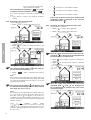
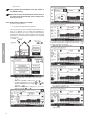
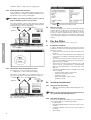
The list below briefly explains what information the unit displays.
The ComfoControl display is a touch screen. All settings can be accessed, adjusted and confirmed simply by touching the screen.
If the function is not
surrounded by a
,
then it is not active
OPEN or CLOSE air supply
Cooling system,
reheater and/or
extractor hood activated
If the function is not
surrounded by a
,
then it is not active
OPEN or CLOSE
air exhaust
Time and date
Current outside temperature
Switch extractor hood
ON or OFF
Actual temperature
(programmable using
MAN function)
Go to SETTINGS screen
(for ventilation and
temperature settings)
Actual ventilation setting
(programmable
using MAN function)
Switch automatic
or manual ventilation
ON or OFF of
Automatic or manual
ventilation activated
System status
and error messages
English
Heat Recovery
system active
2.2
Using ComfoControl
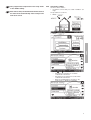
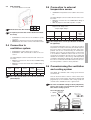
The ComfoControl is used for the following:
-
Go to SYSTEM STATUS
screen (for system data and
error messages)
Heat Recovery
system activated
Bypass
OPEN [=
]
or bypass CLOSED [=
]
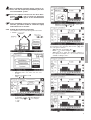
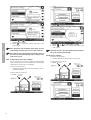
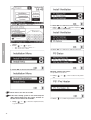
The procedure is as follows:
1. Press "DAY AND TIME", here "
".
Setting time and date.
Setting the comfort temperature.
Setting the ventilation volume.
Switching the extractor hood on/off.
Switching the supply and exhaust fan on/off.
If your ventilation system has a chimney cleaning
function, you will be unable to switch the supply
and exhaust fan on and off.
-
Setting a personal ventilation programme.
Setting a personal temperature programme.
Setting a time delay for a number of ventilation settings.
Setting a temperature correction.
Setting the screen.
Setting the language.
2. Press " " or " " to set the day.
3. Pressleft " " or " " to set the hour.
4. Pressright " " or " " to set the minutes.
A concise explanation of the above listing is given in the paragraphs below.
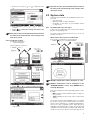
2.2.1 Time and date settings
Use the ComfoControl to:
• Set the date and time.
5. Press "
" to confirm the settings and return to the
main screen.
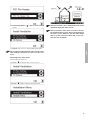
After 30 seconds, the ComfoControl will return to
the main menu automatically. Your settings have
now been saved.
2