1
3
1
2
ENGLISH
4
1
2
3
4
5
6
7
8
5
6
13
8
9
3
9
10
11
12
13
7
10
12
11
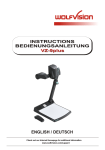
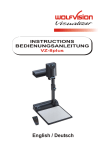
Camera head
Light
IR-receiver
Camera keys, zoom wheel (see page 4)
Close up lens for camera
Pull pad to lift the arm up/down
Power and light on/off key (see page 4)
Connectors
(on the back as shown below)
Light field for slides
Preview monitor
Working surface
Pad to rotate the VZ-9 (see page 7)
IR-remote control
12
Connectors (#8):
14
15
16
17
18
RS 232
EXTERN IN
Y/C
7
DVI
SVGA/XGA/SXGA
14
15
16
17
18
Serial control input RS232 (see page 12)
External input for computers (see page 8)
PAL/NTSC Y/C (S-Video) output (see page 6)
DVI output (see page 6 and 12)
RGBHV output (see page 6)
Setting up
19
20
21
22
USB
LAN
19
20
POWER LB
21 22
USB-port (see page 12)
LAN-port (see page 12)
Power connection 12V
DC-output for lightbox (see page 7)
1. Connect the power pack to the power-input (#21).
2. Connect your display device (projector, monitor, video
conferencing unit etc.) to the appropriate output of the
Visualizer (#16, #17, #18, #19 or #20).
IMPORTANT:
For choosing the right output please read the detailed
description on page 6!
3. Pull the arm upwards using the pull pad (#6).
Camera head and light automatically move into the
working position. The VZ-9 is switched on
automatically.
Power-on preset:
The power-on preset is automatically activated when switching on the unit.
The settings are: Zoom size approx. 20 x 15 cm (A5), Autofocus on, Autoiris on.
3