1
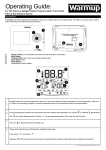
SECTION 1: HOME SCREEN
4.
1
2
3
5
6
7
5.
6.
7.
4
8.
9.
8
9
*When thermostat is in Auto mode:
•
1.
2.
3.
6
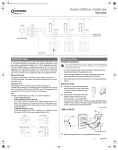
Change date and time
Current temperature
Target temperature or setpoint
Nuheat HOME Thermostat Operating Manual
Operating mode - Auto* means
the thermostat is following the
program/schedule. Manual means
the thermostat is NOT following
the program/schedule and is
being controlled manually.
Refer to section 2.5 on page 10.
Increase the temperature
Decrease the temperature
Heating indicator - when visible,
system is heating
Access Energy Use data
Access Settings menu
•
Resume Programmed Schedule
- only appears if thermostat is in
Auto mode and temperature is
manually increased/decreased
Hold Options - only appears
if thermostat is in Auto mode
and temperature is manually
increased/decreased.
Refer to section 1.1 on page 7.