1
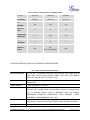
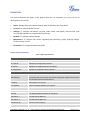
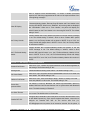
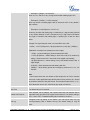
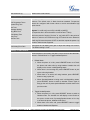
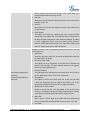
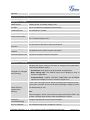
Headset Type
Selects normal RJ9 headset or Plantronics EHS headset for the headset
type.
Configures to enable or disable the speaker to ring when headset is used
Always Ring Speaker
on "Toggle Headset/Speaker" mode. If set to "Yes", when the phone is in
Headset "Toggle Headset/Speaker" mode, both headset and speaker will
ring on incoming call. The default setting is "No".
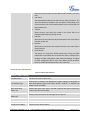
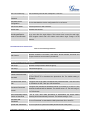
Headset TX gain
Headset RX gain
Handset TX gain
Configures the transmission gain of the headset. The default value is
0dB.
Configures the receiving gain of the headset. The default value is 0dB.
Configures the transmission gain of the handset. The default value is 0
dB.
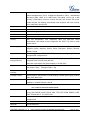
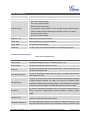
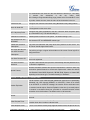
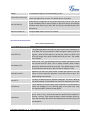
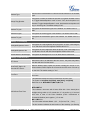
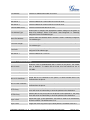
Settings -> LCD Display
Backlight Brightness: Active
Backlight Brightness: Idle
Disable Missed Call Backlight
Configures the LCD brightness when the phone is active. Valid range is
10 to 100 where 100 is the brightest. Default value is 70.
Configures the LCD brightness when the phone is idle. Valid range is 10
to 100 where 0 is off and 100 is the brightest. Default value is 30.
Configures the backlight to be on or off when there is missed call.
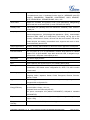
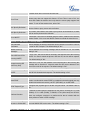
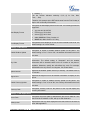
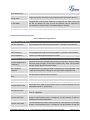
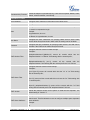
Settings -> Date and Time
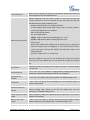
NTP Server
Allow DHCP Option 42
Override NTP Server
Time Zone
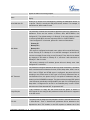
Defines the URL or IP address of the NTP server. The phone may obtain
the date and time from the server.
Defines whether DHCP Option 42 should override NTP server or not.
When enabled, DHCP Option 42 will override the NTP server if it's set up
on the LAN. The default setting is "Yes".
Configures the date/time used on the phone according to the specified
time zone.
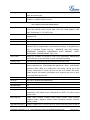
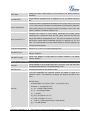
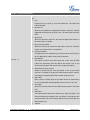
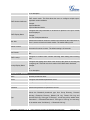
This parameter allows the users to define their own time zone.
The syntax is: std offset dst [offset], start [/time], end [/time]
Default is set to: MTZ+6MDT+5,M4.1.0,M11.1.0
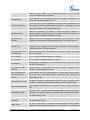
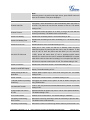
MTZ+6MDT+5
Self-Defined Time Zone
This indicates a time zone with 6 hours offset with 1 hour ahead (when
daylight saving) which is U.S central time. If it is positive (+) if the local
time zone is west of the Prime Meridian (A.K.A: International or
Greenwich Meridian) and negative (-) if it is east.
M4.1.0,M11.1.0
The 1st number indicates Month: 1,2,3.., 12 (for Jan, Feb, .., Dec)
The 2nd number indicates the nth iteration of the weekday: (1st Sunday,
FIRMWARE VERSION 1.0.1.19
GXP2130/GXP2140/GXP2160 ADMINISTRATION GUIDE
Page 36 of 57