1
NEW ARGUS ElECTROMATIC
TAKES All GUESS-WORK
OUT OF PRINT-TIMING
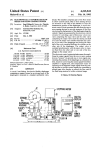
The "Electromatic" Speed Printer is
equippe d with a photo-electric " eye"
which " re ads" the density of your nega tive and giv es p roper exposure or timing in making prints_ Merely set one
indicator for negative density. another
for paper surface being used. and flip
the s tarting switch_ When print is correctly exposed. the light goe s off- Save
pap er by getting a GOOD PRINT EVERY
TIME; eliminate trial and error methods.
List price
THE " ELECTROMA TIC"
....... $35.00
until the counter-button clicks once.
10. Press film advan ce button and turn the
winding knob unti l the counter dial makes
one fu ll revolution before set ting t he counter
di a l to zero.
II. W hen the 36 o r 18 exposures have
been co mpleted, rewind the fi lm by turning
the rewind knob ( 19) in the direction of
the embossed a rrow unti l the winding knob
(8) stops rotating. Never open the ca mera
back unti l the film has been rewound.
CAUT ION.-Wh en winding or rewindin g
the fi lm be sure that its movement is not
restrai ned by pressing the hand aga inst the
free movi ng knob. D o not attempt to force
the film after the counter dia l has stopped
or the fu ll number of exposures are reac hed.
Attempt ing to ge t more pictures may pull
the film from th e magazine and pre ve nt rewind ing. If this shou ld occu r it wi ll be
necessary to remove the fi lm in to ta l darkness.
FOCUSING
Snap the lens assembly f rom the carrying
position to the exposing position by turning
t he lens in either direc ti on u nti l the lock
plate projections ( 10) lea ve the locking lugs
(9) on the camera fro nt plate. W hen returning the lens to the ca rry ing position be sure
that the focu sing ring is at th e infinity
setting.
Carefu l focu sing is an important fact or in
t he success obtained with your mini atu re
ca mera. Close up di stances should not be
9