1
CHAPTER 2. ACCELERATOR PHYSICS
2.4. BEAM DYNAMICS
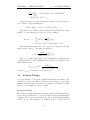
- where n and p are integers. The lowest order resonances, low n values,
are the strongest and most destructive. As the order rises the importance
declines and higher order than 5 can, as a rule of thumb, be neglected.
The combination of horizontal and vertical tunes can lead to resonance,
as well. This occurs in the same way, when the tunes reach values which
fulfils the following equation.
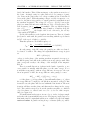
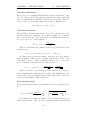
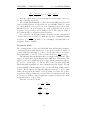
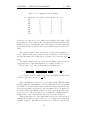
nQh + mQv = p
- where n, m and p are integer values.
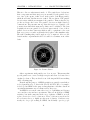
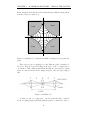
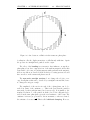
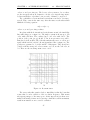
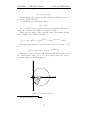
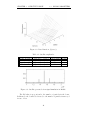
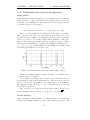
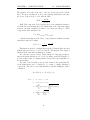
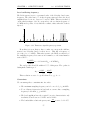
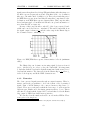
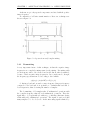
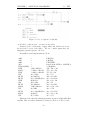
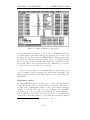
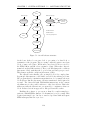
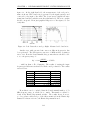
In a plane with the horizontal and vertical tunes as axis’, the instability
lines takes shape as on figure 2.8. The single resonant is shown up to 5th
order, with solid lines. The combined up to 3rd order with dotted. The
position of the point (qh , qv ) should be far from resonances as possible,
thus placed far from lines. The Schottky analysis allow us to zoom in on a
square which is 0.1125 × 0.1125, shown as punctured line on figure 2.8. The
q values are presumed to be in the middle of this square. They should not
coincide with the strong 3rd order resonance, at 5.33, nor the 5th order, at
5.4. These are the most important ones to avoid.
Figure 2.8: Resonant tunes
The reason why this equation leads to instability is, that the beam has
a tune that becomes a fraction of the revolution frequency. This means
subsequent passages of the same spots. A tiny imperfection is then accumulated thousands of times and even a tiny contribution, will in an instant,
result in an unstable non-recoverable oscillation.
27