1
Alter Table Examples | 47
Alter Table With SQL Statements # 2
Though not technically an alter statement, this example shows how to drop a column from a table.
This example removes a column by first renaming a table to a temporary location, then creating a new
table with the original name, then copying the data from the temp table to the new table, and finally
removing the temp table. All this is necessary because you cannot simply drop a column.
This method can also be used to change column names, ordering, or types as well.
Note that we use a transaction here to group all the commands into a single call for efficiency
and performance.
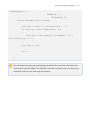
string sql;
// start a transaction to speed up processing
dbManager.BeginTransaction();
// rename our table to a backup name
sql = "ALTER TABLE \"StarShip\" RENAME TO \"Temp_StarShip\"";
dbManager.Execute(sql);
// create a new table with our desired structure, leaving out the
dropped column(s)
sql = "CREATE TABLE \"StarShip\" " +
"(\"StarShipID\" integer PRIMARY KEY
NOT NULL , " +
"\"StarShipName\" varchar(60) NOT NULL , " +
"\"HomePlanet\" varchar(100) DEFAULT Earth , " +
"\"Range\" float NOT NULL , " +
"\"Armor\" float DEFAULT 120 , " +