1
Getting started
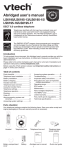
Handset layout
SELECT
Press to store a programming
option or a directory entry.
CHARGE light
On when the handset is
charging in the telephone base
(page 4).
/VOL+
Press to review the directory
when the telephone is not in
use (page 15).
Press and hold to adjust the ringer volume when the telephone is not in use (page 9).
During a call, press to increase
the listening volume. A double
beep sounds at the highest
setting (page 12).
Press to scroll up while
in programming mode or
reviewing the directory, call log
or redial list.
CID/VOLPress to review the call log
when the telephone is not in
use (page 22).
Press and hold to adjust the ringer volume when the telephone is not in use (page 9).
During a call, press to decrease
the listening volume. A double
beep sounds at the lowest
setting (page 12).
Press to scroll down while
in programming mode or
reviewing the directory, call log
or redial list.
OFF
During a call, press to hang up.
While the handset is ringing,
press to silence the ringer
temporarily (page 12).
Press and hold to erase the
MISSED CALLS display when
the telephone is not in use
(page 21).
During programming, press to
exit without making changes.
/FLASH
Press to make or answer a call
(page 12).
During a call, press to answer
an incoming call when you
receive a call waiting alert
(page 12).
TONE
Press to switch to tone dialing
temporarily when using the
pulse service (page 13).
#
Press repeatedly to show other
dialing options when reviewing a call log entry (page 22).
Press to use the CLR VOICEMAIL feature while
in the main menu (page 10).
CHAN/REMOVE
Switch to a clearer channel while
on a call (page 12).
Press and hold to delete all
records in the call log when the
phone is not in use (page 24).
When reviewing the call log or
redial list, press to delete the
desired record (page 24 or 13).
PROG
Press to enter programming
mode while the telephone is not
in use.
REDIAL/PAUSE
Press repeatedly to review the
redial list (page 13).
While dialing or entering
numbers into the directory,
press to insert a dialing pause
(page 12 and 14).