1
MyIsagenix Manual
Prospecting Notifications Page
Note: This page only applies to contacts listed
as Prospects in your Contact List.
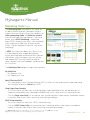
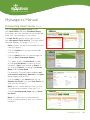
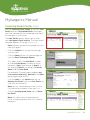
This page displays all notifications of contacts
that have activity in their Contact Details that
you have not viewed yet.
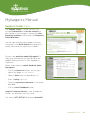
The red circle icon shows how many unread
notifications there are for a particular contact.
If there is more than 1 unread notification for
a contact, only the most recent activity will be
displayed on this page.
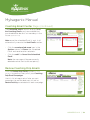
• Click the View/Edit Details icon (yellow
pencil) to see all of the unread notifications
for each contact listed.
The Contact Details window opens.
• Scroll down to the Contact History section to
view all of the notifications. (outlined in red)
Once the Contact Details window is closed, and
the Prospecting Notifications page is refreshed,
the notification for that particular contact will no
longer be displayed.
Note: Any future activity for that contact will
show up in the Prospecting Notifications page,
so you will be able to stay up-to-date on all of
their activity.
UPDATED 3.22.11 | 17