1
Examples
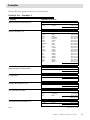
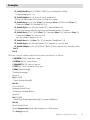
PL_SetBrkRowDiv (eList;0.25;"Black";"Black";0) `print a Break/Row divider
` Configure break level 3, city
PL_SetBrkHeight (eList;3;5;4) `print 5 lines for break level 3
`Print the calculation labels in the column to the left of the salaries
PL_SetBrkText (eList;3;2;"Sum"+Char (13)+"Average"+Char (13)+"Minimum"+Char (13)
+"Maximum"+Char (13)+"Standard Dev";0;3)
PL_SetBrkStyle (eList;3;2;"Lucida Grande";9;1) `make the labels bold
`Print the Sum, Average, Minimum, Maximum, and Standard Deviation for salaries
PL_SetBrkText (eList;3;3;"\Sum"+Char (13)+"\Average"+Char (13)+"\Minimum"+Char (13)
+"\Maximum"+Char (13)+"\Function";0;0)
`Show the number of people in this city
PL_SetBrkText (eList;3;5;Char (13)+"\Count people in \breakValue";1;2)
PL_SetBrkStyle (eList;3;5;"Lucida Grande";9;3) `make the city count info bold
PL_SetBrkColOpt (eList;3;3;0;0.25;"Black";"Black";0) `print a subtotal line in the salary column
End if
End if
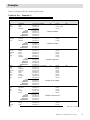
The Break Function callback method for the custom calculation is as follows:
C_INTEGER ($1;$2) `break level, column
C_STRING (82;$3) `column format
C_LONGINT ($4;$5) `start row, end row
C_TEXT ($0) `custom calculation result to print
C_REAL ($result;$average)
`Calculate the average
$result:=0
For ($i;$4;$5)
$result:=$result+aSalary{$i}
End for
$count:=$5-$4+1
$average:=$result/$count
`Calculate the standard deviation
$result:=0
For ($i;$4;$5)
$result:=$result+(($average-aSalary{$i})^2) `square the difference
End for
$result:=$result/$count
$result:=Square root ($result) `take the square root of the variance
$0:=String ($result;$3)
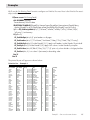
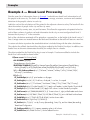
Example 4 — Break Level Processing
111